Hadoop DFS
Rutvik Bapat (12070121667)
About Hadoop
• Hadoop is an open-source software framework for storing data and
running applications on clusters of commodity hardware.
• It provides massive storage for any kind of data, enormous processing
power and the ability to handle virtually limitless concurrent tasks or
jobs.
• The core of Apache Hadoop consists of a storage part (HDFS) and a
processing part (MapReduce).
• Developer – Apache Software Foundation
• Written in Java
Benefits
• Computing power – Distributed computing model ideal for big data
• Flexibility – Store any amount of any kind of data.
• Fault Tolerance - If a node goes down, jobs are automatically
redirected to other nodes. And it automatically stores multiple
copies/replicas of all data.
• Low Cost - The open-source framework is free and uses commodity
hardware to store large quantities of data.
• Scalability – System can be grown easily by adding more nodes.
HDFS Goals
• Detection of faults and automatic recovery.
• High throughput of data access rather than low latency.
• Provide high aggregate data bandwidth and scale to hundreds of
nodes in a single cluster.
• Write-once-read-many access model for files.
• Applications move themselves closer to where the data is located.
• Easily portable.
Some Nomenclature
• A Rack is a collection of nodes that are physically stored close
together and are all on the same network.
• A Cluster is a collection of racks.
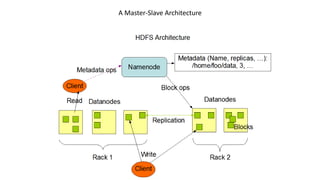
• NameNode – Manages the files system namespace and regulates
access to clients. There is a single NameNode for a cluster.
• DataNode – Serves read, write requests, and performs block creation,
deletion, and replication upon instruction from NameNode.
• A file is split in one or more blocks and a set of blocks are stored in
DataNodes.
• A Hadoop block is a file on the underlying file system. Default size 64
MB. All blocks in a file except the last block are the same size.
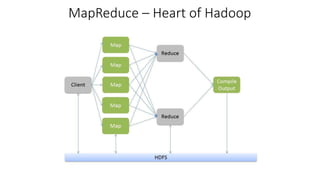
MapReduce – Heart of Hadoop
A Master-Slave Architecture
Replica Management
• The NameNode keeps track of the rack id each DataNode belongs to.
• The default replica placement policy is as follows:
• One third of replicas are on one node
• Two thirds of replicas (including the above) are on one rack
• The other third are evenly distributed across the remaining racks.
• This policy improves write performance without compromising data reliability
or read performance.
• HDFS tries to satisfy a read request from a replica that is closest to the
reader.
NameNode
• Stores the HDFS namespace
• Record every change to file system metadata in a transaction log
called EditLog
• The namespace, including the mapping of blocks to files and file
system properties, is stored in a file called FsImage
• Both EditLog and FsImage are stored on the NameNode’s local file
system
• Keeps an image of the namespace and file blockmap in memory
NameNode
• On startup
• Reads FsImage and EditLog from the disk
• Applies all transactions from the EditLog to the in-memory copy of FsImage
• Flushes the modified FsImage onto the disk
• This is called checkpointing
• Checkpointing only occurs when the NameNode starts up
• Currently no checkpointing after startup
• After checkpointing, the NameNode enters safemode
Safemode
• Replication of data blocks does not occur in safemode
• Receives Heartbeat and Blockreport from DataNodes
• Blockreport contains list of data blocks at a DataNode
• Each block has a specified minimum number of replicas
• A block is considered safely replicated when the minimum number of
replicas has checked in with the NameNode.
• After a configurable percentage of safely replicated data blocks check
in, the NameNode exits safemode.
• Replicates all blocks that were not safely replicated.
DataNode
• Stores HDFS data in files in its local file system
• Has no knowledge about HDFS files
• Stores each HDFS block in a separate file
• Stores files in subdirectories instead of one single directory
• On startup
• Scans through local file system
• Generates a list of all HDFS data blocks
• Sends the report to the NameNode
• This is called the Blockreport
Staging
• A client request to create a file does not reach the NameNode
immediately
• Initially, the client caches file data into a temporary local file
• Once the local file has data over one HDFS block size, the NameNode
is contacted
• The NameNode inserts the file name into the FS and allocates a data
block to it
• It replies with the identity of the DataNode and the destination data
block
• It also sends a list of the DataNodes replicating the block
Staging
• The client then flushes the block of data to the DataNode.
• When a file is closed, the remaining data is also flushed to the
DataNode
• It then tells the NameNode that the file is closed
• The NameNode commits the file creation operation into a persistent
store
Replication Pipelining
• The client sends the data block to the DataNode in small portions
• The DataNode writes each portion to its local filesystem
• It then passes on the portion to another DataNode for replication as
determined by the NameNode
• Each DataNode, on receiving the portion, writes it to their filesystem
and passes it to the next DataNode
• This continues till it reaches the last DataNode holding a replica of the
data block
Thank You!

Hadoop Distributed File System

  • 1.
  • 2.
    About Hadoop • Hadoopis an open-source software framework for storing data and running applications on clusters of commodity hardware. • It provides massive storage for any kind of data, enormous processing power and the ability to handle virtually limitless concurrent tasks or jobs. • The core of Apache Hadoop consists of a storage part (HDFS) and a processing part (MapReduce). • Developer – Apache Software Foundation • Written in Java
  • 3.
    Benefits • Computing power– Distributed computing model ideal for big data • Flexibility – Store any amount of any kind of data. • Fault Tolerance - If a node goes down, jobs are automatically redirected to other nodes. And it automatically stores multiple copies/replicas of all data. • Low Cost - The open-source framework is free and uses commodity hardware to store large quantities of data. • Scalability – System can be grown easily by adding more nodes.
  • 4.
    HDFS Goals • Detectionof faults and automatic recovery. • High throughput of data access rather than low latency. • Provide high aggregate data bandwidth and scale to hundreds of nodes in a single cluster. • Write-once-read-many access model for files. • Applications move themselves closer to where the data is located. • Easily portable.
  • 5.
    Some Nomenclature • ARack is a collection of nodes that are physically stored close together and are all on the same network. • A Cluster is a collection of racks. • NameNode – Manages the files system namespace and regulates access to clients. There is a single NameNode for a cluster. • DataNode – Serves read, write requests, and performs block creation, deletion, and replication upon instruction from NameNode. • A file is split in one or more blocks and a set of blocks are stored in DataNodes. • A Hadoop block is a file on the underlying file system. Default size 64 MB. All blocks in a file except the last block are the same size.
  • 6.
  • 7.
  • 8.
    Replica Management • TheNameNode keeps track of the rack id each DataNode belongs to. • The default replica placement policy is as follows: • One third of replicas are on one node • Two thirds of replicas (including the above) are on one rack • The other third are evenly distributed across the remaining racks. • This policy improves write performance without compromising data reliability or read performance. • HDFS tries to satisfy a read request from a replica that is closest to the reader.
  • 9.
    NameNode • Stores theHDFS namespace • Record every change to file system metadata in a transaction log called EditLog • The namespace, including the mapping of blocks to files and file system properties, is stored in a file called FsImage • Both EditLog and FsImage are stored on the NameNode’s local file system • Keeps an image of the namespace and file blockmap in memory
  • 10.
    NameNode • On startup •Reads FsImage and EditLog from the disk • Applies all transactions from the EditLog to the in-memory copy of FsImage • Flushes the modified FsImage onto the disk • This is called checkpointing • Checkpointing only occurs when the NameNode starts up • Currently no checkpointing after startup • After checkpointing, the NameNode enters safemode
  • 11.
    Safemode • Replication ofdata blocks does not occur in safemode • Receives Heartbeat and Blockreport from DataNodes • Blockreport contains list of data blocks at a DataNode • Each block has a specified minimum number of replicas • A block is considered safely replicated when the minimum number of replicas has checked in with the NameNode. • After a configurable percentage of safely replicated data blocks check in, the NameNode exits safemode. • Replicates all blocks that were not safely replicated.
  • 12.
    DataNode • Stores HDFSdata in files in its local file system • Has no knowledge about HDFS files • Stores each HDFS block in a separate file • Stores files in subdirectories instead of one single directory • On startup • Scans through local file system • Generates a list of all HDFS data blocks • Sends the report to the NameNode • This is called the Blockreport
  • 13.
    Staging • A clientrequest to create a file does not reach the NameNode immediately • Initially, the client caches file data into a temporary local file • Once the local file has data over one HDFS block size, the NameNode is contacted • The NameNode inserts the file name into the FS and allocates a data block to it • It replies with the identity of the DataNode and the destination data block • It also sends a list of the DataNodes replicating the block
  • 14.
    Staging • The clientthen flushes the block of data to the DataNode. • When a file is closed, the remaining data is also flushed to the DataNode • It then tells the NameNode that the file is closed • The NameNode commits the file creation operation into a persistent store
  • 15.
    Replication Pipelining • Theclient sends the data block to the DataNode in small portions • The DataNode writes each portion to its local filesystem • It then passes on the portion to another DataNode for replication as determined by the NameNode • Each DataNode, on receiving the portion, writes it to their filesystem and passes it to the next DataNode • This continues till it reaches the last DataNode holding a replica of the data block
  • 16.