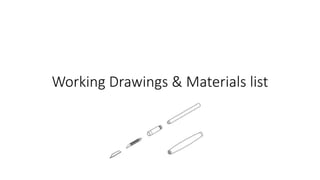
Working Drawings & Materials list
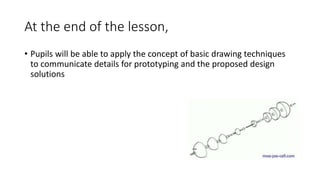
At the end of the lesson,
• Pupils will be able to apply the concept of basic drawing techniques
to communicate details for prototyping and the proposed design
solutions
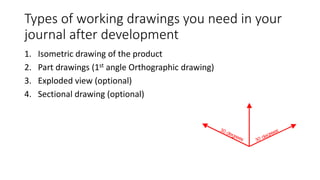
Types of working drawings you need in your
journal after development
1. Isometric drawing of the product
2. Part drawings (1st angle Orthographic drawing)
3. Exploded view (optional)
4. Sectional drawing (optional)
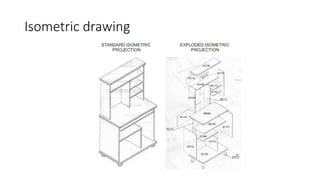
Isometric drawing
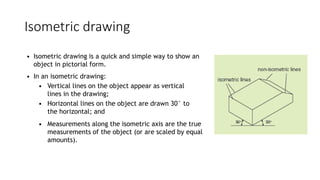
• Isometric drawing is a quick and simple way to show an
object in pictorial form.
• In an isometric drawing:
• Vertical lines on the object appear as vertical
lines in the drawing;
• Horizontal lines on the object are drawn 30° to
the horizontal; and
• Measurements along the isometric axis are the true
measurements of the object (or are scaled by equal
amounts).
Isometric drawing
Isometric drawing
• A bounding box just large enough to contain the object is
first constructed in isometric drawings.
Isometric drawing
• In isometric projection, a circle appears as an
ellipse.
• An ellipse can be sketched by drawing the isometric
square into which it fits, and then marking out the
centre points of each circle.
Part drawings
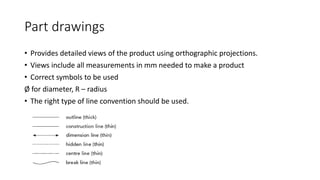
• Provides detailed views of the product using orthographic projections.
• Views include all measurements in mm needed to make a product
• Correct symbols to be used
Ø for diameter, R – radius
• The right type of line convention should be used.
Part drawings
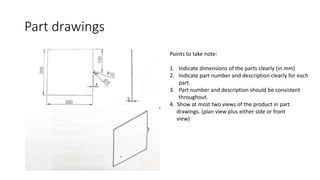
Points to take note:
1. Indicate dimensions of the parts clearly (in mm)
2. Indicate part number and description clearly for each
part.
3. Part number and description should be consistent
throughout.
4. Show at most two views of the product in part
drawings. (plan view plus either side or front
view)
Part drawings
• Hidden detail shows the inside details of an object from the
outside, using thin dashed lines.
Part drawings
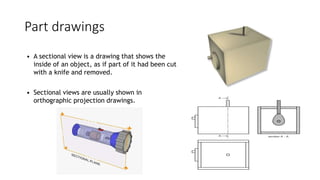
• A sectional view is a drawing that shows the
inside of an object, as if part of it had been cut
with a knife and removed.
• Sectional views are usually shown in
orthographic projection drawings.
Exploded view
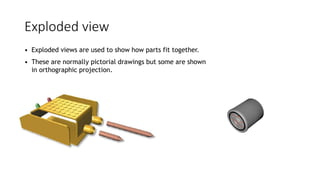
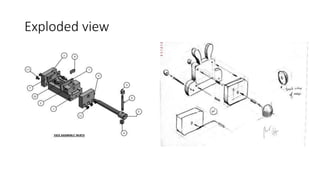
• Exploded views are used to show how parts fit together.
• These are normally pictorial drawings but some are shown
in orthographic projection.
Exploded view
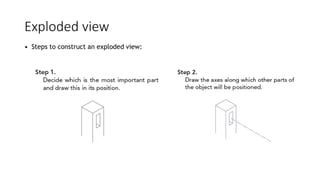
• Steps to construct an exploded view:
Exploded view
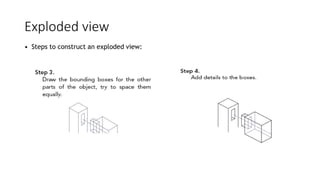
• Steps to construct an exploded view:
Exploded view
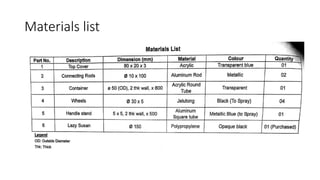
Materials list
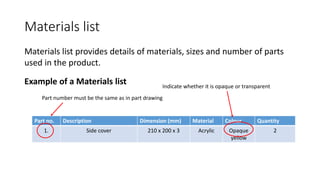
Materials list provides details of materials, sizes and number of parts
used in the product.
Example of a Materials list
Part no. Description Dimension (mm) Material Colour Quantity
1. Side cover 210 x 200 x 3 Acrylic Opaque
yellow
2
Part number must be the same as in part drawing
Indicate whether it is opaque or transparent
Materials list
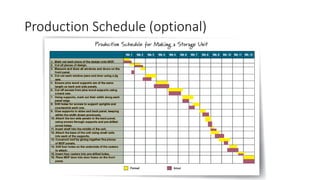
Production Schedule (optional)
• Production schedule shows the stages of production on a single chart. It
includes all the tasks and a timeline.
• It provides a way of checking and monitoring the progress of production.
Production Schedule (optional)

Working drawings & Materials list

  • 1.
    Working Drawings &Materials list
  • 2.
    At the endof the lesson, • Pupils will be able to apply the concept of basic drawing techniques to communicate details for prototyping and the proposed design solutions
  • 3.
    Types of workingdrawings you need in your journal after development 1. Isometric drawing of the product 2. Part drawings (1st angle Orthographic drawing) 3. Exploded view (optional) 4. Sectional drawing (optional)
  • 4.
    Isometric drawing • Isometricdrawing is a quick and simple way to show an object in pictorial form. • In an isometric drawing: • Vertical lines on the object appear as vertical lines in the drawing; • Horizontal lines on the object are drawn 30° to the horizontal; and • Measurements along the isometric axis are the true measurements of the object (or are scaled by equal amounts).
  • 5.
  • 6.
    Isometric drawing • Abounding box just large enough to contain the object is first constructed in isometric drawings.
  • 7.
    Isometric drawing • Inisometric projection, a circle appears as an ellipse. • An ellipse can be sketched by drawing the isometric square into which it fits, and then marking out the centre points of each circle.
  • 8.
    Part drawings • Providesdetailed views of the product using orthographic projections. • Views include all measurements in mm needed to make a product • Correct symbols to be used Ø for diameter, R – radius • The right type of line convention should be used.
  • 9.
    Part drawings Points totake note: 1. Indicate dimensions of the parts clearly (in mm) 2. Indicate part number and description clearly for each part. 3. Part number and description should be consistent throughout. 4. Show at most two views of the product in part drawings. (plan view plus either side or front view)
  • 10.
    Part drawings • Hiddendetail shows the inside details of an object from the outside, using thin dashed lines.
  • 11.
    Part drawings • Asectional view is a drawing that shows the inside of an object, as if part of it had been cut with a knife and removed. • Sectional views are usually shown in orthographic projection drawings.
  • 12.
    Exploded view • Explodedviews are used to show how parts fit together. • These are normally pictorial drawings but some are shown in orthographic projection.
  • 13.
    Exploded view • Stepsto construct an exploded view:
  • 14.
    Exploded view • Stepsto construct an exploded view:
  • 15.
  • 16.
    Materials list Materials listprovides details of materials, sizes and number of parts used in the product. Example of a Materials list Part no. Description Dimension (mm) Material Colour Quantity 1. Side cover 210 x 200 x 3 Acrylic Opaque yellow 2 Part number must be the same as in part drawing Indicate whether it is opaque or transparent
  • 17.
  • 18.
    Production Schedule (optional) •Production schedule shows the stages of production on a single chart. It includes all the tasks and a timeline. • It provides a way of checking and monitoring the progress of production.
  • 19.