Copyright ©2010 by K. Plantenberg
Restricted use only
Chapter 6
Assembly Drawings
Topics
Exercises
Copyright ©2010 by K. Plantenberg
Restricted use only
Assembly : Topics
Summary
6.1) Definitions
6.2) Views Used in Assembly Drawings
6.3) Things to Include/Not Include
6.4) Standard Parts
Copyright ©2010 by K. Plantenberg
Restricted use only
Assembly: Exercises
Exercise 6-1: Section lines in assemblies
Exercise 6-2: Working drawing package
Copyright ©2010 by K. Plantenberg
Restricted use only
Assembly Drawings
Summary
Copyright ©2010 by K. Plantenberg
Restricted use only
Summary
 What will we learn in Chapter 6?
→ How to create an assembly drawing.
→ How to create a standard parts sheet.
 Key Points.
→ Assembly drawings show how individual
parts fit together to make a machine.
→ A standard parts sheet contains purchased
items.
Copyright ©2010 by K. Plantenberg
Restricted use only
Assembly Drawings
6.1) Definitions
Copyright ©2010 by K. Plantenberg
Restricted use only
Assembly Drawing
What is an assembly drawing and why
do we need them?
An assembly drawing is a drawing of an entire
machine or system with all of its components
located and identified.
We need to know how to put the machine
together.
Copyright ©2010 by K. Plantenberg
Restricted use only
Part#’s
Parts List
(Bill of Materials)
Copyright ©2010 by K. Plantenberg
Restricted use only
Copyright ©2010 by K. Plantenberg
Restricted use only
Subassembly Drawing
 Subassembly: Two or more parts that
form a portion of an assembly.
 Can you think of some examples of
subassemblies?
→ A car engine
→ A bike derailleur
→ A compressor in an AC
Copyright ©2010 by K. Plantenberg
Restricted use only
Definitions
 Does an assembly drawing normally
show size?
 How do we show the size of an
individual part?
No. Its job is to locate parts.
A detail drawing is a drawing of an individual
part, which includes an orthographic projection
and dimensions.
Copyright ©2010 by K. Plantenberg
Restricted use only
Working Drawing Package
 Working Drawing Package: A packet of
drawings that gives the specifications
necessary to manufacture a design.
 A typical working drawing package
includes;
→ an assembly drawing,
→ detailed drawings,
→ and a standard parts sheet.
A standard part sheet
contains information about
purchased items and will
be discussed later.
Copyright ©2010 by K. Plantenberg
Restricted use only
Drawing Order
 Drawings included in a working drawing
package should be presented in the
following order.
→ Assembly drawing (first sheet)
→ Part Number 1
→ Part Number 2
→ ....
→ Standard parts sheet (last sheet)
Copyright ©2010 by K. Plantenberg
Restricted use only
Assembly Drawings
6.2) Views Used in Assembly
Drawings
Copyright ©2010 by K. Plantenberg
Restricted use only
Selecting Views
Does an assembly drawing need a
FRONT, TOP and RIGHT SIDE view?
We need as many views as it takes to
identify and locate each part.
→It may only take one view.
Sometimes
Copyright ©2010 by K. Plantenberg
Restricted use only
Needed 3 views to
locate all of the parts.
Copyright ©2010 by K. Plantenberg
Restricted use only
Needed only 1 view to
locate all of the parts.
Copyright ©2010 by K. Plantenberg
Restricted use only
Sectional Views
Sectional views are used quite often when
drawing assemblies.
Why?
Assemblies often have parts fitting into or
overlapping other parts and we need to look
inside the assembly to see clearly.
Copyright ©2010 by K. Plantenberg
Restricted use only
Copyright ©2010 by K. Plantenberg
Restricted use only
Section Lines in Assemblies
Section Lines: Section lines in adjacent
parts are drawn in opposing directions.
→ In the largest area, section lines are drawn at
45°
→ Next largest = 135° (- 45o)
→ Additional areas = 30° and 60°
→ Smaller areas = The distance between the
section lines may also be varied to further
distinguish between parts.
Copyright ©2010 by K. Plantenberg
Restricted use only
Exercise 6-1
Section lines in assemblies
Copyright ©2010 by K. Plantenberg
Restricted use only
Exercise 6-1
 Draw the section lines for the assembly
shown.
Copyright ©2010 by K. Plantenberg
Restricted use only
Fill in the section line is the largest area.
Copyright ©2010 by K. Plantenberg
Restricted use only
Fill in the section line is the 2nd largest area.
45o
Copyright ©2010 by K. Plantenberg
Restricted use only
Fill in the section line is the next largest area.
-45o
Copyright ©2010 by K. Plantenberg
Restricted use only
Fill in the section line is the last area.
-30o, smaller spacing
Copyright ©2010 by K. Plantenberg
Restricted use only
30o
Copyright ©2010 by K. Plantenberg
Restricted use only
Assembly Drawings
6.3) Things to Include/
Not Include
Copyright ©2010 by K. Plantenberg
Restricted use only
Things to Include / Not Include
 When deciding what to include in an
assembly drawing remember;
→ The purpose of an assembly drawing is to
show how the individual parts fit together.
→ It is not used as a manufacturing print.
Copyright ©2010 by K. Plantenberg
Restricted use only
Things to Include / Not Include
 The assembly drawing should not look
overly cluttered.
→ Some lines that are necessary in a detailed
drawing may be left off the assembly
drawing to enhance clearness.
Copyright ©2010 by K. Plantenberg
Restricted use only
Hidden Lines
 Do we include hidden lines?
→ They should be used wherever necessary
for clearness.
→ They should be left off when they impair
clearness.
→ When a section view is used, hidden lines
should not be used in that view.
Usually
Copyright ©2010 by K. Plantenberg
Restricted use only
Dimensions
 Do we include dimensions?
→ As a rule, dimensions are not given on
assembly drawings.
→ If dimensions are given, they are limited to
some function of the object as a whole.
Usually not
Copyright ©2010 by K. Plantenberg
Restricted use only
Identification
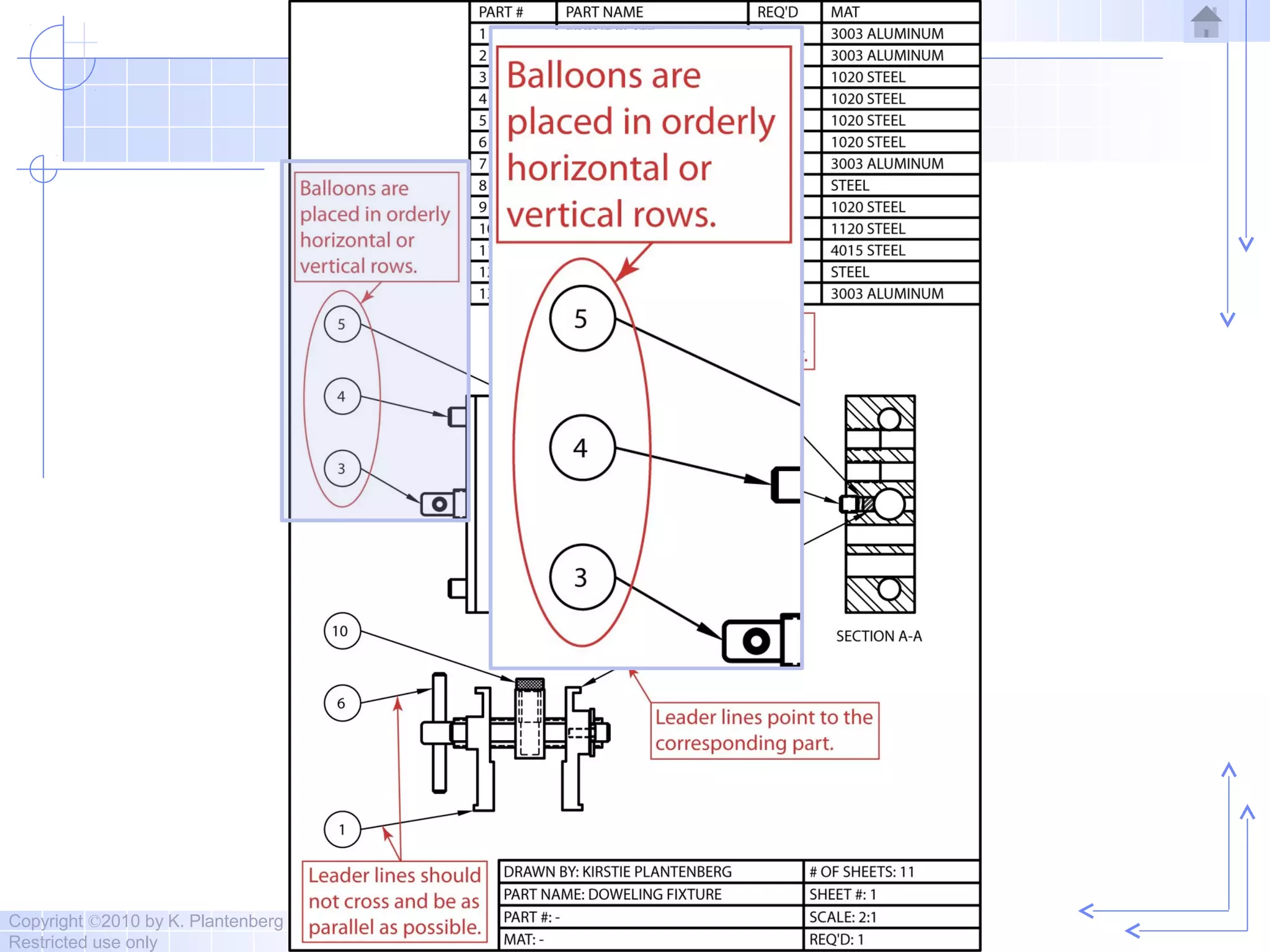
 Ballooning: A part is located and
identified, in an assembly drawing, by
using a circle containing the part number
and a leader line that points to the
corresponding part.
Copyright ©2010 by K. Plantenberg
Restricted use only
Copyright ©2010 by K. Plantenberg
Restricted use only
Copyright ©2010 by K. Plantenberg
Restricted use only
Copyright ©2010 by K. Plantenberg
Restricted use only
Copyright ©2010 by K. Plantenberg
Restricted use only
Parts List / Bill of Material
 The parts list is an itemized list of the
parts that make up the assembled
machine.
Copyright ©2010 by K. Plantenberg
Restricted use only
Parts List / Bill of Material
 Parts lists contain the
→ part number, part name, the number
required and the material of the part.
Copyright ©2010 by K. Plantenberg
Restricted use only
Parts List / Bill of Material
 Parts lists contain the
→ Other information can be included, such as,
stock sizes of materials and weights of the
parts.
Copyright ©2010 by K. Plantenberg
Restricted use only
Parts List / Bill of Material
 Parts are listed in order of their part#.
 Part#’s are usually assigned based on the
size or importance of the part.
Copyright ©2010 by K. Plantenberg
Restricted use only
The parts list may be
placed in the upper
right corner of the
drawing.
- Part# 1 is at the top.
Copyright ©2010 by K. Plantenberg
Restricted use only
The parts list may be
placed in the lower right
corner of the drawing.
- Part# 1 is at the bottom.
Copyright ©2010 by K. Plantenberg
Restricted use only
Assembly Drawings
6.4) Standard Parts
Copyright ©2010 by K. Plantenberg
Restricted use only
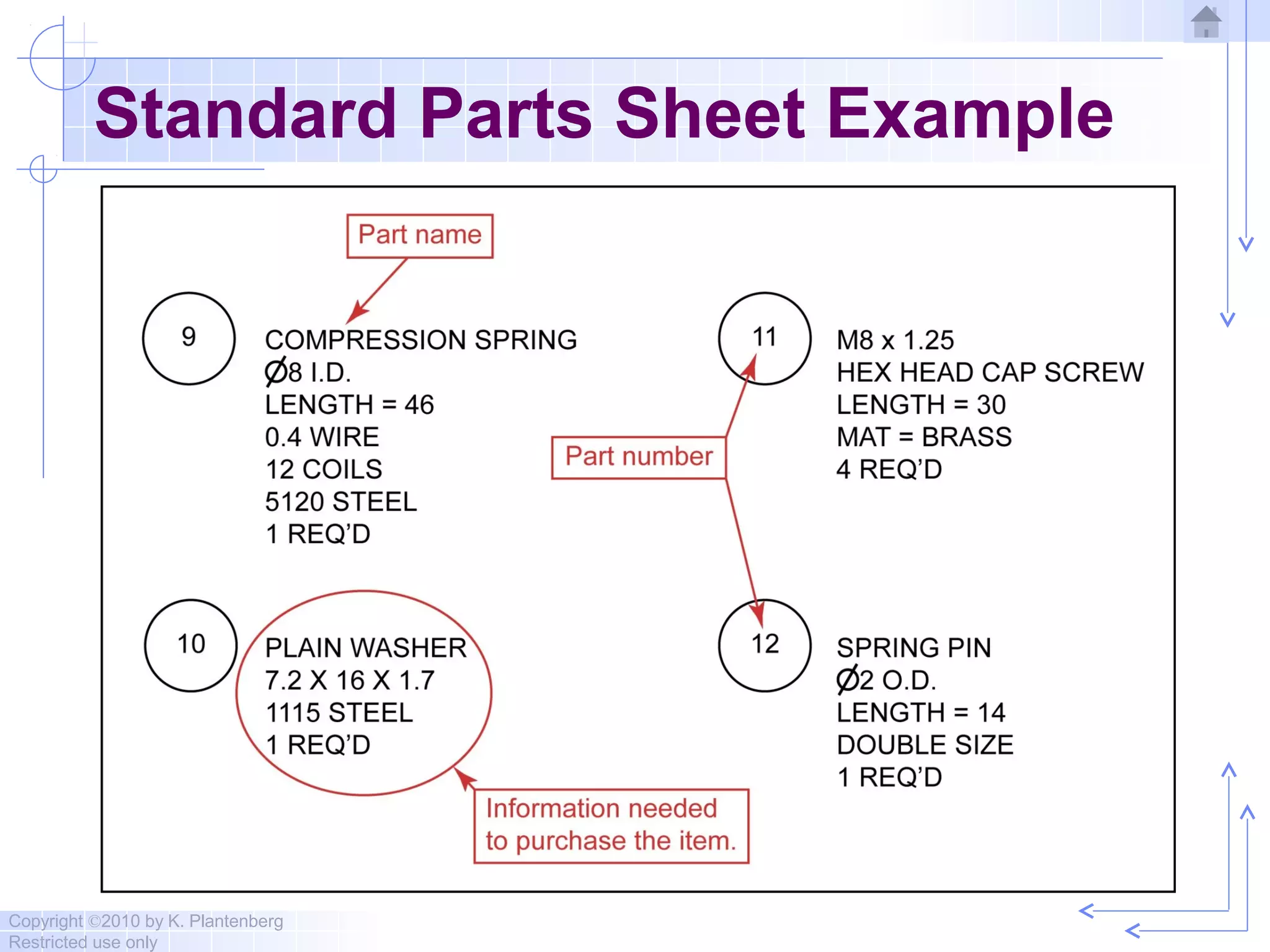
Standard Parts
Standard parts include any part that
can be bought off the shelf.
→ They do not need to be drawn.
→ Purchasing information is given on the
standard parts sheet attached to the back of
the working drawing package.
Copyright ©2010 by K. Plantenberg
Restricted use only
Standard Parts Sheet Example
Copyright ©2010 by K. Plantenberg
Restricted use only
Standard Parts
 What type of information should be
included?
Copyright ©2010 by K. Plantenberg
Restricted use only
General Fastener Specifications
 Thread specification (for threaded fasteners)
 Head/Point style or Shape and Name of
the fastener
 Fastener length or size
 Fastener series
 Material
 Special requirements (coatings, finishes,
specifications to meet)
 REQ’D (i.e. number required)
Copyright ©2010 by K. Plantenberg
Restricted use only
Exercise 6-2
Working drawing package
Copyright ©2010 by K. Plantenberg
Restricted use only
Exercise 6-2
Draw an assembly
drawing of the Clamp
shown.
Draw detailed
drawings of the
individual parts.
Create a standard
parts sheet
Copyright ©2010 by K. Plantenberg
Restricted use only
1. Balloon the
assembly.
Copyright ©2010 by K. Plantenberg
Restricted use only
2. Fill in the parts
list.
Copyright ©2010 by K. Plantenberg
Restricted use only
3. Fill in the title
block.
Copyright ©2010 by K. Plantenberg
Restricted use only
Complete
Copyright ©2010 by K. Plantenberg
Restricted use only
1. Fill in the title block.
Copyright ©2010 by K. Plantenberg
Restricted use only
Complete
Copyright ©2010 by K. Plantenberg
Restricted use only
1. Dimension the part.
Copyright ©2010 by K. Plantenberg
Restricted use only
2. Fill in the title block.
Copyright ©2010 by K. Plantenberg
Restricted use only
Complete
Copyright ©2010 by K. Plantenberg
Restricted use only
1. Draw and dimension Part#3
and fill in the title block.
Copyright ©2010 by K. Plantenberg
Restricted use only
Complete
Copyright ©2010 by K. Plantenberg
Restricted use only
1. Create a standard parts sheet.
Copyright ©2010 by K. Plantenberg
Restricted use only
Complete
Copyright ©2010 by K. Plantenberg
Restricted use only
Assembly Drawings
The End

6 assembly drawings

  • 1.
    Copyright ©2010 byK. Plantenberg Restricted use only Chapter 6 Assembly Drawings Topics Exercises
  • 2.
    Copyright ©2010 byK. Plantenberg Restricted use only Assembly : Topics Summary 6.1) Definitions 6.2) Views Used in Assembly Drawings 6.3) Things to Include/Not Include 6.4) Standard Parts
  • 3.
    Copyright ©2010 byK. Plantenberg Restricted use only Assembly: Exercises Exercise 6-1: Section lines in assemblies Exercise 6-2: Working drawing package
  • 4.
    Copyright ©2010 byK. Plantenberg Restricted use only Assembly Drawings Summary
  • 5.
    Copyright ©2010 byK. Plantenberg Restricted use only Summary  What will we learn in Chapter 6? → How to create an assembly drawing. → How to create a standard parts sheet.  Key Points. → Assembly drawings show how individual parts fit together to make a machine. → A standard parts sheet contains purchased items.
  • 6.
    Copyright ©2010 byK. Plantenberg Restricted use only Assembly Drawings 6.1) Definitions
  • 7.
    Copyright ©2010 byK. Plantenberg Restricted use only Assembly Drawing What is an assembly drawing and why do we need them? An assembly drawing is a drawing of an entire machine or system with all of its components located and identified. We need to know how to put the machine together.
  • 8.
    Copyright ©2010 byK. Plantenberg Restricted use only Part#’s Parts List (Bill of Materials)
  • 9.
    Copyright ©2010 byK. Plantenberg Restricted use only
  • 10.
    Copyright ©2010 byK. Plantenberg Restricted use only Subassembly Drawing  Subassembly: Two or more parts that form a portion of an assembly.  Can you think of some examples of subassemblies? → A car engine → A bike derailleur → A compressor in an AC
  • 11.
    Copyright ©2010 byK. Plantenberg Restricted use only Definitions  Does an assembly drawing normally show size?  How do we show the size of an individual part? No. Its job is to locate parts. A detail drawing is a drawing of an individual part, which includes an orthographic projection and dimensions.
  • 12.
    Copyright ©2010 byK. Plantenberg Restricted use only Working Drawing Package  Working Drawing Package: A packet of drawings that gives the specifications necessary to manufacture a design.  A typical working drawing package includes; → an assembly drawing, → detailed drawings, → and a standard parts sheet. A standard part sheet contains information about purchased items and will be discussed later.
  • 13.
    Copyright ©2010 byK. Plantenberg Restricted use only Drawing Order  Drawings included in a working drawing package should be presented in the following order. → Assembly drawing (first sheet) → Part Number 1 → Part Number 2 → .... → Standard parts sheet (last sheet)
  • 14.
    Copyright ©2010 byK. Plantenberg Restricted use only Assembly Drawings 6.2) Views Used in Assembly Drawings
  • 15.
    Copyright ©2010 byK. Plantenberg Restricted use only Selecting Views Does an assembly drawing need a FRONT, TOP and RIGHT SIDE view? We need as many views as it takes to identify and locate each part. →It may only take one view. Sometimes
  • 16.
    Copyright ©2010 byK. Plantenberg Restricted use only Needed 3 views to locate all of the parts.
  • 17.
    Copyright ©2010 byK. Plantenberg Restricted use only Needed only 1 view to locate all of the parts.
  • 18.
    Copyright ©2010 byK. Plantenberg Restricted use only Sectional Views Sectional views are used quite often when drawing assemblies. Why? Assemblies often have parts fitting into or overlapping other parts and we need to look inside the assembly to see clearly.
  • 19.
    Copyright ©2010 byK. Plantenberg Restricted use only
  • 20.
    Copyright ©2010 byK. Plantenberg Restricted use only Section Lines in Assemblies Section Lines: Section lines in adjacent parts are drawn in opposing directions. → In the largest area, section lines are drawn at 45° → Next largest = 135° (- 45o) → Additional areas = 30° and 60° → Smaller areas = The distance between the section lines may also be varied to further distinguish between parts.
  • 21.
    Copyright ©2010 byK. Plantenberg Restricted use only Exercise 6-1 Section lines in assemblies
  • 22.
    Copyright ©2010 byK. Plantenberg Restricted use only Exercise 6-1  Draw the section lines for the assembly shown.
  • 23.
    Copyright ©2010 byK. Plantenberg Restricted use only Fill in the section line is the largest area.
  • 24.
    Copyright ©2010 byK. Plantenberg Restricted use only Fill in the section line is the 2nd largest area. 45o
  • 25.
    Copyright ©2010 byK. Plantenberg Restricted use only Fill in the section line is the next largest area. -45o
  • 26.
    Copyright ©2010 byK. Plantenberg Restricted use only Fill in the section line is the last area. -30o, smaller spacing
  • 27.
    Copyright ©2010 byK. Plantenberg Restricted use only 30o
  • 28.
    Copyright ©2010 byK. Plantenberg Restricted use only Assembly Drawings 6.3) Things to Include/ Not Include
  • 29.
    Copyright ©2010 byK. Plantenberg Restricted use only Things to Include / Not Include  When deciding what to include in an assembly drawing remember; → The purpose of an assembly drawing is to show how the individual parts fit together. → It is not used as a manufacturing print.
  • 30.
    Copyright ©2010 byK. Plantenberg Restricted use only Things to Include / Not Include  The assembly drawing should not look overly cluttered. → Some lines that are necessary in a detailed drawing may be left off the assembly drawing to enhance clearness.
  • 31.
    Copyright ©2010 byK. Plantenberg Restricted use only Hidden Lines  Do we include hidden lines? → They should be used wherever necessary for clearness. → They should be left off when they impair clearness. → When a section view is used, hidden lines should not be used in that view. Usually
  • 32.
    Copyright ©2010 byK. Plantenberg Restricted use only Dimensions  Do we include dimensions? → As a rule, dimensions are not given on assembly drawings. → If dimensions are given, they are limited to some function of the object as a whole. Usually not
  • 33.
    Copyright ©2010 byK. Plantenberg Restricted use only Identification  Ballooning: A part is located and identified, in an assembly drawing, by using a circle containing the part number and a leader line that points to the corresponding part.
  • 34.
    Copyright ©2010 byK. Plantenberg Restricted use only
  • 35.
    Copyright ©2010 byK. Plantenberg Restricted use only
  • 36.
    Copyright ©2010 byK. Plantenberg Restricted use only
  • 37.
    Copyright ©2010 byK. Plantenberg Restricted use only
  • 38.
    Copyright ©2010 byK. Plantenberg Restricted use only Parts List / Bill of Material  The parts list is an itemized list of the parts that make up the assembled machine.
  • 39.
    Copyright ©2010 byK. Plantenberg Restricted use only Parts List / Bill of Material  Parts lists contain the → part number, part name, the number required and the material of the part.
  • 40.
    Copyright ©2010 byK. Plantenberg Restricted use only Parts List / Bill of Material  Parts lists contain the → Other information can be included, such as, stock sizes of materials and weights of the parts.
  • 41.
    Copyright ©2010 byK. Plantenberg Restricted use only Parts List / Bill of Material  Parts are listed in order of their part#.  Part#’s are usually assigned based on the size or importance of the part.
  • 42.
    Copyright ©2010 byK. Plantenberg Restricted use only The parts list may be placed in the upper right corner of the drawing. - Part# 1 is at the top.
  • 43.
    Copyright ©2010 byK. Plantenberg Restricted use only The parts list may be placed in the lower right corner of the drawing. - Part# 1 is at the bottom.
  • 44.
    Copyright ©2010 byK. Plantenberg Restricted use only Assembly Drawings 6.4) Standard Parts
  • 45.
    Copyright ©2010 byK. Plantenberg Restricted use only Standard Parts Standard parts include any part that can be bought off the shelf. → They do not need to be drawn. → Purchasing information is given on the standard parts sheet attached to the back of the working drawing package.
  • 46.
    Copyright ©2010 byK. Plantenberg Restricted use only Standard Parts Sheet Example
  • 47.
    Copyright ©2010 byK. Plantenberg Restricted use only Standard Parts  What type of information should be included?
  • 48.
    Copyright ©2010 byK. Plantenberg Restricted use only General Fastener Specifications  Thread specification (for threaded fasteners)  Head/Point style or Shape and Name of the fastener  Fastener length or size  Fastener series  Material  Special requirements (coatings, finishes, specifications to meet)  REQ’D (i.e. number required)
  • 49.
    Copyright ©2010 byK. Plantenberg Restricted use only Exercise 6-2 Working drawing package
  • 50.
    Copyright ©2010 byK. Plantenberg Restricted use only Exercise 6-2 Draw an assembly drawing of the Clamp shown. Draw detailed drawings of the individual parts. Create a standard parts sheet
  • 51.
    Copyright ©2010 byK. Plantenberg Restricted use only 1. Balloon the assembly.
  • 52.
    Copyright ©2010 byK. Plantenberg Restricted use only 2. Fill in the parts list.
  • 53.
    Copyright ©2010 byK. Plantenberg Restricted use only 3. Fill in the title block.
  • 54.
    Copyright ©2010 byK. Plantenberg Restricted use only Complete
  • 55.
    Copyright ©2010 byK. Plantenberg Restricted use only 1. Fill in the title block.
  • 56.
    Copyright ©2010 byK. Plantenberg Restricted use only Complete
  • 57.
    Copyright ©2010 byK. Plantenberg Restricted use only 1. Dimension the part.
  • 58.
    Copyright ©2010 byK. Plantenberg Restricted use only 2. Fill in the title block.
  • 59.
    Copyright ©2010 byK. Plantenberg Restricted use only Complete
  • 60.
    Copyright ©2010 byK. Plantenberg Restricted use only 1. Draw and dimension Part#3 and fill in the title block.
  • 61.
    Copyright ©2010 byK. Plantenberg Restricted use only Complete
  • 62.
    Copyright ©2010 byK. Plantenberg Restricted use only 1. Create a standard parts sheet.
  • 63.
    Copyright ©2010 byK. Plantenberg Restricted use only Complete
  • 64.
    Copyright ©2010 byK. Plantenberg Restricted use only Assembly Drawings The End

Editor's Notes

  • #2 <number>
  • #3 <number>
  • #4 <number>
  • #5 <number>
  • #6 <number>
  • #7 <number>
  • #8 <number>
  • #9 <number>
  • #11 <number>
  • #12 <number>
  • #13 <number>
  • #14 <number>
  • #15 <number>
  • #16 <number>
  • #17 <number>
  • #18 <number>
  • #19 <number>
  • #20 <number>
  • #21 <number>
  • #22 <number>
  • #23 <number>
  • #24 <number>
  • #25 <number>
  • #26 <number>
  • #27 <number>
  • #28 <number>
  • #29 <number>
  • #30 <number>
  • #31 <number>
  • #32 <number>
  • #33 <number>
  • #34 <number>
  • #35 <number>
  • #36 <number>
  • #37 <number>
  • #38 <number>
  • #39 <number>
  • #40 <number>
  • #41 <number>
  • #42 <number>
  • #43 <number>
  • #44 <number>
  • #45 <number>
  • #46 <number>
  • #47 <number>
  • #48 <number>
  • #49 <number>
  • #50 <number>
  • #51 <number>
  • #52 <number>
  • #53 <number>
  • #54 <number>
  • #55 <number>
  • #56 <number>
  • #57 <number>
  • #58 <number>
  • #59 <number>
  • #60 <number>
  • #61 <number>
  • #62 <number>
  • #63 <number>
  • #64 <number>
  • #65 <number>