Translating Geek To Attorneys The New Federal Rules of Civil Procedure and How They Can Ruin Your Life!
First - Acknowledgments Jody R. Westby, Distinguished Fellow, CyLab & CEO, Global Cyber Risk LLC Louis Tinto, Director / Risk Manager, CIBC World Markets Jeffrey Ritter, CEO Waters Edge Consulting Gib Sorebo, JD, CISSP, PMP, Senior Information Security Analyst, SAIC, Inc Douglas C. Haney, City Attorney, Carmel, Indiana Martha Dawson, Law Technology News Osterman Research & FaceTime Ashley Evans, VP Identity and Access Management Solutions, SAIC Paul A. Dornfried, VP Identity and Access Management solutions, SAIC Roger Matus, Chief Exec, InBoxer, Inc Nixon Peabody LLP Contoural, Inc Gartner Group K&L Gates
Federal Rules of Civil Procedure (FRCP) The FRCP are a body of rules focused on governing court procedures for managing civil suits in the United States district courts.  The United States Supreme Court is responsible for promulgating the FRCP The United States Congress must approve these rules and any changes made to them. Substantive revisions to the FRCP went into effect on December 1, 2006.  Will have a significant impact on electronic discovery and the management of electronic data within organizations that operate in the United States.  Require organizations to manage their data in such a way that this data can be produced in a timely and complete manner when necessary, such as during legal discovery proceedings.
New Amendments to the FRCP The amendments to Rules 16, 26, 33, 34, 37, 45 and revisions to Form 35 are aimed at electronically stored information (ESI) The amendments attempt to deal with the important issues presented by ESI Not a new idea – 1970 amendment to Rule 34 permitted copying of “data compilations
Who Is Affected? Any organization that can have a civil lawsuit filed against it Obviously applies to all cases filed after Dec. 1, 2006 Supreme Court has determined that cases filed prior to this date could be subject to the FRCP if a court determines that undue delay or burden to the parties involved will not be imposed by adherence to the new rules.
ESI Normally stored in much greater volume than are hard copy documents. Dynamic, in many cases modified simply by turning a computer on and off. Can be incomprehensible when separated from the system(s) that created it. Contains non-apparent information, or metadata, that describes the context of the information and provides other useful and important information.
ESI Specifics Digital Records (aka Electronically Stored Information or ESI) What are we looking for? Where is it? When was it created and how long will it exist? Why do we need it? Who created it and who controls it? Most importantly – HOW do we retrieve it?
Specific Issues For IT Not Reasonably Accessible (NRA) Spoliation Litigation Holds/Document Retention Non-Repudiation/Plausible Deniability
NRA - Considerations What is Hard to Access Today May be Easy Tomorrow What is Easy to Access Today May be Hard Tomorrow Courts May Require NRA Log Similar to Privilege Log:  Problem Is You Know Content of Privileged Data; You Do Not Know Content of NRA, Only Source or Type of Data Distinguish Between “Reasonably Foreseeable as Relevant” and “Reasonably Foreseeable as Discoverable” –  All must be preserved! Courts Have Ability to Shift Costs for NRA Requesting Party May Offer to Share or Pay Costs: This is Not Deciding Factor – Also Have to Consider Responding Party’s Costs and Burden in Reviewing Info for Relevance & Privilege
Examples of Data Not Reasonably Accessible (1) Deleted Data (accidentally & intentionally)  Can also be due to backup system not operating effectively, The process of creating a backup tape may have failed (partially), Error message may or may not have been generated,  Corrective action may or may not have been taken.
Examples of Data Not Reasonably Accessible (2) Non readable data data created on legacy systems & not readily readable on current systems;  encrypted data – may not be unencryptable.
Examples of Data Not Reasonably Accessible (3) Improperly classified / labeled data  Data exists however it may be stored on tapes/files with non-descriptive labels  May be due to the archiving system not designed or functioning properly Unknowingly buried in archives somewhere.
What is Reasonably Accessible? Active, online data Near-line data Some forms of offline storage if kept in readily usable format (not requiring restoration or manipulation to be used)
Litigation Hold Should be placed on documents and email when litigation is “reasonably foreseeable”, for instance:  When a formal complaint, subpoena, or notification of a lawsuit is received Somebody threatens litigation, even verbally by saying, “I am going to sue.” A regulatory or governmental body starts an investigation. An attorney or third-party investigator requests facts related to an incident or dispute.  An incident takes place that results in injury. An employee makes a formal complaint to management, especially when related to personnel issues.
Records Hold Notice Identify “documents,  electronically stored information  and things” potentially relevant to pending legal actions (lawsuits, enforcement actions, investigations, public disclosures, audits). Suspend any actions that could result in the destruction OR alteration of the identified materials.  Notice executes a company’s legal duty to preserve relevant evidence, whether favorable or unfavorable.
Hold Issues – Initiation questions Evaluating and defining the potential scope of preservation Investigating the proper scope using information systems expertise Adequately describing the scope in the notice Notifying all affected employees Periodically reissuing the hold order instructions Confirming employee understanding of instructions
 
Preservation Activity Issues Relevant devices (computers, laptops, PDA’s, phones…) Relevant electronic records (email, documents, video, audio, voice mail, instant message…) Backup tapes Preservation of Metadata Embedded formulae (spread sheets) Database design and format information System and application logs Negligence or lack of evidence policies resulting in spoliation Lack of identification policies or procedures to ensure integrity of documents
Suspension Activity Issues Must suspend destruction of records pursuant to normal retention programs or demonstrate the program was routine, good faith system. Must suspend over-writing of media with new records Must suspend the normal operation of purging programs
Spoliation Sanctions Spoliation is “the destruction or significant alteration of evidence, or the failure to preserve property for another’s use as evidence in pending or reasonably foreseeable litigation.” Mosaid Technologies, Inc. v. Samsung Elec.Corp. (D. NJ 2004)
Sanctions for Spoliation Outright dismissal of the case Exclusion of evidence Adverse jury instruction Exclusion of expert testimony Civil contempt sanctions Awards of attorneys’ fees Fines to counsel
Spoliation Examples (1) Coleman v. Morgan Stanley, (Florida Cir. Ct. 2005), default judgment against Morgan Stanley, $604 million compensatory damages and $850 million punitive damages for failure to produce 2,000 backup tapes QualComm – Sanctioned for spoliation - $30K fine – attorneys referred to State Bar American Home Products (Phen Fen litigation) – didn’t produce relevant email – “Am I off the hook or can I look forward to my waning years signing checks for fat people who are a little afraid of some silly lung problem?”
Spoliation Examples (2) Wachtel v. Health Net, Inc.(NJ District Ct 2006), facts taken as established, exhibits stricken from evidence, witnesses barred, reimbursement of plaintiff’s fees and costs, discovery master paid by defendants, fined for discovery violations. Zubulake v. UBS Warburg (SDNY 2003), adverse inference instruction (emails not produced would have negatively impacted case), defense counsel partly to blame for not locating and producing emails, $29 million damages
Safe Harbor Rule Rule 37   Failure to Make Disclosure or Cooperate in Discovery; Sanctions Creates a "safe harbor" that protects a party from sanctions for failing to provide electronically stored information lost because of the routine, good-faith operation of the party's computer system.
Solutions? Records Management/Retention Policies Link up with Enterprise Security Program Create a special department Backups? Automated Archives
Retention Policies Should be Based on Business Practices Must be Written and Conveyed Must be Monitored and Enforced  Destruction Occurs as Routine, Good Faith Operation of Business Systems  If Retention Policy Not Written, Courts Look to Actual Practice to Determine “Routine, Good Faith Operation” Need Routine to Be Protected Under Rule 37(f) Cannot Develop or Change Retention Policy Once Litigation Commences or It is Reasonably Anticipated
Link to Enterprise Security Program Policies & Procedures Support Data Handling, Retention, Destruction (including change management) Supports Discovery Arguments to Meet Burden of Proof and Not Reasonably Accessible Minimize/Avoid Sanctions for Failure to Produce, Destruction Save on Discovery & Production Costs Provides for Protections of Electronic Production, Web Access, Security Issues Helps Counsel in Managing Forensic Investigations
Special ESI Management Dept Assistance to organization departments in scoping litigation holds, public disclosure requests, and/or digital investigations Litigation hold notice delivery, auditing and follow-up Management and/or fulfillment of digital investigations, computer forensics and reporting Consultation with Legal department and/or departmental management re: electronic records storage, management, retention and recovery Support and collaboration with records management staff Support and collaboration with information security staff Document management (archiving) solution creation, maintenance, support and auditing
Backups as Solution - NOT Backups are NOT an archive Constitute “raw” content and lack any sort of indexing.  Process of producing data from tapes is typically time-consuming, highly disruptive to IT staff and expensive, particularly if third party forensics firms must be used. Integrity of backup tapes is not guaranteed.  Because backups capture a snapshot of data, information generated and deleted between backups will not be captured. A backup is designed to preserve data for short periods in support of the physical infrastructure that an organization maintains, while an archive is designed to preserve information on a long term basis in support of more strategic corporate objectives.
Automated Archives Must be policy driven Must be understood and used by all employees (practice vs. policy) Must be well documented and comprehensible to courts Must manage retention and preservation consistently
Archive Advantages Ease of Capture Ease of Production Regulatory Compliance Storage Management & Optimization Knowledge Management & Data Mining
Archiving Advantages Other Benefits Disaster Recovery (offsite storage) Dispute resolution prior to legal action by preserving all necessary ESI and the context of this data,  Can help an organization to assess the viability of its legal position at the commencement of a legal action.
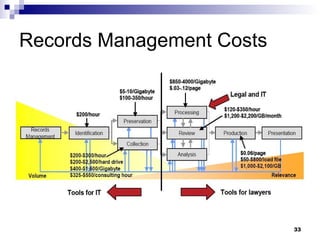
Records Management Costs
ESI Specifics – What Legal Needs From IT What are we looking for? Where is it? When was it created and how long will it exist? Why do we need it? Who created it and who controls it? Most importantly – HOW do we retrieve it?
What Are We Looking For? Email & Attachments Voice Mail Phone records (desk and cell) Instant Messaging and Text Messages Documents of all types (Word, Excel, PDF, etc.) Database information and structure Physical access records Video surveillance tapes Hard-drive contents from laptops and/or desktops Content from other devices (CD/DVD, USB, PDAs, etc) System logs Web sites (surfing habits, actual web content)
Where Is It? File Servers Desktops or Laptops (at home or office) Internet or Phone Service Providers (IM, Text messages, personal email) USB, CD/DVD, Floppy disks, Tape PDAs, Game Consoles, iPods Peer to Peer (P2P) file shares or FTP servers Physical location? Backed up somewhere? Locked up or encrypted? How many copies or versions?
When Was It Created Time stamps – can you trust them? Dates and times on a computer are dependent on its clock being accurately set and running. A clock that is correctly set now may not have been correctly set in the past. Time affected by zones, formats, Daylight Saving – and can be manipulated Document management Records retention rules vs. practices Tape or other backups – procedures for recycling/disposal Procedures for de-provisioning of hardware
Why Do We Need It? Litigation When you know or believe there might be litigation Public Disclosure Must be more than a “substantial” effort http://seattletimes.nwsource.com/html/opinion/2003861187_guestedits31.html   Investigations Must have written procedures (and follow them!) Especially if might go to court or become a Law Enforcement issue (more to come)
Who Created It and Who Controls It We must have systems in place to prove ownership and that documents haven’t been tampered with (non-repudiation) In order to know how to recover data, we need the contact information for the custodian of that data
Non-repudiation Non-repudiation is the concept of ensuring that a  contract cannot later be denied  by either of the parties involved  Non-repudiation is the  opposite of   plausible   deniability .  Identity   is central  to a contract and evidence thereof
Bases of Deniability That is not my signature, or it is but… I didn’t intend to sign it It’s not what I meant when I signed it I didn’t understand it  That’s not what I signed or someone else signed it with my signature My signing device was out of my control Someone forged my signature or copied/stole my identifier
Solutions for Non-repudiation Digital Signatures Must be carefully certified, managed and maintained Must be audited regularly Documented, independently certified hard copies or secondary copies Careful, well documented chain of evidence
Data Map - Described in Rule 26 “…a copy of, or a description by category and location of, all documents, electronically stored information, and tangible things that are in the possession, custody, or control of the party…”
How Do We Retrieve It? Procedures Gathering the data Reporting
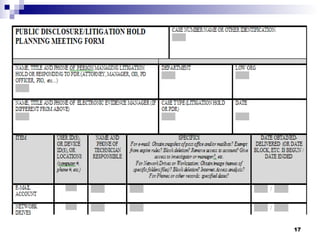
HOW? - Procedures Procedures must be written, published and strictly adhered to Attorney and/or Human Resources and a Supervisor must initiate - using signed form In litigation holds, attorney must deliver and follow up with the hold memo to all involved parties For litigation holds or public disclosures should have a scoping meeting with a check list
HOW? - Gathering the Data Must use forensically sound, court accepted best practices and tools Must document chain of custody Any files copied or device images created must use hashes to verify integrity May need to find or crack passwords Document everything in detailed investigation logs Use recognized forensics tools for copying, imaging and analysis
HOW? - Reporting Create readable reports and statements without jargon or acronyms Reports should contain: copies of or references to all evidence; samples or specifics of requested documents, records, photos, etc.; all investigation and forensic software logs and system reports final findings (not conclusions)
HOW? – Reporting (cont) Depositions and Expert Witness Know your information and all of the details of how it was obtained Only answer what you are asked Don’t be pressured into an answer if you don’t know or can’t give a “yes” or “no” Translate geek to the level a your grandmother would understand
Translating Geek Create a list of relevant electronic records Document: what they are, how they work,  where they live, who controls them (and how to contact), what it will take (time, people and money) to recover them. All in language free from jargon or acronyms that your grandmother would understand.
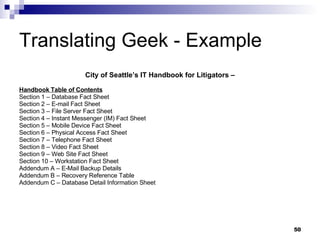
Translating Geek - Example City of Seattle’s IT Handbook for Litigators – Handbook Table of Contents Section 1 – Database Fact Sheet Section 2 – E-mail Fact Sheet Section 3 – File Server Fact Sheet Section 4 – Instant Messenger (IM) Fact Sheet Section 5 – Mobile Device Fact Sheet Section 6 – Physical Access Fact Sheet Section 7 – Telephone Fact Sheet Section 8 – Video Fact Sheet Section 9 – Web Site Fact Sheet Section 10 – Workstation Fact Sheet Addendum A – E-Mail Backup Details Addendum B – Recovery Reference Table Addendum C – Database Detail Information Sheet
Translating Geek – Example (2) Instant Messaging Records Fact Sheet Introduction …  in the past it has been true that many different instant messaging programs have been installed and are were being used by City employees…  Instant Messaging Systems There are many different vendors that offer instant messaging systems. Among the best known are AOL (AIM), Microsoft (MSMessaging), Yahoo, Google, ICQ, and Skype… …  all of these work in a similar way. Once the client software has been installed on the user’s computer, they begin a session by activating the client… When the client is activated it connects to the vendor’s server and that server notes that the user is available for instant messaging. Anyone else who has the same type of client and who has included that person in their contacts list (called a ‘Buddy List’ in some cases) will then see the first user’s name on their instant messenger client, listed as being available.  Either user can then select any of the names on the list of available ‘buddies’ and type in a message. This message is relayed through the vendor’s server and directed ‘instantly’ to the buddy. These same clients can also be used to send files (documents, spreadsheets, graphics, etc.) between connected users. There are settings available on the client software that allow a user to choose to save their sessions. In some cases these logs will be saved to the user’s computer but in others they are saved to a central server. In an enterprise hosted system and in some of the vendor provided systems, a central IT administrator can set policies that automatically configure the clients to log all messaging sessions. Instant Messaging Records Retention …  with a solution in place we will be able to monitor and log all sessions … [users] will be responsible for retaining them based on State and Federal records law if they are considered substantive or vital records. Collection of these records for litigation may require the acquisition of the employee’s workstation hard drive data, or server records if that is where the data has been stored. For access procedures to those resources, please see the related fact sheets for workstations and file servers
Sources for Additional Guidance / Reference E-discovery Law -  http://www.ediscoverylaw.com/news-updates-ediscovery-amendments-to-the-federal-rules-of-civil-procedure-go-into-effect-today.html Northwestern University - http://www.law.northwestern.edu/journals/njtip/v4/n2/3/ LexisNexis -  http://www.lexisnexis.com/applieddiscovery/lawLibrary/courtRules.asp IT Compliance Institute -  http://www.itcinstitute.com/display.aspx?ID=3160   Proposed Rules:  http://www.uscourts.gov/rules/Reports/ST09-2005.pdf KenWithers.com:  http://www.kenwithers.com/rulemaking/index.html Electronic Discovery Law:  http://www.ediscoverylaw.com/ Discovery Resources:  http://discoveryresources.org Death By Email Blog:  http://www.DeathByEmail.com Nixon Peabody:  http://www.nixonpeabody.com/publications_detail3.asp?Type=P&PAID=66&ID=771#ref7
Questions?
Thanks! David R. Matthews, CISSP, CISM, GSEC Deputy CISO City of Seattle 206-233-2764 [email_address]

Translating Geek To Attorneys It Security

  • 1.
    Translating Geek ToAttorneys The New Federal Rules of Civil Procedure and How They Can Ruin Your Life!
  • 2.
    First - AcknowledgmentsJody R. Westby, Distinguished Fellow, CyLab & CEO, Global Cyber Risk LLC Louis Tinto, Director / Risk Manager, CIBC World Markets Jeffrey Ritter, CEO Waters Edge Consulting Gib Sorebo, JD, CISSP, PMP, Senior Information Security Analyst, SAIC, Inc Douglas C. Haney, City Attorney, Carmel, Indiana Martha Dawson, Law Technology News Osterman Research & FaceTime Ashley Evans, VP Identity and Access Management Solutions, SAIC Paul A. Dornfried, VP Identity and Access Management solutions, SAIC Roger Matus, Chief Exec, InBoxer, Inc Nixon Peabody LLP Contoural, Inc Gartner Group K&L Gates
  • 3.
    Federal Rules ofCivil Procedure (FRCP) The FRCP are a body of rules focused on governing court procedures for managing civil suits in the United States district courts. The United States Supreme Court is responsible for promulgating the FRCP The United States Congress must approve these rules and any changes made to them. Substantive revisions to the FRCP went into effect on December 1, 2006. Will have a significant impact on electronic discovery and the management of electronic data within organizations that operate in the United States. Require organizations to manage their data in such a way that this data can be produced in a timely and complete manner when necessary, such as during legal discovery proceedings.
  • 4.
    New Amendments tothe FRCP The amendments to Rules 16, 26, 33, 34, 37, 45 and revisions to Form 35 are aimed at electronically stored information (ESI) The amendments attempt to deal with the important issues presented by ESI Not a new idea – 1970 amendment to Rule 34 permitted copying of “data compilations
  • 5.
    Who Is Affected?Any organization that can have a civil lawsuit filed against it Obviously applies to all cases filed after Dec. 1, 2006 Supreme Court has determined that cases filed prior to this date could be subject to the FRCP if a court determines that undue delay or burden to the parties involved will not be imposed by adherence to the new rules.
  • 6.
    ESI Normally storedin much greater volume than are hard copy documents. Dynamic, in many cases modified simply by turning a computer on and off. Can be incomprehensible when separated from the system(s) that created it. Contains non-apparent information, or metadata, that describes the context of the information and provides other useful and important information.
  • 7.
    ESI Specifics DigitalRecords (aka Electronically Stored Information or ESI) What are we looking for? Where is it? When was it created and how long will it exist? Why do we need it? Who created it and who controls it? Most importantly – HOW do we retrieve it?
  • 8.
    Specific Issues ForIT Not Reasonably Accessible (NRA) Spoliation Litigation Holds/Document Retention Non-Repudiation/Plausible Deniability
  • 9.
    NRA - ConsiderationsWhat is Hard to Access Today May be Easy Tomorrow What is Easy to Access Today May be Hard Tomorrow Courts May Require NRA Log Similar to Privilege Log: Problem Is You Know Content of Privileged Data; You Do Not Know Content of NRA, Only Source or Type of Data Distinguish Between “Reasonably Foreseeable as Relevant” and “Reasonably Foreseeable as Discoverable” – All must be preserved! Courts Have Ability to Shift Costs for NRA Requesting Party May Offer to Share or Pay Costs: This is Not Deciding Factor – Also Have to Consider Responding Party’s Costs and Burden in Reviewing Info for Relevance & Privilege
  • 10.
    Examples of DataNot Reasonably Accessible (1) Deleted Data (accidentally & intentionally) Can also be due to backup system not operating effectively, The process of creating a backup tape may have failed (partially), Error message may or may not have been generated, Corrective action may or may not have been taken.
  • 11.
    Examples of DataNot Reasonably Accessible (2) Non readable data data created on legacy systems & not readily readable on current systems; encrypted data – may not be unencryptable.
  • 12.
    Examples of DataNot Reasonably Accessible (3) Improperly classified / labeled data Data exists however it may be stored on tapes/files with non-descriptive labels May be due to the archiving system not designed or functioning properly Unknowingly buried in archives somewhere.
  • 13.
    What is ReasonablyAccessible? Active, online data Near-line data Some forms of offline storage if kept in readily usable format (not requiring restoration or manipulation to be used)
  • 14.
    Litigation Hold Shouldbe placed on documents and email when litigation is “reasonably foreseeable”, for instance: When a formal complaint, subpoena, or notification of a lawsuit is received Somebody threatens litigation, even verbally by saying, “I am going to sue.” A regulatory or governmental body starts an investigation. An attorney or third-party investigator requests facts related to an incident or dispute. An incident takes place that results in injury. An employee makes a formal complaint to management, especially when related to personnel issues.
  • 15.
    Records Hold NoticeIdentify “documents, electronically stored information and things” potentially relevant to pending legal actions (lawsuits, enforcement actions, investigations, public disclosures, audits). Suspend any actions that could result in the destruction OR alteration of the identified materials. Notice executes a company’s legal duty to preserve relevant evidence, whether favorable or unfavorable.
  • 16.
    Hold Issues –Initiation questions Evaluating and defining the potential scope of preservation Investigating the proper scope using information systems expertise Adequately describing the scope in the notice Notifying all affected employees Periodically reissuing the hold order instructions Confirming employee understanding of instructions
  • 17.
  • 18.
    Preservation Activity IssuesRelevant devices (computers, laptops, PDA’s, phones…) Relevant electronic records (email, documents, video, audio, voice mail, instant message…) Backup tapes Preservation of Metadata Embedded formulae (spread sheets) Database design and format information System and application logs Negligence or lack of evidence policies resulting in spoliation Lack of identification policies or procedures to ensure integrity of documents
  • 19.
    Suspension Activity IssuesMust suspend destruction of records pursuant to normal retention programs or demonstrate the program was routine, good faith system. Must suspend over-writing of media with new records Must suspend the normal operation of purging programs
  • 20.
    Spoliation Sanctions Spoliationis “the destruction or significant alteration of evidence, or the failure to preserve property for another’s use as evidence in pending or reasonably foreseeable litigation.” Mosaid Technologies, Inc. v. Samsung Elec.Corp. (D. NJ 2004)
  • 21.
    Sanctions for SpoliationOutright dismissal of the case Exclusion of evidence Adverse jury instruction Exclusion of expert testimony Civil contempt sanctions Awards of attorneys’ fees Fines to counsel
  • 22.
    Spoliation Examples (1)Coleman v. Morgan Stanley, (Florida Cir. Ct. 2005), default judgment against Morgan Stanley, $604 million compensatory damages and $850 million punitive damages for failure to produce 2,000 backup tapes QualComm – Sanctioned for spoliation - $30K fine – attorneys referred to State Bar American Home Products (Phen Fen litigation) – didn’t produce relevant email – “Am I off the hook or can I look forward to my waning years signing checks for fat people who are a little afraid of some silly lung problem?”
  • 23.
    Spoliation Examples (2)Wachtel v. Health Net, Inc.(NJ District Ct 2006), facts taken as established, exhibits stricken from evidence, witnesses barred, reimbursement of plaintiff’s fees and costs, discovery master paid by defendants, fined for discovery violations. Zubulake v. UBS Warburg (SDNY 2003), adverse inference instruction (emails not produced would have negatively impacted case), defense counsel partly to blame for not locating and producing emails, $29 million damages
  • 24.
    Safe Harbor RuleRule 37 Failure to Make Disclosure or Cooperate in Discovery; Sanctions Creates a "safe harbor" that protects a party from sanctions for failing to provide electronically stored information lost because of the routine, good-faith operation of the party's computer system.
  • 25.
    Solutions? Records Management/RetentionPolicies Link up with Enterprise Security Program Create a special department Backups? Automated Archives
  • 26.
    Retention Policies Shouldbe Based on Business Practices Must be Written and Conveyed Must be Monitored and Enforced Destruction Occurs as Routine, Good Faith Operation of Business Systems If Retention Policy Not Written, Courts Look to Actual Practice to Determine “Routine, Good Faith Operation” Need Routine to Be Protected Under Rule 37(f) Cannot Develop or Change Retention Policy Once Litigation Commences or It is Reasonably Anticipated
  • 27.
    Link to EnterpriseSecurity Program Policies & Procedures Support Data Handling, Retention, Destruction (including change management) Supports Discovery Arguments to Meet Burden of Proof and Not Reasonably Accessible Minimize/Avoid Sanctions for Failure to Produce, Destruction Save on Discovery & Production Costs Provides for Protections of Electronic Production, Web Access, Security Issues Helps Counsel in Managing Forensic Investigations
  • 28.
    Special ESI ManagementDept Assistance to organization departments in scoping litigation holds, public disclosure requests, and/or digital investigations Litigation hold notice delivery, auditing and follow-up Management and/or fulfillment of digital investigations, computer forensics and reporting Consultation with Legal department and/or departmental management re: electronic records storage, management, retention and recovery Support and collaboration with records management staff Support and collaboration with information security staff Document management (archiving) solution creation, maintenance, support and auditing
  • 29.
    Backups as Solution- NOT Backups are NOT an archive Constitute “raw” content and lack any sort of indexing. Process of producing data from tapes is typically time-consuming, highly disruptive to IT staff and expensive, particularly if third party forensics firms must be used. Integrity of backup tapes is not guaranteed. Because backups capture a snapshot of data, information generated and deleted between backups will not be captured. A backup is designed to preserve data for short periods in support of the physical infrastructure that an organization maintains, while an archive is designed to preserve information on a long term basis in support of more strategic corporate objectives.
  • 30.
    Automated Archives Mustbe policy driven Must be understood and used by all employees (practice vs. policy) Must be well documented and comprehensible to courts Must manage retention and preservation consistently
  • 31.
    Archive Advantages Easeof Capture Ease of Production Regulatory Compliance Storage Management & Optimization Knowledge Management & Data Mining
  • 32.
    Archiving Advantages OtherBenefits Disaster Recovery (offsite storage) Dispute resolution prior to legal action by preserving all necessary ESI and the context of this data, Can help an organization to assess the viability of its legal position at the commencement of a legal action.
  • 33.
  • 34.
    ESI Specifics –What Legal Needs From IT What are we looking for? Where is it? When was it created and how long will it exist? Why do we need it? Who created it and who controls it? Most importantly – HOW do we retrieve it?
  • 35.
    What Are WeLooking For? Email & Attachments Voice Mail Phone records (desk and cell) Instant Messaging and Text Messages Documents of all types (Word, Excel, PDF, etc.) Database information and structure Physical access records Video surveillance tapes Hard-drive contents from laptops and/or desktops Content from other devices (CD/DVD, USB, PDAs, etc) System logs Web sites (surfing habits, actual web content)
  • 36.
    Where Is It?File Servers Desktops or Laptops (at home or office) Internet or Phone Service Providers (IM, Text messages, personal email) USB, CD/DVD, Floppy disks, Tape PDAs, Game Consoles, iPods Peer to Peer (P2P) file shares or FTP servers Physical location? Backed up somewhere? Locked up or encrypted? How many copies or versions?
  • 37.
    When Was ItCreated Time stamps – can you trust them? Dates and times on a computer are dependent on its clock being accurately set and running. A clock that is correctly set now may not have been correctly set in the past. Time affected by zones, formats, Daylight Saving – and can be manipulated Document management Records retention rules vs. practices Tape or other backups – procedures for recycling/disposal Procedures for de-provisioning of hardware
  • 38.
    Why Do WeNeed It? Litigation When you know or believe there might be litigation Public Disclosure Must be more than a “substantial” effort http://seattletimes.nwsource.com/html/opinion/2003861187_guestedits31.html Investigations Must have written procedures (and follow them!) Especially if might go to court or become a Law Enforcement issue (more to come)
  • 39.
    Who Created Itand Who Controls It We must have systems in place to prove ownership and that documents haven’t been tampered with (non-repudiation) In order to know how to recover data, we need the contact information for the custodian of that data
  • 40.
    Non-repudiation Non-repudiation isthe concept of ensuring that a contract cannot later be denied by either of the parties involved Non-repudiation is the opposite of plausible deniability . Identity is central to a contract and evidence thereof
  • 41.
    Bases of DeniabilityThat is not my signature, or it is but… I didn’t intend to sign it It’s not what I meant when I signed it I didn’t understand it That’s not what I signed or someone else signed it with my signature My signing device was out of my control Someone forged my signature or copied/stole my identifier
  • 42.
    Solutions for Non-repudiationDigital Signatures Must be carefully certified, managed and maintained Must be audited regularly Documented, independently certified hard copies or secondary copies Careful, well documented chain of evidence
  • 43.
    Data Map -Described in Rule 26 “…a copy of, or a description by category and location of, all documents, electronically stored information, and tangible things that are in the possession, custody, or control of the party…”
  • 44.
    How Do WeRetrieve It? Procedures Gathering the data Reporting
  • 45.
    HOW? - ProceduresProcedures must be written, published and strictly adhered to Attorney and/or Human Resources and a Supervisor must initiate - using signed form In litigation holds, attorney must deliver and follow up with the hold memo to all involved parties For litigation holds or public disclosures should have a scoping meeting with a check list
  • 46.
    HOW? - Gatheringthe Data Must use forensically sound, court accepted best practices and tools Must document chain of custody Any files copied or device images created must use hashes to verify integrity May need to find or crack passwords Document everything in detailed investigation logs Use recognized forensics tools for copying, imaging and analysis
  • 47.
    HOW? - ReportingCreate readable reports and statements without jargon or acronyms Reports should contain: copies of or references to all evidence; samples or specifics of requested documents, records, photos, etc.; all investigation and forensic software logs and system reports final findings (not conclusions)
  • 48.
    HOW? – Reporting(cont) Depositions and Expert Witness Know your information and all of the details of how it was obtained Only answer what you are asked Don’t be pressured into an answer if you don’t know or can’t give a “yes” or “no” Translate geek to the level a your grandmother would understand
  • 49.
    Translating Geek Createa list of relevant electronic records Document: what they are, how they work, where they live, who controls them (and how to contact), what it will take (time, people and money) to recover them. All in language free from jargon or acronyms that your grandmother would understand.
  • 50.
    Translating Geek -Example City of Seattle’s IT Handbook for Litigators – Handbook Table of Contents Section 1 – Database Fact Sheet Section 2 – E-mail Fact Sheet Section 3 – File Server Fact Sheet Section 4 – Instant Messenger (IM) Fact Sheet Section 5 – Mobile Device Fact Sheet Section 6 – Physical Access Fact Sheet Section 7 – Telephone Fact Sheet Section 8 – Video Fact Sheet Section 9 – Web Site Fact Sheet Section 10 – Workstation Fact Sheet Addendum A – E-Mail Backup Details Addendum B – Recovery Reference Table Addendum C – Database Detail Information Sheet
  • 51.
    Translating Geek –Example (2) Instant Messaging Records Fact Sheet Introduction … in the past it has been true that many different instant messaging programs have been installed and are were being used by City employees… Instant Messaging Systems There are many different vendors that offer instant messaging systems. Among the best known are AOL (AIM), Microsoft (MSMessaging), Yahoo, Google, ICQ, and Skype… … all of these work in a similar way. Once the client software has been installed on the user’s computer, they begin a session by activating the client… When the client is activated it connects to the vendor’s server and that server notes that the user is available for instant messaging. Anyone else who has the same type of client and who has included that person in their contacts list (called a ‘Buddy List’ in some cases) will then see the first user’s name on their instant messenger client, listed as being available. Either user can then select any of the names on the list of available ‘buddies’ and type in a message. This message is relayed through the vendor’s server and directed ‘instantly’ to the buddy. These same clients can also be used to send files (documents, spreadsheets, graphics, etc.) between connected users. There are settings available on the client software that allow a user to choose to save their sessions. In some cases these logs will be saved to the user’s computer but in others they are saved to a central server. In an enterprise hosted system and in some of the vendor provided systems, a central IT administrator can set policies that automatically configure the clients to log all messaging sessions. Instant Messaging Records Retention … with a solution in place we will be able to monitor and log all sessions … [users] will be responsible for retaining them based on State and Federal records law if they are considered substantive or vital records. Collection of these records for litigation may require the acquisition of the employee’s workstation hard drive data, or server records if that is where the data has been stored. For access procedures to those resources, please see the related fact sheets for workstations and file servers
  • 52.
    Sources for AdditionalGuidance / Reference E-discovery Law - http://www.ediscoverylaw.com/news-updates-ediscovery-amendments-to-the-federal-rules-of-civil-procedure-go-into-effect-today.html Northwestern University - http://www.law.northwestern.edu/journals/njtip/v4/n2/3/ LexisNexis - http://www.lexisnexis.com/applieddiscovery/lawLibrary/courtRules.asp IT Compliance Institute - http://www.itcinstitute.com/display.aspx?ID=3160 Proposed Rules: http://www.uscourts.gov/rules/Reports/ST09-2005.pdf KenWithers.com: http://www.kenwithers.com/rulemaking/index.html Electronic Discovery Law: http://www.ediscoverylaw.com/ Discovery Resources: http://discoveryresources.org Death By Email Blog: http://www.DeathByEmail.com Nixon Peabody: http://www.nixonpeabody.com/publications_detail3.asp?Type=P&PAID=66&ID=771#ref7
  • 53.
  • 54.
    Thanks! David R.Matthews, CISSP, CISM, GSEC Deputy CISO City of Seattle 206-233-2764 [email_address]