CONTENTS
 Introduction
 What is USB?
 Why go wireless?
 USB v/s WUSB
 WUSB (Wireless USB)
 Topology requirements
 WUSB devices – Dongle, WUSB 4-port hub, Wireless
printers
 Advantages Of Wireless USB
Contents (contd.)
 Future Scope
 Conclusions
 Bibliography
INTRODUCTION
 Wireless USB is a wireless technology which enables
the high speed computer peripheral interface, USB,
wireless.
 It is a wire replacement of existing USB technology
using a Multi Band Frequency Division Multiplexing
radio technique.
 The bus allows peripherals to be attached, configured,
used, and detached while the host and other
peripherals are in operation.
 The major WUSB promoters are HP, Intel, Microsoft,
NEC Philips, & Samsung.
What is USB?
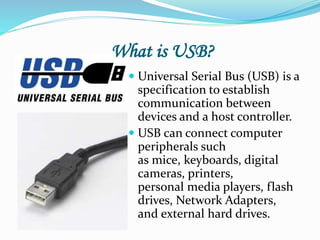
 Universal Serial Bus (USB) is a
specification to establish
communication between
devices and a host controller.
 USB can connect computer
peripherals such
as mice, keyboards, digital
cameras, printers,
personal media players, flash
drives, Network Adapters,
and external hard drives.
Why go wireless?
 USB is a fast growing technology and now above 80%
of all devices supports USB connectivity to a PC. It
will be a great reduce of number of wires and cost for
paying the cables, if the existing USB technique goes
wireless.
 Wireless USB is a short-range, high-
bandwidth wireless radio communication protocol
created by the Wireless USB Promoter Group.
 Wireless USB supports a mixture of both high speed
and low speed devices and can be operated in multiple
data transfer rates.
USB v/s WUSB
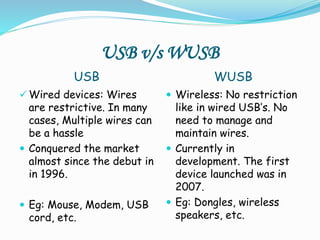
USB WUSB
 Wired devices: Wires
are restrictive. In many
cases, Multiple wires can
be a hassle
 Conquered the market
almost since the debut in
in 1996.
 Eg: Mouse, Modem, USB
cord, etc.
 Wireless: No restriction
like in wired USB’s. No
need to manage and
maintain wires.
 Currently in
development. The first
device launched was in
2007.
 Eg: Dongles, wireless
speakers, etc.
WUSB
 Wireless USB is a logical bus that supports data
exchange between a host device (typically a PC) and a
wide range of simultaneously accessible peripherals.
The attached peripherals share bandwidth through a
host-scheduled, TDMA-based protocol.
 The bus allows peripherals to be attached, configured,
used, and detached while the host and other
peripherals are in operation.
Requirements Of Topology
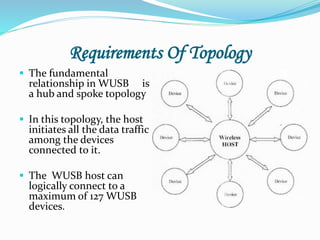
 The fundamental
relationship in WUSB is
a hub and spoke topology
 In this topology, the host
initiates all the data traffic
among the devices
connected to it.
 The WUSB host can
logically connect to a
maximum of 127 WUSB
devices.
WIRELESS USB DEVICES
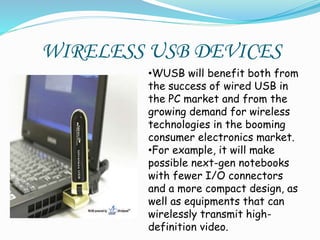
•WUSB will benefit both from
the success of wired USB in
the PC market and from the
growing demand for wireless
technologies in the booming
consumer electronics market.
•For example, it will make
possible next-gen notebooks
with fewer I/O connectors
and a more compact design, as
well as equipments that can
wirelessly transmit high-
definition video.
DONGLE
 The Wireless-N USB Dongle can be installed in most
notebooks or desktops and provides true flexibility by
allowing the computer to be positioned almost
anywhere in the building without the cost and hassle
of running network cables.
• It is 6 times faster than Wireless-G , provides
maximum wireless security and Supports operating
system like Windows 2000/XP/XP64/7/Windows
Vista .
• Ease of Installation and Use
WUSB 4 port HUB
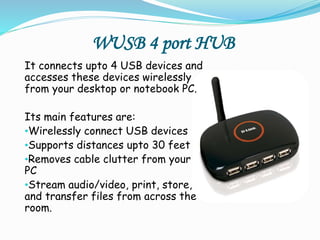
It connects upto 4 USB devices and
accesses these devices wirelessly
from your desktop or notebook PC.
Its main features are:
•Wirelessly connect USB devices
•Supports distances upto 30 feet
•Removes cable clutter from your
PC
•Stream audio/video, print, store,
and transfer files from across the
room.
Wireless Printers
 It is always a better option to keep a wireless printer
in an office or a cyber café or at places where
multiple computers can be used. Thus we can avoid the
clumsiness.
 You eliminate the necessity of having your printer be
in the same location as the computer from which you
want to print. You can now place the wireless printer
wherever you wish in your home or office.
 Today's laptops are almost always equiped with Wi-Fi,
making it simple and easy to wirelessly connect and
use your printer.
Advantages Of WUSB
 Gives way to much compact and revolutionary designs.
 Simple, low-cost implementation Implementation.
 An easy migration path To enable an easy migration
path from wired USB, WUSB will maintain the same
usage models and architecture.
 Similar level of performance.
 Restriction and hassle free.
FUTURE
 In future, every mobile phones, PDA's, Keyboard,
Mice, Monitors,Projectors, External Storage, etc will
become wireless. Today wireless USB is in the
developing stage. But has already dominate d the
market.
 Many companies like Samsung, Intel are now joining
the Wireless USB promoters group (founded in
february 2004) and soon every product with a USB
connectivity will enable Wireless USB.
Conclusion
 Wireless USB offers more band width than any other
current wireless technology. Its power management
and security features will enable it to wipe out all the
current wireless personal interconnect and tomorrow
an office or a home computer will be cable free and
inexpensive.
 Ease of installation and usage makes Wireless USB
the most accepted Wireless technology by the
consumers.
 The world is soon about to get one more step closer to
“wirelessness”.
Bibliography
 www.usb.org
 www.wikipedia.org
 www.intel.com
 www.techonline.com
THANKING YOU
for your time..

Wireless USB

  • 2.
    CONTENTS  Introduction  Whatis USB?  Why go wireless?  USB v/s WUSB  WUSB (Wireless USB)  Topology requirements  WUSB devices – Dongle, WUSB 4-port hub, Wireless printers  Advantages Of Wireless USB
  • 3.
    Contents (contd.)  FutureScope  Conclusions  Bibliography
  • 4.
    INTRODUCTION  Wireless USBis a wireless technology which enables the high speed computer peripheral interface, USB, wireless.  It is a wire replacement of existing USB technology using a Multi Band Frequency Division Multiplexing radio technique.  The bus allows peripherals to be attached, configured, used, and detached while the host and other peripherals are in operation.  The major WUSB promoters are HP, Intel, Microsoft, NEC Philips, & Samsung.
  • 5.
    What is USB? Universal Serial Bus (USB) is a specification to establish communication between devices and a host controller.  USB can connect computer peripherals such as mice, keyboards, digital cameras, printers, personal media players, flash drives, Network Adapters, and external hard drives.
  • 6.
    Why go wireless? USB is a fast growing technology and now above 80% of all devices supports USB connectivity to a PC. It will be a great reduce of number of wires and cost for paying the cables, if the existing USB technique goes wireless.  Wireless USB is a short-range, high- bandwidth wireless radio communication protocol created by the Wireless USB Promoter Group.  Wireless USB supports a mixture of both high speed and low speed devices and can be operated in multiple data transfer rates.
  • 7.
    USB v/s WUSB USBWUSB  Wired devices: Wires are restrictive. In many cases, Multiple wires can be a hassle  Conquered the market almost since the debut in in 1996.  Eg: Mouse, Modem, USB cord, etc.  Wireless: No restriction like in wired USB’s. No need to manage and maintain wires.  Currently in development. The first device launched was in 2007.  Eg: Dongles, wireless speakers, etc.
  • 8.
    WUSB  Wireless USBis a logical bus that supports data exchange between a host device (typically a PC) and a wide range of simultaneously accessible peripherals. The attached peripherals share bandwidth through a host-scheduled, TDMA-based protocol.  The bus allows peripherals to be attached, configured, used, and detached while the host and other peripherals are in operation.
  • 9.
    Requirements Of Topology The fundamental relationship in WUSB is a hub and spoke topology  In this topology, the host initiates all the data traffic among the devices connected to it.  The WUSB host can logically connect to a maximum of 127 WUSB devices.
  • 10.
    WIRELESS USB DEVICES •WUSBwill benefit both from the success of wired USB in the PC market and from the growing demand for wireless technologies in the booming consumer electronics market. •For example, it will make possible next-gen notebooks with fewer I/O connectors and a more compact design, as well as equipments that can wirelessly transmit high- definition video.
  • 11.
    DONGLE  The Wireless-NUSB Dongle can be installed in most notebooks or desktops and provides true flexibility by allowing the computer to be positioned almost anywhere in the building without the cost and hassle of running network cables. • It is 6 times faster than Wireless-G , provides maximum wireless security and Supports operating system like Windows 2000/XP/XP64/7/Windows Vista . • Ease of Installation and Use
  • 12.
    WUSB 4 portHUB It connects upto 4 USB devices and accesses these devices wirelessly from your desktop or notebook PC. Its main features are: •Wirelessly connect USB devices •Supports distances upto 30 feet •Removes cable clutter from your PC •Stream audio/video, print, store, and transfer files from across the room.
  • 13.
    Wireless Printers  Itis always a better option to keep a wireless printer in an office or a cyber café or at places where multiple computers can be used. Thus we can avoid the clumsiness.  You eliminate the necessity of having your printer be in the same location as the computer from which you want to print. You can now place the wireless printer wherever you wish in your home or office.  Today's laptops are almost always equiped with Wi-Fi, making it simple and easy to wirelessly connect and use your printer.
  • 14.
    Advantages Of WUSB Gives way to much compact and revolutionary designs.  Simple, low-cost implementation Implementation.  An easy migration path To enable an easy migration path from wired USB, WUSB will maintain the same usage models and architecture.  Similar level of performance.  Restriction and hassle free.
  • 15.
    FUTURE  In future,every mobile phones, PDA's, Keyboard, Mice, Monitors,Projectors, External Storage, etc will become wireless. Today wireless USB is in the developing stage. But has already dominate d the market.  Many companies like Samsung, Intel are now joining the Wireless USB promoters group (founded in february 2004) and soon every product with a USB connectivity will enable Wireless USB.
  • 16.
    Conclusion  Wireless USBoffers more band width than any other current wireless technology. Its power management and security features will enable it to wipe out all the current wireless personal interconnect and tomorrow an office or a home computer will be cable free and inexpensive.  Ease of installation and usage makes Wireless USB the most accepted Wireless technology by the consumers.  The world is soon about to get one more step closer to “wirelessness”.
  • 17.
    Bibliography  www.usb.org  www.wikipedia.org www.intel.com  www.techonline.com
  • 18.