Copyright © 2013, Oracle and/or its affiliates. All rights reserved.1
INSTANTIS
EnterpriseTrack
What’s New in
Instantis 8.5, 8.6, and 8.7
March 2014
Copyright © 2013, Oracle and/or its affiliates. All rights reserved.3
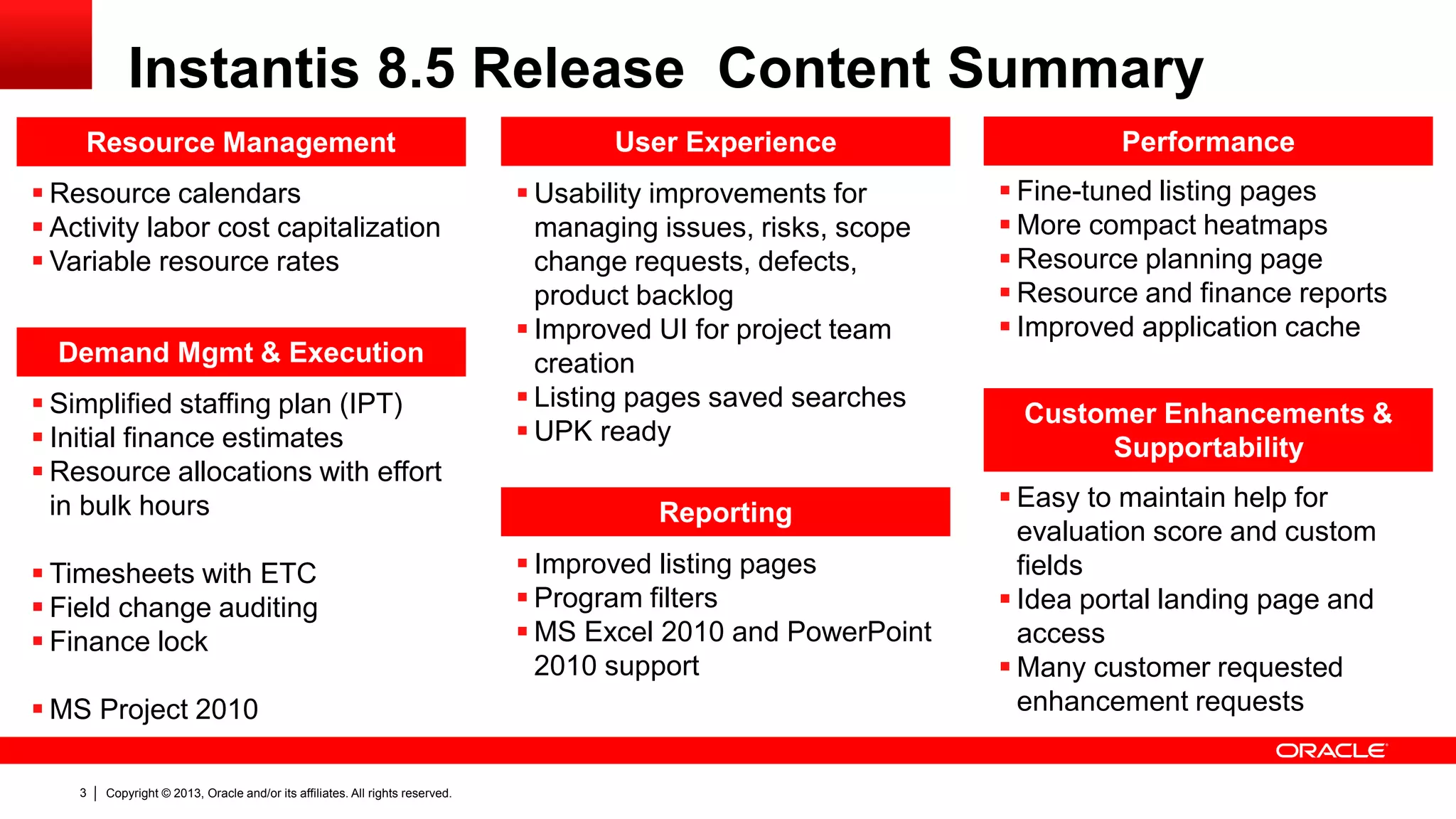
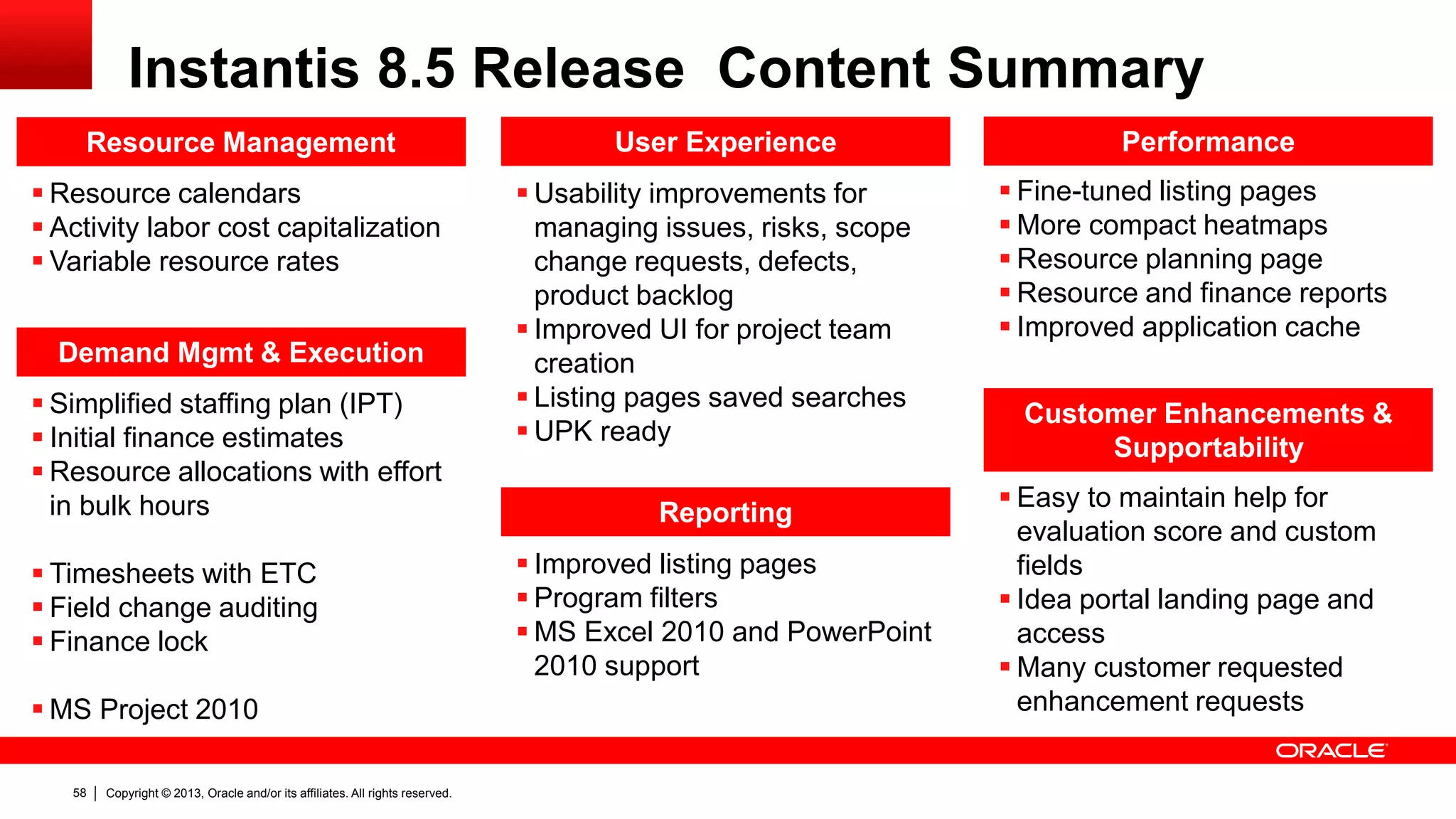
Resource Management
 Resource calendars
 Activity labor cost capitalization
 Variable resource rates
Reporting
 Improved listing pages
 Program filters
 MS Excel 2010 and PowerPoint
2010 support
User Experience
 Usability improvements for
managing issues, risks, scope
change requests, defects,
product backlog
 Improved UI for project team
creation
 Listing pages saved searches
 UPK ready
Customer Enhancements &
Supportability
 Easy to maintain help for
evaluation score and custom
fields
 Idea portal landing page and
access
 Many customer requested
enhancement requests
Performance
 Fine-tuned listing pages
 More compact heatmaps
 Resource planning page
 Resource and finance reports
 Improved application cache
Instantis 8.5 Release Content Summary
 Simplified staffing plan (IPT)
 Initial finance estimates
 Resource allocations with effort
in bulk hours
 Timesheets with ETC
 Field change auditing
 Finance lock
 MS Project 2010
Demand Mgmt & Execution
Copyright © 2013, Oracle and/or its affiliates. All rights reserved.4
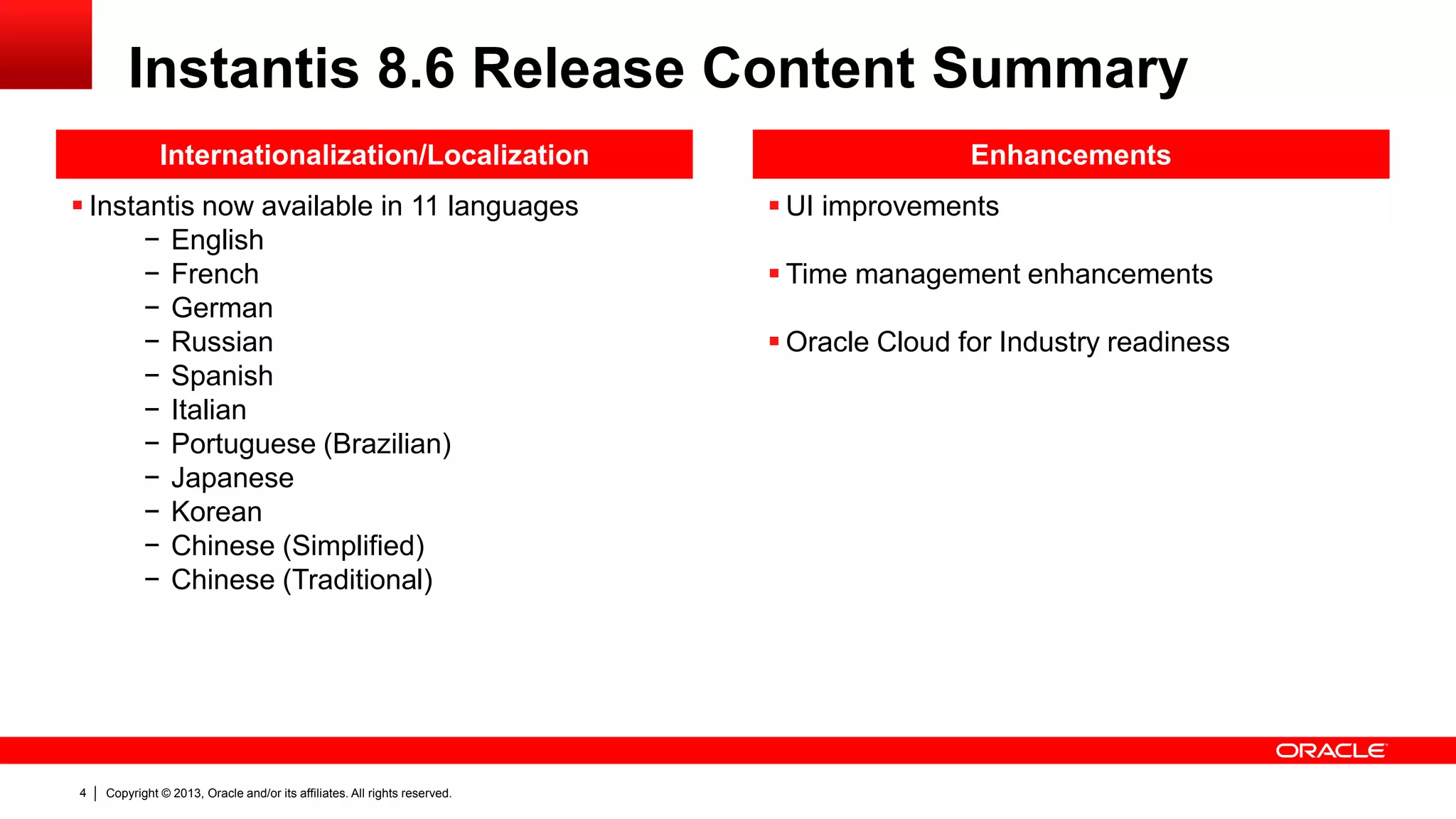
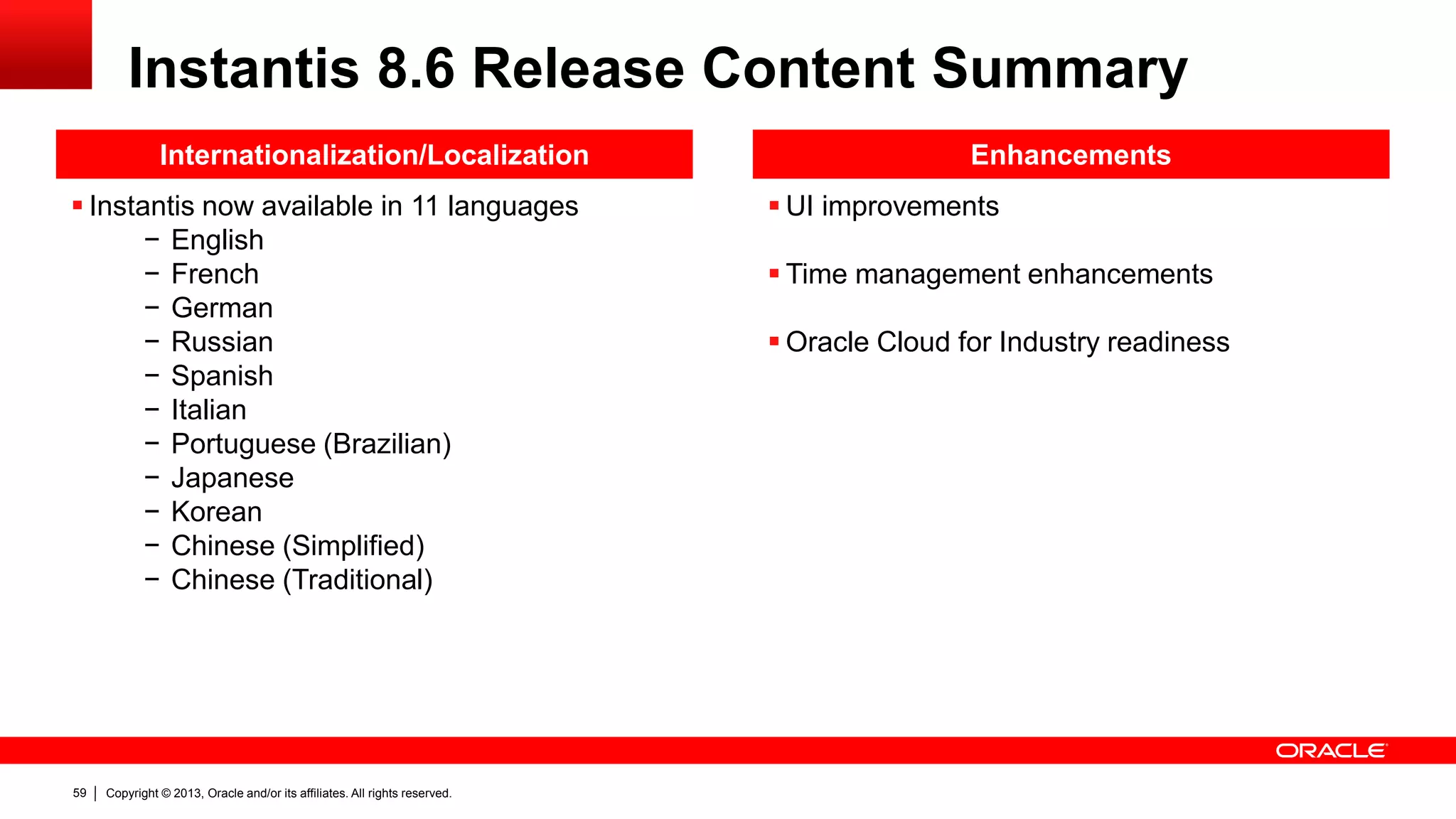
Internationalization/Localization
 Instantis now available in 11 languages
− English
− French
− German
− Russian
− Spanish
− Italian
− Portuguese (Brazilian)
− Japanese
− Korean
− Chinese (Simplified)
− Chinese (Traditional)
 UI improvements
 Time management enhancements
 Oracle Cloud for Industry readiness
Enhancements
Instantis 8.6 Release Content Summary
Copyright © 2013, Oracle and/or its affiliates. All rights reserved.5
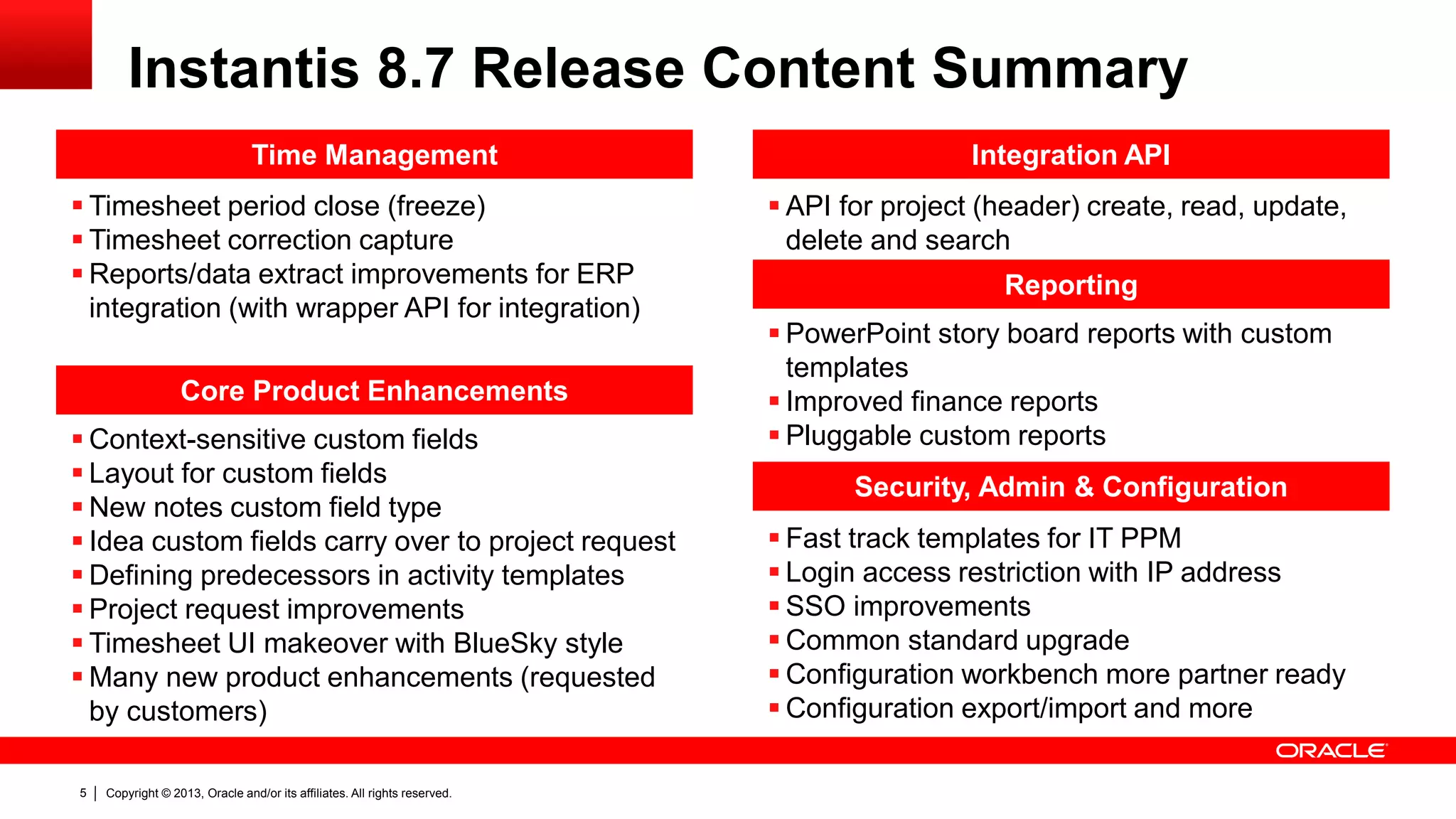
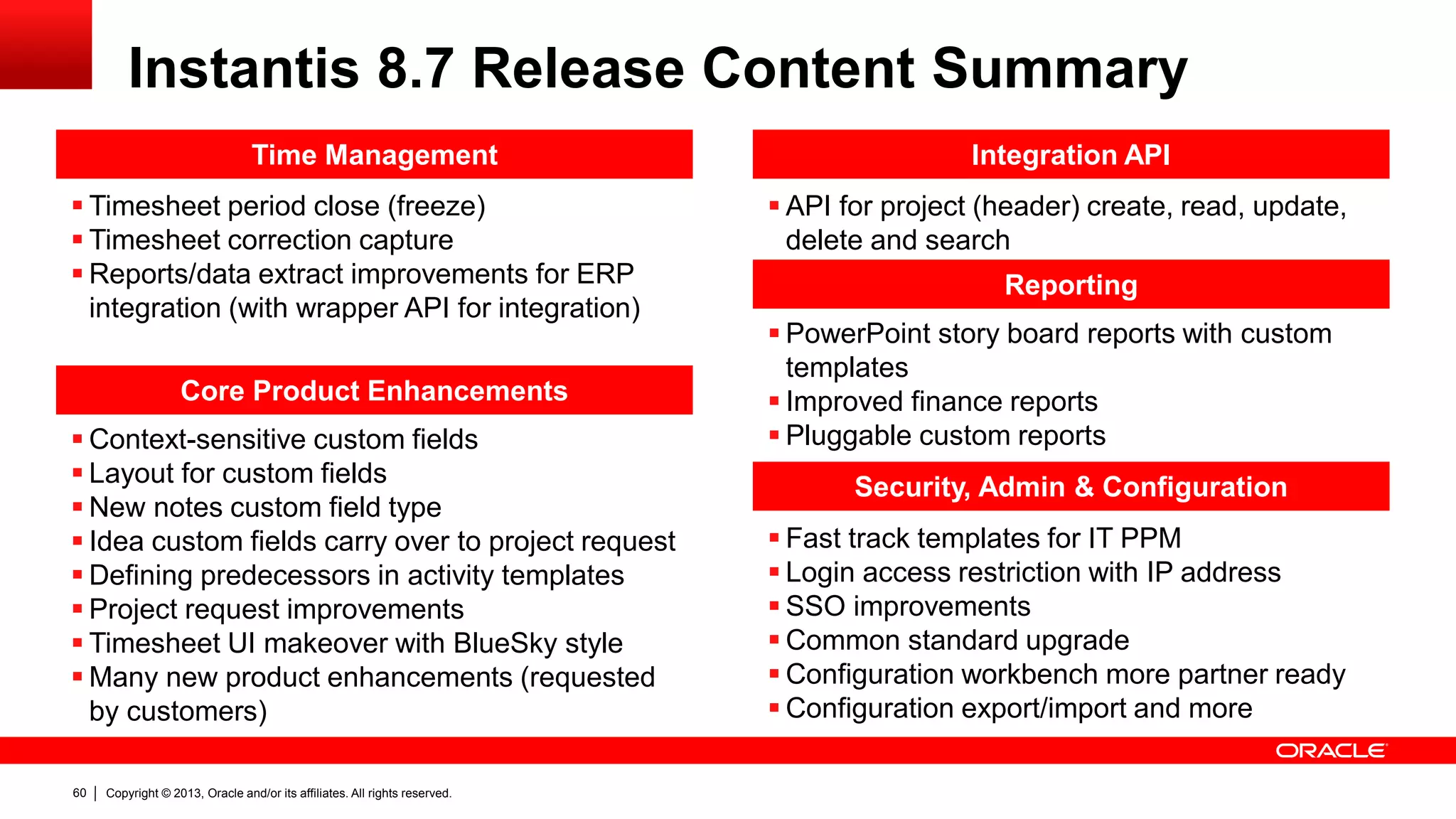
Time Management
 Timesheet period close (freeze)
 Timesheet correction capture
 Reports/data extract improvements for ERP
integration (with wrapper API for integration)
Reporting
 PowerPoint story board reports with custom
templates
 Improved finance reports
 Pluggable custom reports
 API for project (header) create, read, update,
delete and search
Integration API
Security, Admin & Configuration
 Fast track templates for IT PPM
 Login access restriction with IP address
 SSO improvements
 Common standard upgrade
 Configuration workbench more partner ready
 Configuration export/import and more
Instantis 8.7 Release Content Summary
Core Product Enhancements
 Context-sensitive custom fields
 Layout for custom fields
 New notes custom field type
 Idea custom fields carry over to project request
 Defining predecessors in activity templates
 Project request improvements
 Timesheet UI makeover with BlueSky style
 Many new product enhancements (requested
by customers)
Copyright © 2013, Oracle and/or its affiliates. All rights reserved.6
Benefits – Resource Management
 More precise capacity visibility for resource planning and project
execution with resource calendars that capture vacation, LOA and part-
time resource availability
 Ensure compliance and governance processes with activity labor
cost capitalization
 Better project labor cost estimation, tracking and administration
with variable resource rates
Copyright © 2013, Oracle and/or its affiliates. All rights reserved.7
Benefits – Demand Management & Execution
 More flexible time management deployments options for enterprise
customers with project level timesheet approval, and estimated time to
complete (ETC) in timesheets and projects
 Better governance with timesheet period closing and preventing
modifications to timesheets in closed periods
 More ready for one-way Instantis to ERP timesheet labor effort/cost
integration with timesheet period closing, timesheet correction support,
and improved reports for data extraction with wrapper API
 Enforce proper financial accounting processes with the new strict
finance lock/close period option
 Improved productivity and analysis with project request flexible
staffing plan and simplified finance estimation
Copyright © 2013, Oracle and/or its affiliates. All rights reserved.8
Benefits – Reporting, UX And Performance
 Better user productivity and analysis with improved listing pages, and
customizable PowerPoint storyboard reports
 Improved program reporting with new program filters in listing pages
and reports
 Run large data volume user defined Excel reports with MS Excel
2010 support
 Better user productivity and satisfaction with improved user interface
for timesheets, project issues, risks, and scope changes
 Gain faster system response and improved user experience with
optimized listing pages, resource planning, and application cache
 Ready for user self-service training with UPK support
Copyright © 2013, Oracle and/or its affiliates. All rights reserved.9
Benefits and Value – Internationalization
 More successful international deployments (in non-English
speaking regions) and global multi-language deployments with out-
of-the-box standard product translations available in German, French,
Russian, Spanish, Italian, Portuguese (Brazilian), Japanese, Korean,
Chinese (Simplified), and Chinese (Traditional)
 Better local and legal regulations conformance with out-of-the-box
standard product translations (for example, legal regulations in provinces
in Canada requires all software to available in French language)
Copyright © 2013, Oracle and/or its affiliates. All rights reserved.10
Benefits and Value – Administration
 Get jump start on Instantis with Fast Track templates
 Improved application security with support for SSO, self-service
password reset, and limiting access with IP address filters
 Easy upgrade with common standard upgrade
 More partner ready with improved configuration workbench
Copyright © 2013, Oracle and/or its affiliates. All rights reserved.11
Benefits and Value – OCI Readiness
 Better performance, security and reliability by hosting on software
and hardware optimized Oracle Cloud technology
 Interoperability assurance with other products available on Oracle
Cloud
 High availability and better service assurance with world class Oracle
hosting operations
Copyright © 2013, Oracle and/or its affiliates. All rights reserved.12
Resource
Management
Copyright © 2013, Oracle and/or its affiliates. All rights reserved.13
Resource
Calendars
Copyright © 2013, Oracle and/or its affiliates. All rights reserved.14
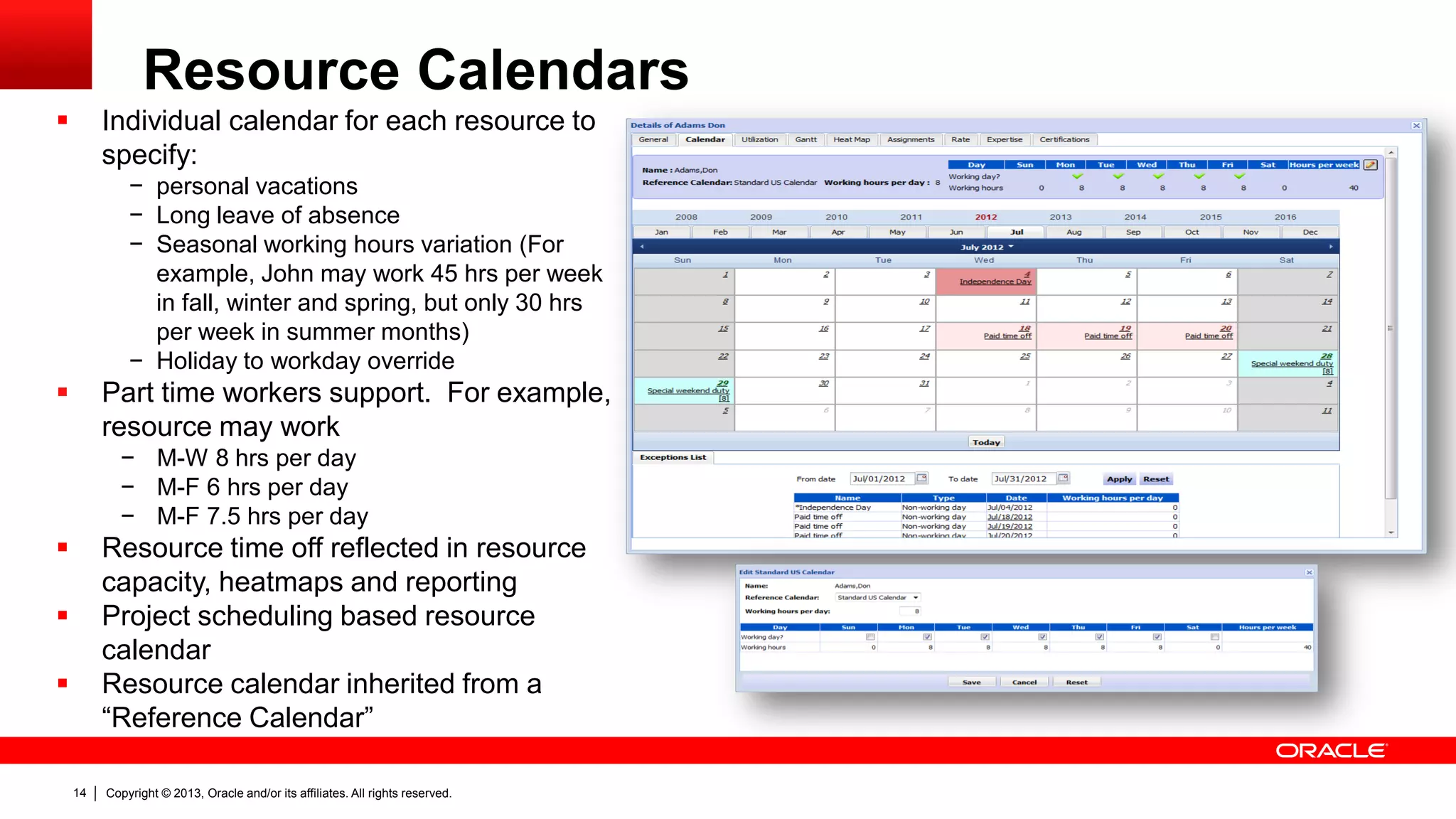
Resource Calendars
 Individual calendar for each resource to
specify:
− personal vacations
− Long leave of absence
− Seasonal working hours variation (For
example, John may work 45 hrs per week
in fall, winter and spring, but only 30 hrs
per week in summer months)
− Holiday to workday override
 Part time workers support. For example,
resource may work
− M-W 8 hrs per day
− M-F 6 hrs per day
− M-F 7.5 hrs per day
 Resource time off reflected in resource
capacity, heatmaps and reporting
 Project scheduling based resource
calendar
 Resource calendar inherited from a
“Reference Calendar”
Copyright © 2013, Oracle and/or its affiliates. All rights reserved.15
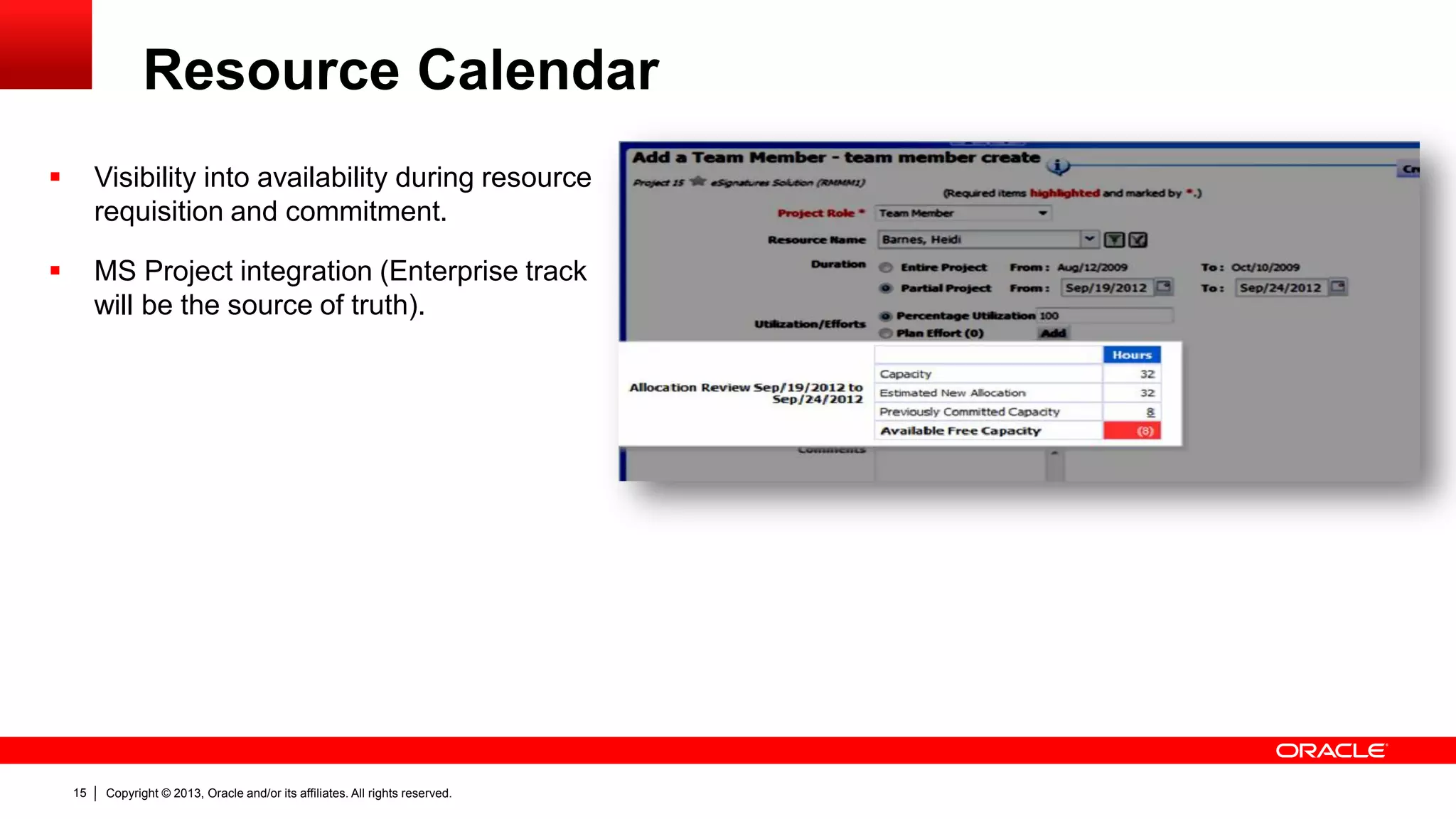
Resource Calendar
 Visibility into availability during resource
requisition and commitment.
 MS Project integration (Enterprise track
will be the source of truth).
Copyright © 2013, Oracle and/or its affiliates. All rights reserved.16
Activity Labor Cost
Capitalization
Copyright © 2013, Oracle and/or its affiliates. All rights reserved.17
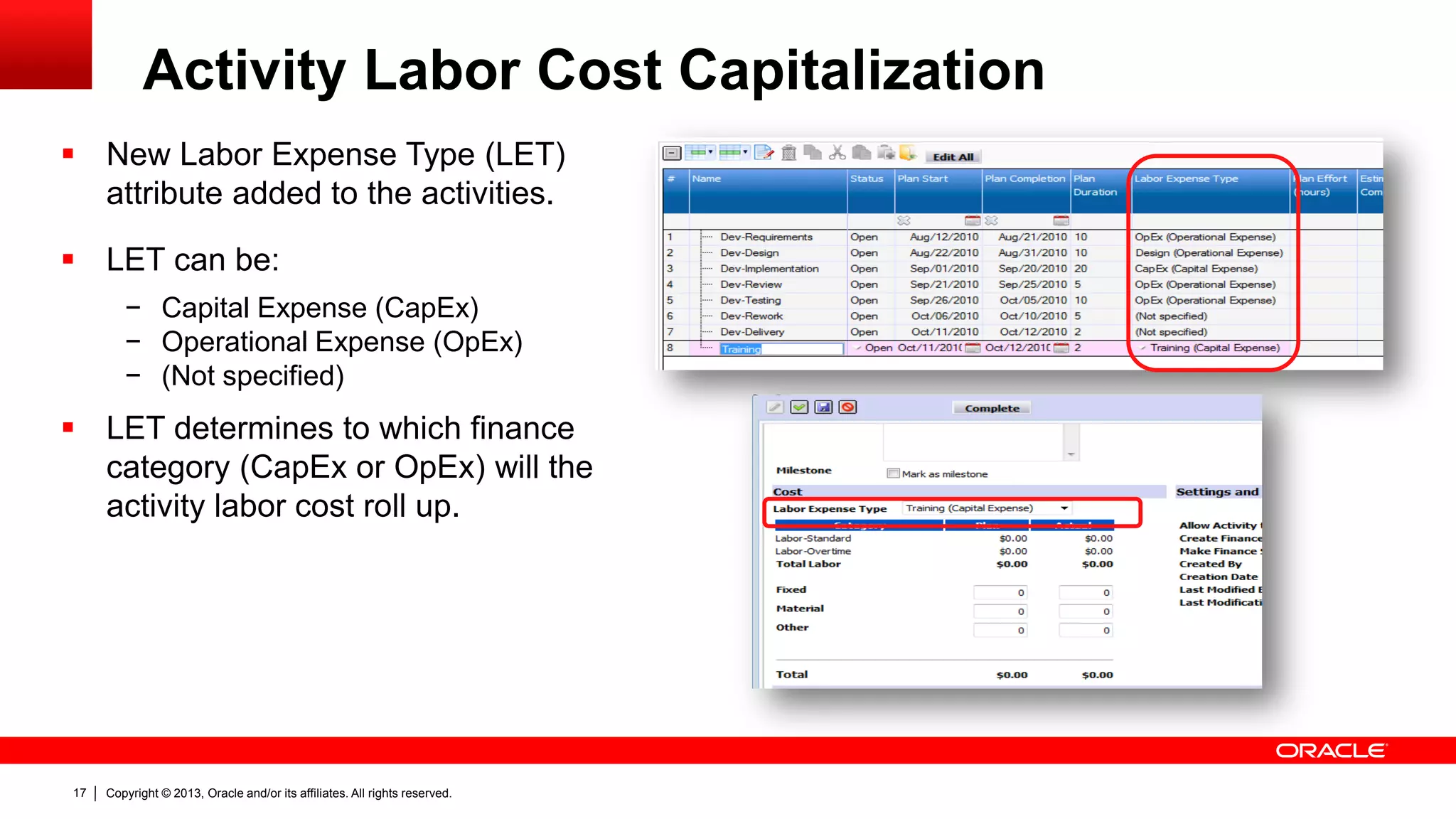
Activity Labor Cost Capitalization
 New Labor Expense Type (LET)
attribute added to the activities.
 LET can be:
− Capital Expense (CapEx)
− Operational Expense (OpEx)
− (Not specified)
 LET determines to which finance
category (CapEx or OpEx) will the
activity labor cost roll up.
Copyright © 2013, Oracle and/or its affiliates. All rights reserved.18
Variable Resource
Rates
Copyright © 2013, Oracle and/or its affiliates. All rights reserved.19
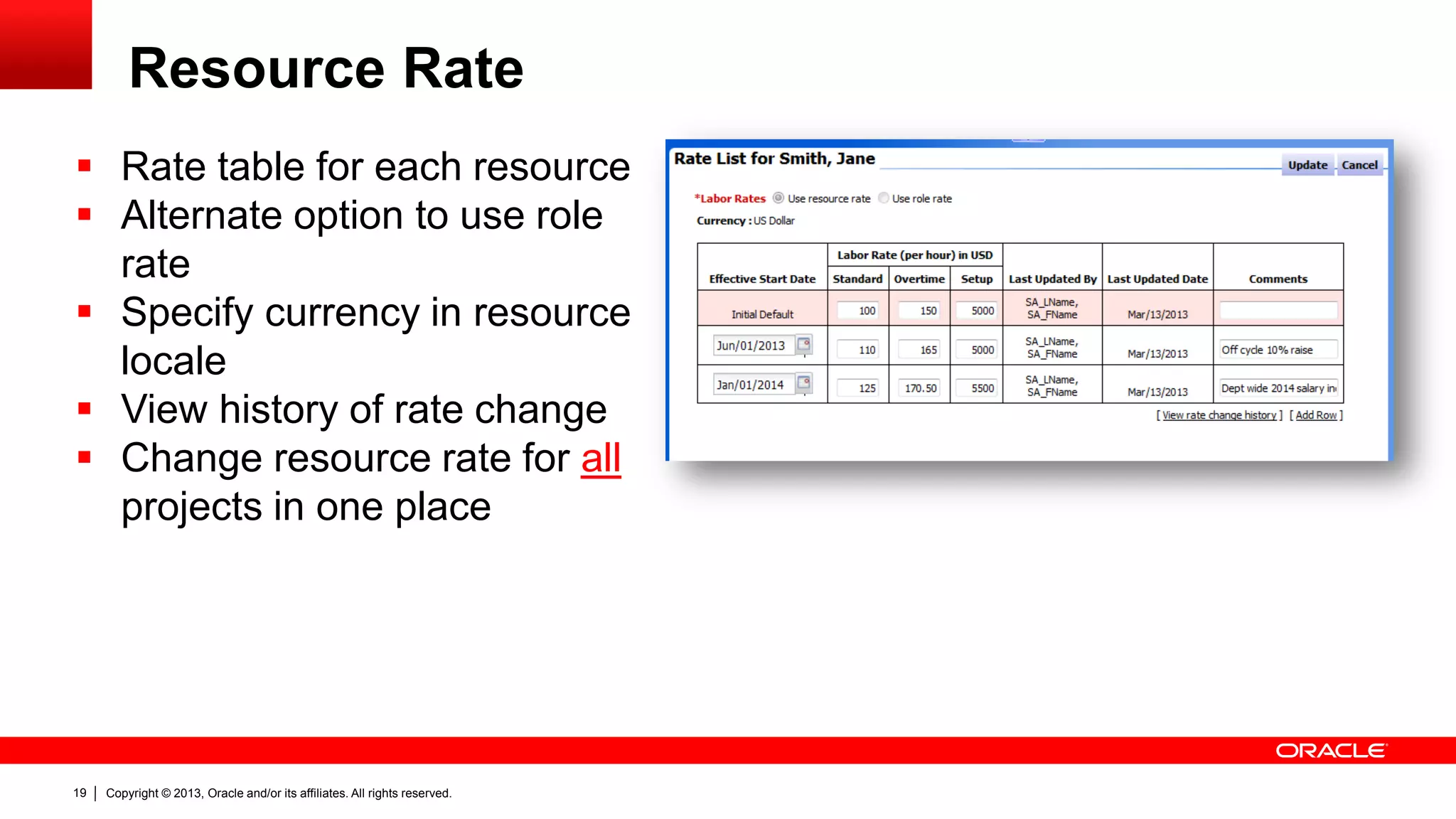
Resource Rate
 Rate table for each resource
 Alternate option to use role
rate
 Specify currency in resource
locale
 View history of rate change
 Change resource rate for all
projects in one place
Copyright © 2013, Oracle and/or its affiliates. All rights reserved.20
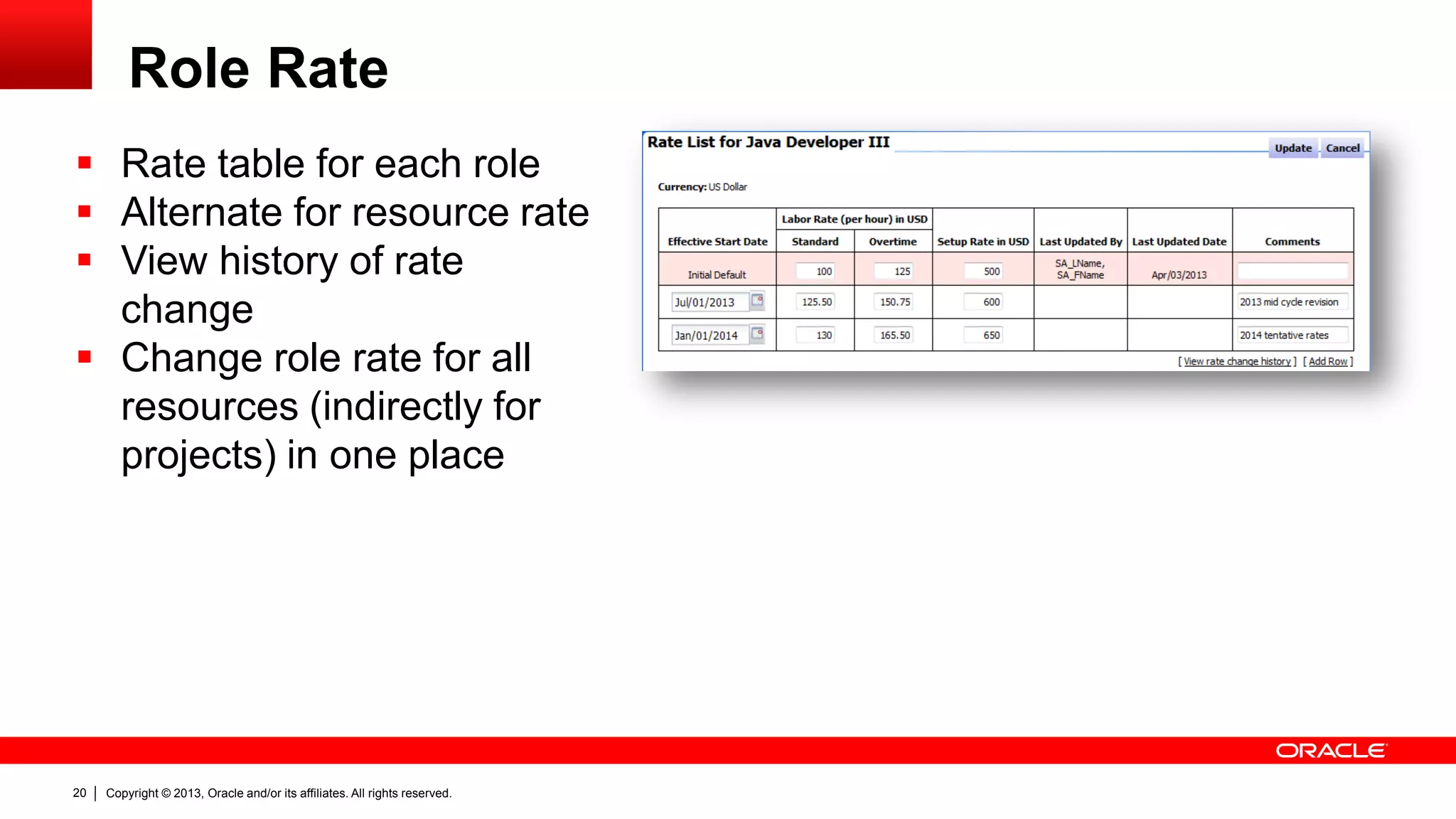
Role Rate
 Rate table for each role
 Alternate for resource rate
 View history of rate
change
 Change role rate for all
resources (indirectly for
projects) in one place
Copyright © 2013, Oracle and/or its affiliates. All rights reserved.21
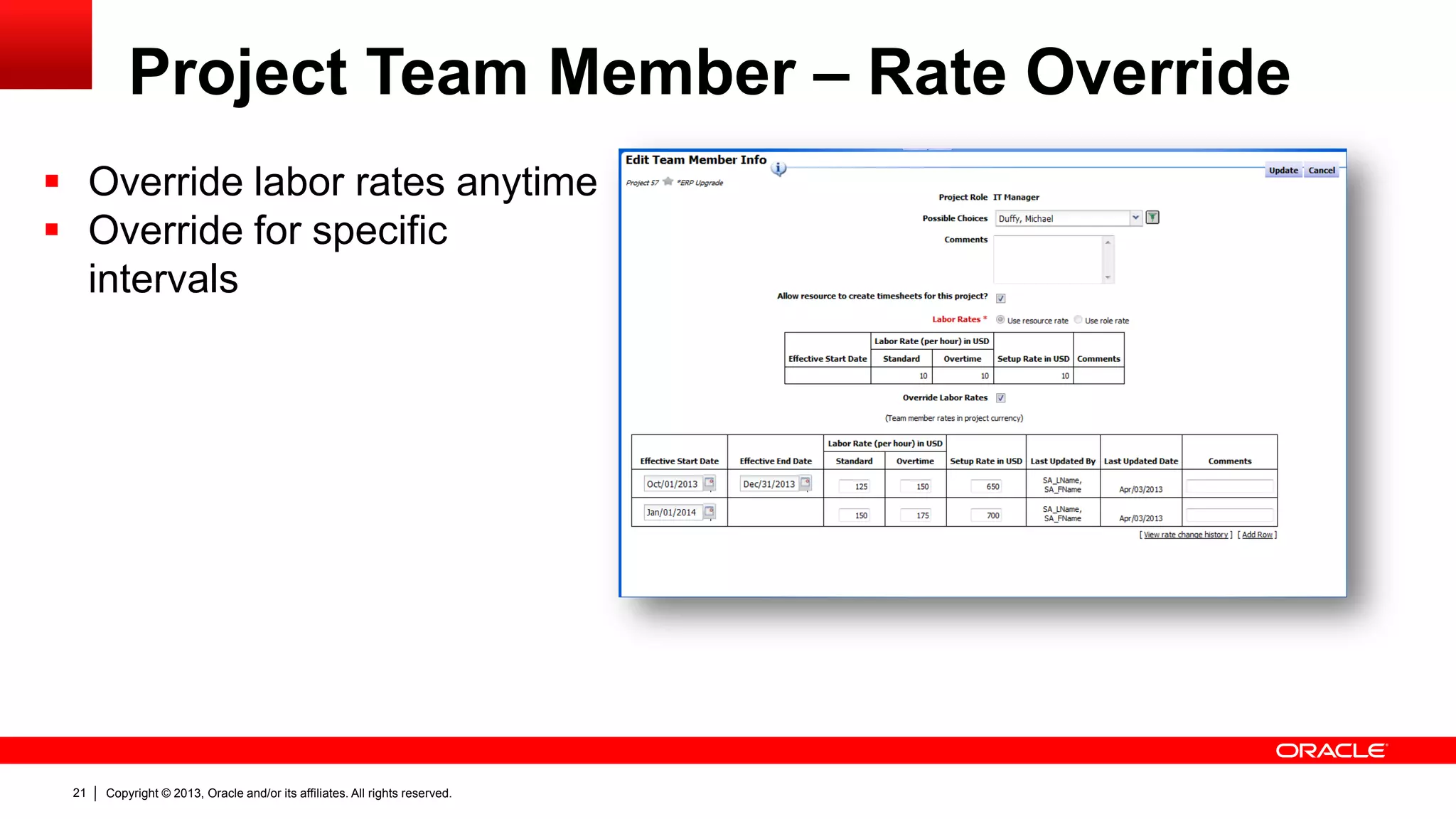
Project Team Member – Rate Override
 Override labor rates anytime
 Override for specific
intervals
Copyright © 2013, Oracle and/or its affiliates. All rights reserved.22
Global Rate Changes And Finance Locks
 Global resource and role rate changes across all projects
 Finance lock/close period protection with a new strict mode
Copyright © 2013, Oracle and/or its affiliates. All rights reserved.23
Project Demand
And Execution
Copyright © 2013, Oracle and/or its affiliates. All rights reserved.24
Project Request
Improvements
Copyright © 2013, Oracle and/or its affiliates. All rights reserved.25
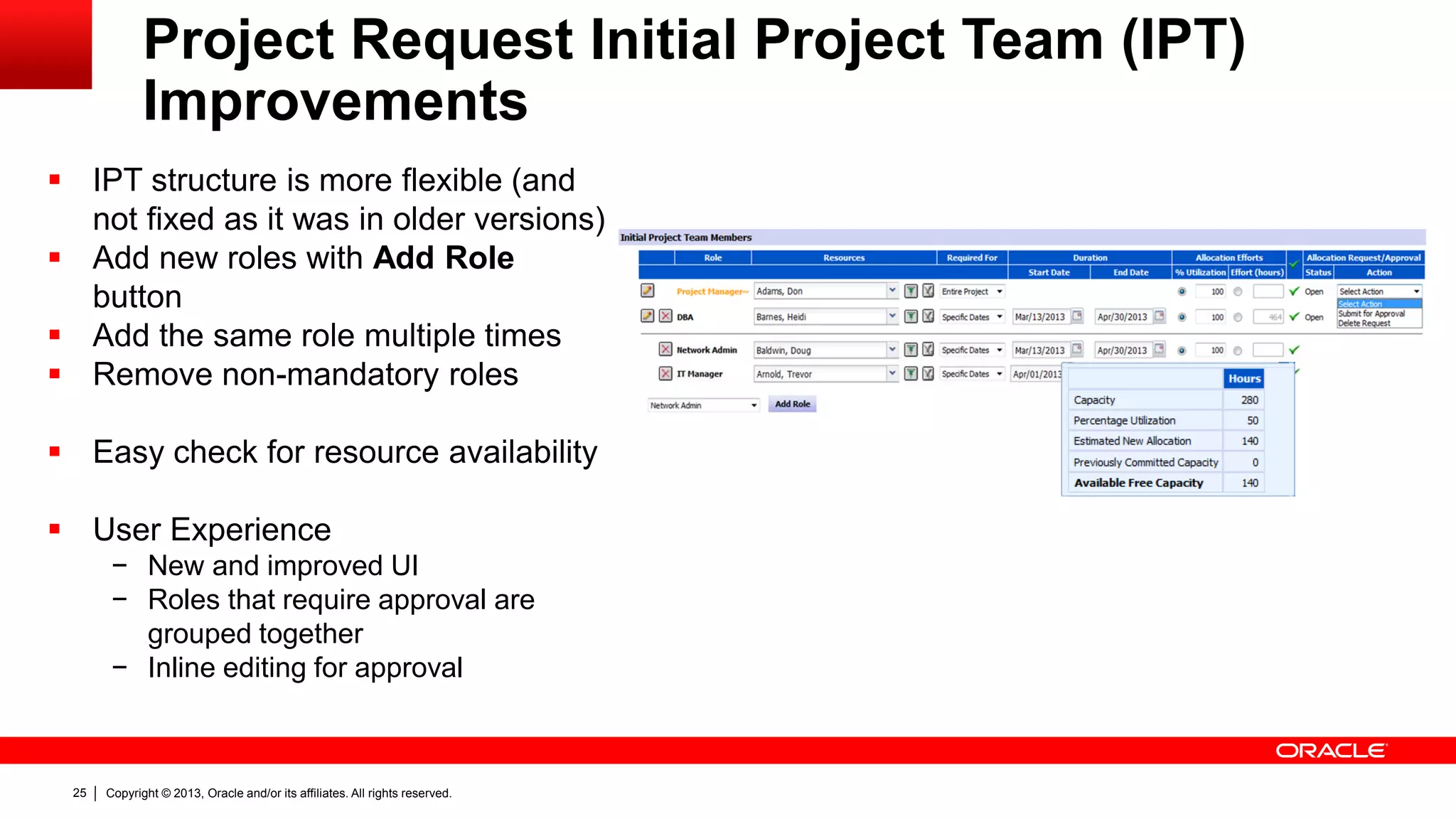
Project Request Initial Project Team (IPT)
Improvements
 IPT structure is more flexible (and
not fixed as it was in older versions)
 Add new roles with Add Role
button
 Add the same role multiple times
 Remove non-mandatory roles
 Easy check for resource availability
 User Experience
− New and improved UI
− Roles that require approval are
grouped together
− Inline editing for approval
Copyright © 2013, Oracle and/or its affiliates. All rights reserved.26
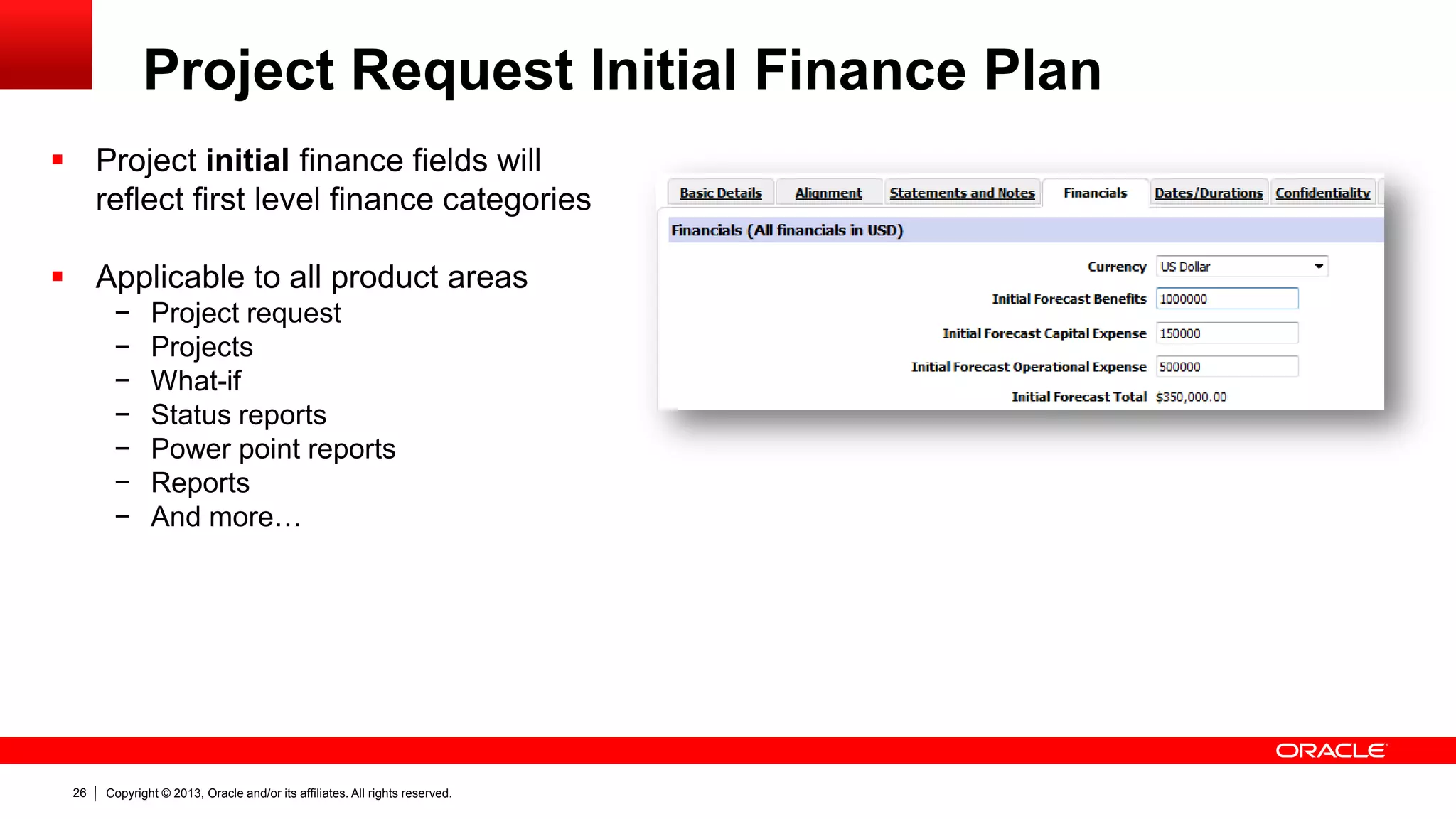
Project Request Initial Finance Plan
 Project initial finance fields will
reflect first level finance categories
 Applicable to all product areas
− Project request
− Projects
− What-if
− Status reports
− Power point reports
− Reports
− And more…
Copyright © 2013, Oracle and/or its affiliates. All rights reserved.27
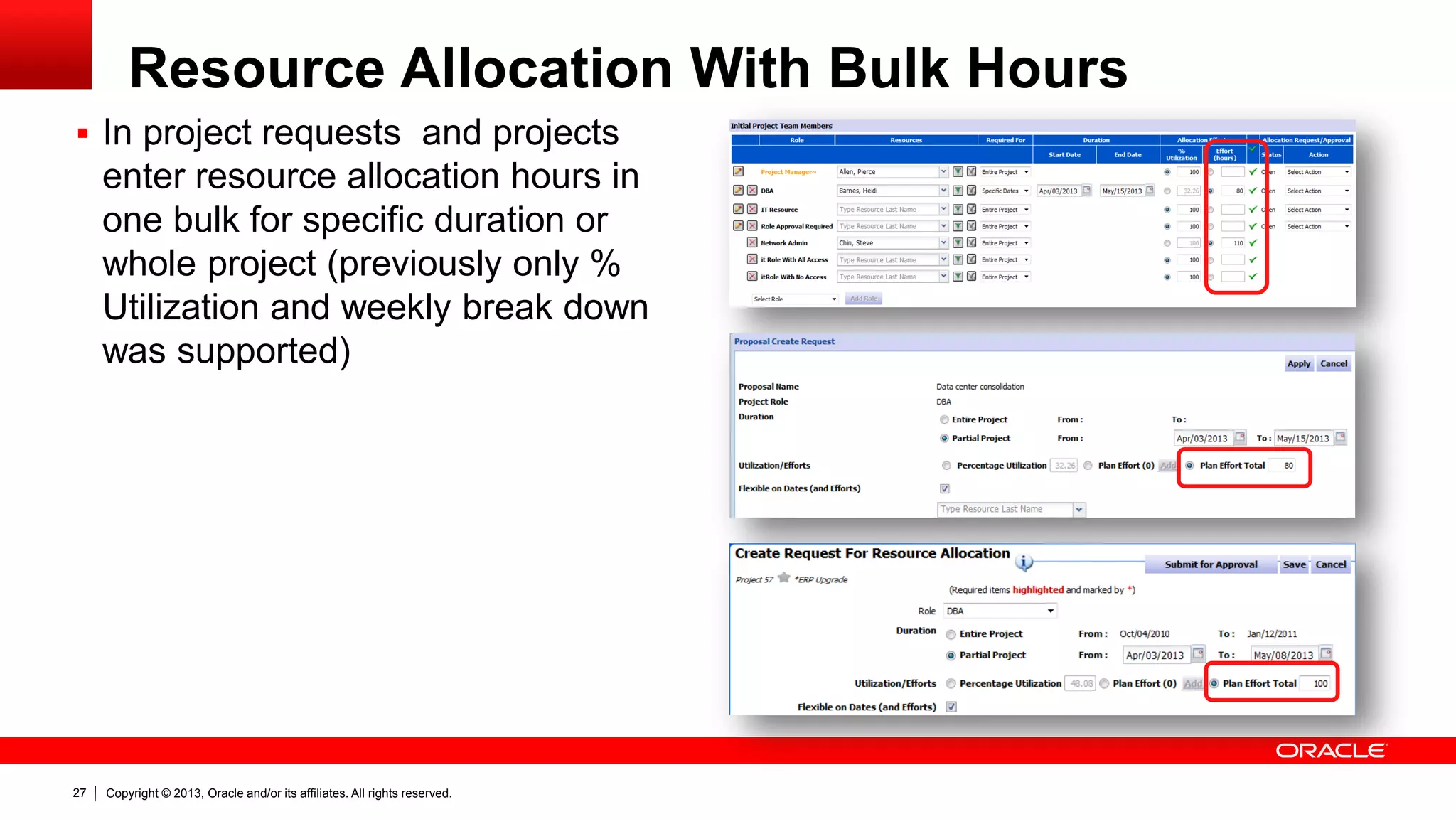
Resource Allocation With Bulk Hours
 In project requests and projects
enter resource allocation hours in
one bulk for specific duration or
whole project (previously only %
Utilization and weekly break down
was supported)
Copyright © 2013, Oracle and/or its affiliates. All rights reserved.28
Timesheets
Copyright © 2013, Oracle and/or its affiliates. All rights reserved.29
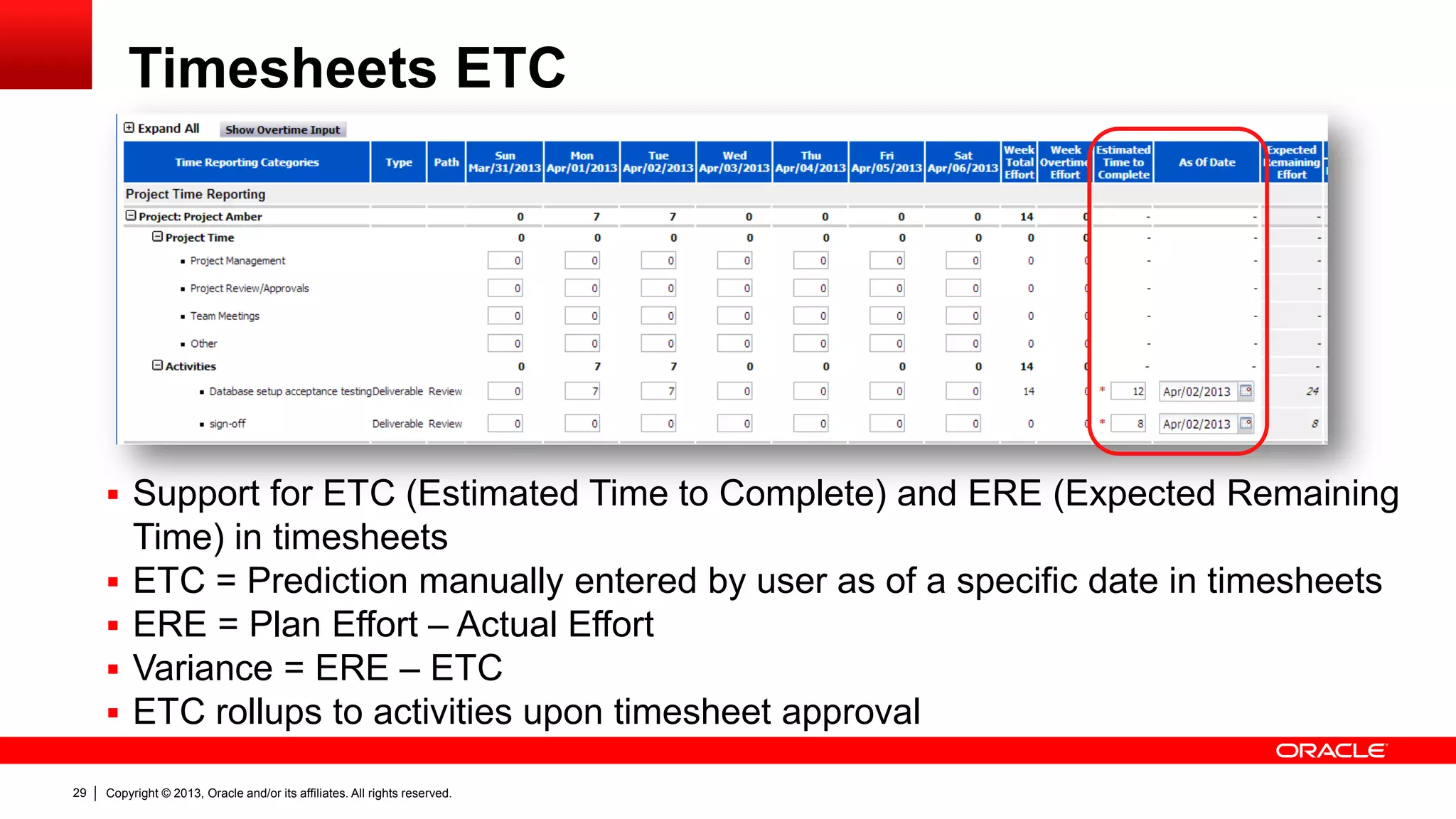
Timesheets ETC
 Support for ETC (Estimated Time to Complete) and ERE (Expected Remaining
Time) in timesheets
 ETC = Prediction manually entered by user as of a specific date in timesheets
 ERE = Plan Effort – Actual Effort
 Variance = ERE – ETC
 ETC rollups to activities upon timesheet approval
Copyright © 2013, Oracle and/or its affiliates. All rights reserved.30
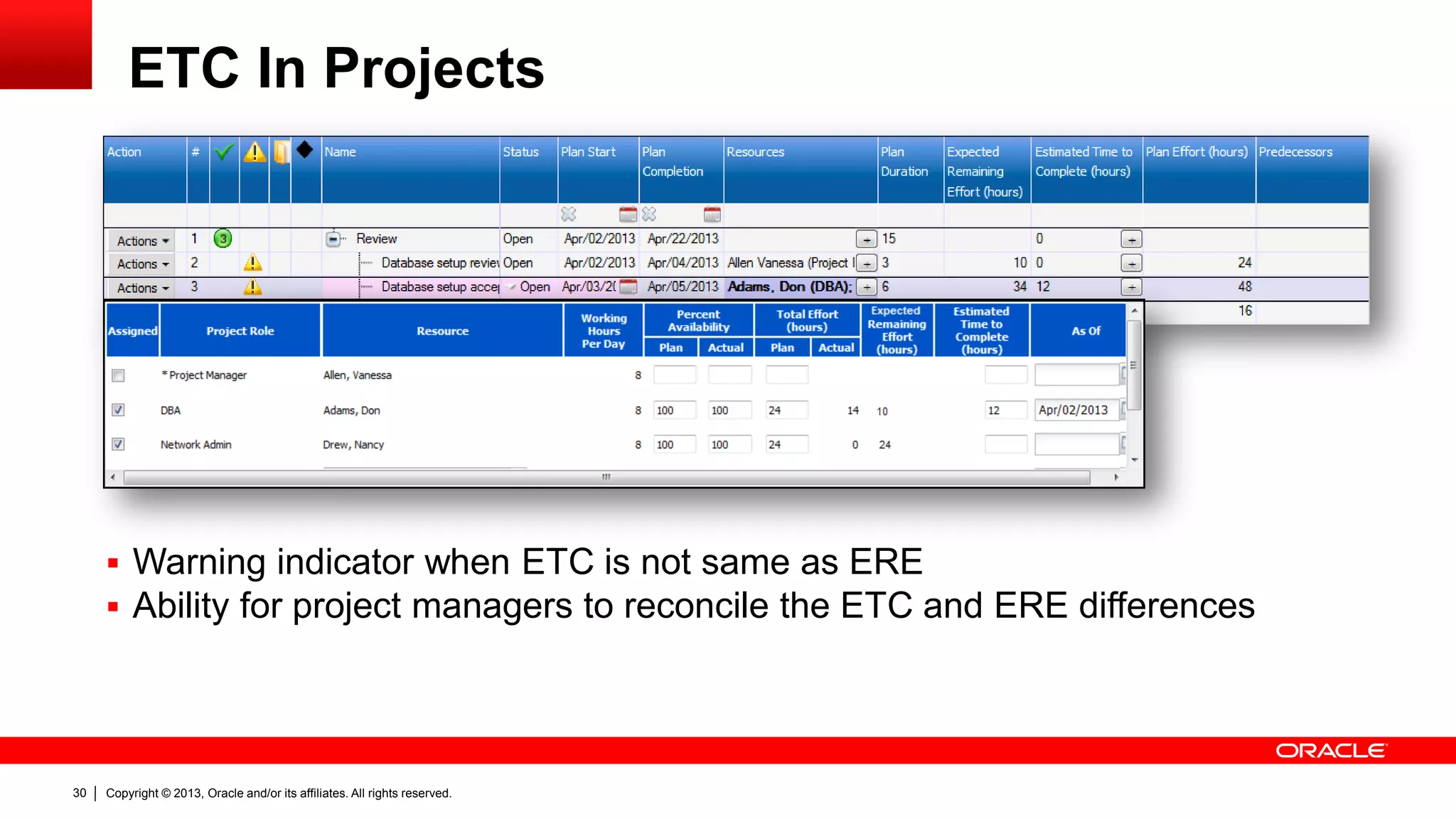
ETC In Projects
 Warning indicator when ETC is not same as ERE
 Ability for project managers to reconcile the ETC and ERE differences
Copyright © 2013, Oracle and/or its affiliates. All rights reserved.31
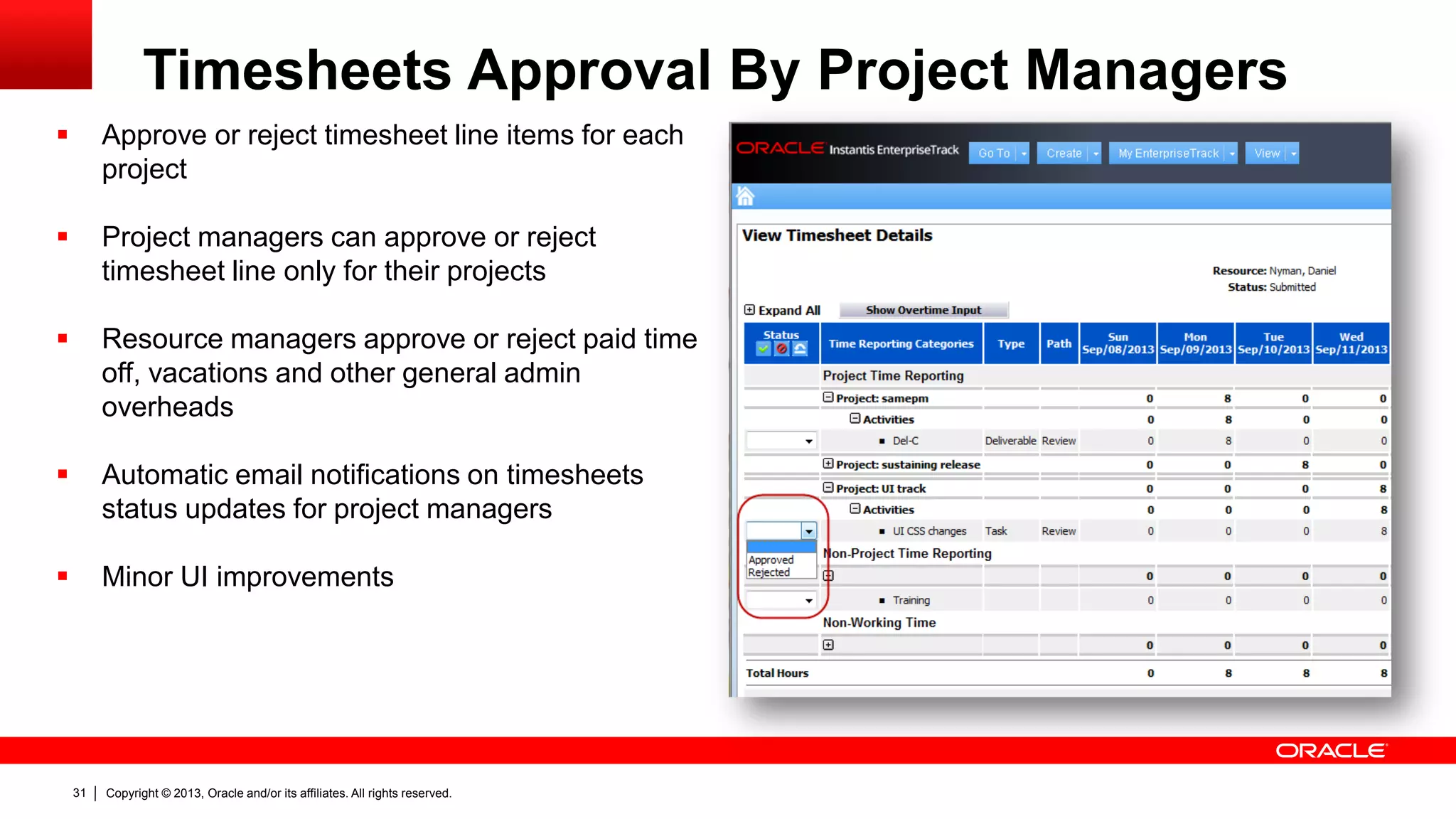
Timesheets Approval By Project Managers
 Approve or reject timesheet line items for each
project
 Project managers can approve or reject
timesheet line only for their projects
 Resource managers approve or reject paid time
off, vacations and other general admin
overheads
 Automatic email notifications on timesheets
status updates for project managers
 Minor UI improvements
Copyright © 2013, Oracle and/or its affiliates. All rights reserved.32
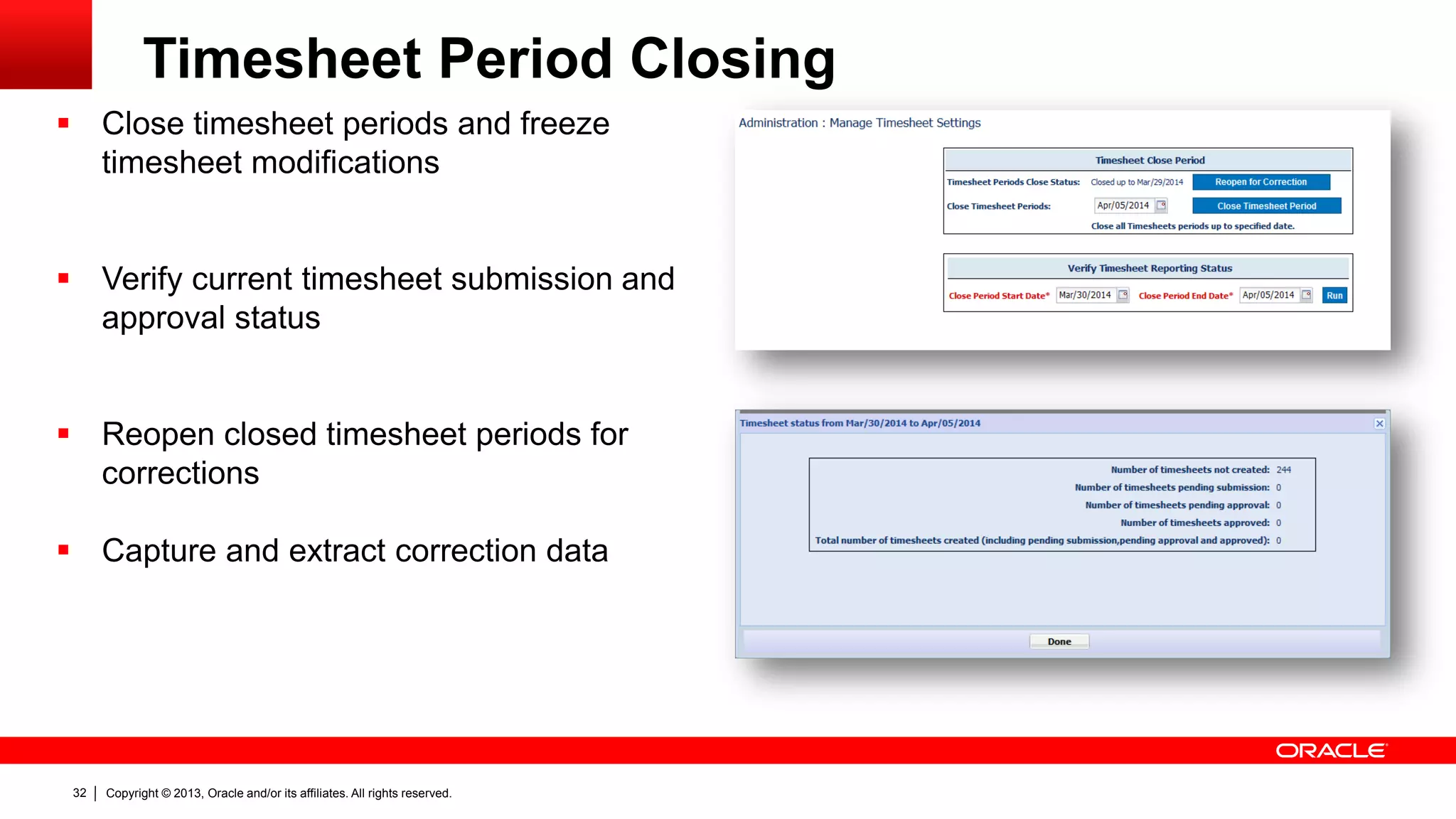
Timesheet Period Closing
 Close timesheet periods and freeze
timesheet modifications
 Verify current timesheet submission and
approval status
 Reopen closed timesheet periods for
corrections
 Capture and extract correction data
Copyright © 2013, Oracle and/or its affiliates. All rights reserved.33
Field Change
Auditing
Copyright © 2013, Oracle and/or its affiliates. All rights reserved.34
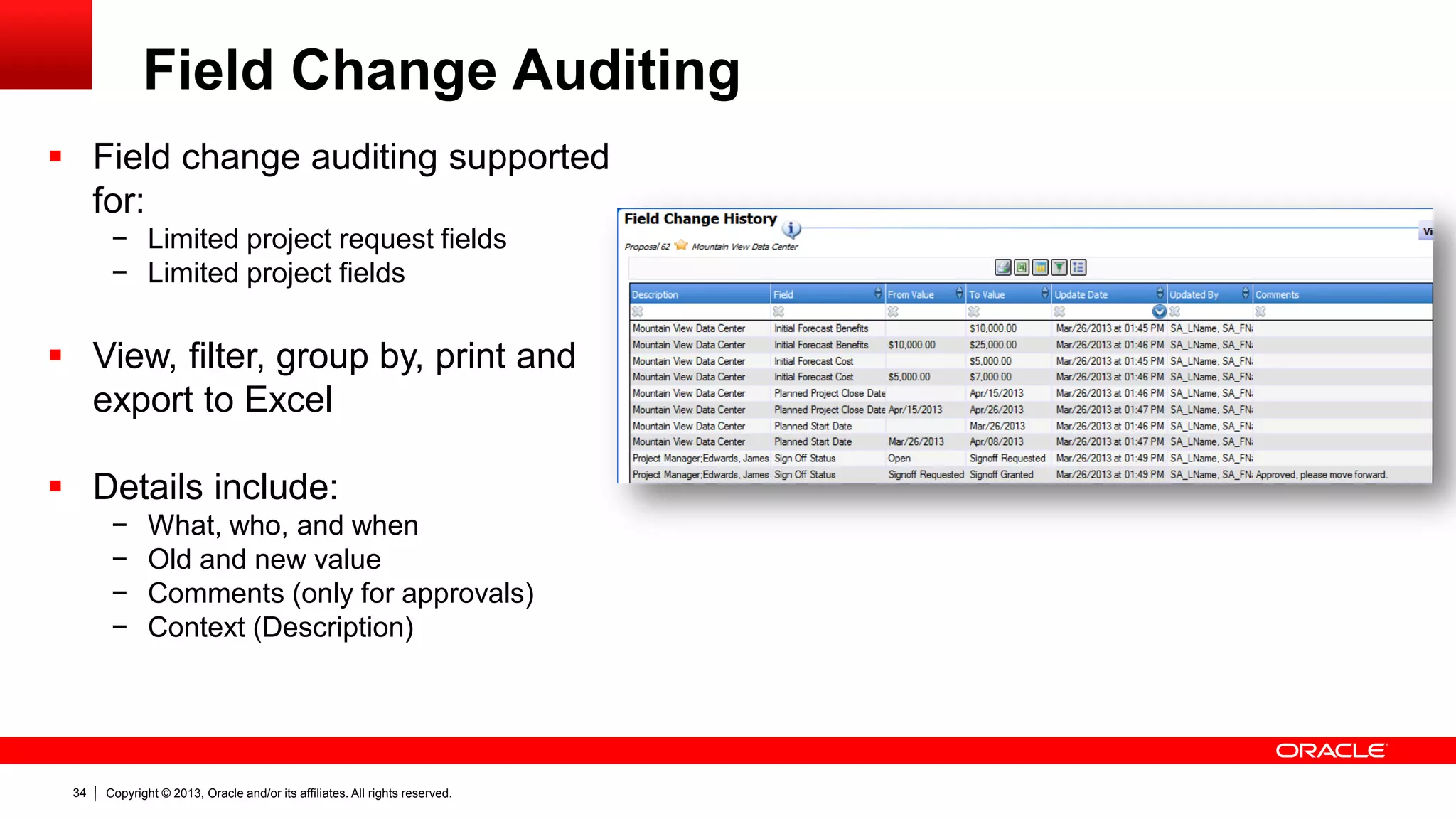
Field Change Auditing
 Field change auditing supported
for:
− Limited project request fields
− Limited project fields
 View, filter, group by, print and
export to Excel
 Details include:
− What, who, and when
− Old and new value
− Comments (only for approvals)
− Context (Description)
Copyright © 2013, Oracle and/or its affiliates. All rights reserved.35
Custom Fields
Copyright © 2013, Oracle and/or its affiliates. All rights reserved.36
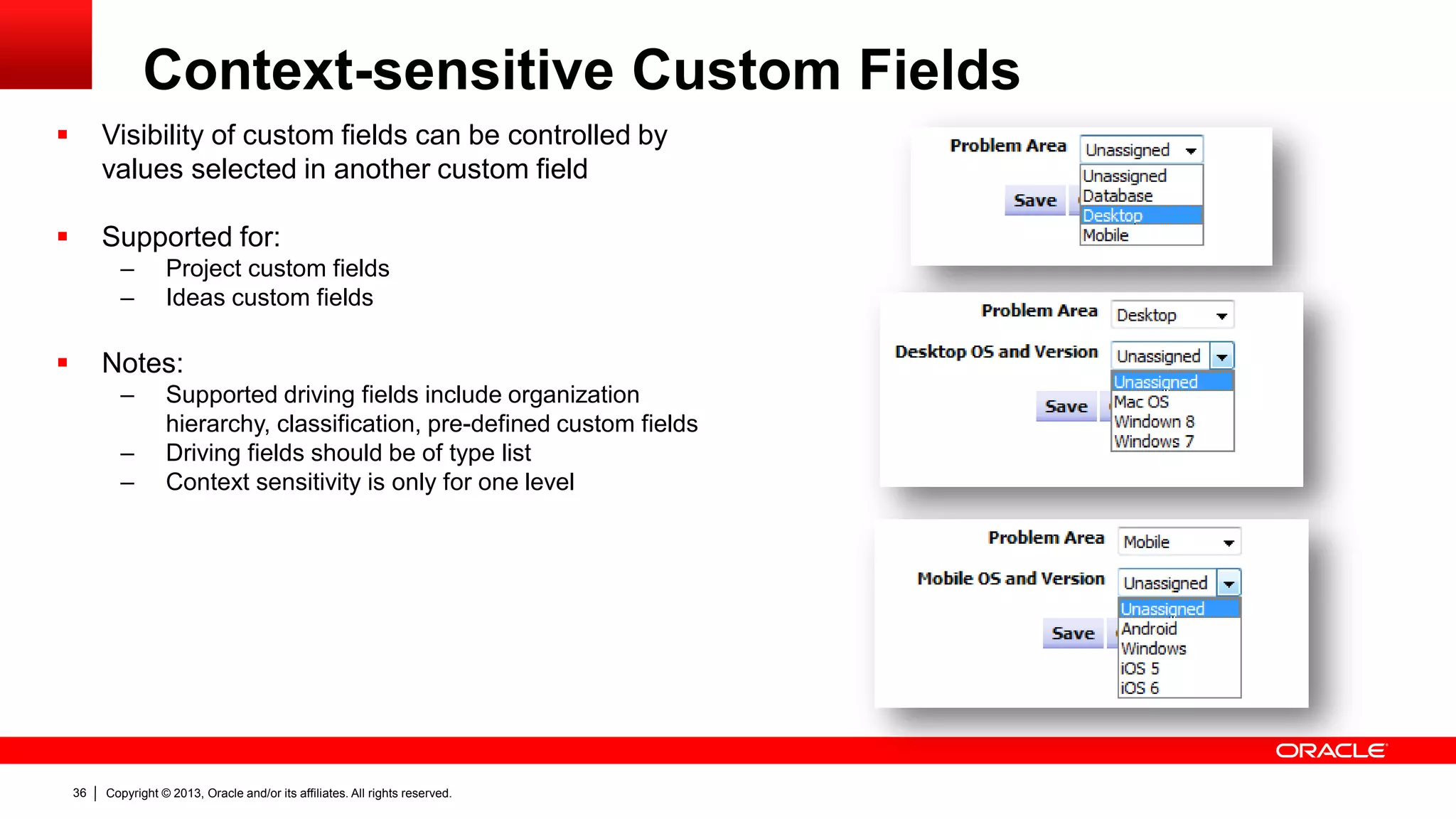
Context-sensitive Custom Fields
 Visibility of custom fields can be controlled by
values selected in another custom field
 Supported for:
– Project custom fields
– Ideas custom fields
 Notes:
– Supported driving fields include organization
hierarchy, classification, pre-defined custom fields
– Driving fields should be of type list
– Context sensitivity is only for one level
Copyright © 2013, Oracle and/or its affiliates. All rights reserved.37
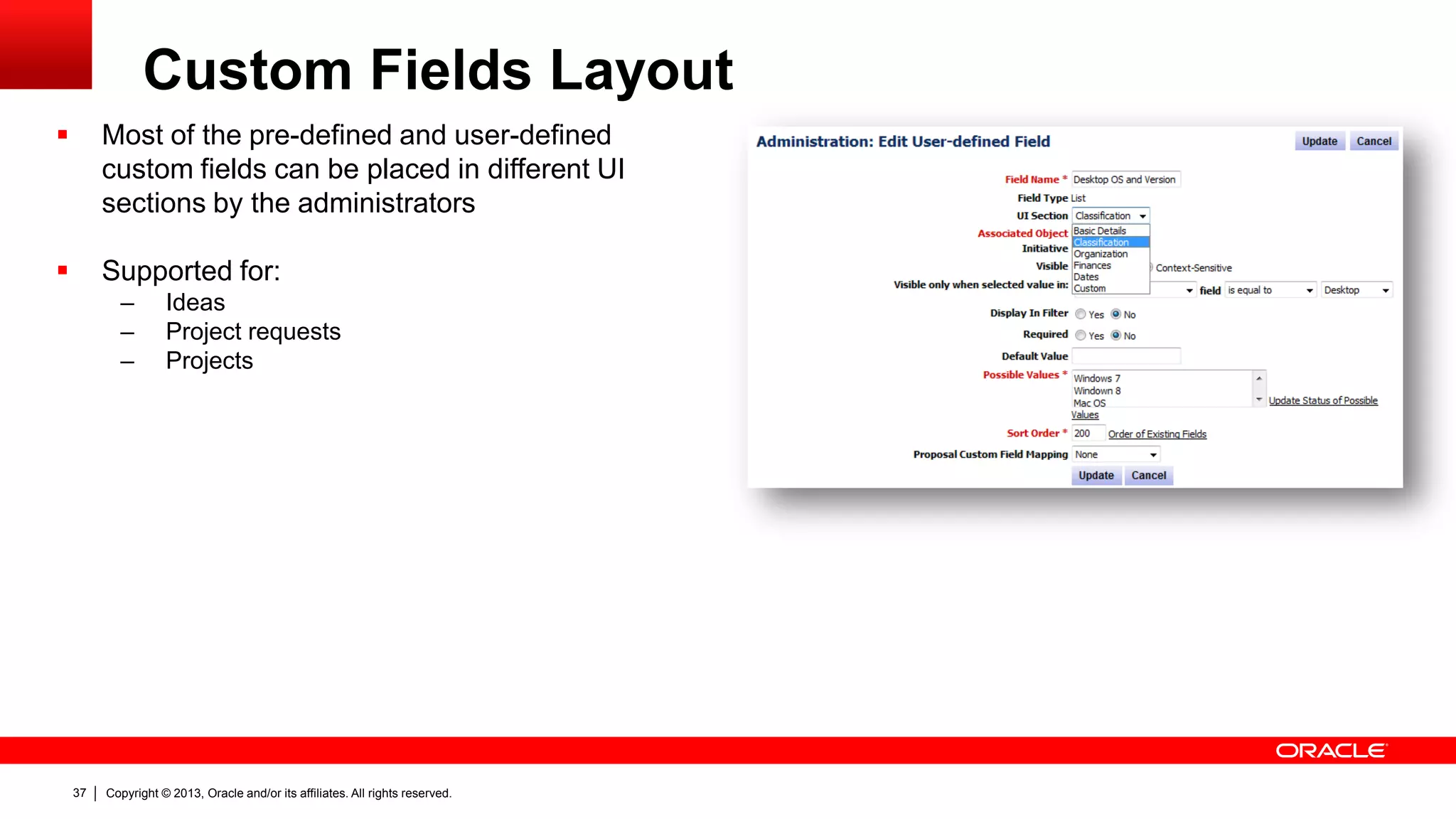
Custom Fields Layout
 Most of the pre-defined and user-defined
custom fields can be placed in different UI
sections by the administrators
 Supported for:
– Ideas
– Project requests
– Projects
Copyright © 2013, Oracle and/or its affiliates. All rights reserved.38
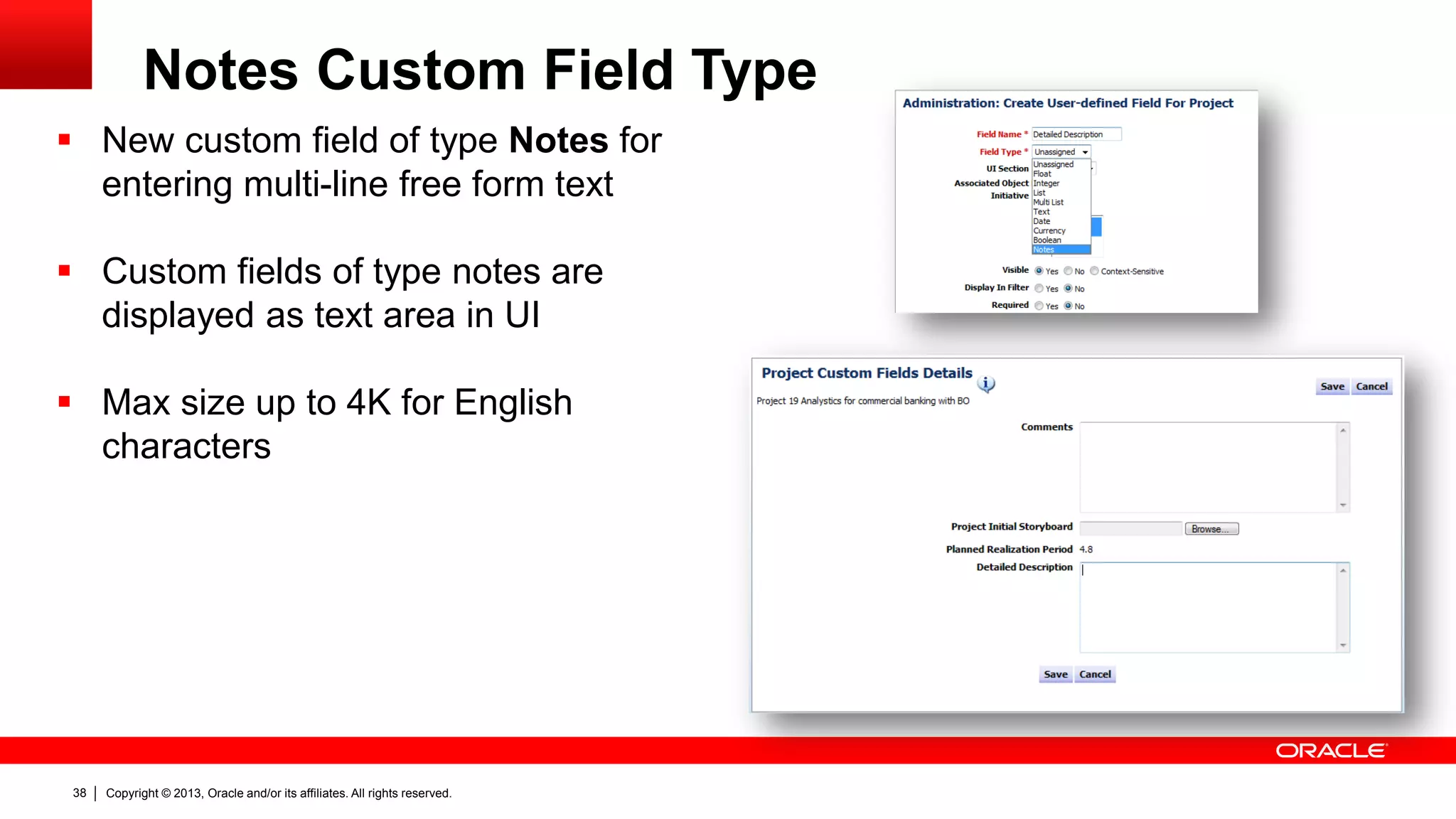
Notes Custom Field Type
 New custom field of type Notes for
entering multi-line free form text
 Custom fields of type notes are
displayed as text area in UI
 Max size up to 4K for English
characters
Copyright © 2013, Oracle and/or its affiliates. All rights reserved.39
User Experience
Copyright © 2013, Oracle and/or its affiliates. All rights reserved.40
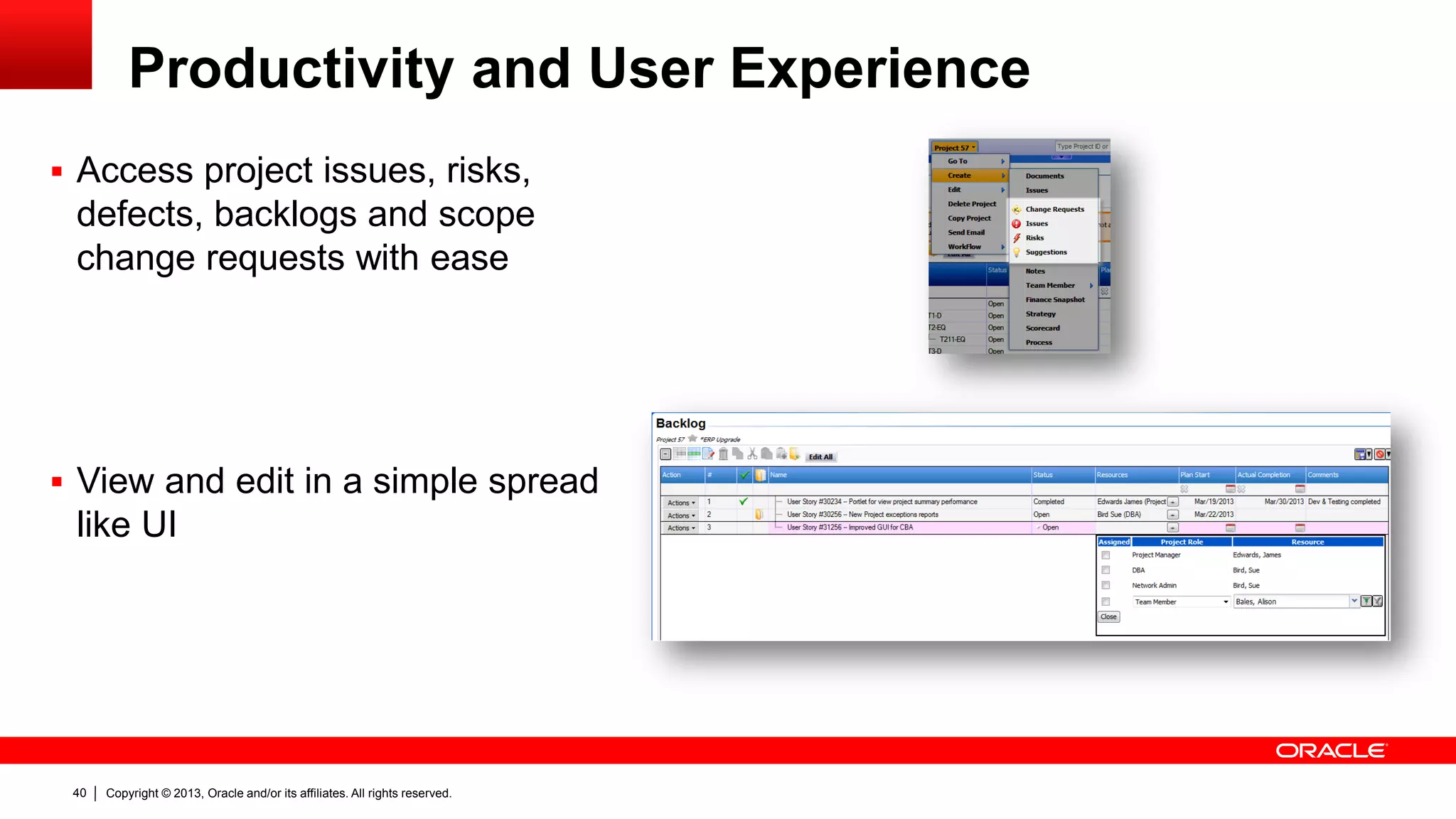
Productivity and User Experience
 Access project issues, risks,
defects, backlogs and scope
change requests with ease
 View and edit in a simple spread
like UI
Copyright © 2013, Oracle and/or its affiliates. All rights reserved.41
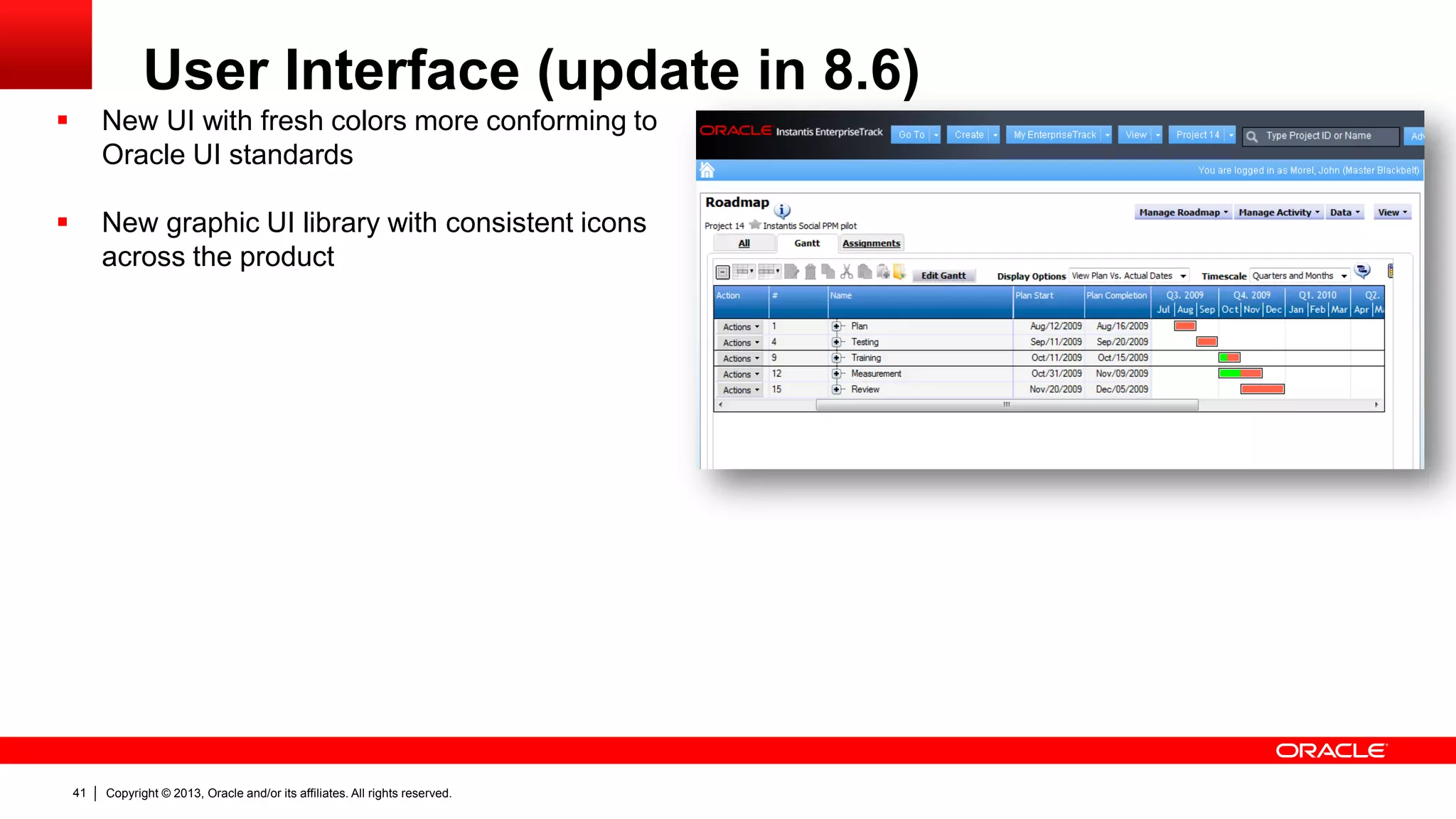
User Interface (update in 8.6)
 New UI with fresh colors more conforming to
Oracle UI standards
 New graphic UI library with consistent icons
across the product
Copyright © 2013, Oracle and/or its affiliates. All rights reserved.42
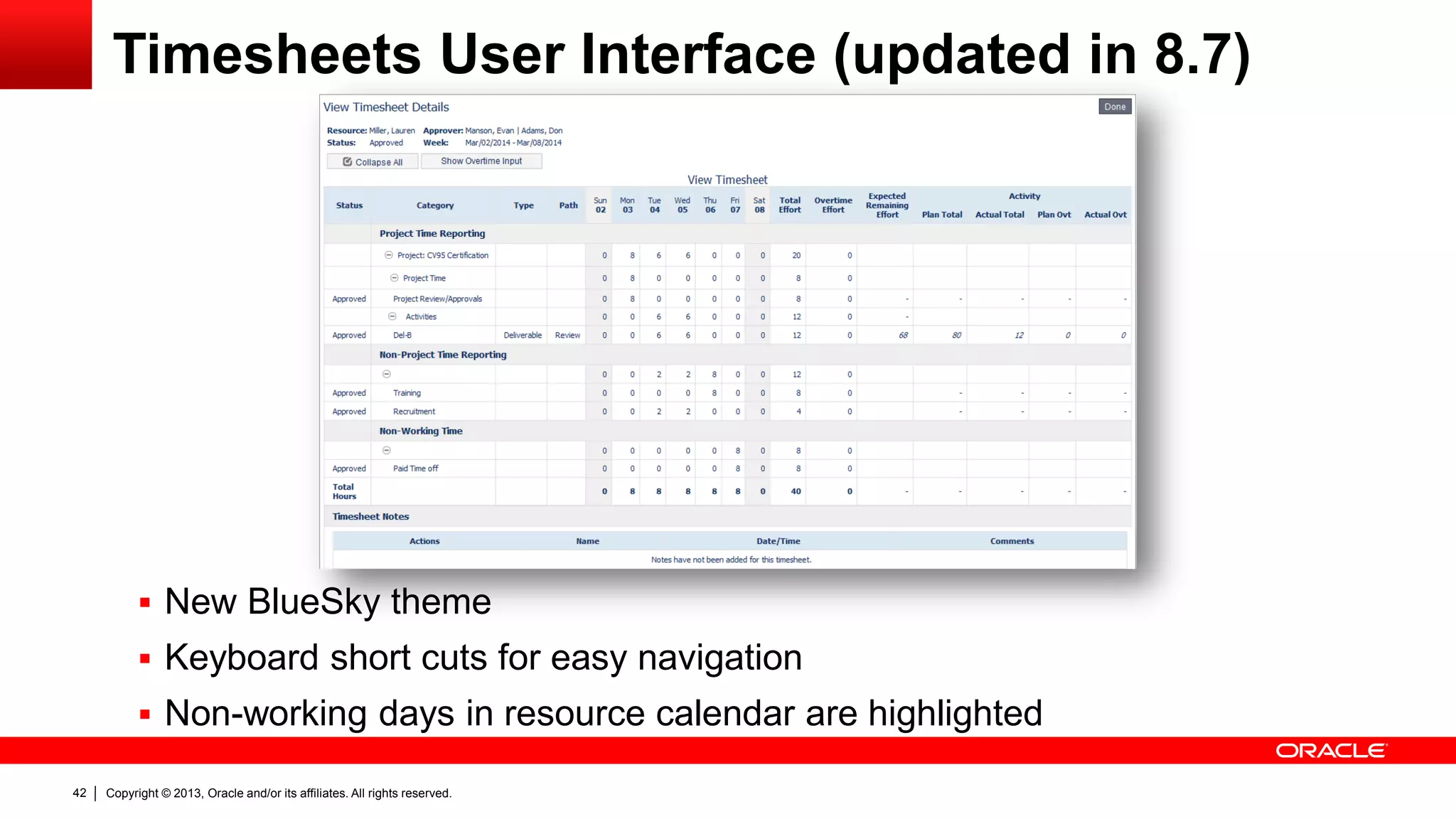
Timesheets User Interface (updated in 8.7)
 New BlueSky theme
 Keyboard short cuts for easy navigation
 Non-working days in resource calendar are highlighted
Copyright © 2013, Oracle and/or its affiliates. All rights reserved.43
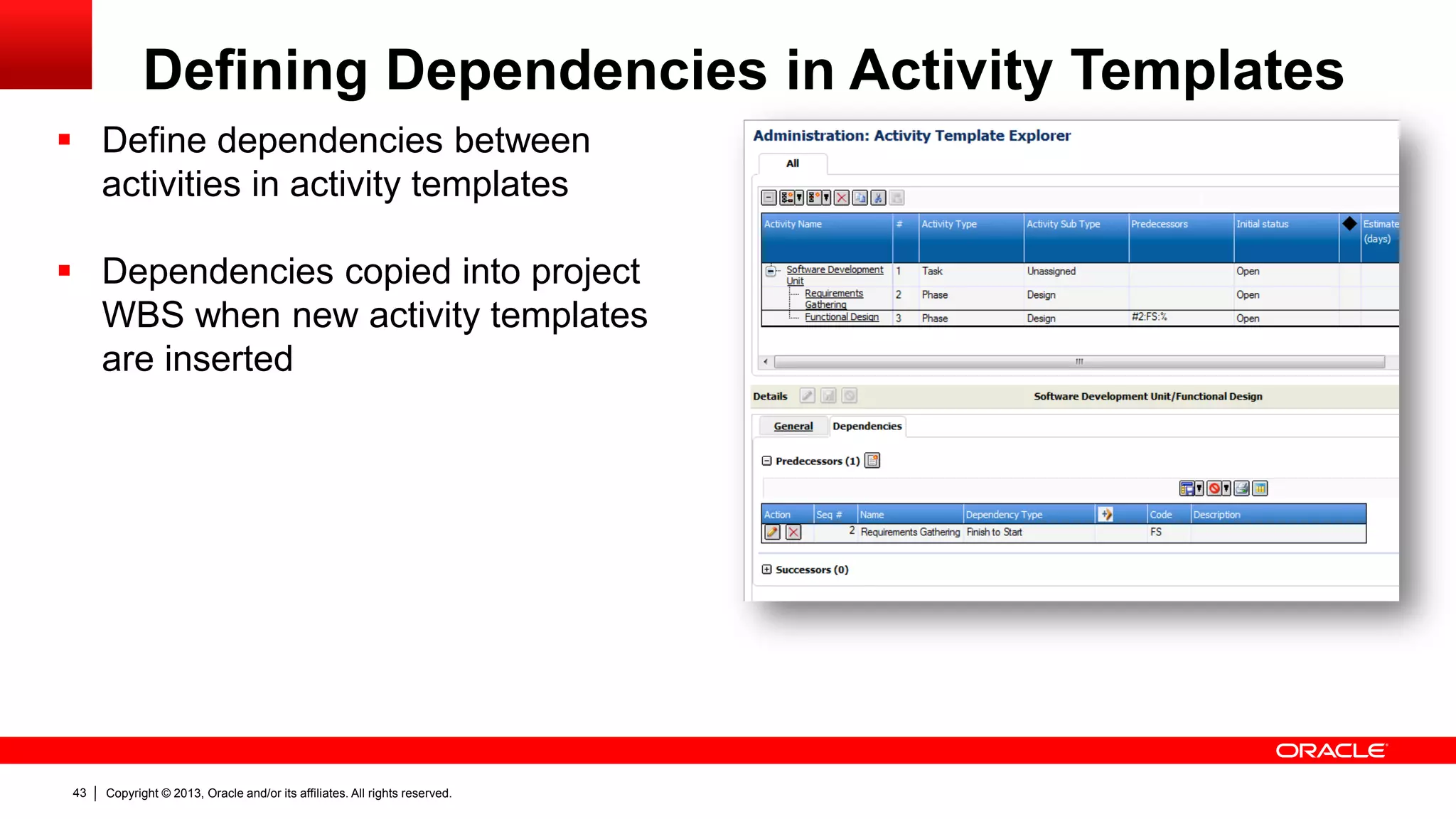
Defining Dependencies in Activity Templates
 Define dependencies between
activities in activity templates
 Dependencies copied into project
WBS when new activity templates
are inserted
Copyright © 2013, Oracle and/or its affiliates. All rights reserved.44
Reporting
Copyright © 2013, Oracle and/or its affiliates. All rights reserved.45
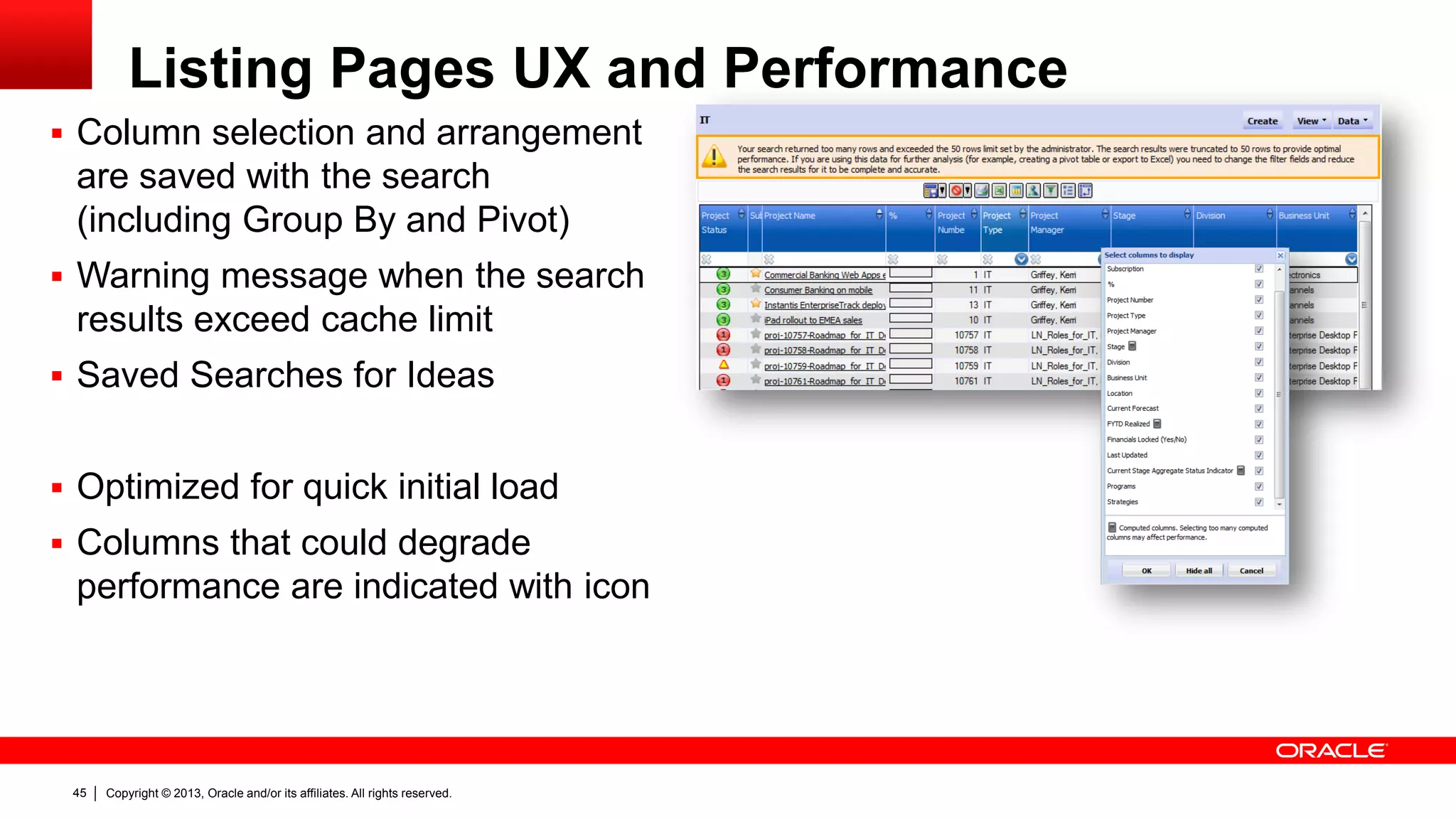
Listing Pages UX and Performance
 Column selection and arrangement
are saved with the search
(including Group By and Pivot)
 Warning message when the search
results exceed cache limit
 Saved Searches for Ideas
 Optimized for quick initial load
 Columns that could degrade
performance are indicated with icon
Copyright © 2013, Oracle and/or its affiliates. All rights reserved.46
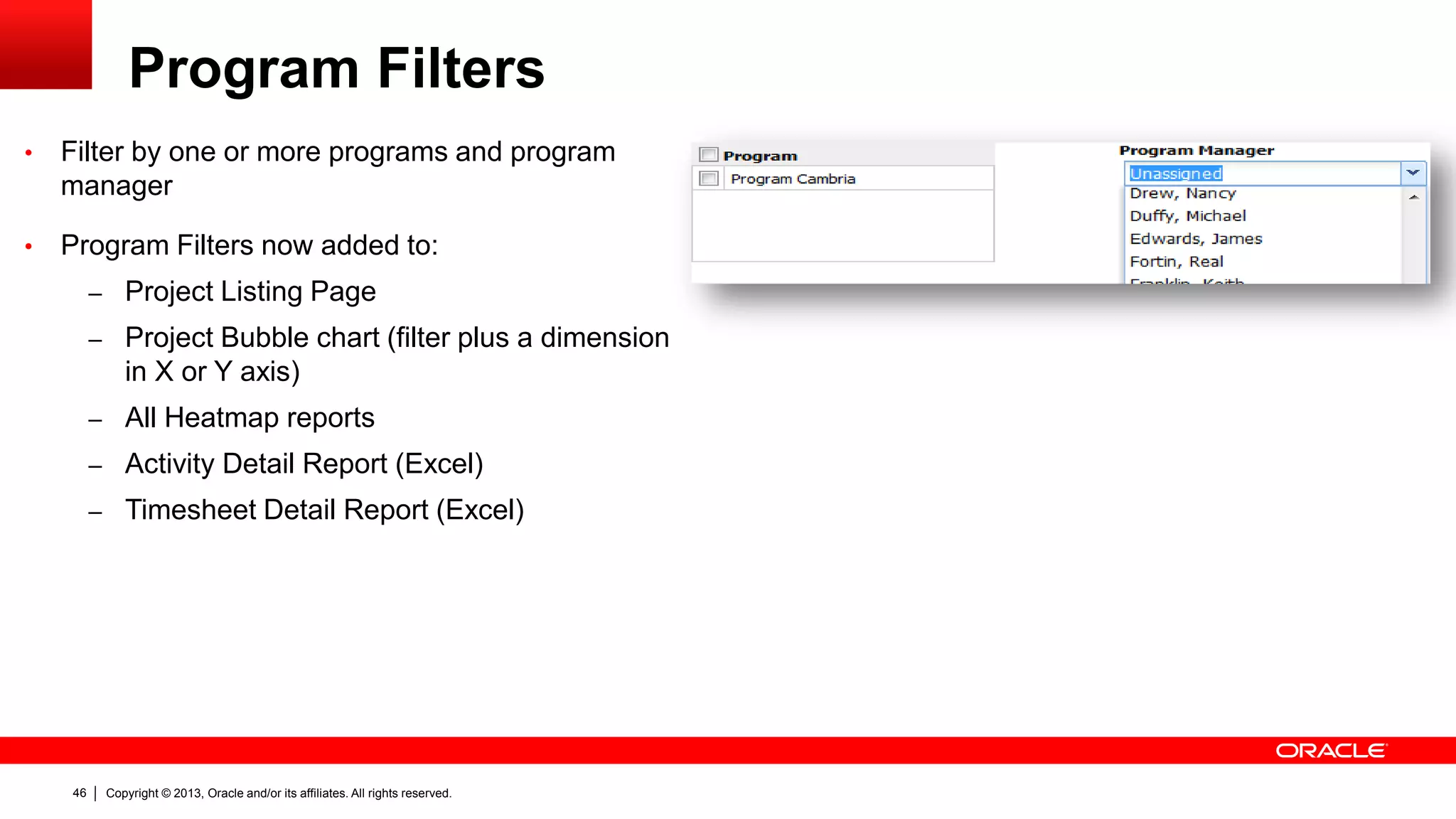
Program Filters
• Filter by one or more programs and program
manager
• Program Filters now added to:
– Project Listing Page
– Project Bubble chart (filter plus a dimension
in X or Y axis)
– All Heatmap reports
– Activity Detail Report (Excel)
– Timesheet Detail Report (Excel)
Copyright © 2013, Oracle and/or its affiliates. All rights reserved.47
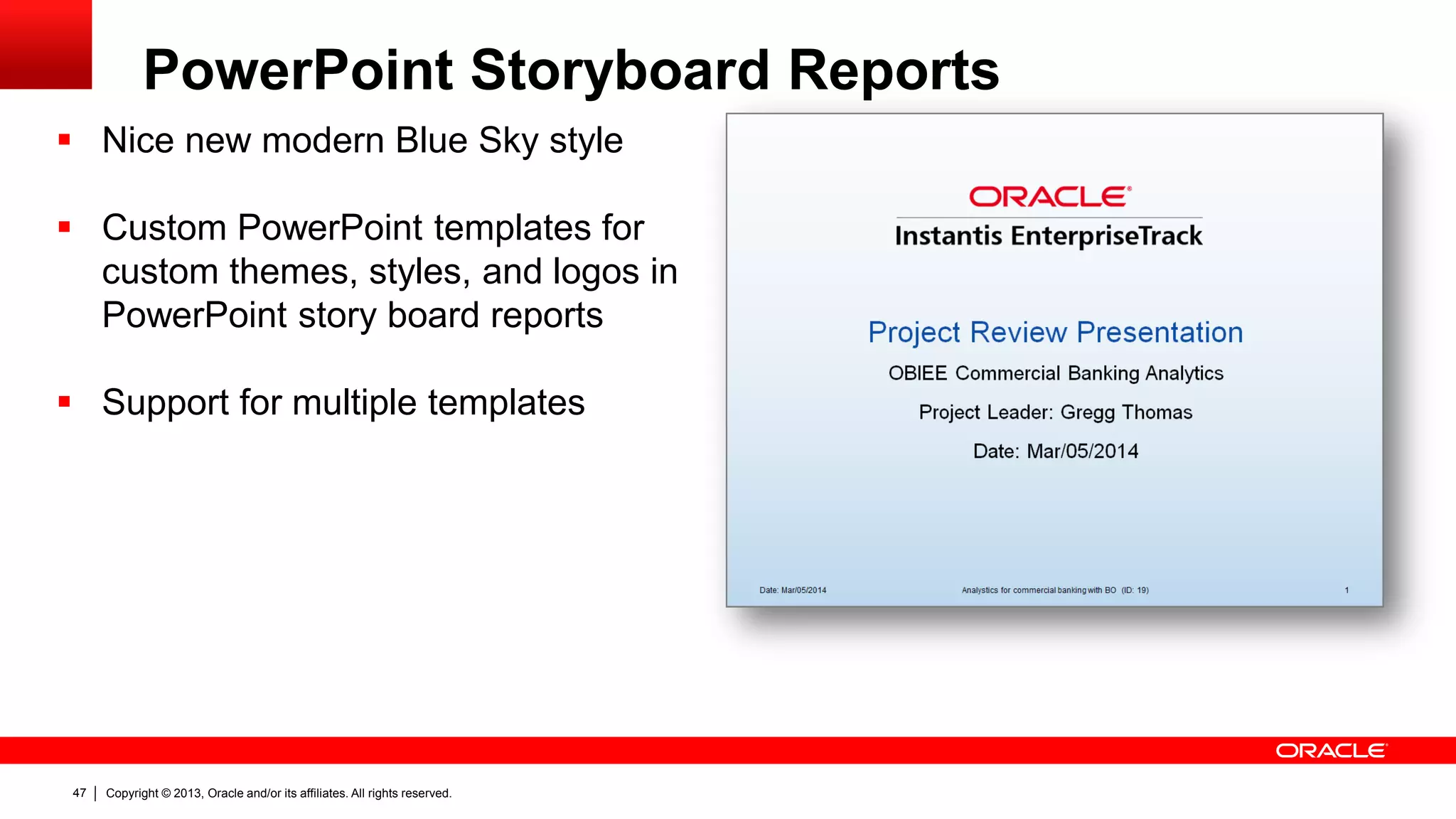
PowerPoint Storyboard Reports
 Nice new modern Blue Sky style
 Custom PowerPoint templates for
custom themes, styles, and logos in
PowerPoint story board reports
 Support for multiple templates
Copyright © 2013, Oracle and/or its affiliates. All rights reserved.48
Performance Optimizations
 All Listing Pages had a major rework and fine tuned for better
performance
 Resource Planning Page
– New monthly mode
– Computations are made in server for better performance
 Heatmap reports more compact and non-interactive plain-text CSV
format output
 User defined reports with Excel 2010 (supports large data volume and
better compression of file size)
 Application cache architecture improved for better performance
Copyright © 2013, Oracle and/or its affiliates. All rights reserved.49
Customer
Enhancements and
Supportability
Copyright © 2013, Oracle and/or its affiliates. All rights reserved.50
List of Enhancements
 Quick Project Create with project custom fields
 Custom fields carry over from ideas to project requests to projects
 Filter for programs in more places
 Simple Enhancements
– Rename roadmaps (simple enhancements)
– Fixed minor quirks with timesheet search
– “Activity” literal in streams are context sensitive – no hard coding
 Ability for configuring help for evaluation scores and custom fields
 Idea portal rework (simplified landing page and access restricted to ideas)
Copyright © 2013, Oracle and/or its affiliates. All rights reserved.51
Internationalization
Copyright © 2013, Oracle and/or its affiliates. All rights reserved.52
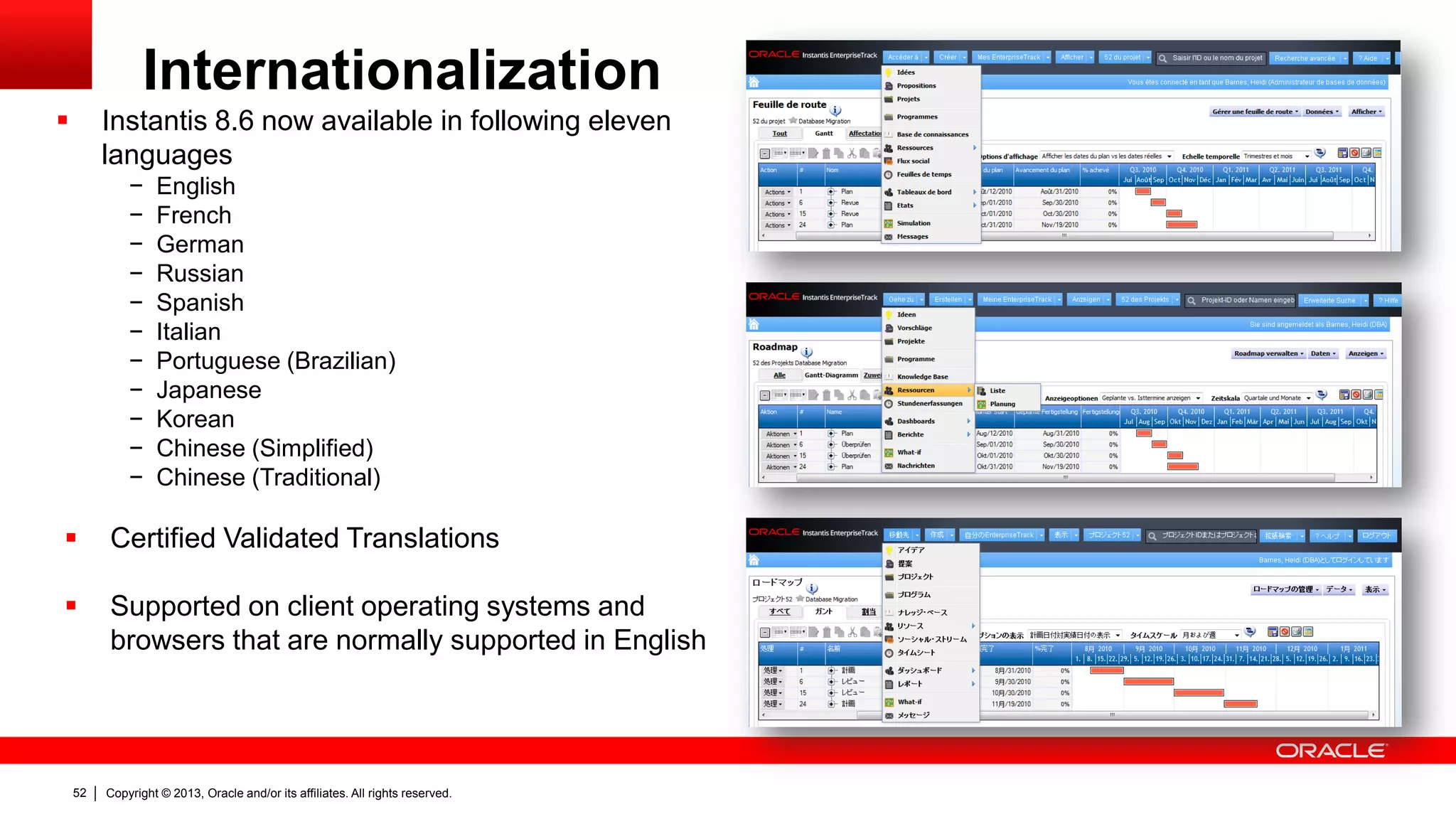
Internationalization
 Instantis 8.6 now available in following eleven
languages
− English
− French
− German
− Russian
− Spanish
− Italian
− Portuguese (Brazilian)
− Japanese
− Korean
− Chinese (Simplified)
− Chinese (Traditional)
 Certified Validated Translations
 Supported on client operating systems and
browsers that are normally supported in English
Copyright © 2013, Oracle and/or its affiliates. All rights reserved.53
Security, Admin &
Configuration
Copyright © 2013, Oracle and/or its affiliates. All rights reserved.54
Security, Admin & Configuration
 Fast Track best practices for IT PPM with
two prebuilt configuration templates:
– Basic template
– Advanced template
 Improved admin user interface with support
for post-deployment reconfigurations
Copyright © 2013, Oracle and/or its affiliates. All rights reserved.55
Support,
De-support and
Deprecations
Copyright © 2013, Oracle and/or its affiliates. All rights reserved.56
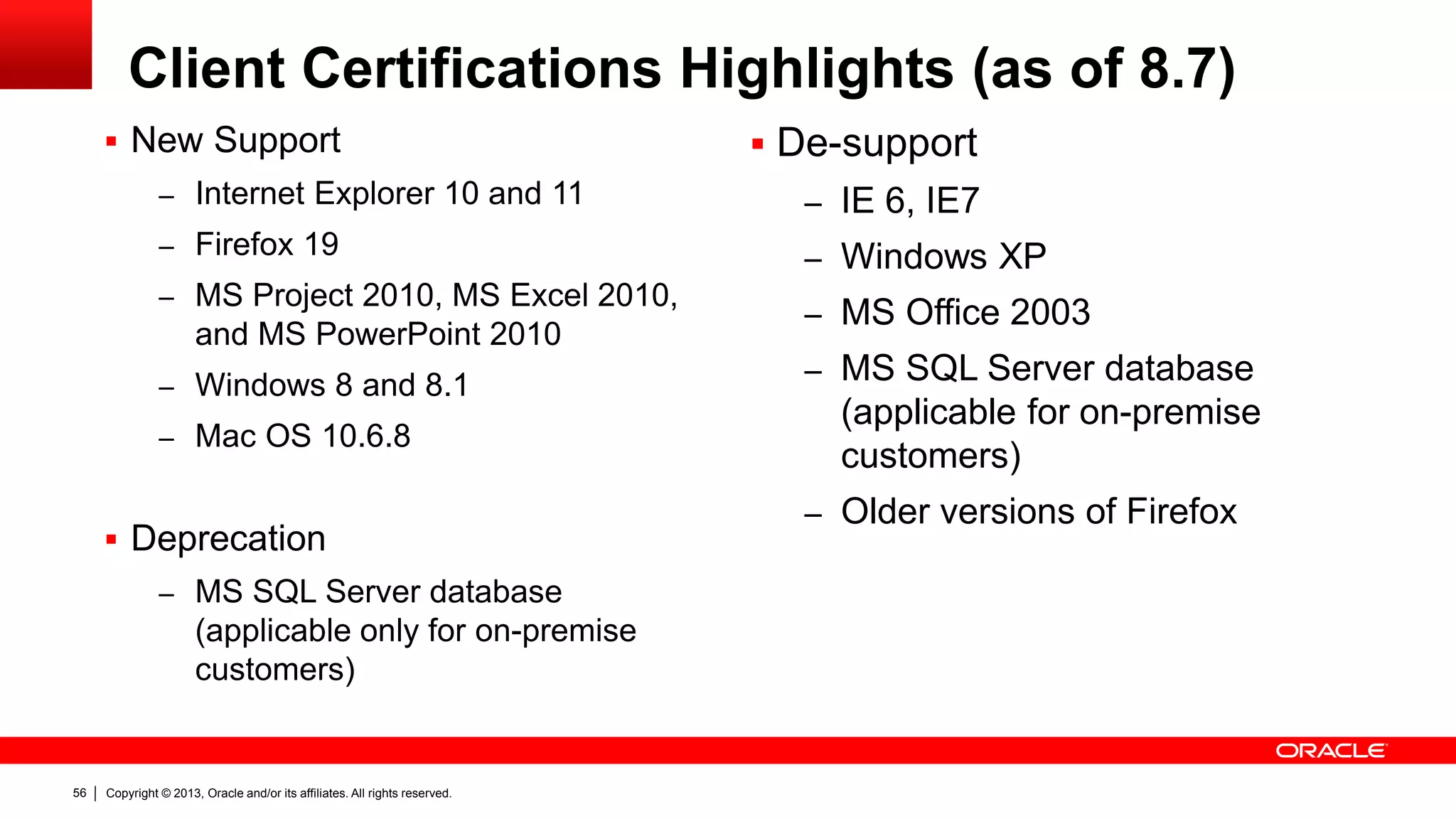
Client Certifications Highlights (as of 8.7)
 New Support
– Internet Explorer 10 and 11
– Firefox 19
– MS Project 2010, MS Excel 2010,
and MS PowerPoint 2010
– Windows 8 and 8.1
– Mac OS 10.6.8
 Deprecation
– MS SQL Server database
(applicable only for on-premise
customers)
 De-support
– IE 6, IE7
– Windows XP
– MS Office 2003
– MS SQL Server database
(applicable for on-premise
customers)
– Older versions of Firefox
Copyright © 2013, Oracle and/or its affiliates. All rights reserved.57
Summary
Copyright © 2013, Oracle and/or its affiliates. All rights reserved.58
Resource Management
 Resource calendars
 Activity labor cost capitalization
 Variable resource rates
Reporting
 Improved listing pages
 Program filters
 MS Excel 2010 and PowerPoint
2010 support
User Experience
 Usability improvements for
managing issues, risks, scope
change requests, defects,
product backlog
 Improved UI for project team
creation
 Listing pages saved searches
 UPK ready
Customer Enhancements &
Supportability
 Easy to maintain help for
evaluation score and custom
fields
 Idea portal landing page and
access
 Many customer requested
enhancement requests
Performance
 Fine-tuned listing pages
 More compact heatmaps
 Resource planning page
 Resource and finance reports
 Improved application cache
Instantis 8.5 Release Content Summary
 Simplified staffing plan (IPT)
 Initial finance estimates
 Resource allocations with effort
in bulk hours
 Timesheets with ETC
 Field change auditing
 Finance lock
 MS Project 2010
Demand Mgmt & Execution
Copyright © 2013, Oracle and/or its affiliates. All rights reserved.59
Internationalization/Localization
 Instantis now available in 11 languages
− English
− French
− German
− Russian
− Spanish
− Italian
− Portuguese (Brazilian)
− Japanese
− Korean
− Chinese (Simplified)
− Chinese (Traditional)
 UI improvements
 Time management enhancements
 Oracle Cloud for Industry readiness
Enhancements
Instantis 8.6 Release Content Summary
Copyright © 2013, Oracle and/or its affiliates. All rights reserved.60
Time Management
 Timesheet period close (freeze)
 Timesheet correction capture
 Reports/data extract improvements for ERP
integration (with wrapper API for integration)
Reporting
 PowerPoint story board reports with custom
templates
 Improved finance reports
 Pluggable custom reports
 API for project (header) create, read, update,
delete and search
Integration API
Security, Admin & Configuration
 Fast track templates for IT PPM
 Login access restriction with IP address
 SSO improvements
 Common standard upgrade
 Configuration workbench more partner ready
 Configuration export/import and more
Instantis 8.7 Release Content Summary
Core Product Enhancements
 Context-sensitive custom fields
 Layout for custom fields
 New notes custom field type
 Idea custom fields carry over to project request
 Defining predecessors in activity templates
 Project request improvements
 Timesheet UI makeover with BlueSky style
 Many new product enhancements (requested
by customers)
Copyright © 2013, Oracle and/or its affiliates. All rights reserved.61
Benefits – Resource Management
 More precise capacity visibility for resource planning and project
execution with resource calendars that capture vacation, LOA and part-
time resource availability
 Ensure compliance and governance processes with activity labor
cost capitalization
 Better project labor cost estimation, tracking and administration
with variable resource rates
Copyright © 2013, Oracle and/or its affiliates. All rights reserved.62
Benefits – Demand Management & Execution
 Improved productivity and analysis with project request flexible
staffing plan and simplified finance estimation
 More flexible time management deployments options for enterprise
customers with project level timesheet approval, and estimated time to
complete (ETC) in timesheets and projects
 Better governance with timesheet period closing and preventing
modifications to timesheets in closed periods
 Enforce proper financial accounting processes with the new strict
finance lock/close period option
 More ready for one-way Instantis to ERP timesheet labor effort/cost
integration with timesheet period closing, timesheet correction support,
and improved reports for data extraction with wrapper API
Copyright © 2013, Oracle and/or its affiliates. All rights reserved.63
Benefits – Reporting, UX And Performance
 Better user productivity and analysis with improved listing pages, and
customizable PowerPoint storyboard reports
 Improved program reporting with new program filters in listing pages
and reports
 Run large data volume user defined Excel reports with MS Excel
2010 support
 Better user productivity and satisfaction with improved user interface
for timesheets, project issues, risks, and scope changes
 Gain faster system response and improved user experience with
optimized listing pages, resource planning, and application cache
 Ready for user self-service training with UPK support
Copyright © 2013, Oracle and/or its affiliates. All rights reserved.64
Benefits and Value – Internationalization
 More successful international deployments (in non-English
speaking regions) and global multi-language deployments with out-
of-the-box standard product translations available in German, French,
Russian, Spanish, Italian, Portuguese (Brazilian), Japanese, Korean,
Chinese (Simplified), and Chinese (Traditional)
 Better local and legal regulations conformance with out-of-the-box
standard product translations (for example, legal regulations in provinces
in Canada requires all software to available in French language)
Copyright © 2013, Oracle and/or its affiliates. All rights reserved.65
Benefits and Value – Administration
 Get jump start on Instantis with Fast Track templates
 Improved application security with support for SSO, self-service
password reset, and limiting access with IP address filters
 Easy upgrade with common standard upgrade
 More partner ready with improved configuration workbench
Copyright © 2013, Oracle and/or its affiliates. All rights reserved.66
Benefits and Value – OCI Readiness
 Better performance, security and reliability by hosting on software
and hardware optimized Oracle Cloud technology
 Interoperability assurance with other products available on Oracle
Cloud
 High availability and better service assurance with world class Oracle
hosting operations
Copyright © 2013, Oracle and/or its affiliates. All rights reserved.67
Instantis 8.5 Resources On OTN
 What’s New PDF Document:
http://docs.oracle.com/cd/E41201_01/English/User_Guides/EnterpriseTrack_Whats_New.pdf
 What’s New UPK:
http://docs.oracle.com/cd/E41201_01/English/User_Guides/PlayerPackage/index.html
 Latest Product Documentation:
http://docs.oracle.com/cd/E48392_01/index.htm
 Datasheets:
http://www.oracle.com/us/products/applications/primavera/instantis-enterprisetrack/resources/index.html
Copyright © 2013, Oracle and/or its affiliates. All rights reserved.68
Instantis 8.6 Resources On OTN
 What’s New PDF Document:
http://docs.oracle.com/cd/E48392_01/English/User_Guides/EnterpriseTrack_Whats_New.pdf
 What’s New UPK:
http://docs.oracle.com/cd/E48392_01/English/User_Guides/PlayerPackage/index.html
 Latest Product Documentation:
http://docs.oracle.com/cd/E48392_01/index.htm
 Datasheets:
http://www.oracle.com/us/products/applications/primavera/instantis-enterprisetrack/resources/index.html
Copyright © 2013, Oracle and/or its affiliates. All rights reserved.69
Thank You
Copyright © 2013, Oracle and/or its affiliates. All rights reserved.70
Copyright © 2013, Oracle and/or its affiliates. All rights reserved.71

Whats new in instantis 8.5 8.6 - 8.7 - Oracle Primavera P6 Collaborate 14

  • 1.
    Copyright © 2013,Oracle and/or its affiliates. All rights reserved.1
  • 2.
  • 3.
    Copyright © 2013,Oracle and/or its affiliates. All rights reserved.3 Resource Management  Resource calendars  Activity labor cost capitalization  Variable resource rates Reporting  Improved listing pages  Program filters  MS Excel 2010 and PowerPoint 2010 support User Experience  Usability improvements for managing issues, risks, scope change requests, defects, product backlog  Improved UI for project team creation  Listing pages saved searches  UPK ready Customer Enhancements & Supportability  Easy to maintain help for evaluation score and custom fields  Idea portal landing page and access  Many customer requested enhancement requests Performance  Fine-tuned listing pages  More compact heatmaps  Resource planning page  Resource and finance reports  Improved application cache Instantis 8.5 Release Content Summary  Simplified staffing plan (IPT)  Initial finance estimates  Resource allocations with effort in bulk hours  Timesheets with ETC  Field change auditing  Finance lock  MS Project 2010 Demand Mgmt & Execution
  • 4.
    Copyright © 2013,Oracle and/or its affiliates. All rights reserved.4 Internationalization/Localization  Instantis now available in 11 languages − English − French − German − Russian − Spanish − Italian − Portuguese (Brazilian) − Japanese − Korean − Chinese (Simplified) − Chinese (Traditional)  UI improvements  Time management enhancements  Oracle Cloud for Industry readiness Enhancements Instantis 8.6 Release Content Summary
  • 5.
    Copyright © 2013,Oracle and/or its affiliates. All rights reserved.5 Time Management  Timesheet period close (freeze)  Timesheet correction capture  Reports/data extract improvements for ERP integration (with wrapper API for integration) Reporting  PowerPoint story board reports with custom templates  Improved finance reports  Pluggable custom reports  API for project (header) create, read, update, delete and search Integration API Security, Admin & Configuration  Fast track templates for IT PPM  Login access restriction with IP address  SSO improvements  Common standard upgrade  Configuration workbench more partner ready  Configuration export/import and more Instantis 8.7 Release Content Summary Core Product Enhancements  Context-sensitive custom fields  Layout for custom fields  New notes custom field type  Idea custom fields carry over to project request  Defining predecessors in activity templates  Project request improvements  Timesheet UI makeover with BlueSky style  Many new product enhancements (requested by customers)
  • 6.
    Copyright © 2013,Oracle and/or its affiliates. All rights reserved.6 Benefits – Resource Management  More precise capacity visibility for resource planning and project execution with resource calendars that capture vacation, LOA and part- time resource availability  Ensure compliance and governance processes with activity labor cost capitalization  Better project labor cost estimation, tracking and administration with variable resource rates
  • 7.
    Copyright © 2013,Oracle and/or its affiliates. All rights reserved.7 Benefits – Demand Management & Execution  More flexible time management deployments options for enterprise customers with project level timesheet approval, and estimated time to complete (ETC) in timesheets and projects  Better governance with timesheet period closing and preventing modifications to timesheets in closed periods  More ready for one-way Instantis to ERP timesheet labor effort/cost integration with timesheet period closing, timesheet correction support, and improved reports for data extraction with wrapper API  Enforce proper financial accounting processes with the new strict finance lock/close period option  Improved productivity and analysis with project request flexible staffing plan and simplified finance estimation
  • 8.
    Copyright © 2013,Oracle and/or its affiliates. All rights reserved.8 Benefits – Reporting, UX And Performance  Better user productivity and analysis with improved listing pages, and customizable PowerPoint storyboard reports  Improved program reporting with new program filters in listing pages and reports  Run large data volume user defined Excel reports with MS Excel 2010 support  Better user productivity and satisfaction with improved user interface for timesheets, project issues, risks, and scope changes  Gain faster system response and improved user experience with optimized listing pages, resource planning, and application cache  Ready for user self-service training with UPK support
  • 9.
    Copyright © 2013,Oracle and/or its affiliates. All rights reserved.9 Benefits and Value – Internationalization  More successful international deployments (in non-English speaking regions) and global multi-language deployments with out- of-the-box standard product translations available in German, French, Russian, Spanish, Italian, Portuguese (Brazilian), Japanese, Korean, Chinese (Simplified), and Chinese (Traditional)  Better local and legal regulations conformance with out-of-the-box standard product translations (for example, legal regulations in provinces in Canada requires all software to available in French language)
  • 10.
    Copyright © 2013,Oracle and/or its affiliates. All rights reserved.10 Benefits and Value – Administration  Get jump start on Instantis with Fast Track templates  Improved application security with support for SSO, self-service password reset, and limiting access with IP address filters  Easy upgrade with common standard upgrade  More partner ready with improved configuration workbench
  • 11.
    Copyright © 2013,Oracle and/or its affiliates. All rights reserved.11 Benefits and Value – OCI Readiness  Better performance, security and reliability by hosting on software and hardware optimized Oracle Cloud technology  Interoperability assurance with other products available on Oracle Cloud  High availability and better service assurance with world class Oracle hosting operations
  • 12.
    Copyright © 2013,Oracle and/or its affiliates. All rights reserved.12 Resource Management
  • 13.
    Copyright © 2013,Oracle and/or its affiliates. All rights reserved.13 Resource Calendars
  • 14.
    Copyright © 2013,Oracle and/or its affiliates. All rights reserved.14 Resource Calendars  Individual calendar for each resource to specify: − personal vacations − Long leave of absence − Seasonal working hours variation (For example, John may work 45 hrs per week in fall, winter and spring, but only 30 hrs per week in summer months) − Holiday to workday override  Part time workers support. For example, resource may work − M-W 8 hrs per day − M-F 6 hrs per day − M-F 7.5 hrs per day  Resource time off reflected in resource capacity, heatmaps and reporting  Project scheduling based resource calendar  Resource calendar inherited from a “Reference Calendar”
  • 15.
    Copyright © 2013,Oracle and/or its affiliates. All rights reserved.15 Resource Calendar  Visibility into availability during resource requisition and commitment.  MS Project integration (Enterprise track will be the source of truth).
  • 16.
    Copyright © 2013,Oracle and/or its affiliates. All rights reserved.16 Activity Labor Cost Capitalization
  • 17.
    Copyright © 2013,Oracle and/or its affiliates. All rights reserved.17 Activity Labor Cost Capitalization  New Labor Expense Type (LET) attribute added to the activities.  LET can be: − Capital Expense (CapEx) − Operational Expense (OpEx) − (Not specified)  LET determines to which finance category (CapEx or OpEx) will the activity labor cost roll up.
  • 18.
    Copyright © 2013,Oracle and/or its affiliates. All rights reserved.18 Variable Resource Rates
  • 19.
    Copyright © 2013,Oracle and/or its affiliates. All rights reserved.19 Resource Rate  Rate table for each resource  Alternate option to use role rate  Specify currency in resource locale  View history of rate change  Change resource rate for all projects in one place
  • 20.
    Copyright © 2013,Oracle and/or its affiliates. All rights reserved.20 Role Rate  Rate table for each role  Alternate for resource rate  View history of rate change  Change role rate for all resources (indirectly for projects) in one place
  • 21.
    Copyright © 2013,Oracle and/or its affiliates. All rights reserved.21 Project Team Member – Rate Override  Override labor rates anytime  Override for specific intervals
  • 22.
    Copyright © 2013,Oracle and/or its affiliates. All rights reserved.22 Global Rate Changes And Finance Locks  Global resource and role rate changes across all projects  Finance lock/close period protection with a new strict mode
  • 23.
    Copyright © 2013,Oracle and/or its affiliates. All rights reserved.23 Project Demand And Execution
  • 24.
    Copyright © 2013,Oracle and/or its affiliates. All rights reserved.24 Project Request Improvements
  • 25.
    Copyright © 2013,Oracle and/or its affiliates. All rights reserved.25 Project Request Initial Project Team (IPT) Improvements  IPT structure is more flexible (and not fixed as it was in older versions)  Add new roles with Add Role button  Add the same role multiple times  Remove non-mandatory roles  Easy check for resource availability  User Experience − New and improved UI − Roles that require approval are grouped together − Inline editing for approval
  • 26.
    Copyright © 2013,Oracle and/or its affiliates. All rights reserved.26 Project Request Initial Finance Plan  Project initial finance fields will reflect first level finance categories  Applicable to all product areas − Project request − Projects − What-if − Status reports − Power point reports − Reports − And more…
  • 27.
    Copyright © 2013,Oracle and/or its affiliates. All rights reserved.27 Resource Allocation With Bulk Hours  In project requests and projects enter resource allocation hours in one bulk for specific duration or whole project (previously only % Utilization and weekly break down was supported)
  • 28.
    Copyright © 2013,Oracle and/or its affiliates. All rights reserved.28 Timesheets
  • 29.
    Copyright © 2013,Oracle and/or its affiliates. All rights reserved.29 Timesheets ETC  Support for ETC (Estimated Time to Complete) and ERE (Expected Remaining Time) in timesheets  ETC = Prediction manually entered by user as of a specific date in timesheets  ERE = Plan Effort – Actual Effort  Variance = ERE – ETC  ETC rollups to activities upon timesheet approval
  • 30.
    Copyright © 2013,Oracle and/or its affiliates. All rights reserved.30 ETC In Projects  Warning indicator when ETC is not same as ERE  Ability for project managers to reconcile the ETC and ERE differences
  • 31.
    Copyright © 2013,Oracle and/or its affiliates. All rights reserved.31 Timesheets Approval By Project Managers  Approve or reject timesheet line items for each project  Project managers can approve or reject timesheet line only for their projects  Resource managers approve or reject paid time off, vacations and other general admin overheads  Automatic email notifications on timesheets status updates for project managers  Minor UI improvements
  • 32.
    Copyright © 2013,Oracle and/or its affiliates. All rights reserved.32 Timesheet Period Closing  Close timesheet periods and freeze timesheet modifications  Verify current timesheet submission and approval status  Reopen closed timesheet periods for corrections  Capture and extract correction data
  • 33.
    Copyright © 2013,Oracle and/or its affiliates. All rights reserved.33 Field Change Auditing
  • 34.
    Copyright © 2013,Oracle and/or its affiliates. All rights reserved.34 Field Change Auditing  Field change auditing supported for: − Limited project request fields − Limited project fields  View, filter, group by, print and export to Excel  Details include: − What, who, and when − Old and new value − Comments (only for approvals) − Context (Description)
  • 35.
    Copyright © 2013,Oracle and/or its affiliates. All rights reserved.35 Custom Fields
  • 36.
    Copyright © 2013,Oracle and/or its affiliates. All rights reserved.36 Context-sensitive Custom Fields  Visibility of custom fields can be controlled by values selected in another custom field  Supported for: – Project custom fields – Ideas custom fields  Notes: – Supported driving fields include organization hierarchy, classification, pre-defined custom fields – Driving fields should be of type list – Context sensitivity is only for one level
  • 37.
    Copyright © 2013,Oracle and/or its affiliates. All rights reserved.37 Custom Fields Layout  Most of the pre-defined and user-defined custom fields can be placed in different UI sections by the administrators  Supported for: – Ideas – Project requests – Projects
  • 38.
    Copyright © 2013,Oracle and/or its affiliates. All rights reserved.38 Notes Custom Field Type  New custom field of type Notes for entering multi-line free form text  Custom fields of type notes are displayed as text area in UI  Max size up to 4K for English characters
  • 39.
    Copyright © 2013,Oracle and/or its affiliates. All rights reserved.39 User Experience
  • 40.
    Copyright © 2013,Oracle and/or its affiliates. All rights reserved.40 Productivity and User Experience  Access project issues, risks, defects, backlogs and scope change requests with ease  View and edit in a simple spread like UI
  • 41.
    Copyright © 2013,Oracle and/or its affiliates. All rights reserved.41 User Interface (update in 8.6)  New UI with fresh colors more conforming to Oracle UI standards  New graphic UI library with consistent icons across the product
  • 42.
    Copyright © 2013,Oracle and/or its affiliates. All rights reserved.42 Timesheets User Interface (updated in 8.7)  New BlueSky theme  Keyboard short cuts for easy navigation  Non-working days in resource calendar are highlighted
  • 43.
    Copyright © 2013,Oracle and/or its affiliates. All rights reserved.43 Defining Dependencies in Activity Templates  Define dependencies between activities in activity templates  Dependencies copied into project WBS when new activity templates are inserted
  • 44.
    Copyright © 2013,Oracle and/or its affiliates. All rights reserved.44 Reporting
  • 45.
    Copyright © 2013,Oracle and/or its affiliates. All rights reserved.45 Listing Pages UX and Performance  Column selection and arrangement are saved with the search (including Group By and Pivot)  Warning message when the search results exceed cache limit  Saved Searches for Ideas  Optimized for quick initial load  Columns that could degrade performance are indicated with icon
  • 46.
    Copyright © 2013,Oracle and/or its affiliates. All rights reserved.46 Program Filters • Filter by one or more programs and program manager • Program Filters now added to: – Project Listing Page – Project Bubble chart (filter plus a dimension in X or Y axis) – All Heatmap reports – Activity Detail Report (Excel) – Timesheet Detail Report (Excel)
  • 47.
    Copyright © 2013,Oracle and/or its affiliates. All rights reserved.47 PowerPoint Storyboard Reports  Nice new modern Blue Sky style  Custom PowerPoint templates for custom themes, styles, and logos in PowerPoint story board reports  Support for multiple templates
  • 48.
    Copyright © 2013,Oracle and/or its affiliates. All rights reserved.48 Performance Optimizations  All Listing Pages had a major rework and fine tuned for better performance  Resource Planning Page – New monthly mode – Computations are made in server for better performance  Heatmap reports more compact and non-interactive plain-text CSV format output  User defined reports with Excel 2010 (supports large data volume and better compression of file size)  Application cache architecture improved for better performance
  • 49.
    Copyright © 2013,Oracle and/or its affiliates. All rights reserved.49 Customer Enhancements and Supportability
  • 50.
    Copyright © 2013,Oracle and/or its affiliates. All rights reserved.50 List of Enhancements  Quick Project Create with project custom fields  Custom fields carry over from ideas to project requests to projects  Filter for programs in more places  Simple Enhancements – Rename roadmaps (simple enhancements) – Fixed minor quirks with timesheet search – “Activity” literal in streams are context sensitive – no hard coding  Ability for configuring help for evaluation scores and custom fields  Idea portal rework (simplified landing page and access restricted to ideas)
  • 51.
    Copyright © 2013,Oracle and/or its affiliates. All rights reserved.51 Internationalization
  • 52.
    Copyright © 2013,Oracle and/or its affiliates. All rights reserved.52 Internationalization  Instantis 8.6 now available in following eleven languages − English − French − German − Russian − Spanish − Italian − Portuguese (Brazilian) − Japanese − Korean − Chinese (Simplified) − Chinese (Traditional)  Certified Validated Translations  Supported on client operating systems and browsers that are normally supported in English
  • 53.
    Copyright © 2013,Oracle and/or its affiliates. All rights reserved.53 Security, Admin & Configuration
  • 54.
    Copyright © 2013,Oracle and/or its affiliates. All rights reserved.54 Security, Admin & Configuration  Fast Track best practices for IT PPM with two prebuilt configuration templates: – Basic template – Advanced template  Improved admin user interface with support for post-deployment reconfigurations
  • 55.
    Copyright © 2013,Oracle and/or its affiliates. All rights reserved.55 Support, De-support and Deprecations
  • 56.
    Copyright © 2013,Oracle and/or its affiliates. All rights reserved.56 Client Certifications Highlights (as of 8.7)  New Support – Internet Explorer 10 and 11 – Firefox 19 – MS Project 2010, MS Excel 2010, and MS PowerPoint 2010 – Windows 8 and 8.1 – Mac OS 10.6.8  Deprecation – MS SQL Server database (applicable only for on-premise customers)  De-support – IE 6, IE7 – Windows XP – MS Office 2003 – MS SQL Server database (applicable for on-premise customers) – Older versions of Firefox
  • 57.
    Copyright © 2013,Oracle and/or its affiliates. All rights reserved.57 Summary
  • 58.
    Copyright © 2013,Oracle and/or its affiliates. All rights reserved.58 Resource Management  Resource calendars  Activity labor cost capitalization  Variable resource rates Reporting  Improved listing pages  Program filters  MS Excel 2010 and PowerPoint 2010 support User Experience  Usability improvements for managing issues, risks, scope change requests, defects, product backlog  Improved UI for project team creation  Listing pages saved searches  UPK ready Customer Enhancements & Supportability  Easy to maintain help for evaluation score and custom fields  Idea portal landing page and access  Many customer requested enhancement requests Performance  Fine-tuned listing pages  More compact heatmaps  Resource planning page  Resource and finance reports  Improved application cache Instantis 8.5 Release Content Summary  Simplified staffing plan (IPT)  Initial finance estimates  Resource allocations with effort in bulk hours  Timesheets with ETC  Field change auditing  Finance lock  MS Project 2010 Demand Mgmt & Execution
  • 59.
    Copyright © 2013,Oracle and/or its affiliates. All rights reserved.59 Internationalization/Localization  Instantis now available in 11 languages − English − French − German − Russian − Spanish − Italian − Portuguese (Brazilian) − Japanese − Korean − Chinese (Simplified) − Chinese (Traditional)  UI improvements  Time management enhancements  Oracle Cloud for Industry readiness Enhancements Instantis 8.6 Release Content Summary
  • 60.
    Copyright © 2013,Oracle and/or its affiliates. All rights reserved.60 Time Management  Timesheet period close (freeze)  Timesheet correction capture  Reports/data extract improvements for ERP integration (with wrapper API for integration) Reporting  PowerPoint story board reports with custom templates  Improved finance reports  Pluggable custom reports  API for project (header) create, read, update, delete and search Integration API Security, Admin & Configuration  Fast track templates for IT PPM  Login access restriction with IP address  SSO improvements  Common standard upgrade  Configuration workbench more partner ready  Configuration export/import and more Instantis 8.7 Release Content Summary Core Product Enhancements  Context-sensitive custom fields  Layout for custom fields  New notes custom field type  Idea custom fields carry over to project request  Defining predecessors in activity templates  Project request improvements  Timesheet UI makeover with BlueSky style  Many new product enhancements (requested by customers)
  • 61.
    Copyright © 2013,Oracle and/or its affiliates. All rights reserved.61 Benefits – Resource Management  More precise capacity visibility for resource planning and project execution with resource calendars that capture vacation, LOA and part- time resource availability  Ensure compliance and governance processes with activity labor cost capitalization  Better project labor cost estimation, tracking and administration with variable resource rates
  • 62.
    Copyright © 2013,Oracle and/or its affiliates. All rights reserved.62 Benefits – Demand Management & Execution  Improved productivity and analysis with project request flexible staffing plan and simplified finance estimation  More flexible time management deployments options for enterprise customers with project level timesheet approval, and estimated time to complete (ETC) in timesheets and projects  Better governance with timesheet period closing and preventing modifications to timesheets in closed periods  Enforce proper financial accounting processes with the new strict finance lock/close period option  More ready for one-way Instantis to ERP timesheet labor effort/cost integration with timesheet period closing, timesheet correction support, and improved reports for data extraction with wrapper API
  • 63.
    Copyright © 2013,Oracle and/or its affiliates. All rights reserved.63 Benefits – Reporting, UX And Performance  Better user productivity and analysis with improved listing pages, and customizable PowerPoint storyboard reports  Improved program reporting with new program filters in listing pages and reports  Run large data volume user defined Excel reports with MS Excel 2010 support  Better user productivity and satisfaction with improved user interface for timesheets, project issues, risks, and scope changes  Gain faster system response and improved user experience with optimized listing pages, resource planning, and application cache  Ready for user self-service training with UPK support
  • 64.
    Copyright © 2013,Oracle and/or its affiliates. All rights reserved.64 Benefits and Value – Internationalization  More successful international deployments (in non-English speaking regions) and global multi-language deployments with out- of-the-box standard product translations available in German, French, Russian, Spanish, Italian, Portuguese (Brazilian), Japanese, Korean, Chinese (Simplified), and Chinese (Traditional)  Better local and legal regulations conformance with out-of-the-box standard product translations (for example, legal regulations in provinces in Canada requires all software to available in French language)
  • 65.
    Copyright © 2013,Oracle and/or its affiliates. All rights reserved.65 Benefits and Value – Administration  Get jump start on Instantis with Fast Track templates  Improved application security with support for SSO, self-service password reset, and limiting access with IP address filters  Easy upgrade with common standard upgrade  More partner ready with improved configuration workbench
  • 66.
    Copyright © 2013,Oracle and/or its affiliates. All rights reserved.66 Benefits and Value – OCI Readiness  Better performance, security and reliability by hosting on software and hardware optimized Oracle Cloud technology  Interoperability assurance with other products available on Oracle Cloud  High availability and better service assurance with world class Oracle hosting operations
  • 67.
    Copyright © 2013,Oracle and/or its affiliates. All rights reserved.67 Instantis 8.5 Resources On OTN  What’s New PDF Document: http://docs.oracle.com/cd/E41201_01/English/User_Guides/EnterpriseTrack_Whats_New.pdf  What’s New UPK: http://docs.oracle.com/cd/E41201_01/English/User_Guides/PlayerPackage/index.html  Latest Product Documentation: http://docs.oracle.com/cd/E48392_01/index.htm  Datasheets: http://www.oracle.com/us/products/applications/primavera/instantis-enterprisetrack/resources/index.html
  • 68.
    Copyright © 2013,Oracle and/or its affiliates. All rights reserved.68 Instantis 8.6 Resources On OTN  What’s New PDF Document: http://docs.oracle.com/cd/E48392_01/English/User_Guides/EnterpriseTrack_Whats_New.pdf  What’s New UPK: http://docs.oracle.com/cd/E48392_01/English/User_Guides/PlayerPackage/index.html  Latest Product Documentation: http://docs.oracle.com/cd/E48392_01/index.htm  Datasheets: http://www.oracle.com/us/products/applications/primavera/instantis-enterprisetrack/resources/index.html
  • 69.
    Copyright © 2013,Oracle and/or its affiliates. All rights reserved.69 Thank You
  • 70.
    Copyright © 2013,Oracle and/or its affiliates. All rights reserved.70
  • 71.
    Copyright © 2013,Oracle and/or its affiliates. All rights reserved.71