Microsoft Enterprise Project Server (EPM) Benefits
Presented by
Hari Prasad Thapliyal
Agilest & Project Management Trainer, Coach & Consultant
(MBA, MCA, PGDOM, PGDFM, CIC, PMP, PMI-ACP, CSM, SCPO, SDC
PRINCE2-Trainer, Scrum Certified Trainer, Microsoft Certified Trainer, ZED Master Trainer)
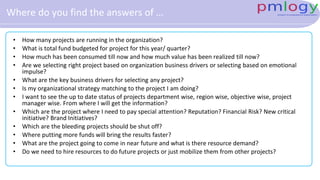
Where do you find the answers of …
• How many projects are running in the organization?
• What is total fund budgeted for project for this year/ quarter?
• How much has been consumed till now and how much value has been realized till now?
• Are we selecting right project based on organization business drivers or selecting based on emotional
impulse?
• What are the key business drivers for selecting any project?
• Is my organizational strategy matching to the project I am doing?
• I want to see the up to date status of projects department wise, region wise, objective wise, project
manager wise. From where I will get the information?
• Which are the project where I need to pay special attention? Reputation? Financial Risk? New critical
initiative? Brand Initiatives?
• Which are the bleeding projects should be shut off?
• Where putting more funds will bring the results faster?
• What are the project going to come in near future and what is there resource demand?
• Do we need to hire resources to do future projects or just mobilize them from other projects?
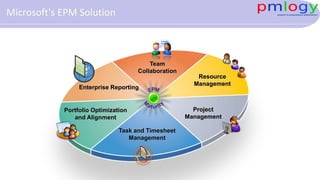
Task and Timesheet
Management
Portfolio Optimization
and Alignment
Enterprise Reporting
Project
Management
Team
Collaboration
Resource
Management
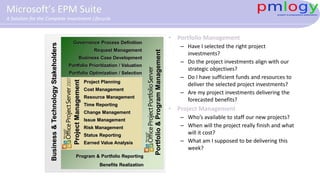
Microsoft's EPM Solution
Portfolio&ProgramManagement
Request Management
Business Case Development
Portfolio Prioritization / Valuation
Governance Process Definition
Portfolio Optimization / Selection
Program & Portfolio Reporting
Benefits Realization
Project Planning
Status Reporting
Resource Management
Time Reporting
Change Management
Earned Value Analysis
Cost Management
Issue Management
Risk Management
ProjectManagement
Business&TechnologyStakeholders
• Portfolio Management
– Have I selected the right project
investments?
– Do the project investments align with our
strategic objectives?
– Do I have sufficient funds and resources to
deliver the selected project investments?
– Are my project investments delivering the
forecasted benefits?
• Project Management
– Who’s available to staff our new projects?
– When will the project really finish and what
will it cost?
– What am I supposed to be delivering this
week?
Microsoft’s EPM Suite
A Solution for the Complete Investment Lifecycle
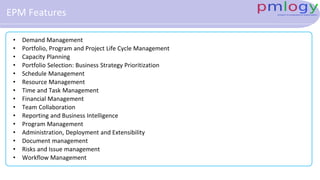
EPM Features
• Demand Management
• Portfolio, Program and Project Life Cycle Management
• Capacity Planning
• Portfolio Selection: Business Strategy Prioritization
• Schedule Management
• Resource Management
• Time and Task Management
• Financial Management
• Team Collaboration
• Reporting and Business Intelligence
• Program Management
• Administration, Deployment and Extensibility
• Document management
• Risks and Issue management
• Workflow Management
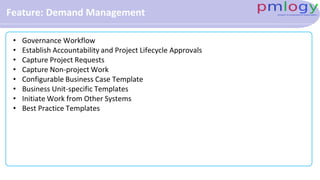
Feature: Demand Management
• Governance Workflow
• Establish Accountability and Project Lifecycle Approvals
• Capture Project Requests
• Capture Non-project Work
• Configurable Business Case Template
• Business Unit-specific Templates
• Initiate Work from Other Systems
• Best Practice Templates
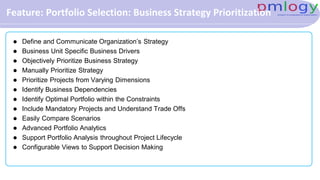
Feature: Portfolio Selection: Business Strategy Prioritization
 Define and Communicate Organization’s Strategy
 Business Unit Specific Business Drivers
 Objectively Prioritize Business Strategy
 Manually Prioritize Strategy
 Prioritize Projects from Varying Dimensions
 Identify Business Dependencies
 Identify Optimal Portfolio within the Constraints
 Include Mandatory Projects and Understand Trade Offs
 Easily Compare Scenarios
 Advanced Portfolio Analytics
 Support Portfolio Analysis throughout Project Lifecycle
 Configurable Views to Support Decision Making
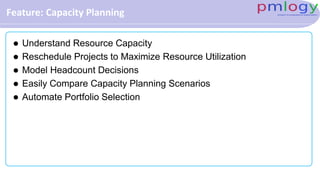
Feature: Capacity Planning
 Understand Resource Capacity
 Reschedule Projects to Maximize Resource Utilization
 Model Headcount Decisions
 Easily Compare Capacity Planning Scenarios
 Automate Portfolio Selection
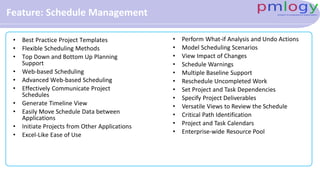
Feature: Schedule Management
• Best Practice Project Templates
• Flexible Scheduling Methods
• Top Down and Bottom Up Planning
Support
• Web-based Scheduling
• Advanced Web-based Scheduling
• Effectively Communicate Project
Schedules
• Generate Timeline View
• Easily Move Schedule Data between
Applications
• Initiate Projects from Other Applications
• Excel-Like Ease of Use
• Perform What-if Analysis and Undo Actions
• Model Scheduling Scenarios
• View Impact of Changes
• Schedule Warnings
• Multiple Baseline Support
• Reschedule Uncompleted Work
• Set Project and Task Dependencies
• Specify Project Deliverables
• Versatile Views to Review the Schedule
• Critical Path Identification
• Project and Task Calendars
• Enterprise-wide Resource Pool
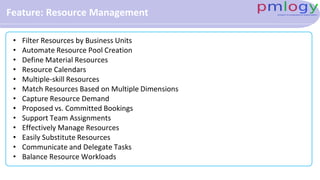
Feature: Resource Management
• Filter Resources by Business Units
• Automate Resource Pool Creation
• Define Material Resources
• Resource Calendars
• Multiple-skill Resources
• Match Resources Based on Multiple Dimensions
• Capture Resource Demand
• Proposed vs. Committed Bookings
• Support Team Assignments
• Effectively Manage Resources
• Easily Substitute Resources
• Communicate and Delegate Tasks
• Balance Resource Workloads
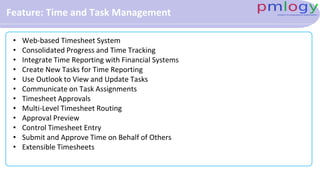
Feature: Time and Task Management
• Web-based Timesheet System
• Consolidated Progress and Time Tracking
• Integrate Time Reporting with Financial Systems
• Create New Tasks for Time Reporting
• Use Outlook to View and Update Tasks
• Communicate on Task Assignments
• Timesheet Approvals
• Multi-Level Timesheet Routing
• Approval Preview
• Control Timesheet Entry
• Submit and Approve Time on Behalf of Others
• Extensible Timesheets
Feature: Financial Management
• Project Cost Estimates
• Define Project Benefits
• Define Financial Metrics
• Define High Level Project/Program Budget
• Budget Year Planning Support
• Earned Value Management
• Financial Systems Integration
• Microsoft Platform Applications Integration
Feature: Team Collaboration
• Effective Project Team Collaboration
• Customize Project Workspaces for Each Project Type
• Track Project Issues and Risks
• Enterprise Content Management
• Support Common Types of File Formats
• Establish Document Templates
• Document Review and Approval
• Web 2.0 Capabilities
• Intelligent Enterprise Search
• Knowledge Management
• Expanded Knowledge Management and Collaboration
Feature: Reporting and Business Intelligence
• Powerful Business Intelligence Center
• Quickly Build and Share Reports
• Surface Information and Deliver Reports through SharePoint
• Multi-Dimensional Decision and Analysis Services
• Departmental Cubes
• Portfolio Views across Entire PPM Lifecycle
• Project Performance Tracking
• Central and Extensible Data Store for All Portfolio Data
• Easily Configurable Dashboards and Views
• Role-based Dashboards
• BI Tools Integration
Feature: Program Management
• Program Business Case Definition
• Track Programs throughout PPM Lifecycle
• Associate Projects with Programs
Feature: Administration, Deployment and Extensibility
• Built on SharePoint Server
• Consistent, Easy to Use Interface
• Simplified Central Administration
• Flexible and Comprehensive Security
• Delegate Permissions to Other Users
• Centralized Cube Management
• Enterprise Standards with Business Unit
Customization
• Zero Desktop Footprint
• Server and Desktop Scalability
• Wide Area Network Deployments
Support
• Quick Response Time and Efficient
Processing
• Exchange Server Integration
• Extensible and Scalable Interface
• Backward Compatibility for Custom
Applications
• Localized Project and Portfolio
Capabilities
• Line of Business Integration
• Visual Studio Team System Integration
Solution Overview: Project Management
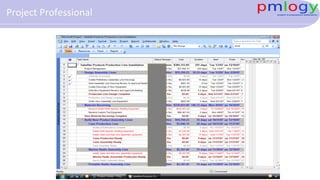
Project Professional
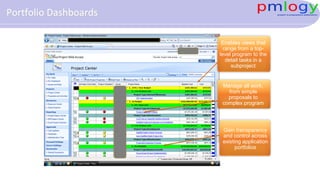
Manage all work,
from simple
proposals to
complex program
Gain transparency
and control across
existing application
portfolios
Enables views that
range from a top-
level program to the
detail tasks in a
subproject
Portfolio Dashboards
Solution Overview: Resource Management
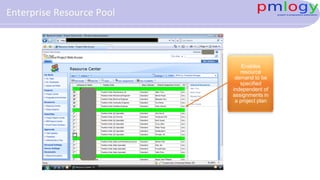
Enables
resource
demand to be
specified
independent of
assignments in
a project plan
Enterprise Resource Pool
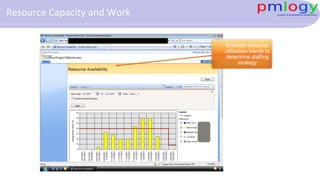
Evaluate resource
utilization trends to
determine staffing
strategy
Resource Capacity and Work
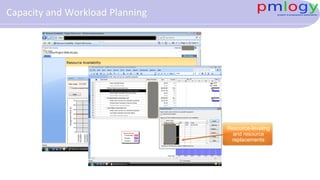
Resource-leveling
and resource
replacements
Capacity and Workload Planning
Solution Overview: Team Collaboration
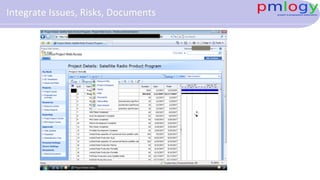
Integrate Issues, Risks, Documents
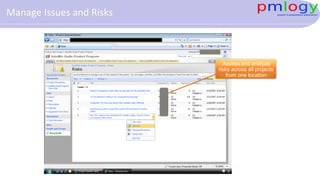
Access and analyze
risks across all projects
from one location
Manage Issues and Risks
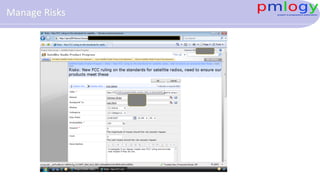
Manage Risks
Solution Overview: Task and Timesheet Management
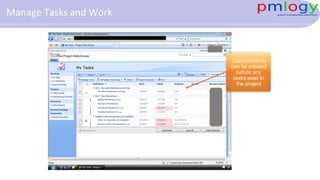
Commitments
can be created
before any
tasks exist in
the project
Manage Tasks and Work
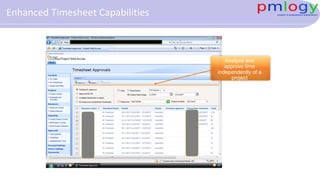
Analyze and
approve time
independently of a
project
Enhanced Timesheet Capabilities
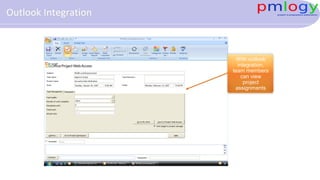
With outlook
integration,
team members
can view
project
assignments
Outlook Integration
Solution Overview: Data Analysis- Report/ Pivot/ Cube
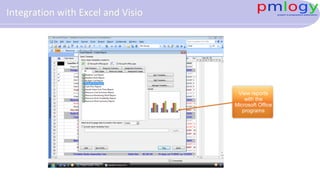
View reports
with the
Microsoft Office
programs
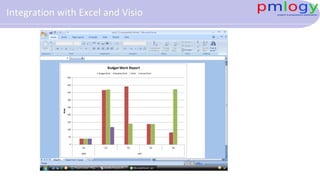
Integration with Excel and Visio
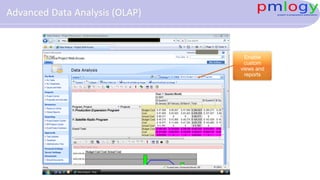
Enable
custom
views and
reports
Advanced Data Analysis (OLAP)
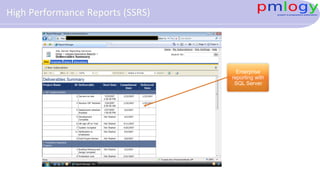
Enterprise
reporting with
SQL Server
High Performance Reports (SSRS)
Solution Overview: Portfolio Management
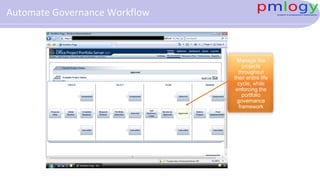
Manage the
projects
throughout
their entire life
cycle, while
enforcing the
portfolio
governance
framework
Automate Governance Workflow
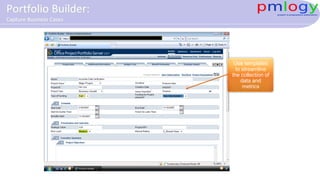
Use templates
to streamline
the collection of
data and
metrics
Portfolio Builder:
Capture Business Cases
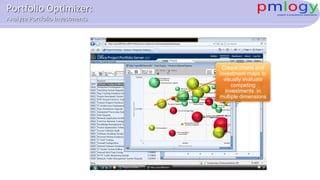
Create charts and
investment maps to
visually evaluate
competing
investments in
multiple dimensions
Portfolio Optimizer:
Analyze Portfolio Investments
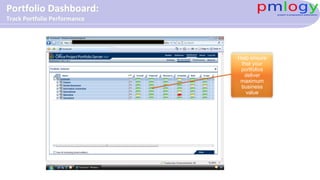
Help ensure
that your
portfolios
deliver
maximum
business
value
Portfolio Dashboard:
Track Portfolio Performance
Cost of Implementation & Maintenance
Components of Cost of Implementation
• Software License Cost
• Hardware / Network/Security Cost
• Implementation Cost
• Maintenance Cost
Final Cost
• Depends upon …
• The number of projects will be managed at any point of time
• The number of users accessing the system
• The number of project managers
• Uptime, security required
• Volume of data like project documents, images, video, audio etc
• Degree of customization required
• Number and type of dashboards required
Some Final Thoughts on starting a PMO…
• In today's economy, more value is needed now.
• Establishing a PMO that brings recognized value in the first six months of its existence
is critical.
• As plan the PMO implementation, seriously consider establishing visible value to
senior management from the get-go.
• Go after the low-hanging fruit that helps everyone win and the PMO will be on its way.
• Avoid being perceived as sitting in the "Ivory Tower of Project Management
Excellence".
• Build a PMO that will "Deliver Value Now."
Answer to All Questions
• How many projects are running in the organization?
• What is total fund budgeted for project for this year?
• How much has been consumed till now and how much value has been realized till
now?
• Are we selecting right project?
• What are the key business drivers for selecting any project?
• I want to see the up to date status of projects department wise, region wise, objective
wise, project manager wise. From where I will get the information?
• Which are the project where I need to pay special attention? Reputation? Financial
Risk? New critical initiative? Brand Initiatives?
• Which are the bleeding projects should be shut off?
• Where putting more funds will bring the results faster?
Answer to All Questions
• You get information based on factual data and this helps you in making right decisions
quickly.
• Remember, no decision is not No-Decision but deferred decision.
Last words
 You have many competitors in market place
 It does not matter what is your size, how much money you have, or how much power
you have, but how effectively you respond to the changes
 Project Management is about managing change and only those who
 Makes Quicker and intelligent decision
 Corrects the mistakes faster
 Respond to market need faster
 Understand the customer’s emotion on numeric index as well and design their product, service or
results accordingly
Will remain in competition for longer!
hari.prasad@vedavit-ps.com
+91 9535999336
https://in.linkedin.com/in/harithapliyal
http://twitter.com/pmlogy
http://pmlogy.com/
http://facebook.com/harithapliyalpage
https://in.pinterest.com/harithapliyal
https://www.instagram.com/thapliyal.h

Benefits of EPM

  • 1.
    Microsoft Enterprise ProjectServer (EPM) Benefits Presented by Hari Prasad Thapliyal Agilest & Project Management Trainer, Coach & Consultant (MBA, MCA, PGDOM, PGDFM, CIC, PMP, PMI-ACP, CSM, SCPO, SDC PRINCE2-Trainer, Scrum Certified Trainer, Microsoft Certified Trainer, ZED Master Trainer)
  • 2.
    Where do youfind the answers of … • How many projects are running in the organization? • What is total fund budgeted for project for this year/ quarter? • How much has been consumed till now and how much value has been realized till now? • Are we selecting right project based on organization business drivers or selecting based on emotional impulse? • What are the key business drivers for selecting any project? • Is my organizational strategy matching to the project I am doing? • I want to see the up to date status of projects department wise, region wise, objective wise, project manager wise. From where I will get the information? • Which are the project where I need to pay special attention? Reputation? Financial Risk? New critical initiative? Brand Initiatives? • Which are the bleeding projects should be shut off? • Where putting more funds will bring the results faster? • What are the project going to come in near future and what is there resource demand? • Do we need to hire resources to do future projects or just mobilize them from other projects?
  • 3.
    Task and Timesheet Management PortfolioOptimization and Alignment Enterprise Reporting Project Management Team Collaboration Resource Management Microsoft's EPM Solution
  • 4.
    Portfolio&ProgramManagement Request Management Business CaseDevelopment Portfolio Prioritization / Valuation Governance Process Definition Portfolio Optimization / Selection Program & Portfolio Reporting Benefits Realization Project Planning Status Reporting Resource Management Time Reporting Change Management Earned Value Analysis Cost Management Issue Management Risk Management ProjectManagement Business&TechnologyStakeholders • Portfolio Management – Have I selected the right project investments? – Do the project investments align with our strategic objectives? – Do I have sufficient funds and resources to deliver the selected project investments? – Are my project investments delivering the forecasted benefits? • Project Management – Who’s available to staff our new projects? – When will the project really finish and what will it cost? – What am I supposed to be delivering this week? Microsoft’s EPM Suite A Solution for the Complete Investment Lifecycle
  • 5.
    EPM Features • DemandManagement • Portfolio, Program and Project Life Cycle Management • Capacity Planning • Portfolio Selection: Business Strategy Prioritization • Schedule Management • Resource Management • Time and Task Management • Financial Management • Team Collaboration • Reporting and Business Intelligence • Program Management • Administration, Deployment and Extensibility • Document management • Risks and Issue management • Workflow Management
  • 6.
    Feature: Demand Management •Governance Workflow • Establish Accountability and Project Lifecycle Approvals • Capture Project Requests • Capture Non-project Work • Configurable Business Case Template • Business Unit-specific Templates • Initiate Work from Other Systems • Best Practice Templates
  • 7.
    Feature: Portfolio Selection:Business Strategy Prioritization  Define and Communicate Organization’s Strategy  Business Unit Specific Business Drivers  Objectively Prioritize Business Strategy  Manually Prioritize Strategy  Prioritize Projects from Varying Dimensions  Identify Business Dependencies  Identify Optimal Portfolio within the Constraints  Include Mandatory Projects and Understand Trade Offs  Easily Compare Scenarios  Advanced Portfolio Analytics  Support Portfolio Analysis throughout Project Lifecycle  Configurable Views to Support Decision Making
  • 8.
    Feature: Capacity Planning Understand Resource Capacity  Reschedule Projects to Maximize Resource Utilization  Model Headcount Decisions  Easily Compare Capacity Planning Scenarios  Automate Portfolio Selection
  • 9.
    Feature: Schedule Management •Best Practice Project Templates • Flexible Scheduling Methods • Top Down and Bottom Up Planning Support • Web-based Scheduling • Advanced Web-based Scheduling • Effectively Communicate Project Schedules • Generate Timeline View • Easily Move Schedule Data between Applications • Initiate Projects from Other Applications • Excel-Like Ease of Use • Perform What-if Analysis and Undo Actions • Model Scheduling Scenarios • View Impact of Changes • Schedule Warnings • Multiple Baseline Support • Reschedule Uncompleted Work • Set Project and Task Dependencies • Specify Project Deliverables • Versatile Views to Review the Schedule • Critical Path Identification • Project and Task Calendars • Enterprise-wide Resource Pool
  • 10.
    Feature: Resource Management •Filter Resources by Business Units • Automate Resource Pool Creation • Define Material Resources • Resource Calendars • Multiple-skill Resources • Match Resources Based on Multiple Dimensions • Capture Resource Demand • Proposed vs. Committed Bookings • Support Team Assignments • Effectively Manage Resources • Easily Substitute Resources • Communicate and Delegate Tasks • Balance Resource Workloads
  • 11.
    Feature: Time andTask Management • Web-based Timesheet System • Consolidated Progress and Time Tracking • Integrate Time Reporting with Financial Systems • Create New Tasks for Time Reporting • Use Outlook to View and Update Tasks • Communicate on Task Assignments • Timesheet Approvals • Multi-Level Timesheet Routing • Approval Preview • Control Timesheet Entry • Submit and Approve Time on Behalf of Others • Extensible Timesheets
  • 12.
    Feature: Financial Management •Project Cost Estimates • Define Project Benefits • Define Financial Metrics • Define High Level Project/Program Budget • Budget Year Planning Support • Earned Value Management • Financial Systems Integration • Microsoft Platform Applications Integration
  • 13.
    Feature: Team Collaboration •Effective Project Team Collaboration • Customize Project Workspaces for Each Project Type • Track Project Issues and Risks • Enterprise Content Management • Support Common Types of File Formats • Establish Document Templates • Document Review and Approval • Web 2.0 Capabilities • Intelligent Enterprise Search • Knowledge Management • Expanded Knowledge Management and Collaboration
  • 14.
    Feature: Reporting andBusiness Intelligence • Powerful Business Intelligence Center • Quickly Build and Share Reports • Surface Information and Deliver Reports through SharePoint • Multi-Dimensional Decision and Analysis Services • Departmental Cubes • Portfolio Views across Entire PPM Lifecycle • Project Performance Tracking • Central and Extensible Data Store for All Portfolio Data • Easily Configurable Dashboards and Views • Role-based Dashboards • BI Tools Integration
  • 15.
    Feature: Program Management •Program Business Case Definition • Track Programs throughout PPM Lifecycle • Associate Projects with Programs
  • 16.
    Feature: Administration, Deploymentand Extensibility • Built on SharePoint Server • Consistent, Easy to Use Interface • Simplified Central Administration • Flexible and Comprehensive Security • Delegate Permissions to Other Users • Centralized Cube Management • Enterprise Standards with Business Unit Customization • Zero Desktop Footprint • Server and Desktop Scalability • Wide Area Network Deployments Support • Quick Response Time and Efficient Processing • Exchange Server Integration • Extensible and Scalable Interface • Backward Compatibility for Custom Applications • Localized Project and Portfolio Capabilities • Line of Business Integration • Visual Studio Team System Integration
  • 17.
  • 18.
  • 19.
    Manage all work, fromsimple proposals to complex program Gain transparency and control across existing application portfolios Enables views that range from a top- level program to the detail tasks in a subproject Portfolio Dashboards
  • 20.
  • 21.
    Enables resource demand to be specified independentof assignments in a project plan Enterprise Resource Pool
  • 22.
    Evaluate resource utilization trendsto determine staffing strategy Resource Capacity and Work
  • 23.
  • 24.
  • 25.
  • 26.
    Access and analyze risksacross all projects from one location Manage Issues and Risks
  • 27.
  • 28.
    Solution Overview: Taskand Timesheet Management
  • 29.
    Commitments can be created beforeany tasks exist in the project Manage Tasks and Work
  • 30.
    Analyze and approve time independentlyof a project Enhanced Timesheet Capabilities
  • 31.
    With outlook integration, team members canview project assignments Outlook Integration
  • 32.
    Solution Overview: DataAnalysis- Report/ Pivot/ Cube
  • 33.
    View reports with the MicrosoftOffice programs Integration with Excel and Visio
  • 34.
  • 35.
  • 36.
  • 37.
  • 38.
    Manage the projects throughout their entirelife cycle, while enforcing the portfolio governance framework Automate Governance Workflow
  • 39.
    Use templates to streamline thecollection of data and metrics Portfolio Builder: Capture Business Cases
  • 40.
    Create charts and investmentmaps to visually evaluate competing investments in multiple dimensions Portfolio Optimizer: Analyze Portfolio Investments
  • 41.
  • 42.
  • 43.
    Components of Costof Implementation • Software License Cost • Hardware / Network/Security Cost • Implementation Cost • Maintenance Cost
  • 44.
    Final Cost • Dependsupon … • The number of projects will be managed at any point of time • The number of users accessing the system • The number of project managers • Uptime, security required • Volume of data like project documents, images, video, audio etc • Degree of customization required • Number and type of dashboards required
  • 45.
    Some Final Thoughtson starting a PMO… • In today's economy, more value is needed now. • Establishing a PMO that brings recognized value in the first six months of its existence is critical. • As plan the PMO implementation, seriously consider establishing visible value to senior management from the get-go. • Go after the low-hanging fruit that helps everyone win and the PMO will be on its way. • Avoid being perceived as sitting in the "Ivory Tower of Project Management Excellence". • Build a PMO that will "Deliver Value Now."
  • 46.
    Answer to AllQuestions • How many projects are running in the organization? • What is total fund budgeted for project for this year? • How much has been consumed till now and how much value has been realized till now? • Are we selecting right project? • What are the key business drivers for selecting any project? • I want to see the up to date status of projects department wise, region wise, objective wise, project manager wise. From where I will get the information? • Which are the project where I need to pay special attention? Reputation? Financial Risk? New critical initiative? Brand Initiatives? • Which are the bleeding projects should be shut off? • Where putting more funds will bring the results faster?
  • 47.
    Answer to AllQuestions • You get information based on factual data and this helps you in making right decisions quickly. • Remember, no decision is not No-Decision but deferred decision.
  • 48.
    Last words  Youhave many competitors in market place  It does not matter what is your size, how much money you have, or how much power you have, but how effectively you respond to the changes  Project Management is about managing change and only those who  Makes Quicker and intelligent decision  Corrects the mistakes faster  Respond to market need faster  Understand the customer’s emotion on numeric index as well and design their product, service or results accordingly Will remain in competition for longer!
  • 49.