


PeopleSoft 9.2 Overview
Jon Given
July 11, 2013
Agenda
Emtec Overview

Oracle’s Investment in PeopleSoft
PeopleSoft 9.2
Next Steps and Questions
Emtec… ‘Big enough to do the work, small
enough to care’
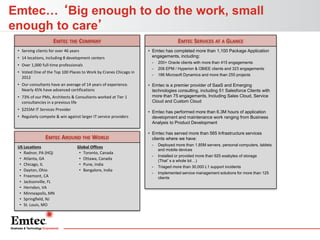
EMTEC THE COMPANY
• Serving clients for over 46 years
• 14 locations, including 8 development centers
• Over 1,000 full-time professionals
• Voted One of the Top 100 Places to Work by Cranes Chicago in
2012
• Our consultants have an average of 14 years of experience.
Nearly 45% have advanced certifications
• 73% of our PMs, Architects & Consultants worked at Tier 1
consultancies in a previous life
• $255M IT Services Provider
• Regularly compete & win against larger IT service providers

EMTEC AROUND THE WORLD
US Locations
• Radnor, PA (HQ)
• Atlanta, GA
• Chicago, IL
• Dayton, Ohio
• Freemont, CA
• Jacksonville, FL
• Herndon, VA
• Minneapolis, MN
• Springfield, NJ
• St. Louis, MO

Global Offices
• Toronto, Canada
• Ottawa, Canada
• Pune, India
• Bangalore, India

EMTEC SERVICES AT A GLANCE
• Emtec has completed more than 1,100 Package Application
engagements, including:
-

200+ Oracle clients with more than 415 engagements

-

206 EPM / Hyperion & OBIEE clients and 323 engagements

-

186 Microsoft Dynamics and more than 255 projects

• Emtec is a premier provider of SaaS and Emerging
technologies consulting, including 51 Salesforce Clients with
more than 75 engagements, Including Sales Cloud, Service
Cloud and Custom Cloud
• Emtec has performed more than 6.3M hours of application
development and maintenance work ranging from Business
Analysis to Product Development
• Emtec has served more than 565 Infrastructure services
clients where we have:
-

Deployed more than 1.85M servers, personal computers, tablets
and mobile devices

-

Installed or provided more than 925 exabytes of storage
(That’s a whole lot…)

-

Triaged more than 30,000 L1 support incidents

-

Implemented service management solutions for more than 125
clients
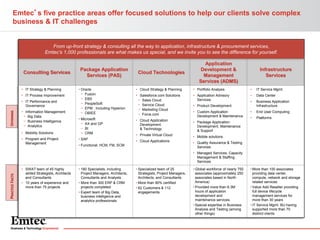
Emtec’s five practice areas offer focused solutions to help our clients solve complex
business & IT challenges

From up-front strategy & consulting all the way to application, infrastructure & procurement services,
Emtec’s 1,000 professionals are what makes us special, and we invite you to see the difference for yourself.

Consulting Services

• IT Strategy & Planning

• IT Process Improvement

OFFERINGS

• IT Performance and
Governance
• Information Management:
− Big Data
− Business Intelligence
− Analytics
• Mobility Solutions

• Program and Project
Management

Package Application
Services (PAS)
• Oracle
− Fusion
− EBS
− PeopleSoft
− EPM : Including Hyperion
− OBIEE
• Microsoft
− AX and GP
− BI
− CRM
• SAP

Cloud Technologies

Application
Development &
Management
Services (ADMS)

Infrastructure
Services

• Cloud Strategy & Planning

• Portfolio Analysis

•

IT Service Mgmt.

• Salesforce.com Solutions
− Sales Cloud
− Service Cloud
− Marketing Cloud
− Force.com

• Application Advisory
Services

•

Data Center

•

Business Application
Infrastructure

•

End User Computing

• Cloud Application
Development
& Technology

•

Platforms

• Package Application:
Development, Maintenance
& Support

• Private Virtual Cloud
• Cloud Applications

• Functional: HCM, FM, SCM

• Product Development
• Custom Application
Development & Maintenance

• Mobile solutions
• Quality Assurance & Testing
Services

PRACTICE FACTS

• Managed Services, Capacity
Management & Staffing
Services
• SWAT team of 45 highly
skilled Strategists, Architects
and Consultants
• 10 years of experience and
more than 75 projects

• 180 Specialists, including
Project Managers, Architects,
Consultants and Analysts
• More than 300 ERP & CRM
projects completed
• Expert team of Big Data,
business intelligence and
analytics professionals

• Specialized team of 25
Strategists, Project Managers,
Architects, and Consultants
• More than 90% certified
• 62 Customers & 112
engagements

• Global workforce of nearly 750
associates (approximately 250
associates based in North
America)
• Provided more than 6.3M
hours of application
development and
maintenance services.
• Special expertise in Business
Analysis and Testing (among
other things)

• More than 100 associates
providing data center,
compute, network and storage
related services
• Value Add Reseller providing
full device lifecycle
management services for
more than 30 years
• IT Service Mgmt. BU having
supported more than 70
distinct clients
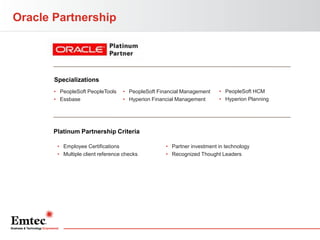
Oracle Partnership

Specializations
• PeopleSoft PeopleTools
• Essbase

• PeopleSoft Financial Management
• Hyperion Financial Management

• PeopleSoft HCM
• Hyperion Planning

Platinum Partnership Criteria
• Employee Certifications
• Multiple client reference checks

• Partner investment in technology
• Recognized Thought Leaders
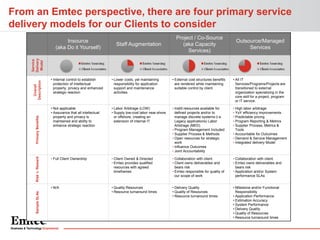
From an Emtec perspective, there are four primary service
delivery models for our Clients to consider
Staff Augmentation

Project / Co-Source
(aka Capacity
Services)

Outsource/Managed
Services

Service
Delivery
Model

Insource
(aka Do it Yourself)

Overall
Description
Primary Benefits
Risk v. Reward

• Lower costs, yet maintaining
responsibility for application
support and maintenance
activities

• External cost structures benefits
are rendered while maintaining
suitable control by client.

• All IT
Services/Programs/Projects are
transitioned to external
organization specializing in the
core skill for a project, program
or IT service.

• Not applicable
• Assurance that all intellectual
property and privacy is
maintained and ability to
enhance strategic reaction

• Labor Arbitrage (LOW)
• Supply low-cost labor near-shore
or offshore, creating an
extension of internal IT

• Instill resources available for
defined projects and/or to
manage discrete systems (i.e.
Legacy applications) Labor
Arbitrage (MED)
• Program Management Included
• Supplier Process & Methods
• Open resources for strategic
work
• Influence Outcomes
• Joint Accountability

• High labor arbitrage
• YoY efficiency improvements
• Predictable pricing
• Program Reporting & Metrics
• Supplier Process, Metrics &
Tools
• Accountable for Outcomes
• Demand & Service Management
• Integrated delivery Model

• Full Client Ownership

• Client Owned & Directed
• Emtec provides qualified
resources with agreed
timeframes

• Collaboration with client.
• Client owns deliverables and
bears risk
• Emtec responsible for quality of
our scope of work

• Collaboration with client.
• Emtec owns deliverables and
bears risk
• Application and/or System
performance SLAs

• N/A
Sample SLAs

• Internal control to establish
protection of intellectual
property, privacy and enhanced
strategic reaction

• Quality Resources
• Resource turnaround times

• Delivery Quality
• Quality of Resources
• Resource turnaround times

• Milestone and/or Functional
Responsibility
• Application Performance
• Estimation Accuracy
• System Performance
• Delivery Quality
• Quality of Resources
• Resource turnaround times
Oracle’s Investment in PeopleSoft
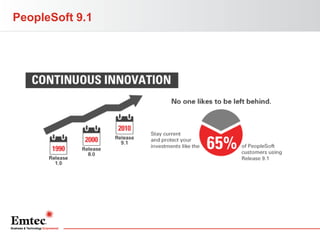
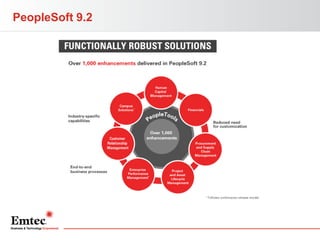
PeopleSoft 9.1
PeopleSoft 9.2
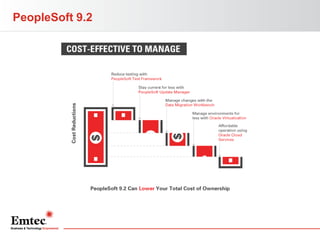
PeopleSoft 9.2
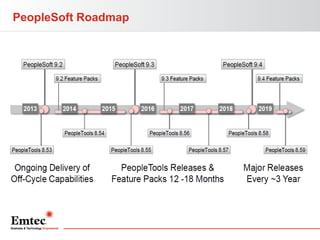
PeopleSoft Roadmap
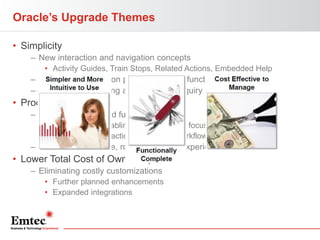
Oracle’s Upgrade Themes
• Simplicity
– New interaction and navigation concepts
• Activity Guides, Train Stops, Related Actions, Embedded Help

– Greater user focus on primary daily job function
– Less need for training and help desk inquiry

• Productivity
– New capabilities and functionality
• WorkCenters enabling power users to focus
• Combining transactions, analytics, workflow, and reports

– Feature-rich, flexible, role-based user experience

• Lower Total Cost of Ownership
– Eliminating costly customizations
• Further planned enhancements
• Expanded integrations
PeopleSoft 9.2 Upgrade Paths
• Release 9.2
– Direct upgrade path to 9.2
• Financials from 8.9, 9.0 and 9.1
• HCM 9.0 and 9.1 – Not 8.9
PeopleSoft 9.2 – Key Enhancements
Customer Hierarchy
• Customer Hierarchy now displays customer relationships and
data in an interactive chart format that enables users to visualize
different types of customer hierarchies, including corporate, remit to, and
correspondence hierarchies.

• View rolled-up data for the selected customer, or for the customer
and its children.
• Drill to customer details.
• Take actions on the customer, such as putting the customer on
hold.
• Save search criteria.
• Customize display templates.
• Security setup at the user, role, or system level restricts customer
information, template modifications, and actions to authorized
users.
Customer Hierarchy
• <DEMO>
Supplier Hierarchy
• <DEMO>
eProcurement Requisitioning
• <DEMO>
Business Request and Approval
• Business Request and Approval process now delivered
• Configurable workflow process for requesting the setup of
SetID-driven field values
• Can be activated for certain ChartField values
• Specify what data to be included in the request
• Attach supporting documentation and justification
Business Request and Approval
• <DEMO>
General Ledger Mass Approval
• Ability to approve more than one journal at a time
• View and take appropriate action against all journals in your
queue
• Can add attachments, comments and ad-hoc approvals to
one or many journals in your queue
• Graphically represented business flow
Combo Edits by Source
• Process a combo edit group for only a specific transaction
source or sources
• Reduces processing overhead since combo edit process will
target only those transaction sources
• Delivered sources Asset Management Transactions,
Payables, Billing Accounting lines, Grants, Human Capital
Management, Inventory and others
• Ability to add more sources as needed
PeopleSoft Pivot Grid Overview
•
•
•
•
•
•
•

Advanced reporting technology
Provides interactive, analytical grids and charts
Similar to Pivot Tables in Excel
Performs pivoting and filtering operations
Uses data sources like PeopleSoft Query
Chart and grid are synchronized
View data in 3 different visualizations:
– Grid only
– Chart only
– Grid and chart
Display Components
• Grid Display Component
– Based on existing PS analytic grid
• Has 3 axes—row, column, and filter

– Enables multilevel display and drag-and-drop operation

• Chart Display Component
– Grid and chart display option
• Uses the result set retrieved while populating chart display

– Chart only display option
• Drill down on the chart to display details
• Drill out option restores the chart to its earlier state
Pivot Grid Demo
• <DEMO>
WorkCenters – Overview
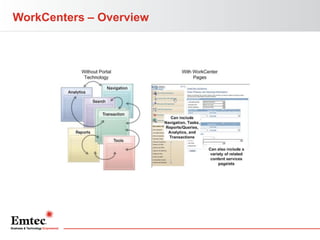
• User portals for specific roles; role-based homepage
– Homepage – user customized
– WorkCenter – pre-built homepage
• Menu in one column, work space in another

• Streamlined user interface that reduces need for navigation
– Increased productivity – centralized daily work organization

• Available as part of PeopleTools
• Built on templates, similar to portal products
• Incorporates Related Content and Pagelets
– Use template or homepage Pagelets
WorkCenters – Overview
WorkCenters – Benefits
• One location
– Consolidated delivery of actionable info
– Less navigation, fewer open windows

• Interruption mitigation
– All PeopleSoft work saved on one page
– Less work lost upon interruption of a task
– Increased efficiency in switching tasks
• Within and outside of PeopleSoft

• Complete picture view
– View transactions throughout entire process
WorkCenters – Enhancements
• WorkCenters included:
–
–
–
–
–
–
–
–
–
–
–

Payables
Billing
Receivables
General Ledger
Supply and Demand
Project Costing
Staffing
Supplier Administration
SRM Buyer Administration
ePerformance
Time and Labor
WorkCenters – Enhancements (cont.)
• Standard delivered pagelets:
– My Work
• Personalized user-specific work items for review or completion
• Critical daily tasks

– My Links
• Important application components
• Personalized

– Queries
• Access queries or pivot grids
• Output viewed in transaction pane

– Reports and Processes
• Reporting console, key reports
WorkCenters
• <DEMO>
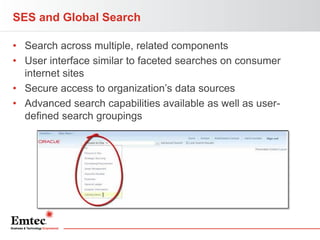
SES and Global Search
• Search across multiple, related components
• User interface similar to faceted searches on consumer
internet sites
• Secure access to organization’s data sources
• Advanced search capabilities available as well as userdefined search groupings
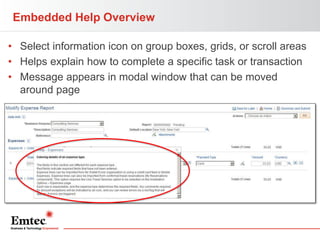
Embedded Help Overview
• Select information icon on group boxes, grids, or scroll areas
• Helps explain how to complete a specific task or transaction
• Message appears in modal window that can be moved
around page
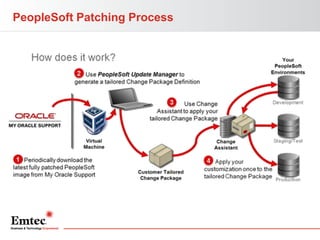
PeopleSoft Update Manager (PUM) Overview
•
•
•
•
•

Lifecycle management tool and patching delivery mechanism
Uses Update Manager PIA interface to identify updates
Generates custom change package definitions
Updates include bug fixes, patches and new features
PeopleSoft Images are cumulative and contain updates from
previous application releases
• Tool reduces time, effort, and maintenance costs
Lifecycle Management
• What are the benefits of PUM?
– You select the number and size of the updates
– Creates a custom change package tailored to your environment
– Control of the patching schedule
– Quick and easy to download current PS Image running on
Oracle VirtualBox technology
– Provides ability to search for specific updates by bugID or
specific object reference
PeopleSoft Patching Process
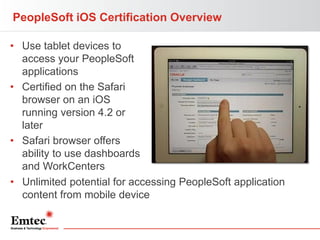
PeopleSoft iOS Certification Overview
• Use tablet devices to
access your PeopleSoft
applications
• Certified on the Safari
browser on an iOS
running version 4.2 or
later
• Safari browser offers
ability to use dashboards
and WorkCenters
• Unlimited potential for accessing PeopleSoft application
content from mobile device
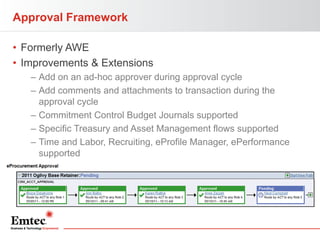
Approval Framework
• Formerly AWE
• Improvements & Extensions
– Add on an ad-hoc approver during approval cycle
– Add comments and attachments to transaction during the
approval cycle
– Commitment Control Budget Journals supported
– Specific Treasury and Asset Management flows supported
– Time and Labor, Recruiting, eProfile Manager, ePerformance
supported
Attachments
• Attachment framework provided in version 9.1
• PeopleSoft 9.2 extends capability to additional transactions
–
–
–
–
–
–
–
–
–
–

Expenses
Receivables
eBill Payment
Payables
Asset Management
Treasury
Absence Management
Candidate Gateway/Talent Acquisition Manager
ePerformance
Global Payroll
Forms and Approval Builder
• Configurable tool to create forms and specify approval
process to follow
• Eliminates paper and email-based approvals
• PeopleSoft forms are:
– Auditable
– Electronically Approvable
– Immediately Accessible
Forms and Approval Builder
• <DEMO> - Invoice Entry
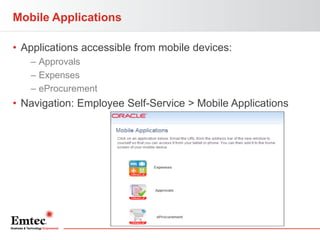
Mobile Applications
• Applications accessible from mobile devices:
– Approvals
– Expenses
– eProcurement

• Navigation: Employee Self-Service > Mobile Applications

42
Mobile Applications – eProcurement
• Mobile eProcurement
–
–
–
–

Requisitions on the go – add and manage
Recent items, search catalogs, add items to cart
Database automatically updated after completing requisition
Note: WiFi connection required; no AppStore install required
Mobile Applications – Approvals
• Mobile Approvals
– View transactions pending approval from a mobile device
• Approve
• Deny
• Push back

– View attachments to transactions, and add comments
Mobile Applications – Approvals
• Mobile Approvals
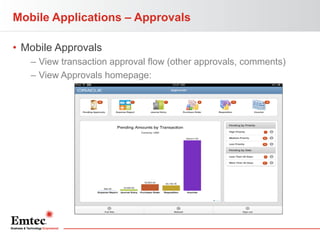
– View transaction approval flow (other approvals, comments)
– View Approvals homepage:
Mobile Applications – Expenses
• Mobile Expenses
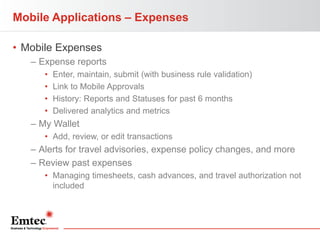
– Expense reports
•
•
•
•

Enter, maintain, submit (with business rule validation)
Link to Mobile Approvals
History: Reports and Statuses for past 6 months
Delivered analytics and metrics

– My Wallet
• Add, review, or edit transactions

– Alerts for travel advisories, expense policy changes, and more
– Review past expenses
• Managing timesheets, cash advances, and travel authorization not
included
Mobile Applications
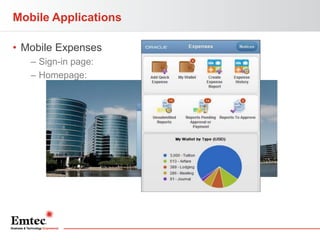
• Mobile Expenses
– Sign-in page:
– Homepage:
Data Migration Workbench for Application Data
• Compare, validate, and copy application configuration data
between databases
– Application Data Sets (ADS)

• Alternative to Data Mover scripts
– Greater visibility and control of managed changes
– PeopleSoft Pure Internet Architecture (PIA)
• Similar to copy and compare process of managed objects

• New functionality for applications:
– Allocations
– WorkCenters
– Accounting Rules
What to do if I’m on 9.1?
What If I’m on 9.1?
• 9.2 Upgrade is an option, but not in cards for most
organizations
• PeopleTools only upgrade
• Apply Feature Packs
• Number of features outlined today currently available
to 9.1 customers
– WorkCenters
– Pivot Grids
– PeopleSoft Test Framework
– Mobile applications

• Emtec offers “Quick Start” services for a number of
these new features
Recap
Recap and Next Steps

• 9.2 offers significant application enhancements
• Emtec Upgrade Planning Workshop
– Assess upgrade impacts specific to your organization
and PeopleSoft footprint. Determine the best
upgrade and module roadmap for you

• PeopleTools Upgrade Assessment
–Determine if a Tools-only upgrade is a good
first step
• www.PeopleSoft 92.com
• Emtec “Quick Start” offerings for new features
THANK YOU FOR YOUR TIME
Please visit us online at www.emtecinc.com

PeopleSoft FSCM 9.2 Webinar Presentation

  • 1.
    PeopleSoft 9.2 Overview JonGiven July 11, 2013
  • 2.
    Agenda Emtec Overview Oracle’s Investmentin PeopleSoft PeopleSoft 9.2 Next Steps and Questions
  • 3.
    Emtec… ‘Big enoughto do the work, small enough to care’ EMTEC THE COMPANY • Serving clients for over 46 years • 14 locations, including 8 development centers • Over 1,000 full-time professionals • Voted One of the Top 100 Places to Work by Cranes Chicago in 2012 • Our consultants have an average of 14 years of experience. Nearly 45% have advanced certifications • 73% of our PMs, Architects & Consultants worked at Tier 1 consultancies in a previous life • $255M IT Services Provider • Regularly compete & win against larger IT service providers EMTEC AROUND THE WORLD US Locations • Radnor, PA (HQ) • Atlanta, GA • Chicago, IL • Dayton, Ohio • Freemont, CA • Jacksonville, FL • Herndon, VA • Minneapolis, MN • Springfield, NJ • St. Louis, MO Global Offices • Toronto, Canada • Ottawa, Canada • Pune, India • Bangalore, India EMTEC SERVICES AT A GLANCE • Emtec has completed more than 1,100 Package Application engagements, including: - 200+ Oracle clients with more than 415 engagements - 206 EPM / Hyperion & OBIEE clients and 323 engagements - 186 Microsoft Dynamics and more than 255 projects • Emtec is a premier provider of SaaS and Emerging technologies consulting, including 51 Salesforce Clients with more than 75 engagements, Including Sales Cloud, Service Cloud and Custom Cloud • Emtec has performed more than 6.3M hours of application development and maintenance work ranging from Business Analysis to Product Development • Emtec has served more than 565 Infrastructure services clients where we have: - Deployed more than 1.85M servers, personal computers, tablets and mobile devices - Installed or provided more than 925 exabytes of storage (That’s a whole lot…) - Triaged more than 30,000 L1 support incidents - Implemented service management solutions for more than 125 clients
  • 4.
    Emtec’s five practiceareas offer focused solutions to help our clients solve complex business & IT challenges From up-front strategy & consulting all the way to application, infrastructure & procurement services, Emtec’s 1,000 professionals are what makes us special, and we invite you to see the difference for yourself. Consulting Services • IT Strategy & Planning • IT Process Improvement OFFERINGS • IT Performance and Governance • Information Management: − Big Data − Business Intelligence − Analytics • Mobility Solutions • Program and Project Management Package Application Services (PAS) • Oracle − Fusion − EBS − PeopleSoft − EPM : Including Hyperion − OBIEE • Microsoft − AX and GP − BI − CRM • SAP Cloud Technologies Application Development & Management Services (ADMS) Infrastructure Services • Cloud Strategy & Planning • Portfolio Analysis • IT Service Mgmt. • Salesforce.com Solutions − Sales Cloud − Service Cloud − Marketing Cloud − Force.com • Application Advisory Services • Data Center • Business Application Infrastructure • End User Computing • Cloud Application Development & Technology • Platforms • Package Application: Development, Maintenance & Support • Private Virtual Cloud • Cloud Applications • Functional: HCM, FM, SCM • Product Development • Custom Application Development & Maintenance • Mobile solutions • Quality Assurance & Testing Services PRACTICE FACTS • Managed Services, Capacity Management & Staffing Services • SWAT team of 45 highly skilled Strategists, Architects and Consultants • 10 years of experience and more than 75 projects • 180 Specialists, including Project Managers, Architects, Consultants and Analysts • More than 300 ERP & CRM projects completed • Expert team of Big Data, business intelligence and analytics professionals • Specialized team of 25 Strategists, Project Managers, Architects, and Consultants • More than 90% certified • 62 Customers & 112 engagements • Global workforce of nearly 750 associates (approximately 250 associates based in North America) • Provided more than 6.3M hours of application development and maintenance services. • Special expertise in Business Analysis and Testing (among other things) • More than 100 associates providing data center, compute, network and storage related services • Value Add Reseller providing full device lifecycle management services for more than 30 years • IT Service Mgmt. BU having supported more than 70 distinct clients
  • 5.
    Oracle Partnership Specializations • PeopleSoftPeopleTools • Essbase • PeopleSoft Financial Management • Hyperion Financial Management • PeopleSoft HCM • Hyperion Planning Platinum Partnership Criteria • Employee Certifications • Multiple client reference checks • Partner investment in technology • Recognized Thought Leaders
  • 6.
    From an Emtecperspective, there are four primary service delivery models for our Clients to consider Staff Augmentation Project / Co-Source (aka Capacity Services) Outsource/Managed Services Service Delivery Model Insource (aka Do it Yourself) Overall Description Primary Benefits Risk v. Reward • Lower costs, yet maintaining responsibility for application support and maintenance activities • External cost structures benefits are rendered while maintaining suitable control by client. • All IT Services/Programs/Projects are transitioned to external organization specializing in the core skill for a project, program or IT service. • Not applicable • Assurance that all intellectual property and privacy is maintained and ability to enhance strategic reaction • Labor Arbitrage (LOW) • Supply low-cost labor near-shore or offshore, creating an extension of internal IT • Instill resources available for defined projects and/or to manage discrete systems (i.e. Legacy applications) Labor Arbitrage (MED) • Program Management Included • Supplier Process & Methods • Open resources for strategic work • Influence Outcomes • Joint Accountability • High labor arbitrage • YoY efficiency improvements • Predictable pricing • Program Reporting & Metrics • Supplier Process, Metrics & Tools • Accountable for Outcomes • Demand & Service Management • Integrated delivery Model • Full Client Ownership • Client Owned & Directed • Emtec provides qualified resources with agreed timeframes • Collaboration with client. • Client owns deliverables and bears risk • Emtec responsible for quality of our scope of work • Collaboration with client. • Emtec owns deliverables and bears risk • Application and/or System performance SLAs • N/A Sample SLAs • Internal control to establish protection of intellectual property, privacy and enhanced strategic reaction • Quality Resources • Resource turnaround times • Delivery Quality • Quality of Resources • Resource turnaround times • Milestone and/or Functional Responsibility • Application Performance • Estimation Accuracy • System Performance • Delivery Quality • Quality of Resources • Resource turnaround times
  • 7.
  • 8.
  • 9.
  • 10.
  • 11.
  • 12.
    Oracle’s Upgrade Themes •Simplicity – New interaction and navigation concepts • Activity Guides, Train Stops, Related Actions, Embedded Help – Greater user focus on primary daily job function – Less need for training and help desk inquiry • Productivity – New capabilities and functionality • WorkCenters enabling power users to focus • Combining transactions, analytics, workflow, and reports – Feature-rich, flexible, role-based user experience • Lower Total Cost of Ownership – Eliminating costly customizations • Further planned enhancements • Expanded integrations
  • 13.
    PeopleSoft 9.2 UpgradePaths • Release 9.2 – Direct upgrade path to 9.2 • Financials from 8.9, 9.0 and 9.1 • HCM 9.0 and 9.1 – Not 8.9
  • 14.
    PeopleSoft 9.2 –Key Enhancements
  • 15.
    Customer Hierarchy • CustomerHierarchy now displays customer relationships and data in an interactive chart format that enables users to visualize different types of customer hierarchies, including corporate, remit to, and correspondence hierarchies. • View rolled-up data for the selected customer, or for the customer and its children. • Drill to customer details. • Take actions on the customer, such as putting the customer on hold. • Save search criteria. • Customize display templates. • Security setup at the user, role, or system level restricts customer information, template modifications, and actions to authorized users.
  • 16.
  • 17.
  • 18.
  • 19.
    Business Request andApproval • Business Request and Approval process now delivered • Configurable workflow process for requesting the setup of SetID-driven field values • Can be activated for certain ChartField values • Specify what data to be included in the request • Attach supporting documentation and justification
  • 20.
    Business Request andApproval • <DEMO>
  • 21.
    General Ledger MassApproval • Ability to approve more than one journal at a time • View and take appropriate action against all journals in your queue • Can add attachments, comments and ad-hoc approvals to one or many journals in your queue • Graphically represented business flow
  • 22.
    Combo Edits bySource • Process a combo edit group for only a specific transaction source or sources • Reduces processing overhead since combo edit process will target only those transaction sources • Delivered sources Asset Management Transactions, Payables, Billing Accounting lines, Grants, Human Capital Management, Inventory and others • Ability to add more sources as needed
  • 23.
    PeopleSoft Pivot GridOverview • • • • • • • Advanced reporting technology Provides interactive, analytical grids and charts Similar to Pivot Tables in Excel Performs pivoting and filtering operations Uses data sources like PeopleSoft Query Chart and grid are synchronized View data in 3 different visualizations: – Grid only – Chart only – Grid and chart
  • 24.
    Display Components • GridDisplay Component – Based on existing PS analytic grid • Has 3 axes—row, column, and filter – Enables multilevel display and drag-and-drop operation • Chart Display Component – Grid and chart display option • Uses the result set retrieved while populating chart display – Chart only display option • Drill down on the chart to display details • Drill out option restores the chart to its earlier state
  • 25.
  • 26.
    WorkCenters – Overview •User portals for specific roles; role-based homepage – Homepage – user customized – WorkCenter – pre-built homepage • Menu in one column, work space in another • Streamlined user interface that reduces need for navigation – Increased productivity – centralized daily work organization • Available as part of PeopleTools • Built on templates, similar to portal products • Incorporates Related Content and Pagelets – Use template or homepage Pagelets
  • 27.
  • 28.
    WorkCenters – Benefits •One location – Consolidated delivery of actionable info – Less navigation, fewer open windows • Interruption mitigation – All PeopleSoft work saved on one page – Less work lost upon interruption of a task – Increased efficiency in switching tasks • Within and outside of PeopleSoft • Complete picture view – View transactions throughout entire process
  • 29.
    WorkCenters – Enhancements •WorkCenters included: – – – – – – – – – – – Payables Billing Receivables General Ledger Supply and Demand Project Costing Staffing Supplier Administration SRM Buyer Administration ePerformance Time and Labor
  • 30.
    WorkCenters – Enhancements(cont.) • Standard delivered pagelets: – My Work • Personalized user-specific work items for review or completion • Critical daily tasks – My Links • Important application components • Personalized – Queries • Access queries or pivot grids • Output viewed in transaction pane – Reports and Processes • Reporting console, key reports
  • 31.
  • 32.
    SES and GlobalSearch • Search across multiple, related components • User interface similar to faceted searches on consumer internet sites • Secure access to organization’s data sources • Advanced search capabilities available as well as userdefined search groupings
  • 33.
    Embedded Help Overview •Select information icon on group boxes, grids, or scroll areas • Helps explain how to complete a specific task or transaction • Message appears in modal window that can be moved around page
  • 34.
    PeopleSoft Update Manager(PUM) Overview • • • • • Lifecycle management tool and patching delivery mechanism Uses Update Manager PIA interface to identify updates Generates custom change package definitions Updates include bug fixes, patches and new features PeopleSoft Images are cumulative and contain updates from previous application releases • Tool reduces time, effort, and maintenance costs
  • 35.
    Lifecycle Management • Whatare the benefits of PUM? – You select the number and size of the updates – Creates a custom change package tailored to your environment – Control of the patching schedule – Quick and easy to download current PS Image running on Oracle VirtualBox technology – Provides ability to search for specific updates by bugID or specific object reference
  • 36.
  • 37.
    PeopleSoft iOS CertificationOverview • Use tablet devices to access your PeopleSoft applications • Certified on the Safari browser on an iOS running version 4.2 or later • Safari browser offers ability to use dashboards and WorkCenters • Unlimited potential for accessing PeopleSoft application content from mobile device
  • 38.
    Approval Framework • FormerlyAWE • Improvements & Extensions – Add on an ad-hoc approver during approval cycle – Add comments and attachments to transaction during the approval cycle – Commitment Control Budget Journals supported – Specific Treasury and Asset Management flows supported – Time and Labor, Recruiting, eProfile Manager, ePerformance supported
  • 39.
    Attachments • Attachment frameworkprovided in version 9.1 • PeopleSoft 9.2 extends capability to additional transactions – – – – – – – – – – Expenses Receivables eBill Payment Payables Asset Management Treasury Absence Management Candidate Gateway/Talent Acquisition Manager ePerformance Global Payroll
  • 40.
    Forms and ApprovalBuilder • Configurable tool to create forms and specify approval process to follow • Eliminates paper and email-based approvals • PeopleSoft forms are: – Auditable – Electronically Approvable – Immediately Accessible
  • 41.
    Forms and ApprovalBuilder • <DEMO> - Invoice Entry
  • 42.
    Mobile Applications • Applicationsaccessible from mobile devices: – Approvals – Expenses – eProcurement • Navigation: Employee Self-Service > Mobile Applications 42
  • 43.
    Mobile Applications –eProcurement • Mobile eProcurement – – – – Requisitions on the go – add and manage Recent items, search catalogs, add items to cart Database automatically updated after completing requisition Note: WiFi connection required; no AppStore install required
  • 44.
    Mobile Applications –Approvals • Mobile Approvals – View transactions pending approval from a mobile device • Approve • Deny • Push back – View attachments to transactions, and add comments
  • 45.
    Mobile Applications –Approvals • Mobile Approvals – View transaction approval flow (other approvals, comments) – View Approvals homepage:
  • 46.
    Mobile Applications –Expenses • Mobile Expenses – Expense reports • • • • Enter, maintain, submit (with business rule validation) Link to Mobile Approvals History: Reports and Statuses for past 6 months Delivered analytics and metrics – My Wallet • Add, review, or edit transactions – Alerts for travel advisories, expense policy changes, and more – Review past expenses • Managing timesheets, cash advances, and travel authorization not included
  • 47.
    Mobile Applications • MobileExpenses – Sign-in page: – Homepage:
  • 48.
    Data Migration Workbenchfor Application Data • Compare, validate, and copy application configuration data between databases – Application Data Sets (ADS) • Alternative to Data Mover scripts – Greater visibility and control of managed changes – PeopleSoft Pure Internet Architecture (PIA) • Similar to copy and compare process of managed objects • New functionality for applications: – Allocations – WorkCenters – Accounting Rules
  • 49.
    What to doif I’m on 9.1?
  • 50.
    What If I’mon 9.1? • 9.2 Upgrade is an option, but not in cards for most organizations • PeopleTools only upgrade • Apply Feature Packs • Number of features outlined today currently available to 9.1 customers – WorkCenters – Pivot Grids – PeopleSoft Test Framework – Mobile applications • Emtec offers “Quick Start” services for a number of these new features
  • 51.
  • 52.
    Recap and NextSteps • 9.2 offers significant application enhancements • Emtec Upgrade Planning Workshop – Assess upgrade impacts specific to your organization and PeopleSoft footprint. Determine the best upgrade and module roadmap for you • PeopleTools Upgrade Assessment –Determine if a Tools-only upgrade is a good first step • www.PeopleSoft 92.com • Emtec “Quick Start” offerings for new features
  • 53.
    THANK YOU FORYOUR TIME Please visit us online at www.emtecinc.com