Copyright © 2014, Oracle and/or its affiliates. All rights reserved.1
Instantis EnterpriseTrack
Configuration Best Practices
and Tips Overview
April 2014
Copyright © 2014, Oracle and/or its affiliates. All rights reserved.3
Agenda
 New tools
 What is Fast Track
 Configuration settings
 Improved configuration workbench
 Benefits
Copyright © 2014, Oracle and/or its affiliates. All rights reserved.4
Assumptions
 Some Instantis deployment knowledge
 Basic Instantis configuration and administration experience
Copyright © 2014, Oracle and/or its affiliates. All rights reserved.5
New Tools
 FastTracks -- Instantis 8.7 includes Fast Track for IT PPM
 Improved configuration workbench
Copyright © 2014, Oracle and/or its affiliates. All rights reserved.6
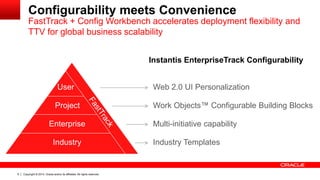
Instantis EnterpriseTrack Configurability
User
Project
Industry
Enterprise
Web 2.0 UI Personalization
Work Objects™ Configurable Building Blocks
Industry Templates
Multi-initiative capability
Configurability meets Convenience
FastTrack + Config Workbench accelerates deployment flexibility and
TTV for global business scalability
Copyright © 2014, Oracle and/or its affiliates. All rights reserved.7
Deployment Model
Copyright © 2014, Oracle and/or its affiliates. All rights reserved.8
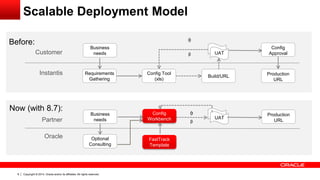
Before:
Customer
Instantis
Business
needs
Requirements
Gathering
Config Tool
(xls)
Build/URL
ᾲ
ᵝ
Production
URL
Config
ApprovalUAT
Scalable Deployment Model
Now (with 8.7):
Partner
Oracle
Config
Workbench
Production
URL
FastTrack
Template
UAT
Business
needs
ᾲ
ᵝ
Optional
Consulting
Copyright © 2014, Oracle and/or its affiliates. All rights reserved.9
FastTracks
Copyright © 2014, Oracle and/or its affiliates. All rights reserved.10
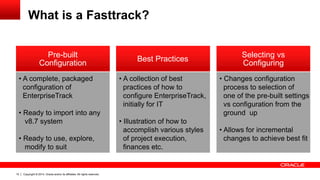
What is a Fasttrack?
• Changes configuration
process to selection of
one of the pre-built settings
vs configuration from the
ground up
• Allows for incremental
changes to achieve best fit
Selecting vs
Configuring
Best Practices
• A collection of best
practices of how to
configure EnterpriseTrack,
initially for IT
• Illustration of how to
accomplish various styles
of project execution,
finances etc.
Pre-built
Configuration
• A complete, packaged
configuration of
EnterpriseTrack
• Ready to import into any
v8.7 system
• Ready to use, explore,
modify to suit
Copyright © 2014, Oracle and/or its affiliates. All rights reserved.11
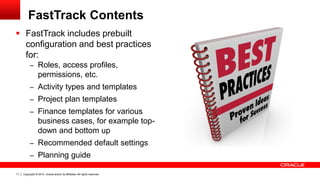
FastTrack Contents
 FastTrack includes prebuilt
configuration and best practices
for:
– Roles, access profiles,
permissions, etc.
– Activity types and templates
– Project plan templates
– Finance templates for various
business cases, for example top-
down and bottom up
– Recommended default settings
– Planning guide
Copyright © 2014, Oracle and/or its affiliates. All rights reserved.12
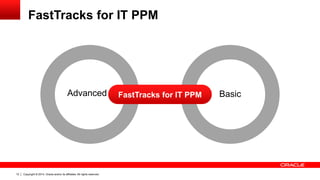
FastTracks for IT PPM
BasicAdvanced FastTracks for IT PPM
Copyright © 2014, Oracle and/or its affiliates. All rights reserved.13
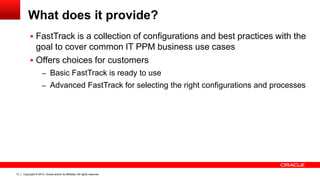
What does it provide?
 FastTrack is a collection of configurations and best practices with the
goal to cover common IT PPM business use cases
 Offers choices for customers
– Basic FastTrack is ready to use
– Advanced FastTrack for selecting the right configurations and processes
Copyright © 2014, Oracle and/or its affiliates. All rights reserved.14
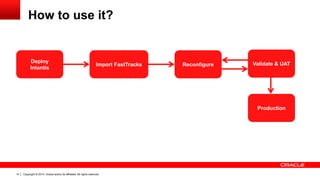
How to use it?
Deploy
Intantis
Import FastTracks Reconfigure Validate & UAT
Production
Copyright © 2014, Oracle and/or its affiliates. All rights reserved.15
Configuration Details
Copyright © 2014, Oracle and/or its affiliates. All rights reserved.16
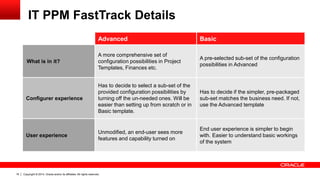
IT PPM FastTrack Details
Advanced Basic
What is in it?
A more comprehensive set of
configuration possibilities in Project
Templates, Finances etc.
A pre-selected sub-set of the configuration
possibilities in Advanced
Configurer experience
Has to decide to select a sub-set of the
provided configuration possibilities by
turning off the un-needed ones. Will be
easier than setting up from scratch or in
Basic template.
Has to decide if the simpler, pre-packaged
sub-set matches the business need. If not,
use the Advanced template
User experience
Unmodified, an end-user sees more
features and capability turned on
End user experience is simpler to begin
with. Easier to understand basic workings
of the system
Copyright © 2014, Oracle and/or its affiliates. All rights reserved.17
Available Configuration Settings
Advanced Basic
Project Properties
(Organization,
Classification, Custom
Fields)
Initial settings are in the form [Org 1], [Classification 1] etc.
Configurer has to do simple string renaming, enable/disable
Custom Fields to be configured, except for special Activity
Types where they are pre-provided
Makes specific settings for the
Org, Classification fields
Ideas, Proposals
Comes with default names for Idea, Proposals
Comes with Idea and Proposal evaluation criteria and
weights, configurer to review and modify
Same
Alignment trees
Pre-set with 2 alignment trees – Strategies and
Portfolios
Strategies intended for IT or business strategies
Portfolios intended to group projects into collections
Only Portfolio is enabled
Strategy settings same, can be
enabled
Copyright © 2014, Oracle and/or its affiliates. All rights reserved.18
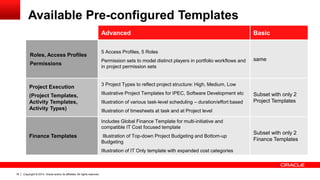
Available Pre-configured Templates
Advanced Basic
Roles, Access Profiles
Permissions
5 Access Profiles, 5 Roles
Permission sets to model distinct players in portfolio workflows and
in project permission sets
same
Project Execution
(Project Templates,
Activity Templates,
Activity Types)
3 Project Types to reflect project structure: High, Medium, Low
Illustrative Project Templates for IPEC, Software Development etc
Illustration of various task-level scheduling – duration/effort based
Illustration of timesheets at task and at Project level
Subset with only 2
Project Templates
Finance Templates
Includes Global Finance Template for multi-initiative and
compatible IT Cost focused template
Illustration of Top-down Project Budgeting and Bottom-up
Budgeting
Illustration of IT Only template with expanded cost categories
Subset with only 2
Finance Templates
Copyright © 2014, Oracle and/or its affiliates. All rights reserved.19
Project Templates Details
 Roadmaps
– 3 project types for levels of structure
 Activity Templates
– Structured
– Creation Defaults
 Activity Types
– List
Copyright © 2014, Oracle and/or its affiliates. All rights reserved.20
Project Templates
 Decide how you want to execute projects, along 3 axes
– Amount of structure of the WBS
– Scheduling paradigm at activity level (duration vs effort vs others)
– Whether timesheets are at project level or at activity level
Copyright © 2014, Oracle and/or its affiliates. All rights reserved.21
Finance Templates
 Budgeting of projects
– Top down
– Bottom Up
 Illustration of various Cost data capture scenarios
– By direct manual entry into finances at element level
– Automated roll-up from timesheet effort at project level
– Automated roll-up from timesheet effort at activity level
– Automated roll-up from non-labor costs at activity level
Copyright © 2014, Oracle and/or its affiliates. All rights reserved.22
Finance Templates
 Multi-initiative scenarios
– Compatible Global Finance template and IT Finance Template
– Incompatible IT only finance template
 Modifications
– Actual names of specific elements
– Group level multiplication factors
– Use of finance approval templates
Copyright © 2014, Oracle and/or its affiliates. All rights reserved.23
Benefits of FastTrack
 Quick start for partners, customers, and consultants with reference
base reference implementation
 Rapid deployment with ready to use working examples, and
configurations
 Illustrates best practices of configuring EnterpriseTrack to achieve
various PPM maturity for customer needs
 Facilitate incremental deployments with ability to add initiatives on
demand
 Framework for partners, and consultants to evolve the out of the box
FastTrack and create new ones
Copyright © 2014, Oracle and/or its affiliates. All rights reserved.24
Configuration Workbench
Copyright © 2014, Oracle and/or its affiliates. All rights reserved.25
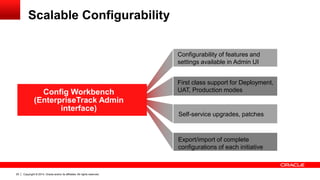
Scalable Configurability
Configurability of features and
settings available in Admin UI
Config Workbench
(EnterpriseTrack Admin
interface)
First class support for Deployment,
UAT, Production modes
Export/import of complete
configurations of each initiative
Self-service upgrades, patches
Copyright © 2014, Oracle and/or its affiliates. All rights reserved.26
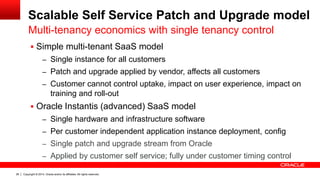
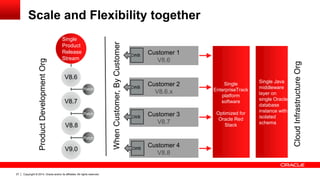
Scalable Self Service Patch and Upgrade model
 Simple multi-tenant SaaS model
– Single instance for all customers
– Patch and upgrade applied by vendor, affects all customers
– Customer cannot control uptake, impact on user experience, impact on
training and roll-out
 Oracle Instantis (advanced) SaaS model
– Single hardware and infrastructure software
– Per customer independent application instance deployment, config
– Single patch and upgrade stream from Oracle
– Applied by customer self service; fully under customer timing control
Multi-tenancy economics with single tenancy control
Copyright © 2014, Oracle and/or its affiliates. All rights reserved.27
Scale and Flexibility together
Customer 1
V8.6
Customer 2
V8.6.x
Customer 3
V8.7
Customer 4
V8.8
Single
EnterpriseTrack
platform
software
Optimized for
Oracle Red
Stack
Single
Product
Release
Stream
V8.6
V8.7
V8.8
V9.0
Patch
Patch
Patch
CWB
ProductDevelopmentOrg
CloudInfrastructureOrg
Single Java
middleware
layer on
single Oracle
database
instance with
isolated
schema
CWB
CWB
CWB
WhenCustomer,ByCustomer
Copyright © 2014, Oracle and/or its affiliates. All rights reserved.28
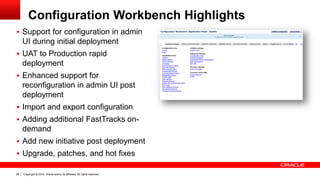
Configuration Workbench Highlights
 Support for configuration in admin
UI during initial deployment
 UAT to Production rapid
deployment
 Enhanced support for
reconfiguration in admin UI post
deployment
 Import and export configuration
 Adding additional FastTracks on-
demand
 Add new initiative post deployment
 Upgrade, patches, and hot fixes
Copyright © 2014, Oracle and/or its affiliates. All rights reserved.29
Stay tuned
New Guide Learning Path training on
Instantis EnterpriseTrack configuration and
best practices coming soon on OPN
Competency Center.
https://competencycenter.oracle.com/opncc/home.cc
Copyright © 2014, Oracle and/or its affiliates. All rights reserved.30
Thank You
Copyright © 2014, Oracle and/or its affiliates. All rights reserved.31
Copyright © 2014, Oracle and/or its affiliates. All rights reserved.32

Instantis enterprise track configuration best practices and tips overview - Oracle Primavera P6 Collaborate 14

  • 1.
    Copyright © 2014,Oracle and/or its affiliates. All rights reserved.1
  • 2.
    Instantis EnterpriseTrack Configuration BestPractices and Tips Overview April 2014
  • 3.
    Copyright © 2014,Oracle and/or its affiliates. All rights reserved.3 Agenda  New tools  What is Fast Track  Configuration settings  Improved configuration workbench  Benefits
  • 4.
    Copyright © 2014,Oracle and/or its affiliates. All rights reserved.4 Assumptions  Some Instantis deployment knowledge  Basic Instantis configuration and administration experience
  • 5.
    Copyright © 2014,Oracle and/or its affiliates. All rights reserved.5 New Tools  FastTracks -- Instantis 8.7 includes Fast Track for IT PPM  Improved configuration workbench
  • 6.
    Copyright © 2014,Oracle and/or its affiliates. All rights reserved.6 Instantis EnterpriseTrack Configurability User Project Industry Enterprise Web 2.0 UI Personalization Work Objects™ Configurable Building Blocks Industry Templates Multi-initiative capability Configurability meets Convenience FastTrack + Config Workbench accelerates deployment flexibility and TTV for global business scalability
  • 7.
    Copyright © 2014,Oracle and/or its affiliates. All rights reserved.7 Deployment Model
  • 8.
    Copyright © 2014,Oracle and/or its affiliates. All rights reserved.8 Before: Customer Instantis Business needs Requirements Gathering Config Tool (xls) Build/URL ᾲ ᵝ Production URL Config ApprovalUAT Scalable Deployment Model Now (with 8.7): Partner Oracle Config Workbench Production URL FastTrack Template UAT Business needs ᾲ ᵝ Optional Consulting
  • 9.
    Copyright © 2014,Oracle and/or its affiliates. All rights reserved.9 FastTracks
  • 10.
    Copyright © 2014,Oracle and/or its affiliates. All rights reserved.10 What is a Fasttrack? • Changes configuration process to selection of one of the pre-built settings vs configuration from the ground up • Allows for incremental changes to achieve best fit Selecting vs Configuring Best Practices • A collection of best practices of how to configure EnterpriseTrack, initially for IT • Illustration of how to accomplish various styles of project execution, finances etc. Pre-built Configuration • A complete, packaged configuration of EnterpriseTrack • Ready to import into any v8.7 system • Ready to use, explore, modify to suit
  • 11.
    Copyright © 2014,Oracle and/or its affiliates. All rights reserved.11 FastTrack Contents  FastTrack includes prebuilt configuration and best practices for: – Roles, access profiles, permissions, etc. – Activity types and templates – Project plan templates – Finance templates for various business cases, for example top- down and bottom up – Recommended default settings – Planning guide
  • 12.
    Copyright © 2014,Oracle and/or its affiliates. All rights reserved.12 FastTracks for IT PPM BasicAdvanced FastTracks for IT PPM
  • 13.
    Copyright © 2014,Oracle and/or its affiliates. All rights reserved.13 What does it provide?  FastTrack is a collection of configurations and best practices with the goal to cover common IT PPM business use cases  Offers choices for customers – Basic FastTrack is ready to use – Advanced FastTrack for selecting the right configurations and processes
  • 14.
    Copyright © 2014,Oracle and/or its affiliates. All rights reserved.14 How to use it? Deploy Intantis Import FastTracks Reconfigure Validate & UAT Production
  • 15.
    Copyright © 2014,Oracle and/or its affiliates. All rights reserved.15 Configuration Details
  • 16.
    Copyright © 2014,Oracle and/or its affiliates. All rights reserved.16 IT PPM FastTrack Details Advanced Basic What is in it? A more comprehensive set of configuration possibilities in Project Templates, Finances etc. A pre-selected sub-set of the configuration possibilities in Advanced Configurer experience Has to decide to select a sub-set of the provided configuration possibilities by turning off the un-needed ones. Will be easier than setting up from scratch or in Basic template. Has to decide if the simpler, pre-packaged sub-set matches the business need. If not, use the Advanced template User experience Unmodified, an end-user sees more features and capability turned on End user experience is simpler to begin with. Easier to understand basic workings of the system
  • 17.
    Copyright © 2014,Oracle and/or its affiliates. All rights reserved.17 Available Configuration Settings Advanced Basic Project Properties (Organization, Classification, Custom Fields) Initial settings are in the form [Org 1], [Classification 1] etc. Configurer has to do simple string renaming, enable/disable Custom Fields to be configured, except for special Activity Types where they are pre-provided Makes specific settings for the Org, Classification fields Ideas, Proposals Comes with default names for Idea, Proposals Comes with Idea and Proposal evaluation criteria and weights, configurer to review and modify Same Alignment trees Pre-set with 2 alignment trees – Strategies and Portfolios Strategies intended for IT or business strategies Portfolios intended to group projects into collections Only Portfolio is enabled Strategy settings same, can be enabled
  • 18.
    Copyright © 2014,Oracle and/or its affiliates. All rights reserved.18 Available Pre-configured Templates Advanced Basic Roles, Access Profiles Permissions 5 Access Profiles, 5 Roles Permission sets to model distinct players in portfolio workflows and in project permission sets same Project Execution (Project Templates, Activity Templates, Activity Types) 3 Project Types to reflect project structure: High, Medium, Low Illustrative Project Templates for IPEC, Software Development etc Illustration of various task-level scheduling – duration/effort based Illustration of timesheets at task and at Project level Subset with only 2 Project Templates Finance Templates Includes Global Finance Template for multi-initiative and compatible IT Cost focused template Illustration of Top-down Project Budgeting and Bottom-up Budgeting Illustration of IT Only template with expanded cost categories Subset with only 2 Finance Templates
  • 19.
    Copyright © 2014,Oracle and/or its affiliates. All rights reserved.19 Project Templates Details  Roadmaps – 3 project types for levels of structure  Activity Templates – Structured – Creation Defaults  Activity Types – List
  • 20.
    Copyright © 2014,Oracle and/or its affiliates. All rights reserved.20 Project Templates  Decide how you want to execute projects, along 3 axes – Amount of structure of the WBS – Scheduling paradigm at activity level (duration vs effort vs others) – Whether timesheets are at project level or at activity level
  • 21.
    Copyright © 2014,Oracle and/or its affiliates. All rights reserved.21 Finance Templates  Budgeting of projects – Top down – Bottom Up  Illustration of various Cost data capture scenarios – By direct manual entry into finances at element level – Automated roll-up from timesheet effort at project level – Automated roll-up from timesheet effort at activity level – Automated roll-up from non-labor costs at activity level
  • 22.
    Copyright © 2014,Oracle and/or its affiliates. All rights reserved.22 Finance Templates  Multi-initiative scenarios – Compatible Global Finance template and IT Finance Template – Incompatible IT only finance template  Modifications – Actual names of specific elements – Group level multiplication factors – Use of finance approval templates
  • 23.
    Copyright © 2014,Oracle and/or its affiliates. All rights reserved.23 Benefits of FastTrack  Quick start for partners, customers, and consultants with reference base reference implementation  Rapid deployment with ready to use working examples, and configurations  Illustrates best practices of configuring EnterpriseTrack to achieve various PPM maturity for customer needs  Facilitate incremental deployments with ability to add initiatives on demand  Framework for partners, and consultants to evolve the out of the box FastTrack and create new ones
  • 24.
    Copyright © 2014,Oracle and/or its affiliates. All rights reserved.24 Configuration Workbench
  • 25.
    Copyright © 2014,Oracle and/or its affiliates. All rights reserved.25 Scalable Configurability Configurability of features and settings available in Admin UI Config Workbench (EnterpriseTrack Admin interface) First class support for Deployment, UAT, Production modes Export/import of complete configurations of each initiative Self-service upgrades, patches
  • 26.
    Copyright © 2014,Oracle and/or its affiliates. All rights reserved.26 Scalable Self Service Patch and Upgrade model  Simple multi-tenant SaaS model – Single instance for all customers – Patch and upgrade applied by vendor, affects all customers – Customer cannot control uptake, impact on user experience, impact on training and roll-out  Oracle Instantis (advanced) SaaS model – Single hardware and infrastructure software – Per customer independent application instance deployment, config – Single patch and upgrade stream from Oracle – Applied by customer self service; fully under customer timing control Multi-tenancy economics with single tenancy control
  • 27.
    Copyright © 2014,Oracle and/or its affiliates. All rights reserved.27 Scale and Flexibility together Customer 1 V8.6 Customer 2 V8.6.x Customer 3 V8.7 Customer 4 V8.8 Single EnterpriseTrack platform software Optimized for Oracle Red Stack Single Product Release Stream V8.6 V8.7 V8.8 V9.0 Patch Patch Patch CWB ProductDevelopmentOrg CloudInfrastructureOrg Single Java middleware layer on single Oracle database instance with isolated schema CWB CWB CWB WhenCustomer,ByCustomer
  • 28.
    Copyright © 2014,Oracle and/or its affiliates. All rights reserved.28 Configuration Workbench Highlights  Support for configuration in admin UI during initial deployment  UAT to Production rapid deployment  Enhanced support for reconfiguration in admin UI post deployment  Import and export configuration  Adding additional FastTracks on- demand  Add new initiative post deployment  Upgrade, patches, and hot fixes
  • 29.
    Copyright © 2014,Oracle and/or its affiliates. All rights reserved.29 Stay tuned New Guide Learning Path training on Instantis EnterpriseTrack configuration and best practices coming soon on OPN Competency Center. https://competencycenter.oracle.com/opncc/home.cc
  • 30.
    Copyright © 2014,Oracle and/or its affiliates. All rights reserved.30 Thank You
  • 31.
    Copyright © 2014,Oracle and/or its affiliates. All rights reserved.31
  • 32.
    Copyright © 2014,Oracle and/or its affiliates. All rights reserved.32