What is NAC?
Why Do We Need NAC ?
 NAC protects the network from
non-compliant or infected systems
 Provides enforcement methods to
protect the network
 Can perform pre- and post-admission
controls
 Pre-admission: scanning for “health”
 Post-admission: monitoring the
network and the traffic continuously
for threats
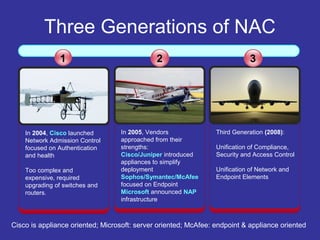
Three Generations of NAC
In 2004, Cisco launched
Network Admission Control
focused on Authentication
and health
Too complex and
expensive, required
upgrading of switches and
routers.
1
In 2005, Vendors
approached from their
strengths:
Cisco/Juniper introduced
appliances to simplify
deployment
Sophos/Symantec/McAfee
focused on Endpoint
Microsoft announced NAP
infrastructure
Third Generation (2008):
Unification of Compliance,
Security and Access Control
Unification of Network and
Endpoint Elements
2 3
Cisco is appliance oriented; Microsoft: server oriented; McAfee: endpoint & appliance oriented
What is NAC ?
 Network Access Control (NAC) is an
extension to ePO 4.0
 Provides network security by controlling
system access to network resources
 Access is granted according to the
system’s “health” status
 System’s “health” is assessed against a
set of defined compliance rules
NAC And Other Products
 NAC works together with Microsoft NAP
(Network Access Protection) as well as
with McAfee NSP (Network Security
Platform), formerly IntruShield
 In this case, NAC provides the “health”
statement, while enforcement is done
together with the other product
Managed vs. Un-managed Hosts
 Managed Hosts (those having a
running McAfee agent) can be handled
by NAC (enforcing a policy through ePO)
 Un-managed Hosts are detected but
they must be managed either by MS- NAP
or NSP (Network Security Platform,
IntruShield 5.1)
NAC & IntruShield
 MNAC 3.1 combined with IntruShield
5.1 provides complete monitoring of
managed and un-managed system
 McAfee will offer an appliance based
solution (NAC Appliance)
 NAC appliance provides pre-admission
control for un-managed systems
 IntruShield appliance provides
additional post-admission monitoring
06/09/16
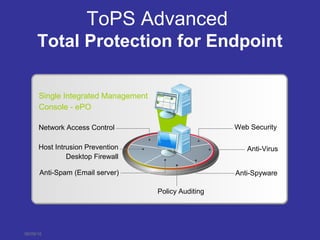
ToPS Advanced
Total Protection for Endpoint
Single Integrated Management
Console - ePO
Anti-Spyware
Host Intrusion Prevention
Desktop Firewall
Anti-Virus
Web Security
Policy Auditing
Network Access Control
Anti-Spam (Email server)
McAfee Network Access Control
3.1 Software
• Tightly integrated with Microsoft Network Access Protection (NAP) for
control of unmanaged systems
• Support for ePolicy Orchestrator 4.0
• Standards-based system health checks
– XCCDF and OVAL®
• The industry’s most advanced check library
• Creation of custom checks for system health policies
Key Features
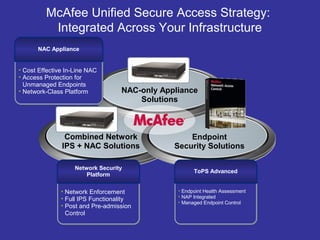
Combined Network
IPS + NAC Solutions
McAfee Unified Secure Access Strategy:
Integrated Across Your Infrastructure
Endpoint
Security Solutions
NAC-only Appliance
Solutions
• Network Enforcement
• Full IPS Functionality
• Post and Pre-admission
Control
Network Security
Platform
• Cost Effective In-Line NAC
• Access Protection for
Unmanaged Endpoints
• Network-Class Platform
NAC Appliance
• Endpoint Health Assessment
• NAP Integrated
• Managed Endpoint Control
ToPS Advanced
11
06/09/16
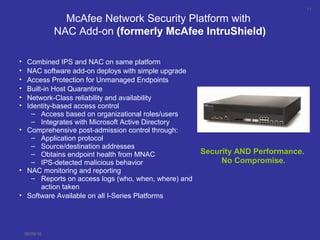
McAfee Network Security Platform with
NAC Add-on (formerly McAfee IntruShield)
• Combined IPS and NAC on same platform
• NAC software add-on deploys with simple upgrade
• Access Protection for Unmanaged Endpoints
• Built-in Host Quarantine
• Network-Class reliability and availability
• Identity-based access control
– Access based on organizational roles/users
– Integrates with Microsoft Active Directory
• Comprehensive post-admission control through:
– Application protocol
– Source/destination addresses
– Obtains endpoint health from MNAC
– IPS-detected malicious behavior
• NAC monitoring and reporting
– Reports on access logs (who, when, where) and
action taken
• Software Available on all I-Series Platforms
Security AND Performance.
No Compromise.
12
06/09/16
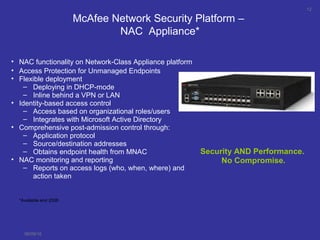
McAfee Network Security Platform –
NAC Appliance*
• NAC functionality on Network-Class Appliance platform
• Access Protection for Unmanaged Endpoints
• Flexible deployment
– Deploying in DHCP-mode
– Inline behind a VPN or LAN
• Identity-based access control
– Access based on organizational roles/users
– Integrates with Microsoft Active Directory
• Comprehensive post-admission control through:
– Application protocol
– Source/destination addresses
– Obtains endpoint health from MNAC
• NAC monitoring and reporting
– Reports on access logs (who, when, where) and
action taken
Security AND Performance.
No Compromise.
*Available end 2008
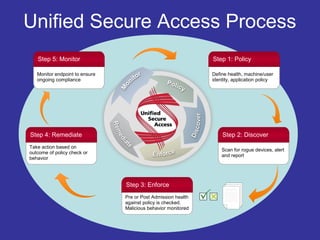
Unified Secure Access Process
Scan for rogue devices, alert
and report
Step 2: Discover
Pre or Post Admission health
against policy is checked.
Malicious behavior monitored
Step 3: Enforce
Take action based on
outcome of policy check or
behavior
Step 4: Remediate
Monitor endpoint to ensure
ongoing compliance
Step 5: Monitor
Define health, machine/user
identity, application policy
Step 1: Policy

What is NAC

  • 1.
  • 2.
    Why Do WeNeed NAC ?  NAC protects the network from non-compliant or infected systems  Provides enforcement methods to protect the network  Can perform pre- and post-admission controls  Pre-admission: scanning for “health”  Post-admission: monitoring the network and the traffic continuously for threats
  • 3.
    Three Generations ofNAC In 2004, Cisco launched Network Admission Control focused on Authentication and health Too complex and expensive, required upgrading of switches and routers. 1 In 2005, Vendors approached from their strengths: Cisco/Juniper introduced appliances to simplify deployment Sophos/Symantec/McAfee focused on Endpoint Microsoft announced NAP infrastructure Third Generation (2008): Unification of Compliance, Security and Access Control Unification of Network and Endpoint Elements 2 3 Cisco is appliance oriented; Microsoft: server oriented; McAfee: endpoint & appliance oriented
  • 4.
    What is NAC?  Network Access Control (NAC) is an extension to ePO 4.0  Provides network security by controlling system access to network resources  Access is granted according to the system’s “health” status  System’s “health” is assessed against a set of defined compliance rules
  • 5.
    NAC And OtherProducts  NAC works together with Microsoft NAP (Network Access Protection) as well as with McAfee NSP (Network Security Platform), formerly IntruShield  In this case, NAC provides the “health” statement, while enforcement is done together with the other product
  • 6.
    Managed vs. Un-managedHosts  Managed Hosts (those having a running McAfee agent) can be handled by NAC (enforcing a policy through ePO)  Un-managed Hosts are detected but they must be managed either by MS- NAP or NSP (Network Security Platform, IntruShield 5.1)
  • 7.
    NAC & IntruShield MNAC 3.1 combined with IntruShield 5.1 provides complete monitoring of managed and un-managed system  McAfee will offer an appliance based solution (NAC Appliance)  NAC appliance provides pre-admission control for un-managed systems  IntruShield appliance provides additional post-admission monitoring
  • 8.
    06/09/16 ToPS Advanced Total Protectionfor Endpoint Single Integrated Management Console - ePO Anti-Spyware Host Intrusion Prevention Desktop Firewall Anti-Virus Web Security Policy Auditing Network Access Control Anti-Spam (Email server)
  • 9.
    McAfee Network AccessControl 3.1 Software • Tightly integrated with Microsoft Network Access Protection (NAP) for control of unmanaged systems • Support for ePolicy Orchestrator 4.0 • Standards-based system health checks – XCCDF and OVAL® • The industry’s most advanced check library • Creation of custom checks for system health policies Key Features
  • 10.
    Combined Network IPS +NAC Solutions McAfee Unified Secure Access Strategy: Integrated Across Your Infrastructure Endpoint Security Solutions NAC-only Appliance Solutions • Network Enforcement • Full IPS Functionality • Post and Pre-admission Control Network Security Platform • Cost Effective In-Line NAC • Access Protection for Unmanaged Endpoints • Network-Class Platform NAC Appliance • Endpoint Health Assessment • NAP Integrated • Managed Endpoint Control ToPS Advanced
  • 11.
    11 06/09/16 McAfee Network SecurityPlatform with NAC Add-on (formerly McAfee IntruShield) • Combined IPS and NAC on same platform • NAC software add-on deploys with simple upgrade • Access Protection for Unmanaged Endpoints • Built-in Host Quarantine • Network-Class reliability and availability • Identity-based access control – Access based on organizational roles/users – Integrates with Microsoft Active Directory • Comprehensive post-admission control through: – Application protocol – Source/destination addresses – Obtains endpoint health from MNAC – IPS-detected malicious behavior • NAC monitoring and reporting – Reports on access logs (who, when, where) and action taken • Software Available on all I-Series Platforms Security AND Performance. No Compromise.
  • 12.
    12 06/09/16 McAfee Network SecurityPlatform – NAC Appliance* • NAC functionality on Network-Class Appliance platform • Access Protection for Unmanaged Endpoints • Flexible deployment – Deploying in DHCP-mode – Inline behind a VPN or LAN • Identity-based access control – Access based on organizational roles/users – Integrates with Microsoft Active Directory • Comprehensive post-admission control through: – Application protocol – Source/destination addresses – Obtains endpoint health from MNAC • NAC monitoring and reporting – Reports on access logs (who, when, where) and action taken Security AND Performance. No Compromise. *Available end 2008
  • 13.
    Unified Secure AccessProcess Scan for rogue devices, alert and report Step 2: Discover Pre or Post Admission health against policy is checked. Malicious behavior monitored Step 3: Enforce Take action based on outcome of policy check or behavior Step 4: Remediate Monitor endpoint to ensure ongoing compliance Step 5: Monitor Define health, machine/user identity, application policy Step 1: Policy

Editor's Notes

  • #2 I am excited to be here with you to share the launch of a product that would reshaped McAfee and security management. If you are an ePO Admin, your work day would be forever changed and if your team own ePO, it would gain a new level of operational efficiency.
  • #4 Lets talk about the 3 generations of NAC. The first generation started with Cisco in 2004, where they added NAC on switches. This was a method for Cisco to increase revenue by add capability to new switches to coax their customers to upgrade. The solution was very complex and very expensive. The 2nd generation began when companies created NAC offerings based on their points of strength in the marketplace. So Cisco and Juniper created solutions based enforcement at the network, where companies strong at the endpoints like Sophos, Symantec and McAfee created solutions based on their strengths. And Microsoft create NAP which was server oriented. All these solutions solved part of the NAC problem, but the solutions had many holes and didn’t address the entire issue. McAfee is moving to the 3rd generation, where integration and unification of the network and the endpoint solves the issues that the first 2 generations did not. The third generation also covers compliance issues, combining access control and security features.
  • #9 McAfee Total Protection for Endpoint will provide you strong security that enables you to lower costs and get greater compliance. With this one solution, you can protect all your endpoints, physical and virtual. And manage all endpoints with one integrated, centralized management console. With McAfee Total Protection for Endpoint you can: Protect against advance threats that steal your data with advanced anti-virus protection Get proactive anti-spyware and anti-spam protection to lower threat risk Use host IPS & desktop firewall to protect against zero-day threats and reduce your patching costs Deploy network access control to enforce security policies Educate your end users of the security risks when Internet browsing Protect all desktops, physical and virtual, with the same trusted security Verify and audit which endpoints are out-of-compliance to easily create audit reports to ensure compliance. We have packaged the broadest and most effective end-point security offerings in the market
  • #11 Unified Secure Access is McAfee’s approach to solving the NAC problem. It allows you to combine enforcement at the endpoint and the network where you can mix and match product offerings (depending upon your specific deployment needs) that are integrated and work together to give the highest enforcement of managed, unmanaged and unmanageable endpoints. McAfee has a strong presence on the endpoint with a strong NAC product with McAfee NAC, or MNAC. This product is integrated with Microsoft’s NAP technology to provide critical health check data to NAP infrastructure. MNAC is also integrated with McAfee Networks Security Platform to cover NAC in the network even more extensively than NAP. We have a strong presence in the network with the leading IPS, our Network Security Platform. Our strategy is to make NAC easy for our customers to deploy, so this year we are providing major leaps in functionality by delivering NAC functionality to our Network IPS. This includes a NAC software add-on module that can create an IPS and NAC combination on one network-class appliance. McAfee is also providing a NAC Appliance (available January 2009) based on the Network Security Platform that focuses on NAC functionality only. This is will be a cost-effective hardware platform that would be deployed in the network where IPS functionality may not make sense.
  • #14 Security is really not a product, it’s a process. And NAC is no different. NAC needs to be customized to a customers specific needs. So a step of defining what policies you want to track and enforce needs to be created. Once those policies are set, the Unified Secure Access solution needs to discover system and network components that are outside those policies you defined as they are attempting to access your network. You then define if and how you want to enforce any violations of those policies. At that point, you have the option of remediating the problem and letting them onto the network once they are deemed healthy again, or simply quarantining the violator to an area where they can do no harm. Step 5 is monitoring, a key piece of the process for post-admission violations, such as loading an illegal software download. But policies must always be reviewed to ensure the correct level of access is defined.