Virtual Machine Creation & Management
vNetwork
vStorage
vMotion & DRS
High Availability (HA)
Topics
Virtual Machine
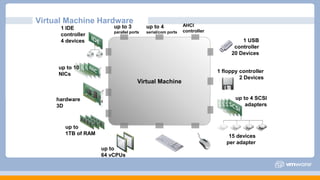
Virtual Machine Hardware
hardware
3D
1 IDE
controller
4 devices
up to 3
parallel ports
up to 4
serial/com ports
AHCI
controller
1 USB
controller
20 Devices
1 floppy controller
2 Devices
up to 10
NICs
15 devices
per adapter
up to
1TB of RAM
up to 4 SCSI
adapters
up to
64 vCPUs
New Virtual Machine
Configuration
• Typical or custom
Name and Location
Resource Pool
Datastore
Guest Operating System
Create a Disk
Ready to Complete
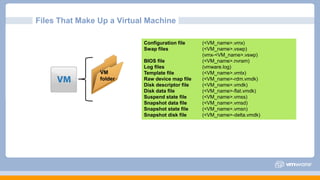
Files That Make Up a Virtual Machine
VM
folder
Configuration file (<VM_name>.vmx)
Swap files (<VM_name>.vswp)
(vmx-<VM_name>.vswp)
BIOS file (<VM_name>.nvram)
Log files (vmware.log)
Template file (<VM_name>.vmtx)
Raw device map file (<VM_name>-rdm.vmdk)
Disk descriptor file (<VM_name>.vmdk)
Disk data file (<VM_name>-flat.vmdk)
Suspend state file (<VM_name>.vmss)
Snapshot data file (<VM_name>.vmsd)
Snapshot state file (<VM_name>.vmsn)
Snapshot disk file (<VM_name>-delta.vmdk)
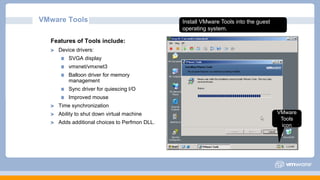
Features of Tools include:
Device drivers:
SVGA display
vmxnet/vmxnet3
Balloon driver for memory
management
Sync driver for quiescing I/O
Improved mouse
Time synchronization
Ability to shut down virtual machine
Adds additional choices to Perfmon DLL.
VMware Tools
VMware
Tools
icon
Install VMware Tools into the guest
operating system.
Virtual Machine Management
Virtual Machine Power Options
Power
•
•
•
•
Power On
Power Off
Suspend
Reset
VM Snapshot
Snapshot Actions
•
•
•
•
Take
Revert
Go to
Delete
Cloning
Template
Creating Templates
•
•
VM: clone to template
VM: convert to template
Virtual Machine Creation & Management
vNetwork
vStorage
vMotion & DRS
High Availability (HA)
Topics
VMware ESXi™ networking features allow the following:
Virtual machines to communicate with other virtual and physical machines
Management of the ESXi host
The VMkernel to access IP-based storage and perform VMware vSphere® vMotion®
migrations
Failure to properly configure ESXi networking can negatively affect virtual
machine management and storage operations.
Importance
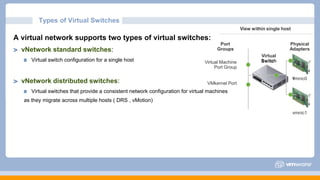
A virtual network supports two types of virtual switches:
vNetwork standard switches:
Virtual switch configuration for a single host
vNetwork distributed switches:
Virtual switches that provide a consistent network configuration for virtual machines
as they migrate across multiple hosts ( DRS , vMotion)
Types of Virtual Switches
View within single host
Port
Groups
Physical
Adapters
l
SwitchVirtual Machine
Port Group
vmnic0
VMkernel Port
vmnic1
v
Virtua
Switc
A virtual switch allows the following connection types:
Virtual machine port groups
VMkernel port:
For IP storage, vSphere vMotion migration, VMware vSphere® Fault Tolerance
For the ESXi management network
Types of Virtual Switch Connections
Virtual Machine Creation & Management
vNetwork
vStorage
vMotion & DRS
High Availability (HA)
Topics
Storage Overview
storage
technology
datastore
types
FCoE iSCSI
Fibre
Channel
direct
attached
file
system
NAS
NFSVMware vSphere® VMFS
VMware
ESXi™
hosts
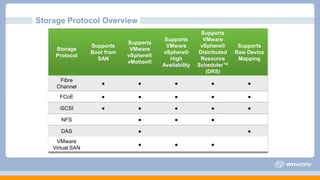
Storage Protocol Overview
Storage
Protocol
Supports
Boot from
SAN
Supports
VMware
vSphere®
vMotion®
Supports
VMware
vSphere®
High
Availability
Supports
VMware
vSphere®
Distributed
Resource
Scheduler™
(DRS)
Supports
Raw Device
Mapping
Fibre
Channel
● ● ● ● ●
FCoE ● ● ● ● ●
iSCSI ● ● ● ● ●
NFS ● ● ●
DAS ● ●
VMware
Virtual SAN
● ● ●
vNetworkvCompute
vStorage (Thin & Thick) Provisioning
...
-
.......
.
.
-
..........
o
精簡
20GB 40GB 100GB
20GB
20GB
40GB
100GB
60GB
20GB
ESX
Virtual Machine Creation & Management
vNetwork
vStorage
vMotion & DRS
High Availability (HA)
Topics
Migration: Moving a virtual machine from one host or datastore to another host or
datastore. Types of migrations:
Cold: Migrate a virtual machine that is powered off.
Suspended: Migrate a virtual machine that is suspended.
vSphere vMotion: Migrate a virtual machine that is powered on.
vSphere Storage vMotion: Migrate a virtual machine’s files, while the virtual machine is
powered on, to another datastore.
Migrating Virtual Machines
Vmotion & DRS
• Relocate running VM from one datastore
to another datastore with zero downtime
Relocate across different storage types•
• Change VM disk format (thick or thin)
..-S
.
X
.
/
.
APP APP APP
OS OS OS
Virtual Machine Creation & Management
vNetwork
vStorage
vMotion & DRS
High Availability (HA)
Topics
Protection at Every Level
A highly available system is one that is continuously operational for an optimal
length of time.
High Availability
Level of Availability Downtime Per Year
99% 87 hours (3.5 days)
99.9% 8.76 hours
99.99% 52 minutes
99.999% 5 minutes
Which level of virtual
machine availability is
important to you?
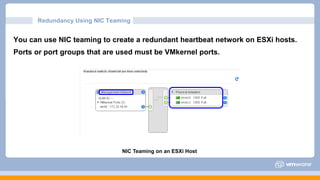
You can use NIC teaming to create a redundant heartbeat network on ESXi hosts.
Ports or port groups that are used must be VMkernel ports.
Redundancy Using NIC Teaming
NIC Teaming on an ESXi Host
Redundancy Using Additional Networks
You can also create
redundancy by configuring
more heartbeat networks:
On each ESXi host, create a
second VMkernel port on a
separate virtual switch with its
own physical adapter.
Redundancy Using Additional ESXI (Hosts)
Every host runs an agent.
•
•
Referred to as (FDM) or Fault Domain Manager
One of the agents within the cluster is chosen to
assume the role of the Master
 There is only one Master per cluster during normal
operations
All other agents assume the role of Slaves
ESX 01 ESX 03
•
There is
concept
no more Primary/Secondary
with vSphere HA
ESX 02 ESX 04
vCenter
The End
Thank You

VMware Vsphere Graduation Project Presentation

  • 1.
    Virtual Machine Creation& Management vNetwork vStorage vMotion & DRS High Availability (HA) Topics
  • 2.
    Virtual Machine Virtual MachineHardware hardware 3D 1 IDE controller 4 devices up to 3 parallel ports up to 4 serial/com ports AHCI controller 1 USB controller 20 Devices 1 floppy controller 2 Devices up to 10 NICs 15 devices per adapter up to 1TB of RAM up to 4 SCSI adapters up to 64 vCPUs
  • 3.
    New Virtual Machine Configuration •Typical or custom Name and Location Resource Pool Datastore Guest Operating System Create a Disk Ready to Complete
  • 4.
    Files That MakeUp a Virtual Machine VM folder Configuration file (<VM_name>.vmx) Swap files (<VM_name>.vswp) (vmx-<VM_name>.vswp) BIOS file (<VM_name>.nvram) Log files (vmware.log) Template file (<VM_name>.vmtx) Raw device map file (<VM_name>-rdm.vmdk) Disk descriptor file (<VM_name>.vmdk) Disk data file (<VM_name>-flat.vmdk) Suspend state file (<VM_name>.vmss) Snapshot data file (<VM_name>.vmsd) Snapshot state file (<VM_name>.vmsn) Snapshot disk file (<VM_name>-delta.vmdk)
  • 5.
    Features of Toolsinclude: Device drivers: SVGA display vmxnet/vmxnet3 Balloon driver for memory management Sync driver for quiescing I/O Improved mouse Time synchronization Ability to shut down virtual machine Adds additional choices to Perfmon DLL. VMware Tools VMware Tools icon Install VMware Tools into the guest operating system.
  • 6.
    Virtual Machine Management VirtualMachine Power Options Power • • • • Power On Power Off Suspend Reset VM Snapshot Snapshot Actions • • • • Take Revert Go to Delete Cloning Template Creating Templates • • VM: clone to template VM: convert to template
  • 7.
    Virtual Machine Creation& Management vNetwork vStorage vMotion & DRS High Availability (HA) Topics
  • 8.
    VMware ESXi™ networkingfeatures allow the following: Virtual machines to communicate with other virtual and physical machines Management of the ESXi host The VMkernel to access IP-based storage and perform VMware vSphere® vMotion® migrations Failure to properly configure ESXi networking can negatively affect virtual machine management and storage operations. Importance
  • 9.
    A virtual networksupports two types of virtual switches: vNetwork standard switches: Virtual switch configuration for a single host vNetwork distributed switches: Virtual switches that provide a consistent network configuration for virtual machines as they migrate across multiple hosts ( DRS , vMotion) Types of Virtual Switches View within single host Port Groups Physical Adapters l SwitchVirtual Machine Port Group vmnic0 VMkernel Port vmnic1 v Virtua Switc
  • 10.
    A virtual switchallows the following connection types: Virtual machine port groups VMkernel port: For IP storage, vSphere vMotion migration, VMware vSphere® Fault Tolerance For the ESXi management network Types of Virtual Switch Connections
  • 11.
    Virtual Machine Creation& Management vNetwork vStorage vMotion & DRS High Availability (HA) Topics
  • 12.
  • 13.
    Storage Protocol Overview Storage Protocol Supports Bootfrom SAN Supports VMware vSphere® vMotion® Supports VMware vSphere® High Availability Supports VMware vSphere® Distributed Resource Scheduler™ (DRS) Supports Raw Device Mapping Fibre Channel ● ● ● ● ● FCoE ● ● ● ● ● iSCSI ● ● ● ● ● NFS ● ● ● DAS ● ● VMware Virtual SAN ● ● ●
  • 14.
    vNetworkvCompute vStorage (Thin &Thick) Provisioning ... - ....... . . - .......... o 精簡 20GB 40GB 100GB 20GB 20GB 40GB 100GB 60GB 20GB ESX
  • 15.
    Virtual Machine Creation& Management vNetwork vStorage vMotion & DRS High Availability (HA) Topics
  • 16.
    Migration: Moving avirtual machine from one host or datastore to another host or datastore. Types of migrations: Cold: Migrate a virtual machine that is powered off. Suspended: Migrate a virtual machine that is suspended. vSphere vMotion: Migrate a virtual machine that is powered on. vSphere Storage vMotion: Migrate a virtual machine’s files, while the virtual machine is powered on, to another datastore. Migrating Virtual Machines
  • 17.
    Vmotion & DRS •Relocate running VM from one datastore to another datastore with zero downtime Relocate across different storage types• • Change VM disk format (thick or thin) ..-S . X . / . APP APP APP OS OS OS
  • 18.
    Virtual Machine Creation& Management vNetwork vStorage vMotion & DRS High Availability (HA) Topics
  • 19.
  • 20.
    A highly availablesystem is one that is continuously operational for an optimal length of time. High Availability Level of Availability Downtime Per Year 99% 87 hours (3.5 days) 99.9% 8.76 hours 99.99% 52 minutes 99.999% 5 minutes Which level of virtual machine availability is important to you?
  • 21.
    You can useNIC teaming to create a redundant heartbeat network on ESXi hosts. Ports or port groups that are used must be VMkernel ports. Redundancy Using NIC Teaming NIC Teaming on an ESXi Host
  • 22.
    Redundancy Using AdditionalNetworks You can also create redundancy by configuring more heartbeat networks: On each ESXi host, create a second VMkernel port on a separate virtual switch with its own physical adapter.
  • 23.
    Redundancy Using AdditionalESXI (Hosts) Every host runs an agent. • • Referred to as (FDM) or Fault Domain Manager One of the agents within the cluster is chosen to assume the role of the Master  There is only one Master per cluster during normal operations All other agents assume the role of Slaves ESX 01 ESX 03 • There is concept no more Primary/Secondary with vSphere HA ESX 02 ESX 04 vCenter
  • 24.