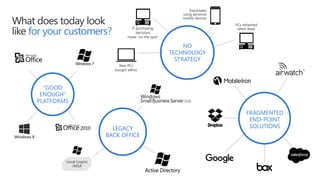
What does today look
like for your customers?
Local Logins
/MSA
New PCs
bought adhoc
PCs refreshed
when dead
Employees
using personal
mobile devices
IT purchasing
decisions
made “on the spot”
“GOOD
ENOUGH”
PLATFORMS
LEGACY
BACK OFFICE
NO
TECHNOLOGY
STRATEGY
FRAGMENTED
END-POINT
SOLUTIONS
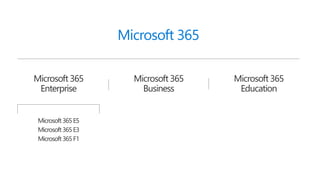
Microsoft 365
Microsoft 365
Business
Microsoft 365
Enterprise
Microsoft 365
Education
Microsoft365E5
Microsoft365E3
Microsoft365F1
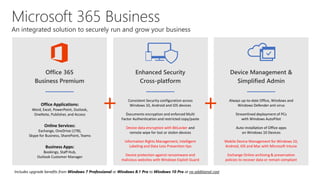
Office 365
Business Premium
Office Applications:
Word, Excel, PowerPoint, Outlook,
OneNote, Publisher, and Access
Online Services:
Exchange, OneDrive (1TB),
Skype for Business, SharePoint, Teams
Business Apps:
Bookings, Staff Hub,
Outlook Customer Manager
Includes upgrade benefits from Windows 7 Professional or Windows 8.1 Pro to Windows 10 Pro at no additional cost
Enhanced Security
Cross-platform
Consistent Security configuration across
Windows 10, Android and iOS devices
Documents encryption and enforced Multi
Factor Authentication and restricted copy/paste
Device data encryption with BitLocker and
remote wipe for lost or stolen devices
Information Rights Management, Intelligent
Labeling and Data Loss Prevention tips
Device protection against ransomware and
malicious websites with Windows Exploit Guard
Device Management &
Simplified Admin
Always up-to-date Office, Windows and
Windows Defender anti virus
Streamlined deployment of PCs
with Windows AutoPilot
Auto-installation of Office apps
on Windows 10 Devices
Mobile Device Management for Windows 10,
Android, iOS and Mac with Microsoft Intune
Exchange Online archiving & preservation
policies to recover data or remain compliant
Microsoft 365 Business
An integrated solution to securely run and grow your business
+ +
Microsoft 365 Business includes:
Data protection controls
Help secure business data on
personal and company-
owned devices.
File storage
Manage your files from anywhere
with 1TB of storage.
Email and calendaring
Connect with customers and
coworkers using Outlook and
Exchange.
Comes with Office
Stay up-to-date with the latest
versions of Word, Excel,
PowerPoint, and more.
Safest Windows ever
Get upgraded to Windows 10
Pro from Windows 7 and 8.1
Pro.
Cyberthreat protection
Help protect PCs from malware,
viruses, and spyware.
Administration and deployment
Manage new PCs and devices
faster and more easily than ever.
Dependability and support
Get 99.9% uptime guaranteed
and 24x7 online and phone
support.
A holistic set of business productivity and collaboration tools
• Word, Excel, PowerPoint, Outlook, OneNote, Publisher, and Access
• Exchange, OneDrive, Skype for Business, Microsoft Teams, SharePoint
• Business apps from Office (Bookings, Outlook Customer Manager, MileIQ1, Listings1, Connections1, Invoicing1)
Enterprise-grade device management and security capabilities
• App protection for Office mobile apps
• Device management for Windows 10 PCs
• Consistent security configuration across devices
• Protection of company data across devices
• Windows Defender, always-on and up-to-date
Simplified device deployment and user setup
• Single admin console to setup and manage users and devices
• Auto-installation of Office apps on Windows 10 PCs
• Always up-to-date Office + Windows 10
• Streamlined deployment of PCs with Windows AutoPilot
Microsoft 365 Business – A single solution
A single solution designed for your business
What’s right for your customer?
Office 365
Microsoft 365 Business
Microsoft 365 Enterprise
Fast path to modern productivity & collaboration
Automatic security and feature updates
Integrated productivity, management & security
Best of Office 365 apps & Windows 10 Business
Highest level of productivity, management & security
Support for hybrid environments
Modern voice with cloud PBX
Email, schedule, meet, and chat
Stay connected and in sync with co-workers and customers
wherever you are via email, phone, online meetings, and IM.
Get professional looking email powered by Microsoft Exchange
to facilitate collaboration to keep you in sync with your customers
and coworkers, 24/7.
Add audio/video conferencing to a new or existing meeting with
just one click using Outlook with Skype for Business integration.
Use Office 365 Groups to give your teammates access to a shared
inbox, calendar, file repository, and notebook.
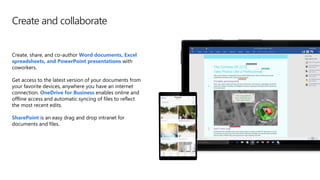
Create and collaborate
Create, share, and co-author Word documents, Excel
spreadsheets, and PowerPoint presentations with
coworkers.
Get access to the latest version of your documents from
your favorite devices, anywhere you have an internet
connection. OneDrive for Business enables online and
offline access and automatic syncing of files to reflect
the most recent edits.
SharePoint is an easy drag and drop intranet for
documents and files.
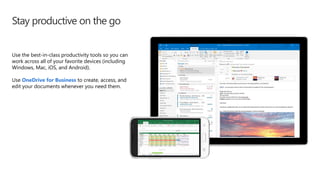
Stay productive on the go
Use the best-in-class productivity tools so you can
work across all of your favorite devices (including
Windows, Mac, iOS, and Android).
Use OneDrive for Business to create, access, and
edit your documents whenever you need them.
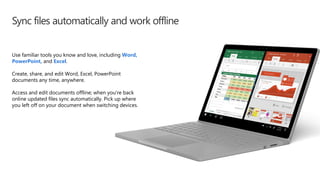
Sync files automatically and work offline
Use familiar tools you know and love, including Word,
PowerPoint, and Excel.
Create, share, and edit Word, Excel, PowerPoint
documents any time, anywhere.
Access and edit documents offline; when you're back
online updated files sync automatically. Pick up where
you left off on your document when switching devices.
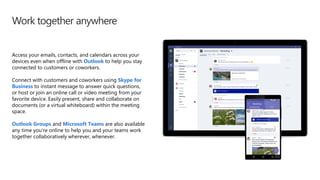
Work together anywhere
Access your emails, contacts, and calendars across your
devices even when offline with Outlook to help you stay
connected to customers or coworkers.
Connect with customers and coworkers using Skype for
Business to instant message to answer quick questions,
or host or join an online call or video meeting from your
favorite device. Easily present, share and collaborate on
documents (or a virtual whiteboard) within the meeting
space.
Outlook Groups and Microsoft Teams are also available
any time you’re online to help you and your teams work
together collaboratively wherever, whenever.
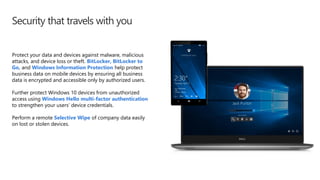
Security that travels with you
Protect your data and devices against malware, malicious
attacks, and device loss or theft. BitLocker, BitLocker to
Go, and Windows Information Protection help protect
business data on mobile devices by ensuring all business
data is encrypted and accessible only by authorized users.
Further protect Windows 10 devices from unauthorized
access using Windows Hello multi-factor authentication
to strengthen your users’ device credentials.
Perform a remote Selective Wipe of company data easily
on lost or stolen devices.
Reduce your security risk
Centralize control of your company data on
personal devices.
Reduce your risk profile with security features
for SMB customers.
Apply a consistent security configuration
profile, across managed devices.
Establish a baseline of security policies across
managed devices.
Configure devices consistently to help ensure
that your data and devices are protected from
malware and external threats.
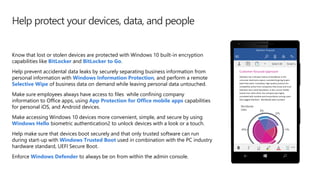
Help protect your devices, data, and people
Know that lost or stolen devices are protected with Windows 10 built-in encryption
capabilities like BitLocker and BitLocker to Go.
Help prevent accidental data leaks by securely separating business information from
personal information with Windows Information Protection, and perform a remote
Selective Wipe of business data on demand while leaving personal data untouched.
Make sure employees always have access to files while confining company
information to Office apps, using App Protection for Office mobile apps capabilities
for personal iOS, and Android devices.
Make accessing Windows 10 devices more convenient, simple, and secure by using
Windows Hello biometric authentication2 to unlock devices with a look or a touch.
Help make sure that devices boot securely and that only trusted software can run
during start-up with Windows Trusted Boot used in combination with the PC industry
hardware standard, UEFI Secure Boot.
Enforce Windows Defender to always be on from within the admin console.
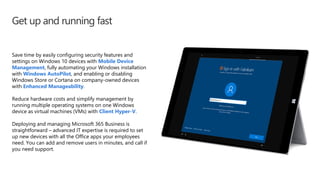
Get up and running fast
Save time by easily configuring security features and
settings on Windows 10 devices with Mobile Device
Management, fully automating your Windows installation
with Windows AutoPilot, and enabling or disabling
Windows Store or Cortana on company-owned devices
with Enhanced Manageability.
Reduce hardware costs and simplify management by
running multiple operating systems on one Windows
device as virtual machines (VMs) with Client Hyper-V.
Deploying and managing Microsoft 365 Business is
straightforward – advanced IT expertise is required to set
up new devices with all the Office apps your employees
need. You can add and remove users in minutes, and call if
you need support.
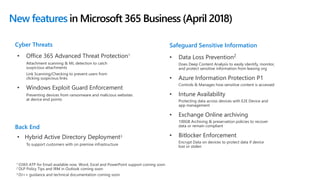
New features in Microsoft 365 Business (April 2018)
• Office 365 Advanced Threat Protection1
Attachment scanning & ML detection to catch
suspicious attachments
Link Scanning/Checking to prevent users from
clicking suspicious links
• Windows Exploit Guard Enforcement
Preventing devices from ransomware and malicious websites
at device end points
Cyber Threats
• Data Loss Prevention2
Does Deep Content Analysis to easily identify, monitor,
and protect sensitive information from leaving org
• Azure Information Protection P1
Controls & Manages how sensitive content is accessed
• Intune Availability
Protecting data across devices with E2E Device and
app management
• Exchange Online archiving
100GB Archiving & preservation policies to recover
data or remain compliant
• Bitlocker Enforcement
Encrypt Data on devices to protect data if device
lost or stolen
Safeguard Sensitive Information
1
2
3
Back End
• Hybrid Active Directory Deployment3
To support customers with on premise infrastructure
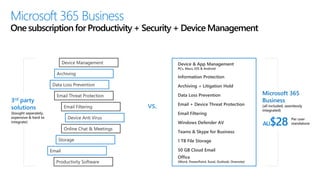
Microsoft 365 Business
One subscription for Productivity + Security + Device Management
3rd party
solutions
(bought separately,
expensive & hard to
integrate)
Archiving
Data Loss Prevention
Email
Email Threat Protection
Device Anti Virus
Email Filtering
Productivity Software
Storage
Online Chat & Meetings
Device Management
Data Loss Prevention
Email + Device Threat Protection
Archiving + Litigation Hold
Device & App Management
PCs, Macs, iOS & Android
Email Filtering
Windows Defender AV
1 TB File Storage
50 GB Cloud Email
Teams & Skype for Business
Office
(Word, PowerPoint, Excel, Outlook, Onenote)
Information Protection
vs.
AU$28 Per user
standalone
Microsoft 365
Business
(all included, seamlessly
integrated)
Features (new in blue)
Office 365
BP
Microsoft 365
Business
Microsoft 365
E3
Microsoft 365
E5
Estimated retail price per user per month $AUD (with annual commitment) $17.49 $28.07 $49.06 $89.21
Maximum number of users 300 300 unlimited unlimited
Office Apps Install Office on up to 5 PCs/Macs + 5 tablets + 5 smartphones per user (Word, Excel, PowerPoint, OneNote,
Access), Office Online
Business Business ProPlus ProPlus
Email & Calendar Outlook, Exchange Online 50GB 50GB unlimited unlimited
Chat-based
Workspace, Meetings
Microsoft Teams, Skype For Business ⚫ ⚫ ⚫ ⚫
File Storage OneDrive for Business 1 TB 1 TB unlimited unlimited
Social, Video, Sites Yammer, SharePoint Online, Planner ⚫ ⚫ ⚫ ⚫
Stream ⚫ ⚫ ⚫
Business Apps Scheduling Apps – Booking, StaffHub ⚫ ⚫ ⚫ ⚫
Business Apps – Outlook Customer Manager, MileIQ1 Business center2, Listings2, Connections2, Invoicing2
⚫ ⚫
Threat Protection Microsoft Advanced Threat Analytics, Device Guard, Credential Guard, App Locker, Enterprise Data Protection, ⚫ ⚫
Office 365 Advanced Threat Protection ⚫ ⚫
Windows Defender Advanced Threat Protection ⚫
Office 365 Threat Intelligence ⚫
Identity & Access
Management
Azure Active Directory - SSPR Cloud Identities, MFA, SSO >10 Apps ⚫ ⚫ ⚫
Azure Active Directory - Conditional Access, SSPR Hybrid Identities, Cloud App Discovery, AAD Connect Health ⚫ ⚫
Credential Guard and Direct Access ⚫ ⚫
Azure Active Directory Plan 2 ⚫
Device & App
Management
Microsoft Intune, Windows AutoPilot ⚫ ⚫ ⚫
Microsoft Desktop Optimization Package, VDA ⚫ ⚫
Information
Protection
Unlimited Exchange Archiving3, Office 365 Data Loss Prevention*, Azure Information Protection Plan 1 ⚫ ⚫ ⚫
Azure Information Protection Plan 2, Microsoft Cloud App Security, O365 Cloud App Security ⚫
On-Prem CAL Rights ECAL Suite (Exchange, SharePoint, Skype, Windows, SCCM, Win. Rights Management) ⚫ ⚫
Compliance Litigation Hold, eDiscovery, Compliance Manager, Data Subject Requests ⚫ ⚫ ⚫
Advanced eDiscovery, Customer Lockbox, Advanced Data Governance ⚫
Analytics Power BI Pro, MyAnalytics ⚫
Voice PSTN Conferencing, Cloud PBX ⚫
[1] Available in US, UK, Canada; [2] Currently in public preview in US, UK, Canada; [3] Unlimited when auto-expanding turned on *Data Loss Prevention Features will be available summer 2018
Detailed comparison of plans

What is Microsoft 365 Business?

  • 2.
    What does todaylook like for your customers? Local Logins /MSA New PCs bought adhoc PCs refreshed when dead Employees using personal mobile devices IT purchasing decisions made “on the spot” “GOOD ENOUGH” PLATFORMS LEGACY BACK OFFICE NO TECHNOLOGY STRATEGY FRAGMENTED END-POINT SOLUTIONS
  • 3.
    Microsoft 365 Microsoft 365 Business Microsoft365 Enterprise Microsoft 365 Education Microsoft365E5 Microsoft365E3 Microsoft365F1
  • 4.
    Office 365 Business Premium OfficeApplications: Word, Excel, PowerPoint, Outlook, OneNote, Publisher, and Access Online Services: Exchange, OneDrive (1TB), Skype for Business, SharePoint, Teams Business Apps: Bookings, Staff Hub, Outlook Customer Manager Includes upgrade benefits from Windows 7 Professional or Windows 8.1 Pro to Windows 10 Pro at no additional cost Enhanced Security Cross-platform Consistent Security configuration across Windows 10, Android and iOS devices Documents encryption and enforced Multi Factor Authentication and restricted copy/paste Device data encryption with BitLocker and remote wipe for lost or stolen devices Information Rights Management, Intelligent Labeling and Data Loss Prevention tips Device protection against ransomware and malicious websites with Windows Exploit Guard Device Management & Simplified Admin Always up-to-date Office, Windows and Windows Defender anti virus Streamlined deployment of PCs with Windows AutoPilot Auto-installation of Office apps on Windows 10 Devices Mobile Device Management for Windows 10, Android, iOS and Mac with Microsoft Intune Exchange Online archiving & preservation policies to recover data or remain compliant Microsoft 365 Business An integrated solution to securely run and grow your business + +
  • 5.
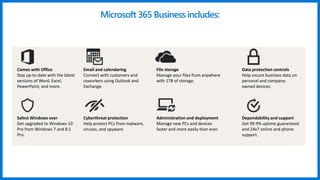
    Microsoft 365 Businessincludes: Data protection controls Help secure business data on personal and company- owned devices. File storage Manage your files from anywhere with 1TB of storage. Email and calendaring Connect with customers and coworkers using Outlook and Exchange. Comes with Office Stay up-to-date with the latest versions of Word, Excel, PowerPoint, and more. Safest Windows ever Get upgraded to Windows 10 Pro from Windows 7 and 8.1 Pro. Cyberthreat protection Help protect PCs from malware, viruses, and spyware. Administration and deployment Manage new PCs and devices faster and more easily than ever. Dependability and support Get 99.9% uptime guaranteed and 24x7 online and phone support.
  • 6.
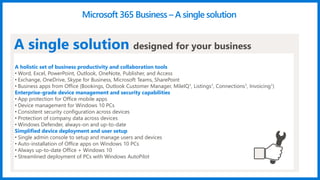
    A holistic setof business productivity and collaboration tools • Word, Excel, PowerPoint, Outlook, OneNote, Publisher, and Access • Exchange, OneDrive, Skype for Business, Microsoft Teams, SharePoint • Business apps from Office (Bookings, Outlook Customer Manager, MileIQ1, Listings1, Connections1, Invoicing1) Enterprise-grade device management and security capabilities • App protection for Office mobile apps • Device management for Windows 10 PCs • Consistent security configuration across devices • Protection of company data across devices • Windows Defender, always-on and up-to-date Simplified device deployment and user setup • Single admin console to setup and manage users and devices • Auto-installation of Office apps on Windows 10 PCs • Always up-to-date Office + Windows 10 • Streamlined deployment of PCs with Windows AutoPilot Microsoft 365 Business – A single solution A single solution designed for your business
  • 7.
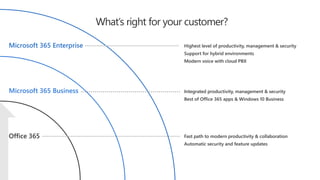
    What’s right foryour customer? Office 365 Microsoft 365 Business Microsoft 365 Enterprise Fast path to modern productivity & collaboration Automatic security and feature updates Integrated productivity, management & security Best of Office 365 apps & Windows 10 Business Highest level of productivity, management & security Support for hybrid environments Modern voice with cloud PBX
  • 8.
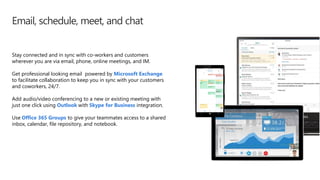
    Email, schedule, meet,and chat Stay connected and in sync with co-workers and customers wherever you are via email, phone, online meetings, and IM. Get professional looking email powered by Microsoft Exchange to facilitate collaboration to keep you in sync with your customers and coworkers, 24/7. Add audio/video conferencing to a new or existing meeting with just one click using Outlook with Skype for Business integration. Use Office 365 Groups to give your teammates access to a shared inbox, calendar, file repository, and notebook.
  • 9.
    Create and collaborate Create,share, and co-author Word documents, Excel spreadsheets, and PowerPoint presentations with coworkers. Get access to the latest version of your documents from your favorite devices, anywhere you have an internet connection. OneDrive for Business enables online and offline access and automatic syncing of files to reflect the most recent edits. SharePoint is an easy drag and drop intranet for documents and files.
  • 10.
    Stay productive onthe go Use the best-in-class productivity tools so you can work across all of your favorite devices (including Windows, Mac, iOS, and Android). Use OneDrive for Business to create, access, and edit your documents whenever you need them.
  • 11.
    Sync files automaticallyand work offline Use familiar tools you know and love, including Word, PowerPoint, and Excel. Create, share, and edit Word, Excel, PowerPoint documents any time, anywhere. Access and edit documents offline; when you're back online updated files sync automatically. Pick up where you left off on your document when switching devices.
  • 12.
    Work together anywhere Accessyour emails, contacts, and calendars across your devices even when offline with Outlook to help you stay connected to customers or coworkers. Connect with customers and coworkers using Skype for Business to instant message to answer quick questions, or host or join an online call or video meeting from your favorite device. Easily present, share and collaborate on documents (or a virtual whiteboard) within the meeting space. Outlook Groups and Microsoft Teams are also available any time you’re online to help you and your teams work together collaboratively wherever, whenever.
  • 13.
    Security that travelswith you Protect your data and devices against malware, malicious attacks, and device loss or theft. BitLocker, BitLocker to Go, and Windows Information Protection help protect business data on mobile devices by ensuring all business data is encrypted and accessible only by authorized users. Further protect Windows 10 devices from unauthorized access using Windows Hello multi-factor authentication to strengthen your users’ device credentials. Perform a remote Selective Wipe of company data easily on lost or stolen devices.
  • 14.
    Reduce your securityrisk Centralize control of your company data on personal devices. Reduce your risk profile with security features for SMB customers. Apply a consistent security configuration profile, across managed devices. Establish a baseline of security policies across managed devices. Configure devices consistently to help ensure that your data and devices are protected from malware and external threats.
  • 15.
    Help protect yourdevices, data, and people Know that lost or stolen devices are protected with Windows 10 built-in encryption capabilities like BitLocker and BitLocker to Go. Help prevent accidental data leaks by securely separating business information from personal information with Windows Information Protection, and perform a remote Selective Wipe of business data on demand while leaving personal data untouched. Make sure employees always have access to files while confining company information to Office apps, using App Protection for Office mobile apps capabilities for personal iOS, and Android devices. Make accessing Windows 10 devices more convenient, simple, and secure by using Windows Hello biometric authentication2 to unlock devices with a look or a touch. Help make sure that devices boot securely and that only trusted software can run during start-up with Windows Trusted Boot used in combination with the PC industry hardware standard, UEFI Secure Boot. Enforce Windows Defender to always be on from within the admin console.
  • 16.
    Get up andrunning fast Save time by easily configuring security features and settings on Windows 10 devices with Mobile Device Management, fully automating your Windows installation with Windows AutoPilot, and enabling or disabling Windows Store or Cortana on company-owned devices with Enhanced Manageability. Reduce hardware costs and simplify management by running multiple operating systems on one Windows device as virtual machines (VMs) with Client Hyper-V. Deploying and managing Microsoft 365 Business is straightforward – advanced IT expertise is required to set up new devices with all the Office apps your employees need. You can add and remove users in minutes, and call if you need support.
  • 17.
    New features inMicrosoft 365 Business (April 2018) • Office 365 Advanced Threat Protection1 Attachment scanning & ML detection to catch suspicious attachments Link Scanning/Checking to prevent users from clicking suspicious links • Windows Exploit Guard Enforcement Preventing devices from ransomware and malicious websites at device end points Cyber Threats • Data Loss Prevention2 Does Deep Content Analysis to easily identify, monitor, and protect sensitive information from leaving org • Azure Information Protection P1 Controls & Manages how sensitive content is accessed • Intune Availability Protecting data across devices with E2E Device and app management • Exchange Online archiving 100GB Archiving & preservation policies to recover data or remain compliant • Bitlocker Enforcement Encrypt Data on devices to protect data if device lost or stolen Safeguard Sensitive Information 1 2 3 Back End • Hybrid Active Directory Deployment3 To support customers with on premise infrastructure
  • 18.
    Microsoft 365 Business Onesubscription for Productivity + Security + Device Management 3rd party solutions (bought separately, expensive & hard to integrate) Archiving Data Loss Prevention Email Email Threat Protection Device Anti Virus Email Filtering Productivity Software Storage Online Chat & Meetings Device Management Data Loss Prevention Email + Device Threat Protection Archiving + Litigation Hold Device & App Management PCs, Macs, iOS & Android Email Filtering Windows Defender AV 1 TB File Storage 50 GB Cloud Email Teams & Skype for Business Office (Word, PowerPoint, Excel, Outlook, Onenote) Information Protection vs. AU$28 Per user standalone Microsoft 365 Business (all included, seamlessly integrated)
  • 19.
    Features (new inblue) Office 365 BP Microsoft 365 Business Microsoft 365 E3 Microsoft 365 E5 Estimated retail price per user per month $AUD (with annual commitment) $17.49 $28.07 $49.06 $89.21 Maximum number of users 300 300 unlimited unlimited Office Apps Install Office on up to 5 PCs/Macs + 5 tablets + 5 smartphones per user (Word, Excel, PowerPoint, OneNote, Access), Office Online Business Business ProPlus ProPlus Email & Calendar Outlook, Exchange Online 50GB 50GB unlimited unlimited Chat-based Workspace, Meetings Microsoft Teams, Skype For Business ⚫ ⚫ ⚫ ⚫ File Storage OneDrive for Business 1 TB 1 TB unlimited unlimited Social, Video, Sites Yammer, SharePoint Online, Planner ⚫ ⚫ ⚫ ⚫ Stream ⚫ ⚫ ⚫ Business Apps Scheduling Apps – Booking, StaffHub ⚫ ⚫ ⚫ ⚫ Business Apps – Outlook Customer Manager, MileIQ1 Business center2, Listings2, Connections2, Invoicing2 ⚫ ⚫ Threat Protection Microsoft Advanced Threat Analytics, Device Guard, Credential Guard, App Locker, Enterprise Data Protection, ⚫ ⚫ Office 365 Advanced Threat Protection ⚫ ⚫ Windows Defender Advanced Threat Protection ⚫ Office 365 Threat Intelligence ⚫ Identity & Access Management Azure Active Directory - SSPR Cloud Identities, MFA, SSO >10 Apps ⚫ ⚫ ⚫ Azure Active Directory - Conditional Access, SSPR Hybrid Identities, Cloud App Discovery, AAD Connect Health ⚫ ⚫ Credential Guard and Direct Access ⚫ ⚫ Azure Active Directory Plan 2 ⚫ Device & App Management Microsoft Intune, Windows AutoPilot ⚫ ⚫ ⚫ Microsoft Desktop Optimization Package, VDA ⚫ ⚫ Information Protection Unlimited Exchange Archiving3, Office 365 Data Loss Prevention*, Azure Information Protection Plan 1 ⚫ ⚫ ⚫ Azure Information Protection Plan 2, Microsoft Cloud App Security, O365 Cloud App Security ⚫ On-Prem CAL Rights ECAL Suite (Exchange, SharePoint, Skype, Windows, SCCM, Win. Rights Management) ⚫ ⚫ Compliance Litigation Hold, eDiscovery, Compliance Manager, Data Subject Requests ⚫ ⚫ ⚫ Advanced eDiscovery, Customer Lockbox, Advanced Data Governance ⚫ Analytics Power BI Pro, MyAnalytics ⚫ Voice PSTN Conferencing, Cloud PBX ⚫ [1] Available in US, UK, Canada; [2] Currently in public preview in US, UK, Canada; [3] Unlimited when auto-expanding turned on *Data Loss Prevention Features will be available summer 2018 Detailed comparison of plans