Need to Know Microsoft 365
Webinar
September 2022
@directorcia
http://about.me/ciaops
Web cast has started
Web cast is being recorded
If you can’t hear anything check
your speaker settings
For questions after the event:
Email : director@ciaops.com
Twitter : @directorcia
Webinar recordings at:
www.ciaopsacademy.com
Free access for CIAOPS patrons
Please:
- Turn off your mobile
- Turn off your email
- Have somewhere to
take notes
http://www.ciaopslearn.com
Agenda
-Microsoft 365 Update
-Migration Framework
-Q & A
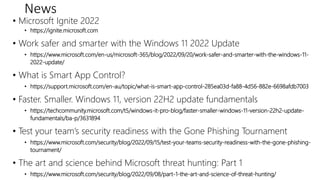
News
• Microsoft Ignite 2022
• https://ignite.microsoft.com
• Work safer and smarter with the Windows 11 2022 Update
• https://www.microsoft.com/en-us/microsoft-365/blog/2022/09/20/work-safer-and-smarter-with-the-windows-11-
2022-update/
• What is Smart App Control?
• https://support.microsoft.com/en-au/topic/what-is-smart-app-control-285ea03d-fa88-4d56-882e-6698afdb7003
• Faster. Smaller. Windows 11, version 22H2 update fundamentals
• https://techcommunity.microsoft.com/t5/windows-it-pro-blog/faster-smaller-windows-11-version-22h2-update-
fundamentals/ba-p/3631894
• Test your team’s security readiness with the Gone Phishing Tournament
• https://www.microsoft.com/security/blog/2022/09/15/test-your-teams-security-readiness-with-the-gone-phishing-
tournament/
• The art and science behind Microsoft threat hunting: Part 1
• https://www.microsoft.com/security/blog/2022/09/08/part-1-the-art-and-science-of-threat-hunting/
File Migration
Framework
The one constant in today’s collaboration
world is change
We therefore need to build systems that can
easily adapt to change
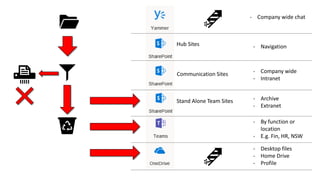
Communication Sites
Stand Alone Team Sites
Hub Sites
- Desktop files
- Home Drive
- Profile
- By function or
location
- E.g. Fin, HR, NSW
- Archive
- Extranet
- Company wide
- Intranet
- Navigation
- Company wide chat
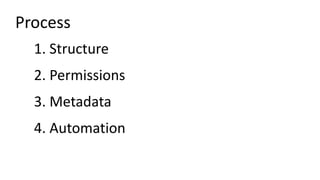
1. Structure
2. Permissions
3. Metadata
4. Automation
Process
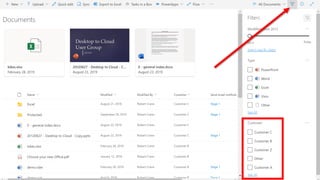
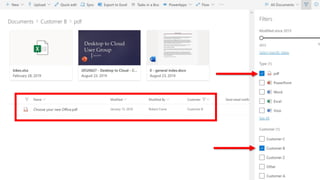
Metadata
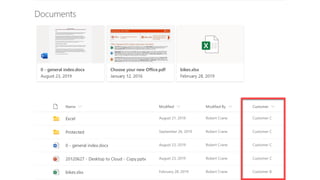
• Think of it like ‘tagging’
• You can have multiple metadata per item
• Can have a global hierarchy which is known as a taxonomy which can be implemented
using services like the Term Store
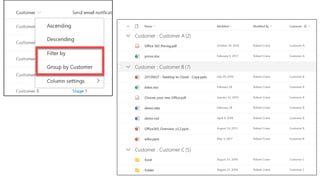
• Allows filtering and sorting of information in both a managed and ad-hoc way
• In the ‘old world’ the metadata was the folder in which the data lived and the path to that
folder. However, it could only live in a single location unless duplicated
Multiple Document Libraries
- Each library can have a different look and feel
- Each library can have different securities
- Each library can have different automations
- Each library can have different metadata
- Each library can be sync’ed independently
- The is effectively no limit on how many document libraries a single site can have
- Mobile friendly
- More libraries with less in them is best
AdvantagesofTeams
- Designed for when you want to combine file storage and conversations
- Collaboration is no longer just storage
- The central place for users to go to ‘get stuff done’
- Removes the need to constantly switch apps
- Working ‘out loud’ makes both conversations and content to be searchable
- Can link independent Document Libraries
- Can link independent content
- Mobile friendly
AdvantagesofDelve
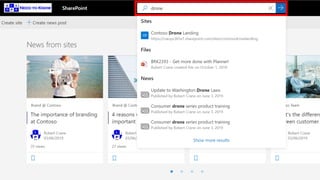
- Think of it as your global search engine across Microsoft 365 content
- Customised and optimised for each individual user without any need of configuration
- Dynamic display of relevant data based on interactions with that data
- Also shows you what items your colleagues are working on
- Available as a mobile app
- Also allows you to ‘follow’ others
- Share and link directly from here
- You don’t need to necessarily know where the items is in the structure, you simply click
to open
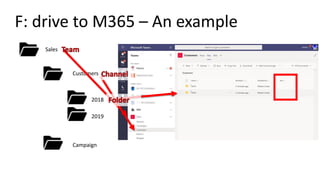
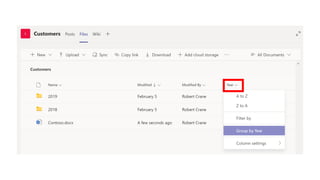
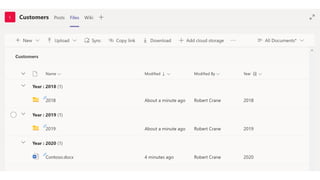
F: drive to M365 – An example
Sales
Customers
2018
2019
Campaign
DEMO
Take aways
• Don’t just drag and drop from an existing structure,
transform it.
• Successful transformation starts will planning and a process
not action.
• Make the best use of the new tools and abilities available.
• Metadata is now more important than structure..
• Rule of three as a best practice.
• Your solution is never static.
Resources
• Creating and lunching a healthy SharePoint portal - https://learn.microso
ft.com/en-us/sharepoint/portal-health
• Best practices for collaborating with Microsoft 365 - https://support.micr
osoft.com/en-us/office/best-practices-for-collaborating-with-microsoft-365-5144136b-1ff8
-476f-bcba-00de0bdaa600?ui=en-us&rs=en-us&ad=us
• Overview: Site governance, permission, and sharing for site owners
- https://support.microsoft.com/en-us/office/overview-site-governance-permission-and-s
haring-for-site-owners-95e83c3d-e1b0-4aae-9d08-e94dcaa4942e?ui=en-us&rs=en-us&a
d=us
• Organize documents and sites in Microsoft 365 - https://support.microsof
t.com/en-us/office/organize-documents-and-sites-in-microsoft-365-1a36030f-3e54-4c43
-8401-b7bcd0d1c16b?ui=en-us&rs=en-us&ad=use
CIAOPS Resources
• Blog – http://blog.ciaops.com
• Free Office 365, Azure video tutorials – http://www.youtube.com/directorciaops
• Free documents, presentations, eBooks – http://slideshare.net/directorcia
• Office 365, Azure, Cloud podcast – http://ciaops.podbean.com
• Office 365, Azure online training courses – http://www.ciaopsacademy.com
• Office 365 and Azure community – http://www.ciaopspatron.com
• CIAOPS Github – https://github.com/directorcia
Twitter
@directorcia
Facebook
https://www.facebook.com/ciaops
Email
director@ciaops.com
Skype for Business
admin@ciaops365.com
Get access to the latest
information by becoming a
Patron
http://www.ciaopspatron.com
That’s all folks!
Thanks for attending

September 2022 CIAOPS Need to Know Webinar

  • 1.
    Need to KnowMicrosoft 365 Webinar September 2022 @directorcia http://about.me/ciaops
  • 2.
    Web cast hasstarted Web cast is being recorded If you can’t hear anything check your speaker settings
  • 3.
    For questions afterthe event: Email : director@ciaops.com Twitter : @directorcia
  • 5.
  • 6.
    Please: - Turn offyour mobile - Turn off your email - Have somewhere to take notes
  • 7.
  • 8.
  • 10.
    News • Microsoft Ignite2022 • https://ignite.microsoft.com • Work safer and smarter with the Windows 11 2022 Update • https://www.microsoft.com/en-us/microsoft-365/blog/2022/09/20/work-safer-and-smarter-with-the-windows-11- 2022-update/ • What is Smart App Control? • https://support.microsoft.com/en-au/topic/what-is-smart-app-control-285ea03d-fa88-4d56-882e-6698afdb7003 • Faster. Smaller. Windows 11, version 22H2 update fundamentals • https://techcommunity.microsoft.com/t5/windows-it-pro-blog/faster-smaller-windows-11-version-22h2-update- fundamentals/ba-p/3631894 • Test your team’s security readiness with the Gone Phishing Tournament • https://www.microsoft.com/security/blog/2022/09/15/test-your-teams-security-readiness-with-the-gone-phishing- tournament/ • The art and science behind Microsoft threat hunting: Part 1 • https://www.microsoft.com/security/blog/2022/09/08/part-1-the-art-and-science-of-threat-hunting/
  • 11.
  • 12.
    The one constantin today’s collaboration world is change We therefore need to build systems that can easily adapt to change
  • 13.
    Communication Sites Stand AloneTeam Sites Hub Sites - Desktop files - Home Drive - Profile - By function or location - E.g. Fin, HR, NSW - Archive - Extranet - Company wide - Intranet - Navigation - Company wide chat
  • 14.
    1. Structure 2. Permissions 3.Metadata 4. Automation Process
  • 16.
    Metadata • Think ofit like ‘tagging’ • You can have multiple metadata per item • Can have a global hierarchy which is known as a taxonomy which can be implemented using services like the Term Store • Allows filtering and sorting of information in both a managed and ad-hoc way • In the ‘old world’ the metadata was the folder in which the data lived and the path to that folder. However, it could only live in a single location unless duplicated
  • 21.
    Multiple Document Libraries -Each library can have a different look and feel - Each library can have different securities - Each library can have different automations - Each library can have different metadata - Each library can be sync’ed independently - The is effectively no limit on how many document libraries a single site can have - Mobile friendly - More libraries with less in them is best
  • 22.
    AdvantagesofTeams - Designed forwhen you want to combine file storage and conversations - Collaboration is no longer just storage - The central place for users to go to ‘get stuff done’ - Removes the need to constantly switch apps - Working ‘out loud’ makes both conversations and content to be searchable - Can link independent Document Libraries - Can link independent content - Mobile friendly
  • 23.
    AdvantagesofDelve - Think ofit as your global search engine across Microsoft 365 content - Customised and optimised for each individual user without any need of configuration - Dynamic display of relevant data based on interactions with that data - Also shows you what items your colleagues are working on - Available as a mobile app - Also allows you to ‘follow’ others - Share and link directly from here - You don’t need to necessarily know where the items is in the structure, you simply click to open
  • 24.
    F: drive toM365 – An example Sales Customers 2018 2019 Campaign
  • 27.
  • 28.
    Take aways • Don’tjust drag and drop from an existing structure, transform it. • Successful transformation starts will planning and a process not action. • Make the best use of the new tools and abilities available. • Metadata is now more important than structure.. • Rule of three as a best practice. • Your solution is never static.
  • 29.
    Resources • Creating andlunching a healthy SharePoint portal - https://learn.microso ft.com/en-us/sharepoint/portal-health • Best practices for collaborating with Microsoft 365 - https://support.micr osoft.com/en-us/office/best-practices-for-collaborating-with-microsoft-365-5144136b-1ff8 -476f-bcba-00de0bdaa600?ui=en-us&rs=en-us&ad=us • Overview: Site governance, permission, and sharing for site owners - https://support.microsoft.com/en-us/office/overview-site-governance-permission-and-s haring-for-site-owners-95e83c3d-e1b0-4aae-9d08-e94dcaa4942e?ui=en-us&rs=en-us&a d=us • Organize documents and sites in Microsoft 365 - https://support.microsof t.com/en-us/office/organize-documents-and-sites-in-microsoft-365-1a36030f-3e54-4c43 -8401-b7bcd0d1c16b?ui=en-us&rs=en-us&ad=use
  • 30.
    CIAOPS Resources • Blog– http://blog.ciaops.com • Free Office 365, Azure video tutorials – http://www.youtube.com/directorciaops • Free documents, presentations, eBooks – http://slideshare.net/directorcia • Office 365, Azure, Cloud podcast – http://ciaops.podbean.com • Office 365, Azure online training courses – http://www.ciaopsacademy.com • Office 365 and Azure community – http://www.ciaopspatron.com • CIAOPS Github – https://github.com/directorcia Twitter @directorcia Facebook https://www.facebook.com/ciaops Email director@ciaops.com Skype for Business admin@ciaops365.com
  • 31.
    Get access tothe latest information by becoming a Patron http://www.ciaopspatron.com
  • 33.