Office 365 OverviewThis tray got something for everybody! 
Antje Reichelt 
Solution Sales Professional Productivity 
Microsoft Deutschland GmbH
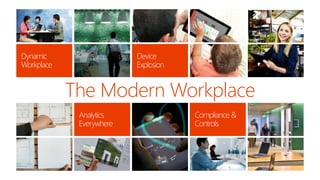
The Modern Workplace
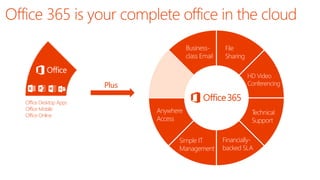
Business- class Email 
HD Video Conferencing 
File 
Sharing 
Plus 
Anywhere Access 
Simple IT 
Management 
Financially- backed SLA 
Technical Support 
Office Desktop Apps 
Office Mobile 
Office Online
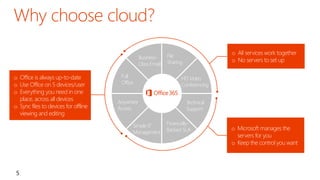
oMicrosoft manages the servers for you 
oKeep the control you want 
oAll services work together 
oNo servers to set up 
5 
HD Video Conferencing 
Business- Class Email 
File 
Sharing 
Anywhere Access 
Simple IT Management 
Financially- Backed SLA 
Technical Support 
Full 
Office 
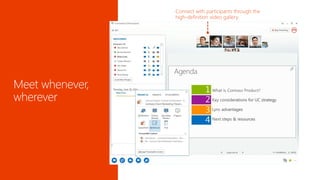
HD Video Conferencing 
oOffice is always up-to-date 
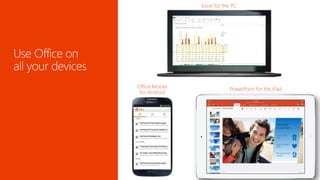
oUse Office on 5 devices/user 
oEverything you need in one place, across all devices 
oSync files to devices for offline viewing and editing
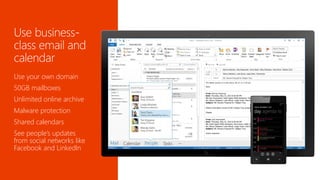
Use your own domain 
50GB mailboxes 
Unlimited online archive 
Malware protection 
Shared calendars 
See people’s updates from social networks like Facebook and LinkedIn
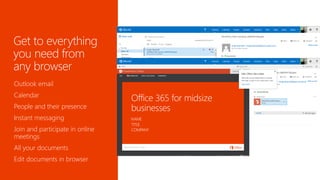
Outlook email 
Calendar 
People and their presence 
Instant messaging 
Join and participate in online meetings 
All your documents 
Edit documents in browser
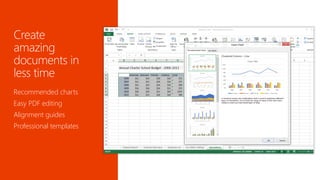
Recommended charts 
Easy PDF editing 
Alignment guides 
Professional templates
WorkBetter Together
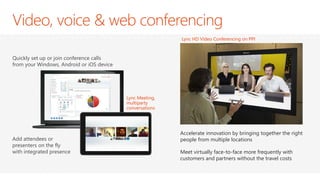
Accelerate innovation by bringing together the right people from multiple locations 
Meet virtually face-to-face more frequently with customers and partners without the travel costs 
Lync HD Video Conferencing on PPI 
Quickly set up or join conference calls from your Windows, Android or iOS device 
Add attendees or presenters on the fly with integrated presence 
Lync Meeting, multiparty conversations
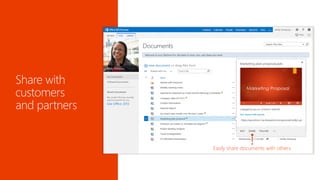
Share directly from Office applications 
Easily share documents with others
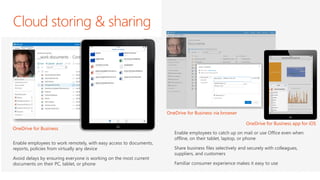
Cloud storing & sharing 
Enable employees to work remotely, with easy access to documents, reports, policies from virtually any device 
Avoid delays by ensuring everyone is working on the most current documents on their PC, tablet, or phone 
OneDrive for Business 
Enable employees to catch up on mail or use Office even when offline, on their tablet, laptop, or phone 
Share business files selectively and securely with colleagues, suppliers, and customers 
Familiar consumer experience makes it easy to use 
OneDrive for Business app for iOS 
OneDrive for Business via browser
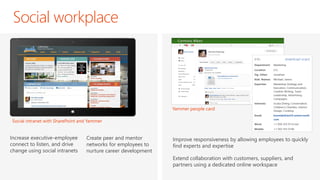
Social workplace 
Improve responsiveness by allowing employees to quickly find experts and expertise 
Extend collaboration with customers, suppliers, and partners using a dedicated online workspace 
Increase executive-employee connect to listen, and drive change using social intranets 
Create peer and mentor networks for employees to nurture career development 
Social intranet with SharePoint and Yammer 
Yammer people card
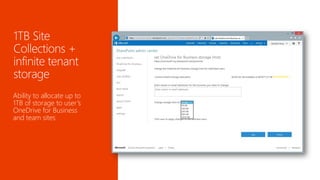
Ability to allocate up to 1TB of storage to user’s OneDrive for Business and team sites
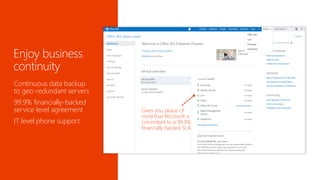
Simplify, but Stay in Control
Continuous data backup to geo-redundant servers 
99.9% financially-backed service level agreement 
IT level phone support 
Gives you peace of mind that Microsoft is committed to a 99.9% financially backed SLA
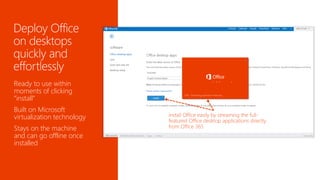
Ready to use within moments of clicking “install” 
Built on Microsoft virtualization technology 
Stays on the machine and can go offline once installed
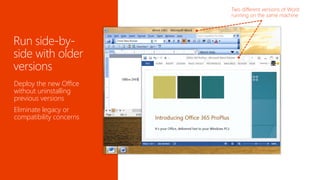
Deploy the new Office without uninstalling previous versions 
Eliminate legacy or compatibility concerns
25
Test it! 
Which one fits best? 
Get to know it!
© 2012 Microsoft Corporation. All rights reserved. Microsoft, Windows, and other product names are or may be registered trademarks and/or trademarks in the U.S. and/or other countries. 
The information herein is for informational purposes only and represents the current view of Microsoft Corporation as of the date of this presentation. Because Microsoft must respond to changing market conditions, it should not be interpreted to be a commitment on the part of Microsoft, and Microsoft cannot guarantee the accuracy of any information provided after the date of this presentation. MICROSOFT MAKES NO WARRANTIES, EXPRESS, IMPLIED OR STATUTORY, AS TO THE INFORMATION IN THIS PRESENTATION.

GWAVACon - Office 365 OverviewThis tray got something for everybody!

  • 1.
    Office 365 OverviewThistray got something for everybody! Antje Reichelt Solution Sales Professional Productivity Microsoft Deutschland GmbH
  • 2.
  • 3.
    Business- class Email HD Video Conferencing File Sharing Plus Anywhere Access Simple IT Management Financially- backed SLA Technical Support Office Desktop Apps Office Mobile Office Online
  • 4.
    oMicrosoft manages theservers for you oKeep the control you want oAll services work together oNo servers to set up 5 HD Video Conferencing Business- Class Email File Sharing Anywhere Access Simple IT Management Financially- Backed SLA Technical Support Full Office HD Video Conferencing oOffice is always up-to-date oUse Office on 5 devices/user oEverything you need in one place, across all devices oSync files to devices for offline viewing and editing
  • 7.
    Use your owndomain 50GB mailboxes Unlimited online archive Malware protection Shared calendars See people’s updates from social networks like Facebook and LinkedIn
  • 8.
    Outlook email Calendar People and their presence Instant messaging Join and participate in online meetings All your documents Edit documents in browser
  • 9.
    Recommended charts EasyPDF editing Alignment guides Professional templates
  • 10.
  • 11.
    Accelerate innovation bybringing together the right people from multiple locations Meet virtually face-to-face more frequently with customers and partners without the travel costs Lync HD Video Conferencing on PPI Quickly set up or join conference calls from your Windows, Android or iOS device Add attendees or presenters on the fly with integrated presence Lync Meeting, multiparty conversations
  • 13.
    Share directly fromOffice applications Easily share documents with others
  • 14.
    Cloud storing &sharing Enable employees to work remotely, with easy access to documents, reports, policies from virtually any device Avoid delays by ensuring everyone is working on the most current documents on their PC, tablet, or phone OneDrive for Business Enable employees to catch up on mail or use Office even when offline, on their tablet, laptop, or phone Share business files selectively and securely with colleagues, suppliers, and customers Familiar consumer experience makes it easy to use OneDrive for Business app for iOS OneDrive for Business via browser
  • 15.
    Social workplace Improveresponsiveness by allowing employees to quickly find experts and expertise Extend collaboration with customers, suppliers, and partners using a dedicated online workspace Increase executive-employee connect to listen, and drive change using social intranets Create peer and mentor networks for employees to nurture career development Social intranet with SharePoint and Yammer Yammer people card
  • 16.
    Ability to allocateup to 1TB of storage to user’s OneDrive for Business and team sites
  • 17.
  • 18.
    Continuous data backupto geo-redundant servers 99.9% financially-backed service level agreement IT level phone support Gives you peace of mind that Microsoft is committed to a 99.9% financially backed SLA
  • 19.
    Ready to usewithin moments of clicking “install” Built on Microsoft virtualization technology Stays on the machine and can go offline once installed
  • 20.
    Deploy the newOffice without uninstalling previous versions Eliminate legacy or compatibility concerns
  • 24.
  • 25.
    Test it! Whichone fits best? Get to know it!
  • 26.
    © 2012 MicrosoftCorporation. All rights reserved. Microsoft, Windows, and other product names are or may be registered trademarks and/or trademarks in the U.S. and/or other countries. The information herein is for informational purposes only and represents the current view of Microsoft Corporation as of the date of this presentation. Because Microsoft must respond to changing market conditions, it should not be interpreted to be a commitment on the part of Microsoft, and Microsoft cannot guarantee the accuracy of any information provided after the date of this presentation. MICROSOFT MAKES NO WARRANTIES, EXPRESS, IMPLIED OR STATUTORY, AS TO THE INFORMATION IN THIS PRESENTATION.