Windows 7 to Windows 10
Security
Protection against cyberattacks
Απόστολος Παπαδόπουλος – IT Services Delivery Manager
Ιωάννης Καθάρειος – Senior Engineer
Agenda
• Windows 10
• Windows 7 to Windows 10
• Ways to Upgrade
• Windows Autopilot
• Q&A
• Security - Protection against cyberthreats
• Identity & Access Management
• Endpoint management
• Information Protection
• Monitoring
• Q&A
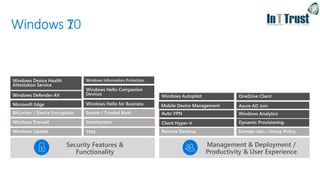
Management & Deployment /
Productivity & User Experience
Security Features &
Functionality
Windows 10Windows 7
Paths to Windows 10 Pro
Windows XP,
Vista, etc.
Windows Ent./LTSB
• Upgrade (keep files, apps, and settings)
• Clean-install (install Windows only [keep nothing])
May require manual re-input of OEM license key to activate
In-place upgrade options
• Keep files, apps, and settings
• Keep files only (discard apps and settings)
• Keep nothing (discard files, apps, and settings)
Windows 10
Home
In-place upgrade
OR
Windows 7 Home
Windows 8 Home
Windows 8.1 Home
Windows 7 Pro
Windows 7 Ultimate
Windows 8 Pro
Windows 8.1 Pro
Windows 10 Pro
clean install
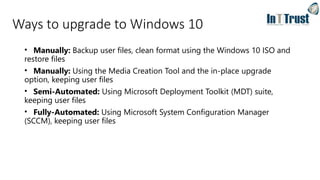
Ways to upgrade to Windows 10
• Manually: Backup user files, clean format using the Windows 10 ISO and
restore files
• Manually: Using the Media Creation Tool and the in-place upgrade
option, keeping user files
• Semi-Automated: Using Microsoft Deployment Toolkit (MDT) suite,
keeping user files
• Fully-Automated: Using Microsoft System Configuration Manager
(SCCM), keeping user files
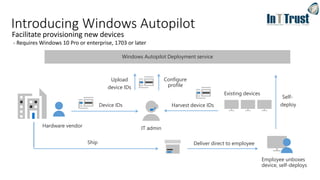
Hardware vendor
Windows Autopilot Deployment service
Configure
profile
Employee unboxes
device, self-deploys
Self-
deploy
Introducing Windows Autopilot
Device IDs
IT admin
Harvest device IDs
Existing devices
Upload
device IDs
Deliver direct to employeeShip
Facilitate provisioning new devices
- Requires Windows 10 Pro or enterprise, 1703 or later
Q & A
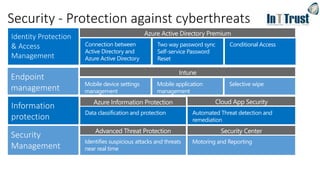
Identifies suspicious attacks and threats
near real time
Azure Active Directory Premium
Conditional AccessTwo way password sync
Self-service Password
Reset
Connection between
Active Directory and
Azure Active Directory
Data classification and protection Automated Threat detection and
remediation
Security - Protection against cyberthreats
Mobile device settings
management
Mobile application
management
Selective wipe
Motoring and Reporting
Azure Information Protection Cloud App Security
Advanced Threat Protection Security Center
Intune
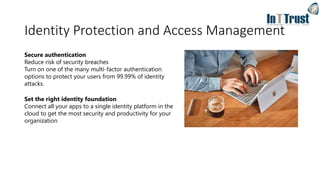
Identity Protection and Access Management
Secure authentication
Reduce risk of security breaches
Turn on one of the many multi-factor authentication
options to protect your users from 99.99% of identity
attacks.
Set the right identity foundation
Connect all your apps to a single identity platform in the
cloud to get the most security and productivity for your
organization
What is Azure AD?
Azure AD
• A multi-tenant service that provides enterprise-level identity and access management
for the cloud.
• Built to support global scale, reliability and availability.
• Backed by a 99.99% SLA
Features
• Modern authentication (MFA, OAuth 2.0, Passwordless sign-in)
• Self-Service Password reset
• Conditional Access
Hybrid AD
• Connect with existing on-premises Active Directory - AD Connect
• Hybrid device join
• Single Identity in both in the cloud and on-premises
• Single Sign-On
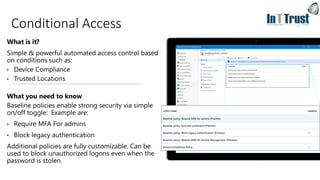
What is it?
Simple & powerful automated access control based
on conditions such as:
• Device Compliance
• Trusted Locations
What you need to know
Baseline policies enable strong security via simple
on/off toggle: Example are:
• Require MFA For admins
• Block legacy authentication
Additional policies are fully customizable. Can be
used to block unauthorized logons even when the
password is stolen.
Conditional Access
Endpoint Management
• Intune
Intune is a unified endpoint management offering, integrating Mobile
device management and Application management in a single cloud
service
• Central management for Devices and Applications
• Compliance policies
• Configuration policies
• Application control
• Remote Wipe
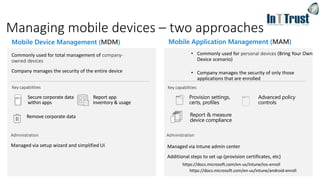
Managing mobile devices – two approaches
Commonly used for total management of company-
owned devices
Company manages the security of the entire device
• Commonly used for personal devices (Bring Your Own
Device scenario)
• Company manages the security of only those
applications that are enrolled
Mobile Application Management (MAM)Mobile Device Management (MDM)
Provision settings,
certs, profiles
Report & measure
device compliance
Advanced policy
controls
Secure corporate data
within apps
Report app
inventory & usage
Remove corporate data
Managed via setup wizard and simplified UI Managed via Intune admin center
Additional steps to set up (provision certificates, etc)
https://docs.microsoft.com/en-us/intune/ios-enroll
https://docs.microsoft.com/en-us/intune/android-enroll
Information protection
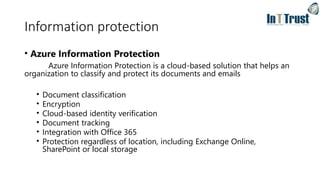
• Azure Information Protection
Azure Information Protection is a cloud-based solution that helps an
organization to classify and protect its documents and emails
• Document classification
• Encryption
• Cloud-based identity verification
• Document tracking
• Integration with Office 365
• Protection regardless of location, including Exchange Online,
SharePoint or local storage
Azure Information Protection (AIP)
What you need to know
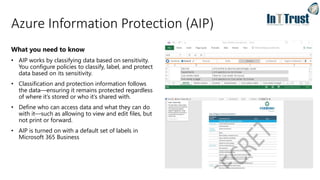
• AIP works by classifying data based on sensitivity.
You configure policies to classify, label, and protect
data based on its sensitivity.
• Classification and protection information follows
the data—ensuring it remains protected regardless
of where it’s stored or who it’s shared with.
• Define who can access data and what they can do
with it—such as allowing to view and edit files, but
not print or forward.
• AIP is turned on with a default set of labels in
Microsoft 365 Business
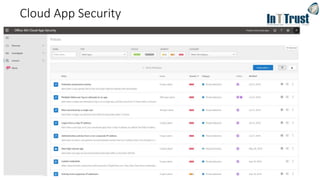
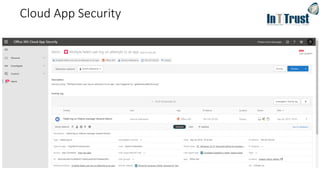
Cloud App Security
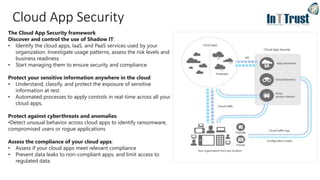
The Cloud App Security framework
Discover and control the use of Shadow IT:
• Identify the cloud apps, IaaS, and PaaS services used by your
organization. Investigate usage patterns, assess the risk levels and
business readiness
• Start managing them to ensure security and compliance.
Protect your sensitive information anywhere in the cloud:
• Understand, classify, and protect the exposure of sensitive
information at rest.
• Automated processes to apply controls in real-time across all your
cloud apps.
Protect against cyberthreats and anomalies:
•Detect unusual behavior across cloud apps to identify ransomware,
compromised users or rogue applications
Assess the compliance of your cloud apps:
• Assess if your cloud apps meet relevant compliance
• Prevent data leaks to non-compliant apps, and limit access to
regulated data.
Cloud App Security
Cloud App Security
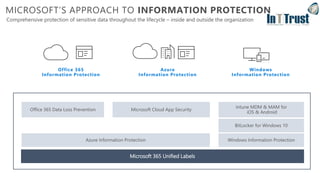
Office 365 Data Loss Prevention
MICROSOFT’S APPROACH TO INFORMATION PROTECTION
Comprehensive protection of sensitive data throughout the lifecycle – inside and outside the organization
Windows Information Protection
Intune MDM & MAM for
iOS & Android
Microsoft 365 Unified Labels
BitLocker for Windows 10
Azure Information Protection
Microsoft Cloud App Security
Office 365
Information Protection
Azure
Information Protection
Windows
Information Protection
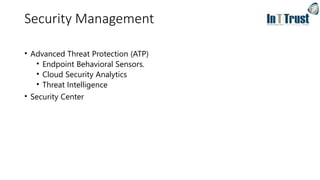
Security Management
• Advanced Threat Protection (ATP)
• Endpoint Behavioral Sensors.
• Cloud Security Analytics
• Threat Intelligence
• Security Center
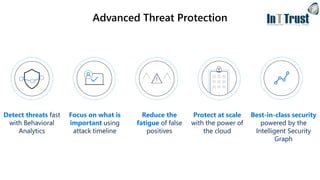
Advanced Threat Protection
Detect threats fast
with Behavioral
Analytics
Focus on what is
important using
attack timeline
Reduce the
fatigue of false
positives
Best-in-class security
powered by the
Intelligent Security
Graph
Protect at scale
with the power of
the cloud
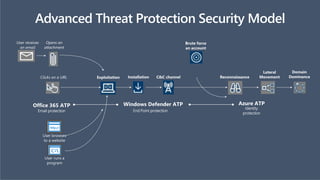
Combined Microsoft Stack:
Maximize detection coverage throughout the attack stages
User browses
to a website
User runs a
program
Office 365 ATP Windows Defender ATP
Email protection End Point protection
User receives
an email
Opens an
attachment
Clicks on a URL Exploitation Installation C&C channel Reconnaissance
Lateral
Movement
Domain
Dominance
Advanced Threat Protection Security Model
Brute force
an account
Azure ATP
Identity
protection
Monitoring and Reporting
Security and Compliance Center
Security Center is a unified infrastructure security management system
• Real-Time Security Overview
• Drill down to issues and assess severity
• Manage organization policies
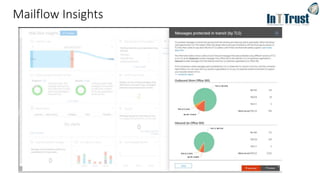
Mailflow Insights
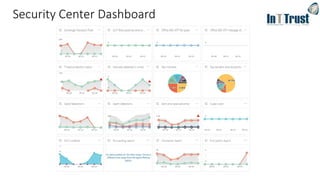
Security Center Dashboard
Q & A
Features
Office 365
BP
Microsoft 365
Business
Microsoft 365
E3
Microsoft 365
E5
Maximum number of users 300 300 unlimited unlimited
Office Apps Install Office on up to 5 PCs/Macs + 5 tablets + 5 smartphones per user (Word, Excel, PowerPoint, OneNote,
Access), Office Online
Business Business ProPlus ProPlus
Email & Calendar Outlook, Exchange Online 50GB 50GB unlimited unlimited
Hub for Teamwork Chat-based workspace, online meetings, and more in Microsoft Teams    
File Storage OneDrive for Business 1 TB/user 1 TB/user unlimited unlimited
Social, Video, Sites Yammer, SharePoint Online, Planner    
Stream   
Business Apps Scheduling Apps – Bookings1, StaffHub    
Business Apps – Outlook Customer Manager, MileIQ1
 
Threat Protection Microsoft Advanced Threat Analytics, Device Guard, Credential Guard, App Locker, Enterprise Data Protection,  
Office 365 Advanced Threat Protection  
Windows Defender Advanced Threat Protection 
Office 365 Threat Intelligence 
Identity Management Self-service password reset for hybrid Azure Active Directory accounts, Azure MFA, Conditional Access   
Azure AD: Cloud App Discovery, AAD Connect Health, SSO for more than 10 Apps  
Azure Active Directory Plan 2 
Device & App
Management
Microsoft Intune, Windows AutoPilot   
Shared Computer Activation   
Microsoft Desktop Optimization Package, VDA  
Information
Protection
Office 365 Data Loss Prevention, Azure Information Protection Plan 1   
Azure Information Protection Plan 2, Microsoft Cloud App Security, O365 Cloud App Security 
On-Prem CAL Rights ECAL Suite (Exchange, SharePoint, Skype, Windows, SCCM, Win. Rights Management)  
Compliance Unlimited email archiving2
  
Advanced eDiscovery, Customer Lockbox, Advanced Data Governance 
Analytics Power BI Pro, MyAnalytics 
Voice PSTN Conferencing, Cloud PBX 
ComparisonacrossBusinessPremiumandMicrosoft365SKU’s
[1] Available in US, UK, Canada | [2] Unlimited archiving when auto-expansion is turned on

In t trustm365ems_v3

  • 1.
    Windows 7 toWindows 10 Security Protection against cyberattacks Απόστολος Παπαδόπουλος – IT Services Delivery Manager Ιωάννης Καθάρειος – Senior Engineer
  • 2.
    Agenda • Windows 10 •Windows 7 to Windows 10 • Ways to Upgrade • Windows Autopilot • Q&A • Security - Protection against cyberthreats • Identity & Access Management • Endpoint management • Information Protection • Monitoring • Q&A
  • 3.
    Management & Deployment/ Productivity & User Experience Security Features & Functionality Windows 10Windows 7
  • 4.
    Paths to Windows10 Pro Windows XP, Vista, etc. Windows Ent./LTSB • Upgrade (keep files, apps, and settings) • Clean-install (install Windows only [keep nothing]) May require manual re-input of OEM license key to activate In-place upgrade options • Keep files, apps, and settings • Keep files only (discard apps and settings) • Keep nothing (discard files, apps, and settings) Windows 10 Home In-place upgrade OR Windows 7 Home Windows 8 Home Windows 8.1 Home Windows 7 Pro Windows 7 Ultimate Windows 8 Pro Windows 8.1 Pro Windows 10 Pro clean install
  • 5.
    Ways to upgradeto Windows 10 • Manually: Backup user files, clean format using the Windows 10 ISO and restore files • Manually: Using the Media Creation Tool and the in-place upgrade option, keeping user files • Semi-Automated: Using Microsoft Deployment Toolkit (MDT) suite, keeping user files • Fully-Automated: Using Microsoft System Configuration Manager (SCCM), keeping user files
  • 6.
    Hardware vendor Windows AutopilotDeployment service Configure profile Employee unboxes device, self-deploys Self- deploy Introducing Windows Autopilot Device IDs IT admin Harvest device IDs Existing devices Upload device IDs Deliver direct to employeeShip Facilitate provisioning new devices - Requires Windows 10 Pro or enterprise, 1703 or later
  • 7.
  • 8.
    Identifies suspicious attacksand threats near real time Azure Active Directory Premium Conditional AccessTwo way password sync Self-service Password Reset Connection between Active Directory and Azure Active Directory Data classification and protection Automated Threat detection and remediation Security - Protection against cyberthreats Mobile device settings management Mobile application management Selective wipe Motoring and Reporting Azure Information Protection Cloud App Security Advanced Threat Protection Security Center Intune
  • 9.
    Identity Protection andAccess Management Secure authentication Reduce risk of security breaches Turn on one of the many multi-factor authentication options to protect your users from 99.99% of identity attacks. Set the right identity foundation Connect all your apps to a single identity platform in the cloud to get the most security and productivity for your organization
  • 10.
    What is AzureAD? Azure AD • A multi-tenant service that provides enterprise-level identity and access management for the cloud. • Built to support global scale, reliability and availability. • Backed by a 99.99% SLA Features • Modern authentication (MFA, OAuth 2.0, Passwordless sign-in) • Self-Service Password reset • Conditional Access Hybrid AD • Connect with existing on-premises Active Directory - AD Connect • Hybrid device join • Single Identity in both in the cloud and on-premises • Single Sign-On
  • 11.
    What is it? Simple& powerful automated access control based on conditions such as: • Device Compliance • Trusted Locations What you need to know Baseline policies enable strong security via simple on/off toggle: Example are: • Require MFA For admins • Block legacy authentication Additional policies are fully customizable. Can be used to block unauthorized logons even when the password is stolen. Conditional Access
  • 12.
    Endpoint Management • Intune Intuneis a unified endpoint management offering, integrating Mobile device management and Application management in a single cloud service • Central management for Devices and Applications • Compliance policies • Configuration policies • Application control • Remote Wipe
  • 13.
    Managing mobile devices– two approaches Commonly used for total management of company- owned devices Company manages the security of the entire device • Commonly used for personal devices (Bring Your Own Device scenario) • Company manages the security of only those applications that are enrolled Mobile Application Management (MAM)Mobile Device Management (MDM) Provision settings, certs, profiles Report & measure device compliance Advanced policy controls Secure corporate data within apps Report app inventory & usage Remove corporate data Managed via setup wizard and simplified UI Managed via Intune admin center Additional steps to set up (provision certificates, etc) https://docs.microsoft.com/en-us/intune/ios-enroll https://docs.microsoft.com/en-us/intune/android-enroll
  • 14.
    Information protection • AzureInformation Protection Azure Information Protection is a cloud-based solution that helps an organization to classify and protect its documents and emails • Document classification • Encryption • Cloud-based identity verification • Document tracking • Integration with Office 365 • Protection regardless of location, including Exchange Online, SharePoint or local storage
  • 15.
    Azure Information Protection(AIP) What you need to know • AIP works by classifying data based on sensitivity. You configure policies to classify, label, and protect data based on its sensitivity. • Classification and protection information follows the data—ensuring it remains protected regardless of where it’s stored or who it’s shared with. • Define who can access data and what they can do with it—such as allowing to view and edit files, but not print or forward. • AIP is turned on with a default set of labels in Microsoft 365 Business
  • 16.
    Cloud App Security TheCloud App Security framework Discover and control the use of Shadow IT: • Identify the cloud apps, IaaS, and PaaS services used by your organization. Investigate usage patterns, assess the risk levels and business readiness • Start managing them to ensure security and compliance. Protect your sensitive information anywhere in the cloud: • Understand, classify, and protect the exposure of sensitive information at rest. • Automated processes to apply controls in real-time across all your cloud apps. Protect against cyberthreats and anomalies: •Detect unusual behavior across cloud apps to identify ransomware, compromised users or rogue applications Assess the compliance of your cloud apps: • Assess if your cloud apps meet relevant compliance • Prevent data leaks to non-compliant apps, and limit access to regulated data.
  • 17.
  • 18.
  • 19.
    Office 365 DataLoss Prevention MICROSOFT’S APPROACH TO INFORMATION PROTECTION Comprehensive protection of sensitive data throughout the lifecycle – inside and outside the organization Windows Information Protection Intune MDM & MAM for iOS & Android Microsoft 365 Unified Labels BitLocker for Windows 10 Azure Information Protection Microsoft Cloud App Security Office 365 Information Protection Azure Information Protection Windows Information Protection
  • 20.
    Security Management • AdvancedThreat Protection (ATP) • Endpoint Behavioral Sensors. • Cloud Security Analytics • Threat Intelligence • Security Center
  • 21.
    Advanced Threat Protection Detectthreats fast with Behavioral Analytics Focus on what is important using attack timeline Reduce the fatigue of false positives Best-in-class security powered by the Intelligent Security Graph Protect at scale with the power of the cloud
  • 22.
    Combined Microsoft Stack: Maximizedetection coverage throughout the attack stages User browses to a website User runs a program Office 365 ATP Windows Defender ATP Email protection End Point protection User receives an email Opens an attachment Clicks on a URL Exploitation Installation C&C channel Reconnaissance Lateral Movement Domain Dominance Advanced Threat Protection Security Model Brute force an account Azure ATP Identity protection
  • 23.
    Monitoring and Reporting Securityand Compliance Center Security Center is a unified infrastructure security management system • Real-Time Security Overview • Drill down to issues and assess severity • Manage organization policies
  • 24.
  • 25.
  • 26.
  • 27.
    Features Office 365 BP Microsoft 365 Business Microsoft365 E3 Microsoft 365 E5 Maximum number of users 300 300 unlimited unlimited Office Apps Install Office on up to 5 PCs/Macs + 5 tablets + 5 smartphones per user (Word, Excel, PowerPoint, OneNote, Access), Office Online Business Business ProPlus ProPlus Email & Calendar Outlook, Exchange Online 50GB 50GB unlimited unlimited Hub for Teamwork Chat-based workspace, online meetings, and more in Microsoft Teams     File Storage OneDrive for Business 1 TB/user 1 TB/user unlimited unlimited Social, Video, Sites Yammer, SharePoint Online, Planner     Stream    Business Apps Scheduling Apps – Bookings1, StaffHub     Business Apps – Outlook Customer Manager, MileIQ1   Threat Protection Microsoft Advanced Threat Analytics, Device Guard, Credential Guard, App Locker, Enterprise Data Protection,   Office 365 Advanced Threat Protection   Windows Defender Advanced Threat Protection  Office 365 Threat Intelligence  Identity Management Self-service password reset for hybrid Azure Active Directory accounts, Azure MFA, Conditional Access    Azure AD: Cloud App Discovery, AAD Connect Health, SSO for more than 10 Apps   Azure Active Directory Plan 2  Device & App Management Microsoft Intune, Windows AutoPilot    Shared Computer Activation    Microsoft Desktop Optimization Package, VDA   Information Protection Office 365 Data Loss Prevention, Azure Information Protection Plan 1    Azure Information Protection Plan 2, Microsoft Cloud App Security, O365 Cloud App Security  On-Prem CAL Rights ECAL Suite (Exchange, SharePoint, Skype, Windows, SCCM, Win. Rights Management)   Compliance Unlimited email archiving2    Advanced eDiscovery, Customer Lockbox, Advanced Data Governance  Analytics Power BI Pro, MyAnalytics  Voice PSTN Conferencing, Cloud PBX  ComparisonacrossBusinessPremiumandMicrosoft365SKU’s [1] Available in US, UK, Canada | [2] Unlimited archiving when auto-expansion is turned on