FULL DISK ENCRYPTION
• WHAT IT IS
• HOW IT WORKS
• ATTACKS AGAINST IT
• RECENT ISSUES
WHAT IT IS
• Encryption of an entire partition or drive
• Encryption at the block level, rather than file
• Usually filesystem agnostic
• Happens on the drive or by the operating system
• “On-the-fly”
• Often required by security frameworks and regulations (HIPPA)
WHAT IT ISN’T
• Protection against malware
• Only protects the drive while the computer is powered off
• Meant to be transparent to the user, doesn’t protect files from malicious
software, accidental deletion, etc.
HOW IT WORKS (BASICS)
• Partitions encrypted by block
• Encryption info stored in header
• Single encryption key encrypted with different “protectors”
• Unlock encryption key with one of several protectors
• Require multiple protectors to unlock encryption key
PROTECTOR MANAGEMENT
• User-entered password
• Key file stored on disk/USB drive
• Smart card
• Trusted Platform Module (TPM)
• User-entered password
• Special case for boot drives:
• Need a pre-boot environment to handle key entry and initial decryption
• Greater dependency on operating system compatibility
FULL DISK ENCRYPTION SOFTWARE: WINDOWS
• BitLocker
• Built-in on Windows 7 Ultimate, and all versions of Windows 8 and 10
• Good TPM support
• Unlock with any combination of TPM, numeric PIN, full password, USB drive
• Easy deployment for both home users and organizations
• Easy to use on USB drives (works on any windows PC without additional software)
• Utilizes self-encrypting disks if possible.
• (more on that later)
• Some security caveats…
• Assume Microsoft has master unlock key
FULL DISK ENCRYPTION SOFTWARE: WINDOWS
• VeraCrypt (also available for Mac and Linux)
• Fork of TrueCrypt, discontinued in 2014
• Open source, thoroughly audited and verified
• Unlock with password, key file (USB drive), TPM
• Support for hidden partitions, plausible deniability
FULL DISK ENCRYPTION SOFTWARE: LINUX
• dm-crypt
• Bare-bones disk encryption
• Only uses a single key, can’t be changed
• Plausible deniability, though harder to use than Veracrypt
• Mounts an encrypted partition to a device path to mount as a filesystem
• /dev/sda2 <=> dm-crypt <=> /dev/dm0
• LUKS (Linux Unified Key Setup)
• System to manage protectors for dm-crypt
• Help set up boot-time key entry
• Allows adding and changing protectors
FULL DISK ENCRYPTION: OTHERS
• FileVault on OSx
• Built-in on Osx since 10.3
• Encryption key is tied to user accounts
• Many Endpoint Protection products
• Good for enterprises that need to centralize control of recovery keys
• Often have support for audit logging, proof of compliance
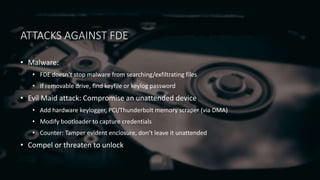
ATTACKS AGAINST FDE
• Malware:
• FDE doesn’t stop malware from searching/exfiltrating files
• If removable drive, find keyfile or keylog password
• Evil Maid attack: Compromise an unattended device
• Add hardware keylogger, PCI/Thunderbolt memory scraper (via DMA)
• Modify bootloader to capture credentials
• Counter: Tamper evident enclosure, don’t leave it unattended
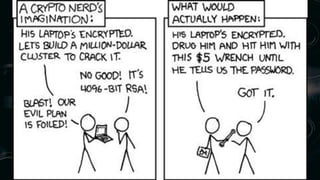
• Compel or threaten to unlock
SELF-ENCRYPTING DRIVES
• Used in enterprise storage for years, just recently coming to consumers in
SSDs
• All encryption/decryption is done on the drive
• Ideally the key is not stored in the drive’s firmware, but supplied by the OS on
startup
• Protector management still handled by the OS
• Securely wipe the drive by just throwing away the key
FLAWS IN SELF-ENCRYPTING DRIVES
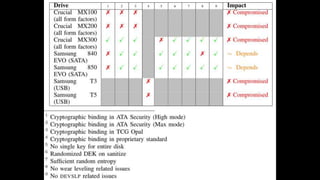
• Researchers at Radbound University in the Netherlands found severe flaws in
several Samsung, Seagate, and Crucial SSDs
• Require hardware access to the SATA connection, or JTAG headers on the
drive
• Unintentional or undocumented behavior when specific commands are sent
• Cryptographic weakness in the encryption key (No cryptographic connection
between unlock password and encryption key)
• Get code execution on the drive itself, expose the key or unlock the drive
What is hard drive encryption or full disk encryption?

What is hard drive encryption or full disk encryption?

  • 1.
    FULL DISK ENCRYPTION •WHAT IT IS • HOW IT WORKS • ATTACKS AGAINST IT • RECENT ISSUES
  • 2.
    WHAT IT IS •Encryption of an entire partition or drive • Encryption at the block level, rather than file • Usually filesystem agnostic • Happens on the drive or by the operating system • “On-the-fly” • Often required by security frameworks and regulations (HIPPA)
  • 3.
    WHAT IT ISN’T •Protection against malware • Only protects the drive while the computer is powered off • Meant to be transparent to the user, doesn’t protect files from malicious software, accidental deletion, etc.
  • 4.
    HOW IT WORKS(BASICS) • Partitions encrypted by block • Encryption info stored in header • Single encryption key encrypted with different “protectors” • Unlock encryption key with one of several protectors • Require multiple protectors to unlock encryption key
  • 5.
    PROTECTOR MANAGEMENT • User-enteredpassword • Key file stored on disk/USB drive • Smart card • Trusted Platform Module (TPM) • User-entered password • Special case for boot drives: • Need a pre-boot environment to handle key entry and initial decryption • Greater dependency on operating system compatibility
  • 6.
    FULL DISK ENCRYPTIONSOFTWARE: WINDOWS • BitLocker • Built-in on Windows 7 Ultimate, and all versions of Windows 8 and 10 • Good TPM support • Unlock with any combination of TPM, numeric PIN, full password, USB drive • Easy deployment for both home users and organizations • Easy to use on USB drives (works on any windows PC without additional software) • Utilizes self-encrypting disks if possible. • (more on that later) • Some security caveats… • Assume Microsoft has master unlock key
  • 7.
    FULL DISK ENCRYPTIONSOFTWARE: WINDOWS • VeraCrypt (also available for Mac and Linux) • Fork of TrueCrypt, discontinued in 2014 • Open source, thoroughly audited and verified • Unlock with password, key file (USB drive), TPM • Support for hidden partitions, plausible deniability
  • 8.
    FULL DISK ENCRYPTIONSOFTWARE: LINUX • dm-crypt • Bare-bones disk encryption • Only uses a single key, can’t be changed • Plausible deniability, though harder to use than Veracrypt • Mounts an encrypted partition to a device path to mount as a filesystem • /dev/sda2 <=> dm-crypt <=> /dev/dm0 • LUKS (Linux Unified Key Setup) • System to manage protectors for dm-crypt • Help set up boot-time key entry • Allows adding and changing protectors
  • 9.
    FULL DISK ENCRYPTION:OTHERS • FileVault on OSx • Built-in on Osx since 10.3 • Encryption key is tied to user accounts • Many Endpoint Protection products • Good for enterprises that need to centralize control of recovery keys • Often have support for audit logging, proof of compliance
  • 10.
    ATTACKS AGAINST FDE •Malware: • FDE doesn’t stop malware from searching/exfiltrating files • If removable drive, find keyfile or keylog password • Evil Maid attack: Compromise an unattended device • Add hardware keylogger, PCI/Thunderbolt memory scraper (via DMA) • Modify bootloader to capture credentials • Counter: Tamper evident enclosure, don’t leave it unattended • Compel or threaten to unlock
  • 12.
    SELF-ENCRYPTING DRIVES • Usedin enterprise storage for years, just recently coming to consumers in SSDs • All encryption/decryption is done on the drive • Ideally the key is not stored in the drive’s firmware, but supplied by the OS on startup • Protector management still handled by the OS • Securely wipe the drive by just throwing away the key
  • 13.
    FLAWS IN SELF-ENCRYPTINGDRIVES • Researchers at Radbound University in the Netherlands found severe flaws in several Samsung, Seagate, and Crucial SSDs • Require hardware access to the SATA connection, or JTAG headers on the drive • Unintentional or undocumented behavior when specific commands are sent • Cryptographic weakness in the encryption key (No cryptographic connection between unlock password and encryption key) • Get code execution on the drive itself, expose the key or unlock the drive