Full Hard Disk Encryption
Agenda

What
Why
Where
When
Who can do it
How
What is encryption

In cryptography, encryption is the
process of transforming
information (referred to as
plaintext) using an algorithm
(called cipher) to make it
unreadable to anyone except
those possessing special
knowledge, usually referred to as
a key. The result of the process is
What is FDE

Disk encryption uses disk encryption software
or hardware to encrypt every bit of data that
goes on a disk or disk volume. The term "full
disk encryption" (or whole disk encryption) is
often used to signify that everything on a disk
is encrypted, including the programs that can
encrypt bootable operating system partitions
Disk encryption prevents unauthorized access
to data storage.
--source: wikipedia
Why Disk/file Encryption ?

Because (there are infinite reasons to do it):
    Its last line of defense in case
    everything else fails
    information is more important than
    anything else nowadays
    of security,privacy, confidentiality and
    integrity
Where can we use
FDE/encryption ?


   Everywhere !!!
When ?

* Its never too late.
* When you feel its time !
* when you start taking security
seriously !!!
Who can do it ?
How ?

Open source to the rescue !
Easy to use (those pointy clicky
things, dont know what ? ), GUI's
No major performance hits
Here comes interesting stuff
–

     Various types of encryption for different
     levels.
             – Disk controller level
             – Volume level
             – Disk block level
             – Filesystem level
             – Directory level
             – File level
             – Row and column level (for

databases)
Encryption tools (continued)
–

     The biggest weakness with encryption tools
     is not the algorithm, but how encryption
     keys are managed.
             – Some tools allow only one passphrase,
           forcing groups of staff to share it, which
           can result in it being divulged.
             – Some tools store the passphrase in a
           weak manner, allowing for easy brute
           force cracking using rainbow tables or
           dictionaries.
             – Some tools may be poorly designed

and leave sensitive information out of the
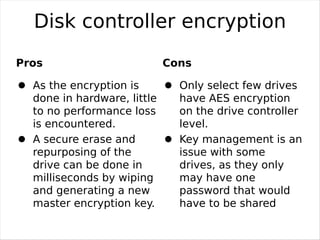
Disk controller encryption
Pros                         Cons

  As the encryption is         Only select few drives
  done in hardware, little     have AES encryption
  to no performance loss       on the drive controller
  is encountered.              level.
  A secure erase and           Key management is an
  repurposing of the           issue with some
  drive can be done in         drives, as they only
  milliseconds by wiping       may have one
  and generating a new         password that would
  master encryption key.       have to be shared

                             among staff.
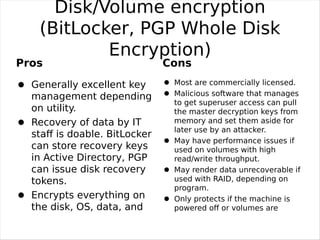
Disk/Volume encryption
     (BitLocker, PGP Whole Disk
             Encryption)
Pros                           Cons
   Generally excellent key       Most are commercially licensed.
   management depending          Malicious software that manages
                                 to get superuser access can pull
   on utility.                   the master decryption keys from
   Recovery of data by IT        memory and set them aside for
                                 later use by an attacker.
   staff is doable. BitLocker
                                 May have performance issues if
   can store recovery keys       used on volumes with high
   in Active Directory, PGP      read/write throughput.
   can issue disk recovery       May render data unrecoverable if
   tokens.                       used with RAID, depending on
                                 program.
   Encrypts everything on        Only protects if the machine is
   the disk, OS, data, and       powered off or volumes are


all. This protects against     unmounted.
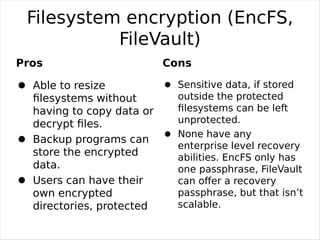
Filesystem encryption (EncFS,
           FileVault)
Pros                        Cons

   Able to resize             Sensitive data, if stored
   filesystems without         outside the protected
   having to copy data or     filesystems can be left
   decrypt files.              unprotected.
                              None have any
   Backup programs can
                              enterprise level recovery
   store the encrypted        abilities. EncFS only has
   data.                      one passphrase, FileVault
   Users can have their       can offer a recovery
   own encrypted              passphrase, but that isn’t
   directories, protected     scalable.


against a root/admin
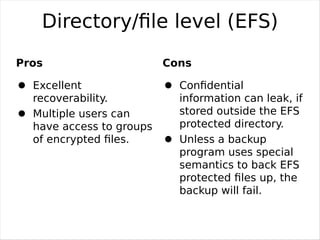
Directory/file level (EFS)
Pros                      Cons

  Excellent                 Confidential
  recoverability.           information can leak, if
  Multiple users can        stored outside the EFS
  have access to groups     protected directory.
  of encrypted files.        Unless a backup
                            program uses special
                            semantics to back EFS
                            protected files up, the
                            backup will fail.
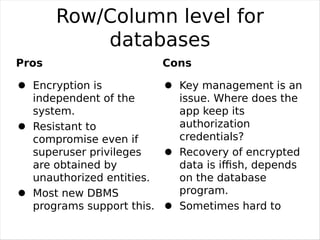
Row/Column level for
           databases
Pros                       Cons

  Encryption is              Key management is an
  independent of the         issue. Where does the
  system.                    app keep its
  Resistant to               authorization
  compromise even if         credentials?
  superuser privileges       Recovery of encrypted
  are obtained by            data is iffish, depends
  unauthorized entities.     on the database
  Most new DBMS              program.
  programs support this.     Sometimes hard to

                           sync up encrypted
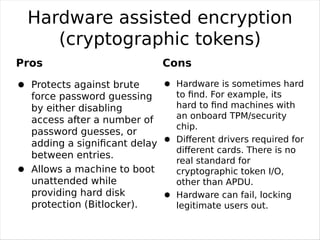
Hardware assisted encryption
    (cryptographic tokens)
Pros                          Cons
  Protects against brute       Hardware is sometimes hard
  force password guessing      to find. For example, its
  by either disabling          hard to find machines with
  access after a number of     an onboard TPM/security
                               chip.
  password guesses, or
  adding a significant delay    Different drivers required for
                               different cards. There is no
  between entries.
                               real standard for
  Allows a machine to boot     cryptographic token I/O,
  unattended while             other than APDU.
  providing hard disk          Hardware can fail, locking
  protection (Bitlocker).      legitimate users out.
Demo !!!


1. True Crypt
2. Encfs
3. Luks/cryptsetup
Thanks

Hard Disk Encryptions

  • 1.
    Full Hard DiskEncryption
  • 2.
  • 3.
    What is encryption Incryptography, encryption is the process of transforming information (referred to as plaintext) using an algorithm (called cipher) to make it unreadable to anyone except those possessing special knowledge, usually referred to as a key. The result of the process is
  • 4.
    What is FDE Diskencryption uses disk encryption software or hardware to encrypt every bit of data that goes on a disk or disk volume. The term "full disk encryption" (or whole disk encryption) is often used to signify that everything on a disk is encrypted, including the programs that can encrypt bootable operating system partitions Disk encryption prevents unauthorized access to data storage. --source: wikipedia
  • 5.
    Why Disk/file Encryption? Because (there are infinite reasons to do it): Its last line of defense in case everything else fails information is more important than anything else nowadays of security,privacy, confidentiality and integrity
  • 6.
    Where can weuse FDE/encryption ? Everywhere !!!
  • 7.
    When ? * Itsnever too late. * When you feel its time ! * when you start taking security seriously !!!
  • 8.
  • 9.
    How ? Open sourceto the rescue ! Easy to use (those pointy clicky things, dont know what ? ), GUI's No major performance hits
  • 10.
    Here comes interestingstuff – Various types of encryption for different levels. – Disk controller level – Volume level – Disk block level – Filesystem level – Directory level – File level – Row and column level (for databases)
  • 11.
    Encryption tools (continued) – The biggest weakness with encryption tools is not the algorithm, but how encryption keys are managed. – Some tools allow only one passphrase, forcing groups of staff to share it, which can result in it being divulged. – Some tools store the passphrase in a weak manner, allowing for easy brute force cracking using rainbow tables or dictionaries. – Some tools may be poorly designed and leave sensitive information out of the
  • 12.
    Disk controller encryption Pros Cons As the encryption is Only select few drives done in hardware, little have AES encryption to no performance loss on the drive controller is encountered. level. A secure erase and Key management is an repurposing of the issue with some drive can be done in drives, as they only milliseconds by wiping may have one and generating a new password that would master encryption key. have to be shared among staff.
  • 13.
    Disk/Volume encryption (BitLocker, PGP Whole Disk Encryption) Pros Cons Generally excellent key Most are commercially licensed. management depending Malicious software that manages to get superuser access can pull on utility. the master decryption keys from Recovery of data by IT memory and set them aside for later use by an attacker. staff is doable. BitLocker May have performance issues if can store recovery keys used on volumes with high in Active Directory, PGP read/write throughput. can issue disk recovery May render data unrecoverable if tokens. used with RAID, depending on program. Encrypts everything on Only protects if the machine is the disk, OS, data, and powered off or volumes are all. This protects against unmounted.
  • 14.
    Filesystem encryption (EncFS, FileVault) Pros Cons Able to resize Sensitive data, if stored filesystems without outside the protected having to copy data or filesystems can be left decrypt files. unprotected. None have any Backup programs can enterprise level recovery store the encrypted abilities. EncFS only has data. one passphrase, FileVault Users can have their can offer a recovery own encrypted passphrase, but that isn’t directories, protected scalable. against a root/admin
  • 15.
    Directory/file level (EFS) Pros Cons Excellent Confidential recoverability. information can leak, if Multiple users can stored outside the EFS have access to groups protected directory. of encrypted files. Unless a backup program uses special semantics to back EFS protected files up, the backup will fail.
  • 16.
    Row/Column level for databases Pros Cons Encryption is Key management is an independent of the issue. Where does the system. app keep its Resistant to authorization compromise even if credentials? superuser privileges Recovery of encrypted are obtained by data is iffish, depends unauthorized entities. on the database Most new DBMS program. programs support this. Sometimes hard to sync up encrypted
  • 17.
    Hardware assisted encryption (cryptographic tokens) Pros Cons Protects against brute Hardware is sometimes hard force password guessing to find. For example, its by either disabling hard to find machines with access after a number of an onboard TPM/security chip. password guesses, or adding a significant delay Different drivers required for different cards. There is no between entries. real standard for Allows a machine to boot cryptographic token I/O, unattended while other than APDU. providing hard disk Hardware can fail, locking protection (Bitlocker). legitimate users out.
  • 18.
    Demo !!! 1. TrueCrypt 2. Encfs 3. Luks/cryptsetup
  • 19.