LINUX ARCHITECTURE
Outline
● Linux history
● Linux system architecture
● Linux kernel
● Kernel Architecture overview
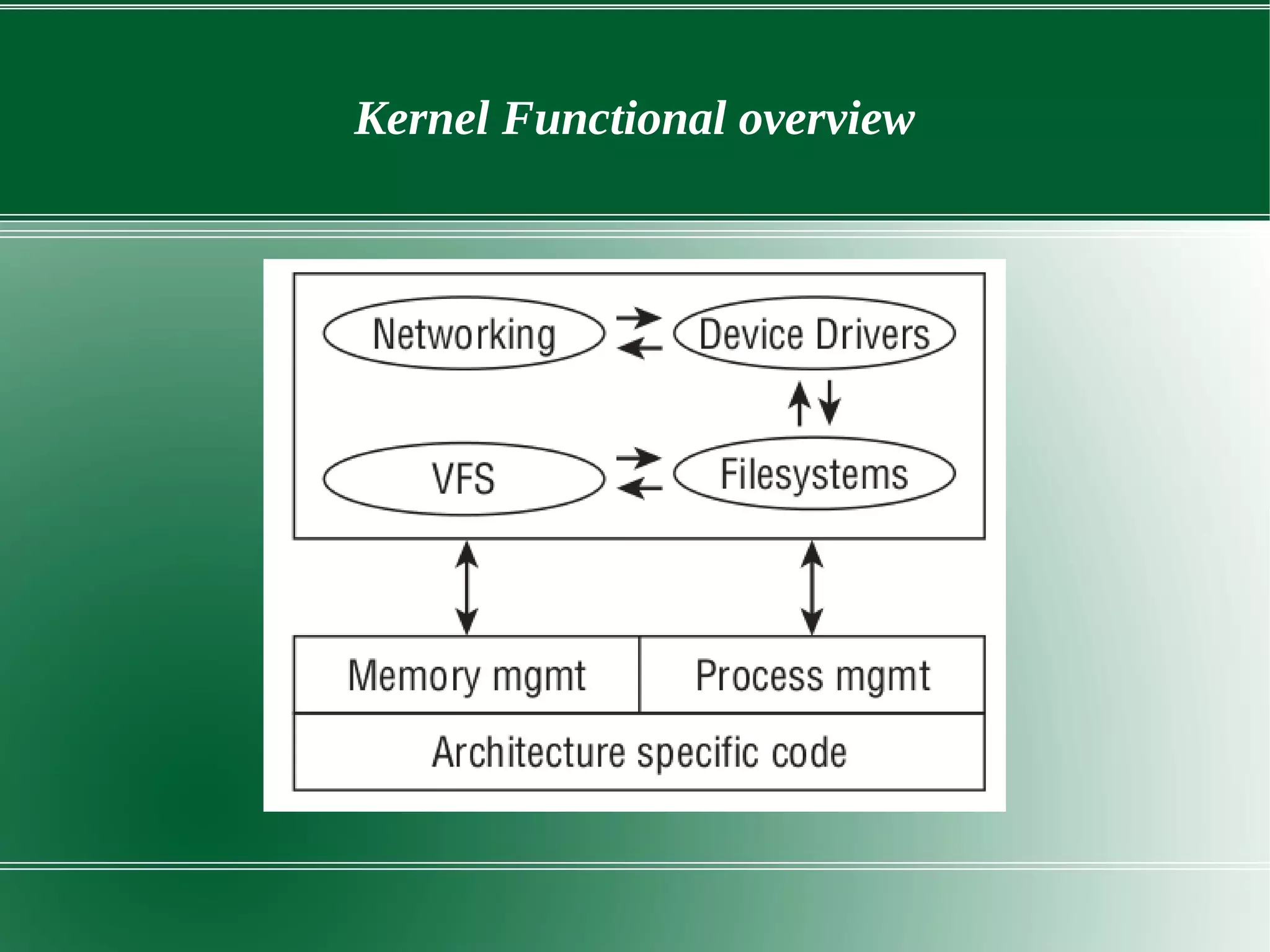
● Kernel Functional overview
– File system
– Process management
– Memory management
– Device driver
– Networking
History of Linux
● First truly free UNIX like OS
● 1983 , GNU developed by Richard Stallman but kernel was missing
● Personal project by Finnish student Linus Torvalds to create a new
free operating system kernel in year 1991.
● Linus Torvalds began a project that later became the Linux kernel.
● First version of kernel 0.01
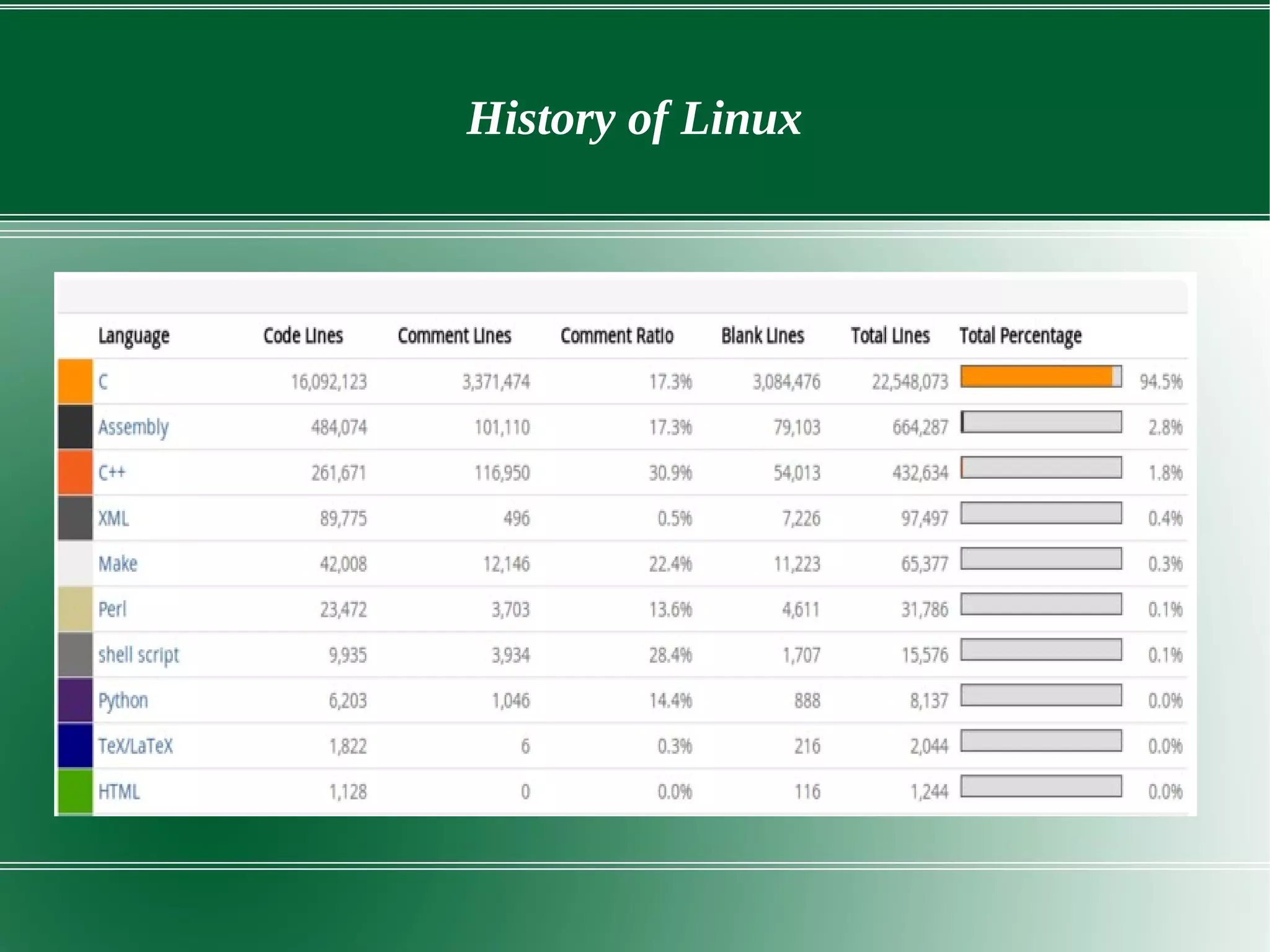
● 1991 from few c files to 18 million lines in 2015
History of Linux
Characteristics of linux OS
● Multiuser Capability
● Multitasking
● Portability – Works on different hardware
● Security
– Authentication
– Authorization
– Encryption
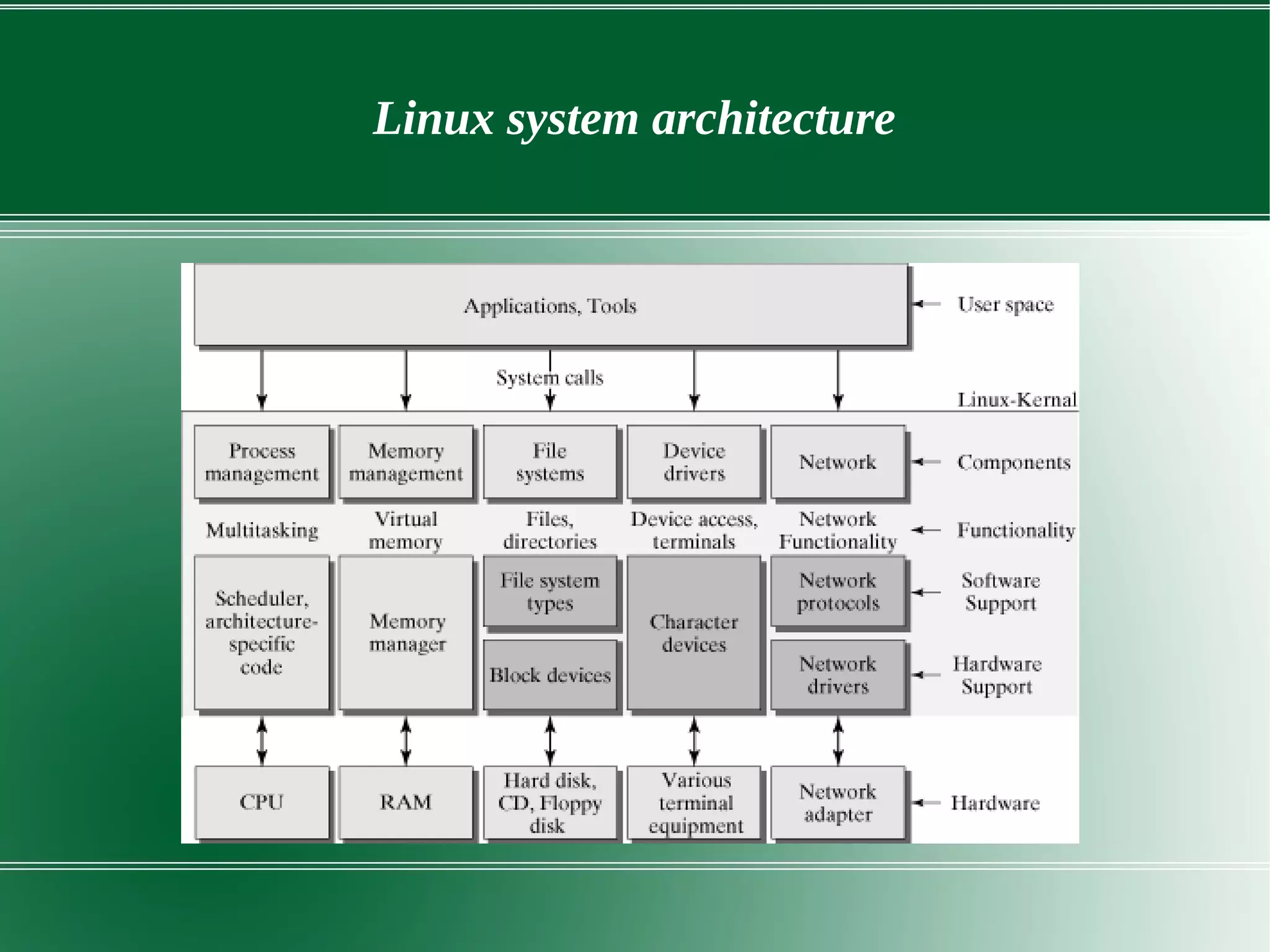
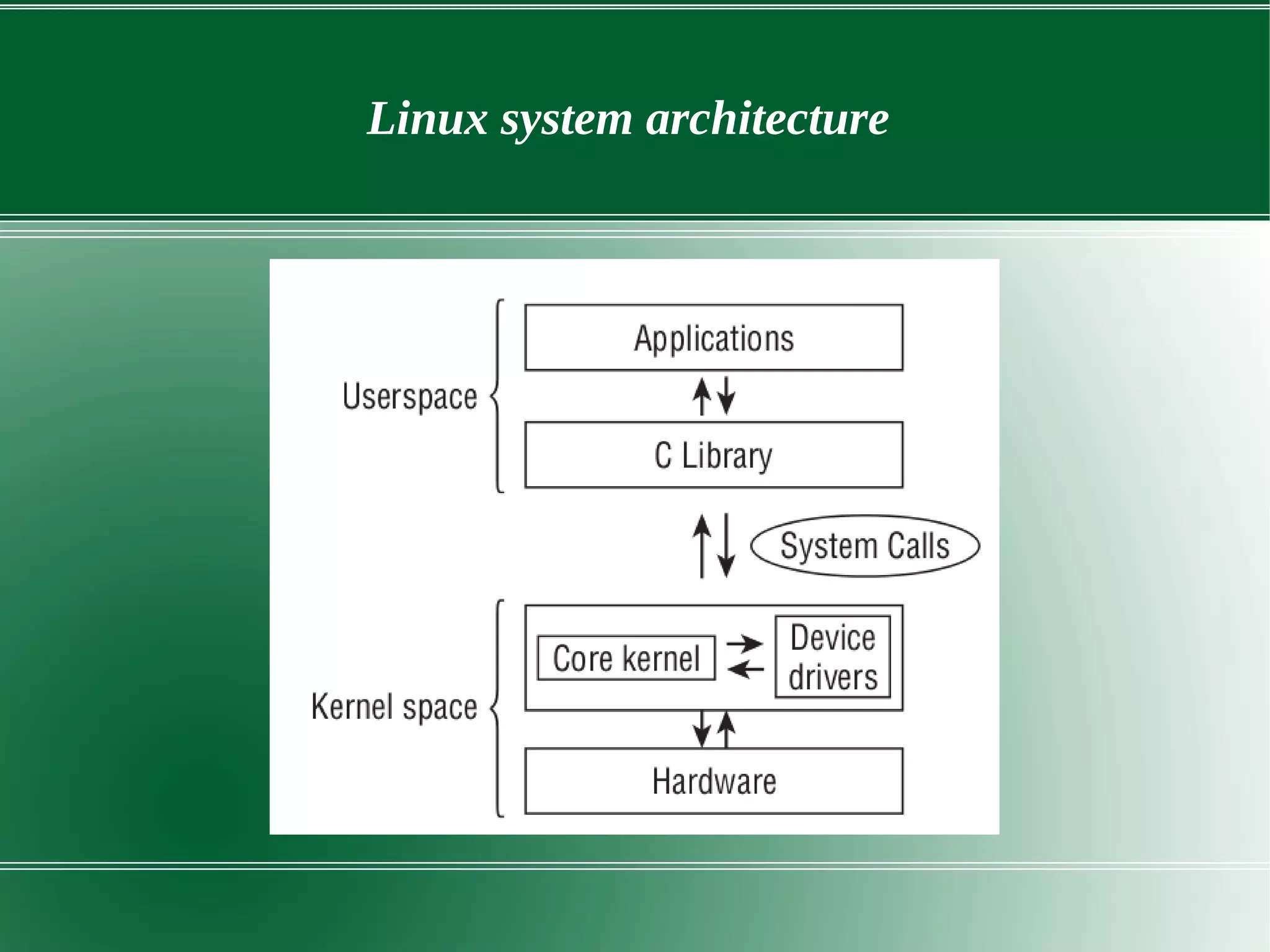
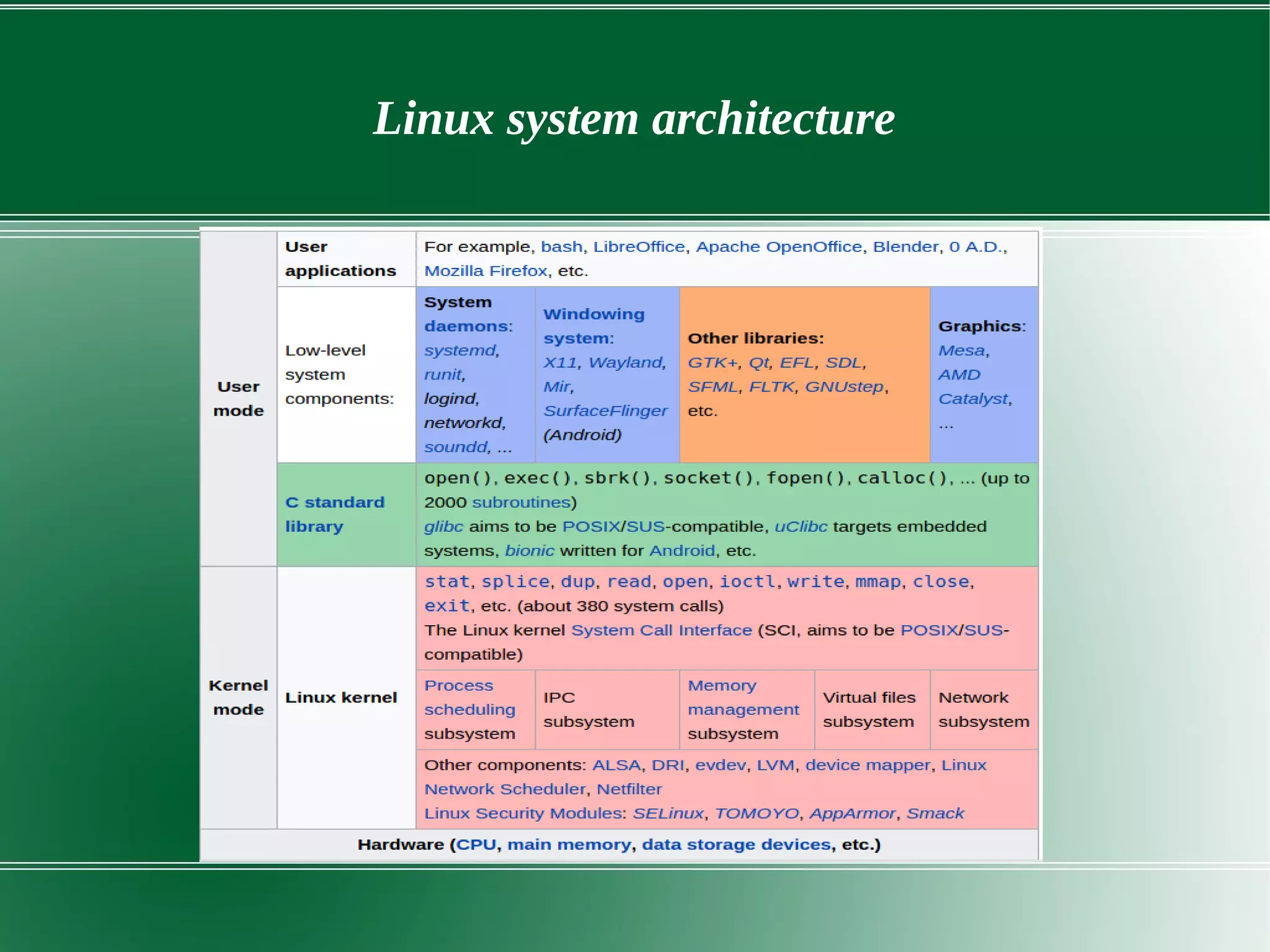
Linux system architecture
● Hardware layer – Consist of all peripherical devices like RAM, CPU, HD
● Kernel
– Core of OS
– Interacts with hardware
– Perform low level services
Shell
– Interface to kernel. Hides complexity of kernel from users.
– Take commands and executes kernel functions.
● Utilities
Linux system architecture
Linux kernel
● Monolithic kernel
● Supports
– Preemptive mutitasking
– Virtual memory
– Shared libraries
– Demand loading
– Memory mangement
– Threading
– Loadable kernel modules
Kernel Functional overview
Linux system architecture
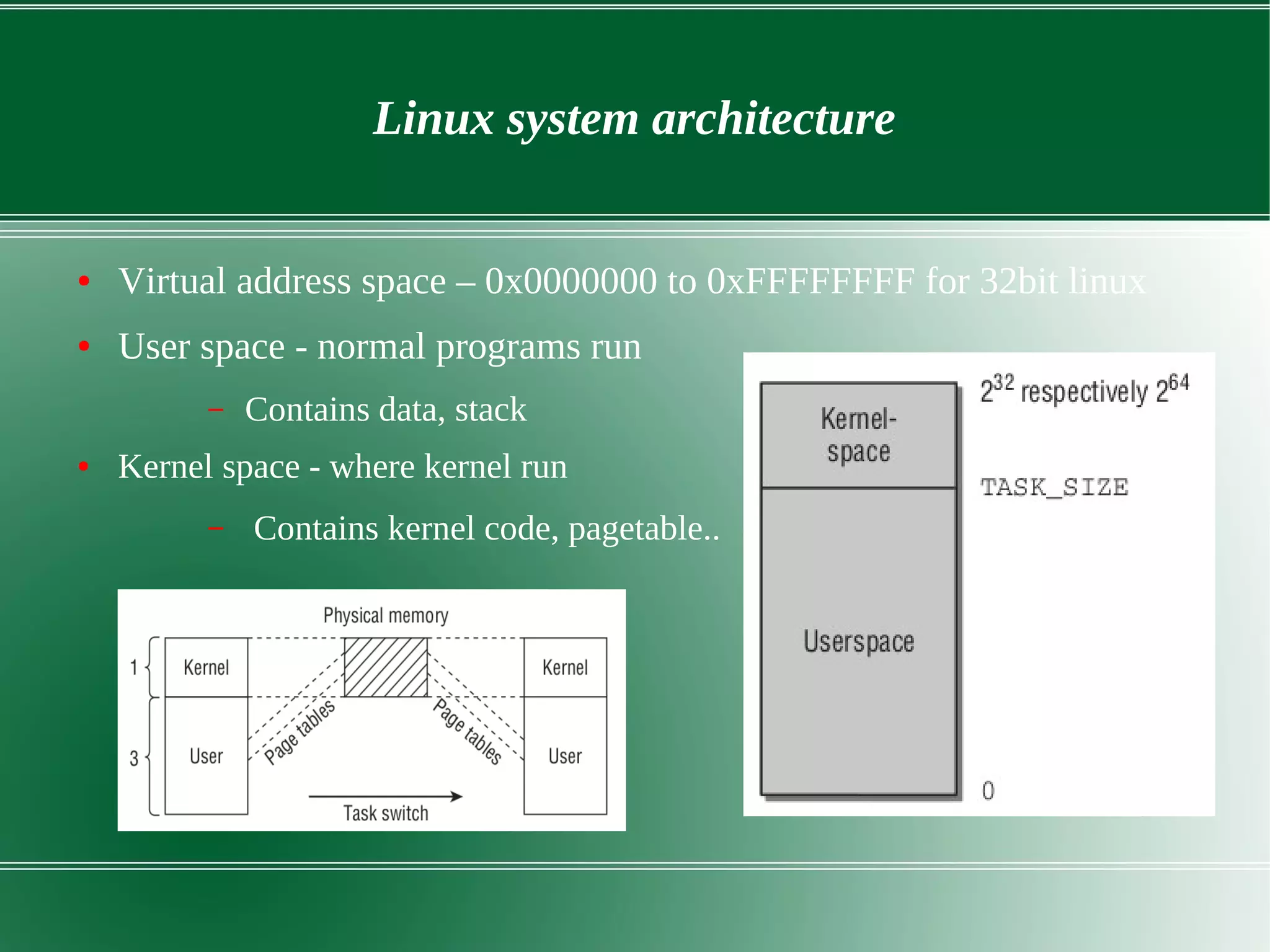
● Virtual address space – 0x0000000 to 0xFFFFFFFF for 32bit linux
● User space - normal programs run
– Contains data, stack
● Kernel space - where kernel run
– Contains kernel code, pagetable..
File systems
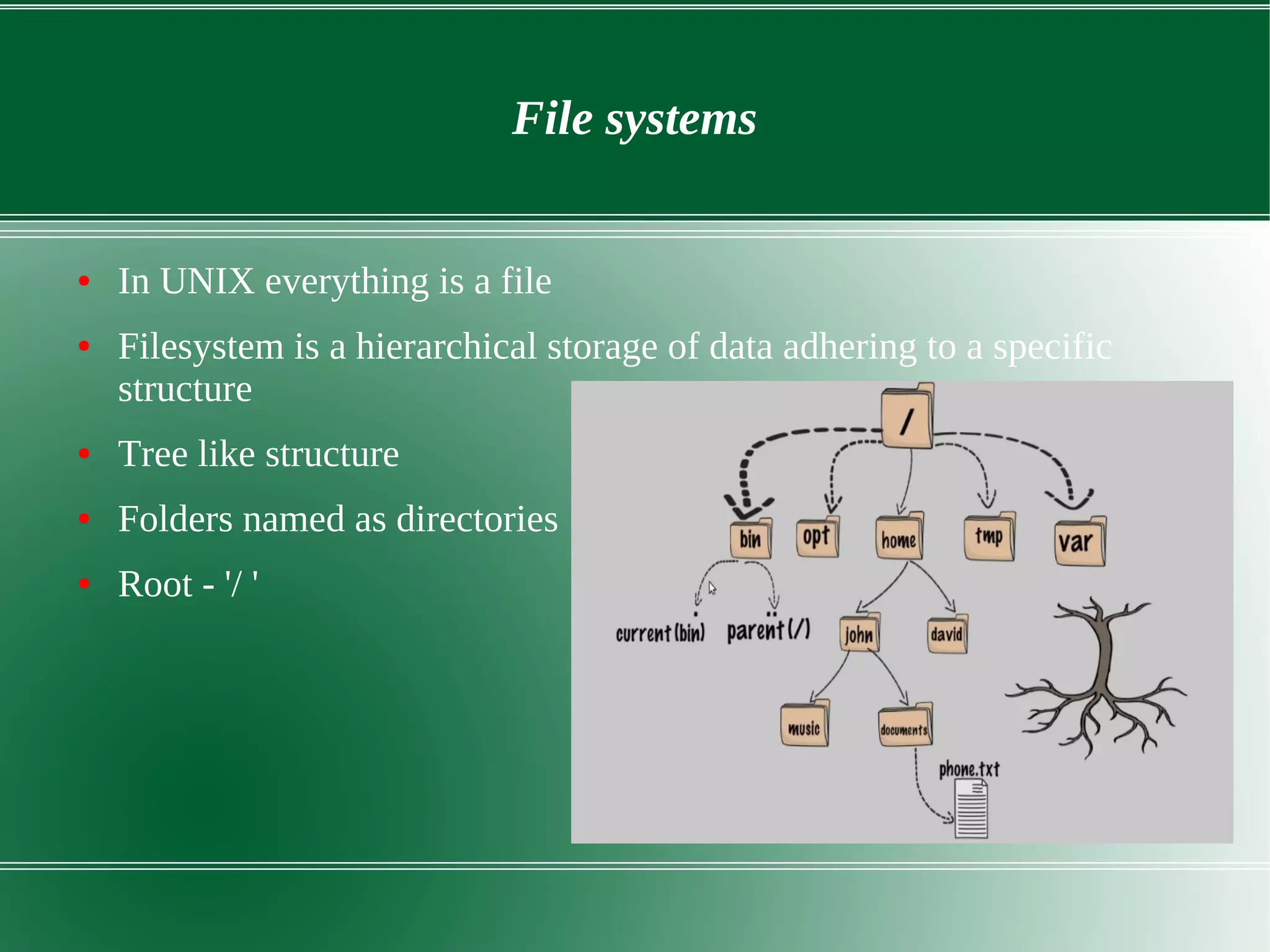
● In UNIX everything is a file
● Filesystem is a hierarchical storage of data adhering to a specific
structure
● Tree like structure
● Folders named as directories
● Root - '/ '
File systems
● Sort of files : directories (d), special files(s), links(l), sockets (s),
named pipes(p)
● Major partitions on a Linux system:
– data partition: system data, including the root partition
containing all the data to start up and run the system
– swap partition: expansion of the computer's physical memory,
extra memory on hard disk(twice amount of RAM)
● Mount point
– Partitions attached through mount point
File systems
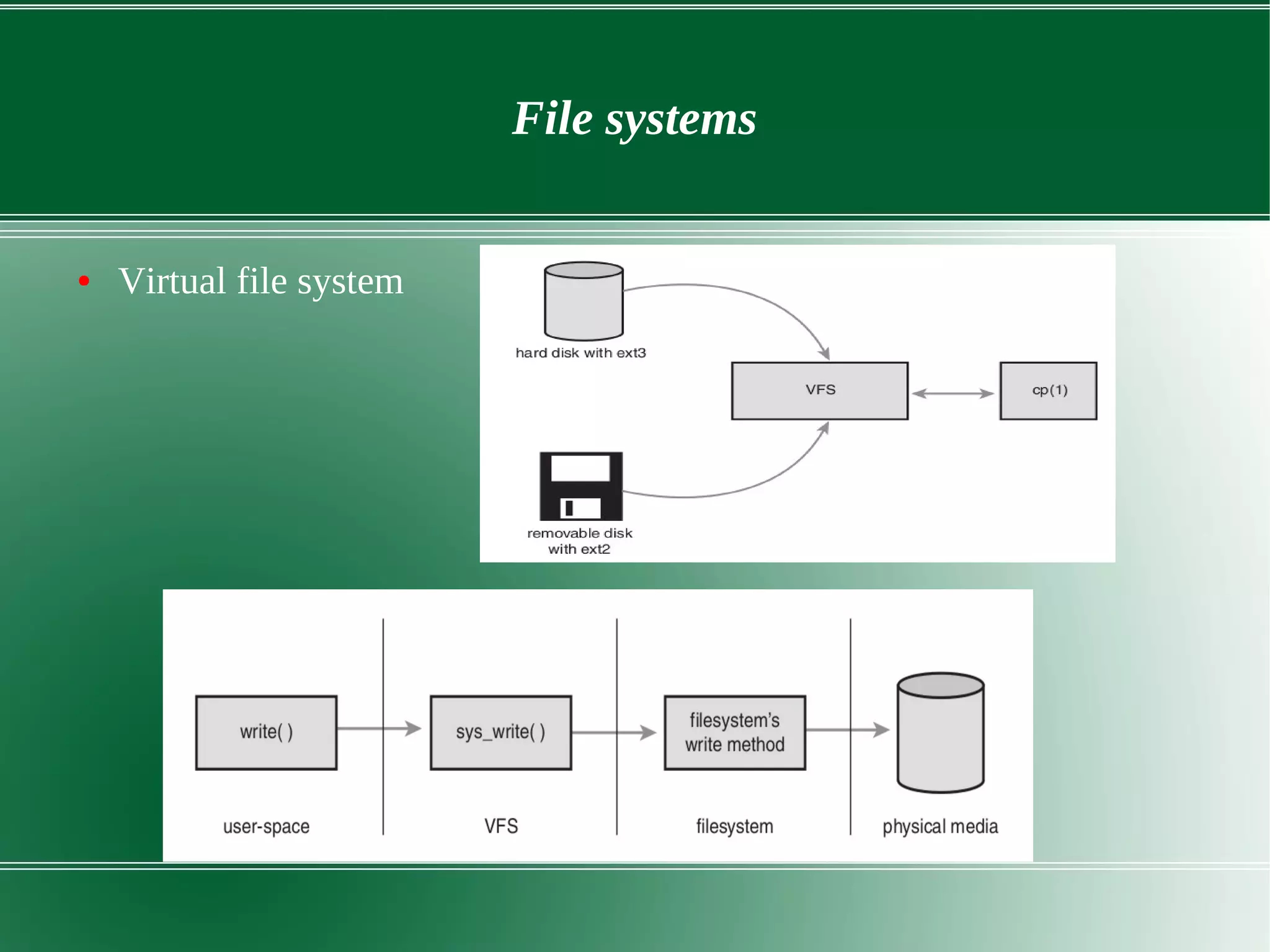
● Virtual file system
File system
● Concepts in VFS
– Super block – filesystem metadata
– Inode – File metadata(permissions, owner, creation time)
● VFS is designed to work with filesystems that understand and
implement such concepts
File systems - VFS
● Four object types of VFS
– Superblock object – specific mounted filesystem.
– inode object - a specific file.
– dentry object - directory entry, which is a single component of
a path.
– file object - an open file as associated with a process.
Process management and Scheduling
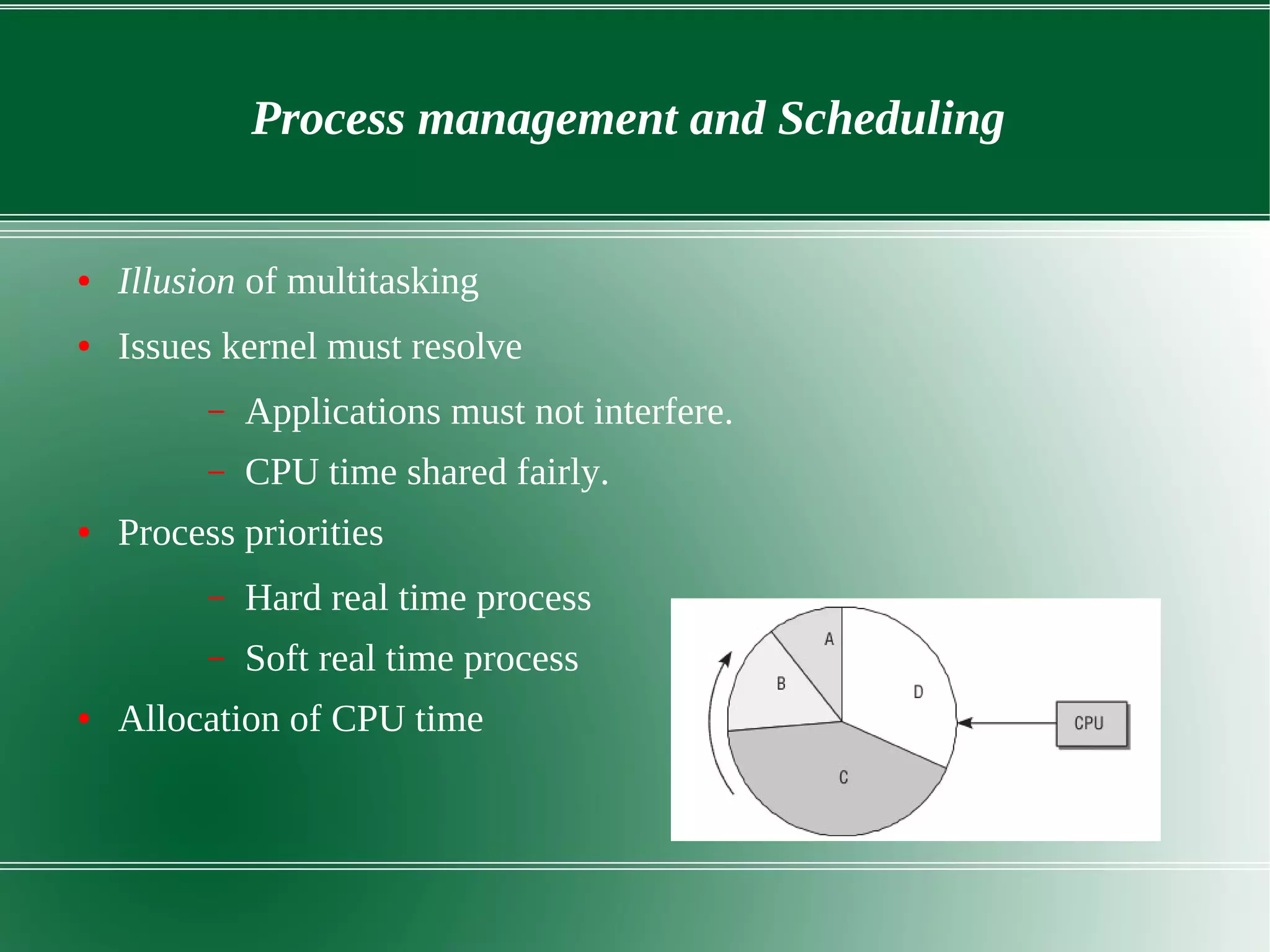
● Illusion of multitasking
● Issues kernel must resolve
– Applications must not interfere.
– CPU time shared fairly.
● Process priorities
– Hard real time process
– Soft real time process
● Allocation of CPU time
Process management and Scheduling
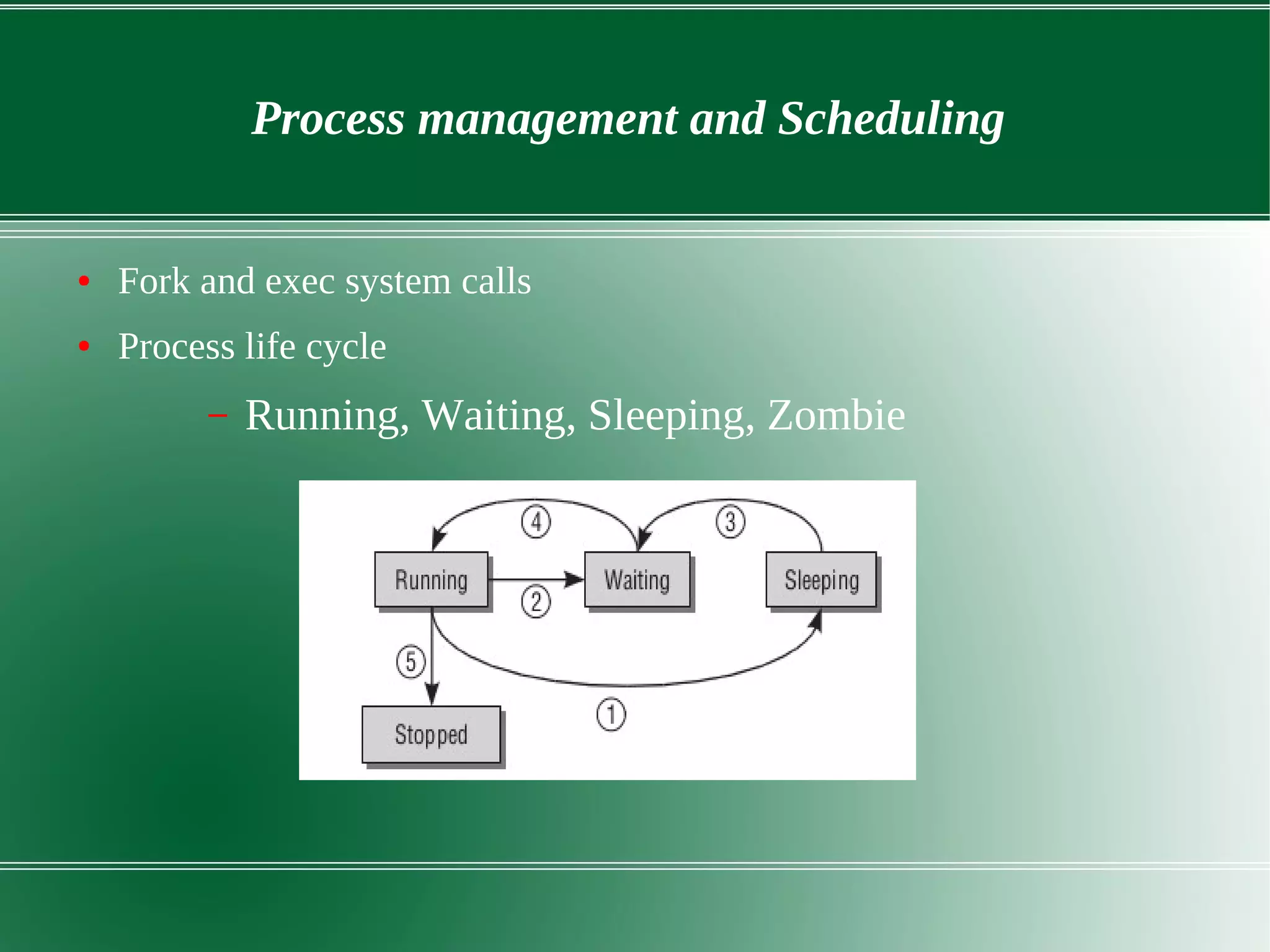
● Fork and exec system calls
● Process life cycle
– Running, Waiting, Sleeping, Zombie
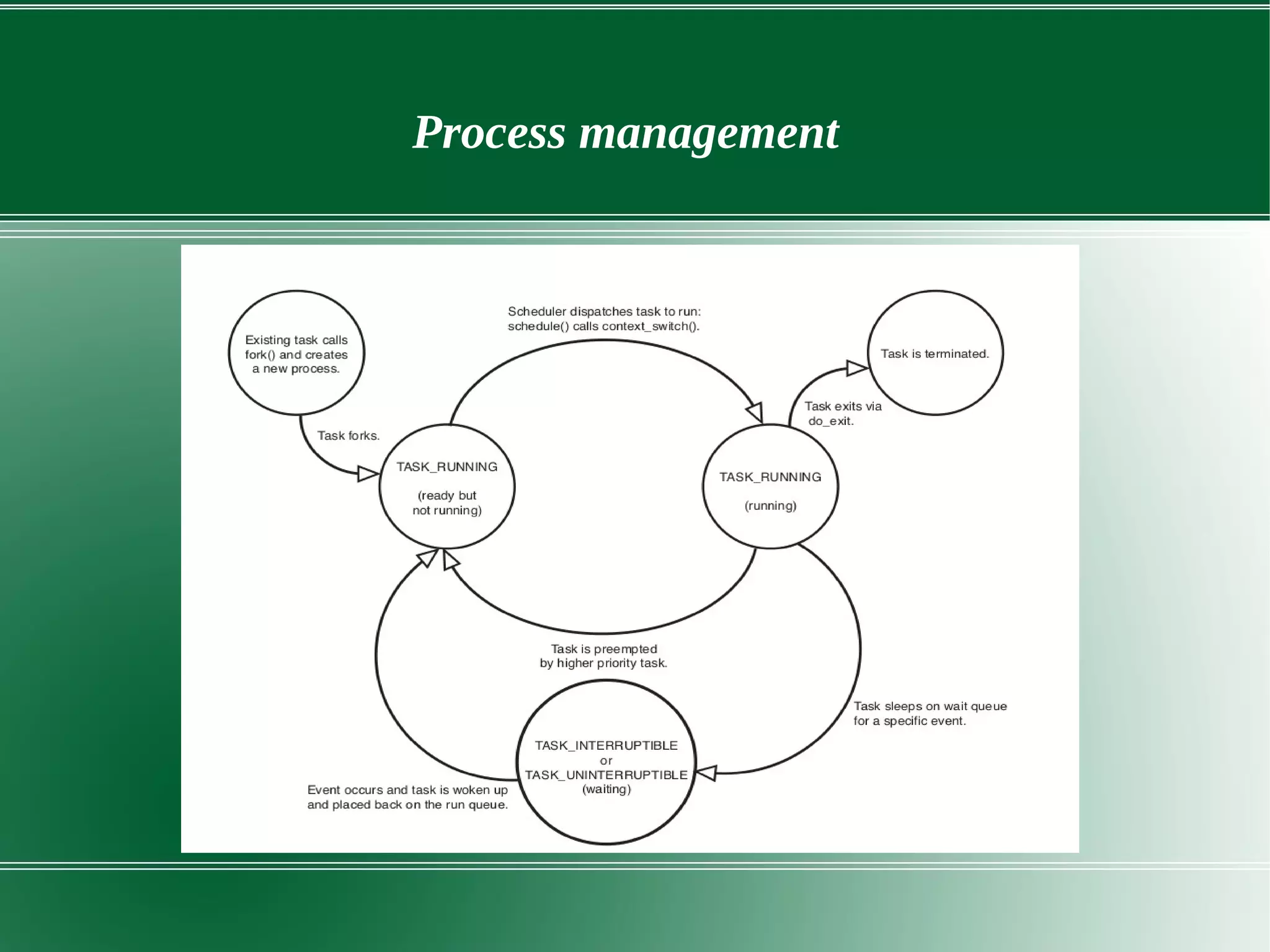
Process management
Process management and Scheduling
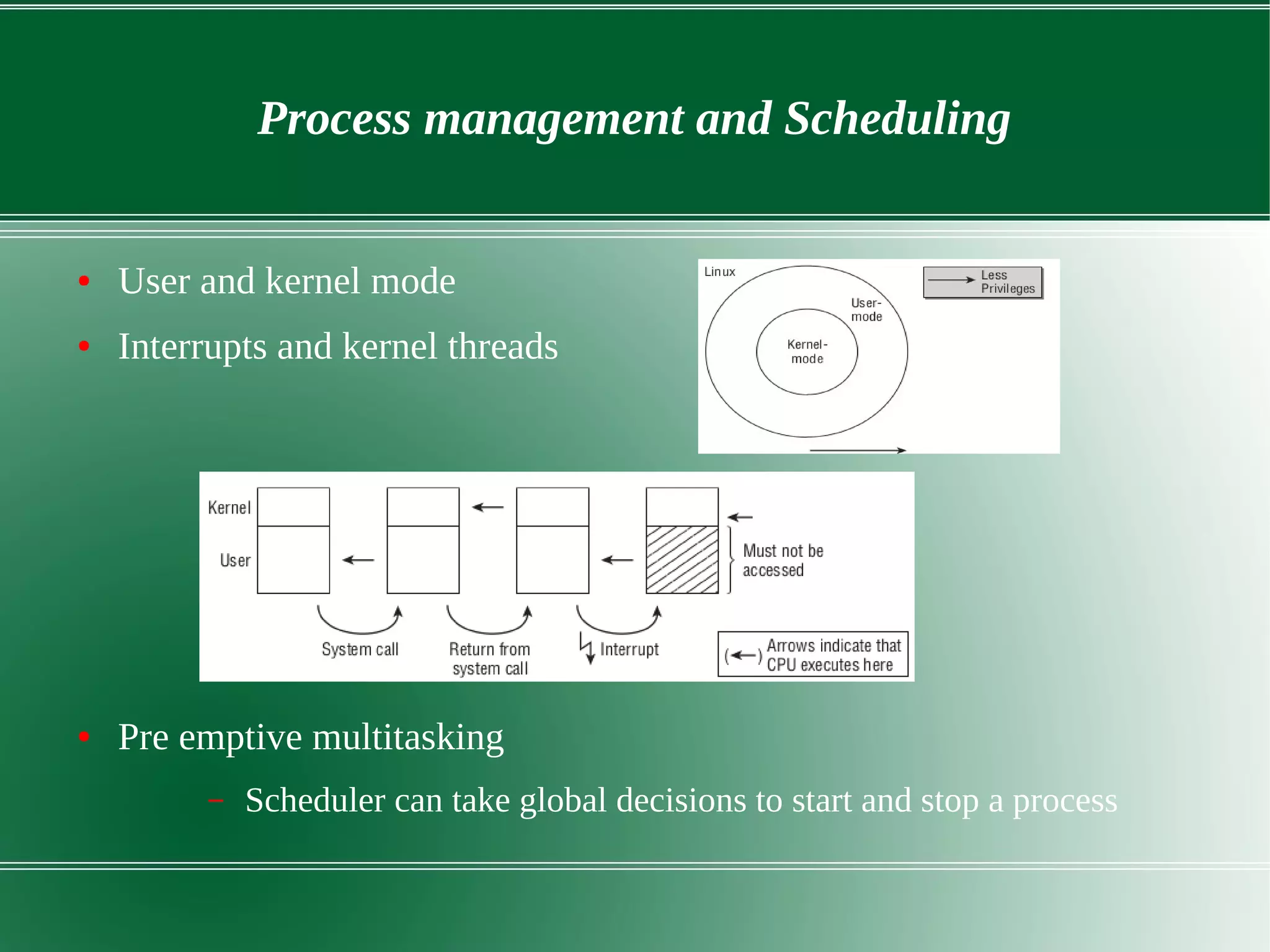
● User and kernel mode
● Interrupts and kernel threads
● Pre emptive multitasking
– Scheduler can take global decisions to start and stop a process
Process management and scheduling
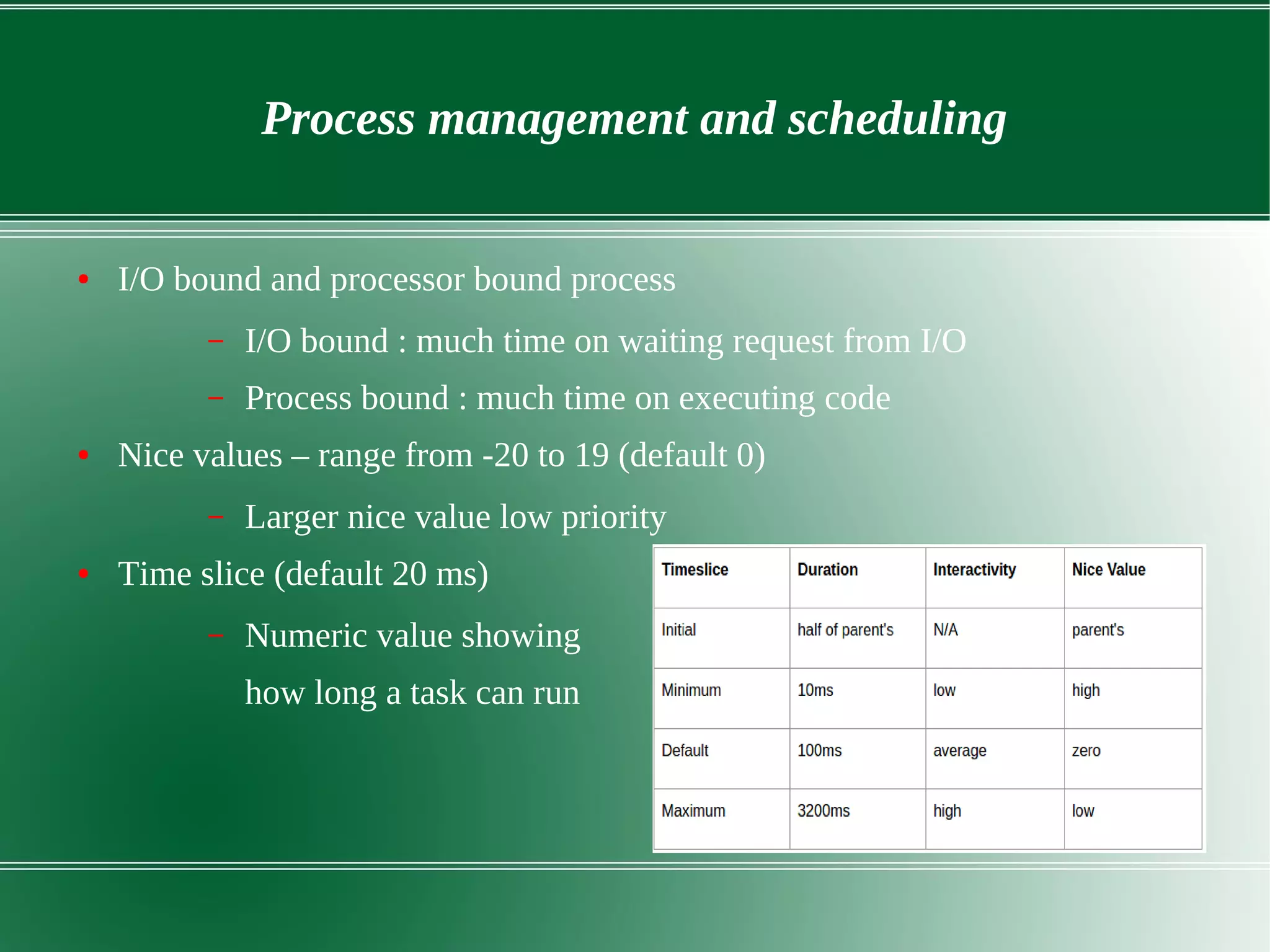
● I/O bound and processor bound process
– I/O bound : much time on waiting request from I/O
– Process bound : much time on executing code
● Nice values – range from -20 to 19 (default 0)
– Larger nice value low priority
● Time slice (default 20 ms)
– Numeric value showing
how long a task can run
Process management and scheduling
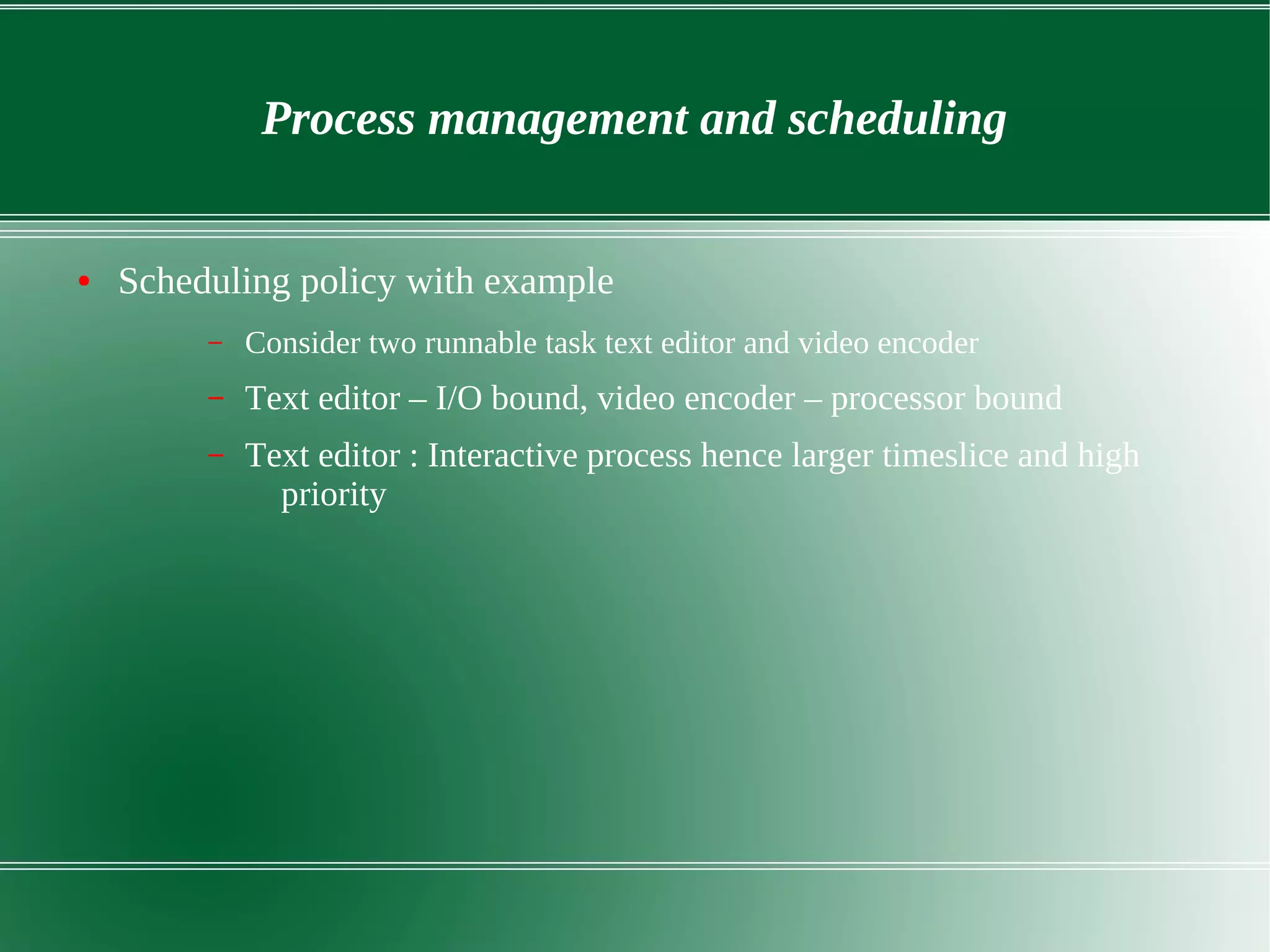
● Scheduling policy with example
– Consider two runnable task text editor and video encoder
– Text editor – I/O bound, video encoder – processor bound
– Text editor : Interactive process hence larger timeslice and high
priority
Memory management
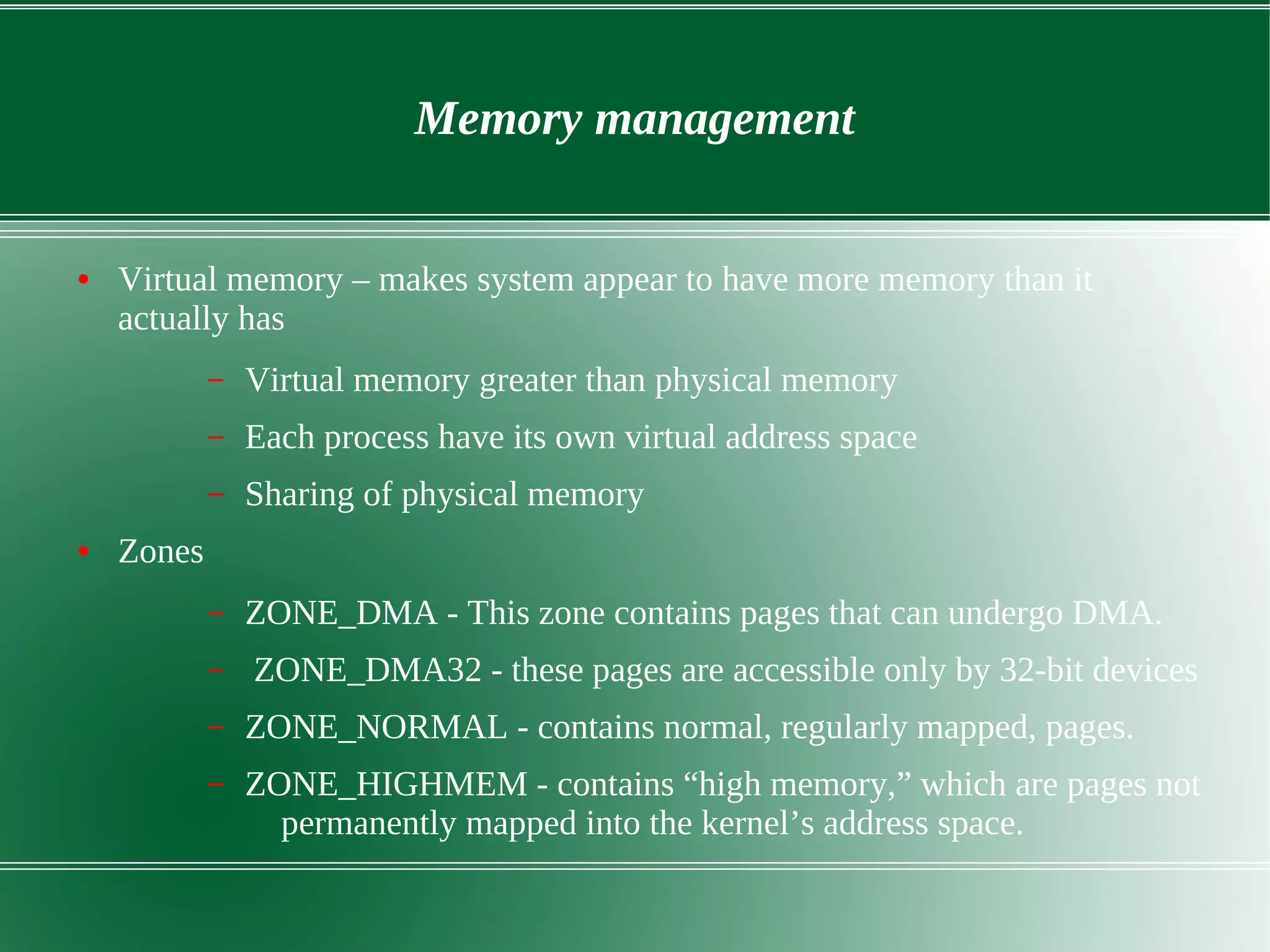
● Virtual memory – makes system appear to have more memory than it
actually has
– Virtual memory greater than physical memory
– Each process have its own virtual address space
– Sharing of physical memory
● Zones
– ZONE_DMA - This zone contains pages that can undergo DMA.
– ZONE_DMA32 - these pages are accessible only by 32-bit devices
– ZONE_NORMAL - contains normal, regularly mapped, pages.
– ZONE_HIGHMEM - contains “high memory,” which are pages not
permanently mapped into the kernel’s address space.
Memory management
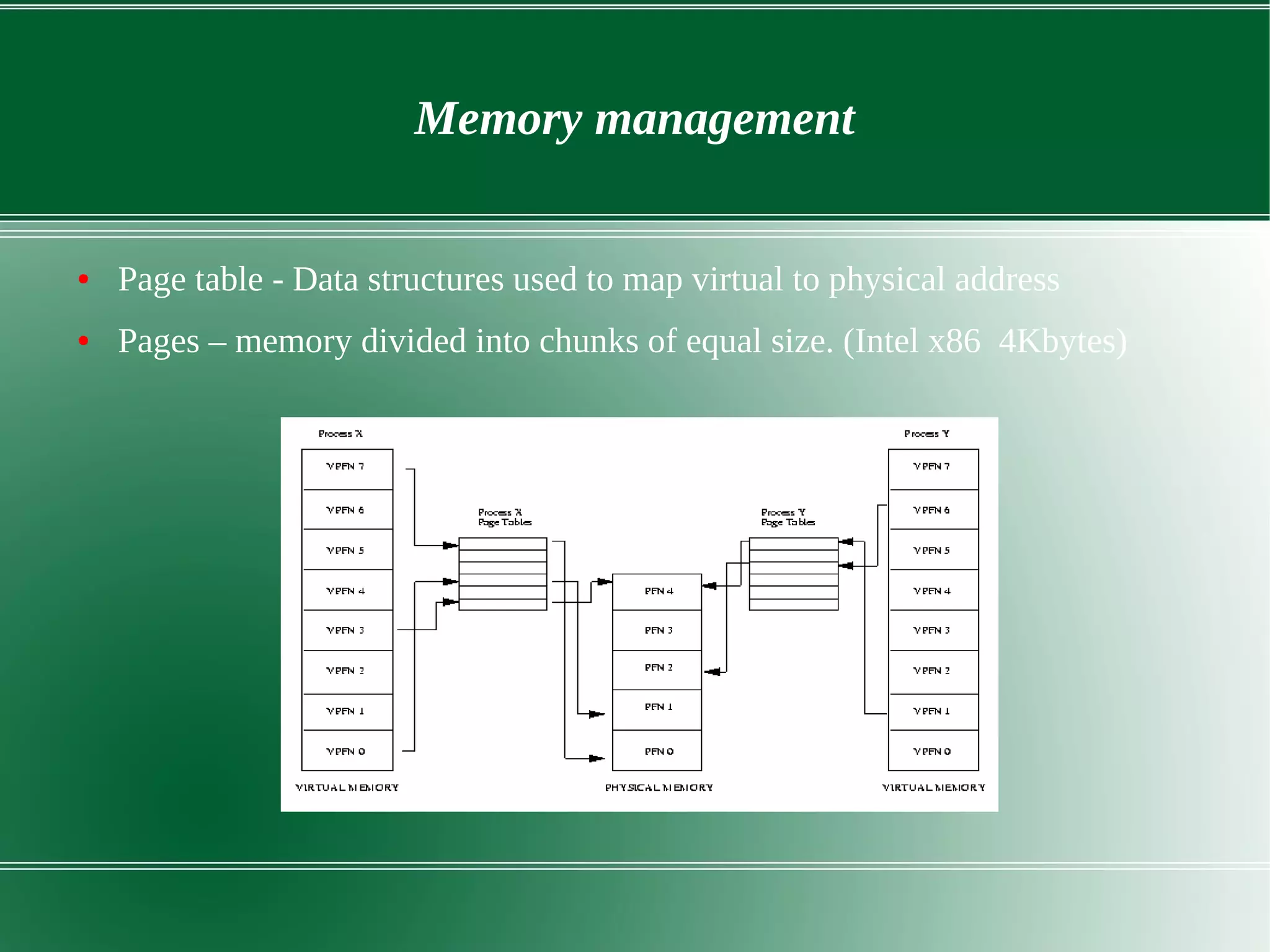
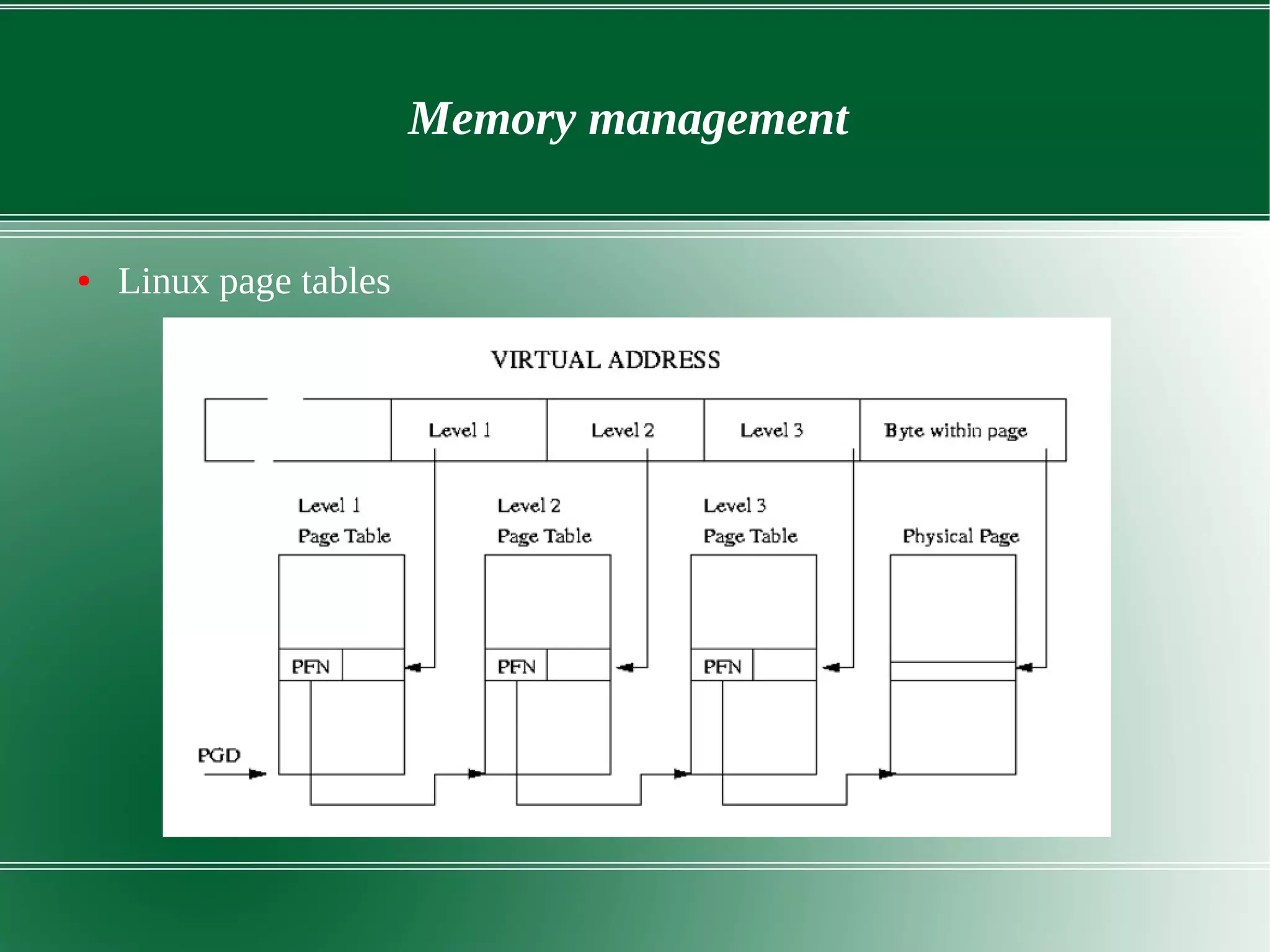
● Page table - Data structures used to map virtual to physical address
● Pages – memory divided into chunks of equal size. (Intel x86 4Kbytes)
Memory management
● Linux page tables
Memory management
● Demand paging
– Creating page faults and bringing image/file/data from disk to
physical memory
– Process should wait in queue until it is fetched
● Swapping
– No free space in RAM swapping done and done by kswapd
– The page selected for swapping has modified (dirty page)it is saved
as swap file.
– Least recently used(LRU) used for swapping.
● Shared virtual memory
– Two process sharing same physical memory
Memory management
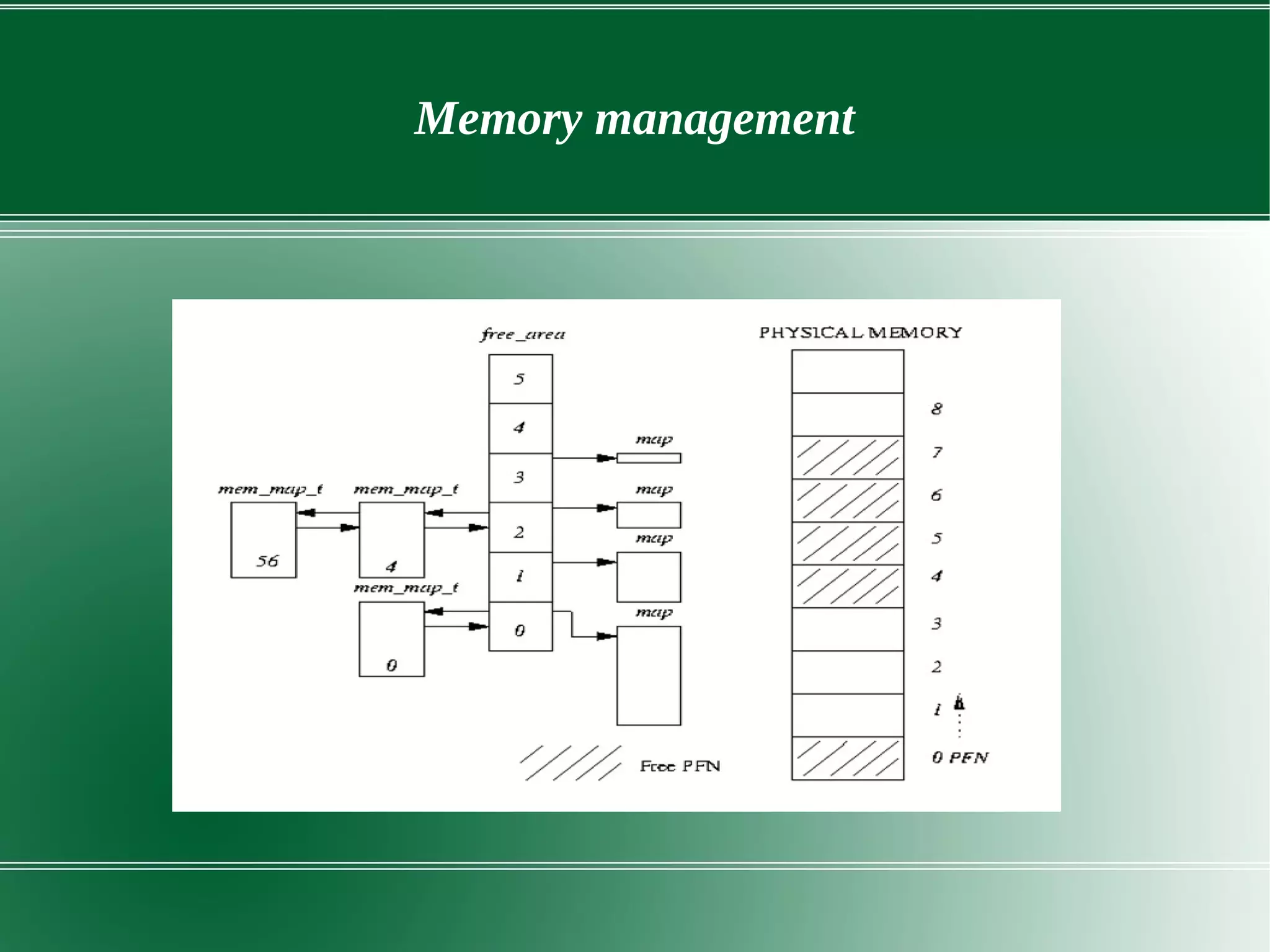
● Page allocation and deallocation
– mem_map_t : decribes single physical page
– free_area : to find free pages
– Buddy algorithm to allocate and deallocate pages
– Page allocation results in page fragmentation
– Reallocation combiles fragmented pages into large blocks
● Malloc(), vmalloc() and kmalloc()
Memory management
Devices drivers
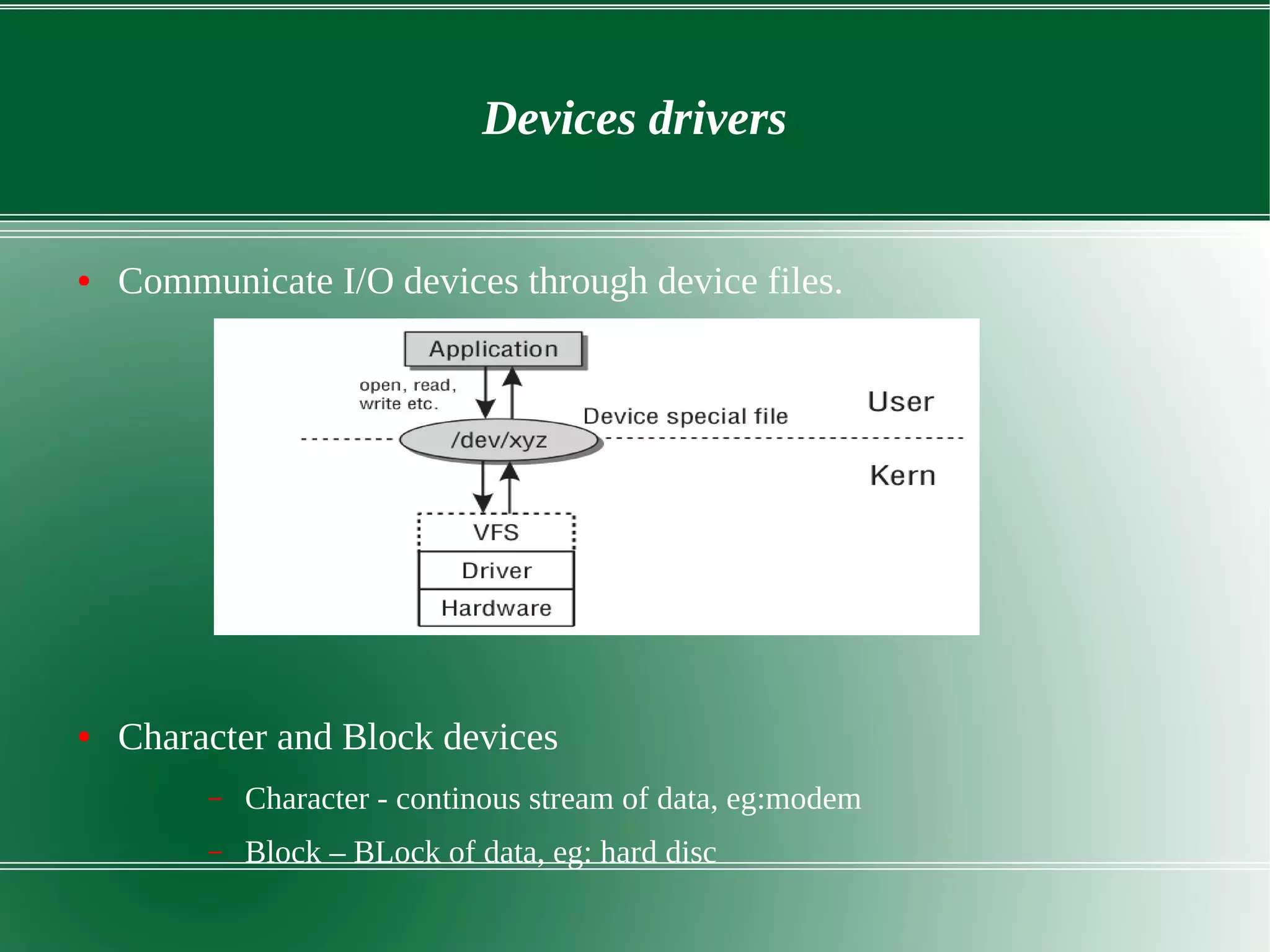
● Communicate I/O devices through device files.
● Character and Block devices
– Character - continous stream of data, eg:modem
– Block – BLock of data, eg: hard disc
Device drivers
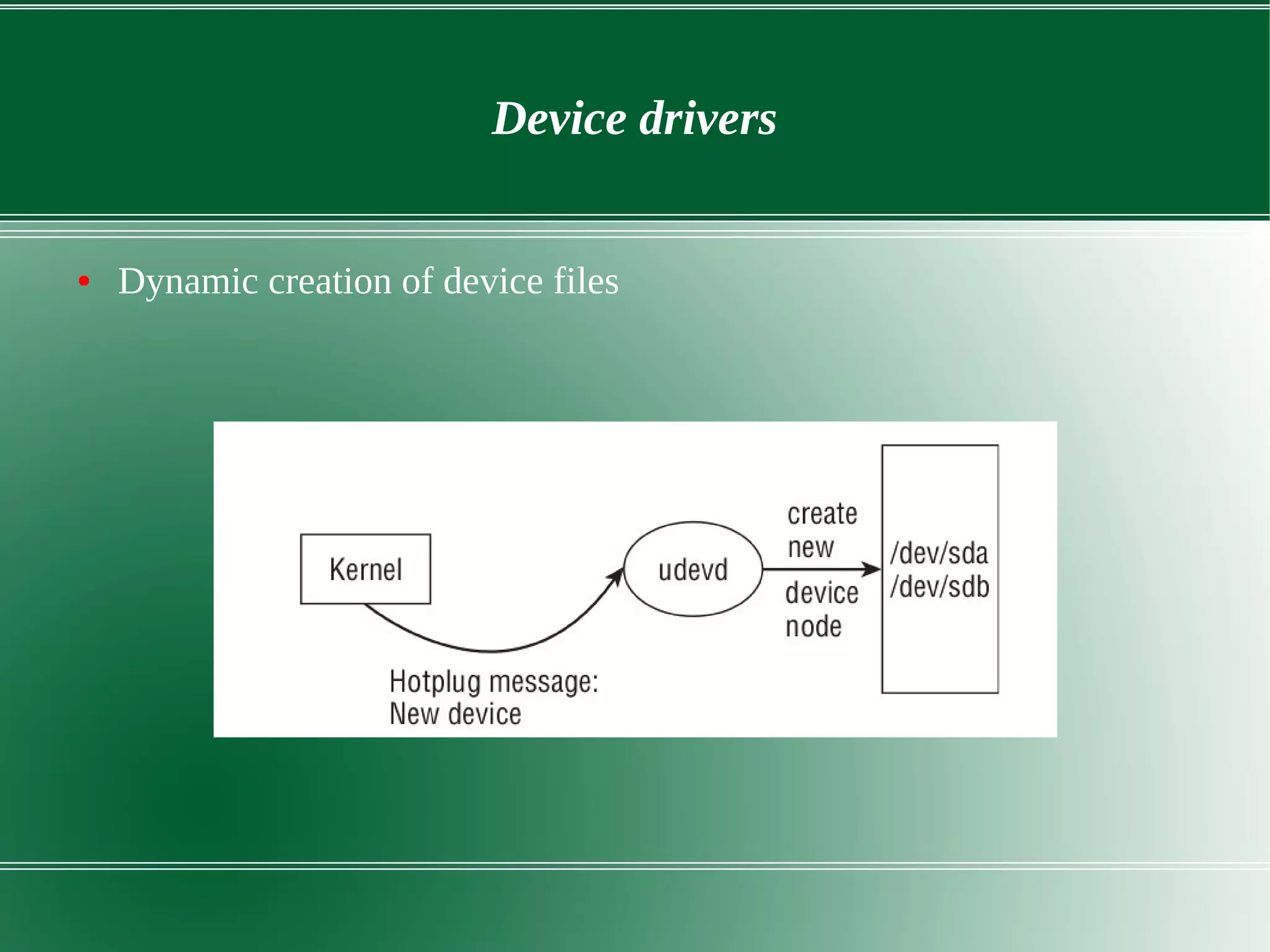
● Dynamic creation of device files
Thank you

Linux kernel architecture

  • 1.
  • 2.
    Outline ● Linux history ●Linux system architecture ● Linux kernel ● Kernel Architecture overview ● Kernel Functional overview – File system – Process management – Memory management – Device driver – Networking
  • 3.
    History of Linux ●First truly free UNIX like OS ● 1983 , GNU developed by Richard Stallman but kernel was missing ● Personal project by Finnish student Linus Torvalds to create a new free operating system kernel in year 1991. ● Linus Torvalds began a project that later became the Linux kernel. ● First version of kernel 0.01 ● 1991 from few c files to 18 million lines in 2015
  • 4.
  • 5.
    Characteristics of linuxOS ● Multiuser Capability ● Multitasking ● Portability – Works on different hardware ● Security – Authentication – Authorization – Encryption
  • 6.
  • 7.
    Linux system architecture ●Hardware layer – Consist of all peripherical devices like RAM, CPU, HD ● Kernel – Core of OS – Interacts with hardware – Perform low level services Shell – Interface to kernel. Hides complexity of kernel from users. – Take commands and executes kernel functions. ● Utilities
  • 8.
  • 9.
  • 10.
    Linux kernel ● Monolithickernel ● Supports – Preemptive mutitasking – Virtual memory – Shared libraries – Demand loading – Memory mangement – Threading – Loadable kernel modules
  • 11.
  • 12.
    Linux system architecture ●Virtual address space – 0x0000000 to 0xFFFFFFFF for 32bit linux ● User space - normal programs run – Contains data, stack ● Kernel space - where kernel run – Contains kernel code, pagetable..
  • 13.
    File systems ● InUNIX everything is a file ● Filesystem is a hierarchical storage of data adhering to a specific structure ● Tree like structure ● Folders named as directories ● Root - '/ '
  • 14.
    File systems ● Sortof files : directories (d), special files(s), links(l), sockets (s), named pipes(p) ● Major partitions on a Linux system: – data partition: system data, including the root partition containing all the data to start up and run the system – swap partition: expansion of the computer's physical memory, extra memory on hard disk(twice amount of RAM) ● Mount point – Partitions attached through mount point
  • 15.
  • 16.
    File system ● Conceptsin VFS – Super block – filesystem metadata – Inode – File metadata(permissions, owner, creation time) ● VFS is designed to work with filesystems that understand and implement such concepts
  • 17.
    File systems -VFS ● Four object types of VFS – Superblock object – specific mounted filesystem. – inode object - a specific file. – dentry object - directory entry, which is a single component of a path. – file object - an open file as associated with a process.
  • 18.
    Process management andScheduling ● Illusion of multitasking ● Issues kernel must resolve – Applications must not interfere. – CPU time shared fairly. ● Process priorities – Hard real time process – Soft real time process ● Allocation of CPU time
  • 19.
    Process management andScheduling ● Fork and exec system calls ● Process life cycle – Running, Waiting, Sleeping, Zombie
  • 20.
  • 21.
    Process management andScheduling ● User and kernel mode ● Interrupts and kernel threads ● Pre emptive multitasking – Scheduler can take global decisions to start and stop a process
  • 22.
    Process management andscheduling ● I/O bound and processor bound process – I/O bound : much time on waiting request from I/O – Process bound : much time on executing code ● Nice values – range from -20 to 19 (default 0) – Larger nice value low priority ● Time slice (default 20 ms) – Numeric value showing how long a task can run
  • 23.
    Process management andscheduling ● Scheduling policy with example – Consider two runnable task text editor and video encoder – Text editor – I/O bound, video encoder – processor bound – Text editor : Interactive process hence larger timeslice and high priority
  • 24.
    Memory management ● Virtualmemory – makes system appear to have more memory than it actually has – Virtual memory greater than physical memory – Each process have its own virtual address space – Sharing of physical memory ● Zones – ZONE_DMA - This zone contains pages that can undergo DMA. – ZONE_DMA32 - these pages are accessible only by 32-bit devices – ZONE_NORMAL - contains normal, regularly mapped, pages. – ZONE_HIGHMEM - contains “high memory,” which are pages not permanently mapped into the kernel’s address space.
  • 25.
    Memory management ● Pagetable - Data structures used to map virtual to physical address ● Pages – memory divided into chunks of equal size. (Intel x86 4Kbytes)
  • 26.
  • 27.
    Memory management ● Demandpaging – Creating page faults and bringing image/file/data from disk to physical memory – Process should wait in queue until it is fetched ● Swapping – No free space in RAM swapping done and done by kswapd – The page selected for swapping has modified (dirty page)it is saved as swap file. – Least recently used(LRU) used for swapping. ● Shared virtual memory – Two process sharing same physical memory
  • 28.
    Memory management ● Pageallocation and deallocation – mem_map_t : decribes single physical page – free_area : to find free pages – Buddy algorithm to allocate and deallocate pages – Page allocation results in page fragmentation – Reallocation combiles fragmented pages into large blocks ● Malloc(), vmalloc() and kmalloc()
  • 29.
  • 30.
    Devices drivers ● CommunicateI/O devices through device files. ● Character and Block devices – Character - continous stream of data, eg:modem – Block – BLock of data, eg: hard disc
  • 31.
    Device drivers ● Dynamiccreation of device files
  • 32.