Table Of Contents
• COMPUTER NETWORK
• Advantages
• Disadvantages
• Node and Data Transfer Rate
• Client/Server Model
• File Server And Web Server
• LAN, WAN & MAN
• Internet
• Who owns the Internet?
• Internet Backbone and ISP
• Internet Connections
• Packet Switching
• TCP and IP
• Any Queries?
• Project Work- Computer
COMPUTER NETWORK
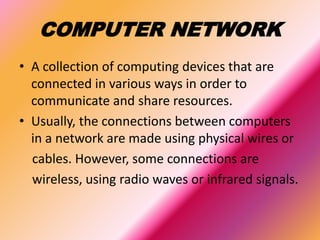
• A collection of computing devices that are
connected in various ways in order to
communicate and share resources.
• Usually, the connections between computers
in a network are made using physical wires or
cables. However, some connections are
wireless, using radio waves or infrared signals.
Advantages
• Sharing devices such as printers saves money.
• Site (software) licenses are likely to be cheaper
than buying several standalone licenses.
• Files can easily be shared between users.
• Network users can communicate by email and
instant messenger.
• Security is good - users cannot see other users'
files unlike on stand-alone machines.
• Data is easy to backup as all the data is stored on
the file server.
Disadvantages
• Purchasing the network cabling and file servers can be
expensive.
• Managing a large network is complicated, requires training
and a network manager usually needs to be employed.
• If the file server breaks down the files on the file server
become inaccessible. Email might still work if it is on a
separate server. The computers can still be used but are
isolated.
• Viruses can spread to other computers throughout a
computer network.
• There is a danger of hacking, particularly with wide area
networks. Security procedures are needed to prevent such
abuse.
Node and Data Transfer
Rate
• The generic term node or host refers to any
device on a network
• The speed with which data is moved from one
place on a network to another called data
transfer rate.
• Data transfer rate is a key issue in computer
networks
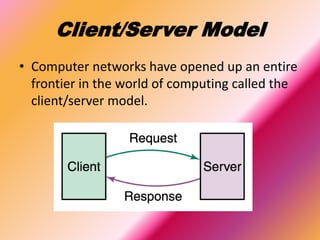
Client/Server Model
• Computer networks have opened up an entire
frontier in the world of computing called the
client/server model.
File Server And Web Server
File Server
• A computer that stores and
manages files for multiple
users on a network.
Web Server
• A computer dedicated to
responding to requests
(from the browser client)
for web pages.
LAN, WAN & MAN
• LAN(Local Area Network): A network that
connects a relatively small number of machines in
a relatively close geographical area.
• WAN(Wide Area Network): A network that
connects two or more local-area networks over a
potentially large geographic distance
• MAN(Metropolitan Area Network): The
communication infrastructures that have been
developed in and around large cities
Internet
• The Internet is the global system of interconnected computer networks
that use the Internet protocol suite (TCP/IP) to link billions of devices
worldwide. It is a network of networks that consists of millions of private,
public, academic, business, and government networks of local to global
scope, linked by a broad array of electronic, wireless, and optical
networking technologies.
• The Internet carries an extensive range of information resources and
services, such as mobile apps including social media apps, the inter-linked
hypertext documents and applications of the World Wide Web (WWW), e-
mail, multiplayer online games, telephony, and peer-to-peer networks for
file sharing.
Who owns the Internet?
• Well, nobody does. No single person or
company owns the Internet or even controls it
entirely. As a wide-area network, it is made up
of many smaller networks. These smaller
networks are often owned and managed by a
person or organization. The Internet, then, is
really defined by how connections can be
made between these networks.
Internet Backbone and
ISP
Internet Backbone
• A set of high-speed
networks that carry Internet
traffic.
• These networks are
provided by companies such
as AT&T, GTE, and IBM.
ISP(Internet Service Provider)
• A company that provides
other companies or
individuals with access to
the Internet
Internet Connections
• There are various technologies available that you can use to
connect a home computer to the Internet.
– A phone modem converts computer data into an analog audio
signal for transfer over a telephone line, and then a modem at the
destination converts it back again into data.
– A digital subscriber line(DSL) uses regular copper phone lines to
transfer digital data to and from the phone company’s central
office.
– A cable modem uses the same line that your cable TV signals come
in on to transfer the data back and forth.
Packet Switching
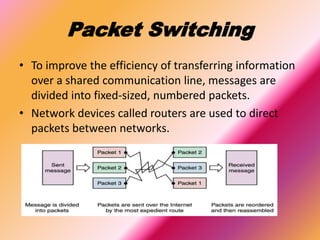
• To improve the efficiency of transferring information
over a shared communication line, messages are
divided into fixed-sized, numbered packets.
• Network devices called routers are used to direct
packets between networks.
TCP and IP
TCP
• TCP stands for Transmission
Control Protocol.
• TCP software breaks
messages into packets,
hands them off to the IP
software for delivery, and
then orders and
reassembles the packets at
their destination.
IP
• IP stands for Internet
Protocol.
• IP software deals with the
routing of packets through
the maze of interconnected
networks to their final
destination.
Any Queries?
Project Work- Computer
Submitted By:
• Rahul Das
• 8”C”
• 6
• Yellow
• V.S. Niketan
• ………………………………
Submitted To:
• Jeevan Sir
• V.S. Niketan
• ………………………………….

Computer network

  • 1.
    Table Of Contents •COMPUTER NETWORK • Advantages • Disadvantages • Node and Data Transfer Rate • Client/Server Model • File Server And Web Server • LAN, WAN & MAN • Internet • Who owns the Internet? • Internet Backbone and ISP • Internet Connections • Packet Switching • TCP and IP • Any Queries? • Project Work- Computer
  • 2.
    COMPUTER NETWORK • Acollection of computing devices that are connected in various ways in order to communicate and share resources. • Usually, the connections between computers in a network are made using physical wires or cables. However, some connections are wireless, using radio waves or infrared signals.
  • 3.
    Advantages • Sharing devicessuch as printers saves money. • Site (software) licenses are likely to be cheaper than buying several standalone licenses. • Files can easily be shared between users. • Network users can communicate by email and instant messenger. • Security is good - users cannot see other users' files unlike on stand-alone machines. • Data is easy to backup as all the data is stored on the file server.
  • 4.
    Disadvantages • Purchasing thenetwork cabling and file servers can be expensive. • Managing a large network is complicated, requires training and a network manager usually needs to be employed. • If the file server breaks down the files on the file server become inaccessible. Email might still work if it is on a separate server. The computers can still be used but are isolated. • Viruses can spread to other computers throughout a computer network. • There is a danger of hacking, particularly with wide area networks. Security procedures are needed to prevent such abuse.
  • 5.
    Node and DataTransfer Rate • The generic term node or host refers to any device on a network • The speed with which data is moved from one place on a network to another called data transfer rate. • Data transfer rate is a key issue in computer networks
  • 6.
    Client/Server Model • Computernetworks have opened up an entire frontier in the world of computing called the client/server model.
  • 7.
    File Server AndWeb Server File Server • A computer that stores and manages files for multiple users on a network. Web Server • A computer dedicated to responding to requests (from the browser client) for web pages.
  • 8.
    LAN, WAN &MAN • LAN(Local Area Network): A network that connects a relatively small number of machines in a relatively close geographical area. • WAN(Wide Area Network): A network that connects two or more local-area networks over a potentially large geographic distance • MAN(Metropolitan Area Network): The communication infrastructures that have been developed in and around large cities
  • 9.
    Internet • The Internetis the global system of interconnected computer networks that use the Internet protocol suite (TCP/IP) to link billions of devices worldwide. It is a network of networks that consists of millions of private, public, academic, business, and government networks of local to global scope, linked by a broad array of electronic, wireless, and optical networking technologies. • The Internet carries an extensive range of information resources and services, such as mobile apps including social media apps, the inter-linked hypertext documents and applications of the World Wide Web (WWW), e- mail, multiplayer online games, telephony, and peer-to-peer networks for file sharing.
  • 10.
    Who owns theInternet? • Well, nobody does. No single person or company owns the Internet or even controls it entirely. As a wide-area network, it is made up of many smaller networks. These smaller networks are often owned and managed by a person or organization. The Internet, then, is really defined by how connections can be made between these networks.
  • 11.
    Internet Backbone and ISP InternetBackbone • A set of high-speed networks that carry Internet traffic. • These networks are provided by companies such as AT&T, GTE, and IBM. ISP(Internet Service Provider) • A company that provides other companies or individuals with access to the Internet
  • 12.
    Internet Connections • Thereare various technologies available that you can use to connect a home computer to the Internet. – A phone modem converts computer data into an analog audio signal for transfer over a telephone line, and then a modem at the destination converts it back again into data. – A digital subscriber line(DSL) uses regular copper phone lines to transfer digital data to and from the phone company’s central office. – A cable modem uses the same line that your cable TV signals come in on to transfer the data back and forth.
  • 13.
    Packet Switching • Toimprove the efficiency of transferring information over a shared communication line, messages are divided into fixed-sized, numbered packets. • Network devices called routers are used to direct packets between networks.
  • 14.
    TCP and IP TCP •TCP stands for Transmission Control Protocol. • TCP software breaks messages into packets, hands them off to the IP software for delivery, and then orders and reassembles the packets at their destination. IP • IP stands for Internet Protocol. • IP software deals with the routing of packets through the maze of interconnected networks to their final destination.
  • 15.
  • 16.
    Project Work- Computer SubmittedBy: • Rahul Das • 8”C” • 6 • Yellow • V.S. Niketan • ……………………………… Submitted To: • Jeevan Sir • V.S. Niketan • ………………………………….