Webmasters 101 By Yuval Tochner
Table Of Contents Introduction Domain Registration Web Design Web Programming Web Hosting E-Commerce Search Engines PPC Search Engines Alexa Affiliate Networks  Link / Traffic Exchange Bibliography
Introduction
Introduction The purpose of this lecture Internet Snapshot – Webmasters Eyes Going online Getting Traffic Webmasters Tools Generating Revenue Joining the Webmasters community
Internet Statistics – Sites Basic Internet Statistics: 35 Million hostnames (www.yourdomain.something) 16 Million active sites 4 Million IP addresses  Lots of template sites, empty sites, redirections. Survey done by HTTP querying of known hostnames. (Netcraft)
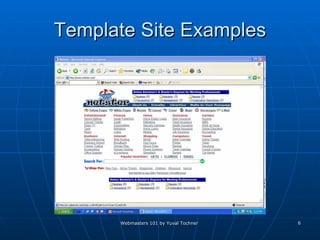
Template Site Examples
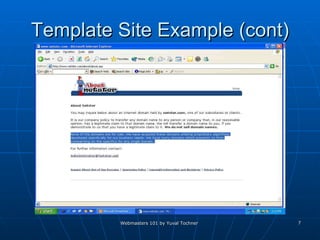
Template Site Example (cont)
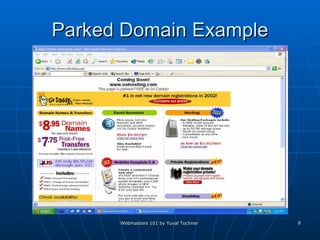
Parked Domain Example
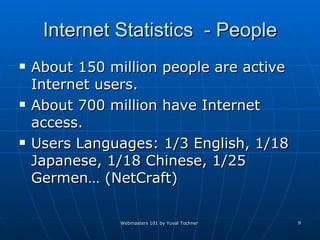
Internet Statistics  - People About 150 million people are active Internet users. About 700 million have Internet access. Users Languages: 1/3 English, 1/18 Japanese, 1/18 Chinese, 1/25 Germen… (NetCraft)
Domain Registration
Domain Registration What is a domain ? www.DomainName.X   Where X is a TLD (Top Level Domain) such as: Generic: .com, .net, .org, .biz, .pro, .name, .info, .. Country Code: .il, .uk, .jp, .de, … New: In the future many others Who’s in charge of TLD’s ?? Currently: ICANN - The Internet Corporation for Assigned Names and Numbers  Past: Network Solutions (US Government Contractor)
Domain Registration (Cont) Why do I need a domain ? IP alone – not a good idea ! Free sub-domain / user options. www.sub.domain.com www.domain.com/~user   Site branding (.com hype story)  What is a good / great domain ? Easy to brand – Meaningful for site content Easy to remember – avoid special characters, short.  Search engines friendly – long with keywords Cyber Squatting / free traffic
Finding a domain Are any good domain names left ? Yes and No So how do I find a good domain ? The WHOIS service – all Verisign (past Network Solutions) registrars.  Problem: Registrars using their own databases The BetterWhois service– all ICANN registrars and Verisign. Intelligent registration services
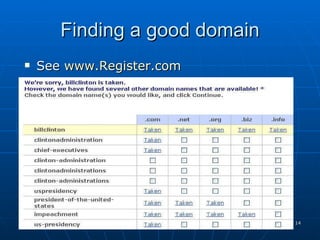
Finding a good domain See  www.Register.com
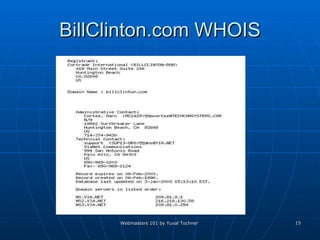
BillClinton.com WHOIS
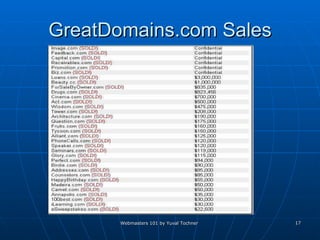
Finding a great domain (cont) The “best” domains are usually taken and are offered for sale !!!  What makes a domain worth anything ??  See  www.GreatDomains.com  for such. The truly great domains are very expensive.
GreatDomains.com Sales
Registering a domain You can register a domain for a yearly fee of between $6.95 to $30 depending on the registrar and TLD. Services offered:  Domain name parking  Free website e-mail services Auto renew Use well known domain registrars:  Cheap and good: www.GoDaddy.com  Expensive and good:  www.Register.com
Web Design
Web Design Available options: Build it yourself  Code it (Notepad, EditPlus, XEmacs…) Use Tools (Adobe GoLive, FrontPage, Dreamweaver) Build using pre-made components Use site templates Use pre-made content management systems Have it made professionally (Not going to talk about this in a webmasters 101 lecture).
Web Design – Build it yourself Writing your own HTML’s manually Fine for tiny – small sites. Costly Don’t unless you have very good reasons too Using site building tools: Build a web site quickly and professionally Many optional pre built features, see FrontPage Extensions.  Most webmasters use these tools. Unlike writing your own C++ code, writing your own HTML files does not give you better results.
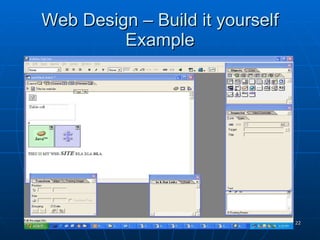
Web Design – Build it yourself Example
Use pre-made components Site Templates Building a professional looking site requires talent and experience. Graphic design and interface of site has huge importance: Loading Speed Look and feel effects visitors stickiness  Most visitors only visit the homepage and then leave
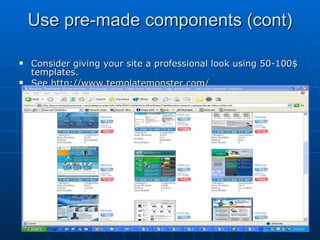
Use pre-made components (cont) Consider giving your site a professional look using 50-100$ templates. See  http://www.templatemonster.com/
Use pre-made components (cont 2) Use pre-made content management systems. Just customize the look and feel, and have a professional content management site ready to go. Available features: Content handling, FAQ, Surveys, Clubs, Stories, Site Statistics, Bulletin boards, Ads management, Search options, and much more.
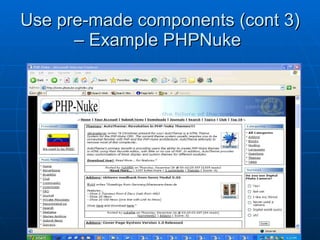
Use pre-made components (cont 3) – Example PHPNuke
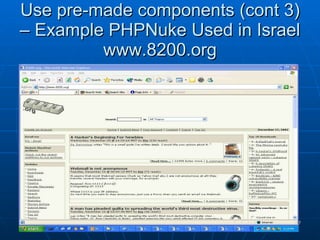
Use pre-made components (cont 3) – Example PHPNuke Used in Israel www.8200.org
Web Programming
Web Programming Client-Side Scripting Server-Side Scripting / Applications
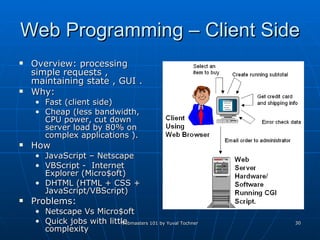
Web Programming – Client Side Overview: processing simple requests , maintaining state , GUI . Why:  Fast (client side)  Cheap (less bandwidth, CPU power, cut down server load by 80% on complex applications ). How JavaScript – Netscape VBScript -  Internet Explorer (Micro$oft) DHTML (HTML + CSS + JavaScript/VBScript) Problems:  Netscape Vs Micro$oft  Quick jobs with little complexity
Web Programming – Client Side (cont) Java Applets - Extremely powerful and portable. Why : Need Client Side power, unparallel by scripting languages. Why Not: Slow loading Security restrictions by Java (Disk access / Server access). Client side support. Not very popular these days…
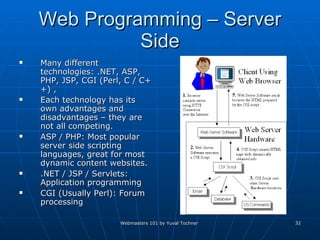
Web Programming – Server Side Many different technologies: .NET, ASP, PHP, JSP, CGI (Perl, C / C++) ,  Each technology has its own advantages and disadvantages – they are not all competing.  ASP / PHP: Most popular server side scripting languages, great for most dynamic content websites. .NET / JSP / Servlets: Application programming CGI (Usually Perl): Forum processing
Web Hosting
Web Hosting Site complete, time to go live. You need a web host and a web package. More then 10,000 web hosts available on the web, each with many available packages. Usually good idea to pick a host in the US, as more then 50% of surfers are from the US.
Web Hosting Options Shared Hosting (Virtual Hosting)  -  Web hosting in which the service provider serves pages for multiple Web sites, each having its own Internet domain name, from a single Web server. Virtual Server  - a server (computer and various server programs) at someone else's location that is shared by multiple Web site owners so that each owner can use and administer it as though they had complete control of the server  Dedicated Server (Dedicated Hosting)  - The rental and exclusive use of a computer that includes a Web server, related software, and connection to the Internet, housed in the Web hosting company's premises.
Web Hosting - OS Choosing an OS (Standard options) Windows 2000 Servers Complete support for all popular Microsoft applications including .NET, MS Access, SQL 2000, Active Server Pages, MS Index Servers, FrontPage 2002  Rule of Thumb: choose Windows only if these technologies are needed. UNIX / Linux Apache Servers Suitable for meeting most Internet requirements, such as mailing, streaming, Web servers, and file serving.  Cost-effective choice - it uses hardware efficiently.  Huge number of free applications available on the Internet.  Rule of Thumb: choose Linux unless you have a very good reason not too.
Web Hosting – OS (cont) Sun Solaris Proven track record and is deployed in many large Fortune 500 corporations.  Mature platform and there are a large number of applications and development tools available.  Sun's capacity and stability make it ideal for high-traffic functions, such as database servers, high-traffic Web servers and mission-critical servers.  Free BSD FreeBSD is a very stable open source operating system, and a good alternative to Linux.  Extremely well-integrated and tested system. It is inexpensive and there are a large number of free applications available.  Free BSD is ideal for Web servers and virtual hosting servers.
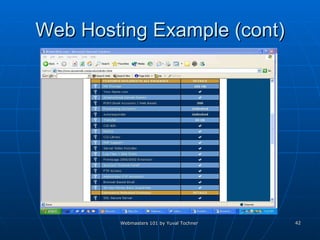
Web Hosting – Features  Basic Setting Price Setup Fee OS Disk Space  Bandwidth  Number of domains on account
Web Hosting – Features (cont) Email Setting Email Accounts (POP3, IMAP, Webmail) Auto Responders  Vacation Messages  Mail Forwarding  Spam Filters
Web Hosting – Features  (cont 2) File Managements  FTP Accounts  SQL Support – mySQL / SQL 2000 Password Protected Directories  Technologies CGI-BIN  Available Web Programming Technologies
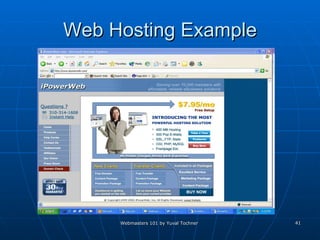
Web Hosting Example
Web Hosting Example (cont)
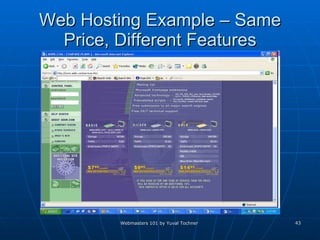
Web Hosting Example – Same Price, Different Features
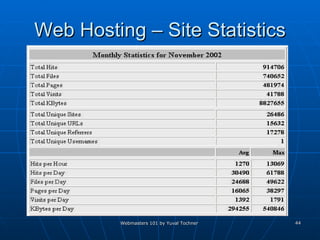
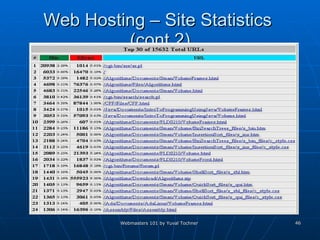
Web Hosting – Site Statistics
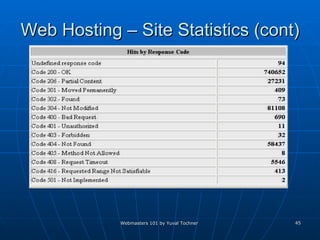
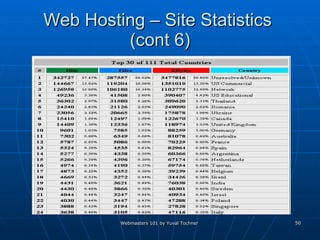
Web Hosting – Site Statistics (cont)
Web Hosting – Site Statistics  (cont 2)
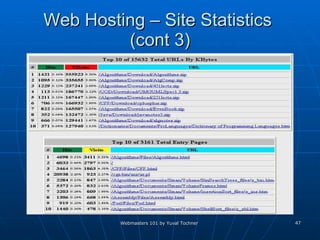
Web Hosting – Site Statistics  (cont 3)
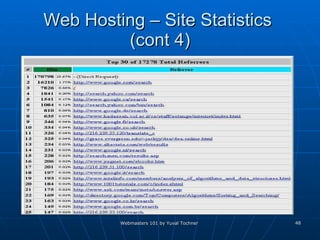
Web Hosting – Site Statistics  (cont 4)
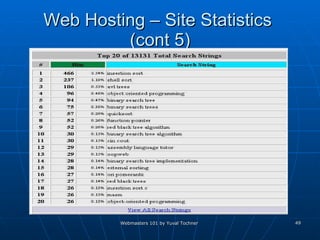
Web Hosting – Site Statistics  (cont 5)
Web Hosting – Site Statistics  (cont 6)
E-Commerce
E-Commerce E-commerce (electronic commerce or EC) is the buying and selling of goods and services on the Internet, especially the World Wide Web.  E-commerce can be divided into:  E-tailing or "virtual storefronts" on Web sites with online catalogs, sometimes gathered into a "virtual mall"  The gathering and use of demographic data through Web contacts  Electronic Data Interchange ( EDI ), the business-to-business exchange of data  Business-to-business buying and selling  The security of business transactions (whatis.com)
E-Commerce – Virtual Store Front Build it yourself – use previously listed webmasters skills. Buy it prepared – Yahoo Shopping, Amazon zShops and MSN eshops. Free traffic Customers feel more secure    more sells (??) Easy site building
E-Commerce – Virtual Store Front (cont) Build it yourself: Regular market oriented site Accepting online payments: Credit Cards Digital Checks PayPal (by eBay) Accepting payments is easy to do anybody can – so watch out to whom you give your credit card number !!!
E-Commerce – Accepting Credit Cards / Digital Checks Most common services: Virtual Terminal Authorize, process, and manage credit card transactions manually from any computer that has an Internet connection and a Web browser.  WebLink Automate credit card transactions directly from your Web site, without complex hardware or software systems.
E-Commerce – Accepting Credit Cards / Digital Checks (cont) Virtual Terminal   Technology :  Provide needed information in SSL form to Authorize.net. (CC number, personal details..) Information encrypted with 40 – 128 bit SSL 3.0 and sent to Authorize.net host server. The server sends the data through the authorization network to the appropriate card issuer's bank using a secure, proprietary connection. (3 Seconds) Merchant receives an authorization number  Authorize.Net server stores the transaction  Transactions are automatically settled each day and are typically funded within two to three business days. WebLink Same as with virtual terminal only filled by the client.
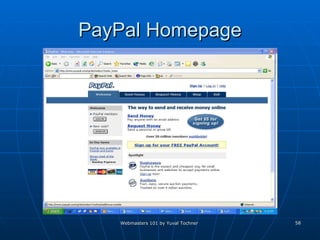
E-Commerce PayPal An ebay company 20 million members  37,000 shops accepting PayPal What is PayPal ? Pay online using your email and PayPal account Free to join Easy for merchants to accept payments Secure payment option for customers
PayPal Homepage
Search Engines
Search Engines  Many general purpose search engines. Many specialized search engines Most of these are built on very few database providers: Google.com (Yahoo.com) Inktomi.com (MSN Search, HotBot, & iWon ) Overture.com  FastSearch.com (AllTheWeb.com, Lycos, ..) Open Directory (dmoz.org)
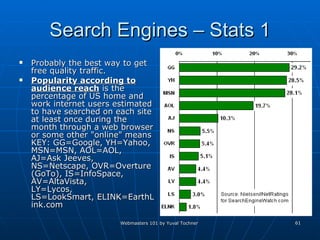
Search Engines – Stats 1 Probably the best way to get free quality traffic. Popularity according to audience reach  is the percentage of US home and work internet users estimated to have searched on each site at least once during the month through a web browser or some other "online" means KEY: GG=Google, YH=Yahoo, MSN=MSN, AOL=AOL, AJ=Ask Jeeves, NS=Netscape, OVR=Overture (GoTo), IS=InfoSpace, AV=AltaVista, LY=Lycos, LS=LookSmart, ELINK=EarthLink.com
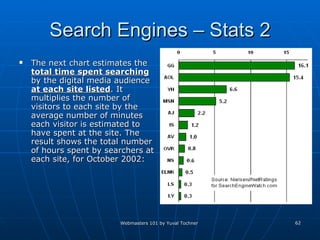
Search Engines – Stats 2 The next chart estimates the  total time spent searching  by the digital media audience  at each site listed . It multiplies the number of visitors to each site by the average number of minutes each visitor is estimated to have spent at the site. The result shows the total number of hours spent by searchers at each site, for October 2002:
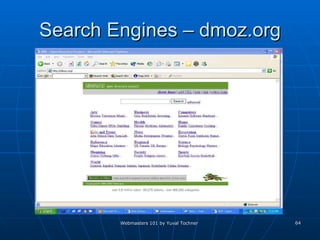
Search Engines – Getting Listed Submitting your URL to search engines is easy. Submit manually Use services / programs.  Submit your URL’s to all major search engines including: Google, AOL, Yahoo, Altavista, Netscape, dmoz.org (The easy way to get in),… Submit your URL’s to all smaller search engines too. Especially ones related to your type of site.
Search Engines – dmoz.org
Become a dmoz Editor
Search Engines – Content Many Search Engine algorithms. The single most important precondition for getting good Search Engines ranking is content. Basic keyword / phrase search in content More links from other to you (See Google’s algorithm) You need to determine what are the important keywords for your site. Sign up with Google’s AdWord for finding keyword statistics.  Use the statistics to determine the important keywords for all search engines.  Optimize your site according to general optimization guidelines and according to your content. (See next slide).
Search Engines – Optimizations Title Tag –  Used in search result, so make it readable Lots of search engine ranking points for search terms in it Up to 50 – 80 characters Correlate with content Meta Tags –  Description (up to 255 characters, accurate, start with keywords ) Keywords (up to 1024 characters) Correlate with content
Search Engines – Optimizations 2 Using frames – add <noframes> html tags with links and content in them Dynamic Links – Symbols  ?, &, %, +, =, $, cgi-bin, .cgi  in URL.  Flash – Crawler problems. (Links) Image MAPS – Crawler problems. JavaScript Links – Crawler problems.
Pay Per Click Search Engines
PPC Search Engines Getting high ranks in search engines for good keywords is difficult, only top 50 search results get any significant traffic. Buying “quality” traffic is much easier. PPC Search engines provide “quality” traffic on the CPC (Cost Per Click) model. You must known all your relevant keywords to get the maximum benefits.  You must also have an estimate of the percentages of “quality” traffic who chose to buy your product or service.
PPC Search Engines (cont) Some PPC’s embed paid advertisements in their results (goClick.com) (Classic PPC) Some provide them in a separate section (Google.com)  Largest PPC’s : Overture  Many small sites.  Many strong affiliates for top 3 bid positions: Yahoo, MSN, Altavista, Lycos, InfoSpace. Google Some small sites. AOL, Netscape, CompuServe, AT&T, EarthLink, Sympatico  LookSmart MSN, About, Altavista, InfoSpace, Time Warner.
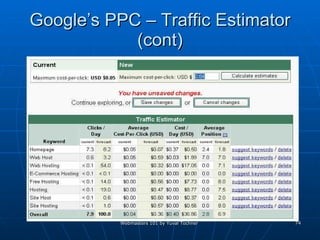
Google PPC Google.com AdWords– Text Ads on side of search results. Default minimum 0.05$ per click. Minimum is set automatically per keyword demand and supply.  Position is set according to competing offered prices for keywords. Use different Ads / Campaigns on different keywords. Ads are selected randomly Campaigns contain a few possible ads for selection. CTR (click through rate) must be > 1 Limit on number of advertiser per keyword Some special keyword have unlimited advertisers (Such as web hosting)
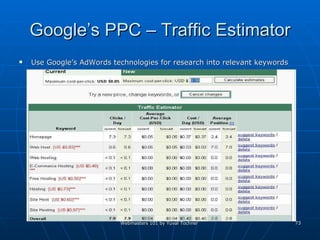
Google’s PPC – Traffic Estimator Use Google’s AdWords technologies for research into relevant keywords
Google’s PPC – Traffic Estimator (cont)
Alexa
Alexa Up since 1996 providing mostly site information.  Past Partners: Netscape, Microsoft, Current: Amazon Crawling the Internet, gathering site information. 250 gigabytes of information per day  More then 100 Terabyte archive
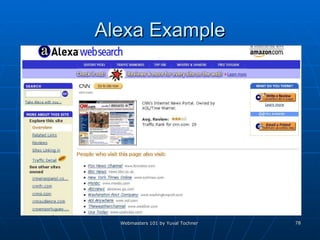
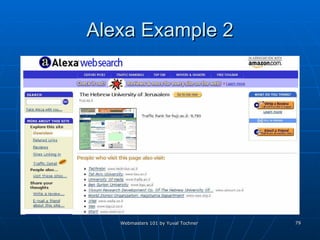
Alexa (cont) Technologies: Site stats:  Links to site Page View  - Page Views measures the number of pages viewed by Alexa Toolbar users  Reach  - is typically expressed as the percentage of all Internet users who visit a given site  Traffic rank  (Mean of page view rank  and reach rank) in comparison to other web sites (10 million Alexa Toolbar users)  Make informed decisions about the website. Related Links:  Use path of Alexa community Clustering data mining – sites that are similar and relevant to one another  User suggestions
Alexa Example
Alexa Example 2
Affiliate Networks
Affiliate Networks Advertisers – want to advertise their website / product    want traffic Publishers – want to have other advertise through them    want revenue Affiliate Network Company – a good place to bring these two together
Affiliate Networks (cont) Advertisers usually start with a 100$ to 10000$ deposit with the network. Publishers can join for free – if approved. Publishers can approach advertisers or visa versa. (Depends on network). Publishers paid by network not advertiser.
Affiliate Networks – Program Types Program Types: CPC (Click) CPM (Impressions) Lead Sale (Flat rate / Percentage)  Verified email Pop-ups Pop-under
Affiliate Network Companies Dozens of large affiliate networks DoubleClick – Since 1996 60 Billion Ad views per month Accept only high trafficked web sites LinkShare – Claim over 10 million affiliates Lead (PPL) / Sale FastClick Banners / Pop-Unders / Avenues  Commission Junctions
Don’t Think About Generating False Impressions You are not the first to try Israel has been band from many Affiliate networks… If your advertisers are not making money, then you won’t either. Affiliate Networks are constantly upgrading technologies…
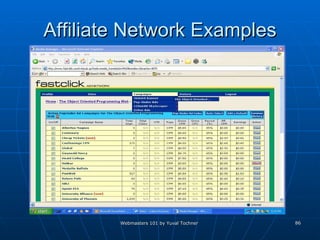
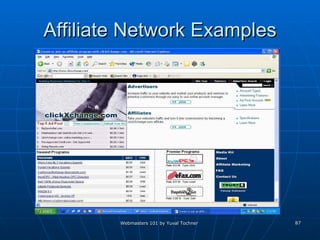
Affiliate Network Examples
Link Exchange / Traffic Exchange Hundreds of Link / Traffic Exchange ventures on the net. Why exchange links ? More ways to get to your site Google’s algorithm Why exchange traffic ? Offering relevant services / products / content. Make money from low quality traffic  Why own such a venture Offer an exchange ratio which lets you advertise your real websites. Charge for service
Conclusions Think of an Idea. (Do the research)  Buy a domain  Build a site Find a good hosting company Find an e-commerce solution provider Go live with site Use Search engines, PPC Search engines, Affiliate Networks. Have an Internet Business.
Bibliography Personal knowledge and experience. WhatIs.com – definitions HostIndex.com – hosting information NetCraft.com – Internet Statistics iBoost.com – Small biz portal Dozens of other web resources

Webmaster

  • 1.
    Webmasters 101 ByYuval Tochner
  • 2.
    Table Of ContentsIntroduction Domain Registration Web Design Web Programming Web Hosting E-Commerce Search Engines PPC Search Engines Alexa Affiliate Networks Link / Traffic Exchange Bibliography
  • 3.
  • 4.
    Introduction The purposeof this lecture Internet Snapshot – Webmasters Eyes Going online Getting Traffic Webmasters Tools Generating Revenue Joining the Webmasters community
  • 5.
    Internet Statistics –Sites Basic Internet Statistics: 35 Million hostnames (www.yourdomain.something) 16 Million active sites 4 Million IP addresses Lots of template sites, empty sites, redirections. Survey done by HTTP querying of known hostnames. (Netcraft)
  • 6.
  • 7.
  • 8.
  • 9.
    Internet Statistics - People About 150 million people are active Internet users. About 700 million have Internet access. Users Languages: 1/3 English, 1/18 Japanese, 1/18 Chinese, 1/25 Germen… (NetCraft)
  • 10.
  • 11.
    Domain Registration Whatis a domain ? www.DomainName.X Where X is a TLD (Top Level Domain) such as: Generic: .com, .net, .org, .biz, .pro, .name, .info, .. Country Code: .il, .uk, .jp, .de, … New: In the future many others Who’s in charge of TLD’s ?? Currently: ICANN - The Internet Corporation for Assigned Names and Numbers Past: Network Solutions (US Government Contractor)
  • 12.
    Domain Registration (Cont)Why do I need a domain ? IP alone – not a good idea ! Free sub-domain / user options. www.sub.domain.com www.domain.com/~user Site branding (.com hype story) What is a good / great domain ? Easy to brand – Meaningful for site content Easy to remember – avoid special characters, short. Search engines friendly – long with keywords Cyber Squatting / free traffic
  • 13.
    Finding a domainAre any good domain names left ? Yes and No So how do I find a good domain ? The WHOIS service – all Verisign (past Network Solutions) registrars. Problem: Registrars using their own databases The BetterWhois service– all ICANN registrars and Verisign. Intelligent registration services
  • 14.
    Finding a gooddomain See www.Register.com
  • 15.
  • 16.
    Finding a greatdomain (cont) The “best” domains are usually taken and are offered for sale !!! What makes a domain worth anything ?? See www.GreatDomains.com for such. The truly great domains are very expensive.
  • 17.
  • 18.
    Registering a domainYou can register a domain for a yearly fee of between $6.95 to $30 depending on the registrar and TLD. Services offered: Domain name parking Free website e-mail services Auto renew Use well known domain registrars: Cheap and good: www.GoDaddy.com Expensive and good: www.Register.com
  • 19.
  • 20.
    Web Design Availableoptions: Build it yourself Code it (Notepad, EditPlus, XEmacs…) Use Tools (Adobe GoLive, FrontPage, Dreamweaver) Build using pre-made components Use site templates Use pre-made content management systems Have it made professionally (Not going to talk about this in a webmasters 101 lecture).
  • 21.
    Web Design –Build it yourself Writing your own HTML’s manually Fine for tiny – small sites. Costly Don’t unless you have very good reasons too Using site building tools: Build a web site quickly and professionally Many optional pre built features, see FrontPage Extensions. Most webmasters use these tools. Unlike writing your own C++ code, writing your own HTML files does not give you better results.
  • 22.
    Web Design –Build it yourself Example
  • 23.
    Use pre-made componentsSite Templates Building a professional looking site requires talent and experience. Graphic design and interface of site has huge importance: Loading Speed Look and feel effects visitors stickiness Most visitors only visit the homepage and then leave
  • 24.
    Use pre-made components(cont) Consider giving your site a professional look using 50-100$ templates. See http://www.templatemonster.com/
  • 25.
    Use pre-made components(cont 2) Use pre-made content management systems. Just customize the look and feel, and have a professional content management site ready to go. Available features: Content handling, FAQ, Surveys, Clubs, Stories, Site Statistics, Bulletin boards, Ads management, Search options, and much more.
  • 26.
    Use pre-made components(cont 3) – Example PHPNuke
  • 27.
    Use pre-made components(cont 3) – Example PHPNuke Used in Israel www.8200.org
  • 28.
  • 29.
    Web Programming Client-SideScripting Server-Side Scripting / Applications
  • 30.
    Web Programming –Client Side Overview: processing simple requests , maintaining state , GUI . Why: Fast (client side) Cheap (less bandwidth, CPU power, cut down server load by 80% on complex applications ). How JavaScript – Netscape VBScript - Internet Explorer (Micro$oft) DHTML (HTML + CSS + JavaScript/VBScript) Problems: Netscape Vs Micro$oft Quick jobs with little complexity
  • 31.
    Web Programming –Client Side (cont) Java Applets - Extremely powerful and portable. Why : Need Client Side power, unparallel by scripting languages. Why Not: Slow loading Security restrictions by Java (Disk access / Server access). Client side support. Not very popular these days…
  • 32.
    Web Programming –Server Side Many different technologies: .NET, ASP, PHP, JSP, CGI (Perl, C / C++) , Each technology has its own advantages and disadvantages – they are not all competing. ASP / PHP: Most popular server side scripting languages, great for most dynamic content websites. .NET / JSP / Servlets: Application programming CGI (Usually Perl): Forum processing
  • 33.
  • 34.
    Web Hosting Sitecomplete, time to go live. You need a web host and a web package. More then 10,000 web hosts available on the web, each with many available packages. Usually good idea to pick a host in the US, as more then 50% of surfers are from the US.
  • 35.
    Web Hosting OptionsShared Hosting (Virtual Hosting) - Web hosting in which the service provider serves pages for multiple Web sites, each having its own Internet domain name, from a single Web server. Virtual Server - a server (computer and various server programs) at someone else's location that is shared by multiple Web site owners so that each owner can use and administer it as though they had complete control of the server Dedicated Server (Dedicated Hosting) - The rental and exclusive use of a computer that includes a Web server, related software, and connection to the Internet, housed in the Web hosting company's premises.
  • 36.
    Web Hosting -OS Choosing an OS (Standard options) Windows 2000 Servers Complete support for all popular Microsoft applications including .NET, MS Access, SQL 2000, Active Server Pages, MS Index Servers, FrontPage 2002 Rule of Thumb: choose Windows only if these technologies are needed. UNIX / Linux Apache Servers Suitable for meeting most Internet requirements, such as mailing, streaming, Web servers, and file serving. Cost-effective choice - it uses hardware efficiently. Huge number of free applications available on the Internet. Rule of Thumb: choose Linux unless you have a very good reason not too.
  • 37.
    Web Hosting –OS (cont) Sun Solaris Proven track record and is deployed in many large Fortune 500 corporations. Mature platform and there are a large number of applications and development tools available. Sun's capacity and stability make it ideal for high-traffic functions, such as database servers, high-traffic Web servers and mission-critical servers. Free BSD FreeBSD is a very stable open source operating system, and a good alternative to Linux. Extremely well-integrated and tested system. It is inexpensive and there are a large number of free applications available. Free BSD is ideal for Web servers and virtual hosting servers.
  • 38.
    Web Hosting –Features Basic Setting Price Setup Fee OS Disk Space Bandwidth Number of domains on account
  • 39.
    Web Hosting –Features (cont) Email Setting Email Accounts (POP3, IMAP, Webmail) Auto Responders Vacation Messages Mail Forwarding Spam Filters
  • 40.
    Web Hosting –Features (cont 2) File Managements FTP Accounts SQL Support – mySQL / SQL 2000 Password Protected Directories Technologies CGI-BIN Available Web Programming Technologies
  • 41.
  • 42.
  • 43.
    Web Hosting Example– Same Price, Different Features
  • 44.
    Web Hosting –Site Statistics
  • 45.
    Web Hosting –Site Statistics (cont)
  • 46.
    Web Hosting –Site Statistics (cont 2)
  • 47.
    Web Hosting –Site Statistics (cont 3)
  • 48.
    Web Hosting –Site Statistics (cont 4)
  • 49.
    Web Hosting –Site Statistics (cont 5)
  • 50.
    Web Hosting –Site Statistics (cont 6)
  • 51.
  • 52.
    E-Commerce E-commerce (electroniccommerce or EC) is the buying and selling of goods and services on the Internet, especially the World Wide Web. E-commerce can be divided into: E-tailing or &quot;virtual storefronts&quot; on Web sites with online catalogs, sometimes gathered into a &quot;virtual mall&quot; The gathering and use of demographic data through Web contacts Electronic Data Interchange ( EDI ), the business-to-business exchange of data Business-to-business buying and selling The security of business transactions (whatis.com)
  • 53.
    E-Commerce – VirtualStore Front Build it yourself – use previously listed webmasters skills. Buy it prepared – Yahoo Shopping, Amazon zShops and MSN eshops. Free traffic Customers feel more secure  more sells (??) Easy site building
  • 54.
    E-Commerce – VirtualStore Front (cont) Build it yourself: Regular market oriented site Accepting online payments: Credit Cards Digital Checks PayPal (by eBay) Accepting payments is easy to do anybody can – so watch out to whom you give your credit card number !!!
  • 55.
    E-Commerce – AcceptingCredit Cards / Digital Checks Most common services: Virtual Terminal Authorize, process, and manage credit card transactions manually from any computer that has an Internet connection and a Web browser. WebLink Automate credit card transactions directly from your Web site, without complex hardware or software systems.
  • 56.
    E-Commerce – AcceptingCredit Cards / Digital Checks (cont) Virtual Terminal Technology : Provide needed information in SSL form to Authorize.net. (CC number, personal details..) Information encrypted with 40 – 128 bit SSL 3.0 and sent to Authorize.net host server. The server sends the data through the authorization network to the appropriate card issuer's bank using a secure, proprietary connection. (3 Seconds) Merchant receives an authorization number Authorize.Net server stores the transaction Transactions are automatically settled each day and are typically funded within two to three business days. WebLink Same as with virtual terminal only filled by the client.
  • 57.
    E-Commerce PayPal Anebay company 20 million members 37,000 shops accepting PayPal What is PayPal ? Pay online using your email and PayPal account Free to join Easy for merchants to accept payments Secure payment option for customers
  • 58.
  • 59.
  • 60.
    Search Engines Many general purpose search engines. Many specialized search engines Most of these are built on very few database providers: Google.com (Yahoo.com) Inktomi.com (MSN Search, HotBot, & iWon ) Overture.com FastSearch.com (AllTheWeb.com, Lycos, ..) Open Directory (dmoz.org)
  • 61.
    Search Engines –Stats 1 Probably the best way to get free quality traffic. Popularity according to audience reach is the percentage of US home and work internet users estimated to have searched on each site at least once during the month through a web browser or some other &quot;online&quot; means KEY: GG=Google, YH=Yahoo, MSN=MSN, AOL=AOL, AJ=Ask Jeeves, NS=Netscape, OVR=Overture (GoTo), IS=InfoSpace, AV=AltaVista, LY=Lycos, LS=LookSmart, ELINK=EarthLink.com
  • 62.
    Search Engines –Stats 2 The next chart estimates the total time spent searching by the digital media audience at each site listed . It multiplies the number of visitors to each site by the average number of minutes each visitor is estimated to have spent at the site. The result shows the total number of hours spent by searchers at each site, for October 2002:
  • 63.
    Search Engines –Getting Listed Submitting your URL to search engines is easy. Submit manually Use services / programs. Submit your URL’s to all major search engines including: Google, AOL, Yahoo, Altavista, Netscape, dmoz.org (The easy way to get in),… Submit your URL’s to all smaller search engines too. Especially ones related to your type of site.
  • 64.
  • 65.
  • 66.
    Search Engines –Content Many Search Engine algorithms. The single most important precondition for getting good Search Engines ranking is content. Basic keyword / phrase search in content More links from other to you (See Google’s algorithm) You need to determine what are the important keywords for your site. Sign up with Google’s AdWord for finding keyword statistics. Use the statistics to determine the important keywords for all search engines. Optimize your site according to general optimization guidelines and according to your content. (See next slide).
  • 67.
    Search Engines –Optimizations Title Tag – Used in search result, so make it readable Lots of search engine ranking points for search terms in it Up to 50 – 80 characters Correlate with content Meta Tags – Description (up to 255 characters, accurate, start with keywords ) Keywords (up to 1024 characters) Correlate with content
  • 68.
    Search Engines –Optimizations 2 Using frames – add <noframes> html tags with links and content in them Dynamic Links – Symbols ?, &, %, +, =, $, cgi-bin, .cgi in URL. Flash – Crawler problems. (Links) Image MAPS – Crawler problems. JavaScript Links – Crawler problems.
  • 69.
    Pay Per ClickSearch Engines
  • 70.
    PPC Search EnginesGetting high ranks in search engines for good keywords is difficult, only top 50 search results get any significant traffic. Buying “quality” traffic is much easier. PPC Search engines provide “quality” traffic on the CPC (Cost Per Click) model. You must known all your relevant keywords to get the maximum benefits. You must also have an estimate of the percentages of “quality” traffic who chose to buy your product or service.
  • 71.
    PPC Search Engines(cont) Some PPC’s embed paid advertisements in their results (goClick.com) (Classic PPC) Some provide them in a separate section (Google.com) Largest PPC’s : Overture Many small sites. Many strong affiliates for top 3 bid positions: Yahoo, MSN, Altavista, Lycos, InfoSpace. Google Some small sites. AOL, Netscape, CompuServe, AT&T, EarthLink, Sympatico LookSmart MSN, About, Altavista, InfoSpace, Time Warner.
  • 72.
    Google PPC Google.comAdWords– Text Ads on side of search results. Default minimum 0.05$ per click. Minimum is set automatically per keyword demand and supply. Position is set according to competing offered prices for keywords. Use different Ads / Campaigns on different keywords. Ads are selected randomly Campaigns contain a few possible ads for selection. CTR (click through rate) must be > 1 Limit on number of advertiser per keyword Some special keyword have unlimited advertisers (Such as web hosting)
  • 73.
    Google’s PPC –Traffic Estimator Use Google’s AdWords technologies for research into relevant keywords
  • 74.
    Google’s PPC –Traffic Estimator (cont)
  • 75.
  • 76.
    Alexa Up since1996 providing mostly site information. Past Partners: Netscape, Microsoft, Current: Amazon Crawling the Internet, gathering site information. 250 gigabytes of information per day More then 100 Terabyte archive
  • 77.
    Alexa (cont) Technologies:Site stats: Links to site Page View - Page Views measures the number of pages viewed by Alexa Toolbar users Reach - is typically expressed as the percentage of all Internet users who visit a given site Traffic rank (Mean of page view rank and reach rank) in comparison to other web sites (10 million Alexa Toolbar users) Make informed decisions about the website. Related Links: Use path of Alexa community Clustering data mining – sites that are similar and relevant to one another User suggestions
  • 78.
  • 79.
  • 80.
  • 81.
    Affiliate Networks Advertisers– want to advertise their website / product  want traffic Publishers – want to have other advertise through them  want revenue Affiliate Network Company – a good place to bring these two together
  • 82.
    Affiliate Networks (cont)Advertisers usually start with a 100$ to 10000$ deposit with the network. Publishers can join for free – if approved. Publishers can approach advertisers or visa versa. (Depends on network). Publishers paid by network not advertiser.
  • 83.
    Affiliate Networks –Program Types Program Types: CPC (Click) CPM (Impressions) Lead Sale (Flat rate / Percentage) Verified email Pop-ups Pop-under
  • 84.
    Affiliate Network CompaniesDozens of large affiliate networks DoubleClick – Since 1996 60 Billion Ad views per month Accept only high trafficked web sites LinkShare – Claim over 10 million affiliates Lead (PPL) / Sale FastClick Banners / Pop-Unders / Avenues Commission Junctions
  • 85.
    Don’t Think AboutGenerating False Impressions You are not the first to try Israel has been band from many Affiliate networks… If your advertisers are not making money, then you won’t either. Affiliate Networks are constantly upgrading technologies…
  • 86.
  • 87.
  • 88.
    Link Exchange /Traffic Exchange Hundreds of Link / Traffic Exchange ventures on the net. Why exchange links ? More ways to get to your site Google’s algorithm Why exchange traffic ? Offering relevant services / products / content. Make money from low quality traffic Why own such a venture Offer an exchange ratio which lets you advertise your real websites. Charge for service
  • 89.
    Conclusions Think ofan Idea. (Do the research) Buy a domain Build a site Find a good hosting company Find an e-commerce solution provider Go live with site Use Search engines, PPC Search engines, Affiliate Networks. Have an Internet Business.
  • 90.
    Bibliography Personal knowledgeand experience. WhatIs.com – definitions HostIndex.com – hosting information NetCraft.com – Internet Statistics iBoost.com – Small biz portal Dozens of other web resources