From Virtualization to Cloud:
How Automation Drives Agility
Banjot Chanana, VMware
Christian Paulus, VMware
Mandy Storbakken, Medtronic
VCM5269
#VCM5269
2
Agenda
 An Evolutionary Cloud Deployment Approach
 Medtronic Cloud Automation Case Study
3
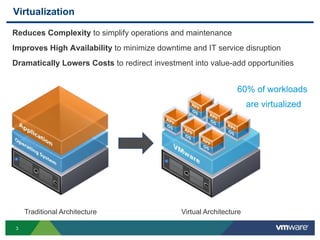
Virtualization
Reduces Complexity to simplify operations and maintenance
Improves High Availability to minimize downtime and IT service disruption
Dramatically Lowers Costs to redirect investment into value-add opportunities
Traditional Architecture Virtual Architecture
60% of workloads
are virtualized
4
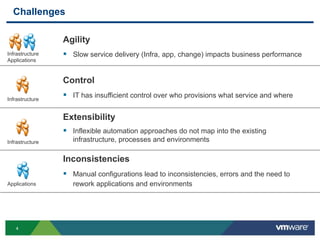
Challenges
Control
 IT has insufficient control over who provisions what service and where
Extensibility
 Inflexible automation approaches do not map into the existing
infrastructure, processes and environments
Inconsistencies
 Manual configurations lead to inconsistencies, errors and the need to
rework applications and environments
Agility
 Slow service delivery (Infra, app, change) impacts business performanceInfrastructure
Applications
Infrastructure
Infrastructure
Applications
5
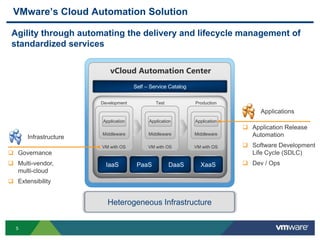
VMware’s Cloud Automation Solution
Self – Service Catalog
IaaS PaaS DaaS XaaS
vCloud Automation Center
Heterogeneous Infrastructure
VM with OS
Middleware
Application
VM with OS
Middleware
Application
VM with OS
Middleware
Application
Development Test Production
Agility through automating the delivery and lifecycle management of
standardized services
 Governance
 Multi-vendor,
multi-cloud
 Extensibility
Infrastructure
 Application Release
Automation
 Software Development
Life Cycle (SDLC)
 Dev / Ops
Applications
6
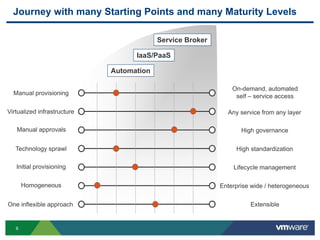
Journey with many Starting Points and many Maturity Levels
Manual provisioning
On-demand, automated
self – service access
Virtualized infrastructure Any service from any layer
Manual approvals High governance
Technology sprawl High standardization
Initial provisioning Lifecycle management
Homogeneous Enterprise wide / heterogeneous
ExtensibleOne inflexible approach
Automation
Service Broker
IaaS/PaaS
7
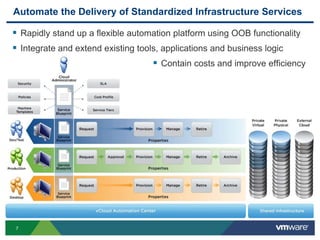
Automate the Delivery of Standardized Infrastructure Services
 Rapidly stand up a flexible automation platform using OOB functionality
 Integrate and extend existing tools, applications and business logic
 Contain costs and improve efficiency
8
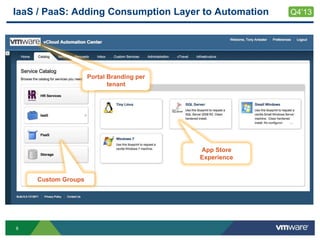
IaaS / PaaS: Adding Consumption Layer to Automation
Custom Groups
App Store
Experience
Portal Branding per
tenant
Q4’13
9
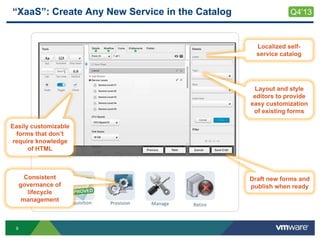
“XaaS”: Create Any New Service in the Catalog
Requisition Provision Manage Retire
Easily customizable
forms that don’t
require knowledge
of HTML
Layout and style
editors to provide
easy customization
of existing forms
Draft new forms and
publish when ready
Consistent
governance of
lifecycle
management
Q4’13
Localized self-
service catalog
10
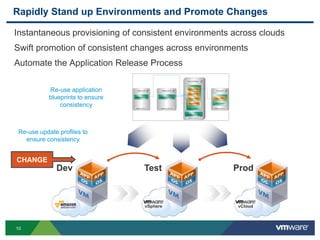
Rapidly Stand up Environments and Promote Changes
Instantaneous provisioning of consistent environments across clouds
Swift promotion of consistent changes across environments
Automate the Application Release Process
Dev ProdTest
vSphere vCloud
Re-use application
blueprints to ensure
consistency
CHANGE
Re-use update profiles to
ensure consistency
11
Application
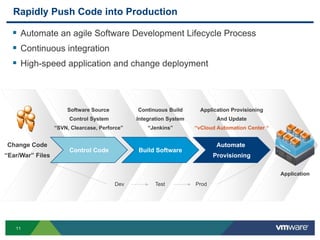
Rapidly Push Code into Production
 Automate an agile Software Development Lifecycle Process
 Continuous integration
 High-speed application and change deployment
Control Code
Change Code
“Ear/War” Files
Build Software
Automate
Provisioning
Software Source
Control System
“SVN, Clearcase, Perforce”
Continuous Build
Integration System
“Jenkins”
Application Provisioning
And Update
“vCloud Automation Center “
Dev Test Prod
12
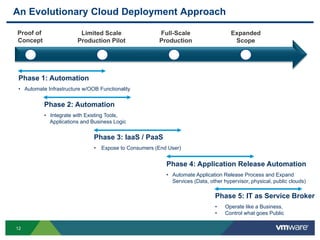
An Evolutionary Cloud Deployment Approach
Proof of
Concept
Limited Scale
Production Pilot
Full-Scale
Production
Expanded
Scope
Phase 1: Automation
• Automate Infrastructure w/OOB Functionality
Phase 2: Automation
• Integrate with Existing Tools,
Applications and Business Logic
Phase 3: IaaS / PaaS
• Expose to Consumers (End User)
Phase 4: Application Release Automation
• Automate Application Release Process and Expand
Services (Data, other hypervisor, physical, public clouds)
Phase 5: IT as Service Broker
• Operate like a Business,
• Control what goes Public
13
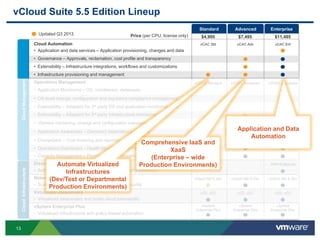
CloudManagementCloudInfrastructure
vCloud Suite 5.5 Edition Lineup
Price (per CPU, license only)
vSphere Enterprise Plus
• Virtualized infrastructure with policy-based automation
Disaster Recovery Automation
• Automated disaster recovery planning, testing, and execution
Cloud Automation
• Application and data services – Application provisioning, changes and data
• Governance – Approvals, reclamation, cost profile and transparency
• Extensibility – Infrastructure integrations, workflows and customizations
• Infrastructure provisioning and management
SRM Enterprise
$4,995 $7,495 $11,495
Networking and Security
• Scalable networking and virtualization-aware security
vCloud Net & Sec vCloud Net & SecvCloud Net & Sec
vSphere
Enterprise Plus
vSphere
Enterprise Plus
vSphere
Enterprise Plus
Operations Management
• Application Monitoring – OS, middleware, databases
• OS-level change, configuration and regulatory compliance management
• Extensibility – Adapters for 3rd party OS and application monitoring tools
• Extensibility – Adapters for 3rd party Infrastructure monitoring tools
• vSphere hardening, change and configuration management
• Application Awareness – Discovery dependency mapping
• Chargeback – Cost metering and reporting
• Operations Dashboard – Health Monitoring and Performance Analytics
• Capacity Management – Planning and Optimization
vCOPS Advanced vCOPS Enterprise
vCAC Ent
Updated Q3 2013
vCOPS Standard
vCAC AdvvCAC Std
Virtualized Datacenters
• Virtualized datacenters and public cloud extensibility
vCD, vCCvCD, vCCvCD, vCC
EnterpriseAdvancedStandard
Application and Data
Automation
Comprehensive IaaS and
XaaS
(Enterprise – wide
Production Environments)Automate Virtualized
Infrastructures
(Dev/Test or Departmental
Production Environments)
14
Agenda
 An Evolutionary Cloud Deployment Approach
 Medtronic Automation Case Study
15
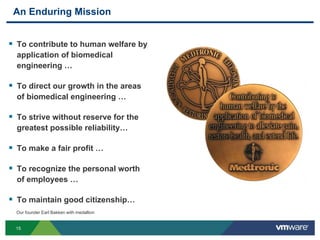
 To contribute to human welfare by
application of biomedical
engineering …
 To direct our growth in the areas
of biomedical engineering …
 To strive without reserve for the
greatest possible reliability…
 To make a fair profit …
 To recognize the personal worth
of employees …
 To maintain good citizenship…
An Enduring Mission
Our founder Earl Bakken with medallion
16
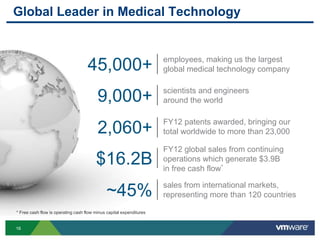
Global Leader in Medical Technology
* Free cash flow is operating cash flow minus capital expenditures
9,000+ scientists and engineers
around the world
$16.2B
FY12 global sales from continuing
operations which generate $3.9B
in free cash flow*
45,000+ employees, making us the largest
global medical technology company
2,060+ FY12 patents awarded, bringing our
total worldwide to more than 23,000
~45% sales from international markets,
representing more than 120 countries
17
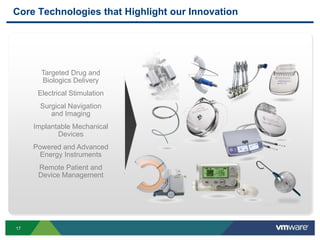
Core Technologies that Highlight our Innovation
Targeted Drug and
Biologics Delivery
Electrical Stimulation
Surgical Navigation
and Imaging
Implantable Mechanical
Devices
Powered and Advanced
Energy Instruments
Remote Patient and
Device Management
18
Internal IT Challenges
 Too slow
• At least 2 weeks to deploy a standard VM
• 2 months for physical hardware or non-standard VM
 Inconsistent deployments, error prone
 No resource lifecycle management
 Constant pressure to reduce costs
 Perception
19
Business Impact of Shadow IT
 Internal IT has no control over the resources
• May not be able to support the infrastructure effectively
• Difficult to assess risk
• Reduced visibility
 Integration with internal systems, including identity management
 Bringing the resources back into the organization
20
How to Compete with the Public Cloud
• Increase Speed - Increase Quality - Reduce Cost
• Reduce time to provision resources
• Allow users more control over provisioned resources
• Introduce or update chargeback model
• Introduce lifecycle management
• Virtualize, Standardize, Automate, Orchestrate
21
Virtualize, Standardize, Automate, Orchestrate
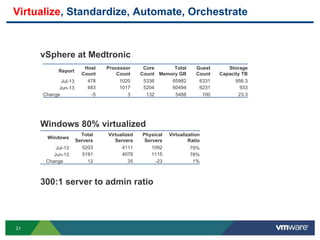
vSphere at Medtronic
Windows 80% virtualized
300:1 server to admin ratio
Report
Host
Count
Processor
Count
Core
Count
Total
Memory GB
Guest
Count
Storage
Capacity TB
Jul-13 478 1020 5336 65982 6331 956.3
Jun-13 483 1017 5204 60494 6231 933
Change -5 3 132 5488 100 23.3
Windows
Total
Servers
Virtualized
Servers
Physical
Servers
Virtualization
Ratio
Jul-13 5203 4111 1092 79%
Jun-13 5191 4076 1115 78%
Change 12 35 -23 1%
22
Virtualize, Standardize, Automate, Orchestrate
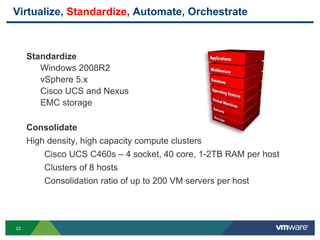
Standardize
Windows 2008R2
vSphere 5.x
Cisco UCS and Nexus
EMC storage
Consolidate
High density, high capacity compute clusters
Cisco UCS C460s – 4 socket, 40 core, 1-2TB RAM per host
Clusters of 8 hosts
Consolidation ratio of up to 200 VM servers per host
23
Virtualize, Standardize, Automate, Orchestrate
Automate infrastructure provisioning, starting with the Virtual Server
Build Process
Standardize on a smaller number of solution offerings
Remove repeatable, manual tasks
Improve the consistency of builds
Remove margin for error
Introduce resource lifecycle management
Automate the deprovisioning process for these resources
24
Tool Selection
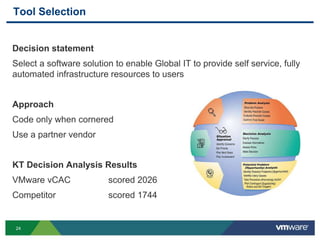
Decision statement
Select a software solution to enable Global IT to provide self service, fully
automated infrastructure resources to users
Approach
Code only when cornered
Use a partner vendor
KT Decision Analysis Results
VMware vCAC scored 2026
Competitor scored 1744
25
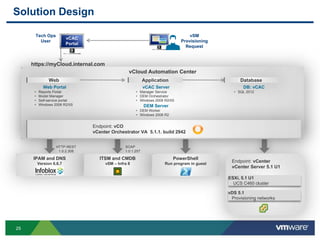
vCloud Automation Center
Solution Design
Web Portal
• Reports Portal
• Model Manager
• Self-service portal
• Windows 2008 R2/IIS
vCAC Server
• Manager Service
• DEM Orchestrator
• Windows 2008 R2/IIS
DEM Server
• DEM Worker
• Windows 2008 R2
DB: vCAC
• SQL 2012
Tech Ops
User
IPAM and DNS
Version 6.6.7
ITSM and CMDB
vSM – Infra 8
PowerShell
Run program in guest
HTTP-REST
1.0.2.308
SOAP
1.0.1.257
Endpoint: vCenter
vCenter Server 5.1 U1
vDS 5.1
Provisioning networks
ESXi, 5.1 U1
UCS C460 cluster
DatabaseWeb
https://myCloud.internal.com
vSM
Provisioning
Request
vCAC
Portal
Application
Endpoint: vCO
vCenter Orchestrator VA 5.1.1. build 2942
26
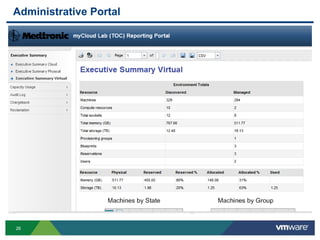
Administrative Portal
27
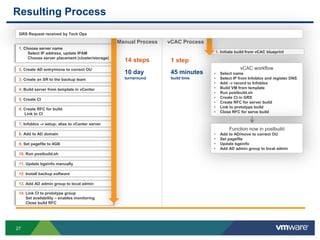
Resulting Process
1. Choose server name
Select IP address, update IPAM
Choose server placement (cluster/storage)
2. Create AD entry/move to correct OU
3. Create an SR to the backup team
4. Build server from template in vCenter
5. Create CI
6. Create RFC for build
Link to CI
7. Infoblox –r setup; alias to vCenter server
8. Add to AD domain
9. Set pagefile to 4GB
10. Run postbuild.sh
11. Update bgeinfo manually
12. Install backup software
13. Add AD admin group to local admin
14. Link CI to prototype group
Set availability – enables monitoring
Close build RFC
1. Initiate build from vCAC blueprint
vCAC workflow
• Select name
• Select IP from Infoblox and register DNS
• Add –r record to Infoblox
• Build VM from template
• Run postbuild.sh
• Create CI in GRS
• Create RFC for server build
• Link to prototype build
• Close RFC for serve build
Function now in postbuild
• Add to AD/move to correct OU
• Set pagefile
• Update bgeinfo
• Add AD admin group to local admin
Manual Process vCAC Process
1 step
45 minutes
build time
14 steps
10 day
turnaround
GRS Request received by Tech Ops
28
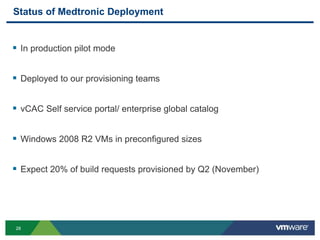
Status of Medtronic Deployment
 In production pilot mode
 Deployed to our provisioning teams
 vCAC Self service portal/ enterprise global catalog
 Windows 2008 R2 VMs in preconfigured sizes
 Expect 20% of build requests provisioned by Q2 (November)
29
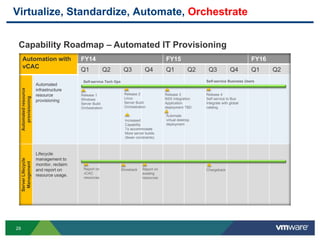
Virtualize, Standardize, Automate, Orchestrate
Automation with
vCAC
FY14 FY15 FY16
Q1 Q2 Q3 Q4 Q1 Q2 Q3 Q4 Q1 Q2
Automatedresource
provisioning
Automated
infrastructure
resource
provisioning
ServerLifecycle
Management
Lifecycle
management to
monitor, reclaim
and report on
resource usage.
Self-service Tech Ops
Release 1
Windows
Server Build
Orchestration
ChargebackShowback Report on
existing
resources
Self-service Business Users
Release 2
Linux
Server Build
Orchestration
Release 3
NSX Integration
Application
deployment TBD
Release 4
Self service to Bus
Integrate with global
catalog
Report on
vCAC
resources
Automate
virtual desktop
deployment
Increased
Capability
To accommodate
More server builds
(fewer constraints)
Capability Roadmap – Automated IT Provisioning
30
Questions
blogs.vmware.com/management
31
Other VMware Activities Related to This Session
 HOL:
HOL-SDC-1307
vCloud Automation Solutions
 Group Discussions:
VCM1003-GD
Cloud Automation with Naomi Sullivan
THANK YOU
From Virtualization to Cloud:
How Automation Drives Agility
Banjot Chanana, VMware
Christian Paulus, VMware
Mandy Storbakken, Medtronic
VCM5269
#VCM5269

VMworld 2013: From Virtualization to Cloud: How Automation Drives Agility

  • 1.
    From Virtualization toCloud: How Automation Drives Agility Banjot Chanana, VMware Christian Paulus, VMware Mandy Storbakken, Medtronic VCM5269 #VCM5269
  • 2.
    2 Agenda  An EvolutionaryCloud Deployment Approach  Medtronic Cloud Automation Case Study
  • 3.
    3 Virtualization Reduces Complexity tosimplify operations and maintenance Improves High Availability to minimize downtime and IT service disruption Dramatically Lowers Costs to redirect investment into value-add opportunities Traditional Architecture Virtual Architecture 60% of workloads are virtualized
  • 4.
    4 Challenges Control  IT hasinsufficient control over who provisions what service and where Extensibility  Inflexible automation approaches do not map into the existing infrastructure, processes and environments Inconsistencies  Manual configurations lead to inconsistencies, errors and the need to rework applications and environments Agility  Slow service delivery (Infra, app, change) impacts business performanceInfrastructure Applications Infrastructure Infrastructure Applications
  • 5.
    5 VMware’s Cloud AutomationSolution Self – Service Catalog IaaS PaaS DaaS XaaS vCloud Automation Center Heterogeneous Infrastructure VM with OS Middleware Application VM with OS Middleware Application VM with OS Middleware Application Development Test Production Agility through automating the delivery and lifecycle management of standardized services  Governance  Multi-vendor, multi-cloud  Extensibility Infrastructure  Application Release Automation  Software Development Life Cycle (SDLC)  Dev / Ops Applications
  • 6.
    6 Journey with manyStarting Points and many Maturity Levels Manual provisioning On-demand, automated self – service access Virtualized infrastructure Any service from any layer Manual approvals High governance Technology sprawl High standardization Initial provisioning Lifecycle management Homogeneous Enterprise wide / heterogeneous ExtensibleOne inflexible approach Automation Service Broker IaaS/PaaS
  • 7.
    7 Automate the Deliveryof Standardized Infrastructure Services  Rapidly stand up a flexible automation platform using OOB functionality  Integrate and extend existing tools, applications and business logic  Contain costs and improve efficiency
  • 8.
    8 IaaS / PaaS:Adding Consumption Layer to Automation Custom Groups App Store Experience Portal Branding per tenant Q4’13
  • 9.
    9 “XaaS”: Create AnyNew Service in the Catalog Requisition Provision Manage Retire Easily customizable forms that don’t require knowledge of HTML Layout and style editors to provide easy customization of existing forms Draft new forms and publish when ready Consistent governance of lifecycle management Q4’13 Localized self- service catalog
  • 10.
    10 Rapidly Stand upEnvironments and Promote Changes Instantaneous provisioning of consistent environments across clouds Swift promotion of consistent changes across environments Automate the Application Release Process Dev ProdTest vSphere vCloud Re-use application blueprints to ensure consistency CHANGE Re-use update profiles to ensure consistency
  • 11.
    11 Application Rapidly Push Codeinto Production  Automate an agile Software Development Lifecycle Process  Continuous integration  High-speed application and change deployment Control Code Change Code “Ear/War” Files Build Software Automate Provisioning Software Source Control System “SVN, Clearcase, Perforce” Continuous Build Integration System “Jenkins” Application Provisioning And Update “vCloud Automation Center “ Dev Test Prod
  • 12.
    12 An Evolutionary CloudDeployment Approach Proof of Concept Limited Scale Production Pilot Full-Scale Production Expanded Scope Phase 1: Automation • Automate Infrastructure w/OOB Functionality Phase 2: Automation • Integrate with Existing Tools, Applications and Business Logic Phase 3: IaaS / PaaS • Expose to Consumers (End User) Phase 4: Application Release Automation • Automate Application Release Process and Expand Services (Data, other hypervisor, physical, public clouds) Phase 5: IT as Service Broker • Operate like a Business, • Control what goes Public
  • 13.
    13 CloudManagementCloudInfrastructure vCloud Suite 5.5Edition Lineup Price (per CPU, license only) vSphere Enterprise Plus • Virtualized infrastructure with policy-based automation Disaster Recovery Automation • Automated disaster recovery planning, testing, and execution Cloud Automation • Application and data services – Application provisioning, changes and data • Governance – Approvals, reclamation, cost profile and transparency • Extensibility – Infrastructure integrations, workflows and customizations • Infrastructure provisioning and management SRM Enterprise $4,995 $7,495 $11,495 Networking and Security • Scalable networking and virtualization-aware security vCloud Net & Sec vCloud Net & SecvCloud Net & Sec vSphere Enterprise Plus vSphere Enterprise Plus vSphere Enterprise Plus Operations Management • Application Monitoring – OS, middleware, databases • OS-level change, configuration and regulatory compliance management • Extensibility – Adapters for 3rd party OS and application monitoring tools • Extensibility – Adapters for 3rd party Infrastructure monitoring tools • vSphere hardening, change and configuration management • Application Awareness – Discovery dependency mapping • Chargeback – Cost metering and reporting • Operations Dashboard – Health Monitoring and Performance Analytics • Capacity Management – Planning and Optimization vCOPS Advanced vCOPS Enterprise vCAC Ent Updated Q3 2013 vCOPS Standard vCAC AdvvCAC Std Virtualized Datacenters • Virtualized datacenters and public cloud extensibility vCD, vCCvCD, vCCvCD, vCC EnterpriseAdvancedStandard Application and Data Automation Comprehensive IaaS and XaaS (Enterprise – wide Production Environments)Automate Virtualized Infrastructures (Dev/Test or Departmental Production Environments)
  • 14.
    14 Agenda  An EvolutionaryCloud Deployment Approach  Medtronic Automation Case Study
  • 15.
    15  To contributeto human welfare by application of biomedical engineering …  To direct our growth in the areas of biomedical engineering …  To strive without reserve for the greatest possible reliability…  To make a fair profit …  To recognize the personal worth of employees …  To maintain good citizenship… An Enduring Mission Our founder Earl Bakken with medallion
  • 16.
    16 Global Leader inMedical Technology * Free cash flow is operating cash flow minus capital expenditures 9,000+ scientists and engineers around the world $16.2B FY12 global sales from continuing operations which generate $3.9B in free cash flow* 45,000+ employees, making us the largest global medical technology company 2,060+ FY12 patents awarded, bringing our total worldwide to more than 23,000 ~45% sales from international markets, representing more than 120 countries
  • 17.
    17 Core Technologies thatHighlight our Innovation Targeted Drug and Biologics Delivery Electrical Stimulation Surgical Navigation and Imaging Implantable Mechanical Devices Powered and Advanced Energy Instruments Remote Patient and Device Management
  • 18.
    18 Internal IT Challenges Too slow • At least 2 weeks to deploy a standard VM • 2 months for physical hardware or non-standard VM  Inconsistent deployments, error prone  No resource lifecycle management  Constant pressure to reduce costs  Perception
  • 19.
    19 Business Impact ofShadow IT  Internal IT has no control over the resources • May not be able to support the infrastructure effectively • Difficult to assess risk • Reduced visibility  Integration with internal systems, including identity management  Bringing the resources back into the organization
  • 20.
    20 How to Competewith the Public Cloud • Increase Speed - Increase Quality - Reduce Cost • Reduce time to provision resources • Allow users more control over provisioned resources • Introduce or update chargeback model • Introduce lifecycle management • Virtualize, Standardize, Automate, Orchestrate
  • 21.
    21 Virtualize, Standardize, Automate,Orchestrate vSphere at Medtronic Windows 80% virtualized 300:1 server to admin ratio Report Host Count Processor Count Core Count Total Memory GB Guest Count Storage Capacity TB Jul-13 478 1020 5336 65982 6331 956.3 Jun-13 483 1017 5204 60494 6231 933 Change -5 3 132 5488 100 23.3 Windows Total Servers Virtualized Servers Physical Servers Virtualization Ratio Jul-13 5203 4111 1092 79% Jun-13 5191 4076 1115 78% Change 12 35 -23 1%
  • 22.
    22 Virtualize, Standardize, Automate,Orchestrate Standardize Windows 2008R2 vSphere 5.x Cisco UCS and Nexus EMC storage Consolidate High density, high capacity compute clusters Cisco UCS C460s – 4 socket, 40 core, 1-2TB RAM per host Clusters of 8 hosts Consolidation ratio of up to 200 VM servers per host
  • 23.
    23 Virtualize, Standardize, Automate,Orchestrate Automate infrastructure provisioning, starting with the Virtual Server Build Process Standardize on a smaller number of solution offerings Remove repeatable, manual tasks Improve the consistency of builds Remove margin for error Introduce resource lifecycle management Automate the deprovisioning process for these resources
  • 24.
    24 Tool Selection Decision statement Selecta software solution to enable Global IT to provide self service, fully automated infrastructure resources to users Approach Code only when cornered Use a partner vendor KT Decision Analysis Results VMware vCAC scored 2026 Competitor scored 1744
  • 25.
    25 vCloud Automation Center SolutionDesign Web Portal • Reports Portal • Model Manager • Self-service portal • Windows 2008 R2/IIS vCAC Server • Manager Service • DEM Orchestrator • Windows 2008 R2/IIS DEM Server • DEM Worker • Windows 2008 R2 DB: vCAC • SQL 2012 Tech Ops User IPAM and DNS Version 6.6.7 ITSM and CMDB vSM – Infra 8 PowerShell Run program in guest HTTP-REST 1.0.2.308 SOAP 1.0.1.257 Endpoint: vCenter vCenter Server 5.1 U1 vDS 5.1 Provisioning networks ESXi, 5.1 U1 UCS C460 cluster DatabaseWeb https://myCloud.internal.com vSM Provisioning Request vCAC Portal Application Endpoint: vCO vCenter Orchestrator VA 5.1.1. build 2942
  • 26.
  • 27.
    27 Resulting Process 1. Chooseserver name Select IP address, update IPAM Choose server placement (cluster/storage) 2. Create AD entry/move to correct OU 3. Create an SR to the backup team 4. Build server from template in vCenter 5. Create CI 6. Create RFC for build Link to CI 7. Infoblox –r setup; alias to vCenter server 8. Add to AD domain 9. Set pagefile to 4GB 10. Run postbuild.sh 11. Update bgeinfo manually 12. Install backup software 13. Add AD admin group to local admin 14. Link CI to prototype group Set availability – enables monitoring Close build RFC 1. Initiate build from vCAC blueprint vCAC workflow • Select name • Select IP from Infoblox and register DNS • Add –r record to Infoblox • Build VM from template • Run postbuild.sh • Create CI in GRS • Create RFC for server build • Link to prototype build • Close RFC for serve build Function now in postbuild • Add to AD/move to correct OU • Set pagefile • Update bgeinfo • Add AD admin group to local admin Manual Process vCAC Process 1 step 45 minutes build time 14 steps 10 day turnaround GRS Request received by Tech Ops
  • 28.
    28 Status of MedtronicDeployment  In production pilot mode  Deployed to our provisioning teams  vCAC Self service portal/ enterprise global catalog  Windows 2008 R2 VMs in preconfigured sizes  Expect 20% of build requests provisioned by Q2 (November)
  • 29.
    29 Virtualize, Standardize, Automate,Orchestrate Automation with vCAC FY14 FY15 FY16 Q1 Q2 Q3 Q4 Q1 Q2 Q3 Q4 Q1 Q2 Automatedresource provisioning Automated infrastructure resource provisioning ServerLifecycle Management Lifecycle management to monitor, reclaim and report on resource usage. Self-service Tech Ops Release 1 Windows Server Build Orchestration ChargebackShowback Report on existing resources Self-service Business Users Release 2 Linux Server Build Orchestration Release 3 NSX Integration Application deployment TBD Release 4 Self service to Bus Integrate with global catalog Report on vCAC resources Automate virtual desktop deployment Increased Capability To accommodate More server builds (fewer constraints) Capability Roadmap – Automated IT Provisioning
  • 30.
  • 31.
    31 Other VMware ActivitiesRelated to This Session  HOL: HOL-SDC-1307 vCloud Automation Solutions  Group Discussions: VCM1003-GD Cloud Automation with Naomi Sullivan
  • 32.
  • 34.
    From Virtualization toCloud: How Automation Drives Agility Banjot Chanana, VMware Christian Paulus, VMware Mandy Storbakken, Medtronic VCM5269 #VCM5269