© 2009 VMware Inc. All rights reserved
VMware Hybrid Cloud Solutions
Alexander Kupchinetsky | akupchinetsky@vmware.com
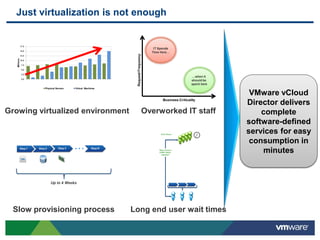
Just virtualization is not enough
0.0
2.5
5.0
7.5
10.0
12.5
15.0
17.5
Millions
Physical Servers Virtual Machines
Growing virtualized environment
Slow provisioning process
Overworked IT staff
Long end user wait times
VMware vCloud
Director delivers
complete
software-defined
services for easy
consumption in
minutes
3
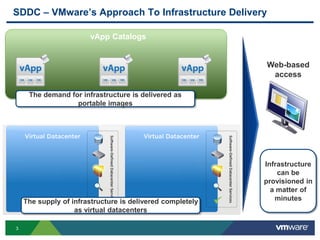
SDDC – VMware’s Approach To Infrastructure Delivery
vApp Catalogs
Web-based
access
The supply of infrastructure is delivered completely
as virtual datacenters
The demand for infrastructure is delivered as
portable images
Infrastructure
can be
provisioned in
a matter of
minutes
4
Virtual Datacenters Virtual Datacenters
Apps
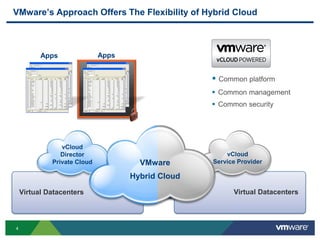
VMware’s Approach Offers The Flexibility of Hybrid Cloud
Apps
Management
Security
 Common platform
 Common management
 Common security
vCloud
Service Provider
vCloud
Director
Private Cloud VMware
Hybrid Cloud
5
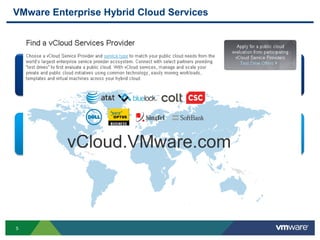
VMware Enterprise Hybrid Cloud Services
Designed for broad marketplace of cloud services
Offers vCD, OVF and vCloud API compatibility
Designates core vCloud compatibility
Globally consistent, VMware audited cloud service
Full compatibility, auditable security, global reach
Endorsed and co-branded by VMware
vCloud.VMware.com
6
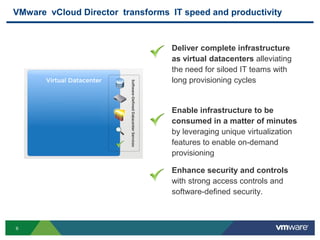
VMware vCloud Director transforms IT speed and productivity
Deliver complete infrastructure
as virtual datacenters alleviating
the need for siloed IT teams with
long provisioning cycles
Enhance security and controls
with strong access controls and
software-defined security.
Enable infrastructure to be
consumed in a matter of minutes
by leveraging unique virtualization
features to enable on-demand
provisioning
7
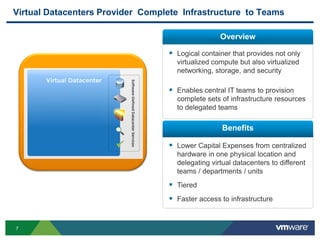
Virtual Datacenters Provider Complete Infrastructure to Teams
 Logical container that provides not only
virtualized compute but also virtualized
networking, storage, and security
 Enables central IT teams to provision
complete sets of infrastructure resources
to delegated teams
 Lower Capital Expenses from centralized
hardware in one physical location and
delegating virtual datacenters to different
teams / departments / units
 Tiered
 Faster access to infrastructure
Overview
Benefits
8
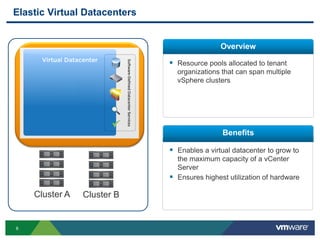
Elastic Virtual Datacenters
 Resource pools allocated to tenant
organizations that can span multiple
vSphere clusters
Overview
Benefits
 Enables a virtual datacenter to grow to
the maximum capacity of a vCenter
Server
 Ensures highest utilization of hardware
Cluster A Cluster B
9
Continuum of resource allocation models for your environment
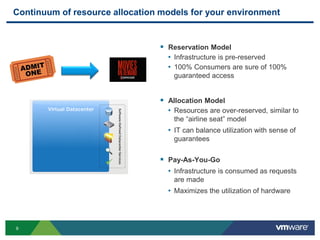
 Reservation Model
• Infrastructure is pre-reserved
• 100% Consumers are sure of 100%
guaranteed access
 Allocation Model
• Resources are over-reserved, similar to
the “airline seat” model
• IT can balance utilization with sense of
guarantees
 Pay-As-You-Go
• Infrastructure is consumed as requests
are made
• Maximizes the utilization of hardware
10
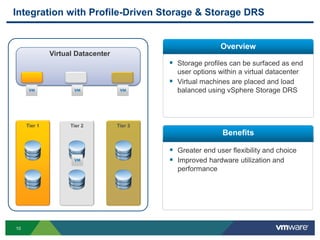
Integration with Profile-Driven Storage & Storage DRS
Tier 1 Tier 2 Tier 3
Virtual Datacenter
 Storage profiles can be surfaced as end
user options within a virtual datacenter
 Virtual machines are placed and load
balanced using vSphere Storage DRS
Overview
Benefits
 Greater end user flexibility and choice
 Improved hardware utilization and
performance
11
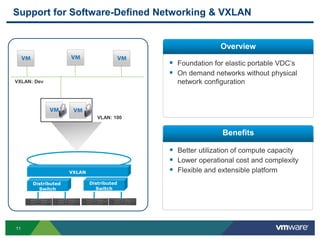
Support for Software-Defined Networking & VXLAN
 Foundation for elastic portable VDC’s
 On demand networks without physical
network configuration
Overview
Benefits
 Better utilization of compute capacity
 Lower operational cost and complexity
 Flexible and extensible platform
VLAN: 100
VXLAN: Dev
VXLAN
Distributed
Switch
Distributed
Switch
12
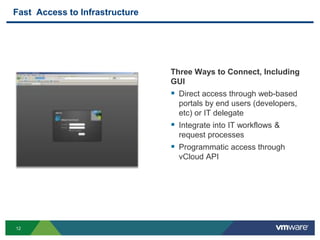
Fast Access to Infrastructure
Three Ways to Connect, Including
GUI
 Direct access through web-based
portals by end users (developers,
etc) or IT delegate
 Integrate into IT workflows &
request processes
 Programmatic access through
vCloud API
13
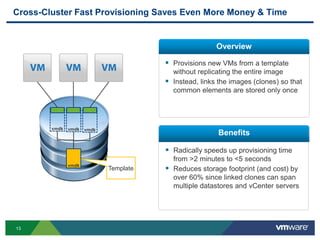
Cross-Cluster Fast Provisioning Saves Even More Money & Time
 Provisions new VMs from a template
without replicating the entire image
 Instead, links the images (clones) so that
common elements are stored only once
Overview
Benefits
 Radically speeds up provisioning time
from >2 minutes to <5 seconds
 Reduces storage footprint (and cost) by
over 60% since linked clones can span
multiple datastores and vCenter servers
Template
vmdk
vmdk vmdk vmdk
14
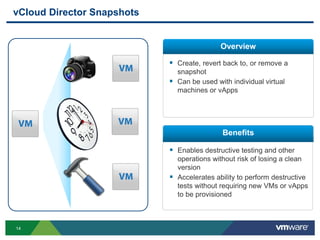
vCloud Director Snapshots
 Create, revert back to, or remove a
snapshot
 Can be used with individual virtual
machines or vApps
Overview
Benefits
 Enables destructive testing and other
operations without risk of losing a clean
version
 Accelerates ability to perform destructive
tests without requiring new VMs or vApps
to be provisioned
15
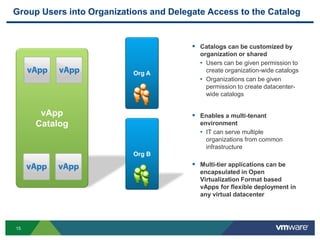
vApp
Catalog
Org A
Org B
Group Users into Organizations and Delegate Access to the Catalog
 Catalogs can be customized by
organization or shared
• Users can be given permission to
create organization-wide catalogs
• Organizations can be given
permission to create datacenter-
wide catalogs
 Enables a multi-tenant
environment
• IT can serve multiple
organizations from common
infrastructure
 Multi-tier applications can be
encapsulated in Open
Virtualization Format based
vApps for flexible deployment in
any virtual datacenter
16
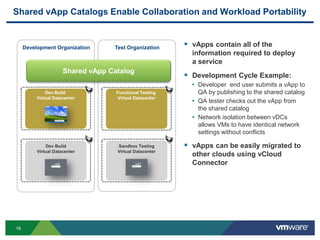
Shared vApp Catalogs Enable Collaboration and Workload Portability
 vApps contain all of the
information required to deploy
a service
 Development Cycle Example:
• Developer end user submits a vApp to
QA by publishing to the shared catalog
• QA tester checks out the vApp from
the shared catalog
• Network isolation between vDCs
allows VMs to have identical network
settings without conflicts
 vApps can be easily migrated to
other clouds using vCloud
Connector
Dev Build
Virtual Datacenter
Dev Build
Virtual Datacenter
Sandbox Testing
Virtual Datacenter
Functional Testing
Virtual Datacenter
Test OrganizationDevelopment Organization
Shared vApp Catalog
17
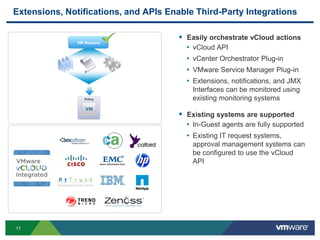
Extensions, Notifications, and APIs Enable Third-Party Integrations
 Easily orchestrate vCloud actions
• vCloud API
• vCenter Orchestrator Plug-in
• VMware Service Manager Plug-in
• Extensions, notifications, and JMX
Interfaces can be monitored using
existing monitoring systems
 Existing systems are supported
• In-Guest agents are fully supported
• Existing IT request systems,
approval management systems can
be configured to use the vCloud
API
VM Request
Policy
18
VMware vCloud Director
Enhance security and controls
19
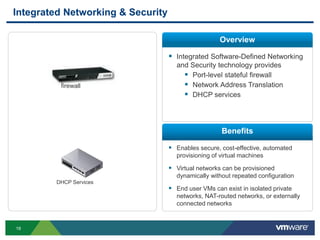
Integrated Networking & Security
 Integrated Software-Defined Networking
and Security technology provides
 Port-level stateful firewall
 Network Address Translation
 DHCP services
 Enables secure, cost-effective, automated
provisioning of virtual machines
 Virtual networks can be provisioned
dynamically without repeated configuration
 End user VMs can exist in isolated private
networks, NAT-routed networks, or externally
connected networks
Overview
Benefits
DHCP Services
firewall
20
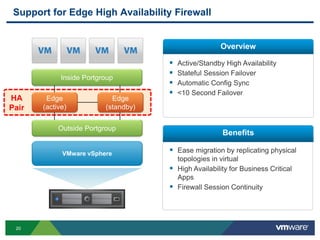
Support for Edge High Availability Firewall
 Active/Standby High Availability
 Stateful Session Failover
 Automatic Config Sync
 <10 Second Failover
Overview
Benefits
 Ease migration by replicating physical
topologies in virtual
 High Availability for Business Critical
Apps
 Firewall Session Continuity
VMware vSphere
Outside Portgroup
Inside Portgroup
Edge
(active)
Edge
(standby)
HA
Pair
21
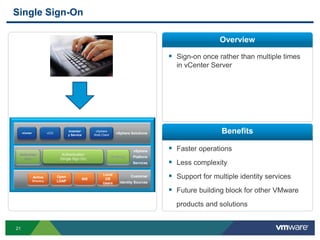
Single Sign-On
 Sign-on once rather than multiple times
in vCenter Server
 Faster operations
 Less complexity
 Support for multiple identity services
 Future building block for other VMware
products and solutions
Overview
Benefits
vSphere
Platform
Services
Customer
Identity Sources
vSphere Solutions
Authentication
(Single Sign On)
vCO
Inventor
y Service
vCenter
Active
Directory
Authoriza
tion
Auditing
vSphere
Web Client
Open
LDAP
NIS
Local
OS
Users
22
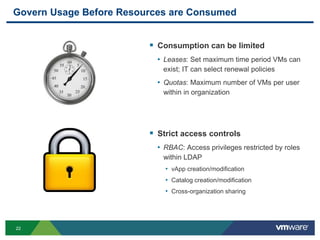
Govern Usage Before Resources are Consumed
 Consumption can be limited
• Leases: Set maximum time period VMs can
exist; IT can select renewal policies
• Quotas: Maximum number of VMs per user
within in organization
 Strict access controls
• RBAC: Access privileges restricted by roles
within LDAP
• vApp creation/modification
• Catalog creation/modification
• Cross-organization sharing
23
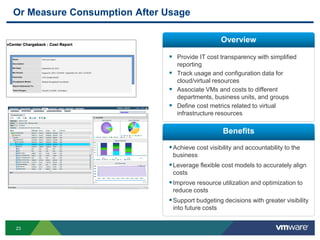
Or Measure Consumption After Usage
Overview
Benefits
 Provide IT cost transparency with simplified
reporting
 Track usage and configuration data for
cloud/virtual resources
 Associate VMs and costs to different
departments, business units, and groups
 Define cost metrics related to virtual
infrastructure resources
Achieve cost visibility and accountability to the
business
Leverage flexible cost models to accurately align
costs
Improve resource utilization and optimization to
reduce costs
Support budgeting decisions with greater visibility
into future costs
24
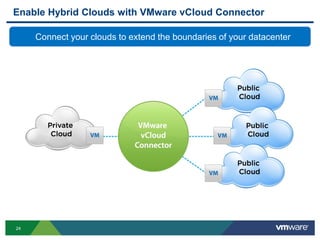
Enable Hybrid Clouds with VMware vCloud Connector
Connect your clouds to extend the boundaries of your datacenter
25
Create One Network with Datacenter Extension
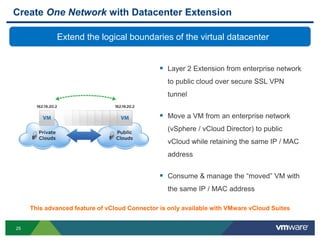
 Layer 2 Extension from enterprise network
to public cloud over secure SSL VPN
tunnel
 Move a VM from an enterprise network
(vSphere / vCloud Director) to public
vCloud while retaining the same IP / MAC
address
 Consume & manage the “moved” VM with
the same IP / MAC address
Extend the logical boundaries of the virtual datacenter
This advanced feature of vCloud Connector is only available with VMware vCloud Suites
26
Manage One Catalog with Content Sync
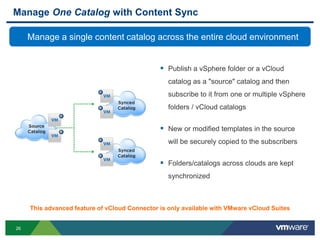
 Publish a vSphere folder or a vCloud
catalog as a "source" catalog and then
subscribe to it from one or multiple vSphere
folders / vCloud catalogs
 New or modified templates in the source
will be securely copied to the subscribers
 Folders/catalogs across clouds are kept
synchronized
Manage a single content catalog across the entire cloud environment
This advanced feature of vCloud Connector is only available with VMware vCloud Suites
27
VMware vCloud Connector, Advanced Edition
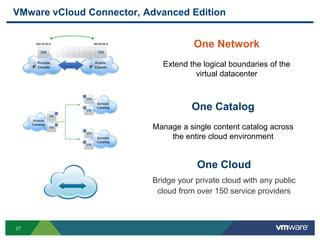
One Cloud
Bridge your private cloud with any public
cloud from over 150 service providers
One Catalog
Manage a single content catalog across
the entire cloud environment
One Network
Extend the logical boundaries of the
virtual datacenter
28
vCloud Director is the practical, out-of-the-box option for IAAS
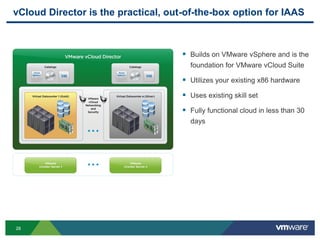
 Builds on VMware vSphere and is the
foundation for VMware vCloud Suite
 Utilizes your existing x86 hardware
 Uses existing skill set
 Fully functional cloud in less than 30
days
29
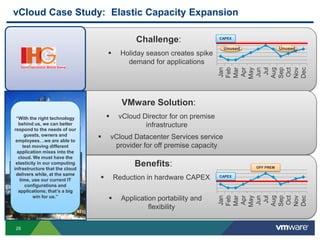
Benefits:
 Reduction in hardware CAPEX
 Application portability and
flexibility
0
20
40
60
80
100
120
Jan
Feb
Mar
Apr
May
Jun
Jul
Aug
Sep
Oct
Nov
Dec
CAPEX
OFF PREM
Challenge:
 Holiday season creates spike
demand for applications 0
20
40
60
80
100
120
Jan
Feb
Mar
Apr
May
Jun
Jul
Aug
Sep
Oct
Nov
Dec
CAPEX
Unused Unused
VMware Solution:
 vCloud Director for on premise
infrastructure
 vCloud Datacenter Services service
provider for off premise capacity
vCloud Case Study: Elastic Capacity Expansion
“With the right technology
behind us, we can better
respond to the needs of our
guests, owners and
employees…we are able to
test moving different
application mixes into the
cloud. We must have the
elasticity in our computing
infrastructure that the cloud
delivers while, at the same
time, use our current IT
configurations and
applications; that’s a big
win for us.”
30
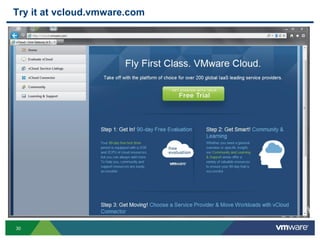
Try it at vcloud.vmware.com

Гибридное облако - эффективность в квадрате

  • 1.
    © 2009 VMwareInc. All rights reserved VMware Hybrid Cloud Solutions Alexander Kupchinetsky | akupchinetsky@vmware.com
  • 2.
    Just virtualization isnot enough 0.0 2.5 5.0 7.5 10.0 12.5 15.0 17.5 Millions Physical Servers Virtual Machines Growing virtualized environment Slow provisioning process Overworked IT staff Long end user wait times VMware vCloud Director delivers complete software-defined services for easy consumption in minutes
  • 3.
    3 SDDC – VMware’sApproach To Infrastructure Delivery vApp Catalogs Web-based access The supply of infrastructure is delivered completely as virtual datacenters The demand for infrastructure is delivered as portable images Infrastructure can be provisioned in a matter of minutes
  • 4.
    4 Virtual Datacenters VirtualDatacenters Apps VMware’s Approach Offers The Flexibility of Hybrid Cloud Apps Management Security  Common platform  Common management  Common security vCloud Service Provider vCloud Director Private Cloud VMware Hybrid Cloud
  • 5.
    5 VMware Enterprise HybridCloud Services Designed for broad marketplace of cloud services Offers vCD, OVF and vCloud API compatibility Designates core vCloud compatibility Globally consistent, VMware audited cloud service Full compatibility, auditable security, global reach Endorsed and co-branded by VMware vCloud.VMware.com
  • 6.
    6 VMware vCloud Directortransforms IT speed and productivity Deliver complete infrastructure as virtual datacenters alleviating the need for siloed IT teams with long provisioning cycles Enhance security and controls with strong access controls and software-defined security. Enable infrastructure to be consumed in a matter of minutes by leveraging unique virtualization features to enable on-demand provisioning
  • 7.
    7 Virtual Datacenters ProviderComplete Infrastructure to Teams  Logical container that provides not only virtualized compute but also virtualized networking, storage, and security  Enables central IT teams to provision complete sets of infrastructure resources to delegated teams  Lower Capital Expenses from centralized hardware in one physical location and delegating virtual datacenters to different teams / departments / units  Tiered  Faster access to infrastructure Overview Benefits
  • 8.
    8 Elastic Virtual Datacenters Resource pools allocated to tenant organizations that can span multiple vSphere clusters Overview Benefits  Enables a virtual datacenter to grow to the maximum capacity of a vCenter Server  Ensures highest utilization of hardware Cluster A Cluster B
  • 9.
    9 Continuum of resourceallocation models for your environment  Reservation Model • Infrastructure is pre-reserved • 100% Consumers are sure of 100% guaranteed access  Allocation Model • Resources are over-reserved, similar to the “airline seat” model • IT can balance utilization with sense of guarantees  Pay-As-You-Go • Infrastructure is consumed as requests are made • Maximizes the utilization of hardware
  • 10.
    10 Integration with Profile-DrivenStorage & Storage DRS Tier 1 Tier 2 Tier 3 Virtual Datacenter  Storage profiles can be surfaced as end user options within a virtual datacenter  Virtual machines are placed and load balanced using vSphere Storage DRS Overview Benefits  Greater end user flexibility and choice  Improved hardware utilization and performance
  • 11.
    11 Support for Software-DefinedNetworking & VXLAN  Foundation for elastic portable VDC’s  On demand networks without physical network configuration Overview Benefits  Better utilization of compute capacity  Lower operational cost and complexity  Flexible and extensible platform VLAN: 100 VXLAN: Dev VXLAN Distributed Switch Distributed Switch
  • 12.
    12 Fast Access toInfrastructure Three Ways to Connect, Including GUI  Direct access through web-based portals by end users (developers, etc) or IT delegate  Integrate into IT workflows & request processes  Programmatic access through vCloud API
  • 13.
    13 Cross-Cluster Fast ProvisioningSaves Even More Money & Time  Provisions new VMs from a template without replicating the entire image  Instead, links the images (clones) so that common elements are stored only once Overview Benefits  Radically speeds up provisioning time from >2 minutes to <5 seconds  Reduces storage footprint (and cost) by over 60% since linked clones can span multiple datastores and vCenter servers Template vmdk vmdk vmdk vmdk
  • 14.
    14 vCloud Director Snapshots Create, revert back to, or remove a snapshot  Can be used with individual virtual machines or vApps Overview Benefits  Enables destructive testing and other operations without risk of losing a clean version  Accelerates ability to perform destructive tests without requiring new VMs or vApps to be provisioned
  • 15.
    15 vApp Catalog Org A Org B GroupUsers into Organizations and Delegate Access to the Catalog  Catalogs can be customized by organization or shared • Users can be given permission to create organization-wide catalogs • Organizations can be given permission to create datacenter- wide catalogs  Enables a multi-tenant environment • IT can serve multiple organizations from common infrastructure  Multi-tier applications can be encapsulated in Open Virtualization Format based vApps for flexible deployment in any virtual datacenter
  • 16.
    16 Shared vApp CatalogsEnable Collaboration and Workload Portability  vApps contain all of the information required to deploy a service  Development Cycle Example: • Developer end user submits a vApp to QA by publishing to the shared catalog • QA tester checks out the vApp from the shared catalog • Network isolation between vDCs allows VMs to have identical network settings without conflicts  vApps can be easily migrated to other clouds using vCloud Connector Dev Build Virtual Datacenter Dev Build Virtual Datacenter Sandbox Testing Virtual Datacenter Functional Testing Virtual Datacenter Test OrganizationDevelopment Organization Shared vApp Catalog
  • 17.
    17 Extensions, Notifications, andAPIs Enable Third-Party Integrations  Easily orchestrate vCloud actions • vCloud API • vCenter Orchestrator Plug-in • VMware Service Manager Plug-in • Extensions, notifications, and JMX Interfaces can be monitored using existing monitoring systems  Existing systems are supported • In-Guest agents are fully supported • Existing IT request systems, approval management systems can be configured to use the vCloud API VM Request Policy
  • 18.
    18 VMware vCloud Director Enhancesecurity and controls
  • 19.
    19 Integrated Networking &Security  Integrated Software-Defined Networking and Security technology provides  Port-level stateful firewall  Network Address Translation  DHCP services  Enables secure, cost-effective, automated provisioning of virtual machines  Virtual networks can be provisioned dynamically without repeated configuration  End user VMs can exist in isolated private networks, NAT-routed networks, or externally connected networks Overview Benefits DHCP Services firewall
  • 20.
    20 Support for EdgeHigh Availability Firewall  Active/Standby High Availability  Stateful Session Failover  Automatic Config Sync  <10 Second Failover Overview Benefits  Ease migration by replicating physical topologies in virtual  High Availability for Business Critical Apps  Firewall Session Continuity VMware vSphere Outside Portgroup Inside Portgroup Edge (active) Edge (standby) HA Pair
  • 21.
    21 Single Sign-On  Sign-ononce rather than multiple times in vCenter Server  Faster operations  Less complexity  Support for multiple identity services  Future building block for other VMware products and solutions Overview Benefits vSphere Platform Services Customer Identity Sources vSphere Solutions Authentication (Single Sign On) vCO Inventor y Service vCenter Active Directory Authoriza tion Auditing vSphere Web Client Open LDAP NIS Local OS Users
  • 22.
    22 Govern Usage BeforeResources are Consumed  Consumption can be limited • Leases: Set maximum time period VMs can exist; IT can select renewal policies • Quotas: Maximum number of VMs per user within in organization  Strict access controls • RBAC: Access privileges restricted by roles within LDAP • vApp creation/modification • Catalog creation/modification • Cross-organization sharing
  • 23.
    23 Or Measure ConsumptionAfter Usage Overview Benefits  Provide IT cost transparency with simplified reporting  Track usage and configuration data for cloud/virtual resources  Associate VMs and costs to different departments, business units, and groups  Define cost metrics related to virtual infrastructure resources Achieve cost visibility and accountability to the business Leverage flexible cost models to accurately align costs Improve resource utilization and optimization to reduce costs Support budgeting decisions with greater visibility into future costs
  • 24.
    24 Enable Hybrid Cloudswith VMware vCloud Connector Connect your clouds to extend the boundaries of your datacenter
  • 25.
    25 Create One Networkwith Datacenter Extension  Layer 2 Extension from enterprise network to public cloud over secure SSL VPN tunnel  Move a VM from an enterprise network (vSphere / vCloud Director) to public vCloud while retaining the same IP / MAC address  Consume & manage the “moved” VM with the same IP / MAC address Extend the logical boundaries of the virtual datacenter This advanced feature of vCloud Connector is only available with VMware vCloud Suites
  • 26.
    26 Manage One Catalogwith Content Sync  Publish a vSphere folder or a vCloud catalog as a "source" catalog and then subscribe to it from one or multiple vSphere folders / vCloud catalogs  New or modified templates in the source will be securely copied to the subscribers  Folders/catalogs across clouds are kept synchronized Manage a single content catalog across the entire cloud environment This advanced feature of vCloud Connector is only available with VMware vCloud Suites
  • 27.
    27 VMware vCloud Connector,Advanced Edition One Cloud Bridge your private cloud with any public cloud from over 150 service providers One Catalog Manage a single content catalog across the entire cloud environment One Network Extend the logical boundaries of the virtual datacenter
  • 28.
    28 vCloud Director isthe practical, out-of-the-box option for IAAS  Builds on VMware vSphere and is the foundation for VMware vCloud Suite  Utilizes your existing x86 hardware  Uses existing skill set  Fully functional cloud in less than 30 days
  • 29.
    29 Benefits:  Reduction inhardware CAPEX  Application portability and flexibility 0 20 40 60 80 100 120 Jan Feb Mar Apr May Jun Jul Aug Sep Oct Nov Dec CAPEX OFF PREM Challenge:  Holiday season creates spike demand for applications 0 20 40 60 80 100 120 Jan Feb Mar Apr May Jun Jul Aug Sep Oct Nov Dec CAPEX Unused Unused VMware Solution:  vCloud Director for on premise infrastructure  vCloud Datacenter Services service provider for off premise capacity vCloud Case Study: Elastic Capacity Expansion “With the right technology behind us, we can better respond to the needs of our guests, owners and employees…we are able to test moving different application mixes into the cloud. We must have the elasticity in our computing infrastructure that the cloud delivers while, at the same time, use our current IT configurations and applications; that’s a big win for us.”
  • 30.
    30 Try it atvcloud.vmware.com