
Preparing to Teach Online
July 29th, 2014
Marc Thompson & Jim Wentworth
Pre-workshop Preparation: (have necessary information displayed on screen as
people arrive, print out same info for late comers)?
All participants in Preparing to Teach Online space as students
All participants in work space (compass essentials) four per space max?
Send announcement email to all registered so they know how to access the course
Everyone should log in to Compass 2g and locate their work space
Everyone should find and open Notepad, Word and Acrobat Pro on their computer
Be prepared to open embedded screencast powerpoint within Compass
Be logged into the following:
Screencast, YouTube, Vimeo, Slideshare
Jim’s background:
Online teaching / multimedia instructor
Administration of CU Boulder online program
Support of Compass 2g
Current focus at CITL
Questions to ask:
How many of you have taught online previously?
How many of you have taken an online course? Not just a MOOC
Of those who have taught online, how many have taught synchronously?
How many of you have designed an online course?
How many of you use social media of any kind regularly?
How many of you have twitter accounts?
Moving Your Course
Content Online
Managing student expectations
Think about the subtle interactions that take place within a f2f classroom setting
at the beginning of class
as you lecture
as students interact during class
as the class finishes and some students approach the instructor
after class as students talk
Instructor presence – change in role
student-centered approach, not about relaying information, about helping the student to
discover and connect new information
underscores the need for scaffolding, importance of providing assignments that build off
students prior knowledge
provide feedback in supportive environment
build a sense of community
reduce isolation and build rapport
Communication policies
What is your preferred method of contact?
Are there additional contact options (office phone during business hours)?
How quickly should the students expect a response?
What steps should the students take when they do not receive a response?
Do you hold virtual office hours?
Chunking content for online delivery
online instruction is not tied to specific time frames or blocks of time. No longer necessary
to prepare 50 minutes of course material and activities
benefits of modularization, more easily searched, used as a easy reference when needed,
allows students to determine how much and at what time they need to become familiar
with new content
microlectures – videos not longer than 10 minutes
Creating an Online Syllabus
Highlight importance of a comprehensive online syllabus that spells out everything a
student may need to know to succeed in your course.
Format options – HTML, pdf, other (review wysiwyg tool in compass)
Demonstrate good use of online syllabus (see online syllabus example within course )
Provide HTML syllabus examples (template)
Syllabus quiz (show example video with embedded quiz)
Key policy considerations
FERPA
Copyright
ADA compliance
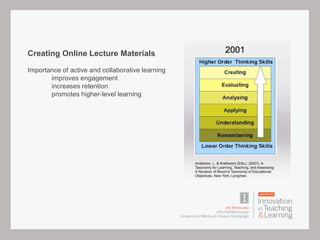
Creating Online Lecture Materials
Importance of active and collaborative learning
improves engagement
increases retention
promotes higher-level learning
Backwards Design
Identify desired results - course objectives
Determine acceptable evidence - course assessment
Plan learning experiences – course activities
Interactive and Collaborative Assignments
How can you create engaging, authentic activities?
What does an authentic assignment look like within your discipline?
Authentic Assessment
Project-based
Case-based
Team-based
Client-driven
Other ideas?
Feedback and Self-Assessment
Students in an online course need a consistent feedback loop to evaluate their own
progress.
How will you provide opportunities for instructor feedback?
How can you incorporate self-assessment activities for your students?
Recording Microlectures
Phone video, screencast, vimeo and Youtube uploads (demonstration with vimeo and
direct upload?)
Podcasting, iTunes and audacity, other podcasting platforms? - still relevant, if you don’t
have visuals to create a microlecture video, then essentially you have an audio podcast
Demonstate screen recording with Apple, Windows and Camtasia
Student created video (Snodgras example)
Embedded quizzes with Camtasia – syllabus quiz example (within online syllabus section
of course)
play ‘video is an opportunity’ from within Compass space – Design for Interaction
Making existing powerpoints more interactive
Export to PDF
PowerPoint Show
Uploading to slideshare – example (upload preparing to teach powerpoint)
Search for metacognition in Slideshare
Break – moving to Armory room 428
(Put map and directions on screen, have handouts available)
Next Up – Design for Interaction
Video is an Opportunity
play video from within Compass space – Design for Interaction
Interactive content
Explore the variety of interactive tools
Twitter (#prepforonline)
Prezi (demo real-time collaborative editing)
GoogleDocs
SlideShare
Voicethread
Trello (demo real-time collaborative editing)
Poll Everywhere
Blogs, wikis, journals etc.
Use Poll Everywhere to ask for their favorite Web 2.0 tools – what
have you explored or used within your own course?
Display results
http://polleverywhere.com/prepforonline
Using embed codes
YouTube, Flickr and other embed tools (demo embed process from YouTube with
playlist?)
Compass and embed codes
using linked html files
Twitter feeds
Poll everywhere results
(examples within Building Online Community section of Compass)
Next Up – Making Your Course
Content Accessible
Facilitating Online Discussions
Take a minute to add a response to the
Workshop Discussion Forum
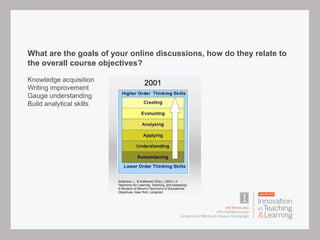
What are the goals of your online discussions, how do they relate to
the overall course objectives?
Knowledge acquisition
Writing improvement
Gauge understanding
Build analytical skills
Building Rapport
Icebreakers
short bio
small group
academic pursuit
research interests
five nouns
Discussion Prompts
• Discussion prompts should be relevant to course content, yet broad enough for personal and professional
experiences to apply. New learning occurs when students recognize the applicability of the concept to their
current job, organization, or future career aspirations.
• Discussion prompts should allow students to relate their own experiences and background.
• Discussion prompts should relate to current events, when possible.
• Discussion prompts should pique student interests and concerns within their field of study.
• Discussion prompts should ask students to perform authentic tasks similar to what they might expect within
the discipline.
• Discussion responses/posts should require critical thinking.
• Discussion responses/posts should be free from excessive requirements and restrictions.
• Discussion responses/posts from faculty should stimulate further discussion without additional requirements.
Discussion responses from faculty should facilitate, yet not dominate the discussion.
Feedback is important
How do you move the discussion forward?
Summarize
Moderate
Guide
Prompt or prod
Troubleshoot
Mediating a debate
Redirect
Develop a routine
How often will you participate in your online discussions?
How often do you expect students to participate?
Who will summarize the weekly postings?
Group projects and group management
Demonstrate group functions and available tools
Discuss collaborative online tools demonstrated earlier in the day
Consider project-based, team-based, problem-based and other forms of group
assignments - how can you decision authentic group activities – how do they relate to
course objectives?
Mention peer evaluation tools outside of Compass
http://info.catme.org
https://teammatesv4.appspot.com
Online Assessment Options
formative feedback opportunities
self-assessment options
grading rubrics
authentic assessment
online exams – ProctorU
open book exams
Important to test higher order skills – not just remembering and understanding
Grading Rubrics
Advantages
Standardization
Self-assessment
Provide individual feedback
Example for online discussions (linked to discussion example)
Example for other assignments (?? Include large rubric example file)
Creating and grading with rubrics (demonstration)
Synchronous – vs- Asynchronous
Active learning in synchronous sessions
Active learning is a technique that brings engagement, retention and high-level
learning
Examples:
online polling, use the Pointer tool, or multiple choice poll, display results
use the chat tool to collect input from participants
Use Googledocs for collaborative work
Drag and drop functionality within Collaborate
Sorting activity with Collaborate
Quiz activity – circle the correct answer
Likert scale – drop a pin on the scale in the appropriate location
Web tour – opens a tool in their browser, no browser tools available
Share your own screen
Breakout rooms – think, pair, share
Question & Answer
please complete the workshop evaluation
Show them where this is inside the compass space

Preparing to teach online

  • 1.
    Preparing to TeachOnline July 29th, 2014 Marc Thompson & Jim Wentworth
  • 2.
    Pre-workshop Preparation: (havenecessary information displayed on screen as people arrive, print out same info for late comers)? All participants in Preparing to Teach Online space as students All participants in work space (compass essentials) four per space max? Send announcement email to all registered so they know how to access the course Everyone should log in to Compass 2g and locate their work space Everyone should find and open Notepad, Word and Acrobat Pro on their computer Be prepared to open embedded screencast powerpoint within Compass Be logged into the following: Screencast, YouTube, Vimeo, Slideshare
  • 3.
    Jim’s background: Online teaching/ multimedia instructor Administration of CU Boulder online program Support of Compass 2g Current focus at CITL
  • 4.
    Questions to ask: Howmany of you have taught online previously? How many of you have taken an online course? Not just a MOOC Of those who have taught online, how many have taught synchronously? How many of you have designed an online course? How many of you use social media of any kind regularly? How many of you have twitter accounts?
  • 5.
  • 6.
    Managing student expectations Thinkabout the subtle interactions that take place within a f2f classroom setting at the beginning of class as you lecture as students interact during class as the class finishes and some students approach the instructor after class as students talk
  • 7.
    Instructor presence –change in role student-centered approach, not about relaying information, about helping the student to discover and connect new information underscores the need for scaffolding, importance of providing assignments that build off students prior knowledge provide feedback in supportive environment build a sense of community reduce isolation and build rapport
  • 8.
    Communication policies What isyour preferred method of contact? Are there additional contact options (office phone during business hours)? How quickly should the students expect a response? What steps should the students take when they do not receive a response? Do you hold virtual office hours?
  • 9.
    Chunking content foronline delivery online instruction is not tied to specific time frames or blocks of time. No longer necessary to prepare 50 minutes of course material and activities benefits of modularization, more easily searched, used as a easy reference when needed, allows students to determine how much and at what time they need to become familiar with new content microlectures – videos not longer than 10 minutes
  • 10.
    Creating an OnlineSyllabus Highlight importance of a comprehensive online syllabus that spells out everything a student may need to know to succeed in your course. Format options – HTML, pdf, other (review wysiwyg tool in compass) Demonstrate good use of online syllabus (see online syllabus example within course ) Provide HTML syllabus examples (template) Syllabus quiz (show example video with embedded quiz)
  • 11.
  • 12.
    Creating Online LectureMaterials Importance of active and collaborative learning improves engagement increases retention promotes higher-level learning
  • 13.
    Backwards Design Identify desiredresults - course objectives Determine acceptable evidence - course assessment Plan learning experiences – course activities
  • 14.
    Interactive and CollaborativeAssignments How can you create engaging, authentic activities? What does an authentic assignment look like within your discipline?
  • 15.
  • 16.
    Feedback and Self-Assessment Studentsin an online course need a consistent feedback loop to evaluate their own progress. How will you provide opportunities for instructor feedback? How can you incorporate self-assessment activities for your students?
  • 17.
    Recording Microlectures Phone video,screencast, vimeo and Youtube uploads (demonstration with vimeo and direct upload?) Podcasting, iTunes and audacity, other podcasting platforms? - still relevant, if you don’t have visuals to create a microlecture video, then essentially you have an audio podcast Demonstate screen recording with Apple, Windows and Camtasia Student created video (Snodgras example) Embedded quizzes with Camtasia – syllabus quiz example (within online syllabus section of course) play ‘video is an opportunity’ from within Compass space – Design for Interaction
  • 18.
    Making existing powerpointsmore interactive Export to PDF PowerPoint Show Uploading to slideshare – example (upload preparing to teach powerpoint) Search for metacognition in Slideshare
  • 19.
    Break – movingto Armory room 428 (Put map and directions on screen, have handouts available)
  • 20.
    Next Up –Design for Interaction
  • 21.
    Video is anOpportunity play video from within Compass space – Design for Interaction
  • 22.
    Interactive content Explore thevariety of interactive tools Twitter (#prepforonline) Prezi (demo real-time collaborative editing) GoogleDocs SlideShare Voicethread Trello (demo real-time collaborative editing) Poll Everywhere Blogs, wikis, journals etc.
  • 23.
    Use Poll Everywhereto ask for their favorite Web 2.0 tools – what have you explored or used within your own course? Display results http://polleverywhere.com/prepforonline
  • 24.
    Using embed codes YouTube,Flickr and other embed tools (demo embed process from YouTube with playlist?) Compass and embed codes using linked html files Twitter feeds Poll everywhere results (examples within Building Online Community section of Compass)
  • 25.
    Next Up –Making Your Course Content Accessible
  • 26.
  • 27.
    Take a minuteto add a response to the Workshop Discussion Forum
  • 28.
    What are thegoals of your online discussions, how do they relate to the overall course objectives? Knowledge acquisition Writing improvement Gauge understanding Build analytical skills
  • 29.
    Building Rapport Icebreakers short bio smallgroup academic pursuit research interests five nouns
  • 30.
    Discussion Prompts • Discussionprompts should be relevant to course content, yet broad enough for personal and professional experiences to apply. New learning occurs when students recognize the applicability of the concept to their current job, organization, or future career aspirations. • Discussion prompts should allow students to relate their own experiences and background. • Discussion prompts should relate to current events, when possible. • Discussion prompts should pique student interests and concerns within their field of study. • Discussion prompts should ask students to perform authentic tasks similar to what they might expect within the discipline. • Discussion responses/posts should require critical thinking. • Discussion responses/posts should be free from excessive requirements and restrictions. • Discussion responses/posts from faculty should stimulate further discussion without additional requirements. Discussion responses from faculty should facilitate, yet not dominate the discussion.
  • 31.
    Feedback is important Howdo you move the discussion forward? Summarize Moderate Guide Prompt or prod Troubleshoot Mediating a debate Redirect
  • 32.
    Develop a routine Howoften will you participate in your online discussions? How often do you expect students to participate? Who will summarize the weekly postings?
  • 33.
    Group projects andgroup management Demonstrate group functions and available tools Discuss collaborative online tools demonstrated earlier in the day Consider project-based, team-based, problem-based and other forms of group assignments - how can you decision authentic group activities – how do they relate to course objectives? Mention peer evaluation tools outside of Compass http://info.catme.org https://teammatesv4.appspot.com
  • 34.
    Online Assessment Options formativefeedback opportunities self-assessment options grading rubrics authentic assessment online exams – ProctorU open book exams Important to test higher order skills – not just remembering and understanding
  • 35.
    Grading Rubrics Advantages Standardization Self-assessment Provide individualfeedback Example for online discussions (linked to discussion example) Example for other assignments (?? Include large rubric example file) Creating and grading with rubrics (demonstration)
  • 36.
    Synchronous – vs-Asynchronous Active learning in synchronous sessions Active learning is a technique that brings engagement, retention and high-level learning Examples: online polling, use the Pointer tool, or multiple choice poll, display results use the chat tool to collect input from participants Use Googledocs for collaborative work Drag and drop functionality within Collaborate Sorting activity with Collaborate Quiz activity – circle the correct answer Likert scale – drop a pin on the scale in the appropriate location Web tour – opens a tool in their browser, no browser tools available Share your own screen Breakout rooms – think, pair, share
  • 37.
    Question & Answer pleasecomplete the workshop evaluation Show them where this is inside the compass space