www.delta.com.tw/ia
5012604602
2012/03
IABU Headquarters
Delta Electronics, Inc.
Taoyuan Technology Center
No.18, Xinglong Rd., Taoyuan City,
Taoyuan County 33068, Taiwan
TEL: 886-3-362-6301 / FAX: 886-3-371-6301
Asia
Delta Electronics (Jiangsu) Ltd.
Wujiang Plant 3
1688 Jiangxing East Road,
Wujiang Economic Development Zone
Wujiang City, Jiang Su Province,
People's Republic of China (Post code: 215200)
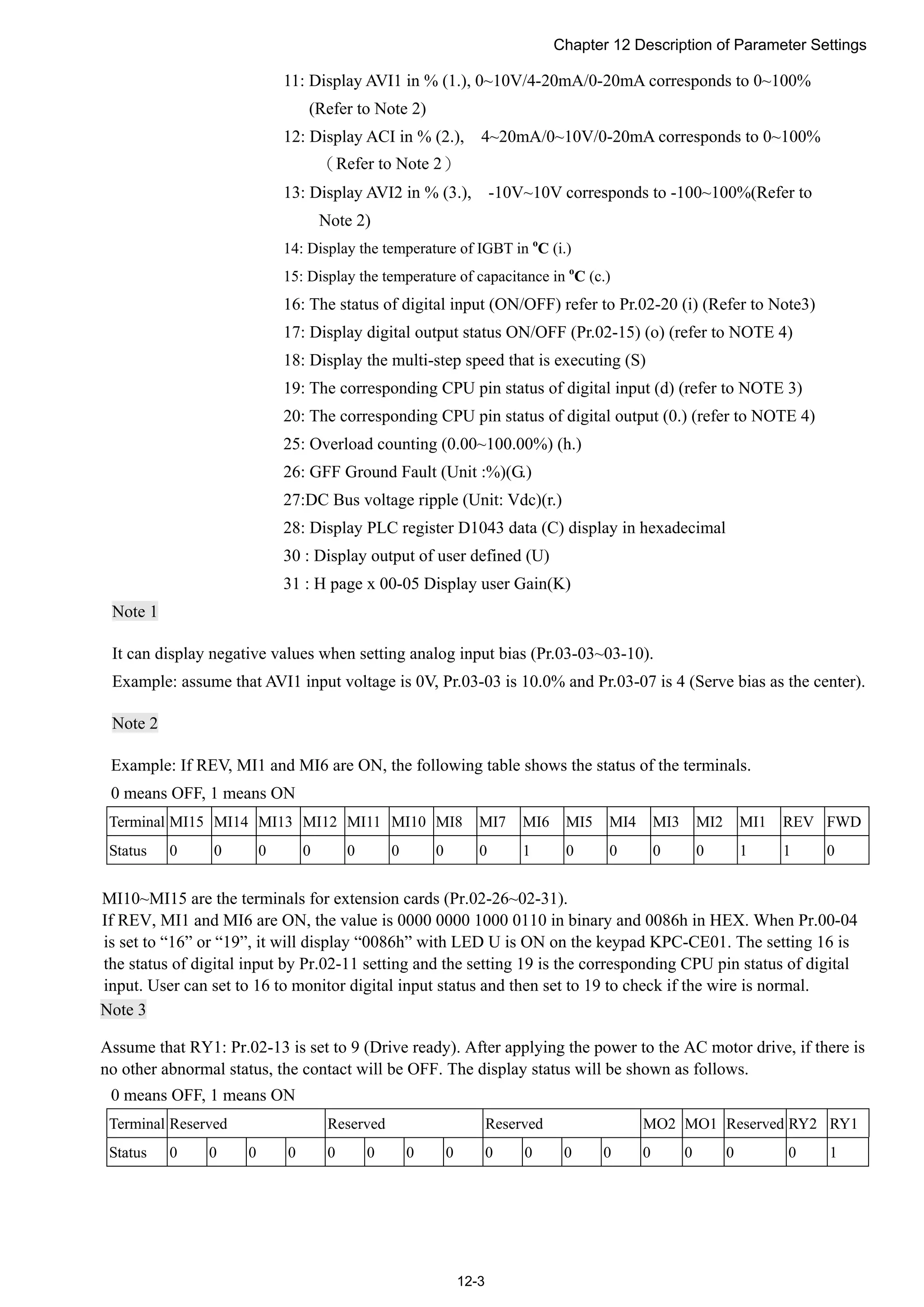
TEL: 86-512-6340-3008 / FAX: 86-769-6340-7290
Delta Greentech (China) Co., Ltd.
238 Min-Xia Road, Pudong District,
ShangHai, P.R.C.
Post code : 201209
TEL: 86-21-58635678 / FAX: 86-21-58630003
Delta Electronics (Japan), Inc.
Tokyo Office
2-1-14 Minato-ku Shibadaimon,
Tokyo 105-0012, Japan
TEL: 81-3-5733-1111 / FAX: 81-3-5733-1211
Delta Electronics (Korea), Inc.
1511, Byucksan Digital Valley 6-cha, Gasan-dong,
Geumcheon-gu, Seoul, Korea, 153-704
TEL: 82-2-515-5303 / FAX: 82-2-515-5302
Delta Electronics Int’l (S) Pte Ltd
4 Kaki Bukit Ave 1, #05-05, Singapore 417939
TEL: 65-6747-5155 / FAX: 65-6744-9228
Delta Electronics (India) Pvt. Ltd.
Plot No 43 Sector 35, HSIIDC
Gurgaon, PIN 122001, Haryana, India
TEL : 91-124-4874900 / FAX : 91-124-4874945
Americas
Delta Products Corporation (USA)
Raleigh Office
P.O. Box 12173,5101 Davis Drive,
Research Triangle Park, NC 27709, U.S.A.
TEL: 1-919-767-3800 / FAX: 1-919-767-8080
Delta Greentech (Brasil) S.A
Sao Paulo Office
Rua Itapeva, 26 - 3° andar Edificio Itapeva One-Bela Vista
01332-000-São Paulo-SP-Brazil
TEL: +55 11 3568-3855 / FAX: +55 11 3568-3865
Europe
Deltronics (The Netherlands) B.V.
Eindhoven Office
De Witbogt 15, 5652 AG Eindhoven, The Netherlands
TEL: 31-40-2592850 / FAX: 31-40-2592851
*We reserve the right to change the information in this catalogue without prior notice.
CP2000SeriesUserManual
CPE2
CP2000 Series User Manual
Delta
Intelligent Sensorless
Vector Control Drive
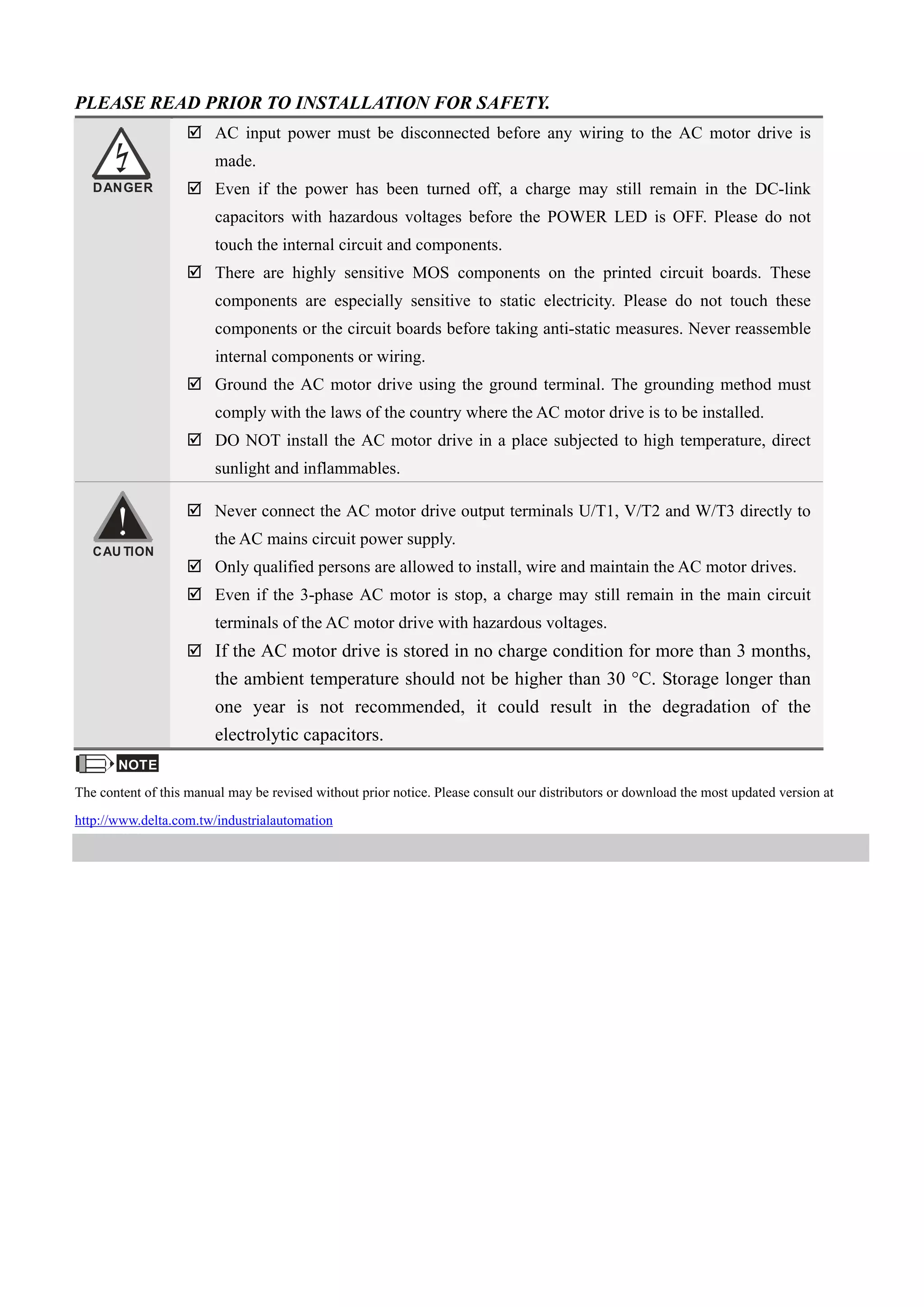
PLEASE READ PRIOR TO INSTALLATION FOR SAFETY.
DANGER
 AC input power must be disconnected before any wiring to the AC motor drive is
made.
 Even if the power has been turned off, a charge may still remain in the DC-link
capacitors with hazardous voltages before the POWER LED is OFF. Please do not
touch the internal circuit and components.
 There are highly sensitive MOS components on the printed circuit boards. These
components are especially sensitive to static electricity. Please do not touch these
components or the circuit boards before taking anti-static measures. Never reassemble
internal components or wiring.
 Ground the AC motor drive using the ground terminal. The grounding method must
comply with the laws of the country where the AC motor drive is to be installed.
 DO NOT install the AC motor drive in a place subjected to high temperature, direct
sunlight and inflammables.
CAU TION
 Never connect the AC motor drive output terminals U/T1, V/T2 and W/T3 directly to
the AC mains circuit power supply.
 Only qualified persons are allowed to install, wire and maintain the AC motor drives.
 Even if the 3-phase AC motor is stop, a charge may still remain in the main circuit
terminals of the AC motor drive with hazardous voltages.
 If the AC motor drive is stored in no charge condition for more than 3 months,
the ambient temperature should not be higher than 30 °C. Storage longer than
one year is not recommended, it could result in the degradation of the
electrolytic capacitors.
NOTE
The content of this manual may be revised without prior notice. Please consult our distributors or download the most updated version at
http://www.delta.com.tw/industrialautomation
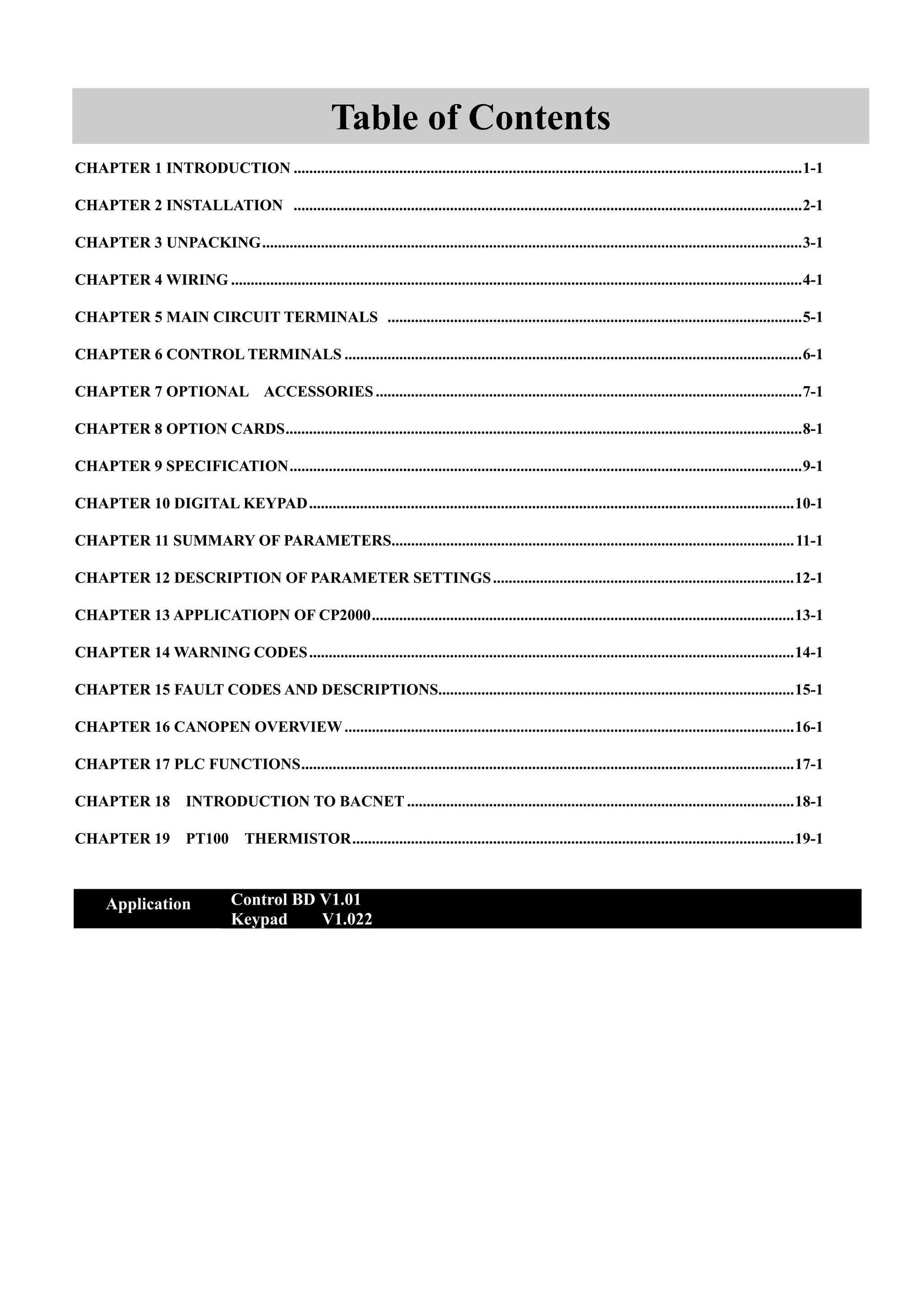
Table of Contents
CHAPTER 1 INTRODUCTION ..................................................................................................................................1-1
CHAPTER 2 INSTALLATION ..................................................................................................................................2-1
CHAPTER 3 UNPACKING..........................................................................................................................................3-1
CHAPTER 4 WIRING ..................................................................................................................................................4-1
CHAPTER 5 MAIN CIRCUIT TERMINALS ..........................................................................................................5-1
CHAPTER 6 CONTROL TERMINALS .....................................................................................................................6-1
CHAPTER 7 OPTIONAL ACCESSORIES .............................................................................................................7-1
CHAPTER 8 OPTION CARDS....................................................................................................................................8-1
CHAPTER 9 SPECIFICATION...................................................................................................................................9-1
CHAPTER 10 DIGITAL KEYPAD............................................................................................................................10-1
CHAPTER 11 SUMMARY OF PARAMETERS.......................................................................................................11-1
CHAPTER 12 DESCRIPTION OF PARAMETER SETTINGS.............................................................................12-1
CHAPTER 13 APPLICATIOPN OF CP2000............................................................................................................13-1
CHAPTER 14 WARNING CODES............................................................................................................................14-1
CHAPTER 15 FAULT CODES AND DESCRIPTIONS...........................................................................................15-1
CHAPTER 16 CANOPEN OVERVIEW...................................................................................................................16-1
CHAPTER 17 PLC FUNCTIONS..............................................................................................................................17-1
CHAPTER 18 INTRODUCTION TO BACNET ...................................................................................................18-1
CHAPTER 19 PT100 THERMISTOR.................................................................................................................19-1
Application Control BD V1.01
Keypad V1.022
Publication History
Please include the Issue Edition and the Firmware Version, both shown below, when
communicating with Technical Support regarding this publication.
Issue Edition: 02
Firmware Version: 1.01
Keypad Version: 1.022
Issue date : March 2012
Page1-3: Add RFI Jumper
Page41,Page4-2,Page4-3, Change AVI1 (AVI) to AVI1, AVI2(AUI) to aAVI2
Page41,Page4-2,Page4-3, Change AFM2 to 0~10V or 0/4~20mA
Page5-6: Add VFD450CP23A-21 and VFD900CP43A-21 must use 90o
C wire
Page5-8: State that VFD1600CP43A-21’s maximum and minimum wiring gauges are 4/0 AWG*2.
Page6-4: Change AVI1(AVI) to AVI1 and change AVI2(AUI) to AVI2.
Page7-13: Add Class, Motor Cable Length & Carrier Frequency Setting for the Filters
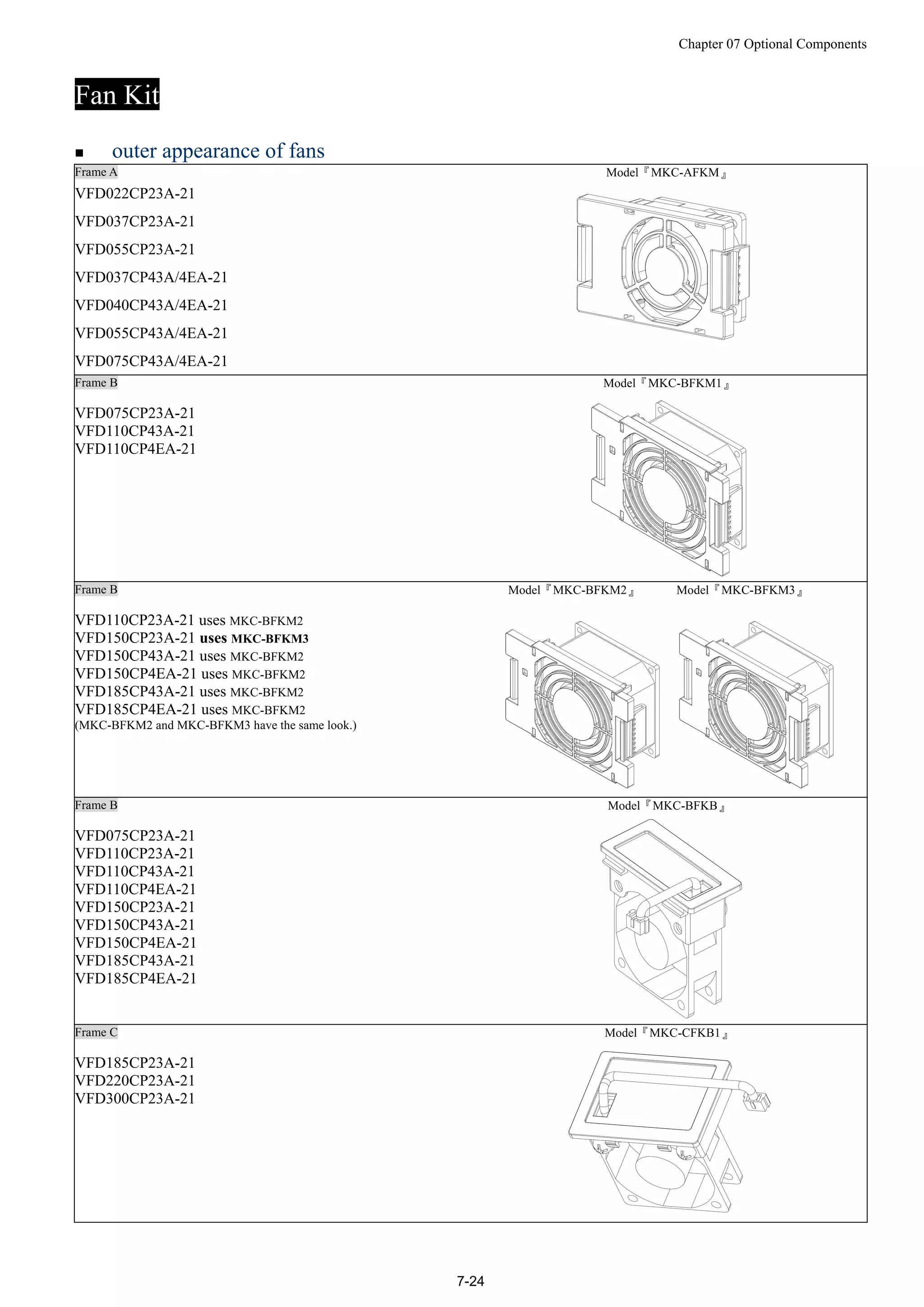
Page7-24: Specify that VFD150CP23A-21 uses fan # MKC-BFKM3
Page9-4: Add explanation on IEC/EN 60068-2-27 impact standard testing
Page11-11: Remove Pr02-57 and Pr02-58
Page11-16: Remove Pr05-00=7
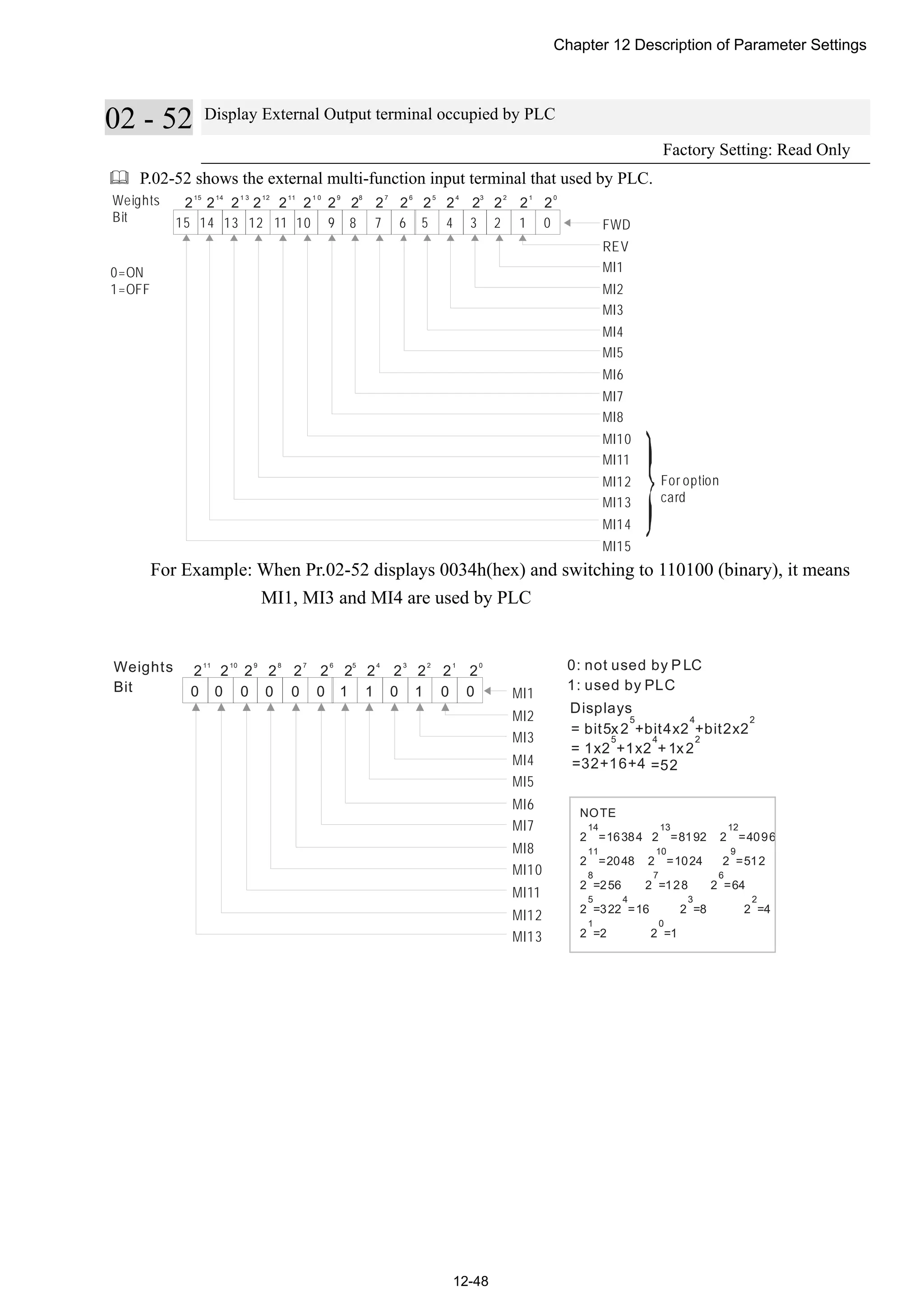
Page 12-48: Remove Pr02-57 and Pr02-58
Page12-133, Page12-140, Page12-146: Change RY00 to R6AA
Chapter01 Introduction to CP2000
1-1
01 Introduction
Receiving and Inspection
After receiving the AC motor drive, please check for the following:
1. Please inspect the unit after unpacking to assure it was not damaged during shipment.
2. Make sure that the part number printed on the package corresponds with the part number indicated on the
nameplate.
3. Make sure that the voltage for the wiring lie within the range as indicated on the nameplate.
4. Please install the AC motor drive according to this manual.
5. Before applying the power, please make sure that all the devices, including power, motor, control board and
digital keypad, are connected correctly.
6. When wiring the AC motor drive, please make sure that the wiring of input terminals “R/L1, S/L2, T/L3” and
output terminals”U/T1, V/T2, W/T3” are correct to prevent drive damage.
7. When power is applied, select the language and set the parameter groups via the digital keypad (KPC-CC01).
8. After applying the power, please trial run with the low speed and then increase the speed gradually to the
desired speed.
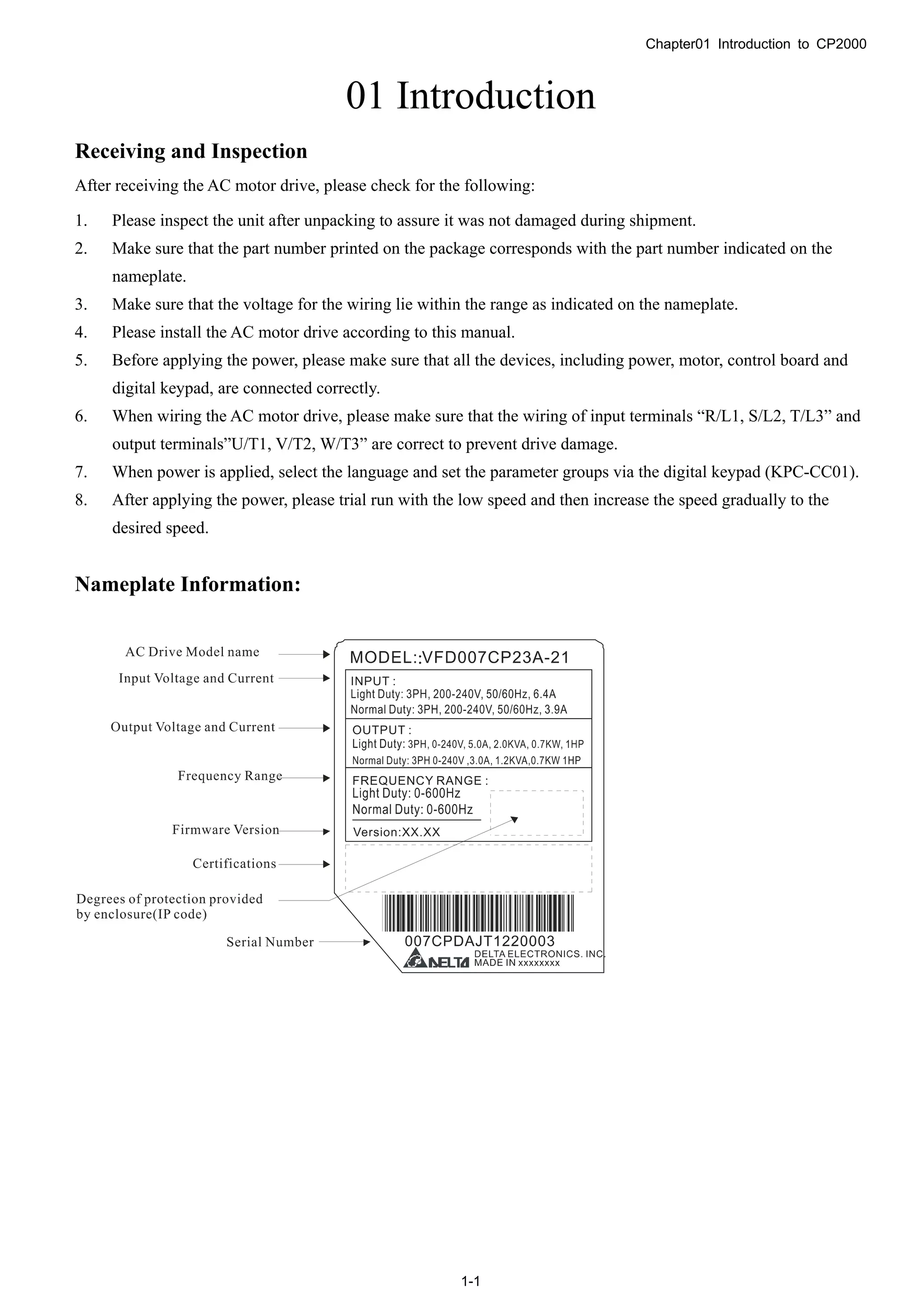
Nameplate Information:
Chapter01 Introduction to CP2000
1-2
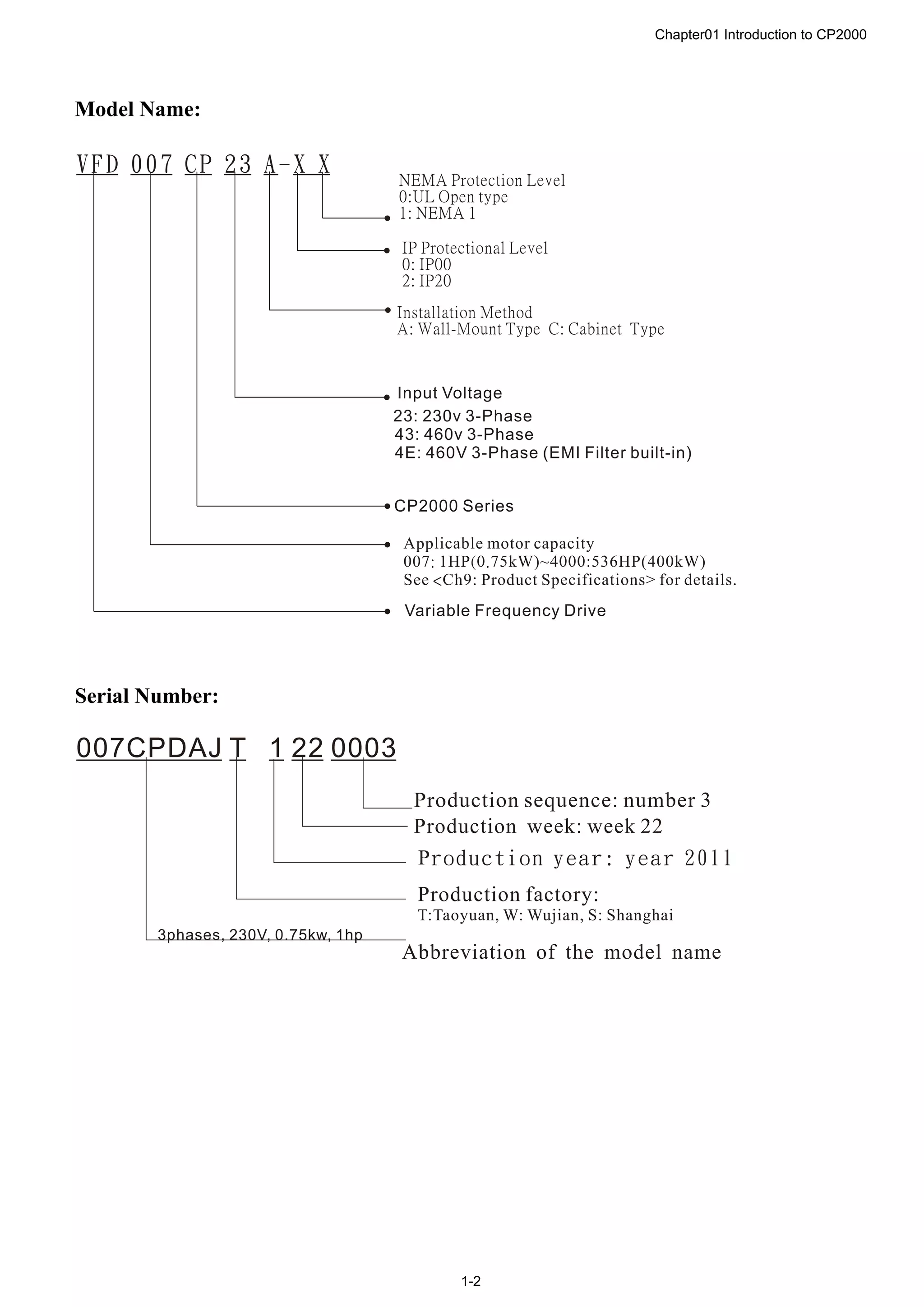
Model Name:
Serial Number:
Chapter01 Introduction to CP2000
1-3
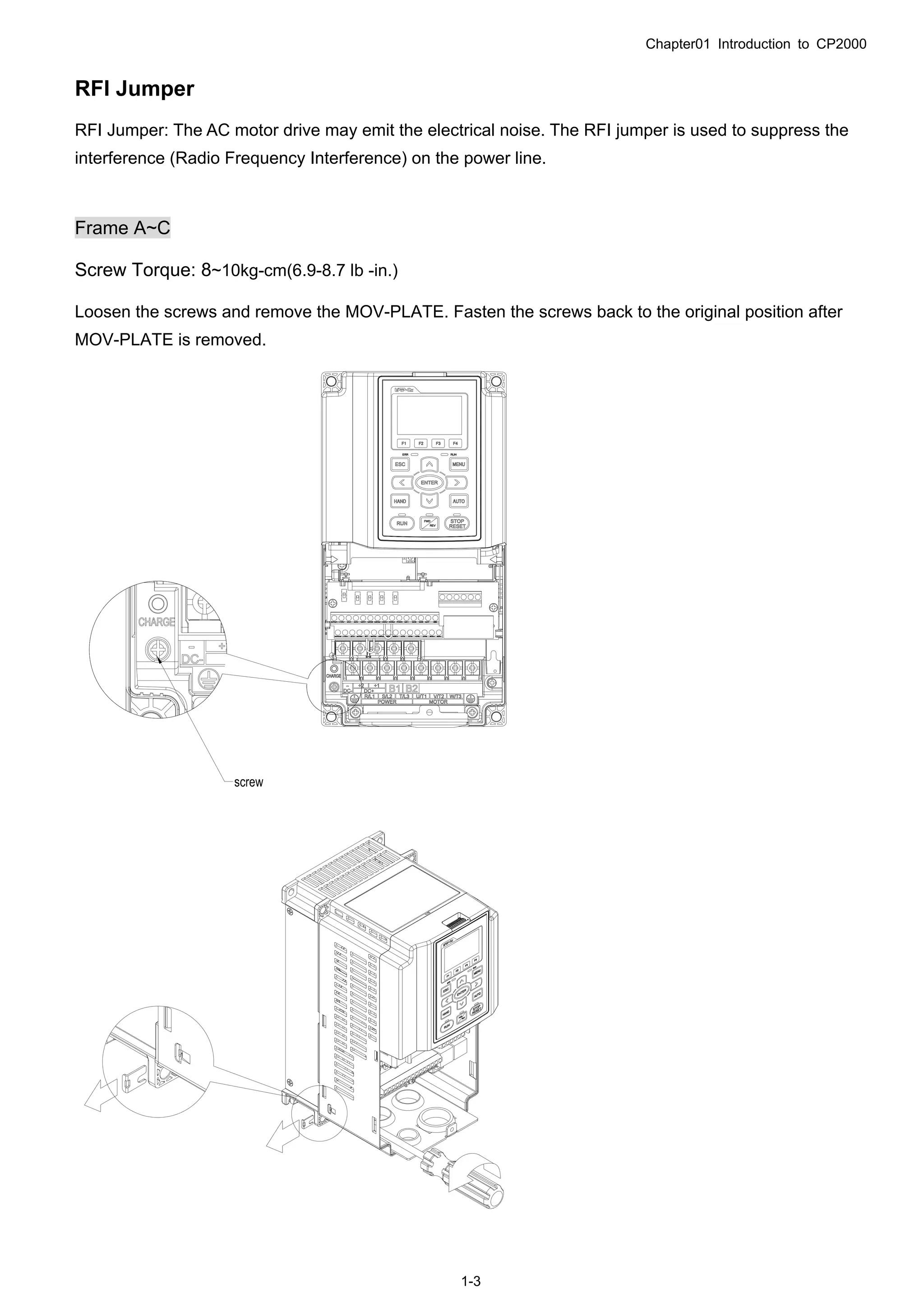
RFI Jumper
RFI Jumper: The AC motor drive may emit the electrical noise. The RFI jumper is used to suppress the
interference (Radio Frequency Interference) on the power line.
Frame A~C
Screw Torque: 8~10kg-cm(6.9-8.7 lb -in.)
Loosen the screws and remove the MOV-PLATE. Fasten the screws back to the original position after
MOV-PLATE is removed.
Chapter01 Introduction to CP2000
1-4
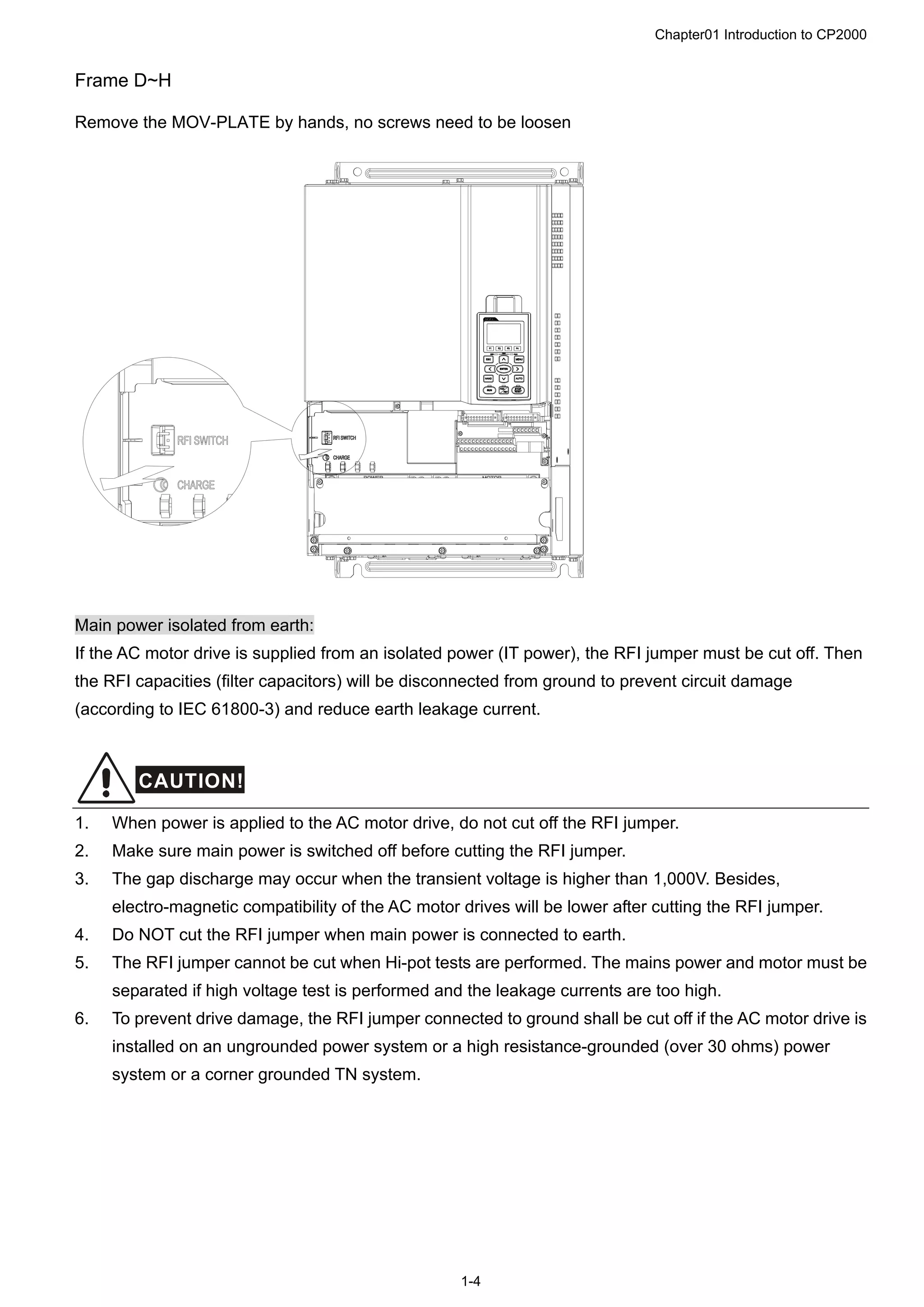
Frame D~H
Remove the MOV-PLATE by hands, no screws need to be loosen
Main power isolated from earth:
If the AC motor drive is supplied from an isolated power (IT power), the RFI jumper must be cut off. Then
the RFI capacities (filter capacitors) will be disconnected from ground to prevent circuit damage
(according to IEC 61800-3) and reduce earth leakage current.
CAUTION!
1. When power is applied to the AC motor drive, do not cut off the RFI jumper.
2. Make sure main power is switched off before cutting the RFI jumper.
3. The gap discharge may occur when the transient voltage is higher than 1,000V. Besides,
electro-magnetic compatibility of the AC motor drives will be lower after cutting the RFI jumper.
4. Do NOT cut the RFI jumper when main power is connected to earth.
5. The RFI jumper cannot be cut when Hi-pot tests are performed. The mains power and motor must be
separated if high voltage test is performed and the leakage currents are too high.
6. To prevent drive damage, the RFI jumper connected to ground shall be cut off if the AC motor drive is
installed on an ungrounded power system or a high resistance-grounded (over 30 ohms) power
system or a corner grounded TN system.
Chapter01 Introduction to CP2000
1-5
Dimensions:
Frame A, Corresponding models:
VFD007CP23A-21;VFD015CP23A-21,VFD022CP23A-21,VFD037CP23A-21,VFD055CP23A-21,
VFD007CP43A-21, VFD015CP43A-21,VFD022CP43A-21,VFD037CP43A-21,
VFD040CP43A-21,VFD055CP43A-21,VFD075CP43A-21,VFD007CP4EA-21,VFD015CP4EA-21,
VFD022CP4EA-21,VFD037CP4EA-21; VFD040CP4EA-21,VFD055CP4EA-21,VFD075CP4EA-21
Unit:mm [inch]
Frame W H D W1 H1 D1* S1 Φ1 Φ2 Φ3
A1
130.0
[5.12]
250.0
[9.84]
170.0
[6.69]
116.0
[4.57]
236.0
[9.29]
45.8
[1.80]
6.2
[0.24]
22.2
[0.87]
34.0
[1.34]
28.0
[1.10]
D1*:Flange mounting
Chapter01 Introduction to CP2000
1-6
Frame B
Corresponding models:
VFD075CP23A-21,VFD110CP23A-21,VFD150CP23A-21,VFD110CP43A-21,
VFD150CP43A-21,VFD185CP43A-21,VFD110CP4EA-21,VFD150CP4EA-21,
VFD185CP4EA-21
Detail A (Mounting Hole)
Detail B (Mounting Hole)
See Detail A
See Detail B
Unit:mm [inch]
Frame W H D W1 H1 D1* S1 Φ1 Φ2 Φ3
B
190.0
[7.48]
320.0
[12.60]
190.0
[7.48]
173.0
[6.81]
303.0
[11.93]
77.9
[3.07]
8.5
[0.33]
22.2
[0.87]
34.0
[1.34]
43.8
[1.72]
D1*:Flange mounting
Chapter01 Introduction to CP2000
1-7
Frame C
Corresponding models:
VFD185CP23A-21,VFD220CP23A-21,VFD300CP23A-21,VFD220CP43A-21,
VFD300CP43A-21,VFD370CP43A-21,VFD220CP4EA-21,VFD300CP4EA-21,
VFD370CP4EA-21
Detail A (Mounting Hole)
Detail B (Mounting Hole)
See Detail A
See Detail B
Unit:mm [inch]
Frame W H D W1 H1 D1* S1 Φ1 Φ2 Φ3
C
250.0
[9.84]
400.0
[15.75]
210.0
[8.27]
231.0
[9.09]
381.0
[15.00]
92.9
[3.66]
8.5
[0.33]
22.2
[0.87]
34.0
[1.34]
50.0
[1.97]
D1*:Flange mounting
Chapter01 Introduction to CP2000
1-8
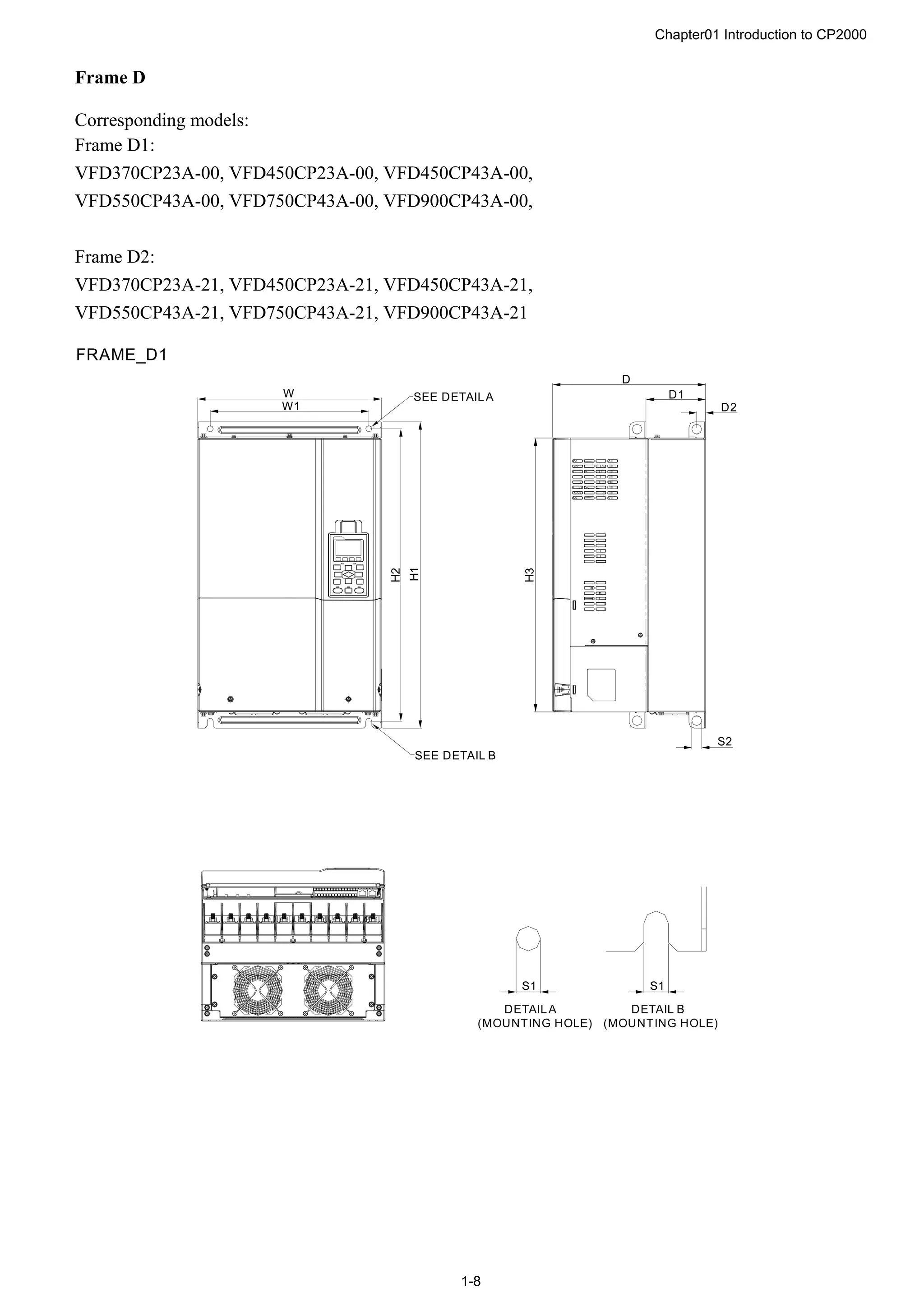
Frame D
Corresponding models:
Frame D1:
VFD370CP23A-00, VFD450CP23A-00, VFD450CP43A-00,
VFD550CP43A-00, VFD750CP43A-00, VFD900CP43A-00,
Frame D2:
VFD370CP23A-21, VFD450CP23A-21, VFD450CP43A-21,
VFD550CP43A-21, VFD750CP43A-21, VFD900CP43A-21
W
W1
H1
H2
S1S1
SEE DETAILA
DETAILA
(MOUNTING HOLE)
DETAIL B
(MOUNTING HOLE)
SEE DETAIL B
D
H3
D1
S2
D2
FRAME_D1
Chapter01 Introduction to CP2000
1-9
W
W1
1
2
3
H
H1
H2
S1S1
SEE DETAIL A
DETAIL A
(MOUNTING HOLE)
DETAIL B
(MOUNTING HOLE)
SEE DETAIL B
3
2
1
D
H3
D1
S2
D2
FRAME_D2
Unit:mm[inch]
Frame W H D W1 H1 H2 H3 D1* D2 S1 S2 Φ1 Φ2 Φ3
D1
330.0
[12.99]
-
275.0
[10.83]
285.0
[11.22]
550.0
[21.65]
525.0
[20.67]
492.0
[19.37]
107.2
[4.22]
16.0
[0.63]
11.0
[0.43]
18.0
[0.71]
- - -
D2
330.0
[12.99]
688.3
[27.10]
275.0
[10.83]
285.0
[11.22]
550.0
[21.65]
525.0
[20.67]
492.0
[19.37]
107.2
[4.22]
16.0
[0.63]
11.0
[0.43]
18.0
[0.71]
76.2
[3.00]
34.0
[1.34]
22.0
[0.87]
D1*:Flange mounting
Chapter01 Introduction to CP2000
1-10
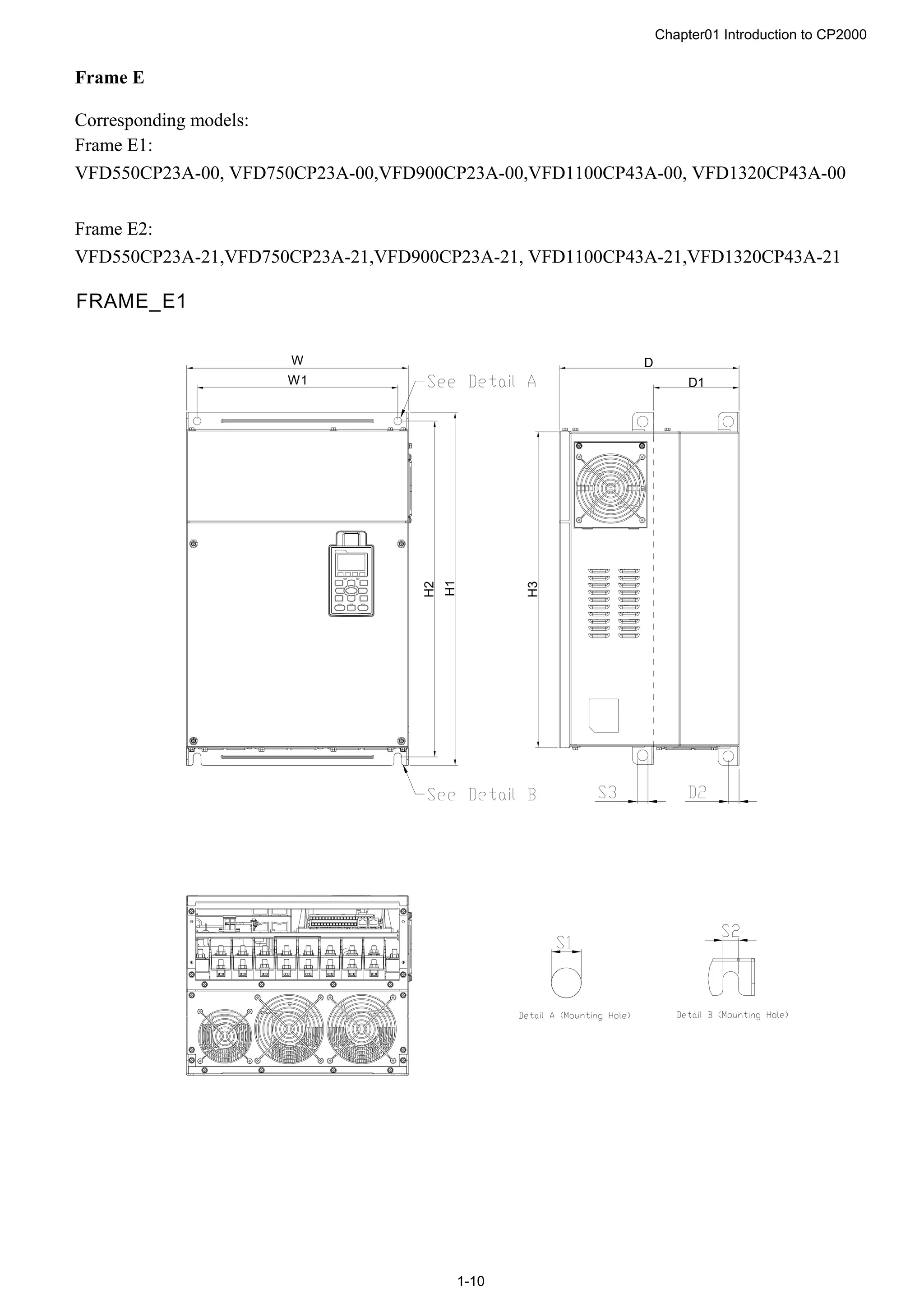
Frame E
Corresponding models:
Frame E1:
VFD550CP23A-00, VFD750CP23A-00,VFD900CP23A-00,VFD1100CP43A-00, VFD1320CP43A-00
Frame E2:
VFD550CP23A-21,VFD750CP23A-21,VFD900CP23A-21, VFD1100CP43A-21,VFD1320CP43A-21
W1
W
H2
H1
H3
D1
D
FRAME_E1
Chapter01 Introduction to CP2000
1-11
W1
W
H2
H1
H3
H
D1
D
?
?
?
?
?
?
?
?
FRAME_E2
Unit:mm [inch]
Frame W H D W1 H1 H2 H3 D1* D2 S1, S2 S3 Φ1 Φ2 Φ3
E1
370.0
[14.57]
-
300.0
[11.81]
335.0
[13.19
589
[23.19]
560.0
[22.05]
528.0
[20.80]
143.0
[5.63]
18.0
[0.71]
13.0
[0.51]
18.0
[0.71]
- - -
E2
370.0
[14.57]
715.8
[28.18]
300.0
[11.81]
335.0
[13.19
589
[23.19]
560.0
[22.05]
528.0
[20.80]
143.0
[5.63]
18.0
[0.71]
13.0
[0.51]
18.0
[0.71]
22.0
[0.87]
34.0
[1.34]
92.0
[3.62]
D1*:Flange mounting
Chapter01 Introduction to CP2000
1-12
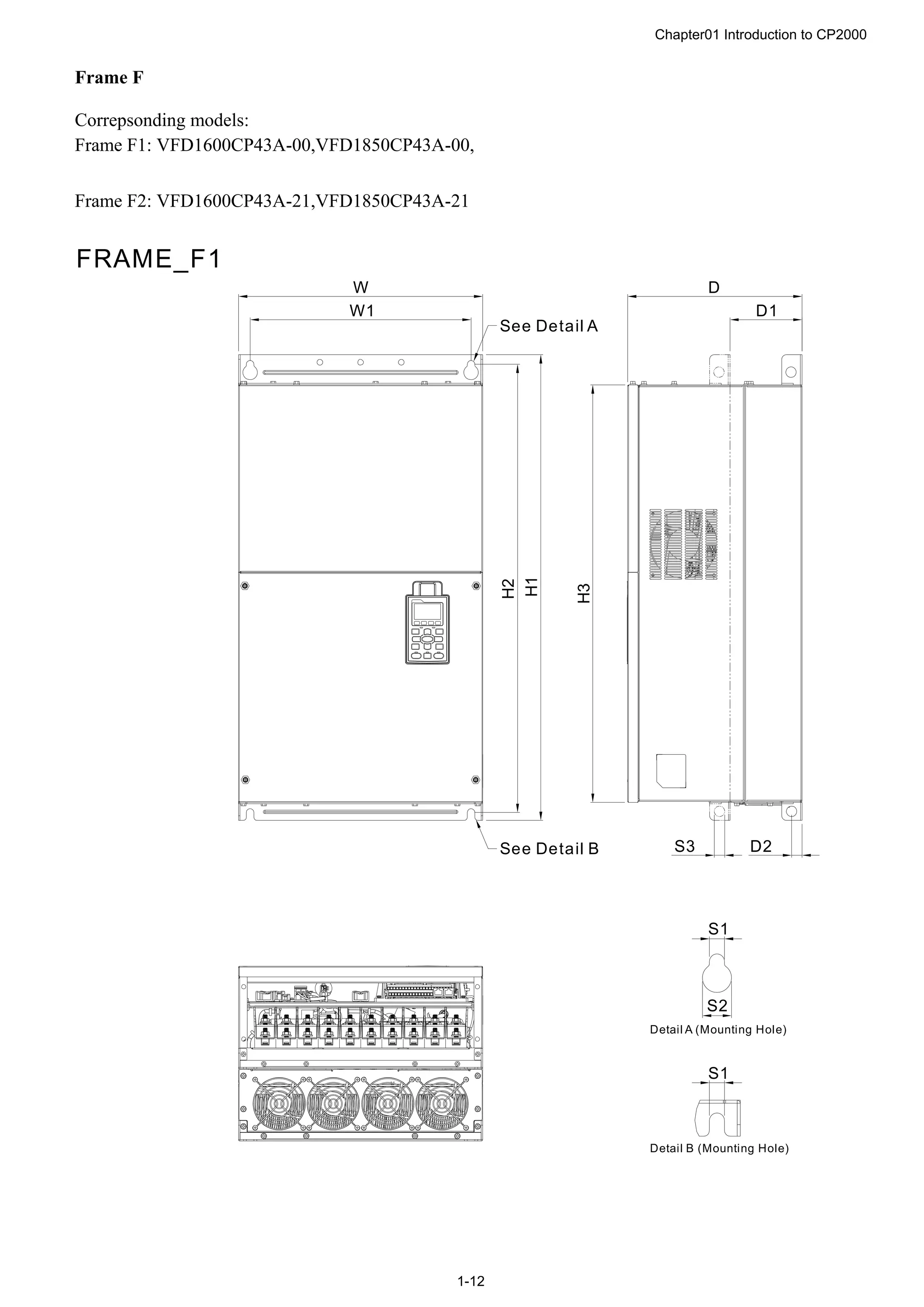
Frame F
Correpsonding models:
Frame F1: VFD1600CP43A-00,VFD1850CP43A-00,
Frame F2: VFD1600CP43A-21,VFD1850CP43A-21
H1
H2
S1
S1
W
W1
S2
See Detail A
See Detail B
Detail A (Mounting Hole)
Detail B (Mounting Hole)
FRAME_F1
D2
D
D1
H3
S3
Chapter01 Introduction to CP2000
1-13
H1
H2
S1
S1
D2
W
W1
D
D1
H3
H
S2
S3
3
2
1
2
2
2
3
1
See Detail A
See Detail B
Detail A (Mounting Hole)
Detail B (Mounting Hole)
FRAME_F2
Unit:mm [inch]
Frame W H D W1 H1 H2 H3 D1* D2 S1 S2 S3
F1
420.0
[16.54]
-
300.0
[11.81]
380.0
[14.96]
800.0
[31.50]
770.0
[30.32]
717.0
[28.23]
124.0
[4.88]
18.0
[0.71]
13.0
[0.51]
25.0
[0.98]
18.0
[0.71]
F2
420.0
[16.54]
940.0
[37.00]
300.0
[11.81]
380.0
[14.96]
800.0
[31.50]
770.0
[30.32]
717.0
[28.23]
124.0
[4.88]
18.0
[0.71]
13.0
[0.51]
25.0
[0.98]
18.0
[0.71]
Frame Φ1 Φ2 Φ3
F1 - - -
F2 92.0
[3.62]
35.0
[1.38]
22.0
[0.87]
D1*:Flange mounting
Chapter01 Introduction to CP2000
1-14
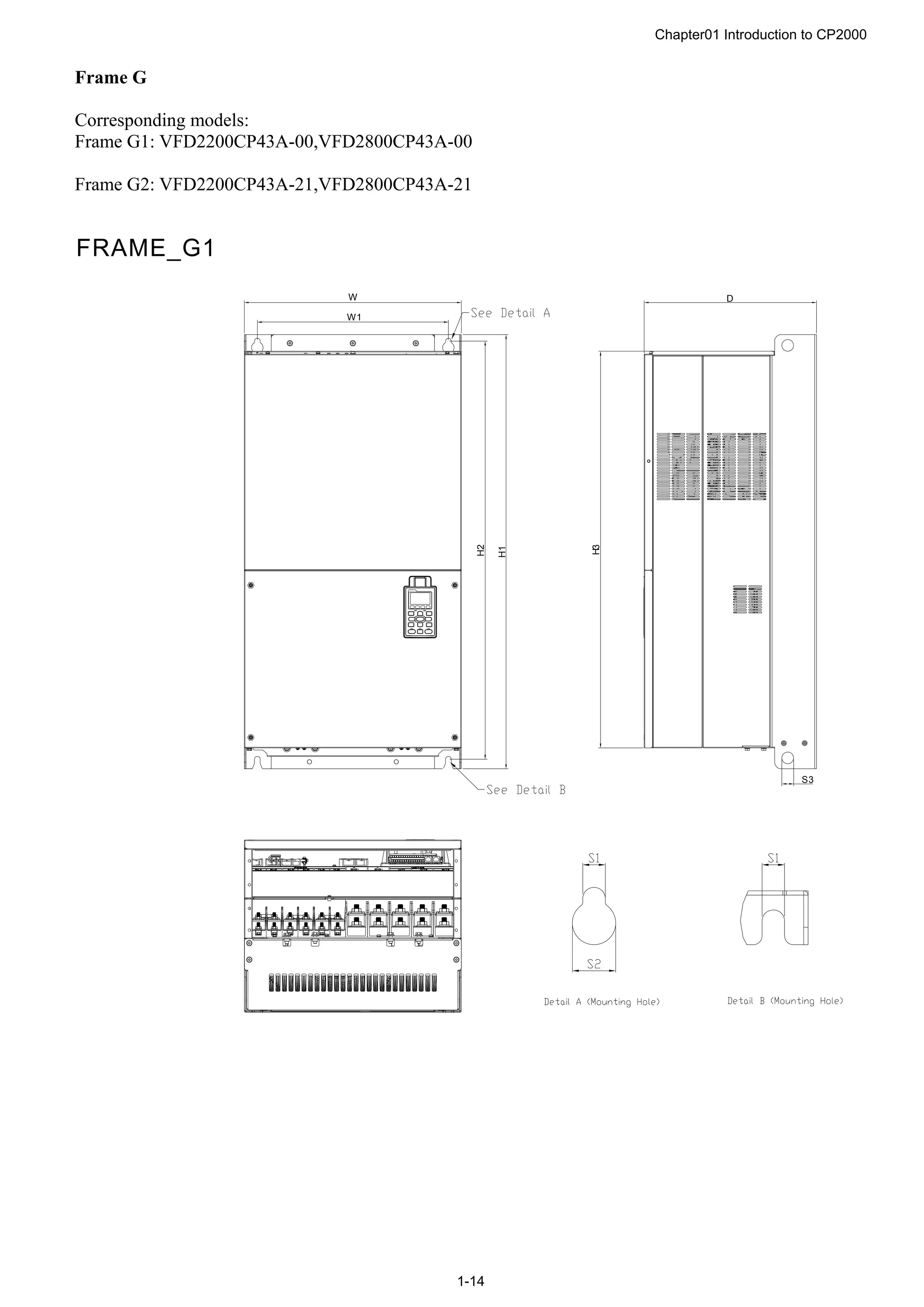
Frame G
Corresponding models:
Frame G1: VFD2200CP43A-00,VFD2800CP43A-00
Frame G2: VFD2200CP43A-21,VFD2800CP43A-21
W1
W
H2
H1
H3
D
S3
FRAME_G1
Chapter01 Introduction to CP2000
1-15
W1
W
H2
H1
H
H3
D
S 3
FRAME_G2
Unit:mm [inch]
Frame W H D W1 H1 H2 H3 S1 S2 S3 Φ1 Φ2 Φ3
G1
500.0
[19.69]
-
397.0
[15.63]
440.0
[217.32]
1000.0
[39.37]
963.0
[37.91]
913.6
[35.97]
13.0
[0.51]
26.5
[1.04]
27.0
[1.06]
- - -
G2
500.0
[19.69]
1240.2
[48.83]
397.0
[15.63]
440.0
[217.32]
1000.0
[39.37]
963.0
[37.91]
913.6
[35.97]
13.0
[0.51]
26.5
[1.04]
27.0
[1.06]
22.0
[0.87]
34.0
[1.34]
117.5
[4.63]
Chapter01 Introduction to CP2000
1-16
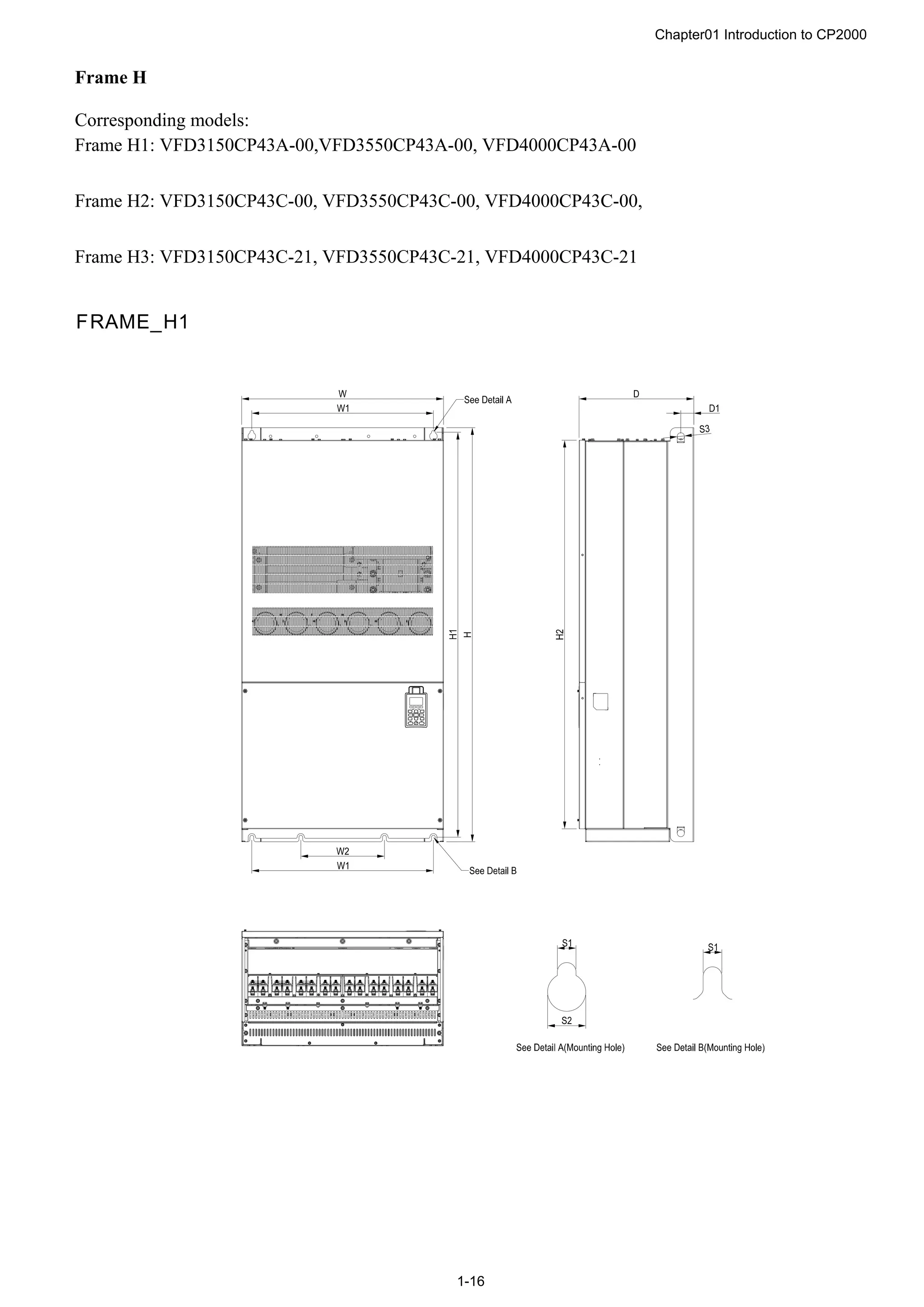
Frame H
Corresponding models:
Frame H1: VFD3150CP43A-00,VFD3550CP43A-00, VFD4000CP43A-00
Frame H2: VFD3150CP43C-00, VFD3550CP43C-00, VFD4000CP43C-00,
Frame H3: VFD3150CP43C-21, VFD3550CP43C-21, VFD4000CP43C-21
FRAME_H1
Chapter01 Introduction to CP2000
1-17
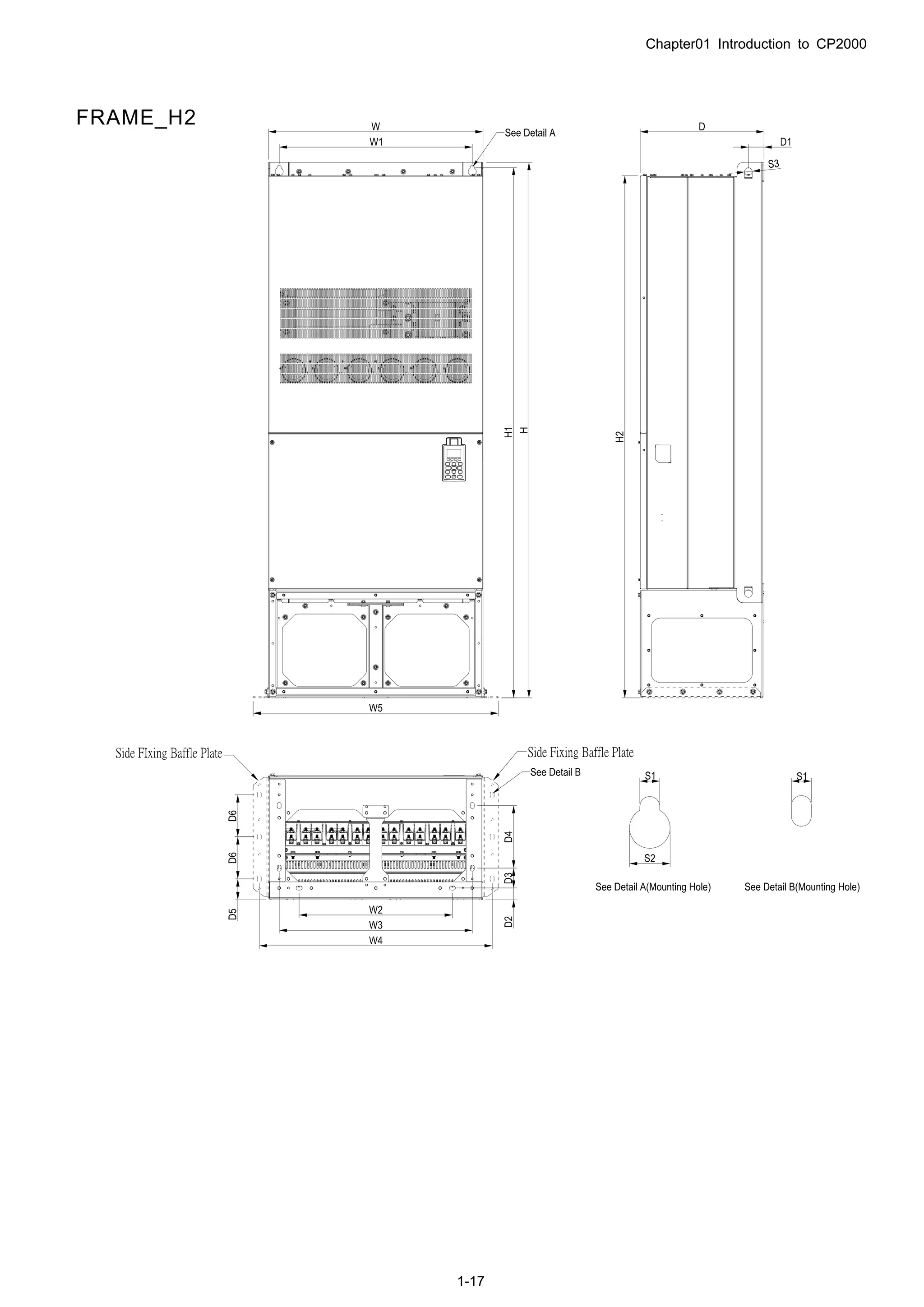
FRAME_H2
Chapter01 Introduction to CP2000
1-18
FRAME_H3
Unit:mm [inch]
Frame W H D W1 W2 W3 W4 W5 W6 H1 H2 H3 H4
H1
700.0
[27.56]
1435.0
[56.5]
398.0
[15.67]
630.0
[24.8]
290.0
[11.42]
- - - -
1403.0
[55.24]
1346.6
[53.02]
- -
H2
700.0
[27.56]
1745.0
[68.70]
404.0
[15.90]
630.0
[24.8]
500.0
[19.69]-
630.0
[24.80]
760.0
[29.92]
800.0
[31.5]
-
1729.0
[68.07]
1701.6
[66.99]
- -
H3
700.0
[27.56]
1745.0
[68.70]
404.0
[15.91]
630.0
[24.80]
500.0
[19.69]
630.0
[24.80]
760.0
[29.92]
800.0
[31.5]
-
1729.0
[68.07]
1701.6
[66.99]
- -
Frame H5 D1 D2 D3 D4 D5 D6 S1 S2 S3 Φ1 Φ2 Φ3
H1
45.0
[1.77]
- - - - -
13.0
[0.51]
26.5
[1.04]
25.0
[0.98]
- - -
H2
51.0
[2.00]
38.0
[1.50]
65.0
[2.56]
204.0
[8.03]
68.0
[2.68]
137.0
[5.40]
13.0
[0.51]
26.5
[1.04]
25.0
[0.98]
- - -
H3
51.0
[2.00]
38.0
[1.50]
65.0
[2.56]
204.0
[8.03]
68.0
[2.68]
137.0
[5.40]
13.0
[0.51]
26.5
[1.04]
25.0
[0.98]
22.0
[0.87]
34.0
[1.34]
117.5
[4.63]
Chapter01 Introduction to CP2000
1-19
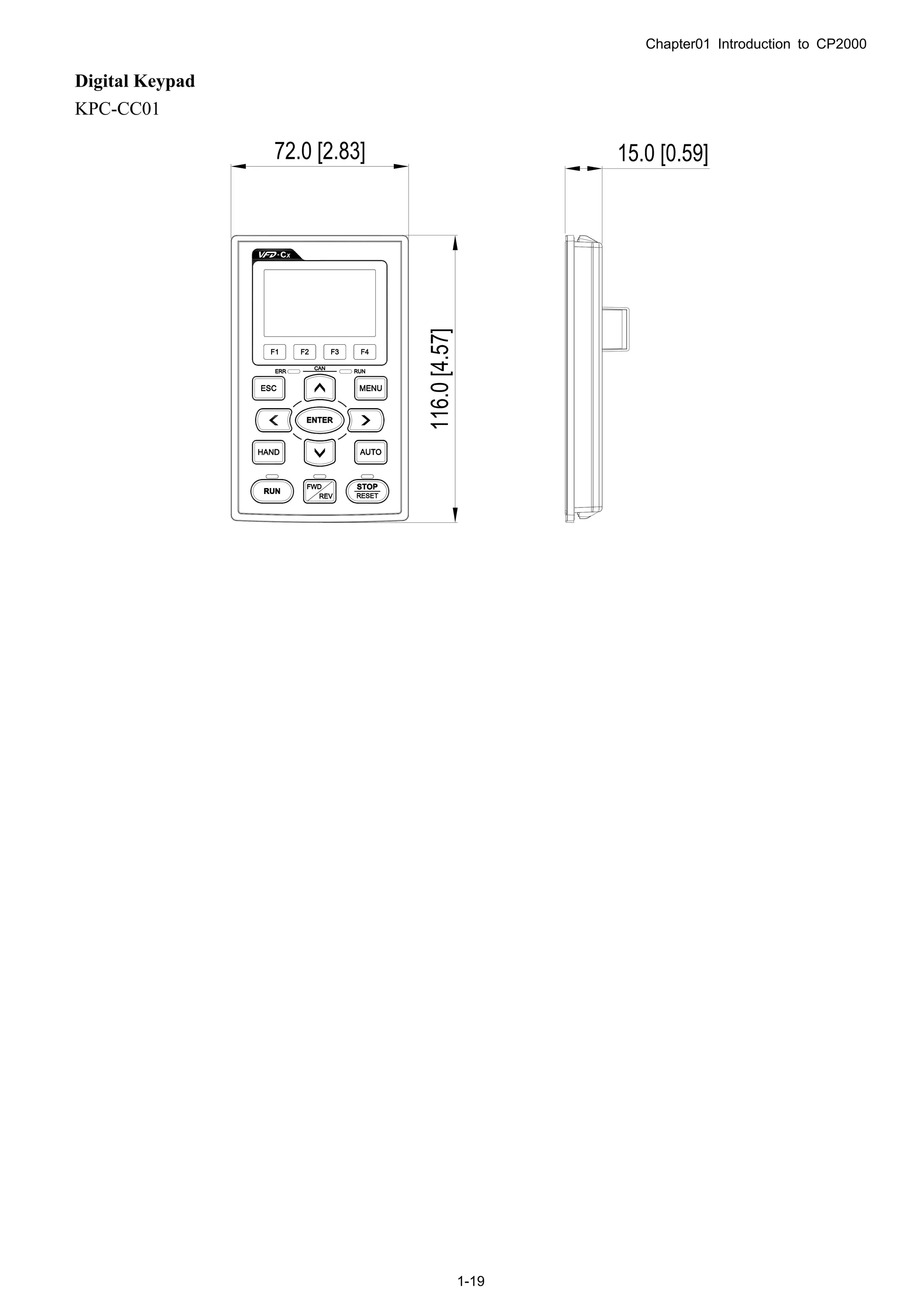
Digital Keypad
KPC-CC01
Chapter 02 Installation
2-1
02 Installation
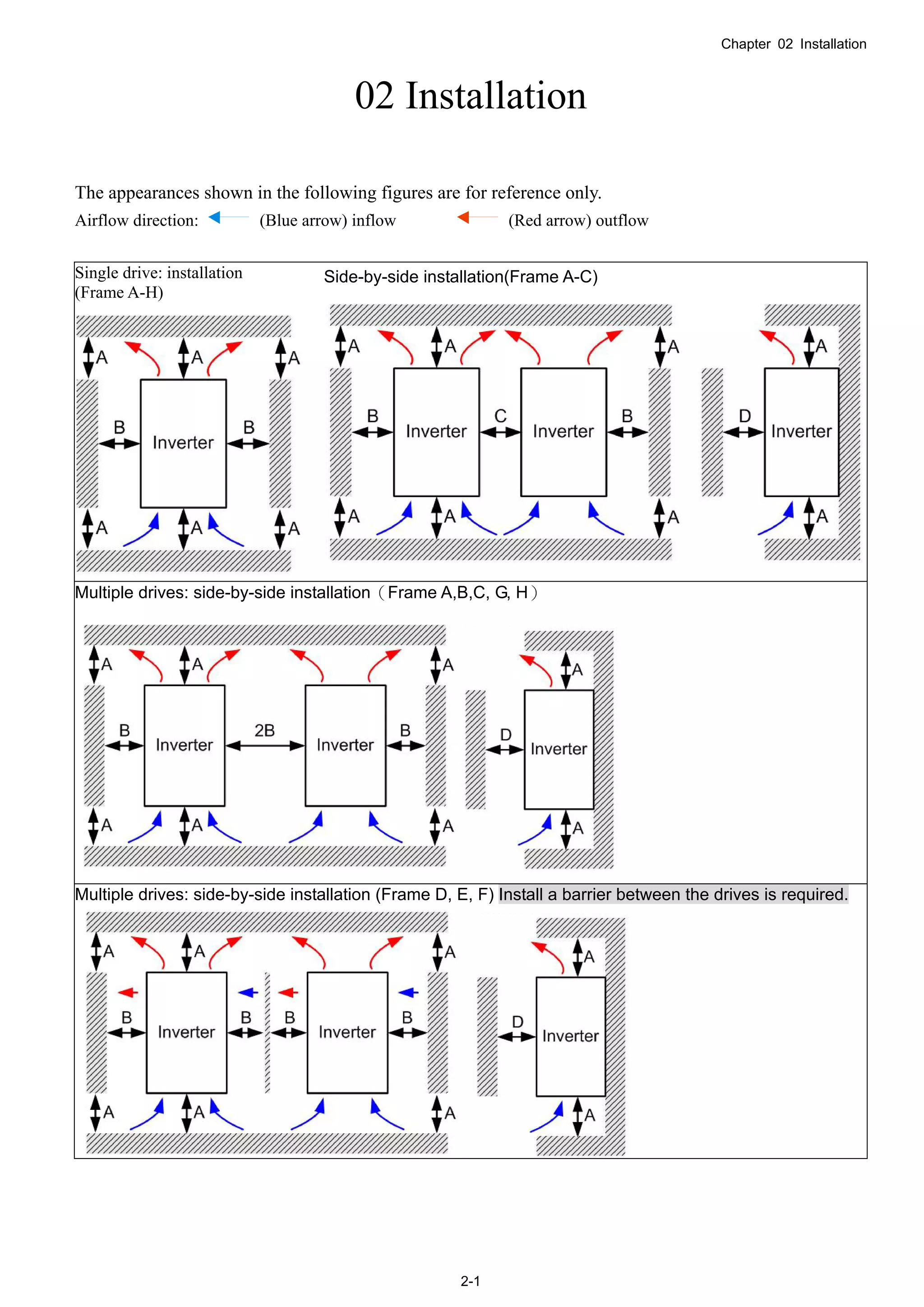
The appearances shown in the following figures are for reference only.
Airflow direction: (Blue arrow) inflow (Red arrow) outflow
Single drive: installation
(Frame A-H)
Side-by-side installation(Frame A-C)
Multiple drives: side-by-side installation(Frame A,B,C, G, H)
Multiple drives: side-by-side installation (Frame D, E, F) Install a barrier between the drives is required.
Chapter 02 Installation
2-2
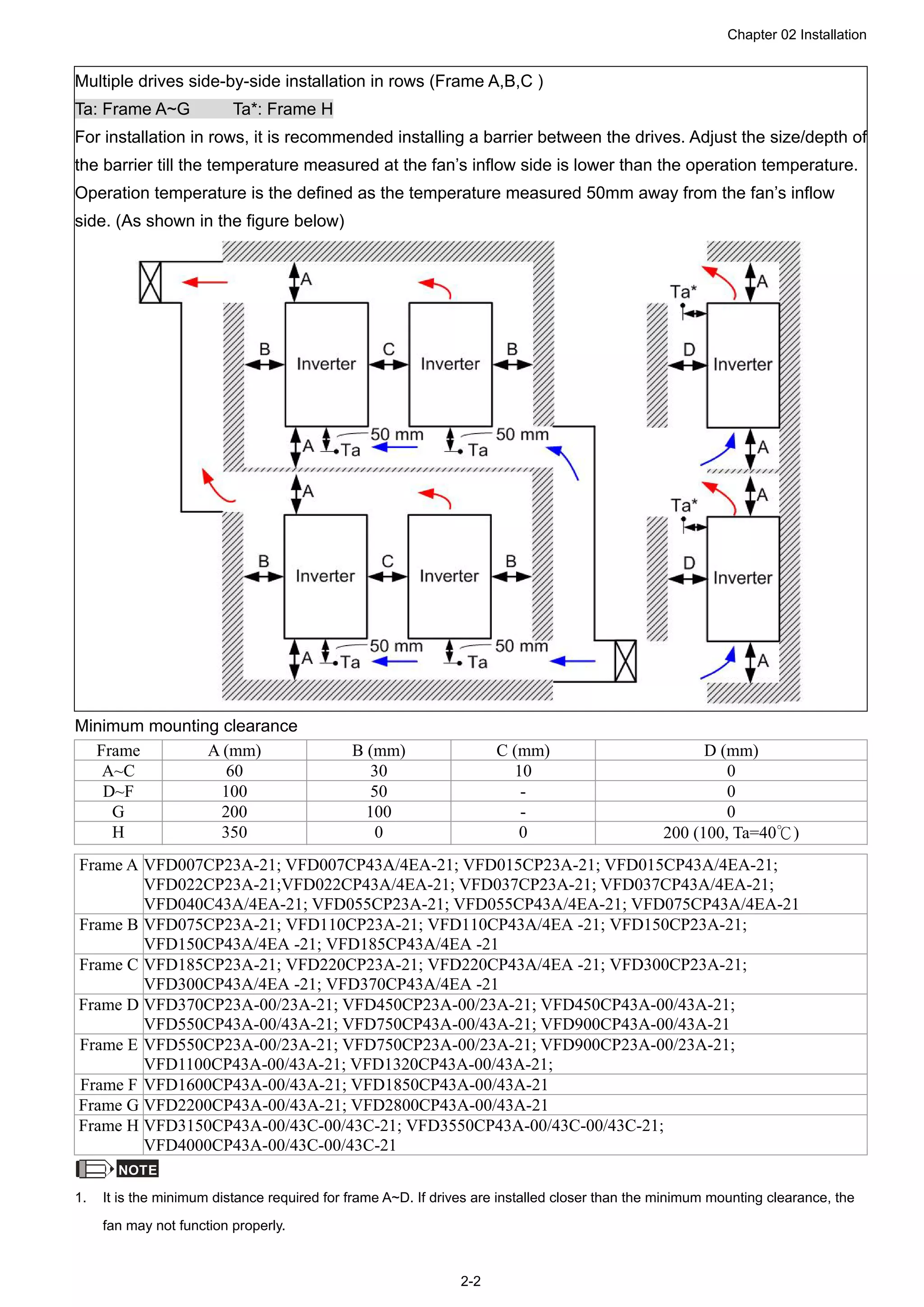
Multiple drives side-by-side installation in rows (Frame A,B,C )
Ta: Frame A~G Ta*: Frame H
For installation in rows, it is recommended installing a barrier between the drives. Adjust the size/depth of
the barrier till the temperature measured at the fan’s inflow side is lower than the operation temperature.
Operation temperature is the defined as the temperature measured 50mm away from the fan’s inflow
side. (As shown in the figure below)
Minimum mounting clearance
Frame A (mm) B (mm) C (mm) D (mm)
A~C 60 30 10 0
D~F 100 50 - 0
G 200 100 - 0
H 350 0 0 200 (100, Ta=40℃)
Frame A VFD007CP23A-21; VFD007CP43A/4EA-21; VFD015CP23A-21; VFD015CP43A/4EA-21;
VFD022CP23A-21;VFD022CP43A/4EA-21; VFD037CP23A-21; VFD037CP43A/4EA-21;
VFD040C43A/4EA-21; VFD055CP23A-21; VFD055CP43A/4EA-21; VFD075CP43A/4EA-21
Frame B VFD075CP23A-21; VFD110CP23A-21; VFD110CP43A/4EA -21; VFD150CP23A-21;
VFD150CP43A/4EA -21; VFD185CP43A/4EA -21
Frame C VFD185CP23A-21; VFD220CP23A-21; VFD220CP43A/4EA -21; VFD300CP23A-21;
VFD300CP43A/4EA -21; VFD370CP43A/4EA -21
Frame D VFD370CP23A-00/23A-21; VFD450CP23A-00/23A-21; VFD450CP43A-00/43A-21;
VFD550CP43A-00/43A-21; VFD750CP43A-00/43A-21; VFD900CP43A-00/43A-21
Frame E VFD550CP23A-00/23A-21; VFD750CP23A-00/23A-21; VFD900CP23A-00/23A-21;
VFD1100CP43A-00/43A-21; VFD1320CP43A-00/43A-21;
Frame F VFD1600CP43A-00/43A-21; VFD1850CP43A-00/43A-21
Frame G VFD2200CP43A-00/43A-21; VFD2800CP43A-00/43A-21
Frame H VFD3150CP43A-00/43C-00/43C-21; VFD3550CP43A-00/43C-00/43C-21;
VFD4000CP43A-00/43C-00/43C-21
NOTE
1. It is the minimum distance required for frame A~D. If drives are installed closer than the minimum mounting clearance, the
fan may not function properly.
Chapter 02 Installation
2-3
NOTE
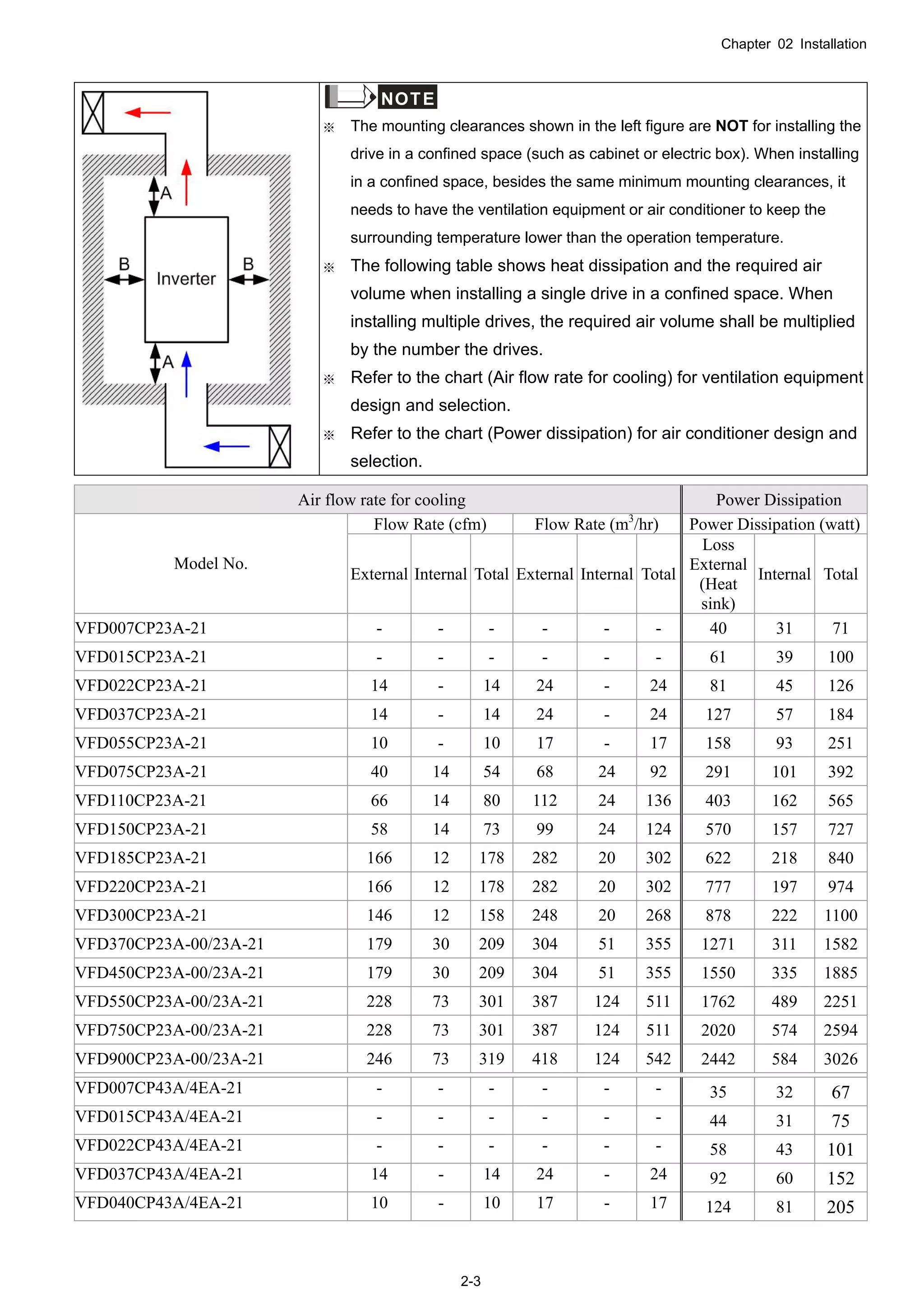
※ The mounting clearances shown in the left figure are NOT for installing the
drive in a confined space (such as cabinet or electric box). When installing
in a confined space, besides the same minimum mounting clearances, it
needs to have the ventilation equipment or air conditioner to keep the
surrounding temperature lower than the operation temperature.
※ The following table shows heat dissipation and the required air
volume when installing a single drive in a confined space. When
installing multiple drives, the required air volume shall be multiplied
by the number the drives.
※ Refer to the chart (Air flow rate for cooling) for ventilation equipment
design and selection.
※ Refer to the chart (Power dissipation) for air conditioner design and
selection.
Air flow rate for cooling Power Dissipation
Flow Rate (cfm) Flow Rate (m3
/hr) Power Dissipation (watt)
Model No.
External Internal Total External Internal Total
Loss
External
(Heat
sink)
Internal Total
VFD007CP23A-21 - - - - - - 40 31 71
VFD015CP23A-21 - - - - - - 61 39 100
VFD022CP23A-21 14 - 14 24 - 24 81 45 126
VFD037CP23A-21 14 - 14 24 - 24 127 57 184
VFD055CP23A-21 10 - 10 17 - 17 158 93 251
VFD075CP23A-21 40 14 54 68 24 92 291 101 392
VFD110CP23A-21 66 14 80 112 24 136 403 162 565
VFD150CP23A-21 58 14 73 99 24 124 570 157 727
VFD185CP23A-21 166 12 178 282 20 302 622 218 840
VFD220CP23A-21 166 12 178 282 20 302 777 197 974
VFD300CP23A-21 146 12 158 248 20 268 878 222 1100
VFD370CP23A-00/23A-21 179 30 209 304 51 355 1271 311 1582
VFD450CP23A-00/23A-21 179 30 209 304 51 355 1550 335 1885
VFD550CP23A-00/23A-21 228 73 301 387 124 511 1762 489 2251
VFD750CP23A-00/23A-21 228 73 301 387 124 511 2020 574 2594
VFD900CP23A-00/23A-21 246 73 319 418 124 542 2442 584 3026
VFD007CP43A/4EA-21 - - - - - - 35 32 67
VFD015CP43A/4EA-21 - - - - - - 44 31 75
VFD022CP43A/4EA-21 - - - - - - 58 43 101
VFD037CP43A/4EA-21 14 - 14 24 - 24 92 60 152
VFD040CP43A/4EA-21 10 - 10 17 - 17 124 81 205
Chapter 02 Installation
2-4
Air flow rate for cooling Power Dissipation
VFD055CP43A/4EA-21 10 - 10 17 - 17 135 99 234
VFD075CP43A/4EA-21 10 - 10 17 - 17 165 98 263
VFD110CP43A/4EA-21 40 14 54 68 24 92 275 164 439
VFD150CP43A/4EA-21 66 14 80 112 24 136 370 194 564
VFD185CP43A/4EA-21 58 14 73 99 24 124 459 192 651
VFD220CP43A/4EA-21 99 21 120 168 36 204 455 358 813
VFD300CP43A/4EA-21 99 21 120 168 36 204 609 363 972
VFD370CP43A/4EA-21 126 21 147 214 36 250 845 405 1250
VFD450CP43A-00/43A-21 179 30 209 304 51 355 1056 459 1515
VFD550CP43A-00/43A-21 179 30 209 304 51 355 1163 669 1832
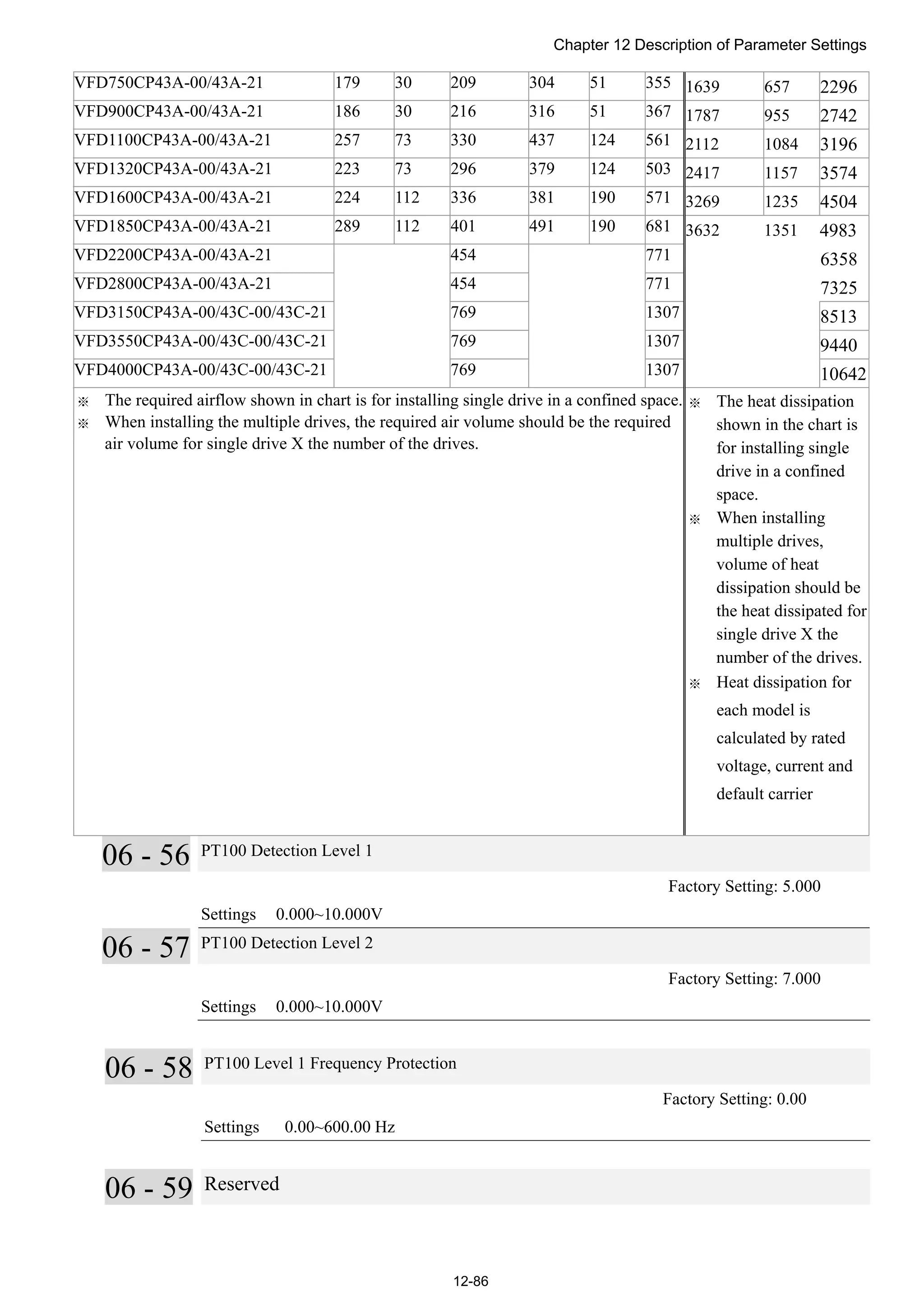
VFD750CP43A-00/43A-21 179 30 209 304 51 355 1639 657 2296
VFD900CP43A-00/43A-21 186 30 216 316 51 367 1787 955 2742
VFD1100CP43A-00/43A-21 257 73 330 437 124 561 2112 1084 3196
VFD1320CP43A-00/43A-21 223 73 296 379 124 503 2417 1157 3574
VFD1600CP43A-00/43A-21 224 112 336 381 190 571 3269 1235 4504
VFD1850CP43A-00/43A-21 289 112 401 491 190 681 3632 1351 4983
VFD2200CP43A-00/43A-21 454 771 6358
VFD2800CP43A-00/43A-21 454 771 7325
VFD3150CP43A-00/43C-00/43C-21 769 1307 8513
VFD3550CP43A-00/43C-00/43C-21 769 1307 9440
VFD4000CP43A-00/43C-00/43C-21 769 1307 10642
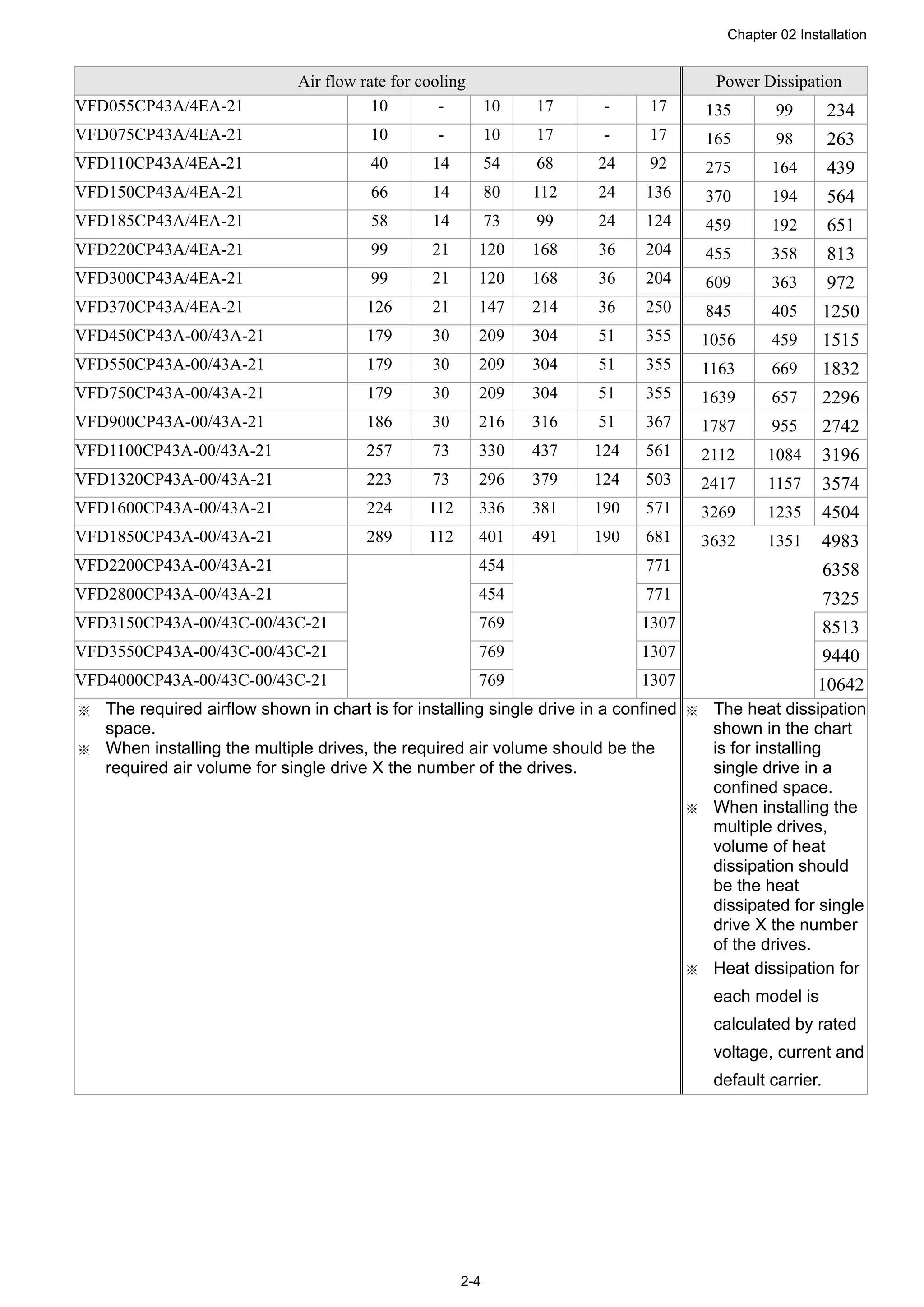
※ The required airflow shown in chart is for installing single drive in a confined
space.
※ When installing the multiple drives, the required air volume should be the
required air volume for single drive X the number of the drives.
※ The heat dissipation
shown in the chart
is for installing
single drive in a
confined space.
※ When installing the
multiple drives,
volume of heat
dissipation should
be the heat
dissipated for single
drive X the number
of the drives.
※ Heat dissipation for
each model is
calculated by rated
voltage, current and
default carrier.
Chapter 03 Unpacking
3-1
03 Unpacking
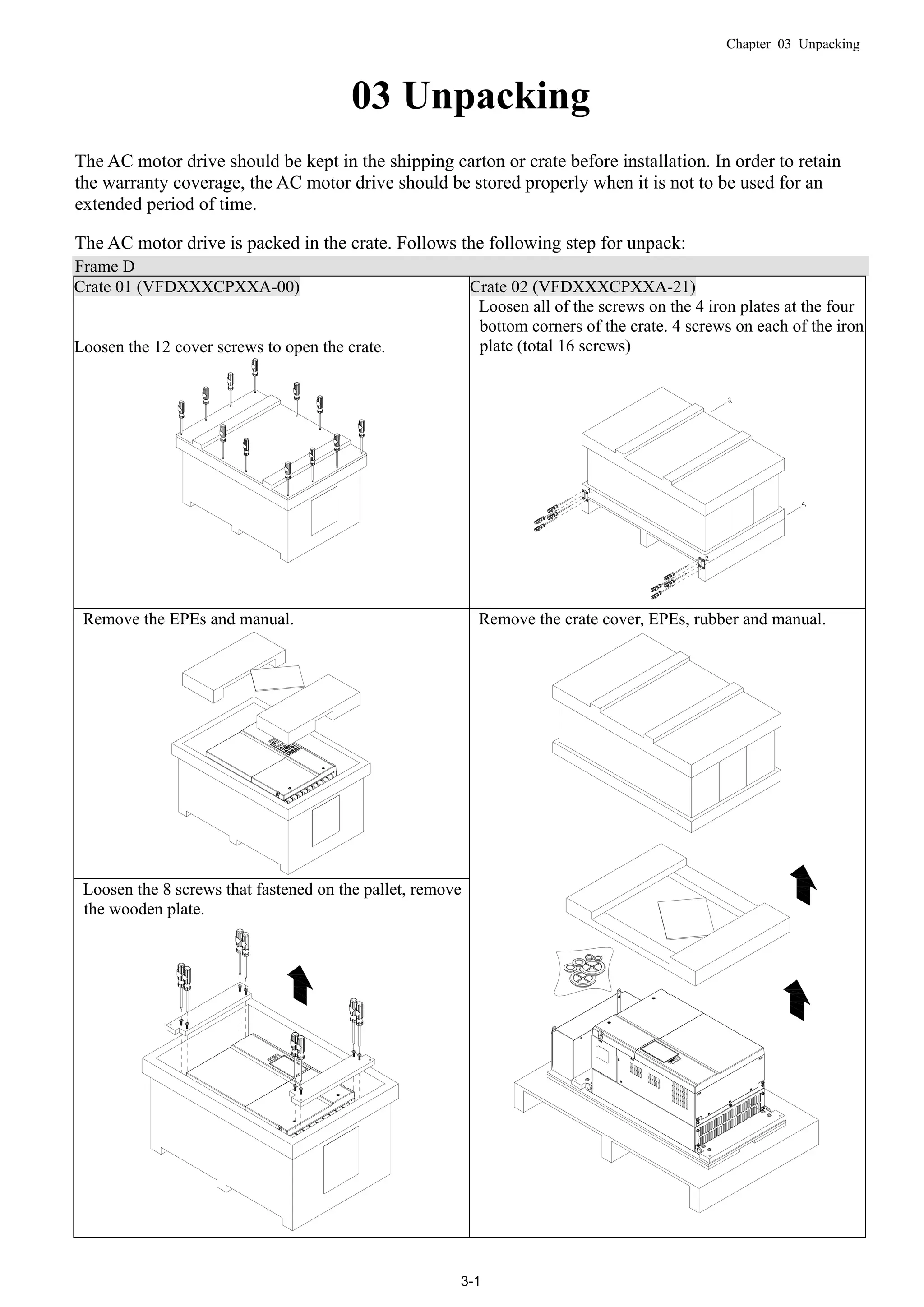
The AC motor drive should be kept in the shipping carton or crate before installation. In order to retain
the warranty coverage, the AC motor drive should be stored properly when it is not to be used for an
extended period of time.
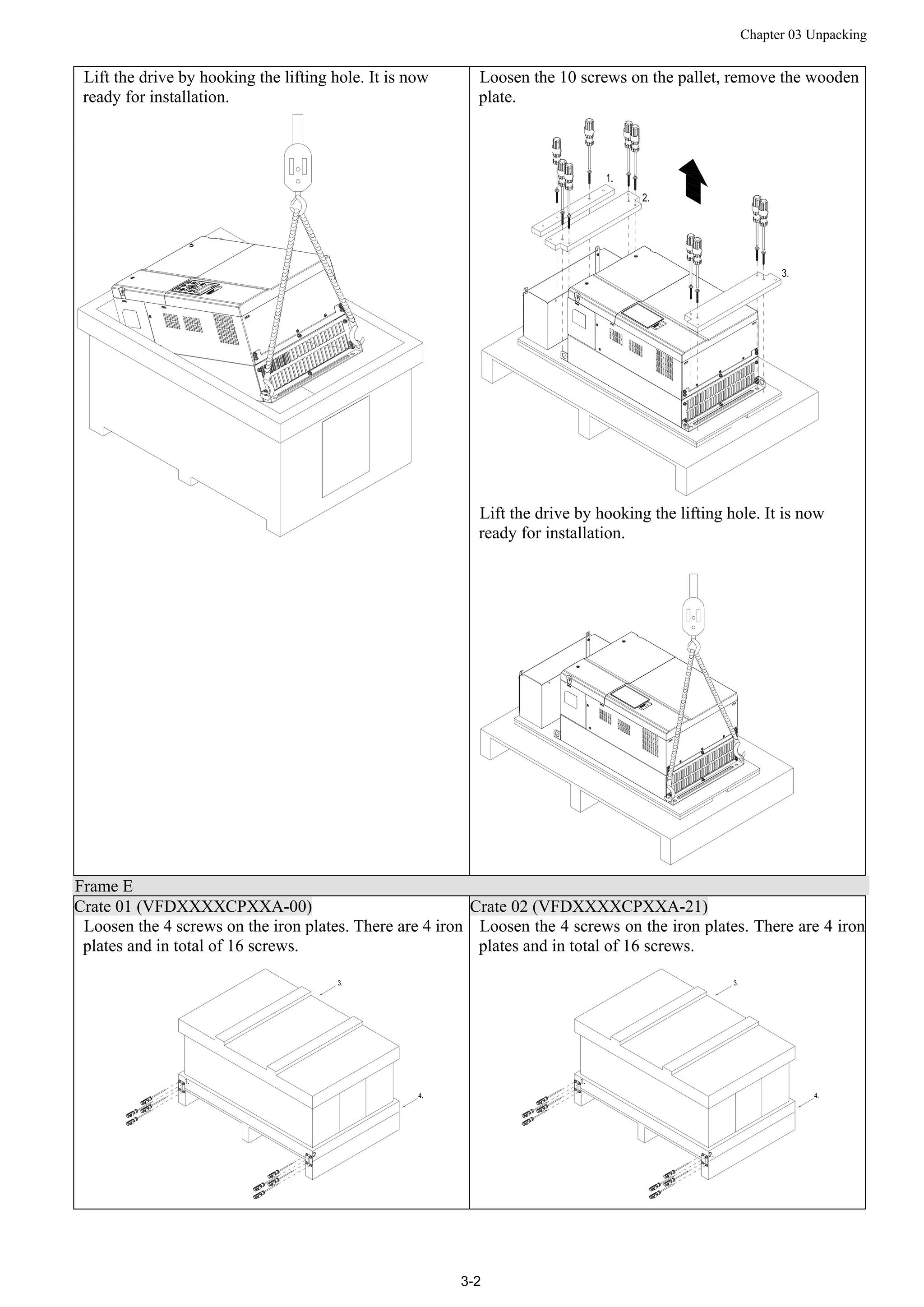
The AC motor drive is packed in the crate. Follows the following step for unpack:
Frame D
Crate 01 (VFDXXXCPXXA-00) Crate 02 (VFDXXXCPXXA-21)
Loosen the 12 cover screws to open the crate.
Loosen all of the screws on the 4 iron plates at the four
bottom corners of the crate. 4 screws on each of the iron
plate (total 16 screws)
Remove the EPEs and manual.
Loosen the 8 screws that fastened on the pallet, remove
the wooden plate.
Remove the crate cover, EPEs, rubber and manual.
Chapter 03 Unpacking
3-2
Lift the drive by hooking the lifting hole. It is now
ready for installation.
Loosen the 10 screws on the pallet, remove the wooden
plate.
Lift the drive by hooking the lifting hole. It is now
ready for installation.
Frame E
Crate 01 (VFDXXXXCPXXA-00) Crate 02 (VFDXXXXCPXXA-21)
Loosen the 4 screws on the iron plates. There are 4 iron
plates and in total of 16 screws.
Loosen the 4 screws on the iron plates. There are 4 iron
plates and in total of 16 screws.
Chapter 03 Unpacking
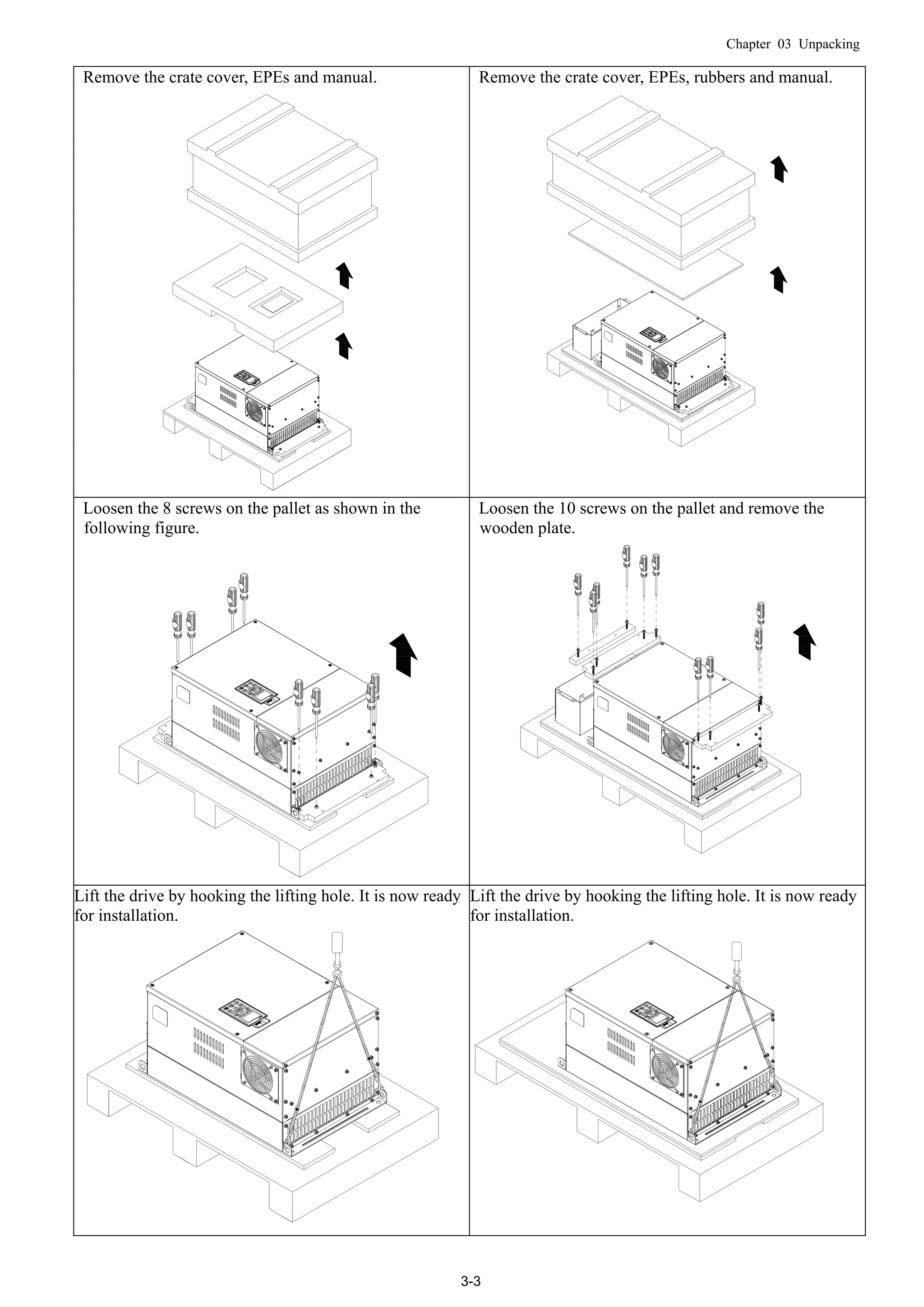
3-3
Remove the crate cover, EPEs and manual. Remove the crate cover, EPEs, rubbers and manual.
Loosen the 8 screws on the pallet as shown in the
following figure.
Loosen the 10 screws on the pallet and remove the
wooden plate.
Lift the drive by hooking the lifting hole. It is now ready
for installation.
Lift the drive by hooking the lifting hole. It is now ready
for installation.
Chapter 03 Unpacking
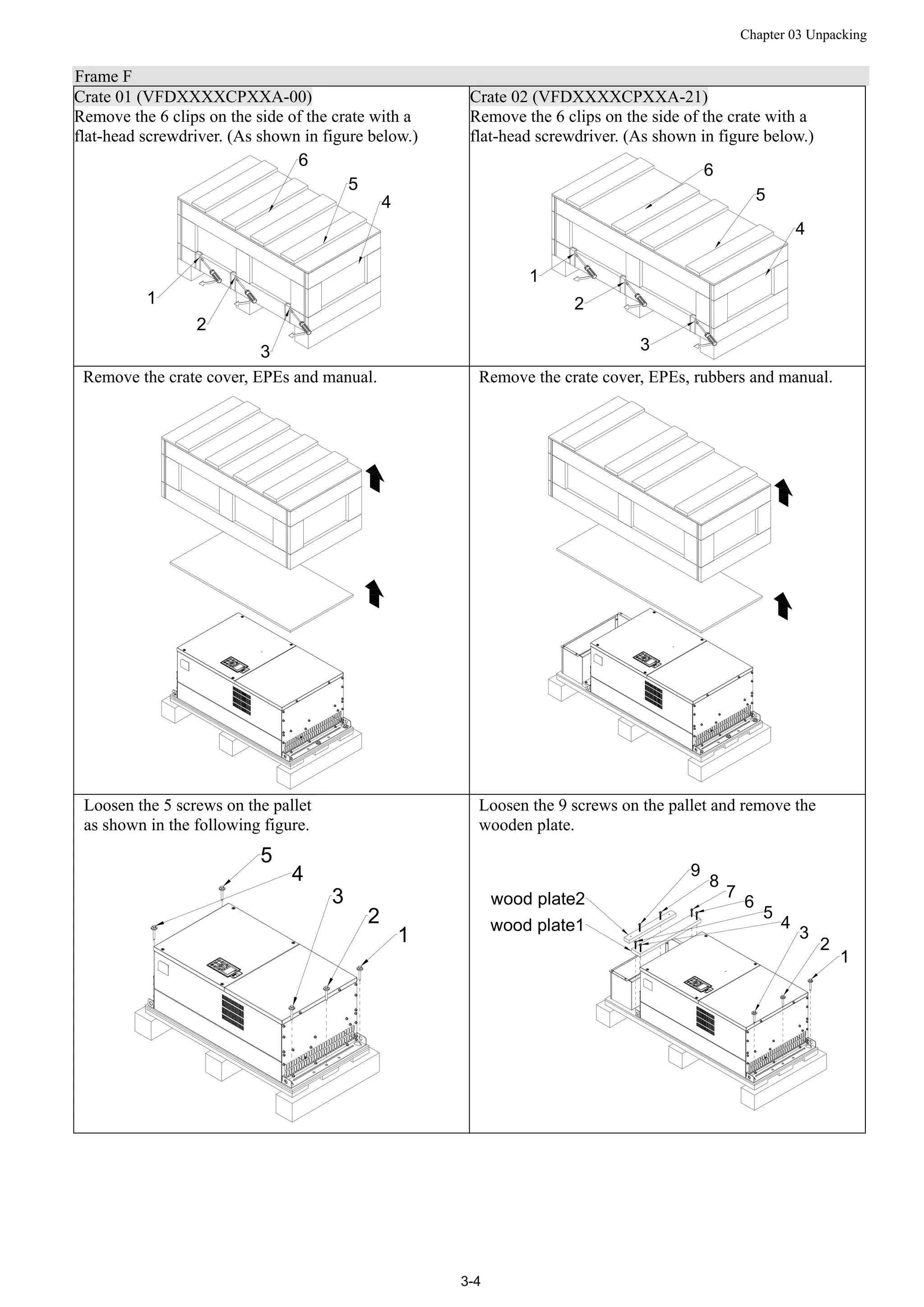
3-4
Frame F
Crate 01 (VFDXXXXCPXXA-00) Crate 02 (VFDXXXXCPXXA-21)
Remove the 6 clips on the side of the crate with a
flat-head screwdriver. (As shown in figure below.)
1
2
3
6
5
4
Remove the 6 clips on the side of the crate with a
flat-head screwdriver. (As shown in figure below.)
6
5
4
1
2
3
Remove the crate cover, EPEs and manual. Remove the crate cover, EPEs, rubbers and manual.
Loosen the 5 screws on the pallet
as shown in the following figure.
1
2
3
4
5
Loosen the 9 screws on the pallet and remove the
wooden plate.
1
2
3
4
5
6
7
8
9
wood plate1
wood plate2
Chapter 03 Unpacking
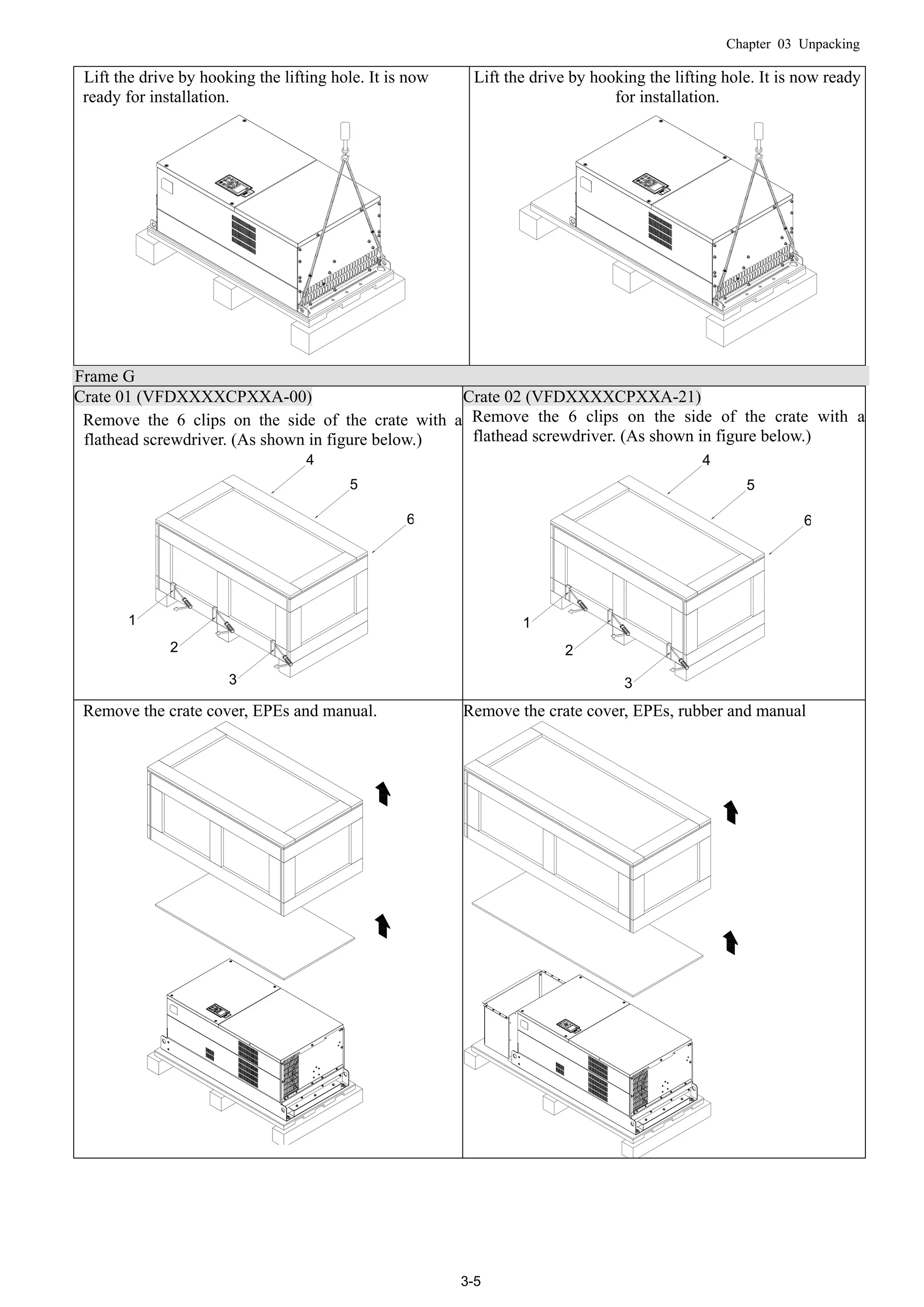
3-5
Lift the drive by hooking the lifting hole. It is now
ready for installation.
Lift the drive by hooking the lifting hole. It is now ready
for installation.
Frame G
Crate 01 (VFDXXXXCPXXA-00) Crate 02 (VFDXXXXCPXXA-21)
Remove the 6 clips on the side of the crate with a
flathead screwdriver. (As shown in figure below.)
1
2
3
4
5
6
Remove the 6 clips on the side of the crate with a
flathead screwdriver. (As shown in figure below.)
1
2
3
4
5
6
Remove the crate cover, EPEs and manual. Remove the crate cover, EPEs, rubber and manual
Chapter 03 Unpacking
3-6
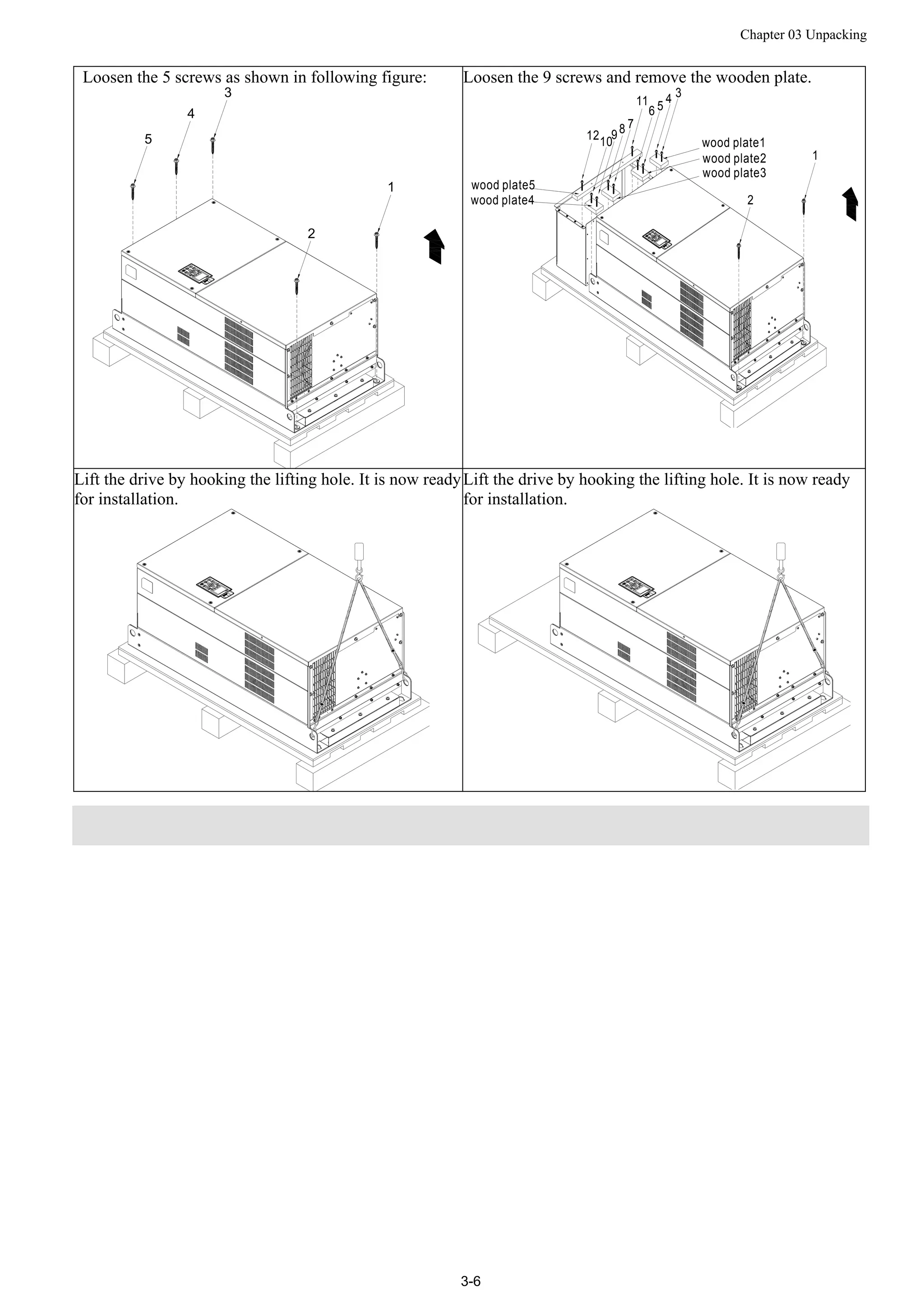
Loosen the 5 screws as shown in following figure:
1
2
3
4
5
Loosen the 9 screws and remove the wooden plate.
wood plate5
wood plate1
3
2
4
511
7
9
6
8
1012
wood plate2
wood plate3
1
wood plate4
Lift the drive by hooking the lifting hole. It is now ready
for installation.
Lift the drive by hooking the lifting hole. It is now ready
for installation.
Chapter 03 Unpacking
3-7
Frame H
Crate 01 (VFDXXXXCPXXA-00) Crate 02 (VFDXXXXCPXXC-00)
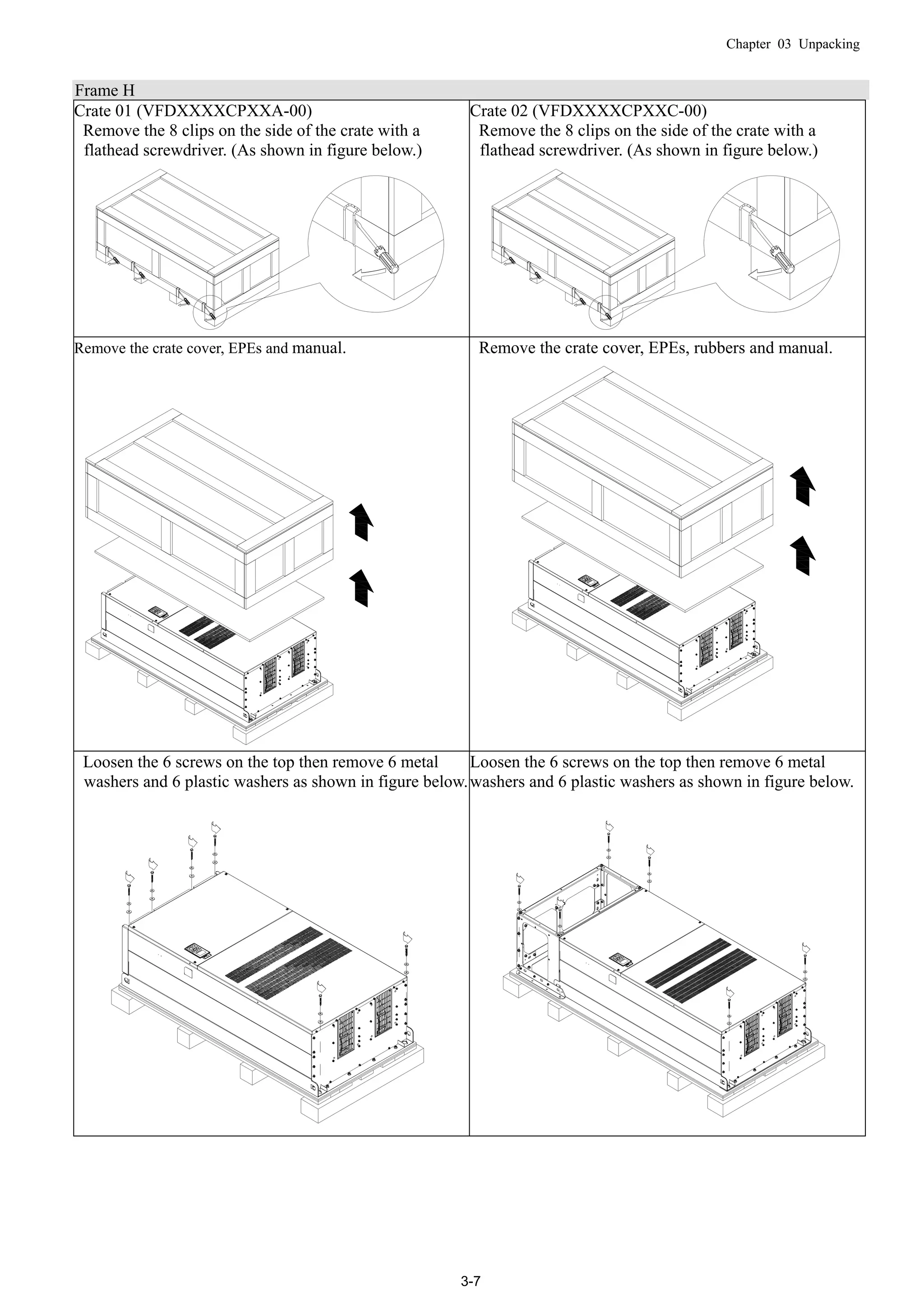
Remove the 8 clips on the side of the crate with a
flathead screwdriver. (As shown in figure below.)
Remove the 8 clips on the side of the crate with a
flathead screwdriver. (As shown in figure below.)
Remove the crate cover, EPEs and manual. Remove the crate cover, EPEs, rubbers and manual.
Loosen the 6 screws on the top then remove 6 metal
washers and 6 plastic washers as shown in figure below.
Loosen the 6 screws on the top then remove 6 metal
washers and 6 plastic washers as shown in figure below.
Chapter 03 Unpacking
3-8
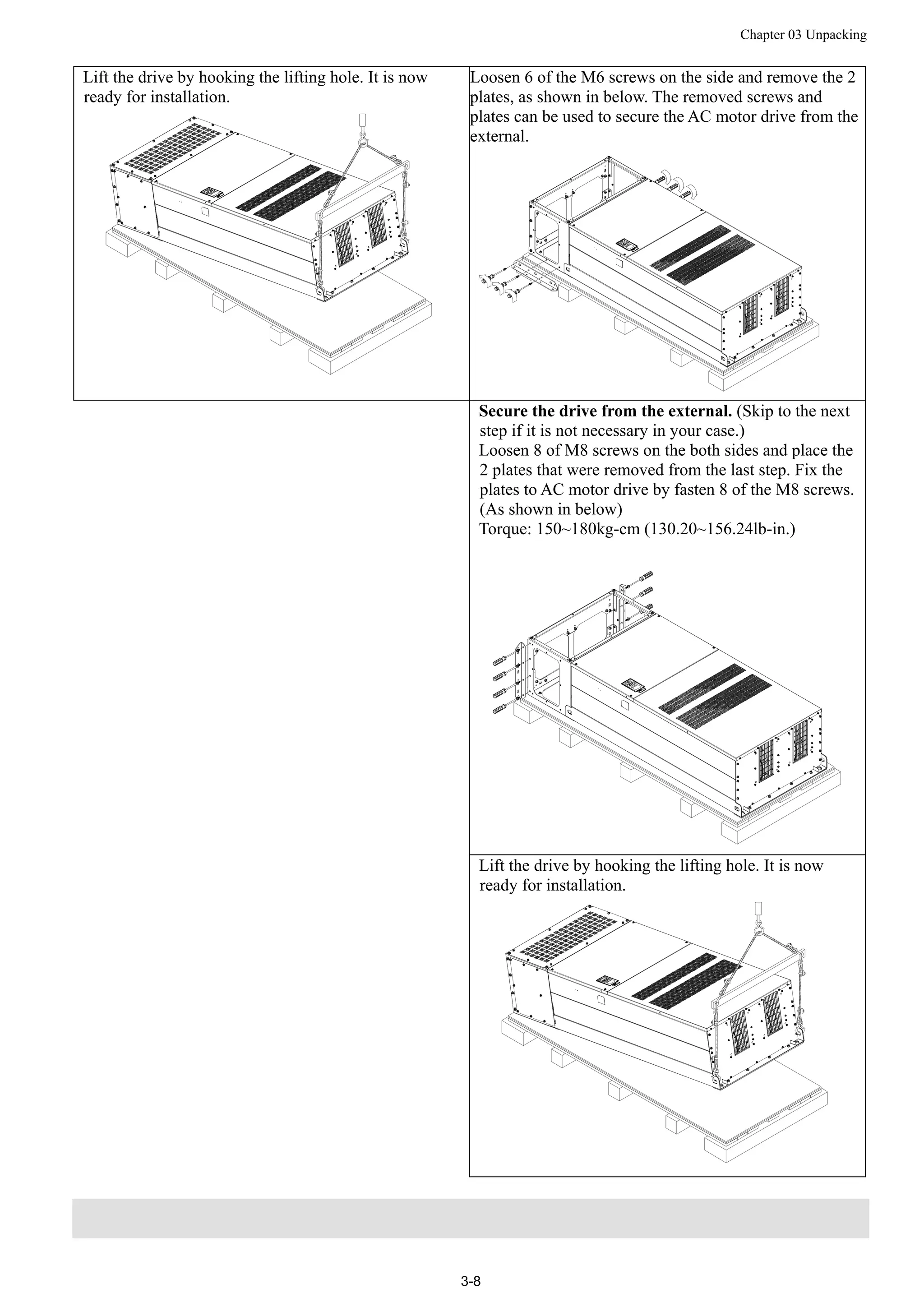
Lift the drive by hooking the lifting hole. It is now
ready for installation.
Loosen 6 of the M6 screws on the side and remove the 2
plates, as shown in below. The removed screws and
plates can be used to secure the AC motor drive from the
external.
Secure the drive from the external. (Skip to the next
step if it is not necessary in your case.)
Loosen 8 of M8 screws on the both sides and place the
2 plates that were removed from the last step. Fix the
plates to AC motor drive by fasten 8 of the M8 screws.
(As shown in below)
Torque: 150~180kg-cm (130.20~156.24lb-in.)
Lift the drive by hooking the lifting hole. It is now
ready for installation.
Chapter 03 Unpacking
3-9
Frame H
Crate 03 (VFDXXXXCPXXC-21)
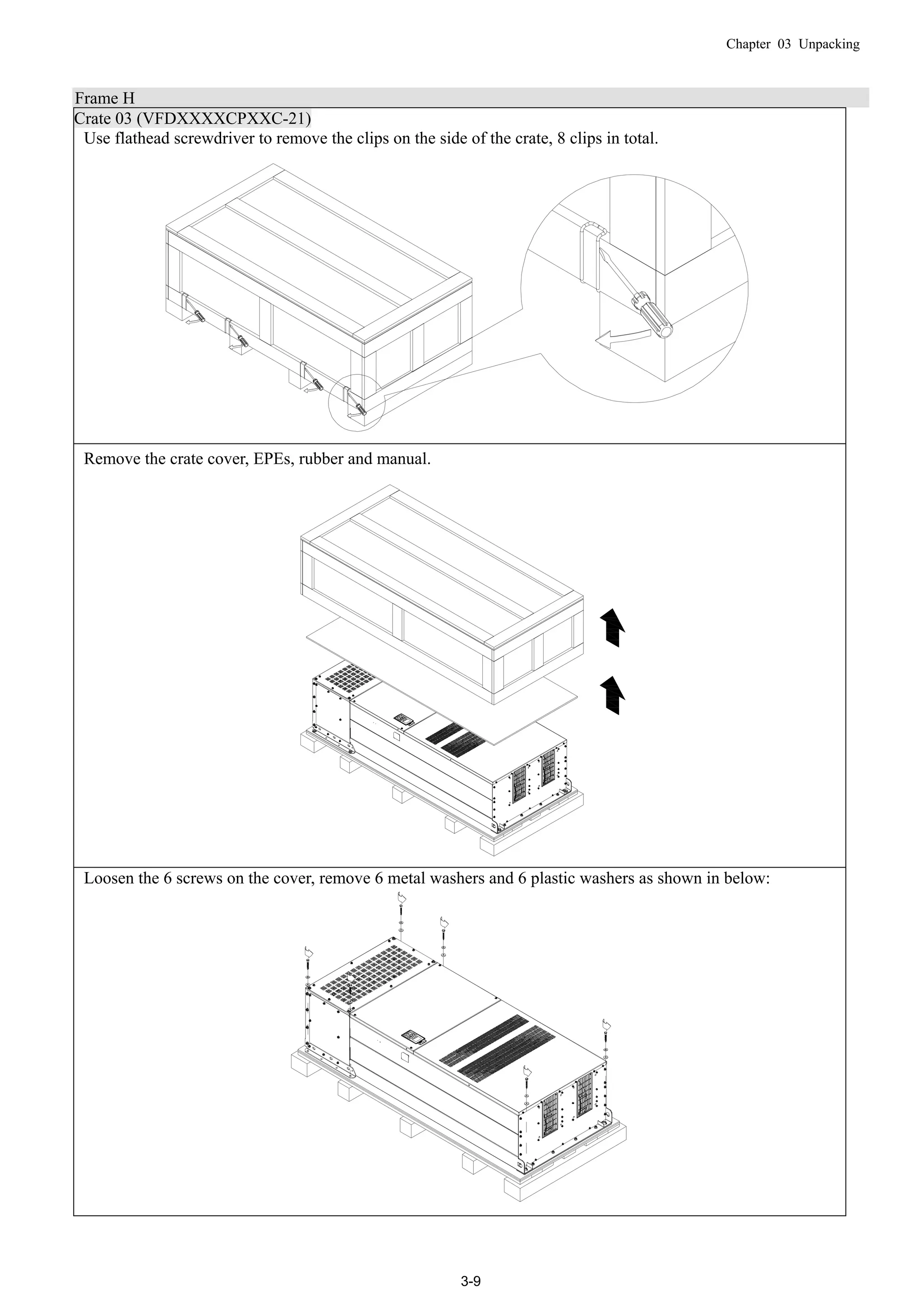
Use flathead screwdriver to remove the clips on the side of the crate, 8 clips in total.
Remove the crate cover, EPEs, rubber and manual.
Loosen the 6 screws on the cover, remove 6 metal washers and 6 plastic washers as shown in below:
Chapter 03 Unpacking
3-10
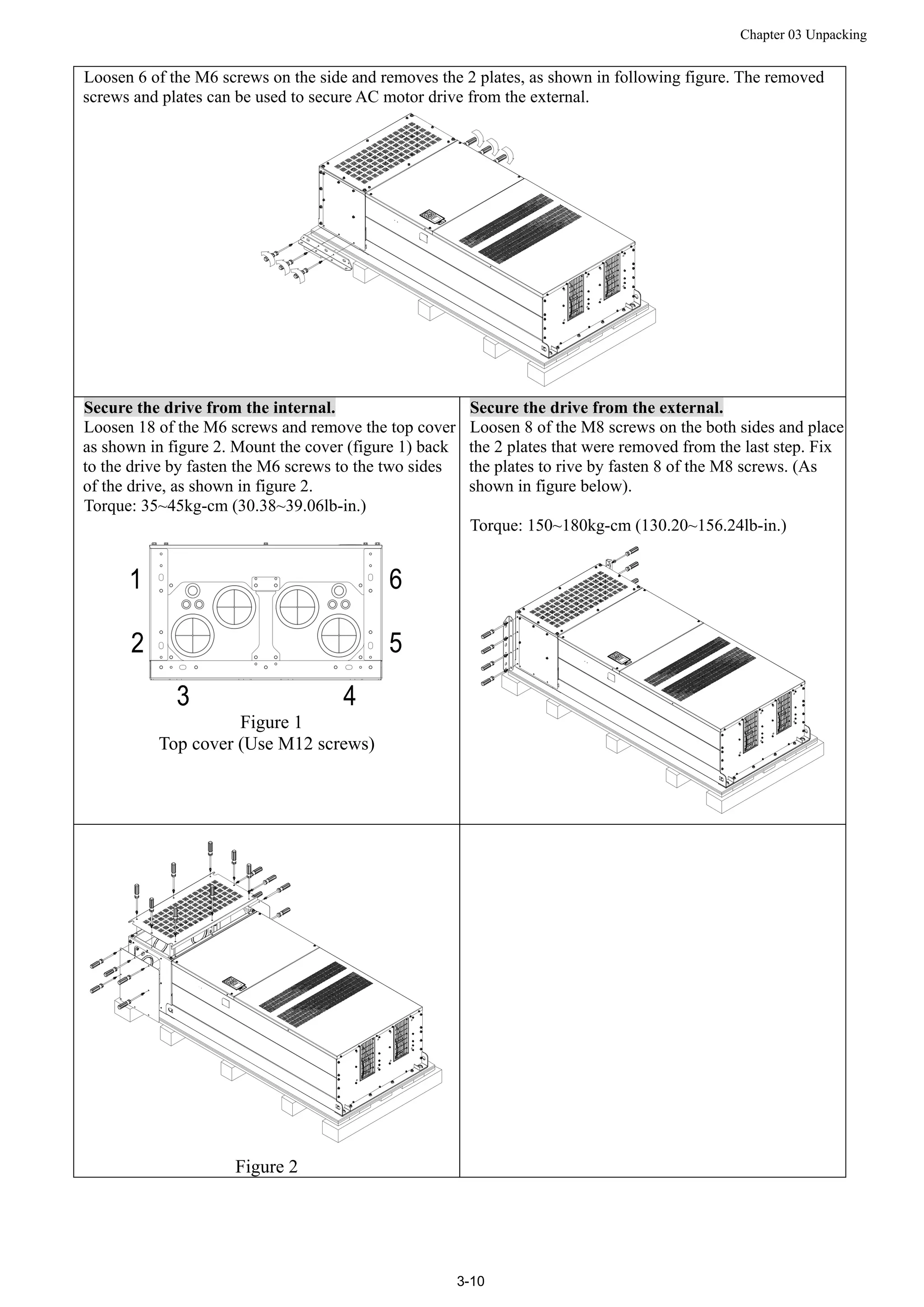
Loosen 6 of the M6 screws on the side and removes the 2 plates, as shown in following figure. The removed
screws and plates can be used to secure AC motor drive from the external.
Secure the drive from the internal.
Loosen 18 of the M6 screws and remove the top cover
as shown in figure 2. Mount the cover (figure 1) back
to the drive by fasten the M6 screws to the two sides
of the drive, as shown in figure 2.
Torque: 35~45kg-cm (30.38~39.06lb-in.)
Figure 1
Top cover (Use M12 screws)
Secure the drive from the external.
Loosen 8 of the M8 screws on the both sides and place
the 2 plates that were removed from the last step. Fix
the plates to rive by fasten 8 of the M8 screws. (As
shown in figure below).
Torque: 150~180kg-cm (130.20~156.24lb-in.)
Figure 2
Chapter 03 Unpacking
3-11
Fasten 6 of the M6 screws that were removed from last step back to the AC motor drive. As shown in figure
below:
Lift the drive by hooking the lifting hole. It is now ready for installation.
Frame H: Secure the drive
(VFDXXXXCPXXA-00) Screw: M12*6; Torque: 340-420kg-cm [295.1-364.6lb-in.]
Chapter 03 Unpacking
3-12
VFDXXXXCPXXC-00
Secure the drive from internal.
Screw: M12*8
Torque: 340-420kg-cm [295.1-364.6lb-in.]
VFDXXXXCPXXC-21
Secure the drive from the external.
Screw: M12*8
Torque: 340-420kg-cm [295.1-364.6lb-in.]
Chapter 03 Unpacking
3-13
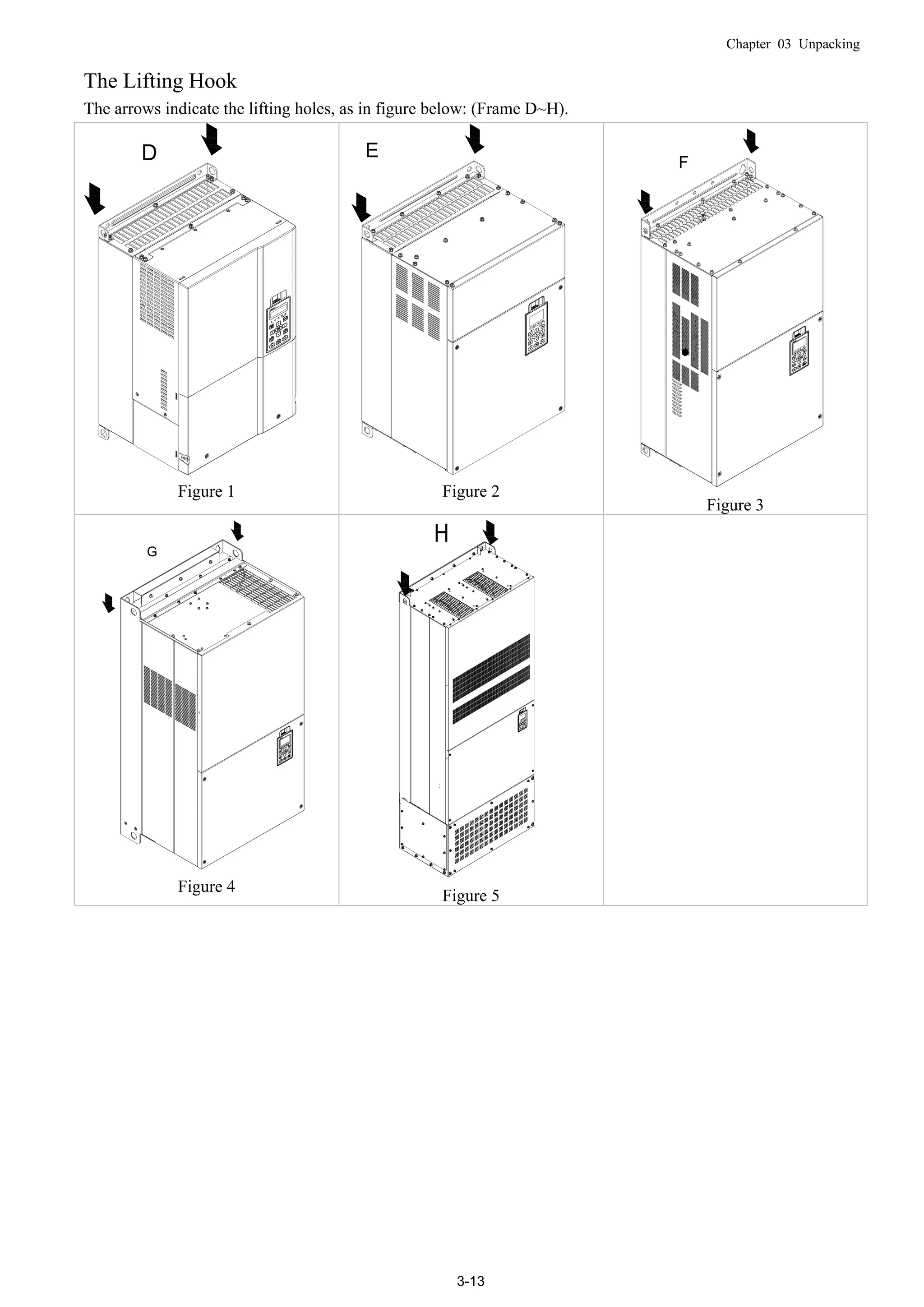
The Lifting Hook
The arrows indicate the lifting holes, as in figure below: (Frame D~H).
D
Figure 1
E
Figure 2
F
Figure 3
G
Figure 4
Figure 5
Chapter 03 Unpacking
3-14
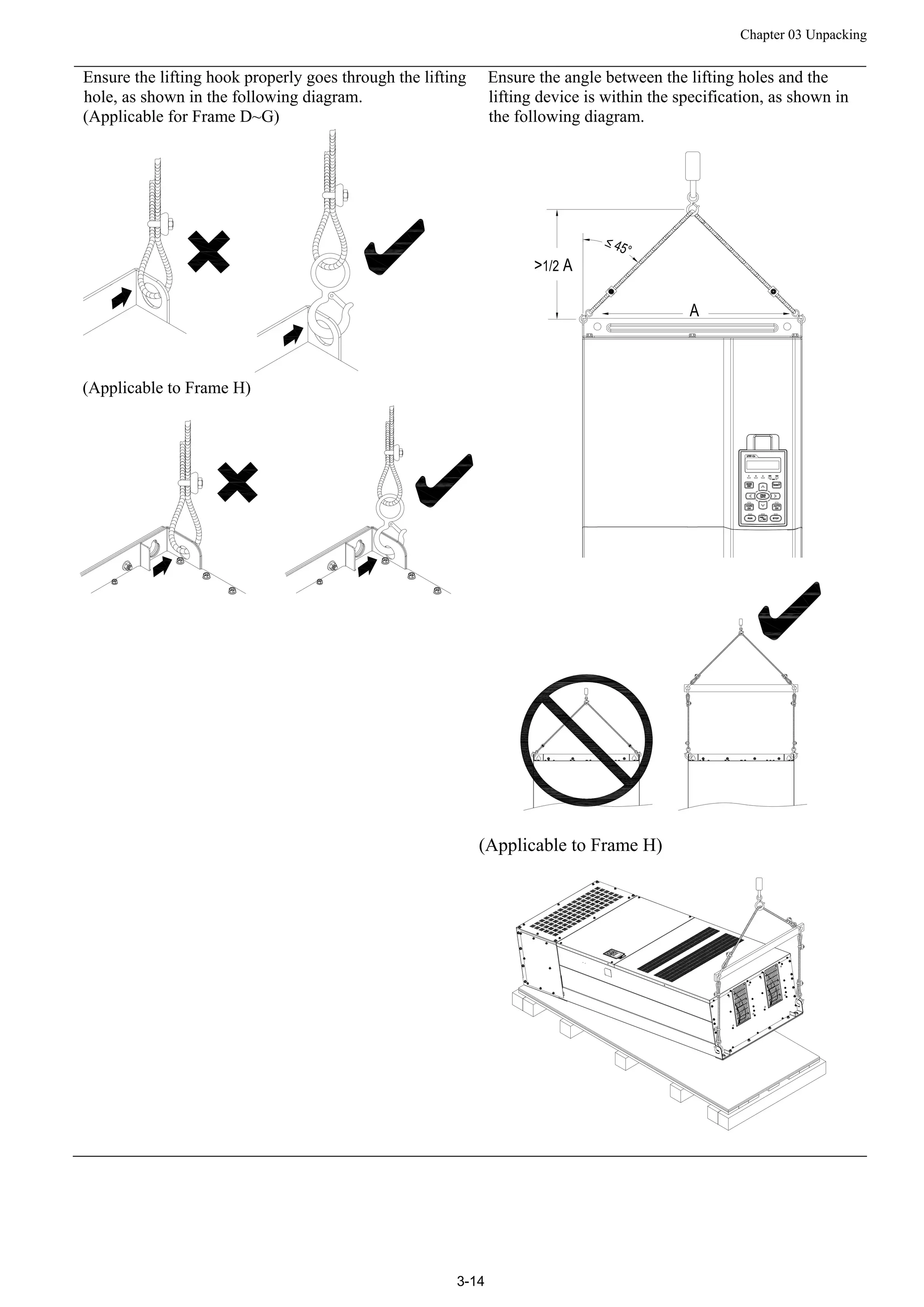
Ensure the lifting hook properly goes through the lifting
hole, as shown in the following diagram.
(Applicable for Frame D~G)
(Applicable to Frame H)
Ensure the angle between the lifting holes and the
lifting device is within the specification, as shown in
the following diagram.
(Applicable to Frame H)
Chapter 03 Unpacking
3-15
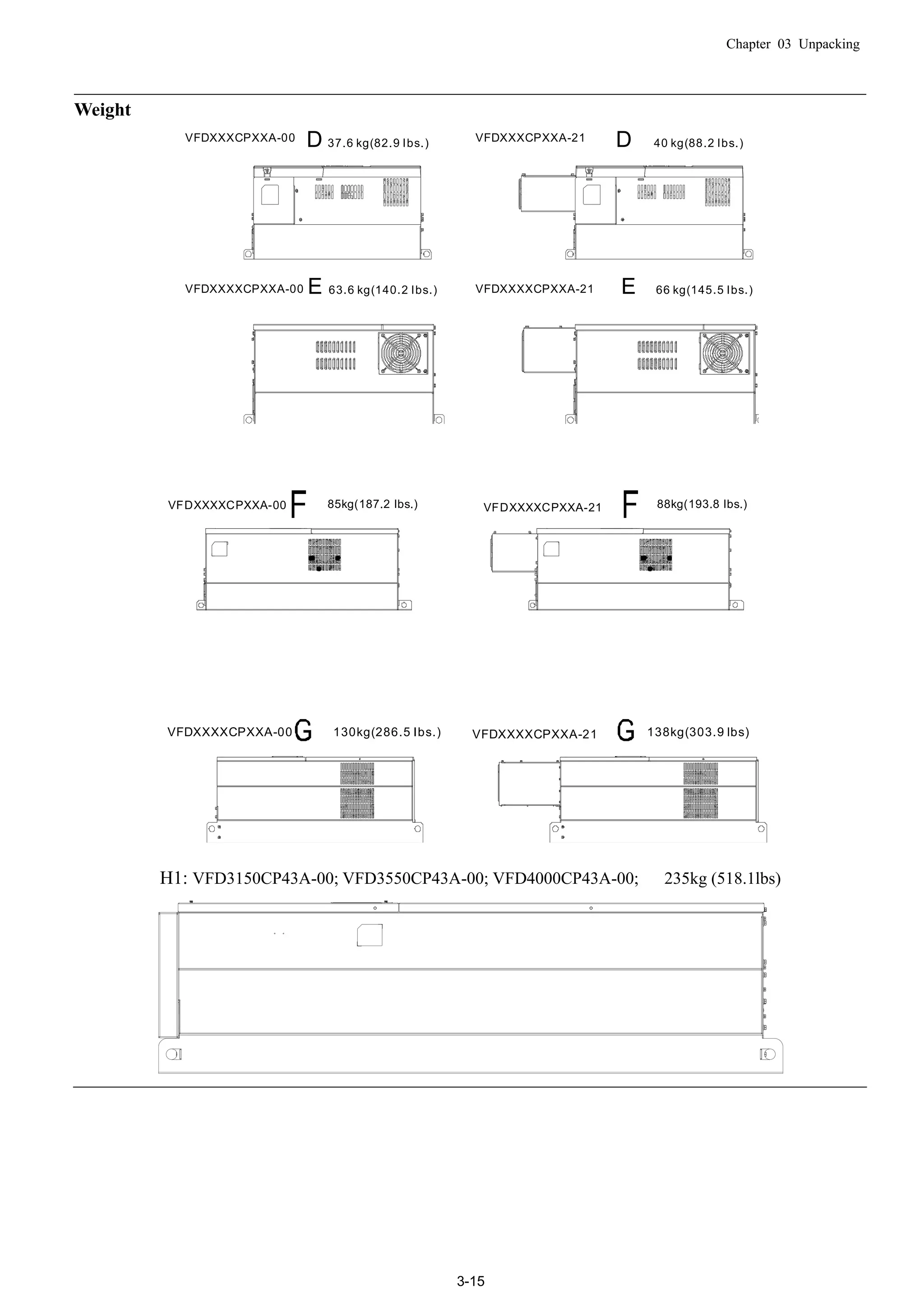
Weight
E 63.6 kg(140.2 Ibs.)
D 37.6 kg(82.9 Ibs.)
E 66 kg(145.5 Ibs.)
D 40 kg(88.2 Ibs.)VFDXXXCPXXA-00 VFDXXXCPXXA-21
VFDXXXXCPXXA-00 VFDXXXXCPXXA-21
85kg(187.2 Ibs.) 88kg(193.8 Ibs.)VFDXXXXCPXXA-21VFDXXXXCPXXA-00
130kg(286.5 Ibs.) 138kg(303.9 lbs)VFDXXXXCPXXA-21VFDXXXXCPXXA-00
H1: VFD3150CP43A-00; VFD3550CP43A-00; VFD4000CP43A-00; 235kg (518.1lbs)
Chapter 03 Unpacking
3-16
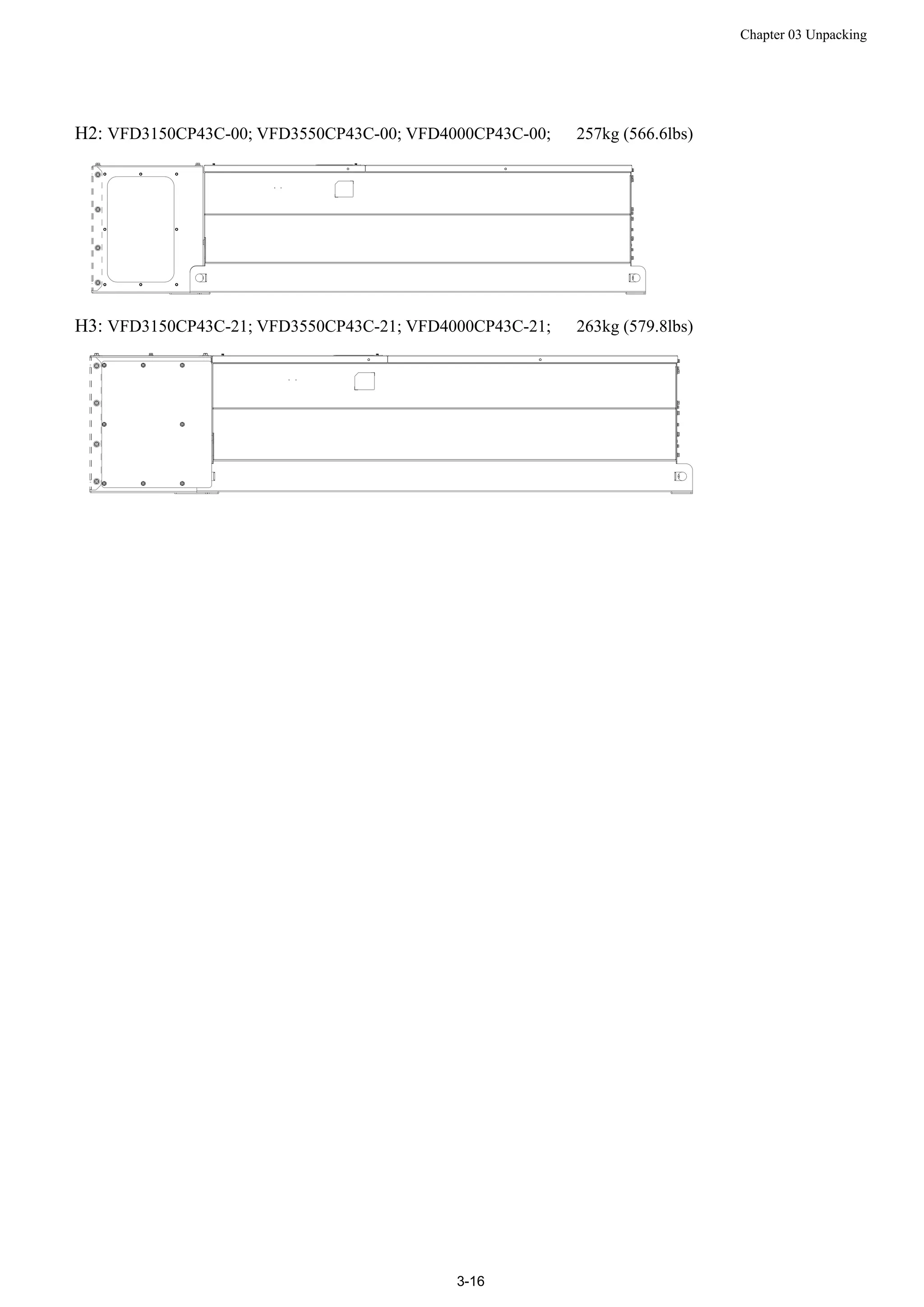
H2: VFD3150CP43C-00; VFD3550CP43C-00; VFD4000CP43C-00; 257kg (566.6lbs)
H3: VFD3150CP43C-21; VFD3550CP43C-21; VFD4000CP43C-21; 263kg (579.8lbs)
Chapter 04 Wiring
4-1
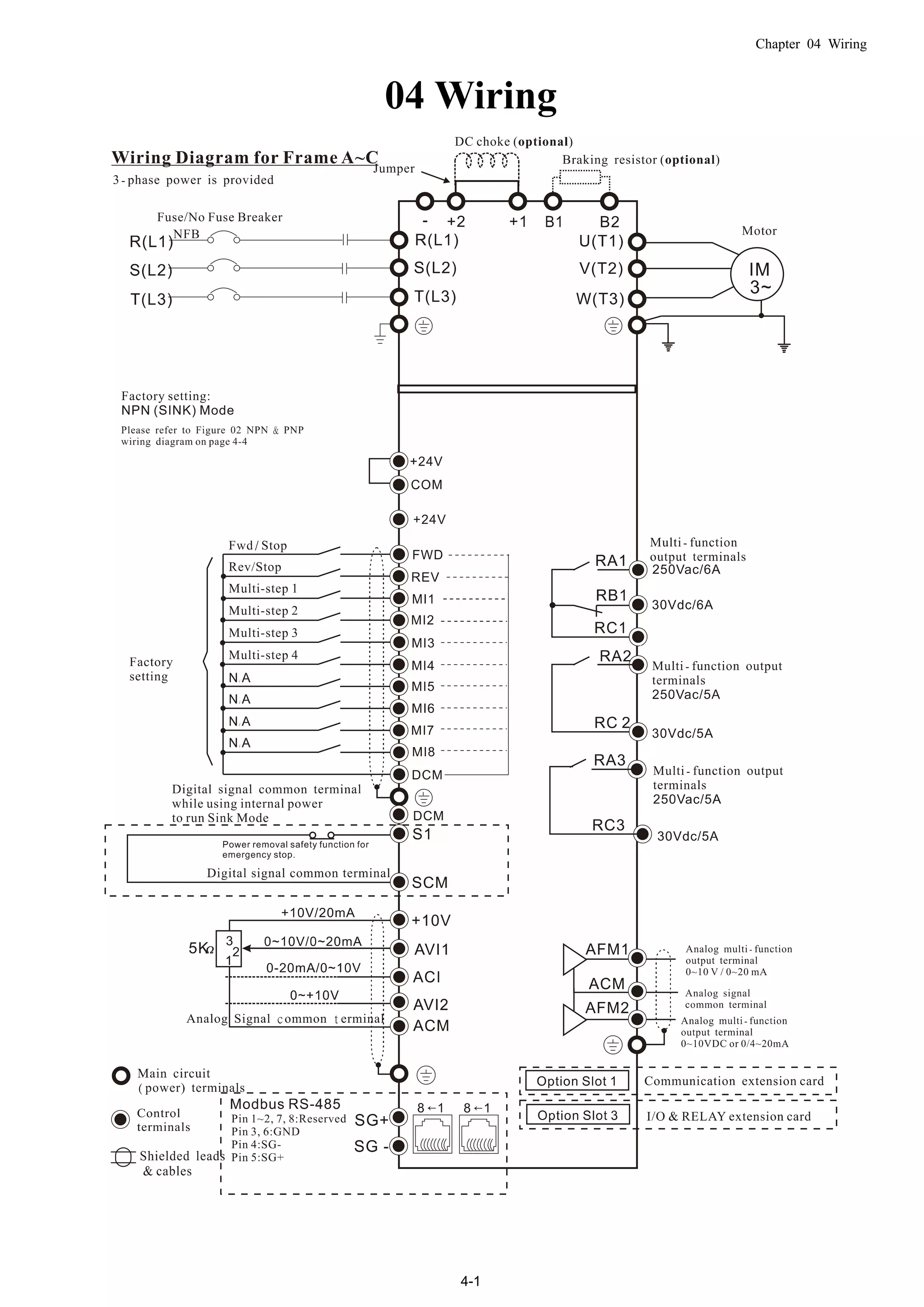
04 Wiring
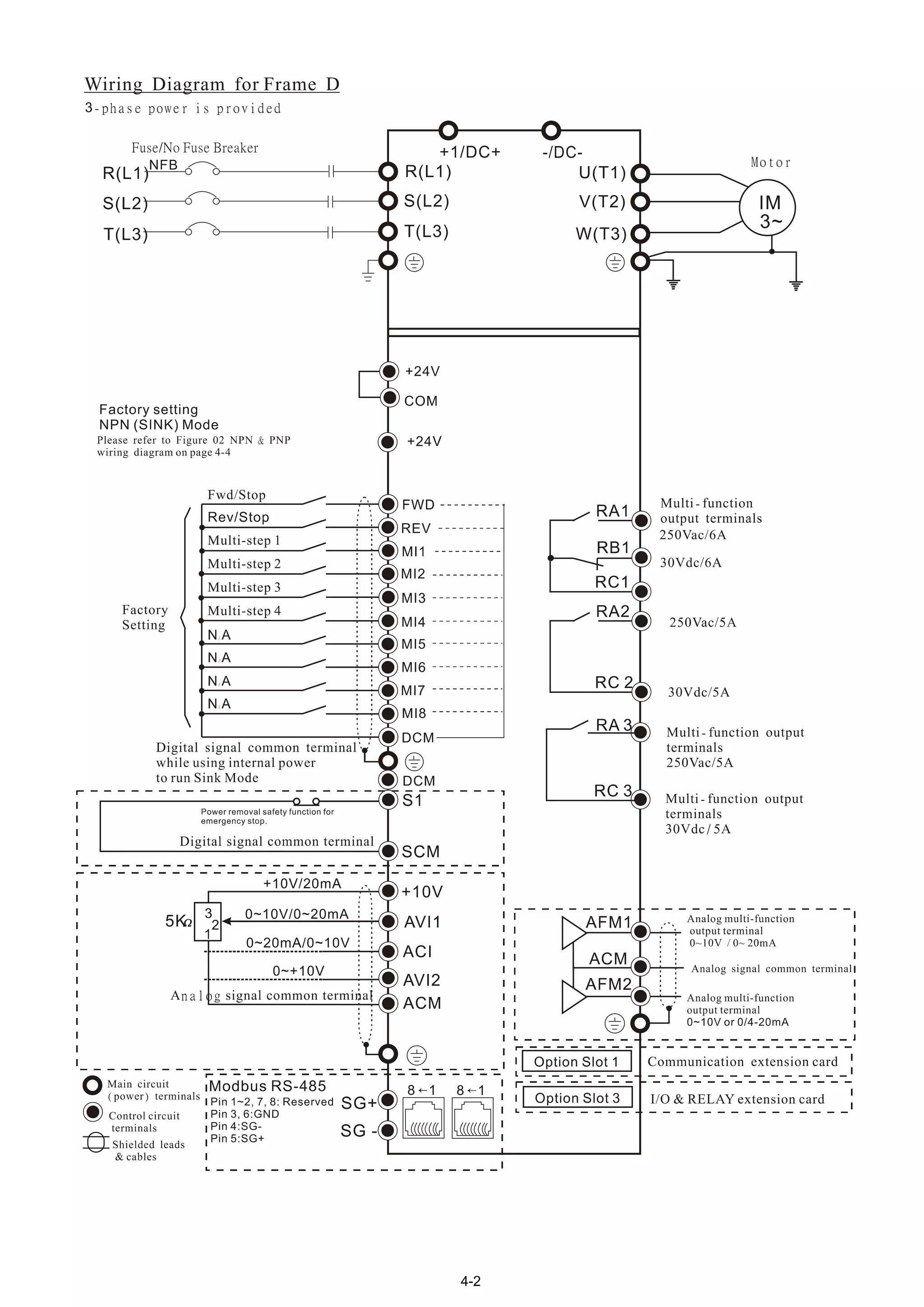
4-2
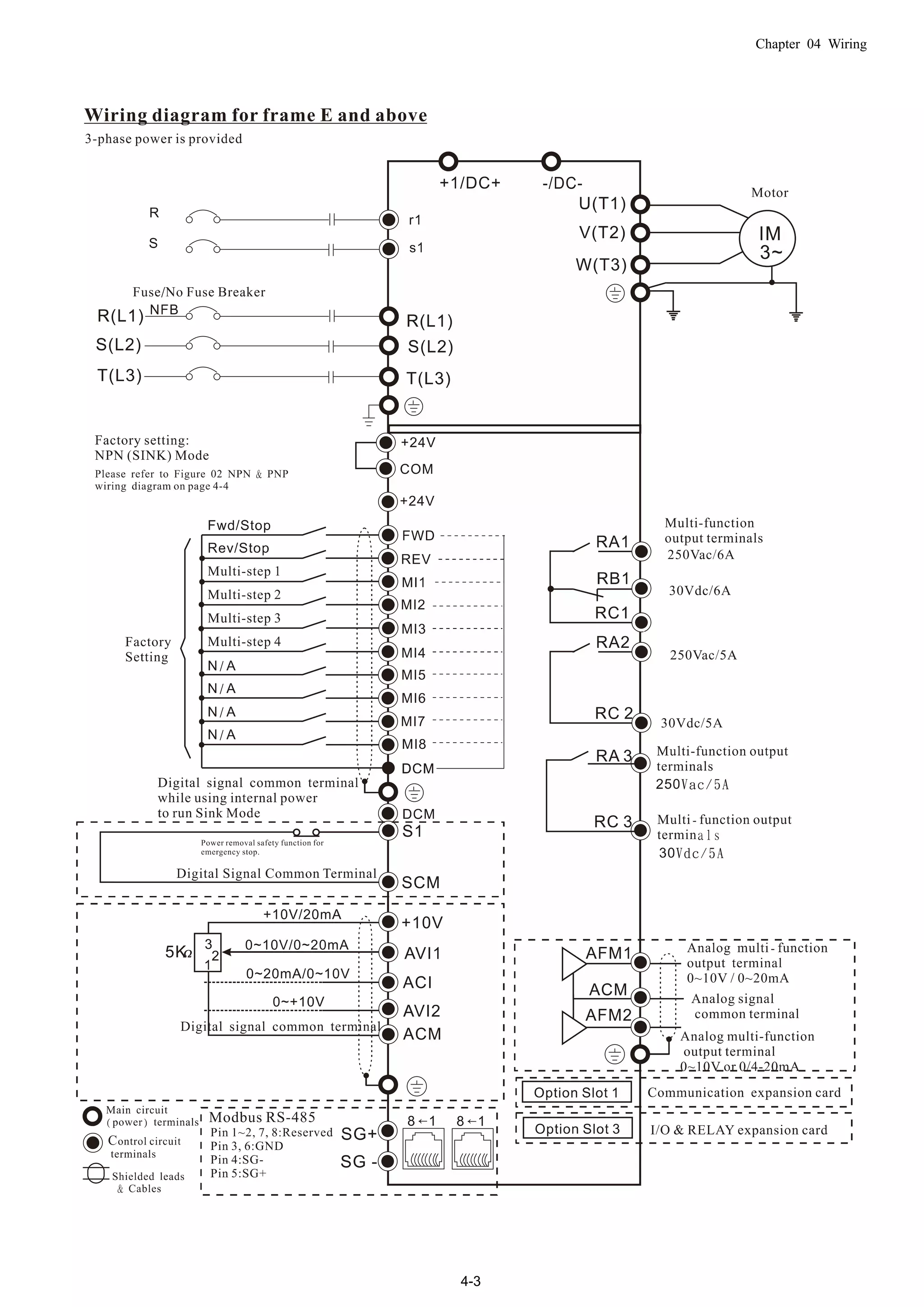
Chapter 04 Wiring
4-3
4-4
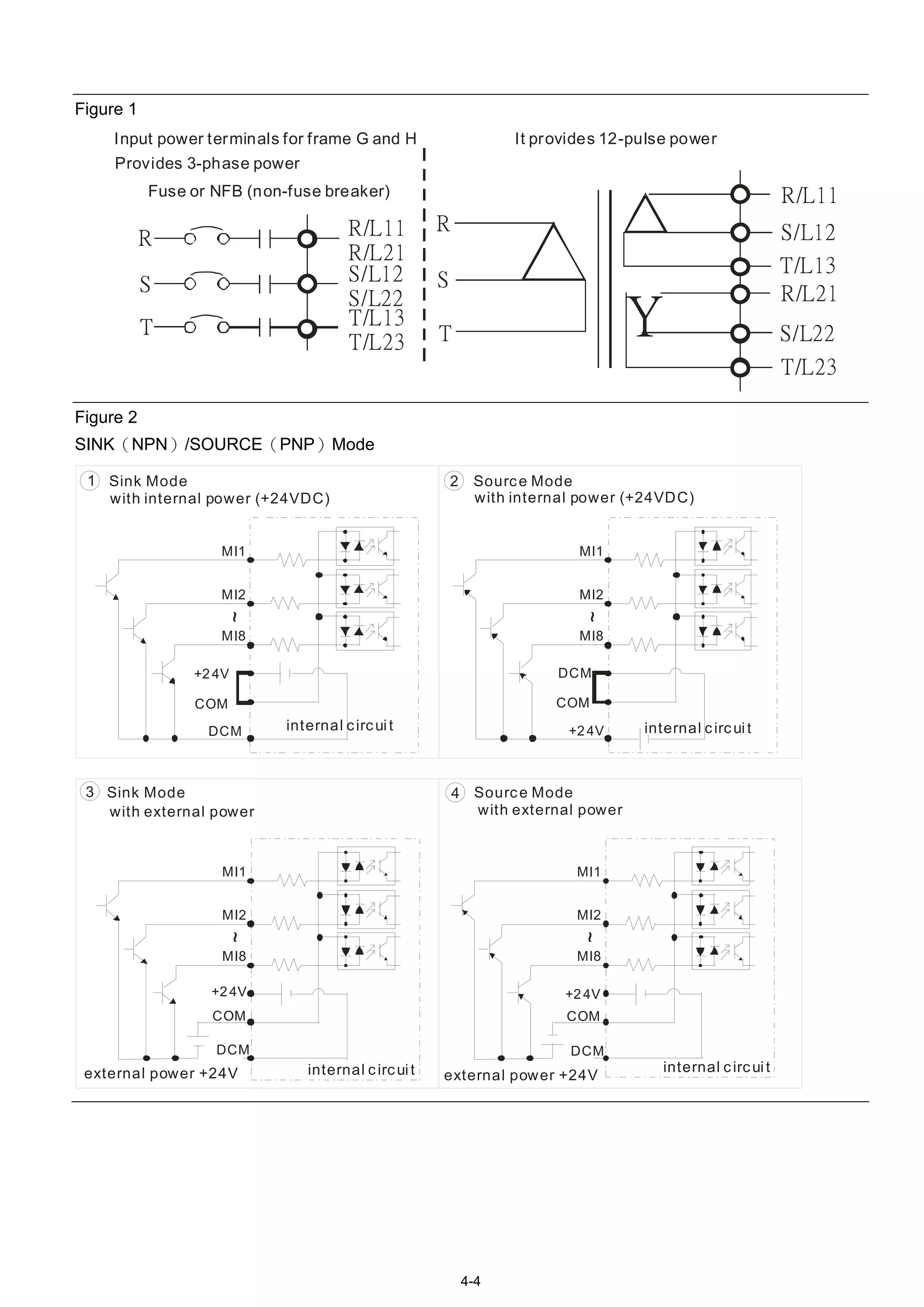
Figure 1
R
S
T
Input power terminals for frame G and H
R/L11
R/L21
S/L12
S/L22
T/L13
T/L23
R/L11
S/L22
T/L23
R
S
T
R/L21
S/L12
T/L13
Y
Provides 3-phase power
Fuse or NFB (non-fuse breaker)
It provides 12-pulse power
Figure 2
SINK(NPN)/SOURCE(PNP)Mode
1 2
DCM
MI1
+24V
MI2
MI8
~
COM
DCM
MI1
+24V
MI2
MI8
~
COM
Sink Mode Source Mode
with internal power (+24VDC) with internal power (+24VDC)
internal circuit internal circuit
3 4
DCM
MI1
+24V
MI2
MI8
~
COM
DCM
MI1
+24V
MI2
MI8
~
COM
Sink Mode Source Mode
with external power with external power
internal circuitinternal circuitexternal power +24V external power +24V
Chapter 04 Wiring
4-5
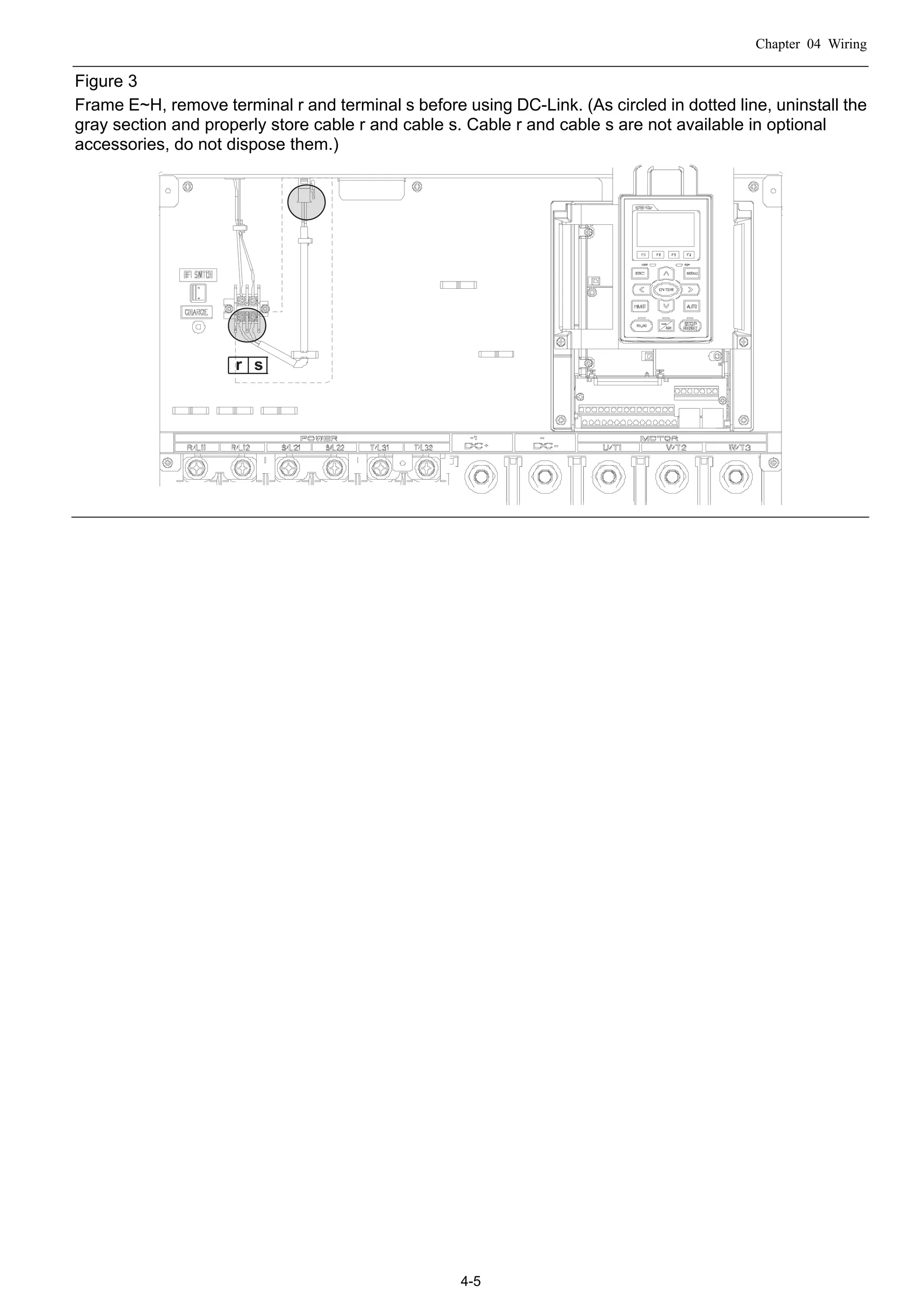
Figure 3
Frame E~H, remove terminal r and terminal s before using DC-Link. (As circled in dotted line, uninstall the
gray section and properly store cable r and cable s. Cable r and cable s are not available in optional
accessories, do not dispose them.)
r s
Chapter 05 Main Circuit Terminal
5-1
05 Main Circuit Terminal
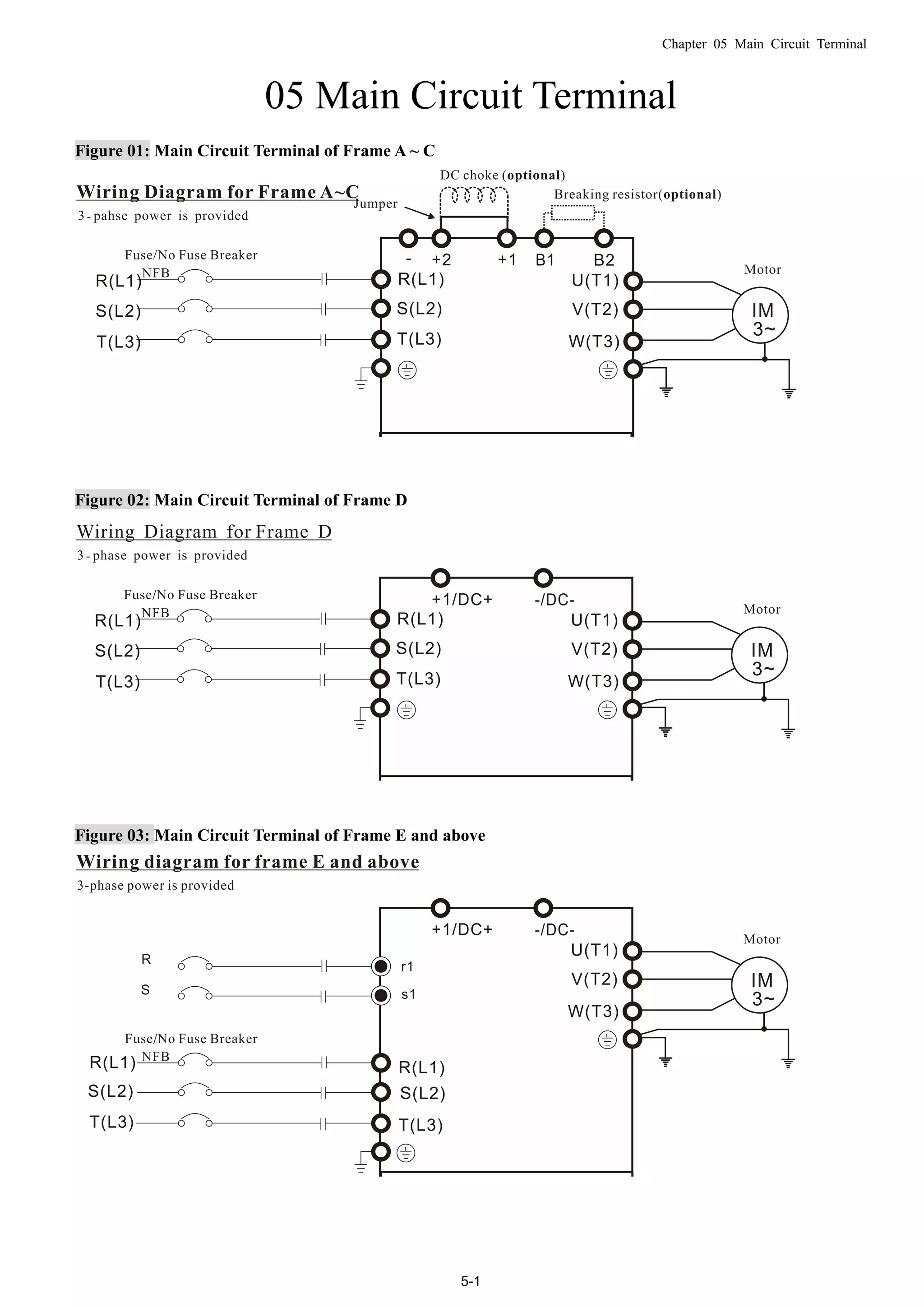
Figure 01: Main Circuit Terminal of Frame A ~ C
Figure 02: Main Circuit Terminal of Frame D
Figure 03: Main Circuit Terminal of Frame E and above
Chapter 05 Main Circuit Terminal
5-2
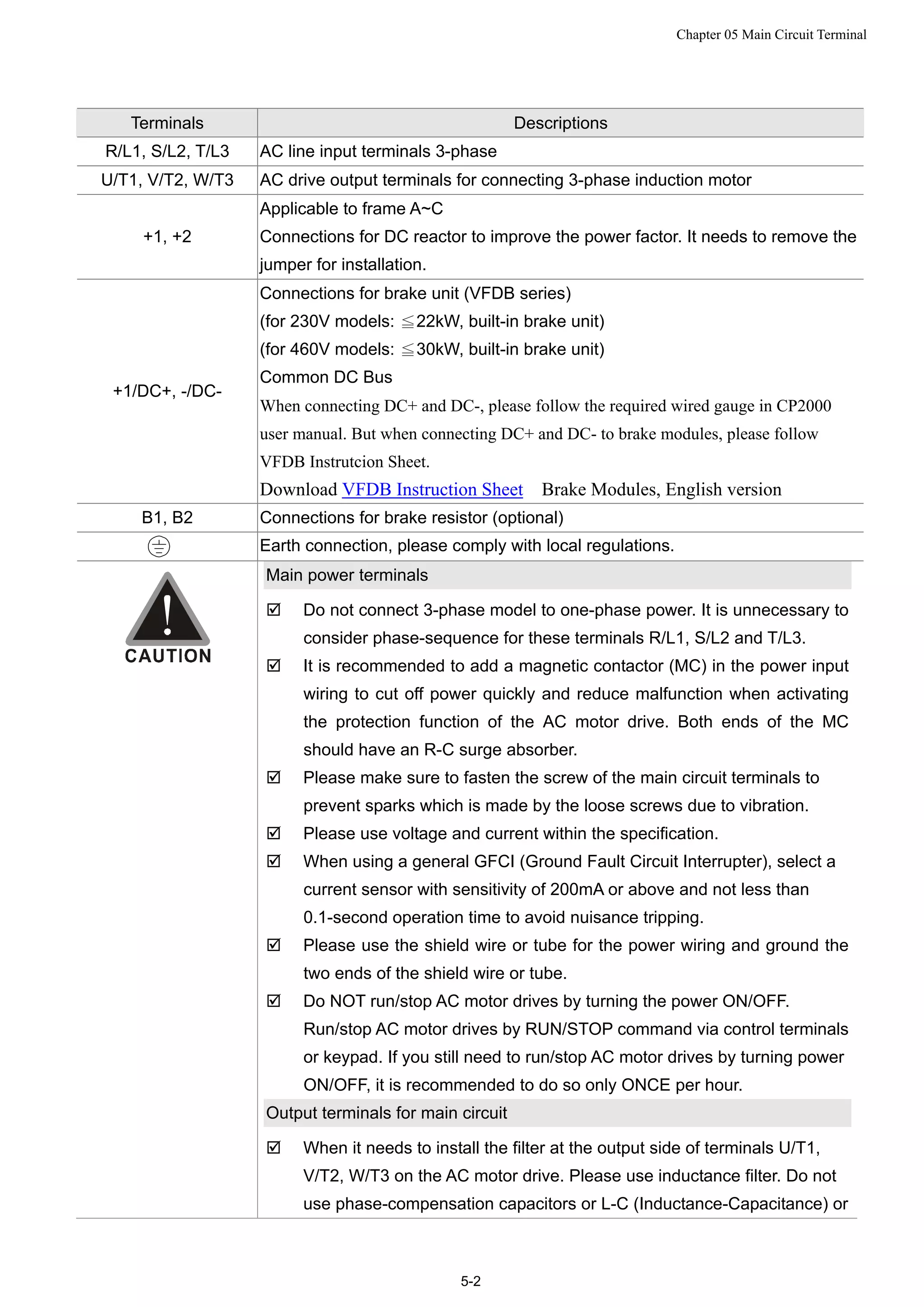
Terminals Descriptions
R/L1, S/L2, T/L3 AC line input terminals 3-phase
U/T1, V/T2, W/T3 AC drive output terminals for connecting 3-phase induction motor
+1, +2
Applicable to frame A~C
Connections for DC reactor to improve the power factor. It needs to remove the
jumper for installation.
+1/DC+, -/DC-
Connections for brake unit (VFDB series)
(for 230V models: 22kW, built≦ -in brake unit)
(for 460V models: 30kW, built≦ -in brake unit)
Common DC Bus
When connecting DC+ and DC-, please follow the required wired gauge in CP2000
user manual. But when connecting DC+ and DC- to brake modules, please follow
VFDB Instrutcion Sheet.
Download VFDB Instruction Sheet Brake Modules, English version
B1, B2 Connections for brake resistor (optional)
Earth connection, please comply with local regulations.
Main power terminals
 Do not connect 3-phase model to one-phase power. It is unnecessary to
consider phase-sequence for these terminals R/L1, S/L2 and T/L3.
 It is recommended to add a magnetic contactor (MC) in the power input
wiring to cut off power quickly and reduce malfunction when activating
the protection function of the AC motor drive. Both ends of the MC
should have an R-C surge absorber.
 Please make sure to fasten the screw of the main circuit terminals to
prevent sparks which is made by the loose screws due to vibration.
 Please use voltage and current within the specification.
 When using a general GFCI (Ground Fault Circuit Interrupter), select a
current sensor with sensitivity of 200mA or above and not less than
0.1-second operation time to avoid nuisance tripping.
 Please use the shield wire or tube for the power wiring and ground the
two ends of the shield wire or tube.
 Do NOT run/stop AC motor drives by turning the power ON/OFF.
Run/stop AC motor drives by RUN/STOP command via control terminals
or keypad. If you still need to run/stop AC motor drives by turning power
ON/OFF, it is recommended to do so only ONCE per hour.
Output terminals for main circuit
 When it needs to install the filter at the output side of terminals U/T1,
V/T2, W/T3 on the AC motor drive. Please use inductance filter. Do not
use phase-compensation capacitors or L-C (Inductance-Capacitance) or
Chapter 05 Main Circuit Terminal
5-3
R-C (Resistance-Capacitance), unless approved by Delta.
 DO NOT connect phase-compensation capacitors or surge absorbers at
the output terminals of AC motor drives.
 Use well-insulated motor, suitable for inverter operation.
Terminals for connecting DC reactor, external brake resistor, external
brake resistor and DC circuit
 This is the terminals used to connect the DC reactor to improve the
power factor. For the factory setting, it connects the short-circuit object.
Please remove this short-circuit object before connecting to the DC
reactor.
+1 +2
DC reactor (optional)
 Connect a brake resistor or brake unit in applications with frequent
deceleration ramps, short deceleration time, too low brake torque or
requiring increased brake torque.
B1 B2
BR
+ -
VFDB
Brake resistor
(optional)
Brake resistor
(optional)
Brake unit
(optional)
 The external brake resistor should connect to the terminals (B1, B2) of
AC motor drives.
 For those models without built-in brake resistor, please connect external
brake unit and brake resistor (both of them are optional) to increase
brake torque.
 When the terminals +1, +2 and - are not used, please leave the terminals
open.
 DO NOT connect [+1, -], [+2, -], [+1/DC+, -/DC-] or brake resistor directly
to prevent drive damage.
Chapter 05 Main Circuit Terminal
5-4
Specifications of the Main Circuit Terminals
Frame A Main Circuit Terminals::
R/L1, S/L2, T/L3, U/T1, V/T2, W/T3, , B1, B2, +1, +2,-
Model Max. Wire
Gauge
Min. Wire Gauge Torque(±10%)
VFD007CP23A-21 14 AWG (2.1mm2
)
VFD015CP23A-21 14 AWG (2.1mm2
)
VFD022CP23A-21 14 AWG (2.1mm2
)
VFD037CP23A-21 10 AWG (5.3mm2
)
VFD055CP23A-21 10 AWG (5.3mm2
)
VFD007CP43A-21 14 AWG (2.1mm2
)
VFD015CP43A-21 14 AWG (2.1mm2
)
VFD022CP43A-21 14 AWG (2.1mm2
)
VFD037CP43A-21 14 AWG (2.1mm2
)
VFD040CP43A-21 14 AWG (2.1mm2
)
VFD055CP43A-21 12 AWG (3.3mm2
)
VFD075CP43A-21 12 AWG (3.3mm2
)
VFD007CP4EA-21 14 AWG (2.1mm2
)
VFD015CP4EA-21 14 AWG (2.1mm2
)
VFD022CP4EA-21 14 AWG (2.1mm2
)
VFD037CP4EA-21 14 AWG (2.1mm2
)
VFD040CP4EA-21 12 AWG (3.3mm2
)
VFD055CP4EA-21 10 AWG (5.3mm2
)
VFD075CP4EA-21
8 AWG
(8.4mm2
)
10 AWG (5.3mm2
)
M4
20kg-cm
(17.4 lb-in.)
(1.96Nm)
UL installations must use 600V, 75℃ or 90℃ wire. Use copper wire
only.
Frame B Main Circuit Terminals:
R/L1, S/L2, T/L3, U/T1, V/T2, W/T3, , B1, B2, +1, +2,-
Model Max. Wire
Gauge
Min. Wire Gauge Torque(±10%)
VFD075CP23A-21 8 AWG (8.4mm2
)
VFD110CP23A-21 6 AWG (13.3mm2
)
VFD150CP23A-21 4 AWG (21.2mm2
)
VFD110CP43A-21 8 AWG (8.4mm2
)
VFD150CP43A-21 8 AWG (8.4mm2
)
VFD185CP43A-21 6 AWG (13.3mm2
)
VFD110CP4EA-21 8 AWG (8.4mm2
)
VFD150CP4EA-21 8 AWG (8.4mm2
)
VFD185CP4EA-21
4 AWG
(21.2mm2
)
6 AWG (13.3mm2
)
M5
35kg-cm
(30.4 lb-in.)
(3.434Nm)
UL installations must use 600V, 75℃ or 90℃ wire. Use copper wire
only.
NOTE
Terminal D+ [+2 & +1]: Torque: 45 kg-cm [39.0lb-in.] (4.415Nm) (±10%)
VFD150CP23A-21 must use 600V, 90 wire when surrounding t℃ emperature exceeds
45℃.
Chapter 05 Main Circuit Terminal
5-5
Frame C Main circuit terminals:
R/L1, S/L2, T/L3, U/T1, V/T2, W/T3, , B1, B2, +1, +2,-
Model Max. Wire
Gauge
Min. Wire Gauge Torque(±10%)
VFD185CP23A -21 1 AWG (42.4mm2
)
VFD220CP23A-21 1/0 AWG (53.5mm2
)
VFD300CP23A-21 1/0 AWG (53.5mm2
)
VFD220CP43A-21 4 AWG (21.2mm2
)
VFD300CP43A-21 3 AWG (26.7mm2
)
VFD370CP43A-21 2 AWG (33.6mm2
)
VFD220CP4EA-21 4 AWG (21.2mm2
)
VFD300CP4EA-21 3 AWG (26.7mm2
)
VFD370CP4EA-21
1/0 AWG
(53.5mm2
)
2 AWG (33.6mm2
)
M8
80kg-cm
(69.4 lb-in.)
(7.85Nm)
UL installations must use 600V, 75℃ or 90℃ wire. Use copper wire
only.
NOTE
Terminal D+ [+2 & +1]: Torque: 90 kg-cm [78.2lb-in.] (8.83Nm) (±10%)
VFD300CP23A-21 must use 600V, 90 wire when surrounding temperature exceeds℃
45℃
Frame D Main Circuit Terminals:
R/L1, S/L2, T/L3, U/T1, V/T2, W/T3, , +1/DC+, -/DC-
Model Max. Wire
Gauge
Min. Wire Gauge Torque(±10%)
VFD370CP23A-00 4/0 AWG (107mm2
)
VFD450CP23A-00 300MCM(152mm2
)
VFD450CP43A-00 1/0 AWG (53.5mm2
)
VFD550CP43A-00 2/0 AWG (67.4mm2
)
VFD750CP43A-00 3/0AWG (85mm2
)
VFD900CP43A-00
300MCM
(152 mm2
)
300MCM(152mm2
)
VFD370CP23A-21 4/0AWG(107mm2
)
VFD450CP23A-21 4/0 AWG (107mm2
)
VFD450CP43A-21 1/0 AWG (53.5mm2
)
VFD550CP43A-21 2/0 AWG (67.4mm2
)
VFD750CP43A-21 3/0 AWG (85mm2
)
VFD900CP43A-21
4/0 AWG
(107mm2
)
4/0 AWG (107mm2
)
M8
80kg-cm
(173 lb-in.)
(19.62Nm)
Chapter 05 Main Circuit Terminal
5-6
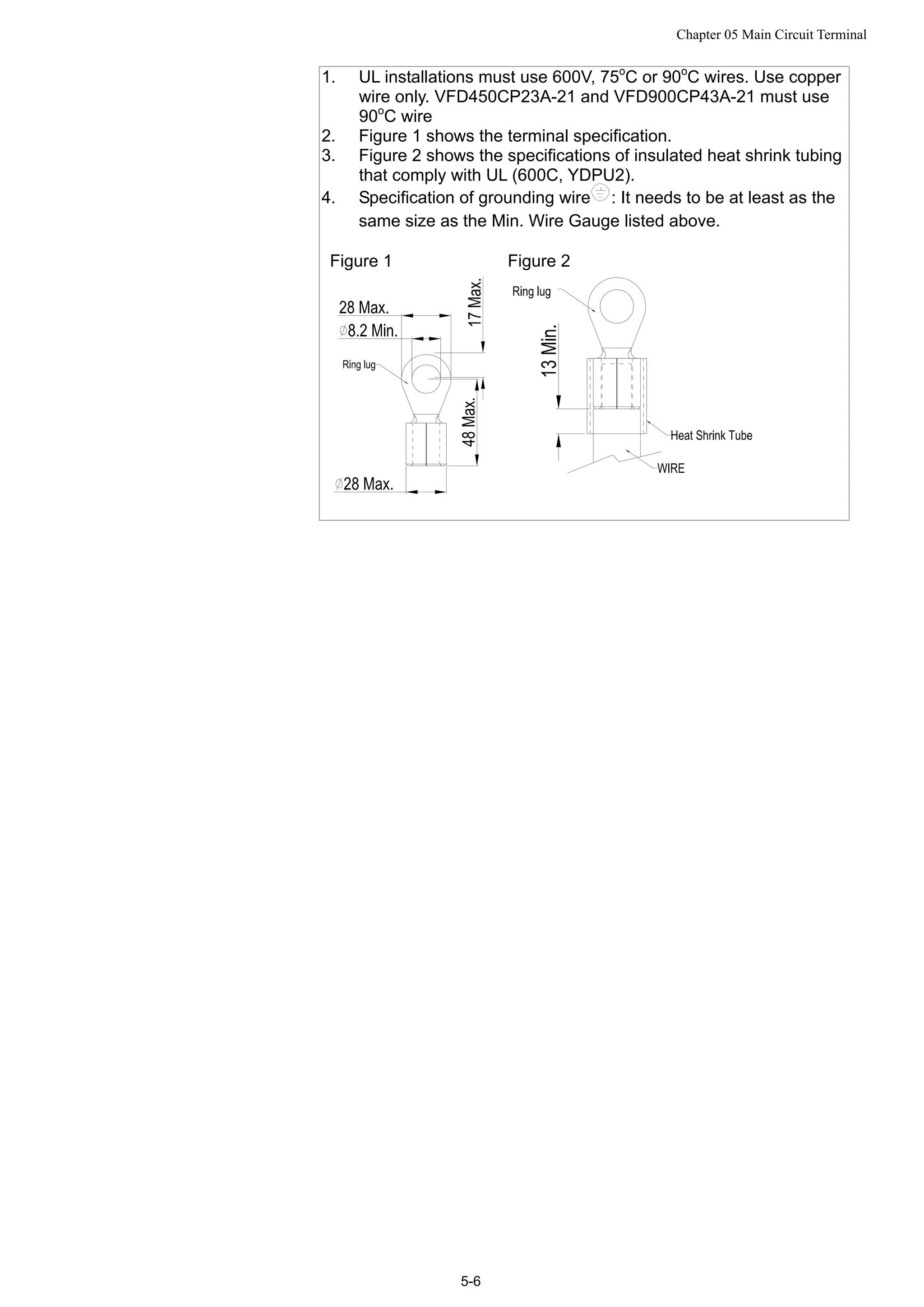
1. UL installations must use 600V, 75o
C or 90o
C wires. Use copper
wire only. VFD450CP23A-21 and VFD900CP43A-21 must use
90o
C wire
2. Figure 1 shows the terminal specification.
3. Figure 2 shows the specifications of insulated heat shrink tubing
that comply with UL (600C, YDPU2).
4. Specification of grounding wire : It needs to be at least as the
same size as the Min. Wire Gauge listed above.
Figure 1 Figure 2
Chapter 05 Main Circuit Terminal
5-7
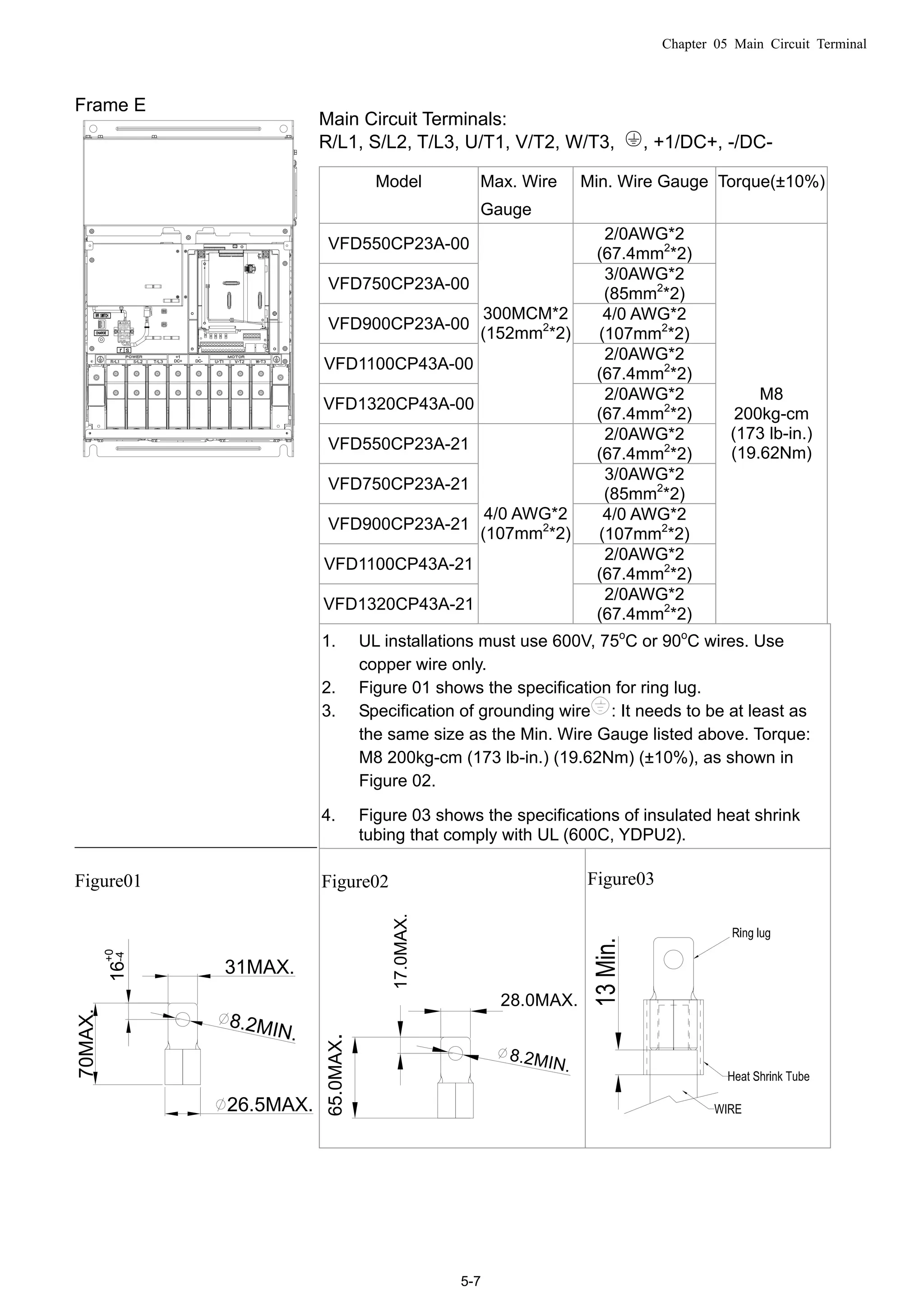
Frame E
Incorrect installation may
result in damage to option
or inverter.Please refer to
operation manual for
installation instructions.
警 告
錯誤的安裝將會導
致變頻器及選配品
損壞,安裝前請務
必參閱使用手冊後
才進行裝配。
__________________________
Figure01
31MAX.
8.2MIN.
26.5MAX.
70MAX.
16
+0
-4 Main Circuit Terminals:
R/L1, S/L2, T/L3, U/T1, V/T2, W/T3, , +1/DC+, -/DC-
Model Max. Wire
Gauge
Min. Wire Gauge Torque(±10%)
VFD550CP23A-00
2/0AWG*2
(67.4mm2
*2)
VFD750CP23A-00
3/0AWG*2
(85mm2
*2)
VFD900CP23A-00
4/0 AWG*2
(107mm2
*2)
VFD1100CP43A-00
2/0AWG*2
(67.4mm2
*2)
VFD1320CP43A-00
300MCM*2
(152mm2
*2)
2/0AWG*2
(67.4mm2
*2)
VFD550CP23A-21
2/0AWG*2
(67.4mm2
*2)
VFD750CP23A-21
3/0AWG*2
(85mm2
*2)
VFD900CP23A-21
4/0 AWG*2
(107mm2
*2)
VFD1100CP43A-21
2/0AWG*2
(67.4mm2
*2)
VFD1320CP43A-21
4/0 AWG*2
(107mm2
*2)
2/0AWG*2
(67.4mm2
*2)
M8
200kg-cm
(173 lb-in.)
(19.62Nm)
1. UL installations must use 600V, 75o
C or 90o
C wires. Use
copper wire only.
2. Figure 01 shows the specification for ring lug.
3. Specification of grounding wire : It needs to be at least as
the same size as the Min. Wire Gauge listed above. Torque:
M8 200kg-cm (173 lb-in.) (19.62Nm) (±10%), as shown in
Figure 02.
4. Figure 03 shows the specifications of insulated heat shrink
tubing that comply with UL (600C, YDPU2).
Figure02
8.2MIN.
65.0MAX.
17.0MAX.
28.0MAX.
Figure03
Chapter 05 Main Circuit Terminal
5-8
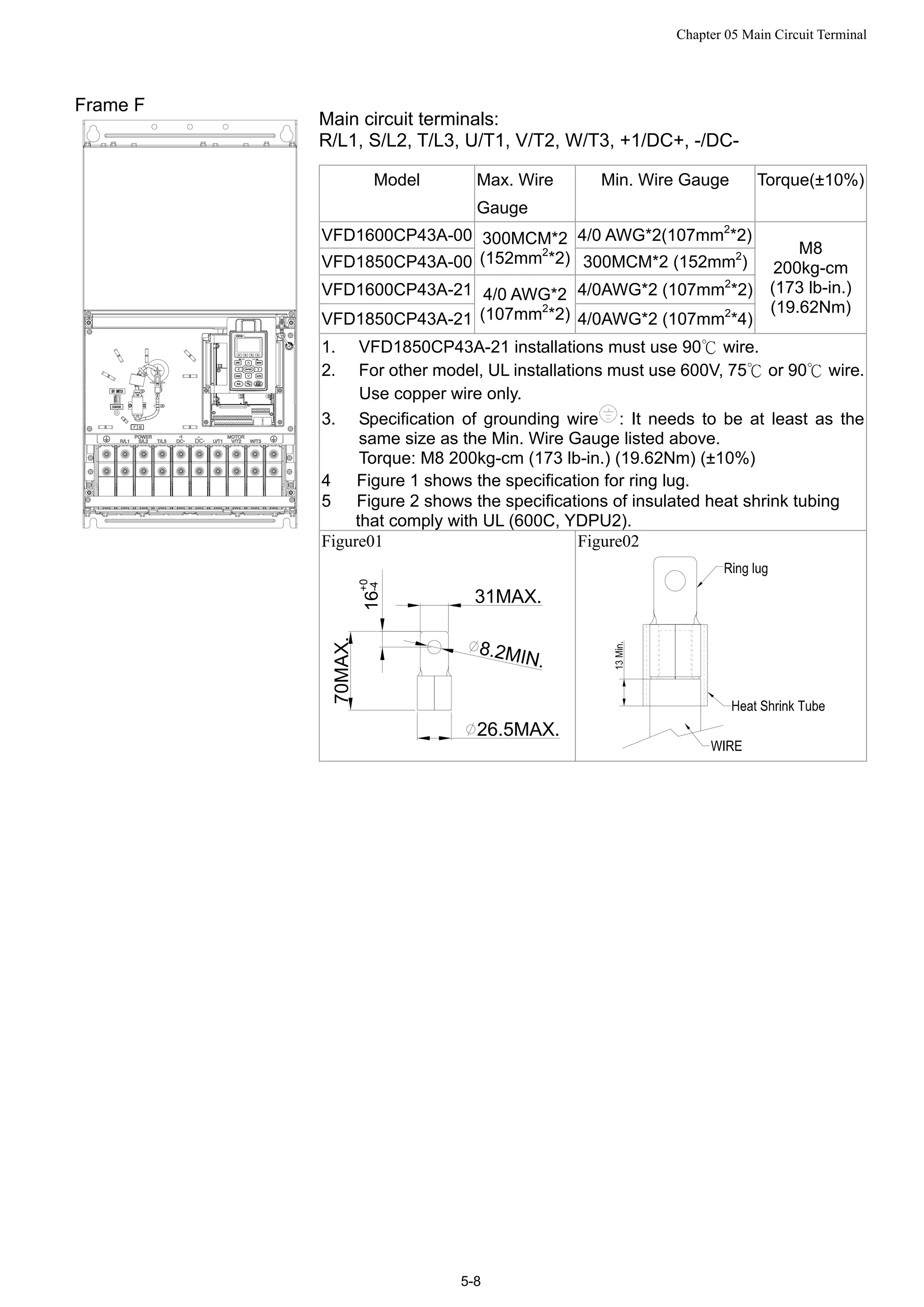
Frame F
Main circuit terminals:
R/L1, S/L2, T/L3, U/T1, V/T2, W/T3, +1/DC+, -/DC-
Model Max. Wire
Gauge
Min. Wire Gauge Torque(±10%)
VFD1600CP43A-00 4/0 AWG*2(107mm2
*2)
VFD1850CP43A-00
300MCM*2
(152mm2
*2) 300MCM*2 (152mm2
)
VFD1600CP43A-21 4/0AWG*2 (107mm2
*2)
VFD1850CP43A-21
4/0 AWG*2
(107mm2
*2) 4/0AWG*2 (107mm2
*4)
M8
200kg-cm
(173 lb-in.)
(19.62Nm)
1. VFD1850CP43A-21 installations must use 90 wire.℃
2. For other model, UL installations must use 600V, 75 or 90 wire.℃ ℃
Use copper wire only.
3. Specification of grounding wire : It needs to be at least as the
same size as the Min. Wire Gauge listed above.
Torque: M8 200kg-cm (173 lb-in.) (19.62Nm) (±10%)
4 Figure 1 shows the specification for ring lug.
5 Figure 2 shows the specifications of insulated heat shrink tubing
that comply with UL (600C, YDPU2).
Figure01
31MAX.
8.2MIN.
26.5MAX.
70MAX.
16
+0
-4
Figure02
Chapter 05 Main Circuit Terminal
5-9
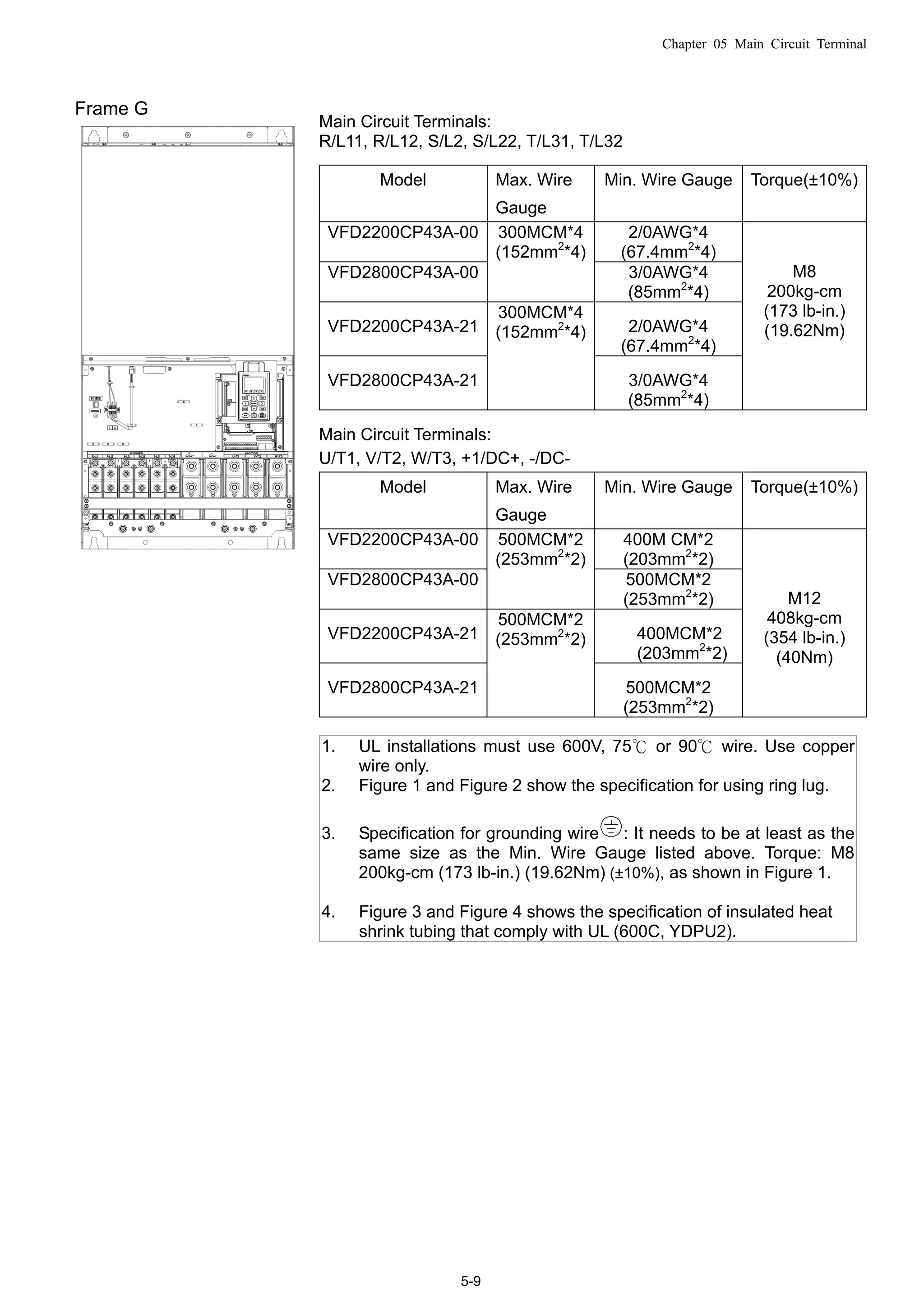
Frame G
Main Circuit Terminals:
R/L11, R/L12, S/L2, S/L22, T/L31, T/L32
Model Max. Wire
Gauge
Min. Wire Gauge Torque(±10%)
VFD2200CP43A-00 2/0AWG*4
(67.4mm2
*4)
VFD2800CP43A-00
300MCM*4
(152mm2
*4)
3/0AWG*4
(85mm2
*4)
VFD2200CP43A-21 2/0AWG*4
(67.4mm2
*4)
VFD2800CP43A-21
300MCM*4
(152mm2
*4)
3/0AWG*4
(85mm2
*4)
M8
200kg-cm
(173 lb-in.)
(19.62Nm)
Main Circuit Terminals:
U/T1, V/T2, W/T3, +1/DC+, -/DC-
Model Max. Wire
Gauge
Min. Wire Gauge Torque(±10%)
VFD2200CP43A-00 400M CM*2
(203mm2
*2)
VFD2800CP43A-00
500MCM*2
(253mm2
*2)
500MCM*2
(253mm2
*2)
VFD2200CP43A-21 400MCM*2
(203mm2
*2)
VFD2800CP43A-21
500MCM*2
(253mm2
*2)
500MCM*2
(253mm2
*2)
M12
408kg-cm
(354 lb-in.)
(40Nm)
1. UL installations must use 600V, 75 or 90℃ ℃ wire. Use copper
wire only.
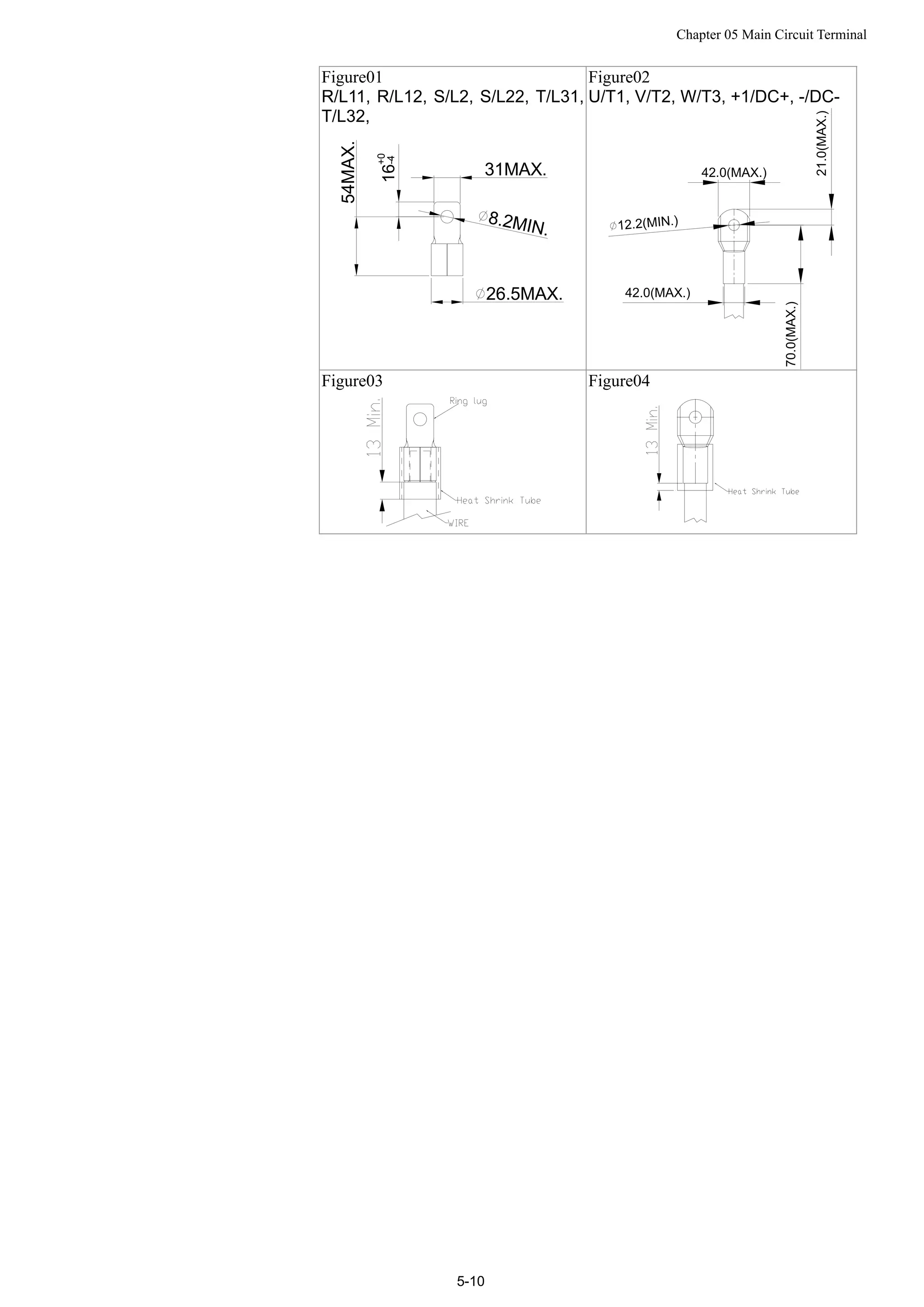
2. Figure 1 and Figure 2 show the specification for using ring lug.
3. Specification for grounding wire : It needs to be at least as the
same size as the Min. Wire Gauge listed above. Torque: M8
200kg-cm (173 lb-in.) (19.62Nm) (±10%), as shown in Figure 1.
4. Figure 3 and Figure 4 shows the specification of insulated heat
shrink tubing that comply with UL (600C, YDPU2).
Chapter 05 Main Circuit Terminal
5-10
Figure01
R/L11, R/L12, S/L2, S/L22, T/L31,
T/L32,
31MAX.
8.2MIN.
26.5MAX.
54MAX.
16
+0
-4
Figure02
U/T1, V/T2, W/T3, +1/DC+, -/DC-
42.0(MAX.)
12.2(MIN.)
21.0(MAX.)
70.0(MAX.)
42.0(MAX.)
Figure03 Figure04
Chapter 05 Main Circuit Terminal
5-11
Frame H
Main circuit terminals:
R/11,R12,S/21,S/22,T/31,T/32, U/T1, V/T2, W/T3, +1/DC+, -/DC-
Model Max. Wire
Gauge
Min. Wire Gauge Torque(±10%)
VFD3150CP43A-00 4/0 AWG*4(107mm2
*4)
VFD3550CP43A-00 250MCM*4(127mm2
*4)
VFD4000CP43A-00 300MCM*4(152mm2
*4)
VFD4000CP43C-00 300MCM*4(152mm2
*4)
VFD3150CP43C-00 4/0 AWG*4(107mm2
*4)
VFD3550CP43C-00 250MCM*4(127mm2
*4)
VFD3150CP43C-21 4/0 AWG*4(107mm2*4)
VFD3550CP43C-21 250MCM*4(127mm2*4)
VFD4000CP43C-21
300MCM*4
(152mm2
*4)
300MCM*4(152mm2*4)
M8
200kg-cm
(173 lb-in.)
(19.62Nm)
1. UL installations must use 600V, 75℃ or 90℃ wire. Use copper wire
only.
2. Figure 1 shows the specification for using the ring lug.
3. Specification of grounding wire : 300MCM*4 [152 mm2
*4],
Torque: M8 180kg-cm (156 lb-in.) (17.64Nm) (±10%), as shown in
figure 1.
4. Figure 2 shows the specifications of heat shrink tubing that comply
with UL (600C, YDPU2).
Figure01 Figure02
Chapter 6 Control Circuit Terminal
6-1
06 Control Circuit Terminal
For multi-function input and output terminal, remove the top cover before wiring
The figures shown in the diagram below are for reference only.
Remove the cover for wiring. Frame A~H
Frame A&B
Loosen the screws and press the tabs
on both sides to remove the cover.
Screw torque: 12~15Kg-cm [10.4~13lb-in.]
Frame C&D
Screw torque: 12~15Kg-cm [10.4~13lb-in.]
Frame E
Screw torque: 12~15Kg-cm [10.4~13lb-in.] Slightly lift the cover then pull outward for removal.
Chapter 6 Control Circuit Terminal
6-2
Frame F
Screw torque: 12~15Kg-cm [10.4~13lb-in.]
Slightly lift the cover then pull outward for removal.
Frame G
Screw torque: 12~15Kg-cm [10.4~13lb-in.]
Slightly lift the cover then pull outward for removal.
Frame H
Screw torque: 14~16Kg-cm [12.15~13.89lb-in.] Slightly lift the cover then pull outward for removal.
Chapter 6 Control Circuit Terminal
6-3
Control Terminal Specifications
Wire Gauge: 26~16AWG(0.1281-1.318mm2
),
Torque: (A) 5kg-cm [4.31Ib-in.] (0.49Nm) (As shown in figure above)
(B) 8kg-cm [6.94Ib-in.] (0.78Nm) (As shown in figure above)
Wiring precautions:
 Reserves 5mm and properly install the wire into the terminal; fasten the installation by a slotted
screwdriver. If the wire is stripped, sort the wire before install into the terminal.
 Flathead screwdriver: blade width 3.5mm, tip thickness 0.6mm
 In the figure above, the factory setting for S1-SCM is short circuit. The factory setting for
+24V-COM is short circuit and SINK mode (NPN); please refer to Chapter 4 Wiring for more detail.
Terminals Terminal Function Factory Setting (NPN mode)
+24V
Digital control signal common
(Source)
+24V5% 200mA
COM
Digital control signal common
(Sink)
Common for multi-function input terminals
FWD Forward-Stop command
FWD-DCM:
ON forward running
OFF deceleration to stop
REV Reverse-Stop command
REV-DCM:
ON reverse running
OFF deceleration to stop
MI1
~
MI8
Multi-function input 1~8
Refer to parameters 02-01~02-08 to program the
multi-function inputs MI1~MI8.
ON: the activation current is 6.5mA≧11Vdc
OFF: leakage current tolerance is 10μA≦11Vdc
DCM Digital frequency signal common
RA1
Multi-function relay output 1
(N.O.) a
RB1
Multi-function relay output 1
(N.C.) b
Resistive Load:
5A(N.O.)/3A(N.C.) 250VAC
5A(N.O.)/3A(N.C.) 30VDC
Chapter 6 Control Circuit Terminal
6-4
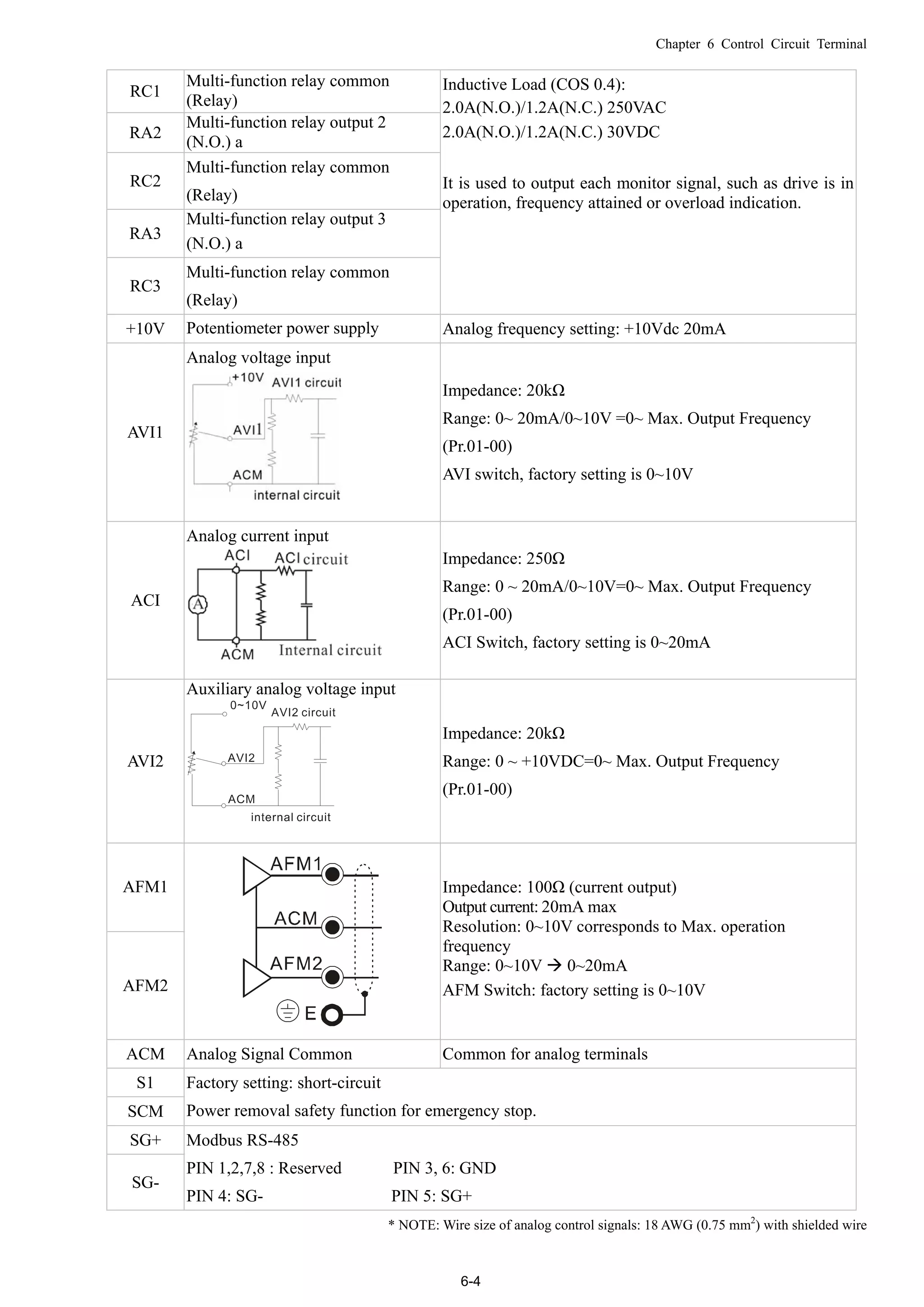
RC1
Multi-function relay common
(Relay)
RA2
Multi-function relay output 2
(N.O.) a
RC2
Multi-function relay common
(Relay)
RA3
Multi-function relay output 3
(N.O.) a
RC3
Multi-function relay common
(Relay)
Inductive Load (COS 0.4):
2.0A(N.O.)/1.2A(N.C.) 250VAC
2.0A(N.O.)/1.2A(N.C.) 30VDC
It is used to output each monitor signal, such as drive is in
operation, frequency attained or overload indication.
+10V Potentiometer power supply Analog frequency setting: +10Vdc 20mA
AVI1
Analog voltage input
Impedance: 20kΩ
Range: 0~ 20mA/0~10V =0~ Max. Output Frequency
(Pr.01-00)
AVI switch, factory setting is 0~10V
ACI
Analog current input
Impedance: 250Ω
Range: 0 ~ 20mA/0~10V=0~ Max. Output Frequency
(Pr.01-00)
ACI Switch, factory setting is 0~20mA
AVI2
Auxiliary analog voltage input
Impedance: 20kΩ
Range: 0 ~ +10VDC=0~ Max. Output Frequency
(Pr.01-00)
AFM1
AFM2
Impedance: 100Ω (current output)
Output current: 20mA max
Resolution: 0~10V corresponds to Max. operation
frequency
Range: 0~10V  0~20mA
AFM Switch: factory setting is 0~10V
ACM Analog Signal Common Common for analog terminals
S1
SCM
Factory setting: short-circuit
Power removal safety function for emergency stop.
SG+
SG-
Modbus RS-485
PIN 1,2,7,8 : Reserved PIN 3, 6: GND
PIN 4: SG- PIN 5: SG+
* NOTE: Wire size of analog control signals: 18 AWG (0.75 mm2
) with shielded wire
Chapter 6 Control Circuit Terminal
6-5
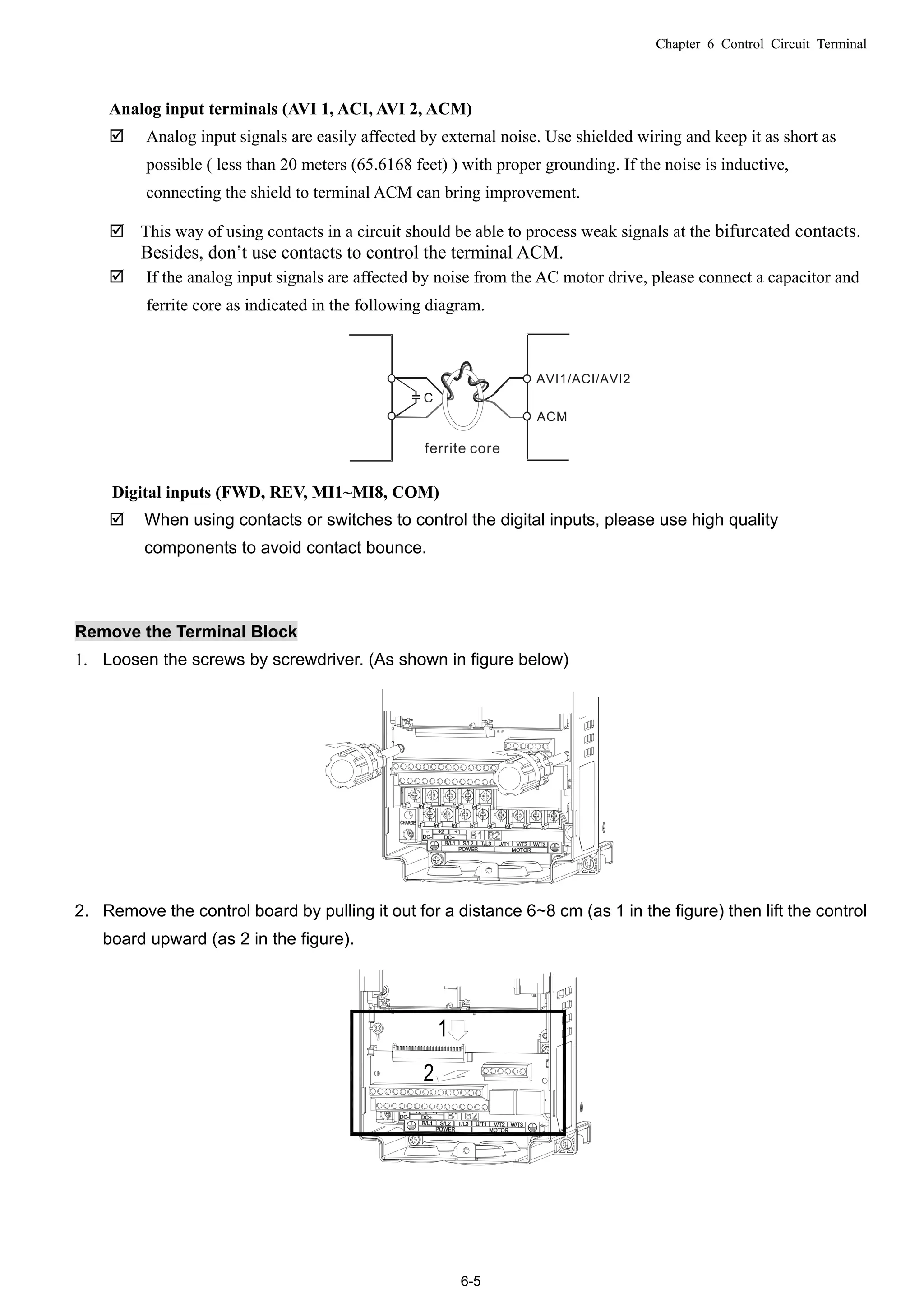
Analog input terminals (AVI 1, ACI, AVI 2, ACM)
 Analog input signals are easily affected by external noise. Use shielded wiring and keep it as short as
possible ( less than 20 meters (65.6168 feet) ) with proper grounding. If the noise is inductive,
connecting the shield to terminal ACM can bring improvement.
 This way of using contacts in a circuit should be able to process weak signals at the bifurcated contacts.
Besides, don’t use contacts to control the terminal ACM.
 If the analog input signals are affected by noise from the AC motor drive, please connect a capacitor and
ferrite core as indicated in the following diagram.
Digital inputs (FWD, REV, MI1~MI8, COM)
 When using contacts or switches to control the digital inputs, please use high quality
components to avoid contact bounce.
Remove the Terminal Block
1. Loosen the screws by screwdriver. (As shown in figure below)
2. Remove the control board by pulling it out for a distance 6~8 cm (as 1 in the figure) then lift the control
board upward (as 2 in the figure).
Chapter 07 Optional Components
7-1
07 Optional Components
The components listed in this chapter are optional (not built-in) and available upon request. Installing
additional components to your drive would substantially improve its performance. Please select
applicable components according to your need or contact the local distributor for suggestions.
List of Optional Components:
 All Brake Resistors and Brake Units Used in AC Motor Drives
 Non-fuse Circuit Breaker
 Fuse (Specification Chart)
 AC Reactor (Choke)
 Zero Phase Reactor (Choke)
 DC Reactor (Choke)
 EMI filter
 Digital Keypad
 Panel Mounting Kit
 Conduit Box Kit
 Fan Kit
 Flange Mounting Kit
 IFD6530: USB/RS-485 Communication Interface
Chapter 07 Optional Components
7-2
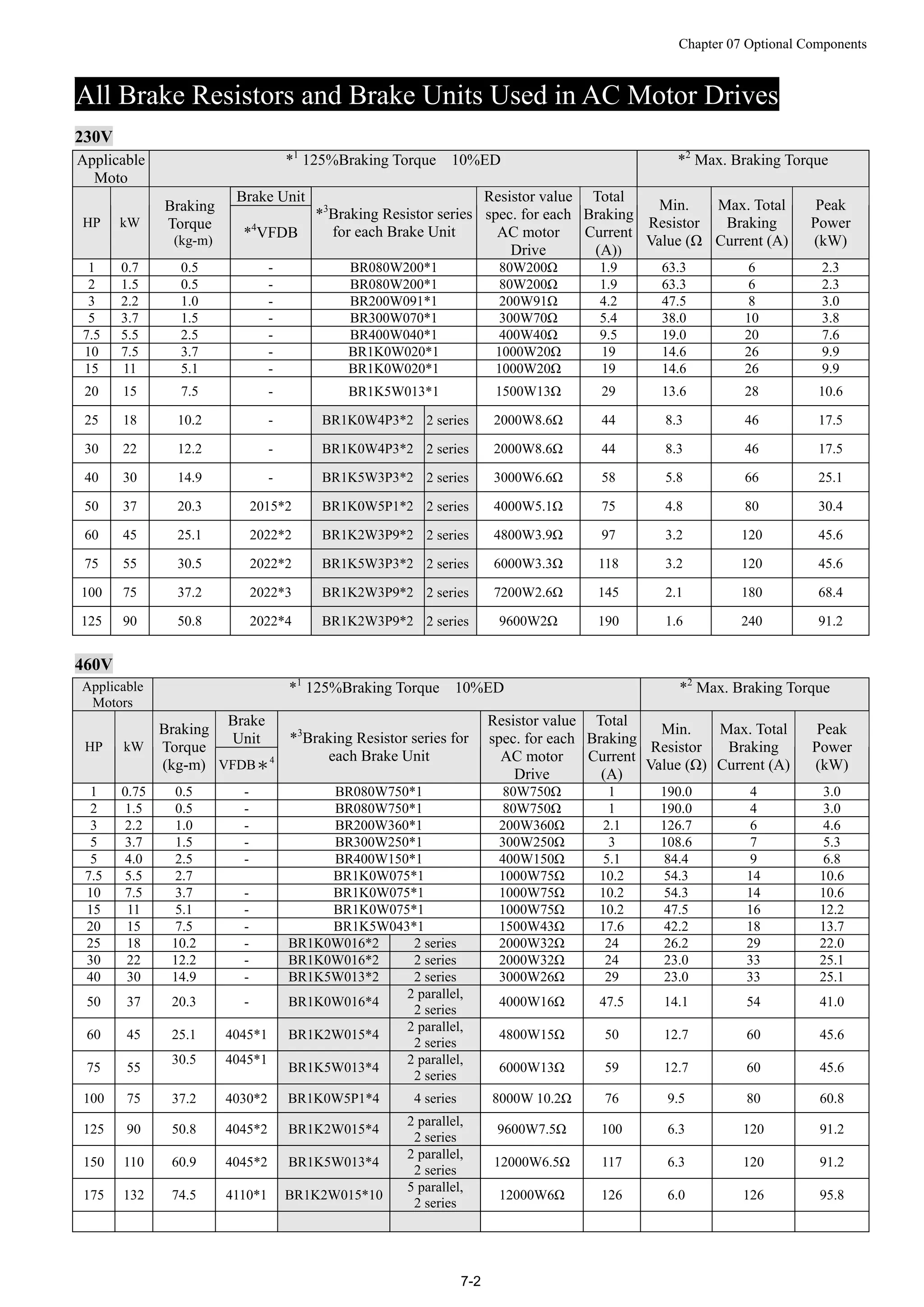
All Brake Resistors and Brake Units Used in AC Motor Drives
230V
Applicable
Moto
*1
125%Braking Torque 10%ED *2
Max. Braking Torque
Brake Unit
HP kW
Braking
Torque
(kg-m)
*4
VFDB
*3
Braking Resistor series
for each Brake Unit
Resistor value
spec. for each
AC motor
Drive
Total
Braking
Current
(A))
Min.
Resistor
Value (Ω
Max. Total
Braking
Current (A)
Peak
Power
(kW)
1 0.7 0.5 - BR080W200*1 80W200Ω 1.9 63.3 6 2.3
2 1.5 0.5 - BR080W200*1 80W200Ω 1.9 63.3 6 2.3
3 2.2 1.0 - BR200W091*1 200W91Ω 4.2 47.5 8 3.0
5 3.7 1.5 - BR300W070*1 300W70Ω 5.4 38.0 10 3.8
7.5 5.5 2.5 - BR400W040*1 400W40Ω 9.5 19.0 20 7.6
10 7.5 3.7 - BR1K0W020*1 1000W20Ω 19 14.6 26 9.9
15 11 5.1 - BR1K0W020*1 1000W20Ω 19 14.6 26 9.9
20 15 7.5 - BR1K5W013*1 1500W13Ω 29 13.6 28 10.6
25 18 10.2 - BR1K0W4P3*2 2 series 2000W8.6Ω 44 8.3 46 17.5
30 22 12.2 - BR1K0W4P3*2 2 series 2000W8.6Ω 44 8.3 46 17.5
40 30 14.9 - BR1K5W3P3*2 2 series 3000W6.6Ω 58 5.8 66 25.1
50 37 20.3 2015*2 BR1K0W5P1*2 2 series 4000W5.1Ω 75 4.8 80 30.4
60 45 25.1 2022*2 BR1K2W3P9*2 2 series 4800W3.9Ω 97 3.2 120 45.6
75 55 30.5 2022*2 BR1K5W3P3*2 2 series 6000W3.3Ω 118 3.2 120 45.6
100 75 37.2 2022*3 BR1K2W3P9*2 2 series 7200W2.6Ω 145 2.1 180 68.4
125 90 50.8 2022*4 BR1K2W3P9*2 2 series 9600W2Ω 190 1.6 240 91.2
460V
Applicable
Motors
*1
125%Braking Torque 10%ED *2
Max. Braking Torque
Brake
Unit
HP kW
Braking
Torque
(kg-m) VFDB*4
*3
Braking Resistor series for
each Brake Unit
Resistor value
spec. for each
AC motor
Drive
Total
Braking
Current
(A)
Min.
Resistor
Value (Ω)
Max. Total
Braking
Current (A)
Peak
Power
(kW)
1 0.75 0.5 - BR080W750*1 80W750Ω 1 190.0 4 3.0
2 1.5 0.5 - BR080W750*1 80W750Ω 1 190.0 4 3.0
3 2.2 1.0 - BR200W360*1 200W360Ω 2.1 126.7 6 4.6
5 3.7 1.5 - BR300W250*1 300W250Ω 3 108.6 7 5.3
5 4.0 2.5 - BR400W150*1 400W150Ω 5.1 84.4 9 6.8
7.5 5.5 2.7 BR1K0W075*1 1000W75Ω 10.2 54.3 14 10.6
10 7.5 3.7 - BR1K0W075*1 1000W75Ω 10.2 54.3 14 10.6
15 11 5.1 - BR1K0W075*1 1000W75Ω 10.2 47.5 16 12.2
20 15 7.5 - BR1K5W043*1 1500W43Ω 17.6 42.2 18 13.7
25 18 10.2 - BR1K0W016*2 2 series 2000W32Ω 24 26.2 29 22.0
30 22 12.2 - BR1K0W016*2 2 series 2000W32Ω 24 23.0 33 25.1
40 30 14.9 - BR1K5W013*2 2 series 3000W26Ω 29 23.0 33 25.1
50 37 20.3 - BR1K0W016*4
2 parallel,
2 series
4000W16Ω 47.5 14.1 54 41.0
60 45 25.1 4045*1 BR1K2W015*4
2 parallel,
2 series
4800W15Ω 50 12.7 60 45.6
75 55
30.5 4045*1
BR1K5W013*4
2 parallel,
2 series
6000W13Ω 59 12.7 60 45.6
100 75 37.2 4030*2 BR1K0W5P1*4 4 series 8000W 10.2Ω 76 9.5 80 60.8
125 90 50.8 4045*2 BR1K2W015*4
2 parallel,
2 series
9600W7.5Ω 100 6.3 120 91.2
150 110 60.9 4045*2 BR1K5W013*4
2 parallel,
2 series
12000W6.5Ω 117 6.3 120 91.2
175 132 74.5 4110*1 BR1K2W015*10
5 parallel,
2 series
12000W6Ω 126 6.0 126 95.8
Chapter 07 Optional Components
7-3
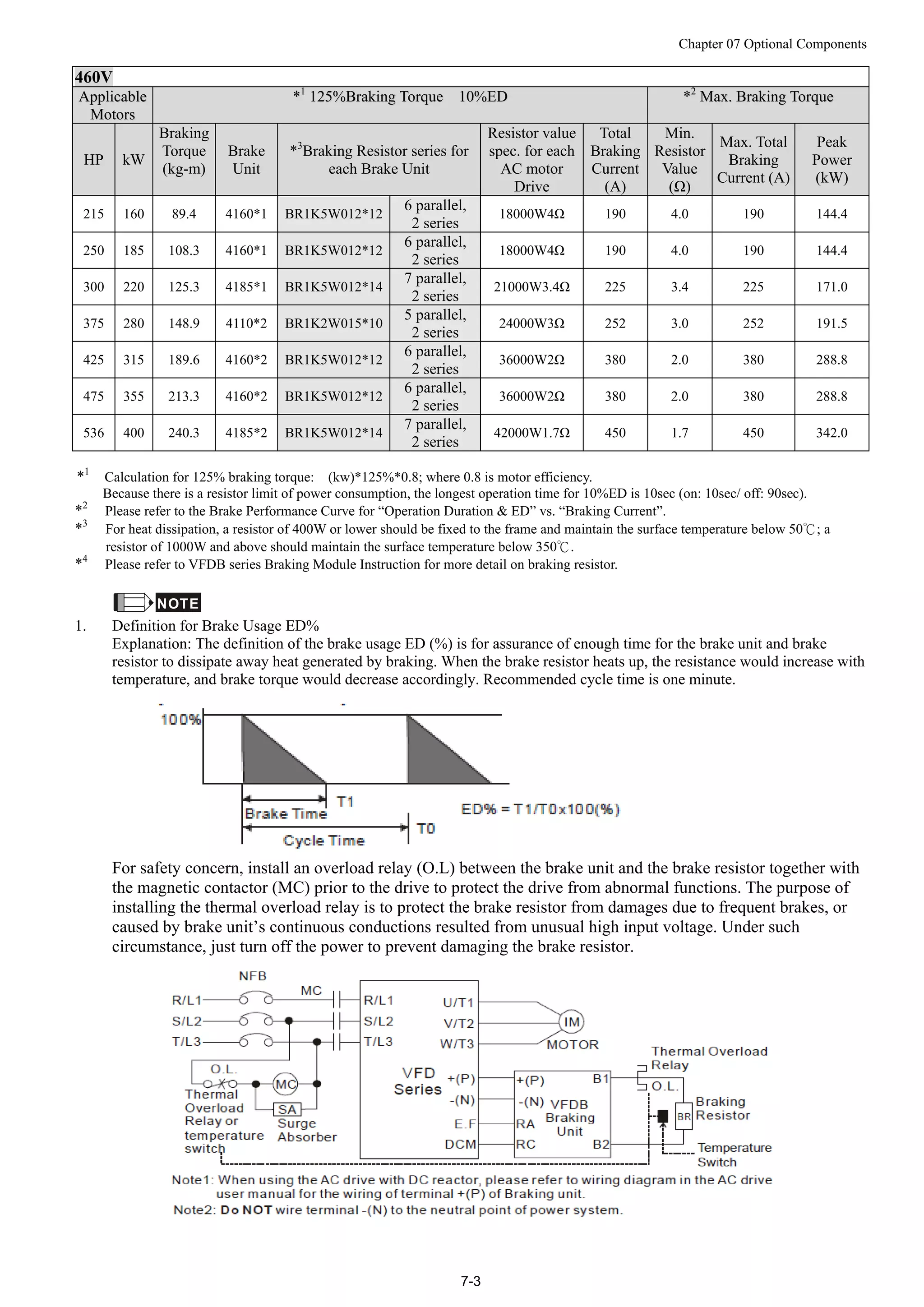
460V
AApppplliiccaabbllee
MMoottoorrss
**11
112255%%BBrraakkiinngg TToorrqquuee 1100%%EEDD **22
MMaaxx.. BBrraakkiinngg TToorrqquuee
HP kW
Braking
Torque
(kg-m)
Brake
Unit
*3
Braking Resistor series for
each Brake Unit
Resistor value
spec. for each
AC motor
Drive
Total
Braking
Current
(A)
Min.
Resistor
Value
(Ω)
Max. Total
Braking
Current (A)
Peak
Power
(kW)
215 160 89.4 4160*1 BR1K5W012*12
6 parallel,
2 series
18000W4Ω 190 4.0 190 144.4
250 185 108.3 4160*1 BR1K5W012*12
6 parallel,
2 series
18000W4Ω 190 4.0 190 144.4
300 220 125.3 4185*1 BR1K5W012*14
7 parallel,
2 series
21000W3.4Ω 225 3.4 225 171.0
375 280 148.9 4110*2 BR1K2W015*10
5 parallel,
2 series
24000W3Ω 252 3.0 252 191.5
425 315 189.6 4160*2 BR1K5W012*12
6 parallel,
2 series
36000W2Ω 380 2.0 380 288.8
475 355 213.3 4160*2 BR1K5W012*12
6 parallel,
2 series
36000W2Ω 380 2.0 380 288.8
536 400 240.3 4185*2 BR1K5W012*14
7 parallel,
2 series
42000W1.7Ω 450 1.7 450 342.0
*1
Calculation for 125% braking torque: (kw)*125%*0.8; where 0.8 is motor efficiency.
Because there is a resistor limit of power consumption, the longest operation time for 10%ED is 10sec (on: 10sec/ off: 90sec).
*2
Please refer to the Brake Performance Curve for “Operation Duration & ED” vs. “Braking Current”.
*3
For heat dissipation, a resistor of 400W or lower should be fixed to the frame and maintain the surface temperature below 50℃; a
resistor of 1000W and above should maintain the surface temperature below 350℃.
*4
Please refer to VFDB series Braking Module Instruction for more detail on braking resistor.
NOTE
1. Definition for Brake Usage ED%
Explanation: The definition of the brake usage ED (%) is for assurance of enough time for the brake unit and brake
resistor to dissipate away heat generated by braking. When the brake resistor heats up, the resistance would increase with
temperature, and brake torque would decrease accordingly. Recommended cycle time is one minute.
For safety concern, install an overload relay (O.L) between the brake unit and the brake resistor together with
the magnetic contactor (MC) prior to the drive to protect the drive from abnormal functions. The purpose of
installing the thermal overload relay is to protect the brake resistor from damages due to frequent brakes, or
caused by brake unit’s continuous conductions resulted from unusual high input voltage. Under such
circumstance, just turn off the power to prevent damaging the brake resistor.
Chapter 07 Optional Components
7-4
2. If damage to the drive or other equipment is due to the fact that the brake resistors and brake modules in use are not
provided by Delta, the warranty will be void.
3. Please take into consideration the safety of the environment when installing the brake resistors. If the minimum
resistance value is to be utilized, consult local dealers for the calculation of Watt figures.
4. When using more than 2 brake units, equivalent resistor value of parallel brake unit can’t be less than the value in the
column “Minimum Equivalent Resistor Value for Each AC Drive” (the right-most column in the table). Please read the
wiring information in the user manual of brake unit thoroughly prior to operation
5. This chart is for normal usage; if the AC motor drive will be applied for frequent braking, it is recommended to enlarge
2~3 times of the Watts.
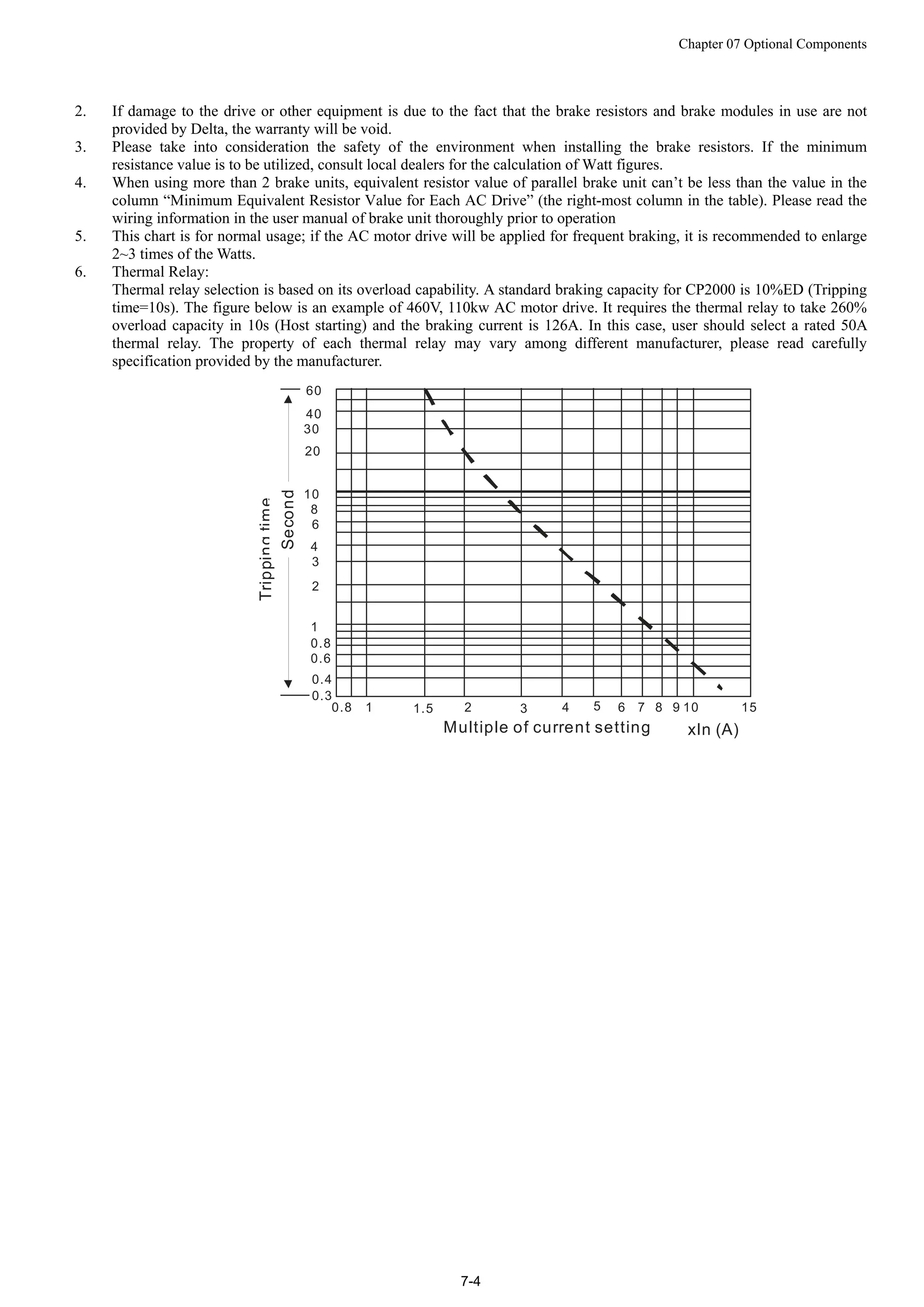
6. Thermal Relay:
Thermal relay selection is based on its overload capability. A standard braking capacity for CP2000 is 10%ED (Tripping
time=10s). The figure below is an example of 460V, 110kw AC motor drive. It requires the thermal relay to take 260%
overload capacity in 10s (Host starting) and the braking current is 126A. In this case, user should select a rated 50A
thermal relay. The property of each thermal relay may vary among different manufacturer, please read carefully
specification provided by the manufacturer.
60
40
30
20
10
Trippingtime
8
3
2
4
6
1
0.8
0.6
0.4
0.3
0.8 1 1.5 2 3 4 5 6 8 10 157 9
Multiple of current setting xln (A)
Second
Chapter 07 Optional Components
7-5
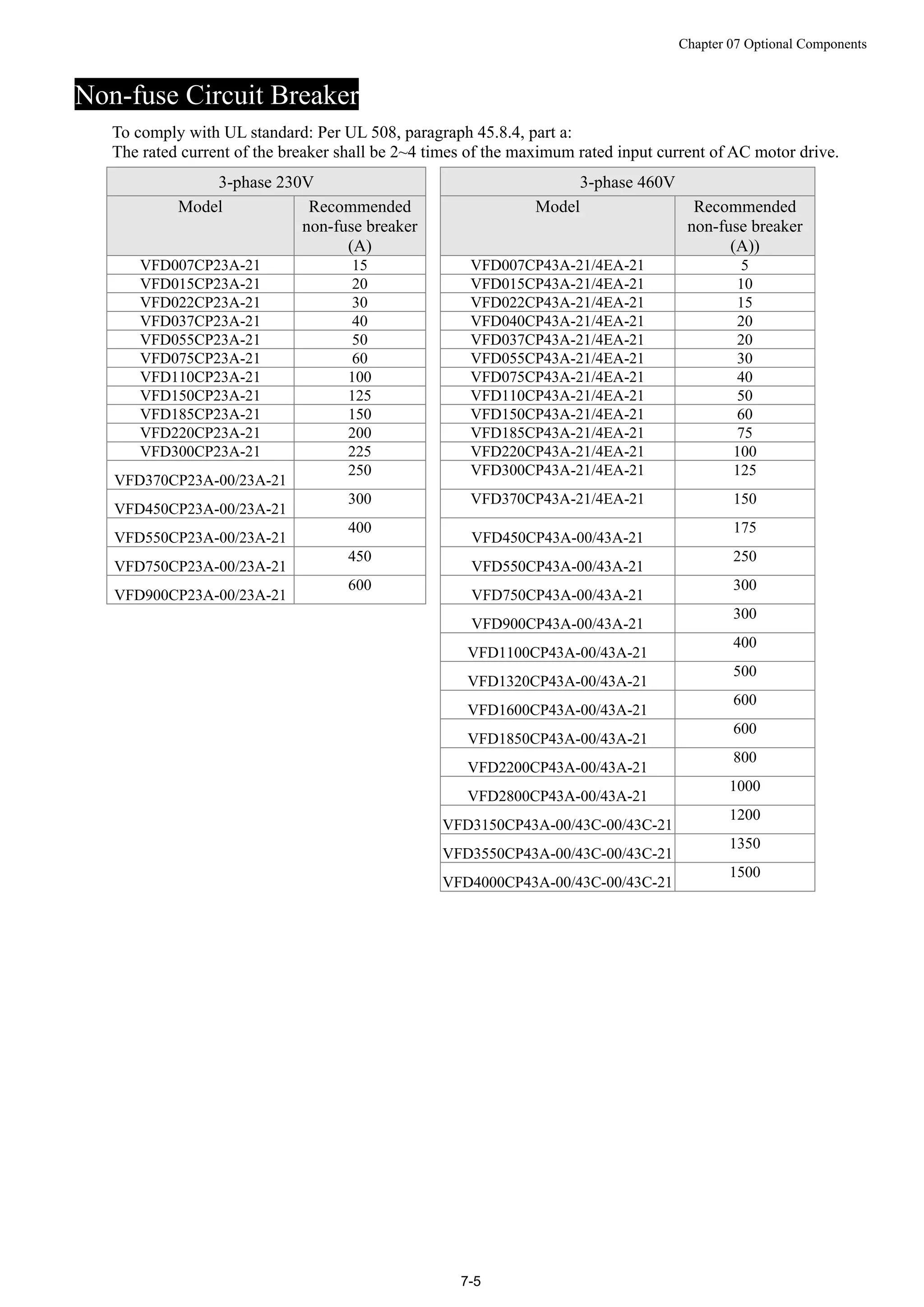
Non-fuse Circuit Breaker
To comply with UL standard: Per UL 508, paragraph 45.8.4, part a:
The rated current of the breaker shall be 2~4 times of the maximum rated input current of AC motor drive.
3-phase 230V 3-phase 460V
Model Recommended
non-fuse breaker
(A)
Model Recommended
non-fuse breaker
(A))
VFD007CP23A-21 15 VFD007CP43A-21/4EA-21 5
VFD015CP23A-21 20 VFD015CP43A-21/4EA-21 10
VFD022CP23A-21 30 VFD022CP43A-21/4EA-21 15
VFD037CP23A-21 40 VFD040CP43A-21/4EA-21 20
VFD055CP23A-21 50 VFD037CP43A-21/4EA-21 20
VFD075CP23A-21 60 VFD055CP43A-21/4EA-21 30
VFD110CP23A-21 100 VFD075CP43A-21/4EA-21 40
VFD150CP23A-21 125 VFD110CP43A-21/4EA-21 50
VFD185CP23A-21 150 VFD150CP43A-21/4EA-21 60
VFD220CP23A-21 200 VFD185CP43A-21/4EA-21 75
VFD300CP23A-21 225 VFD220CP43A-21/4EA-21 100
VFD370CP23A-00/23A-21
250 VFD300CP43A-21/4EA-21 125
VFD450CP23A-00/23A-21
300 VFD370CP43A-21/4EA-21 150
VFD550CP23A-00/23A-21
400
VFD450CP43A-00/43A-21
175
VFD750CP23A-00/23A-21
450
VFD550CP43A-00/43A-21
250
VFD900CP23A-00/23A-21
600
VFD750CP43A-00/43A-21
300
VFD900CP43A-00/43A-21
300
VFD1100CP43A-00/43A-21
400
VFD1320CP43A-00/43A-21
500
VFD1600CP43A-00/43A-21
600
VFD1850CP43A-00/43A-21
600
VFD2200CP43A-00/43A-21
800
VFD2800CP43A-00/43A-21
1000
VFD3150CP43A-00/43C-00/43C-21
1200
VFD3550CP43A-00/43C-00/43C-21
1350
VFD4000CP43A-00/43C-00/43C-21
1500
Chapter 07 Optional Components
7-6
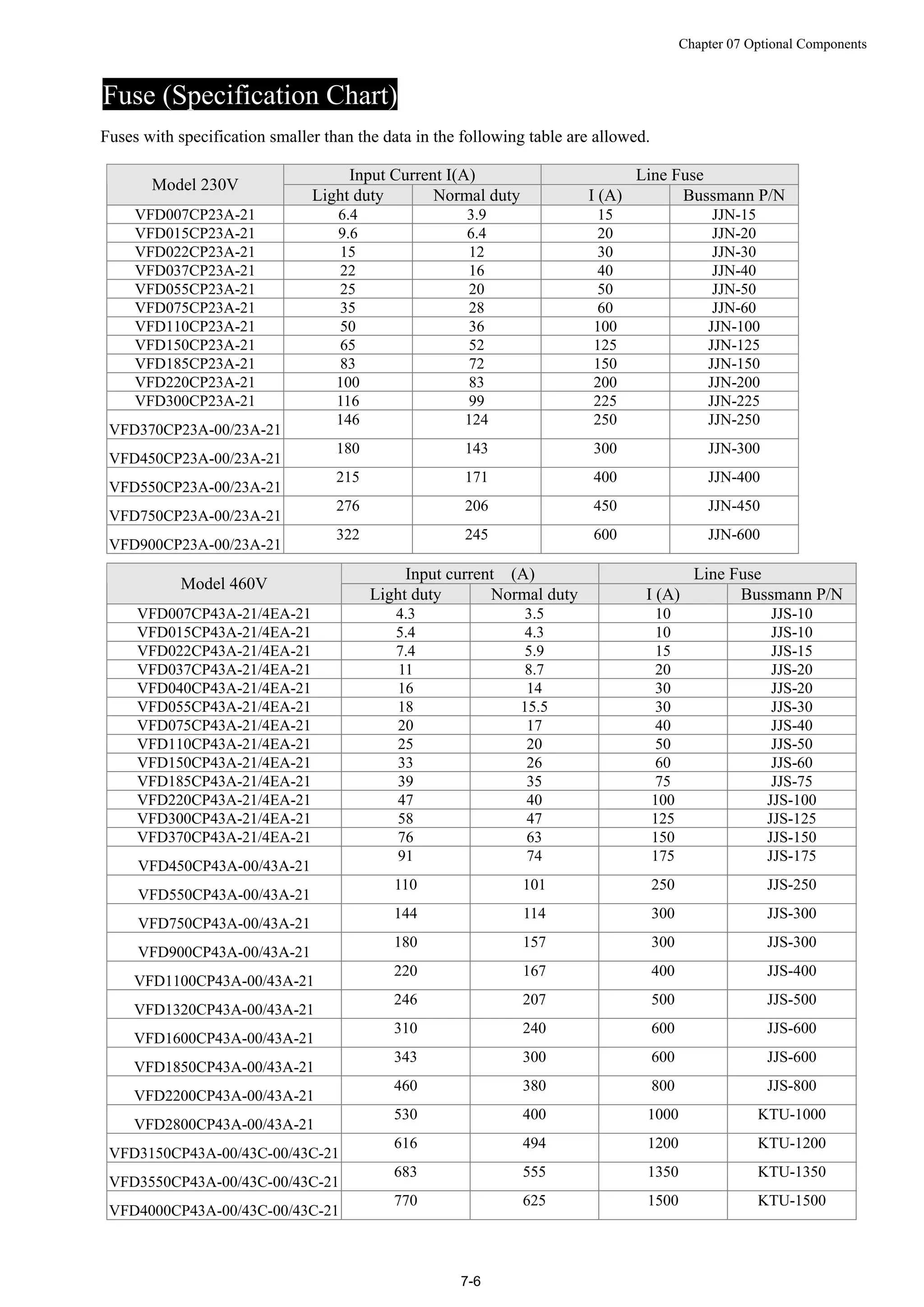
Fuse (Specification Chart)
Fuses with specification smaller than the data in the following table are allowed.
Input Current I(A) Line Fuse
Model 230V
Light duty Normal duty I (A) Bussmann P/N
VFD007CP23A-21 6.4 3.9 15 JJN-15
VFD015CP23A-21 9.6 6.4 20 JJN-20
VFD022CP23A-21 15 12 30 JJN-30
VFD037CP23A-21 22 16 40 JJN-40
VFD055CP23A-21 25 20 50 JJN-50
VFD075CP23A-21 35 28 60 JJN-60
VFD110CP23A-21 50 36 100 JJN-100
VFD150CP23A-21 65 52 125 JJN-125
VFD185CP23A-21 83 72 150 JJN-150
VFD220CP23A-21 100 83 200 JJN-200
VFD300CP23A-21 116 99 225 JJN-225
VFD370CP23A-00/23A-21
146 124 250 JJN-250
VFD450CP23A-00/23A-21
180 143 300 JJN-300
VFD550CP23A-00/23A-21
215 171 400 JJN-400
VFD750CP23A-00/23A-21
276 206 450 JJN-450
VFD900CP23A-00/23A-21
322 245 600 JJN-600
Input current (A) Line Fuse
Model 460V
Light duty Normal duty I (A) Bussmann P/N
VFD007CP43A-21/4EA-21 4.3 3.5 10 JJS-10
VFD015CP43A-21/4EA-21 5.4 4.3 10 JJS-10
VFD022CP43A-21/4EA-21 7.4 5.9 15 JJS-15
VFD037CP43A-21/4EA-21 11 8.7 20 JJS-20
VFD040CP43A-21/4EA-21 16 14 30 JJS-20
VFD055CP43A-21/4EA-21 18 15.5 30 JJS-30
VFD075CP43A-21/4EA-21 20 17 40 JJS-40
VFD110CP43A-21/4EA-21 25 20 50 JJS-50
VFD150CP43A-21/4EA-21 33 26 60 JJS-60
VFD185CP43A-21/4EA-21 39 35 75 JJS-75
VFD220CP43A-21/4EA-21 47 40 100 JJS-100
VFD300CP43A-21/4EA-21 58 47 125 JJS-125
VFD370CP43A-21/4EA-21 76 63 150 JJS-150
VFD450CP43A-00/43A-21
91 74 175 JJS-175
VFD550CP43A-00/43A-21
110 101 250 JJS-250
VFD750CP43A-00/43A-21
144 114 300 JJS-300
VFD900CP43A-00/43A-21
180 157 300 JJS-300
VFD1100CP43A-00/43A-21
220 167 400 JJS-400
VFD1320CP43A-00/43A-21
246 207 500 JJS-500
VFD1600CP43A-00/43A-21
310 240 600 JJS-600
VFD1850CP43A-00/43A-21
343 300 600 JJS-600
VFD2200CP43A-00/43A-21
460 380 800 JJS-800
VFD2800CP43A-00/43A-21
530 400 1000 KTU-1000
VFD3150CP43A-00/43C-00/43C-21
616 494 1200 KTU-1200
VFD3550CP43A-00/43C-00/43C-21
683 555 1350 KTU-1350
VFD4000CP43A-00/43C-00/43C-21
770 625 1500 KTU-1500
Chapter 07 Optional Components
7-7
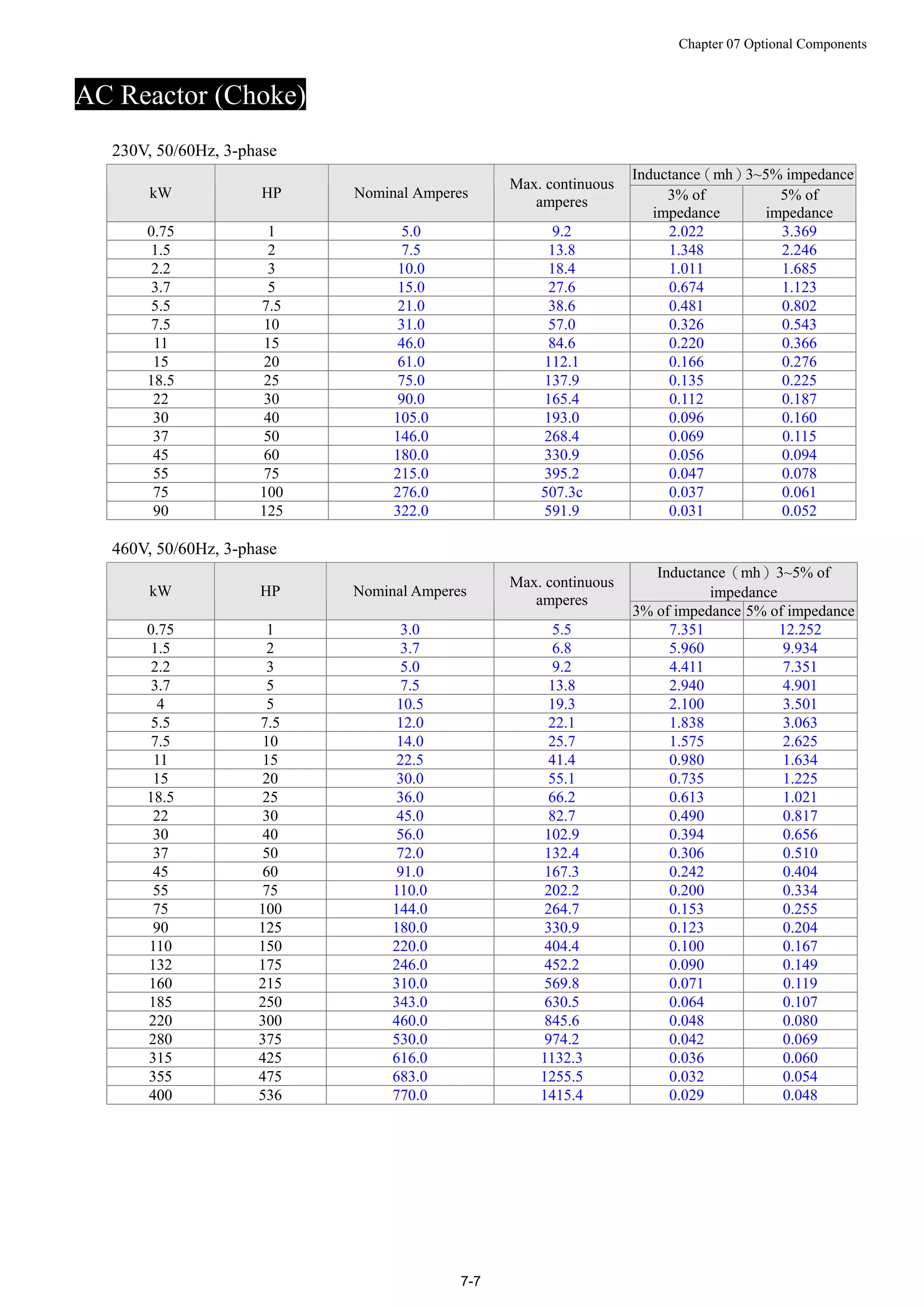
AC Reactor (Choke)
230V, 50/60Hz, 3-phase
Inductance(mh)3~5% impedance
kW HP Nominal Amperes
Max. continuous
amperes 3% of
impedance
5% of
impedance
0.75 1 5.0 9.2 2.022 3.369
1.5 2 7.5 13.8 1.348 2.246
2.2 3 10.0 18.4 1.011 1.685
3.7 5 15.0 27.6 0.674 1.123
5.5 7.5 21.0 38.6 0.481 0.802
7.5 10 31.0 57.0 0.326 0.543
11 15 46.0 84.6 0.220 0.366
15 20 61.0 112.1 0.166 0.276
18.5 25 75.0 137.9 0.135 0.225
22 30 90.0 165.4 0.112 0.187
30 40 105.0 193.0 0.096 0.160
37 50 146.0 268.4 0.069 0.115
45 60 180.0 330.9 0.056 0.094
55 75 215.0 395.2 0.047 0.078
75 100 276.0 507.3c 0.037 0.061
90 125 322.0 591.9 0.031 0.052
460V, 50/60Hz, 3-phase
Inductance(mh)3~5% of
impedancekW HP Nominal Amperes
Max. continuous
amperes
3% of impedance 5% of impedance
0.75 1 3.0 5.5 7.351 12.252
1.5 2 3.7 6.8 5.960 9.934
2.2 3 5.0 9.2 4.411 7.351
3.7 5 7.5 13.8 2.940 4.901
4 5 10.5 19.3 2.100 3.501
5.5 7.5 12.0 22.1 1.838 3.063
7.5 10 14.0 25.7 1.575 2.625
11 15 22.5 41.4 0.980 1.634
15 20 30.0 55.1 0.735 1.225
18.5 25 36.0 66.2 0.613 1.021
22 30 45.0 82.7 0.490 0.817
30 40 56.0 102.9 0.394 0.656
37 50 72.0 132.4 0.306 0.510
45 60 91.0 167.3 0.242 0.404
55 75 110.0 202.2 0.200 0.334
75 100 144.0 264.7 0.153 0.255
90 125 180.0 330.9 0.123 0.204
110 150 220.0 404.4 0.100 0.167
132 175 246.0 452.2 0.090 0.149
160 215 310.0 569.8 0.071 0.119
185 250 343.0 630.5 0.064 0.107
220 300 460.0 845.6 0.048 0.080
280 375 530.0 974.2 0.042 0.069
315 425 616.0 1132.3 0.036 0.060
355 475 683.0 1255.5 0.032 0.054
400 536 770.0 1415.4 0.029 0.048
Chapter 07 Optional Components
7-8
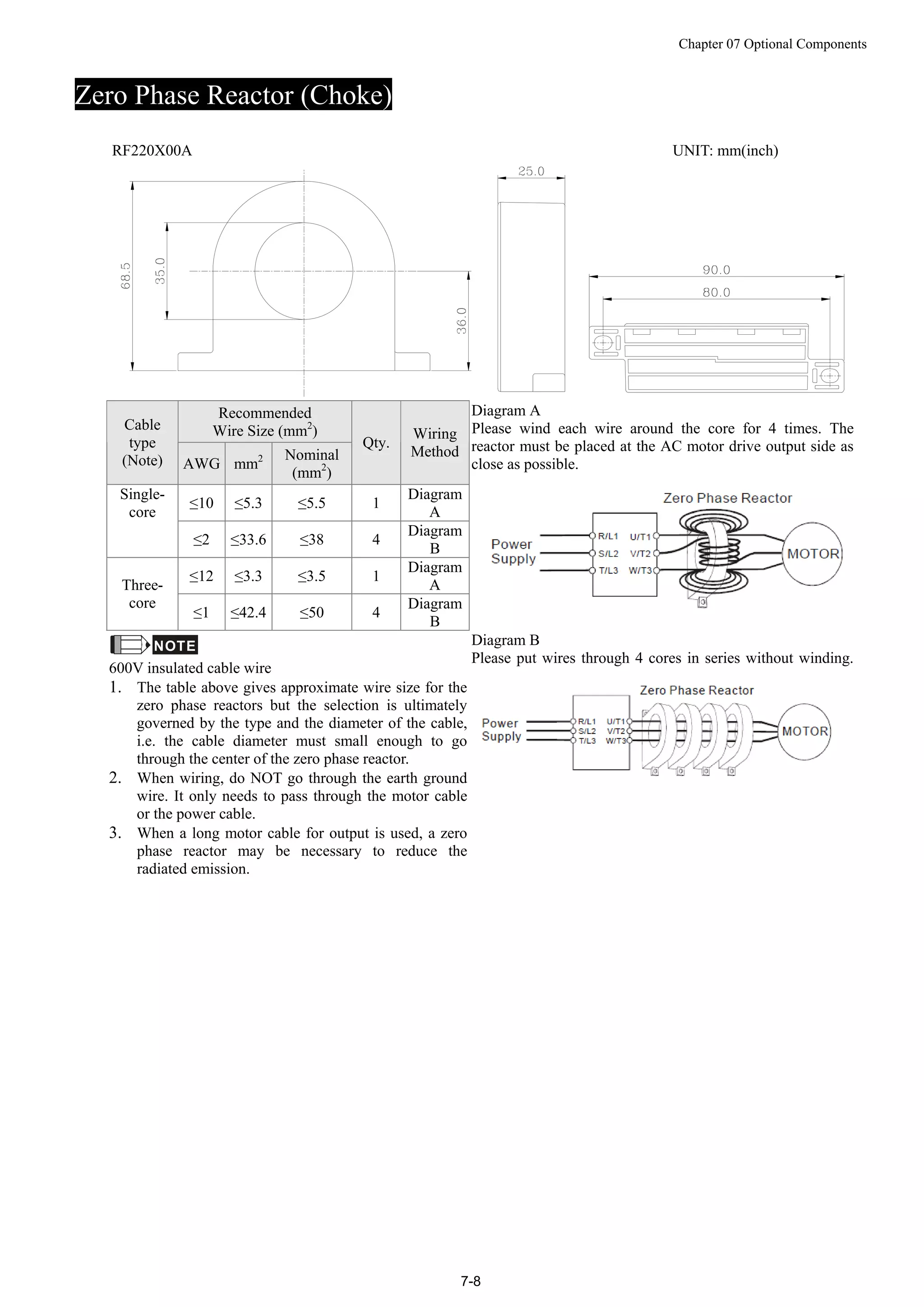
Zero Phase Reactor (Choke)
RF220X00A UNIT: mm(inch)
Recommended
Wire Size (mm2
)Cable
type
(Note) AWG mm2 Nominal
(mm2
)
Qty.
Wiring
Method
≤10 ≤5.3 ≤5.5 1
Diagram
A
Single-
core
≤2 ≤33.6 ≤38 4
Diagram
B
≤12 ≤3.3 ≤3.5 1
Diagram
AThree-
core
≤1 ≤42.4 ≤50 4
Diagram
B
Diagram A
Please wind each wire around the core for 4 times. The
reactor must be placed at the AC motor drive output side as
close as possible.
NOTE
600V insulated cable wire
1. The table above gives approximate wire size for the
zero phase reactors but the selection is ultimately
governed by the type and the diameter of the cable,
i.e. the cable diameter must small enough to go
through the center of the zero phase reactor.
2. When wiring, do NOT go through the earth ground
wire. It only needs to pass through the motor cable
or the power cable.
3. When a long motor cable for output is used, a zero
phase reactor may be necessary to reduce the
radiated emission.
Diagram B
Please put wires through 4 cores in series without winding.
Chapter 07 Optional Components
7-9
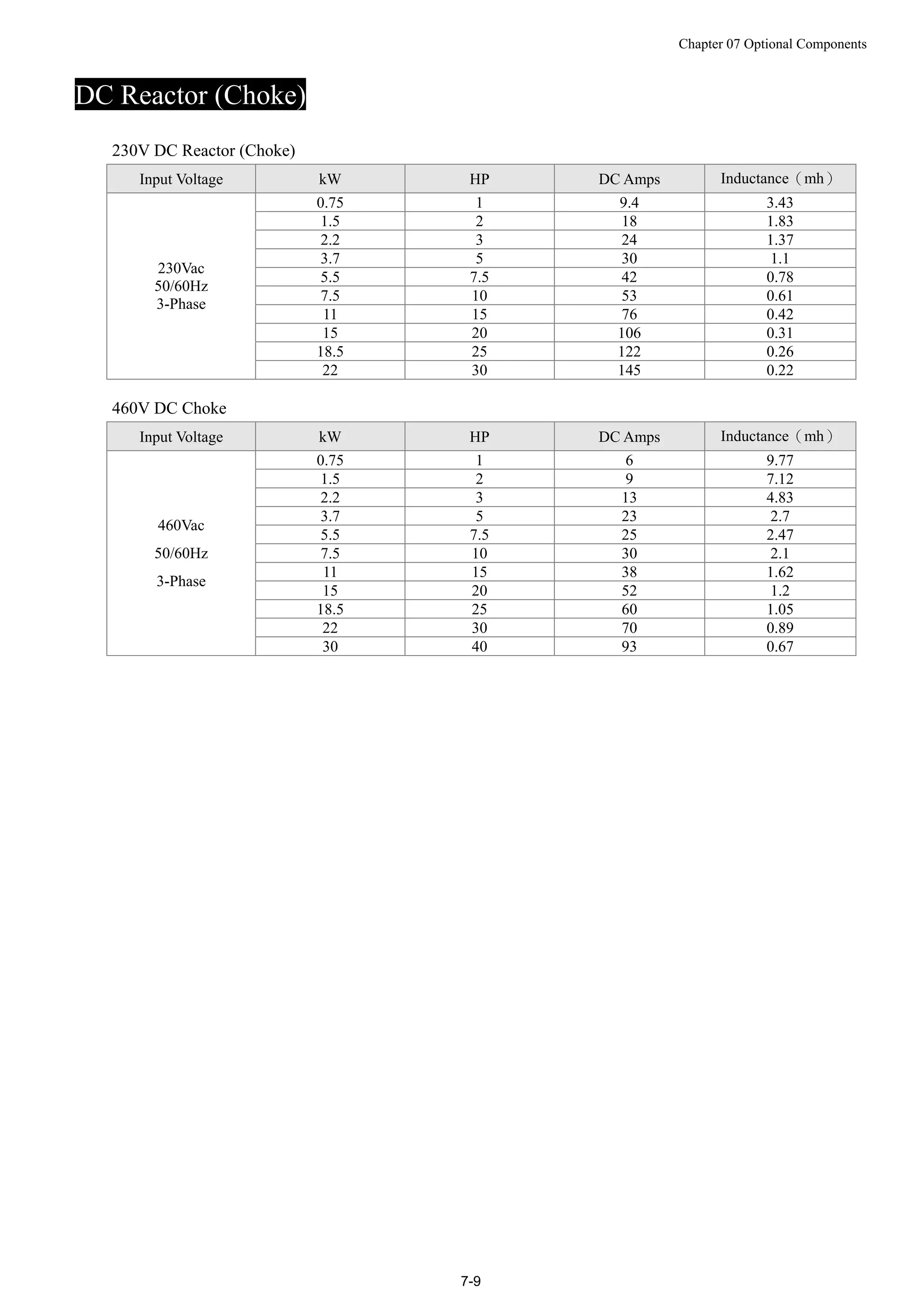
DC Reactor (Choke)
230V DC Reactor (Choke)
Input Voltage kW HP DC Amps Inductance(mh)
0.75 1 9.4 3.43
1.5 2 18 1.83
2.2 3 24 1.37
3.7 5 30 1.1
5.5 7.5 42 0.78
7.5 10 53 0.61
11 15 76 0.42
15 20 106 0.31
18.5 25 122 0.26
230Vac
50/60Hz
3-Phase
22 30 145 0.22
460V DC Choke
Input Voltage kW HP DC Amps Inductance(mh)
0.75 1 6 9.77
1.5 2 9 7.12
2.2 3 13 4.83
3.7 5 23 2.7
5.5 7.5 25 2.47
7.5 10 30 2.1
11 15 38 1.62
15 20 52 1.2
18.5 25 60 1.05
22 30 70 0.89
460Vac
50/60Hz
3-Phase
30 40 93 0.67
Chapter 07 Optional Components
7-10
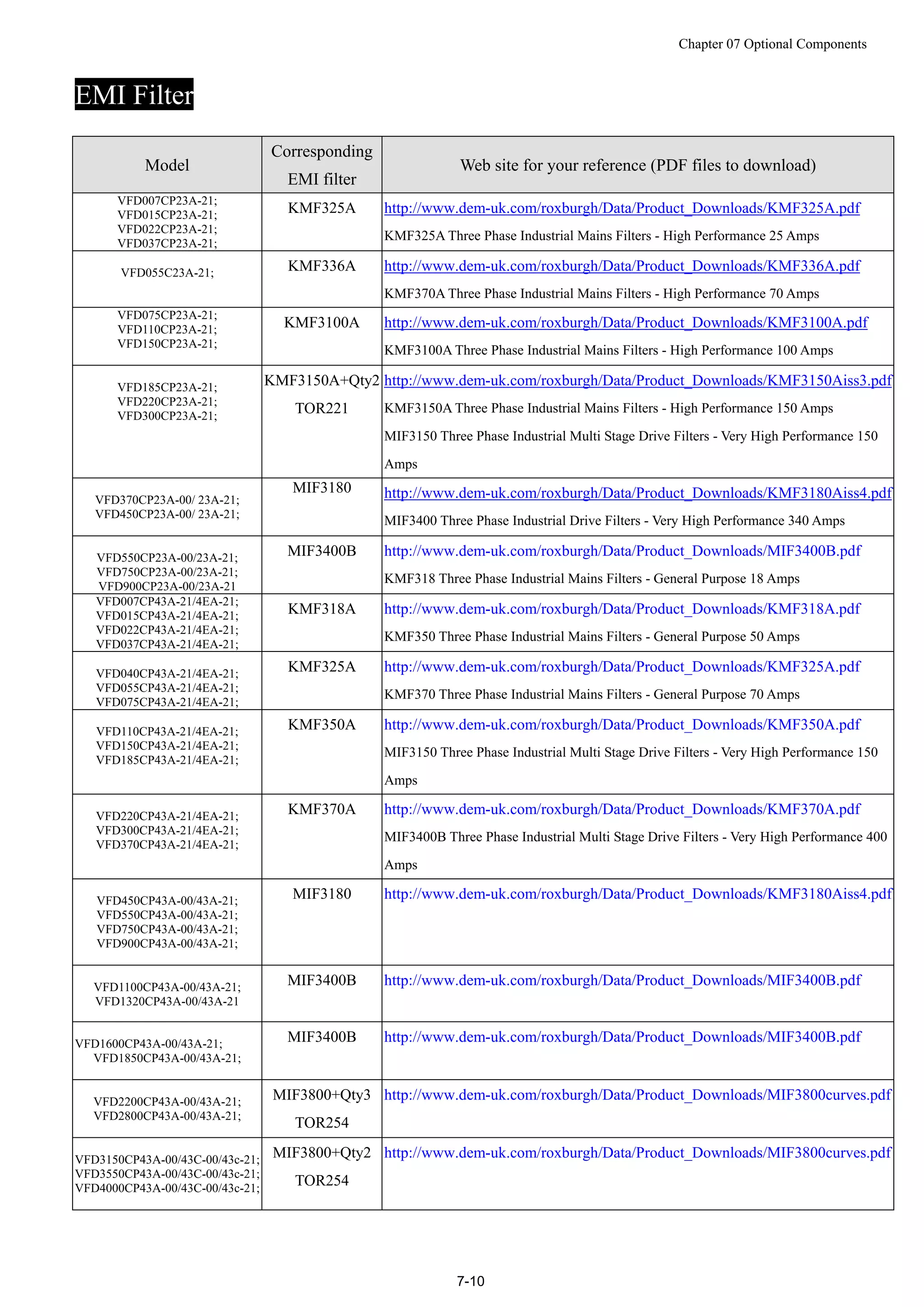
EMI Filter
Model
Corresponding
EMI filter
Web site for your reference (PDF files to download)
VFD007CP23A-21;
VFD015CP23A-21;
VFD022CP23A-21;
VFD037CP23A-21;
KMF325A http://www.dem-uk.com/roxburgh/Data/Product_Downloads/KMF325A.pdf
KMF325A Three Phase Industrial Mains Filters - High Performance 25 Amps
VFD055C23A-21; KMF336A http://www.dem-uk.com/roxburgh/Data/Product_Downloads/KMF336A.pdf
KMF370A Three Phase Industrial Mains Filters - High Performance 70 Amps
VFD075CP23A-21;
VFD110CP23A-21;
VFD150CP23A-21;
KMF3100A http://www.dem-uk.com/roxburgh/Data/Product_Downloads/KMF3100A.pdf
KMF3100A Three Phase Industrial Mains Filters - High Performance 100 Amps
VFD185CP23A-21;
VFD220CP23A-21;
VFD300CP23A-21;
KMF3150A+Qty2
TOR221
http://www.dem-uk.com/roxburgh/Data/Product_Downloads/KMF3150Aiss3.pdf
KMF3150A Three Phase Industrial Mains Filters - High Performance 150 Amps
MIF3150 Three Phase Industrial Multi Stage Drive Filters - Very High Performance 150
Amps
VFD370CP23A-00/ 23A-21;
VFD450CP23A-00/ 23A-21;
MIF3180 http://www.dem-uk.com/roxburgh/Data/Product_Downloads/KMF3180Aiss4.pdf
MIF3400 Three Phase Industrial Drive Filters - Very High Performance 340 Amps
VFD550CP23A-00/23A-21;
VFD750CP23A-00/23A-21;
VFD900CP23A-00/23A-21
MIF3400B http://www.dem-uk.com/roxburgh/Data/Product_Downloads/MIF3400B.pdf
KMF318 Three Phase Industrial Mains Filters - General Purpose 18 Amps
VFD007CP43A-21/4EA-21;
VFD015CP43A-21/4EA-21;
VFD022CP43A-21/4EA-21;
VFD037CP43A-21/4EA-21;
KMF318A http://www.dem-uk.com/roxburgh/Data/Product_Downloads/KMF318A.pdf
KMF350 Three Phase Industrial Mains Filters - General Purpose 50 Amps
VFD040CP43A-21/4EA-21;
VFD055CP43A-21/4EA-21;
VFD075CP43A-21/4EA-21;
KMF325A http://www.dem-uk.com/roxburgh/Data/Product_Downloads/KMF325A.pdf
KMF370 Three Phase Industrial Mains Filters - General Purpose 70 Amps
VFD110CP43A-21/4EA-21;
VFD150CP43A-21/4EA-21;
VFD185CP43A-21/4EA-21;
KMF350A http://www.dem-uk.com/roxburgh/Data/Product_Downloads/KMF350A.pdf
MIF3150 Three Phase Industrial Multi Stage Drive Filters - Very High Performance 150
Amps
VFD220CP43A-21/4EA-21;
VFD300CP43A-21/4EA-21;
VFD370CP43A-21/4EA-21;
KMF370A http://www.dem-uk.com/roxburgh/Data/Product_Downloads/KMF370A.pdf
MIF3400B Three Phase Industrial Multi Stage Drive Filters - Very High Performance 400
Amps
VFD450CP43A-00/43A-21;
VFD550CP43A-00/43A-21;
VFD750CP43A-00/43A-21;
VFD900CP43A-00/43A-21;
MIF3180 http://www.dem-uk.com/roxburgh/Data/Product_Downloads/KMF3180Aiss4.pdf
VFD1100CP43A-00/43A-21;
VFD1320CP43A-00/43A-21
MIF3400B http://www.dem-uk.com/roxburgh/Data/Product_Downloads/MIF3400B.pdf
VFD1600CP43A-00/43A-21;
VFD1850CP43A-00/43A-21;
MIF3400B http://www.dem-uk.com/roxburgh/Data/Product_Downloads/MIF3400B.pdf
VFD2200CP43A-00/43A-21;
VFD2800CP43A-00/43A-21;
MIF3800+Qty3
TOR254
http://www.dem-uk.com/roxburgh/Data/Product_Downloads/MIF3800curves.pdf
VFD3150CP43A-00/43C-00/43c-21;
VFD3550CP43A-00/43C-00/43c-21;
VFD4000CP43A-00/43C-00/43c-21;
MIF3800+Qty2
TOR254
http://www.dem-uk.com/roxburgh/Data/Product_Downloads/MIF3800curves.pdf
Chapter 07 Optional Components
7-11
EMI Filter Installation
Preface
All electrical equipment, including AC motor drives, generates high-frequency/low-frequency noise and
interferes with peripheral equipment by radiation or conduction when in normal operation. By using an
EMI filter with correct installation, much interference can be eliminated. It is recommended to use DELTA
EMI filter to have the best interference elimination performance.
We assure that it can comply with following rules when AC motor drive and EMI filter are installed and
wired according to user manual:
1. EN61000-6-4
2. EN61800-3: 1996
3. EN55011(1991) Class A Group 1
General precaution
To ensure an EMI Filter can maximize its performance on eliminating noise generated by an AC motor drive, it is
not only necessary to follow instruction on installation and wiring in a user manual, but the following points need
to be kept in mind. .
 EMI filter and AC motor drive should be installed on the same metal plate
 Install AC motor drive on the footprint of the EMI filter or install EMI filter as close as possible to the AC
motor drive.
 Wiring should be as short as possible.
 Metal plate should be grounded.
 The cover of the AC motor drive or grounding should be fixed on the metal plate and their contact area should
be as large as possible.
Choose suitable motor & precautions
Improper installation and choice of motor cable will affect the performance of EMI filter. Be sure to follow
exactly precautions listed below when selecting motor cable.
 Use a cable with shielding (double shielding is the best).
 The shielding on both ends of the motor’s cable should be grounded with the minimum length and maximum
contact area.
 Remove any paint on the metal saddle for better ground contact with the metal plate and shielding (See
diagram 1).
 The shielding of motor’s cable should be connected properly to a metal plate. The shielding on both end of the
motor’s cable should be fixed on a metal plate by a metal saddle. (See diagram 2)
Chapter 07 Optional Components
7-12
Remove any paint on metal saddle for good ground contact with
the plate and shielding.
saddle the plate with grounding
Diagram 1
Diagram 2
Chapter 07 Optional Components
7-13
The Length of a motor’s cable
When motor is driven by an AC motor drive of PWM type, the motor terminals will easily experience surge
voltages due to components conversion of AC motor drive and cable capacitance. When the motor cable
is very long (especially for the 460V series), surge voltages may reduce insulation quality. To prevent this
situation to happen, please follow the rules below:
 Use a motor with enhanced insulation.
 Connect an output reactor (optional) to the output terminals of the AC motor drive
 The length of the cable between the AC motor drive and the motor should be as short as possible (10m (32.81
feet) to 20 m (65.62 feet) or less)
 For models 7.5hp/5.5kW and above:
Insulation level of motor 1000V 1300V 1600V
460VAC input voltage 66 ft (20m) 328 ft (100m) 1312 ft (400m)
230VAC input voltage 1312 ft (400m) 1312 ft (400m) 1312 ft (400m)
 For models 5hp/3.7kW and less:
Insulation level of motor 1000V 1300V 1600V
460VAC input voltage 66 ft (20m) 165 ft (50m) 165 ft (50m)
230VAC input voltage 328 ft (100m) 328 ft (100m) 328 ft (100m)
If motor is driven by an AC motor drive of PWM type, the motor terminals will easily experience surge voltages
due to components conversion of AC motor drive and cable capacitance. Especially when the motor's cable is very
long, surge voltages may reduce insulation quality. To prevent this situation to happen, please consider the
following measures:
If the wiring is too long, the amount of stray capacitance between the electrical wires will increase and probably
cause leakage of current.
 Then the display of the current will not be accurate If so, the AC motor drive will activate the over current
protection. The worst case caused by leakage of current will be the break down of the AC motor drive.
 If an AC motor drive is connected to more than one motor, the length of the wiring should be the total length
of wiring from the AC motor drive to each motor.
 When a thermal O/L relay protected by motor is used between AC motor drive and motor, it may malfunction (especially
for 460V series), even if the length of motor cable is only 165 ft (50m) or less. To prevent it, please use AC reactor
and/or lower the carrier frequency (Pr. 00-17 PWM carrier frequency).
NOTE
 When a thermal O/L relay protected by motor is used between AC motor drive and motor, it may malfunction
(especially for 460V series), even if the length of motor cable is only 165 ft (50m) or less. To prevent it,
please use AC reactor and/or lower the carrier frequency (Pr. 00-17 PWM carrier frequency).
 Never connect phase lead capacitors or surge absorbers to the output terminals of the AC motor drive.
Class, Motor Cable Length & Carrier Frequency Setting for the Filters
EMC Standard (IEC 61800-3) Motor Cable length Carrier frequency
Built-in filter class C3 non-shielded cable 50m default (8KHz)
external DEM filter class C2 shielded cable 50m 15KHz
Chapter 07 Optional Components
7-14
Digital Keypad
KPC-CE01 digital keypad
F: Frequency Command
H: Output Frequency
U: User Defined Units
ERR: CAN Error Indicator
RUN: CAN Run Indicator
: Status Indicator
A: LED Display
Display frequency, current, voltage and error etc.
C: Function
(Refer to the chart follows for detail description)
Key Description
ESC ESC Key
When ESC key is pressed, it will return to the previous menu. It is also functioned as a return key in the sub-menu.
MENU Menu Key
It can return to the main menu after pressing MENU key.
Menu content:
1. Parameter Detail
2. Copy Parameter
3. Keypad locked
4. PLC Function
ENTER ENTER Key
Press ENTER and go to the next level. If it is the last level then press ENTER to execute the command.
HAND HAND ON Key
1. This key is executed by the parameter settings of the source of Hand frequency and hand operation. The factory
settings of both source of Hand frequency and hand operation are the digital keypad.
2. If pressed at stop status, it will switch to Hand setting of frequency source and operation source. If HAND ON key is
pressed during operation, it will stop the AC motor drive first then switch to Hand setting.
3. Hand mode display: H/A LED is ON.
AUTO Auto Operation Key
1. This key is executed by the parameter settings of the source of AUTO frequency and AUTO operation. The factory
setting is the external terminal (source of operation is 4-20mA).
2. If auto is pressed in steady status, it will switch to the auto-setting. However if auto key is pressed during operation, it
will stop AC motor drive first then switch to auto-setting.
3. Switch is complete: H/A LED is OFF
FWD/REV Operation Direction Key
1. This key is only control the operation direction NOT for activate the drive. FWD: forward, REV: reverse.
2. Refer to the LED descriptions for more details.
RUN Start Key
1. It is only valid when the source of operation command is from the keypad.
2. It can operate the AC motor drive by the function setting and the RUN LED will be ON.
3. It can be pressed again and again during stop. When enabling “HAND” mode, it is only valid when the source of
operation command is from the keypad.
STOP Stop Key. (When Stop key is pressed, all operation will stop in all condition.) This key has the highest priority in all
condition.
1. When a STOP command is given, the AC motor drive’s operation will stop under any condition.
2. The RESET key can be used to reset the drive when faults occur. If the RESET key is not responding, check MENU 
Fault Records search for the most recent fault.
Chapter 07 Optional Components
7-15
Dimensions: mm [inch]
Chapter 07 Optional Components
7-16
Panel Mounting Kit (MKC-KPPK)
For MKC-KPPK model, user can choose wall mounting or embedded mounting, protection level is IP56.
Applicable to the digital keypads (KPC-CC01 & KPC-CE01).
Wall Mounting Embedded Mounting
accessories*1
Screw *4 ~M4*p 0.7 *L8mm
Torque: 10-12kg-cm (8.7-10.4lb-in.)
accessories*2
Screw *4 ~M4*p 0.7 *L8mm
Torque: 10-12kg-cm (8.7-10.4lb-in.)
Panel cutout dimension Unit: mm [inch] Panel cutout dimension Unit: mm [inch]
Normal cutout dimension
Panel
thickness
1.2mm 1.6mm 2.0mm
A 66.4 [2.614]
B 110.2 [4.339] 111.3 [4.382] 112.5 [4.429]
*Deviation: ±0.15mm /±0.0059inch
Cutout dimension (Waterproof level: IP56)
Panel
thickness
1.2mm 1.6mm 2.0mm
A 66.4 [2.614]
B 110.8 [4.362]
*Deviation: ±0.15mm /±0.0059inch
Chapter 07 Optional Components
7-17
Chapter 07 Optional Components
7-18
Conduit Box Kit
 outer appearance of conduit box
Frame D
VFD370CP23A-00;VFD450CP23A-00;VFD450CP43A-00;VFD550CP43A-00
VFD750CP43A-00;VFD900CP43A-00;VFD370CP23A-21;VFD450CP23A-21
VFD450CP43A-21;VFD550CP43A-21;VFD750CP43A-21;VFD900CP43A-21
Frame E
VFD550CP23A-00;VFD750CP23A-00;VFD900CP23A-00;
VFD1100CP43A-00;VFD1320CP43A-00;VFD550CP23A-21;
VFD750CP23A-21;VFD900CP23A-21;VFD1100CP43A-21;
VFD1320CP43A-21;
Model name:『MKC-DN1CB』
ITEM Description Qty.
1 Screw M5*0.8*10L 4
2 Rubber 28 2
3 Rubber 44 2
4 Rubber 88 2
5 Conduit box cover 1
6 Conduit box base 1
Model name:『MKC-EN1CB』
ITEM Description Qty.
1 Screw M5*0.8*10L 6
2 Bushing Rubber 28 2
3 Bushing Rubber 44 4
4 Bushing Rubber 100 2
5 Conduit box cover 1
6 Conduit box base 1
Frame F
VFD1600CP43A-00;VFD1850CP43A-00;
VFD1600CP43A-21;VFD1850CP43A-21
Frame G
VFD2200CP43A-00;VFD2800CP43A-00
VFD2200CP43A-21;VFD2800CP43A-21
Model name:『MKC-FN1CB』
ITEM Description Qty.
1 Screw M5*0.8*10L 8
2 Bushing Rubber 28 2
3 Bushing Rubber 44 4
4 Bushing Rubber 100 2
5 Conduit box cover 1
6 Conduit box base 1
Model name:『MKC-GN1CB』
ITEM Description Qty.
1 Screw M5*0.8*10L 12
2 Bushing Rubber 28 2
3 Bushing Rubber 44 2
4 Bushing Rubber 130 3
5 Conduit box base 1
6 Conduit box cover 1
Chapter 07 Optional Components
7-19
 Installation of conduit box
Frame D
1. Loosen the cover screws and press the tabs on each side of the cover to remove the cover, as shown in the following
figure. Screw torque: 10~12kg-cm (8.66~10.39Ib-in)
2. Remove the 5 screws shown in the following figure. Screw torque: 24~26kg-cm (20.8~22.6Ib-in).
3. Install the conduit box by fasten the 5 screws shown in the following figure.
Screw torque: 24~26kg-cm (20.8~22.6Ib-in).
4. Fasten the 2 screws shown in the following figure. Screw torque: 10~12kg-cm (8.66~10.39Ib-in).
Chapter 07 Optional Components
7-20
Frame E
1. Loosen the 4 cover screws and lift the cover; Screw torque: 12~ 15 kg-cm (10.4~13Ib-in).
2. Fasten the 6 screws shown in the following figure and place the cover back to the original position. Screw torque:
25~30kg-cm (20.8~30Ib-in)
3. Fasten the 4 screws shown in the following figure. Screw torque:12~15kg-cm (10.4~13Ib-in)』
Chapter 07 Optional Components
7-21
Frame F
1. Loosen the cover screws and press the tabs on each side of the cover to remove the cover, as shown in the following
figure. Screw torque: 14~16kg-cm (12.2~13.9Ib-in).
2
3
4
1
2. Install the conduit box by fastens the 4 screws, as shown in the following figure.
Screw torque: 24~26kg-cm (20.8~22.6Ib-in).
5
6
7
8
3. Install the conduit box by fasten all the screws shown in the following figure.
9
10
11
12
13
14
15
16
Chapter 07 Optional Components
7-22
Frame G
1. On the conduit box, loosen 7 of the cover screws and remove the cover. On the drive, loosen 4 of the cover screws and
press the tabs on each side of the cover to remove the cover, as shown in the following figure. Screw torque:
12~15kg-cm (10.4~13Ib-in).
2. Remove the top cover and loosen the screws. Screw torque: 12~15kg-cm (10.4~13Ib-in).
3. Install the conduit box by fastening all the screws shown in the following figure.
Screw torque: 25~30kg-cm (20.8~30Ib-in); Screw torque: 12~15kg-cm (10.4~13Ib-in)
Chapter 07 Optional Components
7-23
4. Fasten all the screws. Screw torque: 25~30kg-cm (20.8~30Ib-in).
5. Place the cover back to the top and fasten the screws (as shown in the figure).
Screw torque: 12~15kg-cm (10.4~13Ib-in).
Chapter 07 Optional Components
7-24
Fan Kit
 outer appearance of fans
Frame A
VFD022CP23A-21
VFD037CP23A-21
VFD055CP23A-21
VFD037CP43A/4EA-21
VFD040CP43A/4EA-21
VFD055CP43A/4EA-21
VFD075CP43A/4EA-21
Model『MKC-AFKM』
Frame B
VFD075CP23A-21
VFD110CP43A-21
VFD110CP4EA-21
Model『MKC-BFKM1』
Frame B
VFD110CP23A-21 uses MKC-BFKM2
VFD150CP23A-21 uses MKC-BFKM3
VFD150CP43A-21 uses MKC-BFKM2
VFD150CP4EA-21 uses MKC-BFKM2
VFD185CP43A-21 uses MKC-BFKM2
VFD185CP4EA-21 uses MKC-BFKM2
(MKC-BFKM2 and MKC-BFKM3 have the same look.)
Model『MKC-BFKM2』 Model『MKC-BFKM3』
Frame B
VFD075CP23A-21
VFD110CP23A-21
VFD110CP43A-21
VFD110CP4EA-21
VFD150CP23A-21
VFD150CP43A-21
VFD150CP4EA-21
VFD185CP43A-21
VFD185CP4EA-21
Model『MKC-BFKB』
Frame C
VFD185CP23A-21
VFD220CP23A-21
VFD300CP23A-21
Model『MKC-CFKB1』
Chapter 07 Optional Components
7-25
Frame C
VFD220CP43A-21
VFD220CP4EA-21
VFD300CP43A-21
VFD300CP4EA-21
VFD370CP43A-21
VFD370CP4EA-21
Model 『MKC-CFKB2』
Frame D
VFD370CP23A-00; VFD370CP23A-21;
VFD450CP23A-00; VFD450CP23A-21;
VFD450CP43A-00; VFD450CP43A-21;
VFD550CP43A-00; VFD550CP43A-21;
VFD750CP43A-00; VFD750CP43A-21;
VFD900CP43A-00; VFD900CP43A-21;
Model 『MKC-DFKM』 Model 『MKC-DFKB』
Frame E
VFD550CP23A-00
VFD750CP23A-21
VFD750CP23A-00
VFD750CP23A-21
Model 『MKC-EFKM1』
Frame E
Corresponding models:
VFD900CP23A-00; VFD900CP23A-21;
VFD1100CP43A-00; VFD1100CP43A-21;
VFD1320CP43A-00; VFD1320CP43A-21;
Model 『MKC-EFKM2』
Frame E
VFD550CP23A-00
VFD750CP23A-21
VFD750CP23A-00
VFD750CP23A-21;
VFD900CP23A-00; VFD900CP23A-21;
VFD1100CP43A-00; VFD1100CP43A-21;
VFD1320CP43A-00; VFD1320CP43A-21;
Model 『MKC-EFKB』
Chapter 07 Optional Components
7-26
Frame F
VFD1600CP43A-00; VFD1600CP43A-21
VFD1850CP43A-00; VFD1850CP43A-21
Model 『MKC-FFKM』
Frame F
VFD1600CP43A-00; VFD1600CP43A-21;
VFD1850CP43A-00; VFD1850CP43A-21
Model 『MKC-FFKB』
Frame G
VFD2200CP43A-00; VFD2200CP43A-21;
VFD2800CP43A-00; VFD2800CP43A-21;
Model 『MKC-GFKM』
Frame H
VFD3150CP43A-00;
VFD3550CP43A-00;
VFD4000CP43A-00;
VFD3150CP43C-21
VFD3550CP43C-21;
VFD4000CP43C-21
VFD3150CP43C-00
VFD3550CP43C-00
VFD4000CP43C-00
Model 『MKC-HFKM』
Chapter 07 Optional Components
7-27
 Fan Removal
Frame A
Corresponding models:
VFD022CP23A-21; VFD037CP23A-21; VFD055CP23A-21; VFD037CP43A/4EA-21;
VFD040CP43A/4EA-21; VFD055CP43A/4EA-21; VFD075CP43A/4EA-21
1. As shown by the arrow sign, press the tabs on both side of
the fan to remove the fan.
2. As shown by the partially enlarged image below,
disconnect the fan’s power before removing the fan.
Chapter 07 Optional Components
7-28
Frame B
Corresponding models:
VFD075CP23A-21; VFD110CP23A-21; VFD110CP43A-21;
VFD110CP4EA-21; VFD150CP23A-21; VFD150CP43A-21;
VFD150CP4EA-21; VFD185CP43A-21; VFD185CP4EA-21;
1. As shown by the arrow sign, press the tabs on both side of
the fan to remove the fan.
2. As shown by the partially enlarged image below,
disconnect the fan’ power before removing the fan.
fan.
Frame B&C
Corresponding models:
Frame B:
VFD075CP23A-21; VFD110CP23A-21; VFD110CP43A-21;
VFD110CP4EA-21; VFD150CP23A-21; VFD150CP43A-21;
VFD150CP4EA-21; VFD185CP43A-21; VFD185CP4EA-21;
Frame C:
VFD185CP23A-21; VFD220CP23A-21; VFD300CP23A-21;
VFD220CP43A-21;VFD220CP4EA-21; VFD300CP43A-21;
VFD300CP4EA-21; VFD370CP43A-21;VFD370CP4EA-21
As shown by the partially enlarged image, disconnect the fan’s power,
then use a screwdriver to unclinch and to remove the fan.
Chapter 07 Optional Components
7-29
Frame D
Corresponding models:
VFD370CP23A-00; VFD370CP23A-21; VFD450CP23A-00;
VFD450CP23A-21; VFD450CP43A-00; VFD450CP43A-21;
VFD550CP43A-00; VFD550CP43A-21; VFD750CP43A-00;
VFD750CP43A-21; VFD900CP43A-00; VFD900CP43A-21;
1. (Figure 1) Loosen screw 1 and screw 2, press the on the right and
the left to remove the cover, follow the direction the arrows indicate.
Press on top of digital keypad KPC-CE01 to properly remove the
keypad. Screw torque: 10~12kg-cm (8.6~10.4in-lbf).
1
2
Figure 1
2. (Figure 2) Loosen screw 3 and screw 4, press the tab on the right
and the left to remove the cover. Screw torque: 6~8kg-cm
(5.2~6.9in-lbf).
3
4
Figure 2
3. (Figure 3) Loosen screw 5 and disconnect the fan’s power.
Screw torque: 10~12kg-cm (8.6~10.4in-lbf).
5
Figure 3
4. (Figure 4) Loosen the screws 1~4. Screw torque: 24~26kg-cm
(20.8~22.6in-lbf).
5. Disconnect fan’s power (as shown in the partially enlarged
picture) and pull out the fan (as shown in the larger picture).
1
2
3
4
Fuigure4
Chapter 07 Optional Components
7-30
Frame E
Corresponding models:
VFD550CP23A-00; VFD750CP23A-21; VFD750CP23A-00;
VFD750CP23A-21; VFD900CP23A-00; VFD900CP23A-21;
VFD1100CP43A-00; VFD1100CP43A-21; VFD1320CP43A-00;
VFD1320CP43A-21;
For fan model 『MKC-EFKM1 』
Loosen screw 1~4 (as shown in the figure below), and disconnect the
fan’s power then remove the fan.
Screw torque: 24~26kg-cm (20.8~22.6in-lbf).
For fan model 『 MKC-EFKM2 』
Loosen screw 1~4(as shown in the figure below), and disconnect the
fan’s power then remove the fan.
Screw torque: 24~26kg-cm (20.8~22.6in-lbf).
Loosen screw 1 and screw 2 (as shown in the figure below), and disconnect fan’s power before removing the fan.
Screw torque: 24~26kg-cm (20.8~22.6in-lbf).
Chapter 07 Optional Components
7-31
Frame F Corresponding models:
VFD1600CP43A-00; VFD1600CP43A-21; VFD1850CP43A-00; VFD1850CP43A-21;
VFD1600CP43A-00; VFD1600CP43A-21; VFD1850CP43A-00; VFD1850CP43A-21
For fan model 『MKC-FFKM』As shown in the partially enlarged picture, disconnect the fan's power before you remove it.
Loosen the screws 1~4 and remove the fan (as shown in figure below). Screw torque: 24~26kg-cm (20.8~22.6Ib-in』
For fan model 『MKC-FFKB』
(1) Loosen the screws 1~4 (as shown in figure below) and remove the
cover. Screw torque: 14~16kg-cm (12.2~13.9Ib-in).
(2) Loosen the screws 5~8 (as shown in figure below) and remove the
cover. Screw torque: 24~26kg-cm (20.8~22.6Ib-in).
(3) As shown in the partially enlarged image, disconnect the fan’s power.
(4) Loosen the screws 9~11(figure 3) and remove the fan (figure 4). Screw torque: 24~26kg-cm (20.8~22.6Ib-in)
9
10
11
9
10
11
Figure3 Figure 4
Chapter 07 Optional Components
7-32
Frame G
Corresponding models:
VFD2200CP43A-00; VFD2200CP43A-21;
VFD2800CP43A-00; VFD2800CP43A-21;
For fan model 『MKC-GFKM』
(1) Loosen the screws1~4 (as shown in figure below) and
remove the cover. Screw torque: 24~26kg-cm
(20.8~22.6Ib-in).
(2) Loosen the screws 1~ 8 (as shown in the figure below).
Screw torque: 35~40kg-cm (30.4~34.7Ib-in)』
Then loosen screws 9~10 (as shown in the figure below).Then
remove the cover. Screw torque: 24~26kg-cm (20.8~22.6Ib-in)
(3) Loosen screws 1~3 and remove snap bushing 4~5 (as
shown in the figure below) Screw torque: 15~20kg-cm
(12.2~13.9Ib-in)』
(4) Hook your index fingers to the two snap bushing holes
1~ 2(as shown in the figure below), then lift to remove the fan.
Chapter 07 Optional Components
7-33
Frame H
Corresponding models:
VFD3150CP43A-00; VFD3550CP43A-00; VFD4000CP43A-00;
VFD3150CP43C-00; VFD3550CP43C-00; VFD4000CP43C-00
VFD3150CP43C-21; VFD3550CP43C-21; VFD4000CP43C-21
Model 『MKC-HFKM』
(1) Loosen the screws 1~ 4 and remove the top cover.
Screw torque: 14~16kg-cm (12.2~13.9Ib-in)
1
2
4
3
(2) Loosen the screws 5~12 and remove the top cover.
Screw torque: 24~26kg-cm(20.83~22.57Ib-in)
.
5
6
7 8
9
10
11
12
(3) Disconnect the fan’s power (4) Loosen the screws 13~18 and remove the fan. Make sure fan’s is
properly disconnected before removal. Screw torque: 24~26kg-cm
(20.8~22.6Ib-in).
13
14
15
16
17
18
13
14
15
16
17
18
When installing the fan,
make sure that you
connect the power cable
into the right jack and at
the right direction.
Before removing the fan,
make sure that you have
disconnect the fan’s
power.
Chapter 07 Optional Components
7-34
Flange Mounting Kit
Corresponding frames: Frames A ~F
Frame A
『MKC-AFM1』
Corresponding models: VFD022CP23A-21; VFD037CP23A-21; VFD037CP43A-21
Accessories 1*1 piece Accessories 2*2 pieces Accessories 3*2 pieces
Screw 1 *4 pieces
M3*P 0.5; L=6mm
Screws 2*8 pieces
M6*P 1.0; L=16mm
『MKC-AFM』
Corresponding models: VFD007CP23A-21; VFD015CP23A-21; VFD055CP23A-21;
VFD007CP43A/4EA-21; VFD015CP43A/4EA-21; VFD022CP43A/4EA-21;
VFD040CP43A/4EA-21; VFD055CP43A/4EA-21; VFD075CP43A/4EA-21
Accessories 1*2 pieces Accessories 2*2 pieces
Screw 1*8 pieces
M6*P 1.0; L=16mm
Panel Cutout Diagrams Unit: mm [inch]
Chapter 07 Optional Components
7-35
Installation of 『MKC-AFM1』
Step1. Install accessory 1 by fastening 4 of the screw 1(M3). Screw torque: 6~8kg-cm (5.21~6.95Ib-in).
Step2. Install accessory 2&3 by fastening 2 of the screw 2(M6). Screw torque:25~30kg-cm (21.7~ 26.Ib-in)』
Step3. Install accessory 2&3 by fastening 2 of the screw 2(M6). Screw torque:25~30kg-cm (21.7~26 Ib-in)』
Step4. Plate installation, place 4 of the screw 2 (M6) through accessory 2&3 and the plate then fasten the screws.
Screw torque: 25~30kg-cm (5.21~6.94Ib-in).25~30kg-cm (21.7~26Ib-in)』
Chapter 07 Optional Components
7-36
Installation of『MKC-AFM』
1. Install accessory 1& 2 by fastening 2 of the screw 1(M3). Screw torque:25~30kg-cm (21.7~26Ib-in)』(As shown in the
figures below)
2. Install accessory 1& 2 by fastening 2 of the screw 1(M3).25~30kg-cm (21.7~26Ib-in)』(As shown in the figures
below)
3. Plate installation, place 4 of the screw 2 (M6) through accessory 1&2 and the plate then fasten the screws.
Screw torque: 25~30kg-cm (21.7~26 Ib-in) (As shown in the figures below)
Chapter 07 Optional Components
7-37
Frame B
『MKC-BFM』
Corresponding models: All Frame B models
Accessories 1*2 pieces Accessories 2*2pce
Screw 1 *4 pieces ~ M8*P 1.25;
Screw 2*6 pieces ~ M6*P 1.0;
Panel cutout diagram Unit : mm [inch]
Chapter 07 Optional Components
7-38
Installation of『MKC-BFM』
1. Install accessory 1& 2 by fastening 4 of the screw 1(M8). Screw torque: 40~45kg-cm (34.7~39.0Ib-in).
(As shown in the following figure)
2. Plate installation, place 6 of the screw 2 (M6) through accessory 1&2 and the plate then fasten the screws.
Screw torque: 25~30kg-cm (21.7~26Ib-in). (As shown in the following figure)
Chapter 07 Optional Components
7-39
Frame C
『MKC-CFM』
Corresponding models: All Frame C models.
Accessories 1*2pce Accessories 2*2pce
Screw 1*4pce ~ M8*P 1.25;
Screw 2*8 pieces~ M6*P 1.0;
Panel cutout diagram Unit: :mm [inch]
Chapter 07 Optional Components
7-40
Installation of『MKC-CFM』
1. Install accessory 1& 2 by fastening 4 of the screw 1(M8). Screw torque: 50~55kg-cm (43.4~47.7Ib-in). (As
shown in the figures below)
2. Plate installation, place 8 of the screw 2 (M6) through accessories 1&2 and the plate then fasten the screws.
Screw torque: 25~30kg-cm (21.7~26.0Ib-in). (As shown in the figures below)
Chapter 07 Optional Components
7-41
Frame D
Panel Cutout Diagrams Unit: mm [inch]
M10*P1.5(4X)
OR 11.0[0.43](4X)
Chapter 07 Optional Components
7-42
Frame E
Panel Cutout Diagrams Unit :mm [inch]
Chapter 07 Optional Components
7-43
Installation for Frame D&E
Step1. Loosen 8 screws and remove Fixture 2
(as shown in the following figure)。
Step5. Fasten 4 screws (as shown in the following
figure). Screw torque: 24~26kg-cm (20.8~22.6Ib-in)
Step2. Loosen 10 screws and remove Fixture 1 (as
shown in the figure below.)
Step6. Fasten 5 screws (as shown in the figure
below). Screw torque: 24~26kg-cm (20.8~22.6Ib-in).
Step3. Fasten 4 screws (as shown in the figure
below). Screw torque: 30~32kg-cm (26.0~27.8Ib-in).
Step7. Place 4 screws (M10) through Fixture 1&2 and
the plate then fasten the screws. (as shown in the
following figure) Screw torque: 200~240kg-cm
(173.6~208.3Ib-in).
Step4. Fasten 5 screws (as shown in the figure
below). Screw torque: 30~32kg-cm (26.0~27.8Ib-in).
Chapter 07 Optional Components
7-44
Frame F
Panel Cutout Diagram Unit: mm [inch]
Chapter 07 Optional Components
7-45
Installation for Frame
Step1. Loosen 12 screws and remove Fixture 2.
1
2
3
4
6
5
12
7
8
9
10
11
FIXTURE 2
Step4. Install Fixture 1 by fasten screw 13 ~26
Screw torque: 24~26kg-cm (20.8~22.6Ib-in).
13
19
18
17
20
26
25
24
FIXTURE1
23
21
22
14
15
16
Step2. Loosen 12 screws and remove Fixture 2.
Screw torque: 24~26kg-cm (20.8~22.6Ib-in).
1
6
5
12
7
8
FIXTURE2
9
10
11
2
3
4
Step5. Place 4 of the M12 screws through Fixture 1&2
and plate then fasten the screws.
Screw torque: 300~400kg-cm (260~347Ib-in).
Screws M12*4
Step3. Loosen screw 13~ 26 and remove Fixture 1.
13
19
18
17
14
15
16
20
26
25
21
22
23
24
FIXTURE1
Chapter 07 Optional Components
7-46
IFD6530: USB/RS-485 Communication Interface
Warning
 Please read throughly this instruction sheet before installation and putting it into use.
 The content of this instruction sheet and the driver file may be revised without prior notice. Please
consult our distributors or download the most updated instruction/driver version at
http://www.delta.com.tw/product/em/control/cm/control_cm_main.asp
1. Introduction
IFD6530 is a convenient RS-485-to-USB converter, which does not require external power-supply and complex
setting process. It supports baud rate from 75 to 115.2kbps and auto switching direction of data transmission. In
addition, it adopts RJ-45 in RS-485 connector for users to wire conveniently. And its tiny dimension, handy use of
plug-and-play and hot-swap provide more conveniences for connecting all DELTA IABU products to your PC.
Applicable Models: All DELTA IABU products.
 Application & Dimension
2. Specification
Power supply No external power is needed
Power consumption 1.5W
Isolated voltage 2,500VDC
Baud rate 75, 150, 300, 600, 1,200, 2,400, 4,800, 9,600, 19,200, 38,400, 57,600, 115,200 bps
RS-485 connector RJ-45
USB connector A type (plug)
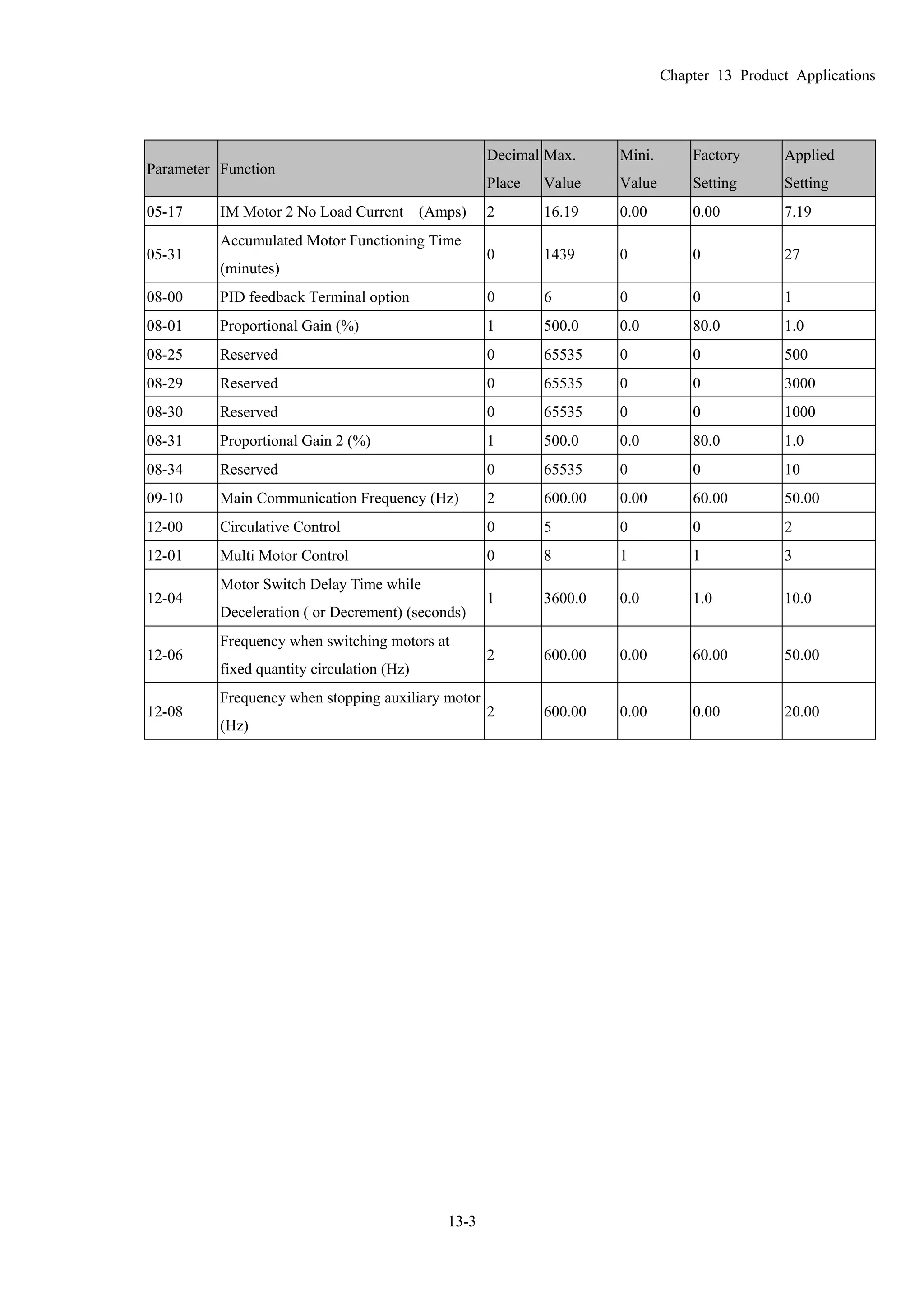
Compatibility Full compliance with USB V2.0 specification
Max. cable length RS-485 Communication Port: 100 m
Support RS-485 half-duplex transmission
Chapter 07 Optional Components
7-47
RJ-45

PIN Description PIN Description
1 Reserved 5 SG+
2 Reserved 6 GND
3 GND 7 Reserved
4 SG- 8 +9V
3. Preparation before installing the driver
Extract the driver file (IFD6530_Drivers.exe) by following the steps below. You could find driver file
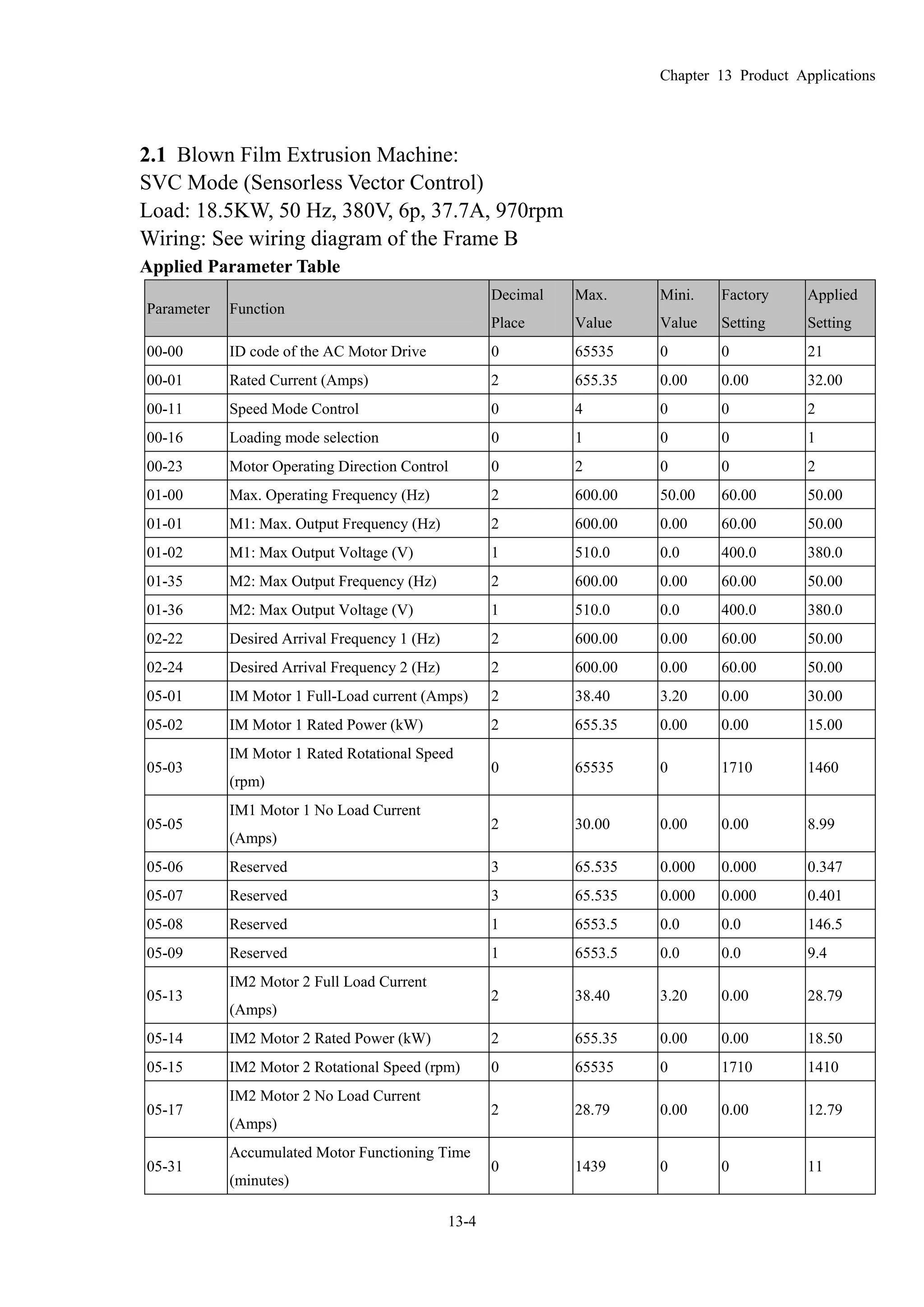
(IFD6530_Drivers.exe) in the CD supplied with IFD6530.
Note:Do NOT connect the IFD6530 to a computer before extracting the driver file.
STEP 1 STEP 2
STEP 3 STEP 4
STEP 5
You should have a folder marked SiLabs under drive C (c: SiLabs).
Chapter 07 Optional Components
7-48
4. Driver Installation
Now connect the IFD6530 to a USB port on your computer. Then follow the steps below to install the driver of
IFD6530.
Chapter 07 Optional Components
7-49
5. LED Display
1. Steady Green LED ON: power is ON.
2. Blinking orange LED: data is transmitting.
Chapter 08 Installation of the Option Cards
8-1
08 Installation of the Option Cards(all optional)
Select applicable option cards for your drive or contact local distributor for professional advice. To prevent drive
damage during installation, please remove the digital keypad and the cover before wiring. Refer to the instructions
below.
Remove cover & keypad
Frame A, B and C: Screw Torque: 8~10Kg-cm [6.9~8.7lb-in.]
Frame D: Screw Torque: 8~10Kg-cm [6.9~8.7lb-in.]
Frame E: Screw Torque: 12~15Kg-cm [10.4~13lb-in.] As shown below, lift the cover then pull to remove it.
Chapter 08 Installation of the Option Cards
8-2
Frame F: Screw Torque: 12~15Kg-cm [10.4~13lb-in.] As shown below, lift the cover then pull to remove it.
Frame G: Screw Torque: 12~15Kg-cm [10.4~13lb-in.] As shown below, lift the cover then pull to remove it.
Frame H: Screw Torque: 14~16Kg-cm [12.15~13.89lb-in.]
Chapter 08 Installation of the Option Cards
8-3
1
2
3
4 Slot 1Slot 2
Slot 3
1
RJ45 (Socket) for digital keypad
KPC-CC01; KPC-CE01
 Please refer to CH10 Digital Keypad for more details on
KPC-CE01.
 Please refer to CH10 Digital Keypad for more details on
optional accessory RJ45 extension cable.
2 Communication Expansion Cards (Slot 1)
CMC-MOD01;
CMC-PD01;
CMC-DN01;
CMC-EIP01;
EMC-COP01;
3 I/O & Relay Expansion Card (Slot 3)
EMC-D42A;
EMC-D611A;
EMC-R6AA;
4 No Function
EMC-D42A
Terminals Descriptions
COM
Common for Multi-function input terminals
Select SINK(NPN)/SOURCE(PNP)in J1 jumper / external power
supply
MI10~ MI13
Refer to parameters 02-27~02-30 in Chapter 11 to program the
multi-function inputs MI10~MI13.
Internal power is applied from terminal E24: +24Vdc±5% 200mA, 5W
External power +24VDC: max. voltage 30VDC, min. voltage 19VDC,
30W
ON: the activation current is 6.5mA
OFF: leakage current tolerance is 10μA
MO10~MO11
Multi-function output terminals (photocoupler)
Duty-cycle: 50%
Max. output frequency: 100Hz
Max. current: 50mA
Max. voltage: 48Vdc
I/O Expansion Card
MXM
Common for multi-function output terminals MO10,
MO11(photocoupler)
Max 48VDC 50mA
Chapter 08 Installation of the Option Cards
8-4
EMC-D611A
Terminals Descriptions
AC AC power Common for multi-function input terminal (Neutral)
I/O Expansion Card
MI9~ MI14
Refer to Pr. 02.26~ Pr. 02.31 in Chapter 11for multi-function input
selection
Input voltage: 100~130VAC
Input frequency: 57~63Hz
Input impedance: 27Kohm
Terminal response time:
ON: 10ms
OFF: 20ms
EMC-R6AA
Terminals Descriptions
Relay Expansion
Card MO3 ~ MO13
Refer to Pr. 02.36~ Pr. 02.46 in Chapter 11 for multi-function output
selection
Resistive load:
5A(N.O.)/3A(N.C.) 250VAC
5A(N.O.)/3A(N.C.) 30VDC
Inductive load (COS 0.4)
2.0A(N.O.)/1.2A(N.C.) 250VAC
2.0A(N.O.)/1.2A(N.C.) 30VDC
It is used to output each monitor signal, such as drive is in operation,
frequency attained or overload indication.
Screw Specifications for Option Cards’ Terminals:
Wire Gauge 24~12AWG(0.205~3.31mm2
)
EMC-D42A
Torque 4Kg-cm [3.47Ib-in]
Wire Gauge 24~16AWG(0.205~1.31mm2
)
EMC-R6AA
Torque 6Kg-cm [5.21Ib-in]
Chapter 08 Installation of the Option Cards
8-5
CMC-MOD01
 Features
1. Supports Modbus TCP protocol
2. MDI/MDI-X auto-detect
3. Baud rate: 10/100Mbps auto-detect
4. E-mail alarm
5. AC motor drive keypad/Ethernet configuration
6. Virtual serial port.
 Product Introduction
 I/O CARD & Relay Card
 No function
 Comm. Card
 RJ-45 connection port
 Removable control circuit
terminal
 Specifications
Network Interface
Interface RJ-45 with Auto MDI/MDIX
Number of ports 1 Port
Transmission method IEEE 802.3, IEEE 802.3u
Transmission cable Category 5e shielding 100M
Transmission speed 10/100 Mbps Auto-Detect
Network protocol ICMP, IP, TCP, UDP, DHCP, SMTP, MODBUS OVER TCP/IP, Delta Configuration
Electrical specifications
Power supply voltage 5VDC(provided by the AC drive)
Insulation voltage 2KV
Power consumption 0.8W
Weight 25g
Chapter 08 Installation of the Option Cards
8-6
Environment Specifications
Noise Immunity
ESD(IEC 61800-5-1,IEC 6100-4-2)
EFT(IEC 61800-5-1,IEC 6100-4-4)
Surge Teat(IEC 61800-5-1,IEC 6100-4-5)
Conducted Susceptibility Test(IEC 61800-5-1,IEC 6100-4-6)
Operation/Storage
Operation:-10°C ~ 50°C(Temperature),90%(Humidity)
Storage:-25°C ~ 70°C(Temperature),95%(Humidity)
Shock/Vibration resistance International Standard: IEC 61800-5-1,IEC 60068-2-6 / IEC 61800-5-1,IEC 60068-2-27
 Install CMC-MOD01 on VFD-CP2000
1. Switch off the power supply of VFD-CP2000.
2. Open the front cover of VFD-CP2000.
3. Place the insulation spacer into the positioning pin at Slot 1 (shown in Figure 3), and aim the two holes on the
PCB at the positioning pin. Press the pin to clip the holes with the PCB (see Figure 4).
4. Screw up at torque 6 ~ 8 kg-cm (5.21 ~ 6.94 in-lbs) after the PCB is clipped with the holes (see Figure 5).
Slot 1Slot 2
Slot 3
[Figure3]
[Figure4]
[Figure5]
Chapter 08 Installation of the Option Cards
8-7
 Communication parameter for VFD-CP2000 to connect to an Ethernet
Before VFD-CP2000 is linked to an Ethernet, set up the communication parameters shown in the table below.
Then Ethernet master will be able to read/write the frequency characters and control characters from/into
VFD-CP2000 after communication parameters are set.
CP2000 Functions Factory setting Explanation
00-20 Set up source of frequency 0 Frequency command from keypad
00-21
Set up source of operation
command
5 Operation command from communication card.
09-30
Communication decoding
method
0
The decoding method for Delta AC Motor Drive
(Delta AMD).
09-75 IP configuration 0 Static IP(0) / Dynamic IP (DHCP) (1)
09-76 IP address-1 192 IP address 192.168.1.5
09-77 IP address-2 168 IP address 192.168.1.5
09-78 IP address-3 1 IP address 192.168.1.5
09-79 IP address-4 5 IP address 192.168.1.5
09-80 Net mask-1 255 Net mask 255.255.255.0
09-81 Net mask-2 255 Net mask 255.255.255.0
09-82 Net mask-3 255 Net mask 255.255.255.0
09-83 Net mask-4 0 Net mask 255.255.255.0
09-84 Default gateway-1 192 Default gateway 192.168.1.1
09-85 Default gateway-2 168 Default gateway 192.168.1.1
09-86 Default gateway-3 1 Default gateway 192.168.1.1
09-87 Default gateway-4 1 Default gateway 192.168.1.1
 Remove CMC- MOD01 from VFD-CP2000
1. Switch off the power supply of VFD-C2000.
2. Remove the two screws (see Figure 6).
3. Twist opens the card clip and inserts the slot type screwdriver to the hollow to prize the PCB off the card
clip (see Figure 7).
4. Twist opens the other card clip to remove the PCB (see Figure 8).
[Figure 6]
[Figure 7]
[Figure 8]
Chapter 08 Installation of the Option Cards
8-8
 Basic Registers
BR
number
Property Content Explanation
#0 R Model name Set up by the system; read only. The model code of CMC-MOD01=H’0203
#1 R Firmware version
Displaying the current firmware version in hex, e.g. H’0100 indicates the
firmware version V1.00.
#2 R
Release date of
the version
Displaying the data in decimal form. 10,000s digit and 1,000s digit are for
“month”; 100s digit and 10s digit are for “day”.
For 1 digit: 0 = morning; 1 = afternoon.
#11 R/W Modbus Timeout Preset:500 (ms)
#13 R/W Keep Alive Time Preset:30 (s)
 LED Indicators & Troubleshooting
LED Indicators
LED Status Indication Action
On Power supply in normal
status
No action required
POWER Green
Off No power supply
Check if the power supply is
plugged.
On
Network connection in
normal status
No action required
Flashes Network in operation No action requiredLINK Green
Off Network not connected Check if the network cable is
connected
Troubleshooting
Abnormality Cause Action
AC motor drive not powered
Check if AC motor drive is powered, and if the power
supply is normal.
POWER LED off
CMC-MOD01 not connected to
AC motor drive
Make sure CMC-MOD01 is connected to AC motor
drive.
CMC-MOD01 not connected to
network
Make sure the network cable is correctly connected to
network.
LINK LED off
Poor contact to RJ-45 connector
Make sure RJ-45 connector is connected to Ethernet
port.
CMC-MOD01 not connected to
network
Make sure CMC-MOD01 is connected to network.
No module found PC and CMC-MOD01 in
different networks and blocked
by network firewall.
Search by IP or set up relevant settings by AC motor
drive keypad.
CMC-MOD01 not connected to
network
Make sure CMC-MOD01 is connected to the network.
Incorrect communication setting
in DCISoft
Make sure the communication setting in DCISoft is set
to Ethernet.
Fail to open
CMC-MOD01 setup
page PC and CMC-MOD01 in
different networks and blocked
by network firewall.
Conduct the setup by AC motor drive keypad.
Chapter 08 Installation of the Option Cards
8-9
Abnormality Cause Action
Able to open
CMC-MOD01 setup
page but fail to
utilize webpage
monitoring
Incorrect network setting in
CMC-MOD01
Check if the network setting for CMC-MOD01 is
correct. For the Intranet setting in your company, please
consult your IT staff. For the Internet setting in your
home, please refer to the network setting instruction
provided by your ISP.
Incorrect network setting in
CMC-MOD01
Check if the network setting for CMC-MOD01 is
correct.
Fail to send e-mail
Incorrect mail server setting Please confirm the IP address for SMTP-Server.
Chapter 08 Installation of the Option Cards
8-10
CMC-PD01
 Features
1. Supports PZD control data exchange.
2. Supports PKW polling AC motor drive parameters.
3. Supports user diagnosis function.
4. Auto-detects baud rates; supports Max. 12Mbps.
 Product Introduction
1. NET indicator
2. POWER indicator
3. Positioning hole
4. AC motor drive connection
port
5. PROFIBUS DP connection
port
6. Screw fixing hole
7. Fool-proof groove
 Specifications
PROFIBUS DP Communication Connector
Interface DB9 connector
Transmission method High-speed RS-485
Transmission cable Shielded twisted pair
cable
Electrical isolation 500VDC
Communication
Message type Data exchange periodically
Module name CMC-PD01
GSD document DELTA08DB.GSD
Company ID 08DB(HEX)
Serial transmission
speed supported
(auto-detection)
Support 9.6kbps; 19.2kbps; 93.75kbps; 187.5kbps; 500kbps; 1.5Mbps; 3Mbps; 6Mbps; 12Mbps
(bits per second)
Electrical Specification
Power supply 5VDC(provided by AC Motor Drive)
Insulation 500VDC
Power 1W
Weight 28g
Chapter 08 Installation of the Option Cards
8-11
Environment Specification
Noise immunity
ESD(IEC 61800-5-1,IEC 6100-4-2)
EFT(IEC 61800-5-1,IEC 6100-4-4)
Surge Teat(IEC 61800-5-1,IEC 6100-4-5)
Conducted Susceptibility Test(IEC 61800-5-1,IEC 6100-4-6)
Operation /storage
Operation:-10°C ~ 50°C(Temperature),90%(Humidity)
Storage:-25°C ~ 70°C(Temperature),95%(Humidity)
Shock / vibration
resistance
International standardIEC61131-2, IEC68-2-6 (TEST Fc) / IEC61131-2 & IEC
68-2-27(TEST Ea)
 Installation
PROFIBUS DP Communication Connector: Definition of pins
Pin Name Definition
1 - Not defined
2 - Not defined
3 Rxd/Txd-P Sending/receiving data P(B)
4 - Not defined
5 DGND Data reference ground
6 VP Power voltage – positive
7 - Not defined
8 Rxd/Txd-N Sending/receiving data N(A)
9 - Not defined
16
59
 LED Indicator and Troubleshooting
There are 2 LED indicators on CMC-PD01. POWER LED displays the status of the working power. NET LED displays
the connection status of the communication.
POWER LED
LED status Indication Action
Green light on Power supply in normal status. No action required
Off No power Check if CMC-PD01 and AC motor drive are properly
connected.
NET LED
LED status Indication Action
Green light on Normal status No action required
Red light on
CMC-PD01 is not connected
to PROFIBUS DP bus.
Connect CMC-PD01 to PROFIBUS DP bus.
Red light flashes
Invalid PROFIBUS
communication address
Set the PROFIBUS address of CMC-PD01 between 1 ~ 125
(decimal)
Orange light flashes
CMC-PD01 fails to
communication with AC
motor drive.
Switch off the power and check whether CMC-PD01 is
correctly and normally connected to AC motor drive.
Chapter 08 Installation of the Option Cards
8-12
CMC-DN01
 Features
1. Based on the high-speed communication interface of Delta HSSP protocol, able to conduct immediate control
to AC motor drive.
2. Supports Group 2 only connection and polling I/O data exchange.
3. For I/O mapping, supports Max. 32 words of input and 32 words of output.
4. Supports EDS file configuration in DeviceNet configuration software.
5. Supports all baud rates on DeviceNet bus: 125kbps, 250kbps, 500kbps and extendable serial transmission
speed mode.
6. Node address and serial transmission speed can be set up on AC motor drive.
7. Power supplied from AC motor drive.
 Product introduction
1. NS indicator
2. MS indicator
3. POWER indicator
4. Positioning hole
5. DeviceNet connection port
6. Screw fixing hole
7. Fool-proof groove
8. AC motor drive connection
port
 Specifications
DeviceNet Connector
Interface 5-PIN open removable connector. Of 5.08mm PIN interval
Transmission method CAN
Transmission cable Shielded twisted pair cable (with 2 power cables)
Transmission speed 125kbps, 250kbps, 500kbps and extendable serial transmission speed mode
Network protocol DeviceNet protocol
AC Motor Drive Connection Port
Interface 50 PIN communication terminal
Transmission method SPI communication
Terminal function
1. Communicating with AC motor drive
2. Transmitting power supply from AC motor drive
Communication
protocol
Delta HSSP protocol
Chapter 08 Installation of the Option Cards
8-13
Electrical Specifications
Power supply
l
5VDC (provided by AC motor drive)
Insulation 500VDC
Communication 0.85W
Power
i
1W
Weight 23g
Environmental Specifications
Noise immunity
ESD (IEC 61800-5-1,IEC 6100-4-2)
EFT (IEC 61800-5-1,IEC 6100-4-4)
Surge Teat(IEC 61800-5-1,IEC 6100-4-5)
Conducted Susceptibility Test (IEC 61800-5-1,IEC 6100-4-6)
Operation
/storage
Operation: -10ºC ~ 50ºC (temperature), 90% (humidity), pollution degree 2
Storage: -25ºC ~ 70ºC (temperature), 95% (humidity, non-condensing)
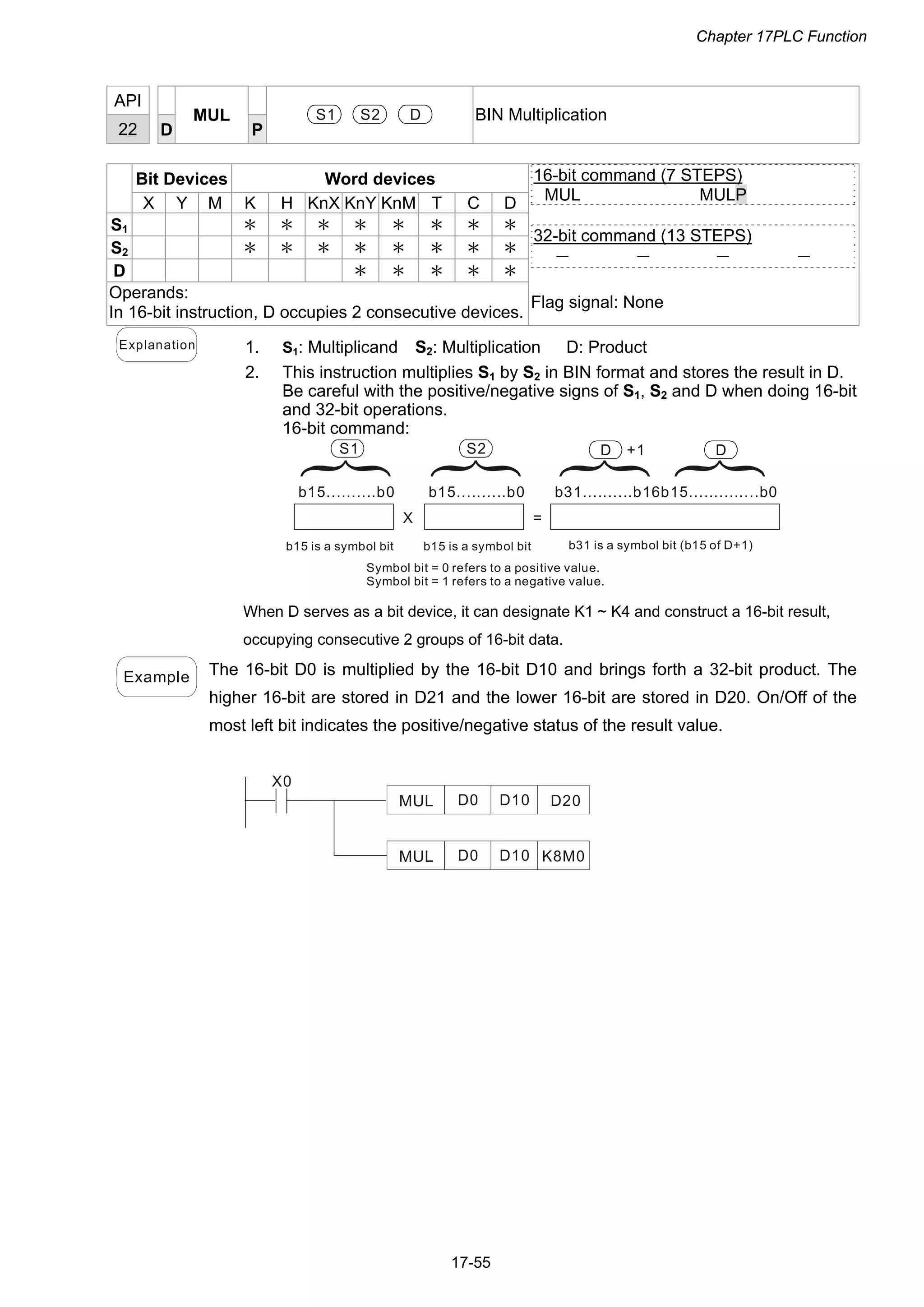
Shock / vibration
resistance
International standards: IEC61131-2, IEC68-2-6 (TEST Fc)/IEC61131-2 & IEC
68-2-27 (TEST Ea)
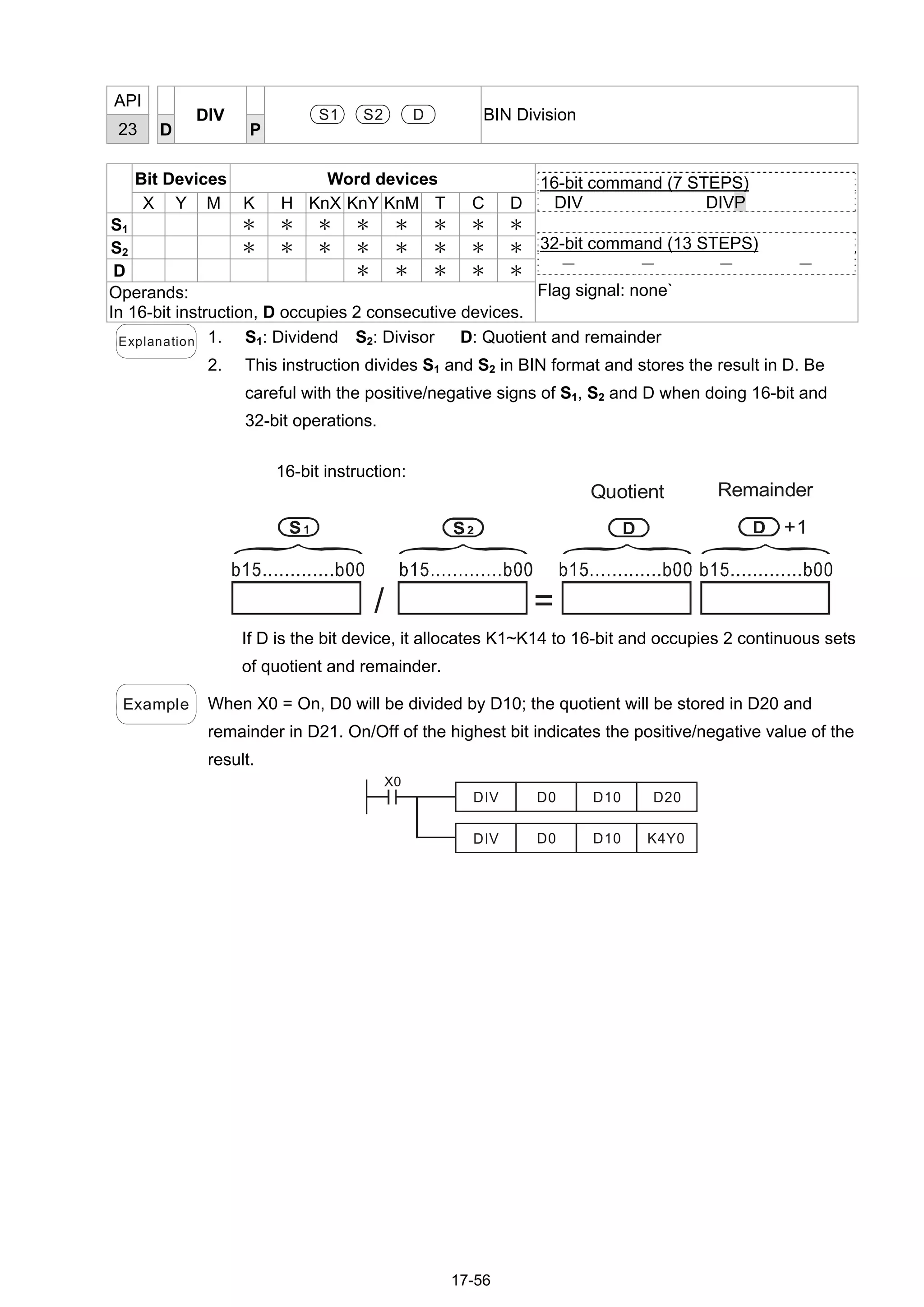
DeviceNet Connector: Definition of Pins
PIN Signal Color Definition
1 V+ Red DC24V
2 H White Signal+
3 S - Earth
4 L Blue Signal-
5 V- Black 0V
5
4
3
2
1
 LED Indicator & Troubleshooting
There are 3 LED indicators on CMC-DN01. POWER LED displays the status of power supply. MS LED and
NS LED are dual-color LED, displaying the connection status of the communication and error messages.
POWER LED
LED status Indication Action
On Power supply in abnormal status. Check the power supply of CMC-DN01.
Off Power supply in normal status No action required
NS LED
LED status Indication Action
Off
No power supply or CMC-DN01 has not
completed MAC ID test yet.
1. Check the power of CMC-DN01 and see if the
connection is normal.
2. Make sure at least one or more nodes are on the bus.
3. Check if the serial transmission speed of
CMC-DN01 is the same as that of other nodes.
Green light
flashes
CMC-DN01 is on-line but has not
established connection to the master.
1. Configure CMC-DN01 to the scan list of the master.
2. Re-download the configured data to the master.
Green light on
CMC-DN01 is on-line and is normally
connected to the master
No action required
Chapter 08 Installation of the Option Cards
8-14
Red light
flashes
CMC-DN01 is on-line, but I/O
connection is timed-out.
1. Check if the network connection is normal.
2. Check if the master operates normally.
Red light on
1. The communication is down.
2. MAC ID test failure.
3. No network power supply.
4. CMC-DN01 is off-line.
1. Make sure all the MAC IDs on the network are not
repeated.
2. Check if the network installation is normal.
3. Check if the baud rate of CMC-DN01 is consistent
with that of other nodes.
4. Check if the node address of CMC-DN01 is illegal.
5. Check if the network power supply is normal.
MS LED
LED status Indication How to correct
Off No power supply or being off-line
Check the power supply of CMC-DN01 and see of the
connection is normal.
Green light
flashes
Waiting for I/O data Switch the master PLC to RUN status
Green light on I/O data are normal --
Red light
flashes
Mapping error
1. Reconfigure CMC-DN01
2. Re-power AC motor drive
Red light on Hardware error
1. See the error code displayed on AC motor drive.
2. Send back to the factory for repair if necessary.
Orange light
flashes
CMC-DN01 is establishing connection
with AC motor drive.
If the flashing lasts for a long time, check if
CMC-DN01 and AC motor drive are correctly installed
and normally connected to each other.
Chapter 08 Installation of the Option Cards
8-15
CMC-EIP01
 Features
1. Supports Modbus TCP and Ethernet/IP protocol
2. MDI/MDI-X auto-detect
3. Baud rate: 10/100Mbps auto-detect
4. AC motor drive keypad/Ethernet configuration
5. Virtual serial port
 Product Introduction
[Figure1]
1. Screw fixing hole
2. Positioning hole
3. AC motor drive connection
port
4. LINK indicator
5. RJ-45 connection port
6. POWER indicator
7. Fool-proof groove
 Specifications
Network Interface
Interface RJ-45 with Auto MDI/MDIX
Number of ports 1 Port
Transmission IEEE 802.3, IEEE 802.3u
Transmission cable Category 5e shielding 100M
Transmission speed 10/100 Mbps Auto-Detect
Network protocol
ICMP, IP, TCP, UDP, DHCP, HTTP, SMTP, MODBUS OVER TCP/IP, Ethernet/IP, Delta
Configuration
Electrical Specifications
Weight 25g
Insulation Voltage 500VDC
Power Consumption 0.8W
Power Supply Voltage 5VDC
Chapter 08 Installation of the Option Cards
8-16
Environment Specifications
Noise immunity
ESD (IEC 61800-5-1,IEC 61000-4-2)
EFT (IEC 61800-5-1,IEC 61000-4-4)
Surge Test (IEC 61800-5-1,IEC 61000-4-5)
Conducted Susceptibility Test (IEC 61800-5-1,IEC 61000-4-6)
Operation/storage
Operation: -10°C ~ 50°C (temperature), 90% (humidity), pollution degree 2
Storage: -25°C ~ 70°C (temperature), 95% (humidity), non-condensing
Vibration/shock
immunity
International standard: IEC 61800-5-1, IEC 60068-2-6/IEC 61800-5-1, IEC 60068-2-27
 Installation
Connecting CMC-EIP01 to a Network
1. Turn off the power of AC motor drive.
2. Open the cover of AC motor drive.
3. Connect CAT-5e network cable to RJ-45 port on CMC-EIP01 (See
Figure 2).
[Figure 2]
RJ-45 connector: Definition of Pins
PIN Signal Definition PIN Signal Definition
1 Tx+
Positive pole for
data transmission
5 -- N/C
2 Tx-
Negative pole for
data transmission
6 Rx-
Negative pole for
data receiving
3 Rx+
Positive pole for
data receiving
7 -- N/C
4 -- N/C 8 -- N/C
 Connecting CMC-EIP01 to VFD-CP2000
1. Switch off the power of AC motor drive.
2. Open the front cover of AC motor drive.
3. Place the insulation spacer into the positioning pin at Slot 1 (shown in Figure 3),
and aim the two holes on the PCB at the positioning pin. Press the pin to clip the holes
with the PCB (see Figure 4).
4. Screw up at torque 6 ~ 8 kg-cm (5.21 ~ 6.94 in-lbs) after the PCB is clipped with the holes
(see Figure 5).
Slot 1Slot 2
Slot 3
[Figure 3] [Figure 4]
Chapter 08 Installation of the Option Cards
8-17
[Figure 5]
 Communication parameter for VFD-CP2000 to connect to an Ethernet
Before VFD-CP2000 is linked to an Ethernet, set up the communication parameters shown in the table below.
Then Ethernet master will be able to read/write the frequency characters and control characters from/into
VFD-CP2000 after communication parameters are set.
CP2000 Parameters Functions
Factory setting
(Dec)
Explanation
00-20
Set up source of
frequency command
0 Frequency command from keypad
00-21
Set up source of
operation command
5
Operation command from communication
card.
09-30
Communication
decoding method
0
The decoding method for Delta AC Motor
Drive (Delta AMD).
09-75 IP configuration 0 Static IP(0) / Dynamic IP
09-76 IP address-1 192 IP address 192.168.1.5
09-77 IP address-2 168 IP address 192.168.1.5
09-78 IP address-3 1 IP address 192.168.1.5
09-79 IP address-4 5 IP address 192.168.1.5
09-80 Net mask-1 255 Net mask 255.255.255.0
09-81 Net mask-2 255 Net mask 255.255.255.0
09-82 Net mask-3 255 Net mask 255.255.255.0
09-83 Net mask-4 0 Net mask 255.255.255.0
09-84 Default gateway-1 192 Default gateway 192.168.1.1
09-85 Default gateway-2 168 Default gateway 192.168.1.1
09-86 Default gateway-3 1 Default gateway 192.168.1.1
09-87 Default gateway-4 1 Default gateway 192.168.1.1
Chapter 08 Installation of the Option Cards
8-18
 Remove CMC-EIP01 from VFD-CP2000
1.Switch off the power supply of VFD-CP2000.
2.Remove the two screws (see Figure 6).
3.Twist opens the card clip and inserts the slot type screwdriver to the hollow to prize the PCB off the card
clip (see Figure 7).
4.Twist opens the other card clip to remove the PCB (see Figure 8).
[Figure 6] [Figure 7]
[Figure 8]
 LED Indicators & Troubleshooting
There are 2 LED indicators on CMC-EIP01. The POWER LED displays the status of power supply, and the
LINK LED displays the connection status of the communication.
LED Indicators
LED Status Indication Action
On Power supply in normal status No action required
POWER Green
Off No power supply Check the power supply.
On Network connection in normal status No action required
Flashes Network in operation No action requiredLINK Green
Off Network not connected
Check if the network cable is
connected.
Troubleshooting
Abnormality Cause Action
AC motor drive not powered
Check if AC motor drive is powered, and if the power
supply is normal.POWER LED
off CMC-EIP01 not connected to AC
motor drive
Make sure CMC-EIP01 is connected to AC motor drive.
Chapter 08 Installation of the Option Cards
8-19
Abnormality Cause Action
CMC-EIP01 not connected to
network
Make sure the network cable is correctly connected to
network.LINK LED off
Poor contact to RJ-45 connector Make sure RJ-45 connector is connected to Ethernet port.
CMC-EIP01 not connected to
network
Make sure CMC-EIP01 is connected to network.
No
communication
card found
PC and CMC-EIP01 in different
networks and blocked by network
firewall.
Search by IP or set up relevant settings by AC motor
drive keypad.
CMC-EIP01 not connected to
network
Make sure CMC-EIP01 is connected to the network.
Incorrect communication setting in
DCISoft
Make sure the communication setting in DCISoft is set to
Ethernet.
Fail to open
CMC-EIP01
setup page
PC and CMC-EIP01 in different
networks and blocked by network
firewall.
Conduct the setup by AC motor drive keypad.
Able to open
CMC-EIP01
setup page but
fail to utilize
webpage
monitoring
Incorrect network setting in
CMC-EIP01
Check if the network setting for CMC-EIP01 is correct.
For the Intranet setting in your company, please consult
your IT staff. For the Internet setting in your home,
please refer to the network setting instruction provided by
your ISP.
Incorrect network setting in
CMC-EIP01
Check if the network setting for CMC-EIP01 is correct.
Fail to send
e-mail
Incorrect mail server setting Please confirm the IP address for SMTP-Server.
Chapter 08 Installation of the Option Cards
8-20
EMC-COP01
 RJ-45: Definition of Pins
Pin Pin name Definition
1 CAN_H CAN_H bus line (dominant high)
2 CAN_L CAN_L bus line (dominant low)
3 CAN_GND Ground/0V/V-
Ma le Fem ale
6 CAN_GND Ground/0V/V-
 Specifications
Interface RJ-45
Number of ports 1 Port
Transmission method CAN
Transmission cable CAN standard cable
Transmission speed 1M 500k 250k 125k 100k 50k
Communication protocol CANopen protocol
 CANopen Communication Cable
Model:TAP-CB03, TAP-CB04
L
Title Part No.
mm inch
1 TAP-CB03 500  10 19  0.4
2 TAP-CB04 1000 10 39  0.4
 CANOpen Breakout Box
Model:TAP-CN03
NOTE
Please refer to CANopen user manual for more details on CANopen operation.
CANopen user manual can also be downloaded on Delta website: http://www.delta.com.tw/industrialautomation/.
。
Chapter 09 CP2000 Specifications
9-1
09 CP2000 Specifications
230V series
Frame size A B C D E
Model :VFD_ _ _ _CP23A-_ _ 007 015 022 037 055 075 110 150 185 220 300 370 450 550 750 900
Rated Output Capacity (kVA) 2 3 4 6 8.4 12 18 24 30 36 42 58 72 86 110 128
Rated Output Current (A) 5 7.5 10 15 21 31 46 61 75 90 105 146 180 215 276 322
Applicable Motor Output(kW) 0.8 1.5 2.2 3.7 5.5 7.5 11 15 19 22 30 37 45 55 75 90
Applicable Motor Output(HP) 1 2 3 5 7.5 10 15 20 25 30 40 50 60 75 100 125
Overload tolerance 120% of rated current for 1 minute during every 5 minutes
Max. output frequency(Hz) 600.00Hz 400.00Hz
LightDuty
Carrier Frequency(kHz) 2~15kHz (8KHz) 2~10kHz(6KHz) 2~9kHz(4KHz)
Rated Output Capacity (kVA) 1.8 2 3.2 4.4 6.8 10 13 20 26 30 36 48 58 72 86 102
Rated Output Current (A) 4.6 5 8 11 17 25 33 49 65 75 90 120 146 180 215 255
Applicable Motor Output(kW) 0.4 0.8 1.5 2.2 3.7 5.5 7.5 11 15 19 22 30 37 45 55 75
Applicable Motor Output(HP) 0.5 1 2 3 5 7.5 10 15 20 25 30 40 50 60 75 100
Overload tolerance
120% of rated current for 1 minute during every 5 minutes,
160% of rated current for 3 seconds during every 25 seconds
Max. output frequency(Hz) 600.00Hz 400.00Hz
OutputRating
NormalDuty
Carrier Frequency(kHz) 2~15kHz (8KHz) 2~10kHz (6KHz) 2~9 kHz(4kHz)
Input Current (A) Light Duty 6.4 9.6 15 22 25 35 50 65 83 100 116 146 180 215 276 322
Input Current (A) Normal Duty 3.9 6.4 12 16 20 28 36 52 72 83 99 124 143 171 206 245
Rated Voltage/Frequency 3-phase AC 200V~240V (-15% ~ +10%), 50/60Hz
Operating Voltage Range 170~265Vac
Inputrating
Frequency Tolerance 47~63Hz
Cooling method
Natural
Cooling
Fan Cooling
Braking Chopper Frame A,B,C: Built-in Frame D and E: Optional
DC choke Frame A, B,C: Optional
Frame D and E: 3%
built-in
EMI Filter Optional
Chapter 09 CP2000 Specifications
9-2
460V series
Frame size A B C
Model: VFD_ _ _ _CP43A-_ ;
VFD_ _ _ _CP4EA-_ _;
007 015 022 037 040 055 075 110 150 185 220 300 370
Rated Output Capacity (kVA) 2.4 2.9 4 6 8.4 9.6 11.2 18 24 29 36 45 57
Rated Output Current (A) 3 3.7 5 7.5 10.5 12 14 22.5 30 36 45 56 72
Applicable Motor Output(kW) 0.75 1.5 2.2 3.7 4 5.5 7.5 11 15 18.5 22 30 37
Applicable Motor Output(HP) 1 2 3 5 5 7.5 10 15 20 25 30 40 50
Overload tolerance 120% of rated current for 1 minute during every 5 minutes
Max. output frequency(Hz) 600.00Hz
LightDuty
Carrier Frequency(kHz) 2~15kHz(8KHz) 2~10kHz(6KHz)
Rated Output Capacity (kVA) 2.2 2.4 3.2 4.8 7.2 8.4 10 14 19 25 30 36 48
Rated Output Current (A) 2.8 3 4 6 9 10.5 12 18 24 32 38 45 60
Applicable Motor Output(kW) 0.4 0.75 1.5 2.2 3.7 4 5.5 7.5 11 15 18.5 22 30
Applicable Motor Output(HP) 0.5 1 2 3 5 5 7.5 10 15 20 25 30 40
Overload tolerance
120% of rated current for 1 minute during every 5 minutes,
160% of rated current for 3 seconds during every 25 seconds
Max. output frequency(Hz) 600.00Hz
OutputRating
NormalDuty
Carrier Frequency(kHz) 2~15kHz (8KHz) 2~10kHz (6kHz)
Input Current (A) Light Duty 4.3 5.4 7.4 11 16 18 20 25 33 39 47 58 76
Input Current (A) Normal Duty 3.5 4.3 5.9 8.7 14 15.5 17 20 26 35 40 47 63
Rated Voltage/Frequency 3-Phase AC 380V~480V ( -15%~+10%), 50/60Hz
Operating Voltage Range 323~528Vac
Inputrating
Frequency Tolerance 47~63Hz
Cooling method Natural Cooling Fan Cooling
Braking Chopper Frame A,B,C: Built-in
DC choke Frame A, B,C: Optional
EMI Filter
Frame A, B, C of VFD_ _ _ _CP4EA-_ _ , EMI filter Built-in;
Frame A, B, C of VFD_ _ _ _CP43A-_ _ , EMI filtter Optional
Chapter 09 CP2000 Specifications
9-3
460V series
Frame size D E F G H
Model: VFD_ _ _ _CP43A-_ _;
VFD_ _ _ _CP43C-_ _
450 550 750 900 1100 1320 1600 1850 2200 2800 3150 3550 4000
Rated Output Capacity (kVA) 73 88 115 143 175 196 247 273 367 422 491 544 613
Rated Output Current (A) 91 110 144 180 220 246 310 343 460 530 616 683 770
Applicable Motor Output(kW) 45 55 75 90 110 132 160 185 220 280 315 355 400
Applicable Motor Output(HP) 60 75 100 125 150 175 215 250 300 375 425 475 536
Overload tolerance 120% of rated current for 1 minute during every 5 minutes
Max. output frequency(Hz) 600.00Hz 400.00Hz
LightDuty
Carrier Frequency(kHz) 2~10kHz(6KHz) 2~9 kHz(4KHz)
Rated Output Capacity (kVA) 58 73 88 120 143 175 207 247 295 367 438 491 544
Rated Output Current (A) 73 91 110 150 180 220 260 310 370 460 550 616 683
Applicable Motor Output(kW) 37 45 55 75 90 110 132 160 185 220 280 315 355
Applicable Motor Output(HP) 50 60 75 100 125 150 175 215 250 300 375 425 475
Overload tolerance
120% of rated current for 1 minute during every 5 minutes,
160% of rated current for 3 seconds during every 25 seconds
Max. output frequency(Hz) 600.00Hz 400.00Hz
OutputRating
NormalDuty
Carrier Frequency(kHz) 2~10kHz(6KHz) 2~9 kHz(4KHz)
Input Current (A) Light Duty 91 110 144 180 220 246 310 343 460 530 616 683 770
Input Current (A) Normal Duty 74 101 114 157 167 207 240 300 380 400 494 555 625
Rated Voltage/Frequency 3-Phase AC 380V~480V ( -15%~+10%), 50/60Hz
Operating Voltage Range 323~528Vac
Inputrating
Frequency Tolerance 47~63Hz
Cooling method Fan Cooling
Braking Chopper Frame D and above: Optional
DC choke Frame D and above: 3% built-in
EMI Filter Frame D and above: Optional
Chapter 09 CP2000 Specifications
9-4
General Specifications:
Control Method 1: V/F(V/F control), 2: SVC(Sensorless Vector Control),
Starting Torque Reach up to 150% or above at 0.5Hz.
V/F Curve 4 point adjustable V/F curve and square curve
Speed Response Ability 5Hz
Torque Limit Normal Duty: Max. 170% torque current
Torque Accuracy ±5%
Max. Output Frequency (Hz)
230V series: 600.00Hz (55kw and above: 400.00Hz);
460V series: 600.00Hz (90KW and above: 400.00Hz)
Frequency Output Accuracy Digital command:±0.01%, -10℃~+40℃, Analog command: ±0.1%, 25±10℃
Output Frequency Resolution Digital command: 0.01Hz, Analog command: max. output frequency x 0.03/60 Hz (±11 bit)
Overload Tolerance
Light duty: 120% of rated current for 1 minute;
Normal duty: 120% of rated current for 1 minute;160% of rated current for 3 seconds
Frequency Setting Signal 0~+10V, 4~20mA, 0~20mA, pulse input
Accel. /Decel. Time 0.00~600.00/0.0~6000.0 seconds
Main control function
Fault restart Parameter copy Dwell BACnet
Communication
Momentary
power loss ride
thru
Speed search Over-torque
detection
Torque limit 16-step speed
(max)
Accel/Decel.
time switch
S-curve
accel/decel
3-wire
sequence
Auto-Tuning
(rotational,
stationary)
Frequency
upper/lower
limit settings
Cooling fan
on/off switch
Slip
compensation
Torque
compensation
JOG frequency MODOBUS
communication
(RS-485 RJ45,
max. 115.2
kbps)
DC injection
braking at
start/stop
Smart Stall PID control
(with sleep
function)
Energy saving
control
ControlCharacteristics
Fan Control
230V series
Models higher than VFD150CP23A-21 (included) are PWM control;
Models lower than VFD150CP23A-21 (not included) are on/off switch control.
460V series
Models higher than VFD150CP43A-21/4EA-21 (included) are PWM control;Models lower
than VFD150CP43A-21/4EA-21(not included) are on/off switch control.
Motor Protection Electronic thermal relay protection
Over-current Protection
Normal Duty: Over-current protection for 240% rated current
Current clamp『Normal duty: 170~175%』
Over-voltage Protection 230: drive will stop when DC-BUS voltage exceeds 410V
460: drive will stop when DC-BUS voltage exceeds 820V
Over-temperature Protection Built-in temperature sensor
Stall Prevention Stall prevention during acceleration, deceleration and running independently
Restart After Instantaneous
Power Failure
Parameter setting up to 20 seconds
ProtectionCharacteristics
Grounding Leakage Current
Protection
Leakage current is higher than 50% of rated current of the AC motor drive
International Certifications
GB/T12668-2
Chapter 09 CP2000 Specifications
9-5
Environment for Operation, Storage and Transportation:
DO NOT expose the AC motor drive in harsh environments, such as dust, direct sunlight, corrosive/inflammable gasses, humidity, liquid and
vibration environment. The salt in the air must be less than 0.01mg/ cm2
every year.
Installation
location
IEC60364-1/IEC60664-1 Pollution degree 2, Indoor use only
Storage -25 o
C ~ +70 o
C
Transportation -25 o
C ~ +70 o
C
Surrounding
Temperature
Non-condensation, non-frozen
Operation Max. 90%
Storage/
Transportation
Max. 95%
Rated Humidity
No condense water
Operation/ Storage 86 to 106 kPaAir Pressure
Transportation 70 to 106 kPa
IEC721-3-3
Operation Class 3C2; Class 3S2
Storage Class 2C2; Class 2S2
Transportation Class 1C2; Class 1S2
Pollution Level
No concentrate
Environment
Altitude Operation
If AC motor drive is installed at altitude 0~1000m, follow normal operation
restriction. If it is install at altitude 1000~3000m, decrease 2% of rated current or
lower 0.5℃ of temperature for every 100m increase in altitude. Maximum altitude
for Corner Grounded is 2000m.
Storage
Package Drop
Transportation
ISTA procedure 1A(according to weight) IEC60068-2-31
Vibration
1.0mm, peak to peak value range from 2Hz to 13.2 Hz; 0.7G~1.0G range from 13.2Hz to 55Hz; 1.0G range from
55Hz to 512 Hz. Comply with IEC 60068-2-6
Impact
IEC/EN 60068-2-27
Under 220lbs (100kg): 15 g peak acceleration, 11 ms duration, half-sine, equipment tested in operating mode.
Over 220lbs(100kg): 10 g peak acceleration, 11ms duration, half-sine, equipment tested in non-operating mode.
Equipment may be tested in subassemblies.
Operation
Position
Max. allowed offset angle ±10o
(under normal installation
position)
10 10
Specification for Operation Temperature and Protection Level
Model Frame Top cover Conduit Box Protection Level
Operation
Temperature
Remove top cover IP20/UL Open Type ND:-10~50℃
LD: -10~40℃
Frame A~C
230V: 0.75~30kW
460V: 0.75~37kW Standard with top
cover
Standard conduit
plate IP20/UL Type1/NEMA1 ND: -10~40℃
LD: -10~40℃
VFDxxxxCP23A-21
VFDxxxxCP43A-21
VFDxxxxCP4EA-21,
VFDxxxxCP43C-21
Frame D~H
230V: above 37kW
460V: above 45kW
N/A With conduit box
IP20/UL Type1/NEMA1 ND: -10~40℃
LD: -10~40℃
VFDxxxxCP23A-00
VFDxxxxCP43A-00
VFDxxxxCP43C-00,
Frame D~H
230V: above 37kW
460V: above 45kW N/A
Without conduit box
IP00
IP20/UL Open Type
ND: -10~50℃
LD: -10~40℃
(ND =Normal
Duty; LD = Light
Duty)
Chapter 10 Digital Keypad
10-1
10 Digital Keypad
KPC-CC01 KPC-CE01(Option)
 Communication Interface
RJ-45 (socket)、RS-485 interface;
 Installation Method
Embedded type and can be put flat on the surface of
the control box. The front cover is water proof.
 Charge the digital keypad for 6 minutes before
you use it to program Delta’s AC Motor Drive.
 What's new at KPC-CC01 keypad?
-It supports calendar function of PLC ( See Chapeter
17 for more infomation about PLC.)
-The available editing pages reach the maximum
number of pages supported by TP Editor.
-TP Editor v.140.1 is required
-It supports VFDSoft to read parameters. Please go to
http://www.delta.com.tw/ to download VFDSoft
v1.45.
Descriptions of Keypad Functions
Key Descriptions
Start Operation Key
1. It is only valid when the source of operation command is from the keypad.
2. It can operate the AC motor drive by the function setting and the RUN LED will be ON.
3. It can be pressed again and again at stop process.
4. When enabling “HAND” mode, it is only valid when the source of operation command is from
the keypad.
Stop Command Key. This key has the highest processing priority in any situation.
1. When it receives STOP command, no matter the AC motor drive is in operation or stop status,
the AC motor drive needs to execute “STOP” command.
2. The RESET key can be used to reset the drive after the fault occurs. For those faults that can’t be
reset by the RESET key, see the fault records after pressing MENU key for details.
Operation Direction Key
1. This key is only control the operation direction NOT for activate the drive. FWD: forward,
REV: reverse.
2. Refer to the LED descriptions for more details.
ENTER Key
Press ENTER and go to the next level. If it is the last level then press ENTER to execute the command.
ESC Key
ESC key function is to leave current menu and return to the last menu. It is also functioned as a return
key in the sub-menu.
Press menu to return to main menu.
Menu content:
KPC-CE01 does not support function 5 ~13.
1. Detail Parameter 7. Quick/Simple Setup 13. PC Link
Chapter 10 Digital Keypad
10-2
2. Copy Parameter
3. Keypad Locked
4. PLC Function
5. Copy PLC
6. Fault Record
8. Display Setup
9. Time Setup
10. Language Setup
11. Startup Menu
12. Main Page
Direction: Left/Right/Up/Down
1. In the numeric value setting mode, it is used to move the cursor and change the numeric value.
2. In the menu/text selection mode, it is used for item selection.
Function Key
1. It has the factory setting function and the function can be set by the user. The present factory
setting: F1 is JOG function.
2. Other functions must be defined by TPEditor first. TPEditor software V1.03 is available for
download at:
http://www.delta.com.tw/product/em/download/download_main.asp?act=3&pid=3&cid=3&tpid=
3
3. Installation Instruction for TPEditor is on page 10-15 of this chapter.
HAND ON Key
1. This key is executed by the parameter settings of the source of Hand frequency and hand
operation. The factory settings of both source of Hand frequency and hand operation are the
digital keypad.
2. Press HAND ON key at stop status, the setting will switch to hand frequency source and hand
operation source. Press HAND ON key at operation status, it stops the AC motor drive first
(display AHSP warning), and switch to hand frequency source and hand operation source.
3. Successful mode switching for KPC-CE01, “H/A” LED will be on; for KPC-CC01, it will
display HAND mode/ AUTO mode on the screen.
1. This key is executed by the parameter settings of the source of AUTO frequency and AUTO
operation. The factory setting is the external terminal (source of operation is 4-20mA).
2. Press Auto key at stop status, the setting will switch to hand frequency source and hand operation
source. Press Auto key at operation status, it stops the AC motor drive first (display AHSP
warning), and switch to hand frequency source and hand operation source.
3. Successful mode switching for KPC-CE01, “H/A” LED will be off; for KPC-CC01, it will
display HAND mode/ AUTO mode on the screen
Descriptions of LED Functions
LED Descriptions
Steady ON: operation indicator of the AC motor drive, including DC brake, zero speed, standby, restart
after fault and speed search.
Blinking: drive is decelerating to stop or in the status of base block.
Steady OFF: drive doesn’t execute the operation command
Steady ON: stop indicator of the AC motor drive.
Blinking: drive is in the standby status.
Steady OFF: drive doesn’t execute “STOP” command.
Operation Direction LED (green: forward running, red: reverse running)
Steady ON: drive is in forward running status.
Blinking: drive is changing the operation direction.
Steady OFF: drive is in reverse running status.
(Only KPC-CE01 support this function)
Setting can be done during operation.
HAND LED: When HAND LED is on (HAND mode); when HAND LED is off (AUTO mode).
(Only KPC-CE01 support this function )
Setting can be done during operation.
AUTO LED: When AUTO LED is on (AUTO mode); when AUTO LED is off (HAND mode).
Chapter 10 Digital Keypad
10-3
CANopen
~”RUN”
RUN LED:
LED status Condition/State
OFF CANopen at initial
No LED
Blinking CANopen at pre-operation
Single
flash
CANopen at stopped
1000
ON CANopen at operation status
No LED
CANopen
~”ERR”
ERR LED:
LED
status
Condition/ State
OFF No Error
Single
flash
One message fail
1000
Double
flash
Guarding fail or heartbeat fail
1000
Triple
flash
SYNC fail
1000
ON Bus off
Chapter 10 Digital Keypad
10-4
Digital Keypad: KPC-CC01 Function
NOTE
1. Startup page can only display pictures, no flash.
2. When Power ON, it will display startup page then the main page. The main page displays Delta’s default setting F/H/A/U, the
display order can be set by Pr.00.03 (Startup display). When the selected item is U page, use left key and right key to switch
between the items, the display order of U page is set by Pr.00.04 (User display).
3. Charge the digital keypad for 6 minutes before you use it to program Delta’s AC Motor Drive.
Chapter 10 Digital Keypad
10-5
4. Display Icon
00:System Pr
01:Basic
02:DI/DO
Pr
Pr
Pr setup
1.Default 1
2.Default 2
3.User define
Start-up : present setting
Press for more options.
: roll down the page for more options
: show complete sentence
Press for complete information
Display item
5. Copy PLC
6. Fault Record
7. Quick/Simple Setup
8. Display Setup
9. Time Setup
10. Language Setup
13. PC Link
11. Start-up
12. Main page
1.Detail Parameter
2.Copy Parameter
3.Keypad Locked
MENU
MENU
Detail Parameter
2.Copy Parameter
3.Keypad Locked
4.PLC Function
1.
Item 1~4 are the common items for
KPC-CC01 &KPC-CE01
1. Detail Parameter
00:System Pr
01:Basic Pr
02:DI/DO Pr
Pr setup
ENTERPress to select.
00 System Pr Content
01 ID code
02 Rated curre
03 Pr reset
00- System Pr
00-08 Password Set
00-08
0000
Password set
0000~9999 MY MODE
01-00 The maximum output freq.
01-00 Hz
600.00
Max. output freq.
0.00~600.00 MY MODE
Chapter 10 Digital Keypad
10-6
2. Copy Parameter
1.
2.
3.
Copy pr
Copy parameters (Pr)
1. 4 sets of parameters duplication.
2. When the setting is complete, the date will be written to the copy
parameters (Pr) page.
1.2009/05/04
2.
3.
Copy pr
Press ENTER
1.SAVE
2.LOAD
File 1
Press
After selecting save and pressing "ENTER", the parameter
setting will be saved in the keypad.
to save or load
3. Keypad locked
Keypad locked
Press "ENTER"
to lock
Press to lockENTER
Keypad Locked
This function is used to lock the keypad. The main page would not display “keypad
locked” when the keypad is locked, however it will display the message” please press
ESC and then ENTER to unlock the keypad” when any key is pressed.
HAND
JOG 14 35:56:
Keypad locked
Press "ESC" for
3 seconds to unlock
Press any key.
4. PLC Function
1.Disable
2.PLC Run
3.PLC Stop
PLC
PLC function
1. Disable
2. PLC run
3. PLC stop
When activate and stop PLC function, the PLC status will be displayed on main page
of Delta default setting.
F
H
A
600.00Hz
23.5A
600.00Hz
The PLC function of KPC-CE01 can only displays:
1. PLC0
2. PLC1
3. PLC2
Chapter 10 Digital Keypad
10-7
5. Copy PLC
1.
2.
3.
Copy PLC
Copy PLC
1. Duplicate 4 sets of parameters.
2. When the setting is complete, the date will be written to the Copy PLC
page.
1.2010/03/14
2.
3.
Copy PLC
Press to setting menu.ENTER
NOTE
If password protection for WPLSoft editor was set, it is required to enter the
password before the file can successfully be saved onto the digital display.
Passwo rd
File 1
Input Times
0000
0
6. Fault record
1:GFF
2:ocA
3:oH
Fault record
ENTERPress to select.
KPC-CE01 does not support this
function.
Fault Record
It can accumulate 6 sets of recent fault records.
The first fault code displays in the record is the latest fault. Select the fault code for
details on time, date, frequency, current, voltage and DC BUS Volt..
1:GFF
2:ocA
3:oH
Fault record
ENTERPress to view the
current and voltage of the fault
Time: 19:47:00
Frequency: 0.00
Current: 0.00
2: ocA
NOTE
Fault actions of AC motor drive are record and save to KPC-CC01. When
KPC-CC01 is removed and apply to another AC motor drive, the previous fault
records will not be deleted. The new fault records of the present AC motor drive
will accumulate to KPC-CC01.
Chapter 10 Digital Keypad
10-8
7. Quick/Simple Setting
ENTERPress to select.
Quick Setting:
1. VF Mode
2. VFPG Mode
3. SVC Mode
4. FOCPG Mode
5. TQCPG Mode
6. My Mode
Quick Setting: (CP2000 does NOT have PG card)
1)V/F Mode
01: Password Input (Decode)
01. Password Input
02. Password Setting
03. Control Mode
V/F mode P00-07
0
Password Input
00-07
0~ 65535
Items
1. Parameter Protection Password Input (P00-07)
2. Parameter Protection Password Setting (P00-08)
3. Control Mode (P00-10)
4. Control of Speed Mode (P00-11)
5. Load Selection (P00-16)
6. Carrier Frequency (P00-17)
7. Source of the Master Frequency Command (AUTO) (P00-20)
8. Source of the Operation Command (AUTO) (P00-21)
9. Stop Method (P00-22)
10. Digital Keypad STOP function (P00-32)
11. Max. Operation Frequency (P01-00)
12. Base Frequency of Motor 1 (P01-01)
13. Max. Output Voltage Setting of Motor 1 (P01-02)
14. Mid-point Frequency 1 of Motor 1 (P01-03)
15. Mid-point Voltage 1 of Motor 1 (P01-04)
16. Mid-point Frequency 2 of Motor 1 (P01-05)
17. Mid-point Voltage 2 of Motor 1 (P01-06)
18. Min. Output Frequency of Motor 1 (P01-07)
19. Min. Output Voltage of Motor 1 (P01-08)
20. Output Frequency Upper Limit (P01-10)
21. Output Frequency Lower Limit (P01-11)
22. Accel. Time 1 (P01-12)
23. Decel Time 1 (P01-13)
24. Over-voltage Stall Prevention (P06-01)
25. Derating Protection (P06-55)
26. Software Brake Level (P07-00)
27. Speed Search during Start-up (P07-12)
28. Emergency Stop (EF) & Force to Stop Selection (P07-20)
29. Filter Time of Torque Command (P07-24)
30. Filter Time of Slip Compensation (P07-25)
31. Torque Compensation Gain (P07-26)
32. Slip Compensation Gain (P07-27)
3)SVC Mode
01: Password Input (Decode)
01. Password Input
02. Password Setting
03. Control Mode
V/F mode P00-07
0
Password Input
00-07
0~ 65535
Items
1. Parameter Protection Password Input (P00-07)
2. Parameter Protection Password Setting (P00-08)
3. Control Mode (P00-10)
4. Control of Speed Mode (P00-11)
5. Load Selection (P00-16)
6. Carrier Frequency (P00-17)
7. Source of the Master Frequency Command (AUTO) (P00-20)
Chapter 10 Digital Keypad
10-9
8. Source of the Operation Command (AUTO) (P00-21)
9. Stop Method (P00-22)
10. Digital Keypad STOP function (P00-32)
11. Max. Operation Frequency (P01-00)
12. Base Frequency of Motor 1 (P01-01)
13. Max. Output Voltage Setting of Motor 1 (P01-02)
14. Min. Output Frequency of Motor 1 (P01-07)
15. Min. Output Voltage of Motor 1 (P01-08)
16. Output Frequency Upper Limit (P01-10)
17. Output Frequency Lower Limit (P01-11)
18. Accel. Time 1 (P01-12)
19. Decel Time 1 (P01-13)
20. Full-load Current of Induction Motor 1 (P05-01)
21. Rated Power of Induction Motor 1 (P05-02)
22. Rated Speed of Induction Motor 1 (P05-03)
23. Pole Number of Induction Motor 1 (P05-04)
24. No-load Current of Induction Motor 1 (P05-05)
25. Over-voltage Stall Prevention (P06-01)
26. Over-current Stall Prevention during Acceleration (P06-03)
27. Derating Protection (P06-55)
28. Software Brake Level (P07-00)
29. Emergency Stop (EF) & Force to Stop Selection (P07-20)
30. Filter Time of Torque Command (P07-24)
31. Filter Time of Slip Compensation (P07-25)
32. Slip Compensation Gain (P07-27)
6) My Mode
01:
02:
03:
My mode
Click F4 in parameter setting
page, the parameter will save to
My Mode. To delete or correct
the parameter, enter this
parameter and click the “DEL”
on the bottom right corner.
My mode:
It can save 01~32 sets of parameters
(Pr).
1
05-02
motor current
05-02 Amps
0.00~ 600.00 MYMODE
Press F4 and save to my mode.
2
01: motor current
02:
03:
My mode
The parameter (Pr) will be displayed in
My mode if it is properly saved.
To correct or to delete this Pr. clicks
DEL.
05-02
motor current
05-02 Amps
0.00~ 600.00 DEL
Press F4 to delete this Pr. Setting in My
Mode.
Chapter 10 Digital Keypad
10-10
8. Display setup
1.Contrast Ad
2.BKLT time
Disp setup
Press to
enter the setting menu.
ENTER
1. Contrast Adjustment
Contrast adjust
6 Adjust setting value
0 10
2. Back-lighted Time
BKLT Time Min
5 Adjust setting value
0 10
9. Time setting
Time setup
2009/01/01
_ _ : _ _ :_ _
Enter time setup page, "9" will continue to blink
move to left / right
increase / decrease the value
ENTERPress to confirm.
NOTE
When the digital keypad is removed, the time setting will be in standby status for 7
days. After this period, the time needs to be reset.
10. Language setup
1:English
2:
3:
繁體中文
簡體中文
Language
Language selection.
11. Startup Page Setting
1.Default 1
2.Default 2
3.User define
Start-up
1. Default picture 1
DELTA LOGO
2. Default picture 2
DELTA Text
3. User defined: optional accessory is require (TPEditor & USB/RS-485
Communication Interface-IFD6530)
Install an editing accessory would allow users to design their own start-up page.
If editor accessory is not installed, “user defined” option will display a blank
page.
USB/RS-485 Communication Interface-IFD6530
Please refer to Chapter 07 Optional Accessories for more detail.
TPEditor
TPEditor Installation Instruction is on page 10-16 and TPEditor V1.03 is
available for download at:
http://www.delta.com.tw/product/em/download/download_main.asp?act=3&pid=3&cid=3&tpid=3
Chapter 10 Digital Keypad
10-11
12. Main page
1.Default
2.User define
Main Page
ENTERPress to select.
1. Default page
Default picture and editable picture are available upon selection.
F
H
A
60.00Hz
0.00
0.00Hz
F 600.00Hz >>> H >>> A >>> U (circulate)
2. User defined: optional accessory is require (TPEditor & USB/RS-485
Communication Interface-IFD6530)
Install an editing accessory would allow users to design their own start-up page.
If editor accessory is not installed, “user defined” option will display a blank
page.
USB/RS-485 Communication Interface-IFD6530
Please refer to Chapter 07 Optional Accessories for more detail.
TPEditor
TPEditor Installation Instruction is on page 10-16 and TPEditor V1.03 is
available for download at:
http://www.delta.com.tw/product/em/download/download_main.asp?act=3&pid=3&cid=3&tpid=3
13. PC Link
PC Link
Press "ENTER"
to link
Press ENTER
PC Link
Waiting
28%
The function of PC Link is to establish a connection with computer to download the
page for user defined editing. After enter to PC Link page, check if the connection
of KPC-CC01 and computer is successfully establish, then press enter to go to next
page and wait for communication response.
1. If the connection failed, the screen will show “Time Out”.
PC Link
Time Out
Press "ESC"back
to MENU
2. If the connection succeeds, the screen page will show “Downloading”. When
the download is done, it returns to MENU page.
PC Link
Downloading
28%
3. In order to set the start-up page and main page in the format user defined, user
must check the user define option for start-up page and main page. If the user
define page for editing has not yet downloaded to KPC-CC01, the start-up
page and main page will display as blank.
Other display
When fault occur, the menu will display:
ocA
Oc at accel
Fault
CE01
Comm. Error 1
Warning
1. Press ENTER and start RESET. If still no response, please contact local distributor or return to the factory. To view the
fault DC BUS voltage, output current and output voltage, press “MENU”“Fault Record”.
2. Press ENTER again, if the screen returns to main page, the fault is clear.
3. When fault or warning message appears, backlight LED will blinks until the fault or the warning is cleared.
Chapter 10 Digital Keypad
10-12
Optional accessory for digital keypad: RJ45 Extension Lead
Part No. Description
CBC-K3FT RJ45 Extension Lead 3 feet
CBC-K5FT RJ45 Extension Lead 5 feet
CBC-K7FT RJ45 Extension Lead 7 feet
CBC-K10FT RJ45 Extension Lead 10 feet
CBC-K16FT RJ45 Extension Lead 16 feet
Note:
a. Keypad version1.00 supports up to 4 main pages. If you download over 4 main pages, it will
only support the first 4 downloaded main pages.
b. By pressing keypads, you can only switch pages from pates. It doesn’t support entering words or
images.
c. Downloading baud rate supports 9600 bps, 19200 bps and 38400 bps.
d. The VFD communication address to read and write are at 0x22xx
.
Definition of Communication address:
Address Read/Write Definition Description
2200h R b15~b0 Output current (A)
2201h R b15~b0 Counter Value ( c )
2202h R b15~b0 Actual Frequency (H)
2203h R b15~b0 DC-Bus Voltage (U)
2204h R b15~b0 Output Voltage(A)
2205h R b15~b0 Power Factor Angle (n)
2206h R b15~b0 Output Power(P)
2207h R b15~b0 Actual Motor Speed( r )
2208h R b15~b0 Output Torque (t)
2209h R b15~b0 PG Position (G)
220Ah R b15~b0 Feedback PV value ( b )
220Bh R b15~b0 AVI in percentage (1.)
220Ch R b15~b0 ACI in percentage (2.)
220Dh R b15~b0 AUI in percentage (3.)
220Eh R b15~b0 Heat Sink temperature (t.)
220Fh R b15~b0 IBGT temperature (T)
2210h R b15~b0 DI ON/OFF status ( i)
2211h R b15~b0 DO ON/OFF status (o)
2212h R b15~b0 Multi-Speed (S)
2213h R b15~b0 DI CPU pin status (i.)
2214h R b15~b0 DO CPU pin status (o.)
2215h R b15~b0 Running number of Encoder (Z)
2216h R b15~b0 Pulse Input Frequency (4)
2217h R b15~b0 Pulse Input Position (4.)
Chapter 10 Digital Keypad
10-13
TPEditor Installation Instruction
1) TPEditor: Setup & Basic Functions
1. Run TPEditor version 1.30
2. Go to File (F) Click on New. The Window below will pop up. At the device type, click on the drop down menu and
choose DELTA VFD-C Inverter. At the TP type, click on the drop down menu and choose VFD-C Keypad. As for File
Name, enter TPE0. Now click on OK.
3. You are now at the designing page. Go to Edit (E) Click on Add a New Page (A) or go to the TP page on the upper
right side, right click once on TP page and choose Add to increase one more page for editing. The current firmware of
Keypad is version1.00 and can support up to 4 pages.
4. Download setting, Go to Tool Communication settings (C) to set up the PC Com Port and Baud Rate. The
supporting speeds of Baud rate are 9600bps, 19200bps and 38400bps. The default setting of TP address is 1, please do
not modify.
2) Edit Startup Page
1. Click once on the Boot Page on the right hand side of your computer screen or click on View (V) click on Boot
Page (B). Then a blank Boot Page window will pop up. Use the circled items to design your Startup page.
Chapter 10 Digital Keypad
10-14
33. Static Text . Open a blank page, click once on this button , and then double click on that blank page. The
following windows will pop up.
On the right hand side of the Static Text Setting, you can adjust the frame setting, the text direction, the alignment
and the font setting. Once you finish all the adjustments that you need.
You can continue to input your text in the blank space of Static Text Setting window. When you finish inputting your
text, click on OK to continue your next step or click cancel to abort the current step.
34. Static Bitmap Open a blank page, then click once on this button and then double click on that blank page.
The following window will pop up.
Please note that Static Bitmap setting support only images in BMP format. Now choose an image that you need and
click open, then that image will appear in the Static Bitmap window.
Chapter 10 Digital Keypad
10-15
35. Geometric Bitmap  As shown in the picture on the left side, there are
11 kinds of geometric bitmap to choose. Open a new blank page then click once on a geometric bitmap icon that you
need. Then drag that icon and enlarge it to the size that you need on that blank page. For example, if you drag this
icon to a blank page, you will see the following window.
36. Download---Take the image below as an example. The sentence “Boot page” is a static text; the 11 images below are
geometric bitmaps. The image on the right hand side is a Static Bitmap. To upload a start up page, double click to
activate “Boot page. Make sure that you have followed the instruction on page 3 to choose the right com port. Then
go to “Communication (M)” Click on “Write Boot Page TP (B).” When you see the pop up message below
Go to the C2000 Keypad, press Menu then keep on pressing the Upward key until you see “PC Link,” then press
ENTER once, when you see “Press Enter to PC Link” on the keypad, press the ENTER again. Then click the YES
button to begin the upload.
Chapter 10 Digital Keypad
10-16
3) Edit Main Page
1. Click on a page under the TP Page to edit or go to View  click on Boot Page to begin to edit main page. The
objects available for you to use are in the red circles below.
From left to right: Static Text, ASCII Display, Static Bitmap, Scale, Bar Graph, Button, Clock Display, Units,
Numeric Input, 11 geometric bitmaps and different width of lines. The application of Static Text, Static Bitmap,
and geometric bitmap is the same as the editing startup page.
2. Numeric/ASCII Display A): Go to Objects (O)Click once on the Numeric/ASCII Display(A)
Drag to enlarge to reach the size that you need to add objects in the screen
where you want to create an object Double click on the object to set up Related Devices, Frame Setting , Fonts
and Alignment.
Related Device: Choose the VFD Communication Port that you need, if you want to read output frequency (H), set
the VFD Communication Port to $2202. For other values, please refer to ACMD ModBus Comm Address List.
3. Scale Setting : On the Tool Bar, click on this for Scale Setting. You can also edit Scale Setting in the
Property Window on the right hand side of your computer screen.
a. Scale Position: Click on the drop down list to choose which position that you need to place a scale.
b. Scale Side: Click on the drop down list to choose if you want to number your scale from smaller number to
bigger number or from big to small. Click OK to accept this setting or click Cancel to abort.
c. Font Setting: Click on the drop down list to choose the Font setting that you need then click OK to accept the
setting or click Cancel to abort.
d. Value Length: Click on the drop down to choose 16bits or 32 bits. Then click OK to accept the setting or
click Cancel to abort.
Chapter 10 Digital Keypad
10-17
e. Main Scale & Sub Scale: In order to divide the whole scale into equal parts, key in the numbers of your
choices for main scale and sub scale.
f. Maximum value & Minimum Value are the numbers on the two ends of a scale. They can be negative
numbers but the input numbers are limited by value.
g. Follow the Scale setting mentioned above; you will have a scale as shown below.
4. Bar Graph setting :
a. Related Device: Choose the VFD Communication Port that you need.
b. Direction Setting: Click on the drop down menu to choose one of the following directions: From Bottom to
Top, From Top to Bottom, From Left to Right or From Right to Left.
c. Maximum Value & Minimum Value: They define the range covered by the maximum value and minimum
value. If a value is smaller than or equal to the minimum value, then the bar graph will be blank. If a value is
bigger or equal to the maximum value, then the bar graph will be full. If a value is between minimum and
maximum value, then the bar graph will be filled proportionally.
5. Button : Currently this function only allows the Keypad to switch pages; other functions are not yet available.
Text input function and Image inserted functions are not yet supported.
Double click on to open set up window.
a. <Button Type> allows you set up buttons’ functions. But Page Jump is the only supported function currently.
b. Page Jump setting: After you choose the Page Jump function in the drop down list, you will see this Page
Jump Setting Menu
c. <Function Key> allows you to assign functions to the following keys on the KPC-CC01 keypad: F1, F2, F3,
F4, Up, Down, Left and Right. Please note that the Up and Down keys are locked by TPEditor. These two
keys cannot be programmed. If you want to program Up and Down keys, go to ToolFunction Key Settings
(F) Re-Define Up/Down Key(R).
Chapter 10 Digital Keypad
10-18
d. There are no supported functions other than the setting mentioned above.
6. Clock Display Setting : Click once on this button .
Open a new file and click once in that window, you will see the following
In the clock display setting, you can choose to display Time, Day or Date on the Keypad. To adjust time, go to #9
on the Keypad’s menu. You can also adjust Frame Setting, Font Setting and Alignment.
7. Unit Measurement : Click once on this Button:
Open a new file and double click on that window, you will see the following
Choose from the drop down list the Metrology and the Unity Name that you need.
As for Metrology, you have the following choices Length, Square Measure, Volume/Solid Measure, Weight, Speed,
Time and Temperature. The unit name changes automatically when you change metrology type.
8. Numeric Input Setting :
This menu allows you to provide parameters or communication ports and to input numbers.
Click once on this button .
Open a new file and double click on that window, you will see the following:
Chapter 10 Digital Keypad
10-19
a. Related Device: There are two blank spaces to fill in, one is <Writing> and another one is <Read>. Input
the numbers that you want to display and the corresponding numbers of a parameter and that of a
communication port. For example, input 012C to Read and Write Parameter P01-44.
b. OutLine Setting: The Frame setting, Font setting, Vertical Alignment and Horizontal Alignment are the same
as mentioned before. Click on the drop down menu and choose the setting that you need.
c. Function key: The setting here allows you to program keys on the keypad. Press the key on the menu then
the corresponding key on the keypad will start to blink, then press Enter to confirm the setting.
d. Value Type & Value Length: These two factors influence the range of the Minimum and Maximum Value of
the Limit Setting. Please note that the corresponding supporting values for C2000 have to be 16bits. The
32bits values are not supported.
e. Value Setting: This part is set automatically by the keypad itself.
f. Limit Setting: Input the range the security setting here.
g. For example, if you set Function Key as F1, Minimum Value as 0 and Maximum Value as 4, then press F1 on
Keypad Then you can press Up and Down key on the keypad to increase or decrease the value. Press Enter
Key on the keypad to confirm your setting. You can also go to parameter table 01-44 to verify if your input
correctly the value.
9. Download TP Page : Press Up or Down key on the keypad until you reach #13 PC Link.
Then press Enter on the keypad and you will see the word “Waiting” on keypad’s screen. Now choose a page that
you have created then go to Communication (M) Write to TP (W) to start downloading the page to the keypad
.
When you see the word Completed on the keypad’s screen, that means the download is done.
Then you can press ESC on the keypad to go back to the menu of the keypad.
Chapter 11 Summary of Parameter Settings
11-1
11 Summaries of Parameter Settings
00 Drive Parameters
NOTE IM: Induction Motor; PM: Permanent Magnet Motor
Parameter Function Setting
Factory
Setting
00-00
ID Code of the AC Motor
Drive
4: 230V, 1HP (0.75kW)
5: 460 V, 1HP (0.75kW)
6: 230V, 2HP (1.5kW)
7: 460 V, 2HP (1.5kW)
8: 230V, 3HP (2.2kW)
9: 460 V, 3HP (2.2kW)
10: 230V, 5HP (3.7kW)
11: 460 V, 5HP (3.7kW)
12: 230V, 7.5HP (5.5kW)
13: 460 V, 7.5HP (5.5kW)
14: 230V, 10HP (7.5kW)
15: 460V, 10HP (7.5kW)
16: 230V, 15HP (11kW)
17: 460V, 15HP (11kW)
18: 230V, 20HP (15kW)
19: 460V, 20HP (15kW)
20: 230V, 25HP (18.5kW)
21: 460V, 25HP (18.5kW)
22: 230V, 30HP (22kW)
23: 460V, 30HP (22kW)
24: 230V, 40HP (30kW)
25: 460V, 40HP (30kW)
26: 230V, 50HP (37kW)
27: 460V, 50HP (37kW)
28: 230V, 60HP (45kW)
29: 460V, 60HP (45kW)
30: 230V, 75HP (55kW)
31: 460V, 75HP (55kW)
32: 230V, 100HP (75kW)
33: 460V, 100HP (75kW)
34: 230V, 125HP(90kW)
35: 460V, 125HP (90kW)
37: 460V, 150HP (110kW)
39: 460V, 175HP(132kW)
41: 460V, 215HP(160kW)
43: 460V, 250HP(185kW)
45: 460V, 300HP(220kW)
47: 460V, 375HP(280kW)
49: 460V, 425HP(315kW)
51: 460V, 475HP(355kW)
53: 460V, 536HP(400kW)
93: 460V, 5.5HP (4.0kW)
Read
Only
00-01
Display AC Motor Drive
Rated Current Display by models
Read
Only
00-02 Parameter Reset
0: No function
1: Read only
6: Reset PLC (including CANopen Master Index)
7: Reset CANopen Index (Slave)
9: All parameters are reset to factory settings(base
frequency is 50Hz)
10: All parameters are reset to factory settings (base
frequency is 60Hz)
0
Chapter 11 Summary of Parameter Settings
11-2
Parameter Function Setting
Factory
Setting
 00-03 Start-up Display Selection
0: F (frequency command)
1: H (output frequency)
2: U (multi-function display, see Pr.00-04)
3: A (output current)
0
 00-04
Content of Multi-function
Display (User Defined)
0: Display output current (A)
1: Display counter value (c)
2: Display actual output frequency (H.)
3: Display DC-BUS voltage (v)
4: Display output voltage (E)
5: Display output power angle (n)
6: Display output power in kW (P)
8: Display estimate output torque % (t)
10: Display PID feedback in % (b)
11: Display AVI1 in % (1.)
12: Display ACI in % (2.)
13: Display AVI2 in % (3.)
14: Display the temperature of IGBT in °C (i.)
15: Display the temperature of heat sink in °C (c.)
16: The status of digital input (ON/OFF) (i)
17: The status of digital output (ON/OFF) (o)
18: Multi-step speed (S)
19: The corresponding CPU pin status of digital
input (d.)
20: The corresponding CPU pin status of digital output
(0.)
25: Overload counting (0.00~100.00%) (h.)
26: Ground Fault GFF (Unit :%)( G.)
27: DC Bus voltage ripple (Unit: Vdc) (r.)
28: Display PLC data D1043 (C)
30: Display output of user defined (U)
31: H page x Pr.00-05 Display user Gain(K)
3
00-05
Coefficient Gain in Actual
Output Frequency
0~160.00 0
00-06 Software version Read Only #.##
 00-07
Parameter Protection
Password Input
0~65535
0~4:Recording # of times of password attemps
0
 00-08
Parameter Protection
Password Setting
0~65535
0:No password protection / password is entered
correctly (Pr00-07
1:Parameter is locked
0
 00-09
Display advanced
parameters
Bit 0: Group 0
Bit 1: Group 1
Bit 2: Group 2
Bit 3: Group 3
Bit 4: Group 4
Bit 5: Group 5
Bit 6: Group 6
Bit 7: Group 7
Bit 8: Group 8
Bit 9: Group 9
0
Chapter 11 Summary of Parameter Settings
11-3
Parameter Function Setting
Factory
Setting
00-11 Velocity Control Mode
0:VF(V/F control)
2: SVC(Sensor-Less Vector Control)
0
 00-16 Loading mode selection 0:Light Duty
1: Normal Duty
0
00-17 Carrier Frequency (KHz)
Light Duty
1-20HP 2~15KHz
25-60HP 2~10KHz
75-125HP 2~9KHz
Normal Duty
1-15HP 2~15KHz
20-50HP 2~10KHz
60-100HP 2~9KHz
8
6
4
2
2
2
00-18 Reserved
00-19
PLC command mask(SOOC,
SOOF, SOTC, SOPC)
0~65535 0
 00-20
Source of the MASTER
Frequency Command
(AUTO)
0: Digital keypad
1: RS-485 serial communication
2: External analog input (Pr.03-00)
3: External UP/DOWN terminal
6: CANopen communication card
8: Communication card (no CANopen card)
0
 00-21
Source of the Operation
Command(AUTO)
0: Digital keypad
1: External analog input (Pr.03-00)
2: RS-485 serial communication
3: External UP/DOWN terminal
5: Communication card ( not included CANopen
card)
0
 00-22 Stop method 0: Ramp to stop
1: Coast to stop
0
 00-23
Motor Operating Direction
Control
0: Enable forward/reverse
1: Reverse disable
2: Forward disable
0
 00-24
Memory of Communication
Frequency Command
Read Only Read Only
00-25 User Defined Property
Bit 0~3: user defined on decimal places
0000b: no decimal place
0001b: one decimal place
0010b: two decimal place
0011b: three decimal place
Bit 4~15: user define on unit
000xh: Hz
001xh: rpm
002xh: %
003xh:kg
0
Chapter 11 Summary of Parameter Settings
11-4
Parameter Function Setting
Factory
Setting
00-26 Max. User Defined Value
0: Disable
0000b: 0~65535 (No decimal place in Pr.00-25
setting)
0001b: 0.0~6553.5 (One decimal place in Pr.00-25
setting)
0010b: 0.0~655.35(Two decimal place in Pr.00-25
setting)
0011b: 0.0~65.536 (Three decimal place in Pr.00-25
setting)
0
00-27 User Defined Value Read Only Read Only
00-28 Reserved 65535 0
00-29 Reserved 65535 0
 00-30
Source of the Master
Frequency Command
(HAND)
0: Digital keypad
1: RS-485 serial communication
2: External analog input (Pr.03-00)
3: External UP/DOWN terminal
6: CANopen communication card
8: Communication card (no CANopen card)
0
 00-31
Source of the Operation
Command(HAND)
0: Digital keypad
1: External terminals. Keypad STOP disabled.
2: RS-485 serial communication. Keypad STOP
disabled.
3: CANopen communication card
5: Communication card (not include CANopen card)
00-32
Digital Keypad STOP
Function
0: STOP key disable
1: STOP key enable
0
00-33
~
00-47
Reserved
00-48
Display Filter Time
(Current)
0.001~65.535 0.100
00-49
Display Filter Time
(Keypad)
0.001~65.535 0.100
00-50 Software Version (date) 0~65535 Read Only
Chapter 11 Summary of Parameter Settings
11-5
01 Basic Parameter
Parameter Explanation Settings
Factory
Setting
01-00 Max. Operating Frequency (Hz) 50.00~600.00Hz
60.00/
50.00
01-01 Motor1: Max Output Frequency(Hz) 0.00~600.00Hz
60.00/
50.00
01-02 Motor1: Max Output Voltage (V)
230V models: 0.0V~255.0V
460V models: 0.0V~510.0V
220.0
400.0
01-03
Mid-point Frequency 1 of Motor
1 0.00~600.00Hz 3.0
 01-04 Mid-point Voltage 1 of Motor 1
230V: 0.0V~240.0V
460V: 0.0V~480.0V
110
220
01-05
Mid-point Frequency 2 of Motor
1 0.00~600.00Hz 0.50
 01-06 Mid-point Voltage 2 of Motor 1
230V: 0.0V~240.0V
460V: 0.0V~480.0V
4.0
8.0
01-07
Min. Output Frequency of Motor
1 0.00~600.00Hz 0.00
 01-08 Min. Output Voltage of Motor 1
230V: 0.0V~240.0V
460V: 0.0V~480.0V
0.0
0.0
01-09 Start-Up Frequency 0.00~600.00Hz 0.50
 01-10 Output Frequency Upper Limit 0.00~600.00Hz 600.00
 01-11 Output Frequency Lower Limit 0.00~600.00Hz 0
 01-12 Accel. Time 1 Pr.01-45=0: 0.00~600.00 second
Pr.01-45=1: 0.00~6000.0 second
10.00
10.0
 01-13 Decel. Time 1 Pr.01-45=0: 0.00~600.00 second
Pr.01-45=1: 0.00~6000.0 second
10.00
10.0
 01-14 Accel. Time 2 Pr.01-45=0: 0.00~600.00 second
Pr.01-45=1: 0.00~6000.0 second
10.00
10.0
 01-15 Decel. Time 2 Pr.01-45=0: 0.00~600.00 second
Pr.01-45=1: 0.00~6000.0 second
10.00
10.0
 01-16 Accel. Time 3 Pr.01-45=0: 0.00~600.00 second
Pr.01-45=1: 0.00~6000.0 second
10.00
10.0
 01-17 Decel. Time 3 Pr.01-45=0: 0.00~600.00 second
Pr.01-45=1: 0.00~6000.0 second
10.00
10.0
 01-18 Accel. Time 4 Pr.01-45=0: 0.00~600.00 second
Pr.01-45=1: 0.00~6000.0 second
10.00
10.0
 01-19 Decel. Time 4 Pr.01-45=0: 0.00~600.00 second
Pr.01-45=1: 0.00~6000.0 second
10.00
10.0
 01-20 JOG Acceleration Time Pr.01-45=0: 0.00~600.00 second
Pr.01-45=1: 0.00~6000.0 second
10.00
10.0
 01-21 JOG Deceleration Time Pr.01-45=0: 0.00~600.00 second
Pr.01-45=1: 0.00~6000.0 second
10.00
10.0
 01-22 JOG Frequency 0.00~600.00Hz 6.00
Chapter 11 Summary of Parameter Settings
11-6
Parameter Explanation Settings
Factory
Setting
 01-23
Frequency of 1st Acceleration /
Deceleration & Frequency of 4th
Acceleration / Deceleration.
0.00~600.00Hz 0.00
 01-24
S-curve for Acceleration
Departure Time 1
Pr.01-45=0: 0.00~25.00 second
Pr.01-45=1: 0.0~250.0 second
0.20
0.2
 01-25
S-curve for Acceleration Arrival
Time 2
Pr.01-45=0: 0.00~25.00 second
Pr.01-45=1: 0.0~250.0 second
0.20
0.2
 01-26
S-curve for Deceleration
Departure Time 1
Pr.01-45=0: 0.00~25.00 second
Pr.01-45=1: 0.0~250.0 second
0.20
0.2
 01-27
S-curve for Deceleration Arrival
Time 2
Pr.01-45=0: 0.00~25.00 second
Pr.01-45=1: 0.0~250.0 second
0.20
0.2
01-28
Upper limit of Frequency 1
setting not allowed 0.00~600.00Hz 0.00
01-29
Lower limit of Frequency 1
setting not allowed 0.00~600.00Hz 0.00
01-30
Upper limit of Frequency 2
setting not allowed 0.00~600.00Hz 0.00
01-31
Lower limit of Frequency 2
setting not allowed 0.00~600.00Hz 0.00
01-32
Upper limit of Frequency 3
setting not allowed 0.00~600.00Hz 0.00
01-33
Lower limit of Frequency 3
setting not allowed 0.00~600.00Hz 0.00
01-34 Zero-speed Mode
0: Output waiting
1: Zero-speed operation
2: Output at Minimum Frequency (the 4th
output
frequency)
0
01-35
Motor 2: Max Output Frequency
(Hz)
0.00~600.00Hz
60.00/
50.00
01-36 Motor 2: Max Output Voltage (V) 230V models: 0.0V~255.0V
460V models: 0.0V~510.0V
200.0
400.0
01-37 Mid-point Frequency 1 of Motor 2 0.00~600.00Hz 3
 01-38 Mid-point Voltage 1 of Motor 2 230V models: 0.0V~240.0V
460V models: 0.0V~480.0V
110/
220
01-39 Mid-point Frequency 2 of Motor 2 0.00~600.00Hz 0.50
 01-40 Mid-point Voltage 2 of Motor 2 230V models: 0.0V~240.0V
460V models: 0.0V~480.0V
4.0
8.0
01-41 Min. Output Frequency of Motor 2 0.00~600.00Hz 0.00
 01-42 Min. Output Voltage of Motor 2 230V models: 0.0V~240.0V
460V models: 0.0V~480.0V
0.0
0.0
01-43 V/f Curve Selection
0: normal V/F curve
1: Curve to the power of 1.5
2: Curve to the power of 2
0
Chapter 11 Summary of Parameter Settings
11-7
Parameter Explanation Settings
Factory
Setting
 01-44
Optimal
Acceleration/Deceleration
Setting
0: Linear accel. /decel.
1: Auto accel., Linear decel.
2: Linear accel., Auto decel.
3: Auto accel. / decel.
4: Linear, stall prevention by auto accel./decel. (limit by
Pr.01-12 to 01-21)
0
01-45
Time Unit for Accel. /Decel. and
S Curve
0: Unit: 0.01 sec
1: Unit: 0.1sec
0
01-46 CANopen Quick Stop Time
Pr. 01-45=0: 0.00~600.00 sec
Pr. 01-45=1: 0.0~6000.0 sec
1.00
01-47
~
01-50
Reserved
Chapter 11 Summary of Parameter Settings
11-8
02 Digital Input/Output Parameters
Parameter Explanation Settings
Factory
Setting
02-00 2-wire/3-wire Operation Control
0: 2-wire mode, power on for operation control
1: 2-wire mode 2, power on for operation
control
2: 3-wire, power on for operation control
0
02-01 Multi-function Input Command 1 (MI1) 0: No function 1
02-02 Multi-function Input Command 2 (MI2)
1: Multi-step speed command 1/multi-step
position command 1
2
02-03 Multi-function Input Command 3 (MI3)
2: Multi-step speed command 2/multi-step
position command 2
3
02-04 Multi-function Input Command 4 (MI4)
3: Multi-step speed command 3/multi-step
position command 3
4
02-05 Multi-function Input Command 5 (MI5)
4: Multi-step speed command 4/multi-step
position command 4
0
02-06 Multi-function Input Command 6 (MI6) 5: Reset 0
02-07 Multi-function Input Command 7 (MI7)
6: JOG command(By KPC-CC01 or external
control)
0
02-08 Multi-function Input Command 8 (MI8) 7: Acceleration/deceleration speed inhibit 0
02-26
Input terminal of I/O
extension card (MI9)
8: The 1st
, 2nd
acceleration/deceleration time
selection
0
02-27 Input terminal of I/O extension card (MI10)
9: The 3rd
, 4th
acceleration/deceleration time
selection
0
02-28 Input terminal of I/O extension card (MI12) 10: EF Input (Pr.07-20) 0
02-29 Input terminal of I/O extension card (MI12) 11: B.B input from external (Base Block) 0
02-30 Input terminal of I/O extension card (MI13) 12: Output stop 0
02-31
Input terminal of I/O extension card (MI14) 13: Cancel the setting of optimal accel. /decel.
time
0
14: Switch between motor 1 and motor 2
15: Operation speed command from AVI1
16: Operation speed command from ACI
17: Operation speed command from AVI2
18: Emergency stop (Pr.07-20)
19: Digital up command
20: Digital down command
21: PID function disabled
22: Clear counter
23: Input the counter value (MI6)
24: FWD JOG command
25: REV JOG command
27: ASR1/ASR2 selection
28: Emergency stop (EF1)
29: Signal confirmation for Y-connection
30: Signal confirmation for -connection
38: Disable EEPROM write function
40: Force coast to stop
41: HAND switch
42: AUTO switch
44~47:Reserved
49: Drive enable
Chapter 11 Summary of Parameter Settings
11-9
Parameter Explanation Settings
Factory
Setting
51: Selection for PLC mode bit0
52: Selection for PLC mode bit1
53: Trigger CANopen quick stop
54: UVW Magnetic Contactor On/Off
55: Brake Released Signal
56: Max. Reverse Disabled
57: Max Forward Disabled
58: Enable fire mode (with RUN Command)
59: Enable fire mode (without RUN Command)
60: All motors disabled
61: Motor#1 disabled
62: Motor#2 disabled
63: Motor#3 disabled
64: Motor#4 disabled
65: Motor #5 disabled
66: Motor#6 disabled
67: Motor#7 disabled
68: Motor#8 disabled
69~70:Disabled
 02-09 UP/DOWN key mode 0: up/down by the accel. /decel. time
1: up/down constant speed (Pr.02-10)
0
 02-10
Constant speed. The Accel. /Decel. Speed of
the UP/DOWN Key 0.01~1.00Hz/ms 0.01
 02-11 Multi-function Input Response Time 0.000~30.000 seconds 0.005
 02-12 Multi-function Input Mode Selection 0~65535(0:N.O.;1:N.C.) 0
 02-13 RLY1: Multi Output Terminal 0:No function 11
 02-14 RLY2: Multi Output Terminal 1: Operation Indication 1
 02-15 RLY3: Multi Output Terminal 2: Operation speed attained 0

02-16~
02-17
Reserved
 02-36 Expansion Card Output Terminal (MO3) 4: Desired frequency attained 2 (Pr.02-24) 0
 02-37 Expansion Card Output Terminal (MO4) 5: Zero speed (Frequency command) 0
 02-38 Expansion Card Output Terminal (MO5)
6: Zero speed, include STOP(Frequency
command)
0
 02-39
Output terminal of the I/O extension card
(MO6)
7: Over torque 1 0
 02-40
Output terminal of the I/O extension card
(MO7)
8: Over torque 2 0
 02-41
Output terminal of the I/O extension card
(MO8)
9: Drive is ready 0
Chapter 11 Summary of Parameter Settings
11-10
Parameter Explanation Settings
Factory
Setting
 02-42
Output terminal of the I/O extension card
(MO9)
10: Low voltage warning(LV)(Pr.06-00) 0
 02-43
Output terminal of the I/O extension card
(MO10)
11: Malfunction indication 0
 02-44
Output terminal of the I/O extension card
(MO11)
12: Mechanical brake release(Pr.02-32) 0
 02-45
Output terminal of the I/O extension card
(MO12)
13: Overheat warning (Pr.06-15) 0
 02-46
Output terminal of the I/O extension card
(MO13)
14: Software brake signal indication(Pr.07-00) 0
15: PID feedback error
16: Slip error (oSL)
17: Terminal count value attained, does not
return to 0 (Pr.02-20)
18: Preliminary count value attained, returns to
0 (Pr.02-19)
19: Base mask
20: Warning output
21: Over voltage warning
22: Over-current stall prevention warning
23: Over-voltage stall prevention warning
24: Operation mode indication
25: Forward command
26: Reverse command
27: Output when current >= Pr.02-33 (>=
02-33)
28: Output when current <=Pr.02-33 (<= 02-33)
29: Output when frequency >= Pr.02-34 (>=
02-34)
30: Output when frequency <= Pr.02-34 (<=
02-34)
31: Y-connection for the motor coil
32: △-connection for the motor coil
33: Zero speed (actual output frequency)
34: Zero speed include stop(actual output
frequency)
35: Error output selection 1(Pr.06-23)
36: Error output selection 2(Pr.06-24)
37: Error output selection 3(Pr.06-25)
38: Error output selection 4(Pr.06-26)
40: Speed attained (including Stop)
44: Low current output
45: UVW Magnetic Contactor enabled
47: Brake output closed
50: Output for CANopen control
51: Output for RS485
52: Output for communication card
53: Fire mode indication
54: Bypass fire mode indication
55: Motor #1 Output
56: Motor #2 Output
57: Motor #3 Output
58: Motor#4 Output
59: Motor#5 Output
60: Motor #6 Output
Chapter 11 Summary of Parameter Settings
11-11
Parameter Explanation Settings
Factory
Setting
61: Motor#7 Output
62: Motor#8 Output
 02-18 Multi-function output direction 0~65535(0:N.O.;1:N.C.) 0
 02-19 Terminal counting value attained 0~65500 0
 02-20
Preliminary counting value attained (not
return to 0) 0~65500 0
 02-21 Digital Output Gain (DFM) 1~166 1
 02-22 Desired Frequency Attained 1 0.00~600.00Hz
60.00/
50.00
 02-23
The Width of the Desired Frequency
Attained 1 0.00~600.00Hz 2.00
 02-24 Desired Frequency Attained 2 0.00~600.00Hz
60.00/
50.00
 02-25
The Width of the Desired Frequency
Attained 2 0.00~600.00Hz 2.00
02-32 Brake Delay Time 0.000~65.000 秒 0.000
 02-33
Output Current Level Setting for
Multi-function External Terminals 0~100% 0
 02-34
Output frequency setting
for multi-function output
terminal
0.00~600.00Hz 0.00
 02-35
External Operation Control Selection after
Reset and Activate
0: Disabled
1: Drive runs if run command exists after reset
0
 02-47 Zero-speed Level of Motor 0~65535 rpm 0
 02-48 Max. Frequency of Resolution Switch 0.01~600.00Hz 60.00
 02-49
Switch the delay time of Max. output
frequency 0.000~65.000 seconds 0.000
 02-50 Status of Multi-function Input Terminal
Monitor the status of multi-function input
terminals
Read
Only
 02-51 Status of Multi-function Output Terminal
Monitor the status of multi-function output
terminals
Read
Only
02-52
Display External Output terminal occupied
by PLC
Monitor the status of PLC input terminals
Read
Only
02-53
Display Analog Input Terminal occupied by
PLC
Monitor the status of PLC output terminals
Read
Only
02-54
Display the Frequency Command Memory
of External Terminal
Read Only
Read
Only
Chapter 11 Summary of Parameter Settings
11-12
03 Analog Input/Output Parameter
Parameter Explanation Settings
Factory
Setting
 03-00 Analog Input 1 (AVI1)
 03-01 Analog Input 2(ACI)
 03-02 Analog Input 3 (AVI2)
0: No function
1: Frequency command (torque limit under
torque control mode)
4: PID target value
5: PID feedback signal
6: PTC thermistor input value
11: PT100 thermistor input value
12~17: Reserved
1
 03-03 AVI1 Analog Input Bias -100.0~100.0% 0
 03-04 ACI Analog Input Bias -100.0~100.0% 0
 03-05
AVI2 Analog Positive Voltage Input
Bias -100.0~100.0% 0
 03-06 Reserved
 03-07 AVI1 positive/negative bias mode 0
 03-08 ACI positive/negative bias mode
 03-09 AVI2 positive/negative bias mode
0: No bias
1: Lower than bias=bias
2: Greater than bias=bias
3: The absolute value of the bias voltage
while serving as the center
4: Serve bias as the center
03-10 Reserved
 03-11 Analog Input Gain 1 (AVI1)
 03-12 Analog Input Gain 2 (ACI)
 03-13 Analog Positive Input Gain 3 (AVI2)
-500.0~500.0%
-500.0~500.0%
-500.0~500.0%
100.0
100.0
100.0
 03-14 Reserved
 03-15 Analog Input Filter Time (AVI1) 0.00~20.00 seconds 0.01
 03-16 Analog Input Filter Time (ACI) 0.00~20.00 seconds 0.01
 03-17 Analog Input Filter Time (AVI2) 0.00~20.00 seconds 0.01
 03-18
Addition Function of the Analog
Input
0: Disable addition function (AVI1, ACI,
AVI2)
1: Enable addition function
0
 03-19 Loss of the ACI Signal
0: Disable
1: Continue operation at the last frequency
2: Decelerate to 0Hz
3: Stop immediately and display ACE
0
 03-20 Multi-function Output 1 (AFM1) 0: Output frequency (Hz) 0
 03-23 Multi-function Output 2(AFM2) 1: Frequency command (Hz) 0
2: Motor speed (Hz)
3: Output current (rms)
4: Output voltage
5: DC Bus voltage
Chapter 11 Summary of Parameter Settings
11-13
Parameter Explanation Settings
Factory
Setting
6: Power factor
7: Power
9:AVI1 %
10:ACI %
11:AVI2 %
20: CANopen analog output
21: RS485 analog output
22: Communication card analog output
23: Constant voltage output
 03-21 Gain for Analog Output 1 (AFM1) 0~500.0% 100
 03-22
Analog Output 1 Value in REV
Direction (AFM1)
0: Absolute output voltage
1: Reverse output 0V; Positive output
0-10V
2: Reverse output 5-0V; Positive output
5-10V
0
 03-24 Gain for Analog Output 2 (AFM2) 0~500.0% 100
 03-25
Analog Output 2 Value in REV
Direction (AFM2)
0: Absolute output voltage
1: Output 0V in REV direction; output
0-10V in FWD direction
2: Output 5-0V in REV direction; output
5-10V in FWD direction
0
 03-26 Display Low pass Filter(AFM 1) 0.001~65.535 seconds 0
 03-27 Display Low pass Filter(AFM 2) 0.001~65.535 seconds 0
 03-28 AVI1 Selection
0: 0-10V
1: 0-20mA
2: 4-20mA
0
 03-29 ACI Selection
0: 4-20mA
1: 0-10V
2: 0-20mA
0
 03-30 Status of PLC Output Terminal Monitor the status of PLC output terminals
Read
Only
03-31 AFM2 0-20mA Output Selection
0: 0-20mA
1: 4-20mA
0
03-32 AFM1 DC output setting level 0.00~100.00% 0
03-33 AFM2 DC Output Setting Level 0.00~100.00% 0
03-34~03-49 Reserved Rerserved
03-50 AI calculated selection 0~7 0
03-51 AVI Point1 - voltage 0~10.00 / 0~20.00 0
03-52 AVI Point 1- percentage 0~100% 0
03-53 AVI Point 2- voltage 0~10.00 / 0~20.00 5.00
03-54 AVI Point2-percent 0~100% 50
03-55 AVI Point 3 - voltage 0~10.00 / 0~20.00 10.00
03-56 AVI Point 3- percent 0~100% 100
Chapter 11 Summary of Parameter Settings
11-14
Parameter Explanation Settings
Factory
Setting
03-57 ACI Point 1 – voltage 0~10.00 / 0~20.00 4.00
03-58 ACI Point 1- percent 0~100% 0
03-59 ACI Point 2 – voltage 0~10.00 / 0~20.00 12.00
03-60 ACI Point2 - percent 0~100% 50
03-61 ACI Point 3 – voltage 0~10.00 / 0~20.00 20.00
03-62 ACI Point3 - percent 0~100% 100
03-63 AUI Point1 - voltage 0~10.00V 0
03-64 AUI Point 2- percent 0~100% 0
03-65 AUI Point 2- voltage 0~10.00V 5.00
03-66 AUI Point2 -percent 0~100% 50
03-67 AUI Point 3- voltage 0~10.00V 10.00
03-68 AUI Point 3 - percent 0~100% 100
Chapter 11 Summary of Parameter Settings
11-15
04 Multi-step Speed Parameters
Parame
ter
Explanation Settings
Factory
Setting
 04-00 1st Step Speed Frequency 0.00~600.00Hz 0
 04-01 2nd Step Speed Frequency 0.00~600.00Hz 0
 04-02 3rd Step Speed Frequency 0.00~600.00Hz 0
 04-03 4th Step Speed Frequency 0.00~600.00Hz 0
 04-04 5th Step Speed Frequency 0.00~600.00Hz 0
 04-05 6th Step Speed Frequency 0.00~600.00Hz 0
 04-06 7th Step Speed Frequency 0.00~600.00Hz 0
 04-07 8th Step Speed Frequency 0.00~600.00Hz 0
 04-08 9th Step Speed Frequency 0.00~600.00Hz 0
 04-09 10th Step Speed Frequency 0.00~600.00Hz 0
 04-10 11th Step Speed Frequency 0.00~600.00Hz 0
 04-11 12th Step Speed Frequency 0.00~600.00Hz 0
 04-12 13th Step Speed Frequency 0.00~600.00Hz 0
 04-13 14th Step Speed Frequency 0.00~600.00Hz 0
 04-14 15th Step Speed Frequency 0.00~600.00Hz 0
Chapter 11 Summary of Parameter Settings
11-16
05 Motor Parameters
Parameter Explanation Settings
Factory
Setting
05-00 Motor Auto Tuning
0: No function
1: Measure induction motor in dynamic status (motor
spinning) (Rs, Rr, Lm, Lx, no-load current)
2: Measure induction motor in static status (motor not
spinning)
0
05-01
Full-Load current of
Induction Motor 1 (Amps)
10~120% of the drive’s rated current 0
 05-02
Rated Power of Induction
Motor 1 (kW)
0~655.35kW 0
 05-03
Rated Rotational Speed of
Induction Motor 1 (rpm)
0~65535
1710(60Hz 4 poles);1410(50Hz 4 poles)
1710
05-04
Pole Number of Induction
Motor 1
2~20 4
05-05
No Load Current of Induction
Motor 1 (Amps)
0~ Pr.05-01 of factory setting 0
05-06
Stator Resistance (Rs) of
Induction Motor 1
0~65535m 0
05-07
Rotor Resistance (Rr) of
Mo1
0~65535m 0
05-08
Magnetizing Inductance
(Lm) og Induction Motor 1
0~65535mH
0
05-09
Stator Inductance (Lx) of
Induction Motor 1
0~65535mH
0
05-10
~
05-12
Reserved
05-13
Rated Current of Induction
Motor 2 ( Amps)
0~65535
0
 05-14
Rated Power of Induction
Motor 2 (kW)
0~655.35kW 0
 05-15
Rated Rotational Speed of
Induction Motor 2 (rpm)
0~65535
1710(60Hz 4poles);1410(50Hz 4 poles)
1710
05-16
Pole Number of Induction
Motor 2
2~20 4
05-17
No-load Current of
Induction Motor 2 (A)
0~Parameter05-01 factory setting 0
05-18
Stator Resistance (Rs) of
Induction Motor 2
0~65.535 0
05-19
Rotor Resistance (Rr) of
Motor 2
0~65.535 0
05-20
Magnetizing Inductance
(Lm) og Induction Motor 2
0~65535mH
0
05-21
Stator Inductance (Lx) of
Induction Motor 2
0~65535mH
0
 05-22
Induction Motor 1/ Motor 2
Selection
1: motor 1
2: motor 2
1
 05-23
Frequency for
Y-connection/△-connectio
n Switch of Induction
Motor
0.00~600.00Hz
60.00
Chapter 11 Summary of Parameter Settings
11-17
Parameter Explanation Settings
Factory
Setting
 05-24
Y-connection/△-connectio
n Switch of Induction
Motor
0:Disable
1:Enable
0
 05-25
Delay Time for
Y-connection/△-connectio
n Switch of Induction
Motor
0.000~60.000 seconds
0.200
05-26
~
05-30
Reserved
05-31
Accumulated Motor
Operation Time (minutes)
00~1439 0
05-32
Accumulative Motor
Operation Time (day)
00~65535 0
05-33
Induction Motor and
Permanent Magnet Motor
Selection
0: IM
1: PM 0
05-34
Full Load current of
Permanent Magnet Motor(A)
0.0~6553.5Amps
0
05-35
Rated Power of Permanent
Magnet Motor (kW)
0.00~655.35kW
0
05-36
Rated Rotational Speed of
Permanent Magnet Motor
(rpm)
0~65535 rpm
2000
05-37
Pole number of Permanent
Magnet Motor
0~65535
10
05-38
Inertia of Permanent
Magnet Motor
0~6553.5 kg.cm2
0
05-39
Stator Resistance of PM
Motor
0.000~65.535 0.000
05-40
Permanent Magnet Motor
Ld
0.00~655.35mH
0
05-41
Permanent Magnet Motor
Lq
0.00~655.35mH
0
05-42
Offset angle of PM Motor
pole
0.0~360.0
0
05-43 Ke parameter of PM Motor 0~65535 (Unit: V/1000rpm) 0
Chapter 11 Summary of Parameter Settings
11-18
06 Protection Parameters
Parameter Explanation Settings
Factory
Setting
 06-00 Low Voltage Level
230V:160.0~220.0Vdc
460V:320.0~440.0Vdc
180
360
 06-01 Over-voltage Stall Prevention
230V:350.0~450.0Vdc
460V:700.0~900.0Vdc
380.0
760.0
 06-02 Reserved
 06-03
Over-current Stall Prevention
during Acceleration
Normal duty: 0~130%(100%: drive’s rated current);
Light duty: 0~130%(100%: drive’s rated current)
Normal
duty:120;
Light
duty:120
 06-04
Over-current Stall Prevention
during Operation
Normal Load: 0~130%(100%: drive’s rated current);
Light duty: 0~130%(100%: drive’s rated current)
Normal
duty:120;
Light
duty:120
 06-05
Accel. /Decel. Time Selection
of Stall Prevention at Constant
Speed
0: by current accel/decel time
1: by the 1st accel/decel time
2: by the 2nd accel/decel time
3: by the 3rd accel/decel time
4: by the 4th accel/decel time
5: by auto accel/decel
0
 06-06
Over-torque Detection
Selection (OT1)
0: No function
1: Over-torque detection during constant speed operation,
continue to operate after detection
2: Over-torque detection during constant speed operation,
stop operation after detection
3: Over-torque detection during operation, continue to
operate after detection
4: Over-torque detection during operation, stop operation
after detection
0
 06-07
Over-torque Detection Level
(OT1)
10~200%(100%: drive's rated current) 120
 06-08
Over-torque Detection Time
(OT1) 0.0~60.0 seconds 0.1
 06-09
Over-torque Detection
Selection (OT2)
0: No function
1: Over-torque detection during constant speed operation,
continue to operate after detection
2: Over-torque detection during constant speed operation,
stop operation after detection
3: Over-torque detection during operation, continue to
operation after detection
4: Over-torque detection during operation, stop operation
after detection
0
 06-10
Over-torque Detection Level
(OT2)
10~200%(100%: drive's rated current) 120
 06-11
Over-torque Detection Time
(OT2) 0.0~60.0 seconds 0.1
 06-12 Maximum Torque Limit 0~200% (100%: drive’s rated current) 150%
 06-13
Electronic Thermal Relay
Selection (Motor 1)
0: Motor with constant torque output
1: Motor with variable torque output
2: Electronic Thermal Relay disabled
2
 06-14
Electronic Thermal
Characteristic for Motor 1 30.0~600.0 seconds 60.0
Chapter 11 Summary of Parameter Settings
11-19
Parameter Explanation Settings
Factory
Setting
 06-15
Heat Sink Over-heat (OH)
Warning 0.0~110.0℃ 85.0
 06-16 Stall Prevention Limit Level 0~100% (Parameter06-03,Parameter06-04) 50
06-17 Current Error Record 0: No fault record 0
06-18
Second Most Recent Error
Record
1: Over-current during acceleration (ocA) 0
06-19
Third Most Recent Error
Record
2: Over-current during deceleration (ocd) 0
06-20
Fourth Most Recent Error
Record
3: Over-current during constant speed(ocn) 0
06-21
Fifth Most Recent Error
Record
4: Ground fault (GFF) 0
06-22
Sixth Most Recent Error
Record
5: IGBT short-circuit (occ) 0
6: Over-current at stop (ocS)
7: Over-voltage during acceleration (ovA)
8: Over-voltage during deceleration (ovd)
9: Over-voltage during constant speed (ovn)
10: Over-voltage at stop (ovS)
11: Low-voltage during acceleration (LvA)
12: Low-voltage during deceleration (Lvd)
13: Low-voltage during constant speed (Lvn)
14: Stop mid-low voltage (LvS)
15: Phase loss protection (PHL)
16: IGBT over-heat (oH1)
17: Capacitance over-heat (oH2) (over 40hp)
18: tH1o (TH1 open: IGBT over-heat
protection error)
19: tH2o (TH2 open: capacitance over-heat
protection error)
20: Reserved
21: Drive over-load (oL) (When current is 150% of the
rated current, the drive will be overloaded.)
22: Electronics thermal relay 1 (EoL1)
23: Electronics thermal relay 2 (EoL2)
24: Motor overheat (oH3) (PTC)
25: Reserved
26: Over-torque 1 (ot1)
27: Over-torque 2 (ot2)
28: Under current 1 (uc1)
29: Under current 2 (uc2)
30: Memory write-in error (cF1)
31: Memory read-out error (cF2)
32: Reserved
33: U-phase current detection error (cd1)
34: V-phase current detection error (cd2)
35: W-phase current detection error (cd3)
36: Clamp current detection error (Hd0)
37: Over-current detection error (Hd1)
38: Over-voltage detection error (Hd2)
39: Ground current detection error (Hd3)
40: Auto tuning error (AuE)
41: PID feedback loss (AFE)
Chapter 11 Summary of Parameter Settings
11-20
Parameter Explanation Settings
Factory
Setting
42~47 Reserved
48: ACI reference input loss (ACE)
49: External fault input (EF)
50: Emergency stop (EF1)
51: External Base Block (BB)
52: Password Error (Pcode)
53:Reserved
54: Communication error (cE1)
55: Communication error (cE2)
56: Communication error (cE3)
57: Communication error (cE4)
58: Communication Time-out (cE10)
59: PU Time-out (cP10)
60: Brake transistor error (bF)
61: Y-connection/△-connection switch error (ydc)
62: Decel. Energy Backup Error (dEb)
63: Slip error (oSL)
64~65:Reserved
73: External safety gate S1
74: FIRE mode output
79: U phase over current (Uocc)
80: V phase over current (Vocc)
81: W phase over current (Wocc)
82: U phase output phase loss (OPHL)
83: V phase output phase loss (OPHL)
84: W phase output phase loss (OPHL)
101: CANopen software disconnect1 (CGdE)
102: CAN open software disconnect2 (CHbE)
103: CANopen synchronous error (CSYE)
104: CANopen hardware disconnect (CbFE)
105: CANopen index setting error (CIdE)
106: CANopen slave station number setting error
(CAdE)
107: CANopen index setting exceed limit (CFrE)
 06-23 Fault Output Option 1 0~65535(refer to bit table for fault code) 0
 06-24 Fault Output Option 2 0~65535(refer to bit table for fault code) 0
 06-25 Fault Output Option 3 0~65535(refer to bit table for fault code) 0
 06-26 Fault Output Option 4 0~65535(refer to bit table for fault code) 0
 06-27
Electronic Thermal Relay
Selection 2 (Motor 2)
0: Motor with constant torque output
1: Motor with variable torque output
2: Electronic Thermal Relay disabled
2
 06-28
Electronic Thermal Operating
Time of Motor 2 (Seconds)
30.0~600.0(Seconds) 60.0
 06-29 PTC Detection Selection
0: Warn and keep operation
1: Warn and ramp to stop
2: Warn and coast to stop
3: No warning
0
 06-30 PTC Level 0.0~100.0% 50.0
Chapter 11 Summary of Parameter Settings
11-21
Parameter Explanation Settings
Factory
Setting
 06-31
Frequency Command when
Malfunction 0.00~655.35 Hz Read Only
06-32
Output Frequency when
Malfunction 0.00~655.35 Hz Read Only
06-33
Output Voltage when
Malfunction 0.0~6553.5 V Read Only
06-34 DC Voltage at Malfunction 0.0~6553.5 V Read Only
06-35 Output Current at Malfunction 0.00~655.35 Amp Read Only
06-36
IGBT Temperature at
Malfunction 0.0~6553.5 ℃ Read Only
06-37
Capacitance Temperature at
Malfunction 0.0~6553.5 ℃ Read Only
06-38
Motor Speed in rpm at
Malfunction 0~65535 Read Only
06-39 Reserved 0~65535 Read Only
06-40
Status of Multi-function Input
Terminal when Malfunction 0~65535 Read Only
06-41
Status of Multi-function
Output Terminal when
Malfunction
0~65535
Read Only
06-42
Drive Status when
Malfunction 0~65535 Read Only
06-43 Reserved
06-44 Reserved
06-45
Action for detected Output
Phase Loss (OPhL)
0: Warn and keep operation
1: Warn and ramp to stop
2: Warn and coast to stop
3: No warning
3
06-46
Time of detected Output
Phase Loss 0~65.535 seconds 0.5
06-47 Detected Current Bandwidth 0~655.35% 1.0
06-48
DC Brake Time of Output Phase
Loss
0~65.535 seconds 0.1
06-49 Reserved
06-50
Time of detected Input Phase
Loss 0.00~600.00 seconds 0.20
06-51 Reserved
06-52
Ripple of the detected Input
Phase Loss’ Ripple
230V models: 0.0 ~ 160 Vdc
460V models : 0.0 ~ 320 Vdc
30/60
06-53
Action for detected Input
Phase Loss (OrP)
0: warn and ramp to stop
1: warn and coast to stop
0
06-54 Reserved
Chapter 11 Summary of Parameter Settings
11-22
Parameter Explanation Settings
Factory
Setting
06-55 Derating Protection
0: Constant rated current and limit carrier wave by loaded
current and temperature
1: Constant carrier frequency and limit loaded current by
setting carrier wave
2: Constant rated current(same as setting 0), but current
limit is closed
0
06-56 PT100 Detection Level 1 0~10000 v 5000
06-57 PT100 Detection Level 2 0~10000 v 7000
06-58
PT100 Level 1 Frequency
Protect
0~600.00 Hz 0
06-59 Reserved
06-60
Software Detection GFF
Current Level (% rated current
of the drive)
0~6553.5% 60.0
06-61
Software detection of GFF Low
pass Filter gain
0~655.35 sec 0.10
06-62 Disable Level of dEb
230V models: 0~220.0 Vdc
460V models: 0~440.0 Vdc
180.0/
360.0
06-63 Fault Record 1 (Min) 0~65535 minutes Read
Only
06-64 Fault Record 2 (Min)
0~65535 minutes Read
Only
06-65 Fault Record 3 (Min)
0~65535 minute Read
Only
06-66 Fault Record 4 (Min) 0~65535 minutes
Read
Only
06-67 Fault Record 5 (Min) 0~65535 minutes
Read
Only
06-68 Fault Record 6 (Min) 0~65535 minutes
Read
Only
06-69
Number of Days of
Malfunction (days)
Read Only
Read
Only
06-70
Duration of Malfunction
(minutes)
Read Only
Read
Only
06-71 Low Current Setting Level 0~100.0% 0
06-72 Low Current Detection Time 0~360.00 seconds 0
Chapter 11 Summary of Parameter Settings
11-23
Parameter Explanation Settings
Factory
Setting
06-73 Options when low current occurs
0 : No function
1 : Warn and coast to stop
2 : Warn and ramp to stop by 2nd deceleration time
3 : Warn and operation continues
0
06-80 Fire mode
0: No function
1: Forward operation
2: Reverse Operation
0
06-81
Operating Frequency when
running Fire Mode(Hz)
0.00 to 60000Hz 6000
06-82 Bypass Fire Mode enabled
0: Disable Bypass
1: Enable Bypass
0
06-83
Delayed Time when Bypass Fire
Mode
0.0 to 6550.0 sec 0
06-84 Auto reset counter of Fire Mode 0~10 0
06-85
Length of time to reset
auto-counter (seconds)
0.0 to 6000.0 sec 600
Chapter 11 Summary of Parameter Settings
11-24
07 Special Parameters
Parameter Explanation Settings
Factory
Setting
 07-00 Setup Software Brake Level
230V series:350.0~450.0Vdc
460V series:700.0~900.0Vdc
380.0
760.0
 07-01 DC Brake Current Level 0~100% 0
 07-02 DC Brake Time at Start-up 0.0~60.0 seconds 0.0
 07-03 DC Brake Time at Stop 0.0~60.0 seconds 0.0
 07-04
Startup Frequency for DC
Brake 0.00~600.00Hz 0.00
 07-05 Reserved
 07-06
Restart after Momentary Power
Down
0: Stop operation
1: Speed search starting from last speed before the moment
of power down.
2: Speed search starting from minimum output frequency
0
 07-07
Maximum Power Loss
Duration 0.1~20.0 seconds 2.0
 07-08 Base Block Time 0.1~5.0 seconds 0.5
 07-09 Current Limit for Speed Search 20~200% 100
 07-10
Base Block Speed Search (oc,
ov, bb)
0: Stop operation
1: Speed search starting from last speed before the moment
of base block.
2: Speed search starting from minimum output frequency
0
 07-11
# of Auto Reset after Errors
Occurred 0~10 0
 07-12 Speed Search while Start-up
0: Disable
1: Speed search starting from maximum output frequency
2: Speed search starting from start-up motor frequency
3: Speed search starting from minimum output frequency
0
07-13
Deceleration Time at Momentary
Power Down ( dEb function:
Deceleration Energy Backup)
0: Disable
1: 1st decel. time
2: 2nd decel. time
3: 3rd decel. time
4: 4th decel. time
5: system decel. time
6: Auto decel. time
0
07-14 DEB Return Time 0.0~25.0 sec(0~250) 0
07-15 Dwell Time at Accel. 0.00~600.00sec(0~60000) 0
07-16 Dwell Frequency at Accel. 0.00~600.00Hz(0~60000) 0
07-17 Dwell Time at Decel. 0.00~600.00sec(0~60000) 0
07-18 Dwell Frequency at Decel. 0.00~600.00Hz(0~60000) 0
 07-19 Fan Cooling Control
0: Fan always ON
1: 1 minute after the AC motor drive stops, fan will be OFF
2: When the AC motor drive runs, the fan is ON. When the
AC motor drive stops, the fan is OFF
3: Fan turns ON when the preliminary heat sink’s
temperature reached around 60 (140°F).℃
4: Fan always OFF
0
Chapter 11 Summary of Parameter Settings
11-25
Parameter Explanation Settings
Factory
Setting
 07-20
Emergency Stop (EF) & Force
to Stop Selection
0: Coast stop
1: By deceleration Time 1
2: By deceleration Time 2
3: By deceleration Time 3
4: By deceleration Time 4
5: System Deceleration
6: Automatic Deceleration
0
 07-21
Auto Energy-sAVI1ng
Operation
0: Disable
1: Enable
0
 07-22 Energy-sAVI1ng Gain 10~1000% 100
 07-23
Auto Voltage Regulation(AVR)
Function
0: Enable AVR
1: Disable AVR
2: Disable AVR during deceleration
0
 07-24
Filter Time of Torque
Command (V/F and SVC
control mode)
0.001~10.000seconds 0.020
 07-25
Filter Time of Slip
Compensation (V/F and SVC
control mode)
0.001~10.000 seconds 0.100
 07-26
Torque Compensation Gain
(V/F and SVC control mode) 0~10 0
 07-27
Slip Compensation Gain (V/F
and SVC control mode) 0.00~10.00 0.00
 07-28 Reserved
 07-29 Slip Deviation Level 0.0~100.0% 0
 07-30
Detection Time of Slip
Deviation 0.0~10.0 seconds 1.0
 07-31 Over Slip Treatment
0: Warn and keep operation
1: Warn and ramp to stop
2: Warn and coast to stop
3: No warning
0
 07-32 Motor Hunting Gain 0~10000 1000
07-33
Recovery Time to Pr.07-11 (#
of auto reset after error
occurred)
00~60000 seconds 60.0
07-34
Kp: Automatic Acceleration
Deceleration
0~65535 40
07-35
Ki: Automatic
AccelerationDeceleration
0~65535 0.001
07-36
Power Generating Slip
Compensation Gain
0.00~1.00 1.00
07-37~07-49 Reserved
07-50 PWM Fan Speed 0~100% 0~100 60
Chapter 11 Summary of Parameter Settings
11-26
08 High-function PID Parameters
Parameter Explanation Settings
Factory
Setting
 08-00
Input Terminal for PID
feedback
0: No function
1: Negative PID feedback: input from external terminal
AVI1 (Pr.03-00)
4: Positive PID feedback from external terminal AVI1
(Pr.03-00)
0
 08-01 Proportional Gain (P) 0.0~500.0% 1.0
 08-02 Integral Time (I) 0.00~100.00 seconds 1.00
 08-03 Derivative Time (D) 0.00~1.00seconds 0.00
 08-04
Upper Limit of Integral
Control 0.0~100.0% 100.0
 08-05 PID Output Frequency Limit 0.0~110.0% 100.0
08-06 Reserved
 08-07 PID Delay Time 0.0~35.0 seconds 0.0
 08-08
Feedback Signal Detection
Time
0.0~3600.0 seconds 0.0
 08-09 Options on Feedback Error
0: Warn and keep operation
1: Warn and ramp to stop
2: Warn and coast to stop
3: Warn and operate at last frequency
0
 08-10 Sleep Frequency 0.00~600.00Hz or 0~200.00% 0.00
 08-11 Wake-up Frequency 0.00~600.00Hz or 0~200.00% 0.00
 08-12 Sleep Time 0.0~6000.0 seconds 0.0
 08-13 PID Deviation Level 1.0~50.0% 10.0
 08-14 PID Deviation Time 0.1~300.0 seconds 5.0
 08-15 Filter Time for PID Feedback 0.1~300.0 seconds 5.0
 08-16 PID Compensation Selection 0: Parameter setting
1: Analog input
0
 08-17 PID Compensation -100.0~+100.0% 0
08-18 Setting of Sleep mode function
0: Follow PID output command
1: Follow PID feedback signal
08-19 Integral Limit during Wakeup 0~200.0%
08-20 PID Mode Selection
0: Serial connection
1: Parallel connection
0
08-21
Enable PID to Change
Operating Direction
0: Operating direction cannot be changed
1: Operating direction can be changed
0
Chapter 11 Summary of Parameter Settings
11-27
09 Communication Parameters
Parameter Explanation Settings
Factory
Setting
 09-00
COM1 Communication
Address 1~254 1
 09-01 COM1 Transmission Speed 4.8~115.2Kbps 9.6
 09-02
COM1 Transmission Fault
Treatment
0: Warn and continue operation
1: Warn and ramp to stop
2: Warn and coast to stop
3: No warning and continue operation
3
 09-03 COM1 Time-out Detection 0.0~100.0 seconds 0.0
 09-04
COM1 Communication
Protocol
0: 7N1 (ASCII)
1: 7N2 (ASCII)
2: 7E1 (ASCII)
3: 7O1 (ASCII)
4: 7E2 (ASCII)
5: 7O2 (ASCII)
6: 8N1 (ASCII)
7: 8N2 (ASCII)
8: 8E1 (ASCII)
9: 8O1 (ASCII)
10: 8E2 (ASCII)
11: 8O2 (ASCII)
12: 8N1 (RTU)
13: 8N2 (RTU)
14: 8E1 (RTU)
15: 8O1 (RTU)
16: 8E2 (RTU)
17: 8O2 (RTU)
1

09-05
~
09-08
Reserved
 09-09 Response Delay Time 0.0~200.0ms 2.0
 09-10
Main Communication
Frequency (Hz) 0.00~600.00Hz 60.00
 09-11 Block Transfer 1 0~65535 0
 09-12 Block Transfer 2 0~65535 0
 09-13 Block Transfer 3 0~65535 0
 09-14 Block Transfer 4 0~65535 0
 09-15 Block Transfer 5 0~65535 0
 09-16 Block Transfer 6 0~65535 0
 09-17 Block Transfer 7 0~65535 0
 09-18 Block Transfer 8 0~65535 0
 09-19 Block Transfer 9 0~65535 0
 09-20 Block Transfer 10 0~65535 0
 09-21 Block Transfer 11 0~65535 0
 09-22 Block Transfer 12 0~65535 0
Chapter 11 Summary of Parameter Settings
11-28
Parameter Explanation Settings
Factory
Setting
 09-23 Block Transfer 13 0~65535 0
 09-24 Block Transfer 14 0~65535 0
 09-25 Block Transfer 15 0~65535 0
 09-26 Block Transfer 16 0~65535 0
09-27
~
09-29
Reserved
09-30
Communication Decoding
Method
0: Old Delta definition(20XX)
1: New Delta definition(60XX)
0
09-31 COM1 Protocol
0: RS485
1: BACnet
0
09-34 PLC frequency setup
0: Before PID control
1: After PID control
0
09-35 PLC Address 1~254 2
09-36 CANopen Slave Address
0: Disable
1~127
0
09-37 CANopen Speed
0:1M
1:500k
2: 250k
3: 125k
4: 100k (Delta Only)
5: 50k
0
09-38 CANopen Frequency Gain 1.00 ~ 2.00 1.00
09-39 CANopen Warning Record
bit 0:CANopen Guarding Time out
bit 1:CANopen Heartbeat Time out
bit 2:CANopen SYNC Time out
bit 3:CANopen SDO Time out
bit 4:CANopen SDO buffer overflow
bit 5:Can Bus Off
bit 6:Error protocol of CANopen
0
09-40 CANopen Decoding Method 0: Communication definition of CP2000 series
1: CANopen DS402 Standard
1
09-41
CANopen Communication
Status
0:(Node Reset State)
1:(Com Reset State)
2:(Boot up State)
3:(Pre Operation State)
4:(Operation State)
5:(Stop State)
0
09-42 CANopen Control Status
0:(Not Ready For Use State)
1:(Inhibit Start State)
2:(Ready To Switch On State)
3:(Switched On State)
4:(Enable Operation State)
7:(Quick Stop Active State)
13:(Err Reaction Active State)
0
Chapter 11 Summary of Parameter Settings
11-29
Parameter Explanation Settings
Factory
Setting
14:(Error State)
09-43 Reset CAN Initial Idx
bit0: reset address 20XX to 0.
bit1: reset address 264X to 0
bit2: reset address 26AX to 0
bit3: reset address 60XX to 0
65535
09-45 CANopen Master function
0: Use 420XX
1: Use 60XX
0
09-46 CANopen Master Address 1~127 100
09-47
~
09-49
Reserved
09-50 BACnet Dnet 0~127 10
09-51 BACnet Baud Rate 96~384 384
09-52 BACnet Device ID L 0~9999 1
09-53 BACnet Device ID H 0~419 0
09-54 Reserved
09-55 BACnet Max Address 0~127 127
09-56 BACnet Password 0~65535 0
09-60
Identification of
Communication Card
0: No communication card
1: DeviceNet Slave
2: Profibus-DP Slave
3: CANopen Slave
4: Modbus-TCP Slave
5: EtherNet/IP Slave
6~8: Reserved
0
09-61
Firmware Version of
Communication Card
Read Only ##
09-62 Product Code Read Only ##
09-63 Error Code Read Only ##
09-64
~
09-69
Reserved
09-70
Address of Communication
Card
DeviceNet: 0-63
Profibus-DP: 1-125
1
09-71 Communication Card Speed
Standard DeviceNet:
0: 100Kbps
1: 125Kbps
2: 250Kbps
3: 1Mbps (Delta only)
Non standard DeviceNet: (Delta only)
0: 10Kbps
1: 20Kbps
2: 50Kbps
3: 100Kbps
4: 125Kbps
5: 250Kbps
6: 500Kbps
7: 800Kbps
8: 1Mbps
2
Chapter 11 Summary of Parameter Settings
11-30
Parameter Explanation Settings
Factory
Setting
09-72
Other settings of
communication card speed
0: Disable
In this mode, baud rate can only be 0,1,2,3 in standard
DeviceNet speed
1: Enable
In this mode, the baud rate of DeviceNet can be same as
CANopen (0-8).。
0
09-75
IP Configuration of the
Communication Card
0: Static IP
1: Dynamic IP (DHCP)
0
09-76
IP Address 1 of the
Communication Card 0~255 0
09-77
IP Address 2 of the
Communication Card 0~255 0
09-78
IP Address 3 of the
Communication Card 0~255 0
09-79
IP Address 4 of the
Communication Card 0~255 0
09-80
Address Mask 1 of the
Communication Card 0~255 0
09-81
Address Mask 2 of the
Communication Card 0~255 0
09-82
Address Mask 3 of the
Communication Card 0~255 0
09-83
Address Mask 4 of the
Communication Card 0~255 0
09-84
Gateway Address 1 of the
Communication Card 0~255 0
09-85
Gateway Address 2 of the
Communication Card 0~255 0
09-86
Gateway Address 3 of the
Communication Card 0~255 0
09-87
Gateway Address 4 of the
Communication Card 0~255 0
09-88
Password for Communication
Card (Low word) 0~99 0
09-89
Password for Communication
Card (High word) 0~99 0
09-90 Reset Communication Card 0: No function
1: Reset to return to the factory setting
0
09-91
Additional Setting for
Communication Card
Bit 0: Enable IP Filter :
Bit 1: Enable internet parameters (1bit)
Once the setup of internet parameter is done, the Bit 1
will be enabled. But after the parmeters of the
communication card are updated, this Bit 1 will be
disabled.
Bit 2: Enable login password (1bit)
When login password is correctly entered, the Bit 2
will be enabled. But after the parameters of the
communication card are updated, this Bit 2 will be
disabled.
0
09-92 Status of Communication Card
Bit 0: Enable password.
When the communication card is locked by a
password, this Bit 0 will be enabled. When the
password is clear, this Bit 0 will be disabled.
0
Chapter 11 Summary of Parameter Settings
11-31
12 PUMP Parameter
Parameter Explanation Settings
Factory
Setting
 12-00 Circulative Control
0: No operation
1: Fixed Time Circulation (by time)
2: Fixed quantity circulation (by PID)
3: Fixed quantity control
4: Fixed Time Circulation+ Fixed quantity circulation
5: Fixed Time Circulation+ Fixed quantity control
0
 12-01
Number of motors to be
connected
From only 1 and up to 8 motors 1
 12-02
Operating time of each motor
(minutes)
0 to 65500 min 0
 12-03
Delay Time due to the
Acceleration (or the Increment )
at Motor Switching
0.0 to 3600.0 sec 10
 12-04
Delay Time due to the
Deceleration ( or the Decrement)
at Motor Switching (seconds)
0.0 to 3600.0 sec 10
 12-05
Delay time while fixed quantity
circulation at Motor Switching
(seconds)
0.0 to 3600.0 sec 100
12-06
Frequency when switching
motors at fixed quantity
circulation (Hz)
0.00 to 600.00 Hz 6000
 12-07
Action to do when Fixed
Quantity Circulation breaks
down.
0: Turn off all output
1: Motors powered by mains electricity continues to
operate.
0
 12-08
Frequency when stopping
auxiliary motor (Hz)
0.00 to 600.00 Hz 0
Chapter 12 Description of Parameter Settings
12-1
Chapter 12 Description of Parameter Settings
00 Drive Parameters  The parameter can be set during operation.
00 - 00 ID Code of the AC Motor Drive
Factory Setting: #.#
Settings Read Only
00 – 01 Display AC Motor Drive Rated Current
Factory Setting: #.#
Settings Read Only
 Pr. 00-00 displays the identity code of the AC motor drive. Using the following table to check if
Pr.00-01 setting is the rated current of the AC motor drive. Pr.00-01 corresponds to the identity code
Pr.00-01.
 The factory setting is the rated current for normal duty. Please set Pr.00-10 to 0 to display the
rated current for the light duty.
230V series
Frame A B C
kW 0.75 1.5 2.2 3.7 5.5 7.5 11 15 18.5 22 30
HP 1.0 2.0 3.0 5.0 7.5 10 15 20 25 30 40
ID Code of the AC
Motor Drive
4 6 8 10 12 14 16 18 20 22 24
Rated Current of
Light Duty (A)
5 7.5 10 15 21 31 46 61 75 90
105
Rated Current of
Normal Duty (A)
3 5 8 11 17 25 33 49 65 75 90
Frame D E
kW 37 45 55 75 90
HP 50 60 75 100 125
ID Code of the AC
Motor Drive
26 28 30 32 34
Rated Current of
Light Duty (A)
146 180 215 276 322
Rated Current of
Normal Duty (A)
120 146 180 215 255
460V series
Frame A B C
kW 0.75 1.5 2.2 3.7 4.0 5.5 7.5 11 15 18.5 22 30 37
HP 1 2 3 5 5.5 7.5 10 15 20 25 30 40 50
ID Code of the AC
Motor Drive
5 7 9 11 93 13 15 17 19 21 23 25 27
Rated Current of
Light Duty (A)
3 3.7 5 7.5 10.5 12 14 22.5 30 36 45 56 72
Rated Current of
Normal Duty (A)
1.7 3.0 4.0 6.0 9.0- 10.5 12 18 24 32 38 45 60
Frame D E F G H
kW 45 55 75 90 110 132 160 185 220 280 315 355 400
HP 60 75 100 125 150 175 215 250 300 375 425 475 536
ID Code of the AC
Motor Drive
29 31 33 35 37 39
41 43 45 47 49 51 53
Rated Current of
Light Duty (A)
91 110 144 180 220 246 310 343 460 530 616 683 770
Chapter 12 Description of Parameter Settings
12-2
Rated Current of
Normal Duty (A)
73 91 110 150 180 220 260 310 370 460 550 616 683
00 - 02 Parameter Reset
Factory Setting: 0
Settings 0: No Function
1: Write protection for parameters
6: Reset PLC (including CANopen Master Index)
7: Reset CANopen Index (Slave)
8: keypad lock
9: All parameters are reset to factory settings(base frequency is 50Hz)
 When it is set to 1, all parameters are read only except Pr.00-02~00-08 and it can be used with password
setting for password protection. It needs to set Pr.00-02 to 0 before changing other parameter settings.
 When it is set to 6: clear internal PLC program (includes the related settings of PLC internal CANopen
master)
 When it is set to 7: reset the related settings of CANopen slave.
 When it is set to 9 or 10: all parameters are reset to factory settings. If the password is set in Pr.00-08, it
needs to input the password set in Pr.00-07 to reset to factory settings.

00 - 03 Start-up Display Selection
Factory setting: 0
Settings 0: Display the frequency command (F)
1: Display the actual output frequency (H)
2: Display User define (U)
3: Output current ( A)
 This parameter determines the start-up display page after power is applied to the drive. User defined
choice display according to the setting in Pr.00-04.

00 - 04 Content of Multi-function Display (user defined)
Factory setting: 3
Settings 0: Display output current (A)
1: Display counter value (c)
2: Display actual output frequency (H.)
3: Display DC-BUS voltage (v)
4: Display output voltage (E)
5: Display output power angle (n)
6: Display output power in kW (P)
8: Display estimate output torque % (t = 00: positive torque; -00 negative torque)
(t)
9: Display PG feedback (G) (refer to Note 1)
10: Display PID feedback in % (b)
Chapter 12 Description of Parameter Settings
12-3
11: Display AVI1 in % (1.), 0~10V/4-20mA/0-20mA corresponds to 0~100%
(Refer to Note 2)
12: Display ACI in % (2.), 4~20mA/0~10V/0-20mA corresponds to 0~100%
(Refer to Note 2)
13: Display AVI2 in % (3.), -10V~10V corresponds to -100~100%(Refer to
Note 2)
14: Display the temperature of IGBT in o
C (i.)
15: Display the temperature of capacitance in o
C (c.)
16: The status of digital input (ON/OFF) refer to Pr.02-20 (i) (Refer to Note3)
17: Display digital output status ON/OFF (Pr.02-15) (o) (refer to NOTE 4)
18: Display the multi-step speed that is executing (S)
19: The corresponding CPU pin status of digital input (d) (refer to NOTE 3)
20: The corresponding CPU pin status of digital output (0.) (refer to NOTE 4)
25: Overload counting (0.00~100.00%) (h.)
26: GFF Ground Fault (Unit :%)(G.)
27:DC Bus voltage ripple (Unit: Vdc)(r.)
28: Display PLC register D1043 data (C) display in hexadecimal
30 : Display output of user defined (U)
31 : H page x 00-05 Display user Gain(K)
Note 1
It can display negative values when setting analog input bias (Pr.03-03~03-10).
Example: assume that AVI1 input voltage is 0V, Pr.03-03 is 10.0% and Pr.03-07 is 4 (Serve bias as the center).
Note 2
Example: If REV, MI1 and MI6 are ON, the following table shows the status of the terminals.
0 means OFF, 1 means ON
Terminal MI15 MI14 MI13 MI12 MI11 MI10 MI8 MI7 MI6 MI5 MI4 MI3 MI2 MI1 REV FWD
Status 0 0 0 0 0 0 0 0 1 0 0 0 0 1 1 0
MI10~MI15 are the terminals for extension cards (Pr.02-26~02-31).
If REV, MI1 and MI6 are ON, the value is 0000 0000 1000 0110 in binary and 0086h in HEX. When Pr.00-04
is set to “16” or “19”, it will display “0086h” with LED U is ON on the keypad KPC-CE01. The setting 16 is
the status of digital input by Pr.02-11 setting and the setting 19 is the corresponding CPU pin status of digital
input. User can set to 16 to monitor digital input status and then set to 19 to check if the wire is normal.
Note 3
Assume that RY1: Pr.02-13 is set to 9 (Drive ready). After applying the power to the AC motor drive, if there is
no other abnormal status, the contact will be OFF. The display status will be shown as follows.
0 means OFF, 1 means ON
Terminal Reserved Reserved Reserved MO2 MO1 Reserved RY2 RY1
Status 0 0 0 0 0 0 0 0 0 0 0 0 0 0 0 0 1
Chapter 12 Description of Parameter Settings
12-4
Meanwhile, if Pr.00-04 is set to 17 or 20, it will display in hexadecimal “0001h” with LED U is ON on the
keypad. The setting 17 is the status of digital output by Pr.02-18 setting and the setting 20 is the
corresponding CPU pin status of digital output. User can set 17 to monitor the digital output status and then
set to 20 to check if the wire is normal.
00 - 05 Coefficient Gain in Actual Output Frequency
Factory Setting: 0.00
Settings 0~160.00
 This parameter is to set coefficient gain in actual output frequency. Set Pr.00-04= 31 to display the
calculation result on the screen (calculation = output frequency * Pr.00-05).
00 - 06 Software version
Factory Setting: #.#
Settings Read Only

00 - 07 Input Parameter Protection Password
Factory Setting: 0
Settings 0~65535
Display 0~4 ( # of times of password attempts)
 This parameter allows user to enter their password (which is pre-set in Pr.00-08) to unlock the parameter
protection and to make changes to the parameter.
 After you set up this parameter, make sure that you note its value for any future use.
 The purpose of hAVI1ng Pr.00-07 and Pr.00-08 is to prevent the personal misoperation.
 If you forget the password, clear the setting by input 9999 and press ENTER key, then input 9999 again
and press Enter within 10 seconds. After decoding, all the settings will return to factory setting.
 When setting up a password all parameters read are 0, except parameter 00-08.
Chapter 12 Description of Parameter Settings
12-5

00 - 08 Set up a Parameter Protection Password
Factory Setting: 0
Settings 0~65535
Display 0: No password protection / password is entered correctly (Pr00-07)
1: Password has been set
 This parameter is for you to set up a password to protect your parameter settings from unauthorized
modifications. For the very first set up, enter directly a password of your choice. Once you finish entering
that password, the setting of the parameter 8 will be 1. Then the password protection is activated. If you
want to modify any parameter, go to parameter 00-07, enter the password that you set up here. If the right
password is entered, then the parameter 00-08 will be 0 and you can modify any parameter.
 Once you decode the parameter protection number at Parameter 00-07 and the set the parameter to 0, then
the password protection will be canceled. The will not be password protection when you re-start CP2000.
 Password setting is permanently effective. If you need to modify any parameter, decode the parameter
protection at Parameter 00-07.
 How to re-start the parameter protection after the password is decode?
Method01: Go to parameter 00-08, enter once a new password.
Method02: Reboot CP2000 to restore the setting
Method03: Input any value into Pr.00-07 (Do not enter the password).
Password Setting Password Forgotten
Enter 9999 and press ENTER,
then enter 9999 again within 10
seconds and press ENTER.
Then all parameters will reset
to factory settings.
Displays 01 after
correct password is
entered to Pr.00-08.
3 chances of password input:
Incorrect password 1:
displays "02"
Incorrect password 3: "Pcode"(blinking)
displays "01"
Incorrect password 2:
Keypad will be locked after 3 wrong attempted
passwords. To re-activate the keypad, please
reboot the drive and input the correct
password.
Password Incorrect
00-0700-08
00-07
00-08
00-07
Decode Flow Chart
Password Set
Password Input
Pr.00-08=0
Yes
No
Shut down th drive
and re-apply power
Re-apply power.
(The password is still valid)
Chapter 12 Description of Parameter Settings
12-6

00 - 09 Display Advanced Parameters
Factory Setting: 0
Settings Bit 0: Group 0
Bit 1: Group 1
Bit 2: Group 2
Bit 3: Group 3
Bit 4: Group 4
Bit 5: Group 5
Bit 6: Group 6
Bit 7: Group 7
Bit 8: Group 8
Bit 9: Group 9
(Bin Setting and Display for LCD Keypad)
00 - 11 Velocity Control Mode
Factory Setting: 0
Settings 0:V/F(V/F control)
2:SVC(Sensorless Vector Control)
 This parameter determines the control method of the AC motor drive:。
0: V/F control: user can design proportion of V/f as required and can control multiple motors
simultaneously.
2: Sensorless vector control: get the optimal control by the auto-tuning of motor parameters.
 When setting Pr.00-11 to 0, the V/F control diagram is shown as follows.
Chapter 12 Description of Parameter Settings
12-7
 When setting Pr.00-11 to 2, the sensorless vector control diagram is shown as follows.

00 - 16 Loading mode selection
Factory Setting: 0
Settings 0: Light duty
1: Normal duty
 Light duty 230V series & 460V series: When the output current is 110% of the rated output current,
the endurance time is 60 seconds. When the output current is 130% of the rated output current,
the endurance time is 3 seconds. Refer to Pr.00-17 for the setting of carrier frequency. Refer to chapter
specifications or Pr.00-01 for the rated current.
 Normal duty 230 V series & 460V series: When the output current is 120% of the rated output
current, the endurance time is 60 seconds. When the output current is 160% of the rated output
current, the endurance time is 3 seconds. . Refer to Pr.00-17 for the setting of carrier frequency. Refer
to chapter specifications or Pr.00-01 for the rated current.
Chapter 12 Description of Parameter Settings
12-8
00 - 17 Carrier Frequency
Factory Setting: As shown in table below
Settings 2~15kHz
 This parameter determinates the PWM carrier frequency of the AC motor drive.
230V series
Models 1-20HP [0.75-15kW] 25-60HP [18.5-45kW] 75-125HP [55-90kW]
Settings 2~15kHz 2~10kHz 2~9kHz
Light Duty Factory Setting 8kHz 6kHz 4kHz
Normal Duty Factory Setting 8 kHz 6 kHz 4 kHz
460V series
Models
1-25HP
[0.75-18.5kW]
30-100HP [22-75kW] 125-536HP [90-400kW]
Settings 2~15kHz 2~10kHz 2~9kHz
Light Duty Factory Setting 8kHz 6kHz 4kHz
Normal Duty Factory Setting 8 kHz 6 kHz 4 kHz
1kHz
8kHz
15kHz
Carrier
Frequency
Acoustic
Noise
Electromagnetic
Noise or Leakage
Current
Heat
Dissipation
Current
Wave
Significant
Minimal
Minimal Minimal
Significant Significant
 由 From the table, we see that the PWM carrier frequency has a significant influence on the
electromagnetic noise, AC motor drive heat dissipation, and motor acoustic noise. Therefore, if the
surrounding noise is greater than the motor noise, lower the carrier frequency is good to reduce the
temperature rise. Although it is quiet operation in the higher carrier frequency, the entire wiring and
interference resistance should be considerate.
 When the carrier frequency is higher than the factory setting, it needs to protect by decreasing the carrier
frequency. See Pr.06-55 for the related setting and details.
00 - 18 Reserved
00 - 19 PLC Command Mask
Factory Setting: Read Only
Settings Bit 0: Control command controls by PLC
Bit 1: Frequency command controls by PLC
Bit 2: Reserved
Bit 3: Reserved
Chapter 12 Description of Parameter Settings
12-9

00 - 20 Source of the MASTER Frequency Command(AUTO)
Factory Setting: 0
Settings 0: Digital keypad
1: RS-485 serial communication
2: External analog input (Pr.03-00)
3: External UP/DOWN terminal
6: CANopen communication card
8: Communication card (no CANopen card)
 It is used to set the source of the master frequency in AUTO mode.
 Pr.00-20 and 00-21 are for the settings of frequency source and operation source in AUTO mode. Pr.00-30
and 00-31 are for the settings of frequency source and operation source in HAND mode. The
AUTO/HAND mode can be switched by the keypad KPC-CC01 or multi-function input terminal (MI).
 The factory setting of frequency source or operation source is for AUTO mode. It will return to AUTO
mode whenever power on again after power off. If there is multi-function input terminal used to switch
AUTO/HAND mode. The highest priority is the multi-function input terminal. When the external terminal
is OFF, the drive won’t receive any operation signal and can’t execute JOG.

00 - 21 Source of the Operation Command(AUTO)
Factory Setting: 0
Settings 0: Digital keypad
1: External terminals. Keypad STOP disabled.
2: RS-485 serial communication. Keypad STOP disabled.
3: CANopen card
5: Communication card (not includes CANopen card)
 It is used to set the source of the operation frequency in AUTO mode.
 When the operation command is controlled by the keypad KPC-CC01, keys RUN, STOP and JOG (F1)
are valid.

00 - 22 Stop Mode
Factory Setting: 0
Settings 0: Ramp to stop
1:Coast to stop
 The parameter determines how the motor is stopped when the AC motor drive receives a valid stop
command.
Chapter 12 Description of Parameter Settings
12-10
Rampto Stop and Coast toStop
Oper ation
Command
Motor
Rotation
Speed
Oper ation
Command
Frequency
TimeTime
Stops according t o
deceleration time
Free running
to stop
Output
Frequency
RUN STOP RUN STOP
Motor
Rotation
Speed
Frequency
Output
Frequency
1. Ramp to stop: the AC motor drive decelerates from the setting of deceleration time to 0 or minimum
output frequency (Pr. 01-09) and then stop (by Pr.01-07).
2. Coast to stop: the AC motor drive stops the output instantly upon a STOP command and the motor free
runs until it comes to a complete standstill.
 It is recommended to use “ramp to stop” for safety of personnel or to prevent material from being
wasted in applications where the motor has to stop after the drive is stopped. The deceleration time
has to be set accordingly.
 If the motor free running is allowed or the load inertia is large, it is recommended to select “coast to
stop”. For example, blowers, punching machines and pumps

00 - 23 Motor Operating Direction Control
Factory Setting: 0
Settings 0: Enable forward/ reverse
1: Disable reverse
2: Disable forward
 This parameter enables the AC motor drives to run in the forward/reverse Direction. It may be used to
prevent a motor from running in a direction that would consequently injure the user or damage the
equipment.
00 - 24 Memory of Communication Frequency Command
Factory Setting: Read Only
Settings Read Only
 If keypad is the source of frequency command, when Lv or Fault occurs the present frequency command
will be saved in this parameter.
Chapter 12 Description of Parameter Settings
12-11
00 - 25 User Defined Property
Factory Setting: 0
Settings B Bit 0~3: user define on decimal place
0000b: no decimal place
0001b: one decimal place
0010b: two decimal place
0011b: three decimal place
Bit 4~15: user define on unit
000xh: Hz
001xh: rpm
002xh: %
003xh: kg
 Bit 0~3: F & H page unit and Pr.00-26 decimal display is supported up to 3 decimal places.
 Bit 4~15: F & H page unit and Pr.00-26 unit display is supported up to 4 types of unit display.
00 - 26 Max. User Defined Value
Factory Setting: 0
Settings 0: Disable
0000B: 0~65535 (No decimal place in Pr.00-25 setting)
0001B: 0.0~6553.5 (One decimal place in Pr.00-25 setting)
0010B: 0.0~655.35(Two decimal place in Pr.00-25 setting)
0011B: 0.0~65.536 (Three decimal place in Pr.00-25 setting)
 User define is enabled when Pr.00-26 is not 0. The setting of Pr.00-26 corresponds to Pr.01.00 (Max.
output frequency of the drive).
Example: User define: 100.0%, Pr.01.00 = 60.00Hz
Pr.00.25 setting is 0021h; Pr.0026 setting is 100.0%
NOTE In order to display as the setting in Pr.0025, please set up Pr.00.25 first and ensure Pr.00.26
is not set to 0.
00 - 27 User Defined Value
Factory Setting: Read Only
Settings Read Only
 Pr.00-27 will show user defined value when Pr.00-26 is not set to 0.
00 - 28 Reserved
00 - 29 Reserved
Chapter 12 Description of Parameter Settings
12-12

00 - 30 Source of the Master Frequency Command(HAND)
Factory Setting: 0
Settings 0: Digital keypad
1: RS-485 serial communication
2: External analog input (Pr.03-00)
3: External UP/DOWN terminal
6: CANopen communication card
8: Communication card (no CANopen card)
 It is used to set the source of the master frequency in HAND mode.

00 - 31 Source of the Operation Command(HAND)
Factory Setting: 0
Settings 0: Digital keypad
1: External terminals. Keypad STOP disabled.
2: RS-485 serial communication. Keypad STOP disabled.
3: CANopen communication card
5: Communication card (not including CANopen card)
 It is used to set the source of the operation frequency in HAND mode.
 參 Pr.00-20 and 00-21 are for the settings of frequency source and operation source in AUTO mode.
Pr.00-30 and 00-31 are for the settings of frequency source and operation source in HAND mode. The
AUTO/HAND mode can be switched by the keypad KPC-CC01 or multi-function input terminal (MI).
 The factory setting of frequency source or operation source is for AUTO mode. It will return to AUTO
mode whenever power on again after power off. If there is multi-function input terminal used to switch
AUTO/HAND mode. The highest priority is the multi-function input terminal. When the external terminal
is OFF, the drive won’t receive any operation signal and can’t execute JOG.

00 - 32 Enable Digital Keypad STOP Function
Factory Setting: 0
Settings 0: STOP key disable
1: STOP key enable
00 – 33
~00 - 47 Reserved
00 -48 Display Filter Time (Current)
Factory Setting: 0.100
Settings 0.001~65.535
 Set this parameter to minimize the current fluctuation displayed by digital keypad.
Chapter 12 Description of Parameter Settings
12-13
00 - 49 Display Filter Time on the Keypad
Factory Setting: 0.100
Settings 0.001~65.535
 Set this parameter to minimize the display value fluctuation displayed by digital keypad.
00 - 50 Software Version (date)
Factory Setting: Read Only
Settings 0~65535
 This parameter displays the drive’s software version by date.
Chapter 12 Description of Parameter Settings
12-14
01 Basic Parameter  The parameter can be set during operation.
01 - 00 Maximum Output Frequency
Factory Setting: 60.00/50.00
Settings 50.00~600.00Hz
 This parameter determines the AC motor drive’s Maximum Output Frequency. All the AC motor drive
frequency command sources (analog inputs 0 to +10V, 4 to 20mA, 0 to 20mAand ±10V) are scaled to
correspond to the output frequency range.
01 - 01 Motor1: Max Output Frequency(Hz) (Base Frequency/Motor Rated
Frequency)
Factory Setting: 60.00/50.00
Settings 0.00~600.00Hz
01 - 02 Motor1: Max Output Voltage (V)
01 - 03 Mid-point Frequency 1 of Motor 1
Factory Setting:
220.00/400.00
Factory Setting: 3.0
Settings 230V series 0.0~240.0V
460V series 0.0~480.0V
Settings 0.00~600.00Hz

01 - 04 Mid-point Voltage 1 of Motor 1
Factory Setting: 11.0/22.0
Settings 230V series 0.0~255.0V
460V series 0.0~510.0V
01 - 05 Mid-point Frequency 2 of Motor 1
Factory Setting: 0.50
Settings 0.00~600.00Hz

01 - 06 Mid-point Voltage 2 of Motor 1
Factory Setting: 4.0/8.0
Settings 230V series 0.0~240.0V
460V series 0.0~480.0V
Chapter 12 Description of Parameter Settings
12-15
01 - 07 Min. Output Frequency of Motor 1
Factory Setting: 0.00
Settings 0.00~600.00Hz

01 - 08 Min. Output Voltage of Motor 1
Factory Setting: 0.0/0.0
Settings 230V series 0.0~240.0V
460V series 0.0~480.0V
01 - 09 Start-Up Frequency
Factory Setting: 0.50
Settings 0.0~600.00Hz
 When start frequency is higher than the min. out put frequency, drives’ output will be from start
frequency to the setting frequency. Please refer to the following diagram for details.
 Fcmd=frequency command,
Fstart=start frequency (Pr.01-09),
fstart=actual start frequency of drive,
Fmin=4th output frequency setting (Pr.01-07/Pr.01-41),
Flow=output frequency lower limit (Pr.01-11)
Chapter 12 Description of Parameter Settings
12-16
Fcmd>Fmin
Fstart>Fmin
NO
YES
YES
fstart=Fstart
NO
fstart=Fmin
Flow=0
Flow=0
YES
H=Fcmd
YES
H=Fcmd
NO
Fcmd>Flow
YES
Fcmd>Fmin
YES
H=Fcmd
NO
NO
Fcmd<Fmin
NO
H=Flow
YES
NO
Fcmd
Fmin
Fstart
Fcmd
Fmin
Fstart
Fcmd1>Flow &
Fcmd1>FminFmin
Flow
Fcmd2>Flow &
Fcmd2<Fmin
Flow>Fcmd1
>Fmin
Fmin
Flow
Fmin>Fcmd2
60Hz
60HzHz
Time
Hz
Time
TimeTime
Hz
Hz
Fcmd1
Fcmd2
H=Flow
Fcmd1
Fcmd2
H=Fcmd1
by Pr.01-34
by
Pr.01-34
by
Pr.01-34
by Pr.01-34
by Pr.01-34
operation after
start-up

01 - 10 Output Frequency Upper Limit
Factory Setting: 600.00
Settings 0.00~600.00Hz

01 - 11 Output Frequency Lower Limit
Factory Setting: 0.00
Settings 0.00~600.00Hz
 The upper/lower output frequency setting is used to limit the actual output frequency. If the frequency
setting is higher than the upper limit, it will run with the upper limit frequency. If output frequency is
lower than the output frequency lower limit and frequency setting is higher than min. frequency, it will
run with lower limit frequency. The upper limit frequency should be set to be higher than the lower limit
frequency.
 Pr.01-10 setting must be ≥ Pr.01-11 setting. Pr.01-00 setting is regarded as 100.0%.
 This setting will limit the max. Output frequency of drive. If frequency setting is higher than Pr.01-10,
the output frequency will be limited by Pr.01-10 setting.
 When the drive starts the function of slip compensation (Pr.07-27) or PID feedback control, drive output
frequency may exceed frequency command but still be limited by this setting.
 Related parameters: Pr.01-00 Max. Operation Frequency and Pr.01-11 Output Frequency Lower Limit
Chapter 12 Description of Parameter Settings
12-17
01.05 01.03 01.01
01.06
01.04
01.02
01.00
Voltage
Frequency
V/f curve
Motor rated voltage
(Vbase)
Mid-point voltage
(Vmid)
Min. output voltage
setting (Vmin) Min. output
frequency
(Fmin)
Mid-point
frequency
(Fmid)
Motor rated
frequency
(Fbase)
Max. operation
frequency
 This setting will limit the min. output frequency of drive. When drive frequency command or feedback
control frequency is lower than this setting, drive output frequency will limit by the lower limit of
frequency.
 When the drive starts, it will operate from min. output frequency (Pr.01-05) and accelerate to the setting
frequency. It won’t limit by this parameter setting.
 The setting of output frequency upper/lower limit is used to prevent the personal misoperation, the
overheat due to too low operation frequency and the damage due to too high speed.
 If the output frequency upper limit setting is 50Hz and frequency setting is 60Hz, max. output frequency
will be 50Hz.
 If the output frequency lower limit setting is 10Hz and min. operation frequency setting (Pr.01-05) is
1.5Hz, it will operate by 10Hz when the frequency command is greater than Pr.01-05 and less than 10Hz.
If the frequency command is less than Pr.01-05, the drive will be in ready status and no output.
 If the frequency output upper limit is 60Hz and frequency setting is also 60Hz, it won’t exceed 60Hz
even after slip compensation. If the output frequency needs to exceed 60Hz, it can increase output
frequency upper limit or max. operation frequency.

01 - 12 Accel. Time 1

01 - 13 Decel. Time 1

01 - 14 Aceel. Time 2

01 - 15 Decel. Time 2

01 - 16 Accel. Time 3

01 - 17 Decel. Time 3

01 - 18 Accel. Time 4

01 - 19 Decel. Time 4

01 - 20 JOG Acceleration Time
Chapter 12 Description of Parameter Settings
12-18

01 - 21 JOG Deceleration Time
Factory Setting: 10.00/10.0
Settings Parameters 01-45=0:0.00~600.00 seconds
Parameters 01-45=1:0.0~6000.0 seconds
 The Acceleration Time is to determine the length of time required for the AC motor drive to ramp from
0.0 Hz to Maximum Output Frequency (Pr.01-00). The Deceleration Time is to determine the length of
time required for an AC motor drive to decrease from Maximum Output Frequency (Pr.01-00) to
0.00Hz.
 The Acceleration/Deceleration Time is invalid when using Pr.01-44 Optimal Acceleration/Deceleration
Setting.
 The Acceleration/Deceleration Time 1, 2, 3, 4 are selected according to the Multi-function Input
Terminals settings. The factory settings are Accel./Decel. Time 1.
 When enabling torque limits and stalls prevention function, actual accel./decel. time will be longer than
the above action time.
 Please note that it may trigger the protection function (Pr.06-03 Over-current Stall Prevention during
Acceleration or Pr.06-01 Over-voltage Stall Prevention) when the setting of accel./decel. time is too
short.
 Please note that it may cause motor damage or drive protection enabled due to over current during
acceleration when the setting of acceleration time is too short.
 Please note that it may cause motor damage or drive protection enabled due to over current during
deceleration or over-voltage when the setting of deceleration time is too short.
 It can use suitable brake resistor (see Chapter 06 Accessories) to decelerate in a short time and prevent
over-voltage.
 When enabling Pr.01-24~Pr.01-27, the actual accel./decel. time will be longer than the setting.
01-00
01-13,15,17,19,2101-12,14,16,18,20
Frequency
Time
Max. Output
Frequency
Frequency
Setting
accel. time decel. time
Accel./Decel. Time
Chapter 12 Description of Parameter Settings
12-19

01 - 22 JOG Frequency(JOG)
Factory Setting: 6.00
Settings 0.00~600.00Hz
 Both external terminal JOG and key “F1” on the keypad KPC-CC01 can be used. When the jog
command is ON, the AC motor drive will accelerate from 0Hz to jog frequency (Pr.01-22). When the
jog command is OFF, the AC motor drive will decelerate from Jog Frequency to zero. The Jog
Accel./Decel. time (Pr.01-20, Pr.01-21) is the time that accelerates from 0.0Hz to Pr.01-22 JOG
Frequency.
 The JOG command can’t be executed when the AC motor drive is running. In the same way, when the
JOG command is executing, other operation commands are invalid except forward/reverse commands
and STOP key on the digital keypad.
 The optional keypad KPC-CE01 doesn’t support JOG function.


01 - 23 Frequency of 1st Acceleration / Deceleration &
Frequency of 4th
Acceleration / Deceleration.
Factory Setting: 0.00
Settings 0.00~600.00Hz
 The transition from acceleration/deceleration time 1 to acceleration/deceleration time 4, may also be
enabled by the external terminals. The external terminal has priority over Pr. 01-23.

01 - 24 S-curve for Acceleration Departure Time 1

01 - 25 S-curve for Acceleration Arrival Time 2

01 - 26 S-curve for Deceleration Departure Time 1

01 - 27 S-curve for Deceleration Arrival Time 2
Factory Setting: 0.20/0.2
Settings Parameter 01-45=0:0.00~25.00 seconds
Parameter 01-45=1:0.00~250.0 seconds
Chapter 12 Description of Parameter Settings
12-20
 It is used to give the smoothest transition between speed changes. The accel./decel. curve can adjust the
S-curve of the accel./decel. When it is enabled, the drive will have different accel./decel. curve by the
accel./decel. time.
 The S-curve function is disabled when accel./decel. time is set to 0.
 When Pr.01-12, 01-14, 01-16, 01-18  Pr.01-24 and Pr.01-25,
the Actual Accel. Time = Pr.01-12, 01-14, 01-16, 01-18 + (Pr.01-24 + Pr.01-25)/2
 When Pr.01-13, 01-15, 01-17, 01-19  Pr.01-26 and Pr.01-27,
the Actual Decel. Time = Pr.01-13, 01-15, 01-17, 01-19 + (Pr.01-26 + Pr.01-27)/2
01-24
01-25 01-26
01-27
Frequency
Time
01 - 28 Upper limit of Frequency 1 setting not allowed
01 - 29 Lower limit of Frequency 1 setting not allowed
01 - 30 Upper limit of Frequency 2 setting not allowed
01 - 31 Lower limit of Frequency 2 setting not allowed
01 - 32 Upper limit of Frequency 3 setting not allowed
01 – 33 Lower limit of Frequency 3 setting not allowed
Factory Setting: 0.00
Settings 0.00~600.00Hz
____________________________________________________________________________________________
 These parameters are used to set the skip frequency of the AC drive. But the frequency output is
continuous. There is no limit for the setting of these six parameters and can be used as required.
 These parameters are used to set the skip frequency of the AC drive. But the frequency output is
continuous. The limit of these six parameters is 01-28≥01-29≥01-30≥01-31≥01-32≥01-33. This function
will be invalid when setting to 0.0.
 The skip frequencies are useful when a motor has vibration at a specific frequency bandwidth. By
skipping this frequency, the vibration will be avoided. It offers 3 zones for use.

 The setting of frequency command (F) can be set within the range of skip frequencies. At this moment,
the output frequency (H) will be limited by these settings.
 When accelerating/decelerating, the output frequency will still pass the range of skip frequencies.
Chapter 12 Description of Parameter Settings
12-21
0
01-28
01-29
01-30
01-31
01-32
01-33
Internal
frequency
command
Frequency setting command
rising frequency
falling frequency
01 - 34 Zero-speed Mode
Factory Setting: 0
Settings 0: Output waiting
1: Zero-speed operation
2: Output at Minimum Frequency (the 4th output
 When the frequency is less than Fmin (Pr.01-07 or Pr.01-41), it will operate by this parameter.
 When it is set to 0, the AC motor drive will be in waiting mode without voltage output from terminals
U/V/W.
 When it is set to 1, it will execute DC brake by Vmin(Pr.01-08 and Pr.01-42) in V/F and SVC modes.
 When it is set to 2, the AC motor drive will run by Fmin (Pr.01-07, Pr.01-41) and Vmin (Pr.01-08,
Pr.01-42) in V/F and SVC modes.
 In V/F and SVC modes
fmin
01-07
fout
0Hz
01-34=0
01-34=201-34=1
0Hz
stop output
0Hz operation
(DC brake)
stop waiting for output
01 - 35 Motor 2: Max Output Frequency (Hz) (Base Frequency/Motor Rated
Frequency)
Factory Setting: 60.00/50.00
Settings 0.00~600.00Hz
Chapter 12 Description of Parameter Settings
12-22
01 - 36 Motor 2: Max Output Voltage (V) (Base Voltage/Motor Rated Voltage)
Factory Setting: 200.0/400.0
Settings 230V series 0.0~255.0V
460V series 0.0~510.0V
 The setting of this parameter follows that rated output voltage on the nameplate. If the motor uses 220V,
then the setting will be 220.0V. If the motor uses 200V, then the setting will be 200.0V.
 There are several kinds of motor available in the market and the power systems differ from country to
country. The most feasible and simplest way to solve this issue is to install a variable frequency drive such
as CP2000. Then problems such as different voltage and frequency will be easily solved to bring a motor
into full play.
01 - 37 Motor 2: Middle Output Frequency 1
Factory Setting: 3.00
Settings 0.00~600.00Hz

01 - 38 Motor 2: Middle Output Voltage 1
Factory Setting: 11.0/22.0
Settings 230V series 0.0~240.0V
460V series 0.0~480.0V
01 - 39 Motor 2: Middle Output Frequency 2
Factory Setting: 0.50
Settings 0.00~600.00Hz

01 - 40 Motor 2: Middle Output Voltage 2
Factory Setting: 4.0/8.0
Settings 230V series 0.0~240.0V
460V series 0.0~480.0V
01 - 41 Motor 2: Minimum Output Frequency
Factory Setting: 0.00
Settings 0.00~600.00Hz

01 – 42 Motor 2: Minimum Output Voltage
Factory Setting: 0.0/0.0
Settings 230V series 0.0~255.0V
460V series 0.0~510.0V
 The setting of V/F curve usually follows the load characteristics of a motor. If the workload exceed a
motor’s capacity, pay attentions to its heat dissipation, dynamic balance and bearing lubrication.
Chapter 12 Description of Parameter Settings
12-23
 If the setting of the voltage at low frequency is too high, it might cause a motor to be broken down, be
overheated, have stall prevention and/or have over current protection. So please be very careful when
setting up parameter to avoid any damages on the motor and the drive.
 Parameters 01-35 ~ 01-42 are to set up V/F curve of Motor 2. When multi-function input terminals
02-02~ 02-08 and 02-26 ~ 02-31 (expansion card) are set to 14 and enabled, then the drive will operate by
following V/F curve of Motor 2.
 The V/F curve of Motor 1 is shown as below. The V/F Curve of Motor 2 will be the like.
01-05 01-03 01-01
01-06
01-04
01-02
01-0001-07
01-08
01-09
01-11 01-10
1st Output
Voltage Setting
Output Frequency
LimitLower
Frequency output
ranges limitation
Regular V/f Curve
Special V/f Curve
Voltage
4th Freq. Start Freq. 3rd Freq. 2nd Freq. 1st Freq. Maximum Output
Frequency
V/F Curve
2nd Output
Voltage Setting
3rd Outpu t
Voltage Setting
4th Output
Voltage Setting
Output Frequency
Upper Limit
Frequency
Common setting of V/F curve
(1) General purpose
VV
FF
220220
1010
1.31.5 50.060.0
60.001-00
01-01
01-02
01-03
01-05
01-04
01-06
01-07
01-08
60.0
220.0
1.50
10.0
1.50
10.0
50.001-00
01-01
01-02
01-03
01-05
01-04
01-06
01-07
01-08
50.0
220.0
1.30
12.0
1.30
12.0
Motor spec. 60Hz Motor spec. 50Hz
Pr. Setting Pr. Setting
(2) Fan & Hydraulic Machinery
Chapter 12 Description of Parameter Settings
12-24
60.001-00
01-01
01-02
01-03
01-05
01-04
01-06
01-07
01-08
60.0
220.0
30.0
50.0
1.50
10.0
50.001-00
01-01
01-02
01-03
01-05
01-04
01-06
01-07
01-08
50.0
220.0
25.0
50.0
1.30
10.0
Motor spec. 60Hz Motor spec. 50Hz
Pr. Setting Pr. SettingV
F
220
10
1.5 60.0
50
30
V
F
220
10
1.3 50.0
50
25
(3) High Starting Torque
60.001-00
01-01
01-02
01-03
01-05
01-04
01-06
01-07
01-08
60.0
220.0
3.00
23.0
1.50
18.0
50.001-00
01-01
01-02
01-03
01-05
01-04
01-06
01-07
01-08
50.0
220.0
2.20
23.0
1.30
14.0
Motor spec. 60Hz Motor spec. 50Hz
Pr. Setting Pr. SettingV
F
220
18
1.5 60.0
23
3
V
F
220
14
1.3 50.0
23
2.2
01 – 43 V/F Curve Selection
Factory Setting: 0
Settings 0: V/F curve determined by group 01
1: 1.5 power curve
2: Square curve
 When setting to 0, refer to Pr.01-01~01-08 for motor 1 V/f curve. For motor 2, refer to Pr.01-35~01-42.
 When setting to 1 or 2, the 2nd
and the 3rd
voltage frequency setting are invalid.
 If a motor load is a variable torque load (the torque is in direct proportion to the speed, such as the load
of a fan or a pump), it will decrease input voltage to reduce flux loss and iron loss of the motor at low
speed with low load torque to raise the entire efficiency.
 When setting the higher power V/F curve, low frequency torque will be even lower so it is not suitable
for fast acceleration/deceleration. It is recommended NOT to apply this parameter for any fast
acceleration/deceleration.
Chapter 12 Description of Parameter Settings
12-25
0 20 40 60 80 100
100
90
80
70
60
50
40
30
20
10
01-02
Voltage %
1.5 power curve
Square curve 01-01
Frequency%
Chapter 12 Description of Parameter Settings
12-26

01 – 44 Optimal Acceleration/Deceleration Setting
Factory Setting: 0
Settings 0: Linear accel. /decel.
1: Auto accel., Linear decel.
2: Linear accel., Auto decel.
3: Auto accel. / decel.
4: Linear, stall prevention by auto accel./decel. (limit by
 This parameter helps to decrease efficiently the mechanical vibration when a motor starts/stops a load. It
auto-detects the torque size of a load, then it will accelerate to reach the frequency of your setting within
the shortest time and the smoothest start-up current. It can also auto-detect the re-generated voltage of a
load, and then it will decelerate to stop the motor within the shortest time and in a smoothest way.
 Setting 0 Linear accel./decel.: it will accelerate/decelerate according to the setting of Pr.01-12~01-19.
 Setting to Auto accel./decel.: it can reduce the mechanical vibration and prevent the complicated
auto-tuning processes. It won’t stall during acceleration so a brake resistor is not required. In addition, it
can improve the operation efficiency and save energy.
 Setting 3 Auto accel./decel. (auto calculation of the accel./decel. time by actual load): this setting helps
to decrease efficiently the mechanical vibration when the drive starts/stops a load. It auto-detects the
torque size of a load, then it will accelerate to reach the frequency of your setting within the shortest
time and the smoothest start-up current. It can also auto-detect the re-generated voltage of a load, and
then it will decelerate to stop the drive within the shortest time and in a smoothest way.
 Setting 4 Stall prevention by auto accel./decel. (limited by 01-12 to 01-21): if the
acceleration/deceleration is in a reasonable range, it will accelerate/decelerate in accordance with the
setting of Pr.01-12~01-19. If the accel./decel. time is too short, the actual accel./decel. time will be
greater than the setting of accel./decel. time.
1
2
01-00
01-12 01-14
01-16 01-18
01-13 01-15
01-17 01-19
1
2
When P r.01-44 is set to 0.
Frequency
Max.
Frequency
01-07
Min.
Frequency accel. time
Time
decel. time
Accel./Decel. Time
When P r.01-44 is set to 3.
Chapter 12 Description of Parameter Settings
12-27
01 – 45 Time Unit for Acceleration/Deceleration and S Curve
Factory Setting: 0
Settings 0: Unit 0.01 second
1: Unit 0.1 second
01 – 46 CANopen Quick Stop Time
Factory Setting: 1.00
Settings Parameter 01-45=0: 0.00~600.00 seconds
Parameter 01-45=1: 0.0~6000.0 seconds
 It is to set up the length of time required when a drive decelerates from its max. operation frequency
(Pr.01-00) to 0.00Hz in CANopen control mode. .
01 – 47
~01 –50 Reserved
Chapter 12 Description of Parameter Settings
12-28
02 Digital Input/Output Parameter  The parameter can be set during operation.
02 - 00 2-wire/3-wire Operation Control
Factory Setting: 0
Settings 0: 2 wire mode 1
1: 2 wire mode 2
2: 3 wire mode
 This parameter is to set the operation control method. There are three different control modes.
02-00 Control Circuits of the External Terminal
When the setting is 0
Two-wire mode 1
FWD/STOP
REV/STOP
FWD:("OPEN":STOP)
("CLOSE":FWD)
REV:("OPEN": STOP)
("CLOSE": REV)
VFD-CP
DCM
FWD/STOP
REV/STOP
When setting is 1
Two-wire mode 2
RUN/STOP
REV/FWD
FWD:("OPEN":STOP)
("CLOSE":RUN)
REV:("OPEN": FWD)
("CLOSE": REV)
VFD-CP
DCM
RUN/STOP
FWD/REV
3: Three-wire operation control
FWD "CLOSE":RUN
MI1 "OPEN":STOP
REV/FWD "OPEN": FWD
"CLOSE": REV
VFD-CP
DCM
STOP
REV/FWD
RUN
02 - 01 Multi-function Input Command 1 (MI1)(MI1)When Pr02-00 is set at “3:
Three-wire operation control, the terminal M1 becomes the STOP contact
Factory Setting: 1
02 - 02 Multi-function Input Command 2 (MI2)
Factory Setting: 2
02 - 03 Multi-function Input Command 3 (MI3)
Factory Setting: 3
02 - 04 Multi-function Input Command 4 (MI4)
Factory Setting: 4
02 - 05 Multi-function Input Command 5 (MI5)
02 - 06 Multi-function Input Command 6 (MI6)
02 - 07 Multi-function Input Command 7 (MI7)
02 - 08 Multi-function Input Command 8 (MI8)
02 - 26 Input terminal of I/O extension card (MI10)
Chapter 12 Description of Parameter Settings
12-29
02 - 27 Input terminal of I/O extension card (MI11)
02 - 28 Input terminal of I/O extension card (MI12)
02 - 29 Input terminal of I/O extension card (MI13)
02 - 30 Input terminal of I/O extension card (MI14)
02 - 31 Input terminal of I/O extension card (MI15)
Factory Setting: 0
Settings
0: No function
1: multi-step speed command 1
2: multi-step speed command 2
3: multi-step speed command 3
4: multi-step speed command 4
5: Reset
6: JOG command(By KPC-CC01 or external control)
7: acceleration/deceleration speed not allow
8: the 1st
, 2nd
acceleration/deceleration time selection
9: the 3rd
, 4th
acceleration/deceleration time selection
10: EF Input (Pr.07-20)
11:B.B input from external (Base Block)
12: Output stop
14: switch between motor 1 and motor 2
15: operation speed command from AVI1
16: operation speed command from ACI
17: operation speed command from AVI2
18: Emergency stop (Pr.07-20)
19: Digital up command
20: Digital down command
21: PID function disabled
22: Clear counter
23: Input the counter value (MI6)
24: FWD JOG command
25: REV JOG command
28: Emergency stop (EF1)
29: Signal confirmation for Y-connection
30: Signal confirmation for -connection
38:Disable write EEPROM function
40: Enforced coast to stop
41:HAND switch
42:AUTO switch
44~47: Reserved
49: Drive enabled
51: Selection for PLC mode bit 0
52: Selection for PLC mode bit 1
53: Triggered CANOpen quick stop
54: UVW Magnetic Contactor On/OFF
55: Confirmation signal of the released brake
56: Max. Reverse Disabled
57: Max. Forward Disabled
58: Enable fire mode (with RUN Command)
59: Enable fire mode (without RUN Command)
60: Disable all the motors
Chapter 12 Description of Parameter Settings
12-30
61: Disable Motor#1
62: Disable Motor#2
63: Disable Motor#3
64: Disable Motor#4 disabled
65: Disable Motor #5 disabled
66: Disable Motor#6 disabled
67: Disable Motor#7 disabled
68: Disable Motor#8 disabled
 This parameter selects the functions for each multi-function terminal.
 Parameter 02-26 to 02-31 will be physical input terminals after expansion cards are installed. If
there is no expansion cards installed, these parameters remain virtual terminals. For example,
after installing the multiple function expansion card “EMC-D42A”, Parameter 02-26 to 02-29 are
defined as corresponding parameters for terminals MI10 to MI13. But Parameters 02-30 to 02-31
are still virtual terminals.
 When terminals are defined as virtual, you need a digital keypad such as KPC-CC01 or a communication
mode to modify status of bit 8~15 (0 means ON, 1 means OFF) at Parameter 02-12.
 If the setting of the Parameter 02-00 is "2: 3 wire mode," then the terminal MI 1 becomes a STOP
contact .So the function which was set at this terminal is automatically disabled.
Table of Functions
(for Normally Open (N.O.) Contacts , ON means contact is CLOSED;
OFF means contact is OPEN)
Settings Functions Descriptions
0 No Function
1
Multi-step speed command 1
/Multi-step position command 1
2
Multi-step speed command 2
/Multi-step position command 2
3
Multi-step speed command 3
/Multi-step position command 3
4
Multi-step speed command 4
/Multi-step position command 4
15-step speeds or 15-step positions could be conducted through
the digital status of the 4 terminals. It will be 16 in total if the
master speed is included. (Refer to Parameter set 4)
5 Reset
After the error of the drive is eliminated, use this terminal to
reset the drive.
Chapter 12 Description of Parameter Settings
12-31
Settings Functions Descriptions
6 JOG Command
Before executing this function, wait for the drive stop
completely. While the drive is running, the operating direction
can be modified and STOP key on the keypad is still valid.
Once the external terminal receives OFF command, the motor
will stop by the JOG deceleration time. Refer to
Pr.01-20~01-22 for details.
01-20 01-21
ON OFFMIx-GND
01-22
JOG frequency
01-07
Min. output frequency
of motor 1
JOG accel. time JOG decel. time
7
Acceleration / Deceleration
Speed Inhibit
When this function is enabled, the acceleration and deceleration
are stopped right away. After this function is disabled, the AC
motor drive re-starts to accel./decel. from the inhibiting point.
ON ON ON ON
ON OFF
MIx-GND
Frequency
Operation
command
Time
Setting
frequency
Actual operation frequency
Actual operation
frequencyAccel. inhibit
area
Accel. inhibit
area
Decel. inhibit
area
Decel. inhibit
area
8
The 1st
, 2nd
acceleration or
deceleration time selection
9
The 3rd
, 4th
acceleration or
deceleration time selection
The acceleration/deceleration time of the drive can be selected
from this function or the digital status of the terminals; there are
4 acceleration/deceleration speeds in total for selection.
10 EF Input (EF: External Fault)
External fault input terminal. It decelerates by Pr.07-20 setting
(If there is any External Fault, it will be saved in an error log)
11
External B.B. Input (Base
Block)
07-08。When this contact is ON, output of the drive will be cut
off immediately, and the motor will be free run and display B.B.
signal. Refer to Pr.07-08 for details.
Chapter 12 Description of Parameter Settings
12-32
Settings Functions Descriptions
12 Output stop
If this contact is ON, output of the drive will be cut off
immediately, and the motor will then be free run. Once it is turned
to OFF, the drive will accelerate to the setting frequency
ON
MI -GNDx ONOFFON
Voltage
Frequency
Time
Operation
command
Setting
frequency
13
Cancel the setting of the
optimal accel./decel. time
Before using this function, Pr.01-44 should be set to mode 01, 02,
03 or 04 first. When this function is enabled, OFF is for auto mode
and ON is for linear accel./decel.
14
Switch between drive settings
1 and 2
When the contact is ON: use parameters of motor 2. When it is
OFF: use parameters of motor 1.
15
Operation speed command
form AVI1
When the contact is ON, the source of the frequency has to be
from AVI1. (If the operation speed commands are set to AVI1, ACI
and AVI2 at the same time. The priority is AVI1>ACI>AVI2)
16
ACI Operation speed
command form ACI
When the contact is ON, the source of the frequency has to be
from ACI. (If the operation speed commands are set to AVI1, ACI
and AVI2 at the same time. The priority is AVI1>ACI>AVI2)
17
Operation speed command
form AVI2 I
When this function is enabled, the source of the frequency has to
be from AVI2. (If the operation speed commands are set to AVI1,
ACI and AVI2 at the same time. The priority is AVI1>ACI>
AVI2)
18 Emergency Stop (07-20)
When the contact is ON, the drive will ramp to stop by setting of
Pr.07-20.
19 Digital Up command
20 Digital Down Command
When the contact is ON, the frequency of the drive will be
increased or decreased by one unit (Parameter 02-00). If this
function is constantly ON, the frequency will be increased or
decreased by setting of Pr.02-09 or Pr.02-10.
21 PID function disabled When the contact is ON, the PID function is disabled
22 Clear counter
When the contact is ON, it will clear current counter value and
display “0”. Only when this function is disabled, it will keep
counting upward.
23
Input the counter value
(multi-function input
command 6)
The counter value will increase 1 once the contact is ON. It needs
to be used with Pr.02-19.
Chapter 12 Description of Parameter Settings
12-33
Settings Functions Descriptions
24 FWD JOG command
When the contact is ON, the drive will execute forward Jog
command. When execute JOG command under torque mode,
the drive will automatically switch to speed mode; after JOG
command is done, the drive will return to torque mode.
25 REV JOG command
When the contact is ON the drive will execute reverse Jog
command. When execute JOG command under torque mode, the
drive will automatically switch to speed mode; after JOG
command is done, the drive will return to torque mode.
28 Emergency stop (EF1)
When the contact is ON, the drive will execute emergency stop
and display EF1 on the keypad. The motor stays in the free run
until the error is cleared. (terminal’s status is back to normal). Only
after pressing RESET” (EF: External Fault), the motor can
continue to run.
ON
MI -GNDx ONOFFON
Reset ON OFF
Voltage
Frequency
Setting
frequency
Time
Operation
command
29
Signal confirmation for
Y-connection
When the control mode is V/F and the contact is ON, the drive will
operate by following the 1st V/F.
30
Signal confirmation for △
connection
When the control mode is V/F and contact is ON, the drive will
operate by following the 2nd V/F.
38
Disable EEPROM write
function
When this contact is ON, write to EEPROM is disabled.
40 Enforced coast to stop
When this contact is ON during an operation, the drive will free
run to stop.
41 HAND switch
42 AUTO switch
 When multi-function input terminal is switched OFF, it
executes a STOP command. That means when switching to
OFF during the operation, the drive will also stop.
 When switching by the keypad KPC-CC01 during an
operation, the drive will be switched to the status after stop.
 When a command is entered via a keypad such as KPC-CC01,
the drive will stop for few seconds then switch to the status in
accordance with that command.
 Digital keypad displays the drive’s status such as
HAND/OFF/AUTO
Bit 1 Bit 0
OFF 0 0
AUTO 0 1
HAND 1 0
Chapter 12 Description of Parameter Settings
12-34
OFF 1 1
Settings Functions Descriptions
44
~
47
Reserved
49 Drive enabled
When drive = Enabled, RUN command is valid.
When drive = Disabled, RUN command is invalid.
When drive is in an Operation, motor coast to stop.
51 Selection for PLC mode bit0
52 Selection for PLC mode bit1
PLC status Bit 1 Bit 0
Disable PLC function (PLC 0) 0 0
Trigger PLC to operation (PLC 1) 0 1
Trigger PLC to stop (PLC 2) 1 0
No function 1 1
53
Triggered CANopen quick
stop
When this function is triggered under CANopen control, the drive
will change its status to quick stop.
UVW magnetic contactor
ON/OFF
To receive confirmation signals while there is UVW magnetic contactor
during output.
55
Confirmation signal of
released brake
When a motor has a mechanical brake, this function is to confirm a
brake has been released.
56 Max. Reverse Disabled
57 Max. Forward Disabled
To set maximum value while Reverse and Forward operations have a
limit switch to do reciprocating actions.
58
Enable fire mode with RUN
Command
Enable this function under fire mode to force the drive to run (while
there is RUN COMMAND).
59
Enable fire mode without
RUN Command
Enable this function under fire mode to force the drive to run (while
there isn’t RUN COMMAND).
60 Disable all the motors
61 Disable Motor#1
62 Disable Motor#2
63 Disable Motor#3
64 Disable Motor#4
65 Disable Motor#5
66 Disable Motor#6
67 Disable Motor#7
68 Disable Motor#8
If any of Auxiliary Motor#1 to Motor#8 is out of order or under
maintenance, enable this terminal to bypass that motor.
Chapter 12 Description of Parameter Settings
12-35

02 - 09 UP/DOWN Key Mode
Factory Setting: 0
Settings 0:UP/DOWN by the accel./decal. Time
1:UP/DOWN constant speed(by parameter 02-10)

02 - 10 The Acceleration/Deceleration Speed of the UP/DOWN Key with Constant
Speed
Factory Setting: 0.01
Settings 0.01~1.00Hz/ms
 These settings are used when multi-function input terminals are set to 19 or 20. Refer to Pr.02-09 and
02-10 for the frequency up/down command.
 When Pr.02-09 is set to 0: press the external terminal UP/DOWN key as shown in the following diagram
to increase/decrease the frequency command (F). In this mode, it also can be controlled by UP/DOWN
key on the digital keypad.
OFFON
Time
Frequency
Frequency command
External terminal
UP key
 Pr.02-09 set to 1: it will increase/decrease frequency command (F) by the setting of
acceleration/deceleration (Pr.01-12~01-19) and only be valid during operation.
OFFON
Frequency
Frequency
command
Time
Multi-function
input terminal
10 Frequency
increased command
Increased by acceleration time

02 - 11 Digital Input Response Time
Factory Setting: 0.005
Settings 0.000~30.000 seconds
 This parameter is to set the response time of digital input terminals FWD, REV and MI1~MI8.
 It is for digital input terminal signal delay and confirmation. The delay time is confirmation time to
prevent some uncertain interference that would cause error in the input of the digital terminals. Under this
condition, confirmation for this parameter would improve effectively, but the response time will be
somewhat delayed.
Chapter 12 Description of Parameter Settings
12-36

02 - 12 Multi-function Input Mode Selection
Factory Setting: 0
Settings 0~65535(0:N.O. ; 1:N.C.)
 The setting of this parameter is in hexadecimal.
 This parameter is to set the input signal level and it won’t be affected by the SINK/SOURCE status.
 Bit0 is for FWD terminal, bit1 is for REV terminal and bit2 to bit15 is for MI1 to MI14.
 User can change terminal status by communicating.
For example, MI1 is set to 1 (multi-step speed command 1), MI2 is set to 2 (multi-step speed
command 2). Then the forward + 2nd
step speed command=1001(binary)= 9 (Decimal). Only
need to set Pr.02-12=9 by communication and it can forward with 2nd
step speed. It doesn’t
need to wire any multi-function terminal.
Bit15 bit14 bit13 bit12 bit11 bit10 bit9 bit8 bit7 bit6 bit5 bit4 bit3 bit2 bit1 bit0
MI14 MI13 MI12 MI11 MI10 MI9 MI8 MI7 MI6 MI5 MI4 MI3 MI2 MI1 REV FWD

02 - 13 Relay1: Multi Output Terminal
Factory Setting: 11

02 - 14 Relay2: Multi Output Terminal
Factory Setting: 1

02 - 15
Relay3: Multi Output Terminal
Factory Setting: 0

02 - 16 Reserved

02 - 17 Reserved

02 - 36 Expansion Card Output Terminal (MO3)

02 - 37 Expansion Card Output Terminal (MO4)

02 - 38 Expansion Card Output Terminal (MO5)

02 - 39 Output terminal of the I/O extension card (MO6)

02 - 40 Output terminal of the I/O extension card (MO7)

02 - 41 Output terminal of the I/O extension card (MO8)

02 - 42 Output terminal of the I/O extension card (MO9)

02 - 43 Output terminal of the I/O extension card (MO10)

02 - 44 Output terminal of the I/O extension card (MO11)

02 - 45 Output terminal of the I/O extension card (MO12)

02 - 46 Output terminal of the I/O extension card (MO13)
Chapter 12 Description of Parameter Settings
12-37
Factory Setting: 0
Settings:
0: No function
1: Operation Indication
2: Operation speed attained
3: Desired Frequency Attained 1 (Parameter 02-22)
4: Desired Frequency Attained 2 (Parameter 02-24)
5: Zero speed (Frequency command)
6: Zero speed, include STOP(Frequency command)
7: Over torque 1
8: Over torque 2
9: Drive is ready
10: Low voltage warning(LV)(Pr.06-00)
11: Malfunction indication
12: Mechanical brake release(Pr.02-32)
13: Overheat warning (Pr.06-15)
14: Software brake signal indication(Pr.07-00)
15: PID feedback error
16: Slip error (oSL)
17: Terminal count value attained, does not return to 0
(Pr.02-20)
18: Preliminary count value attained, returns to 0
(Pr.02-19)
19: Base block
20: Warning output
21: Over voltage warning
22: Over-current stall prevention warning
23: Over-voltage stall prevention warning
24: Operation mode indication
25: Forward command
26: Reverse command
27: Output when current >= Pr.02-33 (>= 02-33)
28: Output when current <=Pr.02-33 (<= 02-33)
29: Output when frequency >= Pr.02-34 (>= 02-34)
30: Output when frequency <= Pr.02-34 (<=02-34)
31: Y-connection for the motor coil
32: △-connection for the motor coil
33: Zero speed (actual output frequency)
34: Zero speed include stop(actual output frequency)
35: Error output selection 1(Pr.06-23)
Chapter 12 Description of Parameter Settings
12-38
36: Error output selection 2(Pr.06-24)
37: Error output selection 3(Pr.06-25)
38: Error output selection 4(Pr.06-26)
40: Speed attained (including Stop)
44: Low current output
45: UVW Magnetic Contactor enabled
47: Brake output closed
50: Output for CANopen control
51: Output for RS485
52: Output for communication card
53: Fire mode indication
54: Bypass fire mode indication
55: Motor #1 Output
56: Motor #2 Output
57: Motor #3 Output
58: Motor#4 Output
59: Motor#5 Output
60: Motor #6 Output
61: Motor#7 Output
62: Motor#8 Output
 This parameter selects the functions for each multi-function terminal.
 The terminals of Pr.02-36~Pr.02-41 will only be displayed after using with optional card
EMC-D42A and EMC-R6AA
 The optional card EMC-D42A offers 2 output terminals and can be used with Pr.02-36~02-37.
 The optional card EMC-R6AA offers 6 output terminals and can be used with Pr.02-36~02-41
 Summary of function settings (Take the normally open contact for example, ON: contact is closed, OFF:
contact is open)
Settings Functions Descriptions
0 No Function This terminal has no function.
1 Operation Indication Active when the drive is not at STOP.
2
Master Frequency
Attained
Active when the AC motor drive reaches the output frequency setting.
3
Desired Frequency
Attained 1 (Pr.02-22)
Active when the desired frequency (Pr.02-22) is attained.
4
Desired Frequency
Attained 2 (Pr.02-24)
Active when the desired frequency (Pr.02-24) is attained.
5
Zero Speed (frequency
command)
Active when frequency command =0. (the drive should be at RUN mode)
6
Zero Speed with Stop
(frequency command)
Active when frequency command =0 or stop.
7 Over Torque 1
Active when detecting over-torque. Refer to Pr.06-07 (over-torque detection
level-OT1) and Pr.06-08 (over-torque detection time-OT1). Refer to
Pr.06-06~06-08.
8 Over Torque 2
Active when detecting over-torque. Refer to Pr.06-10 (over-torque detection
level-OT2) and Pr.06-11 (over-torque detection time-OT2). Refer to
Pr.06-09~06-11.
Chapter 12 Description of Parameter Settings
12-39
Settings Functions Descriptions
9 Drive Ready Active when the drive is ON and no abnormality detected.
10 Low voltage warn (Lv)
Active when the DC Bus voltage is too low. (refer to Pr.06-00 low voltage
level)
11 Malfunction Indication Active when fault occurs (except Lv stop).
12
Mechanical Brake
Release (Pr.02-32)
When drive runs after Pr.02-32, it will be ON. This function should be used
with DC brake and it is recommended to use contact "b"(N.C).
13 Overheat
Active when IGBT or heat sink overheats to prevent OH turn off the drive.
(refer to Pr.06-15)
14
Software Brake Signal
Indication
Active when the soft brake function is ON. (refer to Pr.07-00)
15 PID Feedback Error Active when the feedback signal is abnormal.
16 Slip Error (oSL) Active when the slip error is detected.
17
Terminal Count Value
Attained (Pr.02-20; not
return to 0)
Active when the counter reaches Terminal Counter Value (Pr.02-19). This
contact won’t active when Pr.02-20>Pr.02-19.
18
Preliminary Counter
Value Attained
(Pr.02-19; returns to 0)
Active when the counter reaches Preliminary Counter Value (Pr.02-19).
19
External Base Block
input (B.B.)
Active when the output of the AC motor drive is shut off during base block.
20 Warning Output Active when the warning is detected.
21 Over-voltage Warning Active when the over-voltage is detected.
22
Over-current Stall
Prevention Warning
Active when the over-current stall prevention is detected.
23
Over-voltage Stall
prevention Warning
Active when the over-voltage stall prevention is detected.
24
Operation Mode
Indication
Active when the operation command is controlled by external terminal.
(Pr.00-20≠0)
25 Forward Command Active when the operation direction is forward.
26 Reverse Command Active when the operation direction is reverse.
27
Output when Current
>= Pr.02-33
Active when current is >= Pr.02-33.
28
Output when Current
<= Pr.02-33
Active when current is <= Pr.02-33.
29
Output when
frequency >= Pr.02-34
Active when frequency is >= Pr.02-34.
30
Output when
Frequency <= Pr.02-34
Active when frequency is <= Pr.02-34.
31
Y-connection for the
Motor Coil
Active when PR.05-24 is less than Pr.05-23 and time is more than Pr.05-25.
32
△-connection for the
Motor Coil
Active when PR.05-24 is higher than Pr.05-23 and time is more than
Pr.05-25.
33
Zero Speed (actual
output frequency)
Active when the actual output frequency is 0. (the drive should be at RUN
mode)
34
Zero Speed with Stop
(actual output
frequency)
Active when the actual output frequency is 0 or Stop.
35
Error Output Selection
1 (Pr.06-23)
Active when Pr.06-23 is ON.
36
Error Output Selection
2 (Pr.06-24)
Active when Pr.06-24 is ON.
37
Error Output Selection
3 (Pr.06-25)
Active when Pr.06-25 is ON.
38
Error Output Selection
4 (Pr.06-26)
Active when Pr.06-26 is ON.
Chapter 12 Description of Parameter Settings
12-40
Settings Functions Descriptions
40
Speed Attained
(including zero speed)
Active when the output frequency reaches frequency setting or stop
44
Low Current Output This function needs to be used with Pr.06-71 ~ Pr.06-73
45
UVW Magnetic
Contactor enabled
47 Brake Released at Stop
When drive stops, the corresponding multi-function terminal will be ON if
the frequency is less than Pr.02-34. After it is ON, it will be OFF when brake
delay time exceeds Pr.02-32.
02-32
RUN RUN
Frequency
command
Multi-function
output MO=47
Frequency
command <02-34
50
Output for CANopen
control
For CANopen communication output
51 Output for RS-485 For RS-485 output
52
Out put for
communication card
For CMC-MOD01, CMC-EIP01, CMC-PN01, CMC-DN01communication control
to do output
Example of crane function
02-3202-32
Output
Frequency
Freq. Command>02-34
& output current >02-33
Freq. command<02-34
or output current <02-33
multi-function output
MO=42 (Active when
Fcom>=02-34, output
current>02-33 and time
>02-32)
Chapter 12 Description of Parameter Settings
12-41
It is recommended to be used with Dwell function as shown in the following:
Multi-function output
MO= 42
( Activate when
Fcmd >= 02-34
output current > 02-33
Time > 02-32)
07-16 Dwell
Freq.
at Accel.
07-15
Dwell Time at Accel.
Output Freq.
02-32
Brake Delay Time
Set 07-16=02-34and
output current >02-33
07-17
Dwell Time atDecel.
Set 07-18=02-34 and
output current <02-33
07-18 Dwell Freq.
at Decel.
02-32
Brake Delay Time

02 - 18 Multi-output Direction
Factory Setting: 0
Settings 0~65535(0:N.O. ; 1:N.C.)
 The setting of this parameter is in hexadecimal.
 This parameter is set via bit setting. If a bit is 1, the corresponding output acts in the opposite way.
For example: If Pr02-13=1, Relay 1 is open when the drive runs and is closed when the drive is
stopped
Bit15 bit14 bit13 bit12 bit11 bit10 bit9 bit8 bit7 bit6 bit5 bit4 bit3 bit2 bit1 bit0
MO20 MO19 MO18 MO17 MO16 MO15 MO14 MO13 MO12 MO11 MO10 MO2 MO1 保留 RY2 RY1

02 - 19 Terminal count value attained (returns to 0)
Factory Setting: 0
Settings 0~65500
 The counter trigger can be set by the multi-function terminal MI6 (set Pr.02-06 to 23). Upon completion
of counting, the specified output terminal will be activated (Pr.02-13~02-14, Pr.02-36, 02-37 is set to 18).
Pr.02-19 can’t be set to 0.
 When the display shows c5555, the drive has counted 5,555 times. If display shows c5555, it means that
real counter value is between 55,550 to 55,559.

02 - 20 Preliminary count value attained (not return to 0)
Factory Setting: 0
Settings 0~65500
 When the counter value counts from 1 and reaches this value, the corresponding multi-function output
terminal will be activated, provided one of Pr. 02-13, 02-14, 02-36, 02-37 set to 17 (Preliminary Count
Value Setting). This parameter can be used for the end of the counting to make the drive runs from the low
speed to stop.
Chapter 12 Description of Parameter Settings
12-42
See the sequence diagram below:
1.0msec
TRG
[00-04=01]
02-14=17
02-19=5
02-20=3
[02-06=23]
Display value
Counter Trigger
(output signal)
Preliminary Counter Value
RY1 Pr.02-13=17
Terminal Counter Value
RY2 Pr.02-14=18
The width of trigger signal
02-13, 02-14, 02-36, 02-37
1.0msec

02 - 21 Digital Output Gain(DFM)
Factory Setting: 1
Settings 1~166
 It is used to set the signal for the digital output terminals (DFM-DCM) and digital frequency output (pulse
X work period=50%). Output pulse per second = output frequency X Pr.02-21.

02 - 22 Desired Frequency Attained 1
Factory Setting: 60.00/50.00
Settings 0.00~600.00Hz

02 - 24 Desired Frequency Attained 2
Factory Setting: 60.00/50.00
Settings 0.00~600.00Hz

02 - 23 The Width of the Desired Frequency Attained 1
Factory Setting: 2.00
Settings 0.00~600.00Hz

02 - 25 The Width of the Desired Frequency Attained 2
Factory Setting: 2.00
Settings 0.00~600.00Hz
 Once output frequency reaches desired frequency and the corresponding multi-function output terminal is
set to 3 or 4 (Pr.02-13, 02-14, 02-36, and 02-37), this multi-function output terminal will be ON.
Chapter 12 Description of Parameter Settings
12-43
02 - 32 Brake Delay Time
Factory Setting: 0.000
Settings 0.000~65.000 seconds
 When the AC motor drive runs after Pr.02-32 delay time, the corresponding multi-function output terminal
(12: mechanical brake release) will be ON. It is recommended to use this function with DC brake.
RUN STOP
A
B=A
Multi-function output
(mechanical brake release)
Pr.02-11 to 02-14=d12
Output
frequency
DC brake
07-02
DC brake
time during
start-up
07-03
DC brake
time during
stopping
Mechanical brake
02-32 brake delay time
bounce time of mechanical brake
RUN/STOP
braked release
frequency
command
braked
DC brake
Time
 If this parameter is applied without DC brake, it will be invalid. Refer to the following operation timing.
Chapter 12 Description of Parameter Settings
12-44
Multi-function output
(mechanical brake
release)
Pr.02-11 to 02-14=d12
RUN STOP
A
B=A
zero
speed
zero
speed
Time
frequency
command
output
frequency
RUN/STOP
mechanical brake
brake brakerelease

02 - 33 Output Current Level Setting for Multi-function Output Terminals
Factory Setting: 0
Settings 0~100%
 When output current is larger or equal to Pr.02-33, it will activate multi-function output terminal (Pr.02-13,
02-14, 02-16, and 02-17 is set to 27).
 When output current is smaller than Pr.02-33, it will activate multi-function output terminal (Pr.02-13,
02-14, 02-16, 02-17 is set to 28).

02 - 34 Output Boundary for Multi-function Output Terminals
Factory Setting: 0.00
Settings 0.00~60.00Hz
 When output frequency is higher than Pr.02-34, it will activate the multi-function terminal (Pr.02-13,
02-14, 02-16, 02-17 is set to 29).
 When output frequency is lower than Pr.02-34, it will activate the multi-function terminal (Pr.02-13, 02-14,
02-16, 02-17 is set to 30)

02 - 35 External Operation Control Selection after Reset and Activate
Factory Setting: 0
Settings 0: Disable
1: Drive runs if the run command still exists after reset or re-boots.
 Setting 1:
Status 1: After the drive is powered on and the external terminal for RUN keeps ON, the drive will run.
 Status 2: After clearing fault once a fault is detected and the external terminal for RUN keeps ON, the
drive can run after pressing RESET key.
Chapter 12 Description of Parameter Settings
12-45

02 - 48 Max. Frequency of Resolution Switch
Factory Setting: 60.00
Settings 0.01~600.00Hz

02 - 49 Switch the delay time of Max. output frequency
Factory Setting: 0.000
Settings 0.000~65.000 秒
 It is used to improve the unstable speed or unstable position due to the insufficient of analog resolution.
It needs to be used with external terminal (set to 43). After setting this parameter, it needs to adjust the
analog output resolution of controller simultaneously by this setting.
AUI +10V
AUI 0V
AUI -10V
0Hz
ON
Accel./Decel. time
01-12~01-19
Frequency
command
Output
frequency
Forward running Reverse running
Max. output frequency
01-00
Max. output frequency
01-00
Resolution
switch
MI=43
Delay time for max.
frequency switch
10-24
Resolution switch
frequency
10-25
Resolution switch
frequency
10-25
Delay time for max.
frequency switch
10-24
02 - 50 Display the Status of Multi-function Input Terminal
Factory Setting: 唯讀
12345 0 FWD
REV
MI1
MI2
MI3
MI4
MI5
MI6
MI7
MI8
MI10
MI11
MI12
MI13
MI14
MI15
7891011 6
2 2 2 2 2 2 2 2 2 2 2 2 2 2 2 2
15 14 1 3 12 11 10 9 8 7 6 5 4 3 2 1 0
12131415
Weights
Bit
0=On
1=Off
For
option
card
Chapter 12 Description of Parameter Settings
12-46
 For Example:
If Pr.02-50 displays 0034h (Hex), i.e. the value is 52, and 110100 (binary). It means MI1, MI3 and MI4
are active.
MI1
MI2
MI3
MI4
MI5
MI6
2 2 2 2 2 2
5 4 3 2 1 0
01011 0
Settings
= bit5x2 +bit4x2 +bit2x2
5 4 2
= 1x2 +1x2 +1x2
5 4 2
=32+16+4 =52
2 =322 =16 2 =8 2 =4
2 =2 2 =1
5 4 3 2
1 0
0=ON
1=OFF
Weights
Bit
NOTE
Chapter 12 Description of Parameter Settings
12-47
02 - 51 Status of Multi-function Output Terminal
Factory Setting: Read Only
 For Example:
If Pr.02-51 displays 000Bh (Hex), i.e. the value is 11, and 1011 (binary). It means RY1, RY2 and MO1
are ON.
Relay 1
MO1
1 03 25 47 6
MO2
MO10
MO11
MO12
MO13
MO14
NOTE
2 =128 2 =64
2 =32 2 =16 2 =8
2 =4 2 =2 2 =1
7 6
5 4 3
2 1 0
Relay 2
9 811 1013 1215 14
2 2 2 2 2 2 2 2 2 2 2 2 2 2 2 2
15 14 13 1 2 1 1 10 9 8 7 6 5 4 3 2 1 0
MO15
MO16
MO17
MO18
MO19
MO20
Weights
Bit
0=ON
1=OFF
Reserved
For
option
card
Chapter 12 Description of Parameter Settings
12-48
02 - 52 Display External Output terminal occupied by PLC
Factory Setting: Read Only
 P.02-52 shows the external multi-function input terminal that used by PLC.
12345 0 FWD
REV
MI1
MI2
MI3
MI4
MI5
MI6
MI7
MI8
MI10
MI11
MI12
MI13
MI14
MI15
7891011 6
2 2 2 2 2 2 2 2 2 2 2 2 2 2 2 2
15 14 1 3 12 11 1 0 9 8 7 6 5 4 3 2 1 0
12131415
Weights
Bit
0=ON
1=OFF
For option
card
For Example: When Pr.02-52 displays 0034h(hex) and switching to 110100 (binary), it means
MI1, MI3 and MI4 are used by PLC
MI1
MI2
MI3
MI4
MI5
MI6
MI7
MI8
MI10
MI11
MI12
MI13
2 2 2 2 2 2 2 2 2 2 2 2
11 10 9 8 7 6 5 4 3 2 1 0
01011 000000 0
= bit5x2 +bit4x2 +bit2x2
5 4 2
= 1x2 +1x2 +1x2
5 4 2
=32+16+4 =52
NOTE
2 =16384 2 =8192 2 =4096
2 =2048 2 =1024 2 =512
2 =256 2 =128 2 =64
2 =322 =16 2 =8 2 =4
2 =2 2 =1
14 13 12
11 10 9
8 7 6
5 4 3 2
1 0
Weights
Bit
0: not used by P LC
1: used by PLC
Displays
Chapter 12 Description of Parameter Settings
12-49
02- 53 Display Analog Input Terminal occupied by PLC
Factory Setting: Read Only
 Pr.02-53 shows the external multi-function output terminal that used by PLC.
Relay 1
MO1
1 03 25 47 6
MO2
MO10
MO11
MO12
MO13
MO14
NOTE
2 =128 2 =64
2 =32 2 =16 2 =8
2 =4 2 =2 2 =1
7 6
5 3
2 1 0
Relay 2
9 811 1013 1215 14
2 2 2 2 2 2 2 2 2 2 2 2 2 2 2 2
15 14 13 1 2 1 1 10 9 8 7 6 5 4 3 2 1 0
MO15
MO16
MO17
MO18
MO19
MO20
Weights
Bit
0=ON
1=OFF
Reserved
For option
card
For example:
If the value of Pr.02-53 displays 0003h (Hex), it means RY1and RY2 are used by PLC.
Relay 1
MO1
1 10 00 00 0
MO2
MO3
MO4
MO5
2 2 2 2 2 2 2 27 6 5 4 3 2 1 0
Display value
3=2+1
=1x2 +1x2
=bit 1x2 +bit 0x2
1 0
1 0
Relay 2
Weights
Bit
0=NOT used by P LC
1=Used by PLC
Reserved
Chapter 12 Description of Parameter Settings
12-50
02 - 54 Display the Frequency Command Memory of External Terminal
Factory Setting:
Read Only
Settings Read Only
 When the source of frequency command comes from the external terminal, if Lv or Fault occurs
at this time, the frequency command of the external terminal will be saved in this parameter.
Chapter 12 Description of Parameter Settings
12-51
03 Analog Input/Output Parameter ( The parameter can be set during operation)

03 - 00 Analog Input 1 (AVI1)
Factory Setting: 1

03 - 01 Analog Input 2(ACI)
Factory Setting: 1

03 - 02 Analog Input 3 (AVI2)
Factory Setting: 1
Settings
0:No function
1:Frequency command
4:PID target value (Refer to Group 8)
5:PID feedback signal (Refer to Group 8)
6:PTC thermistor input value
11:PT100 thermistor input value
12~17: Reserved
 When it is frequency command, the corresponding value for 0~±10V/4~20mA is 0 – max. output
frequency(Pr.01-00)
Positive torque
Reverse
03-00~02=7
Positive torque limit
03-00~02=8
Negative torque limit
03-00~02=9
Regenerative
torque limit
03-00~02=10
Positive/negative torque limit
Negative Torque
Forward
03-00~02=10
Positive/negative torque limit 03-00~02=9
Regenerative
torque limit
Chapter 12 Description of Parameter Settings
12-52

03 - 03 Analog Input Bias 1 (AVI1)
Factory Setting: 0
Settings -100.0~100.0%
 It is to set the corresponding AVI1 voltage of the external analog input 0.

03 - 04 Analog Input Bias 1 (ACI)
Factory Setting: 0
Settings -100.0~100.0%
 It is used to set the corresponding ACI voltage of the external analog input 0.


03 - 05 AVI2 Analog Positive Input Bias
Factory Setting: 0
Settings -100.0~100.0%
 It is used to set the corresponding AVI2 voltage of the external analog input 0.
 The relation between external input voltage/current and setting frequency: 0~10V (4-20mA) corresponds
to 0-60Hz.

03 - 06 Reserved
Factory Setting: 0
Settings -

03 - 07 Positive/negative Bias Mode (AVI1)

03 - 08 Positive/negative Bias Mode (ACI)

03 - 09 Positive/negative Bias Mode (AVI2)

03 - 10 Reserved
Factory Setting: 0
Settings 0: Zero bias
1: Lower than bias=bias
2: Greater than bias=bias
3: The absolute value of the bias voltage while serving as the center
4: Serve bias as the center
 In a noisy environment, it is advantageous to use negative bias to provide a noise margin. It is
recommended NOT to use less than 1V to set the operation frequency.
Chapter 12 Description of Parameter Settings
12-53
10V51 2 3 4-1-2-3-4-5-10V 6 7 8 9
03-00
to
03-02
-6-7-8-9
0
1
2
3
44
2
2
4
2
03-11~03-14 gain is positive
4
Zero bias
Lower than bias =bias
Greater than bias=bias
The absolute value of the bias voltage
while serving as the center
Serve bias as the center
bias
bias
Positive bias
Negative bias

03 - 11 Analog Input Gain 1 (AVI1)

03 - 12 Analog Input Gain 2 (ACI)

03 - 13 Analog Positive Input Gain 3 (AVI2)

03 - 14 Analog Negative Input Gain 4 (AVI2)
Factory Setting: 100.0
Settings -500.0~500.0%
 Parameters 03-03 to 03-14 are used when the source of frequency command is the analog voltage/current
signal.

03 - 15 Analog Input Filter Time (AVI1)

03 - 16 Analog Input Filter Time (ACI)

03 - 17 Analog Input Filter Time (AVI2)
Factory Setting: 0.01
Settings 0.00~20.00 seconds
 These input delays can be used to filter noisy analog signal
 When the setting of the time constant is too large, the control will be stable but the control response will
be slow. When the setting of time constant is too small, the control response will be faster but the control
may be unstable. To find the optimal setting, please adjust the setting according to the control stable or
response status.

03 - 18 Addition Function of the Analog Input
Factory Setting: 0
Settings 0:Disable(AVI1、ACI、AVI2)
1:Enable
 When Pr.03-18 is set to 0 and the analog input setting is the same, the priority for AVI1, ACI and AVI2
are AVI1>ACI>AVI2.
Chapter 12 Description of Parameter Settings
12-54
Fco mmand=[(ay bias)*gain]* Fma x(01-00)
10V or 16mA
ay : 10 or 16mA
bias : Pr.03-03,Pr. 0 3-04 , Pr.03-05
gain : Pr.03-11, Pr.03-12, Pr.0 3-13 , Pr.03-14
Freque ncy
Voltage
Fcomman d: t he corresp onding
frequen cy for 10V or 20mA

03 - 19 Loss of the ACI Signal
Factory Setting: 0
Settings 0: Disable
1: Continue operation at the last frequency
2: Decelerate to stop
3: top immediately and display ACE
 This parameter determines the behAVI1or when ACI is lost.
 When Pr.03-29 is set to 1, it means ACI terminal is for 0-10V voltage input. At this moment, Pr.03-19 will
be invalid.
 When setting is 1 or 2, it will display warning code “AnL” on the keypad. It will be blinking until
the loss of the ACI signal is recovered or drive is stop

03 - 20 Multi-function Output 1 (AFM1)
Factory Setting: 0

03 - 23 Multi-function Output 2 (AFM2)
Factory Setting: 0
Settings 0~23
Function Chart
Settings Functions Descriptions
0 Output frequency (Hz) Max. frequency Pr.01-00 is regarded as 100%.
1 Frequency command (Hz) Max. frequency Pr.01-00 is regarded as 100%.
2 Motor speed (Hz) 600Hz is regarded as 100%
3 Output current (rms) (2.5 X rated current) is regarded as 100%
4 Output voltage (2 X rated voltage) is regarded as 100%
5 DC Bus Voltage 450V (900V)=100%
6 Power factor -1.000~1.000=100%
7 Power Rated power is regarded as 100%
8 Output torque Full-load torque is regarded as 100%
Chapter 12 Description of Parameter Settings
12-55
9 AVI1 % (0~10V=0~100%)
10 ACI % (0~20mA=0~100%)
22 Analog output for communication
card
For communication output (CMC-MOD01, CMC-EIP01,
CMC-PN01, CMC-DN01)
23
Constant voltage output
Voltage output level can be controls by Pr.03-32 and Pr03-33.
0~100% of Pr.03-32 corresponds to 0~10V of AFM1.

03 - 21 Gain for Analog Output 1 (AFM1)
Factory Setting: 100.0

03 - 24 Gain for Analog Output 2 (AFM2)
Factory Setting: 100.0
Settings 0~500.0%
 It is used to adjust the analog voltage level (Pr.03-20) that terminal AFM outputs.
 This parameter is set the corresponding voltage of the analog output 0.

03 - 22 Analog Output 1 Value in REV Direction (AFM1)
Factory Setting: 0

03 - 25 Analog Output 2 Value in REV Direction (AFM2)
Factory Setting: 0
Settings 0: Absolute value in REV direction
1: Output 0V in REV direction; output 0-10V in FWD direction
2: Output 5-0V in REV direction; output 5-10V in FWD direction
03-18
03-21
03-24
03-22=0
03-25=0
03-22=1
03-25=1
10V(20mA)
03-22=2
03-25=2
5V
(12mA)
10V(20mA)
0V
(0mA)
10V(20mA)
0V
(0mA)
Frequency Frequency
Selections for the analog output direction

03 - 26 Display Low-Pass Filter(AFM1)AFM1 Filter

03 - 27 Display Low-Pass Filter(AFM2)AFM2 Filter
Factory Setting: 0
Settings 0.001~65.535 seconds
Chapter 12 Description of Parameter Settings
12-56

03 - 28 AVI1 Selection
Factory Setting: 0
Settings 0: 0-10V
1: 0-20mA
2: 4-20mA

03 - 29 ACI Selection
Factory Setting: 0
Settings 0: 4-20mA
1: 0-10V
2: 0-20mA
 When changing the input mode, please check if the switch of external terminal (SW3, SW4) corresponds
to the setting of Pr.03-28~03-29.

03 - 30 Display Status of PLC Output Terminal
Factory Setting: 0
Settings 0~65535
Monitor the status of PLC analog output terminals
 P.03-30 shows the external multi-function output terminal that used by PLC
AFM 11 03 25 47 6
NOTE
2 =128 2 =64
2 =32 2
4
=16 2 =8
2 =4 2 =2 2 =1
7 6
5 3
2 1 0
AFM 2
9 811 1013 1215 14
2 2 2 2 2 2 2 2 2 2 2 2 2 2 2 2
15 14 13 1 2 1 1 10 9 8 7 6 5 4 3 2 1 0
Weights
Bit
0=ON
1=OFF
 For Example:
If the value of Pr.02-30 displays 0002h(Hex), it means AFM1and AFM2 are used by PLC.
Bit AFM 11 00 00 00 0
2 2 2 2 2 2 2 27 6 5 4 3 2 1 0
Display value
2=1x2 +0x2
=bit 1x2 +bit 0x2
1 0
1 0
AFM 2
Weights
0=Not used by PLC
1=Used by PLC
03 - 31 AFM2 0-20mA Output Selection
Factory Setting: 0
Settings 0: 0-20mA output
1: 4-20mA output
Chapter 12 Description of Parameter Settings
12-57
03 - 32 AFM1 DC Output Setting Level
03 - 33 AFM2 DC Output Setting Level
Factory Setting: 0.00
Settings 0.00~100.00%
03-50 AI calculated selection
Factory Setting :0
Settings 0 ~ 7
03-51 AVI Point1 - voltage
Factory Setting :0.00
Setting 0.00 ~ 10.00 / 0.00 ~ 20.00
03-52 AVI Point 1- percentage
Factory Setting :0%
Setting 0 ~ 100%
03-53 AVI Point 2- voltage
Factory Setting :5.00
Setting 0.00 ~ 10.00 / 0.00 ~ 20.00
03-54 AVI Point2-percent
Factory Setting :50%
Setting 0 ~ 100%
03-55 AVI Point 3 - voltage
Factory Setting :10.00
Setting 0.00 ~ 10.00 / 0.00 ~ 20.00
03-56 AVI Point 3- percent
Factory Setting :50%
Setting 0 ~ 100%
03-57 ACI Point 1 – voltage
Factory Setting :4.00
Setting 0.00 ~ 10.00 / 0.00 ~ 20.00
Chapter 12 Description of Parameter Settings
12-58
03-58 ACI Point 1- percent
Factory Setting :0%
Setting 0 ~ 100%
03-59 ACI Point 2 – voltage
Factory Setting : 12.00
Setting 0.00 ~ 10.00 / 0.00 ~ 20.00
03-60 ACI Point2 - percent
Factory Setting : 50%
Setting 0 ~ 100%
03-61 ACI Point 3 – voltage
Factory Setting : 20.00
Setting 0.00 ~ 10.00 / 0.00 ~ 20.00
03-62 ACI Point3 - percent
Factory Setting : 100
Setting 0 ~ 100%
03-63 AUI Point1 - voltage
Factory Setting : 0V
Setting 0.00 ~ 10.00V
03-64 AUI Point 2- percent
Factory Setting : 0%
Setting 0 ~ 100%
03-65 AUI Point 2- voltage
Factory Setting : 5.00V
Setting 0.00 ~ 10.00V
03-66 AUI Point2 -percent
Factory Setting : 50%
Setting 0 ~ 100%
Chapter 12 Description of Parameter Settings
12-59
03-67 AUI Point 3- voltage
Factory Setting :10.00V
Setting 0.00 ~ 10.00V
03-68 AUI Point 3 - percent
Factory Setting :100%
Setting 0 ~ 100%
Chapter 12 Description of Parameter Settings
12-60
04 Multi-Step Speed Parameters  The parameter can be set during operation.

04 - 00 1st Step Speed Frequency

04 - 01 2nd Step Speed Frequency

04 - 02 3rd Step Speed Frequency

04 - 03 4th Step Speed Frequency

04 - 04 5th Step Speed Frequency

04 - 05 6th Step Speed Frequency

04 - 06 7th Step Speed Frequency

04 - 07 8th Step Speed Frequency

04 - 08 9th Step Speed Frequency

04 - 09 10th Step Speed Frequency

04 - 10 11th Step Speed Frequency

04 - 11 12th Step Speed Frequency

04 - 12 13th Step Speed Frequency

04 - 13 14th Step Speed Frequency

04 - 14 15th Step Speed Frequency
Factory Setting: 0.00
Settings 0.00~600.00Hz
 The Multi-function Input Terminals (refer to setting 1~4 of Pr.02-01~02-08 and 02-26~02-31)
are used to select one of the AC motor drive Multi-step speeds (max. 15 speeds). The speeds
(frequencies) are determined by Pr.04-00 to 04-14 as shown in the following.
 The run/stop command can be controlled by the external terminal/digital keypad/communication via
Pr.00-21.
 Each one of multi-step speeds can be set within 0.0~600.0Hz during operation
 Explanation for the timing diagram for multi-step speeds and external terminals
The Related parameter settings are:
1. Pr.04-00~04-14: setting multi-step speeds (to set the frequency of each step speed)
2. Pr.02-01~02-08, 02-26~02-31: setting multi-function input terminals (multi-step speed 1~4)
 Related parameters: 01-22 JOG Frequency, 02-01 Multi-function Input Command 1 (MI1), 02-02
Multi-function Input Command 2 (MI2), 02-03 Multi-function Input Command 3
(MI3), 02-04 Multi-function Input Command 4 (MI4)
Chapter 12 Description of Parameter Settings
12-61
ON ON ON ON ON ON ON ON
ONONONON
ON
ON
ON
ON
ON
04-00
04-01
04-02
04-03
04-04
04-05
04-06
04-07
04-08
04-09
04-10
04-11
04-12
04-13
04-14
01-22
OFF
OFF
OFF
OFF
OFF
1 2 3 4 5 6 7 8 9 10 11 12 13 14 15
Multi-function
terminals
MI1~MI4
02-01~02-08
Frequency
Master Speed
JOG Freq.
2nd speed
1st speed
Jog Freq.
Multi-speed via External Terminals
Run/Stop
PU/external terminals
/communication
3rd speed
4th speed
Chapter 12 Description of Parameter Settings
12-62
05 Motor Parameters  The parameter can be set during operation.
05 - 00 Motor Auto Tuning
Factory Setting: 0
Settings 0:No function
1:Measure induction motor in dynamic status (motor spinning)
(Rs, Rr, Lm, Lx, no-load current)
2:Measure induction motor in static status (motor not spinning)
Induction Motor
 Start auto tuning by press the【Run】key and the measured value will be written into motor 1 (Pr.05-05
~05-09, Rs, Rr, Lm, Lx, no-load current) and motor 2 (Pr.05-17 to Pr.05-21) automatically.
 AUTO-Tuning Process (dynamic motor):
1. Make sure that all the parameters are set to factory settings and the motor wiring is correct.
2. Make sure the motor has no-load before executing auto-tuning and the shaft is not connected to any
belt or gear motor. It is recommended to set to 2 if the motor can’t separate from the load.
3.
Motor 1 Motor 2
Motor Rated
Frequency
01-01 01-35
Motor Rated
Voltage
01-02 01-36
Motor Full-load
Current
05-01 05-13
Motor Rated
Power
05-02 05-14
Motor Rated
Speed
05-03 05-15
Motor Pole
Numbers
05-04 05-16
4. Set Pr.05-00=1 and press the the【Run】key, the drive will begin auto-tuning. Please be aware motor
starts spinning when the【Run】 key is pressed.
5. When auto-tuning is complete, please check if the measured values are written into motor 1
(Pr.05-05 ~05-09) and motor 2 (Pr.05-17 ~05-21) automatically.
6. Mechanical equivalent circuit
Chapter 12 Description of Parameter Settings
12-63
VS
I
Rs
Rr
Lx
Lm
Pr.05-06
Pr.05-18
Pr.05-09
Pr.05-21
Pr.05-08
Pr.05-20
Pr.05-07
Pr.05-19
※ If Pr.05-00 is set to 2, it needs to input Pr.05-05 for motor 1/Pr.05-17 for motor 2.
NOTE
 In torque/vector control mode, it is not recommended to have motors run in parallel.
 It is not recommended to use torque/vector control mode if motor rated power exceeds the rated
power of the AC motor drive
 When auto-tuning 2 motors, it needs to set multi-function input terminals (setting 14) or change
Pr.05-22 for motor 1/motor 2 selection 無載電流一般為額定電流之 20~50%。
 The rated speed can’t be larger or equal to 120f/p (f: rated frequency 01-01/01-35; P: number of
motor poles 05-04/05-16).
05 - 01 Full-Load Current of Induction Motor 1 (A)
Unit: Ampere
Factory Setting: 0
Settings 10 to 120% of drive’s rated current
 This value should be set according to the rated frequency of the motor as indicated on the motor
nameplate. The factory setting is 90% X rated current
Example: The rated current for 7.5HP (5.5kW) is 25 and factory setting is 22.5A. The
range for setting will be 10~30A.(25*40%=10A and 25*120%=30A)

05 - 02 Rated Power of Induction Motor 1(kW)
Factory Setting: 0
Settings 0~655.35 kW
 It is used to set rated power of the motor 1. The factory setting is the power of the drive

05 - 03 Rated Speed of Induction Motor 1 (rpm)
Factory Setting:
1710(60Hz 4 poles)
1410(50Hz 4 poles)
Settings 0~65535
 It is used to set the rated speed of the motor and need to set according to the value indicated on the motor
nameplate.
05 - 04 Pole Number of Induction Motor 1
Factory Setting: 4
Settings 2~20
 It is used to set the number of motor poles (must be an even number).
Chapter 12 Description of Parameter Settings
12-64
05 - 05 No-load Current of Induction Motor 1 (A)
Unit: Ampere
Factory Setting: 0
Settings 0 to the factory setting in Pr.05-01
 Factory setting is 40% of the drive’s rated current. .
05 - 06 Stator Resistance(Rs) of Induction Motor 1
Factory Setting: 0.000
Settings 0.000~65.535Ω
05 - 07 Rotor Resistance (Rr) of Mo1
Factory Setting:0
Settings 0.000~65.535Ω
05 - 08 Magnetizing Inductance (Lm) og Induction Motor 1
Factory Setting:0.0
Settings 0.0~6553.5mH
05 - 09 Stator Inductance (Lx) of Induction Motor 1
Factory Setting:0.0
Settings 0.0~6553.5mH
05 - 07
05 -08
05 -09
05 - 10
05 – 11
05 - 12
Reserved
05 - 13 Full Load Current of Induction Motor 2 (A)
Unit: Ampere
Factory Setting: 0
Settings 10~120%
 This value should be set according to the rated frequency of the motor as indicated on the motor
nameplate. The factory setting is 90% X rated current.
 Example: The rated current for 7.5HP (5.5kW) is 25A and factory setting is 22.5A. The range for setting
will be 10~30A.(25*40%=10A and 25*120%=30A)
Chapter 12 Description of Parameter Settings
12-65

05 - 14 Rated Power of Induction Motor 2 (kW)
Factory Setting: #.##
Settings 0~655.35 kW
 It is used to set rated power of the motor 2. The factory setting is the power of the drive.

05 - 15 Rated Speed of Induction Motor 2 (rpm)
Factory Setting: 1710
1710(60Hz 4 poles);
1410(50Hz 4 poles)
Settings 0~65535
 It is used to set the rated speed of the motor and need to set according to the value indicated on the motor
nameplate.
05 - 16 Pole Number of Induction Motor 2
Factory Setting: 4
Settings 2~20
 It is used to set the number of motor poles (must be an even number)
05 - 17 No-load Current of Induction Motor 2 (A)
Unit: Ampere
Factory Setting: 0
Settings 0 to the factory setting in Pr.05-01
 The factory setting is 40% X rated current.
05 - 18 Stator Resistance (Rs) of Induction Motor 2
Factory Setting: 0.000
Settings 0.000~65.535Ω

05 - 19 Rotor Resistance (Rr) of Motor 2
Factory Setting:0.000
Settings 0.000~65.535mΩ

05 - 20 Magnetizing Inductance (Lm) og Induction Motor 2
Factory Setting:0.0
Settings 0.0~6553.5mH

05 - 21 Stator Inductance (Lx) of Induction Moroe 2
Factory Setting:0.0
Settings 0.0~65535mH
Chapter 12 Description of Parameter Settings
12-66
05 - 22 Induction Motor 1/ 2 Selection
Factory Setting: 1
Settings 1: Motor 1
2: Motor 2
 It is used to set the motor that driven by the AC motor drive.

05 - 23 Frequency for Y-connection/△-connection Switch of Induction Motor
Factory Setting: 60.00
Settings 0.00~600.00Hz
05 - 24 Y-connection/△-connection Switch of Induction Motor IM
Factory Setting: 0
Settings 0: Disable
1: Enable
Chapter 12 Description of Parameter Settings
12-67

05 - 25 Delay Time for Y-connection/△-connection Switch of Induction Motor
Factory Setting: 0.200
Settings 0~60.000 seconds
 Pr 05-23 and Pr.05-25 are applied in the wide range motors and the motor coil will execute the switch of
Y-connection/-connection as required. (The wide range motors has relation with the motor design. In
general, it has higher torque at low speed and Y-connection and it has higher speed at high speed and
connection.
 Pr.05-24 is used to enable/disable Y-connection/-connection Switch.
 When Pr.05-24 is set to 1, the drive will select by Pr.05-23 setting and current motor frequency to switch
motor to Y-connection or -connection. At the same time, it will also affect motor parameters.
 Pr.05-25 is used to set the switch delay time of Y-connection/-connection.
 When output frequency reaches Y-connection/-connection switch frequency, drive will delay by
Pr.05-25 before multi-function output terminals are active.
Pr.02-01~08=29
Pr.02-11~14=31
Y- connection switch: can be used for wide range motor
Y -connection for low speed: higher torque can be used for rigid tapping
-connection for high speed: higher torque can be used for high-speed drilling
Pr.02-01~08=30
-connection is finished
Y-connection is finished Pr.02-13~14=32
-connection control
Y-connection control
U
V
W
MI1
MI2 RA
MRA
IM
W V U
X Y Z
Pr.05-23
Y- switch
frequency
△
Y-connection output
Y-conenction
confirmation input
△-connection output
Pr.02-13~14=32
△-connection
confirmation input
Pr.02-13~14=30
ON ONPr.02-13~14=31
ONPr.02-13~14=29
ON
ON
ON
If switch point is 60Hz,
the accel. switch point is 62Hz
Motor speed/
frequency
Bandwidth is 2Hz
:mechanical bounce time
Decel. switch point is 58Hz
In this area, motor is in free
run status. AC motor drive
stops outputting.
Motor speed will
decrease
by load inertia.Pr. 05-25 Delay Time for Y-connection
/D -connection(Min. is 0.2 seconds)
Chapter 12 Description of Parameter Settings
12-68
Y-connection output
Pr.02-13~14=31
Y-connection
confir mation input
Pr.02-01~08=29
△-connecti on output
Pr.02-13~14=32
△-connection
confir mation input
Pr.02-01~08=30
ON
ON
ON
ON
2 seconds
Y- switch err or
frequency
△
free run status
output
frequency
delay ti me
Pr.05-25
05 – 26
~05 -30
Reserved
05 - 31 Accumulative Motor Operation Time (Min)
Factory Setting: 00
Settings 00~1439
05 - 32 Accumulative Motor Operation Time (day)
Factory Setting: 0
Settings 00~65535
 Pr. 05-31 and Pr.05-32 are used to record the motor operation time. They can be cleared by setting to 00
and time won’t be recorded when it is less than 60 seconds
Chapter 12 Description of Parameter Settings
12-69
06 Protection Parameters  The parameter can be set during operation

06 - 00 Low Voltage Level
Factory Setting: 180.0/360.0
Settings 230V models: 160.0~220.0V
460V models: 320.0~440.0V
 It is used to set the Lv level. When the drive is in the low voltage, it will stop output and free to stop.
LV
Pr. 06-00
30V(60V)
input voltage

06 - 01 Over-voltage Stall Prevention
Factory Setting: 380.0/760.0
Settings 230V models: 350.0~450.0V
460V models: 700.0~900.0V
0:Disable this function
 When the setting is 0.0, the over-voltage Stall prevention is disabled.
 During deceleration, the DC bus voltage may exceed its Maximum Allowable Value due to motor
regeneration. When this function is enabled, the AC motor drive will not decelerate further and keep the
output frequency constant until the voltage drops below the preset value again.
 This function is used for the occasion that the load inertia is unsure. When it stops in the normal
load, the over-voltage won’t occur during deceleration and fulfill the setting of deceleration time.
Sometimes, it may not stop due to over-voltage during decelerating to stop when increasing the
load regenerative inertia. At this moment, the AC drive will auto add the deceleration time until
drive stop
 When the over-voltage stall prevention is enabled, drive deceleration time will be larger than the
setting
 When there is any problem as using deceleration time, refer to the following items to solve it.
1. Add the suitable deceleration time.
2. Add brake resistor (refer to appendix B-1 for details) to consume the electrical energy that
regenerated from the motor with heat type.
 Related parameters: Pr.01-13, 01-15, 01-17, 01-19 (settings of decel. time 1~4), Pr.02-13~02-14
Chapter 12 Description of Parameter Settings
12-70
(Multi-function Output 1 RY1, RY2), Pr. 02-16~02-17 Multi-function Output (MO1, 2)
Output
frequency
Deceleration characteristic
when Over-Voltage Stall
Prevention enabled
Frequency Held
previous deceleration time
Time
Time
High-voltage
at DC side
Over-voltage
detection
level
required time for decelerating to 0Hz when over-voltage
stall prevention is enabled.
06 - 02 Reserved

06 - 03 Over-current Stall Prevention during Acceleration
Settings Normal duty:0~160%(100% drive’s rated current) Factory Setting: 120
Light duty:0~130%(100% drive’s rated current) Factory Setting: 120
 If the motor load is too large or drive acceleration time is too short, the AC drive output current
may increase abruptly during acceleration and it may cause motor damage or trigger protection
functions (OL or OC). This parameter is used to prevent this situation
 During acceleration, the AC drive output current may increase abruptly and exceed the value specified by
Pr.06-03 due to rapid acceleration or excessive load on the motor. When this function is enabled, the AC
drive will stop accelerating and keep the output frequency constant until the current drops below the
maximum value.
 When the over-current stall prevention is enabled, drive deceleration time will be larger than the
setting
 When the Over-Current Stall Prevention occurs due to too small motor capacity or in the factory setting,
please decrease Pr.06-03 setting.
 When there is any problem by using acceleration time, refer to the following items to solve it
Chapter 12 Description of Parameter Settings
12-71
Related parameters: Pr.01-12, 01-14, 01-16, 01-18 (settings of accel. time 1~4), Pr.01-44
1. Add the suitable acceleration time.
2. Related parameters: Pr01-12, 01-14, 01-16, 01-18 for Acceleration Time 1, Time 2, Time 3 and
Time 4; Pr.01-44 for Optimal Acceleration/Deceleration Setting to 1, 3 or 4 (auto accel.),
Pr.02-13~02-14 for (Multi-function Output 1 RY1, RY2), Pr. 02-16~02-17 for Multi-function Output
(MO1, 2)
3.
06-03
Over-Current
Detection
Level
Over-Current Stall prevention during
Acceleration,frequency held
actual acceleration time when over-current stall
prevention is enabled
Output current
Setting frequency
Output frequency
Time
Original setting of acceleration time

06 - 04 Over-current Stall Prevention during Operation
Settings Normal duty:0~160%(100% drive’s rated current) Factory Setting: 120%
Light duty:0~130%(100% drive’s rated current) Factory Setting: 120%
 It is a protection for drive to auto decrease output frequency when the motor is over-load abruptly during
motor constant operation.
 If the output current exceeds the setting specified in Pr.06-04 when the drive is operating, the drive will
decrease its output frequency (according to Pr.06-05) to prevent the motor stall. If the output current is
lower than the setting specified in Pr.06-04, the drive will accelerate (according to Pr.06-05) again to catch
up with the set frequency command value.
Over-Current
Detection Level
06-04
Output
Frequency
Over-Current Stall P revention
during Operation, output
frequency decreases
over-current stall prevention during operation
Time
Current
Pr. 06-04 setting
Pr. 06-04 setting-
rated drive current X 5%
Decreases by
deceleration time
Chapter 12 Description of Parameter Settings
12-72

06 - 05 Accel./Decel. Time Selection of Stall Prevention at Constant Speed
Factory Setting: 0
Settings 0: by current accel/decel time
1: by the 1st accel/decel time
2: by the 2nd accel/decel time
3: by the 3rd accel/decel time
4: by the 4th accel/decel time
5: by auto accel/decel
 It is used to set the accel./decel. time selection when stall prevention occurs at constant speed

06 - 06 Over-torque Detection Selection (OT1)
Factory Setting: 0
Settings 0: Disable
1: Over-torque detection during constant speed operation, continue to operate after
detection
2: Over-torque detection during constant speed operation, stop operation after
detection
3: Over-torque detection during operation, continue to operate after detection
4: Over-torque detection during operation, stop operation after detection

06 - 09 Over-torque Detection Selection (OT2)
Factory Setting: 0
Settings 0: Disable
1: Over-torque detection during constant speed operation, continue to operate after
detection
2: Over-torque detection during constant speed operation, stop operation after
detection
3: Over-torque detection during operation, continue to operation after detection
4: Over-torque detection during operation, stop operation after detection
 When Pr.06-06 and Pr.06-09 are set to 1 or 3, it will display a warning message and won’t have an
abnormal record.
 When Pr.06-06 and Pr.06-09 are set to 2 or 4, it will display a warning message and will have an
abnormal record.

06 - 07 Over-torque Detection Level (OT1)
Factory Setting: 120
Settings 10 to 250% (100%: drive’s rated current)

06 - 08 Over-torque Detection Level (OT1
Factory Setting: 0.1
Settings 0.0~60.0 seconds
Chapter 12 Description of Parameter Settings
12-73

06 - 10 Over-torque Detection Level (OT2)
Factory Setting: 120
Settings 10~200%(100% drive’s rated current)

06 - 11 Over-torque Detection Time (OT2)
Factory Setting: 0.1
Settings 0.0~60.0 秒
 Over torque detection is determine by the following method: if the output current exceeds the over-torque
detection level (Pr.06-07, factory setting: 150%) and also exceeds Pr.06-08 Over-Torque Detection Time,
the fault code “ot1/ot2” will appear. If a Multi-Functional Output Terminal is to over-torque detection
(setting 7 or 8), the output is on. Please refer to Pr.02-13~02-14 for details.
5%
Pr.06-07,
Pr.06-10
Pr.06-08, 06-11
current

06 - 12 Maximum Current Limit
Factory Setting: 150
Settings 0~200%(100% drive’s rated current)
 This parameter sets the max. current output of the drive.

06 - 13 Electronic Thermal Relay Selection (Motor 1)

06 - 27 Electronic Thermal Relay Selection (Motor 2)
Factory Setting: 2
Settings 0: Inverter motor
1: Standard motor
2: Disable
 It is used to prevent self-cooled motor overheats under low speed. User can use electronic thermal relay to
limit driver’s output power.

06 - 14 Electronic Thermal Characteristic for Motor 1

06 - 28 Electronic Thermal Characteristic for Motor 2
Factory Setting: 60.0
Settings 30.0~600.0 seconds
Chapter 12 Description of Parameter Settings
12-74
 The parameter is set by the 150% of motor rated current and the setting of Pr.06-14 and Pr.06-28 to
prevent the motor damaged from overheating. When it reaches the setting, it will display “EoL1/EoL2”
and the motor will be in free running.
1
2
3
4
5
0 20 40 60 80100120140160180200
Operation
time(min)
Load
factor (%)
60Hz or more
50Hz
10Hz
5Hz

06 - 15 Heat Sink Over-heat (OH) Warning
Factory Setting: 85.0
Settings 0.0~110.0℃

06 - 16 Stall Prevention Limit Level
Factory Setting: 50
Settings 0~100%(Refer to Pr.06-03 and 06-04)
 When operation frequency is larger than Pr.01-01
For example: Pr06-03=150%, Pr. 06-04=100% and Pr. 06-16=80%:
Stall Prevention Level during acceleration = 06-03x06-16=150x80%=120%.
Stall Prevention Level at constant speed= 06-04x06-16=100x80%=80%
 When operation frequency is larger than Pr.01-01 (Base Frequency/Motor Rated Frequency);
e.g. Pr06-03=150%, Pr. 06-04=100% and Pr. 06-16=80%
Stall Prevention Level during acceleration = 06-03x06-16=150x80%=120%.
Stall Prevention Level at constant speed= 06-04x06-16=100x80%=80%.
06 - 17 Present Fault Record
06 - 18 Second Most Recent Fault Record
06 - 19 Third Most Recent Fault Record
06 - 20 Fourth Most Recent Fault Record
06 - 21 Fifth Most Recent Fault Record
06 - 22 Sixth Most Recent Fault Record
Settings:
Chapter 12 Description of Parameter Settings
12-75
0: No fault record
1: Over-current during acceleration (ocA)
2: Over-current during deceleration (ocd)
3: Over-current during constant speed(ocn)
4: Ground fault (GFF)
5: IGBT short-circuit (occ)
6: Over-current at stop (ocS)
7: Over-voltage during acceleration (ovA)
8: Over-voltage during deceleration (ovd)
9: Over-voltage during constant speed (ovn)
10: Over-voltage at stop (ovS)
11: Low-voltage during acceleration (LvA)
12: Low-voltage during deceleration (Lvd)
13: Low-voltage during constant speed (Lvn)
14: Stop mid-low voltage (LvS)
15: Phase loss protection (OrP)
16: IGBT over-heat (oH1)
17: Capacitance over-heat (oH2) (for 40hp above)
18: tH1o (TH1 open: IGBT over-heat
protection error)
19: tH2o (TH2 open: capacitance over-heat
protection error)
20: Reserved
21: Drive over-load (oL)
22: Electronics thermal relay 1 (EoL1)
23: Electronics thermal relay 2 (EoL2)
24: Motor PTC overheat (oH3) (PTC)
25: Reserved
26: Over-torque 1 (ot1)
27: Over-torque 2 (ot2)
28: Low current (uC)
29: Home limit error (LMIT)
30: Memory write-in error (cF1)
31: Memory read-out error (cF2)
32: Reserved
33: U-phase current detection error (cd1)
34: V-phase current detection error (cd2)
35: W-phase current detection error (cd3)
36: Clamp current detection error (Hd0)
37: Over-current detection error (Hd1)
38: Over-voltage detection error (Hd2)
39: occ IGBT short circuit detection error (Hd3)
Chapter 12 Description of Parameter Settings
12-76
40: Auto tuning error (AUE)
41: PID feedback loss (AFE)
42: Reserved
43: Reserved
44: Reserved
45: Reserved
46: Reserved
47: Reserved
48: Analog current input loss (ACE)
49: External fault input (EF)
50: Emergency stop (EF1)
51: External Base Block (bb)
52: Password error (PcodE)
53: Reserved
54: Communication error (CE1)
55: Communication error (CE2)
56: Communication error (CE3)
57: Communication error (CE4)
58: Communication Time-out (CE10)
59: PU Time-out (CP10)
60: Brake transistor error (bF)
61: Y-connection/△-connection switch error (ydc)
62: Decel. Energy Backup Error (dEb)
63: Slip error (oSL)
64: Reserved
65 : Reserved
66~72 : Reserved
73:External safety gate S1
74: 火災模式輸出 Output in Fire Mode
75~78:Reserved
79: Uocc U phase over current (Detection begins as RUN is
pressed, software protection)
80: Vocc V phase over current (Detection begins as RUN is
pressed, software protection)
81: Wocc W phase over current (Detection begins as RUN is
pressed, software protection)
82: OPHL U phase output phase loss
83: OPHL Vphase output phase loss
84: OPHL Wphase output phase loss
85~100:Reserved
101: CGdE CANopen software disconnect1
102: CHbE CANopen software disconnect2
103: CSYE CANopen synchronous error
Chapter 12 Description of Parameter Settings
12-77
104: CbFE CANopen hardware disconnect
105: CIdE CANopen index setting error
106: CAdE CANopen slave station number setting error
107: CFrE CANopen index setting exceed limit
 When the fault occurs and force stopping, it will record in this parameter.
 At stop with low voltage Lv (LvS warn, no record). During operation with mid-low voltage Lv (LvA, Lvd,
Lvn error, will record).
 Setting 62: when dEb function is enabled, the drive will execute dEb and record to the Pr.06-17 to
Pr.06-22 simultaneously.

06 - 23 Fault Output Option 1

06 - 24 Fault Output Option 2

06 - 25 Fault Output Option 3

06 - 26 Fault Output Option 4
Factory Setting: 0
Settings 0 to 65535 sec (refer to bit table for fault code)
 These parameters can be used with multi-function output (set to 35-38) for the specific
requirement. When the fault occurs, the corresponding terminals will be activated (It needs to
convert binary value to decimal value to fill in Pr.06-23 to Pr.06-26)
Bit0 Bit1 Bit2 Bit3 Bit4 Bit5 Bit6
Fault Code
current Volt. OL SYS FBK EXI CE
0: No fault
1: Over-current during acceleration (ocA) ●
2: Over-current during deceleration (ocd) ●
3: Over-current during constant speed(ocn) ●
4: Ground fault (GFF) ●
5: IGBT short-circuit (occ) ●
6: Over-current at stop (ocS) ●
7: Over-voltage during acceleration (ovA) ●
8: Over-voltage during deceleration (ovd) ●
9: Over-voltage during constant speed (ovn) ●
10: Over-voltage at stop (ovS) ●
11: Low-voltage during acceleration (LvA) ●
12: Low-voltage during deceleration (Lvd) ●
13: Low-voltage during constant speed (Lvn) ●
14: Stop mid-low voltage (LvS ) ●
15: Phase loss protection (OrP) ●
16: IGBT over-heat (oH1) ●
17: Capacitance over-heat (oH2) ●
18: tH1o (TH1 open) ●
Chapter 12 Description of Parameter Settings
12-78
19: tH2o (TH2 open) ●
20:Reserved ●
21: Drive over-load (oL) ●
22: Electronics thermal relay 1 (EoL1) ●
23: Electronics thermal relay 2 (EoL2) ●
24: Motor PTC overheat (oH3) (PTC) ●
25:Reserved ●
26: Over-torque 1 (ot1) ●
27: Over-torque 2 (ot2) ●
28: Low current (uC) ●
29:Reserved
30: Memory write-in error (cF1) ●
31: Memory read-out error (cF2) ●
32:Reserved ●
33: U-phase current detection error (cd1) ●
34: V-phase current detection error (cd2) ●
35: W-phase current detection error (cd3) ●
36: Clamp current detection error (Hd0) ●
37: Over-current detection error (Hd1) ●
38: Over-voltage detection error (Hd2) ●
39: occ IGBT short circuit detection error (Hd3) ●
40: Auto tuning error (AUE) ●
41: PID feedback loss (AFE) ●
42:Reserved ●
43:Reserved ●
44:Reserved ●
45:Reserved ●
46:Reserved ●
47:Reserved ●
48: Analog current input loss (ACE) ●
49: External fault input (EF) ●
50: Emergency stop (EF1) ●
51: External Base Block (bb) ●
52: Password error (PcodE) ●
53:Reserved
54: Communication error (CE1) ●
55: Communication error (CE2) ●
56: Communication error (CE3) ●
57: Communication error (CE4) ●
58: Communication Time-out (CE10) ●
Chapter 12 Description of Parameter Settings
12-79
59: PU Time-out (CP10) ●
60: Brake transistor error (bF) ●
61: Y-connection/△-connection switch error
(ydc)
●
62: Decel. Energy Backup Error (dEb) ●
63: Slip error (oSL) ●
64: Electromagnet switch error (ryF) ●
65:Reserved ●
73:External safety gate S1 ●
74~78:Reserved
79: U phase over current (Uocc) ●
80: V phase over current (Vocc) ●
81: W phase over current (Wocc) ●
82: OPHL U phase output phase loss ●
83: OPHL Vphase output phase loss ●
84: OPHL Wphase output phase loss ●
85~100:Reserved
101: CGdE CANopen software disconnect1 ●
102: CHbE CANopen software disconnect2 ●
103: CSYE CANopen synchronous error ●
104: CbFE CANopen hardware disconnect ●
105: CIdE CANopen index setting error ●
106: CAdE CANopen slave station number
setting error
●
107: CFrE CANopen index setting exceed limit ●

06 - 29 PTC (Positive Temperature Coefficient) Detection Selection
Factory Setting: 0
Settings 0: Warn and keep operating
1: Warn and ramp to stop
2: Warn and coast to stop
3: No warning
 This is the operating mode of a drive after Pr.06-29 is set to define PTC detection.

06 - 30 PTC Level
Factory Setting: 50.0
Settings 0.0~100.0%
 It needs to set AVI1/ACI/AVI2 analog input function Pr.03-00~03-02 to 6 (P.T.C. thermistor input value).
 It is used to set the PTC level, and the corresponding value for 100% is max. analog input value.
Chapter 12 Description of Parameter Settings
12-80

06 - 31 Frequency Command for Malfunction
Factory Setting: Read Only
Settings 0.00~655.35Hz
 When malfunction occurs, use can check the frequency command. If it happens again, it will overwrite
the previous record.
06 - 32 Output Frequency at Malfunction
Factory Setting: Read Only
Settings 0.00~655.35Hz
 When malfunction occurs, use can check the current frequency command. If it happens again, it will
overwrite the previous record.
06 - 33 Output Voltage at Malfunction
Factory Setting: Red Only
Settings 0.0~6553.5V
 When malfunction occurs, user can check current output voltage. If it happens again, it will overwrite
the previous record.
06 - 34 DC Voltage at Malfunction
Factory Setting: Read Only
Settings 0.0~6553.5V
 When malfunction occurs, user can check the current DC voltage. If it happens again, it will overwrite the
previous record.
06 - 35 Output Current at Malfunction
Factory Setting: Read Only
Settings 0.00~655.35Amp
 When malfunction occurs, user can check the current output current. If it happens again, it will overwrite
the previous record.
06 - 36 IGBT Temperature at Malfunction
Factory Setting: Read Only
Settings 0.0~6553.5℃
 When malfunction occurs, user can check the current IGBT temperature. If it happens again, it will
overwrite the previous record.
Chapter 12 Description of Parameter Settings
12-81
06 - 37 Capacitance Temperature at Malfunction
Factory Setting: Read Only
Settings 0.0~6553.5℃
 When malfunction occurs, user can check the current capacitance temperature. If it happens again, it will
overwrite the previous record.
06 - 38 Motor Speed in rpm at Malfunction
Factory Setting: Read Only
Settings 0.0~6553.5℃
 When malfunction occurs, user can check the current motor speed in rpm. If it happens again, it
will overwrite the previous record
06 - 39 Reserved
06 - 40 Status of Multi-function Input Terminal at Malfunction
Factory Setting: Read Only
Settings 0~65535
06 - 41 Status of Multi-function Output Terminal at Malfunction
Factory Setting: Read Only
Settings 0~65535
 When malfunction occurs, user can check the status of multi-function input/output terminals. If it
happens again, it will overwrite the previous record
06 - 42 Drive Status at Malfunction
Factory Setting: Read Only
Settings 0~65535
 When malfunction occurs, please check the drive status (communication address 2119H). If malfunction
happens again, the previous record will be overwritten by this parameter.

06 - 43 Reserved
06 - 44 Reserved
06 - 45 Treatment for Output Phase Loss Detection (OPHL)
Factory Setting: 3
Settings 0: Warn and keep operating
1: Warn and ramp to stop
2: Warn and coast to stop
3: No warning
 OPHL: Output Phase Loss
Chapter 12 Description of Parameter Settings
12-82
06 - 46 Deceleration Time of Output Phase Loss
Factory Setting: 0.500
Settings 0.000~65.535 seconds
06 - 47 Current Bandwidth
Factory Setting: 1.00
Settings 0.00~655.35%
06 - 48 DC Brake Time of Output Phase Loss
Factory Setting: 0.100
Settings 0.000~65.535 seconds
06 - 49 Reserved
06 - 50 Time for Input Phase Loss Detection
Factory Setting: 0.20
Settings 0.00~600.00 seconds
06 - 51 Reserved
06 – 52 Ripple of Input Phase Loss
Factory Setting: 30.0 / 60.0
Settings 230V models: 0.0~160.0 Vdc
460V models 0.0~320.0 Vdc
06 - 53 Treatment for the detected Input Phase Loss (OrP)
Factory Setting: 0
Settings 0: warn, ramp to stop
1: warn, coast to stop
 Over ripple protect
06 - 54 Reserved
06 - 55 Derating Protection
Factory Setting: 0
Settings 0: constant rated current and limit carrier wave by load current and temperature
1: constant carrier frequency and limit load current by setting carrier wave
2: constant rated current(same as setting 0), but close current limit
Chapter 12 Description of Parameter Settings
12-83
 Setting 0: When the rated current is constant, carrier frequency (Fc) outputted by PWM will auto decrease
according to surrounding temperature, overload output current and time. If overload situation is not
frequent and only cares the carrier frequency operated with the rated current for a long time and carrier
wave changes during short overload, it is recommended to set to 0.
Refer to the following diagram for the level of carrier frequency. Take VFD007C43A in normal duty as
example, surrounding temperature 50o
C with independent installation and UL open-type. When the carrier
frequency is set to 15kHz, it corresponds to 72% rated output current. When it outputs higher than the
value, it will auto decrease the carrier frequency. If the output is 83% rated current and the carrier
frequency will decrease to 12kHz. In addition, it will also decrease the carrier frequency when overload.
When the carrier frequency is 15kHz and the current is 120%*72%=86% for a minute, the carrier
frequency will decrease to the factory setting.
 Setting 1: It is used for the fixed carrier frequency and prevents the carrier wave changes and motor noise
caused by the surrounding temperature and frequent overload.
Refer to the following for the derating level of rated current. Take VFD007CP43A-21 in normal duty as
example, when the carrier frequency keeps in 15kHz and the rated current is decreased to 72%, it will
have OL protection when the current is 120%*72%=86% for a minute. Therefore, it needs to operate by
the curve to keep the carrier frequency.
 Setting 2: It sets the protection method and action to 0 and disables the current limit for the Ratio*160%
of output current in the normal duty and Ratio*180% of output current in the heavy duty. The advantage is
that it can provide higher output current when the setting is higher than the factory setting of carrier
frequency. The disadvantage is that it decreases carrier wave easily when overload.
Derating Curve diagram while Light Duty and Normal Duty
Setting= 1
Light Duty
(40 : U℃ L open type and type1)
Normal Duty
(50 : UL open℃ -type)
(40 : UL type1 and open type_size by size)℃
460V
Setting = 0 or 2
Light Duty
(30 : U℃ L open type and type1)
Normal Duty
(40 : UL open℃ -type)
(30 : UL type1 or open type_size by size)℃
460V
Chapter 12 Description of Parameter Settings
12-84
Derating Curve diagram while Light Duty and
Normal Duty (continues)
Setting = 1
Light Duty
(40 : U℃ L open type and type1)
Normal Duty
(50 : UL open℃ -type)
(40 : UL type1 and open type_size by size)℃
230V
Setting = 0 or 2
Light Duty
(30 : U℃ L open type and type1)
Normal Duty
(40 : UL open℃ -type)
(30 : UL type1 or open type_size by size)℃
230V
 It should go with Pr. 00-16 and Pr.00-17 for setting.
NOTE
※ (As shown in the left figure), The mounting clearances are not for
installing the drive in a confined space (such as cabinet or electric
box). When installing in a confined space, except the same minimum
mounting clearances, it needs to have the ventilation equipment or air
conditioner to keep the surrounding temperature lower than the
operation temperature.
※ The following table shows heat dissipation and the required air volume
when installing a single drive in a confined space. When installing
multiple drives, the required air volume shall be multiplied by the
number the drives.
※ Please refer to the chart “Air Flow Rate for Cooling” for ventilation
equipment design and selection.
※ Please refer to the chart “Power Dissipation” for air conditioner design
and selection.
※ For more detail, please refer to Chapter 2 Installation.
Minimum Mounting Distance
Frame A (mm) B (mm) C (mm) D (mm)
A~C 60 30 10 0
D~F 100 50 - 0
G 200 100 - 0
H 350 0 0 200 (100, Ta=40 )℃
Chapter 12 Description of Parameter Settings
12-85
Air flow rate for cooling Power Dissipation
Flow Rate (cfm) Flow Rate (m3
/hr) Power Dissipation (watt)
Model No.
ExternalInternal Total External Internal Total
Loss
External
(Heat sink)
Internal Total
VFD007CP23A-21 - - - - - - 40 31 71
VFD015CP23A-21 - - - - - - 61 39 100
VFD022CP23A-21 14 - 14 24 - 24 81 45 126
VFD037CP23A-21 14 - 14 24 - 24 127 57 184
VFD055CP23A-21 10 - 10 17 - 17 158 93 251
VFD075CP23A-21 40 14 54 68 24 92 291 101 392
VFD110CP23A-21 66 14 80 112 24 136 403 162 565
VFD150CP23A-21 58 14 73 99 24 124 570 157 727
VFD185CP23A-21 166 12 178 282 20 302 622 218 840
VFD220CP23A-21 166 12 178 282 20 302 777 197 974
VFD300CP23A-21 146 12 158 248 20 268 878 222 1100
VFD370CP23A-00/23A-21 179 30 209 304 51 355 1271 311 1582
VFD450CP23A-00/23A-21 179 30 209 304 51 355 1550 335 1885
VFD550CP23A-00/23A-21 228 73 301 387 124 511 1762 489 2251
VFD750CP23A-00/23A-21 228 73 301 387 124 511 2020 574 2594
VFD900CP23A-00/23A-21 246 73 319 418 124 542 2442 584 3026
VFD007CP43A/4EA-21 - - - - - - 35 32 67
VFD015CP43A/4EA-21 - - - - - - 44 31 75
Air flow rate for cooling Power Dissipation
Model No. Flow Rate (cfm) Flow Rate (m3
/hr) Power Dissipation (watt)
ExternalInternal Total External Internal Total
Loss
External
(Heat sink)
Internal Total
VFD037CP43A/4EA-21 14 - 14 24 - 24 92 60 152
VFD040CP43A/4EA-21 10 - 10 17 - 17 124 81 205
VFD055CP43A/4EA-21 10 - 10 17 - 17 135 99 234
VFD075CP43A/4EA-21 10 - 10 17 - 17 165 98 263
VFD110CP43A/4EA-21 40 14 54 68 24 92 275 164 439
VFD150CP43A/4EA-21 66 14 80 112 24 136 370 194 564
VFD185CP43A/4EA-21 58 14 73 99 24 124 459 192 651
VFD220CP43A/4EA-21 99 21 120 168 36 204 455 358 813
VFD300CP43A/4EA-21 99 21 120 168 36 204 609 363 972
VFD370CP43A/4EA-21 126 21 147 214 36 250 845 405 1250
VFD450CP43A-00/43A-21 179 30 209 304 51 355 1056 459 1515
VFD550CP43A-00/43A-21 179 30 209 304 51 355 1163 669 1832
Chapter 12 Description of Parameter Settings
12-86
VFD750CP43A-00/43A-21 179 30 209 304 51 355 1639 657 2296
VFD900CP43A-00/43A-21 186 30 216 316 51 367 1787 955 2742
VFD1100CP43A-00/43A-21 257 73 330 437 124 561 2112 1084 3196
VFD1320CP43A-00/43A-21 223 73 296 379 124 503 2417 1157 3574
VFD1600CP43A-00/43A-21 224 112 336 381 190 571 3269 1235 4504
VFD1850CP43A-00/43A-21 289 112 401 491 190 681 3632 1351 4983
VFD2200CP43A-00/43A-21 454 771 6358
VFD2800CP43A-00/43A-21 454 771 7325
VFD3150CP43A-00/43C-00/43C-21 769 1307 8513
VFD3550CP43A-00/43C-00/43C-21 769 1307 9440
VFD4000CP43A-00/43C-00/43C-21 769 1307 10642
※ The required airflow shown in chart is for installing single drive in a confined space.
※ When installing the multiple drives, the required air volume should be the required
air volume for single drive X the number of the drives.
※ The heat dissipation
shown in the chart is
for installing single
drive in a confined
space.
※ When installing
multiple drives,
volume of heat
dissipation should be
the heat dissipated for
single drive X the
number of the drives.
※ Heat dissipation for
each model is
calculated by rated
voltage, current and
default carrier
06 - 56 PT100 Detection Level 1
Factory Setting: 5.000
Settings 0.000~10.000V
06 - 57 PT100 Detection Level 2
Factory Setting: 7.000
Settings 0.000~10.000V
06 - 58 PT100 Level 1 Frequency Protection
Factory Setting: 0.00
Settings 0.00~600.00 Hz
06 - 59 Reserved
Chapter 12 Description of Parameter Settings
12-87
06 - 60 Software Detection GFF Current Level
Factory Setting: 60.0
Settings 0.0~6553.5 %
06 - 61 Software Detection GFF Filter Time
Factory Setting: 0.10
Settings 0.0~655.35 秒
06 - 62 Disable Level of dab
Factory Setting: 180.0/360.0
Settings 230V models: 0.0~220.0 Vdc
460V models 0.0~440.0 Vdc
06 - 63 Fault Record 1 (min)
06 - 64 Fault Record 2 (min)
06 - 65 Fault Record 3 (min)
06 - 66 Fault Record 4 (min)
06 - 67 Fault Record 5 (min)
06 - 68 Fault Record 6 (min)
Factory Setting: Read Only
Settings 0~65535 minutes
 Pr.06-63 to Pr.06-68 are used to record the operation time for 6 malfunctions and it can also check if there
is any wrong with the drive according to the internal time.
 When the malfunction occurs during operation, it records fault in Pr.06-17~06-22 and operation
time is recorded in Pr.06-63~06-68.
For example: When the first fault ovA occurs after operation 3000 min., second fault ovd occurs
at 3482 min., third fault ovA occurs at 4051 min., fourth fault ocA at 5003 min., fifth fault ocA at
5824 min., sixth fault ocd occurs at 6402 min. and seven fault ocS at 6951 min..
It’ll be recorded as the following table
It will be recorded as the table below.
First Fault Pr.06-17 ovA Pr.06-63 3000
Second Fault Pr. 06-17 ovd Pr. 06-63 3482
Pr. 06-18 ovA Pr. 06-64 3000
Third Fault Pr. 06-17 ovA Pr. 數 06-63 4051
Pr. 06-18 ovd Pr. 06-64 3482
Pr. 06-19 ovA Pr. 06-65 3000
Chapter 12 Description of Parameter Settings
12-88
Seventh Fault Pr. 06-17 ocS Pr. 06-63 6951
Pr 06-18 ocA Pr 06-64 5824
Pr 06-19 ocA Pr 06-65 5003
Pr 06-20 ovA Pr 06-66 4051
Pr 06-21 ovd Pr 06-67 3482
Pr 06-22 ovA Pr 06-68 3000
06 - 69 Number of Days of Malfunction (V)
Factory Setting: Read Only
Settings Read Only
06 - 70 Duration of Malfunction
Factory Setting: Read Only
Settings Read Only
06 - 71 Low Current Setting Level
Factory Setting: 0.0
Settings 0.0 ~ 100.0 %
06 - 72 Low Current Detecting Time
Factory Setting: 0.00
Settings 0.00 ~ 360.00 seconds
06 - 73 Treatment for low current
Factory Setting: 0
Settings 0 : No function
1 : warn and coast to stop
2 : warn and ramp to stop by 2nd
deceleration time
3 : warn and operation continue
06 - 80 Fire Mode
Factory Setting: 0.00
Settings 0: No Function
1: Forward Operation
2: Reverse Operation
 This parameter needs to work with multi-input function terminal #58 or #59 and multi-output
function terminal #53 and #54.
Chapter 12 Description of Parameter Settings
12-89
Setting is 0: Fire mode is disabled
Setting is 1: When there is a fire, motors will operating clockwisely (U,V.W).
Setting is 2: When there is a fire, motors will operate counter-clockwisely.
06 - 81 Operating Frequency when running Fire Mode (hz)
Factory Setting: 6000
Settings 0.00 ~ 600.00 hz
 This parameter is to set up the drive’s frequency when the fire mode is enabled.
06 - 82 Enable Bypass on Fire Mode
Factory Setting: 0.00
Settings 0: Disable Bypass
1: Enable Bypass
06 - 83 Bypass Delay Time on Fire Mode
Factory Setting: 0.00
Settings 0.00 ~ 6550.0 seconds
06 - 84 Auto-restart counter of Fire Mode
Factory Setting: 0.00
Settings 0 ~ 10
06 - 85 Length of Time to reset auto counter
Settings 0.00 ~ 6000.0sec Factory Setting: 0.00
 The settings of Pr06-82 to Pr06-85 decide if switch motors to operating under mains electricity.
Diagram of Bypass function’s Sequence
Conditions required to enable the bypass function
MFI ON
Fire Alarm
P06-83
Bypass delay time
MFO ON
Bypass indication
Chapter 12 Description of Parameter Settings
12-90
When Pr06-82 is set to 1 and under one of two conditions below.
(1) When operating at fire mode , there is error(as shown in the table below) and the fire alarm
rings according to the time setting of Pr06-83, then the bypass function will be enabled. MFO
bypass indication will be ON.
(2) When operating at fire mode, there is an error on auto-reset and the number of time to
auto-reset remains zero or the fire alarm rings according to the time setting of Pr06-83, then the
bypass function will be enabled. MFO bypass indication will be ON. If the auto rest is
successful before the bypass function is enabled, then the bypass delay counter will return to
zero to wait for next trigger.
Table 1: Error detection under Normal mode, Fire mode and Bypass function at Fire mode.
(V means detectable)
Code Error name Normal
mode
Fire Mode Enable bypass
function
1 Over current during Acceleration (ocA) V(RS) V(able to
auto-reset)
V
2 Over current during deceleration (ocd) V(RS) V(able to
auto-reset)
V
3 Over current during normal speed (ocn) V(RS) V(able to
auto-reset)
V
4 Ground Fault (GFF) V V(able to
auto-reset)
V
5 IGBT short circuit (occ) V(RS) V(able to
auto-reset)
V
6 Over current during Stop (ocS) V(RS) V(able to
auto-reset)
V
7 Over voltage during Acceleration (ovA) V(RS) V(able to
auto-reset)
V
8 Over voltage during deceleration (ovd) V(RS) V(able to
auto-reset)
V
9 Over voltage during normal speed (ovn) V(RS) V(able to
auto-reset)
V
10 Over voltage during Stop (ovS) V(RS) V(able to
auto-reset)
V
11 Low voltage during Acceleration (LvA) V Not-detectable Not-detectable
12 Low voltage during deceleration (Lvd) V Not-detectable Not-detectable
13 Low voltage during normal speed (Lvn) V Not-detectable Not-detectable
14 Low voltage during Stop (LvS) V Not-detectable Not-detectable
15 Input phase loss (PHL) V V(able to V
Chapter 12 Description of Parameter Settings
12-91
auto-reset)
16 Over heat 1 (oH1) V V(able to
auto-reset)
V
17 Over heat 2 (oH2) V V(able to
auto-reset)
V
18 Thermister 1 open (tH1o) V V(able to
auto-reset)
V
19 Thermister 2 open (tH2o) V V(able to
auto-reset)
V
20 Main Power OFF V Not-detectable Not-detectable
21 Over Load (oL) (150% 1Min, Inverter) V Not-detectable Not-detectable
22 Motor 1 over load (EoL1) V Not-detectable Not-detectable
23 Motor 2 over load (EoL2) V Not-detectable Not-detectable
24 Over heat 3 (oH3) (PTC) V V(able to
auto-reset)
V
26 Over torque 1 (ot1) V Not-detectable Not-detectable
27 Over torque 2 (ot2) V Not-detectable Not-detectable
30 EEPROM write error (cF1) V Not-detectable Not-detectable
31 EEPROM read error (cF2) V V Not-detectable
33 U phase current sensor detection error (cd1) V V Not-detectable
34 V phase current sensor detection error (cd2) V V Not-detectable
35 W phase current sensor detection error (cd3) V V Not-detectable
36 Hardware Logic error 0 (Hd0) - cc V V Not-detectable
37 Hardware Logic error 1 (Hd1) - oc V V Not-detectable
38 Hardware Logic error 2 (Hd2) - ov V V Not-detectable
39 Hardware Logic error 3 (Hd3) – occ V V Not-detectable
40 Motor auto tuning error (AuE) V Not-detectable Not-detectable
41 ACI feedback loss (AFE) V Not-detectable Not-detectable
48 ACI Loss V Not-detectable Not-detectable
49 External fault (EF) V Not-detectable Not-detectable
50 Emergency stop (EF1) V Not-detectable Not-detectable
51 base block (bb) V Not-detectable Not-detectable
52 PcodE (Password) V Not-detectable Not-detectable
53 Software code lock (ccodE) V Not-detectable Not-detectable
54 Communication error 1 (cE1) V Not-detectable Not-detectable
55 Communication error 2 (cE2) V Not-detectable Not-detectable
56 Communication error 3 (cE3) V Not-detectable Not-detectable
57 Communication error 4 (cE4) V Not-detectable Not-detectable
58 cE10 (Communication Time Out) V Not-detectable Not-detectable
59 Communication time out (cP10) V Not-detectable Not-detectable
60 Braking Transistor Fault (bf) V Not-detectable Not-detectable
Chapter 12 Description of Parameter Settings
12-92
61 Y-Delta connected Error (ydc) V Not-detectable Not-detectable
62 Decel. Energy Backup Error (dEb) V Not-detectable Not-detectable
63 Over Slip Error (oSL) V Not-detectable Not-detectable
64 MC Fault over Frame E V Not-detectable Not-detectable
66 Unknow oc V(RS) V(able to
auto-reset)
V
67 Unknow ov V(RS) V(able to
auto-reset)
V
73 S1-Emergy STOP V V Not-detectable
74 Fire Mode V V(keeps on
operating)
V(keeps on
operating)
79 A PHASE SHORT V V(able to
auto-reset)
V
80 B PHASE SHORT V V(able to
auto-reset)
V
81 C PHASE SHORT V V(able to
auto-reset)
V
82 Output Phase Lose A V V(able to
auto-reset)
V
83 Output Phase Lose B V V(able to
auto-reset)
V
84 Output Phase Lose C V V(able to
auto-reset)
V
99 CPU Trap V V V
101 Guarding T-out V Not-detectable Not-detectable
102 Heartbeat T-out V Not-detectable Not-detectable
103 SYNC T-out V Not-detectable Not-detectable
104 CAN Bus Off V Not-detectable Not-detectable
105 CAN Idx exceed V Not-detectable Not-detectable
106 CAN Address set V Not-detectable Not-detectable
107 CAN FRAM fail V Not-detectable Not-detectable
Chapter 12 Description of Parameter Settings
12-93
07 Special Parameters  The parameter can be set during operation

07 - 00 Software Brake Level
Factory Setting: 380.0/760.0
Settings 230V models:350.0~450.0Vdc
460V models:700.0~900.0Vdc
 This parameter sets the DC-bus voltage at which the brake chopper is activated. Users can choose
the suitable brake resistor to have the best deceleration. Refer to Chapter 7 Accessories for the
information of the brake resistor
 It is only valid for the models below 30kW of 460 series and 22kW of 230 series.

07 - 01 DC Brake Current Level
Factory Setting: 0
Settings 0~100%
 This parameter sets the level of DC Brake Current output to the motor during start-up and stopping. When
setting DC Brake Current, the Rated Current is regarded as 100%. It is recommended to start with a low
DC Brake Current Level and then increase until proper holding torque has been attained.

07 - 02 DC Brake Time at Start-up
Factory Setting: 0.0
Settings 0.00~60.0 seconds
 馬 The motor may be in the rotation status due to external force or itself inertia. If the drive is used with
the motor at this moment, it may cause motor damage or drive protection due to over current. This
parameter can be used to output DC current before motor operation to stop the motor and get a stable start.
This parameter determines the duration of the DC Brake current after a RUN command. When it is set to
0.0, it is invalid.

07 - 03 DC Brake Time at Stop
Factory Setting: 0.00
Settings 0.00~60.00 seconds
 The motor may be in the rotation status after drive stop outputting due to external force or itself
inertia and can’t stop accurately. This parameter can output DC current to force the motor drive
stop after drive stops to make sure that the motor is stop
 This parameter determines the duration of the DC Brake current during stopping. To DC brake at
stop, this function will be valid when Pr.00-22 is set to 0 or 2. When setting to 0.0, it is invalid
 Related parameters: Pr.00-22 Stop Method, Pr.07-04 Start-point for DC Brake

07 - 04 Start-Point for DC Brake
Factory Setting: 0.00
Settings 0.00~600.00Hz
 This parameter determines the frequency when DC Brake will begin during deceleration. When this
setting is less than start frequency (Pr.01-09), the start-point for DC brake will start from the min.
frequency.
Chapter 12 Description of Parameter Settings
12-94
ON
OFF
01-09
07-04
Output frequen cy
Run /Stop
Time
DC Brake Time
DC Brak Time
during St opping
Minimum
output
frequen cy
Start-point for
DC brake
time during
stopping
 DC Brake at Start-up is used for loads that may move before the AC drive starts, such as fans and
pumps. Under such circumstances, DC Brake can be used to hold the load in position before
setting it in motion
 DC Brake at stop is used to shorten the stopping time and also to hold a stopped load in position, such as
crane or cutting machine.
07 - 05 Reserved
Factory Setting:
Settings

07 - 06 Restart after Momentary Power Down
Factory Setting: 0
Settings 0: Stop operation
1: Speed search for last frequency command
2: Speed search for the minimum output frequency
 This parameter determines the operation mode when the AC motor drive restarts from a momentary
power loss.
 The power connected to the drive may power off momentarily due to many reasons. This function allows
the drive to keep outputting after power is on again after power off and won’t cause drive stops.
 Setting 1: Operation continues after momentary power loss, speed search starts with the Master Frequency
reference value after drive output frequency and motor rotator speed is synchronous. The motor has the
characteristics of big inertia and small obstruction. For example, in the equipment with big inertia wheel,
it doesn’t need to wait to execute operation command until wheel is complete stop after re-start to save
time.
 Setting 2: Operation continues after momentary power loss, speed search starts with the master frequency
after drive output frequency and motor rotator speed is synchronous. The motor has the characteristics of
small inertia and bigger obstruction.

07 - 07 Maximum Power Loss Duration
Factory Setting: 2.0
Settings 0.1~20.0 seconds
 If the duration of a power loss is less than this parameter setting, the AC motor drive will resume
operation. If it exceeds the Maximum Allowable Power Loss Time, the AC motor drive output is then
turned off (coast stop).
 The selected operation after power loss in Pr.07-06 is only executed when the maximum allowable power
Chapter 12 Description of Parameter Settings
12-95
loss time is 5 seconds and the AC motor drive displays “LU”.
But if the AC motor drive is powered off due to overload, even if the maximum allowable power loss time
is 5 seconds, the operation mode as set in Pr.07-06 is not executed. In that case it starts up normally

07 - 08 Base block Time
Factory Setting: 0.5
Settings 0.1~5.0 seconds
 When momentary power loss is detected, the AC drive will block its output and then wait for a specified
period of time (determined by Pr.07-08, called Base-Block Time) before resuming operation. This
parameter should be set at a value to ensure that any residual regeneration voltage from the motor on the
output has disappeared before the drive is activated again.
B.B.
A
Output frequency(H)
Output voltage(V)
Output current
07-09
Current Limit for
Speed Search
FWD Run
Time
B.B. Search with last output frequency downward timing chart
Input B.B. signal
Stop output voltage
Disable B.B. signal
Waiting time Pr.07-08
Speed search
Synchronization speed detection
7
7 Frequency command before B.B.
Time
B.B.
output current A
Input B.B. signal
Stop output voltage
Disable B.B. signal
Waiting time 08.07
Speed Search
Synchronization speed detection
Output frequency
(H)
07-09 Current Limit
for Speed Search Speed
FWD Run
B.B. Search with minimum output frequency upward timing chart
Output voltage
(V)
Chapter 12 Description of Parameter Settings
12-96
B.B. Search with minimum output frequency upward timing chart
Output frequency(H)
Output voltage(V)
Output current
06-03
Over-Current Stall
Prevention
during Accel.
FWD Run
Time
Input B.B. signal
Stop voltage output
Disable B.B. signal
Waiting time Pr.07-08
Speed search
Synchronization speed detection
B.B.
A

07 - 09 Current Limit for Speed Search
Factory Setting: 100
Settings 20~200%
 Following a momentary power loss, the AC motor drive will start its speed search operation only if the
output current is greater than the value set by Pr.07-09.
 When executing speed search, the V/f curve is operated by group 1 setting. The maximum current for
the optimum accel./decel. and start speed search is set by Pr.07-09.
 The speed search level will affect the synchronous time. It will get the synchronization faster
when this parameter is set to larger value. But too large value may active overload protection

07 - 10 Treatment to Reboots After Fault
Factory Setting: 0
Settings 0: Stop operation
1: Speed search starts with current speed
2: Speed search starts with minimum output frequency
 Fault includes: bb,oc,ov,occ etc. To restart after oc, ov, occ, Pr.07-11 can not be set to 0

07 - 11 # of Automatic Reboots After Fault
Factory Setting: 0
Settings 0~10
 The maximum automatic rest and reboots times for the AC motor drive when faults (oc, ov, occ)
occur is up to 10 times. When this parameter is set to 0, there will be no reset or reboots. When
auto reset and reboots are enabled, the AC motor drive perform a speed search before activate the
drive.
 When the number of fault occur exceed Pr.07-11 and is within the duration less than Pr.07-33, the
drive will refuse to re-start. Please press “RESET” key to continue the operation。
Chapter 12 Description of Parameter Settings
12-97

07 - 12 Speed Search during Start-up
Factory Setting: 0
Settings 0: Disable
1: Speed search from maximum output frequency
2: Speed search from start-up motor frequency
3: Speed search from minimum output frequency
 This parameter is used for starting and stopping a motor with a high inertia. A motor with high inertia will
take 2-5 minutes or longer to stop completely. By setting this parameter, the user does not need to wait for
the motor to come to a complete stop before restarting the AC motor drive. If a PG card and encoder is
used on the drive and motor, then the speed search will start from the speed that is detected by the encoder
and accelerate quickly to the commanded frequency. The output current is set by the Pr.07-09.

07 - 13 Decel. Time at Momentary Power Loss (dEb function)
Factory Setting: 0
Settings 0: Disable
1: 1st decel. time
2: 2nd decel. time
3: 3rd decel. time
4: 4th decel. time
5: Current decel. time
6: Auto decel. time
 This parameter is used for the decel. time selection for momentary power loss.

07 - 14 dEb Return Time
Factory Setting: 0.0
Settings 0.0~25.0 seconds
 This function allows the AC motor drive decelerates to stop after momentary power loss. When the
momentary power loss occurs, this function can be used for the motor to decelerate to 0 speed with
deceleration stop method. When the power is on again, motor will run again after dEb return time. (has
applied on high-speed spindle)
Chapter 12 Description of Parameter Settings
12-98
Situation 1: Insufficient power supply due to momentary power-loss/unstable power (due to low
voltage)/sudden heavy-load
07-14
NOTE
DC BUS voltage
it doesn't need
multi-function terminals
The level for DEB return time
(Lv=+30V+58V)
Lv level
Soft start relay at
power side
Output frequency
DEB return time
Pr.07-13 Decel. time selection for
momentary power loss
DEB function is activated
The level for soft start relay to be ON
(Lv+30)
When Pr.07-14 is set to 0, the AC motor drive will be stopped and won't re-start
at the power-on again.
Situation 2: unexpected power off, such as momentary power loss
DC BUS voltage
The level for DEB return time
(Lv=+30V+58V)
Lv level
Soft start relay at
power side
Output frequency
DEB return time
Pr.07-13 Decel. time selection for
momentary power loss
DEB function is activated
The level for soft start relay to be ON
(Lv+30)
07-14
NOTE
For example, in textile machinery, you will hope that all the machines can be decelerated to stop to prevent broken stitching when
power loss. In this case, the host controller will send a message to the AC motor drive to use dEb function with deceleration time via
EF.

07 - 15 Dwell Time at Accel.
Factory Setting: 0.00
Settings 0.00~600.00 seconds
Chapter 12 Description of Parameter Settings
12-99

07 - 16 Dwell Frequency at Accel
Factory Setting: 0.00
Settings 0.00~600.00 seconds

07 - 17 Dwell Frequency at Accel.
Factory Setting: 0.00
Settings 0.00~600.00Hz

07 - 18 Dwell Frequency at Decel.
Factory Setting: 0.00
Settings 0.00~600.00 Hz
 Pr.07-15 to Pr.07-18 is for heavy load to prevent OV or OC occurs.

Frequency
Time
Dwell at accel./decel.
07-16
Dwell
Frequency
at Accel. 07-15
Dwell Time
at Accel.
07-17
Dwell Time
at Decel.
07-18
Dwell
Frequency
at Decel.

07 - 19 Fan Cooling Control
Factory Setting: 0
Settings 0: Fan always ON
1: 1 minute after the AC motor drive stops, fan will be OFF
2: When the AC motor drive runs, the fan is ON. When the AC motor drive stops, the
fan is OFF
3: Fan turns ON when preliminary heat sink temperature (around 60o
C) is attained.
4: Fan always OFF
 This parameter is used for the fan control.
 Setting 0: Fan will be ON as the drive’s power is turned ON.
 Setting 1: 1 minute after AC motor drive stops, fan will be OFF
 Setting 2: AC motor drive runs and fan will be ON. AC motor drive stops and fan will be OFF.
 Setting 3: Fan run according to IGBT and capacitance temperature. Fan will be ON when preliminary
capacitance temperature is higher than 60o
C. Fan will be OFF, when capacitance temperature is lower
than 40o
C.
 Setting 4: Fan is always OFF
Chapter 12 Description of Parameter Settings
12-100
07 - 20 Emergency Stop (EF) & Force Stop
Factory Setting: 0
Settings 0: Coast to stop
1: Stop by 1st
deceleration time
2: Stop by 2nd
deceleration time
3: Stop by 3rd
deceleration time
4: Stop by 4th
deceleration time
5: System Deceleration
6: Automatic Deceleration
 Pr.07-20 determines AC motor drive stop method. When the multi-function input terminal is set
to 10 or 18 and is activated, the drive will stop according to the setting in Pr.07-20.

07 - 21 Auto Energy-saving Setting
Factory Setting: 0
Settings 0:Disable
1:Enable
 When Pr.07-21 is set to 1, the acceleration and deceleration will operate with full voltage. During constant
speed operation, it will auto calculate the best voltage value by the load power for the load. This function
is not suitable for the ever-changing load or near full-load during operation.
 When the output frequency is constant, i.e. constant operation, the output voltage will auto
decrease by the load reduction. Therefore, the drive will operate with min. power, multiplication
of voltage and current.
75%
100 %
Output
voltage
FrequencyAuto energy-saving
save up to 25%
output voltage

07 - 22 Energy-saving Gain
Factory Setting: 100
Settings 10~1000%
 When Pr.00-19 is set to 1, this parameter can be used to adjust the gain of energy-sAVI1ng. The factory
setting is 100%. If the result is not good, it can adjust by decreasing the setting. If the motor oscillates, it
should increase the setting.
Chapter 12 Description of Parameter Settings
12-101

07 - 23 Auto Voltage Regulation(AVR) Function
Factory Setting: 0
Settings 0: Enable AVR
1: Disable AVR
2: Disable AVR during deceleration
 The rated voltage of the motor is usually 220V/200VAC 60Hz/50Hz and the input voltage of the AC
motor drive may vary between 180V to 264 VAC 50Hz/60Hz. Therefore, when the AC motor drive is
used without AVR function, the output voltage will be the same as the input voltage. When the motor runs
at voltages exceeding the rated voltage with 12% - 20%, its lifetime will be shorter and it can be damaged
due to higher temperature, failing insulation and unstable torque output.
 AVR function automatically regulates the AC motor drive output voltage to the motor rated voltage. For
instance, if V/f curve is set at 200 VAC/50Hz and the input voltage is at 200V to 264VAC, then the motor
Output Voltage will automatically be reduced to a maximum of 200VAC/50Hz. If the input voltage is at
180V to 200VAC, output voltage to motor and input power will be in direct proportion.
 Setting 0: when AVR function is enabled, the drive will calculate the output voltage by actual DC-bus
voltage. The output voltage won’t be changed by DC bus voltage.
 Setting 1: when AVR function is disabled, the drive will calculate the output voltage by DC-bus voltage.
The output voltage will be changed by DC bus voltage. It may cause insufficient/over current.
 Setting 2: the drive will disable the AVR during deceleration, such as operated from high speed to low
speed.
 When the motor ramps to stop, the deceleration time is longer. When setting this parameter to 2 with auto
acceleration/deceleration, the deceleration will be quicker.

07 - 24 Filter Time of Torque Compensation (V/F and SVC control mode)
Factory Setting: 0.020
Settings 0.001~10.000 seconds
 When the setting is too long, the control will be stable but the control response will be delay. When the
setting is too short, the response will be quickly but the control may be unstable. User can adjust the
setting by the control and response situation.

07 – 25 Filter Time of Slip Compensation (V/F and SVC control mode)
Factory Setting: 0.100
Settings 0.001~10.000 seconds
 It can set Pr.05-22 and 05-23 to change the response time of compensation.
 If Pr.05-22 and 05-23 are set to 10seconds, the response time of compensation is the slowest. But the
system may be unstable when the setting is too short.
Chapter 12 Description of Parameter Settings
12-102

07 - 26 Torque Compensation Gain (V/F control mode)
Factory Setting: 0
Settings 0~10
 When the motor load is large, a part of drive output voltage is absorbed by the resistor of stator winding
and causes insufficient voltage at motor induction and result in over output current and insufficient output
torque. It can auto adjust output voltage by the load and keep the air gap magnetic fields stable to get the
optimal operation.
 In the V/F control, the voltage will be decreased in direct proportion when the frequency is decreased. It’ll
cause decrease torque at low speed due to small AC resistor and the same DC resistor. Therefore, Auto
torque compensation function will increase the output voltage in the low frequency to get higher start
torque.
 When Pr.07-26 is set to large, it may cause motor overflux and result in too large output current, motor
overheat or triggers protection function.

07 - 27 Slip Compensation Gain (V/F and SVC control mode)
Factory Setting: 0.00
Settings 0.00~10.00
 The induction motor needs the constant slip to produce magnetic torque. It can be ignore in the higher
motor speed, such as rated speed or 2-3% slip.
 In the operation with variable frequency, the slip and the synchronous frequency will be in
reverse proportion to produce the same magnetic torque. That is the slip will be larger with the
reduction of synchronous frequency. The motor may stop when the synchronous frequency is
decreased to a specific value. Therefore, the slip serious affects the accuracy of motor speed at
low speed。
 In another situation, when the drive uses with induction motor, the slip will be increased by the
increasing load. It also affects the accuracy of motor speed
 This parameter can be used to set compensation frequency and reduce the slip to close the
synchronous speed when the motor runs in the rated current to raise the drive accuracy. When the
drive output current is larger than Pr.05-05 No-load Current of Induction Motor 1 (A), the drive
will compensation the frequency by this parameter
 When the control method (Pr.00-11) is changed from V/f mode to vector mode, this parameter will auto be
set to 1.00. Otherwise, it will be set to 0.00. Please do the compensation of slip after overload and
acceleration. The compensation value should be increased from small to large gradually. That is to add the
output frequency with motor rated slip X Pr.07-27 Slip Compensation Gain when the motor is rated load.
If the actual speed ratio is slow than expectation, please increase the setting. Otherwise, decrease the
setting.
07 - 28 Reserved

07 - 29 Slip Deviation Level
Factory Setting: 0
Settings 0~1000%
0:Not-detectable
Chapter 12 Description of Parameter Settings
12-103

07 - 30 Detection Time of Slip Deviation
Factory Setting: 1.0
Settings 0.0~10.0 seconds

07 - 31 Over Slip Treatment
Factory Setting: 0
Settings 0: Warn and keep operation
1: Warn and ramp to stop
2: Warn and coast to stop
3: No warning
 Pr.07-29 to Pr.07-31 are used to set allowable slip level/time and over slip treatment when the drive is
running.

07 - 32 Motor Hunting Gain
Factory Setting: 1000
Settings 0~10000
0:Disable
 The motor will have current wave motion in some specific area. It can improve this situation by setting
this parameter. (When it is high frequency or run with PG, it can be set to 0. when the current wave
motion happens in the low frequency, please increase Pr.05-29.)
 。

07 - 33 Recovery Time to Pr.07-11 (# of automatic reboots after fault)
Factory Setting: 60.0
Settings 00~6000.0 seconds
 This parameter sets the time period for counting the # of faults (ov, oc, occ) occurred. If # of
faults occurred within this time period does not exceed the setting in Pr.07-11, the counting will
be cleared and start from 0 when the next reboots after fault happens. However, if the # of faults
occurred within this time period have exceed the setting in Pr.07-11, user needs to press the
RESET key manually.
07 - 34 Auto Acceleration/Deceleration (Kp)
Factory Setting: 40
Settings 0~65535
07 - 35 Auto Acceleration/Deceleration (Ki)
Factory Setting: 0.001
Settings 0~65535
Chapter 12 Description of Parameter Settings
12-104
07 - 36 Power Generating Slip Compensation Gain
Factory Setting: 1.00
Settings 0.00~1.00
07-37
~07-49
Reserved
07 - 50 PWM Fan Speed
Factory Setting: 60
Settings 0~100%
Chapter 12 Description of Parameter Settings
12-105
08 High-function PID Parameters  The parameter can be set during operation.
08 - 00 Input Terminal for PID Feedback
Factory Setting: 0
Settings 0: No function
1: Negative PID feedback: input from external terminal AVI1 (Pr.03-00)
4: Positive PID feedback from external terminal AVI1 (Pr.03-00)
 Negative feedback means: +target value – feedback. It is used for the detection value will be increased
by increasing the output frequency.
 Positive feedback means: -target value + feedback. It is used for the detection value will be decreased by
increasing the output frequency.
 Common applications for PID control
1. Flow control: A flow sensor is used to feedback the flow data and performs accurate flow control.
2. Pressure control: A pressure sensor is used to feedback the pressure data and performs precise
pressure control.
3. Air volume control: An air volume sensor is used to feedback the air volume data to have excellent air
volume regulation.
4. Temperature control: A thermocouple or thermistor is used to feedback temperature data for
comfortable temperature control.
5. Speed control: A speed sensor or encoder is used to feedback motor shaft speed or input another
machines speed as a target value for closed loop speed control of master-slave operation.
Pr.10.00 sets the PID set point source (target value). PID control operates with the feedback signal as set
by Pr.10.01 either 0~+10V voltage or 4-20mA current.
 PID control loop:
S)T
ST
1
(1K d
i
p 

 IM
+
-
Setpoint
drive execute PID control output value
feedback signal
sensor
pK : Proportional gain(P) iT : Integral time(I) dT : Derivative control(D) : Operator
Chapter 12 Description of Parameter Settings
12-106
 Concept of PID control
1. Proportional gain(P): the output is proportional to input. With only proportional gain control, there
will always be a steady-state error.
2. Integral time (I): the controller output is proportional to the integral of the controller input. To
eliminate the steady-state error, an “integral part” needs to be added to the controller. The integral time
decides the relation between integral part and error. The integral part will be increased by time even if
the error is small. It gradually increases the controller output to eliminate the error until it is 0. In this
way a system can be stable without steady-state error by proportional gain control and integral time
control.
3. Differential control (D): the controller output is proportional to the differential of the controller
input. During elimination of the error, oscillation or instability may occur. The differential control
can be used to suppress these effects by acting before the error. That is, when the error is near 0,
the differential control should be 0. Proportional gain (P) + differential control (D) can be used to
improve the system state during PID adjustment.
 When PID control is used in a constant pressure pump feedback application:
Set the application’s constant pressure value (bar) to be the set point of PID control. The pressure sensor
will send the actual value as PID feedback value. After comparing the PID set point and PID feedback,
there will be an error. Thus, the PID controller needs to calculate the output by using proportional gain (P),
integral time (I) and differential time (D) to control the pump. It controls the drive to have different pump
speed and achieves constant pressure control by using a 4-20mA signal corresponding to 0-10 bar as
feedback to the drive.
pressure
sensor
throttle
R(L1)
S(L2)
T(L3)
R(L1)
S(L2)
T(L3)
U(T1)
V(T2)
W(T3)
IM
3~
ACM
ACI/A VI
- +
DC
(4-20mA/0-10V )
water pump
Feedback 4-20mA
corresponds
0-10bar
analog signal common
no fuse breaker
(NFB)
1. Pr.00-04 is set to 10 (Display PID analog feedback signal value (b) (%))
2. Pr.01-12 Acceleration Time will be set as required
3. Pr.01-13 Deceleration Time will be set as required
4. Pr.00-21=0 to operate from the digital keypad
5. Pr.00-20=0, the set point is controlled by the digital keypad
6. Pr.08-00=1 (Negative PID feedback from analog input)
7. ACI analog input Pr. 03-01 set to 5, PID feedback signal.
8. Pr.08-01-08-03 will be set as required
8.1 If there is no vibration in the system, increase Pr.08-01(Proportional Gain (P))
8.2 If there is no vibration in the system, reduce Pr.08-02(Integral Time (I))
 Refer to Pr.08-00 to 08-21 for PID parameters settings.
Chapter 12 Description of Parameter Settings
12-107

08 - 01 Proportional Gain (P)
Factory Setting: 1.0
Settings 0.0~500
 It is used to eliminate the system error. It is usually used to decrease the error and get the faster
response speed. But if setting too large value in Pr.08-01, it may cause the system oscillation and
instability.
 If the other two gains (I and D) are set to zero, proportional control is the only one effective.

08 - 02 Integral Time (I)
Factory Setting: 1.00
Settings 0.00~100.00 seconds
0.00:Disable
 The integral controller is used to eliminate the error during stable system. The integral control doesn’t
stop working until error is 0. The integral is acted by the integral time. The smaller integral time is set, the
stronger integral action will be. It is helpful to reduce overshoot and oscillation to make a stable system.
At this moment, the decreasing error will be slow. The integral control is often used with other two
controls to become PI controller or PID controller.
 This parameter is used to set the integral time of I controller. When the integral time is long, it will have
small gain of I controller, the slower response and bad external control. When the integral time is short, it
will have large gain of I controller, the faster response and rapid external control.
 When the integral time is too small, it may cause system oscillation.
 If the integral time is set as 0.00, Pr.08-02 will be disabled.

08 - 03 Derivative Control (D)
Factory Setting: 0.00
Settings 0.00~1.00 seconds
 The differential controller is used to show the change of system error and it is helpful to preview the
change of error. So the differential controller can be used to eliminate the error to improve system state.
With the suitable differential time, it can reduce overshoot and shorten adjustment time. However, the
differential operation will increase the noise interference. Please note that too large differential will
cause big noise interference. Besides, the differential shows the change and the output of the differential
will be 0 when there is no change. Therefore, the differential control can’t be used independently. It needs
to be used with other two controllers to make a PD controller or PID controller.
 This parameter can be used to set the gain of D controller to decide the response of error change.
The suitable differential time can reduce the overshoot of P and I controller to decrease the
oscillation and have a stable system. But too long differential time may cause system oscillation
 The differential controller acts for the change of error and can’t reduce the interference. It is not
recommended to use this function in the serious interference.
Chapter 12 Description of Parameter Settings
12-108

08 - 04 Upper limit of Integral Control
Factory Setting: 100.0
Settings 0.0~100.0%
 This parameter defines an upper bound or limit for the integral gain (I) and therefore limits the Master
Frequency. The formula is: Integral upper bound = Maximum Output Frequency (Pr.01-00) x (Pr.08-04
%).
 Too large integral value will make the slow response due to sudden load change. In this way, it
may cause motor stall or machine damage

08 - 05 PID Output Frequency Limit
Factory Setting: 100.0
Settings 0.0~110.0%
 This parameter defines the percentage of output frequency limit during the PID control. The formula is
Output Frequency Limit = Maximum Output Frequency (Pr.01-00) X Pr.08-05 %.

08 - 06 Reserved

08 - 07 PID Delay Time
Factory Setting: 0.0
Settings 0.0~35.0 seconds
08 - 20 PID Mode Selection
Factory Setting: 0
Settings 0: Serial connection
1: Parallel connection
 PI Control: controlled by the P action only, and thus, the deviation cannot be eliminated entirely. To
eliminate residual deviations, the P + I control will generally be utilized. And when the PI control is
utilized, it could eliminate the deviation incurred by the targeted value changes and the constant external
interferences. However, if the I action is excessively powerful, it will delay the responding toward the
swift variation. The P action could be used solely on the loading system that possesses the integral
components.
 PD Control: when deviation occurred, the system will immediately generate some operation load that is
greater than the load generated single handedly by the D action to restrain the increment of the deviation.
If the deviation is small, the effectiveness of the P action will be decreasing as well. The control objects
include occasions with integral component loads, which are controlled by the P action only, and
sometimes, if the integral component is functioning, the whole system will be vibrating. On such
occasions, in order to make the P action’s vibration subsiding and the system stabilizing, the PD control
could be utilized. In other words, this control is good for use with loadings of no brake functions over the
processes.
 PID Control: Utilize the I action to eliminate the deviation and the D action to restrain the vibration,
thereafter, combine with the P action to construct the PID control. Use of the PID method could obtain a
control process with no deviations, high accuracies and a stable system.
Chapter 12 Description of Parameter Settings
12-109
Serial Connection
Parallel connection

08 - 08 Feedback Signal Detection Time
Factory Setting: 0.0
Settings 0.0~3600.0 seconds
 This parameter is only valid when the feedback signal is ACI.
 This parameter defines the time during which the PID feedback must be abnormal before a warning is
given. It also can be modified according to the system feedback signal time.
 If this parameter is set to 0.0, the system would not detect any abnormality signal.
Chapter 12 Description of Parameter Settings
12-110
08 - 09 Feedback Fault Treatment
Factory Setting: 0
Settings 0: Warn and keep operation
1: Warn and ramp to stop
2: Warn and coast to stop
3: Warn and operate at last frequency
 This parameter is only valid when the feedback signal is ACI.
 AC motor drive acts when the feedback signals (analog PID feedback) are abnormal.

08 - 10 Sleep Frequency
Factory Setting: 0.00
Settings 0.00~600.00Hz

08 - 11 Wake-up Frequency
Factory Setting: 0.00
Settings 0.00~600.00Hz

08 - 12 Sleep Time
Factory Setting: 0.0
Settings 0.00~600.00 seconds
 If the command frequency falls below the sleep frequency, for the specified time in Pr. 08-12, then the
drive will shut off the output and wait until the command frequency rises above Pr.08-11.
08-11
08-10
08-12
0Hz
Sleep Function
Frequency command
actual output frequency
sleep time
Wake-up frequency
Sleep frequency

08 – 13 PID Deviation Level
Factory Setting: 10.0
Settings 1.0~50.0%

08 - 14 PID Deviation Time
Factory Setting: 5.0
Settings 0.1~300.0 秒
Chapter 12 Description of Parameter Settings
12-111

08 – 15 Filter Time for PID Feedback
Factory Setting: 5.0
Settings 0.1~300.0 seconds
 When the PID control function is normal, it should calculate within a period of time and close to the
setpoint value.
 Refer to the PID control diagram for details. When executing PID feedback control, if |PID reference
target value – detection value| > Pr.08-13 PID Deviation Level and exceeds Pr.08-14 setting, the PID
control fault occurs. The treatment will be done as Pr.08-09 setting.

08 - 16 PID Compensation Selection
Factory Setting: 0
Settings 0: Parameter setting
1: Analog input

08 - 17 PID Compensation
Factory Setting: 0
Settings -100.0~+100.0%
08 - 18 Setting of Sleep mode function
Factory Setting: 0
Settings 0: Follow PID output command; 1: Follow PID feedback signal
When Pr08-18=0, Pr08-10, Pr08-10, Pr08-11, unit is Hz, setting range is 0~600.00Hz.
When Pr08-18=1, Pr.08-10, Pr08-11, unit is %, setting range is 0~200.00%
Chapter 12 Description of Parameter Settings
12-112
08 - 19 Integral Limit during Wakeup
Factory Setting: 50.0%
Settings 0~200%
The upper limit when the VFD is at sleep mode to avoid running at high speed right after
being waken up.
There are three types of Sleep mode and Wakeup mode.
01: Frequency command(Not using PID, Pr08-00=0)
Output Frequency ≦ Sleep Frequency, the drive goes to Sleep mode, 0Hz.
02: Internal PID Frequency Calculation Command (Not using PID, Pr08 ≠ 0)
When arriving at the sleep frequency, the system starts to calculating sleep time and the output frequency
starts to decrease. If it passes the preset sleep time, the system will go to seelp at 0Hz.
If the system is not yet reaching the preset sleep time, (if there is a preset) or will stay at Pr01-07, waiting
to reach the sleep time then go to sleep at 0Hz.
Chapter 12 Description of Parameter Settings
12-113
03: Percentage of PID’s Target Value (Set PID, Pr08-00 ≠ 0)
When reaching the percentage of PID’s Target Value and the percentage of the feedback value, the system
Starts to calculate the sleep time. The output frequency decreases immediately. If the system passes the
preset sleep time, it will go to sleep at 0Hz. However, if it doesn’t reach the preset sleep time, it will
remain at Pr01-11 (if there is a preset value) or Pr01-07 waiting to reach the sleep tiem then go to sleep at
0Hz
Chapter 12 Description of Parameter Settings
12-114
Ebable or disable the Sleep and Wakeup functions depends on the setting of Pr08-10. When Pr08-10=0,
it means Disable, while Pr08-10 ≠ 0, it means Enable.
08 - 21 Enable PID to Change the Operation Direction
Factory Setting: 0
Settings 0: Disable change of direction
1: Enable change of direction
Chapter 12 Description of Parameter Settings
12-115
09 Communication Parameters  The parameter can be set during the operation.
1:+EV
2:GND
3:SG-
4:SG+
5:NC
6:NC
RS-485
6 1
Serial
communicationWhen controlling by communcation,
it needs to connect the drive and PC by
IFD6530 or IFD6500 converter.

09 - 00 COM1 Communication Address
Factory Setting: 1
Settings 1~254
 If the AC motor drive is controlled by RS-485 serial communication, the communication address
for this drive must be set via this parameter. And the communication address for each AC motor
drive must be different and unique

09 - 01 COM1 Transmission Speed
Factory Setting: 9.6
Settings 4.8~115.2kbits/s
 This parameter is used to set the transmission speed between the RS485 master (PLC, PC, etc.) and AC
motor drive.

09 - 02 COM1 Transmission Fault Treatment
Factory Setting: 3
Settings 0: Warn and keep operation
1: Warn and ramp to stop
2: Warn and coast to stop
3: No warning and continue operation
 This parameter is set to how to react if transmission errors occur

09 - 03 COM1 Time-out Detection
Factory Setting: 0.0
Settings 0.0~100.0 seconds
0.0:Disable
 It is used to set the transmission time between communication and keypad.

09 - 04 COM1 Communication Protocol
Factory Setting: 1
Settings 0:7,N,1 for ASCII
1:7,N,2 for ASCII
2:7,E,1 for ASCII
3:7,O,1 for ASCII
4:7,E,2 for ASCII
Chapter 12 Description of Parameter Settings
12-116
5:7,O,2 for ASCII
6:8,N,1 for ASCII
7:8,N,2 for ASCII
8:8,E,1 for ASCII
9:8,O,1 for ASCII
10:8,E,2 for ASCII
11:8,O,2 for ASCII
12:8,N,1 for RTU
13:8,N,2 for RTU
14:8,E,1 for RTU
15:8,O,1 for RTU
16: 8,E,2 for RTU
17:8,O,2 for RTU
 Computer Link Control by PC or PLC (Computer Link)
 A VFD-CP2000 can be set up to communicate on Modbus networks using one of the following modes:
ASCII (American Standard Code for Information Interchange) or RTU (Remote Terminal Unit).Users can
select the desired mode along with the RS-485 serial port communication protocol in Pr.09-00.
 MODBUS ASCII(American Standard Code for Information Interchange): Each byte data is the
combination of two ASCII characters. For example, a 1-byte data: 64 Hex, shown as ‘64’ in ASCII,
consists of ‘6’ (36Hex) and ‘4’ (34Hex).
1. Code Description
Communication protocol is in hexadecimal, ASCII: "0", "9", "A", "F", every 16 hexadecimal represents
ASCII code. For example:
Character ‘0’ ‘1’ ‘2’ ‘3’ ‘4’ ‘5’ ‘6’ ‘7’
ASCII code 30H 31H 32H 33H 34H 35H 36H 37H
Character ‘8’ ‘9’ ‘A’ ‘B’ ‘C’ ‘D’ ‘E’ ‘F’
ASCII code 38H 39H 41H 42H 43H 44H 45H 46H
Data Format
10-bit character frame(For ASCll)
(Data Format 7 , N , 2)
Start
bit 0 1 2 3 4 5 6 Stop
bit
7-data bits
10-bits character frame
Stop
bit
Chapter 12 Description of Parameter Settings
12-117
(Data Format 7 , E , 1)
Even
parity
Start
bit 0 1 2 3 4 5 6 Stop
bit
7-data bits
10-bits character frame
(Data Format 7 , O , 1)
Odd
parity
Start
bit 0 1 2 3 4 5 6 Stop
bit
7-data bits
10-bits character frame
11-bit character frame(For RTU)
(Data Format 8 , N , 2)
Start
bit 0 1 2 3 4 5 6 Stop
bit
8-data bits
11-bits character frame
Stop
bit7
(Data Format 8 , E , 1)
Start
bit 0 1 2 3 4 5 6 Stop
bit
8-data bits
11-bits character frame
7
Even
parity
(Data Format 8 , O , 1)
Start
bit 0 1 2 3 4 5 6 Stop
bit
8-data bits
11-bits character frame
7
Odd
parity
Chapter 12 Description of Parameter Settings
12-118
2. Communication Protocol
Communication Data Frame
ASCII mode:
STX Start character = ‘:’ (3AH)
Address Hi
Address Lo
Communication Address
8-bit address consists of 2 ASCll codes
Function Hi
Function Lo
Command code:
8-bit command consists of 2 ASCII codes
DATA (n-1)
…….
DATA 0
Contents of data:
Nx8-bit data consist of 2n ASCII codes
n<=16, maximum of 32 ASCII codes
LRC CHK Hi
LRC CHK Lo
LRC check sum:
8-bit check sum consists of 2 ASCII codes
END Hi
END Lo
End characters:
END1= CR (0DH), END0= LF(0AH)
RTU mode:
START A silent interval of more than 10 ms
Address Communication address: 8-bit address
Function Command code: 8-bit command
DATA (n-1)
…….
DATA 0
Contents of data:
n×8-bit data, n<=16
CRC CHK Low
CRC CHK High
CRC check sum:
16-bit check sum consists of 2 8-bit characters
END A silent interval of more than 10 ms
Address (Communication Address)
Valid communication addresses are in the range of 0 to 254. A communication address equal to 0, means
broadcast to all AC drives (AMD). In this case, the AMD will not reply any message to the master device.
00H: broadcast to all AC drives
01H: AC drive of address 01
0FH: AC drive of address 15
10H: AC drive of address 16
:
FEH: AC drive of address 254
Function (Function code) and DATA (data characters)
The format of data characters depends on the function code.
03H: read data from register
06H: write single register
Chapter 12 Description of Parameter Settings
12-119
Example: reading continuous 2 data from register address 2102H, AMD address is 01H.
ASCII mode:
Command Message: Response Message
STX ‘:’ STX ‘:’
‘0’ ‘0’
Address
‘1’
Address
‘1’
‘0’ ‘0’
Function
‘3’
Function
‘3’
‘2’ ‘0’
‘1’
Number of data
(count by byte) ‘4’
‘0’ ‘1’
Starting address
‘2’ ‘7’
‘0’ ‘7’
‘0’
Content of starting
address 2102H
‘0’
‘0’ ‘0’
Number of data
(count by word)
‘2’ ‘0’
‘D’ ‘0’
LRC Check
‘7’
Content of address 2103H
‘0’
CR ‘7’
END
LF
LRC Check
‘1’
CR
END
LF
RTU mode:
Command Message: Response Message
Address 01H Address 01H
Function 03H Function 03H
21H
Starting data address
02H
Number of data
(count by byte)
04H
00H 17HNumber of data
(count by world) 02H
Content of data
address 2102H 70H
CRC CHK Low 6FH 00H
CRC CHK High F7H
Content of data
address 2103H 00H
CRC CHK Low FEH
CRC CHK High 5CH
06H: single write, write single data to register.
Example: writing data 6000(1770H) to register 0100H. AMD address is 01H。
ASCII mode:
Command Message: Response Message
STX ‘:’ STX ‘:’
‘0’ ‘0’
Address
‘1’
Address
‘1’
‘0’ ‘0’
Function
‘6’
Function
‘6’
‘0’ ‘0’
‘1’ ‘1’
‘0’ ‘0’
Data address
‘0’
Data address
‘0’
‘1’ ‘1’
‘7’ ‘7’
Data content
‘7’
Data content
‘7’
Chapter 12 Description of Parameter Settings
12-120
‘0’ ‘0’
‘7’ ‘7’
LRC Check
‘1’
LRC Check
‘1’
CR CR
END
LF
END
LF
RTU mode:
Command Message: Response Message
Address 01H Address 01H
Function 06H Function 06H
01H 01H
Data address
00H
Data address
00H
17H 17H
Data content
70H
Data content
70H
86H 86HCRC CHK Low
CRC CHK High 22H
CRC CHK Low
CRC CHK High 22H
10H: write multiple registers (write multiple data to registers)
Example: Set the multi-step speed,
Pr.04-00=50.00 (1388H), Pr.04-01=40.00 (0FA0H). AC drive address is 01H.
ASCII Mode
ASCII mode:
Command Message: Response Message
STX ‘:’ STX ‘:’
‘0’ ‘0’ADR 1
ADR 0 ‘1’
ADR 1
ADR 0 ‘1’
CMD 1 ‘1’ CMD 1 ‘1’
CMD 0 ‘0’ CMD 0 ‘0’
‘0’ ‘0’
‘5’ ‘5’
‘0’ ‘0’
Starting data address
‘0’
Starting data address
‘0’
‘0’ ‘0’
‘0’ ‘0’
‘0’ ‘0’
Number of data
(count by word)
‘2’
Number of data
(count by word)
‘2’
‘0’ ‘E’Number of data
(count by byte) ‘4’
LRC Check
‘8’
‘1’ CR
‘3’
END
LF
‘8’
The first data content
‘8’
‘0’
‘F’
‘A’
The second data content
‘0’
‘9’
LRC Check
‘A’
CR
END
LF
Chapter 12 Description of Parameter Settings
12-121
RTU Mode:
Command Message: Response Message
ADR 01H ADR 01H
CMD 10H CMD 1 10H
Starting data address 05H Starting data address 05H
00H 00H
Number of data
(count by word)
00H Number of data
(count by word)
00H
02H 02H
Number of data
(count by byte)
04
CRC Check Low
41H
The first data content 13H CRC Check High 04H
88H
The second data content 0FH
A0H
CRC Check Low ‘9’
CRC Check High ‘A’
Check sum
ASCII mode:
LRC (Longitudinal Redundancy Check) is calculated by summing up, module 256, and the values of the
bytes from ADR1 to last data character then calculating the hexadecimal representation of the
2’s-complement negation of the sum.
For example,
01H+03H+21H+02H+00H+02H=29H, the 2’s-complement negation +1 of 29H is D7H.
RTU mode:
CRC (Cyclical Redundancy Check) is calculated by the following steps:
Step 1: Load a 16-bit register (called CRC register) with FFFFH.
Step 2: Exclusive OR the first 8-bit byte of the command message with the low order byte of the 16-bit
CRC register, putting the result in the CRC register.
Step 3: Examine the LSB of CRC register.
Step 4: If the LSB of CRC register is 0, shift the CRC register one bit to the right with MSB zero filling,
then repeat step 3. If the LSB of CRC register is 1, shift the CRC register one bit to the right with MSB
zero filling, Exclusive OR the CRC register with the polynomial value A001H, then repeat step 3.
Step 5: Repeat step 3 and 4 until eight shifts have been performed. When this is done, a complete 8-bit
byte will have been processed.
Step 6: Repeat step 2 to 5 for the next 8-bit byte of the command message. Continue doing this until all
bytes have been processed. The final contents of the CRC register are the CRC value. When transmitting
the CRC value in the message, the upper and lower bytes of the CRC value must be swapped, i.e. the lower
order byte will be transmitted first.
Chapter 12 Description of Parameter Settings
12-122
The following is an example of CRC generation using C language. The function takes two arguments:
Unsigned char* data  a pointer to the message buffer
Unsigned char length  the quantity of bytes in the message buffer
The function returns the CRC value as a type of unsigned integer.
Unsigned int crc_chk(unsigned char* data, unsigned char length)
{
int j;
unsigned int reg_crc=0Xffff;
while(length--){
reg_crc ^= *data++;
for(j=0;j<8;j++){
if(reg_crc & 0x01){ /* LSB(b0)=1 */
reg_crc=(reg_crc>>1) ^ 0Xa001;
}else{
reg_crc=reg_crc >>1;
}
}
}
return reg_crc; // return register CRC
3. Address list
Content Address Function
AC drive Parameters GGnnH
GG means parameter group, nn means parameter number, for
example, the address of Pr 4-01 is 0401H.
Command
Write only
2000H
Bit0~3
0: No function
1: Stop
2: Run
3: Jog + Run
Bit4~5 00B: No function
01B: FWD
10B: REV
11B: Change direction
Bit6~7 00B: 1st accel/decel
01B: 2nd accel/decel
10B: 3rd accel/decel
11B: 4th accel/decel
Bit08~11 0000B: master speed
0001B: 1st accel/decel.
0010B: 2nd accel/decel
0011B: 3rd accel/decel
0100B: 4th accel/decel
0101B: 5th accel/decel
0110B: 6th accel/decel
0111B: 7th accel/decel
1000B: 8th accel/decel
1001B: 9th accel/decel
1010B: 10th accel/decel
Chapter 12 Description of Parameter Settings
12-123
1011B: 11th accel/decel
1100B: 12th accel/decel
1101B: 13th accel/decel
1110B: 14th accel/decel
1111B: 15th accel/decel
Bit12 1: enable bit06-11 function
Bit13~14 00B: No function
01B: operated by digital keypad
10B: operated by Pr.00-21 setting
11B: change operation source
Bit15 Reserved
2001H Frequency command
2002H Bit 0 Bit 0
Bit 1 Bit 1
Bit 2 Bit 2
Bit 3-15 Bit 3-15
Status monitor
Read only
2100H Error code: refer to Pr.06-17 to Pr.06-22
2119H Bit0 1: FWD command
Bit1 1: Operation status
Bit2 1: Jog command
Bit3 1: REV command
Bit4 1: REV command
Bit8 1: Master frequency Controlled by communication
interface
Bit9 1: Master frequency controlled by analog signal
Bit10 1: Operation command controlled by communication
interface
Bit11 1: Parameters have been locked
Bit12 1: enable to copy parameter from keypad
Bit13~15 Reserved
2102H Frequency command (F)
2103H Output frequency (H)
2104H Output current (AXXX.X)
2105H DC-BUS Voltage (UXXX.X)
2106H Output voltage (EXXX.X)
2107H Current step number of Multi-Step Speed Operation
2109H Counter value
2116H Multi-function display (Pr.00-04)
211BH Max. setting frequency
2200H Display output current (A)
2201H Display counter value of TRG terminal (c)
2202H Display actual output frequency (H)
2203H Display DC-BUS voltage (u)
2204H Display output voltage of U, V, W (E)
2205H Display output power angle of U, V, W (n)
2206H Display actual motor speed kW of U, V, W (P)
2207H Display motor speed in rpm estimated by the drive or encoder
feedback (r00: positive speed, -00: negative speed)
2208H Display positive/negative output torque N-m estimated by the drive
(t0.0: positive torque, -0.0: negative torque)
2209H Display PG feedback (as NOTE 1)
220AH Display PID feedback value after enabling PID function in % (b)
220BH Display signal of AVI1 analog input terminal, 0-10V corresponds to
0-100% (1.) (as NOTE 2)
Chapter 12 Description of Parameter Settings
12-124
220CH Display signal of ACI analog input terminal, 4-V20mA/0-10V
corresponds to 0-100% (2.) (as NOTE 2)
220DH Display signal of AVI2 analog input terminal, -10V~10V
corresponds to -100~100% (3.) (as NOTE 2)
220EH Display the IGBT temperature of drive power module in o
C (c.)
220FH Display the temperature of capacitance in o
C (i.)
2210H The status of digital input (ON/OFF), refer to Pr.02-10 (as NOTE
3)
2211H The status of digital output (ON/OFF), refer to Pr.02-15 (as NOTE
4)
2212H Display the multi-step speed that is executing (S)
2213H The corresponding CPU pin status of digital input (d.) (as NOTE 3)
2214H The corresponding CPU pin status of digital output (O.) (as NOTE
4)
2215H Reserved
2216H Reserved
2217H Reserved
2218H Reserved
2219H Display times of counter overload (0.)
221AH Display GFF in % (G.)
221BH Reserved
221CH Display PLC register D1043 data (C)
221DH Reserved
221EH User page displays the value in physical measure
221FH Output Value of Pr.00-05
4. Exception response:
The AC motor drive is expected to return a normal response after receiving command messages from the
master device. The following depicts the conditions when no normal response is replied to the master
device.
The AC motor drive does not receive the messages due to a communication error; thus, the AC motor drive
has no response. The master device will eventually process a timeout condition.
The AC motor drive receives the messages without a communication error, but cannot handle them. An
exception response will be returned to the master device and an error message “CExx” will be displayed on
the keypad of AC motor drive. The xx of “CExx” is a decimal code equal to the exception code that is
described below.
In the exception response, the most significant bit of the original command code is set to 1, and an
exception code which explains the condition that caused the exception is returned.
For example:
ASCII mode: RTU mode:
STX ‘:’ Address 01H
‘0’ Function 86H
Address
‘1’ Exception code 02H
‘8’ CRC CHK Low C3H
Function
‘6’ CRC CHK High A1H
‘0’
Exception code
‘2’
‘7’
LRC CHK
‘7’
CR
END
LF
Chapter 12 Description of Parameter Settings
12-125
The explanation of exception codes:
Exception code Explanation
1 Illegal data value:
The data value received in the command message is not available for the AC
drive.
2 Illegal data address:
The data address received in the command message is not available for the AC
motor drive.
3 Parameters are locked: parameters can’t be changed
4 Parameters can’t be changed during operation
10 Communication time-out.
 09 - 05
~09- 08
Reserved

09 - 09 Response Delay Time
Factory Setting: 2.0
Settings 0.0~200.0ms
 This parameter is the response delay time after AC drive receives communication command as shown in
the following.
PC or PLC command
Handling time
of the AC drive
Response Delay Time
Pr.09-09
Response Message
of the AC Drive
RS-485 BUS

09 - 10 Main Frequency of the Communication
Factory Setting: 60.00
Settings 0.00~600.00Hz
 When Pr.00-20 is set to 1 (RS485 communication). The AC motor drive will save the last
frequency command into Pr.09-10 when abnormal turn-off or momentary power loss. After
reboots the power, it will regards the frequency set in Pr.09-10 if no new frequency command is
inputted

09 - 11 Block Transfer 1

09 - 12 Block Transfer 2

09 - 13 Block Transfer 3

09 - 14 Block Transfer 4

09 - 15 Block Transfer 5

09 - 16 Block Transfer 6

09 - 17 Block Transfer 7
Chapter 12 Description of Parameter Settings
12-126

09 - 18 Block Transfer 8

09 - 19 Block Transfer 9

09 - 20 Block Transfer 10

09 - 21 Block Transfer 11

09 - 22 Block Transfer 12

09 - 23 Block Transfer 13

09 - 24 Block Transfer 14

09 - 25 Block Transfer 15

09 - 26 Block Transfer 16
Factory Setting: 0
Settings 0~65535
 There is a group of block transfer parameter available in the AC motor drive (Pr.09-11 to Pr.09-20). User
can use them (Pr.09-11 to Pr.09-20) to save those parameters that you want to read.
09 - 27
~09- 29
Reserved
09 - 30 Communication Decoding Method
Factory Setting: 1
Settings 0:by 20XX
1:by 60XX
09 - 31 COM 1 Protocol
Setting 0: RS485 Factory Setting: 0
1: Bacnet
09 - 35 PLC address
Factory Setting: 2
Settings 1~254
09 - 36 CANopen Slave Address
Factory Setting: 0
Settings 0: Disable
1~127
09 - 37 CANopen Speed
Factory Setting: 0
Chapter 12 Description of Parameter Settings
12-127
Settings 0: 1M
1: 500k
2: 250k
3: 125k
4: 100k (Data only)
5: 50k
09 - 38 CANopen Frequency Gain
Factory Setting: 100
Settings 0.00 ~ 200
09 - 39 CANopen Warning Record
Factory Setting: Read Only
Settings bit 0:CANopen Guarding Time out
bit 1:CANopen Heartbeat Time out
bit 2:CANopen SYNC Time out
bit 3:CANopen SDO Time out
bit 4:CANopen SDO buffer overflow
bit 5:Can Bus Off
bit 6:Error protocol of CANOPEN
09 - 40 CANopen Decoding Standard DS402
Factory Setting: 1
Settings 0:Communication definition of CP2000 series
1:CANopen Standard DS402 protocol
09 - 41 CANopen Status
Factory Setting: Read Only
Settings 0: Node Reset State
1: Com Reset State
2: Boot up State
3: Pre Operation State
4: Operation State
5: Stop State
09 - 42 CANopen Control Status
Factory Setting: Read Only
Settings 0: Not ready for use state
Chapter 12 Description of Parameter Settings
12-128
1: Inhibit start state
2: Ready to switch on state
3: Switched on state
4: Enable operation state
7: Quick stop active state
13: Err reaction activation state
14: Error state
09 - 43 Reset CANopen Index
Factory Setting: 65535
Settings 0 ~ 65535
09 - 44 Reserved
09 - 45 CANopen Master Function
Factory Setting: 0
Settings 0: Disable
1: Enable
09 - 46 CANopen Master Address
Factory Setting: 100
Settings 1~127
09 – 47~
09 – 49
Reserved
09 – 50 BACnet MAC ID
Factory Setting: 1
Settings 0~127
09 - 51 BACnet Baud Rate
Factory Setting: 384
Settings 96~384 Kbps
Chapter 12 Description of Parameter Settings
12-129
09 - 52 BACnet Device ID L
Factory Setting: 1
Settings 0~65535
09 - 53 BACnet Device ID H
Factory Setting: 0
Settings 0~63
09 - 55 BACnet Polling Address
Factory Setting: 127
Settings 0~127
09 - 56 BACnet Password
Factory Setting: 0
Settings 0~65535
09 - 60 Identifications for Communication Card
Factory Setting: Read Only
Settings 0:No Communication Card
1:DeviceNet Slave
2:Profibus-DP Slave
3:CANopen Slave/Master
4:Modbus-TCP Slave
5:EtherNet/IP Slave
6~8:Reserved
09 - 61 Firmware Version of Communication Card
Factory Setting: ##
Settings Read Only
09 - 62 Product Code
Factory Setting: ##
Settings Read Only
09 - 63 Error Code
Factory Setting: ##
Settings Read Only
Chapter 12 Description of Parameter Settings
12-130
09 – 64
~09 – 69
Reserved
09 - 70 Address of Communication Card
Factory Setting: ##
Settings DeviceNet: 0-63
Profibus-DP: 1-125
09 - 71 Setting of DeviceNet Speed(according to Pr.09-72
Factory Setting: 2
Settings Standard DeviceNet:
0: 100Kbps
1: 125Kbps
2: 250Kbps
3: 1Mbps (Delta only)
Non standard DeviceNet: (Delta only)
0: 10Kbps
1: 20Kbps
2: 50Kbps
3: 100Kbps
4: 125Kbps
5: 250Kbps
6: 500Kbps
7: 800Kbps
8: 1Mbps
09 - 72 Other setting of Device net Speed
Factory Setting: 1
Settings 0:Disable
1:Enable
 This parameter needs to co-work with Pr09-71.
 Setting 0:the baud rate can only be set to 0, 1, 2 or 3.。
 Setting 1:setting of DeviceNet baud rate can be the same as CANopen (setting 0-8
09 - 73 Reserved
09 - 74 Reserved
09 - 75 IP Configuration of the Communication Card
Factory Setting: 0
Settings 0:Static IP
1:Dynamic IP (DHCP)
Chapter 12 Description of Parameter Settings
12-131
 Setting 0: it needs to set IP address manually.
 Setting 1: IP address will be auto set by host controller
09 - 76 IP Address 1 of the Communication Card
09 - 77 IP Address 2 of the Communication Card
09 - 78 IP Address 3 of the Communication Card
09 - 79 IP Address 4 of the Communication Card
Factory Setting: 0
Settings 0~255
09 - 80 Address Mask 1 of the Communication Card
09 - 81 Address Mask 2 of the Communication Card
09 - 82 Address Mask 3 of the Communication Card
09 - 83 Address Mask 4 of the Communication Card
Factory Setting: 0
Settings 0~255
09 - 84 Gateway Address 1 of the Communication Card
09 - 85 Gateway Address 2 of the Communication Card
09 - 86 Gateway Address 3 of the Communication Card
09 - 87 Gateway Address 4 of the Communication Card
Factory Setting: 0
Settings 0~255
09 - 88 Password for Communication Card (Low word)
09 - 89 Password for Communication Card (High word)
Factory Setting: 0
Settings 0~99
09 - 90 Reset Communication Card
Factory Setting: 0
Settings 0:Disable
1:Reset to the factory setting
Chapter 12 Description of Parameter Settings
12-132
09 - 91 Additional Setting for Communication Card
Factory Setting: 1
Settings Bit 0: Enable IP Filter
Bit 1: Internet parameters enable(1bit)
Enable to write internet parameters (1bit). This bit will change to disable when
it finishes sAVI1ng the update of internet parameters.
Bit 2: Login password enable(1bit)
Enable login password (1bit). This bit will be changed to disable when it
finishes sAVI1ng the update of internet parameters.
09 - 92 Status of Communication Card
Factory Setting: 0
Settings Bit 0: password enable
When the communication card is set with password, this bit is enabled. When the
password is clear, this bit is disabled.
Chapter 12 Description of Parameter Settings
12-133
12 Pump Parameter  The parameter can be set during operation.
12 - 00 Circulative Control
Factory Setting: 0
Settings 0: No operation
1: Fixed Time Circulation (by time)
2: Fixed Quantity
3: Fixed quantity control
4: Fixed Time Circulation + Fixed Quantity Circulation
5: Fixed Time Circulation + Fixed Quantity Control
 In this mode, CP2000 can control up to 8 motors at a time. The total number of the motors can be
determined by Pr.12-01. In accordance with the Fixed Time Circulation of Pr12-02, you can
adjust the switching time between Start/Stop of each motor. That means when an operating motor
reaches the time setting of Pr12-02, CP2000 will stop that motor. Then after the delay time
setting of Pr12-03, next motor will start operating. See diagram below.
coast to stop
Motor 1
Motor 2
Motor 3
Motor 4
VFD-CP2000
operation
time
freq
by CP2000
Output Freq
by CP2000
AccTime
P01-12
AccTime
P01-12
AccTime
P01-12
AccTime
P01-12
AccTime
P01-12
P12-02 P12-03 P12-02 P12-03 P12-02 P12-03 P12-02 P12-03 P12-02 P12-04
Off
Off
Off
Off
Off
Off
Off
by CP2000
by CP2000
by CP2000
Diagram 12-1: Sequential Diagram of the Fixed Time Circulation (by time)
Chapter 12 Description of Parameter Settings
12-134
 Disable Motors’ Output
Set the Multifunction Input Commands as Disable Motors’ Output can stop corresponding
motors. The settings are:
P02-01~P02-06= 60 61 62 63 64 65 66 67 68
Disable Motors’ Output ALL 1 2 3 4 5 6 7 8
When a motor’s output is disabled, this motor will park freely.
Chapter 12 Description of Parameter Settings
12-135
Wiring: Fixed Time Circulation (by time) Control can control up to 8 motors. The diagram 12-2 is an example of
controlling 4 motors at the same time.
Contactor
M1
Contactor
M2
Contactor
M3
Contactor
M4
L N
UVW
RA2
RC2
RA1
RB1
RC1
MO3
MO2
MO1
RA3
RC3
MO6
MO5
MO4
R6AA
VFD-CP2000
Diagram 12-2: Wiring
Chapter 12 Description of Parameter Settings
12-136
12 – 01 Number of Motors to be connected
Factory Setting: 1
Settings 1 to 8

Number of Motors: Maximum 8 motors. After setting number of motor to
be connected at the same time, multi-function output terminals will follow
automatically the setting as shown in the table below.
P12-01 01 02 03 04 05 06 07 08
P02-13 55 55 55 55 55 55 55 55
P02-14 56 56 56 56 56 56 56
P02-15 57 57 57 57 57 57
P02-36 58 58 58 58 58
P02-37 59 59 59 59
P02-38 60 60 60
P02-39 61 61
P02-40 62
Table 1: Setting of Multi-function Output Terminal on Circulating Motors
12 - 02 Operating time of each motor (minutes)
Factory Setting: 0
Settings 0 to 65500 minutes
 Setting of Fixed Time Circulation by minute. If Pr12-02 = 0, that means stop timing, the current running
motors will keep on operating until a stop command is given.
12 - 03 Delay Time due to the Acceleration (or the Increment ) at Motor Switching (seconds)
Factory Setting: 10
Settings 0.0 to 3600.0 seconds
 Delay time when switching motors in seconds. When the current running motors reach the time
setting of Pr12-02, CP2000 will follow the delay time setting of Pr12-03 and then switch to run
the next motors.
12 - 04 Delay Time due to the Deceleration ( or the Decrement) at Motor Switching (seconds)
Factory Setting: 10
Settings 0.0 to 3600.0 seconds
Chapter 12 Description of Parameter Settings
12-137
12 - 05 Delay time while fixed quantity circulation at Motor Switching (seconds)
Factory Setting: 100
Settings 0.0 to 3600.0 seconds
 Fixed quantity circulation with PID
Sequential Diagram
In this mode, CP2000 can control up to 4 motors to increase controlling flow quantity and pressure range.
When controlling flow quantity, motors will be in parallel connection. When controlling pressure range,
motors will be in series connection
If need to increase flow quantity or pressure range, CP2000 will increase first motor’s pressure from 0Hz
to the largest operating frequency. If output frequency reaches the frequency setting of Pr12-06 and delay
time of Pr12-05, then CP2000 will delay the time setting of Pr12-03. Then CP2000 will switch the motor
to use mains electricity and delay the time setting of Pr12-03 to run next motor. If necessary, other motors
will be activated in sequence. See sequential diagram of 12-3 and 12-4
Motor 1
Motor 2
Motor 3
Motor 4
CP2000 operation
demand
freq
demand
output (flow or pressure)
Total output
by Drive
by Drive
by Drive
by Drive AC Mains
AC Mains
AC Mains
next motor
stop motor
Motor 1
Motor 2
Motor 3
Motor 4
Increasing demand
Off
Off
Off
See diagram
12-4 for details
Diagram 12-3: Sequence of Fixed quantity circulation with PID – Increasing Demand
Chapter 12 Description of Parameter Settings
12-138
mains (50Hz)
P12-06
P12-05 P12-03 Pr12-03
Motor #2 by Drive Motor #2 on mains
Motor#2Motor#3
Motor #3 by DriveMotor #3 off
0Hz
time
freq
Diagram 12-4: Sequence of switching motors at Fixed quantity circulation with PID –
Increasing Demands
Chapter 12 Description of Parameter Settings
12-139
However if decreasing demands when flow quantity and pressure are too big, CP2000 will stop
the current operating motors and wait for the delay time setting of Pr12-04. Then keep on doing
this until the last motor stop using mains electricity. See sequential diagram 12-5 and 12-6
below.
Motor 3
Motor 2
Motor 1
Motor 4
CP2000 operation
demand
freq
demand
output (flow or pressure)
Total output
by Drive
AC Mains
AC Mains
AC Mains
max
min
Motor 3
Motor 2
Motor 4
Decreasing demand
Off
Off
Off
Motor 1
See diagram
12-6 for details
Diagram 12-5: Sequence of switching motors at Fixed quantity circulation with PID –
Decreasing Demands
Chapter 12 Description of Parameter Settings
12-140
mains (50Hz)
Td
Motor #4 by Drive
Motor#4Motor#1
Motor #1 off (coasting)Motor #1 on mains
0Hz
time
freq
0Hz
Td = (P12-04 x 2) + 2 sec
Diagram 12-6: Sequence of switching motors at Fixed quantity circulation with PID –
Decreasing Demands
 Parameter Setting
Parameter
setting
Description
P12-00=2 Choose Fixed quantity circulation with PID
P12-01=X Number of Motors: Maximum 4 motors. After setting number of motor to
be connected at the same time, multi-function output terminals will follow
automatically the setting as shown in the table below.
P12-01 01 02 03 04 05 06 07 08
P02-13 55 55 55 55 55 55 55 55 Motor #1 by Drive
P02-14 56 56 56 56 56 56 56 Motor #1 by Mains
P02-15 57 57 57 57 57 57 Motor #2 by Drive
P02-36 58 58 58 58 58 Motor #2 by Mains
P02-37 59 59 59 59 Motor #3 by Drive
P02-38 60 60 60 Motor #3 by Mains
P02-39 61 61 Motor #4 by Drive
P02-40 62 Motor #4 by Mains
Table 2: Setting of Multi-function Output Terminal on Circulating Motors
P12-03=X Delay Time due to the Acceleration (or the Increment ) at Motor Switching ( unit: second)
P12-04=X Delay Time due to the Deceleration ( or the Decrement) at Motor Switching ( unit: sec)
Chapter 12 Description of Parameter Settings
12-141
P12-05=X Delay time while fixed quantity circulation at Motor Switching with PID (unit: seconds)
P12-06=X Frequency when switching motors at fixed quantity circulation (Hz)
 Disable Motor Output
Set the Multifunction Input Commands as Disable Motors’ Output can stop corresponding motors. The
settings are:
P02-01~P02-06= 60 61 62 63 64 65 66 67 68
Disable Motor Output ALL 1 2 3 4 5 6 7 8
When a motor’s output is disabled, this motor will park freely
Chapter 12 Description of Parameter Settings
12-142
 Fixed quantity circulation with PID can control up to 4 motors. The Diagram 12-7 below is
an example of controlling 4 motors.
Contactor
Contactor
M1
R S T
Contactor
Contactor
M2
Contactor
Contactor
M3
Contactor
Contactor
M4
L N
UVW
RA2
RC2
RA1
RB1
RC1
MO3
MO2
MO1
RA3
RC3
MO6
MO5
MO4
R6AA
VFD-CP2000
Diagram 12-7
Chapter 12 Description of Parameter Settings
12-143
12 - 06 Frequency when switching motors at fixed quantity circulation (Hz)
Factory Setting: 6000
Settings 0.0 to 600.00 hz
When the drive’s output frequency reaches the setting value of Pr12-06, the system will start preparing to
switch motors.
12 - 07 Action to do when Fixed Quantity Circulation breaks down
Factory Setting: 0
Settings 0: Turn off all output
1: Motors powered by mains electricity continues to operate
12 - 08 Frequency when stopping auxiliary motor (Hz)
Factory Setting: 0
Settings 0.00 to 600.00 hz
When the output frequency is smaller than the setting value of Pr12-08 and remains at the the time setiing
of Pr12-04, motors will be shut down one by one.
Fixed quantity control with PID
In this mode, CP2000 can control up to 8 motors to increase controlling flow quantity and pressure range.
CP2000 connects directly to a main motor while the rest of motors are using mains electricity and
controlled by a relay. When controlling flow quantity, motors will be in parallel connection. When
controlling pressure range, motors will be in series connection
If need to increase flow quantity or pressure range, CP2000 will increase the main motor’s pressure from
0Hz to the largest operating frequency. If necessary, CP2000 will switch in sequence the motors to use
mains electricity. See sequential diagram of 12-8 and 12-9.
Chapter 12 Description of Parameter Settings
12-144
Pump 0
Pump 1
Pump 2
Pump 3
CP2000 operation
of first pump
demand
freq
demand
demand (flow or pressure
Total output
by Drive
Off
Off
Off AC Mains
AC Mains
pump max
stop pump
AC Mains
Pump 4 Off AC Mains
Increasing demand
See diagram
12-8 for details
Diagram 12-8: Fixed quantity control with PID – Increasing Demand
P12-06
P12-05
Pump #1 o ff
Pump #0 by Drive
Pump#0Pump#x
Pump #1 on AC MainsPump #1 off
0Hz
time
freq P12-05 P12-05
Pump #2 on AC MainsPump #2 off
Pump #3 on AC MainsPump #3 off
Diagram 12-9: Sequence of switching motors at Fixed quantity control with PID – Increasing Demand
However, if the flow quantity or pressure is too big, CP2000 will stop, one by one, the motors from using
mains electricity until CP2000 decrease the main motor’s frequency to 0Hz.
Chapter 12 Description of Parameter Settings
12-145
See diagram 12-10 and diagram 12-11.
Pump 0
Pump 1
Pump 2
Pump 3
CP2000 operation
of first pump
demand
freq
demand
demand (flow or pressure
Total output
by Drive
Off
Off
OffAC Mains
AC Mains
pump max
stop pump
AC MainsPump 4 Off
AC Mains
Decreasing demand
See diagram10
for details
Diagram 12-10: Sequence of switching motors at Fixed quantity control with PID – Decreasing Demand
Chapter 12 Description of Parameter Settings
12-146
Min Freq
P12-05
Pump #1 o ff
Pump #0 by Drive
Pump#0Pump#x
Pump #1 on AC Mains Pump #1 off
0Hz
time
freq P12-05 P12-05
Pump #2 on AC Mains Pump #2 off
Pump #3 on AC Mains Pump #3 off
Diagram 12-10: Sequence of switching motors at Fixed quantity control with PID – Decreasing Demand
Parameter
Setting
Description
P12-00=3 Choose Fixed quantity control
P12-01=X Number of Motors: Maximum 8 motors. After setting number of motor to
be connected at the same time, multi-function output terminals will follow
automatically the setting as shown in the table below.
P12-01 01 02 03 04 05 06 07 08
P02-13 55 55 55 55 55 55 55 55 Motor #1 by Mains
P02-14 56 56 56 56 56 56 56 Motor #2 by Mains
P02-15 57 57 57 57 57 57 Motor #3 by Mains
P02-36 58 58 58 58 58 Motor #4 by Mains
P02-37 59 59 59 59 Motor #5 by Mains
P02-38 60 60 60 Motor #6 by Mains
P02-39 61 61 Motor #7 by Mains
P02-40 62 Motor #8 by Mains
Table 2: Setting of Multi-function Output Terminal on Circulating Motors
P12-05=X Delay time while fixed quantity circulation at Motor Switching (seconds)
P12-06=X Frequency when switching motors at fixed quantity circulation (Hz)
Chapter 12 Description of Parameter Settings
12-147
 Disable Motor’s Output
Set the Multifunction Input Commands as Disable Motors’ Output can stop corresponding motors.
The settings are::
When a motor’s output is disabled, this motor will park freely
P02-01~P02-06= 60 61 62 63 64 65 66 67 68
Disable Motor’s Output ALL 1 2 3 4 5 6 7 8
Chapter 12 Description of Parameter Settings
12-148
Wiring: Fixed Quantity Control can control up to 8 motors. The diagram 12-12 is an example of controlling
4 motors at the same time.
R S T
Contactor
M1
L N
M0
Contactor
M2
Contactor
M3
Contactor
M4
UVW
RA2
RC2
RA1
RB1
RC1
MO3
MO2
MO1
RA3
RC3
MO6
MO5
MO4
R6AA
VFD-CP2000
Diagram 12-12
Chapter 12 Description of Parameter Settings
12-149
 Time circulation and Fixed quantity circulation with PID
This mode combines Time circulation and Fixed quantity circulation with PID. It is to prevent
motors to become rusty if they are not in use for a long period of time. If some motors are not
activated, set the fixed time circulation to run motors one by one to make sure each of them has the
chance to run.
 Time circulation and Fixed quantity control with PID
This mode combines Time circulation and Fixed quantity control with PID. It is to prevent
motors to become rusty if they are not in use for a long period of time. If some motors are not
activated, set the fixed time circulation to run motors one by one to make sure each of them has the
chance to run.
Chapter 13 Product Applications
13-1
13 Product Applications
1. Multi Motors on Fixed Quantity Circulation Control
(V/F control; 1 VFD vs. 3 Motors)
Wiring Diagram (Optional Card: EMC-RA66 Relay card x 1)
Contactor
Contactor
M1
R S T
Contactor
Contactor
M2
Contactor
Contactor
M3
Contactor
Contactor
M4
L N
UVW
RA2
RC2
RA1
RB1
RC1
MO3
MO2
MO1
RA3
RC3
MO6
MO5
MO4
RA66
VFD-CP2000
Chapter 13 Product Applications
13-2
2. Applied Parameter Table
Parameter Function
Decimal
Place
Max.
Value
Mini.
Value
Factory
Setting
Applied
Setting
00-00 Identity Code of the AC Motor Drive 0 65535 0 0 17
00-01 Rated Current (Amps) 2 655.35 0.00 0.00 22.50
00-22 Stop method 0 1 0 0 1
01-00 Max. Operating Frequency (Hz) 2 600.00 50.00 60.00 50.00
01-01 M1: Max Output Frequency (Hz) 2 600.00 0.00 60.00 50.00
01-02 M1: Max Output Voltage (V) 1 510.0 0.0 400.0 380.0
01-35 M2: Max Output Frequency (Hz) 2 600.00 0.00 60.00 50.00
01-36 M2: Max Output Voltage (V) 1 510.0 0.0 400.0 380.0
02-13 RLY1: Multi Output Terminal 0 62 0 11 55
02-14 RLY2: Multi Output Terminal 0 62 0 1 56
02-15 RLY3: Multi Output Terminal 0 62 0 0 57
02-22 Desired arrival frequency 1 (Hz) 2 600.00 0.00 60.00 50.00
02-24 Desired arrival frequency 2 (Hz) 2 600.00 0.00 60.00 50.00
02-36 Expansion Card Output Terminal (MO3) 0 62 0 0 58
02-37
Expansion Card Output Terminal
(MO4)
0 62 0 0 59
02-38
Expansion Card Output Terminal
(MO5)
0 62 0 0 60
02-51 Multi Function Output Terminal status 0 65535 0 0 4
02-54
Display the Saved Memory of the
Frequency Command Executed by
External Terminal
2 600.00 0.00 60.00 50.00
03-00 AVI analog input function 0 17 0 1 5
03-03 AVI analog input bias (%) 1 100.0 -100.0 0.0 0.2
03-07 AVI positive/negative bias mode 0 4 0 0 1
05-01 IM Motor 1 Full-Load current (Amps) 2 27.00 2.25 0.00 16.19
05-02 IM1 Motor 1 Rated Power (kW) 2 655.35 0.00 0.00 11.00
05-03
IM1 Motor 1 Rated Rotational Speed
(rpm)
0 65535 0 1710 1410
05-05 IM1Motor1 No Load Current (Amps) 2 16.19 0.00 0.00 7.19
05-13 IM Moto 2 Rated Current ( Amps) 2 27.00 2.25 0.00 16.19
05-14 IM Motor 2 Rated Power (kW) 2 655.35 0.00 0.00 11.00
05-15
IM2 Motor 2 Rated Rotational Speed
(rpm)
0 65535 0 1710 1410
Chapter 13 Product Applications
13-3
Parameter Function
Decimal
Place
Max.
Value
Mini.
Value
Factory
Setting
Applied
Setting
05-17 IM Motor 2 No Load Current (Amps) 2 16.19 0.00 0.00 7.19
05-31
Accumulated Motor Functioning Time
(minutes)
0 1439 0 0 27
08-00 PID feedback Terminal option 0 6 0 0 1
08-01 Proportional Gain (%) 1 500.0 0.0 80.0 1.0
08-25 Reserved 0 65535 0 0 500
08-29 Reserved 0 65535 0 0 3000
08-30 Reserved 0 65535 0 0 1000
08-31 Proportional Gain 2 (%) 1 500.0 0.0 80.0 1.0
08-34 Reserved 0 65535 0 0 10
09-10 Main Communication Frequency (Hz) 2 600.00 0.00 60.00 50.00
12-00 Circulative Control 0 5 0 0 2
12-01 Multi Motor Control 0 8 1 1 3
12-04
Motor Switch Delay Time while
Deceleration ( or Decrement) (seconds)
1 3600.0 0.0 1.0 10.0
12-06
Frequency when switching motors at
fixed quantity circulation (Hz)
2 600.00 0.00 60.00 50.00
12-08
Frequency when stopping auxiliary motor
(Hz)
2 600.00 0.00 0.00 20.00
Chapter 13 Product Applications
13-4
2.1 Blown Film Extrusion Machine:
SVC Mode (Sensorless Vector Control)
Load: 18.5KW, 50 Hz, 380V, 6p, 37.7A, 970rpm
Wiring: See wiring diagram of the Frame B
Applied Parameter Table
Parameter Function
Decimal
Place
Max.
Value
Mini.
Value
Factory
Setting
Applied
Setting
00-00 ID code of the AC Motor Drive 0 65535 0 0 21
00-01 Rated Current (Amps) 2 655.35 0.00 0.00 32.00
00-11 Speed Mode Control 0 4 0 0 2
00-16 Loading mode selection 0 1 0 0 1
00-23 Motor Operating Direction Control 0 2 0 0 2
01-00 Max. Operating Frequency (Hz) 2 600.00 50.00 60.00 50.00
01-01 M1: Max. Output Frequency (Hz) 2 600.00 0.00 60.00 50.00
01-02 M1: Max Output Voltage (V) 1 510.0 0.0 400.0 380.0
01-35 M2: Max Output Frequency (Hz) 2 600.00 0.00 60.00 50.00
01-36 M2: Max Output Voltage (V) 1 510.0 0.0 400.0 380.0
02-22 Desired Arrival Frequency 1 (Hz) 2 600.00 0.00 60.00 50.00
02-24 Desired Arrival Frequency 2 (Hz) 2 600.00 0.00 60.00 50.00
05-01 IM Motor 1 Full-Load current (Amps) 2 38.40 3.20 0.00 30.00
05-02 IM Motor 1 Rated Power (kW) 2 655.35 0.00 0.00 15.00
05-03
IM Motor 1 Rated Rotational Speed
(rpm)
0 65535 0 1710 1460
05-05
IM1 Motor 1 No Load Current
(Amps)
2 30.00 0.00 0.00 8.99
05-06 Reserved 3 65.535 0.000 0.000 0.347
05-07 Reserved 3 65.535 0.000 0.000 0.401
05-08 Reserved 1 6553.5 0.0 0.0 146.5
05-09 Reserved 1 6553.5 0.0 0.0 9.4
05-13
IM2 Motor 2 Full Load Current
(Amps)
2 38.40 3.20 0.00 28.79
05-14 IM2 Motor 2 Rated Power (kW) 2 655.35 0.00 0.00 18.50
05-15 IM2 Motor 2 Rotational Speed (rpm) 0 65535 0 1710 1410
05-17
IM2 Motor 2 No Load Current
(Amps)
2 28.79 0.00 0.00 12.79
05-31
Accumulated Motor Functioning Time
(minutes)
0 1439 0 0 11
Chapter 13 Product Applications
13-5
Parameter Function
Decimal
Place
Max.
Value
Mini.
Value
Factory
Setting
Applied
Setting
07-27 Slip Compensation Gain 2 10.00 0.00 0.00 1.00
08-25 Reserved 0 65535 0 0 500
08-29 Reserved 0 65535 0 0 3000
08-30 Reserved 0 65535 0 0 1000
08-34 Reserved 0 65535 0 0 10
09-10 Main Communication Frequency (Hz) 2 600.00 0.00 60.00 50.00
Chapter 13 Product Applications
13-6
2.2 Air Compressor Machine:
SVC mode (Sensorless Vector Control
Load: 18.5KW CP2000 to control an 11 kW motor at 23Amps, 1450 rpm
Wiring: See wiring diagram of the Frame B
Applied Parameter Table
Parameter Function
Decimal
Place
Max.
Value
Mini.
Value
Factory
Setting
Applied
Setting
00-00 ID Code of the AC Motor Drive 0 65535 0 0 21
00-01 Rated Current (Amps) 2 655.35 0.00 0.00 36.00
00-11 Velocity Control Mode 0 4 0 0 2
00-17 Carrier Frequency (KHz) 0 15 2 8 6
00-21 Source of AUTO Functioning Command 0 5 0 0 1
00-22 Stop Method 0 1 0 0 1
01-00 Max. Operating Frequency (Hz) 2 600.00 50.00 60.00 50.00
01-01 M1: Max. Output Frequency (Hz) 2 600.00 0.00 60.00 50.00
01-02 M1: Max Output Voltage (V) 1 510.0 0.0 400.0 380.0
01-35 M2: Max Output Frequency (Hz) 2 600.00 0.00 60.00 50.00
01-36 M2: Max Output Voltage (V) 1 510.0 0.0 400.0 380.0
02-22 Desired Arrival Frequency 1 (Hz) 2 600.00 0.00 60.00 50.00
02-24 Desired Arrival Frequency 2 (Hz) 2 600.00 0.00 60.00 50.00
02-54
Frequency command memory of External
Terminal (Hz)
2 600.00 0.00 60.00 50.00
05-01 IM Motor 1 Full-Load current (Amps) 2 43.20 3.60 0.00 23.00
05-02 IM Motor 1 Rated Power (kW) 2 655.35 0.00 0.00 11.00
05-03 IM1 Motor 1 Rated Rotational Speed (rpm) 0 65535 0 1710 1410
05-05 IM1 Motor 1 No Load Current (Amps) 2 23.00 0.00 0.00 6.89
05-06 Reserved 3 65.535 0.000 0.000 0.705
05-07 Reserved 3 65.535 0.000 0.000 0.528
05-08 Reserved 1 6553.5 0.0 0.0 189.1
05-09 Reserved 1 6553.5 0.0 0.0 14.5
05-13 IM2 Motor 2 Full Load Current (Amps) 2 43.20 3.60 0.00 28.79
05-14 IM2 Motor 2 Rated Power (kW) 2 655.35 0.00 0.00 18.50
05-15 IM2 Motor 2 Rotational Speed (rpm) 0 65535 0 1710 1410
05-17 IM2 Motor 2 No Load Current (Amps) 2 28.79 0.00 0.00 12.79
05-31 Accumulated Motor Functioning Time(minutes) 0 1439 0 0 8
Chapter 13 Product Applications
13-7
Parameter Function
Decimal
Place
Max.
Value
Mini.
Value
Factory
Setting
Applied
Setting
07-27 Slip Compensation Gain 2 10.00 0.00 0.00 1.00
08-25 Reserved 0 65535 0 0 500
08-29 Reserved 0 65535 0 0 3000
08-30 Reserved 0 65535 0 0 1000
08-34 Reserved 0 65535 0 0 10
09-10 Main Communication Frequency (Hz) 2 600.00 0.00 60.00 50.00
Chapter 14 Warning CodesCP2000 Series
14-1
Chapter 14 Warning Codes
CE01
Comm. Error 1
Warning
Abbreviate error c ode
The code is displa yed as shown on KPC-CE01.
Display error sign al
Display error desc ription
Display on LCM Keypad Descriptions
CE01
Comm. Error 1
Warning
Modbus function code error
CE02
Comm. Error 2
Warning
Address of Modbus data is error
CE03
Comm. Error 3
Warning
Modbus data error
CE04
Comm. Error 4
Warning
Modbus communication error
CE10
Comm. Error 10
Warning
Modbus transmission time-out
CP10
Keypad time out
Warning
Keypad transmission time-out
SE1
Save Error 1
Warning
Keypad COPY error 1
SE2
Save Error 2
Warning
Keypad COPY error 2
SE3
Copy Model Err 3
Warning
Keypad COPY error 3
14-2
oH1
Over heat 1 warn
Warning
IGBT over-heating warning
oH2
Over heat 2 warn
Warning
Capacity over-heating warning
PID
PID FBK Error
Warning
PID feedback error
ANL
Analog loss
Warning ACI signal error
When Pr03-19 is set to 1 and 2.
uC
Under Current
Warning
Low current
AUE
Auto-tune error
Warning
Auto tuning error
oSPD
Over Speed Warn
Warning
Over-speed warning
DAvE
Deviation Warn
Warning
Over speed deviation warning
PHL
Phase Loss
Warning
Phase loss
ot1
Over Torque 1
Warning
Over torque 1
ot2
Over Torque 2
Warning
Over torque 2
oH3
Motor Over Heat
Warning
Motor over-heating
oSL
Over Slip Warn
Warning
Over slip
Chapter 14 Warning CodesCP2000 Series
14-3
tUn
Auto tuning
Warning
Auto tuning processing
CGdn
Guarding T-out
Warning
CAN guarding time-out 1
CHbn
Heartbeat T-out
Warning
CAN heartbeat time-out 2
CSYn
SYNC T-out
Warning
CAN synchrony time-out
CbFn
Can Bus Off
Warning
CAN bus off
CSdn
SDO T-out
Warning
CAN SDO transmission time-out
CSbn
Buf Overflow
Warning
CAN SDO received register overflow
Cbtn
Boot up fault
Warning
CAN boot up error
CPtn
Error Protocol
Warning
CAN format error
CIdn
Warning
CAN/S Idx exceed
CAN index error
CAdn
Warning
CAN/S Addres set
CAN station address error
CFrn
Warning
CAN/S FRAM fail
CAN memory error
PLod
Opposite Defect
Warning
PLC download error
14-4
PLSv
Save mem defect
Warning
Save error of PLC download
PLdA
Data defect
Warning
Data error during PLC operation
PLFn
Function defect
Warning
Function code of PLC download error
PLor
Buf overflow
Warning
PLC register overflow
PLFF
Function defect
Warning
Function code of PLC operation error
PLSn
Check sum error
Warning
PLC checksum error
PLEd
No end command
Warning
PLC end command is missing
PLCr
PLC MCR error
Warning
PLC MCR command error
PLdF
Download fail
Warning
PLC download fail
PLSF
Scane time fail
Warning
PLC scan time exceed
PCGd
Warning
CAN/M Guard err
CAN Master guarding error
PCbF
Warning
CAN/M bus off
CAN Master bus off
Chapter 14 Warning CodesCP2000 Series
14-5
PCnL
Warning
CAN/M Node Lack
CAN Master node error
PCCt
Warning
CAN/M cycle time-out
PCSF
Warning
CAN/M SDO over
CAN/M SDOover
PCSd
Warning
CAN/M Sdo Tout
CAN/M SDO time-out
PCAd
Warning
CAN/M Addres set
CAN/M station address error
ECid
ExCom ID failed
Warning Duplicate MAC ID error
Node address setting error
ECLv
ExCom pwr loss
Warning
Low voltage of communication card
ECtt
ExCom Test Mode
Warning
Communication card in test mode
ECbF
ExCom Bus off
Warning
DeviceNet bus-off
ECnP
ExCom No power
Warning
DeviceNet no power
ECFF
ExCom Facty def
Warning
Factory default setting error
14-6
ECiF
ExCom Inner err
Warning
Serious internal error
ECio
ExCom IONet brk
Warning
IO connection break off
ECPP
ExCom Pr data
Warning
Profibus parameter data error
ECPi
ExCom Conf data
Warning
Profibus configuration data error
ECEF
ExCom Link fail
Warning
Ethernet Link fail
ECto
ExCom Inr T-out
Warning
Communication time-out for communication card and drive
ECCS
ExCom Inr CRC
Warning
Check sum error for Communication card and drive
ECrF
ExCom Rtn def
Warning
Communication card returns to default setting
ECo0
ExCom MTCP over
Warning
Modbus TCP exceed maximum communication value
ECo1
ExCom EIP over
Warning
EtherNet/IP exceed maximum communication value
ECiP
ExCom IP fail
Warning
IP fail
EC3F
ExCom Mail fail
Warning
Mail fail
Ecby
ExCom Busy
Warning
Communication card busy
Chapter 15 Fault Codes and Descriptions CP2000 Series
15-1
Chapter 15 Fault Codes and Descriptions
Fault Name Fault Descriptions Corrective Actions
ocA
Oc at accel
Fault
Over-current during
acceleration
(Output current exceeds
triple rated current during
acceleration.)
1. Short-circuit at motor output: Check for possible
poor insulation at the output.
2. Acceleration Time too short: Increase the
Acceleration Time.
3. AC motor drive output power is too small:
Replace the AC motor drive with the next higher
power model.
ocd
Oc at decel
Fault
Over-current during
deceleration
(Output current exceeds
triple rated current during
deceleration.)
1. Short-circuit at motor output: Check for possible
poor insulation at the output.
2. Deceleration Time too short: Increase the
Deceleration Time.
3. AC motor drive output power is too small:
Replace the AC motor drive with the next higher
power model.
ocn
Oc at normal SPD
Fault
Over-current during
steady state operation
(Output current exceeds
triple rated current during
constant speed.)
1. Short-circuit at motor output: Check for possible
poor insulation at the output.
2. Sudden increase in motor loading: Check for
possible motor stall.
3. AC motor drive output power is too small:
Replace the AC motor drive with the next higher
power model.
ocS
Oc at stop
Fault Hardware failure in
current detection
Return to the factory
GFF
Ground fault
Fault
Ground fault
When (one of) the output terminal(s) is grounded,
short circuit current is more than 50% of AC motor
drive rated current, the AC motor drive power
module may be damaged.
NOTE: The short circuit protection is provided for
AC motor drive protection, not for protecting the
user.
1. Check the wiring connections between the AC
motor drive and motor for possible short circuits,
also to ground.
2. Check whether the IGBT power module is
damaged.
3. Check for possible poor insulation at the output.
15-2
Fault Name Fault Descriptions Corrective Actions
occ
Short Circuit
Fault
Short-circuit is detected
between upper bridge
and lower bridge of the
IGBT module
Return to the factory
ovA
Ov at accel
Fault
DC BUS over-voltage
during acceleration
(230V: DC 450V; 460V:
DC 900V)
1. Check if the input voltage falls within the rated
AC motor drive input voltage range.
2. Check for possible voltage transients.
3. If DC BUS over-voltage due to regenerative
voltage, please increase the Deceleration Time
or add an optional brake resistor.
ovd
Ov at decel
Fault
DC BUS over-voltage
during deceleration
(230V: DC 450V; 460V:
DC 900V)
1. Check if the input voltage falls within the rated
AC motor drive input voltage range.
2. Check for possible voltage transients.
3. If DC BUS over-voltage due to regenerative
voltage, please increase the Deceleration Time
or add an optional brake resistor.
ovn
Ov at normal SPD
Fault DC BUS over-voltage at
constant speed (230V: DC
450V; 460V: DC 900V)
1. Check if the input voltage falls within the rated
AC motor drive input voltage range.
2. Check for possible voltage transients.
3. If DC BUS over-voltage due to regenerative
voltage, please increase the Deceleration Time
or add an optional brake resistor.
ovS
Ov at stop
Fault Hardware failure in
voltage detection
1. Check if the input voltage falls within the rated
AC motor drive input voltage range.
2. Check for possible voltage transients.
LvA
Lv at accel
Fault DC BUS voltage is less
than Pr.06-00 during
acceleration
1. Check if the input voltage is normal
2. Check for possible sudden load
Lvd
Lv at decel
Fault DC BUS voltage is less
than Pr.06-00 during
deceleration
1. Check if the input voltage is normal
2. Check for possible sudden load
Lvn
Lv at normal SPD
Fault DC BUS voltage is less
than Pr.06-00 in constant
speed
1. Check if the input voltage is normal
2. Check for possible sudden load
LvS
Lv at stop
Fault DC BUS voltage is less
than Pr.06-00 at stop
1. Check if the input voltage is normal
2. Check for possible sudden load
Chapter 15 Fault Codes and Descriptions CP2000 Series
15-3
Fault Name Fault Descriptions Corrective Actions
OrP
Phase lacked
Fault
Phase Loss
Check Power Source Input if all 3 input phases are
connected without loose contacts.
For models 40hp and above, please check if the fuse
for the AC input circuit is blown.
oH1
IGBT over heat
Fault
IGBT overheating
IGBT temperature
exceeds protection level
1 to15HP: 90 o
C
20 to 100HP: 100 o
C
1. Ensure that the ambient temperature falls within
the specified temperature range.
2. Make sure that the ventilation holes are not
obstructed.
3. Remove any foreign objects from the heatsinks
and check for possible dirty heat sink fins.
4. Check the fan and clean it.
5. Provide enough spacing for adequate
ventilation.
oH2
Heat Sink oH
Fault
Heatsink overheating
Capacitance temperature
exceeds 90o
C cause
heatsink overheating.
1. Ensure that the ambient temperature falls within
the specified temperature range.
2. Make sure heat sink is not obstructed. Check if
the fan is operating
3. Check if there is enough ventilation clearance
for AC motor drive.
oH3
Motor over heat
Fault
Motor overheating
The AC motor drive
detects that the internal
temperature exceeds
Pr.06-30 (PTC level)
1. Make sure that the motor is not obstructed.
2. Ensure that the ambient temperature falls within
the specified temperature range.
3. Take the next higher power AC motor drive
model.
tH1o
Thermo 1 open
Fault
The environment
temperature is too low or
IGBT temperature
detection fails..
1.If the environment temperature is under -10℃, use
heater to increase the temperature to more than -10℃.
2.If the solution above doesn't work, please contact
local service provider.
tH2o
Thermo 2 open
Fault The environment temperature
is too low or the capacitor
temperature detection fails.
1.If the environment temperature is under -10℃, use
heater to increase the temperature to more than -10℃.
2.If the solution above doesn't work, please contact
local service provider.
PWR
Power RST OFF
Fault
Power off
oL
Over load
Fault
Overload
The AC motor drive detects
excessive drive output
current.
1. Check if the motor is overloaded.
2. Take the next higher power AC motor drive
model.
15-4
Fault Name Fault Descriptions Corrective Actions
EoL1
Thermal relay 1
Fault
Electronics thermal relay 1
protection
1. Check the setting of electronics thermal relay
(Pr.06-14)
Take the next higher power AC motor drive model
EoL2
Thermal relay 2
Fault Electronics thermal relay
2 protection
1. Check the setting of electronics thermal relay
(Pr.06-28)
2. Take the next higher power AC motor drive
model
ot1
Over torque 1
Fault
ot2
Over torque 2
Fault
These two fault codes
will be displayed when
output current exceeds
the over-torque detection
level (Pr.06-07 or
Pr.06-10) and exceeds
over-torque detection
(Pr.06-08 or Pr.06-11)
and it is set to 2 or 4 in
Pr.06-06 or Pr.06-09.
1. Check whether the motor is overloaded.
2. Check whether motor rated current setting
(Pr.05-01) is suitable
3. Take the next higher power AC motor drive
model.
uC
Under torque
Fault
Low current detection Check Pr.06-71, Pr.06-72, Pr.06-73.
LMIT
Limit Error
Fault
Limit error
cF1
EEPROM write err
Fault Internal EEPROM can
not be programmed.
1. Press “RESET” key to the factory setting
2. Return to the factory.
cF2
EEPROM read err
Fault Internal EEPROM can
not be read.
1. Press “RESET” key to the factory setting
2. Return to the factory.
cd1
Ias sensor err
Fault
U-phase error
Reboots the power. If fault code is still displayed on the
keypad please return to the factory
Chapter 15 Fault Codes and Descriptions CP2000 Series
15-5
Fault Name Fault Descriptions Corrective Actions
cd2
Ibs sensor err
Fault
V-phase error
Reboots the power. If fault code is still displayed on the
keypad please return to the factory
cd3
Ics sensor err
Fault
W-phase error
Reboots the power. If fault code is still displayed on the
keypad please return to the factory
Hd0
cc HW error
Fault
CC (current clamp)
Reboots the power. If fault code is still displayed on the
keypad please return to the factory
Hd1
Oc HW error
Fault
OC hardware error
Reboots the power. If fault code is still displayed on the
keypad please return to the factory
Hd2
Ov HW error
Fault
OV hardware error
Reboots the power. If fault code is still displayed on the
keypad please return to the factory
Hd3
occ HW error
Fault
Occ hardware error
Reboots the power. If fault code is still displayed on the
keypad please return to the factory
AUE
Auto tuning err
Fault
Auto tuning error
1. Check cabling between drive and motor
2. Try again.
AFE
PID Fbk error
Fault
PID loss (ACI)
1. Check the wiring of the PID feedback
2. Check the PID parameters settings
ACE
ACI loss
Fault
ACI loss
1. Check the ACI wiring
2. Check if the ACI signal is less than 4mA
EF
External fault
Fault
External Fault
1. Input EF (N.O.) on external terminal is closed to
GND. Output U, V, W will be turned off.
2. Give RESET command after fault has been
cleared.
15-6
Fault Name Fault Descriptions Corrective Actions
EF1
Emergency stop
Fault
Emergency stop
1. When the multi-function input terminals MI1 to
MI6 are set to emergency stop, the AC motor
drive stops output U, V, W and the motor coasts
to stop.
2. Press RESET after fault has been cleared.
bb
Base block
Fault
External Base Block
1. When the external input terminal (B.B) is active,
the AC motor drive output will be turned off.
2. Deactivate the external input terminal (B.B) to
operate the AC motor drive again.
Pcod
Password error
Fault
Password is locked.
Keypad will be locked. Turn the power ON after
power OFF to re-enter the correct password. See
Pr.00-07 and 00-08.
ccod
SW Code Error
Fault
Software code error
CE1
PC err command
Fault
Illegal function code
Check if the function code is correct (function code
must be 03, 06, 10, 63)
CE2
PC err address
Fault Illegal data address (00H
to 254H)
Check if the communication address is correct
CE3
PC err data
Fault
Illegal data value Check if the data value exceeds max./min. value
CE4
PC slave fault
Fault
Data is written to read-only
address
Check if the communication address is correct
CE10
PC time out
Fault
Modbus transmission time-out
CP10
PU time out
Fault
Keypad transmission time-out
Chapter 15 Fault Codes and Descriptions CP2000 Series
15-7
Fault Name Fault Descriptions Corrective Actions
bF
Braking fault
Fault
Brake resistor fault
If the fault code is still displayed on the keypad after
pressing “RESET” key, please return to the factory.
ydc
Y-delta connect
Fault Y-connection/Δ-connecti
on switch error
1. Check the wiring of the Y-connection/Δ-connection
2. Check the parameters settings
dEb
Dec. Energy back
Fault
When Pr.07-13 is not set
to 0 and momentary
power off or power cut, it
will display dEb during
accel./decel. stop.
1. Set Pr.07-13 to 0
2. Check if input power is stable
oSL
Over slip error
Fault
It will be displayed when
slip exceeds Pr.05-26
setting and time exceeds
Pr.05-27 setting.
1. Check if motor parameter is correct (please
decrease the load if overload
2. Check the settings of Pr.05-26 and Pr.05-27
S1
S1-emergy stop
Fault
Emergency stop for external safety
Fire Mode
Uocc
A phase short
Fault
Phase A short circuit
Vocc
B phase short
Fault
Phase B short circuit
Wocc
C phase short
Fault
Phase C short circuit
ryF
MC Fault
Fault The electromagnet switch of the power board is not sealed. (For larger power
model: Frame E and above)
15-8
Fault Name Fault Descriptions Corrective Actions
ocU
Unknow over Amp
Fault
Unknown over current
ovU
Unknow over volt.
Fault
Unknown over voltage
OPHL
U phase lacked
Fault
Output phase loss (Phase U)
OPHL
V phase lacked
Fault
Output phase loss (Phase V)
OPHL
W phase lacked
Fault
Output phase loss (Phase W)
TRAP
CPU Trap Error
Fault
CPU trap error
CGdE
Guarding T-out
Fault
CANopen guarding error
CHbE
Heartbeat T-out
Fault
CANopen heartbeat error
CSYE
SYNC T-out
Fault
CANopen synchronous error
CbFE
Can bus off
Fault
CANopen bus off error
Chapter 15 Fault Codes and Descriptions CP2000 Series
15-9
Fault Name Fault Descriptions Corrective Actions
CIdE
Can bus Index Err
Fault
CANopen index error
CAdE
Can bus Add. Err
Fault
CANopen station address error
CFrE
Can bus off
Fault
CANopen memory error
Chapter 16 CANopen Overview
16-1
Chapter 16 CANopen Overview
Newest version is available at http://www.delta.com.tw/industrialautomation/
1 CANopen Overview
2 CANopen Wiring
3 How to control by CANopen
3-1 CANopen Control Mode
3-2 DS402 Standard Mode
3-3 Delta Standard Mode
4 CANopen Supporting Index
5 CANopen Fault Code
6 CANopen LED Function
Built-in EMC-COP01 card is included in VFDXXXC23E/VFDXXXC43E models.
The built-in CANopen function is a kind of remote control. Master can control the AC motor drive by using CANopen
protocol. CANopen is a CAN-based higher layer protocol. It provides standardized communication objects, including
real-time data (Process Data Objects, PDO), configuration data (Service Data Objects, SDO), and special functions
(Time Stamp, Sync message, and Emergency message). And it also has network management data, including
Boot-up message, NMT message, and Error Control message. Refer to CiA website http://www.can-cia.org/ for
details. The content of this instruction sheet may be revised without prior notice. Please consult our distributors or
download the most updated version at http://www.delta.com.tw/industrialautomation
Delta CANopen supporting functions:
 Support CAN2.0A Protocol;
 Support CANopen DS301 V4.02;
 Support DSP-402 V2.0.
Delta CANopen supporting services:
 PDO (Process Data Objects): PDO1~ PDO2
 SDO (Service Data Object):
Initiate SDO Download;
Initiate SDO Upload;
Abort SDO;
SDO message can be used to configure the slave node and access the Object Dictionary in every node.
 SOP (Special Object Protocol):
Support default COB-ID in Predefined Master/Slave Connection Set in DS301 V4.02;
Support SYNC service;
Support Emergency service.
 NMT (Network Management):
Support NMT module control;
Support NMT Error control;
Support Boot-up.
Delta CANopen not supporting service:
 Time Stamp service
16-2
16.1 CANopen Overview
CANopen Protocol
CANopen is a CAN-based higher layer protocol, and was designed for motion-oriented machine
control networks, such as handling systems. Version 4 of CANopen (CiA DS301) is standardized as
EN50325-4. The CANopen specifications cover application layer and communication profile (CiA
DS301), as well as a framework for programmable devices (CiA 302), recommendations for cables
and connectors (CiA 303-1) and SI units and prefix representations (CiA 303-2).
Device Profile CiA
DSP-401
Device Profile CiA
DSP-404
Device Profile CiA
DSP-XXX
OSI Layer 7
Application Communication Profile CiA DS-301
CAN Controller CAN 2.0A
OSI Layer 2
Data Link Layer
ISO 11898
OSI Layer 1
Physical Layer + -
+ -
CAN bus
RJ-45 Pin Definition
8~1
8~1
socket plug
PIN Signal Description
1 CAN_H CAN_H bus line (dominant high)
2 CAN_L CAN_L bus line (dominant low)
3 CAN_GND Ground / 0V /V-
6 CAN_GND Ground / 0V /V-
Chapter 16 CANopen Overview
16-3
Pre-Defined Connection Set
To reduce configuration effort for simple networks, CANopen define a mandatory default identifier
allocation scheme. The 11-bit identifier structure in predefined connection is set as follows:
COB Identifier (CAN Identifier)
10 9 8 7 6 5 4 3 2 1 0
Function Code Node Number
Object Function Code Node Number COB-ID Object Dictionary Index
Broadcast messages
NMT 0000 - 0 -
SYNC 0001 - 80H 1005H, 1006H, 1007H
TIME STAMP 0010 - 100H 1012H, 1013H
Point-to-point messages
Emergency 0001 1-127 81H-FFH 1014H, 1015H
TPDO1 0011 1-127 181H-1FFH 1800H
RPDO1 0100 1-127 201H-27FH 1400H
TPDO2 0101 1-127 281H-2FFH 1801H
RPDO2 0110 1-127 301H-37FH 1401H
TPDO3 0111 1-127 381H-3FFH 1802H
RPDO3 1000 1-127 401H-47FH 1402H
TPDO4 1001 1-127 481H-4FFH 1803H
RPDO4 1010 1-127 501H-57FH 1403H
Default SDO (tx) 1011 1-127 581H-5FFH 1200H
Default SDO (rx) 1100 1-127 601H-67FH 1200H
NMT Error Control 1110 1-127 701H-77FH 1016H, 1017H
CANopen Communication Protocol
It has services as follows:
 NMT (Network Management Object)
 SDO (Service Data Objects)
 PDO (Process Data Object)
 EMCY (Emergency Object)
NMT (Network Management Object)
The Network Management (NMT) follows a Master/Slave structure for executing NMT service. Only
one NMT master is in a network, and other nodes are regarded as slaves. All CANopen nodes have
a present NMT state, and NMT master can control the state of the slave nodes. The state diagram
of a node is shown as follows:
16-4
Reset Communication
Initializing
Reset Application
Pre-Operation ABCD
Stopped AB
Operation ABCD
(1)
(15)
(16)
(2)F
(14)
(13)
(12)
(3) (4)
(11)
(10)
(9)
(7)(5)
(6) (8)
(1) After power is applied, it is auto in initialization state
(2) Enter pre-operational state automatically
(3) (6) Start remote node
(4) (7) Enter pre-operational state
(5) (8) Stop remote node
(9) (10) (11) Reset node
(12) (13) (14) Reset communication
(15) Enter reset application state automatically
(16) Enter reset communication state automatically
A: NMT
B: Node Guard
C: SDO
D: Emergency
E: PDO
F: Boot-up
Initializing Pre-Operational Operational Stopped
PDO ○
SDO ○ ○
SYNC ○ ○
Time Stamp ○ ○
EMCY ○ ○
Boot-up ○
NMT ○ ○ ○
NMT Protocol is shown as follows:
CS
Value Definition
1 Start
2 Stop
128 Enter Pre-Operational
129 Reset Node
NMT Master
Request
request
CS Node-ID
COB-ID=0
Start Remote Node NMT Slave(s)
Indication
byte 0 byte 1
Indication
Indication
Indication(s)
130 Reset Communication
Chapter 16 CANopen Overview
16-5
SDO (Service Data Objects)
SDO is used to access the Object Dictionary in every CANopen node by Client/Server model. One
SDO has two COB-ID (request SDO and response SDO) to upload or download data between two
nodes. No data limit for SDOs to transfer data. But it needs to transfer by segment when data
exceeds 4 bytes with an end signal in the last segment.
The Object Dictionary (OD) is a group of objects in CANopen node. Every node has an OD in the
system, and OD contains all parameters describing the device and its network behavior. The access
path of OD is the index and sub-index, each object has a unique index in OD, and has sub-index if
necessary. The request and response frame structure of SDO communication is shown as follows:
PDO (Process Data Object)
PDO communication can be described by the producer/consumer model. Each node of the network
will listen to the messages of the transmission node and distinguish if the message has to be
processed or not after receiving the message. PDO can be transmitted from one device to one
another device or to many other devices. Every PDO has two PDO services: a TxPDO and a
RxPDO. PDOs are transmitted in a non-confirmed mode.
PDO Transmission type is defined in the PDO communication parameter index (1400h for the 1st
RxPDO or 1800h for the 1st TxPDO), and all transmission types are listed in the following table:
PDO
Type Number
Cyclic Acyclic Synchronous Asynchronous RTR only
0 ○ ○
1-240 ○ ○
241-251 Reserved
252 ○ ○
253 ○ ○
254 ○
255 ○
Type number 1-240 indicates the number of SYNC message between two PDO transmissions.
Type number 252 indicates the data is updated (but not sent) immediately after receiving SYNC.
Type number 253 indicates the data is updated immediately after receiving RTR.
Type number 254: Delta CANopen doesn’t support this transmission format.
Type number 255 indicates the data is asynchronous transmission.
Data 0 Data 1 Data 2 Data 3 Data 4 Data 5 Data 6 Data 7
7 6 5 4 3 2 1 0 Index Index Index Data Data Data DataType
command L H Sub LL LH HL HH
Client 0 0 1 - N E SInitiate
Domain
Download
Server 0 1 1 -
- - - -
Client 0 1 0 - - - - -Initiate
Domain
Upload
Server 0 1 0 - N E S
Client 1 0 0 - - - - -Abort Domain
Transfer Server 1 0 0 - - - - -
N: Bytes not use
E: normal(0)/expedited(1)
S: size indicated
16-6
All PDO transmission data must be mapped to index via Object Dictionary.
Example:
Master transmits data to SlavePDO
PDO1
CAN(H)
CAN(L)
Master Slave
PDO1 data value Data 0, Data 1, Data 2, Data 3, Data 4, Data 5, Data 6, Data 7,
0x11, 0x22, 0x33, 0x44, 0x55, 0x66, 0x77, 0x88,
Index Sub Definition Value R/W Size
1. Mapped Object
0. Number
2. Mapped Object
3. Mapped Object
4. Mapped Object
0
1
2
3
4
0x1600
0x1600
0x1600
0x1600
0x1600
R/W
R/W
R/W
R/W
R/W
1
0
0
0
U8
U32
U32
U32
U32
0x6040 0. Control word0 R/W
U16
PDO1 Map
0x60400010
(2 Bytes)0x60400010 0x2211
Slave returns message to Master
PDO1
CAN(H)
CAN(L)
Master Slave
PDO1 data value Data 0, Data 1, Data 2, Data 3, Data 4, Data 5, Data 6, Data 7,
0xF3, 0x00,
Index Sub Definition Value R/W Size
1. Mapped Object
0. Number
2. Mapped Object
3. Mapped Object
4. Mapped Object
0
1
2
3
4
0x1A00
0x1A00
0x1A00
0x1A00
0x1A00
R/W
R/W
R/W
R/W
R/W
1
0
0
0
U8
U32
U32
U32
U32
0x6041 Status Word0 R/W U16
PDO1 Map
0x60410010
0xF3
EMCY (Emergency Object)
Emergency objects are triggered when hardware failure occurs for a warning interrupt. The data
format of a emergency object is a 8 bytes data as shown in the following:
Byte 0 1 2 3 4 5 6 7
Content Emergency Error Code Error register
(Object 1001H)
Manufacturer specific Error Field
Please refer to Chapter 5 CANopen error codes for emergency definition of CP2000.
Chapter 16 CANopen Overview
16-7
Example:
Master send NM message to slave 1 for RESET request.
Slave 1 responds no error
Slave 1 responds a boot up message
Master enter Index6040 = 7EH in slave 1
Slave 1 responds OK
Master enter Index6040= 7FH in slave 1
Slave 1 responds OK
Master enter value for Index6041 to slave 1
Slave 1 responds 0640H
Master enter SYNC
Master enter PD01=2211H to slave 1
16-8
16.2 CANopen Wiring
An external adapter card: EMC-COP01 is used for CANopen wiring; establish CANopen to VFD CP2000
connection. The link is enabled by using RJ45 cable. The two farthest ends must be terminated with 120Ω
terminating resistors.
Chapter 16 CANopen Overview
16-9
16.3 How to Control by CANopen
16.3.1 CANopen Control Mode
There are two control modes for CANopen; Pr.09.40 set to 1 is the factory setting mode DS402
standard and Pr.09.40 set to 0 is Delta’s standard setting mode.
16.3.2 DS402 Standard Mode
To control the AC motor drive by CANopen, please set the parameters by the following steps:
1. Wiring for hardware (refer to Chapter 2 Wiring for CANopen)
2. Operation source setting: set Pr.00.21 to 3 (CANopen communication. Keypad STOP/RESET
disabled.)
3. Frequency source setting: set Pr.02.00 to 6 (CANopen communication)
4. CANopen station setting: set Pr.09-36 (Range of setting is 1~127. When Pr.09-36=0, CANopen
slave function is disabled. ) (Note: If error arised (CAdE or CANopen memory error) as station
setting is completed, press Pr.00-02=7 for reset.)
5. CANopen baud rate setting: set Pr.09.37 (CANBUS Baud Rate: 1M(0), 500K(1), 250K(2),
125K(3), 100K(4) and50K(5))
6. Set multiple input functions to Quick Stop (it can also be enable or disable, default setting is
disable). If it is necessary to enable the function, set MI terminal to 53 in one of the following
parameter: Pr.02.01 ~Pr.02.08 or Pr.02.26 ~ Pr.02.31. (Note: This function is available in DS402
only.)
7. Switch to CP2000 operation mode via the NMT string; control word 0x6040 (bit 0, bit 1, bit 2, bit
3 and bit 7) and status word 0x6041.
For example:
1. If the multi-function input terminal MI set Quick Stop to disable, enable the responsive
terminal of such MI terminal.
2. Set index 6040H to 7EH.
3. Set index 6040H to 7FH, the drive is now in operation mode.
4. Set index 6042H to 1500 (rpm), the default setting for pole is 4 (50Hz). Set the pole in
Pr.05.04 (Motor1) and Pr.05.16 (Motor 2).
Calculation for motor speed:
p
120
fn  where
Example 1: set motor running in forward direction, f = 30Hz, P = 4.
(120*30)/4 = 900rpm
Example 2: set motor running in reverse direction, f = 20Hz, P = 6.
(120*15)/6 = 300rpm; 300rpm = 0x012C
Also,
Bit15 defines the positive and negative sign.
i.e. Index 6042 = -300 = ( 300’ + 1) = 012CH’ + 1 = FED3H +1 = FED4H
Switching mode:
n = ramp per minute (rpm);
P = poles
f = frequency (Hz)
16-10
Start
Not Ready to Switch On
X0XX0000
Switch On Disable
X1XX0000
Ready to Switch On
X01X0001
Switch On
X01X0011
Operation Enable
X01X0111
0XXXX110
and
Disable QStop=1
0XXXX111
0XXX1111
0XXXXX0X
or
0XXXX01X
or
Disable QStop=0
0XXXX110
0XXX0110
0XXX1111
0XXXXX0X
Quick Stop Active
X00X01110XXX1111
and
QStop=1Disable
0XXXX01X
or
QStop=0Disable
Fault Reaction Active
X0XX1111
Fault
X0XX1000
0XXXXX0X
or
Fout=0
XXXXXXX
Power
Disable
Fault
Power
Enable
0XXXXX0X
or
0XXXX01X
or
Disable QStop=0
< Status Switching Graph>
8. The operation of AC motor drive in DS402 standard is controlled by the Control Word 0x6040
(bit4~bit6), as shown in the following chart:
bit 6 bit 5 bit 4
ramp function reference ramp function disable ramp function enable
Outcome
0 0 0 STOP
1 0 0 STOP
0 1 0 STOP
1 1 0 STOP
0 0 1 STOP
1 0 1
LOCK
(at present frequency)
0 1 1 STOP
1 1 1 RUN
9. Follow the same steps, refer to status switching process for status word 0x6041(bit 0 to bit 6), bit
7= warn, bit 9 = 1 (permanently), bit 10= target frequency reached, bit 11= output exceeds
maximum frequency.
Chapter 16 CANopen Overview
16-11
16.3.3 Delta Standard Mode
1. Wiring (refer to Chapter 2 Wiring for CANopen).
2. Operating source setting: set Pr.00.21 to 3 (Select CANopen communication mode)
3. Frequency source setting: set Pr.00.20 to 6
4. CANopen station setting: set Pr.09.36 (CANopen communication address 1-127; 0 is to disable
CANopen station setting)
5. CANopen baud rate setting: set Pr.09.37 (Baud rate options: 1M(0), 500K(1), 250K(2), 125K(3),
100K(4) and 50K(5)
6. CANopen decode method setting: set Pr.09.40 to 0.
7. 20XX address (old): in index 2020.01 enter 0002H for motor run; 0001H for motor stop. In index
2020.02 enter 1000, frequency will be 10.00Hz. Refer to Index 2020 and 2021 for more detail.
16-12
16.4 CANopen Supporting Index
Basic Index Support by CP2000:
Index Sub Definition Factory Setting R/W Size Note
1000H 0 Device type 00010192H R U32
1001H 0 Error register 0 R U8
1005H 0 COB-ID SYNC message 80H R U32
1006H 0 Communication cycle period 0 RW U32
Unit: us
The setting value should be in a
multiple of 500us (integer)
within the range 500us to 16ms
1008H 0 Manufacturer device name 0 R U32
1009H 0
Manufacturer hardware
version
0 R U32
100AH 0
Manufacturer software
version
0 R U32
100CH 0 Guarding time 0 RW U16 Unit: ms
100DH 0 Guarding factor 0 RW U8
0 Store Parameter 2 R U8
1 Save all parameters 0 RW U321010H
2
Save communication
parameter
1 RW U32
0 Restore Parameter 2 R U8
1 Restore all parameters 0 RW U321011H
2
Restore communication
parameter
1 RW U32
1014H 0 COB-ID emergency
0000080H+Node-I
D
R U32
1015H 0 Inhibit time EMCY 0 RW U16
Unit:100us
The setting value should be in a
multiple of 10 (integer)
0 Consumer heartbeat time 1 R U8
1016H
1 Consumer 1 0 RW U32
Unit: 1ms
Disable Guarding time to
function properly
1017H 0 Producer heartbeat time 0 RW U16
Unit: 1ms
Disable Guarding time to
function properly
0 Number 0 R U8
1 Vender ID 000001DDH R U32
2 Product code
2A00+machine
code
R U32
1018H
3 Revision 00010000H R U32
0 Server SDO Parameter 2 R U8
1 COB-ID Client -> Server
0000600H+Node-I
D
R U321200H
2 COB-ID Client <- Server
0000580H+Node-I
D
R U32
1400H 0 Number 2 R U8
Chapter 16 CANopen Overview
16-13
Index Sub Definition Factory Setting R/W Size Note
1 COB-ID used by PDO
00000200H+Node-
ID
RW U32
00:Acyclic& Synchronous
01~240:Cyclic & Synchronous2 Transmission Type 5 RW U8
255:Asynchronous
0 Number 2 R U8
1 COB-ID used by PDO
80000300H+Node-
ID
RW U32
00: Acyclic & Synchronous
01~240:Cyclic & Synchronous
1401H
2 Transmission Type 5 RW U8
255:Asynchronous
0 Number 2 R U8
1 COB-ID used by PDO
80000400H+Node-
ID
RW U32
00: Acyclic & Synchronous
01~240:Cyclic & Synchronous
1402H
2 Transmission Type 5 RW U8
255:Asynchronous
0 Number 2 R U8
1 COB-ID used by PDO
80000500H+Node-
ID
RW U32
00: Acyclic & Synchronous
01~240:Cyclic & Synchronous
1403H
2 Transmission Type 5H RW U8
255:Asynchronous
0 Number 2 RW U8
1 1.Mapped Object 60400010H RW U32
2 2.Mapped Object 60420010H RW U32
3 3.Mapped Object 0 RW U32
1600H
4 4.Mapped Object 0 RW U32
0 Number 3 RW U8
1 1.Mapped Object 20264110H RW U32
2 2.Mapped Object 2026A110H RW U32
3 3.Mapped Object 2026A210H RW U32
1601H
4 4.Mapped Object 0 RW U32
0 Number 3 RW U8
1 1.Mapped Object 60400010H RW U32
2 2.Mapped Object 607A0020H RW U32
3 3.Mapped Object 60600008H RW U32
1602H
4 4.Mapped Object 0 RW U32
0 Number 3 RW U8
1 1.Mapped Object 60400010H RW U32
2 2.Mapped Object 60710010H RW U32
3 3.Mapped Object 60600008H RW U32
1603H
4 4.Mapped Object 0 RW U32
16-14
Index Sub Definition Factory Setting R/W Size Note
0 Number 5 R U8
1 COB-ID used by PDO
00000180H+Node-
ID
RW U32
00: Acyclic & Synchronous
01~240:Cyclic & Synchronous2 Transmission Type 5 RW U8
255:Asynchronous
3 Inhibit time 0 RW U16
Unit: 100us
The setting value should be in a
multiple of 10 (integer)
4 CMS-Priority Group 3 RW U8
1800H
5 Event timer 0 RW U16 Unit: 1ms
0 Number 5 R U8
1 COB-ID used by PDO
80000280H+Node-
ID
RW U32
00: Acyclic & Synchronous
01~240:Cyclic & Synchronous2 Transmission Type 5 RW U8
255:Asynchronous
3 Inhibit time 0 RW U16
Unit: 100us
The setting value should be in a
multiple of 10 (integer)
4 CMS-Priority Group 3 RW U8
1801H
5 Event timer 0 RW U16 Unit: 1ms
0 Number 5 R U8
1 COB-ID used by PDO
80000380H+Node-
ID
RW U32
00: Acyclic & Synchronous
01~240:Cyclic & Synchronous2 Transmission Type 5 RW U8
255:Asynchronous
3 Inhibit time 0 RW U16
Unit: 100us
The setting value should be in a
multiple of 10 (integer)
4 CMS-Priority Group 3 RW U8
1802H
5 Event timer 0 RW U16 Unit: 1ms
0 Number 5 R U8
1 COB-ID used by PDO
80000480H+Node-
ID
RW U32
00: Acyclic & Synchronous
01~240:Cyclic & Synchronous2 Transmission Type 5 RW U8
255:Asynchronous
3 Inhibit time 0 RW U16
Unit: 100us
The setting value should be in a
multiple of 10 (integer)
4 CMS-Priority Group 3 RW U8
1803H
5 Event timer 0 RW U16 Unit: 1ms
0 Number 2 RW U8
1 1.Mapped Object 60410010H RW U32
1A00H
2 2.Mapped Object 60430010H RW U32
Chapter 16 CANopen Overview
16-15
Index Sub Definition Factory Setting R/W Size Note
3 3.Mapped Object 0 RW U32
4 4.Mapped Object 0 RW U32
0 Number 4 RW U8
1 1.Mapped Object 20260110H RW U32
2 2.Mapped Object 20266110H RW U32
3 3.Mapped Object 20266210H RW U32
1A01H
4 4.Mapped Object 20266310H RW U32
0 Number 3 RW U8
1 1.Mapped Object 60410010H RW U32
2 2.Mapped Object 60640020H RW U32
3 3.Mapped Object 60610008H RW U32
1A02H
4 4.Mapped Object 0 RW U32
0 Number 3 RW U8
1 1.Mapped Object 60410010H RW U32
2 2.Mapped Object 60770010H RW U32
3 3.Mapped Object 60610008H RW U32
1A03H
4 4.Mapped Object 0 RW U32
CP2000 Index:
Parameter index corresponds to each other as following:
Index sub-Index
2000H + Group member+1
For example:
Pr.10.15 (Encoder Slip Error Treatment)
Group member
10(0 A H) - 15(0FH)
Index = 2000H + 0AH = 200A
Sub Index = 0FH + 1H = 10H
CP2000 Control Index:
Delta Standard Mode (Old definition)
Index Sub Definition
Factory
Setting
R/W Size Note
0 Number 3 R U8
00B:disable
01B:stop
10B:disable
Bit 0~1
11B: JOG Enable
Bit2~3 Reserved
00B:disable
2020H
1 Control word 0 RW U16
Bit4~5
01B: Direction forward
16-16
Index Sub Definition
Factory
Setting
R/W Size Note
10B: Reverse
11B: Switch Direction
00B: 1st
step
acceleration/deceleration
Bit6~7
01B: 2nd
step
acceleration/deceleration
Bit8~15 Reserved
2 vl target velocity(Hz) 0 RW U16
Bit0 1: E.F. ON
Bit1 1: Reset3 Other trigger 0 RW U16
Bit2~15 Reserved
0 Number DH R U82021H
1 Error code 0 R U16
2 AC motor drive status 0 R U16 Bit 0~1 00B: stop
01B: decelerate to stop
10B: waiting for operation
command
11B: in operation
Bit 2 1: JOG command
Bit 3~4 00B: forward running
01B: switch from reverse
running to forward running
10B: switch from forward
running to reverse running
11B: reverse running
Bit 5~7 reserved
Bit 8 1: master frequency command
controlled by communication
interface
Bit 9 1: master frequency command
controlled by analog signal
input
Bit 10 1: operation command
controlled by communication
interface
Bit
11~15
Reserved
3 Frequency command(F) 0 R U16
4 Output frequency(H) 0 R U16
5 Output current(AXX.X) 0 R U16
6 Reserved 0 R U16
7 Reserved 0 R U16
8 Reserved 0 R U16
9 Display output current(A) 0 R U16
A Display counter value(c) 0 R U16
B
Display actual output
frequency (H)
0 R U16
C Display DC-BUS voltage (u) 0 R U16
D Display output voltage (E) 0 R U16
E
Display output power angle
(n)
0 R U16
F
Display output power in kW
(P)
0 R U16
10
Display actual motor speed
in rpm (r) 0 R U16
2021H
11
Display estimate output
torque N-m (t) 0 R U16
Chapter 16 CANopen Overview
16-17
Index Sub Definition
Factory
Setting
R/W Size Note
12
Display PG feedback (G)
(refer to Pr.10.00 and
Pr.10.01)
0 R U16
13
Display PID feedback in %
(b)
0 R U16
14 Display AVI in % (1.) 0 R U16
15 Display ACI in % (2.) 0 R U16
16 Display AUI in % (3.) 0 R U16
17
Display the temperature of
heat sink in oC (i.)
0 R U16
18
Display the IGBT
temperature of drive power
module oC (c.)
0 R U16
19
The status of digital input
(ON/OFF) (i)
0 R U16
1A
The status of digital output
(ON/OFF) (o)
0 R U16
1B
Display the multi-step
speed that is executing (S)
0 R U16
1C
The corresponding CPU pin
status of digital input (d.)
0 R U16
1D
The corresponding CPU pin
status of digital output (0.)
0 R U16
1E
Number of actual motor
revolution (PG1 of PG card)
(P.)
0 R U16
1F
Pulse input frequency (PG2
of PG card) (S.)
0 R U16
20
Pulse input position (PG2 of
PG card) (4.)
0 R U16
21
Position command tracing
error (P.)
0 R U16
22 Reserved 0 R U16
23 Reserved 0 R U16
24 Reserved 0 R U16
2021H
25
Display PLC register D1043
data (C)
0 R U16
Delta Standard Mode (New definition):
IndexsubR/W bit Bit Bit name Limit Speed Torque mode
00h R
0 fcmd =0 Tcmd = 0
Pulse 0
1 fcmd = Fset(Fpid) Tcmd =Tset
0
Pulse 1
CMD_ACT 4
EXT_CMD 4 Pulse 00 None
1
Pulse 01 Forward running
Pulse 10 Reverse running
2
Pulse 11
Change current
running direction
0
Running till target speed is
reached
Free (running till target
torque is reached)
3
1
HALT 3
Temporary stop according to
deceleration setting
Lock (torque stop at present
speed)
2060h
01h RW
4 0 LOCK 4
Running till target speed is
reached
16-18
IndexsubR/W bit Bit Bit name Limit Speed Torque mode
1
Frequency stop at present
frequency level
0 JOG OFF JOG OFF
15
Pulse 1
JOG 4
JOG RUN JOG RUN
0 None None
6
1
QSTOP 2
Quick Stop Quick Stop
0 Servo OFF Servo OFF
7
1
SERVO_O
N
1
Servo ON Servo ON
0000 Main speed Main torque
11~8 0001~11
11
GEAR 4 1~15 multi-steps frequency
switch
00
1st
step
acceleration/deceleration time
01
2nd
step acceleration/
deceleration time
10
3rd
step acceleration/
deceleration time
13~12
11
ACC/DEC 4
4th
step acceleration/
deceleration time
0
Switch in multi-step frequency
and acceleration/deceleration
time are not allow
Switch in multi-step
frequency and acceleration/
deceleration time are not
allow14
1
EN_SW 4
Switch in multi-step frequency
and acceleration/deceleration
time are allow
Switch in multi-step
frequency and acceleration/
deceleration time are allow
15 Pulse 1 RST 4 Clear error code Clear error code
02h RW
03h RW Velocity command (unsigned) Profile velocity(unsigned)
04h RW -
05h RW -
06h RW Torque command(signed)
07h RW
0 ARRIVE
Target frequency is not
reached
Target torque is not reached
0
1
Target frequency is not
reached
Target torque is not reached
00 DIR Forward direction Forward run
01
Switch from reverse direction to
forward direction
Switch from reverse
direction to forward direction
10
Switch from forward direction to
reverse direction
Switch from forward
direction to reverse direction
2~1
11 Reverse direction Reverse direction
0 JOG None None
5
1 On JOG On JOG
0 QSTOP None None
6
1 On Quick Stop On Quick Stop
0
SERVO_O
N
PWM OFF PWM OFF
7
1 PWM ON PWM ON
0 PRLOCK Parameter is not locked Parameter is not locked
8
1 Parameter locked Parameter locked
0 WARN No warning No warning
9
1 Warning Warning
0 ERROR No error No error
10
1 Error Error
0 IGBT_OK IGBT OFF IGBT OFF
11
1 IGBT ON IGBT ON
01h R
15~11 - - - -
2061h
02h R
Velocity
cmd
Actual frequency output Actual frequency output
Chapter 16 CANopen Overview
16-19
IndexsubR/W bit Bit Bit name Limit Speed Torque mode
03h R -
04h R - Pos Cmd - -
05h R Actual position (Absolute)
06h R Torq Cmd
Actual position (Absolute)
07h R Actual torque Actual torque
DS402 Standard
Index
Su
b
Definition
Factory
Setting
R/W Size
Uni
t
PD
O
Map
Mod
e
Note
0: No action
2: Disable Voltage,6007h 0 Abort connection option code 2 RW S16 Yes
3: quick stop
603Fh 0 Error code 0 R0 U16 Yes
6040h 0 Control word 0 RW U16 Yes
6041h 0 Status word 0 R0 U16 Yes
6042h 0 vl target velocity 0 RW S16 rpm Yes vl
6043h 0 vl velocity demand 0 RO S16 rpm Yes vl
6044h 0 vl control effort 0 RO S16 rpm Yes vl
604Fh 0 vl ramp function time 10000 RW U32 1ms Yes vl
6050h 0 vl slow down time 10000 RW U32 1ms Yes vl
6051h 0 vl quick stop time 1000 RW U32 1ms Yes vl
Unit must be: 100ms, and
check if the setting is set to 0.
0 : disable drive function
1 :slow down on slow down
ramp
2: slow down on quick stop
ramp
5 slow down on slow down
ramp and stay in QUICK
STOP
605Ah 0 Quick stop option code 2 RW S16 No
6 slow down on quick stop
ramp and stay in QUICK
STOP
605Ch 0
Disable operation option
code
1 RW S16 No
0: Disable drive function
1: Slow down with slow down
ramp; disable of the drive
function
6060h 0 Mode of operation 2 RW S8 Yes
1: Profile Position Mode
2: Velocity Mode
4: Torque Profile Mode
6: Homing Mode
6061h 0 Mode of operation display 2 RO S8 Yes Same as above
6064h 0 pp Position actual value 0 RO S32 Yes pp
6071h 0 tq Target torque 0 RW S16
0.1
%
Yes tq Valid unit: 1%
6072h 0 tq Max torque 150 RW U16
0.1
%
No tq Valid unit: 1%
6075h 0 tq Motor rated current 0 RO U32 mA No tq
6077h 0 tq torque actual value 0 RO S16
0.1
%
Yes tq
6078h 0 tq current actual value 0 RO S16
0.1
%
Yes tq
6079h 0 tq DC link circuit voltage 0 RO U32 mV Yes tq
16-20
Index
Su
b
Definition
Factory
Setting
R/W Size
Uni
t
PD
O
Map
Mod
e
Note
607Ah 0 pp Target position 0 RW S32 1 Yes pp
Chapter 16 CANopen Overview
16-21
16.5 CANopen Fault Code
Display Fault code Description
CANopen
fault code
CANopen
fault
register
(bit 0~7)
ocd
Oc at decel
000AH
Over-current during deceleration
2310H 1
ocn
Oc at normal SPD
Fault
000BH
Over-current during steady status
operation
2310H 1
GFF
Ground fault
Fault
000CH
Ground fault. When (one of) the output
terminal(s) is grounded, short
circuit current is more than 50% of AC
motor drive rated current.
NOTE: The short circuit protection is
provided for AC motor drive
Protection, not for protection of the user.
2240H 1
occ
Short Circuit
Fault
000DH
Short-circuit is detected between upper
bridge and lower bridge of the
IGBT module.
2240H 1
ocS
Oc at stop
Fault
000EH
Over-current at stop. Hardware failure in
current detection
2310H 1
ovA
Ov at accel
000FH
Over-current during acceleration.
Hardware failure in current detection
3210H 2
ovn
Ov at normal SPD
Fault
0010H
Over-current during steady speed.
Hardware failure in current detection.
230V: 450Vdc; 460V: 900Vdc
3210H 2
ovS
Ov at stop
Fault
0011H
Over-voltage at stop. Hardware failure in
current detection 3210H 2
LvA
Lv at accel
Fault
0012H
DC BUS voltage is less than Pr.06.00
during acceleration.
3220H 2
16-22
Lvd
Lv at decel
Fault
0013H
DC BUS voltage is less than Pr.06.00
during deceleration.
3220H 2
Lvn
Lv at normal SPD
Fault
0014H
DC BUS voltage is less than Pr.06.00 in
constant speed.
3220H 2
LvS
Lv at stop
Fault
0015H
DC BUS voltage is less than Pr.06-00 at
stop 3220H 2
PHL
Phase Lacked
Fault
0016H
Phase Loss.
3130H 2
oH1
IGBT over heat
Fault
0017H
IGBT overheat
IGBT temperature exceeds protection
level.
1~15HP: 90℃
20~100HP: 100℃
4310H 3
oH2
Hear Sink oH
Fault
0018H
Heatsink overheat
Heat sink temperature exceeds 90oC 4310H 3
tH1o
Thermo 1 open
Fault
0019H
Temperature detection circuit error
(IGBT)
IGBT NTC
4300H 3
tH2o
Thermo 2 open
Fault
001AH
Temperature detection circuit error
(capacity module)
CAP NTC
4200H 3
PWR
Power RST OFF
Fault
001BH Power RST off 3120H 2
oL
Inverter oL
Fault
001CH
Overload. The AC motor drive detects
excessive drive output current.
NOTE: The AC motor drive can
withstand up to 150% of the rated current
for a maximum of 60 seconds.
2310H 1
EoL2
Thermal relay 2
Fault
EoL1
Thermal relay 1
Fault
001DH
Electronics thermal relay 1 protection
2310H 1
Chapter 16 CANopen Overview
16-23
EoL2
Thermal relay 2
Fault
001EH
Electronics thermal relay 2 protection
2310H 1
EoL2
Thermal relay 2
Fault
oH3
Motor over heat
Fault
001FH
Motor overheating
The AC motor drive detects that the
internal temperature exceeds
Pr.06-30 (PTC level)
7120H 1
EoL2
Thermal relay 2
Fault
ot1
Over torque 1
Fault
0020H 8311H 3
EoL2
Thermal relay 2
Fault
ot2
Over torque 2
Fault
0021H
These two fault codes will be displayed
when output current exceeds
the over-torque detection level (Pr.06.07
or Pr.06.10) and exceeds
over-torque detection(Pr.06.08 or
Pr.06.11) and it is set 2 or 4 in
Pr.06-06 or Pr.06-09.
8311H 3
EoL2
Thermal relay 2
Fault
UC1
Under torque 1
Fault
0022H
Low torque 1
8321H 1
EoL2
Thermal relay 2
Fault
UC2
Under torque 2
Fault
0023H
Low torque 2
8321H 1
EoL2
Thermal relay 2
Fault
cF1
EEPROM write Err
Fault
0024H
Internal EEPROM can not be
programmed. 5530H 5
EoL2
Thermal relay 2
Fault
cF2
EEPROM read Err
Fault
0025H
Internal EEPROM can not be read.
5530H 5
EoL2
Thermal relay 2
Fault
cd0
Isum sensor Err
Fault
0026H
Current and calculation error
2300H 1
EoL2
Thermal relay 2
Fault
cd1
Ias sensor Err
Fault
0027H
U-phase error
2300H 1
EoL2
Thermal relay 2
Fault
cd2
Ibs sensor Err
Fault
0028H
V-phase error
2300H 1
EoL2
Thermal relay 2
Fault
cd3
Ics sensor Err
Fault
0029H
W-phase error
2300H 1
16-24
EoL2
Thermal relay 2
Fault
Hd0
cc HW Error
Fault
002AH
CC (current clamp) hardware error.
5000H 5
EoL2
Thermal relay 2
Fault
Hd1
oc HW Error
Fault
002BH
OC hardware error.
5000H 5
EoL2
Thermal relay 2
Fault
Hd2
ov HW Error
Fault
002CH
OV hardware error.
5000H 5
EoL2
Thermal relay 2
Fault
Hd3
GFF HW Error
Fault
002DH
GFF hardware error.
5000H 5
EoL2
Thermal relay 2
Fault
AUE
Auto tuning Err
Fault
002DH
Auto tuning error
7120H 1
EoL2
Thermal relay 2
Fault
AFE
PID Fbk Error
Fault
002EH
PID loss (ACI)
7300H 7
EoL2
Thermal relay 2
Fault
PGF1
PG Fbk Error
Fault
002FH
PG feedback error
7300H 7
EoL2
Thermal relay 2
Fault
PGF2
PG Fbk Loss
Fault
0030H
PG feedback loss
7300H 7
EoL2
Thermal relay 2
Fault
PGF3
PG Fbk Over SPD
Fault
0031H
PG feedback stall
7300H 7
EoL2
Thermal relay 2
Fault
PGF4
PG Fbk deviate
Fault
0032H
PG slip error
7300H 7
EoL2
Thermal relay 2
Fault
PGr1
PG ref Error
Fault
0033H
Pulse input error
7300H 7
EoL2
Thermal relay 2
Fault
PGr2
PG ref loss
Fault
0034H
Pulse input loss
7300H 7
Chapter 16 CANopen Overview
16-25
EoL2
Thermal relay 2
Fault
ACE
ACI loss
Fault
0035H
ACI loss
FF00H 1
EoL2
Thermal relay 2
Fault
EF
External Fault
Fault
0036H
External Fault
When input EF (N.O.) on external
terminal is closed to GND, AC motor
drive stops output U, V, and W.
9000H 5
EoL2
Thermal relay 2
Fault
EF1
Emergency stop
Fault
0037H
Emergency stop
When the multi-function input terminals
MI1 to MI6 are set to
emergency stop, the AC motor drive
stops output U, V, W and
the motor coasts to stop
9000H 5
EoL2
Thermal relay 2
Fault
bb
Base block
Fault
0038H
External Base Block
When the external input terminals MI1 to
MI16 are set as bb and active, the AC
motor drive output will be turned off
9000H 5
EoL2
Thermal relay 2
Fault
Pcod
Password Error
Fault
0039H
Password will be locked if three fault
passwords are entered 6320H 5
EoL2
Thermal relay 2
Fault
ccod
SW code Error
Fault
003AH
Software error
6320H 5
EoL2
Thermal relay 2
Fault
cE1
Modbus CMD err
Fault
0031H
Illegal function code
7500H 4
Thermal relay 2
Fault
cE2
Modbus ADDR err
Fault
0032H Illegal data address (00H to 254H) 7500H 4
Thermal relay 2
Fault
cE3
Modbus DATA err
Fault
0033H
Illegal data value
7500H 4
Thermal relay 2
Fault
cE4
Modbus slave FLT
Fault
0034H
Data is written to read-only address
7500H 4
16-26
Thermal relay 2
Fault
cE10
Modbus time out
Fault
0035H
Modbus transmission timeout.
7500H 4
Thermal relay 2
Fault
cP10
Keypad time out
Fault
0036H
Keypad transmission timeout.
7500H 4
Thermal relay 2
Fault
bF
Braking fault
Fault
0037H
Brake resistor fault
7110H 4
Thermal relay 2
Fault
Ydc
Y-delta connect
Fault
0038H Y-connection/Δ-connection switch error 3330H 2
Thermal relay 2
Fault
oSL
Over slip Error
Fault
0039H
Overslip error occurs when the slip
exceeds Pr.05.26 limit and the time
exceeds Pr.05.27 setting.
FF00H 7
Thermal relay 2
Fault
ovU
Over volt. Unknow
Fault
Thermal relay 2
Fault
ocU
Over Apm. unknow
Fault
003AH Unknown over current 2310H 1
Thermal relay 2
Fault
ovU
Over volt. Unknow
Fault
003BH Unknown over voltage 3210H 2
Thermal relay 2
Fault
S1
S1-Emergy stop
Fault
003CH
External emergency stop
9000H 5
Thermal relay 2
Fault
aocc
A phase short
Fault
003DH
A-phase short-circuit
2240H 1
Thermal relay 2
Fault
bocc
B phase short
Fault
003EH
B-phase short-circuit
2240H 1
Thermal relay 2
Fault
cocc
C phase short
Fault
003FH
C-phase short-circuit
2240H 1
Thermal relay 2
Fault
CGdE
Guarding T-out
Fault
0040H Guarding time-out 1 8130H 4
Chapter 16 CANopen Overview
16-27
Thermal relay 2
Fault
CHbE
Heartbeat T-out
Fault
0041H Heartbeat time-out 8130H 4
Thermal relay 2
Fault
CSyE
SYNC T-out
Fault
0042H CAN synchrony error 8700H 4
Thermal relay 2
Fault
CbFE
CAN/S bus off
Fault
0043H
CAN bus off
8140H 4
Thermal relay 2
Fault
CIdE
Fault
0044H
Can index exceed
8110H 4
Thermal relay 2
Fault
CAdE
Fault
0045H
CAN address error
0x8100 4
Thermal relay 2
Fault
CFdE
Fault
0046H
CAN frame fail
0x8100 4
16-28
16.6 CANopen LED Function
There are two CANopen flash signs: RUN and ERR.
RUN LED:
LED status Condition CANopen State
OFF Initial
Blinking Pre-Operation
Single flash Stopped
ON Operation
ERR LED:
LED status Condition/ State
OFF No Error
Single
flash
One Message fail
Double
flash
Guarding fail or heartbeat fail
Triple flash SYNC fail
ON Bus off
Chapter 17PLC Function
17-1
Chapter 17 PLC Function
17.1 PLC Overview
17.2 Start-up
17.3 PLC Ladder Diagram
17.4 PLC Devices
17.5 Commands
17.6 Error Code and Troubleshooting
17.7 CANopen Master Application
17-2
17.1 PLC Overview
17.1.1 Introduction
The built in PLC function in CP2000 allows following commands: WPLSoft, basic commands and
application commands; the operation methods are the same as Delta DVPPLC series. Other than
that, CANopen master provides 8 station synchronous control and 126 asynchronous controls.
NOTE
In CP2000, CANopen master synchronous control complies with DS402 standard and supports control mode as return to
origin point, speed, torque and point to point control; CANopen slave supports two control modes, speed and torque.
17.1.2 Ladder Diagram Editor – WPLSoft
WPLSoft is a program editor of Delta DVP-PLC series and CP2000 series for WINDOWS.
Besides general PLC program planning and general WINDOWS editing functions, such as cut,
paste, copy, multi-windows, WPLSoft also provides various Chinese/English comment editing
and other special functions (e.g. register editing, settings, the data readout, the file saving, and
contacts monitor and set, etc.).
Following is the system requirement for WPLSoft:
Item System Requirement
Operation System Windows 95/98/2000/NT/ME/XP
CPU Pentium 90 and above
Memory 16MB and above (32MB and above is recommended)
Hard Disk
Capacity: 50MB and above
CD-ROM (for installing WPLSoft)
Monitor
Resolution: 640×480, 16 colors and above,
It is recommended to set display setting of Windows to
800×600.
Mouse General mouse or the device compatible with Windows
Printer Printer with Windows driver
RS-232 port
At least one of COM1 to COM8 can be connected to
PLC
Applicable Models All Delta DVP-PLC series and CP2000 series
Chapter 17PLC Function
17-3
17.2 Start-up
17.2.1 The Steps for PLC Execution
Please operate PLC follows the five steps.
1. Press menu key on KPC-CC01  select 3: PLC  ENTER. (See the figure below)
F 60.00Hz
H 0.00Hz
A 0.00Hz
MENU
1.Pr Setup
2.Copy Pr
3.PLC
PLC
1.Disable
2.PLC Run
3.PLC Stop
Select 3.PLC
ENTER
MENUPress
Press
NOTE
Operate the KPC-CE01 (the optional digital keypad) by following steps (switch PLC mode to PLC2 for program
download/upload):
A. Go to “PLC0” page by pressing the MODE key
B. Change to “PLC2” by pressing the “UP” key and then press the “ENTER” key after confirmation
C. If succeeded, “END” is displayed and back to “PLC2” after one or two seconds.
The PLC warning that is displayed before the program is downloaded to CP2000 can be ignored, please continue the
operation.
Disable Run PLC PLC Stop
i AC d i
2. Connection: Please connect the RJ-45 of AC motor drive to computer via RS485-to-RS232
converter.
3. Run the program.
PLC
1.Disable
2.PLC Run
3.PLC Stop
 PLC function, select function 2 (PLC Run).
1: Disable (PLC0)
2: PLC Run (PLC1)
3: PLC Stop (PLC2)
Optional accessories: Digital keypad KPC-CE01, display
PLC function as shown in the ( ).
When external input terminals (MI1~MI8) are set to PLC Mode select bit0 (51) or PLC Mode
select bit1 (52), it will force to switch to PLC mode regardless the terminal is ON or OFF.
17-4
Meanwhile, switching via keypad is disabled. Please refer to the chart below:
PLC Mode PLC Mode select bit1(52) PLC Mode select bit0 (51)
Disable (PLC 0) OFF OFF
PLC Run (PLC 1) OFF ON
PLC Stop (PLC 2) ON OFF
Previous state ON ON
When KPC-CE01 execute PLC function:
1. When switching the page from PLC to PLC1, it will execute PLC. The motion of PLC
(Execute/Stop) is controlled by WPL editor.
2. When switching the page from PLC to PLC2, it will stop PLC. Again the motion of PLC
(Execute/Stop) is controlled by WPL editor.
3. The control of external terminals follows the same method.
NOTE
When input/output terminals (FWD REV MI1~MI8 MI10~15, Relay1, Relay2 RY10~RY15, MO1~MO2 MO10~MO11,)
are used in PLC program, they cannot be used in other places. Fro example, when PLC program (PLC1 or PLC2) is
activated, such as when it controls Y0, the corresponding output terminals Relay (RA/RB/RC) will be used. At this
moment, Pr.03.00 setting will be invalid since the terminal has been used by PLC. Refer to Pr.02-52, 02-53, 03-30 to
check which DI DO AO are occupied by PLC.
17.2.2 I/O Device Reference Table
Input device:
Device X0 X1 X2 X3 X4 X5 X6 X7 X10 X11 X12 X13 X14 X15 X16 X17
1 FWD REV MI1 MI2 MI3 MI4 MI5 MI6 MI7 MI8
2 MI10 MI11 MI12 MI13 MI14 MI15
3 MI10 MI11 MI12 MI13
1: I/O extension card
2: I/O extension card EMC-D611A (D1022=4)
3: I/O extension card EMC-D42A (D1022=5)
Output device:
Device Y0 Y1 Y2 Y3 Y4 Y5 Y6 Y7 Y10 Y11 Y12 Y13 Y14 Y15 Y16 Y17
1
RY
1
RY2 MO1 MO2
2 MO10 MO11
3 RY10 RY11 RY12 RY13 RY14 RY15
1: I/O extension card
2: I/O extension card EMC-D42A (D1022=5)
3: I/O extension card EMC-R6AA (D1022=6)
Chapter 17PLC Function
17-5
17.2.3 WPLSoft Installation
Download PLC program toCP2000: Refer to D.3 to D.7 for program coding and download the
editor (WPLSoft V2.09) at DELTA website http://www.delta.com.tw/industrialautomation/
17.2.4 Program Input
17.2.5 Program Download
Please download the program by following steps:
Step 1. Press button for compiler after inputting program in WPLSoft.
Step 2. After compiler is finished, choose the item “Write to PLC” in the communication items.
After finishing Step 2, the program will be downloaded from WPLSoft to the AC motor drive by the
communication format.
17-6
17.2.6 Program Monitor
If you execute “start monitor” in the communication item during executing PLC, the ladder
diagram will be shown as follows.
17.2.7 Restriction of PLC
1. The protocol of PLC is 7,N,2 ,9600, station number 2
2. Make sure that the AC drive is in stop status.
3. Stop the PLC before upload/download the program.
4. When using WPR command, do not change the value over 109
times or serious error would
result.
5. Set Pr. 00.04 to 28 to display the value in PLC register D1043, as shown in the figure follows:
Digital Keypad KPC-CC01 can display 0~65535
H 0.00Hz
A 0.00Hz
C _ _ _ _ _
Digital keypad KPC-CE01 can display 0~9999
When exceed 9999:
6. When PLC is Stop, communication RS-485 is occupied by PLC.
7. When PLC is in Run and Stop mode, Pr00.02 can not be set to 9 or 10, which means can not
return to factory setting.
8. Set Pr.00.02 to 6, return to factory setting of PLC.
Chapter 17PLC Function
17-7
17.3 Ladder Diagram
17.3.1 Program Scan Chart of the PLC Ladder Diagram
Calculate the result by
ladder diagram
algorithm (it doesn’t
sent to the outer output
point but the inner
equipment will output
immediately.)
Y0
X0 X1
Y0Start
M100 X3
Y1
X10
:
:
X100 M505
Y126
End
Send the result to the output point
Read input state from outside
Repeats the
execution in
cycle.
17.3.2 Ladder Diagram
Ladder diagram is a diagram language that applied on the automatic control and it is also a
diagram that made up of the symbols of electric control circuit. PLC procedures are finished after
ladder diagram editor edits the ladder diagram. It is easy to understand the control flow that
indicated with diagram and also accept by technical staff of electric control circuit. Many basic
symbols and motions of ladder diagram are the same as mechanical and electrical equipments of
traditional automatic power panel, such as button, switch, relay, timer, counter and etc.
The kinds and amounts of PLC internal equipment will be different with brands. Although internal
equipment has the name of traditional electric control circuit, such as relay, coil and contact. It
doesn’t have the real components in it. In PLC, it just has a basic unit of internal memory. If this bit
is 1, it means the coil is ON and if this bit is 0, it means the coil is OFF. You should read the
corresponding value of that bit when using contact (Normally Open, NO or contact a). Otherwise,
you should read the opposite sate of corresponding value of that bit when using contact (Normally
Closed, NC or contact b). Many relays will need many bits, such as 8-bits makes up a byte. 2
bytes can make up a word. 2 words make up double word. When using many relays to do
calculation, such as add/subtraction or shift, you could use byte, word or double word.
Furthermore, the two equipments, timer and counter, in PLC not only have coil but also value of
counting time and times.
In conclusion, each internal storage unit occupies fixed storage unit. When using these
equipments, the corresponding content will be read by bit, byte or word.
Brief introduction to the internal devices of PLC:
Internal Device Function
Input Relay
Input relay is the basic storage unit of internal memory that corresponds to
external input point (it is the terminal that used to connect to external input switch
and receive external input signal). Input signal from external will decide it to
17-8
display 0 or 1. You couldn’t change the state of input relay by program design or
forced ON/OFF via WPLSoft. The contacts (contact a, b) can be used unlimitedly.
If there is no input signal, the corresponding input relay could be empty and can’t
be used with other functions.
 Equipment indication method: X0, X1…X7, X10, X11… The symbol of
equipment is X and numbering in octal.
Output Relay
Output relay is the basic storage unit of internal memory that corresponds to
external output point (it is used to connect to external load). It can be driven by
input relay contact, the contact of other internal equipment and itself contact. It
uses a normally open contact to connect to external load and other contacts can
be used unlimitedly as input contacts. It doesn’t have the corresponding output
relay, if need, it can be used as internal relay.
 Equipment indication: Y0, Y1…Y7, Y10, Y11… The symbol of equipment is
Y and numbering in octal.
Internal Relay
The internal relay doesn’t connect directly to outside. It is an auxiliary relay in
PLC. Its function is the same as the auxiliary relay in electric control circuit. Each
auxiliary relay has the corresponding basic unit. It can be driven by the contact of
input relay, output relay or other internal equipment. Its contacts can be used
unlimitedly. Internal auxiliary relay can’t output directly, it should output with
output point.
 Equipment indication: M0, M1…M799. The symbol of equipment is M and
numbering in decimal system.
Counter
Counter is used to count. It needs to set counter before using counter (i.e. the
pulse of counter). There are coil, contacts and storage unit of counter in counter.
When coil is from OFF to ON, that means input a pulse in counter and the counter
should add 1. There are 16-bit, 32-bit and high-speed counter for user to use.
 Equipment indication: C0, C1… C79. The symbol of equipment is C and
numbering in decimal system.
Timer
Timer is used to control time. There are coil, contact and timer storage. When coil
is ON, its contact will act (contact a is close, contact b is open) when attaining
desired time. The time value of timer is set by settings and each timer has its
regular period. User sets the timer value and each timer has its timing period.
Once the coil is OFF, the contact won’t act (contact a is open and contact b is
close) and the timer will be set to zero.
 Equipment indication: T0, T1…T159. The symbol of equipment is T and
numbering in decimal system. The different number range corresponds with
the different timing period.
Data register
PLC needs to handle data and operation when controlling each order, timer value
and counter value. The data register is used to store data or parameters. It stores
16-bit binary number, i.e. a word, in each register. It uses two continuous number
of data register to store double words.
 Equipment indication: D0, D1,…,D399. The symbol of equipment is D and
numbering in decimal system.
Chapter 17PLC Function
17-9
The structure of ladder diagram and information:
Ladder Diagram
Structure
Explanation Command Device
Normally open, contact a LD X, Y, M, T, C
Normally closed, contact b LDI X, Y, M, T, C
Serial normally open AND X, Y, M, T, C
Parallel normally open OR X, Y, M, T, C
Parallel normally closed ORI X, Y, M, T, C
Rising-edge trigger switch LDP X, Y, M, T, C
Falling-edge trigger switch LDF X, Y, M, T, C
Rising-edge trigger in serial ANDP X, Y, M, T, C
Falling-edge trigger in
serial
ANDF X, Y, M, T, C
Rising-edge trigger in
parallel
ORP X, Y, M, T, C
Falling-edge trigger in
parallel
ORF X, Y, M, T, C
Block in serial ANB none
Block in parallel ORB none
Multiple output
MPS
MRD
MPP
none
Output command of coil
drive
OUT Y, M
Basic command,
Application command
Basic command/
Application
command
Inverse logic INV none
17-10
17.3.3 The Edition of PLC Ladder Diagram
The program edited method is from left power line to right power line. (The right power line will be
omitted during the edited of WPLSoft.) After editing a row, go to editing the next row. The
maximum contacts in a row are 11 contacts. If you need more than 11 contacts, you could have
the new row and start with continuous line to continue more input devices. The continuous
number will be produced automatically and the same input point can be used repeatedly. The
drawing is shown as follows.
X0 X1 X2 X3 X4 X5
Y0
X11 X12 X13
X6 X7 X10 C0 C1
00000
00000
Row Number
The operation of ladder diagram is to scan from left upper corner to right lower corner. The output
handling, including the operation frame of coil and application command, at the most right side in
ladder diagram.
Take the following diagram for example; we analyze the process step by step. The number at the
right corner is the explanation order.
X0 X1 Y1 X4
M0
X3 M1
T0 M3
Y1
TMR T0 K10
The explanation of command order:
1 LD X0
2 OR M0
3 AND X1
4 LD X3
AND M1
ORB
5 LD Y1
AND X4
The explanation of command order:
6 LD T0
AND M3
ORB
7 ANB
8 OUT Y1
TMR T0 K10
The detail explanation of basic structure of ladder diagram
1. LD (LDI) command: give the command LD or LDI in the start of a block.
AND Block OR Block
LD command LD command
Chapter 17PLC Function
17-11
The structures of command LDP and LDF are similar to the command LD. The difference is that
command LDP and LDF will act in the rising-edge or falling-edge when contact is ON as shown in
the following.
X0
OFF ON OFF
Time
Falling-edge
X0
OFF ON OFF
Time
Rising-edge
2. AND (ANI) command: single device connects to a device or a block in series.
AND command AND command
The structures of ANDP and ANDF are the same but the action is in rising-edge or falling-edge.
3. OR (ORI) command: single device connects to a device or a block.
OR command OR command OR command
The structures of ORP and ORF are the same but the action is in rising-edge or falling-edge.
4. ANB command: a block connects to a device or a block in series.
ANB command
5. ORB command: a block connects to a device or a block in parallel.
ORB command
If there are several blocks when operate ANB or ORB, they should be combined to blocks or
network from up to down or from left to right.
6. MPS, MRD, MPP commands: Divergent memory of multi-output. It can produce many various
outputs.
7. The command MPS is the start of divergent point. The divergent point means the connection place
between horizontal line and vertical line. We should determine to have contact memory command
or not according to the contacts status in the same vertical line. Basically, each contact could have
memory command but in some places of ladder diagram conversion will be omitted due to the
PLC operation convenience and capacity limit. MPS command can be used for 8 continuous times
17-12
and you can recognize this command by the symbol “┬”.
8. MRD command is used to read memory of divergent point. Because the logical status is the same
in the same horizontal line, it needs to read the status of original contact to keep on analyzing
other ladder diagram. You can recognize the command MRD by the symbol “├”.
9. MPP command is used to read the start status of the top level and pop it out from stack. Because
it is the last item of the horizontal line, it means the status of this horizontal line is ending.
( )
( )
( )
( )
( )
( )
( )
MPS
MPP
MRD
17.3.4 The Example for Designing Basic Program
Start, Stop and Latching
In the same occasions, it needs transient close button and transient open button to be start and stop
switch. Therefore, if you want to keep the action, you should design latching circuit. There are
several latching circuits in the following:
Example 1: the latching circuit for priority of stop
When start normally open contact X1=On,
stop normally contact X2=Off, and Y1=On
are set at the same time, if X2=On, the coil
Y1 will stop acting. Therefore, it calls
priority of stop.
Y1 X2
X1
START
STOP
Y1
Example 2: the latching circuit for priority of start
When start normally open contact X1=On,
stop normally contact X2=Off and Y1=On
(coil Y1 will be active and latching) are valid
at the same time, if X2=On, coil Y1 will be
active due to latched contact. Therefore, it
calls priority of start.
X2
Y1
X1
Y1
Chapter 17PLC Function
17-13
Example 3: the latching circuit of SET and RST commands
SET Y1
RST Y1
X1
X2
Top priority of stop
The figure at the right side is latching circuit
that made up of RST and SET command.
It is top priority of stop when RST command
is set behind SET command. When
executing PLC from up to down, The coil Y1
is ON and coil Y1 will be OFF when X1 and
X2 act at the same time, therefore it calls
priority of stop.
It is top priority of start when SET command
is set after RST command. When X1 and
X2 act at the same time, Y1 is ON so it calls
top priority of start.
SET
Y1RST
Y1
X2
X1
Top priority of start
The common control circuit
Example 4: condition control
X1 and X3 can start/stop Y1 separately, X2 and X4 can start/stop Y2 separately and they are all self
latched circuit. Y1 is an element for Y2 to do AND function due to the normally open contact
connects to Y2 in series. Therefore, Y1 is the input of Y2 and Y2 is also the input of Y1.
X3
Y1
X1
Y1
X4
Y2
X2
Y2
Y1
X1
X3
X2
X4
Y1
Y2
Example 5: Interlock control
The figure above is the circuit of interlock control. Y1 and Y2 will act according to the start
contact X1 and X2. Y1 and Y2 will act not at the same time, once one of them acts and the other
won’t act. (This is called interlock.) Even if X1 and X2 are valid at the same time, Y1 and Y2
won’t act at the same time due to up-to-down scan of ladder diagram. For this ladder diagram,
Y1 has higher priority than Y2.
X3
Y1
X1
Y1
X4
Y2
X2
Y2
Y1
Y2
X1
X3
X2
X4
Y1
Y2
17-14
Example 6: Sequential Control
X3
Y1
X1
Y1
X4
Y2
X2
Y2
Y1
Y2 If add normally close contact Y2 into Y1 circuit to
be an input for Y1 to do AND function. (as shown in
the left side) Y1 is an input of Y2 and Y2 can stop
Y1 after acting. In this way, Y1 and Y2 can execute
in sequential.
Example 7: Oscillating Circuit
The period of oscillating circuit is ΔT+ΔT
Y1
Y1 Y1
T T
The figure above is a very simple ladder step diagram. When starting to scan Y1 normally close
contact, Y1 normally close contact is close due to the coil Y1 is OFF. Then it will scan Y1 and the
coil Y1 will be ON and output 1. In the next scan period to scan normally close contact Y1, Y1
normally close contact will be open due to Y1 is ON. Finally, coil Y1 will be OFF. The result of
repeated scan, coil Y will output the vibrating pulse with cycle time ΔT (On) +ΔT (Off).
The vibrating circuitry of cycle time ΔT (On) +ΔT (Off):
T0
X0
TMR
Y1
Y1
T0
Kn
Y1
T Tn
X0
The figure above uses timer T0 to control coil Y1 to be ON. After Y1 is ON, timer T0 will be
closed at the next scan period and output Y1. The oscillating circuit will be shown as above. (n is
the setting of timer and it is decimal number. T is the base of timer. (clock period))
Example 8: Blinking Circuit
T2TMR Kn2
T1
X0
TMR
Y1
T2
T1
Kn1
X0 T1
Y1
Tn1
X0
Tn2*
*
The figure above is common used oscillating circuit for indication light blinks or buzzer alarms. It
uses two timers to control On/OFF time of Y1 coil. If figure, n1 and n2 are timer setting of T1 and T2.
T is the base of timer (clock period)
Example 9: Triggered Circuit
Y1
M0
X0
Y1
Y1
M0
M0
X0
M0
Y1
T
Chapter 17PLC Function
17-15
In figure above, the rising-edge differential command of X0 will make coil M0 to have a single
pulse of ΔT (a scan time). Y1 will be ON during this scan time. In the next scan time, coil M0 will be
OFF, normally close M0 and normally close Y1 are all closed. However, coil Y1 will keep on being
ON and it will make coil Y1 to be OFF once a rising-edge comes after input X0 and coil M0 is ON
for a scan time. The timing chart is as shown above. This circuit usually executes alternate two
actions with an input. From above timing: when input X0 is a square wave of a period T, output coil
Y1 is square wave of a period 2T.
Example 10: Delay Circuit
T10
X0
TMR
Y1
T10
K1000
TB = 0.1 sec
X0
Y1
100 seconds
When input X0 is ON, output coil Y1 will be ON at the same time due to the corresponding
normally close contact OFF makes timer T10 to be OFF. Output coil Y1 will be OFF after delaying
100 seconds (K1000*0.1 seconds =100 seconds) once input X0 is OFF and T10 is ON. Please
refer to timing chart above.
Example 11: Output delay circuit, in the following example, the circuit is made up of two
timers.
No matter input X0 is ON or OFF, output Y4 will be delay.
T5
T5
TMR
Y4
T6
X0
K50
Y4
T6
Y4
TMR
X0
K30
X0
T5
Y0
T6
5 seconds
3 seconds
Example12: Extend Timer Circuit
In this circuit, the total delay time from input X0 is close and output Y1 is ON= (n1+n2)* T. where T is
clock period. Timer: T11, T12; Timer cycle: T.
T12TMR Kn2
T11
X0
TMR
Y1
T11
Kn1
T12
X0
Y1
T11
T12
n1*
n2*
T
T
(n1+n2)* T
17-16
17.4 PLC Devices Function
Items Specifications Remarks
Control Method
Stored program, cyclic scan
system
I/O Processing Method
Batch processing (when END
instruction is executed)
I/O refresh instruction is
available
Execution Speed
Basic commands (minimum 0.24
us)
Application commands (1 ~
dozens us)
Program Language Instruction, Ladder Logic, SFC
Program Capacity 1000 STEPS
Commands 80 commands
30 basic commands
50 application commands
Input/Output Contact Input (X): 10, output (Y): 4
Device Item Range Function
X External Input Relay
X0~X17, 16 points,
octal number system
Correspond to external
input point
Y External Output Relay
Y0~Y17, 16 points,
octal number system
Total is
32
points
Correspond to external
output point
For general M0~M799, 800 points
M Auxiliary
For special
M1000~M1079, 80
points
Total is
192
points
Contacts can switch to
On/Off in program
T Timer 100ms timer T0~T159, 160 points
Total is
16
points
When the timer
indicated by TMR
command attains the
setting, the T contact
with the same number
will be On.
Relaybitmode
C Counter
16-bit count up
for general
C0~C79, 80 points
Total is
80
points
When the counter
indicated by CNT
command attains the
setting, the C contact
with the same number
will be On.
T Present value of timer T0~T15, 160 points
When timer attains, the
contact of timer will be
On.
C Present value of counter
C0~C79, 16-bit counter, 80
points
When timer attains, the
contact of timer will be
On.
For latched D0~D399, 400 points
For general
D1000~D1099, 100
points
RegisterWORDdata
D
Data
register
For special
D2000~D2799, 800
points
Total is
1300
points
It can be memory area
for storing data.
K Decimal K-32,768 ~ K32,767 (16-bit operation)
Constant
H Hexadecimal H0000 ~ HFFFF (16-bit operation)
Communication port (program read/write) RS485 (slave)
Analog input/output Built-in 2 analog inputs and 1 analog output
Function extension module (optional) EMC-D42A; EMC-R6AA; EMCD611A
Chapter 17PLC Function
17-17
17.4.1 Devices Functions
The Function of Input/output Contacts
The function of input contact X: input contact X reads input signal and enter PLC by connecting with
input equipment. It is unlimited usage times for contact A or contact B of each input contact X in
program. The On/Off of input contact X can be changed with the On/Off of input equipment but can’t
be changed by using peripheral equipment (WPLSoft).
The Function of Output Contact Y
The mission of output contact Y is to drive the load that connects to output contact Y by sending
On/Off signal. There are two kinds of output contact: one is relay and the other is transistor. It is
unlimited usage times for A or B contact of each output contact Y in program. But there is number for
output coil Y and it is recommended to use one time in program. Otherwise, the output result will be
decided by the circuit of last output Y with PLC program scan method.
X0
X10
Y0
Y0
1
2
Y0 is repeated
The output of Y0 will be decided by
circuit ○2, i.e. decided by On/Off of
X10.
Value, Constant [K] / [H]
K Decimal K-32,768 ~ K32,767 (16-bit operation)
Constant
H Hexadecimal H0000 ~ HFFFF (16-bit operation)
There are five value types for DVP-PLC to use by the different control destination. The following is
the explanation of value types.
Binary Number (BIN)
It uses binary system for the PLC internal operation or storage. The relative information of binary
system is in the following.
Bit Bit is the basic unit of binary system, the status are 1 or 0.
Nibble It is made up of continuous 4 bits, such as b3~b0. It can be used to
represent number 0~9 of decimal or 0~F of hexadecimal.
Byte It is made up of continuous 2 nibbles, i.e. 8 bits, b7~b0. It can used to
represent 00~FF of hexadecimal system.
Word It is made up of continuous 2 bytes, i.e. 16-bit, b15~b0. It can used to
represent 0000~FFFF of hexadecimal system.
Double Word It is made up of continuous 2 words, i.e. 32-bit, b31~b0. It can used to
represent 00000000~FFFFFFFF of hexadecimal system.
The relations among bit, nibble, byte, word, and double word of binary number are shown as follows.
17-18
NB0NB1NB2NB3NB4NB5NB6NB7
BY3 BY2 BY1 BY0
W1
DW
W0
Double Word
Word
Byte
Nibble
Bit
 Octal Number (OCT)
The numbers of external input and output terminal of DVP-PLC use octal number.
Example:
External input: X0~X7, X10~X17… (device number)
External output: Y0~Y7, Y10~Y17… (device number)
 Decimal Number, DEC
The suitable time for decimal number to be used in DVP-PLC system.
 To be the setting value of timer T or counter C, such as TMR C0 K50. (K constant)
 To be the device number of M, T, C and D. For example: M10, T30. (device number)
 To be operand in application command, such as MOV K123 D0. (K constant)
 Binary Code Decimal (BCD)
It shows a decimal number by a unit number or four bits so continuous 16-bit can use to represent the
four numbers of decimal number. BCD code is usually used to read the input value of DIP switch or
output value to 7-segment display to be display.
 Hexadecimal Number (HEX)
The suitable time for hexadecimal number to be used in DVP-PLC system.
 To be operand in application command. For example: MOV H1A2B D0. (constant H)
 Constant K:
In PLC, it is usually have K before constant to mean decimal number. For example, K100 means 100
in decimal number.
Exception: The value that is made up of K and bit equipment X, Y, M, S will be bit, byte, word or
double word. For example, K2Y10, K4M100. K1 means a 4-bit data and K2~K4 can be 8, 12
and 16-bit data separately.
 Constant H:
In PLC, it is usually have H before constant to mean hexadecimal number. For example, H100
means 100 in hexadecimal number.
The Function of Auxiliary Relay
There are output coil and A, B contacts in auxiliary relay M and output relay Y. It is unlimited usage
times in program. User can control loop by using auxiliary relay, but can’t drive external load directly.
There are two types divided by its characteristics.
Chapter 17PLC Function
17-19
1.Auxiliary relay for general : It will reset to Off when power loss during running. Its
state will be Off when power on after power loss.
2.Auxiliary relay for special : Each special auxiliary relay has its special function.
Please don’t use undefined auxiliary relay.
The Function of Timer
The unit of timer is 1ms, 10ms and 100ms. The count method is count up. The output coil will be On
when the present value of timer equals to the settings. The setting is K in decimal number. Data
register D can be also used as settings.
• The real setting time of timer = unit of timer * settings
The Features and Functions of Counter
Item 16-bit counters 32-bit counters
Type General General High speed
Count direction Count up Count up/down
Settings 0~32,767 -2,147,483,648~+2,147,483,647
Designate for
constant
Constant K or data register D Constant K or data register D (2 for designated)
Present value
change
Counter will stop when attaining
settings
Counter will keep on counting when attaining
settings
Output contact
When count attains the settings
value, contact will be On and
latched.
When count up attains settings, contact will be
On and latched.
When count down attains settings, contact will
reset to Off.
Reset action
The present value will reset to 0 when RST command is executed and contact will
reset to Off.
Present register 16-bit 32-bit
Contact action After scanning, act together.
After scanning, act together.
Act immediately when count attains. It has no
relation with scan period.
Functions:
When pulse input signal of counter is from Off to On, the present value of counter equals to settings
and output coil is On. Settings are decimal system and data register D can also be used as settings.
16-bit counters C0~C79:
 Setting range of 16-bit counter is K0~K32, 767. (K0 is the same as K1. output contact will be
On immediately at the first count.
 General counter will be clear when PLC is power loss. If counter is latched, it will remember the
value before power loss and keep on counting when power on after power loss.
 If using MOV command, WPLSoft to send a value, which is large than setting to C0, register, at
the next time that X1 is from Off to On, C0 counter contact will be On and present value will be
set to the same as settings.
 The setting of counter can use constant K or register D (not includes special data register
D1000~D1044) to be indirect setting.
 If using constant K to be setting, it can only be positive number but if setting is data register D, it
can be positive/negative number. The next number that counter counts up from 32,767 is
-32,768.
17-20
Example:
LD X0
RST C0
LD X1
CNT C0 K5
LD C0
OUT Y0
X0
Y0
CNT C0 K5
X1
RST C0
C0
1. When X0=On, RST command is executed,
C0 reset to 0 and output contact reset to
Off.
2. When X1 is from Off to On, counter will
count up (add 1).
3. When counter C0 attains settings K5, C0
contact is On and C0 = setting =K5. C0
won’t accept X1 trigger signal and C0
remains K5.
X0
X1
0
1
2
3
4
5
0
Contacts Y0, C0
C0
present
value
settings
17.4.2 Special Auxiliary Relays
Special
M
Function
Read(R)/
Write(W)
M1000 Normally open contact (a contact). This contact is On when running and it is
On when the status is set to RUN.
Read only
M1001 Normally closed contact (b contact). This contact is Off when running and it is
Off when the status is set to RUN.
Read only
M1002 On only for 1 scan after RUN. Initial pulse is contact a. It will get positive
pulse in the RUN moment. Pulse width=scan period.
Read only
M1003 Off only for 1 scan after RUN. Initial pulse is contact a. It will get negative
pulse in the RUN moment. Pulse width=scan period.
Read only
M1004 Reserved -
M1005 Fault indication of the AC motor drives Read only
M1006 Output frequency is 0, M1006 On Read only
M1007 Operation direction of AC motor drives (FWD: M1007 Off, REV: M1007On) Read only
M1008
~
M1010
Reserved
-
M1011 10ms clock pulse, 5ms On/5ms Off Read only
M1012 100ms clock pulse, 50ms On / 50ms Off Read only
M1013 1s clock pulse, 0.5s On / 0.5s Off Read only
M1014 1min clock pulse, 30s On / 30s Off Read only
M1015 Frequency attained, M1015=On Read only
M1016 Parameter read/write error, M1016=On Read only
M1017 Succeed to write parameter, M1017 =On Read only
M1018 Reserved
M1019 Reserved
M1020 Zero flag Read only
M1021 Borrow flag Read only
Chapter 17PLC Function
17-21
M1022 Carry flag Read only
M1023 Divisor is 0 Read only
M1024 Reserved -
M1025 RUN(ON) / STOP(OFF) the AC motor drive Read/Write
M1026 The operation direction of the AC motor drive (FWD: OFF, REV: ON) Read/Write
M1027 AC motor drive reset Read/Write
M1028 Reserved
M1029 Reserved
M1030 Reserved
M1031 Reserved
M1032 Reserved
M1033 Reserved
M1034 Enable CANopen real time control Read/Write
M1035
~
M1039
Reserved
-
M1040 Power On Read/Write
M1041 Reserved -
M1042 Quick stop Read/Write
M1043 Reserved -
M1044 Halt Read/Write
M1045
~
M1047
Reserved
-
M1048 New position Read/Write
M1049 Change now Read/Write
M1050 Reserved
M1051 Reserved
M1052 Lock Read/Write
M1053
~
M1054
Reserved
-
M1055 Home Read/Write
M1056 Power on ready Read only
M1057 Reserved -
M1058 On quick stopping Read only
M1059 CANopen master setting complete Read only
M1060 Initializing CANopen slave Read only
M1061 Initialize CANopen slave failed Read only
M1062 Reserved -
M1063 Target torque attained Read only
M1064 Target position attained Read only
M1065 Set pos ack Read only
17-22
M1066 Read/ Write CANopen data complete Read only
M1067 Read/ Write CANopen data suceed Read only
M1068
~
M1070
Reserved
-
M1071 Home error Read only
M1072 Reserved
M1073
~
M1079
Reserved
17.4.3 Special Registers
Special D Function
Read(R)/
Write(W)
D1000 Reserved -
D1001 PLC firmware version Read only
D1002 Program capacity Read only
D1003 Checksum Read only
D1004
~
D1009
Reserved -
D1010 Present scan time (Unit: 0.1ms) Read only
D1011 Minimum scan time (Unit: 0.1ms) Read only
D1012 Maximum scan time (Unit: 0.1ms) Read only
D1013
~
D1019
Reserved -
D1020 Output frequency (0.000~600.00Hz) Read only
D1021 Output current (####.#A) Read only
D1022
The ID of the extension card:
0: no card
1: Relay Card( 6 out )
2: I/O Card ( 4 in 2 out )
3~7: Reserved
Read only
D1023
The ID of the extension card:
0: no card
1: DeviceNet Slave
2: Profibus-DP Slave
3: CANopen Slave
4: Modbus-TCP Slave
5: EtherNet/IP Slave
6~8: Reserved
Read only
D1024
~
D1026
Reserved -
D1027 Frequency command of the PID control Read only
D1028 The responsive value of AUI AVI (analog voltage input) (0.00~100.00%) Read only
D1029 The responsive value of AUI ACI (analog current input) (0.0~100.00%) Read only
D1030 The corresponding value for AUI (-100.0~100.00%) Read only
Chapter 17PLC Function
17-23
Special D Function
Read(R)/
Write(W)
D1031
~
D1035
Reserved -
D1036 AC motor drive error code Read only
D1037 AC motor drive output frequency Read only
D1038 DC Bus voltage Read only
D1039 Output voltage Read only
D1040 Analog output value AFM1 (-100.00~100.00%) Read/Write
D1041
~
D1042
Reserved -
D1043
User defined (When Pr.00.04 is set to 28, the register data will be displayed
as C xxx)
Read/Write
D1044 Reserved -
D1045 Analog output value AFM2 (-100.00~100.00%) Read/Write
D1046
~
D1049
Reserved -
D1050
Actual mode
0: Velocity mode
1: Position mode
2: Torque mode
3: Homing mode
Read only
D1051 Actual position (Low word) Read only
D1052 Actual position (High word) Read only
D1053 Actual torque Read only
D1054
~
D1059
Reserved
Read only
D1060
Mode setting
0: Velocity Mode
1: Position Mode
2: Torque Mode
3: Homing Mode
Read/Write
D1061 Reserved -
D1062 Reserved -
D1063 Year Read only
D1064 Week Read only
D1065 Month Read only
D1066 Day Read only
D1067 Hour Read only
D1068 Minute Read only
D1069 Second Read only
CANopen Master Special D (It can be written only when PLC is at STOP)
Special D Function
PDO
Map
Power
Failure
Memory
Factory
Setting
R/W
D1070
The station which completed CANopen
initialization (bit0=Machine code0 …….)
NO NO 0 R
D1071
The station which error occurs during CANopen
initialization (bit0=Machine code0 …….)
NO NO 0 R
D1072 Reserved - - -
17-24
Special D Function
PDO
Map
Power
Failure
Memory
Factory
Setting
R/W
D1073
CANopen station cut off (bit0=Machine
code0 …….)
NO NO R
D1074
Error code of master error
0: no error
1: slave setting error
2: synchronous cycle setting error (the setting is
too low)
NO NO 0 R
D1075 Reserved - - -
D1076 SDO fault (main index value) NO NO R
D1077 SDO fault (sub-index value) NO NO R
D1078 SDO fault (error code L) NO NO R
D1079 SDO fault (error code H) NO NO R
D1080 Reserved - - -
D1081 Reserved NO NO R
D1082 Reserved NO NO R
D1083 Reserved NO NO R
D1084 Reserved NO NO R
D1085 Reserved NO NO R
D1086 Reserved NO NO R
D1087
~
D1089
Reserved
- - -
D1090 Synchronous cycle setting NO YES 4 RW
D1091
The station for initialization during initializing
process.
NO YES FFFFH RW
D1092 Delay time before initializing NO YES 0 RW
D1093 Break off detection time NO YES 1000ms RW
D1094 Times of Break off detection NO YES 3 RW
D1095
~
D1096
Reserved - - -
D1097
Type of P to P send (PDO)
Setting range: 1~240
NO YES 1 RW
D1098
Type of P to P received (PDO)
Setting range: 1~240
NO YES 1 RW
D1099
Delay time of initialization complete
Setting range: 1~60000 sec.
NO YES 15 sec RW
Special D Function
Read(R)/
Write(W)
D1100 Target frequency 1 Read only
D1101 Target frequency 2 Read only
D1102 Reference frequency Read only
D1103 Reserved -
D1104 Reserved -
D1105 Target torque Read only
D1106 Reserved -
Chapter 17PLC Function
17-25
Special D Function
Read(R)/
Write(W)
~
D1110
D1111 Inner COM station cut off (bit0=Machine code0 …….) Read only
D1112
The station which error occurs during inner COM initialization(bit0=Machine
code0 …….)
Read only
D1113
~
D1129
Reserved -
D1130 Inner COM salve 1 control word Read only
D1131 Inner COM salve 1 mode Read only
D1132 Inner COM salve 1 reference command L Read only
D1133 Inner COM salve 1 reference command H Read only
D1134
~
D1137
Reserved -
D1138 Inner COM salve 1 response info L Read only
D1139 Inner COM salve 1 response info H Read only
D1140 Inner COM salve 2 control word Read only
D1141 Inner COM salve 2 mode Read only
D1142 Inner COM salve 2 reference command L Read only
D1143 Inner COM salve 2 reference command H Read only
D1144
~
D1147
Reserved -
D1138 Inner COM salve 2 response info L Read only
D1139 Inner COM salve 2 response info H Read only
D1140 Inner COM salve 3 control word Read only
D1141 Inner COM salve 3 mode Read only
D1142 Inner COM salve 3 reference command L Read only
D1143 Inner COM salve 3 reference command H Read only
D1144
~
D1147
Reserved -
D1138 Inner COM salve 3 response info L Read only
D1139 Inner COM salve 3 response info H Read only
D1140 Inner COM salve 4 control word Read only
D1141 Inner COM salve 4 mode Read only
D1142 Inner COM salve 4 reference command L Read only
D1143 Inner COM salve 4 reference command H Read only
D1144
~
D1147
Reserved
-
D1138 Inner COM salve 4 response info L Read only
D1139 Inner COM salve 4 response info H Read only
D1170
~
D1199
Reserved -
CP2000 supports up to 8 CANopen protocol slaves; each slave occupies 100 of special D
register and is numbered in 1~8. There are in total of 8 stations.
Slave No. Slave No. 1 D2000
D2001
Station number
Factory code(L)
17-26
Slave No. 0~7
Special D Function
PDO
Map
Save
Pre-defined
setting
R/W
D2000+100*
n
Station number of slave No. n
Setting range: 1~127
0: CANopen disable
NO 0 RW
D2001+100*
n
The category of slave No. n
192H: AC motor drive/ AC servo motor and drive
191H: remote I/O module
NO 0 R
D2002+100*
n
Factory code (L) of slave No. n NO 0 R
D2003+100*
n
Factory code (H) of slave No. n NO 0 R
D2004+100*
n
Factory product code (L) of slave No. n NO 0 R
D2005+100*
n
Factory product code (H) of slave No. n NO 0 R
Basic definition
Slave No. 0~7
PDO
Special D Function
PDO
Map
Save
Pre-defined
setting
CAN
Index 1 2 3 4
R/W
D2006+100*n
Treatment for slave No. n
communication disconnect
YES 0
6007H-001
0H
● ● ● RW
D2007+100*n Error code of slave No. n
YES
0
603FH-001
0H
● ● ● R
~
D2099
~
Mapping address 4 (H)of receiving station
Slave No. 2 D2100
D2101
~
D2199
Station number
Factory code(L)
~
Mapping address 4(H) of receiving station
4
Slave No. 3 D2200
D2201
~
D2299
Station number
Factory code(L)
~
Mapping address 4(H) of receiving station
4

Slave No. 8 D2700
D2701
~
D2799
Station number
Factory code(L)
~
Mapping address 4(H)of receiving station
4
Chapter 17PLC Function
17-27
D2008+100*n Control word of slave No. n
YES
0
6040H-001
0H
RW
D2009+100*n Status word of slave No. n
YES
0
6041H-001
0H
R
D2010+100*n Control mode of slave No. n
YES
2
6060H-000
8H
RW
D2011+100*n Actual mode of slave No. n
YES
2
6061H-000
8H
R
Speed Control
Slave No. 0~7
PDO
Special D Function
PDO
Map
Save
Pre-define
d Setting
CAN
Index 1 2 3 4
R/W
D2012+100*n Target speed of slave No. n
YES
0
6042H-001
0H
● RW
D2013+100*n Actual speed of slave No. n
YES
0
6043H-001
0H
● R
D2014+100*n
Speed deviation of slave No.
n
YES 0
6044H-001
0H
R
D2015+100*n Accel. Time of slave No. n YES 1000
604FH-002
0H
R
D2016+100*n Decel. Time of slave No. n YES 1000
6050H-002
0H
RW
Torque control
Slave No. 0~7
PDO
Special D Function
PDO
Map
Save
Pre-defined
Setting
CAN
Index 1 2 3 4
R/W
D2017+100*n Target torque of slave No. n YES 0
6071H-001
0H
● RW
D2018+100*n Actual torque of slave No. n YES 0
6077H-001
0H
● R
D2019+100*n Actual current of slave No. n YES 0
6078H-001
0H
R
Position control
Slave No. 0~7
PDO
Special D Function
PDO
Map
Save
Pre-defined
Setting
CAN
Index 1 2 3 4
R/W
D2020+100*n
Target position(L) of slave
No. n
YES 0 RW
D2021+100*n
Target position(H) of slave
No. n
YES 0
607AH-002
0H
●
RW
D2022+100*n
Actual position(L) of slave
No. n
YES 0 6064H-002 ● R
17-28
D2023+100*n
Actual position(H) of slave
No. n
YES 0 0H R
D2024+100*n
Speed diagram(L) of slave
No. n
YES 10000 RW
D2025+100*n
Speed diagram (H) of slave
No. n
YES 0
6081H-002
0H RW
20XXH address corresponds to MI MO AI AO.
Slave No. n=0~7
PDO
Special D Function
PDO
Map
Save
Pre-defined
Setting
CAN
Index 1 2 3 4
R/W
D2026+100*n MI status of slave No. n YES 0
2026H-011
0H
● RW
D2027+100*n MO setting of slave No. n
YES
0
2026H-411
0H
● RW
D2028+100*n AI1 status of slave No. n
YES
0
2026H-611
0H
● RW
D2029+100*n AI2 status of slave No. n
YES
0
2026H-621
0H
● RW
D2030+100*n AI3 status of slave No. n YES 0
2026H-631
0H
● RW
D2031+100*n AO1 status of slave No. n YES 0
2026H-A11
0H
● RW
D2032+100*n AO2 status of slave No. n
YES
0
2026H-A2
10H
● RW
D2033+100*n AO3 status of slave No. n
YES
0
2026H-A3
10H
● RW
Special D Function
PDO
Map
Save
Pre-defined
Setting
R/W
D2034+100*n Transmission setting of slave No. n NO YES 000AH RW
D2035+100*n
The mapping address 1(L) for slave No. n
transmitting station 1
NO YES 0010H RW
D2036+100*n
The mapping address 1(H) for slave No.n
transmitting station 1
NO YES 6040H RW
D2037+100*n
The mapping address 2(L) for slave No. n
transmitting station 1
NO YES 0010H RW
D2038+100*n
The mapping address 2(H) for slave No.n
transmitting station 1
NO YES 6042H RW
D2039+100*n
The mapping address 3(L) for slave No. n
transmitting station 1
NO YES 0 RW
D2040+100*n
The mapping address 3(H) for slave No.n
transmitting station 1
NO YES 0 RW
D2041+100*n
The mapping address 4(L) for slave No. n
transmitting station 1
NO YES 0 RW
D2042+100*n
The mapping address 4(H) for slave No.n
transmitting station 1
NO YES 0 RW
Chapter 17PLC Function
17-29
Special D Function
PDO
Map
Save
Pre-defined
Setting
R/W
D2043+100*n
The mapping address 1(L) for slave No. n
transmitting station 2
NO YES 0110H RW
D2044+100*n
The mapping address 1(H) for slave No.n
transmitting station 2
NO YES 2026H RW
D2045+100*n
The mapping address 2(L) for slave No. n
transmitting station 2
NO YES 6110H RW
D2046+100*n
The mapping address 2(H) for slave No.n
transmitting station 2
NO YES 2026H RW
D2047+100*n
The mapping address 3(L) for slave No. n
transmitting station 2
NO YES 6210H RW
D2048+100*n
The mapping address 3(H) for slave No.n
transmitting station 2
NO YES 2026H RW
D2049+100*n
The mapping address 4(L) for slave No. n
transmitting station 2
NO YES 6310H RW
D2050+100*n
The mapping address 4(H) for slave No.n
transmitting station 2
NO YES 2026H RW
D2051+100*n
The mapping address 1(L) for slave No. n
transmitting station 3
NO YES 0010H RW
D2052+100*n
The mapping address 1(H) for slave No.n
transmitting station 3
NO YES 6040H RW
D2053+100*n
The mapping address 2(L) for slave No. n
transmitting station 3
NO YES 0020H RW
D2054+100*n
The mapping address 2(H) for slave No.n
transmitting station 3
NO YES 607AH RW
D2055+100*n
The mapping address 3(L) for slave No. n
transmitting station 3
NO YES 0 RW
D2056+100*n
The mapping address 3(H) for slave No.n
transmitting station 3
NO YES 0 RW
D2057+100*n
The mapping address 4(L) for slave No. n
transmitting station 3
NO YES 0 RW
D2058+100*n
The mapping address 4(H) for slave No.n
transmitting station 3
NO YES 0 RW
D2059+100*n
The mapping address 1(L) for slave No. n
transmitting station 4
NO YES 0010H RW
D2060+100*n
The mapping address 1(H) for slave No.n
transmitting station 4
NO YES 6040H RW
D2061+100*n
The mapping address 2(L) for slave No. n
transmitting station 4
NO YES 0010H RW
D2062+100*n
The mapping address 2(H) for slave No.n
transmitting station 4
NO YES 6071H RW
D2063+100*n
The mapping address 3(L) for slave No. n
transmitting station 4
NO YES 0 RW
D2064+100*n
The mapping address 3(H) for slave No.n
transmitting station 4
NO YES 0 RW
D2065+100*n
The mapping address 4(L) for slave No. n
transmitting station 4
NO YES 0 RW
D2066+100*n
The mapping address 4(H) for slave No.n
transmitting station 4
NO YES 0 RW
D2067+100*n Receiving setting of slave No. n NO YES 0000H RW
17-30
Special D Function
PDO
Map
Save
Pre-defined
Setting
R/W
D2068+100*n
The mapping address 1(L) for slave No. n
receiving station 1
NO YES 0010H RW
D2069+100*n
The mapping address 1(H) for slave No.n
receiving station 1
NO YES 6041H RW
D2070+100*n
The mapping address 2(L) for slave No. n
receiving station 1
NO YES 0010H RW
D2071+100*n
The mapping address 2(H) for slave No.n
receiving station 1
NO YES 6043H RW
D2072+100*n
The mapping address 3(L) for slave No. n
receiving station 1
NO YES 0 RW
D2073+100*n
The mapping address 3(H) for slave No.n
receiving station 1
NO YES 0 RW
D2074+100*n
The mapping address 4(L) for slave No. n
receiving station 1
NO YES 0 RW
D2075+100*n
The mapping address 4(H) for slave No.n
receiving station 1
NO YES 0 RW
D2076+100*n
The mapping address 1(L) for slave No. n
receiving station 2
NO YES 4110H RW
D2077+100*n
The mapping address 1(H) for slave No.n
receiving station 2
NO YES 2026H RW
D2078+100*n
The mapping address 2(L) for slave No. n
receiving station 2
NO YES A110H RW
D2079+100*n
The mapping address 2(H) for slave No.n
receiving station 2
NO YES 2026H RW
D2080+100*n
The mapping address 3(L) for slave No. n
receiving station 2
NO YES A210H RW
D2081+100*n
The mapping address 3(H) for slave No.n
receiving station 2
NO YES 2026H RW
D2082+100*n
The mapping address 4(L) for slave No. n
receiving station 2
NO YES A310H RW
D2083+100*n
The mapping address 4(H) for slave No.n
receiving station 2
NO YES 2026H RW
D2084+100*n
The mapping address 1(L) for slave No. n
receiving station 3
NO YES 0010H RW
D2085+100*n
The mapping address 1(H) for slave No.n
receiving station 3
NO YES 6041H RW
D2086+100*n
The mapping address 2(L) for slave No. n
receiving station 3
NO YES 0020H RW
D2087+100*n
The mapping address 2(H) for slave No.n
receiving station 3
NO YES 6064H RW
D2088+100*n
The mapping address 3(L) for slave No. n
receiving station 3
NO YES 0 RW
D2089+100*n
The mapping address 3(H) for slave No.n
receiving station 3
NO YES 0 RW
D2090+100*n
The mapping address 4(L) for slave No. n
receiving station 3
NO YES 0 RW
D2091+100*n
The mapping address 4(H) for slave No.n
receiving station 3
NO YES 0 RW
D2092+100*n
The mapping address 1(L) for slave No. n
receiving station 4
NO YES 0010H RW
Chapter 17PLC Function
17-31
Special D Function
PDO
Map
Save
Pre-defined
Setting
R/W
D2093+100*n
The mapping address 1(H) for slave No.n
receiving station 4
NO YES 6041H RW
D2094+100*n
The mapping address 2(L) for slave No. n
receiving station 4
NO YES 0010H RW
D2095+100*n
The mapping address 2(H) for slave No.n
receiving station 4
NO YES 6077H RW
D2096+100*n
The mapping address 3(L) for slave No. n
receiving station 4
NO YES 0 RW
D2097+100*n
The mapping address 3(H) for slave No.n
receiving station 4
NO YES 0 RW
D2098+100*n
The mapping address 4(L) for slave No. n
receiving station 4
NO YES 0 RW
D2099+100*n
The mapping address 4(H) for slave No.n
receiving station 4
NO YES 0 RW
17.4.4 Communication Address for PLC Devices
Device Range Type Address (Hex)
X 00~17 (Octal) bit 0400~040F
Y 00~17 (Octal) bit 0500~050F
T 00~159 bit/word 0600~069F
M 000~799 bit 0800~0B1F
M 1000~1079 bit 0BE8~0C37
C 0~79 bit/word 0E00~0E47
D 00~399 word 1000~118F
D 1000~1099 word 13E8~144B
D 2000~2799 word 17D0~1AEF
Function Code
Function Code Description Supported Devices
01 Read coil status Y, M, T, C
02 Read input status X,Y,M,T,C
03 Read one data T,C,D
05 Force changing one coil status Y,M,T,C
06 Write in one data T,C,D
0F Force changing multiple coil
status
Y,M,T,C
10 Write in multiple data T,C,D
Only when PLC is at Stop status, PLC data can be read/write via communication device. When PLC
17-32
is at Run status, the communication address should be the mapping address, e.g. for Pr.04-00 it
maps to 0400H.
NOTE
When PLC function is activated, CP2000 can Read/Write the PLC and drive’s parameter by different addresses
(pre-defined station number for the AC motor drive is 1, for PLC station number is 2)
Chapter 17PLC Function
17-33
17.5 Commands
17.5.1 Basic Commands
Commands
Commands Function Operands
LD Load contact A X, Y, M, T, C
LDI Load contact B X, Y, M, T, C
AND Series connection with A contact X, Y, M, T, C
ANI Series connection with B contact X, Y, M, T, C
OR Parallel connection with A contact X, Y, M, T, C
ORI Parallel connection with B contact X, Y, M, T, C
ANB Series connects the circuit block --
ORB Parallel connects the circuit block --
MPS Save the operation result --
MRD
Read the operation result (the pointer is
not moving)
--
MPP Read the result --
Output Command
Commands Function Operands
OUT Drive coil Y, M
SET Action latched (ON) Y, M
RST Clear the contacts or the registers Y, M, T, C, D
Timer and Counter
Commands Function Operands
TMR 16-bit timer T-K or T-D
CNT 16-bit counter C-K or C-D(16 bit)
Main Control Command
Commands Function Operands
MC
Connect the common series connection
contacts
N0~N7
MCR
Disconnect the common series connection
contacts
N0~N7
Rising-edge/falling-edge Detection Commands of Contact
Commands Function Operands
LDP Rising-edge detection operation starts X, Y, M, T, C
LDF Falling-edge detection operation starts X, Y, M, T, C
ANDP Rising-edge detection series connection X, Y, M, T, C
ANDF Falling-edge detection series connection X, Y, M, T, C
ORP Rising-edge detection parallel connection X, Y, M, T, C
ORF Falling-edge detection parallel connection X, Y, M, T, C
Rising-edge/falling-edge Output Commands
Commands Function Operands
PLS Rising-edge output Y, M
PLF Falling-edge output Y, M
17-34
End Command
Commands Function Operands
END Program end --
Other Command
Commands Function Operands
NOP No function --
INV Inverse operation result --
P Indicator P
17.5.2 Explanation for the Command
Mnemonic Function
LD Load A contact
X0~X17 Y0~Y17 M0~M799 T0~159 C0~C79 D0~D399
Operand
     -
L The LD command is used on the A contact that has its start from the left BUS or
the A contact that is the start of a contact circuit. Function of the command is to
save present contents, and at the same time, save the acquired contact status
into the accumulative register.
Command code Operation
LD X0 Load contact A of X0
AND X1
Connect to contact A of
X1 in series
Example
Ladder diagram
X0 X1
Y1
OUT Y1 Drive Y1 coil
Mnemonic Function
LDI Load B contact
X0~X17 Y0~Y17 M0~M799 T0~159 C0~C79 D0~D399
Operand
     -
The LDI command is used on the B contact that has its start from the left BUS or
the B contact that is the start of a contact circuit. Function of the command is to
save present contents, and at the same time, save the acquired contact status
into the accumulative register.
Command code: Operation:
LDI X0 Load contact B of X0
AND X1 Connect to contact A of
X1 in series
Example
Ladder diagram:
X0 X1
Y1
OUT Y1 Drive Y1 coil
Chapter 17PLC Function
17-35
Mnemonic Function
AND Series connection- A contact
X0~X17 Y0~Y17 M0~M799 T0~159 C0~C79 D0~D399
Operand
     -
The AND command is used in the series connection of A contact. The function of the
command is to readout the status of present specific series connection contacts first,
and then to perform the “AND” calculation with the logic calculation result before the
contacts, thereafter, saving the result into the accumulative register.
Command code: Operation:
LDI X1
Load contact B of
X1
AND X0
Connect to contact
A of X0 in series
Example
Ladder diagram:
X1 X0
Y1
OUT Y1 Drive Y1 coil
Mnemonic Function
ANI Series connection- B contact
X0~X17 Y0~Y17 M0~M799 T0~159 C0~C79 D0~D399
Operand
     -
The ANI command is used in the series connection of B contact. The function of the
command is to readout the status of present specific series connection contacts first,
and then to perform the “AND” calculation with the logic calculation result before the
contacts, thereafter, saving the result into the accumulative register.
Command code: Operation:
LD X1
Load contact A of
X1
ANI X0
Connect to contact
B of X0 in series
Example
Ladder diagram:
X0X1
Y1
OUT Y1 Drive Y1 coil
Mnemonic Function
OR Parallel connection- A contact
X0~X17 Y0~Y17 M0~M799 T0~159 C0~C79 D0~D399
Operand
     -
The OR command is used in the parallel connection of A contact. The function of the
command is to readout the status of present specific series connection contacts, and
then to perform the “OR” calculations with the logic calculation result before the
contacts, thereafter, saving the result into the accumulative register.
17-36
Command code: Operation:
LD X0
Load contact A of
X0
OR X1
Connect to contact
A of X1 in parallel
OUT Y1 Drive Y1 coil
Example
Ladder diagram:
X0
X1
Y1
Mnemonic Function
ORI Parallel connection- B contact
X0~X17 Y0~Y17 M0~M799 T0~159 C0~C79 D0~D399
Operand
     -
The ORI command is used in the parallel connection of B contact. The function of the
command is to readout the status of present specific series connection contacts, and
then to perform the “OR” calculations with the logic calculation result before the
contacts, thereafter, saving the result into the accumulative register.
Command code: Operation:
LD X0 Load contact A of X0
ORI X1
Connect to contact B of
X1 in parallel
OUT Y1 Drive Y1 coil
Example
Ladder diagram:
X0
X1
Y1
Mnemonic Function
ANB Series connection (Multiple Circuits)
Operand None
To perform the “ANB” calculation between the previous reserved logic results and
contents of the accumulative register.
Command code: Operation:
LD X0 Load contact A of X0
ORI X2
Connect to contact B of
X2 in parallel
LDI X1 Load contact B of X1
OR X3
Connect to contact A of
X3 in parallel
ANB
Connect circuit block in
series
Example
Ladder diagram:
X1
X3
Y1
X0
X2
ANB
Block A Block B
OUT Y1 Drive Y1 coil
Mnemonic Function
ORB Parallel connection (Multiple circuits)
Operand None
ORB is to perform the “OR” calculation between the previous reserved logic results
and contents of the accumulative register.
Chapter 17PLC Function
17-37
Command code: Operation:
LD X0 Load contact A of X0
ANI X1
Connect to contact B of
X1 in series
LDI X2 Load contact B of X2
AND X3
Connect to contact A of
X3 in series
ORB
Connect circuit block in
parallel
Example
Ladder diagram:
X1
X3
Y1
X0
X2
ORB
Block A
Block B
OUT Y1 Drive Y1 coil
Mnemonic Function
MPS Store the current result of the internal PLC operations
Operand None
To save contents of the accumulative register into the operation result. (the result
operation pointer pluses 1)
Mnemonic Function
MRD Reads the current result of the internal PLC operations
Operand None
Reading content of the operation result to the accumulative register. (the pointer of
operation result doesn’t move)
Mnemonic Function
MPP Reads the current result of the internal PLC operations
Operand None
Reading content of the operation result to the accumulative register. (the stack pointer
will decrease 1)
Command code: Operation:
LD X0 Load contact A of X0
MPS Save in stack
AND X1
Connect to contact A of
X1 in series
OUT Y1 Drive Y1 coil
MRD
Read from the stack
(without moving
pointer)
AND X2
Connect to contact A of
X2 in series
OUT M0 Drive M0 coil
MPP Read from the stack
OUT Y2 Drive Y2 coil
Example
Ladder diagram:
X0
Y1
X1
M0
X2
Y2
END
MPP
MRD
MPS
END End program
17-38
Mnemonic Function
OUT Output coil
X0~X17 Y0~Y17 M0~M799 T0~159 C0~C79 D0~D399
Operand
-   - - -
Output the logic calculation result before the OUT command to specific device.
Motion of coil contact:
OUT command
Contact
Operation
result Coil A contact
(normally open)
B contact
(normally
closed)
FALSE Off Non-continuity Continuity
TRUE On Continuity Non-continuity
Command code: Operation:
LD X0 Load contact B of X0
AND X1
Connect to contact A of
X1 in series
Example
Ladder diagram:
X0 X1
Y1
OUT Y1 Drive Y1 coil
Mnemonic Function
SET Latch (ON)
X0~X17 Y0~Y17 M0~M799 T0~159 C0~C79 D0~D399
Operand
-   - - -
When the SET command is driven, its specific device is set to be “ON,” which will
keep “ON” whether the SET command is still driven. You can use the RST command
to set the device to “OFF”.
Command code: Operation:
LD X0 Load contact A of X0
AN Y0
Connect to contact B of
Y0 in series
Example
Ladder diagram:
Y0X0
Y1SET
SET Y1 Y1 latch (ON)
Mnemonic Function
RST Clear the contacts or the registers
X0~X17 Y0~Y17 M0~M799 T0~159 C0~C79 D0~D399
Operand
-     
When the RST command is driven, motion of its specific device is as follows:
Device Status
Y, M Coil and contact will be set to “OFF”.
T, C
Present values of the timer or counter will be set to 0, and the coil
and contact will be set to “OFF.”
D The content value will be set to 0.
When the RST command is not driven, motion of its specific device is unchanged.
Chapter 17PLC Function
17-39
Command code: Operation:
LD X0 Load contact A of X0
Example Ladder diagram
X0
Y5RST RST Y5 Clear contact Y5
Mnemonic Function
TMR 16-bit timer
T-K T0~T159, K0~K32,767
Operand
T-D T0~T159, D0~D399
When TMR command is executed, the specific coil of timer is ON and timer will start to
count. When the setting value of timer is attained (counting value >= setting value),
the contact will be as following
NO(Normally Open) contact
Open
collector
NC(Normally Closed) contact
Close
collector
When the RST command is not driven, motion of its specific device remains
unchanged.
Command code: Operation:
LD X0 Load contact A of X0
Example Ladder Diagram:
X0
T5TMR K1000
TMR
T5
K1000
Setting of T5 counter
is K1000.
Mnemonic Function
CNT Clear contact or register
C-K C0~C79, K0~K32,767
Operand
C-D C0~C79, D0~D399
When the CNT command is executed from OFFON, which means that the counter
coil is driven, and 1 should thus be added to the counter’s value; when the counter
achieved specific set value (value of counter = the setting value), motion of the
contact is as follows:
NO(Normally Open) contact
Open
collector
NC(Normally Close) contact
Close
collector
If there is counting pulse input after counting is attained, the contacts and the counting
values will be unchanged. To re-count or to conduct the CLEAR motion, please use
the RST command.
Command code: Operation
LD X0 Load contact A of
Example Ladder diagram:
X0
C2CNT K100 CNT C2 K100
Setting of C2 counter is
K100.
17-40
Mnemonic Function
MC/MCR Master control Start/Reset
Operand N0~N7
1. MC is the main-control start command. When the MC command is executed, the
execution of commands between MC and MCR will not be interrupted. When MC
command is OFF, the motion of the commands that between MC and MCR is
described as follows:
Command Description
Timer The counting value is set back to zero, the coil and
the contact are both turned OFF
Accumulative timer The coil is OFF, and the timer value and the
contact stay at their present condition
Subroutine timer The counting value is back to zero. Both coil and
contact are turned OFF.
Counter
The coil is OFF, and the counting value and the
contact stay at their present condition
Coils driven up by the OUT
command
All turned OFF
Devices driven up by the SET
and RST commands
Stay at present condition
Application commands
All of them are not acted , but the nest loop
FOR-NEXT command will still be executed for
times defined by users even though the MC-MCR
commands is OFF.
2. MCR is the main-control ending command that is placed at the end of the
main-control program and there should not be any contact commands prior to the
MCR command.
3. Commands of the MC-MCR main-control program support the nest program
structure, with 8 layers as its greatest. Please use the commands in order from N0~
N7, and refer to the following:
Command code: Operation:
LD X0 Load A contact of X0
MC N0
Enable N0 common
series connection
contact
LD X1 Load A contact of X1
OUT Y0 Drive Y0 coil
:
LD X2 Load A contact of X2
MC
N1
Enable N1 common
series connection
contact
LD X3 Load A contact of X3
OUT Y1 Drive Y1 coil
:
Example
Ladder Diagram:
X0
MC N0
X1
Y0
X2
MC N1
X3
Y1
MCR N1
MCR N0
X10
MC N0
X11
Y10
MCR N0
MCR N1
Disable N1 common
series connection
contact
Chapter 17PLC Function
17-41
:
MCR N0
Disable N0 common
series connection
contact
:
LD X10 Load A contact of X10
MC N0
Enable N0 common
series connection
contact
LD X11 Load A contact of X0
OUT Y10
Enable N0 common
series connection
contact
: Load A contact of X1
MCR N0 Drive Y0 coil
Mnemonic Function
LDP Rising-edge detection operation
X0~X17 Y0~Y17 M0~M799 T0~159 C0~C79 D0~D399
Operand
     -
Usage of the LDP command is the same as the LD command, but the motion is
different. It is used to reserve present contents and at the same time, saving the
detection status of the acquired contact rising-edge into the accumulative register.
Command code: Operation:
LDP X0
Start X0 rising-edge
detection
AND X1
Series connection A
contact of X1
Example Ladder diagram:
X1
Y1
X0
OUT Y1 Drive Y1 coil
Remarks
Please refer to the specification of each model series for the applicable range of
operands.
If rising-edge status is ON when PLC power is off, then the rising-edge status will be
TRUE when PLC power is on.
Mnemonic Function
LDF Falling-edge detection operation
X0~X17 Y0~Y17 M0~M799 T0~159 C0~C79 D0~D399
Operand
     -
Usage of the LDF command is the same as the LD command, but the motion is different. It is
used to reserve present contents and at the same time, saving the detection status of the
acquired contact falling-edge into the accumulative register.
Command code: Operation:
LDF X0
Start X0 falling-edge
detection
AND X1
Series connection A
contact of X1
Example
Ladder diagram:
X1
Y1
X0
OUT Y1 Drive Y1 coil
17-42
Mnemonic Function
ANDP Rising-edge series connection
X0~X17 Y0~Y17 M0~M799 T0~159 C0~C79 D0~D399
Operand
     -
ANDP command is used in the series connection of the contacts’ rising-edge detection.
Command code:
Operation:
LD X0 Load A contact of X0
ANDP X1
X1 rising-edge
detection in series
connection
Example
Ladder diagram:
X1
Y1
X0
OUT Y1 Drive Y1 coil
Mnemonic Function
ANDF Falling-edge series connection
X0~X17 Y0~Y17 M0~M799 T0~159 C0~C79 D0~D399
Operand
     -
ANDF command is used in the series connection of the contacts’ falling-edge detection.
Command code: Operation:
LD X0 Load A contact of X0
ANDF X1
X1 falling-edge
detection in series
connection
Example
Ladder diagram:
X1
Y1
X0
OUT Y1 Drive Y1 coil
Mnemonic Function
ORP Rising-edge parallel connection
X0~X17 Y0~Y17 M0~M799 T0~159 C0~C79 D0~D399
Operand
     -
The ORP commands are used in the parallel connection of the contact’s
rising-edge detection.
Command code: Operation:
LD X0 Load A contact of X0
ORP X1
X1 rising-edge
detection in parallel
connection
Example
Ladder diagram:
X0
X1
Y1
OUT Y1 Drive Y1 coil
Chapter 17PLC Function
17-43
Mnemonic Function
ORF Falling-edge parallel connection
X0~X17 Y0~Y17 M0~M799 T0~159 C0~C79 D0~D399
Operand
     -
The ORP commands are used in the parallel connection of the contact’s falling-edge
detection.
Command code: Operation:
LD X0 Load A contact of X0
ORF X1
X1 falling-edge
detection in parallel
connection
Example
Ladder diagram:
X0
X1
Y1
OUT Y1 Drive Y1 coil
Mnemonic Function
PLS Rising-edge output
X0~X17 Y0~Y17 M0~M799 T0~159 C0~C79 D0~D399
Operand
-   - - -
When X0=OFF→ON (rising-edge trigger), PLS command will be executed and M0 will
send the pulse of one time which the length is the time needed for one scan cycle.
Command code: Operation:
LD X0 Load A contact of X0
PLS M0 M0 rising-edge output
LD M0
Load the contact A of
M0
SET Y0 Y0 latched (ON)
Example
Ladder diagram:
X0
M0PLS
M0
Y0SET
Timing diagram:
X0
M0
Y0
Time for one scan cycle
Mnemonic Function
PLF Falling-edge output
X0~X17 Y0~Y17 M0~M799 T0~159 C0~C79 D0~D399
Operand
-   - - -
When X0= ON→OFF (falling-edge trigger), PLF command will be executed and M0
will send the pulse of one time which the length is the time for scan one time.
Command code: Operation:
LD X0 Load contact A of X0
PLF M0 M0 falling-edge output
LD M0 Load contact A of M0
Example
Ladder diagram:
X0
M0PLS
M0
Y0SET
SET Y0 Y0 latched (ON)
17-44
Timing Diagram:
X0
M0
Y0
Time for one scan cycle
Mnemonic Function
END Program End
Operand None
It needs to add the END command at the end of ladder diagram program or
command program. PLC will scan from address o to END command, after the
execution it will return to address 0 and scan again.
Mnemonic Function
NOP No action
Operand None
NOP command does no operation in the program; the result of executing this
command will remain the logic operation. Use NOP command if user wants to delete
certain command without changing the length of the program.
Command code: Operation:
LD X0 Load contact B of X0
NOP No function
OUT Y1 Drive Y1 coil
Example
Ladder diagram:
X0
Y1NOP
NOP command will be simplified and not
displayed when the ladder diagram is
displayed.
Mnemonic Function
INV Inverse operation result
Operand None
The operation result (before executing INV command) will be saved inversely into
cumulative register.
Command code: Operation:
LD X0 Load contact A of X0
INV
Operation result
inversed
Example
Ladder diagram:
X0
Y1
OUT Y1 Drive Y1 coil
Mnemonic Function
P Indicator
Operand P0~P255
Indicator P allows API 00 CJ command and API 01 CALL command to skip from 0.
Though it is not necessary to start from number 0, same number can not be used
twice or serious error would occur.
Chapter 17PLC Function
17-45
Command code: Operation:
LD X0 Load contact A of X0
CJ P10 Skip command CJ to
P10
:
P10 Indicator P10
Example
Ladder diagram:
X0
Y1
CJ P10
X1
P10
LD X1 Load contact A of X1
OUT Y1 Drive Y1 coil
17.5.3 Description of the Application Commands
Mnemonic Codes STEPS
API
16-bit 32-bit
P
Command
Function
16bit 32bit
01 CALL -  CALL subroutine 3 -
Loop control
06 FEND - - The end of main program 1 -
10 CMP –  Compare 7 13
11 ZCP –  Zone compare 9 17
12 MOV –  Data Move 5 9
Transmission
Comparison
15 BMOV –  Block move 7 –
20 ADD
–

Perform the addition of BIN
data
7
13
21 SUB
–

Perform the subtraction of
BIN data
7
13
22 MUL
–

Perform the multiplication
of BIN data
7
13
23 DIV
–

Perform the division of BIN
data
7
13
24 INC –  Perform the addition of 1 3 5
Four
Fundamental
Operations of
Arithmetic
25 DEC –  Perform the subtraction of 1 3 5
30 ROR –  Rotate to the right 5 –
Rotation and
Displacement 31 ROL –  Rotate to the left 5 –
Data
Processing
40 ZRST –  Zero Reset 5 -
215 LD& DLD& -
Contact Logical Operation
LD#
5 9
216 LD| DLD| -
Contact type logic
operation LD#
5 9
217 LD^ DLD^ -
Contact Logical Operation
LD#
5 9
218 AND& DAND& -
Contact Logical Operation
AND#
5 9
219 ANDl DANDl -
Contact Logical Operation
AND#
5 9
220 AND^ DAND^ -
Contact Logical Operation
AND#
5 9
221 OR& DOR& -
Contact Logical Operation
OR#
5 9
Contact type
logic
operation
222 OR| DOR| -
Contact Logical Operation
OR#
5 9
17-46
223 OR^ DOR^ -
Contact Logical Operation
OR#
5 9
224 LD= DLD= - Load Compare LD※ 5 9
225 LD> DLD> - Load Compare LD※ 5 9
226 LD< DLD< - Load Compare LD※ 5 9
228 LD<> DLD<> - Load Compare LD※ 5 9
229 LD<= DLD<= - Load Compare LD※ 5 9
230 LD>= DLD>= - Load Compare LD※ 5 9
232 AND= DAND= - AND Compare※ 5 9
233 AND> DAND> - AND Compare※ 5 9
234 AND< DAND< - AND Compare※ 5 9
236 AND<>
DAND<
>
- AND Compare※ 5 9
237 AND<=
DAND<
=
- AND Compare※ 5 9
238 AND>=
DAND>
=
- AND Compare※ 5 9
240 OR= DOR= - OR compare ※ 5 9
241 OR> DOR> - OR compare ※ 5 9
242 OR< DOR< - OR compare ※ 5 9
244 OR<> DOR<> - OR compare ※ 5 9
245 OR<= DOR<= - OR compare ※ 5 9
Contact Type
Comparison
246 OR>= DOR>= - OR compare ※ 5 9
139 RPR –  Read the parameters 5 –
140 WPR –  Write the parameters 5 –
141 FPID –  Drive PID control 9 –
142 FREQ –  Control the drive frequency 7 –
261 CANRX –  Read CANopen Slave data 9 -
263 TORQ –  Set target torque 5 -
264 CANTX –  Write CANopen Slave data 9 -
Special
command for
AC motor
drive
265 CANFLS –  Update the mapping
special D of CANopen
3 -
Chapter 17PLC Function
17-47
17.5.4 Explanation for the Application Commands
API
01
CALL
P
S Call Subroutine
Bit Devices Word devices
X Y M K H KnX KnY KnM T C D
Operands:
S: Operand S can designate P.
Operand S of CP2000 series can designate
P0~P63.
16-bit command (3 STEPS)
CALL CALLP
32-bit command
- - - -
Flag signal: None
Explanation
1. S: The pointer of call subroutine.
2. Edit the subroutine designated by the pointer after FEND instruction.
3. If only CALL instruction is in use, it can call subroutines of the same pointer
number with no limit of times.
4. Subroutine can be nested for 5 levels including the initial CALL instruction. (If
entering the sixth level, the subroutine won’t be executed.)
17-48
API
06
FEND - The end of the main program (First End)
Bit Devices Word devices
X Y M K H KnX KnY KnM T C D
Operands:
No operand
No contact to drive the instruction is required.
16-bit command (1 STEP)
FEND - -
32-bit command
- - - -
Flag signal: None
Explanation
1. This instruction denotes the end of the main program. It has the same function
as that of END instruction when being executed by PLC.
2. CALL must be written after FEND instruction and add SRET instruction in the
end of its subroutine. Interruption program has to be written after FEND
instruction and IRET must be added in the end of the service program.
3. If several FEND instructions are in use, place the subroutine and interruption
service programs between the final FEND and END instruction.
4. After CALL instruction is executed, executing FEND before SRET will result in
errors in the program.
CALL
Command
X1
CALL P63
P0
P63
0
The program
flow:
when X1=OFF
The program
flow when th
program jum
to P0.
Main
program
CALL instruction of
subroutine
Main
program
Main
program
Chapter 17PLC Function
17-49
API
10 D
CMP
P
S1 S2 D Compare
Bit Devices Word devices
X Y M K H KnX KnY KnM T C D
S1 * * * * * * * *
S2 * * * * * * * *
D * *
Operand
Operand D occupies 3 consecutive devices.
16-bit command ( 7 STEPS)
CMP CMPP
32bits command (13 STEPS)
- - - -
Flag signal: None
Explanation 1. S1 : value comparsion 1, S2 : value comparison 2 , D : result
comparison
2. The contents in S1 and S2 are compared and result is stored in D .
3. The two comparison values are compared algebraically and the two values
are signed binary values. When b15 = 1 in 16-bit instruction, the comparison
will regard the value as negative binary values.
Example
5. Designate device Y0, and operand D automatically occupies Y0, Y1, and Y2.
6. When X10 = On, CMP instruction will be executed and one of Y0, Y1, and Y2
will be On. When X10 = Off, CMP instruction will not be executed and Y0, Y1,
and Y2 remain their status before X10 = Off.
7. If the user need to obtain a comparison result with ≥ ≤, and ≠, make a series
parallel connection between Y0 ~ Y2.
X10
Y0
Y1
Y2
CMP K10 D10 Y0
If K10>D10, Y0 = On
If K10=D10, Y1 = On
If K10<D10, Y2= On
8. To clear the comparison result, use RST or ZRST instruction.
X10
M0RST
M1RST
M2RST
17-50
API
11 D
ZCP
P
S1 S2 S D Zone Compare
Bit Devices Word devices
X Y M K H KnX KnY KnM T C D
S1 * * * * * * * *
S2 * * * * * * * *
S * * * * * * * *
D * *
Operands:
S1: Lower bound of zone comparison S2: Upper
bound of zone comparison S: Comparison value
D: Comparison result
16-bit command (9 STEPS)
ZCP ZCPP
32-bit command (17 STEPS)
- - - -
Flag signal: none
Explanation 1. S1: Lower bound of zone comparison S2: Upper bound of zone
comparison S: Comparison value D: Comparison result
2. S is compared with its S1 S2 and the result is stored in D.
3. When S1 > S2, the instruction performs comparison by using S1 as the
lower/upper bound.
4. The two comparison values are compared algebraically and the two
values are signed binary values. When b15 = 1 in 16-bit instruction or
b31 = 1 in 32-bit instruction, the comparison will regard the value as
negative binary values.
Example
1. Designate device M0, and operand D automatically occupies M0, M1 and
M2.
2. When X0 = On, ZCP instruction will be executed and one of M0, M1, and
M2 will be On. When X10 = Off, ZCP instruction will not be executed and
M0, M1, and M2 remain their status before X0 = Off.
3. If the user need to obtain a comparison result with ≥ ≤, and ≠, make a
series parallel connection between Y0 ~ Y2.

X0
M0
M1
M2
ZCP
If C10 < K10, M0 = On
If K10 < C10 < K100, M1 = On
If C10 > K100, M2 = On
X0
K10 C10 M0K100
= =
4. To clear the comparison result, use RST or ZRST instruction.
X0
RST M0
RST
RST
M1
M2
X0
ZRST M0 M2
Chapter 17PLC Function
17-51
API
12 D
MOV
P
S D Moving the data
Bit Devices Word devices
X Y M K H KnX KnY KnM T C D
S * * * * * * * *
D * * * * *
Operand: None
16-bit command (5 STEPS)
MOV MOVP
32-bit command (9 STEPS)
- - - -
Flag signal: None
Explanation 1. S: Source of data D: Destination of data
2. When this instruction is executed, the content of S will be moved directly
to D. When this instruction is not executed, the content of D remains
unchanged.
Example
1. When X0 = Off, the content in D10 will remain unchanged. If X0 = On, the
value K10 will be moved to D10 data register.
2. When X1 = Off, the content in D10 will remain unchanged. If X1 = On, the
present value T0 will be moved to D10 data register.
X0
K10MOV D0
X1
T0MOV D10
17-52
API
15
BMOV
P
S D n Block Move
Bit Devices Word devices
X Y M K H KnX KnY KnM T C D
S * * * * * *
D * * * * *
n * *
Operand:
Range of n =1~512
16-bit command (7 STEPS)
BMOV BMOVP
32-bit command
- - - -
Flag signal: None
Explanation 1. S: Start of source devices D: Start of destination devices n: Number of
data to be moved
2. The contents in n registers starting from the device designated by S will
be moved to n registers starting from the device designated by D. If n
exceeds the actual number of available source devices, only the devices
that fall within the valid range will be used.
Example
1
When X10 = On, the contents in registers D0 ~ D3 will be moved to the 4 registers
D20 ~ D23.
X10
D20 K4 D0
D1
D2
D3
D20
D21
D22
D23
n=4
Example
2
Assume the bit devices KnX, KnY, KnM and KnS are designated for moving, the
number of digits of S and D has to be the same, i.e. their n has to be the same.
M1000
D0 D20 K4 M0
M1
M2
M3
M4
M5
M6
M7
M8
M9
M10
n=3
M11
Y10
Y11
Y12
Y13
Chapter 17PLC Function
17-53
Example
3
To avoid coincidence of the device numbers to be moved designated by the two
operands and cause confusion, please be aware of the arrangement on the
designated device numbers.
When S > D, the BMOV command is processed in the order as →→
X10
D20BMOV D19 K3 D20
D21
D22
D19
D20
D21
1
2
3
When S < D, the BMOV command is processed in the order as →→
D10
D11
D12
D11
D12
D13
1
2
3
X11
D10BMOV D11 K3
API
20 D
ADD
P
S1 S2 D BIN Addition
Bit Devices Word devices
X Y M K H KnX KnY KnM T C D
S1 * * * * * * * *
S2 * * * * * * * *
D * * * * *
Operands: None
16-bit command (7 STEPS)
ADD ADDP
32-bit command (13 STEPS)
- - - -
Flag signal: M1020 Zero flag
M1021 Borrow flag
M1022 Carry flag
Explanation 1. S1: Summand S2: Addend D: Sum
2. This instruction adds S1 and S2 in BIN format and store the result in D.
3. The highest bit is symbolic bit 0 (+) and 1 (-), which is suitable for algebraic
addition, e.g. 3  (-9)  -6.
4. Flag changes in binary addition
16-bit command:
A. If the operation result = 0, zero flag M1020 = On.
B. If the operation result < -32,768, borrow flag M1021 = On.
C. If the operation result > 32,767, carry flag M1022 = On.
Example 16-bit command:
When X0 = On, the content in D0 will plus the content in D10 and the sum will be
stored in D20.
X0
D0 D10 D20ADD
17-54
Remarks Flags and the positive/negative sign of the values:
-2, -1, 0 -32,768 -1, 0 1 32,767 0 1 2
-2, -1, 0 -2,147,483,648 -1, 0 1 2,147,483,647 0 1 2
16 bit: Zero flag Zero flag Zero flag
Borrow flag
The highest bit
of the data
= 1 (negative)
32 bit: Zero flag Zero flag Zero flag
The highest bit
of the data
= 0 (positive)
Carry flag
Borrow flag Carry flag
The highest bit
of the data
= 1 (negative)
The highest bit
of the data
= 0 (positive)
API
21 D
SUB
P
S1 S2 D Subtraction
Bit Devices Word devices
X Y M K H KnX KnY KnM T C D
S1 * * * * * * * *
S2 * * * * * * * *
D * * * * *
Operands: None
16-bit command (7 STEPS)
SUB SUBP
32-bit command (13 STEPS)
- - - -
Flag signal: M1020 Zero flag
M1021 Borrow flag
M1022 Carry flag
Explanation 1. S1: Minuend S2: Subtrahend D: Remainder
2. This instruction subtracts S1 and S2 in BIN format and stores the result in D.
3. The highest bit is symbolic bit 0 (+) and 1 (-), which is suitable for algebraic
subtraction.
4. Flag changes in binary subtraction
In 16-bit instruction:
If the operation result = 0, zero flag M1020 = On.
If the operation result < -32,768, borrow flag M1021 = On.
If the operation result > 32,767, carry flag M1022 = On.
Example In 16-bit BIN subtraction:
When X0 = On, the content in D0 will minus the content in D10 and the remainder will
be stored in D20.
X0
D0 D10 D20SUB
Chapter 17PLC Function
17-55
API
22 D
MUL
P
S1 S2 D BIN Multiplication
Bit Devices Word devices
X Y M K H KnX KnY KnM T C D
S1 * * * * * * * *
S2 * * * * * * * *
D * * * * *
Operands:
In 16-bit instruction, D occupies 2 consecutive devices.
16-bit command (7 STEPS)
MUL MULP
32-bit command (13 STEPS)
- - - -
Flag signal: None
Explanation 1. S1: Multiplicand S2: Multiplication D: Product
2. This instruction multiplies S1 by S2 in BIN format and stores the result in D.
Be careful with the positive/negative signs of S1, S2 and D when doing 16-bit
and 32-bit operations.
16-bit command:
S1 D
b15..........b0
X
b15..........b0
S2
=
b31..........b16b15..............b0
D+1
b15 is a symbol bit b15 is a symbol bit b31 is a symbol bit (b15 of D+1)
Symbol bit = 0 refers to a positive value.
Symbol bit = 1 refers to a negative value.
When D serves as a bit device, it can designate K1 ~ K4 and construct a 16-bit result,
occupying consecutive 2 groups of 16-bit data.
Example The 16-bit D0 is multiplied by the 16-bit D10 and brings forth a 32-bit product. The
higher 16-bit are stored in D21 and the lower 16-bit are stored in D20. On/Off of the
most left bit indicates the positive/negative status of the result value.
X0
D0 D10 D20MUL
D0 D10 K8M0MUL
17-56
API
23 D
DIV
P
S1 S2 D BIN Division
Bit Devices Word devices
X Y M K H KnX KnY KnM T C D
S1 * * * * * * * *
S2 * * * * * * * *
D * * * * *
Operands:
In 16-bit instruction, D occupies 2 consecutive devices.
16-bit command (7 STEPS)
DIV DIVP
32-bit command (13 STEPS)
- - - -
Flag signal: none`
Explanation 1. S1: Dividend S2: Divisor D: Quotient and remainder
2. This instruction divides S1 and S2 in BIN format and stores the result in D. Be
careful with the positive/negative signs of S1, S2 and D when doing 16-bit and
32-bit operations.
16-bit instruction:
+1
=/
Quotient Remainder
If D is the bit device, it allocates K1~K14 to 16-bit and occupies 2 continuous sets
of quotient and remainder.
Example When X0 = On, D0 will be divided by D10; the quotient will be stored in D20 and
remainder in D21. On/Off of the highest bit indicates the positive/negative value of the
result.
X0
DIV D0 D10 D20
D0 D10 K4Y0DIV
Chapter 17PLC Function
17-57
API
24 D
INC
P
D Increment: BIN plus 1
Bit Devices Word devices
X Y M K H KnX KnY KnM T C D
D * * * * *
Operands: none
16-bit command (3 STEPS)
INC INCP
32-bit command (5 STEPS)
- - - -
Flag signal: none
Explanation 1. D: Destination device
2. If the instruction is not a pulse execution one, the content in the
designated device D will plus “1” in every scan period whenever the
instruction is executed.
3. This instruction adopts pulse execution instructions (INCP).
4. In 16-bit operation, 32,767 pluses 1 and obtains -32,768. In 32-bit
operation, 2,147,483,647 pluses 1 and obtains -2,147,483,648.
Example When X0 goes from Off to On, the content in D0 pluses 1 automatically.
X0
INCP D0
17-58
API
25 D
DEC
P
D Decrement: BIN minus 1
Bit Devices Word devices
X Y M K H KnX KnY KnM T C D
D * * * * *
Operands: none
16-bit command (3 STEPS)
DEC DECP
32-bit command (5 STEPS)
- - - -
Flag signal: none
Explanation D: Destination
1. If the command is not a pulse execution type, the content in the designated
device D will minus “1” in every scan period whenever the instruction is
executed.
2. This instruction adopts pulse execution instructions (DECP).
3. In 16-bit operation, -32,768 minuses 1 and obtains 32,767. In 32-bit operation,
-2,147,483,648 minuses 1 and obtains 2,147,483,647.
Example When X0 goes from Off to On, the content in D0 minuses 1 automatically.
X0
DECP D0
Chapter 17PLC Function
17-59
API
30
ROR
P
D n Rotate to the Right
Bit Devices Word devices
X Y M K H KnX KnY KnM T C D
D * * * * *
n * *
Operands:
D: if in KnY and KnM, only K4 (16-bit) is valid
n: n=K1~K16 (16-bit)
16 bit command (5 STEPS)
ROR RORP
32-bit command
- - - -
Flag signal: M1022 Carry flag
Explanation 1. D: Device to be rotated n: Number of bits to be rotated in 1 rotation
2. This instruction rotates the device content designated by D to the right for
n bits.
3. This instruction adopts pulse execution instructions (RORP).
Example When X0 goes from Off to On, the 16-bit (4 bits as a group) in D10 will rotate to
the right, as shown in the figure below. The bit marked with will be sent to carry※
flag M1022.
0 1 1 1 0 1 0 1 0 0 11 1 0 0 1
0 1 0 1 1 1 0 0 111 1 00 1 0 0
upper bit lower bit
upper bit lower bit
*
X0
RORP D10 K4
Rotate to the right
16 bits
Carry
flag
Carry
flag
After one rotation
to the right
D10
D10
17-60
API
31
ROL
P
D n Rotate to the Left
Bit Devices Word devices
X Y M K H KnX KnY KnM T C D
D * * * * *
n * *
Operands:
D: if in KnY and KnM, only K4 (16-bit) is valid
n: n=K1~K16 (16-bit)
16-bit command (5 STEPS)
ROL ROLP
32-bit command
- - - -
Flag signal: M1022 Carry flag
Explanation 1. D: Device to be rotated; n: Number of bits to be rotated in 1 rotation
2. This instruction rotates the device content designated by D to the left for
n bits.
3. This instruction adopts pulse execution instructions (ROLP).
Example When X0 goes from Off to On, the 16-bit (4 bits as a group) in D10 will rotate to
the left, as shown in the figure below. The bit marked with will be sent to carry※
flag M1022.
X0
D10 K4
1 1 1 1 1 1 0 0 0 0 01 1 0 0 0
1 1 0 0 0 0 0 1 100 11 0 11 1
16 bits
Rotate to the left
After one rotation
to the left
Carry
flag
Carry
flag
D10
D10
upper bit
upper bit lower bit
lower bit
Chapter 17PLC Function
17-61
API
40
ZRST
P
D1 D2 Zero Reset
Bit Devices Word devices
X Y M K H KnX KnY KnM T C D
D1 * * * * *
D2 * * * * *
Operands:
No of D1 operand. ≦No. of D2 operand
D1 and D2 must select same device type
Please refer to the specification of each model series
for applicable range of the device.
16-bit command (5 STEPS)
ZRST ZRSTP
32-bit command
- - - -
Flag signal: none
Explanation D1: Start device of the range to be reset D2: End device of the range to be reset
When D1 > D2, only operands designated by D2 will be reset.
Example 1. When X0 = On, auxiliary relays M300 ~ M399 will be reset to Off.
2. When X1 = On, 16 counters C0 ~ C127 will all be reset (writing in 0; contact
and coil being reset to Off).
3. When X10 = On, timers T0 ~ T127 will all be reset (writing in 0; contact and coil
being reset to Off).
4. When X3 = On, data registers D0 ~ D100 will be reset to 0.
ZRST M300 M399
ZRST C0 C127
ZRST T0 T127
ZRST D0 D100
X0
X1
X10
X3
Remarks 1. Devices, e.g. bit devices Y, M, S and word devices T, C, D, can use RST
instruction.
2. API 16 FMOV instruction is also to send K0 to word devices T, C, D or bit
registers KnY, KnM, KnS for reset.
RST M0
X0
RST T0
RST Y0
FMOV K0 D10 K5
17-62
API
215~
217
D
LD# S1 S2 Contact Logical Operation LD#
Bit Devices Word devices
X Y M K H KnX KnY KnM T C D
S1 * * * * * * * *
S2 * * * * * * * *
Operands: #: &, |, ^
Please refer to the specifications of each model for the
range of operands.
16-bit command (5 STEPS)
LD# ZRSTP
32-bit command (9 STEPS)
DLD# - - -
Flag signal: none
Explanation 1. S1: Data source device 1 S2: Data source device 2
2. This instruction compares the content in S1 and S2. If the result is not “0”, the
continuity of the instruction is enabled. If the result is “0”, the continuity of the
instruction is disabled.
3. LD# (#: &, |, ^) instruction is used for direct connection with BUS.
API No.
16 -bit
instruction
32 -bit
instruction
Continuity condition
No-continuity
condition
215 LD& DLD& S1 & S2  0 S1 & S2 0
216 LD| DLD| S1 | S2  0 S1 | S2 0
217 LD^ DLD^ S1 ^ S2  0 S1 ^ S2 0
4. &: Logical “AND” operation
5. |: Logical “OR” operation
6. ^: Logical “XOR” operation
Example 1. When the result of logical AND operation of C0 and C10 ≠ 0, Y10 = On.
2. When the result of logical OR operation of D200 and D300 ≠ 0 and X1 = On,
Y11 = On will be retained.
LD C0 C10
LD D200 D300 SET
X1
&
I Y11
Y10
Chapter 17PLC Function
17-63
API
218~
220
D
AND# S1 S2 Contact Logical Operation AND#
Bit Devices Word devices
X Y M K H KnX KnY KnM T C D
S1 * * * * * * * *
S2 * * * * * * * *
Operands: #: &, |, ^
Please refer to the specifications of each model for the
range of operands.
16-bit command (5 STEPS)
AND# ZRSTP
32-bit command (9 STEPS)
DAND# - - -
Flag signal: none
Explanation 1. S1: Data source device 1 S2: Data source device 2
2. This instruction compares the content in S1 and S2. If the result is not “0”, the
continuity of the instruction is enabled. If the result is “0”, the continuity of the
instruction is disabled.
3. AND# (#: &, |, ^) is an operation instruction used on series contacts.
API No.
16 -bit
instruction
32 -bit
instruction
Continuity condition
No-continuity
condition
218 AND& DAND& S1 & S2  0 S1 & S2 0
219 AND| DAND| S1 | S2  0 S1 | S2 0
220 AND^ DAND^ S1 ^ S2  0 S1 ^ S2 0
4. &: Logical “AND” operation
5. |: Logical “OR” operation
6. ^: Logical “XOR” operation
Example 1. When X0 = On and the result of logical AND operation of C0 and C10 ≠ 0, Y10 =
On.
2. When X1 = Off and the result of logical OR operation of D10 and D0 ≠ 0 and X1 =
On, Y11 = On will be retained.
3. When X2 = On and the result of logical XOR operation of 32-bit register D200
(D201) and 32-bit register D100 (D101) ≠ 0 or M3 = On, M50 = On.
M3
DAND D200 D100 M50
AND C0 C10
AND D10 D0 SET
&
^
I Y11
Y10
X0
X1
X2
17-64
API
221~
223
D
OR# S1 S2 Contact Logical operation OR#
Bit Devices Word devices
X Y M K H KnX KnY KnM T C D
S1 * * * * * * * *
S2 * * * * * * * *
Operand: #: &, |, ^
Please refer to the specifications of each model for the
range of operands.
16-bit command (5 STEPS)
OR# ZRSTP
32-bit command (9 STEPS)
DOR# - - -
Flag signal: none
Explanation 1. S1: Data source device 1 S2: Data source device 2
2. This instruction compares the content in S1 and S2. If the result is not “0”, the
continuity of the instruction is enabled. If the result is “0”, the continuity of the
instruction is disabled.
3. OR# (#: &, |, ^) is an operation instruction used on parallel contacts.
API No.
16 -bit
instruction
32 -bit
instruction
Continuity condition
No-continuity
condition
221 OR& DOR& S1 & S2  0 S1 & S2 0
222 OR| DOR| S1 | S2  0 S1 | S2 0
223 OR^ DOR^ S1 ^ S2  0 S1 ^ S2 0
4. &: Logical “AND” operation
5. |: Logical “OR” operation
6. ^: Logical “XOR” operation
Example When X1 = On and the result of logical AND operation of C0 and C10 ≠ 0, Y10 = On.
1. M60 will be On, if X2 and M30 are On with one of the following two conditions: 1.
The OR operation result of 32-bit register D10 (D11) and 32-bit register D20(D21)
does not equal to 0. 2. The XOR operation result of 32-bit counter C235 and
32bits register D200 (D201) does not equal 0.
LD= K200 C10 Y10
LD> D200 K-30
X1
SET Y11
Chapter 17PLC Function
17-65
API
224~
230
D
LD※ S1 S2 Load Compare※
Bit Devices Word devices
X Y M K H KnX KnY KnM T C D
S1 * * * * * * * *
S2 * * * * * * * *
Operands: ※: =, >, <, <>,≦,≧
Please refer to the specifications of each model for the
range of operands.
16-bit command (5 STEPS)
LD※ ZRSTP
32 位 bits command (9 STEPS)
DLD※ - - -
Flag signal: none
Explanation 1. S1: Data source device 1 S2: Data source device 2
2. This instruction compares the content in S1 and S2. Take API224 (LD=) for
example, if the result is “=”, the continuity of the instruction is enabled. If the
result is “≠”, the continuity of the instruction is disabled.
3. LD (※ :※ =, >, <, <>, ≤, ≥) instruction is used for direct connection with BUS.
API No.
16 -bit
instruction
32 -bit
instruction
Continuity
condition
No-continuity
condition
224 LD= DLD= S1 = S2 S1 ≠ S2
225 LD> DLD> S1 > S2 S1 ≦ S2
226 LD< DLD< S1 < S2 S1 ≧ S2
228 LD<> DLD<> S1 ≠ S2 S1 = S2
229 LD<= DLD<= S1 ≦ S2 S1 > S2
230 LD>= DLD>= S1 ≧ S2 S1 < S2
Example 1. When the content in C10 = K200, Y10 = On.
2. When the content in D200 > K-30 and X1 = On, Y11= On will be retained.
OR C0 C10
DOR D10 D20
&
I
Y0
X2
X1
M30
M60
17-66
API
232~
238
D
AND※ S1 S2 AND Compare※
Bit Devices Word devices
X Y M K H KnX KnY KnM T C D
S1 * * * * * * * *
S2 * * * * * * * *
Operands: ※: =, >, <, <>,≦,≧
Please refer to the specifications of each model for the
range of operands.
16-bit command (5 STEPS)
AND※ ZRSTP
32-bit command (9 STEPS)
DAND※ - - -
Flag signal: none
Explanation 1. S1: Data source device 1 S2: Data source device 2
2. This instruction compares the content in S1 and S2. Take API232 (AND=) for
example, if the result is “=”, the continuity of the instruction is enabled. If the result
is “≠”, the continuity of the instruction is disabled.
3. AND (※ :※ =, >, <, <>, ≤, ≥) is a comparison instruction is used on series
contacts
API No.
16 –bit
instruction
32 –bit
instruction
Continuity
condition
No-continuity
condition
232 AND= DAND= S1 = S2 S1 ≠ S2
233 AND> DAND> S1 > S2 S1 ≦ S2
234 AND< DAND< S1 < S2 S1 ≧ S2
236 AND<> DAND<> S1 ≠ S2 S1 = S2
237 AND<= DAND<= S1 ≦ S2 S1 > S2
238 AND>= DAND>= S1 ≧ S2 S1 < S2
Example 1. When X0 = On and the content in C10 = K200, Y10 = On.
2. When X1 = Off and the content in D0 ≠ K-10, Y11= On will be retained.
3. When X2 = On and the content in 32-bit register D0 (D11) < 678,493 or M3 =
On, M50 = On.
AND= K200 C10
DAND> K678493 D10
M3
Y10
AND<> K-10 D0 SET Y11
M50
X2
X1
X0
Chapter 17PLC Function
17-67
API
240~
246
D
OR※ S1 S2 OR Compare※
Bit Devices Word devices
X Y M K H KnX KnY KnM T C D
S1 * * * * * * * *
S2 * * * * * * * *
Operands: ※: =, >, <, <>,≦,≧
Please refer to the specifications of each model for the
range of operands.
16-bit command (5 STEPS)
OR※ ZRSTP
32-bit command (9 STEPS)
DOR※ - - -
Flag signal: none
Explanation 1. S1: Data source device 1 S2: Data source device 2
2. This instruction compares the content in S1 and S2. Take API240 (OR=) for
example, if the result is “=”, the continuity of the instruction is enabled. If the
result is “≠”, the continuity of the instruction is disabled.
3. OR (※ :※ =, >, <, <>, ≤, ≥) is an comparison instruction used on parallel
contacts.
API No.
16 -bit
instruction
32 -bit
instruction
Continuity
condition
No-continuity
condition
232 AND= DAND= S1 = S2 S1 ≠ S2
233 AND> DAND> S1 > S2 S1 ≦ S2
234 AND< DAND< S1 < S2 S1 ≧ S2
236 AND<> DAND<> S1 ≠ S2 S1 = S2
237 AND<= DAND<= S1 ≦ S2 S1 > S2
238 AND>= DAND>= S1 ≧ S2 S1 < S2
Example 1. When X1 = On and the present value of C10 = K200, Y0 = On.
2. When X1 = Off and the content in D0 ≠ K-10, Y11= On will be retained.
3. M50 will be On when X2=On and the content of 32-bit register D0(D11) <678,493
or M3= On.
AND= K200 C10
DAND> K678493 D10
M3
Y10
AND<> K-10 D0 SET Y11
M50
X2
X1
X0
17-68
API
160
TCMP
P
S1 S3 SS2 D Time Compare
Bit Devices Word Devices
X Y S K H KnX KnY KnM T C D
S1 * * * * * * * *
S2 * * * * * * * *
S3 * * * * * * * *
S * * *
D * *
Operands: S1, S2, S3; Range: S1=K0~K23, S2=S3=K0~K59
S will occupy 3 consecutive devices;
D will occupy 3 consecutive points
Please refer to the specifications of each model for the range
of operands
16-bit command (11 STEP)
TCMP
TCMP
P
32-bit command
- - - -
Flag signal: None
Explanation
1. S1: “Hour” for comparison (K0~K23). S2: “Minute” for comparison (K0~K59).
S3: “Second” for comparison (K0~K59). S: current time of RTC. D: Comparison
result.
2. S1, S2 and S3 are compared with the present values of “hour”, “minute” and
“second” starting from S. The comparison result is stored in D.
3. S is the “hour” of the current time (K0 ~ K23) in RTC; S + 1 is the “minute” (K0 ~
K59) and S + 2 is the “second” (K0 ~ K59).
4. S is read by TRD instruction and the comparison is started by TCMP instruction.
If S exceeds the range, the program will regard this as an operation error and
the instruction will not be executed, M1068 = On
Example
1. When X10= On, the instruction will compare the current time in RTC (D20 ~
D22) with the set value 12:20:45 and display the result in M10 ~ M12. When
X10 goes from On to Off, the instruction will not be executed, but the On/Off
stauts prior to M10 ~ M12 will remain.
2. Connect M10 ~ M12 in series or in parallel to obtain the result of ≧, ≦, and
≠.
X10
TCMP K12 K20 K45 D20
M10
M11
M12
M10
ON when 12:20:45 >
D20 hour
D21 minute
D22 second
=
<
ON when 12:20:45
ON when 12:20:45
D20 hour
D21 minute
D22 second
D20 hour
D21 minute
D22 second
Chapter 17PLC Function
17-69
Explanation
1. S1: Lower bound of the time for comparison; S2: Upper bound of the time for
comparison S: Current time of RTC; D: Comparison result
2. S is compared with S1 and S2. The comparsion result is stored in D.
3. S1 , S1 +1, S1 +2: The “hour”, “minute” and “second” of the lower bound of the
time for comparison.
4. S , S +1, S +2: The “hour”, “minute” and “second” of the current time of RTC.
5. D0 designated by S is read by TRD instruction and the comparison is started by
TZCP instruction. If S1, S2, and S exceed their ranges, the program will regard
this as an operation error and the instruction will not be executed, M1068 = On.
6. When S < S1 and S < S2, D will be On. When S > S1 and S > S2, D + 2 will be On.
In other occasions, D + 1 will be On.
Example
When X10= On, TZCP instruction will be executed and one of M10 ~ M12 will be On.
When X10 = Off, TZCP instruction will not be executed and the status of M10 ~ M12
prior to X10 = Off will remain unchanged.
X10
M10
TZCP D0 D20 D10 M10
M11
M12
ON when
ON when
ON when
API
161
TZCP
P
S1 S2 S D Time Zone Compare
Bit Devices Word Devices
X Y M K H KnX KnY KnM T C D
S1 * * *
S2 * * *
S * * *
D * *
Operands: S1, S2, Swill occupy 3 consecutive devices.
The content in S1 must be less than the content in S2.
D will occupy 3 consecutive points.
Please refer to the specifications of each model for the range of
operands
16-bit command (9 STEP)
TZCP TZCPP
32-bit command
- - - -
Flag signal: None
17-70
API
162
TADD
P
S1 S2 D Time Addition
Bit Devices Word Devices
X Y M K H KnX KnY KnM T C D
S1 * * *
S2 * * *
D * * *
Operands: S1, S2, and D will occupy 3 consecutive devices.
Please refer to the specifications of each model for the range of
operands
16-bit command (7 STEPs)
TADD TADDP
32-bit command
- - - -
Flag Signal: M1020 Zero flag
M1022 Carry flag
Explanation
1. S1: Time summand S2: Time addend D: Time sum
2. S1 + S2 = D. The hour, minute, and second of the RTC designated in S1 plus the
hour, minute, and second designated in S2. The result is stored in the hour,
minute, and second of the register designated in D.
3. If S1 and S2 exceed their ranges, the program will regard this as an operation
error and the instruction will not be executed, M1068 = On.
4. If the sum is larger than 24 hours, the carry flag M1022 will be On and the value
in D will be the result of “sum minuses 24 hours”.
5. If the sum equals 0 (00:00:00), the zero flag M1020 will be On.
Example
1. When X10= On, TADD instruction will be executed and the hour, minute and
second in RTC designated in D0 ~ D2 will plus the hour, minute and second in
RTC designated in D10 ~ D12. The sum is stored in the hour, minute and
second of the register designated in D20 ~ D22.
X10
TADD D0 D10 D20
8
20
6
40
6
14
26
5010
08:10:20 06:40:06 14:50:26
2. If the sum is larger than 24 hours, M1022 will be On.
X10
TADD D0 D10 D20
30
11
30
8
6
38
1040
18:40:30 11:30:08 06:10:38
18
Chapter 17PLC Function
17-71
API
163
TSUB
P
S1 S2 D Time Subtraction
Bit Devices Word Devices
X Y M K H KnX KnY KnM T C D
S1 * * *
S2 * * *
D * * *
Operands: S1, S2, and D will occupy 3 consecutive devices.
Please refer to the specifications of each model for the range of
operands
16-bit command (7 STEP)
TSUB
TSUB
P
32-bit command
- - - -
Flag signal: M1020 Zero flag
M1021 Barrow flag
Explanation
1. S1: Time minuend S2: Time subtrahend D: Time remainder
2. S1 − S2 = D. The hour, minute, and second of the RTC designated in S1 minus
the hour, minute, and second designated in S2. The result is stored in the hour,
minute, and second of the register designated in D.
3. If S1 and S2 exceed their ranges, the program will regard this as an operation
error and the instruction will not be executed. M1068 will be On.
4. If the remainder is a negative value, the borrow flag M1021 will be On. The
value in D will be the result of “the negative value pluses 24 hours”.
5. If the remainder equals 0 (00:00:00), the zero flag M1020 will be On.
Example
1. When X10= On, TADD instruction will be executed and the hour, minute and
second in RTC designated in D0~ D2 will minus the hour, minute and second in
RTC designated in D10 ~ D12. The remainder is stored in the hour, minute and
second of the register designated in D20 ~ D22.
X10
TSUB D0 D10 D20
14
30
8
5
57
4920
20:20:05 14:30:08 05:49:57
20
5
2. If the subtraction result is a negative value, M1021 will be On.
X10
TSUB D0 D10 D20
19
11
15 15
920
05:20:30 19:11:15 10:09:15
5
30
10
17-72
API
166
TRD
P
D Time Read
Bit Devices Word Devices
X Y M K H KnX KnY KnM T C D
D * * *
Operand: D will occupy 7 consecutive devices.
Please refer to the specifications of each model for the range of
operands
16-bit command (3 STEP)
TRD TRDP
32-bit command
- - - -
Flag signal: None
Explanation
1. D: The device for storing the current time read in RTC
2. The built-in RTC in EH/EH2/SV/SA/SX/SC series MPU offers 7 data (year,
week, month, day, hour, minute, second) stored in D1063 ~ D1069. TRD
instruction is for program designers to read the current data in RTC and store
the data to the 7 registers designated.
Example
1. When X0 = On, the instruction will read the current time in RTC to the
designated registers D0 ~ D6.
2. The content of D1318: 1 = Monday; 2 = Tuesday… 7 = Sunday
X0
TRD D0
Special
D
Item Content
General
D
Item
D1063 Year (A.D.) 00~99 D0 Year (A.D.)
D1064 Day
(Mon~Sun)
1~7 D1
Day
(Mon~Sun)
D1065 Month 1~12 D2 Month
D1066 Day 1~31 D3 Day
D1067 Hour 0~23 D4 Hour
D1068 Minute 0~59 D5 Minute
D1069 Second 0~59 D6 Second
3. How to use RTC:
The RTC function of CP2000 is provided by its digital keypad, so KPC-CC01 is
required to execute RTC function.
4. How to correct RTC:
It can be corrected by user using the digital keypad.
Chapter 17PLC Function
17-73
17.5.5 Description to drive’s special commands
API
139
RPR
P
S1 S2 Read the AC motor drive’s parameters
Bit Devices Word devices
X Y M K H KnX KnY KnM T C D
S1 * * *
S2 *
Operands: none
16-bit command (5 STEPS)
RPR RPRP
32-bit command
- - - -
Flag signal: none
Explanation S1: Data address for reading S2: The register that saves the read data
API
140
WPR
P
S1 S2 Write the AC motor drive’s parameters
Bit Devices Word devices
X Y M K H KnX KnY KnM T C D
S1 * * *
S2 * * *
Operands: None
16-bit command (5 STEPS)
WPR WPRP
32-bit command
- - - -
Flag signal: none
Explanation S1: The data for writing. S2: The parameters address for the write data.
Example
1. It will read the data in parameter H2100 of the CP2000 and write into D0; the data
in parameter H2101 is read and write into D1.
2. When M0=On, data in D10 will be written into Pr. H2001 of CP2000.
3. When M1=ON, data in H2 will be written into Pr. H2001 of CP2000, which is to
activate the AC motor drive.
4. When M2=ON, data in H1 will be written into H2000 of CP2000, which is to stop
the AC motor drive.
5. When data writing successfully, M1017 will be on.
END
M1000
RPR H2100 D0
RPR H2101 D1
WPR
WPRP
WPRP
D10
H2
H1 H2000
H2001
H2000
Y0
M1017
M1
M2
M0
17-74
API
141
FPID
P
S1 S2 S3 S4 PID control for the AC motor drive
Bit Devices Word devices
X Y M K H KnX KnY KnM T C D
S1 * * *
S2 * * *
S3 * * *
S4 * * *
Operands: None
16-bit command (9 STEPS)
FPID FPIDP
32-bit command
- - - -
Flag signal: None
Explanation 1. S1: PID Set Point Selection(0-4), S2: Proportional gain P (0-100), S3: Integral
Time I (0-10000), S4: Derivative control D (0-100)
2. This command FPID can control the PID parameters of the AC motor drive
directly, including Pr.08.00 PID set point selection, Pr.08.01 Proportional gain
(P), Pr.08.02 Integral time (I) and Pr.08.03 Derivative control (D)
Example 1. Assume that when M0=ON, S1 is set to 0 (PID function is disabled), S2=0, S3 =1
(unit: 0.01 seconds) and S4=1 (unit: 0.01 seconds).
2. Assume that when M1=ON, S1 is set to 0 (PID function is disabled), S2=1 (unit:
0.01), S3 =0 and S4=0.
3. Assume that when M2=ON, S1 is set to 1(frequency is inputted by digital
keypad), S2=1 (unit: 0.01), S3 =0 and S4=0.
4. D1027: frequency command after PID calculation.
END
H0
M2
M1
M0
M1000
H1
H0
H0
H1
H1
H1 H1
H0 H0
H0 H0
FPID
MOV D1027 D1
FPID
FPID
Chapter 17PLC Function
17-75
API
142
FREQ
P
S1 S2 S3 Operation control of the AC motor drive
Bit Devices Word devices
X Y M K H KnX KnY KnM T C D
S1 * * *
S2 * * *
S3 * * *
Operands: None
16-bit command (7 STEPS)
FREQ FREQP
32-bit command
- - - -
Flag signal: M1028
Explanation 1. S1: frequency command, S2: acceleration time, S3: deceleration time
2. This command can control frequency command, acceleration time and
deceleration time of the AC motor drive. Special register control is shown as
following:
M1025: controls RUN (On)/STOP (Off) of the drive. (Run is valid when Servo is
On (M1040 On).)
M1026: Operation directions FWD (On)/REV (Off) of the drive.
M1040: controls Servo On (On)/ Servo Off (Off).
M1042: enable quick stop(ON)/ disable quick stop(Off)
M1044: enable Stop (On)/ disable stop(Off)
M1052: frequency locked (On)/ disable frequency locked(Off)
Example 1. M1025: controls RUN (On)/STOP (Off) of the drive. M1026: operation direction
FWD (On)/REV (Off) of the drive. M1015: frequency attained.
2. When M10=ON, setting frequency command of the AC motor drive to
K300(3.00Hz) and acceleration/deceleration time is 0.
3. When M11=ON, setting frequency command of the AC motor drive to
K3000(30.00Hz), acceleration time is 50 and deceleration time is 60.
END
M13
M1044
M14
M1052
FREQP K300 K0 K0
FREQ K3000 K50 K60
M11M10
M10M11
M1000
M1040
M12
M1042
M1000
M1025
M11
M1026
17-76
API
261
CANRX
P
S1 S2 S3 D Read CANopen slave data
Bit Devices Word devices
X Y M K H KnX KnY KnM T C D
S1 * *
S2 * *
S3 * *
D * * *
Operand: none
16-bit command (7 STEPS)
FREQ FREQP
32-bit command
- - - -
Flag signal: M1028
Explanation 1. S1: Slave station number, S2: main index, S3: sub-index + bit length, D: save
address
2. Command CANRX can read the corresponding slave. Index. When executing this
command, it will send SDO message to the slave. At this time, M1066 and M1067
are 0 but when reading is complete M1066 will set to 1. If the slave replied an
accurate response, the value will be written to the designated register and M1067
is now set to 1. However, if the slave replied an inaccurate response, this error
message will be recorded in D1076~D1079.
Example M1002: touch once to activate PLC and change K4M400=K1. After the change,
different message will be displayed when M1066 is set to 1.
Chapter 17PLC Function
17-77
API
264
CANTX
P
S1 S2 S3 S4 Write CANopen slave data
Bit Devices Word devices
X Y M K H KnX KnY KnM T C D
S1 * *
S2 * * * * *
S3 * *
S4 * *
Operands: None
16-bit command (7 STEPS)
FREQ FREQP
32-bit command
- - - -
Flag signal: M1028
Explanation 1. S1: slave station number, S2: the address to write, S3: main index, S4: sub-index+
bit length.
2. Command CANTX can read the corresponding index of the slave. When
executing this command, it will send SDO message to the slave. At this time,
M1066 and M1067 are 0 but when reading is complete M1066 will set to 1. If the
slave replied an accurate response, the value will be written to the designated
register and M1067 is now set to 1. However, if the slave replied an inaccurate
response, this error message will be recorded in D1076~D1079.
17-78
API
265
CANFLS
P
D Update the mapping special D of CANopen
Bit Devices Word devices
X Y M K H KnX KnY KnM T C D
D * *
Operands: None
16-bit command (7 STEPS)
FREQ FREQP
32-bit command
- - - -
Flag signal: M1028
Explanation 1. D: the special D for update.
2. CANFLS can update the Special D command. When it executes in read only
mode, it sends equivalent message as CANRX to the slave and saves the slave
response to this particular Special D. When it executes in read/write mode, it
sends equivalent message as CANTX to the slave and saves this special D
value to the corresponding slave.
3. M1066 and M1067 are both 0. When reading is complete, M1066 will be 1 and
this value will write to the designated register if the slave replies an accurate
response. When slave replies a fault response then M1067 will be 0 and this
error message will be recorded to D1076~D1079.
Chapter 17PLC Function
17-79
17.6 Error Code and Troubleshooting
Fault ID Fault Descript Corrective Action
PLod 50 Data write error
Check if there is error in the program and
download the program again.
PLSv 51 Data write error when executing
Re-apply the power and download the
program again.
PLdA 52 Program upload error
Upload again. If error occurs continuously,
please return to the factory.
PLFn 53
Command error when download
program
Check if there is error in the program and
download the program again.
PLor 54
Program capacity exceeds memory
capacity
Re-apply the power and download the
program again.
PLFF 55 Command error when executing
Check if there is error in the program and
download the program again.
PLSn 56 Check sum error
Check if there is error in the program and
download the program again.
PLEd 57
There is no “END” command in the
program
Check if there is error in the program and
download the program again.
PLCr 58
The command MC is continuous
used more than 9 times
Check if there is error in the program and
download the program again.
PLdF 59
Download program error Check if there is error in the program and
download the program again.
PLSF 60
PLC scan time over-time Check if the program code is inaccurately
written and download the program again.
17-80
17.7 CANopen Master Application
Simple control of multiple-axes for certain application can be done by CP2000 if the device supports
CANopen protocol. One of the CP2000 could acts as Master to perform simple synchronous control,
e.g. position, speed, zero return, and torque control. The setup can be done in 7 steps:
Step 1: Activate CANopen Master
1. Set Pr.09-45 to 1. (To activate Master function, turn off the power after setting and reboot.
The digital keypadKPC-CC01 status will display “CAN Master”.)
2. Set Pr.00-02 to 6 for PLC reset. (Note: This action will erase the program and PLC register
and will be set to factory setting.)
3. Turn off the power and reboot.
4. Set PLC control to”PLC Stop mode” by digital keypad KPC-CC01. (If the digital keypad is
KPC-CE01 series, set PLC control to”PLC 2”. If the drive just came out of the factory, since
PLC program is not yet installed, the digital keypad will show PLFF warning code.)
Step 2: Configuration of the Special D in Master
Each slave occupies 100 of Special D space and is numbered 1 to 8. There are in total of 8
stations. Please refer to 4-3 Special Register in this chapter for Special D register definition.
Slave No. Slave No. 1 D2000
D2001
~
D2099
Station number
Factory code(L)
~
The mapping address 4(H) of receiving
station 4
Slave No. 2 D2100
D2101
~
D2199
Station number
Factory code(L)
~
The mapping address 4 (H)of receiving
station 4
Slave No. 3 D2200
D2201
~
D2299
Station number
Factory code(L)
~
The mapping address 4 (H)of receiving
station 4
Slave No. 8 D2700
D2701
~
D2799
Station number
Factory code(L)
~
The mapping address 4(H) of receiving
station 4
1. When communication cable 485 is connected, set PLC status to “stop” by WPL soft. (If PLC
had already switched to “PLC Stop” mode then PLC status should be “stop” already.)
Chapter 17PLC Function
17-81
2. To control the slave address and corresponding station. For example, control 2 stations of
the slave (max. 8 stations synchronous control), if the station number is 21 and 22, set
D2000 and D2100 to 20 and 21 and then set D2200, D2300, D2400, D2500, D2600 and
D2700 to 0. The setting can be done via PLC software editor WPL, follow the steps shown:
 Open WPL Editor > communication> Edit Register Memory(T C D)
 When the “Register” window appears, click “Transmit”.
 When transmission window appear, select “read” and input the range D2000~D2799
then press enter. The value in D2000~D2799 will be read. If communication failed,
check the communication format (pre-defined PLC station is 2, 9600, 7N2, ASCII).
 Insert the slave station for control. Set D2000 and D2100 to 20 and 21 then set D2200,
D2300, D2400, D2500, D2600 and D2700 to 0.
 Click”Transmit” again. When transmission window appears, input the range
D2000~D2799 and enter. The value in D2000~D2799 will be write (If communication
error occur and display failed, it means PLC is not in “stop” status. The value can only
17-82
be write in “stop” status, pleas switch PLC to “stop”.)
 Another method is by setting D1091. Set the corresponding bit of the excluding slave
to 0 (slave station range from No.1~8). For example, if the user wants to exclude slave
No. 2, 6 and 7, please set D1091 = 003B by following steps: WPL Editor >
communication> Edit Register Memory(T C D)
3. Setup the communication setting. If following conditions apply to you then no additional
setting needs to be done:
 If the only control in this application is the speed mode of AC motor drive. (For
other control such as position and torque control, D2000~D2799 should be set. Please
refer to synchronous control on position, torque and zero return for more set up detail.
To perform synchronous control on position for the slave, please enable the
corresponding function PDO 3. (P to P function is not yet supported by CP2000.)
 To activate PDO 3 TX (Master sending command to Slave), please set up bit
8~11 of the PLC address D2034+n*100. This special D register is defined as
below:
PDO4 PDO3 PDO2 PDO1
Torque Position Remote I/O Speed
Bit 15 14 ~ 12 11 10 ~ 8 7 6 ~ 4 3 2 ~ 0
Definition En Number En Number En Number En Number
The pre-defined setting of PDO 3 TX has corresponded to CANopen control word
“Index 6040”and CANopen target position” Index 607A”. If position control is the
only control in this application then simply set Special D register value to 0x0A00.
 To activate PDO 3 RX (Slave response with the status to Master), please set up
bit 8~11 of the PLC address D2067+n*100. This special D register is defined as
below:
PDO4 PDO3 PDO2 PDO1
Torque Position Remote I/O Speed
Bit 15 14 ~ 12 11 10 ~ 8 7 6 ~ 4 3 2 ~ 0
Definition En Number En Number En Number En Number
The pre-defined setting of PDO 3 TX has corresponded to CANopen control word
“Index 6041”and CANopen actual position” Index 6064”. If position control is the
only control in this application then simply set Special D register value to 0x0A00.
In same theory, to perform torque control, please enable the mapping function
PDO4.
 The speed for 1 corresponding cycle is 8ms. (When shorten the cycle time to < 8ms,
make sure the time is enough for the data to be transmitted.
User should calculate the corresponding PDO quantity before setting the cycle. The
PDO quantity should not be greater than the N. The quantity can be calculated by the
following formula.
Chapter 17PLC Function
17-83
N = (1 cycle (ms) * rate (kbs) )/250
Example: 1 cycle is 2ms, speed= 1000k, max PDO value is 2*1000/250 = 8. If user
wants to set the cycle time to 2ms, turns off 4 of the C type AC motor drive slave
stations must be turned off (since the pre-defined setting is 8 slaves, half of the
slave station would be 4). The slave station can be turned off by setting the
D2000+n*100 of the unused slaves to 0.
 Number of control station ≤ 8.
Controlling 8 slave stations at once can only be done by asynchronous control where
to Read/Write the slave is done by CANRX and CANTX command. This is similar to
the Read/Write action of Modbus protocol.
 The slave complies with DS402 standard.
 Does not control Slave IO terminal.
 If above conditions do not apply, please set up the slave corresponding addresses
manually by open WPL editor > communication> Edit Register Memory (T C D).
Step 3: Set up Master station number and communication speed.
 Set up the station number for the Master (the default setting of Pr.09-46=100). Do not
to set the same station number as the Slave.
 Set up CANopen communication parameter Pr.09-37. It does not matter if the drive is
defined as a Master or a Slave, communication speed is set by Pr.09-37 in both case.
Step 4: Coding
Real-time corresponding action: the data can be Read/Write directly to the corresponding
special “D” register.
Non Real-time corresponding action:
Read: Reading is made by CANRX command. When reading process is complete,
M1066=1. If reading succeeded, M1067 =1; if reading failed, M1067= 0.
Write: Writing is made by CANTX command. When writing process is complete, M1066
=1. If writing succeeded, M1067=1; if reading failed, M1067 =0.
Update: Updating the data is made by CANFLS command. (If special D register is defined
as RW type, Master will write the value into the slave. If special D register is
defined as RO type, then the data in the Slave will be read and write into the
Master.) When updating process is complete, M1066 will be 1. If updating
succeeded, M1067=1; if updating failed, M1067=0.
NOTE
When executing CANRX, CANTX and CANFLS commands, the device will wait till M1066 is
completed before the next CANRX, CANT or CANFLS begins. When the commands
completed, download the program to the drive. (Note: The factory setting of PLC
communication protocol is ASCII 7N2 9600 and station number is 2. Please change WPL
Editor setting at Setting> Communication Setting)
Step 5: Setting the Slave station number, communication speed, operation
source and command source
17-84
CANopen communication is supported by Delta CP2000 series and EC series AC motor drive.
The corresponding slave and CANopen speed are shown as below:
The only servo motor and drive that supports CANopen communication interface is A2 series.
The corresponding slave station number and communication speed are shown as below:
Corresponding
Parameter of Drive
A2
Value Definition
Slave address 03-00 1~127
CANopen
communication address
R= 0 125K
R= 1 250K
R= 2 500K
R= 3 750K
CANopen speed
bit8~11 of Pr.03-01
XRXX
R= 4 1M
Control/Command
Source
01-01 B
Corresponding
Parameter of Drive
CP2000 E-C
Value Definition
0
Disable CANopen Hardware
InterfaceSlave
address
09-36 09-20
1~127
CANopen communication
address
0 1M
1 500K
2 250K
3 125K
4 100K
CANopen
speed
09-37 09-21
5 50K
00-21 3Source of
operation
command
02-01 5
00-20 6Source of
frequency
command
02-00 5
Torque
command
11-34 3
Chapter 17PLC Function
17-85
Step 6: Hardware connection
The terminating resistor must be installed at the two farthest ends as shown in the figure
below:
Step 7: Activate PLC Control Function
Download the program after coding is complete and switch PLC mode to Run status. Then
reboots the power for Slave and Master. Please refer to CANMaster Test 1 vs. 2 driver.dvp.
 Example:
CP2000 AC motor drive (1 master vs. 2 slave control)
Step 1: Activate CANopen Master
 Set Pr.09-45 to 1. (To activate Master function, turn off the power after setting and
reboot. The digital keypadKPC-CC01 status will display “CAN Master”.)
 Set Pr.00-02 to 6 for PLC reset. (Note: This action will erase the program and PLC
register and will be set to factory setting.)
 Turn off the power and reboot.
 Set PLC control to”PLC Stop mode” by digital keypad KPC-CC01. (If the digital
keypad is KPC-CE01 series, set PLC control to”PLC 2”. If the drive just came out of
the factory, since PLC program is not yet installed, the digital keypad will show PLFF
warning code.)
Step 2: Configuration of the Special D in Master
 Open WPL editor
 Set PLC mode to PLC Stop (PLC2) via the keypad
 WPL editor read D1070~D1099 and D2000~D2799
 Set D2000=10 and D2100=11
 Set D2100, 2200, 2300 2400 2500 2600 2700=0
 Download D2000~D2799 setting
Step 3: Set up Master station number and communication speed
Characteristic
line impedance
Characteristic
line impedance
17-86
 Set up the station number for the Master (the default setting of Pr.09-46=100). Do not
to set the same station number as the Slave.
 Set up CANopen communication speed to 1 M (parameter Pr.09-37= 0). It does not
matter if the drive is defined as a Master or a Slave, communication speed is set by
Pr.09-37 in both case.
Step 4: Coding
Real-time corresponding action: the data can be Read/Write directly to the corresponding
special “D” register.
Non Real-time corresponding action:
Read: Reading is made by CANRX command. When reading process is complete,
M1066=1. If reading succeeded, M1067 =1; if reading failed, M1067= 0.
Write: Writing is made by CANTX command. When writing process is complete, M1066
=1. If writing succeeded, M1067=1; if reading failed, M1067 =0.
Update: Updating the data is made by CANFLS command. (If special D register is defined
as RW type, Master will write the value into the slave. If special D register is
defined as RO type, then the data in the Slave will be read and write into the
Master.) When updating process is complete, M1066 will be 1. If updating
succeeded, M1067=1; if updating failed, M1067=0.
NOTE
When executing CANRX, CANTX and CANFLS commands, the device will wait till M1066 is completed before
the next CANRX, CANT or CANFLS begins. When the commands completed, download the program to the
drive. (Note: The factory setting of PLC communication protocol is ASCII 7N2 9600 and station number is 2.
Please change WPL setting at setting> communication setting)
Step 5: Set Slave station number and communication speed.
Slave No.1: Pr.09-37 = 0(speed 1M), Pr.09-36=10 (station number 10)
Slave No.2: Pr. 09-37 = 0(speed 1M), Pr.09-36=10 (station number 11)
Step 6: Hardware connection
The terminating resistor must be installed at the two farthest ends as shown in the figure
below:
Characteristic
line impedance
Characteristic
line impedance
Chapter 17PLC Function
17-87
Step 7: Activate PLC Control Function
Download the program after coding is complete and switch PLC mode to Run status. Then
reboots the power for Slave and Master. Please refer to CAN Master Test 1 vs. 2 driver.dvp.
18 Introduction to BACnet
18-1
18 Introduction to BACnet
1. About BACnet:
BACnet is an ASHRAE communication protocol for building automation and control networks.
(ASHRAE: American Society of Heating, Refrigerating and Air-Conditioning Engineers, Inc.).
CP2000’s BACnet is based on version 20004.
BACnet’s regulations are related to several kind of physical layers’ interfaces. The physical layers built
inside CP200 are achieved via MS/TP interface.
The BACnet of CP2000 supports a device type called B-ASC. B-ASC supports five types of services
such as DS-RP-B, DS-WP-B, DM-DDB-B, DM-DOB and DM-DCC-B.
2. Definition of BACnet’s ICS:
CP2000-Object:
Object Type supported
Device Analog Value Binary ValueProperty Type
Supported Supported Supported
Object Identifier ;
V V V
Object Name V V V
Object Type V V V
System Status V
Vendor Name V
Vendor Identifier V
Model Name V
Firmware Revision V
Appl Software revision V
Protocol Version V
Protocol Revision V
Services Supported V
Object Types supported V
Object List V
Max APDU Length V
Segmentation Support V
18 Introduction to BACnet
18-2
APDU Timeout V
Number ADPU Retries V
Device Address Binding V
Database Revision V
Preset Value V V
Status Flags V V
Event State V V
Out-of-Service V V
Units V
Priority Array V* V*
Relinquish Default V* V*
Active Text V
Inactive Text V
* Only with commendable values
Analog Values
Control of Analog Values
Note
Address
Pro-
perty
Unit bit limit Value
Speed mode Torque mode
00 0:No function 0:No function
01 1:Stop 1:Stop
10 2:Enable 2:Enable
1~0
11 3:No function 3:No function
3~2 No function No function
00 No function
01 Fwd command
10 Reverse command
5~4
11 Direction changing command
AV0 C NO_UNITS
15~6 Reserved
AV1 C HERTZ Frequency Command
0 E.F. ON
0
1 E.F. OFF
1 Pulse 1 Reset command
0 External interrupt(B.B)OFF
2
1 External interrupt(B.B)ON
AV2 C NO_UNITS
15~3 Reserved
18 Introduction to BACnet
18-3
BACnet Note
Address
Pro-p
erty
Unit
bit Limit Value
Speed mode Torque mode
0 fcmd =0
0 4
1 fcmd = Fset(Fpid)
0 Fwd command
1 4
1 Reverse command
2 No function No function
0
Continue running to target
speed
Free(Continue running to target
torque)
3 3
1
Follow deceleration setting,
stop temporary
Torque stops at current speed
0
Continue running to target
speed
4 4
1
Frequency stops at current
frequency
5 4 No function No function
0 None None
6 2
1 Quick Stop Quick Stop
0 Servo OFF Servo OFF
7 1
1 Servo ON Servo ON
14~8 No function No function
AV 30 C NO_UNITS
15 4 Pulse 1 Clear error code Clear error code
AV 31 C NO_UNITS
AV 32 C HERTZ
Speed command (unsigned
numbers)
Profile velocity(unsigned
numbers)
AV 33 C NO_UNITS
AV 34 C NO_UNITS
AV 35 C NO_UNITS
AV 36 C NO_UNITS
Torque command (signed
numbers)
AV 37 C NO_UNITS Speed limit
*Property C means Commandable which has properties such as priority
array and relinquish default.
18 Introduction to BACnet
18-4
Display of Analog Values
Address
Pro-
pert
y
Unit bit Value Note
AV 100 R
NO_UNIT
S
Error code
00 Drive stops.
01 Drive decelerates
10 Drive standby
1~0
11 Drive in operation
0 Jog command OFF
2
1 Jog command ON
00 Drive forward
01 From reverse to forward
10 From forward to reverse
4~3
11 Drive reverse
7 ~ 5 Reserved
8 1 Source of main frequency communication interface
9 1 Input main frequency from analog/external terminal signal
10 1 Operation command from communication interface
AV101 R
NO_UNIT
S
15 ~ 11 Reserved
AV102 R HERTZ Frequency command(F)
AV103 R HERTZ Output frequency(H)
AV104 R AMPERE Output current(AXXX.X)
AV105 R VOLTS DC-BUS voltage(UXXX.X)
AV106 R VOLTS Output voltage(EXXX.X)
AV107 R HERTZ Current running speed of the multi-speed command
AV108 R
NO_UNIT
S
AV109 R
NO_UNIT
S
Attribute value
AV110 R
DEGREE
S_ANGU
LAR
Power factor angle
AV111 R
NO_UNIT
S
Output torque
AV112 R
NO_UNIT
S
Output rotational speed (rpm)
AV113 R
NO_UNIT
S
Reserved
AV114 R
NO_UNIT
S
Reserved
AV115 R
KILOWA
TT
Output power
18 Introduction to BACnet
18-5
AV116 R
NO_UNIT
S
User defined value
AV117 R
NO_UNIT
S
User defined page
AV118~
119
R
NO_UNIT
S
Reserved
Address
Pro-
pert
y
Unit bit Value Note
0
Frequency command not
reached
Torque command not reached
0
1 Frequency command reached Torque command reached
0 Forward Forward
1
1 Reverse Reverse
0 No warning No warning
2
1 Warning Warning
0 No error No error
3
1 Error Error
0 None None
5
1 On JOG On JOG
0 None None
6
1 On Quick Stop On Quick Stop
0 PWM OFF PWM OFF
7
1 PWM ON PWM ON
AV130 R
NO_UNIT
S
15~8
AV131 R
NO_UNIT
S
AV132 R HERTZ Actual output frequency Actual output frequency
AV133 R
NO_UNIT
S
AV134 R
NO_UNIT
S
AV135 R
NO_UNIT
S
Reserved
AV136 R
NO_UNIT
S
Actual torque Actual torque
AV137~
139
R
NO_UNIT
S
Reserved
AV145 R
NO_UNIT
S
ID code of the AC motor drive
18 Introduction to BACnet
18-6
BACnet
Modbu
s
Addres
s
Propert
y
Addres
s
Unit Value Note
AV150 R 2200H AMPERES Display output from drive to motors
AV151 R 2201H NO_UNITS Display attribute value at TRG terminal
AV152 R 2202H HERTZ Display actual output frequency
AV153 R 2203H VOLTS Display the DC voltage value detected in the drive
AV154 R 2204H VOLTS Display output value of U,V,W of this drive
AV155 R 2205H NO_UNITS Display power factor angles of U,V,W
AV156 R 2206H KILOWATTS Display output power of U,V,W (kW)
AV157 R 2207H
REVOLUTION
S
PER_MINUTE
Display estimated(r 00: fwd rotational speed;- 00: reverse rotational
speed)
AV158 R 2208H
NEWTON
METER
Display estimated
N-m (t 0.0: fwd torque;- 0.0:reverse torque)
AV159 R 2209H NO_UNITS
AV160 R 220AH PERCENT When PID function is enabled, display PID feedback value in %.
AV161 R 220BH PERCENT Display AVI1 analog input terminal signal, 0~10V and 0~100%
AV162 R 220CH PERCENT Display ACI analog input terminal signal,,4~20mA/0~10V and 0~100%
AV163 R 220DH PERCENT Display AVI2 analog input terminal signal,,0V~10V and 0~100%
AV164 R 220EH
DEGREES
CELSIUS
Display IGBT’s temperature in ℃
AV165 R 220FH
DEGREES
CELSIUS
Display capatcitor’s temperature in ℃
AV166 R 2210H NO_UNITS Digital input, ON/OFF status, see Pr02-10
AV167 R 2211H NO_UNITS Digital output ON/OFF status, see 02-15
AV168 R 2212H NO_UNITS Display current speed of the multi-speed
AV169 R 2213H NO_UNITS Corresponding CPU Pin status to digital input
AV170 R 2214H NO_UNITS Corresponding CPU Pin status to digital output
AV171 R 2215H NO_UNITS
AV172 R 2216H NO_UNITS
AV173 R 2217H NO_UNITS
AV174 R 2218H NO_UNITS
AV175 R 2219H NO_UNITS Display number of times of over load. (0.)
AV176 R 221AH PERCENT Display GFF’s value in %(G.)
AV177 R 221BH NO_UNITS
AV178 R 221CH NO_UNITS Display value of D1043, the register of PLC (C)
AV179 R 221DH NO_UNITS
AV180 R 221EH NO_UNITS User’s physical output
18 Introduction to BACnet
18-7
AV181 R 221FH NO_UNITS Output value of Pr00-05
Analog Values’ Parameter Setting
BACnet BACnet
Address
Pro-
perty
Preset value
Address
Pro-
perty
Preset
value
Note
AV 200 W NULL AV 300 C ---- no-corresponding terms
AV 201 W NULL AV 301 C ---- no-corresponding terms
AV 202 W NULL AV 302 C ---- no-corresponding terms
AV 203 W NULL AV 303 C ---- no-corresponding terms
AV 204 W NULL AV 304 C ---- no-corresponding terms
AV 205 W NULL AV 305 C ---- no-corresponding terms
AV 206 W NULL AV 306 C ---- no-corresponding terms
AV 207 W NULL AV 307 C ---- no-corresponding terms
AV 208 W NULL AV 308 C ---- no-corresponding terms
AV 209 W NULL AV 309 C ---- no-corresponding terms
AV 210 W NULL AV 310 C ---- no-corresponding terms
AV 211 W NULL AV 311 C ---- no-corresponding terms
AV 212 W NULL AV 312 C ---- no-corresponding terms
AV 213 W NULL AV 313 C ---- no-corresponding terms
AV 214 W NULL AV 314 C ---- no-corresponding terms
AV 215 W NULL AV 315 C ---- no-corresponding terms
AV 216 W NULL AV 316 C ---- no-corresponding terms
AV 217 W NULL AV 317 C ---- no-corresponding terms
AV 218 W NULL AV 318 C ---- no-corresponding terms
AV 219 W NULL AV 319 C ---- no-corresponding terms
Binary Values:
For Present Value Access Types, R = Read-only, W = Writable, C = Commandable.
Commandable values support priority arrays and relinquish defaults.
18 Introduction to BACnet
18-8
3.Steps to set up BACnet in CP2000
1. Set Pr09-31 =1 so the COM1 protocol becomes BACnet.(Note that RJ45 and RS485 shares the same
PIN, so when BACnet is enabled, Modbus, PLC upload/download functions, VFDSoft and VFD
Explorer will be disabled.). When that is set, the COM1 Communication Protocol stays at 8N1 (See
Pr.09-04 = 6).
2. Set Pr00-20 =1 , Source of the master frequency command = RS485 serial communication.
3. Set Pr00-21=2, RS485 serial communication.
4. Set PR09-50, BACnet’s MS/TP station number 0~127
5. Set Pr09-51, BACnet baud rate, 9600, 19200 or 38400.
6. Set device instance, setting range 0~4194303. It is a combination of Pr09-52 and Pr09-53, for
example, Pr09-53=78 and Pr09-52 =1234, then the device instance’s value = 781234.
7. When you need to set up main station, use Pr09-55 to search for range of station number.
8. If you need to set up a password, use Pr09-56 to set it up. If set up is successful, keypad will display
8888.
9. Then connect a communication cable as shown in the diaram below.
10. At Pr09-30, choose a communication decoding method, 20XX or 60XX.
18 Introduction to BACnet
18-9
20XX decoding method: to control AV100 ~ AV102
60XX decoding method: to control AV150 to AV157
11. When the 10 points above are done, you now just need to control corresponding Analog Value.
4. Description of the Analog Value
BACnet Modbus Note
Address Property Address
bit Limit Value
Speed mode Torque mode
00 0:No function 0:No function
01 1:Stop 1:Stop
10 2:Enable 2:Enable
1~0
11 3:No function 3:No function
3~2 No function No function
00 No function
01 Fwd command
10 Reverse command5~4
11
Direction changing
command
AV0 C 2000H
15~6 Reserved
AV1 C 2001H Frequency Command
0 E.F. ON
0
1 E.F. OFF
1 Pulse 1 Reset command
0 External interrupt(B.B)OFF
2
1 External interrupt(B.B)ON
AV2 C 2002H
15~3 Reserved
*Property C means Commandable which has properties such as priority array and relinquish default
BACnet Modbus Note
Address Property Address
bit Limi Value
Speed mode Torque mode
0 fcmd =0
0 4
1 fcmd = Fset(Fpid)
0 Fwd command
1 4
1 Reverse command
2 No function No function
0
Continue running to target
speed
Continue running to target
speed
3 3
1
Follow deceleration setting,
stop temporary
Follow deceleration setting,
stop temporary
0
Continue running to target
speed
AV30 C 6000h
4 4
1 Continue running to target
18 Introduction to BACnet
18-10
speed
5 4 No function No function
0 None None
6 2
1 Quick Stop Quick Stop
0 Servo OFF Servo OFF
7 1
1 Servo ON Servo ON
14~8 No function No function
15 4 Pulse 1 Clear error code Clear error code
AV31 C 6001h
AV32 C 6002h
Speed command (unsigned
numbers)
Profile velocity((unsigned
numbers))
AV33 C 6003h
AV34 C 6004h
AV35 C 6005h
AV36 C 6006h
Torque command (signed
numbers)
AV37 C 6007h Speed limit
*Property C means Commandable which has properties such as priority array and relinquish default
Display of the Analog Value
BACnet Modbus
Address
Pro-
perty
Address
bit Value Note
AV100 R 2100H Error code
00 Drive stops.
01 Drive decelerates
10 Drive standby
1~0
11 Drive in operation
0 Jog command OFF
2
1 Jog command ON
00 Drive forward
01 From reverse to forward
10 From forward to reverse
4~3
11 Drive reverse
7~5 Reserved
8 1 Source of main frequency communication interface
9 1 Input main frequency from analog/external terminal signal
10 1 Operation command from communication interface
AV101 R 2101H
15~11 Reserved
AV102 R 2102H Frequency command(F)
AV103 R 2103H Output frequency(H)
AV104 R 2104H Output current(AXXX.X)
18 Introduction to BACnet
18-11
AV105 R 2105H DC-BUS voltage(UXXX.X)
AV106 R 2106H Output voltage(EXXX.X)
AV107 R 2107H Current running speed of the multi-speed command
AV108 R 2108H
AV109 R 2109H Attribute value
AV110 R 210AH Power factor angle
AV111 R 210BH Output torque
AV112 R 210CH Output rotational speed (rpm)
AV113 R 210DH Reserved
AV114 R 210EH Reserved
AV115 R 210FH Output power
AV116 R 2116H User defined value
AV117 R 211BH User defined page
AV118~AV119
R
---- Reserved
BACnet Modbus Note
Address
Pro
perty
Address
bit Value
Speed Torque
0 Frequency command not reached Torque command not reached
0
1 Frequency command reached Torque command reached
0 Forward Forward
1
1 Reverse Reverse
0 No warning No warning
2
1 Warning Warning
0 No error No error
3
1 Error Error
0 None None
5
1 On JOG On JOG
0 None None
6
1 On Quick Stop On Quick Stop
0 PWM OFF PWM OFF
7
PWM ON PWM ON
AV130 R 6100h
15~8
AV131 R 6101h
AV132 R 6102h Actual output frequency Actual output frequency
AV133 R 6103h
AV134
R 6105h/61
04h
AV135 R ---- Reserved
18 Introduction to BACnet
18-12
AV136 R 6106h Actual torque Actual torque
AV137~139 R ---- Reserved
Av145 R 0000h ID code of the AC motor drive
BACnet Modbus
Address Property Address
Value Note
AV150 R 2200H Display output from drive to motors
AV151 R 2201H Display attribute value at TRG terminal
AV152 R 2202H Display actual output frequency
AV153 R 2203H Display the DC voltage value detected in the drive
AV154 R 2204H Display output value of U,V,W of this drive
AV155 R 2205H Display power factor angles of U,V,W
AV156 R 2206H Display output power of U,V,W (kW)
AV157 R 2207H
Display estimated(r 00: fwd rotational speed;- 00: reverse rotational
speed)
AV158 R 2208H
Display estimated
N-m (t 0.0: fwd torque;- 0.0:reverse torque)
AV159 R 2209H
AV160 R 220AH When PID function is enabled, display PID feedback value in %.
AV161 R 220BH Display AVI1 analog input terminal signal, 0~10V and 0~100%
AV162 R 220CH Display ACI analog input terminal signal,,4~20mA/0~10V and 0~100%
AV163 R 220DH Display AVI2 analog input terminal signal,,0V~10V and 0~100%
AV164 R 220EH Display IGBT’s temperature in ℃
AV165 R 220FH Display capatcitor’s temperature in ℃
AV166 R 2210H Digital input, ON/OFF status, see Pr02-10
AV167 R 2211H Digital output ON/OFF status, see 02-15
AV168 R 2212H Display current speed of the multi-speed
AV169 R 2213H Corresponding CPU Pin status to digital input
AV170 R 2214H Corresponding CPU Pin status to digital output
AV171 R 2215H
AV172 R 2216H
AV173 R 2217H
AV174 R 2218H
AV175 R 2219H Display number of times of over load. (0.)
AV176 R 221AH Display GFF’s value in %(G.)
AV177 R 221BH
AV178 R 221CH Display value of D1043, the register of PLC (C)
AV179 R 221DH
18 Introduction to BACnet
18-13
AV180 R 221EH User’s physical output
AV181 R 221FH Output value of Pr00-05
Parameter Setting of Analog Valuse
BACnet BACnet
Address Property
Preset
Address Property
Preset Note
AV 200 W NULL AV 220 C ---- no-corresponding terms
AV 201 W NULL AV 221 C ---- no-corresponding terms
AV 202 W NULL AV 222 C ---- no-corresponding terms
AV 203 W NULL AV 223 C ---- no-corresponding terms
AV 204 W NULL AV 224 C ---- no-corresponding terms
AV 205 W NULL AV 225 C ---- no-corresponding terms
AV 206 W NULL AV 226 C ---- no-corresponding terms
AV 207 W NULL AV 227 C ---- no-corresponding terms
AV 208 W NULL AV 228 C ---- no-corresponding terms
AV 209 W NULL AV 229 C ---- no-corresponding terms
19. PT100Thermistor Operation Guide
19-1
19. PT100 Thermistor Operation Guide
1. At Group 3 Analog Input, select Pr03-00=11 or Pr03-02 = 11 for PT100 input.
You also can select Pr03-01=11, but you need to set Pr03-29=1 and switch ACI
selection (SW4) as 0~10V on the control terminal.
2. At Pr03-23, AFM2, select 23 for AFM2 Constant Current Output and switch
AFM2 selection (SW2) as 0~20mA on the control terminal. Set AFM2 constant
current output as 9mA (Pr03-33=45%)
3. The wiring diagram of PT100 is as below.
4. There are two kinds of action level at PT100. The diagram of PT100 protecting
action is shown as below.
5. When Pr06-58 = 0Hz, PT100 function is disabled.
Level 1 = Pr06-56
Setting range 0.000~10.000V
Factory setting 5.000V
When voltage of PT100
Reaches Level 1,
the frequency command
goes back to Pr06-58.
When voltage of PT100 reaches
Level 2, the drive activate the
protecting action by following
the setting of Pr06-29.
Frequency
Comand
Level 2 = Pr06-57
Setting range 0.000~10.000V
Factory setting 7.000V
AFM2
AVI
ACM
19. PT100Thermistor Operation Guide
19-2
When connecting RTD signal (PT100) to VFD-CP2000, the parameter setting of the
auto-frequency decreasing function while the temperature is too high is shown as
below
When the temperature of RTD is higher than 135℃ (275°F), VFD will decrease
automatically the frequency to selected frequency. It stays at that selected frequency
until the temperature goes lower than 135℃(275°F). If the temperature is higher than
150℃(302°F), VFD will decrease the output and decelerating to stop. The error
message (OH3) will also be recorded.
The PT100 detection level of Pr06-56 is set at 1.37.
19. PT100Thermistor Operation Guide
19-3
Push on Ctrl Board AFM2
Switch to 0~20mA
Set Pr03-00AVI Analog Input =11
Pr03-23Multi-function output 2(AFM2) =23
Pr03-33 AFM2 DC Output Setting Level = 45%(9mA)
Link positive terminal of PT100 to AFM2, negative terminal of
PT100 to ACM,link short circuit of PT100 to AVI and AFM2.
When the temperature of RTD is higher than 135℃ (275°F), VFD
will decrease automatically the frequency to selected frequency
The PT100 detection level of Pr06-56 is set at 1.37
Set Pr06-58, the PT100 Level 1 Frequency Protection at 10Hz
(If the setting is at 0Hz, the selected operation frequency is
disabled.)
Refer to RTD temperature & resistance table
When 135℃(275°F), 151.71OHM, input 9mA current, voltage =1.37VDC
When 150℃(302°F), 157.33OHM, input 9mA current, voltage = 1.42VDC
When the RTD temperature is higher than 150℃ (302°F),
VFD will decrease the output and decelerating to stop. The
error message (OH3) will also be recorded.
The PT100 Detection Level at Pr06-57 is 1.42.
The PTC Detection Selection at Pr06-29 is 1: warn and
ramp to stop.

Delta cp2000 m_en_20120331

  • 1.
    www.delta.com.tw/ia 5012604602 2012/03 IABU Headquarters Delta Electronics,Inc. Taoyuan Technology Center No.18, Xinglong Rd., Taoyuan City, Taoyuan County 33068, Taiwan TEL: 886-3-362-6301 / FAX: 886-3-371-6301 Asia Delta Electronics (Jiangsu) Ltd. Wujiang Plant 3 1688 Jiangxing East Road, Wujiang Economic Development Zone Wujiang City, Jiang Su Province, People's Republic of China (Post code: 215200) TEL: 86-512-6340-3008 / FAX: 86-769-6340-7290 Delta Greentech (China) Co., Ltd. 238 Min-Xia Road, Pudong District, ShangHai, P.R.C. Post code : 201209 TEL: 86-21-58635678 / FAX: 86-21-58630003 Delta Electronics (Japan), Inc. Tokyo Office 2-1-14 Minato-ku Shibadaimon, Tokyo 105-0012, Japan TEL: 81-3-5733-1111 / FAX: 81-3-5733-1211 Delta Electronics (Korea), Inc. 1511, Byucksan Digital Valley 6-cha, Gasan-dong, Geumcheon-gu, Seoul, Korea, 153-704 TEL: 82-2-515-5303 / FAX: 82-2-515-5302 Delta Electronics Int’l (S) Pte Ltd 4 Kaki Bukit Ave 1, #05-05, Singapore 417939 TEL: 65-6747-5155 / FAX: 65-6744-9228 Delta Electronics (India) Pvt. Ltd. Plot No 43 Sector 35, HSIIDC Gurgaon, PIN 122001, Haryana, India TEL : 91-124-4874900 / FAX : 91-124-4874945 Americas Delta Products Corporation (USA) Raleigh Office P.O. Box 12173,5101 Davis Drive, Research Triangle Park, NC 27709, U.S.A. TEL: 1-919-767-3800 / FAX: 1-919-767-8080 Delta Greentech (Brasil) S.A Sao Paulo Office Rua Itapeva, 26 - 3° andar Edificio Itapeva One-Bela Vista 01332-000-São Paulo-SP-Brazil TEL: +55 11 3568-3855 / FAX: +55 11 3568-3865 Europe Deltronics (The Netherlands) B.V. Eindhoven Office De Witbogt 15, 5652 AG Eindhoven, The Netherlands TEL: 31-40-2592850 / FAX: 31-40-2592851 *We reserve the right to change the information in this catalogue without prior notice. CP2000SeriesUserManual CPE2 CP2000 Series User Manual Delta Intelligent Sensorless Vector Control Drive
  • 2.
    PLEASE READ PRIORTO INSTALLATION FOR SAFETY. DANGER  AC input power must be disconnected before any wiring to the AC motor drive is made.  Even if the power has been turned off, a charge may still remain in the DC-link capacitors with hazardous voltages before the POWER LED is OFF. Please do not touch the internal circuit and components.  There are highly sensitive MOS components on the printed circuit boards. These components are especially sensitive to static electricity. Please do not touch these components or the circuit boards before taking anti-static measures. Never reassemble internal components or wiring.  Ground the AC motor drive using the ground terminal. The grounding method must comply with the laws of the country where the AC motor drive is to be installed.  DO NOT install the AC motor drive in a place subjected to high temperature, direct sunlight and inflammables. CAU TION  Never connect the AC motor drive output terminals U/T1, V/T2 and W/T3 directly to the AC mains circuit power supply.  Only qualified persons are allowed to install, wire and maintain the AC motor drives.  Even if the 3-phase AC motor is stop, a charge may still remain in the main circuit terminals of the AC motor drive with hazardous voltages.  If the AC motor drive is stored in no charge condition for more than 3 months, the ambient temperature should not be higher than 30 °C. Storage longer than one year is not recommended, it could result in the degradation of the electrolytic capacitors. NOTE The content of this manual may be revised without prior notice. Please consult our distributors or download the most updated version at http://www.delta.com.tw/industrialautomation
  • 3.
    Table of Contents CHAPTER1 INTRODUCTION ..................................................................................................................................1-1 CHAPTER 2 INSTALLATION ..................................................................................................................................2-1 CHAPTER 3 UNPACKING..........................................................................................................................................3-1 CHAPTER 4 WIRING ..................................................................................................................................................4-1 CHAPTER 5 MAIN CIRCUIT TERMINALS ..........................................................................................................5-1 CHAPTER 6 CONTROL TERMINALS .....................................................................................................................6-1 CHAPTER 7 OPTIONAL ACCESSORIES .............................................................................................................7-1 CHAPTER 8 OPTION CARDS....................................................................................................................................8-1 CHAPTER 9 SPECIFICATION...................................................................................................................................9-1 CHAPTER 10 DIGITAL KEYPAD............................................................................................................................10-1 CHAPTER 11 SUMMARY OF PARAMETERS.......................................................................................................11-1 CHAPTER 12 DESCRIPTION OF PARAMETER SETTINGS.............................................................................12-1 CHAPTER 13 APPLICATIOPN OF CP2000............................................................................................................13-1 CHAPTER 14 WARNING CODES............................................................................................................................14-1 CHAPTER 15 FAULT CODES AND DESCRIPTIONS...........................................................................................15-1 CHAPTER 16 CANOPEN OVERVIEW...................................................................................................................16-1 CHAPTER 17 PLC FUNCTIONS..............................................................................................................................17-1 CHAPTER 18 INTRODUCTION TO BACNET ...................................................................................................18-1 CHAPTER 19 PT100 THERMISTOR.................................................................................................................19-1 Application Control BD V1.01 Keypad V1.022
  • 4.
    Publication History Please includethe Issue Edition and the Firmware Version, both shown below, when communicating with Technical Support regarding this publication. Issue Edition: 02 Firmware Version: 1.01 Keypad Version: 1.022 Issue date : March 2012 Page1-3: Add RFI Jumper Page41,Page4-2,Page4-3, Change AVI1 (AVI) to AVI1, AVI2(AUI) to aAVI2 Page41,Page4-2,Page4-3, Change AFM2 to 0~10V or 0/4~20mA Page5-6: Add VFD450CP23A-21 and VFD900CP43A-21 must use 90o C wire Page5-8: State that VFD1600CP43A-21’s maximum and minimum wiring gauges are 4/0 AWG*2. Page6-4: Change AVI1(AVI) to AVI1 and change AVI2(AUI) to AVI2. Page7-13: Add Class, Motor Cable Length & Carrier Frequency Setting for the Filters Page7-24: Specify that VFD150CP23A-21 uses fan # MKC-BFKM3 Page9-4: Add explanation on IEC/EN 60068-2-27 impact standard testing Page11-11: Remove Pr02-57 and Pr02-58 Page11-16: Remove Pr05-00=7 Page 12-48: Remove Pr02-57 and Pr02-58 Page12-133, Page12-140, Page12-146: Change RY00 to R6AA
  • 5.
    Chapter01 Introduction toCP2000 1-1 01 Introduction Receiving and Inspection After receiving the AC motor drive, please check for the following: 1. Please inspect the unit after unpacking to assure it was not damaged during shipment. 2. Make sure that the part number printed on the package corresponds with the part number indicated on the nameplate. 3. Make sure that the voltage for the wiring lie within the range as indicated on the nameplate. 4. Please install the AC motor drive according to this manual. 5. Before applying the power, please make sure that all the devices, including power, motor, control board and digital keypad, are connected correctly. 6. When wiring the AC motor drive, please make sure that the wiring of input terminals “R/L1, S/L2, T/L3” and output terminals”U/T1, V/T2, W/T3” are correct to prevent drive damage. 7. When power is applied, select the language and set the parameter groups via the digital keypad (KPC-CC01). 8. After applying the power, please trial run with the low speed and then increase the speed gradually to the desired speed. Nameplate Information:
  • 6.
    Chapter01 Introduction toCP2000 1-2 Model Name: Serial Number:
  • 7.
    Chapter01 Introduction toCP2000 1-3 RFI Jumper RFI Jumper: The AC motor drive may emit the electrical noise. The RFI jumper is used to suppress the interference (Radio Frequency Interference) on the power line. Frame A~C Screw Torque: 8~10kg-cm(6.9-8.7 lb -in.) Loosen the screws and remove the MOV-PLATE. Fasten the screws back to the original position after MOV-PLATE is removed.
  • 8.
    Chapter01 Introduction toCP2000 1-4 Frame D~H Remove the MOV-PLATE by hands, no screws need to be loosen Main power isolated from earth: If the AC motor drive is supplied from an isolated power (IT power), the RFI jumper must be cut off. Then the RFI capacities (filter capacitors) will be disconnected from ground to prevent circuit damage (according to IEC 61800-3) and reduce earth leakage current. CAUTION! 1. When power is applied to the AC motor drive, do not cut off the RFI jumper. 2. Make sure main power is switched off before cutting the RFI jumper. 3. The gap discharge may occur when the transient voltage is higher than 1,000V. Besides, electro-magnetic compatibility of the AC motor drives will be lower after cutting the RFI jumper. 4. Do NOT cut the RFI jumper when main power is connected to earth. 5. The RFI jumper cannot be cut when Hi-pot tests are performed. The mains power and motor must be separated if high voltage test is performed and the leakage currents are too high. 6. To prevent drive damage, the RFI jumper connected to ground shall be cut off if the AC motor drive is installed on an ungrounded power system or a high resistance-grounded (over 30 ohms) power system or a corner grounded TN system.
  • 9.
    Chapter01 Introduction toCP2000 1-5 Dimensions: Frame A, Corresponding models: VFD007CP23A-21;VFD015CP23A-21,VFD022CP23A-21,VFD037CP23A-21,VFD055CP23A-21, VFD007CP43A-21, VFD015CP43A-21,VFD022CP43A-21,VFD037CP43A-21, VFD040CP43A-21,VFD055CP43A-21,VFD075CP43A-21,VFD007CP4EA-21,VFD015CP4EA-21, VFD022CP4EA-21,VFD037CP4EA-21; VFD040CP4EA-21,VFD055CP4EA-21,VFD075CP4EA-21 Unit:mm [inch] Frame W H D W1 H1 D1* S1 Φ1 Φ2 Φ3 A1 130.0 [5.12] 250.0 [9.84] 170.0 [6.69] 116.0 [4.57] 236.0 [9.29] 45.8 [1.80] 6.2 [0.24] 22.2 [0.87] 34.0 [1.34] 28.0 [1.10] D1*:Flange mounting
  • 10.
    Chapter01 Introduction toCP2000 1-6 Frame B Corresponding models: VFD075CP23A-21,VFD110CP23A-21,VFD150CP23A-21,VFD110CP43A-21, VFD150CP43A-21,VFD185CP43A-21,VFD110CP4EA-21,VFD150CP4EA-21, VFD185CP4EA-21 Detail A (Mounting Hole) Detail B (Mounting Hole) See Detail A See Detail B Unit:mm [inch] Frame W H D W1 H1 D1* S1 Φ1 Φ2 Φ3 B 190.0 [7.48] 320.0 [12.60] 190.0 [7.48] 173.0 [6.81] 303.0 [11.93] 77.9 [3.07] 8.5 [0.33] 22.2 [0.87] 34.0 [1.34] 43.8 [1.72] D1*:Flange mounting
  • 11.
    Chapter01 Introduction toCP2000 1-7 Frame C Corresponding models: VFD185CP23A-21,VFD220CP23A-21,VFD300CP23A-21,VFD220CP43A-21, VFD300CP43A-21,VFD370CP43A-21,VFD220CP4EA-21,VFD300CP4EA-21, VFD370CP4EA-21 Detail A (Mounting Hole) Detail B (Mounting Hole) See Detail A See Detail B Unit:mm [inch] Frame W H D W1 H1 D1* S1 Φ1 Φ2 Φ3 C 250.0 [9.84] 400.0 [15.75] 210.0 [8.27] 231.0 [9.09] 381.0 [15.00] 92.9 [3.66] 8.5 [0.33] 22.2 [0.87] 34.0 [1.34] 50.0 [1.97] D1*:Flange mounting
  • 12.
    Chapter01 Introduction toCP2000 1-8 Frame D Corresponding models: Frame D1: VFD370CP23A-00, VFD450CP23A-00, VFD450CP43A-00, VFD550CP43A-00, VFD750CP43A-00, VFD900CP43A-00, Frame D2: VFD370CP23A-21, VFD450CP23A-21, VFD450CP43A-21, VFD550CP43A-21, VFD750CP43A-21, VFD900CP43A-21 W W1 H1 H2 S1S1 SEE DETAILA DETAILA (MOUNTING HOLE) DETAIL B (MOUNTING HOLE) SEE DETAIL B D H3 D1 S2 D2 FRAME_D1
  • 13.
    Chapter01 Introduction toCP2000 1-9 W W1 1 2 3 H H1 H2 S1S1 SEE DETAIL A DETAIL A (MOUNTING HOLE) DETAIL B (MOUNTING HOLE) SEE DETAIL B 3 2 1 D H3 D1 S2 D2 FRAME_D2 Unit:mm[inch] Frame W H D W1 H1 H2 H3 D1* D2 S1 S2 Φ1 Φ2 Φ3 D1 330.0 [12.99] - 275.0 [10.83] 285.0 [11.22] 550.0 [21.65] 525.0 [20.67] 492.0 [19.37] 107.2 [4.22] 16.0 [0.63] 11.0 [0.43] 18.0 [0.71] - - - D2 330.0 [12.99] 688.3 [27.10] 275.0 [10.83] 285.0 [11.22] 550.0 [21.65] 525.0 [20.67] 492.0 [19.37] 107.2 [4.22] 16.0 [0.63] 11.0 [0.43] 18.0 [0.71] 76.2 [3.00] 34.0 [1.34] 22.0 [0.87] D1*:Flange mounting
  • 14.
    Chapter01 Introduction toCP2000 1-10 Frame E Corresponding models: Frame E1: VFD550CP23A-00, VFD750CP23A-00,VFD900CP23A-00,VFD1100CP43A-00, VFD1320CP43A-00 Frame E2: VFD550CP23A-21,VFD750CP23A-21,VFD900CP23A-21, VFD1100CP43A-21,VFD1320CP43A-21 W1 W H2 H1 H3 D1 D FRAME_E1
  • 15.
    Chapter01 Introduction toCP2000 1-11 W1 W H2 H1 H3 H D1 D ? ? ? ? ? ? ? ? FRAME_E2 Unit:mm [inch] Frame W H D W1 H1 H2 H3 D1* D2 S1, S2 S3 Φ1 Φ2 Φ3 E1 370.0 [14.57] - 300.0 [11.81] 335.0 [13.19 589 [23.19] 560.0 [22.05] 528.0 [20.80] 143.0 [5.63] 18.0 [0.71] 13.0 [0.51] 18.0 [0.71] - - - E2 370.0 [14.57] 715.8 [28.18] 300.0 [11.81] 335.0 [13.19 589 [23.19] 560.0 [22.05] 528.0 [20.80] 143.0 [5.63] 18.0 [0.71] 13.0 [0.51] 18.0 [0.71] 22.0 [0.87] 34.0 [1.34] 92.0 [3.62] D1*:Flange mounting
  • 16.
    Chapter01 Introduction toCP2000 1-12 Frame F Correpsonding models: Frame F1: VFD1600CP43A-00,VFD1850CP43A-00, Frame F2: VFD1600CP43A-21,VFD1850CP43A-21 H1 H2 S1 S1 W W1 S2 See Detail A See Detail B Detail A (Mounting Hole) Detail B (Mounting Hole) FRAME_F1 D2 D D1 H3 S3
  • 17.
    Chapter01 Introduction toCP2000 1-13 H1 H2 S1 S1 D2 W W1 D D1 H3 H S2 S3 3 2 1 2 2 2 3 1 See Detail A See Detail B Detail A (Mounting Hole) Detail B (Mounting Hole) FRAME_F2 Unit:mm [inch] Frame W H D W1 H1 H2 H3 D1* D2 S1 S2 S3 F1 420.0 [16.54] - 300.0 [11.81] 380.0 [14.96] 800.0 [31.50] 770.0 [30.32] 717.0 [28.23] 124.0 [4.88] 18.0 [0.71] 13.0 [0.51] 25.0 [0.98] 18.0 [0.71] F2 420.0 [16.54] 940.0 [37.00] 300.0 [11.81] 380.0 [14.96] 800.0 [31.50] 770.0 [30.32] 717.0 [28.23] 124.0 [4.88] 18.0 [0.71] 13.0 [0.51] 25.0 [0.98] 18.0 [0.71] Frame Φ1 Φ2 Φ3 F1 - - - F2 92.0 [3.62] 35.0 [1.38] 22.0 [0.87] D1*:Flange mounting
  • 18.
    Chapter01 Introduction toCP2000 1-14 Frame G Corresponding models: Frame G1: VFD2200CP43A-00,VFD2800CP43A-00 Frame G2: VFD2200CP43A-21,VFD2800CP43A-21 W1 W H2 H1 H3 D S3 FRAME_G1
  • 19.
    Chapter01 Introduction toCP2000 1-15 W1 W H2 H1 H H3 D S 3 FRAME_G2 Unit:mm [inch] Frame W H D W1 H1 H2 H3 S1 S2 S3 Φ1 Φ2 Φ3 G1 500.0 [19.69] - 397.0 [15.63] 440.0 [217.32] 1000.0 [39.37] 963.0 [37.91] 913.6 [35.97] 13.0 [0.51] 26.5 [1.04] 27.0 [1.06] - - - G2 500.0 [19.69] 1240.2 [48.83] 397.0 [15.63] 440.0 [217.32] 1000.0 [39.37] 963.0 [37.91] 913.6 [35.97] 13.0 [0.51] 26.5 [1.04] 27.0 [1.06] 22.0 [0.87] 34.0 [1.34] 117.5 [4.63]
  • 20.
    Chapter01 Introduction toCP2000 1-16 Frame H Corresponding models: Frame H1: VFD3150CP43A-00,VFD3550CP43A-00, VFD4000CP43A-00 Frame H2: VFD3150CP43C-00, VFD3550CP43C-00, VFD4000CP43C-00, Frame H3: VFD3150CP43C-21, VFD3550CP43C-21, VFD4000CP43C-21 FRAME_H1
  • 21.
    Chapter01 Introduction toCP2000 1-17 FRAME_H2
  • 22.
    Chapter01 Introduction toCP2000 1-18 FRAME_H3 Unit:mm [inch] Frame W H D W1 W2 W3 W4 W5 W6 H1 H2 H3 H4 H1 700.0 [27.56] 1435.0 [56.5] 398.0 [15.67] 630.0 [24.8] 290.0 [11.42] - - - - 1403.0 [55.24] 1346.6 [53.02] - - H2 700.0 [27.56] 1745.0 [68.70] 404.0 [15.90] 630.0 [24.8] 500.0 [19.69]- 630.0 [24.80] 760.0 [29.92] 800.0 [31.5] - 1729.0 [68.07] 1701.6 [66.99] - - H3 700.0 [27.56] 1745.0 [68.70] 404.0 [15.91] 630.0 [24.80] 500.0 [19.69] 630.0 [24.80] 760.0 [29.92] 800.0 [31.5] - 1729.0 [68.07] 1701.6 [66.99] - - Frame H5 D1 D2 D3 D4 D5 D6 S1 S2 S3 Φ1 Φ2 Φ3 H1 45.0 [1.77] - - - - - 13.0 [0.51] 26.5 [1.04] 25.0 [0.98] - - - H2 51.0 [2.00] 38.0 [1.50] 65.0 [2.56] 204.0 [8.03] 68.0 [2.68] 137.0 [5.40] 13.0 [0.51] 26.5 [1.04] 25.0 [0.98] - - - H3 51.0 [2.00] 38.0 [1.50] 65.0 [2.56] 204.0 [8.03] 68.0 [2.68] 137.0 [5.40] 13.0 [0.51] 26.5 [1.04] 25.0 [0.98] 22.0 [0.87] 34.0 [1.34] 117.5 [4.63]
  • 23.
    Chapter01 Introduction toCP2000 1-19 Digital Keypad KPC-CC01
  • 24.
    Chapter 02 Installation 2-1 02Installation The appearances shown in the following figures are for reference only. Airflow direction: (Blue arrow) inflow (Red arrow) outflow Single drive: installation (Frame A-H) Side-by-side installation(Frame A-C) Multiple drives: side-by-side installation(Frame A,B,C, G, H) Multiple drives: side-by-side installation (Frame D, E, F) Install a barrier between the drives is required.
  • 25.
    Chapter 02 Installation 2-2 Multipledrives side-by-side installation in rows (Frame A,B,C ) Ta: Frame A~G Ta*: Frame H For installation in rows, it is recommended installing a barrier between the drives. Adjust the size/depth of the barrier till the temperature measured at the fan’s inflow side is lower than the operation temperature. Operation temperature is the defined as the temperature measured 50mm away from the fan’s inflow side. (As shown in the figure below) Minimum mounting clearance Frame A (mm) B (mm) C (mm) D (mm) A~C 60 30 10 0 D~F 100 50 - 0 G 200 100 - 0 H 350 0 0 200 (100, Ta=40℃) Frame A VFD007CP23A-21; VFD007CP43A/4EA-21; VFD015CP23A-21; VFD015CP43A/4EA-21; VFD022CP23A-21;VFD022CP43A/4EA-21; VFD037CP23A-21; VFD037CP43A/4EA-21; VFD040C43A/4EA-21; VFD055CP23A-21; VFD055CP43A/4EA-21; VFD075CP43A/4EA-21 Frame B VFD075CP23A-21; VFD110CP23A-21; VFD110CP43A/4EA -21; VFD150CP23A-21; VFD150CP43A/4EA -21; VFD185CP43A/4EA -21 Frame C VFD185CP23A-21; VFD220CP23A-21; VFD220CP43A/4EA -21; VFD300CP23A-21; VFD300CP43A/4EA -21; VFD370CP43A/4EA -21 Frame D VFD370CP23A-00/23A-21; VFD450CP23A-00/23A-21; VFD450CP43A-00/43A-21; VFD550CP43A-00/43A-21; VFD750CP43A-00/43A-21; VFD900CP43A-00/43A-21 Frame E VFD550CP23A-00/23A-21; VFD750CP23A-00/23A-21; VFD900CP23A-00/23A-21; VFD1100CP43A-00/43A-21; VFD1320CP43A-00/43A-21; Frame F VFD1600CP43A-00/43A-21; VFD1850CP43A-00/43A-21 Frame G VFD2200CP43A-00/43A-21; VFD2800CP43A-00/43A-21 Frame H VFD3150CP43A-00/43C-00/43C-21; VFD3550CP43A-00/43C-00/43C-21; VFD4000CP43A-00/43C-00/43C-21 NOTE 1. It is the minimum distance required for frame A~D. If drives are installed closer than the minimum mounting clearance, the fan may not function properly.
  • 26.
    Chapter 02 Installation 2-3 NOTE ※The mounting clearances shown in the left figure are NOT for installing the drive in a confined space (such as cabinet or electric box). When installing in a confined space, besides the same minimum mounting clearances, it needs to have the ventilation equipment or air conditioner to keep the surrounding temperature lower than the operation temperature. ※ The following table shows heat dissipation and the required air volume when installing a single drive in a confined space. When installing multiple drives, the required air volume shall be multiplied by the number the drives. ※ Refer to the chart (Air flow rate for cooling) for ventilation equipment design and selection. ※ Refer to the chart (Power dissipation) for air conditioner design and selection. Air flow rate for cooling Power Dissipation Flow Rate (cfm) Flow Rate (m3 /hr) Power Dissipation (watt) Model No. External Internal Total External Internal Total Loss External (Heat sink) Internal Total VFD007CP23A-21 - - - - - - 40 31 71 VFD015CP23A-21 - - - - - - 61 39 100 VFD022CP23A-21 14 - 14 24 - 24 81 45 126 VFD037CP23A-21 14 - 14 24 - 24 127 57 184 VFD055CP23A-21 10 - 10 17 - 17 158 93 251 VFD075CP23A-21 40 14 54 68 24 92 291 101 392 VFD110CP23A-21 66 14 80 112 24 136 403 162 565 VFD150CP23A-21 58 14 73 99 24 124 570 157 727 VFD185CP23A-21 166 12 178 282 20 302 622 218 840 VFD220CP23A-21 166 12 178 282 20 302 777 197 974 VFD300CP23A-21 146 12 158 248 20 268 878 222 1100 VFD370CP23A-00/23A-21 179 30 209 304 51 355 1271 311 1582 VFD450CP23A-00/23A-21 179 30 209 304 51 355 1550 335 1885 VFD550CP23A-00/23A-21 228 73 301 387 124 511 1762 489 2251 VFD750CP23A-00/23A-21 228 73 301 387 124 511 2020 574 2594 VFD900CP23A-00/23A-21 246 73 319 418 124 542 2442 584 3026 VFD007CP43A/4EA-21 - - - - - - 35 32 67 VFD015CP43A/4EA-21 - - - - - - 44 31 75 VFD022CP43A/4EA-21 - - - - - - 58 43 101 VFD037CP43A/4EA-21 14 - 14 24 - 24 92 60 152 VFD040CP43A/4EA-21 10 - 10 17 - 17 124 81 205
  • 27.
    Chapter 02 Installation 2-4 Airflow rate for cooling Power Dissipation VFD055CP43A/4EA-21 10 - 10 17 - 17 135 99 234 VFD075CP43A/4EA-21 10 - 10 17 - 17 165 98 263 VFD110CP43A/4EA-21 40 14 54 68 24 92 275 164 439 VFD150CP43A/4EA-21 66 14 80 112 24 136 370 194 564 VFD185CP43A/4EA-21 58 14 73 99 24 124 459 192 651 VFD220CP43A/4EA-21 99 21 120 168 36 204 455 358 813 VFD300CP43A/4EA-21 99 21 120 168 36 204 609 363 972 VFD370CP43A/4EA-21 126 21 147 214 36 250 845 405 1250 VFD450CP43A-00/43A-21 179 30 209 304 51 355 1056 459 1515 VFD550CP43A-00/43A-21 179 30 209 304 51 355 1163 669 1832 VFD750CP43A-00/43A-21 179 30 209 304 51 355 1639 657 2296 VFD900CP43A-00/43A-21 186 30 216 316 51 367 1787 955 2742 VFD1100CP43A-00/43A-21 257 73 330 437 124 561 2112 1084 3196 VFD1320CP43A-00/43A-21 223 73 296 379 124 503 2417 1157 3574 VFD1600CP43A-00/43A-21 224 112 336 381 190 571 3269 1235 4504 VFD1850CP43A-00/43A-21 289 112 401 491 190 681 3632 1351 4983 VFD2200CP43A-00/43A-21 454 771 6358 VFD2800CP43A-00/43A-21 454 771 7325 VFD3150CP43A-00/43C-00/43C-21 769 1307 8513 VFD3550CP43A-00/43C-00/43C-21 769 1307 9440 VFD4000CP43A-00/43C-00/43C-21 769 1307 10642 ※ The required airflow shown in chart is for installing single drive in a confined space. ※ When installing the multiple drives, the required air volume should be the required air volume for single drive X the number of the drives. ※ The heat dissipation shown in the chart is for installing single drive in a confined space. ※ When installing the multiple drives, volume of heat dissipation should be the heat dissipated for single drive X the number of the drives. ※ Heat dissipation for each model is calculated by rated voltage, current and default carrier.
  • 28.
    Chapter 03 Unpacking 3-1 03Unpacking The AC motor drive should be kept in the shipping carton or crate before installation. In order to retain the warranty coverage, the AC motor drive should be stored properly when it is not to be used for an extended period of time. The AC motor drive is packed in the crate. Follows the following step for unpack: Frame D Crate 01 (VFDXXXCPXXA-00) Crate 02 (VFDXXXCPXXA-21) Loosen the 12 cover screws to open the crate. Loosen all of the screws on the 4 iron plates at the four bottom corners of the crate. 4 screws on each of the iron plate (total 16 screws) Remove the EPEs and manual. Loosen the 8 screws that fastened on the pallet, remove the wooden plate. Remove the crate cover, EPEs, rubber and manual.
  • 29.
    Chapter 03 Unpacking 3-2 Liftthe drive by hooking the lifting hole. It is now ready for installation. Loosen the 10 screws on the pallet, remove the wooden plate. Lift the drive by hooking the lifting hole. It is now ready for installation. Frame E Crate 01 (VFDXXXXCPXXA-00) Crate 02 (VFDXXXXCPXXA-21) Loosen the 4 screws on the iron plates. There are 4 iron plates and in total of 16 screws. Loosen the 4 screws on the iron plates. There are 4 iron plates and in total of 16 screws.
  • 30.
    Chapter 03 Unpacking 3-3 Removethe crate cover, EPEs and manual. Remove the crate cover, EPEs, rubbers and manual. Loosen the 8 screws on the pallet as shown in the following figure. Loosen the 10 screws on the pallet and remove the wooden plate. Lift the drive by hooking the lifting hole. It is now ready for installation. Lift the drive by hooking the lifting hole. It is now ready for installation.
  • 31.
    Chapter 03 Unpacking 3-4 FrameF Crate 01 (VFDXXXXCPXXA-00) Crate 02 (VFDXXXXCPXXA-21) Remove the 6 clips on the side of the crate with a flat-head screwdriver. (As shown in figure below.) 1 2 3 6 5 4 Remove the 6 clips on the side of the crate with a flat-head screwdriver. (As shown in figure below.) 6 5 4 1 2 3 Remove the crate cover, EPEs and manual. Remove the crate cover, EPEs, rubbers and manual. Loosen the 5 screws on the pallet as shown in the following figure. 1 2 3 4 5 Loosen the 9 screws on the pallet and remove the wooden plate. 1 2 3 4 5 6 7 8 9 wood plate1 wood plate2
  • 32.
    Chapter 03 Unpacking 3-5 Liftthe drive by hooking the lifting hole. It is now ready for installation. Lift the drive by hooking the lifting hole. It is now ready for installation. Frame G Crate 01 (VFDXXXXCPXXA-00) Crate 02 (VFDXXXXCPXXA-21) Remove the 6 clips on the side of the crate with a flathead screwdriver. (As shown in figure below.) 1 2 3 4 5 6 Remove the 6 clips on the side of the crate with a flathead screwdriver. (As shown in figure below.) 1 2 3 4 5 6 Remove the crate cover, EPEs and manual. Remove the crate cover, EPEs, rubber and manual
  • 33.
    Chapter 03 Unpacking 3-6 Loosenthe 5 screws as shown in following figure: 1 2 3 4 5 Loosen the 9 screws and remove the wooden plate. wood plate5 wood plate1 3 2 4 511 7 9 6 8 1012 wood plate2 wood plate3 1 wood plate4 Lift the drive by hooking the lifting hole. It is now ready for installation. Lift the drive by hooking the lifting hole. It is now ready for installation.
  • 34.
    Chapter 03 Unpacking 3-7 FrameH Crate 01 (VFDXXXXCPXXA-00) Crate 02 (VFDXXXXCPXXC-00) Remove the 8 clips on the side of the crate with a flathead screwdriver. (As shown in figure below.) Remove the 8 clips on the side of the crate with a flathead screwdriver. (As shown in figure below.) Remove the crate cover, EPEs and manual. Remove the crate cover, EPEs, rubbers and manual. Loosen the 6 screws on the top then remove 6 metal washers and 6 plastic washers as shown in figure below. Loosen the 6 screws on the top then remove 6 metal washers and 6 plastic washers as shown in figure below.
  • 35.
    Chapter 03 Unpacking 3-8 Liftthe drive by hooking the lifting hole. It is now ready for installation. Loosen 6 of the M6 screws on the side and remove the 2 plates, as shown in below. The removed screws and plates can be used to secure the AC motor drive from the external. Secure the drive from the external. (Skip to the next step if it is not necessary in your case.) Loosen 8 of M8 screws on the both sides and place the 2 plates that were removed from the last step. Fix the plates to AC motor drive by fasten 8 of the M8 screws. (As shown in below) Torque: 150~180kg-cm (130.20~156.24lb-in.) Lift the drive by hooking the lifting hole. It is now ready for installation.
  • 36.
    Chapter 03 Unpacking 3-9 FrameH Crate 03 (VFDXXXXCPXXC-21) Use flathead screwdriver to remove the clips on the side of the crate, 8 clips in total. Remove the crate cover, EPEs, rubber and manual. Loosen the 6 screws on the cover, remove 6 metal washers and 6 plastic washers as shown in below:
  • 37.
    Chapter 03 Unpacking 3-10 Loosen6 of the M6 screws on the side and removes the 2 plates, as shown in following figure. The removed screws and plates can be used to secure AC motor drive from the external. Secure the drive from the internal. Loosen 18 of the M6 screws and remove the top cover as shown in figure 2. Mount the cover (figure 1) back to the drive by fasten the M6 screws to the two sides of the drive, as shown in figure 2. Torque: 35~45kg-cm (30.38~39.06lb-in.) Figure 1 Top cover (Use M12 screws) Secure the drive from the external. Loosen 8 of the M8 screws on the both sides and place the 2 plates that were removed from the last step. Fix the plates to rive by fasten 8 of the M8 screws. (As shown in figure below). Torque: 150~180kg-cm (130.20~156.24lb-in.) Figure 2
  • 38.
    Chapter 03 Unpacking 3-11 Fasten6 of the M6 screws that were removed from last step back to the AC motor drive. As shown in figure below: Lift the drive by hooking the lifting hole. It is now ready for installation. Frame H: Secure the drive (VFDXXXXCPXXA-00) Screw: M12*6; Torque: 340-420kg-cm [295.1-364.6lb-in.]
  • 39.
    Chapter 03 Unpacking 3-12 VFDXXXXCPXXC-00 Securethe drive from internal. Screw: M12*8 Torque: 340-420kg-cm [295.1-364.6lb-in.] VFDXXXXCPXXC-21 Secure the drive from the external. Screw: M12*8 Torque: 340-420kg-cm [295.1-364.6lb-in.]
  • 40.
    Chapter 03 Unpacking 3-13 TheLifting Hook The arrows indicate the lifting holes, as in figure below: (Frame D~H). D Figure 1 E Figure 2 F Figure 3 G Figure 4 Figure 5
  • 41.
    Chapter 03 Unpacking 3-14 Ensurethe lifting hook properly goes through the lifting hole, as shown in the following diagram. (Applicable for Frame D~G) (Applicable to Frame H) Ensure the angle between the lifting holes and the lifting device is within the specification, as shown in the following diagram. (Applicable to Frame H)
  • 42.
    Chapter 03 Unpacking 3-15 Weight E63.6 kg(140.2 Ibs.) D 37.6 kg(82.9 Ibs.) E 66 kg(145.5 Ibs.) D 40 kg(88.2 Ibs.)VFDXXXCPXXA-00 VFDXXXCPXXA-21 VFDXXXXCPXXA-00 VFDXXXXCPXXA-21 85kg(187.2 Ibs.) 88kg(193.8 Ibs.)VFDXXXXCPXXA-21VFDXXXXCPXXA-00 130kg(286.5 Ibs.) 138kg(303.9 lbs)VFDXXXXCPXXA-21VFDXXXXCPXXA-00 H1: VFD3150CP43A-00; VFD3550CP43A-00; VFD4000CP43A-00; 235kg (518.1lbs)
  • 43.
    Chapter 03 Unpacking 3-16 H2:VFD3150CP43C-00; VFD3550CP43C-00; VFD4000CP43C-00; 257kg (566.6lbs) H3: VFD3150CP43C-21; VFD3550CP43C-21; VFD4000CP43C-21; 263kg (579.8lbs)
  • 44.
  • 45.
  • 46.
  • 47.
    4-4 Figure 1 R S T Input powerterminals for frame G and H R/L11 R/L21 S/L12 S/L22 T/L13 T/L23 R/L11 S/L22 T/L23 R S T R/L21 S/L12 T/L13 Y Provides 3-phase power Fuse or NFB (non-fuse breaker) It provides 12-pulse power Figure 2 SINK(NPN)/SOURCE(PNP)Mode 1 2 DCM MI1 +24V MI2 MI8 ~ COM DCM MI1 +24V MI2 MI8 ~ COM Sink Mode Source Mode with internal power (+24VDC) with internal power (+24VDC) internal circuit internal circuit 3 4 DCM MI1 +24V MI2 MI8 ~ COM DCM MI1 +24V MI2 MI8 ~ COM Sink Mode Source Mode with external power with external power internal circuitinternal circuitexternal power +24V external power +24V
  • 48.
    Chapter 04 Wiring 4-5 Figure3 Frame E~H, remove terminal r and terminal s before using DC-Link. (As circled in dotted line, uninstall the gray section and properly store cable r and cable s. Cable r and cable s are not available in optional accessories, do not dispose them.) r s
  • 49.
    Chapter 05 MainCircuit Terminal 5-1 05 Main Circuit Terminal Figure 01: Main Circuit Terminal of Frame A ~ C Figure 02: Main Circuit Terminal of Frame D Figure 03: Main Circuit Terminal of Frame E and above
  • 50.
    Chapter 05 MainCircuit Terminal 5-2 Terminals Descriptions R/L1, S/L2, T/L3 AC line input terminals 3-phase U/T1, V/T2, W/T3 AC drive output terminals for connecting 3-phase induction motor +1, +2 Applicable to frame A~C Connections for DC reactor to improve the power factor. It needs to remove the jumper for installation. +1/DC+, -/DC- Connections for brake unit (VFDB series) (for 230V models: 22kW, built≦ -in brake unit) (for 460V models: 30kW, built≦ -in brake unit) Common DC Bus When connecting DC+ and DC-, please follow the required wired gauge in CP2000 user manual. But when connecting DC+ and DC- to brake modules, please follow VFDB Instrutcion Sheet. Download VFDB Instruction Sheet Brake Modules, English version B1, B2 Connections for brake resistor (optional) Earth connection, please comply with local regulations. Main power terminals  Do not connect 3-phase model to one-phase power. It is unnecessary to consider phase-sequence for these terminals R/L1, S/L2 and T/L3.  It is recommended to add a magnetic contactor (MC) in the power input wiring to cut off power quickly and reduce malfunction when activating the protection function of the AC motor drive. Both ends of the MC should have an R-C surge absorber.  Please make sure to fasten the screw of the main circuit terminals to prevent sparks which is made by the loose screws due to vibration.  Please use voltage and current within the specification.  When using a general GFCI (Ground Fault Circuit Interrupter), select a current sensor with sensitivity of 200mA or above and not less than 0.1-second operation time to avoid nuisance tripping.  Please use the shield wire or tube for the power wiring and ground the two ends of the shield wire or tube.  Do NOT run/stop AC motor drives by turning the power ON/OFF. Run/stop AC motor drives by RUN/STOP command via control terminals or keypad. If you still need to run/stop AC motor drives by turning power ON/OFF, it is recommended to do so only ONCE per hour. Output terminals for main circuit  When it needs to install the filter at the output side of terminals U/T1, V/T2, W/T3 on the AC motor drive. Please use inductance filter. Do not use phase-compensation capacitors or L-C (Inductance-Capacitance) or
  • 51.
    Chapter 05 MainCircuit Terminal 5-3 R-C (Resistance-Capacitance), unless approved by Delta.  DO NOT connect phase-compensation capacitors or surge absorbers at the output terminals of AC motor drives.  Use well-insulated motor, suitable for inverter operation. Terminals for connecting DC reactor, external brake resistor, external brake resistor and DC circuit  This is the terminals used to connect the DC reactor to improve the power factor. For the factory setting, it connects the short-circuit object. Please remove this short-circuit object before connecting to the DC reactor. +1 +2 DC reactor (optional)  Connect a brake resistor or brake unit in applications with frequent deceleration ramps, short deceleration time, too low brake torque or requiring increased brake torque. B1 B2 BR + - VFDB Brake resistor (optional) Brake resistor (optional) Brake unit (optional)  The external brake resistor should connect to the terminals (B1, B2) of AC motor drives.  For those models without built-in brake resistor, please connect external brake unit and brake resistor (both of them are optional) to increase brake torque.  When the terminals +1, +2 and - are not used, please leave the terminals open.  DO NOT connect [+1, -], [+2, -], [+1/DC+, -/DC-] or brake resistor directly to prevent drive damage.
  • 52.
    Chapter 05 MainCircuit Terminal 5-4 Specifications of the Main Circuit Terminals Frame A Main Circuit Terminals:: R/L1, S/L2, T/L3, U/T1, V/T2, W/T3, , B1, B2, +1, +2,- Model Max. Wire Gauge Min. Wire Gauge Torque(±10%) VFD007CP23A-21 14 AWG (2.1mm2 ) VFD015CP23A-21 14 AWG (2.1mm2 ) VFD022CP23A-21 14 AWG (2.1mm2 ) VFD037CP23A-21 10 AWG (5.3mm2 ) VFD055CP23A-21 10 AWG (5.3mm2 ) VFD007CP43A-21 14 AWG (2.1mm2 ) VFD015CP43A-21 14 AWG (2.1mm2 ) VFD022CP43A-21 14 AWG (2.1mm2 ) VFD037CP43A-21 14 AWG (2.1mm2 ) VFD040CP43A-21 14 AWG (2.1mm2 ) VFD055CP43A-21 12 AWG (3.3mm2 ) VFD075CP43A-21 12 AWG (3.3mm2 ) VFD007CP4EA-21 14 AWG (2.1mm2 ) VFD015CP4EA-21 14 AWG (2.1mm2 ) VFD022CP4EA-21 14 AWG (2.1mm2 ) VFD037CP4EA-21 14 AWG (2.1mm2 ) VFD040CP4EA-21 12 AWG (3.3mm2 ) VFD055CP4EA-21 10 AWG (5.3mm2 ) VFD075CP4EA-21 8 AWG (8.4mm2 ) 10 AWG (5.3mm2 ) M4 20kg-cm (17.4 lb-in.) (1.96Nm) UL installations must use 600V, 75℃ or 90℃ wire. Use copper wire only. Frame B Main Circuit Terminals: R/L1, S/L2, T/L3, U/T1, V/T2, W/T3, , B1, B2, +1, +2,- Model Max. Wire Gauge Min. Wire Gauge Torque(±10%) VFD075CP23A-21 8 AWG (8.4mm2 ) VFD110CP23A-21 6 AWG (13.3mm2 ) VFD150CP23A-21 4 AWG (21.2mm2 ) VFD110CP43A-21 8 AWG (8.4mm2 ) VFD150CP43A-21 8 AWG (8.4mm2 ) VFD185CP43A-21 6 AWG (13.3mm2 ) VFD110CP4EA-21 8 AWG (8.4mm2 ) VFD150CP4EA-21 8 AWG (8.4mm2 ) VFD185CP4EA-21 4 AWG (21.2mm2 ) 6 AWG (13.3mm2 ) M5 35kg-cm (30.4 lb-in.) (3.434Nm) UL installations must use 600V, 75℃ or 90℃ wire. Use copper wire only. NOTE Terminal D+ [+2 & +1]: Torque: 45 kg-cm [39.0lb-in.] (4.415Nm) (±10%) VFD150CP23A-21 must use 600V, 90 wire when surrounding t℃ emperature exceeds 45℃.
  • 53.
    Chapter 05 MainCircuit Terminal 5-5 Frame C Main circuit terminals: R/L1, S/L2, T/L3, U/T1, V/T2, W/T3, , B1, B2, +1, +2,- Model Max. Wire Gauge Min. Wire Gauge Torque(±10%) VFD185CP23A -21 1 AWG (42.4mm2 ) VFD220CP23A-21 1/0 AWG (53.5mm2 ) VFD300CP23A-21 1/0 AWG (53.5mm2 ) VFD220CP43A-21 4 AWG (21.2mm2 ) VFD300CP43A-21 3 AWG (26.7mm2 ) VFD370CP43A-21 2 AWG (33.6mm2 ) VFD220CP4EA-21 4 AWG (21.2mm2 ) VFD300CP4EA-21 3 AWG (26.7mm2 ) VFD370CP4EA-21 1/0 AWG (53.5mm2 ) 2 AWG (33.6mm2 ) M8 80kg-cm (69.4 lb-in.) (7.85Nm) UL installations must use 600V, 75℃ or 90℃ wire. Use copper wire only. NOTE Terminal D+ [+2 & +1]: Torque: 90 kg-cm [78.2lb-in.] (8.83Nm) (±10%) VFD300CP23A-21 must use 600V, 90 wire when surrounding temperature exceeds℃ 45℃ Frame D Main Circuit Terminals: R/L1, S/L2, T/L3, U/T1, V/T2, W/T3, , +1/DC+, -/DC- Model Max. Wire Gauge Min. Wire Gauge Torque(±10%) VFD370CP23A-00 4/0 AWG (107mm2 ) VFD450CP23A-00 300MCM(152mm2 ) VFD450CP43A-00 1/0 AWG (53.5mm2 ) VFD550CP43A-00 2/0 AWG (67.4mm2 ) VFD750CP43A-00 3/0AWG (85mm2 ) VFD900CP43A-00 300MCM (152 mm2 ) 300MCM(152mm2 ) VFD370CP23A-21 4/0AWG(107mm2 ) VFD450CP23A-21 4/0 AWG (107mm2 ) VFD450CP43A-21 1/0 AWG (53.5mm2 ) VFD550CP43A-21 2/0 AWG (67.4mm2 ) VFD750CP43A-21 3/0 AWG (85mm2 ) VFD900CP43A-21 4/0 AWG (107mm2 ) 4/0 AWG (107mm2 ) M8 80kg-cm (173 lb-in.) (19.62Nm)
  • 54.
    Chapter 05 MainCircuit Terminal 5-6 1. UL installations must use 600V, 75o C or 90o C wires. Use copper wire only. VFD450CP23A-21 and VFD900CP43A-21 must use 90o C wire 2. Figure 1 shows the terminal specification. 3. Figure 2 shows the specifications of insulated heat shrink tubing that comply with UL (600C, YDPU2). 4. Specification of grounding wire : It needs to be at least as the same size as the Min. Wire Gauge listed above. Figure 1 Figure 2
  • 55.
    Chapter 05 MainCircuit Terminal 5-7 Frame E Incorrect installation may result in damage to option or inverter.Please refer to operation manual for installation instructions. 警 告 錯誤的安裝將會導 致變頻器及選配品 損壞,安裝前請務 必參閱使用手冊後 才進行裝配。 __________________________ Figure01 31MAX. 8.2MIN. 26.5MAX. 70MAX. 16 +0 -4 Main Circuit Terminals: R/L1, S/L2, T/L3, U/T1, V/T2, W/T3, , +1/DC+, -/DC- Model Max. Wire Gauge Min. Wire Gauge Torque(±10%) VFD550CP23A-00 2/0AWG*2 (67.4mm2 *2) VFD750CP23A-00 3/0AWG*2 (85mm2 *2) VFD900CP23A-00 4/0 AWG*2 (107mm2 *2) VFD1100CP43A-00 2/0AWG*2 (67.4mm2 *2) VFD1320CP43A-00 300MCM*2 (152mm2 *2) 2/0AWG*2 (67.4mm2 *2) VFD550CP23A-21 2/0AWG*2 (67.4mm2 *2) VFD750CP23A-21 3/0AWG*2 (85mm2 *2) VFD900CP23A-21 4/0 AWG*2 (107mm2 *2) VFD1100CP43A-21 2/0AWG*2 (67.4mm2 *2) VFD1320CP43A-21 4/0 AWG*2 (107mm2 *2) 2/0AWG*2 (67.4mm2 *2) M8 200kg-cm (173 lb-in.) (19.62Nm) 1. UL installations must use 600V, 75o C or 90o C wires. Use copper wire only. 2. Figure 01 shows the specification for ring lug. 3. Specification of grounding wire : It needs to be at least as the same size as the Min. Wire Gauge listed above. Torque: M8 200kg-cm (173 lb-in.) (19.62Nm) (±10%), as shown in Figure 02. 4. Figure 03 shows the specifications of insulated heat shrink tubing that comply with UL (600C, YDPU2). Figure02 8.2MIN. 65.0MAX. 17.0MAX. 28.0MAX. Figure03
  • 56.
    Chapter 05 MainCircuit Terminal 5-8 Frame F Main circuit terminals: R/L1, S/L2, T/L3, U/T1, V/T2, W/T3, +1/DC+, -/DC- Model Max. Wire Gauge Min. Wire Gauge Torque(±10%) VFD1600CP43A-00 4/0 AWG*2(107mm2 *2) VFD1850CP43A-00 300MCM*2 (152mm2 *2) 300MCM*2 (152mm2 ) VFD1600CP43A-21 4/0AWG*2 (107mm2 *2) VFD1850CP43A-21 4/0 AWG*2 (107mm2 *2) 4/0AWG*2 (107mm2 *4) M8 200kg-cm (173 lb-in.) (19.62Nm) 1. VFD1850CP43A-21 installations must use 90 wire.℃ 2. For other model, UL installations must use 600V, 75 or 90 wire.℃ ℃ Use copper wire only. 3. Specification of grounding wire : It needs to be at least as the same size as the Min. Wire Gauge listed above. Torque: M8 200kg-cm (173 lb-in.) (19.62Nm) (±10%) 4 Figure 1 shows the specification for ring lug. 5 Figure 2 shows the specifications of insulated heat shrink tubing that comply with UL (600C, YDPU2). Figure01 31MAX. 8.2MIN. 26.5MAX. 70MAX. 16 +0 -4 Figure02
  • 57.
    Chapter 05 MainCircuit Terminal 5-9 Frame G Main Circuit Terminals: R/L11, R/L12, S/L2, S/L22, T/L31, T/L32 Model Max. Wire Gauge Min. Wire Gauge Torque(±10%) VFD2200CP43A-00 2/0AWG*4 (67.4mm2 *4) VFD2800CP43A-00 300MCM*4 (152mm2 *4) 3/0AWG*4 (85mm2 *4) VFD2200CP43A-21 2/0AWG*4 (67.4mm2 *4) VFD2800CP43A-21 300MCM*4 (152mm2 *4) 3/0AWG*4 (85mm2 *4) M8 200kg-cm (173 lb-in.) (19.62Nm) Main Circuit Terminals: U/T1, V/T2, W/T3, +1/DC+, -/DC- Model Max. Wire Gauge Min. Wire Gauge Torque(±10%) VFD2200CP43A-00 400M CM*2 (203mm2 *2) VFD2800CP43A-00 500MCM*2 (253mm2 *2) 500MCM*2 (253mm2 *2) VFD2200CP43A-21 400MCM*2 (203mm2 *2) VFD2800CP43A-21 500MCM*2 (253mm2 *2) 500MCM*2 (253mm2 *2) M12 408kg-cm (354 lb-in.) (40Nm) 1. UL installations must use 600V, 75 or 90℃ ℃ wire. Use copper wire only. 2. Figure 1 and Figure 2 show the specification for using ring lug. 3. Specification for grounding wire : It needs to be at least as the same size as the Min. Wire Gauge listed above. Torque: M8 200kg-cm (173 lb-in.) (19.62Nm) (±10%), as shown in Figure 1. 4. Figure 3 and Figure 4 shows the specification of insulated heat shrink tubing that comply with UL (600C, YDPU2).
  • 58.
    Chapter 05 MainCircuit Terminal 5-10 Figure01 R/L11, R/L12, S/L2, S/L22, T/L31, T/L32, 31MAX. 8.2MIN. 26.5MAX. 54MAX. 16 +0 -4 Figure02 U/T1, V/T2, W/T3, +1/DC+, -/DC- 42.0(MAX.) 12.2(MIN.) 21.0(MAX.) 70.0(MAX.) 42.0(MAX.) Figure03 Figure04
  • 59.
    Chapter 05 MainCircuit Terminal 5-11 Frame H Main circuit terminals: R/11,R12,S/21,S/22,T/31,T/32, U/T1, V/T2, W/T3, +1/DC+, -/DC- Model Max. Wire Gauge Min. Wire Gauge Torque(±10%) VFD3150CP43A-00 4/0 AWG*4(107mm2 *4) VFD3550CP43A-00 250MCM*4(127mm2 *4) VFD4000CP43A-00 300MCM*4(152mm2 *4) VFD4000CP43C-00 300MCM*4(152mm2 *4) VFD3150CP43C-00 4/0 AWG*4(107mm2 *4) VFD3550CP43C-00 250MCM*4(127mm2 *4) VFD3150CP43C-21 4/0 AWG*4(107mm2*4) VFD3550CP43C-21 250MCM*4(127mm2*4) VFD4000CP43C-21 300MCM*4 (152mm2 *4) 300MCM*4(152mm2*4) M8 200kg-cm (173 lb-in.) (19.62Nm) 1. UL installations must use 600V, 75℃ or 90℃ wire. Use copper wire only. 2. Figure 1 shows the specification for using the ring lug. 3. Specification of grounding wire : 300MCM*4 [152 mm2 *4], Torque: M8 180kg-cm (156 lb-in.) (17.64Nm) (±10%), as shown in figure 1. 4. Figure 2 shows the specifications of heat shrink tubing that comply with UL (600C, YDPU2). Figure01 Figure02
  • 60.
    Chapter 6 ControlCircuit Terminal 6-1 06 Control Circuit Terminal For multi-function input and output terminal, remove the top cover before wiring The figures shown in the diagram below are for reference only. Remove the cover for wiring. Frame A~H Frame A&B Loosen the screws and press the tabs on both sides to remove the cover. Screw torque: 12~15Kg-cm [10.4~13lb-in.] Frame C&D Screw torque: 12~15Kg-cm [10.4~13lb-in.] Frame E Screw torque: 12~15Kg-cm [10.4~13lb-in.] Slightly lift the cover then pull outward for removal.
  • 61.
    Chapter 6 ControlCircuit Terminal 6-2 Frame F Screw torque: 12~15Kg-cm [10.4~13lb-in.] Slightly lift the cover then pull outward for removal. Frame G Screw torque: 12~15Kg-cm [10.4~13lb-in.] Slightly lift the cover then pull outward for removal. Frame H Screw torque: 14~16Kg-cm [12.15~13.89lb-in.] Slightly lift the cover then pull outward for removal.
  • 62.
    Chapter 6 ControlCircuit Terminal 6-3 Control Terminal Specifications Wire Gauge: 26~16AWG(0.1281-1.318mm2 ), Torque: (A) 5kg-cm [4.31Ib-in.] (0.49Nm) (As shown in figure above) (B) 8kg-cm [6.94Ib-in.] (0.78Nm) (As shown in figure above) Wiring precautions:  Reserves 5mm and properly install the wire into the terminal; fasten the installation by a slotted screwdriver. If the wire is stripped, sort the wire before install into the terminal.  Flathead screwdriver: blade width 3.5mm, tip thickness 0.6mm  In the figure above, the factory setting for S1-SCM is short circuit. The factory setting for +24V-COM is short circuit and SINK mode (NPN); please refer to Chapter 4 Wiring for more detail. Terminals Terminal Function Factory Setting (NPN mode) +24V Digital control signal common (Source) +24V5% 200mA COM Digital control signal common (Sink) Common for multi-function input terminals FWD Forward-Stop command FWD-DCM: ON forward running OFF deceleration to stop REV Reverse-Stop command REV-DCM: ON reverse running OFF deceleration to stop MI1 ~ MI8 Multi-function input 1~8 Refer to parameters 02-01~02-08 to program the multi-function inputs MI1~MI8. ON: the activation current is 6.5mA≧11Vdc OFF: leakage current tolerance is 10μA≦11Vdc DCM Digital frequency signal common RA1 Multi-function relay output 1 (N.O.) a RB1 Multi-function relay output 1 (N.C.) b Resistive Load: 5A(N.O.)/3A(N.C.) 250VAC 5A(N.O.)/3A(N.C.) 30VDC
  • 63.
    Chapter 6 ControlCircuit Terminal 6-4 RC1 Multi-function relay common (Relay) RA2 Multi-function relay output 2 (N.O.) a RC2 Multi-function relay common (Relay) RA3 Multi-function relay output 3 (N.O.) a RC3 Multi-function relay common (Relay) Inductive Load (COS 0.4): 2.0A(N.O.)/1.2A(N.C.) 250VAC 2.0A(N.O.)/1.2A(N.C.) 30VDC It is used to output each monitor signal, such as drive is in operation, frequency attained or overload indication. +10V Potentiometer power supply Analog frequency setting: +10Vdc 20mA AVI1 Analog voltage input Impedance: 20kΩ Range: 0~ 20mA/0~10V =0~ Max. Output Frequency (Pr.01-00) AVI switch, factory setting is 0~10V ACI Analog current input Impedance: 250Ω Range: 0 ~ 20mA/0~10V=0~ Max. Output Frequency (Pr.01-00) ACI Switch, factory setting is 0~20mA AVI2 Auxiliary analog voltage input Impedance: 20kΩ Range: 0 ~ +10VDC=0~ Max. Output Frequency (Pr.01-00) AFM1 AFM2 Impedance: 100Ω (current output) Output current: 20mA max Resolution: 0~10V corresponds to Max. operation frequency Range: 0~10V  0~20mA AFM Switch: factory setting is 0~10V ACM Analog Signal Common Common for analog terminals S1 SCM Factory setting: short-circuit Power removal safety function for emergency stop. SG+ SG- Modbus RS-485 PIN 1,2,7,8 : Reserved PIN 3, 6: GND PIN 4: SG- PIN 5: SG+ * NOTE: Wire size of analog control signals: 18 AWG (0.75 mm2 ) with shielded wire
  • 64.
    Chapter 6 ControlCircuit Terminal 6-5 Analog input terminals (AVI 1, ACI, AVI 2, ACM)  Analog input signals are easily affected by external noise. Use shielded wiring and keep it as short as possible ( less than 20 meters (65.6168 feet) ) with proper grounding. If the noise is inductive, connecting the shield to terminal ACM can bring improvement.  This way of using contacts in a circuit should be able to process weak signals at the bifurcated contacts. Besides, don’t use contacts to control the terminal ACM.  If the analog input signals are affected by noise from the AC motor drive, please connect a capacitor and ferrite core as indicated in the following diagram. Digital inputs (FWD, REV, MI1~MI8, COM)  When using contacts or switches to control the digital inputs, please use high quality components to avoid contact bounce. Remove the Terminal Block 1. Loosen the screws by screwdriver. (As shown in figure below) 2. Remove the control board by pulling it out for a distance 6~8 cm (as 1 in the figure) then lift the control board upward (as 2 in the figure).
  • 65.
    Chapter 07 OptionalComponents 7-1 07 Optional Components The components listed in this chapter are optional (not built-in) and available upon request. Installing additional components to your drive would substantially improve its performance. Please select applicable components according to your need or contact the local distributor for suggestions. List of Optional Components:  All Brake Resistors and Brake Units Used in AC Motor Drives  Non-fuse Circuit Breaker  Fuse (Specification Chart)  AC Reactor (Choke)  Zero Phase Reactor (Choke)  DC Reactor (Choke)  EMI filter  Digital Keypad  Panel Mounting Kit  Conduit Box Kit  Fan Kit  Flange Mounting Kit  IFD6530: USB/RS-485 Communication Interface
  • 66.
    Chapter 07 OptionalComponents 7-2 All Brake Resistors and Brake Units Used in AC Motor Drives 230V Applicable Moto *1 125%Braking Torque 10%ED *2 Max. Braking Torque Brake Unit HP kW Braking Torque (kg-m) *4 VFDB *3 Braking Resistor series for each Brake Unit Resistor value spec. for each AC motor Drive Total Braking Current (A)) Min. Resistor Value (Ω Max. Total Braking Current (A) Peak Power (kW) 1 0.7 0.5 - BR080W200*1 80W200Ω 1.9 63.3 6 2.3 2 1.5 0.5 - BR080W200*1 80W200Ω 1.9 63.3 6 2.3 3 2.2 1.0 - BR200W091*1 200W91Ω 4.2 47.5 8 3.0 5 3.7 1.5 - BR300W070*1 300W70Ω 5.4 38.0 10 3.8 7.5 5.5 2.5 - BR400W040*1 400W40Ω 9.5 19.0 20 7.6 10 7.5 3.7 - BR1K0W020*1 1000W20Ω 19 14.6 26 9.9 15 11 5.1 - BR1K0W020*1 1000W20Ω 19 14.6 26 9.9 20 15 7.5 - BR1K5W013*1 1500W13Ω 29 13.6 28 10.6 25 18 10.2 - BR1K0W4P3*2 2 series 2000W8.6Ω 44 8.3 46 17.5 30 22 12.2 - BR1K0W4P3*2 2 series 2000W8.6Ω 44 8.3 46 17.5 40 30 14.9 - BR1K5W3P3*2 2 series 3000W6.6Ω 58 5.8 66 25.1 50 37 20.3 2015*2 BR1K0W5P1*2 2 series 4000W5.1Ω 75 4.8 80 30.4 60 45 25.1 2022*2 BR1K2W3P9*2 2 series 4800W3.9Ω 97 3.2 120 45.6 75 55 30.5 2022*2 BR1K5W3P3*2 2 series 6000W3.3Ω 118 3.2 120 45.6 100 75 37.2 2022*3 BR1K2W3P9*2 2 series 7200W2.6Ω 145 2.1 180 68.4 125 90 50.8 2022*4 BR1K2W3P9*2 2 series 9600W2Ω 190 1.6 240 91.2 460V Applicable Motors *1 125%Braking Torque 10%ED *2 Max. Braking Torque Brake Unit HP kW Braking Torque (kg-m) VFDB*4 *3 Braking Resistor series for each Brake Unit Resistor value spec. for each AC motor Drive Total Braking Current (A) Min. Resistor Value (Ω) Max. Total Braking Current (A) Peak Power (kW) 1 0.75 0.5 - BR080W750*1 80W750Ω 1 190.0 4 3.0 2 1.5 0.5 - BR080W750*1 80W750Ω 1 190.0 4 3.0 3 2.2 1.0 - BR200W360*1 200W360Ω 2.1 126.7 6 4.6 5 3.7 1.5 - BR300W250*1 300W250Ω 3 108.6 7 5.3 5 4.0 2.5 - BR400W150*1 400W150Ω 5.1 84.4 9 6.8 7.5 5.5 2.7 BR1K0W075*1 1000W75Ω 10.2 54.3 14 10.6 10 7.5 3.7 - BR1K0W075*1 1000W75Ω 10.2 54.3 14 10.6 15 11 5.1 - BR1K0W075*1 1000W75Ω 10.2 47.5 16 12.2 20 15 7.5 - BR1K5W043*1 1500W43Ω 17.6 42.2 18 13.7 25 18 10.2 - BR1K0W016*2 2 series 2000W32Ω 24 26.2 29 22.0 30 22 12.2 - BR1K0W016*2 2 series 2000W32Ω 24 23.0 33 25.1 40 30 14.9 - BR1K5W013*2 2 series 3000W26Ω 29 23.0 33 25.1 50 37 20.3 - BR1K0W016*4 2 parallel, 2 series 4000W16Ω 47.5 14.1 54 41.0 60 45 25.1 4045*1 BR1K2W015*4 2 parallel, 2 series 4800W15Ω 50 12.7 60 45.6 75 55 30.5 4045*1 BR1K5W013*4 2 parallel, 2 series 6000W13Ω 59 12.7 60 45.6 100 75 37.2 4030*2 BR1K0W5P1*4 4 series 8000W 10.2Ω 76 9.5 80 60.8 125 90 50.8 4045*2 BR1K2W015*4 2 parallel, 2 series 9600W7.5Ω 100 6.3 120 91.2 150 110 60.9 4045*2 BR1K5W013*4 2 parallel, 2 series 12000W6.5Ω 117 6.3 120 91.2 175 132 74.5 4110*1 BR1K2W015*10 5 parallel, 2 series 12000W6Ω 126 6.0 126 95.8
  • 67.
    Chapter 07 OptionalComponents 7-3 460V AApppplliiccaabbllee MMoottoorrss **11 112255%%BBrraakkiinngg TToorrqquuee 1100%%EEDD **22 MMaaxx.. BBrraakkiinngg TToorrqquuee HP kW Braking Torque (kg-m) Brake Unit *3 Braking Resistor series for each Brake Unit Resistor value spec. for each AC motor Drive Total Braking Current (A) Min. Resistor Value (Ω) Max. Total Braking Current (A) Peak Power (kW) 215 160 89.4 4160*1 BR1K5W012*12 6 parallel, 2 series 18000W4Ω 190 4.0 190 144.4 250 185 108.3 4160*1 BR1K5W012*12 6 parallel, 2 series 18000W4Ω 190 4.0 190 144.4 300 220 125.3 4185*1 BR1K5W012*14 7 parallel, 2 series 21000W3.4Ω 225 3.4 225 171.0 375 280 148.9 4110*2 BR1K2W015*10 5 parallel, 2 series 24000W3Ω 252 3.0 252 191.5 425 315 189.6 4160*2 BR1K5W012*12 6 parallel, 2 series 36000W2Ω 380 2.0 380 288.8 475 355 213.3 4160*2 BR1K5W012*12 6 parallel, 2 series 36000W2Ω 380 2.0 380 288.8 536 400 240.3 4185*2 BR1K5W012*14 7 parallel, 2 series 42000W1.7Ω 450 1.7 450 342.0 *1 Calculation for 125% braking torque: (kw)*125%*0.8; where 0.8 is motor efficiency. Because there is a resistor limit of power consumption, the longest operation time for 10%ED is 10sec (on: 10sec/ off: 90sec). *2 Please refer to the Brake Performance Curve for “Operation Duration & ED” vs. “Braking Current”. *3 For heat dissipation, a resistor of 400W or lower should be fixed to the frame and maintain the surface temperature below 50℃; a resistor of 1000W and above should maintain the surface temperature below 350℃. *4 Please refer to VFDB series Braking Module Instruction for more detail on braking resistor. NOTE 1. Definition for Brake Usage ED% Explanation: The definition of the brake usage ED (%) is for assurance of enough time for the brake unit and brake resistor to dissipate away heat generated by braking. When the brake resistor heats up, the resistance would increase with temperature, and brake torque would decrease accordingly. Recommended cycle time is one minute. For safety concern, install an overload relay (O.L) between the brake unit and the brake resistor together with the magnetic contactor (MC) prior to the drive to protect the drive from abnormal functions. The purpose of installing the thermal overload relay is to protect the brake resistor from damages due to frequent brakes, or caused by brake unit’s continuous conductions resulted from unusual high input voltage. Under such circumstance, just turn off the power to prevent damaging the brake resistor.
  • 68.
    Chapter 07 OptionalComponents 7-4 2. If damage to the drive or other equipment is due to the fact that the brake resistors and brake modules in use are not provided by Delta, the warranty will be void. 3. Please take into consideration the safety of the environment when installing the brake resistors. If the minimum resistance value is to be utilized, consult local dealers for the calculation of Watt figures. 4. When using more than 2 brake units, equivalent resistor value of parallel brake unit can’t be less than the value in the column “Minimum Equivalent Resistor Value for Each AC Drive” (the right-most column in the table). Please read the wiring information in the user manual of brake unit thoroughly prior to operation 5. This chart is for normal usage; if the AC motor drive will be applied for frequent braking, it is recommended to enlarge 2~3 times of the Watts. 6. Thermal Relay: Thermal relay selection is based on its overload capability. A standard braking capacity for CP2000 is 10%ED (Tripping time=10s). The figure below is an example of 460V, 110kw AC motor drive. It requires the thermal relay to take 260% overload capacity in 10s (Host starting) and the braking current is 126A. In this case, user should select a rated 50A thermal relay. The property of each thermal relay may vary among different manufacturer, please read carefully specification provided by the manufacturer. 60 40 30 20 10 Trippingtime 8 3 2 4 6 1 0.8 0.6 0.4 0.3 0.8 1 1.5 2 3 4 5 6 8 10 157 9 Multiple of current setting xln (A) Second
  • 69.
    Chapter 07 OptionalComponents 7-5 Non-fuse Circuit Breaker To comply with UL standard: Per UL 508, paragraph 45.8.4, part a: The rated current of the breaker shall be 2~4 times of the maximum rated input current of AC motor drive. 3-phase 230V 3-phase 460V Model Recommended non-fuse breaker (A) Model Recommended non-fuse breaker (A)) VFD007CP23A-21 15 VFD007CP43A-21/4EA-21 5 VFD015CP23A-21 20 VFD015CP43A-21/4EA-21 10 VFD022CP23A-21 30 VFD022CP43A-21/4EA-21 15 VFD037CP23A-21 40 VFD040CP43A-21/4EA-21 20 VFD055CP23A-21 50 VFD037CP43A-21/4EA-21 20 VFD075CP23A-21 60 VFD055CP43A-21/4EA-21 30 VFD110CP23A-21 100 VFD075CP43A-21/4EA-21 40 VFD150CP23A-21 125 VFD110CP43A-21/4EA-21 50 VFD185CP23A-21 150 VFD150CP43A-21/4EA-21 60 VFD220CP23A-21 200 VFD185CP43A-21/4EA-21 75 VFD300CP23A-21 225 VFD220CP43A-21/4EA-21 100 VFD370CP23A-00/23A-21 250 VFD300CP43A-21/4EA-21 125 VFD450CP23A-00/23A-21 300 VFD370CP43A-21/4EA-21 150 VFD550CP23A-00/23A-21 400 VFD450CP43A-00/43A-21 175 VFD750CP23A-00/23A-21 450 VFD550CP43A-00/43A-21 250 VFD900CP23A-00/23A-21 600 VFD750CP43A-00/43A-21 300 VFD900CP43A-00/43A-21 300 VFD1100CP43A-00/43A-21 400 VFD1320CP43A-00/43A-21 500 VFD1600CP43A-00/43A-21 600 VFD1850CP43A-00/43A-21 600 VFD2200CP43A-00/43A-21 800 VFD2800CP43A-00/43A-21 1000 VFD3150CP43A-00/43C-00/43C-21 1200 VFD3550CP43A-00/43C-00/43C-21 1350 VFD4000CP43A-00/43C-00/43C-21 1500
  • 70.
    Chapter 07 OptionalComponents 7-6 Fuse (Specification Chart) Fuses with specification smaller than the data in the following table are allowed. Input Current I(A) Line Fuse Model 230V Light duty Normal duty I (A) Bussmann P/N VFD007CP23A-21 6.4 3.9 15 JJN-15 VFD015CP23A-21 9.6 6.4 20 JJN-20 VFD022CP23A-21 15 12 30 JJN-30 VFD037CP23A-21 22 16 40 JJN-40 VFD055CP23A-21 25 20 50 JJN-50 VFD075CP23A-21 35 28 60 JJN-60 VFD110CP23A-21 50 36 100 JJN-100 VFD150CP23A-21 65 52 125 JJN-125 VFD185CP23A-21 83 72 150 JJN-150 VFD220CP23A-21 100 83 200 JJN-200 VFD300CP23A-21 116 99 225 JJN-225 VFD370CP23A-00/23A-21 146 124 250 JJN-250 VFD450CP23A-00/23A-21 180 143 300 JJN-300 VFD550CP23A-00/23A-21 215 171 400 JJN-400 VFD750CP23A-00/23A-21 276 206 450 JJN-450 VFD900CP23A-00/23A-21 322 245 600 JJN-600 Input current (A) Line Fuse Model 460V Light duty Normal duty I (A) Bussmann P/N VFD007CP43A-21/4EA-21 4.3 3.5 10 JJS-10 VFD015CP43A-21/4EA-21 5.4 4.3 10 JJS-10 VFD022CP43A-21/4EA-21 7.4 5.9 15 JJS-15 VFD037CP43A-21/4EA-21 11 8.7 20 JJS-20 VFD040CP43A-21/4EA-21 16 14 30 JJS-20 VFD055CP43A-21/4EA-21 18 15.5 30 JJS-30 VFD075CP43A-21/4EA-21 20 17 40 JJS-40 VFD110CP43A-21/4EA-21 25 20 50 JJS-50 VFD150CP43A-21/4EA-21 33 26 60 JJS-60 VFD185CP43A-21/4EA-21 39 35 75 JJS-75 VFD220CP43A-21/4EA-21 47 40 100 JJS-100 VFD300CP43A-21/4EA-21 58 47 125 JJS-125 VFD370CP43A-21/4EA-21 76 63 150 JJS-150 VFD450CP43A-00/43A-21 91 74 175 JJS-175 VFD550CP43A-00/43A-21 110 101 250 JJS-250 VFD750CP43A-00/43A-21 144 114 300 JJS-300 VFD900CP43A-00/43A-21 180 157 300 JJS-300 VFD1100CP43A-00/43A-21 220 167 400 JJS-400 VFD1320CP43A-00/43A-21 246 207 500 JJS-500 VFD1600CP43A-00/43A-21 310 240 600 JJS-600 VFD1850CP43A-00/43A-21 343 300 600 JJS-600 VFD2200CP43A-00/43A-21 460 380 800 JJS-800 VFD2800CP43A-00/43A-21 530 400 1000 KTU-1000 VFD3150CP43A-00/43C-00/43C-21 616 494 1200 KTU-1200 VFD3550CP43A-00/43C-00/43C-21 683 555 1350 KTU-1350 VFD4000CP43A-00/43C-00/43C-21 770 625 1500 KTU-1500
  • 71.
    Chapter 07 OptionalComponents 7-7 AC Reactor (Choke) 230V, 50/60Hz, 3-phase Inductance(mh)3~5% impedance kW HP Nominal Amperes Max. continuous amperes 3% of impedance 5% of impedance 0.75 1 5.0 9.2 2.022 3.369 1.5 2 7.5 13.8 1.348 2.246 2.2 3 10.0 18.4 1.011 1.685 3.7 5 15.0 27.6 0.674 1.123 5.5 7.5 21.0 38.6 0.481 0.802 7.5 10 31.0 57.0 0.326 0.543 11 15 46.0 84.6 0.220 0.366 15 20 61.0 112.1 0.166 0.276 18.5 25 75.0 137.9 0.135 0.225 22 30 90.0 165.4 0.112 0.187 30 40 105.0 193.0 0.096 0.160 37 50 146.0 268.4 0.069 0.115 45 60 180.0 330.9 0.056 0.094 55 75 215.0 395.2 0.047 0.078 75 100 276.0 507.3c 0.037 0.061 90 125 322.0 591.9 0.031 0.052 460V, 50/60Hz, 3-phase Inductance(mh)3~5% of impedancekW HP Nominal Amperes Max. continuous amperes 3% of impedance 5% of impedance 0.75 1 3.0 5.5 7.351 12.252 1.5 2 3.7 6.8 5.960 9.934 2.2 3 5.0 9.2 4.411 7.351 3.7 5 7.5 13.8 2.940 4.901 4 5 10.5 19.3 2.100 3.501 5.5 7.5 12.0 22.1 1.838 3.063 7.5 10 14.0 25.7 1.575 2.625 11 15 22.5 41.4 0.980 1.634 15 20 30.0 55.1 0.735 1.225 18.5 25 36.0 66.2 0.613 1.021 22 30 45.0 82.7 0.490 0.817 30 40 56.0 102.9 0.394 0.656 37 50 72.0 132.4 0.306 0.510 45 60 91.0 167.3 0.242 0.404 55 75 110.0 202.2 0.200 0.334 75 100 144.0 264.7 0.153 0.255 90 125 180.0 330.9 0.123 0.204 110 150 220.0 404.4 0.100 0.167 132 175 246.0 452.2 0.090 0.149 160 215 310.0 569.8 0.071 0.119 185 250 343.0 630.5 0.064 0.107 220 300 460.0 845.6 0.048 0.080 280 375 530.0 974.2 0.042 0.069 315 425 616.0 1132.3 0.036 0.060 355 475 683.0 1255.5 0.032 0.054 400 536 770.0 1415.4 0.029 0.048
  • 72.
    Chapter 07 OptionalComponents 7-8 Zero Phase Reactor (Choke) RF220X00A UNIT: mm(inch) Recommended Wire Size (mm2 )Cable type (Note) AWG mm2 Nominal (mm2 ) Qty. Wiring Method ≤10 ≤5.3 ≤5.5 1 Diagram A Single- core ≤2 ≤33.6 ≤38 4 Diagram B ≤12 ≤3.3 ≤3.5 1 Diagram AThree- core ≤1 ≤42.4 ≤50 4 Diagram B Diagram A Please wind each wire around the core for 4 times. The reactor must be placed at the AC motor drive output side as close as possible. NOTE 600V insulated cable wire 1. The table above gives approximate wire size for the zero phase reactors but the selection is ultimately governed by the type and the diameter of the cable, i.e. the cable diameter must small enough to go through the center of the zero phase reactor. 2. When wiring, do NOT go through the earth ground wire. It only needs to pass through the motor cable or the power cable. 3. When a long motor cable for output is used, a zero phase reactor may be necessary to reduce the radiated emission. Diagram B Please put wires through 4 cores in series without winding.
  • 73.
    Chapter 07 OptionalComponents 7-9 DC Reactor (Choke) 230V DC Reactor (Choke) Input Voltage kW HP DC Amps Inductance(mh) 0.75 1 9.4 3.43 1.5 2 18 1.83 2.2 3 24 1.37 3.7 5 30 1.1 5.5 7.5 42 0.78 7.5 10 53 0.61 11 15 76 0.42 15 20 106 0.31 18.5 25 122 0.26 230Vac 50/60Hz 3-Phase 22 30 145 0.22 460V DC Choke Input Voltage kW HP DC Amps Inductance(mh) 0.75 1 6 9.77 1.5 2 9 7.12 2.2 3 13 4.83 3.7 5 23 2.7 5.5 7.5 25 2.47 7.5 10 30 2.1 11 15 38 1.62 15 20 52 1.2 18.5 25 60 1.05 22 30 70 0.89 460Vac 50/60Hz 3-Phase 30 40 93 0.67
  • 74.
    Chapter 07 OptionalComponents 7-10 EMI Filter Model Corresponding EMI filter Web site for your reference (PDF files to download) VFD007CP23A-21; VFD015CP23A-21; VFD022CP23A-21; VFD037CP23A-21; KMF325A http://www.dem-uk.com/roxburgh/Data/Product_Downloads/KMF325A.pdf KMF325A Three Phase Industrial Mains Filters - High Performance 25 Amps VFD055C23A-21; KMF336A http://www.dem-uk.com/roxburgh/Data/Product_Downloads/KMF336A.pdf KMF370A Three Phase Industrial Mains Filters - High Performance 70 Amps VFD075CP23A-21; VFD110CP23A-21; VFD150CP23A-21; KMF3100A http://www.dem-uk.com/roxburgh/Data/Product_Downloads/KMF3100A.pdf KMF3100A Three Phase Industrial Mains Filters - High Performance 100 Amps VFD185CP23A-21; VFD220CP23A-21; VFD300CP23A-21; KMF3150A+Qty2 TOR221 http://www.dem-uk.com/roxburgh/Data/Product_Downloads/KMF3150Aiss3.pdf KMF3150A Three Phase Industrial Mains Filters - High Performance 150 Amps MIF3150 Three Phase Industrial Multi Stage Drive Filters - Very High Performance 150 Amps VFD370CP23A-00/ 23A-21; VFD450CP23A-00/ 23A-21; MIF3180 http://www.dem-uk.com/roxburgh/Data/Product_Downloads/KMF3180Aiss4.pdf MIF3400 Three Phase Industrial Drive Filters - Very High Performance 340 Amps VFD550CP23A-00/23A-21; VFD750CP23A-00/23A-21; VFD900CP23A-00/23A-21 MIF3400B http://www.dem-uk.com/roxburgh/Data/Product_Downloads/MIF3400B.pdf KMF318 Three Phase Industrial Mains Filters - General Purpose 18 Amps VFD007CP43A-21/4EA-21; VFD015CP43A-21/4EA-21; VFD022CP43A-21/4EA-21; VFD037CP43A-21/4EA-21; KMF318A http://www.dem-uk.com/roxburgh/Data/Product_Downloads/KMF318A.pdf KMF350 Three Phase Industrial Mains Filters - General Purpose 50 Amps VFD040CP43A-21/4EA-21; VFD055CP43A-21/4EA-21; VFD075CP43A-21/4EA-21; KMF325A http://www.dem-uk.com/roxburgh/Data/Product_Downloads/KMF325A.pdf KMF370 Three Phase Industrial Mains Filters - General Purpose 70 Amps VFD110CP43A-21/4EA-21; VFD150CP43A-21/4EA-21; VFD185CP43A-21/4EA-21; KMF350A http://www.dem-uk.com/roxburgh/Data/Product_Downloads/KMF350A.pdf MIF3150 Three Phase Industrial Multi Stage Drive Filters - Very High Performance 150 Amps VFD220CP43A-21/4EA-21; VFD300CP43A-21/4EA-21; VFD370CP43A-21/4EA-21; KMF370A http://www.dem-uk.com/roxburgh/Data/Product_Downloads/KMF370A.pdf MIF3400B Three Phase Industrial Multi Stage Drive Filters - Very High Performance 400 Amps VFD450CP43A-00/43A-21; VFD550CP43A-00/43A-21; VFD750CP43A-00/43A-21; VFD900CP43A-00/43A-21; MIF3180 http://www.dem-uk.com/roxburgh/Data/Product_Downloads/KMF3180Aiss4.pdf VFD1100CP43A-00/43A-21; VFD1320CP43A-00/43A-21 MIF3400B http://www.dem-uk.com/roxburgh/Data/Product_Downloads/MIF3400B.pdf VFD1600CP43A-00/43A-21; VFD1850CP43A-00/43A-21; MIF3400B http://www.dem-uk.com/roxburgh/Data/Product_Downloads/MIF3400B.pdf VFD2200CP43A-00/43A-21; VFD2800CP43A-00/43A-21; MIF3800+Qty3 TOR254 http://www.dem-uk.com/roxburgh/Data/Product_Downloads/MIF3800curves.pdf VFD3150CP43A-00/43C-00/43c-21; VFD3550CP43A-00/43C-00/43c-21; VFD4000CP43A-00/43C-00/43c-21; MIF3800+Qty2 TOR254 http://www.dem-uk.com/roxburgh/Data/Product_Downloads/MIF3800curves.pdf
  • 75.
    Chapter 07 OptionalComponents 7-11 EMI Filter Installation Preface All electrical equipment, including AC motor drives, generates high-frequency/low-frequency noise and interferes with peripheral equipment by radiation or conduction when in normal operation. By using an EMI filter with correct installation, much interference can be eliminated. It is recommended to use DELTA EMI filter to have the best interference elimination performance. We assure that it can comply with following rules when AC motor drive and EMI filter are installed and wired according to user manual: 1. EN61000-6-4 2. EN61800-3: 1996 3. EN55011(1991) Class A Group 1 General precaution To ensure an EMI Filter can maximize its performance on eliminating noise generated by an AC motor drive, it is not only necessary to follow instruction on installation and wiring in a user manual, but the following points need to be kept in mind. .  EMI filter and AC motor drive should be installed on the same metal plate  Install AC motor drive on the footprint of the EMI filter or install EMI filter as close as possible to the AC motor drive.  Wiring should be as short as possible.  Metal plate should be grounded.  The cover of the AC motor drive or grounding should be fixed on the metal plate and their contact area should be as large as possible. Choose suitable motor & precautions Improper installation and choice of motor cable will affect the performance of EMI filter. Be sure to follow exactly precautions listed below when selecting motor cable.  Use a cable with shielding (double shielding is the best).  The shielding on both ends of the motor’s cable should be grounded with the minimum length and maximum contact area.  Remove any paint on the metal saddle for better ground contact with the metal plate and shielding (See diagram 1).  The shielding of motor’s cable should be connected properly to a metal plate. The shielding on both end of the motor’s cable should be fixed on a metal plate by a metal saddle. (See diagram 2)
  • 76.
    Chapter 07 OptionalComponents 7-12 Remove any paint on metal saddle for good ground contact with the plate and shielding. saddle the plate with grounding Diagram 1 Diagram 2
  • 77.
    Chapter 07 OptionalComponents 7-13 The Length of a motor’s cable When motor is driven by an AC motor drive of PWM type, the motor terminals will easily experience surge voltages due to components conversion of AC motor drive and cable capacitance. When the motor cable is very long (especially for the 460V series), surge voltages may reduce insulation quality. To prevent this situation to happen, please follow the rules below:  Use a motor with enhanced insulation.  Connect an output reactor (optional) to the output terminals of the AC motor drive  The length of the cable between the AC motor drive and the motor should be as short as possible (10m (32.81 feet) to 20 m (65.62 feet) or less)  For models 7.5hp/5.5kW and above: Insulation level of motor 1000V 1300V 1600V 460VAC input voltage 66 ft (20m) 328 ft (100m) 1312 ft (400m) 230VAC input voltage 1312 ft (400m) 1312 ft (400m) 1312 ft (400m)  For models 5hp/3.7kW and less: Insulation level of motor 1000V 1300V 1600V 460VAC input voltage 66 ft (20m) 165 ft (50m) 165 ft (50m) 230VAC input voltage 328 ft (100m) 328 ft (100m) 328 ft (100m) If motor is driven by an AC motor drive of PWM type, the motor terminals will easily experience surge voltages due to components conversion of AC motor drive and cable capacitance. Especially when the motor's cable is very long, surge voltages may reduce insulation quality. To prevent this situation to happen, please consider the following measures: If the wiring is too long, the amount of stray capacitance between the electrical wires will increase and probably cause leakage of current.  Then the display of the current will not be accurate If so, the AC motor drive will activate the over current protection. The worst case caused by leakage of current will be the break down of the AC motor drive.  If an AC motor drive is connected to more than one motor, the length of the wiring should be the total length of wiring from the AC motor drive to each motor.  When a thermal O/L relay protected by motor is used between AC motor drive and motor, it may malfunction (especially for 460V series), even if the length of motor cable is only 165 ft (50m) or less. To prevent it, please use AC reactor and/or lower the carrier frequency (Pr. 00-17 PWM carrier frequency). NOTE  When a thermal O/L relay protected by motor is used between AC motor drive and motor, it may malfunction (especially for 460V series), even if the length of motor cable is only 165 ft (50m) or less. To prevent it, please use AC reactor and/or lower the carrier frequency (Pr. 00-17 PWM carrier frequency).  Never connect phase lead capacitors or surge absorbers to the output terminals of the AC motor drive. Class, Motor Cable Length & Carrier Frequency Setting for the Filters EMC Standard (IEC 61800-3) Motor Cable length Carrier frequency Built-in filter class C3 non-shielded cable 50m default (8KHz) external DEM filter class C2 shielded cable 50m 15KHz
  • 78.
    Chapter 07 OptionalComponents 7-14 Digital Keypad KPC-CE01 digital keypad F: Frequency Command H: Output Frequency U: User Defined Units ERR: CAN Error Indicator RUN: CAN Run Indicator : Status Indicator A: LED Display Display frequency, current, voltage and error etc. C: Function (Refer to the chart follows for detail description) Key Description ESC ESC Key When ESC key is pressed, it will return to the previous menu. It is also functioned as a return key in the sub-menu. MENU Menu Key It can return to the main menu after pressing MENU key. Menu content: 1. Parameter Detail 2. Copy Parameter 3. Keypad locked 4. PLC Function ENTER ENTER Key Press ENTER and go to the next level. If it is the last level then press ENTER to execute the command. HAND HAND ON Key 1. This key is executed by the parameter settings of the source of Hand frequency and hand operation. The factory settings of both source of Hand frequency and hand operation are the digital keypad. 2. If pressed at stop status, it will switch to Hand setting of frequency source and operation source. If HAND ON key is pressed during operation, it will stop the AC motor drive first then switch to Hand setting. 3. Hand mode display: H/A LED is ON. AUTO Auto Operation Key 1. This key is executed by the parameter settings of the source of AUTO frequency and AUTO operation. The factory setting is the external terminal (source of operation is 4-20mA). 2. If auto is pressed in steady status, it will switch to the auto-setting. However if auto key is pressed during operation, it will stop AC motor drive first then switch to auto-setting. 3. Switch is complete: H/A LED is OFF FWD/REV Operation Direction Key 1. This key is only control the operation direction NOT for activate the drive. FWD: forward, REV: reverse. 2. Refer to the LED descriptions for more details. RUN Start Key 1. It is only valid when the source of operation command is from the keypad. 2. It can operate the AC motor drive by the function setting and the RUN LED will be ON. 3. It can be pressed again and again during stop. When enabling “HAND” mode, it is only valid when the source of operation command is from the keypad. STOP Stop Key. (When Stop key is pressed, all operation will stop in all condition.) This key has the highest priority in all condition. 1. When a STOP command is given, the AC motor drive’s operation will stop under any condition. 2. The RESET key can be used to reset the drive when faults occur. If the RESET key is not responding, check MENU  Fault Records search for the most recent fault.
  • 79.
    Chapter 07 OptionalComponents 7-15 Dimensions: mm [inch]
  • 80.
    Chapter 07 OptionalComponents 7-16 Panel Mounting Kit (MKC-KPPK) For MKC-KPPK model, user can choose wall mounting or embedded mounting, protection level is IP56. Applicable to the digital keypads (KPC-CC01 & KPC-CE01). Wall Mounting Embedded Mounting accessories*1 Screw *4 ~M4*p 0.7 *L8mm Torque: 10-12kg-cm (8.7-10.4lb-in.) accessories*2 Screw *4 ~M4*p 0.7 *L8mm Torque: 10-12kg-cm (8.7-10.4lb-in.) Panel cutout dimension Unit: mm [inch] Panel cutout dimension Unit: mm [inch] Normal cutout dimension Panel thickness 1.2mm 1.6mm 2.0mm A 66.4 [2.614] B 110.2 [4.339] 111.3 [4.382] 112.5 [4.429] *Deviation: ±0.15mm /±0.0059inch Cutout dimension (Waterproof level: IP56) Panel thickness 1.2mm 1.6mm 2.0mm A 66.4 [2.614] B 110.8 [4.362] *Deviation: ±0.15mm /±0.0059inch
  • 81.
    Chapter 07 OptionalComponents 7-17
  • 82.
    Chapter 07 OptionalComponents 7-18 Conduit Box Kit  outer appearance of conduit box Frame D VFD370CP23A-00;VFD450CP23A-00;VFD450CP43A-00;VFD550CP43A-00 VFD750CP43A-00;VFD900CP43A-00;VFD370CP23A-21;VFD450CP23A-21 VFD450CP43A-21;VFD550CP43A-21;VFD750CP43A-21;VFD900CP43A-21 Frame E VFD550CP23A-00;VFD750CP23A-00;VFD900CP23A-00; VFD1100CP43A-00;VFD1320CP43A-00;VFD550CP23A-21; VFD750CP23A-21;VFD900CP23A-21;VFD1100CP43A-21; VFD1320CP43A-21; Model name:『MKC-DN1CB』 ITEM Description Qty. 1 Screw M5*0.8*10L 4 2 Rubber 28 2 3 Rubber 44 2 4 Rubber 88 2 5 Conduit box cover 1 6 Conduit box base 1 Model name:『MKC-EN1CB』 ITEM Description Qty. 1 Screw M5*0.8*10L 6 2 Bushing Rubber 28 2 3 Bushing Rubber 44 4 4 Bushing Rubber 100 2 5 Conduit box cover 1 6 Conduit box base 1 Frame F VFD1600CP43A-00;VFD1850CP43A-00; VFD1600CP43A-21;VFD1850CP43A-21 Frame G VFD2200CP43A-00;VFD2800CP43A-00 VFD2200CP43A-21;VFD2800CP43A-21 Model name:『MKC-FN1CB』 ITEM Description Qty. 1 Screw M5*0.8*10L 8 2 Bushing Rubber 28 2 3 Bushing Rubber 44 4 4 Bushing Rubber 100 2 5 Conduit box cover 1 6 Conduit box base 1 Model name:『MKC-GN1CB』 ITEM Description Qty. 1 Screw M5*0.8*10L 12 2 Bushing Rubber 28 2 3 Bushing Rubber 44 2 4 Bushing Rubber 130 3 5 Conduit box base 1 6 Conduit box cover 1
  • 83.
    Chapter 07 OptionalComponents 7-19  Installation of conduit box Frame D 1. Loosen the cover screws and press the tabs on each side of the cover to remove the cover, as shown in the following figure. Screw torque: 10~12kg-cm (8.66~10.39Ib-in) 2. Remove the 5 screws shown in the following figure. Screw torque: 24~26kg-cm (20.8~22.6Ib-in). 3. Install the conduit box by fasten the 5 screws shown in the following figure. Screw torque: 24~26kg-cm (20.8~22.6Ib-in). 4. Fasten the 2 screws shown in the following figure. Screw torque: 10~12kg-cm (8.66~10.39Ib-in).
  • 84.
    Chapter 07 OptionalComponents 7-20 Frame E 1. Loosen the 4 cover screws and lift the cover; Screw torque: 12~ 15 kg-cm (10.4~13Ib-in). 2. Fasten the 6 screws shown in the following figure and place the cover back to the original position. Screw torque: 25~30kg-cm (20.8~30Ib-in) 3. Fasten the 4 screws shown in the following figure. Screw torque:12~15kg-cm (10.4~13Ib-in)』
  • 85.
    Chapter 07 OptionalComponents 7-21 Frame F 1. Loosen the cover screws and press the tabs on each side of the cover to remove the cover, as shown in the following figure. Screw torque: 14~16kg-cm (12.2~13.9Ib-in). 2 3 4 1 2. Install the conduit box by fastens the 4 screws, as shown in the following figure. Screw torque: 24~26kg-cm (20.8~22.6Ib-in). 5 6 7 8 3. Install the conduit box by fasten all the screws shown in the following figure. 9 10 11 12 13 14 15 16
  • 86.
    Chapter 07 OptionalComponents 7-22 Frame G 1. On the conduit box, loosen 7 of the cover screws and remove the cover. On the drive, loosen 4 of the cover screws and press the tabs on each side of the cover to remove the cover, as shown in the following figure. Screw torque: 12~15kg-cm (10.4~13Ib-in). 2. Remove the top cover and loosen the screws. Screw torque: 12~15kg-cm (10.4~13Ib-in). 3. Install the conduit box by fastening all the screws shown in the following figure. Screw torque: 25~30kg-cm (20.8~30Ib-in); Screw torque: 12~15kg-cm (10.4~13Ib-in)
  • 87.
    Chapter 07 OptionalComponents 7-23 4. Fasten all the screws. Screw torque: 25~30kg-cm (20.8~30Ib-in). 5. Place the cover back to the top and fasten the screws (as shown in the figure). Screw torque: 12~15kg-cm (10.4~13Ib-in).
  • 88.
    Chapter 07 OptionalComponents 7-24 Fan Kit  outer appearance of fans Frame A VFD022CP23A-21 VFD037CP23A-21 VFD055CP23A-21 VFD037CP43A/4EA-21 VFD040CP43A/4EA-21 VFD055CP43A/4EA-21 VFD075CP43A/4EA-21 Model『MKC-AFKM』 Frame B VFD075CP23A-21 VFD110CP43A-21 VFD110CP4EA-21 Model『MKC-BFKM1』 Frame B VFD110CP23A-21 uses MKC-BFKM2 VFD150CP23A-21 uses MKC-BFKM3 VFD150CP43A-21 uses MKC-BFKM2 VFD150CP4EA-21 uses MKC-BFKM2 VFD185CP43A-21 uses MKC-BFKM2 VFD185CP4EA-21 uses MKC-BFKM2 (MKC-BFKM2 and MKC-BFKM3 have the same look.) Model『MKC-BFKM2』 Model『MKC-BFKM3』 Frame B VFD075CP23A-21 VFD110CP23A-21 VFD110CP43A-21 VFD110CP4EA-21 VFD150CP23A-21 VFD150CP43A-21 VFD150CP4EA-21 VFD185CP43A-21 VFD185CP4EA-21 Model『MKC-BFKB』 Frame C VFD185CP23A-21 VFD220CP23A-21 VFD300CP23A-21 Model『MKC-CFKB1』
  • 89.
    Chapter 07 OptionalComponents 7-25 Frame C VFD220CP43A-21 VFD220CP4EA-21 VFD300CP43A-21 VFD300CP4EA-21 VFD370CP43A-21 VFD370CP4EA-21 Model 『MKC-CFKB2』 Frame D VFD370CP23A-00; VFD370CP23A-21; VFD450CP23A-00; VFD450CP23A-21; VFD450CP43A-00; VFD450CP43A-21; VFD550CP43A-00; VFD550CP43A-21; VFD750CP43A-00; VFD750CP43A-21; VFD900CP43A-00; VFD900CP43A-21; Model 『MKC-DFKM』 Model 『MKC-DFKB』 Frame E VFD550CP23A-00 VFD750CP23A-21 VFD750CP23A-00 VFD750CP23A-21 Model 『MKC-EFKM1』 Frame E Corresponding models: VFD900CP23A-00; VFD900CP23A-21; VFD1100CP43A-00; VFD1100CP43A-21; VFD1320CP43A-00; VFD1320CP43A-21; Model 『MKC-EFKM2』 Frame E VFD550CP23A-00 VFD750CP23A-21 VFD750CP23A-00 VFD750CP23A-21; VFD900CP23A-00; VFD900CP23A-21; VFD1100CP43A-00; VFD1100CP43A-21; VFD1320CP43A-00; VFD1320CP43A-21; Model 『MKC-EFKB』
  • 90.
    Chapter 07 OptionalComponents 7-26 Frame F VFD1600CP43A-00; VFD1600CP43A-21 VFD1850CP43A-00; VFD1850CP43A-21 Model 『MKC-FFKM』 Frame F VFD1600CP43A-00; VFD1600CP43A-21; VFD1850CP43A-00; VFD1850CP43A-21 Model 『MKC-FFKB』 Frame G VFD2200CP43A-00; VFD2200CP43A-21; VFD2800CP43A-00; VFD2800CP43A-21; Model 『MKC-GFKM』 Frame H VFD3150CP43A-00; VFD3550CP43A-00; VFD4000CP43A-00; VFD3150CP43C-21 VFD3550CP43C-21; VFD4000CP43C-21 VFD3150CP43C-00 VFD3550CP43C-00 VFD4000CP43C-00 Model 『MKC-HFKM』
  • 91.
    Chapter 07 OptionalComponents 7-27  Fan Removal Frame A Corresponding models: VFD022CP23A-21; VFD037CP23A-21; VFD055CP23A-21; VFD037CP43A/4EA-21; VFD040CP43A/4EA-21; VFD055CP43A/4EA-21; VFD075CP43A/4EA-21 1. As shown by the arrow sign, press the tabs on both side of the fan to remove the fan. 2. As shown by the partially enlarged image below, disconnect the fan’s power before removing the fan.
  • 92.
    Chapter 07 OptionalComponents 7-28 Frame B Corresponding models: VFD075CP23A-21; VFD110CP23A-21; VFD110CP43A-21; VFD110CP4EA-21; VFD150CP23A-21; VFD150CP43A-21; VFD150CP4EA-21; VFD185CP43A-21; VFD185CP4EA-21; 1. As shown by the arrow sign, press the tabs on both side of the fan to remove the fan. 2. As shown by the partially enlarged image below, disconnect the fan’ power before removing the fan. fan. Frame B&C Corresponding models: Frame B: VFD075CP23A-21; VFD110CP23A-21; VFD110CP43A-21; VFD110CP4EA-21; VFD150CP23A-21; VFD150CP43A-21; VFD150CP4EA-21; VFD185CP43A-21; VFD185CP4EA-21; Frame C: VFD185CP23A-21; VFD220CP23A-21; VFD300CP23A-21; VFD220CP43A-21;VFD220CP4EA-21; VFD300CP43A-21; VFD300CP4EA-21; VFD370CP43A-21;VFD370CP4EA-21 As shown by the partially enlarged image, disconnect the fan’s power, then use a screwdriver to unclinch and to remove the fan.
  • 93.
    Chapter 07 OptionalComponents 7-29 Frame D Corresponding models: VFD370CP23A-00; VFD370CP23A-21; VFD450CP23A-00; VFD450CP23A-21; VFD450CP43A-00; VFD450CP43A-21; VFD550CP43A-00; VFD550CP43A-21; VFD750CP43A-00; VFD750CP43A-21; VFD900CP43A-00; VFD900CP43A-21; 1. (Figure 1) Loosen screw 1 and screw 2, press the on the right and the left to remove the cover, follow the direction the arrows indicate. Press on top of digital keypad KPC-CE01 to properly remove the keypad. Screw torque: 10~12kg-cm (8.6~10.4in-lbf). 1 2 Figure 1 2. (Figure 2) Loosen screw 3 and screw 4, press the tab on the right and the left to remove the cover. Screw torque: 6~8kg-cm (5.2~6.9in-lbf). 3 4 Figure 2 3. (Figure 3) Loosen screw 5 and disconnect the fan’s power. Screw torque: 10~12kg-cm (8.6~10.4in-lbf). 5 Figure 3 4. (Figure 4) Loosen the screws 1~4. Screw torque: 24~26kg-cm (20.8~22.6in-lbf). 5. Disconnect fan’s power (as shown in the partially enlarged picture) and pull out the fan (as shown in the larger picture). 1 2 3 4 Fuigure4
  • 94.
    Chapter 07 OptionalComponents 7-30 Frame E Corresponding models: VFD550CP23A-00; VFD750CP23A-21; VFD750CP23A-00; VFD750CP23A-21; VFD900CP23A-00; VFD900CP23A-21; VFD1100CP43A-00; VFD1100CP43A-21; VFD1320CP43A-00; VFD1320CP43A-21; For fan model 『MKC-EFKM1 』 Loosen screw 1~4 (as shown in the figure below), and disconnect the fan’s power then remove the fan. Screw torque: 24~26kg-cm (20.8~22.6in-lbf). For fan model 『 MKC-EFKM2 』 Loosen screw 1~4(as shown in the figure below), and disconnect the fan’s power then remove the fan. Screw torque: 24~26kg-cm (20.8~22.6in-lbf). Loosen screw 1 and screw 2 (as shown in the figure below), and disconnect fan’s power before removing the fan. Screw torque: 24~26kg-cm (20.8~22.6in-lbf).
  • 95.
    Chapter 07 OptionalComponents 7-31 Frame F Corresponding models: VFD1600CP43A-00; VFD1600CP43A-21; VFD1850CP43A-00; VFD1850CP43A-21; VFD1600CP43A-00; VFD1600CP43A-21; VFD1850CP43A-00; VFD1850CP43A-21 For fan model 『MKC-FFKM』As shown in the partially enlarged picture, disconnect the fan's power before you remove it. Loosen the screws 1~4 and remove the fan (as shown in figure below). Screw torque: 24~26kg-cm (20.8~22.6Ib-in』 For fan model 『MKC-FFKB』 (1) Loosen the screws 1~4 (as shown in figure below) and remove the cover. Screw torque: 14~16kg-cm (12.2~13.9Ib-in). (2) Loosen the screws 5~8 (as shown in figure below) and remove the cover. Screw torque: 24~26kg-cm (20.8~22.6Ib-in). (3) As shown in the partially enlarged image, disconnect the fan’s power. (4) Loosen the screws 9~11(figure 3) and remove the fan (figure 4). Screw torque: 24~26kg-cm (20.8~22.6Ib-in) 9 10 11 9 10 11 Figure3 Figure 4
  • 96.
    Chapter 07 OptionalComponents 7-32 Frame G Corresponding models: VFD2200CP43A-00; VFD2200CP43A-21; VFD2800CP43A-00; VFD2800CP43A-21; For fan model 『MKC-GFKM』 (1) Loosen the screws1~4 (as shown in figure below) and remove the cover. Screw torque: 24~26kg-cm (20.8~22.6Ib-in). (2) Loosen the screws 1~ 8 (as shown in the figure below). Screw torque: 35~40kg-cm (30.4~34.7Ib-in)』 Then loosen screws 9~10 (as shown in the figure below).Then remove the cover. Screw torque: 24~26kg-cm (20.8~22.6Ib-in) (3) Loosen screws 1~3 and remove snap bushing 4~5 (as shown in the figure below) Screw torque: 15~20kg-cm (12.2~13.9Ib-in)』 (4) Hook your index fingers to the two snap bushing holes 1~ 2(as shown in the figure below), then lift to remove the fan.
  • 97.
    Chapter 07 OptionalComponents 7-33 Frame H Corresponding models: VFD3150CP43A-00; VFD3550CP43A-00; VFD4000CP43A-00; VFD3150CP43C-00; VFD3550CP43C-00; VFD4000CP43C-00 VFD3150CP43C-21; VFD3550CP43C-21; VFD4000CP43C-21 Model 『MKC-HFKM』 (1) Loosen the screws 1~ 4 and remove the top cover. Screw torque: 14~16kg-cm (12.2~13.9Ib-in) 1 2 4 3 (2) Loosen the screws 5~12 and remove the top cover. Screw torque: 24~26kg-cm(20.83~22.57Ib-in) . 5 6 7 8 9 10 11 12 (3) Disconnect the fan’s power (4) Loosen the screws 13~18 and remove the fan. Make sure fan’s is properly disconnected before removal. Screw torque: 24~26kg-cm (20.8~22.6Ib-in). 13 14 15 16 17 18 13 14 15 16 17 18 When installing the fan, make sure that you connect the power cable into the right jack and at the right direction. Before removing the fan, make sure that you have disconnect the fan’s power.
  • 98.
    Chapter 07 OptionalComponents 7-34 Flange Mounting Kit Corresponding frames: Frames A ~F Frame A 『MKC-AFM1』 Corresponding models: VFD022CP23A-21; VFD037CP23A-21; VFD037CP43A-21 Accessories 1*1 piece Accessories 2*2 pieces Accessories 3*2 pieces Screw 1 *4 pieces M3*P 0.5; L=6mm Screws 2*8 pieces M6*P 1.0; L=16mm 『MKC-AFM』 Corresponding models: VFD007CP23A-21; VFD015CP23A-21; VFD055CP23A-21; VFD007CP43A/4EA-21; VFD015CP43A/4EA-21; VFD022CP43A/4EA-21; VFD040CP43A/4EA-21; VFD055CP43A/4EA-21; VFD075CP43A/4EA-21 Accessories 1*2 pieces Accessories 2*2 pieces Screw 1*8 pieces M6*P 1.0; L=16mm Panel Cutout Diagrams Unit: mm [inch]
  • 99.
    Chapter 07 OptionalComponents 7-35 Installation of 『MKC-AFM1』 Step1. Install accessory 1 by fastening 4 of the screw 1(M3). Screw torque: 6~8kg-cm (5.21~6.95Ib-in). Step2. Install accessory 2&3 by fastening 2 of the screw 2(M6). Screw torque:25~30kg-cm (21.7~ 26.Ib-in)』 Step3. Install accessory 2&3 by fastening 2 of the screw 2(M6). Screw torque:25~30kg-cm (21.7~26 Ib-in)』 Step4. Plate installation, place 4 of the screw 2 (M6) through accessory 2&3 and the plate then fasten the screws. Screw torque: 25~30kg-cm (5.21~6.94Ib-in).25~30kg-cm (21.7~26Ib-in)』
  • 100.
    Chapter 07 OptionalComponents 7-36 Installation of『MKC-AFM』 1. Install accessory 1& 2 by fastening 2 of the screw 1(M3). Screw torque:25~30kg-cm (21.7~26Ib-in)』(As shown in the figures below) 2. Install accessory 1& 2 by fastening 2 of the screw 1(M3).25~30kg-cm (21.7~26Ib-in)』(As shown in the figures below) 3. Plate installation, place 4 of the screw 2 (M6) through accessory 1&2 and the plate then fasten the screws. Screw torque: 25~30kg-cm (21.7~26 Ib-in) (As shown in the figures below)
  • 101.
    Chapter 07 OptionalComponents 7-37 Frame B 『MKC-BFM』 Corresponding models: All Frame B models Accessories 1*2 pieces Accessories 2*2pce Screw 1 *4 pieces ~ M8*P 1.25; Screw 2*6 pieces ~ M6*P 1.0; Panel cutout diagram Unit : mm [inch]
  • 102.
    Chapter 07 OptionalComponents 7-38 Installation of『MKC-BFM』 1. Install accessory 1& 2 by fastening 4 of the screw 1(M8). Screw torque: 40~45kg-cm (34.7~39.0Ib-in). (As shown in the following figure) 2. Plate installation, place 6 of the screw 2 (M6) through accessory 1&2 and the plate then fasten the screws. Screw torque: 25~30kg-cm (21.7~26Ib-in). (As shown in the following figure)
  • 103.
    Chapter 07 OptionalComponents 7-39 Frame C 『MKC-CFM』 Corresponding models: All Frame C models. Accessories 1*2pce Accessories 2*2pce Screw 1*4pce ~ M8*P 1.25; Screw 2*8 pieces~ M6*P 1.0; Panel cutout diagram Unit: :mm [inch]
  • 104.
    Chapter 07 OptionalComponents 7-40 Installation of『MKC-CFM』 1. Install accessory 1& 2 by fastening 4 of the screw 1(M8). Screw torque: 50~55kg-cm (43.4~47.7Ib-in). (As shown in the figures below) 2. Plate installation, place 8 of the screw 2 (M6) through accessories 1&2 and the plate then fasten the screws. Screw torque: 25~30kg-cm (21.7~26.0Ib-in). (As shown in the figures below)
  • 105.
    Chapter 07 OptionalComponents 7-41 Frame D Panel Cutout Diagrams Unit: mm [inch] M10*P1.5(4X) OR 11.0[0.43](4X)
  • 106.
    Chapter 07 OptionalComponents 7-42 Frame E Panel Cutout Diagrams Unit :mm [inch]
  • 107.
    Chapter 07 OptionalComponents 7-43 Installation for Frame D&E Step1. Loosen 8 screws and remove Fixture 2 (as shown in the following figure)。 Step5. Fasten 4 screws (as shown in the following figure). Screw torque: 24~26kg-cm (20.8~22.6Ib-in) Step2. Loosen 10 screws and remove Fixture 1 (as shown in the figure below.) Step6. Fasten 5 screws (as shown in the figure below). Screw torque: 24~26kg-cm (20.8~22.6Ib-in). Step3. Fasten 4 screws (as shown in the figure below). Screw torque: 30~32kg-cm (26.0~27.8Ib-in). Step7. Place 4 screws (M10) through Fixture 1&2 and the plate then fasten the screws. (as shown in the following figure) Screw torque: 200~240kg-cm (173.6~208.3Ib-in). Step4. Fasten 5 screws (as shown in the figure below). Screw torque: 30~32kg-cm (26.0~27.8Ib-in).
  • 108.
    Chapter 07 OptionalComponents 7-44 Frame F Panel Cutout Diagram Unit: mm [inch]
  • 109.
    Chapter 07 OptionalComponents 7-45 Installation for Frame Step1. Loosen 12 screws and remove Fixture 2. 1 2 3 4 6 5 12 7 8 9 10 11 FIXTURE 2 Step4. Install Fixture 1 by fasten screw 13 ~26 Screw torque: 24~26kg-cm (20.8~22.6Ib-in). 13 19 18 17 20 26 25 24 FIXTURE1 23 21 22 14 15 16 Step2. Loosen 12 screws and remove Fixture 2. Screw torque: 24~26kg-cm (20.8~22.6Ib-in). 1 6 5 12 7 8 FIXTURE2 9 10 11 2 3 4 Step5. Place 4 of the M12 screws through Fixture 1&2 and plate then fasten the screws. Screw torque: 300~400kg-cm (260~347Ib-in). Screws M12*4 Step3. Loosen screw 13~ 26 and remove Fixture 1. 13 19 18 17 14 15 16 20 26 25 21 22 23 24 FIXTURE1
  • 110.
    Chapter 07 OptionalComponents 7-46 IFD6530: USB/RS-485 Communication Interface Warning  Please read throughly this instruction sheet before installation and putting it into use.  The content of this instruction sheet and the driver file may be revised without prior notice. Please consult our distributors or download the most updated instruction/driver version at http://www.delta.com.tw/product/em/control/cm/control_cm_main.asp 1. Introduction IFD6530 is a convenient RS-485-to-USB converter, which does not require external power-supply and complex setting process. It supports baud rate from 75 to 115.2kbps and auto switching direction of data transmission. In addition, it adopts RJ-45 in RS-485 connector for users to wire conveniently. And its tiny dimension, handy use of plug-and-play and hot-swap provide more conveniences for connecting all DELTA IABU products to your PC. Applicable Models: All DELTA IABU products.  Application & Dimension 2. Specification Power supply No external power is needed Power consumption 1.5W Isolated voltage 2,500VDC Baud rate 75, 150, 300, 600, 1,200, 2,400, 4,800, 9,600, 19,200, 38,400, 57,600, 115,200 bps RS-485 connector RJ-45 USB connector A type (plug) Compatibility Full compliance with USB V2.0 specification Max. cable length RS-485 Communication Port: 100 m Support RS-485 half-duplex transmission
  • 111.
    Chapter 07 OptionalComponents 7-47 RJ-45  PIN Description PIN Description 1 Reserved 5 SG+ 2 Reserved 6 GND 3 GND 7 Reserved 4 SG- 8 +9V 3. Preparation before installing the driver Extract the driver file (IFD6530_Drivers.exe) by following the steps below. You could find driver file (IFD6530_Drivers.exe) in the CD supplied with IFD6530. Note:Do NOT connect the IFD6530 to a computer before extracting the driver file. STEP 1 STEP 2 STEP 3 STEP 4 STEP 5 You should have a folder marked SiLabs under drive C (c: SiLabs).
  • 112.
    Chapter 07 OptionalComponents 7-48 4. Driver Installation Now connect the IFD6530 to a USB port on your computer. Then follow the steps below to install the driver of IFD6530.
  • 113.
    Chapter 07 OptionalComponents 7-49 5. LED Display 1. Steady Green LED ON: power is ON. 2. Blinking orange LED: data is transmitting.
  • 114.
    Chapter 08 Installationof the Option Cards 8-1 08 Installation of the Option Cards(all optional) Select applicable option cards for your drive or contact local distributor for professional advice. To prevent drive damage during installation, please remove the digital keypad and the cover before wiring. Refer to the instructions below. Remove cover & keypad Frame A, B and C: Screw Torque: 8~10Kg-cm [6.9~8.7lb-in.] Frame D: Screw Torque: 8~10Kg-cm [6.9~8.7lb-in.] Frame E: Screw Torque: 12~15Kg-cm [10.4~13lb-in.] As shown below, lift the cover then pull to remove it.
  • 115.
    Chapter 08 Installationof the Option Cards 8-2 Frame F: Screw Torque: 12~15Kg-cm [10.4~13lb-in.] As shown below, lift the cover then pull to remove it. Frame G: Screw Torque: 12~15Kg-cm [10.4~13lb-in.] As shown below, lift the cover then pull to remove it. Frame H: Screw Torque: 14~16Kg-cm [12.15~13.89lb-in.]
  • 116.
    Chapter 08 Installationof the Option Cards 8-3 1 2 3 4 Slot 1Slot 2 Slot 3 1 RJ45 (Socket) for digital keypad KPC-CC01; KPC-CE01  Please refer to CH10 Digital Keypad for more details on KPC-CE01.  Please refer to CH10 Digital Keypad for more details on optional accessory RJ45 extension cable. 2 Communication Expansion Cards (Slot 1) CMC-MOD01; CMC-PD01; CMC-DN01; CMC-EIP01; EMC-COP01; 3 I/O & Relay Expansion Card (Slot 3) EMC-D42A; EMC-D611A; EMC-R6AA; 4 No Function EMC-D42A Terminals Descriptions COM Common for Multi-function input terminals Select SINK(NPN)/SOURCE(PNP)in J1 jumper / external power supply MI10~ MI13 Refer to parameters 02-27~02-30 in Chapter 11 to program the multi-function inputs MI10~MI13. Internal power is applied from terminal E24: +24Vdc±5% 200mA, 5W External power +24VDC: max. voltage 30VDC, min. voltage 19VDC, 30W ON: the activation current is 6.5mA OFF: leakage current tolerance is 10μA MO10~MO11 Multi-function output terminals (photocoupler) Duty-cycle: 50% Max. output frequency: 100Hz Max. current: 50mA Max. voltage: 48Vdc I/O Expansion Card MXM Common for multi-function output terminals MO10, MO11(photocoupler) Max 48VDC 50mA
  • 117.
    Chapter 08 Installationof the Option Cards 8-4 EMC-D611A Terminals Descriptions AC AC power Common for multi-function input terminal (Neutral) I/O Expansion Card MI9~ MI14 Refer to Pr. 02.26~ Pr. 02.31 in Chapter 11for multi-function input selection Input voltage: 100~130VAC Input frequency: 57~63Hz Input impedance: 27Kohm Terminal response time: ON: 10ms OFF: 20ms EMC-R6AA Terminals Descriptions Relay Expansion Card MO3 ~ MO13 Refer to Pr. 02.36~ Pr. 02.46 in Chapter 11 for multi-function output selection Resistive load: 5A(N.O.)/3A(N.C.) 250VAC 5A(N.O.)/3A(N.C.) 30VDC Inductive load (COS 0.4) 2.0A(N.O.)/1.2A(N.C.) 250VAC 2.0A(N.O.)/1.2A(N.C.) 30VDC It is used to output each monitor signal, such as drive is in operation, frequency attained or overload indication. Screw Specifications for Option Cards’ Terminals: Wire Gauge 24~12AWG(0.205~3.31mm2 ) EMC-D42A Torque 4Kg-cm [3.47Ib-in] Wire Gauge 24~16AWG(0.205~1.31mm2 ) EMC-R6AA Torque 6Kg-cm [5.21Ib-in]
  • 118.
    Chapter 08 Installationof the Option Cards 8-5 CMC-MOD01  Features 1. Supports Modbus TCP protocol 2. MDI/MDI-X auto-detect 3. Baud rate: 10/100Mbps auto-detect 4. E-mail alarm 5. AC motor drive keypad/Ethernet configuration 6. Virtual serial port.  Product Introduction  I/O CARD & Relay Card  No function  Comm. Card  RJ-45 connection port  Removable control circuit terminal  Specifications Network Interface Interface RJ-45 with Auto MDI/MDIX Number of ports 1 Port Transmission method IEEE 802.3, IEEE 802.3u Transmission cable Category 5e shielding 100M Transmission speed 10/100 Mbps Auto-Detect Network protocol ICMP, IP, TCP, UDP, DHCP, SMTP, MODBUS OVER TCP/IP, Delta Configuration Electrical specifications Power supply voltage 5VDC(provided by the AC drive) Insulation voltage 2KV Power consumption 0.8W Weight 25g
  • 119.
    Chapter 08 Installationof the Option Cards 8-6 Environment Specifications Noise Immunity ESD(IEC 61800-5-1,IEC 6100-4-2) EFT(IEC 61800-5-1,IEC 6100-4-4) Surge Teat(IEC 61800-5-1,IEC 6100-4-5) Conducted Susceptibility Test(IEC 61800-5-1,IEC 6100-4-6) Operation/Storage Operation:-10°C ~ 50°C(Temperature),90%(Humidity) Storage:-25°C ~ 70°C(Temperature),95%(Humidity) Shock/Vibration resistance International Standard: IEC 61800-5-1,IEC 60068-2-6 / IEC 61800-5-1,IEC 60068-2-27  Install CMC-MOD01 on VFD-CP2000 1. Switch off the power supply of VFD-CP2000. 2. Open the front cover of VFD-CP2000. 3. Place the insulation spacer into the positioning pin at Slot 1 (shown in Figure 3), and aim the two holes on the PCB at the positioning pin. Press the pin to clip the holes with the PCB (see Figure 4). 4. Screw up at torque 6 ~ 8 kg-cm (5.21 ~ 6.94 in-lbs) after the PCB is clipped with the holes (see Figure 5). Slot 1Slot 2 Slot 3 [Figure3] [Figure4] [Figure5]
  • 120.
    Chapter 08 Installationof the Option Cards 8-7  Communication parameter for VFD-CP2000 to connect to an Ethernet Before VFD-CP2000 is linked to an Ethernet, set up the communication parameters shown in the table below. Then Ethernet master will be able to read/write the frequency characters and control characters from/into VFD-CP2000 after communication parameters are set. CP2000 Functions Factory setting Explanation 00-20 Set up source of frequency 0 Frequency command from keypad 00-21 Set up source of operation command 5 Operation command from communication card. 09-30 Communication decoding method 0 The decoding method for Delta AC Motor Drive (Delta AMD). 09-75 IP configuration 0 Static IP(0) / Dynamic IP (DHCP) (1) 09-76 IP address-1 192 IP address 192.168.1.5 09-77 IP address-2 168 IP address 192.168.1.5 09-78 IP address-3 1 IP address 192.168.1.5 09-79 IP address-4 5 IP address 192.168.1.5 09-80 Net mask-1 255 Net mask 255.255.255.0 09-81 Net mask-2 255 Net mask 255.255.255.0 09-82 Net mask-3 255 Net mask 255.255.255.0 09-83 Net mask-4 0 Net mask 255.255.255.0 09-84 Default gateway-1 192 Default gateway 192.168.1.1 09-85 Default gateway-2 168 Default gateway 192.168.1.1 09-86 Default gateway-3 1 Default gateway 192.168.1.1 09-87 Default gateway-4 1 Default gateway 192.168.1.1  Remove CMC- MOD01 from VFD-CP2000 1. Switch off the power supply of VFD-C2000. 2. Remove the two screws (see Figure 6). 3. Twist opens the card clip and inserts the slot type screwdriver to the hollow to prize the PCB off the card clip (see Figure 7). 4. Twist opens the other card clip to remove the PCB (see Figure 8). [Figure 6] [Figure 7] [Figure 8]
  • 121.
    Chapter 08 Installationof the Option Cards 8-8  Basic Registers BR number Property Content Explanation #0 R Model name Set up by the system; read only. The model code of CMC-MOD01=H’0203 #1 R Firmware version Displaying the current firmware version in hex, e.g. H’0100 indicates the firmware version V1.00. #2 R Release date of the version Displaying the data in decimal form. 10,000s digit and 1,000s digit are for “month”; 100s digit and 10s digit are for “day”. For 1 digit: 0 = morning; 1 = afternoon. #11 R/W Modbus Timeout Preset:500 (ms) #13 R/W Keep Alive Time Preset:30 (s)  LED Indicators & Troubleshooting LED Indicators LED Status Indication Action On Power supply in normal status No action required POWER Green Off No power supply Check if the power supply is plugged. On Network connection in normal status No action required Flashes Network in operation No action requiredLINK Green Off Network not connected Check if the network cable is connected Troubleshooting Abnormality Cause Action AC motor drive not powered Check if AC motor drive is powered, and if the power supply is normal. POWER LED off CMC-MOD01 not connected to AC motor drive Make sure CMC-MOD01 is connected to AC motor drive. CMC-MOD01 not connected to network Make sure the network cable is correctly connected to network. LINK LED off Poor contact to RJ-45 connector Make sure RJ-45 connector is connected to Ethernet port. CMC-MOD01 not connected to network Make sure CMC-MOD01 is connected to network. No module found PC and CMC-MOD01 in different networks and blocked by network firewall. Search by IP or set up relevant settings by AC motor drive keypad. CMC-MOD01 not connected to network Make sure CMC-MOD01 is connected to the network. Incorrect communication setting in DCISoft Make sure the communication setting in DCISoft is set to Ethernet. Fail to open CMC-MOD01 setup page PC and CMC-MOD01 in different networks and blocked by network firewall. Conduct the setup by AC motor drive keypad.
  • 122.
    Chapter 08 Installationof the Option Cards 8-9 Abnormality Cause Action Able to open CMC-MOD01 setup page but fail to utilize webpage monitoring Incorrect network setting in CMC-MOD01 Check if the network setting for CMC-MOD01 is correct. For the Intranet setting in your company, please consult your IT staff. For the Internet setting in your home, please refer to the network setting instruction provided by your ISP. Incorrect network setting in CMC-MOD01 Check if the network setting for CMC-MOD01 is correct. Fail to send e-mail Incorrect mail server setting Please confirm the IP address for SMTP-Server.
  • 123.
    Chapter 08 Installationof the Option Cards 8-10 CMC-PD01  Features 1. Supports PZD control data exchange. 2. Supports PKW polling AC motor drive parameters. 3. Supports user diagnosis function. 4. Auto-detects baud rates; supports Max. 12Mbps.  Product Introduction 1. NET indicator 2. POWER indicator 3. Positioning hole 4. AC motor drive connection port 5. PROFIBUS DP connection port 6. Screw fixing hole 7. Fool-proof groove  Specifications PROFIBUS DP Communication Connector Interface DB9 connector Transmission method High-speed RS-485 Transmission cable Shielded twisted pair cable Electrical isolation 500VDC Communication Message type Data exchange periodically Module name CMC-PD01 GSD document DELTA08DB.GSD Company ID 08DB(HEX) Serial transmission speed supported (auto-detection) Support 9.6kbps; 19.2kbps; 93.75kbps; 187.5kbps; 500kbps; 1.5Mbps; 3Mbps; 6Mbps; 12Mbps (bits per second) Electrical Specification Power supply 5VDC(provided by AC Motor Drive) Insulation 500VDC Power 1W Weight 28g
  • 124.
    Chapter 08 Installationof the Option Cards 8-11 Environment Specification Noise immunity ESD(IEC 61800-5-1,IEC 6100-4-2) EFT(IEC 61800-5-1,IEC 6100-4-4) Surge Teat(IEC 61800-5-1,IEC 6100-4-5) Conducted Susceptibility Test(IEC 61800-5-1,IEC 6100-4-6) Operation /storage Operation:-10°C ~ 50°C(Temperature),90%(Humidity) Storage:-25°C ~ 70°C(Temperature),95%(Humidity) Shock / vibration resistance International standardIEC61131-2, IEC68-2-6 (TEST Fc) / IEC61131-2 & IEC 68-2-27(TEST Ea)  Installation PROFIBUS DP Communication Connector: Definition of pins Pin Name Definition 1 - Not defined 2 - Not defined 3 Rxd/Txd-P Sending/receiving data P(B) 4 - Not defined 5 DGND Data reference ground 6 VP Power voltage – positive 7 - Not defined 8 Rxd/Txd-N Sending/receiving data N(A) 9 - Not defined 16 59  LED Indicator and Troubleshooting There are 2 LED indicators on CMC-PD01. POWER LED displays the status of the working power. NET LED displays the connection status of the communication. POWER LED LED status Indication Action Green light on Power supply in normal status. No action required Off No power Check if CMC-PD01 and AC motor drive are properly connected. NET LED LED status Indication Action Green light on Normal status No action required Red light on CMC-PD01 is not connected to PROFIBUS DP bus. Connect CMC-PD01 to PROFIBUS DP bus. Red light flashes Invalid PROFIBUS communication address Set the PROFIBUS address of CMC-PD01 between 1 ~ 125 (decimal) Orange light flashes CMC-PD01 fails to communication with AC motor drive. Switch off the power and check whether CMC-PD01 is correctly and normally connected to AC motor drive.
  • 125.
    Chapter 08 Installationof the Option Cards 8-12 CMC-DN01  Features 1. Based on the high-speed communication interface of Delta HSSP protocol, able to conduct immediate control to AC motor drive. 2. Supports Group 2 only connection and polling I/O data exchange. 3. For I/O mapping, supports Max. 32 words of input and 32 words of output. 4. Supports EDS file configuration in DeviceNet configuration software. 5. Supports all baud rates on DeviceNet bus: 125kbps, 250kbps, 500kbps and extendable serial transmission speed mode. 6. Node address and serial transmission speed can be set up on AC motor drive. 7. Power supplied from AC motor drive.  Product introduction 1. NS indicator 2. MS indicator 3. POWER indicator 4. Positioning hole 5. DeviceNet connection port 6. Screw fixing hole 7. Fool-proof groove 8. AC motor drive connection port  Specifications DeviceNet Connector Interface 5-PIN open removable connector. Of 5.08mm PIN interval Transmission method CAN Transmission cable Shielded twisted pair cable (with 2 power cables) Transmission speed 125kbps, 250kbps, 500kbps and extendable serial transmission speed mode Network protocol DeviceNet protocol AC Motor Drive Connection Port Interface 50 PIN communication terminal Transmission method SPI communication Terminal function 1. Communicating with AC motor drive 2. Transmitting power supply from AC motor drive Communication protocol Delta HSSP protocol
  • 126.
    Chapter 08 Installationof the Option Cards 8-13 Electrical Specifications Power supply l 5VDC (provided by AC motor drive) Insulation 500VDC Communication 0.85W Power i 1W Weight 23g Environmental Specifications Noise immunity ESD (IEC 61800-5-1,IEC 6100-4-2) EFT (IEC 61800-5-1,IEC 6100-4-4) Surge Teat(IEC 61800-5-1,IEC 6100-4-5) Conducted Susceptibility Test (IEC 61800-5-1,IEC 6100-4-6) Operation /storage Operation: -10ºC ~ 50ºC (temperature), 90% (humidity), pollution degree 2 Storage: -25ºC ~ 70ºC (temperature), 95% (humidity, non-condensing) Shock / vibration resistance International standards: IEC61131-2, IEC68-2-6 (TEST Fc)/IEC61131-2 & IEC 68-2-27 (TEST Ea) DeviceNet Connector: Definition of Pins PIN Signal Color Definition 1 V+ Red DC24V 2 H White Signal+ 3 S - Earth 4 L Blue Signal- 5 V- Black 0V 5 4 3 2 1  LED Indicator & Troubleshooting There are 3 LED indicators on CMC-DN01. POWER LED displays the status of power supply. MS LED and NS LED are dual-color LED, displaying the connection status of the communication and error messages. POWER LED LED status Indication Action On Power supply in abnormal status. Check the power supply of CMC-DN01. Off Power supply in normal status No action required NS LED LED status Indication Action Off No power supply or CMC-DN01 has not completed MAC ID test yet. 1. Check the power of CMC-DN01 and see if the connection is normal. 2. Make sure at least one or more nodes are on the bus. 3. Check if the serial transmission speed of CMC-DN01 is the same as that of other nodes. Green light flashes CMC-DN01 is on-line but has not established connection to the master. 1. Configure CMC-DN01 to the scan list of the master. 2. Re-download the configured data to the master. Green light on CMC-DN01 is on-line and is normally connected to the master No action required
  • 127.
    Chapter 08 Installationof the Option Cards 8-14 Red light flashes CMC-DN01 is on-line, but I/O connection is timed-out. 1. Check if the network connection is normal. 2. Check if the master operates normally. Red light on 1. The communication is down. 2. MAC ID test failure. 3. No network power supply. 4. CMC-DN01 is off-line. 1. Make sure all the MAC IDs on the network are not repeated. 2. Check if the network installation is normal. 3. Check if the baud rate of CMC-DN01 is consistent with that of other nodes. 4. Check if the node address of CMC-DN01 is illegal. 5. Check if the network power supply is normal. MS LED LED status Indication How to correct Off No power supply or being off-line Check the power supply of CMC-DN01 and see of the connection is normal. Green light flashes Waiting for I/O data Switch the master PLC to RUN status Green light on I/O data are normal -- Red light flashes Mapping error 1. Reconfigure CMC-DN01 2. Re-power AC motor drive Red light on Hardware error 1. See the error code displayed on AC motor drive. 2. Send back to the factory for repair if necessary. Orange light flashes CMC-DN01 is establishing connection with AC motor drive. If the flashing lasts for a long time, check if CMC-DN01 and AC motor drive are correctly installed and normally connected to each other.
  • 128.
    Chapter 08 Installationof the Option Cards 8-15 CMC-EIP01  Features 1. Supports Modbus TCP and Ethernet/IP protocol 2. MDI/MDI-X auto-detect 3. Baud rate: 10/100Mbps auto-detect 4. AC motor drive keypad/Ethernet configuration 5. Virtual serial port  Product Introduction [Figure1] 1. Screw fixing hole 2. Positioning hole 3. AC motor drive connection port 4. LINK indicator 5. RJ-45 connection port 6. POWER indicator 7. Fool-proof groove  Specifications Network Interface Interface RJ-45 with Auto MDI/MDIX Number of ports 1 Port Transmission IEEE 802.3, IEEE 802.3u Transmission cable Category 5e shielding 100M Transmission speed 10/100 Mbps Auto-Detect Network protocol ICMP, IP, TCP, UDP, DHCP, HTTP, SMTP, MODBUS OVER TCP/IP, Ethernet/IP, Delta Configuration Electrical Specifications Weight 25g Insulation Voltage 500VDC Power Consumption 0.8W Power Supply Voltage 5VDC
  • 129.
    Chapter 08 Installationof the Option Cards 8-16 Environment Specifications Noise immunity ESD (IEC 61800-5-1,IEC 61000-4-2) EFT (IEC 61800-5-1,IEC 61000-4-4) Surge Test (IEC 61800-5-1,IEC 61000-4-5) Conducted Susceptibility Test (IEC 61800-5-1,IEC 61000-4-6) Operation/storage Operation: -10°C ~ 50°C (temperature), 90% (humidity), pollution degree 2 Storage: -25°C ~ 70°C (temperature), 95% (humidity), non-condensing Vibration/shock immunity International standard: IEC 61800-5-1, IEC 60068-2-6/IEC 61800-5-1, IEC 60068-2-27  Installation Connecting CMC-EIP01 to a Network 1. Turn off the power of AC motor drive. 2. Open the cover of AC motor drive. 3. Connect CAT-5e network cable to RJ-45 port on CMC-EIP01 (See Figure 2). [Figure 2] RJ-45 connector: Definition of Pins PIN Signal Definition PIN Signal Definition 1 Tx+ Positive pole for data transmission 5 -- N/C 2 Tx- Negative pole for data transmission 6 Rx- Negative pole for data receiving 3 Rx+ Positive pole for data receiving 7 -- N/C 4 -- N/C 8 -- N/C  Connecting CMC-EIP01 to VFD-CP2000 1. Switch off the power of AC motor drive. 2. Open the front cover of AC motor drive. 3. Place the insulation spacer into the positioning pin at Slot 1 (shown in Figure 3), and aim the two holes on the PCB at the positioning pin. Press the pin to clip the holes with the PCB (see Figure 4). 4. Screw up at torque 6 ~ 8 kg-cm (5.21 ~ 6.94 in-lbs) after the PCB is clipped with the holes (see Figure 5). Slot 1Slot 2 Slot 3 [Figure 3] [Figure 4]
  • 130.
    Chapter 08 Installationof the Option Cards 8-17 [Figure 5]  Communication parameter for VFD-CP2000 to connect to an Ethernet Before VFD-CP2000 is linked to an Ethernet, set up the communication parameters shown in the table below. Then Ethernet master will be able to read/write the frequency characters and control characters from/into VFD-CP2000 after communication parameters are set. CP2000 Parameters Functions Factory setting (Dec) Explanation 00-20 Set up source of frequency command 0 Frequency command from keypad 00-21 Set up source of operation command 5 Operation command from communication card. 09-30 Communication decoding method 0 The decoding method for Delta AC Motor Drive (Delta AMD). 09-75 IP configuration 0 Static IP(0) / Dynamic IP 09-76 IP address-1 192 IP address 192.168.1.5 09-77 IP address-2 168 IP address 192.168.1.5 09-78 IP address-3 1 IP address 192.168.1.5 09-79 IP address-4 5 IP address 192.168.1.5 09-80 Net mask-1 255 Net mask 255.255.255.0 09-81 Net mask-2 255 Net mask 255.255.255.0 09-82 Net mask-3 255 Net mask 255.255.255.0 09-83 Net mask-4 0 Net mask 255.255.255.0 09-84 Default gateway-1 192 Default gateway 192.168.1.1 09-85 Default gateway-2 168 Default gateway 192.168.1.1 09-86 Default gateway-3 1 Default gateway 192.168.1.1 09-87 Default gateway-4 1 Default gateway 192.168.1.1
  • 131.
    Chapter 08 Installationof the Option Cards 8-18  Remove CMC-EIP01 from VFD-CP2000 1.Switch off the power supply of VFD-CP2000. 2.Remove the two screws (see Figure 6). 3.Twist opens the card clip and inserts the slot type screwdriver to the hollow to prize the PCB off the card clip (see Figure 7). 4.Twist opens the other card clip to remove the PCB (see Figure 8). [Figure 6] [Figure 7] [Figure 8]  LED Indicators & Troubleshooting There are 2 LED indicators on CMC-EIP01. The POWER LED displays the status of power supply, and the LINK LED displays the connection status of the communication. LED Indicators LED Status Indication Action On Power supply in normal status No action required POWER Green Off No power supply Check the power supply. On Network connection in normal status No action required Flashes Network in operation No action requiredLINK Green Off Network not connected Check if the network cable is connected. Troubleshooting Abnormality Cause Action AC motor drive not powered Check if AC motor drive is powered, and if the power supply is normal.POWER LED off CMC-EIP01 not connected to AC motor drive Make sure CMC-EIP01 is connected to AC motor drive.
  • 132.
    Chapter 08 Installationof the Option Cards 8-19 Abnormality Cause Action CMC-EIP01 not connected to network Make sure the network cable is correctly connected to network.LINK LED off Poor contact to RJ-45 connector Make sure RJ-45 connector is connected to Ethernet port. CMC-EIP01 not connected to network Make sure CMC-EIP01 is connected to network. No communication card found PC and CMC-EIP01 in different networks and blocked by network firewall. Search by IP or set up relevant settings by AC motor drive keypad. CMC-EIP01 not connected to network Make sure CMC-EIP01 is connected to the network. Incorrect communication setting in DCISoft Make sure the communication setting in DCISoft is set to Ethernet. Fail to open CMC-EIP01 setup page PC and CMC-EIP01 in different networks and blocked by network firewall. Conduct the setup by AC motor drive keypad. Able to open CMC-EIP01 setup page but fail to utilize webpage monitoring Incorrect network setting in CMC-EIP01 Check if the network setting for CMC-EIP01 is correct. For the Intranet setting in your company, please consult your IT staff. For the Internet setting in your home, please refer to the network setting instruction provided by your ISP. Incorrect network setting in CMC-EIP01 Check if the network setting for CMC-EIP01 is correct. Fail to send e-mail Incorrect mail server setting Please confirm the IP address for SMTP-Server.
  • 133.
    Chapter 08 Installationof the Option Cards 8-20 EMC-COP01  RJ-45: Definition of Pins Pin Pin name Definition 1 CAN_H CAN_H bus line (dominant high) 2 CAN_L CAN_L bus line (dominant low) 3 CAN_GND Ground/0V/V- Ma le Fem ale 6 CAN_GND Ground/0V/V-  Specifications Interface RJ-45 Number of ports 1 Port Transmission method CAN Transmission cable CAN standard cable Transmission speed 1M 500k 250k 125k 100k 50k Communication protocol CANopen protocol  CANopen Communication Cable Model:TAP-CB03, TAP-CB04 L Title Part No. mm inch 1 TAP-CB03 500  10 19  0.4 2 TAP-CB04 1000 10 39  0.4  CANOpen Breakout Box Model:TAP-CN03 NOTE Please refer to CANopen user manual for more details on CANopen operation. CANopen user manual can also be downloaded on Delta website: http://www.delta.com.tw/industrialautomation/. 。
  • 134.
    Chapter 09 CP2000Specifications 9-1 09 CP2000 Specifications 230V series Frame size A B C D E Model :VFD_ _ _ _CP23A-_ _ 007 015 022 037 055 075 110 150 185 220 300 370 450 550 750 900 Rated Output Capacity (kVA) 2 3 4 6 8.4 12 18 24 30 36 42 58 72 86 110 128 Rated Output Current (A) 5 7.5 10 15 21 31 46 61 75 90 105 146 180 215 276 322 Applicable Motor Output(kW) 0.8 1.5 2.2 3.7 5.5 7.5 11 15 19 22 30 37 45 55 75 90 Applicable Motor Output(HP) 1 2 3 5 7.5 10 15 20 25 30 40 50 60 75 100 125 Overload tolerance 120% of rated current for 1 minute during every 5 minutes Max. output frequency(Hz) 600.00Hz 400.00Hz LightDuty Carrier Frequency(kHz) 2~15kHz (8KHz) 2~10kHz(6KHz) 2~9kHz(4KHz) Rated Output Capacity (kVA) 1.8 2 3.2 4.4 6.8 10 13 20 26 30 36 48 58 72 86 102 Rated Output Current (A) 4.6 5 8 11 17 25 33 49 65 75 90 120 146 180 215 255 Applicable Motor Output(kW) 0.4 0.8 1.5 2.2 3.7 5.5 7.5 11 15 19 22 30 37 45 55 75 Applicable Motor Output(HP) 0.5 1 2 3 5 7.5 10 15 20 25 30 40 50 60 75 100 Overload tolerance 120% of rated current for 1 minute during every 5 minutes, 160% of rated current for 3 seconds during every 25 seconds Max. output frequency(Hz) 600.00Hz 400.00Hz OutputRating NormalDuty Carrier Frequency(kHz) 2~15kHz (8KHz) 2~10kHz (6KHz) 2~9 kHz(4kHz) Input Current (A) Light Duty 6.4 9.6 15 22 25 35 50 65 83 100 116 146 180 215 276 322 Input Current (A) Normal Duty 3.9 6.4 12 16 20 28 36 52 72 83 99 124 143 171 206 245 Rated Voltage/Frequency 3-phase AC 200V~240V (-15% ~ +10%), 50/60Hz Operating Voltage Range 170~265Vac Inputrating Frequency Tolerance 47~63Hz Cooling method Natural Cooling Fan Cooling Braking Chopper Frame A,B,C: Built-in Frame D and E: Optional DC choke Frame A, B,C: Optional Frame D and E: 3% built-in EMI Filter Optional
  • 135.
    Chapter 09 CP2000Specifications 9-2 460V series Frame size A B C Model: VFD_ _ _ _CP43A-_ ; VFD_ _ _ _CP4EA-_ _; 007 015 022 037 040 055 075 110 150 185 220 300 370 Rated Output Capacity (kVA) 2.4 2.9 4 6 8.4 9.6 11.2 18 24 29 36 45 57 Rated Output Current (A) 3 3.7 5 7.5 10.5 12 14 22.5 30 36 45 56 72 Applicable Motor Output(kW) 0.75 1.5 2.2 3.7 4 5.5 7.5 11 15 18.5 22 30 37 Applicable Motor Output(HP) 1 2 3 5 5 7.5 10 15 20 25 30 40 50 Overload tolerance 120% of rated current for 1 minute during every 5 minutes Max. output frequency(Hz) 600.00Hz LightDuty Carrier Frequency(kHz) 2~15kHz(8KHz) 2~10kHz(6KHz) Rated Output Capacity (kVA) 2.2 2.4 3.2 4.8 7.2 8.4 10 14 19 25 30 36 48 Rated Output Current (A) 2.8 3 4 6 9 10.5 12 18 24 32 38 45 60 Applicable Motor Output(kW) 0.4 0.75 1.5 2.2 3.7 4 5.5 7.5 11 15 18.5 22 30 Applicable Motor Output(HP) 0.5 1 2 3 5 5 7.5 10 15 20 25 30 40 Overload tolerance 120% of rated current for 1 minute during every 5 minutes, 160% of rated current for 3 seconds during every 25 seconds Max. output frequency(Hz) 600.00Hz OutputRating NormalDuty Carrier Frequency(kHz) 2~15kHz (8KHz) 2~10kHz (6kHz) Input Current (A) Light Duty 4.3 5.4 7.4 11 16 18 20 25 33 39 47 58 76 Input Current (A) Normal Duty 3.5 4.3 5.9 8.7 14 15.5 17 20 26 35 40 47 63 Rated Voltage/Frequency 3-Phase AC 380V~480V ( -15%~+10%), 50/60Hz Operating Voltage Range 323~528Vac Inputrating Frequency Tolerance 47~63Hz Cooling method Natural Cooling Fan Cooling Braking Chopper Frame A,B,C: Built-in DC choke Frame A, B,C: Optional EMI Filter Frame A, B, C of VFD_ _ _ _CP4EA-_ _ , EMI filter Built-in; Frame A, B, C of VFD_ _ _ _CP43A-_ _ , EMI filtter Optional
  • 136.
    Chapter 09 CP2000Specifications 9-3 460V series Frame size D E F G H Model: VFD_ _ _ _CP43A-_ _; VFD_ _ _ _CP43C-_ _ 450 550 750 900 1100 1320 1600 1850 2200 2800 3150 3550 4000 Rated Output Capacity (kVA) 73 88 115 143 175 196 247 273 367 422 491 544 613 Rated Output Current (A) 91 110 144 180 220 246 310 343 460 530 616 683 770 Applicable Motor Output(kW) 45 55 75 90 110 132 160 185 220 280 315 355 400 Applicable Motor Output(HP) 60 75 100 125 150 175 215 250 300 375 425 475 536 Overload tolerance 120% of rated current for 1 minute during every 5 minutes Max. output frequency(Hz) 600.00Hz 400.00Hz LightDuty Carrier Frequency(kHz) 2~10kHz(6KHz) 2~9 kHz(4KHz) Rated Output Capacity (kVA) 58 73 88 120 143 175 207 247 295 367 438 491 544 Rated Output Current (A) 73 91 110 150 180 220 260 310 370 460 550 616 683 Applicable Motor Output(kW) 37 45 55 75 90 110 132 160 185 220 280 315 355 Applicable Motor Output(HP) 50 60 75 100 125 150 175 215 250 300 375 425 475 Overload tolerance 120% of rated current for 1 minute during every 5 minutes, 160% of rated current for 3 seconds during every 25 seconds Max. output frequency(Hz) 600.00Hz 400.00Hz OutputRating NormalDuty Carrier Frequency(kHz) 2~10kHz(6KHz) 2~9 kHz(4KHz) Input Current (A) Light Duty 91 110 144 180 220 246 310 343 460 530 616 683 770 Input Current (A) Normal Duty 74 101 114 157 167 207 240 300 380 400 494 555 625 Rated Voltage/Frequency 3-Phase AC 380V~480V ( -15%~+10%), 50/60Hz Operating Voltage Range 323~528Vac Inputrating Frequency Tolerance 47~63Hz Cooling method Fan Cooling Braking Chopper Frame D and above: Optional DC choke Frame D and above: 3% built-in EMI Filter Frame D and above: Optional
  • 137.
    Chapter 09 CP2000Specifications 9-4 General Specifications: Control Method 1: V/F(V/F control), 2: SVC(Sensorless Vector Control), Starting Torque Reach up to 150% or above at 0.5Hz. V/F Curve 4 point adjustable V/F curve and square curve Speed Response Ability 5Hz Torque Limit Normal Duty: Max. 170% torque current Torque Accuracy ±5% Max. Output Frequency (Hz) 230V series: 600.00Hz (55kw and above: 400.00Hz); 460V series: 600.00Hz (90KW and above: 400.00Hz) Frequency Output Accuracy Digital command:±0.01%, -10℃~+40℃, Analog command: ±0.1%, 25±10℃ Output Frequency Resolution Digital command: 0.01Hz, Analog command: max. output frequency x 0.03/60 Hz (±11 bit) Overload Tolerance Light duty: 120% of rated current for 1 minute; Normal duty: 120% of rated current for 1 minute;160% of rated current for 3 seconds Frequency Setting Signal 0~+10V, 4~20mA, 0~20mA, pulse input Accel. /Decel. Time 0.00~600.00/0.0~6000.0 seconds Main control function Fault restart Parameter copy Dwell BACnet Communication Momentary power loss ride thru Speed search Over-torque detection Torque limit 16-step speed (max) Accel/Decel. time switch S-curve accel/decel 3-wire sequence Auto-Tuning (rotational, stationary) Frequency upper/lower limit settings Cooling fan on/off switch Slip compensation Torque compensation JOG frequency MODOBUS communication (RS-485 RJ45, max. 115.2 kbps) DC injection braking at start/stop Smart Stall PID control (with sleep function) Energy saving control ControlCharacteristics Fan Control 230V series Models higher than VFD150CP23A-21 (included) are PWM control; Models lower than VFD150CP23A-21 (not included) are on/off switch control. 460V series Models higher than VFD150CP43A-21/4EA-21 (included) are PWM control;Models lower than VFD150CP43A-21/4EA-21(not included) are on/off switch control. Motor Protection Electronic thermal relay protection Over-current Protection Normal Duty: Over-current protection for 240% rated current Current clamp『Normal duty: 170~175%』 Over-voltage Protection 230: drive will stop when DC-BUS voltage exceeds 410V 460: drive will stop when DC-BUS voltage exceeds 820V Over-temperature Protection Built-in temperature sensor Stall Prevention Stall prevention during acceleration, deceleration and running independently Restart After Instantaneous Power Failure Parameter setting up to 20 seconds ProtectionCharacteristics Grounding Leakage Current Protection Leakage current is higher than 50% of rated current of the AC motor drive International Certifications GB/T12668-2
  • 138.
    Chapter 09 CP2000Specifications 9-5 Environment for Operation, Storage and Transportation: DO NOT expose the AC motor drive in harsh environments, such as dust, direct sunlight, corrosive/inflammable gasses, humidity, liquid and vibration environment. The salt in the air must be less than 0.01mg/ cm2 every year. Installation location IEC60364-1/IEC60664-1 Pollution degree 2, Indoor use only Storage -25 o C ~ +70 o C Transportation -25 o C ~ +70 o C Surrounding Temperature Non-condensation, non-frozen Operation Max. 90% Storage/ Transportation Max. 95% Rated Humidity No condense water Operation/ Storage 86 to 106 kPaAir Pressure Transportation 70 to 106 kPa IEC721-3-3 Operation Class 3C2; Class 3S2 Storage Class 2C2; Class 2S2 Transportation Class 1C2; Class 1S2 Pollution Level No concentrate Environment Altitude Operation If AC motor drive is installed at altitude 0~1000m, follow normal operation restriction. If it is install at altitude 1000~3000m, decrease 2% of rated current or lower 0.5℃ of temperature for every 100m increase in altitude. Maximum altitude for Corner Grounded is 2000m. Storage Package Drop Transportation ISTA procedure 1A(according to weight) IEC60068-2-31 Vibration 1.0mm, peak to peak value range from 2Hz to 13.2 Hz; 0.7G~1.0G range from 13.2Hz to 55Hz; 1.0G range from 55Hz to 512 Hz. Comply with IEC 60068-2-6 Impact IEC/EN 60068-2-27 Under 220lbs (100kg): 15 g peak acceleration, 11 ms duration, half-sine, equipment tested in operating mode. Over 220lbs(100kg): 10 g peak acceleration, 11ms duration, half-sine, equipment tested in non-operating mode. Equipment may be tested in subassemblies. Operation Position Max. allowed offset angle ±10o (under normal installation position) 10 10 Specification for Operation Temperature and Protection Level Model Frame Top cover Conduit Box Protection Level Operation Temperature Remove top cover IP20/UL Open Type ND:-10~50℃ LD: -10~40℃ Frame A~C 230V: 0.75~30kW 460V: 0.75~37kW Standard with top cover Standard conduit plate IP20/UL Type1/NEMA1 ND: -10~40℃ LD: -10~40℃ VFDxxxxCP23A-21 VFDxxxxCP43A-21 VFDxxxxCP4EA-21, VFDxxxxCP43C-21 Frame D~H 230V: above 37kW 460V: above 45kW N/A With conduit box IP20/UL Type1/NEMA1 ND: -10~40℃ LD: -10~40℃ VFDxxxxCP23A-00 VFDxxxxCP43A-00 VFDxxxxCP43C-00, Frame D~H 230V: above 37kW 460V: above 45kW N/A Without conduit box IP00 IP20/UL Open Type ND: -10~50℃ LD: -10~40℃ (ND =Normal Duty; LD = Light Duty)
  • 139.
    Chapter 10 DigitalKeypad 10-1 10 Digital Keypad KPC-CC01 KPC-CE01(Option)  Communication Interface RJ-45 (socket)、RS-485 interface;  Installation Method Embedded type and can be put flat on the surface of the control box. The front cover is water proof.  Charge the digital keypad for 6 minutes before you use it to program Delta’s AC Motor Drive.  What's new at KPC-CC01 keypad? -It supports calendar function of PLC ( See Chapeter 17 for more infomation about PLC.) -The available editing pages reach the maximum number of pages supported by TP Editor. -TP Editor v.140.1 is required -It supports VFDSoft to read parameters. Please go to http://www.delta.com.tw/ to download VFDSoft v1.45. Descriptions of Keypad Functions Key Descriptions Start Operation Key 1. It is only valid when the source of operation command is from the keypad. 2. It can operate the AC motor drive by the function setting and the RUN LED will be ON. 3. It can be pressed again and again at stop process. 4. When enabling “HAND” mode, it is only valid when the source of operation command is from the keypad. Stop Command Key. This key has the highest processing priority in any situation. 1. When it receives STOP command, no matter the AC motor drive is in operation or stop status, the AC motor drive needs to execute “STOP” command. 2. The RESET key can be used to reset the drive after the fault occurs. For those faults that can’t be reset by the RESET key, see the fault records after pressing MENU key for details. Operation Direction Key 1. This key is only control the operation direction NOT for activate the drive. FWD: forward, REV: reverse. 2. Refer to the LED descriptions for more details. ENTER Key Press ENTER and go to the next level. If it is the last level then press ENTER to execute the command. ESC Key ESC key function is to leave current menu and return to the last menu. It is also functioned as a return key in the sub-menu. Press menu to return to main menu. Menu content: KPC-CE01 does not support function 5 ~13. 1. Detail Parameter 7. Quick/Simple Setup 13. PC Link
  • 140.
    Chapter 10 DigitalKeypad 10-2 2. Copy Parameter 3. Keypad Locked 4. PLC Function 5. Copy PLC 6. Fault Record 8. Display Setup 9. Time Setup 10. Language Setup 11. Startup Menu 12. Main Page Direction: Left/Right/Up/Down 1. In the numeric value setting mode, it is used to move the cursor and change the numeric value. 2. In the menu/text selection mode, it is used for item selection. Function Key 1. It has the factory setting function and the function can be set by the user. The present factory setting: F1 is JOG function. 2. Other functions must be defined by TPEditor first. TPEditor software V1.03 is available for download at: http://www.delta.com.tw/product/em/download/download_main.asp?act=3&pid=3&cid=3&tpid= 3 3. Installation Instruction for TPEditor is on page 10-15 of this chapter. HAND ON Key 1. This key is executed by the parameter settings of the source of Hand frequency and hand operation. The factory settings of both source of Hand frequency and hand operation are the digital keypad. 2. Press HAND ON key at stop status, the setting will switch to hand frequency source and hand operation source. Press HAND ON key at operation status, it stops the AC motor drive first (display AHSP warning), and switch to hand frequency source and hand operation source. 3. Successful mode switching for KPC-CE01, “H/A” LED will be on; for KPC-CC01, it will display HAND mode/ AUTO mode on the screen. 1. This key is executed by the parameter settings of the source of AUTO frequency and AUTO operation. The factory setting is the external terminal (source of operation is 4-20mA). 2. Press Auto key at stop status, the setting will switch to hand frequency source and hand operation source. Press Auto key at operation status, it stops the AC motor drive first (display AHSP warning), and switch to hand frequency source and hand operation source. 3. Successful mode switching for KPC-CE01, “H/A” LED will be off; for KPC-CC01, it will display HAND mode/ AUTO mode on the screen Descriptions of LED Functions LED Descriptions Steady ON: operation indicator of the AC motor drive, including DC brake, zero speed, standby, restart after fault and speed search. Blinking: drive is decelerating to stop or in the status of base block. Steady OFF: drive doesn’t execute the operation command Steady ON: stop indicator of the AC motor drive. Blinking: drive is in the standby status. Steady OFF: drive doesn’t execute “STOP” command. Operation Direction LED (green: forward running, red: reverse running) Steady ON: drive is in forward running status. Blinking: drive is changing the operation direction. Steady OFF: drive is in reverse running status. (Only KPC-CE01 support this function) Setting can be done during operation. HAND LED: When HAND LED is on (HAND mode); when HAND LED is off (AUTO mode). (Only KPC-CE01 support this function ) Setting can be done during operation. AUTO LED: When AUTO LED is on (AUTO mode); when AUTO LED is off (HAND mode).
  • 141.
    Chapter 10 DigitalKeypad 10-3 CANopen ~”RUN” RUN LED: LED status Condition/State OFF CANopen at initial No LED Blinking CANopen at pre-operation Single flash CANopen at stopped 1000 ON CANopen at operation status No LED CANopen ~”ERR” ERR LED: LED status Condition/ State OFF No Error Single flash One message fail 1000 Double flash Guarding fail or heartbeat fail 1000 Triple flash SYNC fail 1000 ON Bus off
  • 142.
    Chapter 10 DigitalKeypad 10-4 Digital Keypad: KPC-CC01 Function NOTE 1. Startup page can only display pictures, no flash. 2. When Power ON, it will display startup page then the main page. The main page displays Delta’s default setting F/H/A/U, the display order can be set by Pr.00.03 (Startup display). When the selected item is U page, use left key and right key to switch between the items, the display order of U page is set by Pr.00.04 (User display). 3. Charge the digital keypad for 6 minutes before you use it to program Delta’s AC Motor Drive.
  • 143.
    Chapter 10 DigitalKeypad 10-5 4. Display Icon 00:System Pr 01:Basic 02:DI/DO Pr Pr Pr setup 1.Default 1 2.Default 2 3.User define Start-up : present setting Press for more options. : roll down the page for more options : show complete sentence Press for complete information Display item 5. Copy PLC 6. Fault Record 7. Quick/Simple Setup 8. Display Setup 9. Time Setup 10. Language Setup 13. PC Link 11. Start-up 12. Main page 1.Detail Parameter 2.Copy Parameter 3.Keypad Locked MENU MENU Detail Parameter 2.Copy Parameter 3.Keypad Locked 4.PLC Function 1. Item 1~4 are the common items for KPC-CC01 &KPC-CE01 1. Detail Parameter 00:System Pr 01:Basic Pr 02:DI/DO Pr Pr setup ENTERPress to select. 00 System Pr Content 01 ID code 02 Rated curre 03 Pr reset 00- System Pr 00-08 Password Set 00-08 0000 Password set 0000~9999 MY MODE 01-00 The maximum output freq. 01-00 Hz 600.00 Max. output freq. 0.00~600.00 MY MODE
  • 144.
    Chapter 10 DigitalKeypad 10-6 2. Copy Parameter 1. 2. 3. Copy pr Copy parameters (Pr) 1. 4 sets of parameters duplication. 2. When the setting is complete, the date will be written to the copy parameters (Pr) page. 1.2009/05/04 2. 3. Copy pr Press ENTER 1.SAVE 2.LOAD File 1 Press After selecting save and pressing "ENTER", the parameter setting will be saved in the keypad. to save or load 3. Keypad locked Keypad locked Press "ENTER" to lock Press to lockENTER Keypad Locked This function is used to lock the keypad. The main page would not display “keypad locked” when the keypad is locked, however it will display the message” please press ESC and then ENTER to unlock the keypad” when any key is pressed. HAND JOG 14 35:56: Keypad locked Press "ESC" for 3 seconds to unlock Press any key. 4. PLC Function 1.Disable 2.PLC Run 3.PLC Stop PLC PLC function 1. Disable 2. PLC run 3. PLC stop When activate and stop PLC function, the PLC status will be displayed on main page of Delta default setting. F H A 600.00Hz 23.5A 600.00Hz The PLC function of KPC-CE01 can only displays: 1. PLC0 2. PLC1 3. PLC2
  • 145.
    Chapter 10 DigitalKeypad 10-7 5. Copy PLC 1. 2. 3. Copy PLC Copy PLC 1. Duplicate 4 sets of parameters. 2. When the setting is complete, the date will be written to the Copy PLC page. 1.2010/03/14 2. 3. Copy PLC Press to setting menu.ENTER NOTE If password protection for WPLSoft editor was set, it is required to enter the password before the file can successfully be saved onto the digital display. Passwo rd File 1 Input Times 0000 0 6. Fault record 1:GFF 2:ocA 3:oH Fault record ENTERPress to select. KPC-CE01 does not support this function. Fault Record It can accumulate 6 sets of recent fault records. The first fault code displays in the record is the latest fault. Select the fault code for details on time, date, frequency, current, voltage and DC BUS Volt.. 1:GFF 2:ocA 3:oH Fault record ENTERPress to view the current and voltage of the fault Time: 19:47:00 Frequency: 0.00 Current: 0.00 2: ocA NOTE Fault actions of AC motor drive are record and save to KPC-CC01. When KPC-CC01 is removed and apply to another AC motor drive, the previous fault records will not be deleted. The new fault records of the present AC motor drive will accumulate to KPC-CC01.
  • 146.
    Chapter 10 DigitalKeypad 10-8 7. Quick/Simple Setting ENTERPress to select. Quick Setting: 1. VF Mode 2. VFPG Mode 3. SVC Mode 4. FOCPG Mode 5. TQCPG Mode 6. My Mode Quick Setting: (CP2000 does NOT have PG card) 1)V/F Mode 01: Password Input (Decode) 01. Password Input 02. Password Setting 03. Control Mode V/F mode P00-07 0 Password Input 00-07 0~ 65535 Items 1. Parameter Protection Password Input (P00-07) 2. Parameter Protection Password Setting (P00-08) 3. Control Mode (P00-10) 4. Control of Speed Mode (P00-11) 5. Load Selection (P00-16) 6. Carrier Frequency (P00-17) 7. Source of the Master Frequency Command (AUTO) (P00-20) 8. Source of the Operation Command (AUTO) (P00-21) 9. Stop Method (P00-22) 10. Digital Keypad STOP function (P00-32) 11. Max. Operation Frequency (P01-00) 12. Base Frequency of Motor 1 (P01-01) 13. Max. Output Voltage Setting of Motor 1 (P01-02) 14. Mid-point Frequency 1 of Motor 1 (P01-03) 15. Mid-point Voltage 1 of Motor 1 (P01-04) 16. Mid-point Frequency 2 of Motor 1 (P01-05) 17. Mid-point Voltage 2 of Motor 1 (P01-06) 18. Min. Output Frequency of Motor 1 (P01-07) 19. Min. Output Voltage of Motor 1 (P01-08) 20. Output Frequency Upper Limit (P01-10) 21. Output Frequency Lower Limit (P01-11) 22. Accel. Time 1 (P01-12) 23. Decel Time 1 (P01-13) 24. Over-voltage Stall Prevention (P06-01) 25. Derating Protection (P06-55) 26. Software Brake Level (P07-00) 27. Speed Search during Start-up (P07-12) 28. Emergency Stop (EF) & Force to Stop Selection (P07-20) 29. Filter Time of Torque Command (P07-24) 30. Filter Time of Slip Compensation (P07-25) 31. Torque Compensation Gain (P07-26) 32. Slip Compensation Gain (P07-27) 3)SVC Mode 01: Password Input (Decode) 01. Password Input 02. Password Setting 03. Control Mode V/F mode P00-07 0 Password Input 00-07 0~ 65535 Items 1. Parameter Protection Password Input (P00-07) 2. Parameter Protection Password Setting (P00-08) 3. Control Mode (P00-10) 4. Control of Speed Mode (P00-11) 5. Load Selection (P00-16) 6. Carrier Frequency (P00-17) 7. Source of the Master Frequency Command (AUTO) (P00-20)
  • 147.
    Chapter 10 DigitalKeypad 10-9 8. Source of the Operation Command (AUTO) (P00-21) 9. Stop Method (P00-22) 10. Digital Keypad STOP function (P00-32) 11. Max. Operation Frequency (P01-00) 12. Base Frequency of Motor 1 (P01-01) 13. Max. Output Voltage Setting of Motor 1 (P01-02) 14. Min. Output Frequency of Motor 1 (P01-07) 15. Min. Output Voltage of Motor 1 (P01-08) 16. Output Frequency Upper Limit (P01-10) 17. Output Frequency Lower Limit (P01-11) 18. Accel. Time 1 (P01-12) 19. Decel Time 1 (P01-13) 20. Full-load Current of Induction Motor 1 (P05-01) 21. Rated Power of Induction Motor 1 (P05-02) 22. Rated Speed of Induction Motor 1 (P05-03) 23. Pole Number of Induction Motor 1 (P05-04) 24. No-load Current of Induction Motor 1 (P05-05) 25. Over-voltage Stall Prevention (P06-01) 26. Over-current Stall Prevention during Acceleration (P06-03) 27. Derating Protection (P06-55) 28. Software Brake Level (P07-00) 29. Emergency Stop (EF) & Force to Stop Selection (P07-20) 30. Filter Time of Torque Command (P07-24) 31. Filter Time of Slip Compensation (P07-25) 32. Slip Compensation Gain (P07-27) 6) My Mode 01: 02: 03: My mode Click F4 in parameter setting page, the parameter will save to My Mode. To delete or correct the parameter, enter this parameter and click the “DEL” on the bottom right corner. My mode: It can save 01~32 sets of parameters (Pr). 1 05-02 motor current 05-02 Amps 0.00~ 600.00 MYMODE Press F4 and save to my mode. 2 01: motor current 02: 03: My mode The parameter (Pr) will be displayed in My mode if it is properly saved. To correct or to delete this Pr. clicks DEL. 05-02 motor current 05-02 Amps 0.00~ 600.00 DEL Press F4 to delete this Pr. Setting in My Mode.
  • 148.
    Chapter 10 DigitalKeypad 10-10 8. Display setup 1.Contrast Ad 2.BKLT time Disp setup Press to enter the setting menu. ENTER 1. Contrast Adjustment Contrast adjust 6 Adjust setting value 0 10 2. Back-lighted Time BKLT Time Min 5 Adjust setting value 0 10 9. Time setting Time setup 2009/01/01 _ _ : _ _ :_ _ Enter time setup page, "9" will continue to blink move to left / right increase / decrease the value ENTERPress to confirm. NOTE When the digital keypad is removed, the time setting will be in standby status for 7 days. After this period, the time needs to be reset. 10. Language setup 1:English 2: 3: 繁體中文 簡體中文 Language Language selection. 11. Startup Page Setting 1.Default 1 2.Default 2 3.User define Start-up 1. Default picture 1 DELTA LOGO 2. Default picture 2 DELTA Text 3. User defined: optional accessory is require (TPEditor & USB/RS-485 Communication Interface-IFD6530) Install an editing accessory would allow users to design their own start-up page. If editor accessory is not installed, “user defined” option will display a blank page. USB/RS-485 Communication Interface-IFD6530 Please refer to Chapter 07 Optional Accessories for more detail. TPEditor TPEditor Installation Instruction is on page 10-16 and TPEditor V1.03 is available for download at: http://www.delta.com.tw/product/em/download/download_main.asp?act=3&pid=3&cid=3&tpid=3
  • 149.
    Chapter 10 DigitalKeypad 10-11 12. Main page 1.Default 2.User define Main Page ENTERPress to select. 1. Default page Default picture and editable picture are available upon selection. F H A 60.00Hz 0.00 0.00Hz F 600.00Hz >>> H >>> A >>> U (circulate) 2. User defined: optional accessory is require (TPEditor & USB/RS-485 Communication Interface-IFD6530) Install an editing accessory would allow users to design their own start-up page. If editor accessory is not installed, “user defined” option will display a blank page. USB/RS-485 Communication Interface-IFD6530 Please refer to Chapter 07 Optional Accessories for more detail. TPEditor TPEditor Installation Instruction is on page 10-16 and TPEditor V1.03 is available for download at: http://www.delta.com.tw/product/em/download/download_main.asp?act=3&pid=3&cid=3&tpid=3 13. PC Link PC Link Press "ENTER" to link Press ENTER PC Link Waiting 28% The function of PC Link is to establish a connection with computer to download the page for user defined editing. After enter to PC Link page, check if the connection of KPC-CC01 and computer is successfully establish, then press enter to go to next page and wait for communication response. 1. If the connection failed, the screen will show “Time Out”. PC Link Time Out Press "ESC"back to MENU 2. If the connection succeeds, the screen page will show “Downloading”. When the download is done, it returns to MENU page. PC Link Downloading 28% 3. In order to set the start-up page and main page in the format user defined, user must check the user define option for start-up page and main page. If the user define page for editing has not yet downloaded to KPC-CC01, the start-up page and main page will display as blank. Other display When fault occur, the menu will display: ocA Oc at accel Fault CE01 Comm. Error 1 Warning 1. Press ENTER and start RESET. If still no response, please contact local distributor or return to the factory. To view the fault DC BUS voltage, output current and output voltage, press “MENU”“Fault Record”. 2. Press ENTER again, if the screen returns to main page, the fault is clear. 3. When fault or warning message appears, backlight LED will blinks until the fault or the warning is cleared.
  • 150.
    Chapter 10 DigitalKeypad 10-12 Optional accessory for digital keypad: RJ45 Extension Lead Part No. Description CBC-K3FT RJ45 Extension Lead 3 feet CBC-K5FT RJ45 Extension Lead 5 feet CBC-K7FT RJ45 Extension Lead 7 feet CBC-K10FT RJ45 Extension Lead 10 feet CBC-K16FT RJ45 Extension Lead 16 feet Note: a. Keypad version1.00 supports up to 4 main pages. If you download over 4 main pages, it will only support the first 4 downloaded main pages. b. By pressing keypads, you can only switch pages from pates. It doesn’t support entering words or images. c. Downloading baud rate supports 9600 bps, 19200 bps and 38400 bps. d. The VFD communication address to read and write are at 0x22xx . Definition of Communication address: Address Read/Write Definition Description 2200h R b15~b0 Output current (A) 2201h R b15~b0 Counter Value ( c ) 2202h R b15~b0 Actual Frequency (H) 2203h R b15~b0 DC-Bus Voltage (U) 2204h R b15~b0 Output Voltage(A) 2205h R b15~b0 Power Factor Angle (n) 2206h R b15~b0 Output Power(P) 2207h R b15~b0 Actual Motor Speed( r ) 2208h R b15~b0 Output Torque (t) 2209h R b15~b0 PG Position (G) 220Ah R b15~b0 Feedback PV value ( b ) 220Bh R b15~b0 AVI in percentage (1.) 220Ch R b15~b0 ACI in percentage (2.) 220Dh R b15~b0 AUI in percentage (3.) 220Eh R b15~b0 Heat Sink temperature (t.) 220Fh R b15~b0 IBGT temperature (T) 2210h R b15~b0 DI ON/OFF status ( i) 2211h R b15~b0 DO ON/OFF status (o) 2212h R b15~b0 Multi-Speed (S) 2213h R b15~b0 DI CPU pin status (i.) 2214h R b15~b0 DO CPU pin status (o.) 2215h R b15~b0 Running number of Encoder (Z) 2216h R b15~b0 Pulse Input Frequency (4) 2217h R b15~b0 Pulse Input Position (4.)
  • 151.
    Chapter 10 DigitalKeypad 10-13 TPEditor Installation Instruction 1) TPEditor: Setup & Basic Functions 1. Run TPEditor version 1.30 2. Go to File (F) Click on New. The Window below will pop up. At the device type, click on the drop down menu and choose DELTA VFD-C Inverter. At the TP type, click on the drop down menu and choose VFD-C Keypad. As for File Name, enter TPE0. Now click on OK. 3. You are now at the designing page. Go to Edit (E) Click on Add a New Page (A) or go to the TP page on the upper right side, right click once on TP page and choose Add to increase one more page for editing. The current firmware of Keypad is version1.00 and can support up to 4 pages. 4. Download setting, Go to Tool Communication settings (C) to set up the PC Com Port and Baud Rate. The supporting speeds of Baud rate are 9600bps, 19200bps and 38400bps. The default setting of TP address is 1, please do not modify. 2) Edit Startup Page 1. Click once on the Boot Page on the right hand side of your computer screen or click on View (V) click on Boot Page (B). Then a blank Boot Page window will pop up. Use the circled items to design your Startup page.
  • 152.
    Chapter 10 DigitalKeypad 10-14 33. Static Text . Open a blank page, click once on this button , and then double click on that blank page. The following windows will pop up. On the right hand side of the Static Text Setting, you can adjust the frame setting, the text direction, the alignment and the font setting. Once you finish all the adjustments that you need. You can continue to input your text in the blank space of Static Text Setting window. When you finish inputting your text, click on OK to continue your next step or click cancel to abort the current step. 34. Static Bitmap Open a blank page, then click once on this button and then double click on that blank page. The following window will pop up. Please note that Static Bitmap setting support only images in BMP format. Now choose an image that you need and click open, then that image will appear in the Static Bitmap window.
  • 153.
    Chapter 10 DigitalKeypad 10-15 35. Geometric Bitmap  As shown in the picture on the left side, there are 11 kinds of geometric bitmap to choose. Open a new blank page then click once on a geometric bitmap icon that you need. Then drag that icon and enlarge it to the size that you need on that blank page. For example, if you drag this icon to a blank page, you will see the following window. 36. Download---Take the image below as an example. The sentence “Boot page” is a static text; the 11 images below are geometric bitmaps. The image on the right hand side is a Static Bitmap. To upload a start up page, double click to activate “Boot page. Make sure that you have followed the instruction on page 3 to choose the right com port. Then go to “Communication (M)” Click on “Write Boot Page TP (B).” When you see the pop up message below Go to the C2000 Keypad, press Menu then keep on pressing the Upward key until you see “PC Link,” then press ENTER once, when you see “Press Enter to PC Link” on the keypad, press the ENTER again. Then click the YES button to begin the upload.
  • 154.
    Chapter 10 DigitalKeypad 10-16 3) Edit Main Page 1. Click on a page under the TP Page to edit or go to View  click on Boot Page to begin to edit main page. The objects available for you to use are in the red circles below. From left to right: Static Text, ASCII Display, Static Bitmap, Scale, Bar Graph, Button, Clock Display, Units, Numeric Input, 11 geometric bitmaps and different width of lines. The application of Static Text, Static Bitmap, and geometric bitmap is the same as the editing startup page. 2. Numeric/ASCII Display A): Go to Objects (O)Click once on the Numeric/ASCII Display(A) Drag to enlarge to reach the size that you need to add objects in the screen where you want to create an object Double click on the object to set up Related Devices, Frame Setting , Fonts and Alignment. Related Device: Choose the VFD Communication Port that you need, if you want to read output frequency (H), set the VFD Communication Port to $2202. For other values, please refer to ACMD ModBus Comm Address List. 3. Scale Setting : On the Tool Bar, click on this for Scale Setting. You can also edit Scale Setting in the Property Window on the right hand side of your computer screen. a. Scale Position: Click on the drop down list to choose which position that you need to place a scale. b. Scale Side: Click on the drop down list to choose if you want to number your scale from smaller number to bigger number or from big to small. Click OK to accept this setting or click Cancel to abort. c. Font Setting: Click on the drop down list to choose the Font setting that you need then click OK to accept the setting or click Cancel to abort. d. Value Length: Click on the drop down to choose 16bits or 32 bits. Then click OK to accept the setting or click Cancel to abort.
  • 155.
    Chapter 10 DigitalKeypad 10-17 e. Main Scale & Sub Scale: In order to divide the whole scale into equal parts, key in the numbers of your choices for main scale and sub scale. f. Maximum value & Minimum Value are the numbers on the two ends of a scale. They can be negative numbers but the input numbers are limited by value. g. Follow the Scale setting mentioned above; you will have a scale as shown below. 4. Bar Graph setting : a. Related Device: Choose the VFD Communication Port that you need. b. Direction Setting: Click on the drop down menu to choose one of the following directions: From Bottom to Top, From Top to Bottom, From Left to Right or From Right to Left. c. Maximum Value & Minimum Value: They define the range covered by the maximum value and minimum value. If a value is smaller than or equal to the minimum value, then the bar graph will be blank. If a value is bigger or equal to the maximum value, then the bar graph will be full. If a value is between minimum and maximum value, then the bar graph will be filled proportionally. 5. Button : Currently this function only allows the Keypad to switch pages; other functions are not yet available. Text input function and Image inserted functions are not yet supported. Double click on to open set up window. a. <Button Type> allows you set up buttons’ functions. But Page Jump is the only supported function currently. b. Page Jump setting: After you choose the Page Jump function in the drop down list, you will see this Page Jump Setting Menu c. <Function Key> allows you to assign functions to the following keys on the KPC-CC01 keypad: F1, F2, F3, F4, Up, Down, Left and Right. Please note that the Up and Down keys are locked by TPEditor. These two keys cannot be programmed. If you want to program Up and Down keys, go to ToolFunction Key Settings (F) Re-Define Up/Down Key(R).
  • 156.
    Chapter 10 DigitalKeypad 10-18 d. There are no supported functions other than the setting mentioned above. 6. Clock Display Setting : Click once on this button . Open a new file and click once in that window, you will see the following In the clock display setting, you can choose to display Time, Day or Date on the Keypad. To adjust time, go to #9 on the Keypad’s menu. You can also adjust Frame Setting, Font Setting and Alignment. 7. Unit Measurement : Click once on this Button: Open a new file and double click on that window, you will see the following Choose from the drop down list the Metrology and the Unity Name that you need. As for Metrology, you have the following choices Length, Square Measure, Volume/Solid Measure, Weight, Speed, Time and Temperature. The unit name changes automatically when you change metrology type. 8. Numeric Input Setting : This menu allows you to provide parameters or communication ports and to input numbers. Click once on this button . Open a new file and double click on that window, you will see the following:
  • 157.
    Chapter 10 DigitalKeypad 10-19 a. Related Device: There are two blank spaces to fill in, one is <Writing> and another one is <Read>. Input the numbers that you want to display and the corresponding numbers of a parameter and that of a communication port. For example, input 012C to Read and Write Parameter P01-44. b. OutLine Setting: The Frame setting, Font setting, Vertical Alignment and Horizontal Alignment are the same as mentioned before. Click on the drop down menu and choose the setting that you need. c. Function key: The setting here allows you to program keys on the keypad. Press the key on the menu then the corresponding key on the keypad will start to blink, then press Enter to confirm the setting. d. Value Type & Value Length: These two factors influence the range of the Minimum and Maximum Value of the Limit Setting. Please note that the corresponding supporting values for C2000 have to be 16bits. The 32bits values are not supported. e. Value Setting: This part is set automatically by the keypad itself. f. Limit Setting: Input the range the security setting here. g. For example, if you set Function Key as F1, Minimum Value as 0 and Maximum Value as 4, then press F1 on Keypad Then you can press Up and Down key on the keypad to increase or decrease the value. Press Enter Key on the keypad to confirm your setting. You can also go to parameter table 01-44 to verify if your input correctly the value. 9. Download TP Page : Press Up or Down key on the keypad until you reach #13 PC Link. Then press Enter on the keypad and you will see the word “Waiting” on keypad’s screen. Now choose a page that you have created then go to Communication (M) Write to TP (W) to start downloading the page to the keypad . When you see the word Completed on the keypad’s screen, that means the download is done. Then you can press ESC on the keypad to go back to the menu of the keypad.
  • 158.
    Chapter 11 Summaryof Parameter Settings 11-1 11 Summaries of Parameter Settings 00 Drive Parameters NOTE IM: Induction Motor; PM: Permanent Magnet Motor Parameter Function Setting Factory Setting 00-00 ID Code of the AC Motor Drive 4: 230V, 1HP (0.75kW) 5: 460 V, 1HP (0.75kW) 6: 230V, 2HP (1.5kW) 7: 460 V, 2HP (1.5kW) 8: 230V, 3HP (2.2kW) 9: 460 V, 3HP (2.2kW) 10: 230V, 5HP (3.7kW) 11: 460 V, 5HP (3.7kW) 12: 230V, 7.5HP (5.5kW) 13: 460 V, 7.5HP (5.5kW) 14: 230V, 10HP (7.5kW) 15: 460V, 10HP (7.5kW) 16: 230V, 15HP (11kW) 17: 460V, 15HP (11kW) 18: 230V, 20HP (15kW) 19: 460V, 20HP (15kW) 20: 230V, 25HP (18.5kW) 21: 460V, 25HP (18.5kW) 22: 230V, 30HP (22kW) 23: 460V, 30HP (22kW) 24: 230V, 40HP (30kW) 25: 460V, 40HP (30kW) 26: 230V, 50HP (37kW) 27: 460V, 50HP (37kW) 28: 230V, 60HP (45kW) 29: 460V, 60HP (45kW) 30: 230V, 75HP (55kW) 31: 460V, 75HP (55kW) 32: 230V, 100HP (75kW) 33: 460V, 100HP (75kW) 34: 230V, 125HP(90kW) 35: 460V, 125HP (90kW) 37: 460V, 150HP (110kW) 39: 460V, 175HP(132kW) 41: 460V, 215HP(160kW) 43: 460V, 250HP(185kW) 45: 460V, 300HP(220kW) 47: 460V, 375HP(280kW) 49: 460V, 425HP(315kW) 51: 460V, 475HP(355kW) 53: 460V, 536HP(400kW) 93: 460V, 5.5HP (4.0kW) Read Only 00-01 Display AC Motor Drive Rated Current Display by models Read Only 00-02 Parameter Reset 0: No function 1: Read only 6: Reset PLC (including CANopen Master Index) 7: Reset CANopen Index (Slave) 9: All parameters are reset to factory settings(base frequency is 50Hz) 10: All parameters are reset to factory settings (base frequency is 60Hz) 0
  • 159.
    Chapter 11 Summaryof Parameter Settings 11-2 Parameter Function Setting Factory Setting  00-03 Start-up Display Selection 0: F (frequency command) 1: H (output frequency) 2: U (multi-function display, see Pr.00-04) 3: A (output current) 0  00-04 Content of Multi-function Display (User Defined) 0: Display output current (A) 1: Display counter value (c) 2: Display actual output frequency (H.) 3: Display DC-BUS voltage (v) 4: Display output voltage (E) 5: Display output power angle (n) 6: Display output power in kW (P) 8: Display estimate output torque % (t) 10: Display PID feedback in % (b) 11: Display AVI1 in % (1.) 12: Display ACI in % (2.) 13: Display AVI2 in % (3.) 14: Display the temperature of IGBT in °C (i.) 15: Display the temperature of heat sink in °C (c.) 16: The status of digital input (ON/OFF) (i) 17: The status of digital output (ON/OFF) (o) 18: Multi-step speed (S) 19: The corresponding CPU pin status of digital input (d.) 20: The corresponding CPU pin status of digital output (0.) 25: Overload counting (0.00~100.00%) (h.) 26: Ground Fault GFF (Unit :%)( G.) 27: DC Bus voltage ripple (Unit: Vdc) (r.) 28: Display PLC data D1043 (C) 30: Display output of user defined (U) 31: H page x Pr.00-05 Display user Gain(K) 3 00-05 Coefficient Gain in Actual Output Frequency 0~160.00 0 00-06 Software version Read Only #.##  00-07 Parameter Protection Password Input 0~65535 0~4:Recording # of times of password attemps 0  00-08 Parameter Protection Password Setting 0~65535 0:No password protection / password is entered correctly (Pr00-07 1:Parameter is locked 0  00-09 Display advanced parameters Bit 0: Group 0 Bit 1: Group 1 Bit 2: Group 2 Bit 3: Group 3 Bit 4: Group 4 Bit 5: Group 5 Bit 6: Group 6 Bit 7: Group 7 Bit 8: Group 8 Bit 9: Group 9 0
  • 160.
    Chapter 11 Summaryof Parameter Settings 11-3 Parameter Function Setting Factory Setting 00-11 Velocity Control Mode 0:VF(V/F control) 2: SVC(Sensor-Less Vector Control) 0  00-16 Loading mode selection 0:Light Duty 1: Normal Duty 0 00-17 Carrier Frequency (KHz) Light Duty 1-20HP 2~15KHz 25-60HP 2~10KHz 75-125HP 2~9KHz Normal Duty 1-15HP 2~15KHz 20-50HP 2~10KHz 60-100HP 2~9KHz 8 6 4 2 2 2 00-18 Reserved 00-19 PLC command mask(SOOC, SOOF, SOTC, SOPC) 0~65535 0  00-20 Source of the MASTER Frequency Command (AUTO) 0: Digital keypad 1: RS-485 serial communication 2: External analog input (Pr.03-00) 3: External UP/DOWN terminal 6: CANopen communication card 8: Communication card (no CANopen card) 0  00-21 Source of the Operation Command(AUTO) 0: Digital keypad 1: External analog input (Pr.03-00) 2: RS-485 serial communication 3: External UP/DOWN terminal 5: Communication card ( not included CANopen card) 0  00-22 Stop method 0: Ramp to stop 1: Coast to stop 0  00-23 Motor Operating Direction Control 0: Enable forward/reverse 1: Reverse disable 2: Forward disable 0  00-24 Memory of Communication Frequency Command Read Only Read Only 00-25 User Defined Property Bit 0~3: user defined on decimal places 0000b: no decimal place 0001b: one decimal place 0010b: two decimal place 0011b: three decimal place Bit 4~15: user define on unit 000xh: Hz 001xh: rpm 002xh: % 003xh:kg 0
  • 161.
    Chapter 11 Summaryof Parameter Settings 11-4 Parameter Function Setting Factory Setting 00-26 Max. User Defined Value 0: Disable 0000b: 0~65535 (No decimal place in Pr.00-25 setting) 0001b: 0.0~6553.5 (One decimal place in Pr.00-25 setting) 0010b: 0.0~655.35(Two decimal place in Pr.00-25 setting) 0011b: 0.0~65.536 (Three decimal place in Pr.00-25 setting) 0 00-27 User Defined Value Read Only Read Only 00-28 Reserved 65535 0 00-29 Reserved 65535 0  00-30 Source of the Master Frequency Command (HAND) 0: Digital keypad 1: RS-485 serial communication 2: External analog input (Pr.03-00) 3: External UP/DOWN terminal 6: CANopen communication card 8: Communication card (no CANopen card) 0  00-31 Source of the Operation Command(HAND) 0: Digital keypad 1: External terminals. Keypad STOP disabled. 2: RS-485 serial communication. Keypad STOP disabled. 3: CANopen communication card 5: Communication card (not include CANopen card) 00-32 Digital Keypad STOP Function 0: STOP key disable 1: STOP key enable 0 00-33 ~ 00-47 Reserved 00-48 Display Filter Time (Current) 0.001~65.535 0.100 00-49 Display Filter Time (Keypad) 0.001~65.535 0.100 00-50 Software Version (date) 0~65535 Read Only
  • 162.
    Chapter 11 Summaryof Parameter Settings 11-5 01 Basic Parameter Parameter Explanation Settings Factory Setting 01-00 Max. Operating Frequency (Hz) 50.00~600.00Hz 60.00/ 50.00 01-01 Motor1: Max Output Frequency(Hz) 0.00~600.00Hz 60.00/ 50.00 01-02 Motor1: Max Output Voltage (V) 230V models: 0.0V~255.0V 460V models: 0.0V~510.0V 220.0 400.0 01-03 Mid-point Frequency 1 of Motor 1 0.00~600.00Hz 3.0  01-04 Mid-point Voltage 1 of Motor 1 230V: 0.0V~240.0V 460V: 0.0V~480.0V 110 220 01-05 Mid-point Frequency 2 of Motor 1 0.00~600.00Hz 0.50  01-06 Mid-point Voltage 2 of Motor 1 230V: 0.0V~240.0V 460V: 0.0V~480.0V 4.0 8.0 01-07 Min. Output Frequency of Motor 1 0.00~600.00Hz 0.00  01-08 Min. Output Voltage of Motor 1 230V: 0.0V~240.0V 460V: 0.0V~480.0V 0.0 0.0 01-09 Start-Up Frequency 0.00~600.00Hz 0.50  01-10 Output Frequency Upper Limit 0.00~600.00Hz 600.00  01-11 Output Frequency Lower Limit 0.00~600.00Hz 0  01-12 Accel. Time 1 Pr.01-45=0: 0.00~600.00 second Pr.01-45=1: 0.00~6000.0 second 10.00 10.0  01-13 Decel. Time 1 Pr.01-45=0: 0.00~600.00 second Pr.01-45=1: 0.00~6000.0 second 10.00 10.0  01-14 Accel. Time 2 Pr.01-45=0: 0.00~600.00 second Pr.01-45=1: 0.00~6000.0 second 10.00 10.0  01-15 Decel. Time 2 Pr.01-45=0: 0.00~600.00 second Pr.01-45=1: 0.00~6000.0 second 10.00 10.0  01-16 Accel. Time 3 Pr.01-45=0: 0.00~600.00 second Pr.01-45=1: 0.00~6000.0 second 10.00 10.0  01-17 Decel. Time 3 Pr.01-45=0: 0.00~600.00 second Pr.01-45=1: 0.00~6000.0 second 10.00 10.0  01-18 Accel. Time 4 Pr.01-45=0: 0.00~600.00 second Pr.01-45=1: 0.00~6000.0 second 10.00 10.0  01-19 Decel. Time 4 Pr.01-45=0: 0.00~600.00 second Pr.01-45=1: 0.00~6000.0 second 10.00 10.0  01-20 JOG Acceleration Time Pr.01-45=0: 0.00~600.00 second Pr.01-45=1: 0.00~6000.0 second 10.00 10.0  01-21 JOG Deceleration Time Pr.01-45=0: 0.00~600.00 second Pr.01-45=1: 0.00~6000.0 second 10.00 10.0  01-22 JOG Frequency 0.00~600.00Hz 6.00
  • 163.
    Chapter 11 Summaryof Parameter Settings 11-6 Parameter Explanation Settings Factory Setting  01-23 Frequency of 1st Acceleration / Deceleration & Frequency of 4th Acceleration / Deceleration. 0.00~600.00Hz 0.00  01-24 S-curve for Acceleration Departure Time 1 Pr.01-45=0: 0.00~25.00 second Pr.01-45=1: 0.0~250.0 second 0.20 0.2  01-25 S-curve for Acceleration Arrival Time 2 Pr.01-45=0: 0.00~25.00 second Pr.01-45=1: 0.0~250.0 second 0.20 0.2  01-26 S-curve for Deceleration Departure Time 1 Pr.01-45=0: 0.00~25.00 second Pr.01-45=1: 0.0~250.0 second 0.20 0.2  01-27 S-curve for Deceleration Arrival Time 2 Pr.01-45=0: 0.00~25.00 second Pr.01-45=1: 0.0~250.0 second 0.20 0.2 01-28 Upper limit of Frequency 1 setting not allowed 0.00~600.00Hz 0.00 01-29 Lower limit of Frequency 1 setting not allowed 0.00~600.00Hz 0.00 01-30 Upper limit of Frequency 2 setting not allowed 0.00~600.00Hz 0.00 01-31 Lower limit of Frequency 2 setting not allowed 0.00~600.00Hz 0.00 01-32 Upper limit of Frequency 3 setting not allowed 0.00~600.00Hz 0.00 01-33 Lower limit of Frequency 3 setting not allowed 0.00~600.00Hz 0.00 01-34 Zero-speed Mode 0: Output waiting 1: Zero-speed operation 2: Output at Minimum Frequency (the 4th output frequency) 0 01-35 Motor 2: Max Output Frequency (Hz) 0.00~600.00Hz 60.00/ 50.00 01-36 Motor 2: Max Output Voltage (V) 230V models: 0.0V~255.0V 460V models: 0.0V~510.0V 200.0 400.0 01-37 Mid-point Frequency 1 of Motor 2 0.00~600.00Hz 3  01-38 Mid-point Voltage 1 of Motor 2 230V models: 0.0V~240.0V 460V models: 0.0V~480.0V 110/ 220 01-39 Mid-point Frequency 2 of Motor 2 0.00~600.00Hz 0.50  01-40 Mid-point Voltage 2 of Motor 2 230V models: 0.0V~240.0V 460V models: 0.0V~480.0V 4.0 8.0 01-41 Min. Output Frequency of Motor 2 0.00~600.00Hz 0.00  01-42 Min. Output Voltage of Motor 2 230V models: 0.0V~240.0V 460V models: 0.0V~480.0V 0.0 0.0 01-43 V/f Curve Selection 0: normal V/F curve 1: Curve to the power of 1.5 2: Curve to the power of 2 0
  • 164.
    Chapter 11 Summaryof Parameter Settings 11-7 Parameter Explanation Settings Factory Setting  01-44 Optimal Acceleration/Deceleration Setting 0: Linear accel. /decel. 1: Auto accel., Linear decel. 2: Linear accel., Auto decel. 3: Auto accel. / decel. 4: Linear, stall prevention by auto accel./decel. (limit by Pr.01-12 to 01-21) 0 01-45 Time Unit for Accel. /Decel. and S Curve 0: Unit: 0.01 sec 1: Unit: 0.1sec 0 01-46 CANopen Quick Stop Time Pr. 01-45=0: 0.00~600.00 sec Pr. 01-45=1: 0.0~6000.0 sec 1.00 01-47 ~ 01-50 Reserved
  • 165.
    Chapter 11 Summaryof Parameter Settings 11-8 02 Digital Input/Output Parameters Parameter Explanation Settings Factory Setting 02-00 2-wire/3-wire Operation Control 0: 2-wire mode, power on for operation control 1: 2-wire mode 2, power on for operation control 2: 3-wire, power on for operation control 0 02-01 Multi-function Input Command 1 (MI1) 0: No function 1 02-02 Multi-function Input Command 2 (MI2) 1: Multi-step speed command 1/multi-step position command 1 2 02-03 Multi-function Input Command 3 (MI3) 2: Multi-step speed command 2/multi-step position command 2 3 02-04 Multi-function Input Command 4 (MI4) 3: Multi-step speed command 3/multi-step position command 3 4 02-05 Multi-function Input Command 5 (MI5) 4: Multi-step speed command 4/multi-step position command 4 0 02-06 Multi-function Input Command 6 (MI6) 5: Reset 0 02-07 Multi-function Input Command 7 (MI7) 6: JOG command(By KPC-CC01 or external control) 0 02-08 Multi-function Input Command 8 (MI8) 7: Acceleration/deceleration speed inhibit 0 02-26 Input terminal of I/O extension card (MI9) 8: The 1st , 2nd acceleration/deceleration time selection 0 02-27 Input terminal of I/O extension card (MI10) 9: The 3rd , 4th acceleration/deceleration time selection 0 02-28 Input terminal of I/O extension card (MI12) 10: EF Input (Pr.07-20) 0 02-29 Input terminal of I/O extension card (MI12) 11: B.B input from external (Base Block) 0 02-30 Input terminal of I/O extension card (MI13) 12: Output stop 0 02-31 Input terminal of I/O extension card (MI14) 13: Cancel the setting of optimal accel. /decel. time 0 14: Switch between motor 1 and motor 2 15: Operation speed command from AVI1 16: Operation speed command from ACI 17: Operation speed command from AVI2 18: Emergency stop (Pr.07-20) 19: Digital up command 20: Digital down command 21: PID function disabled 22: Clear counter 23: Input the counter value (MI6) 24: FWD JOG command 25: REV JOG command 27: ASR1/ASR2 selection 28: Emergency stop (EF1) 29: Signal confirmation for Y-connection 30: Signal confirmation for -connection 38: Disable EEPROM write function 40: Force coast to stop 41: HAND switch 42: AUTO switch 44~47:Reserved 49: Drive enable
  • 166.
    Chapter 11 Summaryof Parameter Settings 11-9 Parameter Explanation Settings Factory Setting 51: Selection for PLC mode bit0 52: Selection for PLC mode bit1 53: Trigger CANopen quick stop 54: UVW Magnetic Contactor On/Off 55: Brake Released Signal 56: Max. Reverse Disabled 57: Max Forward Disabled 58: Enable fire mode (with RUN Command) 59: Enable fire mode (without RUN Command) 60: All motors disabled 61: Motor#1 disabled 62: Motor#2 disabled 63: Motor#3 disabled 64: Motor#4 disabled 65: Motor #5 disabled 66: Motor#6 disabled 67: Motor#7 disabled 68: Motor#8 disabled 69~70:Disabled  02-09 UP/DOWN key mode 0: up/down by the accel. /decel. time 1: up/down constant speed (Pr.02-10) 0  02-10 Constant speed. The Accel. /Decel. Speed of the UP/DOWN Key 0.01~1.00Hz/ms 0.01  02-11 Multi-function Input Response Time 0.000~30.000 seconds 0.005  02-12 Multi-function Input Mode Selection 0~65535(0:N.O.;1:N.C.) 0  02-13 RLY1: Multi Output Terminal 0:No function 11  02-14 RLY2: Multi Output Terminal 1: Operation Indication 1  02-15 RLY3: Multi Output Terminal 2: Operation speed attained 0  02-16~ 02-17 Reserved  02-36 Expansion Card Output Terminal (MO3) 4: Desired frequency attained 2 (Pr.02-24) 0  02-37 Expansion Card Output Terminal (MO4) 5: Zero speed (Frequency command) 0  02-38 Expansion Card Output Terminal (MO5) 6: Zero speed, include STOP(Frequency command) 0  02-39 Output terminal of the I/O extension card (MO6) 7: Over torque 1 0  02-40 Output terminal of the I/O extension card (MO7) 8: Over torque 2 0  02-41 Output terminal of the I/O extension card (MO8) 9: Drive is ready 0
  • 167.
    Chapter 11 Summaryof Parameter Settings 11-10 Parameter Explanation Settings Factory Setting  02-42 Output terminal of the I/O extension card (MO9) 10: Low voltage warning(LV)(Pr.06-00) 0  02-43 Output terminal of the I/O extension card (MO10) 11: Malfunction indication 0  02-44 Output terminal of the I/O extension card (MO11) 12: Mechanical brake release(Pr.02-32) 0  02-45 Output terminal of the I/O extension card (MO12) 13: Overheat warning (Pr.06-15) 0  02-46 Output terminal of the I/O extension card (MO13) 14: Software brake signal indication(Pr.07-00) 0 15: PID feedback error 16: Slip error (oSL) 17: Terminal count value attained, does not return to 0 (Pr.02-20) 18: Preliminary count value attained, returns to 0 (Pr.02-19) 19: Base mask 20: Warning output 21: Over voltage warning 22: Over-current stall prevention warning 23: Over-voltage stall prevention warning 24: Operation mode indication 25: Forward command 26: Reverse command 27: Output when current >= Pr.02-33 (>= 02-33) 28: Output when current <=Pr.02-33 (<= 02-33) 29: Output when frequency >= Pr.02-34 (>= 02-34) 30: Output when frequency <= Pr.02-34 (<= 02-34) 31: Y-connection for the motor coil 32: △-connection for the motor coil 33: Zero speed (actual output frequency) 34: Zero speed include stop(actual output frequency) 35: Error output selection 1(Pr.06-23) 36: Error output selection 2(Pr.06-24) 37: Error output selection 3(Pr.06-25) 38: Error output selection 4(Pr.06-26) 40: Speed attained (including Stop) 44: Low current output 45: UVW Magnetic Contactor enabled 47: Brake output closed 50: Output for CANopen control 51: Output for RS485 52: Output for communication card 53: Fire mode indication 54: Bypass fire mode indication 55: Motor #1 Output 56: Motor #2 Output 57: Motor #3 Output 58: Motor#4 Output 59: Motor#5 Output 60: Motor #6 Output
  • 168.
    Chapter 11 Summaryof Parameter Settings 11-11 Parameter Explanation Settings Factory Setting 61: Motor#7 Output 62: Motor#8 Output  02-18 Multi-function output direction 0~65535(0:N.O.;1:N.C.) 0  02-19 Terminal counting value attained 0~65500 0  02-20 Preliminary counting value attained (not return to 0) 0~65500 0  02-21 Digital Output Gain (DFM) 1~166 1  02-22 Desired Frequency Attained 1 0.00~600.00Hz 60.00/ 50.00  02-23 The Width of the Desired Frequency Attained 1 0.00~600.00Hz 2.00  02-24 Desired Frequency Attained 2 0.00~600.00Hz 60.00/ 50.00  02-25 The Width of the Desired Frequency Attained 2 0.00~600.00Hz 2.00 02-32 Brake Delay Time 0.000~65.000 秒 0.000  02-33 Output Current Level Setting for Multi-function External Terminals 0~100% 0  02-34 Output frequency setting for multi-function output terminal 0.00~600.00Hz 0.00  02-35 External Operation Control Selection after Reset and Activate 0: Disabled 1: Drive runs if run command exists after reset 0  02-47 Zero-speed Level of Motor 0~65535 rpm 0  02-48 Max. Frequency of Resolution Switch 0.01~600.00Hz 60.00  02-49 Switch the delay time of Max. output frequency 0.000~65.000 seconds 0.000  02-50 Status of Multi-function Input Terminal Monitor the status of multi-function input terminals Read Only  02-51 Status of Multi-function Output Terminal Monitor the status of multi-function output terminals Read Only 02-52 Display External Output terminal occupied by PLC Monitor the status of PLC input terminals Read Only 02-53 Display Analog Input Terminal occupied by PLC Monitor the status of PLC output terminals Read Only 02-54 Display the Frequency Command Memory of External Terminal Read Only Read Only
  • 169.
    Chapter 11 Summaryof Parameter Settings 11-12 03 Analog Input/Output Parameter Parameter Explanation Settings Factory Setting  03-00 Analog Input 1 (AVI1)  03-01 Analog Input 2(ACI)  03-02 Analog Input 3 (AVI2) 0: No function 1: Frequency command (torque limit under torque control mode) 4: PID target value 5: PID feedback signal 6: PTC thermistor input value 11: PT100 thermistor input value 12~17: Reserved 1  03-03 AVI1 Analog Input Bias -100.0~100.0% 0  03-04 ACI Analog Input Bias -100.0~100.0% 0  03-05 AVI2 Analog Positive Voltage Input Bias -100.0~100.0% 0  03-06 Reserved  03-07 AVI1 positive/negative bias mode 0  03-08 ACI positive/negative bias mode  03-09 AVI2 positive/negative bias mode 0: No bias 1: Lower than bias=bias 2: Greater than bias=bias 3: The absolute value of the bias voltage while serving as the center 4: Serve bias as the center 03-10 Reserved  03-11 Analog Input Gain 1 (AVI1)  03-12 Analog Input Gain 2 (ACI)  03-13 Analog Positive Input Gain 3 (AVI2) -500.0~500.0% -500.0~500.0% -500.0~500.0% 100.0 100.0 100.0  03-14 Reserved  03-15 Analog Input Filter Time (AVI1) 0.00~20.00 seconds 0.01  03-16 Analog Input Filter Time (ACI) 0.00~20.00 seconds 0.01  03-17 Analog Input Filter Time (AVI2) 0.00~20.00 seconds 0.01  03-18 Addition Function of the Analog Input 0: Disable addition function (AVI1, ACI, AVI2) 1: Enable addition function 0  03-19 Loss of the ACI Signal 0: Disable 1: Continue operation at the last frequency 2: Decelerate to 0Hz 3: Stop immediately and display ACE 0  03-20 Multi-function Output 1 (AFM1) 0: Output frequency (Hz) 0  03-23 Multi-function Output 2(AFM2) 1: Frequency command (Hz) 0 2: Motor speed (Hz) 3: Output current (rms) 4: Output voltage 5: DC Bus voltage
  • 170.
    Chapter 11 Summaryof Parameter Settings 11-13 Parameter Explanation Settings Factory Setting 6: Power factor 7: Power 9:AVI1 % 10:ACI % 11:AVI2 % 20: CANopen analog output 21: RS485 analog output 22: Communication card analog output 23: Constant voltage output  03-21 Gain for Analog Output 1 (AFM1) 0~500.0% 100  03-22 Analog Output 1 Value in REV Direction (AFM1) 0: Absolute output voltage 1: Reverse output 0V; Positive output 0-10V 2: Reverse output 5-0V; Positive output 5-10V 0  03-24 Gain for Analog Output 2 (AFM2) 0~500.0% 100  03-25 Analog Output 2 Value in REV Direction (AFM2) 0: Absolute output voltage 1: Output 0V in REV direction; output 0-10V in FWD direction 2: Output 5-0V in REV direction; output 5-10V in FWD direction 0  03-26 Display Low pass Filter(AFM 1) 0.001~65.535 seconds 0  03-27 Display Low pass Filter(AFM 2) 0.001~65.535 seconds 0  03-28 AVI1 Selection 0: 0-10V 1: 0-20mA 2: 4-20mA 0  03-29 ACI Selection 0: 4-20mA 1: 0-10V 2: 0-20mA 0  03-30 Status of PLC Output Terminal Monitor the status of PLC output terminals Read Only 03-31 AFM2 0-20mA Output Selection 0: 0-20mA 1: 4-20mA 0 03-32 AFM1 DC output setting level 0.00~100.00% 0 03-33 AFM2 DC Output Setting Level 0.00~100.00% 0 03-34~03-49 Reserved Rerserved 03-50 AI calculated selection 0~7 0 03-51 AVI Point1 - voltage 0~10.00 / 0~20.00 0 03-52 AVI Point 1- percentage 0~100% 0 03-53 AVI Point 2- voltage 0~10.00 / 0~20.00 5.00 03-54 AVI Point2-percent 0~100% 50 03-55 AVI Point 3 - voltage 0~10.00 / 0~20.00 10.00 03-56 AVI Point 3- percent 0~100% 100
  • 171.
    Chapter 11 Summaryof Parameter Settings 11-14 Parameter Explanation Settings Factory Setting 03-57 ACI Point 1 – voltage 0~10.00 / 0~20.00 4.00 03-58 ACI Point 1- percent 0~100% 0 03-59 ACI Point 2 – voltage 0~10.00 / 0~20.00 12.00 03-60 ACI Point2 - percent 0~100% 50 03-61 ACI Point 3 – voltage 0~10.00 / 0~20.00 20.00 03-62 ACI Point3 - percent 0~100% 100 03-63 AUI Point1 - voltage 0~10.00V 0 03-64 AUI Point 2- percent 0~100% 0 03-65 AUI Point 2- voltage 0~10.00V 5.00 03-66 AUI Point2 -percent 0~100% 50 03-67 AUI Point 3- voltage 0~10.00V 10.00 03-68 AUI Point 3 - percent 0~100% 100
  • 172.
    Chapter 11 Summaryof Parameter Settings 11-15 04 Multi-step Speed Parameters Parame ter Explanation Settings Factory Setting  04-00 1st Step Speed Frequency 0.00~600.00Hz 0  04-01 2nd Step Speed Frequency 0.00~600.00Hz 0  04-02 3rd Step Speed Frequency 0.00~600.00Hz 0  04-03 4th Step Speed Frequency 0.00~600.00Hz 0  04-04 5th Step Speed Frequency 0.00~600.00Hz 0  04-05 6th Step Speed Frequency 0.00~600.00Hz 0  04-06 7th Step Speed Frequency 0.00~600.00Hz 0  04-07 8th Step Speed Frequency 0.00~600.00Hz 0  04-08 9th Step Speed Frequency 0.00~600.00Hz 0  04-09 10th Step Speed Frequency 0.00~600.00Hz 0  04-10 11th Step Speed Frequency 0.00~600.00Hz 0  04-11 12th Step Speed Frequency 0.00~600.00Hz 0  04-12 13th Step Speed Frequency 0.00~600.00Hz 0  04-13 14th Step Speed Frequency 0.00~600.00Hz 0  04-14 15th Step Speed Frequency 0.00~600.00Hz 0
  • 173.
    Chapter 11 Summaryof Parameter Settings 11-16 05 Motor Parameters Parameter Explanation Settings Factory Setting 05-00 Motor Auto Tuning 0: No function 1: Measure induction motor in dynamic status (motor spinning) (Rs, Rr, Lm, Lx, no-load current) 2: Measure induction motor in static status (motor not spinning) 0 05-01 Full-Load current of Induction Motor 1 (Amps) 10~120% of the drive’s rated current 0  05-02 Rated Power of Induction Motor 1 (kW) 0~655.35kW 0  05-03 Rated Rotational Speed of Induction Motor 1 (rpm) 0~65535 1710(60Hz 4 poles);1410(50Hz 4 poles) 1710 05-04 Pole Number of Induction Motor 1 2~20 4 05-05 No Load Current of Induction Motor 1 (Amps) 0~ Pr.05-01 of factory setting 0 05-06 Stator Resistance (Rs) of Induction Motor 1 0~65535m 0 05-07 Rotor Resistance (Rr) of Mo1 0~65535m 0 05-08 Magnetizing Inductance (Lm) og Induction Motor 1 0~65535mH 0 05-09 Stator Inductance (Lx) of Induction Motor 1 0~65535mH 0 05-10 ~ 05-12 Reserved 05-13 Rated Current of Induction Motor 2 ( Amps) 0~65535 0  05-14 Rated Power of Induction Motor 2 (kW) 0~655.35kW 0  05-15 Rated Rotational Speed of Induction Motor 2 (rpm) 0~65535 1710(60Hz 4poles);1410(50Hz 4 poles) 1710 05-16 Pole Number of Induction Motor 2 2~20 4 05-17 No-load Current of Induction Motor 2 (A) 0~Parameter05-01 factory setting 0 05-18 Stator Resistance (Rs) of Induction Motor 2 0~65.535 0 05-19 Rotor Resistance (Rr) of Motor 2 0~65.535 0 05-20 Magnetizing Inductance (Lm) og Induction Motor 2 0~65535mH 0 05-21 Stator Inductance (Lx) of Induction Motor 2 0~65535mH 0  05-22 Induction Motor 1/ Motor 2 Selection 1: motor 1 2: motor 2 1  05-23 Frequency for Y-connection/△-connectio n Switch of Induction Motor 0.00~600.00Hz 60.00
  • 174.
    Chapter 11 Summaryof Parameter Settings 11-17 Parameter Explanation Settings Factory Setting  05-24 Y-connection/△-connectio n Switch of Induction Motor 0:Disable 1:Enable 0  05-25 Delay Time for Y-connection/△-connectio n Switch of Induction Motor 0.000~60.000 seconds 0.200 05-26 ~ 05-30 Reserved 05-31 Accumulated Motor Operation Time (minutes) 00~1439 0 05-32 Accumulative Motor Operation Time (day) 00~65535 0 05-33 Induction Motor and Permanent Magnet Motor Selection 0: IM 1: PM 0 05-34 Full Load current of Permanent Magnet Motor(A) 0.0~6553.5Amps 0 05-35 Rated Power of Permanent Magnet Motor (kW) 0.00~655.35kW 0 05-36 Rated Rotational Speed of Permanent Magnet Motor (rpm) 0~65535 rpm 2000 05-37 Pole number of Permanent Magnet Motor 0~65535 10 05-38 Inertia of Permanent Magnet Motor 0~6553.5 kg.cm2 0 05-39 Stator Resistance of PM Motor 0.000~65.535 0.000 05-40 Permanent Magnet Motor Ld 0.00~655.35mH 0 05-41 Permanent Magnet Motor Lq 0.00~655.35mH 0 05-42 Offset angle of PM Motor pole 0.0~360.0 0 05-43 Ke parameter of PM Motor 0~65535 (Unit: V/1000rpm) 0
  • 175.
    Chapter 11 Summaryof Parameter Settings 11-18 06 Protection Parameters Parameter Explanation Settings Factory Setting  06-00 Low Voltage Level 230V:160.0~220.0Vdc 460V:320.0~440.0Vdc 180 360  06-01 Over-voltage Stall Prevention 230V:350.0~450.0Vdc 460V:700.0~900.0Vdc 380.0 760.0  06-02 Reserved  06-03 Over-current Stall Prevention during Acceleration Normal duty: 0~130%(100%: drive’s rated current); Light duty: 0~130%(100%: drive’s rated current) Normal duty:120; Light duty:120  06-04 Over-current Stall Prevention during Operation Normal Load: 0~130%(100%: drive’s rated current); Light duty: 0~130%(100%: drive’s rated current) Normal duty:120; Light duty:120  06-05 Accel. /Decel. Time Selection of Stall Prevention at Constant Speed 0: by current accel/decel time 1: by the 1st accel/decel time 2: by the 2nd accel/decel time 3: by the 3rd accel/decel time 4: by the 4th accel/decel time 5: by auto accel/decel 0  06-06 Over-torque Detection Selection (OT1) 0: No function 1: Over-torque detection during constant speed operation, continue to operate after detection 2: Over-torque detection during constant speed operation, stop operation after detection 3: Over-torque detection during operation, continue to operate after detection 4: Over-torque detection during operation, stop operation after detection 0  06-07 Over-torque Detection Level (OT1) 10~200%(100%: drive's rated current) 120  06-08 Over-torque Detection Time (OT1) 0.0~60.0 seconds 0.1  06-09 Over-torque Detection Selection (OT2) 0: No function 1: Over-torque detection during constant speed operation, continue to operate after detection 2: Over-torque detection during constant speed operation, stop operation after detection 3: Over-torque detection during operation, continue to operation after detection 4: Over-torque detection during operation, stop operation after detection 0  06-10 Over-torque Detection Level (OT2) 10~200%(100%: drive's rated current) 120  06-11 Over-torque Detection Time (OT2) 0.0~60.0 seconds 0.1  06-12 Maximum Torque Limit 0~200% (100%: drive’s rated current) 150%  06-13 Electronic Thermal Relay Selection (Motor 1) 0: Motor with constant torque output 1: Motor with variable torque output 2: Electronic Thermal Relay disabled 2  06-14 Electronic Thermal Characteristic for Motor 1 30.0~600.0 seconds 60.0
  • 176.
    Chapter 11 Summaryof Parameter Settings 11-19 Parameter Explanation Settings Factory Setting  06-15 Heat Sink Over-heat (OH) Warning 0.0~110.0℃ 85.0  06-16 Stall Prevention Limit Level 0~100% (Parameter06-03,Parameter06-04) 50 06-17 Current Error Record 0: No fault record 0 06-18 Second Most Recent Error Record 1: Over-current during acceleration (ocA) 0 06-19 Third Most Recent Error Record 2: Over-current during deceleration (ocd) 0 06-20 Fourth Most Recent Error Record 3: Over-current during constant speed(ocn) 0 06-21 Fifth Most Recent Error Record 4: Ground fault (GFF) 0 06-22 Sixth Most Recent Error Record 5: IGBT short-circuit (occ) 0 6: Over-current at stop (ocS) 7: Over-voltage during acceleration (ovA) 8: Over-voltage during deceleration (ovd) 9: Over-voltage during constant speed (ovn) 10: Over-voltage at stop (ovS) 11: Low-voltage during acceleration (LvA) 12: Low-voltage during deceleration (Lvd) 13: Low-voltage during constant speed (Lvn) 14: Stop mid-low voltage (LvS) 15: Phase loss protection (PHL) 16: IGBT over-heat (oH1) 17: Capacitance over-heat (oH2) (over 40hp) 18: tH1o (TH1 open: IGBT over-heat protection error) 19: tH2o (TH2 open: capacitance over-heat protection error) 20: Reserved 21: Drive over-load (oL) (When current is 150% of the rated current, the drive will be overloaded.) 22: Electronics thermal relay 1 (EoL1) 23: Electronics thermal relay 2 (EoL2) 24: Motor overheat (oH3) (PTC) 25: Reserved 26: Over-torque 1 (ot1) 27: Over-torque 2 (ot2) 28: Under current 1 (uc1) 29: Under current 2 (uc2) 30: Memory write-in error (cF1) 31: Memory read-out error (cF2) 32: Reserved 33: U-phase current detection error (cd1) 34: V-phase current detection error (cd2) 35: W-phase current detection error (cd3) 36: Clamp current detection error (Hd0) 37: Over-current detection error (Hd1) 38: Over-voltage detection error (Hd2) 39: Ground current detection error (Hd3) 40: Auto tuning error (AuE) 41: PID feedback loss (AFE)
  • 177.
    Chapter 11 Summaryof Parameter Settings 11-20 Parameter Explanation Settings Factory Setting 42~47 Reserved 48: ACI reference input loss (ACE) 49: External fault input (EF) 50: Emergency stop (EF1) 51: External Base Block (BB) 52: Password Error (Pcode) 53:Reserved 54: Communication error (cE1) 55: Communication error (cE2) 56: Communication error (cE3) 57: Communication error (cE4) 58: Communication Time-out (cE10) 59: PU Time-out (cP10) 60: Brake transistor error (bF) 61: Y-connection/△-connection switch error (ydc) 62: Decel. Energy Backup Error (dEb) 63: Slip error (oSL) 64~65:Reserved 73: External safety gate S1 74: FIRE mode output 79: U phase over current (Uocc) 80: V phase over current (Vocc) 81: W phase over current (Wocc) 82: U phase output phase loss (OPHL) 83: V phase output phase loss (OPHL) 84: W phase output phase loss (OPHL) 101: CANopen software disconnect1 (CGdE) 102: CAN open software disconnect2 (CHbE) 103: CANopen synchronous error (CSYE) 104: CANopen hardware disconnect (CbFE) 105: CANopen index setting error (CIdE) 106: CANopen slave station number setting error (CAdE) 107: CANopen index setting exceed limit (CFrE)  06-23 Fault Output Option 1 0~65535(refer to bit table for fault code) 0  06-24 Fault Output Option 2 0~65535(refer to bit table for fault code) 0  06-25 Fault Output Option 3 0~65535(refer to bit table for fault code) 0  06-26 Fault Output Option 4 0~65535(refer to bit table for fault code) 0  06-27 Electronic Thermal Relay Selection 2 (Motor 2) 0: Motor with constant torque output 1: Motor with variable torque output 2: Electronic Thermal Relay disabled 2  06-28 Electronic Thermal Operating Time of Motor 2 (Seconds) 30.0~600.0(Seconds) 60.0  06-29 PTC Detection Selection 0: Warn and keep operation 1: Warn and ramp to stop 2: Warn and coast to stop 3: No warning 0  06-30 PTC Level 0.0~100.0% 50.0
  • 178.
    Chapter 11 Summaryof Parameter Settings 11-21 Parameter Explanation Settings Factory Setting  06-31 Frequency Command when Malfunction 0.00~655.35 Hz Read Only 06-32 Output Frequency when Malfunction 0.00~655.35 Hz Read Only 06-33 Output Voltage when Malfunction 0.0~6553.5 V Read Only 06-34 DC Voltage at Malfunction 0.0~6553.5 V Read Only 06-35 Output Current at Malfunction 0.00~655.35 Amp Read Only 06-36 IGBT Temperature at Malfunction 0.0~6553.5 ℃ Read Only 06-37 Capacitance Temperature at Malfunction 0.0~6553.5 ℃ Read Only 06-38 Motor Speed in rpm at Malfunction 0~65535 Read Only 06-39 Reserved 0~65535 Read Only 06-40 Status of Multi-function Input Terminal when Malfunction 0~65535 Read Only 06-41 Status of Multi-function Output Terminal when Malfunction 0~65535 Read Only 06-42 Drive Status when Malfunction 0~65535 Read Only 06-43 Reserved 06-44 Reserved 06-45 Action for detected Output Phase Loss (OPhL) 0: Warn and keep operation 1: Warn and ramp to stop 2: Warn and coast to stop 3: No warning 3 06-46 Time of detected Output Phase Loss 0~65.535 seconds 0.5 06-47 Detected Current Bandwidth 0~655.35% 1.0 06-48 DC Brake Time of Output Phase Loss 0~65.535 seconds 0.1 06-49 Reserved 06-50 Time of detected Input Phase Loss 0.00~600.00 seconds 0.20 06-51 Reserved 06-52 Ripple of the detected Input Phase Loss’ Ripple 230V models: 0.0 ~ 160 Vdc 460V models : 0.0 ~ 320 Vdc 30/60 06-53 Action for detected Input Phase Loss (OrP) 0: warn and ramp to stop 1: warn and coast to stop 0 06-54 Reserved
  • 179.
    Chapter 11 Summaryof Parameter Settings 11-22 Parameter Explanation Settings Factory Setting 06-55 Derating Protection 0: Constant rated current and limit carrier wave by loaded current and temperature 1: Constant carrier frequency and limit loaded current by setting carrier wave 2: Constant rated current(same as setting 0), but current limit is closed 0 06-56 PT100 Detection Level 1 0~10000 v 5000 06-57 PT100 Detection Level 2 0~10000 v 7000 06-58 PT100 Level 1 Frequency Protect 0~600.00 Hz 0 06-59 Reserved 06-60 Software Detection GFF Current Level (% rated current of the drive) 0~6553.5% 60.0 06-61 Software detection of GFF Low pass Filter gain 0~655.35 sec 0.10 06-62 Disable Level of dEb 230V models: 0~220.0 Vdc 460V models: 0~440.0 Vdc 180.0/ 360.0 06-63 Fault Record 1 (Min) 0~65535 minutes Read Only 06-64 Fault Record 2 (Min) 0~65535 minutes Read Only 06-65 Fault Record 3 (Min) 0~65535 minute Read Only 06-66 Fault Record 4 (Min) 0~65535 minutes Read Only 06-67 Fault Record 5 (Min) 0~65535 minutes Read Only 06-68 Fault Record 6 (Min) 0~65535 minutes Read Only 06-69 Number of Days of Malfunction (days) Read Only Read Only 06-70 Duration of Malfunction (minutes) Read Only Read Only 06-71 Low Current Setting Level 0~100.0% 0 06-72 Low Current Detection Time 0~360.00 seconds 0
  • 180.
    Chapter 11 Summaryof Parameter Settings 11-23 Parameter Explanation Settings Factory Setting 06-73 Options when low current occurs 0 : No function 1 : Warn and coast to stop 2 : Warn and ramp to stop by 2nd deceleration time 3 : Warn and operation continues 0 06-80 Fire mode 0: No function 1: Forward operation 2: Reverse Operation 0 06-81 Operating Frequency when running Fire Mode(Hz) 0.00 to 60000Hz 6000 06-82 Bypass Fire Mode enabled 0: Disable Bypass 1: Enable Bypass 0 06-83 Delayed Time when Bypass Fire Mode 0.0 to 6550.0 sec 0 06-84 Auto reset counter of Fire Mode 0~10 0 06-85 Length of time to reset auto-counter (seconds) 0.0 to 6000.0 sec 600
  • 181.
    Chapter 11 Summaryof Parameter Settings 11-24 07 Special Parameters Parameter Explanation Settings Factory Setting  07-00 Setup Software Brake Level 230V series:350.0~450.0Vdc 460V series:700.0~900.0Vdc 380.0 760.0  07-01 DC Brake Current Level 0~100% 0  07-02 DC Brake Time at Start-up 0.0~60.0 seconds 0.0  07-03 DC Brake Time at Stop 0.0~60.0 seconds 0.0  07-04 Startup Frequency for DC Brake 0.00~600.00Hz 0.00  07-05 Reserved  07-06 Restart after Momentary Power Down 0: Stop operation 1: Speed search starting from last speed before the moment of power down. 2: Speed search starting from minimum output frequency 0  07-07 Maximum Power Loss Duration 0.1~20.0 seconds 2.0  07-08 Base Block Time 0.1~5.0 seconds 0.5  07-09 Current Limit for Speed Search 20~200% 100  07-10 Base Block Speed Search (oc, ov, bb) 0: Stop operation 1: Speed search starting from last speed before the moment of base block. 2: Speed search starting from minimum output frequency 0  07-11 # of Auto Reset after Errors Occurred 0~10 0  07-12 Speed Search while Start-up 0: Disable 1: Speed search starting from maximum output frequency 2: Speed search starting from start-up motor frequency 3: Speed search starting from minimum output frequency 0 07-13 Deceleration Time at Momentary Power Down ( dEb function: Deceleration Energy Backup) 0: Disable 1: 1st decel. time 2: 2nd decel. time 3: 3rd decel. time 4: 4th decel. time 5: system decel. time 6: Auto decel. time 0 07-14 DEB Return Time 0.0~25.0 sec(0~250) 0 07-15 Dwell Time at Accel. 0.00~600.00sec(0~60000) 0 07-16 Dwell Frequency at Accel. 0.00~600.00Hz(0~60000) 0 07-17 Dwell Time at Decel. 0.00~600.00sec(0~60000) 0 07-18 Dwell Frequency at Decel. 0.00~600.00Hz(0~60000) 0  07-19 Fan Cooling Control 0: Fan always ON 1: 1 minute after the AC motor drive stops, fan will be OFF 2: When the AC motor drive runs, the fan is ON. When the AC motor drive stops, the fan is OFF 3: Fan turns ON when the preliminary heat sink’s temperature reached around 60 (140°F).℃ 4: Fan always OFF 0
  • 182.
    Chapter 11 Summaryof Parameter Settings 11-25 Parameter Explanation Settings Factory Setting  07-20 Emergency Stop (EF) & Force to Stop Selection 0: Coast stop 1: By deceleration Time 1 2: By deceleration Time 2 3: By deceleration Time 3 4: By deceleration Time 4 5: System Deceleration 6: Automatic Deceleration 0  07-21 Auto Energy-sAVI1ng Operation 0: Disable 1: Enable 0  07-22 Energy-sAVI1ng Gain 10~1000% 100  07-23 Auto Voltage Regulation(AVR) Function 0: Enable AVR 1: Disable AVR 2: Disable AVR during deceleration 0  07-24 Filter Time of Torque Command (V/F and SVC control mode) 0.001~10.000seconds 0.020  07-25 Filter Time of Slip Compensation (V/F and SVC control mode) 0.001~10.000 seconds 0.100  07-26 Torque Compensation Gain (V/F and SVC control mode) 0~10 0  07-27 Slip Compensation Gain (V/F and SVC control mode) 0.00~10.00 0.00  07-28 Reserved  07-29 Slip Deviation Level 0.0~100.0% 0  07-30 Detection Time of Slip Deviation 0.0~10.0 seconds 1.0  07-31 Over Slip Treatment 0: Warn and keep operation 1: Warn and ramp to stop 2: Warn and coast to stop 3: No warning 0  07-32 Motor Hunting Gain 0~10000 1000 07-33 Recovery Time to Pr.07-11 (# of auto reset after error occurred) 00~60000 seconds 60.0 07-34 Kp: Automatic Acceleration Deceleration 0~65535 40 07-35 Ki: Automatic AccelerationDeceleration 0~65535 0.001 07-36 Power Generating Slip Compensation Gain 0.00~1.00 1.00 07-37~07-49 Reserved 07-50 PWM Fan Speed 0~100% 0~100 60
  • 183.
    Chapter 11 Summaryof Parameter Settings 11-26 08 High-function PID Parameters Parameter Explanation Settings Factory Setting  08-00 Input Terminal for PID feedback 0: No function 1: Negative PID feedback: input from external terminal AVI1 (Pr.03-00) 4: Positive PID feedback from external terminal AVI1 (Pr.03-00) 0  08-01 Proportional Gain (P) 0.0~500.0% 1.0  08-02 Integral Time (I) 0.00~100.00 seconds 1.00  08-03 Derivative Time (D) 0.00~1.00seconds 0.00  08-04 Upper Limit of Integral Control 0.0~100.0% 100.0  08-05 PID Output Frequency Limit 0.0~110.0% 100.0 08-06 Reserved  08-07 PID Delay Time 0.0~35.0 seconds 0.0  08-08 Feedback Signal Detection Time 0.0~3600.0 seconds 0.0  08-09 Options on Feedback Error 0: Warn and keep operation 1: Warn and ramp to stop 2: Warn and coast to stop 3: Warn and operate at last frequency 0  08-10 Sleep Frequency 0.00~600.00Hz or 0~200.00% 0.00  08-11 Wake-up Frequency 0.00~600.00Hz or 0~200.00% 0.00  08-12 Sleep Time 0.0~6000.0 seconds 0.0  08-13 PID Deviation Level 1.0~50.0% 10.0  08-14 PID Deviation Time 0.1~300.0 seconds 5.0  08-15 Filter Time for PID Feedback 0.1~300.0 seconds 5.0  08-16 PID Compensation Selection 0: Parameter setting 1: Analog input 0  08-17 PID Compensation -100.0~+100.0% 0 08-18 Setting of Sleep mode function 0: Follow PID output command 1: Follow PID feedback signal 08-19 Integral Limit during Wakeup 0~200.0% 08-20 PID Mode Selection 0: Serial connection 1: Parallel connection 0 08-21 Enable PID to Change Operating Direction 0: Operating direction cannot be changed 1: Operating direction can be changed 0
  • 184.
    Chapter 11 Summaryof Parameter Settings 11-27 09 Communication Parameters Parameter Explanation Settings Factory Setting  09-00 COM1 Communication Address 1~254 1  09-01 COM1 Transmission Speed 4.8~115.2Kbps 9.6  09-02 COM1 Transmission Fault Treatment 0: Warn and continue operation 1: Warn and ramp to stop 2: Warn and coast to stop 3: No warning and continue operation 3  09-03 COM1 Time-out Detection 0.0~100.0 seconds 0.0  09-04 COM1 Communication Protocol 0: 7N1 (ASCII) 1: 7N2 (ASCII) 2: 7E1 (ASCII) 3: 7O1 (ASCII) 4: 7E2 (ASCII) 5: 7O2 (ASCII) 6: 8N1 (ASCII) 7: 8N2 (ASCII) 8: 8E1 (ASCII) 9: 8O1 (ASCII) 10: 8E2 (ASCII) 11: 8O2 (ASCII) 12: 8N1 (RTU) 13: 8N2 (RTU) 14: 8E1 (RTU) 15: 8O1 (RTU) 16: 8E2 (RTU) 17: 8O2 (RTU) 1  09-05 ~ 09-08 Reserved  09-09 Response Delay Time 0.0~200.0ms 2.0  09-10 Main Communication Frequency (Hz) 0.00~600.00Hz 60.00  09-11 Block Transfer 1 0~65535 0  09-12 Block Transfer 2 0~65535 0  09-13 Block Transfer 3 0~65535 0  09-14 Block Transfer 4 0~65535 0  09-15 Block Transfer 5 0~65535 0  09-16 Block Transfer 6 0~65535 0  09-17 Block Transfer 7 0~65535 0  09-18 Block Transfer 8 0~65535 0  09-19 Block Transfer 9 0~65535 0  09-20 Block Transfer 10 0~65535 0  09-21 Block Transfer 11 0~65535 0  09-22 Block Transfer 12 0~65535 0
  • 185.
    Chapter 11 Summaryof Parameter Settings 11-28 Parameter Explanation Settings Factory Setting  09-23 Block Transfer 13 0~65535 0  09-24 Block Transfer 14 0~65535 0  09-25 Block Transfer 15 0~65535 0  09-26 Block Transfer 16 0~65535 0 09-27 ~ 09-29 Reserved 09-30 Communication Decoding Method 0: Old Delta definition(20XX) 1: New Delta definition(60XX) 0 09-31 COM1 Protocol 0: RS485 1: BACnet 0 09-34 PLC frequency setup 0: Before PID control 1: After PID control 0 09-35 PLC Address 1~254 2 09-36 CANopen Slave Address 0: Disable 1~127 0 09-37 CANopen Speed 0:1M 1:500k 2: 250k 3: 125k 4: 100k (Delta Only) 5: 50k 0 09-38 CANopen Frequency Gain 1.00 ~ 2.00 1.00 09-39 CANopen Warning Record bit 0:CANopen Guarding Time out bit 1:CANopen Heartbeat Time out bit 2:CANopen SYNC Time out bit 3:CANopen SDO Time out bit 4:CANopen SDO buffer overflow bit 5:Can Bus Off bit 6:Error protocol of CANopen 0 09-40 CANopen Decoding Method 0: Communication definition of CP2000 series 1: CANopen DS402 Standard 1 09-41 CANopen Communication Status 0:(Node Reset State) 1:(Com Reset State) 2:(Boot up State) 3:(Pre Operation State) 4:(Operation State) 5:(Stop State) 0 09-42 CANopen Control Status 0:(Not Ready For Use State) 1:(Inhibit Start State) 2:(Ready To Switch On State) 3:(Switched On State) 4:(Enable Operation State) 7:(Quick Stop Active State) 13:(Err Reaction Active State) 0
  • 186.
    Chapter 11 Summaryof Parameter Settings 11-29 Parameter Explanation Settings Factory Setting 14:(Error State) 09-43 Reset CAN Initial Idx bit0: reset address 20XX to 0. bit1: reset address 264X to 0 bit2: reset address 26AX to 0 bit3: reset address 60XX to 0 65535 09-45 CANopen Master function 0: Use 420XX 1: Use 60XX 0 09-46 CANopen Master Address 1~127 100 09-47 ~ 09-49 Reserved 09-50 BACnet Dnet 0~127 10 09-51 BACnet Baud Rate 96~384 384 09-52 BACnet Device ID L 0~9999 1 09-53 BACnet Device ID H 0~419 0 09-54 Reserved 09-55 BACnet Max Address 0~127 127 09-56 BACnet Password 0~65535 0 09-60 Identification of Communication Card 0: No communication card 1: DeviceNet Slave 2: Profibus-DP Slave 3: CANopen Slave 4: Modbus-TCP Slave 5: EtherNet/IP Slave 6~8: Reserved 0 09-61 Firmware Version of Communication Card Read Only ## 09-62 Product Code Read Only ## 09-63 Error Code Read Only ## 09-64 ~ 09-69 Reserved 09-70 Address of Communication Card DeviceNet: 0-63 Profibus-DP: 1-125 1 09-71 Communication Card Speed Standard DeviceNet: 0: 100Kbps 1: 125Kbps 2: 250Kbps 3: 1Mbps (Delta only) Non standard DeviceNet: (Delta only) 0: 10Kbps 1: 20Kbps 2: 50Kbps 3: 100Kbps 4: 125Kbps 5: 250Kbps 6: 500Kbps 7: 800Kbps 8: 1Mbps 2
  • 187.
    Chapter 11 Summaryof Parameter Settings 11-30 Parameter Explanation Settings Factory Setting 09-72 Other settings of communication card speed 0: Disable In this mode, baud rate can only be 0,1,2,3 in standard DeviceNet speed 1: Enable In this mode, the baud rate of DeviceNet can be same as CANopen (0-8).。 0 09-75 IP Configuration of the Communication Card 0: Static IP 1: Dynamic IP (DHCP) 0 09-76 IP Address 1 of the Communication Card 0~255 0 09-77 IP Address 2 of the Communication Card 0~255 0 09-78 IP Address 3 of the Communication Card 0~255 0 09-79 IP Address 4 of the Communication Card 0~255 0 09-80 Address Mask 1 of the Communication Card 0~255 0 09-81 Address Mask 2 of the Communication Card 0~255 0 09-82 Address Mask 3 of the Communication Card 0~255 0 09-83 Address Mask 4 of the Communication Card 0~255 0 09-84 Gateway Address 1 of the Communication Card 0~255 0 09-85 Gateway Address 2 of the Communication Card 0~255 0 09-86 Gateway Address 3 of the Communication Card 0~255 0 09-87 Gateway Address 4 of the Communication Card 0~255 0 09-88 Password for Communication Card (Low word) 0~99 0 09-89 Password for Communication Card (High word) 0~99 0 09-90 Reset Communication Card 0: No function 1: Reset to return to the factory setting 0 09-91 Additional Setting for Communication Card Bit 0: Enable IP Filter : Bit 1: Enable internet parameters (1bit) Once the setup of internet parameter is done, the Bit 1 will be enabled. But after the parmeters of the communication card are updated, this Bit 1 will be disabled. Bit 2: Enable login password (1bit) When login password is correctly entered, the Bit 2 will be enabled. But after the parameters of the communication card are updated, this Bit 2 will be disabled. 0 09-92 Status of Communication Card Bit 0: Enable password. When the communication card is locked by a password, this Bit 0 will be enabled. When the password is clear, this Bit 0 will be disabled. 0
  • 188.
    Chapter 11 Summaryof Parameter Settings 11-31 12 PUMP Parameter Parameter Explanation Settings Factory Setting  12-00 Circulative Control 0: No operation 1: Fixed Time Circulation (by time) 2: Fixed quantity circulation (by PID) 3: Fixed quantity control 4: Fixed Time Circulation+ Fixed quantity circulation 5: Fixed Time Circulation+ Fixed quantity control 0  12-01 Number of motors to be connected From only 1 and up to 8 motors 1  12-02 Operating time of each motor (minutes) 0 to 65500 min 0  12-03 Delay Time due to the Acceleration (or the Increment ) at Motor Switching 0.0 to 3600.0 sec 10  12-04 Delay Time due to the Deceleration ( or the Decrement) at Motor Switching (seconds) 0.0 to 3600.0 sec 10  12-05 Delay time while fixed quantity circulation at Motor Switching (seconds) 0.0 to 3600.0 sec 100 12-06 Frequency when switching motors at fixed quantity circulation (Hz) 0.00 to 600.00 Hz 6000  12-07 Action to do when Fixed Quantity Circulation breaks down. 0: Turn off all output 1: Motors powered by mains electricity continues to operate. 0  12-08 Frequency when stopping auxiliary motor (Hz) 0.00 to 600.00 Hz 0
  • 189.
    Chapter 12 Descriptionof Parameter Settings 12-1 Chapter 12 Description of Parameter Settings 00 Drive Parameters  The parameter can be set during operation. 00 - 00 ID Code of the AC Motor Drive Factory Setting: #.# Settings Read Only 00 – 01 Display AC Motor Drive Rated Current Factory Setting: #.# Settings Read Only  Pr. 00-00 displays the identity code of the AC motor drive. Using the following table to check if Pr.00-01 setting is the rated current of the AC motor drive. Pr.00-01 corresponds to the identity code Pr.00-01.  The factory setting is the rated current for normal duty. Please set Pr.00-10 to 0 to display the rated current for the light duty. 230V series Frame A B C kW 0.75 1.5 2.2 3.7 5.5 7.5 11 15 18.5 22 30 HP 1.0 2.0 3.0 5.0 7.5 10 15 20 25 30 40 ID Code of the AC Motor Drive 4 6 8 10 12 14 16 18 20 22 24 Rated Current of Light Duty (A) 5 7.5 10 15 21 31 46 61 75 90 105 Rated Current of Normal Duty (A) 3 5 8 11 17 25 33 49 65 75 90 Frame D E kW 37 45 55 75 90 HP 50 60 75 100 125 ID Code of the AC Motor Drive 26 28 30 32 34 Rated Current of Light Duty (A) 146 180 215 276 322 Rated Current of Normal Duty (A) 120 146 180 215 255 460V series Frame A B C kW 0.75 1.5 2.2 3.7 4.0 5.5 7.5 11 15 18.5 22 30 37 HP 1 2 3 5 5.5 7.5 10 15 20 25 30 40 50 ID Code of the AC Motor Drive 5 7 9 11 93 13 15 17 19 21 23 25 27 Rated Current of Light Duty (A) 3 3.7 5 7.5 10.5 12 14 22.5 30 36 45 56 72 Rated Current of Normal Duty (A) 1.7 3.0 4.0 6.0 9.0- 10.5 12 18 24 32 38 45 60 Frame D E F G H kW 45 55 75 90 110 132 160 185 220 280 315 355 400 HP 60 75 100 125 150 175 215 250 300 375 425 475 536 ID Code of the AC Motor Drive 29 31 33 35 37 39 41 43 45 47 49 51 53 Rated Current of Light Duty (A) 91 110 144 180 220 246 310 343 460 530 616 683 770
  • 190.
    Chapter 12 Descriptionof Parameter Settings 12-2 Rated Current of Normal Duty (A) 73 91 110 150 180 220 260 310 370 460 550 616 683 00 - 02 Parameter Reset Factory Setting: 0 Settings 0: No Function 1: Write protection for parameters 6: Reset PLC (including CANopen Master Index) 7: Reset CANopen Index (Slave) 8: keypad lock 9: All parameters are reset to factory settings(base frequency is 50Hz)  When it is set to 1, all parameters are read only except Pr.00-02~00-08 and it can be used with password setting for password protection. It needs to set Pr.00-02 to 0 before changing other parameter settings.  When it is set to 6: clear internal PLC program (includes the related settings of PLC internal CANopen master)  When it is set to 7: reset the related settings of CANopen slave.  When it is set to 9 or 10: all parameters are reset to factory settings. If the password is set in Pr.00-08, it needs to input the password set in Pr.00-07 to reset to factory settings.  00 - 03 Start-up Display Selection Factory setting: 0 Settings 0: Display the frequency command (F) 1: Display the actual output frequency (H) 2: Display User define (U) 3: Output current ( A)  This parameter determines the start-up display page after power is applied to the drive. User defined choice display according to the setting in Pr.00-04.  00 - 04 Content of Multi-function Display (user defined) Factory setting: 3 Settings 0: Display output current (A) 1: Display counter value (c) 2: Display actual output frequency (H.) 3: Display DC-BUS voltage (v) 4: Display output voltage (E) 5: Display output power angle (n) 6: Display output power in kW (P) 8: Display estimate output torque % (t = 00: positive torque; -00 negative torque) (t) 9: Display PG feedback (G) (refer to Note 1) 10: Display PID feedback in % (b)
  • 191.
    Chapter 12 Descriptionof Parameter Settings 12-3 11: Display AVI1 in % (1.), 0~10V/4-20mA/0-20mA corresponds to 0~100% (Refer to Note 2) 12: Display ACI in % (2.), 4~20mA/0~10V/0-20mA corresponds to 0~100% (Refer to Note 2) 13: Display AVI2 in % (3.), -10V~10V corresponds to -100~100%(Refer to Note 2) 14: Display the temperature of IGBT in o C (i.) 15: Display the temperature of capacitance in o C (c.) 16: The status of digital input (ON/OFF) refer to Pr.02-20 (i) (Refer to Note3) 17: Display digital output status ON/OFF (Pr.02-15) (o) (refer to NOTE 4) 18: Display the multi-step speed that is executing (S) 19: The corresponding CPU pin status of digital input (d) (refer to NOTE 3) 20: The corresponding CPU pin status of digital output (0.) (refer to NOTE 4) 25: Overload counting (0.00~100.00%) (h.) 26: GFF Ground Fault (Unit :%)(G.) 27:DC Bus voltage ripple (Unit: Vdc)(r.) 28: Display PLC register D1043 data (C) display in hexadecimal 30 : Display output of user defined (U) 31 : H page x 00-05 Display user Gain(K) Note 1 It can display negative values when setting analog input bias (Pr.03-03~03-10). Example: assume that AVI1 input voltage is 0V, Pr.03-03 is 10.0% and Pr.03-07 is 4 (Serve bias as the center). Note 2 Example: If REV, MI1 and MI6 are ON, the following table shows the status of the terminals. 0 means OFF, 1 means ON Terminal MI15 MI14 MI13 MI12 MI11 MI10 MI8 MI7 MI6 MI5 MI4 MI3 MI2 MI1 REV FWD Status 0 0 0 0 0 0 0 0 1 0 0 0 0 1 1 0 MI10~MI15 are the terminals for extension cards (Pr.02-26~02-31). If REV, MI1 and MI6 are ON, the value is 0000 0000 1000 0110 in binary and 0086h in HEX. When Pr.00-04 is set to “16” or “19”, it will display “0086h” with LED U is ON on the keypad KPC-CE01. The setting 16 is the status of digital input by Pr.02-11 setting and the setting 19 is the corresponding CPU pin status of digital input. User can set to 16 to monitor digital input status and then set to 19 to check if the wire is normal. Note 3 Assume that RY1: Pr.02-13 is set to 9 (Drive ready). After applying the power to the AC motor drive, if there is no other abnormal status, the contact will be OFF. The display status will be shown as follows. 0 means OFF, 1 means ON Terminal Reserved Reserved Reserved MO2 MO1 Reserved RY2 RY1 Status 0 0 0 0 0 0 0 0 0 0 0 0 0 0 0 0 1
  • 192.
    Chapter 12 Descriptionof Parameter Settings 12-4 Meanwhile, if Pr.00-04 is set to 17 or 20, it will display in hexadecimal “0001h” with LED U is ON on the keypad. The setting 17 is the status of digital output by Pr.02-18 setting and the setting 20 is the corresponding CPU pin status of digital output. User can set 17 to monitor the digital output status and then set to 20 to check if the wire is normal. 00 - 05 Coefficient Gain in Actual Output Frequency Factory Setting: 0.00 Settings 0~160.00  This parameter is to set coefficient gain in actual output frequency. Set Pr.00-04= 31 to display the calculation result on the screen (calculation = output frequency * Pr.00-05). 00 - 06 Software version Factory Setting: #.# Settings Read Only  00 - 07 Input Parameter Protection Password Factory Setting: 0 Settings 0~65535 Display 0~4 ( # of times of password attempts)  This parameter allows user to enter their password (which is pre-set in Pr.00-08) to unlock the parameter protection and to make changes to the parameter.  After you set up this parameter, make sure that you note its value for any future use.  The purpose of hAVI1ng Pr.00-07 and Pr.00-08 is to prevent the personal misoperation.  If you forget the password, clear the setting by input 9999 and press ENTER key, then input 9999 again and press Enter within 10 seconds. After decoding, all the settings will return to factory setting.  When setting up a password all parameters read are 0, except parameter 00-08.
  • 193.
    Chapter 12 Descriptionof Parameter Settings 12-5  00 - 08 Set up a Parameter Protection Password Factory Setting: 0 Settings 0~65535 Display 0: No password protection / password is entered correctly (Pr00-07) 1: Password has been set  This parameter is for you to set up a password to protect your parameter settings from unauthorized modifications. For the very first set up, enter directly a password of your choice. Once you finish entering that password, the setting of the parameter 8 will be 1. Then the password protection is activated. If you want to modify any parameter, go to parameter 00-07, enter the password that you set up here. If the right password is entered, then the parameter 00-08 will be 0 and you can modify any parameter.  Once you decode the parameter protection number at Parameter 00-07 and the set the parameter to 0, then the password protection will be canceled. The will not be password protection when you re-start CP2000.  Password setting is permanently effective. If you need to modify any parameter, decode the parameter protection at Parameter 00-07.  How to re-start the parameter protection after the password is decode? Method01: Go to parameter 00-08, enter once a new password. Method02: Reboot CP2000 to restore the setting Method03: Input any value into Pr.00-07 (Do not enter the password). Password Setting Password Forgotten Enter 9999 and press ENTER, then enter 9999 again within 10 seconds and press ENTER. Then all parameters will reset to factory settings. Displays 01 after correct password is entered to Pr.00-08. 3 chances of password input: Incorrect password 1: displays "02" Incorrect password 3: "Pcode"(blinking) displays "01" Incorrect password 2: Keypad will be locked after 3 wrong attempted passwords. To re-activate the keypad, please reboot the drive and input the correct password. Password Incorrect 00-0700-08 00-07 00-08 00-07 Decode Flow Chart Password Set Password Input Pr.00-08=0 Yes No Shut down th drive and re-apply power Re-apply power. (The password is still valid)
  • 194.
    Chapter 12 Descriptionof Parameter Settings 12-6  00 - 09 Display Advanced Parameters Factory Setting: 0 Settings Bit 0: Group 0 Bit 1: Group 1 Bit 2: Group 2 Bit 3: Group 3 Bit 4: Group 4 Bit 5: Group 5 Bit 6: Group 6 Bit 7: Group 7 Bit 8: Group 8 Bit 9: Group 9 (Bin Setting and Display for LCD Keypad) 00 - 11 Velocity Control Mode Factory Setting: 0 Settings 0:V/F(V/F control) 2:SVC(Sensorless Vector Control)  This parameter determines the control method of the AC motor drive:。 0: V/F control: user can design proportion of V/f as required and can control multiple motors simultaneously. 2: Sensorless vector control: get the optimal control by the auto-tuning of motor parameters.  When setting Pr.00-11 to 0, the V/F control diagram is shown as follows.
  • 195.
    Chapter 12 Descriptionof Parameter Settings 12-7  When setting Pr.00-11 to 2, the sensorless vector control diagram is shown as follows.  00 - 16 Loading mode selection Factory Setting: 0 Settings 0: Light duty 1: Normal duty  Light duty 230V series & 460V series: When the output current is 110% of the rated output current, the endurance time is 60 seconds. When the output current is 130% of the rated output current, the endurance time is 3 seconds. Refer to Pr.00-17 for the setting of carrier frequency. Refer to chapter specifications or Pr.00-01 for the rated current.  Normal duty 230 V series & 460V series: When the output current is 120% of the rated output current, the endurance time is 60 seconds. When the output current is 160% of the rated output current, the endurance time is 3 seconds. . Refer to Pr.00-17 for the setting of carrier frequency. Refer to chapter specifications or Pr.00-01 for the rated current.
  • 196.
    Chapter 12 Descriptionof Parameter Settings 12-8 00 - 17 Carrier Frequency Factory Setting: As shown in table below Settings 2~15kHz  This parameter determinates the PWM carrier frequency of the AC motor drive. 230V series Models 1-20HP [0.75-15kW] 25-60HP [18.5-45kW] 75-125HP [55-90kW] Settings 2~15kHz 2~10kHz 2~9kHz Light Duty Factory Setting 8kHz 6kHz 4kHz Normal Duty Factory Setting 8 kHz 6 kHz 4 kHz 460V series Models 1-25HP [0.75-18.5kW] 30-100HP [22-75kW] 125-536HP [90-400kW] Settings 2~15kHz 2~10kHz 2~9kHz Light Duty Factory Setting 8kHz 6kHz 4kHz Normal Duty Factory Setting 8 kHz 6 kHz 4 kHz 1kHz 8kHz 15kHz Carrier Frequency Acoustic Noise Electromagnetic Noise or Leakage Current Heat Dissipation Current Wave Significant Minimal Minimal Minimal Significant Significant  由 From the table, we see that the PWM carrier frequency has a significant influence on the electromagnetic noise, AC motor drive heat dissipation, and motor acoustic noise. Therefore, if the surrounding noise is greater than the motor noise, lower the carrier frequency is good to reduce the temperature rise. Although it is quiet operation in the higher carrier frequency, the entire wiring and interference resistance should be considerate.  When the carrier frequency is higher than the factory setting, it needs to protect by decreasing the carrier frequency. See Pr.06-55 for the related setting and details. 00 - 18 Reserved 00 - 19 PLC Command Mask Factory Setting: Read Only Settings Bit 0: Control command controls by PLC Bit 1: Frequency command controls by PLC Bit 2: Reserved Bit 3: Reserved
  • 197.
    Chapter 12 Descriptionof Parameter Settings 12-9  00 - 20 Source of the MASTER Frequency Command(AUTO) Factory Setting: 0 Settings 0: Digital keypad 1: RS-485 serial communication 2: External analog input (Pr.03-00) 3: External UP/DOWN terminal 6: CANopen communication card 8: Communication card (no CANopen card)  It is used to set the source of the master frequency in AUTO mode.  Pr.00-20 and 00-21 are for the settings of frequency source and operation source in AUTO mode. Pr.00-30 and 00-31 are for the settings of frequency source and operation source in HAND mode. The AUTO/HAND mode can be switched by the keypad KPC-CC01 or multi-function input terminal (MI).  The factory setting of frequency source or operation source is for AUTO mode. It will return to AUTO mode whenever power on again after power off. If there is multi-function input terminal used to switch AUTO/HAND mode. The highest priority is the multi-function input terminal. When the external terminal is OFF, the drive won’t receive any operation signal and can’t execute JOG.  00 - 21 Source of the Operation Command(AUTO) Factory Setting: 0 Settings 0: Digital keypad 1: External terminals. Keypad STOP disabled. 2: RS-485 serial communication. Keypad STOP disabled. 3: CANopen card 5: Communication card (not includes CANopen card)  It is used to set the source of the operation frequency in AUTO mode.  When the operation command is controlled by the keypad KPC-CC01, keys RUN, STOP and JOG (F1) are valid.  00 - 22 Stop Mode Factory Setting: 0 Settings 0: Ramp to stop 1:Coast to stop  The parameter determines how the motor is stopped when the AC motor drive receives a valid stop command.
  • 198.
    Chapter 12 Descriptionof Parameter Settings 12-10 Rampto Stop and Coast toStop Oper ation Command Motor Rotation Speed Oper ation Command Frequency TimeTime Stops according t o deceleration time Free running to stop Output Frequency RUN STOP RUN STOP Motor Rotation Speed Frequency Output Frequency 1. Ramp to stop: the AC motor drive decelerates from the setting of deceleration time to 0 or minimum output frequency (Pr. 01-09) and then stop (by Pr.01-07). 2. Coast to stop: the AC motor drive stops the output instantly upon a STOP command and the motor free runs until it comes to a complete standstill.  It is recommended to use “ramp to stop” for safety of personnel or to prevent material from being wasted in applications where the motor has to stop after the drive is stopped. The deceleration time has to be set accordingly.  If the motor free running is allowed or the load inertia is large, it is recommended to select “coast to stop”. For example, blowers, punching machines and pumps  00 - 23 Motor Operating Direction Control Factory Setting: 0 Settings 0: Enable forward/ reverse 1: Disable reverse 2: Disable forward  This parameter enables the AC motor drives to run in the forward/reverse Direction. It may be used to prevent a motor from running in a direction that would consequently injure the user or damage the equipment. 00 - 24 Memory of Communication Frequency Command Factory Setting: Read Only Settings Read Only  If keypad is the source of frequency command, when Lv or Fault occurs the present frequency command will be saved in this parameter.
  • 199.
    Chapter 12 Descriptionof Parameter Settings 12-11 00 - 25 User Defined Property Factory Setting: 0 Settings B Bit 0~3: user define on decimal place 0000b: no decimal place 0001b: one decimal place 0010b: two decimal place 0011b: three decimal place Bit 4~15: user define on unit 000xh: Hz 001xh: rpm 002xh: % 003xh: kg  Bit 0~3: F & H page unit and Pr.00-26 decimal display is supported up to 3 decimal places.  Bit 4~15: F & H page unit and Pr.00-26 unit display is supported up to 4 types of unit display. 00 - 26 Max. User Defined Value Factory Setting: 0 Settings 0: Disable 0000B: 0~65535 (No decimal place in Pr.00-25 setting) 0001B: 0.0~6553.5 (One decimal place in Pr.00-25 setting) 0010B: 0.0~655.35(Two decimal place in Pr.00-25 setting) 0011B: 0.0~65.536 (Three decimal place in Pr.00-25 setting)  User define is enabled when Pr.00-26 is not 0. The setting of Pr.00-26 corresponds to Pr.01.00 (Max. output frequency of the drive). Example: User define: 100.0%, Pr.01.00 = 60.00Hz Pr.00.25 setting is 0021h; Pr.0026 setting is 100.0% NOTE In order to display as the setting in Pr.0025, please set up Pr.00.25 first and ensure Pr.00.26 is not set to 0. 00 - 27 User Defined Value Factory Setting: Read Only Settings Read Only  Pr.00-27 will show user defined value when Pr.00-26 is not set to 0. 00 - 28 Reserved 00 - 29 Reserved
  • 200.
    Chapter 12 Descriptionof Parameter Settings 12-12  00 - 30 Source of the Master Frequency Command(HAND) Factory Setting: 0 Settings 0: Digital keypad 1: RS-485 serial communication 2: External analog input (Pr.03-00) 3: External UP/DOWN terminal 6: CANopen communication card 8: Communication card (no CANopen card)  It is used to set the source of the master frequency in HAND mode.  00 - 31 Source of the Operation Command(HAND) Factory Setting: 0 Settings 0: Digital keypad 1: External terminals. Keypad STOP disabled. 2: RS-485 serial communication. Keypad STOP disabled. 3: CANopen communication card 5: Communication card (not including CANopen card)  It is used to set the source of the operation frequency in HAND mode.  參 Pr.00-20 and 00-21 are for the settings of frequency source and operation source in AUTO mode. Pr.00-30 and 00-31 are for the settings of frequency source and operation source in HAND mode. The AUTO/HAND mode can be switched by the keypad KPC-CC01 or multi-function input terminal (MI).  The factory setting of frequency source or operation source is for AUTO mode. It will return to AUTO mode whenever power on again after power off. If there is multi-function input terminal used to switch AUTO/HAND mode. The highest priority is the multi-function input terminal. When the external terminal is OFF, the drive won’t receive any operation signal and can’t execute JOG.  00 - 32 Enable Digital Keypad STOP Function Factory Setting: 0 Settings 0: STOP key disable 1: STOP key enable 00 – 33 ~00 - 47 Reserved 00 -48 Display Filter Time (Current) Factory Setting: 0.100 Settings 0.001~65.535  Set this parameter to minimize the current fluctuation displayed by digital keypad.
  • 201.
    Chapter 12 Descriptionof Parameter Settings 12-13 00 - 49 Display Filter Time on the Keypad Factory Setting: 0.100 Settings 0.001~65.535  Set this parameter to minimize the display value fluctuation displayed by digital keypad. 00 - 50 Software Version (date) Factory Setting: Read Only Settings 0~65535  This parameter displays the drive’s software version by date.
  • 202.
    Chapter 12 Descriptionof Parameter Settings 12-14 01 Basic Parameter  The parameter can be set during operation. 01 - 00 Maximum Output Frequency Factory Setting: 60.00/50.00 Settings 50.00~600.00Hz  This parameter determines the AC motor drive’s Maximum Output Frequency. All the AC motor drive frequency command sources (analog inputs 0 to +10V, 4 to 20mA, 0 to 20mAand ±10V) are scaled to correspond to the output frequency range. 01 - 01 Motor1: Max Output Frequency(Hz) (Base Frequency/Motor Rated Frequency) Factory Setting: 60.00/50.00 Settings 0.00~600.00Hz 01 - 02 Motor1: Max Output Voltage (V) 01 - 03 Mid-point Frequency 1 of Motor 1 Factory Setting: 220.00/400.00 Factory Setting: 3.0 Settings 230V series 0.0~240.0V 460V series 0.0~480.0V Settings 0.00~600.00Hz  01 - 04 Mid-point Voltage 1 of Motor 1 Factory Setting: 11.0/22.0 Settings 230V series 0.0~255.0V 460V series 0.0~510.0V 01 - 05 Mid-point Frequency 2 of Motor 1 Factory Setting: 0.50 Settings 0.00~600.00Hz  01 - 06 Mid-point Voltage 2 of Motor 1 Factory Setting: 4.0/8.0 Settings 230V series 0.0~240.0V 460V series 0.0~480.0V
  • 203.
    Chapter 12 Descriptionof Parameter Settings 12-15 01 - 07 Min. Output Frequency of Motor 1 Factory Setting: 0.00 Settings 0.00~600.00Hz  01 - 08 Min. Output Voltage of Motor 1 Factory Setting: 0.0/0.0 Settings 230V series 0.0~240.0V 460V series 0.0~480.0V 01 - 09 Start-Up Frequency Factory Setting: 0.50 Settings 0.0~600.00Hz  When start frequency is higher than the min. out put frequency, drives’ output will be from start frequency to the setting frequency. Please refer to the following diagram for details.  Fcmd=frequency command, Fstart=start frequency (Pr.01-09), fstart=actual start frequency of drive, Fmin=4th output frequency setting (Pr.01-07/Pr.01-41), Flow=output frequency lower limit (Pr.01-11)
  • 204.
    Chapter 12 Descriptionof Parameter Settings 12-16 Fcmd>Fmin Fstart>Fmin NO YES YES fstart=Fstart NO fstart=Fmin Flow=0 Flow=0 YES H=Fcmd YES H=Fcmd NO Fcmd>Flow YES Fcmd>Fmin YES H=Fcmd NO NO Fcmd<Fmin NO H=Flow YES NO Fcmd Fmin Fstart Fcmd Fmin Fstart Fcmd1>Flow & Fcmd1>FminFmin Flow Fcmd2>Flow & Fcmd2<Fmin Flow>Fcmd1 >Fmin Fmin Flow Fmin>Fcmd2 60Hz 60HzHz Time Hz Time TimeTime Hz Hz Fcmd1 Fcmd2 H=Flow Fcmd1 Fcmd2 H=Fcmd1 by Pr.01-34 by Pr.01-34 by Pr.01-34 by Pr.01-34 by Pr.01-34 operation after start-up  01 - 10 Output Frequency Upper Limit Factory Setting: 600.00 Settings 0.00~600.00Hz  01 - 11 Output Frequency Lower Limit Factory Setting: 0.00 Settings 0.00~600.00Hz  The upper/lower output frequency setting is used to limit the actual output frequency. If the frequency setting is higher than the upper limit, it will run with the upper limit frequency. If output frequency is lower than the output frequency lower limit and frequency setting is higher than min. frequency, it will run with lower limit frequency. The upper limit frequency should be set to be higher than the lower limit frequency.  Pr.01-10 setting must be ≥ Pr.01-11 setting. Pr.01-00 setting is regarded as 100.0%.  This setting will limit the max. Output frequency of drive. If frequency setting is higher than Pr.01-10, the output frequency will be limited by Pr.01-10 setting.  When the drive starts the function of slip compensation (Pr.07-27) or PID feedback control, drive output frequency may exceed frequency command but still be limited by this setting.  Related parameters: Pr.01-00 Max. Operation Frequency and Pr.01-11 Output Frequency Lower Limit
  • 205.
    Chapter 12 Descriptionof Parameter Settings 12-17 01.05 01.03 01.01 01.06 01.04 01.02 01.00 Voltage Frequency V/f curve Motor rated voltage (Vbase) Mid-point voltage (Vmid) Min. output voltage setting (Vmin) Min. output frequency (Fmin) Mid-point frequency (Fmid) Motor rated frequency (Fbase) Max. operation frequency  This setting will limit the min. output frequency of drive. When drive frequency command or feedback control frequency is lower than this setting, drive output frequency will limit by the lower limit of frequency.  When the drive starts, it will operate from min. output frequency (Pr.01-05) and accelerate to the setting frequency. It won’t limit by this parameter setting.  The setting of output frequency upper/lower limit is used to prevent the personal misoperation, the overheat due to too low operation frequency and the damage due to too high speed.  If the output frequency upper limit setting is 50Hz and frequency setting is 60Hz, max. output frequency will be 50Hz.  If the output frequency lower limit setting is 10Hz and min. operation frequency setting (Pr.01-05) is 1.5Hz, it will operate by 10Hz when the frequency command is greater than Pr.01-05 and less than 10Hz. If the frequency command is less than Pr.01-05, the drive will be in ready status and no output.  If the frequency output upper limit is 60Hz and frequency setting is also 60Hz, it won’t exceed 60Hz even after slip compensation. If the output frequency needs to exceed 60Hz, it can increase output frequency upper limit or max. operation frequency.  01 - 12 Accel. Time 1  01 - 13 Decel. Time 1  01 - 14 Aceel. Time 2  01 - 15 Decel. Time 2  01 - 16 Accel. Time 3  01 - 17 Decel. Time 3  01 - 18 Accel. Time 4  01 - 19 Decel. Time 4  01 - 20 JOG Acceleration Time
  • 206.
    Chapter 12 Descriptionof Parameter Settings 12-18  01 - 21 JOG Deceleration Time Factory Setting: 10.00/10.0 Settings Parameters 01-45=0:0.00~600.00 seconds Parameters 01-45=1:0.0~6000.0 seconds  The Acceleration Time is to determine the length of time required for the AC motor drive to ramp from 0.0 Hz to Maximum Output Frequency (Pr.01-00). The Deceleration Time is to determine the length of time required for an AC motor drive to decrease from Maximum Output Frequency (Pr.01-00) to 0.00Hz.  The Acceleration/Deceleration Time is invalid when using Pr.01-44 Optimal Acceleration/Deceleration Setting.  The Acceleration/Deceleration Time 1, 2, 3, 4 are selected according to the Multi-function Input Terminals settings. The factory settings are Accel./Decel. Time 1.  When enabling torque limits and stalls prevention function, actual accel./decel. time will be longer than the above action time.  Please note that it may trigger the protection function (Pr.06-03 Over-current Stall Prevention during Acceleration or Pr.06-01 Over-voltage Stall Prevention) when the setting of accel./decel. time is too short.  Please note that it may cause motor damage or drive protection enabled due to over current during acceleration when the setting of acceleration time is too short.  Please note that it may cause motor damage or drive protection enabled due to over current during deceleration or over-voltage when the setting of deceleration time is too short.  It can use suitable brake resistor (see Chapter 06 Accessories) to decelerate in a short time and prevent over-voltage.  When enabling Pr.01-24~Pr.01-27, the actual accel./decel. time will be longer than the setting. 01-00 01-13,15,17,19,2101-12,14,16,18,20 Frequency Time Max. Output Frequency Frequency Setting accel. time decel. time Accel./Decel. Time
  • 207.
    Chapter 12 Descriptionof Parameter Settings 12-19  01 - 22 JOG Frequency(JOG) Factory Setting: 6.00 Settings 0.00~600.00Hz  Both external terminal JOG and key “F1” on the keypad KPC-CC01 can be used. When the jog command is ON, the AC motor drive will accelerate from 0Hz to jog frequency (Pr.01-22). When the jog command is OFF, the AC motor drive will decelerate from Jog Frequency to zero. The Jog Accel./Decel. time (Pr.01-20, Pr.01-21) is the time that accelerates from 0.0Hz to Pr.01-22 JOG Frequency.  The JOG command can’t be executed when the AC motor drive is running. In the same way, when the JOG command is executing, other operation commands are invalid except forward/reverse commands and STOP key on the digital keypad.  The optional keypad KPC-CE01 doesn’t support JOG function.   01 - 23 Frequency of 1st Acceleration / Deceleration & Frequency of 4th Acceleration / Deceleration. Factory Setting: 0.00 Settings 0.00~600.00Hz  The transition from acceleration/deceleration time 1 to acceleration/deceleration time 4, may also be enabled by the external terminals. The external terminal has priority over Pr. 01-23.  01 - 24 S-curve for Acceleration Departure Time 1  01 - 25 S-curve for Acceleration Arrival Time 2  01 - 26 S-curve for Deceleration Departure Time 1  01 - 27 S-curve for Deceleration Arrival Time 2 Factory Setting: 0.20/0.2 Settings Parameter 01-45=0:0.00~25.00 seconds Parameter 01-45=1:0.00~250.0 seconds
  • 208.
    Chapter 12 Descriptionof Parameter Settings 12-20  It is used to give the smoothest transition between speed changes. The accel./decel. curve can adjust the S-curve of the accel./decel. When it is enabled, the drive will have different accel./decel. curve by the accel./decel. time.  The S-curve function is disabled when accel./decel. time is set to 0.  When Pr.01-12, 01-14, 01-16, 01-18  Pr.01-24 and Pr.01-25, the Actual Accel. Time = Pr.01-12, 01-14, 01-16, 01-18 + (Pr.01-24 + Pr.01-25)/2  When Pr.01-13, 01-15, 01-17, 01-19  Pr.01-26 and Pr.01-27, the Actual Decel. Time = Pr.01-13, 01-15, 01-17, 01-19 + (Pr.01-26 + Pr.01-27)/2 01-24 01-25 01-26 01-27 Frequency Time 01 - 28 Upper limit of Frequency 1 setting not allowed 01 - 29 Lower limit of Frequency 1 setting not allowed 01 - 30 Upper limit of Frequency 2 setting not allowed 01 - 31 Lower limit of Frequency 2 setting not allowed 01 - 32 Upper limit of Frequency 3 setting not allowed 01 – 33 Lower limit of Frequency 3 setting not allowed Factory Setting: 0.00 Settings 0.00~600.00Hz ____________________________________________________________________________________________  These parameters are used to set the skip frequency of the AC drive. But the frequency output is continuous. There is no limit for the setting of these six parameters and can be used as required.  These parameters are used to set the skip frequency of the AC drive. But the frequency output is continuous. The limit of these six parameters is 01-28≥01-29≥01-30≥01-31≥01-32≥01-33. This function will be invalid when setting to 0.0.  The skip frequencies are useful when a motor has vibration at a specific frequency bandwidth. By skipping this frequency, the vibration will be avoided. It offers 3 zones for use.   The setting of frequency command (F) can be set within the range of skip frequencies. At this moment, the output frequency (H) will be limited by these settings.  When accelerating/decelerating, the output frequency will still pass the range of skip frequencies.
  • 209.
    Chapter 12 Descriptionof Parameter Settings 12-21 0 01-28 01-29 01-30 01-31 01-32 01-33 Internal frequency command Frequency setting command rising frequency falling frequency 01 - 34 Zero-speed Mode Factory Setting: 0 Settings 0: Output waiting 1: Zero-speed operation 2: Output at Minimum Frequency (the 4th output  When the frequency is less than Fmin (Pr.01-07 or Pr.01-41), it will operate by this parameter.  When it is set to 0, the AC motor drive will be in waiting mode without voltage output from terminals U/V/W.  When it is set to 1, it will execute DC brake by Vmin(Pr.01-08 and Pr.01-42) in V/F and SVC modes.  When it is set to 2, the AC motor drive will run by Fmin (Pr.01-07, Pr.01-41) and Vmin (Pr.01-08, Pr.01-42) in V/F and SVC modes.  In V/F and SVC modes fmin 01-07 fout 0Hz 01-34=0 01-34=201-34=1 0Hz stop output 0Hz operation (DC brake) stop waiting for output 01 - 35 Motor 2: Max Output Frequency (Hz) (Base Frequency/Motor Rated Frequency) Factory Setting: 60.00/50.00 Settings 0.00~600.00Hz
  • 210.
    Chapter 12 Descriptionof Parameter Settings 12-22 01 - 36 Motor 2: Max Output Voltage (V) (Base Voltage/Motor Rated Voltage) Factory Setting: 200.0/400.0 Settings 230V series 0.0~255.0V 460V series 0.0~510.0V  The setting of this parameter follows that rated output voltage on the nameplate. If the motor uses 220V, then the setting will be 220.0V. If the motor uses 200V, then the setting will be 200.0V.  There are several kinds of motor available in the market and the power systems differ from country to country. The most feasible and simplest way to solve this issue is to install a variable frequency drive such as CP2000. Then problems such as different voltage and frequency will be easily solved to bring a motor into full play. 01 - 37 Motor 2: Middle Output Frequency 1 Factory Setting: 3.00 Settings 0.00~600.00Hz  01 - 38 Motor 2: Middle Output Voltage 1 Factory Setting: 11.0/22.0 Settings 230V series 0.0~240.0V 460V series 0.0~480.0V 01 - 39 Motor 2: Middle Output Frequency 2 Factory Setting: 0.50 Settings 0.00~600.00Hz  01 - 40 Motor 2: Middle Output Voltage 2 Factory Setting: 4.0/8.0 Settings 230V series 0.0~240.0V 460V series 0.0~480.0V 01 - 41 Motor 2: Minimum Output Frequency Factory Setting: 0.00 Settings 0.00~600.00Hz  01 – 42 Motor 2: Minimum Output Voltage Factory Setting: 0.0/0.0 Settings 230V series 0.0~255.0V 460V series 0.0~510.0V  The setting of V/F curve usually follows the load characteristics of a motor. If the workload exceed a motor’s capacity, pay attentions to its heat dissipation, dynamic balance and bearing lubrication.
  • 211.
    Chapter 12 Descriptionof Parameter Settings 12-23  If the setting of the voltage at low frequency is too high, it might cause a motor to be broken down, be overheated, have stall prevention and/or have over current protection. So please be very careful when setting up parameter to avoid any damages on the motor and the drive.  Parameters 01-35 ~ 01-42 are to set up V/F curve of Motor 2. When multi-function input terminals 02-02~ 02-08 and 02-26 ~ 02-31 (expansion card) are set to 14 and enabled, then the drive will operate by following V/F curve of Motor 2.  The V/F curve of Motor 1 is shown as below. The V/F Curve of Motor 2 will be the like. 01-05 01-03 01-01 01-06 01-04 01-02 01-0001-07 01-08 01-09 01-11 01-10 1st Output Voltage Setting Output Frequency LimitLower Frequency output ranges limitation Regular V/f Curve Special V/f Curve Voltage 4th Freq. Start Freq. 3rd Freq. 2nd Freq. 1st Freq. Maximum Output Frequency V/F Curve 2nd Output Voltage Setting 3rd Outpu t Voltage Setting 4th Output Voltage Setting Output Frequency Upper Limit Frequency Common setting of V/F curve (1) General purpose VV FF 220220 1010 1.31.5 50.060.0 60.001-00 01-01 01-02 01-03 01-05 01-04 01-06 01-07 01-08 60.0 220.0 1.50 10.0 1.50 10.0 50.001-00 01-01 01-02 01-03 01-05 01-04 01-06 01-07 01-08 50.0 220.0 1.30 12.0 1.30 12.0 Motor spec. 60Hz Motor spec. 50Hz Pr. Setting Pr. Setting (2) Fan & Hydraulic Machinery
  • 212.
    Chapter 12 Descriptionof Parameter Settings 12-24 60.001-00 01-01 01-02 01-03 01-05 01-04 01-06 01-07 01-08 60.0 220.0 30.0 50.0 1.50 10.0 50.001-00 01-01 01-02 01-03 01-05 01-04 01-06 01-07 01-08 50.0 220.0 25.0 50.0 1.30 10.0 Motor spec. 60Hz Motor spec. 50Hz Pr. Setting Pr. SettingV F 220 10 1.5 60.0 50 30 V F 220 10 1.3 50.0 50 25 (3) High Starting Torque 60.001-00 01-01 01-02 01-03 01-05 01-04 01-06 01-07 01-08 60.0 220.0 3.00 23.0 1.50 18.0 50.001-00 01-01 01-02 01-03 01-05 01-04 01-06 01-07 01-08 50.0 220.0 2.20 23.0 1.30 14.0 Motor spec. 60Hz Motor spec. 50Hz Pr. Setting Pr. SettingV F 220 18 1.5 60.0 23 3 V F 220 14 1.3 50.0 23 2.2 01 – 43 V/F Curve Selection Factory Setting: 0 Settings 0: V/F curve determined by group 01 1: 1.5 power curve 2: Square curve  When setting to 0, refer to Pr.01-01~01-08 for motor 1 V/f curve. For motor 2, refer to Pr.01-35~01-42.  When setting to 1 or 2, the 2nd and the 3rd voltage frequency setting are invalid.  If a motor load is a variable torque load (the torque is in direct proportion to the speed, such as the load of a fan or a pump), it will decrease input voltage to reduce flux loss and iron loss of the motor at low speed with low load torque to raise the entire efficiency.  When setting the higher power V/F curve, low frequency torque will be even lower so it is not suitable for fast acceleration/deceleration. It is recommended NOT to apply this parameter for any fast acceleration/deceleration.
  • 213.
    Chapter 12 Descriptionof Parameter Settings 12-25 0 20 40 60 80 100 100 90 80 70 60 50 40 30 20 10 01-02 Voltage % 1.5 power curve Square curve 01-01 Frequency%
  • 214.
    Chapter 12 Descriptionof Parameter Settings 12-26  01 – 44 Optimal Acceleration/Deceleration Setting Factory Setting: 0 Settings 0: Linear accel. /decel. 1: Auto accel., Linear decel. 2: Linear accel., Auto decel. 3: Auto accel. / decel. 4: Linear, stall prevention by auto accel./decel. (limit by  This parameter helps to decrease efficiently the mechanical vibration when a motor starts/stops a load. It auto-detects the torque size of a load, then it will accelerate to reach the frequency of your setting within the shortest time and the smoothest start-up current. It can also auto-detect the re-generated voltage of a load, and then it will decelerate to stop the motor within the shortest time and in a smoothest way.  Setting 0 Linear accel./decel.: it will accelerate/decelerate according to the setting of Pr.01-12~01-19.  Setting to Auto accel./decel.: it can reduce the mechanical vibration and prevent the complicated auto-tuning processes. It won’t stall during acceleration so a brake resistor is not required. In addition, it can improve the operation efficiency and save energy.  Setting 3 Auto accel./decel. (auto calculation of the accel./decel. time by actual load): this setting helps to decrease efficiently the mechanical vibration when the drive starts/stops a load. It auto-detects the torque size of a load, then it will accelerate to reach the frequency of your setting within the shortest time and the smoothest start-up current. It can also auto-detect the re-generated voltage of a load, and then it will decelerate to stop the drive within the shortest time and in a smoothest way.  Setting 4 Stall prevention by auto accel./decel. (limited by 01-12 to 01-21): if the acceleration/deceleration is in a reasonable range, it will accelerate/decelerate in accordance with the setting of Pr.01-12~01-19. If the accel./decel. time is too short, the actual accel./decel. time will be greater than the setting of accel./decel. time. 1 2 01-00 01-12 01-14 01-16 01-18 01-13 01-15 01-17 01-19 1 2 When P r.01-44 is set to 0. Frequency Max. Frequency 01-07 Min. Frequency accel. time Time decel. time Accel./Decel. Time When P r.01-44 is set to 3.
  • 215.
    Chapter 12 Descriptionof Parameter Settings 12-27 01 – 45 Time Unit for Acceleration/Deceleration and S Curve Factory Setting: 0 Settings 0: Unit 0.01 second 1: Unit 0.1 second 01 – 46 CANopen Quick Stop Time Factory Setting: 1.00 Settings Parameter 01-45=0: 0.00~600.00 seconds Parameter 01-45=1: 0.0~6000.0 seconds  It is to set up the length of time required when a drive decelerates from its max. operation frequency (Pr.01-00) to 0.00Hz in CANopen control mode. . 01 – 47 ~01 –50 Reserved
  • 216.
    Chapter 12 Descriptionof Parameter Settings 12-28 02 Digital Input/Output Parameter  The parameter can be set during operation. 02 - 00 2-wire/3-wire Operation Control Factory Setting: 0 Settings 0: 2 wire mode 1 1: 2 wire mode 2 2: 3 wire mode  This parameter is to set the operation control method. There are three different control modes. 02-00 Control Circuits of the External Terminal When the setting is 0 Two-wire mode 1 FWD/STOP REV/STOP FWD:("OPEN":STOP) ("CLOSE":FWD) REV:("OPEN": STOP) ("CLOSE": REV) VFD-CP DCM FWD/STOP REV/STOP When setting is 1 Two-wire mode 2 RUN/STOP REV/FWD FWD:("OPEN":STOP) ("CLOSE":RUN) REV:("OPEN": FWD) ("CLOSE": REV) VFD-CP DCM RUN/STOP FWD/REV 3: Three-wire operation control FWD "CLOSE":RUN MI1 "OPEN":STOP REV/FWD "OPEN": FWD "CLOSE": REV VFD-CP DCM STOP REV/FWD RUN 02 - 01 Multi-function Input Command 1 (MI1)(MI1)When Pr02-00 is set at “3: Three-wire operation control, the terminal M1 becomes the STOP contact Factory Setting: 1 02 - 02 Multi-function Input Command 2 (MI2) Factory Setting: 2 02 - 03 Multi-function Input Command 3 (MI3) Factory Setting: 3 02 - 04 Multi-function Input Command 4 (MI4) Factory Setting: 4 02 - 05 Multi-function Input Command 5 (MI5) 02 - 06 Multi-function Input Command 6 (MI6) 02 - 07 Multi-function Input Command 7 (MI7) 02 - 08 Multi-function Input Command 8 (MI8) 02 - 26 Input terminal of I/O extension card (MI10)
  • 217.
    Chapter 12 Descriptionof Parameter Settings 12-29 02 - 27 Input terminal of I/O extension card (MI11) 02 - 28 Input terminal of I/O extension card (MI12) 02 - 29 Input terminal of I/O extension card (MI13) 02 - 30 Input terminal of I/O extension card (MI14) 02 - 31 Input terminal of I/O extension card (MI15) Factory Setting: 0 Settings 0: No function 1: multi-step speed command 1 2: multi-step speed command 2 3: multi-step speed command 3 4: multi-step speed command 4 5: Reset 6: JOG command(By KPC-CC01 or external control) 7: acceleration/deceleration speed not allow 8: the 1st , 2nd acceleration/deceleration time selection 9: the 3rd , 4th acceleration/deceleration time selection 10: EF Input (Pr.07-20) 11:B.B input from external (Base Block) 12: Output stop 14: switch between motor 1 and motor 2 15: operation speed command from AVI1 16: operation speed command from ACI 17: operation speed command from AVI2 18: Emergency stop (Pr.07-20) 19: Digital up command 20: Digital down command 21: PID function disabled 22: Clear counter 23: Input the counter value (MI6) 24: FWD JOG command 25: REV JOG command 28: Emergency stop (EF1) 29: Signal confirmation for Y-connection 30: Signal confirmation for -connection 38:Disable write EEPROM function 40: Enforced coast to stop 41:HAND switch 42:AUTO switch 44~47: Reserved 49: Drive enabled 51: Selection for PLC mode bit 0 52: Selection for PLC mode bit 1 53: Triggered CANOpen quick stop 54: UVW Magnetic Contactor On/OFF 55: Confirmation signal of the released brake 56: Max. Reverse Disabled 57: Max. Forward Disabled 58: Enable fire mode (with RUN Command) 59: Enable fire mode (without RUN Command) 60: Disable all the motors
  • 218.
    Chapter 12 Descriptionof Parameter Settings 12-30 61: Disable Motor#1 62: Disable Motor#2 63: Disable Motor#3 64: Disable Motor#4 disabled 65: Disable Motor #5 disabled 66: Disable Motor#6 disabled 67: Disable Motor#7 disabled 68: Disable Motor#8 disabled  This parameter selects the functions for each multi-function terminal.  Parameter 02-26 to 02-31 will be physical input terminals after expansion cards are installed. If there is no expansion cards installed, these parameters remain virtual terminals. For example, after installing the multiple function expansion card “EMC-D42A”, Parameter 02-26 to 02-29 are defined as corresponding parameters for terminals MI10 to MI13. But Parameters 02-30 to 02-31 are still virtual terminals.  When terminals are defined as virtual, you need a digital keypad such as KPC-CC01 or a communication mode to modify status of bit 8~15 (0 means ON, 1 means OFF) at Parameter 02-12.  If the setting of the Parameter 02-00 is "2: 3 wire mode," then the terminal MI 1 becomes a STOP contact .So the function which was set at this terminal is automatically disabled. Table of Functions (for Normally Open (N.O.) Contacts , ON means contact is CLOSED; OFF means contact is OPEN) Settings Functions Descriptions 0 No Function 1 Multi-step speed command 1 /Multi-step position command 1 2 Multi-step speed command 2 /Multi-step position command 2 3 Multi-step speed command 3 /Multi-step position command 3 4 Multi-step speed command 4 /Multi-step position command 4 15-step speeds or 15-step positions could be conducted through the digital status of the 4 terminals. It will be 16 in total if the master speed is included. (Refer to Parameter set 4) 5 Reset After the error of the drive is eliminated, use this terminal to reset the drive.
  • 219.
    Chapter 12 Descriptionof Parameter Settings 12-31 Settings Functions Descriptions 6 JOG Command Before executing this function, wait for the drive stop completely. While the drive is running, the operating direction can be modified and STOP key on the keypad is still valid. Once the external terminal receives OFF command, the motor will stop by the JOG deceleration time. Refer to Pr.01-20~01-22 for details. 01-20 01-21 ON OFFMIx-GND 01-22 JOG frequency 01-07 Min. output frequency of motor 1 JOG accel. time JOG decel. time 7 Acceleration / Deceleration Speed Inhibit When this function is enabled, the acceleration and deceleration are stopped right away. After this function is disabled, the AC motor drive re-starts to accel./decel. from the inhibiting point. ON ON ON ON ON OFF MIx-GND Frequency Operation command Time Setting frequency Actual operation frequency Actual operation frequencyAccel. inhibit area Accel. inhibit area Decel. inhibit area Decel. inhibit area 8 The 1st , 2nd acceleration or deceleration time selection 9 The 3rd , 4th acceleration or deceleration time selection The acceleration/deceleration time of the drive can be selected from this function or the digital status of the terminals; there are 4 acceleration/deceleration speeds in total for selection. 10 EF Input (EF: External Fault) External fault input terminal. It decelerates by Pr.07-20 setting (If there is any External Fault, it will be saved in an error log) 11 External B.B. Input (Base Block) 07-08。When this contact is ON, output of the drive will be cut off immediately, and the motor will be free run and display B.B. signal. Refer to Pr.07-08 for details.
  • 220.
    Chapter 12 Descriptionof Parameter Settings 12-32 Settings Functions Descriptions 12 Output stop If this contact is ON, output of the drive will be cut off immediately, and the motor will then be free run. Once it is turned to OFF, the drive will accelerate to the setting frequency ON MI -GNDx ONOFFON Voltage Frequency Time Operation command Setting frequency 13 Cancel the setting of the optimal accel./decel. time Before using this function, Pr.01-44 should be set to mode 01, 02, 03 or 04 first. When this function is enabled, OFF is for auto mode and ON is for linear accel./decel. 14 Switch between drive settings 1 and 2 When the contact is ON: use parameters of motor 2. When it is OFF: use parameters of motor 1. 15 Operation speed command form AVI1 When the contact is ON, the source of the frequency has to be from AVI1. (If the operation speed commands are set to AVI1, ACI and AVI2 at the same time. The priority is AVI1>ACI>AVI2) 16 ACI Operation speed command form ACI When the contact is ON, the source of the frequency has to be from ACI. (If the operation speed commands are set to AVI1, ACI and AVI2 at the same time. The priority is AVI1>ACI>AVI2) 17 Operation speed command form AVI2 I When this function is enabled, the source of the frequency has to be from AVI2. (If the operation speed commands are set to AVI1, ACI and AVI2 at the same time. The priority is AVI1>ACI> AVI2) 18 Emergency Stop (07-20) When the contact is ON, the drive will ramp to stop by setting of Pr.07-20. 19 Digital Up command 20 Digital Down Command When the contact is ON, the frequency of the drive will be increased or decreased by one unit (Parameter 02-00). If this function is constantly ON, the frequency will be increased or decreased by setting of Pr.02-09 or Pr.02-10. 21 PID function disabled When the contact is ON, the PID function is disabled 22 Clear counter When the contact is ON, it will clear current counter value and display “0”. Only when this function is disabled, it will keep counting upward. 23 Input the counter value (multi-function input command 6) The counter value will increase 1 once the contact is ON. It needs to be used with Pr.02-19.
  • 221.
    Chapter 12 Descriptionof Parameter Settings 12-33 Settings Functions Descriptions 24 FWD JOG command When the contact is ON, the drive will execute forward Jog command. When execute JOG command under torque mode, the drive will automatically switch to speed mode; after JOG command is done, the drive will return to torque mode. 25 REV JOG command When the contact is ON the drive will execute reverse Jog command. When execute JOG command under torque mode, the drive will automatically switch to speed mode; after JOG command is done, the drive will return to torque mode. 28 Emergency stop (EF1) When the contact is ON, the drive will execute emergency stop and display EF1 on the keypad. The motor stays in the free run until the error is cleared. (terminal’s status is back to normal). Only after pressing RESET” (EF: External Fault), the motor can continue to run. ON MI -GNDx ONOFFON Reset ON OFF Voltage Frequency Setting frequency Time Operation command 29 Signal confirmation for Y-connection When the control mode is V/F and the contact is ON, the drive will operate by following the 1st V/F. 30 Signal confirmation for △ connection When the control mode is V/F and contact is ON, the drive will operate by following the 2nd V/F. 38 Disable EEPROM write function When this contact is ON, write to EEPROM is disabled. 40 Enforced coast to stop When this contact is ON during an operation, the drive will free run to stop. 41 HAND switch 42 AUTO switch  When multi-function input terminal is switched OFF, it executes a STOP command. That means when switching to OFF during the operation, the drive will also stop.  When switching by the keypad KPC-CC01 during an operation, the drive will be switched to the status after stop.  When a command is entered via a keypad such as KPC-CC01, the drive will stop for few seconds then switch to the status in accordance with that command.  Digital keypad displays the drive’s status such as HAND/OFF/AUTO Bit 1 Bit 0 OFF 0 0 AUTO 0 1 HAND 1 0
  • 222.
    Chapter 12 Descriptionof Parameter Settings 12-34 OFF 1 1 Settings Functions Descriptions 44 ~ 47 Reserved 49 Drive enabled When drive = Enabled, RUN command is valid. When drive = Disabled, RUN command is invalid. When drive is in an Operation, motor coast to stop. 51 Selection for PLC mode bit0 52 Selection for PLC mode bit1 PLC status Bit 1 Bit 0 Disable PLC function (PLC 0) 0 0 Trigger PLC to operation (PLC 1) 0 1 Trigger PLC to stop (PLC 2) 1 0 No function 1 1 53 Triggered CANopen quick stop When this function is triggered under CANopen control, the drive will change its status to quick stop. UVW magnetic contactor ON/OFF To receive confirmation signals while there is UVW magnetic contactor during output. 55 Confirmation signal of released brake When a motor has a mechanical brake, this function is to confirm a brake has been released. 56 Max. Reverse Disabled 57 Max. Forward Disabled To set maximum value while Reverse and Forward operations have a limit switch to do reciprocating actions. 58 Enable fire mode with RUN Command Enable this function under fire mode to force the drive to run (while there is RUN COMMAND). 59 Enable fire mode without RUN Command Enable this function under fire mode to force the drive to run (while there isn’t RUN COMMAND). 60 Disable all the motors 61 Disable Motor#1 62 Disable Motor#2 63 Disable Motor#3 64 Disable Motor#4 65 Disable Motor#5 66 Disable Motor#6 67 Disable Motor#7 68 Disable Motor#8 If any of Auxiliary Motor#1 to Motor#8 is out of order or under maintenance, enable this terminal to bypass that motor.
  • 223.
    Chapter 12 Descriptionof Parameter Settings 12-35  02 - 09 UP/DOWN Key Mode Factory Setting: 0 Settings 0:UP/DOWN by the accel./decal. Time 1:UP/DOWN constant speed(by parameter 02-10)  02 - 10 The Acceleration/Deceleration Speed of the UP/DOWN Key with Constant Speed Factory Setting: 0.01 Settings 0.01~1.00Hz/ms  These settings are used when multi-function input terminals are set to 19 or 20. Refer to Pr.02-09 and 02-10 for the frequency up/down command.  When Pr.02-09 is set to 0: press the external terminal UP/DOWN key as shown in the following diagram to increase/decrease the frequency command (F). In this mode, it also can be controlled by UP/DOWN key on the digital keypad. OFFON Time Frequency Frequency command External terminal UP key  Pr.02-09 set to 1: it will increase/decrease frequency command (F) by the setting of acceleration/deceleration (Pr.01-12~01-19) and only be valid during operation. OFFON Frequency Frequency command Time Multi-function input terminal 10 Frequency increased command Increased by acceleration time  02 - 11 Digital Input Response Time Factory Setting: 0.005 Settings 0.000~30.000 seconds  This parameter is to set the response time of digital input terminals FWD, REV and MI1~MI8.  It is for digital input terminal signal delay and confirmation. The delay time is confirmation time to prevent some uncertain interference that would cause error in the input of the digital terminals. Under this condition, confirmation for this parameter would improve effectively, but the response time will be somewhat delayed.
  • 224.
    Chapter 12 Descriptionof Parameter Settings 12-36  02 - 12 Multi-function Input Mode Selection Factory Setting: 0 Settings 0~65535(0:N.O. ; 1:N.C.)  The setting of this parameter is in hexadecimal.  This parameter is to set the input signal level and it won’t be affected by the SINK/SOURCE status.  Bit0 is for FWD terminal, bit1 is for REV terminal and bit2 to bit15 is for MI1 to MI14.  User can change terminal status by communicating. For example, MI1 is set to 1 (multi-step speed command 1), MI2 is set to 2 (multi-step speed command 2). Then the forward + 2nd step speed command=1001(binary)= 9 (Decimal). Only need to set Pr.02-12=9 by communication and it can forward with 2nd step speed. It doesn’t need to wire any multi-function terminal. Bit15 bit14 bit13 bit12 bit11 bit10 bit9 bit8 bit7 bit6 bit5 bit4 bit3 bit2 bit1 bit0 MI14 MI13 MI12 MI11 MI10 MI9 MI8 MI7 MI6 MI5 MI4 MI3 MI2 MI1 REV FWD  02 - 13 Relay1: Multi Output Terminal Factory Setting: 11  02 - 14 Relay2: Multi Output Terminal Factory Setting: 1  02 - 15 Relay3: Multi Output Terminal Factory Setting: 0  02 - 16 Reserved  02 - 17 Reserved  02 - 36 Expansion Card Output Terminal (MO3)  02 - 37 Expansion Card Output Terminal (MO4)  02 - 38 Expansion Card Output Terminal (MO5)  02 - 39 Output terminal of the I/O extension card (MO6)  02 - 40 Output terminal of the I/O extension card (MO7)  02 - 41 Output terminal of the I/O extension card (MO8)  02 - 42 Output terminal of the I/O extension card (MO9)  02 - 43 Output terminal of the I/O extension card (MO10)  02 - 44 Output terminal of the I/O extension card (MO11)  02 - 45 Output terminal of the I/O extension card (MO12)  02 - 46 Output terminal of the I/O extension card (MO13)
  • 225.
    Chapter 12 Descriptionof Parameter Settings 12-37 Factory Setting: 0 Settings: 0: No function 1: Operation Indication 2: Operation speed attained 3: Desired Frequency Attained 1 (Parameter 02-22) 4: Desired Frequency Attained 2 (Parameter 02-24) 5: Zero speed (Frequency command) 6: Zero speed, include STOP(Frequency command) 7: Over torque 1 8: Over torque 2 9: Drive is ready 10: Low voltage warning(LV)(Pr.06-00) 11: Malfunction indication 12: Mechanical brake release(Pr.02-32) 13: Overheat warning (Pr.06-15) 14: Software brake signal indication(Pr.07-00) 15: PID feedback error 16: Slip error (oSL) 17: Terminal count value attained, does not return to 0 (Pr.02-20) 18: Preliminary count value attained, returns to 0 (Pr.02-19) 19: Base block 20: Warning output 21: Over voltage warning 22: Over-current stall prevention warning 23: Over-voltage stall prevention warning 24: Operation mode indication 25: Forward command 26: Reverse command 27: Output when current >= Pr.02-33 (>= 02-33) 28: Output when current <=Pr.02-33 (<= 02-33) 29: Output when frequency >= Pr.02-34 (>= 02-34) 30: Output when frequency <= Pr.02-34 (<=02-34) 31: Y-connection for the motor coil 32: △-connection for the motor coil 33: Zero speed (actual output frequency) 34: Zero speed include stop(actual output frequency) 35: Error output selection 1(Pr.06-23)
  • 226.
    Chapter 12 Descriptionof Parameter Settings 12-38 36: Error output selection 2(Pr.06-24) 37: Error output selection 3(Pr.06-25) 38: Error output selection 4(Pr.06-26) 40: Speed attained (including Stop) 44: Low current output 45: UVW Magnetic Contactor enabled 47: Brake output closed 50: Output for CANopen control 51: Output for RS485 52: Output for communication card 53: Fire mode indication 54: Bypass fire mode indication 55: Motor #1 Output 56: Motor #2 Output 57: Motor #3 Output 58: Motor#4 Output 59: Motor#5 Output 60: Motor #6 Output 61: Motor#7 Output 62: Motor#8 Output  This parameter selects the functions for each multi-function terminal.  The terminals of Pr.02-36~Pr.02-41 will only be displayed after using with optional card EMC-D42A and EMC-R6AA  The optional card EMC-D42A offers 2 output terminals and can be used with Pr.02-36~02-37.  The optional card EMC-R6AA offers 6 output terminals and can be used with Pr.02-36~02-41  Summary of function settings (Take the normally open contact for example, ON: contact is closed, OFF: contact is open) Settings Functions Descriptions 0 No Function This terminal has no function. 1 Operation Indication Active when the drive is not at STOP. 2 Master Frequency Attained Active when the AC motor drive reaches the output frequency setting. 3 Desired Frequency Attained 1 (Pr.02-22) Active when the desired frequency (Pr.02-22) is attained. 4 Desired Frequency Attained 2 (Pr.02-24) Active when the desired frequency (Pr.02-24) is attained. 5 Zero Speed (frequency command) Active when frequency command =0. (the drive should be at RUN mode) 6 Zero Speed with Stop (frequency command) Active when frequency command =0 or stop. 7 Over Torque 1 Active when detecting over-torque. Refer to Pr.06-07 (over-torque detection level-OT1) and Pr.06-08 (over-torque detection time-OT1). Refer to Pr.06-06~06-08. 8 Over Torque 2 Active when detecting over-torque. Refer to Pr.06-10 (over-torque detection level-OT2) and Pr.06-11 (over-torque detection time-OT2). Refer to Pr.06-09~06-11.
  • 227.
    Chapter 12 Descriptionof Parameter Settings 12-39 Settings Functions Descriptions 9 Drive Ready Active when the drive is ON and no abnormality detected. 10 Low voltage warn (Lv) Active when the DC Bus voltage is too low. (refer to Pr.06-00 low voltage level) 11 Malfunction Indication Active when fault occurs (except Lv stop). 12 Mechanical Brake Release (Pr.02-32) When drive runs after Pr.02-32, it will be ON. This function should be used with DC brake and it is recommended to use contact "b"(N.C). 13 Overheat Active when IGBT or heat sink overheats to prevent OH turn off the drive. (refer to Pr.06-15) 14 Software Brake Signal Indication Active when the soft brake function is ON. (refer to Pr.07-00) 15 PID Feedback Error Active when the feedback signal is abnormal. 16 Slip Error (oSL) Active when the slip error is detected. 17 Terminal Count Value Attained (Pr.02-20; not return to 0) Active when the counter reaches Terminal Counter Value (Pr.02-19). This contact won’t active when Pr.02-20>Pr.02-19. 18 Preliminary Counter Value Attained (Pr.02-19; returns to 0) Active when the counter reaches Preliminary Counter Value (Pr.02-19). 19 External Base Block input (B.B.) Active when the output of the AC motor drive is shut off during base block. 20 Warning Output Active when the warning is detected. 21 Over-voltage Warning Active when the over-voltage is detected. 22 Over-current Stall Prevention Warning Active when the over-current stall prevention is detected. 23 Over-voltage Stall prevention Warning Active when the over-voltage stall prevention is detected. 24 Operation Mode Indication Active when the operation command is controlled by external terminal. (Pr.00-20≠0) 25 Forward Command Active when the operation direction is forward. 26 Reverse Command Active when the operation direction is reverse. 27 Output when Current >= Pr.02-33 Active when current is >= Pr.02-33. 28 Output when Current <= Pr.02-33 Active when current is <= Pr.02-33. 29 Output when frequency >= Pr.02-34 Active when frequency is >= Pr.02-34. 30 Output when Frequency <= Pr.02-34 Active when frequency is <= Pr.02-34. 31 Y-connection for the Motor Coil Active when PR.05-24 is less than Pr.05-23 and time is more than Pr.05-25. 32 △-connection for the Motor Coil Active when PR.05-24 is higher than Pr.05-23 and time is more than Pr.05-25. 33 Zero Speed (actual output frequency) Active when the actual output frequency is 0. (the drive should be at RUN mode) 34 Zero Speed with Stop (actual output frequency) Active when the actual output frequency is 0 or Stop. 35 Error Output Selection 1 (Pr.06-23) Active when Pr.06-23 is ON. 36 Error Output Selection 2 (Pr.06-24) Active when Pr.06-24 is ON. 37 Error Output Selection 3 (Pr.06-25) Active when Pr.06-25 is ON. 38 Error Output Selection 4 (Pr.06-26) Active when Pr.06-26 is ON.
  • 228.
    Chapter 12 Descriptionof Parameter Settings 12-40 Settings Functions Descriptions 40 Speed Attained (including zero speed) Active when the output frequency reaches frequency setting or stop 44 Low Current Output This function needs to be used with Pr.06-71 ~ Pr.06-73 45 UVW Magnetic Contactor enabled 47 Brake Released at Stop When drive stops, the corresponding multi-function terminal will be ON if the frequency is less than Pr.02-34. After it is ON, it will be OFF when brake delay time exceeds Pr.02-32. 02-32 RUN RUN Frequency command Multi-function output MO=47 Frequency command <02-34 50 Output for CANopen control For CANopen communication output 51 Output for RS-485 For RS-485 output 52 Out put for communication card For CMC-MOD01, CMC-EIP01, CMC-PN01, CMC-DN01communication control to do output Example of crane function 02-3202-32 Output Frequency Freq. Command>02-34 & output current >02-33 Freq. command<02-34 or output current <02-33 multi-function output MO=42 (Active when Fcom>=02-34, output current>02-33 and time >02-32)
  • 229.
    Chapter 12 Descriptionof Parameter Settings 12-41 It is recommended to be used with Dwell function as shown in the following: Multi-function output MO= 42 ( Activate when Fcmd >= 02-34 output current > 02-33 Time > 02-32) 07-16 Dwell Freq. at Accel. 07-15 Dwell Time at Accel. Output Freq. 02-32 Brake Delay Time Set 07-16=02-34and output current >02-33 07-17 Dwell Time atDecel. Set 07-18=02-34 and output current <02-33 07-18 Dwell Freq. at Decel. 02-32 Brake Delay Time  02 - 18 Multi-output Direction Factory Setting: 0 Settings 0~65535(0:N.O. ; 1:N.C.)  The setting of this parameter is in hexadecimal.  This parameter is set via bit setting. If a bit is 1, the corresponding output acts in the opposite way. For example: If Pr02-13=1, Relay 1 is open when the drive runs and is closed when the drive is stopped Bit15 bit14 bit13 bit12 bit11 bit10 bit9 bit8 bit7 bit6 bit5 bit4 bit3 bit2 bit1 bit0 MO20 MO19 MO18 MO17 MO16 MO15 MO14 MO13 MO12 MO11 MO10 MO2 MO1 保留 RY2 RY1  02 - 19 Terminal count value attained (returns to 0) Factory Setting: 0 Settings 0~65500  The counter trigger can be set by the multi-function terminal MI6 (set Pr.02-06 to 23). Upon completion of counting, the specified output terminal will be activated (Pr.02-13~02-14, Pr.02-36, 02-37 is set to 18). Pr.02-19 can’t be set to 0.  When the display shows c5555, the drive has counted 5,555 times. If display shows c5555, it means that real counter value is between 55,550 to 55,559.  02 - 20 Preliminary count value attained (not return to 0) Factory Setting: 0 Settings 0~65500  When the counter value counts from 1 and reaches this value, the corresponding multi-function output terminal will be activated, provided one of Pr. 02-13, 02-14, 02-36, 02-37 set to 17 (Preliminary Count Value Setting). This parameter can be used for the end of the counting to make the drive runs from the low speed to stop.
  • 230.
    Chapter 12 Descriptionof Parameter Settings 12-42 See the sequence diagram below: 1.0msec TRG [00-04=01] 02-14=17 02-19=5 02-20=3 [02-06=23] Display value Counter Trigger (output signal) Preliminary Counter Value RY1 Pr.02-13=17 Terminal Counter Value RY2 Pr.02-14=18 The width of trigger signal 02-13, 02-14, 02-36, 02-37 1.0msec  02 - 21 Digital Output Gain(DFM) Factory Setting: 1 Settings 1~166  It is used to set the signal for the digital output terminals (DFM-DCM) and digital frequency output (pulse X work period=50%). Output pulse per second = output frequency X Pr.02-21.  02 - 22 Desired Frequency Attained 1 Factory Setting: 60.00/50.00 Settings 0.00~600.00Hz  02 - 24 Desired Frequency Attained 2 Factory Setting: 60.00/50.00 Settings 0.00~600.00Hz  02 - 23 The Width of the Desired Frequency Attained 1 Factory Setting: 2.00 Settings 0.00~600.00Hz  02 - 25 The Width of the Desired Frequency Attained 2 Factory Setting: 2.00 Settings 0.00~600.00Hz  Once output frequency reaches desired frequency and the corresponding multi-function output terminal is set to 3 or 4 (Pr.02-13, 02-14, 02-36, and 02-37), this multi-function output terminal will be ON.
  • 231.
    Chapter 12 Descriptionof Parameter Settings 12-43 02 - 32 Brake Delay Time Factory Setting: 0.000 Settings 0.000~65.000 seconds  When the AC motor drive runs after Pr.02-32 delay time, the corresponding multi-function output terminal (12: mechanical brake release) will be ON. It is recommended to use this function with DC brake. RUN STOP A B=A Multi-function output (mechanical brake release) Pr.02-11 to 02-14=d12 Output frequency DC brake 07-02 DC brake time during start-up 07-03 DC brake time during stopping Mechanical brake 02-32 brake delay time bounce time of mechanical brake RUN/STOP braked release frequency command braked DC brake Time  If this parameter is applied without DC brake, it will be invalid. Refer to the following operation timing.
  • 232.
    Chapter 12 Descriptionof Parameter Settings 12-44 Multi-function output (mechanical brake release) Pr.02-11 to 02-14=d12 RUN STOP A B=A zero speed zero speed Time frequency command output frequency RUN/STOP mechanical brake brake brakerelease  02 - 33 Output Current Level Setting for Multi-function Output Terminals Factory Setting: 0 Settings 0~100%  When output current is larger or equal to Pr.02-33, it will activate multi-function output terminal (Pr.02-13, 02-14, 02-16, and 02-17 is set to 27).  When output current is smaller than Pr.02-33, it will activate multi-function output terminal (Pr.02-13, 02-14, 02-16, 02-17 is set to 28).  02 - 34 Output Boundary for Multi-function Output Terminals Factory Setting: 0.00 Settings 0.00~60.00Hz  When output frequency is higher than Pr.02-34, it will activate the multi-function terminal (Pr.02-13, 02-14, 02-16, 02-17 is set to 29).  When output frequency is lower than Pr.02-34, it will activate the multi-function terminal (Pr.02-13, 02-14, 02-16, 02-17 is set to 30)  02 - 35 External Operation Control Selection after Reset and Activate Factory Setting: 0 Settings 0: Disable 1: Drive runs if the run command still exists after reset or re-boots.  Setting 1: Status 1: After the drive is powered on and the external terminal for RUN keeps ON, the drive will run.  Status 2: After clearing fault once a fault is detected and the external terminal for RUN keeps ON, the drive can run after pressing RESET key.
  • 233.
    Chapter 12 Descriptionof Parameter Settings 12-45  02 - 48 Max. Frequency of Resolution Switch Factory Setting: 60.00 Settings 0.01~600.00Hz  02 - 49 Switch the delay time of Max. output frequency Factory Setting: 0.000 Settings 0.000~65.000 秒  It is used to improve the unstable speed or unstable position due to the insufficient of analog resolution. It needs to be used with external terminal (set to 43). After setting this parameter, it needs to adjust the analog output resolution of controller simultaneously by this setting. AUI +10V AUI 0V AUI -10V 0Hz ON Accel./Decel. time 01-12~01-19 Frequency command Output frequency Forward running Reverse running Max. output frequency 01-00 Max. output frequency 01-00 Resolution switch MI=43 Delay time for max. frequency switch 10-24 Resolution switch frequency 10-25 Resolution switch frequency 10-25 Delay time for max. frequency switch 10-24 02 - 50 Display the Status of Multi-function Input Terminal Factory Setting: 唯讀 12345 0 FWD REV MI1 MI2 MI3 MI4 MI5 MI6 MI7 MI8 MI10 MI11 MI12 MI13 MI14 MI15 7891011 6 2 2 2 2 2 2 2 2 2 2 2 2 2 2 2 2 15 14 1 3 12 11 10 9 8 7 6 5 4 3 2 1 0 12131415 Weights Bit 0=On 1=Off For option card
  • 234.
    Chapter 12 Descriptionof Parameter Settings 12-46  For Example: If Pr.02-50 displays 0034h (Hex), i.e. the value is 52, and 110100 (binary). It means MI1, MI3 and MI4 are active. MI1 MI2 MI3 MI4 MI5 MI6 2 2 2 2 2 2 5 4 3 2 1 0 01011 0 Settings = bit5x2 +bit4x2 +bit2x2 5 4 2 = 1x2 +1x2 +1x2 5 4 2 =32+16+4 =52 2 =322 =16 2 =8 2 =4 2 =2 2 =1 5 4 3 2 1 0 0=ON 1=OFF Weights Bit NOTE
  • 235.
    Chapter 12 Descriptionof Parameter Settings 12-47 02 - 51 Status of Multi-function Output Terminal Factory Setting: Read Only  For Example: If Pr.02-51 displays 000Bh (Hex), i.e. the value is 11, and 1011 (binary). It means RY1, RY2 and MO1 are ON. Relay 1 MO1 1 03 25 47 6 MO2 MO10 MO11 MO12 MO13 MO14 NOTE 2 =128 2 =64 2 =32 2 =16 2 =8 2 =4 2 =2 2 =1 7 6 5 4 3 2 1 0 Relay 2 9 811 1013 1215 14 2 2 2 2 2 2 2 2 2 2 2 2 2 2 2 2 15 14 13 1 2 1 1 10 9 8 7 6 5 4 3 2 1 0 MO15 MO16 MO17 MO18 MO19 MO20 Weights Bit 0=ON 1=OFF Reserved For option card
  • 236.
    Chapter 12 Descriptionof Parameter Settings 12-48 02 - 52 Display External Output terminal occupied by PLC Factory Setting: Read Only  P.02-52 shows the external multi-function input terminal that used by PLC. 12345 0 FWD REV MI1 MI2 MI3 MI4 MI5 MI6 MI7 MI8 MI10 MI11 MI12 MI13 MI14 MI15 7891011 6 2 2 2 2 2 2 2 2 2 2 2 2 2 2 2 2 15 14 1 3 12 11 1 0 9 8 7 6 5 4 3 2 1 0 12131415 Weights Bit 0=ON 1=OFF For option card For Example: When Pr.02-52 displays 0034h(hex) and switching to 110100 (binary), it means MI1, MI3 and MI4 are used by PLC MI1 MI2 MI3 MI4 MI5 MI6 MI7 MI8 MI10 MI11 MI12 MI13 2 2 2 2 2 2 2 2 2 2 2 2 11 10 9 8 7 6 5 4 3 2 1 0 01011 000000 0 = bit5x2 +bit4x2 +bit2x2 5 4 2 = 1x2 +1x2 +1x2 5 4 2 =32+16+4 =52 NOTE 2 =16384 2 =8192 2 =4096 2 =2048 2 =1024 2 =512 2 =256 2 =128 2 =64 2 =322 =16 2 =8 2 =4 2 =2 2 =1 14 13 12 11 10 9 8 7 6 5 4 3 2 1 0 Weights Bit 0: not used by P LC 1: used by PLC Displays
  • 237.
    Chapter 12 Descriptionof Parameter Settings 12-49 02- 53 Display Analog Input Terminal occupied by PLC Factory Setting: Read Only  Pr.02-53 shows the external multi-function output terminal that used by PLC. Relay 1 MO1 1 03 25 47 6 MO2 MO10 MO11 MO12 MO13 MO14 NOTE 2 =128 2 =64 2 =32 2 =16 2 =8 2 =4 2 =2 2 =1 7 6 5 3 2 1 0 Relay 2 9 811 1013 1215 14 2 2 2 2 2 2 2 2 2 2 2 2 2 2 2 2 15 14 13 1 2 1 1 10 9 8 7 6 5 4 3 2 1 0 MO15 MO16 MO17 MO18 MO19 MO20 Weights Bit 0=ON 1=OFF Reserved For option card For example: If the value of Pr.02-53 displays 0003h (Hex), it means RY1and RY2 are used by PLC. Relay 1 MO1 1 10 00 00 0 MO2 MO3 MO4 MO5 2 2 2 2 2 2 2 27 6 5 4 3 2 1 0 Display value 3=2+1 =1x2 +1x2 =bit 1x2 +bit 0x2 1 0 1 0 Relay 2 Weights Bit 0=NOT used by P LC 1=Used by PLC Reserved
  • 238.
    Chapter 12 Descriptionof Parameter Settings 12-50 02 - 54 Display the Frequency Command Memory of External Terminal Factory Setting: Read Only Settings Read Only  When the source of frequency command comes from the external terminal, if Lv or Fault occurs at this time, the frequency command of the external terminal will be saved in this parameter.
  • 239.
    Chapter 12 Descriptionof Parameter Settings 12-51 03 Analog Input/Output Parameter ( The parameter can be set during operation)  03 - 00 Analog Input 1 (AVI1) Factory Setting: 1  03 - 01 Analog Input 2(ACI) Factory Setting: 1  03 - 02 Analog Input 3 (AVI2) Factory Setting: 1 Settings 0:No function 1:Frequency command 4:PID target value (Refer to Group 8) 5:PID feedback signal (Refer to Group 8) 6:PTC thermistor input value 11:PT100 thermistor input value 12~17: Reserved  When it is frequency command, the corresponding value for 0~±10V/4~20mA is 0 – max. output frequency(Pr.01-00) Positive torque Reverse 03-00~02=7 Positive torque limit 03-00~02=8 Negative torque limit 03-00~02=9 Regenerative torque limit 03-00~02=10 Positive/negative torque limit Negative Torque Forward 03-00~02=10 Positive/negative torque limit 03-00~02=9 Regenerative torque limit
  • 240.
    Chapter 12 Descriptionof Parameter Settings 12-52  03 - 03 Analog Input Bias 1 (AVI1) Factory Setting: 0 Settings -100.0~100.0%  It is to set the corresponding AVI1 voltage of the external analog input 0.  03 - 04 Analog Input Bias 1 (ACI) Factory Setting: 0 Settings -100.0~100.0%  It is used to set the corresponding ACI voltage of the external analog input 0.   03 - 05 AVI2 Analog Positive Input Bias Factory Setting: 0 Settings -100.0~100.0%  It is used to set the corresponding AVI2 voltage of the external analog input 0.  The relation between external input voltage/current and setting frequency: 0~10V (4-20mA) corresponds to 0-60Hz.  03 - 06 Reserved Factory Setting: 0 Settings -  03 - 07 Positive/negative Bias Mode (AVI1)  03 - 08 Positive/negative Bias Mode (ACI)  03 - 09 Positive/negative Bias Mode (AVI2)  03 - 10 Reserved Factory Setting: 0 Settings 0: Zero bias 1: Lower than bias=bias 2: Greater than bias=bias 3: The absolute value of the bias voltage while serving as the center 4: Serve bias as the center  In a noisy environment, it is advantageous to use negative bias to provide a noise margin. It is recommended NOT to use less than 1V to set the operation frequency.
  • 241.
    Chapter 12 Descriptionof Parameter Settings 12-53 10V51 2 3 4-1-2-3-4-5-10V 6 7 8 9 03-00 to 03-02 -6-7-8-9 0 1 2 3 44 2 2 4 2 03-11~03-14 gain is positive 4 Zero bias Lower than bias =bias Greater than bias=bias The absolute value of the bias voltage while serving as the center Serve bias as the center bias bias Positive bias Negative bias  03 - 11 Analog Input Gain 1 (AVI1)  03 - 12 Analog Input Gain 2 (ACI)  03 - 13 Analog Positive Input Gain 3 (AVI2)  03 - 14 Analog Negative Input Gain 4 (AVI2) Factory Setting: 100.0 Settings -500.0~500.0%  Parameters 03-03 to 03-14 are used when the source of frequency command is the analog voltage/current signal.  03 - 15 Analog Input Filter Time (AVI1)  03 - 16 Analog Input Filter Time (ACI)  03 - 17 Analog Input Filter Time (AVI2) Factory Setting: 0.01 Settings 0.00~20.00 seconds  These input delays can be used to filter noisy analog signal  When the setting of the time constant is too large, the control will be stable but the control response will be slow. When the setting of time constant is too small, the control response will be faster but the control may be unstable. To find the optimal setting, please adjust the setting according to the control stable or response status.  03 - 18 Addition Function of the Analog Input Factory Setting: 0 Settings 0:Disable(AVI1、ACI、AVI2) 1:Enable  When Pr.03-18 is set to 0 and the analog input setting is the same, the priority for AVI1, ACI and AVI2 are AVI1>ACI>AVI2.
  • 242.
    Chapter 12 Descriptionof Parameter Settings 12-54 Fco mmand=[(ay bias)*gain]* Fma x(01-00) 10V or 16mA ay : 10 or 16mA bias : Pr.03-03,Pr. 0 3-04 , Pr.03-05 gain : Pr.03-11, Pr.03-12, Pr.0 3-13 , Pr.03-14 Freque ncy Voltage Fcomman d: t he corresp onding frequen cy for 10V or 20mA  03 - 19 Loss of the ACI Signal Factory Setting: 0 Settings 0: Disable 1: Continue operation at the last frequency 2: Decelerate to stop 3: top immediately and display ACE  This parameter determines the behAVI1or when ACI is lost.  When Pr.03-29 is set to 1, it means ACI terminal is for 0-10V voltage input. At this moment, Pr.03-19 will be invalid.  When setting is 1 or 2, it will display warning code “AnL” on the keypad. It will be blinking until the loss of the ACI signal is recovered or drive is stop  03 - 20 Multi-function Output 1 (AFM1) Factory Setting: 0  03 - 23 Multi-function Output 2 (AFM2) Factory Setting: 0 Settings 0~23 Function Chart Settings Functions Descriptions 0 Output frequency (Hz) Max. frequency Pr.01-00 is regarded as 100%. 1 Frequency command (Hz) Max. frequency Pr.01-00 is regarded as 100%. 2 Motor speed (Hz) 600Hz is regarded as 100% 3 Output current (rms) (2.5 X rated current) is regarded as 100% 4 Output voltage (2 X rated voltage) is regarded as 100% 5 DC Bus Voltage 450V (900V)=100% 6 Power factor -1.000~1.000=100% 7 Power Rated power is regarded as 100% 8 Output torque Full-load torque is regarded as 100%
  • 243.
    Chapter 12 Descriptionof Parameter Settings 12-55 9 AVI1 % (0~10V=0~100%) 10 ACI % (0~20mA=0~100%) 22 Analog output for communication card For communication output (CMC-MOD01, CMC-EIP01, CMC-PN01, CMC-DN01) 23 Constant voltage output Voltage output level can be controls by Pr.03-32 and Pr03-33. 0~100% of Pr.03-32 corresponds to 0~10V of AFM1.  03 - 21 Gain for Analog Output 1 (AFM1) Factory Setting: 100.0  03 - 24 Gain for Analog Output 2 (AFM2) Factory Setting: 100.0 Settings 0~500.0%  It is used to adjust the analog voltage level (Pr.03-20) that terminal AFM outputs.  This parameter is set the corresponding voltage of the analog output 0.  03 - 22 Analog Output 1 Value in REV Direction (AFM1) Factory Setting: 0  03 - 25 Analog Output 2 Value in REV Direction (AFM2) Factory Setting: 0 Settings 0: Absolute value in REV direction 1: Output 0V in REV direction; output 0-10V in FWD direction 2: Output 5-0V in REV direction; output 5-10V in FWD direction 03-18 03-21 03-24 03-22=0 03-25=0 03-22=1 03-25=1 10V(20mA) 03-22=2 03-25=2 5V (12mA) 10V(20mA) 0V (0mA) 10V(20mA) 0V (0mA) Frequency Frequency Selections for the analog output direction  03 - 26 Display Low-Pass Filter(AFM1)AFM1 Filter  03 - 27 Display Low-Pass Filter(AFM2)AFM2 Filter Factory Setting: 0 Settings 0.001~65.535 seconds
  • 244.
    Chapter 12 Descriptionof Parameter Settings 12-56  03 - 28 AVI1 Selection Factory Setting: 0 Settings 0: 0-10V 1: 0-20mA 2: 4-20mA  03 - 29 ACI Selection Factory Setting: 0 Settings 0: 4-20mA 1: 0-10V 2: 0-20mA  When changing the input mode, please check if the switch of external terminal (SW3, SW4) corresponds to the setting of Pr.03-28~03-29.  03 - 30 Display Status of PLC Output Terminal Factory Setting: 0 Settings 0~65535 Monitor the status of PLC analog output terminals  P.03-30 shows the external multi-function output terminal that used by PLC AFM 11 03 25 47 6 NOTE 2 =128 2 =64 2 =32 2 4 =16 2 =8 2 =4 2 =2 2 =1 7 6 5 3 2 1 0 AFM 2 9 811 1013 1215 14 2 2 2 2 2 2 2 2 2 2 2 2 2 2 2 2 15 14 13 1 2 1 1 10 9 8 7 6 5 4 3 2 1 0 Weights Bit 0=ON 1=OFF  For Example: If the value of Pr.02-30 displays 0002h(Hex), it means AFM1and AFM2 are used by PLC. Bit AFM 11 00 00 00 0 2 2 2 2 2 2 2 27 6 5 4 3 2 1 0 Display value 2=1x2 +0x2 =bit 1x2 +bit 0x2 1 0 1 0 AFM 2 Weights 0=Not used by PLC 1=Used by PLC 03 - 31 AFM2 0-20mA Output Selection Factory Setting: 0 Settings 0: 0-20mA output 1: 4-20mA output
  • 245.
    Chapter 12 Descriptionof Parameter Settings 12-57 03 - 32 AFM1 DC Output Setting Level 03 - 33 AFM2 DC Output Setting Level Factory Setting: 0.00 Settings 0.00~100.00% 03-50 AI calculated selection Factory Setting :0 Settings 0 ~ 7 03-51 AVI Point1 - voltage Factory Setting :0.00 Setting 0.00 ~ 10.00 / 0.00 ~ 20.00 03-52 AVI Point 1- percentage Factory Setting :0% Setting 0 ~ 100% 03-53 AVI Point 2- voltage Factory Setting :5.00 Setting 0.00 ~ 10.00 / 0.00 ~ 20.00 03-54 AVI Point2-percent Factory Setting :50% Setting 0 ~ 100% 03-55 AVI Point 3 - voltage Factory Setting :10.00 Setting 0.00 ~ 10.00 / 0.00 ~ 20.00 03-56 AVI Point 3- percent Factory Setting :50% Setting 0 ~ 100% 03-57 ACI Point 1 – voltage Factory Setting :4.00 Setting 0.00 ~ 10.00 / 0.00 ~ 20.00
  • 246.
    Chapter 12 Descriptionof Parameter Settings 12-58 03-58 ACI Point 1- percent Factory Setting :0% Setting 0 ~ 100% 03-59 ACI Point 2 – voltage Factory Setting : 12.00 Setting 0.00 ~ 10.00 / 0.00 ~ 20.00 03-60 ACI Point2 - percent Factory Setting : 50% Setting 0 ~ 100% 03-61 ACI Point 3 – voltage Factory Setting : 20.00 Setting 0.00 ~ 10.00 / 0.00 ~ 20.00 03-62 ACI Point3 - percent Factory Setting : 100 Setting 0 ~ 100% 03-63 AUI Point1 - voltage Factory Setting : 0V Setting 0.00 ~ 10.00V 03-64 AUI Point 2- percent Factory Setting : 0% Setting 0 ~ 100% 03-65 AUI Point 2- voltage Factory Setting : 5.00V Setting 0.00 ~ 10.00V 03-66 AUI Point2 -percent Factory Setting : 50% Setting 0 ~ 100%
  • 247.
    Chapter 12 Descriptionof Parameter Settings 12-59 03-67 AUI Point 3- voltage Factory Setting :10.00V Setting 0.00 ~ 10.00V 03-68 AUI Point 3 - percent Factory Setting :100% Setting 0 ~ 100%
  • 248.
    Chapter 12 Descriptionof Parameter Settings 12-60 04 Multi-Step Speed Parameters  The parameter can be set during operation.  04 - 00 1st Step Speed Frequency  04 - 01 2nd Step Speed Frequency  04 - 02 3rd Step Speed Frequency  04 - 03 4th Step Speed Frequency  04 - 04 5th Step Speed Frequency  04 - 05 6th Step Speed Frequency  04 - 06 7th Step Speed Frequency  04 - 07 8th Step Speed Frequency  04 - 08 9th Step Speed Frequency  04 - 09 10th Step Speed Frequency  04 - 10 11th Step Speed Frequency  04 - 11 12th Step Speed Frequency  04 - 12 13th Step Speed Frequency  04 - 13 14th Step Speed Frequency  04 - 14 15th Step Speed Frequency Factory Setting: 0.00 Settings 0.00~600.00Hz  The Multi-function Input Terminals (refer to setting 1~4 of Pr.02-01~02-08 and 02-26~02-31) are used to select one of the AC motor drive Multi-step speeds (max. 15 speeds). The speeds (frequencies) are determined by Pr.04-00 to 04-14 as shown in the following.  The run/stop command can be controlled by the external terminal/digital keypad/communication via Pr.00-21.  Each one of multi-step speeds can be set within 0.0~600.0Hz during operation  Explanation for the timing diagram for multi-step speeds and external terminals The Related parameter settings are: 1. Pr.04-00~04-14: setting multi-step speeds (to set the frequency of each step speed) 2. Pr.02-01~02-08, 02-26~02-31: setting multi-function input terminals (multi-step speed 1~4)  Related parameters: 01-22 JOG Frequency, 02-01 Multi-function Input Command 1 (MI1), 02-02 Multi-function Input Command 2 (MI2), 02-03 Multi-function Input Command 3 (MI3), 02-04 Multi-function Input Command 4 (MI4)
  • 249.
    Chapter 12 Descriptionof Parameter Settings 12-61 ON ON ON ON ON ON ON ON ONONONON ON ON ON ON ON 04-00 04-01 04-02 04-03 04-04 04-05 04-06 04-07 04-08 04-09 04-10 04-11 04-12 04-13 04-14 01-22 OFF OFF OFF OFF OFF 1 2 3 4 5 6 7 8 9 10 11 12 13 14 15 Multi-function terminals MI1~MI4 02-01~02-08 Frequency Master Speed JOG Freq. 2nd speed 1st speed Jog Freq. Multi-speed via External Terminals Run/Stop PU/external terminals /communication 3rd speed 4th speed
  • 250.
    Chapter 12 Descriptionof Parameter Settings 12-62 05 Motor Parameters  The parameter can be set during operation. 05 - 00 Motor Auto Tuning Factory Setting: 0 Settings 0:No function 1:Measure induction motor in dynamic status (motor spinning) (Rs, Rr, Lm, Lx, no-load current) 2:Measure induction motor in static status (motor not spinning) Induction Motor  Start auto tuning by press the【Run】key and the measured value will be written into motor 1 (Pr.05-05 ~05-09, Rs, Rr, Lm, Lx, no-load current) and motor 2 (Pr.05-17 to Pr.05-21) automatically.  AUTO-Tuning Process (dynamic motor): 1. Make sure that all the parameters are set to factory settings and the motor wiring is correct. 2. Make sure the motor has no-load before executing auto-tuning and the shaft is not connected to any belt or gear motor. It is recommended to set to 2 if the motor can’t separate from the load. 3. Motor 1 Motor 2 Motor Rated Frequency 01-01 01-35 Motor Rated Voltage 01-02 01-36 Motor Full-load Current 05-01 05-13 Motor Rated Power 05-02 05-14 Motor Rated Speed 05-03 05-15 Motor Pole Numbers 05-04 05-16 4. Set Pr.05-00=1 and press the the【Run】key, the drive will begin auto-tuning. Please be aware motor starts spinning when the【Run】 key is pressed. 5. When auto-tuning is complete, please check if the measured values are written into motor 1 (Pr.05-05 ~05-09) and motor 2 (Pr.05-17 ~05-21) automatically. 6. Mechanical equivalent circuit
  • 251.
    Chapter 12 Descriptionof Parameter Settings 12-63 VS I Rs Rr Lx Lm Pr.05-06 Pr.05-18 Pr.05-09 Pr.05-21 Pr.05-08 Pr.05-20 Pr.05-07 Pr.05-19 ※ If Pr.05-00 is set to 2, it needs to input Pr.05-05 for motor 1/Pr.05-17 for motor 2. NOTE  In torque/vector control mode, it is not recommended to have motors run in parallel.  It is not recommended to use torque/vector control mode if motor rated power exceeds the rated power of the AC motor drive  When auto-tuning 2 motors, it needs to set multi-function input terminals (setting 14) or change Pr.05-22 for motor 1/motor 2 selection 無載電流一般為額定電流之 20~50%。  The rated speed can’t be larger or equal to 120f/p (f: rated frequency 01-01/01-35; P: number of motor poles 05-04/05-16). 05 - 01 Full-Load Current of Induction Motor 1 (A) Unit: Ampere Factory Setting: 0 Settings 10 to 120% of drive’s rated current  This value should be set according to the rated frequency of the motor as indicated on the motor nameplate. The factory setting is 90% X rated current Example: The rated current for 7.5HP (5.5kW) is 25 and factory setting is 22.5A. The range for setting will be 10~30A.(25*40%=10A and 25*120%=30A)  05 - 02 Rated Power of Induction Motor 1(kW) Factory Setting: 0 Settings 0~655.35 kW  It is used to set rated power of the motor 1. The factory setting is the power of the drive  05 - 03 Rated Speed of Induction Motor 1 (rpm) Factory Setting: 1710(60Hz 4 poles) 1410(50Hz 4 poles) Settings 0~65535  It is used to set the rated speed of the motor and need to set according to the value indicated on the motor nameplate. 05 - 04 Pole Number of Induction Motor 1 Factory Setting: 4 Settings 2~20  It is used to set the number of motor poles (must be an even number).
  • 252.
    Chapter 12 Descriptionof Parameter Settings 12-64 05 - 05 No-load Current of Induction Motor 1 (A) Unit: Ampere Factory Setting: 0 Settings 0 to the factory setting in Pr.05-01  Factory setting is 40% of the drive’s rated current. . 05 - 06 Stator Resistance(Rs) of Induction Motor 1 Factory Setting: 0.000 Settings 0.000~65.535Ω 05 - 07 Rotor Resistance (Rr) of Mo1 Factory Setting:0 Settings 0.000~65.535Ω 05 - 08 Magnetizing Inductance (Lm) og Induction Motor 1 Factory Setting:0.0 Settings 0.0~6553.5mH 05 - 09 Stator Inductance (Lx) of Induction Motor 1 Factory Setting:0.0 Settings 0.0~6553.5mH 05 - 07 05 -08 05 -09 05 - 10 05 – 11 05 - 12 Reserved 05 - 13 Full Load Current of Induction Motor 2 (A) Unit: Ampere Factory Setting: 0 Settings 10~120%  This value should be set according to the rated frequency of the motor as indicated on the motor nameplate. The factory setting is 90% X rated current.  Example: The rated current for 7.5HP (5.5kW) is 25A and factory setting is 22.5A. The range for setting will be 10~30A.(25*40%=10A and 25*120%=30A)
  • 253.
    Chapter 12 Descriptionof Parameter Settings 12-65  05 - 14 Rated Power of Induction Motor 2 (kW) Factory Setting: #.## Settings 0~655.35 kW  It is used to set rated power of the motor 2. The factory setting is the power of the drive.  05 - 15 Rated Speed of Induction Motor 2 (rpm) Factory Setting: 1710 1710(60Hz 4 poles); 1410(50Hz 4 poles) Settings 0~65535  It is used to set the rated speed of the motor and need to set according to the value indicated on the motor nameplate. 05 - 16 Pole Number of Induction Motor 2 Factory Setting: 4 Settings 2~20  It is used to set the number of motor poles (must be an even number) 05 - 17 No-load Current of Induction Motor 2 (A) Unit: Ampere Factory Setting: 0 Settings 0 to the factory setting in Pr.05-01  The factory setting is 40% X rated current. 05 - 18 Stator Resistance (Rs) of Induction Motor 2 Factory Setting: 0.000 Settings 0.000~65.535Ω  05 - 19 Rotor Resistance (Rr) of Motor 2 Factory Setting:0.000 Settings 0.000~65.535mΩ  05 - 20 Magnetizing Inductance (Lm) og Induction Motor 2 Factory Setting:0.0 Settings 0.0~6553.5mH  05 - 21 Stator Inductance (Lx) of Induction Moroe 2 Factory Setting:0.0 Settings 0.0~65535mH
  • 254.
    Chapter 12 Descriptionof Parameter Settings 12-66 05 - 22 Induction Motor 1/ 2 Selection Factory Setting: 1 Settings 1: Motor 1 2: Motor 2  It is used to set the motor that driven by the AC motor drive.  05 - 23 Frequency for Y-connection/△-connection Switch of Induction Motor Factory Setting: 60.00 Settings 0.00~600.00Hz 05 - 24 Y-connection/△-connection Switch of Induction Motor IM Factory Setting: 0 Settings 0: Disable 1: Enable
  • 255.
    Chapter 12 Descriptionof Parameter Settings 12-67  05 - 25 Delay Time for Y-connection/△-connection Switch of Induction Motor Factory Setting: 0.200 Settings 0~60.000 seconds  Pr 05-23 and Pr.05-25 are applied in the wide range motors and the motor coil will execute the switch of Y-connection/-connection as required. (The wide range motors has relation with the motor design. In general, it has higher torque at low speed and Y-connection and it has higher speed at high speed and connection.  Pr.05-24 is used to enable/disable Y-connection/-connection Switch.  When Pr.05-24 is set to 1, the drive will select by Pr.05-23 setting and current motor frequency to switch motor to Y-connection or -connection. At the same time, it will also affect motor parameters.  Pr.05-25 is used to set the switch delay time of Y-connection/-connection.  When output frequency reaches Y-connection/-connection switch frequency, drive will delay by Pr.05-25 before multi-function output terminals are active. Pr.02-01~08=29 Pr.02-11~14=31 Y- connection switch: can be used for wide range motor Y -connection for low speed: higher torque can be used for rigid tapping -connection for high speed: higher torque can be used for high-speed drilling Pr.02-01~08=30 -connection is finished Y-connection is finished Pr.02-13~14=32 -connection control Y-connection control U V W MI1 MI2 RA MRA IM W V U X Y Z Pr.05-23 Y- switch frequency △ Y-connection output Y-conenction confirmation input △-connection output Pr.02-13~14=32 △-connection confirmation input Pr.02-13~14=30 ON ONPr.02-13~14=31 ONPr.02-13~14=29 ON ON ON If switch point is 60Hz, the accel. switch point is 62Hz Motor speed/ frequency Bandwidth is 2Hz :mechanical bounce time Decel. switch point is 58Hz In this area, motor is in free run status. AC motor drive stops outputting. Motor speed will decrease by load inertia.Pr. 05-25 Delay Time for Y-connection /D -connection(Min. is 0.2 seconds)
  • 256.
    Chapter 12 Descriptionof Parameter Settings 12-68 Y-connection output Pr.02-13~14=31 Y-connection confir mation input Pr.02-01~08=29 △-connecti on output Pr.02-13~14=32 △-connection confir mation input Pr.02-01~08=30 ON ON ON ON 2 seconds Y- switch err or frequency △ free run status output frequency delay ti me Pr.05-25 05 – 26 ~05 -30 Reserved 05 - 31 Accumulative Motor Operation Time (Min) Factory Setting: 00 Settings 00~1439 05 - 32 Accumulative Motor Operation Time (day) Factory Setting: 0 Settings 00~65535  Pr. 05-31 and Pr.05-32 are used to record the motor operation time. They can be cleared by setting to 00 and time won’t be recorded when it is less than 60 seconds
  • 257.
    Chapter 12 Descriptionof Parameter Settings 12-69 06 Protection Parameters  The parameter can be set during operation  06 - 00 Low Voltage Level Factory Setting: 180.0/360.0 Settings 230V models: 160.0~220.0V 460V models: 320.0~440.0V  It is used to set the Lv level. When the drive is in the low voltage, it will stop output and free to stop. LV Pr. 06-00 30V(60V) input voltage  06 - 01 Over-voltage Stall Prevention Factory Setting: 380.0/760.0 Settings 230V models: 350.0~450.0V 460V models: 700.0~900.0V 0:Disable this function  When the setting is 0.0, the over-voltage Stall prevention is disabled.  During deceleration, the DC bus voltage may exceed its Maximum Allowable Value due to motor regeneration. When this function is enabled, the AC motor drive will not decelerate further and keep the output frequency constant until the voltage drops below the preset value again.  This function is used for the occasion that the load inertia is unsure. When it stops in the normal load, the over-voltage won’t occur during deceleration and fulfill the setting of deceleration time. Sometimes, it may not stop due to over-voltage during decelerating to stop when increasing the load regenerative inertia. At this moment, the AC drive will auto add the deceleration time until drive stop  When the over-voltage stall prevention is enabled, drive deceleration time will be larger than the setting  When there is any problem as using deceleration time, refer to the following items to solve it. 1. Add the suitable deceleration time. 2. Add brake resistor (refer to appendix B-1 for details) to consume the electrical energy that regenerated from the motor with heat type.  Related parameters: Pr.01-13, 01-15, 01-17, 01-19 (settings of decel. time 1~4), Pr.02-13~02-14
  • 258.
    Chapter 12 Descriptionof Parameter Settings 12-70 (Multi-function Output 1 RY1, RY2), Pr. 02-16~02-17 Multi-function Output (MO1, 2) Output frequency Deceleration characteristic when Over-Voltage Stall Prevention enabled Frequency Held previous deceleration time Time Time High-voltage at DC side Over-voltage detection level required time for decelerating to 0Hz when over-voltage stall prevention is enabled. 06 - 02 Reserved  06 - 03 Over-current Stall Prevention during Acceleration Settings Normal duty:0~160%(100% drive’s rated current) Factory Setting: 120 Light duty:0~130%(100% drive’s rated current) Factory Setting: 120  If the motor load is too large or drive acceleration time is too short, the AC drive output current may increase abruptly during acceleration and it may cause motor damage or trigger protection functions (OL or OC). This parameter is used to prevent this situation  During acceleration, the AC drive output current may increase abruptly and exceed the value specified by Pr.06-03 due to rapid acceleration or excessive load on the motor. When this function is enabled, the AC drive will stop accelerating and keep the output frequency constant until the current drops below the maximum value.  When the over-current stall prevention is enabled, drive deceleration time will be larger than the setting  When the Over-Current Stall Prevention occurs due to too small motor capacity or in the factory setting, please decrease Pr.06-03 setting.  When there is any problem by using acceleration time, refer to the following items to solve it
  • 259.
    Chapter 12 Descriptionof Parameter Settings 12-71 Related parameters: Pr.01-12, 01-14, 01-16, 01-18 (settings of accel. time 1~4), Pr.01-44 1. Add the suitable acceleration time. 2. Related parameters: Pr01-12, 01-14, 01-16, 01-18 for Acceleration Time 1, Time 2, Time 3 and Time 4; Pr.01-44 for Optimal Acceleration/Deceleration Setting to 1, 3 or 4 (auto accel.), Pr.02-13~02-14 for (Multi-function Output 1 RY1, RY2), Pr. 02-16~02-17 for Multi-function Output (MO1, 2) 3. 06-03 Over-Current Detection Level Over-Current Stall prevention during Acceleration,frequency held actual acceleration time when over-current stall prevention is enabled Output current Setting frequency Output frequency Time Original setting of acceleration time  06 - 04 Over-current Stall Prevention during Operation Settings Normal duty:0~160%(100% drive’s rated current) Factory Setting: 120% Light duty:0~130%(100% drive’s rated current) Factory Setting: 120%  It is a protection for drive to auto decrease output frequency when the motor is over-load abruptly during motor constant operation.  If the output current exceeds the setting specified in Pr.06-04 when the drive is operating, the drive will decrease its output frequency (according to Pr.06-05) to prevent the motor stall. If the output current is lower than the setting specified in Pr.06-04, the drive will accelerate (according to Pr.06-05) again to catch up with the set frequency command value. Over-Current Detection Level 06-04 Output Frequency Over-Current Stall P revention during Operation, output frequency decreases over-current stall prevention during operation Time Current Pr. 06-04 setting Pr. 06-04 setting- rated drive current X 5% Decreases by deceleration time
  • 260.
    Chapter 12 Descriptionof Parameter Settings 12-72  06 - 05 Accel./Decel. Time Selection of Stall Prevention at Constant Speed Factory Setting: 0 Settings 0: by current accel/decel time 1: by the 1st accel/decel time 2: by the 2nd accel/decel time 3: by the 3rd accel/decel time 4: by the 4th accel/decel time 5: by auto accel/decel  It is used to set the accel./decel. time selection when stall prevention occurs at constant speed  06 - 06 Over-torque Detection Selection (OT1) Factory Setting: 0 Settings 0: Disable 1: Over-torque detection during constant speed operation, continue to operate after detection 2: Over-torque detection during constant speed operation, stop operation after detection 3: Over-torque detection during operation, continue to operate after detection 4: Over-torque detection during operation, stop operation after detection  06 - 09 Over-torque Detection Selection (OT2) Factory Setting: 0 Settings 0: Disable 1: Over-torque detection during constant speed operation, continue to operate after detection 2: Over-torque detection during constant speed operation, stop operation after detection 3: Over-torque detection during operation, continue to operation after detection 4: Over-torque detection during operation, stop operation after detection  When Pr.06-06 and Pr.06-09 are set to 1 or 3, it will display a warning message and won’t have an abnormal record.  When Pr.06-06 and Pr.06-09 are set to 2 or 4, it will display a warning message and will have an abnormal record.  06 - 07 Over-torque Detection Level (OT1) Factory Setting: 120 Settings 10 to 250% (100%: drive’s rated current)  06 - 08 Over-torque Detection Level (OT1 Factory Setting: 0.1 Settings 0.0~60.0 seconds
  • 261.
    Chapter 12 Descriptionof Parameter Settings 12-73  06 - 10 Over-torque Detection Level (OT2) Factory Setting: 120 Settings 10~200%(100% drive’s rated current)  06 - 11 Over-torque Detection Time (OT2) Factory Setting: 0.1 Settings 0.0~60.0 秒  Over torque detection is determine by the following method: if the output current exceeds the over-torque detection level (Pr.06-07, factory setting: 150%) and also exceeds Pr.06-08 Over-Torque Detection Time, the fault code “ot1/ot2” will appear. If a Multi-Functional Output Terminal is to over-torque detection (setting 7 or 8), the output is on. Please refer to Pr.02-13~02-14 for details. 5% Pr.06-07, Pr.06-10 Pr.06-08, 06-11 current  06 - 12 Maximum Current Limit Factory Setting: 150 Settings 0~200%(100% drive’s rated current)  This parameter sets the max. current output of the drive.  06 - 13 Electronic Thermal Relay Selection (Motor 1)  06 - 27 Electronic Thermal Relay Selection (Motor 2) Factory Setting: 2 Settings 0: Inverter motor 1: Standard motor 2: Disable  It is used to prevent self-cooled motor overheats under low speed. User can use electronic thermal relay to limit driver’s output power.  06 - 14 Electronic Thermal Characteristic for Motor 1  06 - 28 Electronic Thermal Characteristic for Motor 2 Factory Setting: 60.0 Settings 30.0~600.0 seconds
  • 262.
    Chapter 12 Descriptionof Parameter Settings 12-74  The parameter is set by the 150% of motor rated current and the setting of Pr.06-14 and Pr.06-28 to prevent the motor damaged from overheating. When it reaches the setting, it will display “EoL1/EoL2” and the motor will be in free running. 1 2 3 4 5 0 20 40 60 80100120140160180200 Operation time(min) Load factor (%) 60Hz or more 50Hz 10Hz 5Hz  06 - 15 Heat Sink Over-heat (OH) Warning Factory Setting: 85.0 Settings 0.0~110.0℃  06 - 16 Stall Prevention Limit Level Factory Setting: 50 Settings 0~100%(Refer to Pr.06-03 and 06-04)  When operation frequency is larger than Pr.01-01 For example: Pr06-03=150%, Pr. 06-04=100% and Pr. 06-16=80%: Stall Prevention Level during acceleration = 06-03x06-16=150x80%=120%. Stall Prevention Level at constant speed= 06-04x06-16=100x80%=80%  When operation frequency is larger than Pr.01-01 (Base Frequency/Motor Rated Frequency); e.g. Pr06-03=150%, Pr. 06-04=100% and Pr. 06-16=80% Stall Prevention Level during acceleration = 06-03x06-16=150x80%=120%. Stall Prevention Level at constant speed= 06-04x06-16=100x80%=80%. 06 - 17 Present Fault Record 06 - 18 Second Most Recent Fault Record 06 - 19 Third Most Recent Fault Record 06 - 20 Fourth Most Recent Fault Record 06 - 21 Fifth Most Recent Fault Record 06 - 22 Sixth Most Recent Fault Record Settings:
  • 263.
    Chapter 12 Descriptionof Parameter Settings 12-75 0: No fault record 1: Over-current during acceleration (ocA) 2: Over-current during deceleration (ocd) 3: Over-current during constant speed(ocn) 4: Ground fault (GFF) 5: IGBT short-circuit (occ) 6: Over-current at stop (ocS) 7: Over-voltage during acceleration (ovA) 8: Over-voltage during deceleration (ovd) 9: Over-voltage during constant speed (ovn) 10: Over-voltage at stop (ovS) 11: Low-voltage during acceleration (LvA) 12: Low-voltage during deceleration (Lvd) 13: Low-voltage during constant speed (Lvn) 14: Stop mid-low voltage (LvS) 15: Phase loss protection (OrP) 16: IGBT over-heat (oH1) 17: Capacitance over-heat (oH2) (for 40hp above) 18: tH1o (TH1 open: IGBT over-heat protection error) 19: tH2o (TH2 open: capacitance over-heat protection error) 20: Reserved 21: Drive over-load (oL) 22: Electronics thermal relay 1 (EoL1) 23: Electronics thermal relay 2 (EoL2) 24: Motor PTC overheat (oH3) (PTC) 25: Reserved 26: Over-torque 1 (ot1) 27: Over-torque 2 (ot2) 28: Low current (uC) 29: Home limit error (LMIT) 30: Memory write-in error (cF1) 31: Memory read-out error (cF2) 32: Reserved 33: U-phase current detection error (cd1) 34: V-phase current detection error (cd2) 35: W-phase current detection error (cd3) 36: Clamp current detection error (Hd0) 37: Over-current detection error (Hd1) 38: Over-voltage detection error (Hd2) 39: occ IGBT short circuit detection error (Hd3)
  • 264.
    Chapter 12 Descriptionof Parameter Settings 12-76 40: Auto tuning error (AUE) 41: PID feedback loss (AFE) 42: Reserved 43: Reserved 44: Reserved 45: Reserved 46: Reserved 47: Reserved 48: Analog current input loss (ACE) 49: External fault input (EF) 50: Emergency stop (EF1) 51: External Base Block (bb) 52: Password error (PcodE) 53: Reserved 54: Communication error (CE1) 55: Communication error (CE2) 56: Communication error (CE3) 57: Communication error (CE4) 58: Communication Time-out (CE10) 59: PU Time-out (CP10) 60: Brake transistor error (bF) 61: Y-connection/△-connection switch error (ydc) 62: Decel. Energy Backup Error (dEb) 63: Slip error (oSL) 64: Reserved 65 : Reserved 66~72 : Reserved 73:External safety gate S1 74: 火災模式輸出 Output in Fire Mode 75~78:Reserved 79: Uocc U phase over current (Detection begins as RUN is pressed, software protection) 80: Vocc V phase over current (Detection begins as RUN is pressed, software protection) 81: Wocc W phase over current (Detection begins as RUN is pressed, software protection) 82: OPHL U phase output phase loss 83: OPHL Vphase output phase loss 84: OPHL Wphase output phase loss 85~100:Reserved 101: CGdE CANopen software disconnect1 102: CHbE CANopen software disconnect2 103: CSYE CANopen synchronous error
  • 265.
    Chapter 12 Descriptionof Parameter Settings 12-77 104: CbFE CANopen hardware disconnect 105: CIdE CANopen index setting error 106: CAdE CANopen slave station number setting error 107: CFrE CANopen index setting exceed limit  When the fault occurs and force stopping, it will record in this parameter.  At stop with low voltage Lv (LvS warn, no record). During operation with mid-low voltage Lv (LvA, Lvd, Lvn error, will record).  Setting 62: when dEb function is enabled, the drive will execute dEb and record to the Pr.06-17 to Pr.06-22 simultaneously.  06 - 23 Fault Output Option 1  06 - 24 Fault Output Option 2  06 - 25 Fault Output Option 3  06 - 26 Fault Output Option 4 Factory Setting: 0 Settings 0 to 65535 sec (refer to bit table for fault code)  These parameters can be used with multi-function output (set to 35-38) for the specific requirement. When the fault occurs, the corresponding terminals will be activated (It needs to convert binary value to decimal value to fill in Pr.06-23 to Pr.06-26) Bit0 Bit1 Bit2 Bit3 Bit4 Bit5 Bit6 Fault Code current Volt. OL SYS FBK EXI CE 0: No fault 1: Over-current during acceleration (ocA) ● 2: Over-current during deceleration (ocd) ● 3: Over-current during constant speed(ocn) ● 4: Ground fault (GFF) ● 5: IGBT short-circuit (occ) ● 6: Over-current at stop (ocS) ● 7: Over-voltage during acceleration (ovA) ● 8: Over-voltage during deceleration (ovd) ● 9: Over-voltage during constant speed (ovn) ● 10: Over-voltage at stop (ovS) ● 11: Low-voltage during acceleration (LvA) ● 12: Low-voltage during deceleration (Lvd) ● 13: Low-voltage during constant speed (Lvn) ● 14: Stop mid-low voltage (LvS ) ● 15: Phase loss protection (OrP) ● 16: IGBT over-heat (oH1) ● 17: Capacitance over-heat (oH2) ● 18: tH1o (TH1 open) ●
  • 266.
    Chapter 12 Descriptionof Parameter Settings 12-78 19: tH2o (TH2 open) ● 20:Reserved ● 21: Drive over-load (oL) ● 22: Electronics thermal relay 1 (EoL1) ● 23: Electronics thermal relay 2 (EoL2) ● 24: Motor PTC overheat (oH3) (PTC) ● 25:Reserved ● 26: Over-torque 1 (ot1) ● 27: Over-torque 2 (ot2) ● 28: Low current (uC) ● 29:Reserved 30: Memory write-in error (cF1) ● 31: Memory read-out error (cF2) ● 32:Reserved ● 33: U-phase current detection error (cd1) ● 34: V-phase current detection error (cd2) ● 35: W-phase current detection error (cd3) ● 36: Clamp current detection error (Hd0) ● 37: Over-current detection error (Hd1) ● 38: Over-voltage detection error (Hd2) ● 39: occ IGBT short circuit detection error (Hd3) ● 40: Auto tuning error (AUE) ● 41: PID feedback loss (AFE) ● 42:Reserved ● 43:Reserved ● 44:Reserved ● 45:Reserved ● 46:Reserved ● 47:Reserved ● 48: Analog current input loss (ACE) ● 49: External fault input (EF) ● 50: Emergency stop (EF1) ● 51: External Base Block (bb) ● 52: Password error (PcodE) ● 53:Reserved 54: Communication error (CE1) ● 55: Communication error (CE2) ● 56: Communication error (CE3) ● 57: Communication error (CE4) ● 58: Communication Time-out (CE10) ●
  • 267.
    Chapter 12 Descriptionof Parameter Settings 12-79 59: PU Time-out (CP10) ● 60: Brake transistor error (bF) ● 61: Y-connection/△-connection switch error (ydc) ● 62: Decel. Energy Backup Error (dEb) ● 63: Slip error (oSL) ● 64: Electromagnet switch error (ryF) ● 65:Reserved ● 73:External safety gate S1 ● 74~78:Reserved 79: U phase over current (Uocc) ● 80: V phase over current (Vocc) ● 81: W phase over current (Wocc) ● 82: OPHL U phase output phase loss ● 83: OPHL Vphase output phase loss ● 84: OPHL Wphase output phase loss ● 85~100:Reserved 101: CGdE CANopen software disconnect1 ● 102: CHbE CANopen software disconnect2 ● 103: CSYE CANopen synchronous error ● 104: CbFE CANopen hardware disconnect ● 105: CIdE CANopen index setting error ● 106: CAdE CANopen slave station number setting error ● 107: CFrE CANopen index setting exceed limit ●  06 - 29 PTC (Positive Temperature Coefficient) Detection Selection Factory Setting: 0 Settings 0: Warn and keep operating 1: Warn and ramp to stop 2: Warn and coast to stop 3: No warning  This is the operating mode of a drive after Pr.06-29 is set to define PTC detection.  06 - 30 PTC Level Factory Setting: 50.0 Settings 0.0~100.0%  It needs to set AVI1/ACI/AVI2 analog input function Pr.03-00~03-02 to 6 (P.T.C. thermistor input value).  It is used to set the PTC level, and the corresponding value for 100% is max. analog input value.
  • 268.
    Chapter 12 Descriptionof Parameter Settings 12-80  06 - 31 Frequency Command for Malfunction Factory Setting: Read Only Settings 0.00~655.35Hz  When malfunction occurs, use can check the frequency command. If it happens again, it will overwrite the previous record. 06 - 32 Output Frequency at Malfunction Factory Setting: Read Only Settings 0.00~655.35Hz  When malfunction occurs, use can check the current frequency command. If it happens again, it will overwrite the previous record. 06 - 33 Output Voltage at Malfunction Factory Setting: Red Only Settings 0.0~6553.5V  When malfunction occurs, user can check current output voltage. If it happens again, it will overwrite the previous record. 06 - 34 DC Voltage at Malfunction Factory Setting: Read Only Settings 0.0~6553.5V  When malfunction occurs, user can check the current DC voltage. If it happens again, it will overwrite the previous record. 06 - 35 Output Current at Malfunction Factory Setting: Read Only Settings 0.00~655.35Amp  When malfunction occurs, user can check the current output current. If it happens again, it will overwrite the previous record. 06 - 36 IGBT Temperature at Malfunction Factory Setting: Read Only Settings 0.0~6553.5℃  When malfunction occurs, user can check the current IGBT temperature. If it happens again, it will overwrite the previous record.
  • 269.
    Chapter 12 Descriptionof Parameter Settings 12-81 06 - 37 Capacitance Temperature at Malfunction Factory Setting: Read Only Settings 0.0~6553.5℃  When malfunction occurs, user can check the current capacitance temperature. If it happens again, it will overwrite the previous record. 06 - 38 Motor Speed in rpm at Malfunction Factory Setting: Read Only Settings 0.0~6553.5℃  When malfunction occurs, user can check the current motor speed in rpm. If it happens again, it will overwrite the previous record 06 - 39 Reserved 06 - 40 Status of Multi-function Input Terminal at Malfunction Factory Setting: Read Only Settings 0~65535 06 - 41 Status of Multi-function Output Terminal at Malfunction Factory Setting: Read Only Settings 0~65535  When malfunction occurs, user can check the status of multi-function input/output terminals. If it happens again, it will overwrite the previous record 06 - 42 Drive Status at Malfunction Factory Setting: Read Only Settings 0~65535  When malfunction occurs, please check the drive status (communication address 2119H). If malfunction happens again, the previous record will be overwritten by this parameter.  06 - 43 Reserved 06 - 44 Reserved 06 - 45 Treatment for Output Phase Loss Detection (OPHL) Factory Setting: 3 Settings 0: Warn and keep operating 1: Warn and ramp to stop 2: Warn and coast to stop 3: No warning  OPHL: Output Phase Loss
  • 270.
    Chapter 12 Descriptionof Parameter Settings 12-82 06 - 46 Deceleration Time of Output Phase Loss Factory Setting: 0.500 Settings 0.000~65.535 seconds 06 - 47 Current Bandwidth Factory Setting: 1.00 Settings 0.00~655.35% 06 - 48 DC Brake Time of Output Phase Loss Factory Setting: 0.100 Settings 0.000~65.535 seconds 06 - 49 Reserved 06 - 50 Time for Input Phase Loss Detection Factory Setting: 0.20 Settings 0.00~600.00 seconds 06 - 51 Reserved 06 – 52 Ripple of Input Phase Loss Factory Setting: 30.0 / 60.0 Settings 230V models: 0.0~160.0 Vdc 460V models 0.0~320.0 Vdc 06 - 53 Treatment for the detected Input Phase Loss (OrP) Factory Setting: 0 Settings 0: warn, ramp to stop 1: warn, coast to stop  Over ripple protect 06 - 54 Reserved 06 - 55 Derating Protection Factory Setting: 0 Settings 0: constant rated current and limit carrier wave by load current and temperature 1: constant carrier frequency and limit load current by setting carrier wave 2: constant rated current(same as setting 0), but close current limit
  • 271.
    Chapter 12 Descriptionof Parameter Settings 12-83  Setting 0: When the rated current is constant, carrier frequency (Fc) outputted by PWM will auto decrease according to surrounding temperature, overload output current and time. If overload situation is not frequent and only cares the carrier frequency operated with the rated current for a long time and carrier wave changes during short overload, it is recommended to set to 0. Refer to the following diagram for the level of carrier frequency. Take VFD007C43A in normal duty as example, surrounding temperature 50o C with independent installation and UL open-type. When the carrier frequency is set to 15kHz, it corresponds to 72% rated output current. When it outputs higher than the value, it will auto decrease the carrier frequency. If the output is 83% rated current and the carrier frequency will decrease to 12kHz. In addition, it will also decrease the carrier frequency when overload. When the carrier frequency is 15kHz and the current is 120%*72%=86% for a minute, the carrier frequency will decrease to the factory setting.  Setting 1: It is used for the fixed carrier frequency and prevents the carrier wave changes and motor noise caused by the surrounding temperature and frequent overload. Refer to the following for the derating level of rated current. Take VFD007CP43A-21 in normal duty as example, when the carrier frequency keeps in 15kHz and the rated current is decreased to 72%, it will have OL protection when the current is 120%*72%=86% for a minute. Therefore, it needs to operate by the curve to keep the carrier frequency.  Setting 2: It sets the protection method and action to 0 and disables the current limit for the Ratio*160% of output current in the normal duty and Ratio*180% of output current in the heavy duty. The advantage is that it can provide higher output current when the setting is higher than the factory setting of carrier frequency. The disadvantage is that it decreases carrier wave easily when overload. Derating Curve diagram while Light Duty and Normal Duty Setting= 1 Light Duty (40 : U℃ L open type and type1) Normal Duty (50 : UL open℃ -type) (40 : UL type1 and open type_size by size)℃ 460V Setting = 0 or 2 Light Duty (30 : U℃ L open type and type1) Normal Duty (40 : UL open℃ -type) (30 : UL type1 or open type_size by size)℃ 460V
  • 272.
    Chapter 12 Descriptionof Parameter Settings 12-84 Derating Curve diagram while Light Duty and Normal Duty (continues) Setting = 1 Light Duty (40 : U℃ L open type and type1) Normal Duty (50 : UL open℃ -type) (40 : UL type1 and open type_size by size)℃ 230V Setting = 0 or 2 Light Duty (30 : U℃ L open type and type1) Normal Duty (40 : UL open℃ -type) (30 : UL type1 or open type_size by size)℃ 230V  It should go with Pr. 00-16 and Pr.00-17 for setting. NOTE ※ (As shown in the left figure), The mounting clearances are not for installing the drive in a confined space (such as cabinet or electric box). When installing in a confined space, except the same minimum mounting clearances, it needs to have the ventilation equipment or air conditioner to keep the surrounding temperature lower than the operation temperature. ※ The following table shows heat dissipation and the required air volume when installing a single drive in a confined space. When installing multiple drives, the required air volume shall be multiplied by the number the drives. ※ Please refer to the chart “Air Flow Rate for Cooling” for ventilation equipment design and selection. ※ Please refer to the chart “Power Dissipation” for air conditioner design and selection. ※ For more detail, please refer to Chapter 2 Installation. Minimum Mounting Distance Frame A (mm) B (mm) C (mm) D (mm) A~C 60 30 10 0 D~F 100 50 - 0 G 200 100 - 0 H 350 0 0 200 (100, Ta=40 )℃
  • 273.
    Chapter 12 Descriptionof Parameter Settings 12-85 Air flow rate for cooling Power Dissipation Flow Rate (cfm) Flow Rate (m3 /hr) Power Dissipation (watt) Model No. ExternalInternal Total External Internal Total Loss External (Heat sink) Internal Total VFD007CP23A-21 - - - - - - 40 31 71 VFD015CP23A-21 - - - - - - 61 39 100 VFD022CP23A-21 14 - 14 24 - 24 81 45 126 VFD037CP23A-21 14 - 14 24 - 24 127 57 184 VFD055CP23A-21 10 - 10 17 - 17 158 93 251 VFD075CP23A-21 40 14 54 68 24 92 291 101 392 VFD110CP23A-21 66 14 80 112 24 136 403 162 565 VFD150CP23A-21 58 14 73 99 24 124 570 157 727 VFD185CP23A-21 166 12 178 282 20 302 622 218 840 VFD220CP23A-21 166 12 178 282 20 302 777 197 974 VFD300CP23A-21 146 12 158 248 20 268 878 222 1100 VFD370CP23A-00/23A-21 179 30 209 304 51 355 1271 311 1582 VFD450CP23A-00/23A-21 179 30 209 304 51 355 1550 335 1885 VFD550CP23A-00/23A-21 228 73 301 387 124 511 1762 489 2251 VFD750CP23A-00/23A-21 228 73 301 387 124 511 2020 574 2594 VFD900CP23A-00/23A-21 246 73 319 418 124 542 2442 584 3026 VFD007CP43A/4EA-21 - - - - - - 35 32 67 VFD015CP43A/4EA-21 - - - - - - 44 31 75 Air flow rate for cooling Power Dissipation Model No. Flow Rate (cfm) Flow Rate (m3 /hr) Power Dissipation (watt) ExternalInternal Total External Internal Total Loss External (Heat sink) Internal Total VFD037CP43A/4EA-21 14 - 14 24 - 24 92 60 152 VFD040CP43A/4EA-21 10 - 10 17 - 17 124 81 205 VFD055CP43A/4EA-21 10 - 10 17 - 17 135 99 234 VFD075CP43A/4EA-21 10 - 10 17 - 17 165 98 263 VFD110CP43A/4EA-21 40 14 54 68 24 92 275 164 439 VFD150CP43A/4EA-21 66 14 80 112 24 136 370 194 564 VFD185CP43A/4EA-21 58 14 73 99 24 124 459 192 651 VFD220CP43A/4EA-21 99 21 120 168 36 204 455 358 813 VFD300CP43A/4EA-21 99 21 120 168 36 204 609 363 972 VFD370CP43A/4EA-21 126 21 147 214 36 250 845 405 1250 VFD450CP43A-00/43A-21 179 30 209 304 51 355 1056 459 1515 VFD550CP43A-00/43A-21 179 30 209 304 51 355 1163 669 1832
  • 274.
    Chapter 12 Descriptionof Parameter Settings 12-86 VFD750CP43A-00/43A-21 179 30 209 304 51 355 1639 657 2296 VFD900CP43A-00/43A-21 186 30 216 316 51 367 1787 955 2742 VFD1100CP43A-00/43A-21 257 73 330 437 124 561 2112 1084 3196 VFD1320CP43A-00/43A-21 223 73 296 379 124 503 2417 1157 3574 VFD1600CP43A-00/43A-21 224 112 336 381 190 571 3269 1235 4504 VFD1850CP43A-00/43A-21 289 112 401 491 190 681 3632 1351 4983 VFD2200CP43A-00/43A-21 454 771 6358 VFD2800CP43A-00/43A-21 454 771 7325 VFD3150CP43A-00/43C-00/43C-21 769 1307 8513 VFD3550CP43A-00/43C-00/43C-21 769 1307 9440 VFD4000CP43A-00/43C-00/43C-21 769 1307 10642 ※ The required airflow shown in chart is for installing single drive in a confined space. ※ When installing the multiple drives, the required air volume should be the required air volume for single drive X the number of the drives. ※ The heat dissipation shown in the chart is for installing single drive in a confined space. ※ When installing multiple drives, volume of heat dissipation should be the heat dissipated for single drive X the number of the drives. ※ Heat dissipation for each model is calculated by rated voltage, current and default carrier 06 - 56 PT100 Detection Level 1 Factory Setting: 5.000 Settings 0.000~10.000V 06 - 57 PT100 Detection Level 2 Factory Setting: 7.000 Settings 0.000~10.000V 06 - 58 PT100 Level 1 Frequency Protection Factory Setting: 0.00 Settings 0.00~600.00 Hz 06 - 59 Reserved
  • 275.
    Chapter 12 Descriptionof Parameter Settings 12-87 06 - 60 Software Detection GFF Current Level Factory Setting: 60.0 Settings 0.0~6553.5 % 06 - 61 Software Detection GFF Filter Time Factory Setting: 0.10 Settings 0.0~655.35 秒 06 - 62 Disable Level of dab Factory Setting: 180.0/360.0 Settings 230V models: 0.0~220.0 Vdc 460V models 0.0~440.0 Vdc 06 - 63 Fault Record 1 (min) 06 - 64 Fault Record 2 (min) 06 - 65 Fault Record 3 (min) 06 - 66 Fault Record 4 (min) 06 - 67 Fault Record 5 (min) 06 - 68 Fault Record 6 (min) Factory Setting: Read Only Settings 0~65535 minutes  Pr.06-63 to Pr.06-68 are used to record the operation time for 6 malfunctions and it can also check if there is any wrong with the drive according to the internal time.  When the malfunction occurs during operation, it records fault in Pr.06-17~06-22 and operation time is recorded in Pr.06-63~06-68. For example: When the first fault ovA occurs after operation 3000 min., second fault ovd occurs at 3482 min., third fault ovA occurs at 4051 min., fourth fault ocA at 5003 min., fifth fault ocA at 5824 min., sixth fault ocd occurs at 6402 min. and seven fault ocS at 6951 min.. It’ll be recorded as the following table It will be recorded as the table below. First Fault Pr.06-17 ovA Pr.06-63 3000 Second Fault Pr. 06-17 ovd Pr. 06-63 3482 Pr. 06-18 ovA Pr. 06-64 3000 Third Fault Pr. 06-17 ovA Pr. 數 06-63 4051 Pr. 06-18 ovd Pr. 06-64 3482 Pr. 06-19 ovA Pr. 06-65 3000
  • 276.
    Chapter 12 Descriptionof Parameter Settings 12-88 Seventh Fault Pr. 06-17 ocS Pr. 06-63 6951 Pr 06-18 ocA Pr 06-64 5824 Pr 06-19 ocA Pr 06-65 5003 Pr 06-20 ovA Pr 06-66 4051 Pr 06-21 ovd Pr 06-67 3482 Pr 06-22 ovA Pr 06-68 3000 06 - 69 Number of Days of Malfunction (V) Factory Setting: Read Only Settings Read Only 06 - 70 Duration of Malfunction Factory Setting: Read Only Settings Read Only 06 - 71 Low Current Setting Level Factory Setting: 0.0 Settings 0.0 ~ 100.0 % 06 - 72 Low Current Detecting Time Factory Setting: 0.00 Settings 0.00 ~ 360.00 seconds 06 - 73 Treatment for low current Factory Setting: 0 Settings 0 : No function 1 : warn and coast to stop 2 : warn and ramp to stop by 2nd deceleration time 3 : warn and operation continue 06 - 80 Fire Mode Factory Setting: 0.00 Settings 0: No Function 1: Forward Operation 2: Reverse Operation  This parameter needs to work with multi-input function terminal #58 or #59 and multi-output function terminal #53 and #54.
  • 277.
    Chapter 12 Descriptionof Parameter Settings 12-89 Setting is 0: Fire mode is disabled Setting is 1: When there is a fire, motors will operating clockwisely (U,V.W). Setting is 2: When there is a fire, motors will operate counter-clockwisely. 06 - 81 Operating Frequency when running Fire Mode (hz) Factory Setting: 6000 Settings 0.00 ~ 600.00 hz  This parameter is to set up the drive’s frequency when the fire mode is enabled. 06 - 82 Enable Bypass on Fire Mode Factory Setting: 0.00 Settings 0: Disable Bypass 1: Enable Bypass 06 - 83 Bypass Delay Time on Fire Mode Factory Setting: 0.00 Settings 0.00 ~ 6550.0 seconds 06 - 84 Auto-restart counter of Fire Mode Factory Setting: 0.00 Settings 0 ~ 10 06 - 85 Length of Time to reset auto counter Settings 0.00 ~ 6000.0sec Factory Setting: 0.00  The settings of Pr06-82 to Pr06-85 decide if switch motors to operating under mains electricity. Diagram of Bypass function’s Sequence Conditions required to enable the bypass function MFI ON Fire Alarm P06-83 Bypass delay time MFO ON Bypass indication
  • 278.
    Chapter 12 Descriptionof Parameter Settings 12-90 When Pr06-82 is set to 1 and under one of two conditions below. (1) When operating at fire mode , there is error(as shown in the table below) and the fire alarm rings according to the time setting of Pr06-83, then the bypass function will be enabled. MFO bypass indication will be ON. (2) When operating at fire mode, there is an error on auto-reset and the number of time to auto-reset remains zero or the fire alarm rings according to the time setting of Pr06-83, then the bypass function will be enabled. MFO bypass indication will be ON. If the auto rest is successful before the bypass function is enabled, then the bypass delay counter will return to zero to wait for next trigger. Table 1: Error detection under Normal mode, Fire mode and Bypass function at Fire mode. (V means detectable) Code Error name Normal mode Fire Mode Enable bypass function 1 Over current during Acceleration (ocA) V(RS) V(able to auto-reset) V 2 Over current during deceleration (ocd) V(RS) V(able to auto-reset) V 3 Over current during normal speed (ocn) V(RS) V(able to auto-reset) V 4 Ground Fault (GFF) V V(able to auto-reset) V 5 IGBT short circuit (occ) V(RS) V(able to auto-reset) V 6 Over current during Stop (ocS) V(RS) V(able to auto-reset) V 7 Over voltage during Acceleration (ovA) V(RS) V(able to auto-reset) V 8 Over voltage during deceleration (ovd) V(RS) V(able to auto-reset) V 9 Over voltage during normal speed (ovn) V(RS) V(able to auto-reset) V 10 Over voltage during Stop (ovS) V(RS) V(able to auto-reset) V 11 Low voltage during Acceleration (LvA) V Not-detectable Not-detectable 12 Low voltage during deceleration (Lvd) V Not-detectable Not-detectable 13 Low voltage during normal speed (Lvn) V Not-detectable Not-detectable 14 Low voltage during Stop (LvS) V Not-detectable Not-detectable 15 Input phase loss (PHL) V V(able to V
  • 279.
    Chapter 12 Descriptionof Parameter Settings 12-91 auto-reset) 16 Over heat 1 (oH1) V V(able to auto-reset) V 17 Over heat 2 (oH2) V V(able to auto-reset) V 18 Thermister 1 open (tH1o) V V(able to auto-reset) V 19 Thermister 2 open (tH2o) V V(able to auto-reset) V 20 Main Power OFF V Not-detectable Not-detectable 21 Over Load (oL) (150% 1Min, Inverter) V Not-detectable Not-detectable 22 Motor 1 over load (EoL1) V Not-detectable Not-detectable 23 Motor 2 over load (EoL2) V Not-detectable Not-detectable 24 Over heat 3 (oH3) (PTC) V V(able to auto-reset) V 26 Over torque 1 (ot1) V Not-detectable Not-detectable 27 Over torque 2 (ot2) V Not-detectable Not-detectable 30 EEPROM write error (cF1) V Not-detectable Not-detectable 31 EEPROM read error (cF2) V V Not-detectable 33 U phase current sensor detection error (cd1) V V Not-detectable 34 V phase current sensor detection error (cd2) V V Not-detectable 35 W phase current sensor detection error (cd3) V V Not-detectable 36 Hardware Logic error 0 (Hd0) - cc V V Not-detectable 37 Hardware Logic error 1 (Hd1) - oc V V Not-detectable 38 Hardware Logic error 2 (Hd2) - ov V V Not-detectable 39 Hardware Logic error 3 (Hd3) – occ V V Not-detectable 40 Motor auto tuning error (AuE) V Not-detectable Not-detectable 41 ACI feedback loss (AFE) V Not-detectable Not-detectable 48 ACI Loss V Not-detectable Not-detectable 49 External fault (EF) V Not-detectable Not-detectable 50 Emergency stop (EF1) V Not-detectable Not-detectable 51 base block (bb) V Not-detectable Not-detectable 52 PcodE (Password) V Not-detectable Not-detectable 53 Software code lock (ccodE) V Not-detectable Not-detectable 54 Communication error 1 (cE1) V Not-detectable Not-detectable 55 Communication error 2 (cE2) V Not-detectable Not-detectable 56 Communication error 3 (cE3) V Not-detectable Not-detectable 57 Communication error 4 (cE4) V Not-detectable Not-detectable 58 cE10 (Communication Time Out) V Not-detectable Not-detectable 59 Communication time out (cP10) V Not-detectable Not-detectable 60 Braking Transistor Fault (bf) V Not-detectable Not-detectable
  • 280.
    Chapter 12 Descriptionof Parameter Settings 12-92 61 Y-Delta connected Error (ydc) V Not-detectable Not-detectable 62 Decel. Energy Backup Error (dEb) V Not-detectable Not-detectable 63 Over Slip Error (oSL) V Not-detectable Not-detectable 64 MC Fault over Frame E V Not-detectable Not-detectable 66 Unknow oc V(RS) V(able to auto-reset) V 67 Unknow ov V(RS) V(able to auto-reset) V 73 S1-Emergy STOP V V Not-detectable 74 Fire Mode V V(keeps on operating) V(keeps on operating) 79 A PHASE SHORT V V(able to auto-reset) V 80 B PHASE SHORT V V(able to auto-reset) V 81 C PHASE SHORT V V(able to auto-reset) V 82 Output Phase Lose A V V(able to auto-reset) V 83 Output Phase Lose B V V(able to auto-reset) V 84 Output Phase Lose C V V(able to auto-reset) V 99 CPU Trap V V V 101 Guarding T-out V Not-detectable Not-detectable 102 Heartbeat T-out V Not-detectable Not-detectable 103 SYNC T-out V Not-detectable Not-detectable 104 CAN Bus Off V Not-detectable Not-detectable 105 CAN Idx exceed V Not-detectable Not-detectable 106 CAN Address set V Not-detectable Not-detectable 107 CAN FRAM fail V Not-detectable Not-detectable
  • 281.
    Chapter 12 Descriptionof Parameter Settings 12-93 07 Special Parameters  The parameter can be set during operation  07 - 00 Software Brake Level Factory Setting: 380.0/760.0 Settings 230V models:350.0~450.0Vdc 460V models:700.0~900.0Vdc  This parameter sets the DC-bus voltage at which the brake chopper is activated. Users can choose the suitable brake resistor to have the best deceleration. Refer to Chapter 7 Accessories for the information of the brake resistor  It is only valid for the models below 30kW of 460 series and 22kW of 230 series.  07 - 01 DC Brake Current Level Factory Setting: 0 Settings 0~100%  This parameter sets the level of DC Brake Current output to the motor during start-up and stopping. When setting DC Brake Current, the Rated Current is regarded as 100%. It is recommended to start with a low DC Brake Current Level and then increase until proper holding torque has been attained.  07 - 02 DC Brake Time at Start-up Factory Setting: 0.0 Settings 0.00~60.0 seconds  馬 The motor may be in the rotation status due to external force or itself inertia. If the drive is used with the motor at this moment, it may cause motor damage or drive protection due to over current. This parameter can be used to output DC current before motor operation to stop the motor and get a stable start. This parameter determines the duration of the DC Brake current after a RUN command. When it is set to 0.0, it is invalid.  07 - 03 DC Brake Time at Stop Factory Setting: 0.00 Settings 0.00~60.00 seconds  The motor may be in the rotation status after drive stop outputting due to external force or itself inertia and can’t stop accurately. This parameter can output DC current to force the motor drive stop after drive stops to make sure that the motor is stop  This parameter determines the duration of the DC Brake current during stopping. To DC brake at stop, this function will be valid when Pr.00-22 is set to 0 or 2. When setting to 0.0, it is invalid  Related parameters: Pr.00-22 Stop Method, Pr.07-04 Start-point for DC Brake  07 - 04 Start-Point for DC Brake Factory Setting: 0.00 Settings 0.00~600.00Hz  This parameter determines the frequency when DC Brake will begin during deceleration. When this setting is less than start frequency (Pr.01-09), the start-point for DC brake will start from the min. frequency.
  • 282.
    Chapter 12 Descriptionof Parameter Settings 12-94 ON OFF 01-09 07-04 Output frequen cy Run /Stop Time DC Brake Time DC Brak Time during St opping Minimum output frequen cy Start-point for DC brake time during stopping  DC Brake at Start-up is used for loads that may move before the AC drive starts, such as fans and pumps. Under such circumstances, DC Brake can be used to hold the load in position before setting it in motion  DC Brake at stop is used to shorten the stopping time and also to hold a stopped load in position, such as crane or cutting machine. 07 - 05 Reserved Factory Setting: Settings  07 - 06 Restart after Momentary Power Down Factory Setting: 0 Settings 0: Stop operation 1: Speed search for last frequency command 2: Speed search for the minimum output frequency  This parameter determines the operation mode when the AC motor drive restarts from a momentary power loss.  The power connected to the drive may power off momentarily due to many reasons. This function allows the drive to keep outputting after power is on again after power off and won’t cause drive stops.  Setting 1: Operation continues after momentary power loss, speed search starts with the Master Frequency reference value after drive output frequency and motor rotator speed is synchronous. The motor has the characteristics of big inertia and small obstruction. For example, in the equipment with big inertia wheel, it doesn’t need to wait to execute operation command until wheel is complete stop after re-start to save time.  Setting 2: Operation continues after momentary power loss, speed search starts with the master frequency after drive output frequency and motor rotator speed is synchronous. The motor has the characteristics of small inertia and bigger obstruction.  07 - 07 Maximum Power Loss Duration Factory Setting: 2.0 Settings 0.1~20.0 seconds  If the duration of a power loss is less than this parameter setting, the AC motor drive will resume operation. If it exceeds the Maximum Allowable Power Loss Time, the AC motor drive output is then turned off (coast stop).  The selected operation after power loss in Pr.07-06 is only executed when the maximum allowable power
  • 283.
    Chapter 12 Descriptionof Parameter Settings 12-95 loss time is 5 seconds and the AC motor drive displays “LU”. But if the AC motor drive is powered off due to overload, even if the maximum allowable power loss time is 5 seconds, the operation mode as set in Pr.07-06 is not executed. In that case it starts up normally  07 - 08 Base block Time Factory Setting: 0.5 Settings 0.1~5.0 seconds  When momentary power loss is detected, the AC drive will block its output and then wait for a specified period of time (determined by Pr.07-08, called Base-Block Time) before resuming operation. This parameter should be set at a value to ensure that any residual regeneration voltage from the motor on the output has disappeared before the drive is activated again. B.B. A Output frequency(H) Output voltage(V) Output current 07-09 Current Limit for Speed Search FWD Run Time B.B. Search with last output frequency downward timing chart Input B.B. signal Stop output voltage Disable B.B. signal Waiting time Pr.07-08 Speed search Synchronization speed detection 7 7 Frequency command before B.B. Time B.B. output current A Input B.B. signal Stop output voltage Disable B.B. signal Waiting time 08.07 Speed Search Synchronization speed detection Output frequency (H) 07-09 Current Limit for Speed Search Speed FWD Run B.B. Search with minimum output frequency upward timing chart Output voltage (V)
  • 284.
    Chapter 12 Descriptionof Parameter Settings 12-96 B.B. Search with minimum output frequency upward timing chart Output frequency(H) Output voltage(V) Output current 06-03 Over-Current Stall Prevention during Accel. FWD Run Time Input B.B. signal Stop voltage output Disable B.B. signal Waiting time Pr.07-08 Speed search Synchronization speed detection B.B. A  07 - 09 Current Limit for Speed Search Factory Setting: 100 Settings 20~200%  Following a momentary power loss, the AC motor drive will start its speed search operation only if the output current is greater than the value set by Pr.07-09.  When executing speed search, the V/f curve is operated by group 1 setting. The maximum current for the optimum accel./decel. and start speed search is set by Pr.07-09.  The speed search level will affect the synchronous time. It will get the synchronization faster when this parameter is set to larger value. But too large value may active overload protection  07 - 10 Treatment to Reboots After Fault Factory Setting: 0 Settings 0: Stop operation 1: Speed search starts with current speed 2: Speed search starts with minimum output frequency  Fault includes: bb,oc,ov,occ etc. To restart after oc, ov, occ, Pr.07-11 can not be set to 0  07 - 11 # of Automatic Reboots After Fault Factory Setting: 0 Settings 0~10  The maximum automatic rest and reboots times for the AC motor drive when faults (oc, ov, occ) occur is up to 10 times. When this parameter is set to 0, there will be no reset or reboots. When auto reset and reboots are enabled, the AC motor drive perform a speed search before activate the drive.  When the number of fault occur exceed Pr.07-11 and is within the duration less than Pr.07-33, the drive will refuse to re-start. Please press “RESET” key to continue the operation。
  • 285.
    Chapter 12 Descriptionof Parameter Settings 12-97  07 - 12 Speed Search during Start-up Factory Setting: 0 Settings 0: Disable 1: Speed search from maximum output frequency 2: Speed search from start-up motor frequency 3: Speed search from minimum output frequency  This parameter is used for starting and stopping a motor with a high inertia. A motor with high inertia will take 2-5 minutes or longer to stop completely. By setting this parameter, the user does not need to wait for the motor to come to a complete stop before restarting the AC motor drive. If a PG card and encoder is used on the drive and motor, then the speed search will start from the speed that is detected by the encoder and accelerate quickly to the commanded frequency. The output current is set by the Pr.07-09.  07 - 13 Decel. Time at Momentary Power Loss (dEb function) Factory Setting: 0 Settings 0: Disable 1: 1st decel. time 2: 2nd decel. time 3: 3rd decel. time 4: 4th decel. time 5: Current decel. time 6: Auto decel. time  This parameter is used for the decel. time selection for momentary power loss.  07 - 14 dEb Return Time Factory Setting: 0.0 Settings 0.0~25.0 seconds  This function allows the AC motor drive decelerates to stop after momentary power loss. When the momentary power loss occurs, this function can be used for the motor to decelerate to 0 speed with deceleration stop method. When the power is on again, motor will run again after dEb return time. (has applied on high-speed spindle)
  • 286.
    Chapter 12 Descriptionof Parameter Settings 12-98 Situation 1: Insufficient power supply due to momentary power-loss/unstable power (due to low voltage)/sudden heavy-load 07-14 NOTE DC BUS voltage it doesn't need multi-function terminals The level for DEB return time (Lv=+30V+58V) Lv level Soft start relay at power side Output frequency DEB return time Pr.07-13 Decel. time selection for momentary power loss DEB function is activated The level for soft start relay to be ON (Lv+30) When Pr.07-14 is set to 0, the AC motor drive will be stopped and won't re-start at the power-on again. Situation 2: unexpected power off, such as momentary power loss DC BUS voltage The level for DEB return time (Lv=+30V+58V) Lv level Soft start relay at power side Output frequency DEB return time Pr.07-13 Decel. time selection for momentary power loss DEB function is activated The level for soft start relay to be ON (Lv+30) 07-14 NOTE For example, in textile machinery, you will hope that all the machines can be decelerated to stop to prevent broken stitching when power loss. In this case, the host controller will send a message to the AC motor drive to use dEb function with deceleration time via EF.  07 - 15 Dwell Time at Accel. Factory Setting: 0.00 Settings 0.00~600.00 seconds
  • 287.
    Chapter 12 Descriptionof Parameter Settings 12-99  07 - 16 Dwell Frequency at Accel Factory Setting: 0.00 Settings 0.00~600.00 seconds  07 - 17 Dwell Frequency at Accel. Factory Setting: 0.00 Settings 0.00~600.00Hz  07 - 18 Dwell Frequency at Decel. Factory Setting: 0.00 Settings 0.00~600.00 Hz  Pr.07-15 to Pr.07-18 is for heavy load to prevent OV or OC occurs.  Frequency Time Dwell at accel./decel. 07-16 Dwell Frequency at Accel. 07-15 Dwell Time at Accel. 07-17 Dwell Time at Decel. 07-18 Dwell Frequency at Decel.  07 - 19 Fan Cooling Control Factory Setting: 0 Settings 0: Fan always ON 1: 1 minute after the AC motor drive stops, fan will be OFF 2: When the AC motor drive runs, the fan is ON. When the AC motor drive stops, the fan is OFF 3: Fan turns ON when preliminary heat sink temperature (around 60o C) is attained. 4: Fan always OFF  This parameter is used for the fan control.  Setting 0: Fan will be ON as the drive’s power is turned ON.  Setting 1: 1 minute after AC motor drive stops, fan will be OFF  Setting 2: AC motor drive runs and fan will be ON. AC motor drive stops and fan will be OFF.  Setting 3: Fan run according to IGBT and capacitance temperature. Fan will be ON when preliminary capacitance temperature is higher than 60o C. Fan will be OFF, when capacitance temperature is lower than 40o C.  Setting 4: Fan is always OFF
  • 288.
    Chapter 12 Descriptionof Parameter Settings 12-100 07 - 20 Emergency Stop (EF) & Force Stop Factory Setting: 0 Settings 0: Coast to stop 1: Stop by 1st deceleration time 2: Stop by 2nd deceleration time 3: Stop by 3rd deceleration time 4: Stop by 4th deceleration time 5: System Deceleration 6: Automatic Deceleration  Pr.07-20 determines AC motor drive stop method. When the multi-function input terminal is set to 10 or 18 and is activated, the drive will stop according to the setting in Pr.07-20.  07 - 21 Auto Energy-saving Setting Factory Setting: 0 Settings 0:Disable 1:Enable  When Pr.07-21 is set to 1, the acceleration and deceleration will operate with full voltage. During constant speed operation, it will auto calculate the best voltage value by the load power for the load. This function is not suitable for the ever-changing load or near full-load during operation.  When the output frequency is constant, i.e. constant operation, the output voltage will auto decrease by the load reduction. Therefore, the drive will operate with min. power, multiplication of voltage and current. 75% 100 % Output voltage FrequencyAuto energy-saving save up to 25% output voltage  07 - 22 Energy-saving Gain Factory Setting: 100 Settings 10~1000%  When Pr.00-19 is set to 1, this parameter can be used to adjust the gain of energy-sAVI1ng. The factory setting is 100%. If the result is not good, it can adjust by decreasing the setting. If the motor oscillates, it should increase the setting.
  • 289.
    Chapter 12 Descriptionof Parameter Settings 12-101  07 - 23 Auto Voltage Regulation(AVR) Function Factory Setting: 0 Settings 0: Enable AVR 1: Disable AVR 2: Disable AVR during deceleration  The rated voltage of the motor is usually 220V/200VAC 60Hz/50Hz and the input voltage of the AC motor drive may vary between 180V to 264 VAC 50Hz/60Hz. Therefore, when the AC motor drive is used without AVR function, the output voltage will be the same as the input voltage. When the motor runs at voltages exceeding the rated voltage with 12% - 20%, its lifetime will be shorter and it can be damaged due to higher temperature, failing insulation and unstable torque output.  AVR function automatically regulates the AC motor drive output voltage to the motor rated voltage. For instance, if V/f curve is set at 200 VAC/50Hz and the input voltage is at 200V to 264VAC, then the motor Output Voltage will automatically be reduced to a maximum of 200VAC/50Hz. If the input voltage is at 180V to 200VAC, output voltage to motor and input power will be in direct proportion.  Setting 0: when AVR function is enabled, the drive will calculate the output voltage by actual DC-bus voltage. The output voltage won’t be changed by DC bus voltage.  Setting 1: when AVR function is disabled, the drive will calculate the output voltage by DC-bus voltage. The output voltage will be changed by DC bus voltage. It may cause insufficient/over current.  Setting 2: the drive will disable the AVR during deceleration, such as operated from high speed to low speed.  When the motor ramps to stop, the deceleration time is longer. When setting this parameter to 2 with auto acceleration/deceleration, the deceleration will be quicker.  07 - 24 Filter Time of Torque Compensation (V/F and SVC control mode) Factory Setting: 0.020 Settings 0.001~10.000 seconds  When the setting is too long, the control will be stable but the control response will be delay. When the setting is too short, the response will be quickly but the control may be unstable. User can adjust the setting by the control and response situation.  07 – 25 Filter Time of Slip Compensation (V/F and SVC control mode) Factory Setting: 0.100 Settings 0.001~10.000 seconds  It can set Pr.05-22 and 05-23 to change the response time of compensation.  If Pr.05-22 and 05-23 are set to 10seconds, the response time of compensation is the slowest. But the system may be unstable when the setting is too short.
  • 290.
    Chapter 12 Descriptionof Parameter Settings 12-102  07 - 26 Torque Compensation Gain (V/F control mode) Factory Setting: 0 Settings 0~10  When the motor load is large, a part of drive output voltage is absorbed by the resistor of stator winding and causes insufficient voltage at motor induction and result in over output current and insufficient output torque. It can auto adjust output voltage by the load and keep the air gap magnetic fields stable to get the optimal operation.  In the V/F control, the voltage will be decreased in direct proportion when the frequency is decreased. It’ll cause decrease torque at low speed due to small AC resistor and the same DC resistor. Therefore, Auto torque compensation function will increase the output voltage in the low frequency to get higher start torque.  When Pr.07-26 is set to large, it may cause motor overflux and result in too large output current, motor overheat or triggers protection function.  07 - 27 Slip Compensation Gain (V/F and SVC control mode) Factory Setting: 0.00 Settings 0.00~10.00  The induction motor needs the constant slip to produce magnetic torque. It can be ignore in the higher motor speed, such as rated speed or 2-3% slip.  In the operation with variable frequency, the slip and the synchronous frequency will be in reverse proportion to produce the same magnetic torque. That is the slip will be larger with the reduction of synchronous frequency. The motor may stop when the synchronous frequency is decreased to a specific value. Therefore, the slip serious affects the accuracy of motor speed at low speed。  In another situation, when the drive uses with induction motor, the slip will be increased by the increasing load. It also affects the accuracy of motor speed  This parameter can be used to set compensation frequency and reduce the slip to close the synchronous speed when the motor runs in the rated current to raise the drive accuracy. When the drive output current is larger than Pr.05-05 No-load Current of Induction Motor 1 (A), the drive will compensation the frequency by this parameter  When the control method (Pr.00-11) is changed from V/f mode to vector mode, this parameter will auto be set to 1.00. Otherwise, it will be set to 0.00. Please do the compensation of slip after overload and acceleration. The compensation value should be increased from small to large gradually. That is to add the output frequency with motor rated slip X Pr.07-27 Slip Compensation Gain when the motor is rated load. If the actual speed ratio is slow than expectation, please increase the setting. Otherwise, decrease the setting. 07 - 28 Reserved  07 - 29 Slip Deviation Level Factory Setting: 0 Settings 0~1000% 0:Not-detectable
  • 291.
    Chapter 12 Descriptionof Parameter Settings 12-103  07 - 30 Detection Time of Slip Deviation Factory Setting: 1.0 Settings 0.0~10.0 seconds  07 - 31 Over Slip Treatment Factory Setting: 0 Settings 0: Warn and keep operation 1: Warn and ramp to stop 2: Warn and coast to stop 3: No warning  Pr.07-29 to Pr.07-31 are used to set allowable slip level/time and over slip treatment when the drive is running.  07 - 32 Motor Hunting Gain Factory Setting: 1000 Settings 0~10000 0:Disable  The motor will have current wave motion in some specific area. It can improve this situation by setting this parameter. (When it is high frequency or run with PG, it can be set to 0. when the current wave motion happens in the low frequency, please increase Pr.05-29.)  。  07 - 33 Recovery Time to Pr.07-11 (# of automatic reboots after fault) Factory Setting: 60.0 Settings 00~6000.0 seconds  This parameter sets the time period for counting the # of faults (ov, oc, occ) occurred. If # of faults occurred within this time period does not exceed the setting in Pr.07-11, the counting will be cleared and start from 0 when the next reboots after fault happens. However, if the # of faults occurred within this time period have exceed the setting in Pr.07-11, user needs to press the RESET key manually. 07 - 34 Auto Acceleration/Deceleration (Kp) Factory Setting: 40 Settings 0~65535 07 - 35 Auto Acceleration/Deceleration (Ki) Factory Setting: 0.001 Settings 0~65535
  • 292.
    Chapter 12 Descriptionof Parameter Settings 12-104 07 - 36 Power Generating Slip Compensation Gain Factory Setting: 1.00 Settings 0.00~1.00 07-37 ~07-49 Reserved 07 - 50 PWM Fan Speed Factory Setting: 60 Settings 0~100%
  • 293.
    Chapter 12 Descriptionof Parameter Settings 12-105 08 High-function PID Parameters  The parameter can be set during operation. 08 - 00 Input Terminal for PID Feedback Factory Setting: 0 Settings 0: No function 1: Negative PID feedback: input from external terminal AVI1 (Pr.03-00) 4: Positive PID feedback from external terminal AVI1 (Pr.03-00)  Negative feedback means: +target value – feedback. It is used for the detection value will be increased by increasing the output frequency.  Positive feedback means: -target value + feedback. It is used for the detection value will be decreased by increasing the output frequency.  Common applications for PID control 1. Flow control: A flow sensor is used to feedback the flow data and performs accurate flow control. 2. Pressure control: A pressure sensor is used to feedback the pressure data and performs precise pressure control. 3. Air volume control: An air volume sensor is used to feedback the air volume data to have excellent air volume regulation. 4. Temperature control: A thermocouple or thermistor is used to feedback temperature data for comfortable temperature control. 5. Speed control: A speed sensor or encoder is used to feedback motor shaft speed or input another machines speed as a target value for closed loop speed control of master-slave operation. Pr.10.00 sets the PID set point source (target value). PID control operates with the feedback signal as set by Pr.10.01 either 0~+10V voltage or 4-20mA current.  PID control loop: S)T ST 1 (1K d i p    IM + - Setpoint drive execute PID control output value feedback signal sensor pK : Proportional gain(P) iT : Integral time(I) dT : Derivative control(D) : Operator
  • 294.
    Chapter 12 Descriptionof Parameter Settings 12-106  Concept of PID control 1. Proportional gain(P): the output is proportional to input. With only proportional gain control, there will always be a steady-state error. 2. Integral time (I): the controller output is proportional to the integral of the controller input. To eliminate the steady-state error, an “integral part” needs to be added to the controller. The integral time decides the relation between integral part and error. The integral part will be increased by time even if the error is small. It gradually increases the controller output to eliminate the error until it is 0. In this way a system can be stable without steady-state error by proportional gain control and integral time control. 3. Differential control (D): the controller output is proportional to the differential of the controller input. During elimination of the error, oscillation or instability may occur. The differential control can be used to suppress these effects by acting before the error. That is, when the error is near 0, the differential control should be 0. Proportional gain (P) + differential control (D) can be used to improve the system state during PID adjustment.  When PID control is used in a constant pressure pump feedback application: Set the application’s constant pressure value (bar) to be the set point of PID control. The pressure sensor will send the actual value as PID feedback value. After comparing the PID set point and PID feedback, there will be an error. Thus, the PID controller needs to calculate the output by using proportional gain (P), integral time (I) and differential time (D) to control the pump. It controls the drive to have different pump speed and achieves constant pressure control by using a 4-20mA signal corresponding to 0-10 bar as feedback to the drive. pressure sensor throttle R(L1) S(L2) T(L3) R(L1) S(L2) T(L3) U(T1) V(T2) W(T3) IM 3~ ACM ACI/A VI - + DC (4-20mA/0-10V ) water pump Feedback 4-20mA corresponds 0-10bar analog signal common no fuse breaker (NFB) 1. Pr.00-04 is set to 10 (Display PID analog feedback signal value (b) (%)) 2. Pr.01-12 Acceleration Time will be set as required 3. Pr.01-13 Deceleration Time will be set as required 4. Pr.00-21=0 to operate from the digital keypad 5. Pr.00-20=0, the set point is controlled by the digital keypad 6. Pr.08-00=1 (Negative PID feedback from analog input) 7. ACI analog input Pr. 03-01 set to 5, PID feedback signal. 8. Pr.08-01-08-03 will be set as required 8.1 If there is no vibration in the system, increase Pr.08-01(Proportional Gain (P)) 8.2 If there is no vibration in the system, reduce Pr.08-02(Integral Time (I))  Refer to Pr.08-00 to 08-21 for PID parameters settings.
  • 295.
    Chapter 12 Descriptionof Parameter Settings 12-107  08 - 01 Proportional Gain (P) Factory Setting: 1.0 Settings 0.0~500  It is used to eliminate the system error. It is usually used to decrease the error and get the faster response speed. But if setting too large value in Pr.08-01, it may cause the system oscillation and instability.  If the other two gains (I and D) are set to zero, proportional control is the only one effective.  08 - 02 Integral Time (I) Factory Setting: 1.00 Settings 0.00~100.00 seconds 0.00:Disable  The integral controller is used to eliminate the error during stable system. The integral control doesn’t stop working until error is 0. The integral is acted by the integral time. The smaller integral time is set, the stronger integral action will be. It is helpful to reduce overshoot and oscillation to make a stable system. At this moment, the decreasing error will be slow. The integral control is often used with other two controls to become PI controller or PID controller.  This parameter is used to set the integral time of I controller. When the integral time is long, it will have small gain of I controller, the slower response and bad external control. When the integral time is short, it will have large gain of I controller, the faster response and rapid external control.  When the integral time is too small, it may cause system oscillation.  If the integral time is set as 0.00, Pr.08-02 will be disabled.  08 - 03 Derivative Control (D) Factory Setting: 0.00 Settings 0.00~1.00 seconds  The differential controller is used to show the change of system error and it is helpful to preview the change of error. So the differential controller can be used to eliminate the error to improve system state. With the suitable differential time, it can reduce overshoot and shorten adjustment time. However, the differential operation will increase the noise interference. Please note that too large differential will cause big noise interference. Besides, the differential shows the change and the output of the differential will be 0 when there is no change. Therefore, the differential control can’t be used independently. It needs to be used with other two controllers to make a PD controller or PID controller.  This parameter can be used to set the gain of D controller to decide the response of error change. The suitable differential time can reduce the overshoot of P and I controller to decrease the oscillation and have a stable system. But too long differential time may cause system oscillation  The differential controller acts for the change of error and can’t reduce the interference. It is not recommended to use this function in the serious interference.
  • 296.
    Chapter 12 Descriptionof Parameter Settings 12-108  08 - 04 Upper limit of Integral Control Factory Setting: 100.0 Settings 0.0~100.0%  This parameter defines an upper bound or limit for the integral gain (I) and therefore limits the Master Frequency. The formula is: Integral upper bound = Maximum Output Frequency (Pr.01-00) x (Pr.08-04 %).  Too large integral value will make the slow response due to sudden load change. In this way, it may cause motor stall or machine damage  08 - 05 PID Output Frequency Limit Factory Setting: 100.0 Settings 0.0~110.0%  This parameter defines the percentage of output frequency limit during the PID control. The formula is Output Frequency Limit = Maximum Output Frequency (Pr.01-00) X Pr.08-05 %.  08 - 06 Reserved  08 - 07 PID Delay Time Factory Setting: 0.0 Settings 0.0~35.0 seconds 08 - 20 PID Mode Selection Factory Setting: 0 Settings 0: Serial connection 1: Parallel connection  PI Control: controlled by the P action only, and thus, the deviation cannot be eliminated entirely. To eliminate residual deviations, the P + I control will generally be utilized. And when the PI control is utilized, it could eliminate the deviation incurred by the targeted value changes and the constant external interferences. However, if the I action is excessively powerful, it will delay the responding toward the swift variation. The P action could be used solely on the loading system that possesses the integral components.  PD Control: when deviation occurred, the system will immediately generate some operation load that is greater than the load generated single handedly by the D action to restrain the increment of the deviation. If the deviation is small, the effectiveness of the P action will be decreasing as well. The control objects include occasions with integral component loads, which are controlled by the P action only, and sometimes, if the integral component is functioning, the whole system will be vibrating. On such occasions, in order to make the P action’s vibration subsiding and the system stabilizing, the PD control could be utilized. In other words, this control is good for use with loadings of no brake functions over the processes.  PID Control: Utilize the I action to eliminate the deviation and the D action to restrain the vibration, thereafter, combine with the P action to construct the PID control. Use of the PID method could obtain a control process with no deviations, high accuracies and a stable system.
  • 297.
    Chapter 12 Descriptionof Parameter Settings 12-109 Serial Connection Parallel connection  08 - 08 Feedback Signal Detection Time Factory Setting: 0.0 Settings 0.0~3600.0 seconds  This parameter is only valid when the feedback signal is ACI.  This parameter defines the time during which the PID feedback must be abnormal before a warning is given. It also can be modified according to the system feedback signal time.  If this parameter is set to 0.0, the system would not detect any abnormality signal.
  • 298.
    Chapter 12 Descriptionof Parameter Settings 12-110 08 - 09 Feedback Fault Treatment Factory Setting: 0 Settings 0: Warn and keep operation 1: Warn and ramp to stop 2: Warn and coast to stop 3: Warn and operate at last frequency  This parameter is only valid when the feedback signal is ACI.  AC motor drive acts when the feedback signals (analog PID feedback) are abnormal.  08 - 10 Sleep Frequency Factory Setting: 0.00 Settings 0.00~600.00Hz  08 - 11 Wake-up Frequency Factory Setting: 0.00 Settings 0.00~600.00Hz  08 - 12 Sleep Time Factory Setting: 0.0 Settings 0.00~600.00 seconds  If the command frequency falls below the sleep frequency, for the specified time in Pr. 08-12, then the drive will shut off the output and wait until the command frequency rises above Pr.08-11. 08-11 08-10 08-12 0Hz Sleep Function Frequency command actual output frequency sleep time Wake-up frequency Sleep frequency  08 – 13 PID Deviation Level Factory Setting: 10.0 Settings 1.0~50.0%  08 - 14 PID Deviation Time Factory Setting: 5.0 Settings 0.1~300.0 秒
  • 299.
    Chapter 12 Descriptionof Parameter Settings 12-111  08 – 15 Filter Time for PID Feedback Factory Setting: 5.0 Settings 0.1~300.0 seconds  When the PID control function is normal, it should calculate within a period of time and close to the setpoint value.  Refer to the PID control diagram for details. When executing PID feedback control, if |PID reference target value – detection value| > Pr.08-13 PID Deviation Level and exceeds Pr.08-14 setting, the PID control fault occurs. The treatment will be done as Pr.08-09 setting.  08 - 16 PID Compensation Selection Factory Setting: 0 Settings 0: Parameter setting 1: Analog input  08 - 17 PID Compensation Factory Setting: 0 Settings -100.0~+100.0% 08 - 18 Setting of Sleep mode function Factory Setting: 0 Settings 0: Follow PID output command; 1: Follow PID feedback signal When Pr08-18=0, Pr08-10, Pr08-10, Pr08-11, unit is Hz, setting range is 0~600.00Hz. When Pr08-18=1, Pr.08-10, Pr08-11, unit is %, setting range is 0~200.00%
  • 300.
    Chapter 12 Descriptionof Parameter Settings 12-112 08 - 19 Integral Limit during Wakeup Factory Setting: 50.0% Settings 0~200% The upper limit when the VFD is at sleep mode to avoid running at high speed right after being waken up. There are three types of Sleep mode and Wakeup mode. 01: Frequency command(Not using PID, Pr08-00=0) Output Frequency ≦ Sleep Frequency, the drive goes to Sleep mode, 0Hz. 02: Internal PID Frequency Calculation Command (Not using PID, Pr08 ≠ 0) When arriving at the sleep frequency, the system starts to calculating sleep time and the output frequency starts to decrease. If it passes the preset sleep time, the system will go to seelp at 0Hz. If the system is not yet reaching the preset sleep time, (if there is a preset) or will stay at Pr01-07, waiting to reach the sleep time then go to sleep at 0Hz.
  • 301.
    Chapter 12 Descriptionof Parameter Settings 12-113 03: Percentage of PID’s Target Value (Set PID, Pr08-00 ≠ 0) When reaching the percentage of PID’s Target Value and the percentage of the feedback value, the system Starts to calculate the sleep time. The output frequency decreases immediately. If the system passes the preset sleep time, it will go to sleep at 0Hz. However, if it doesn’t reach the preset sleep time, it will remain at Pr01-11 (if there is a preset value) or Pr01-07 waiting to reach the sleep tiem then go to sleep at 0Hz
  • 302.
    Chapter 12 Descriptionof Parameter Settings 12-114 Ebable or disable the Sleep and Wakeup functions depends on the setting of Pr08-10. When Pr08-10=0, it means Disable, while Pr08-10 ≠ 0, it means Enable. 08 - 21 Enable PID to Change the Operation Direction Factory Setting: 0 Settings 0: Disable change of direction 1: Enable change of direction
  • 303.
    Chapter 12 Descriptionof Parameter Settings 12-115 09 Communication Parameters  The parameter can be set during the operation. 1:+EV 2:GND 3:SG- 4:SG+ 5:NC 6:NC RS-485 6 1 Serial communicationWhen controlling by communcation, it needs to connect the drive and PC by IFD6530 or IFD6500 converter.  09 - 00 COM1 Communication Address Factory Setting: 1 Settings 1~254  If the AC motor drive is controlled by RS-485 serial communication, the communication address for this drive must be set via this parameter. And the communication address for each AC motor drive must be different and unique  09 - 01 COM1 Transmission Speed Factory Setting: 9.6 Settings 4.8~115.2kbits/s  This parameter is used to set the transmission speed between the RS485 master (PLC, PC, etc.) and AC motor drive.  09 - 02 COM1 Transmission Fault Treatment Factory Setting: 3 Settings 0: Warn and keep operation 1: Warn and ramp to stop 2: Warn and coast to stop 3: No warning and continue operation  This parameter is set to how to react if transmission errors occur  09 - 03 COM1 Time-out Detection Factory Setting: 0.0 Settings 0.0~100.0 seconds 0.0:Disable  It is used to set the transmission time between communication and keypad.  09 - 04 COM1 Communication Protocol Factory Setting: 1 Settings 0:7,N,1 for ASCII 1:7,N,2 for ASCII 2:7,E,1 for ASCII 3:7,O,1 for ASCII 4:7,E,2 for ASCII
  • 304.
    Chapter 12 Descriptionof Parameter Settings 12-116 5:7,O,2 for ASCII 6:8,N,1 for ASCII 7:8,N,2 for ASCII 8:8,E,1 for ASCII 9:8,O,1 for ASCII 10:8,E,2 for ASCII 11:8,O,2 for ASCII 12:8,N,1 for RTU 13:8,N,2 for RTU 14:8,E,1 for RTU 15:8,O,1 for RTU 16: 8,E,2 for RTU 17:8,O,2 for RTU  Computer Link Control by PC or PLC (Computer Link)  A VFD-CP2000 can be set up to communicate on Modbus networks using one of the following modes: ASCII (American Standard Code for Information Interchange) or RTU (Remote Terminal Unit).Users can select the desired mode along with the RS-485 serial port communication protocol in Pr.09-00.  MODBUS ASCII(American Standard Code for Information Interchange): Each byte data is the combination of two ASCII characters. For example, a 1-byte data: 64 Hex, shown as ‘64’ in ASCII, consists of ‘6’ (36Hex) and ‘4’ (34Hex). 1. Code Description Communication protocol is in hexadecimal, ASCII: "0", "9", "A", "F", every 16 hexadecimal represents ASCII code. For example: Character ‘0’ ‘1’ ‘2’ ‘3’ ‘4’ ‘5’ ‘6’ ‘7’ ASCII code 30H 31H 32H 33H 34H 35H 36H 37H Character ‘8’ ‘9’ ‘A’ ‘B’ ‘C’ ‘D’ ‘E’ ‘F’ ASCII code 38H 39H 41H 42H 43H 44H 45H 46H Data Format 10-bit character frame(For ASCll) (Data Format 7 , N , 2) Start bit 0 1 2 3 4 5 6 Stop bit 7-data bits 10-bits character frame Stop bit
  • 305.
    Chapter 12 Descriptionof Parameter Settings 12-117 (Data Format 7 , E , 1) Even parity Start bit 0 1 2 3 4 5 6 Stop bit 7-data bits 10-bits character frame (Data Format 7 , O , 1) Odd parity Start bit 0 1 2 3 4 5 6 Stop bit 7-data bits 10-bits character frame 11-bit character frame(For RTU) (Data Format 8 , N , 2) Start bit 0 1 2 3 4 5 6 Stop bit 8-data bits 11-bits character frame Stop bit7 (Data Format 8 , E , 1) Start bit 0 1 2 3 4 5 6 Stop bit 8-data bits 11-bits character frame 7 Even parity (Data Format 8 , O , 1) Start bit 0 1 2 3 4 5 6 Stop bit 8-data bits 11-bits character frame 7 Odd parity
  • 306.
    Chapter 12 Descriptionof Parameter Settings 12-118 2. Communication Protocol Communication Data Frame ASCII mode: STX Start character = ‘:’ (3AH) Address Hi Address Lo Communication Address 8-bit address consists of 2 ASCll codes Function Hi Function Lo Command code: 8-bit command consists of 2 ASCII codes DATA (n-1) ……. DATA 0 Contents of data: Nx8-bit data consist of 2n ASCII codes n<=16, maximum of 32 ASCII codes LRC CHK Hi LRC CHK Lo LRC check sum: 8-bit check sum consists of 2 ASCII codes END Hi END Lo End characters: END1= CR (0DH), END0= LF(0AH) RTU mode: START A silent interval of more than 10 ms Address Communication address: 8-bit address Function Command code: 8-bit command DATA (n-1) ……. DATA 0 Contents of data: n×8-bit data, n<=16 CRC CHK Low CRC CHK High CRC check sum: 16-bit check sum consists of 2 8-bit characters END A silent interval of more than 10 ms Address (Communication Address) Valid communication addresses are in the range of 0 to 254. A communication address equal to 0, means broadcast to all AC drives (AMD). In this case, the AMD will not reply any message to the master device. 00H: broadcast to all AC drives 01H: AC drive of address 01 0FH: AC drive of address 15 10H: AC drive of address 16 : FEH: AC drive of address 254 Function (Function code) and DATA (data characters) The format of data characters depends on the function code. 03H: read data from register 06H: write single register
  • 307.
    Chapter 12 Descriptionof Parameter Settings 12-119 Example: reading continuous 2 data from register address 2102H, AMD address is 01H. ASCII mode: Command Message: Response Message STX ‘:’ STX ‘:’ ‘0’ ‘0’ Address ‘1’ Address ‘1’ ‘0’ ‘0’ Function ‘3’ Function ‘3’ ‘2’ ‘0’ ‘1’ Number of data (count by byte) ‘4’ ‘0’ ‘1’ Starting address ‘2’ ‘7’ ‘0’ ‘7’ ‘0’ Content of starting address 2102H ‘0’ ‘0’ ‘0’ Number of data (count by word) ‘2’ ‘0’ ‘D’ ‘0’ LRC Check ‘7’ Content of address 2103H ‘0’ CR ‘7’ END LF LRC Check ‘1’ CR END LF RTU mode: Command Message: Response Message Address 01H Address 01H Function 03H Function 03H 21H Starting data address 02H Number of data (count by byte) 04H 00H 17HNumber of data (count by world) 02H Content of data address 2102H 70H CRC CHK Low 6FH 00H CRC CHK High F7H Content of data address 2103H 00H CRC CHK Low FEH CRC CHK High 5CH 06H: single write, write single data to register. Example: writing data 6000(1770H) to register 0100H. AMD address is 01H。 ASCII mode: Command Message: Response Message STX ‘:’ STX ‘:’ ‘0’ ‘0’ Address ‘1’ Address ‘1’ ‘0’ ‘0’ Function ‘6’ Function ‘6’ ‘0’ ‘0’ ‘1’ ‘1’ ‘0’ ‘0’ Data address ‘0’ Data address ‘0’ ‘1’ ‘1’ ‘7’ ‘7’ Data content ‘7’ Data content ‘7’
  • 308.
    Chapter 12 Descriptionof Parameter Settings 12-120 ‘0’ ‘0’ ‘7’ ‘7’ LRC Check ‘1’ LRC Check ‘1’ CR CR END LF END LF RTU mode: Command Message: Response Message Address 01H Address 01H Function 06H Function 06H 01H 01H Data address 00H Data address 00H 17H 17H Data content 70H Data content 70H 86H 86HCRC CHK Low CRC CHK High 22H CRC CHK Low CRC CHK High 22H 10H: write multiple registers (write multiple data to registers) Example: Set the multi-step speed, Pr.04-00=50.00 (1388H), Pr.04-01=40.00 (0FA0H). AC drive address is 01H. ASCII Mode ASCII mode: Command Message: Response Message STX ‘:’ STX ‘:’ ‘0’ ‘0’ADR 1 ADR 0 ‘1’ ADR 1 ADR 0 ‘1’ CMD 1 ‘1’ CMD 1 ‘1’ CMD 0 ‘0’ CMD 0 ‘0’ ‘0’ ‘0’ ‘5’ ‘5’ ‘0’ ‘0’ Starting data address ‘0’ Starting data address ‘0’ ‘0’ ‘0’ ‘0’ ‘0’ ‘0’ ‘0’ Number of data (count by word) ‘2’ Number of data (count by word) ‘2’ ‘0’ ‘E’Number of data (count by byte) ‘4’ LRC Check ‘8’ ‘1’ CR ‘3’ END LF ‘8’ The first data content ‘8’ ‘0’ ‘F’ ‘A’ The second data content ‘0’ ‘9’ LRC Check ‘A’ CR END LF
  • 309.
    Chapter 12 Descriptionof Parameter Settings 12-121 RTU Mode: Command Message: Response Message ADR 01H ADR 01H CMD 10H CMD 1 10H Starting data address 05H Starting data address 05H 00H 00H Number of data (count by word) 00H Number of data (count by word) 00H 02H 02H Number of data (count by byte) 04 CRC Check Low 41H The first data content 13H CRC Check High 04H 88H The second data content 0FH A0H CRC Check Low ‘9’ CRC Check High ‘A’ Check sum ASCII mode: LRC (Longitudinal Redundancy Check) is calculated by summing up, module 256, and the values of the bytes from ADR1 to last data character then calculating the hexadecimal representation of the 2’s-complement negation of the sum. For example, 01H+03H+21H+02H+00H+02H=29H, the 2’s-complement negation +1 of 29H is D7H. RTU mode: CRC (Cyclical Redundancy Check) is calculated by the following steps: Step 1: Load a 16-bit register (called CRC register) with FFFFH. Step 2: Exclusive OR the first 8-bit byte of the command message with the low order byte of the 16-bit CRC register, putting the result in the CRC register. Step 3: Examine the LSB of CRC register. Step 4: If the LSB of CRC register is 0, shift the CRC register one bit to the right with MSB zero filling, then repeat step 3. If the LSB of CRC register is 1, shift the CRC register one bit to the right with MSB zero filling, Exclusive OR the CRC register with the polynomial value A001H, then repeat step 3. Step 5: Repeat step 3 and 4 until eight shifts have been performed. When this is done, a complete 8-bit byte will have been processed. Step 6: Repeat step 2 to 5 for the next 8-bit byte of the command message. Continue doing this until all bytes have been processed. The final contents of the CRC register are the CRC value. When transmitting the CRC value in the message, the upper and lower bytes of the CRC value must be swapped, i.e. the lower order byte will be transmitted first.
  • 310.
    Chapter 12 Descriptionof Parameter Settings 12-122 The following is an example of CRC generation using C language. The function takes two arguments: Unsigned char* data  a pointer to the message buffer Unsigned char length  the quantity of bytes in the message buffer The function returns the CRC value as a type of unsigned integer. Unsigned int crc_chk(unsigned char* data, unsigned char length) { int j; unsigned int reg_crc=0Xffff; while(length--){ reg_crc ^= *data++; for(j=0;j<8;j++){ if(reg_crc & 0x01){ /* LSB(b0)=1 */ reg_crc=(reg_crc>>1) ^ 0Xa001; }else{ reg_crc=reg_crc >>1; } } } return reg_crc; // return register CRC 3. Address list Content Address Function AC drive Parameters GGnnH GG means parameter group, nn means parameter number, for example, the address of Pr 4-01 is 0401H. Command Write only 2000H Bit0~3 0: No function 1: Stop 2: Run 3: Jog + Run Bit4~5 00B: No function 01B: FWD 10B: REV 11B: Change direction Bit6~7 00B: 1st accel/decel 01B: 2nd accel/decel 10B: 3rd accel/decel 11B: 4th accel/decel Bit08~11 0000B: master speed 0001B: 1st accel/decel. 0010B: 2nd accel/decel 0011B: 3rd accel/decel 0100B: 4th accel/decel 0101B: 5th accel/decel 0110B: 6th accel/decel 0111B: 7th accel/decel 1000B: 8th accel/decel 1001B: 9th accel/decel 1010B: 10th accel/decel
  • 311.
    Chapter 12 Descriptionof Parameter Settings 12-123 1011B: 11th accel/decel 1100B: 12th accel/decel 1101B: 13th accel/decel 1110B: 14th accel/decel 1111B: 15th accel/decel Bit12 1: enable bit06-11 function Bit13~14 00B: No function 01B: operated by digital keypad 10B: operated by Pr.00-21 setting 11B: change operation source Bit15 Reserved 2001H Frequency command 2002H Bit 0 Bit 0 Bit 1 Bit 1 Bit 2 Bit 2 Bit 3-15 Bit 3-15 Status monitor Read only 2100H Error code: refer to Pr.06-17 to Pr.06-22 2119H Bit0 1: FWD command Bit1 1: Operation status Bit2 1: Jog command Bit3 1: REV command Bit4 1: REV command Bit8 1: Master frequency Controlled by communication interface Bit9 1: Master frequency controlled by analog signal Bit10 1: Operation command controlled by communication interface Bit11 1: Parameters have been locked Bit12 1: enable to copy parameter from keypad Bit13~15 Reserved 2102H Frequency command (F) 2103H Output frequency (H) 2104H Output current (AXXX.X) 2105H DC-BUS Voltage (UXXX.X) 2106H Output voltage (EXXX.X) 2107H Current step number of Multi-Step Speed Operation 2109H Counter value 2116H Multi-function display (Pr.00-04) 211BH Max. setting frequency 2200H Display output current (A) 2201H Display counter value of TRG terminal (c) 2202H Display actual output frequency (H) 2203H Display DC-BUS voltage (u) 2204H Display output voltage of U, V, W (E) 2205H Display output power angle of U, V, W (n) 2206H Display actual motor speed kW of U, V, W (P) 2207H Display motor speed in rpm estimated by the drive or encoder feedback (r00: positive speed, -00: negative speed) 2208H Display positive/negative output torque N-m estimated by the drive (t0.0: positive torque, -0.0: negative torque) 2209H Display PG feedback (as NOTE 1) 220AH Display PID feedback value after enabling PID function in % (b) 220BH Display signal of AVI1 analog input terminal, 0-10V corresponds to 0-100% (1.) (as NOTE 2)
  • 312.
    Chapter 12 Descriptionof Parameter Settings 12-124 220CH Display signal of ACI analog input terminal, 4-V20mA/0-10V corresponds to 0-100% (2.) (as NOTE 2) 220DH Display signal of AVI2 analog input terminal, -10V~10V corresponds to -100~100% (3.) (as NOTE 2) 220EH Display the IGBT temperature of drive power module in o C (c.) 220FH Display the temperature of capacitance in o C (i.) 2210H The status of digital input (ON/OFF), refer to Pr.02-10 (as NOTE 3) 2211H The status of digital output (ON/OFF), refer to Pr.02-15 (as NOTE 4) 2212H Display the multi-step speed that is executing (S) 2213H The corresponding CPU pin status of digital input (d.) (as NOTE 3) 2214H The corresponding CPU pin status of digital output (O.) (as NOTE 4) 2215H Reserved 2216H Reserved 2217H Reserved 2218H Reserved 2219H Display times of counter overload (0.) 221AH Display GFF in % (G.) 221BH Reserved 221CH Display PLC register D1043 data (C) 221DH Reserved 221EH User page displays the value in physical measure 221FH Output Value of Pr.00-05 4. Exception response: The AC motor drive is expected to return a normal response after receiving command messages from the master device. The following depicts the conditions when no normal response is replied to the master device. The AC motor drive does not receive the messages due to a communication error; thus, the AC motor drive has no response. The master device will eventually process a timeout condition. The AC motor drive receives the messages without a communication error, but cannot handle them. An exception response will be returned to the master device and an error message “CExx” will be displayed on the keypad of AC motor drive. The xx of “CExx” is a decimal code equal to the exception code that is described below. In the exception response, the most significant bit of the original command code is set to 1, and an exception code which explains the condition that caused the exception is returned. For example: ASCII mode: RTU mode: STX ‘:’ Address 01H ‘0’ Function 86H Address ‘1’ Exception code 02H ‘8’ CRC CHK Low C3H Function ‘6’ CRC CHK High A1H ‘0’ Exception code ‘2’ ‘7’ LRC CHK ‘7’ CR END LF
  • 313.
    Chapter 12 Descriptionof Parameter Settings 12-125 The explanation of exception codes: Exception code Explanation 1 Illegal data value: The data value received in the command message is not available for the AC drive. 2 Illegal data address: The data address received in the command message is not available for the AC motor drive. 3 Parameters are locked: parameters can’t be changed 4 Parameters can’t be changed during operation 10 Communication time-out.  09 - 05 ~09- 08 Reserved  09 - 09 Response Delay Time Factory Setting: 2.0 Settings 0.0~200.0ms  This parameter is the response delay time after AC drive receives communication command as shown in the following. PC or PLC command Handling time of the AC drive Response Delay Time Pr.09-09 Response Message of the AC Drive RS-485 BUS  09 - 10 Main Frequency of the Communication Factory Setting: 60.00 Settings 0.00~600.00Hz  When Pr.00-20 is set to 1 (RS485 communication). The AC motor drive will save the last frequency command into Pr.09-10 when abnormal turn-off or momentary power loss. After reboots the power, it will regards the frequency set in Pr.09-10 if no new frequency command is inputted  09 - 11 Block Transfer 1  09 - 12 Block Transfer 2  09 - 13 Block Transfer 3  09 - 14 Block Transfer 4  09 - 15 Block Transfer 5  09 - 16 Block Transfer 6  09 - 17 Block Transfer 7
  • 314.
    Chapter 12 Descriptionof Parameter Settings 12-126  09 - 18 Block Transfer 8  09 - 19 Block Transfer 9  09 - 20 Block Transfer 10  09 - 21 Block Transfer 11  09 - 22 Block Transfer 12  09 - 23 Block Transfer 13  09 - 24 Block Transfer 14  09 - 25 Block Transfer 15  09 - 26 Block Transfer 16 Factory Setting: 0 Settings 0~65535  There is a group of block transfer parameter available in the AC motor drive (Pr.09-11 to Pr.09-20). User can use them (Pr.09-11 to Pr.09-20) to save those parameters that you want to read. 09 - 27 ~09- 29 Reserved 09 - 30 Communication Decoding Method Factory Setting: 1 Settings 0:by 20XX 1:by 60XX 09 - 31 COM 1 Protocol Setting 0: RS485 Factory Setting: 0 1: Bacnet 09 - 35 PLC address Factory Setting: 2 Settings 1~254 09 - 36 CANopen Slave Address Factory Setting: 0 Settings 0: Disable 1~127 09 - 37 CANopen Speed Factory Setting: 0
  • 315.
    Chapter 12 Descriptionof Parameter Settings 12-127 Settings 0: 1M 1: 500k 2: 250k 3: 125k 4: 100k (Data only) 5: 50k 09 - 38 CANopen Frequency Gain Factory Setting: 100 Settings 0.00 ~ 200 09 - 39 CANopen Warning Record Factory Setting: Read Only Settings bit 0:CANopen Guarding Time out bit 1:CANopen Heartbeat Time out bit 2:CANopen SYNC Time out bit 3:CANopen SDO Time out bit 4:CANopen SDO buffer overflow bit 5:Can Bus Off bit 6:Error protocol of CANOPEN 09 - 40 CANopen Decoding Standard DS402 Factory Setting: 1 Settings 0:Communication definition of CP2000 series 1:CANopen Standard DS402 protocol 09 - 41 CANopen Status Factory Setting: Read Only Settings 0: Node Reset State 1: Com Reset State 2: Boot up State 3: Pre Operation State 4: Operation State 5: Stop State 09 - 42 CANopen Control Status Factory Setting: Read Only Settings 0: Not ready for use state
  • 316.
    Chapter 12 Descriptionof Parameter Settings 12-128 1: Inhibit start state 2: Ready to switch on state 3: Switched on state 4: Enable operation state 7: Quick stop active state 13: Err reaction activation state 14: Error state 09 - 43 Reset CANopen Index Factory Setting: 65535 Settings 0 ~ 65535 09 - 44 Reserved 09 - 45 CANopen Master Function Factory Setting: 0 Settings 0: Disable 1: Enable 09 - 46 CANopen Master Address Factory Setting: 100 Settings 1~127 09 – 47~ 09 – 49 Reserved 09 – 50 BACnet MAC ID Factory Setting: 1 Settings 0~127 09 - 51 BACnet Baud Rate Factory Setting: 384 Settings 96~384 Kbps
  • 317.
    Chapter 12 Descriptionof Parameter Settings 12-129 09 - 52 BACnet Device ID L Factory Setting: 1 Settings 0~65535 09 - 53 BACnet Device ID H Factory Setting: 0 Settings 0~63 09 - 55 BACnet Polling Address Factory Setting: 127 Settings 0~127 09 - 56 BACnet Password Factory Setting: 0 Settings 0~65535 09 - 60 Identifications for Communication Card Factory Setting: Read Only Settings 0:No Communication Card 1:DeviceNet Slave 2:Profibus-DP Slave 3:CANopen Slave/Master 4:Modbus-TCP Slave 5:EtherNet/IP Slave 6~8:Reserved 09 - 61 Firmware Version of Communication Card Factory Setting: ## Settings Read Only 09 - 62 Product Code Factory Setting: ## Settings Read Only 09 - 63 Error Code Factory Setting: ## Settings Read Only
  • 318.
    Chapter 12 Descriptionof Parameter Settings 12-130 09 – 64 ~09 – 69 Reserved 09 - 70 Address of Communication Card Factory Setting: ## Settings DeviceNet: 0-63 Profibus-DP: 1-125 09 - 71 Setting of DeviceNet Speed(according to Pr.09-72 Factory Setting: 2 Settings Standard DeviceNet: 0: 100Kbps 1: 125Kbps 2: 250Kbps 3: 1Mbps (Delta only) Non standard DeviceNet: (Delta only) 0: 10Kbps 1: 20Kbps 2: 50Kbps 3: 100Kbps 4: 125Kbps 5: 250Kbps 6: 500Kbps 7: 800Kbps 8: 1Mbps 09 - 72 Other setting of Device net Speed Factory Setting: 1 Settings 0:Disable 1:Enable  This parameter needs to co-work with Pr09-71.  Setting 0:the baud rate can only be set to 0, 1, 2 or 3.。  Setting 1:setting of DeviceNet baud rate can be the same as CANopen (setting 0-8 09 - 73 Reserved 09 - 74 Reserved 09 - 75 IP Configuration of the Communication Card Factory Setting: 0 Settings 0:Static IP 1:Dynamic IP (DHCP)
  • 319.
    Chapter 12 Descriptionof Parameter Settings 12-131  Setting 0: it needs to set IP address manually.  Setting 1: IP address will be auto set by host controller 09 - 76 IP Address 1 of the Communication Card 09 - 77 IP Address 2 of the Communication Card 09 - 78 IP Address 3 of the Communication Card 09 - 79 IP Address 4 of the Communication Card Factory Setting: 0 Settings 0~255 09 - 80 Address Mask 1 of the Communication Card 09 - 81 Address Mask 2 of the Communication Card 09 - 82 Address Mask 3 of the Communication Card 09 - 83 Address Mask 4 of the Communication Card Factory Setting: 0 Settings 0~255 09 - 84 Gateway Address 1 of the Communication Card 09 - 85 Gateway Address 2 of the Communication Card 09 - 86 Gateway Address 3 of the Communication Card 09 - 87 Gateway Address 4 of the Communication Card Factory Setting: 0 Settings 0~255 09 - 88 Password for Communication Card (Low word) 09 - 89 Password for Communication Card (High word) Factory Setting: 0 Settings 0~99 09 - 90 Reset Communication Card Factory Setting: 0 Settings 0:Disable 1:Reset to the factory setting
  • 320.
    Chapter 12 Descriptionof Parameter Settings 12-132 09 - 91 Additional Setting for Communication Card Factory Setting: 1 Settings Bit 0: Enable IP Filter Bit 1: Internet parameters enable(1bit) Enable to write internet parameters (1bit). This bit will change to disable when it finishes sAVI1ng the update of internet parameters. Bit 2: Login password enable(1bit) Enable login password (1bit). This bit will be changed to disable when it finishes sAVI1ng the update of internet parameters. 09 - 92 Status of Communication Card Factory Setting: 0 Settings Bit 0: password enable When the communication card is set with password, this bit is enabled. When the password is clear, this bit is disabled.
  • 321.
    Chapter 12 Descriptionof Parameter Settings 12-133 12 Pump Parameter  The parameter can be set during operation. 12 - 00 Circulative Control Factory Setting: 0 Settings 0: No operation 1: Fixed Time Circulation (by time) 2: Fixed Quantity 3: Fixed quantity control 4: Fixed Time Circulation + Fixed Quantity Circulation 5: Fixed Time Circulation + Fixed Quantity Control  In this mode, CP2000 can control up to 8 motors at a time. The total number of the motors can be determined by Pr.12-01. In accordance with the Fixed Time Circulation of Pr12-02, you can adjust the switching time between Start/Stop of each motor. That means when an operating motor reaches the time setting of Pr12-02, CP2000 will stop that motor. Then after the delay time setting of Pr12-03, next motor will start operating. See diagram below. coast to stop Motor 1 Motor 2 Motor 3 Motor 4 VFD-CP2000 operation time freq by CP2000 Output Freq by CP2000 AccTime P01-12 AccTime P01-12 AccTime P01-12 AccTime P01-12 AccTime P01-12 P12-02 P12-03 P12-02 P12-03 P12-02 P12-03 P12-02 P12-03 P12-02 P12-04 Off Off Off Off Off Off Off by CP2000 by CP2000 by CP2000 Diagram 12-1: Sequential Diagram of the Fixed Time Circulation (by time)
  • 322.
    Chapter 12 Descriptionof Parameter Settings 12-134  Disable Motors’ Output Set the Multifunction Input Commands as Disable Motors’ Output can stop corresponding motors. The settings are: P02-01~P02-06= 60 61 62 63 64 65 66 67 68 Disable Motors’ Output ALL 1 2 3 4 5 6 7 8 When a motor’s output is disabled, this motor will park freely.
  • 323.
    Chapter 12 Descriptionof Parameter Settings 12-135 Wiring: Fixed Time Circulation (by time) Control can control up to 8 motors. The diagram 12-2 is an example of controlling 4 motors at the same time. Contactor M1 Contactor M2 Contactor M3 Contactor M4 L N UVW RA2 RC2 RA1 RB1 RC1 MO3 MO2 MO1 RA3 RC3 MO6 MO5 MO4 R6AA VFD-CP2000 Diagram 12-2: Wiring
  • 324.
    Chapter 12 Descriptionof Parameter Settings 12-136 12 – 01 Number of Motors to be connected Factory Setting: 1 Settings 1 to 8  Number of Motors: Maximum 8 motors. After setting number of motor to be connected at the same time, multi-function output terminals will follow automatically the setting as shown in the table below. P12-01 01 02 03 04 05 06 07 08 P02-13 55 55 55 55 55 55 55 55 P02-14 56 56 56 56 56 56 56 P02-15 57 57 57 57 57 57 P02-36 58 58 58 58 58 P02-37 59 59 59 59 P02-38 60 60 60 P02-39 61 61 P02-40 62 Table 1: Setting of Multi-function Output Terminal on Circulating Motors 12 - 02 Operating time of each motor (minutes) Factory Setting: 0 Settings 0 to 65500 minutes  Setting of Fixed Time Circulation by minute. If Pr12-02 = 0, that means stop timing, the current running motors will keep on operating until a stop command is given. 12 - 03 Delay Time due to the Acceleration (or the Increment ) at Motor Switching (seconds) Factory Setting: 10 Settings 0.0 to 3600.0 seconds  Delay time when switching motors in seconds. When the current running motors reach the time setting of Pr12-02, CP2000 will follow the delay time setting of Pr12-03 and then switch to run the next motors. 12 - 04 Delay Time due to the Deceleration ( or the Decrement) at Motor Switching (seconds) Factory Setting: 10 Settings 0.0 to 3600.0 seconds
  • 325.
    Chapter 12 Descriptionof Parameter Settings 12-137 12 - 05 Delay time while fixed quantity circulation at Motor Switching (seconds) Factory Setting: 100 Settings 0.0 to 3600.0 seconds  Fixed quantity circulation with PID Sequential Diagram In this mode, CP2000 can control up to 4 motors to increase controlling flow quantity and pressure range. When controlling flow quantity, motors will be in parallel connection. When controlling pressure range, motors will be in series connection If need to increase flow quantity or pressure range, CP2000 will increase first motor’s pressure from 0Hz to the largest operating frequency. If output frequency reaches the frequency setting of Pr12-06 and delay time of Pr12-05, then CP2000 will delay the time setting of Pr12-03. Then CP2000 will switch the motor to use mains electricity and delay the time setting of Pr12-03 to run next motor. If necessary, other motors will be activated in sequence. See sequential diagram of 12-3 and 12-4 Motor 1 Motor 2 Motor 3 Motor 4 CP2000 operation demand freq demand output (flow or pressure) Total output by Drive by Drive by Drive by Drive AC Mains AC Mains AC Mains next motor stop motor Motor 1 Motor 2 Motor 3 Motor 4 Increasing demand Off Off Off See diagram 12-4 for details Diagram 12-3: Sequence of Fixed quantity circulation with PID – Increasing Demand
  • 326.
    Chapter 12 Descriptionof Parameter Settings 12-138 mains (50Hz) P12-06 P12-05 P12-03 Pr12-03 Motor #2 by Drive Motor #2 on mains Motor#2Motor#3 Motor #3 by DriveMotor #3 off 0Hz time freq Diagram 12-4: Sequence of switching motors at Fixed quantity circulation with PID – Increasing Demands
  • 327.
    Chapter 12 Descriptionof Parameter Settings 12-139 However if decreasing demands when flow quantity and pressure are too big, CP2000 will stop the current operating motors and wait for the delay time setting of Pr12-04. Then keep on doing this until the last motor stop using mains electricity. See sequential diagram 12-5 and 12-6 below. Motor 3 Motor 2 Motor 1 Motor 4 CP2000 operation demand freq demand output (flow or pressure) Total output by Drive AC Mains AC Mains AC Mains max min Motor 3 Motor 2 Motor 4 Decreasing demand Off Off Off Motor 1 See diagram 12-6 for details Diagram 12-5: Sequence of switching motors at Fixed quantity circulation with PID – Decreasing Demands
  • 328.
    Chapter 12 Descriptionof Parameter Settings 12-140 mains (50Hz) Td Motor #4 by Drive Motor#4Motor#1 Motor #1 off (coasting)Motor #1 on mains 0Hz time freq 0Hz Td = (P12-04 x 2) + 2 sec Diagram 12-6: Sequence of switching motors at Fixed quantity circulation with PID – Decreasing Demands  Parameter Setting Parameter setting Description P12-00=2 Choose Fixed quantity circulation with PID P12-01=X Number of Motors: Maximum 4 motors. After setting number of motor to be connected at the same time, multi-function output terminals will follow automatically the setting as shown in the table below. P12-01 01 02 03 04 05 06 07 08 P02-13 55 55 55 55 55 55 55 55 Motor #1 by Drive P02-14 56 56 56 56 56 56 56 Motor #1 by Mains P02-15 57 57 57 57 57 57 Motor #2 by Drive P02-36 58 58 58 58 58 Motor #2 by Mains P02-37 59 59 59 59 Motor #3 by Drive P02-38 60 60 60 Motor #3 by Mains P02-39 61 61 Motor #4 by Drive P02-40 62 Motor #4 by Mains Table 2: Setting of Multi-function Output Terminal on Circulating Motors P12-03=X Delay Time due to the Acceleration (or the Increment ) at Motor Switching ( unit: second) P12-04=X Delay Time due to the Deceleration ( or the Decrement) at Motor Switching ( unit: sec)
  • 329.
    Chapter 12 Descriptionof Parameter Settings 12-141 P12-05=X Delay time while fixed quantity circulation at Motor Switching with PID (unit: seconds) P12-06=X Frequency when switching motors at fixed quantity circulation (Hz)  Disable Motor Output Set the Multifunction Input Commands as Disable Motors’ Output can stop corresponding motors. The settings are: P02-01~P02-06= 60 61 62 63 64 65 66 67 68 Disable Motor Output ALL 1 2 3 4 5 6 7 8 When a motor’s output is disabled, this motor will park freely
  • 330.
    Chapter 12 Descriptionof Parameter Settings 12-142  Fixed quantity circulation with PID can control up to 4 motors. The Diagram 12-7 below is an example of controlling 4 motors. Contactor Contactor M1 R S T Contactor Contactor M2 Contactor Contactor M3 Contactor Contactor M4 L N UVW RA2 RC2 RA1 RB1 RC1 MO3 MO2 MO1 RA3 RC3 MO6 MO5 MO4 R6AA VFD-CP2000 Diagram 12-7
  • 331.
    Chapter 12 Descriptionof Parameter Settings 12-143 12 - 06 Frequency when switching motors at fixed quantity circulation (Hz) Factory Setting: 6000 Settings 0.0 to 600.00 hz When the drive’s output frequency reaches the setting value of Pr12-06, the system will start preparing to switch motors. 12 - 07 Action to do when Fixed Quantity Circulation breaks down Factory Setting: 0 Settings 0: Turn off all output 1: Motors powered by mains electricity continues to operate 12 - 08 Frequency when stopping auxiliary motor (Hz) Factory Setting: 0 Settings 0.00 to 600.00 hz When the output frequency is smaller than the setting value of Pr12-08 and remains at the the time setiing of Pr12-04, motors will be shut down one by one. Fixed quantity control with PID In this mode, CP2000 can control up to 8 motors to increase controlling flow quantity and pressure range. CP2000 connects directly to a main motor while the rest of motors are using mains electricity and controlled by a relay. When controlling flow quantity, motors will be in parallel connection. When controlling pressure range, motors will be in series connection If need to increase flow quantity or pressure range, CP2000 will increase the main motor’s pressure from 0Hz to the largest operating frequency. If necessary, CP2000 will switch in sequence the motors to use mains electricity. See sequential diagram of 12-8 and 12-9.
  • 332.
    Chapter 12 Descriptionof Parameter Settings 12-144 Pump 0 Pump 1 Pump 2 Pump 3 CP2000 operation of first pump demand freq demand demand (flow or pressure Total output by Drive Off Off Off AC Mains AC Mains pump max stop pump AC Mains Pump 4 Off AC Mains Increasing demand See diagram 12-8 for details Diagram 12-8: Fixed quantity control with PID – Increasing Demand P12-06 P12-05 Pump #1 o ff Pump #0 by Drive Pump#0Pump#x Pump #1 on AC MainsPump #1 off 0Hz time freq P12-05 P12-05 Pump #2 on AC MainsPump #2 off Pump #3 on AC MainsPump #3 off Diagram 12-9: Sequence of switching motors at Fixed quantity control with PID – Increasing Demand However, if the flow quantity or pressure is too big, CP2000 will stop, one by one, the motors from using mains electricity until CP2000 decrease the main motor’s frequency to 0Hz.
  • 333.
    Chapter 12 Descriptionof Parameter Settings 12-145 See diagram 12-10 and diagram 12-11. Pump 0 Pump 1 Pump 2 Pump 3 CP2000 operation of first pump demand freq demand demand (flow or pressure Total output by Drive Off Off OffAC Mains AC Mains pump max stop pump AC MainsPump 4 Off AC Mains Decreasing demand See diagram10 for details Diagram 12-10: Sequence of switching motors at Fixed quantity control with PID – Decreasing Demand
  • 334.
    Chapter 12 Descriptionof Parameter Settings 12-146 Min Freq P12-05 Pump #1 o ff Pump #0 by Drive Pump#0Pump#x Pump #1 on AC Mains Pump #1 off 0Hz time freq P12-05 P12-05 Pump #2 on AC Mains Pump #2 off Pump #3 on AC Mains Pump #3 off Diagram 12-10: Sequence of switching motors at Fixed quantity control with PID – Decreasing Demand Parameter Setting Description P12-00=3 Choose Fixed quantity control P12-01=X Number of Motors: Maximum 8 motors. After setting number of motor to be connected at the same time, multi-function output terminals will follow automatically the setting as shown in the table below. P12-01 01 02 03 04 05 06 07 08 P02-13 55 55 55 55 55 55 55 55 Motor #1 by Mains P02-14 56 56 56 56 56 56 56 Motor #2 by Mains P02-15 57 57 57 57 57 57 Motor #3 by Mains P02-36 58 58 58 58 58 Motor #4 by Mains P02-37 59 59 59 59 Motor #5 by Mains P02-38 60 60 60 Motor #6 by Mains P02-39 61 61 Motor #7 by Mains P02-40 62 Motor #8 by Mains Table 2: Setting of Multi-function Output Terminal on Circulating Motors P12-05=X Delay time while fixed quantity circulation at Motor Switching (seconds) P12-06=X Frequency when switching motors at fixed quantity circulation (Hz)
  • 335.
    Chapter 12 Descriptionof Parameter Settings 12-147  Disable Motor’s Output Set the Multifunction Input Commands as Disable Motors’ Output can stop corresponding motors. The settings are:: When a motor’s output is disabled, this motor will park freely P02-01~P02-06= 60 61 62 63 64 65 66 67 68 Disable Motor’s Output ALL 1 2 3 4 5 6 7 8
  • 336.
    Chapter 12 Descriptionof Parameter Settings 12-148 Wiring: Fixed Quantity Control can control up to 8 motors. The diagram 12-12 is an example of controlling 4 motors at the same time. R S T Contactor M1 L N M0 Contactor M2 Contactor M3 Contactor M4 UVW RA2 RC2 RA1 RB1 RC1 MO3 MO2 MO1 RA3 RC3 MO6 MO5 MO4 R6AA VFD-CP2000 Diagram 12-12
  • 337.
    Chapter 12 Descriptionof Parameter Settings 12-149  Time circulation and Fixed quantity circulation with PID This mode combines Time circulation and Fixed quantity circulation with PID. It is to prevent motors to become rusty if they are not in use for a long period of time. If some motors are not activated, set the fixed time circulation to run motors one by one to make sure each of them has the chance to run.  Time circulation and Fixed quantity control with PID This mode combines Time circulation and Fixed quantity control with PID. It is to prevent motors to become rusty if they are not in use for a long period of time. If some motors are not activated, set the fixed time circulation to run motors one by one to make sure each of them has the chance to run.
  • 338.
    Chapter 13 ProductApplications 13-1 13 Product Applications 1. Multi Motors on Fixed Quantity Circulation Control (V/F control; 1 VFD vs. 3 Motors) Wiring Diagram (Optional Card: EMC-RA66 Relay card x 1) Contactor Contactor M1 R S T Contactor Contactor M2 Contactor Contactor M3 Contactor Contactor M4 L N UVW RA2 RC2 RA1 RB1 RC1 MO3 MO2 MO1 RA3 RC3 MO6 MO5 MO4 RA66 VFD-CP2000
  • 339.
    Chapter 13 ProductApplications 13-2 2. Applied Parameter Table Parameter Function Decimal Place Max. Value Mini. Value Factory Setting Applied Setting 00-00 Identity Code of the AC Motor Drive 0 65535 0 0 17 00-01 Rated Current (Amps) 2 655.35 0.00 0.00 22.50 00-22 Stop method 0 1 0 0 1 01-00 Max. Operating Frequency (Hz) 2 600.00 50.00 60.00 50.00 01-01 M1: Max Output Frequency (Hz) 2 600.00 0.00 60.00 50.00 01-02 M1: Max Output Voltage (V) 1 510.0 0.0 400.0 380.0 01-35 M2: Max Output Frequency (Hz) 2 600.00 0.00 60.00 50.00 01-36 M2: Max Output Voltage (V) 1 510.0 0.0 400.0 380.0 02-13 RLY1: Multi Output Terminal 0 62 0 11 55 02-14 RLY2: Multi Output Terminal 0 62 0 1 56 02-15 RLY3: Multi Output Terminal 0 62 0 0 57 02-22 Desired arrival frequency 1 (Hz) 2 600.00 0.00 60.00 50.00 02-24 Desired arrival frequency 2 (Hz) 2 600.00 0.00 60.00 50.00 02-36 Expansion Card Output Terminal (MO3) 0 62 0 0 58 02-37 Expansion Card Output Terminal (MO4) 0 62 0 0 59 02-38 Expansion Card Output Terminal (MO5) 0 62 0 0 60 02-51 Multi Function Output Terminal status 0 65535 0 0 4 02-54 Display the Saved Memory of the Frequency Command Executed by External Terminal 2 600.00 0.00 60.00 50.00 03-00 AVI analog input function 0 17 0 1 5 03-03 AVI analog input bias (%) 1 100.0 -100.0 0.0 0.2 03-07 AVI positive/negative bias mode 0 4 0 0 1 05-01 IM Motor 1 Full-Load current (Amps) 2 27.00 2.25 0.00 16.19 05-02 IM1 Motor 1 Rated Power (kW) 2 655.35 0.00 0.00 11.00 05-03 IM1 Motor 1 Rated Rotational Speed (rpm) 0 65535 0 1710 1410 05-05 IM1Motor1 No Load Current (Amps) 2 16.19 0.00 0.00 7.19 05-13 IM Moto 2 Rated Current ( Amps) 2 27.00 2.25 0.00 16.19 05-14 IM Motor 2 Rated Power (kW) 2 655.35 0.00 0.00 11.00 05-15 IM2 Motor 2 Rated Rotational Speed (rpm) 0 65535 0 1710 1410
  • 340.
    Chapter 13 ProductApplications 13-3 Parameter Function Decimal Place Max. Value Mini. Value Factory Setting Applied Setting 05-17 IM Motor 2 No Load Current (Amps) 2 16.19 0.00 0.00 7.19 05-31 Accumulated Motor Functioning Time (minutes) 0 1439 0 0 27 08-00 PID feedback Terminal option 0 6 0 0 1 08-01 Proportional Gain (%) 1 500.0 0.0 80.0 1.0 08-25 Reserved 0 65535 0 0 500 08-29 Reserved 0 65535 0 0 3000 08-30 Reserved 0 65535 0 0 1000 08-31 Proportional Gain 2 (%) 1 500.0 0.0 80.0 1.0 08-34 Reserved 0 65535 0 0 10 09-10 Main Communication Frequency (Hz) 2 600.00 0.00 60.00 50.00 12-00 Circulative Control 0 5 0 0 2 12-01 Multi Motor Control 0 8 1 1 3 12-04 Motor Switch Delay Time while Deceleration ( or Decrement) (seconds) 1 3600.0 0.0 1.0 10.0 12-06 Frequency when switching motors at fixed quantity circulation (Hz) 2 600.00 0.00 60.00 50.00 12-08 Frequency when stopping auxiliary motor (Hz) 2 600.00 0.00 0.00 20.00
  • 341.
    Chapter 13 ProductApplications 13-4 2.1 Blown Film Extrusion Machine: SVC Mode (Sensorless Vector Control) Load: 18.5KW, 50 Hz, 380V, 6p, 37.7A, 970rpm Wiring: See wiring diagram of the Frame B Applied Parameter Table Parameter Function Decimal Place Max. Value Mini. Value Factory Setting Applied Setting 00-00 ID code of the AC Motor Drive 0 65535 0 0 21 00-01 Rated Current (Amps) 2 655.35 0.00 0.00 32.00 00-11 Speed Mode Control 0 4 0 0 2 00-16 Loading mode selection 0 1 0 0 1 00-23 Motor Operating Direction Control 0 2 0 0 2 01-00 Max. Operating Frequency (Hz) 2 600.00 50.00 60.00 50.00 01-01 M1: Max. Output Frequency (Hz) 2 600.00 0.00 60.00 50.00 01-02 M1: Max Output Voltage (V) 1 510.0 0.0 400.0 380.0 01-35 M2: Max Output Frequency (Hz) 2 600.00 0.00 60.00 50.00 01-36 M2: Max Output Voltage (V) 1 510.0 0.0 400.0 380.0 02-22 Desired Arrival Frequency 1 (Hz) 2 600.00 0.00 60.00 50.00 02-24 Desired Arrival Frequency 2 (Hz) 2 600.00 0.00 60.00 50.00 05-01 IM Motor 1 Full-Load current (Amps) 2 38.40 3.20 0.00 30.00 05-02 IM Motor 1 Rated Power (kW) 2 655.35 0.00 0.00 15.00 05-03 IM Motor 1 Rated Rotational Speed (rpm) 0 65535 0 1710 1460 05-05 IM1 Motor 1 No Load Current (Amps) 2 30.00 0.00 0.00 8.99 05-06 Reserved 3 65.535 0.000 0.000 0.347 05-07 Reserved 3 65.535 0.000 0.000 0.401 05-08 Reserved 1 6553.5 0.0 0.0 146.5 05-09 Reserved 1 6553.5 0.0 0.0 9.4 05-13 IM2 Motor 2 Full Load Current (Amps) 2 38.40 3.20 0.00 28.79 05-14 IM2 Motor 2 Rated Power (kW) 2 655.35 0.00 0.00 18.50 05-15 IM2 Motor 2 Rotational Speed (rpm) 0 65535 0 1710 1410 05-17 IM2 Motor 2 No Load Current (Amps) 2 28.79 0.00 0.00 12.79 05-31 Accumulated Motor Functioning Time (minutes) 0 1439 0 0 11
  • 342.
    Chapter 13 ProductApplications 13-5 Parameter Function Decimal Place Max. Value Mini. Value Factory Setting Applied Setting 07-27 Slip Compensation Gain 2 10.00 0.00 0.00 1.00 08-25 Reserved 0 65535 0 0 500 08-29 Reserved 0 65535 0 0 3000 08-30 Reserved 0 65535 0 0 1000 08-34 Reserved 0 65535 0 0 10 09-10 Main Communication Frequency (Hz) 2 600.00 0.00 60.00 50.00
  • 343.
    Chapter 13 ProductApplications 13-6 2.2 Air Compressor Machine: SVC mode (Sensorless Vector Control Load: 18.5KW CP2000 to control an 11 kW motor at 23Amps, 1450 rpm Wiring: See wiring diagram of the Frame B Applied Parameter Table Parameter Function Decimal Place Max. Value Mini. Value Factory Setting Applied Setting 00-00 ID Code of the AC Motor Drive 0 65535 0 0 21 00-01 Rated Current (Amps) 2 655.35 0.00 0.00 36.00 00-11 Velocity Control Mode 0 4 0 0 2 00-17 Carrier Frequency (KHz) 0 15 2 8 6 00-21 Source of AUTO Functioning Command 0 5 0 0 1 00-22 Stop Method 0 1 0 0 1 01-00 Max. Operating Frequency (Hz) 2 600.00 50.00 60.00 50.00 01-01 M1: Max. Output Frequency (Hz) 2 600.00 0.00 60.00 50.00 01-02 M1: Max Output Voltage (V) 1 510.0 0.0 400.0 380.0 01-35 M2: Max Output Frequency (Hz) 2 600.00 0.00 60.00 50.00 01-36 M2: Max Output Voltage (V) 1 510.0 0.0 400.0 380.0 02-22 Desired Arrival Frequency 1 (Hz) 2 600.00 0.00 60.00 50.00 02-24 Desired Arrival Frequency 2 (Hz) 2 600.00 0.00 60.00 50.00 02-54 Frequency command memory of External Terminal (Hz) 2 600.00 0.00 60.00 50.00 05-01 IM Motor 1 Full-Load current (Amps) 2 43.20 3.60 0.00 23.00 05-02 IM Motor 1 Rated Power (kW) 2 655.35 0.00 0.00 11.00 05-03 IM1 Motor 1 Rated Rotational Speed (rpm) 0 65535 0 1710 1410 05-05 IM1 Motor 1 No Load Current (Amps) 2 23.00 0.00 0.00 6.89 05-06 Reserved 3 65.535 0.000 0.000 0.705 05-07 Reserved 3 65.535 0.000 0.000 0.528 05-08 Reserved 1 6553.5 0.0 0.0 189.1 05-09 Reserved 1 6553.5 0.0 0.0 14.5 05-13 IM2 Motor 2 Full Load Current (Amps) 2 43.20 3.60 0.00 28.79 05-14 IM2 Motor 2 Rated Power (kW) 2 655.35 0.00 0.00 18.50 05-15 IM2 Motor 2 Rotational Speed (rpm) 0 65535 0 1710 1410 05-17 IM2 Motor 2 No Load Current (Amps) 2 28.79 0.00 0.00 12.79 05-31 Accumulated Motor Functioning Time(minutes) 0 1439 0 0 8
  • 344.
    Chapter 13 ProductApplications 13-7 Parameter Function Decimal Place Max. Value Mini. Value Factory Setting Applied Setting 07-27 Slip Compensation Gain 2 10.00 0.00 0.00 1.00 08-25 Reserved 0 65535 0 0 500 08-29 Reserved 0 65535 0 0 3000 08-30 Reserved 0 65535 0 0 1000 08-34 Reserved 0 65535 0 0 10 09-10 Main Communication Frequency (Hz) 2 600.00 0.00 60.00 50.00
  • 345.
    Chapter 14 WarningCodesCP2000 Series 14-1 Chapter 14 Warning Codes CE01 Comm. Error 1 Warning Abbreviate error c ode The code is displa yed as shown on KPC-CE01. Display error sign al Display error desc ription Display on LCM Keypad Descriptions CE01 Comm. Error 1 Warning Modbus function code error CE02 Comm. Error 2 Warning Address of Modbus data is error CE03 Comm. Error 3 Warning Modbus data error CE04 Comm. Error 4 Warning Modbus communication error CE10 Comm. Error 10 Warning Modbus transmission time-out CP10 Keypad time out Warning Keypad transmission time-out SE1 Save Error 1 Warning Keypad COPY error 1 SE2 Save Error 2 Warning Keypad COPY error 2 SE3 Copy Model Err 3 Warning Keypad COPY error 3
  • 346.
    14-2 oH1 Over heat 1warn Warning IGBT over-heating warning oH2 Over heat 2 warn Warning Capacity over-heating warning PID PID FBK Error Warning PID feedback error ANL Analog loss Warning ACI signal error When Pr03-19 is set to 1 and 2. uC Under Current Warning Low current AUE Auto-tune error Warning Auto tuning error oSPD Over Speed Warn Warning Over-speed warning DAvE Deviation Warn Warning Over speed deviation warning PHL Phase Loss Warning Phase loss ot1 Over Torque 1 Warning Over torque 1 ot2 Over Torque 2 Warning Over torque 2 oH3 Motor Over Heat Warning Motor over-heating oSL Over Slip Warn Warning Over slip
  • 347.
    Chapter 14 WarningCodesCP2000 Series 14-3 tUn Auto tuning Warning Auto tuning processing CGdn Guarding T-out Warning CAN guarding time-out 1 CHbn Heartbeat T-out Warning CAN heartbeat time-out 2 CSYn SYNC T-out Warning CAN synchrony time-out CbFn Can Bus Off Warning CAN bus off CSdn SDO T-out Warning CAN SDO transmission time-out CSbn Buf Overflow Warning CAN SDO received register overflow Cbtn Boot up fault Warning CAN boot up error CPtn Error Protocol Warning CAN format error CIdn Warning CAN/S Idx exceed CAN index error CAdn Warning CAN/S Addres set CAN station address error CFrn Warning CAN/S FRAM fail CAN memory error PLod Opposite Defect Warning PLC download error
  • 348.
    14-4 PLSv Save mem defect Warning Saveerror of PLC download PLdA Data defect Warning Data error during PLC operation PLFn Function defect Warning Function code of PLC download error PLor Buf overflow Warning PLC register overflow PLFF Function defect Warning Function code of PLC operation error PLSn Check sum error Warning PLC checksum error PLEd No end command Warning PLC end command is missing PLCr PLC MCR error Warning PLC MCR command error PLdF Download fail Warning PLC download fail PLSF Scane time fail Warning PLC scan time exceed PCGd Warning CAN/M Guard err CAN Master guarding error PCbF Warning CAN/M bus off CAN Master bus off
  • 349.
    Chapter 14 WarningCodesCP2000 Series 14-5 PCnL Warning CAN/M Node Lack CAN Master node error PCCt Warning CAN/M cycle time-out PCSF Warning CAN/M SDO over CAN/M SDOover PCSd Warning CAN/M Sdo Tout CAN/M SDO time-out PCAd Warning CAN/M Addres set CAN/M station address error ECid ExCom ID failed Warning Duplicate MAC ID error Node address setting error ECLv ExCom pwr loss Warning Low voltage of communication card ECtt ExCom Test Mode Warning Communication card in test mode ECbF ExCom Bus off Warning DeviceNet bus-off ECnP ExCom No power Warning DeviceNet no power ECFF ExCom Facty def Warning Factory default setting error
  • 350.
    14-6 ECiF ExCom Inner err Warning Seriousinternal error ECio ExCom IONet brk Warning IO connection break off ECPP ExCom Pr data Warning Profibus parameter data error ECPi ExCom Conf data Warning Profibus configuration data error ECEF ExCom Link fail Warning Ethernet Link fail ECto ExCom Inr T-out Warning Communication time-out for communication card and drive ECCS ExCom Inr CRC Warning Check sum error for Communication card and drive ECrF ExCom Rtn def Warning Communication card returns to default setting ECo0 ExCom MTCP over Warning Modbus TCP exceed maximum communication value ECo1 ExCom EIP over Warning EtherNet/IP exceed maximum communication value ECiP ExCom IP fail Warning IP fail EC3F ExCom Mail fail Warning Mail fail Ecby ExCom Busy Warning Communication card busy
  • 351.
    Chapter 15 FaultCodes and Descriptions CP2000 Series 15-1 Chapter 15 Fault Codes and Descriptions Fault Name Fault Descriptions Corrective Actions ocA Oc at accel Fault Over-current during acceleration (Output current exceeds triple rated current during acceleration.) 1. Short-circuit at motor output: Check for possible poor insulation at the output. 2. Acceleration Time too short: Increase the Acceleration Time. 3. AC motor drive output power is too small: Replace the AC motor drive with the next higher power model. ocd Oc at decel Fault Over-current during deceleration (Output current exceeds triple rated current during deceleration.) 1. Short-circuit at motor output: Check for possible poor insulation at the output. 2. Deceleration Time too short: Increase the Deceleration Time. 3. AC motor drive output power is too small: Replace the AC motor drive with the next higher power model. ocn Oc at normal SPD Fault Over-current during steady state operation (Output current exceeds triple rated current during constant speed.) 1. Short-circuit at motor output: Check for possible poor insulation at the output. 2. Sudden increase in motor loading: Check for possible motor stall. 3. AC motor drive output power is too small: Replace the AC motor drive with the next higher power model. ocS Oc at stop Fault Hardware failure in current detection Return to the factory GFF Ground fault Fault Ground fault When (one of) the output terminal(s) is grounded, short circuit current is more than 50% of AC motor drive rated current, the AC motor drive power module may be damaged. NOTE: The short circuit protection is provided for AC motor drive protection, not for protecting the user. 1. Check the wiring connections between the AC motor drive and motor for possible short circuits, also to ground. 2. Check whether the IGBT power module is damaged. 3. Check for possible poor insulation at the output.
  • 352.
    15-2 Fault Name FaultDescriptions Corrective Actions occ Short Circuit Fault Short-circuit is detected between upper bridge and lower bridge of the IGBT module Return to the factory ovA Ov at accel Fault DC BUS over-voltage during acceleration (230V: DC 450V; 460V: DC 900V) 1. Check if the input voltage falls within the rated AC motor drive input voltage range. 2. Check for possible voltage transients. 3. If DC BUS over-voltage due to regenerative voltage, please increase the Deceleration Time or add an optional brake resistor. ovd Ov at decel Fault DC BUS over-voltage during deceleration (230V: DC 450V; 460V: DC 900V) 1. Check if the input voltage falls within the rated AC motor drive input voltage range. 2. Check for possible voltage transients. 3. If DC BUS over-voltage due to regenerative voltage, please increase the Deceleration Time or add an optional brake resistor. ovn Ov at normal SPD Fault DC BUS over-voltage at constant speed (230V: DC 450V; 460V: DC 900V) 1. Check if the input voltage falls within the rated AC motor drive input voltage range. 2. Check for possible voltage transients. 3. If DC BUS over-voltage due to regenerative voltage, please increase the Deceleration Time or add an optional brake resistor. ovS Ov at stop Fault Hardware failure in voltage detection 1. Check if the input voltage falls within the rated AC motor drive input voltage range. 2. Check for possible voltage transients. LvA Lv at accel Fault DC BUS voltage is less than Pr.06-00 during acceleration 1. Check if the input voltage is normal 2. Check for possible sudden load Lvd Lv at decel Fault DC BUS voltage is less than Pr.06-00 during deceleration 1. Check if the input voltage is normal 2. Check for possible sudden load Lvn Lv at normal SPD Fault DC BUS voltage is less than Pr.06-00 in constant speed 1. Check if the input voltage is normal 2. Check for possible sudden load LvS Lv at stop Fault DC BUS voltage is less than Pr.06-00 at stop 1. Check if the input voltage is normal 2. Check for possible sudden load
  • 353.
    Chapter 15 FaultCodes and Descriptions CP2000 Series 15-3 Fault Name Fault Descriptions Corrective Actions OrP Phase lacked Fault Phase Loss Check Power Source Input if all 3 input phases are connected without loose contacts. For models 40hp and above, please check if the fuse for the AC input circuit is blown. oH1 IGBT over heat Fault IGBT overheating IGBT temperature exceeds protection level 1 to15HP: 90 o C 20 to 100HP: 100 o C 1. Ensure that the ambient temperature falls within the specified temperature range. 2. Make sure that the ventilation holes are not obstructed. 3. Remove any foreign objects from the heatsinks and check for possible dirty heat sink fins. 4. Check the fan and clean it. 5. Provide enough spacing for adequate ventilation. oH2 Heat Sink oH Fault Heatsink overheating Capacitance temperature exceeds 90o C cause heatsink overheating. 1. Ensure that the ambient temperature falls within the specified temperature range. 2. Make sure heat sink is not obstructed. Check if the fan is operating 3. Check if there is enough ventilation clearance for AC motor drive. oH3 Motor over heat Fault Motor overheating The AC motor drive detects that the internal temperature exceeds Pr.06-30 (PTC level) 1. Make sure that the motor is not obstructed. 2. Ensure that the ambient temperature falls within the specified temperature range. 3. Take the next higher power AC motor drive model. tH1o Thermo 1 open Fault The environment temperature is too low or IGBT temperature detection fails.. 1.If the environment temperature is under -10℃, use heater to increase the temperature to more than -10℃. 2.If the solution above doesn't work, please contact local service provider. tH2o Thermo 2 open Fault The environment temperature is too low or the capacitor temperature detection fails. 1.If the environment temperature is under -10℃, use heater to increase the temperature to more than -10℃. 2.If the solution above doesn't work, please contact local service provider. PWR Power RST OFF Fault Power off oL Over load Fault Overload The AC motor drive detects excessive drive output current. 1. Check if the motor is overloaded. 2. Take the next higher power AC motor drive model.
  • 354.
    15-4 Fault Name FaultDescriptions Corrective Actions EoL1 Thermal relay 1 Fault Electronics thermal relay 1 protection 1. Check the setting of electronics thermal relay (Pr.06-14) Take the next higher power AC motor drive model EoL2 Thermal relay 2 Fault Electronics thermal relay 2 protection 1. Check the setting of electronics thermal relay (Pr.06-28) 2. Take the next higher power AC motor drive model ot1 Over torque 1 Fault ot2 Over torque 2 Fault These two fault codes will be displayed when output current exceeds the over-torque detection level (Pr.06-07 or Pr.06-10) and exceeds over-torque detection (Pr.06-08 or Pr.06-11) and it is set to 2 or 4 in Pr.06-06 or Pr.06-09. 1. Check whether the motor is overloaded. 2. Check whether motor rated current setting (Pr.05-01) is suitable 3. Take the next higher power AC motor drive model. uC Under torque Fault Low current detection Check Pr.06-71, Pr.06-72, Pr.06-73. LMIT Limit Error Fault Limit error cF1 EEPROM write err Fault Internal EEPROM can not be programmed. 1. Press “RESET” key to the factory setting 2. Return to the factory. cF2 EEPROM read err Fault Internal EEPROM can not be read. 1. Press “RESET” key to the factory setting 2. Return to the factory. cd1 Ias sensor err Fault U-phase error Reboots the power. If fault code is still displayed on the keypad please return to the factory
  • 355.
    Chapter 15 FaultCodes and Descriptions CP2000 Series 15-5 Fault Name Fault Descriptions Corrective Actions cd2 Ibs sensor err Fault V-phase error Reboots the power. If fault code is still displayed on the keypad please return to the factory cd3 Ics sensor err Fault W-phase error Reboots the power. If fault code is still displayed on the keypad please return to the factory Hd0 cc HW error Fault CC (current clamp) Reboots the power. If fault code is still displayed on the keypad please return to the factory Hd1 Oc HW error Fault OC hardware error Reboots the power. If fault code is still displayed on the keypad please return to the factory Hd2 Ov HW error Fault OV hardware error Reboots the power. If fault code is still displayed on the keypad please return to the factory Hd3 occ HW error Fault Occ hardware error Reboots the power. If fault code is still displayed on the keypad please return to the factory AUE Auto tuning err Fault Auto tuning error 1. Check cabling between drive and motor 2. Try again. AFE PID Fbk error Fault PID loss (ACI) 1. Check the wiring of the PID feedback 2. Check the PID parameters settings ACE ACI loss Fault ACI loss 1. Check the ACI wiring 2. Check if the ACI signal is less than 4mA EF External fault Fault External Fault 1. Input EF (N.O.) on external terminal is closed to GND. Output U, V, W will be turned off. 2. Give RESET command after fault has been cleared.
  • 356.
    15-6 Fault Name FaultDescriptions Corrective Actions EF1 Emergency stop Fault Emergency stop 1. When the multi-function input terminals MI1 to MI6 are set to emergency stop, the AC motor drive stops output U, V, W and the motor coasts to stop. 2. Press RESET after fault has been cleared. bb Base block Fault External Base Block 1. When the external input terminal (B.B) is active, the AC motor drive output will be turned off. 2. Deactivate the external input terminal (B.B) to operate the AC motor drive again. Pcod Password error Fault Password is locked. Keypad will be locked. Turn the power ON after power OFF to re-enter the correct password. See Pr.00-07 and 00-08. ccod SW Code Error Fault Software code error CE1 PC err command Fault Illegal function code Check if the function code is correct (function code must be 03, 06, 10, 63) CE2 PC err address Fault Illegal data address (00H to 254H) Check if the communication address is correct CE3 PC err data Fault Illegal data value Check if the data value exceeds max./min. value CE4 PC slave fault Fault Data is written to read-only address Check if the communication address is correct CE10 PC time out Fault Modbus transmission time-out CP10 PU time out Fault Keypad transmission time-out
  • 357.
    Chapter 15 FaultCodes and Descriptions CP2000 Series 15-7 Fault Name Fault Descriptions Corrective Actions bF Braking fault Fault Brake resistor fault If the fault code is still displayed on the keypad after pressing “RESET” key, please return to the factory. ydc Y-delta connect Fault Y-connection/Δ-connecti on switch error 1. Check the wiring of the Y-connection/Δ-connection 2. Check the parameters settings dEb Dec. Energy back Fault When Pr.07-13 is not set to 0 and momentary power off or power cut, it will display dEb during accel./decel. stop. 1. Set Pr.07-13 to 0 2. Check if input power is stable oSL Over slip error Fault It will be displayed when slip exceeds Pr.05-26 setting and time exceeds Pr.05-27 setting. 1. Check if motor parameter is correct (please decrease the load if overload 2. Check the settings of Pr.05-26 and Pr.05-27 S1 S1-emergy stop Fault Emergency stop for external safety Fire Mode Uocc A phase short Fault Phase A short circuit Vocc B phase short Fault Phase B short circuit Wocc C phase short Fault Phase C short circuit ryF MC Fault Fault The electromagnet switch of the power board is not sealed. (For larger power model: Frame E and above)
  • 358.
    15-8 Fault Name FaultDescriptions Corrective Actions ocU Unknow over Amp Fault Unknown over current ovU Unknow over volt. Fault Unknown over voltage OPHL U phase lacked Fault Output phase loss (Phase U) OPHL V phase lacked Fault Output phase loss (Phase V) OPHL W phase lacked Fault Output phase loss (Phase W) TRAP CPU Trap Error Fault CPU trap error CGdE Guarding T-out Fault CANopen guarding error CHbE Heartbeat T-out Fault CANopen heartbeat error CSYE SYNC T-out Fault CANopen synchronous error CbFE Can bus off Fault CANopen bus off error
  • 359.
    Chapter 15 FaultCodes and Descriptions CP2000 Series 15-9 Fault Name Fault Descriptions Corrective Actions CIdE Can bus Index Err Fault CANopen index error CAdE Can bus Add. Err Fault CANopen station address error CFrE Can bus off Fault CANopen memory error
  • 360.
    Chapter 16 CANopenOverview 16-1 Chapter 16 CANopen Overview Newest version is available at http://www.delta.com.tw/industrialautomation/ 1 CANopen Overview 2 CANopen Wiring 3 How to control by CANopen 3-1 CANopen Control Mode 3-2 DS402 Standard Mode 3-3 Delta Standard Mode 4 CANopen Supporting Index 5 CANopen Fault Code 6 CANopen LED Function Built-in EMC-COP01 card is included in VFDXXXC23E/VFDXXXC43E models. The built-in CANopen function is a kind of remote control. Master can control the AC motor drive by using CANopen protocol. CANopen is a CAN-based higher layer protocol. It provides standardized communication objects, including real-time data (Process Data Objects, PDO), configuration data (Service Data Objects, SDO), and special functions (Time Stamp, Sync message, and Emergency message). And it also has network management data, including Boot-up message, NMT message, and Error Control message. Refer to CiA website http://www.can-cia.org/ for details. The content of this instruction sheet may be revised without prior notice. Please consult our distributors or download the most updated version at http://www.delta.com.tw/industrialautomation Delta CANopen supporting functions:  Support CAN2.0A Protocol;  Support CANopen DS301 V4.02;  Support DSP-402 V2.0. Delta CANopen supporting services:  PDO (Process Data Objects): PDO1~ PDO2  SDO (Service Data Object): Initiate SDO Download; Initiate SDO Upload; Abort SDO; SDO message can be used to configure the slave node and access the Object Dictionary in every node.  SOP (Special Object Protocol): Support default COB-ID in Predefined Master/Slave Connection Set in DS301 V4.02; Support SYNC service; Support Emergency service.  NMT (Network Management): Support NMT module control; Support NMT Error control; Support Boot-up. Delta CANopen not supporting service:  Time Stamp service
  • 361.
    16-2 16.1 CANopen Overview CANopenProtocol CANopen is a CAN-based higher layer protocol, and was designed for motion-oriented machine control networks, such as handling systems. Version 4 of CANopen (CiA DS301) is standardized as EN50325-4. The CANopen specifications cover application layer and communication profile (CiA DS301), as well as a framework for programmable devices (CiA 302), recommendations for cables and connectors (CiA 303-1) and SI units and prefix representations (CiA 303-2). Device Profile CiA DSP-401 Device Profile CiA DSP-404 Device Profile CiA DSP-XXX OSI Layer 7 Application Communication Profile CiA DS-301 CAN Controller CAN 2.0A OSI Layer 2 Data Link Layer ISO 11898 OSI Layer 1 Physical Layer + - + - CAN bus RJ-45 Pin Definition 8~1 8~1 socket plug PIN Signal Description 1 CAN_H CAN_H bus line (dominant high) 2 CAN_L CAN_L bus line (dominant low) 3 CAN_GND Ground / 0V /V- 6 CAN_GND Ground / 0V /V-
  • 362.
    Chapter 16 CANopenOverview 16-3 Pre-Defined Connection Set To reduce configuration effort for simple networks, CANopen define a mandatory default identifier allocation scheme. The 11-bit identifier structure in predefined connection is set as follows: COB Identifier (CAN Identifier) 10 9 8 7 6 5 4 3 2 1 0 Function Code Node Number Object Function Code Node Number COB-ID Object Dictionary Index Broadcast messages NMT 0000 - 0 - SYNC 0001 - 80H 1005H, 1006H, 1007H TIME STAMP 0010 - 100H 1012H, 1013H Point-to-point messages Emergency 0001 1-127 81H-FFH 1014H, 1015H TPDO1 0011 1-127 181H-1FFH 1800H RPDO1 0100 1-127 201H-27FH 1400H TPDO2 0101 1-127 281H-2FFH 1801H RPDO2 0110 1-127 301H-37FH 1401H TPDO3 0111 1-127 381H-3FFH 1802H RPDO3 1000 1-127 401H-47FH 1402H TPDO4 1001 1-127 481H-4FFH 1803H RPDO4 1010 1-127 501H-57FH 1403H Default SDO (tx) 1011 1-127 581H-5FFH 1200H Default SDO (rx) 1100 1-127 601H-67FH 1200H NMT Error Control 1110 1-127 701H-77FH 1016H, 1017H CANopen Communication Protocol It has services as follows:  NMT (Network Management Object)  SDO (Service Data Objects)  PDO (Process Data Object)  EMCY (Emergency Object) NMT (Network Management Object) The Network Management (NMT) follows a Master/Slave structure for executing NMT service. Only one NMT master is in a network, and other nodes are regarded as slaves. All CANopen nodes have a present NMT state, and NMT master can control the state of the slave nodes. The state diagram of a node is shown as follows:
  • 363.
    16-4 Reset Communication Initializing Reset Application Pre-OperationABCD Stopped AB Operation ABCD (1) (15) (16) (2)F (14) (13) (12) (3) (4) (11) (10) (9) (7)(5) (6) (8) (1) After power is applied, it is auto in initialization state (2) Enter pre-operational state automatically (3) (6) Start remote node (4) (7) Enter pre-operational state (5) (8) Stop remote node (9) (10) (11) Reset node (12) (13) (14) Reset communication (15) Enter reset application state automatically (16) Enter reset communication state automatically A: NMT B: Node Guard C: SDO D: Emergency E: PDO F: Boot-up Initializing Pre-Operational Operational Stopped PDO ○ SDO ○ ○ SYNC ○ ○ Time Stamp ○ ○ EMCY ○ ○ Boot-up ○ NMT ○ ○ ○ NMT Protocol is shown as follows: CS Value Definition 1 Start 2 Stop 128 Enter Pre-Operational 129 Reset Node NMT Master Request request CS Node-ID COB-ID=0 Start Remote Node NMT Slave(s) Indication byte 0 byte 1 Indication Indication Indication(s) 130 Reset Communication
  • 364.
    Chapter 16 CANopenOverview 16-5 SDO (Service Data Objects) SDO is used to access the Object Dictionary in every CANopen node by Client/Server model. One SDO has two COB-ID (request SDO and response SDO) to upload or download data between two nodes. No data limit for SDOs to transfer data. But it needs to transfer by segment when data exceeds 4 bytes with an end signal in the last segment. The Object Dictionary (OD) is a group of objects in CANopen node. Every node has an OD in the system, and OD contains all parameters describing the device and its network behavior. The access path of OD is the index and sub-index, each object has a unique index in OD, and has sub-index if necessary. The request and response frame structure of SDO communication is shown as follows: PDO (Process Data Object) PDO communication can be described by the producer/consumer model. Each node of the network will listen to the messages of the transmission node and distinguish if the message has to be processed or not after receiving the message. PDO can be transmitted from one device to one another device or to many other devices. Every PDO has two PDO services: a TxPDO and a RxPDO. PDOs are transmitted in a non-confirmed mode. PDO Transmission type is defined in the PDO communication parameter index (1400h for the 1st RxPDO or 1800h for the 1st TxPDO), and all transmission types are listed in the following table: PDO Type Number Cyclic Acyclic Synchronous Asynchronous RTR only 0 ○ ○ 1-240 ○ ○ 241-251 Reserved 252 ○ ○ 253 ○ ○ 254 ○ 255 ○ Type number 1-240 indicates the number of SYNC message between two PDO transmissions. Type number 252 indicates the data is updated (but not sent) immediately after receiving SYNC. Type number 253 indicates the data is updated immediately after receiving RTR. Type number 254: Delta CANopen doesn’t support this transmission format. Type number 255 indicates the data is asynchronous transmission. Data 0 Data 1 Data 2 Data 3 Data 4 Data 5 Data 6 Data 7 7 6 5 4 3 2 1 0 Index Index Index Data Data Data DataType command L H Sub LL LH HL HH Client 0 0 1 - N E SInitiate Domain Download Server 0 1 1 - - - - - Client 0 1 0 - - - - -Initiate Domain Upload Server 0 1 0 - N E S Client 1 0 0 - - - - -Abort Domain Transfer Server 1 0 0 - - - - - N: Bytes not use E: normal(0)/expedited(1) S: size indicated
  • 365.
    16-6 All PDO transmissiondata must be mapped to index via Object Dictionary. Example: Master transmits data to SlavePDO PDO1 CAN(H) CAN(L) Master Slave PDO1 data value Data 0, Data 1, Data 2, Data 3, Data 4, Data 5, Data 6, Data 7, 0x11, 0x22, 0x33, 0x44, 0x55, 0x66, 0x77, 0x88, Index Sub Definition Value R/W Size 1. Mapped Object 0. Number 2. Mapped Object 3. Mapped Object 4. Mapped Object 0 1 2 3 4 0x1600 0x1600 0x1600 0x1600 0x1600 R/W R/W R/W R/W R/W 1 0 0 0 U8 U32 U32 U32 U32 0x6040 0. Control word0 R/W U16 PDO1 Map 0x60400010 (2 Bytes)0x60400010 0x2211 Slave returns message to Master PDO1 CAN(H) CAN(L) Master Slave PDO1 data value Data 0, Data 1, Data 2, Data 3, Data 4, Data 5, Data 6, Data 7, 0xF3, 0x00, Index Sub Definition Value R/W Size 1. Mapped Object 0. Number 2. Mapped Object 3. Mapped Object 4. Mapped Object 0 1 2 3 4 0x1A00 0x1A00 0x1A00 0x1A00 0x1A00 R/W R/W R/W R/W R/W 1 0 0 0 U8 U32 U32 U32 U32 0x6041 Status Word0 R/W U16 PDO1 Map 0x60410010 0xF3 EMCY (Emergency Object) Emergency objects are triggered when hardware failure occurs for a warning interrupt. The data format of a emergency object is a 8 bytes data as shown in the following: Byte 0 1 2 3 4 5 6 7 Content Emergency Error Code Error register (Object 1001H) Manufacturer specific Error Field Please refer to Chapter 5 CANopen error codes for emergency definition of CP2000.
  • 366.
    Chapter 16 CANopenOverview 16-7 Example: Master send NM message to slave 1 for RESET request. Slave 1 responds no error Slave 1 responds a boot up message Master enter Index6040 = 7EH in slave 1 Slave 1 responds OK Master enter Index6040= 7FH in slave 1 Slave 1 responds OK Master enter value for Index6041 to slave 1 Slave 1 responds 0640H Master enter SYNC Master enter PD01=2211H to slave 1
  • 367.
    16-8 16.2 CANopen Wiring Anexternal adapter card: EMC-COP01 is used for CANopen wiring; establish CANopen to VFD CP2000 connection. The link is enabled by using RJ45 cable. The two farthest ends must be terminated with 120Ω terminating resistors.
  • 368.
    Chapter 16 CANopenOverview 16-9 16.3 How to Control by CANopen 16.3.1 CANopen Control Mode There are two control modes for CANopen; Pr.09.40 set to 1 is the factory setting mode DS402 standard and Pr.09.40 set to 0 is Delta’s standard setting mode. 16.3.2 DS402 Standard Mode To control the AC motor drive by CANopen, please set the parameters by the following steps: 1. Wiring for hardware (refer to Chapter 2 Wiring for CANopen) 2. Operation source setting: set Pr.00.21 to 3 (CANopen communication. Keypad STOP/RESET disabled.) 3. Frequency source setting: set Pr.02.00 to 6 (CANopen communication) 4. CANopen station setting: set Pr.09-36 (Range of setting is 1~127. When Pr.09-36=0, CANopen slave function is disabled. ) (Note: If error arised (CAdE or CANopen memory error) as station setting is completed, press Pr.00-02=7 for reset.) 5. CANopen baud rate setting: set Pr.09.37 (CANBUS Baud Rate: 1M(0), 500K(1), 250K(2), 125K(3), 100K(4) and50K(5)) 6. Set multiple input functions to Quick Stop (it can also be enable or disable, default setting is disable). If it is necessary to enable the function, set MI terminal to 53 in one of the following parameter: Pr.02.01 ~Pr.02.08 or Pr.02.26 ~ Pr.02.31. (Note: This function is available in DS402 only.) 7. Switch to CP2000 operation mode via the NMT string; control word 0x6040 (bit 0, bit 1, bit 2, bit 3 and bit 7) and status word 0x6041. For example: 1. If the multi-function input terminal MI set Quick Stop to disable, enable the responsive terminal of such MI terminal. 2. Set index 6040H to 7EH. 3. Set index 6040H to 7FH, the drive is now in operation mode. 4. Set index 6042H to 1500 (rpm), the default setting for pole is 4 (50Hz). Set the pole in Pr.05.04 (Motor1) and Pr.05.16 (Motor 2). Calculation for motor speed: p 120 fn  where Example 1: set motor running in forward direction, f = 30Hz, P = 4. (120*30)/4 = 900rpm Example 2: set motor running in reverse direction, f = 20Hz, P = 6. (120*15)/6 = 300rpm; 300rpm = 0x012C Also, Bit15 defines the positive and negative sign. i.e. Index 6042 = -300 = ( 300’ + 1) = 012CH’ + 1 = FED3H +1 = FED4H Switching mode: n = ramp per minute (rpm); P = poles f = frequency (Hz)
  • 369.
    16-10 Start Not Ready toSwitch On X0XX0000 Switch On Disable X1XX0000 Ready to Switch On X01X0001 Switch On X01X0011 Operation Enable X01X0111 0XXXX110 and Disable QStop=1 0XXXX111 0XXX1111 0XXXXX0X or 0XXXX01X or Disable QStop=0 0XXXX110 0XXX0110 0XXX1111 0XXXXX0X Quick Stop Active X00X01110XXX1111 and QStop=1Disable 0XXXX01X or QStop=0Disable Fault Reaction Active X0XX1111 Fault X0XX1000 0XXXXX0X or Fout=0 XXXXXXX Power Disable Fault Power Enable 0XXXXX0X or 0XXXX01X or Disable QStop=0 < Status Switching Graph> 8. The operation of AC motor drive in DS402 standard is controlled by the Control Word 0x6040 (bit4~bit6), as shown in the following chart: bit 6 bit 5 bit 4 ramp function reference ramp function disable ramp function enable Outcome 0 0 0 STOP 1 0 0 STOP 0 1 0 STOP 1 1 0 STOP 0 0 1 STOP 1 0 1 LOCK (at present frequency) 0 1 1 STOP 1 1 1 RUN 9. Follow the same steps, refer to status switching process for status word 0x6041(bit 0 to bit 6), bit 7= warn, bit 9 = 1 (permanently), bit 10= target frequency reached, bit 11= output exceeds maximum frequency.
  • 370.
    Chapter 16 CANopenOverview 16-11 16.3.3 Delta Standard Mode 1. Wiring (refer to Chapter 2 Wiring for CANopen). 2. Operating source setting: set Pr.00.21 to 3 (Select CANopen communication mode) 3. Frequency source setting: set Pr.00.20 to 6 4. CANopen station setting: set Pr.09.36 (CANopen communication address 1-127; 0 is to disable CANopen station setting) 5. CANopen baud rate setting: set Pr.09.37 (Baud rate options: 1M(0), 500K(1), 250K(2), 125K(3), 100K(4) and 50K(5) 6. CANopen decode method setting: set Pr.09.40 to 0. 7. 20XX address (old): in index 2020.01 enter 0002H for motor run; 0001H for motor stop. In index 2020.02 enter 1000, frequency will be 10.00Hz. Refer to Index 2020 and 2021 for more detail.
  • 371.
    16-12 16.4 CANopen SupportingIndex Basic Index Support by CP2000: Index Sub Definition Factory Setting R/W Size Note 1000H 0 Device type 00010192H R U32 1001H 0 Error register 0 R U8 1005H 0 COB-ID SYNC message 80H R U32 1006H 0 Communication cycle period 0 RW U32 Unit: us The setting value should be in a multiple of 500us (integer) within the range 500us to 16ms 1008H 0 Manufacturer device name 0 R U32 1009H 0 Manufacturer hardware version 0 R U32 100AH 0 Manufacturer software version 0 R U32 100CH 0 Guarding time 0 RW U16 Unit: ms 100DH 0 Guarding factor 0 RW U8 0 Store Parameter 2 R U8 1 Save all parameters 0 RW U321010H 2 Save communication parameter 1 RW U32 0 Restore Parameter 2 R U8 1 Restore all parameters 0 RW U321011H 2 Restore communication parameter 1 RW U32 1014H 0 COB-ID emergency 0000080H+Node-I D R U32 1015H 0 Inhibit time EMCY 0 RW U16 Unit:100us The setting value should be in a multiple of 10 (integer) 0 Consumer heartbeat time 1 R U8 1016H 1 Consumer 1 0 RW U32 Unit: 1ms Disable Guarding time to function properly 1017H 0 Producer heartbeat time 0 RW U16 Unit: 1ms Disable Guarding time to function properly 0 Number 0 R U8 1 Vender ID 000001DDH R U32 2 Product code 2A00+machine code R U32 1018H 3 Revision 00010000H R U32 0 Server SDO Parameter 2 R U8 1 COB-ID Client -> Server 0000600H+Node-I D R U321200H 2 COB-ID Client <- Server 0000580H+Node-I D R U32 1400H 0 Number 2 R U8
  • 372.
    Chapter 16 CANopenOverview 16-13 Index Sub Definition Factory Setting R/W Size Note 1 COB-ID used by PDO 00000200H+Node- ID RW U32 00:Acyclic& Synchronous 01~240:Cyclic & Synchronous2 Transmission Type 5 RW U8 255:Asynchronous 0 Number 2 R U8 1 COB-ID used by PDO 80000300H+Node- ID RW U32 00: Acyclic & Synchronous 01~240:Cyclic & Synchronous 1401H 2 Transmission Type 5 RW U8 255:Asynchronous 0 Number 2 R U8 1 COB-ID used by PDO 80000400H+Node- ID RW U32 00: Acyclic & Synchronous 01~240:Cyclic & Synchronous 1402H 2 Transmission Type 5 RW U8 255:Asynchronous 0 Number 2 R U8 1 COB-ID used by PDO 80000500H+Node- ID RW U32 00: Acyclic & Synchronous 01~240:Cyclic & Synchronous 1403H 2 Transmission Type 5H RW U8 255:Asynchronous 0 Number 2 RW U8 1 1.Mapped Object 60400010H RW U32 2 2.Mapped Object 60420010H RW U32 3 3.Mapped Object 0 RW U32 1600H 4 4.Mapped Object 0 RW U32 0 Number 3 RW U8 1 1.Mapped Object 20264110H RW U32 2 2.Mapped Object 2026A110H RW U32 3 3.Mapped Object 2026A210H RW U32 1601H 4 4.Mapped Object 0 RW U32 0 Number 3 RW U8 1 1.Mapped Object 60400010H RW U32 2 2.Mapped Object 607A0020H RW U32 3 3.Mapped Object 60600008H RW U32 1602H 4 4.Mapped Object 0 RW U32 0 Number 3 RW U8 1 1.Mapped Object 60400010H RW U32 2 2.Mapped Object 60710010H RW U32 3 3.Mapped Object 60600008H RW U32 1603H 4 4.Mapped Object 0 RW U32
  • 373.
    16-14 Index Sub DefinitionFactory Setting R/W Size Note 0 Number 5 R U8 1 COB-ID used by PDO 00000180H+Node- ID RW U32 00: Acyclic & Synchronous 01~240:Cyclic & Synchronous2 Transmission Type 5 RW U8 255:Asynchronous 3 Inhibit time 0 RW U16 Unit: 100us The setting value should be in a multiple of 10 (integer) 4 CMS-Priority Group 3 RW U8 1800H 5 Event timer 0 RW U16 Unit: 1ms 0 Number 5 R U8 1 COB-ID used by PDO 80000280H+Node- ID RW U32 00: Acyclic & Synchronous 01~240:Cyclic & Synchronous2 Transmission Type 5 RW U8 255:Asynchronous 3 Inhibit time 0 RW U16 Unit: 100us The setting value should be in a multiple of 10 (integer) 4 CMS-Priority Group 3 RW U8 1801H 5 Event timer 0 RW U16 Unit: 1ms 0 Number 5 R U8 1 COB-ID used by PDO 80000380H+Node- ID RW U32 00: Acyclic & Synchronous 01~240:Cyclic & Synchronous2 Transmission Type 5 RW U8 255:Asynchronous 3 Inhibit time 0 RW U16 Unit: 100us The setting value should be in a multiple of 10 (integer) 4 CMS-Priority Group 3 RW U8 1802H 5 Event timer 0 RW U16 Unit: 1ms 0 Number 5 R U8 1 COB-ID used by PDO 80000480H+Node- ID RW U32 00: Acyclic & Synchronous 01~240:Cyclic & Synchronous2 Transmission Type 5 RW U8 255:Asynchronous 3 Inhibit time 0 RW U16 Unit: 100us The setting value should be in a multiple of 10 (integer) 4 CMS-Priority Group 3 RW U8 1803H 5 Event timer 0 RW U16 Unit: 1ms 0 Number 2 RW U8 1 1.Mapped Object 60410010H RW U32 1A00H 2 2.Mapped Object 60430010H RW U32
  • 374.
    Chapter 16 CANopenOverview 16-15 Index Sub Definition Factory Setting R/W Size Note 3 3.Mapped Object 0 RW U32 4 4.Mapped Object 0 RW U32 0 Number 4 RW U8 1 1.Mapped Object 20260110H RW U32 2 2.Mapped Object 20266110H RW U32 3 3.Mapped Object 20266210H RW U32 1A01H 4 4.Mapped Object 20266310H RW U32 0 Number 3 RW U8 1 1.Mapped Object 60410010H RW U32 2 2.Mapped Object 60640020H RW U32 3 3.Mapped Object 60610008H RW U32 1A02H 4 4.Mapped Object 0 RW U32 0 Number 3 RW U8 1 1.Mapped Object 60410010H RW U32 2 2.Mapped Object 60770010H RW U32 3 3.Mapped Object 60610008H RW U32 1A03H 4 4.Mapped Object 0 RW U32 CP2000 Index: Parameter index corresponds to each other as following: Index sub-Index 2000H + Group member+1 For example: Pr.10.15 (Encoder Slip Error Treatment) Group member 10(0 A H) - 15(0FH) Index = 2000H + 0AH = 200A Sub Index = 0FH + 1H = 10H CP2000 Control Index: Delta Standard Mode (Old definition) Index Sub Definition Factory Setting R/W Size Note 0 Number 3 R U8 00B:disable 01B:stop 10B:disable Bit 0~1 11B: JOG Enable Bit2~3 Reserved 00B:disable 2020H 1 Control word 0 RW U16 Bit4~5 01B: Direction forward
  • 375.
    16-16 Index Sub Definition Factory Setting R/WSize Note 10B: Reverse 11B: Switch Direction 00B: 1st step acceleration/deceleration Bit6~7 01B: 2nd step acceleration/deceleration Bit8~15 Reserved 2 vl target velocity(Hz) 0 RW U16 Bit0 1: E.F. ON Bit1 1: Reset3 Other trigger 0 RW U16 Bit2~15 Reserved 0 Number DH R U82021H 1 Error code 0 R U16 2 AC motor drive status 0 R U16 Bit 0~1 00B: stop 01B: decelerate to stop 10B: waiting for operation command 11B: in operation Bit 2 1: JOG command Bit 3~4 00B: forward running 01B: switch from reverse running to forward running 10B: switch from forward running to reverse running 11B: reverse running Bit 5~7 reserved Bit 8 1: master frequency command controlled by communication interface Bit 9 1: master frequency command controlled by analog signal input Bit 10 1: operation command controlled by communication interface Bit 11~15 Reserved 3 Frequency command(F) 0 R U16 4 Output frequency(H) 0 R U16 5 Output current(AXX.X) 0 R U16 6 Reserved 0 R U16 7 Reserved 0 R U16 8 Reserved 0 R U16 9 Display output current(A) 0 R U16 A Display counter value(c) 0 R U16 B Display actual output frequency (H) 0 R U16 C Display DC-BUS voltage (u) 0 R U16 D Display output voltage (E) 0 R U16 E Display output power angle (n) 0 R U16 F Display output power in kW (P) 0 R U16 10 Display actual motor speed in rpm (r) 0 R U16 2021H 11 Display estimate output torque N-m (t) 0 R U16
  • 376.
    Chapter 16 CANopenOverview 16-17 Index Sub Definition Factory Setting R/W Size Note 12 Display PG feedback (G) (refer to Pr.10.00 and Pr.10.01) 0 R U16 13 Display PID feedback in % (b) 0 R U16 14 Display AVI in % (1.) 0 R U16 15 Display ACI in % (2.) 0 R U16 16 Display AUI in % (3.) 0 R U16 17 Display the temperature of heat sink in oC (i.) 0 R U16 18 Display the IGBT temperature of drive power module oC (c.) 0 R U16 19 The status of digital input (ON/OFF) (i) 0 R U16 1A The status of digital output (ON/OFF) (o) 0 R U16 1B Display the multi-step speed that is executing (S) 0 R U16 1C The corresponding CPU pin status of digital input (d.) 0 R U16 1D The corresponding CPU pin status of digital output (0.) 0 R U16 1E Number of actual motor revolution (PG1 of PG card) (P.) 0 R U16 1F Pulse input frequency (PG2 of PG card) (S.) 0 R U16 20 Pulse input position (PG2 of PG card) (4.) 0 R U16 21 Position command tracing error (P.) 0 R U16 22 Reserved 0 R U16 23 Reserved 0 R U16 24 Reserved 0 R U16 2021H 25 Display PLC register D1043 data (C) 0 R U16 Delta Standard Mode (New definition): IndexsubR/W bit Bit Bit name Limit Speed Torque mode 00h R 0 fcmd =0 Tcmd = 0 Pulse 0 1 fcmd = Fset(Fpid) Tcmd =Tset 0 Pulse 1 CMD_ACT 4 EXT_CMD 4 Pulse 00 None 1 Pulse 01 Forward running Pulse 10 Reverse running 2 Pulse 11 Change current running direction 0 Running till target speed is reached Free (running till target torque is reached) 3 1 HALT 3 Temporary stop according to deceleration setting Lock (torque stop at present speed) 2060h 01h RW 4 0 LOCK 4 Running till target speed is reached
  • 377.
    16-18 IndexsubR/W bit BitBit name Limit Speed Torque mode 1 Frequency stop at present frequency level 0 JOG OFF JOG OFF 15 Pulse 1 JOG 4 JOG RUN JOG RUN 0 None None 6 1 QSTOP 2 Quick Stop Quick Stop 0 Servo OFF Servo OFF 7 1 SERVO_O N 1 Servo ON Servo ON 0000 Main speed Main torque 11~8 0001~11 11 GEAR 4 1~15 multi-steps frequency switch 00 1st step acceleration/deceleration time 01 2nd step acceleration/ deceleration time 10 3rd step acceleration/ deceleration time 13~12 11 ACC/DEC 4 4th step acceleration/ deceleration time 0 Switch in multi-step frequency and acceleration/deceleration time are not allow Switch in multi-step frequency and acceleration/ deceleration time are not allow14 1 EN_SW 4 Switch in multi-step frequency and acceleration/deceleration time are allow Switch in multi-step frequency and acceleration/ deceleration time are allow 15 Pulse 1 RST 4 Clear error code Clear error code 02h RW 03h RW Velocity command (unsigned) Profile velocity(unsigned) 04h RW - 05h RW - 06h RW Torque command(signed) 07h RW 0 ARRIVE Target frequency is not reached Target torque is not reached 0 1 Target frequency is not reached Target torque is not reached 00 DIR Forward direction Forward run 01 Switch from reverse direction to forward direction Switch from reverse direction to forward direction 10 Switch from forward direction to reverse direction Switch from forward direction to reverse direction 2~1 11 Reverse direction Reverse direction 0 JOG None None 5 1 On JOG On JOG 0 QSTOP None None 6 1 On Quick Stop On Quick Stop 0 SERVO_O N PWM OFF PWM OFF 7 1 PWM ON PWM ON 0 PRLOCK Parameter is not locked Parameter is not locked 8 1 Parameter locked Parameter locked 0 WARN No warning No warning 9 1 Warning Warning 0 ERROR No error No error 10 1 Error Error 0 IGBT_OK IGBT OFF IGBT OFF 11 1 IGBT ON IGBT ON 01h R 15~11 - - - - 2061h 02h R Velocity cmd Actual frequency output Actual frequency output
  • 378.
    Chapter 16 CANopenOverview 16-19 IndexsubR/W bit Bit Bit name Limit Speed Torque mode 03h R - 04h R - Pos Cmd - - 05h R Actual position (Absolute) 06h R Torq Cmd Actual position (Absolute) 07h R Actual torque Actual torque DS402 Standard Index Su b Definition Factory Setting R/W Size Uni t PD O Map Mod e Note 0: No action 2: Disable Voltage,6007h 0 Abort connection option code 2 RW S16 Yes 3: quick stop 603Fh 0 Error code 0 R0 U16 Yes 6040h 0 Control word 0 RW U16 Yes 6041h 0 Status word 0 R0 U16 Yes 6042h 0 vl target velocity 0 RW S16 rpm Yes vl 6043h 0 vl velocity demand 0 RO S16 rpm Yes vl 6044h 0 vl control effort 0 RO S16 rpm Yes vl 604Fh 0 vl ramp function time 10000 RW U32 1ms Yes vl 6050h 0 vl slow down time 10000 RW U32 1ms Yes vl 6051h 0 vl quick stop time 1000 RW U32 1ms Yes vl Unit must be: 100ms, and check if the setting is set to 0. 0 : disable drive function 1 :slow down on slow down ramp 2: slow down on quick stop ramp 5 slow down on slow down ramp and stay in QUICK STOP 605Ah 0 Quick stop option code 2 RW S16 No 6 slow down on quick stop ramp and stay in QUICK STOP 605Ch 0 Disable operation option code 1 RW S16 No 0: Disable drive function 1: Slow down with slow down ramp; disable of the drive function 6060h 0 Mode of operation 2 RW S8 Yes 1: Profile Position Mode 2: Velocity Mode 4: Torque Profile Mode 6: Homing Mode 6061h 0 Mode of operation display 2 RO S8 Yes Same as above 6064h 0 pp Position actual value 0 RO S32 Yes pp 6071h 0 tq Target torque 0 RW S16 0.1 % Yes tq Valid unit: 1% 6072h 0 tq Max torque 150 RW U16 0.1 % No tq Valid unit: 1% 6075h 0 tq Motor rated current 0 RO U32 mA No tq 6077h 0 tq torque actual value 0 RO S16 0.1 % Yes tq 6078h 0 tq current actual value 0 RO S16 0.1 % Yes tq 6079h 0 tq DC link circuit voltage 0 RO U32 mV Yes tq
  • 379.
  • 380.
    Chapter 16 CANopenOverview 16-21 16.5 CANopen Fault Code Display Fault code Description CANopen fault code CANopen fault register (bit 0~7) ocd Oc at decel 000AH Over-current during deceleration 2310H 1 ocn Oc at normal SPD Fault 000BH Over-current during steady status operation 2310H 1 GFF Ground fault Fault 000CH Ground fault. When (one of) the output terminal(s) is grounded, short circuit current is more than 50% of AC motor drive rated current. NOTE: The short circuit protection is provided for AC motor drive Protection, not for protection of the user. 2240H 1 occ Short Circuit Fault 000DH Short-circuit is detected between upper bridge and lower bridge of the IGBT module. 2240H 1 ocS Oc at stop Fault 000EH Over-current at stop. Hardware failure in current detection 2310H 1 ovA Ov at accel 000FH Over-current during acceleration. Hardware failure in current detection 3210H 2 ovn Ov at normal SPD Fault 0010H Over-current during steady speed. Hardware failure in current detection. 230V: 450Vdc; 460V: 900Vdc 3210H 2 ovS Ov at stop Fault 0011H Over-voltage at stop. Hardware failure in current detection 3210H 2 LvA Lv at accel Fault 0012H DC BUS voltage is less than Pr.06.00 during acceleration. 3220H 2
  • 381.
    16-22 Lvd Lv at decel Fault 0013H DCBUS voltage is less than Pr.06.00 during deceleration. 3220H 2 Lvn Lv at normal SPD Fault 0014H DC BUS voltage is less than Pr.06.00 in constant speed. 3220H 2 LvS Lv at stop Fault 0015H DC BUS voltage is less than Pr.06-00 at stop 3220H 2 PHL Phase Lacked Fault 0016H Phase Loss. 3130H 2 oH1 IGBT over heat Fault 0017H IGBT overheat IGBT temperature exceeds protection level. 1~15HP: 90℃ 20~100HP: 100℃ 4310H 3 oH2 Hear Sink oH Fault 0018H Heatsink overheat Heat sink temperature exceeds 90oC 4310H 3 tH1o Thermo 1 open Fault 0019H Temperature detection circuit error (IGBT) IGBT NTC 4300H 3 tH2o Thermo 2 open Fault 001AH Temperature detection circuit error (capacity module) CAP NTC 4200H 3 PWR Power RST OFF Fault 001BH Power RST off 3120H 2 oL Inverter oL Fault 001CH Overload. The AC motor drive detects excessive drive output current. NOTE: The AC motor drive can withstand up to 150% of the rated current for a maximum of 60 seconds. 2310H 1 EoL2 Thermal relay 2 Fault EoL1 Thermal relay 1 Fault 001DH Electronics thermal relay 1 protection 2310H 1
  • 382.
    Chapter 16 CANopenOverview 16-23 EoL2 Thermal relay 2 Fault 001EH Electronics thermal relay 2 protection 2310H 1 EoL2 Thermal relay 2 Fault oH3 Motor over heat Fault 001FH Motor overheating The AC motor drive detects that the internal temperature exceeds Pr.06-30 (PTC level) 7120H 1 EoL2 Thermal relay 2 Fault ot1 Over torque 1 Fault 0020H 8311H 3 EoL2 Thermal relay 2 Fault ot2 Over torque 2 Fault 0021H These two fault codes will be displayed when output current exceeds the over-torque detection level (Pr.06.07 or Pr.06.10) and exceeds over-torque detection(Pr.06.08 or Pr.06.11) and it is set 2 or 4 in Pr.06-06 or Pr.06-09. 8311H 3 EoL2 Thermal relay 2 Fault UC1 Under torque 1 Fault 0022H Low torque 1 8321H 1 EoL2 Thermal relay 2 Fault UC2 Under torque 2 Fault 0023H Low torque 2 8321H 1 EoL2 Thermal relay 2 Fault cF1 EEPROM write Err Fault 0024H Internal EEPROM can not be programmed. 5530H 5 EoL2 Thermal relay 2 Fault cF2 EEPROM read Err Fault 0025H Internal EEPROM can not be read. 5530H 5 EoL2 Thermal relay 2 Fault cd0 Isum sensor Err Fault 0026H Current and calculation error 2300H 1 EoL2 Thermal relay 2 Fault cd1 Ias sensor Err Fault 0027H U-phase error 2300H 1 EoL2 Thermal relay 2 Fault cd2 Ibs sensor Err Fault 0028H V-phase error 2300H 1 EoL2 Thermal relay 2 Fault cd3 Ics sensor Err Fault 0029H W-phase error 2300H 1
  • 383.
    16-24 EoL2 Thermal relay 2 Fault Hd0 ccHW Error Fault 002AH CC (current clamp) hardware error. 5000H 5 EoL2 Thermal relay 2 Fault Hd1 oc HW Error Fault 002BH OC hardware error. 5000H 5 EoL2 Thermal relay 2 Fault Hd2 ov HW Error Fault 002CH OV hardware error. 5000H 5 EoL2 Thermal relay 2 Fault Hd3 GFF HW Error Fault 002DH GFF hardware error. 5000H 5 EoL2 Thermal relay 2 Fault AUE Auto tuning Err Fault 002DH Auto tuning error 7120H 1 EoL2 Thermal relay 2 Fault AFE PID Fbk Error Fault 002EH PID loss (ACI) 7300H 7 EoL2 Thermal relay 2 Fault PGF1 PG Fbk Error Fault 002FH PG feedback error 7300H 7 EoL2 Thermal relay 2 Fault PGF2 PG Fbk Loss Fault 0030H PG feedback loss 7300H 7 EoL2 Thermal relay 2 Fault PGF3 PG Fbk Over SPD Fault 0031H PG feedback stall 7300H 7 EoL2 Thermal relay 2 Fault PGF4 PG Fbk deviate Fault 0032H PG slip error 7300H 7 EoL2 Thermal relay 2 Fault PGr1 PG ref Error Fault 0033H Pulse input error 7300H 7 EoL2 Thermal relay 2 Fault PGr2 PG ref loss Fault 0034H Pulse input loss 7300H 7
  • 384.
    Chapter 16 CANopenOverview 16-25 EoL2 Thermal relay 2 Fault ACE ACI loss Fault 0035H ACI loss FF00H 1 EoL2 Thermal relay 2 Fault EF External Fault Fault 0036H External Fault When input EF (N.O.) on external terminal is closed to GND, AC motor drive stops output U, V, and W. 9000H 5 EoL2 Thermal relay 2 Fault EF1 Emergency stop Fault 0037H Emergency stop When the multi-function input terminals MI1 to MI6 are set to emergency stop, the AC motor drive stops output U, V, W and the motor coasts to stop 9000H 5 EoL2 Thermal relay 2 Fault bb Base block Fault 0038H External Base Block When the external input terminals MI1 to MI16 are set as bb and active, the AC motor drive output will be turned off 9000H 5 EoL2 Thermal relay 2 Fault Pcod Password Error Fault 0039H Password will be locked if three fault passwords are entered 6320H 5 EoL2 Thermal relay 2 Fault ccod SW code Error Fault 003AH Software error 6320H 5 EoL2 Thermal relay 2 Fault cE1 Modbus CMD err Fault 0031H Illegal function code 7500H 4 Thermal relay 2 Fault cE2 Modbus ADDR err Fault 0032H Illegal data address (00H to 254H) 7500H 4 Thermal relay 2 Fault cE3 Modbus DATA err Fault 0033H Illegal data value 7500H 4 Thermal relay 2 Fault cE4 Modbus slave FLT Fault 0034H Data is written to read-only address 7500H 4
  • 385.
    16-26 Thermal relay 2 Fault cE10 Modbustime out Fault 0035H Modbus transmission timeout. 7500H 4 Thermal relay 2 Fault cP10 Keypad time out Fault 0036H Keypad transmission timeout. 7500H 4 Thermal relay 2 Fault bF Braking fault Fault 0037H Brake resistor fault 7110H 4 Thermal relay 2 Fault Ydc Y-delta connect Fault 0038H Y-connection/Δ-connection switch error 3330H 2 Thermal relay 2 Fault oSL Over slip Error Fault 0039H Overslip error occurs when the slip exceeds Pr.05.26 limit and the time exceeds Pr.05.27 setting. FF00H 7 Thermal relay 2 Fault ovU Over volt. Unknow Fault Thermal relay 2 Fault ocU Over Apm. unknow Fault 003AH Unknown over current 2310H 1 Thermal relay 2 Fault ovU Over volt. Unknow Fault 003BH Unknown over voltage 3210H 2 Thermal relay 2 Fault S1 S1-Emergy stop Fault 003CH External emergency stop 9000H 5 Thermal relay 2 Fault aocc A phase short Fault 003DH A-phase short-circuit 2240H 1 Thermal relay 2 Fault bocc B phase short Fault 003EH B-phase short-circuit 2240H 1 Thermal relay 2 Fault cocc C phase short Fault 003FH C-phase short-circuit 2240H 1 Thermal relay 2 Fault CGdE Guarding T-out Fault 0040H Guarding time-out 1 8130H 4
  • 386.
    Chapter 16 CANopenOverview 16-27 Thermal relay 2 Fault CHbE Heartbeat T-out Fault 0041H Heartbeat time-out 8130H 4 Thermal relay 2 Fault CSyE SYNC T-out Fault 0042H CAN synchrony error 8700H 4 Thermal relay 2 Fault CbFE CAN/S bus off Fault 0043H CAN bus off 8140H 4 Thermal relay 2 Fault CIdE Fault 0044H Can index exceed 8110H 4 Thermal relay 2 Fault CAdE Fault 0045H CAN address error 0x8100 4 Thermal relay 2 Fault CFdE Fault 0046H CAN frame fail 0x8100 4
  • 387.
    16-28 16.6 CANopen LEDFunction There are two CANopen flash signs: RUN and ERR. RUN LED: LED status Condition CANopen State OFF Initial Blinking Pre-Operation Single flash Stopped ON Operation ERR LED: LED status Condition/ State OFF No Error Single flash One Message fail Double flash Guarding fail or heartbeat fail Triple flash SYNC fail ON Bus off
  • 388.
    Chapter 17PLC Function 17-1 Chapter17 PLC Function 17.1 PLC Overview 17.2 Start-up 17.3 PLC Ladder Diagram 17.4 PLC Devices 17.5 Commands 17.6 Error Code and Troubleshooting 17.7 CANopen Master Application
  • 389.
    17-2 17.1 PLC Overview 17.1.1Introduction The built in PLC function in CP2000 allows following commands: WPLSoft, basic commands and application commands; the operation methods are the same as Delta DVPPLC series. Other than that, CANopen master provides 8 station synchronous control and 126 asynchronous controls. NOTE In CP2000, CANopen master synchronous control complies with DS402 standard and supports control mode as return to origin point, speed, torque and point to point control; CANopen slave supports two control modes, speed and torque. 17.1.2 Ladder Diagram Editor – WPLSoft WPLSoft is a program editor of Delta DVP-PLC series and CP2000 series for WINDOWS. Besides general PLC program planning and general WINDOWS editing functions, such as cut, paste, copy, multi-windows, WPLSoft also provides various Chinese/English comment editing and other special functions (e.g. register editing, settings, the data readout, the file saving, and contacts monitor and set, etc.). Following is the system requirement for WPLSoft: Item System Requirement Operation System Windows 95/98/2000/NT/ME/XP CPU Pentium 90 and above Memory 16MB and above (32MB and above is recommended) Hard Disk Capacity: 50MB and above CD-ROM (for installing WPLSoft) Monitor Resolution: 640×480, 16 colors and above, It is recommended to set display setting of Windows to 800×600. Mouse General mouse or the device compatible with Windows Printer Printer with Windows driver RS-232 port At least one of COM1 to COM8 can be connected to PLC Applicable Models All Delta DVP-PLC series and CP2000 series
  • 390.
    Chapter 17PLC Function 17-3 17.2Start-up 17.2.1 The Steps for PLC Execution Please operate PLC follows the five steps. 1. Press menu key on KPC-CC01  select 3: PLC  ENTER. (See the figure below) F 60.00Hz H 0.00Hz A 0.00Hz MENU 1.Pr Setup 2.Copy Pr 3.PLC PLC 1.Disable 2.PLC Run 3.PLC Stop Select 3.PLC ENTER MENUPress Press NOTE Operate the KPC-CE01 (the optional digital keypad) by following steps (switch PLC mode to PLC2 for program download/upload): A. Go to “PLC0” page by pressing the MODE key B. Change to “PLC2” by pressing the “UP” key and then press the “ENTER” key after confirmation C. If succeeded, “END” is displayed and back to “PLC2” after one or two seconds. The PLC warning that is displayed before the program is downloaded to CP2000 can be ignored, please continue the operation. Disable Run PLC PLC Stop i AC d i 2. Connection: Please connect the RJ-45 of AC motor drive to computer via RS485-to-RS232 converter. 3. Run the program. PLC 1.Disable 2.PLC Run 3.PLC Stop  PLC function, select function 2 (PLC Run). 1: Disable (PLC0) 2: PLC Run (PLC1) 3: PLC Stop (PLC2) Optional accessories: Digital keypad KPC-CE01, display PLC function as shown in the ( ). When external input terminals (MI1~MI8) are set to PLC Mode select bit0 (51) or PLC Mode select bit1 (52), it will force to switch to PLC mode regardless the terminal is ON or OFF.
  • 391.
    17-4 Meanwhile, switching viakeypad is disabled. Please refer to the chart below: PLC Mode PLC Mode select bit1(52) PLC Mode select bit0 (51) Disable (PLC 0) OFF OFF PLC Run (PLC 1) OFF ON PLC Stop (PLC 2) ON OFF Previous state ON ON When KPC-CE01 execute PLC function: 1. When switching the page from PLC to PLC1, it will execute PLC. The motion of PLC (Execute/Stop) is controlled by WPL editor. 2. When switching the page from PLC to PLC2, it will stop PLC. Again the motion of PLC (Execute/Stop) is controlled by WPL editor. 3. The control of external terminals follows the same method. NOTE When input/output terminals (FWD REV MI1~MI8 MI10~15, Relay1, Relay2 RY10~RY15, MO1~MO2 MO10~MO11,) are used in PLC program, they cannot be used in other places. Fro example, when PLC program (PLC1 or PLC2) is activated, such as when it controls Y0, the corresponding output terminals Relay (RA/RB/RC) will be used. At this moment, Pr.03.00 setting will be invalid since the terminal has been used by PLC. Refer to Pr.02-52, 02-53, 03-30 to check which DI DO AO are occupied by PLC. 17.2.2 I/O Device Reference Table Input device: Device X0 X1 X2 X3 X4 X5 X6 X7 X10 X11 X12 X13 X14 X15 X16 X17 1 FWD REV MI1 MI2 MI3 MI4 MI5 MI6 MI7 MI8 2 MI10 MI11 MI12 MI13 MI14 MI15 3 MI10 MI11 MI12 MI13 1: I/O extension card 2: I/O extension card EMC-D611A (D1022=4) 3: I/O extension card EMC-D42A (D1022=5) Output device: Device Y0 Y1 Y2 Y3 Y4 Y5 Y6 Y7 Y10 Y11 Y12 Y13 Y14 Y15 Y16 Y17 1 RY 1 RY2 MO1 MO2 2 MO10 MO11 3 RY10 RY11 RY12 RY13 RY14 RY15 1: I/O extension card 2: I/O extension card EMC-D42A (D1022=5) 3: I/O extension card EMC-R6AA (D1022=6)
  • 392.
    Chapter 17PLC Function 17-5 17.2.3WPLSoft Installation Download PLC program toCP2000: Refer to D.3 to D.7 for program coding and download the editor (WPLSoft V2.09) at DELTA website http://www.delta.com.tw/industrialautomation/ 17.2.4 Program Input 17.2.5 Program Download Please download the program by following steps: Step 1. Press button for compiler after inputting program in WPLSoft. Step 2. After compiler is finished, choose the item “Write to PLC” in the communication items. After finishing Step 2, the program will be downloaded from WPLSoft to the AC motor drive by the communication format.
  • 393.
    17-6 17.2.6 Program Monitor Ifyou execute “start monitor” in the communication item during executing PLC, the ladder diagram will be shown as follows. 17.2.7 Restriction of PLC 1. The protocol of PLC is 7,N,2 ,9600, station number 2 2. Make sure that the AC drive is in stop status. 3. Stop the PLC before upload/download the program. 4. When using WPR command, do not change the value over 109 times or serious error would result. 5. Set Pr. 00.04 to 28 to display the value in PLC register D1043, as shown in the figure follows: Digital Keypad KPC-CC01 can display 0~65535 H 0.00Hz A 0.00Hz C _ _ _ _ _ Digital keypad KPC-CE01 can display 0~9999 When exceed 9999: 6. When PLC is Stop, communication RS-485 is occupied by PLC. 7. When PLC is in Run and Stop mode, Pr00.02 can not be set to 9 or 10, which means can not return to factory setting. 8. Set Pr.00.02 to 6, return to factory setting of PLC.
  • 394.
    Chapter 17PLC Function 17-7 17.3Ladder Diagram 17.3.1 Program Scan Chart of the PLC Ladder Diagram Calculate the result by ladder diagram algorithm (it doesn’t sent to the outer output point but the inner equipment will output immediately.) Y0 X0 X1 Y0Start M100 X3 Y1 X10 : : X100 M505 Y126 End Send the result to the output point Read input state from outside Repeats the execution in cycle. 17.3.2 Ladder Diagram Ladder diagram is a diagram language that applied on the automatic control and it is also a diagram that made up of the symbols of electric control circuit. PLC procedures are finished after ladder diagram editor edits the ladder diagram. It is easy to understand the control flow that indicated with diagram and also accept by technical staff of electric control circuit. Many basic symbols and motions of ladder diagram are the same as mechanical and electrical equipments of traditional automatic power panel, such as button, switch, relay, timer, counter and etc. The kinds and amounts of PLC internal equipment will be different with brands. Although internal equipment has the name of traditional electric control circuit, such as relay, coil and contact. It doesn’t have the real components in it. In PLC, it just has a basic unit of internal memory. If this bit is 1, it means the coil is ON and if this bit is 0, it means the coil is OFF. You should read the corresponding value of that bit when using contact (Normally Open, NO or contact a). Otherwise, you should read the opposite sate of corresponding value of that bit when using contact (Normally Closed, NC or contact b). Many relays will need many bits, such as 8-bits makes up a byte. 2 bytes can make up a word. 2 words make up double word. When using many relays to do calculation, such as add/subtraction or shift, you could use byte, word or double word. Furthermore, the two equipments, timer and counter, in PLC not only have coil but also value of counting time and times. In conclusion, each internal storage unit occupies fixed storage unit. When using these equipments, the corresponding content will be read by bit, byte or word. Brief introduction to the internal devices of PLC: Internal Device Function Input Relay Input relay is the basic storage unit of internal memory that corresponds to external input point (it is the terminal that used to connect to external input switch and receive external input signal). Input signal from external will decide it to
  • 395.
    17-8 display 0 or1. You couldn’t change the state of input relay by program design or forced ON/OFF via WPLSoft. The contacts (contact a, b) can be used unlimitedly. If there is no input signal, the corresponding input relay could be empty and can’t be used with other functions.  Equipment indication method: X0, X1…X7, X10, X11… The symbol of equipment is X and numbering in octal. Output Relay Output relay is the basic storage unit of internal memory that corresponds to external output point (it is used to connect to external load). It can be driven by input relay contact, the contact of other internal equipment and itself contact. It uses a normally open contact to connect to external load and other contacts can be used unlimitedly as input contacts. It doesn’t have the corresponding output relay, if need, it can be used as internal relay.  Equipment indication: Y0, Y1…Y7, Y10, Y11… The symbol of equipment is Y and numbering in octal. Internal Relay The internal relay doesn’t connect directly to outside. It is an auxiliary relay in PLC. Its function is the same as the auxiliary relay in electric control circuit. Each auxiliary relay has the corresponding basic unit. It can be driven by the contact of input relay, output relay or other internal equipment. Its contacts can be used unlimitedly. Internal auxiliary relay can’t output directly, it should output with output point.  Equipment indication: M0, M1…M799. The symbol of equipment is M and numbering in decimal system. Counter Counter is used to count. It needs to set counter before using counter (i.e. the pulse of counter). There are coil, contacts and storage unit of counter in counter. When coil is from OFF to ON, that means input a pulse in counter and the counter should add 1. There are 16-bit, 32-bit and high-speed counter for user to use.  Equipment indication: C0, C1… C79. The symbol of equipment is C and numbering in decimal system. Timer Timer is used to control time. There are coil, contact and timer storage. When coil is ON, its contact will act (contact a is close, contact b is open) when attaining desired time. The time value of timer is set by settings and each timer has its regular period. User sets the timer value and each timer has its timing period. Once the coil is OFF, the contact won’t act (contact a is open and contact b is close) and the timer will be set to zero.  Equipment indication: T0, T1…T159. The symbol of equipment is T and numbering in decimal system. The different number range corresponds with the different timing period. Data register PLC needs to handle data and operation when controlling each order, timer value and counter value. The data register is used to store data or parameters. It stores 16-bit binary number, i.e. a word, in each register. It uses two continuous number of data register to store double words.  Equipment indication: D0, D1,…,D399. The symbol of equipment is D and numbering in decimal system.
  • 396.
    Chapter 17PLC Function 17-9 Thestructure of ladder diagram and information: Ladder Diagram Structure Explanation Command Device Normally open, contact a LD X, Y, M, T, C Normally closed, contact b LDI X, Y, M, T, C Serial normally open AND X, Y, M, T, C Parallel normally open OR X, Y, M, T, C Parallel normally closed ORI X, Y, M, T, C Rising-edge trigger switch LDP X, Y, M, T, C Falling-edge trigger switch LDF X, Y, M, T, C Rising-edge trigger in serial ANDP X, Y, M, T, C Falling-edge trigger in serial ANDF X, Y, M, T, C Rising-edge trigger in parallel ORP X, Y, M, T, C Falling-edge trigger in parallel ORF X, Y, M, T, C Block in serial ANB none Block in parallel ORB none Multiple output MPS MRD MPP none Output command of coil drive OUT Y, M Basic command, Application command Basic command/ Application command Inverse logic INV none
  • 397.
    17-10 17.3.3 The Editionof PLC Ladder Diagram The program edited method is from left power line to right power line. (The right power line will be omitted during the edited of WPLSoft.) After editing a row, go to editing the next row. The maximum contacts in a row are 11 contacts. If you need more than 11 contacts, you could have the new row and start with continuous line to continue more input devices. The continuous number will be produced automatically and the same input point can be used repeatedly. The drawing is shown as follows. X0 X1 X2 X3 X4 X5 Y0 X11 X12 X13 X6 X7 X10 C0 C1 00000 00000 Row Number The operation of ladder diagram is to scan from left upper corner to right lower corner. The output handling, including the operation frame of coil and application command, at the most right side in ladder diagram. Take the following diagram for example; we analyze the process step by step. The number at the right corner is the explanation order. X0 X1 Y1 X4 M0 X3 M1 T0 M3 Y1 TMR T0 K10 The explanation of command order: 1 LD X0 2 OR M0 3 AND X1 4 LD X3 AND M1 ORB 5 LD Y1 AND X4 The explanation of command order: 6 LD T0 AND M3 ORB 7 ANB 8 OUT Y1 TMR T0 K10 The detail explanation of basic structure of ladder diagram 1. LD (LDI) command: give the command LD or LDI in the start of a block. AND Block OR Block LD command LD command
  • 398.
    Chapter 17PLC Function 17-11 Thestructures of command LDP and LDF are similar to the command LD. The difference is that command LDP and LDF will act in the rising-edge or falling-edge when contact is ON as shown in the following. X0 OFF ON OFF Time Falling-edge X0 OFF ON OFF Time Rising-edge 2. AND (ANI) command: single device connects to a device or a block in series. AND command AND command The structures of ANDP and ANDF are the same but the action is in rising-edge or falling-edge. 3. OR (ORI) command: single device connects to a device or a block. OR command OR command OR command The structures of ORP and ORF are the same but the action is in rising-edge or falling-edge. 4. ANB command: a block connects to a device or a block in series. ANB command 5. ORB command: a block connects to a device or a block in parallel. ORB command If there are several blocks when operate ANB or ORB, they should be combined to blocks or network from up to down or from left to right. 6. MPS, MRD, MPP commands: Divergent memory of multi-output. It can produce many various outputs. 7. The command MPS is the start of divergent point. The divergent point means the connection place between horizontal line and vertical line. We should determine to have contact memory command or not according to the contacts status in the same vertical line. Basically, each contact could have memory command but in some places of ladder diagram conversion will be omitted due to the PLC operation convenience and capacity limit. MPS command can be used for 8 continuous times
  • 399.
    17-12 and you canrecognize this command by the symbol “┬”. 8. MRD command is used to read memory of divergent point. Because the logical status is the same in the same horizontal line, it needs to read the status of original contact to keep on analyzing other ladder diagram. You can recognize the command MRD by the symbol “├”. 9. MPP command is used to read the start status of the top level and pop it out from stack. Because it is the last item of the horizontal line, it means the status of this horizontal line is ending. ( ) ( ) ( ) ( ) ( ) ( ) ( ) MPS MPP MRD 17.3.4 The Example for Designing Basic Program Start, Stop and Latching In the same occasions, it needs transient close button and transient open button to be start and stop switch. Therefore, if you want to keep the action, you should design latching circuit. There are several latching circuits in the following: Example 1: the latching circuit for priority of stop When start normally open contact X1=On, stop normally contact X2=Off, and Y1=On are set at the same time, if X2=On, the coil Y1 will stop acting. Therefore, it calls priority of stop. Y1 X2 X1 START STOP Y1 Example 2: the latching circuit for priority of start When start normally open contact X1=On, stop normally contact X2=Off and Y1=On (coil Y1 will be active and latching) are valid at the same time, if X2=On, coil Y1 will be active due to latched contact. Therefore, it calls priority of start. X2 Y1 X1 Y1
  • 400.
    Chapter 17PLC Function 17-13 Example3: the latching circuit of SET and RST commands SET Y1 RST Y1 X1 X2 Top priority of stop The figure at the right side is latching circuit that made up of RST and SET command. It is top priority of stop when RST command is set behind SET command. When executing PLC from up to down, The coil Y1 is ON and coil Y1 will be OFF when X1 and X2 act at the same time, therefore it calls priority of stop. It is top priority of start when SET command is set after RST command. When X1 and X2 act at the same time, Y1 is ON so it calls top priority of start. SET Y1RST Y1 X2 X1 Top priority of start The common control circuit Example 4: condition control X1 and X3 can start/stop Y1 separately, X2 and X4 can start/stop Y2 separately and they are all self latched circuit. Y1 is an element for Y2 to do AND function due to the normally open contact connects to Y2 in series. Therefore, Y1 is the input of Y2 and Y2 is also the input of Y1. X3 Y1 X1 Y1 X4 Y2 X2 Y2 Y1 X1 X3 X2 X4 Y1 Y2 Example 5: Interlock control The figure above is the circuit of interlock control. Y1 and Y2 will act according to the start contact X1 and X2. Y1 and Y2 will act not at the same time, once one of them acts and the other won’t act. (This is called interlock.) Even if X1 and X2 are valid at the same time, Y1 and Y2 won’t act at the same time due to up-to-down scan of ladder diagram. For this ladder diagram, Y1 has higher priority than Y2. X3 Y1 X1 Y1 X4 Y2 X2 Y2 Y1 Y2 X1 X3 X2 X4 Y1 Y2
  • 401.
    17-14 Example 6: SequentialControl X3 Y1 X1 Y1 X4 Y2 X2 Y2 Y1 Y2 If add normally close contact Y2 into Y1 circuit to be an input for Y1 to do AND function. (as shown in the left side) Y1 is an input of Y2 and Y2 can stop Y1 after acting. In this way, Y1 and Y2 can execute in sequential. Example 7: Oscillating Circuit The period of oscillating circuit is ΔT+ΔT Y1 Y1 Y1 T T The figure above is a very simple ladder step diagram. When starting to scan Y1 normally close contact, Y1 normally close contact is close due to the coil Y1 is OFF. Then it will scan Y1 and the coil Y1 will be ON and output 1. In the next scan period to scan normally close contact Y1, Y1 normally close contact will be open due to Y1 is ON. Finally, coil Y1 will be OFF. The result of repeated scan, coil Y will output the vibrating pulse with cycle time ΔT (On) +ΔT (Off). The vibrating circuitry of cycle time ΔT (On) +ΔT (Off): T0 X0 TMR Y1 Y1 T0 Kn Y1 T Tn X0 The figure above uses timer T0 to control coil Y1 to be ON. After Y1 is ON, timer T0 will be closed at the next scan period and output Y1. The oscillating circuit will be shown as above. (n is the setting of timer and it is decimal number. T is the base of timer. (clock period)) Example 8: Blinking Circuit T2TMR Kn2 T1 X0 TMR Y1 T2 T1 Kn1 X0 T1 Y1 Tn1 X0 Tn2* * The figure above is common used oscillating circuit for indication light blinks or buzzer alarms. It uses two timers to control On/OFF time of Y1 coil. If figure, n1 and n2 are timer setting of T1 and T2. T is the base of timer (clock period) Example 9: Triggered Circuit Y1 M0 X0 Y1 Y1 M0 M0 X0 M0 Y1 T
  • 402.
    Chapter 17PLC Function 17-15 Infigure above, the rising-edge differential command of X0 will make coil M0 to have a single pulse of ΔT (a scan time). Y1 will be ON during this scan time. In the next scan time, coil M0 will be OFF, normally close M0 and normally close Y1 are all closed. However, coil Y1 will keep on being ON and it will make coil Y1 to be OFF once a rising-edge comes after input X0 and coil M0 is ON for a scan time. The timing chart is as shown above. This circuit usually executes alternate two actions with an input. From above timing: when input X0 is a square wave of a period T, output coil Y1 is square wave of a period 2T. Example 10: Delay Circuit T10 X0 TMR Y1 T10 K1000 TB = 0.1 sec X0 Y1 100 seconds When input X0 is ON, output coil Y1 will be ON at the same time due to the corresponding normally close contact OFF makes timer T10 to be OFF. Output coil Y1 will be OFF after delaying 100 seconds (K1000*0.1 seconds =100 seconds) once input X0 is OFF and T10 is ON. Please refer to timing chart above. Example 11: Output delay circuit, in the following example, the circuit is made up of two timers. No matter input X0 is ON or OFF, output Y4 will be delay. T5 T5 TMR Y4 T6 X0 K50 Y4 T6 Y4 TMR X0 K30 X0 T5 Y0 T6 5 seconds 3 seconds Example12: Extend Timer Circuit In this circuit, the total delay time from input X0 is close and output Y1 is ON= (n1+n2)* T. where T is clock period. Timer: T11, T12; Timer cycle: T. T12TMR Kn2 T11 X0 TMR Y1 T11 Kn1 T12 X0 Y1 T11 T12 n1* n2* T T (n1+n2)* T
  • 403.
    17-16 17.4 PLC DevicesFunction Items Specifications Remarks Control Method Stored program, cyclic scan system I/O Processing Method Batch processing (when END instruction is executed) I/O refresh instruction is available Execution Speed Basic commands (minimum 0.24 us) Application commands (1 ~ dozens us) Program Language Instruction, Ladder Logic, SFC Program Capacity 1000 STEPS Commands 80 commands 30 basic commands 50 application commands Input/Output Contact Input (X): 10, output (Y): 4 Device Item Range Function X External Input Relay X0~X17, 16 points, octal number system Correspond to external input point Y External Output Relay Y0~Y17, 16 points, octal number system Total is 32 points Correspond to external output point For general M0~M799, 800 points M Auxiliary For special M1000~M1079, 80 points Total is 192 points Contacts can switch to On/Off in program T Timer 100ms timer T0~T159, 160 points Total is 16 points When the timer indicated by TMR command attains the setting, the T contact with the same number will be On. Relaybitmode C Counter 16-bit count up for general C0~C79, 80 points Total is 80 points When the counter indicated by CNT command attains the setting, the C contact with the same number will be On. T Present value of timer T0~T15, 160 points When timer attains, the contact of timer will be On. C Present value of counter C0~C79, 16-bit counter, 80 points When timer attains, the contact of timer will be On. For latched D0~D399, 400 points For general D1000~D1099, 100 points RegisterWORDdata D Data register For special D2000~D2799, 800 points Total is 1300 points It can be memory area for storing data. K Decimal K-32,768 ~ K32,767 (16-bit operation) Constant H Hexadecimal H0000 ~ HFFFF (16-bit operation) Communication port (program read/write) RS485 (slave) Analog input/output Built-in 2 analog inputs and 1 analog output Function extension module (optional) EMC-D42A; EMC-R6AA; EMCD611A
  • 404.
    Chapter 17PLC Function 17-17 17.4.1Devices Functions The Function of Input/output Contacts The function of input contact X: input contact X reads input signal and enter PLC by connecting with input equipment. It is unlimited usage times for contact A or contact B of each input contact X in program. The On/Off of input contact X can be changed with the On/Off of input equipment but can’t be changed by using peripheral equipment (WPLSoft). The Function of Output Contact Y The mission of output contact Y is to drive the load that connects to output contact Y by sending On/Off signal. There are two kinds of output contact: one is relay and the other is transistor. It is unlimited usage times for A or B contact of each output contact Y in program. But there is number for output coil Y and it is recommended to use one time in program. Otherwise, the output result will be decided by the circuit of last output Y with PLC program scan method. X0 X10 Y0 Y0 1 2 Y0 is repeated The output of Y0 will be decided by circuit ○2, i.e. decided by On/Off of X10. Value, Constant [K] / [H] K Decimal K-32,768 ~ K32,767 (16-bit operation) Constant H Hexadecimal H0000 ~ HFFFF (16-bit operation) There are five value types for DVP-PLC to use by the different control destination. The following is the explanation of value types. Binary Number (BIN) It uses binary system for the PLC internal operation or storage. The relative information of binary system is in the following. Bit Bit is the basic unit of binary system, the status are 1 or 0. Nibble It is made up of continuous 4 bits, such as b3~b0. It can be used to represent number 0~9 of decimal or 0~F of hexadecimal. Byte It is made up of continuous 2 nibbles, i.e. 8 bits, b7~b0. It can used to represent 00~FF of hexadecimal system. Word It is made up of continuous 2 bytes, i.e. 16-bit, b15~b0. It can used to represent 0000~FFFF of hexadecimal system. Double Word It is made up of continuous 2 words, i.e. 32-bit, b31~b0. It can used to represent 00000000~FFFFFFFF of hexadecimal system. The relations among bit, nibble, byte, word, and double word of binary number are shown as follows.
  • 405.
    17-18 NB0NB1NB2NB3NB4NB5NB6NB7 BY3 BY2 BY1BY0 W1 DW W0 Double Word Word Byte Nibble Bit  Octal Number (OCT) The numbers of external input and output terminal of DVP-PLC use octal number. Example: External input: X0~X7, X10~X17… (device number) External output: Y0~Y7, Y10~Y17… (device number)  Decimal Number, DEC The suitable time for decimal number to be used in DVP-PLC system.  To be the setting value of timer T or counter C, such as TMR C0 K50. (K constant)  To be the device number of M, T, C and D. For example: M10, T30. (device number)  To be operand in application command, such as MOV K123 D0. (K constant)  Binary Code Decimal (BCD) It shows a decimal number by a unit number or four bits so continuous 16-bit can use to represent the four numbers of decimal number. BCD code is usually used to read the input value of DIP switch or output value to 7-segment display to be display.  Hexadecimal Number (HEX) The suitable time for hexadecimal number to be used in DVP-PLC system.  To be operand in application command. For example: MOV H1A2B D0. (constant H)  Constant K: In PLC, it is usually have K before constant to mean decimal number. For example, K100 means 100 in decimal number. Exception: The value that is made up of K and bit equipment X, Y, M, S will be bit, byte, word or double word. For example, K2Y10, K4M100. K1 means a 4-bit data and K2~K4 can be 8, 12 and 16-bit data separately.  Constant H: In PLC, it is usually have H before constant to mean hexadecimal number. For example, H100 means 100 in hexadecimal number. The Function of Auxiliary Relay There are output coil and A, B contacts in auxiliary relay M and output relay Y. It is unlimited usage times in program. User can control loop by using auxiliary relay, but can’t drive external load directly. There are two types divided by its characteristics.
  • 406.
    Chapter 17PLC Function 17-19 1.Auxiliaryrelay for general : It will reset to Off when power loss during running. Its state will be Off when power on after power loss. 2.Auxiliary relay for special : Each special auxiliary relay has its special function. Please don’t use undefined auxiliary relay. The Function of Timer The unit of timer is 1ms, 10ms and 100ms. The count method is count up. The output coil will be On when the present value of timer equals to the settings. The setting is K in decimal number. Data register D can be also used as settings. • The real setting time of timer = unit of timer * settings The Features and Functions of Counter Item 16-bit counters 32-bit counters Type General General High speed Count direction Count up Count up/down Settings 0~32,767 -2,147,483,648~+2,147,483,647 Designate for constant Constant K or data register D Constant K or data register D (2 for designated) Present value change Counter will stop when attaining settings Counter will keep on counting when attaining settings Output contact When count attains the settings value, contact will be On and latched. When count up attains settings, contact will be On and latched. When count down attains settings, contact will reset to Off. Reset action The present value will reset to 0 when RST command is executed and contact will reset to Off. Present register 16-bit 32-bit Contact action After scanning, act together. After scanning, act together. Act immediately when count attains. It has no relation with scan period. Functions: When pulse input signal of counter is from Off to On, the present value of counter equals to settings and output coil is On. Settings are decimal system and data register D can also be used as settings. 16-bit counters C0~C79:  Setting range of 16-bit counter is K0~K32, 767. (K0 is the same as K1. output contact will be On immediately at the first count.  General counter will be clear when PLC is power loss. If counter is latched, it will remember the value before power loss and keep on counting when power on after power loss.  If using MOV command, WPLSoft to send a value, which is large than setting to C0, register, at the next time that X1 is from Off to On, C0 counter contact will be On and present value will be set to the same as settings.  The setting of counter can use constant K or register D (not includes special data register D1000~D1044) to be indirect setting.  If using constant K to be setting, it can only be positive number but if setting is data register D, it can be positive/negative number. The next number that counter counts up from 32,767 is -32,768.
  • 407.
    17-20 Example: LD X0 RST C0 LDX1 CNT C0 K5 LD C0 OUT Y0 X0 Y0 CNT C0 K5 X1 RST C0 C0 1. When X0=On, RST command is executed, C0 reset to 0 and output contact reset to Off. 2. When X1 is from Off to On, counter will count up (add 1). 3. When counter C0 attains settings K5, C0 contact is On and C0 = setting =K5. C0 won’t accept X1 trigger signal and C0 remains K5. X0 X1 0 1 2 3 4 5 0 Contacts Y0, C0 C0 present value settings 17.4.2 Special Auxiliary Relays Special M Function Read(R)/ Write(W) M1000 Normally open contact (a contact). This contact is On when running and it is On when the status is set to RUN. Read only M1001 Normally closed contact (b contact). This contact is Off when running and it is Off when the status is set to RUN. Read only M1002 On only for 1 scan after RUN. Initial pulse is contact a. It will get positive pulse in the RUN moment. Pulse width=scan period. Read only M1003 Off only for 1 scan after RUN. Initial pulse is contact a. It will get negative pulse in the RUN moment. Pulse width=scan period. Read only M1004 Reserved - M1005 Fault indication of the AC motor drives Read only M1006 Output frequency is 0, M1006 On Read only M1007 Operation direction of AC motor drives (FWD: M1007 Off, REV: M1007On) Read only M1008 ~ M1010 Reserved - M1011 10ms clock pulse, 5ms On/5ms Off Read only M1012 100ms clock pulse, 50ms On / 50ms Off Read only M1013 1s clock pulse, 0.5s On / 0.5s Off Read only M1014 1min clock pulse, 30s On / 30s Off Read only M1015 Frequency attained, M1015=On Read only M1016 Parameter read/write error, M1016=On Read only M1017 Succeed to write parameter, M1017 =On Read only M1018 Reserved M1019 Reserved M1020 Zero flag Read only M1021 Borrow flag Read only
  • 408.
    Chapter 17PLC Function 17-21 M1022Carry flag Read only M1023 Divisor is 0 Read only M1024 Reserved - M1025 RUN(ON) / STOP(OFF) the AC motor drive Read/Write M1026 The operation direction of the AC motor drive (FWD: OFF, REV: ON) Read/Write M1027 AC motor drive reset Read/Write M1028 Reserved M1029 Reserved M1030 Reserved M1031 Reserved M1032 Reserved M1033 Reserved M1034 Enable CANopen real time control Read/Write M1035 ~ M1039 Reserved - M1040 Power On Read/Write M1041 Reserved - M1042 Quick stop Read/Write M1043 Reserved - M1044 Halt Read/Write M1045 ~ M1047 Reserved - M1048 New position Read/Write M1049 Change now Read/Write M1050 Reserved M1051 Reserved M1052 Lock Read/Write M1053 ~ M1054 Reserved - M1055 Home Read/Write M1056 Power on ready Read only M1057 Reserved - M1058 On quick stopping Read only M1059 CANopen master setting complete Read only M1060 Initializing CANopen slave Read only M1061 Initialize CANopen slave failed Read only M1062 Reserved - M1063 Target torque attained Read only M1064 Target position attained Read only M1065 Set pos ack Read only
  • 409.
    17-22 M1066 Read/ WriteCANopen data complete Read only M1067 Read/ Write CANopen data suceed Read only M1068 ~ M1070 Reserved - M1071 Home error Read only M1072 Reserved M1073 ~ M1079 Reserved 17.4.3 Special Registers Special D Function Read(R)/ Write(W) D1000 Reserved - D1001 PLC firmware version Read only D1002 Program capacity Read only D1003 Checksum Read only D1004 ~ D1009 Reserved - D1010 Present scan time (Unit: 0.1ms) Read only D1011 Minimum scan time (Unit: 0.1ms) Read only D1012 Maximum scan time (Unit: 0.1ms) Read only D1013 ~ D1019 Reserved - D1020 Output frequency (0.000~600.00Hz) Read only D1021 Output current (####.#A) Read only D1022 The ID of the extension card: 0: no card 1: Relay Card( 6 out ) 2: I/O Card ( 4 in 2 out ) 3~7: Reserved Read only D1023 The ID of the extension card: 0: no card 1: DeviceNet Slave 2: Profibus-DP Slave 3: CANopen Slave 4: Modbus-TCP Slave 5: EtherNet/IP Slave 6~8: Reserved Read only D1024 ~ D1026 Reserved - D1027 Frequency command of the PID control Read only D1028 The responsive value of AUI AVI (analog voltage input) (0.00~100.00%) Read only D1029 The responsive value of AUI ACI (analog current input) (0.0~100.00%) Read only D1030 The corresponding value for AUI (-100.0~100.00%) Read only
  • 410.
    Chapter 17PLC Function 17-23 SpecialD Function Read(R)/ Write(W) D1031 ~ D1035 Reserved - D1036 AC motor drive error code Read only D1037 AC motor drive output frequency Read only D1038 DC Bus voltage Read only D1039 Output voltage Read only D1040 Analog output value AFM1 (-100.00~100.00%) Read/Write D1041 ~ D1042 Reserved - D1043 User defined (When Pr.00.04 is set to 28, the register data will be displayed as C xxx) Read/Write D1044 Reserved - D1045 Analog output value AFM2 (-100.00~100.00%) Read/Write D1046 ~ D1049 Reserved - D1050 Actual mode 0: Velocity mode 1: Position mode 2: Torque mode 3: Homing mode Read only D1051 Actual position (Low word) Read only D1052 Actual position (High word) Read only D1053 Actual torque Read only D1054 ~ D1059 Reserved Read only D1060 Mode setting 0: Velocity Mode 1: Position Mode 2: Torque Mode 3: Homing Mode Read/Write D1061 Reserved - D1062 Reserved - D1063 Year Read only D1064 Week Read only D1065 Month Read only D1066 Day Read only D1067 Hour Read only D1068 Minute Read only D1069 Second Read only CANopen Master Special D (It can be written only when PLC is at STOP) Special D Function PDO Map Power Failure Memory Factory Setting R/W D1070 The station which completed CANopen initialization (bit0=Machine code0 …….) NO NO 0 R D1071 The station which error occurs during CANopen initialization (bit0=Machine code0 …….) NO NO 0 R D1072 Reserved - - -
  • 411.
    17-24 Special D Function PDO Map Power Failure Memory Factory Setting R/W D1073 CANopenstation cut off (bit0=Machine code0 …….) NO NO R D1074 Error code of master error 0: no error 1: slave setting error 2: synchronous cycle setting error (the setting is too low) NO NO 0 R D1075 Reserved - - - D1076 SDO fault (main index value) NO NO R D1077 SDO fault (sub-index value) NO NO R D1078 SDO fault (error code L) NO NO R D1079 SDO fault (error code H) NO NO R D1080 Reserved - - - D1081 Reserved NO NO R D1082 Reserved NO NO R D1083 Reserved NO NO R D1084 Reserved NO NO R D1085 Reserved NO NO R D1086 Reserved NO NO R D1087 ~ D1089 Reserved - - - D1090 Synchronous cycle setting NO YES 4 RW D1091 The station for initialization during initializing process. NO YES FFFFH RW D1092 Delay time before initializing NO YES 0 RW D1093 Break off detection time NO YES 1000ms RW D1094 Times of Break off detection NO YES 3 RW D1095 ~ D1096 Reserved - - - D1097 Type of P to P send (PDO) Setting range: 1~240 NO YES 1 RW D1098 Type of P to P received (PDO) Setting range: 1~240 NO YES 1 RW D1099 Delay time of initialization complete Setting range: 1~60000 sec. NO YES 15 sec RW Special D Function Read(R)/ Write(W) D1100 Target frequency 1 Read only D1101 Target frequency 2 Read only D1102 Reference frequency Read only D1103 Reserved - D1104 Reserved - D1105 Target torque Read only D1106 Reserved -
  • 412.
    Chapter 17PLC Function 17-25 SpecialD Function Read(R)/ Write(W) ~ D1110 D1111 Inner COM station cut off (bit0=Machine code0 …….) Read only D1112 The station which error occurs during inner COM initialization(bit0=Machine code0 …….) Read only D1113 ~ D1129 Reserved - D1130 Inner COM salve 1 control word Read only D1131 Inner COM salve 1 mode Read only D1132 Inner COM salve 1 reference command L Read only D1133 Inner COM salve 1 reference command H Read only D1134 ~ D1137 Reserved - D1138 Inner COM salve 1 response info L Read only D1139 Inner COM salve 1 response info H Read only D1140 Inner COM salve 2 control word Read only D1141 Inner COM salve 2 mode Read only D1142 Inner COM salve 2 reference command L Read only D1143 Inner COM salve 2 reference command H Read only D1144 ~ D1147 Reserved - D1138 Inner COM salve 2 response info L Read only D1139 Inner COM salve 2 response info H Read only D1140 Inner COM salve 3 control word Read only D1141 Inner COM salve 3 mode Read only D1142 Inner COM salve 3 reference command L Read only D1143 Inner COM salve 3 reference command H Read only D1144 ~ D1147 Reserved - D1138 Inner COM salve 3 response info L Read only D1139 Inner COM salve 3 response info H Read only D1140 Inner COM salve 4 control word Read only D1141 Inner COM salve 4 mode Read only D1142 Inner COM salve 4 reference command L Read only D1143 Inner COM salve 4 reference command H Read only D1144 ~ D1147 Reserved - D1138 Inner COM salve 4 response info L Read only D1139 Inner COM salve 4 response info H Read only D1170 ~ D1199 Reserved - CP2000 supports up to 8 CANopen protocol slaves; each slave occupies 100 of special D register and is numbered in 1~8. There are in total of 8 stations. Slave No. Slave No. 1 D2000 D2001 Station number Factory code(L)
  • 413.
    17-26 Slave No. 0~7 SpecialD Function PDO Map Save Pre-defined setting R/W D2000+100* n Station number of slave No. n Setting range: 1~127 0: CANopen disable NO 0 RW D2001+100* n The category of slave No. n 192H: AC motor drive/ AC servo motor and drive 191H: remote I/O module NO 0 R D2002+100* n Factory code (L) of slave No. n NO 0 R D2003+100* n Factory code (H) of slave No. n NO 0 R D2004+100* n Factory product code (L) of slave No. n NO 0 R D2005+100* n Factory product code (H) of slave No. n NO 0 R Basic definition Slave No. 0~7 PDO Special D Function PDO Map Save Pre-defined setting CAN Index 1 2 3 4 R/W D2006+100*n Treatment for slave No. n communication disconnect YES 0 6007H-001 0H ● ● ● RW D2007+100*n Error code of slave No. n YES 0 603FH-001 0H ● ● ● R ~ D2099 ~ Mapping address 4 (H)of receiving station Slave No. 2 D2100 D2101 ~ D2199 Station number Factory code(L) ~ Mapping address 4(H) of receiving station 4 Slave No. 3 D2200 D2201 ~ D2299 Station number Factory code(L) ~ Mapping address 4(H) of receiving station 4  Slave No. 8 D2700 D2701 ~ D2799 Station number Factory code(L) ~ Mapping address 4(H)of receiving station 4
  • 414.
    Chapter 17PLC Function 17-27 D2008+100*nControl word of slave No. n YES 0 6040H-001 0H RW D2009+100*n Status word of slave No. n YES 0 6041H-001 0H R D2010+100*n Control mode of slave No. n YES 2 6060H-000 8H RW D2011+100*n Actual mode of slave No. n YES 2 6061H-000 8H R Speed Control Slave No. 0~7 PDO Special D Function PDO Map Save Pre-define d Setting CAN Index 1 2 3 4 R/W D2012+100*n Target speed of slave No. n YES 0 6042H-001 0H ● RW D2013+100*n Actual speed of slave No. n YES 0 6043H-001 0H ● R D2014+100*n Speed deviation of slave No. n YES 0 6044H-001 0H R D2015+100*n Accel. Time of slave No. n YES 1000 604FH-002 0H R D2016+100*n Decel. Time of slave No. n YES 1000 6050H-002 0H RW Torque control Slave No. 0~7 PDO Special D Function PDO Map Save Pre-defined Setting CAN Index 1 2 3 4 R/W D2017+100*n Target torque of slave No. n YES 0 6071H-001 0H ● RW D2018+100*n Actual torque of slave No. n YES 0 6077H-001 0H ● R D2019+100*n Actual current of slave No. n YES 0 6078H-001 0H R Position control Slave No. 0~7 PDO Special D Function PDO Map Save Pre-defined Setting CAN Index 1 2 3 4 R/W D2020+100*n Target position(L) of slave No. n YES 0 RW D2021+100*n Target position(H) of slave No. n YES 0 607AH-002 0H ● RW D2022+100*n Actual position(L) of slave No. n YES 0 6064H-002 ● R
  • 415.
    17-28 D2023+100*n Actual position(H) ofslave No. n YES 0 0H R D2024+100*n Speed diagram(L) of slave No. n YES 10000 RW D2025+100*n Speed diagram (H) of slave No. n YES 0 6081H-002 0H RW 20XXH address corresponds to MI MO AI AO. Slave No. n=0~7 PDO Special D Function PDO Map Save Pre-defined Setting CAN Index 1 2 3 4 R/W D2026+100*n MI status of slave No. n YES 0 2026H-011 0H ● RW D2027+100*n MO setting of slave No. n YES 0 2026H-411 0H ● RW D2028+100*n AI1 status of slave No. n YES 0 2026H-611 0H ● RW D2029+100*n AI2 status of slave No. n YES 0 2026H-621 0H ● RW D2030+100*n AI3 status of slave No. n YES 0 2026H-631 0H ● RW D2031+100*n AO1 status of slave No. n YES 0 2026H-A11 0H ● RW D2032+100*n AO2 status of slave No. n YES 0 2026H-A2 10H ● RW D2033+100*n AO3 status of slave No. n YES 0 2026H-A3 10H ● RW Special D Function PDO Map Save Pre-defined Setting R/W D2034+100*n Transmission setting of slave No. n NO YES 000AH RW D2035+100*n The mapping address 1(L) for slave No. n transmitting station 1 NO YES 0010H RW D2036+100*n The mapping address 1(H) for slave No.n transmitting station 1 NO YES 6040H RW D2037+100*n The mapping address 2(L) for slave No. n transmitting station 1 NO YES 0010H RW D2038+100*n The mapping address 2(H) for slave No.n transmitting station 1 NO YES 6042H RW D2039+100*n The mapping address 3(L) for slave No. n transmitting station 1 NO YES 0 RW D2040+100*n The mapping address 3(H) for slave No.n transmitting station 1 NO YES 0 RW D2041+100*n The mapping address 4(L) for slave No. n transmitting station 1 NO YES 0 RW D2042+100*n The mapping address 4(H) for slave No.n transmitting station 1 NO YES 0 RW
  • 416.
    Chapter 17PLC Function 17-29 SpecialD Function PDO Map Save Pre-defined Setting R/W D2043+100*n The mapping address 1(L) for slave No. n transmitting station 2 NO YES 0110H RW D2044+100*n The mapping address 1(H) for slave No.n transmitting station 2 NO YES 2026H RW D2045+100*n The mapping address 2(L) for slave No. n transmitting station 2 NO YES 6110H RW D2046+100*n The mapping address 2(H) for slave No.n transmitting station 2 NO YES 2026H RW D2047+100*n The mapping address 3(L) for slave No. n transmitting station 2 NO YES 6210H RW D2048+100*n The mapping address 3(H) for slave No.n transmitting station 2 NO YES 2026H RW D2049+100*n The mapping address 4(L) for slave No. n transmitting station 2 NO YES 6310H RW D2050+100*n The mapping address 4(H) for slave No.n transmitting station 2 NO YES 2026H RW D2051+100*n The mapping address 1(L) for slave No. n transmitting station 3 NO YES 0010H RW D2052+100*n The mapping address 1(H) for slave No.n transmitting station 3 NO YES 6040H RW D2053+100*n The mapping address 2(L) for slave No. n transmitting station 3 NO YES 0020H RW D2054+100*n The mapping address 2(H) for slave No.n transmitting station 3 NO YES 607AH RW D2055+100*n The mapping address 3(L) for slave No. n transmitting station 3 NO YES 0 RW D2056+100*n The mapping address 3(H) for slave No.n transmitting station 3 NO YES 0 RW D2057+100*n The mapping address 4(L) for slave No. n transmitting station 3 NO YES 0 RW D2058+100*n The mapping address 4(H) for slave No.n transmitting station 3 NO YES 0 RW D2059+100*n The mapping address 1(L) for slave No. n transmitting station 4 NO YES 0010H RW D2060+100*n The mapping address 1(H) for slave No.n transmitting station 4 NO YES 6040H RW D2061+100*n The mapping address 2(L) for slave No. n transmitting station 4 NO YES 0010H RW D2062+100*n The mapping address 2(H) for slave No.n transmitting station 4 NO YES 6071H RW D2063+100*n The mapping address 3(L) for slave No. n transmitting station 4 NO YES 0 RW D2064+100*n The mapping address 3(H) for slave No.n transmitting station 4 NO YES 0 RW D2065+100*n The mapping address 4(L) for slave No. n transmitting station 4 NO YES 0 RW D2066+100*n The mapping address 4(H) for slave No.n transmitting station 4 NO YES 0 RW D2067+100*n Receiving setting of slave No. n NO YES 0000H RW
  • 417.
    17-30 Special D Function PDO Map Save Pre-defined Setting R/W D2068+100*n Themapping address 1(L) for slave No. n receiving station 1 NO YES 0010H RW D2069+100*n The mapping address 1(H) for slave No.n receiving station 1 NO YES 6041H RW D2070+100*n The mapping address 2(L) for slave No. n receiving station 1 NO YES 0010H RW D2071+100*n The mapping address 2(H) for slave No.n receiving station 1 NO YES 6043H RW D2072+100*n The mapping address 3(L) for slave No. n receiving station 1 NO YES 0 RW D2073+100*n The mapping address 3(H) for slave No.n receiving station 1 NO YES 0 RW D2074+100*n The mapping address 4(L) for slave No. n receiving station 1 NO YES 0 RW D2075+100*n The mapping address 4(H) for slave No.n receiving station 1 NO YES 0 RW D2076+100*n The mapping address 1(L) for slave No. n receiving station 2 NO YES 4110H RW D2077+100*n The mapping address 1(H) for slave No.n receiving station 2 NO YES 2026H RW D2078+100*n The mapping address 2(L) for slave No. n receiving station 2 NO YES A110H RW D2079+100*n The mapping address 2(H) for slave No.n receiving station 2 NO YES 2026H RW D2080+100*n The mapping address 3(L) for slave No. n receiving station 2 NO YES A210H RW D2081+100*n The mapping address 3(H) for slave No.n receiving station 2 NO YES 2026H RW D2082+100*n The mapping address 4(L) for slave No. n receiving station 2 NO YES A310H RW D2083+100*n The mapping address 4(H) for slave No.n receiving station 2 NO YES 2026H RW D2084+100*n The mapping address 1(L) for slave No. n receiving station 3 NO YES 0010H RW D2085+100*n The mapping address 1(H) for slave No.n receiving station 3 NO YES 6041H RW D2086+100*n The mapping address 2(L) for slave No. n receiving station 3 NO YES 0020H RW D2087+100*n The mapping address 2(H) for slave No.n receiving station 3 NO YES 6064H RW D2088+100*n The mapping address 3(L) for slave No. n receiving station 3 NO YES 0 RW D2089+100*n The mapping address 3(H) for slave No.n receiving station 3 NO YES 0 RW D2090+100*n The mapping address 4(L) for slave No. n receiving station 3 NO YES 0 RW D2091+100*n The mapping address 4(H) for slave No.n receiving station 3 NO YES 0 RW D2092+100*n The mapping address 1(L) for slave No. n receiving station 4 NO YES 0010H RW
  • 418.
    Chapter 17PLC Function 17-31 SpecialD Function PDO Map Save Pre-defined Setting R/W D2093+100*n The mapping address 1(H) for slave No.n receiving station 4 NO YES 6041H RW D2094+100*n The mapping address 2(L) for slave No. n receiving station 4 NO YES 0010H RW D2095+100*n The mapping address 2(H) for slave No.n receiving station 4 NO YES 6077H RW D2096+100*n The mapping address 3(L) for slave No. n receiving station 4 NO YES 0 RW D2097+100*n The mapping address 3(H) for slave No.n receiving station 4 NO YES 0 RW D2098+100*n The mapping address 4(L) for slave No. n receiving station 4 NO YES 0 RW D2099+100*n The mapping address 4(H) for slave No.n receiving station 4 NO YES 0 RW 17.4.4 Communication Address for PLC Devices Device Range Type Address (Hex) X 00~17 (Octal) bit 0400~040F Y 00~17 (Octal) bit 0500~050F T 00~159 bit/word 0600~069F M 000~799 bit 0800~0B1F M 1000~1079 bit 0BE8~0C37 C 0~79 bit/word 0E00~0E47 D 00~399 word 1000~118F D 1000~1099 word 13E8~144B D 2000~2799 word 17D0~1AEF Function Code Function Code Description Supported Devices 01 Read coil status Y, M, T, C 02 Read input status X,Y,M,T,C 03 Read one data T,C,D 05 Force changing one coil status Y,M,T,C 06 Write in one data T,C,D 0F Force changing multiple coil status Y,M,T,C 10 Write in multiple data T,C,D Only when PLC is at Stop status, PLC data can be read/write via communication device. When PLC
  • 419.
    17-32 is at Runstatus, the communication address should be the mapping address, e.g. for Pr.04-00 it maps to 0400H. NOTE When PLC function is activated, CP2000 can Read/Write the PLC and drive’s parameter by different addresses (pre-defined station number for the AC motor drive is 1, for PLC station number is 2)
  • 420.
    Chapter 17PLC Function 17-33 17.5Commands 17.5.1 Basic Commands Commands Commands Function Operands LD Load contact A X, Y, M, T, C LDI Load contact B X, Y, M, T, C AND Series connection with A contact X, Y, M, T, C ANI Series connection with B contact X, Y, M, T, C OR Parallel connection with A contact X, Y, M, T, C ORI Parallel connection with B contact X, Y, M, T, C ANB Series connects the circuit block -- ORB Parallel connects the circuit block -- MPS Save the operation result -- MRD Read the operation result (the pointer is not moving) -- MPP Read the result -- Output Command Commands Function Operands OUT Drive coil Y, M SET Action latched (ON) Y, M RST Clear the contacts or the registers Y, M, T, C, D Timer and Counter Commands Function Operands TMR 16-bit timer T-K or T-D CNT 16-bit counter C-K or C-D(16 bit) Main Control Command Commands Function Operands MC Connect the common series connection contacts N0~N7 MCR Disconnect the common series connection contacts N0~N7 Rising-edge/falling-edge Detection Commands of Contact Commands Function Operands LDP Rising-edge detection operation starts X, Y, M, T, C LDF Falling-edge detection operation starts X, Y, M, T, C ANDP Rising-edge detection series connection X, Y, M, T, C ANDF Falling-edge detection series connection X, Y, M, T, C ORP Rising-edge detection parallel connection X, Y, M, T, C ORF Falling-edge detection parallel connection X, Y, M, T, C Rising-edge/falling-edge Output Commands Commands Function Operands PLS Rising-edge output Y, M PLF Falling-edge output Y, M
  • 421.
    17-34 End Command Commands FunctionOperands END Program end -- Other Command Commands Function Operands NOP No function -- INV Inverse operation result -- P Indicator P 17.5.2 Explanation for the Command Mnemonic Function LD Load A contact X0~X17 Y0~Y17 M0~M799 T0~159 C0~C79 D0~D399 Operand      - L The LD command is used on the A contact that has its start from the left BUS or the A contact that is the start of a contact circuit. Function of the command is to save present contents, and at the same time, save the acquired contact status into the accumulative register. Command code Operation LD X0 Load contact A of X0 AND X1 Connect to contact A of X1 in series Example Ladder diagram X0 X1 Y1 OUT Y1 Drive Y1 coil Mnemonic Function LDI Load B contact X0~X17 Y0~Y17 M0~M799 T0~159 C0~C79 D0~D399 Operand      - The LDI command is used on the B contact that has its start from the left BUS or the B contact that is the start of a contact circuit. Function of the command is to save present contents, and at the same time, save the acquired contact status into the accumulative register. Command code: Operation: LDI X0 Load contact B of X0 AND X1 Connect to contact A of X1 in series Example Ladder diagram: X0 X1 Y1 OUT Y1 Drive Y1 coil
  • 422.
    Chapter 17PLC Function 17-35 MnemonicFunction AND Series connection- A contact X0~X17 Y0~Y17 M0~M799 T0~159 C0~C79 D0~D399 Operand      - The AND command is used in the series connection of A contact. The function of the command is to readout the status of present specific series connection contacts first, and then to perform the “AND” calculation with the logic calculation result before the contacts, thereafter, saving the result into the accumulative register. Command code: Operation: LDI X1 Load contact B of X1 AND X0 Connect to contact A of X0 in series Example Ladder diagram: X1 X0 Y1 OUT Y1 Drive Y1 coil Mnemonic Function ANI Series connection- B contact X0~X17 Y0~Y17 M0~M799 T0~159 C0~C79 D0~D399 Operand      - The ANI command is used in the series connection of B contact. The function of the command is to readout the status of present specific series connection contacts first, and then to perform the “AND” calculation with the logic calculation result before the contacts, thereafter, saving the result into the accumulative register. Command code: Operation: LD X1 Load contact A of X1 ANI X0 Connect to contact B of X0 in series Example Ladder diagram: X0X1 Y1 OUT Y1 Drive Y1 coil Mnemonic Function OR Parallel connection- A contact X0~X17 Y0~Y17 M0~M799 T0~159 C0~C79 D0~D399 Operand      - The OR command is used in the parallel connection of A contact. The function of the command is to readout the status of present specific series connection contacts, and then to perform the “OR” calculations with the logic calculation result before the contacts, thereafter, saving the result into the accumulative register.
  • 423.
    17-36 Command code: Operation: LDX0 Load contact A of X0 OR X1 Connect to contact A of X1 in parallel OUT Y1 Drive Y1 coil Example Ladder diagram: X0 X1 Y1 Mnemonic Function ORI Parallel connection- B contact X0~X17 Y0~Y17 M0~M799 T0~159 C0~C79 D0~D399 Operand      - The ORI command is used in the parallel connection of B contact. The function of the command is to readout the status of present specific series connection contacts, and then to perform the “OR” calculations with the logic calculation result before the contacts, thereafter, saving the result into the accumulative register. Command code: Operation: LD X0 Load contact A of X0 ORI X1 Connect to contact B of X1 in parallel OUT Y1 Drive Y1 coil Example Ladder diagram: X0 X1 Y1 Mnemonic Function ANB Series connection (Multiple Circuits) Operand None To perform the “ANB” calculation between the previous reserved logic results and contents of the accumulative register. Command code: Operation: LD X0 Load contact A of X0 ORI X2 Connect to contact B of X2 in parallel LDI X1 Load contact B of X1 OR X3 Connect to contact A of X3 in parallel ANB Connect circuit block in series Example Ladder diagram: X1 X3 Y1 X0 X2 ANB Block A Block B OUT Y1 Drive Y1 coil Mnemonic Function ORB Parallel connection (Multiple circuits) Operand None ORB is to perform the “OR” calculation between the previous reserved logic results and contents of the accumulative register.
  • 424.
    Chapter 17PLC Function 17-37 Commandcode: Operation: LD X0 Load contact A of X0 ANI X1 Connect to contact B of X1 in series LDI X2 Load contact B of X2 AND X3 Connect to contact A of X3 in series ORB Connect circuit block in parallel Example Ladder diagram: X1 X3 Y1 X0 X2 ORB Block A Block B OUT Y1 Drive Y1 coil Mnemonic Function MPS Store the current result of the internal PLC operations Operand None To save contents of the accumulative register into the operation result. (the result operation pointer pluses 1) Mnemonic Function MRD Reads the current result of the internal PLC operations Operand None Reading content of the operation result to the accumulative register. (the pointer of operation result doesn’t move) Mnemonic Function MPP Reads the current result of the internal PLC operations Operand None Reading content of the operation result to the accumulative register. (the stack pointer will decrease 1) Command code: Operation: LD X0 Load contact A of X0 MPS Save in stack AND X1 Connect to contact A of X1 in series OUT Y1 Drive Y1 coil MRD Read from the stack (without moving pointer) AND X2 Connect to contact A of X2 in series OUT M0 Drive M0 coil MPP Read from the stack OUT Y2 Drive Y2 coil Example Ladder diagram: X0 Y1 X1 M0 X2 Y2 END MPP MRD MPS END End program
  • 425.
    17-38 Mnemonic Function OUT Outputcoil X0~X17 Y0~Y17 M0~M799 T0~159 C0~C79 D0~D399 Operand -   - - - Output the logic calculation result before the OUT command to specific device. Motion of coil contact: OUT command Contact Operation result Coil A contact (normally open) B contact (normally closed) FALSE Off Non-continuity Continuity TRUE On Continuity Non-continuity Command code: Operation: LD X0 Load contact B of X0 AND X1 Connect to contact A of X1 in series Example Ladder diagram: X0 X1 Y1 OUT Y1 Drive Y1 coil Mnemonic Function SET Latch (ON) X0~X17 Y0~Y17 M0~M799 T0~159 C0~C79 D0~D399 Operand -   - - - When the SET command is driven, its specific device is set to be “ON,” which will keep “ON” whether the SET command is still driven. You can use the RST command to set the device to “OFF”. Command code: Operation: LD X0 Load contact A of X0 AN Y0 Connect to contact B of Y0 in series Example Ladder diagram: Y0X0 Y1SET SET Y1 Y1 latch (ON) Mnemonic Function RST Clear the contacts or the registers X0~X17 Y0~Y17 M0~M799 T0~159 C0~C79 D0~D399 Operand -      When the RST command is driven, motion of its specific device is as follows: Device Status Y, M Coil and contact will be set to “OFF”. T, C Present values of the timer or counter will be set to 0, and the coil and contact will be set to “OFF.” D The content value will be set to 0. When the RST command is not driven, motion of its specific device is unchanged.
  • 426.
    Chapter 17PLC Function 17-39 Commandcode: Operation: LD X0 Load contact A of X0 Example Ladder diagram X0 Y5RST RST Y5 Clear contact Y5 Mnemonic Function TMR 16-bit timer T-K T0~T159, K0~K32,767 Operand T-D T0~T159, D0~D399 When TMR command is executed, the specific coil of timer is ON and timer will start to count. When the setting value of timer is attained (counting value >= setting value), the contact will be as following NO(Normally Open) contact Open collector NC(Normally Closed) contact Close collector When the RST command is not driven, motion of its specific device remains unchanged. Command code: Operation: LD X0 Load contact A of X0 Example Ladder Diagram: X0 T5TMR K1000 TMR T5 K1000 Setting of T5 counter is K1000. Mnemonic Function CNT Clear contact or register C-K C0~C79, K0~K32,767 Operand C-D C0~C79, D0~D399 When the CNT command is executed from OFFON, which means that the counter coil is driven, and 1 should thus be added to the counter’s value; when the counter achieved specific set value (value of counter = the setting value), motion of the contact is as follows: NO(Normally Open) contact Open collector NC(Normally Close) contact Close collector If there is counting pulse input after counting is attained, the contacts and the counting values will be unchanged. To re-count or to conduct the CLEAR motion, please use the RST command. Command code: Operation LD X0 Load contact A of Example Ladder diagram: X0 C2CNT K100 CNT C2 K100 Setting of C2 counter is K100.
  • 427.
    17-40 Mnemonic Function MC/MCR Mastercontrol Start/Reset Operand N0~N7 1. MC is the main-control start command. When the MC command is executed, the execution of commands between MC and MCR will not be interrupted. When MC command is OFF, the motion of the commands that between MC and MCR is described as follows: Command Description Timer The counting value is set back to zero, the coil and the contact are both turned OFF Accumulative timer The coil is OFF, and the timer value and the contact stay at their present condition Subroutine timer The counting value is back to zero. Both coil and contact are turned OFF. Counter The coil is OFF, and the counting value and the contact stay at their present condition Coils driven up by the OUT command All turned OFF Devices driven up by the SET and RST commands Stay at present condition Application commands All of them are not acted , but the nest loop FOR-NEXT command will still be executed for times defined by users even though the MC-MCR commands is OFF. 2. MCR is the main-control ending command that is placed at the end of the main-control program and there should not be any contact commands prior to the MCR command. 3. Commands of the MC-MCR main-control program support the nest program structure, with 8 layers as its greatest. Please use the commands in order from N0~ N7, and refer to the following: Command code: Operation: LD X0 Load A contact of X0 MC N0 Enable N0 common series connection contact LD X1 Load A contact of X1 OUT Y0 Drive Y0 coil : LD X2 Load A contact of X2 MC N1 Enable N1 common series connection contact LD X3 Load A contact of X3 OUT Y1 Drive Y1 coil : Example Ladder Diagram: X0 MC N0 X1 Y0 X2 MC N1 X3 Y1 MCR N1 MCR N0 X10 MC N0 X11 Y10 MCR N0 MCR N1 Disable N1 common series connection contact
  • 428.
    Chapter 17PLC Function 17-41 : MCRN0 Disable N0 common series connection contact : LD X10 Load A contact of X10 MC N0 Enable N0 common series connection contact LD X11 Load A contact of X0 OUT Y10 Enable N0 common series connection contact : Load A contact of X1 MCR N0 Drive Y0 coil Mnemonic Function LDP Rising-edge detection operation X0~X17 Y0~Y17 M0~M799 T0~159 C0~C79 D0~D399 Operand      - Usage of the LDP command is the same as the LD command, but the motion is different. It is used to reserve present contents and at the same time, saving the detection status of the acquired contact rising-edge into the accumulative register. Command code: Operation: LDP X0 Start X0 rising-edge detection AND X1 Series connection A contact of X1 Example Ladder diagram: X1 Y1 X0 OUT Y1 Drive Y1 coil Remarks Please refer to the specification of each model series for the applicable range of operands. If rising-edge status is ON when PLC power is off, then the rising-edge status will be TRUE when PLC power is on. Mnemonic Function LDF Falling-edge detection operation X0~X17 Y0~Y17 M0~M799 T0~159 C0~C79 D0~D399 Operand      - Usage of the LDF command is the same as the LD command, but the motion is different. It is used to reserve present contents and at the same time, saving the detection status of the acquired contact falling-edge into the accumulative register. Command code: Operation: LDF X0 Start X0 falling-edge detection AND X1 Series connection A contact of X1 Example Ladder diagram: X1 Y1 X0 OUT Y1 Drive Y1 coil
  • 429.
    17-42 Mnemonic Function ANDP Rising-edgeseries connection X0~X17 Y0~Y17 M0~M799 T0~159 C0~C79 D0~D399 Operand      - ANDP command is used in the series connection of the contacts’ rising-edge detection. Command code: Operation: LD X0 Load A contact of X0 ANDP X1 X1 rising-edge detection in series connection Example Ladder diagram: X1 Y1 X0 OUT Y1 Drive Y1 coil Mnemonic Function ANDF Falling-edge series connection X0~X17 Y0~Y17 M0~M799 T0~159 C0~C79 D0~D399 Operand      - ANDF command is used in the series connection of the contacts’ falling-edge detection. Command code: Operation: LD X0 Load A contact of X0 ANDF X1 X1 falling-edge detection in series connection Example Ladder diagram: X1 Y1 X0 OUT Y1 Drive Y1 coil Mnemonic Function ORP Rising-edge parallel connection X0~X17 Y0~Y17 M0~M799 T0~159 C0~C79 D0~D399 Operand      - The ORP commands are used in the parallel connection of the contact’s rising-edge detection. Command code: Operation: LD X0 Load A contact of X0 ORP X1 X1 rising-edge detection in parallel connection Example Ladder diagram: X0 X1 Y1 OUT Y1 Drive Y1 coil
  • 430.
    Chapter 17PLC Function 17-43 MnemonicFunction ORF Falling-edge parallel connection X0~X17 Y0~Y17 M0~M799 T0~159 C0~C79 D0~D399 Operand      - The ORP commands are used in the parallel connection of the contact’s falling-edge detection. Command code: Operation: LD X0 Load A contact of X0 ORF X1 X1 falling-edge detection in parallel connection Example Ladder diagram: X0 X1 Y1 OUT Y1 Drive Y1 coil Mnemonic Function PLS Rising-edge output X0~X17 Y0~Y17 M0~M799 T0~159 C0~C79 D0~D399 Operand -   - - - When X0=OFF→ON (rising-edge trigger), PLS command will be executed and M0 will send the pulse of one time which the length is the time needed for one scan cycle. Command code: Operation: LD X0 Load A contact of X0 PLS M0 M0 rising-edge output LD M0 Load the contact A of M0 SET Y0 Y0 latched (ON) Example Ladder diagram: X0 M0PLS M0 Y0SET Timing diagram: X0 M0 Y0 Time for one scan cycle Mnemonic Function PLF Falling-edge output X0~X17 Y0~Y17 M0~M799 T0~159 C0~C79 D0~D399 Operand -   - - - When X0= ON→OFF (falling-edge trigger), PLF command will be executed and M0 will send the pulse of one time which the length is the time for scan one time. Command code: Operation: LD X0 Load contact A of X0 PLF M0 M0 falling-edge output LD M0 Load contact A of M0 Example Ladder diagram: X0 M0PLS M0 Y0SET SET Y0 Y0 latched (ON)
  • 431.
    17-44 Timing Diagram: X0 M0 Y0 Time forone scan cycle Mnemonic Function END Program End Operand None It needs to add the END command at the end of ladder diagram program or command program. PLC will scan from address o to END command, after the execution it will return to address 0 and scan again. Mnemonic Function NOP No action Operand None NOP command does no operation in the program; the result of executing this command will remain the logic operation. Use NOP command if user wants to delete certain command without changing the length of the program. Command code: Operation: LD X0 Load contact B of X0 NOP No function OUT Y1 Drive Y1 coil Example Ladder diagram: X0 Y1NOP NOP command will be simplified and not displayed when the ladder diagram is displayed. Mnemonic Function INV Inverse operation result Operand None The operation result (before executing INV command) will be saved inversely into cumulative register. Command code: Operation: LD X0 Load contact A of X0 INV Operation result inversed Example Ladder diagram: X0 Y1 OUT Y1 Drive Y1 coil Mnemonic Function P Indicator Operand P0~P255 Indicator P allows API 00 CJ command and API 01 CALL command to skip from 0. Though it is not necessary to start from number 0, same number can not be used twice or serious error would occur.
  • 432.
    Chapter 17PLC Function 17-45 Commandcode: Operation: LD X0 Load contact A of X0 CJ P10 Skip command CJ to P10 : P10 Indicator P10 Example Ladder diagram: X0 Y1 CJ P10 X1 P10 LD X1 Load contact A of X1 OUT Y1 Drive Y1 coil 17.5.3 Description of the Application Commands Mnemonic Codes STEPS API 16-bit 32-bit P Command Function 16bit 32bit 01 CALL -  CALL subroutine 3 - Loop control 06 FEND - - The end of main program 1 - 10 CMP –  Compare 7 13 11 ZCP –  Zone compare 9 17 12 MOV –  Data Move 5 9 Transmission Comparison 15 BMOV –  Block move 7 – 20 ADD –  Perform the addition of BIN data 7 13 21 SUB –  Perform the subtraction of BIN data 7 13 22 MUL –  Perform the multiplication of BIN data 7 13 23 DIV –  Perform the division of BIN data 7 13 24 INC –  Perform the addition of 1 3 5 Four Fundamental Operations of Arithmetic 25 DEC –  Perform the subtraction of 1 3 5 30 ROR –  Rotate to the right 5 – Rotation and Displacement 31 ROL –  Rotate to the left 5 – Data Processing 40 ZRST –  Zero Reset 5 - 215 LD& DLD& - Contact Logical Operation LD# 5 9 216 LD| DLD| - Contact type logic operation LD# 5 9 217 LD^ DLD^ - Contact Logical Operation LD# 5 9 218 AND& DAND& - Contact Logical Operation AND# 5 9 219 ANDl DANDl - Contact Logical Operation AND# 5 9 220 AND^ DAND^ - Contact Logical Operation AND# 5 9 221 OR& DOR& - Contact Logical Operation OR# 5 9 Contact type logic operation 222 OR| DOR| - Contact Logical Operation OR# 5 9
  • 433.
    17-46 223 OR^ DOR^- Contact Logical Operation OR# 5 9 224 LD= DLD= - Load Compare LD※ 5 9 225 LD> DLD> - Load Compare LD※ 5 9 226 LD< DLD< - Load Compare LD※ 5 9 228 LD<> DLD<> - Load Compare LD※ 5 9 229 LD<= DLD<= - Load Compare LD※ 5 9 230 LD>= DLD>= - Load Compare LD※ 5 9 232 AND= DAND= - AND Compare※ 5 9 233 AND> DAND> - AND Compare※ 5 9 234 AND< DAND< - AND Compare※ 5 9 236 AND<> DAND< > - AND Compare※ 5 9 237 AND<= DAND< = - AND Compare※ 5 9 238 AND>= DAND> = - AND Compare※ 5 9 240 OR= DOR= - OR compare ※ 5 9 241 OR> DOR> - OR compare ※ 5 9 242 OR< DOR< - OR compare ※ 5 9 244 OR<> DOR<> - OR compare ※ 5 9 245 OR<= DOR<= - OR compare ※ 5 9 Contact Type Comparison 246 OR>= DOR>= - OR compare ※ 5 9 139 RPR –  Read the parameters 5 – 140 WPR –  Write the parameters 5 – 141 FPID –  Drive PID control 9 – 142 FREQ –  Control the drive frequency 7 – 261 CANRX –  Read CANopen Slave data 9 - 263 TORQ –  Set target torque 5 - 264 CANTX –  Write CANopen Slave data 9 - Special command for AC motor drive 265 CANFLS –  Update the mapping special D of CANopen 3 -
  • 434.
    Chapter 17PLC Function 17-47 17.5.4Explanation for the Application Commands API 01 CALL P S Call Subroutine Bit Devices Word devices X Y M K H KnX KnY KnM T C D Operands: S: Operand S can designate P. Operand S of CP2000 series can designate P0~P63. 16-bit command (3 STEPS) CALL CALLP 32-bit command - - - - Flag signal: None Explanation 1. S: The pointer of call subroutine. 2. Edit the subroutine designated by the pointer after FEND instruction. 3. If only CALL instruction is in use, it can call subroutines of the same pointer number with no limit of times. 4. Subroutine can be nested for 5 levels including the initial CALL instruction. (If entering the sixth level, the subroutine won’t be executed.)
  • 435.
    17-48 API 06 FEND - Theend of the main program (First End) Bit Devices Word devices X Y M K H KnX KnY KnM T C D Operands: No operand No contact to drive the instruction is required. 16-bit command (1 STEP) FEND - - 32-bit command - - - - Flag signal: None Explanation 1. This instruction denotes the end of the main program. It has the same function as that of END instruction when being executed by PLC. 2. CALL must be written after FEND instruction and add SRET instruction in the end of its subroutine. Interruption program has to be written after FEND instruction and IRET must be added in the end of the service program. 3. If several FEND instructions are in use, place the subroutine and interruption service programs between the final FEND and END instruction. 4. After CALL instruction is executed, executing FEND before SRET will result in errors in the program. CALL Command X1 CALL P63 P0 P63 0 The program flow: when X1=OFF The program flow when th program jum to P0. Main program CALL instruction of subroutine Main program Main program
  • 436.
    Chapter 17PLC Function 17-49 API 10D CMP P S1 S2 D Compare Bit Devices Word devices X Y M K H KnX KnY KnM T C D S1 * * * * * * * * S2 * * * * * * * * D * * Operand Operand D occupies 3 consecutive devices. 16-bit command ( 7 STEPS) CMP CMPP 32bits command (13 STEPS) - - - - Flag signal: None Explanation 1. S1 : value comparsion 1, S2 : value comparison 2 , D : result comparison 2. The contents in S1 and S2 are compared and result is stored in D . 3. The two comparison values are compared algebraically and the two values are signed binary values. When b15 = 1 in 16-bit instruction, the comparison will regard the value as negative binary values. Example 5. Designate device Y0, and operand D automatically occupies Y0, Y1, and Y2. 6. When X10 = On, CMP instruction will be executed and one of Y0, Y1, and Y2 will be On. When X10 = Off, CMP instruction will not be executed and Y0, Y1, and Y2 remain their status before X10 = Off. 7. If the user need to obtain a comparison result with ≥ ≤, and ≠, make a series parallel connection between Y0 ~ Y2. X10 Y0 Y1 Y2 CMP K10 D10 Y0 If K10>D10, Y0 = On If K10=D10, Y1 = On If K10<D10, Y2= On 8. To clear the comparison result, use RST or ZRST instruction. X10 M0RST M1RST M2RST
  • 437.
    17-50 API 11 D ZCP P S1 S2S D Zone Compare Bit Devices Word devices X Y M K H KnX KnY KnM T C D S1 * * * * * * * * S2 * * * * * * * * S * * * * * * * * D * * Operands: S1: Lower bound of zone comparison S2: Upper bound of zone comparison S: Comparison value D: Comparison result 16-bit command (9 STEPS) ZCP ZCPP 32-bit command (17 STEPS) - - - - Flag signal: none Explanation 1. S1: Lower bound of zone comparison S2: Upper bound of zone comparison S: Comparison value D: Comparison result 2. S is compared with its S1 S2 and the result is stored in D. 3. When S1 > S2, the instruction performs comparison by using S1 as the lower/upper bound. 4. The two comparison values are compared algebraically and the two values are signed binary values. When b15 = 1 in 16-bit instruction or b31 = 1 in 32-bit instruction, the comparison will regard the value as negative binary values. Example 1. Designate device M0, and operand D automatically occupies M0, M1 and M2. 2. When X0 = On, ZCP instruction will be executed and one of M0, M1, and M2 will be On. When X10 = Off, ZCP instruction will not be executed and M0, M1, and M2 remain their status before X0 = Off. 3. If the user need to obtain a comparison result with ≥ ≤, and ≠, make a series parallel connection between Y0 ~ Y2.  X0 M0 M1 M2 ZCP If C10 < K10, M0 = On If K10 < C10 < K100, M1 = On If C10 > K100, M2 = On X0 K10 C10 M0K100 = = 4. To clear the comparison result, use RST or ZRST instruction. X0 RST M0 RST RST M1 M2 X0 ZRST M0 M2
  • 438.
    Chapter 17PLC Function 17-51 API 12D MOV P S D Moving the data Bit Devices Word devices X Y M K H KnX KnY KnM T C D S * * * * * * * * D * * * * * Operand: None 16-bit command (5 STEPS) MOV MOVP 32-bit command (9 STEPS) - - - - Flag signal: None Explanation 1. S: Source of data D: Destination of data 2. When this instruction is executed, the content of S will be moved directly to D. When this instruction is not executed, the content of D remains unchanged. Example 1. When X0 = Off, the content in D10 will remain unchanged. If X0 = On, the value K10 will be moved to D10 data register. 2. When X1 = Off, the content in D10 will remain unchanged. If X1 = On, the present value T0 will be moved to D10 data register. X0 K10MOV D0 X1 T0MOV D10
  • 439.
    17-52 API 15 BMOV P S D nBlock Move Bit Devices Word devices X Y M K H KnX KnY KnM T C D S * * * * * * D * * * * * n * * Operand: Range of n =1~512 16-bit command (7 STEPS) BMOV BMOVP 32-bit command - - - - Flag signal: None Explanation 1. S: Start of source devices D: Start of destination devices n: Number of data to be moved 2. The contents in n registers starting from the device designated by S will be moved to n registers starting from the device designated by D. If n exceeds the actual number of available source devices, only the devices that fall within the valid range will be used. Example 1 When X10 = On, the contents in registers D0 ~ D3 will be moved to the 4 registers D20 ~ D23. X10 D20 K4 D0 D1 D2 D3 D20 D21 D22 D23 n=4 Example 2 Assume the bit devices KnX, KnY, KnM and KnS are designated for moving, the number of digits of S and D has to be the same, i.e. their n has to be the same. M1000 D0 D20 K4 M0 M1 M2 M3 M4 M5 M6 M7 M8 M9 M10 n=3 M11 Y10 Y11 Y12 Y13
  • 440.
    Chapter 17PLC Function 17-53 Example 3 Toavoid coincidence of the device numbers to be moved designated by the two operands and cause confusion, please be aware of the arrangement on the designated device numbers. When S > D, the BMOV command is processed in the order as →→ X10 D20BMOV D19 K3 D20 D21 D22 D19 D20 D21 1 2 3 When S < D, the BMOV command is processed in the order as →→ D10 D11 D12 D11 D12 D13 1 2 3 X11 D10BMOV D11 K3 API 20 D ADD P S1 S2 D BIN Addition Bit Devices Word devices X Y M K H KnX KnY KnM T C D S1 * * * * * * * * S2 * * * * * * * * D * * * * * Operands: None 16-bit command (7 STEPS) ADD ADDP 32-bit command (13 STEPS) - - - - Flag signal: M1020 Zero flag M1021 Borrow flag M1022 Carry flag Explanation 1. S1: Summand S2: Addend D: Sum 2. This instruction adds S1 and S2 in BIN format and store the result in D. 3. The highest bit is symbolic bit 0 (+) and 1 (-), which is suitable for algebraic addition, e.g. 3  (-9)  -6. 4. Flag changes in binary addition 16-bit command: A. If the operation result = 0, zero flag M1020 = On. B. If the operation result < -32,768, borrow flag M1021 = On. C. If the operation result > 32,767, carry flag M1022 = On. Example 16-bit command: When X0 = On, the content in D0 will plus the content in D10 and the sum will be stored in D20. X0 D0 D10 D20ADD
  • 441.
    17-54 Remarks Flags andthe positive/negative sign of the values: -2, -1, 0 -32,768 -1, 0 1 32,767 0 1 2 -2, -1, 0 -2,147,483,648 -1, 0 1 2,147,483,647 0 1 2 16 bit: Zero flag Zero flag Zero flag Borrow flag The highest bit of the data = 1 (negative) 32 bit: Zero flag Zero flag Zero flag The highest bit of the data = 0 (positive) Carry flag Borrow flag Carry flag The highest bit of the data = 1 (negative) The highest bit of the data = 0 (positive) API 21 D SUB P S1 S2 D Subtraction Bit Devices Word devices X Y M K H KnX KnY KnM T C D S1 * * * * * * * * S2 * * * * * * * * D * * * * * Operands: None 16-bit command (7 STEPS) SUB SUBP 32-bit command (13 STEPS) - - - - Flag signal: M1020 Zero flag M1021 Borrow flag M1022 Carry flag Explanation 1. S1: Minuend S2: Subtrahend D: Remainder 2. This instruction subtracts S1 and S2 in BIN format and stores the result in D. 3. The highest bit is symbolic bit 0 (+) and 1 (-), which is suitable for algebraic subtraction. 4. Flag changes in binary subtraction In 16-bit instruction: If the operation result = 0, zero flag M1020 = On. If the operation result < -32,768, borrow flag M1021 = On. If the operation result > 32,767, carry flag M1022 = On. Example In 16-bit BIN subtraction: When X0 = On, the content in D0 will minus the content in D10 and the remainder will be stored in D20. X0 D0 D10 D20SUB
  • 442.
    Chapter 17PLC Function 17-55 API 22D MUL P S1 S2 D BIN Multiplication Bit Devices Word devices X Y M K H KnX KnY KnM T C D S1 * * * * * * * * S2 * * * * * * * * D * * * * * Operands: In 16-bit instruction, D occupies 2 consecutive devices. 16-bit command (7 STEPS) MUL MULP 32-bit command (13 STEPS) - - - - Flag signal: None Explanation 1. S1: Multiplicand S2: Multiplication D: Product 2. This instruction multiplies S1 by S2 in BIN format and stores the result in D. Be careful with the positive/negative signs of S1, S2 and D when doing 16-bit and 32-bit operations. 16-bit command: S1 D b15..........b0 X b15..........b0 S2 = b31..........b16b15..............b0 D+1 b15 is a symbol bit b15 is a symbol bit b31 is a symbol bit (b15 of D+1) Symbol bit = 0 refers to a positive value. Symbol bit = 1 refers to a negative value. When D serves as a bit device, it can designate K1 ~ K4 and construct a 16-bit result, occupying consecutive 2 groups of 16-bit data. Example The 16-bit D0 is multiplied by the 16-bit D10 and brings forth a 32-bit product. The higher 16-bit are stored in D21 and the lower 16-bit are stored in D20. On/Off of the most left bit indicates the positive/negative status of the result value. X0 D0 D10 D20MUL D0 D10 K8M0MUL
  • 443.
    17-56 API 23 D DIV P S1 S2D BIN Division Bit Devices Word devices X Y M K H KnX KnY KnM T C D S1 * * * * * * * * S2 * * * * * * * * D * * * * * Operands: In 16-bit instruction, D occupies 2 consecutive devices. 16-bit command (7 STEPS) DIV DIVP 32-bit command (13 STEPS) - - - - Flag signal: none` Explanation 1. S1: Dividend S2: Divisor D: Quotient and remainder 2. This instruction divides S1 and S2 in BIN format and stores the result in D. Be careful with the positive/negative signs of S1, S2 and D when doing 16-bit and 32-bit operations. 16-bit instruction: +1 =/ Quotient Remainder If D is the bit device, it allocates K1~K14 to 16-bit and occupies 2 continuous sets of quotient and remainder. Example When X0 = On, D0 will be divided by D10; the quotient will be stored in D20 and remainder in D21. On/Off of the highest bit indicates the positive/negative value of the result. X0 DIV D0 D10 D20 D0 D10 K4Y0DIV
  • 444.
    Chapter 17PLC Function 17-57 API 24D INC P D Increment: BIN plus 1 Bit Devices Word devices X Y M K H KnX KnY KnM T C D D * * * * * Operands: none 16-bit command (3 STEPS) INC INCP 32-bit command (5 STEPS) - - - - Flag signal: none Explanation 1. D: Destination device 2. If the instruction is not a pulse execution one, the content in the designated device D will plus “1” in every scan period whenever the instruction is executed. 3. This instruction adopts pulse execution instructions (INCP). 4. In 16-bit operation, 32,767 pluses 1 and obtains -32,768. In 32-bit operation, 2,147,483,647 pluses 1 and obtains -2,147,483,648. Example When X0 goes from Off to On, the content in D0 pluses 1 automatically. X0 INCP D0
  • 445.
    17-58 API 25 D DEC P D Decrement:BIN minus 1 Bit Devices Word devices X Y M K H KnX KnY KnM T C D D * * * * * Operands: none 16-bit command (3 STEPS) DEC DECP 32-bit command (5 STEPS) - - - - Flag signal: none Explanation D: Destination 1. If the command is not a pulse execution type, the content in the designated device D will minus “1” in every scan period whenever the instruction is executed. 2. This instruction adopts pulse execution instructions (DECP). 3. In 16-bit operation, -32,768 minuses 1 and obtains 32,767. In 32-bit operation, -2,147,483,648 minuses 1 and obtains 2,147,483,647. Example When X0 goes from Off to On, the content in D0 minuses 1 automatically. X0 DECP D0
  • 446.
    Chapter 17PLC Function 17-59 API 30 ROR P Dn Rotate to the Right Bit Devices Word devices X Y M K H KnX KnY KnM T C D D * * * * * n * * Operands: D: if in KnY and KnM, only K4 (16-bit) is valid n: n=K1~K16 (16-bit) 16 bit command (5 STEPS) ROR RORP 32-bit command - - - - Flag signal: M1022 Carry flag Explanation 1. D: Device to be rotated n: Number of bits to be rotated in 1 rotation 2. This instruction rotates the device content designated by D to the right for n bits. 3. This instruction adopts pulse execution instructions (RORP). Example When X0 goes from Off to On, the 16-bit (4 bits as a group) in D10 will rotate to the right, as shown in the figure below. The bit marked with will be sent to carry※ flag M1022. 0 1 1 1 0 1 0 1 0 0 11 1 0 0 1 0 1 0 1 1 1 0 0 111 1 00 1 0 0 upper bit lower bit upper bit lower bit * X0 RORP D10 K4 Rotate to the right 16 bits Carry flag Carry flag After one rotation to the right D10 D10
  • 447.
    17-60 API 31 ROL P D n Rotateto the Left Bit Devices Word devices X Y M K H KnX KnY KnM T C D D * * * * * n * * Operands: D: if in KnY and KnM, only K4 (16-bit) is valid n: n=K1~K16 (16-bit) 16-bit command (5 STEPS) ROL ROLP 32-bit command - - - - Flag signal: M1022 Carry flag Explanation 1. D: Device to be rotated; n: Number of bits to be rotated in 1 rotation 2. This instruction rotates the device content designated by D to the left for n bits. 3. This instruction adopts pulse execution instructions (ROLP). Example When X0 goes from Off to On, the 16-bit (4 bits as a group) in D10 will rotate to the left, as shown in the figure below. The bit marked with will be sent to carry※ flag M1022. X0 D10 K4 1 1 1 1 1 1 0 0 0 0 01 1 0 0 0 1 1 0 0 0 0 0 1 100 11 0 11 1 16 bits Rotate to the left After one rotation to the left Carry flag Carry flag D10 D10 upper bit upper bit lower bit lower bit
  • 448.
    Chapter 17PLC Function 17-61 API 40 ZRST P D1D2 Zero Reset Bit Devices Word devices X Y M K H KnX KnY KnM T C D D1 * * * * * D2 * * * * * Operands: No of D1 operand. ≦No. of D2 operand D1 and D2 must select same device type Please refer to the specification of each model series for applicable range of the device. 16-bit command (5 STEPS) ZRST ZRSTP 32-bit command - - - - Flag signal: none Explanation D1: Start device of the range to be reset D2: End device of the range to be reset When D1 > D2, only operands designated by D2 will be reset. Example 1. When X0 = On, auxiliary relays M300 ~ M399 will be reset to Off. 2. When X1 = On, 16 counters C0 ~ C127 will all be reset (writing in 0; contact and coil being reset to Off). 3. When X10 = On, timers T0 ~ T127 will all be reset (writing in 0; contact and coil being reset to Off). 4. When X3 = On, data registers D0 ~ D100 will be reset to 0. ZRST M300 M399 ZRST C0 C127 ZRST T0 T127 ZRST D0 D100 X0 X1 X10 X3 Remarks 1. Devices, e.g. bit devices Y, M, S and word devices T, C, D, can use RST instruction. 2. API 16 FMOV instruction is also to send K0 to word devices T, C, D or bit registers KnY, KnM, KnS for reset. RST M0 X0 RST T0 RST Y0 FMOV K0 D10 K5
  • 449.
    17-62 API 215~ 217 D LD# S1 S2Contact Logical Operation LD# Bit Devices Word devices X Y M K H KnX KnY KnM T C D S1 * * * * * * * * S2 * * * * * * * * Operands: #: &, |, ^ Please refer to the specifications of each model for the range of operands. 16-bit command (5 STEPS) LD# ZRSTP 32-bit command (9 STEPS) DLD# - - - Flag signal: none Explanation 1. S1: Data source device 1 S2: Data source device 2 2. This instruction compares the content in S1 and S2. If the result is not “0”, the continuity of the instruction is enabled. If the result is “0”, the continuity of the instruction is disabled. 3. LD# (#: &, |, ^) instruction is used for direct connection with BUS. API No. 16 -bit instruction 32 -bit instruction Continuity condition No-continuity condition 215 LD& DLD& S1 & S2  0 S1 & S2 0 216 LD| DLD| S1 | S2  0 S1 | S2 0 217 LD^ DLD^ S1 ^ S2  0 S1 ^ S2 0 4. &: Logical “AND” operation 5. |: Logical “OR” operation 6. ^: Logical “XOR” operation Example 1. When the result of logical AND operation of C0 and C10 ≠ 0, Y10 = On. 2. When the result of logical OR operation of D200 and D300 ≠ 0 and X1 = On, Y11 = On will be retained. LD C0 C10 LD D200 D300 SET X1 & I Y11 Y10
  • 450.
    Chapter 17PLC Function 17-63 API 218~ 220 D AND#S1 S2 Contact Logical Operation AND# Bit Devices Word devices X Y M K H KnX KnY KnM T C D S1 * * * * * * * * S2 * * * * * * * * Operands: #: &, |, ^ Please refer to the specifications of each model for the range of operands. 16-bit command (5 STEPS) AND# ZRSTP 32-bit command (9 STEPS) DAND# - - - Flag signal: none Explanation 1. S1: Data source device 1 S2: Data source device 2 2. This instruction compares the content in S1 and S2. If the result is not “0”, the continuity of the instruction is enabled. If the result is “0”, the continuity of the instruction is disabled. 3. AND# (#: &, |, ^) is an operation instruction used on series contacts. API No. 16 -bit instruction 32 -bit instruction Continuity condition No-continuity condition 218 AND& DAND& S1 & S2  0 S1 & S2 0 219 AND| DAND| S1 | S2  0 S1 | S2 0 220 AND^ DAND^ S1 ^ S2  0 S1 ^ S2 0 4. &: Logical “AND” operation 5. |: Logical “OR” operation 6. ^: Logical “XOR” operation Example 1. When X0 = On and the result of logical AND operation of C0 and C10 ≠ 0, Y10 = On. 2. When X1 = Off and the result of logical OR operation of D10 and D0 ≠ 0 and X1 = On, Y11 = On will be retained. 3. When X2 = On and the result of logical XOR operation of 32-bit register D200 (D201) and 32-bit register D100 (D101) ≠ 0 or M3 = On, M50 = On. M3 DAND D200 D100 M50 AND C0 C10 AND D10 D0 SET & ^ I Y11 Y10 X0 X1 X2
  • 451.
    17-64 API 221~ 223 D OR# S1 S2Contact Logical operation OR# Bit Devices Word devices X Y M K H KnX KnY KnM T C D S1 * * * * * * * * S2 * * * * * * * * Operand: #: &, |, ^ Please refer to the specifications of each model for the range of operands. 16-bit command (5 STEPS) OR# ZRSTP 32-bit command (9 STEPS) DOR# - - - Flag signal: none Explanation 1. S1: Data source device 1 S2: Data source device 2 2. This instruction compares the content in S1 and S2. If the result is not “0”, the continuity of the instruction is enabled. If the result is “0”, the continuity of the instruction is disabled. 3. OR# (#: &, |, ^) is an operation instruction used on parallel contacts. API No. 16 -bit instruction 32 -bit instruction Continuity condition No-continuity condition 221 OR& DOR& S1 & S2  0 S1 & S2 0 222 OR| DOR| S1 | S2  0 S1 | S2 0 223 OR^ DOR^ S1 ^ S2  0 S1 ^ S2 0 4. &: Logical “AND” operation 5. |: Logical “OR” operation 6. ^: Logical “XOR” operation Example When X1 = On and the result of logical AND operation of C0 and C10 ≠ 0, Y10 = On. 1. M60 will be On, if X2 and M30 are On with one of the following two conditions: 1. The OR operation result of 32-bit register D10 (D11) and 32-bit register D20(D21) does not equal to 0. 2. The XOR operation result of 32-bit counter C235 and 32bits register D200 (D201) does not equal 0. LD= K200 C10 Y10 LD> D200 K-30 X1 SET Y11
  • 452.
    Chapter 17PLC Function 17-65 API 224~ 230 D LD※S1 S2 Load Compare※ Bit Devices Word devices X Y M K H KnX KnY KnM T C D S1 * * * * * * * * S2 * * * * * * * * Operands: ※: =, >, <, <>,≦,≧ Please refer to the specifications of each model for the range of operands. 16-bit command (5 STEPS) LD※ ZRSTP 32 位 bits command (9 STEPS) DLD※ - - - Flag signal: none Explanation 1. S1: Data source device 1 S2: Data source device 2 2. This instruction compares the content in S1 and S2. Take API224 (LD=) for example, if the result is “=”, the continuity of the instruction is enabled. If the result is “≠”, the continuity of the instruction is disabled. 3. LD (※ :※ =, >, <, <>, ≤, ≥) instruction is used for direct connection with BUS. API No. 16 -bit instruction 32 -bit instruction Continuity condition No-continuity condition 224 LD= DLD= S1 = S2 S1 ≠ S2 225 LD> DLD> S1 > S2 S1 ≦ S2 226 LD< DLD< S1 < S2 S1 ≧ S2 228 LD<> DLD<> S1 ≠ S2 S1 = S2 229 LD<= DLD<= S1 ≦ S2 S1 > S2 230 LD>= DLD>= S1 ≧ S2 S1 < S2 Example 1. When the content in C10 = K200, Y10 = On. 2. When the content in D200 > K-30 and X1 = On, Y11= On will be retained. OR C0 C10 DOR D10 D20 & I Y0 X2 X1 M30 M60
  • 453.
    17-66 API 232~ 238 D AND※ S1 S2AND Compare※ Bit Devices Word devices X Y M K H KnX KnY KnM T C D S1 * * * * * * * * S2 * * * * * * * * Operands: ※: =, >, <, <>,≦,≧ Please refer to the specifications of each model for the range of operands. 16-bit command (5 STEPS) AND※ ZRSTP 32-bit command (9 STEPS) DAND※ - - - Flag signal: none Explanation 1. S1: Data source device 1 S2: Data source device 2 2. This instruction compares the content in S1 and S2. Take API232 (AND=) for example, if the result is “=”, the continuity of the instruction is enabled. If the result is “≠”, the continuity of the instruction is disabled. 3. AND (※ :※ =, >, <, <>, ≤, ≥) is a comparison instruction is used on series contacts API No. 16 –bit instruction 32 –bit instruction Continuity condition No-continuity condition 232 AND= DAND= S1 = S2 S1 ≠ S2 233 AND> DAND> S1 > S2 S1 ≦ S2 234 AND< DAND< S1 < S2 S1 ≧ S2 236 AND<> DAND<> S1 ≠ S2 S1 = S2 237 AND<= DAND<= S1 ≦ S2 S1 > S2 238 AND>= DAND>= S1 ≧ S2 S1 < S2 Example 1. When X0 = On and the content in C10 = K200, Y10 = On. 2. When X1 = Off and the content in D0 ≠ K-10, Y11= On will be retained. 3. When X2 = On and the content in 32-bit register D0 (D11) < 678,493 or M3 = On, M50 = On. AND= K200 C10 DAND> K678493 D10 M3 Y10 AND<> K-10 D0 SET Y11 M50 X2 X1 X0
  • 454.
    Chapter 17PLC Function 17-67 API 240~ 246 D OR※S1 S2 OR Compare※ Bit Devices Word devices X Y M K H KnX KnY KnM T C D S1 * * * * * * * * S2 * * * * * * * * Operands: ※: =, >, <, <>,≦,≧ Please refer to the specifications of each model for the range of operands. 16-bit command (5 STEPS) OR※ ZRSTP 32-bit command (9 STEPS) DOR※ - - - Flag signal: none Explanation 1. S1: Data source device 1 S2: Data source device 2 2. This instruction compares the content in S1 and S2. Take API240 (OR=) for example, if the result is “=”, the continuity of the instruction is enabled. If the result is “≠”, the continuity of the instruction is disabled. 3. OR (※ :※ =, >, <, <>, ≤, ≥) is an comparison instruction used on parallel contacts. API No. 16 -bit instruction 32 -bit instruction Continuity condition No-continuity condition 232 AND= DAND= S1 = S2 S1 ≠ S2 233 AND> DAND> S1 > S2 S1 ≦ S2 234 AND< DAND< S1 < S2 S1 ≧ S2 236 AND<> DAND<> S1 ≠ S2 S1 = S2 237 AND<= DAND<= S1 ≦ S2 S1 > S2 238 AND>= DAND>= S1 ≧ S2 S1 < S2 Example 1. When X1 = On and the present value of C10 = K200, Y0 = On. 2. When X1 = Off and the content in D0 ≠ K-10, Y11= On will be retained. 3. M50 will be On when X2=On and the content of 32-bit register D0(D11) <678,493 or M3= On. AND= K200 C10 DAND> K678493 D10 M3 Y10 AND<> K-10 D0 SET Y11 M50 X2 X1 X0
  • 455.
    17-68 API 160 TCMP P S1 S3 SS2D Time Compare Bit Devices Word Devices X Y S K H KnX KnY KnM T C D S1 * * * * * * * * S2 * * * * * * * * S3 * * * * * * * * S * * * D * * Operands: S1, S2, S3; Range: S1=K0~K23, S2=S3=K0~K59 S will occupy 3 consecutive devices; D will occupy 3 consecutive points Please refer to the specifications of each model for the range of operands 16-bit command (11 STEP) TCMP TCMP P 32-bit command - - - - Flag signal: None Explanation 1. S1: “Hour” for comparison (K0~K23). S2: “Minute” for comparison (K0~K59). S3: “Second” for comparison (K0~K59). S: current time of RTC. D: Comparison result. 2. S1, S2 and S3 are compared with the present values of “hour”, “minute” and “second” starting from S. The comparison result is stored in D. 3. S is the “hour” of the current time (K0 ~ K23) in RTC; S + 1 is the “minute” (K0 ~ K59) and S + 2 is the “second” (K0 ~ K59). 4. S is read by TRD instruction and the comparison is started by TCMP instruction. If S exceeds the range, the program will regard this as an operation error and the instruction will not be executed, M1068 = On Example 1. When X10= On, the instruction will compare the current time in RTC (D20 ~ D22) with the set value 12:20:45 and display the result in M10 ~ M12. When X10 goes from On to Off, the instruction will not be executed, but the On/Off stauts prior to M10 ~ M12 will remain. 2. Connect M10 ~ M12 in series or in parallel to obtain the result of ≧, ≦, and ≠. X10 TCMP K12 K20 K45 D20 M10 M11 M12 M10 ON when 12:20:45 > D20 hour D21 minute D22 second = < ON when 12:20:45 ON when 12:20:45 D20 hour D21 minute D22 second D20 hour D21 minute D22 second
  • 456.
    Chapter 17PLC Function 17-69 Explanation 1.S1: Lower bound of the time for comparison; S2: Upper bound of the time for comparison S: Current time of RTC; D: Comparison result 2. S is compared with S1 and S2. The comparsion result is stored in D. 3. S1 , S1 +1, S1 +2: The “hour”, “minute” and “second” of the lower bound of the time for comparison. 4. S , S +1, S +2: The “hour”, “minute” and “second” of the current time of RTC. 5. D0 designated by S is read by TRD instruction and the comparison is started by TZCP instruction. If S1, S2, and S exceed their ranges, the program will regard this as an operation error and the instruction will not be executed, M1068 = On. 6. When S < S1 and S < S2, D will be On. When S > S1 and S > S2, D + 2 will be On. In other occasions, D + 1 will be On. Example When X10= On, TZCP instruction will be executed and one of M10 ~ M12 will be On. When X10 = Off, TZCP instruction will not be executed and the status of M10 ~ M12 prior to X10 = Off will remain unchanged. X10 M10 TZCP D0 D20 D10 M10 M11 M12 ON when ON when ON when API 161 TZCP P S1 S2 S D Time Zone Compare Bit Devices Word Devices X Y M K H KnX KnY KnM T C D S1 * * * S2 * * * S * * * D * * Operands: S1, S2, Swill occupy 3 consecutive devices. The content in S1 must be less than the content in S2. D will occupy 3 consecutive points. Please refer to the specifications of each model for the range of operands 16-bit command (9 STEP) TZCP TZCPP 32-bit command - - - - Flag signal: None
  • 457.
    17-70 API 162 TADD P S1 S2 DTime Addition Bit Devices Word Devices X Y M K H KnX KnY KnM T C D S1 * * * S2 * * * D * * * Operands: S1, S2, and D will occupy 3 consecutive devices. Please refer to the specifications of each model for the range of operands 16-bit command (7 STEPs) TADD TADDP 32-bit command - - - - Flag Signal: M1020 Zero flag M1022 Carry flag Explanation 1. S1: Time summand S2: Time addend D: Time sum 2. S1 + S2 = D. The hour, minute, and second of the RTC designated in S1 plus the hour, minute, and second designated in S2. The result is stored in the hour, minute, and second of the register designated in D. 3. If S1 and S2 exceed their ranges, the program will regard this as an operation error and the instruction will not be executed, M1068 = On. 4. If the sum is larger than 24 hours, the carry flag M1022 will be On and the value in D will be the result of “sum minuses 24 hours”. 5. If the sum equals 0 (00:00:00), the zero flag M1020 will be On. Example 1. When X10= On, TADD instruction will be executed and the hour, minute and second in RTC designated in D0 ~ D2 will plus the hour, minute and second in RTC designated in D10 ~ D12. The sum is stored in the hour, minute and second of the register designated in D20 ~ D22. X10 TADD D0 D10 D20 8 20 6 40 6 14 26 5010 08:10:20 06:40:06 14:50:26 2. If the sum is larger than 24 hours, M1022 will be On. X10 TADD D0 D10 D20 30 11 30 8 6 38 1040 18:40:30 11:30:08 06:10:38 18
  • 458.
    Chapter 17PLC Function 17-71 API 163 TSUB P S1S2 D Time Subtraction Bit Devices Word Devices X Y M K H KnX KnY KnM T C D S1 * * * S2 * * * D * * * Operands: S1, S2, and D will occupy 3 consecutive devices. Please refer to the specifications of each model for the range of operands 16-bit command (7 STEP) TSUB TSUB P 32-bit command - - - - Flag signal: M1020 Zero flag M1021 Barrow flag Explanation 1. S1: Time minuend S2: Time subtrahend D: Time remainder 2. S1 − S2 = D. The hour, minute, and second of the RTC designated in S1 minus the hour, minute, and second designated in S2. The result is stored in the hour, minute, and second of the register designated in D. 3. If S1 and S2 exceed their ranges, the program will regard this as an operation error and the instruction will not be executed. M1068 will be On. 4. If the remainder is a negative value, the borrow flag M1021 will be On. The value in D will be the result of “the negative value pluses 24 hours”. 5. If the remainder equals 0 (00:00:00), the zero flag M1020 will be On. Example 1. When X10= On, TADD instruction will be executed and the hour, minute and second in RTC designated in D0~ D2 will minus the hour, minute and second in RTC designated in D10 ~ D12. The remainder is stored in the hour, minute and second of the register designated in D20 ~ D22. X10 TSUB D0 D10 D20 14 30 8 5 57 4920 20:20:05 14:30:08 05:49:57 20 5 2. If the subtraction result is a negative value, M1021 will be On. X10 TSUB D0 D10 D20 19 11 15 15 920 05:20:30 19:11:15 10:09:15 5 30 10
  • 459.
    17-72 API 166 TRD P D Time Read BitDevices Word Devices X Y M K H KnX KnY KnM T C D D * * * Operand: D will occupy 7 consecutive devices. Please refer to the specifications of each model for the range of operands 16-bit command (3 STEP) TRD TRDP 32-bit command - - - - Flag signal: None Explanation 1. D: The device for storing the current time read in RTC 2. The built-in RTC in EH/EH2/SV/SA/SX/SC series MPU offers 7 data (year, week, month, day, hour, minute, second) stored in D1063 ~ D1069. TRD instruction is for program designers to read the current data in RTC and store the data to the 7 registers designated. Example 1. When X0 = On, the instruction will read the current time in RTC to the designated registers D0 ~ D6. 2. The content of D1318: 1 = Monday; 2 = Tuesday… 7 = Sunday X0 TRD D0 Special D Item Content General D Item D1063 Year (A.D.) 00~99 D0 Year (A.D.) D1064 Day (Mon~Sun) 1~7 D1 Day (Mon~Sun) D1065 Month 1~12 D2 Month D1066 Day 1~31 D3 Day D1067 Hour 0~23 D4 Hour D1068 Minute 0~59 D5 Minute D1069 Second 0~59 D6 Second 3. How to use RTC: The RTC function of CP2000 is provided by its digital keypad, so KPC-CC01 is required to execute RTC function. 4. How to correct RTC: It can be corrected by user using the digital keypad.
  • 460.
    Chapter 17PLC Function 17-73 17.5.5Description to drive’s special commands API 139 RPR P S1 S2 Read the AC motor drive’s parameters Bit Devices Word devices X Y M K H KnX KnY KnM T C D S1 * * * S2 * Operands: none 16-bit command (5 STEPS) RPR RPRP 32-bit command - - - - Flag signal: none Explanation S1: Data address for reading S2: The register that saves the read data API 140 WPR P S1 S2 Write the AC motor drive’s parameters Bit Devices Word devices X Y M K H KnX KnY KnM T C D S1 * * * S2 * * * Operands: None 16-bit command (5 STEPS) WPR WPRP 32-bit command - - - - Flag signal: none Explanation S1: The data for writing. S2: The parameters address for the write data. Example 1. It will read the data in parameter H2100 of the CP2000 and write into D0; the data in parameter H2101 is read and write into D1. 2. When M0=On, data in D10 will be written into Pr. H2001 of CP2000. 3. When M1=ON, data in H2 will be written into Pr. H2001 of CP2000, which is to activate the AC motor drive. 4. When M2=ON, data in H1 will be written into H2000 of CP2000, which is to stop the AC motor drive. 5. When data writing successfully, M1017 will be on. END M1000 RPR H2100 D0 RPR H2101 D1 WPR WPRP WPRP D10 H2 H1 H2000 H2001 H2000 Y0 M1017 M1 M2 M0
  • 461.
    17-74 API 141 FPID P S1 S2 S3S4 PID control for the AC motor drive Bit Devices Word devices X Y M K H KnX KnY KnM T C D S1 * * * S2 * * * S3 * * * S4 * * * Operands: None 16-bit command (9 STEPS) FPID FPIDP 32-bit command - - - - Flag signal: None Explanation 1. S1: PID Set Point Selection(0-4), S2: Proportional gain P (0-100), S3: Integral Time I (0-10000), S4: Derivative control D (0-100) 2. This command FPID can control the PID parameters of the AC motor drive directly, including Pr.08.00 PID set point selection, Pr.08.01 Proportional gain (P), Pr.08.02 Integral time (I) and Pr.08.03 Derivative control (D) Example 1. Assume that when M0=ON, S1 is set to 0 (PID function is disabled), S2=0, S3 =1 (unit: 0.01 seconds) and S4=1 (unit: 0.01 seconds). 2. Assume that when M1=ON, S1 is set to 0 (PID function is disabled), S2=1 (unit: 0.01), S3 =0 and S4=0. 3. Assume that when M2=ON, S1 is set to 1(frequency is inputted by digital keypad), S2=1 (unit: 0.01), S3 =0 and S4=0. 4. D1027: frequency command after PID calculation. END H0 M2 M1 M0 M1000 H1 H0 H0 H1 H1 H1 H1 H0 H0 H0 H0 FPID MOV D1027 D1 FPID FPID
  • 462.
    Chapter 17PLC Function 17-75 API 142 FREQ P S1S2 S3 Operation control of the AC motor drive Bit Devices Word devices X Y M K H KnX KnY KnM T C D S1 * * * S2 * * * S3 * * * Operands: None 16-bit command (7 STEPS) FREQ FREQP 32-bit command - - - - Flag signal: M1028 Explanation 1. S1: frequency command, S2: acceleration time, S3: deceleration time 2. This command can control frequency command, acceleration time and deceleration time of the AC motor drive. Special register control is shown as following: M1025: controls RUN (On)/STOP (Off) of the drive. (Run is valid when Servo is On (M1040 On).) M1026: Operation directions FWD (On)/REV (Off) of the drive. M1040: controls Servo On (On)/ Servo Off (Off). M1042: enable quick stop(ON)/ disable quick stop(Off) M1044: enable Stop (On)/ disable stop(Off) M1052: frequency locked (On)/ disable frequency locked(Off) Example 1. M1025: controls RUN (On)/STOP (Off) of the drive. M1026: operation direction FWD (On)/REV (Off) of the drive. M1015: frequency attained. 2. When M10=ON, setting frequency command of the AC motor drive to K300(3.00Hz) and acceleration/deceleration time is 0. 3. When M11=ON, setting frequency command of the AC motor drive to K3000(30.00Hz), acceleration time is 50 and deceleration time is 60. END M13 M1044 M14 M1052 FREQP K300 K0 K0 FREQ K3000 K50 K60 M11M10 M10M11 M1000 M1040 M12 M1042 M1000 M1025 M11 M1026
  • 463.
    17-76 API 261 CANRX P S1 S2 S3D Read CANopen slave data Bit Devices Word devices X Y M K H KnX KnY KnM T C D S1 * * S2 * * S3 * * D * * * Operand: none 16-bit command (7 STEPS) FREQ FREQP 32-bit command - - - - Flag signal: M1028 Explanation 1. S1: Slave station number, S2: main index, S3: sub-index + bit length, D: save address 2. Command CANRX can read the corresponding slave. Index. When executing this command, it will send SDO message to the slave. At this time, M1066 and M1067 are 0 but when reading is complete M1066 will set to 1. If the slave replied an accurate response, the value will be written to the designated register and M1067 is now set to 1. However, if the slave replied an inaccurate response, this error message will be recorded in D1076~D1079. Example M1002: touch once to activate PLC and change K4M400=K1. After the change, different message will be displayed when M1066 is set to 1.
  • 464.
    Chapter 17PLC Function 17-77 API 264 CANTX P S1S2 S3 S4 Write CANopen slave data Bit Devices Word devices X Y M K H KnX KnY KnM T C D S1 * * S2 * * * * * S3 * * S4 * * Operands: None 16-bit command (7 STEPS) FREQ FREQP 32-bit command - - - - Flag signal: M1028 Explanation 1. S1: slave station number, S2: the address to write, S3: main index, S4: sub-index+ bit length. 2. Command CANTX can read the corresponding index of the slave. When executing this command, it will send SDO message to the slave. At this time, M1066 and M1067 are 0 but when reading is complete M1066 will set to 1. If the slave replied an accurate response, the value will be written to the designated register and M1067 is now set to 1. However, if the slave replied an inaccurate response, this error message will be recorded in D1076~D1079.
  • 465.
    17-78 API 265 CANFLS P D Update themapping special D of CANopen Bit Devices Word devices X Y M K H KnX KnY KnM T C D D * * Operands: None 16-bit command (7 STEPS) FREQ FREQP 32-bit command - - - - Flag signal: M1028 Explanation 1. D: the special D for update. 2. CANFLS can update the Special D command. When it executes in read only mode, it sends equivalent message as CANRX to the slave and saves the slave response to this particular Special D. When it executes in read/write mode, it sends equivalent message as CANTX to the slave and saves this special D value to the corresponding slave. 3. M1066 and M1067 are both 0. When reading is complete, M1066 will be 1 and this value will write to the designated register if the slave replies an accurate response. When slave replies a fault response then M1067 will be 0 and this error message will be recorded to D1076~D1079.
  • 466.
    Chapter 17PLC Function 17-79 17.6Error Code and Troubleshooting Fault ID Fault Descript Corrective Action PLod 50 Data write error Check if there is error in the program and download the program again. PLSv 51 Data write error when executing Re-apply the power and download the program again. PLdA 52 Program upload error Upload again. If error occurs continuously, please return to the factory. PLFn 53 Command error when download program Check if there is error in the program and download the program again. PLor 54 Program capacity exceeds memory capacity Re-apply the power and download the program again. PLFF 55 Command error when executing Check if there is error in the program and download the program again. PLSn 56 Check sum error Check if there is error in the program and download the program again. PLEd 57 There is no “END” command in the program Check if there is error in the program and download the program again. PLCr 58 The command MC is continuous used more than 9 times Check if there is error in the program and download the program again. PLdF 59 Download program error Check if there is error in the program and download the program again. PLSF 60 PLC scan time over-time Check if the program code is inaccurately written and download the program again.
  • 467.
    17-80 17.7 CANopen MasterApplication Simple control of multiple-axes for certain application can be done by CP2000 if the device supports CANopen protocol. One of the CP2000 could acts as Master to perform simple synchronous control, e.g. position, speed, zero return, and torque control. The setup can be done in 7 steps: Step 1: Activate CANopen Master 1. Set Pr.09-45 to 1. (To activate Master function, turn off the power after setting and reboot. The digital keypadKPC-CC01 status will display “CAN Master”.) 2. Set Pr.00-02 to 6 for PLC reset. (Note: This action will erase the program and PLC register and will be set to factory setting.) 3. Turn off the power and reboot. 4. Set PLC control to”PLC Stop mode” by digital keypad KPC-CC01. (If the digital keypad is KPC-CE01 series, set PLC control to”PLC 2”. If the drive just came out of the factory, since PLC program is not yet installed, the digital keypad will show PLFF warning code.) Step 2: Configuration of the Special D in Master Each slave occupies 100 of Special D space and is numbered 1 to 8. There are in total of 8 stations. Please refer to 4-3 Special Register in this chapter for Special D register definition. Slave No. Slave No. 1 D2000 D2001 ~ D2099 Station number Factory code(L) ~ The mapping address 4(H) of receiving station 4 Slave No. 2 D2100 D2101 ~ D2199 Station number Factory code(L) ~ The mapping address 4 (H)of receiving station 4 Slave No. 3 D2200 D2201 ~ D2299 Station number Factory code(L) ~ The mapping address 4 (H)of receiving station 4 Slave No. 8 D2700 D2701 ~ D2799 Station number Factory code(L) ~ The mapping address 4(H) of receiving station 4 1. When communication cable 485 is connected, set PLC status to “stop” by WPL soft. (If PLC had already switched to “PLC Stop” mode then PLC status should be “stop” already.)
  • 468.
    Chapter 17PLC Function 17-81 2.To control the slave address and corresponding station. For example, control 2 stations of the slave (max. 8 stations synchronous control), if the station number is 21 and 22, set D2000 and D2100 to 20 and 21 and then set D2200, D2300, D2400, D2500, D2600 and D2700 to 0. The setting can be done via PLC software editor WPL, follow the steps shown:  Open WPL Editor > communication> Edit Register Memory(T C D)  When the “Register” window appears, click “Transmit”.  When transmission window appear, select “read” and input the range D2000~D2799 then press enter. The value in D2000~D2799 will be read. If communication failed, check the communication format (pre-defined PLC station is 2, 9600, 7N2, ASCII).  Insert the slave station for control. Set D2000 and D2100 to 20 and 21 then set D2200, D2300, D2400, D2500, D2600 and D2700 to 0.  Click”Transmit” again. When transmission window appears, input the range D2000~D2799 and enter. The value in D2000~D2799 will be write (If communication error occur and display failed, it means PLC is not in “stop” status. The value can only
  • 469.
    17-82 be write in“stop” status, pleas switch PLC to “stop”.)  Another method is by setting D1091. Set the corresponding bit of the excluding slave to 0 (slave station range from No.1~8). For example, if the user wants to exclude slave No. 2, 6 and 7, please set D1091 = 003B by following steps: WPL Editor > communication> Edit Register Memory(T C D) 3. Setup the communication setting. If following conditions apply to you then no additional setting needs to be done:  If the only control in this application is the speed mode of AC motor drive. (For other control such as position and torque control, D2000~D2799 should be set. Please refer to synchronous control on position, torque and zero return for more set up detail. To perform synchronous control on position for the slave, please enable the corresponding function PDO 3. (P to P function is not yet supported by CP2000.)  To activate PDO 3 TX (Master sending command to Slave), please set up bit 8~11 of the PLC address D2034+n*100. This special D register is defined as below: PDO4 PDO3 PDO2 PDO1 Torque Position Remote I/O Speed Bit 15 14 ~ 12 11 10 ~ 8 7 6 ~ 4 3 2 ~ 0 Definition En Number En Number En Number En Number The pre-defined setting of PDO 3 TX has corresponded to CANopen control word “Index 6040”and CANopen target position” Index 607A”. If position control is the only control in this application then simply set Special D register value to 0x0A00.  To activate PDO 3 RX (Slave response with the status to Master), please set up bit 8~11 of the PLC address D2067+n*100. This special D register is defined as below: PDO4 PDO3 PDO2 PDO1 Torque Position Remote I/O Speed Bit 15 14 ~ 12 11 10 ~ 8 7 6 ~ 4 3 2 ~ 0 Definition En Number En Number En Number En Number The pre-defined setting of PDO 3 TX has corresponded to CANopen control word “Index 6041”and CANopen actual position” Index 6064”. If position control is the only control in this application then simply set Special D register value to 0x0A00. In same theory, to perform torque control, please enable the mapping function PDO4.  The speed for 1 corresponding cycle is 8ms. (When shorten the cycle time to < 8ms, make sure the time is enough for the data to be transmitted. User should calculate the corresponding PDO quantity before setting the cycle. The PDO quantity should not be greater than the N. The quantity can be calculated by the following formula.
  • 470.
    Chapter 17PLC Function 17-83 N= (1 cycle (ms) * rate (kbs) )/250 Example: 1 cycle is 2ms, speed= 1000k, max PDO value is 2*1000/250 = 8. If user wants to set the cycle time to 2ms, turns off 4 of the C type AC motor drive slave stations must be turned off (since the pre-defined setting is 8 slaves, half of the slave station would be 4). The slave station can be turned off by setting the D2000+n*100 of the unused slaves to 0.  Number of control station ≤ 8. Controlling 8 slave stations at once can only be done by asynchronous control where to Read/Write the slave is done by CANRX and CANTX command. This is similar to the Read/Write action of Modbus protocol.  The slave complies with DS402 standard.  Does not control Slave IO terminal.  If above conditions do not apply, please set up the slave corresponding addresses manually by open WPL editor > communication> Edit Register Memory (T C D). Step 3: Set up Master station number and communication speed.  Set up the station number for the Master (the default setting of Pr.09-46=100). Do not to set the same station number as the Slave.  Set up CANopen communication parameter Pr.09-37. It does not matter if the drive is defined as a Master or a Slave, communication speed is set by Pr.09-37 in both case. Step 4: Coding Real-time corresponding action: the data can be Read/Write directly to the corresponding special “D” register. Non Real-time corresponding action: Read: Reading is made by CANRX command. When reading process is complete, M1066=1. If reading succeeded, M1067 =1; if reading failed, M1067= 0. Write: Writing is made by CANTX command. When writing process is complete, M1066 =1. If writing succeeded, M1067=1; if reading failed, M1067 =0. Update: Updating the data is made by CANFLS command. (If special D register is defined as RW type, Master will write the value into the slave. If special D register is defined as RO type, then the data in the Slave will be read and write into the Master.) When updating process is complete, M1066 will be 1. If updating succeeded, M1067=1; if updating failed, M1067=0. NOTE When executing CANRX, CANTX and CANFLS commands, the device will wait till M1066 is completed before the next CANRX, CANT or CANFLS begins. When the commands completed, download the program to the drive. (Note: The factory setting of PLC communication protocol is ASCII 7N2 9600 and station number is 2. Please change WPL Editor setting at Setting> Communication Setting) Step 5: Setting the Slave station number, communication speed, operation source and command source
  • 471.
    17-84 CANopen communication issupported by Delta CP2000 series and EC series AC motor drive. The corresponding slave and CANopen speed are shown as below: The only servo motor and drive that supports CANopen communication interface is A2 series. The corresponding slave station number and communication speed are shown as below: Corresponding Parameter of Drive A2 Value Definition Slave address 03-00 1~127 CANopen communication address R= 0 125K R= 1 250K R= 2 500K R= 3 750K CANopen speed bit8~11 of Pr.03-01 XRXX R= 4 1M Control/Command Source 01-01 B Corresponding Parameter of Drive CP2000 E-C Value Definition 0 Disable CANopen Hardware InterfaceSlave address 09-36 09-20 1~127 CANopen communication address 0 1M 1 500K 2 250K 3 125K 4 100K CANopen speed 09-37 09-21 5 50K 00-21 3Source of operation command 02-01 5 00-20 6Source of frequency command 02-00 5 Torque command 11-34 3
  • 472.
    Chapter 17PLC Function 17-85 Step6: Hardware connection The terminating resistor must be installed at the two farthest ends as shown in the figure below: Step 7: Activate PLC Control Function Download the program after coding is complete and switch PLC mode to Run status. Then reboots the power for Slave and Master. Please refer to CANMaster Test 1 vs. 2 driver.dvp.  Example: CP2000 AC motor drive (1 master vs. 2 slave control) Step 1: Activate CANopen Master  Set Pr.09-45 to 1. (To activate Master function, turn off the power after setting and reboot. The digital keypadKPC-CC01 status will display “CAN Master”.)  Set Pr.00-02 to 6 for PLC reset. (Note: This action will erase the program and PLC register and will be set to factory setting.)  Turn off the power and reboot.  Set PLC control to”PLC Stop mode” by digital keypad KPC-CC01. (If the digital keypad is KPC-CE01 series, set PLC control to”PLC 2”. If the drive just came out of the factory, since PLC program is not yet installed, the digital keypad will show PLFF warning code.) Step 2: Configuration of the Special D in Master  Open WPL editor  Set PLC mode to PLC Stop (PLC2) via the keypad  WPL editor read D1070~D1099 and D2000~D2799  Set D2000=10 and D2100=11  Set D2100, 2200, 2300 2400 2500 2600 2700=0  Download D2000~D2799 setting Step 3: Set up Master station number and communication speed Characteristic line impedance Characteristic line impedance
  • 473.
    17-86  Set upthe station number for the Master (the default setting of Pr.09-46=100). Do not to set the same station number as the Slave.  Set up CANopen communication speed to 1 M (parameter Pr.09-37= 0). It does not matter if the drive is defined as a Master or a Slave, communication speed is set by Pr.09-37 in both case. Step 4: Coding Real-time corresponding action: the data can be Read/Write directly to the corresponding special “D” register. Non Real-time corresponding action: Read: Reading is made by CANRX command. When reading process is complete, M1066=1. If reading succeeded, M1067 =1; if reading failed, M1067= 0. Write: Writing is made by CANTX command. When writing process is complete, M1066 =1. If writing succeeded, M1067=1; if reading failed, M1067 =0. Update: Updating the data is made by CANFLS command. (If special D register is defined as RW type, Master will write the value into the slave. If special D register is defined as RO type, then the data in the Slave will be read and write into the Master.) When updating process is complete, M1066 will be 1. If updating succeeded, M1067=1; if updating failed, M1067=0. NOTE When executing CANRX, CANTX and CANFLS commands, the device will wait till M1066 is completed before the next CANRX, CANT or CANFLS begins. When the commands completed, download the program to the drive. (Note: The factory setting of PLC communication protocol is ASCII 7N2 9600 and station number is 2. Please change WPL setting at setting> communication setting) Step 5: Set Slave station number and communication speed. Slave No.1: Pr.09-37 = 0(speed 1M), Pr.09-36=10 (station number 10) Slave No.2: Pr. 09-37 = 0(speed 1M), Pr.09-36=10 (station number 11) Step 6: Hardware connection The terminating resistor must be installed at the two farthest ends as shown in the figure below: Characteristic line impedance Characteristic line impedance
  • 474.
    Chapter 17PLC Function 17-87 Step7: Activate PLC Control Function Download the program after coding is complete and switch PLC mode to Run status. Then reboots the power for Slave and Master. Please refer to CAN Master Test 1 vs. 2 driver.dvp.
  • 475.
    18 Introduction toBACnet 18-1 18 Introduction to BACnet 1. About BACnet: BACnet is an ASHRAE communication protocol for building automation and control networks. (ASHRAE: American Society of Heating, Refrigerating and Air-Conditioning Engineers, Inc.). CP2000’s BACnet is based on version 20004. BACnet’s regulations are related to several kind of physical layers’ interfaces. The physical layers built inside CP200 are achieved via MS/TP interface. The BACnet of CP2000 supports a device type called B-ASC. B-ASC supports five types of services such as DS-RP-B, DS-WP-B, DM-DDB-B, DM-DOB and DM-DCC-B. 2. Definition of BACnet’s ICS: CP2000-Object: Object Type supported Device Analog Value Binary ValueProperty Type Supported Supported Supported Object Identifier ; V V V Object Name V V V Object Type V V V System Status V Vendor Name V Vendor Identifier V Model Name V Firmware Revision V Appl Software revision V Protocol Version V Protocol Revision V Services Supported V Object Types supported V Object List V Max APDU Length V Segmentation Support V
  • 476.
    18 Introduction toBACnet 18-2 APDU Timeout V Number ADPU Retries V Device Address Binding V Database Revision V Preset Value V V Status Flags V V Event State V V Out-of-Service V V Units V Priority Array V* V* Relinquish Default V* V* Active Text V Inactive Text V * Only with commendable values Analog Values Control of Analog Values Note Address Pro- perty Unit bit limit Value Speed mode Torque mode 00 0:No function 0:No function 01 1:Stop 1:Stop 10 2:Enable 2:Enable 1~0 11 3:No function 3:No function 3~2 No function No function 00 No function 01 Fwd command 10 Reverse command 5~4 11 Direction changing command AV0 C NO_UNITS 15~6 Reserved AV1 C HERTZ Frequency Command 0 E.F. ON 0 1 E.F. OFF 1 Pulse 1 Reset command 0 External interrupt(B.B)OFF 2 1 External interrupt(B.B)ON AV2 C NO_UNITS 15~3 Reserved
  • 477.
    18 Introduction toBACnet 18-3 BACnet Note Address Pro-p erty Unit bit Limit Value Speed mode Torque mode 0 fcmd =0 0 4 1 fcmd = Fset(Fpid) 0 Fwd command 1 4 1 Reverse command 2 No function No function 0 Continue running to target speed Free(Continue running to target torque) 3 3 1 Follow deceleration setting, stop temporary Torque stops at current speed 0 Continue running to target speed 4 4 1 Frequency stops at current frequency 5 4 No function No function 0 None None 6 2 1 Quick Stop Quick Stop 0 Servo OFF Servo OFF 7 1 1 Servo ON Servo ON 14~8 No function No function AV 30 C NO_UNITS 15 4 Pulse 1 Clear error code Clear error code AV 31 C NO_UNITS AV 32 C HERTZ Speed command (unsigned numbers) Profile velocity(unsigned numbers) AV 33 C NO_UNITS AV 34 C NO_UNITS AV 35 C NO_UNITS AV 36 C NO_UNITS Torque command (signed numbers) AV 37 C NO_UNITS Speed limit *Property C means Commandable which has properties such as priority array and relinquish default.
  • 478.
    18 Introduction toBACnet 18-4 Display of Analog Values Address Pro- pert y Unit bit Value Note AV 100 R NO_UNIT S Error code 00 Drive stops. 01 Drive decelerates 10 Drive standby 1~0 11 Drive in operation 0 Jog command OFF 2 1 Jog command ON 00 Drive forward 01 From reverse to forward 10 From forward to reverse 4~3 11 Drive reverse 7 ~ 5 Reserved 8 1 Source of main frequency communication interface 9 1 Input main frequency from analog/external terminal signal 10 1 Operation command from communication interface AV101 R NO_UNIT S 15 ~ 11 Reserved AV102 R HERTZ Frequency command(F) AV103 R HERTZ Output frequency(H) AV104 R AMPERE Output current(AXXX.X) AV105 R VOLTS DC-BUS voltage(UXXX.X) AV106 R VOLTS Output voltage(EXXX.X) AV107 R HERTZ Current running speed of the multi-speed command AV108 R NO_UNIT S AV109 R NO_UNIT S Attribute value AV110 R DEGREE S_ANGU LAR Power factor angle AV111 R NO_UNIT S Output torque AV112 R NO_UNIT S Output rotational speed (rpm) AV113 R NO_UNIT S Reserved AV114 R NO_UNIT S Reserved AV115 R KILOWA TT Output power
  • 479.
    18 Introduction toBACnet 18-5 AV116 R NO_UNIT S User defined value AV117 R NO_UNIT S User defined page AV118~ 119 R NO_UNIT S Reserved Address Pro- pert y Unit bit Value Note 0 Frequency command not reached Torque command not reached 0 1 Frequency command reached Torque command reached 0 Forward Forward 1 1 Reverse Reverse 0 No warning No warning 2 1 Warning Warning 0 No error No error 3 1 Error Error 0 None None 5 1 On JOG On JOG 0 None None 6 1 On Quick Stop On Quick Stop 0 PWM OFF PWM OFF 7 1 PWM ON PWM ON AV130 R NO_UNIT S 15~8 AV131 R NO_UNIT S AV132 R HERTZ Actual output frequency Actual output frequency AV133 R NO_UNIT S AV134 R NO_UNIT S AV135 R NO_UNIT S Reserved AV136 R NO_UNIT S Actual torque Actual torque AV137~ 139 R NO_UNIT S Reserved AV145 R NO_UNIT S ID code of the AC motor drive
  • 480.
    18 Introduction toBACnet 18-6 BACnet Modbu s Addres s Propert y Addres s Unit Value Note AV150 R 2200H AMPERES Display output from drive to motors AV151 R 2201H NO_UNITS Display attribute value at TRG terminal AV152 R 2202H HERTZ Display actual output frequency AV153 R 2203H VOLTS Display the DC voltage value detected in the drive AV154 R 2204H VOLTS Display output value of U,V,W of this drive AV155 R 2205H NO_UNITS Display power factor angles of U,V,W AV156 R 2206H KILOWATTS Display output power of U,V,W (kW) AV157 R 2207H REVOLUTION S PER_MINUTE Display estimated(r 00: fwd rotational speed;- 00: reverse rotational speed) AV158 R 2208H NEWTON METER Display estimated N-m (t 0.0: fwd torque;- 0.0:reverse torque) AV159 R 2209H NO_UNITS AV160 R 220AH PERCENT When PID function is enabled, display PID feedback value in %. AV161 R 220BH PERCENT Display AVI1 analog input terminal signal, 0~10V and 0~100% AV162 R 220CH PERCENT Display ACI analog input terminal signal,,4~20mA/0~10V and 0~100% AV163 R 220DH PERCENT Display AVI2 analog input terminal signal,,0V~10V and 0~100% AV164 R 220EH DEGREES CELSIUS Display IGBT’s temperature in ℃ AV165 R 220FH DEGREES CELSIUS Display capatcitor’s temperature in ℃ AV166 R 2210H NO_UNITS Digital input, ON/OFF status, see Pr02-10 AV167 R 2211H NO_UNITS Digital output ON/OFF status, see 02-15 AV168 R 2212H NO_UNITS Display current speed of the multi-speed AV169 R 2213H NO_UNITS Corresponding CPU Pin status to digital input AV170 R 2214H NO_UNITS Corresponding CPU Pin status to digital output AV171 R 2215H NO_UNITS AV172 R 2216H NO_UNITS AV173 R 2217H NO_UNITS AV174 R 2218H NO_UNITS AV175 R 2219H NO_UNITS Display number of times of over load. (0.) AV176 R 221AH PERCENT Display GFF’s value in %(G.) AV177 R 221BH NO_UNITS AV178 R 221CH NO_UNITS Display value of D1043, the register of PLC (C) AV179 R 221DH NO_UNITS AV180 R 221EH NO_UNITS User’s physical output
  • 481.
    18 Introduction toBACnet 18-7 AV181 R 221FH NO_UNITS Output value of Pr00-05 Analog Values’ Parameter Setting BACnet BACnet Address Pro- perty Preset value Address Pro- perty Preset value Note AV 200 W NULL AV 300 C ---- no-corresponding terms AV 201 W NULL AV 301 C ---- no-corresponding terms AV 202 W NULL AV 302 C ---- no-corresponding terms AV 203 W NULL AV 303 C ---- no-corresponding terms AV 204 W NULL AV 304 C ---- no-corresponding terms AV 205 W NULL AV 305 C ---- no-corresponding terms AV 206 W NULL AV 306 C ---- no-corresponding terms AV 207 W NULL AV 307 C ---- no-corresponding terms AV 208 W NULL AV 308 C ---- no-corresponding terms AV 209 W NULL AV 309 C ---- no-corresponding terms AV 210 W NULL AV 310 C ---- no-corresponding terms AV 211 W NULL AV 311 C ---- no-corresponding terms AV 212 W NULL AV 312 C ---- no-corresponding terms AV 213 W NULL AV 313 C ---- no-corresponding terms AV 214 W NULL AV 314 C ---- no-corresponding terms AV 215 W NULL AV 315 C ---- no-corresponding terms AV 216 W NULL AV 316 C ---- no-corresponding terms AV 217 W NULL AV 317 C ---- no-corresponding terms AV 218 W NULL AV 318 C ---- no-corresponding terms AV 219 W NULL AV 319 C ---- no-corresponding terms Binary Values: For Present Value Access Types, R = Read-only, W = Writable, C = Commandable. Commandable values support priority arrays and relinquish defaults.
  • 482.
    18 Introduction toBACnet 18-8 3.Steps to set up BACnet in CP2000 1. Set Pr09-31 =1 so the COM1 protocol becomes BACnet.(Note that RJ45 and RS485 shares the same PIN, so when BACnet is enabled, Modbus, PLC upload/download functions, VFDSoft and VFD Explorer will be disabled.). When that is set, the COM1 Communication Protocol stays at 8N1 (See Pr.09-04 = 6). 2. Set Pr00-20 =1 , Source of the master frequency command = RS485 serial communication. 3. Set Pr00-21=2, RS485 serial communication. 4. Set PR09-50, BACnet’s MS/TP station number 0~127 5. Set Pr09-51, BACnet baud rate, 9600, 19200 or 38400. 6. Set device instance, setting range 0~4194303. It is a combination of Pr09-52 and Pr09-53, for example, Pr09-53=78 and Pr09-52 =1234, then the device instance’s value = 781234. 7. When you need to set up main station, use Pr09-55 to search for range of station number. 8. If you need to set up a password, use Pr09-56 to set it up. If set up is successful, keypad will display 8888. 9. Then connect a communication cable as shown in the diaram below. 10. At Pr09-30, choose a communication decoding method, 20XX or 60XX.
  • 483.
    18 Introduction toBACnet 18-9 20XX decoding method: to control AV100 ~ AV102 60XX decoding method: to control AV150 to AV157 11. When the 10 points above are done, you now just need to control corresponding Analog Value. 4. Description of the Analog Value BACnet Modbus Note Address Property Address bit Limit Value Speed mode Torque mode 00 0:No function 0:No function 01 1:Stop 1:Stop 10 2:Enable 2:Enable 1~0 11 3:No function 3:No function 3~2 No function No function 00 No function 01 Fwd command 10 Reverse command5~4 11 Direction changing command AV0 C 2000H 15~6 Reserved AV1 C 2001H Frequency Command 0 E.F. ON 0 1 E.F. OFF 1 Pulse 1 Reset command 0 External interrupt(B.B)OFF 2 1 External interrupt(B.B)ON AV2 C 2002H 15~3 Reserved *Property C means Commandable which has properties such as priority array and relinquish default BACnet Modbus Note Address Property Address bit Limi Value Speed mode Torque mode 0 fcmd =0 0 4 1 fcmd = Fset(Fpid) 0 Fwd command 1 4 1 Reverse command 2 No function No function 0 Continue running to target speed Continue running to target speed 3 3 1 Follow deceleration setting, stop temporary Follow deceleration setting, stop temporary 0 Continue running to target speed AV30 C 6000h 4 4 1 Continue running to target
  • 484.
    18 Introduction toBACnet 18-10 speed 5 4 No function No function 0 None None 6 2 1 Quick Stop Quick Stop 0 Servo OFF Servo OFF 7 1 1 Servo ON Servo ON 14~8 No function No function 15 4 Pulse 1 Clear error code Clear error code AV31 C 6001h AV32 C 6002h Speed command (unsigned numbers) Profile velocity((unsigned numbers)) AV33 C 6003h AV34 C 6004h AV35 C 6005h AV36 C 6006h Torque command (signed numbers) AV37 C 6007h Speed limit *Property C means Commandable which has properties such as priority array and relinquish default Display of the Analog Value BACnet Modbus Address Pro- perty Address bit Value Note AV100 R 2100H Error code 00 Drive stops. 01 Drive decelerates 10 Drive standby 1~0 11 Drive in operation 0 Jog command OFF 2 1 Jog command ON 00 Drive forward 01 From reverse to forward 10 From forward to reverse 4~3 11 Drive reverse 7~5 Reserved 8 1 Source of main frequency communication interface 9 1 Input main frequency from analog/external terminal signal 10 1 Operation command from communication interface AV101 R 2101H 15~11 Reserved AV102 R 2102H Frequency command(F) AV103 R 2103H Output frequency(H) AV104 R 2104H Output current(AXXX.X)
  • 485.
    18 Introduction toBACnet 18-11 AV105 R 2105H DC-BUS voltage(UXXX.X) AV106 R 2106H Output voltage(EXXX.X) AV107 R 2107H Current running speed of the multi-speed command AV108 R 2108H AV109 R 2109H Attribute value AV110 R 210AH Power factor angle AV111 R 210BH Output torque AV112 R 210CH Output rotational speed (rpm) AV113 R 210DH Reserved AV114 R 210EH Reserved AV115 R 210FH Output power AV116 R 2116H User defined value AV117 R 211BH User defined page AV118~AV119 R ---- Reserved BACnet Modbus Note Address Pro perty Address bit Value Speed Torque 0 Frequency command not reached Torque command not reached 0 1 Frequency command reached Torque command reached 0 Forward Forward 1 1 Reverse Reverse 0 No warning No warning 2 1 Warning Warning 0 No error No error 3 1 Error Error 0 None None 5 1 On JOG On JOG 0 None None 6 1 On Quick Stop On Quick Stop 0 PWM OFF PWM OFF 7 PWM ON PWM ON AV130 R 6100h 15~8 AV131 R 6101h AV132 R 6102h Actual output frequency Actual output frequency AV133 R 6103h AV134 R 6105h/61 04h AV135 R ---- Reserved
  • 486.
    18 Introduction toBACnet 18-12 AV136 R 6106h Actual torque Actual torque AV137~139 R ---- Reserved Av145 R 0000h ID code of the AC motor drive BACnet Modbus Address Property Address Value Note AV150 R 2200H Display output from drive to motors AV151 R 2201H Display attribute value at TRG terminal AV152 R 2202H Display actual output frequency AV153 R 2203H Display the DC voltage value detected in the drive AV154 R 2204H Display output value of U,V,W of this drive AV155 R 2205H Display power factor angles of U,V,W AV156 R 2206H Display output power of U,V,W (kW) AV157 R 2207H Display estimated(r 00: fwd rotational speed;- 00: reverse rotational speed) AV158 R 2208H Display estimated N-m (t 0.0: fwd torque;- 0.0:reverse torque) AV159 R 2209H AV160 R 220AH When PID function is enabled, display PID feedback value in %. AV161 R 220BH Display AVI1 analog input terminal signal, 0~10V and 0~100% AV162 R 220CH Display ACI analog input terminal signal,,4~20mA/0~10V and 0~100% AV163 R 220DH Display AVI2 analog input terminal signal,,0V~10V and 0~100% AV164 R 220EH Display IGBT’s temperature in ℃ AV165 R 220FH Display capatcitor’s temperature in ℃ AV166 R 2210H Digital input, ON/OFF status, see Pr02-10 AV167 R 2211H Digital output ON/OFF status, see 02-15 AV168 R 2212H Display current speed of the multi-speed AV169 R 2213H Corresponding CPU Pin status to digital input AV170 R 2214H Corresponding CPU Pin status to digital output AV171 R 2215H AV172 R 2216H AV173 R 2217H AV174 R 2218H AV175 R 2219H Display number of times of over load. (0.) AV176 R 221AH Display GFF’s value in %(G.) AV177 R 221BH AV178 R 221CH Display value of D1043, the register of PLC (C) AV179 R 221DH
  • 487.
    18 Introduction toBACnet 18-13 AV180 R 221EH User’s physical output AV181 R 221FH Output value of Pr00-05 Parameter Setting of Analog Valuse BACnet BACnet Address Property Preset Address Property Preset Note AV 200 W NULL AV 220 C ---- no-corresponding terms AV 201 W NULL AV 221 C ---- no-corresponding terms AV 202 W NULL AV 222 C ---- no-corresponding terms AV 203 W NULL AV 223 C ---- no-corresponding terms AV 204 W NULL AV 224 C ---- no-corresponding terms AV 205 W NULL AV 225 C ---- no-corresponding terms AV 206 W NULL AV 226 C ---- no-corresponding terms AV 207 W NULL AV 227 C ---- no-corresponding terms AV 208 W NULL AV 228 C ---- no-corresponding terms AV 209 W NULL AV 229 C ---- no-corresponding terms
  • 488.
    19. PT100Thermistor OperationGuide 19-1 19. PT100 Thermistor Operation Guide 1. At Group 3 Analog Input, select Pr03-00=11 or Pr03-02 = 11 for PT100 input. You also can select Pr03-01=11, but you need to set Pr03-29=1 and switch ACI selection (SW4) as 0~10V on the control terminal. 2. At Pr03-23, AFM2, select 23 for AFM2 Constant Current Output and switch AFM2 selection (SW2) as 0~20mA on the control terminal. Set AFM2 constant current output as 9mA (Pr03-33=45%) 3. The wiring diagram of PT100 is as below. 4. There are two kinds of action level at PT100. The diagram of PT100 protecting action is shown as below. 5. When Pr06-58 = 0Hz, PT100 function is disabled. Level 1 = Pr06-56 Setting range 0.000~10.000V Factory setting 5.000V When voltage of PT100 Reaches Level 1, the frequency command goes back to Pr06-58. When voltage of PT100 reaches Level 2, the drive activate the protecting action by following the setting of Pr06-29. Frequency Comand Level 2 = Pr06-57 Setting range 0.000~10.000V Factory setting 7.000V AFM2 AVI ACM
  • 489.
    19. PT100Thermistor OperationGuide 19-2 When connecting RTD signal (PT100) to VFD-CP2000, the parameter setting of the auto-frequency decreasing function while the temperature is too high is shown as below When the temperature of RTD is higher than 135℃ (275°F), VFD will decrease automatically the frequency to selected frequency. It stays at that selected frequency until the temperature goes lower than 135℃(275°F). If the temperature is higher than 150℃(302°F), VFD will decrease the output and decelerating to stop. The error message (OH3) will also be recorded. The PT100 detection level of Pr06-56 is set at 1.37.
  • 490.
    19. PT100Thermistor OperationGuide 19-3 Push on Ctrl Board AFM2 Switch to 0~20mA Set Pr03-00AVI Analog Input =11 Pr03-23Multi-function output 2(AFM2) =23 Pr03-33 AFM2 DC Output Setting Level = 45%(9mA) Link positive terminal of PT100 to AFM2, negative terminal of PT100 to ACM,link short circuit of PT100 to AVI and AFM2. When the temperature of RTD is higher than 135℃ (275°F), VFD will decrease automatically the frequency to selected frequency The PT100 detection level of Pr06-56 is set at 1.37 Set Pr06-58, the PT100 Level 1 Frequency Protection at 10Hz (If the setting is at 0Hz, the selected operation frequency is disabled.) Refer to RTD temperature & resistance table When 135℃(275°F), 151.71OHM, input 9mA current, voltage =1.37VDC When 150℃(302°F), 157.33OHM, input 9mA current, voltage = 1.42VDC When the RTD temperature is higher than 150℃ (302°F), VFD will decrease the output and decelerating to stop. The error message (OH3) will also be recorded. The PT100 Detection Level at Pr06-57 is 1.42. The PTC Detection Selection at Pr06-29 is 1: warn and ramp to stop.