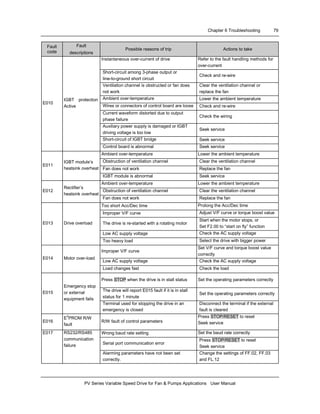
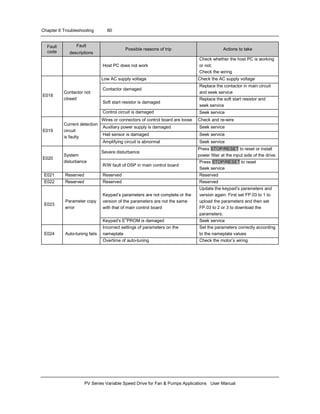
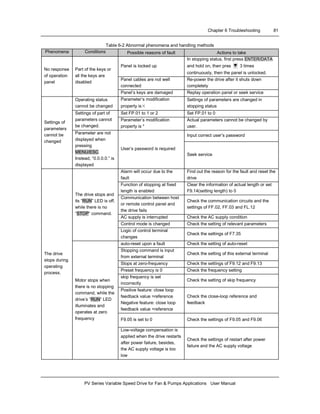
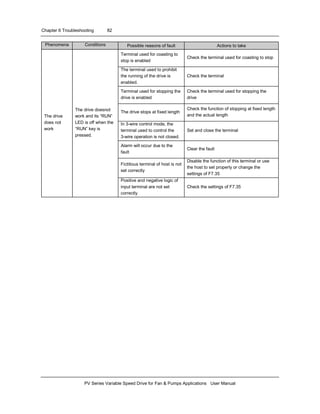
PV Series Variable Speed Drive
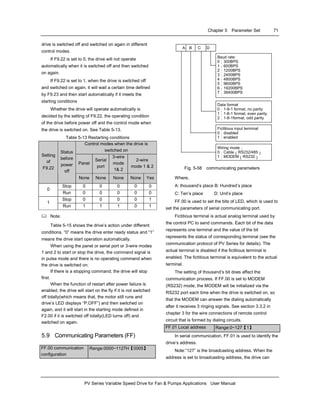
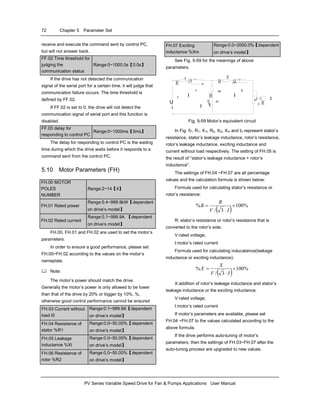
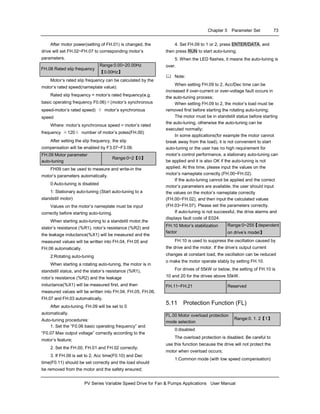
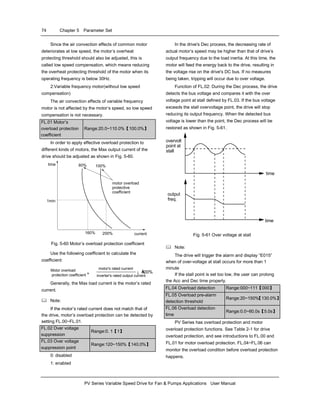
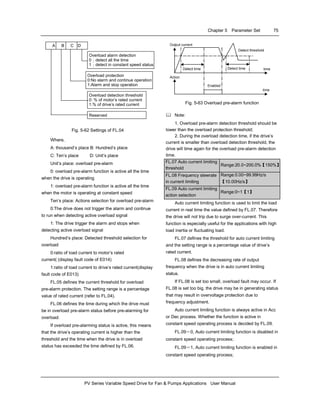
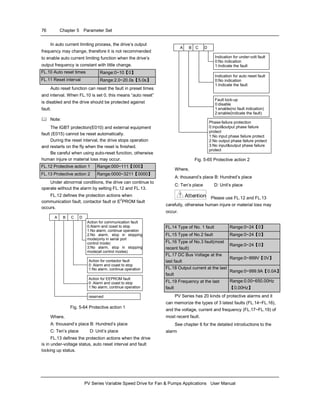
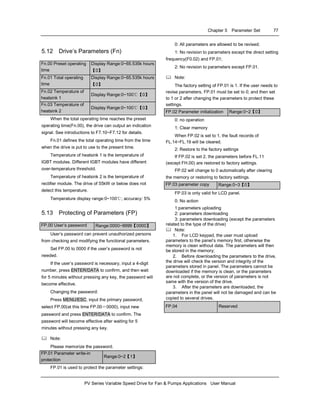
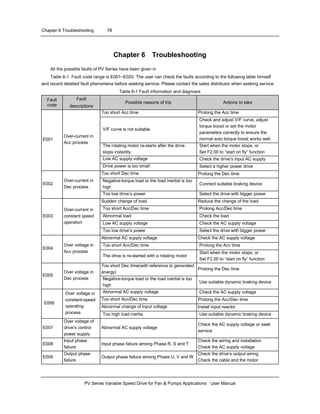
for Fan & Pumps Applications
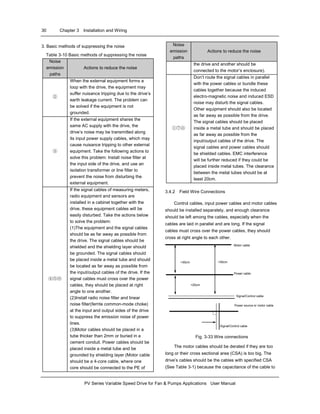
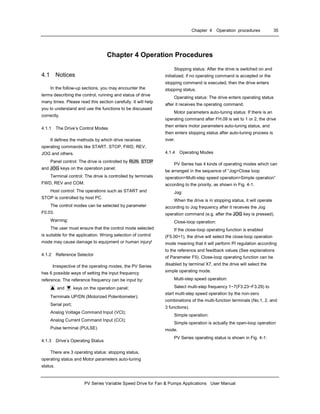
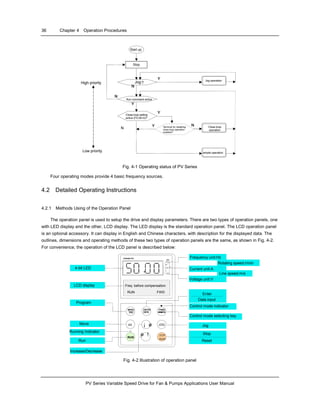
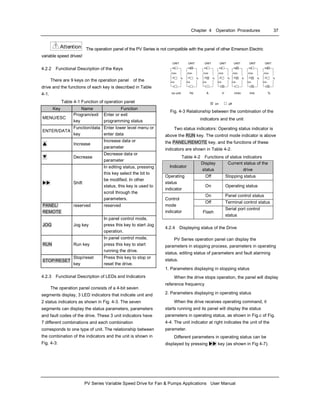
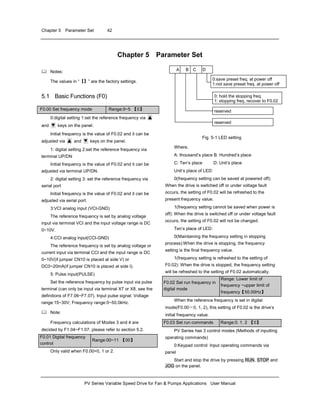
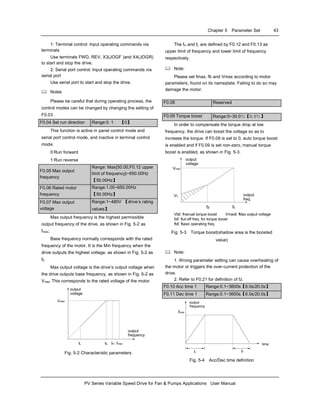
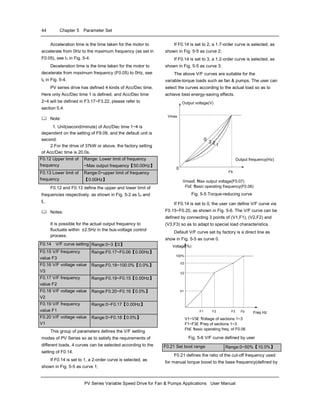
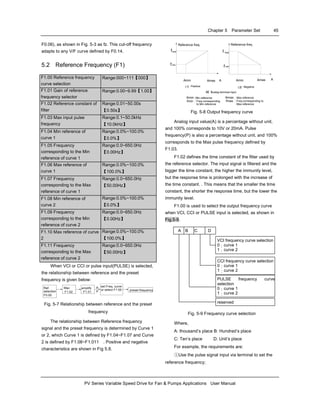
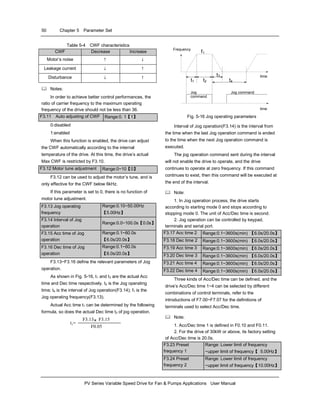
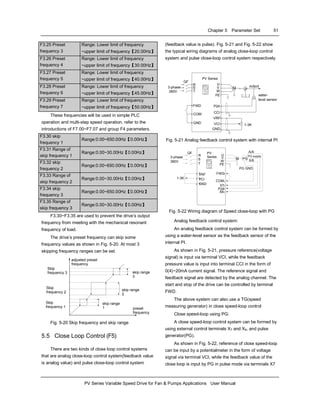
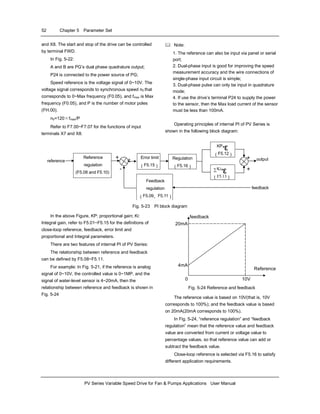
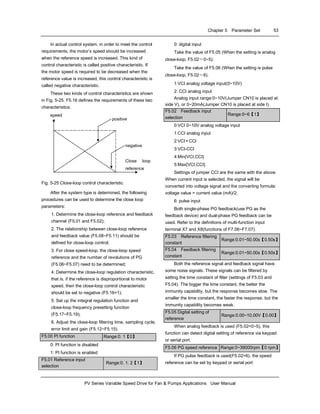
User Manual
E1-20031111-C-1.0 (BOM:31010945)
E m e r s o n I n d u s t r i a l A u t o m a t i o n
Contents
Preface................................................................................................................................................................................ 1
Unpacking and Inspection............................................................................................................................................ 1
Ordering Information .................................................................................................................................................... 1
Chapter 1 Safety Information............................................................................................................................................ 2
1.1 Danger and Warning Definitions.......................................................................................................................... 2
1.2 Notes for Installations .......................................................................................................................................... 2
1.3 Notes for Using PV Drive..................................................................................................................................... 2
1.3.1 About Motor and Load .................................................................................................................................. 2
1.3.2 About Variable Speed Drive.......................................................................................................................... 3
1.4 Attentions in Disposing Unwanted Drive.............................................................................................................. 4
Chapter 2 Product Information.......................................................................................................................................... 5
2.1 Specifications ...................................................................................................................................................... 5
2.2 Product Series..................................................................................................................................................... 6
2.2.1 Ratings.......................................................................................................................................................... 6
2.2.2 Parts of Variable Speed Drive....................................................................................................................... 7
2.2.3 Outline and Gross Weight............................................................................................................................. 7
2.3 Optional parts .................................................................................................................................................... 11
2.3.1 LCD Keypad................................................................................................................................................ 11
2.3.2 Braking Kits................................................................................................................................................. 11
2.3.3 Communication Parts.................................................................................................................................. 12
Chapter 3 Installation and Wiring.................................................................................................................................... 14
3.1 Installation Environment .................................................................................................................................... 14
3.2 Removing and Mounting of Parts ...................................................................................................................... 14
3.2.1 Removing and Installation of Operation Panel............................................................................................ 14
3.2.2 Removing and Mounting of Cover............................................................................................................... 15
3.3 Wire connections of Drive.................................................................................................................................. 15
3.3.1 Wire Connections of Main Terminals .......................................................................................................... 16
3.3.2 Wire Connections of Control Circuit............................................................................................................ 20
3.4 Installation Methods Compliant With EMC Requirements.................................................................................... 29
3.4.1 Noise Suppressing...................................................................................................................................... 29
3.4.2 Field Wire Connections............................................................................................................................... 30
3.4.3 Earthing....................................................................................................................................................... 31
3.4.4 Installation Requirements of Relay, Contactor and Electro-magnetic Braking Kit....................................... 32
3.4.5 Leakage Current ......................................................................................................................................... 32
3.4.6 Correct EMC Installation ............................................................................................................................. 32
3.4.7 Applications of Power Filter......................................................................................................................... 33
3.4.8 EMI of The Drive......................................................................................................................................... 34
Chapter 4 Operation Procedures ...................................................................................................................................... 35
4.1 Notices .............................................................................................................................................................. 35
4.1.1 The Drive’s Control Modes.......................................................................................................................... 35
4.1.2 Reference Selector ..................................................................................................................................... 35
4.1.3 Drive’s Operating Status ............................................................................................................................. 35
4.1.4 Operating Modes ........................................................................................................................................ 35
4.2 Detailed Operating Instructions ......................................................................................................................... 36
4.2.1 Methods Using of the Operation Panel ....................................................................................................... 36
4.2.2 Functional Description of the Keys.............................................................................................................. 37
4.2.3 Functional Description of LEDs and Indicators ........................................................................................... 37
4.2.4 Displaying status of the Drive...................................................................................................................... 37
4.2.5 Operating Methods of Panel ....................................................................................................................... 38
4.3 Start-up.............................................................................................................................................................. 40
4.3.1 Checking Before Start-up............................................................................................................................ 40
4.3.2 Startup the Drive for the First Time............................................................................................................. 40
Chapter 5 Parameter Set................................................................................................................................................ 42
5.1 Basic Functions (F0)............................................................................................................................................ 42
5.2 Reference Frequency (F1) ................................................................................................................................ 45
5.3 Start and Stop Parameters (F2)......................................................................................................................... 46
5.4 Auxiliary Running Parameters (F3).................................................................................................................... 48
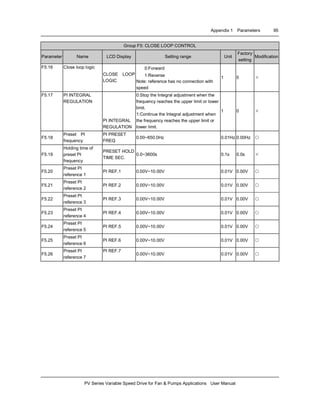
5.5 Close Loop Control (F5)...................................................................................................................................... 51
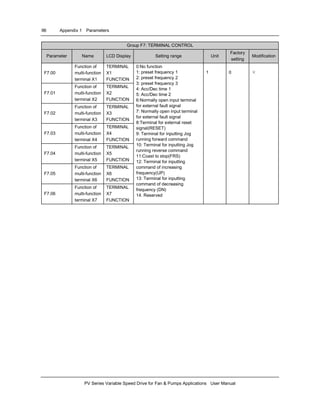
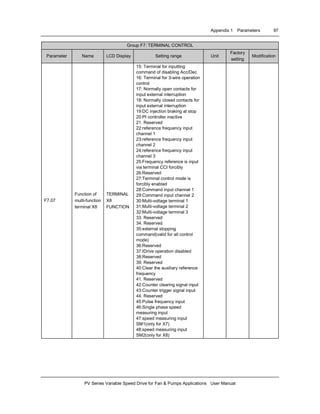
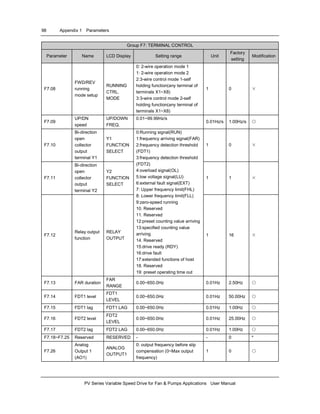
5.6 Terminal Control (F7) ........................................................................................................................................ 55
5.7 Display of Parameters (F8)................................................................................................................................ 63
5.8 Enhanced Function Parameter (F9)................................................................................................................... 65
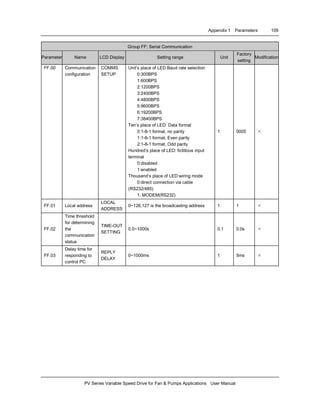
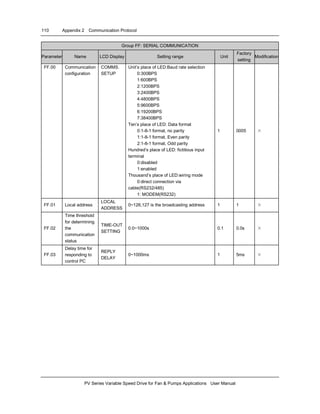
5.9 Communicating Parameters (FF)............................................................................................................................ 71
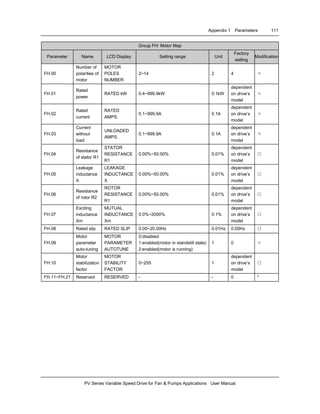
5.10 Motor Parameters (FH).................................................................................................................................... 72
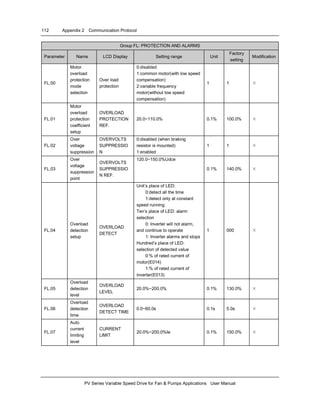
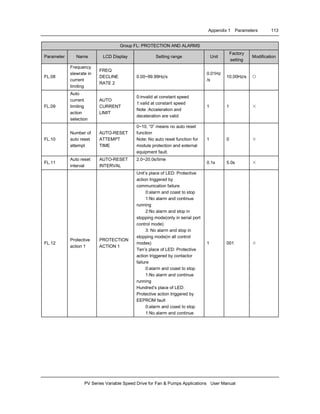
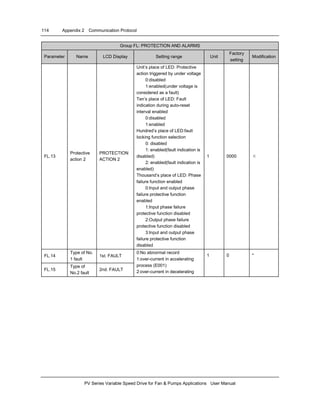
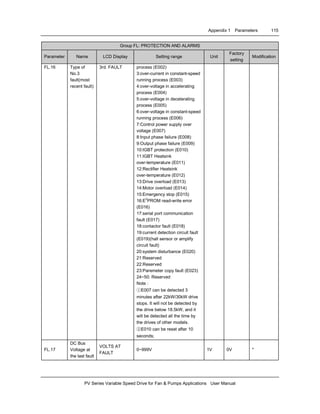
5.11 Protection Function (FL).................................................................................................................................. 73
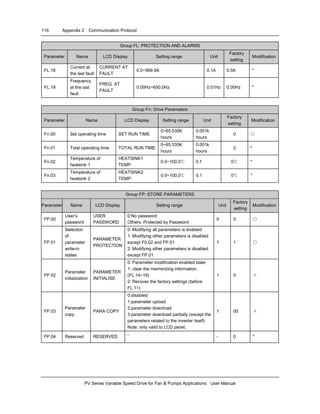
5.12 Drive’s Parameters (Fn) .................................................................................................................................. 77
5.13 Protecting of Parameters (FP)......................................................................................................................... 77
Chapter 6 Troubleshooting ............................................................................................................................................. 78
Chapter 7 Maintenance .................................................................................................................................................. 83
7.1 Daily Maintenance............................................................................................................................................. 83
7.2 Periodic Maintenance ........................................................................................................................................ 83
7.3 Replacing Wearing Parts................................................................................................................................... 84
7.4 Storage.............................................................................................................................................................. 85
7.5 Warranty............................................................................................................................................................ 85
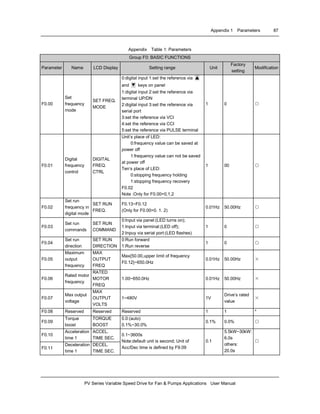
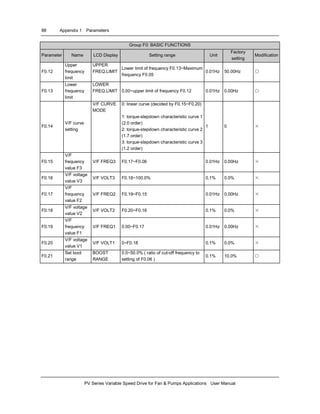
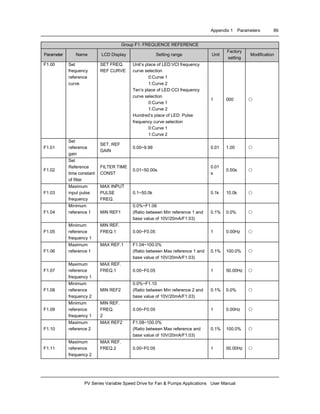
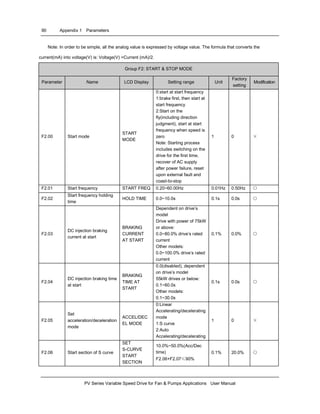
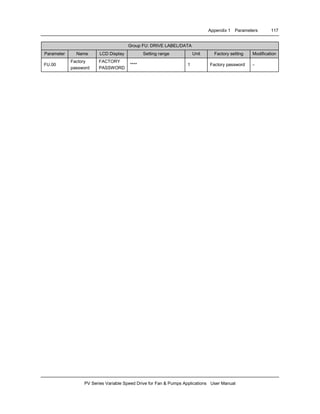
Appendix 1 Parameters .................................................................................................................................................. 86
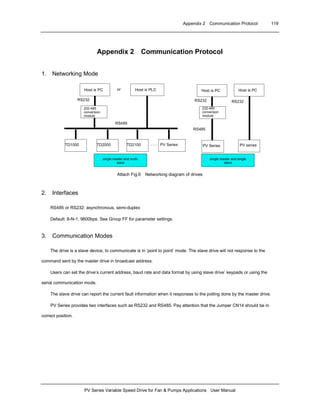
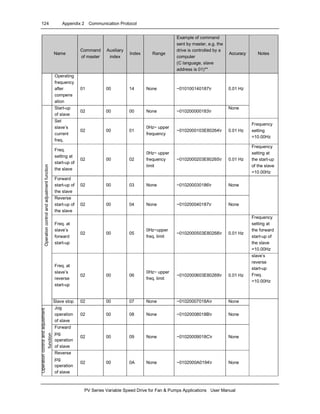
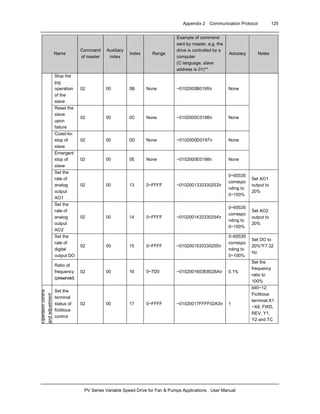
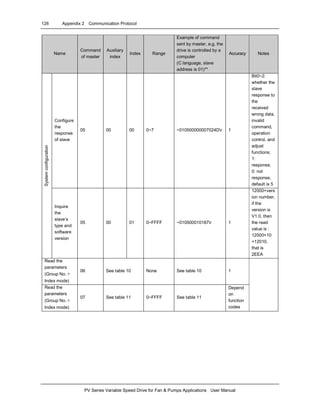
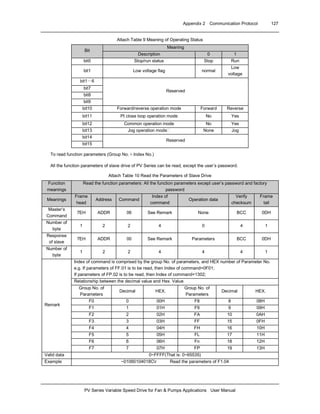
Appendix 2 Communication Protocol............................................................................................................................ 119
1. Networking Mode............................................................................................................................................... 119
2. Interfaces........................................................................................................................................................... 119
3. Communication Modes...................................................................................................................................... 119
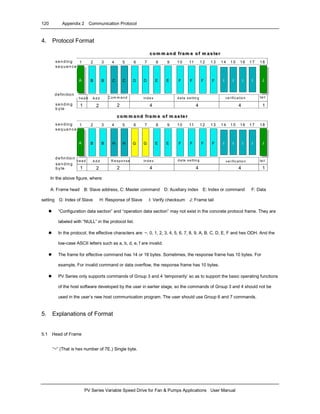
4. Protocol Format................................................................................................................................................. 120
5. Explanations of Format...................................................................................................................................... 120
5.1 Head of Frame............................................................................................................................................. 120
5.2 Address of Slave Drive ................................................................................................................................ 121
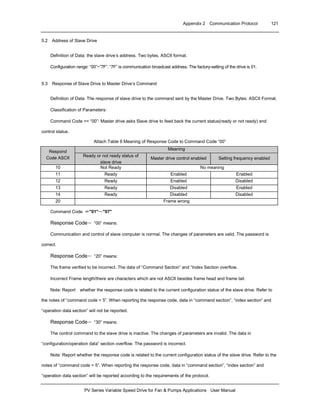
5.3 Response of Slave Drive to Master Drive’s Command ................................................................................ 121
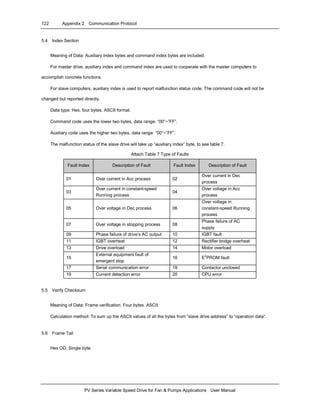
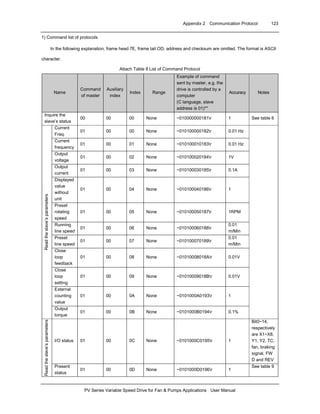
5.4 Index Section ............................................................................................................................................... 122
5.5 Verify Checksum.......................................................................................................................................... 122
5.6 Frame Tail.................................................................................................................................................... 122
Preface 1
Preface
Thank you for using PV Series variable speed drive
made by Emerson Network Power Co., Ltd..
PV Series satisfies high performance requirements
by using a unique control method to achieve high torque,
high accuracy and wide speed-adjusting range. Its
anti-tripping function and capabilities of adapting to
severe power network, temperature, humidity and dusty
environment exceed those of similar product made by
other companies, which improves the product’s reliability
noticeably;
PV Series can satisfy the customers’ requirements
on low noise and EMI by using optimized PWM
technology and EMC design.
This manual provides information on installation,
wiring, parameter setting, trouble-shooting, and routine
maintenance. In order to ensure the correct installation
and operation of the drive, please read this manual
carefully before using and keep it in a safe place.
Unpacking and Inspection
Upon unpacking, please check for:
Any damage occurred during transportation;
Check whether the rated values on the nameplate of
the drive are in accordance with your order.
Our product is manufactured and packed at factory
with great care. If there is any error, please contact any of
our distributors or us.
The user manual is subjected to change without
notifying the customers due to the continuous process of
product improvements.
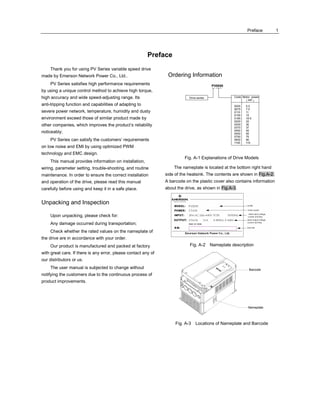
Ordering Information
PV0055
Drive series Code Motor power
(kW)
0055 5.5
0075 7.5
0110 11
0150 15
0185 18.5
0220 22
0300 30
0370 37
0450 45
0550 55
0750 75
0900 90
1100 110
Fig. A-1 Explanations of Drive Models
The nameplate is located at the bottom right hand
side of the heatsink. The contents are shown in Fig.A-2.
A barcode on the plastic cover also contains information
about the drive, as shown in Fig.A-3.
Fig. A-2 Nameplate description
Barcode
Nameplate
Fig. A-3 Locations of Nameplate and Barcode
2 Chapter 1 Safety Information
PV Series Variable Speed Drive for Fan & Pumps Applications User Manual
Chapter 1 Safety Information
1.1 Danger and Warning Definitions
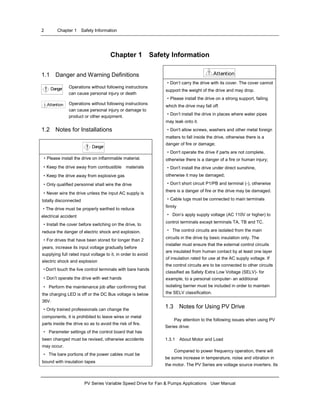
Danger! Operations without following instructions
can cause personal injury or death
Attention! Operations without following instructions
can cause personal injury or damage to
product or other equipment.
1.2 Notes for Installations
Danger!
·Please install the drive on inflammable material.
·Keep the drive away from combustible materials
·Keep the drive away from explosive gas
·Only qualified personnel shall wire the drive
·Never wire the drive unless the input AC supply is
totally disconnected
·The drive must be properly earthed to reduce
electrical accident
·Install the cover before switching on the drive, to
reduce the danger of electric shock and explosion.
·For drives that have been stored for longer than 2
years, increase its input voltage gradually before
supplying full rated input voltage to it, in order to avoid
electric shock and explosion
·Don't touch the live control terminals with bare hands
·Don’t operate the drive with wet hands
· Perform the maintenance job after confirming that
the charging LED is off or the DC Bus voltage is below
36V.
·Only trained professionals can change the
components, it is prohibited to leave wires or metal
parts inside the drive so as to avoid the risk of fire.
· Parameter settings of the control board that has
been changed must be revised, otherwise accidents
may occur.
· The bare portions of the power cables must be
bound with insulation tapes
Attention!
·Don’t carry the drive with its cover. The cover cannot
support the weight of the drive and may drop.
·Please install the drive on a strong support, failing
which the drive may fall off.
·Don’t install the drive in places where water pipes
may leak onto it.
·Don't allow screws, washers and other metal foreign
matters to fall inside the drive, otherwise there is a
danger of fire or damage;
·Don't operate the drive if parts are not complete,
otherwise there is a danger of a fire or human injury;
·Don't install the drive under direct sunshine,
otherwise it may be damaged;
·Don’t short circuit P1/PB and terminal (-), otherwise
there is a danger of fire or the drive may be damaged.
·Cable lugs must be connected to main terminals
firmly
· Don’s apply supply voltage (AC 110V or higher) to
control terminals except terminals TA, TB and TC.
· The control circuits are isolated from the main
circuits in the drive by basic insulation only. The
installer must ensure that the external control circuits
are insulated from human contact by at least one layer
of insulation rated for use at the AC supply voltage. If
the control circuits are to be connected to other circuits
classified as Safety Extra Low Voltage (SELV)- for
example, to a personal computer- an additional
isolating barrier must be included in order to maintain
the SELV classification.
1.3 Notes for Using PV Drive
Pay attention to the following issues when using PV
Series drive:
1.3.1 About Motor and Load
Compared to power frequency operation, there will
be some increase in temperature, noise and vibration in
the motor. The PV Series are voltage source inverters. Its
Chapter 1 Safety Information 3
PV Series Variable Speed Drive for Fan & Pumps Applications User Manual
output voltage is PWM wave. Being non-sinuosoidal,
there will be some harmonics.
Low Speed Rotating with Constant Torque
When a standard motor is driven at low speed for a
long time, there will be insufficient cooling for a self-
ventilated motor. Overheating can result in insulation
damaged. Special variable frequency motor is
recommended for constant torque operation at low
speed.
Motor’s over-temperature protecting threshold
The drive can protect the motor from
over-temperature. If the ratings of the driven motor are
not in compliance with the drive, be sure to adjust the
protective threshold to ensure the motor is properly
protected.
Operate above 50Hz
When running the motor above 50Hz, there will be
increase in vibration and noise. The rate at which the
torque is available from the motor is inversely
proportionally to its increase in running speed. Ensure
that the motor can still provide sufficient torque to the
load.
Lubrication of mechanical devices
Over time, the lubricants in mechanical devices, such
as gear box, geared motor, etc. when running at low
speed, will deteriorate. Frequent maintenance is
recommended.
Braking Torque
Braking torque is developed in the machine when the
drive is hoisting a load down. The drive will trip when it
cannot cope with dissipating the regenerative energy of
the load. Therefore, a braking unit with proper parameters
setting in the drive is required.
The mechanical resonance point of load
The drive system may encounter mechanical
resonance with the load when operating within certain
band of output frequency. Skip frequencies have be set to
avoid it.
Frequent start and stop application
The drive should be started and stopped via its
control terminals. It is prohibited to start and stop the
drive directly through input line contactors, which may
damage the drive with frequent operations.
Insulation of Motors
Before using the drive, the insulation of the motors
must be checked, especially, if it is used for the first time
or if it has been stored for a long time. This is to reduce
the risk of the Drive from being damaged by the poor
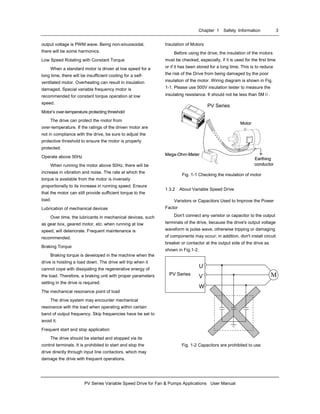
insulation of the motor. Wiring diagram is shown in Fig.
1-1. Please use 500V insulation tester to measure the
insulating resistance. It should not be less than 5MΩ.
PV Series
Motor
Mega-Ohm-Meter
Earthing
conductor
PV Series
Motor
Mega-Ohm-Meter
Earthing
conductor
Motor
Mega-Ohm-Meter
Earthing
conductor
PV Series
Fig. 1-1 Checking the insulation of motor
1.3.2 About Variable Speed Drive
Varistors or Capacitors Used to Improve the Power
Factor
Don't connect any varistor or capacitor to the output
terminals of the drive, because the drive's output voltage
waveform is pulse wave, otherwise tripping or damaging
of components may occur; in addition, don't install circuit
breaker or contactor at the output side of the drive as
shown in Fig.1-2.
M
U
V
W
PV Sei r esPV Series
Fig. 1-2 Capacitors are prohibited to use.
4 Chapter 1 Safety Information
PV Series Variable Speed Drive for Fan & Pumps Applications User Manual
Circuit breakers connected to the output of the drive
If circuit breaker or contactor needs to be connected
between the drive and the motor, be sure to operate
these circuit breakers or contactor when the drive has no
output, to avoid damaging of the drive.
Using outside the range of rated voltage
The drive is not suitable to be used out of the
specified range of operation voltage. If needed, please
use suitable voltage regulation device.
Change from 3-phase to 2-phase
It is not recommended to change the drive from
3-phase input to 2-phase input. If it is necessary to use
on two phases, the phase-loss protection function of the
drive should be disabled. The Drive must be derated for
this operation. For motors at which power is above 30kW,
if it is changed into 2-phase input, then the input phases
must be at phase R and phase T, or else the drive will not
work.
After the 3-phase input is changed into 2-phase input,
bus-voltage and current ripple may increase, which not
only influences the life of electrolytic capacitor but it also
deteriorates the performance of the drive. The drive’s
operating current should be derated and should not
exceed 67% of rated value.
Protection against lightning strike
There are transient surge suppressors inside the
Drive which protects it against lighting strike.
Derating due to Altitude
Derating must be considered when the drive is
installed at high altitude, greater than 1000m. This is
because the cooling effect of Drive is deteriorated due to
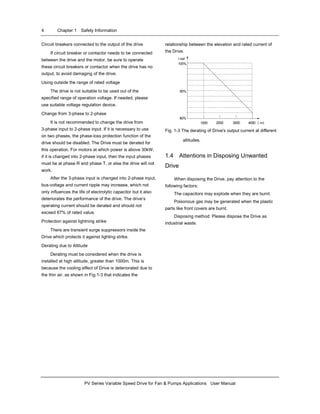
the thin air, as shown in Fig.1-3 that indicates the
relationship between the elevation and rated current of
the Drive.
100%
90%
80%
1000 400030002000 (m)
I out
Fig. 1-3 The derating of Drive's output current at different
altitudes.
1.4 Attentions in Disposing Unwanted
Drive
When disposing the Drive, pay attention to the
following factors:
The capacitors may explode when they are burnt.
Poisonous gas may be generated when the plastic
parts like front covers are burnt.
Disposing method: Please dispose the Drive as
industrial waste.
Chapter 2 Product Introduction 5
PV Series Variable Speed Drive for Fan & Pumps Applications User Manual
Chapter 2 Product Information
2.1 Specifications
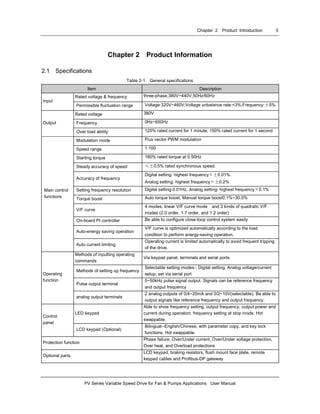
Table 2-1 General specifications
Item Description
Rated voltage & frequency three-phase,380V~440V;50Hz/60Hz
Input
Permissible fluctuation range Voltage:320V~460V;Voltage unbalance rate:<3%;Frequency:±5%
Rated voltage 380V
Frequency 0Hz~650HzOutput
Over load ability 120% rated current for 1 minute; 150% rated current for 1 second
Modulation mode Flux vector PWM modulation
Speed range 1:100
Starting torque 180% rated torque at 0.50Hz
Steady accuracy of speed ≤±0.5% rated synchronous speed
Accuracy of frequency
Digital setting: highest frequency×±0.01%.
Analog setting: highest frequency×±0.2%
Setting frequency resolution Digital setting:0.01Hz. Analog setting: highest frequency×0.1%
Torque boost Auto torque boost, Manual torque boost0.1%~30.0%
V/F curve
4 modes: linear V/F curve mode and 3 kinds of quadratic V/F
modes (2.0 order, 1.7 order, and 1.2 order)
On-board PI controller Be able to configure close-loop control system easily
Auto-energy saving operation
V/F curve is optimized automatically according to the load
condition to perform energy-saving operation.
Main control
functions
Auto current limiting
Operating current is limited automatically to avoid frequent tripping
of the drive.
Methods of inputting operating
commands
Via keypad panel, terminals and serial ports.
Methods of setting up frequency
Selectable setting modes:- Digital setting; Analog voltage/current
setup; set via serial port
Pulse output terminal
0~50kHz pulse signal output. Signals can be reference frequency
and output frequency
Operating
function
analog output terminals
2 analog outputs of 0/4~20mA and 0/2~10V(selectable). Be able to
output signals like reference frequency and output frequency.
LED keypad
Able to show frequency setting, output frequency, output power and
current during operation; frequency setting at stop mode. Hot
swappable.
Control
panel
LCD keypad (Optional)
Bilingual--English/Chinese, with parameter copy, and key lock
functions. Hot swappable.
Protection function
Phase failure, Over/Under current, Over/Under voltage protection,
Over heat, and Overload protections
Optional parts
LCD keypad, braking resistors, flush mount face plate, remote
keypad cables and Profibus-DP gateway
6 Chapter 2 Product Introduction
PV Series Variable Speed Drive for Fan & Pumps Applications User Manual
Item Description
Operating environment
In-door, free from moisture, and contaminants such as electrically
conductive material.
Altitude Less than 1000m
Ambient temperature -10℃~+40℃( derating is required from 40℃ to 50℃)
Humidity Less than 95%RH, without condensation
Vibration Less than 5.9m/s2
(0.6g)
Environment
Storage temperature -40℃~+70℃
Protection level IP20
Enclosure
Cooling Fan cooling
2.2 Product Series
2.2.1 Ratings
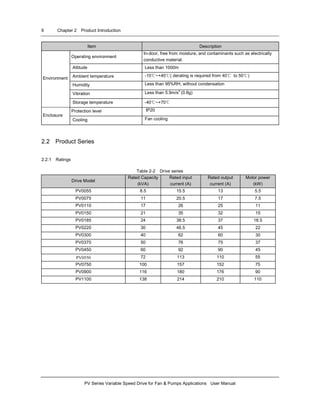
Table 2-2 Drive series
Drive Model
Rated Capacity
(kVA)
Rated input
current (A)
Rated output
current (A)
Motor power
(kW)
PV0055 8.5 15.5 13 5.5
PV0075 11 20.5 17 7.5
PV0110 17 26 25 11
PV0150 21 35 32 15
PV0185 24 38.5 37 18.5
PV0220 30 46.5 45 22
PV0300 40 62 60 30
PV0370 50 76 75 37
PV0450 60 92 90 45
PV0550 72 113 110 55
PV0750 100 157 152 75
PV0900 116 180 176 90
PV1100 138 214 210 110
Chapter 2 Product Introduction 7
PV Series Variable Speed Drive for Fan & Pumps Applications User Manual
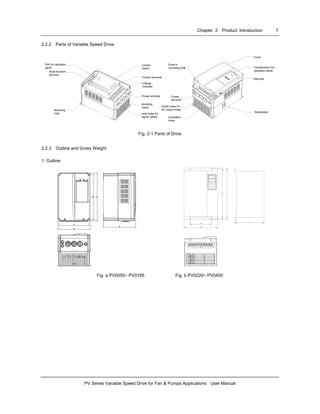
2.2.2 Parts of Variable Speed Drive
Port for operation
panel
Multi-function
terminal
Control
board
Control terminal
Charge
indicator
Power terminal
shielding
board
Inlet holes for
signal cables
Cover's
mounting hole
Power
terminal
Outlet holes for
AC output holes
Ventilation
holes
Cover
Compartment for
operation panel
Barcode
Nameplate
Mounting
hole
Fig. 2-1 Parts of Drive
2.2.3 Outline and Gross Weight
1. Outline
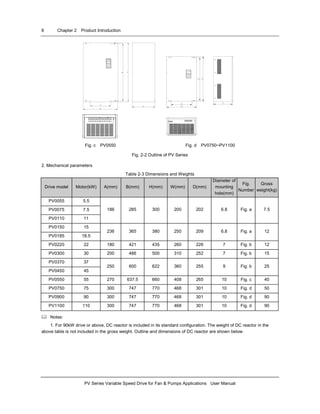
Fig. a PV0055~ PV0185 Fig. b PV0220~ PV0450
8 Chapter 2 Product Introduction
PV Series Variable Speed Drive for Fan & Pumps Applications User Manual
Fig. c PV0550 Fig. d PV0750~PV1100
Fig. 2-2 Outline of PV Series
2. Mechanical parameters
Table 2-3 Dimensions and Weights
Drive model Motor(kW) A(mm) B(mm) H(mm) W(mm) D(mm)
Diameter of
mounting
hole(mm)
Fig.
Number
Gross
weight(kg)
PV0055 5.5
PV0075 7.5
PV0110 11
186 285 300 200 202 6.8 Fig. a 7.5
PV0150 15
PV0185 18.5
236 365 380 250 209 6.8 Fig. a 12
PV0220 22 180 421 435 260 226 7 Fig. b 12
PV0300 30 200 486 500 310 252 7 Fig. b 15
PV0370 37
PV0450 45
250 600 622 360 255 9 Fig. b 25
PV0550 55 270 637.5 660 408 265 10 Fig. c 40
PV0750 75 300 747 770 468 301 10 Fig. d 50
PV0900 90 300 747 770 468 301 10 Fig. d 90
PV1100 110 300 747 770 468 301 10 Fig. d 90
Notes:
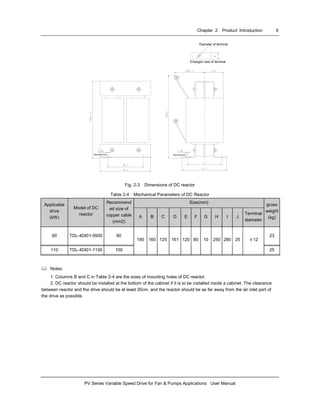
1. For 90kW drive or above, DC reactor is included in its standard configuration. The weight of DC reactor in the
above table is not included in the gross weight. Outline and dimensions of DC reactor are shown below.
Chapter 2 Product Introduction 9
PV Series Variable Speed Drive for Fan & Pumps Applications User Manual
Diameter of terminal
Enlarged view of terminal
Mounting holeMounting hole
Fig. 2-3 Dimensions of DC reactor
Table 2-4 Mechanical Parameters of DC Reactor
Size(mm)
Applicable
drive
(kW)
Model of DC
reactor
Recommend
ed size of
copper cable
(mm2)
A B C D E F G H I J
Terminal
diameter
gross
weight
(kg)
90 TDL-4DI01-0900 60 23
110 TDL-4DI01-1100 100
190 160 125 161 120 80 10 250 280 25 φ12
25
Notes:
1. Columns B and C in Table 2-4 are the sizes of mounting holes of DC reactor.
2. DC reactor should be installed at the bottom of the cabinet if it is to be installed inside a cabinet. The clearance
between reactor and the drive should be at least 35cm, and the reactor should be as far away from the air inlet port of
the drive as possible.
10 Chapter 2 Product Introduction
PV Series Variable Speed Drive for Fan & Pumps Applications User Manual
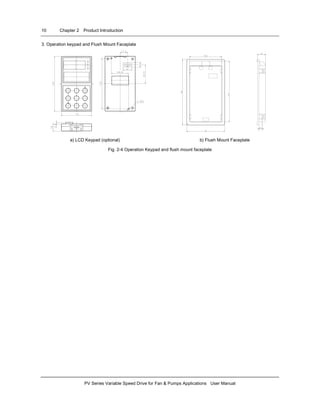
3. Operation keypad and Flush Mount Faceplate
a) LCD Keypad (optional) b) Flush Mount Faceplate
Fig. 2-4 Operation Keypad and flush mount faceplate
Chapter 2 Product Introduction 11
PV Series Variable Speed Drive for Fan & Pumps Applications User Manual
2.3 Optional parts
All the optional parts are given below, make
additional orders if needed.
2.3.1 LCD Keypad
Model:TDP-LCD03
Language: English, Chinese (optional)
LCD keypad can perform fast parameter copy.
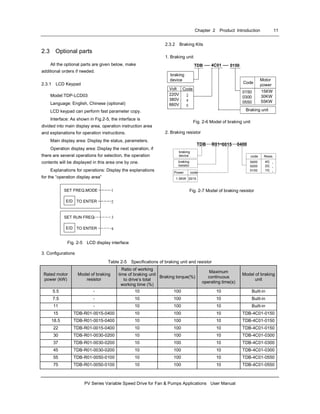
Interface: As shown in Fig.2-5, the interface is
divided into main display area, operation instruction area
and explanations for operation instructions.
Main display area: Display the status, parameters.
Operation display area: Display the next operation, if
there are several operations for selection, the operation
contents will be displayed in this area one by one.
Explanations for operations: Display the explanations
for the “operation display area”
SET FREQ.MODE
E/D TO ENTER
Para
1
2
SET RUN FREQ.
E/D TO ENTER
3
4
Fig. 2-5 LCD display interface
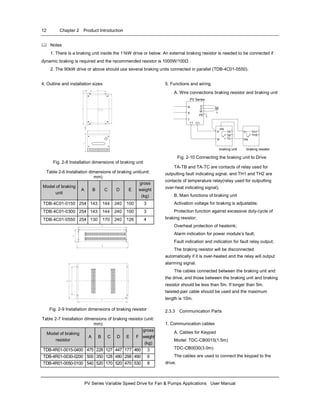
2.3.2 Braking Kits
1. Braking unit
Braking unit
braking
device
Volt Code
220V
380V
660V
Motor
power
0150
0300
0550
15KW
30KW
55KW
Code
0150TDB 4C01
Fig. 2-6 Model of braking unit
2. Braking resistor
TDB R01 0400
braking
device
braking
resistor
Resis.code
0400
0200
0100
Power
0015
40¦ ¸
20¦ ¸
10¦ ¸
-
code
1.5KW 0015
Fig. 2-7 Model of braking resistor
3. Configurations
Table 2-5 Specifications of braking unit and resistor
Rated motor
power (kW)
Model of braking
resistor
Ratio of working
time of braking unit
to drive’s total
working time (%)
Braking torque(%)
Maximum
continuous
operating time(s)
Model of braking
unit
5.5 - 10 100 10 Built-in
7.5 - 10 100 10 Built-in
11 - 10 100 10 Built-in
15 TDB-R01-0015-0400 10 100 10 TDB-4C01-0150
18.5 TDB-R01-0015-0400 10 100 10 TDB-4C01-0150
22 TDB-R01-0015-0400 10 100 10 TDB-4C01-0150
30 TDB-R01-0030-0200 10 100 10 TDB-4C01-0300
37 TDB-R01-0030-0200 10 100 10 TDB-4C01-0300
45 TDB-R01-0030-0200 10 100 10 TDB-4C01-0300
55 TDB-R01-0050-0100 10 100 10 TDB-4C01-0550
75 TDB-R01-0050-0100 10 100 10 TDB-4C01-0550
12 Chapter 2 Product Introduction
PV Series Variable Speed Drive for Fan & Pumps Applications User Manual
Notes
1. There is a braking unit inside the 11kW drive or below. An external braking resistor is needed to be connected if
dynamic braking is required and the recommended resistor is 1000W/100Ω .
2. The 90kW drive or above should use several braking units connected in parallel (TDB-4C01-0550).
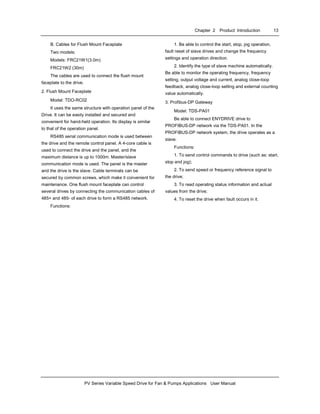
4. Outline and installation sizes
Fig. 2-8 Installation dimensions of braking unit
Table 2-6 Installation dimensions of braking unit(unit:
mm)
Model of braking
unit
A B C D E
gross
weight
(kg)
TDB-4C01-0150 254 143 144 240 100 3
TDB-4C01-0300 254 143 144 240 100 3
TDB-4C01-0550 254 130 170 240 126 4
Fig. 2-9 Installation dimensions of braking resistor
Table 2-7 Installation dimensions of braking resistor (unit:
mm)
Model of braking
resistor
A B C D E F
gross
weight
(kg)
TDB-4R01-0015-0400 475 228 127 447 177 460 3
TDB-4R01-0030-0200 500 350 128 480 298 490 6
TDB-4R01-0050-0100 540 520 170 520 470 530 8
5. Functions and wiring
A. Wire connections braking resistor and braking unit
MR
S
T
U
V
W
PE
(-) (+)
PR
P
N
TA
TB
TC
P
PR
TH1
TH2
braking unit braking resistor
PV Series
Fig. 2-10 Connecting the braking unit to Drive
TA-TB and TA-TC are contacts of relay used for
outputting fault indicating signal, and TH1 and TH2 are
contacts of temperature relay(relay used for outputting
over-heat indicating signal).
B. Main functions of braking unit
Activation voltage for braking is adjustable;
Protection function against excessive duty-cycle of
braking resistor;
Overheat protection of heatsink;
Alarm indication for power module’s fault;
Fault indication and indication for fault relay output;
The braking resistor will be disconnected
automatically if it is over-heated and the relay will output
alarming signal.
The cables connected between the braking unit and
the drive, and those between the braking unit and braking
resistor should be less than 5m. If longer than 5m,
twisted-pair cable should be used and the maximum
length is 10m.
2.3.3 Communication Parts
1. Communication cables
A. Cables for Keypad
Model: TDC-CB0015(1.5m)
TDC-CB0030(3.0m)
The cables are used to connect the keypad to the
drive.
Chapter 2 Product Introduction 13
PV Series Variable Speed Drive for Fan & Pumps Applications User Manual
B. Cables for Flush Mount Faceplate
Two models:
Models: FRC21W1(3.0m)
FRC21W2 (30m)
The cables are used to connect the flush mount
faceplate to the drive.
2. Flush Mount Faceplate
Model: TDO-RC02
It uses the same structure with operation panel of the
Drive. It can be easily installed and secured and
convenient for hand-held operation. Its display is similar
to that of the operation panel.
RS485 serial communication mode is used between
the drive and the remote control panel. A 4-core cable is
used to connect the drive and the panel, and the
maximum distance is up to 1000m. Master/slave
communication mode is used. The panel is the master
and the drive is the slave. Cable terminals can be
secured by common screws, which make it convenient for
maintenance. One flush mount faceplate can control
several drives by connecting the communication cables of
485+ and 485- of each drive to form a RS485 network.
Functions:
1. Be able to control the start, stop, jog operation,
fault reset of slave drives and change the frequency
settings and operation direction.
2. Identify the type of slave machine automatically.
Be able to monitor the operating frequency, frequency
setting, output voltage and current, analog close-loop
feedback, analog close-loop setting and external counting
value automatically.
3. Profibus-DP Gateway
Model: TDS-PA01
Be able to connect ENYDRIVE drive to
PROFIBUS-DP network via the TDS-PA01. In the
PROFIBUS-DP network system, the drive operates as a
slave.
Functions:
1. To send control commands to drive (such as: start,
stop and jog);
2. To send speed or frequency reference signal to
the drive;
3. To read operating status information and actual
values from the drive;
4. To reset the drive when fault occurs in it.
14 Chapter 3 Installation and wiring
PV Series Variable Speed Drive for Fan & Pumps Applications User Manual
Chapter 3 Installation and Wiring
3.1 Installation Environment
Please mount the drive vertically inside a
well-ventilated location.
When selecting mounting environment, the following
issues should be taken into account:
Ambient temperature should be within the range of
-10℃~40 ℃. If the temperature is higher than 40 ℃, the
drive should be derating and forced ventilation is
required;
Humidity should be lower than 95% non-condensing
Mount in the location where vibration is less than
5.9m/ s
2
(0.6G);
Mount in the location free of direct sunlight, dust,
metal powder, corrosive gas or combustible gas.
If there are any special requirements for installation,
please contact us for clarifications.
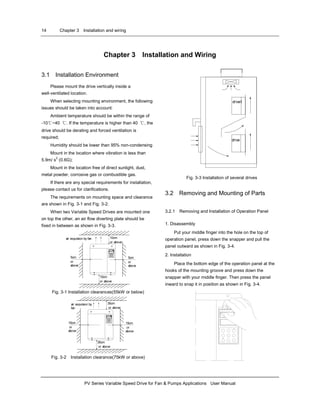
The requirements on mounting space and clearance
are shown in Fig. 3-1 and Fig. 3-2.
When two Variable Speed Drives are mounted one
on top the other, an air flow diverting plate should be
fixed in between as shown in Fig. 3-3.
10cm
or above
5cm
or
above
5cm
or
above
10cm
or above
air expulsion by fan
Fig. 3-1 Installation clearances(55kW or below)
35cm
or above
15cm
or
above
15cm
or
above
35cm
or above
air expulsion by
fan
Fig. 3-2 Installation clearance(75kW or above)
drive1
drive
Fig. 3-3 Installation of several drives
3.2 Removing and Mounting of Parts
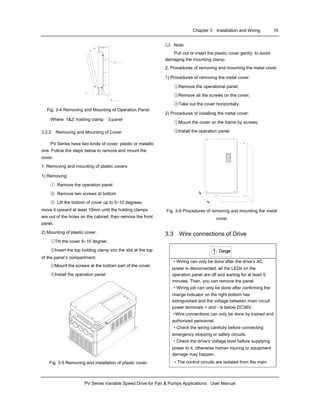
3.2.1 Removing and Installation of Operation Panel
1. Disassembly
Put your middle finger into the hole on the top of
operation panel, press down the snapper and pull the
panel outward as shown in Fig. 3-4.
2. Installation
Place the bottom edge of the operation panel at the
hooks of the mounting groove and press down the
snapper with your middle finger. Then press the panel
inward to snap it in position as shown in Fig. 3-4.
Chapter 3 Installation and Wiring 15
PV Series Variable Speed Drive for Fan & Pumps Applications User Manual
3
2
1
Fig. 3-4 Removing and Mounting of Operation Panel
Where: 1&2: holding clamp 3:panel
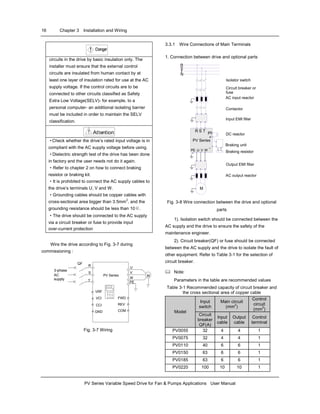
3.2.2 Removing and Mounting of Cover
PV Series have two kinds of cover, plastic or metallic
one. Follow the steps below to remove and mount the
cover.
1. Removing and mounting of plastic covers
1) Removing:
① Remove the operation panel
② Remove two screws at bottom
③ Lift the bottom of cover up to 5~10 degrees,
move it upward at least 10mm until the holding clamps
are out of the holes on the cabinet, then remove the front
panel.
2) Mounting of plastic cover:
①Tilt the cover 5~10 degree;
②Insert the top holding clamp into the slot at the top
of the panel’s compartment;
③Mount the screws at the bottom part of the cover;
④Install the operation panel
Fig. 3-5 Removing and installation of plastic cover
Note:
Pull out or insert the plastic cover gently, to avoid
damaging the mounting clamp.
2. Procedures of removing and mounting the metal cover
1) Procedures of removing the metal cover:
①Remove the operational panel;
②Remove all the screws on the cover;
③Take out the cover horizontally.
2) Procedures of installing the metal cover:
①Mount the cover on the frame by screws;
②Install the operation panel.
Fig. 3-6 Procedures of removing and mounting the metal
cover
3.3 Wire connections of Drive
Danger!
·Wiring can only be done after the drive’s AC
power is disconnected, all the LEDs on the
operation panel are off and waiting for at least 5
minutes. Then, you can remove the panel.
·Wiring job can only be done after confirming the
charge indicator on the right bottom has
extinguished and the voltage between main circuit
power terminals + and - is below DC36V.
·Wire connections can only be done by trained and
authorized personnel.
·Check the wiring carefully before connecting
emergency stopping or safety circuits.
·Check the drive’s voltage level before supplying
power to it, otherwise human injuring or equipment
damage may happen.
·The control circuits are isolated from the main
16 Chapter 3 Installation and Wiring
PV Series Variable Speed Drive for Fan & Pumps Applications User Manual
Danger!
circuits in the drive by basic insulation only. The
installer must ensure that the external control
circuits are insulated from human contact by at
least one layer of insulation rated for use at the AC
supply voltage. If the control circuits are to be
connected to other circuits classified as Safety
Extra Low Voltage(SELV)- for example, to a
personal computer- an additional isolating barrier
must be included in order to maintain the SELV
classification.
Attention!
·Check whether the drive’s rated input voltage is in
compliant with the AC supply voltage before using.
·Dielectric strength test of the drive has been done
in factory and the user needs not do it again.
·Refer to chapter 2 on how to connect braking
resistor or braking kit.
·It is prohibited to connect the AC supply cables to
the drive’s terminals U, V and W.
·Grounding cables should be copper cables with
cross-sectional area bigger than 3.5mm2
, and the
grounding resistance should be less than 10Ω.
·The drive should be connected to the AC supply
via a circuit breaker or fuse to provide input
over-current protection
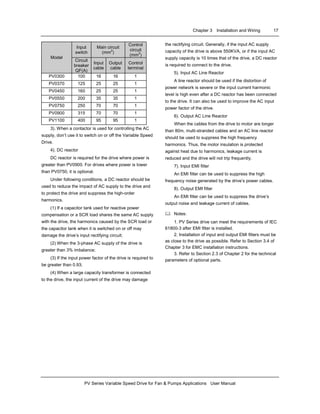
Wire the drive according to Fig. 3-7 during
commissioning :
PV Series
U
V
W
PE
M
R
S
T
3-phase
AC
supply
QF
VRF
VCI
GND
FWD
COM
.
.
.
.
.
.
CCI REV .
Fig. 3-7 Wiring
3.3.1 Wire Connections of Main Terminals
1. Connection between drive and optional parts
IM
AC input reactor
AC output reactor
Input EMI filter
Output EMI filter
Circuit breaker or
fuse
Contactor
DC reactor
PE U V W
PV Series
R S T
+
-
P1
Braking unit
Braking resistor
M
R
Isolator switch
N
S
T
Fig. 3-8 Wire connection between the drive and optional
parts
1). Isolation switch should be connected between the
AC supply and the drive to ensure the safety of the
maintenance engineer.
2). Circuit breaker(QF) or fuse should be connected
between the AC supply and the drive to isolate the fault of
other equipment. Refer to Table 3-1 for the selection of
circuit breaker.
Note:
Parameters in the table are recommended values
Table 3-1 Recommended capacity of circuit breaker and
the cross sectional area of copper cable
Input
switch
Main circuit
(mm
2
)
Control
circuit
(mm
2
)
Model
Circuit
breaker
QF(A)
Input
cable
Output
cable
Control
terminal
PV0055 32 4 4 1
PV0075 32 4 4 1
PV0110 40 6 6 1
PV0150 63 6 6 1
PV0185 63 6 6 1
PV0220 100 10 10 1
Chapter 3 Installation and Wiring 17
PV Series Variable Speed Drive for Fan & Pumps Applications User Manual
Input
switch
Main circuit
(mm2
)
Control
circuit
(mm
2
)
Model
Circuit
breaker
QF(A)
Input
cable
Output
cable
Control
terminal
PV0300 100 16 16 1
PV0370 125 25 25 1
PV0450 160 25 25 1
PV0550 200 35 35 1
PV0750 250 70 70 1
PV0900 315 70 70 1
PV1100 400 95 95 1
3). When a contactor is used for controlling the AC
supply, don’t use it to switch on or off the Variable Speed
Drive.
4). DC reactor
DC reactor is required for the drive where power is
greater than PV0900. For drives where power is lower
than PV0750, it is optional.
Under following conditions, a DC reactor should be
used to reduce the impact of AC supply to the drive and
to protect the drive and suppress the high-order
harmonics.
(1) If a capacitor tank used for reactive power
compensation or a SCR load shares the same AC supply
with the drive, the harmonics caused by the SCR load or
the capacitor tank when it is switched on or off may
damage the drive’s input rectifying circuit;
(2) When the 3-phase AC supply of the drive is
greater than 3% imbalance;
(3) If the input power factor of the drive is required to
be greater than 0.93;
(4) When a large capacity transformer is connected
to the drive, the input current of the drive may damage
the rectifying circuit. Generally, if the input AC supply
capacity of the drive is above 550KVA, or if the input AC
supply capacity is 10 times that of the drive, a DC reactor
is required to connect to the drive.
5). Input AC Line Reactor
A line reactor should be used if the distortion of
power network is severe or the input current harmonic
level is high even after a DC reactor has been connected
to the drive. It can also be used to improve the AC input
power factor of the drive.
6). Output AC Line Reactor
When the cables from the drive to motor are longer
than 80m, multi-stranded cables and an AC line reactor
should be used to suppress the high frequency
harmonics. Thus, the motor insulation is protected
against heat due to harmonics, leakage current is
reduced and the drive will not trip frequently.
7). Input EMI filter
An EMI filter can be used to suppress the high
frequency noise generated by the drive’s power cables.
8). Output EMI filter
An EMI filter can be used to suppress the drive’s
output noise and leakage current of cables.
Notes:
1. PV Series drive can meet the requirements of IEC
61800-3 after EMI filter is installed.
2. Installation of input and output EMI filters must be
as close to the drive as possible. Refer to Section 3.4 of
Chapter 3 for EMC installation instructions.
3. Refer to Section 2.3 of Chapter 2 for the technical
parameters of optional parts.
18 Chapter 3 Installation and Wiring
PV Series Variable Speed Drive for Fan & Pumps Applications User Manual
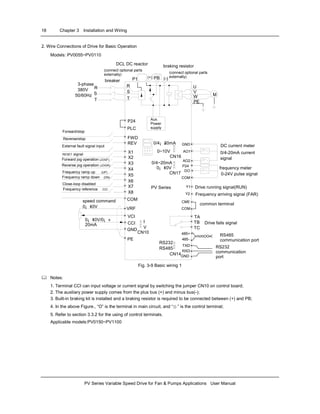
2. Wire Connections of Drive for Basic Operation
Models: PV0055~PV0110
DCL DC reactor
(connect optional parts
externally)
braking resistor
PB(+) (-)
R
S
T
R
S
T
3-phase
380V
50/60Hz M
U
V
W
PE
Aux.
Power
supply
breaker P1
P24
(connect optional parts
externally)
PV Series
AO1
AO2
DO
COM
GND
TB
TC
TA
485-
485+
X1
X2
X3
X4
X5
X6
X7
X8
FWD
REV
PLC
COM
VCI
GND
VRF
PE
0¡ «10V/0¡ «
20mA
Y1
Y2
CME
Drive running signal(RUN)
Frequency arriving signal (FAR)
CCI
COM
I
V
CN10
0~10V
.
.
.
CN16
0/4¡ «20mA
RS232
RS485
CN14
TXD
RXD
GND
CN17
0¡ «10V
0/4~20mA .
.
.
.
.
.
.
.
.
Forward/stop
Reverse/stop
External fault signal input
RESET signal
Forward jog operation (JOGF)
Frequency ramp up (UP)
Reverse jog operation (JOGR)
Frequency ramp down (DN)
Close-loop disabled
Frequency reference CCI
DC current meter
0/4-20mA current
signal
frequency meter
0-24V pulse signal
common terminal
Drive fails signal
RS485
communication port
RS232
communication
port
speed command
0¡ «10V
P24
Fig. 3-9 Basic wiring 1
Notes:
1. Terminal CCI can input voltage or current signal by switching the jumper CN10 on control board;
2. The auxiliary power supply comes from the plus bus (+) and minus bus(-);
3. Built-in braking kit is installed and a braking resistor is required to be connected between (+) and PB;
4. In the above Figure., “O” is the terminal in main circuit, and “⊙ ” is the control terminal;
5. Refer to section 3.3.2 for the using of control terminals.
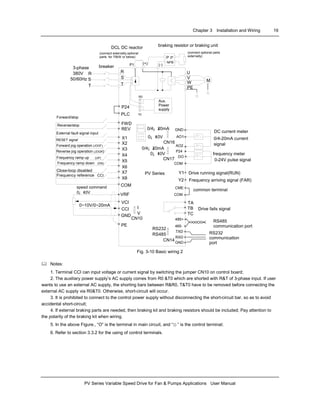
Applicable models:PV0150~PV1100
Chapter 3 Installation and Wiring 19
PV Series Variable Speed Drive for Fan & Pumps Applications User Manual
Drive running signal(RUN)
Frequency arriving signal (FAR)
DC current meter
0-24V pulse signal
RS485
communication port
(+) (-)P1
R0
T0
P P
NPB
R
S
T
R
S
T
M
U
V
W
PE
breaker
PV Series
AO1
AO2
DO
COM
GND
TB
TC
TA
485-
485+
X1
X2
X3
X4
X5
X6
X7
X8
FWD
REV
PLC
COM
VCI
GND
VRF
PE
0~10V/0~20mA
Y1
Y2
CME
CCI
P24
COM
I
V
CN10
0¡ «10V
.
.
.
CN16
0/4¡ «20mA
RS232
RS485
CN14
TXD
RXD
GND
CN17
0¡ «10V
0/4¡ «20mA .
.
.
.
.
.
.
.
.
DCL DC reactor
(connect externally,optional
parts for 75kW or below)
braking resistor or braking unit
3-phase
380V
50/60Hz
Forward/stop
Reverse/stop
External fault signal input
RESET signal
Forward jog operation (JOGF)
Frequency ramp up (UP)
Reverse jog operation (JOGR)
Frequency ramp down (DN)
Close-loop disabled
Frequency reference CCI
Aux.
Power
supply
0/4-20mA current
signal
frequency meter
common terminal
Drive fails signal
RS232
communication
port
speed command
0¡ «10V
(connect optional parts
externally)
P24
Fig. 3-10 Basic wiring 2
Notes:
1. Terminal CCI can input voltage or current signal by switching the jumper CN10 on control board;
2. The auxiliary power supply’s AC supply comes from R0 &T0 which are shorted with R&T of 3-phase input. If user
wants to use an external AC supply, the shorting bars between R&R0, T&T0 have to be removed before connecting the
external AC supply via R0&T0. Otherwise, short-circuit will occur.
3. It is prohibited to connect to the control power supply without disconnecting the short-circuit bar, so as to avoid
accidental short-circuit;
4. If external braking parts are needed, then braking kit and braking resistors should be included; Pay attention to
the polarity of the braking kit when wiring.
5. In the above Figure., “O” is the terminal in main circuit, and “⊙ ” is the control terminal;
6. Refer to section 3.3.2 for the using of control terminals.
20 Chapter 3 Installation and Wiring
PV Series Variable Speed Drive for Fan & Pumps Applications User Manual
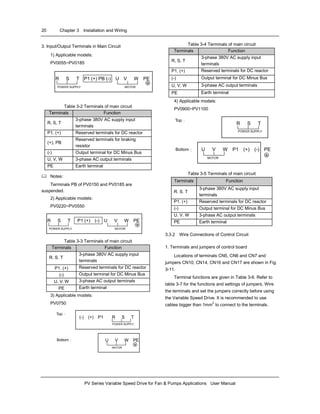
3. Input/Output Terminals in Main Circuit
1) Applicable models:
PV0055~PV0185
R S T P1 (+) PB (-) U V W PE
POWER SUPPLY MOTOR
Table 3-2 Terminals of main circuit
Terminals Function
R, S, T
3-phase 380V AC supply input
terminals
P1, (+) Reserved terminals for DC reactor
(+), PB
Reserved terminals for braking
resistor
(-) Output terminal for DC Minus Bus
U, V, W 3-phase AC output terminals
PE Earth terminal
Notes:
Terminals PB of PV0150 and PV0185 are
suspended.
2) Applicable models:
PV0220~PV0550
R S T P1 (+) (-) U V W PE
POWER SUPPLY MOTOR
Table 3-3 Terminals of main circuit
Terminals Function
R. S. T
3-phase 380V AC supply input
terminals
P1. (+) Reserved terminals for DC reactor
(-) Output terminal for DC Minus Bus
U. V. W 3-phase AC output terminals
PE Earth terminal
3) Applicable models:
PV0750
(-) (+) P1 R S T
POWER SUPPLY
Top:
U V W PE
MOTOR
Bottom:
Table 3-4 Terminals of main circuit
Terminals Function
R, S, T
3-phase 380V AC supply input
terminals
P1, (+) Reserved terminals for DC reactor
(-) Output terminal for DC Minus Bus
U, V, W 3-phase AC output terminals
PE Earth terminal
4) Applicable models:
PV0900~PV1100
R S T
POWER SUPPLY
Top:
U V W P1 (+) (-) PE
MOTOR
Bottom:
Table 3-5 Terminals of main circuit
Terminals Function
R. S. T
3-phase 380V AC supply input
terminals
P1. (+) Reserved terminals for DC reactor
(-) Output terminal for DC Minus Bus
U. V. W 3-phase AC output terminals
PE Earth terminal
3.3.2 Wire Connections of Control Circuit
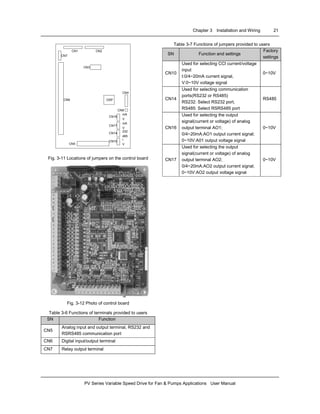
1. Terminals and jumpers of control board
Locations of terminals CN5, CN6 and CN7 and
jumpers CN10, CN14, CN16 and CN17 are shown in Fig.
3-11.
Terminal functions are given in Table 3-6. Refer to
table 3-7 for the functions and settings of jumpers. Wire
the terminals and set the jumpers correctly before using
the Variable Speed Drive. It is recommended to use
cables bigger than 1mm2
to connect to the terminals.
Chapter 3 Installation and Wiring 21
PV Series Variable Speed Drive for Fan & Pumps Applications User Manual
DSP
CN1 CN2
CN3
CN4
CN9
CN16
CN17
CN14
CN10
CN5
CN6
CN7
mA
V
mA
V
232
485
I
V
Fig. 3-11 Locations of jumpers on the control board
Fig. 3-12 Photo of control board
Table 3-6 Functions of terminals provided to users
SN Function
CN5
Analog input and output terminal, RS232 and
RSRS485 communication port
CN6 Digital input/output terminal
CN7 Relay output terminal
Table 3-7 Functions of jumpers provided to users
SN Function and settings
Factory
settings
CN10
Used for selecting CCI current/voltage
input
I:0/4~20mA current signal,
V:0~10V voltage signal
0~10V
CN14
Used for selecting communication
ports(RS232 or RS485)
RS232: Select RS232 port,
RS485: Select RSRS485 port
RS485
CN16
Used for selecting the output
signal(current or voltage) of analog
output terminal AO1;
0/4~20mA:AO1 output current signal;
0~10V:A01 output voltage signal
0~10V
CN17
Used for selecting the output
signal(current or voltage) of analog
output terminal AO2;
0/4~20mA:AO2 output current signal;
0~10V:AO2 output voltage signal
0~10V
22 Chapter 3 Installation and Wiring
PV Series Variable Speed Drive for Fan & Pumps Applications User Manual
2. Wire connections of terminals on control board
1) Terminal CN5 on control board
Arrangements of terminals of CN5:
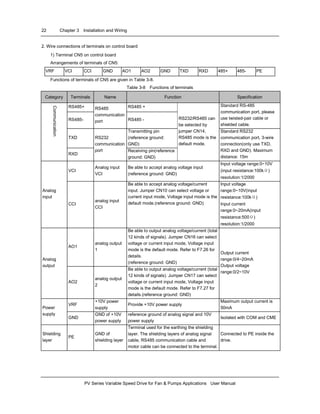
VRF VCI CCI GND AO1 AO2 GND TXD RXD 485+ 485- PE
Functions of terminals of CN5 are given in Table 3-8.
Table 3-8 Functions of terminals
Category Terminals Name Function Specification
RS485+ RS485 +
RS485-
RS485
communication
port RS485 -
Standard RS-485
communication port, please
use twisted-pair cable or
shielded cable.
TXD
Transmitting pin
(reference ground:
GND)
Communication
RXD
RS232
communication
port Receiving pin(reference
ground: GND)
RS232/RS485 can
be selected by
jumper CN14,
RS485 mode is the
default mode.
Standard RS232
communication port, 3-wire
connection(only use TXD,
RXD and GND). Maximum
distance: 15m
VCI
Analog input
VCI
Be able to accept analog voltage input
(reference ground: GND)
Input voltage range:0~10V
(input resistance:100kΩ)
resolution:1/2000
Analog
input
CCI
analog input
CCI
Be able to accept analog voltage/current
input. Jumper CN10 can select voltage or
current input mode, Voltage input mode is the
default mode.(reference ground: GND)
Input voltage
range:0~10V(input
resistance:100kΩ)
Input current
range:0~20mA(input
resistance:500Ω)
resolution:1/2000
AO1
analog output
1
Be able to output analog voltage/current (total
12 kinds of signals). Jumper CN16 can select
voltage or current input mode, Voltage input
mode is the default mode. Refer to F7.26 for
details.
(reference ground: GND)
Analog
output
AO2
analog output
2
Be able to output analog voltage/current (total
12 kinds of signals). Jumper CN17 can select
voltage or current input mode, Voltage input
mode is the default mode. Refer to F7.27 for
details.(reference ground: GND)
Output current
range:0/4~20mA
Output voltage
range:0/2~10V
VRF
+10V power
supply
Provide +10V power supply
Maximum output current is
50mAPower
supply
GND
GND of +10V
power supply
reference ground of analog signal and 10V
power supply
Isolated with COM and CME
Shielding
layer
PE
GND of
shielding layer
Terminal used for the earthing the shielding
layer. The shielding layers of analog signal
cable, RS485 communication cable and
motor cable can be connected to the terminal.
Connected to PE inside the
drive.
Chapter 3 Installation and Wiring 23
PV Series Variable Speed Drive for Fan & Pumps Applications User Manual
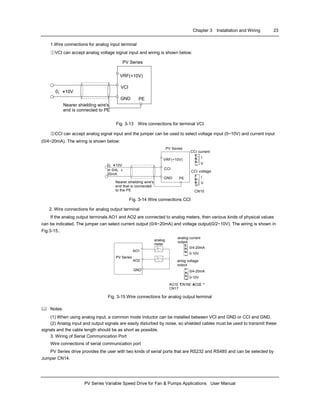
1.Wire connections for analog input terminal
①VCI can accept analog voltage signal input and wiring is shown below:
Nearer shielding wire's
end is connected to PE
VRF(+10V)
VCI
GND
¡ ñ
PE
0¡ «+10V
PV Series
¡ ñ
¡ ñ
¡ ñ
Fig. 3-13 Wire connections for terminal VCI
②CCI can accept analog signal input and the jumper can be used to select voltage input (0~10V) and current input
(0/4~20mA). The wiring is shown below:
PV Series
¡¤¡¤¡¤
CCI current
I
V
¡¤¡¤¡¤
CCI voltage
I
V
CN10
Nearer shielding wire's
end that is connected
to the PE
VRF(+10V)
CCI
GND PE
0¡ «+10V
or 0/4¡ «
20mA
¡ ñ
¡ ñ
¡ ñ
¡ ñ
Fig. 3-14 Wire connections CCI
2. Wire connections for analog output terminal
If the analog output terminals AO1 and AO2 are connected to analog meters, then various kinds of physical values
can be indicated. The jumper can select current output (0/4~20mA) and voltage output(0/2~10V). The wiring is shown in
Fig.3-15..
AO1
AO2
GND
¡¤¡¤¡¤
analog current
output
0/4-20mA
0-10V
analog
meter
¡¤¡¤¡¤
anlog voltage
output
0/4-20mA
0-10V
AO1£ ºCN16£ »AO2£ º
CN17
PV Series
¡ ñ
¡ ñ
¡ ñ
Fig. 3-15 Wire connections for analog output terminal
Notes:
(1) When using analog input, a common mode inductor can be installed between VCI and GND or CCI and GND.
(2) Analog input and output signals are easily disturbed by noise, so shielded cables must be used to transmit these
signals and the cable length should be as short as possible.
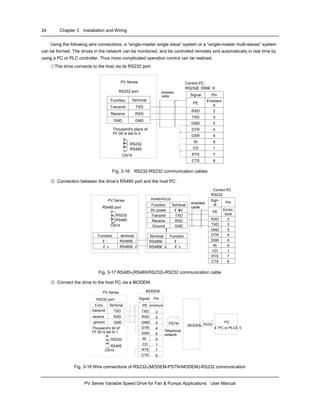
3. Wiring of Serial Communication Port
Wire connections of serial communication port
PV Series drive provides the user with two kinds of serial ports that are RS232 and RS485 and can be selected by
Jumper CN14.
24 Chapter 3 Installation and Wiring
PV Series Variable Speed Drive for Fan & Pumps Applications User Manual
Using the following wire connections, a “single-master single slave” system or a “single-master multi-slaves” system
can be formed. The drives in the network can be monitored, and be controlled remotely and automatically in real time by
using a PC or PLC controller. Thus more complicated operation control can be realized.
①The drive connects to the host via its RS232 port:
Control PC
RS232£ ¨DB9£ ©
Signal Pin
PE
Enclosur
e
RXD 2
TXD 3
GND 5
DTR 4
DSR 6
RI 9
CD 1
RTS 7
CTS 8
shielded
cable
¡ ñFunction Terminal
Transmit TXD
Receive RXD
GND GND
PV Series
RS232 port
Thousand's place of
FF.00 is set to 0
¡¤¡¤¡¤
RS232
RS485
CN14
¡ ñ
¡ ñ
Fig. 3-16 RS232-RS232 communication cables
② Connection between the drive’s RS485 port and the host PC:
Function terminal
£ - RS485£ -
£ « RS485£ «
PV Series
RS485 port
¡¤¡¤¡¤
RS232
RS485
CN14
RS485/RS232
converter
Terminal Function
RS485£ - £ -
RS485£ « £ «
Function Terminal
5V power £ «5V
Transmit TXD
Receive RXD
Ground GND
Control PC
RS232
£ ¨DB9£ ©Sign-
al
Pin
PE
Enclo-
sure
RXD 2
TXD 3
GND 5
DTR 4
DSR 6
RI 9
CD 1
RTS 7
CTS 8
shielded
cable
¡ ñ
¡ ñ
Fig. 3-17 RS485-(RS485/RS232)-RS232 communication cable
③ Connect the drive to the host PC via a MODEM:
Func Terminal
transmit TXD
receive RXD
ground GND
RS232 port
Thousand's bit of
FF.00 is set to 1
MODEMPV Series
RS232
RS485
CN14
¡¤¡¤¡¤
MODEM RS232
PC
£ ¨PC or PLC£ ©
Telephone
network
PSTN
Signal Pin
PE enclosure
TXD 3
RXD 2
GND 5
DTR 4
DSR 6
RI 9
CD 1
RTS 7
CTS 8
¡ ñ
¡ ñ
Fig. 3-18 Wire connections of RS232-(MODEM-PSTN-MODEM)-RS232 communication
Chapter 3 Installation and Wiring 25
PV Series Variable Speed Drive for Fan & Pumps Applications User Manual
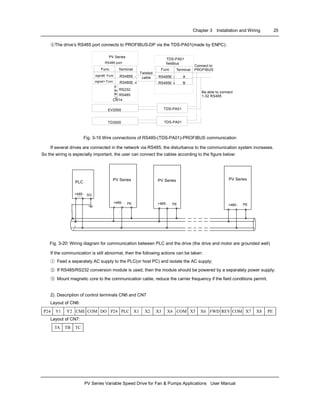
④The drive’s RS485 port connects to PROFIBUS-DP via the TDS-PA01(made by ENPC):
Func Terminal
signal£ -Func RS485£ -
RS485£ «
PV Series
RS485 port
Twisted
cable
RS232
RS485
CN14
EV2000
TD3000
Be able to connect
1-32 RS485
Connect to
PROFIBUSFunc
RS485£ -
RS485£ «
TDS-PA01
fieldbus
TDS-PA01
TDS-PA01
¡¤¡¤¡¤
Terminal
A
Bsignal+ Func
Fig. 3-19 Wire connections of RS485-(TDS-PA01)-PROFIBUS communication
If several drives are connected in the network via RS485, the disturbance to the communication system increases.
So the wiring is especially important, the user can connect the cables according to the figure below:
PLC
+485- SG
+485- +485- +485-PE PE PE
PV Series PV Series PV Series
Fig. 3-20: Wiring diagram for communication between PLC and the drive (the drive and motor are grounded well)
If the communication is still abnormal, then the following actions can be taken:
① Feed a separately AC supply to the PLC(or host PC) and isolate the AC supply;
② If RS485/RS232 conversion module is used, then the module should be powered by a separately power supply;
③ Mount magnetic core to the communication cable, reduce the carrier frequency if the field conditions permit.
2). Description of control terminals CN6 and CN7
Layout of CN6:
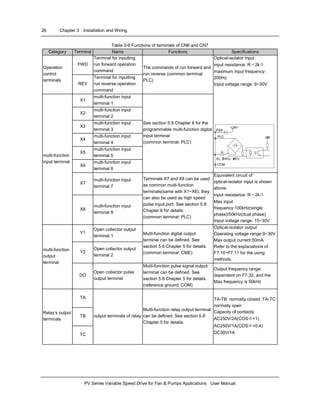
P24 Y1 Y2 CME COM DO P24 PLC X1 X2 X3 X4 COM X5 X6 FWD REV COM X7 X8 PE
Layout of CN7:
TA TB TC
26 Chapter 3 Installation and Wiring
PV Series Variable Speed Drive for Fan & Pumps Applications User Manual
Table 3-9 Functions of terminals of CN6 and CN7
Category Terminal Name Functions Specifications
FWD
Terminal for inputting
run forward operation
command
Operation
control
terminals
REV
Terminal for inputting
run reverse operation
command
The commands of run forward and
run reverse (common terminal:
PLC)
X1
multi-function input
terminal 1
X2
multi-function input
terminal 2
X3
multi-function input
terminal 3
X4
multi-function input
terminal 4
X5
multi-function input
terminal 5
X6
multi-function input
terminal 6
See section 5.8 Chapter 8 for the
programmable multi-function digital
input terminal
(common terminal: PLC)
Optical-isolator input
input resistance: R=2kΩ
maximum input frequency:
200Hz
Input voltage range: 9~30V
+24V
Xi¡ ¢FWD¡ ¢REV
PLC +5V
COM
P24
R
X7
multi-function input
terminal 7
multi-function
input terminal
X8
multi-function input
terminal 8
Terminals X7 and X8 can be used
as common multi-function
terminals(same with X1~X6), they
can also be used as high speed
pulse input port. See section 5.8
Chapter 8 for details.
(common terminal: PLC)
Equivalent circuit of
optical-isolator input is shown
above.
input resistance: R=2kΩ
Max input
frequency:100kHz(single
phase)/50kHz(dual phase)
Input voltage range: 15~30V
Y1
Open collector output
terminal 1
Y2
Open collector output
terminal 2
Multi-function digital output
terminal can be defined. See
section 5.8 Chapter 5 for details.
(common terminal: CME)
Optical-isolator output
Operating voltage range:9~30V
Max output current:50mA
Refer to the explanations of
F7.10~F7.11 for the using
methods.
multi-function
output
terminal
DO
Open collector pulse
output terminal
Multi-function pulse signal output
terminal can be defined. See
section 5.8 Chapter 5 for details.
(reference ground: COM)
Output frequency range:
dependent on F7.32, and the
Max frequency is 50kHz
TA
TB
Relay’s output
terminals
TC
output terminals of relay
Multi-function relay output terminal
can be defined. See section 5.8
Chapter 5 for details.
TA-TB: normally closed, TA-TC:
normally open
Capacity of contacts:
AC250V/2A(COSΦ=1)
AC250V/1A(COSΦ=0.4)
DC30V/1A
Chapter 3 Installation and Wiring 27
PV Series Variable Speed Drive for Fan & Pumps Applications User Manual
Category Terminal Name Functions Specifications
P24 +24V power supply
Provide +24V power supply for
external equipment.
Maximum output
current:200mA
PLC
Common terminal of
multi-function input
terminal
Common terminal of multi-function
input terminal
(short circuit with P24)
Common terminal of X1~X8.,
FWD and REV. PLC is isolated
from P24.
COM
Common terminal of
+24V power supply
Total 3 common terminals, which
are used in conjunction with other
terminals.
Power supply
CME
Common terminal of Y1
and Y2 output
Common terminal of multi-function
Y1 and Y2 output
(Short circuit with COM by
manufacturer)
COM is isolated with CME and
GND.
Shielding PE Shielded GND
Grounding terminal connected to
shielding layer
Connected to PE inside the
drive
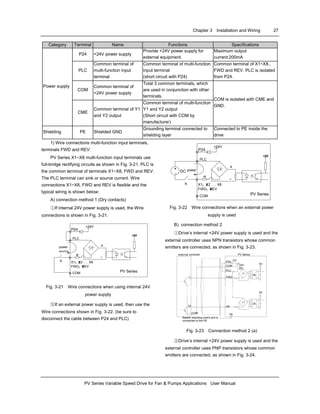
1) Wire connections multi-function input terminals,
terminals FWD and REV:
PV Series X1~X8 multi-function input terminals use
full-bridge rectifying circuits as shown in Fig. 3-21. PLC is
the common terminal of terminals X1~X8, FWD and REV.
The PLC terminal can sink or source current. Wire
connections X1~X8, FWD and REV is flexible and the
typical wiring is shown below:
A) connection method 1 (Dry contacts)
①If internal 24V power supply is used, the Wire
connections is shown in Fig. 3-21.
+24V
X1¡ ¢X2 . . . X8
FWD¡ ¢REV
PLC
PV Series
+5V
COM
P24
R
+
-
K
power
source
Fig. 3-21 Wire connections when using internal 24V
power supply
②If an external power supply is used, then use the
Wire connections shown in Fig. 3-22. (be sure to
disconnect the cable between P24 and PLC)
power
+24V
X1¡ ¢X2 . . . X8
FWD¡ ¢REV
PLC
PV Series
+5V
COM
P24
R
DC
+
-
K
+
-
Fig. 3-22 Wire connections when an external power
supply is used
B). connection method 2
①Drive’s internal +24V power supply is used and the
external controller uses NPN transistors whose common
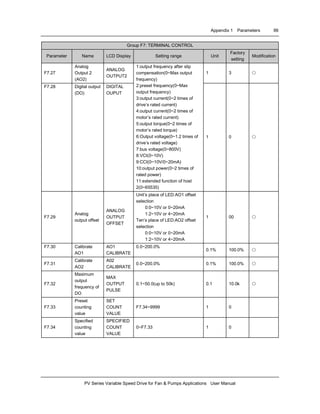
emitters are connected, as shown in Fig. 3-23.
Nearer shielding wire's end is
connected to the PE
COM¡ ñ
PV Series
PE¡ ñ
1 ¡ ñ
PLC
FWD
¡ ñ
¡ ñ
¡ ñ
P24
COM
¡ ñ
¡ ñ
24V
DC
D2
+
-
5V
10¡ ñ
X8¡ ñ
5V
external controller
Fig. 3-23 Connection method 2 (a)
②Drive’s internal +24V power supply is used and the
external controller uses PNP transistors whose common
emitters are connected, as shown in Fig. 3-24.
28 Chapter 3 Installation and Wiring
PV Series Variable Speed Drive for Fan & Pumps Applications User Manual
¡ ñ
¡ ñ
¡ ñ
¡ ñ
¡ ñ
¡ ñ
¡ ñ
¡ ñ
¡ ñ ¡ ñ
¡ ñ
COM
PV Series
PE
1
PLC
FWD
P24
COM 24V DC
D2
+
-
5V
10 X8
5V
external controller
Nearer shielding wire's end is
connected to the PE
Fig. 3-24 Connection method 2 (b)
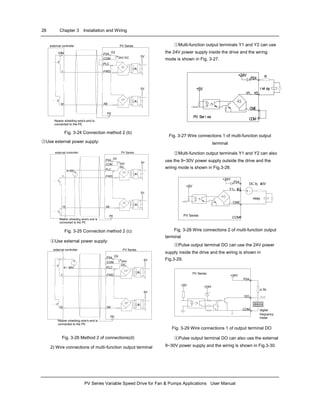
③Use external power supply:
¡ ñ
¡ ñ
¡ ñ
¡ ñ
¡ ñ
¡ ñ
¡ ñ
¡ ñ
¡ ñ ¡ ñ
9~30V
+
-
PV Series
PE
1
PLC
FWD
P24
COM 24V
DC
D2
+
-
5V
10 X8
5V
Nearer shielding wire's end is
connected to the PE
external controller
Fig. 3-25 Connection method 2 (c)
④Use external power supply:
¡ ñ
¡ ñ
¡ ñ
¡ ñ
¡ ñ
¡ ñ
¡ ñ
¡ ñ
¡ ñ ¡ ñ
¡ ñ
+
-
9~30V
PV Series
PE
1
PLC
FWD
P24
COM 24V
DC
D2
+
-
5V
10 X8
5V
external controller
Nearer shielding wire's end is
connected to the PE
Fig. 3-26 Method 2 of connections(d)
2) Wire connections of multi-function output terminal
①Multi-function output terminals Y1 and Y2 can use
the 24V power supply inside the drive and the wiring
mode is shown in Fig. 3-27.
PV Ser i es
COM
P24
+5V
+24V
CME
Y1、Y2
r el ay
R
PV Ser i es
COM
P24
+5V
+24V
CME
Y1、Y2
r el ay
R
Fig. 3-27 Wire connections 1 of multi-function output
terminal
②Multi-function output terminals Y1 and Y2 can also
use the 9~30V power supply outside the drive and the
wiring mode is shown in Fig.3-28.
DC 9¡ «30V
PV Series
COM
CME
Y1¡ ¢Y2
P24
+5V
+24V
+ -
relay
Fig. 3-28 Wire connections 2 of multi-function output
terminal
③Pulse output terminal DO can use the 24V power
supply inside the drive and the wiring is shown in
Fig.3-29.
+24V
PV Series
P24
4.7K
DO
COM
+5V +24V
digital
frequency
meter
Fig. 3-29 Wire connections 1 of output terminal DO
④Pulse output terminal DO can also use the external
9~30V power supply and the wiring is shown in Fig.3-30.
Chapter 3 Installation and Wiring 29
PV Series Variable Speed Drive for Fan & Pumps Applications User Manual
+24VPVSeries
P24
4.7KDO
COM
+5V +24V
digital frequency
meter
9¡ «
30V
+
-
Fig. 3-30 Wire connections 2 of output terminal DO
3) Wire connections relay output terminals TA, TB
and TC.
If the relay drives an inductive load (such as another
relay or contactor), then a surge suppressing circuit
should be added, such as RC snubber circuit (pay
attention that the leakage current must be smaller than
the holding current of the controlled relay or contactor)
and varistor or a free-wheeling diode (used in the DC
electro-magnetic circuit and pay attention to the polarity
during installation). Snubbing components should be
located as close as possible to the coils of relay or
contactor.
Notes:
1. Don’t short circuit terminals P24 and COM,
otherwise the control board may be damaged.
2. Please use multi-core shielded cable or
multi-stranded cable (above 1mm) to connect the control
terminals.
3. When using a shielded cable, the shielded layer’s
end that is nearer to the drive should be connected to PE.
4. The control cables should be as far away (at least
20cm) as possible from the main circuits and high voltage
cables (including power supply cables, motor cables,
relay cables and cables of contactor). The cables should
be vertical to each other to reduce the disturbance to
minimum.
5. The resistors R in Fig. 3-27 and Fig.3-28 should
be removed for 24V input relays, and the resistance of R
should be selected according the parameters of relay, for
non-24V relay.
3.4 Installation Methods Compliant With
EMC Requirements
The drive inevitably generates noise due to its high
switching frequency, so relevant EMC problems must be
solved so as to reduce the drive’s disturbance to external
equipment. This chapter deals with the installation
methods compliant with EMC requirements from the
aspects of noise suppression, field wiring, grounding,
leakage current and the using of power filter. This chapter
can be used as a reference for field installation.
3.4.1 Noise Suppressing
The noise generated by the drive may disturb the
equipment nearby. The degree of disturbance is
dependent on the drive system, immunity of the
equipment, Wire connections, installation clearance and
earthing methods.
1. Noise categories
Route¢ Þ
...
Route¢ Ý
...
Route¢ Ü
...
ESD induction
Nose
Route¢ Ù
...
Electo-magnetic
induction noise
Rpute ¢ ß,¢ à
...
transmission noise
of power cables
earthing noise
Conduction noise
Route¢ Û
...
Route¢ Ú...
Noise
transmission noise
in space
Radiation noise
of motor
Radiation
noise
of power
cables
Radiation
noise
of power
cables
Fig. 3-31 Noise categories
2. Noise emission paths
meterdrive radio
¢ à
¢ Ý
¢ Þ
¢ Ü
¢ Û
¢ Û
¢ Ü
¢ ß
¢ Ú
¢ Ù
¢ Ý
sensor
motor
sensor's
power supply
phone
Fig. 3-32 Noise emission paths
30 Chapter 3 Installation and Wiring
PV Series Variable Speed Drive for Fan & Pumps Applications User Manual
3. Basic methods of suppressing the noise
Table 3-10 Basic methods of suppressing the noise
Noise
emission
paths
Actions to reduce the noise
②
When the external equipment forms a
loop with the drive, the equipment may
suffer nuisance tripping due to the drive’s
earth leakage current. The problem can
be solved if the equipment is not
grounded.
③
If the external equipment shares the
same AC supply with the drive, the
drive’s noise may be transmitted along
its input power supply cables, which may
cause nuisance tripping to other external
equipment. Take the following actions to
solve this problem: Install noise filter at
the input side of the drive, and use an
isolation transformer or line filter to
prevent the noise from disturbing the
external equipment.
④⑤⑥
If the signal cables of measuring meters,
radio equipment and sensors are
installed in a cabinet together with the
drive, these equipment cables will be
easily disturbed. Take the actions below
to solve the problem:
(1)The equipment and the signal cables
should be as far away as possible from
the drive. The signal cables should be
shielded and the shielding layer should
be grounded. The signal cables should
be placed inside a metal tube and should
be located as far away as possible from
the input/output cables of the drive. If the
signal cables must cross over the power
cables, they should be placed at right
angle to one another.
(2)Install radio noise filter and linear
noise filter(ferrite common-mode choke)
at the input and output sides of the drive
to suppress the emission noise of power
lines.
(3)Motor cables should be placed in a
tube thicker than 2mm or buried in a
cement conduit. Power cables should be
placed inside a metal tube and be
grounded by shielding layer (Motor cable
should be a 4-core cable, where one
core should be connected to the PE of
Noise
emission
paths
Actions to reduce the noise
the drive and another should be
connected to the motor’s enclosure).
①⑦⑧
Don’t route the signal cables in parallel
with the power cables or bundle these
cables together because the induced
electro-magnetic noise and induced ESD
noise may disturb the signal cables.
Other equipment should also be located
as far away as possible from the drive.
The signal cables should be placed
inside a metal tube and should be placed
as far away as possible from the
input/output cables of the drive. The
signal cables and power cables should
be shielded cables. EMC interference
will be further reduced if they could be
placed inside metal tubes. The clearance
between the metal tubes should be at
least 20cm.
3.4.2 Field Wire Connections
Control cables, input power cables and motor cables
should be installed separately, and enough clearance
should be left among the cables, especially when the
cables are laid in parallel and are long. If the signal
cables must cross over the power cables, they should
cross at right angle to each other.
Power source or motor cable
Motor cable
Signal/Control cable
Power cable
Signal/Control cable
>50cm>30cm
>20cm
Fig. 3-33 Wire connections
The motor cables should be derated if they are too
long or their cross sectional area (CSA) is too big. The
drive’s cables should be the cables with specified CSA
(See Table 3-1) because the capacitance of the cable to
Chapter 3 Installation and Wiring 31
PV Series Variable Speed Drive for Fan & Pumps Applications User Manual
ground is proportional to the cable’s CSA. If the cable
with big CSA is used, its current should be reduced.
Shielded/armoured cable: High frequency low
impedance shielded cable should be used. For example:
Copper net, aluminum net or iron net.
Generally, the control cables should be shielded
cables and the shielding metal net must be connected to
the metal enclosure of the drive by cable clamps.
PE PE
enclosure enclosure
Fig. 3-34 Correct shielding method of shielding layer
PE
PE
enclosure enclosure
Fig. 3-35 Incorrect earthing method of shielding layer
3.4.3 Earthing
Independent earthing poles (best)
drive other
equipment
PE
Fig. 3-36 Earthing diagram 1
Shared earthing pole (good)
drive
other
equipment
PE
Fig. 3-37 Earthing diagram 2
Shared earthing cable (not good)
drive
other
equipment
PE
Fig. 3-38 Earthing diagram 3
drive
Other
equipment
PE£ ¨G£ ©
Fig. 3-39 Earthing diagram 4
Besides, pay attention to the following points:
In order to reduce the earthing resistance, flat cable
should be used because the high frequency impedance
of flat cable is smaller than that of round cable with the
same CSA.
For 4-core motor cable, the end of one cable should
be connected to the PE of the drive, and the other end
should be connected to the motor’s enclosure. If the
motor and the drive each has its own earthing pole, then
the earthing effect is better.
If the earthing poles of different equipment in one
system are connected together, then the leakage current
will be a noise source that may disturb the whole system.
Therefore, the drive’s earthing pole should be separated
with the earthing pole of other equipment such as audio
equipment, sensors and PC, etc.
In order to reduce the high frequency impedance, the
bolts used for fixing the equipment can be used as the
high frequency terminal. The paints on the bolt should be
cleaned.
The earthing cable should be as short as possible,
that is, the earthing point should be as close as possible
to the drive.
Earthing cables should be located as far away as
possible from the I/O cables of the equipment that is
sensitive to noise, and lead should also be as short as
possible.
32 Chapter 3 Installation and Wiring
PV Series Variable Speed Drive for Fan & Pumps Applications User Manual
3.4.4 Installation Requirements of Relay, Contactor and
Electro-magnetic Braking Kit
The devices such as relay, contactor and
electro-magnetic braking kit, which may generate great
noises, should be installed outside of the drive cabinet
and should be installed with surge suppressors.
220VAC
Varistor
Diode
Drive
220VAC
RC-Filter
+24VDC
Fig. 3-40 Relay, contactor and electro-magnetic braking kit
3.4.5 Leakage Current
Leakage current may flow through the drive’s input
and output capacitors and the motor’s capacitor. The
leakage current value is dependent on the distributed
capacitance and carrier wave frequency. The leakage
current includes ground leakage current and the leakage
current between lines.
AC supply
drive
distributed
capacitor
between lines
Motor
distributed
capacitor between
cable and earth
Capacitor
between
motor and
earth
R
S
T
QF
Fig. 3-41 Flowing path of leakage current
Ground leakage current
The ground leakage current not only flows into the
drive system, but also into other equipment via earthing
cables. It may cause leakage current circuit breaker and
relays to be falsely activated. The higher the drive’s
carrier wave frequency, the bigger the leakage current,
and also, the longer the motor cable, the greater is the
leakage current,
Suppressing methods:
Reduce the carrier wave frequency, but the motor
noise may be higher.
Motor cables should be as short as possible;
The drive and other equipment should use leakage
current circuit breaker designed for protecting the product
against high-order harmonics/surge leakage current;
Leakage current between lines
The line leakage current flowing outside through the
distribution capacitors of the drive may false trigger the
thermal relay, especially for the drive of which power
rating is less than 7.5kW. When the cable is longer than
50m, the ratio of leakage current to motor rated current
may increase to a level that can cause the external
thermal relay to trigger unexpectedly.
Suppressing methods:
Reduce the carrier wave frequency, but the motor
audible is greater.
Install reactor at the output side of the drive.
In order to protect the motor reliably, it is
recommended to use a temperature sensor to detect the
motor’s temperature, and use the drive’s over-load
protection device (electronic thermal relay) instead of an
external thermal relay.
3.4.6 Correct EMC Installation
Divide the installation space into different areas
In drive control system, the drive, control equipment
and sensors are installed in the same cabinet. The noise
should be suppressed at the main connecting points, with
RFI filter and input reactor installed in the cabin to fulfill
the EMC requirements.
The most inexpensive and effective measure to
reduce the interference is to isolate the noise source and
the noise receiver. This should be considered in
mechanical/system design phase. In a drive control
system, the noise source may be drive, brake unit and
the contactor. Noise receiver can be automation
equipment, encoder and sensor.
The mechanical/system is divided into different EMC
area according to its electrical characteristics. The
recommended installation positions are shown in the
following figure:
Chapter 3 Installation and Wiring 33
PV Series Variable Speed Drive for Fan & Pumps Applications User Manual
Mechanical
system
manufacturing
mechanics
Sensor£ ¨such as£ º
temperature, position,
pressure£ ©
Control
Equipment
£ ¨Such as:
PC£ ©
Mains
Input reactor
Linear noise
filter
Input Filter
Drive
electric cabinet
Area ¢ õ
Area ¢ ó
Area ¢ ñ
Area ¢ ö
Motor
Area ¢ ò
earthing
separation
board
Area ¢ ô
detecting signal cable
Motor cables
Fig. 3-42 Divide installation space into different sections
according to EMC rules
Attention:
·Area Ⅰshould be used to install transformers for
control power supply, control system and sensor.
·Area Ⅱ should be used for interface signal and
control cables of correct immunity level
·Area Ⅲ should be used to install noise generating
devices such as input reactor, drive, brake unit and
contactor.
·Area Ⅳ should be used to install output noise
filter
·Area Ⅴ should be used to install power source and
cable connecting the RFI filter.
·Area Ⅵ should be used to install the motor and
motor cables.
·Areas should be isolated in space, so that
electro-magnetic decoupling effect can be achieved.
·The shortest distance between areas should be
20cm.
·Earthing bars should be used for decoupling among
areas, the cables from different area should be placed in
different tubes.
·The filter should be installed at the interfaces
between different areas if necessary.
·Bus cable(such as RS485) and signal cable must
be shielded
Electrical installation of the drive
10kV
Power
Transformer
Motor
metal
cabinet
AC input reactor
Metal
cabinet
PLC or
meters
circuit breaker
filter
AC Output
reactor
>30cm
>50cm
Drive
motor cable
control cable
>20cm
Power
source
cable of
inverter
Isolation
Transformer
power
source cable
of meters
Fig. 3-43 Installation of the drive
·Motor cable should be earthed at the drive side. If
possible, the motor and drive should be earthed
separately;
·Motor cable and control cable should be shielded or
armored. The shield must be earthed with cable fastener
to improve high frequency noise immunity.
·Assure good conductivity among installation plates,
installation screws and the metal case of drive; Use
tooth-shape washer and conductive installation plate;
Generally, if there are some sensitive equipment in
the installation, it is more cost effective to install a power
filter at the sensitive equipment side.
3.4.7 Applications of Power Filter
Power source filter should be used in the equipment
that may generate strong EMI or the equipment that is
sensitive to EMI. The power source filter should be a low
pass filter through which only 50Hz current can flow and
high frequency current should be rejected
Function of power line filter
The power line filter ensures the equipment can
satisfy the conducting emission and conducting sensitivity
in EMC standard. It can also suppress the radiated
emission of the equipment.
Prevent the EMI generated by the equipment from
entering power cable, and at the same time prevent the
EMI generated by power cable from entering equipment.
34 Chapter 3 Installation and Wiring
PV Series Variable Speed Drive for Fan & Pumps Applications User Manual
Common mistakes in using power line filter
1. Too long power cable
The filter inside the cabinet should be located near to
the input power source. The length of the power cables
should be as short as possible.
2. The input and output cables of the AC supply filter
are too close
The distance between input and output cables of the
filter should be as far apart as possible, otherwise the
high frequency noise may be coupled between the cables
and bypass the filter. Thus, the filtering effect becomes
ineffective.
3. Bad earthing of filter
The filter’s enclosure must be earthed properly to the
metal case of the drive. In order to be earthed well, make
use of a special earthing terminal on the filter’s enclosure.
If you use one cable to connect the filter to the case, the
earthing is useless for high frequency interference. When
the frequency is high, so is the impedance of cable,
hence there is little bypass effect.
The filter should be mounted on the enclosure of
equipment. Ensure to clear away the insulation paint
between the filter case and the enclosure for good
earthing contact.
3.4.8 EMI of The Drive
The drive’s operating theory decides that its EMI is
unavoidable.
The drive is usually installed in a metal cabinet, the
instruments outside the metal cabinet is disturbed by the
drive lightly. The cables are the main EMI source, if you
connect the cables according to the manual, the EMI can
be suppressed effectively.
If you install the drive and other control equipment in
one cabinet, so the area rule must be observed, pay
attention to the isolation between different area, cable
layout and shielding.
Chapter 4 Operation procedures 35
PV Series Variable Speed Drive for Fan & Pumps Applications User Manual
Chapter 4 Operation Procedures
4.1 Notices
In the follow-up sections, you may encounter the
terms describing the control, running and status of drive
many times. Please read this section carefully. It will help
you to understand and use the functions to be discussed
correctly.
4.1.1 The Drive’s Control Modes
It defines the methods by which drive receives
operating commands like START, STOP, FWD, REV,
JOG and others.
Panel control: The drive is controlled by RUN, STOP
and JOG keys on the operation panel;
Terminal control: The drive is controlled by terminals
FWD, REV and COM.
Host control: The operations such as START and
STOP is controlled by host PC.
The control modes can be selected by parameter
F0.03.
Warning:
The user must ensure that the control mode selected
is suitable for the application. Wrong selection of control
mode may cause damage to equipment or human injury!
4.1.2 Reference Selector
Irrespective of the operating modes, the PV Series
has 6 possible ways of setting the input frequency
reference. The reference frequency can be input by:
▲ and ▼ keys on the operation panel;
Terminals UP/DN (Motorized Potentiometer);
Serial port;
Analog Voltage Command Input (VCI);
Analog Current Command Input (CCI);
Pulse terminal (PULSE)
4.1.3 Drive’s Operating Status
There are 3 operating status: stopping status,
operating status and Motor parameters auto-tuning
status.
Stopping status: After the drive is switched on and
initialized, if no operating command is accepted or the
stopping command is executed, then the drive enters
stopping status.
Operating status: The drive enters operating status
after it receives the operating command.
Motor parameters auto-tuning status: If there is an
operating command after FH.09 is set to 1 or 2, the drive
then enters motor parameters auto-tuning status, and
then enters stopping status after auto-tuning process is
over.
4.1.4 Operating Modes
PV Series has 4 kinds of operating modes which can
be arranged in the sequence of “Jog>Close loop
operation>Multi-step speed operation>Simple operation”
according to the priority, as shown in Fig. 4-1.
Jog:
When the drive is in stopping status, it will operate
according to Jog frequency after it receives the Jog
operation command (e.g. after the JOG key is pressed).
Close-loop operation:
If the close-loop operating function is enabled
(F5.00=1), the drive will select the close-loop operation
mode meaning that it will perform PI regulation according
to the reference and feedback values (See explanations
of Parameter F5). Close-loop operating function can be
disabled by terminal X7, and the drive will select the
simple operating mode.
Multi-step speed operation:
Select multi-step frequency 1~7(F3.23~F3.29) to
start multi-step speed operation by the non-zero
combinations of the multi-function terminals (No.1, 2, and
3 functions).
Simple operation:
Simple operation is actually the open-loop operation
mode.
PV Series operating status is shown in Fig. 4-1:
36 Chapter 4 Operation Procedures
PV Series Variable Speed Drive for Fan & Pumps Applications User Manual
Y
Y
Y
Y
N
N
N
Y
Y
Y
Y
N
N
N
Y
Y
Y
Y
N
N
N
Y
Y
Y
Y
N
N
N
N
Y
Y
Y
Y
N
N
N
Y
Y
Y
Y
N
N
N
Stop
Jog?
Y
Y
Y
Y
N
N
N
Y
Y
Y
Y
N
N
N
Y
Y
Y
Y
N
N
N
Start up
Low priority
Jog operation
Close-loop setting
active (F5.00>0)?
Run command active
Terminal for disabling
close-loop operation
enabled?
simple operation
Close loop
operation
High priority
Fig. 4-1 Operating status of PV Series
Four operating modes provide 4 basic frequency sources.
4.2 Detailed Operating Instructions
4.2.1 Methods Using of the Operation Panel
The operation panel is used to setup the drive and display parameters. There are two types of operation panels, one
with LED display and the other, LCD display. The LED display is the standard operation panel. The LCD operation panel
is an optional accessory. It can display in English and Chinese characters, with description for the displayed data. The
outlines, dimensions and operating methods of these two types of operation panels are the same, as shown in Fig. 4-2.
For convenience, the operation of the LCD panel is described below:
UNIT
HZ
r/min
A
V
%
PARAMETER
.
² ¹³ ¥Ç °ÆÂ Ê
ÆÕÍ ¨Ô ËÐ Ð Õ ý
4-bit LED Current unit:A
Voltage unit:V
Data input
Control mode indicator
Jog
Stop
Reset
Rotating speed:r/min
Line speed:m/s
ENTER
DATA
PANEL
REMOTE
RUN
JOG
STOP
RESET
MENU
ESC
uu
UNIT
HZ
r/min
A
V
%
PARAMETER
.
² ¹³ ¥Ç °ÆÂ Ê
ÆÕÍ ¨Ô ËÐ Ð Õ ý
Frequency unit:Hz
ENTER
DATA
ENTER
DATA
PANEL
REMOTE
PANEL
REMOTE
RUNRUN STOP
RESET
STOP
RESET
MENU
ESC
MENU
ESC
UNIT
HZ
r/min
A
V
%
PARAMETER
.
² ¹³ ¥Ç °ÆÂ Ê
ÆÕÍ ¨Ô ËÐ Ð Õ ý Enter
ENTER
DATA
ENTER
DATA
PANEL
REMOTE
PANEL
REMOTE
RUNRUN STOP
RESET
STOP
RESET
MENU
ESC
MENU
ESC
UNIT
HZ
r/min
A
V
m/s
%
PARAMETER
.
Freq. before compensation
RUN FWD
Control mode selecting key
ENTER
DATA
ENTER
DATA
PANEL
REMOTE
PANEL
REMOTE
¡ø
RUNRUN
STOP
RESET
STOP
RESET
MENU
ESC
MENU
ESC
MENU
ESC
MENU
ESC
LCD display
Program
Move
Running Indicator
Run
Increase/Decrease
¡ ø
Fig. 4-2 Illustration of operation panel
Chapter 4 Operation Procedures 37
PV Series Variable Speed Drive for Fan & Pumps Applications User Manual
Attention!
The operation panel of the PV Series is not compatible with the panel of other Emerson Electric
variable speed drives!
4.2.2 Functional Description of the Keys
There are 9 keys on the operation panel of the
drive and the functions of each key is described in Table
4-1.
Table 4-1 Function of operation panel
Key Name Function
MENU/ESC
Program/exit
key
Enter or exit
programming status
ENTER/DATA
Function/data
key
Enter lower level menu or
enter data
▲ Increase
Increase data or
parameter
▼ Decrease
Decrease data or
parameter
Shift
In editing status, pressing
this key select the bit to
be modified. In other
status, this key is used to
scroll through the
parameters.
PANEL/
REMOTE
reserved reserved
JOG Jog key
In panel control mode,
press this key to start Jog
operation.
RUN Run key
In panel control mode,
press this key to start
running the drive.
STOP/RESET
Stop/reset
key
Press this key to stop or
reset the drive.
4.2.3 Functional Description of LEDs and Indicators
The operation panel consists of a 4-bit seven
segments display, 3 LED indicators that indicate unit and
2 status indicators as shown in Fig. 4-3. The seven
segments can display the status parameters, parameters
and fault codes of the drive. These 3 unit indicators have
7 different combinations and each combination
corresponds to one type of unit. The relationship between
the combination of the indicators and the unit is shown in
Fig. 4-3:
%
r/min
m/s
%A
V
Hz
UNIT
Hz
r/min
m/s
%A
V
Hz
UNIT
A
r/min
m/s
A
V
Hz
UNIT
V
r/min
m/s
%A
V
Hz
UNIT
r/min
r/min
m/s
%A
V
Hz
UNIT
m/s
r/min
m/s
%A
V
Hz
UNIT
%
r/min
m/s
%A
V
Hz
UNIT
no unit
on off
Fig. 4-3 Relationship between the combination of the
indicators and the unit
Two status indicators: Operating status indicator is
above the RUN key. The control mode indicator is above
the PANEL/REMOTE key, and the functions of these
indicators are shown in Table 4-2.
Table 4-2 Functions of status indicators
Indicator
Display
status
Current status of the
drive
Off Stopping statusOperating
status
indicator
On Operating status
On Panel control status
Off Terminal control status
Control
mode
indicator Flash
Serial port control
status
4.2.4 Displaying status of the Drive
PV Series operation panel can display the
parameters in stopping process, parameters in operating
status, editing status of parameters and fault alarming
status.
1. Parameters displaying in stopping status
When the drive stops operation, the panel will display
reference frequency
2. Parameters displaying in operating status
When the drive receives operating command, it
starts running and its panel will display the status
parameters in operating status, as shown in Fig.c of Fig.
4-4. The unit indicator at right indicates the unit of the
parameter.
Different parameters in operating status can be
displayed by pressing key (as shown in Fig 4-7).
38 Chapter 4 Operation Procedures
PV Series Variable Speed Drive for Fan & Pumps Applications User Manual
UNIT
HZ
r/min
A
V
m/s
%
PARAMETERUNIT
HZ
r/min
A
V
m/s
%
PARAMETER
EV2000
ENYDRIVE
UNIT
HZ
r/min
A
V
m/s
%
PARAMETER
ENTER PANEL
▲
RUN
JOG
STOP
RESET
MENU ENTER PANEL
RUN
JOG
STOP
RESET
MENU
ESC
RUN
STOP
RESET
ENTER PANEL
JOG
MENU
UNIT
HZ
r/min
A
V
m/s
%
PARAMETERUNIT
HZ
r/min
A
V
m/s
%
PARAMETER
PV Series
Emerson Industrial
Automation
Fig. a
UNIT
HZ
r/min
A
V
m/s
%
PARAMETER
ENTER PANEL
▲
RUN
STOP
RESET
ENTERENTER PANELPANEL
REMOTE
RUNRUN
STOP
RESET
STOP
RESET
ENTER PANEL
REMOTE
RUN
JOG
STOP
RESET
MENU ENTERENTER PANELPANEL
RUNRUN
JOGJOG
STOP
RESET
STOP
RESET
MENUMENU
RUNRUN
STOP
RESET
STOP
RESET
ENTER PANEL
JOG
ESC
ENTERENTER
DATA
PANELPANEL
JOGJOG
ESC
Initialize at power on,
all LED turns on
Fig. b
Stopping state, Stopping
information is displayed ;
RUN indicator turns off
FREQ. REF.
Stop
FREQ. before
compensation
RUN FWD
Fig. c
Running state,operating
information is displayed;
RUN indicator turns on
¡ ø ¡ ø
DATAREMOTE
¡ ø
DATA
▲ ▲
Fig. 4-4 Information displayed when the drive is initialized,
stopping and operating
3. Displaying Alarm information
When the drive detects a fault signal, its panel will
display a flashing alarm message, that is, display the fault
code (as shown in Fig. 4-5);
Reference frequency can be viewed by pressing the
key in stopping status. Fault information can be
queried by pressing MENU/ESC key. The drive can be
reset by pressing the STOP/RESET key, or sending the
reset commands via the control terminal X2 or serial port.
The fault code will continue to be displayed if the fault has
not been cleared.
UNIT
HZ
r/min
A
V
m/s
%
PARAMETER
INPUT PHASELOSS
CHECK ERROR
Hz
Fig. 4-5 Alarm displaying status
4. Configuring status of parameters
When the drive is in stopping, operating or alarming
status, pressing MENU/ESC can enter configuring status
(Refer to explanations of FP.00 and Fig. 4-13, if user’s
password is available). Configuring status can be
displayed in 3-level menu as shown in Fig. 4-6, and the
displaying sequence is: Group of parameter→Parameter
→Parameter value. The user can enter these 3 levels by
pressing ENTER/DATA. In parameter displaying status,
press ENTER/DATA to save the parameter settings, and
press MENU/ESC to exit.
UNIT
HZ
r/min
A
V
m/s
%
PARAMETER
FREQ. REF.
STOP
Hz
UNIT
HZ
r/min
A
V
m/s
%
PARAMETER
BASIC FUNCTION
E/D TO ENTER
Hz
UNIT
HZ
r/min
A
V
m/s
%
PARAMETER
SET FREQ. MODE
E/D TO ENTER
Hz
UNIT
HZ
r/min
A
V
m/s
%
PARAMETER
DIGITAL REF. 1
E/D TO STORE
Hz
Configurable status
MENU ENTER ENTER
ESC ESC
ESC
DATA saving para.
1st level menu 2n level menu 3rd level menu
Display stopping
para., running para.
or fault alarm para.
Fig. 4-6 Configuring status
4.2.5 Operating Methods of Panel
The user can operate the drive via the panel.
Examples are given below:
Status Parameter displaying:
50.00 0 0 1500 668 2000
558 ---- 0.00 2.34
Ref.
freq.
Counting
value
Rotating
speed
Preset
speed
Line speed Preset line
speed
VCICCIBus
voltage
Terminal
status
LED
display
Keypad
operation
Fig. 4-7 Display parameters in running status
(When stopped, only reference frequency is
displayed.)
Parameter setup:(Change the setting of F3.30 from
50.00Hz to 6.50Hz. The bold faced digits in Fig. 4-8
means the flashing bits)
50.00 - - - 5 00
- 3-
00
Display
stopping
para
Display
1st level
menu
Enter 2nd
level
menu
Select
F3.30 level
menu
Select the
bit to
be modified
→ 6
LED
display
Panel
operation
ESCESC
ENTER
0
DATADATA
MENU
DATADATA
ESCESC
Move
the
flashing
bit
Back to
1st level
menu
5.
Change
flashing
bit: → 5
Exit
editing
status
Back to
2nd level
menu and
select next
para
50.00 - -
- -
Enter 3rd
Change:0
ESC
MENU
ESC DATA
DATA
ENTER
DATAESC
DATA
ENTER
DATA
ESC
MENU
ESC
0
Select F3
-F0 F3 F3.05 F3.30 00.00 00.00
F3 F3.31 06.50 06.00 06.00
Fig. 4-8 Example of setting the parameters
In 3-level menu, the settings of the parameter cannot
be changed if its parameter has no flashing bit. The
possible reasons are:
1) The settings of this parameter such as the actual
detected parameters or recorded parameters cannot be
changed;
Chapter 4 Operation Procedures 39
PV Series Variable Speed Drive for Fan & Pumps Applications User Manual
2) The settings of this parameter cannot be changed
when the drive is operating, and can only be changed
when the drive stops;
3) The parameters are protected, that is, if FP.01 is
set to 1 or 2, the settings of all the parameters cannot be
changed to avoid wrong operation. If the user really
wants to change the settings, he should first set FP.01 to
0.
Adjusting the reference frequency:(An example of
changing the reference frequency from 50.00Hz to
40.00Hz)
display the
Output current
( initial display
status)
press
the key
to change
the freq.
press this
key and
hold on
can increase
the step
Stop pressing
the keys
after the freq.
reaches the
expected value
back to initial
display
status to
display the
Output current
6.8 50.00 49.99 49.98
Display
the
present
freq.
40.00 6.8
Fig. 4-9 An example of changing reference frequency
This method is suitable for adjusting the reference
frequency when the initial displayed parameters are not
operating speed, reference speed, operating line speed
and reference line speed.
When the initial displayed parameters are operating
speed, reference speed, operating line speed and
reference line speed, the user can change the displayed
reference speed or line speed by pressing ▲ or ▼. If
the user needs to change the reference frequency directly,
he must press first to enter the reference frequency
displaying status.
Changing the control modes:(An example of
changing the terminal control mode to panel control mode)
Set F9.07 to “x1x” (command of changing the control
modes is active in the stopping process), or “x2x”
(commands of changing the control modes and running
the drive are all active in the stopping process)
PANEL
Display
run/stopping
para.
Select
serial
port
control
LED
PANEL
REMOTE
ENTER
DATA
Changing is
enabled
Changing is
finished
Off Flash On
Donot press
keys for 3s to
enable the selection
40.00 40.00 40.00 40.00
PANEL
REMOTE
Confirm
display
Panel operation
Control mode
indicator
ENTER
DATA
40.00
OnOn
Select
panel
control
Fig. 4-10 An example of changing control modes
Start and stop the drive:(Set the control mode to serial
port control, the drive is in stopping status)
display
Panel
operation
50.00 50.00 0.01 50.00
RUN
STOP
RESET
Serial port
control mode,
display freq.
setting
Press these
two keys to
change to
panel
control mode
Display RUN
status, freq.
ramps up to
preset freq.
LED
PANEL
REMOTE
ENTER
DATA
Stopping
status
Stopping
status
Display RUN
status, freq.
ramps down to
stop
Fig. 4-11 An example of starting and stopping the drive
Jog operation:(Set the control mode to panel control,
the drive is in stopping status.)
display
Panel
operation
Stopping
status,display
freq. setting
Freq. ramps
down to stop
50.00 0.01 5.00 50.00
JOG
Press and
hold on
LED
StopJOG
Release
Display RUN
status, freq.
ramps up to
preset jog freq.
Fig. 4-12 Jog operation
User’s password verification:(Suppose FP.00(user’s
password) is “1368”. The boldfaced digits in Fig. 4-13
means the flashing bits.)
50.00 0.0.0.8
Para display
status
Enter
password
setting
status
Set the
4th bit
to 8
Move cursor
to 1st bit
Press this
key 1 time
to set 1st
bit to 1
Move cursor
to 2nd bit
LED
display
Panel
operation
MENU
ESC
Press this
key to
enter
Move the
cursor to
3rd bit
Press this
key 3 times
to set 2nd
bit to 3
ENTER
DATA
ENTER
DATA
- -
Press this
key 6 times
to set 2nd
bit to 6
0.0.0.0 0.0.0.8 1.0.0.8
F0 1.3.6.8 1.3.0.8 1.3.0.8 1.0.0.8
Fig. 4-13 User’s password verification
40 Chapter 4 Operation Procedures
PV Series Variable Speed Drive for Fan & Pumps Applications User Manual
Lock the keys of the panel:(First set the hundred’s
place of F9.07, then lock the keys.)
50.00
50.00
Select 2nd
bit to set
the required
locking mode
Press ENTER
first and
then press
MENU, panel is
locked up
LED
MENU
ESC
MENU
ESC
ENTER
DATA
F9.08
MENU
ESC
MENU
ESC
ENTER
DATA
ENTER
DATA
MENU
ESC
MENU
ESC
Press ENTER
to back to
2nd level
menu
50.00
Back to
1st level
menu
ENTER
DATA
ENTER
DATA
MENU
ESC
MENU
ESC
ENTER
DATA
ENTER
DATA+
Keys are
locked up
Display
stopping
para
Display
stopping
status
Display
1st level
Enter 2nd
level
menu
Enter 3rd
level
menu
Select the
bit to be
modified
operation
Select F9
display
Panel Select F9.07
-F0- -F9- F9.00 F9.07 0020 0020
-F9- 0120
Fig. 4-14 An example of locking the keys of the panel
Unlock the keys:(The keys have already been locked)
press ENTER/DATA
and then press
¨ ‹
LED
panel
operation
setting of F9.07
is not changed, panel
is unlocked
45.68
ENTER
DATA
ENTER
DATA q q q++
45.68
LED
ENTER
DATA
ENTER
DATA q q q++
45.68
3 times,
the panel is
unlocked
LED
display
45.68
ENTER
DATA
ENTER
DATA q q q++ENTER
DATA
ENTER
DATA ++
45.68
panel is
locked up,
drive will
not responds
to panel
operation
¨ ‹ ¨ ‹ ¨ ‹
Fig. 4-15 An example of unlocking the keys of the panel
Note: Even if the hundred’s place of F9.07 is not set to
zero (panel locking function is enabled), the panel is in
unlocking status each time when the drive is switched on.
4.3 Start-up
4.3.1 Checking Before Start-up
Please wire the drive according to Section 3.3
Chapter 3, and refer to Fig. 3-7.
4.3.2 Startup the Drive for the First Time
After checking the wiring and AC supply, switch on
the circuit breaker of the drive to supply AC power to it.
The drive’s panel will display “8.8.8.8.” at first, and the
contactor closes. If the 7-segments panel displays the
frequency settings, the initialization of the drive is
completed.
If the LED on the PANEL/REMOTE is on, the drive is
in panel control mode.
Procedures of first-time start-up:
Chapter 4 Operation Procedures 41
PV Series Variable Speed Drive for Fan & Pumps Applications User Manual
connection is
correct?
W iring according to section
3.3
Start
N
switch on
display 8.8.8.8.£ ¿
switch off
check
contactor closes?
display freq.
setting?
start-up
succeed
start-up
fails
within 1s
within
2s
within
2~5s
Y
N
Y
N
Y
N
Y
input volt is
correct?
N
Y
Fig. 4-16 Procedures of starting the drive for the first-time
Chapter 5 Parameter Set 42
PV Series Variable Speed Drive for Fan & Pumps Applications User Manual
Chapter 5 Parameter Set
Notes:
The values in “【】” are the factory settings.
5.1 Basic Functions (F0)
F0.00 Set frequency mode Range:0~5 【0】
0:digital setting 1:set the reference frequency via ▲
and ▼ keys on the panel.
Initial frequency is the value of F0.02 and it can be
adjusted via ▲ and ▼ keys on the panel.
1: digital setting 2:set the reference frequency via
terminal UP/DN
Initial frequency is the value of F0.02 and it can be
adjusted via terminal UP/DN.
2: digital setting 3: set the reference frequency via
serial port
Initial frequency is the value of F0.02 and it can be
adjusted via serial port.
3:VCI analog input (VCI-GND)
The reference frequency is set by analog voltage
input via terminal VCI and the input voltage range is DC
0~10V.
4:CCI analog input(CCI-GND)
The reference frequency is set by analog voltage or
current input via terminal CCI and the input range is DC
0~10V(if jumper CN10 is placed at side V) or
DC0~20mA(if jumper CN10 is placed at side I).
5: Pulse input(PULSE)
Set the reference frequency by pulse input via pulse
terminal (can only be input via terminal X7 or X8, see the
definitions of F7.06~F7.07). Input pulse signal: Voltage
range:15~30V; Frequency range:0~50.0kHz.
Note:
Frequency calculations of Modes 3 and 4 are
decided by F1.04~F1.07, please refer to section 5.2.
F0.01 Digital frequency
control
Range:00~11 【00】
Only valid when F0.00=0, 1 or 2.
A B C D
0:save preset freq. at power off
1:not save preset freq. at power off
reserved
0: hold the stopping freq.
1: stopping freq. recover to F0.02
reserved
Fig. 5-1 LED setting
Where,
A: thousand’s place B: Hundred’s place
C: Ten’s place D: Unit’s place
Unit’s place of LED:
0(frequency setting can be saved at powered off):
When the drive is switched off or under voltage fault
occurs, the setting of F0.02 will be refreshed to the
present frequency value.
1(frequency setting cannot be saved when power is
off): When the drive is switched off or under voltage fault
occurs, the setting of F0.02 will not be changed.
Ten’s place of LED:
0(Maintaining the frequency setting in stopping
process):When the drive is stopping, the frequency
setting is the final frequency value.
1(frequency setting is refreshed to the setting of
F0.02): When the drive is stopped, the frequency setting
will be refreshed to the setting of F0.02 automatically.
F0.02 Set run frequency in
digital mode
Range: Lower limit of
frequency ~upper limit of
frequency【50.00Hz】
When the reference frequency is set in digital
mode(F0.00=0, 1, 2), this setting of F0.02 is the drive’s
initial frequency value.
F0.03 Set run commands Range:0. 1. 2 【0】
PV Series has 3 control modes (Methods of inputting
operating commands)
0:Keypad control: Input operating commands via
panel
Start and stop the drive by pressing RUN, STOP and
JOG on the panel.
Chapter 5 Parameter Set 43
PV Series Variable Speed Drive for Fan & Pumps Applications User Manual
1: Terminal control: Input operating commands via
terminals
Use terminals FWD, REV, X3(JOGF )and X4(JOGR)
to start and stop the drive.
2: Serial port control: Input operating commands via
serial port
Use serial port to start and stop the drive.
Notes
Please be careful that during operating process, the
control modes can be changed by changing the setting of
F0.03 .
F0.04 Set run direction Range:0. 1 【0】
This function is active in panel control mode and
serial port control mode, and inactive in terminal control
mode.
0:Run forward
1:Run reverse
F0.05 Max output
frequency
Range: Max{50.00,F0.12 upper
limit of frequency}~650.00Hz
【50.00Hz】
F0.06 Rated motor
frequency
Range:1.00~650.00Hz
【50.00Hz】
F0.07 Max output
voltage
Range:1~480V 【drive’s rating
values】
Max output frequency is the highest permissible
output frequency of the drive, as shown in Fig. 5-2 as
fmax;
Base frequency normally corresponds with the rated
frequency of the motor. It is the Min frequency when the
drive outputs the highest voltage, as shown in Fig. 5-2 as
fb
Max output voltage is the drive’s output voltage when
the drive outputs base frequency, as shown in Fig. 5-2 as
Vmax. This corresponds to the rated voltage of the motor.
fmax
output
voltage
fb fHfL
output
frequency
Vmax
Fig. 5-2 Characteristic parameters
The fH and fL are defined by F0.12 and F0.13 as
upper limit of frequency and lower limit of frequency
respectively.
Note:
Please set fmax, fb and Vmax according to motor
parameters, found on its nameplate. Failing to do so may
damage the motor.
F0.08 Reserved
F0.09 Torque boost Range:0~30.0%【0.0%】
In order to compensate the torque drop at low
frequency, the drive can boost the voltage so as to
increase the torque. If F0.09 is set to 0, auto torque boost
is enabled and if F0.09 is set non-zero, manual torque
boost is enabled, as shown in Fig. 5-3.
Vb£ ºmanual torque boost Vmax£ ºMax output voltage
fz£ ºcut-off freq. for torque boost
fb£ ºbasic operating freq.
output
voltage
fb
Vb
Vmax
output
freq.
fz
Fig. 5-3 Torque boost(shadow area is the boosted
value)
Note:
1. Wrong parameter setting can cause overheating of
the motor or triggers the over-current protection of the
drive.
2. Refer to F0.21 for definition of fz.
F0.10 Acc time 1 Range:0.1~3600s【6.0s/20.0s】
F0.11 Dec time 1 Range:0.1~3600s【6.0s/20.0s】
output
frequency
t1
fmax
t2
time
Fig. 5-4 Acc/Dec time definition
44 Chapter 5 Parameter Set
PV Series Variable Speed Drive for Fan & Pumps Applications User Manual
Acceleration time is the time taken for the motor to
accelerate from 0Hz to the maximum frequency (as set in
F0.05), see t1 in Fig. 5-4.
Deceleration time is the time taken for the motor to
decelerate from maximum frequency (F0.05) to 0Hz, see
t2 in Fig. 5-4.
PV series drive has defined 4 kinds of Acc/Dec time.
Here only Acc/Dec time 1 is defined, and Acc/Dec time
2~4 will be defined in F3.17~F3.22, please refer to
section 5.4.
Note:
1. Unit(second/minute) of Acc/Dec time 1~4 is
dependent on the setting of F9.09, and the default unit is
second.
2.For the drive of 37kW or above, the factory setting
of Acc/Dec time is 20.0s.
F0.12 Upper limit of
frequency
Range: Lower limit of frequency
~Max output frequency【50.00Hz】
F0.13 Lower limit of
frequency
Range:0~upper limit of frequency
【0.00Hz】
F0.12 and F0.13 define the upper and lower limit of
frequencies respectively, as shown in Fig. 5-2 as fH and
fL.
Notes:
It is possible for the actual output frequency to
fluctuate within ±2.5Hz in the bus-voltage control
process.
F0.14 V/F curve setting Range:0~3【0】
F0.15 V/F frequency
value F3
Range:F0.17~F0.06【0.00Hz】
F0.16 V/F voltage value
V3
Range:F0.18~100.0%【0.0%】
F0.17 V/F frequency
value F2
Range:F0.19~F0.15【0.00Hz】
F0.18 V/F voltage value
V2
Range:F0.20~F0.16【0.0%】
F0.19 V/F frequency
value F1
Range:0~F0.17【0.00Hz】
F0.20 V/F voltage value
V1
Range:0~F0.18【0.0%】
This group of parameters defines the V/F setting
modes of PV Series so as to satisfy the requirements of
different loads. 4 curves can be selected according to the
setting of F0.14.
If F0.14 is set to 1, a 2-order curve is selected, as
shown in Fig. 5-5 as curve 1;
If F0.14 is set to 2, a 1.7-order curve is selected, as
shown in Fig. 5-5 as curve 2;
If F0.14 is set to 3, a 1.2-order curve is selected, as
shown in Fig. 5-5 as curve 3;
The above V/F curves are suitable for the
variable-torque loads such as fan & pumps. The user can
select the curves according to the actual load so as to
achieve best energy-saving effects.
0
1
Output voltage(V)
Output frequency(Hz)
23
Vmax
Fb
Vmax£ ºMax output voltage(F0.07)
Fb£ ºBasic operating frequency(F0.06)
0
Fig. 5-5 Torque-reducing curve
If F0.14 is set to 0, the user can define V/F curve via
F0.15~F0.20, as shown in Fig. 5-6. The V/F curve can be
defined by connecting 3 points of (V1,F1), (V2,F2) and
(V3,F3) so as to adapt to special load characteristics.
Default V/F curve set by factory is a direct line as
show in Fig. 5-5 as curve 0.
Voltage(%)
Freq HzFb
100%
V1
V2
F1 F2
V3
F3
V1~V3£ ºVoltage of sections 1~3
F1~F3£ ºFreq of sections 1~3
Fb£ ºbasic operating freq. of F0.06
Fig. 5-6 V/F curve defined by user
F0.21 Set boot range Range:0~50%【10.0%】
F0.21 defines the ratio of the cut-off frequency used
for manual torque boost to the base frequency(defined by
Chapter 5 Parameter Set 45
PV Series Variable Speed Drive for Fan & Pumps Applications User Manual
F0.06), as shown in Fig. 5-3 as fz. This cut-off frequency
adapts to any V/F curve defined by F0.14.
5.2 Reference Frequency (F1)
F1.00 Reference frequency
curve selection
Range:000~111【000】
F1.01 Gain of reference
frequency selector
Range:0.00~9.99【1.00】
F1.02 Reference constant of
filter
Range:0.01~50.00s
【0.50s】
F1.03 Max input pulse
frequency
Range:0.1~50.0kHz
【10.0kHz】
F1.04 Min reference of
curve 1
Range:0.0%~100.0%
【0.0%】
F1.05 Frequency
corresponding to the Min
reference of curve 1
Range:0.0~650.0Hz
【0.00Hz】
F1.06 Max reference of
curve 1
Range:0.0%~100.0%
【100.0%】
F1.07 Frequency
corresponding to the Max
reference of curve 1
Range:0.0~650.0Hz
【50.00Hz】
F1.08 Min reference of
curve 2
Range:0.0%~100.0%
【0.0%】
F1.09 Frequency
corresponding to the Min
reference of curve 2
Range:0.0~650.0Hz
【0.00Hz】
F1.10 Max reference of curve
2
Range:0.0%~100.0%
【100.0%】
F1.11 Frequency
corresponding to the Max
reference of curve 2
Range:0.0~650.0Hz
【50.00Hz】
When VCI or CCI or pulse input(PULSE) is selected,
the relationship between reference and the preset
frequency is given below:
preset frequency
Ref.
selection
F0.00
amplify
F1.01
filter
F1.02
set Freq. curve
or select F1.00
A
P
Fig. 5-7 Relationship between reference and the preset
frequency
The relationship between Reference frequency
signal and the preset frequency is determined by Curve 1
or 2, which Curve 1 is defined by F1.04~F1.07 and Curve
2 is defined by F1.08~F1.011 . Positive and negative
characteristics are shown in Fig 5.8.
fmax
f
(1) ( 2) Negative
maxf
A£ ºanalog terminal input
:Freq.corresponding
to Min reference
:Freq.corresponding to
Max reference
Reference freq.
min
Amin Amax
(1) Positive ( 2)
Amin AmaxA
Amin:Min reference Amax:Max reference
fmin fmax :
Reference freq.
A
minf
Fig. 5-8 Output frequency curve
Analog input value(A) is a percentage without unit,
and 100% corresponds to 10V or 20mA. Pulse
frequency(P) is also a percentage without unit, and 100%
corresponds to the Max pulse frequency defined by
F1.03.
F1.02 defines the time constant of the filter used by
the reference selector. The input signal is filtered and the
bigger the time constant, the higher the immunity level,
but the response time is prolonged with the increase of
the time constant. . This means that the smaller the time
constant, the shorter the response time, but the lower the
immunity level.
F1.00 is used to select the output frequency curve
when VCI, CCI or PULSE input is selected, as shown in
Fig.5-9.
A B C D
VCI frequency curve selection
0:curve 1
1:curve 2
reserved
CCI frequency curve selection
0:curve 1
1:curve 2
PULSE frequency curve
selection
0:curve 1
1:curve 2
Fig. 5-9 Frequency curve selection
Where,
A: thousand’s place B: Hundred’s place
C: Ten’s place D: Unit’s place
For example, the requirements are:
①Use the pulse signal input via terminal to set the
reference frequency;
46 Chapter 5 Parameter Set
PV Series Variable Speed Drive for Fan & Pumps Applications User Manual
②Range of input signal frequency:1kHz~20kHz;
③1kHz input signal corresponds to 50Hz reference
frequency, and 20kHz input signal corresponds to 5Hz
reference frequency;
According to above requirements, the parameter
settings are:
①F0.00=5, select pulse input to set the reference
frequency;
②F7.06=45, input pulse signal via terminal X7;
③F1.00=100, select curve 2;
④F1.03=20.0kHz, set the Max input pulse frequency
to 20kHz;
⑤F1.08=1÷20×100%=5.0%, the minimum reference
of curve 1 is actually the percentage of 1kHz to
20kHz(F1.03);
⑥F1.09=50.00Hz, set the frequency that
corresponds to the Min reference (1kHz pulse signal);
⑦F1.10=20÷20×100%=100.0%, the Max reference
of curve 2 is actually the percentage of 20kHz to
20kHz(F1.03);
⑧F1.11=5.00Hz, set the frequency that corresponds
to the Max reference (20kHz pulse signal);
pulse signal
input
F0.00=5, F1.00=100, F1.03=20, F7.06=45
Output
frequency
F1.09=50
F1.11=5
F1.08=5 F1.10=100
Fig. 5-10 Pulse signal input
5.3 Start and Stop Parameters (F2)
F2.00 Start mode Range:0. 1. 2【0】
0: Start from the starting frequency
Start according to the preset starting frequency
(F2.01) and the holding time of starting frequency
(F2.02).
1:Brake first and then start
Brake first(refer to F2.03 and F2.04), and then start
in mode 0.
2. Start on the fly
Search and catch the motor’s running direction and
speed, start the rotating motor smoothly without impact,
as shown in Fig. 5-8.
AC supply
Motor speed
On
0
Run reverse
without load
Drive's output
freq.
Drive's running
direction
Forward
Reverse
Detect motor's speed
and direction
OFF ON
Fig. 5-8 Start on the fly
Notes:
1. Starting mode 1 is suitable for starting the motor
that is running forward or reverse with small inertia load
when the drive stops. For the motor with big inertial load,
it is not recommended to use starting mode 1;
2. Starting mode 2 is suitable for starting the motor
that is running forward or reverse with big inertia load
when the drive stops.
3. The starting performance of starting mode 2 is
dependent on the motor’s parameters. Please set the
parameter group FH correctly.
4. Starting mode 0 is recommended to be used when
the drive drives a synchronous motor.
F2.01 Starting frequency
Range:0.20~60.00Hz
【0.50Hz】
F2.02 Holding time of
starting frequency
Range:0.0~10.0s【0.0s】
Starting frequency is the initial frequency when the
drive starts, as shown in Fig. 5-9 as fS; Holding time of
starting frequency is the time during which the drive
operates at the starting frequency, as shown in Fig. 5-9
as t1
t1
time
fs
fmax
Frequency
Hz
Fig. 5-9 Starting frequency and starting time
Chapter 5 Parameter Set 47
PV Series Variable Speed Drive for Fan & Pumps Applications User Manual
Notes:
Starting frequency is not restricted by the lower limit
of frequency.
F2.03 DC injection braking
current at start
Range: dependent on drive’s
model【0.0%】
F2.04 DC injection braking
time at start
Range: dependent on drive’s
model【0.0s】
F2.03 and F2.04 are only active when F2.00 is set to
1(starting mode 1 is selected), as shown in Fig. 5-10.
Ranges of DC injection braking current and time are
dependent on the drive’s model, see Table 5-1.
DC injection braking current at start is a percentage
value of drive’s rated current. There is no DC injection
braking when the braking time is 0.0s.
Table 5-1 DC injection braking function
Model
Range of
DC injection
braking
current
Range of DC
injection
braking time
55kW or below 0~100.0% 0.0~60.0s
75kW or above 0~80.0% 0.0~30.0s
Output
frequency
Output
voltage
£ ¨effective
value£ ©
braking
energy
DC
injection
braking
time
running
command
time
time
Fig. 5-10 Starting mode 1
F2.05 Acc/Dec mode Range:0. 1. 2【0】
0: Linear Acc/Dec mode
Output frequency increases or decreases at a
constant rate, as shown in Fig. 5-11.
1:S ramp Acc/Dec
Output frequency increases or decreases following a
S-shape curve, as shown in Fig. 5-12.
2:Acc/Dec mode with current limiting function
The drive can maintain its output current below the
current limiting threshold(see FL.07) automatically and
complete the Acc or Dec process depending on the load
condition.
Frequency
Time
fmax
t 1 t 2
Fig. 5-11 Linear Acc/Dec
1
2
3
3
2
1
t 1 t 2
f max
Frequency
Time
Fig. 5-12 S-ramp Acc/Dec
Note:
In auto Acc/Dec mode, settings of F0.10, F0.11 and
F3.17~F3.22 are invalid.
F2.06 Starting time of S
ramp
Range:10~50%【20.0%】
F2.07 Rising time of S
ramp
Range:10~80%【60.0%】
F2.06 and F2.07 are only active when the Acc/Dec
mode is S-ramp Acc/Dec mode(F2.05=1), and
F2.06+F2.07≤90%.
The initial stage of S-shape curve is shown in Fig.
5-12 as “①” , where the changing rate of output
frequency increases from 0;
Rising process of S-shape curve is shown in Fig.
5-12 as “②”, where the output frequency’s changing rate
is constant;
Ending process of S-shape curve is shown in Fig.
5-12 as “③”, where the changing rate of output frequency
decreases to 0;
48 Chapter 5 Parameter Set
PV Series Variable Speed Drive for Fan & Pumps Applications User Manual
S-ramp Acc/Dec mode is suitable for the conveying
load such as elevator and conveying belt.
F2.08 Stopping mode Range:0. 1【0】
0:Dec-to-stop
After receiving the stopping command, the drive
reduces its output frequency according to the Dec time,
and stops when the frequency decreases to 0.
1:Coast-to-stop
After receiving the stop command, the drive stops
the output power immediately and the motor stops under
the effects of mechanical losses.
2:Dec-to-stop+DC injection braking
After receiving the stopping command, the drive
reduces its output frequency according to the Dec time
and starts DC injection braking when its output frequency
reaches the initial frequency of braking process.
Refer to the introductions of F2.09~F2.12 for the
functions of DC injection braking.
F2.09 DC injection
braking initial frequency
at stop
Range:0.00~60.00Hz【0.00Hz】
F2.10 DC injection
braking waiting time at
stop
Range:0.00~10.00s【0.00s】
F2.11 DC injection
braking current at stop
Range: dependent on drive’s
model【0.0%】
F2.12 DC injection
braking time at stop
Range: dependent on drive’s
model【0.0s】
DC injection braking waiting time at stop: The
duration from the time when operating frequency reaches
the DC injection braking initial frequency(F2.09) to the
time when the DC injection braking is applied.
The drive has no output during the waiting time. This
waiting time can reduce current overshoot in the initial
time of braking process when the drive drives a high
power motor.
Ranges of DC injection braking current and time are
dependent on drive’s model, see Table 5-2.
DC injection braking current at stop is a percentage
value of drive’s rated current. There is no DC injection
braking when the braking time is 0.0s.
Table 5-2 DC injection braking function
Model
Braking
current at stop
Braking time
at stop
55kW or below 0~100.0% 0.0~60.0s
75kW or above 0~80.0% 0.0~30.0s
Output Freq.
Initial Freq.of braking
Output
volt
(RMS
value)
Braking
energy
Braking time
Operating
command
Waiting time
Fig. 5-13 Dec-to-stop + DC injection braking
Note:
DC injection braking current at stop(F2.11) is a
percentage value of drive’s rated current.
F2.13 Dynamic braking Range:0,1【0】
0:Dynamic braking is disabled
1: Dynamic braking is enabled
Note:
This parameter must be set correctly according to
the actual application conditions, otherwise the control
characteristics may be affected.
F2.14 Ratio of working
time of braking kit to
drive’s total working time
Range:0.0~100.0%【2.0%】
This function is effective for the drive with built-in
braking resistor.
Note:
Resistance and power of the braking resistor must
be taken into consideration when setting this function.
5.4 Auxiliary Running Parameters (F3)
F3.00 Anti-reverse running function Range:0. 1【0】
0: Run reverse is enabled
1:Run reverse is disabled
Note:
This function is effective in all control modes.
F3.01 Delay time of run
reverse/forward
Range:0~3600s【0.0s】
Chapter 5 Parameter Set 49
PV Series Variable Speed Drive for Fan & Pumps Applications User Manual
The delay time is the transition time at zero
frequency when the drive starts running forward from
reverse or running reverse from forward, as shown in Fig.
5-14 as t1.
time
t1
output
frequency
Fig. 5-14 delay time from reverse running to forward
running or from forward running to reverse running
F3.02~F3.04 Reserved
Reserved functions.
F3.05 auto energy-saving
function
Range:0. 1【0】
0:disabled
1: enabled
When the motor operates without load or with light
load, the drive can adjust its output voltage by detecting
the load current to achieve the energy-saving effects.
Note:
This function is especially useful for the fan & pump
loads.
F3.06 AVR function Range:0. 1. 2【2】
0:disabled
1: enabled all the time
2: disabled in Dec process
AVR means automatic voltage regulation.
The function can regulate the output voltage and
make it constant. Therefore, generally AVR function
should be enabled, especially when the input voltage is
higher than the rated voltage.
In Dec-to-stop process, if AVR function is disabled,
the Dec time is short but the operating current is big. If
AVR function is enabled all the time, the motor
decelerates steadily, the operating current is small but the
Dec time is prolonged.
F3.07 Gain of slip
compensation
Range:0.0~300.0%【100.0%】
F3.08 Limit of slip
compensation
Range:0.0~250.0%【200.0%】
F3.09 Compensation
time constant
Range:0.1~25.0s【2.0s】
The motor’s slip changes with the change of load
torque, which results in the change of motor speed. The
drive’s output frequency can be adjusted automatically
through slip compensation according to the load torque.
Therefore the change of speed due to the load change is
reduced as shown in Fig. 5-15.
100%
motor's
load
slip
positive slip
compensation
-100%
negative slip
compensation
Fig. 5-15 Auto slip compensation
Motoring status: Increase the gain of slip
compensation gradually when the actual speed is lower
than the reference speed (F3.07).
Regenerating status: Increase the gain of slip
compensation gradually when the actual speed is higher
than the reference speed (F3.07).
Range of slip compensation: limit of slip
compensation(F3.08) × rated slip(FH.08)
Note:
The value of automatically compensated slip is
dependent on the motor’s rated slip, therefore the motor’s
rated slip must be set correctly (FH.08).
F3.10 carrier
wave frequency
Range:0.7~15.0kHz【dependent on
drive’s model】
Table 5-3 Relationship between drive’s type and carrier
wave frequency(CWF)
CWF
Type
Highest
(kHz)
Lowest
(kHz)
Factory
setting
(kHz)
7.5kW~55kW 15 3 8
75kW~110kW 10 1 3
132kW~280kW 6 0.7 2
50 Chapter 5 Parameter Set
PV Series Variable Speed Drive for Fan & Pumps Applications User Manual
Table 5-4 CWF characteristics
CWF Decrease Increase
Motor’s noise ↑ ↓
Leakage current ↓ ↑
Disturbance ↓ ↑
Notes:
In order to achieve better control performances, the
ratio of carrier frequency to the maximum operating
frequency of the drive should not be less than 36.
F3.11 Auto adjusting of CWF Range:0. 1【1】
0:disabled
1:enabled
When this function is enabled, the drive can adjust
the CWF automatically according to the internal
temperature of the drive. At this time, the drive’s actual
Max CWF is restricted by F3.10.
F3.12 Motor tune adjustment Range:0~10【0】
F3.12 can be used to adjust the motor’s tune, and is
only effective for the CWF below 6kHz.
If this parameter is set to 0, there is no function of
motor tune adjustment.
F3.13 Jog operating
frequency
Range:0.10~50.00Hz
【5.00Hz】
F3.14 Interval of Jog
operation
Range:0.0~100.0s【0.0s】
F3.15 Acc time of Jog
operation
Range:0.1~60.0s
【6.0s/20.0s】
F3.16 Dec time of Jog
operation
Range:0.1~60.0s
【6.0s/20.0s】
F3.13~F3.16 define the relevant parameters of Jog
operation.
As shown in Fig. 5-16, t1 and t3 are the actual Acc
time and Dec time respectively. t2 is the Jog operating
time; t4 is the interval of Jog operation(F3.14); f1 is the
Jog operating frequency(F3.13).
Actual Acc time t1 can be determined by the following
formula, so does the actual Dec time t3 of jog operation.
t1=
F3.13× F3.15
F0.05
Jog
command
Jog command
f1
t1
t3
t2 t4
time
Frequency
time
Fig. 5-16 Jog operating parameters
Interval of Jog operation(F3.14) is the interval from
the time when the last Jog operation command is ended
to the time when the next Jog operation command is
executed.
The jog operation command sent during the interval
will not enable the drive to operate, and the drive
continues to operate at zero frequency. If this command
continues to exist, then this command will be executed at
the end of the interval.
Note:
1. In Jog operation process, the drive starts
according to starting mode 0 and stops according to
stopping mode 0. The unit of Acc/Dec time is second.
2. Jog operation can be controlled by keypad,
terminals and serial port.
F3.17 Acc time 2 Range:0.1~3600s(min) 【6.0s/20.0s】
F3.18 Dec time 2 Range:0.1~3600s(min) 【6.0s/20.0s】
F3.19 Acc time 3 Range:0.1~3600s(min) 【6.0s/20.0s】
F3.20 Dec time 3 Range:0.1~3600s(min) 【6.0s/20.0s】
F3.21 Acc time 4 Range:0.1~3600s(min) 【6.0s/20.0s】
F3.22 Dec time 4 Range:0.1~3600s(min) 【6.0s/20.0s】
Three kinds of Acc/Dec time can be defined, and the
drive’s Acc/Dec time 1~4 can be selected by different
combinations of control terminals, refer to the
introductions of F7.00~F7.07 for the definitions of
terminals used to select Acc/Dec time.
Note:
1. Acc/Dec time 1 is defined in F0.10 and F0.11.
2. For the drive of 30kW or above, its factory setting
of Acc/Dec time is 20.0s.
F3.23 Preset
frequency 1
Range: Lower limit of frequency
~upper limit of frequency【 5.00Hz】
F3.24 Preset
frequency 2
Range: Lower limit of frequency
~upper limit of frequency【10.00Hz】
Chapter 5 Parameter Set 51
PV Series Variable Speed Drive for Fan & Pumps Applications User Manual
F3.25 Preset
frequency 3
Range: Lower limit of frequency
~upper limit of frequency【20.00Hz】
F3.26 Preset
frequency 4
Range: Lower limit of frequency
~upper limit of frequency【30.00Hz】
F3.27 Preset
frequency 5
Range: Lower limit of frequency
~upper limit of frequency【40.00Hz】
F3.28 Preset
frequency 6
Range: Lower limit of frequency
~upper limit of frequency【45.00Hz】
F3.29 Preset
frequency 7
Range: Lower limit of frequency
~upper limit of frequency【50.00Hz】
These frequencies will be used in simple PLC
operation and multi-step speed operation, refer to the
introductions of F7.00~F7.07 and group F4 parameters.
F3.30 skip
frequency 1
Range:0.00~650.00Hz【0.00Hz】
F3.31 Range of
skip frequency 1
Range:0.00~30.00Hz【0.00Hz】
F3.32 skip
frequency 2
Range:0.00~650.00Hz【0.00Hz】
F3.33 Range of
skip frequency 2
Range:0.00~30.00Hz【0.00Hz】
F3.34 skip
frequency 3
Range:0.00~650.00Hz【0.00Hz】
F3.35 Range of
skip frequency 3
Range:0.00~30.00Hz【0.00Hz】
F3.30~F3.35 are used to prevent the drive’s output
frequency from meeting with the mechanical resonant
frequency of load.
The drive’s preset frequency can skip some
frequency values as shown in Fig. 5-20. At most 3
skipping frequency ranges can be set.
adjusted preset
frequency
Skip
frequency 3
Skip
frequency 2
Skip
frequency 1
skip range
3
skip range
2
preset
frequency
skip range
1
Fig. 5-20 Skip frequency and skip range
5.5 Close Loop Control (F5)
There are two kinds of close loop control systems
that are analog close-loop control system(feedback value
is analog value) and pulse close-loop control system
(feedback value is pulse). Fig. 5-21 and Fig. 5-22 show
the typical wiring diagrams of analog close-loop control
system and pulse close-loop control system respectively.
water-
level sensor
3-phase
380V
PV Series
U
V
W
PE
M
P24
CCI
VRF
VCI
GND
FWD
COM
1-3K
R
S
T
P
output
.
GND
.
.
.
.
.
.
.
QF
Fig. 5-21 Analog feedback control system with internal PI
VRF
VCI
GND
1-3K
R
S
T
3-phase
380V
QF
¡ ¤
¡ ¤
¡ ¤
U
V
W
PE
M
FWD
COM
PG
A/A
B/B
PG supply
X7
P24
X8
PG GND
¡ ¤
¡ ¤
¡ ¤
¡ ¤
¡ ¤
PV
Series
Fig. 5-22 Wiring diagram of Speed close-loop with PG
Analog feedback control system:
An analog feedback control system can be formed by
using a water-level sensor as the feedback sensor of the
internal PI.
As shown in Fig. 5-21, pressure reference(voltage
signal) is input via terminal VCI, while the feedback
pressure value is input into terminal CCI in the form of
0(4)~20mA current signal. The reference signal and
feedback signal are detected by the analog channel. The
start and stop of the drive can be controlled by terminal
FWD.
The above system can also use a TG(speed
measuring generator) in close speed-loop control
Close speed-loop using PG:
A close speed-loop control system can be formed by
using external control terminals X7 and X8, and pulse
generator(PG).
As shown in Fig. 5-22, reference of close speed-loop
can be input by a potentialmeter in the form of voltage
signal via terminal VCI, while the feedback value of the
close loop is input by PG in pulse mode via terminals X7
52 Chapter 5 Parameter Set
PV Series Variable Speed Drive for Fan & Pumps Applications User Manual
and X8. The start and stop of the drive can be controlled
by terminal FWD.
In Fig. 5-22:
A and B are PG’s dual phase quadrature output;
P24 is connected to the power source of PG;
Speed reference is the voltage signal of 0~10V. The
voltage signal corresponds to synchronous speed n0 that
corresponds to 0~Max frequency (F0.05), and fmax is Max
frequency (F0.05), and P is the number of motor poles
(FH.00).
n0=120×fmax/P
Refer to F7.00~F7.07 for the functions of input
terminals X7 and X8.
Note:
1. The reference can also be input via panel or serial
port;
2. Dual-phase input is good for improving the speed
measurement accuracy and the wire connections of
single-phase input circuit is simple;
3. Dual-phase pulse can only be input in quadrature
mode;
4. If use the drive’s terminal P24 to supply the power
to the sensor, then the Max load current of the sensor
must be less than 100mA.
Operating principles of internal PI of PV Series is
shown in the following block diagram:
reference
Reference
regulation
(F5.08 and F5.10)
ε
Error limit
(F5.15)
output+
-
Feedback
regulation
(F5.09、F5.11)
feedback
KP×
(F5.12)
Ki×
(F5.13)
Regulation
(F5.16)
ε
ε∑
+
+
Fig. 5-23 PI block diagram
In the above Figure, KP: proportional gain; Ki:
Integral gain, refer to F5.01~F5.15 for the definitions of
close-loop reference, feedback, error limit and
proportional and Integral parameters.
There are two features of internal PI of PV Series:
The relationship between reference and feedback
can be defined by F5.08~F5.11.
For example: In Fig. 5-21, if the reference is analog
signal of 0~10V, the controlled value is 0~1MP, and the
signal of water-level sensor is 4~20mA, then the
relationship between reference and feedback is shown in
Fig. 5-24
10V0
Reference
4mA
20mA
feedback
Fig. 5-24 Reference and feedback
The reference value is based on 10V(that is, 10V
corresponds to 100%); and the feedback value is based
on 20mA(20mA corresponds to 100%).
In Fig. 5-24, “reference regulation” and “feedback
regulation” mean that the reference value and feedback
value are converted from current or voltage value to
percentage values, so that reference value can add or
subtract the feedback value.
Close-loop reference is selected via F5.16 to satisfy
different application requirements.
Chapter 5 Parameter Set 53
PV Series Variable Speed Drive for Fan & Pumps Applications User Manual
In actual control system, in order to meet the control
requirements, the motor’s speed should be increased
when the reference speed is increased. This kind of
control characteristic is called positive characteristic. If
the motor speed is required to be decreased when the
reference value is increased, this control characteristic is
called negative characteristic.
These two kinds of control characteristics are shown
in Fig. 5-25. F5.16 defines the requirements of these two
characteristics.
Close loop
reference
speed
positive
negative
Fig. 5-25 Close-loop control characteristic
After the system type is determined, the following
procedures can be used to determine the close loop
parameters:
1. Determine the close-loop reference and feedback
channel (F5.01 and F5.02);
2. The relationship between close-loop reference
and feedback value (F5.08~F5.11) should be
defined for close-loop control;
3. For close speed-loop, the close-loop speed
reference and the number of revolutions of PG
(F5.06~F5.07) need to be determined;
4. Determine the close-loop regulation characteristic,
that is, if the reference is disproportional to motor
speed, then the close-loop control characteristic
should be set to negative (F5.16=1);
5. Set up the integral regulation function and
close-loop frequency presetting function
(F5.17~F5.19);
6. Adjust the close-loop filtering time, sampling cycle,
error limit and gain (F5.12~F5.15).
F5.00 PI function Range:0. 1【0】
0: PI function is disabled
1: PI function is enabled
F5.01 Reference input
selection
Range:0. 1. 2【1】
0: digital input
Take the value of F5.05 (When the setting is analog
close-loop, F5.02=0~5);
Take the value of F5.06 (When the setting is pulse
close-loop, F5.02=6).
1:VCI analog voltage input(0~10V)
2: CCI analog input
Analog input range:0~10V(Jumper CN10 is placed at
side V), or 0~20mA(Jumper CN10 is placed at side I).
F5.02 Feedback input
selection
Range:0~6【1】
0:VCI 0~10V analog voltage input
1:CCI analog input
2:VCI+CCI
3:VCI-CCI
4:Min{VCI,CCI}
5:Max{VCI,CCI}
Settings of jumper CCI are the same with the above.
When current input is selected, the signal will be
converted into voltage signal and the converting formula:
voltage value = current value (mA)/2;
6: pulse input
Both single-phase PG feedback(use PG as the
feedback device) and dual-phase PG feedback can be
used. Refer to the definitions of multi-function input
terminal X7 and X8(functions of F7.06~F7.07).
F5.03 Reference filtering
constant
Range:0.01~50.00s【0.50s】
F5.04 Feedback filtering
constant
Range:0.01~50.00s【0.50s】
Both the reference signal and feedback signal have
some noise signals. These signals can be filtered by
setting the time constant of filter (settings of F5.03 and
F5.04). The bigger the time constant, the better the
immunity capability, but the response becomes slow. The
smaller the time constant, the faster the response, but the
immunity capability becomes weak.
F5.05 Digital setting of
reference
Range:0.00~10.00V【0.00】
When analog feedback is used (F5.02=0~5), this
function can detect digital setting of reference via keypad
or serial port.
F5.06 PG speed reference Range:0~39000rpm【0 rpm】
If PG pulse feedback is used(F5.02=6), the speed
reference can be set by keypad or serial port
54 Chapter 5 Parameter Set
PV Series Variable Speed Drive for Fan & Pumps Applications User Manual
F5.07 Number of pulses
per revolution of PG
Range:1~9999【1024】
The setting of F5.07 is determined by the parameters
of PG.
F5.08 Min PI reference Range:0.0%~F5.10【0.0%】
F5.09 Minimum PI
feedback
Range:0.0~100.0%【20.0%】
F5.10 Max PI reference
Range:F5.08~100.0%
【100.0%】
F5.11 Maximum PI
feedback
Range:0.0~100.0%【100.0%】
F5.08~F5.11 define the relationship between the
close-loop reference and feedback value. The setting is
the ratio (percentage value) of input and feedback value
to reference (10V or 20mA).
Max reference
corresponding to
feedback value
Min reference
corresponding
to feedback
value Max
reference
Min
reference
(1) positive regulation of feedback
Max reference
corresponding to
feedback value
Min reference
corresponding
to feedback
value
Min
reference
Max
reference
(2) negative regulation of feedback
Fig. 5-26 Relationship between feedback and reference
F5.12 proportional gain
KP
Range:0.000~9.999【0.050】
F5.13 Integral gain Ki Range:0.000~9.999【0050】
F5.14 PI cycle Range:0.01~50.00s【0.50s】
The bigger the proportional gain of KP, the faster the
response, but oscillation may occur easily.
If only proportional gain KP is used in regulation, the
error cannot be eliminated totally. In order to eliminate the
error, use the Integral gain Ki to form a PI control system.
The bigger the Ki, the faster the response, but oscillation
may occur if Ki is too big.
PI cycle reflects to the sampling cycle of feedback
value. The PI regulator calculates one time in each
sampling cycle. The bigger the sampling cycle the slower
the response.
F5.15 PI Error limit Range:0.0~20%【2.0%】
The system output value is the Max error between
system output value and the close-loop reference, as
shown in Fig. 5-27. PI regulator stops operation when the
feedback value is within this range. Setting this parameter
correctly is helpful to improve the system output accuracy
and stability.
Error limit
Feedback value
Ref
Output
Freq
time
time
Fig. 5-27 Error limit
F5.16 Close-loop logic Range:0. 1【0】
0:Positive
Set F5.16 to 0 if the motor speed is required to be
increased with the increase of the reference.
1:Negative
Set F5.16 to 1 if the motor speed is required to be
decreased with the increase of the reference.
F5.17 PI Integral regulation Range:0. 1【0】
0: Stop integral regulation when the frequency
reaches the upper and lower limits
1: Continue the integral regulation when the
frequency reaches the upper and lower limits
It is recommended to disable the integral regulation
for the system with a requirement on fast response.
F5.18 Preset PI frequency
Range:0.00~650.00Hz
【0.00Hz】
F5.19 Holding time of
preset close-loop
frequency
Range:0.0~3600s【0.00s】
Chapter 5 Parameter Set 55
PV Series Variable Speed Drive for Fan & Pumps Applications User Manual
This function can make the close-loop regulation
enter stable status quickly.
When the close-loop function is enabled, the
frequency will ramp up to reach the preset close-loop
frequency(F5.18) according to the Acc time, and then the
drive will start close-loop operation after having been
operating at the preset frequency for some time(defined
by F5.19).
Holding time of
preset freq.
Output freq.
Preset freq.
t(time)
Fig. 5-28 Preset frequency of close-loop operation
Note:
If there is no need to use the function of F5.18, then
set both F5.18 and F5.19 to 0.
F5.20 Preset PI reference 1 Range:0.0~10.00V【0.00V】
F5.21 Preset PI reference 2 Range:0.0~10.00V【0.00V】
F5.22 Preset PI reference 3 Range:0.0~10.00V【0.00V】
F5.23 Preset PI reference 4 Range:0.0~10.00V【0.00V】
F5.24 Preset PI reference 5 Range:0.0~10.00V【0.00V】
F5.25 Preset PI reference 6 Range:0.0~10.00V【0.00V】
F5.26 Preset PI reference 7 Range:0.0~10.00V【0.00V】
Among the close-loop reference selectors, besides
the 3 selectors defined by F5.01, the voltage value of
preset close-loop reference defined by F5.20~F5.26 can
also be used as the close-loop reference frequency.
Voltage of preset close-loop reference 1~7 can be
selected by terminals, refer to introductions to
F7.00~F7.07 for details. These functions can also be
used in conjunction with PLC operating functions, see
introductions to group F4 parameters for details.
Preset close-loop reference control priority is higher
than the reference selectors defined by F5.01.
5.6 Terminal Control (F7)
F7.00 Function of multi-function
terminal X1
Range:0~43【0】
F7.01 Function of multi-function
terminal X2
Range:0~43【0】
F7.02 Function of multi-function
terminal X3
Range:0~43【0】
F7.03 Function of multi-function
terminal X4
Range:0~43【0】
F7.04 Function of multi-function
terminal X5
Range:0~43【0】
F7.05 Function of multi-function
terminal X6
Range:0~43【0】
F7.06 Function of multi-function
terminal X7
Range:0~47【0】
F7.07 Function of multi-function
terminal X8
Range:0~48【0】
Functions of multi-function input terminal X1~X8 are
extensive and the user can select the functions according
to his actual requirements. The user can select functions
of X1~X8 by setting F7.00~F7.07. The settings and
functions are given in Table 5-5.
Table 5-5 Multi-function selection
Setting Functions Setting Functions
0 No function 1 Preset frequency 1
2
Preset
frequency 2
3 Preset frequency 3
4 Acc/Dec time 1 5 Acc/Dec time 2
6
External fault
signal
normally-open
input
7
External fault
signal
normally-close
input
8 RESET signal 9
Forward jog
operation
10
External
terminals for
reverse jog
11 Coast-to-stop(FRS)
12
Frequency
ramp up (UP)
13
Frequency ramp
down (DN)
14 Reserved 15 Acc/Dec prohibit
16
3-wire
operation
control
17
External interrupt
signal
normally-open
input
18
External
interrupt signal
normally-close
input
19
DC injection
braking command
(DB)
56 Chapter 5 Parameter Set
PV Series Variable Speed Drive for Fan & Pumps Applications User Manual
Setting Functions Setting Functions
20
Close-loop
disabled
21 Reserved
22
Frequency
selector 1
23
Frequency selector
2
24
Frequency
selector 3
25
Frequency
reference is input
via terminal CCI
forcibly
26 Reserved 27
Terminal control
mode is forcibly
enabled
28
Control mode
selector 1
29
Control mode
selector 2
30
Preset
close-loop
reference 1
31
Preset close-loop
reference 2
32
Preset
close-loop
reference 3
33 Reserved
34 Reserved 35
External stop
command
36 Reserved 37
Drive operation
prohibiting
38 Reserved 39 Reserved
40
Auxiliary
reference
frequency
clearing
41 Reserved
42
Counter’s
zero-clearing
signal input
43
Counter’s trig
signal input
44 Reserved 45 Pulse input
46
Single-phase
speed
measuring
input
47
Speed measuring
input SM1(only set
for X7)
48
Speed
measuring
input SM2
(only for X8)
Introductions to functions listed in Table 5-5:
1~3: Functions of setting speed reference
Up to 8 speed references can be set through
different ON/OFF combinations of terminals K3 , K2 and
K1 .
Table 5-6 On/Off combinations of terminals
K3 K2 K1 Frequency setting
OFF OFF OFF
Common operating
frequency
OFF OFF ON Preset frequency 1
OFF ON OFF Preset frequency 2
OFF ON ON Preset frequency 3
ON OFF OFF Preset frequency 4
ON OFF ON Preset frequency 5
ON ON OFF Preset frequency 6
ON ON ON Preset frequency 7
These frequency references will be used in
multi-step speed operation and simple PLC operation.
With multi-step speed operation as an example:
Definitions of terminals X1, X2 and X3:
After setting F7.00 to 1, F7.01 to 2 and F7.03 to 3,
terminals X1, X2 and X3 can be used in multi-step speed
operation, as shown in Fig. 5-29.
speed7
K3
output freq.
speed1
speed2
speed3
speed4
speed5
speed6
speed
command
K1
K2
common
operating
freq.
time
Fig. 5-29 Multi-step speed operation
In Fig. 5-30, with terminal control as an example, the
operating direction can be controlled by K4 and K5.
Common operating frequency and preset frequency1~7
can be selected through different On/Off combinations of
K1, K2 and K3.
PV Series
U
V
W
PE
M
X1
X2
COM
FWD
COM
R
S
T
3-phase
AC
supply
QF
.
.
.
.
.
.
X3
REW .
k1
k2
k3 k4
k5
Fig. 5-30 Wiring for multi-speed operation
Chapter 5 Parameter Set 57
PV Series Variable Speed Drive for Fan & Pumps Applications User Manual
4~5: Function of selecting Acc/Dec time
Table 5-7 Acc/Dec time selection
Terminal 2 Terminal 1
Acc/Dec time
selection
OFF OFF Acc time 1/Dec time 1
OFF ON Acc time 2/Dec time 2
ON OFF Acc time 3/Dec time 3
ON ON Acc time 4/Dec time 4
Through the On/Off combinations of terminals for
selecting Acc/Dec time, Acc/Dec time 1~4 can be
selected.
6~7: Functions of inputting external fault
signal(normally-open/close input)
If the setting is 6~7, fault signal of external
equipment can be input via the terminal, which is
convenient for the drive to monitor the fault of external
equipment. Once the drive receives the fault signal, it will
display “E015”. The fault signal has two inputting modes
of normally-open input and normally-close input.
X5
X6
COM
KM
PV
Series¡ ¤
¡ ¤
¡ ¤
Fig. 5-31 Normally-open/close input
As shown in Fig. 5-, X5 is normally-open input
contact and X6 is normally-close input command. KM is
the relay for inputting external fault signal.
8: Function of inputting external reset signal
If the setting is 8, the drive can be reset via this
terminal that is input with reset signal when the drive has
a fault. The function of this terminal is same with that of
RESET on the panel.
9~10:Function of inputting jog operation signal
(JOGF/JOGR)
If the setting is 9~10, this terminal can enable the jog
operation. JOGF is terminal for inputting forward jog
operation command and JOGR is terminal for inputting
reverse jog operation command. Jog operating frequency,
interval and Acc/Dec time of jog operation are defined in
F3.13~F3.16.
11:Coast-to-stop
If the setting is 11, the function of the terminal is
same with that defined by F2.08. But it is detected by
terminal, which is convenient for remote control.
12~13:Frequency ramp up UP/frequency ramp down
DN
If the setting is 12~13, the terminal can be used to
increase or decrease frequency and its function is the
same as using and keys on the panel, which
enables remote control. This terminal is enabled when
F0.00=1 or F9.01=2. Increasing or decreasing rate is
determined by F7.09.
14: Reserved
15:Acc/Dec prohibiting command
If the setting is 15, the terminal can make the motor
operates at present speed without being influenced by
external signal (except stopping command).
Note:
This terminal is disabled in normal Dec-to-stop
process.
16: 3-wire operation control.
Refer to introductions to F7.08 about operation
mode 2 and 3 (3-wire operation mode 1 and 2).
17~18: Function inputting external stopping signal
(Normally-open/close input)
During operating process, the drive stops its output
and operates at zero frequency when it receives external
stopping signal. Once the external stopping signal is
removed, the drive will start on the fly and restores to its
normal operation.
There are two inputting modes of external stopping
signal, which are normally-open input and normally-close
input. As shown in Fig. 5-, X5 is normally-open contact
and X6 is normally-close contact.
Note:
Differing from No. 6~7 functions, the external
stopping signal will not cause the drive to trigger the
alarm and the drive can restore to its normal operation
after the stopping signal is removed.
19:Function of inputting DC injection braking signal
If the setting is 19, the terminal can be used to
perform DC injection braking to the motor that is running
so as to detect the emergency stop and make sure that
58 Chapter 5 Parameter Set
PV Series Variable Speed Drive for Fan & Pumps Applications User Manual
location of the motor is accurate. Initial braking frequency,
braking delay time and braking current are defined by
F2.09~F2.11. Braking time is the bigger value of the time
defined by F2.12 and the effective continuous time
defined by this control terminal.
20:Terminal for disabling close-loop function
If the setting is 20, the terminal can be used to
detect the flexible switching between close-loop
operation and low level operating mode(refer to section
4.1.4 for details).
Note:
The switching between operation modes are only
enabled in close-loop operation (F5.00=1).
When the drive is switched to low level operating
mode, its start/stop, operating direction, ACC/Dec time
should be set to be compliant with corresponding
operating modes accordingly.
21:Reserved
22~24: Terminals 1~3 for reference frequency
selector.
Different ON/OFF combinations of terminals 1, 2 and
3 can select different reference frequency selectors as
shown in Table 5-8. The relationship of the setting of
terminal to the setting of F0.00 is that the setting sent
later is active.
Table 5-8 Frequency selector
Terminal
3
Terminal
2
Terminal
1
Frequency selector
OFF OFF OFF
Hold the frequency
setting
OFF OFF ON Digital setting 1
OFF ON OFF Digital setting 2
OFF ON ON Digital setting 3
ON OFF OFF VCI analog input
ON OFF ON CCI analog input
ON ON OFF
PULSE terminal
input
ON ON ON
PULSE terminal
input
25:Frequency reference is input via terminal CCI
forcibly
If the setting is 25, the frequency reference will be
input via terminal CCI forcibly. The frequency selector will
be changed to the previous one if this terminal function is
disabled.
26:Reserved
27: Terminal control mode is forcibly enabled
When this terminal function is enabled, the operating
command is input through this terminal forcibly, and the
drive will be controlled in previous control mode if
FWD/REV terminal function is disabled.
28~29: On/Off combinations of terminals 1 and 2 for
different control modes selection
Table 5-9 Control modes
Terminal 2 Terminal 1 Control modes
OFF OFF Hold the control mode
OFF ON Panel control mode
ON OFF Terminal control mode
ON ON
Serial port control
mode
The control modes in Table 5-9 can be selected by
the different On/Off combinations of terminal 1 and 2 that
are used to select control modes.
30~32: Selecting preset close-loop reference
frequencies via On/Off combinations of terminals 1~3
Table 5-10 Preset close-loop reference selection
Terminal
3
Terminal
2
Terminal
1
Preset close-loop
reference selection
OFF OFF OFF
Close-loop
reference is
decided by F5.01
OFF OFF ON
Preset close-loop
reference 1
OFF ON OFF
Preset close-loop
reference 2
OF ON ON
Preset close-loop
reference 3
ON OFF OFF
Preset close-loop
reference 4
ON OFF ON
Preset close-loop
reference 5
ON ON OFF
Preset close-loop
reference 6
ON ON ON
Preset close-loop
reference 7
The preset close-loop references in Table 5-10 can
be selected by the different On/Off combinations of
terminals 1~3 that are used to select close-loop
references.
33:Reserved
34:Reserved
35:external stopping command
This stopping command is active in all control modes.
When terminal 35 is enabled, the drive will stop in the
mode defined in F2.08.
Chapter 5 Parameter Set 59
PV Series Variable Speed Drive for Fan & Pumps Applications User Manual
36:Reserved
37:Terminal for disabling the drive’s operation
If terminal 37 is enabled, the drive that is operating
will coast to stop. The drive in ready status will be
prohibited to start. This function is mainly used in
application with requirements of safety protection.
38:Reserved
39:Reserved
40:Clear the setting of auxiliary reference frequency
This function is only active for auxiliary reference
frequency(F9.01=1, 2 and 3). When terminal 40 is
enabled, the setting of auxiliary frequency reference is
cleared to zero and the reference setting is determined
by main reference frequency.
41:Reserved
42:Function of clearing the counter to zero
When the setting is 42, this terminal is used to clear
the counter to zero and is used in conjunction with
terminal 43.
43:Function of inputting trigging signal to counter
When the setting is 43, this terminal is used to input
counting pulse signal to the internal counter of the drive.
The highest pulse frequency is 200Hz. The present
counting value can be saved at power off. See
introductions to F7.33 and F7.34 for details.
44: Function of inputting counting value of length
This function is only effective to multi-function input
terminals X7 and X8. The terminal is used in fixed-length
control and calculating the length via pulses. See the
introductions to F9.14~F9.19 for details.
45: Function of inputting pulse frequency
When the setting is 45, this function is only active
and only effective to multi-function input terminals X7 and
X8. The terminal is used to input pulse signal that is used
as frequency reference. See introductions to Group F1
parameters for the relationship between input pulse
frequency and the reference frequency.
46:Single-phase speed measuring input
This function is only effective to multi-function input
terminals X7 and X8. See section 3.3.2 of Chapter 3 for
inputting characteristics. The speed control accuracy is
±0.1%. Single-phase speed feedback control can be
detected by using this terminal and PG.
47: Speed measuring input SM1
48: Speed measuring input SM2
When the setting is 48, this function is active and
only effective to multi-function input terminals X7 and X8.
See section 3.3.2 of Chapter 3 for inputting
characteristics. The speed control accuracy is ±0.1%.
Dual-phase speed feedback control can be detected by
using this terminal and PG.
Note:
When the drive is in motor auto-tuning operating
status, No. 44~47 functions of X7 are disabled
automatically.
F7.08 FWD/REV running modes
setup
Range:0~3【0】
This parameter defines four operating modes
controlled by external terminals.
0:2-wire operating mode 1
0
0
Run forward
Run reverse
Stop
K1
FWD
COM
REV
.
.
.
PLC
P24.
.
K2
K2 K1
0
1
0 1
11
0
0
Running command
Stop
K1
FWD
COM
REV
PV Series
.
.
.
PLC
P24.
.
K2
K2 K1
0
1
0 1
11
Fig. 5-32 2-wire operating mode 1
1:2-wire operating mode 2
0
0
Run forward
Stop
Stop
K1
FWD
COM
REV
.
.
.
PLC
P24.
.
K2
K2 K1
0
1
0 1
11
0
0
Running command
Run reverse
K1
FWD
COM
REV
PV Series
.
.
.
PLC
P24.
.
K2
K2 K1
0
1
0 1
11
Fig. 5-33 2-wire operating mode 2
2:3-wire operating mode 1
FWD
Xi
REV
SB3
COM
SB1
SB2
PV
Series
.
.
.
.
PLC
P24.
.
Fig. 5-34 3-wire operating mode 1
Where:
60 Chapter 5 Parameter Set
PV Series Variable Speed Drive for Fan & Pumps Applications User Manual
SB1:Stop button
SB2: Run forward button
SB3: Run reverse button
Terminal Xi is the multi-function input terminal of
X1~X8. At this time, the function of this terminal should be
defined as No.16 function of “3-wire operation”.
3:3-wire operation mode 2
FWD
Xi
REV
K
COM
SB1
SB2
0
K
1
running direction
Forward
Reverse
PV
Series
.
.
.
.
PLC
P24
.
.
Fig. 5-35 3-wire operating mode 2
Where:
SB1:Stop button
SB2: Run button
Terminal Xi is the multi-function input terminal of
X1~X8. At this time, the function of this terminal should be
defined as No.16 function of “3-wire operation”.
Note:
In terminal control mode, for 2-wire operating mode
1 and 2, although the terminal is enabled, the drive will
not run forward or reverse when the drive stops due to
the external stopping command even if the terminal
FWD/REV are still active. If the user needs the drive to
run again, FWD/REV should be enabled again, such as
the functions of terminal 11 and 35(see F7.00~F7.07).
When the drive stops due to a fault, it will start
immediately if the terminal FWD/REV is enabled and the
fault is cleared.
F7.09 UP/DN
speed
Range:0.01~99.99Hz/s【1.00Hz/s】
F7.09 is used to define the changing rate of
reference frequency that is changed by terminal UP/DN
F7.10 Bi-direction open-collector
output terminal Y1
Range:0~19【0】
F7.11 Bi-direction open-collector
output terminal Y2
Range:0~19【1】
F7.12 Output functions of relay Range:0~19【16】
Refer to section 3.3.2 in Chapter 3 for the output
characteristics of Y1 and Y2 that are bi-direction
open-collector output terminal and the relay’s output
terminal. Table 5-11 shows the functions of the above 3
terminals and one function can be selected repeatedly.
Table 5-11 Functions of output terminals
Value Function Value Function
0
Drive running
signal (RUN)
1
Frequency
arriving signal
(FAR)
2
Frequency
detection
threshold (FDT1)
3
Frequency
detection
threshold (FDT2)
4
Overload signal
(OL)
5
Low voltage
lock-up signal
(LU)
6
External stopping
command (EXT)
7
High limit of
frequency (FHL)
8
Lower limit of
frequency (FLL)
9
Zero-speed
running
10 Reserved 11 Reserved
12
preset counting
value arriving
13
Specified counting
value arriving
14 Reserved 15 Drive ready (RDY)
16 Drive fails 17
Extended function
1 of host
18 Reserved 19
Preset operating
time out
Introductions to the functions listed in Table 5-11:
0: Drive running signal (RUN)
The drive is in operating status and running
indicating signal is output by this terminal.
1: Frequency arriving signal (FAR)
See introductions to F7.13 parameters.
2:Frequency detection threshold(FDT1)
See introductions to F7.14~F7.15 parameters.
3:Frequency detection threshold(FDT2)
See introductions to F7.16~F7.17 parameters.
4: Overload signal (OL)
The terminal outputs the indicating signal if the
drive’s output current is bigger than the value defined by
FL.05 and the overload time is longer than the time
defined by FL.06. This function is usually used in
overload pre-alarm. See the descriptions of Fig. 5-64.
5: Low voltage lock-up signal(LU)
The terminal outputs the indicating signal if the DC
bus voltage is lower than the low voltage limit, and the
LED displays “P.oFF”.
6: External stopping command (EXT)
The terminal outputs the indicating signal if the drive
outputs tripping signal caused by external fault (E015).
7: High limit of frequency (FHL)
Chapter 5 Parameter Set 61
PV Series Variable Speed Drive for Fan & Pumps Applications User Manual
The terminal outputs the indicating signal if the
preset frequency is higher than upper limit of frequency
and the operating frequency reaches the upper limit of
frequency.
8: Lower limit of frequency (FLL)
The terminal outputs the indicating signal if the
preset frequency is higher than lower limit of frequency
and the operating frequency reaches the lower limit of
frequency.
9: Zero-speed running
The terminal outputs the indicating signal if the
drive’s output frequency is 0 and the drive is in operating
status.
10: Reserved
11: Reserved
12: preset counting value arriving
13: reference length arriving indication
Refer to introductions to F7.33~F7.34 for terminals
12 and 13.
14: Reserved
15: drive ready (RDY)
The RDY signal is output, that means the drive has
no fault, its DC bus voltage is normal and it can receive
starting command.
16:Drive fails
The terminal outputs the indicating signal if the drive
has faults.
17: extended function 1 of host
The output signal of terminal Y1, Y2 or TC is directly
controlled by a serial port. Refer to the communicating
protocol of EV2000.
18:Reserved
19: preset operating time out
The terminal outputs the indicating signal if the
drive’s total operating time(Fn.01) reaches preset
operating time (Fn.00).
F7.13 Frequency arriving
signal(FAR)
Range:0.00~650.00Hz
【2.50Hz】
As shown in Fig. 5-37, if the drive’s output frequency
is within the detecting range of preset frequency, a pulse
signal will be output.
1/2
detecting
range
time
time
Y
preset
freq.
Output
Fig. 5-37 Frequency arriving signal
F7.14 FDT1 level Range:0.00~650.00Hz【50.00Hz】
F7.15 FDT1 lag Range:0.00~650.00Hz【1.00Hz】
F7.16 FDT2 level Range:0.00~650.00Hz【25.00Hz】
F7.17 FDT2 lag Range:0.00~650.00Hz【1.00Hz】
F7.14~F7.15 is a complement to the No.2 function in
Table 5-11. F7.16~F7.17 is a complement to the No.3
function in Table 5-11. Their functions are same. With
F7.14~F7.15 as an example: when the drive’s output
frequency reaches a certain preset frequency (FDT1
level), it outputs an indicating signal until its output
frequency drops below a certain frequency of FDT1
level(FDT1 level-FDT1 lag), as shown in Fig. 5-38.
FDT1 lag
time
time
Y
FDT1 level
output
frequency
Fig. 5-38 FDT level
F7.18~F7.25 Reserved
Reserved functions.
F7.26 Functions of terminal
Analog Output 1 (AO1)
Range:0~11【0】
F7.27 Functions of terminal
Analog Output 1 (AO2)
Range:0~11【3】
F7.28 Functions of terminal
(Digital Output) DO
Range:0~11【0】
AO1 and AO2 are analog output terminals, and DO
is pulse output terminals.
62 Chapter 5 Parameter Set
PV Series Variable Speed Drive for Fan & Pumps Applications User Manual
Refer to section 3.3.2 of Chapter 3 for the output
characteristics of AO1 and AO2, their analog output
ranges are defined by F7.29.
Pulse frequency range of DO: 0~Max output pulse
frequency (defined by F7.32).
The relationship between the displaying range and
the output values of AO1, AO2 and DO are given in
Table 5-12.
Table 5-12 Displaying range of output terminals
Setting Functions Indicating range
0
output frequency
before slip
compensation
0~Max output frequency
1
output frequency
after slip
compensation
0~Max output frequency
2 preset frequency 0~Max output frequency
3 output current
0~2 times of drive’s rated
current
4 output current
0~2 times of motor’s
rated current
5 output torque
0~2 times of motor’s
rated torque
6 Output voltage
0~1.2 times of drive’s
rated voltage
7 bus voltage 0~800V
8 VCI 0~10V
9 CCI 0~10V/0~20mA
10 output power 0~2 times of rated power
11
extended
function 2 of
host
0~65535
If the extended function 2 of host is enabled, the
output signal of terminal AO1, AO2 or DO is directly
controlled by a serial port. 65535 corresponds to the Max
output. Refer to the communicating protocol of PV Series
for details.
For an example:
AO1 outputs 4~20mA, and the corresponding
indicated bus voltage is 0~800V.
The settings:
①F7.26=7, output bus voltage;
②F7.29=01, output of terminal AO1 is 4~20mA;
③F7.30=100%, output gain is 100%;
④AO1 jumper of CN16 short circuited at 0/4-20mA
side.
F7.29 analog output offset Range:00~11【00】
A B C D
AO1output range
0£ º0~10V or 0~20mA
1£ º2~10V or 4~20mA
reserved
AO2output range
0£ º0~10V or 0~20mA
1£ º2~10V or 4~20mA
reserved
Fig. 5-39 analog output offset settings
Where,
A: thousand’s place B: Hundred’s place
C: Ten’s place D: Unit’s place
F7.29 is used to select analog output ranges of AO1
and AO2.
F7.30 Output gain of
AO1
Range:0.0~200.0%【100.0%】
F7.31 Output gain of
AO2
Range:0.0~200.0%【100.0%】
As to the analog output of AO1 and AO2, the user
can adjust the output gain to change the measuring
range or calibrate the meter.
Note:
Changing the settings of F7.30 and F7.31 will
influence the analog output.
F7.32 Maximum output
frequency of DO
Range:0~50.0kHz
【10.0KHz】
F7.32 defines the permissible maximum frequency
of DO, refer to the introductions to F7.28.
F7.33 Preset counting value Range:F7.34~9999【0】
F7.34 Specified counting
value
Range:0~F7.33【0】
F7.33 and F7.34 are complements for No. 12 and 13
functions in Table 5-11.
Preset counting value reaches reference value,
means the relay or Yi (bi-direction open-collector output
terminal) can send out a signal when the number of pulse
signals received by terminal Xi is preset counting value.
For example: as shown in Fig. 5-39, when eighth
pulse signals are received by terminal Xi, Y1 outputs an
indicating signal. At this time F7.33=8.
Specified counting value reaches reference value,
means the relay or Yi can send out a signal when the
Chapter 5 Parameter Set 63
PV Series Variable Speed Drive for Fan & Pumps Applications User Manual
pulse number received by terminal X1 is the specified
counting value until the received number arrives the
preset counting value.
As shown in Fig. 5-40, when Xi receives the 5th
pulse, Y2 outputs an indication signal when X1 receives
the 8th pulse. At this time, F7.34=5. The specified
counting value is invalid if it is bigger than the preset
counting value.
1 2 3 4 5 6 7 8 9Xi
input
Y1
Y2
Fig. 5-40 Preset and specified counting value
F7.35 terminal’s positive and
negative logic
Range:000~FFFH【000H】
A B C D
BIT0:Positive/negative logic of X1
BIT1:Positive/negative logic of X2
BIT2:Positive/negative logic of X3
BIT3:Positive/negative logic of X4
BIT0:Positive/negative logic of X5
BIT1:Positive/negative logic of X6
BIT2:Positive/negative logic of X7
BIT3:Positive/negative logic of X8
BIT0:Positive/negative logic of FWD
BIT1:Positive/negative logic of REV
BIT2:Positive/negative logic of Y1
BIT3:Positive/negative logic of Y2
BIT0:reserved
BIT1:reserved
BIT2:reserved
BIT3:reserved
Fig. 5-41 terminal’s positive and negative logic
Where,
A: thousand’s place B: Hundred’s place
C: Ten’s place D: Unit’s place
F7.35 defines the terminal’s positive and negative
logic
Positive logic: Terminal Xi is enabled if it is
connected to the common terminal;
Negative logic: Terminal Xi is disabled if it is
connected to the common terminal;
If BIT is 0, that means positive logic, and if it is 1,
that means negative logic.
For example:
If X1~X8 are required to be positive logic, terminals
FWD and REV are required to be negative logic, terminal
Y1 is positive logic and terminal Y2 is negative logic, then
the settings:
Logic status of X4~X1 is 0000, and the hex value is
0, then unit’s place of LED displays “0”; Logic status of
X8~X5 is 0000, and the hex value is 0, then ten’s place
of LED displays “0”; Logic status of Y2, Y1, REV and
FWD is 1011, and the hex value is B, then hundred’s
place of LED displays “B”. At this time the settings of
F7.35 is 0B00.
Table 5-13 give the settings:
Table 5-13 Binary settings and the displaying of LED
Binary settings
BIT3 BIT2 BIT1 BIT0
Hex value
(Displaying of LED)
0 0 0 0 0
0 0 0 1 1
0 0 1 0 2
0 0 1 1 3
0 1 0 0 4
0 1 0 1 5
0 1 1 0 6
0 1 1 1 7
1 0 0 0 8
1 0 0 1 9
1 0 1 0 A
1 0 1 1 B
1 1 0 0 C
1 1 0 1 D
1 1 1 0 E
1 1 1 1 F
Displaying of LED means the displayed values of
thousand’s place, hundred’s place, ten’s place and unit’s
place of the LED.
Note:
Factory setting of all the terminals is positive logic.
5.7 Display of Parameters (F8)
F8.00 Language selection Range:0~1【1】
0:Chinese
1:English
F8.00 is only valid for the panel with LCD screen.
F8.01 Running display 1 Range:000~3FFH【3FFH】
64 Chapter 5 Parameter Set
PV Series Variable Speed Drive for Fan & Pumps Applications User Manual
A B C D
BIT0:Output freq. Hz(before compensation)
BIT1:Output freq. Hz(after compensation)
BIT2: preset freq. Hz
BIT3: output current A
BIT0: running speed rpm
BIT1: preset speed rpm
BIT2: running line speed m/s
BIT3: preset line speed m/s
BIT0: output power
BIT1: output torque %
BIT2: reserved
BIT3: reserved
BIT0: reserved
BIT1: reserved
BIT2: reserved
BIT3: reserved
Fig. 5-42 Operating parameters displayed by LED
Where,
A: thousand’s place B: Hundred’s place
C: Ten’s place D: Unit’s place
F8.01 and F8.02 define the parameters that can be
displayed by LED in operating status.
If BIT is 0, the parameter will not be displayed;
If BIT is 1, the parameter will be displayed.
For example, Unit place of LED (Bit0) is to display
the “output frequency before compensation”, if Bit0=0,
the parameter will not be displayed, if Bit0=1, the
parameter will be displayed.
See F7.35 for the relationship between the values of
each BIT and the displayed value of LED.
F8.02 Running display 2 Range:000~3FFH【000H】
A B C D
BIT0: output volt V
BIT1: DC bus volt V
BIT2: VCI V
BIT3: CCI V
BIT0: closeloop feedback%
BIT1: closeloop reference%
BIT2: external counting value
BIT3: terminal status
BIT0: reserved
BIT1: reserved
BIT2: reserved
BIT3: reserved
BIT0: reserved
BIT1: reserved
BIT2: reserved
BIT3: reserved
Fig. 5-43 Operating parameter 2 displayed by LED
Where,
A: thousand’s place B: Hundred’s place
C: Ten’s place D: Unit’s place
Displayed terminal information includes status of
terminal X1~X8, bi-direction open-collector output
terminals Y1 and Y2, and relay output terminal TC. The
status of terminals are indicated by the “On” or “Off’ of
LED. If the LED turns on, that means the terminal is
enabled, and the terminal is disabled if the LED turns off,
as shown in Fig.5-44:
Fig. 5-44 Terminal status
In Fig.5-44, the LEDs display that terminals X1, X2,
X4, X5 and X8 are enabled, terminals X3, X6 and X7 are
disabled, terminals Y1 and TC are enabled and terminal
Y2 is disabled. Four LEDs always illuminate so that the
user can observe the LED status easily.
Note:
When the rotating speed and line speed are
displayed, these values can be revised by pressing ▲
and ▼ in real time(no need to transit to frequency
displaying status).
When F8.01 and F8.02 are all set to 0, the frequency
before compensation will be displayed.
In operating parameter displaying status, pressing
can scroll through the parameters to be displayed
F8.03 Stopping display
Range:0000~3FFFH
【1FFH】
Chapter 5 Parameter Set 65
PV Series Variable Speed Drive for Fan & Pumps Applications User Manual
A B C D
BIT0: preset frequency Hz
BIT1: external counting value
BIT2: running rotating speed rpm
BIT3: preset rotating speed rpm
BIT0: running line speed m/s
BIT1: preset line speed m/s
BIT2: VCI V
BIT3: CCI V
BIT0: closeloop reference %
BIT1: closeloop setting %
BIT2: reserved
BIT3: reserved
BIT0: terminal status
BIT1: bus voltage
BIT2: reserved
BIT3: reserved
Fig. 5-45 Stopping parameters displayed by LED
Where,
A: thousand’s place B: Hundred’s place
C: Ten’s place D: Unit’s place
F8.03 defines the parameters that can be displayed
by LED in stopping process.
If BIT is 0, the parameter will not be displayed; If BIT
is 1, the parameter will be displayed.
For example, Bit0 decides whether to display the
“preset frequency”, if Bit0=0, the parameter will not be
displayed, if Bit0=1, the parameter will be displayed.
See F7.35 for the relationship between the values of
each BIT and the displayed value of LED.
Note:
When the rotating speed and line speed are
displayed, these values can be revised by pressing ▲
and ▼ in real time(no need to change to frequency
displaying status).
When the setting of F8.03 is 0, the preset frequency
will be displayed.
In stopping parameter displaying status, pressing
can scroll through the parameters to be displayed.
F8.04 Rotating Speed
displaying coefficient
Range:0.1~999.9%【100.0%】
F8.04 is used to correct the error of displayed
rotating speed and it has no influence to actual speed.
F8.05 Line speed
displaying coefficient
Range:0.1~999.9%【1.0%】
F8.05 is used to correct the error of displayed line
speed and it has no influence to actual speed.
F8.06 Displaying
coefficient of close-loop
physics values
Range:0.1~999.9%【100.0%】
F8.06 is used to correct error between actual
physics values (pressure or flow) and reference or
feedback values(voltage or current). It has no influence
to close-loop PI regulation.
5.8 Enhanced Function Parameter (F9)
F9.00 Control mode is
bundled to frequency selector
Range:000~666
【000】
F9.00 can bundle 3 control modes to 6 reference
frequency selectors, that is, if a control mode is selected,
then a frequency selector(such as panel input, analog
VCI input) will be selected automatically.
A B C D
Reference selector in panel control mode
0: no bundling
1: digital setting1(▲ and ▼ )
2: digital setting 2(terminal UP/DN)
3: digital setting 3(serial port)
4: VCI analog input
5: CCI analog input
6: pulse terminal input
Reference selector in terminal control mode
0~6: same with above
Reference selector in serial port control mode
0~6: same with above
reserved
Fig. 5-46 Control mode is bundled to frequency selector
Where,
A: thousand’s place B: Hundred’s place
C: Ten’s place D: Unit’s place
The reference frequency selector is defined by F0.00,
see section 5.1 for details.
Different control modes can be bundled to one same
reference frequency selector.
There are following methods to select control
modes:
Method 1:Change F0.03 “Control modes selector”;
Method 2: Use PANEL/REMOTE or ENTER/DATA;
Method 3: Use the terminals used for selecting
control modes (Functions of terminals X1~X8 should be
set to No. 28 and 29 functions.)
For example:
66 Chapter 5 Parameter Set
PV Series Variable Speed Drive for Fan & Pumps Applications User Manual
In order to detect remote and local control, it
requires that:
①Control modes selection: The control modes can
be selected by terminal remotely or by PANEL/REMOTE
locally;
②If panel control mode is used, press RUN to run
the drive and press STOP to stop the drive. The preset
frequency can be adjusted by pressing ▲ and ▼.
③If terminal control mode is used, turn on FWD to
run forward and turn on REV to run reverse. The preset
frequency is adjusted via VCI.
④ Terminal control mode is enabled after the drive
is switched on.
remote Multi-function input
Terminal Xi
ENTER/DATA
local
panel control
mode
Terminal control
mode
Digital setting
mode 1VCI input
PANEL/REMOTE
Power on
Fig. 5-47 Remote and local control
The following setting should be done to detect
remote and local control:
Set F0.03 to 1 to select terminal control mode and
remote control is enabled after the drive is switched on;
Set F7.00 to 28, and F7.01 to 29 to select
multi-function input terminal X1 and X2 to input operating
commands;
Set F7.08 to 1 to select 2-wire control mode 2. The
drive runs forward when FWD is enabled, and runs
reverse when REV is enabled;
Set F9.07 to 020 to enable PANEL/REMOTE;
If F9.00=041, then terminal control mode is bundled
to reference selector of VCI analog input, and the panel
control mode is bundled to reference selector of digital
setting 1.
PV Series
U
V
W
PE
M
R
S
T
3-phase
AC
supply
QF
PLC
COM
VRF
VCI
GND
.
.
.
.
.
REV
.
.
.
P24
FWD
4.7k
.
PE
K1
K2
.X1
.X2
K3
K4
Fig. 5-48 Wiring connections for remote and local control
Note:
Factory setting is 000:Frequency selector will not be
bundled to control mode.
F9.01 auxiliary reference
frequency selector
Range:0~12【0】
F9.02 auxiliary analog
reference frequency
coefficient
Range:0.00~9.99【1.00】
F9.03 auxiliary digital
reference frequency
Range:0.00~650.0Hz
【0.00Hz】
F9.04 auxiliary digital
reference frequency
control
Range:000~111【000】
The preset frequency of PV Series drive is combined
by main reference frequency and auxiliary reference
frequency. F9.01~F9.04 are used to define the auxiliary
reference frequency selector. Fig. 5-49 shows the how
the preset frequency is made up of main reference
frequency and auxiliary reference frequency.
auxiliary ref. freq.
preset freq.
coefficient
adjustment
(F9.05, F9.06)
+F1
F2
F3 F4
no auxiliary freq.£ ¨F9.01=0£ ©
digital setting of auxiliary freq.£ ¨F9.01=1~3£ ©
analog setting of auxiliary ref. freq.(F9.01=4~12)
Main ref. freq.
common operating freq.
£ ¨F0.00=0~5£ ©
Preset freq.£ ¨F3.23~F3.29£ ©
PLC operating freq.£ ¨F4.00~F4.14£ ©
close-loop operating freq.
£ ¨F5.00~F5.26£ ©
Fig. 5-49 Preset frequency
¡ ø¨ ‹
serial
port
UPDN
CCI
PULSE
VCI
analog
digital
aux. ref. freq.
gain processing
F9.02
pre-processing
initial value and sign
of aux. ref.
F9.03 and F9.04
setting F9.04
setting of
F1.00
setting
of
F9.01
pre-processing
Fig. 5-50 Auxiliary reference frequency selector
Chapter 5 Parameter Set 67
PV Series Variable Speed Drive for Fan & Pumps Applications User Manual
Auxiliary reference frequency is controlled by
F9.01~F9.04. F9.01 defines the auxiliary reference
frequency selector.
Table 5-12 auxiliary reference frequency selector
SN Reference selector Features
0
No auxiliary reference
frequency
Zero
1
digital setting 1, set the
reference by ▲ and ▼
2
digital setting 2, set the
reference by UP/DN
3
digital setting 3, set the
reference serial port
Reference is set by
F9.03, the changed
frequency will be saved
in F9.03 upon power
outage.
4 VCI analog input
5 CCI analog input
6 PULSE terminal input
7 - VCI analog input
8 - CCI analog input
9 - PULSE terminal input
10 VCI-5
11 CCI-5
12 PULSE-0.5×F1.03
Determined by actual
input analog value, see
F1.00 for frequency
curves
If digital setting 3 is selected, and the frequency
reference is input via the serial port, then the auxiliary
frequency can be changed by setting F9.03 through the
host.
When selecting VCI-5 or CCI-5 to input auxiliary
reference frequency, the 5V analog input should be used
as a central point, from 0 to 5V, the reference frequency
drops with the increase of voltage, while from 5 to 10V,
the frequency increases with the increase of voltage. For
example, as shown in Fig. 5-51:
0 5 10 V
auxiliary frequency
0.5fmax
-0.5fmax
fmax¡ ª¡ ªfrequency corresponding to Max analog
value(F1.07 orF1.11)
Fig. 5-51 VCI-5 and CCI-5 are used to input auxiliary
reference frequency
When using PULSE-0.5×F1.03 to determine
auxiliary reference frequency, 1/2 of F1.03(Max input
pulse frequency) is the central point. From 0 to 0.5 times
of Max pulse frequency, the reference frequency
decreases with the increase of pulse frequency, from 0.5
to 1, the reference frequency increases with the increase
of pulse frequency. For example, as shown in Fig. 5-52:
0 F1.03 Pulse
auxiliary frequency
0.5fmax
-0.5fmax Pmid¡ ª¡ ª1/2 *Max input pulse frequency(F1.03)
fmax¡ ª¡ ªFrequency corresponds to Max analog
value(F1.07 or F1.11)
Pmid
Fig. 5-52 Using PULSE-0.5×F1.03 to determine auxiliary
reference frequency
F9.02: Coefficient of analog auxiliary reference
Only valid when F9.01=4~12. First, use F9.02 to
calculate the gain and then calculate the auxiliary
reference frequency by the frequency curve defined by
F1.00.
F9.03: initial value of digital reference frequency
Only valid when F9.01=1~3. F9.03 defines the initial
values of digital reference frequency when F9.01=1~3.
F9.04: digital auxiliary reference frequency control
Only valid when F9.01=1~3, as shown in Fig.5-53.
A B C D
Save
0:Save ref. Freq. upon power outage
1:Not save ref. Freq. upon power outage
Stopping freq.
0: Hold ref. Freq. at stop
1: Clear ref. Freq. at stop
Sign of auxi. ref. Freq.
0: +, main ref+ auxi. ref. Freq.
1: -, main ref- auxi. ref. Freq.
reserved
Fig. 5-53 digital auxiliary reference frequency control
Where,
A: thousand’s place B: Hundred’s place
C: Ten’s place D: Unit’s place
68 Chapter 5 Parameter Set
PV Series Variable Speed Drive for Fan & Pumps Applications User Manual
Unit’s place: Setting of parameter-saving function at
power off
0: Save the auxiliary reference frequency at power
off
Store the auxiliary frequency in F9.03 at power off.
The sign of auxiliary reference frequency is saved in
F9.04.
1: Do not save the auxiliary reference frequency at
power off
Ten’s place: Holding of auxiliary reference frequency
0: Hold the auxiliary reference frequency after
stopping
Hold the auxiliary reference frequency after the drive
stops.
1:Clear the preset frequency after stopping
Clear the auxiliary reference frequency after the
drive stops.
Hundred’s place: Sign of reference frequency
0:Plus
The result of “main reference frequency + auxiliary
reference frequency” is the preset frequency.
1:Minus
The result of “main reference frequency - auxiliary
reference frequency” is the preset frequency.
Note:
When the inputting mode(such as input via panel,
terminal or serial port) of auxiliary reference frequency is
the same with that of main reference frequency, the
auxiliary reference frequency setting is invalid.
F9.05 Frequency adjustment Range:0~2【0】
F9.06 Adjustment coefficient
of preset frequency
Range:0.0%~200.0%
【100.0%】
F9.05 and F9.06 defines the adjustment of preset
frequency as shown in Fig. 5-49.
0:Disabled
The preset frequency (F4) without adjusting the main
auxiliary reference frequency is the setting of F3.
1:Using Max output frequency(F005) to adjust
Preset frequency(F4)=F3+F0.05×(F9.06-100%)
2:Using the present frequency to adjust
Preset frequency(F4)=F3+F3 × (F9.06-100%)
=F3×F9.06。
F9.07 Function of keys
Range:000~422
【000】
F9.07 defines the functions of PANEL/REMOTE and
STOP/RESET, and the locking up function of keypad.
A B C D
STOP/RESET
0: active in panel control mode
1: active in all control modes
2: active in panel control mode,
drive displays E015 if used
in other control modes
PANEL/REMOTE
0:inactive
1:active in stopping status
2:active in running and stopping
status
Panel lock-up
0:no lock up
1:lock up
2: lock all the keys except STOP
3:lock up all the keys except
4:lock up except RUN and STOP
reserved
Fig. 5-54 Functions of keys and locking up function of
keypad
Where,
A: thousand’s place B: Hundred’s place
C: Ten’s place D: Unit’s place
Unit’s place: Function of STOP/RESET
This bit is used to define the functions of
STOP/RESET as a stopping key of STOP and the
operating mode.
0:Enabled only in panel control mode
1:Enabled in panel control mode, terminal and serial
control modes. The drive stops in stopping mode when
this key is pressed.
2: Enabled in panel control mode, terminal and serial
control modes.
In panel control mode, the drive stops in stopping
mode when this key is pressed. In terminal and serial
control modes, the drive alarms, displays fault code of
E015 and coasts to stop when this key is pressed.
If STOP/RESET is used to reset the fault, then it is
enabled in all control modes.
Ten’s place: Function of PANEL/REMOTE
This bit is used to define the functions of
PANEL/REMOTE and the operating range.
0:PANEL/REMOTE is disabled and cannot be used
to select the control mode.
Chapter 5 Parameter Set 69
PV Series Variable Speed Drive for Fan & Pumps Applications User Manual
1:PANEL/REMOTE is only enabled in stopping
mode and cannot be used to select the control mode in
operating status.
2:PANEL/REMOTE can be used to select the control
mode both in operating status and stopping status.
Procedures to select control modes:
Panel control mode(PANEL/REMOTE LED turns on)
→Terminal control mode(PANEL/REMOTE LED turns off)
→serial port control mode(PANEL/REMOTE LED flashes)
→panel control mode(PANEL/REMOTE LED turns on)
Note:
After selecting a control mode by using
PANEL/REMOTE, ENTER/DATA must be pressed in 3
seconds to enable the control mode.
Hundred’s place: Lock-up of keypad
This bit is used to define the function of locking up
the panel and the operating range.
0:Locking up function is disabled and no key on the
panel will be locked up.
1: Locking up function is enabled and all keys on the
panel are locked up.
2:Except STOP/RESET, all other keys are locked up.
After the locking up function is enabled, all the keys on
panel cannot be used except the STOP/RESET.
3:Except , all other keys are locked up. After the
locking up function is enabled, all the keys on panel
cannot be used except the .
4: Except RUN and STOP, all other keys are locked
up. After the locking up function is enabled, all the keys
on panel cannot be used except the RUN and STOP.
After correct setting, follow the procedures described
in Fig. 4- to enable the locking up function. And follow the
procedures described in Fig. 4- to disable the locking up
function.
F9.08 Fan control mode Range:0. 1【0】
0:Auto stopping mode
The fan runs all the time when the drive is operating.
After the drive stops, its internal temperature detecting
program will be activated to stop the fan or let the fan
continue to run according to the IGBT’s temperature.
1: The fan operates continuously.
The fan operates continuously after the drive is
switched on.
F9.09 Unit of Acc/Dec time Range:0. 1【0】
F9.09 decides the unit of Acc/Dec time.
0:Second
1:Minute
This function is active for all the Acc or Dec process
except the Jogging process.
Up to 60 hours’ Acc/Dec time can be set, and
suitable for the application with a requirement of long
Acc/Dec time.
Note
It is recommended to select second as the unit.
F9.10 droop control Range:0.00~10.00Hz【0.00Hz】
When several drives drive one load, F9.10 can make
the drives share the load equally. An example is shown
in Fig. 5-55, 5 drives drive one conveying belt of 5
motors.
drives
motor
belt
1 2 3 4 5
load
Fig. 5-55 Droop control
When the load of one of the drive is heavier, this
drive will reduce its output frequency to shed part of the
load according to the settings of F9.10. The setting can
be increased from small to big. The relationship between
the load and the output frequency is shown in Fig. 5-56:
o
torque
rated
torque
synchronuous speed
droop control
no droop control
speed
Fig. 5-56 Droop control
F9.11 over-modulation
enabling
Range:0. 1【1】
When the AC supply voltage has been low(rated
voltage lower than -15%) for a long time or the drive has
driven a heavy load for a long time, the drive can improve
70 Chapter 5 Parameter Set
PV Series Variable Speed Drive for Fan & Pumps Applications User Manual
its output voltage by improving the utilization rate of DC
bus voltage. F9.11 decides whether to enable the
over-modulation function.
0: over-modulation function is disabled
1: over-modulation function is enabled
Note:
When over-modulation function is enabled and
active, output current harmonics will increase.
F9.12 threshold of
zero-frequency
operation
Range:0.00~650.00Hz【0.00Hz】
F9.13 hysteresis of
zero-frequency
operation
Range:0.00~650.00Hz【0.00Hz】
F9.12 and F9.13 are used to set the zero-frequency
operation hysteresis.
With CCI current reference as an example, see
Fig. 5-57:
Starting process
After the running command is sent out, the motor will
start and accelerate to the frequency corresponding to
the CCI input current only when CCI input current
reaches or exceeds the preset value of Ib, or the preset
frequency reaches fb.
Stopping process:
The drive will not stop immediately when the CCI
input current is reduced to Ib and it will stop its output
only when the CCI input current drops to Ia and the
corresponding frequency is fa.
“fa” is the zero-frequency operation threshold that is
defined by F9.12. “fb-fa” is the hysteresis of
zero-frequency operation that is defined by F9.13.
By using this function, we can obtain the dormant
function so as to achieve energy-saving operation.
Besides, the he drive will not start frequently around the
threshold of zero-frequency operation if the hysteresis is
set suitably.
0
actual
frequency
setting
primary frequency settingfa fc fb
CCI current
input Imax
Imin
Ib
Ia
Ic
Fmin Fmax
fa£ ºzero frequency threshold
fb£ ºfa+zero freq. hysteresis
fc£ ºFreq. corresponding to Ic(CCI input)
primary frequency setting
Fig. 5-57 Hysteresis of zero-frequency operation
F9.14 ~F.9.19 Reserved
F9.20 Trip-free operating
function
Range:0. 1【0】
F9.21 Frequency slewrate at
voltage compensation
Range:0.00~99.99Hz/s
【10.00Hz/s】
Trip-free operating function enables the drive to
perform low-voltage compensation when the voltage
drops or instantaneous under-voltage occurs. The drive
can continue to operate without tripping by reducing its
output frequency and feedback energy via motor.
If F9.20 is set to 0, this function is disabled.
If F9.20 is set to 1, this function is enabled and
low-voltage compensation is activated.
If the setting of F9.21 (frequency slewrate at voltage
compensation) is too big, the feedback energy of motor is
too large and over-voltage protection may happen; If the
setting of F9.21 is set to small, the feedback energy of
motor is too small and therefore there is no low-voltage
compensation effect. So, please set F9.21 according to
load inertia and the actual load.
Note:
This function is only active for the drive of 22kW or
below.
F9.22 Restart after power
failure
Range:0. 1 【0】
F9.23 Delay time for restart
after power failure
Range:0.0~10.0s 【0.5s】
F9.22 and F9.23 decide whether the drive will start
automatically and the delay time for restart when the
Chapter 5 Parameter Set 71
PV Series Variable Speed Drive for Fan & Pumps Applications User Manual
drive is switched off and switched on again in different
control modes.
If F9.22 is set to 0, the drive will not operate
automatically when it is switched off and then switched
on again.
If F9.22 is set to 1, when the drive is switched off
and switched on again, it will wait a certain time defined
by F9.23 and then start automatically if it meets the
starting conditions
Whether the drive will operate automatically is
decided by the setting of F9.22, the operating condition
of the drive before power off and the control mode when
the drive is switched on. See Table 5-13.
Table 5-13 Restarting conditions
Control modes when the drive is
switched on
Panel
Serial
port
3-wire
mode
1& 2
2-wire
mode 1 & 2
Setting
of
F9.22
Status
before
power
off
None None None None Yes
Stop 0 0 0 0 0
0
Run 0 0 0 0 0
Stop 0 0 0 0 1
1
Run 1 1 1 0 1
Note:
Table 5-15 shows the drive’s action under different
conditions. “0” means the drive enter ready status and “1”
means the drive start operation automatically.
When using the panel or serial port or 3-wire modes
1 and 2 to start or stop the drive, the command signal is
in pulse mode and there is no operating command when
the drive is switched on.
If there is a stopping command, the drive will stop
first.
When the function of restart after power failure is
enabled, the drive will start on the fly if it is not switched
off totally(which means that, the motor still runs and
drive’s LED displays “P.OFF”) and then switched on
again, and it will start in the starting mode defined in
F2.00 if it is switched off totally(LED turns off) and
switched on again.
5.9 Communicating Parameters (FF)
FF.00 communication
configuration
Range:0000~1127H【0005】
A B C D
Baud rate:
0:300BPS
1:600BPS
2:1200BPS
3:2400BPS
4:4800BPS
5:9600BPS
6:19200BPS
7:38400BPS
Data format
0:1-8-1 format, no parity
1:1-8-1 format, even parity
2:1-8-1format, odd parity
Fictitious input terminal
0:disabled
1:enabled
Wiring mode:
0:Cable(RS232/485)
1:MODEM(RS232)
Fig. 5-58 communicating parameters
Where,
A: thousand’s place B: Hundred’s place
C: Ten’s place D: Unit’s place
FF.00 is used to set the bits of LED, which is used to
set the parameters of serial communicating port.
Fictitious terminal is actual analog terminal used by
the control PC to send commands. Each bit of the data
represents one terminal and the value of the bit
represents the status of corresponding terminal (see the
communication protocol of PV Series for details). The
actual terminal is disabled if the fictitious terminal is
enabled. The fictitious terminal is equivalent to the actual
terminal.
The setting of thousand’s bit does affect the
communication process. If FF.00 is set to MODEM
(RS232) mode, the MODEM will be initialized via the
RS232 port each time when the drive is switched on, so
that the MODEM can answer the dialing automatically
after it receives 3 ringing signals. See section 3.3.2 in
chapter 3 for the wire connections of remote control
circuit that is formed by dialing circuits.
FF.01 Local address Range:0~127【1】
In serial communication, FF.01 is used to identify the
drive’s address.
Note:”127” is the broadcasting address. When the
address is set to broadcasting address, the drive can
72 Chapter 5 Parameter Set
PV Series Variable Speed Drive for Fan & Pumps Applications User Manual
receive and execute the command sent by control PC,
but will not answer back.
FF.02 Time threshold for
judging the
communication status
Range:0~1000.0s【0.0s】
If the drive has not detected the communication
signal of the serial port for a certain time, it will judge that
communication failure occurs. The time threshold is
defined by FF.02.
If FF.02 is set to 0, the drive will not detect the
communication signal of serial port and this function is
disabled.
FF.03 delay for
responding to control PC
Range:0~1000ms【5ms】
The delay for responding to control PC is the waiting
time during which the drive waits before it responds to a
command sent from the control PC.
5.10 Motor Parameters (FH)
FH.00 MOTOR
POLES
NUMBER
Range:2~14【4】
FH.01 Rated power
Range:0.4~999.9kW【dependent
on drive’s model】
FH.02 Rated current
Range:0.1~999.9A 【dependent
on drive’s model】
FH.00, FH.01 and FH.02 are used to set the motor’s
parameters.
In order to ensure a good performance, please set
FH.00~FH.02 according to the values on the motor’s
nameplate.
Note:
The motor’s power should match the drive.
Generally the motor’s power is only allowed to be lower
than that of the drive by 20% or bigger by 10%, %,
otherwise good control performance cannot be ensured
FH.03 Current without
load I0
Range:0.1~999.9A【dependent
on drive’s model】
FH.04 Resistance of
stator %R1
Range:0.0~50.00%【dependent
on drive’s model】
FH.05 Leakage
inductance %Xl
Range:0.0~50.00%【dependent
on drive’s model】
FH.06 Resistance of
rotor %R2
Range:0.0~50.00%【dependent
on drive’s model】
FH.07 Exciting
inductance %Xm
Range:0.0~2000.0%【dependent
on drive’s model】
See Fig. 5-59 for the meanings of above
parameters.
R
m
X
m
I
0
I
1
U
1
R
1
j X 1 l
R
2
j X 2 l
1 - S
S R
2
I
2
Fig. 5-59 Motor’s equivalent circuit
In Fig. 5-, R1, X1l, R2, X2l, Xm and I0 represent stator’s
resistance, stator’s leakage inductance, rotor’s resistance,
rotor’s leakage inductance, exciting inductance and
current without load respectively. The setting of FH.05 is
the result of “stator’s leakage inductance + rotor’s
inductance”.
The settings of FH.04 ~FH.07 are all percentage
values and the calculation formula is shown below:
Formula used for calculating stator’s resistance or
rotor’s resistance:
( ) %100
3/
% ×
⋅
=
IV
R
R
R: stator’s resistance or rotor’s resistance that is
converted to the rotor’s side;
V:rated voltage;
I:motor’s rated current
Formula used for calculating inducatance(leakage
inductance or exciting inductance):
( ) %100
3/
% ×
⋅
=
IV
X
X
X:addition of rotor’s leakage inductance and stator’s
leakage inductance or the exciting inductance;
V:rated voltage;
I:motor’s rated current
If motor’s parameters are available, please set
FH.04 ~FH.07 to the values calculated according to the
above formula.
If the drive performs auto-tuning of motor’s
parameters, then the settings of FH.03~FH.07 after the
auto-tuning process are upgraded to new values.
Chapter 5 Parameter Set 73
PV Series Variable Speed Drive for Fan & Pumps Applications User Manual
After motor power(setting of FH.01) is changed, the
drive will set FH.02~FH.07 to corresponding motor’s
parameters.
FH.08 Rated slip frequency
Range:0.00~20.00Hz
【0.00Hz】
Motor’s rated slip frequency can be calculated by the
motor’s rated speed(nameplate value):
Rated slip frequency = motor’s rated frequency(e.g.
basic operating frequency F0.06)×(motor’s synchronous
speed-motor’s rated speed) ÷ motor’s synchronous
speed
Where: motor’s synchronous speed = motor’s rated
frequency ×120÷ number of motor’s poles(FH.00)
After setting the slip frequency, the slip
compensation will be enabled by F3.07~F3.09.
FH.09 Motor parameter
auto-tuning
Range:0~2【0】
FH09 can be used to measure and write-in the
motor’s parameters automatically.
0:Auto-tuning is disabled
1: Stationary auto-tuning (Start auto-tuning to a
standstill motor)
Values on the motor’s nameplate must be input
correctly before starting auto-tuning.
When starting auto-tuning to a standstill motor,the
stator’s resistance (%R1), rotor’s resistance (%R2) and
the leakage inductance(%X1) will be measured and the
measured values will be written into FH.04, FH.05 and
FH.06 automatically.
2:Rotating auto-tuning
When starting a rotating auto-tuning, the motor is in
standstill status, and the stator’s resistance (%R1),
rotor’s resistance (%R2) and the leakage
inductance(%X1) will be measured first, and then
measured values will be written into FH.04, FH.05, FH.06,
FH.07 and FH.03 automatically.
After auto-tuning, FH.09 will be set to 0
automatically.
Auto-tuning procedures:
1. Set the “F0.06 basic operating frequency” and
“F0.07 Max output voltage” correctly according to the
motor’s feature;
2. Set the FH.00, FH.01 and FH.02 correctly;
3. If FH.09 is set to 2, Acc time(F0.10) and Dec
time(F0.11) should be set correctly and the load should
be removed from the motor and the safety ensured;
4. Set FH.09 to 1 or 2, press ENTER/DATA, and
then press RUN to start auto-tuning;
5. When the LED flashes, it means the auto-tuning is
over.
Note:
When setting FH.09 to 2, Acc/Dec time can be
increased if over-current or over-voltage fault occurs in
the auto-tuning process;
When setting FH.09 to 2, the motor’s load must be
removed first before starting the rotating auto-tuning;
The motor must be in standstill status before starting
the auto-tuning, otherwise the auto-tuning can be
executed normally;
In some applications(for example the motor cannot
break away from the load), it is not convenient to start
auto-tuning or the user has no high requirement for
motor’s control performance, a stationary auto-tuning can
be applied and it is also OK if the auto-tuning is not
applied. At this time, please input the values on the
motor’s nameplate correctly (FH.00~FH.02).
If the auto-tuning cannot be applied and the correct
motor’s parameters are available, the user should input
the values on the motor’s nameplate correctly
(FH.00~FH.02), and then input the calculated values
(FH.03~FH.07). Please set the parameters correctly.
If auto-tuning is not successful, the drive alarms and
displays fault code of E024.
FH.10 Motor’s stabilization
factor
Range:0~255【dependent
on drive’s model】
FH.10 is used to suppress the oscillation caused by
the drive and the motor. If the drive’s output current
changes at constant load, the oscillation can be reduced
o make the motor operate stably by setting FH.10.
For drives of 55kW or below, the setting of FH.10 is
10 and 20 for the drives above 55kW.
FH.11~FH.21 Reserved
5.11 Protection Function (FL)
FL.00 Motor overload protection
mode selection
Range:0. 1. 2【1】
0:disabled
The overload protection is disabled. Be careful to
use this function because the drive will not protect the
motor when overload occurs;
1:Common mode (with low speed compensation)
74 Chapter 5 Parameter Set
PV Series Variable Speed Drive for Fan & Pumps Applications User Manual
Since the air convection effects of common motor
deteriorates at low speed, the motor’s overheat
protecting threshold should also be adjusted, this is
called low speed compensation, which means reducing
the overheat protecting threshold of the motor when its
operating frequency is below 30Hz.
2:Variable frequency motor(without low speed
compensation)
The air convection effects of variable frequency
motor is not affected by the motor’s speed, so low speed
compensation is not necessary.
FL.01 Motor’s
overload protection
coefficient
Range:20.0~110.0%【100.0%】
In order to apply effective overload protection to
different kinds of motors, the Max output current of the
drive should be adjusted as shown in Fig. 5-60.
motor overload
protective
coefficient
100%80%
1min
time
current200%160%
Fig. 5-60 Motor’s overload protection coefficient
Use the following coefficient to calculate the
coefficient:
Motor overload
protection coefficient
motor's rated current
inverter's rated output current
¡ Á100%=
Generally, the Max load current is the motor’s rated
current.
Note:
If the motor’s rated current does not match that of
the drive, motor’s overload protection can be detected by
setting FL.00~FL.01.
FL.02 Over voltage
suppression
Range:0. 1【1】
FL.03 Over voltage
suppression point
Range:120~150%【140.0%】
0: disabled
1: enabled
In the drive's Dec process, the decreasing rate of
actual motor’s speed may be higher than that of drive’s
output frequency due to the load inertia. At this time, the
motor will feed the energy back to the drive, resulting in
the voltage rise on the drive's DC bus. If no measures
being taken, tripping will occur due to over voltage.
Function of FL.02: During the Dec process, the drive
detects the bus voltage and compares it with the over
voltage point at stall defined by FL.03. If the bus voltage
exceeds the stall overvoltage point, the drive will stop
reducing its output frequency. When the detected bus
voltage is lower than the point, the Dec process will be
restored as shown in Fig. 5-61.
overvolt
point at
stall
output
freq.
time
time
Fig. 5-61 Over voltage at stall
Note:
The drive will trigger the alarm and display “E015”
when of over-voltage at stall occurs for more than 1
minute
If the stall point is set too low, the user can prolong
the Acc and Dec time properly.
FL.04 Overload detection Range:000~111【000】
FL.05 Overload pre-alarm
detection threshold
Range:20~150%【130.0%】
FL.06 Overload detection
time
Range:0.0~60.0s【5.0s】
PV Series has overload protection and motor
overload protection functions. See Table 2-1 for drive
overload protection, and see introductions to FL.00 and
FL.01 for motor overload protection. FL.04~FL.06 can
monitor the overload condition before overload protection
happens.
Chapter 5 Parameter Set 75
PV Series Variable Speed Drive for Fan & Pumps Applications User Manual
A B C D
Overload alarm detection
0:detect all the time
1:detect in constant speed status
Overload protection
0:No alarm and continue operation
1:Alarm and stop operation
Overload detection threshold
0: % of motor’s rated current
1:% of drive’s rated current
Reserved
Fig. 5-62 Settings of FL.04
Where,
A: thousand’s place B: Hundred’s place
C: Ten’s place D: Unit’s place
Unit’s place: overload pre-alarm
0: overload pre-alarm function is active all the time
when the drive is operating
1: overload pre-alarm function is active all the time
when the motor is operating at constant speed
Ten’s place: Actions selection for overload pre-alarm
0:The drive does not trigger the alarm and continue
to run when detecting active overload signal
1: The drive trigger the alarm and stops when
detecting active overload signal
Hundred’s place: Detected threshold selection for
overload
0:ratio of load current to motor’s rated
current( (display fault code of E014)
1:ratio of load current to drive’s rated current(display
fault code of E013)
FL.05 defines the current threshold for overload
pre-alarm protection. The setting range is a percentage
value of rated current (refer to FL.04).
FL.06 defines the time during which the drive must
be in overload pre-alarm status before pre-alarming for
overload.
If overload pre-alarming status is active, this means
that the drive’s operating current is higher than the
threshold and the time when the drive is in overload
status has exceeded the time defined by FL.06.
Action
Detect time Detect time
Detect threshold
Output current
Enabled
time
time
Fig. 5-63 Overload pre-alarm function
Note:
1. Overload pre-alarm detection threshold should be
lower than the overload protection threshold;
2. During the overload detection time, if the drive’s
current is smaller than overload detection threshold, the
drive will time again for the overload pre-alarm detection
time.
FL.07 Auto current limiting
threshold
Range:20.0~200.0%【150%】
FL.08 Frequency slewrate
in current limiting
Range:0.00~99.99Hz/s
【10.00Hz/s】
FL.09 Auto current limiting
action selection
Range:0~1【1】
Auto current limiting function is used to limit the load
current in real time the value defined by FL.07. Therefore
the drive will not trip due to surge over-current. This
function is especially useful for the applications with high
load inertia or fluctuating load.
FL.07 defines the threshold for auto current limiting
and the setting range is a percentage value of drive’s
rated current.
FL.08 defines the decreasing rate of output
frequency when the drive is in auto current limiting
status.
If FL.08 is set too small, overload fault may occur. If
FL.08 is set too big, the drive may be in generating status
that may result in overvoltage protection due to
frequency adjustment.
Auto current limiting function is always active in Acc
or Dec process. Whether the function is active in
constant speed operating process is decided by FL.09.
FL.09=0, Auto current limiting function is disabled in
constant speed operating process;
FL.09=1, Auto current limiting function is enabled in
constant speed operating process;
76 Chapter 5 Parameter Set
PV Series Variable Speed Drive for Fan & Pumps Applications User Manual
In auto current limiting process, the drive’s output
frequency may change, therefore it is not recommended
to enable auto current limiting function when the drive’s
output frequency is constant with little change.
FL.10 Auto reset times Range:0~10【0】
FL.11 Reset interval Range:2.0~20.0s【5.0s】
Auto reset function can reset the fault in preset times
and interval. When FL.10 is set 0, this means “auto reset”
is disabled and the drive should be protected against
fault.
Note:
The IGBT protection(E010) and external equipment
fault (E015) cannot be reset automatically.
During the reset interval, the drive stops operation
and restarts on the fly when the reset is finished.
Be careful when using auto-reset function, otherwise
human injure or material loss may occur.
FL.12 Protective action 1 Range:000~111【000】
FL.13 Protective action 2 Range:0000~3211【0000】
Under abnormal conditions, the drive can continue to
operate without the alarm by setting FL.12 and FL.13.
FL.12 defines the protection actions when
communication fault, contactor fault or E
2
PROM fault
occurs.
A B C D
Action for communication fault
0:Alarm and coast to stop
1:No alarm, continue operation
2:No alarm, stop in stopping
mode(only in serial port
control mode)
3:No alarm, stop in stopping
mode(all control modes)
Action for contactor fault
0: Alarm and coast to stop
1:No alarm, continue operation
Action for EEPROM fault
0: Alarm and coast to stop
1:No alarm, continue operation
reserved
Fig. 5-64 Protective action 1
Where,
A: thousand’s place B: Hundred’s place
C: Ten’s place D: Unit’s place
FL.13 defines the protection actions when the drive
is in under-voltage status, auto reset interval and fault
locking up status.
A B C D
Indication for under-volt fault
0:No indication
1:Indicate the fault
Indication for auto reset fault
0:No indication
1:Indicate the fault
Fault lock-up
0:disable
1:enable(no fault indication)
2:enable(indicate the fault)
Phase-failure protection
0:input&output phase failure
protect
1:No input phase failure protect
2:No output phase failure protect
3:No input&output phase failure
protect
Fig. 5-65 Protective action 2
Where,
A: thousand’s place B: Hundred’s place
C: Ten’s place D: Unit’s place
Attention!
Please use FL.12 and FL.13
carefully, otherwise human injure or material loss may
occur.
FL.14 Type of No. 1 fault Range:0~24【0】
FL.15 Type of No.2 fault Range:0~24【0】
FL.16 Type of No.3 fault(most
recent fault)
Range:0~24【0】
FL.17 DC Bus Voltage at the
last fault
Range:0~999V【0V】
FL.18 Output current at the last
fault
Range:0~999.9A【0.0A】
FL.19 Frequency at the last
fault
Range:0.00~650.00Hz
【0.00Hz】
PV Series has 20 kinds of protective alarms and it
can memorize the types of 3 latest faults (FL.14~FL.16),
and the voltage, current and frequency (FL.17~FL.19) of
most recent fault.
See chapter 6 for the detailed introductions to the
alarm
Chapter 5 Parameter Set 77
PV Series Variable Speed Drive for Fan & Pumps Applications User Manual
5.12 Drive’s Parameters (Fn)
Fn.00 Preset operating
time
Display Range:0~65.535k hours
【0】
Fn.01 Total operating
time
Display Range:0~65.535k hours
【0】
Fn.02 Temperature of
heatsink 1
Display Range:0~100℃【0】
Fn.03 Temperature of
heatsink 2
Display Range:0~100℃【0】
When the total operating time reaches the preset
operating time(Fn.00), the drive can output an indication
signal. See introductions to F7.10~F7.12 for details.
Fn.01 defines the total operating time from the time
when the drive is put to use to the present time.
Temperature of heatsink 1 is the temperature of
IGBT modules. Different IGBT modules have different
over-temperature threshold.
Temperature of heatsink 2 is the temperature of
rectifier module. The drive of 55kW or below does not
detect this temperature.
Temperature display range:0~100℃; accuracy: 5%
5.13 Protecting of Parameters (FP)
FP.00 User’s password Range:0000~9999【0000】
User’s password can prevent unauthorized persons
from checking and modifying the functional parameters.
Set FP.00 to 0000 if the user’s password is not
needed.
If the user’s password is necessary, input a 4-digit
number, press ENTER/DATA to confirm, and then wait
for 5 minutes without pressing any key, the password will
become effective.
Changing the password:
Press MENU/ESC, input the primary password,
select FP.00(at this time FP.00=0000), input new
password and press ENTER/DATA to confirm. The
password will become effective after waiting for 5
minutes without pressing any key.
Note:
Please memorize the password.
FP.01 Parameter write-in
protection
Range:0~2【1】
FP.01 is used to protect the parameter settings:
0: All parameters are allowed to be revised;
1: No revision to parameters except the direct setting
frequency(F0.02) and FP.01;
2: No revision to parameters except FP.01.
Note:
The factory setting of FP.01 is 1. If the user needs to
revise parameters, FP.01 must be set to 0; and then set
to 1 or 2 after changing the parameters to protect these
settings.
FP.02 Parameter initialization Range:0~2【0】
0: no operation
1: Clear memory
When FP.02 is set to 1, the fault records of
FL.14~FL.19 will be cleared.
2: Restore to the factory settings
If FP.02 is set 2, the parameters before FL.11
(except FH.00) are restored to factory settings.
FP.02 will change to 0 automatically after clearing
the memory or restoring to factory settings.
FP.03 parameter copy Range:0~3【0】
FP.03 is only valid for LCD panel.
0: No action
1:parameters uploading
2: parameters downloading
3: parameters downloading (except the parameters
related to the type of the drive)
Note:
1. For LCD keypad, the user must upload
parameters to the panel’s memory first, otherwise the
memory is clean without data. The parameters will then
be stored in the memory;
2. Before downloading the parameters to the drive,
the drive will check the version and integrity of the
parameters stored in panel. The parameters cannot be
downloaded if the memory is clean, or the parameters
are not complete, or the version of parameters is not
same with the version of the drive.
3. After the parameters are downloaded, the
parameters in the panel will not be damaged and can be
copied to several drives.
FP.04 Reserved
Chapter 6 Troubleshooting 78
PV Series Variable Speed Drive for Fan & Pumps Applications User Manual
Chapter 6 Troubleshooting
All the possible faults of PV Series have been given in
Table 6-1. Fault code range is E001~E020. The user can check the faults according to the following table himself
and record detailed fault phenomena before seeking service. Please contact the sales distributor when seeking service.
Table 6-1 Fault information and diagnosis
Fault
code
Fault
descriptions
Possible reasons of trip Actions to take
Too short Acc time Prolong the Acc time
V/F curve is not suitable.
Check and adjust V/F curve, adjust
torque boost or set the motor
parameters correctly to ensure the
normal auto torque boost works well.
The rotating motor re-starts after the drive
stops instantly.
Start when the motor stops, or
Set F2.00 to “start on fly” function
Low AC supply voltage Check the drive’s input AC supply
E001
Over-current in
Acc process
Drive power is too small Select a higher power drive
Too short Dec time Prolong the Dec time
Negative-torque load or the load inertial is too
high
Connect suitable braking deviceE002
Over-current in
Dec process
Too low drive’s power Select the drive with bigger power
Sudden change of load Reduce the change of the load
Too short Acc/Dec time Prolong Acc/Dec time
Abnormal load Check the load
Low AC supply voltage Check the AC supply voltage
E003
Over-current in
constant speed
operation
Too low drive’s power Select the drive with bigger power
Abnormal AC supply voltage Check the AC supply voltage
Too short Acc/Dec time Prolong the Acc time
E004
Over voltage in
Acc process
The drive is re-started with a rotating motor
Start when the motor stops, or
Set F2.00 to “start on fly” function
Too short Dec time(with reference to generated
energy)
Prolong the Dec time
E005
Over voltage in
Dec process Negative-torque load or the load inertial is too
high
Use suitable dynamic braking device
Abnormal AC supply voltage Check the AC supply voltage
Too short Acc/Dec time Prolong the Acc/Dec time
Abnormal change of input voltage Install input reactor
E006
Over voltage in
constant-speed
operating
process Too high load inertia Use suitable dynamic braking device
E007
Over voltage of
drive’s control
power supply
Abnormal AC supply voltage
Check the AC supply voltage or seek
service
E008
Input phase
failure
Input phase failure among Phase R, S and T
Check the wiring and installation
Check the AC supply voltage
E009
Output phase
failure
Output phase failure among Phase U, V and W
Check the drive’s output wiring
Check the cable and the motor
Chapter 6 Troubleshooting 79
PV Series Variable Speed Drive for Fan & Pumps Applications User Manual
Fault
code
Fault
descriptions
Possible reasons of trip Actions to take
Instantaneous over-current of drive Refer to the fault handling methods for
over-current
Short-circuit among 3-phase output or
line-to-ground short circuit
Check and re-wire
Ventilation channel is obstructed or fan does
not work
Clear the ventilation channel or
replace the fan
Ambient over-temperature Lower the ambient temperature
Wires or connectors of control board are loose Check and re-wire
Current waveform distorted due to output
phase failure
Check the wiring
Auxiliary power supply is damaged or IGBT
driving voltage is too low
Seek service
Short-circuit of IGBT bridge Seek service
E010
IGBT protection
Active
Control board is abnormal Seek service
Ambient over-temperature Lower the ambient temperature
Obstruction of ventilation channel Clear the ventilation channel
Fan does not work Replace the fan
E011
IGBT module’s
heatsink overheat
IGBT module is abnormal Seek service
Ambient over-temperature Lower the ambient temperature
Obstruction of ventilation channel Clear the ventilation channelE012
Rectifier’s
heatsink overheat
Fan does not work Replace the fan
Too short Acc/Dec time Prolong the Acc/Dec time
Improper V/F curve Adjust V/F curve or torque boost value
The drive is re-started with a rotating motor
Start when the motor stops, or
Set F2.00 to “start on fly” function
Low AC supply voltage Check the AC supply voltage
E013 Drive overload
Too heavy load Select the drive with bigger power
Improper V/F curve
Set V/F curve and torque boost value
correctly
Low AC supply voltage Check the AC supply voltage
E014 Motor over-load
Load changes fast Check the load
Press STOP when the drive is in stall status Set the operating parameters correctly
The drive will report E015 fault if it is in stall
status for 1 minute
Set the operating parameters correctlyE015
Emergency stop
or external
equipment fails
Terminal used for stopping the drive in an
emergency is closed
Disconnect the terminal if the external
fault is cleared
E016
E
2
PROM R/W
fault
R/W fault of control parameters
Press STOP/RESET to reset
Seek service
Wrong baud rate setting Set the baud rate correctly
Serial port communication error
Press STOP/RESET to reset
Seek service
E017 RS232/RS485
communication
failure
Alarming parameters have not been set
correctly.
Change the settings of FF.02, FF.03
and FL.12
Chapter 6 Troubleshooting 80
PV Series Variable Speed Drive for Fan & Pumps Applications User Manual
Fault
code
Fault
descriptions
Possible reasons of trip Actions to take
Host PC does not work
Check whether the host PC is working
or not;
Check the wiring
Low AC supply voltage Check the AC supply voltage
Contactor damaged
Replace the contactor in main circuit
and seek service
Soft start resistor is damaged
Replace the soft start resistor and
seek service
E018
Contactor not
closed
Control circuit is damaged Seek service
Wires or connectors of control board are loose Check and re-wire
Auxiliary power supply is damaged Seek service
Hall sensor is damaged Seek service
E019
Current detection
circuit
is faulty
Amplifying circuit is abnormal Seek service
Severe disturbance
Press STOP/RESET to reset or install
power filter at the input side of the drive.
E020
System
disturbance
R/W fault of DSP in main control board
Press STOP/RESET to reset
Seek service
E021 Reserved Reserved Reserved
E022 Reserved Reserved Reserved
Keypad’s parameters are not complete or the
version of the parameters are not the same
with that of main control board
Update the keypad’s parameters and
version again. First set FP.03 to 1 to
upload the parameters and then set
FP.03 to 2 or 3 to download the
parameters.
E023
Parameter copy
error
Keypad’s E
2
PROM is damaged Seek service
Incorrect settings of parameters on the
nameplate
Set the parameters correctly according
to the nameplate valuesE024 Auto-tuning fails
Overtime of auto-tuning Check the motor’s wiring
Chapter 6 Troubleshooting 81
PV Series Variable Speed Drive for Fan & Pumps Applications User Manual
Table 6-2 Abnormal phenomena and handling methods
Phenomena Conditions Possible reasons of fault Actions to take
Panel is locked up
In stopping status, first press ENTER/DATA
and hold on, then pres ▼ 3 times
continuously, then the panel is unlocked.
Panel cables are not well
connected
Re-power the drive after it shuts down
completely
No response
of operation
panel
Part of the keys or
all the keys are
disabled
Panel’s keys are damaged Replay operation panel or seek service
Operating status
cannot be changed
Parameter’s modification
property is×
Settings of parameters are changed in
stopping status
Set FP.01 to 1 or 2 Set FP.01 to 0Settings of part of
parameters cannot
be changed.
Parameter’s modification
property is *
Actual parameters cannot be changed by
user.
Input correct user’s password
Settings of
parameters
cannot be
changed
Parameter are not
displayed when
pressing
MENU/ESC.
Instead, “0.0.0.0.” is
displayed
User’s password is required
Seek service
Alarm will occur due to the
fault
Find out the reason for the fault and reset the
drive
Function of stopping at fixed
length is enabled
Clear the information of actual length or set
F9.14(setting length) to 0
Communication between host
or remote control panel and
the drive fails
Check the communication circuits and the
settings of FF.02, FF.03 and FL.12
AC supply is interrupted Check the AC supply condition
Control mode is changed Check the setting of relevant parameters
The drive stops and
its “RUN” LED is off,
while there is no
“STOP” command.
Logic of control terminal
changes
Check the settings of F7.35
auto-reset upon a fault Check the setting of auto-reset
Stopping command is input
from external terminal
Check the setting of this external terminal
Stops at zero-frequency Check the settings of F9.12 and F9.13
Preset frequency is 0 Check the frequency setting
skip frequency is set
incorrectly
Check the setting of skip frequency
Positive feature: close loop
feedback value >reference
Negative feature: close loop
feedback value <reference
Check the close-loop reference and
feedback
F9.05 is set to 0 Check the settings of F9.05 and F9.06
The drive
stops during
operating
process.
Motor stops when
there is no stopping
command, while the
drive’s “RUN” LED
illuminates and
operates at zero
frequency
Low-voltage compensation is
applied when the drive restarts
after power failure, besides,
the AC supply voltage is too
low
Check the settings of restart after power
failure and the AC supply voltage
Chapter 6 Troubleshooting 82
PV Series Variable Speed Drive for Fan & Pumps Applications User Manual
Phenomena Conditions Possible reasons of fault Actions to take
Terminal used for coasting to
stop is enabled
Check the terminal used for coasting to stop
The terminal used to prohibit
the running of the drive is
enabled.
Check the terminal
Terminal used for stopping the
drive is enabled
Check the terminal used for stopping the
drive
The drive stops at fixed length
Check the function of stopping at fixed length
and the actual length
In 3-wire control mode, the
terminal used to control the
3-wire operation is not closed.
Set and close the terminal
Alarm will occur due to the
fault
Clear the fault
Fictitious terminal of host is not
set correctly
Disable the function of this terminal or use
the host to set properly or change the
settings of F7.35
The drive
does not
work
The drive doesnot
work and its “RUN”
LED is off when the
“RUN” key is
pressed.
Positive and negative logic of
input terminal are not set
correctly
Check the settings of F7.35
Chapter 7 Maintenance 83
PV Series Variable Speed Drive for Fan & Pumps Applications User Manual
Chapter 7 Maintenance
Many factors such as ambient temperature, humidity,
dust, vibration, internal component aging, wear and tear
will give rise to the occurrence of potential faults.
Therefore, it is necessary to conduct routine maintenance
to the drives.
Notes:
As safety precautions, before carrying out check and
maintenance of the drive, please ensure that :
The drive has been switched off;
The charging LED lamp in the drive is off.
Use a volt-meter to test the voltage between
terminals (+) and (-) and the voltage should be below
36V.
7.1 Daily Maintenance
The drive must be operated in the environment
specified in the Section 2.1. Besides, some unexpected
accidents may occur during operation. The user should
perform the routine maintenance to ensure a good
operation environment according to the table below. A
good way to prolong the lifetime of the drive is to record
the routine operation data, find out and troubleshoot
faults in the early stage.
Table 7-1 Daily checking items
Checking instructions
Judging
criterionInspected
object Checking
items
Cycle
Checking
methods
(1)
temperature
and
humidity
(1)
thermometer
and
hygrometer
(1) –10℃
~+40℃,
derating
at 40℃
~50℃
(2) dust
and water
dripping
(2) visual
inspection
(2) No
water
dripping
Operating
environment
(3)gas
Any
time
(3) visual
inspection
(3) no
strange
smell
Checking instructions
Judging
criterion
Inspected
object
Checking
items
Cycle
Checking
methods
(1)
vibration
and
heating
(1) Touch
the case
(1)
Stable
vibration
and
proper
temperature
Drive
(2) noise
Any
time
(2) Listen
(2) no
abnormal
sound
(1) heating
(1) Touch
by hand
(1) No
overheat
Motor
(2) noise
Any
time
(2) Listen
(2) low
and
regular
noise
(1) output
current
(1) current
meter
(1) within
rated
range
(2) output
voltage
(2)
volt-meter
(2)
within
rated
range
Operating
status
parameters
(3)
Internal
temperature
Any
time
(3)
thermometer
(3)
temper
ature
rise is
smaller
than 35
℃
7.2 Periodic Maintenance
Customer should check the drive every 3 months or
6 months according to the actual environment.
Notes:
1. Only trained personnel can dismantle the drives
for repairing or device replacement;
2. Don't leave metal parts like screws or pads in the
drive, otherwise the equipment may be damaged.
General Inspection:
1. Whether screws of control terminals are loose. If
so, tighten them with a screwdriver;
84 Chapter 7 Maintenance
PV Series Variable Speed Drive for Fan & Pumps Applications User Manual
2. Whether the main circuit terminals are properly
connected; whether the mains cables are over heated;
3. Whether the power cables and control cables are
damaged, check especially for any wear on the cable
tube;
4. Whether the insulating tapes around the cable
lugs are stripped;
5. Clean the dust on PCBs and air ducts with a
vacuum cleaner;
6. For drives that have been stored for a long time, it
must be powered on every 2 years. When supplying AC
power to the drive, use a voltage regulator to raise the
input voltage to rated input voltage gradually. The drive
should be powered for 5 hours without the necessity of
driving a motor load.
7. Before performing insulation tests, all main circuit
input/output terminals should be short-circuited with
conductors. Then proceed insulation test to the ground.
Insulation test of single main circuit terminal to ground is
forbidden, otherwise the drive might be damaged. Please
use a 500V Mega-Ohm-Meter.
PV Series
U
V
W
PE
VRF
VCI
GND
FWD
COM
R
S
T
TA
TB
TC
X7
P24
X8
X6 .
.
.
.
.
.
.
.
.
.
.
.
P1 (+) (-)
.
PV Series
U
V
W
PE
VRF
VCI
GND
FWD
COM
R
S
T
TA
TB
TC
X7
P24
X8
X6 .
.
.
.
.
.
.
.
.
.
.
.
P1 (+) (-)
.
Fig. 7-1 Insulation test of drive
8. Before insulation test of the motor is performed,
connections between the motor and the drive must be
dismantled. After dismantling, perform the insulation test
of the motor separately to avoid damage of the drive.
PV Series
U
V
W
PE
VRF
VCI
GND
FWD
COM
R
S
T
TA
TB
TC
X7
P24
X8
X6 .
.
.
.
.
.
.
.
.
.
.
.
P1 (+) (-)
M
PV Series
U
V
W
PE
VRF
VCI
GND
FWD
COM
R
S
T
TA
TB
TC
X7
P24
X8
X6 .
.
.
.
.
.
.
.
.
.
.
.
P1 (+) (-)
M
Fig. 7-2 Insulation test of motor
Notes:
Dielectric test of the drive has already been done in
the factory. It is not necessary for the user to do dielectric
test again in order to avoid potential damage of its
internal components.
7.3 Replacing Wearing Parts
The components that are easily damaged are:
cooling fan and electrolytic capacitors of filters. Their
lifetime depends largely on their application environment
and preservation. Normally, lifetime is:
Components Life
Fan 3~40,000 hours
Electrolytic
capacitor
4~50,000 hours
The user can decide the time when the components
should be replaced according to their service time.
3. Cooling fan
Possible cause of damages: wear of the bearing,
aging of the fan vanes.
Criteria:
After the drive is switched off, check if abnormal
conditions such as crack exists on fan vanes and other
parts. When the drive is switched on, check if drive
running is normal, and check if there is any abnormal
vibration.
2. Electrolytic capacitors
Possible cause of damages: high ambient
temperature, aging of electrolyte and large pulse current
induced by rapid changing loads.
Criteria: Check if frequent over-current or
over-voltage failures occur during drive start-up with load.
Chapter 7 Maintenance 85
PV Series Variable Speed Drive for Fan & Pumps Applications User Manual
Check if there is any leakage of liquids. Check if the
safety valve protrudes. Measure static capacitance and
insulation resistance.
7.4 Storage
The following points must be followed for the
temporary and long-term storage of drive:
1. Store in locations free of high temperature,
humidity, dust, metal powder, and with good ventilation.
2. Long-term storage will cause the deterioration of
electrolytic capacitors. Therefore, the drive must be
switched on for a test within 2 years at least for 5 hours.
The input voltage must be boosted gradually by the
voltage regulator to the rated value.
7.5 Warranty
ENP will offer warranty service in the case of the
following situations:
1.The warranty clause is only confined to the drive;
2. ENP will take the responsibility of 18 months
defects liability period for any faults or damages under
the normal operation conditions. After 18 months,
maintenance will be charged;
3. Even within 18 months, maintenance would be
charged under the following conditions:
4.Damages incurred to the drive due to
mis-operations which are not in compliance with “User
Manual”;
② Damages incurred to the drive due to fire, flood,
abnormal voltage and so on;
③ Damages incurred to the drive due to the
improper use of drive functions;
5. Service fee will be charged according to the actual
costs. If there are any maintenance contracts, priority will
be given to the contract.
Appendix 1 Parameters 86
PV Series Variable Speed Drive for Fan & Pumps Applications User Manual
Appendix 1 Parameters
PV Series drive’s parameters are organized in
groups. Each group has several parameters that are
identified by “Group No.+ Function Code Parameter F
X.YZ denotes that the parameter belongs to group “X”
and its function code is “YZ”. For example, “F5.08”
belongs to group 5 and its function code is 8.
For the convenience of setting, parameter group
number corresponds to the first level menu, parameter
sub-group corresponds to the second level menu and
parameter value corresponds to the third level menu.
The parameter descriptions are showed in the
tables of following pages:
“Parameter” in first column shows should be filled
in parameter group number; The “ Description” in
second column shows the description of parameter
group number; The “LCD display” in third column shows
the descriptions displayed on LCD display; The “setting
range” in fourth column shows the valid ranges of
parameter settings; The “minimum unit” in fifth column
shows the minimum unit of parameter‘s setting; The
“factory setting” in sixth column shows the primary
factory settings; The “modification” in seventh column
the possibility of modification(that is, whether it is
allowed to be modified and conditions for modification):
“O” denotes the parameters can be revised when
the drive is in operating or stopping status;
“×” denotes the parameters cannot be revised
when is drive is operating;
“*” denotes the parameters are actually detected
parameter values and cannot be revised;
“-” denotes the parameters are defaulted by factory
and cannot be modified ;
(“auto-checking” function for every paramater
setting is defaulted to avoid wrong modification made
by the user.)
Parameter settings are expressed in decimal(DEC)
and hexadecimal(HEX). If the parameter is expressed
in hexadecimal, the bits are independent on each
other. The value of part of the bits can be 0~F.
In the tables, “LCD display” function only
available for LCD keypad
“Factory settings” means the parameter settings
preset by the manufacturer; Except the actual detected
parameter settings and the recorded values, all other
values can be refreshed;
The drive provides passwords to protect the
parameters against unauthorized modifications. After
the user’s password is set up (sets FP.00 not to be
zero), the drive will require the user to input the
password before the user press the MENU/ESC to edit
the parameter settings, otherwise user cannot set the
parameters. For the parameters defaulted by factory,
the user can only set the parameters after inputting
factory password(The user should not change the
settings of the parameters defaulted by factory because
the drive may operate abnormally or be damaged if the
parameters are not set correctly).
After setting the password, please don’t press the
keys within 5 minutes so as to enable the password. If
the password is input correctly and the keys have not
been pressed for longer than 5 minutes, the drive will
be locked by the password again. The user’s password
can be changed any time if the password protection is
not locked up. The user’s password that is input last
time is the valid password.
The user’s password can be disabled by setting
FP.00 to 0. If FP.00 is not set to 0, then the parameters
will be protected by the password.
The above rules should be observed when changing
the password.
Attention!
Except the frequency, all parameters are set to be
unchangeable ex-factory. To change the
parameters, users should first set FP.01 (parameter
write-in protection) from 1 to 0.
Appendix 1 Parameters 87
PV Series Variable Speed Drive for Fan & Pumps Applications User Manual
Appendix Table 1: Parameters
Group F0: BASIC FUNCTIONS
Parameter Name LCD Display Setting range Unit
Factory
setting
Modification
F0.00
Set
frequency
mode
SET FREQ.
MODE
0:digital input 1:set the reference via ▲
and ▼ keys on panel
1:digital input 2:set the reference via
terminal UP/DN
2:digital input 3:set the reference via
serial port
3:set the reference via VCI
4:set the reference via CCI
5:set the reference via PULSE terminal
1 0 ○
F0.01
Digital
frequency
control
DIGITAL
FREQ.
CTRL
Unit’s place of LED:
0:frequency value can be saved at
power off
1:frequency value can not be saved
at power off
Ten’s place of LED:
0:stopping frequency holding
1:stopping frequency recovery
F0.02
Note :Only for F0.00=0,1,2
1 00 ○
F0.02
Set run
frequency in
digital mode
SET RUN
FREQ.
F0.13~F0.12
(Only for F0.00=0. 1. 2)
0.01Hz 50.00Hz ○
F0.03
Set run
commands
SET RUN
COMMAND
0:Input via panel:(LED turns on);
1:Input via terminal:(LED off);
2:Inpuy via serial port:(LED flashes)
1 0 ○
F0.04
Set run
direction
SET RUN
DIRECTION
0:Run forward
1:Run reverse
1 0 ○
F0.05
Maximum
output
frequency
MAX
OUTPUT
FREQ
Max{50.00,upper limit of frequency
F0.12}~650.0Hz
0.01Hz 50.00Hz ×
F0.06
Rated motor
frequency
RATED
MOTOR
FREQ
1.00~650.0Hz 0.01Hz 50.00Hz ×
F0.07
Max output
voltage
MAX
OUTPUT
VOLTS
1~480V 1V
Drive’s rated
value
×
F0.08 Reserved Reserved Reserved 1 1 *
F0.09
Torque
boost
TORQUE
BOOST
0.0:(auto)
0.1%~30.0%
0.1% 0.0% ○
F0.10
Acceleration
time 1
ACCEL.
TIME SEC.
F0.11
Deceleration
time 1
DECEL.
TIME SEC.
0.1~3600s
Note:default unit is second; Unit of
Acc/Dec time is defined by F9.09
0.1
5.5kW~30kW:
6.0s
others:
20.0s
○
88 Appendix 1 Parameters
PV Series Variable Speed Drive for Fan & Pumps Applications User Manual
Group F0: BASIC FUNCTIONS
Parameter Name LCD Display Setting range Unit
Factory
setting
Modification
F0.12
Upper
frequency
limit
UPPER
FREQ.LIMIT
Lower limit of frequency F0.13~Maximum
frequency F0.05
0.01Hz 50.00Hz ○
F0.13
Lower
frequency
limit
LOWER
FREQ.LIMIT 0.00~upper limit of frequency F0.12 0.01Hz 0.00Hz ○
F0.14
V/F curve
setting
V/F CURVE
MODE
0: linear curve (decided by F0.15~F0.20)
1: torque-stepdown characteristic curve 1
(2.0 order)
2: torque-stepdown characteristic curve 2
(1.7 order)
3: torque-stepdown characteristic curve 3
(1.2 order)
1 0 ×
F0.15
V/F
frequency
value F3
V/F FREQ3 F0.17~F0.06 0.01Hz 0.00Hz ×
F0.16
V/F voltage
value V3
V/F VOLT3 F0.18~100.0% 0.1% 0.0% ×
F0.17
V/F
frequency
value F2
V/F FREQ2 F0.19~F0.15 0.01Hz 0.00Hz ×
F0.18
V/F voltage
value V2
V/F VOLT2 F0.20~F0.16 0.1% 0.0% ×
F0.19
V/F
frequency
value F1
V/F FREQ1 0.00~F0.17 0.01Hz 0.00Hz ×
F0.20
V/F voltage
value V1
V/F VOLT1 0~F0.18 0.1% 0.0% ×
F0.21
Set boot
range
BOOST
RANGE
0.0~50.0% ( ratio of cut-off frequency to
setting of F0.06 )
0.1% 10.0% ○
Appendix 1 Parameters 89
PV Series Variable Speed Drive for Fan & Pumps Applications User Manual
Group F1: FREQUENCE REFERENCE
Parameter Name LCD Display Setting range Unit
Factory
setting
Modification
F1.00 Set
frequency
reference
curve
SET FREQ.
REF CURVE
Unit’s place of LED:VCI frequency
curve selection
0:Curve 1
1:Curve 2
Ten’s place of LED:CCI frequency
curve selection
0:Curve 1
1:Curve 2
Hundred’s place of LED: Pulse
frequency curve selection
0:Curve 1
1:Curve 2
1 000 ○
F1.01
Set
reference
gain
SET. REF
GAIN
0.00~9.99 0.01 1.00 ○
F1.02
Set
Reference
time constant
of filter
FILTER TIME
CONST
0.01~50.00s
0.01
s
0.50s ○
F1.03
Maximum
input pulse
frequency
MAX INPUT
PULSE
FREQ.
0.1~50.0k 0.1k 10.0k ○
F1.04
Minimum
reference 1 MIN REF1
0.0%~F1.06
(Ratio between Min reference 1 and
base value of 10V/20mA/F1.03)
0.1% 0.0% ○
F1.05
Minimum
reference
frequency 1
MIN REF.
FREQ.1 0.00~F0.05 1 0.00Hz ○
F1.06
Maximum
reference 1
MAX REF.1 F1.04~100.0%
(Ratio between Max reference 1 and
base value of 10V/20mA/F1.03)
0.1% 100.0% ○
F1.07
Maximum
reference
frequency 1
MAX REF.
FREQ.1 0.00~F0.05 1 50.00Hz ○
F1.08
Minimum
reference
frequency 2
MIN REF2
0.0%~F1.10
(Ratio between Min reference 2 and
base value of 10V/20mA/F1.03)
0.1% 0.0% ○
F1.09
Minimum
reference
frequency 1
MIN REF.
FREQ.
2
0.00~F0.05 1 0.00Hz ○
F1.10
Maximum
reference 2
MAX REF2 F1.08~100.0%
(Ratio between Max reference and
base value of 10V/20mA/F1.03)
0.1% 100.0% ○
F1.11
Maximum
reference
frequency 2
MAX REF.
FREQ.2 0.00~F0.05 1 50.00Hz ○
90 Appendix 1 Parameters
PV Series Variable Speed Drive for Fan & Pumps Applications User Manual
Note: In order to be simple, all the analog value is expressed by voltage value. The formula that converts the
current(mA) into voltage(V) is: Voltage(V) =Current (mA)/2.
Group F2: START & STOP MODE
Parameter Name LCD Display Setting range Unit
Factory
setting
Modification
F2.00 Start mode
START
MODE
0:start at start frequency
1:brake first, then start at
start frequency
2:Start on the
fly(including direction
judgment), start at start
frequency when speed is
zero
Note: Starting process
includes switching on the
drive for the first time,
recover of AC supply
after power failure, reset
upon external fault and
coast-to-stop
1 0 ×
F2.01 Start frequency START FREQ 0.20~60.00Hz 0.01Hz 0.50Hz ○
F2.02
Start frequency holding
time
HOLD TIME 0.0~10.0s 0.1s 0.0s ○
F2.03
DC injection braking
current at start
BRAKING
CURRENT
AT START
Dependent on drive’s
model
Drive with power of 75kW
or above:
0.0~80.0% drive’s rated
current
Other models:
0.0~100.0% drive’s rated
current
0.1% 0.0% ○
F2.04
DC injection braking time
at start
BRAKING
TIME AT
START
0.0(disabled), dependent
on drive’s model
55kW drives or below:
0.1~60.0s
Other models:
0.1~30.0s
0.1s 0.0s ○
F2.05
Set
acceleration/deceleration
mode
ACCEL/DEC
EL MODE
0:Linear
Accelerating/decelerating
mode
1:S curve
2:Auto
Accelerating/decelerating
1 0 ×
F2.06 Start section of S curve
SET
S-CURVE
START
SECTION
10.0%~50.0%(Acc/Dec
time)
F2.06+F2.07≤90%
0.1% 20.0% ○
Appendix 1 Parameters 91
PV Series Variable Speed Drive for Fan & Pumps Applications User Manual
Group F2: START & STOP MODE
Parameter Name LCD Display Setting range Unit
Factory
setting
Modification
F2.07 Rising time of S curve
SET
S-CURVE
RISING
SECTION
10.0%~80.0%(Acc/Dec
time)
F2.06+F2.07≤90%
0.1% 60.0% ○
F2.08 Stopping Mode STOP MODE
0: Dec to stop
1: Coast to stop
1 0 ×
F2.09
Initial DC braking
frequency
INITIAL
BRAKING
FREQ.
0.00~60.00Hz 0.01Hz 0.00Hz ○
F2.10 DC braking waiting time
BRAKING
WAIT TIME
0.00~10.00s 0.01s 0.00s ○
F2.11
DC braking current at
stop
BRAKING
CURRENT
AT STOP
dependent on drive’s
model
Drive with power of
75KW or above:
0.0~80.0% drive’s rated
current
Other models:
0.0~100.0% drive’s rated
current
0.1% 0.0% ○
F2.12 DC braking time at stop
BRAKING
TIME AT
STOP
0.0(disabled),dependent
on drive’s model
55kW drive or below:
0.1~60.0s
Other models:
0.1~30.0s
0.1s 0.0s ○
F2.13 Select braking unit
SELECT
BRAKING
UNIT
0: Braking unit is not
used
1: Braking unit is used
1 0 ×
F2.14
Running time ratio of
braking unit to drive
BRAKING
UNIT
EFFICIENCY
0.0~100.0%
Note: valid for the built-in
braking kit of 5.5/7.5kW
drive and dynamic brake
should be applied in Dec
process
0.1% 2.0% ×
92 Appendix 1 Parameters
PV Series Variable Speed Drive for Fan & Pumps Applications User Manual
Group F3: Auxiliary Running Parameters
Paramete
r
Name LCD Display Setting range Unit
Factory
setting
Modificatio
n
F3.00
Run reverse
disabled
RUN REVERSE
DISABLE
0:Run reverse enabled
1:Run reverse disabled
1 0 ×
F3.01
Run
reverse/forwar
d delay time
FORWARD/REVERS
E DELAY TIME
0~3600s 0.1s 0.0s ○
F3.02 Reserved RESERVED - - 0 *
F3.03 Reserved RESERVED - - 0 *
F3.04 Reserved RESERVED - - 0 *
F3.05
Auto energy
saving
operation
ENERGY SAVING
OPERATION
0:disabled
1:enabled
1 0 ×
F3.06
Automatic
voltage
regulation
function
AVR FUNCTION
0:disabled
1:enabled
2:disabled in
decelerating proce
1 2 ×
F3.07
Gain of Slip
compensation
SLIP COMP. GAIN 0.0%~300.0% 0.1% 100.0% ○
F3.08
Slip
compensation
limit
SLIP COMP. LIMIT 0.0%~250.0% 0.1% 200.0% ○
F3.09
Compensation
time
COMPENSATION
TIME CONST.
0.1~25.0s 0.1s 2.0s ×
F3.10
SET carrier
wave
frequency
CARRIER WAVE
FREQ.
7.5kW~55kW: 15k~3k
75kW~110kW: 10k~
1k
132kW~280kW: 6k~
0.7k
0.1kHz
8.0kHz
3.0kHz
2.0kHz
○
F3.11
Carrier wave
frequency
auto-tuning
CARRIER WAVE
FREQ. AUTOTUNE
0:disabled
1:Enabled
1 1 ○
F3.12
Motor tone
tuning
MOTOR TUNING 0~10 1 0 ○
F3.13 Jog frequency JOG FREQ 0.10~50.00Hz
0.01H
z
5.00Hz ○
F3.14
Jog interval
time
JOG INTERVAL 0.0~100.0s 0.1s 0.0s ○
F3.15
Acceleration
time of Jog
operation
JOG ACCEL TIME
F3.16
Deceleration
time of Jog
operation
JOG DECEL TIME
0.1~60.0s 0.1
5.5kW~
30kW:6.0s
37kW and
above:20.0
s
○
Appendix 1 Parameters 93
PV Series Variable Speed Drive for Fan & Pumps Applications User Manual
Group F3: Auxiliary Running Parameters
Paramete
r
Name LCD Display Setting range Unit
Factory
setting
Modificatio
n
F3.17
Acceleration
time 2
ACCEL TIME2
F3.18 Deceleration
time 2
DECEL TIME2
F3.19 Acceleration
time 3
ACCEL TIME3
F3.20 Deceleration
time 3
DECEL TIME3
F3.21 Acceleration
time 4
ACCEL TIME4
F3.22 Deceleration
time 4
DECEL TIME4
0.1~3600
Note: Default unit is
second; unit of
Accel/Decel time is
decided by F9.09
0.1
5.5kW~
30kW:6.0s
37kW and
above:20.0
s
○
F3.23
Preset
frequency 1
PRESET FREQ 1 5.00Hz
F3.24
Preset
frequency 2
PRESET FREQ 2 10.00Hz
F3.25
Preset
frequency 3
PRESET FREQ 3 20.00Hz
F3.26
Preset
frequency 4
PRESET FREQ 4 30.00Hz
F3.27
Preset
frequency 5
PRESET FREQ 5 40.00Hz
F3.28
Preset
frequency 6
PRESET FREQ 6 45.00Hz
F3.29
Preset
frequency 7
PRESET FREQ 7
F0.13(Lower limit of
frequency)~F0.12(uppe
r limit of frequency)
0.01H
z
50.00Hz
○
F3.30
skip frequency
1
SKIP FREQ. 1 0.00~650.0Hz
0.01H
z
0.00Hz ×
F3.31
Range of skip
frequency 1
SKIP FREQ. BAND 1 0.00~30.00Hz
0.01H
z
0.00Hz ×
F3.32
skip frequency
2
SKIP FREQ2 0.00~650.0Hz
0.01H
z
0.00Hz ×
F3.33
Range of skip
frequency 2
SKIP FREQ BAND 2 0.00~30.00Hz
0.01H
z
0.00Hz ×
F3.34
skip frequency
3
SKIP FREQ3 0.00~650.0Hz
0.01H
z
0.00Hz ×
F3.35
Range of skip
frequency 3
SKIP FREQ BAND 3 0.00~30.00Hz
0.01H
z
0.00Hz ×
94 Appendix 1 Parameters
PV Series Variable Speed Drive for Fan & Pumps Applications User Manual
Group F5: CLOSE LOOP CONTROL
Parameter Name LCD Display Setting range Unit
Factory
setting
Modification
F5.00
PI function
selection
PI FUNCTION
0:disabled
1:enabled
1 0 ×
F5.01
Reference input
selection
REF.INPUT
SELECT
0:Digital input;
1:VCI;
2: CCI;
1 1 ○
F5.02 Feedback input
selection
FEEDBACK
INPUT
SELECT
0:VCI (0~10V)
1:CCI (analog input)
2:VCI+CCI
3:VCI-CCI
4:Min{VCI,CCI}
5:Max{VCI,CCI}
1 1 ○
F5.03
Reference filtering
constant
REF.
FILTERING
CONST
0.01~50.00s 0.01s 0.50s ○
F5.04
Feedback filtering
constant
FEEDBACK
FILTERING
CONST.
0.01~50.00s 0.01s 0.50s ○
F5.05
Digital reference
in digital setting
DIGITAL REF. 0.00V~10.00V 0.01 0.00 ○
F5.06
PG Speed
reference
SPEED REF. 0~39000rpm 1 0 ○
F5.07 PG setting
SELECT
PULSE
NUMBER
1~9999 1 1024 ○
F5.08
Minimum PI
reference
MIN PI REF.
0.0%~(F5.10)
(Ratio of Min reference to base value of
10V/20mA)
0.1% 0.0 ○
F5.09
Minimum PI
feedback
MIN PI
FEEDBACK
0.0~100.0%
(Ratio of Min reference to base value of
10V/20mA)
0.1% 20.0% ○
F5.10
Maximum PI
reference
MAX PI REF. (F5.08)~100.0%
(Ratio of Max reference to base value of
10V/20mA)
0.1% 100.0% ○
F5.11
Maximum PI
feedback
MAX PI
FEEDBACK
0.0~100%
(Ratio of Max reference to base value of
10V/20mA)
0.1% 100.0% ○
F5.12
Proportional gain
KP PI P GAIN
0.000~9.999
0.001 0.050 ○
F5.13 Integral gain Ki PI I GAIN 0.000~9.999 0.001 0.050 ○
F5.14 PI cycle PI CYCLE 0.01~50.00s 0.01s 0.50s ○
F5.15 PI error limit
PI ERROR
LIMIT
0.0~20.0%(corresponding to close loop
reference)
0.1% 2.0% ○
Appendix 1 Parameters 95
PV Series Variable Speed Drive for Fan & Pumps Applications User Manual
Group F5: CLOSE LOOP CONTROL
Parameter Name LCD Display Setting range Unit
Factory
setting
Modification
F5.16 Close loop logic
CLOSE LOOP
LOGIC
0:Forward
1:Reverse
Note: reference has no connection with
speed
1 0 ×
F5.17 PI INTEGRAL
REGULATION
PI INTEGRAL
REGULATION
0:Stop the Integral adjustment when the
frequency reaches the upper limit or lower
limit.
1:Continue the Integral adjustment when
the frequency reaches the upper limit or
lower limit.
1 0 ×
F5.18
Preset PI
frequency
PI PRESET
FREQ
0.00~650.0Hz 0.01Hz 0.00Hz ○
F5.19
Holding time of
preset PI
frequency
PRESET HOLD
TIME SEC.
0.0~3600s 0.1s 0.0s ×
F5.20
Preset PI
reference 1
PI REF.1 0.00V~10.00V 0.01V 0.00V ○
F5.21
Preset PI
reference 2
PI REF.2 0.00V~10.00V 0.01V 0.00V ○
F5.22
Preset PI
reference 3
PI REF.3 0.00V~10.00V 0.01V 0.00V ○
F5.23
Preset PI
reference 4
PI REF.4 0.00V~10.00V 0.01V 0.00V ○
F5.24
Preset PI
reference 5
PI REF.5 0.00V~10.00V 0.01V 0.00V ○
F5.25
Preset PI
reference 6
PI REF.6 0.00V~10.00V 0.01V 0.00V ○
F5.26
Preset PI
reference 7
PI REF.7
0.00V~10.00V 0.01V 0.00V ○
96 Appendix 1 Parameters
PV Series Variable Speed Drive for Fan & Pumps Applications User Manual
Group F7: TERMINAL CONTROL
Parameter Name LCD Display Setting range Unit
Factory
setting
Modification
F7.00
Function of
multi-function
terminal X1
TERMINAL
X1
FUNCTION
F7.01
Function of
multi-function
terminal X2
TERMINAL
X2
FUNCTION
F7.02
Function of
multi-function
terminal X3
TERMINAL
X3
FUNCTION
F7.03
Function of
multi-function
terminal X4
TERMINAL
X4
FUNCTION
F7.04
Function of
multi-function
terminal X5
TERMINAL
X5
FUNCTION
F7.05
Function of
multi-function
terminal X6
TERMINAL
X6
FUNCTION
F7.06
Function of
multi-function
terminal X7
TERMINAL
X7
FUNCTION
0:No function
1: preset frequency 1
2: preset frequency 2
3: preset frequency 3
4: Acc/Dec time 1
5: Acc/Dec time 2
6:Normally open input terminal
for external fault signal
7: Normally open input terminal
for external fault signal
8:Terminal for external reset
signal(RESET)
9: Terminal for inputting Jog
running forward command
10: Terminal for inputting Jog
running reverse command
11:Coast to stop(FRS)
12: Terminal for inputting
command of increasing
frequency(UP)
13: Terminal for inputting
command of decreasing
frequency (DN)
14. Reserved
1 0 ×
Appendix 1 Parameters 97
PV Series Variable Speed Drive for Fan & Pumps Applications User Manual
Group F7: TERMINAL CONTROL
Parameter Name LCD Display Setting range Unit
Factory
setting
Modification
F7.07
Function of
multi-function
terminal X8
TERMINAL
X8
FUNCTION
15: Terminal for inputting
command of disabling Acc/Dec
16: Terminal for 3-wire operation
control
17: Normally open contacts for
input external interruption
18: Normally closed contacts for
input external interruption
19:DC injection braking at stop
20:PI controller inactive
21. Reserved
22:reference frequency input
channel 1
23:reference frequency input
channel 2
24:reference frequency input
channel 3
25:Frequency reference is input
via terminal CCI forcibly
26:Reserved
27:Terminal control mode is
forcibly enabled
28:Command input channel 1
29:Command input channel 2
30:Multi-voltage terminal 1
31:Multi-voltage terminal 2
32:Multi-voltage terminal 3
33. Reserved
34. Reserved
35:external stopping
command(valid for all control
mode)
36:Reserved
37:IDrive operation disabled
38:Reserved
39. Reserved
40:Clear the auxiliary reference
frequency
41. Reserved
42:Counter clearing signal input
43:Counter trigger signal input
44. Reserved
45:Pulse frequency input
46:Single phase speed
measuring input
47:speed measuring input
SM1(only for X7)
48:speed measuring input
SM2(only for X8)
98 Appendix 1 Parameters
PV Series Variable Speed Drive for Fan & Pumps Applications User Manual
Group F7: TERMINAL CONTROL
Parameter Name LCD Display Setting range Unit
Factory
setting
Modification
F7.08
FWD/REV
running
mode setup
RUNNING
CTRL.
MODE
0: 2-wire operation mode 1
1: 2-wire operation mode 2
2:3-wire control mode 1-self
holding function(any terminal of
terminals X1~X8)
3:3-wire control mode 2-self
holding function(any terminal of
terminals X1~X8)
1 0 ×
F7.09
UP/DN
speed
UP/DOWN
FREQ.
0.01~99.99Hz/s
0.01Hz/s 1.00Hz/s ○
F7.10
Bi-direction
open
collector
output
terminal Y1
Y1
FUNCTION
SELECT
1 0 ×
F7.11
Bi-direction
open
collector
output
terminal Y2
Y2
FUNCTION
SELECT
1 1 ×
F7.12
Relay output
function
RELAY
OUTPUT
0:Running signal(RUN)
1:frequency arriving signal(FAR)
2:frequency detection threshold
(FDT1)
3:frequency detection threshold
(FDT2)
4:overload signal(OL)
5:low voltage signal(LU)
6:external fault signal(EXT)
7: Upper frequency limit(FHL)
8: Lower frequency limit(FLL)
9:zero-speed running
10. Reserved
11. Reserved
12:preset counting value arriving
13:specified counting value
arriving
14. Reserved
15:drive ready (RDY)
16:drive fault
17:extended functions of host
18. Reserved
19: preset operating time out
1 16 ×
F7.13 FAR duration
FAR
RANGE
0.00~650.0Hz 0.01Hz 2.50Hz ○
F7.14 FDT1 level
FDT1
LEVEL
0.00~650.0Hz 0.01Hz 50.00Hz ○
F7.15 FDT1 lag FDT1 LAG 0.00~650.0Hz 0.01Hz 1.00Hz ○
F7.16 FDT2 level
FDT2
LEVEL
0.00~650.0Hz 0.01Hz 25.00Hz ○
F7.17 FDT2 lag FDT2 LAG 0.00~650.0Hz 0.01Hz 1.00Hz ○
F7.18~F7.25 Reserved RESERVED - - 0 *
F7.26
Analog
Output 1
(AO1)
ANALOG
OUTPUT1
0: output frequency before slip
compensation (0~Max output
frequency)
1 0 ○
Appendix 1 Parameters 99
PV Series Variable Speed Drive for Fan & Pumps Applications User Manual
Group F7: TERMINAL CONTROL
Parameter Name LCD Display Setting range Unit
Factory
setting
Modification
F7.27
Analog
Output 2
(AO2)
ANALOG
OUTPUT2
1 3 ○
F7.28 Digital output
(DO)
DIGITAL
OUPUT
1:output frequency after slip
compensation(0~Max output
frequency)
2:preset frequency(0~Max
output frequency)
3:output current(0~2 times of
drive’s rated current)
4:output current(0~2 times of
motor’s rated current)
5:output torque(0~2 times of
motor’s rated torque)
6:Output voltage(0~1.2 times of
drive’s rated voltage)
7:bus voltage(0~800V)
8:VCI(0~10V)
9:CCI(0~10V/0~20mA)
10:output power(0~2 times of
rated power)
11:extended function of host
2(0~65535)
1 0 ○
F7.29
Analog
output offset
ANALOG
OUTPUT
OFFSET
Unit’s place of LED:AO1 offset
selection
0:0~10V or 0~20mA
1:2~10V or 4~20mA
Ten’s place of LED:AO2 offset
selection
0:0~10V or 0~20mA
1:2~10V or 4~20mA
1 00 ○
F7.30 Calibrate
AO1
AO1
CALIBRATE
0.0~200.0%
0.1% 100.0% ○
F7.31
Calibrate
AO2
A02
CALIBRATE
0.0~200.0% 0.1% 100.0% ○
F7.32
Maximum
output
frequency of
DO
MAX
OUTPUT
PULSE
0.1~50.0(up to 50k) 0.1 10.0k ○
F7.33
Preset
counting
value
SET
COUNT
VALUE
F7.34~9999 1 0
F7.34
Specified
counting
value
SPECIFIED
COUNT
VALUE
0~F7.33 1 0
100 Appendix 1 Parameters
PV Series Variable Speed Drive for Fan & Pumps Applications User Manual
Group F7: TERMINAL CONTROL
Parameter Name LCD Display Setting range Unit
Factory
setting
Modification
F7.35
Set
terminal’s
positive and
negative
logic
TERMINAL
ENABLE
STATE
Binary setting:
positive logic: Terminal Xi is
enabled if it is connected to
corresponding common terminal,
and disabled if it is
disconnected;
negative logic: Terminal Xi is
disabled if it is connected to
corresponding common terminal,
and enabled is it is
disconnected;
Unit’s place of LED:
BIT0~BIT3:X1~X4
Ten’s place of LED:
BIT0~BIT3:X5~X8
Hundred’s place of LED:
BIT0~BIT1:FWD. REV
BIT2~BIT3:Y1. Y2
1 000
Appendix 1 Parameters 101
PV Series Variable Speed Drive for Fan & Pumps Applications User Manual
Group F8: Display Parameter
Parameter Name LCD Display Setting range Unit
Factory
setting
Modification
F8.00
Language
selection
(Chinese/English)
LANGUAGE
SELECT
0:Chinese
1:English
Note :this function is only
applicable for LCD panel
1 1 ○
F8.01
Operating
parameter 1
displayed by
LED(no flash,
panel keys of ▲
and ▼ are only
valid in frequency
and speed
displaying status;
the status will be
saved at power
off)
RUNNING
DISPLAY1
binary settings:
0:No display; 1:display
Unit’s place of LED:
BIT0: output frequency (Hz)
(before compensation)
BIT1: output frequency (Hz)
(after compensation)
BIT2:reference frequency (Hz
flashes)
BIT3:output current(A)
Ten’s place of LED:
BIT0:spinning speed(R/MIN)
BIT1:reference speed(R/MIN
flashes)
BIT2: line speed(M/S)
BIT3:reference line speed(M/S
flashes)
Hundred’s place of LED:
BIT0:Output power
BIT1:output torque(%)
Note :The frequency before
compensation will be displayed if
all the bits are 0.
1 3FF ○
F8.02
Operating
parameter 2
displayed by
LED(no flash; the
status will be
saved at power
off)
RUNNING
DISPLAY2
binary settings:
0:No display; 1:display
Unit’s place of LED:
BIT0:output voltage(V)
BIT1:bus voltage
BIT2:VCI(V)
BIT3:CCI(V)
Ten’s place of LED:
BIT0: analog close loop
feedback(%)
BIT1: analog close loop
feedback(% flashes)
BIT2: external counting
value(no unit)
BIT3: terminal status(no unit)
Hundred’s place of LED:
BIT0: reserved
BIT1: reserved
1 000 ○
102 Appendix 1 Parameters
PV Series Variable Speed Drive for Fan & Pumps Applications User Manual
Group F8: Display Parameter
Parameter Name LCD Display Setting range Unit
Factory
setting
Modification
F8.03
LED displaying
parameters(flash
es, panel keys of
▲ and ▼are
only valid in
frequency
displaying status;
the status will be
saved at power
off)
STOP
DISPLAY
binary settings:
0:No display; 1:display
Unit’s place of LED:
BIT0:reference frequency(Hz)
BIT1:external counting
value(no unit)
BIT2: spinning speed(R/MIN)
BIT3: reference speed(R/MIN)
Ten’s place of LED:
BIT0: line speed(M/S)
BIT1: reference line
speed(M/S)
BIT2: VCI(V)
BIT3: CCI(V)
Hundred’s place of LED:
BIT0: analog close loop
feedback(%)
BIT1:analog close loop
setup(%)
BIT2: reserved
BIT3: reserved
Thousand’s place of LED:
BIT0: terminal status(no unit)
BIT1: bus voltage
Note: The reference frequency will
be displayed in default if all the bits
are 0
1 1FF ○
F8.04
Displayed
coefficient of
speed
SPEED
FACTOR
0.1~999.9%
spinning speed = actual spinning
speed*F8.04(PG)
spinning speed=120*operating
frequency/FH.00*F8.04(non PG)
reference speed = close loop
reference speed*F8.04(PG)
reference speed=120*reference
frequency/FH.00*F8.04(non PG))
Note:No influence to actual speed
0.1
%
100.0% ○
F8.05
Coefficient of line
speed
LINE
SPEED
FACTOR
0.1~999.9%
line speed = running
frequency*F8.05(non PG))
line speed = spinning
speed*F8.05(PG)
reference line speed = reference
frequency*F8.05(non PG))
reference line speed=reference
speed*F8.05(PG)
Note: No influence to actual speed
0.1
%
1.0% ○
Appendix 1 Parameters 103
PV Series Variable Speed Drive for Fan & Pumps Applications User Manual
Group F8: Display Parameter
Parameter Name LCD Display Setting range Unit
Factory
setting
Modification
F8.06
Analog close loop
parameter
setting/ feedback
display parameter
CLOSELOO
P DISPLAY
FACTOR
0.1~999.9%
Note :analog close loop
reference/feedback displaying
range:0~999.9
0.1
%
100.0% ○
104 Appendix 2 Communication Protocol
PV Series Variable Speed Drive for Fan & Pumps Applications User Manual
Group F9: Enhanced Function Parameter
Parameter Name LCD Display Setting range Unit
Factory
setting
Modification
F9.00
Control mode is
bundled to
frequency
selector
FREQ-COMMAND
ATTACHING
Unit’s place of LED: Select
the frequency reference
selector in panel control
mode
0:no bundling
1:digital setting 1(set via ▲
and ▼)
2:digital setting 2(set via
terminal UP/DN)
3:digital setting 3(set via
serial port)
4:Set the reference via VCI
5:Set the reference via CCI
6:Set in pulse mode via
terminals
Ten’s place of LED: Select
the frequency reference
selector in terminal control
mode
0: no bundling
1:digital setting 1(set via ▲
and ▼)
2:digital setting 2(set via
terminal UP/DN)
3:digital setting 3(set via
serial port)
4:Set the reference via VCI
5:Set the reference via CCI
6:Set in pulse mode via
terminals
Hundred’s place of LED:
Select the frequency
reference selector in serial
port control mode
0: no bundling
1:digital setting 1(set via ▲
and ▼)
2:digital setting 2(set via
terminal UP/DN)
3:digital setting 3(set via
serial port)
4:Set the reference via VCI
5:Set the reference via CCI
6:Set in pulse mode via
terminals
1 000 ○
Appendix 1 Parameters 105
PV Series Variable Speed Drive for Fan & Pumps Applications User Manual
Group F9: Enhanced Function Parameter
Parameter Name LCD Display Setting range Unit
Factory
setting
Modification
F9.01
Auxiliary
reference
channel
AUX. REF.
0:no auxiliary reference
frequency;
1:digital setting 1, set by ▲
and ▼(given by F9.03
directly);
2:digital setting 2, set by
terminal UP/DN (given by
F9.03 directly);
3:digital setting 3, set by
serial port(given by F9.03
directly);
4:Set the reference via VCI
5:Set the reference via CCI
6:Set in pulse mode via
terminals
4:Set the reference via VCI
5:Set the reference via CCI
9: Set in pulse mode via
terminals
10:VCI-5;
11:CCI-5;
12:PULSE-0.5×F1.03
Note: disabled together with
main reference selector
Frequencies in items 4~12
use the setting of F1.00.
1 0 ○
F9.02
Auxiliary
reference
coefficient
AUX. REF.
FACTOR
0.00~9.99(only for
F9.01=4~12)
0.01 1.00 ○
F9.03
Digital auxiliary
frequency
AUX. FREQ. 0.00~650.0Hz 0.01 0.00Hz ○
106 Appendix 2 Communication Protocol
PV Series Variable Speed Drive for Fan & Pumps Applications User Manual
Group F9: Enhanced Function Parameter
Parameter Name LCD Display Setting range Unit
Factory
setting
Modification
F9.04
Auxiliary
frequency
control
AUX. FREQ. CTRL
Unit’s place of LED: Saving
control
0:Saving auxiliary
frequency at power off
1:Not saving auxiliary
frequency at power off
Ten’s place of LED:
0:Holding auxiliary
frequency at stop
1:clearing reference
frequency at stop
Hundred’s place of LED:
polarities of frequency
0:Positive
1:Negative
Note: Only valud at F9.01=1,
2 or 3
1 000 ○
F9.05
Frequency
adjustment
FREQ. ADJUST
0:disabled
1:percentage of F005
2:percentage of present
frequency
1 0 ○
F9.06
Adjustment
coefficient of
reference
frequency
FREQ. ADJUST
FACTOR
0.0%~200.0% 0.1% 100.0% ○
Appendix 1 Parameters 107
PV Series Variable Speed Drive for Fan & Pumps Applications User Manual
Group F9: Enhanced Function Parameter
Parameter Name LCD Display Setting range Unit
Factory
setting
Modification
F9.07
Function of
keys
KEYPAD
CONTROL MODE
Unit’s place of
LED:STOP/RESET key’s
function selection
0:valid in panel control
mode
1:stop in stopping mode
in panel, terminal and serial
port control mode
2:Coast to stop in
non-panel control mode,
stop in stopping mode in
panel control mode
Ten’s place of LED: function
of PANEL/REMOTE key
0:inactive
1:stopping status active
2:Valid in stopping and
running modes
Hundred’s place of
LED:keypad locking function
0:No locking
1:Locked
2:All the keys except
the STOP/RESET key are
locked
3:All the keys except
the SHIFT key are locked
4:All the keys except
the RUN and STOP/RESET
keys are locked
1 000 ×
F9.08 Fan cooling FAN COOLING
0:auto operation mode
1:Fan operate continuously
when power is on
Note :continue to operate for
3 minutes
1 0 ×
F9.09
Unit of
Acceleration/de
celeration time
SET
ACCEL/DECEL
UNIT
0:(second) 1:(minute) 0 0 ×
F9.10 Drop control DROOP CTR 0.00~10.00Hz
0.01
Hz
0.00Hz ○
F9.11
Over
modulation
enabled
OVER
MODULATION
0:disabled
1:enabled
1 1 ×
F9.12
Zero-frequency
operation
threshold
ZERO FREQ
THRESHOLD
0.00~650.00Hz
0.01
Hz
0.00Hz ○
108 Appendix 2 Communication Protocol
PV Series Variable Speed Drive for Fan & Pumps Applications User Manual
Group F9: Enhanced Function Parameter
Parameter Name LCD Display Setting range Unit
Factory
setting
Modification
F9.13
Zero-frequency
hysteresis
ZERO FREQ
HYSTERESIS
0.00~650.00Hz
0.01
Hz
0.00Hz ○
F9.14~
F9.19
Reserved Reserved Reserved 1 0 *
F9.20
Low voltage
compensation
when mains
supply is
removed or
supply voltage
drop
LOW VOLT.
COMPENSATION
0: disabled
1: enabled
(valid for the drive below
22kW)
1 0 ×
F9.21
Frequency
decline rate
when low
voltage
compensation
FREQ DECLINE
RATE
0.00~99.99Hz/
0.01
Hz/S
10.00H
z/s
○
F9.22
Function of
restart after
power failure
AUTO RESTART
0:disabled
1:enabled
1 0 ×
F9.23
Delay time for
restart after
power failure
RESTART
AWAITING TIME
0.0~10.0s 0.1s 0.5s ○
Appendix 1 Parameters 109
PV Series Variable Speed Drive for Fan & Pumps Applications User Manual
Group FF: Serial Communication
Parameter Name LCD Display Setting range Unit
Factory
setting
Modification
FF.00 Communication
configuration
COMMS.
SETUP
Unit’s place of LED:Baud rate selection
0:300BPS
1:600BPS
2:1200BPS
3:2400BPS
4:4800BPS
5:9600BPS
6:19200BPS
7:38400BPS
Ten’s place of LED: Data format
0:1-8-1 format, no parity
1:1-8-1 format, Even parity
2:1-8-1 format, Odd parity
Hundred’s place of LED: fictitious input
terminal
0:disabled
1:enabled
Thousand’s place of LED:wiring mode
0:direct connection via cable
(RS232/485)
1: MODEM(RS232)
1 0005 ×
FF.01 Local address
LOCAL
ADDRESS
0~126,127 is the broadcasting address 1 1 ×
FF.02
Time threshold
for determining
the
communication
status
TIME-OUT
SETTING
0.0~1000s 0.1 0.0s ×
FF.03
Delay time for
responding to
control PC
REPLY
DELAY
0~1000ms 1 5ms ×
110 Appendix 2 Communication Protocol
PV Series Variable Speed Drive for Fan & Pumps Applications User Manual
Group FF: SERIAL COMMUNICATION
Parameter Name LCD Display Setting range Unit
Factory
setting
Modification
FF.00 Communication
configuration
COMMS.
SETUP
Unit’s place of LED:Baud rate selection
0:300BPS
1:600BPS
2:1200BPS
3:2400BPS
4:4800BPS
5:9600BPS
6:19200BPS
7:38400BPS
Ten’s place of LED: Data format
0:1-8-1 format, no parity
1:1-8-1 format, Even parity
2:1-8-1 format, Odd parity
Hundred’s place of LED: fictitious input
terminal
0:disabled
1:enabled
Thousand’s place of LED:wiring mode
0:direct connection via
cable(RS232/485)
1: MODEM(RS232)
1 0005 ×
FF.01 Local address
LOCAL
ADDRESS
0~126,127 is the broadcasting address 1 1 ×
FF.02
Time threshold
for determining
the
communication
status
TIME-OUT
SETTING
0.0~1000s 0.1 0.0s ×
FF.03
Delay time for
responding to
control PC
REPLY
DELAY
0~1000ms 1 5ms ×
Appendix 1 Parameters 111
PV Series Variable Speed Drive for Fan & Pumps Applications User Manual
Group FH: Motor Map
Parameter Name LCD Display Setting range Unit
Factory
setting
Modification
FH.00
Number of
polarities of
motor
MOTOR
POLES
NUMBER
2~14 2 4 ×
FH.01
Rated
power
RATED kW 0.4~999.9kW 0.1kW
dependent
on drive’s
model
×
FH.02
Rated
current
RATED
AMPS.
0.1~999.9A 0.1A
dependent
on drive’s
model
×
FH.03
Current
without
load
UNLOADED
AMPS.
0.1~999.9A 0.1A
dependent
on drive’s
model
×
FH.04
Resistance
of stator R1
STATOR
RESISTANCE
R1
0.00%~50.00% 0.01%
dependent
on drive’s
model
○
FH.05
Leakage
inductance
X
LEAKAGE
INDUCTANCE
X
0.00%~50.00% 0.01%
dependent
on drive’s
model
○
FH.06
Resistance
of rotor R2
ROTOR
RESISTANCE
R1
0.00%~50.00% 0.01%
dependent
on drive’s
model
○
FH.07
Exciting
inductance
Xm
MUTUAL
INDUCTANCE
Xm
0.0%~2000% 0.1%
dependent
on drive’s
model
○
FH.08 Rated slip RATED SLIP 0.00~20.00Hz 0.01Hz 0.00Hz ○
FH.09
Motor
parameter
auto-tuning
MOTOR
PARAMETER
AUTOTUNE
0:disabled
1:enabled(motor in standstill state)
2:enabled(motor is running)
1 0 ×
FH.10
Motor
stabilization
factor
MOTOR
STABILITY
FACTOR
0~255 1
dependent
on drive’s
model
○
FH.11~FH.21 Reserved RESERVED - - 0 *
112 Appendix 2 Communication Protocol
PV Series Variable Speed Drive for Fan & Pumps Applications User Manual
Group FL: PROTECTION AND ALARMS
Parameter Name LCD Display Setting range Unit
Factory
setting
Modification
FL.00
Motor
overload
protection
mode
selection
Over load
protection
0:disabled
1:common motor(with low speed
compensation)
2:variable frequency
motor(without low speed
compensation)
1 1 ×
FL.01
Motor
overload
protection
coefficient
setup
OVERLOAD
PROTECTION
REF.
20.0~110.0% 0.1% 100.0% ×
FL.02
Over
voltage
suppression
OVERVOLTS
SUPPRESSIO
N
0:disabled (when braking
resistor is mounted)
1:enabled
1 1 ×
FL.03
Over
voltage
suppression
point
OVERVOLTS
SUPPRESSIO
N REF.
120.0~150.0%Udce
0.1% 140.0% ×
FL.04
Overload
detection
setup
OVERLOAD
DETECT
Unit’s place of LED:
0:detect all the time
1:detect only at constant
speed running
Ten’s place of LED: alarm
selection
0: Inverter will not alarm,
and continue to operate
1: Inverter alarms and stops
Hundred’s place of LED:
selection of detected value
0:% of rated current of
motor(E014)
1:% of rated current of
inverter(E013)
1 000 ×
FL.05
Overload
detection
level
OVERLOAD
LEVEL
20.0%~200.0% 0.1% 130.0% ×
FL.06
Overload
detection
time
OVERLOAD
DETECT TIME
0.0~60.0s 0.1s 5.0s ×
FL.07
Auto
current
limiting
level
CURRENT
LIMIT
20.0%~200.0%Ie 0.1% 150.0% ×
Appendix 1 Parameters 113
PV Series Variable Speed Drive for Fan & Pumps Applications User Manual
Group FL: PROTECTION AND ALARMS
Parameter Name LCD Display Setting range Unit
Factory
setting
Modification
FL.08
Frequency
slewrate in
current
limiting
FREQ
DECLINE
RATE 2
0.00~99.99Hz/s
0.01Hz
/s
10.00Hz/s ○
FL.09
Auto
current
limiting
action
selection
AUTO
CURRENT
LIMIT
0:invalid at constant speed
1:valid at constant speed
Note :Acceleration and
deceleration are valid
1 1 ×
FL.10
Number of
auto reset
attempt
AUTO-RESET
ATTEMPT
TIME
0~10, “0” means no auto reset
function
Note: No auto reset function for
module protection and external
equipment fault.
1 0 ×
FL.11
Auto reset
interval
AUTO-RESET
INTERVAL
2.0~20.0s/time
0.1s 5.0s ×
FL.12
Protective
action 1
PROTECTION
ACTION 1
Unit’s place of LED: Protective
action triggered by
communication failure
0:alarm and coast to stop
1:No alarm and continue
running
2:No alarm and stop in
stopping mode(only in serial port
control mode)
3: No alarm and stop in
stopping mode(in all control
modes)
Ten’s place of LED: Protective
action triggered by contactor
failure
0:alarm and coast to stop
1:No alarm and continue
running
Hundred’s place of LED:
Protective action triggered by
EEPROM fault
0:alarm and coast to stop
1:No alarm and continue
1 001 ×
114 Appendix 2 Communication Protocol
PV Series Variable Speed Drive for Fan & Pumps Applications User Manual
Group FL: PROTECTION AND ALARMS
Parameter Name LCD Display Setting range Unit
Factory
setting
Modification
FL.13
Protective
action 2
PROTECTION
ACTION 2
Unit’s place of LED: Protective
action triggered by under voltage
0:disabled
1:enabled(under voltage is
considered as a fault)
Ten’s place of LED: Fault
indication during auto-reset
interval enabled
0:disabled
1:enabled
Hundred’s place of LED:fault
locking function selection
0: disabled
1: enabled(fault indication is
disabled)
2: enabled(fault indication is
enabled)
Thousand’s place of LED: Phase
failure function enabled
0:Input and output phase
failure protective function
enabled
1:Input phase failure
protective function disabled
2:Output phase failure
protective function disabled
3:Input and output phase
failure protective function
disabled
1 0000 ×
FL.14
Type of No.
1 fault
1st. FAULT
FL.15
Type of
No.2 fault
2nd. FAULT
0:No abnormal record
1:over-current in accelerating
process (E001)
2:over-current in decelerating
1 0 *
Appendix 1 Parameters 115
PV Series Variable Speed Drive for Fan & Pumps Applications User Manual
Group FL: PROTECTION AND ALARMS
Parameter Name LCD Display Setting range Unit
Factory
setting
Modification
FL.16 Type of
No.3
fault(most
recent fault)
3rd. FAULT process (E002)
3:over-current in constant-speed
running process (E003)
4:over-voltage in accelerating
process (E004)
5:over-voltage in decelerating
process (E005)
6:over-voltage in constant-speed
running process (E006)
7:Control power supply over
voltage (E007)
8:Input phase failure (E008)
9:Output phase failure (E009)
10:IGBT protection (E010)
11:IGBT Heatsink
over-temperature (E011)
12:Rectifier Heatsink
over-temperature (E012)
13:Drive overload (E013)
14:Motor overload (E014)
15:Emergency stop (E015)
16:E2
PROM read-write error
(E016)
17:serial port communication
fault (E017)
18:contactor fault (E018)
19:current detection circuit fault
(E019)(hall sensor or amplify
circuit fault)
20:system disturbance (E020)
21:Reserved
22:Reserved
23:Paremeter copy fault (E023)
24~50: Reserved
Note :
①E007 can be detected 3
minutes after 22kW/30kW drive
stops. It will not be detected by
the drive below 18.5kW, and it
will be detected all the time by
the drives of other models.
②E010 can be reset after 10
seconds;
FL.17
DC Bus
Voltage at
the last fault
VOLTS AT
FAULT
0~999V 1V 0V *
116 Appendix 2 Communication Protocol
PV Series Variable Speed Drive for Fan & Pumps Applications User Manual
Group FL: PROTECTION AND ALARMS
Parameter Name LCD Display Setting range Unit
Factory
setting
Modification
FL.18
Current at
the last fault
CURRENT AT
FAULT
0.0~999.9A 0.1A 0.0A *
FL.19
Frequency
at the last
fault
FREQ. AT
FAULT
0.00Hz~650.0Hz 0.01Hz 0.00Hz *
Group Fn: Drive Parameters
Parameter Name LCD Display Setting range Unit
Factory
setting
Modification
Fn.00 Set operating time SET RUN TIME
0~65.535K
hours
0.001k
hours
0 ○
Fn.01 Total operating time TOTAL RUN TIME
0~65.535K
hours
0.001k
hours
0 *
Fn.02
Temperature of
heatsink 1
HEATSINK1
TEMP.
0.0~100.0℃ 0.1 0℃ *
Fn.03
Temperature of
heatsink 2
HEATSINK2
TEMP.
0.0~100.0℃ 0.1 0℃ *
Group FP: STORE PARAMETERS
Parameter Name LCD Display Setting range Unit
Factory
setting
Modification
FP.00
User’s
password
USER
PASSWORD
0:No password
Others: Protected by Password
0 0 ○
FP.01
Selection
of
parameter
write-in
states
PARAMETER
PROTECTION
0: Modifying all parameters is enabled
1: Modifying other parameters is disabled
except F0.02 and FP.01
2: Modifying other parameters is disabled
except FP.01
1 1 ○
FP.02
Parameter
initialization
PARAMETER
INITIALISE
0: Parameter modification enabled state
1: clear the memorizing information
(FL.14~19)
2: Recover the factory settings (before
FL.11)
1 0 ×
FP.03
Parameter
copy
PARA COPY
0:disabled
1:parameter upload
2:parameter download
3:parameter download partially (except the
parameters related to the inverter itself)
Note: only valid to LCD panel;
1 00 ×
FP.04 Reserved RESERVED - - 0 *
Appendix 1 Parameters 117
PV Series Variable Speed Drive for Fan & Pumps Applications User Manual
Group FU: DRIVE LABEL/DATA
Parameter Name LCD Display Setting range Unit Factory setting Modification
FU.00
Factory
password
FACTORY
PASSWORD
**** 1 Factory password -
Appendix 2 Communication Protocol 119
PV Series Variable Speed Drive for Fan & Pumps Applications User Manual
Appendix 2 Communication Protocol
1. Networking Mode
RS232
Host is PC
RS485
Host is PLC
TD1000 TD2000 TD2100 PV Series
RS232
Host is PC
PV Series
232-485
conversion
module
single master and multi-
slave
single master and single
slave
or
RS485
RS232
Host is PC
PV series
232-485
conversion
module
Attach Fig.6 Networking diagram of drives
2. Interfaces
RS485 or RS232: asynchronous, semi-duplex
Default: 8-N-1, 9600bps. See Group FF for parameter settings.
3. Communication Modes
The drive is a slave device, to communicate is in ‘point to point’ mode. The slave drive will not response to the
command sent by the master drive in broadcast address.
Users can set the drive’s current address, baud rate and data format by using slave drive’ keypads or using the
serial communication mode.
The slave drive can report the current fault information when it responses to the polling done by the master drive.
PV Series provides two interfaces such as RS232 and RS485. Pay attention that the Jumper CN14 should be in
correct position.
120 Appendix 2 Communication Protocol
PV Series Variable Speed Drive for Fan & Pumps Applications User Manual
4. Protocol Format
A BB C
c o m m a n d fram e o f m a ste rco m m an d fram e o f m a s ter
IF F JIF FBB I IE E
sen ding
seq uen ce
1 2 3 4 5 6 7 8 9 1610 11 1 2 1 3 14 1 5
d efinition
d a ta s ettin g v e rifica tio nin d e xC o m m a n dA d dhe a d
D D
181 7
221 4 4 4 1se nd in g
b yte
C
A BB H
co m m an d fra m e o f m as terc om m a nd fra m e o f m as te r
IF F JIF FBB I IE E
sen ding
seq uen ce
1 2 3 4 5 6 7 8 9 1610 11 1 2 1 3 14 1 5
de finitio n
d a ta s e ttin gIn d e xR e sp o n seA d dh e a d
G G
181 7
221 4 4 4 1
sen ding
byte
H
ve rifica tio n ta il
ta il
In the above figure, where:
A: Frame head B: Slave address, C: Master command D: Auxiliary index E: Index or command F: Data
setting G: Index of Slave H: Response of Slave I: Verify checksum J: Frame tail
“Configuration data section” and “operation data section” may not exist in the concrete protocol frame. They are
labeled with “NULL” in the protocol list.
In the protocol, the effective characters are: ~, 0, 1, 2, 3, 4, 5, 6, 7, 8, 9, A, B, C, D, E, F and hex ODH. And the
low-case ASCII letters such as a, b, d, e, f are invalid.
The frame for effective command has 14 or 18 bytes. Sometimes, the response frame has 10 bytes. For
example, For invalid command or data overflow, the response frame has 10 bytes.
PV Series only supports commands of Group 3 and 4 ‘temporarily’ so as to support the basic operating functions
of the host software developed by the user in earlier stage, so the commands of Group 3 and 4 should not be
used in the user’s new host communication program. The user should use Group 6 and 7 commands.
5. Explanations of Format
5.1 Head of Frame
“~” (That is hex number of 7E.) Single byte.
Appendix 2 Communication Protocol 121
PV Series Variable Speed Drive for Fan & Pumps Applications User Manual
5.2 Address of Slave Drive
Definition of Data: the slave drive’s address. Two bytes, ASCII format.
Configuration range: “00”~”7F”. “7F” is communication broadcast address. The factory-setting of the drive is 01.
5.3 Response of Slave Drive to Master Drive’s Command
Definition of Data: The response of slave drive to the command sent by the Master Drive. Two Bytes. ASCII Format.
Classification of Parameters:
Command Code == “00”: Master drive asks Slave drive to feed back the current status(ready or not ready) and
control status.
Attach Table 6 Meaning of Response Code to Command Code “00”
Meaning
Respond
Code ASCII Ready or not ready status of
slave drive
Master drive control enabled Setting frequency enabled
10 Not Ready No meaning
11 Ready Enabled Enabled
12 Ready Enabled Disabled
13 Ready Disabled Enabled
14 Ready Disabled Disabled
20 Frame wrong
Command Code ===="01"~~~~"07"
Response Code= “00” means:
Communication and control of slave computer is normal. The changes of parameters are valid. The password is
correct.
Response Code= “20” means:
The frame verified to be incorrect. The data of “Command Section” and “Index Section overflow.
Incorrect Frame length/there are characters which are not ASCII besides frame head and frame tail.
Note: Report whether the response code is related to the current configuration status of the slave drive. Refer to
the notes of “command code = 5”. When reporting the response code, data in “command section”, “index section” and
“operation data section” will not be reported.
Response Code= “30” means:
The control command to the slave drive is inactive. The changes of parameters are invalid. The data in
“configuration/operation data” section overflow. The password is incorrect.
Note: Report whether the response code is related to the current configuration status of the slave drive. Refer to the
notes of “command code = 5”. When reporting the response code, data in “command section”, “index section” and
“operation data section” will be reported according to the requirements of the protocol.
122 Appendix 2 Communication Protocol
PV Series Variable Speed Drive for Fan & Pumps Applications User Manual
5.4 Index Section
Meaning of Data: Auxiliary index bytes and command index bytes are included.
For master drive, auxiliary index and command index are used to cooperate with the master computers to
accomplish concrete functions.
For slave computers, auxiliary index is used to report malfunction status code. The command code will not be
changed but reported directly.
Data type: Hex, four bytes. ASCII format.
Command code uses the lower two bytes, data range: “00”~”FF”.
Auxiliary code uses the higher two bytes, data range: “00”~”FF”.
The malfunction status of the slave drive will take up “auxiliary index” byte, to see table 7.
Attach Table 7 Type of Faults
Fault Index Description of Fault Fault Index Description of Fault
01 Over current in Acc process 02
Over current in Dec
process
03
Over current in constant-speed
Running process
04
Over voltage in Acc
process
05 Over voltage in Dec process 06
Over voltage in
constant-speed Running
process
07 Over voltage in stopping process 08
Phase failure of AC
supply
09 Phase failure of drive’s AC output 10 IGBT fault
11 IGBT overheat 12 Rectifier bridge overheat
13 Drive overload 14 Motor overload
15
External equipment fault of
emergent stop
16 E2
PROM fault
17 Serial communication error 18 Contactor unclosed
19 Current detection error 20 CPU error
5.5 Verify Checksum
Meaning of Data: Frame verification. Four bytes. ASCII.
Calculation method: To sum up the ASCII values of all the bytes from “slave drive address” to “operation data”.
5.6 Frame Tail
Hex OD, Single byte.
Appendix 2 Communication Protocol 123
PV Series Variable Speed Drive for Fan & Pumps Applications User Manual
1) Command list of protocols
In the following explanation, frame head 7E, frame tail OD, address and checksum are omitted. The format is ASCII
character.
Attach Table 8 List of Command Protocol
Name
Command
of master
Auxiliary
index
Index Range
Example of command
sent by master, e.g. the
drive is controlled by a
computer
(C language, slave
address is 01)**
Accuracy Notes
Inquire the
slave’s status
00 00 00 None ~010000000181r 1 See table 6
Current
Freq.
01 00 00 None ~010100000182r 0.01 Hz
Current
frequency
01 00 01 None ~010100010183r 0.01 Hz
Output
voltage
01 00 02 None ~010100020184r 1V
Output
current
01 00 03 None ~010100030185r 0.1A
Displayed
value
without
unit
01 00 04 None ~010100040186r 1
Preset
rotating
speed
01 00 05 None ~010100050187r 1RPM
Running
line speed
01 00 06 None ~010100060188r
0.01
m/Min
Preset
line speed
01 00 07 None ~010100070189r
0.01
m/Min
Close
loop
feedback
01 00 08 None ~01010008018Ar 0.01V
Close
loop
setting
01 00 09 None ~01010009018Br 0.01V
External
counting
value
01 00 0A None ~0101000A0193r 1
Readtheslave’sparameters
Output
torque
01 00 0B None ~0101000B0194r 0.1%
I/O status 01 00 0C None ~0101000C0195r 1
Bit0~14,
respectively
are X1~X8,
Y1, Y2, TC,
fan, braking
signal, FW
D and REV
Readtheslave’sparameters
Present
status
01 00 0D None ~0101000D0196r 1
See table 9
124 Appendix 2 Communication Protocol
PV Series Variable Speed Drive for Fan & Pumps Applications User Manual
Name
Command
of master
Auxiliary
index
Index Range
Example of command
sent by master, e.g. the
drive is controlled by a
computer
(C language, slave
address is 01)**
Accuracy Notes
Operating
frequency
after
compens
ation
01 00 14 None ~010100140187r 0.01 Hz
Start-up
of slave
02 00 00 None ~010200000183r
None
Set
slave’s
current
freq.
02 00 01
0Hz~ upper
frequency
~0102000103E80264r 0.01 Hz
Frequency
setting
=10.00Hz
Freq.
setting at
start-up of
the slave
02 00 02
0Hz~ upper
frequency
limit
~0102000203E80265r 0.01 Hz
Frequency
setting at
the start-up
of the slave
=10.00Hz
Forward
start-up of
the slave
02 00 03 None ~010200030186r None
Reverse
start-up of
the slave
02 00 04 None ~010200040187r None
Freq. at
slave’s
forward
start-up
02 00 05
0Hz~upper
freq. limit
~0102000503E80268r 0.01 Hz
Frequency
setting at
the forward
start-up of
the slave
=10.00Hz
Freq. at
slave’s
reverse
start-up
02 00 06
0Hz~ upper
freq. limit
~0102000603E80269r 0.01 Hz
slave’s
reverse
start-up
Freq.
=10.00Hz
Operationcontrolandadjustmentfunction
Slave stop 02 00 07 None ~01020007018Ar None
Jog
operation
of slave
02 00 08 None ~01020008018Br None
Forward
jog
operation
of slave
02 00 09 None ~01020009018Cr None
Operationcontrolandadjustment
function
Reverse
jog
operation
of slave
02 00 0A None ~0102000A0194r None
Appendix 2 Communication Protocol 125
PV Series Variable Speed Drive for Fan & Pumps Applications User Manual
Name
Command
of master
Auxiliary
index
Index Range
Example of command
sent by master, e.g. the
drive is controlled by a
computer
(C language, slave
address is 01)**
Accuracy Notes
Stop the
jog
operation
of the
slave
02 00 0B None ~0102000B0195r None
Reset the
slave
upon
failure
02 00 0C None ~0102000C0196r None
Coast-to-
stop of
slave
02 00 0D None ~0102000D0197r None
Emergent
stop of
slave
02 00 0E None ~0102000E0198r None
Set the
rate of
analog
output
AO1
02 00 13 0~FFFF ~0102001333330253r
0~65535
correspo
nding to
0~100%
Set AO1
output to
20%
Set the
rate of
analog
output
AO2
02 00 14 0~FFFF ~0102001433330254r
0~65535
correspo
nding to
0~100%
Set AO2
output to
20%
Set the
rate of
digital
output DO
02 00 15 0~FFFF ~0102001533330255r
0~65535
correspo
nding to
0~100%
Set DO to
20%*F7.32
Hz
Ratio of
frequency
(preserved)
02 00 16 0~7D0 ~0102001603E8026Ar 0.1%
Set the
frequency
ratio to
100%
Operationcontrol
andadjustment
Set the
terminal
status of
fictitious
control
02 00 17 0~FFFF ~01020017FFFF02A3r 1
bit0~12:
Fictitious
terminal:X1
~X8, FWD,
REV, Y1,
Y2 and TC
126 Appendix 2 Communication Protocol
PV Series Variable Speed Drive for Fan & Pumps Applications User Manual
Name
Command
of master
Auxiliary
index
Index Range
Example of command
sent by master, e.g. the
drive is controlled by a
computer
(C language, slave
address is 01)**
Accuracy Notes
Configure
the
response
of slave
05 00 00 0~7 ~010500000007024Dr 1
Bit0~2:
whether the
slave
response to
the
received
wrong data,
invalid
command,
operation
control, and
adjust
functions;
1:
response,
0: not
response,
default is 5
Systemconfiguration
Inquire
the
slave’s
type and
software
version
05 00 01 0~FFFF ~010500010187r 1
12000+vers
ion number,
if the
version is
V1.0, then
the read
value is :
12000+10
=12010,
that is
2EEA
Read the
parameters
(Group No.+
Index mode)
06 See table 10 None See table 10 1
Read the
parameters
(Group No.+
Index mode)
07 See table 11 0~FFFF See table 11
Depend
on
function
codes
Appendix 2 Communication Protocol 127
PV Series Variable Speed Drive for Fan & Pumps Applications User Manual
Attach Table 9 Meaning of Operating Status
Meaning
Bit
Description 0 1
bit0 Stop/run status Stop Run
bit1 Low voltage flag normal
Low
voltage
bit1~6
bit7
bit8
bit9
Reserved
bit10 Forward/reverse operation mode Forward Reverse
bit11 PI close loop operation mode No Yes
bit12 Common operation mode No Yes
bit13 Jog operation mode
 None Jog
bit14
bit15
Reserved
To read function parameters (Group No.+Index No.)
All the function parameters of slave drive of PV Series can be read, except the user’s password.
Attach Table 10 Read the Parameters of Slave Drive
Function
meanings
Read the function parameters: All the function parameters except user’s password and factory
password
Meanings
Frame
head
Address Command
Index of
command
Operation data
Verify
checksum
Frame
tail
Master’s
Command
7EH ADDR 06 See Remark None BCC 0DH
Number of
byte
1 2 2 4 0 4 1
Response
of slave
7EH ADDR 00 See Remark Parameters BCC 0DH
Number of
byte
1 2 2 4 4 4 1
Index of command is comprised by the group No. of parameters, and HEX number of Parameter No.
e.g. If parameters of FF.01 is to be read, then Index of command=0F01;
If parameters of FP.02 is to be read, then Index of command=1302;
Relationship between the decimal value and Hex. Value
Group No. of
Parameters
Decimal HEX.
Group No. of
Parameters
Decimal HEX.
F0 0 00H F8 8 08H
F1 1 01H F9 9 09H
F2 2 02H FA 10 0AH
F3 3 03H FF 15 0FH
F4 4 04H FH 16 10H
F5 5 05H FL 17 11H
F6 6 06H Fn 18 12H
Remark
F7 7 07H FP 19 13H
Valid data 0~FFFF(That is: 0~65535)
Example ~01060104018Cr Read the parameters of F1.04
128 Appendix 2 Communication Protocol
PV Series Variable Speed Drive for Fan & Pumps Applications User Manual
Set Parameters (Group No.+Index No.)
All the parameters of slave drive of PV Series except the parameters whose property is ‘*’ and the parameter of
FP.02 can be set. See “Index of Function Parameters” in this user manual.
When setting the parameters, each value must be legal, wrong value may lead to unexpected results. Please read
the function parameters carefully and determine the scope before using.
“User password” should be input before setting function parameters.
Attach Table 11 Set Slave Drive’s Parameters
Function
meanings
Set the slave drive’s parameters: all parameters
Meanings
Frame
head
Address Command
Index of
command
Operation data
Verify
checksum
Frame
tail
Master’s
Command
7EH ADDR 07 See Remark Parameters BCC 0DH
Number of
byte
1 2 2 4 4 4 1
Response
of slave
7EH ADDR 00 See Remark Parameters BCC 0DH
Number of
byte
1 2 2 4 4 4 1
Index of command is comprised by the group No. of parameters, and HEX number of Parameter No.,
for example:
If parameters of FF.01 is to be read, then Index of command=0F01;
If parameters of FP.01 is to be read, then Index of command=1301;
Relationship between the decimal value and Hex. Value
Group No. of
Parameters
Decimal HEX.
Group No. of
Parameters
Decimal HEX.
F0 0 00H F8 8 08H
F1 1 01H F9 9 09H
F2 2 02H FA 10 0AH
F3 3 03H FF 15 0FH
F4 4 04H FH 16 10H
F5 5 05H FL 17 11H
F6 6 06H Fn 18 12H
Remark
F7 7 07H FP 19 13H
Valid data 0~FFFF(That is: 0~65535)
Example ~010713010000024Dr Set FP.01 to 0, all the parameters are enabled to be changed.
Appendix 2 Communication Protocol 129
PV Series Variable Speed Drive for Fan & Pumps Applications User Manual
2) Example (Turbo C 2.0): Send the command of running the drive, stopping the drive and setting the frequency (need to
set F0.00 to 2, and set F0.03 to 2 first.)
#include <dos.h>
#include <bios.h>
#include <conio.h>
#include <stdio.h>
#define COM1 0 /*serial port 1*/
#define COM2 1 /*serial port 2*/
#define SET_COMPARA 0 /* To set the parameters of communication ports */
#define DEFAULT_BAUD 0xE3 /*8-N-1,9600bps*/
#define PORT_ADDR 0x3F8 /* Address of serial port is 13F8H*/
#define delaytime 100 /*100ms delay time */
char run_drive[20]="~010200000183r"; /* Command of running the drive */
char stop_drive[20]="~01020007018Ar"; /* Command of stopping the drive*/
void send_comd(char *sendstr,char *display_type); /* Send the command */
void checksum(char *sendstr,char result_sum[]); /*Calculate verify checksum*/
main()
{
char sum_of_cmd[5],buf[25]; /*store the string of 4-byte verify checksum */
char set_frequency[25]="010200010BB8"; /* set the running frequency at 30.00Hz */
bioscom(SET_COMPARA,DEFAULT_BAUD,COM1); /* set COM1, 8-N-1, 9600bps */
send_comd(run_drive,"HEX"); /* Send run command, display in HEX format */
printf("nPress anykey to set frequency to 30.00Hz ...");
while(!kbhit()); /* wait for pressing any key to input */
getchar(); /* get character */
checksum(set_frequency,sum_of_cmd); /* get the verify checksum of the sent command */
sprintf(buf,"~%s%sr",set_frequency,sum_of_cmd);
strcpy(set_frequency,buf); /* combine the sent frames */
send_comd(set_frequency,"HEX"); /* set to 30.00Hz, display in HEX format */
printf("nPress anykey to stop ...");
while(!kbhit()); /* wait for pressing any key to input */
send_comd(stop_drive,"ASCII"); /* Send stop command, display in ASCII format */
}
void send_comd(char *sendstr,char *display_type)
{
unsigned int i;
char buf[5]; /* used for character display */
printf("nSend(%s):",display_type);
for(i=0;i<strlen(sendstr);i++){ /* send the frame command */
outportb(PORT_ADDR,sendstr[i]);
delay(delaytime); /* The delay time should ensure the command can be
sent */
130 Appendix 2 Communication Protocol
PV Series Variable Speed Drive for Fan & Pumps Applications User Manual
if(display_type[0]=='H') /* determine the display format */
{printf("%02x ",sendstr[i]);} /* display in HEX format */
else{printf("%c",sendstr[i]);} /* display in ASCII format */
}
}
void checksum(char *sendstr,char result_sum[])
{
unsigned int i,sum=0;
static char sum_string[5]; /* calculate the sum of all the characters */
for(i=0;i<strlen(sendstr);i++)sum+=(unsigned int)sendstr[i];
sprintf(sum_string,"%04x",sum);
for(i=0;i<4;i++)
result_sum[i]=toupper(sum_string[i]); /* convert into capital letters */
result_sum[i]=0x0; /* end of string */
} /*result_sum return ASCII string of Verify checksum */

Tech pv series

  • 1.
    PV Series VariableSpeed Drive for Fan & Pumps Applications User Manual E1-20031111-C-1.0 (BOM:31010945) E m e r s o n I n d u s t r i a l A u t o m a t i o n
  • 3.
    Contents Preface................................................................................................................................................................................ 1 Unpacking andInspection............................................................................................................................................ 1 Ordering Information .................................................................................................................................................... 1 Chapter 1 Safety Information............................................................................................................................................ 2 1.1 Danger and Warning Definitions.......................................................................................................................... 2 1.2 Notes for Installations .......................................................................................................................................... 2 1.3 Notes for Using PV Drive..................................................................................................................................... 2 1.3.1 About Motor and Load .................................................................................................................................. 2 1.3.2 About Variable Speed Drive.......................................................................................................................... 3 1.4 Attentions in Disposing Unwanted Drive.............................................................................................................. 4 Chapter 2 Product Information.......................................................................................................................................... 5 2.1 Specifications ...................................................................................................................................................... 5 2.2 Product Series..................................................................................................................................................... 6 2.2.1 Ratings.......................................................................................................................................................... 6 2.2.2 Parts of Variable Speed Drive....................................................................................................................... 7 2.2.3 Outline and Gross Weight............................................................................................................................. 7 2.3 Optional parts .................................................................................................................................................... 11 2.3.1 LCD Keypad................................................................................................................................................ 11 2.3.2 Braking Kits................................................................................................................................................. 11 2.3.3 Communication Parts.................................................................................................................................. 12 Chapter 3 Installation and Wiring.................................................................................................................................... 14 3.1 Installation Environment .................................................................................................................................... 14 3.2 Removing and Mounting of Parts ...................................................................................................................... 14 3.2.1 Removing and Installation of Operation Panel............................................................................................ 14 3.2.2 Removing and Mounting of Cover............................................................................................................... 15 3.3 Wire connections of Drive.................................................................................................................................. 15 3.3.1 Wire Connections of Main Terminals .......................................................................................................... 16 3.3.2 Wire Connections of Control Circuit............................................................................................................ 20 3.4 Installation Methods Compliant With EMC Requirements.................................................................................... 29 3.4.1 Noise Suppressing...................................................................................................................................... 29 3.4.2 Field Wire Connections............................................................................................................................... 30 3.4.3 Earthing....................................................................................................................................................... 31 3.4.4 Installation Requirements of Relay, Contactor and Electro-magnetic Braking Kit....................................... 32 3.4.5 Leakage Current ......................................................................................................................................... 32 3.4.6 Correct EMC Installation ............................................................................................................................. 32 3.4.7 Applications of Power Filter......................................................................................................................... 33 3.4.8 EMI of The Drive......................................................................................................................................... 34 Chapter 4 Operation Procedures ...................................................................................................................................... 35 4.1 Notices .............................................................................................................................................................. 35 4.1.1 The Drive’s Control Modes.......................................................................................................................... 35 4.1.2 Reference Selector ..................................................................................................................................... 35 4.1.3 Drive’s Operating Status ............................................................................................................................. 35 4.1.4 Operating Modes ........................................................................................................................................ 35 4.2 Detailed Operating Instructions ......................................................................................................................... 36 4.2.1 Methods Using of the Operation Panel ....................................................................................................... 36 4.2.2 Functional Description of the Keys.............................................................................................................. 37 4.2.3 Functional Description of LEDs and Indicators ........................................................................................... 37
  • 4.
    4.2.4 Displaying statusof the Drive...................................................................................................................... 37 4.2.5 Operating Methods of Panel ....................................................................................................................... 38 4.3 Start-up.............................................................................................................................................................. 40 4.3.1 Checking Before Start-up............................................................................................................................ 40 4.3.2 Startup the Drive for the First Time............................................................................................................. 40 Chapter 5 Parameter Set................................................................................................................................................ 42 5.1 Basic Functions (F0)............................................................................................................................................ 42 5.2 Reference Frequency (F1) ................................................................................................................................ 45 5.3 Start and Stop Parameters (F2)......................................................................................................................... 46 5.4 Auxiliary Running Parameters (F3).................................................................................................................... 48 5.5 Close Loop Control (F5)...................................................................................................................................... 51 5.6 Terminal Control (F7) ........................................................................................................................................ 55 5.7 Display of Parameters (F8)................................................................................................................................ 63 5.8 Enhanced Function Parameter (F9)................................................................................................................... 65 5.9 Communicating Parameters (FF)............................................................................................................................ 71 5.10 Motor Parameters (FH).................................................................................................................................... 72 5.11 Protection Function (FL).................................................................................................................................. 73 5.12 Drive’s Parameters (Fn) .................................................................................................................................. 77 5.13 Protecting of Parameters (FP)......................................................................................................................... 77 Chapter 6 Troubleshooting ............................................................................................................................................. 78 Chapter 7 Maintenance .................................................................................................................................................. 83 7.1 Daily Maintenance............................................................................................................................................. 83 7.2 Periodic Maintenance ........................................................................................................................................ 83 7.3 Replacing Wearing Parts................................................................................................................................... 84 7.4 Storage.............................................................................................................................................................. 85 7.5 Warranty............................................................................................................................................................ 85 Appendix 1 Parameters .................................................................................................................................................. 86 Appendix 2 Communication Protocol............................................................................................................................ 119 1. Networking Mode............................................................................................................................................... 119 2. Interfaces........................................................................................................................................................... 119 3. Communication Modes...................................................................................................................................... 119 4. Protocol Format................................................................................................................................................. 120 5. Explanations of Format...................................................................................................................................... 120 5.1 Head of Frame............................................................................................................................................. 120 5.2 Address of Slave Drive ................................................................................................................................ 121 5.3 Response of Slave Drive to Master Drive’s Command ................................................................................ 121 5.4 Index Section ............................................................................................................................................... 122 5.5 Verify Checksum.......................................................................................................................................... 122 5.6 Frame Tail.................................................................................................................................................... 122
  • 5.
    Preface 1 Preface Thank youfor using PV Series variable speed drive made by Emerson Network Power Co., Ltd.. PV Series satisfies high performance requirements by using a unique control method to achieve high torque, high accuracy and wide speed-adjusting range. Its anti-tripping function and capabilities of adapting to severe power network, temperature, humidity and dusty environment exceed those of similar product made by other companies, which improves the product’s reliability noticeably; PV Series can satisfy the customers’ requirements on low noise and EMI by using optimized PWM technology and EMC design. This manual provides information on installation, wiring, parameter setting, trouble-shooting, and routine maintenance. In order to ensure the correct installation and operation of the drive, please read this manual carefully before using and keep it in a safe place. Unpacking and Inspection Upon unpacking, please check for: Any damage occurred during transportation; Check whether the rated values on the nameplate of the drive are in accordance with your order. Our product is manufactured and packed at factory with great care. If there is any error, please contact any of our distributors or us. The user manual is subjected to change without notifying the customers due to the continuous process of product improvements. Ordering Information PV0055 Drive series Code Motor power (kW) 0055 5.5 0075 7.5 0110 11 0150 15 0185 18.5 0220 22 0300 30 0370 37 0450 45 0550 55 0750 75 0900 90 1100 110 Fig. A-1 Explanations of Drive Models The nameplate is located at the bottom right hand side of the heatsink. The contents are shown in Fig.A-2. A barcode on the plastic cover also contains information about the drive, as shown in Fig.A-3. Fig. A-2 Nameplate description Barcode Nameplate Fig. A-3 Locations of Nameplate and Barcode
  • 6.
    2 Chapter 1Safety Information PV Series Variable Speed Drive for Fan & Pumps Applications User Manual Chapter 1 Safety Information 1.1 Danger and Warning Definitions Danger! Operations without following instructions can cause personal injury or death Attention! Operations without following instructions can cause personal injury or damage to product or other equipment. 1.2 Notes for Installations Danger! ·Please install the drive on inflammable material. ·Keep the drive away from combustible materials ·Keep the drive away from explosive gas ·Only qualified personnel shall wire the drive ·Never wire the drive unless the input AC supply is totally disconnected ·The drive must be properly earthed to reduce electrical accident ·Install the cover before switching on the drive, to reduce the danger of electric shock and explosion. ·For drives that have been stored for longer than 2 years, increase its input voltage gradually before supplying full rated input voltage to it, in order to avoid electric shock and explosion ·Don't touch the live control terminals with bare hands ·Don’t operate the drive with wet hands · Perform the maintenance job after confirming that the charging LED is off or the DC Bus voltage is below 36V. ·Only trained professionals can change the components, it is prohibited to leave wires or metal parts inside the drive so as to avoid the risk of fire. · Parameter settings of the control board that has been changed must be revised, otherwise accidents may occur. · The bare portions of the power cables must be bound with insulation tapes Attention! ·Don’t carry the drive with its cover. The cover cannot support the weight of the drive and may drop. ·Please install the drive on a strong support, failing which the drive may fall off. ·Don’t install the drive in places where water pipes may leak onto it. ·Don't allow screws, washers and other metal foreign matters to fall inside the drive, otherwise there is a danger of fire or damage; ·Don't operate the drive if parts are not complete, otherwise there is a danger of a fire or human injury; ·Don't install the drive under direct sunshine, otherwise it may be damaged; ·Don’t short circuit P1/PB and terminal (-), otherwise there is a danger of fire or the drive may be damaged. ·Cable lugs must be connected to main terminals firmly · Don’s apply supply voltage (AC 110V or higher) to control terminals except terminals TA, TB and TC. · The control circuits are isolated from the main circuits in the drive by basic insulation only. The installer must ensure that the external control circuits are insulated from human contact by at least one layer of insulation rated for use at the AC supply voltage. If the control circuits are to be connected to other circuits classified as Safety Extra Low Voltage (SELV)- for example, to a personal computer- an additional isolating barrier must be included in order to maintain the SELV classification. 1.3 Notes for Using PV Drive Pay attention to the following issues when using PV Series drive: 1.3.1 About Motor and Load Compared to power frequency operation, there will be some increase in temperature, noise and vibration in the motor. The PV Series are voltage source inverters. Its
  • 7.
    Chapter 1 SafetyInformation 3 PV Series Variable Speed Drive for Fan & Pumps Applications User Manual output voltage is PWM wave. Being non-sinuosoidal, there will be some harmonics. Low Speed Rotating with Constant Torque When a standard motor is driven at low speed for a long time, there will be insufficient cooling for a self- ventilated motor. Overheating can result in insulation damaged. Special variable frequency motor is recommended for constant torque operation at low speed. Motor’s over-temperature protecting threshold The drive can protect the motor from over-temperature. If the ratings of the driven motor are not in compliance with the drive, be sure to adjust the protective threshold to ensure the motor is properly protected. Operate above 50Hz When running the motor above 50Hz, there will be increase in vibration and noise. The rate at which the torque is available from the motor is inversely proportionally to its increase in running speed. Ensure that the motor can still provide sufficient torque to the load. Lubrication of mechanical devices Over time, the lubricants in mechanical devices, such as gear box, geared motor, etc. when running at low speed, will deteriorate. Frequent maintenance is recommended. Braking Torque Braking torque is developed in the machine when the drive is hoisting a load down. The drive will trip when it cannot cope with dissipating the regenerative energy of the load. Therefore, a braking unit with proper parameters setting in the drive is required. The mechanical resonance point of load The drive system may encounter mechanical resonance with the load when operating within certain band of output frequency. Skip frequencies have be set to avoid it. Frequent start and stop application The drive should be started and stopped via its control terminals. It is prohibited to start and stop the drive directly through input line contactors, which may damage the drive with frequent operations. Insulation of Motors Before using the drive, the insulation of the motors must be checked, especially, if it is used for the first time or if it has been stored for a long time. This is to reduce the risk of the Drive from being damaged by the poor insulation of the motor. Wiring diagram is shown in Fig. 1-1. Please use 500V insulation tester to measure the insulating resistance. It should not be less than 5MΩ. PV Series Motor Mega-Ohm-Meter Earthing conductor PV Series Motor Mega-Ohm-Meter Earthing conductor Motor Mega-Ohm-Meter Earthing conductor PV Series Fig. 1-1 Checking the insulation of motor 1.3.2 About Variable Speed Drive Varistors or Capacitors Used to Improve the Power Factor Don't connect any varistor or capacitor to the output terminals of the drive, because the drive's output voltage waveform is pulse wave, otherwise tripping or damaging of components may occur; in addition, don't install circuit breaker or contactor at the output side of the drive as shown in Fig.1-2. M U V W PV Sei r esPV Series Fig. 1-2 Capacitors are prohibited to use.
  • 8.
    4 Chapter 1Safety Information PV Series Variable Speed Drive for Fan & Pumps Applications User Manual Circuit breakers connected to the output of the drive If circuit breaker or contactor needs to be connected between the drive and the motor, be sure to operate these circuit breakers or contactor when the drive has no output, to avoid damaging of the drive. Using outside the range of rated voltage The drive is not suitable to be used out of the specified range of operation voltage. If needed, please use suitable voltage regulation device. Change from 3-phase to 2-phase It is not recommended to change the drive from 3-phase input to 2-phase input. If it is necessary to use on two phases, the phase-loss protection function of the drive should be disabled. The Drive must be derated for this operation. For motors at which power is above 30kW, if it is changed into 2-phase input, then the input phases must be at phase R and phase T, or else the drive will not work. After the 3-phase input is changed into 2-phase input, bus-voltage and current ripple may increase, which not only influences the life of electrolytic capacitor but it also deteriorates the performance of the drive. The drive’s operating current should be derated and should not exceed 67% of rated value. Protection against lightning strike There are transient surge suppressors inside the Drive which protects it against lighting strike. Derating due to Altitude Derating must be considered when the drive is installed at high altitude, greater than 1000m. This is because the cooling effect of Drive is deteriorated due to the thin air, as shown in Fig.1-3 that indicates the relationship between the elevation and rated current of the Drive. 100% 90% 80% 1000 400030002000 (m) I out Fig. 1-3 The derating of Drive's output current at different altitudes. 1.4 Attentions in Disposing Unwanted Drive When disposing the Drive, pay attention to the following factors: The capacitors may explode when they are burnt. Poisonous gas may be generated when the plastic parts like front covers are burnt. Disposing method: Please dispose the Drive as industrial waste.
  • 9.
    Chapter 2 ProductIntroduction 5 PV Series Variable Speed Drive for Fan & Pumps Applications User Manual Chapter 2 Product Information 2.1 Specifications Table 2-1 General specifications Item Description Rated voltage & frequency three-phase,380V~440V;50Hz/60Hz Input Permissible fluctuation range Voltage:320V~460V;Voltage unbalance rate:<3%;Frequency:±5% Rated voltage 380V Frequency 0Hz~650HzOutput Over load ability 120% rated current for 1 minute; 150% rated current for 1 second Modulation mode Flux vector PWM modulation Speed range 1:100 Starting torque 180% rated torque at 0.50Hz Steady accuracy of speed ≤±0.5% rated synchronous speed Accuracy of frequency Digital setting: highest frequency×±0.01%. Analog setting: highest frequency×±0.2% Setting frequency resolution Digital setting:0.01Hz. Analog setting: highest frequency×0.1% Torque boost Auto torque boost, Manual torque boost0.1%~30.0% V/F curve 4 modes: linear V/F curve mode and 3 kinds of quadratic V/F modes (2.0 order, 1.7 order, and 1.2 order) On-board PI controller Be able to configure close-loop control system easily Auto-energy saving operation V/F curve is optimized automatically according to the load condition to perform energy-saving operation. Main control functions Auto current limiting Operating current is limited automatically to avoid frequent tripping of the drive. Methods of inputting operating commands Via keypad panel, terminals and serial ports. Methods of setting up frequency Selectable setting modes:- Digital setting; Analog voltage/current setup; set via serial port Pulse output terminal 0~50kHz pulse signal output. Signals can be reference frequency and output frequency Operating function analog output terminals 2 analog outputs of 0/4~20mA and 0/2~10V(selectable). Be able to output signals like reference frequency and output frequency. LED keypad Able to show frequency setting, output frequency, output power and current during operation; frequency setting at stop mode. Hot swappable. Control panel LCD keypad (Optional) Bilingual--English/Chinese, with parameter copy, and key lock functions. Hot swappable. Protection function Phase failure, Over/Under current, Over/Under voltage protection, Over heat, and Overload protections Optional parts LCD keypad, braking resistors, flush mount face plate, remote keypad cables and Profibus-DP gateway
  • 10.
    6 Chapter 2Product Introduction PV Series Variable Speed Drive for Fan & Pumps Applications User Manual Item Description Operating environment In-door, free from moisture, and contaminants such as electrically conductive material. Altitude Less than 1000m Ambient temperature -10℃~+40℃( derating is required from 40℃ to 50℃) Humidity Less than 95%RH, without condensation Vibration Less than 5.9m/s2 (0.6g) Environment Storage temperature -40℃~+70℃ Protection level IP20 Enclosure Cooling Fan cooling 2.2 Product Series 2.2.1 Ratings Table 2-2 Drive series Drive Model Rated Capacity (kVA) Rated input current (A) Rated output current (A) Motor power (kW) PV0055 8.5 15.5 13 5.5 PV0075 11 20.5 17 7.5 PV0110 17 26 25 11 PV0150 21 35 32 15 PV0185 24 38.5 37 18.5 PV0220 30 46.5 45 22 PV0300 40 62 60 30 PV0370 50 76 75 37 PV0450 60 92 90 45 PV0550 72 113 110 55 PV0750 100 157 152 75 PV0900 116 180 176 90 PV1100 138 214 210 110
  • 11.
    Chapter 2 ProductIntroduction 7 PV Series Variable Speed Drive for Fan & Pumps Applications User Manual 2.2.2 Parts of Variable Speed Drive Port for operation panel Multi-function terminal Control board Control terminal Charge indicator Power terminal shielding board Inlet holes for signal cables Cover's mounting hole Power terminal Outlet holes for AC output holes Ventilation holes Cover Compartment for operation panel Barcode Nameplate Mounting hole Fig. 2-1 Parts of Drive 2.2.3 Outline and Gross Weight 1. Outline Fig. a PV0055~ PV0185 Fig. b PV0220~ PV0450
  • 12.
    8 Chapter 2Product Introduction PV Series Variable Speed Drive for Fan & Pumps Applications User Manual Fig. c PV0550 Fig. d PV0750~PV1100 Fig. 2-2 Outline of PV Series 2. Mechanical parameters Table 2-3 Dimensions and Weights Drive model Motor(kW) A(mm) B(mm) H(mm) W(mm) D(mm) Diameter of mounting hole(mm) Fig. Number Gross weight(kg) PV0055 5.5 PV0075 7.5 PV0110 11 186 285 300 200 202 6.8 Fig. a 7.5 PV0150 15 PV0185 18.5 236 365 380 250 209 6.8 Fig. a 12 PV0220 22 180 421 435 260 226 7 Fig. b 12 PV0300 30 200 486 500 310 252 7 Fig. b 15 PV0370 37 PV0450 45 250 600 622 360 255 9 Fig. b 25 PV0550 55 270 637.5 660 408 265 10 Fig. c 40 PV0750 75 300 747 770 468 301 10 Fig. d 50 PV0900 90 300 747 770 468 301 10 Fig. d 90 PV1100 110 300 747 770 468 301 10 Fig. d 90 Notes: 1. For 90kW drive or above, DC reactor is included in its standard configuration. The weight of DC reactor in the above table is not included in the gross weight. Outline and dimensions of DC reactor are shown below.
  • 13.
    Chapter 2 ProductIntroduction 9 PV Series Variable Speed Drive for Fan & Pumps Applications User Manual Diameter of terminal Enlarged view of terminal Mounting holeMounting hole Fig. 2-3 Dimensions of DC reactor Table 2-4 Mechanical Parameters of DC Reactor Size(mm) Applicable drive (kW) Model of DC reactor Recommend ed size of copper cable (mm2) A B C D E F G H I J Terminal diameter gross weight (kg) 90 TDL-4DI01-0900 60 23 110 TDL-4DI01-1100 100 190 160 125 161 120 80 10 250 280 25 φ12 25 Notes: 1. Columns B and C in Table 2-4 are the sizes of mounting holes of DC reactor. 2. DC reactor should be installed at the bottom of the cabinet if it is to be installed inside a cabinet. The clearance between reactor and the drive should be at least 35cm, and the reactor should be as far away from the air inlet port of the drive as possible.
  • 14.
    10 Chapter 2Product Introduction PV Series Variable Speed Drive for Fan & Pumps Applications User Manual 3. Operation keypad and Flush Mount Faceplate a) LCD Keypad (optional) b) Flush Mount Faceplate Fig. 2-4 Operation Keypad and flush mount faceplate
  • 15.
    Chapter 2 ProductIntroduction 11 PV Series Variable Speed Drive for Fan & Pumps Applications User Manual 2.3 Optional parts All the optional parts are given below, make additional orders if needed. 2.3.1 LCD Keypad Model:TDP-LCD03 Language: English, Chinese (optional) LCD keypad can perform fast parameter copy. Interface: As shown in Fig.2-5, the interface is divided into main display area, operation instruction area and explanations for operation instructions. Main display area: Display the status, parameters. Operation display area: Display the next operation, if there are several operations for selection, the operation contents will be displayed in this area one by one. Explanations for operations: Display the explanations for the “operation display area” SET FREQ.MODE E/D TO ENTER Para 1 2 SET RUN FREQ. E/D TO ENTER 3 4 Fig. 2-5 LCD display interface 2.3.2 Braking Kits 1. Braking unit Braking unit braking device Volt Code 220V 380V 660V Motor power 0150 0300 0550 15KW 30KW 55KW Code 0150TDB 4C01 Fig. 2-6 Model of braking unit 2. Braking resistor TDB R01 0400 braking device braking resistor Resis.code 0400 0200 0100 Power 0015 40¦ ¸ 20¦ ¸ 10¦ ¸ - code 1.5KW 0015 Fig. 2-7 Model of braking resistor 3. Configurations Table 2-5 Specifications of braking unit and resistor Rated motor power (kW) Model of braking resistor Ratio of working time of braking unit to drive’s total working time (%) Braking torque(%) Maximum continuous operating time(s) Model of braking unit 5.5 - 10 100 10 Built-in 7.5 - 10 100 10 Built-in 11 - 10 100 10 Built-in 15 TDB-R01-0015-0400 10 100 10 TDB-4C01-0150 18.5 TDB-R01-0015-0400 10 100 10 TDB-4C01-0150 22 TDB-R01-0015-0400 10 100 10 TDB-4C01-0150 30 TDB-R01-0030-0200 10 100 10 TDB-4C01-0300 37 TDB-R01-0030-0200 10 100 10 TDB-4C01-0300 45 TDB-R01-0030-0200 10 100 10 TDB-4C01-0300 55 TDB-R01-0050-0100 10 100 10 TDB-4C01-0550 75 TDB-R01-0050-0100 10 100 10 TDB-4C01-0550
  • 16.
    12 Chapter 2Product Introduction PV Series Variable Speed Drive for Fan & Pumps Applications User Manual Notes 1. There is a braking unit inside the 11kW drive or below. An external braking resistor is needed to be connected if dynamic braking is required and the recommended resistor is 1000W/100Ω . 2. The 90kW drive or above should use several braking units connected in parallel (TDB-4C01-0550). 4. Outline and installation sizes Fig. 2-8 Installation dimensions of braking unit Table 2-6 Installation dimensions of braking unit(unit: mm) Model of braking unit A B C D E gross weight (kg) TDB-4C01-0150 254 143 144 240 100 3 TDB-4C01-0300 254 143 144 240 100 3 TDB-4C01-0550 254 130 170 240 126 4 Fig. 2-9 Installation dimensions of braking resistor Table 2-7 Installation dimensions of braking resistor (unit: mm) Model of braking resistor A B C D E F gross weight (kg) TDB-4R01-0015-0400 475 228 127 447 177 460 3 TDB-4R01-0030-0200 500 350 128 480 298 490 6 TDB-4R01-0050-0100 540 520 170 520 470 530 8 5. Functions and wiring A. Wire connections braking resistor and braking unit MR S T U V W PE (-) (+) PR P N TA TB TC P PR TH1 TH2 braking unit braking resistor PV Series Fig. 2-10 Connecting the braking unit to Drive TA-TB and TA-TC are contacts of relay used for outputting fault indicating signal, and TH1 and TH2 are contacts of temperature relay(relay used for outputting over-heat indicating signal). B. Main functions of braking unit Activation voltage for braking is adjustable; Protection function against excessive duty-cycle of braking resistor; Overheat protection of heatsink; Alarm indication for power module’s fault; Fault indication and indication for fault relay output; The braking resistor will be disconnected automatically if it is over-heated and the relay will output alarming signal. The cables connected between the braking unit and the drive, and those between the braking unit and braking resistor should be less than 5m. If longer than 5m, twisted-pair cable should be used and the maximum length is 10m. 2.3.3 Communication Parts 1. Communication cables A. Cables for Keypad Model: TDC-CB0015(1.5m) TDC-CB0030(3.0m) The cables are used to connect the keypad to the drive.
  • 17.
    Chapter 2 ProductIntroduction 13 PV Series Variable Speed Drive for Fan & Pumps Applications User Manual B. Cables for Flush Mount Faceplate Two models: Models: FRC21W1(3.0m) FRC21W2 (30m) The cables are used to connect the flush mount faceplate to the drive. 2. Flush Mount Faceplate Model: TDO-RC02 It uses the same structure with operation panel of the Drive. It can be easily installed and secured and convenient for hand-held operation. Its display is similar to that of the operation panel. RS485 serial communication mode is used between the drive and the remote control panel. A 4-core cable is used to connect the drive and the panel, and the maximum distance is up to 1000m. Master/slave communication mode is used. The panel is the master and the drive is the slave. Cable terminals can be secured by common screws, which make it convenient for maintenance. One flush mount faceplate can control several drives by connecting the communication cables of 485+ and 485- of each drive to form a RS485 network. Functions: 1. Be able to control the start, stop, jog operation, fault reset of slave drives and change the frequency settings and operation direction. 2. Identify the type of slave machine automatically. Be able to monitor the operating frequency, frequency setting, output voltage and current, analog close-loop feedback, analog close-loop setting and external counting value automatically. 3. Profibus-DP Gateway Model: TDS-PA01 Be able to connect ENYDRIVE drive to PROFIBUS-DP network via the TDS-PA01. In the PROFIBUS-DP network system, the drive operates as a slave. Functions: 1. To send control commands to drive (such as: start, stop and jog); 2. To send speed or frequency reference signal to the drive; 3. To read operating status information and actual values from the drive; 4. To reset the drive when fault occurs in it.
  • 18.
    14 Chapter 3Installation and wiring PV Series Variable Speed Drive for Fan & Pumps Applications User Manual Chapter 3 Installation and Wiring 3.1 Installation Environment Please mount the drive vertically inside a well-ventilated location. When selecting mounting environment, the following issues should be taken into account: Ambient temperature should be within the range of -10℃~40 ℃. If the temperature is higher than 40 ℃, the drive should be derating and forced ventilation is required; Humidity should be lower than 95% non-condensing Mount in the location where vibration is less than 5.9m/ s 2 (0.6G); Mount in the location free of direct sunlight, dust, metal powder, corrosive gas or combustible gas. If there are any special requirements for installation, please contact us for clarifications. The requirements on mounting space and clearance are shown in Fig. 3-1 and Fig. 3-2. When two Variable Speed Drives are mounted one on top the other, an air flow diverting plate should be fixed in between as shown in Fig. 3-3. 10cm or above 5cm or above 5cm or above 10cm or above air expulsion by fan Fig. 3-1 Installation clearances(55kW or below) 35cm or above 15cm or above 15cm or above 35cm or above air expulsion by fan Fig. 3-2 Installation clearance(75kW or above) drive1 drive Fig. 3-3 Installation of several drives 3.2 Removing and Mounting of Parts 3.2.1 Removing and Installation of Operation Panel 1. Disassembly Put your middle finger into the hole on the top of operation panel, press down the snapper and pull the panel outward as shown in Fig. 3-4. 2. Installation Place the bottom edge of the operation panel at the hooks of the mounting groove and press down the snapper with your middle finger. Then press the panel inward to snap it in position as shown in Fig. 3-4.
  • 19.
    Chapter 3 Installationand Wiring 15 PV Series Variable Speed Drive for Fan & Pumps Applications User Manual 3 2 1 Fig. 3-4 Removing and Mounting of Operation Panel Where: 1&2: holding clamp 3:panel 3.2.2 Removing and Mounting of Cover PV Series have two kinds of cover, plastic or metallic one. Follow the steps below to remove and mount the cover. 1. Removing and mounting of plastic covers 1) Removing: ① Remove the operation panel ② Remove two screws at bottom ③ Lift the bottom of cover up to 5~10 degrees, move it upward at least 10mm until the holding clamps are out of the holes on the cabinet, then remove the front panel. 2) Mounting of plastic cover: ①Tilt the cover 5~10 degree; ②Insert the top holding clamp into the slot at the top of the panel’s compartment; ③Mount the screws at the bottom part of the cover; ④Install the operation panel Fig. 3-5 Removing and installation of plastic cover Note: Pull out or insert the plastic cover gently, to avoid damaging the mounting clamp. 2. Procedures of removing and mounting the metal cover 1) Procedures of removing the metal cover: ①Remove the operational panel; ②Remove all the screws on the cover; ③Take out the cover horizontally. 2) Procedures of installing the metal cover: ①Mount the cover on the frame by screws; ②Install the operation panel. Fig. 3-6 Procedures of removing and mounting the metal cover 3.3 Wire connections of Drive Danger! ·Wiring can only be done after the drive’s AC power is disconnected, all the LEDs on the operation panel are off and waiting for at least 5 minutes. Then, you can remove the panel. ·Wiring job can only be done after confirming the charge indicator on the right bottom has extinguished and the voltage between main circuit power terminals + and - is below DC36V. ·Wire connections can only be done by trained and authorized personnel. ·Check the wiring carefully before connecting emergency stopping or safety circuits. ·Check the drive’s voltage level before supplying power to it, otherwise human injuring or equipment damage may happen. ·The control circuits are isolated from the main
  • 20.
    16 Chapter 3Installation and Wiring PV Series Variable Speed Drive for Fan & Pumps Applications User Manual Danger! circuits in the drive by basic insulation only. The installer must ensure that the external control circuits are insulated from human contact by at least one layer of insulation rated for use at the AC supply voltage. If the control circuits are to be connected to other circuits classified as Safety Extra Low Voltage(SELV)- for example, to a personal computer- an additional isolating barrier must be included in order to maintain the SELV classification. Attention! ·Check whether the drive’s rated input voltage is in compliant with the AC supply voltage before using. ·Dielectric strength test of the drive has been done in factory and the user needs not do it again. ·Refer to chapter 2 on how to connect braking resistor or braking kit. ·It is prohibited to connect the AC supply cables to the drive’s terminals U, V and W. ·Grounding cables should be copper cables with cross-sectional area bigger than 3.5mm2 , and the grounding resistance should be less than 10Ω. ·The drive should be connected to the AC supply via a circuit breaker or fuse to provide input over-current protection Wire the drive according to Fig. 3-7 during commissioning : PV Series U V W PE M R S T 3-phase AC supply QF VRF VCI GND FWD COM . . . . . . CCI REV . Fig. 3-7 Wiring 3.3.1 Wire Connections of Main Terminals 1. Connection between drive and optional parts IM AC input reactor AC output reactor Input EMI filter Output EMI filter Circuit breaker or fuse Contactor DC reactor PE U V W PV Series R S T + - P1 Braking unit Braking resistor M R Isolator switch N S T Fig. 3-8 Wire connection between the drive and optional parts 1). Isolation switch should be connected between the AC supply and the drive to ensure the safety of the maintenance engineer. 2). Circuit breaker(QF) or fuse should be connected between the AC supply and the drive to isolate the fault of other equipment. Refer to Table 3-1 for the selection of circuit breaker. Note: Parameters in the table are recommended values Table 3-1 Recommended capacity of circuit breaker and the cross sectional area of copper cable Input switch Main circuit (mm 2 ) Control circuit (mm 2 ) Model Circuit breaker QF(A) Input cable Output cable Control terminal PV0055 32 4 4 1 PV0075 32 4 4 1 PV0110 40 6 6 1 PV0150 63 6 6 1 PV0185 63 6 6 1 PV0220 100 10 10 1
  • 21.
    Chapter 3 Installationand Wiring 17 PV Series Variable Speed Drive for Fan & Pumps Applications User Manual Input switch Main circuit (mm2 ) Control circuit (mm 2 ) Model Circuit breaker QF(A) Input cable Output cable Control terminal PV0300 100 16 16 1 PV0370 125 25 25 1 PV0450 160 25 25 1 PV0550 200 35 35 1 PV0750 250 70 70 1 PV0900 315 70 70 1 PV1100 400 95 95 1 3). When a contactor is used for controlling the AC supply, don’t use it to switch on or off the Variable Speed Drive. 4). DC reactor DC reactor is required for the drive where power is greater than PV0900. For drives where power is lower than PV0750, it is optional. Under following conditions, a DC reactor should be used to reduce the impact of AC supply to the drive and to protect the drive and suppress the high-order harmonics. (1) If a capacitor tank used for reactive power compensation or a SCR load shares the same AC supply with the drive, the harmonics caused by the SCR load or the capacitor tank when it is switched on or off may damage the drive’s input rectifying circuit; (2) When the 3-phase AC supply of the drive is greater than 3% imbalance; (3) If the input power factor of the drive is required to be greater than 0.93; (4) When a large capacity transformer is connected to the drive, the input current of the drive may damage the rectifying circuit. Generally, if the input AC supply capacity of the drive is above 550KVA, or if the input AC supply capacity is 10 times that of the drive, a DC reactor is required to connect to the drive. 5). Input AC Line Reactor A line reactor should be used if the distortion of power network is severe or the input current harmonic level is high even after a DC reactor has been connected to the drive. It can also be used to improve the AC input power factor of the drive. 6). Output AC Line Reactor When the cables from the drive to motor are longer than 80m, multi-stranded cables and an AC line reactor should be used to suppress the high frequency harmonics. Thus, the motor insulation is protected against heat due to harmonics, leakage current is reduced and the drive will not trip frequently. 7). Input EMI filter An EMI filter can be used to suppress the high frequency noise generated by the drive’s power cables. 8). Output EMI filter An EMI filter can be used to suppress the drive’s output noise and leakage current of cables. Notes: 1. PV Series drive can meet the requirements of IEC 61800-3 after EMI filter is installed. 2. Installation of input and output EMI filters must be as close to the drive as possible. Refer to Section 3.4 of Chapter 3 for EMC installation instructions. 3. Refer to Section 2.3 of Chapter 2 for the technical parameters of optional parts.
  • 22.
    18 Chapter 3Installation and Wiring PV Series Variable Speed Drive for Fan & Pumps Applications User Manual 2. Wire Connections of Drive for Basic Operation Models: PV0055~PV0110 DCL DC reactor (connect optional parts externally) braking resistor PB(+) (-) R S T R S T 3-phase 380V 50/60Hz M U V W PE Aux. Power supply breaker P1 P24 (connect optional parts externally) PV Series AO1 AO2 DO COM GND TB TC TA 485- 485+ X1 X2 X3 X4 X5 X6 X7 X8 FWD REV PLC COM VCI GND VRF PE 0¡ «10V/0¡ « 20mA Y1 Y2 CME Drive running signal(RUN) Frequency arriving signal (FAR) CCI COM I V CN10 0~10V . . . CN16 0/4¡ «20mA RS232 RS485 CN14 TXD RXD GND CN17 0¡ «10V 0/4~20mA . . . . . . . . . Forward/stop Reverse/stop External fault signal input RESET signal Forward jog operation (JOGF) Frequency ramp up (UP) Reverse jog operation (JOGR) Frequency ramp down (DN) Close-loop disabled Frequency reference CCI DC current meter 0/4-20mA current signal frequency meter 0-24V pulse signal common terminal Drive fails signal RS485 communication port RS232 communication port speed command 0¡ «10V P24 Fig. 3-9 Basic wiring 1 Notes: 1. Terminal CCI can input voltage or current signal by switching the jumper CN10 on control board; 2. The auxiliary power supply comes from the plus bus (+) and minus bus(-); 3. Built-in braking kit is installed and a braking resistor is required to be connected between (+) and PB; 4. In the above Figure., “O” is the terminal in main circuit, and “⊙ ” is the control terminal; 5. Refer to section 3.3.2 for the using of control terminals. Applicable models:PV0150~PV1100
  • 23.
    Chapter 3 Installationand Wiring 19 PV Series Variable Speed Drive for Fan & Pumps Applications User Manual Drive running signal(RUN) Frequency arriving signal (FAR) DC current meter 0-24V pulse signal RS485 communication port (+) (-)P1 R0 T0 P P NPB R S T R S T M U V W PE breaker PV Series AO1 AO2 DO COM GND TB TC TA 485- 485+ X1 X2 X3 X4 X5 X6 X7 X8 FWD REV PLC COM VCI GND VRF PE 0~10V/0~20mA Y1 Y2 CME CCI P24 COM I V CN10 0¡ «10V . . . CN16 0/4¡ «20mA RS232 RS485 CN14 TXD RXD GND CN17 0¡ «10V 0/4¡ «20mA . . . . . . . . . DCL DC reactor (connect externally,optional parts for 75kW or below) braking resistor or braking unit 3-phase 380V 50/60Hz Forward/stop Reverse/stop External fault signal input RESET signal Forward jog operation (JOGF) Frequency ramp up (UP) Reverse jog operation (JOGR) Frequency ramp down (DN) Close-loop disabled Frequency reference CCI Aux. Power supply 0/4-20mA current signal frequency meter common terminal Drive fails signal RS232 communication port speed command 0¡ «10V (connect optional parts externally) P24 Fig. 3-10 Basic wiring 2 Notes: 1. Terminal CCI can input voltage or current signal by switching the jumper CN10 on control board; 2. The auxiliary power supply’s AC supply comes from R0 &T0 which are shorted with R&T of 3-phase input. If user wants to use an external AC supply, the shorting bars between R&R0, T&T0 have to be removed before connecting the external AC supply via R0&T0. Otherwise, short-circuit will occur. 3. It is prohibited to connect to the control power supply without disconnecting the short-circuit bar, so as to avoid accidental short-circuit; 4. If external braking parts are needed, then braking kit and braking resistors should be included; Pay attention to the polarity of the braking kit when wiring. 5. In the above Figure., “O” is the terminal in main circuit, and “⊙ ” is the control terminal; 6. Refer to section 3.3.2 for the using of control terminals.
  • 24.
    20 Chapter 3Installation and Wiring PV Series Variable Speed Drive for Fan & Pumps Applications User Manual 3. Input/Output Terminals in Main Circuit 1) Applicable models: PV0055~PV0185 R S T P1 (+) PB (-) U V W PE POWER SUPPLY MOTOR Table 3-2 Terminals of main circuit Terminals Function R, S, T 3-phase 380V AC supply input terminals P1, (+) Reserved terminals for DC reactor (+), PB Reserved terminals for braking resistor (-) Output terminal for DC Minus Bus U, V, W 3-phase AC output terminals PE Earth terminal Notes: Terminals PB of PV0150 and PV0185 are suspended. 2) Applicable models: PV0220~PV0550 R S T P1 (+) (-) U V W PE POWER SUPPLY MOTOR Table 3-3 Terminals of main circuit Terminals Function R. S. T 3-phase 380V AC supply input terminals P1. (+) Reserved terminals for DC reactor (-) Output terminal for DC Minus Bus U. V. W 3-phase AC output terminals PE Earth terminal 3) Applicable models: PV0750 (-) (+) P1 R S T POWER SUPPLY Top: U V W PE MOTOR Bottom: Table 3-4 Terminals of main circuit Terminals Function R, S, T 3-phase 380V AC supply input terminals P1, (+) Reserved terminals for DC reactor (-) Output terminal for DC Minus Bus U, V, W 3-phase AC output terminals PE Earth terminal 4) Applicable models: PV0900~PV1100 R S T POWER SUPPLY Top: U V W P1 (+) (-) PE MOTOR Bottom: Table 3-5 Terminals of main circuit Terminals Function R. S. T 3-phase 380V AC supply input terminals P1. (+) Reserved terminals for DC reactor (-) Output terminal for DC Minus Bus U. V. W 3-phase AC output terminals PE Earth terminal 3.3.2 Wire Connections of Control Circuit 1. Terminals and jumpers of control board Locations of terminals CN5, CN6 and CN7 and jumpers CN10, CN14, CN16 and CN17 are shown in Fig. 3-11. Terminal functions are given in Table 3-6. Refer to table 3-7 for the functions and settings of jumpers. Wire the terminals and set the jumpers correctly before using the Variable Speed Drive. It is recommended to use cables bigger than 1mm2 to connect to the terminals.
  • 25.
    Chapter 3 Installationand Wiring 21 PV Series Variable Speed Drive for Fan & Pumps Applications User Manual DSP CN1 CN2 CN3 CN4 CN9 CN16 CN17 CN14 CN10 CN5 CN6 CN7 mA V mA V 232 485 I V Fig. 3-11 Locations of jumpers on the control board Fig. 3-12 Photo of control board Table 3-6 Functions of terminals provided to users SN Function CN5 Analog input and output terminal, RS232 and RSRS485 communication port CN6 Digital input/output terminal CN7 Relay output terminal Table 3-7 Functions of jumpers provided to users SN Function and settings Factory settings CN10 Used for selecting CCI current/voltage input I:0/4~20mA current signal, V:0~10V voltage signal 0~10V CN14 Used for selecting communication ports(RS232 or RS485) RS232: Select RS232 port, RS485: Select RSRS485 port RS485 CN16 Used for selecting the output signal(current or voltage) of analog output terminal AO1; 0/4~20mA:AO1 output current signal; 0~10V:A01 output voltage signal 0~10V CN17 Used for selecting the output signal(current or voltage) of analog output terminal AO2; 0/4~20mA:AO2 output current signal; 0~10V:AO2 output voltage signal 0~10V
  • 26.
    22 Chapter 3Installation and Wiring PV Series Variable Speed Drive for Fan & Pumps Applications User Manual 2. Wire connections of terminals on control board 1) Terminal CN5 on control board Arrangements of terminals of CN5: VRF VCI CCI GND AO1 AO2 GND TXD RXD 485+ 485- PE Functions of terminals of CN5 are given in Table 3-8. Table 3-8 Functions of terminals Category Terminals Name Function Specification RS485+ RS485 + RS485- RS485 communication port RS485 - Standard RS-485 communication port, please use twisted-pair cable or shielded cable. TXD Transmitting pin (reference ground: GND) Communication RXD RS232 communication port Receiving pin(reference ground: GND) RS232/RS485 can be selected by jumper CN14, RS485 mode is the default mode. Standard RS232 communication port, 3-wire connection(only use TXD, RXD and GND). Maximum distance: 15m VCI Analog input VCI Be able to accept analog voltage input (reference ground: GND) Input voltage range:0~10V (input resistance:100kΩ) resolution:1/2000 Analog input CCI analog input CCI Be able to accept analog voltage/current input. Jumper CN10 can select voltage or current input mode, Voltage input mode is the default mode.(reference ground: GND) Input voltage range:0~10V(input resistance:100kΩ) Input current range:0~20mA(input resistance:500Ω) resolution:1/2000 AO1 analog output 1 Be able to output analog voltage/current (total 12 kinds of signals). Jumper CN16 can select voltage or current input mode, Voltage input mode is the default mode. Refer to F7.26 for details. (reference ground: GND) Analog output AO2 analog output 2 Be able to output analog voltage/current (total 12 kinds of signals). Jumper CN17 can select voltage or current input mode, Voltage input mode is the default mode. Refer to F7.27 for details.(reference ground: GND) Output current range:0/4~20mA Output voltage range:0/2~10V VRF +10V power supply Provide +10V power supply Maximum output current is 50mAPower supply GND GND of +10V power supply reference ground of analog signal and 10V power supply Isolated with COM and CME Shielding layer PE GND of shielding layer Terminal used for the earthing the shielding layer. The shielding layers of analog signal cable, RS485 communication cable and motor cable can be connected to the terminal. Connected to PE inside the drive.
  • 27.
    Chapter 3 Installationand Wiring 23 PV Series Variable Speed Drive for Fan & Pumps Applications User Manual 1.Wire connections for analog input terminal ①VCI can accept analog voltage signal input and wiring is shown below: Nearer shielding wire's end is connected to PE VRF(+10V) VCI GND ¡ ñ PE 0¡ «+10V PV Series ¡ ñ ¡ ñ ¡ ñ Fig. 3-13 Wire connections for terminal VCI ②CCI can accept analog signal input and the jumper can be used to select voltage input (0~10V) and current input (0/4~20mA). The wiring is shown below: PV Series ¡¤¡¤¡¤ CCI current I V ¡¤¡¤¡¤ CCI voltage I V CN10 Nearer shielding wire's end that is connected to the PE VRF(+10V) CCI GND PE 0¡ «+10V or 0/4¡ « 20mA ¡ ñ ¡ ñ ¡ ñ ¡ ñ Fig. 3-14 Wire connections CCI 2. Wire connections for analog output terminal If the analog output terminals AO1 and AO2 are connected to analog meters, then various kinds of physical values can be indicated. The jumper can select current output (0/4~20mA) and voltage output(0/2~10V). The wiring is shown in Fig.3-15.. AO1 AO2 GND ¡¤¡¤¡¤ analog current output 0/4-20mA 0-10V analog meter ¡¤¡¤¡¤ anlog voltage output 0/4-20mA 0-10V AO1£ ºCN16£ »AO2£ º CN17 PV Series ¡ ñ ¡ ñ ¡ ñ Fig. 3-15 Wire connections for analog output terminal Notes: (1) When using analog input, a common mode inductor can be installed between VCI and GND or CCI and GND. (2) Analog input and output signals are easily disturbed by noise, so shielded cables must be used to transmit these signals and the cable length should be as short as possible. 3. Wiring of Serial Communication Port Wire connections of serial communication port PV Series drive provides the user with two kinds of serial ports that are RS232 and RS485 and can be selected by Jumper CN14.
  • 28.
    24 Chapter 3Installation and Wiring PV Series Variable Speed Drive for Fan & Pumps Applications User Manual Using the following wire connections, a “single-master single slave” system or a “single-master multi-slaves” system can be formed. The drives in the network can be monitored, and be controlled remotely and automatically in real time by using a PC or PLC controller. Thus more complicated operation control can be realized. ①The drive connects to the host via its RS232 port: Control PC RS232£ ¨DB9£ © Signal Pin PE Enclosur e RXD 2 TXD 3 GND 5 DTR 4 DSR 6 RI 9 CD 1 RTS 7 CTS 8 shielded cable ¡ ñFunction Terminal Transmit TXD Receive RXD GND GND PV Series RS232 port Thousand's place of FF.00 is set to 0 ¡¤¡¤¡¤ RS232 RS485 CN14 ¡ ñ ¡ ñ Fig. 3-16 RS232-RS232 communication cables ② Connection between the drive’s RS485 port and the host PC: Function terminal £ - RS485£ - £ « RS485£ « PV Series RS485 port ¡¤¡¤¡¤ RS232 RS485 CN14 RS485/RS232 converter Terminal Function RS485£ - £ - RS485£ « £ « Function Terminal 5V power £ «5V Transmit TXD Receive RXD Ground GND Control PC RS232 £ ¨DB9£ ©Sign- al Pin PE Enclo- sure RXD 2 TXD 3 GND 5 DTR 4 DSR 6 RI 9 CD 1 RTS 7 CTS 8 shielded cable ¡ ñ ¡ ñ Fig. 3-17 RS485-(RS485/RS232)-RS232 communication cable ③ Connect the drive to the host PC via a MODEM: Func Terminal transmit TXD receive RXD ground GND RS232 port Thousand's bit of FF.00 is set to 1 MODEMPV Series RS232 RS485 CN14 ¡¤¡¤¡¤ MODEM RS232 PC £ ¨PC or PLC£ © Telephone network PSTN Signal Pin PE enclosure TXD 3 RXD 2 GND 5 DTR 4 DSR 6 RI 9 CD 1 RTS 7 CTS 8 ¡ ñ ¡ ñ Fig. 3-18 Wire connections of RS232-(MODEM-PSTN-MODEM)-RS232 communication
  • 29.
    Chapter 3 Installationand Wiring 25 PV Series Variable Speed Drive for Fan & Pumps Applications User Manual ④The drive’s RS485 port connects to PROFIBUS-DP via the TDS-PA01(made by ENPC): Func Terminal signal£ -Func RS485£ - RS485£ « PV Series RS485 port Twisted cable RS232 RS485 CN14 EV2000 TD3000 Be able to connect 1-32 RS485 Connect to PROFIBUSFunc RS485£ - RS485£ « TDS-PA01 fieldbus TDS-PA01 TDS-PA01 ¡¤¡¤¡¤ Terminal A Bsignal+ Func Fig. 3-19 Wire connections of RS485-(TDS-PA01)-PROFIBUS communication If several drives are connected in the network via RS485, the disturbance to the communication system increases. So the wiring is especially important, the user can connect the cables according to the figure below: PLC +485- SG +485- +485- +485-PE PE PE PV Series PV Series PV Series Fig. 3-20: Wiring diagram for communication between PLC and the drive (the drive and motor are grounded well) If the communication is still abnormal, then the following actions can be taken: ① Feed a separately AC supply to the PLC(or host PC) and isolate the AC supply; ② If RS485/RS232 conversion module is used, then the module should be powered by a separately power supply; ③ Mount magnetic core to the communication cable, reduce the carrier frequency if the field conditions permit. 2). Description of control terminals CN6 and CN7 Layout of CN6: P24 Y1 Y2 CME COM DO P24 PLC X1 X2 X3 X4 COM X5 X6 FWD REV COM X7 X8 PE Layout of CN7: TA TB TC
  • 30.
    26 Chapter 3Installation and Wiring PV Series Variable Speed Drive for Fan & Pumps Applications User Manual Table 3-9 Functions of terminals of CN6 and CN7 Category Terminal Name Functions Specifications FWD Terminal for inputting run forward operation command Operation control terminals REV Terminal for inputting run reverse operation command The commands of run forward and run reverse (common terminal: PLC) X1 multi-function input terminal 1 X2 multi-function input terminal 2 X3 multi-function input terminal 3 X4 multi-function input terminal 4 X5 multi-function input terminal 5 X6 multi-function input terminal 6 See section 5.8 Chapter 8 for the programmable multi-function digital input terminal (common terminal: PLC) Optical-isolator input input resistance: R=2kΩ maximum input frequency: 200Hz Input voltage range: 9~30V +24V Xi¡ ¢FWD¡ ¢REV PLC +5V COM P24 R X7 multi-function input terminal 7 multi-function input terminal X8 multi-function input terminal 8 Terminals X7 and X8 can be used as common multi-function terminals(same with X1~X6), they can also be used as high speed pulse input port. See section 5.8 Chapter 8 for details. (common terminal: PLC) Equivalent circuit of optical-isolator input is shown above. input resistance: R=2kΩ Max input frequency:100kHz(single phase)/50kHz(dual phase) Input voltage range: 15~30V Y1 Open collector output terminal 1 Y2 Open collector output terminal 2 Multi-function digital output terminal can be defined. See section 5.8 Chapter 5 for details. (common terminal: CME) Optical-isolator output Operating voltage range:9~30V Max output current:50mA Refer to the explanations of F7.10~F7.11 for the using methods. multi-function output terminal DO Open collector pulse output terminal Multi-function pulse signal output terminal can be defined. See section 5.8 Chapter 5 for details. (reference ground: COM) Output frequency range: dependent on F7.32, and the Max frequency is 50kHz TA TB Relay’s output terminals TC output terminals of relay Multi-function relay output terminal can be defined. See section 5.8 Chapter 5 for details. TA-TB: normally closed, TA-TC: normally open Capacity of contacts: AC250V/2A(COSΦ=1) AC250V/1A(COSΦ=0.4) DC30V/1A
  • 31.
    Chapter 3 Installationand Wiring 27 PV Series Variable Speed Drive for Fan & Pumps Applications User Manual Category Terminal Name Functions Specifications P24 +24V power supply Provide +24V power supply for external equipment. Maximum output current:200mA PLC Common terminal of multi-function input terminal Common terminal of multi-function input terminal (short circuit with P24) Common terminal of X1~X8., FWD and REV. PLC is isolated from P24. COM Common terminal of +24V power supply Total 3 common terminals, which are used in conjunction with other terminals. Power supply CME Common terminal of Y1 and Y2 output Common terminal of multi-function Y1 and Y2 output (Short circuit with COM by manufacturer) COM is isolated with CME and GND. Shielding PE Shielded GND Grounding terminal connected to shielding layer Connected to PE inside the drive 1) Wire connections multi-function input terminals, terminals FWD and REV: PV Series X1~X8 multi-function input terminals use full-bridge rectifying circuits as shown in Fig. 3-21. PLC is the common terminal of terminals X1~X8, FWD and REV. The PLC terminal can sink or source current. Wire connections X1~X8, FWD and REV is flexible and the typical wiring is shown below: A) connection method 1 (Dry contacts) ①If internal 24V power supply is used, the Wire connections is shown in Fig. 3-21. +24V X1¡ ¢X2 . . . X8 FWD¡ ¢REV PLC PV Series +5V COM P24 R + - K power source Fig. 3-21 Wire connections when using internal 24V power supply ②If an external power supply is used, then use the Wire connections shown in Fig. 3-22. (be sure to disconnect the cable between P24 and PLC) power +24V X1¡ ¢X2 . . . X8 FWD¡ ¢REV PLC PV Series +5V COM P24 R DC + - K + - Fig. 3-22 Wire connections when an external power supply is used B). connection method 2 ①Drive’s internal +24V power supply is used and the external controller uses NPN transistors whose common emitters are connected, as shown in Fig. 3-23. Nearer shielding wire's end is connected to the PE COM¡ ñ PV Series PE¡ ñ 1 ¡ ñ PLC FWD ¡ ñ ¡ ñ ¡ ñ P24 COM ¡ ñ ¡ ñ 24V DC D2 + - 5V 10¡ ñ X8¡ ñ 5V external controller Fig. 3-23 Connection method 2 (a) ②Drive’s internal +24V power supply is used and the external controller uses PNP transistors whose common emitters are connected, as shown in Fig. 3-24.
  • 32.
    28 Chapter 3Installation and Wiring PV Series Variable Speed Drive for Fan & Pumps Applications User Manual ¡ ñ ¡ ñ ¡ ñ ¡ ñ ¡ ñ ¡ ñ ¡ ñ ¡ ñ ¡ ñ ¡ ñ ¡ ñ COM PV Series PE 1 PLC FWD P24 COM 24V DC D2 + - 5V 10 X8 5V external controller Nearer shielding wire's end is connected to the PE Fig. 3-24 Connection method 2 (b) ③Use external power supply: ¡ ñ ¡ ñ ¡ ñ ¡ ñ ¡ ñ ¡ ñ ¡ ñ ¡ ñ ¡ ñ ¡ ñ 9~30V + - PV Series PE 1 PLC FWD P24 COM 24V DC D2 + - 5V 10 X8 5V Nearer shielding wire's end is connected to the PE external controller Fig. 3-25 Connection method 2 (c) ④Use external power supply: ¡ ñ ¡ ñ ¡ ñ ¡ ñ ¡ ñ ¡ ñ ¡ ñ ¡ ñ ¡ ñ ¡ ñ ¡ ñ + - 9~30V PV Series PE 1 PLC FWD P24 COM 24V DC D2 + - 5V 10 X8 5V external controller Nearer shielding wire's end is connected to the PE Fig. 3-26 Method 2 of connections(d) 2) Wire connections of multi-function output terminal ①Multi-function output terminals Y1 and Y2 can use the 24V power supply inside the drive and the wiring mode is shown in Fig. 3-27. PV Ser i es COM P24 +5V +24V CME Y1、Y2 r el ay R PV Ser i es COM P24 +5V +24V CME Y1、Y2 r el ay R Fig. 3-27 Wire connections 1 of multi-function output terminal ②Multi-function output terminals Y1 and Y2 can also use the 9~30V power supply outside the drive and the wiring mode is shown in Fig.3-28. DC 9¡ «30V PV Series COM CME Y1¡ ¢Y2 P24 +5V +24V + - relay Fig. 3-28 Wire connections 2 of multi-function output terminal ③Pulse output terminal DO can use the 24V power supply inside the drive and the wiring is shown in Fig.3-29. +24V PV Series P24 4.7K DO COM +5V +24V digital frequency meter Fig. 3-29 Wire connections 1 of output terminal DO ④Pulse output terminal DO can also use the external 9~30V power supply and the wiring is shown in Fig.3-30.
  • 33.
    Chapter 3 Installationand Wiring 29 PV Series Variable Speed Drive for Fan & Pumps Applications User Manual +24VPVSeries P24 4.7KDO COM +5V +24V digital frequency meter 9¡ « 30V + - Fig. 3-30 Wire connections 2 of output terminal DO 3) Wire connections relay output terminals TA, TB and TC. If the relay drives an inductive load (such as another relay or contactor), then a surge suppressing circuit should be added, such as RC snubber circuit (pay attention that the leakage current must be smaller than the holding current of the controlled relay or contactor) and varistor or a free-wheeling diode (used in the DC electro-magnetic circuit and pay attention to the polarity during installation). Snubbing components should be located as close as possible to the coils of relay or contactor. Notes: 1. Don’t short circuit terminals P24 and COM, otherwise the control board may be damaged. 2. Please use multi-core shielded cable or multi-stranded cable (above 1mm) to connect the control terminals. 3. When using a shielded cable, the shielded layer’s end that is nearer to the drive should be connected to PE. 4. The control cables should be as far away (at least 20cm) as possible from the main circuits and high voltage cables (including power supply cables, motor cables, relay cables and cables of contactor). The cables should be vertical to each other to reduce the disturbance to minimum. 5. The resistors R in Fig. 3-27 and Fig.3-28 should be removed for 24V input relays, and the resistance of R should be selected according the parameters of relay, for non-24V relay. 3.4 Installation Methods Compliant With EMC Requirements The drive inevitably generates noise due to its high switching frequency, so relevant EMC problems must be solved so as to reduce the drive’s disturbance to external equipment. This chapter deals with the installation methods compliant with EMC requirements from the aspects of noise suppression, field wiring, grounding, leakage current and the using of power filter. This chapter can be used as a reference for field installation. 3.4.1 Noise Suppressing The noise generated by the drive may disturb the equipment nearby. The degree of disturbance is dependent on the drive system, immunity of the equipment, Wire connections, installation clearance and earthing methods. 1. Noise categories Route¢ Þ ... Route¢ Ý ... Route¢ Ü ... ESD induction Nose Route¢ Ù ... Electo-magnetic induction noise Rpute ¢ ß,¢ à ... transmission noise of power cables earthing noise Conduction noise Route¢ Û ... Route¢ Ú... Noise transmission noise in space Radiation noise of motor Radiation noise of power cables Radiation noise of power cables Fig. 3-31 Noise categories 2. Noise emission paths meterdrive radio ¢ à ¢ Ý ¢ Þ ¢ Ü ¢ Û ¢ Û ¢ Ü ¢ ß ¢ Ú ¢ Ù ¢ Ý sensor motor sensor's power supply phone Fig. 3-32 Noise emission paths
  • 34.
    30 Chapter 3Installation and Wiring PV Series Variable Speed Drive for Fan & Pumps Applications User Manual 3. Basic methods of suppressing the noise Table 3-10 Basic methods of suppressing the noise Noise emission paths Actions to reduce the noise ② When the external equipment forms a loop with the drive, the equipment may suffer nuisance tripping due to the drive’s earth leakage current. The problem can be solved if the equipment is not grounded. ③ If the external equipment shares the same AC supply with the drive, the drive’s noise may be transmitted along its input power supply cables, which may cause nuisance tripping to other external equipment. Take the following actions to solve this problem: Install noise filter at the input side of the drive, and use an isolation transformer or line filter to prevent the noise from disturbing the external equipment. ④⑤⑥ If the signal cables of measuring meters, radio equipment and sensors are installed in a cabinet together with the drive, these equipment cables will be easily disturbed. Take the actions below to solve the problem: (1)The equipment and the signal cables should be as far away as possible from the drive. The signal cables should be shielded and the shielding layer should be grounded. The signal cables should be placed inside a metal tube and should be located as far away as possible from the input/output cables of the drive. If the signal cables must cross over the power cables, they should be placed at right angle to one another. (2)Install radio noise filter and linear noise filter(ferrite common-mode choke) at the input and output sides of the drive to suppress the emission noise of power lines. (3)Motor cables should be placed in a tube thicker than 2mm or buried in a cement conduit. Power cables should be placed inside a metal tube and be grounded by shielding layer (Motor cable should be a 4-core cable, where one core should be connected to the PE of Noise emission paths Actions to reduce the noise the drive and another should be connected to the motor’s enclosure). ①⑦⑧ Don’t route the signal cables in parallel with the power cables or bundle these cables together because the induced electro-magnetic noise and induced ESD noise may disturb the signal cables. Other equipment should also be located as far away as possible from the drive. The signal cables should be placed inside a metal tube and should be placed as far away as possible from the input/output cables of the drive. The signal cables and power cables should be shielded cables. EMC interference will be further reduced if they could be placed inside metal tubes. The clearance between the metal tubes should be at least 20cm. 3.4.2 Field Wire Connections Control cables, input power cables and motor cables should be installed separately, and enough clearance should be left among the cables, especially when the cables are laid in parallel and are long. If the signal cables must cross over the power cables, they should cross at right angle to each other. Power source or motor cable Motor cable Signal/Control cable Power cable Signal/Control cable >50cm>30cm >20cm Fig. 3-33 Wire connections The motor cables should be derated if they are too long or their cross sectional area (CSA) is too big. The drive’s cables should be the cables with specified CSA (See Table 3-1) because the capacitance of the cable to
  • 35.
    Chapter 3 Installationand Wiring 31 PV Series Variable Speed Drive for Fan & Pumps Applications User Manual ground is proportional to the cable’s CSA. If the cable with big CSA is used, its current should be reduced. Shielded/armoured cable: High frequency low impedance shielded cable should be used. For example: Copper net, aluminum net or iron net. Generally, the control cables should be shielded cables and the shielding metal net must be connected to the metal enclosure of the drive by cable clamps. PE PE enclosure enclosure Fig. 3-34 Correct shielding method of shielding layer PE PE enclosure enclosure Fig. 3-35 Incorrect earthing method of shielding layer 3.4.3 Earthing Independent earthing poles (best) drive other equipment PE Fig. 3-36 Earthing diagram 1 Shared earthing pole (good) drive other equipment PE Fig. 3-37 Earthing diagram 2 Shared earthing cable (not good) drive other equipment PE Fig. 3-38 Earthing diagram 3 drive Other equipment PE£ ¨G£ © Fig. 3-39 Earthing diagram 4 Besides, pay attention to the following points: In order to reduce the earthing resistance, flat cable should be used because the high frequency impedance of flat cable is smaller than that of round cable with the same CSA. For 4-core motor cable, the end of one cable should be connected to the PE of the drive, and the other end should be connected to the motor’s enclosure. If the motor and the drive each has its own earthing pole, then the earthing effect is better. If the earthing poles of different equipment in one system are connected together, then the leakage current will be a noise source that may disturb the whole system. Therefore, the drive’s earthing pole should be separated with the earthing pole of other equipment such as audio equipment, sensors and PC, etc. In order to reduce the high frequency impedance, the bolts used for fixing the equipment can be used as the high frequency terminal. The paints on the bolt should be cleaned. The earthing cable should be as short as possible, that is, the earthing point should be as close as possible to the drive. Earthing cables should be located as far away as possible from the I/O cables of the equipment that is sensitive to noise, and lead should also be as short as possible.
  • 36.
    32 Chapter 3Installation and Wiring PV Series Variable Speed Drive for Fan & Pumps Applications User Manual 3.4.4 Installation Requirements of Relay, Contactor and Electro-magnetic Braking Kit The devices such as relay, contactor and electro-magnetic braking kit, which may generate great noises, should be installed outside of the drive cabinet and should be installed with surge suppressors. 220VAC Varistor Diode Drive 220VAC RC-Filter +24VDC Fig. 3-40 Relay, contactor and electro-magnetic braking kit 3.4.5 Leakage Current Leakage current may flow through the drive’s input and output capacitors and the motor’s capacitor. The leakage current value is dependent on the distributed capacitance and carrier wave frequency. The leakage current includes ground leakage current and the leakage current between lines. AC supply drive distributed capacitor between lines Motor distributed capacitor between cable and earth Capacitor between motor and earth R S T QF Fig. 3-41 Flowing path of leakage current Ground leakage current The ground leakage current not only flows into the drive system, but also into other equipment via earthing cables. It may cause leakage current circuit breaker and relays to be falsely activated. The higher the drive’s carrier wave frequency, the bigger the leakage current, and also, the longer the motor cable, the greater is the leakage current, Suppressing methods: Reduce the carrier wave frequency, but the motor noise may be higher. Motor cables should be as short as possible; The drive and other equipment should use leakage current circuit breaker designed for protecting the product against high-order harmonics/surge leakage current; Leakage current between lines The line leakage current flowing outside through the distribution capacitors of the drive may false trigger the thermal relay, especially for the drive of which power rating is less than 7.5kW. When the cable is longer than 50m, the ratio of leakage current to motor rated current may increase to a level that can cause the external thermal relay to trigger unexpectedly. Suppressing methods: Reduce the carrier wave frequency, but the motor audible is greater. Install reactor at the output side of the drive. In order to protect the motor reliably, it is recommended to use a temperature sensor to detect the motor’s temperature, and use the drive’s over-load protection device (electronic thermal relay) instead of an external thermal relay. 3.4.6 Correct EMC Installation Divide the installation space into different areas In drive control system, the drive, control equipment and sensors are installed in the same cabinet. The noise should be suppressed at the main connecting points, with RFI filter and input reactor installed in the cabin to fulfill the EMC requirements. The most inexpensive and effective measure to reduce the interference is to isolate the noise source and the noise receiver. This should be considered in mechanical/system design phase. In a drive control system, the noise source may be drive, brake unit and the contactor. Noise receiver can be automation equipment, encoder and sensor. The mechanical/system is divided into different EMC area according to its electrical characteristics. The recommended installation positions are shown in the following figure:
  • 37.
    Chapter 3 Installationand Wiring 33 PV Series Variable Speed Drive for Fan & Pumps Applications User Manual Mechanical system manufacturing mechanics Sensor£ ¨such as£ º temperature, position, pressure£ © Control Equipment £ ¨Such as: PC£ © Mains Input reactor Linear noise filter Input Filter Drive electric cabinet Area ¢ õ Area ¢ ó Area ¢ ñ Area ¢ ö Motor Area ¢ ò earthing separation board Area ¢ ô detecting signal cable Motor cables Fig. 3-42 Divide installation space into different sections according to EMC rules Attention: ·Area Ⅰshould be used to install transformers for control power supply, control system and sensor. ·Area Ⅱ should be used for interface signal and control cables of correct immunity level ·Area Ⅲ should be used to install noise generating devices such as input reactor, drive, brake unit and contactor. ·Area Ⅳ should be used to install output noise filter ·Area Ⅴ should be used to install power source and cable connecting the RFI filter. ·Area Ⅵ should be used to install the motor and motor cables. ·Areas should be isolated in space, so that electro-magnetic decoupling effect can be achieved. ·The shortest distance between areas should be 20cm. ·Earthing bars should be used for decoupling among areas, the cables from different area should be placed in different tubes. ·The filter should be installed at the interfaces between different areas if necessary. ·Bus cable(such as RS485) and signal cable must be shielded Electrical installation of the drive 10kV Power Transformer Motor metal cabinet AC input reactor Metal cabinet PLC or meters circuit breaker filter AC Output reactor >30cm >50cm Drive motor cable control cable >20cm Power source cable of inverter Isolation Transformer power source cable of meters Fig. 3-43 Installation of the drive ·Motor cable should be earthed at the drive side. If possible, the motor and drive should be earthed separately; ·Motor cable and control cable should be shielded or armored. The shield must be earthed with cable fastener to improve high frequency noise immunity. ·Assure good conductivity among installation plates, installation screws and the metal case of drive; Use tooth-shape washer and conductive installation plate; Generally, if there are some sensitive equipment in the installation, it is more cost effective to install a power filter at the sensitive equipment side. 3.4.7 Applications of Power Filter Power source filter should be used in the equipment that may generate strong EMI or the equipment that is sensitive to EMI. The power source filter should be a low pass filter through which only 50Hz current can flow and high frequency current should be rejected Function of power line filter The power line filter ensures the equipment can satisfy the conducting emission and conducting sensitivity in EMC standard. It can also suppress the radiated emission of the equipment. Prevent the EMI generated by the equipment from entering power cable, and at the same time prevent the EMI generated by power cable from entering equipment.
  • 38.
    34 Chapter 3Installation and Wiring PV Series Variable Speed Drive for Fan & Pumps Applications User Manual Common mistakes in using power line filter 1. Too long power cable The filter inside the cabinet should be located near to the input power source. The length of the power cables should be as short as possible. 2. The input and output cables of the AC supply filter are too close The distance between input and output cables of the filter should be as far apart as possible, otherwise the high frequency noise may be coupled between the cables and bypass the filter. Thus, the filtering effect becomes ineffective. 3. Bad earthing of filter The filter’s enclosure must be earthed properly to the metal case of the drive. In order to be earthed well, make use of a special earthing terminal on the filter’s enclosure. If you use one cable to connect the filter to the case, the earthing is useless for high frequency interference. When the frequency is high, so is the impedance of cable, hence there is little bypass effect. The filter should be mounted on the enclosure of equipment. Ensure to clear away the insulation paint between the filter case and the enclosure for good earthing contact. 3.4.8 EMI of The Drive The drive’s operating theory decides that its EMI is unavoidable. The drive is usually installed in a metal cabinet, the instruments outside the metal cabinet is disturbed by the drive lightly. The cables are the main EMI source, if you connect the cables according to the manual, the EMI can be suppressed effectively. If you install the drive and other control equipment in one cabinet, so the area rule must be observed, pay attention to the isolation between different area, cable layout and shielding.
  • 39.
    Chapter 4 Operationprocedures 35 PV Series Variable Speed Drive for Fan & Pumps Applications User Manual Chapter 4 Operation Procedures 4.1 Notices In the follow-up sections, you may encounter the terms describing the control, running and status of drive many times. Please read this section carefully. It will help you to understand and use the functions to be discussed correctly. 4.1.1 The Drive’s Control Modes It defines the methods by which drive receives operating commands like START, STOP, FWD, REV, JOG and others. Panel control: The drive is controlled by RUN, STOP and JOG keys on the operation panel; Terminal control: The drive is controlled by terminals FWD, REV and COM. Host control: The operations such as START and STOP is controlled by host PC. The control modes can be selected by parameter F0.03. Warning: The user must ensure that the control mode selected is suitable for the application. Wrong selection of control mode may cause damage to equipment or human injury! 4.1.2 Reference Selector Irrespective of the operating modes, the PV Series has 6 possible ways of setting the input frequency reference. The reference frequency can be input by: ▲ and ▼ keys on the operation panel; Terminals UP/DN (Motorized Potentiometer); Serial port; Analog Voltage Command Input (VCI); Analog Current Command Input (CCI); Pulse terminal (PULSE) 4.1.3 Drive’s Operating Status There are 3 operating status: stopping status, operating status and Motor parameters auto-tuning status. Stopping status: After the drive is switched on and initialized, if no operating command is accepted or the stopping command is executed, then the drive enters stopping status. Operating status: The drive enters operating status after it receives the operating command. Motor parameters auto-tuning status: If there is an operating command after FH.09 is set to 1 or 2, the drive then enters motor parameters auto-tuning status, and then enters stopping status after auto-tuning process is over. 4.1.4 Operating Modes PV Series has 4 kinds of operating modes which can be arranged in the sequence of “Jog>Close loop operation>Multi-step speed operation>Simple operation” according to the priority, as shown in Fig. 4-1. Jog: When the drive is in stopping status, it will operate according to Jog frequency after it receives the Jog operation command (e.g. after the JOG key is pressed). Close-loop operation: If the close-loop operating function is enabled (F5.00=1), the drive will select the close-loop operation mode meaning that it will perform PI regulation according to the reference and feedback values (See explanations of Parameter F5). Close-loop operating function can be disabled by terminal X7, and the drive will select the simple operating mode. Multi-step speed operation: Select multi-step frequency 1~7(F3.23~F3.29) to start multi-step speed operation by the non-zero combinations of the multi-function terminals (No.1, 2, and 3 functions). Simple operation: Simple operation is actually the open-loop operation mode. PV Series operating status is shown in Fig. 4-1:
  • 40.
    36 Chapter 4Operation Procedures PV Series Variable Speed Drive for Fan & Pumps Applications User Manual Y Y Y Y N N N Y Y Y Y N N N Y Y Y Y N N N Y Y Y Y N N N N Y Y Y Y N N N Y Y Y Y N N N Stop Jog? Y Y Y Y N N N Y Y Y Y N N N Y Y Y Y N N N Start up Low priority Jog operation Close-loop setting active (F5.00>0)? Run command active Terminal for disabling close-loop operation enabled? simple operation Close loop operation High priority Fig. 4-1 Operating status of PV Series Four operating modes provide 4 basic frequency sources. 4.2 Detailed Operating Instructions 4.2.1 Methods Using of the Operation Panel The operation panel is used to setup the drive and display parameters. There are two types of operation panels, one with LED display and the other, LCD display. The LED display is the standard operation panel. The LCD operation panel is an optional accessory. It can display in English and Chinese characters, with description for the displayed data. The outlines, dimensions and operating methods of these two types of operation panels are the same, as shown in Fig. 4-2. For convenience, the operation of the LCD panel is described below: UNIT HZ r/min A V % PARAMETER . ² ¹³ ¥Ç °ÆÂ Ê ÆÕÍ ¨Ô ËÐ Ð Õ ý 4-bit LED Current unit:A Voltage unit:V Data input Control mode indicator Jog Stop Reset Rotating speed:r/min Line speed:m/s ENTER DATA PANEL REMOTE RUN JOG STOP RESET MENU ESC uu UNIT HZ r/min A V % PARAMETER . ² ¹³ ¥Ç °ÆÂ Ê ÆÕÍ ¨Ô ËÐ Ð Õ ý Frequency unit:Hz ENTER DATA ENTER DATA PANEL REMOTE PANEL REMOTE RUNRUN STOP RESET STOP RESET MENU ESC MENU ESC UNIT HZ r/min A V % PARAMETER . ² ¹³ ¥Ç °ÆÂ Ê ÆÕÍ ¨Ô ËÐ Ð Õ ý Enter ENTER DATA ENTER DATA PANEL REMOTE PANEL REMOTE RUNRUN STOP RESET STOP RESET MENU ESC MENU ESC UNIT HZ r/min A V m/s % PARAMETER . Freq. before compensation RUN FWD Control mode selecting key ENTER DATA ENTER DATA PANEL REMOTE PANEL REMOTE ¡ø RUNRUN STOP RESET STOP RESET MENU ESC MENU ESC MENU ESC MENU ESC LCD display Program Move Running Indicator Run Increase/Decrease ¡ ø Fig. 4-2 Illustration of operation panel
  • 41.
    Chapter 4 OperationProcedures 37 PV Series Variable Speed Drive for Fan & Pumps Applications User Manual Attention! The operation panel of the PV Series is not compatible with the panel of other Emerson Electric variable speed drives! 4.2.2 Functional Description of the Keys There are 9 keys on the operation panel of the drive and the functions of each key is described in Table 4-1. Table 4-1 Function of operation panel Key Name Function MENU/ESC Program/exit key Enter or exit programming status ENTER/DATA Function/data key Enter lower level menu or enter data ▲ Increase Increase data or parameter ▼ Decrease Decrease data or parameter Shift In editing status, pressing this key select the bit to be modified. In other status, this key is used to scroll through the parameters. PANEL/ REMOTE reserved reserved JOG Jog key In panel control mode, press this key to start Jog operation. RUN Run key In panel control mode, press this key to start running the drive. STOP/RESET Stop/reset key Press this key to stop or reset the drive. 4.2.3 Functional Description of LEDs and Indicators The operation panel consists of a 4-bit seven segments display, 3 LED indicators that indicate unit and 2 status indicators as shown in Fig. 4-3. The seven segments can display the status parameters, parameters and fault codes of the drive. These 3 unit indicators have 7 different combinations and each combination corresponds to one type of unit. The relationship between the combination of the indicators and the unit is shown in Fig. 4-3: % r/min m/s %A V Hz UNIT Hz r/min m/s %A V Hz UNIT A r/min m/s A V Hz UNIT V r/min m/s %A V Hz UNIT r/min r/min m/s %A V Hz UNIT m/s r/min m/s %A V Hz UNIT % r/min m/s %A V Hz UNIT no unit on off Fig. 4-3 Relationship between the combination of the indicators and the unit Two status indicators: Operating status indicator is above the RUN key. The control mode indicator is above the PANEL/REMOTE key, and the functions of these indicators are shown in Table 4-2. Table 4-2 Functions of status indicators Indicator Display status Current status of the drive Off Stopping statusOperating status indicator On Operating status On Panel control status Off Terminal control status Control mode indicator Flash Serial port control status 4.2.4 Displaying status of the Drive PV Series operation panel can display the parameters in stopping process, parameters in operating status, editing status of parameters and fault alarming status. 1. Parameters displaying in stopping status When the drive stops operation, the panel will display reference frequency 2. Parameters displaying in operating status When the drive receives operating command, it starts running and its panel will display the status parameters in operating status, as shown in Fig.c of Fig. 4-4. The unit indicator at right indicates the unit of the parameter. Different parameters in operating status can be displayed by pressing key (as shown in Fig 4-7).
  • 42.
    38 Chapter 4Operation Procedures PV Series Variable Speed Drive for Fan & Pumps Applications User Manual UNIT HZ r/min A V m/s % PARAMETERUNIT HZ r/min A V m/s % PARAMETER EV2000 ENYDRIVE UNIT HZ r/min A V m/s % PARAMETER ENTER PANEL ▲ RUN JOG STOP RESET MENU ENTER PANEL RUN JOG STOP RESET MENU ESC RUN STOP RESET ENTER PANEL JOG MENU UNIT HZ r/min A V m/s % PARAMETERUNIT HZ r/min A V m/s % PARAMETER PV Series Emerson Industrial Automation Fig. a UNIT HZ r/min A V m/s % PARAMETER ENTER PANEL ▲ RUN STOP RESET ENTERENTER PANELPANEL REMOTE RUNRUN STOP RESET STOP RESET ENTER PANEL REMOTE RUN JOG STOP RESET MENU ENTERENTER PANELPANEL RUNRUN JOGJOG STOP RESET STOP RESET MENUMENU RUNRUN STOP RESET STOP RESET ENTER PANEL JOG ESC ENTERENTER DATA PANELPANEL JOGJOG ESC Initialize at power on, all LED turns on Fig. b Stopping state, Stopping information is displayed ; RUN indicator turns off FREQ. REF. Stop FREQ. before compensation RUN FWD Fig. c Running state,operating information is displayed; RUN indicator turns on ¡ ø ¡ ø DATAREMOTE ¡ ø DATA ▲ ▲ Fig. 4-4 Information displayed when the drive is initialized, stopping and operating 3. Displaying Alarm information When the drive detects a fault signal, its panel will display a flashing alarm message, that is, display the fault code (as shown in Fig. 4-5); Reference frequency can be viewed by pressing the key in stopping status. Fault information can be queried by pressing MENU/ESC key. The drive can be reset by pressing the STOP/RESET key, or sending the reset commands via the control terminal X2 or serial port. The fault code will continue to be displayed if the fault has not been cleared. UNIT HZ r/min A V m/s % PARAMETER INPUT PHASELOSS CHECK ERROR Hz Fig. 4-5 Alarm displaying status 4. Configuring status of parameters When the drive is in stopping, operating or alarming status, pressing MENU/ESC can enter configuring status (Refer to explanations of FP.00 and Fig. 4-13, if user’s password is available). Configuring status can be displayed in 3-level menu as shown in Fig. 4-6, and the displaying sequence is: Group of parameter→Parameter →Parameter value. The user can enter these 3 levels by pressing ENTER/DATA. In parameter displaying status, press ENTER/DATA to save the parameter settings, and press MENU/ESC to exit. UNIT HZ r/min A V m/s % PARAMETER FREQ. REF. STOP Hz UNIT HZ r/min A V m/s % PARAMETER BASIC FUNCTION E/D TO ENTER Hz UNIT HZ r/min A V m/s % PARAMETER SET FREQ. MODE E/D TO ENTER Hz UNIT HZ r/min A V m/s % PARAMETER DIGITAL REF. 1 E/D TO STORE Hz Configurable status MENU ENTER ENTER ESC ESC ESC DATA saving para. 1st level menu 2n level menu 3rd level menu Display stopping para., running para. or fault alarm para. Fig. 4-6 Configuring status 4.2.5 Operating Methods of Panel The user can operate the drive via the panel. Examples are given below: Status Parameter displaying: 50.00 0 0 1500 668 2000 558 ---- 0.00 2.34 Ref. freq. Counting value Rotating speed Preset speed Line speed Preset line speed VCICCIBus voltage Terminal status LED display Keypad operation Fig. 4-7 Display parameters in running status (When stopped, only reference frequency is displayed.) Parameter setup:(Change the setting of F3.30 from 50.00Hz to 6.50Hz. The bold faced digits in Fig. 4-8 means the flashing bits) 50.00 - - - 5 00 - 3- 00 Display stopping para Display 1st level menu Enter 2nd level menu Select F3.30 level menu Select the bit to be modified → 6 LED display Panel operation ESCESC ENTER 0 DATADATA MENU DATADATA ESCESC Move the flashing bit Back to 1st level menu 5. Change flashing bit: → 5 Exit editing status Back to 2nd level menu and select next para 50.00 - - - - Enter 3rd Change:0 ESC MENU ESC DATA DATA ENTER DATAESC DATA ENTER DATA ESC MENU ESC 0 Select F3 -F0 F3 F3.05 F3.30 00.00 00.00 F3 F3.31 06.50 06.00 06.00 Fig. 4-8 Example of setting the parameters In 3-level menu, the settings of the parameter cannot be changed if its parameter has no flashing bit. The possible reasons are: 1) The settings of this parameter such as the actual detected parameters or recorded parameters cannot be changed;
  • 43.
    Chapter 4 OperationProcedures 39 PV Series Variable Speed Drive for Fan & Pumps Applications User Manual 2) The settings of this parameter cannot be changed when the drive is operating, and can only be changed when the drive stops; 3) The parameters are protected, that is, if FP.01 is set to 1 or 2, the settings of all the parameters cannot be changed to avoid wrong operation. If the user really wants to change the settings, he should first set FP.01 to 0. Adjusting the reference frequency:(An example of changing the reference frequency from 50.00Hz to 40.00Hz) display the Output current ( initial display status) press the key to change the freq. press this key and hold on can increase the step Stop pressing the keys after the freq. reaches the expected value back to initial display status to display the Output current 6.8 50.00 49.99 49.98 Display the present freq. 40.00 6.8 Fig. 4-9 An example of changing reference frequency This method is suitable for adjusting the reference frequency when the initial displayed parameters are not operating speed, reference speed, operating line speed and reference line speed. When the initial displayed parameters are operating speed, reference speed, operating line speed and reference line speed, the user can change the displayed reference speed or line speed by pressing ▲ or ▼. If the user needs to change the reference frequency directly, he must press first to enter the reference frequency displaying status. Changing the control modes:(An example of changing the terminal control mode to panel control mode) Set F9.07 to “x1x” (command of changing the control modes is active in the stopping process), or “x2x” (commands of changing the control modes and running the drive are all active in the stopping process) PANEL Display run/stopping para. Select serial port control LED PANEL REMOTE ENTER DATA Changing is enabled Changing is finished Off Flash On Donot press keys for 3s to enable the selection 40.00 40.00 40.00 40.00 PANEL REMOTE Confirm display Panel operation Control mode indicator ENTER DATA 40.00 OnOn Select panel control Fig. 4-10 An example of changing control modes Start and stop the drive:(Set the control mode to serial port control, the drive is in stopping status) display Panel operation 50.00 50.00 0.01 50.00 RUN STOP RESET Serial port control mode, display freq. setting Press these two keys to change to panel control mode Display RUN status, freq. ramps up to preset freq. LED PANEL REMOTE ENTER DATA Stopping status Stopping status Display RUN status, freq. ramps down to stop Fig. 4-11 An example of starting and stopping the drive Jog operation:(Set the control mode to panel control, the drive is in stopping status.) display Panel operation Stopping status,display freq. setting Freq. ramps down to stop 50.00 0.01 5.00 50.00 JOG Press and hold on LED StopJOG Release Display RUN status, freq. ramps up to preset jog freq. Fig. 4-12 Jog operation User’s password verification:(Suppose FP.00(user’s password) is “1368”. The boldfaced digits in Fig. 4-13 means the flashing bits.) 50.00 0.0.0.8 Para display status Enter password setting status Set the 4th bit to 8 Move cursor to 1st bit Press this key 1 time to set 1st bit to 1 Move cursor to 2nd bit LED display Panel operation MENU ESC Press this key to enter Move the cursor to 3rd bit Press this key 3 times to set 2nd bit to 3 ENTER DATA ENTER DATA - - Press this key 6 times to set 2nd bit to 6 0.0.0.0 0.0.0.8 1.0.0.8 F0 1.3.6.8 1.3.0.8 1.3.0.8 1.0.0.8 Fig. 4-13 User’s password verification
  • 44.
    40 Chapter 4Operation Procedures PV Series Variable Speed Drive for Fan & Pumps Applications User Manual Lock the keys of the panel:(First set the hundred’s place of F9.07, then lock the keys.) 50.00 50.00 Select 2nd bit to set the required locking mode Press ENTER first and then press MENU, panel is locked up LED MENU ESC MENU ESC ENTER DATA F9.08 MENU ESC MENU ESC ENTER DATA ENTER DATA MENU ESC MENU ESC Press ENTER to back to 2nd level menu 50.00 Back to 1st level menu ENTER DATA ENTER DATA MENU ESC MENU ESC ENTER DATA ENTER DATA+ Keys are locked up Display stopping para Display stopping status Display 1st level Enter 2nd level menu Enter 3rd level menu Select the bit to be modified operation Select F9 display Panel Select F9.07 -F0- -F9- F9.00 F9.07 0020 0020 -F9- 0120 Fig. 4-14 An example of locking the keys of the panel Unlock the keys:(The keys have already been locked) press ENTER/DATA and then press ¨ ‹ LED panel operation setting of F9.07 is not changed, panel is unlocked 45.68 ENTER DATA ENTER DATA q q q++ 45.68 LED ENTER DATA ENTER DATA q q q++ 45.68 3 times, the panel is unlocked LED display 45.68 ENTER DATA ENTER DATA q q q++ENTER DATA ENTER DATA ++ 45.68 panel is locked up, drive will not responds to panel operation ¨ ‹ ¨ ‹ ¨ ‹ Fig. 4-15 An example of unlocking the keys of the panel Note: Even if the hundred’s place of F9.07 is not set to zero (panel locking function is enabled), the panel is in unlocking status each time when the drive is switched on. 4.3 Start-up 4.3.1 Checking Before Start-up Please wire the drive according to Section 3.3 Chapter 3, and refer to Fig. 3-7. 4.3.2 Startup the Drive for the First Time After checking the wiring and AC supply, switch on the circuit breaker of the drive to supply AC power to it. The drive’s panel will display “8.8.8.8.” at first, and the contactor closes. If the 7-segments panel displays the frequency settings, the initialization of the drive is completed. If the LED on the PANEL/REMOTE is on, the drive is in panel control mode. Procedures of first-time start-up:
  • 45.
    Chapter 4 OperationProcedures 41 PV Series Variable Speed Drive for Fan & Pumps Applications User Manual connection is correct? W iring according to section 3.3 Start N switch on display 8.8.8.8.£ ¿ switch off check contactor closes? display freq. setting? start-up succeed start-up fails within 1s within 2s within 2~5s Y N Y N Y N Y input volt is correct? N Y Fig. 4-16 Procedures of starting the drive for the first-time
  • 46.
    Chapter 5 ParameterSet 42 PV Series Variable Speed Drive for Fan & Pumps Applications User Manual Chapter 5 Parameter Set Notes: The values in “【】” are the factory settings. 5.1 Basic Functions (F0) F0.00 Set frequency mode Range:0~5 【0】 0:digital setting 1:set the reference frequency via ▲ and ▼ keys on the panel. Initial frequency is the value of F0.02 and it can be adjusted via ▲ and ▼ keys on the panel. 1: digital setting 2:set the reference frequency via terminal UP/DN Initial frequency is the value of F0.02 and it can be adjusted via terminal UP/DN. 2: digital setting 3: set the reference frequency via serial port Initial frequency is the value of F0.02 and it can be adjusted via serial port. 3:VCI analog input (VCI-GND) The reference frequency is set by analog voltage input via terminal VCI and the input voltage range is DC 0~10V. 4:CCI analog input(CCI-GND) The reference frequency is set by analog voltage or current input via terminal CCI and the input range is DC 0~10V(if jumper CN10 is placed at side V) or DC0~20mA(if jumper CN10 is placed at side I). 5: Pulse input(PULSE) Set the reference frequency by pulse input via pulse terminal (can only be input via terminal X7 or X8, see the definitions of F7.06~F7.07). Input pulse signal: Voltage range:15~30V; Frequency range:0~50.0kHz. Note: Frequency calculations of Modes 3 and 4 are decided by F1.04~F1.07, please refer to section 5.2. F0.01 Digital frequency control Range:00~11 【00】 Only valid when F0.00=0, 1 or 2. A B C D 0:save preset freq. at power off 1:not save preset freq. at power off reserved 0: hold the stopping freq. 1: stopping freq. recover to F0.02 reserved Fig. 5-1 LED setting Where, A: thousand’s place B: Hundred’s place C: Ten’s place D: Unit’s place Unit’s place of LED: 0(frequency setting can be saved at powered off): When the drive is switched off or under voltage fault occurs, the setting of F0.02 will be refreshed to the present frequency value. 1(frequency setting cannot be saved when power is off): When the drive is switched off or under voltage fault occurs, the setting of F0.02 will not be changed. Ten’s place of LED: 0(Maintaining the frequency setting in stopping process):When the drive is stopping, the frequency setting is the final frequency value. 1(frequency setting is refreshed to the setting of F0.02): When the drive is stopped, the frequency setting will be refreshed to the setting of F0.02 automatically. F0.02 Set run frequency in digital mode Range: Lower limit of frequency ~upper limit of frequency【50.00Hz】 When the reference frequency is set in digital mode(F0.00=0, 1, 2), this setting of F0.02 is the drive’s initial frequency value. F0.03 Set run commands Range:0. 1. 2 【0】 PV Series has 3 control modes (Methods of inputting operating commands) 0:Keypad control: Input operating commands via panel Start and stop the drive by pressing RUN, STOP and JOG on the panel.
  • 47.
    Chapter 5 ParameterSet 43 PV Series Variable Speed Drive for Fan & Pumps Applications User Manual 1: Terminal control: Input operating commands via terminals Use terminals FWD, REV, X3(JOGF )and X4(JOGR) to start and stop the drive. 2: Serial port control: Input operating commands via serial port Use serial port to start and stop the drive. Notes Please be careful that during operating process, the control modes can be changed by changing the setting of F0.03 . F0.04 Set run direction Range:0. 1 【0】 This function is active in panel control mode and serial port control mode, and inactive in terminal control mode. 0:Run forward 1:Run reverse F0.05 Max output frequency Range: Max{50.00,F0.12 upper limit of frequency}~650.00Hz 【50.00Hz】 F0.06 Rated motor frequency Range:1.00~650.00Hz 【50.00Hz】 F0.07 Max output voltage Range:1~480V 【drive’s rating values】 Max output frequency is the highest permissible output frequency of the drive, as shown in Fig. 5-2 as fmax; Base frequency normally corresponds with the rated frequency of the motor. It is the Min frequency when the drive outputs the highest voltage, as shown in Fig. 5-2 as fb Max output voltage is the drive’s output voltage when the drive outputs base frequency, as shown in Fig. 5-2 as Vmax. This corresponds to the rated voltage of the motor. fmax output voltage fb fHfL output frequency Vmax Fig. 5-2 Characteristic parameters The fH and fL are defined by F0.12 and F0.13 as upper limit of frequency and lower limit of frequency respectively. Note: Please set fmax, fb and Vmax according to motor parameters, found on its nameplate. Failing to do so may damage the motor. F0.08 Reserved F0.09 Torque boost Range:0~30.0%【0.0%】 In order to compensate the torque drop at low frequency, the drive can boost the voltage so as to increase the torque. If F0.09 is set to 0, auto torque boost is enabled and if F0.09 is set non-zero, manual torque boost is enabled, as shown in Fig. 5-3. Vb£ ºmanual torque boost Vmax£ ºMax output voltage fz£ ºcut-off freq. for torque boost fb£ ºbasic operating freq. output voltage fb Vb Vmax output freq. fz Fig. 5-3 Torque boost(shadow area is the boosted value) Note: 1. Wrong parameter setting can cause overheating of the motor or triggers the over-current protection of the drive. 2. Refer to F0.21 for definition of fz. F0.10 Acc time 1 Range:0.1~3600s【6.0s/20.0s】 F0.11 Dec time 1 Range:0.1~3600s【6.0s/20.0s】 output frequency t1 fmax t2 time Fig. 5-4 Acc/Dec time definition
  • 48.
    44 Chapter 5Parameter Set PV Series Variable Speed Drive for Fan & Pumps Applications User Manual Acceleration time is the time taken for the motor to accelerate from 0Hz to the maximum frequency (as set in F0.05), see t1 in Fig. 5-4. Deceleration time is the time taken for the motor to decelerate from maximum frequency (F0.05) to 0Hz, see t2 in Fig. 5-4. PV series drive has defined 4 kinds of Acc/Dec time. Here only Acc/Dec time 1 is defined, and Acc/Dec time 2~4 will be defined in F3.17~F3.22, please refer to section 5.4. Note: 1. Unit(second/minute) of Acc/Dec time 1~4 is dependent on the setting of F9.09, and the default unit is second. 2.For the drive of 37kW or above, the factory setting of Acc/Dec time is 20.0s. F0.12 Upper limit of frequency Range: Lower limit of frequency ~Max output frequency【50.00Hz】 F0.13 Lower limit of frequency Range:0~upper limit of frequency 【0.00Hz】 F0.12 and F0.13 define the upper and lower limit of frequencies respectively, as shown in Fig. 5-2 as fH and fL. Notes: It is possible for the actual output frequency to fluctuate within ±2.5Hz in the bus-voltage control process. F0.14 V/F curve setting Range:0~3【0】 F0.15 V/F frequency value F3 Range:F0.17~F0.06【0.00Hz】 F0.16 V/F voltage value V3 Range:F0.18~100.0%【0.0%】 F0.17 V/F frequency value F2 Range:F0.19~F0.15【0.00Hz】 F0.18 V/F voltage value V2 Range:F0.20~F0.16【0.0%】 F0.19 V/F frequency value F1 Range:0~F0.17【0.00Hz】 F0.20 V/F voltage value V1 Range:0~F0.18【0.0%】 This group of parameters defines the V/F setting modes of PV Series so as to satisfy the requirements of different loads. 4 curves can be selected according to the setting of F0.14. If F0.14 is set to 1, a 2-order curve is selected, as shown in Fig. 5-5 as curve 1; If F0.14 is set to 2, a 1.7-order curve is selected, as shown in Fig. 5-5 as curve 2; If F0.14 is set to 3, a 1.2-order curve is selected, as shown in Fig. 5-5 as curve 3; The above V/F curves are suitable for the variable-torque loads such as fan & pumps. The user can select the curves according to the actual load so as to achieve best energy-saving effects. 0 1 Output voltage(V) Output frequency(Hz) 23 Vmax Fb Vmax£ ºMax output voltage(F0.07) Fb£ ºBasic operating frequency(F0.06) 0 Fig. 5-5 Torque-reducing curve If F0.14 is set to 0, the user can define V/F curve via F0.15~F0.20, as shown in Fig. 5-6. The V/F curve can be defined by connecting 3 points of (V1,F1), (V2,F2) and (V3,F3) so as to adapt to special load characteristics. Default V/F curve set by factory is a direct line as show in Fig. 5-5 as curve 0. Voltage(%) Freq HzFb 100% V1 V2 F1 F2 V3 F3 V1~V3£ ºVoltage of sections 1~3 F1~F3£ ºFreq of sections 1~3 Fb£ ºbasic operating freq. of F0.06 Fig. 5-6 V/F curve defined by user F0.21 Set boot range Range:0~50%【10.0%】 F0.21 defines the ratio of the cut-off frequency used for manual torque boost to the base frequency(defined by
  • 49.
    Chapter 5 ParameterSet 45 PV Series Variable Speed Drive for Fan & Pumps Applications User Manual F0.06), as shown in Fig. 5-3 as fz. This cut-off frequency adapts to any V/F curve defined by F0.14. 5.2 Reference Frequency (F1) F1.00 Reference frequency curve selection Range:000~111【000】 F1.01 Gain of reference frequency selector Range:0.00~9.99【1.00】 F1.02 Reference constant of filter Range:0.01~50.00s 【0.50s】 F1.03 Max input pulse frequency Range:0.1~50.0kHz 【10.0kHz】 F1.04 Min reference of curve 1 Range:0.0%~100.0% 【0.0%】 F1.05 Frequency corresponding to the Min reference of curve 1 Range:0.0~650.0Hz 【0.00Hz】 F1.06 Max reference of curve 1 Range:0.0%~100.0% 【100.0%】 F1.07 Frequency corresponding to the Max reference of curve 1 Range:0.0~650.0Hz 【50.00Hz】 F1.08 Min reference of curve 2 Range:0.0%~100.0% 【0.0%】 F1.09 Frequency corresponding to the Min reference of curve 2 Range:0.0~650.0Hz 【0.00Hz】 F1.10 Max reference of curve 2 Range:0.0%~100.0% 【100.0%】 F1.11 Frequency corresponding to the Max reference of curve 2 Range:0.0~650.0Hz 【50.00Hz】 When VCI or CCI or pulse input(PULSE) is selected, the relationship between reference and the preset frequency is given below: preset frequency Ref. selection F0.00 amplify F1.01 filter F1.02 set Freq. curve or select F1.00 A P Fig. 5-7 Relationship between reference and the preset frequency The relationship between Reference frequency signal and the preset frequency is determined by Curve 1 or 2, which Curve 1 is defined by F1.04~F1.07 and Curve 2 is defined by F1.08~F1.011 . Positive and negative characteristics are shown in Fig 5.8. fmax f (1) ( 2) Negative maxf A£ ºanalog terminal input :Freq.corresponding to Min reference :Freq.corresponding to Max reference Reference freq. min Amin Amax (1) Positive ( 2) Amin AmaxA Amin:Min reference Amax:Max reference fmin fmax : Reference freq. A minf Fig. 5-8 Output frequency curve Analog input value(A) is a percentage without unit, and 100% corresponds to 10V or 20mA. Pulse frequency(P) is also a percentage without unit, and 100% corresponds to the Max pulse frequency defined by F1.03. F1.02 defines the time constant of the filter used by the reference selector. The input signal is filtered and the bigger the time constant, the higher the immunity level, but the response time is prolonged with the increase of the time constant. . This means that the smaller the time constant, the shorter the response time, but the lower the immunity level. F1.00 is used to select the output frequency curve when VCI, CCI or PULSE input is selected, as shown in Fig.5-9. A B C D VCI frequency curve selection 0:curve 1 1:curve 2 reserved CCI frequency curve selection 0:curve 1 1:curve 2 PULSE frequency curve selection 0:curve 1 1:curve 2 Fig. 5-9 Frequency curve selection Where, A: thousand’s place B: Hundred’s place C: Ten’s place D: Unit’s place For example, the requirements are: ①Use the pulse signal input via terminal to set the reference frequency;
  • 50.
    46 Chapter 5Parameter Set PV Series Variable Speed Drive for Fan & Pumps Applications User Manual ②Range of input signal frequency:1kHz~20kHz; ③1kHz input signal corresponds to 50Hz reference frequency, and 20kHz input signal corresponds to 5Hz reference frequency; According to above requirements, the parameter settings are: ①F0.00=5, select pulse input to set the reference frequency; ②F7.06=45, input pulse signal via terminal X7; ③F1.00=100, select curve 2; ④F1.03=20.0kHz, set the Max input pulse frequency to 20kHz; ⑤F1.08=1÷20×100%=5.0%, the minimum reference of curve 1 is actually the percentage of 1kHz to 20kHz(F1.03); ⑥F1.09=50.00Hz, set the frequency that corresponds to the Min reference (1kHz pulse signal); ⑦F1.10=20÷20×100%=100.0%, the Max reference of curve 2 is actually the percentage of 20kHz to 20kHz(F1.03); ⑧F1.11=5.00Hz, set the frequency that corresponds to the Max reference (20kHz pulse signal); pulse signal input F0.00=5, F1.00=100, F1.03=20, F7.06=45 Output frequency F1.09=50 F1.11=5 F1.08=5 F1.10=100 Fig. 5-10 Pulse signal input 5.3 Start and Stop Parameters (F2) F2.00 Start mode Range:0. 1. 2【0】 0: Start from the starting frequency Start according to the preset starting frequency (F2.01) and the holding time of starting frequency (F2.02). 1:Brake first and then start Brake first(refer to F2.03 and F2.04), and then start in mode 0. 2. Start on the fly Search and catch the motor’s running direction and speed, start the rotating motor smoothly without impact, as shown in Fig. 5-8. AC supply Motor speed On 0 Run reverse without load Drive's output freq. Drive's running direction Forward Reverse Detect motor's speed and direction OFF ON Fig. 5-8 Start on the fly Notes: 1. Starting mode 1 is suitable for starting the motor that is running forward or reverse with small inertia load when the drive stops. For the motor with big inertial load, it is not recommended to use starting mode 1; 2. Starting mode 2 is suitable for starting the motor that is running forward or reverse with big inertia load when the drive stops. 3. The starting performance of starting mode 2 is dependent on the motor’s parameters. Please set the parameter group FH correctly. 4. Starting mode 0 is recommended to be used when the drive drives a synchronous motor. F2.01 Starting frequency Range:0.20~60.00Hz 【0.50Hz】 F2.02 Holding time of starting frequency Range:0.0~10.0s【0.0s】 Starting frequency is the initial frequency when the drive starts, as shown in Fig. 5-9 as fS; Holding time of starting frequency is the time during which the drive operates at the starting frequency, as shown in Fig. 5-9 as t1 t1 time fs fmax Frequency Hz Fig. 5-9 Starting frequency and starting time
  • 51.
    Chapter 5 ParameterSet 47 PV Series Variable Speed Drive for Fan & Pumps Applications User Manual Notes: Starting frequency is not restricted by the lower limit of frequency. F2.03 DC injection braking current at start Range: dependent on drive’s model【0.0%】 F2.04 DC injection braking time at start Range: dependent on drive’s model【0.0s】 F2.03 and F2.04 are only active when F2.00 is set to 1(starting mode 1 is selected), as shown in Fig. 5-10. Ranges of DC injection braking current and time are dependent on the drive’s model, see Table 5-1. DC injection braking current at start is a percentage value of drive’s rated current. There is no DC injection braking when the braking time is 0.0s. Table 5-1 DC injection braking function Model Range of DC injection braking current Range of DC injection braking time 55kW or below 0~100.0% 0.0~60.0s 75kW or above 0~80.0% 0.0~30.0s Output frequency Output voltage £ ¨effective value£ © braking energy DC injection braking time running command time time Fig. 5-10 Starting mode 1 F2.05 Acc/Dec mode Range:0. 1. 2【0】 0: Linear Acc/Dec mode Output frequency increases or decreases at a constant rate, as shown in Fig. 5-11. 1:S ramp Acc/Dec Output frequency increases or decreases following a S-shape curve, as shown in Fig. 5-12. 2:Acc/Dec mode with current limiting function The drive can maintain its output current below the current limiting threshold(see FL.07) automatically and complete the Acc or Dec process depending on the load condition. Frequency Time fmax t 1 t 2 Fig. 5-11 Linear Acc/Dec 1 2 3 3 2 1 t 1 t 2 f max Frequency Time Fig. 5-12 S-ramp Acc/Dec Note: In auto Acc/Dec mode, settings of F0.10, F0.11 and F3.17~F3.22 are invalid. F2.06 Starting time of S ramp Range:10~50%【20.0%】 F2.07 Rising time of S ramp Range:10~80%【60.0%】 F2.06 and F2.07 are only active when the Acc/Dec mode is S-ramp Acc/Dec mode(F2.05=1), and F2.06+F2.07≤90%. The initial stage of S-shape curve is shown in Fig. 5-12 as “①” , where the changing rate of output frequency increases from 0; Rising process of S-shape curve is shown in Fig. 5-12 as “②”, where the output frequency’s changing rate is constant; Ending process of S-shape curve is shown in Fig. 5-12 as “③”, where the changing rate of output frequency decreases to 0;
  • 52.
    48 Chapter 5Parameter Set PV Series Variable Speed Drive for Fan & Pumps Applications User Manual S-ramp Acc/Dec mode is suitable for the conveying load such as elevator and conveying belt. F2.08 Stopping mode Range:0. 1【0】 0:Dec-to-stop After receiving the stopping command, the drive reduces its output frequency according to the Dec time, and stops when the frequency decreases to 0. 1:Coast-to-stop After receiving the stop command, the drive stops the output power immediately and the motor stops under the effects of mechanical losses. 2:Dec-to-stop+DC injection braking After receiving the stopping command, the drive reduces its output frequency according to the Dec time and starts DC injection braking when its output frequency reaches the initial frequency of braking process. Refer to the introductions of F2.09~F2.12 for the functions of DC injection braking. F2.09 DC injection braking initial frequency at stop Range:0.00~60.00Hz【0.00Hz】 F2.10 DC injection braking waiting time at stop Range:0.00~10.00s【0.00s】 F2.11 DC injection braking current at stop Range: dependent on drive’s model【0.0%】 F2.12 DC injection braking time at stop Range: dependent on drive’s model【0.0s】 DC injection braking waiting time at stop: The duration from the time when operating frequency reaches the DC injection braking initial frequency(F2.09) to the time when the DC injection braking is applied. The drive has no output during the waiting time. This waiting time can reduce current overshoot in the initial time of braking process when the drive drives a high power motor. Ranges of DC injection braking current and time are dependent on drive’s model, see Table 5-2. DC injection braking current at stop is a percentage value of drive’s rated current. There is no DC injection braking when the braking time is 0.0s. Table 5-2 DC injection braking function Model Braking current at stop Braking time at stop 55kW or below 0~100.0% 0.0~60.0s 75kW or above 0~80.0% 0.0~30.0s Output Freq. Initial Freq.of braking Output volt (RMS value) Braking energy Braking time Operating command Waiting time Fig. 5-13 Dec-to-stop + DC injection braking Note: DC injection braking current at stop(F2.11) is a percentage value of drive’s rated current. F2.13 Dynamic braking Range:0,1【0】 0:Dynamic braking is disabled 1: Dynamic braking is enabled Note: This parameter must be set correctly according to the actual application conditions, otherwise the control characteristics may be affected. F2.14 Ratio of working time of braking kit to drive’s total working time Range:0.0~100.0%【2.0%】 This function is effective for the drive with built-in braking resistor. Note: Resistance and power of the braking resistor must be taken into consideration when setting this function. 5.4 Auxiliary Running Parameters (F3) F3.00 Anti-reverse running function Range:0. 1【0】 0: Run reverse is enabled 1:Run reverse is disabled Note: This function is effective in all control modes. F3.01 Delay time of run reverse/forward Range:0~3600s【0.0s】
  • 53.
    Chapter 5 ParameterSet 49 PV Series Variable Speed Drive for Fan & Pumps Applications User Manual The delay time is the transition time at zero frequency when the drive starts running forward from reverse or running reverse from forward, as shown in Fig. 5-14 as t1. time t1 output frequency Fig. 5-14 delay time from reverse running to forward running or from forward running to reverse running F3.02~F3.04 Reserved Reserved functions. F3.05 auto energy-saving function Range:0. 1【0】 0:disabled 1: enabled When the motor operates without load or with light load, the drive can adjust its output voltage by detecting the load current to achieve the energy-saving effects. Note: This function is especially useful for the fan & pump loads. F3.06 AVR function Range:0. 1. 2【2】 0:disabled 1: enabled all the time 2: disabled in Dec process AVR means automatic voltage regulation. The function can regulate the output voltage and make it constant. Therefore, generally AVR function should be enabled, especially when the input voltage is higher than the rated voltage. In Dec-to-stop process, if AVR function is disabled, the Dec time is short but the operating current is big. If AVR function is enabled all the time, the motor decelerates steadily, the operating current is small but the Dec time is prolonged. F3.07 Gain of slip compensation Range:0.0~300.0%【100.0%】 F3.08 Limit of slip compensation Range:0.0~250.0%【200.0%】 F3.09 Compensation time constant Range:0.1~25.0s【2.0s】 The motor’s slip changes with the change of load torque, which results in the change of motor speed. The drive’s output frequency can be adjusted automatically through slip compensation according to the load torque. Therefore the change of speed due to the load change is reduced as shown in Fig. 5-15. 100% motor's load slip positive slip compensation -100% negative slip compensation Fig. 5-15 Auto slip compensation Motoring status: Increase the gain of slip compensation gradually when the actual speed is lower than the reference speed (F3.07). Regenerating status: Increase the gain of slip compensation gradually when the actual speed is higher than the reference speed (F3.07). Range of slip compensation: limit of slip compensation(F3.08) × rated slip(FH.08) Note: The value of automatically compensated slip is dependent on the motor’s rated slip, therefore the motor’s rated slip must be set correctly (FH.08). F3.10 carrier wave frequency Range:0.7~15.0kHz【dependent on drive’s model】 Table 5-3 Relationship between drive’s type and carrier wave frequency(CWF) CWF Type Highest (kHz) Lowest (kHz) Factory setting (kHz) 7.5kW~55kW 15 3 8 75kW~110kW 10 1 3 132kW~280kW 6 0.7 2
  • 54.
    50 Chapter 5Parameter Set PV Series Variable Speed Drive for Fan & Pumps Applications User Manual Table 5-4 CWF characteristics CWF Decrease Increase Motor’s noise ↑ ↓ Leakage current ↓ ↑ Disturbance ↓ ↑ Notes: In order to achieve better control performances, the ratio of carrier frequency to the maximum operating frequency of the drive should not be less than 36. F3.11 Auto adjusting of CWF Range:0. 1【1】 0:disabled 1:enabled When this function is enabled, the drive can adjust the CWF automatically according to the internal temperature of the drive. At this time, the drive’s actual Max CWF is restricted by F3.10. F3.12 Motor tune adjustment Range:0~10【0】 F3.12 can be used to adjust the motor’s tune, and is only effective for the CWF below 6kHz. If this parameter is set to 0, there is no function of motor tune adjustment. F3.13 Jog operating frequency Range:0.10~50.00Hz 【5.00Hz】 F3.14 Interval of Jog operation Range:0.0~100.0s【0.0s】 F3.15 Acc time of Jog operation Range:0.1~60.0s 【6.0s/20.0s】 F3.16 Dec time of Jog operation Range:0.1~60.0s 【6.0s/20.0s】 F3.13~F3.16 define the relevant parameters of Jog operation. As shown in Fig. 5-16, t1 and t3 are the actual Acc time and Dec time respectively. t2 is the Jog operating time; t4 is the interval of Jog operation(F3.14); f1 is the Jog operating frequency(F3.13). Actual Acc time t1 can be determined by the following formula, so does the actual Dec time t3 of jog operation. t1= F3.13× F3.15 F0.05 Jog command Jog command f1 t1 t3 t2 t4 time Frequency time Fig. 5-16 Jog operating parameters Interval of Jog operation(F3.14) is the interval from the time when the last Jog operation command is ended to the time when the next Jog operation command is executed. The jog operation command sent during the interval will not enable the drive to operate, and the drive continues to operate at zero frequency. If this command continues to exist, then this command will be executed at the end of the interval. Note: 1. In Jog operation process, the drive starts according to starting mode 0 and stops according to stopping mode 0. The unit of Acc/Dec time is second. 2. Jog operation can be controlled by keypad, terminals and serial port. F3.17 Acc time 2 Range:0.1~3600s(min) 【6.0s/20.0s】 F3.18 Dec time 2 Range:0.1~3600s(min) 【6.0s/20.0s】 F3.19 Acc time 3 Range:0.1~3600s(min) 【6.0s/20.0s】 F3.20 Dec time 3 Range:0.1~3600s(min) 【6.0s/20.0s】 F3.21 Acc time 4 Range:0.1~3600s(min) 【6.0s/20.0s】 F3.22 Dec time 4 Range:0.1~3600s(min) 【6.0s/20.0s】 Three kinds of Acc/Dec time can be defined, and the drive’s Acc/Dec time 1~4 can be selected by different combinations of control terminals, refer to the introductions of F7.00~F7.07 for the definitions of terminals used to select Acc/Dec time. Note: 1. Acc/Dec time 1 is defined in F0.10 and F0.11. 2. For the drive of 30kW or above, its factory setting of Acc/Dec time is 20.0s. F3.23 Preset frequency 1 Range: Lower limit of frequency ~upper limit of frequency【 5.00Hz】 F3.24 Preset frequency 2 Range: Lower limit of frequency ~upper limit of frequency【10.00Hz】
  • 55.
    Chapter 5 ParameterSet 51 PV Series Variable Speed Drive for Fan & Pumps Applications User Manual F3.25 Preset frequency 3 Range: Lower limit of frequency ~upper limit of frequency【20.00Hz】 F3.26 Preset frequency 4 Range: Lower limit of frequency ~upper limit of frequency【30.00Hz】 F3.27 Preset frequency 5 Range: Lower limit of frequency ~upper limit of frequency【40.00Hz】 F3.28 Preset frequency 6 Range: Lower limit of frequency ~upper limit of frequency【45.00Hz】 F3.29 Preset frequency 7 Range: Lower limit of frequency ~upper limit of frequency【50.00Hz】 These frequencies will be used in simple PLC operation and multi-step speed operation, refer to the introductions of F7.00~F7.07 and group F4 parameters. F3.30 skip frequency 1 Range:0.00~650.00Hz【0.00Hz】 F3.31 Range of skip frequency 1 Range:0.00~30.00Hz【0.00Hz】 F3.32 skip frequency 2 Range:0.00~650.00Hz【0.00Hz】 F3.33 Range of skip frequency 2 Range:0.00~30.00Hz【0.00Hz】 F3.34 skip frequency 3 Range:0.00~650.00Hz【0.00Hz】 F3.35 Range of skip frequency 3 Range:0.00~30.00Hz【0.00Hz】 F3.30~F3.35 are used to prevent the drive’s output frequency from meeting with the mechanical resonant frequency of load. The drive’s preset frequency can skip some frequency values as shown in Fig. 5-20. At most 3 skipping frequency ranges can be set. adjusted preset frequency Skip frequency 3 Skip frequency 2 Skip frequency 1 skip range 3 skip range 2 preset frequency skip range 1 Fig. 5-20 Skip frequency and skip range 5.5 Close Loop Control (F5) There are two kinds of close loop control systems that are analog close-loop control system(feedback value is analog value) and pulse close-loop control system (feedback value is pulse). Fig. 5-21 and Fig. 5-22 show the typical wiring diagrams of analog close-loop control system and pulse close-loop control system respectively. water- level sensor 3-phase 380V PV Series U V W PE M P24 CCI VRF VCI GND FWD COM 1-3K R S T P output . GND . . . . . . . QF Fig. 5-21 Analog feedback control system with internal PI VRF VCI GND 1-3K R S T 3-phase 380V QF ¡ ¤ ¡ ¤ ¡ ¤ U V W PE M FWD COM PG A/A B/B PG supply X7 P24 X8 PG GND ¡ ¤ ¡ ¤ ¡ ¤ ¡ ¤ ¡ ¤ PV Series Fig. 5-22 Wiring diagram of Speed close-loop with PG Analog feedback control system: An analog feedback control system can be formed by using a water-level sensor as the feedback sensor of the internal PI. As shown in Fig. 5-21, pressure reference(voltage signal) is input via terminal VCI, while the feedback pressure value is input into terminal CCI in the form of 0(4)~20mA current signal. The reference signal and feedback signal are detected by the analog channel. The start and stop of the drive can be controlled by terminal FWD. The above system can also use a TG(speed measuring generator) in close speed-loop control Close speed-loop using PG: A close speed-loop control system can be formed by using external control terminals X7 and X8, and pulse generator(PG). As shown in Fig. 5-22, reference of close speed-loop can be input by a potentialmeter in the form of voltage signal via terminal VCI, while the feedback value of the close loop is input by PG in pulse mode via terminals X7
  • 56.
    52 Chapter 5Parameter Set PV Series Variable Speed Drive for Fan & Pumps Applications User Manual and X8. The start and stop of the drive can be controlled by terminal FWD. In Fig. 5-22: A and B are PG’s dual phase quadrature output; P24 is connected to the power source of PG; Speed reference is the voltage signal of 0~10V. The voltage signal corresponds to synchronous speed n0 that corresponds to 0~Max frequency (F0.05), and fmax is Max frequency (F0.05), and P is the number of motor poles (FH.00). n0=120×fmax/P Refer to F7.00~F7.07 for the functions of input terminals X7 and X8. Note: 1. The reference can also be input via panel or serial port; 2. Dual-phase input is good for improving the speed measurement accuracy and the wire connections of single-phase input circuit is simple; 3. Dual-phase pulse can only be input in quadrature mode; 4. If use the drive’s terminal P24 to supply the power to the sensor, then the Max load current of the sensor must be less than 100mA. Operating principles of internal PI of PV Series is shown in the following block diagram: reference Reference regulation (F5.08 and F5.10) ε Error limit (F5.15) output+ - Feedback regulation (F5.09、F5.11) feedback KP× (F5.12) Ki× (F5.13) Regulation (F5.16) ε ε∑ + + Fig. 5-23 PI block diagram In the above Figure, KP: proportional gain; Ki: Integral gain, refer to F5.01~F5.15 for the definitions of close-loop reference, feedback, error limit and proportional and Integral parameters. There are two features of internal PI of PV Series: The relationship between reference and feedback can be defined by F5.08~F5.11. For example: In Fig. 5-21, if the reference is analog signal of 0~10V, the controlled value is 0~1MP, and the signal of water-level sensor is 4~20mA, then the relationship between reference and feedback is shown in Fig. 5-24 10V0 Reference 4mA 20mA feedback Fig. 5-24 Reference and feedback The reference value is based on 10V(that is, 10V corresponds to 100%); and the feedback value is based on 20mA(20mA corresponds to 100%). In Fig. 5-24, “reference regulation” and “feedback regulation” mean that the reference value and feedback value are converted from current or voltage value to percentage values, so that reference value can add or subtract the feedback value. Close-loop reference is selected via F5.16 to satisfy different application requirements.
  • 57.
    Chapter 5 ParameterSet 53 PV Series Variable Speed Drive for Fan & Pumps Applications User Manual In actual control system, in order to meet the control requirements, the motor’s speed should be increased when the reference speed is increased. This kind of control characteristic is called positive characteristic. If the motor speed is required to be decreased when the reference value is increased, this control characteristic is called negative characteristic. These two kinds of control characteristics are shown in Fig. 5-25. F5.16 defines the requirements of these two characteristics. Close loop reference speed positive negative Fig. 5-25 Close-loop control characteristic After the system type is determined, the following procedures can be used to determine the close loop parameters: 1. Determine the close-loop reference and feedback channel (F5.01 and F5.02); 2. The relationship between close-loop reference and feedback value (F5.08~F5.11) should be defined for close-loop control; 3. For close speed-loop, the close-loop speed reference and the number of revolutions of PG (F5.06~F5.07) need to be determined; 4. Determine the close-loop regulation characteristic, that is, if the reference is disproportional to motor speed, then the close-loop control characteristic should be set to negative (F5.16=1); 5. Set up the integral regulation function and close-loop frequency presetting function (F5.17~F5.19); 6. Adjust the close-loop filtering time, sampling cycle, error limit and gain (F5.12~F5.15). F5.00 PI function Range:0. 1【0】 0: PI function is disabled 1: PI function is enabled F5.01 Reference input selection Range:0. 1. 2【1】 0: digital input Take the value of F5.05 (When the setting is analog close-loop, F5.02=0~5); Take the value of F5.06 (When the setting is pulse close-loop, F5.02=6). 1:VCI analog voltage input(0~10V) 2: CCI analog input Analog input range:0~10V(Jumper CN10 is placed at side V), or 0~20mA(Jumper CN10 is placed at side I). F5.02 Feedback input selection Range:0~6【1】 0:VCI 0~10V analog voltage input 1:CCI analog input 2:VCI+CCI 3:VCI-CCI 4:Min{VCI,CCI} 5:Max{VCI,CCI} Settings of jumper CCI are the same with the above. When current input is selected, the signal will be converted into voltage signal and the converting formula: voltage value = current value (mA)/2; 6: pulse input Both single-phase PG feedback(use PG as the feedback device) and dual-phase PG feedback can be used. Refer to the definitions of multi-function input terminal X7 and X8(functions of F7.06~F7.07). F5.03 Reference filtering constant Range:0.01~50.00s【0.50s】 F5.04 Feedback filtering constant Range:0.01~50.00s【0.50s】 Both the reference signal and feedback signal have some noise signals. These signals can be filtered by setting the time constant of filter (settings of F5.03 and F5.04). The bigger the time constant, the better the immunity capability, but the response becomes slow. The smaller the time constant, the faster the response, but the immunity capability becomes weak. F5.05 Digital setting of reference Range:0.00~10.00V【0.00】 When analog feedback is used (F5.02=0~5), this function can detect digital setting of reference via keypad or serial port. F5.06 PG speed reference Range:0~39000rpm【0 rpm】 If PG pulse feedback is used(F5.02=6), the speed reference can be set by keypad or serial port
  • 58.
    54 Chapter 5Parameter Set PV Series Variable Speed Drive for Fan & Pumps Applications User Manual F5.07 Number of pulses per revolution of PG Range:1~9999【1024】 The setting of F5.07 is determined by the parameters of PG. F5.08 Min PI reference Range:0.0%~F5.10【0.0%】 F5.09 Minimum PI feedback Range:0.0~100.0%【20.0%】 F5.10 Max PI reference Range:F5.08~100.0% 【100.0%】 F5.11 Maximum PI feedback Range:0.0~100.0%【100.0%】 F5.08~F5.11 define the relationship between the close-loop reference and feedback value. The setting is the ratio (percentage value) of input and feedback value to reference (10V or 20mA). Max reference corresponding to feedback value Min reference corresponding to feedback value Max reference Min reference (1) positive regulation of feedback Max reference corresponding to feedback value Min reference corresponding to feedback value Min reference Max reference (2) negative regulation of feedback Fig. 5-26 Relationship between feedback and reference F5.12 proportional gain KP Range:0.000~9.999【0.050】 F5.13 Integral gain Ki Range:0.000~9.999【0050】 F5.14 PI cycle Range:0.01~50.00s【0.50s】 The bigger the proportional gain of KP, the faster the response, but oscillation may occur easily. If only proportional gain KP is used in regulation, the error cannot be eliminated totally. In order to eliminate the error, use the Integral gain Ki to form a PI control system. The bigger the Ki, the faster the response, but oscillation may occur if Ki is too big. PI cycle reflects to the sampling cycle of feedback value. The PI regulator calculates one time in each sampling cycle. The bigger the sampling cycle the slower the response. F5.15 PI Error limit Range:0.0~20%【2.0%】 The system output value is the Max error between system output value and the close-loop reference, as shown in Fig. 5-27. PI regulator stops operation when the feedback value is within this range. Setting this parameter correctly is helpful to improve the system output accuracy and stability. Error limit Feedback value Ref Output Freq time time Fig. 5-27 Error limit F5.16 Close-loop logic Range:0. 1【0】 0:Positive Set F5.16 to 0 if the motor speed is required to be increased with the increase of the reference. 1:Negative Set F5.16 to 1 if the motor speed is required to be decreased with the increase of the reference. F5.17 PI Integral regulation Range:0. 1【0】 0: Stop integral regulation when the frequency reaches the upper and lower limits 1: Continue the integral regulation when the frequency reaches the upper and lower limits It is recommended to disable the integral regulation for the system with a requirement on fast response. F5.18 Preset PI frequency Range:0.00~650.00Hz 【0.00Hz】 F5.19 Holding time of preset close-loop frequency Range:0.0~3600s【0.00s】
  • 59.
    Chapter 5 ParameterSet 55 PV Series Variable Speed Drive for Fan & Pumps Applications User Manual This function can make the close-loop regulation enter stable status quickly. When the close-loop function is enabled, the frequency will ramp up to reach the preset close-loop frequency(F5.18) according to the Acc time, and then the drive will start close-loop operation after having been operating at the preset frequency for some time(defined by F5.19). Holding time of preset freq. Output freq. Preset freq. t(time) Fig. 5-28 Preset frequency of close-loop operation Note: If there is no need to use the function of F5.18, then set both F5.18 and F5.19 to 0. F5.20 Preset PI reference 1 Range:0.0~10.00V【0.00V】 F5.21 Preset PI reference 2 Range:0.0~10.00V【0.00V】 F5.22 Preset PI reference 3 Range:0.0~10.00V【0.00V】 F5.23 Preset PI reference 4 Range:0.0~10.00V【0.00V】 F5.24 Preset PI reference 5 Range:0.0~10.00V【0.00V】 F5.25 Preset PI reference 6 Range:0.0~10.00V【0.00V】 F5.26 Preset PI reference 7 Range:0.0~10.00V【0.00V】 Among the close-loop reference selectors, besides the 3 selectors defined by F5.01, the voltage value of preset close-loop reference defined by F5.20~F5.26 can also be used as the close-loop reference frequency. Voltage of preset close-loop reference 1~7 can be selected by terminals, refer to introductions to F7.00~F7.07 for details. These functions can also be used in conjunction with PLC operating functions, see introductions to group F4 parameters for details. Preset close-loop reference control priority is higher than the reference selectors defined by F5.01. 5.6 Terminal Control (F7) F7.00 Function of multi-function terminal X1 Range:0~43【0】 F7.01 Function of multi-function terminal X2 Range:0~43【0】 F7.02 Function of multi-function terminal X3 Range:0~43【0】 F7.03 Function of multi-function terminal X4 Range:0~43【0】 F7.04 Function of multi-function terminal X5 Range:0~43【0】 F7.05 Function of multi-function terminal X6 Range:0~43【0】 F7.06 Function of multi-function terminal X7 Range:0~47【0】 F7.07 Function of multi-function terminal X8 Range:0~48【0】 Functions of multi-function input terminal X1~X8 are extensive and the user can select the functions according to his actual requirements. The user can select functions of X1~X8 by setting F7.00~F7.07. The settings and functions are given in Table 5-5. Table 5-5 Multi-function selection Setting Functions Setting Functions 0 No function 1 Preset frequency 1 2 Preset frequency 2 3 Preset frequency 3 4 Acc/Dec time 1 5 Acc/Dec time 2 6 External fault signal normally-open input 7 External fault signal normally-close input 8 RESET signal 9 Forward jog operation 10 External terminals for reverse jog 11 Coast-to-stop(FRS) 12 Frequency ramp up (UP) 13 Frequency ramp down (DN) 14 Reserved 15 Acc/Dec prohibit 16 3-wire operation control 17 External interrupt signal normally-open input 18 External interrupt signal normally-close input 19 DC injection braking command (DB)
  • 60.
    56 Chapter 5Parameter Set PV Series Variable Speed Drive for Fan & Pumps Applications User Manual Setting Functions Setting Functions 20 Close-loop disabled 21 Reserved 22 Frequency selector 1 23 Frequency selector 2 24 Frequency selector 3 25 Frequency reference is input via terminal CCI forcibly 26 Reserved 27 Terminal control mode is forcibly enabled 28 Control mode selector 1 29 Control mode selector 2 30 Preset close-loop reference 1 31 Preset close-loop reference 2 32 Preset close-loop reference 3 33 Reserved 34 Reserved 35 External stop command 36 Reserved 37 Drive operation prohibiting 38 Reserved 39 Reserved 40 Auxiliary reference frequency clearing 41 Reserved 42 Counter’s zero-clearing signal input 43 Counter’s trig signal input 44 Reserved 45 Pulse input 46 Single-phase speed measuring input 47 Speed measuring input SM1(only set for X7) 48 Speed measuring input SM2 (only for X8) Introductions to functions listed in Table 5-5: 1~3: Functions of setting speed reference Up to 8 speed references can be set through different ON/OFF combinations of terminals K3 , K2 and K1 . Table 5-6 On/Off combinations of terminals K3 K2 K1 Frequency setting OFF OFF OFF Common operating frequency OFF OFF ON Preset frequency 1 OFF ON OFF Preset frequency 2 OFF ON ON Preset frequency 3 ON OFF OFF Preset frequency 4 ON OFF ON Preset frequency 5 ON ON OFF Preset frequency 6 ON ON ON Preset frequency 7 These frequency references will be used in multi-step speed operation and simple PLC operation. With multi-step speed operation as an example: Definitions of terminals X1, X2 and X3: After setting F7.00 to 1, F7.01 to 2 and F7.03 to 3, terminals X1, X2 and X3 can be used in multi-step speed operation, as shown in Fig. 5-29. speed7 K3 output freq. speed1 speed2 speed3 speed4 speed5 speed6 speed command K1 K2 common operating freq. time Fig. 5-29 Multi-step speed operation In Fig. 5-30, with terminal control as an example, the operating direction can be controlled by K4 and K5. Common operating frequency and preset frequency1~7 can be selected through different On/Off combinations of K1, K2 and K3. PV Series U V W PE M X1 X2 COM FWD COM R S T 3-phase AC supply QF . . . . . . X3 REW . k1 k2 k3 k4 k5 Fig. 5-30 Wiring for multi-speed operation
  • 61.
    Chapter 5 ParameterSet 57 PV Series Variable Speed Drive for Fan & Pumps Applications User Manual 4~5: Function of selecting Acc/Dec time Table 5-7 Acc/Dec time selection Terminal 2 Terminal 1 Acc/Dec time selection OFF OFF Acc time 1/Dec time 1 OFF ON Acc time 2/Dec time 2 ON OFF Acc time 3/Dec time 3 ON ON Acc time 4/Dec time 4 Through the On/Off combinations of terminals for selecting Acc/Dec time, Acc/Dec time 1~4 can be selected. 6~7: Functions of inputting external fault signal(normally-open/close input) If the setting is 6~7, fault signal of external equipment can be input via the terminal, which is convenient for the drive to monitor the fault of external equipment. Once the drive receives the fault signal, it will display “E015”. The fault signal has two inputting modes of normally-open input and normally-close input. X5 X6 COM KM PV Series¡ ¤ ¡ ¤ ¡ ¤ Fig. 5-31 Normally-open/close input As shown in Fig. 5-, X5 is normally-open input contact and X6 is normally-close input command. KM is the relay for inputting external fault signal. 8: Function of inputting external reset signal If the setting is 8, the drive can be reset via this terminal that is input with reset signal when the drive has a fault. The function of this terminal is same with that of RESET on the panel. 9~10:Function of inputting jog operation signal (JOGF/JOGR) If the setting is 9~10, this terminal can enable the jog operation. JOGF is terminal for inputting forward jog operation command and JOGR is terminal for inputting reverse jog operation command. Jog operating frequency, interval and Acc/Dec time of jog operation are defined in F3.13~F3.16. 11:Coast-to-stop If the setting is 11, the function of the terminal is same with that defined by F2.08. But it is detected by terminal, which is convenient for remote control. 12~13:Frequency ramp up UP/frequency ramp down DN If the setting is 12~13, the terminal can be used to increase or decrease frequency and its function is the same as using and keys on the panel, which enables remote control. This terminal is enabled when F0.00=1 or F9.01=2. Increasing or decreasing rate is determined by F7.09. 14: Reserved 15:Acc/Dec prohibiting command If the setting is 15, the terminal can make the motor operates at present speed without being influenced by external signal (except stopping command). Note: This terminal is disabled in normal Dec-to-stop process. 16: 3-wire operation control. Refer to introductions to F7.08 about operation mode 2 and 3 (3-wire operation mode 1 and 2). 17~18: Function inputting external stopping signal (Normally-open/close input) During operating process, the drive stops its output and operates at zero frequency when it receives external stopping signal. Once the external stopping signal is removed, the drive will start on the fly and restores to its normal operation. There are two inputting modes of external stopping signal, which are normally-open input and normally-close input. As shown in Fig. 5-, X5 is normally-open contact and X6 is normally-close contact. Note: Differing from No. 6~7 functions, the external stopping signal will not cause the drive to trigger the alarm and the drive can restore to its normal operation after the stopping signal is removed. 19:Function of inputting DC injection braking signal If the setting is 19, the terminal can be used to perform DC injection braking to the motor that is running so as to detect the emergency stop and make sure that
  • 62.
    58 Chapter 5Parameter Set PV Series Variable Speed Drive for Fan & Pumps Applications User Manual location of the motor is accurate. Initial braking frequency, braking delay time and braking current are defined by F2.09~F2.11. Braking time is the bigger value of the time defined by F2.12 and the effective continuous time defined by this control terminal. 20:Terminal for disabling close-loop function If the setting is 20, the terminal can be used to detect the flexible switching between close-loop operation and low level operating mode(refer to section 4.1.4 for details). Note: The switching between operation modes are only enabled in close-loop operation (F5.00=1). When the drive is switched to low level operating mode, its start/stop, operating direction, ACC/Dec time should be set to be compliant with corresponding operating modes accordingly. 21:Reserved 22~24: Terminals 1~3 for reference frequency selector. Different ON/OFF combinations of terminals 1, 2 and 3 can select different reference frequency selectors as shown in Table 5-8. The relationship of the setting of terminal to the setting of F0.00 is that the setting sent later is active. Table 5-8 Frequency selector Terminal 3 Terminal 2 Terminal 1 Frequency selector OFF OFF OFF Hold the frequency setting OFF OFF ON Digital setting 1 OFF ON OFF Digital setting 2 OFF ON ON Digital setting 3 ON OFF OFF VCI analog input ON OFF ON CCI analog input ON ON OFF PULSE terminal input ON ON ON PULSE terminal input 25:Frequency reference is input via terminal CCI forcibly If the setting is 25, the frequency reference will be input via terminal CCI forcibly. The frequency selector will be changed to the previous one if this terminal function is disabled. 26:Reserved 27: Terminal control mode is forcibly enabled When this terminal function is enabled, the operating command is input through this terminal forcibly, and the drive will be controlled in previous control mode if FWD/REV terminal function is disabled. 28~29: On/Off combinations of terminals 1 and 2 for different control modes selection Table 5-9 Control modes Terminal 2 Terminal 1 Control modes OFF OFF Hold the control mode OFF ON Panel control mode ON OFF Terminal control mode ON ON Serial port control mode The control modes in Table 5-9 can be selected by the different On/Off combinations of terminal 1 and 2 that are used to select control modes. 30~32: Selecting preset close-loop reference frequencies via On/Off combinations of terminals 1~3 Table 5-10 Preset close-loop reference selection Terminal 3 Terminal 2 Terminal 1 Preset close-loop reference selection OFF OFF OFF Close-loop reference is decided by F5.01 OFF OFF ON Preset close-loop reference 1 OFF ON OFF Preset close-loop reference 2 OF ON ON Preset close-loop reference 3 ON OFF OFF Preset close-loop reference 4 ON OFF ON Preset close-loop reference 5 ON ON OFF Preset close-loop reference 6 ON ON ON Preset close-loop reference 7 The preset close-loop references in Table 5-10 can be selected by the different On/Off combinations of terminals 1~3 that are used to select close-loop references. 33:Reserved 34:Reserved 35:external stopping command This stopping command is active in all control modes. When terminal 35 is enabled, the drive will stop in the mode defined in F2.08.
  • 63.
    Chapter 5 ParameterSet 59 PV Series Variable Speed Drive for Fan & Pumps Applications User Manual 36:Reserved 37:Terminal for disabling the drive’s operation If terminal 37 is enabled, the drive that is operating will coast to stop. The drive in ready status will be prohibited to start. This function is mainly used in application with requirements of safety protection. 38:Reserved 39:Reserved 40:Clear the setting of auxiliary reference frequency This function is only active for auxiliary reference frequency(F9.01=1, 2 and 3). When terminal 40 is enabled, the setting of auxiliary frequency reference is cleared to zero and the reference setting is determined by main reference frequency. 41:Reserved 42:Function of clearing the counter to zero When the setting is 42, this terminal is used to clear the counter to zero and is used in conjunction with terminal 43. 43:Function of inputting trigging signal to counter When the setting is 43, this terminal is used to input counting pulse signal to the internal counter of the drive. The highest pulse frequency is 200Hz. The present counting value can be saved at power off. See introductions to F7.33 and F7.34 for details. 44: Function of inputting counting value of length This function is only effective to multi-function input terminals X7 and X8. The terminal is used in fixed-length control and calculating the length via pulses. See the introductions to F9.14~F9.19 for details. 45: Function of inputting pulse frequency When the setting is 45, this function is only active and only effective to multi-function input terminals X7 and X8. The terminal is used to input pulse signal that is used as frequency reference. See introductions to Group F1 parameters for the relationship between input pulse frequency and the reference frequency. 46:Single-phase speed measuring input This function is only effective to multi-function input terminals X7 and X8. See section 3.3.2 of Chapter 3 for inputting characteristics. The speed control accuracy is ±0.1%. Single-phase speed feedback control can be detected by using this terminal and PG. 47: Speed measuring input SM1 48: Speed measuring input SM2 When the setting is 48, this function is active and only effective to multi-function input terminals X7 and X8. See section 3.3.2 of Chapter 3 for inputting characteristics. The speed control accuracy is ±0.1%. Dual-phase speed feedback control can be detected by using this terminal and PG. Note: When the drive is in motor auto-tuning operating status, No. 44~47 functions of X7 are disabled automatically. F7.08 FWD/REV running modes setup Range:0~3【0】 This parameter defines four operating modes controlled by external terminals. 0:2-wire operating mode 1 0 0 Run forward Run reverse Stop K1 FWD COM REV . . . PLC P24. . K2 K2 K1 0 1 0 1 11 0 0 Running command Stop K1 FWD COM REV PV Series . . . PLC P24. . K2 K2 K1 0 1 0 1 11 Fig. 5-32 2-wire operating mode 1 1:2-wire operating mode 2 0 0 Run forward Stop Stop K1 FWD COM REV . . . PLC P24. . K2 K2 K1 0 1 0 1 11 0 0 Running command Run reverse K1 FWD COM REV PV Series . . . PLC P24. . K2 K2 K1 0 1 0 1 11 Fig. 5-33 2-wire operating mode 2 2:3-wire operating mode 1 FWD Xi REV SB3 COM SB1 SB2 PV Series . . . . PLC P24. . Fig. 5-34 3-wire operating mode 1 Where:
  • 64.
    60 Chapter 5Parameter Set PV Series Variable Speed Drive for Fan & Pumps Applications User Manual SB1:Stop button SB2: Run forward button SB3: Run reverse button Terminal Xi is the multi-function input terminal of X1~X8. At this time, the function of this terminal should be defined as No.16 function of “3-wire operation”. 3:3-wire operation mode 2 FWD Xi REV K COM SB1 SB2 0 K 1 running direction Forward Reverse PV Series . . . . PLC P24 . . Fig. 5-35 3-wire operating mode 2 Where: SB1:Stop button SB2: Run button Terminal Xi is the multi-function input terminal of X1~X8. At this time, the function of this terminal should be defined as No.16 function of “3-wire operation”. Note: In terminal control mode, for 2-wire operating mode 1 and 2, although the terminal is enabled, the drive will not run forward or reverse when the drive stops due to the external stopping command even if the terminal FWD/REV are still active. If the user needs the drive to run again, FWD/REV should be enabled again, such as the functions of terminal 11 and 35(see F7.00~F7.07). When the drive stops due to a fault, it will start immediately if the terminal FWD/REV is enabled and the fault is cleared. F7.09 UP/DN speed Range:0.01~99.99Hz/s【1.00Hz/s】 F7.09 is used to define the changing rate of reference frequency that is changed by terminal UP/DN F7.10 Bi-direction open-collector output terminal Y1 Range:0~19【0】 F7.11 Bi-direction open-collector output terminal Y2 Range:0~19【1】 F7.12 Output functions of relay Range:0~19【16】 Refer to section 3.3.2 in Chapter 3 for the output characteristics of Y1 and Y2 that are bi-direction open-collector output terminal and the relay’s output terminal. Table 5-11 shows the functions of the above 3 terminals and one function can be selected repeatedly. Table 5-11 Functions of output terminals Value Function Value Function 0 Drive running signal (RUN) 1 Frequency arriving signal (FAR) 2 Frequency detection threshold (FDT1) 3 Frequency detection threshold (FDT2) 4 Overload signal (OL) 5 Low voltage lock-up signal (LU) 6 External stopping command (EXT) 7 High limit of frequency (FHL) 8 Lower limit of frequency (FLL) 9 Zero-speed running 10 Reserved 11 Reserved 12 preset counting value arriving 13 Specified counting value arriving 14 Reserved 15 Drive ready (RDY) 16 Drive fails 17 Extended function 1 of host 18 Reserved 19 Preset operating time out Introductions to the functions listed in Table 5-11: 0: Drive running signal (RUN) The drive is in operating status and running indicating signal is output by this terminal. 1: Frequency arriving signal (FAR) See introductions to F7.13 parameters. 2:Frequency detection threshold(FDT1) See introductions to F7.14~F7.15 parameters. 3:Frequency detection threshold(FDT2) See introductions to F7.16~F7.17 parameters. 4: Overload signal (OL) The terminal outputs the indicating signal if the drive’s output current is bigger than the value defined by FL.05 and the overload time is longer than the time defined by FL.06. This function is usually used in overload pre-alarm. See the descriptions of Fig. 5-64. 5: Low voltage lock-up signal(LU) The terminal outputs the indicating signal if the DC bus voltage is lower than the low voltage limit, and the LED displays “P.oFF”. 6: External stopping command (EXT) The terminal outputs the indicating signal if the drive outputs tripping signal caused by external fault (E015). 7: High limit of frequency (FHL)
  • 65.
    Chapter 5 ParameterSet 61 PV Series Variable Speed Drive for Fan & Pumps Applications User Manual The terminal outputs the indicating signal if the preset frequency is higher than upper limit of frequency and the operating frequency reaches the upper limit of frequency. 8: Lower limit of frequency (FLL) The terminal outputs the indicating signal if the preset frequency is higher than lower limit of frequency and the operating frequency reaches the lower limit of frequency. 9: Zero-speed running The terminal outputs the indicating signal if the drive’s output frequency is 0 and the drive is in operating status. 10: Reserved 11: Reserved 12: preset counting value arriving 13: reference length arriving indication Refer to introductions to F7.33~F7.34 for terminals 12 and 13. 14: Reserved 15: drive ready (RDY) The RDY signal is output, that means the drive has no fault, its DC bus voltage is normal and it can receive starting command. 16:Drive fails The terminal outputs the indicating signal if the drive has faults. 17: extended function 1 of host The output signal of terminal Y1, Y2 or TC is directly controlled by a serial port. Refer to the communicating protocol of EV2000. 18:Reserved 19: preset operating time out The terminal outputs the indicating signal if the drive’s total operating time(Fn.01) reaches preset operating time (Fn.00). F7.13 Frequency arriving signal(FAR) Range:0.00~650.00Hz 【2.50Hz】 As shown in Fig. 5-37, if the drive’s output frequency is within the detecting range of preset frequency, a pulse signal will be output. 1/2 detecting range time time Y preset freq. Output Fig. 5-37 Frequency arriving signal F7.14 FDT1 level Range:0.00~650.00Hz【50.00Hz】 F7.15 FDT1 lag Range:0.00~650.00Hz【1.00Hz】 F7.16 FDT2 level Range:0.00~650.00Hz【25.00Hz】 F7.17 FDT2 lag Range:0.00~650.00Hz【1.00Hz】 F7.14~F7.15 is a complement to the No.2 function in Table 5-11. F7.16~F7.17 is a complement to the No.3 function in Table 5-11. Their functions are same. With F7.14~F7.15 as an example: when the drive’s output frequency reaches a certain preset frequency (FDT1 level), it outputs an indicating signal until its output frequency drops below a certain frequency of FDT1 level(FDT1 level-FDT1 lag), as shown in Fig. 5-38. FDT1 lag time time Y FDT1 level output frequency Fig. 5-38 FDT level F7.18~F7.25 Reserved Reserved functions. F7.26 Functions of terminal Analog Output 1 (AO1) Range:0~11【0】 F7.27 Functions of terminal Analog Output 1 (AO2) Range:0~11【3】 F7.28 Functions of terminal (Digital Output) DO Range:0~11【0】 AO1 and AO2 are analog output terminals, and DO is pulse output terminals.
  • 66.
    62 Chapter 5Parameter Set PV Series Variable Speed Drive for Fan & Pumps Applications User Manual Refer to section 3.3.2 of Chapter 3 for the output characteristics of AO1 and AO2, their analog output ranges are defined by F7.29. Pulse frequency range of DO: 0~Max output pulse frequency (defined by F7.32). The relationship between the displaying range and the output values of AO1, AO2 and DO are given in Table 5-12. Table 5-12 Displaying range of output terminals Setting Functions Indicating range 0 output frequency before slip compensation 0~Max output frequency 1 output frequency after slip compensation 0~Max output frequency 2 preset frequency 0~Max output frequency 3 output current 0~2 times of drive’s rated current 4 output current 0~2 times of motor’s rated current 5 output torque 0~2 times of motor’s rated torque 6 Output voltage 0~1.2 times of drive’s rated voltage 7 bus voltage 0~800V 8 VCI 0~10V 9 CCI 0~10V/0~20mA 10 output power 0~2 times of rated power 11 extended function 2 of host 0~65535 If the extended function 2 of host is enabled, the output signal of terminal AO1, AO2 or DO is directly controlled by a serial port. 65535 corresponds to the Max output. Refer to the communicating protocol of PV Series for details. For an example: AO1 outputs 4~20mA, and the corresponding indicated bus voltage is 0~800V. The settings: ①F7.26=7, output bus voltage; ②F7.29=01, output of terminal AO1 is 4~20mA; ③F7.30=100%, output gain is 100%; ④AO1 jumper of CN16 short circuited at 0/4-20mA side. F7.29 analog output offset Range:00~11【00】 A B C D AO1output range 0£ º0~10V or 0~20mA 1£ º2~10V or 4~20mA reserved AO2output range 0£ º0~10V or 0~20mA 1£ º2~10V or 4~20mA reserved Fig. 5-39 analog output offset settings Where, A: thousand’s place B: Hundred’s place C: Ten’s place D: Unit’s place F7.29 is used to select analog output ranges of AO1 and AO2. F7.30 Output gain of AO1 Range:0.0~200.0%【100.0%】 F7.31 Output gain of AO2 Range:0.0~200.0%【100.0%】 As to the analog output of AO1 and AO2, the user can adjust the output gain to change the measuring range or calibrate the meter. Note: Changing the settings of F7.30 and F7.31 will influence the analog output. F7.32 Maximum output frequency of DO Range:0~50.0kHz 【10.0KHz】 F7.32 defines the permissible maximum frequency of DO, refer to the introductions to F7.28. F7.33 Preset counting value Range:F7.34~9999【0】 F7.34 Specified counting value Range:0~F7.33【0】 F7.33 and F7.34 are complements for No. 12 and 13 functions in Table 5-11. Preset counting value reaches reference value, means the relay or Yi (bi-direction open-collector output terminal) can send out a signal when the number of pulse signals received by terminal Xi is preset counting value. For example: as shown in Fig. 5-39, when eighth pulse signals are received by terminal Xi, Y1 outputs an indicating signal. At this time F7.33=8. Specified counting value reaches reference value, means the relay or Yi can send out a signal when the
  • 67.
    Chapter 5 ParameterSet 63 PV Series Variable Speed Drive for Fan & Pumps Applications User Manual pulse number received by terminal X1 is the specified counting value until the received number arrives the preset counting value. As shown in Fig. 5-40, when Xi receives the 5th pulse, Y2 outputs an indication signal when X1 receives the 8th pulse. At this time, F7.34=5. The specified counting value is invalid if it is bigger than the preset counting value. 1 2 3 4 5 6 7 8 9Xi input Y1 Y2 Fig. 5-40 Preset and specified counting value F7.35 terminal’s positive and negative logic Range:000~FFFH【000H】 A B C D BIT0:Positive/negative logic of X1 BIT1:Positive/negative logic of X2 BIT2:Positive/negative logic of X3 BIT3:Positive/negative logic of X4 BIT0:Positive/negative logic of X5 BIT1:Positive/negative logic of X6 BIT2:Positive/negative logic of X7 BIT3:Positive/negative logic of X8 BIT0:Positive/negative logic of FWD BIT1:Positive/negative logic of REV BIT2:Positive/negative logic of Y1 BIT3:Positive/negative logic of Y2 BIT0:reserved BIT1:reserved BIT2:reserved BIT3:reserved Fig. 5-41 terminal’s positive and negative logic Where, A: thousand’s place B: Hundred’s place C: Ten’s place D: Unit’s place F7.35 defines the terminal’s positive and negative logic Positive logic: Terminal Xi is enabled if it is connected to the common terminal; Negative logic: Terminal Xi is disabled if it is connected to the common terminal; If BIT is 0, that means positive logic, and if it is 1, that means negative logic. For example: If X1~X8 are required to be positive logic, terminals FWD and REV are required to be negative logic, terminal Y1 is positive logic and terminal Y2 is negative logic, then the settings: Logic status of X4~X1 is 0000, and the hex value is 0, then unit’s place of LED displays “0”; Logic status of X8~X5 is 0000, and the hex value is 0, then ten’s place of LED displays “0”; Logic status of Y2, Y1, REV and FWD is 1011, and the hex value is B, then hundred’s place of LED displays “B”. At this time the settings of F7.35 is 0B00. Table 5-13 give the settings: Table 5-13 Binary settings and the displaying of LED Binary settings BIT3 BIT2 BIT1 BIT0 Hex value (Displaying of LED) 0 0 0 0 0 0 0 0 1 1 0 0 1 0 2 0 0 1 1 3 0 1 0 0 4 0 1 0 1 5 0 1 1 0 6 0 1 1 1 7 1 0 0 0 8 1 0 0 1 9 1 0 1 0 A 1 0 1 1 B 1 1 0 0 C 1 1 0 1 D 1 1 1 0 E 1 1 1 1 F Displaying of LED means the displayed values of thousand’s place, hundred’s place, ten’s place and unit’s place of the LED. Note: Factory setting of all the terminals is positive logic. 5.7 Display of Parameters (F8) F8.00 Language selection Range:0~1【1】 0:Chinese 1:English F8.00 is only valid for the panel with LCD screen. F8.01 Running display 1 Range:000~3FFH【3FFH】
  • 68.
    64 Chapter 5Parameter Set PV Series Variable Speed Drive for Fan & Pumps Applications User Manual A B C D BIT0:Output freq. Hz(before compensation) BIT1:Output freq. Hz(after compensation) BIT2: preset freq. Hz BIT3: output current A BIT0: running speed rpm BIT1: preset speed rpm BIT2: running line speed m/s BIT3: preset line speed m/s BIT0: output power BIT1: output torque % BIT2: reserved BIT3: reserved BIT0: reserved BIT1: reserved BIT2: reserved BIT3: reserved Fig. 5-42 Operating parameters displayed by LED Where, A: thousand’s place B: Hundred’s place C: Ten’s place D: Unit’s place F8.01 and F8.02 define the parameters that can be displayed by LED in operating status. If BIT is 0, the parameter will not be displayed; If BIT is 1, the parameter will be displayed. For example, Unit place of LED (Bit0) is to display the “output frequency before compensation”, if Bit0=0, the parameter will not be displayed, if Bit0=1, the parameter will be displayed. See F7.35 for the relationship between the values of each BIT and the displayed value of LED. F8.02 Running display 2 Range:000~3FFH【000H】 A B C D BIT0: output volt V BIT1: DC bus volt V BIT2: VCI V BIT3: CCI V BIT0: closeloop feedback% BIT1: closeloop reference% BIT2: external counting value BIT3: terminal status BIT0: reserved BIT1: reserved BIT2: reserved BIT3: reserved BIT0: reserved BIT1: reserved BIT2: reserved BIT3: reserved Fig. 5-43 Operating parameter 2 displayed by LED Where, A: thousand’s place B: Hundred’s place C: Ten’s place D: Unit’s place Displayed terminal information includes status of terminal X1~X8, bi-direction open-collector output terminals Y1 and Y2, and relay output terminal TC. The status of terminals are indicated by the “On” or “Off’ of LED. If the LED turns on, that means the terminal is enabled, and the terminal is disabled if the LED turns off, as shown in Fig.5-44: Fig. 5-44 Terminal status In Fig.5-44, the LEDs display that terminals X1, X2, X4, X5 and X8 are enabled, terminals X3, X6 and X7 are disabled, terminals Y1 and TC are enabled and terminal Y2 is disabled. Four LEDs always illuminate so that the user can observe the LED status easily. Note: When the rotating speed and line speed are displayed, these values can be revised by pressing ▲ and ▼ in real time(no need to transit to frequency displaying status). When F8.01 and F8.02 are all set to 0, the frequency before compensation will be displayed. In operating parameter displaying status, pressing can scroll through the parameters to be displayed F8.03 Stopping display Range:0000~3FFFH 【1FFH】
  • 69.
    Chapter 5 ParameterSet 65 PV Series Variable Speed Drive for Fan & Pumps Applications User Manual A B C D BIT0: preset frequency Hz BIT1: external counting value BIT2: running rotating speed rpm BIT3: preset rotating speed rpm BIT0: running line speed m/s BIT1: preset line speed m/s BIT2: VCI V BIT3: CCI V BIT0: closeloop reference % BIT1: closeloop setting % BIT2: reserved BIT3: reserved BIT0: terminal status BIT1: bus voltage BIT2: reserved BIT3: reserved Fig. 5-45 Stopping parameters displayed by LED Where, A: thousand’s place B: Hundred’s place C: Ten’s place D: Unit’s place F8.03 defines the parameters that can be displayed by LED in stopping process. If BIT is 0, the parameter will not be displayed; If BIT is 1, the parameter will be displayed. For example, Bit0 decides whether to display the “preset frequency”, if Bit0=0, the parameter will not be displayed, if Bit0=1, the parameter will be displayed. See F7.35 for the relationship between the values of each BIT and the displayed value of LED. Note: When the rotating speed and line speed are displayed, these values can be revised by pressing ▲ and ▼ in real time(no need to change to frequency displaying status). When the setting of F8.03 is 0, the preset frequency will be displayed. In stopping parameter displaying status, pressing can scroll through the parameters to be displayed. F8.04 Rotating Speed displaying coefficient Range:0.1~999.9%【100.0%】 F8.04 is used to correct the error of displayed rotating speed and it has no influence to actual speed. F8.05 Line speed displaying coefficient Range:0.1~999.9%【1.0%】 F8.05 is used to correct the error of displayed line speed and it has no influence to actual speed. F8.06 Displaying coefficient of close-loop physics values Range:0.1~999.9%【100.0%】 F8.06 is used to correct error between actual physics values (pressure or flow) and reference or feedback values(voltage or current). It has no influence to close-loop PI regulation. 5.8 Enhanced Function Parameter (F9) F9.00 Control mode is bundled to frequency selector Range:000~666 【000】 F9.00 can bundle 3 control modes to 6 reference frequency selectors, that is, if a control mode is selected, then a frequency selector(such as panel input, analog VCI input) will be selected automatically. A B C D Reference selector in panel control mode 0: no bundling 1: digital setting1(▲ and ▼ ) 2: digital setting 2(terminal UP/DN) 3: digital setting 3(serial port) 4: VCI analog input 5: CCI analog input 6: pulse terminal input Reference selector in terminal control mode 0~6: same with above Reference selector in serial port control mode 0~6: same with above reserved Fig. 5-46 Control mode is bundled to frequency selector Where, A: thousand’s place B: Hundred’s place C: Ten’s place D: Unit’s place The reference frequency selector is defined by F0.00, see section 5.1 for details. Different control modes can be bundled to one same reference frequency selector. There are following methods to select control modes: Method 1:Change F0.03 “Control modes selector”; Method 2: Use PANEL/REMOTE or ENTER/DATA; Method 3: Use the terminals used for selecting control modes (Functions of terminals X1~X8 should be set to No. 28 and 29 functions.) For example:
  • 70.
    66 Chapter 5Parameter Set PV Series Variable Speed Drive for Fan & Pumps Applications User Manual In order to detect remote and local control, it requires that: ①Control modes selection: The control modes can be selected by terminal remotely or by PANEL/REMOTE locally; ②If panel control mode is used, press RUN to run the drive and press STOP to stop the drive. The preset frequency can be adjusted by pressing ▲ and ▼. ③If terminal control mode is used, turn on FWD to run forward and turn on REV to run reverse. The preset frequency is adjusted via VCI. ④ Terminal control mode is enabled after the drive is switched on. remote Multi-function input Terminal Xi ENTER/DATA local panel control mode Terminal control mode Digital setting mode 1VCI input PANEL/REMOTE Power on Fig. 5-47 Remote and local control The following setting should be done to detect remote and local control: Set F0.03 to 1 to select terminal control mode and remote control is enabled after the drive is switched on; Set F7.00 to 28, and F7.01 to 29 to select multi-function input terminal X1 and X2 to input operating commands; Set F7.08 to 1 to select 2-wire control mode 2. The drive runs forward when FWD is enabled, and runs reverse when REV is enabled; Set F9.07 to 020 to enable PANEL/REMOTE; If F9.00=041, then terminal control mode is bundled to reference selector of VCI analog input, and the panel control mode is bundled to reference selector of digital setting 1. PV Series U V W PE M R S T 3-phase AC supply QF PLC COM VRF VCI GND . . . . . REV . . . P24 FWD 4.7k . PE K1 K2 .X1 .X2 K3 K4 Fig. 5-48 Wiring connections for remote and local control Note: Factory setting is 000:Frequency selector will not be bundled to control mode. F9.01 auxiliary reference frequency selector Range:0~12【0】 F9.02 auxiliary analog reference frequency coefficient Range:0.00~9.99【1.00】 F9.03 auxiliary digital reference frequency Range:0.00~650.0Hz 【0.00Hz】 F9.04 auxiliary digital reference frequency control Range:000~111【000】 The preset frequency of PV Series drive is combined by main reference frequency and auxiliary reference frequency. F9.01~F9.04 are used to define the auxiliary reference frequency selector. Fig. 5-49 shows the how the preset frequency is made up of main reference frequency and auxiliary reference frequency. auxiliary ref. freq. preset freq. coefficient adjustment (F9.05, F9.06) +F1 F2 F3 F4 no auxiliary freq.£ ¨F9.01=0£ © digital setting of auxiliary freq.£ ¨F9.01=1~3£ © analog setting of auxiliary ref. freq.(F9.01=4~12) Main ref. freq. common operating freq. £ ¨F0.00=0~5£ © Preset freq.£ ¨F3.23~F3.29£ © PLC operating freq.£ ¨F4.00~F4.14£ © close-loop operating freq. £ ¨F5.00~F5.26£ © Fig. 5-49 Preset frequency ¡ ø¨ ‹ serial port UPDN CCI PULSE VCI analog digital aux. ref. freq. gain processing F9.02 pre-processing initial value and sign of aux. ref. F9.03 and F9.04 setting F9.04 setting of F1.00 setting of F9.01 pre-processing Fig. 5-50 Auxiliary reference frequency selector
  • 71.
    Chapter 5 ParameterSet 67 PV Series Variable Speed Drive for Fan & Pumps Applications User Manual Auxiliary reference frequency is controlled by F9.01~F9.04. F9.01 defines the auxiliary reference frequency selector. Table 5-12 auxiliary reference frequency selector SN Reference selector Features 0 No auxiliary reference frequency Zero 1 digital setting 1, set the reference by ▲ and ▼ 2 digital setting 2, set the reference by UP/DN 3 digital setting 3, set the reference serial port Reference is set by F9.03, the changed frequency will be saved in F9.03 upon power outage. 4 VCI analog input 5 CCI analog input 6 PULSE terminal input 7 - VCI analog input 8 - CCI analog input 9 - PULSE terminal input 10 VCI-5 11 CCI-5 12 PULSE-0.5×F1.03 Determined by actual input analog value, see F1.00 for frequency curves If digital setting 3 is selected, and the frequency reference is input via the serial port, then the auxiliary frequency can be changed by setting F9.03 through the host. When selecting VCI-5 or CCI-5 to input auxiliary reference frequency, the 5V analog input should be used as a central point, from 0 to 5V, the reference frequency drops with the increase of voltage, while from 5 to 10V, the frequency increases with the increase of voltage. For example, as shown in Fig. 5-51: 0 5 10 V auxiliary frequency 0.5fmax -0.5fmax fmax¡ ª¡ ªfrequency corresponding to Max analog value(F1.07 orF1.11) Fig. 5-51 VCI-5 and CCI-5 are used to input auxiliary reference frequency When using PULSE-0.5×F1.03 to determine auxiliary reference frequency, 1/2 of F1.03(Max input pulse frequency) is the central point. From 0 to 0.5 times of Max pulse frequency, the reference frequency decreases with the increase of pulse frequency, from 0.5 to 1, the reference frequency increases with the increase of pulse frequency. For example, as shown in Fig. 5-52: 0 F1.03 Pulse auxiliary frequency 0.5fmax -0.5fmax Pmid¡ ª¡ ª1/2 *Max input pulse frequency(F1.03) fmax¡ ª¡ ªFrequency corresponds to Max analog value(F1.07 or F1.11) Pmid Fig. 5-52 Using PULSE-0.5×F1.03 to determine auxiliary reference frequency F9.02: Coefficient of analog auxiliary reference Only valid when F9.01=4~12. First, use F9.02 to calculate the gain and then calculate the auxiliary reference frequency by the frequency curve defined by F1.00. F9.03: initial value of digital reference frequency Only valid when F9.01=1~3. F9.03 defines the initial values of digital reference frequency when F9.01=1~3. F9.04: digital auxiliary reference frequency control Only valid when F9.01=1~3, as shown in Fig.5-53. A B C D Save 0:Save ref. Freq. upon power outage 1:Not save ref. Freq. upon power outage Stopping freq. 0: Hold ref. Freq. at stop 1: Clear ref. Freq. at stop Sign of auxi. ref. Freq. 0: +, main ref+ auxi. ref. Freq. 1: -, main ref- auxi. ref. Freq. reserved Fig. 5-53 digital auxiliary reference frequency control Where, A: thousand’s place B: Hundred’s place C: Ten’s place D: Unit’s place
  • 72.
    68 Chapter 5Parameter Set PV Series Variable Speed Drive for Fan & Pumps Applications User Manual Unit’s place: Setting of parameter-saving function at power off 0: Save the auxiliary reference frequency at power off Store the auxiliary frequency in F9.03 at power off. The sign of auxiliary reference frequency is saved in F9.04. 1: Do not save the auxiliary reference frequency at power off Ten’s place: Holding of auxiliary reference frequency 0: Hold the auxiliary reference frequency after stopping Hold the auxiliary reference frequency after the drive stops. 1:Clear the preset frequency after stopping Clear the auxiliary reference frequency after the drive stops. Hundred’s place: Sign of reference frequency 0:Plus The result of “main reference frequency + auxiliary reference frequency” is the preset frequency. 1:Minus The result of “main reference frequency - auxiliary reference frequency” is the preset frequency. Note: When the inputting mode(such as input via panel, terminal or serial port) of auxiliary reference frequency is the same with that of main reference frequency, the auxiliary reference frequency setting is invalid. F9.05 Frequency adjustment Range:0~2【0】 F9.06 Adjustment coefficient of preset frequency Range:0.0%~200.0% 【100.0%】 F9.05 and F9.06 defines the adjustment of preset frequency as shown in Fig. 5-49. 0:Disabled The preset frequency (F4) without adjusting the main auxiliary reference frequency is the setting of F3. 1:Using Max output frequency(F005) to adjust Preset frequency(F4)=F3+F0.05×(F9.06-100%) 2:Using the present frequency to adjust Preset frequency(F4)=F3+F3 × (F9.06-100%) =F3×F9.06。 F9.07 Function of keys Range:000~422 【000】 F9.07 defines the functions of PANEL/REMOTE and STOP/RESET, and the locking up function of keypad. A B C D STOP/RESET 0: active in panel control mode 1: active in all control modes 2: active in panel control mode, drive displays E015 if used in other control modes PANEL/REMOTE 0:inactive 1:active in stopping status 2:active in running and stopping status Panel lock-up 0:no lock up 1:lock up 2: lock all the keys except STOP 3:lock up all the keys except 4:lock up except RUN and STOP reserved Fig. 5-54 Functions of keys and locking up function of keypad Where, A: thousand’s place B: Hundred’s place C: Ten’s place D: Unit’s place Unit’s place: Function of STOP/RESET This bit is used to define the functions of STOP/RESET as a stopping key of STOP and the operating mode. 0:Enabled only in panel control mode 1:Enabled in panel control mode, terminal and serial control modes. The drive stops in stopping mode when this key is pressed. 2: Enabled in panel control mode, terminal and serial control modes. In panel control mode, the drive stops in stopping mode when this key is pressed. In terminal and serial control modes, the drive alarms, displays fault code of E015 and coasts to stop when this key is pressed. If STOP/RESET is used to reset the fault, then it is enabled in all control modes. Ten’s place: Function of PANEL/REMOTE This bit is used to define the functions of PANEL/REMOTE and the operating range. 0:PANEL/REMOTE is disabled and cannot be used to select the control mode.
  • 73.
    Chapter 5 ParameterSet 69 PV Series Variable Speed Drive for Fan & Pumps Applications User Manual 1:PANEL/REMOTE is only enabled in stopping mode and cannot be used to select the control mode in operating status. 2:PANEL/REMOTE can be used to select the control mode both in operating status and stopping status. Procedures to select control modes: Panel control mode(PANEL/REMOTE LED turns on) →Terminal control mode(PANEL/REMOTE LED turns off) →serial port control mode(PANEL/REMOTE LED flashes) →panel control mode(PANEL/REMOTE LED turns on) Note: After selecting a control mode by using PANEL/REMOTE, ENTER/DATA must be pressed in 3 seconds to enable the control mode. Hundred’s place: Lock-up of keypad This bit is used to define the function of locking up the panel and the operating range. 0:Locking up function is disabled and no key on the panel will be locked up. 1: Locking up function is enabled and all keys on the panel are locked up. 2:Except STOP/RESET, all other keys are locked up. After the locking up function is enabled, all the keys on panel cannot be used except the STOP/RESET. 3:Except , all other keys are locked up. After the locking up function is enabled, all the keys on panel cannot be used except the . 4: Except RUN and STOP, all other keys are locked up. After the locking up function is enabled, all the keys on panel cannot be used except the RUN and STOP. After correct setting, follow the procedures described in Fig. 4- to enable the locking up function. And follow the procedures described in Fig. 4- to disable the locking up function. F9.08 Fan control mode Range:0. 1【0】 0:Auto stopping mode The fan runs all the time when the drive is operating. After the drive stops, its internal temperature detecting program will be activated to stop the fan or let the fan continue to run according to the IGBT’s temperature. 1: The fan operates continuously. The fan operates continuously after the drive is switched on. F9.09 Unit of Acc/Dec time Range:0. 1【0】 F9.09 decides the unit of Acc/Dec time. 0:Second 1:Minute This function is active for all the Acc or Dec process except the Jogging process. Up to 60 hours’ Acc/Dec time can be set, and suitable for the application with a requirement of long Acc/Dec time. Note It is recommended to select second as the unit. F9.10 droop control Range:0.00~10.00Hz【0.00Hz】 When several drives drive one load, F9.10 can make the drives share the load equally. An example is shown in Fig. 5-55, 5 drives drive one conveying belt of 5 motors. drives motor belt 1 2 3 4 5 load Fig. 5-55 Droop control When the load of one of the drive is heavier, this drive will reduce its output frequency to shed part of the load according to the settings of F9.10. The setting can be increased from small to big. The relationship between the load and the output frequency is shown in Fig. 5-56: o torque rated torque synchronuous speed droop control no droop control speed Fig. 5-56 Droop control F9.11 over-modulation enabling Range:0. 1【1】 When the AC supply voltage has been low(rated voltage lower than -15%) for a long time or the drive has driven a heavy load for a long time, the drive can improve
  • 74.
    70 Chapter 5Parameter Set PV Series Variable Speed Drive for Fan & Pumps Applications User Manual its output voltage by improving the utilization rate of DC bus voltage. F9.11 decides whether to enable the over-modulation function. 0: over-modulation function is disabled 1: over-modulation function is enabled Note: When over-modulation function is enabled and active, output current harmonics will increase. F9.12 threshold of zero-frequency operation Range:0.00~650.00Hz【0.00Hz】 F9.13 hysteresis of zero-frequency operation Range:0.00~650.00Hz【0.00Hz】 F9.12 and F9.13 are used to set the zero-frequency operation hysteresis. With CCI current reference as an example, see Fig. 5-57: Starting process After the running command is sent out, the motor will start and accelerate to the frequency corresponding to the CCI input current only when CCI input current reaches or exceeds the preset value of Ib, or the preset frequency reaches fb. Stopping process: The drive will not stop immediately when the CCI input current is reduced to Ib and it will stop its output only when the CCI input current drops to Ia and the corresponding frequency is fa. “fa” is the zero-frequency operation threshold that is defined by F9.12. “fb-fa” is the hysteresis of zero-frequency operation that is defined by F9.13. By using this function, we can obtain the dormant function so as to achieve energy-saving operation. Besides, the he drive will not start frequently around the threshold of zero-frequency operation if the hysteresis is set suitably. 0 actual frequency setting primary frequency settingfa fc fb CCI current input Imax Imin Ib Ia Ic Fmin Fmax fa£ ºzero frequency threshold fb£ ºfa+zero freq. hysteresis fc£ ºFreq. corresponding to Ic(CCI input) primary frequency setting Fig. 5-57 Hysteresis of zero-frequency operation F9.14 ~F.9.19 Reserved F9.20 Trip-free operating function Range:0. 1【0】 F9.21 Frequency slewrate at voltage compensation Range:0.00~99.99Hz/s 【10.00Hz/s】 Trip-free operating function enables the drive to perform low-voltage compensation when the voltage drops or instantaneous under-voltage occurs. The drive can continue to operate without tripping by reducing its output frequency and feedback energy via motor. If F9.20 is set to 0, this function is disabled. If F9.20 is set to 1, this function is enabled and low-voltage compensation is activated. If the setting of F9.21 (frequency slewrate at voltage compensation) is too big, the feedback energy of motor is too large and over-voltage protection may happen; If the setting of F9.21 is set to small, the feedback energy of motor is too small and therefore there is no low-voltage compensation effect. So, please set F9.21 according to load inertia and the actual load. Note: This function is only active for the drive of 22kW or below. F9.22 Restart after power failure Range:0. 1 【0】 F9.23 Delay time for restart after power failure Range:0.0~10.0s 【0.5s】 F9.22 and F9.23 decide whether the drive will start automatically and the delay time for restart when the
  • 75.
    Chapter 5 ParameterSet 71 PV Series Variable Speed Drive for Fan & Pumps Applications User Manual drive is switched off and switched on again in different control modes. If F9.22 is set to 0, the drive will not operate automatically when it is switched off and then switched on again. If F9.22 is set to 1, when the drive is switched off and switched on again, it will wait a certain time defined by F9.23 and then start automatically if it meets the starting conditions Whether the drive will operate automatically is decided by the setting of F9.22, the operating condition of the drive before power off and the control mode when the drive is switched on. See Table 5-13. Table 5-13 Restarting conditions Control modes when the drive is switched on Panel Serial port 3-wire mode 1& 2 2-wire mode 1 & 2 Setting of F9.22 Status before power off None None None None Yes Stop 0 0 0 0 0 0 Run 0 0 0 0 0 Stop 0 0 0 0 1 1 Run 1 1 1 0 1 Note: Table 5-15 shows the drive’s action under different conditions. “0” means the drive enter ready status and “1” means the drive start operation automatically. When using the panel or serial port or 3-wire modes 1 and 2 to start or stop the drive, the command signal is in pulse mode and there is no operating command when the drive is switched on. If there is a stopping command, the drive will stop first. When the function of restart after power failure is enabled, the drive will start on the fly if it is not switched off totally(which means that, the motor still runs and drive’s LED displays “P.OFF”) and then switched on again, and it will start in the starting mode defined in F2.00 if it is switched off totally(LED turns off) and switched on again. 5.9 Communicating Parameters (FF) FF.00 communication configuration Range:0000~1127H【0005】 A B C D Baud rate: 0:300BPS 1:600BPS 2:1200BPS 3:2400BPS 4:4800BPS 5:9600BPS 6:19200BPS 7:38400BPS Data format 0:1-8-1 format, no parity 1:1-8-1 format, even parity 2:1-8-1format, odd parity Fictitious input terminal 0:disabled 1:enabled Wiring mode: 0:Cable(RS232/485) 1:MODEM(RS232) Fig. 5-58 communicating parameters Where, A: thousand’s place B: Hundred’s place C: Ten’s place D: Unit’s place FF.00 is used to set the bits of LED, which is used to set the parameters of serial communicating port. Fictitious terminal is actual analog terminal used by the control PC to send commands. Each bit of the data represents one terminal and the value of the bit represents the status of corresponding terminal (see the communication protocol of PV Series for details). The actual terminal is disabled if the fictitious terminal is enabled. The fictitious terminal is equivalent to the actual terminal. The setting of thousand’s bit does affect the communication process. If FF.00 is set to MODEM (RS232) mode, the MODEM will be initialized via the RS232 port each time when the drive is switched on, so that the MODEM can answer the dialing automatically after it receives 3 ringing signals. See section 3.3.2 in chapter 3 for the wire connections of remote control circuit that is formed by dialing circuits. FF.01 Local address Range:0~127【1】 In serial communication, FF.01 is used to identify the drive’s address. Note:”127” is the broadcasting address. When the address is set to broadcasting address, the drive can
  • 76.
    72 Chapter 5Parameter Set PV Series Variable Speed Drive for Fan & Pumps Applications User Manual receive and execute the command sent by control PC, but will not answer back. FF.02 Time threshold for judging the communication status Range:0~1000.0s【0.0s】 If the drive has not detected the communication signal of the serial port for a certain time, it will judge that communication failure occurs. The time threshold is defined by FF.02. If FF.02 is set to 0, the drive will not detect the communication signal of serial port and this function is disabled. FF.03 delay for responding to control PC Range:0~1000ms【5ms】 The delay for responding to control PC is the waiting time during which the drive waits before it responds to a command sent from the control PC. 5.10 Motor Parameters (FH) FH.00 MOTOR POLES NUMBER Range:2~14【4】 FH.01 Rated power Range:0.4~999.9kW【dependent on drive’s model】 FH.02 Rated current Range:0.1~999.9A 【dependent on drive’s model】 FH.00, FH.01 and FH.02 are used to set the motor’s parameters. In order to ensure a good performance, please set FH.00~FH.02 according to the values on the motor’s nameplate. Note: The motor’s power should match the drive. Generally the motor’s power is only allowed to be lower than that of the drive by 20% or bigger by 10%, %, otherwise good control performance cannot be ensured FH.03 Current without load I0 Range:0.1~999.9A【dependent on drive’s model】 FH.04 Resistance of stator %R1 Range:0.0~50.00%【dependent on drive’s model】 FH.05 Leakage inductance %Xl Range:0.0~50.00%【dependent on drive’s model】 FH.06 Resistance of rotor %R2 Range:0.0~50.00%【dependent on drive’s model】 FH.07 Exciting inductance %Xm Range:0.0~2000.0%【dependent on drive’s model】 See Fig. 5-59 for the meanings of above parameters. R m X m I 0 I 1 U 1 R 1 j X 1 l R 2 j X 2 l 1 - S S R 2 I 2 Fig. 5-59 Motor’s equivalent circuit In Fig. 5-, R1, X1l, R2, X2l, Xm and I0 represent stator’s resistance, stator’s leakage inductance, rotor’s resistance, rotor’s leakage inductance, exciting inductance and current without load respectively. The setting of FH.05 is the result of “stator’s leakage inductance + rotor’s inductance”. The settings of FH.04 ~FH.07 are all percentage values and the calculation formula is shown below: Formula used for calculating stator’s resistance or rotor’s resistance: ( ) %100 3/ % × ⋅ = IV R R R: stator’s resistance or rotor’s resistance that is converted to the rotor’s side; V:rated voltage; I:motor’s rated current Formula used for calculating inducatance(leakage inductance or exciting inductance): ( ) %100 3/ % × ⋅ = IV X X X:addition of rotor’s leakage inductance and stator’s leakage inductance or the exciting inductance; V:rated voltage; I:motor’s rated current If motor’s parameters are available, please set FH.04 ~FH.07 to the values calculated according to the above formula. If the drive performs auto-tuning of motor’s parameters, then the settings of FH.03~FH.07 after the auto-tuning process are upgraded to new values.
  • 77.
    Chapter 5 ParameterSet 73 PV Series Variable Speed Drive for Fan & Pumps Applications User Manual After motor power(setting of FH.01) is changed, the drive will set FH.02~FH.07 to corresponding motor’s parameters. FH.08 Rated slip frequency Range:0.00~20.00Hz 【0.00Hz】 Motor’s rated slip frequency can be calculated by the motor’s rated speed(nameplate value): Rated slip frequency = motor’s rated frequency(e.g. basic operating frequency F0.06)×(motor’s synchronous speed-motor’s rated speed) ÷ motor’s synchronous speed Where: motor’s synchronous speed = motor’s rated frequency ×120÷ number of motor’s poles(FH.00) After setting the slip frequency, the slip compensation will be enabled by F3.07~F3.09. FH.09 Motor parameter auto-tuning Range:0~2【0】 FH09 can be used to measure and write-in the motor’s parameters automatically. 0:Auto-tuning is disabled 1: Stationary auto-tuning (Start auto-tuning to a standstill motor) Values on the motor’s nameplate must be input correctly before starting auto-tuning. When starting auto-tuning to a standstill motor,the stator’s resistance (%R1), rotor’s resistance (%R2) and the leakage inductance(%X1) will be measured and the measured values will be written into FH.04, FH.05 and FH.06 automatically. 2:Rotating auto-tuning When starting a rotating auto-tuning, the motor is in standstill status, and the stator’s resistance (%R1), rotor’s resistance (%R2) and the leakage inductance(%X1) will be measured first, and then measured values will be written into FH.04, FH.05, FH.06, FH.07 and FH.03 automatically. After auto-tuning, FH.09 will be set to 0 automatically. Auto-tuning procedures: 1. Set the “F0.06 basic operating frequency” and “F0.07 Max output voltage” correctly according to the motor’s feature; 2. Set the FH.00, FH.01 and FH.02 correctly; 3. If FH.09 is set to 2, Acc time(F0.10) and Dec time(F0.11) should be set correctly and the load should be removed from the motor and the safety ensured; 4. Set FH.09 to 1 or 2, press ENTER/DATA, and then press RUN to start auto-tuning; 5. When the LED flashes, it means the auto-tuning is over. Note: When setting FH.09 to 2, Acc/Dec time can be increased if over-current or over-voltage fault occurs in the auto-tuning process; When setting FH.09 to 2, the motor’s load must be removed first before starting the rotating auto-tuning; The motor must be in standstill status before starting the auto-tuning, otherwise the auto-tuning can be executed normally; In some applications(for example the motor cannot break away from the load), it is not convenient to start auto-tuning or the user has no high requirement for motor’s control performance, a stationary auto-tuning can be applied and it is also OK if the auto-tuning is not applied. At this time, please input the values on the motor’s nameplate correctly (FH.00~FH.02). If the auto-tuning cannot be applied and the correct motor’s parameters are available, the user should input the values on the motor’s nameplate correctly (FH.00~FH.02), and then input the calculated values (FH.03~FH.07). Please set the parameters correctly. If auto-tuning is not successful, the drive alarms and displays fault code of E024. FH.10 Motor’s stabilization factor Range:0~255【dependent on drive’s model】 FH.10 is used to suppress the oscillation caused by the drive and the motor. If the drive’s output current changes at constant load, the oscillation can be reduced o make the motor operate stably by setting FH.10. For drives of 55kW or below, the setting of FH.10 is 10 and 20 for the drives above 55kW. FH.11~FH.21 Reserved 5.11 Protection Function (FL) FL.00 Motor overload protection mode selection Range:0. 1. 2【1】 0:disabled The overload protection is disabled. Be careful to use this function because the drive will not protect the motor when overload occurs; 1:Common mode (with low speed compensation)
  • 78.
    74 Chapter 5Parameter Set PV Series Variable Speed Drive for Fan & Pumps Applications User Manual Since the air convection effects of common motor deteriorates at low speed, the motor’s overheat protecting threshold should also be adjusted, this is called low speed compensation, which means reducing the overheat protecting threshold of the motor when its operating frequency is below 30Hz. 2:Variable frequency motor(without low speed compensation) The air convection effects of variable frequency motor is not affected by the motor’s speed, so low speed compensation is not necessary. FL.01 Motor’s overload protection coefficient Range:20.0~110.0%【100.0%】 In order to apply effective overload protection to different kinds of motors, the Max output current of the drive should be adjusted as shown in Fig. 5-60. motor overload protective coefficient 100%80% 1min time current200%160% Fig. 5-60 Motor’s overload protection coefficient Use the following coefficient to calculate the coefficient: Motor overload protection coefficient motor's rated current inverter's rated output current ¡ Á100%= Generally, the Max load current is the motor’s rated current. Note: If the motor’s rated current does not match that of the drive, motor’s overload protection can be detected by setting FL.00~FL.01. FL.02 Over voltage suppression Range:0. 1【1】 FL.03 Over voltage suppression point Range:120~150%【140.0%】 0: disabled 1: enabled In the drive's Dec process, the decreasing rate of actual motor’s speed may be higher than that of drive’s output frequency due to the load inertia. At this time, the motor will feed the energy back to the drive, resulting in the voltage rise on the drive's DC bus. If no measures being taken, tripping will occur due to over voltage. Function of FL.02: During the Dec process, the drive detects the bus voltage and compares it with the over voltage point at stall defined by FL.03. If the bus voltage exceeds the stall overvoltage point, the drive will stop reducing its output frequency. When the detected bus voltage is lower than the point, the Dec process will be restored as shown in Fig. 5-61. overvolt point at stall output freq. time time Fig. 5-61 Over voltage at stall Note: The drive will trigger the alarm and display “E015” when of over-voltage at stall occurs for more than 1 minute If the stall point is set too low, the user can prolong the Acc and Dec time properly. FL.04 Overload detection Range:000~111【000】 FL.05 Overload pre-alarm detection threshold Range:20~150%【130.0%】 FL.06 Overload detection time Range:0.0~60.0s【5.0s】 PV Series has overload protection and motor overload protection functions. See Table 2-1 for drive overload protection, and see introductions to FL.00 and FL.01 for motor overload protection. FL.04~FL.06 can monitor the overload condition before overload protection happens.
  • 79.
    Chapter 5 ParameterSet 75 PV Series Variable Speed Drive for Fan & Pumps Applications User Manual A B C D Overload alarm detection 0:detect all the time 1:detect in constant speed status Overload protection 0:No alarm and continue operation 1:Alarm and stop operation Overload detection threshold 0: % of motor’s rated current 1:% of drive’s rated current Reserved Fig. 5-62 Settings of FL.04 Where, A: thousand’s place B: Hundred’s place C: Ten’s place D: Unit’s place Unit’s place: overload pre-alarm 0: overload pre-alarm function is active all the time when the drive is operating 1: overload pre-alarm function is active all the time when the motor is operating at constant speed Ten’s place: Actions selection for overload pre-alarm 0:The drive does not trigger the alarm and continue to run when detecting active overload signal 1: The drive trigger the alarm and stops when detecting active overload signal Hundred’s place: Detected threshold selection for overload 0:ratio of load current to motor’s rated current( (display fault code of E014) 1:ratio of load current to drive’s rated current(display fault code of E013) FL.05 defines the current threshold for overload pre-alarm protection. The setting range is a percentage value of rated current (refer to FL.04). FL.06 defines the time during which the drive must be in overload pre-alarm status before pre-alarming for overload. If overload pre-alarming status is active, this means that the drive’s operating current is higher than the threshold and the time when the drive is in overload status has exceeded the time defined by FL.06. Action Detect time Detect time Detect threshold Output current Enabled time time Fig. 5-63 Overload pre-alarm function Note: 1. Overload pre-alarm detection threshold should be lower than the overload protection threshold; 2. During the overload detection time, if the drive’s current is smaller than overload detection threshold, the drive will time again for the overload pre-alarm detection time. FL.07 Auto current limiting threshold Range:20.0~200.0%【150%】 FL.08 Frequency slewrate in current limiting Range:0.00~99.99Hz/s 【10.00Hz/s】 FL.09 Auto current limiting action selection Range:0~1【1】 Auto current limiting function is used to limit the load current in real time the value defined by FL.07. Therefore the drive will not trip due to surge over-current. This function is especially useful for the applications with high load inertia or fluctuating load. FL.07 defines the threshold for auto current limiting and the setting range is a percentage value of drive’s rated current. FL.08 defines the decreasing rate of output frequency when the drive is in auto current limiting status. If FL.08 is set too small, overload fault may occur. If FL.08 is set too big, the drive may be in generating status that may result in overvoltage protection due to frequency adjustment. Auto current limiting function is always active in Acc or Dec process. Whether the function is active in constant speed operating process is decided by FL.09. FL.09=0, Auto current limiting function is disabled in constant speed operating process; FL.09=1, Auto current limiting function is enabled in constant speed operating process;
  • 80.
    76 Chapter 5Parameter Set PV Series Variable Speed Drive for Fan & Pumps Applications User Manual In auto current limiting process, the drive’s output frequency may change, therefore it is not recommended to enable auto current limiting function when the drive’s output frequency is constant with little change. FL.10 Auto reset times Range:0~10【0】 FL.11 Reset interval Range:2.0~20.0s【5.0s】 Auto reset function can reset the fault in preset times and interval. When FL.10 is set 0, this means “auto reset” is disabled and the drive should be protected against fault. Note: The IGBT protection(E010) and external equipment fault (E015) cannot be reset automatically. During the reset interval, the drive stops operation and restarts on the fly when the reset is finished. Be careful when using auto-reset function, otherwise human injure or material loss may occur. FL.12 Protective action 1 Range:000~111【000】 FL.13 Protective action 2 Range:0000~3211【0000】 Under abnormal conditions, the drive can continue to operate without the alarm by setting FL.12 and FL.13. FL.12 defines the protection actions when communication fault, contactor fault or E 2 PROM fault occurs. A B C D Action for communication fault 0:Alarm and coast to stop 1:No alarm, continue operation 2:No alarm, stop in stopping mode(only in serial port control mode) 3:No alarm, stop in stopping mode(all control modes) Action for contactor fault 0: Alarm and coast to stop 1:No alarm, continue operation Action for EEPROM fault 0: Alarm and coast to stop 1:No alarm, continue operation reserved Fig. 5-64 Protective action 1 Where, A: thousand’s place B: Hundred’s place C: Ten’s place D: Unit’s place FL.13 defines the protection actions when the drive is in under-voltage status, auto reset interval and fault locking up status. A B C D Indication for under-volt fault 0:No indication 1:Indicate the fault Indication for auto reset fault 0:No indication 1:Indicate the fault Fault lock-up 0:disable 1:enable(no fault indication) 2:enable(indicate the fault) Phase-failure protection 0:input&output phase failure protect 1:No input phase failure protect 2:No output phase failure protect 3:No input&output phase failure protect Fig. 5-65 Protective action 2 Where, A: thousand’s place B: Hundred’s place C: Ten’s place D: Unit’s place Attention! Please use FL.12 and FL.13 carefully, otherwise human injure or material loss may occur. FL.14 Type of No. 1 fault Range:0~24【0】 FL.15 Type of No.2 fault Range:0~24【0】 FL.16 Type of No.3 fault(most recent fault) Range:0~24【0】 FL.17 DC Bus Voltage at the last fault Range:0~999V【0V】 FL.18 Output current at the last fault Range:0~999.9A【0.0A】 FL.19 Frequency at the last fault Range:0.00~650.00Hz 【0.00Hz】 PV Series has 20 kinds of protective alarms and it can memorize the types of 3 latest faults (FL.14~FL.16), and the voltage, current and frequency (FL.17~FL.19) of most recent fault. See chapter 6 for the detailed introductions to the alarm
  • 81.
    Chapter 5 ParameterSet 77 PV Series Variable Speed Drive for Fan & Pumps Applications User Manual 5.12 Drive’s Parameters (Fn) Fn.00 Preset operating time Display Range:0~65.535k hours 【0】 Fn.01 Total operating time Display Range:0~65.535k hours 【0】 Fn.02 Temperature of heatsink 1 Display Range:0~100℃【0】 Fn.03 Temperature of heatsink 2 Display Range:0~100℃【0】 When the total operating time reaches the preset operating time(Fn.00), the drive can output an indication signal. See introductions to F7.10~F7.12 for details. Fn.01 defines the total operating time from the time when the drive is put to use to the present time. Temperature of heatsink 1 is the temperature of IGBT modules. Different IGBT modules have different over-temperature threshold. Temperature of heatsink 2 is the temperature of rectifier module. The drive of 55kW or below does not detect this temperature. Temperature display range:0~100℃; accuracy: 5% 5.13 Protecting of Parameters (FP) FP.00 User’s password Range:0000~9999【0000】 User’s password can prevent unauthorized persons from checking and modifying the functional parameters. Set FP.00 to 0000 if the user’s password is not needed. If the user’s password is necessary, input a 4-digit number, press ENTER/DATA to confirm, and then wait for 5 minutes without pressing any key, the password will become effective. Changing the password: Press MENU/ESC, input the primary password, select FP.00(at this time FP.00=0000), input new password and press ENTER/DATA to confirm. The password will become effective after waiting for 5 minutes without pressing any key. Note: Please memorize the password. FP.01 Parameter write-in protection Range:0~2【1】 FP.01 is used to protect the parameter settings: 0: All parameters are allowed to be revised; 1: No revision to parameters except the direct setting frequency(F0.02) and FP.01; 2: No revision to parameters except FP.01. Note: The factory setting of FP.01 is 1. If the user needs to revise parameters, FP.01 must be set to 0; and then set to 1 or 2 after changing the parameters to protect these settings. FP.02 Parameter initialization Range:0~2【0】 0: no operation 1: Clear memory When FP.02 is set to 1, the fault records of FL.14~FL.19 will be cleared. 2: Restore to the factory settings If FP.02 is set 2, the parameters before FL.11 (except FH.00) are restored to factory settings. FP.02 will change to 0 automatically after clearing the memory or restoring to factory settings. FP.03 parameter copy Range:0~3【0】 FP.03 is only valid for LCD panel. 0: No action 1:parameters uploading 2: parameters downloading 3: parameters downloading (except the parameters related to the type of the drive) Note: 1. For LCD keypad, the user must upload parameters to the panel’s memory first, otherwise the memory is clean without data. The parameters will then be stored in the memory; 2. Before downloading the parameters to the drive, the drive will check the version and integrity of the parameters stored in panel. The parameters cannot be downloaded if the memory is clean, or the parameters are not complete, or the version of parameters is not same with the version of the drive. 3. After the parameters are downloaded, the parameters in the panel will not be damaged and can be copied to several drives. FP.04 Reserved
  • 82.
    Chapter 6 Troubleshooting78 PV Series Variable Speed Drive for Fan & Pumps Applications User Manual Chapter 6 Troubleshooting All the possible faults of PV Series have been given in Table 6-1. Fault code range is E001~E020. The user can check the faults according to the following table himself and record detailed fault phenomena before seeking service. Please contact the sales distributor when seeking service. Table 6-1 Fault information and diagnosis Fault code Fault descriptions Possible reasons of trip Actions to take Too short Acc time Prolong the Acc time V/F curve is not suitable. Check and adjust V/F curve, adjust torque boost or set the motor parameters correctly to ensure the normal auto torque boost works well. The rotating motor re-starts after the drive stops instantly. Start when the motor stops, or Set F2.00 to “start on fly” function Low AC supply voltage Check the drive’s input AC supply E001 Over-current in Acc process Drive power is too small Select a higher power drive Too short Dec time Prolong the Dec time Negative-torque load or the load inertial is too high Connect suitable braking deviceE002 Over-current in Dec process Too low drive’s power Select the drive with bigger power Sudden change of load Reduce the change of the load Too short Acc/Dec time Prolong Acc/Dec time Abnormal load Check the load Low AC supply voltage Check the AC supply voltage E003 Over-current in constant speed operation Too low drive’s power Select the drive with bigger power Abnormal AC supply voltage Check the AC supply voltage Too short Acc/Dec time Prolong the Acc time E004 Over voltage in Acc process The drive is re-started with a rotating motor Start when the motor stops, or Set F2.00 to “start on fly” function Too short Dec time(with reference to generated energy) Prolong the Dec time E005 Over voltage in Dec process Negative-torque load or the load inertial is too high Use suitable dynamic braking device Abnormal AC supply voltage Check the AC supply voltage Too short Acc/Dec time Prolong the Acc/Dec time Abnormal change of input voltage Install input reactor E006 Over voltage in constant-speed operating process Too high load inertia Use suitable dynamic braking device E007 Over voltage of drive’s control power supply Abnormal AC supply voltage Check the AC supply voltage or seek service E008 Input phase failure Input phase failure among Phase R, S and T Check the wiring and installation Check the AC supply voltage E009 Output phase failure Output phase failure among Phase U, V and W Check the drive’s output wiring Check the cable and the motor
  • 83.
    Chapter 6 Troubleshooting79 PV Series Variable Speed Drive for Fan & Pumps Applications User Manual Fault code Fault descriptions Possible reasons of trip Actions to take Instantaneous over-current of drive Refer to the fault handling methods for over-current Short-circuit among 3-phase output or line-to-ground short circuit Check and re-wire Ventilation channel is obstructed or fan does not work Clear the ventilation channel or replace the fan Ambient over-temperature Lower the ambient temperature Wires or connectors of control board are loose Check and re-wire Current waveform distorted due to output phase failure Check the wiring Auxiliary power supply is damaged or IGBT driving voltage is too low Seek service Short-circuit of IGBT bridge Seek service E010 IGBT protection Active Control board is abnormal Seek service Ambient over-temperature Lower the ambient temperature Obstruction of ventilation channel Clear the ventilation channel Fan does not work Replace the fan E011 IGBT module’s heatsink overheat IGBT module is abnormal Seek service Ambient over-temperature Lower the ambient temperature Obstruction of ventilation channel Clear the ventilation channelE012 Rectifier’s heatsink overheat Fan does not work Replace the fan Too short Acc/Dec time Prolong the Acc/Dec time Improper V/F curve Adjust V/F curve or torque boost value The drive is re-started with a rotating motor Start when the motor stops, or Set F2.00 to “start on fly” function Low AC supply voltage Check the AC supply voltage E013 Drive overload Too heavy load Select the drive with bigger power Improper V/F curve Set V/F curve and torque boost value correctly Low AC supply voltage Check the AC supply voltage E014 Motor over-load Load changes fast Check the load Press STOP when the drive is in stall status Set the operating parameters correctly The drive will report E015 fault if it is in stall status for 1 minute Set the operating parameters correctlyE015 Emergency stop or external equipment fails Terminal used for stopping the drive in an emergency is closed Disconnect the terminal if the external fault is cleared E016 E 2 PROM R/W fault R/W fault of control parameters Press STOP/RESET to reset Seek service Wrong baud rate setting Set the baud rate correctly Serial port communication error Press STOP/RESET to reset Seek service E017 RS232/RS485 communication failure Alarming parameters have not been set correctly. Change the settings of FF.02, FF.03 and FL.12
  • 84.
    Chapter 6 Troubleshooting80 PV Series Variable Speed Drive for Fan & Pumps Applications User Manual Fault code Fault descriptions Possible reasons of trip Actions to take Host PC does not work Check whether the host PC is working or not; Check the wiring Low AC supply voltage Check the AC supply voltage Contactor damaged Replace the contactor in main circuit and seek service Soft start resistor is damaged Replace the soft start resistor and seek service E018 Contactor not closed Control circuit is damaged Seek service Wires or connectors of control board are loose Check and re-wire Auxiliary power supply is damaged Seek service Hall sensor is damaged Seek service E019 Current detection circuit is faulty Amplifying circuit is abnormal Seek service Severe disturbance Press STOP/RESET to reset or install power filter at the input side of the drive. E020 System disturbance R/W fault of DSP in main control board Press STOP/RESET to reset Seek service E021 Reserved Reserved Reserved E022 Reserved Reserved Reserved Keypad’s parameters are not complete or the version of the parameters are not the same with that of main control board Update the keypad’s parameters and version again. First set FP.03 to 1 to upload the parameters and then set FP.03 to 2 or 3 to download the parameters. E023 Parameter copy error Keypad’s E 2 PROM is damaged Seek service Incorrect settings of parameters on the nameplate Set the parameters correctly according to the nameplate valuesE024 Auto-tuning fails Overtime of auto-tuning Check the motor’s wiring
  • 85.
    Chapter 6 Troubleshooting81 PV Series Variable Speed Drive for Fan & Pumps Applications User Manual Table 6-2 Abnormal phenomena and handling methods Phenomena Conditions Possible reasons of fault Actions to take Panel is locked up In stopping status, first press ENTER/DATA and hold on, then pres ▼ 3 times continuously, then the panel is unlocked. Panel cables are not well connected Re-power the drive after it shuts down completely No response of operation panel Part of the keys or all the keys are disabled Panel’s keys are damaged Replay operation panel or seek service Operating status cannot be changed Parameter’s modification property is× Settings of parameters are changed in stopping status Set FP.01 to 1 or 2 Set FP.01 to 0Settings of part of parameters cannot be changed. Parameter’s modification property is * Actual parameters cannot be changed by user. Input correct user’s password Settings of parameters cannot be changed Parameter are not displayed when pressing MENU/ESC. Instead, “0.0.0.0.” is displayed User’s password is required Seek service Alarm will occur due to the fault Find out the reason for the fault and reset the drive Function of stopping at fixed length is enabled Clear the information of actual length or set F9.14(setting length) to 0 Communication between host or remote control panel and the drive fails Check the communication circuits and the settings of FF.02, FF.03 and FL.12 AC supply is interrupted Check the AC supply condition Control mode is changed Check the setting of relevant parameters The drive stops and its “RUN” LED is off, while there is no “STOP” command. Logic of control terminal changes Check the settings of F7.35 auto-reset upon a fault Check the setting of auto-reset Stopping command is input from external terminal Check the setting of this external terminal Stops at zero-frequency Check the settings of F9.12 and F9.13 Preset frequency is 0 Check the frequency setting skip frequency is set incorrectly Check the setting of skip frequency Positive feature: close loop feedback value >reference Negative feature: close loop feedback value <reference Check the close-loop reference and feedback F9.05 is set to 0 Check the settings of F9.05 and F9.06 The drive stops during operating process. Motor stops when there is no stopping command, while the drive’s “RUN” LED illuminates and operates at zero frequency Low-voltage compensation is applied when the drive restarts after power failure, besides, the AC supply voltage is too low Check the settings of restart after power failure and the AC supply voltage
  • 86.
    Chapter 6 Troubleshooting82 PV Series Variable Speed Drive for Fan & Pumps Applications User Manual Phenomena Conditions Possible reasons of fault Actions to take Terminal used for coasting to stop is enabled Check the terminal used for coasting to stop The terminal used to prohibit the running of the drive is enabled. Check the terminal Terminal used for stopping the drive is enabled Check the terminal used for stopping the drive The drive stops at fixed length Check the function of stopping at fixed length and the actual length In 3-wire control mode, the terminal used to control the 3-wire operation is not closed. Set and close the terminal Alarm will occur due to the fault Clear the fault Fictitious terminal of host is not set correctly Disable the function of this terminal or use the host to set properly or change the settings of F7.35 The drive does not work The drive doesnot work and its “RUN” LED is off when the “RUN” key is pressed. Positive and negative logic of input terminal are not set correctly Check the settings of F7.35
  • 87.
    Chapter 7 Maintenance83 PV Series Variable Speed Drive for Fan & Pumps Applications User Manual Chapter 7 Maintenance Many factors such as ambient temperature, humidity, dust, vibration, internal component aging, wear and tear will give rise to the occurrence of potential faults. Therefore, it is necessary to conduct routine maintenance to the drives. Notes: As safety precautions, before carrying out check and maintenance of the drive, please ensure that : The drive has been switched off; The charging LED lamp in the drive is off. Use a volt-meter to test the voltage between terminals (+) and (-) and the voltage should be below 36V. 7.1 Daily Maintenance The drive must be operated in the environment specified in the Section 2.1. Besides, some unexpected accidents may occur during operation. The user should perform the routine maintenance to ensure a good operation environment according to the table below. A good way to prolong the lifetime of the drive is to record the routine operation data, find out and troubleshoot faults in the early stage. Table 7-1 Daily checking items Checking instructions Judging criterionInspected object Checking items Cycle Checking methods (1) temperature and humidity (1) thermometer and hygrometer (1) –10℃ ~+40℃, derating at 40℃ ~50℃ (2) dust and water dripping (2) visual inspection (2) No water dripping Operating environment (3)gas Any time (3) visual inspection (3) no strange smell Checking instructions Judging criterion Inspected object Checking items Cycle Checking methods (1) vibration and heating (1) Touch the case (1) Stable vibration and proper temperature Drive (2) noise Any time (2) Listen (2) no abnormal sound (1) heating (1) Touch by hand (1) No overheat Motor (2) noise Any time (2) Listen (2) low and regular noise (1) output current (1) current meter (1) within rated range (2) output voltage (2) volt-meter (2) within rated range Operating status parameters (3) Internal temperature Any time (3) thermometer (3) temper ature rise is smaller than 35 ℃ 7.2 Periodic Maintenance Customer should check the drive every 3 months or 6 months according to the actual environment. Notes: 1. Only trained personnel can dismantle the drives for repairing or device replacement; 2. Don't leave metal parts like screws or pads in the drive, otherwise the equipment may be damaged. General Inspection: 1. Whether screws of control terminals are loose. If so, tighten them with a screwdriver;
  • 88.
    84 Chapter 7Maintenance PV Series Variable Speed Drive for Fan & Pumps Applications User Manual 2. Whether the main circuit terminals are properly connected; whether the mains cables are over heated; 3. Whether the power cables and control cables are damaged, check especially for any wear on the cable tube; 4. Whether the insulating tapes around the cable lugs are stripped; 5. Clean the dust on PCBs and air ducts with a vacuum cleaner; 6. For drives that have been stored for a long time, it must be powered on every 2 years. When supplying AC power to the drive, use a voltage regulator to raise the input voltage to rated input voltage gradually. The drive should be powered for 5 hours without the necessity of driving a motor load. 7. Before performing insulation tests, all main circuit input/output terminals should be short-circuited with conductors. Then proceed insulation test to the ground. Insulation test of single main circuit terminal to ground is forbidden, otherwise the drive might be damaged. Please use a 500V Mega-Ohm-Meter. PV Series U V W PE VRF VCI GND FWD COM R S T TA TB TC X7 P24 X8 X6 . . . . . . . . . . . . P1 (+) (-) . PV Series U V W PE VRF VCI GND FWD COM R S T TA TB TC X7 P24 X8 X6 . . . . . . . . . . . . P1 (+) (-) . Fig. 7-1 Insulation test of drive 8. Before insulation test of the motor is performed, connections between the motor and the drive must be dismantled. After dismantling, perform the insulation test of the motor separately to avoid damage of the drive. PV Series U V W PE VRF VCI GND FWD COM R S T TA TB TC X7 P24 X8 X6 . . . . . . . . . . . . P1 (+) (-) M PV Series U V W PE VRF VCI GND FWD COM R S T TA TB TC X7 P24 X8 X6 . . . . . . . . . . . . P1 (+) (-) M Fig. 7-2 Insulation test of motor Notes: Dielectric test of the drive has already been done in the factory. It is not necessary for the user to do dielectric test again in order to avoid potential damage of its internal components. 7.3 Replacing Wearing Parts The components that are easily damaged are: cooling fan and electrolytic capacitors of filters. Their lifetime depends largely on their application environment and preservation. Normally, lifetime is: Components Life Fan 3~40,000 hours Electrolytic capacitor 4~50,000 hours The user can decide the time when the components should be replaced according to their service time. 3. Cooling fan Possible cause of damages: wear of the bearing, aging of the fan vanes. Criteria: After the drive is switched off, check if abnormal conditions such as crack exists on fan vanes and other parts. When the drive is switched on, check if drive running is normal, and check if there is any abnormal vibration. 2. Electrolytic capacitors Possible cause of damages: high ambient temperature, aging of electrolyte and large pulse current induced by rapid changing loads. Criteria: Check if frequent over-current or over-voltage failures occur during drive start-up with load.
  • 89.
    Chapter 7 Maintenance85 PV Series Variable Speed Drive for Fan & Pumps Applications User Manual Check if there is any leakage of liquids. Check if the safety valve protrudes. Measure static capacitance and insulation resistance. 7.4 Storage The following points must be followed for the temporary and long-term storage of drive: 1. Store in locations free of high temperature, humidity, dust, metal powder, and with good ventilation. 2. Long-term storage will cause the deterioration of electrolytic capacitors. Therefore, the drive must be switched on for a test within 2 years at least for 5 hours. The input voltage must be boosted gradually by the voltage regulator to the rated value. 7.5 Warranty ENP will offer warranty service in the case of the following situations: 1.The warranty clause is only confined to the drive; 2. ENP will take the responsibility of 18 months defects liability period for any faults or damages under the normal operation conditions. After 18 months, maintenance will be charged; 3. Even within 18 months, maintenance would be charged under the following conditions: 4.Damages incurred to the drive due to mis-operations which are not in compliance with “User Manual”; ② Damages incurred to the drive due to fire, flood, abnormal voltage and so on; ③ Damages incurred to the drive due to the improper use of drive functions; 5. Service fee will be charged according to the actual costs. If there are any maintenance contracts, priority will be given to the contract.
  • 90.
    Appendix 1 Parameters86 PV Series Variable Speed Drive for Fan & Pumps Applications User Manual Appendix 1 Parameters PV Series drive’s parameters are organized in groups. Each group has several parameters that are identified by “Group No.+ Function Code Parameter F X.YZ denotes that the parameter belongs to group “X” and its function code is “YZ”. For example, “F5.08” belongs to group 5 and its function code is 8. For the convenience of setting, parameter group number corresponds to the first level menu, parameter sub-group corresponds to the second level menu and parameter value corresponds to the third level menu. The parameter descriptions are showed in the tables of following pages: “Parameter” in first column shows should be filled in parameter group number; The “ Description” in second column shows the description of parameter group number; The “LCD display” in third column shows the descriptions displayed on LCD display; The “setting range” in fourth column shows the valid ranges of parameter settings; The “minimum unit” in fifth column shows the minimum unit of parameter‘s setting; The “factory setting” in sixth column shows the primary factory settings; The “modification” in seventh column the possibility of modification(that is, whether it is allowed to be modified and conditions for modification): “O” denotes the parameters can be revised when the drive is in operating or stopping status; “×” denotes the parameters cannot be revised when is drive is operating; “*” denotes the parameters are actually detected parameter values and cannot be revised; “-” denotes the parameters are defaulted by factory and cannot be modified ; (“auto-checking” function for every paramater setting is defaulted to avoid wrong modification made by the user.) Parameter settings are expressed in decimal(DEC) and hexadecimal(HEX). If the parameter is expressed in hexadecimal, the bits are independent on each other. The value of part of the bits can be 0~F. In the tables, “LCD display” function only available for LCD keypad “Factory settings” means the parameter settings preset by the manufacturer; Except the actual detected parameter settings and the recorded values, all other values can be refreshed; The drive provides passwords to protect the parameters against unauthorized modifications. After the user’s password is set up (sets FP.00 not to be zero), the drive will require the user to input the password before the user press the MENU/ESC to edit the parameter settings, otherwise user cannot set the parameters. For the parameters defaulted by factory, the user can only set the parameters after inputting factory password(The user should not change the settings of the parameters defaulted by factory because the drive may operate abnormally or be damaged if the parameters are not set correctly). After setting the password, please don’t press the keys within 5 minutes so as to enable the password. If the password is input correctly and the keys have not been pressed for longer than 5 minutes, the drive will be locked by the password again. The user’s password can be changed any time if the password protection is not locked up. The user’s password that is input last time is the valid password. The user’s password can be disabled by setting FP.00 to 0. If FP.00 is not set to 0, then the parameters will be protected by the password. The above rules should be observed when changing the password. Attention! Except the frequency, all parameters are set to be unchangeable ex-factory. To change the parameters, users should first set FP.01 (parameter write-in protection) from 1 to 0.
  • 91.
    Appendix 1 Parameters87 PV Series Variable Speed Drive for Fan & Pumps Applications User Manual Appendix Table 1: Parameters Group F0: BASIC FUNCTIONS Parameter Name LCD Display Setting range Unit Factory setting Modification F0.00 Set frequency mode SET FREQ. MODE 0:digital input 1:set the reference via ▲ and ▼ keys on panel 1:digital input 2:set the reference via terminal UP/DN 2:digital input 3:set the reference via serial port 3:set the reference via VCI 4:set the reference via CCI 5:set the reference via PULSE terminal 1 0 ○ F0.01 Digital frequency control DIGITAL FREQ. CTRL Unit’s place of LED: 0:frequency value can be saved at power off 1:frequency value can not be saved at power off Ten’s place of LED: 0:stopping frequency holding 1:stopping frequency recovery F0.02 Note :Only for F0.00=0,1,2 1 00 ○ F0.02 Set run frequency in digital mode SET RUN FREQ. F0.13~F0.12 (Only for F0.00=0. 1. 2) 0.01Hz 50.00Hz ○ F0.03 Set run commands SET RUN COMMAND 0:Input via panel:(LED turns on); 1:Input via terminal:(LED off); 2:Inpuy via serial port:(LED flashes) 1 0 ○ F0.04 Set run direction SET RUN DIRECTION 0:Run forward 1:Run reverse 1 0 ○ F0.05 Maximum output frequency MAX OUTPUT FREQ Max{50.00,upper limit of frequency F0.12}~650.0Hz 0.01Hz 50.00Hz × F0.06 Rated motor frequency RATED MOTOR FREQ 1.00~650.0Hz 0.01Hz 50.00Hz × F0.07 Max output voltage MAX OUTPUT VOLTS 1~480V 1V Drive’s rated value × F0.08 Reserved Reserved Reserved 1 1 * F0.09 Torque boost TORQUE BOOST 0.0:(auto) 0.1%~30.0% 0.1% 0.0% ○ F0.10 Acceleration time 1 ACCEL. TIME SEC. F0.11 Deceleration time 1 DECEL. TIME SEC. 0.1~3600s Note:default unit is second; Unit of Acc/Dec time is defined by F9.09 0.1 5.5kW~30kW: 6.0s others: 20.0s ○
  • 92.
    88 Appendix 1Parameters PV Series Variable Speed Drive for Fan & Pumps Applications User Manual Group F0: BASIC FUNCTIONS Parameter Name LCD Display Setting range Unit Factory setting Modification F0.12 Upper frequency limit UPPER FREQ.LIMIT Lower limit of frequency F0.13~Maximum frequency F0.05 0.01Hz 50.00Hz ○ F0.13 Lower frequency limit LOWER FREQ.LIMIT 0.00~upper limit of frequency F0.12 0.01Hz 0.00Hz ○ F0.14 V/F curve setting V/F CURVE MODE 0: linear curve (decided by F0.15~F0.20) 1: torque-stepdown characteristic curve 1 (2.0 order) 2: torque-stepdown characteristic curve 2 (1.7 order) 3: torque-stepdown characteristic curve 3 (1.2 order) 1 0 × F0.15 V/F frequency value F3 V/F FREQ3 F0.17~F0.06 0.01Hz 0.00Hz × F0.16 V/F voltage value V3 V/F VOLT3 F0.18~100.0% 0.1% 0.0% × F0.17 V/F frequency value F2 V/F FREQ2 F0.19~F0.15 0.01Hz 0.00Hz × F0.18 V/F voltage value V2 V/F VOLT2 F0.20~F0.16 0.1% 0.0% × F0.19 V/F frequency value F1 V/F FREQ1 0.00~F0.17 0.01Hz 0.00Hz × F0.20 V/F voltage value V1 V/F VOLT1 0~F0.18 0.1% 0.0% × F0.21 Set boot range BOOST RANGE 0.0~50.0% ( ratio of cut-off frequency to setting of F0.06 ) 0.1% 10.0% ○
  • 93.
    Appendix 1 Parameters89 PV Series Variable Speed Drive for Fan & Pumps Applications User Manual Group F1: FREQUENCE REFERENCE Parameter Name LCD Display Setting range Unit Factory setting Modification F1.00 Set frequency reference curve SET FREQ. REF CURVE Unit’s place of LED:VCI frequency curve selection 0:Curve 1 1:Curve 2 Ten’s place of LED:CCI frequency curve selection 0:Curve 1 1:Curve 2 Hundred’s place of LED: Pulse frequency curve selection 0:Curve 1 1:Curve 2 1 000 ○ F1.01 Set reference gain SET. REF GAIN 0.00~9.99 0.01 1.00 ○ F1.02 Set Reference time constant of filter FILTER TIME CONST 0.01~50.00s 0.01 s 0.50s ○ F1.03 Maximum input pulse frequency MAX INPUT PULSE FREQ. 0.1~50.0k 0.1k 10.0k ○ F1.04 Minimum reference 1 MIN REF1 0.0%~F1.06 (Ratio between Min reference 1 and base value of 10V/20mA/F1.03) 0.1% 0.0% ○ F1.05 Minimum reference frequency 1 MIN REF. FREQ.1 0.00~F0.05 1 0.00Hz ○ F1.06 Maximum reference 1 MAX REF.1 F1.04~100.0% (Ratio between Max reference 1 and base value of 10V/20mA/F1.03) 0.1% 100.0% ○ F1.07 Maximum reference frequency 1 MAX REF. FREQ.1 0.00~F0.05 1 50.00Hz ○ F1.08 Minimum reference frequency 2 MIN REF2 0.0%~F1.10 (Ratio between Min reference 2 and base value of 10V/20mA/F1.03) 0.1% 0.0% ○ F1.09 Minimum reference frequency 1 MIN REF. FREQ. 2 0.00~F0.05 1 0.00Hz ○ F1.10 Maximum reference 2 MAX REF2 F1.08~100.0% (Ratio between Max reference and base value of 10V/20mA/F1.03) 0.1% 100.0% ○ F1.11 Maximum reference frequency 2 MAX REF. FREQ.2 0.00~F0.05 1 50.00Hz ○
  • 94.
    90 Appendix 1Parameters PV Series Variable Speed Drive for Fan & Pumps Applications User Manual Note: In order to be simple, all the analog value is expressed by voltage value. The formula that converts the current(mA) into voltage(V) is: Voltage(V) =Current (mA)/2. Group F2: START & STOP MODE Parameter Name LCD Display Setting range Unit Factory setting Modification F2.00 Start mode START MODE 0:start at start frequency 1:brake first, then start at start frequency 2:Start on the fly(including direction judgment), start at start frequency when speed is zero Note: Starting process includes switching on the drive for the first time, recover of AC supply after power failure, reset upon external fault and coast-to-stop 1 0 × F2.01 Start frequency START FREQ 0.20~60.00Hz 0.01Hz 0.50Hz ○ F2.02 Start frequency holding time HOLD TIME 0.0~10.0s 0.1s 0.0s ○ F2.03 DC injection braking current at start BRAKING CURRENT AT START Dependent on drive’s model Drive with power of 75kW or above: 0.0~80.0% drive’s rated current Other models: 0.0~100.0% drive’s rated current 0.1% 0.0% ○ F2.04 DC injection braking time at start BRAKING TIME AT START 0.0(disabled), dependent on drive’s model 55kW drives or below: 0.1~60.0s Other models: 0.1~30.0s 0.1s 0.0s ○ F2.05 Set acceleration/deceleration mode ACCEL/DEC EL MODE 0:Linear Accelerating/decelerating mode 1:S curve 2:Auto Accelerating/decelerating 1 0 × F2.06 Start section of S curve SET S-CURVE START SECTION 10.0%~50.0%(Acc/Dec time) F2.06+F2.07≤90% 0.1% 20.0% ○
  • 95.
    Appendix 1 Parameters91 PV Series Variable Speed Drive for Fan & Pumps Applications User Manual Group F2: START & STOP MODE Parameter Name LCD Display Setting range Unit Factory setting Modification F2.07 Rising time of S curve SET S-CURVE RISING SECTION 10.0%~80.0%(Acc/Dec time) F2.06+F2.07≤90% 0.1% 60.0% ○ F2.08 Stopping Mode STOP MODE 0: Dec to stop 1: Coast to stop 1 0 × F2.09 Initial DC braking frequency INITIAL BRAKING FREQ. 0.00~60.00Hz 0.01Hz 0.00Hz ○ F2.10 DC braking waiting time BRAKING WAIT TIME 0.00~10.00s 0.01s 0.00s ○ F2.11 DC braking current at stop BRAKING CURRENT AT STOP dependent on drive’s model Drive with power of 75KW or above: 0.0~80.0% drive’s rated current Other models: 0.0~100.0% drive’s rated current 0.1% 0.0% ○ F2.12 DC braking time at stop BRAKING TIME AT STOP 0.0(disabled),dependent on drive’s model 55kW drive or below: 0.1~60.0s Other models: 0.1~30.0s 0.1s 0.0s ○ F2.13 Select braking unit SELECT BRAKING UNIT 0: Braking unit is not used 1: Braking unit is used 1 0 × F2.14 Running time ratio of braking unit to drive BRAKING UNIT EFFICIENCY 0.0~100.0% Note: valid for the built-in braking kit of 5.5/7.5kW drive and dynamic brake should be applied in Dec process 0.1% 2.0% ×
  • 96.
    92 Appendix 1Parameters PV Series Variable Speed Drive for Fan & Pumps Applications User Manual Group F3: Auxiliary Running Parameters Paramete r Name LCD Display Setting range Unit Factory setting Modificatio n F3.00 Run reverse disabled RUN REVERSE DISABLE 0:Run reverse enabled 1:Run reverse disabled 1 0 × F3.01 Run reverse/forwar d delay time FORWARD/REVERS E DELAY TIME 0~3600s 0.1s 0.0s ○ F3.02 Reserved RESERVED - - 0 * F3.03 Reserved RESERVED - - 0 * F3.04 Reserved RESERVED - - 0 * F3.05 Auto energy saving operation ENERGY SAVING OPERATION 0:disabled 1:enabled 1 0 × F3.06 Automatic voltage regulation function AVR FUNCTION 0:disabled 1:enabled 2:disabled in decelerating proce 1 2 × F3.07 Gain of Slip compensation SLIP COMP. GAIN 0.0%~300.0% 0.1% 100.0% ○ F3.08 Slip compensation limit SLIP COMP. LIMIT 0.0%~250.0% 0.1% 200.0% ○ F3.09 Compensation time COMPENSATION TIME CONST. 0.1~25.0s 0.1s 2.0s × F3.10 SET carrier wave frequency CARRIER WAVE FREQ. 7.5kW~55kW: 15k~3k 75kW~110kW: 10k~ 1k 132kW~280kW: 6k~ 0.7k 0.1kHz 8.0kHz 3.0kHz 2.0kHz ○ F3.11 Carrier wave frequency auto-tuning CARRIER WAVE FREQ. AUTOTUNE 0:disabled 1:Enabled 1 1 ○ F3.12 Motor tone tuning MOTOR TUNING 0~10 1 0 ○ F3.13 Jog frequency JOG FREQ 0.10~50.00Hz 0.01H z 5.00Hz ○ F3.14 Jog interval time JOG INTERVAL 0.0~100.0s 0.1s 0.0s ○ F3.15 Acceleration time of Jog operation JOG ACCEL TIME F3.16 Deceleration time of Jog operation JOG DECEL TIME 0.1~60.0s 0.1 5.5kW~ 30kW:6.0s 37kW and above:20.0 s ○
  • 97.
    Appendix 1 Parameters93 PV Series Variable Speed Drive for Fan & Pumps Applications User Manual Group F3: Auxiliary Running Parameters Paramete r Name LCD Display Setting range Unit Factory setting Modificatio n F3.17 Acceleration time 2 ACCEL TIME2 F3.18 Deceleration time 2 DECEL TIME2 F3.19 Acceleration time 3 ACCEL TIME3 F3.20 Deceleration time 3 DECEL TIME3 F3.21 Acceleration time 4 ACCEL TIME4 F3.22 Deceleration time 4 DECEL TIME4 0.1~3600 Note: Default unit is second; unit of Accel/Decel time is decided by F9.09 0.1 5.5kW~ 30kW:6.0s 37kW and above:20.0 s ○ F3.23 Preset frequency 1 PRESET FREQ 1 5.00Hz F3.24 Preset frequency 2 PRESET FREQ 2 10.00Hz F3.25 Preset frequency 3 PRESET FREQ 3 20.00Hz F3.26 Preset frequency 4 PRESET FREQ 4 30.00Hz F3.27 Preset frequency 5 PRESET FREQ 5 40.00Hz F3.28 Preset frequency 6 PRESET FREQ 6 45.00Hz F3.29 Preset frequency 7 PRESET FREQ 7 F0.13(Lower limit of frequency)~F0.12(uppe r limit of frequency) 0.01H z 50.00Hz ○ F3.30 skip frequency 1 SKIP FREQ. 1 0.00~650.0Hz 0.01H z 0.00Hz × F3.31 Range of skip frequency 1 SKIP FREQ. BAND 1 0.00~30.00Hz 0.01H z 0.00Hz × F3.32 skip frequency 2 SKIP FREQ2 0.00~650.0Hz 0.01H z 0.00Hz × F3.33 Range of skip frequency 2 SKIP FREQ BAND 2 0.00~30.00Hz 0.01H z 0.00Hz × F3.34 skip frequency 3 SKIP FREQ3 0.00~650.0Hz 0.01H z 0.00Hz × F3.35 Range of skip frequency 3 SKIP FREQ BAND 3 0.00~30.00Hz 0.01H z 0.00Hz ×
  • 98.
    94 Appendix 1Parameters PV Series Variable Speed Drive for Fan & Pumps Applications User Manual Group F5: CLOSE LOOP CONTROL Parameter Name LCD Display Setting range Unit Factory setting Modification F5.00 PI function selection PI FUNCTION 0:disabled 1:enabled 1 0 × F5.01 Reference input selection REF.INPUT SELECT 0:Digital input; 1:VCI; 2: CCI; 1 1 ○ F5.02 Feedback input selection FEEDBACK INPUT SELECT 0:VCI (0~10V) 1:CCI (analog input) 2:VCI+CCI 3:VCI-CCI 4:Min{VCI,CCI} 5:Max{VCI,CCI} 1 1 ○ F5.03 Reference filtering constant REF. FILTERING CONST 0.01~50.00s 0.01s 0.50s ○ F5.04 Feedback filtering constant FEEDBACK FILTERING CONST. 0.01~50.00s 0.01s 0.50s ○ F5.05 Digital reference in digital setting DIGITAL REF. 0.00V~10.00V 0.01 0.00 ○ F5.06 PG Speed reference SPEED REF. 0~39000rpm 1 0 ○ F5.07 PG setting SELECT PULSE NUMBER 1~9999 1 1024 ○ F5.08 Minimum PI reference MIN PI REF. 0.0%~(F5.10) (Ratio of Min reference to base value of 10V/20mA) 0.1% 0.0 ○ F5.09 Minimum PI feedback MIN PI FEEDBACK 0.0~100.0% (Ratio of Min reference to base value of 10V/20mA) 0.1% 20.0% ○ F5.10 Maximum PI reference MAX PI REF. (F5.08)~100.0% (Ratio of Max reference to base value of 10V/20mA) 0.1% 100.0% ○ F5.11 Maximum PI feedback MAX PI FEEDBACK 0.0~100% (Ratio of Max reference to base value of 10V/20mA) 0.1% 100.0% ○ F5.12 Proportional gain KP PI P GAIN 0.000~9.999 0.001 0.050 ○ F5.13 Integral gain Ki PI I GAIN 0.000~9.999 0.001 0.050 ○ F5.14 PI cycle PI CYCLE 0.01~50.00s 0.01s 0.50s ○ F5.15 PI error limit PI ERROR LIMIT 0.0~20.0%(corresponding to close loop reference) 0.1% 2.0% ○
  • 99.
    Appendix 1 Parameters95 PV Series Variable Speed Drive for Fan & Pumps Applications User Manual Group F5: CLOSE LOOP CONTROL Parameter Name LCD Display Setting range Unit Factory setting Modification F5.16 Close loop logic CLOSE LOOP LOGIC 0:Forward 1:Reverse Note: reference has no connection with speed 1 0 × F5.17 PI INTEGRAL REGULATION PI INTEGRAL REGULATION 0:Stop the Integral adjustment when the frequency reaches the upper limit or lower limit. 1:Continue the Integral adjustment when the frequency reaches the upper limit or lower limit. 1 0 × F5.18 Preset PI frequency PI PRESET FREQ 0.00~650.0Hz 0.01Hz 0.00Hz ○ F5.19 Holding time of preset PI frequency PRESET HOLD TIME SEC. 0.0~3600s 0.1s 0.0s × F5.20 Preset PI reference 1 PI REF.1 0.00V~10.00V 0.01V 0.00V ○ F5.21 Preset PI reference 2 PI REF.2 0.00V~10.00V 0.01V 0.00V ○ F5.22 Preset PI reference 3 PI REF.3 0.00V~10.00V 0.01V 0.00V ○ F5.23 Preset PI reference 4 PI REF.4 0.00V~10.00V 0.01V 0.00V ○ F5.24 Preset PI reference 5 PI REF.5 0.00V~10.00V 0.01V 0.00V ○ F5.25 Preset PI reference 6 PI REF.6 0.00V~10.00V 0.01V 0.00V ○ F5.26 Preset PI reference 7 PI REF.7 0.00V~10.00V 0.01V 0.00V ○
  • 100.
    96 Appendix 1Parameters PV Series Variable Speed Drive for Fan & Pumps Applications User Manual Group F7: TERMINAL CONTROL Parameter Name LCD Display Setting range Unit Factory setting Modification F7.00 Function of multi-function terminal X1 TERMINAL X1 FUNCTION F7.01 Function of multi-function terminal X2 TERMINAL X2 FUNCTION F7.02 Function of multi-function terminal X3 TERMINAL X3 FUNCTION F7.03 Function of multi-function terminal X4 TERMINAL X4 FUNCTION F7.04 Function of multi-function terminal X5 TERMINAL X5 FUNCTION F7.05 Function of multi-function terminal X6 TERMINAL X6 FUNCTION F7.06 Function of multi-function terminal X7 TERMINAL X7 FUNCTION 0:No function 1: preset frequency 1 2: preset frequency 2 3: preset frequency 3 4: Acc/Dec time 1 5: Acc/Dec time 2 6:Normally open input terminal for external fault signal 7: Normally open input terminal for external fault signal 8:Terminal for external reset signal(RESET) 9: Terminal for inputting Jog running forward command 10: Terminal for inputting Jog running reverse command 11:Coast to stop(FRS) 12: Terminal for inputting command of increasing frequency(UP) 13: Terminal for inputting command of decreasing frequency (DN) 14. Reserved 1 0 ×
  • 101.
    Appendix 1 Parameters97 PV Series Variable Speed Drive for Fan & Pumps Applications User Manual Group F7: TERMINAL CONTROL Parameter Name LCD Display Setting range Unit Factory setting Modification F7.07 Function of multi-function terminal X8 TERMINAL X8 FUNCTION 15: Terminal for inputting command of disabling Acc/Dec 16: Terminal for 3-wire operation control 17: Normally open contacts for input external interruption 18: Normally closed contacts for input external interruption 19:DC injection braking at stop 20:PI controller inactive 21. Reserved 22:reference frequency input channel 1 23:reference frequency input channel 2 24:reference frequency input channel 3 25:Frequency reference is input via terminal CCI forcibly 26:Reserved 27:Terminal control mode is forcibly enabled 28:Command input channel 1 29:Command input channel 2 30:Multi-voltage terminal 1 31:Multi-voltage terminal 2 32:Multi-voltage terminal 3 33. Reserved 34. Reserved 35:external stopping command(valid for all control mode) 36:Reserved 37:IDrive operation disabled 38:Reserved 39. Reserved 40:Clear the auxiliary reference frequency 41. Reserved 42:Counter clearing signal input 43:Counter trigger signal input 44. Reserved 45:Pulse frequency input 46:Single phase speed measuring input 47:speed measuring input SM1(only for X7) 48:speed measuring input SM2(only for X8)
  • 102.
    98 Appendix 1Parameters PV Series Variable Speed Drive for Fan & Pumps Applications User Manual Group F7: TERMINAL CONTROL Parameter Name LCD Display Setting range Unit Factory setting Modification F7.08 FWD/REV running mode setup RUNNING CTRL. MODE 0: 2-wire operation mode 1 1: 2-wire operation mode 2 2:3-wire control mode 1-self holding function(any terminal of terminals X1~X8) 3:3-wire control mode 2-self holding function(any terminal of terminals X1~X8) 1 0 × F7.09 UP/DN speed UP/DOWN FREQ. 0.01~99.99Hz/s 0.01Hz/s 1.00Hz/s ○ F7.10 Bi-direction open collector output terminal Y1 Y1 FUNCTION SELECT 1 0 × F7.11 Bi-direction open collector output terminal Y2 Y2 FUNCTION SELECT 1 1 × F7.12 Relay output function RELAY OUTPUT 0:Running signal(RUN) 1:frequency arriving signal(FAR) 2:frequency detection threshold (FDT1) 3:frequency detection threshold (FDT2) 4:overload signal(OL) 5:low voltage signal(LU) 6:external fault signal(EXT) 7: Upper frequency limit(FHL) 8: Lower frequency limit(FLL) 9:zero-speed running 10. Reserved 11. Reserved 12:preset counting value arriving 13:specified counting value arriving 14. Reserved 15:drive ready (RDY) 16:drive fault 17:extended functions of host 18. Reserved 19: preset operating time out 1 16 × F7.13 FAR duration FAR RANGE 0.00~650.0Hz 0.01Hz 2.50Hz ○ F7.14 FDT1 level FDT1 LEVEL 0.00~650.0Hz 0.01Hz 50.00Hz ○ F7.15 FDT1 lag FDT1 LAG 0.00~650.0Hz 0.01Hz 1.00Hz ○ F7.16 FDT2 level FDT2 LEVEL 0.00~650.0Hz 0.01Hz 25.00Hz ○ F7.17 FDT2 lag FDT2 LAG 0.00~650.0Hz 0.01Hz 1.00Hz ○ F7.18~F7.25 Reserved RESERVED - - 0 * F7.26 Analog Output 1 (AO1) ANALOG OUTPUT1 0: output frequency before slip compensation (0~Max output frequency) 1 0 ○
  • 103.
    Appendix 1 Parameters99 PV Series Variable Speed Drive for Fan & Pumps Applications User Manual Group F7: TERMINAL CONTROL Parameter Name LCD Display Setting range Unit Factory setting Modification F7.27 Analog Output 2 (AO2) ANALOG OUTPUT2 1 3 ○ F7.28 Digital output (DO) DIGITAL OUPUT 1:output frequency after slip compensation(0~Max output frequency) 2:preset frequency(0~Max output frequency) 3:output current(0~2 times of drive’s rated current) 4:output current(0~2 times of motor’s rated current) 5:output torque(0~2 times of motor’s rated torque) 6:Output voltage(0~1.2 times of drive’s rated voltage) 7:bus voltage(0~800V) 8:VCI(0~10V) 9:CCI(0~10V/0~20mA) 10:output power(0~2 times of rated power) 11:extended function of host 2(0~65535) 1 0 ○ F7.29 Analog output offset ANALOG OUTPUT OFFSET Unit’s place of LED:AO1 offset selection 0:0~10V or 0~20mA 1:2~10V or 4~20mA Ten’s place of LED:AO2 offset selection 0:0~10V or 0~20mA 1:2~10V or 4~20mA 1 00 ○ F7.30 Calibrate AO1 AO1 CALIBRATE 0.0~200.0% 0.1% 100.0% ○ F7.31 Calibrate AO2 A02 CALIBRATE 0.0~200.0% 0.1% 100.0% ○ F7.32 Maximum output frequency of DO MAX OUTPUT PULSE 0.1~50.0(up to 50k) 0.1 10.0k ○ F7.33 Preset counting value SET COUNT VALUE F7.34~9999 1 0 F7.34 Specified counting value SPECIFIED COUNT VALUE 0~F7.33 1 0
  • 104.
    100 Appendix 1Parameters PV Series Variable Speed Drive for Fan & Pumps Applications User Manual Group F7: TERMINAL CONTROL Parameter Name LCD Display Setting range Unit Factory setting Modification F7.35 Set terminal’s positive and negative logic TERMINAL ENABLE STATE Binary setting: positive logic: Terminal Xi is enabled if it is connected to corresponding common terminal, and disabled if it is disconnected; negative logic: Terminal Xi is disabled if it is connected to corresponding common terminal, and enabled is it is disconnected; Unit’s place of LED: BIT0~BIT3:X1~X4 Ten’s place of LED: BIT0~BIT3:X5~X8 Hundred’s place of LED: BIT0~BIT1:FWD. REV BIT2~BIT3:Y1. Y2 1 000
  • 105.
    Appendix 1 Parameters101 PV Series Variable Speed Drive for Fan & Pumps Applications User Manual Group F8: Display Parameter Parameter Name LCD Display Setting range Unit Factory setting Modification F8.00 Language selection (Chinese/English) LANGUAGE SELECT 0:Chinese 1:English Note :this function is only applicable for LCD panel 1 1 ○ F8.01 Operating parameter 1 displayed by LED(no flash, panel keys of ▲ and ▼ are only valid in frequency and speed displaying status; the status will be saved at power off) RUNNING DISPLAY1 binary settings: 0:No display; 1:display Unit’s place of LED: BIT0: output frequency (Hz) (before compensation) BIT1: output frequency (Hz) (after compensation) BIT2:reference frequency (Hz flashes) BIT3:output current(A) Ten’s place of LED: BIT0:spinning speed(R/MIN) BIT1:reference speed(R/MIN flashes) BIT2: line speed(M/S) BIT3:reference line speed(M/S flashes) Hundred’s place of LED: BIT0:Output power BIT1:output torque(%) Note :The frequency before compensation will be displayed if all the bits are 0. 1 3FF ○ F8.02 Operating parameter 2 displayed by LED(no flash; the status will be saved at power off) RUNNING DISPLAY2 binary settings: 0:No display; 1:display Unit’s place of LED: BIT0:output voltage(V) BIT1:bus voltage BIT2:VCI(V) BIT3:CCI(V) Ten’s place of LED: BIT0: analog close loop feedback(%) BIT1: analog close loop feedback(% flashes) BIT2: external counting value(no unit) BIT3: terminal status(no unit) Hundred’s place of LED: BIT0: reserved BIT1: reserved 1 000 ○
  • 106.
    102 Appendix 1Parameters PV Series Variable Speed Drive for Fan & Pumps Applications User Manual Group F8: Display Parameter Parameter Name LCD Display Setting range Unit Factory setting Modification F8.03 LED displaying parameters(flash es, panel keys of ▲ and ▼are only valid in frequency displaying status; the status will be saved at power off) STOP DISPLAY binary settings: 0:No display; 1:display Unit’s place of LED: BIT0:reference frequency(Hz) BIT1:external counting value(no unit) BIT2: spinning speed(R/MIN) BIT3: reference speed(R/MIN) Ten’s place of LED: BIT0: line speed(M/S) BIT1: reference line speed(M/S) BIT2: VCI(V) BIT3: CCI(V) Hundred’s place of LED: BIT0: analog close loop feedback(%) BIT1:analog close loop setup(%) BIT2: reserved BIT3: reserved Thousand’s place of LED: BIT0: terminal status(no unit) BIT1: bus voltage Note: The reference frequency will be displayed in default if all the bits are 0 1 1FF ○ F8.04 Displayed coefficient of speed SPEED FACTOR 0.1~999.9% spinning speed = actual spinning speed*F8.04(PG) spinning speed=120*operating frequency/FH.00*F8.04(non PG) reference speed = close loop reference speed*F8.04(PG) reference speed=120*reference frequency/FH.00*F8.04(non PG)) Note:No influence to actual speed 0.1 % 100.0% ○ F8.05 Coefficient of line speed LINE SPEED FACTOR 0.1~999.9% line speed = running frequency*F8.05(non PG)) line speed = spinning speed*F8.05(PG) reference line speed = reference frequency*F8.05(non PG)) reference line speed=reference speed*F8.05(PG) Note: No influence to actual speed 0.1 % 1.0% ○
  • 107.
    Appendix 1 Parameters103 PV Series Variable Speed Drive for Fan & Pumps Applications User Manual Group F8: Display Parameter Parameter Name LCD Display Setting range Unit Factory setting Modification F8.06 Analog close loop parameter setting/ feedback display parameter CLOSELOO P DISPLAY FACTOR 0.1~999.9% Note :analog close loop reference/feedback displaying range:0~999.9 0.1 % 100.0% ○
  • 108.
    104 Appendix 2Communication Protocol PV Series Variable Speed Drive for Fan & Pumps Applications User Manual Group F9: Enhanced Function Parameter Parameter Name LCD Display Setting range Unit Factory setting Modification F9.00 Control mode is bundled to frequency selector FREQ-COMMAND ATTACHING Unit’s place of LED: Select the frequency reference selector in panel control mode 0:no bundling 1:digital setting 1(set via ▲ and ▼) 2:digital setting 2(set via terminal UP/DN) 3:digital setting 3(set via serial port) 4:Set the reference via VCI 5:Set the reference via CCI 6:Set in pulse mode via terminals Ten’s place of LED: Select the frequency reference selector in terminal control mode 0: no bundling 1:digital setting 1(set via ▲ and ▼) 2:digital setting 2(set via terminal UP/DN) 3:digital setting 3(set via serial port) 4:Set the reference via VCI 5:Set the reference via CCI 6:Set in pulse mode via terminals Hundred’s place of LED: Select the frequency reference selector in serial port control mode 0: no bundling 1:digital setting 1(set via ▲ and ▼) 2:digital setting 2(set via terminal UP/DN) 3:digital setting 3(set via serial port) 4:Set the reference via VCI 5:Set the reference via CCI 6:Set in pulse mode via terminals 1 000 ○
  • 109.
    Appendix 1 Parameters105 PV Series Variable Speed Drive for Fan & Pumps Applications User Manual Group F9: Enhanced Function Parameter Parameter Name LCD Display Setting range Unit Factory setting Modification F9.01 Auxiliary reference channel AUX. REF. 0:no auxiliary reference frequency; 1:digital setting 1, set by ▲ and ▼(given by F9.03 directly); 2:digital setting 2, set by terminal UP/DN (given by F9.03 directly); 3:digital setting 3, set by serial port(given by F9.03 directly); 4:Set the reference via VCI 5:Set the reference via CCI 6:Set in pulse mode via terminals 4:Set the reference via VCI 5:Set the reference via CCI 9: Set in pulse mode via terminals 10:VCI-5; 11:CCI-5; 12:PULSE-0.5×F1.03 Note: disabled together with main reference selector Frequencies in items 4~12 use the setting of F1.00. 1 0 ○ F9.02 Auxiliary reference coefficient AUX. REF. FACTOR 0.00~9.99(only for F9.01=4~12) 0.01 1.00 ○ F9.03 Digital auxiliary frequency AUX. FREQ. 0.00~650.0Hz 0.01 0.00Hz ○
  • 110.
    106 Appendix 2Communication Protocol PV Series Variable Speed Drive for Fan & Pumps Applications User Manual Group F9: Enhanced Function Parameter Parameter Name LCD Display Setting range Unit Factory setting Modification F9.04 Auxiliary frequency control AUX. FREQ. CTRL Unit’s place of LED: Saving control 0:Saving auxiliary frequency at power off 1:Not saving auxiliary frequency at power off Ten’s place of LED: 0:Holding auxiliary frequency at stop 1:clearing reference frequency at stop Hundred’s place of LED: polarities of frequency 0:Positive 1:Negative Note: Only valud at F9.01=1, 2 or 3 1 000 ○ F9.05 Frequency adjustment FREQ. ADJUST 0:disabled 1:percentage of F005 2:percentage of present frequency 1 0 ○ F9.06 Adjustment coefficient of reference frequency FREQ. ADJUST FACTOR 0.0%~200.0% 0.1% 100.0% ○
  • 111.
    Appendix 1 Parameters107 PV Series Variable Speed Drive for Fan & Pumps Applications User Manual Group F9: Enhanced Function Parameter Parameter Name LCD Display Setting range Unit Factory setting Modification F9.07 Function of keys KEYPAD CONTROL MODE Unit’s place of LED:STOP/RESET key’s function selection 0:valid in panel control mode 1:stop in stopping mode in panel, terminal and serial port control mode 2:Coast to stop in non-panel control mode, stop in stopping mode in panel control mode Ten’s place of LED: function of PANEL/REMOTE key 0:inactive 1:stopping status active 2:Valid in stopping and running modes Hundred’s place of LED:keypad locking function 0:No locking 1:Locked 2:All the keys except the STOP/RESET key are locked 3:All the keys except the SHIFT key are locked 4:All the keys except the RUN and STOP/RESET keys are locked 1 000 × F9.08 Fan cooling FAN COOLING 0:auto operation mode 1:Fan operate continuously when power is on Note :continue to operate for 3 minutes 1 0 × F9.09 Unit of Acceleration/de celeration time SET ACCEL/DECEL UNIT 0:(second) 1:(minute) 0 0 × F9.10 Drop control DROOP CTR 0.00~10.00Hz 0.01 Hz 0.00Hz ○ F9.11 Over modulation enabled OVER MODULATION 0:disabled 1:enabled 1 1 × F9.12 Zero-frequency operation threshold ZERO FREQ THRESHOLD 0.00~650.00Hz 0.01 Hz 0.00Hz ○
  • 112.
    108 Appendix 2Communication Protocol PV Series Variable Speed Drive for Fan & Pumps Applications User Manual Group F9: Enhanced Function Parameter Parameter Name LCD Display Setting range Unit Factory setting Modification F9.13 Zero-frequency hysteresis ZERO FREQ HYSTERESIS 0.00~650.00Hz 0.01 Hz 0.00Hz ○ F9.14~ F9.19 Reserved Reserved Reserved 1 0 * F9.20 Low voltage compensation when mains supply is removed or supply voltage drop LOW VOLT. COMPENSATION 0: disabled 1: enabled (valid for the drive below 22kW) 1 0 × F9.21 Frequency decline rate when low voltage compensation FREQ DECLINE RATE 0.00~99.99Hz/ 0.01 Hz/S 10.00H z/s ○ F9.22 Function of restart after power failure AUTO RESTART 0:disabled 1:enabled 1 0 × F9.23 Delay time for restart after power failure RESTART AWAITING TIME 0.0~10.0s 0.1s 0.5s ○
  • 113.
    Appendix 1 Parameters109 PV Series Variable Speed Drive for Fan & Pumps Applications User Manual Group FF: Serial Communication Parameter Name LCD Display Setting range Unit Factory setting Modification FF.00 Communication configuration COMMS. SETUP Unit’s place of LED:Baud rate selection 0:300BPS 1:600BPS 2:1200BPS 3:2400BPS 4:4800BPS 5:9600BPS 6:19200BPS 7:38400BPS Ten’s place of LED: Data format 0:1-8-1 format, no parity 1:1-8-1 format, Even parity 2:1-8-1 format, Odd parity Hundred’s place of LED: fictitious input terminal 0:disabled 1:enabled Thousand’s place of LED:wiring mode 0:direct connection via cable (RS232/485) 1: MODEM(RS232) 1 0005 × FF.01 Local address LOCAL ADDRESS 0~126,127 is the broadcasting address 1 1 × FF.02 Time threshold for determining the communication status TIME-OUT SETTING 0.0~1000s 0.1 0.0s × FF.03 Delay time for responding to control PC REPLY DELAY 0~1000ms 1 5ms ×
  • 114.
    110 Appendix 2Communication Protocol PV Series Variable Speed Drive for Fan & Pumps Applications User Manual Group FF: SERIAL COMMUNICATION Parameter Name LCD Display Setting range Unit Factory setting Modification FF.00 Communication configuration COMMS. SETUP Unit’s place of LED:Baud rate selection 0:300BPS 1:600BPS 2:1200BPS 3:2400BPS 4:4800BPS 5:9600BPS 6:19200BPS 7:38400BPS Ten’s place of LED: Data format 0:1-8-1 format, no parity 1:1-8-1 format, Even parity 2:1-8-1 format, Odd parity Hundred’s place of LED: fictitious input terminal 0:disabled 1:enabled Thousand’s place of LED:wiring mode 0:direct connection via cable(RS232/485) 1: MODEM(RS232) 1 0005 × FF.01 Local address LOCAL ADDRESS 0~126,127 is the broadcasting address 1 1 × FF.02 Time threshold for determining the communication status TIME-OUT SETTING 0.0~1000s 0.1 0.0s × FF.03 Delay time for responding to control PC REPLY DELAY 0~1000ms 1 5ms ×
  • 115.
    Appendix 1 Parameters111 PV Series Variable Speed Drive for Fan & Pumps Applications User Manual Group FH: Motor Map Parameter Name LCD Display Setting range Unit Factory setting Modification FH.00 Number of polarities of motor MOTOR POLES NUMBER 2~14 2 4 × FH.01 Rated power RATED kW 0.4~999.9kW 0.1kW dependent on drive’s model × FH.02 Rated current RATED AMPS. 0.1~999.9A 0.1A dependent on drive’s model × FH.03 Current without load UNLOADED AMPS. 0.1~999.9A 0.1A dependent on drive’s model × FH.04 Resistance of stator R1 STATOR RESISTANCE R1 0.00%~50.00% 0.01% dependent on drive’s model ○ FH.05 Leakage inductance X LEAKAGE INDUCTANCE X 0.00%~50.00% 0.01% dependent on drive’s model ○ FH.06 Resistance of rotor R2 ROTOR RESISTANCE R1 0.00%~50.00% 0.01% dependent on drive’s model ○ FH.07 Exciting inductance Xm MUTUAL INDUCTANCE Xm 0.0%~2000% 0.1% dependent on drive’s model ○ FH.08 Rated slip RATED SLIP 0.00~20.00Hz 0.01Hz 0.00Hz ○ FH.09 Motor parameter auto-tuning MOTOR PARAMETER AUTOTUNE 0:disabled 1:enabled(motor in standstill state) 2:enabled(motor is running) 1 0 × FH.10 Motor stabilization factor MOTOR STABILITY FACTOR 0~255 1 dependent on drive’s model ○ FH.11~FH.21 Reserved RESERVED - - 0 *
  • 116.
    112 Appendix 2Communication Protocol PV Series Variable Speed Drive for Fan & Pumps Applications User Manual Group FL: PROTECTION AND ALARMS Parameter Name LCD Display Setting range Unit Factory setting Modification FL.00 Motor overload protection mode selection Over load protection 0:disabled 1:common motor(with low speed compensation) 2:variable frequency motor(without low speed compensation) 1 1 × FL.01 Motor overload protection coefficient setup OVERLOAD PROTECTION REF. 20.0~110.0% 0.1% 100.0% × FL.02 Over voltage suppression OVERVOLTS SUPPRESSIO N 0:disabled (when braking resistor is mounted) 1:enabled 1 1 × FL.03 Over voltage suppression point OVERVOLTS SUPPRESSIO N REF. 120.0~150.0%Udce 0.1% 140.0% × FL.04 Overload detection setup OVERLOAD DETECT Unit’s place of LED: 0:detect all the time 1:detect only at constant speed running Ten’s place of LED: alarm selection 0: Inverter will not alarm, and continue to operate 1: Inverter alarms and stops Hundred’s place of LED: selection of detected value 0:% of rated current of motor(E014) 1:% of rated current of inverter(E013) 1 000 × FL.05 Overload detection level OVERLOAD LEVEL 20.0%~200.0% 0.1% 130.0% × FL.06 Overload detection time OVERLOAD DETECT TIME 0.0~60.0s 0.1s 5.0s × FL.07 Auto current limiting level CURRENT LIMIT 20.0%~200.0%Ie 0.1% 150.0% ×
  • 117.
    Appendix 1 Parameters113 PV Series Variable Speed Drive for Fan & Pumps Applications User Manual Group FL: PROTECTION AND ALARMS Parameter Name LCD Display Setting range Unit Factory setting Modification FL.08 Frequency slewrate in current limiting FREQ DECLINE RATE 2 0.00~99.99Hz/s 0.01Hz /s 10.00Hz/s ○ FL.09 Auto current limiting action selection AUTO CURRENT LIMIT 0:invalid at constant speed 1:valid at constant speed Note :Acceleration and deceleration are valid 1 1 × FL.10 Number of auto reset attempt AUTO-RESET ATTEMPT TIME 0~10, “0” means no auto reset function Note: No auto reset function for module protection and external equipment fault. 1 0 × FL.11 Auto reset interval AUTO-RESET INTERVAL 2.0~20.0s/time 0.1s 5.0s × FL.12 Protective action 1 PROTECTION ACTION 1 Unit’s place of LED: Protective action triggered by communication failure 0:alarm and coast to stop 1:No alarm and continue running 2:No alarm and stop in stopping mode(only in serial port control mode) 3: No alarm and stop in stopping mode(in all control modes) Ten’s place of LED: Protective action triggered by contactor failure 0:alarm and coast to stop 1:No alarm and continue running Hundred’s place of LED: Protective action triggered by EEPROM fault 0:alarm and coast to stop 1:No alarm and continue 1 001 ×
  • 118.
    114 Appendix 2Communication Protocol PV Series Variable Speed Drive for Fan & Pumps Applications User Manual Group FL: PROTECTION AND ALARMS Parameter Name LCD Display Setting range Unit Factory setting Modification FL.13 Protective action 2 PROTECTION ACTION 2 Unit’s place of LED: Protective action triggered by under voltage 0:disabled 1:enabled(under voltage is considered as a fault) Ten’s place of LED: Fault indication during auto-reset interval enabled 0:disabled 1:enabled Hundred’s place of LED:fault locking function selection 0: disabled 1: enabled(fault indication is disabled) 2: enabled(fault indication is enabled) Thousand’s place of LED: Phase failure function enabled 0:Input and output phase failure protective function enabled 1:Input phase failure protective function disabled 2:Output phase failure protective function disabled 3:Input and output phase failure protective function disabled 1 0000 × FL.14 Type of No. 1 fault 1st. FAULT FL.15 Type of No.2 fault 2nd. FAULT 0:No abnormal record 1:over-current in accelerating process (E001) 2:over-current in decelerating 1 0 *
  • 119.
    Appendix 1 Parameters115 PV Series Variable Speed Drive for Fan & Pumps Applications User Manual Group FL: PROTECTION AND ALARMS Parameter Name LCD Display Setting range Unit Factory setting Modification FL.16 Type of No.3 fault(most recent fault) 3rd. FAULT process (E002) 3:over-current in constant-speed running process (E003) 4:over-voltage in accelerating process (E004) 5:over-voltage in decelerating process (E005) 6:over-voltage in constant-speed running process (E006) 7:Control power supply over voltage (E007) 8:Input phase failure (E008) 9:Output phase failure (E009) 10:IGBT protection (E010) 11:IGBT Heatsink over-temperature (E011) 12:Rectifier Heatsink over-temperature (E012) 13:Drive overload (E013) 14:Motor overload (E014) 15:Emergency stop (E015) 16:E2 PROM read-write error (E016) 17:serial port communication fault (E017) 18:contactor fault (E018) 19:current detection circuit fault (E019)(hall sensor or amplify circuit fault) 20:system disturbance (E020) 21:Reserved 22:Reserved 23:Paremeter copy fault (E023) 24~50: Reserved Note : ①E007 can be detected 3 minutes after 22kW/30kW drive stops. It will not be detected by the drive below 18.5kW, and it will be detected all the time by the drives of other models. ②E010 can be reset after 10 seconds; FL.17 DC Bus Voltage at the last fault VOLTS AT FAULT 0~999V 1V 0V *
  • 120.
    116 Appendix 2Communication Protocol PV Series Variable Speed Drive for Fan & Pumps Applications User Manual Group FL: PROTECTION AND ALARMS Parameter Name LCD Display Setting range Unit Factory setting Modification FL.18 Current at the last fault CURRENT AT FAULT 0.0~999.9A 0.1A 0.0A * FL.19 Frequency at the last fault FREQ. AT FAULT 0.00Hz~650.0Hz 0.01Hz 0.00Hz * Group Fn: Drive Parameters Parameter Name LCD Display Setting range Unit Factory setting Modification Fn.00 Set operating time SET RUN TIME 0~65.535K hours 0.001k hours 0 ○ Fn.01 Total operating time TOTAL RUN TIME 0~65.535K hours 0.001k hours 0 * Fn.02 Temperature of heatsink 1 HEATSINK1 TEMP. 0.0~100.0℃ 0.1 0℃ * Fn.03 Temperature of heatsink 2 HEATSINK2 TEMP. 0.0~100.0℃ 0.1 0℃ * Group FP: STORE PARAMETERS Parameter Name LCD Display Setting range Unit Factory setting Modification FP.00 User’s password USER PASSWORD 0:No password Others: Protected by Password 0 0 ○ FP.01 Selection of parameter write-in states PARAMETER PROTECTION 0: Modifying all parameters is enabled 1: Modifying other parameters is disabled except F0.02 and FP.01 2: Modifying other parameters is disabled except FP.01 1 1 ○ FP.02 Parameter initialization PARAMETER INITIALISE 0: Parameter modification enabled state 1: clear the memorizing information (FL.14~19) 2: Recover the factory settings (before FL.11) 1 0 × FP.03 Parameter copy PARA COPY 0:disabled 1:parameter upload 2:parameter download 3:parameter download partially (except the parameters related to the inverter itself) Note: only valid to LCD panel; 1 00 × FP.04 Reserved RESERVED - - 0 *
  • 121.
    Appendix 1 Parameters117 PV Series Variable Speed Drive for Fan & Pumps Applications User Manual Group FU: DRIVE LABEL/DATA Parameter Name LCD Display Setting range Unit Factory setting Modification FU.00 Factory password FACTORY PASSWORD **** 1 Factory password -
  • 123.
    Appendix 2 CommunicationProtocol 119 PV Series Variable Speed Drive for Fan & Pumps Applications User Manual Appendix 2 Communication Protocol 1. Networking Mode RS232 Host is PC RS485 Host is PLC TD1000 TD2000 TD2100 PV Series RS232 Host is PC PV Series 232-485 conversion module single master and multi- slave single master and single slave or RS485 RS232 Host is PC PV series 232-485 conversion module Attach Fig.6 Networking diagram of drives 2. Interfaces RS485 or RS232: asynchronous, semi-duplex Default: 8-N-1, 9600bps. See Group FF for parameter settings. 3. Communication Modes The drive is a slave device, to communicate is in ‘point to point’ mode. The slave drive will not response to the command sent by the master drive in broadcast address. Users can set the drive’s current address, baud rate and data format by using slave drive’ keypads or using the serial communication mode. The slave drive can report the current fault information when it responses to the polling done by the master drive. PV Series provides two interfaces such as RS232 and RS485. Pay attention that the Jumper CN14 should be in correct position.
  • 124.
    120 Appendix 2Communication Protocol PV Series Variable Speed Drive for Fan & Pumps Applications User Manual 4. Protocol Format A BB C c o m m a n d fram e o f m a ste rco m m an d fram e o f m a s ter IF F JIF FBB I IE E sen ding seq uen ce 1 2 3 4 5 6 7 8 9 1610 11 1 2 1 3 14 1 5 d efinition d a ta s ettin g v e rifica tio nin d e xC o m m a n dA d dhe a d D D 181 7 221 4 4 4 1se nd in g b yte C A BB H co m m an d fra m e o f m as terc om m a nd fra m e o f m as te r IF F JIF FBB I IE E sen ding seq uen ce 1 2 3 4 5 6 7 8 9 1610 11 1 2 1 3 14 1 5 de finitio n d a ta s e ttin gIn d e xR e sp o n seA d dh e a d G G 181 7 221 4 4 4 1 sen ding byte H ve rifica tio n ta il ta il In the above figure, where: A: Frame head B: Slave address, C: Master command D: Auxiliary index E: Index or command F: Data setting G: Index of Slave H: Response of Slave I: Verify checksum J: Frame tail “Configuration data section” and “operation data section” may not exist in the concrete protocol frame. They are labeled with “NULL” in the protocol list. In the protocol, the effective characters are: ~, 0, 1, 2, 3, 4, 5, 6, 7, 8, 9, A, B, C, D, E, F and hex ODH. And the low-case ASCII letters such as a, b, d, e, f are invalid. The frame for effective command has 14 or 18 bytes. Sometimes, the response frame has 10 bytes. For example, For invalid command or data overflow, the response frame has 10 bytes. PV Series only supports commands of Group 3 and 4 ‘temporarily’ so as to support the basic operating functions of the host software developed by the user in earlier stage, so the commands of Group 3 and 4 should not be used in the user’s new host communication program. The user should use Group 6 and 7 commands. 5. Explanations of Format 5.1 Head of Frame “~” (That is hex number of 7E.) Single byte.
  • 125.
    Appendix 2 CommunicationProtocol 121 PV Series Variable Speed Drive for Fan & Pumps Applications User Manual 5.2 Address of Slave Drive Definition of Data: the slave drive’s address. Two bytes, ASCII format. Configuration range: “00”~”7F”. “7F” is communication broadcast address. The factory-setting of the drive is 01. 5.3 Response of Slave Drive to Master Drive’s Command Definition of Data: The response of slave drive to the command sent by the Master Drive. Two Bytes. ASCII Format. Classification of Parameters: Command Code == “00”: Master drive asks Slave drive to feed back the current status(ready or not ready) and control status. Attach Table 6 Meaning of Response Code to Command Code “00” Meaning Respond Code ASCII Ready or not ready status of slave drive Master drive control enabled Setting frequency enabled 10 Not Ready No meaning 11 Ready Enabled Enabled 12 Ready Enabled Disabled 13 Ready Disabled Enabled 14 Ready Disabled Disabled 20 Frame wrong Command Code ===="01"~~~~"07" Response Code= “00” means: Communication and control of slave computer is normal. The changes of parameters are valid. The password is correct. Response Code= “20” means: The frame verified to be incorrect. The data of “Command Section” and “Index Section overflow. Incorrect Frame length/there are characters which are not ASCII besides frame head and frame tail. Note: Report whether the response code is related to the current configuration status of the slave drive. Refer to the notes of “command code = 5”. When reporting the response code, data in “command section”, “index section” and “operation data section” will not be reported. Response Code= “30” means: The control command to the slave drive is inactive. The changes of parameters are invalid. The data in “configuration/operation data” section overflow. The password is incorrect. Note: Report whether the response code is related to the current configuration status of the slave drive. Refer to the notes of “command code = 5”. When reporting the response code, data in “command section”, “index section” and “operation data section” will be reported according to the requirements of the protocol.
  • 126.
    122 Appendix 2Communication Protocol PV Series Variable Speed Drive for Fan & Pumps Applications User Manual 5.4 Index Section Meaning of Data: Auxiliary index bytes and command index bytes are included. For master drive, auxiliary index and command index are used to cooperate with the master computers to accomplish concrete functions. For slave computers, auxiliary index is used to report malfunction status code. The command code will not be changed but reported directly. Data type: Hex, four bytes. ASCII format. Command code uses the lower two bytes, data range: “00”~”FF”. Auxiliary code uses the higher two bytes, data range: “00”~”FF”. The malfunction status of the slave drive will take up “auxiliary index” byte, to see table 7. Attach Table 7 Type of Faults Fault Index Description of Fault Fault Index Description of Fault 01 Over current in Acc process 02 Over current in Dec process 03 Over current in constant-speed Running process 04 Over voltage in Acc process 05 Over voltage in Dec process 06 Over voltage in constant-speed Running process 07 Over voltage in stopping process 08 Phase failure of AC supply 09 Phase failure of drive’s AC output 10 IGBT fault 11 IGBT overheat 12 Rectifier bridge overheat 13 Drive overload 14 Motor overload 15 External equipment fault of emergent stop 16 E2 PROM fault 17 Serial communication error 18 Contactor unclosed 19 Current detection error 20 CPU error 5.5 Verify Checksum Meaning of Data: Frame verification. Four bytes. ASCII. Calculation method: To sum up the ASCII values of all the bytes from “slave drive address” to “operation data”. 5.6 Frame Tail Hex OD, Single byte.
  • 127.
    Appendix 2 CommunicationProtocol 123 PV Series Variable Speed Drive for Fan & Pumps Applications User Manual 1) Command list of protocols In the following explanation, frame head 7E, frame tail OD, address and checksum are omitted. The format is ASCII character. Attach Table 8 List of Command Protocol Name Command of master Auxiliary index Index Range Example of command sent by master, e.g. the drive is controlled by a computer (C language, slave address is 01)** Accuracy Notes Inquire the slave’s status 00 00 00 None ~010000000181r 1 See table 6 Current Freq. 01 00 00 None ~010100000182r 0.01 Hz Current frequency 01 00 01 None ~010100010183r 0.01 Hz Output voltage 01 00 02 None ~010100020184r 1V Output current 01 00 03 None ~010100030185r 0.1A Displayed value without unit 01 00 04 None ~010100040186r 1 Preset rotating speed 01 00 05 None ~010100050187r 1RPM Running line speed 01 00 06 None ~010100060188r 0.01 m/Min Preset line speed 01 00 07 None ~010100070189r 0.01 m/Min Close loop feedback 01 00 08 None ~01010008018Ar 0.01V Close loop setting 01 00 09 None ~01010009018Br 0.01V External counting value 01 00 0A None ~0101000A0193r 1 Readtheslave’sparameters Output torque 01 00 0B None ~0101000B0194r 0.1% I/O status 01 00 0C None ~0101000C0195r 1 Bit0~14, respectively are X1~X8, Y1, Y2, TC, fan, braking signal, FW D and REV Readtheslave’sparameters Present status 01 00 0D None ~0101000D0196r 1 See table 9
  • 128.
    124 Appendix 2Communication Protocol PV Series Variable Speed Drive for Fan & Pumps Applications User Manual Name Command of master Auxiliary index Index Range Example of command sent by master, e.g. the drive is controlled by a computer (C language, slave address is 01)** Accuracy Notes Operating frequency after compens ation 01 00 14 None ~010100140187r 0.01 Hz Start-up of slave 02 00 00 None ~010200000183r None Set slave’s current freq. 02 00 01 0Hz~ upper frequency ~0102000103E80264r 0.01 Hz Frequency setting =10.00Hz Freq. setting at start-up of the slave 02 00 02 0Hz~ upper frequency limit ~0102000203E80265r 0.01 Hz Frequency setting at the start-up of the slave =10.00Hz Forward start-up of the slave 02 00 03 None ~010200030186r None Reverse start-up of the slave 02 00 04 None ~010200040187r None Freq. at slave’s forward start-up 02 00 05 0Hz~upper freq. limit ~0102000503E80268r 0.01 Hz Frequency setting at the forward start-up of the slave =10.00Hz Freq. at slave’s reverse start-up 02 00 06 0Hz~ upper freq. limit ~0102000603E80269r 0.01 Hz slave’s reverse start-up Freq. =10.00Hz Operationcontrolandadjustmentfunction Slave stop 02 00 07 None ~01020007018Ar None Jog operation of slave 02 00 08 None ~01020008018Br None Forward jog operation of slave 02 00 09 None ~01020009018Cr None Operationcontrolandadjustment function Reverse jog operation of slave 02 00 0A None ~0102000A0194r None
  • 129.
    Appendix 2 CommunicationProtocol 125 PV Series Variable Speed Drive for Fan & Pumps Applications User Manual Name Command of master Auxiliary index Index Range Example of command sent by master, e.g. the drive is controlled by a computer (C language, slave address is 01)** Accuracy Notes Stop the jog operation of the slave 02 00 0B None ~0102000B0195r None Reset the slave upon failure 02 00 0C None ~0102000C0196r None Coast-to- stop of slave 02 00 0D None ~0102000D0197r None Emergent stop of slave 02 00 0E None ~0102000E0198r None Set the rate of analog output AO1 02 00 13 0~FFFF ~0102001333330253r 0~65535 correspo nding to 0~100% Set AO1 output to 20% Set the rate of analog output AO2 02 00 14 0~FFFF ~0102001433330254r 0~65535 correspo nding to 0~100% Set AO2 output to 20% Set the rate of digital output DO 02 00 15 0~FFFF ~0102001533330255r 0~65535 correspo nding to 0~100% Set DO to 20%*F7.32 Hz Ratio of frequency (preserved) 02 00 16 0~7D0 ~0102001603E8026Ar 0.1% Set the frequency ratio to 100% Operationcontrol andadjustment Set the terminal status of fictitious control 02 00 17 0~FFFF ~01020017FFFF02A3r 1 bit0~12: Fictitious terminal:X1 ~X8, FWD, REV, Y1, Y2 and TC
  • 130.
    126 Appendix 2Communication Protocol PV Series Variable Speed Drive for Fan & Pumps Applications User Manual Name Command of master Auxiliary index Index Range Example of command sent by master, e.g. the drive is controlled by a computer (C language, slave address is 01)** Accuracy Notes Configure the response of slave 05 00 00 0~7 ~010500000007024Dr 1 Bit0~2: whether the slave response to the received wrong data, invalid command, operation control, and adjust functions; 1: response, 0: not response, default is 5 Systemconfiguration Inquire the slave’s type and software version 05 00 01 0~FFFF ~010500010187r 1 12000+vers ion number, if the version is V1.0, then the read value is : 12000+10 =12010, that is 2EEA Read the parameters (Group No.+ Index mode) 06 See table 10 None See table 10 1 Read the parameters (Group No.+ Index mode) 07 See table 11 0~FFFF See table 11 Depend on function codes
  • 131.
    Appendix 2 CommunicationProtocol 127 PV Series Variable Speed Drive for Fan & Pumps Applications User Manual Attach Table 9 Meaning of Operating Status Meaning Bit Description 0 1 bit0 Stop/run status Stop Run bit1 Low voltage flag normal Low voltage bit1~6 bit7 bit8 bit9 Reserved bit10 Forward/reverse operation mode Forward Reverse bit11 PI close loop operation mode No Yes bit12 Common operation mode No Yes bit13 Jog operation mode None Jog bit14 bit15 Reserved To read function parameters (Group No.+Index No.) All the function parameters of slave drive of PV Series can be read, except the user’s password. Attach Table 10 Read the Parameters of Slave Drive Function meanings Read the function parameters: All the function parameters except user’s password and factory password Meanings Frame head Address Command Index of command Operation data Verify checksum Frame tail Master’s Command 7EH ADDR 06 See Remark None BCC 0DH Number of byte 1 2 2 4 0 4 1 Response of slave 7EH ADDR 00 See Remark Parameters BCC 0DH Number of byte 1 2 2 4 4 4 1 Index of command is comprised by the group No. of parameters, and HEX number of Parameter No. e.g. If parameters of FF.01 is to be read, then Index of command=0F01; If parameters of FP.02 is to be read, then Index of command=1302; Relationship between the decimal value and Hex. Value Group No. of Parameters Decimal HEX. Group No. of Parameters Decimal HEX. F0 0 00H F8 8 08H F1 1 01H F9 9 09H F2 2 02H FA 10 0AH F3 3 03H FF 15 0FH F4 4 04H FH 16 10H F5 5 05H FL 17 11H F6 6 06H Fn 18 12H Remark F7 7 07H FP 19 13H Valid data 0~FFFF(That is: 0~65535) Example ~01060104018Cr Read the parameters of F1.04
  • 132.
    128 Appendix 2Communication Protocol PV Series Variable Speed Drive for Fan & Pumps Applications User Manual Set Parameters (Group No.+Index No.) All the parameters of slave drive of PV Series except the parameters whose property is ‘*’ and the parameter of FP.02 can be set. See “Index of Function Parameters” in this user manual. When setting the parameters, each value must be legal, wrong value may lead to unexpected results. Please read the function parameters carefully and determine the scope before using. “User password” should be input before setting function parameters. Attach Table 11 Set Slave Drive’s Parameters Function meanings Set the slave drive’s parameters: all parameters Meanings Frame head Address Command Index of command Operation data Verify checksum Frame tail Master’s Command 7EH ADDR 07 See Remark Parameters BCC 0DH Number of byte 1 2 2 4 4 4 1 Response of slave 7EH ADDR 00 See Remark Parameters BCC 0DH Number of byte 1 2 2 4 4 4 1 Index of command is comprised by the group No. of parameters, and HEX number of Parameter No., for example: If parameters of FF.01 is to be read, then Index of command=0F01; If parameters of FP.01 is to be read, then Index of command=1301; Relationship between the decimal value and Hex. Value Group No. of Parameters Decimal HEX. Group No. of Parameters Decimal HEX. F0 0 00H F8 8 08H F1 1 01H F9 9 09H F2 2 02H FA 10 0AH F3 3 03H FF 15 0FH F4 4 04H FH 16 10H F5 5 05H FL 17 11H F6 6 06H Fn 18 12H Remark F7 7 07H FP 19 13H Valid data 0~FFFF(That is: 0~65535) Example ~010713010000024Dr Set FP.01 to 0, all the parameters are enabled to be changed.
  • 133.
    Appendix 2 CommunicationProtocol 129 PV Series Variable Speed Drive for Fan & Pumps Applications User Manual 2) Example (Turbo C 2.0): Send the command of running the drive, stopping the drive and setting the frequency (need to set F0.00 to 2, and set F0.03 to 2 first.) #include <dos.h> #include <bios.h> #include <conio.h> #include <stdio.h> #define COM1 0 /*serial port 1*/ #define COM2 1 /*serial port 2*/ #define SET_COMPARA 0 /* To set the parameters of communication ports */ #define DEFAULT_BAUD 0xE3 /*8-N-1,9600bps*/ #define PORT_ADDR 0x3F8 /* Address of serial port is 13F8H*/ #define delaytime 100 /*100ms delay time */ char run_drive[20]="~010200000183r"; /* Command of running the drive */ char stop_drive[20]="~01020007018Ar"; /* Command of stopping the drive*/ void send_comd(char *sendstr,char *display_type); /* Send the command */ void checksum(char *sendstr,char result_sum[]); /*Calculate verify checksum*/ main() { char sum_of_cmd[5],buf[25]; /*store the string of 4-byte verify checksum */ char set_frequency[25]="010200010BB8"; /* set the running frequency at 30.00Hz */ bioscom(SET_COMPARA,DEFAULT_BAUD,COM1); /* set COM1, 8-N-1, 9600bps */ send_comd(run_drive,"HEX"); /* Send run command, display in HEX format */ printf("nPress anykey to set frequency to 30.00Hz ..."); while(!kbhit()); /* wait for pressing any key to input */ getchar(); /* get character */ checksum(set_frequency,sum_of_cmd); /* get the verify checksum of the sent command */ sprintf(buf,"~%s%sr",set_frequency,sum_of_cmd); strcpy(set_frequency,buf); /* combine the sent frames */ send_comd(set_frequency,"HEX"); /* set to 30.00Hz, display in HEX format */ printf("nPress anykey to stop ..."); while(!kbhit()); /* wait for pressing any key to input */ send_comd(stop_drive,"ASCII"); /* Send stop command, display in ASCII format */ } void send_comd(char *sendstr,char *display_type) { unsigned int i; char buf[5]; /* used for character display */ printf("nSend(%s):",display_type); for(i=0;i<strlen(sendstr);i++){ /* send the frame command */ outportb(PORT_ADDR,sendstr[i]); delay(delaytime); /* The delay time should ensure the command can be sent */
  • 134.
    130 Appendix 2Communication Protocol PV Series Variable Speed Drive for Fan & Pumps Applications User Manual if(display_type[0]=='H') /* determine the display format */ {printf("%02x ",sendstr[i]);} /* display in HEX format */ else{printf("%c",sendstr[i]);} /* display in ASCII format */ } } void checksum(char *sendstr,char result_sum[]) { unsigned int i,sum=0; static char sum_string[5]; /* calculate the sum of all the characters */ for(i=0;i<strlen(sendstr);i++)sum+=(unsigned int)sendstr[i]; sprintf(sum_string,"%04x",sum); for(i=0;i<4;i++) result_sum[i]=toupper(sum_string[i]); /* convert into capital letters */ result_sum[i]=0x0; /* end of string */ } /*result_sum return ASCII string of Verify checksum */