YASKAWA AC Drive-V1000
   Compact Vector Control Drive
   Quick Start Guide
   Type: CIMR-VU                                                        Receiving     1
   Models: 200 V Class, Three-Phase Input: 0.1 to 18.5 kW
           200 V Class, Single-Phase Input: 0.1 to 3.0 kW              Mechanical
           400 V Class, Three-Phase Input: 0.2 to 18.5 kW              Installation   2
   To properly use the product, read this manual thoroughly              Electrical
   and retain for easy reference, inspection, and maintenance.         Installation   3
   Ensure the end user receives this manual.
                                                            Start-Up Programming
                                                                      & Operation     4
                                                                 Troubleshooting      5
                                                                    Specifications    6
                                                                   Parameter List     7
                                                                       Standards
                                                                      Compliance      8


MANUAL NO. TOEP C710606 14A
2   YASKAWA ELECTRIC TOEP C710606 14A YASKAWA AC Drive - V1000 Quick Start Guide
Table of
                                                                   Contents
  i.         PREFACE & GENERAL SAFETY .................................. 7
             i.1 Preface. . . . . . . . . . . . . . . . . . . . . . . . . . . . . . . . . . . . 8
                  Applicable Documentation . . . . . . . . . . . . . . . . . . . . . . . . . . 8
             i.2 General Safety . . . . . . . . . . . . . . . . . . . . . . . . . . . . . 9
                  Supplemental Safety Information . . . . . . . . . . . . . . . . . . . . . 9
                  Safety Messages . . . . . . . . . . . . . . . . . . . . . . . . . . . . . . . . 11
                  Drive Label Warnings . . . . . . . . . . . . . . . . . . . . . . . . . . . . . 14


  1.         RECEIVING ................................................................... 15
             1.1 Model Number and Nameplate Check . . . . . . . . . 16
                  Nameplate . . . . . . . . . . . . . . . . . . . . . . . . . . . . . . . . . . . . . 16


  2.         MECHANICAL INSTALLATION ................................... 19
             2.1 Mechanical Installation . . . . . . . . . . . . . . . . . . . . . 20
                  Installation Environment . . . . . . . . . . . . . . . . . . . . . . . . . . . 20
                  Installation Orientation and Spacing . . . . . . . . . . . . . . . . . . 21
                  Exterior and Mounting Dimensions . . . . . . . . . . . . . . . . . . . 23


YASKAWA ELECTRIC TOEP C710606 14A YASKAWA AC Drive - V1000 Quick Start Guide                          3
3.   ELECTRICAL INSTALLATION..................................... 29
         3.1 Standard Connection Diagram . . . . . . . . . . . . . . . 30
         3.2 Main Circuit Wiring . . . . . . . . . . . . . . . . . . . . . . . . 33
             Main Circuit Terminal Functions . . . . . . . . . . . . . . . . . . . . . 33
             Wire Gauges and Tightening Torque . . . . . . . . . . . . . . . . . 33
             Main Circuit Terminal Power Supply and Motor Wiring . . . 36
             Control Circuit Terminal Block Functions . . . . . . . . . . . . . . 38
             Removable Terminal Block Configuration . . . . . . . . . . . . . 41
             Wiring Procedure . . . . . . . . . . . . . . . . . . . . . . . . . . . . . . . . 43
         3.3 I/O Connections . . . . . . . . . . . . . . . . . . . . . . . . . . . 45
             Sinking/Sourcing Mode Switch . . . . . . . . . . . . . . . . . . . . . . 45
         3.4 Main Frequency Reference . . . . . . . . . . . . . . . . . . 47
             Terminal A2 Switch . . . . . . . . . . . . . . . . . . . . . . . . . . . . . . 47
         3.5 Wiring Checklist. . . . . . . . . . . . . . . . . . . . . . . . . . . 49


    4.   START-UP PROGRAMMING & OPERATION ............. 51
         4.1 Using the Digital LED Operator . . . . . . . . . . . . . . 52
             Keys, Displays, and LEDs . . . . . . . . . . . . . . . . . . . . . . . . . 52
             LED Screen Displays . . . . . . . . . . . . . . . . . . . . . . . . . . . . . 54
             LO/RE LED and RUN LED Indications . . . . . . . . . . . . . . . . 54
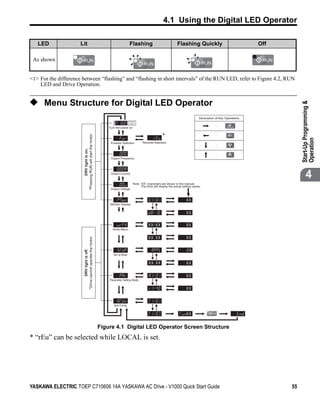
             Menu Structure for Digital LED Operator . . . . . . . . . . . . . . 55
         4.2 The Drive and Programming Modes . . . . . . . . . . 56
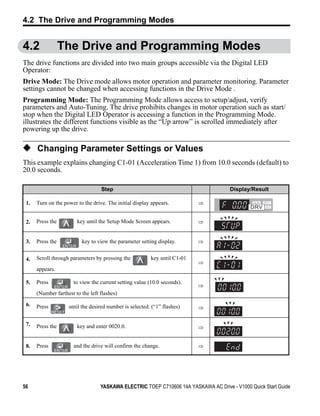
             Changing Parameter Settings or Values . . . . . . . . . . . . . . 56
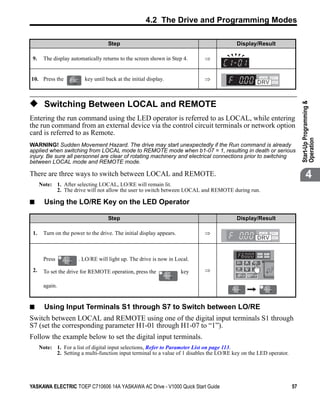
             Switching Between LOCAL and REMOTE . . . . . . . . . . . . . 57
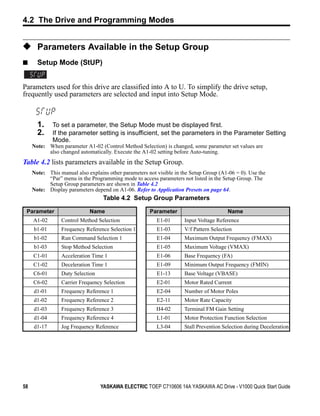
             Parameters Available in the Setup Group . . . . . . . . . . . . . 58
         4.3 Start-up Flowcharts . . . . . . . . . . . . . . . . . . . . . . . . 59
             Flowchart A: Basic Start-Up and Motor Tuning . . . . . . . . . 59
             Subchart A1: Simple Motor Set-Up with Energy
             Savings or Speed Search using V/f Mode . . . . . . . . . . . . . 61
             Subchart A2: High Performance Operation Using
             Open Loop Vector Motor Control . . . . . . . . . . . . . . . . . . . . 62

4                         YASKAWA ELECTRIC TOEP C710606 14A YASKAWA AC Drive - V1000 Quick Start Guide
Subchart A3: Operation with Permanent Magnet Motors . 63
             4.4 Application Presets . . . . . . . . . . . . . . . . . . . . . . . . 64
                  Application Preset Function (APPL) . . . . . . . . . . . . . . . . . 64
                  Application Presets: A1-06 . . . . . . . . . . . . . . . . . . . . . . . . 64
             4.5 Basic Drive Setup Adjustments. . . . . . . . . . . . . . . 66
                  Control Mode Selection: A1-02 . . . . . . . . . . . . . . . . . . . . .         66
                  Initialize Parameter Values: A1-03 . . . . . . . . . . . . . . . . . .          66
                  Frequency Reference Source: b1-01 . . . . . . . . . . . . . . . .               67
                  Run Command Input Selection: b1-02 . . . . . . . . . . . . . . .                69
                  Drive Duty Mode and Carrier Frequency Selection:
                  C6-01 and C6-02 . . . . . . . . . . . . . . . . . . . . . . . . . . . . . . .   71
                  Drive Input Voltage Setting: E1-01 . . . . . . . . . . . . . . . . . .          72
             4.6 Test Run. . . . . . . . . . . . . . . . . . . . . . . . . . . . . . . . . . 73
                  Powering Up the Drive and Operation Status Display . . . 73
                  Auto-Tuning . . . . . . . . . . . . . . . . . . . . . . . . . . . . . . . . . . . 73
                  Operating with the Load Connected . . . . . . . . . . . . . . . . . 78
             4.7 Test Run Checklist . . . . . . . . . . . . . . . . . . . . . . . . . 79


  5.         TROUBLESHOOTING .................................................. 81
             5.1 Drive Alarms, Faults, and Errors . . . . . . . . . . . . . . 82
                  Types of Alarms, Faults, and Errors . . . . . . . . . . . . . . . . . 82
             5.2 Fault Detection . . . . . . . . . . . . . . . . . . . . . . . . . . . . 83
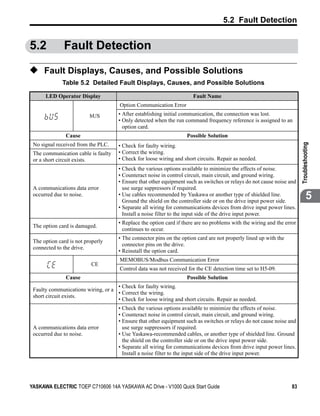
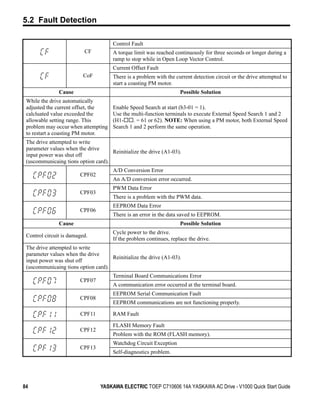
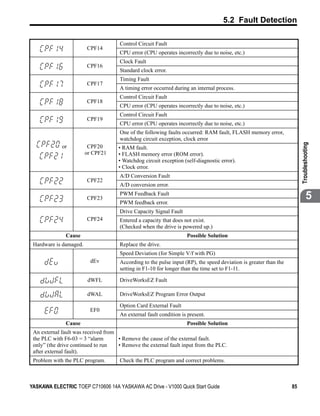
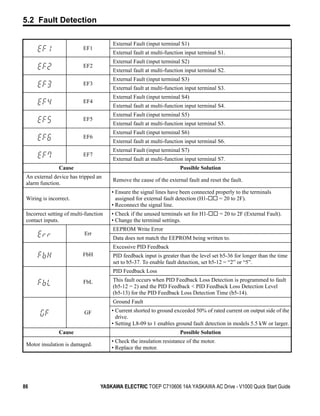
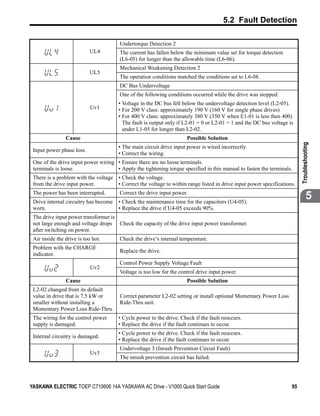
                  Fault Displays, Causes, and Possible Solutions . . . . . . . . 83
             5.3 Alarm Detection . . . . . . . . . . . . . . . . . . . . . . . . . . . 96
                  Alarm Codes, Causes, and Possible Solutions . . . . . . . . . 96
             5.4 Operator Programming Errors. . . . . . . . . . . . . . . . 99
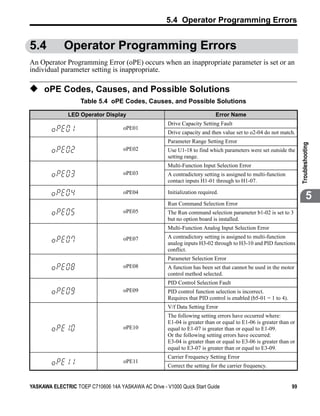
                  oPE Codes, Causes, and Possible Solutions . . . . . . . . . . 99
             5.5 Auto-Tuning Fault Detection . . . . . . . . . . . . . . . . 100
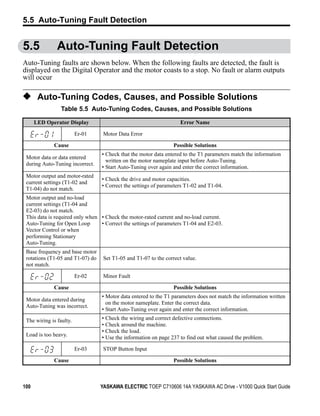
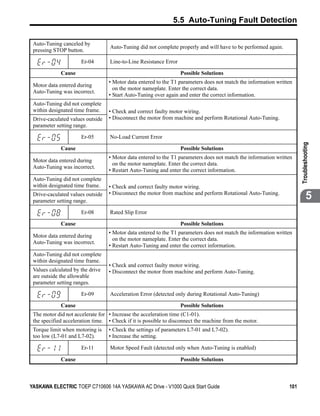
                  Auto-Tuning Codes, Causes, and Possible Solutions . . 100
             5.6 Diagnosing and Resetting Faults . . . . . . . . . . . . 103
                  Fault Reset Methods . . . . . . . . . . . . . . . . . . . . . . . . . . . . 103


YASKAWA ELECTRIC TOEP C710606 14A YASKAWA AC Drive - V1000 Quick Start Guide                             5
6.   SPECIFICATIONS....................................................... 105
         6.1 Heavy Duty and Normal Duty Ratings . . . . . . . . 106
         6.2 Single/Three-Phase 200 V Class Drive. . . . . . . . 107
         6.3 Three-Phase 400 V Class Drives . . . . . . . . . . . . 110


    7.   PARAMETER LIST ..................................................... 113
         7.1 Parameter Table . . . . . . . . . . . . . . . . . . . . . . . . . . 114


    8.   STANDARDS COMPLIANCE ..................................... 143
         8.1 European Standards . . . . . . . . . . . . . . . . . . . . . . 144
             CE Low Voltage Directive Compliance . . . . . . . . . . . . . . . 144
             EMC Guidelines Compliance . . . . . . . . . . . . . . . . . . . . . . 146
         8.2 UL Standards . . . . . . . . . . . . . . . . . . . . . . . . . . . . 151
             UL Standards Compliance . . . . . . . . . . . . . . . . . . . . . . . . 151
             Drive Motor Overload Protection . . . . . . . . . . . . . . . . . . . 154
         8.3 Safe Disable Input Precautions . . . . . . . . . . . . . 156
             Safe Disable Function Description . . . . . . . . . . . . . . . . . . 156
             Installation . . . . . . . . . . . . . . . . . . . . . . . . . . . . . . . . . . . . 156


6                         YASKAWA ELECTRIC TOEP C710606 14A YASKAWA AC Drive - V1000 Quick Start Guide
i
                                                   Preface &
                                               General Safety
                          This section provides safety messages pertinent to this product,
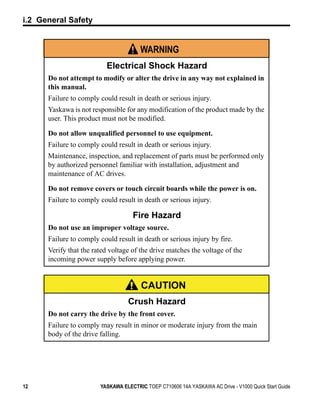
                          that, if not heeded, may result in fatality, personal injury, or
                          equipment damage. Yaskawa is not responsible for the
                          consequences of ignoring these instructions.


                I.1 PREFACE . . . . . . . . . . . . . . . . . . . . . . . . . . . . . . . . . . . . . . . 8
                I.2 GENERAL SAFETY. . . . . . . . . . . . . . . . . . . . . . . . . . . . . . . . 9


YASKAWA ELECTRIC TOEP C710606 14A YASKAWA AC Drive - V1000 Quick Start Guide                           7
i.1 Preface


i.1             Preface
Yaskawa manufactures products used as components in a wide variety of industrial systems
and equipment. The selection and application of Yaskawa products remain the responsibility
of the equipment manufacturer or end user. Yaskawa accepts no responsibility for the way its
products are incorporated into the final system design. Under no circumstances should any
Yaskawa product be incorporated into any product or design as the exclusive or sole safety
control. Without exception, all controls should be designed to detect faults dynamically and
fail safely under all circumstances. All systems or equipment designed to incorporate a
product manufactured by Yaskawa must be supplied to the end user with appropriate
warnings and instructions as to the safe use and operation of that part. Any warnings
provided by Yaskawa must be promptly provided to the end user. Yaskawa offers an express
warranty only as to the quality of its products in conforming to standards and specifications
published in the Yaskawa manual. NO OTHER WARRANTY, EXPRESS OR IMPLIED, IS
OFFERED. Yaskawa assumes no liability for any personal injury, property damage, losses,
or claims arising from misapplication of its products.

◆ Applicable Documentation
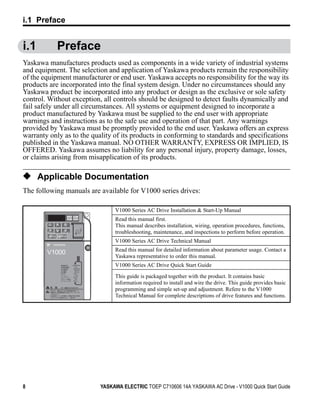
The following manuals are available for V1000 series drives:

                                   V1000 Series AC Drive Installation & Start-Up Manual
                                   Read this manual first.
                                   This manual describes installation, wiring, operation procedures, functions,
                                   troubleshooting, maintenance, and inspections to perform before operation.
                STOP

                                   V1000 Series AC Drive Technical Manual
                                   Read this manual for detailed information about parameter usage. Contact a
        V1000
                                   Yaskawa representative to order this manual.
                       (Hz)

                       (Hz)
                                   V1000 Series AC Drive Quick Start Guide
                       (A)
                       (V)


                                   This guide is packaged together with the product. It contains basic
                                   information required to install and wire the drive. This guide provides basic
                  5
                                   programming and simple set-up and adjustment. Refere to the V1000
         400V                      Technical Manual for complete descriptions of drive features and functions.


8                             YASKAWA ELECTRIC TOEP C710606 14A YASKAWA AC Drive - V1000 Quick Start Guide
t
                                                                               i.2 General Safety


i.2          General Safety


                                                                                                             Preface & General Safety
◆ Supplemental Safety Information
                                        General Precautions
• The diagrams in this manual may be indicated without covers or safety shields to show details.
  Restore covers or shields before operating the drive and run the drive according to the instructions
  described in this manual.
• Any illustrations, photographs, or examples used in this manual are provided as examples only and
  may not apply to all products to which this manual is applicable.
• The products and specifications described in this manual or the content and presentation of the
                                                                                                                           i
  manual may be changed without notice to improve the product and/or the manual.
• When ordering a new copy of the manual due to damage or loss, contact your Yaskawa
  representative or the nearest Yaskawa sales office and provide the manual number shown on the
  front cover.
• If nameplate becomes worn or damaged, order a replacement from your Yaskawa representative or
  the nearest Yaskawa sales office.


                                               WARNING
          Read and understand this manual before installing, operating or servicing
          this drive. The drive must be installed according to this manual and local
          codes.
          The following conventions are used to indicate safety messages in this
          manual. Failure to heed these messages could result in serious or possibly
          even fatal injury or damage to the products or to related equipment and
          systems.


                                               DANGER
          Indicates a hazardous situation, which, if not avoided, will result in
          death or serious injury.


YASKAWA ELECTRIC TOEP C710606 14A YASKAWA AC Drive - V1000 Quick Start Guide                             9
i.2 General Safety


                                               WARNING
          Indicates a hazardous situation, which, if not avoided, could result in
          death or serious injury.

WARNING! will also be indicated by a bold key word embedded in the text followed by an italicized safety
message.


                                               CAUTION
          Indicates a hazardous situation, which, if not avoided, could result in
          minor or moderate injury.

CAUTION! will also be indicated by a bold key word embedded in the text followed by an italicized safety
message.


                                              NOTICE
          Indicates a property damage message.

NOTICE: will also be indicated by a bold key word embedded in the text followed by an italicized safety
message.


10                             YASKAWA ELECTRIC TOEP C710606 14A YASKAWA AC Drive - V1000 Quick Start Guide
t
                                                                               i.2 General Safety


◆ Safety Messages


                                                                                                    Preface & General Safety
                                               DANGER
          Heed the safety messages in this manual.
          Failure to comply will result in death or serious injury.
          The operating company is responsible for any injuries or equipment
          damage resulting from failure to heed the warnings in this manual.

                                 Electrical Shock Hazard                                                          i
          Do not connect or disconnect wiring while the power is on.
          Failure to comply will result in death or serious injury.
          Before servicing, disconnect all power to the equipment. The internal
          capacitor remains charged even after the power supply is turned off. The
          charge indicator LED will extinguish when the DC bus voltage is below 50
          Vdc. To prevent electric shock, wait at least five minutes after all indicators
          are OFF and measure the DC bus voltage level to confirm safe level.


                                               WARNING
                               Sudden Movement Hazard
          System may start unexpectedly upon application of power, resulting in
          death or serious injury.
          Clear all personnel from the drive, motor and machine area before applying
          power. Secure covers, couplings, shaft keys and machine loads before
          applying power to the drive.

          When using DriveWorksEZ to create custom programming, the drive
          I/O terminal functions change from factory settings and the drive will
          not perform as outlined in this manual.
          Unpredictable equipment operation may result in death or serious injury.
          Take special note of custom I/O programming in the drive before
          attempting to operate equipment.


YASKAWA ELECTRIC TOEP C710606 14A YASKAWA AC Drive - V1000 Quick Start Guide                   11
i.2 General Safety


                                       WARNING
                          Electrical Shock Hazard
      Do not attempt to modify or alter the drive in any way not explained in
      this manual.
      Failure to comply could result in death or serious injury.
      Yaskawa is not responsible for any modification of the product made by the
      user. This product must not be modified.

      Do not allow unqualified personnel to use equipment.
      Failure to comply could result in death or serious injury.
      Maintenance, inspection, and replacement of parts must be performed only
      by authorized personnel familiar with installation, adjustment and
      maintenance of AC drives.

      Do not remove covers or touch circuit boards while the power is on.
      Failure to comply could result in death or serious injury.

                                    Fire Hazard
      Do not use an improper voltage source.
      Failure to comply could result in death or serious injury by fire.
      Verify that the rated voltage of the drive matches the voltage of the
      incoming power supply before applying power.


                                        CAUTION
                                   Crush Hazard
      Do not carry the drive by the front cover.
      Failure to comply may result in minor or moderate injury from the main
      body of the drive falling.


12                      YASKAWA ELECTRIC TOEP C710606 14A YASKAWA AC Drive - V1000 Quick Start Guide
t
                                                                               i.2 General Safety


                                              NOTICE


                                                                                                    Preface & General Safety
          Observe proper electrostatic discharge procedures (ESD) when
          handling the drive and circuit boards.
          Failure to comply may result in ESD damage to the drive circuitry.

          Never connect or disconnect the motor from the drive while the drive
          is outputting voltage.
          Improper equipment sequencing could result in damage to the drive.

          Do not perform a withstand voltage test on any part of the drive.                                       i
          Failure to comply could result in damage to the sensitive devices within the
          drive.

          Do not operate damaged equipment.
          Failure to comply could result in further damage to the equipment.
          Do not connect or operate any equipment with visible damage or missing
          parts.

          Install adequate branch circuit short circuit protection per applicable
          codes.
          Failure to comply could result in damage to the drive.
          The drive is suitable for circuits capable of delivering not more than 30,000
          RMS symmetrical Amperes, 240 Vac maximum
          (200V Class) and 480 Vac maximum (400V Class).

          Do not expose the drive to halogen group disinfectants.
          Failure to comply may cause damage to the electrical components in the
          drive.
          Do not pack the drive in wooden materials that have been fumigated or
          sterilized.
          Do not sterilize the entire package after the product is packed.


YASKAWA ELECTRIC TOEP C710606 14A YASKAWA AC Drive - V1000 Quick Start Guide                   13
i.2 General Safety


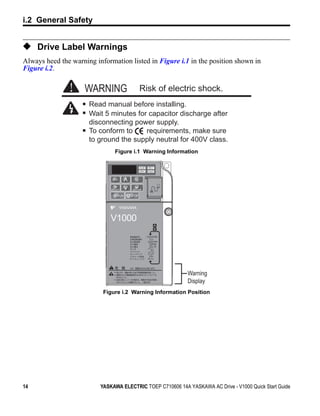
◆ Drive Label Warnings
Always heed the warning information listed in Figure i.1 in the position shown in
Figure i.2.
Figure i.1


                     WARNING                  Risk of electric shock.
                      Read manual before installing.
                      Wait 5 minutes for capacitor discharge after
                      disconnecting power supply.
                      To conform to     requirements, make sure
                      to ground the supply neutral for 400V class.
                               Figure i.1 Warning Information
Figure i.2


                                       STOP


                              V1000
                                                  (Hz)

                                                  (Hz)
                                                  (A)
                                                  (V)


                                         5                  Warning
                                400V
                                                            Display
                           Figure i.2 Warning Information Position


14                        YASKAWA ELECTRIC TOEP C710606 14A YASKAWA AC Drive - V1000 Quick Start Guide
1
                                                               Receiving
                          This chapter describes the proper inspections to perform after
                          receiving the drive and illustrates the different enclosure types
                          and components.


                1.1 MODEL NUMBER AND NAMEPLATE CHECK. . . . . . . . . 16


YASKAWA ELECTRIC TOEP C710606 14A YASKAWA AC Drive - V1000 Quick Start Guide            15
1.1 Model Number and Nameplate Check


1.1               Model Number and Nameplate Check
Please perform the following tasks after receiving the drive:
 • Inspect the drive for damage.
   If the drive appears damaged upon receipt, contact the shipper immediately.
 • Verify receipt of the correct model by checking the information on the nameplate.
 • If you have received the wrong model or the drive does not function properly, contact
   your supplier.

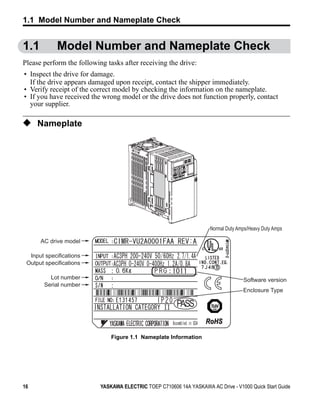
◆ Nameplate
Figure 1.1


                                                                         Normal Duty Amps/Heavy Duty Amps

             AC drive model

     Input specifications
    Output specifications

                Lot number                                                             Software version
              Serial number
                                                                                       Enclosure Type

                                                            PASS
                                                                        RoHS

                                  Figure 1.1 Nameplate Information


16                            YASKAWA ELECTRIC TOEP C710606 14A YASKAWA AC Drive - V1000 Quick Start Guide
1.1 Model Number and Nameplate Check


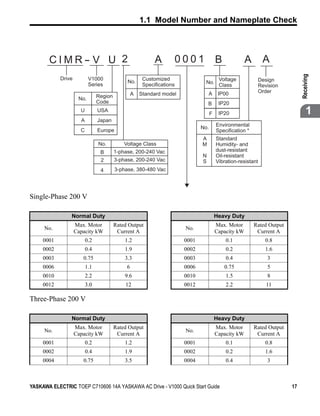
       CIMR- V U 2                                          A       0001                 B             A       A


                                                                                                                               Receiving
            Drive          V1000                       Customized                         Voltage           Design
                                              No.                                No.
                           Series                      Specifications                     Class             Revision
                                                  A   Standard model               A      IP00              Order
                     No.        Region
                                Code                                               B      IP20
                      U         USA
                                                                                     F    IP20                                      1
                      A         Japan
                                                                                         Environmental
                                                                               No.
                      C         Europe                                                   Specification *
                                                                               A         Standard
                                No.          Voltage Class                     M         Humidity- and
                                 B       1-phase, 200-240 Vac                            dust-resistant
                                                                               N         Oil-resistant
                                 2       3-phase, 200-240 Vac                  S         Vibration-resistant
                                 4       3-phase, 380-480 Vac


Single-Phase 200 V

                Normal Duty                                                              Heavy Duty
                    Max. Motor           Rated Output                                    Max. Motor        Rated Output
     No.                                                                No.
                    Capacity kW           Current A                                      Capacity kW        Current A
     0001                 0.2                1.2                        0001                 0.1               0.8
     0002                 0.4                1.9                        0002                 0.2               1.6
     0003              0.75                  3.3                        0003                 0.4                3
     0006                 1.1                 6                         0006                 0.75               5
     0010                 2.2                9.6                        0010                 1.5                8
     0012                 3.0                12                         0012                 2.2               11

Three-Phase 200 V

                Normal Duty                                                              Heavy Duty
                    Max. Motor           Rated Output                                    Max. Motor        Rated Output
     No.                                                                No.
                    Capacity kW           Current A                                      Capacity kW        Current A
     0001                 0.2                1.2                        0001                 0.1               0.8
     0002                 0.4                1.9                        0002                 0.2               1.6
     0004              0.75                  3.5                        0004                 0.4                3


YASKAWA ELECTRIC TOEP C710606 14A YASKAWA AC Drive - V1000 Quick Start Guide                                              17
1.1 Model Number and Nameplate Check

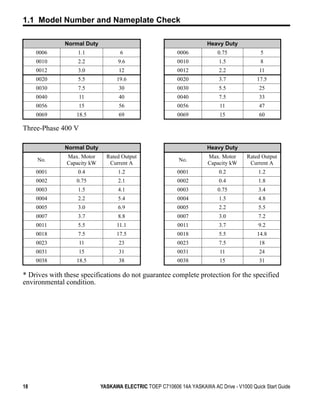
              Normal Duty                                              Heavy Duty
     0006          1.1              6                      0006            0.75              5
     0010          2.2              9.6                    0010             1.5              8
     0012          3.0              12                     0012             2.2             11
     0020          5.5             19.6                    0020             3.7            17.5
     0030          7.5              30                     0030             5.5             25
     0040           11              40                     0040             7.5             33
     0056          15               56                     0056             11              47
     0069         18.5              69                     0069             15              60

Three-Phase 400 V

              Normal Duty                                              Heavy Duty
               Max. Motor      Rated Output                            Max. Motor      Rated Output
     No.                                                    No.
               Capacity kW      Current A                              Capacity kW      Current A
     0001          0.4              1.2                    0001             0.2             1.2
     0002         0.75              2.1                    0002             0.4             1.8
     0003          1.5              4.1                    0003            0.75             3.4
     0004          2.2              5.4                    0004             1.5             4.8
     0005          3.0              6.9                    0005             2.2             5.5
     0007          3.7              8.8                    0007             3.0             7.2
     0011          5.5             11.1                    0011             3.7             9.2
     0018          7.5             17.5                    0018             5.5            14.8
     0023           11              23                     0023             7.5             18
     0031          15               31                     0031             11              24
     0038         18.5              38                     0038             15              31

* Drives with these specifications do not guarantee complete protection for the specified
environmental condition.


18                           YASKAWA ELECTRIC TOEP C710606 14A YASKAWA AC Drive - V1000 Quick Start Guide
2
                                                          Mechanical
                                                          Installation
                          This chapter explains how to properly mount and install the
                          drive.


                2.1 MECHANICAL INSTALLATION. . . . . . . . . . . . . . . . . . . . . 20


YASKAWA ELECTRIC TOEP C710606 14A YASKAWA AC Drive - V1000 Quick Start Guide        19
2.1 Mechanical Installation


2.1            Mechanical Installation
This section outlines specifications, procedures, and environment for proper mechanical
installation of the drive.

◆ Installation Environment
To help prolong the optimum performance life of the drive, install the drive in the proper
environment. The table below provides description of the appropriate environment for the
drive.
                                  Table 2.1 Installation Environment

     Environment                                               Conditions
 Installation Area     Indoors
                       -10 C to +40 C (IP20/NEMA Type 1)
                       -10 C to +50 C (IP20/Open-Chassis)
 Ambient               Drive reliability improves in enviroments without wide temperature fluctuations.
 Temperature           When using an enclosure panel, install a cooling fan or air conditioner in the area to ensure
                       that the air temperature inside the enclosure does not exceed the specified levels.
                       Do not allow ice to develop on the drive.
 Humidity              95% RH or less and free of condensation
 Storage Temperature -20     C to +60    C
                       • Install the drive in an area free from:
                       • oil mist and dust
                       • metal shavings, oil, water or other foreign materials
                       • radioactive materials
 Surrounding Area      • combustible materials (e.g., wood)
                       • harmful gases and liquids
                       • excessive vibration
                       • chlorides
                       • direct sunlight.
 Altitude              1000 m or lower
                       10 to 20 Hz at 9.8 m/s2
 Vibration
                       20 to 55 Hz at 5.9 m/s2
 Orientation           Install the drive vertically to maintain maximum cooling effects.

NOTICE: Prevent foreign matter such as metal shavings or wire clippings from falling into the drive during
installation and project construction. Failure to comply could result in damage to the drive. Place a
temporary cover over the top of the drive during installation. Remove the temporary cover before start-up, as
the cover will reduce ventilation and cause the drive to overheat.


20                               YASKAWA ELECTRIC TOEP C710606 14A YASKAWA AC Drive - V1000 Quick Start Guide
2.1 Mechanical Installation


◆ Installation Orientation and Spacing
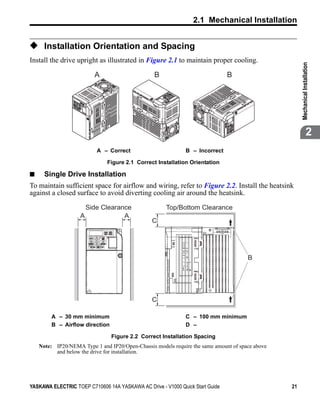
Install the drive upright as illustrated in Figure 2.1 to maintain proper cooling.


                                                                                                               Mechanical Installation
Figure 2.1


                                   A                      B                            B


                                                                                                                            2
                                    A – Correct                        B – Incorrect

                                       Figure 2.1 Correct Installation Orientation

■              Single Drive Installation
To maintain sufficient space for airflow and wiring, refer to Figure 2.2. Install the heatsink
against a closed surface to avoid diverting cooling air around the heatsink.
Figure 2.2


                                 Side Clearance                Top/Bottom Clearance
                             A               A
                                                         C


                                                                                               B


                                                         C

                  A – 30 mm minimum                                   C – 100 mm minimum
                  B – Airflow direction                               D –

                                          Figure 2.2 Correct Installation Spacing
             Note: IP20/NEMA Type 1 and IP20/Open-Chassis models require the same amount of space above
                   and below the drive for installation.


YASKAWA ELECTRIC TOEP C710606 14A YASKAWA AC Drive - V1000 Quick Start Guide                              21
2.1 Mechanical Installation

■              Multiple Drive Installation
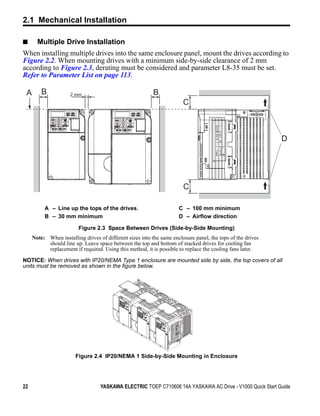
When installing multiple drives into the same enclosure panel, mount the drives according to
Figure 2.2. When mounting drives with a minimum side-by-side clearance of 2 mm
according to Figure 2.3, derating must be considered and parameter L8-35 must be set.
Refer to Parameter List on page 113.
Figure 2.3


    A            B            2 mm                                 B
                                                                                C


                                                                                                                     D


                                                                                C

                  A – Line up the tops of the drives.                         C – 100 mm minimum
                  B – 30 mm minimum                                           D – Airflow direction

                                 Figure 2.3 Space Between Drives (Side-by-Side Mounting)
             Note: When installing drives of different sizes into the same enclosure panel, the tops of the drives
                   should line up. Leave space between the top and bottom of stacked drives for cooling fan
                   replacement if required. Using this method, it is possible to replace the cooling fans later.

NOTICE: When drives with IP20/NEMA Type 1 enclosure are mounted side by side, the top covers of all
units must be removed as shown in the figure below.
Figure 2.4


                                Figure 2.4 IP20/NEMA 1 Side-by-Side Mounting in Enclosure


22                                         YASKAWA ELECTRIC TOEP C710606 14A YASKAWA AC Drive - V1000 Quick Start Guide
2.1 Mechanical Installation


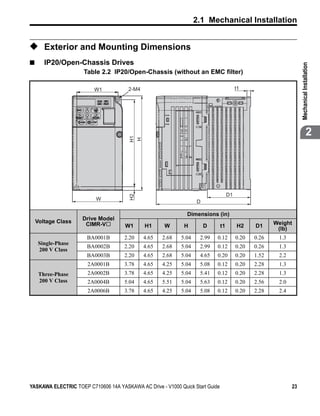
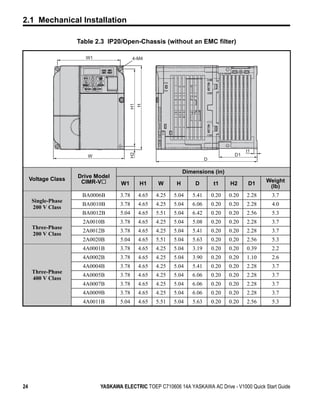
◆ Exterior and Mounting Dimensions
■      IP20/Open-Chassis Drives


                                                                                                                   Mechanical Installation
                     Table 2.2 IP20/Open-Chassis (without an EMC filter)

                         W1            2-M4                                              t1


                                        H1
                                        H
                                                                                                                                2


                                                                                    D1
                                        H2


                          W
                                                                   D

                                                               Dimensions (in)
                     Drive Model
    Voltage Class     CIMR-V                                                                           Weight
                                      W1      H1     W       H         D       t1        H2     D1
                                                                                                        (lb)
                      BA0001B        2.20     4.65   2.68   5.04    2.99   0.12          0.20   0.26    1.3
     Single-Phase
                      BA0002B        2.20     4.65   2.68   5.04    2.99   0.12          0.20   0.26    1.3
     200 V Class
                      BA0003B        2.20     4.65   2.68   5.04    4.65   0.20          0.20   1.52    2.2
                       2A0001B       3.78     4.65   4.25   5.04    5.08   0.12          0.20   2.28    1.3
     Three-Phase       2A0002B       3.78     4.65   4.25   5.04    5.41   0.12          0.20   2.28    1.3
     200 V Class       2A0004B       5.04     4.65   5.51   5.04    5.63   0.12          0.20   2.56    2.0
                       2A0006B       3.78     4.65   4.25   5.04    5.08   0.12          0.20   2.28    2.4


YASKAWA ELECTRIC TOEP C710606 14A YASKAWA AC Drive - V1000 Quick Start Guide                                  23
2.1 Mechanical Installation

                     Table 2.3 IP20/Open-Chassis (without an EMC filter)

                       W1                 4-M4


                                          H1
                                           H

                                                                                              t1
                                          H2


                        W                                                                D1
                                                                            D

                                                                  Dimensions (in)
                     Drive Model
     Voltage Class    CIMR-V                                                                         Weight
                                    W1         H1     W       H       D         t1     H2      D1     (lb)
                      BA0006B      3.78        4.65   4.25   5.04    5.41       0.20   0.20   2.28    3.7
      Single-Phase
                      BA0010B      3.78        4.65   4.25   5.04    6.06       0.20   0.20   2.28    4.0
      200 V Class
                      BA0012B      5.04        4.65   5.51   5.04    6.42       0.20   0.20   2.56    5.3
                      2A0010B      3.78        4.65   4.25   5.04    5.08       0.20   0.20   2.28    3.7
      Three-Phase
                      2A0012B      3.78        4.65   4.25   5.04    5.41       0.20   0.20   2.28    3.7
      200 V Class
                      2A0020B      5.04        4.65   5.51   5.04    5.63       0.20   0.20   2.56    5.3
                      4A0001B      3.78        4.65   4.25   5.04    3.19       0.20   0.20   0.39    2.2
                      4A0002B      3.78        4.65   4.25   5.04    3.90       0.20   0.20   1.10    2.6
                      4A0004B      3.78        4.65   4.25   5.04    5.41       0.20   0.20   2.28    3.7
      Three-Phase
                      4A0005B      3.78        4.65   4.25   5.04    6.06       0.20   0.20   2.28    3.7
      400 V Class
                      4A0007B      3.78        4.65   4.25   5.04    6.06       0.20   0.20   2.28    3.7
                      4A0009B      3.78        4.65   4.25   5.04    6.06       0.20   0.20   2.28    3.7
                      4A0011B      5.04        4.65   5.51   5.04    5.63       0.20   0.20   2.56    5.3


24                          YASKAWA ELECTRIC TOEP C710606 14A YASKAWA AC Drive - V1000 Quick Start Guide
2.1 Mechanical Installation

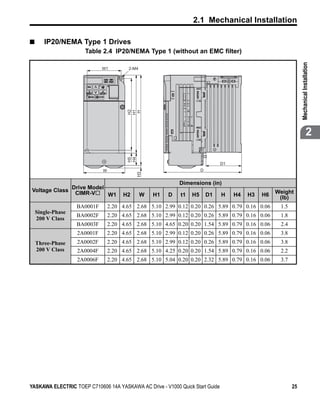
■      IP20/NEMA Type 1 Drives
                       Table 2.4 IP20/NEMA Type 1 (without an EMC filter)


                                                                                                                Mechanical Installation
                              W1         2-M4


                                         H2
                                         H1
                                          H
                                         H4
                                         H5
                                                                                                                             2

                                                                                D1
                              W                                        D
                                              H3


                                                             Dimensions (in)
                   Drive Model
Voltage Class       CIMR-V                                                                          Weight
                               W1      H2       W   H1   D   t1   H5       D1   H    H4   H3   H6    (lb)
                    BA0001F       2.20 4.65 2.68 5.10 2.99 0.12 0.20 0.26 5.89 0.79 0.16 0.06        1.5
    Single-Phase
                    BA0002F       2.20 4.65 2.68 5.10 2.99 0.12 0.20 0.26 5.89 0.79 0.16 0.06        1.8
    200 V Class
                    BA0003F       2.20 4.65 2.68 5.10 4.65 0.20 0.20 1.54 5.89 0.79 0.16 0.06        2.4
                    2A0001F       2.20 4.65 2.68 5.10 2.99 0.12 0.20 0.26 5.89 0.79 0.16 0.06        3.8
    Three-Phase     2A0002F       2.20 4.65 2.68 5.10 2.99 0.12 0.20 0.26 5.89 0.79 0.16 0.06        3.8
    200 V Class     2A0004F       2.20 4.65 2.68 5.10 4.25 0.20 0.20 1.54 5.89 0.79 0.16 0.06        2.2
                    2A0006F       2.20 4.65 2.68 5.10 5.04 0.20 0.20 2.32 5.89 0.79 0.16 0.06        3.7


YASKAWA ELECTRIC TOEP C710606 14A YASKAWA AC Drive - V1000 Quick Start Guide                               25
2.1 Mechanical Installation

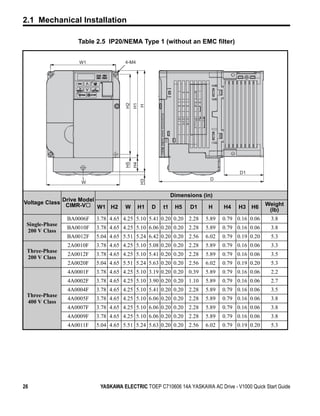
                   Table 2.5 IP20/NEMA Type 1 (without an EMC filter)


                   W1                4-M4


                                     H2
                                          H1
                                               H
                                     H5
                                          H4


                                                                                      D1
                                                                           D
                                               H3


                    W

                                                             Dimensions (in)
             Drive Model
Voltage Class CIMR-V                                                                             Weight
                         W1 H2       W      H1      D   t1    H5    D1    H     H4    H3   H6     (lb)
                BA0006F   3.78 4.65 4.25 5.10 5.41 0.20 0.20 2.28        5.89   0.79 0.16 0.06    3.8
 Single-Phase
                BA0010F   3.78 4.65 4.25 5.10 6.06 0.20 0.20 2.28        5.89   0.79 0.16 0.06    3.8
 200 V Class
                BA0012F   5.04 4.65 5.51 5.24 6.42 0.20 0.20 2.56        6.02   0.79 0.19 0.20    5.3
                2A0010F   3.78 4.65 4.25 5.10 5.08 0.20 0.20 2.28        5.89   0.79 0.16 0.06    3.3
 Three-Phase
                2A0012F   3.78 4.65 4.25 5.10 5.41 0.20 0.20 2.28        5.89   0.79 0.16 0.06    3.5
 200 V Class
                2A0020F   5.04 4.65 5.51 5.24 5.63 0.20 0.20 2.56        6.02   0.79 0.19 0.20    5.3
                4A0001F   3.78 4.65 4.25 5.10 3.19 0.20 0.20 0.39        5.89   0.79 0.16 0.06    2.2
                4A0002F   3.78 4.65 4.25 5.10 3.90 0.20 0.20 1.10        5.89   0.79 0.16 0.06    2.7
                4A0004F   3.78 4.65 4.25 5.10 5.41 0.20 0.20 2.28        5.89   0.79 0.16 0.06    3.5
 Three-Phase
                4A0005F   3.78 4.65 4.25 5.10 6.06 0.20 0.20 2.28        5.89   0.79 0.16 0.06    3.8
 400 V Class
                4A0007F   3.78 4.65 4.25 5.10 6.06 0.20 0.20 2.28        5.89   0.79 0.16 0.06    3.8
                4A0009F   3.78 4.65 4.25 5.10 6.06 0.20 0.20 2.28        5.89   0.79 0.16 0.06    3.8
                4A0011F   5.04 4.65 5.51 5.24 5.63 0.20 0.20 2.56        6.02   0.79 0.19 0.20    5.3


26                         YASKAWA ELECTRIC TOEP C710606 14A YASKAWA AC Drive - V1000 Quick Start Guide
2.1 Mechanical Installation

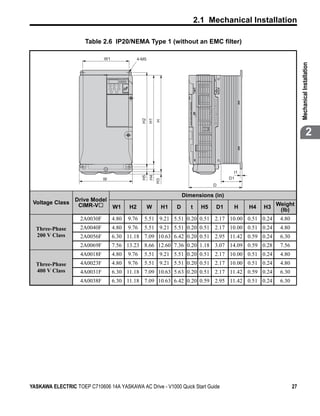
                      Table 2.6 IP20/NEMA Type 1 (without an EMC filter)

                              W1               4-M5


                                                                                                                          Mechanical Installation
                                                 H2
                                                      H1
                                                           H
                                                                                                                                       2


                                                                                              t1
                                                      H4
                                                 H5


                              W                                                             D1
                                                           H3


                                                                                       D

                                                                         Dimensions (in)
                  Drive Model
 Voltage Class     CIMR-V                                                                                    Weight
                                   W1     H2          W         H1   D      t     H5   D1     H    H4   H3    (lb)
                    2A0030F        4.80   9.76    5.51 9.21 5.51 0.20 0.51 2.17 10.00 0.51 0.24               4.80
  Three-Phase       2A0040F        4.80   9.76    5.51 9.21 5.51 0.20 0.51 2.17 10.00 0.51 0.24               4.80
  200 V Class       2A0056F        6.30 11.18 7.09 10.63 6.42 0.20 0.51 2.95 11.42 0.59 0.24                  6.30
                    2A0069F        7.56 13.23 8.66 12.60 7.36 0.20 1.18 3.07 14.09 0.59 0.28                  7.56
                    4A0018F        4.80   9.76    5.51 9.21 5.51 0.20 0.51 2.17 10.00 0.51 0.24               4.80
  Three-Phase       4A0023F        4.80   9.76    5.51 9.21 5.51 0.20 0.51 2.17 10.00 0.51 0.24               4.80
  400 V Class       4A0031F        6.30 11.18 7.09 10.63 5.63 0.20 0.51 2.17 11.42 0.59 0.24                  6.30
                    4A0038F        6.30 11.18 7.09 10.63 6.42 0.20 0.59 2.95 11.42 0.51 0.24                  6.30


YASKAWA ELECTRIC TOEP C710606 14A YASKAWA AC Drive - V1000 Quick Start Guide                                         27
2.1 Mechanical Installation


28                  YASKAWA ELECTRIC TOEP C710606 14A YASKAWA AC Drive - V1000 Quick Start Guide
3
                                                             Electrical
                                                           Installation
                          This chapter explains proper procedures for wiring the control
                          circuit terminals, motor and power supply.


                3.1 STANDARD CONNECTION DIAGRAM. . . . . . . . . . . . . . . 30
                3.2 MAIN CIRCUIT WIRING . . . . . . . . . . . . . . . . . . . . . . . . . . . 33
                3.3 I/O CONNECTIONS . . . . . . . . . . . . . . . . . . . . . . . . . . . . . . 45
                3.4 MAIN FREQUENCY REFERENCE . . . . . . . . . . . . . . . . . . 47
                3.5 WIRING CHECKLIST . . . . . . . . . . . . . . . . . . . . . . . . . . . . . 49


YASKAWA ELECTRIC TOEP C710606 14A YASKAWA AC Drive - V1000 Quick Start Guide                  29
3.1 Standard Connection Diagram


3.1           Standard Connection Diagram
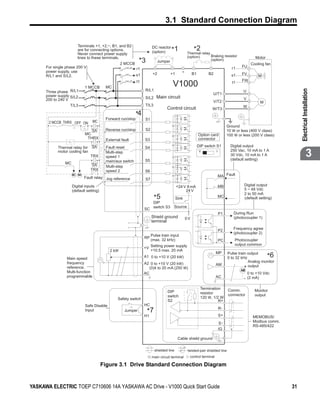
Connect the drive and peripheral devices as shown in Figure 3.1. It is possible to run the
drive via the digital operator without connecting digital I/O wiring. This section does not
discuss drive operation; Refer to Start-Up Programming & Operation on page 51 for
instructions on operating the drive.
NOTICE: Inadequate branch short circuit protection could result in damage to the drive. Install adequate
branch circuit short circuit protection per applicable codes. The drive is suitable for circuits capable of
delivering not more than 18,000 RMS symmetrical amperes, 240 Vac maximum (200 V Class) and 480 Vac
maximum (400 V Class).

NOTICE: When the input voltage is 480 V or higher or the wiring distance is greater than 100 meters, pay
special attention to the motor insulation voltage or use an inverter duty motor. Failure to comply could lead
to motor insulation breakdown.

NOTICE: Do not connect the AC control circuit ground to the drive enclosure. Improper drive grounding can
cause the control circuit to malfunction.

NOTICE: The minimum load for the multi-function relay output MA-MB-MC is 10 mA. If a circuit requires less
than 10 mA, connect it to a photocoupler output (P1, P2, PC). Improper application of peripheral devices
could result in damage to the photocoupler output of the drive.


30                              YASKAWA ELECTRIC TOEP C710606 14A YASKAWA AC Drive - V1000 Quick Start Guide
3.1 Standard Connection Diagram

Figure 3.1

                                                 _
                               Terminals +1, +2, , B1, and B2
                               are for connecting options.
                                                                              DC reactor
                                                                              (option)      *1               *2
                                                                                                        Thermal relay
                               Never connect power supply
                               lines to these terminals.                                                (option)      Braking resistor                Motor
                                                         2 MCCB
                                                                     *3          Jumper                               (option)
                                                                                                                                                    Cooling fan
             For single phase 200 V                                                                                                     r1    FU
                                                                r1
             power supply, use
                                                                               +2           +1      -        B1         B2                    FV
             R/L1 and S/L2.                                     s1                                                                      s1              M
                                                                t1                                                                            FW
                                    1 MCCB      MC                                           V1000                                       t1


                                                                                                                                                                         Electrical Installation
             Three phase R/L1                                            R/L1                                                                  U
             power supply S/L2                                                                                            U/T1
                                                                         S/L2    Main circuit                                                  V
             200 to 240 V                                                                                                 V/T2                           M
                           T/L3                                          T/L3                                                                  W
                                                                                        Control circuit                   W/T3
                                                                    *4
                                                 Forward run/stop        S1
              2 MCCB THRX OFF ON         MC
                                                                                                                                      Ground
                                         SA      Reverse run/stop        S2                                                           10 W or less (400 V class)
                                    MC                                                                            Option card         100 W or less (200 V class)
                                     THRX        External fault          S3                                       connector

                   Thermal relay for     SA      Fault reset             S4                                       DIP switch S1         Digital output
                   motor cooling fan
                                       TRX
                                                 Multi-step
                                                 speed 1
                                                                         S5
                                                                                                                   V         I          250 Vac, 10 mA to 1 A
                                                                                                                                        30 Vdc, 10 mA to 1 A
                                                                                                                                        (default setting)
                                                                                                                                                                                      3
                                                 main/aux switch
                       MC               SA       Multi-step
                                       TRX       speed 2                 S6
                            MC MA
                                    Fault relay Jog reference                                                                    MA Fault
                                                                         S7
                            Digital inputs                                                       +24 V 8 mA                      MB             Digital output
                            (default setting)                                                         24 V                                      5 ~ 48 Vdc
                                                                                                                                                2 to 50 mA
                                                                                *5               Sink                            MC             (default setting)
                                                                                DIP
                                                                                switch S3    Source
                                                                         SC
                                                                                                                                 P1       During Run
                                                                              Shield ground             0V                                (photocoupler 1)
                                                                              terminal

                                                                                                                                 P2      Frequency agree
                                                                                                                                         (photocoupler 2)
                                                                              Pulse train input
                                                                         RP
                                                                              (max. 32 kHz)                                      PC       Photocoupler
                                                                              Setting power supply                                        output common
                                                                         +V
                                                   2 kW                       +10.5 max. 20 mA
                                                                                                                             MP       Pulse train output
                        Main speed                                       A1 0 to +10 V (20 kW)                                        0 to 32 kHz             *6
                        frequency                                        A2 0 to +10 V (20 kW)                                                    Analog monitor
                                                                                                                             AM
                        reference.                                          (0)4 to 20 mA (250 W)                                               + output
                        Multi-function                                                                                                        AM
                                                                         AC                                                                       0 to +10 Vdc
                        programmable                                                                                         AC                 - (2 mA)

                                                                                                                   Termination        Comm.
                                                                                        DIP                                                           Monitor
                                                                                                                   resistor           connector
                                                                                        switch                                                        output
                                                        Safety switch                                              120 W, 1/2 W
                                                                                        S2                                   R+
                                    Safe Disable                         HC
                                                                                                                                 R-
                                    Input                   Jumper        *7                                                     S+
                                                                         H1                                                                          MEMOBUS/
                                                                                                                                 S-                  Modbus comm.
                                                                                                                                                     RS-485/422
                                                                                                                                 IG

                                                                                                  Cable shield ground

                                                                                shielded line           twisted-pair shielded line
                                                                              main circuit terminal      control terminal

                                                Figure 3.1 Drive Standard Connection Diagram


YASKAWA ELECTRIC TOEP C710606 14A YASKAWA AC Drive - V1000 Quick Start Guide                                                                                        31
3.1 Standard Connection Diagram

             * 1. Remove the jumper when installing an optional DC reactor.
             * 2. The MC on the input side of the main circuit should open when the thermal relay is triggered.
             * 3. Self-cooled motors do not require separate cooling fan motor wiring.
             * 4. Connected using sequence input signal (S1 to S7) from NPN transistor; Default: sink mode ( 0 V com)
             * 5. Use only a +24 V internal power supply in sinking mode; the source mode requires an external power
                  supply. Refer to I/O Connections on page 45.
             * 6. Monitor outputs work with devices such as analog frequency meters, ammeters, voltmeters and
                  wattmeters; they are intended for use as a feedback-type of signal.
             * 7. Disconnect the wire jumper between HC and H1 when utilizing the safety input.

WARNING! Sudden Movement Hazard. Do not close the wiring for the control circuit unless the
multifunction input terminal parameter is properly set (S5 for 3-wire; H1-05 = “0”). Improper sequencing of
run/stop circuitry could result in death or serious injury from moving equipment.

WARNING! Sudden Movement Hazard. Ensure start/stop and safety circuits are wired properly and in the
correct state before energizing the drive. Failure to comply could result in death or serious injury from
moving equipment. When programmed for 3-wire control, a momentary closure on terminal S1 may cause
the drive to start.

WARNING! When 3-Wire sequence is used, set the drive to 3-Wire sequence before wiring the control
terminals and ensure parameter b1-17 is set to 0 (drive does not accept a run command at power up
(default)). If the drive is wired for 3-Wire sequence but set up for 2-Wire sequence (default) and if parameter
b1-17 is set to 1 (drive accepts a Run command at power up), the motor will rotate in reverse direction at
power up of the drive and may cause injury.

WARNING! When the application preset funcion is executed (or A1-06 is set to any value other than 0) the
drive I/O terminal funcitons change. This may cause unexpected operation and potential damage to
equipment or injury.

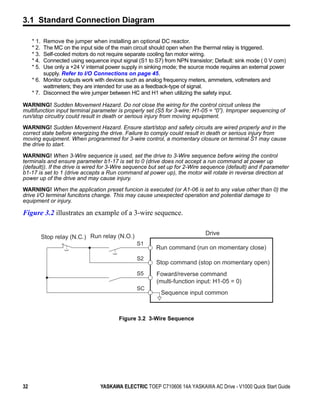
Figure 3.2 illustrates an example of a 3-wire sequence.
Figure 3.2


                                                                                    Drive
                    Stop relay (N.C.) Run relay (N.O.)
                                                         S1
                                                               Run command (run on momentary close)
                                                         S2
                                                               Stop command (stop on momentary open)
                                                         S5     Foward/reverse command
                                                                (multi-function input: H1-05 = 0)
                                                         SC
                                                                 Sequence input common


                                                Figure 3.2 3-Wire Sequence


32                                       YASKAWA ELECTRIC TOEP C710606 14A YASKAWA AC Drive - V1000 Quick Start Guide
3.2 Main Circuit Wiring


3.2              Main Circuit Wiring
This section describes the functions, specifications, and procedures required to safely and
properly wire the main circuit of the drive.
NOTICE: Do not solder the ends of wire connections to the drive. Soldered wiring connections can loosen
over time. Improper wiring practices could result in drive malfunction due to loose terminal connections.


                                                                                                                         Electrical Installation
◆ Main Circuit Terminal Functions
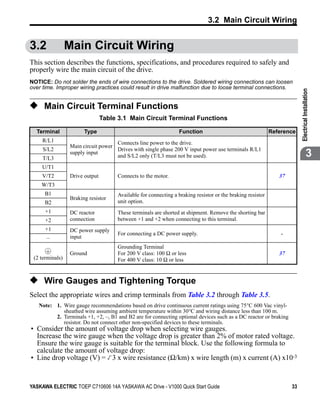
                                 Table 3.1 Main Circuit Terminal Functions

  Terminal              Type                                     Function                                   Reference
     R/L1                            Connects line power to the drive.
                  Main circuit power
     S/L2                            Drives with single phase 200 V input power use terminals R/L1
     T/L3
                  supply input
                                     and S/L2 only (T/L3 must not be used).                                                           3
     U/T1
     V/T2         Drive output        Connects to the motor.                                                   37
    W/T3
      B1                              Available for connecting a braking resistor or the braking resistor
                  Braking resistor
      B2                              unit option.
      +1          DC reactor          These terminals are shorted at shipment. Remove the shorting bar
      +2          connection          between +1 and +2 when connecting to this terminal.
      +1          DC power supply
                                      For connecting a DC power supply.                                         -
      –           input
                                      Grounding Terminal
                  Ground              For 200 V class: 100 Ω or less                                           37
 (2 terminals)                        For 400 V class: 10 Ω or less


◆ Wire Gauges and Tightening Torque
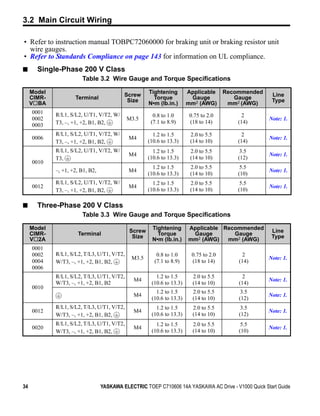
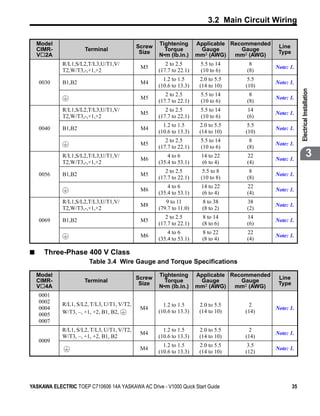
Select the appropriate wires and crimp terminals from Table 3.2 through Table 3.5.
   Note: 1. Wire gauge recommendations based on drive continuous current ratings using 75°C 600 Vac vinyl-
            sheathed wire assuming ambient temperature within 30°C and wiring distance less than 100 m.
         2. Terminals +1, +2, –, B1 and B2 are for connecting optional devices such as a DC reactor or braking
            resistor. Do not connect other non-specified devices to these terminals.
• Consider the amount of voltage drop when selecting wire gauges.
  Increase the wire gauge when the voltage drop is greater than 2% of motor rated voltage.
  Ensure the wire gauge is suitable for the terminal block. Use the following formula to
  calculate the amount of voltage drop:
• Line drop voltage (V) = 3 x wire resistance (Ω/km) x wire length (m) x current (A) x10-3


YASKAWA ELECTRIC TOEP C710606 14A YASKAWA AC Drive - V1000 Quick Start Guide                                        33
3.2 Main Circuit Wiring

• Refer to instruction manual TOBPC72060000 for braking unit or braking resistor unit
  wire gauges.
• Refer to Standards Compliance on page 143 for information on UL compliance.
■      Single-Phase 200 V Class
                        Table 3.2 Wire Gauge and Torque Specifications

     Model                                 Screw     Tightening        Applicable      Recommended    Line
     CIMR-           Terminal               Size       Torque           Gauge             Gauge       Type
     V BA                                            N•m (lb.in.)      mm2 (AWG)        mm2 (AWG)
     0001    R/L1, S/L2, U/T1, V/T2, W/                0.8 to 1.0       0.75 to 2.0          2
     0002                                    M3.5                                                    Note: 1.
             T3, –, +1, +2, B1, B2,                   (7.1 to 8.9)      (18 to 14)         (14)
     0003
             R/L1, S/L2, U/T1, V/T2, W/                1.2 to 1.5       2.0 to 5.5           2
     0006                                    M4                                                      Note: 1.
             T3, –, +1, +2, B1, B2,                  (10.6 to 13.3)     (14 to 10)         (14)
             R/L1, S/L2, U/T1, V/T2, W/                1.2 to 1.5       2.0 to 5.5          3.5
                                             M4                                                      Note: 1.
             T3,                                     (10.6 to 13.3)     (14 to 10)         (12)
     0010
                                                       1.2 to 1.5       2.0 to 5.5          5.5
             –, +1, +2, B1, B2,              M4                                                      Note: 1.
                                                     (10.6 to 13.3)     (14 to 10)         (10)
             R/L1, S/L2, U/T1, V/T2, W/                1.2 to 1.5       2.0 to 5.5          5.5
     0012                                    M4                                                      Note: 1.
             T3, –, +1, +2, B1, B2,                  (10.6 to 13.3)     (14 to 10)         (10)

■      Three-Phase 200 V Class
                        Table 3.3 Wire Gauge and Torque Specifications

     Model                                            Tightening       Applicable Recommended
                                             Screw                                                    Line
     CIMR-            Terminal                          Torque          Gauge        Gauge
                                              Size                                                    Type
     V 2A                                             N•m (lb.in.)     mm2 (AWG)   mm2 (AWG)
     0001
     0002    R/L1, S/L2, T/L3, U/T1, V/T2,               0.8 to 1.0      0.75 to 2.0        2
                                              M3.5                                                   Note: 1.
     0004    W/T3, –, +1, +2, B1, B2,                   (7.1 to 8.9)     (18 to 14)        (14)
     0006
             R/L1, S/L2, T/L3, U/T1, V/T2,              1.2 to 1.5       2.0 to 5.5         2
                                               M4                                                    Note: 1.
             W/T3, –, +1, +2, B1, B2                  (10.6 to 13.3)     (14 to 10)        (14)
     0010
                                                        1.2 to 1.5       2.0 to 5.5         3.5
                                               M4                                                    Note: 1.
                                                      (10.6 to 13.3)     (14 to 10)        (12)
             R/L1, S/L2, T/L3, U/T1, V/T2,              1.2 to 1.5       2.0 to 5.5         3.5
     0012                                      M4                                                    Note: 1.
             W/T3, –, +1, +2, B1, B2,                 (10.6 to 13.3)     (14 to 10)        (12)
             R/L1, S/L2, T/L3, U/T1, V/T2,              1.2 to 1.5       2.0 to 5.5         5.5
     0020                                      M4                                                    Note: 1.
             W/T3, –, +1, +2, B1, B2,                 (10.6 to 13.3)     (14 to 10)        (10)


34                                YASKAWA ELECTRIC TOEP C710606 14A YASKAWA AC Drive - V1000 Quick Start Guide
3.2 Main Circuit Wiring

    Model                                    Screw   Tightening       Applicable Recommended    Line
    CIMR-             Terminal                Size     Torque          Gauge        Gauge       Type
    V 2A                                             N•m (lb.in.)     mm2 (AWG)   mm2 (AWG)
             R/L1,S/L2,T/L3,U/T1,V/                     2 to 2.5       5.5 to 14      8
                                              M5                                               Note: 1.
             T2,W/T3,-,+1,+2                         (17.7 to 22.1)    (10 to 6)     (8)
                                                       1.2 to 1.5      2.0 to 5.5    5.5
    0030     B1,B2                            M4                                               Note: 1.
                                                     (10.6 to 13.3)    (14 to 10)   (10)


                                                                                                            Electrical Installation
                                                        2 to 2.5       5.5 to 14      8
                                              M5                                               Note: 1.
                                                     (17.7 to 22.1)    (10 to 6)     (8)
             R/L1,S/L2,T/L3,U/T1,V/                     2 to 2.5       5.5 to 14     14
                                              M5                                               Note: 1.
             T2,W/T3,-,+1,+2                         (17.7 to 22.1)    (10 to 6)     (6)
                                                       1.2 to 1.5      2.0 to 5.5    5.5
    0040     B1,B2                            M4                                               Note: 1.
                                                     (10.6 to 13.3)    (14 to 10)   (10)
                                                        2 to 2.5       5.5 to 14      8
                                              M5                                               Note: 1.
                                                     (17.7 to 22.1)    (10 to 6)     (8)
             R/L1,S/L2,T/L3,U/T1,V/
                                              M6
                                                         4 to 6        14 to 22      22
                                                                                               Note: 1.
                                                                                                                         3
             T2,W/T3,-,+1,+2                         (35.4 to 53.1)    (6 to 4)      (4)
                                                        2 to 2.5        5.5 to 8      8
    0056     B1,B2                            M5                                               Note: 1.
                                                     (17.7 to 22.1)    (10 to 8)     (8)
                                                         4 to 6        14 to 22      22
                                              M6                                               Note: 1.
                                                     (35.4 to 53.1)    (6 to 4)      (4)
             R/L1,S/L2,T/L3,U/T1,V/                     9 to 11         8 to 38      38
                                              M8                                               Note: 1.
             T2,W/T3,-,+1,+2                         (79.7 to 11.0)     (8 to 2)     (2)
                                                        2 to 2.5        8 to 14      14
    0069     B1,B2                            M5                                               Note: 1.
                                                     (17.7 to 22.1)     (8 to 6)     (6)
                                                         4 to 6         8 to 22      22
                                              M6                                               Note: 1.
                                                     (35.4 to 53.1)     (8 to 4)     (4)

■     Three-Phase 400 V Class
                        Table 3.4 Wire Gauge and Torque Specifications

    Model                                            Tightening       Applicable Recommended
    CIMR-                                    Screw                                              Line
                      Terminal                         Torque          Gauge        Gauge
                                              Size                                              Type
    V 4A                                             N•m (lb.in.)     mm2 (AWG)   mm2 (AWG)
    0001
    0002     R/L1, S/L2, T/L3, U/T1, V/T2,             1.2 to 1.5      2.0 to 5.5     2
    0004                                      M4                                               Note: 1.
             W/T3, –, +1, +2, B1, B2,                (10.6 to 13.3)    (14 to 10)   (14)
    0005
    0007
             R/L1, S/L2, T/L3, U/T1, V/T2,             1.2 to 1.5      2.0 to 5.5     2
                                              M4                                               Note: 1.
             W/T3, –, +1, +2, B1, B2                 (10.6 to 13.3)    (14 to 10)   (14)
    0009
                                                       1.2 to 1.5      2.0 to 5.5    3.5
                                              M4                                               Note: 1.
                                                     (10.6 to 13.3)    (14 to 10)   (12)


YASKAWA ELECTRIC TOEP C710606 14A YASKAWA AC Drive - V1000 Quick Start Guide                           35
3.2 Main Circuit Wiring

     Model                                   Screw    Tightening       Applicable Recommended           Line
     CIMR-             Terminal               Size      Torque          Gauge        Gauge              Type
     V 4A                                             N•m (lb.in.)     mm2 (AWG)   mm2 (AWG)
             R/L1, S/L2, T/L3, U/T1, V/T2,              1.2 to 1.5      2.0 to 5.5         2
                                              M4                                                       Note: 1.
             W/T3, –, +1, +2, B1, B2                  (10.6 to 13.3)    (14 to 10)        (14)
     0011
                                                        1.2 to 1.5      2.0 to 5.5         3.5
                                              M4                                                       Note: 1.
                                                      (10.6 to 13.3)    (14 to 10)        (12)
             R/L1,S/L2,T/L3,U/T1,V/                     1.2 to 1.5      2.0 to 5.5         5.5
                                              M4                                                       Note: 1.
             T2,W/T3,-,+1,+2                          (10.6 to 13.3)    (14 to 10)        (10)
                                                        1.2 to 1.5      2.0 to 5.5         5.5
     0018    B1,B2                            M4                                                       Note: 1.
                                                      (10.6 to 13.3)    (14 to 10)        (10)
                                                         2 to 2.5       5.5 to 14          5.5
                                              M5                                                       Note: 1.
                                                      (17.7 to 22.1)    (10 to 6)         (10)
             R/L1,S/L2,T/L3,U/T1,V/                      2 to 2.5       5.5 to 14           8
                                              M5                                                       Note: 1.
             T2,W/T3,-,+1,+2                          (17.7 to 22.1)    (10 to 6)          (8)
                                                        1.2 to 1.5      2.0 to 5.5         5.5
     0023    B1,B2                            M4                                                       Note: 1.
                                                      (10.6 to 13.3)    (14 to 10)        (10)
                                                         2 to 2.5       5.5 to 14          5.5
                                              M5                                                       Note: 1.
                                                      (17.7 to 22.1)    (10 to 6)         (10)
             R/L1,S/L2,T/L3,U/T1,V/                      2 to 2.5       5.5 to 14           8
                                              M5                                                       Note: 1.
             T2,W/T3,-,+1,+2                          (17.7 to 22.1)    (10 to 6)          (8)
                                                         2 to 2.5        5.5 to 8           8
     0031    B1,B2                            M5                                                       Note: 1.
                                                      (17.7 to 22.1)    (10 to 8)          (8)
                                                          4 to 6        5.5 to 14           8
                                              M6                                                       Note: 1.
                                                      (35.4 to 53.1)    (10 to 6)          (8)
             R/L1,S/L2,T/L3,U/T1,V/                      2 to 2.5       5.5 to 14          14
                                              M5                                                       Note: 1.
             T2,W/T3,-,+1,+2                          (17.7 to 22.1)    (10 to 6)          (6)
                                                         2 to 2.5        5.5 to 8           8
     0038    B1,B2                            M5                                                       Note: 1.
                                                      (17.7 to 22.1)    (10 to 8)          (8)
                                                          4 to 6        5.5 to 14           8
                                              M6                                                       Note: 1.
                                                      (35.4 to 53.1)    (10 to 6)          (8)


◆ Main Circuit Terminal Power Supply and Motor Wiring
This section outlines the various steps, precautions, and checkpoints for wiring the main
circuit terminals and motor terminals.
NOTICE: When connecting the motor to the drive output terminals U/T1, V/T2, and W/T3, the phase order
for the drive and motor should match. Failure to comply with proper wiring practices may cause the motor to
run in reverse if the phase order is backward.

NOTICE: Do not connect phase-advancing capacitors or LC/RC noise filters to the output circuits. Improper
application of noise filters could result in damage to the drive.

NOTICE: Do not connect the AC power line to the output motor terminals of the drive. Failure to comply
could result in death or serious injury by fire as a result of drive damage from line voltage application to


36                              YASKAWA ELECTRIC TOEP C710606 14A YASKAWA AC Drive - V1000 Quick Start Guide
3.2 Main Circuit Wiring

output terminals.

■     Cable Length Between Drive and Motor
When the cable length between the drive and the motor is too long (especially at low
frequency output), note that the cable voltage drop may cause reduced motor torque. Drive
output current will increase as the leakage current from the cable increases. An increase in
leakage current may trigger an overcurrent situation and weaken the accuracy of the current


                                                                                                                        Electrical Installation
detection.
Adjust the drive carrier frequency according to the following table. If the motor wiring
distance exceeds 100 m because of the system configuration, reduce the ground currents.
Refer to Carrier Frequency Selection: C6-02 on page 71.
Refer to Table 3.5 to set the carrier frequency to an appropriate level.
                          Table 3.5 Cable Length Between Drive and Motor

      Cable Length                   50 m or less                  100 m or less              Greater than 100 m                     3
 Carrier Frequency                   15 kHz or less                 5 kHz or less                  2 kHz or less

    Note: When setting carrier frequency, calculate the cable length as the total distance of wiring to all
          connected motors when running multiple motors from a single drive.

■     Ground Wiring
Follow the precautions to wire the ground for one drive or a series of drives.
WARNING! Electrical Shock Hazard. Always use a ground wire that complies with technical standards on
electrical equipment and minimize the length of the ground wire. Improper equipment grounding may cause
dangerous electrical potentials on equipment chassis, which could result in death or serious injury.

WARNING! Electrical Shock Hazard. Be sure to ground the drive ground terminal. (200 V Class: Ground to
100 Ω or less, 400 V Class: Ground to 10 Ω or less). Improper equipment grounding could result in death or
serious injury by contacting ungrounded electrical equipment.

NOTICE: Do not share the ground wire with other devices such as welding machines or large-current
electrical equipment. Improper equipment grounding could result in drive or equipment malfunction due to
electrical interference.

NOTICE: When using more than one drive, ground multiple drives according to instructions. Improper
equipment grounding could result in abnormal operation of drive or equipment.

Refer to Figure 3.3 when using multiple drives. Do not loop the ground wire.


YASKAWA ELECTRIC TOEP C710606 14A YASKAWA AC Drive - V1000 Quick Start Guide                                       37
3.2 Main Circuit Wiring

Figure 3.3


                               A                                  A                                   B


                  A – Correct                                              B – Incorrect

                                               Figure 3.3 Multiple Drive Wiring

■              Wiring the Main Circuit Terminal
WARNING! Electrical Shock Hazard. Shut off the power supply to the drive before wiring the main circuit
terminals. Failure to comply may result in death or serious injury.

             Note: 1. A cover placed over the DC Bus and braking circuit terminals prior to shipment helps prevent
                      miswiring. Cut away covers as needed for terminals with a needle-nose pliers.

                                           A


                                           A – Protective Cover to Prevent Miswiring

                    2. The ground terminal screw on IP20/NEMA Type 1 holds the protective cover in place.


◆ Control Circuit Terminal Block Functions
Drive parameters determine which functions apply to the multi-function digital inputs (S1 to
S7), multi-function digital outputs (MA, MB), multi-function pulse inputs and outputs (RP,
MP) and multi-function photocoupler outputs (P1, P2). The default is called out next to each
terminal.
WARNING! Sudden Movement Hazard. Always check the operation and wiring of control circuits after being
wired. Operating a drive with untested control circuits could result in death or serious injury.

WARNING! Confirm the drive I/O signals and external sequence before starting test run. Setting parameter
A1-06 may change the I/O terminal function automatically from the factory setting. Refer to Application
Presets on page 64. Failure to comply may result in death or serious injury.

NOTICE: Do not switch an input contactor more often than once every 30 minutes. Improper equipment
sequencing could shorten useful life of the drive electrolytic capacitors and circuit relays. Normally the drive
I/O should be used to stop and start the motor.


38                                        YASKAWA ELECTRIC TOEP C710606 14A YASKAWA AC Drive - V1000 Quick Start Guide
3.2 Main Circuit Wiring

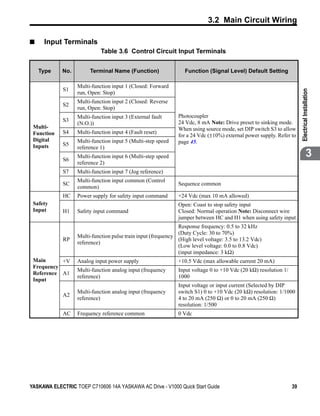
■    Input Terminals
                             Table 3.6 Control Circuit Input Terminals


    Type     No.        Terminal Name (Function)                  Function (Signal Level) Default Setting

                   Multi-function input 1 (Closed: Forward
             S1


                                                                                                                       Electrical Installation
                   run, Open: Stop)
                   Multi-function input 2 (Closed: Reverse
             S2
                   run, Open: Stop)
                   Multi-function input 3 (External fault      Photocoupler
             S3                                                24 Vdc, 8 mA Note: Drive preset to sinking mode.
                   (N.O.))
 Multi-                                                        When using source mode, set DIP switch S3 to allow
 Function    S4    Multi-function input 4 (Fault reset)
                                                               for a 24 Vdc (±10%) external power supply. Refer to
 Digital           Multi-function input 5 (Multi-step speed    page 45.
 Inputs      S5
                   reference 1)

             S6
                   Multi-function input 6 (Multi-step speed                                                                         3
                   reference 2)
             S7    Multi-function input 7 (Jog reference)
                   Multi-function input common (Control
             SC                                                Sequence common
                   common)
             HC    Power supply for safety input command       +24 Vdc (max 10 mA allowed)
 Safety                                                        Open: Coast to stop safety input
 Input       H1    Safety input command                        Closed: Normal operation Note: Disconnect wire
                                                               jumper between HC and H1 when using safety input.
                                                               Response frequency: 0.5 to 32 kHz
                                                               (Duty Cycle: 30 to 70%)
                   Multi-function pulse train input (frequency
             RP                                                (High level voltage: 3.5 to 13.2 Vdc)
                   reference)
                                                               (Low level voltage: 0.0 to 0.8 Vdc)
                                                               (input impedance: 3 kΩ)
 Main      +V      Analog input power supply                   +10.5 Vdc (max allowable current 20 mA)
 Frequency
                   Multi-function analog input (frequency      Input voltage 0 to +10 Vdc (20 kΩ) resolution 1/
 Reference A1
                   reference)                                  1000
 Input
                                                               Input voltage or input current (Selected by DIP
                   Multi-function analog input (frequency      switch S1) 0 to +10 Vdc (20 kΩ) resolution: 1/1000
             A2
                   reference)                                  4 to 20 mA (250 Ω) or 0 to 20 mA (250 Ω)
                                                               resolution: 1/500
             AC    Frequency reference common                  0 Vdc


YASKAWA ELECTRIC TOEP C710606 14A YASKAWA AC Drive - V1000 Quick Start Guide                                      39
3.2 Main Circuit Wiring

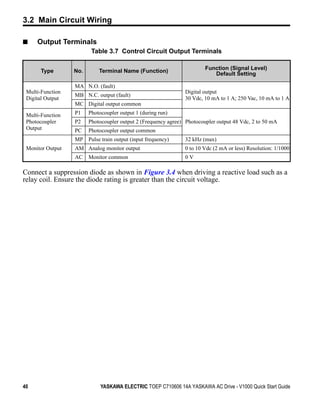
■    Output Terminals
                         Table 3.7 Control Circuit Output Terminals

                                                                        Function (Signal Level)
       Type       No.       Terminal Name (Function)                       Default Setting

                  MA N.O. (fault)
 Multi-Function                                                Digital output
                  MB N.C. output (fault)
 Digital Output                                                30 Vdc, 10 mA to 1 A; 250 Vac, 10 mA to 1 A
                  MC Digital output common

 Multi-Function   P1    Photocoupler output 1 (during run)
 Photocoupler     P2    Photocoupler output 2 (Frequency agree) Photocoupler output 48 Vdc, 2 to 50 mA
 Output           PC    Photocoupler output common
                  MP Pulse train output (input frequency)      32 kHz (max)
 Monitor Output   AM Analog monitor output                     0 to 10 Vdc (2 mA or less) Resolution: 1/1000
                  AC    Monitor common                         0V

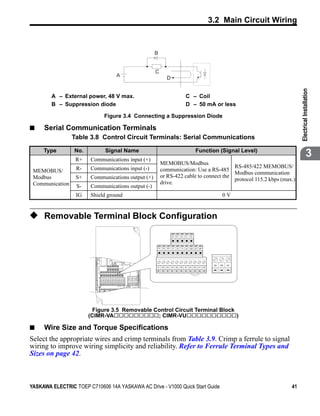
Connect a suppression diode as shown in Figure 3.4 when driving a reactive load such as a
relay coil. Ensure the diode rating is greater than the circuit voltage.


40                           YASKAWA ELECTRIC TOEP C710606 14A YASKAWA AC Drive - V1000 Quick Start Guide
3.2 Main Circuit Wiring


Figure 3.4


                                                                                                     B


                                                                                                     C
                                                                    A                                              D


                                                                                                                                                                                        Electrical Installation
               A – External power, 48 V max.                                                                                           C – Coil
               B – Suppression diode                                                                                                   D – 50 mA or less

                                           Figure 3.4 Connecting a Suppression Diode

■            Serial Communication Terminals
                      Table 3.8 Control Circuit Terminals: Serial Communications

             Type      No.
                       R+
                                           Signal Name
                             Communications input (+)
                                                                                                                                                 Function (Signal Level)
                                                                                                                                                                                                     3
                                                                                                          MEMOBUS/Modbus
                       R-    Communications input (-)                                                                                    RS-485/422 MEMOBUS/
    MEMOBUS/                                                                                              communication: Use a RS-485
                                                                                                                                         Modbus communication
    Modbus             S+    Communications output (+)                                                    or RS-422 cable to connect the
                                                                                                                                         protocol 115.2 kbps (max.)
    Communication                                                                                         drive.
                       S-    Communications output (-)
                       IG    Shield ground                                                                                                                           0V


◆ Removable Terminal Block Configuration
Figure 3.5


                                                                                                                        R+   R    S+   S    IG


                                                                                                         P1   P2   PC   A1   A2   +V   AC AM AC MP


                                                                                                                                                               MA   MB   MC
                                                R+   R    S+   S    IG                               S1       S2   S3   S4   S5   S6   S7   HC SC   H1   RP


                                 P1   P2   PC   A1   A2   +V   AC AM AC MP


                                                                                      MA   MB   MC
                                 S1   S2   S3   S4   S5   S6   S7   HC SC   H1   RP


                               Figure 3.5 Removable Control Circuit Terminal Block
                             (CIMR-VA                ; CIMR-VU                     )

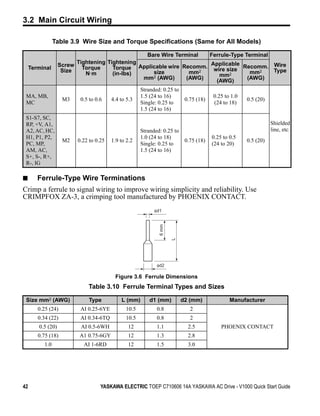
■            Wire Size and Torque Specifications
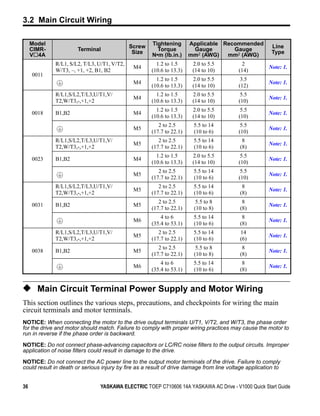
Select the appropriate wires and crimp terminals from Table 3.9. Crimp a ferrule to signal
wiring to improve wiring simplicity and reliability. Refer to Ferrule Terminal Types and
Sizes on page 42.


YASKAWA ELECTRIC TOEP C710606 14A YASKAWA AC Drive - V1000 Quick Start Guide                                                                                                       41
3.2 Main Circuit Wiring

                     Table 3.9 Wire Size and Torque Specifications (Same for All Models)

                                                       Bare Wire Terminal  Ferrule-Type Terminal
                                Tightening Tightening                       Applicable
                        Screw                Torque Applicable wire Recomm. wire size Recomm. Wire
       Terminal          Size
                                  Torque
                                                                                                 Type
                                   Nm        (in-lbs)    size         mm2     mm2         mm2
                                                      mm2 (AWG)      (AWG)               (AWG)
                                                                             (AWG)
                                                            Stranded: 0.25 to
    MA, MB,                                                 1.5 (24 to 16)                   0.25 to 1.0
                         M3      0.5 to 0.6    4.4 to 5.3                        0.75 (18)                 0.5 (20)
    MC                                                      Single: 0.25 to                  (24 to 18)
                                                            1.5 (24 to 16)
    S1-S7, SC,
    RP, +V, A1,                                                                                                       Shielded
    A2, AC, HC,                                             Stranded: 0.25 to                                         line, etc.
    H1, P1, P2,                                             1.0 (24 to 18)                   0.25 to 0.5
                         M2     0.22 to 0.25   1.9 to 2.2                        0.75 (18)                 0.5 (20)
    PC, MP,                                                 Single: 0.25 to                  (24 to 20)
    AM, AC,                                                 1.5 (24 to 16)
    S+, S-, R+,
    R-, IG

■            Ferrule-Type Wire Terminations
Crimp a ferrule to signal wiring to improve wiring simplicity and reliability. Use
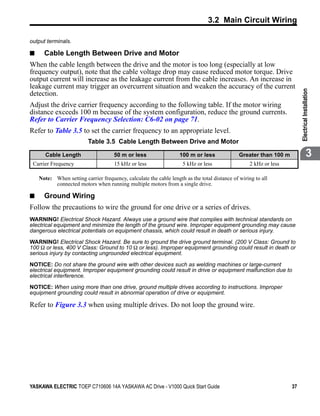
CRIMPFOX ZA-3, a crimping tool manufactured by PHOENIX CONTACT.
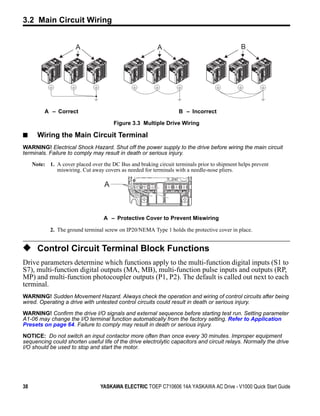
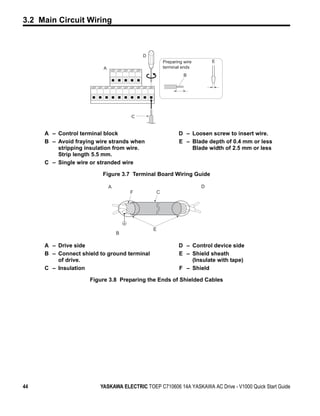
Figure 3.6


                                                                  φd1
                                                                    6 mm

                                                                           L


                                                                   φd2

                                                Figure 3.6 Ferrule Dimensions
                                    Table 3.10 Ferrule Terminal Types and Sizes

    Size mm2 (AWG)                   Type          L (mm)       d1 (mm)         d2 (mm)              Manufacturer
             0.25 (24)           AI 0.25-6YE         10.5          0.8             2
             0.34 (22)           AI 0.34-6TQ         10.5          0.8             2
             0.5 (20)            AI 0.5-6WH           12           1.1            2.5            PHOENIX CONTACT
             0.75 (18)          A1 0.75-6GY           12           1.3            2.8
               1.0                AI 1-6RD            12           1.5            3.0


42                                        YASKAWA ELECTRIC TOEP C710606 14A YASKAWA AC Drive - V1000 Quick Start Guide
3.2 Main Circuit Wiring


◆ Wiring Procedure
This section describes the proper procedures and preparations for wiring the terminal board.
WARNING! Electrical Shock Hazard. Do not remove covers or touch the circuit boards while the power is
on. Failure to comply could result in death or serious injury.

NOTICE: Separate control circuit wiring from main circuit wiring (terminals R/L1, S/L2, T/L3, B1, B2, U/T1,


                                                                                                                 Electrical Installation
V/T2, W/T3, -, +1, +2) and other high-power lines. Improper wiring practices could result in drive malfunction
due to electrical interference.

NOTICE: Separate wiring for digital output terminals MA, MB and MC from wiring to other control circuit
lines. Improper wiring practices could result in drive or equipment malfunction or nuisance trips.

NOTICE: Use a class 2 power supply (UL standard) when connecting to the control terminals. Improper
application of peripheral devices could result in drive performance degradation due to improper power
supply.

NOTICE: Insulate shields with tape or shrink tubing to prevent contact with other signal lines and
equipment. Improper wiring practices could result in drive or equipment malfunction due to short circuit.
                                                                                                                              3
NOTICE: Connect the shield of shielded cable to the appropriate ground terminal. Improper equipment
grounding could result in drive or equipment malfunction or nuisance trips.

Wire the terminal board using Figure 3.13 as a guide (control circuit terminal block). Be
sure to prepare the ends of the control circuit wiring as shown in Figure 3.14. Refer to Wire
Gauges and Tightening Torque on page 33 for tightening torque specifications.
NOTICE: Do not tighten screws beyond the specified tightening torque. Failure to comply may damage the
terminal block.

NOTICE: Use shielded twisted-pair cables as indicated to prevent operating faults. Improper wiring
practices could result in drive or equipment malfunction due to electrical interference.


YASKAWA ELECTRIC TOEP C710606 14A YASKAWA AC Drive - V1000 Quick Start Guide                                43
3.2 Main Circuit Wiring


Figure 3.7


                                                 D
                                                          Preparing wire       E
                                 A                        terminal ends
                                                                    B


                                             C


             A – Control terminal block                          D – Loosen screw to insert wire.
             B – Avoid fraying wire strands when                 E – Blade depth of 0.4 mm or less
                 stripping insulation from wire.                     Blade width of 2.5 mm or less
                 Strip length 5.5 mm.
             C – Single wire or stranded wire

                                 Figure 3.7 Terminal Board Wiring Guide
Figure 3.8


                                     A                                     D
                                             F        C


                                                     E
                                         B

             A – Drive side                                      D – Control device side
             B – Connect shield to ground terminal               E – Shield sheath
                 of drive.                                           (Insulate with tape)
             C – Insulation                                      F – Shield

                            Figure 3.8 Preparing the Ends of Shielded Cables


44                              YASKAWA ELECTRIC TOEP C710606 14A YASKAWA AC Drive - V1000 Quick Start Guide
3.3 I/O Connections


3.3               I/O Connections

◆ Sinking/Sourcing Mode Switch
Set the DIP switch S3 on the front of the drive to switch the digital input terminal logic
between sinking mode and sourcing mode; the drive is preset to sinking mode.


                                                                                                  Electrical Installation
                             Table 3.11 Sinking/Sourcing Mode Setting

                 Set Value                                     Details
                   SINK                       Sinking Mode (0 V common): factory setting
                 SOURCE                             Sourcing Mode (+24 V common)

Figure 3.9


                                                               DIP Switch S3                                   3
                                                                   SINK


                                                                 SOURCE


                                        Figure 3.9 DIP Switch S3

■            Transistor Input Signal Using 0 V Common/Sink Mode
When controlling the digital inputs by NPN transistors (0 V common / sinking mode), set
the DIP switch S3 to SINK and use the internal 24 V power supply.


YASKAWA ELECTRIC TOEP C710606 14A YASKAWA AC Drive - V1000 Quick Start Guide                 45
3.3 I/O Connections

Figure 3.10

                              SINK

                                                                                                         Shielded cable                            Drive

                                                                                                                               S1
                                                               Forward run/stop
                                                                                                                               S2
                         SOURCE                                Reverse run/stop
                                                                                                                               S3


                                        Multi-function input
                                                               External fault N.O.
                                                                                                                               S4
                                                               Fault reset
                                                                                                                               S5
                                                               Multi-speed step 1
                                                                                                                               S6
                                                               Multi-speed step 2
                                                                                                                               S7
                                                               Jog reference
                                                                                                                                               SINK
                                                                                                                                                                   +24V
                                                                                                                                    S3

                                                                                                                                              SOURCE
                                                                                                                               SC


                   Figure 3.10 Sinking Mode: Sequence from NPN Transistor (0 V Common)

■             Transistor Input Signal Using +24 V Common/Source Mode
When controlling digital inputs by PNP transistors (+24 V common / sourcing mode), set the
DIP switch S3 to SOURCE and use an external 24 V power supply.
Figure 3.11

                                                                                                              Shielded cable
                                                                                                                                                           Drive
                       SINK

                                                                                            Forward run / stop                           S1

                                                                                            Reverse run / stop                           S2
                                                                     Multi-function input


                                                                                            External fault N.O.                          S3
                      SOURCE
                                     External                                               Fault rest                                   S4
                                     power supply
                                     +24 V
                                                                                            Multi-step speed 1                           S5

                                                                                            Multi-step speed 2                           S6
                                                                                            Jog frequency                                S7

                                                                                                                                                       SINK
                                                                                                                                                                          +24V
                                                                                                                                              S3

                                                                                                                                                     SOURCE
                                                                                                                                         SC


                   Figure 3.11 Source Mode: Sequence from PNP Transistor (+24 V Common)


46                                                             YASKAWA ELECTRIC TOEP C710606 14A YASKAWA AC Drive - V1000 Quick Start Guide
3.4 Main Frequency Reference


3.4           Main Frequency Reference

◆ Terminal A2 Switch
The main frequency reference can either be a voltage or current signal input. For voltage
signals both analog inputs, A1 and A2, can be used, for current signals A2 must be used.


                                                                                                                   Electrical Installation
To use current input at terminal A2, set the DIP switch S1 to "I" (factory setting) and set
parameter H3-09 = “2” or “3” (4-20 mA or 0-20 mA). Set parameter
H3-10 = “0” (frequency reference).
   Note: If Terminals A1 and A2 are both set for frequency reference (H3-02 = 0
         and H3-10 = 0), the addition of both input values builds the frequency reference.
When using input A2 as voltage input, set the DIP switch S1 to “V” (left position) and
program parameter H3-09 to “0” (0 to +10 Vdc with lower limit) or “1” (0 to +10 Vdc
without lower limit).
                                                                                                                                3
                            Table 3.12 Frequency Reference Configurations

                    Voltage Input                                             Current Input

                                       Drive                                                  Drive

                                                                                        +10.5 V
                             +V +10.5 V
                                20 mA current
                                                                                     +V 20 mA current

                0 to 10 V         Main speed                                             Main speed
       2 kΩ                  A1 frequency reference               4 to 20 mA input   A1 frequency reference
                                  (voltage input)                                        (voltage input)
                                                                  or
                                  Main speed                      0 to 20 mA input       Main speed
                             A2   frequency reference                                A2 frequency reference
                                  (current input)                                        (current input)

                             AC Frequency reference                                  AC Frequency reference
                                  common                                                common


YASKAWA ELECTRIC TOEP C710606 14A YASKAWA AC Drive - V1000 Quick Start Guide                                  47
3.4 Main Frequency Reference

Figure 3.12


                                                                                DIP Switch S1
                                                                                 V           I


                                                    Figure 3.12 DIP Switch S1
                                            Table 3.13 DIP Switch S1 Settings

              Setting Value                                                  Description
              V (left position)                                         Voltage input (0 to 10 V)
              I (right position)                        Current input (4 to 20 mA or 0 to 20 mA): factory setting

                                           Table 3.14 Parameter H3-09 Details

                                                                                                              Setting Default
        No.                Parameter Name                                   Description                       Range Setting
                                                          Selects the signal level for terminal A2.
                                                          0: 0 to +10 V, unipolar input (negative frequency
                                                          reference values are zeroed)
                   Frequency ref. (current)
    H3-09                                                 1: 0 to +10 V, bipolar input (negative frequency     0 to 3    2
                   terminal A2 signal level selection
                                                          reference changes the direction)
                                                          2: 4 to 20 mA
                                                          3: 0 to 20 mA


48                                        YASKAWA ELECTRIC TOEP C710606 14A YASKAWA AC Drive - V1000 Quick Start Guide
3.5 Wiring Checklist


3.5          Wiring Checklist

           No.                                              Item                                                 Page

                                        Drive, peripherals, option cards


                                                                                                                             Electrical Installation
            1    Check drive model number to ensure receipt of correct model.                                     16
                 Check for correct braking resistors, DC reactors, noise filters, and other peripheral
            2
                 devices.
            3    Check for correct option card model.
                                      Installation area and physical setup
            4    Ensure area surrounding the drive complies with specifications.                                  20
                                                                                                                                          3
                                      Power supply voltage, output voltage
                 The voltage from the power supply should fall within the input voltage specification
            5                                                                                                     72
                 range of the drive.
                                                                                                                  16
            6    The voltage rating for the motor should match the drive output specifications.

                                               Main circuit wiring
            7    Confirm proper branch circuit protection exists per National and Local codes.                    30

            8    Properly wire the power supply to drive terminals R/L1, S/L2 and T/L3.
                 Properly wire the drive and motor together.
                 The motor lines and drive output terminals R/T1, V/T2 and W/T3 should match in order
            9                                                                                                     36
                 to produce the desired phase order. If the phase order is incorrect, the drive will rotate in
                 the opposite direction.
            10   Use 600 Vac vinyl-sheathed wire for the power supply and motor lines.                            33
                 Use the correct wire gauges for the main circuit. Refer to Table 3.2, Table 3.3, or
            11                                                                                                    33
                 Table 3.4.
                 • When using comparatively long motor cable, calculate the amount of voltage drop.
                    Motor rated voltage (V) x 0.02 ≥                                                              33
                                                                                                      -3
                   3 x voltage resistance (Ω/km) x cable length (m) x motor rated current (A) x 10

                 • If the cable between the drive and motor exceeds 500 m, adjust the carrier frequency           37
                   (C6-02) accordingly.                                                                           71
            12   Properly ground the drive. Review page 37.                                                       37
                 Tightly fasten all terminal screws (control circuit terminals, grounding terminals).
            13                                                                                                    33
                 Refer to Table 3.2, Table 3.3 or Table 3.4.


YASKAWA ELECTRIC TOEP C710606 14A YASKAWA AC Drive - V1000 Quick Start Guide                                            49
3.5 Wiring Checklist


       No.                                             Item                                                Page

             Set up overload protection circuits when running multiple motors from a single drive.

                    Power supply             Drive                   MC1         OL1
                                                                                        M1

                                                                     MC2         OL2
       14                                                                               M2

                                                                     MCn         OLn
                                                                                        Mn

                                                              MC1 - MCn ... magnetic contactor
                                                              O L 1 - OLn ... thermal relay
             Note: Close MC1 through MCn before operating the drive.
             If using a braking resistor or dynamic braking resistor unit, install a magnetic contactor.
       15    Properly install the resistor, and ensure that overload protection shuts off the power
             supply.
       16    Verify phase advancing capacitors are NOT installed on the output side of the drive.
                                           Control circuit wiring
       17    Use twisted-pair cables for all drive control circuit wiring.

       18    Ground the shields of shielded wiring to the GND         terminal.                             46
             If using a 3-wire sequence, properly set parameters for multi-function contact input
       19                                                                                                   32
             terminals S1 through S7, and properly wire control circuits.
       20    Properly wire any option cards.
             Check for any other wiring mistakes.
       21                                                                                                   -
             Only use a multimeter to check wiring.
             Properly fasten the control circuit terminal screws in the drive.
       22                                                                                                   33
             Refer to Table 3.2, Table 3.3 or Table 3.4.
       23    Pick up all wire clippings.
             Ensure that no frayed wires on the terminal block are touching other terminals or
       24
             connections.
       25    Properly separate control circuit wiring and main circuit wiring.

       26    Analog signal line wiring should not exceed 10 m.

       27    All other wiring should be less than 50 m.


50                          YASKAWA ELECTRIC TOEP C710606 14A YASKAWA AC Drive - V1000 Quick Start Guide
4
                 Start-Up Programming
                           & Operation
                          This chapter explains the functions of the LED operator and
                          how to program the drive for initial operation.


                4.1 USING THE DIGITAL LED OPERATOR . . . . . . . . . . . . . . 52
                4.3 START-UP FLOWCHARTS . . . . . . . . . . . . . . . . . . . . . . . . 56
                4.5 BASIC DRIVE SETUP ADJUSTMENTS . . . . . . . . . . . . . . 66
                4.6 TEST RUN . . . . . . . . . . . . . . . . . . . . . . . . . . . . . . . . . . . . . 73
                4.7 TEST RUN CHECKLIST. . . . . . . . . . . . . . . . . . . . . . . . . . . 79


YASKAWA ELECTRIC TOEP C710606 14A YASKAWA AC Drive - V1000 Quick Start Guide                         51
4.1 Using the Digital LED Operator


4.1        Using the Digital LED Operator
Use the LED operator to enter run and stop commands, display data, edit parameters, as well
as display fault and alarm information.

◆ Keys, Displays, and LEDs


                                                                                                     12   13
                               1                                                            11
                                                                             5

                                                                                                                     9


                2


                                                                                                                         15
                          3
                                                                                                                         14

                                                                                     STOP


                                                                                                 7                  8
           10
                                                                   4             6


                                  STOP


                V1000
                                    Fref          :      (Hz)
                                    FWD/REV Sel   :
                                    Fout          :      (Hz)
                                    lout          :      (A)
                                    Mon1          :      (V)
                                    Monitor       :
                                    Verify        :
                                    SetUpGuide    :
                                    Program       :
                                    Auto-Tuning   :


                    WARNING Risk of electric shock.
                     Read manual before installing.
                     Wait 1 minute for capacitor discharge after
                     disconnecting power supply.
                     To conform to requirements, make sure to
                     ground the supply neutral for 400V class.


52                                                                 YASKAWA ELECTRIC TOEP C710606 14A YASKAWA AC Drive - V1000 Quick Start Guide
4.1 Using the Digital LED Operator

                      Table 4.1 Keys and Displays on the LED Operator

No.      Display                Name                                         Function

 1                      Data Display Area        Displays the frequency reference, parameter number, etc.


 2                      ESC Key                  Returns to the previous menu.

                                                 Moves the cursor to the right.
 3                      RESET Key


                                                                                                                       Start-Up Programming &
                                                 Resets the drive to clear a fault situation.

 4           RUN        RUN Key                  Starts the drive.


 5                      Up Arrow Key             Scrolls up to select parameter numbers, setting values, etc.


                                                                                                                       Operation
 6                      Down Arrow Key           Scrolls down to select parameter numbers, setting values, etc.


             STOP
                                                 Stops the drive.
                                                 Note: Stop priority circuit. A fast-stop is available by pressing            4
                                                 the STOP key when the drive detects a danger even if the drive
 7                      STOP Key                 is running by a signal from the multi-function contact input
                                                 terminal (REMOTE is set). To avoid stoppage by using the
                                                 STOP key, set o2-02 (STOP Key Function Selection) to 0
                                                 (Disabled).
                                                 Selects all modes, parameters, settings, etc.
 8                      ENTER Key                Selects a menu item to move from one display screen to the
                                                 next.
                                                 Switches drive control between the operator (LOCAL) and the
                                                 control circuit terminals (REMOTE).
                                                 Note: LOCAL/REMOTE key effective during stop in drive
 9                      LO/RE Selection Key      mode. If the digital operator could change from REMOTE to
                                                 LOCAL by incorrect operation, set o2-01 (LOCAL/REMOTE
                                                 Key Function Selection) to “0” (disabled) to disable LOCAL/
                                                 REMOTE key.

 10                     RUN Light                Lit while the drive is operating the motor.


 11                     LO/RE Light              Lit while the operator (LOCAL) is selected to run the drive.


YASKAWA ELECTRIC TOEP C710606 14A YASKAWA AC Drive - V1000 Quick Start Guide                                      53
4.1 Using the Digital LED Operator

No.        Display                     Name                                           Function

 12                          ALM LED Light

 13        REV               REV LED Light
                                                         Refer to LED Screen Displays on page 54.
 14                          DRV LED Light

 15                          FOUT LED Light


◆ LED Screen Displays
     Display                    Lit                                Flashing                            Off
                                                     • When an alarm occurs
                 When the drive detects a alarm      • OPE detected
                                                                                         Normal state (no fault or alarm)
                 or error                            • When a fault or error occurs
                                                       during Auto-Tuning

                 Motor is rotating in reverse                         —                  Motor is rotating forward
     REV
                 Drive Mode
                                                    When DriveWorksEZ is used <1> Programming Mode
                 Auto-Tuning

                 Displays output frequency (Hz)                       —                                —

 As
 illustrated in
 this manual
<1> Refer to the DriveWorksEZ instruction manual for further information.


◆ LO/RE LED and RUN LED Indications
     LED               Lit                      Flashing              Flashing Quickly                   Off
               When run command                                                              Run command is selected
               is selected from LED                —                          —              from device other than LED
               operator (LOCAL)                                                              operator (REMOTE)
                                        • During deceleration to    • During deceleration at
                                          stop                        a fast-stop.
               During run               • When a run command        • During deceleration    During stop
                                          is input and frequency    • During stop by
                                          reference is 0              interlock operation.


54                                    YASKAWA ELECTRIC TOEP C710606 14A YASKAWA AC Drive - V1000 Quick Start Guide
4.1 Using the Digital LED Operator

             LED      Lit                                                          Flashing                              Flashing Quickly                                  Off

    As shown


<1> For the difference between “flashing” and “flashing in short intervals” of the RUN LED, refer to Figure 4.2, RUN
    LED and Drive Operation.


◆ Menu Structure for Digital LED Operator


                                                                                                                                                                                      Start-Up Programming &
Figure 4.1


                                                                                                                                           Description of Key Operations

                                                                                                                                                       :
                                                                  Turn the power on

                                                                                                             *
                        *Pressing RUN will start the motor.


                                                                                                                                                       :


                                                                                                                                                                                      Operation
                                                                   Forward Selection         Reverse Selection
                                                                                                                                                       :
                                DRV light is on.


                                                                                                                                                       :
                                                                   Output Frequency


                                                                   Output Current
                                                                                                                                                                                             4
                                                                                      Note: “XX” characters are shown in this manual.
                                                                                            The drive will display the actual setting values.
                                                                   Output Voltage


                                                                                                                                 XX
                                                                   Monitor Display


                                                                                                                                 XX

                                                                                                  XX XX                          XX
                                                                    Verify Menu
                        *Drive cannot operate the motor.


                                                                                                  XX XX                          XX


                                                                                                                                 XX
                                DRV light is off.


                                                                     Set Up Mode

                                                                                                  XX XX                          XX


                                                                                                                                 XX
                                                                  Parameter Setting Mode

                                                                                                                                 XX


                                                                     Auto-Tuning

                                                                                                                                 XX


                                                              Figure 4.1 Digital LED Operator Screen Structure
* “rEu” can be selected while LOCAL is set.


YASKAWA ELECTRIC TOEP C710606 14A YASKAWA AC Drive - V1000 Quick Start Guide                                                                                                     55
4.2 The Drive and Programming Modes


4.2               The Drive and Programming Modes
The drive functions are divided into two main groups accessible via the Digital LED
Operator:
Drive Mode: The Drive mode allows motor operation and parameter monitoring. Parameter
settings cannot be changed when accessing functions in the Drive Mode .
Programming Mode: The Programming Mode allows access to setup/adjust, verify
parameters and Auto-Tuning. The drive prohibits changes in motor operation such as start/
stop when the Digital LED Operator is accessing a function in the Programming Mode.
illustrates the different functions visible as the “Up arrow” is scrolled immediately after
powering up the drive.

◆ Changing Parameter Settings or Values
This example explains changing C1-01 (Acceleration Time 1) from 10.0 seconds (default) to
20.0 seconds.

                                   Step                                               Display/Result

 1.   Turn on the power to the drive. The initial display appears.          ⇒


 2.   Press the         key until the Setup Mode Screen appears.            ⇒


 3.   Press the           key to view the parameter setting display.        ⇒


 4.   Scroll through parameters by pressing the           key until C1-01
                                                                            ⇒
      appears.

 5.   Press            to view the current setting value (10.0 seconds).
                                                                            ⇒
      (Number farthest to the left flashes)
 6.   Press         until the desired number is selected. (“1” flashes)     ⇒

 7.   Press the         key and enter 0020.0.                               ⇒


 8.   Press            and the drive will confirm the change.               ⇒


56                                 YASKAWA ELECTRIC TOEP C710606 14A YASKAWA AC Drive - V1000 Quick Start Guide
4.2 The Drive and Programming Modes

                                    Step                                                   Display/Result

 9.    The display automatically returns to the screen shown in Step 4.      ⇒


10. Press the            key until back at the initial display.              ⇒


◆ Switching Between LOCAL and REMOTE


                                                                                                                          Start-Up Programming &
Entering the run command using the LED operator is referred to as LOCAL, while entering
the run command from an external device via the control circuit terminals or network option
card is referred to as Remote.


                                                                                                                          Operation
WARNING! Sudden Movement Hazard. The drive may start unexpectedly if the Run command is already
applied when switching from LOCAL mode to REMOTE mode when b1-07 = 1, resulting in death or serious
injury. Be sure all personnel are clear of rotating machinery and electrical connections prior to switching
between LOCAL mode and REMOTE mode.

There are three ways to switch between LOCAL and REMOTE.                                                                         4
      Note: 1. After selecting LOCAL, LO/RE will remain lit.
            2. The drive will not allow the user to switch between LOCAL and REMOTE during run.

■       Using the LO/RE Key on the LED Operator

                                    Step                                                   Display/Result

 1.    Turn on the power to the drive. The initial display appears.          ⇒


       Press           . LO/RE will light up. The drive is now in Local.
 2.    To set the drive for REMOTE operation, press the               key    ⇒
                                                                                                 STOP


       again.


■       Using Input Terminals S1 through S7 to Switch between LO/RE
Switch between LOCAL and REMOTE using one of the digital input terminals S1 through
S7 (set the corresponding parameter H1-01 through H1-07 to “1”).
Follow the example below to set the digital input terminals.
      Note: 1. For a list of digital input selections, Refer to Parameter List on page 113.
            2. Setting a multi-function input terminal to a value of 1 disables the LO/RE key on the LED operator.


YASKAWA ELECTRIC TOEP C710606 14A YASKAWA AC Drive - V1000 Quick Start Guide                                         57
4.2 The Drive and Programming Modes


◆ Parameters Available in the Setup Group
■      Setup Mode (StUP)


Parameters used for this drive are classified into A to U. To simplify the drive setup,
frequently used parameters are selected and input into Setup Mode.


       1.    To set a parameter, the Setup Mode must be displayed first.
       2.    If the parameter setting is insufficient, set the parameters in the Parameter Setting
             Mode.
     Note: When parameter A1-02 (Control Method Selection) is changed, some parameter set values are
           also changed automatically. Execute the A1-02 setting before Auto-tuning.
Table 4.2 lists parameters available in the Setup Group.
     Note: This manual also explains other parameters not visible in the Setup Group (A1-06 = 0). Use the
           “Par” menu in the Programming mode to access parameters not listed in the Setup Group. The
           Setup Group parameters are shown in Table 4.2
     Note: Display parameters depend on A1-06. Refer to Application Presets on page 64.
                                   Table 4.2 Setup Group Parameters

 Parameter                   Name                      Parameter                         Name
     A1-02       Control Method Selection                 E1-01       Input Voltage Reference
     b1-01       Frequency Reference Selection 1          E1-03       V/f Pattern Selection
     b1-02       Run Command Selection 1                  E1-04       Maximum Output Frequency (FMAX)
     b1-03       Stop Method Selection                    E1-05       Maximum Voltage (VMAX)
     C1-01       Acceleration Time 1                      E1-06       Base Frequency (FA)
     C1-02       Deceleration Time 1                      E1-09       Minimum Output Frequency (FMIN)
     C6-01       Duty Selection                           E1-13       Base Voltage (VBASE)
     C6-02       Carrier Frequency Selection              E2-01       Motor Rated Current
     d1-01       Frequency Reference 1                    E2-04       Number of Motor Poles
     d1-02       Frequency Reference 2                    E2-11       Motor Rate Capacity
     d1-03       Frequency Reference 3                    H4-02       Terminal FM Gain Setting
     d1-04       Frequency Reference 4                    L1-01       Motor Protection Function Selection
     d1-17       Jog Frequency Reference                  L3-04       Stall Prevention Selection during Deceleration


58                                YASKAWA ELECTRIC TOEP C710606 14A YASKAWA AC Drive - V1000 Quick Start Guide
4.3 Start-up Flowcharts


4.3          Start-up Flowcharts
The flowcharts in this section summarize basic steps required to start-up the drive. Use the
flowcharts to determine the most appropriate start-up method for a given application. The
charts are intended as a quick reference to help familiarize the user with start-up procedures.
Refer to Basic Drive Setup Adjustments on page 66 and perform all checks to ensure a
proper drive start-up.


                                                                                                                       Start-Up Programming &
 Flowchart      Subchart                                    Objective                                      Page
      A                      Basic start-up procedure and motor tuning.                                     59
                             Simple motor set-up with Energy Savings or Speed Search using V/f
                   A-1                                                                                      61
                             mode.


                                                                                                                       Operation
                             High-performance operation using Open Loop Vector (OLV) motor
                   A-2                                                                                      62
                             control.
                   A-3       Operation with Permanent Magnet (PM) motors.                                   63
                             Set-up of drive using application specific selections. Refer to Application
                    -
                             Presets on page 64
                                                                                                            -
                                                                                                                              4
◆ Flowchart A: Basic Start-Up and Motor Tuning
Figure 4.2, Flowchart A, describes basic start-up sequence for the drive and motor system.
This sequence varies slightly depending on application. Use drive default parameter settings
in simple applications that do not require high precision.


YASKAWA ELECTRIC TOEP C710606 14A YASKAWA AC Drive - V1000 Quick Start Guide                                      59
4.3 Start-up Flowcharts

Figure 4.2


                                                         START

                              Install and wire the drive as explained in Chapters 1, 2 and 3

                                          Apply main power on to the drive.
                              Adhere to safety messages concerning application of power


                                                   Application Presets
                                                                                          Yes
                                                     A1-06 used ?
                                                                                                                    TO
                                                                No
                                       Set the control mode in parameter A1-02.
                              For information about the control modes refer to Section 4.5                     Refer to section
                                                                                                               4.4 Application
                                                                                                               Macros
                                                   Set the basic parameters:
               ?   b1-01/02 for frequency reference and run command source selection
               ?   H1-     ,H2-      ,H3-     ,H4-    ,H6-     for I/O terminal setting
               ?   d1-      for multi-speed references if used
               ?   C1-       and C2-      for accel./decel. and S-curve time settings
               ?   C6-01 for heavy/normal duty mode selection
               ?   L3-04 if braking options are used


                    0: V/f control                    Control Mode                   5: Open Loop Vector for PM motors
                                                        A1-02 =

                   To                                     To           2: Open Loop                 To
               Flowchart A-                           Flowchart A-     Vector control           Flowchart A-
                    1                                      2                                         3


                                                                                          From Flowchart A-1, A-2, or A-3


             Run the motor without load, check the rotation direction and operation. Verify, external signal
                                       commands to the drive work as desired


             Couple the load or machine to the motor. Run the machine and check it operates as desired


                         Fine tune parameters. Adjust application settings (PID, ...) if necessary


                              Check the machine operation and verify parameter settings.

                                           Drive is ready to run the application

                                        Figure 4.2 Basic Start-Up and Motor Tuning


60                                       YASKAWA ELECTRIC TOEP C710606 14A YASKAWA AC Drive - V1000 Quick Start Guide
4.3 Start-up Flowcharts


◆ Subchart A1: Simple Motor Set-Up with Energy Savings or
             Speed Search using V/f Mode
Figure 4.3, Flowchart A1, describes simple motor set-up for V/f control. V/f Motor Control
is suited for the most basic applications such as fans or pumps. This procedure illustrates
using Energy Savings and Speed Estimation Speed Search. V/f control can be used where
rotational auto-tuning cannot be performed.


                                                                                                               Start-Up Programming &
Figure 4.3


                                                        From
                                                      Flowchart
                                                          A


                                                                                                               Operation
                                    Set or verify the V/f pattern settings E1-   .


                                                Energy Savings
                                                                                                                      4
                                                   (b8-01=1)
                                                       or
                                                Speed Estimation
                                   NO        Speed Search (b3-24=1)
                                                   enabled ?                         YES


                            Is the motor cable
                            longer than 50 m?                          Perform Rotational Auto-Tuning
                                                                               for V/f Control
                                                                                 (T1-01 = 3)

                                  YES
                                                           NO
                    Perform Stationary Auto-Tuning for
                     terminal resistance (T1-01 = 2)


                                                         Return to
                                                         Flowchart
                                                             A


             Figure 4.3 Simple Motor Set-Up with Energy Savings or Speed Search Using V/f Mode


YASKAWA ELECTRIC TOEP C710606 14A YASKAWA AC Drive - V1000 Quick Start Guide                              61
4.3 Start-up Flowcharts


◆ Subchart A2: High Performance Operation Using Open Loop
             Vector Motor Control
Figure 4.4, Flowchart A2, uses Open Loop Vector Control for high-performance motor
operation. This is appropriate for applications requiring high starting torque, torque limits,
and improved speed regulation.
Figure 4.4


                                                                 From
                                                               Flowchart
                                                                   A


                                               NO          Possible for motor to
                                                                                         YES
                                                          rotate during tuning? *


                                                                         *Rotational tuning should
                     Motor test report/ data
                                                    NO                     be performed with the
                       sheet available?                                    load disconnected


                                    YES

                                                       Calculate necessary E2-
               Enter the data from the motor data                                          Perform Rotating Auto-
                                                        parameter data using the
                 sheet to E2-     parameters.                                               Tuning (T1-01 = 0)
                                                         nameplate information.


                       Is the motor cable
                                                    YES
                       longer than 50 m?


                                                    Perform Stationary Auto-Tuning for
                           NO                        terminal resistance (T1-01 = 2)


                                                               Return to
                                                               Flowchart
                                                                   A


                                 Figure 4.4 Flowchart A2: High Performance Operation
                                        Using Open Loop Vector Motor Control


62                                       YASKAWA ELECTRIC TOEP C710606 14A YASKAWA AC Drive - V1000 Quick Start Guide
4.3 Start-up Flowcharts


◆ Subchart A3: Operation with Permanent Magnet Motors
Figure 4.5, Flowchart A3, illustrates tuning for PM motors in Open Loop Vector Control.
PM motors can be used for energy savings in reduced or variable torque applications.
Figure 4.5


                                            From
                                          Flowchart
                                              A


                                                                                                        Start-Up Programming &
                                                                                                        Operation
                                   Motorcode is known ?
                                    For parameter E5-01                        NO
                                 (for Yaskawa PM motors)
                    YES                                            Enter “FFFF” to parameter E5-               4
                                                                                 01


             Set the motor code to                                    Enter the motor data into
               parameter E5-01                                       parameters E5-02 to E5-24


                                          Return to
                                          Flowchart
                                              A


                          Figure 4.5 Operation with Permanent Magnet Motorsl


YASKAWA ELECTRIC TOEP C710606 14A YASKAWA AC Drive - V1000 Quick Start Guide                       63
4.4 Application Presets


4.4             Application Presets

◆ Application Preset Function (APPL)

This drive incorporates a function to set the parameters automatically for the applications
that are frequently used. Using this Application Preset Function can set or run the drive
easily.

         1: Water supply pump                     2: Conveyor                     3: Air supply/exhaust fan
         4: AHU (HVAC) fan                       5: Compressor                        6: Hoist (elevator)
     7: Cranes (traverse, traveling)


◆ Application Presets: A1-06
The drive features application presets to facilitate the set up of commonly used applications
such as a water supply pump, conveyor, exhaust fan, HVAC fan, compressor, hoist, and
crane. Selecting one of these presets automatically sets the required parameters to the
optimum values and changes the appropriate I/O terminal settings for that specific
application.
Verify all I/O signals and external sequences before operating the motor.
Users are able to make further adjustments to these settings using the Setup Mode.

        No.       Parameter Name                               Setting Range                            Default
                                        0: General-purpose (A2 parameters are not affected)
                                        1: Water supply pump
                                        2: Conveyor
                                        3: Exhaust fan                                                      0
       A1-06       Applicaton Presets
                                        4: HVAC fan                                                         <1>
                                        5: Air compressor
                                        6: Hoist
                                        7: Crane (hoist, traverse)

<1> All general-purpose parameters are accessible when A1-06 = 0.


64                                YASKAWA ELECTRIC TOEP C710606 14A YASKAWA AC Drive - V1000 Quick Start Guide
4.4 Application Presets

WARNING! Confirm the drive I/O signals and external sequence before starting test run. Setting parameter
A1-06 may change the I/O terminal function automatically from the factory setting. Failure to comply may
result in death or serious injury.

Perform a 2-wire or 3-wire initialization (A1-03 = 2220 or 3330) on the drive before
selecting one of the application presets or before switching between application presets. The
initialization process should reset drive parameters before using an application preset.
Save user-edited parameters to a list by setting o2-03 to “1”. This allows for more immediate
access a specific list of relevant parameters and saves time scrolling through the parameter


                                                                                                           Start-Up Programming &
menu items.
Set the parameter access level for Preferred Parameters (A1-01 = “1”) to display only the
setup parameters.


                                                                                                           Operation
                                                                                                                  4


YASKAWA ELECTRIC TOEP C710606 14A YASKAWA AC Drive - V1000 Quick Start Guide                          65
4.5 Basic Drive Setup Adjustments


4.5             Basic Drive Setup Adjustments
This section explains the basic settings required for initial drive operation. Checking these
basic parameter settings during start-up will help to ensure a successful drive start-up.
If more information is required for parameters not listed in this section, Refer to Parameter
List on page 113 as required for a complete listing of drive parameters.

◆ Control Mode Selection: A1-02
■      Available Control Modes
Three motor control modes are available. Select the control mode that best suits the
application in which the drive will be used.

          Control Mode                Parameter                            Main Applications
                                                     • General variable speed applications, particularly useful for
                                       A1-02 = 0       running multiple motors from a single drive
 V/f Control
                                        (default)    • When replacing a drive in which parameter settings are
                                                       unknown.
                                                     • General variable speed applications
 Open Loop Vector Control              A1-02 = 2
                                                     • Applications requiring high precision, high speed control.
                                                     Variable torque applications employing permanent magnet motors
 PM Open Loop Vector Control           A1-02 = 5
                                                     and energy savings.


◆ Initialize Parameter Values: A1-03
Parameter A1-03 (Initialize Parameters) resets all parameters to the original default values.
     Note: Save all changed parameter settings by setting o2-03=”1” before initializing the drive. Your
           settings will be lost if a 2-wire or 3-wire initialization using 2220, or 3330 if performed without
           first saving user parameters. .

■ Different Methods of Drive initialization
1110: Resets all parameters to user-defined default values
A user-initialization resets all parameters to a user-defined set of default values previously
saved to the drive. Set parameter o2-03 to “2” to clear those values.
     Note: Set o2-03 to “1” to save the current parameter settings and changes for a “user-initialization.”
           After saving all parameter setting changes, parameter o2-03 automatically returns to 0. .
2220: 2-Wire Initialization
Returns all parameters to factory default values for 2-wire control.


66                                 YASKAWA ELECTRIC TOEP C710606 14A YASKAWA AC Drive - V1000 Quick Start Guide
4.5 Basic Drive Setup Adjustments

3330: 3-Wire Initialization
Returns all parameters to factory default values for 3-wire control.
1110: User Initialization
Returns all parameters to backed-up values stored at the time the user set o2-03 = 1 and
pressed enter to back-up parameter settings.
5550: Uploads Parameter Data from the Removable Control Circuit Terminal Board
Replacing either the removable control circuit terminal board or the drive and applying main


                                                                                                                   Start-Up Programming &
power may result in an oPE04 fault. If parameter setting data in the removable control circuit
terminal board is correct, set A1-03 to “5550” to upload the data to the drive.
    Note: Refer to Run Command Input Selection: b1-02 on page 69, for more information on a 2-wire
          and 3-wire sequence.
    Note: Initializing the drive for 2-wire sequence (A1-03 = 2220) returns all drive parameters to factory


                                                                                                                   Operation
          settings. Back up all parameters in the event of accidental initialization. the data with 2-wire
          sequence returns all the set parameters to the factory settings. .


◆ Frequency Reference Source: b1-01
                                                                                                                          4
This section explains how to assign the frequency reference. Parameters b1-01 and b1-02
can be used to select the source of the run command and the frequency reference
independently, e.g., set the reference from the operator and set the run command from the
terminals.
■     Frequency Reference from the LED Operator: b1-01 = 0
When b1-01 = 0 the frequency reference will be provided by the LED operator. Refer to The
Drive and Programming Modes on page 56 for information on how to set the frequency
reference.
■     Frequency Reference from the Analog Input Terminal: b1-01 = 1
When b1-01 = 1, analog inputs A1 and A2 provide the frequency reference.
    Note: Set H3-02 (Terminal A1 Function Selection) to “0” to configure Terminal A1 for the main
          analog frequency reference.
Using a Single Analog Signal (V or I) as the Frequency Reference
Control Circuit Terminal A1 (Voltage Input):
When entering the main frequency reference with a voltage signal, use the voltage input set
up in control circuit terminal A1.


YASKAWA ELECTRIC TOEP C710606 14A YASKAWA AC Drive - V1000 Quick Start Guide                                  67
4.5 Basic Drive Setup Adjustments

Figure 4.6


                                                                                 Drive


                                                                    V (+10.5 V   20 mA)

                                               0 to 10 V
                                     2 kΩ                        A1   Main Frequency Reference
                                                                      (voltage input)
                                                                 A2   Auxiliary Frequency Reference
                                                                      (voltage/current input)
                                                                 AC    Frequency Reference
                                                                       Common


                              Figure 4.6 Voltage Input for the Main Frequency Reference
Control Circuit Terminal A2 (Voltage/Current Input):
Use control circuit Terminal A2 when supplying the frequency reference with a current
signal between 4 to 20 mA. Use control circuit Terminal A1 for supplying a voltage
reference.
Switching between Main/Auxiliary Frequency References
To configure the frequency reference to switch between analog input A1 and A2 (main/aux
frequency switch), use the following setup:
1.           Set the frequency reference source to terminals (b1-01 = “1”).
2.           Set one of the digital inputs to auxiliary reference 1, H1-  = “3” (preset for terminal S5).
3.           Set input signal type of terminal A2 using dip switch S1 and parameter H3-09.
4.           Set the function of analog input A2 to Auxiliary frequency (H3-10 = “3”).
When the digital input assigned in step 2 is off, terminal A1 is the frequency reference input.
If it is closed, the A2 input value becomes the frequency reference. The active acceleration /
deceleration times are used for the change-over between the values
Figure 4.7


                                                                      Drive


                                                             V (+10.5 V, 20 mA)


                                    2 kohm                 A1 Main Frequency Reference
                                                              (voltage input)


                           2 kohm                          A2 Aux Frequency Reference 1
                                                               (voltage input)
                                                           AC Frequency Reference Common


                                                           S5 Multi-Function Digital Input

                                                           SC Digital Input Common


                         Figure 4.7 Switching between Main/Auxiliary Frequency References


68                                     YASKAWA ELECTRIC TOEP C710606 14A YASKAWA AC Drive - V1000 Quick Start Guide
4.5 Basic Drive Setup Adjustments


◆ Run Command Input Selection: b1-02
This section explains how to assign the run command input.
Parameters b1-01 and b1-02 can be used to select the source of the run command and the
frequency reference independently, e.g. set the reference from the operator and set the run
command from the terminals.
WARNING! Sudden Movement Hazard. When the run command is given by turning on the power to the


                                                                                                                 Start-Up Programming &
drive, the motor will begin rotating as soon as the drive is powered up. Be sure to take proper precautions if
using this setting. Ensure the area around the motor is safe. Failure to comply could result in death or
serious injury.

■       Run the Drive at 6 Hz using the Digital LED Operator: b1-02 = 0
To assign the run command to the operator panel, set parameter b1-01 to “0”. This will set


                                                                                                                 Operation
up the drive to acknowledge the run command through the LED operator. Initialize the run
command using the Run and Stop keys. Upon power up, the drive uses parameter b1-02 to
determine the run command location.
The following procedure indicates how to start and stop the drive through the LED operator
after parameter b1-02 has been set to 0.
                                                                                                                        4
      Note: When b1-02 (Run Command Selection) is not set to 0 (operator), press          to set LOCAL.

                                    Step                                                 Display/Result

 1.    Turn on the power to the drive. The initial display appears.        ⇒

 2.
       Set the frequency reference to F6.00 (6 Hz).
                                                                           ⇒
       Note: for instructions on how to set the frequency reference.

 3.    Press the     RUN key to start the motor.                           ⇒


 4.    The motor should accelerate up to 6 Hz while the RUN light is on.   ⇒
                                                                                            STOP


                                                                                   off              on


YASKAWA ELECTRIC TOEP C710606 14A YASKAWA AC Drive - V1000 Quick Start Guide                                69
4.5 Basic Drive Setup Adjustments

                                           Step                                                          Display/Result

    5.        Press the     STOP key to stop the motor. The RUN light will flash             ⇒
              until the motor comes to a complete stop.                                              flashing          off

■              Run the Drive using Digital Input Terminals: b1-02 = 1
This setting uses the digital input terminals to enter the run command. The factory setting is
a 2-wire sequence.
Using a 2-Wire Sequence

               Digital Input Terminals                                ON                                        OFF
                          S1                                     Forward Run                                    Stop
                          S2                                     Reverse Run                                    Stop
Figure 4.8


                                                                              Drive
                                               Forward Run
                                                                 S1

                                               Reverse Run
                                                                 S2

                                                                 SC Digital Input Common


                                 Figure 4.8 Example Wiring Diagram for 2-Wire Sequence
Using a 3-Wire Sequence
When H1-05 (Multi-Function Digital Input Terminal S5 Function Selection) = 0, the
functions of terminals S1 and S2 are set to 3-wire sequence, and the multi-function input
terminal becomes forward/reverse run command terminal.
Figure 4.9


                                 Stop Switch        Run Switch                          Drive
                                    (N.C.)            (N.O.)
                                                                   S1
                                                                           Run Command
                                                                           (runs when open)
                                                                   S2
                                                                           Stop Command
                                                                           (stops when closed)
                                                                   S5
                                                                           FWD/REV Command
                                                                           (multi-function input)*
                                                                   SC
                                                                              Digital Input Common


                       Figure 4.9 Example Wiring Diagram for 3-Wire Sequence Using Terminal S5
             Note: When terminal S5 is open, the motor rotates forward. When closed, the motor rotates in reverse.


70                                         YASKAWA ELECTRIC TOEP C710606 14A YASKAWA AC Drive - V1000 Quick Start Guide
4.5 Basic Drive Setup Adjustments

WARNING! When 3-Wire sequence is used, set the drive to 3-Wire sequence before wiring the control
terminals and ensure parameter b1-17 is set to 0 (drive does not accept a run command at power up
(default)). If the drive is wired for 3-Wire sequence but set up for 2-Wire sequence (default) and if parameter
b1-17 is set to 1 (drive accepts a Run command at power up), the motor will rotate in reverse direction at
power up of the drive and may cause injury.

CAUTION! The motor will begin rotating as soon as the power is switched on. Proper precautions must be
taken to ensure that the area around the motor is safe prior to powering up the drive. Failure to do so may
result in minor or moderate injury.

     Note: Run by Turning on/off the Power Supply. For safety reasons, the drive is initially set up not to
           accept a run command at power up (b1-17 = "0"). If a run command is issued at power up, the


                                                                                                                       Start-Up Programming &
           RUN indicator LED will flash quickly. To change this and have the run command issued by the
           drive, change parameter b1-17 to 1


◆ Drive Duty Mode and Carrier Frequency Selection:


                                                                                                                       Operation
       C6-01 and C6-02
■      Drive Duty Mode Selection: C6-01
The drive has two different duty modes from which to select based on the load
characteristics. The drive rated current, overload capacity, carrier frequency, and maximum                                   4
output frequency will change depending upon the duty mode selection. Use parameter C6-01
(Duty Cycle) to select Heavy Duty (HD) or Normal Duty (ND) for the application. The
factory setting is ND. Refer to Specifications on page 105 for details about the rated current.
■ Carrier Frequency Selection: C6-02
Fixed Carrier Frequencies
The carrier frequency can be set using parameter C6-02 as shown in table below.

    Parameter         Name                      Description                    Setting Range            Default
                                   1: 2.0 kHz
                                   2: 5.0 kHz
                                   3: 8.0 kHz
                                   4: 10.0 kHz
                                   5: 12.5 kHz
                  Carrier                                                                            depends on
      C6-02                        6: 15.0 kHz                                       1 to F
                  frequency                                                                          drive size
                                   7: Swing PWM1
                                   8: Swing PWM2
                                   9: Swing PWM3
                                   A: Swing PWM4
                                   F: User defined (C6-03 to C6-05)

     Note: Settings 7 through A for parameter C6-02 use a Swing PWM equivalent to a 2 kHz audible
           noise. This function turns the motor noise into a less obtrusive white noise.
     Note: The upper limit for the carrier frequency is determined by drive capacity.
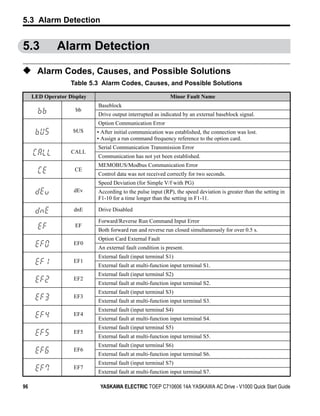


YASKAWA ELECTRIC TOEP C710606 14A YASKAWA AC Drive - V1000 Quick Start Guide                                      71
4.5 Basic Drive Setup Adjustments


◆ Drive Input Voltage Setting: E1-01
Set E1-01 according to the power supply voltage. This setting serves as a base value for
certain drive protective functions.
NOTICE: Set drive input voltage (not motor voltage) in parameter E1-01 for proper function of the protective
features of the drive. Failure to comply could result in improper drive operation. Set parameter E1-01 to
match the input voltage of the drive.


 Parameter     Name                        Description                            Setting Range          Default
                       Set to the nominal voltage of the incoming line. Sets
               Input   the maximum and base voltage used by preset V/f
                                                                               200 V Class: 155 to 255
     E1-01     Voltage patterns (E1-03), and adjusts the levels of drive                                 230 V
                                                                               400 V Class: 310 to 510
               Setting protective features (e.g., overvoltage, braking
                       resistor level, stall prevention, etc.).


72                              YASKAWA ELECTRIC TOEP C710606 14A YASKAWA AC Drive - V1000 Quick Start Guide
4.6 Test Run


4.6            Test Run

◆ Powering Up the Drive and Operation Status Display
■      Powering Up the Drive
Review the following checklist before turning the power on.


                                                                                                                        Start-Up Programming &
      Item to Check                                                  Description
                            Ensure the power supply voltage is correct:
                            200 V class: single-phase 200 to 240 Vac 50/60 Hz
                            200 V class: 3-phase 200 to 240 Vac 50/60 Hz


                                                                                                                        Operation
    Power supply voltage    400 V class: 3-phase 380 to 480 Vac 50/60 Hz
                            Properly wire the power supply input terminals (R/L1, S/L2, T/L3).
                            (for single-phase 200 V class models, wire only R/L1 and S/L2)
                            Check for proper grounding of drive and motor.
 Drive output terminals     Properly wire drive output terminals U/T1, V/T2, and W/T3 with motor terminals U, V,               4
  and motor terminals       and W.
Control circuit terminals Check control circuit terminal connections.
 Drive control terminal
                            Open all control circuit terminals (off).
         status
 Status of the load and
                            Uncouple the motor from the load.
 connected machinery

■      Status Display
When the power supply to the drive is turned on, the LED operator lights will appear as
follows:

     No.                   Name                                             Description

 Normal
Operation                                       The data display area displays the frequency reference.     flashes.


                                                Data displayed varies by the type of fault. Refer to Fault Displays,
     Fault                                      Causes, and Possible Solutions on page 83 for more information and
                                                corrective action.        and      are lit.
              Main circuit low voltage (ex)


◆ Auto-Tuning
Auto-Tuning automatically sets and tunes parameters required for motor operation.

YASKAWA ELECTRIC TOEP C710606 14A YASKAWA AC Drive - V1000 Quick Start Guide                                       73
4.6 Test Run

■      Types of Auto-Tuning
There are three types of Auto-Tuning. Refer to Auto-Tuning Selection on page 75 to select
the best type of Auto-Tuning for the application.

       Type            Setting          Application Conditions and Benefits                 Control Mode
                                     Assumes the motor can rotate during the
 Rotational
                                     Auto-Tuning process
 Auto-Tuning for      T1-01 = 3                                                         V/f Control
                                     Improves torque compensation, slip compensation,
 V/f Control
                                     energy savings, and speed search performance
 Rotational                          Assumes the motor can rotate during the
 Auto-Tuning for      T1-01 = 0      Auto-Tuning process                                Open Loop Vector Control
 OLV Control                         Achieves high-performance motor control
 Stationary Auto-
 Tuning for V/f                      For use when the motor cable exceeds 50 m
 and OLV                             The motor cable length has been modified after     V/f Control,
                      T1-01 = 2
 Control Line-to-                    Auto-Tuning has been previously performed          Open Loop Vector Control
 Line Resistance                     When motor capacity and drive capacity differ
 Only

     Note: Auto-Tuning cannot be performed on permanent magnet motors (IPM, SPM, etc.).


74                                YASKAWA ELECTRIC TOEP C710606 14A YASKAWA AC Drive - V1000 Quick Start Guide
4.6 Test Run

■             Auto-Tuning Selection
Figure 4.10


                                                                      START


                                                   Select the Motor Control Mode A1-02


                                                                                                                                      Start-Up Programming &
                               V/f Control                      Open Loop Vector               PM Open Loop Vector Control
                               A1-02 = 0                           A1-02 = 2                           A1-02 = 5


                         Select a V/f pattern


                                                                                                                                      Operation
                               E1-03


                                                                                       NO              Is the total
                          Will the application
                         allow motor rotation
                                                                Can the load be
                                                               disconnected from
                                                                                                     connected load
                                                                                                   expected to be less                       4
                                                                                                 than 30% of the motor
                           for Auto-Tuning?                        the motor?                             rating?

                         YES                 NO                                                   YES             NO
                                                                       YES        NOTICE: Auto-Tuning with
                                             Is the cable                         a connected load is possible,
                                          between the motor                       but may result in less than
                                           and drive longer                       optimum performance.
                                              than 50 m?

                      V/f Rotational
                     Auto-Tuning
                                              YES            NO
                     (T1-01 = 3)
                                                                          Rotational               Select V/f Control
                                                                        Auto-Tuning                Mode (A1-02 = “0”)
                                 Stationary Auto-Tuning                 (T1-01 = 0)
                            for Terminal Resistance Only                                           for the drive.
                                      (T1-01 = 2)                                           Note: Manually set parameters
                                                                                            when OLV control is needed.

                                                           Run the motor without the load.


                                                      Connect the load and run the motor.


                                                           Verify system operates as required.


                                                                 Auto-Tuning finished.
                                                                   Figure 4.10


YASKAWA ELECTRIC TOEP C710606 14A YASKAWA AC Drive - V1000 Quick Start Guide                                                     75
4.6 Test Run

■               Auto-Tuning Fault Codes
Calculation of abnormal measurements or pressing                                  STOP   before completion will
interrupt Auto-Tuning.
Figure 4.11


                                            A                                            B


                   A – Normal Auto-Tuning Display                             B – Auto-Tuning Interrupted

                                           Figure 4.11 Auto-Tuning Interruption Display

■               Performing Auto-Tuning
The following example illustrates how to perform Rotational Auto-Tuning.
              Note: The following example is shown with the drive in Open Loop Vector Control
                    (A1-02 = 2).
Selecting the Type of Auto-Tuning

                                              Step                                                 Display/Result

    1.         Turn on the power to the drive. The initial display appears.              ⇒


    2.         Press the         key until the Auto-Tuning screen appears.               ⇒


    3.         Press           to begin setting parameters.                              ⇒


    4.         Press           to display the value for T1-01.                           ⇒


    5.         Press          to select the digit to edit.                               ⇒


    6.         Press          and set the drive to perform Rotational Auto-Tuning
                                                                                         ⇒
               (00).

    7.         Save the setting by pressing             .                                ⇒


    8.         The display automatically returns to the screen shown in Step 3.          ⇒


76                                            YASKAWA ELECTRIC TOEP C710606 14A YASKAWA AC Drive - V1000 Quick Start Guide
4.6 Test Run

                                       Step                                                     Display/Result

 9.     Press the           key until back at the Top Screen.                    ⇒


Enter Data from the Motor Nameplate
After selecting the type of Auto-Tuning, enter the required data from the motor nameplate.
      Note: These instructions continue from Step 7 in Selecting the Type of Auto-Tuning.


                                                                                                                       Start-Up Programming &
                                       Step                                                     Display/Result

 1.     Press          to access the motor output power parameter T1-02.         ⇒


                                                                                                                       Operation
 2.     Press             to view the default setting.                           ⇒


 3.     Press         to select the digit to edit.                               ⇒                                            4
        Press          and enter “0.2.” Enter value based on motor
 4.                                                                              ⇒
        nameplate data.

 5.     Press             to save the setting.                                   ⇒


 6.     The display automatically returns to the screen shown in Step 1.         ⇒


        Repeat Steps 1 through 5 to set the following parameters:T1-03,
        Motor Rated Voltage T1-04, Motor Rated CurrentT1-05, Motor Base
 7.                                                                              ⇒
        FrequencyT1-06, Motor Poles;
        T1-07, Motor Base Frequency


      Note: For the details of each setting, . For stationary Auto-Tuning for line-to-line resistance only, set
            T1-02 and T1-04.
Starting Auto-Tuning
WARNING! Sudden Movement Hazard. The drive and motor may start unexpectedly during Auto-Tuning,
which could result in death or serious injury. Ensure the area surrounding the drive motor and load are clear
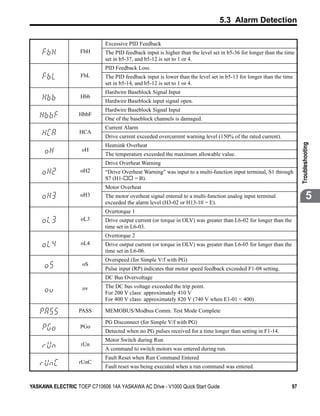
before proceeding with Auto-Tuning.
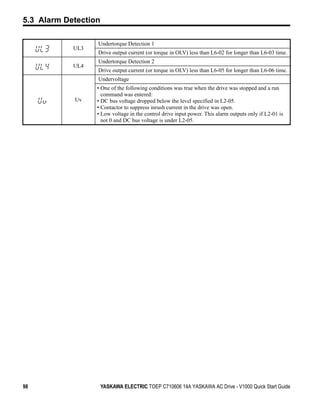


YASKAWA ELECTRIC TOEP C710606 14A YASKAWA AC Drive - V1000 Quick Start Guide                                      77
4.6 Test Run

WARNING! Electrical Shock Hazard. High voltage will be supplied to the motor when stationary Auto-Tuning
is performed even with the motor stopped, which could result in death or serious injury. Do not touch the
motor until Auto-Tuning has been completed.

NOTICE: Auto-Tuning will not function properly if a holding brake is engaged on the load. Failure to comply
could result in improper operation of the drive. Ensure the motor can freely spin before beginning Auto-
Tuning.

NOTICE: Never perform rotational Auto-Tuning for a motor connected to a load. Failure to comply could
result in improper drive operation. If rotational Auto-Tuning is performed for a motor coupled to a load, the
motor constants will be inaccurate and the motor may exhibit abnormal operation. Disconnect or decouple
the motor from the load.

Enter the required information from the motor nameplate. Press                        to proceed to the
Auto-Tuning start screen.

                                    Step                                              Display/Result
      After setting T1-07 as illustrated in the previous section, press
 1.                                                                       ⇒
               and confirm the display is as follows:


      Press     RUN to activate Auto-Tuning.              flashes.
 2.   Note: The first digit indicates which motor is undergoing           ⇒
      Auto-Tuning (motor 1 or motor 2). The second digit indicates the
      type of Auto-Tuning being performed.

 3.   Auto-Tuning finishes in approximately one to two minutes.           ⇒


◆ Operating with the Load Connected
After performing a no-load test run, connect the motor and proceed to run the load.
■   Notes on Connected Machinery
• Clear the area around the motor.
• The motor should come to a complete stop without problems. Connect the machinery.
• Fasten all installation screws properly. Check that the motor and connected machinery are
  held in place.
• Confirm that the Fast-stop circuit or mechanical safety operate correctly.
• Prepare to press the STOP button in the case of an emergency.
■   Checklist Before Operation
• The motor should rotate in the proper direction.
• The motor should accelerate and decelerate smoothly.
• Check U1-03 to ensure there is not overcurrent.
  Note: If the application permits running the load in the reverse direction, try
        changing motor direction and the frequency reference and watch for
        abnormal motor oscillation or vibration. Correct the problem if hunting or
        oscillation occurs or if there are control-related problems.

78                                 YASKAWA ELECTRIC TOEP C710606 14A YASKAWA AC Drive - V1000 Quick Start Guide
4.7 Test Run Checklist


4.7          Test Run Checklist
Review the checklist before performing a test run. Check each item that applies.

               No.                                       Checklist                                         Page

                1     Thoroughly read the manual before performing a test run.


                                                                                                                       Start-Up Programming &
                2     Turn the power on.                                                                    73

                3     Set the voltage for the power supply to E1-01.                                        72

Check the items that correspond to the control mode being used.


                                                                                                                       Operation
WARNING! Ensure start/stop and safety circuits are wired properly and in the correct state before
energizing the drive. Failure to comply could result in death or serious injury from moving equipment. When
programmed for 3-wire control, a momentary closure on terminal S1 may cause the drive to start.

                                                                                                                              4
               No.                                       Checklist                                         Page

    V/f Control (A1-02 = 0)
                     Select the best V/f pattern according to the application and motor characteristics.
                 4
                     Example: If using a motor with a rated frequency of 60.0 Hz, set E1-03 to “1”.
                5     Perform Auto-Tuning for Energy Savings if using Energy Saving functions.              75
    Open Loop Vector Control (A1-02 = 2)
                6     Uncouple the load from the motor when performing Rotational Auto-Tuning.

                7     Perform Rotational Auto-Tuning.                                                       76
                  The following data entered during Auto-Tuning should match the information
                  written on the motor nameplate:
                  motor rated output power (kW) → T1-02
                  rated voltage (V) → T1-03
              8
                  rated current (A) → T1-04
                  base frequency (Hz) → T1-05
                  number of motor poles → T1-06
                  motor rotations per minutes (r/min) → T1-07
    PM Open Loop Vector Control (A1-02 = 5)
                9     Set permanent motor parameters E5-01 through E5-24                                    63


YASKAWA ELECTRIC TOEP C710606 14A YASKAWA AC Drive - V1000 Quick Start Guide                                      79
4.7 Test Run Checklist


Proceed to the following checklist after checking items 4 through 9.

             No.                                       Checklist                                           Page

             10    The         should illuminate after giving a run command.
                   To give a run command and frequency reference from the LED Digital Operator,
             11    press            to set to LOCAL. The LO/RE key lights while LOCAL is                    57
                   displayed.
                   If the motor rotates in the opposite direction during the test run, switch two of the
             12                                                                                             73
                   drive output terminals (U/T1, V/T2, W/T3).
             13    Select the correct duty rating (C6-01) for the application.
                   Set the correct values for the motor rated current (E2-01) and the motor protection
             14
                   selection (L1-01) to ensure motor thermal protection.
                   If the run command and frequency reference are provided via the control circuit
             15                                                                                             57
                   terminals, set the drive for REMOTE and be sure the LO/RE light is out.
                   If the control circuit terminals should supply the frequency reference, select the
             16    correct voltage input signal level (0 to 10 V) or the correct current input signal       57
                   level (4 to 20 mA).
             17    Set the proper voltage to terminal A1. (0 to 10 V)                                       67

             18    Set the proper current to terminal A2. (4 to 20 mA)                                      68
                   When current input (4 to 20 mA) is used, set H3-09 to “2” (Current Input) and set
             19                                                                                         68
                   H3-10 to “0”.
                   When current input (4 to 20 mA) is used, switch the drive built-in DIP switch S1
             20                                                                                       HIDDEN
                   from V-side (OFF) to I-side (ON).
                   Set the minimum and maximum frequency references to the desired values. Make
                   the following adjustments if the drive does not operate as expected:
                   Voltage input, 0 to 10 V: For terminal A1, adjust the frequency reference gain
             21    (H3-03) until reaching the desired value (60 Hz).
                   Current input, 4 to 20 mA: For terminal A2, adjust the current bias (H3-12) until
                   the frequency reference reaches 0.0 Hz. Next adjust the current gain (H3-11) until
                   the frequency reference reaches 60 Hz.


80                            YASKAWA ELECTRIC TOEP C710606 14A YASKAWA AC Drive - V1000 Quick Start Guide
5
                                       Troubleshooting
                          This chapter provides descriptions of the drive faults, alarms,
                          errors, related displays, and possible solutions. This chapter can
                          also serve as a reference guide for tuning the drive during a trial
                          run.


                5.1 DRIVE ALARMS, FAULTS, AND ERRORS. . . . . . . . . . . . 82
                5.2 FAULT DETECTION. . . . . . . . . . . . . . . . . . . . . . . . . . . . . . 83
                5.3 ALARM DETECTION . . . . . . . . . . . . . . . . . . . . . . . . . . . . . 96
                5.4 OPERATOR PROGRAMMING ERRORS . . . . . . . . . . . . . 99
                5.5 AUTO-TUNING FAULT DETECTION. . . . . . . . . . . . . . . . 100
                5.6 DIAGNOSING AND RESETTING FAULTS . . . . . . . . . . . 103


YASKAWA ELECTRIC TOEP C710606 14A YASKAWA AC Drive - V1000 Quick Start Guide                 81
5.1 Drive Alarms, Faults, and Errors


5.1           Drive Alarms, Faults, and Errors

◆ Types of Alarms, Faults, and Errors
                            Table 5.1 Types of Alarms, Faults, and Errors

       Type                                Drive Responses to Alarms, Faults, and Errors
                     • When the drive detects a fault:
                     • The digital operator displays text that indicates the specific fault and the ALM indicator LED
                       remains lit until the fault is reset.
                     • The fault interrupts drive output and the motor coasts to a stop.
 Faults
                     • Depending on the setting, the drive and motor may stop via different methods than listed.
                     • If a digital output is programmed for fault output (H2-        = E), it will close if a fault occurs.
                     • When the drive detects a fault, it will remain inoperable until that fault has been reset. Refer to
                       Fault Reset Methods on page 103.
                  • When the drive detects an alarm or a minor fault:
                  • The digital operator displays text that indicates the specific alarm or minor fault and the ALM
                    indicator LED flashes.
 Minor Faults and • The motor does not stop.
 Alarms           • One of the multi-function contact outputs closes if set to be tripped by a minor fault (H2-    =
                    10), but not by an alarm.
                  • The digital operator displays text indicating a specific alarm and ALM indicator LED flashes.
                  • Remove the cause of an alarm or minor fault to automatically reset.
                  • When parameter settings conflict with one another or do not match hardware settings (such as
                    with an option card), it results in an operation error.
                  • When the drive detects an operation error:
 Operation Errors • The digital operator displays text that indicates the specific error.
                  • Multi-function contact outputs do not operate.
                  • When the drive detects an operation error, it will not operate the motor until the error has been
                    reset. Correct the settings that caused the operation error to reset.
                     • Tuning errors occur while performing Auto-Tuning.
                     • When the drive detects a tuning error:
                     • The digital operator displays text indicating the specific error.
 Tuning Errors
                     • Multi-function contact outputs do not operate.
                     • Motor coasts to stop.
                     • Remove the cause of the error and repeat the Auto-Tuning process.


82                                YASKAWA ELECTRIC TOEP C710606 14A YASKAWA AC Drive - V1000 Quick Start Guide
5.2 Fault Detection


5.2           Fault Detection

◆ Fault Displays, Causes, and Possible Solutions
              Table 5.2 Detailed Fault Displays, Causes, and Possible Solutions

      LED Operator Display                                             Fault Name
                                      Option Communication Error
                          bUS         • After establishing initial communication, the connection was lost.
                                      • Only detected when the run command frequency reference is assigned to an
                                        option card.
               Cause                                                Possible Solution
 No signal received from the PLC.


                                                                                                                         Troubleshooting
                                      • Check for faulty wiring.
 The communication cable is faulty    • Correct the wiring.
 or a short circuit exists.           • Check for loose wiring and short circuits. Repair as needed.
                                      • Check the various options available to minimize the effects of noise.
                                      • Counteract noise in control circuit, main circuit, and ground wiring.
                                      • Ensure that other equipment such as switches or relays do not cause noise and
 A communications data error            use surge suppressors if required.
 occurred due to noise.               • Use cables recommended by Yaskawa or another type of shielded line.
                                        Ground the shield on the controller side or on the drive input power side.
                                                                                                                                 5
                                      • Separate all wiring for communications devices from drive input power lines.
                                        Install a noise filter to the input side of the drive input power.
                                      • Replace the option card if there are no problems with the wiring and the error
 The option card is damaged.
                                        continues to occur.
                                      • The connector pins on the option card are not properly lined up with the
 The option card is not properly
                                        connector pins on the drive.
 connected to the drive.
                                      • Reinstall the option card.
                                      MEMOBUS/Modbus Communication Error
                          CE
                                      Control data was not received for the CE detection time set to H5-09.
               Cause                                                Possible Solution
                                    • Check for faulty wiring.
 Faulty communications wiring, or a
                                    • Correct the wiring.
 short circuit exists.
                                    • Check for loose wiring and short circuits. Repair as needed.
                                      • Check the various options available to minimize the effects of noise.
                                      • Counteract noise in control circuit, main circuit, and ground wiring.
                                      • Ensure that other equipment such as switches or relays do not cause noise and
 A communications data error            use surge suppressors if required.
 occurred due to noise.               • Use Yaskawa-recommended cables, or another type of shielded line. Ground
                                        the shield on the controller side or on the drive input power side.
                                      • Separate all wiring for communications devices from drive input power lines.
                                        Install a noise filter to the input side of the drive input power.


YASKAWA ELECTRIC TOEP C710606 14A YASKAWA AC Drive - V1000 Quick Start Guide                                        83
5.2 Fault Detection

                                      Control Fault
                          CF          A torque limit was reached continuously for three seconds or longer during a
                                      ramp to stop while in Open Loop Vector Control.
                                      Current Offset Fault
                          CoF         There is a problem with the current detection circuit or the drive attempted to
                                      start a coasting PM motor.
               Cause                                                Possible Solution
 While the drive automatically
 adjusted the current offset, the     Enable Speed Search at start (b3-01 = 1).
 calcluated value exceeded the        Use the multi-function terminals to execute External Speed Search 1 and 2
 allowable setting range. This        (H1-     . = 61 or 62). NOTE: When using a PM motor, both External Speed
 problem may occur when attempting    Search 1 and 2 perform the same operation.
 to restart a coasting PM motor.
 The drive attempted to write
 parameter values when the drive
                                     Reinitialize the drive (A1-03).
 input power was shut off
 (uscommunicaing tions option card).
                                      A/D Conversion Error
                        CPF02
                                      An A/D conversion error occurred.
                                      PWM Data Error
                        CPF03
                                      There is a problem with the PWM data.
                                      EEPROM Data Error
                        CPF06
                                      There is an error in the data saved to EEPROM.
               Cause                                                Possible Solution
                                      Cycle power to the drive.
 Control circuit is damaged.
                                      If the problem continues, replace the drive.
 The drive attempted to write
 parameter values when the drive
                                     Reinitialize the drive (A1-03).
 input power was shut off
 (uscommunicaing tions option card).
                                      Terminal Board Communications Error
                        CPF07
                                      A communication error occurred at the terminal board.
                                      EEPROM Serial Communication Fault
                        CPF08
                                      EEPROM communications are not functioning properly.

                        CPF11         RAM Fault

                                      FLASH Memory Fault
                        CPF12
                                      Problem with the ROM (FLASH memory).
                                      Watchdog Circuit Exception
                        CPF13
                                      Self-diagnostics problem.


84                               YASKAWA ELECTRIC TOEP C710606 14A YASKAWA AC Drive - V1000 Quick Start Guide
5.2 Fault Detection

                                      Control Circuit Fault
                        CPF14
                                      CPU error (CPU operates incorrectly due to noise, etc.)
                                      Clock Fault
                        CPF16
                                      Standard clock error.
                                      Timing Fault
                        CPF17
                                      A timing error occurred during an internal process.
                                      Control Circuit Fault
                        CPF18
                                      CPU error (CPU operates incorrectly due to noise, etc.)
                                      Control Circuit Fault
                        CPF19
                                      CPU error (CPU operates incorrectly due to noise, etc.)
                                      One of the following faults occurred: RAM fault, FLASH memory error,
                                      watchdog circuit exception, clock error


                                                                                                                        Troubleshooting
             or          CPF20       • RAM fault.
                        or CPF21     • FLASH memory error (ROM error).
                                     • Watchdog circuit exception (self-diagnostic error).
                                     • Clock error.
                                      A/D Conversion Fault
                        CPF22
                                      A/D conversion error.

                        CPF23
                                      PWM Feedback Fault
                                      PWM feedback error.
                                                                                                                                5
                                      Drive Capacity Signal Fault
                        CPF24         Entered a capacity that does not exist.
                                      (Checked when the drive is powered up.)
               Cause                                                Possible Solution
 Hardware is damaged.                 Replace the drive.
                                      Speed Deviation (for Simple V/f with PG)
                          dEv         According to the pulse input (RP), the speed deviation is greater than the
                                      setting in F1-10 for longer than the time set to F1-11.

                         dWFL         DriveWorksEZ Fault

                        dWAL          DriveWorksEZ Program Error Output

                                      Option Card External Fault
                          EF0
                                      An external fault condition is present.
               Cause                                                Possible Solution
 An external fault was received from
 the PLC with F6-03 = 3 “alarm       • Remove the cause of the external fault.
 only” (the drive continued to run   • Remove the external fault input from the PLC.
 after external fault).
 Problem with the PLC program.        Check the PLC program and correct problems.


YASKAWA ELECTRIC TOEP C710606 14A YASKAWA AC Drive - V1000 Quick Start Guide                                       85
5.2 Fault Detection

                                       External Fault (input terminal S1)
                           EF1
                                       External fault at multi-function input terminal S1.
                                       External Fault (input terminal S2)
                           EF2
                                       External fault at multi-function input terminal S2.
                                       External Fault (input terminal S3)
                           EF3
                                       External fault at multi-function input terminal S3.
                                       External Fault (input terminal S4)
                           EF4
                                       External fault at multi-function input terminal S4.
                                       External Fault (input terminal S5)
                           EF5
                                       External fault at multi-function input terminal S5.
                                       External Fault (input terminal S6)
                           EF6
                                       External fault at multi-function input terminal S6.
                                       External Fault (input terminal S7)
                           EF7
                                       External fault at multi-function input terminal S7.
                Cause                                                Possible Solution
 An external device has tripped an
                                       Remove the cause of the external fault and reset the fault.
 alarm function.
                                       • Ensure the signal lines have been connected properly to the terminals
 Wiring is incorrect.                    assigned for external fault detection (H1-   = 20 to 2F).
                                       • Reconnect the signal line.
 Incorrect setting of multi-function   • Check if the unused terminals set for H1-       = 20 to 2F (External Fault).
 contact inputs.                       • Change the terminal settings.
                                       EEPROM Write Error
                           Err
                                       Data does not match the EEPROM being written to.
                                       Excessive PID Feedback
                          FbH          PID feedback input is greater than the level set b5-36 for longer than the time
                                       set to b5-37. To enable fault detection, set b5-12 = “2” or “5”.
                                       PID Feedback Loss
                           FbL         This fault occurs when PID Feedback Loss Detection is programmed to fault
                                       (b5-12 = 2) and the PID Feedback < PID Feedback Loss Detection Level
                                       (b5-13) for the PID Feedback Loss Detection Time (b5-14).
                                       Ground Fault
                           GF          • Current shorted to ground exceeded 50% of rated current on output side of the
                                         drive.
                                       • Setting L8-09 to 1 enables ground fault detection in models 5.5 kW or larger.
                Cause                                                Possible Solution
                                       • Check the insulation resistance of the motor.
 Motor insulation is damaged.
                                       • Replace the motor.


86                                YASKAWA ELECTRIC TOEP C710606 14A YASKAWA AC Drive - V1000 Quick Start Guide
5.2 Fault Detection

                                     • Check the motor cable.
 A damaged motor cable is creating a • Remove the short circuit and turn the power back on.
 short circuit.                      • Check the resistance between the cable and the ground terminal        .
                                     • Replace the cable.
 The leakage current at the drive      • Reduce the carrier frequency.
 output is too high.                   • Reduce the amount of stray capacitance.
                                       • The value set exceeds the allowable setting range while the drive
                                         automatically adjusts the current offset (this happens only attempting to
 The drive started to run during
                                         restart a PM motor that is coasting to stop).
 Current Offset Fault or while
                                       • Enable Speed Search at start (b3-01 = 1).
 coasting to a stop.
                                       • Perform Speed Search 1 or 2 (H1-xx = 61 or 62) via one of the external
                                         terminals. Note: Speed Search 1 and 2 are the same when using PM OLV.
 Hardware problem.                     • Replace the drive.
                                       Output Phase Loss


                                                                                                                             Troubleshooting
                           LF          • Phase loss on the output side of the drive.
                                       • Phase Loss Detection is enabled when L8-07 is set to “1” or “2”.
               Cause                                                  Possible Solution
                                       • Check for wiring errors and ensure the output cable is connected properly.
 The output cable is disconnected.
                                       • Correct the wiring.
                                       • Check the resistance between motor lines.
 The motor winding is damaged.
                                       • Replace the motor if the winding is damaged.                                                5
                                       • Apply the tightening torque specified in this manual to fasten the terminals.
 The output terminal is loose.
                                         Refer to Wire Size and Torque Specifications on page 41.
 The motor being used is less than
                                       Check the drive and motor capacities.
 5% of the drive rated current.
 An output transistor is damaged.      Replace the drive.
 A single phase motor is being used.   The drive being used cannot operate a single phase motor.
                                       Output current imbalance
                          LF2
                                       One or more of the phases in the output current is lost.
               Cause                                                  Possible Solution
 Phase loss has occurred on the        • Check for faulty wiring or poor connections on the output side of the drive.
 output side of the drive.             • Correct the wiring.
 Terminal wires on the output side of Apply the tightening torque specified in this manual to fasten the terminals.
 the drive are loose.                 Refer to Wire Size and Torque Specifications on page 41.
 No signal displays from the gate
                                       Replace the drive. Contact Yaskawa for assistance.
 driver board.
                                       • Measure the line-to-line resistance for each motor phase. Ensure all values are
 Motor impedance or motor phases
                                         the same.
 are uneven.
                                       • Replace the motor. Contact Yaskawa for assistance.
                                       Overcurrent
                           oC          Drive sensors have detected an output current greater than the specified
                                       overcurrent level.


YASKAWA ELECTRIC TOEP C710606 14A YASKAWA AC Drive - V1000 Quick Start Guide                                            87
5.2 Fault Detection

                Cause                                                  Possible Solution
 The motor has been damaged due to
                                     Check the insulation resistance.
 overheating or the motor insulation
                                     Replace the motor.
 is damaged.
                                      • Check the motor cables.
 One of the motor cables has shorted • Remove the short circuit and power the drive back up.
 out or there is a grounding problem. • Check the resistance between the motor cables and the ground terminal          .
                                      • Replace damaged cables.
                                        • Measure the current flowing into the motor.
                                        • Replace the drive with a larger capacity unit if the current value exceeds the
                                          rated current of the drive.
 The load is too heavy.
                                        • Determine if there is sudden fluctuation in the current level.
                                        • Reduce the load to avoid sudden changes in the current level or switch to a
                                          larger drive.
                                        • Calculate the torque needed during acceleration relative to the load inertia and
                                          the specified acceleration time.
 The acceleration or deceleration       • If the right amount of torque cannot be set, make the following changes:
 times are too short.                   • Increase the acceleration time (C1-01, -03, -05, -07)
                                        • Increase the S-curve characteristics (C2-01 through C2-04)
                                        • Increase the capacity of the drive.
 The drive is attempting to operate a • Check the motor capacity.
 specialized motor or a motor larger • Ensure that the rated capacity of the drive is greater than or equal to the
 than the maximum size allowed.         capacity rating found on the motor nameplate.
 Magnetic contactor (MC) on the
                                         Set up the operation sequence so that the MC is not tripped while the drive is
 output side of the drive has turned
                                         outputting current.
 on or off.
                                        • Check the ratios between the voltage and frequency.
 V/f setting is not operating as        • Set parameter E1-04 through E1-10 appropriately. Set E3-04 through E3-10
 expected.                                when using a second motor.
                                        • Lower the voltage if it is too high relative to the frequency.
                                        • Check the amount of torque compensation.
 Excessive torque compensation.         • Reduce the torque compensation gain (C4-01) until there is no speed loss and
                                          less current.
                                        • Review the possible solutions provided for handling noise interference.
 Drive fails to operate properly due to
                                        • Review the section on handling noise interference and check the control
 noise interference.
                                          circuit lines, main circuit lines and ground wiring.
                                        • Check if fault occurs simultaneously to overexcitation function operation.
 Overexcitation gain is set too high.   • Consider motor flux saturation and reduce the value of n3-13 (Overexcitation
                                          Deceleration Gain).
                                        • Enable Speed Search at start (b3-01 = “1”).
 Run command applied while motor
                                        • Program the Speed Search command input through one of the multi-function
 was coasting.
                                          contact input terminals (H1-     = “61” or “62”).
 The wrong motor code has been
 entered for PM Open Loop Vector         Enter the correct motor code to E5-01 to indicate that a PM motor is connected.
 (Yaskawa motors only).


88                                  YASKAWA ELECTRIC TOEP C710606 14A YASKAWA AC Drive - V1000 Quick Start Guide
5.2 Fault Detection

                                      • Check which motor control method the drive is set to (A1-02).
 The motor control method and
                                      • For IM motors, set A1-02 = “0” or “2”.
 motor do not match.
                                      • For PM motors, set A1-02 = “5”.
 The motor cable is too long           Use a larger inverter.
                                      Option Card Fault (Port A)
                          oFA00
                                      The option card is incompatible with the drive.
                                      Option Card Fault (Port A)
                          oFA01
                                      Replace the option card.
                                      Option Card Fault (port A)
                          oFA03
                                      Option card self-diagnostic error
                                      Option Card Fault (port A)
                          oFA04
                                      An error occurred attempting to write to the option card memory.


                                                                                                                         Troubleshooting
                                      Option Card Fault (port A)
             thru       oFA30 thru
                          oFA43       Communication ID error

                                      Heatsink Overheat
                           oH         The temperature of the heatsink exceeded the value set to L8-02 (90-100°C).
                                      Default value for L8-02 is determined by drive capacity (o2-04).
                Cause                                               Possible Solution                                            5
                                      • Check the temperature surrounding the drive. Verify temperature is within
                                        drive specifications.
 Surrounding temperature is too high. • Improve the air circulation within the enclosure panel.
                                      • Install a fan or air conditioner to cool the surrounding area.
                                      • Remove anything near the drive that might be producing excessive heat.
                                      • Measure the output current.
 Load is too heavy.                   • Decrease the load.
                                      • Lower the carrier frequency (C6-02).
                                      • Replace the cooling fan.
 Internal cooling fan is stopped.     • After replacing the drive, reset the cooling fan maintenance parameter
                                        (o4-03 = “0”).
                                      Overheat 1 (Heatsink Overheat)
                           oH1        The temperature of the heatsink has exceeded the value set to L8-02
                                      (100-110°C). Default value for L8-02 is determined by drive capacity (o2-04).
                Cause                                               Possible Solution
                                     • Check the temperature surrounding the drive.
                                     • Improve the air circulation within the enclosure panel.
 Surrounding temperature is too hot.
                                     • Install a fan or air conditioner to cool the surrounding area.
                                     • Remove anything near the drive that might be producing excessive heat.
                                      • Measure the output current.
 Load is too heavy.                   • Reduce the load.
                                      • Lower the carrier frequency (C6-02).


YASKAWA ELECTRIC TOEP C710606 14A YASKAWA AC Drive - V1000 Quick Start Guide                                        89
5.2 Fault Detection

 The internal cooling fan has reached • Check the maintenance time for the cooling fan (U4-04).
 its performance life or has          • If U4-04 exceeds 90%, replace the cooling fan. .
 malfunctioned.                       • After replacing fan, reset the fan maintenance time (o4-03 = “0”).
 Current flowing to control circuit
                                    • Check tCheck the current level of the terminal.
 terminal +V exceeded the tolerance
                                    • Set the current to the control circuit terminal to be 20 mA or less.
 level.
                                         Motor Overheat Alarm (PTC Input)
                           oH3          • The motor overheat signal to analog input terminal A1 or A2 exceeded the
                                          alarm detection level.
                                        • Detection requires multi-function analog input H3-02 or H3-10 be set to “E”.
                                         Motor Overheat Fault (PTC Input)
                           oH4          • The motor overheat signal to analog input terminal A1 or A2 exceeded the
                                          alarm detection level.
                                        • Detection requires that multi-function analog input H3-02 or H3-10 = “E”.
                Cause                                                  Possible Solution
                                        • Check the size of the load, the accel/decel times and the cycle times.
                                        • Decrease the load.
                                        • Increase the acceleration and deceleration times (C1-01 through C1-08).
                                        • Adjust the preset V/f pattern (E1-04 through E1-10). This will mainly involve
                                          reducing E1-08 and E1-10.Be careful not to lower E1-08 and E1-10
 Motor has overheated.
                                          excessively because this reduces load tolerance at low speeds
                                        • Check the motor-rated current.
                                        • Enter the motor-rated current as indicated on the motor nameplate (E2-01).
                                        • Ensure the motor cooling system is operating normally.
                                        • Repair or replace the motor cooling system.
                                         Motor Overload
                           oL1
                                         The electrothermal sensor tripped overload protection.
                Cause                                                  Possible Solution
 Load is too heavy.                      Reduce the load.
 Cycle times are too short during
                                         Increase the acceleration and deceleration times (C1-01 through C1-08).
 acceleration and deceleration.
• Drive overloaded at low speeds.
                                      • Reduce the load.
• Overload may occur at low speeds
                                      • Increase the speed.
  when using a general-purpose
                                      • If the drive is supposed to operate at low speeds, either increase the motor
  motor, even if operating within the
                                        capacity or use a motor specifically designed to operate with the drive.
  rated current limitation.
 Although a special type of motor is
 being used, the motor protection
                                        Set L1-01 = “2”.
 selection is set for a general-purpose
 motor (L1-01 = 1).
                                        • Adjust the user set V/f patterns (E1-04 through E1-10). Parameters E1-08 and
 Voltage is too high for the V/f          E1-10 may need to be reduced.
 characteristics.                       • If E1-08 and E1-10 are set too high, there may be very little load tolerance at
                                          low speed.


90                                  YASKAWA ELECTRIC TOEP C710606 14A YASKAWA AC Drive - V1000 Quick Start Guide
5.2 Fault Detection

 The wrong motor-rated current is set • Check the motor-rated current.
 to E2-01.                            • Enter the value written on the motor nameplate to parameter E2-01.
 The maximum frequency for the         • Check the rated frequency indicated on the motor nameplate.
 drive input power is set too low.     • Enter the rated frequency to E1-06 (Base Frequency).
 Multiple motors are running off the   Disable the Motor Protection function (L1-01 = “0”) and install a thermal relay
 same drive.                           to each motor.
 The electrical thermal protection     • Check the motor characteristics.
 characteristics and motor overload    • Correct the value set to L1-01 (Motor Protection Function).
 characteristics do not match.         • Install an external thermal relay.
 The electrical thermal relay is       • Check the current rating listed on the motor nameplate.
 operating at the wrong level.         • Check the value set for the motor-rated current (E2-01).
                Cause                                                 Possible Solution
                                       • Overexcitation is a potential serious danger to the motor.
                                       • Reduce the excitation deceleration gain (n3-13).


                                                                                                                          Troubleshooting
 Overexcitation current is enabled.
                                       • Set L3-04 (Stall Prevention during Deceleration) to a value other than 4.
                                       • Disable overexcitation (n3-23 = “0”).
                                     • Check values set to Speed Search related parameters.
 Speed Search related parameters are • Adjust the Speed Search current and Speed Search deceleration times (b3-02
 not set to the proper values.         and b3-03 respectively).
                                     • After Auto-Tuning, enable Speed Estimation Type Search (b3-24 = “1”).
 Output current fluctuation due to
 input phase loss
                                       Check the power supply for phase loss.                                                     5
                                       Drive Overload
                           oL2
                                       The thermal sensor of the drive triggered overload protection.
                Cause                                                 Possible Solution
 Load is too heavy.                    Reduce the load.
 Cycle times are too short during      Increase the settings for the acceleration and deceleration times (C1-01
 acceleration and deceleration.        through C1-08).
                                       • Adjust the preset V/f pattern (E1-04 through E1-10). This will mainly involve
 Voltage is too high for the V/f         reducing E1-08 and E1-10.
 characteristics.                      • Be careful not to lower E1-08 and E1-10 excessively because this reduces
                                         load tolerance at low speeds.
 Drive capacity is too small.          Replace the drive with a larger model.
                                       • Reduce the load when operating at low speeds.
 Overload occurred when operating
                                       • Replace the drive with a model that is one frame size larger.
 at low speeds.
                                       • Lower the carrier frequency (C6-02).
                                       Reduce the torque compensation gain (C4-01) until there is no speed loss but
 Excessive torque compensation.
                                       less current.
                                       • Check the settings for all Speed Search related parameters.
                                       • Adjust the current used during Speed Search and the Speed Search
 Speed Search related parameters are
                                         deceleration time (b3-03 and b3-02 respectively).
 not set correctly.
                                       • After Auto-Tuning the drive, enable the Speed Search Estimation Type
                                         (b3-24 = “1”).


YASKAWA ELECTRIC TOEP C710606 14A YASKAWA AC Drive - V1000 Quick Start Guide                                         91
5.2 Fault Detection

 Output current fluctuation due to
                                          Check the power supply for phase loss.
 input phase loss
                                          Overtorque Detection 1
                           oL3            The current has exceeded the value set for torque detection (L6-02) for longer
                                          than the allowable time (L6-03).
                                          Overtorque Detection 2
                           oL4            The current has exceeded the value set for Overtorque Detection 2 (L6-05) for
                                          longer than the allowable time (L6-06).
                                          High-Slip Braking OL
                           oL7            The output frequency stayed constant for longer than the time set in n3-04
                                          during High-slip Braking.
                                          Digital Operator Connection Fault
                                         • The LCD operator has been disconnected from the drive. Note: An oPr fault
                           oPr             will occur when all of the following conditions are true:
                                         • Output is interrupted when the operator is disconnected (o2-06 = 1).
                                         • The run command is assigned to the LCD operator (b1-02 = 0 and LOCAL
                                           has been selected).
                                          Overspeed (Simple V/f with PG)
                           oS
                                          Pulse input (RP) indicates that motor speed feedback exceeded F1-08 setting.
                                          Overvoltage
                           ov             Voltage in the DC bus has exceeded the overvoltage detection level.
                                          For 200 V class: approximately 410 V
                                          For 400 V class: approximately 820 V (740 V when E1-01 is less than 400)
               Cause                                                    Possible Solution
                                         • Increase the deceleration time (C1-02, -04, -06, -08).
 Deceleration time is too short and
                                         • Install a braking resistor or a dynamic braking resistor unit.
 regenerative energy flows from the
                                         • Enable stall prevention during deceleration (L3-04 = “1”). Stall prevention is
 motor into the drive.
                                           enabled as the default setting.
                                         • Check if sudden drive acceleration triggers an overvoltage alarm.
 Acceleration time is too short.         • Increase the acceleration time.
                                         • Use longer S-curve acceleration and deceleration times.
                                          The braking torque was too high, causing regenerative energy to charge the DC
 Excessive braking load.
                                          bus. Reduce the braking torque, use a braking option, or lengthen decel time.
 Surge voltage entering from the          Install a DC reactor. Note: Voltage surge can result from thyristor convertor
 drive input power.                       and phase advancing capacitor using same drive main input power supply.
 Ground fault in the output circuit
                                         • Check the motor wiring for ground faults.
 causing the DC bus capacitor to
                                         • Correct grounding shorts and turn the power back on.
 overcharge.
                                         • Check the settings for Speed Search related parameters.
 Improper Setting of Speed Search
                                         • Enable Speed Search Retry function (b3-19 greater than or equal to 1 to 10).
 related parameters.
                                         • Adjust the current level during Speed Search and the deceleration time (b3-02
 (Includes Speed Search after a
                                           and b3-03 respectively).
 momentary power loss and after a
                                         • Perform Line-to-Line Resistance Auto-Tuning and then enable Speed
 fault restart.)
                                           Estimation Type Speed Search (b3-24 = “1”).


92                                   YASKAWA ELECTRIC TOEP C710606 14A YASKAWA AC Drive - V1000 Quick Start Guide
5.2 Fault Detection

 Excessive regeneration when              Enable the Overvoltage Suppression function (L3-11 = “1”).
 overshoot occurs after acceleration.     Lengthen the S-curve at acceleration end.
 Drive input power voltage is too         • Check the voltage.
 high.                                    • Lower drive input power voltage within the limits listed in the specifications.
 The dynamic braking transistor is
                                          Replace the drive.
 damaged.
 The braking transistor is wired          • Check braking transistor wiring for errors.
 incorrectly.                             • Properly rewire the braking resistor device.
                                        • Review the list of possible solutions provided for controlling noise.
 Drive fails to operate properly due to
                                        • Review the section on handling noise interference and check the control
 noise interference.
                                          circuit lines, main circuit lines and ground wiring.
                                          • Check the load inertia settings when using KEB, overvoltage suppression or
 Load inertia has been set incorrectly.     Stall Prevention during deceleration.
                                          • Adjust L3-25 (Load Inertia Ratio) in accordance with the load.


                                                                                                                                 Troubleshooting
 Braking function is being used in
                                          Connect a braking resistor.
 PM Open Loop Vector Control.
                                          • Adjust the parameters that control hunting.
                                          • Set the hunting prevention gain (n1-02).
 Motor hunting occurs.                    • Adjust the AFR time constant (n2-02 and n2-03) when in OLV Control.
                                          • Use parameters n8-45 (PM Speed Feedback Detection Suppression Gain) and
                                            n8-47 (Pull-In Current Compensation Time Constant).
                                          Input Phase Loss                                                                               5
                             PF           Drive input power has an open phase or has a large imbalance of voltage
                                          between phases. Detected when L8-05 = 1 (enabled).
                Cause                                                     Possible Solution
 There is phase loss in the drive input • Check for wiring errors in the main circuit drive input power.
 power.                                 • Correct the wiring.
 There is loose wiring in the drive       • Ensure the terminals are tightened properly.
 input power terminals.                   • Apply the tightening torque specified in this manual to fasten the terminals.
                                       • Check the voltage from the drive input power.
                                       • Review the possible solutions for stabilizing the drive input power.
 There is excessive fluctuation in the
                                       • Disable Input Phase Loss Detection (L8-05 = “0”). PF is detected if DC bus
 drive input power voltage.
                                         ripple is too high. If it is disabled, there is no fault but the ripple is still too
                                         high, thereby the capacitors are stressed more and lose lifetime.
 There is poor balance between
                                          • Stabilize drive input power or disable phase loss detection.
 voltage phases.


YASKAWA ELECTRIC TOEP C710606 14A YASKAWA AC Drive - V1000 Quick Start Guide                                                93
5.2 Fault Detection

               Cause                                                      Possible Solution
                                        • Check the maintenance time for the capacitors (U4-05).
                                        • Replace the drive if U4-05 is greater than 90%.
                                        • Check for anything wrong with the drive input power.
 The main circuit capacitors are        • If nothing is wrong with the drive input power, try the following solutions if
 worn.                                    the alarm continues:
                                        • Disable Input Phase Loss Protection selection (L8-05 = “0”). PF is detected if
                                          DC bus ripple is too high. If it is disabled, there is no fault but the ripple is still
                                          too high, thereby the capacitors are stressed more and lose lifetime.
                                        • Replace the drive.
                                        PG Disconnect (for Simple V/f with PG)
                          PGo
                                        No PG pulses are received for longer than the time set to F1-14.
                                        Braking Resistor Overheat
                              rH        Braking resistor protection was triggered.
                                        Fault detection is enabled when L8-01 = 1 (disabled as a default).
               Cause                                                      Possible Solution
                                        • Check the load, deceleration time and speed.
 Deceleration time is too short and     • Reduce the load.
 excessive regenerative energy is       • Increase the acceleration and deceleration times (C1-01 through C1-08).
 flowing back into the drive.           • Replace the braking option with a larger device that can handle the power that
                                          is discharged.
                                        Recalculate braking load and braking power. Then try reducing the braking
 Excessive braking inertia.
                                        load and checking the braking resistor settings and improve braking capacity.
 The proper braking resistor has not    • Check the specifications and conditions for the braking resistor device.
 been installed.                        • Select the optimal braking resistor.
 Note: The magnitude of the braking load trips the braking resistor overheat alarm, NOT the surface temperature.
 Using the braking resistor more frequently than its rating trips the alarm even when the braking resistor surface is not
 very hot.
                                        Dynamic Braking Transistor
                              rr
                                        The built-in dynamic braking transistor failed.
               Cause                                                      Possible Solution
 The braking transistor is damaged.     • Cycle power to the drive and check if the fault reoccurs. Refer to Diagnosing
                                          and Resetting Faults on page 103.
 The control circuit is damaged.        • Replace the drive if the fault continues.
                                        Too Many Speed Search Restarts
                           SEr
                                        The number of speed search restarts exceeded the number set to b3-19.
                                        Pull-Out Detection
                          STO
                                        Motor pull-out has occurred.
                                        Undervoltage Detection 1
                          UL3           The current has fallen below the minimum value set for torque detection
                                        (L6-02) for longer than the allowable time (L6-03).
 There is a fault on the machine side. Check the load for any problems.


94                                 YASKAWA ELECTRIC TOEP C710606 14A YASKAWA AC Drive - V1000 Quick Start Guide
5.2 Fault Detection

                                       Undertorque Detection 2
                           UL4         The current has fallen below the minimum value set for torque detection
                                       (L6-05) for longer than the allowable time (L6-06).
                                       Mechanical Weakening Detection 2
                           UL5
                                       The operation conditions matched the conditions set to L6-08.
                                       DC Bus Undervoltage
                                       One of the following conditions occurred while the drive was stopped:
                                       • Voltage in the DC bus fell below the undervoltage detection level (L2-05).
                            Uv1        • For 200 V class: approximately 190 V (160 V for single phase drives)
                                       • For 400 V class: approximately 380 V (350 V when E1-01 is less then 400)
                                         The fault is output only if L2-01 = 0 or L2-01 = 1 and the DC bus voltage is
                                         under L1-05 for longer than L2-02.
                Cause                                                 Possible Solution


                                                                                                                         Troubleshooting
                                       • The main circuit drive input power is wired incorrectly.
 Input power phase loss.
                                       • Correct the wiring.
 One of the drive input power wiring • Ensure there are no loose terminals.
 terminals is loose.                 • Apply the tightening torque specified in this manual to fasten the terminals.
 There is a problem with the voltage • Check the voltage.
 from the drive input power.         • Correct the voltage to within range listed in drive input power specifications.
 The power has been interrupted.
 Drive internal circuitry has become
                                       Correct the drive input power.
                                       • Check the maintenance time for the capacitors (U4-05).
                                                                                                                                 5
 worn.                                 • Replace the drive if U4-05 exceeds 90%.
 The drive input power transformer is
 not large enough and voltage drops Check the capacity of the drive input power transformer.
 after switching on power.
 Air inside the drive is too hot.      Check the drive’s internal temperature.
 Problem with the CHARGE
                                       Replace the drive.
 indicator.
                                       Control Power Supply Voltage Fault
                            Uv2
                                       Voltage is too low for the control drive input power.
                Cause                                                 Possible Solution
 L2-02 changed from its default
 value in drive that is 7.5 kW or      Correct parameter L2-02 setting or install optional Momentary Power Loss
 smaller without installing a          Ride-Thru unit.
 Momentary Power Loss Ride-Thru.
 The wiring for the control power      • Cycle power to the drive. Check if the fault reoccurs.
 supply is damaged.                    • Replace the drive if the fault continues to occur.
                                       • Cycle power to the drive. Check if the fault reoccurs.
 Internal circuitry is damaged.
                                       • Replace the drive if the fault continues to occur.
                                       Undervoltage 3 (Inrush Prevention Circuit Fault)
                            Uv3
                                       The inrush prevention circuit has failed.


YASKAWA ELECTRIC TOEP C710606 14A YASKAWA AC Drive - V1000 Quick Start Guide                                        95
5.3 Alarm Detection


5.3           Alarm Detection

◆ Alarm Codes, Causes, and Possible Solutions
                   Table 5.3 Alarm Codes, Causes, and Possible Solutions

     LED Operator Display                                   Minor Fault Name
                            Baseblock
                     bb
                            Drive output interrupted as indicated by an external baseblock signal.
                            Option Communication Error
                    bUS     • After initial communication was established, the connection was lost.
                            • Assign a run command frequency reference to the option card.
                            Serial Communication Transmission Error
                   CALL
                            Communication has not yet been established.
                            MEMOBUS/Modbus Communication Error
                    CE
                            Control data was not received correctly for two seconds.
                            Speed Deviation (for Simple V/f with PG)
                    dEv     According to the pulse input (RP), the speed deviation is greater than the setting in
                            F1-10 for a time longer than the setting in F1-11.

                    dnE     Drive Disabled

                            Forward/Reverse Run Command Input Error
                    EF
                            Both forward run and reverse run closed simultaneously for over 0.5 s.
                            Option Card External Fault
                    EF0
                            An external fault condition is present.
                            External fault (input terminal S1)
                    EF1
                            External fault at multi-function input terminal S1.
                            External fault (input terminal S2)
                    EF2
                            External fault at multi-function input terminal S2.
                            External fault (input terminal S3)
                    EF3
                            External fault at multi-function input terminal S3.
                            External fault (input terminal S4)
                    EF4
                            External fault at multi-function input terminal S4.
                            External fault (input terminal S5)
                    EF5
                            External fault at multi-function input terminal S5.
                            External fault (input terminal S6)
                    EF6
                            External fault at multi-function input terminal S6.
                            External fault (input terminal S7)
                    EF7
                            External fault at multi-function input terminal S7.

96                           YASKAWA ELECTRIC TOEP C710606 14A YASKAWA AC Drive - V1000 Quick Start Guide
5.3 Alarm Detection

                              Excessive PID Feedback
                    FbH       The PID feedback input is higher than the level set in b5-36 for longer than the time
                              set in b5-37, and b5-12 is set to 1 or 4.
                              PID Feedback Loss
                    FbL       The PID feedback input is lower than the level set in b5-13 for longer than the time
                              set in b5-14, and b5-12 is set to 1 or 4.
                              Hardwire Baseblock Signal Input
                    Hbb
                              Hardwire Baseblock input signal open.
                              Hardwire Baseblock Signal Input
                   HbbF
                              One of the baseblock channels is damaged.
                              Current Alarm
                   HCA
                              Drive current exceeded overcurrent warning level (150% of the rated current).


                                                                                                                        Troubleshooting
                              Heatsink Overheat
                    oH
                              The temperature exceeded the maximum allowable value.
                              Drive Overheat Warning
                    oH2       “Drive Overheat Warning” was input to a multi-function input terminal, S1 through
                              S7 (H1-     = B).
                              Motor Overheat
                    oH3       The motor overheat signal entered to a multi-function analog input terminal
                              exceeded the alarm level (H3-02 or H13-10 = E).
                                                                                                                                5
                              Overtorque 1
                    oL3       Drive output current (or torque in OLV) was greater than L6-02 for longer than the
                              time set in L6-03.
                              Overtorque 2
                    oL4       Drive output current (or torque in OLV) was greater than L6-05 for longer than the
                              time set in L6-06.
                              Overspeed (for Simple V/f with PG)
                     oS
                              Pulse input (RP) indicates that motor speed feedback exceeded F1-08 setting.
                              DC Bus Overvoltage
                     ov       The DC bus voltage exceeded the trip point.
                              For 200 V class: approximately 410 V
                              For 400 V class: approximately 820 V (740 V when E1-01 < 400)

                   PASS       MEMOBUS/Modbus Comm. Test Mode Complete

                              PG Disconnect (for Simple V/f with PG)
                    PGo
                              Detected when no PG pulses received for a time longer than setting in F1-14.
                              Motor Switch during Run
                    rUn
                              A command to switch motors was entered during run.
                              Fault Reset when Run Command Entered
                   rUnC
                              Fault reset was being executed when a run command was entered.


YASKAWA ELECTRIC TOEP C710606 14A YASKAWA AC Drive - V1000 Quick Start Guide                                       97
5.3 Alarm Detection

                  Undertorque Detection 1
            UL3
                  Drive output current (or torque in OLV) less than L6-02 for longer than L6-03 time.
                  Undertorque Detection 2
            UL4
                  Drive output current (or torque in OLV) less than L6-05 for longer than L6-06 time.
                  Undervoltage
                  • One of the following conditions was true when the drive was stopped and a run
                    command was entered:
            Uv    • DC bus voltage dropped below the level specified in L2-05.
                  • Contactor to suppress inrush current in the drive was open.
                  • Low voltage in the control drive input power. This alarm outputs only if L2-01 is
                    not 0 and DC bus voltage is under L2-05.


98                    YASKAWA ELECTRIC TOEP C710606 14A YASKAWA AC Drive - V1000 Quick Start Guide
5.4 Operator Programming Errors


5.4          Operator Programming Errors
An Operator Programming Error (oPE) occurs when an inappropriate parameter is set or an
individual parameter setting is inappropriate.

◆ oPE Codes, Causes, and Possible Solutions
                    Table 5.4 oPE Codes, Causes, and Possible Solutions

               LED Operator Display                                          Error Name
                                                       Drive Capacity Setting Fault
                                     oPE01
                                                       Drive capacity and then value set to o2-04 do not match.
                                                       Parameter Range Setting Error


                                                                                                                     Troubleshooting
                                     oPE02             Use U1-18 to find which parameters were set outside the
                                                       setting range.
                                                       Multi-Function Input Selection Error
                                     oPE03             A contradictory setting is assigned to multi-function
                                                       contact inputs H1-01 through to H1-07.

                                     oPE04             Initialization required.
                                                                                                                             5
                                                       Run Command Selection Error
                                     oPE05             The Run command selection parameter b1-02 is set to 3
                                                       but no option board is installed.
                                                       Multi-Function Analog Input Selection Error
                                     oPE07             A contradictory setting is assigned to multi-function
                                                       analog inputs H3-02 through to H3-10 and PID functions
                                                       conflict.
                                                       Parameter Selection Error
                                     oPE08             A function has been set that cannot be used in the motor
                                                       control method selected.
                                                       PID Control Selection Fault
                                     oPE09             PID control function selection is incorrect.
                                                       Requires that PID control is enabled (b5-01 = 1 to 4).
                                                       V/f Data Setting Error
                                                       The following setting errors have occurred where:
                                                       E1-04 is greater than or equal to E1-06 is greater than or
                                     oPE10             equal to E1-07 is greater than or equal to E1-09.
                                                       Or the following setting errors have occurred:
                                                       E3-04 is greater than or equal to E3-06 is greater than or
                                                       equal to E3-07 is greater than or equal to E3-09.
                                                       Carrier Frequency Setting Error
                                     oPE11
                                                       Correct the setting for the carrier frequency.


YASKAWA ELECTRIC TOEP C710606 14A YASKAWA AC Drive - V1000 Quick Start Guide                                    99
5.5 Auto-Tuning Fault Detection


5.5            Auto-Tuning Fault Detection
Auto-Tuning faults are shown below. When the following faults are detected, the fault is
displayed on the Digital Operator and the motor coasts to a stop. No fault or alarm outputs
will occur

◆ Auto-Tuning Codes, Causes, and Possible Solutions
                 Table 5.5 Auto-Tuning Codes, Causes, and Possible Solutions

      LED Operator Display                                          Error Name

                         Er-01     Motor Data Error

             Cause                                               Possible Solutions
                                  • Check that the motor data entered to the T1 parameters match the information
 Motor data or data entered
                                    written on the motor nameplate input before Auto-Tuning.
 during Auto-Tuning incorrect.
                                  • Start Auto-Tuning over again and enter the correct information.
 Motor output and motor-rated
                                  • Check the drive and motor capacities.
 current settings (T1-02 and
                                  • Correct the settings of parameters T1-02 and T1-04.
 T1-04) do not match.
 Motor output and no-load
 current settings (T1-04 and
 E2-03) do not match.
 This data is required only when • Check the motor-rated current and no-load current.
 Auto-Tuning for Open Loop       • Correct the settings of parameters T1-04 and E2-03.
 Vector Control or when
 performing Stationary
 Auto-Tuning.
 Base frequency and base motor
 rotations (T1-05 and T1-07) do    Set T1-05 and T1-07 to the correct value.
 not match.

                         Er-02     Minor Fault

             Cause                                               Possible Solutions
                                  • Motor data entered to the T1 parameters does not match the information written
 Motor data entered during
                                    on the motor nameplate. Enter the correct data.
 Auto-Tuning was incorrect.
                                  • Start Auto-Tuning over again and enter the correct information.

 The wiring is faulty.            • Check the wiring and correct defective connections.
                                  • Check around the machine.
                                  • Check the load.
 Load is too heavy.
                                  • Use the information on page 237 to find out what caused the problem.

                         Er-03     STOP Button Input

             Cause                                               Possible Solutions


100                               YASKAWA ELECTRIC TOEP C710606 14A YASKAWA AC Drive - V1000 Quick Start Guide
5.5 Auto-Tuning Fault Detection

 Auto-Tuning canceled by
                                   Auto-Tuning did not complete properly and will have to be performed again.
 pressing STOP button.

                      Er-04        Line-to-Line Resistance Error

             Cause                                                 Possible Solutions
                                  • Motor data entered to the T1 parameters does not match the information written
 Motor data entered during
                                    on the motor nameplate. Enter the correct data.
 Auto-Tuning was incorrect.
                                  • Start Auto-Tuning over again and enter the correct information.
 Auto-Tuning did not complete
 within designated time frame.    • Check and correct faulty motor wiring.
 Drive-caculated values outside   • Disconnect the motor from machine and perform Rotational Auto-Tuning.
 parameter setting range.

                      Er-05        No-Load Current Error


                                                                                                                      Troubleshooting
             Cause                                                 Possible Solutions
                                  • Motor data entered to the T1 parameters does not match the information written
 Motor data entered during
                                    on the motor nameplate. Enter the correct data.
 Auto-Tuning was incorrect.
                                  • Restart Auto-Tuning and enter the correct information.
 Auto-Tuning did not complete
 within designated time frame.    • Check and correct faulty motor wiring.
 Drive-caculated values outside
 parameter setting range.
                                  • Disconnect the motor from machine and perform Rotational Auto-Tuning.
                                                                                                                              5
                      Er-08        Rated Slip Error

             Cause                                                 Possible Solutions
                                  • Motor data entered to the T1 parameters does not match the information written
 Motor data entered during
                                    on the motor nameplate. Enter the correct data.
 Auto-Tuning was incorrect.
                                  • Restart Auto-Tuning and enter the correct information.
 Auto-Tuning did not complete
 within designated time frame.
                                  • Check and correct faulty motor wiring.
 Values calculated by the drive   • Disconnect the motor from machine and perform Auto-Tuning.
 are outside the allowable
 parameter setting ranges.

                      Er-09        Acceleration Error (detected only during Rotational Auto-Tuning)

             Cause                                                 Possible Solutions
 The motor did not accelerate for • Increase the acceleration time (C1-01).
 the specified acceleration time. • Check if it is possible to disconnect the machine from the motor.
 Torque limit when motoring is    • Check the settings of parameters L7-01 and L7-02).
 too low (L7-01 and L7-02).       • Increase the setting.

                      Er-11        Motor Speed Fault (detected only when Auto-Tuning is enabled)

             Cause                                                 Possible Solutions


YASKAWA ELECTRIC TOEP C710606 14A YASKAWA AC Drive - V1000 Quick Start Guide                                    101
5.5 Auto-Tuning Fault Detection

 Torque reference is too high.      • Increase the acceleration time (C1-01).
 (Enabled in OLV only.)             • Disconnect the machine from the motor, if possible.
                       Er-12         Current Detection Error
             Cause                                                  Possible Solutions
 One of the motor phases is
                                     Check motor wiring and correct problems.
 missing (U/T1, V/T2, W/T3).
 Current exceeded the current
 rating of the drive.               • Check the motor wiring for a short between motor lines.
                                    • If a magnetic contactor is used between motors, ensure it is on.
 The current is too low.            • Replace the drive.

 Attempted Auto-Tuning without
                               Connect the motor and perform Auto-Tuning.
 motor connected to the drive.
 Current detection signal error.     Replace the drive.
                                     Excessive V/f Setting. Detected only during Rotational Auto-Tuning, and
                       End1
                                     displayed after Auto-Tuning is complete.
             Cause                                                  Possible Solutions
 The torque reference exceeded
 20% during Auto-Tuning.            • Before Auto-Tuning the drive, verify the information written on the motor
                                      nameplate and enter that data to T1-03 through T1-05.
 The results from Auto-Tuning       • Enter proper information to parameters T1-03 to T1-05 and repeat Auto-Tuning.
 the no-load current exceeded       • If possible, disconnect the motor from the load and perform Auto-Tuning.
 80%.
                                     Motor Iron-Core Saturation Coefficient. Detected only during Rotational
                       End2
                                     Auto-Tuning and displayed after Auto-Tuning is complete.
             Cause                                                  Possible Solutions
                                    • Motor data entered to the T1 parameters does not match the information written
 Motor data entered during
                                      on the motor nameplate.
 Auto-Tuning was incorrect.
                                    • Restart Auto-Tuning and enter the correct information.
 Auto-Tuning calculated values
 outside the parameter setting
                                    • Check and correct faulty motor wiring.
 range, assigning the iron-core
                                    • Disconnect the motor from machine and perform Rotational Auto-Tuning.
 saturation coefficient (E2-07, -
 08) a temporary value.

                       End3          Rated Current Setting Alarm (displayed after Auto-Tuning is complete)

             Cause                                                  Possible Solutions
• The motor line-to-line
  resistance and the motor-rated
  current are not consistent with
                                  • Check the setting of parameter T1-04.
  one another.
                                  • Check the motor data and repeat Auto-Tuning.
• The correct current rating
  printed on the nameplate was
  not entered into T1-04.


102                                 YASKAWA ELECTRIC TOEP C710606 14A YASKAWA AC Drive - V1000 Quick Start Guide
5.6 Diagnosing and Resetting Faults


5.6            Diagnosing and Resetting Faults

◆ Fault Reset Methods
  After the Fault Occurs                      Procedure

 Fix the cause of the fault,
                                  Press the RESET button on the
 restart the drive, and reset the
                                  digital operator
 fault
                                                                                                      STOP


                                                                                                             Drive
                                 Close then open the fault signal
 Resetting via Fault Reset                                                  Fault Reset Switch
                                 digital input via terminal S4. S4 is set                        S4 Fault Reset Digital Input
 Digital Input S4


                                                                                                                                  Troubleshooting
                                 fault reset as default (H1-04 = 12)                             SC Digital Input Common


                                                                                            ON
 If the above methods do not reset the fault, turn off the drive main
 power supply. Reapply power after LED operator display is out.
                                                                                           OFF


                                                                                                                                          5


YASKAWA ELECTRIC TOEP C710606 14A YASKAWA AC Drive - V1000 Quick Start Guide                                                103
5.6 Diagnosing and Resetting Faults


104                YASKAWA ELECTRIC TOEP C710606 14A YASKAWA AC Drive - V1000 Quick Start Guide
6
                                               Specifications


                6.1 HEAVY DUTY AND NORMAL DUTY RATINGS . . . . . . . 106
                6.2 SINGLE/THREE-PHASE 200 V CLASS DRIVE. . . . . . . . 107
                6.3 THREE-PHASE 400 V CLASS DRIVES. . . . . . . . . . . . . . 110


YASKAWA ELECTRIC TOEP C710606 14A YASKAWA AC Drive - V1000 Quick Start Guide   105
6.1 Heavy Duty and Normal Duty Ratings


6.1              Heavy Duty and Normal Duty Ratings
The capacity of the drive is based on two types of load characteristics: Heavy Duty (HD) and
Normal Duty (ND).
Refer to Table 6.1 for the differences between HD and ND. Specifications for capacity
ratings appear are listed on the following pages.
                            Table 6.1 Selecting the Appropriate Load Rating

   Setting
  Parameter          Rated Output Current                 Overload Tolerance                   Carrier Frequency
    C6-01
 0: Heavy Duty       HD Rating                                                               2-15 kHz
                                                  150% rated output current for 60 s
 (default)           varies by model <1>                                                     varies by model
 1: Normal Duty ND Rating                         120% rated output current for 60 s.
                                                                                             2 kHz, Swing PWM
 (default)      varies by model <1>               Varies by model <1>

<1> The following pages list information on rating changes based on drive model.


        TERMS
                   HD and ND
                    • HD refers to applications requiring constant torque output, while ND refers to
                      applications with variable torque needs.
                    • The drive allows the user to select HD or ND torque depending on the application.
                      Fans, pumps, and blowers should use ND (C6-01 = “1”), and other applications
                      generally use HD (C6-01 = “0”).
                   Swing PWM
                    • Swing PWM equivalent to a 2 kHz audible noise. This function turns the motor
                      noise into a less obtrusive white noise.
      Note: Differences between HD ratings and ND ratings for the drive include rated input and output
            current, overload capacity, carrier frequency, and current limit. The default setting is for ND
            (C6-01=1).


106                                 YASKAWA ELECTRIC TOEP C710606 14A YASKAWA AC Drive - V1000 Quick Start Guide
6.2 Single/Three-Phase 200 V Class Drive


6.2            Single/Three-Phase 200 V Class Drive
                                            Table 6.2 Power Ratings

                     Item                                                       Specification
          Three-Phase: CIMR-V 2A                   0001     0002      0004         0006       0010       0012     0020
     Single-Phase: CIMR-V BA <1>                   0001     0002      0003         0006       0010       0012       -
 Maximum Motor Size Allowed          ND Rating     0.13      0.25   0.5/0.75      1.0/1.5     2.0/3.0     3.0      5.0
         (HP) <2>                    HD Rating     0.13      0.25   0.5/0.75      0.75/1.0    1.5/2.0     3.0      5.0
                         Three-      ND Rating      1.1       1.9      3.9          7.3         10.8     13.9      24.0
           Input Current Phase       HD Rating      0.7       1.5      2.9          5.8         7.5      11.0      18.9
  Input
              (A) <3>    Single-     ND Rating      2.0       3.6      7.3          13.8        20.2     24.0       –
                         Phase       HD Rating      1.4       2.8      5.5          11.0        14.1     20.6       –
           Rated Output Capacity ND Rating          0.5       0.7      1.3          2.3         3.7       4.6      7.5
                 (kVA) <4>       HD Rating          0.3       0.6      1.1          1.9         3.0       4.2      6.7


                                                                                                                              Specifications
                                        ND
                                                    1.2       1.9   3.5 (3.3)       6.0         9.6      12.0      19.6
             Output Current (A)      Rating <5>
                                     HD Rating 0.8 <6> 1.6 <6>       3.0 <6>      5.0 <6>     8. <7>    11.0 <7> 17.5 <7>
                                                         ND Rating: 120% of rated output current for 1 minute
 Output                                                  HD Rating: 150% of rated output current for 1 minute
                   Overload Tolerance
                                                      (Derating may be required for applications that start and stop
                                                                              frequently)                                             6
                   Carrier Frequency                                  2 kHz (user-set, 2 to 15 kHz)
                                                   Three-phase power: Three-phase 200 to 240 V Single-phase power:
                Max Output Voltage (V)                                Three-phase 200 to 240 V
                                                                 (both proportional to input voltage)
               Max Output Frequency (Hz)                                400 Hz (user-adjustable)
                     Rated Voltage                        Three-phase power: Three-phase 200 to 240 V 50/60 Hz
 Power              Rated Frequency                            Single-phase power: 200 to 240 V 50/60 Hz
 Supply       Allowable Voltage Fluctuation                                      -15 to 10%
            Allowable Frequency Fluctuation                                         ±5%
      Harmonic                     DC
                                                                                  Optional
   Countermeasures                Reactor
                         Three-      ND Rating     13.0      17.1     29.4          44.7        77.5     91.7     145.0
                         Phase       HD Rating     11.6      16.7     27.6          43.3        78.6     100.7    153.8
 Heat Generation (W)
                         Single-     ND Rating     13.5      17.3     29.0          49.5        81.5     98.4       –
                         Phase       HD Rating     11.7      16.8     27.6          50.5        80.7     104.8    161.9

<1> Drives with single-phase power supply inputs output three-phase power, and cannot run a single-phase motor.
<2> The motor capacity (HP) refers to a NEC rated 4-pole motor. The rated output current of the drive output amps
    should be equal to or greater than the motor rated current.


YASKAWA ELECTRIC TOEP C710606 14A YASKAWA AC Drive - V1000 Quick Start Guide                                            107
6.2 Single/Three-Phase 200 V Class Drive

<3> Input current rating varies depending on the power supply transformer, input reactor, wiring connections, and
    power supply impedance.
<4> Rated motor capacity is calculated with a rated output voltage of 230 V.
<5> Carrier frequency is set to 2 kHz. Current derating is required in order to raise the carrier frequency.
<6> Carrier frequency is set to 10 kHz. Current derating is required in order to raise the carrier frequency.
<7> Carrier frequency is set to 8 kHz. Current derating is required in order to raise the carrier frequency.

                                      Table 6.3 Power Ratings Continued

                               Item                                                 Specification
                Three-Phase: CIMR-V 2A                             0030           0040               0056      0069
              Single-Phase: CIMR-V BA <1>                             -             -                 -           -
                                                   ND Rating        10.1           14.8              20.1       24.8
 Maximum Motor Size Allowed (HP) <2>
                                                   HD Rating         7.4           10.1              14.8       20.1
                                                   ND Rating        34.7           50.9              69.4       85.6
                                 Three-Phase
               Input Current                       HD Rating        26.0           35.4              51.9       70.8
      Input
                  (A) <3>                          ND Rating          -             -                 -           -
                                Single-Phase
                                                   HD Rating          -             -                 -           -
                  Rated Output Capacity            ND Rating        11.4           15.2              21.3       26.3
                        (kVA) <4>                  HD Rating         9.5           12.6              17.9       22.9
                                                ND Rating <5>       30.0           40.0              56.0       69.0
                   Output Current (A)
                                                   HD Rating      25.0 <7>       33.0 <7>         47. <7>     60.0 <7>
                                                                 ND Rating: 120% of rated output current for 1 minute
                                                                 HD Rating: 150% of rated output current for 1 minute
  Output                    Overload Tolerance
                                                                (Derating may be required for applications that start and
                                                                                   stop frequently)
                               Carrier Frequency                             2 kHz (user-set, 2 to 15 kHz)
                                                                    Three-phase power: Three-phase 200 to 240 V
                         Max Output Voltage (V)                  Single-phase power: Three-phase 200 to 240 V (both
                                                                            proportional to input voltage)
                       Max Output Frequency (Hz)                                400 Hz (user-adjustable)
                                Rated Voltage                   Three-phase power: Three-phase 200 to 240 V 50/60 Hz
  Power                        Rated Frequency                       Single-phase power: 200 to 240 V 50/60 Hz
  Supply              Allowable Voltage Fluctuation                                     -15 to 10%
                     Allowable Frequency Fluctuation                                        ±5%
                                             DC
Harmonic Countermeasures                                                                  Optional
                                            Reactor
                                                   ND Rating          -             -                 -           -
                                 Three Phase
                                                   HD Rating       335.3          379.5           509.7        646.2
      Heat Generation (W)
                                                   ND Rating       303.7          321.3           465.2        589.1
                                 Single Phase
                                                   HD Rating          -             -                 -           -

<1> Drives with single-phase power supply inputs output three-phase power, and cannot run a single-phase motor.


108                                   YASKAWA ELECTRIC TOEP C710606 14A YASKAWA AC Drive - V1000 Quick Start Guide
6.2 Single/Three-Phase 200 V Class Drive

<2> The motor capacity (kW) refers to a Yaskawa 4-pole motor. The rated output current of the drive output amps
    should be equal to or greater than the motor rated current.
<3> Input current rating varies depending on the power supply transformer, input reactor, wiring connections, and
    power supply impedance.
<4> Rated motor capacity is calculated with a rated output voltage of 220 V.
<5> Carrier frequency is set to 2 kHz. Current derating is required in order to raise the carrier frequency.
<7> Carrier frequency is set to 8 kHz. Current derating is required in order to raise the carrier frequency.

    Note: Differences between Heavy Duty (HD) ratings and Normal Duty (ND)ratings for the drive
          include rated input and output current, overload capacity, carrier frequency, current limit, and
          maximum output frequency. Set parameter C6-01 to “0” for HD ratings or “2” for ND ratings.
          Default is ND (C6-01 = 1).


                                                                                                                          Specifications
                                                                                                                                  6


YASKAWA ELECTRIC TOEP C710606 14A YASKAWA AC Drive - V1000 Quick Start Guide                                        109
6.3 Three-Phase 400 V Class Drives


6.3             Three-Phase 400 V Class Drives
                                           Table 6.4 Power Ratings

                          Item                                                   Specification
                      CIMR-V 4A                           0001     0002           0004        0005 0007 0009 0011
Maximum Applicable Motor Capacity           ND Rating     0.25 0.5/0.75/1.0       1.5/2.0      3.0   3.0    5.0   7.5
           (HP) <1>                         HD Rating     0.25    0.5/0.75      1.0/1.5/2.0    3.0   3.0    5.0   5.0
                                            ND Rating     1.2        2.1            4.3        5.9   8.1    9.4   14.0
  Input        Input Current (A) <2>
                                            HD Rating     1.2        1.8            3.2        4.4   6.0    8.2   10.4
                                          ND Rating <4>   0.9        1.6            3.1        4.1   5.3    6.7   8.5
             Output Current (kVA) <3>
                                          HD Rating <5>   0.9        1.4            2.6        3.7   4.2    5.5   7.0
                                          ND Rating <4>   1.2        2.1            4.1        5.4   6.9    8.8   11.1
                Output Current (A)
                                          HD Rating <5>   1.2        1.8            3.4        4.8   5.5    7.2   9.2
                                                              ND Rating: 120% of rated output current for 60 s
  Output                                                      HD Rating: 150% of rated output current for 60 s
                         Overload Tolerance
                                                           (Derating may be required for applications that start and
                                                                              stop frequently)
                        Carrier Frequency <3>                     2 kHz (user-adjustable from 2 to 15 kHz)
                                                            Three-phase: @380 to 480 V (proportional to input
                    Maximum Output Voltage (V)
                                                                               voltage)
                  Maximum Output Frequency (Hz)                              400 Hz (user-adjustable)
                   Rated Voltage Rated Frequency                    Three-phase: 380 to 480 V 50/60 Hz
  Power
                   Allowable Voltage Fluctuation                                  -15 to 10%
  Supply
                  Allowable Frequency Fluctuation                                     ±5%
         Harmonic
                                       DC Reactor                                   Optional
      Countermeasures
                                            ND Rating     19.6      32.4           47.3       66.3   87.0   95.1 127.7
           Heat Generation (W)
                                            HD Rating     30.6      43.8           60.2       96.9 111.7 117.5 148.7

<1> The motor capacity (HP) refers to a NEC 4-pole motor. The rated output current of the drive output amps should
    be equal to or greater than the motor rated current.
<2> Input current rating varies depending on the power supply transformer, input reactor, wiring conditions, and
    power supply impedance.
<3> Rated motor capacity is calculated with a rated output voltage of 460 V.
<4> Carrier frequency is set to 2 kHz. Current derating is required in order to raise the carrier frequency.
<5> Carrier frequency is set to 8 kHz. Current derating is required in order to raise the carrier frequency.


110                               YASKAWA ELECTRIC TOEP C710606 14A YASKAWA AC Drive - V1000 Quick Start Guide
6.3 Three-Phase 400 V Class Drives


                                  Table 6.5 Power Ratings Continued

                          Item                                                   Specification
                      CIMR-V 4A                              0018              0023               0031      0038
Maximum Applicable Motor Capacity           ND Rating         10.1             14.8               20.1      24.8
           (HP) <1>                         HD Rating          7.4             10.1               14.8      20.1
                                            ND Rating         20.0             24.0               38.0      44.0
  Input        Input Current (A) <2>
                                            HD Rating         15.0             20.0               29.0      39.0
                                          ND Rating <4>       13.3             17.5               23.6      29.0
             Output Current (kVA) <3>
                                          HD Rating <5>       11.3             13.7               18.3      23.6
                                          ND Rating <4>       17.5             23.0               31.0      38.0
                Output Current (A)
                                          HD Rating <5>       14.8             18.0               24.0      31.0
                                                              ND Rating: 120% of rated output current for 60 s
  Output                                                      HD Rating: 150% of rated output current for 60 s
                         Overload Tolerance
                                                           (Derating may be required for applications that start and
                                                                              stop frequently)


                                                                                                                          Specifications
                       Carrier Frequency <3>                         2 kHz (user-adjustable from 2 to 15 kHz)
                                                            Three-phase: @380 to 480 V (proportional to input
                    Maximum Output Voltage (V)
                                                                               voltage)
                  Maximum Output Frequency (Hz)                              400 Hz (user-adjustable)
                   Rated Voltage Rated Frequency                      Three-phase: 380 to 480 V 50/60 Hz
  Power
  Supply
                    Allowable Voltage Fluctuation                                 -15 to 10%                                      6
                  Allowable Frequency Fluctuation                                       ±5%
        Harmonic
                                       DC Reactor                                      Optional
     Countermeasures
                                            ND Rating        261.3             321.1              433.6     475.0
           Heat Generation (W)
                                            HD Rating        228.7             285.2              372.8     445.7

<1> The motor capacity (kW) refers to a Yaskawa 4-pole motor. The rated output current of the drive output amps
    should be equal to or greater than the motor rated current.
<2> .Input current rating varies depending on the power supply transformer, input reactor, wiring conditions, and
    power supply impedance.
<3> Rated motor capacity is calculated with a rated output voltage of 440 V.
<4> Carrier frequency is set to 2 kHz. Current derating is required in order to raise the carrier frequency.
<5> Carrier frequency is set to 8 kHz. Current derating is required in order to raise the carrier frequency.

    Note: Differences between Heavy Duty ratings and Normal Duty ratings for the drive include rated
          input and output current, overload capacity, carrier frequency, current limit, and maximum
          output frequency. Set parameter C6-01 to “0” for Heavy Duty ratings or “2” for Normal Duty
          ratings. The default is Normal Duty (C6-01 = 1).


YASKAWA ELECTRIC TOEP C710606 14A YASKAWA AC Drive - V1000 Quick Start Guide                                        111
6.3 Three-Phase 400 V Class Drives


112                YASKAWA ELECTRIC TOEP C710606 14A YASKAWA AC Drive - V1000 Quick Start Guide
7
                                              Parameter List
                          This chapter contains a full listing of all parameters and settings
                          available in the drive


                7.1 PARAMETER TABLE. . . . . . . . . . . . . . . . . . . . . . . . . . . . 114


YASKAWA ELECTRIC TOEP C710606 14A YASKAWA AC Drive - V1000 Quick Start Guide              113
7.1 Parameter Table


7.1          Parameter Table
 No.                 Name                                                Description
                                       A1: Initialization Parameters
                   Use A1 parameters to configure the basic environment for drive operation.
                                             0: Operation only
A1-01 Access Level Selection                 1: User Parameters (access to parameters selected by the user)
                                             2: Advanced Access Level
                                             0: V/f Control without PG
                                             2: Open Loop Vector (OLV)
A1-02 Control Method Selection
                                             5: PM Open Loop Vector (PM)
                                             Note: Does not return to the default setting after initialization.
                                             0: No Initialize
                                             1110: User Initialize (First set user parameter values must be stored
                                             using parameter o2-03)
A1-03 Initialize Parameters
                                             2220: 2-Wire Initialization
                                             3330: 3-Wire Initialization
                                             5550: OPE04 Error Reset
A1-04 Password 1                             Refer to V1000 Technical Manual for details.
A1-05 Password 2                             Refer to V1000 Technical Manual for details.
A1-06 Application Preset                     Refer to V1000 Technical Manual for details.
A1-07 DriveWorksEZ Function Selection        Refer to V1000 Technical Manual for details.
                                            A2: User Parameters
                                    Use A2 parameters to program the drive.
A2-01
  to  User Parameters, 1 to 32               Refer to V1000 Technical Manual for details.
A2-32
A2-33 User Parameter Automatic Selection Refer to V1000 Technical Manual for details.
                                        b1: Operation Mode Selection
                               Use b1 parameters to configure the operation mode.
                                             0: Operator - Digital preset speed d1-01 to d1-17.
                                             1: Terminals - Analog input terminal A1 or A2.
b1-01 Frequency Reference Selection 1        2: Memobus communications
                                             3: Option PCB
                                             4: Pulse Input (Terminal RP)
                                             0: Operator - RUN and STOP keys on the digital operator.
                                             1: Digital input terminals S1 to S7
b1-02 Run Command Selection 1
                                             2: Memobus communications
                                             3: Option PCB.
                                             0: Reverse enabled.
b1-04 Reverse Operation Selection
                                             1: Reverse disabled.
b1-07 Local/Remote Run Selection             Refer to V1000 Technical Manual for details.


114                              YASKAWA ELECTRIC TOEP C710606 14A YASKAWA AC Drive - V1000 Quick Start Guide
7.1 Parameter Table

 No.                  Name                                              Description
                                             0: Run command accepted only in the operation menu.
      Run Command Selection while in
b1-08                                        1: Run command accepted in all menus.
      Programming Mode
                                             2: Prohibit entering programming mode during Run
                                             Sets phase order for drive output terminals U/T1, V/T2 and W/T3.
b1-14 Phase Order Selection                  0: Standard
                                             1: Switch phase order
b1-15 Frequency Reference 2                  Refer to V1000 Technical Manual for details.
b1-16 Run Command Source 2                   Refer to V1000 Technical Manual for details.
b1-17 Run Command at Power Up                Refer to V1000 Technical Manual for details.
                                          b2: DC Injection Braking
                         Use b2 parameters to configure DC Injection Braking operation
        DC Injection Braking Start
b2-01                                        Refer to V1000 Technical Manual for details.
        Frequency
                                             Sets the DC Injection Braking current as a percentage of the drive
b2-02 DC Injection Braking Current
                                             rated current.
        DC Injection Braking Time/DC         Sets DC Injection Braking time at start. Disabled when set to 0.00
b2-03
        Excitation Time at Start             seconds.
b2-04 DC Injection Braking Time at Stop      Sets DC Injection Braking time at stop.


                                                                                                                        Parameter List
      Magnetic Flux Compensation
b2-08                                        Refer to V1000 Technical Manual for details.
      Capacity
b2-12 Short Circuit Brake Time at Start      Refer to V1000 Technical Manual for details.
b2-13 Short Circuit Brake Time at Stop       Refer to V1000 Technical Manual for details.
                                              b3: Speed Search
                        Use B3 parameters to configure Speed Search function operation.
b3-01 Speed Search Selection                 Refer to V1000 Technical Manual for details.                                       7
                                             Sets the current level at which the speed is assumed to be detected
b3-02 Speed Search Deactivation Current
                                             and Speed Search is ended. Set in percent of the drive rated current.
                                             Sets time constant used to reduce the output frequency during speed
b3-03 Speed Search Deceleration Time
                                             search. Related to a change from max. output frequency to 0.
b3-05 Speed Search Delay Time                Refer to V1000 Technical Manual for details.
      Output Current 1 during Speed
b3-06                                        Refer to V1000 Technical Manual for details.
      Search
        Speed Search Detection
b3-10                                        Refer to V1000 Technical Manual for details.
        Compensation Gain
      Bi-Directional Speed Search
b3-14                                        Refer to V1000 Technical Manual for details.
      Selection
b3-17 Speed Search Restart Current Level     Refer to V1000 Technical Manual for details.
b3-18 Speed Search Restart Detection Time Refer to V1000 Technical Manual for details.
b3-19 Number of Speed Search Restarts        Refer to V1000 Technical Manual for details.
b3-24 Speed Search Method Selection          Refer to V1000 Technical Manual for details.


YASKAWA ELECTRIC TOEP C710606 14A YASKAWA AC Drive - V1000 Quick Start Guide                                      115
7.1 Parameter Table

 No.                  Name                                                Description
b3-25 Speed Search Retry Interval Time        Refer to V1000 Technical Manual for details.
                                            b4: Timer Function
                            Use b4 parameters to configure timer function operation.
b4-01 Timer Function On-Delay Time            Refer to V1000 Technical Manual for details.
b4-02 Timer Function Off-Delay Time           Refer to V1000 Technical Manual for details.
                                               b5: PID Control
                         Use b5 parameters to configure the PID control drive function.
                                              0: Disabled
                                              1: Enable (Deviation is D-controlled)
b5-01 PID Function Setting                    2: Enable (Feedback is D-controlled)
                                              3: Enable (Deviation is D-controlled, PID outut added to Freq. Ref.)
                                              4: Enable (Feedback is D-controlled, PID outut added to Freq. Ref.)
                                              Sets the proportional gain of the PID controller. A setting of 0.00
b5-02 Proportional Gain Setting (P)
                                              disables P control.
                                              Sets the integral time for the PID controller. A setting of 0.0 s
b5-03 Integral Time Setting (I)
                                              disables integral control.
b5-04 Integral Limit Setting                  Sets the maximum output possible from the integrator.
                                              Sets D control derivative time. A setting of 0.00 s disables derivative
b5-05 Derivative Time (D)
                                              control.
b5-06 PID Output Limit                        Refer to V1000 Technical Manual for details.
b5-07 PID Offset Adjustment                   Applies an offset to the PID controller output.
                                              Sets the amount of time for the filter on the output of the PID
b5-08 PID Primary Delay Time Constant
                                              controller.
b5-09 PID Output Level Selection              Refer to V1000 Technical Manual for details.
b5-10 PID Output Gain Setting                 Sets the gain applied to the PID output.
b5-11 PID Output Reverse Selection            Refer to V1000 Technical Manual for details.
                                              0: Disabled.
                                              1: Feedback loss detected when PID enabled. Alarm output,
                                              operation is continued without triggering a fault contact.
                                              2: Feedback loss detected when PID enabled. Fault output, operation
                                              is stopped and a fault contact is triggered.
        PID Feedback Reference Missing
b5-12                                         3: Feedback loss detection when PID disabled by digital input. No
        Detection Selection
                                              alarm/fault output. “PID feedback loss” digital output is switched,
                                              4: PID Feedback error detection when PID disabled by digital input.
                                              An alarm is triggered and the drive continues to run.
                                              5: PID Feedback error detection when PID disabled by digital input.
                                              Fault is triggered and output is shut off.
b5-13 PID Feedback Loss Detection Level       Sets the PID feedback loss detection level.
b5-14 PID Feedback Loss Detection Time        Sets the PID feedback loss detection delay time.
b5-15 PID Sleep Function Start Level          Refer to V1000 Technical Manual for details.
b5-16 PID Sleep Delay Time                    Refer to V1000 Technical Manual for details.
b5-17 PID Accel/Decel Time                    Refer to V1000 Technical Manual for details.


116                               YASKAWA ELECTRIC TOEP C710606 14A YASKAWA AC Drive - V1000 Quick Start Guide
7.1 Parameter Table

 No.                 Name                                               Description
b5-18 PID Setpoint Selection                 Refer to V1000 Technical Manual for details.
b5-19 PID Setpoint Value                     Refer to V1000 Technical Manual for details.
b5-20 PID Setpoint Scaling                   Refer to V1000 Technical Manual for details.
b5-34 PID Output Lower Limit                 Refer to V1000 Technical Manual for details.
b5-35 PID Input Limit                        Refer to V1000 Technical Manual for details.
b5-36 PID Feedback High Detection Level Refer to V1000 Technical Manual for details.
        PID Feedback High Level Detection
b5-37                                     Refer to V1000 Technical Manual for details.
        Time
b5-38 PID Setpoint / User Display            Refer to V1000 Technical Manual for details.
b5-39 PID Setpoint Display Digits            Refer to V1000 Technical Manual for details.
                                             b6: Dwell Function
                            Use b6 parameters to configure dwell function operation.
b6-01 Dwell Reference at Start
b6-02 Dwell Time at Start
                                             Refer to V1000 Technical Manual for details.
b6-03 Dwell Frequency at Stop
b6-04 Dwell Time at Stop
                                             b8: Energy Saving


                                                                                                                      Parameter List
                 Use b8 parameters to configure the energy saving/conservation drive function.
                                             0: Disabled
b8-01 Energy Saving Control Selection
                                             1: Enabled (set b8-04)
b8-02 Energy Saving Gain                     Refer to V1000 Technical Manual for details.
      Energy Saving Control Filter Time
b8-03                                        Refer to V1000 Technical Manual for details.
      Constant
                                             Sets the Energy Saving coefficient and is used to fine adjustments in
                                                                                                                              7
b8-04 Energy Saving Coefficient Value
                                             V/f Control.
                                             Sets a filter time for the Power Detection used by Energy Savings in
b8-05 Power Detection Filter Time
                                             V/f Control.
                                             Sets the limit for the voltage search operation performed by Energy
b8-06 Search Operation Voltage Limit
                                             Savings in V/f Control.
                                 C1: Acceleration and Deceleration Times
                      Use C1 parameters to configure motor acceleration and deceleration.
C1-01 Acceleration Time 1                    Sets the time to accelerate from 0 to maximum frequency.
C1-02 Deceleration Time 1                    Sets the time to decelerate from maximum frequency to 0.
                                             Sets the time to accelerate from 0 to maximum frequency when
C1-03 Acceleration Time 2
                                             Accel/Decel times 2 are selected by a digital input.
                                             Sets the time to decelerate from maximum frequency to 0 when
C1-04 Deceleration Time 2
                                             Accel/Decel times 2 are selected by a digital input.
        Acceleration Time 3 (Motor 2 Accel Sets the time to accelerate from 0 to maximum frequency when
C1-05
        Time 1)                            Accel/Decel times 3 are selected by a digital input.


YASKAWA ELECTRIC TOEP C710606 14A YASKAWA AC Drive - V1000 Quick Start Guide                                    117
7.1 Parameter Table

 No.                   Name                                                  Description
        Deceleration Time 3 (Motor 2 Decel Sets the time to decelerate from maximum frequency to 0 when
C1-06
        Time 1)                            Accel/Decel times 3 are selected by a digital input.
        Acceleration Time 4 (Motor 2 Accel Sets the time to accelerate from 0 to maximum frequency when
C1-07
        Time 2)                            Accel/Decel times 4 are selected by a digital input.
        Deceleration Time 4 (Motor 2 Decel Sets the time to decelerate from maximum frequency to 0 when
C1-08
        Time 2)                            Accel/Decel times 4 are selected by a digital input.
C1-09 Fast-Stop Time                          Refer to V1000 Technical Manual for details.
                                              0: 0.01 s (0.00 to 600.00 s)
C1-10 Accel/Decel Time Setting Units
                                              1: 0.1 s (0.0 to 6000.0 s)
        Accel/Decel Time Switching
C1-11                                         Refer to V1000 Technical Manual for details.
        Frequency
                                         C2: S-Curve Characteristics
                                Use C2 parameters to configure S-curve operation.
C2-01 S-Curve Characteristic at Accel Start
C2-02 S-Curve Characteristic at Accel End   . S-curve is used to further soften the starting and stopping ramp. The
C2-03 S-Curve Characteristic at Decel Start longer the S-curve time, the softer the starting and stopping ramp.
C2-04 S-Curve Characteristic at Decel End
                                           C3: Slip Compensation
                         Use C3 parameters to configure the slip compensation function.
C3-01 Slip Compensation Gain                  Sets the slip compensation gain.
      Slip Compensation Primary Delay
C3-02                                         Adjusts the slip compensation function delay time.
      Time
C3-03 Slip Compensation Limit                 Refer to V1000 Technical Manual for details.
      Slip Compensation Selection during      0: Disabled
C3-04
      Regeneration                            1: Enabled
        Output Voltage Limit Operation
C3-05                                         Refer to V1000 Technical Manual for details.
        Selection
                                         C4: Torque Compensation
                         Use C4 parameters to configure Torque Compensation function.
                                              V/f control: Sets the gain for the automatic torque (voltage) boost
                                              function and helps to produce better starting torque.
C4-01 Torque Compensation Gain
                                              Open Loop Vector: Sets the torque compensation function gain.
                                              Normally no change is required.
        Torque Compensation Primary
C4-02                                         Sets the torque compensation filter time.
        Delay Time
      Torque Compensation at Forward
C4-03                                         Refer to V1000 Technical Manual for details.
      Start
        Torque Compensation at Reverse
C4-04                                         Refer to V1000 Technical Manual for details.
        Start
        Torque Compensation Time
C4-05                                         Refer to V1000 Technical Manual for details.
        Constant


118                              YASKAWA ELECTRIC TOEP C710606 14A YASKAWA AC Drive - V1000 Quick Start Guide
7.1 Parameter Table

 No.                 Name                                               Description
        Torque Compensation Primary
C4-06                                        Refer to V1000 Technical Manual for details.
        Delay Time 2
                                          C5: Speed Control (ASR)
                    Use C5 parameters to configure the Automatic Speed Regulator (ASR).
                 C5 parameters are available only when using V/f with Simple PG (H6-01 = 3).
C5-01 ASR Proportional Gain 1                Refer to V1000 Technical Manual for details.
C5-02 ASR Integral Time 1                    Refer to V1000 Technical Manual for details.
C5-03 ASR Proportional Gain 2                Refer to V1000 Technical Manual for details.
C5-04 ASR Integral Time 2                    Refer to V1000 Technical Manual for details.
C5-05 ASR Limit                              Refer to V1000 Technical Manual for details.
                                          C6: Carrier Frequency
                      Use C6 parameters to configure the carrier frequency drive settings.
C6-01 Normal / Heavy Duty Selection          Refer to V1000 Technical Manual for details.
                                             1: 2.0 kHz
                                             2: 5.0 kHz
                                             3: 8.0 kHz
                                             4: 10.0 kHz
                                             5: 12.5 kHz
                                             6: 15.0 kHz


                                                                                                                   Parameter List
C6-02 Carrier Frequency Selection
                                             7: Swing PWM1 (Audible sound 1)
                                             8: Swing PWM2 (Audible sound 2)
                                             9: Swing PWM3 (Audible sound 3)
                                             A: Swing PWM4 (Audible sound 4)
                                             B to E: No setting possible
                                             F: User defined (determined by C6-03 through C6-05)
C6-03 Carrier Frequency Upper Limit
                                             Refer to V1000 Technical Manual for details.                                  7
C6-04 Carrier Frequency Lower Limit
C6-05 Carrier Frequency Proportional Gain Refer to V1000 Technical Manual for details.
                                         d1: Frequency Reference
                         Use d1 parameters to configure the drive frequency reference.
d1-01 Frequency Reference 1                  Frequency reference
                                             Frequency reference when digital input "Multi-Step Speed Reference
d1-02 Frequency Reference 2
                                             1" (H1-     = 3) is on.
                                             Frequency reference when digital input "Multi-Step Speed Reference
d1-03 Frequency Reference 3
                                             2” (H1-     = 4) is on.
                                             Frequency reference when digital inputs "Multi-Step Speed
d1-04 Frequency Reference 4
                                             Reference 1, 2" (H1-    = 3 and 4) are on.
                                             Frequency reference when digital input "Multi-Step Speed Reference
d1-05 Frequency Reference 5
                                             3" (H1-     = 5) is on.
                                             Frequency reference when digital inputs "Multi-Step Speed
d1-06 Frequency Reference 6
                                             Reference 1, 3 " (H1-   = 3 and 5) are on.


YASKAWA ELECTRIC TOEP C710606 14A YASKAWA AC Drive - V1000 Quick Start Guide                                 119
7.1 Parameter Table

 No.                  Name                                              Description
                                             Frequency reference when digital inputs "Multi-Step Speed
d1-07 Frequency Reference 7
                                             Reference 2, 3" (H1-    = 4 and 5) are on.
                                             Frequency reference when multi-function input "Multi-Step speed
d1-08 Frequency Reference 8
                                             reference 1, 2, 3" (H1-  = 3, 4, 5) are on.
                                             Frequency reference when multi-function input "Multi-Step Speed
d1-09 Frequency Reference 9
                                             Reference 4" (H1-    = 32) is on.
                                             Frequency reference when digital input "Multi-Step Speed Reference
d1-10 Frequency Reference 10
                                             1, 4" (H1-    = 3 and 32) are on.
                                             Frequency reference when digital inputs "Multi-Step Speed
d1-11 Frequency Reference 11
                                             Reference 2, 4" (H1-    = 4 and 32) are on.
                                             Frequency reference when digital inputs "Multi-Step Speed
d1-13 Frequency Reference 13
                                             Reference 3, 4" (H1-    = 5 and 32) are on.
                                             Frequency reference when digital inputs "Multi-Step Speed
d1-14 Frequency Reference 14
                                             Reference 1, 3, 4" (H1-   = 3, 5, 32) are on.
                                             Frequency reference when digtial inputs "Multi-Step Speed
d1-15 Frequency Reference 15
                                             Reference 2, 3, 4" (H1-   = 4, 5, 32) are on.
                                             Frequency reference when digital inputs "Multi-Step Speed
d1-16 Frequency Reference 16
                                             Reference 1, 2, 3, 4" (H1-   = 3, 4, 5, 32) are on.
                                             Frequency reference when digital inputs "Jog Frequency Reference",
d1-17 Jog Frequency Reference
                                             "Forward Jog" or "Reverse Jog." are on.
                                  d2: Frequency Upper and Lower Limits
                         Use d2 parameters to configure the frequency reference limits.
                                             Sets the frequency reference upper limit as a percentage of maximum
d2-01 Frequency Reference Upper Limit
                                             output frequency (E1-04).
                                             Sets the frequency reference lower limit as a percentage of maximum
d2-02 Frequency Reference Lower Limit
                                             output frequency (E1-04).
        Master Speed Reference Lower
d2-03                                        Refer to V1000 Technical Manual for details.
        Limit
                                             d3: Jump Frequency
                       Use d3 parameters to configure the drive Jump Frequency settings.
d3-01 Jump Frequency 1                       d3-01 to d3-04 allow programming of three prohibited frequency
d3-02 Jump Frequency 2                       reference points for eliminating problems with resonant vibration of
d3-03 Jump Frequency 3                       the motor / machine.

                                             This parameter sets the dead-band width around each selected
d3-04 Jump Frequency Width
                                             prohibited frequency reference point.
                                       d4: Frequency Reference Hold
                  Use d4 parameters to configure the drive frequency reference hold function.
        Frequency Reference Hold Function    0: Disabled
d4-01
        Selection                            1: Enabled
        Frequency Reference Bias Step (Up/ Sets the bias added to the frequency reference when the Up/Down 2
d4-03
        Down 2)                            digital inputs are set.


120                            YASKAWA ELECTRIC TOEP C710606 14A YASKAWA AC Drive - V1000 Quick Start Guide
7.1 Parameter Table

 No.                 Name                                                 Description
        Frequency Reference Accel/Decel        0: Adjusts bias value according to currently selected accel/decel time.
d4-04
        (Up/Down 2)                            1: Adjusts the bias value by Accel/Decel Time 4 (C1-07 and C1-08).
                                         0: Holds the bias value when Up/Down 2 reference is on or off.
      Frequency Reference Bias Operation
                                         1: When the Up 2 reference and Down 2 reference are both on or both
d4-05 Mode Selection
                                         off, applied bias becomes 0 using currently selected accel/ decel.
      (Up/Down 2)
                                         times.
        Frequency Reference Bias
d4-06                                          Saves the bias value once the frequency reference is adjusted.
        (Up/Down 2)
                                                When the Up 2 and Down 2 commands are enabled, the frequency
        Analog Frequency Reference             reference holds the bias value as the levels for the analog frequency
d4-07
        Fluctuation Limit (Up/Down 2)          reference or pulse train frequency reference change, accelerating or
                                                             decelerating to the frequency reference.
        Frequency Reference Bias Upper         When d4-06 is greater than d4-08, d4-08 becomes bias for upper
d4-08
        Limit (Up/Down 2)                      limit.
        Frequency Reference Bias Lower
d4-09                                          When d4-06 is less than d4-09, d4-09 becomes bias for lower limit.
        Limit (Up/Down 2)
                                              d7: Offset Frequency
                                   Use d7 parameters to set the offset frequency.
d7-01 Offset Frequency 1                       Refer to V1000 Technical Manual for details.


                                                                                                                         Parameter List
d7-02 Offset Frequency 2                       Refer to V1000 Technical Manual for details.
d7-03 Offset Frequency 3                       Refer to V1000 Technical Manual for details.
                                      E1: V/f Pattern Characteristics
                           Use E1 parameters to set V/f characteristics for the motor.
E1-01 Input Voltage Setting                    Refer to V1000 Technical Manual for details.
E1-03 V/f Pattern Selection
E1-04 Max Output Frequency (FMAX)
                                               Refer to V1000 Technical Manual for details.
                                               Only applicable when E1-03 is set to F.
                                                                                                                                 7
E1-05 Max Voltage (VMAX)                       Only applicable when E1-03 is set to F.
E1-06 Base Frequency (FA)                      Only applicable when E1-03 is set to F.
                                               Only applicable when E1-03 is set to F. To set linear V/f
E1-07 Mid Output Freq. (FB)
                                               characteristics, set the same values for E1-07 and E1-09.
E1-08 Mid Output Frequency Voltage (VC) Only applicable when E1-03 is set to F.
                                               Only applicable when E1-03 is set to F. To set linear V/f
E1-09 Minimum Output Freq. (FMIN)
                                               characteristics, set the same values for E1-07 and E1-09.
        Minimum Output Freq. Volt.
E1-10                                          Only applicable when E1-03 is set to F.
        (VMIN)
E1-11 Mid Output Frequency 2                   Only applicable when E1-03 is set to F.
E1-12 Mid Output Frequency Voltage 2           Only applicable when E1-03 is set to F.
E1-13 Base Voltage (VBASE)                     Only applicable when E1-03 is set to F.


YASKAWA ELECTRIC TOEP C710606 14A YASKAWA AC Drive - V1000 Quick Start Guide                                       121
7.1 Parameter Table

 No.                  Name                                               Description
                                          E2: Motor Parameters
                                 Use E2 parameters to set motor-related data.
E2-01 Motor Rated Current                    Sets motor nameplate full load current in amperes (A).
E2-02 Motor Rated Slip                       Sets the motor rated slip in hertz (Hz).
                                             Sets the magnetizing current of the motor as a percentage of the
E2-03 Motor No-Load Current
                                             motor rated current (E2-01).
E2-04 Number of Motor Poles                  Refer to V1000 Technical Manual for details.
E2-05 Motor Line-to-Line Resistance          Sets the phase-to-phase motor resistance in ohms.
                                             Sets the voltage drop due to motor leakage inductance as a
E2-06 Motor Leakage Inductance
                                             percentage of motor rated voltage.
        Motor Iron-Core Saturation
E2-07                                        Refer to V1000 Technical Manual for details.
        Coefficient 1
      Motor Iron-Core Saturation
E2-08                                        Refer to V1000 Technical Manual for details.
      Coefficient 2
E2-09 Motor Mechanical Loss                  Refer to V1000 Technical Manual for details.
      Motor Iron Loss for Torque
E2-10                                        Sets the motor iron loss in watts (W).
      Compensation
E2-11 Motor Rated Output                     Sets the motor rated power in kilowatts (kW).
        Motor Iron-Core Saturation
E2-12                                        Refer to V1000 Technical Manual for details.
        Coefficient 3
                                     E3: Motor 2 V/f Characteristics
                          Use E3 parameters to set the V/f pattern for a second motor.
E3-01 Motor 2 Control Method                 Refer to V1000 Technical Manual for details.

E3-04 Motor 2 Max Output Frequency           Refer to V1000 Technical Manual for details.

E3-05 Motor 2 Max Voltage (VMAX)             Refer to V1000 Technical Manual for details.

E3-06 Motor 2 Base Frequency (FA)            Refer to V1000 Technical Manual for details.

E3-07 Motor 2 Mid Output Freq. (FB)          Refer to V1000 Technical Manual for details.
        Motor 2 Mid Output Freq. Voltage
E3-08                                        Refer to V1000 Technical Manual for details.
        (VC)
E3-09 Motor 2 Min. Output Freq. (FMIN)       Refer to V1000 Technical Manual for details.
      Motor 2 Min. Output Freq. Voltage
E3-10                                        Refer to V1000 Technical Manual for details.
      (VMIN)
E3-11 Motor 2 Mid Output Frequency 2         Refer to V1000 Technical Manual for details.
      Motor 2 Mid Output Frequency
E3-12                                        Refer to V1000 Technical Manual for details.
      Voltage 2
E3-13 Motor 2 Base Voltage (VBASE)           Refer to V1000 Technical Manual for details.


122                            YASKAWA ELECTRIC TOEP C710606 14A YASKAWA AC Drive - V1000 Quick Start Guide
7.1 Parameter Table

 No.                   Name                                              Description
                                           E4: Motor 2 Parameters
                    Use E4 parameters to control a second motor operating on the same drive.
E4-01 Motor 2 Rated Current                   Refer to V1000 Technical Manual for details.
E4-02 Motor 2 Rated Slip                      Refer to V1000 Technical Manual for details.
E4-03 Motor 2 Rated No-Load Current           Refer to V1000 Technical Manual for details.
E4-04 Motor 2 Motor Poles                     Refer to V1000 Technical Manual for details.
E4-05 Motor 2 Line-to-Line Resistance         Refer to V1000 Technical Manual for details.
E4-06 Motor 2 Leakage Inductance              Refer to V1000 Technical Manual for details.
      Motor 2 Motor Iron-Core Saturation
E4-07                                         Refer to V1000 Technical Manual for details.
      Coefficient 1
      Motor 2 Motor Iron-Core Saturation
E4-08                                         Refer to V1000 Technical Manual for details.
      Coefficient 2
E4-09 Motor 2 Mechanical Loss                 Refer to V1000 Technical Manual for details.
E4-10 Motor 2 Iron Loss                       Refer to V1000 Technical Manual for details.
E4-11 Motor 2 Rated Capacity                  Refer to V1000 Technical Manual for details.
        Motor 2 Iron-Core Saturation
E4-12                                         Refer to V1000 Technical Manual for details.
        Coefficient 3


                                                                                                                     Parameter List
E4-14 Motor 2 Slip Compensation Gain          Refer to V1000 Technical Manual for details.
      Torque Compensation Gain - Motor
E4-15                                         Refer to V1000 Technical Manual for details.
      2
                                           E5: PM Motor Parameters
        Motor Code Selection (for PM
E5-01                                         Refer to V1000 Technical Manual for details.
        motor)

E5-02
        Motor Rated Capacity (for PM
                                              Refer to V1000 Technical Manual for details.
                                                                                                                             7
        motor)
E5-03 Motor Rated Current                     Refer to V1000 Technical Manual for details.
E5-04 Motor Poles                             Refer to V1000 Technical Manual for details.
E5-05 Motor Resistance                        Refer to V1000 Technical Manual for details.
E5-06 Motor d Axis Inductance                 Refer to V1000 Technical Manual for details.
E5-07 Motor q Axis Inductance                 Refer to V1000 Technical Manual for details.
E5-09 Motor Induction Voltage Constant 1      Refer to V1000 Technical Manual for details.
E5-24 Motor Induction Voltage Parameter 2 Refer to V1000 Technical Manual for details.
                                           F1: Simple PG V/f Parameters
Use F1 parameters to set up the drive for Simple PG V/f control. These parameters are enabled only when H6-01 = 03
        Operation Selection at PG Open
F1-02                                         Refer to V1000 Technical Manual for details.
        Circuit (PGO)
        Operation Selection at Overspeed
F1-03                                         Refer to V1000 Technical Manual for details.
        (OS)
F1-04 Operation Selection at Deviation        Refer to V1000 Technical Manual for details.


YASKAWA ELECTRIC TOEP C710606 14A YASKAWA AC Drive - V1000 Quick Start Guide                                   123
7.1 Parameter Table

 No.                    Name                                               Description
F1-08 Overspeed Detection Level                 Refer to V1000 Technical Manual for details.
F1-09 Overspeed Detection Delay Time            Refer to V1000 Technical Manual for details.
      Excessive Speed Deviation
F1-10                                           Refer to V1000 Technical Manual for details.
      Detection Level
          Excessive Speed Deviation
F1-11                                           Refer to V1000 Technical Manual for details.
          Detection Delay Time
F1-14 PG Open-Circuit Detection Time            Refer to V1000 Technical Manual for details.
                             F6 and F7: Serial Communications Option Card Settings
                           Use F6 parameters to program the drive for serial communication.
 F6-
 01 to
          Range reserved                        Refer to V1000 Technical Manual for details.
 F6-
 41
 F7-
 01 to
          Range reserved                        Refer to V1000 Technical Manual for details.
 F7-
 21


 No.                                   Name                                              Description
                                         H1: Multi-Function Digital Input
H1 parameters to assign functions to the multi-function digital input terminals. Unused terminals should be set to "F".
H1-01 Multi-Function Digital Input Terminal S1 Function Selection          Selects function of terminal S1
H1-02 Multi-Function Digital Input Terminal S2 Function Selection          Selects function of terminal S2
H1-03 Multi-Function Digital Input Terminal S3 Function Selection          Selects function of terminal S3
H1-04 Multi-Function Digital Input Terminal S4 Function Selection          Selects function of terminal S4
H1-05 Multi-Function Digital Input Terminal S5 Function Selection          Selects function of terminal S5
H1-06 Multi-Function Digital Input Terminal S6 Function Selection          Selects function of terminal S6
H1-07 Multi-Function Digital Input Terminal S7 Function Selection          Selects function of terminal S7


                                   H1 Multi-Function Digital Input Selections
H1-
Setting              Function                                             Description

      0     3-Wire Sequence                  Closed: Reverse rotation (only for 3-wire sequence)
                                             Open: Remote, Reference 1 or 2 (b1-01/02 or b1-15/16)
      1     Local/Remote Selection
                                             Closed: Local, LED operator is run and reference source
                                             Open: Run and frequency reference source 1 (b1-01/02)
      2     External Reference 1/2
                                             Closed: Run and frequency reference source 2 (b1-01/02)


124                                YASKAWA ELECTRIC TOEP C710606 14A YASKAWA AC Drive - V1000 Quick Start Guide
7.1 Parameter Table

                                 H1 Multi-Function Digital Input Selections
H1-
Setting              Function                                           Description

    3     Multi-Step Speed Reference 1
    4     Multi-Step Speed Reference 2   Used to select Multi-Step Speeds set in d1-01 to d1-16
    5     Multi-Step Speed Reference 3
                                         Open: Selected speed reference
    6     Jog Reference Selection        Closed: Jog Frequency reference (d1-17). Jog has priority over all other
                                         reference sources.
    7     Accel/Decel Time 1             Used to switch between Accel/Decel. Time 1/2
                                         Open: Normal operation
    8     Baseblock Command (N.O.)
                                         Closed: No drive output
                                         Open: No drive output
    9     Baseblock Command (N.C.)
                                         Closed: Normal operation
                                         Closed: The drive pauses during acceleration or deceleration and
   A      Accel/Decel Ramp Hold
                                         maintains the output frequency.
   B      Drive Overheat Alarm (OH2)     Closed: Displays an OH2 alarm
                                         Open: Terminal A2 disabled
   C      Terminal A2 Enable
                                         Closed: Terminal A2 enabled


                                                                                                                      Parameter List
                                         Select this setting when not using the terminal or when using the terminal
   F      Not used
                                         in a pass-through mode.
   10     Up Command                     Open: Maintains the current frequency reference
   11     Down Command                   Closed: Increases or decreases the current frequency reference
   12     Forward Jog                    Closed: Runs forward at the Jog Frequency d1-17.
   13
   14
          Reverse Jog
          Fault Reset
                                         Closed: Runs reverse at the Jog Frequency d1-17.
                                         Closed: Resets faults if cause is cleared and Run command removed.
                                                                                                                              7
   15     Fast-Stop (N.O.)               Closed: Decelerates at the Fast-Stop time C1-09.
                                         Open: Motor 1 (E1-      , E2-     )
   16     Motor 2 Selection
                                         Closed: Motor 2 (E3-      , E4-       )
   17     Fast-stop (N.C.)               Open: Decelerates according to C1-09 (Fast-stop Time)
   18     Timer Input Function           Set the timer delay using parameters b4-01 and b4-02.
   19     PID Disable                    Closed: PID control disabled
   1A     Accel/Decel Time Selection 2   Switches Accel/Decel times.
                                         Open: Parameters can not be edited. (except U1-01 if reference source is
   1B     Program Lockout                set for operator)
                                         Closed: Parameters may be edited and saved.
                                         Closed: Samples the analog frequency reference and operates the drive at
   1E     Reference Sample Hold
                                         that speed.


YASKAWA ELECTRIC TOEP C710606 14A YASKAWA AC Drive - V1000 Quick Start Guide                                    125
7.1 Parameter Table

                                  H1 Multi-Function Digital Input Selections
H1-
Setting             Function                                            Description

                                           20: N.O., Always Detected, Ramp To Stop
                                           21: N.C., Always Detected, Ramp To Stop
                                           22: N.O., During Run, Ramp To Stop
                                           23: N.C., During Run, Ramp To Stop
                                           24: N.O., Always Detected, Coast To Stop
                                           25: N.C., Always Detected, Coast To Stop
                                           26: N.O., During Run, Coast To Stop
                                           27: N.C., During Run, Coast To Stop
20 to 2F External Fault
                                           28: N.O., Always Detected, Fast-stop
                                           29: N.C., Always Detected, Fast-stop
                                           2A: N.O., During Run, Fast-stop
                                           2B: N.C., During Run, Fast-stop
                                           2C: N.O., Always Detected, Alarm Only (continue running)
                                           2D: N.C., Always Detected, Alarm Only (continue running)
                                           2E: N.O., During Run, Alarm Only (continue running)
                                           2F: N.C., During Run, Alarm Only (continue running)
      30   PID Integral Reset              Closed: Resets the PID control integral value.
      31   PID Integral Hold               Closed: Maintains the current PID control integral value.
      32   Multi-Step Speed Reference 4    Used to select Multi-Step Speeds set in d1-01 to d1-16
      34   PID Soft Starter                Closed: Disables the PID soft starter b5-17.
      35   PID Input Switch                Closed: Inverses the PID input signal
           Forward Run Command             Open: Stop
      40
           (2-wire sequence)               Closed: Forward run
           Reverse Run Command             Open: Stop
      41
           (2-wire sequence)               Closed: Reverse run
           Run Command (2-wire             Open: Stop
      42
           sequence 2)                     Closed: Run
           FWD/REV Command (2-wire         Open: Reverse
      43
           sequence 2)                     Closed: Forward
      44   Offset Frequency 1 Addition     Closed: Adds d7-01 to the frequency reference.
      45   Offset Frequency 2 Addition     Closed: Adds d7-02 to the frequency reference.
      46   Offset Frequency 3 Addition     Closed: Adds d7-03 to the frequency reference.
           DC Injection Braking
      60                                   Closed: Triggers DC Injection Braking (b2-02)
           Command
                                           Closed: Activates Current Detection Speed Search from the max. output
      61   External Search Command 1
                                           frequency (E1-04) if b3-01=0.
                                           Closed: Activates Current Detection Speed Search from the frequency
      62   External Search Command 2       referecne if b3-01=0. Activates Speed Estimation Type Speed search if
                                           b3-01 =1.
                                           Open: KEB Ride-Thru 1 enabled
      65   KEB Ride-Thru 1 (N.C.)
                                           Closed: Normal operation


126                               YASKAWA ELECTRIC TOEP C710606 14A YASKAWA AC Drive - V1000 Quick Start Guide
7.1 Parameter Table

                                H1 Multi-Function Digital Input Selections
H1-
Setting            Function                                            Description

                                          Open: Normal operation
   66     KEB Ride-Thru 1 (N.O.)
                                          Closed: KEB Ride-Thru 1 enabled
   67     Communications Test Mode        Tests the MEMOBUS/Modbus RS-485/422 interface.
   68     High-Slip Braking               Closed: High-Slip braking is executed. Drive stops.
                                          Open: Drive disabled. If this input is opened during run, then the drive
   6A     Drive Enable                    will stop as specified by parameter b1-03.
                                          Closed: Ready for operation.
   75     Up 2 Command                    Open: Maintains the current frequency reference
   76     Down 2 Command                  Closed: Increases or decreases the frequency reference.
                                          Open: KEB Ride-Thru 2 enabled
   7A     KEB Ride-Thru 2 (N.C.)
                                          Closed: Normal operation
                                          Open: Normal operation
   7B     KEB Ride-Thru 2 (N.O.)
                                          Closed: KEB Ride-Thru 2 enabled
   7C     Short-Circuit Braking (N.O.)    Open: Normal operation
   7D     Short-Circuit Braking (N.C.)    Closed: Short-Circuit Braking
   7E     Forward/Reverse Detection       Direction of rotation detection (for Simple V/f w/PG)


                                                                                                                           Parameter List
                                          Open: DWEZ enabled
   9F        DriveWorksEZ enable
                                          Closed: DWEZ disabled


 No.                            Name                                         Description                  Range
                                   H2: Multi-Function Digital Outputs
                   Use H2 parameters to assign functions to the multi-function digital outputs.                                    7
H2-01 Terminal MA, MB and MC Function Selection (relay)           Refer to “Multi-Function Digital
H2-02 Terminal P1 Function Selection (open-collector)             Output Selection Table” for a           0 to 192
H2-03 Terminal P2 Function Selection (open-collector)             description of setting values.

H2-06 Watt Hour Output Unit Selection                             Refer to V1000 Tech Manual.              0 to 4


                                H2 Multi-Function Digital Output Settings
H2-
                    Function                                              Description
Setting
    0     During Run                        Closed: A Run command is active or voltage is output.
    1     Zero Speed                        Closed: Output frequency is 0.
                                            Closed: Output frequency equals the speed reference (plus or minus the
    2     Fref/Fout Agree 1
                                            hysteresis set to L4-02).
                                            Closed: Output frequency and speed reference equal the value in L4-01
    3     Fref/Fset Agree 1
                                            (plus or minus the hysteresis of L4-02).


YASKAWA ELECTRIC TOEP C710606 14A YASKAWA AC Drive - V1000 Quick Start Guide                                         127
7.1 Parameter Table

                                    H2 Multi-Function Digital Output Settings
H2-
Setting               Function                                              Description

                                               Closed: Output frequency is less than or equal to the value in
      4    Frequency (FOUT) Detection 1
                                               L4-01 with hysteresis determined by L4-02.
                                               Closed: Output frequency is greater than or equal to the value in L4-01,
      5    Frequency (FOUT) Detection 2
                                               with hysteresis determined by L4-02.
                                               Closed: Drive Ready. The drive is powered up, not in a fault state, and
      6    Drive Ready
                                               in the Drive mode.
      7    DC Bus Undervoltage                 Closed: DC bus voltage is below the UV trip level set in L2-05.
      8    During Baseblock                    Closed: This is no output voltage
      9    Option Reference                    Closed: Digital operator supplies the frequency reference.
                                               Open: Reference 1 or 2 are active
      A    Local/Remote
                                               Closed: Digital operator supplies the run command.
                                               Closed: Output current/torque exceeds the torque value set in parameter
      B    Torque Detection 1 (N.O.)
                                               L6-02 for longer than the time set in parameter L6-03.
                                               Closed: Loss of the analog frequency reference detected. Enabled when
      C    Loss of Reference
                                               L4-05 = 1.
      D    Braking Resistor Fault              Closed: Braking resistor or transistor is overheated or faulted out.
      E    Fault                               Closed: Fault occurred (other than CPF00 and CPF01).
                                               Set this value when the terminal is not used, or when using the terminal
      F    Not used
                                               in the pass-through mode.
      10   Alarm                               Closed: An alarm is triggered.
      11   Reset Command Active                Closed: Reset command to the drive is active.
                                               Timer output, controlled by b4-01 and b4-02. Used in conjunction with
      12   Timer Output
                                               the digital input (H1-    = 18 “timer function”).
                                               Closed: When drive output frequency equals the frequency reference +/
      13   Fref/Fout Agree 2
                                               - L4-04.
                                               Closed: When the drive output frequency is equal to the value in L4-03
      14   Fref/Fset Agree 2
                                               (plus or minus L4-04).
                                               Closed: When the drive output frequency is less than or equal to the
      15   Frequency Detection 3
                                               value in L4-03 with the hysteresis determined by L4-04.
                                               Closed: When the output frequency is greater than or equal to the value
      16   Frequency Detection 4
                                               in L4-03 with the hysteresis determined by L4-04.
                                               Open: When the output current/torque exceeds the value set in
      17   Torque Detection 1 (N.C.)
                                               parameter L6-02 for more time than is set in parameter L6-03.
                                               Closed: When the output current/torque exceeds the value set in
      18   Torque Detection 2 (N.O.)
                                               parameter L6-05 for more time than is set in parameter L6-06.
                                               Open: Output current/torque exceeds the value set in parameter L6-05
      19   Torque Detection 2 (N.C.)
                                               for more time than is set in parameter L6-06.
      1A   Reverse Direction                   Closed: Drive is running in the reverse direction.
      1B   Baseblock 2                         Open: Drive is in base block condition. Output is disabled.


128                                 YASKAWA ELECTRIC TOEP C710606 14A YASKAWA AC Drive - V1000 Quick Start Guide
7.1 Parameter Table

                                   H2 Multi-Function Digital Output Settings
H2-
Setting              Function                                               Description

   1C      Motor 2 Selection                   Closed: Motor 2 is selected by a digital input (H1-     = 16)
   1E      Restart Enabled                     Closed: An automatic restart is performed
   1F      Overload Alarm OL1                  Closed: OL1 is at 90% of its trip point or greater.
   20      OH Pre alarm                        Closed: Heatsink temperature exceeds the parameter L8-02 value.
   22      Mechanical Weakening (N.O.)         Closed: Mechanical Weakening detected.
   30      During Torque Limit                 Closed: When the torque limit has been reached.
                                               Closed: Frequency is output
   37      During Frequency Output             Open: Operation stopped, Baseblock, DC Injection Braking, or Initial
                                               Excitation is being performed.
   38      Drive Enable                        Closed: Multi-function input closes (H1-       = 6A)
                                               Output units are determined by H2-06, outputs 200 ms pulse for each
   39      Watt Hour Pulse Output
                                               incremented kWh count.
                                               Closed: Local
   3C      Drive Mode
                                               Open: Remote
   3D      Speed Search                        Closed: Speed search is being executed.
   3E      PID Feedback Loss                   Closed: PID Feedback Loss.


                                                                                                                          Parameter List
   3F      PID Feedback Fault                  Closed: PID Feedback Fault.
   4A      KEB Operation                       Closed: KEB is being performed.
   4B      Short-Circuit Brake                 Closed: Short-Circuit Braking is active.
   4C      During Fast-stop                    Closed: Fast-stop command is entered
   4D      OH Pre-alarm Time Limit
           H2 Parameter Functions
                                               Closed: OH Pre-alarm time limit is passed.
                                               Reverse the output switching of the multi-function output functions. Set
                                                                                                                                  7
 100 to
           Reversed Output Switching of 0      the last two digits of 1   to reverse the output signal of that specific
  14D
           to 92                               function.


  No.                     Name                                                Description
                                                H3: Analog Inputs
                          Use H3 parameters to set the multi-function analog input terminals.
                                                  0: 0 to +10 V (lower limit)
 H3-01    Terminal A1 Signal Level Selection
                                                  1: 0 to +10 V (no lower limit)
 H3-02    Terminal A1 Function Selection          Sets the function of terminal A1.
                                                  Sets the level of the input value selected in H3-02 when 10V is input
 H3-03    Terminal A1 Gain Setting
                                                  at terminal A1.
                                                  Sets the level of the input value selected in H3-02 when 0V is input
 H3-04    Terminal A1 Bias Setting
                                                  at terminal A1.


YASKAWA ELECTRIC TOEP C710606 14A YASKAWA AC Drive - V1000 Quick Start Guide                                        129
7.1 Parameter Table

  No.                       Name                                             Description
                                                  Sets the input signal level for terminal A2.
                                                  0: 0 to +10 V (with lower limit)
 H3-09     Terminal A2 Signal Level Selection     1: 0 to +10 V (no lower limit)
                                                  2: 4 to 20 mA
                                                  3: 0 to 20 mA
 H3-10     Terminal A2 Function Selection         Sets the function of terminal A2.
                                                  Sets the level of the input value selected in H3-10 when 10 V (20
 H3-11     Terminal A2 Gain Setting
                                                  mA) is input at terminal A2.
                                                  Sets the level of the input value selected in H3-10 when 0 V (0 or 4
 H3-12     Terminal A2 Input Bias
                                                  mA) is input at terminal A2.
                                                  Sets the primary delay filter time constant for terminals A1 and A2.
 H3-13     Analog Input Filter Time Constant
                                                  Used for noise filtering.


                                    H3 Multi-Function Analog Input Settings
H3-                                   Function                                 Maximum Input Level Possible
Setting
      0     Frequency Bias                                                   Max output frequency (E1-04).
      1     Frequency Gain                                                   Frequency reference (voltage)
      2     Auxiliary Frequency Reference (used as multi-step speed 2)       Max output frequency (E1-04)
      4     Output Voltage Bias                                              Motor rated voltage (E1-05).
                                                                             Open Loop Vector: Motor rated torque
      7     Overtorque/Undertorque Detection Level
                                                                             V/f control: Drive rated current
      B     PID Feedback                                                     10V = 100%
      C     PID Set Point                                                    10V = 100%
      E     Motor Temperature (PTC input)                                    10 V = 100.00%
      F     Not used / Pass-through mode                                                          –
      10    FWD Torque Limit                                                 Motor rated torque
      11    REV Torque Limit                                                 Motor rated torque
      12    Regenerative Torque Limit                                        Motor rated torque
      15    FWD/REV Torque Limit                                             Motor rated torque
      16    Differential PID Feedback                                        10 V = 100%


  No.                   Name                                                Description
                                     H4: Multi-Function Analog Outputs
                     Use H4 parameters to configure the multi-function analog output terminals.
           Multi-Function Analog Output
 H4-01                                          Selects data output via multi-function analog output terminal AM.
           Terminal AM)


130                                 YASKAWA ELECTRIC TOEP C710606 14A YASKAWA AC Drive - V1000 Quick Start Guide
7.1 Parameter Table

  No.                 Name                                               Description
         Multi-Function Analog Output
 H4-02                                       Sets terminal AM output level when selected monitor is at 100%.
         Terminal AM Gain
         Multi-Function Analog Output
 H4-03                                       Refer to V1000 Technical Manual for details.
         Terminal AM Gain
                               H5: MEMOBUS/Modbus Communications
                   Use H5 Parameters to connect the drive to a MEMOBUS/Modbus network.
                                             Selects drive station node number (address) for MEMOBUS/Modbus
 H5-01   Drive Node Address
                                             terminals R+, R-, S+, S-. Cycle power for the setting to take effect.
                                             0: 1200 bps
                                             1: 2400 bps
                                             2: 4800 bps
                                             3: 9600 bps
 H5-02   Communication Speed Selection       4: 19200 bps
                                             5: 38400 bps
                                             6: 57600 bps
                                             7: 76800 bps
                                             8: 115200 bps
                                             0: No parity
 H5-03   Communication Parity Selection      1: Even parity
                                             2: Odd parity


                                                                                                                      Parameter List
                                             0: Ramp to stop
         Stopping Method After               1: Coast to stop
 H5-04
         Communication Error                 2: Fast-stop
                                             3: Alarm only
                                             0: Disabled
         Communication Fault Detection
 H5-05                                       1: Enabled - If communication is lost for more than two seconds, a CE
         Selection
                                             fault will occur.                                                                7
 H5-06   Drive Transmit Wait Time            Set the wait time between receiving and sending data.
                                             0: Disabled - RTS is always on.
 H5-07   RTS Control Selection
                                             1: Enabled - RTS turns on only when sending.
 H5-09   CE Detection Time                   Refer to V1000 Technical Manual for details.
         Unit Selection for MEMOBUS/
 H5-10                                       Refer to V1000 Technical Manual for details.
         Modbus Register 0025H
         Communications ENTER
 H5-11                                       Refer to V1000 Technical Manual for details.
         Function Selection
 H5-12   Run Command Method Selection        Refer to V1000 Technical Manual for details.
                                        H6: Pulse Train Input/Output
                             Use H6 parameters to configure Pulse Train I/O operation.
                                             0: Frequency reference
                                             1: PID feedback value
         Pulse Train Input Terminal RP
 H6-01                                       2: PID setpoint value
         Function Selection
                                             3: Simple PG V/f control mode (can be set only when using motor 1 in
                                             the V/f control mode)


YASKAWA ELECTRIC TOEP C710606 14A YASKAWA AC Drive - V1000 Quick Start Guide                                    131
7.1 Parameter Table

  No.                 Name                                                Description
                                             Sets the number of pulses (Hz) that is equal to 100% of the value
 H6-02   Pulse Train Input Scaling
                                             selected in H6-01.
                                             Sets the level of the value selected in H6-01 when a frequency with the
 H6-03   Pulse Train Input Gain
                                             value set in H6-02 is input.
 H6-04   Pulse Train Input Bias              Sets the level of the value selected in H6-01 when 0 Hz is input.
 H6-05   Pulse Train Input Filter Time       Sets the pulse train input filter time constant.
         Pulse Train Monitor Terminal MP     Select the pulse train monitor output function (value of the   -     part
 H6-06
         Selection                           of U -      ).
 H6-07   Pulse Train Monitor Scaling         Sets the pulse output frequency in Hz when the monitor value is 100%.
                                      L1: Motor Protection Functions
                           Use L1 parameters to configure motor protective functions.
                                             0: Disabled
                                             1: Standard Fan Cooled (< 10:1 motor)
                                             2: Standard Blower Cooled (≥ 10:1 motor)
                                             3: Vector Motor (100:1 motor)
         Motor Overload Protection
 L1-01                                       4: PM motor with variable torque
         Selection
                                             NOTICE: The thermal protection is reset when the power is cycled. In
                                             applications where the power is frequently cycled, the drive may not be
                                             able to provide protection, even if this parameter is set to 1. Set to “0”
                                             and ensure each motor has a thermal relay installed.
 L1-02   Motor Overload Protection Time      Sets the motor thermal overload protection (OL1) time.
         Motor Overheat Alarm Operation
 L1-03                                       Refer to V1000 Technical Manual for details.
         Selection (PTC input)
         Motor Overheat Fault Operation
 L1-04                                       Refer to V1000 Technical Manual for details.
         Selection (PTC input)
         Motor Temperature Input Filter
 L1-05                                       Refer to V1000 Technical Manual for details.
         Time (PTC input)
         Continuous Electrothermal
 L1-13                                       Refer to V1000 Technical Manual for details.
         Operation Selection
                                         L2: Momentary Power Loss
              Use L2 parameters to configure drive functions for momentary power loss conditions.
                                        0: Disabled - Drive trips on (UV1) fault when power is lost.
                                        1: Power Loss Ride-Thru Time - Drive will restart if power returns
         Momentary Power Loss Operation
 L2-01                                  within the time set in L2-02.
         Selection
                                        2: CPU Power Active - Drive will restart if power returns as long as the
                                        CPU is working.
         Momentary Power Loss Ride-Thru
 L2-02                                  Refer to V1000 Technical Manual for details.
         Time
         Momentary Power Loss Minimum
 L2-03                                Refer to V1000 Technical Manual for details.
         Baseblock Time
         Momentary Power Loss Voltage
 L2-04                                       Refer to V1000 Technical Manual for details.
         Recovery Ramp Time


132                               YASKAWA ELECTRIC TOEP C710606 14A YASKAWA AC Drive - V1000 Quick Start Guide
7.1 Parameter Table

  No.                 Name                                               Description
         Undervoltage Detection Level
 L2-05                                       Refer to V1000 Technical Manual for details.
         (UV)
 L2-06   KEB Deceleration Time               Refer to V1000 Technical Manual for details.
         Momentary Power Loss Ride-Thru
 L2-07                                  Refer to V1000 Technical Manual for details.
         Time
         Minimum Frequency Gain at KEB
 L2-08                                 Refer to V1000 Technical Manual for details.
         Start
         Desired DC Bus Voltage during
 L2-11                                       Refer to V1000 Technical Manual for details.
         KEB
                                        L3: Stall Prevention Function
                           Use L3 parameters to configure the stall prevention function.
         Stall Prevention Selection during
 L3-01                                       Refer to V1000 Technical Manual for details.
         Acceleration
                                             Used when L3-01 = 1 or 2.
         Stall Prevention Level during
 L3-02                                       100% is equal to the drive rated current. Decrease the set value if
         Acceleration
                                             stalling or excessive current occurs with default setting.
         Stall Prevention Limit during
 L3-03                                       Refer to V1000 Technical Manual for details.
         Acceleration
                                             0: Disabled


                                                                                                                         Parameter List
                                             1: General Purpose
         Stall Prevention Selection during
 L3-04                                       2: Intelligent
         Deceleration
                                             3: Stall Prevention with Braking Resistor
                                             4: Overexcitation Deceleration
                                             0: Disabled
         Stall Prevention Selection during
 L3-05                                       1: Decel Time 1
         Run
                                             2: Decel Time 2                                                                     7
                                             Enabled when L3-05 is set to "1" or "2". 100% is equal to the drive
 L3-06   Stall Prevention Level during Run
                                             rated current.
         OV Suppression Function
 L3-11                                       Refer to V1000 Technical Manual for details.
         Selection
         Overvoltage Suppression and Stall
 L3-17   Prevention Desired DC Bus         Refer to V1000 Technical Manual for details.
         Voltage
         Main Power Circuit Voltage
 L3-20                                       Refer to V1000 Technical Manual for details.
         Adjustment Gain
         Accel/Decel Rate Calculation
 L3-21                                       Refer to V1000 Technical Manual for details.
         Gain
         Deceleration Time at Stall
 L3-22                                       Refer to V1000 Technical Manual for details.
         Prevention during Acceleration
                                           0: Sets the stall prevention level throughout the entire frequency range
         Automatic Reduction Selection for to the value in parameter L3-06.
 L3-23
         Stall Prevention during Run       1: Automatically lowers the stall prevention level in the constant
                                           output range. The lower limit value is 40% of L3-06.


YASKAWA ELECTRIC TOEP C710606 14A YASKAWA AC Drive - V1000 Quick Start Guide                                       133
7.1 Parameter Table

  No.                 Name                                              Description
         Motor Acceleration Time for
 L3-24                                      Refer to V1000 Technical Manual for details.
         Inertia Calculations
 L3-25   Load Inertia Ratio                 Refer to V1000 Technical Manual for details.
                                          L4: Frequency Detection
                          Use L4 parameters to configure frequency detection operation.
 L4-01   Speed Agreement Detection Level These parameters configure the multi-function output (H2-       = 2, 3,
                                         4, 5) settings "Fref/Fout Agree 1", "Fref/Set Agree 1", "Frequency
 L4-02   Speed Agreement Detection Width Detection 1," and "Frequency detection 2".
         Speed Agreement Detection Level
 L4-03
         (+/-)
                                            Refer to V1000 Technical Manual for details.
         Speed Agreement Detection Width
 L4-04
         (+/-)
         Frequency Reference Loss           0: Stop - Drive will stop
 L4-05
         Detection Selection                1: Run at L4-06
         Frequency Reference at Reference
 L4-06                                    Refer to V1000 Technical Manual for details.
         Loss
 L4-07   Frequency Detection Conditions     Refer to V1000 Technical Manual for details.
                                               L5: Fault Reset
                          Use L5 parameters to configure Automatic Restart after fault.
                                            Sets the counter for the number of times the drive attempts to restart
 L5-01   Number of Auto Restart Attempts    when the following faults occur: GF, LF, OC, OV, PF, PUF, RH, RR,
                                            OL1, OL2, OL3, OL4, UV1.
 L5-02   Auto Restart Operation Selection   Refer to V1000 Technical Manual for details.
 L5-04   Fault Reset Interval Time          Refer to V1000 Technical Manual for details.
 L5-05   Fault Reset Operation Selection    Refer to V1000 Technical Manual for details.
                                         L6: Overtorque Detection
                              Use L6 parameters to configure overtorque detection.
                                            0: Disabled
                                            1: OL3 at Speed Agree - Alarm
                                            2: OL3 at RUN - Alarm
                                            3: OL3 at Speed Agree - Fault
 L6-01   Torque Detection Selection 1
                                            5: UL3 at Speed Agree - Alarm
                                            6: UL3 at RUN - Alarm .
                                            7: UL3 at Speed Agree - Fault
                                            8: UL3 at RUN - Fault .
 L6-02   Torque Detection Level 1           Sets the overtorque/undertorque detection level.
                                            Sets the length of time an overtorque/undertorque condition must exist
 L6-03   Torque Detection Time 1
                                            before Torque Detection 1 is triggered.
 L6-04   Torque Detection Selection 2       Refer to V1000 Technical Manual for details.
 L6-05   Torque Detection Level 2           Refer to V1000 Technical Manual for details.
 L6-06   Torque Detection Time 2            Refer to V1000 Technical Manual for details.


134                             YASKAWA ELECTRIC TOEP C710606 14A YASKAWA AC Drive - V1000 Quick Start Guide
7.1 Parameter Table

  No.                 Name                                              Description
         Mechanical Weakening (OL5)
 L6-08                                      Refer to V1000 Technical Manual for details.
         Detection Operation
         Mechanical Weakening Detection
 L6-09                                  • Refer to V1000 Technical Manual for details.
         Speed Level
         Mechanical Weakening Detection
 L6-10                                      Refer to V1000 Technical Manual for details.
         Time
         Mechanical Weakening Detection
 L6-11                                      Refer to V1000 Technical Manual for details.
         Start Time
                                              L7: Torque Limit
                            Use L7 parameters to configure the torque limit function.
 L7-01   Forward Torque Limit
 L7-02   Reverse Torque Limit
         Forward Regenerative Torque        Refer to V1000 Technical Manual for details.
 L7-03
         Limit
         Reverse Regenerative Torque
 L7-04
         Limit
         Torque Limit Integral Time
 L7-06                                      Refer to V1000 Technical Manual for details.
         Constant


                                                                                                        Parameter List
         Torque Limit Control Method
 L7-07                                      Refer to V1000 Technical Manual for details.
         Selection during Accel/Decel
                                          L8: Hardware Protection
                          Use L8 parameters to configure hardware protection functions.
         Internal Dynamic Braking Resistor
                                           0: Resistor overheat protection disabled
 L8-01   Protection Selection
                                           1: Resistor overheat protection enabled

 L8-02
         (ERF type)
         Overheat Alarm Level               Refer to V1000 Technical Manual for details.
                                                                                                                7
         Overheat Pre-Alarm Operation
 L8-03                                      Refer to V1000 Technical Manual for details.
         Selection
         Input Phase Loss Protection        0: Disabled
 L8-05
         Selection                          1: Enabled
                                            0: Disabled
 L8-07   Output Phase Loss Protection       1: Enabled (triggered by a single phase loss).
                                            2: Enabled (triggered when two phases are lost).
         Output Ground Fault Detection
 L8-09                                      Refer to V1000 Technical Manual for details.
         Selection
         Heatsink Cooling Fan Operation     0: Fan On-Run Mode
 L8-10
         Selection                          1: Fan always on
         Heatsink Cooling Fan Operation
 L8-11                                      Refer to V1000 Technical Manual for details.
         Delay Time
 L8-12   Ambient Temperature Setting        Refer to V1000 Technical Manual for details.
         OL2 Characteristics Selection at
 L8-15                                      Refer to V1000 Technical Manual for details.
         Low Speeds


YASKAWA ELECTRIC TOEP C710606 14A YASKAWA AC Drive - V1000 Quick Start Guide                      135
7.1 Parameter Table

  No.                 Name                                                Description
 L8-18   Soft CLA Selection                  Refer to V1000 Technical Manual for details.
         Frequency Reduction Rate during
 L8-19                                       Refer to V1000 Technical Manual for details.
         OH Pre-Alarm
         Current Unbalance Detection
 L8-29                                       Refer to V1000 Technical Manual for details.
         (LF2)
                                             0: Disabled
 L8-38   Carrier Frequency Reduction         1: Enabled below 6Hz
                                             2: Enabled for the whole speed range
 L8-41   Current Alarm Selection             Refer to V1000 Technical Manual for details.
                                           n1: Hunting Prevention
                          Use n1 parameters to configure hunting prevention operation.
 n1-01   Hunting Prevention Selection        Refer to V1000 Technical Manual for details.
 n1-02   Hunting Prevention Gain Setting     Refer to V1000 Technical Manual for details.
 n1-03   Hunting Prevention Time Constant Refer to V1000 Technical Manual for details.
         Hunting Prevention Gain while in
 n1-05                                       Refer to V1000 Technical Manual for details.
         Reverse
                              n2: Speed Feedback Detection Control Function
            Use n2 parameters to configure the Speed Feedback Detection Control function operation.
         Speed Feedback Detection Control
 n2-01                                    Refer to V1000 Technical Manual for details.
         (AFR) Gain
         Speed Feedback Detection Control
 n2-02                                    Refer to V1000 Technical Manual for details.
         (AFR) Time Constant
         Speed Feedback Detection Control
 n2-03                                    Refer to V1000 Technical Manual for details.
         (AFR) Time Constant 2
                                           n3: High-Slip Braking
                         Use n3 parameters to configure the high-slip braking function.
         High-Slip Braking Deceleration
 n3-01                                       Refer to V1000 Technical Manual for details.
         Frequency Width
 n3-02   High-Slip Braking Current Limit     Refer to V1000 Technical Manual for details.
         High-Slip Braking Dwell Time at
 n3-03                                       Refer to V1000 Technical Manual for details.
         Stop
 n3-04   High-Slip Braking Overload Time     Refer to V1000 Technical Manual for details.
 n3-13   Overexcitation Deceleration Gain    Refer to V1000 Technical Manual for details.
         High-Slip Suppression Current
 n3-21                                       Refer to V1000 Technical Manual for details.
         Level
         Overexcitation Operation
 n3-23                                       Refer to V1000 Technical Manual for details.
         Selection
                          n6: Online Tuning of Resistance between Motor Lines
              Use n6 parameters to adjust the motor line-to-line resistance while the drive is online.
         Line-to-Line Motor Resistance
 n6-01                                       Refer to V1000 Technical Manual for details.
         Online Tuning


136                             YASKAWA ELECTRIC TOEP C710606 14A YASKAWA AC Drive - V1000 Quick Start Guide
7.1 Parameter Table

  No.                   Name                                              Description
                                 n8: Permanent Magnet (PM) Motor Control
                                Use n8 parameters to control the PM motor control.
         Speed Feedback Detection Control
 n8-45                                    Refer to V1000 Technical Manual for details.
         Gain
         Pull-In Current Compensation
 n8-47                                       Refer to V1000 Technical Manual for details.
         Time Constant
 n8-48   Pull-In Current                     Refer to V1000 Technical Manual for details.
 n8-49   Load Current                        Refer to V1000 Technical Manual for details.
 n8-51   Acceleration Pull-In Current        Refer to V1000 Technical Manual for details.
         Voltage Error compensation time
 n8-54                                       Refer to V1000 Technical Manual for details.
         constant
 n8-55   Load Inertia                        Refer to V1000 Technical Manual for details.
 n8-62   Output voltage limit                Refer to V1000 Technical Manual for details.
                                              o1: Display Settings
                            Use o1 parameters to configure the digital operator display.
         Drive Mode Unit Monitor
 o1-01                                       Refer to V1000 Technical Manual for details.
         Selection
         User Monitor Selection After
 o1-02                                       Refer to V1000 Technical Manual for details.


                                                                                                                        Parameter List
         Power Up
                                            0: Hz
                                            1: % (100% = E1-04)
 o1-03   Digital Operator Display Selection
                                            2: r/min (enter the number of motor poles into E2-04/E4-04/E5-04)
                                            3: User defined by parameters o1-10 and o1-11
         Frequency Reference Setting and
 o1-10
         User-Set Display
                                             Refer to V1000 Technical Manual for details.
                                                                                                                                7
         Frequency Reference Setting /
 o1-11
         Decimal Display
                                        o2: Multi-Function Selections
                        Use o2 parameters to configure LED digital operator key functions.
         LOCAL/REMOTE Key Function
 o2-01                                       Refer to V1000 Technical Manual for details.
         Selection
                                             Enables/Disables the operator panel STOP key when the drive is
                                             operated form external sources (not operator).
 o2-02   STOP Key Function Selection
                                             0: Disabled.
                                             1: Enabled
 o2-03   User Parameter Default Value        Refer to V1000 Technical Manual for details.
 o2-04   Drive/kVA Selection                 Refer to V1000 Technical Manual for details.
                                             0: Data/Enter key must be pressed to enter a frequency reference.
         Frequency Reference Setting
 o2-05                                       1: Data/Enter key is not required. The frequency reference is adjusted
         Method Selection
                                             by the “up” and “down” arrow keys.
         Operation Selection when Digital    0: The drive will continue operation
 o2-06
         Operator is Disconnected            1: The drive will trigger a fault (OPR) and the motor will coast to stop


YASKAWA ELECTRIC TOEP C710606 14A YASKAWA AC Drive - V1000 Quick Start Guide                                      137
7.1 Parameter Table

  No.                  Name                                                  Description
         Motor Direction at Power Up
 o2-07                                          Refer to V1000 Technical Manual for details.
         when Using Operator
                                               o4: Maintenance Period
                                       Use o4 parameters to perform maintenance.
         Accumulated Operation Time             Sets the starting value for the cumulative operation time of the drive in
 o4-01
         Setting                                units of 10h.
                                                0: Logs power-on time
         Accumulated Operation Time
 o4-02                                          1: Logs operation time when the drive output is active (output
         Selection
                                                operation time).
         Cooling Fan Operation Time
 o4-03                                          Refer to V1000 Technical Manual for details.
         Setting
 o4-05   Capacitor Maintenance Setting          Refer to V1000 Technical Manual for details.
         Inrush Prevention Relay
 o4-07                                          Refer to V1000 Technical Manual for details.
         Maintenance Setting
 o4-09   IGBT Maintenance Setting               Refer to V1000 Technical Manual for details.
                                                0: Saves the fault monitor data
 o4-11   U2, U3 Initialize Selection
                                                1: Resets the fault monitor data
 o4-12   kWh Monitor Initialize Selection       Refer to V1000 Technical Manual for details.
         Number of Run commands
 o4-13                                          Refer to V1000 Technical Manual for details.
         Initialize selection
                                                1: 1st Motor - E1 to E2
 T1-00   Motor Selection 1/2                    2: 2nd Motor - E3 to E4 (this selection is not displayed if motor 2 has
                                                not been selected)
                                                0: Rotational Auto-Tuning
 T1-01
         Auto-Tuning Mode Selection             2: Stationary Auto-Tuning
                                                3: Rotational Auto-Tuning for V/f control
 T1-02   Motor Rated Power                      Sets the motor rated power in kilowatts (kW).

 T1-03   Motor Rated Voltage                    Sets the motor rated voltage in volts (V).

 T1-04   Motor Rated Current                    Sets the motor rated current in amperes (A).

 T1-05   Motor Base Frequency                   Sets the base frequency of the motor in Hertz (Hz).

 T1-06   Number of Motor Poles                  Sets the number of motor poles.
                                                Sets the base speed of the motor in revolutions per minute r/min
 T1-07   Motor Base Speed
                                                (RPM).
 T1-11   Motor Iron Loss                        Provides the iron loss for determining the Energy Saving coefficient.
                                       U1: Operation Status Monitors
                            Use U1 monitors to display the operation status of the drive.
 U1-01   Frequency Reference                    Monitors the frequency
 U1-02   Output Frequency                       Displays the output voltage.


138                              YASKAWA ELECTRIC TOEP C710606 14A YASKAWA AC Drive - V1000 Quick Start Guide
7.1 Parameter Table

  No.                    Name                                                 Description
 U1-03   Output Current                       Displays the output current.
 U1-04   Control Mode                         Refer to V1000 Technical Manual for details.
                                              Displays the motor speed feedback.
 U1-05   Motor Speed
                                              Display units are determined by o1-03.
 U1-06   Output Voltage Reference             Displays the output voltage.
 U1-07   DC Bus Voltage                       Displays the DC bus voltage.
 U1-08   Output Power                         Displays the output voltage (this value is determined internally).
                                              Monitor of internal torque reference value for Open Loop Vector
 U1-09   Torque Reference
                                              (OLV) control
 U1-10   Input Terminal Status                Displays the input terminal status.
 U1-11   Output Terminal Status               Displays the output terminal status.
 U1-12   Drive Status                         Verifies the drive operation status.
                                              Displays the analog input A1 input level.
 U1-13   Terminal A1 Input Voltage
                                              100% when the input is 10 V.
                                              Displays the analog input A2 input level.
 U1-14   Terminal A2 Input Voltage
                                              100% when the input is 10 V / 20 mA.
 U1-16   Output Frequency after Soft Start    Displays the output frequency.


                                                                                                                            Parameter List
                                              Displays the parameter number for oPE         or Err (operator error)
 U1-18   OPE Fault Parameter
                                              where the error occurred.
 U1-19   MEMOBUS/Modbus Error Code            Refer to V1000 Technical Manual for details.
 U1-24   Input Pulse Monitor                  Displays the Pulse Train input RP frequency.
 U1-25   Software No. (Flash)                 Yaskawa Flash ID
 U1-26   Software No. (ROM)                   Yaskawa ROM ID
                                                 U2: Fault Trace
                                                                                                                                    7
                                 Use U2 monitor parameters to view fault trace data.
 U2-01   Current Fault                        Display of the current fault.
 U2-02   Previous Fault                       Display of the previous fault.
         Frequency Reference at Previous
 U2-03                                        Displays the frequency reference at the previous fault.
         Fault
         Output Frequency at Previous
 U2-04                                        Displays the output frequency at the previous fault.
         Fault
 U2-05   Output Current at Previous Fault     Displays the output current at the previous fault.
 U2-06   Motor Speed at Previous Fault        Displays the motor speed at the previous fault.
 U2-07   Output Voltage at Previous Fault     Displays the output voltage at the previous fault.
 U2-08   DC Bus Voltage at Previous Fault     Displays the DC bus voltage at the previous fault.
 U2-09   Output Power at Previous Fault       Displays the output power at the previous fault.
         Torque Reference at Previous
 U2-10                                        Displays the torque reference at the previous fault.
         Fault


YASKAWA ELECTRIC TOEP C710606 14A YASKAWA AC Drive - V1000 Quick Start Guide                                          139
7.1 Parameter Table

  No.                  Name                                                Description
         Input Terminal Status at Previous    Displays the input terminal status at the previous fault. Displayed as in
 U2-11
         Fault                                U1-10.
         Output Terminal Status at Previous
 U2-12                                      Displays the output status at the previous fault.
         Fault
         Drive Operation Status at Previous
 U2-13                                      Displays the operation status of drive at the previous fault.
         Fault
         Cumulative Operation Time at
 U2-14                                        Displays the cumulative operation time at the previous fault.
         Previous Fault
         Soft Starter Speed Reference at
 U2-15                                        Displays speed reference for soft starter at the previous fault.
         Previous Fault
         Motor q-Axis Current at Previous
 U2-16                                        Displays q-axis current for the motor at the previous fault.
         Fault
         Motor d-Axis Current at Previous
 U2-17                                        Displays d-axis current for the motor at the previous fault.
         Fault
                                               U3: Fault History
                                      Use U3 parameters to display fault data.
 U3-01   Most Recent Fault                    Displays the most recent fault.
 U3-02   2nd Most Recent Fault                Displays the second most recent fault.
 U3-03   3rd Most Recent Fault                Displays the third most recent fault.
 U3-04   4th Most Recent Fault                Displays the fourth most recent fault.
 U3-05   5th Most Recent Fault                Displays the fifth most recent fault.
 U3-06   6th Most Recent Fault                Displays the sixth most recent fault.
 U3-07   7th Most Recent Fault                Displays the seventh most recent fault.
 U3-08   8th Most Recent Fault                Displays the eighth most recent fault.
 U3-09   9th Most Recent Fault                Displays the ninth most recent fault.
 U3-10   10th Most Recent Fault               Displays the tenth most recent fault.
         Cumulative Operation Time at
 U3-11                                        Displays the cumulative operation time at the most recent fault.
         Most Recent Fault
         Cumulative Operation Time at 2nd
 U3-12                                    Displays the cumulative operation time at the second most recent fault.
         Most Recent Fault
         Cumulative Operation Time at 3rd
 U3-13                                    Displays the cumulative operation time at the third most recent fault.
         Most Recent Fault
         Cumulative Operation Time at 4th
 U3-14                                    Displays the cumulative operation time at the fourth most recent fault.
         Most Recent Fault
         Cumulative Operation Time at 5th
 U3-15                                    Displays the cumulative operation time at the fifth most recent fault.
         Most Recent Fault
         Cumulative Operation Time at 6th
 U3-16                                    Displays the cumulative operation time at the sixth most recent fault.
         Most Recent Fault
         Cumulative Operation Time at 7th Displays the cumulative operation time at the seventh most recent
 U3-17
         Most Recent Fault                fault.


140                               YASKAWA ELECTRIC TOEP C710606 14A YASKAWA AC Drive - V1000 Quick Start Guide
7.1 Parameter Table

  No.                   Name                                               Description
         Cumulative Operation Time at 8th
 U3-18                                    Displays the cumulative operation time at the eighth most recent fault.
         Most Recent Fault
         Cumulative Operation Time at 9th
 U3-19                                    Displays the cumulative operation time at the ninth most recent fault.
         Most Recent Fault
         Cumulative Operation Time at
 U3-20                                        Displays the cumulative operation time at the tenth most recent fault.
         10th Most Recent Fault
                                        U4: Maintenance Monitors
                          Use U4 parameters to display drive maintenance information.
 U4-01   Accumulated Operation Time           Refer to V1000 Technical Manual for details.
 U4-02   Number of Run Commands               Refer to V1000 Technical Manual for details.
 U4-03   Cooling Fan Operation Time           Refer to V1000 Technical Manual for details.
 U4-05   Capacitor Maintenance                Refer to V1000 Technical Manual for details.
 U4-07   IGBT Maintenance                     Refer to V1000 Technical Manual for details.
 U4-09   LED Check                            Refer to V1000 Technical Manual for details.
 U4-10   kWH, Lower 4 Digits
                                              Monitors the drive output power.
 U4-11   kWH, Upper 5 Digits
 U4-13   Peak Hold Current                    Displays the peak hold current during run.


                                                                                                                        Parameter List
 U4-14   Peak Hold Output Frequency           Refer to V1000 Technical Manual for details.
 U4-16   Motor Overload Estimate (OL1)        100% = OL1 detection level
         Frequency Reference Source
 U4-18                                        Refer to V1000 Technical Manual for details.
         Selection
         Frequency Reference from
 U4-19                                        Refer to V1000 Technical Manual for details.
         MEMOBUS/Modbus Comm.
 U4-20   Option Frequency Reference           Refer to V1000 Technical Manual for details.                                      7
 U4-21   Run Command Source Selection         Refer to V1000 Technical Manual for details.
         MEMOBUS/Modbus
 U4-22                                        Refer to V1000 Technical Manual for details.
         Communications Reference
 U4-23   Option Card Reference                Refer to V1000 Technical Manual for details.
                                         U5: Application Monitor
                             Use U5 parameters to view application-specific settings.
 U5-01   PID Feedback                         Displays the PID feedback value in.
 U5-02   PID Input                            Refer to V1000 Technical Manual for details.
 U5-03   PID Output                           Displays PID control output.
 U5-04   PID Setpoint                         Displays the PID setpoint.
 U5-05      PID differention feedback         Refer to V1000 Technical Manual for details.
 U5-06       PID Adjusted Feedback            Refer to V1000 Technical Manual for details.
                                           U6: Application Monitor
                               Use U6 parameters to display drive control information.
 U6-01   Motor Secondary Current (Iq)         Refer to V1000 Technical Manual for details.


YASKAWA ELECTRIC TOEP C710606 14A YASKAWA AC Drive - V1000 Quick Start Guide                                      141
7.1 Parameter Table

  No.                   Name                                            Description
 U6-02     Motor Excitation Current (ld)     Refer to V1000 Technical Manual for details.
 U6-03                ASR Input              Refer to V1000 Technical Manual for details.
 U6-04     ASR Output                        Refer to V1000 Technical Manual for details.
 U6-05     Output voltage reference (Vq)     Output voltage reference (Vq). (q-axis)
 U6-06     Output Voltage Reference (Vd)     Output voltage reference (Vd). (d-axis)
 U6-07     q-axis ACR Output                 Refer to V1000 Technical Manual for details.
 U6-08     d-Axis ACR Output                 Refer to V1000 Technical Manual for details.
           Frequency Reference Bias (Up/
 U6-20                                       Refer to V1000 Technical Manual for details.
           Down 2)
 U6-21     Offset Frequency                  Refer to V1000 Technical Manual for details.


      Note: Cycle power to the drive to enable MEMOBUS/Modbus settings.


142                               YASKAWA ELECTRIC TOEP C710606 14A YASKAWA AC Drive - V1000 Quick Start Guide
8
                                                         Standards
                                                        Compliance
                          This chapter explains the guidelines and criteria for maintaining
                          CE and UL standards.


                8.1 EUROPEAN STANDARDS . . . . . . . . . . . . . . . . . . . . . . . 144
                8.2 UL STANDARDS . . . . . . . . . . . . . . . . . . . . . . . . . . . . . . . 151


YASKAWA ELECTRIC TOEP C710606 14A YASKAWA AC Drive - V1000 Quick Start Guide                  143
8.1 European Standards


8.1               European Standards
Figure 8.1


                                      Figure 8.1 CE Mark
The CE mark indicates compliance with European safety and environmental regulations and
is required for engaging in business and commerce in Europe.
European standards include the Machinery Directive for machine manufacturers, the Low
Voltage Directive for electronics manufacturers and the EMC guidelines for controlling
noise.
This drive displays the CE mark based on the EMC guidelines and the Low Voltage
Directive.
 • EMC Guidelines: Devices used in combination with this drive must also be CE certified
   and display the CE mark. When using drives displaying the CE mark in combination with
   other devices, it is ultimately the responsibility of the user to ensure compliance with CE
   standards. After setting up the device, verify that conditions meet European standards.
 • Low Voltage Directive: 73/23/EEC, 93/68/EEC

◆ CE Low Voltage Directive Compliance
This drive has been tested according to European standard EN50178, and it fully complies
with the Low Voltage Directive.
To comply with the Low Voltage Directive, be sure to meet the following conditions when
combining this drive with other devices:
■            Area of Use
Do not use drives in areas with pollution higher than severity 2 and overvoltage category 3
in accordance with IEC664.


144                        YASKAWA ELECTRIC TOEP C710606 14A YASKAWA AC Drive - V1000 Quick Start Guide
8.1 European Standards


■      Installing Fuses on the Input Side
Install recommended UL-approved fuses at the main power input of the drive. Select fuses
according to Table 8.1.
                         Table 8.1 Recommended Input Fuse Selection

                                 Time Delay/                                    Non-Time Delay/
    Drive Model CIMR-V        Class RK5 Fuses         Fuse Ampere Rating         Class T Fuses
                              600 Vac, 200 kAIR                                600 Vac, 200 kAIR
                                     200 V Class Single-Phase Drives
          BA0001                    TRS5R                       5
          BA0002                    TRS10R                      10
          BA0003                    TRS20R                      20
                                                                                Contact Yaskawa
          BA0006                    TRS35R                      35
          BA0010                    TRS50R                      50
          BA0012                    TRS60R                      60
                                     200 V Class Three-Phase Drives
          2A0001                    TRS5R                       5
          2A0002                    TRS5R                       5


                                                                                                         Standards Compliance
          2A0004                    TRS10R                      10
          2A0006                    TRS15R                      15
          2A0010                    TRS25R                      25              Contact Yaskawa
          2A0012                    TRS35R                      35
          2A0020                    TRS60R                      60
          2A0030                                                70                  A6T70
          2A0040                                               100                  A6T100
          2A0056
                                 Not Available
                                                               150                  A6T150                          8
          2A0069                                               200                  A6T200
                                     400 V Class Three-Phase Drives
          4A0001                   TRS2.5R                     2.5
          4A0002                    TRS5R                       5
          4A0004                    TRS10R                      10
          4A0005                    TRS20R                      20              Contact Yaskawa
          4A0007                    TRS20R                      20
          4A0009                    TRS20R                      20
          4A0011                    TRS30R                      30


YASKAWA ELECTRIC TOEP C710606 14A YASKAWA AC Drive - V1000 Quick Start Guide                       145
8.1 European Standards

                                Time Delay/                                       Non-Time Delay/
    Drive Model CIMR-V       Class RK5 Fuses         Fuse Ampere Rating            Class T Fuses
                             600 Vac, 200 kAIR                                   600 Vac, 200 kAIR
            4A0018                                             50                       A6T50
            4A0023                                             60                       A6T60
                                Not Available
            4A0031                                             70                       A6T70
            4A0038                                             80                       A6T80

■      Guarding Against Harmful Materials
When installing IP20/Open-Chassis drives, use an enclosure that prevents foreign material
from entering the drive from above or below.
■      Grounding
The drive is designed to be used in T-N (grounded neutral point) networks. If installing the
drive in other types of grounded systems, contact your dealer or Yaskawa for instructions.

◆ EMC Guidelines Compliance
This drive is tested according to European standards EN61800-3 and it complies with the
EMC guidelines.
■      EMC Filter Installation
The following conditions must be met to ensure continued compliance with guidelines.
• EMC Filter Selection: Refer to Yaskawa catalog for EMC filter selection.
• EMC Filter Installation: Refer to option manual for option installation instructions.
Installation Method
Verify the following installation conditions to ensure that other devices and machinery used
in combination with this drive also comply with EMC guidelines.
       1.    Install an EMC noise filter to the input side specified by Yaskawa for compliance
             with European standards.
       2.    Place the drive and EMC noise filter in the same enclosure.
       3.    Use braided shield cable for the drive and motor wiring or run the wiring through a
             metal conduit.
       4.    Keep wiring as short as possible. Ground the shield on both the drive side and the
             motor side.
       5.    Ground the largest possible surface area of the shield to the metal conduit when
             using braided shield cable. Yaskawa recommends using a cable clamp.


146                           YASKAWA ELECTRIC TOEP C710606 14A YASKAWA AC Drive - V1000 Quick Start Guide
8.1 European Standards

Three-Phase 200 V / 400 V Class
Figure 8.2


                                   L3         A
                                        L2

                                             L1
                                                  PE
                            H

                                                                                                      B
                                                                                                  C
                                                                        D


                                                  E


                                   L3 L2 L1


                           J                                                                              E
                                                       R/L1 S/L2 T/L3       U/T1 V/T2 W/T3


                                                                                                                       Standards Compliance
                                                                                                          D
                               D
                                         I


                                                               H                              F

                                                                                                      A                           8
                                                                               G

             A – Ground the cable shield                                    F – Motor cable (braided shield cable,
                                                                                max. 20 m)
             B – Enclosure panel                                            G – Motor
             C – Metal plate                                                H – Cable clamp
             D – Grounding surface (remove any                              I – Max. distance between drive and
                 paint or sealant)                                              noise filter
             E – Drive                                                      J – EMC noise filter

                      Figure 8.2 EMC Filter and Drive Installation for CE Compliance
                                   (Three-Phase 200 V / 400 V Class)


YASKAWA ELECTRIC TOEP C710606 14A YASKAWA AC Drive - V1000 Quick Start Guide                                     147
8.1 European Standards

Single-Phase 200 V Class
Figure 8.3


                                            A
                                      L2

                                           L1
                                                PE

                             H

                                                                                                   B
                                                                                               C
                                                                      D


                                                E


                                   L3 L2 L1


                            J
                                                                                                       E
                                                     R/L1 S/L2 T/L3       U/T1 V/T2 W/T3


                                                                                                       D
                            D
                                       I


                                                               H                           F

                                                                                                   A
                                                                            G

             A – Ground the cable shield                                  F – Motor cable (braided shield cable,
                                                                              max. 20 m)
             B – Enclosure panel                                          G – Motor
             C – Metal plate                                              H – Cable clamp
             D – Grounding surface (remove any                            I – Max. distance between drive and
                 paint or sealant)                                            noise filter
             E – Drive                                                    J – EMC noise filter

                      Figure 8.3 EMC Filter and Drive Installation for CE Compliance
                                      (Single-Phase 200 V Class)


148                              YASKAWA ELECTRIC TOEP C710606 14A YASKAWA AC Drive - V1000 Quick Start Guide
8.1 European Standards

■     EMC Filters
The drive should be installed with the EMC filters listed below in order to comply with the
EN 61800-3, category C1 requirements.
                            Table 8.2 EN 61800-3 Category C1 Filters

                                       Filter Data (Manufacturer: Schaffner)
   Drive                        Rated                                           Drive      Filter
 CIMR-V                                Weight      Dimensions
                  Type         Current
                                        [kg]       [W × L × H]        Y×X      Mounting   Mounting
                                 [A]                                           Screw A     Screw
                                       200 V Single-Phase Units
 BA0001      FS 5855-10/07       10       0.4     71 × 169 × 45     51 × 156     M4         M5
 BA0002      FS 5855-10/07       10       0.4     71 × 169 × 45     51 × 156     M4         M5
 BA0003      FS 5855-10/07       10       0.4     71 × 169 × 45     51 ×156      M4         M5
 BA0006      FS 5855-20/07       20       0.7    111 × 169 × 50     91 × 156     M4         M5
 BA0010      FS 5855-20/07       20       0.7    111 × 169 × 50 120 × 161        M4         M5
 BA0012      FS 5855-30/07       30       1.0    144 × 174 × 50 120 × 161        M4         M5
                                       200 V Three-Phase Units
 2A0001      FS 5856-10-07       10       0.7     82 × 194 × 50     62 × 181     M4         M5


                                                                                                           Standards Compliance
 2A0002      FS 5856-10-07       10       0.7     82 × 194 × 50     62 × 181     M4         M5
 2A0004      FS 5856-10-07       10       0.7     82 × 194 × 50     62 × 181     M4         M5
 2A0006      FS 5856-10-07       10       0.7     82 × 194 × 50     62 × 181     M4         M5
 2A0010      FS 5856-20-07       20       0.8    111 × 169 × 50     91 × 156     M4         M5
 2A0012      FS 5856-20-07       20       0.8    111 × 169 × 50     91 × 156     M4         M5
 2A0020      FS 5856-30-07       30       0.9    144 × 174 × 50 120 × 161        M4         M5
 2A0030      FS 5973-35-07       35       1.4    141 × 330 × 46 115 × 313        M4         M5                        8
 2A0040      FS 5973-60-07       60       3.0    206 × 355 × 60 175 × 336        M5         M6
 2A0056      FS 5973-60-07       60       3.0    206 × 355 × 60 175 × 336        M5         M6
 2A0069      FS 5973-100-07      100      4.9    236 × 408 × 80 205 × 390        M8         M8
                                       200 V Three-Phase Units
 4A0001       FS 5857-5/07        5       0.5    111 × 169 × 45     91 × 156     M4         M5
 4A0002       FS 5857-5/07        5       0.5    111 × 169 × 45     91 × 156     M4         M5
 4A0004      FS 5857-10/07       10      0.75    111 × 169 × 45     91 × 156     M4         M5
 4A0005      FS 5857-10/07       10      0.75    111 × 169 × 45     91 × 156     M4         M5
 4A0007      FS 5857-10/07       10      0.75    111 × 169 × 45     91 × 156     M4         M5
 4A0009      FS 5857-20/07       20       1.0    144 × 174 × 50 120 × 161        M4         M5
    4A0011   FS 5857-20/07       20       1.0    144 × 174 × 50 120 × 161        M4         M5


YASKAWA ELECTRIC TOEP C710606 14A YASKAWA AC Drive - V1000 Quick Start Guide                         149
8.1 European Standards

                                                   Filter Data (Manufacturer: Schaffner)
     Drive                                 Rated                                             Drive        Filter
   CIMR-V                   Type          Current Weight         Dimensions
                                                                                   Y×X      Mounting     Mounting
                                                   [kg]          [W × L × H]
                                            [A]                                             Screw A       Screw
      4A0018           FS 5857-30-07          30      2.0       184 × 304 × 56 150 × 288      M4           M5
      4A0023           FS 5857-30-07          30      2.0       184 × 304 × 56 150 × 288      M4           M5
      4A0031           FS 5972-35-07          35      2.1       206 × 355 × 50 175 × 336      M4           M5
      4A0038           FS 5972-60-07          60      4.0       236 × 408 × 65 390 × 205      M6           M6
Figure 8.4


                                                            W                        H
                                                            Y


                                                                                     LINE
                                          X
                                      L


                                                                                     LOAD
                                                     A

                                                                PE


                                               Figure 8.4 EMC Filter Dimensions

■              DC Reactors
                                 Table 8.3 DC Reactors for Harmonics Reduction

                   Inverter Type                                               DC Reactor
                     CIMR-Vo                                    Model                           Rating
                                                    200V Three Phase Units
                       2A0004                                                                    5.4 A
                                                            UZDA-B
                       2A0006                                                                    8 mH
                                                    400 V Three Phase Units
                       4A0002                                                                    3.2 A
                                                            UZDA-B
                       4A0004                                                                   28 mH

             Note: Contact Yaskawa for information about DC reactors for other models.


150                                       YASKAWA ELECTRIC TOEP C710606 14A YASKAWA AC Drive - V1000 Quick Start Guide
8.2 UL Standards


8.2                    UL Standards
The UL/cUL mark applies to products in the United States and Canada indicates that UL has
performed product testing and evaluation and determined that their stringent standards for
product safety have been met. For a product to receive UL certification, all components
inside that product must also receive UL certification.
Figure 8.5


                                              C      UL
                                                      R      US
                                                    LISTED
                                           Figure 8.5 UL/cUL Mark


◆ UL Standards Compliance
This drive is tested in accordance with UL standard UL508C and complies with UL
requirements. The following conditions must be met to maintain compliance when using this
drive in combination with other equipment:


                                                                                                        Standards Compliance
■              Installation Area
Do not install the drive to an area greater than pollution severity 2 (UL standard).
■              Main Circuit Terminal Wiring
Yaskawa recommends using UL-listed copper wires (rated at 75°C) and closed-loop
connectors or CSA-certified ring connectors sized for the selected wire gauge to maintain
proper clearances when wiring the drive. Use the correct crimp tool to install connectors per
manufacturer recommendation. Table 8.4 lists a suitable closed-loop connector
manufactured by JST Corporation.                                                                                   8
                          Table 8.4 Closed-Loop Crimp Terminal Size (JIS C 2805)
                                        (same for 200 V and 400 V)

             Wire Gauge   Terminal   Crimp Terminal                    Tightening Torque
             mm2 (AWG      Screws    Model Numbers                       N m (lb to in.)
                0.75       M3.5         R1.25-3.5                      0.8 to 1.0 (7.1 to 8.9)
                (18)        M4           R1.25-4                      1.2 to 1.5 (10.6 to 13.3)
                1.25       M3.5         R1.25-3.5                      0.8 to 1.0 (7.1 to 8.9)
                (16)        M4           R1.25-4                      1.2 to 1.5 (10.6 to 13.3)


YASKAWA ELECTRIC TOEP C710606 14A YASKAWA AC Drive - V1000 Quick Start Guide                      151
8.2 UL Standards

  Wire Gauge          Terminal        Crimp Terminal                          Tightening Torque
  mm2 (AWG             Screws         Model Numbers                             N m (lb to in.)
                         M3.5               R2-3.5                            0.8 to 1.0 (7.1 to 8.9)
            2              M4                R2-4                            1.2 to 1.5 (10.6 to 13.3)
          (14)             M5                R2-5                            2.0 to 2.5 (17.7 to 22.1)
                           M6                R2-6                            4.0 to 5.0 (35.4 to 44.3)
                           M4               R5.5-4                           1.2 to 1.5 (10.6 to 13.3)
        3.5/5.5            M5               R5.5-5                           2.0 to 2.5 (17.7 to 22.1)
        (12/10)            M6               R5.5-6                           4.0 to 5.0 (35.4 to 44.3)
                           M8               R5.5-8                           9.0 to 11.0 (79.7 to 97.4)
                           M5                R8-5                            2.0 to 2.5 (17.7 to 22.1)
           8
                           M6                R8-6                            4.0 to 5.0 (35.4 to 44.3)
          (8)
                           M8                R8-8                            9.0 to 11.0 (79.7 to 97.4)
                           M5               R14-5                            2.0 to 2.5 (17.7 to 22.1)
          14
                           M6               R14-6                            4.0 to 5.0 (35.4 to 44.3)
          (6)
                           M8               R14-8                            9.0 to 11.0 (79.7 to 97.4)
          22
                           M6               R22-6                            4.0 to 5.0 (35.4 to 44.3)
          (4)
                           M8               R22-8                            9.0 to 11.0 (79.7 to 97.4)
         30/38
                           M8               R38-8                            9.0 to 11.0 (79.7 to 97.4)
         (3/2)

<1> Use the specified crimp terminals (Model 14-NK5) when using CIMR-V 2A0030, V 2A0040, V 4A0023
    with 14 mm2 (6 AWG).

      Note: Use crimp insulated terminals or insulated shrink tubing for wiring connections. Wires should
            have a continuous maximum allowable temperature of 75°C 600 Vac UL-approved vinyl-
            sheathed insulation.
                             Table 8.5 Recommended Input Fuse Selection

                                                       Time Delay/
         Drive Model CIMR-V                         Class RK5 Fuses                   Fuse Ampere Rating
                                                    600 Vac, 200 kAIR
                                          200 V Class Single-Phase Drives
                  BA0001                                 TRS5R                                    5
                  BA0002                                TRS10R                                   10
                  BA0003                                TRS20R                                   20
                  BA0006                                TRS35R                                   35
                  BA0010                                TRS50R                                   50
                  BA0012                                TRS60R                                   60
                                          200 V Class Three-Phase Drives
                  2A0001                                 TRS5R                                    5


152                                YASKAWA ELECTRIC TOEP C710606 14A YASKAWA AC Drive - V1000 Quick Start Guide
8.2 UL Standards

                                                  Time Delay/
       Drive Model CIMR-V                      Class RK5 Fuses                      Fuse Ampere Rating
                                               600 Vac, 200 kAIR
                   2A0002                             TRS5R                                     5
                   2A0004                            TRS10R                                    10
                   2A0006                            TRS15R                                    15
                   2A0010                            TRS25R                                    25
                   2A0012                            TRS35R                                    35
                   2A0020                            TRS60R                                    60
                   2A0030                                                                      70
                   2A0040                                                                      100
                                                 Contact Yaskawa
                   2A0056                                                                      150
                   2A0069                                                                      200
                                        400 V Class Three-Phase Drives
                   4A0001                            TRS2.5R                                   2.5
                   4A0002                             TRS5R                                     5
                   4A0004                            TRS10R                                    10
                   4A0005                            TRS20R                                    20


                                                                                                                        Standards Compliance
                   4A0007                            TRS20R                                    20
                   4A0009                            TRS20R                                    20
                   4A0011                            TRS30R                                    30
                   4A0018                                                                      50
                   4A0023                                                                      60
                                                 Contact Yaskawa
                   4A0031                                                                      70
                   4A0038                                                                      80

■     Low Voltage Wiring for Control Circuit Terminals                                                                             8
Wire low voltage wires with NEC Class 1 circuit conductors. Refer to national state or local
codes for wiring. Use a class 2 (UL regulations) power supply for the control circuit
terminal.
                            Table 8.6 Control Circuit Terminal Power Supply

       Input / Output                    Terminal Signal                     Power Supply Specifications
 Digital outputs                P1*, P2*, PC*, MA, MB, MC, MP            *Requires class 2 power supply.
                                                                         Use the internal power supply of the drive.
 Digital inputs                 S1, S2, S3, S4, S5, S6, S7, SC, H1, HC
                                                                         Use class 2 for external power supply.
 Main frequency reference
                                                                         Use the internal power supply of the drive.
 (multi-function analog         RP, +V, A1, A2, AC
                                                                         Use class 2 for external power supply.
 inputs)


YASKAWA ELECTRIC TOEP C710606 14A YASKAWA AC Drive - V1000 Quick Start Guide                                      153
8.2 UL Standards

■     Drive Short-Circuit Rating
This drive has undergone the UL short-circuit test, which certifies that during a short circuit
in the power supply the current flow will not rise above 30,000 amps maximum at 240 V for
200 V class drives and 480 V for 400 V class drives.
• The MCCB and breaker protection and fuse ratings shall be equal to or greater than the
  short-circuit tolerance of the power supply being used.
• Suitable for use on a circuit capable of delivering not more than 30,000 RMS symmetrical
  amperes for 240 V in 200 V class drives (up to 480 V for 400 V class drives) motor
  overload protection.

◆ Drive Motor Overload Protection
Set parameter E2-01 (motor rated current) to the appropriate value to enable motor overload
protection. The internal motor overload protection is UL listed and in accordance with the
NEC and CEC.
■     E2-01 Motor Rated Current
Setting Range: Model Dependent
Factory Default: Model Dependent
Parameter E2-01 (motor rated current) protects the motor if parameter L1-01 is not set to 0
(default is 1, standard induction motor protection enabled).
If Auto-Tuning has been performed successfully, the motor data that was entered in T1-04 is
automatically written into parameter E2-01. If Auto-Tuning has not been performed,
manually enter the correct motor rated current in parameter E2-01.
■     L1-01 Motor Overload Protection Selection
The drive has an electronic overload protection function (OL1) based on time, output current
and output frequency, which protects the motor from overheating. The electronic thermal
overload function is UL-recognized, so it does not require an external thermal overload relay
for single motor operation.
This parameter selects the motor overload curve used according to the type of motor applied.
                          Table 8.7 Overload Protection Settings

        Setting                                            Description
          0            Disabled
          1            Std Fan Cooled (< 10:1 motor) (factory default)
          2            Standard Blower Cooled (10:1 motor)
          3            Vector Motor (1000:1 motor)
          4            PM motor


154                         YASKAWA ELECTRIC TOEP C710606 14A YASKAWA AC Drive - V1000 Quick Start Guide
8.2 UL Standards

Disable the electronic overload protection (L1-01 = 0: Disabled) and wire each motor with
its own motor thermal overload when connecting the drive to more than one motor for
simultaneous operation.
Enable the motor overload protection (L1-01 = “1”, “2”, or “3”) when connecting the drive
to a single motor unless there is another means of preventing motor thermal overload. The
electronic thermal overload function causes an OL1 fault, which shuts off the output of the
drive and prevents additional overheating of the motor. The motor temperature is continually
calculated as long as the drive is powered up.
■            L1-02 Motor Overload Protection Time
Setting Range: 0.1 to 20.0 Minutes
Factory Default: 8.0 Minutes
The L1-02 parameter sets the allowed operation time before the OL1 fault occurs when the
drive is running at 60 Hz and 133% of the full load amp rating (E2-01) of the motor.
Adjusting the value of L1-02 can shift the set of OL1 curves up the Y-axis of the diagram
below but will not change the shape of the curves.
Figure 8.6


                                                    10H z   60H z


                                                                                                           Standards Compliance
                                             10

                                              8
                                         1
                                              6

                                              4

                                              2


                                                   E 2-01   125% 150% 175% 200%


                                                                    2
                                                                                                                      8
              A – Time (minutes)                                        B – Output Current
                                                                            (Percent of motor FLA)

                                   Figure 8.6 Motor Overload Protection Time


YASKAWA ELECTRIC TOEP C710606 14A YASKAWA AC Drive - V1000 Quick Start Guide                         155
8.3 Safe Disable Input Precautions


8.3                     Safe Disable Input Precautions

◆ Safe Disable Function Description
The Safe Disable function can be utilized to perform a safe stop following the EN60204-1,
stop category 0 (Uncontrolled stop by power removal). It is designed to meet the
requirements of the EN954-1, Safety Category 3 and EN61508, SIL2.
Removing the voltage from the terminal H1 activates the disables the drive output, i.e. the
power supply to the motor is cut by stopping the switching of the output transistors in a safe
way and “Hbb” is shown in the display. Safe Disable is applicable for induction and
permanent magnet motors.

◆ Installation
 • If the Safe Disable function is utilized, the wire link between the terminals HC and H1,
   which is preinstalled at the shipment, has to be removed entirely.
 • Connect the drive to an EN954-1, Safety Category 3 interrupting device so that in case of
   a safe stop request the connection between the terminals HC and H1 is opened.
Figure 8.7


                                                                                        Power Supply
                                                                       Drive
                                   EN954-1 Safety
                                   Cat, 3 Device


                                                                  HC       Controller


                                                                  H1


                                                                                             M


                                            Figure 8.7 Safe Disable Wiring Example
             Note: 1. To assure, that the Safe Disable function appropriately fulfills the safety requirements of the
                      application, a throughout risk assessment for the whole safety system has to be carried out.
                   2. The drive must be installed in a cabinet with a protection degree of at least IP54 in order to maintain
                      EN954-1, safety category 3 compliance.
                   3. If the safety device and the drive are installed in separate cabinets, the Safe Disable wires must be
                      installed in a short circuit proof way.
                   4. The Safe Disable function does not cut the power supply to the drive and does not provide electrical
                      isolation. Before any installation or maintenance work is done, the drives power supply must be
                      switched off.


156                                        YASKAWA ELECTRIC TOEP C710606 14A YASKAWA AC Drive - V1000 Quick Start Guide
8.3 Safe Disable Input Precautions

          5. When PM motors are used, the following must be considered:
             Even if the HWBB function is active, although unlikely a failure in two of the drives power devices can
             occur which means that current flows through the motor winding. In an induction motor no torque can
             be produced by that. However, if this happens and a PM motor is connected a torque is produced
             causing an alignment of the rotor magnets. The rotor may turn up to 180 deg electrically. It must be
             ensured, that this possible failure mode is not safety critical for the application.
          6. The time from opening the the Safe Disable input until the drive output is switched off is less than 1 ms.


                                                                                                                          Standards Compliance
                                                                                                                                     8


YASKAWA ELECTRIC TOEP C710606 14A YASKAWA AC Drive - V1000 Quick Start Guide                                       157
8.3 Safe Disable Input Precautions


158                YASKAWA ELECTRIC TOEP C710606 14A YASKAWA AC Drive - V1000 Quick Start Guide
Revision History

The revision dates and numbers of the revised manuals are given on the bottom of
the back cover.
MANUAL NO.      TOEP C710606 14A
Printed in Japan   April 2007 07-4

                       Date of
                       printing     Date of original
                                    publication

Date of Priting Rev. No. Section                       Revised Content
April 2007         −        −      First edition
YASKAWA AC Drive-V1000
Compact Vector Control Drive
Quick Start Guide

YASKAWA ELECTRIC AMERICA, INC.
Drives Division
16555 W. Ryerson Rd., New Berlin, WI 53151, U.S.A.
Phone: (800) YASKAWA (800-927-5292) Fax: (262) 782-3418
Internet: http://www.drives.com

YASKAWA ELECTRIC AMERICA, INC.
Chicago-Corporate Headquarters
2121 Norman Drive South, Waukegan, IL 60085, U.S.A.
Phone: (800) YASKAWA (800-927-5292) Fax: (847) 887-7310
Internet: http://www.yaskawa.com

YASKAWA ELECTRIC CORPORATION
New Pier Takeshiba South Tower, 1-16-1, Kaigan, Minatoku, Tokyo, 105-0022, Japan
Phone: 81-3-5402-4511 Fax: 81-3-5402-4580
Internet: http://www.yaskawa.co.jp

YASKAWA ELECTRIC EUROPE GmbH
Am Kronberger Hang 2, 65824 Schwalbach, Germany
Phone: 49-6196-569-300 Fax: 49-6196-888-301


                     YASKAWA ELECTRIC CORPORATION


YASKAWA

In the event that the end user of this product is to be the military and said product is to be employed in any weapons systems or the manufacture
thereof, the export will fall under the relevant regulations as stipulated in the Foreign Exchange and Foreign Trade Regulations. Therefore, be
sure to follow all procedures and submit all relevant documentation according to any and all rules, regulations and laws that may apply.
Specifications are subject to change without notice for ongoing product modifications and improvements.
© 2007 YASKAWA ELECTRIC CORPORATION. All rights reserved.


                                                                                               MANUAL NO. TOEP C710606 14A
                                                                                               Printed in Japan April 2007 07-4
                                                                                               07-4

V1000 quick start manual

  • 1.
    YASKAWA AC Drive-V1000 Compact Vector Control Drive Quick Start Guide Type: CIMR-VU Receiving 1 Models: 200 V Class, Three-Phase Input: 0.1 to 18.5 kW 200 V Class, Single-Phase Input: 0.1 to 3.0 kW Mechanical 400 V Class, Three-Phase Input: 0.2 to 18.5 kW Installation 2 To properly use the product, read this manual thoroughly Electrical and retain for easy reference, inspection, and maintenance. Installation 3 Ensure the end user receives this manual. Start-Up Programming & Operation 4 Troubleshooting 5 Specifications 6 Parameter List 7 Standards Compliance 8 MANUAL NO. TOEP C710606 14A
  • 2.
    2 YASKAWA ELECTRIC TOEP C710606 14A YASKAWA AC Drive - V1000 Quick Start Guide
  • 3.
    Table of Contents i. PREFACE & GENERAL SAFETY .................................. 7 i.1 Preface. . . . . . . . . . . . . . . . . . . . . . . . . . . . . . . . . . . . 8 Applicable Documentation . . . . . . . . . . . . . . . . . . . . . . . . . . 8 i.2 General Safety . . . . . . . . . . . . . . . . . . . . . . . . . . . . . 9 Supplemental Safety Information . . . . . . . . . . . . . . . . . . . . . 9 Safety Messages . . . . . . . . . . . . . . . . . . . . . . . . . . . . . . . . 11 Drive Label Warnings . . . . . . . . . . . . . . . . . . . . . . . . . . . . . 14 1. RECEIVING ................................................................... 15 1.1 Model Number and Nameplate Check . . . . . . . . . 16 Nameplate . . . . . . . . . . . . . . . . . . . . . . . . . . . . . . . . . . . . . 16 2. MECHANICAL INSTALLATION ................................... 19 2.1 Mechanical Installation . . . . . . . . . . . . . . . . . . . . . 20 Installation Environment . . . . . . . . . . . . . . . . . . . . . . . . . . . 20 Installation Orientation and Spacing . . . . . . . . . . . . . . . . . . 21 Exterior and Mounting Dimensions . . . . . . . . . . . . . . . . . . . 23 YASKAWA ELECTRIC TOEP C710606 14A YASKAWA AC Drive - V1000 Quick Start Guide 3
  • 4.
    3. ELECTRICAL INSTALLATION..................................... 29 3.1 Standard Connection Diagram . . . . . . . . . . . . . . . 30 3.2 Main Circuit Wiring . . . . . . . . . . . . . . . . . . . . . . . . 33 Main Circuit Terminal Functions . . . . . . . . . . . . . . . . . . . . . 33 Wire Gauges and Tightening Torque . . . . . . . . . . . . . . . . . 33 Main Circuit Terminal Power Supply and Motor Wiring . . . 36 Control Circuit Terminal Block Functions . . . . . . . . . . . . . . 38 Removable Terminal Block Configuration . . . . . . . . . . . . . 41 Wiring Procedure . . . . . . . . . . . . . . . . . . . . . . . . . . . . . . . . 43 3.3 I/O Connections . . . . . . . . . . . . . . . . . . . . . . . . . . . 45 Sinking/Sourcing Mode Switch . . . . . . . . . . . . . . . . . . . . . . 45 3.4 Main Frequency Reference . . . . . . . . . . . . . . . . . . 47 Terminal A2 Switch . . . . . . . . . . . . . . . . . . . . . . . . . . . . . . 47 3.5 Wiring Checklist. . . . . . . . . . . . . . . . . . . . . . . . . . . 49 4. START-UP PROGRAMMING & OPERATION ............. 51 4.1 Using the Digital LED Operator . . . . . . . . . . . . . . 52 Keys, Displays, and LEDs . . . . . . . . . . . . . . . . . . . . . . . . . 52 LED Screen Displays . . . . . . . . . . . . . . . . . . . . . . . . . . . . . 54 LO/RE LED and RUN LED Indications . . . . . . . . . . . . . . . . 54 Menu Structure for Digital LED Operator . . . . . . . . . . . . . . 55 4.2 The Drive and Programming Modes . . . . . . . . . . 56 Changing Parameter Settings or Values . . . . . . . . . . . . . . 56 Switching Between LOCAL and REMOTE . . . . . . . . . . . . . 57 Parameters Available in the Setup Group . . . . . . . . . . . . . 58 4.3 Start-up Flowcharts . . . . . . . . . . . . . . . . . . . . . . . . 59 Flowchart A: Basic Start-Up and Motor Tuning . . . . . . . . . 59 Subchart A1: Simple Motor Set-Up with Energy Savings or Speed Search using V/f Mode . . . . . . . . . . . . . 61 Subchart A2: High Performance Operation Using Open Loop Vector Motor Control . . . . . . . . . . . . . . . . . . . . 62 4 YASKAWA ELECTRIC TOEP C710606 14A YASKAWA AC Drive - V1000 Quick Start Guide
  • 5.
    Subchart A3: Operationwith Permanent Magnet Motors . 63 4.4 Application Presets . . . . . . . . . . . . . . . . . . . . . . . . 64 Application Preset Function (APPL) . . . . . . . . . . . . . . . . . 64 Application Presets: A1-06 . . . . . . . . . . . . . . . . . . . . . . . . 64 4.5 Basic Drive Setup Adjustments. . . . . . . . . . . . . . . 66 Control Mode Selection: A1-02 . . . . . . . . . . . . . . . . . . . . . 66 Initialize Parameter Values: A1-03 . . . . . . . . . . . . . . . . . . 66 Frequency Reference Source: b1-01 . . . . . . . . . . . . . . . . 67 Run Command Input Selection: b1-02 . . . . . . . . . . . . . . . 69 Drive Duty Mode and Carrier Frequency Selection: C6-01 and C6-02 . . . . . . . . . . . . . . . . . . . . . . . . . . . . . . . 71 Drive Input Voltage Setting: E1-01 . . . . . . . . . . . . . . . . . . 72 4.6 Test Run. . . . . . . . . . . . . . . . . . . . . . . . . . . . . . . . . . 73 Powering Up the Drive and Operation Status Display . . . 73 Auto-Tuning . . . . . . . . . . . . . . . . . . . . . . . . . . . . . . . . . . . 73 Operating with the Load Connected . . . . . . . . . . . . . . . . . 78 4.7 Test Run Checklist . . . . . . . . . . . . . . . . . . . . . . . . . 79 5. TROUBLESHOOTING .................................................. 81 5.1 Drive Alarms, Faults, and Errors . . . . . . . . . . . . . . 82 Types of Alarms, Faults, and Errors . . . . . . . . . . . . . . . . . 82 5.2 Fault Detection . . . . . . . . . . . . . . . . . . . . . . . . . . . . 83 Fault Displays, Causes, and Possible Solutions . . . . . . . . 83 5.3 Alarm Detection . . . . . . . . . . . . . . . . . . . . . . . . . . . 96 Alarm Codes, Causes, and Possible Solutions . . . . . . . . . 96 5.4 Operator Programming Errors. . . . . . . . . . . . . . . . 99 oPE Codes, Causes, and Possible Solutions . . . . . . . . . . 99 5.5 Auto-Tuning Fault Detection . . . . . . . . . . . . . . . . 100 Auto-Tuning Codes, Causes, and Possible Solutions . . 100 5.6 Diagnosing and Resetting Faults . . . . . . . . . . . . 103 Fault Reset Methods . . . . . . . . . . . . . . . . . . . . . . . . . . . . 103 YASKAWA ELECTRIC TOEP C710606 14A YASKAWA AC Drive - V1000 Quick Start Guide 5
  • 6.
    6. SPECIFICATIONS....................................................... 105 6.1 Heavy Duty and Normal Duty Ratings . . . . . . . . 106 6.2 Single/Three-Phase 200 V Class Drive. . . . . . . . 107 6.3 Three-Phase 400 V Class Drives . . . . . . . . . . . . 110 7. PARAMETER LIST ..................................................... 113 7.1 Parameter Table . . . . . . . . . . . . . . . . . . . . . . . . . . 114 8. STANDARDS COMPLIANCE ..................................... 143 8.1 European Standards . . . . . . . . . . . . . . . . . . . . . . 144 CE Low Voltage Directive Compliance . . . . . . . . . . . . . . . 144 EMC Guidelines Compliance . . . . . . . . . . . . . . . . . . . . . . 146 8.2 UL Standards . . . . . . . . . . . . . . . . . . . . . . . . . . . . 151 UL Standards Compliance . . . . . . . . . . . . . . . . . . . . . . . . 151 Drive Motor Overload Protection . . . . . . . . . . . . . . . . . . . 154 8.3 Safe Disable Input Precautions . . . . . . . . . . . . . 156 Safe Disable Function Description . . . . . . . . . . . . . . . . . . 156 Installation . . . . . . . . . . . . . . . . . . . . . . . . . . . . . . . . . . . . 156 6 YASKAWA ELECTRIC TOEP C710606 14A YASKAWA AC Drive - V1000 Quick Start Guide
  • 7.
    i Preface & General Safety This section provides safety messages pertinent to this product, that, if not heeded, may result in fatality, personal injury, or equipment damage. Yaskawa is not responsible for the consequences of ignoring these instructions. I.1 PREFACE . . . . . . . . . . . . . . . . . . . . . . . . . . . . . . . . . . . . . . . 8 I.2 GENERAL SAFETY. . . . . . . . . . . . . . . . . . . . . . . . . . . . . . . . 9 YASKAWA ELECTRIC TOEP C710606 14A YASKAWA AC Drive - V1000 Quick Start Guide 7
  • 8.
    i.1 Preface i.1 Preface Yaskawa manufactures products used as components in a wide variety of industrial systems and equipment. The selection and application of Yaskawa products remain the responsibility of the equipment manufacturer or end user. Yaskawa accepts no responsibility for the way its products are incorporated into the final system design. Under no circumstances should any Yaskawa product be incorporated into any product or design as the exclusive or sole safety control. Without exception, all controls should be designed to detect faults dynamically and fail safely under all circumstances. All systems or equipment designed to incorporate a product manufactured by Yaskawa must be supplied to the end user with appropriate warnings and instructions as to the safe use and operation of that part. Any warnings provided by Yaskawa must be promptly provided to the end user. Yaskawa offers an express warranty only as to the quality of its products in conforming to standards and specifications published in the Yaskawa manual. NO OTHER WARRANTY, EXPRESS OR IMPLIED, IS OFFERED. Yaskawa assumes no liability for any personal injury, property damage, losses, or claims arising from misapplication of its products. ◆ Applicable Documentation The following manuals are available for V1000 series drives: V1000 Series AC Drive Installation & Start-Up Manual Read this manual first. This manual describes installation, wiring, operation procedures, functions, troubleshooting, maintenance, and inspections to perform before operation. STOP V1000 Series AC Drive Technical Manual Read this manual for detailed information about parameter usage. Contact a V1000 Yaskawa representative to order this manual. (Hz) (Hz) V1000 Series AC Drive Quick Start Guide (A) (V) This guide is packaged together with the product. It contains basic information required to install and wire the drive. This guide provides basic 5 programming and simple set-up and adjustment. Refere to the V1000 400V Technical Manual for complete descriptions of drive features and functions. 8 YASKAWA ELECTRIC TOEP C710606 14A YASKAWA AC Drive - V1000 Quick Start Guide
  • 9.
    t i.2 General Safety i.2 General Safety Preface & General Safety ◆ Supplemental Safety Information General Precautions • The diagrams in this manual may be indicated without covers or safety shields to show details. Restore covers or shields before operating the drive and run the drive according to the instructions described in this manual. • Any illustrations, photographs, or examples used in this manual are provided as examples only and may not apply to all products to which this manual is applicable. • The products and specifications described in this manual or the content and presentation of the i manual may be changed without notice to improve the product and/or the manual. • When ordering a new copy of the manual due to damage or loss, contact your Yaskawa representative or the nearest Yaskawa sales office and provide the manual number shown on the front cover. • If nameplate becomes worn or damaged, order a replacement from your Yaskawa representative or the nearest Yaskawa sales office. WARNING Read and understand this manual before installing, operating or servicing this drive. The drive must be installed according to this manual and local codes. The following conventions are used to indicate safety messages in this manual. Failure to heed these messages could result in serious or possibly even fatal injury or damage to the products or to related equipment and systems. DANGER Indicates a hazardous situation, which, if not avoided, will result in death or serious injury. YASKAWA ELECTRIC TOEP C710606 14A YASKAWA AC Drive - V1000 Quick Start Guide 9
  • 10.
    i.2 General Safety WARNING Indicates a hazardous situation, which, if not avoided, could result in death or serious injury. WARNING! will also be indicated by a bold key word embedded in the text followed by an italicized safety message. CAUTION Indicates a hazardous situation, which, if not avoided, could result in minor or moderate injury. CAUTION! will also be indicated by a bold key word embedded in the text followed by an italicized safety message. NOTICE Indicates a property damage message. NOTICE: will also be indicated by a bold key word embedded in the text followed by an italicized safety message. 10 YASKAWA ELECTRIC TOEP C710606 14A YASKAWA AC Drive - V1000 Quick Start Guide
  • 11.
    t i.2 General Safety ◆ Safety Messages Preface & General Safety DANGER Heed the safety messages in this manual. Failure to comply will result in death or serious injury. The operating company is responsible for any injuries or equipment damage resulting from failure to heed the warnings in this manual. Electrical Shock Hazard i Do not connect or disconnect wiring while the power is on. Failure to comply will result in death or serious injury. Before servicing, disconnect all power to the equipment. The internal capacitor remains charged even after the power supply is turned off. The charge indicator LED will extinguish when the DC bus voltage is below 50 Vdc. To prevent electric shock, wait at least five minutes after all indicators are OFF and measure the DC bus voltage level to confirm safe level. WARNING Sudden Movement Hazard System may start unexpectedly upon application of power, resulting in death or serious injury. Clear all personnel from the drive, motor and machine area before applying power. Secure covers, couplings, shaft keys and machine loads before applying power to the drive. When using DriveWorksEZ to create custom programming, the drive I/O terminal functions change from factory settings and the drive will not perform as outlined in this manual. Unpredictable equipment operation may result in death or serious injury. Take special note of custom I/O programming in the drive before attempting to operate equipment. YASKAWA ELECTRIC TOEP C710606 14A YASKAWA AC Drive - V1000 Quick Start Guide 11
  • 12.
    i.2 General Safety WARNING Electrical Shock Hazard Do not attempt to modify or alter the drive in any way not explained in this manual. Failure to comply could result in death or serious injury. Yaskawa is not responsible for any modification of the product made by the user. This product must not be modified. Do not allow unqualified personnel to use equipment. Failure to comply could result in death or serious injury. Maintenance, inspection, and replacement of parts must be performed only by authorized personnel familiar with installation, adjustment and maintenance of AC drives. Do not remove covers or touch circuit boards while the power is on. Failure to comply could result in death or serious injury. Fire Hazard Do not use an improper voltage source. Failure to comply could result in death or serious injury by fire. Verify that the rated voltage of the drive matches the voltage of the incoming power supply before applying power. CAUTION Crush Hazard Do not carry the drive by the front cover. Failure to comply may result in minor or moderate injury from the main body of the drive falling. 12 YASKAWA ELECTRIC TOEP C710606 14A YASKAWA AC Drive - V1000 Quick Start Guide
  • 13.
    t i.2 General Safety NOTICE Preface & General Safety Observe proper electrostatic discharge procedures (ESD) when handling the drive and circuit boards. Failure to comply may result in ESD damage to the drive circuitry. Never connect or disconnect the motor from the drive while the drive is outputting voltage. Improper equipment sequencing could result in damage to the drive. Do not perform a withstand voltage test on any part of the drive. i Failure to comply could result in damage to the sensitive devices within the drive. Do not operate damaged equipment. Failure to comply could result in further damage to the equipment. Do not connect or operate any equipment with visible damage or missing parts. Install adequate branch circuit short circuit protection per applicable codes. Failure to comply could result in damage to the drive. The drive is suitable for circuits capable of delivering not more than 30,000 RMS symmetrical Amperes, 240 Vac maximum (200V Class) and 480 Vac maximum (400V Class). Do not expose the drive to halogen group disinfectants. Failure to comply may cause damage to the electrical components in the drive. Do not pack the drive in wooden materials that have been fumigated or sterilized. Do not sterilize the entire package after the product is packed. YASKAWA ELECTRIC TOEP C710606 14A YASKAWA AC Drive - V1000 Quick Start Guide 13
  • 14.
    i.2 General Safety ◆Drive Label Warnings Always heed the warning information listed in Figure i.1 in the position shown in Figure i.2. Figure i.1 WARNING Risk of electric shock. Read manual before installing. Wait 5 minutes for capacitor discharge after disconnecting power supply. To conform to requirements, make sure to ground the supply neutral for 400V class. Figure i.1 Warning Information Figure i.2 STOP V1000 (Hz) (Hz) (A) (V) 5 Warning 400V Display Figure i.2 Warning Information Position 14 YASKAWA ELECTRIC TOEP C710606 14A YASKAWA AC Drive - V1000 Quick Start Guide
  • 15.
    1 Receiving This chapter describes the proper inspections to perform after receiving the drive and illustrates the different enclosure types and components. 1.1 MODEL NUMBER AND NAMEPLATE CHECK. . . . . . . . . 16 YASKAWA ELECTRIC TOEP C710606 14A YASKAWA AC Drive - V1000 Quick Start Guide 15
  • 16.
    1.1 Model Numberand Nameplate Check 1.1 Model Number and Nameplate Check Please perform the following tasks after receiving the drive: • Inspect the drive for damage. If the drive appears damaged upon receipt, contact the shipper immediately. • Verify receipt of the correct model by checking the information on the nameplate. • If you have received the wrong model or the drive does not function properly, contact your supplier. ◆ Nameplate Figure 1.1 Normal Duty Amps/Heavy Duty Amps AC drive model Input specifications Output specifications Lot number Software version Serial number Enclosure Type PASS RoHS Figure 1.1 Nameplate Information 16 YASKAWA ELECTRIC TOEP C710606 14A YASKAWA AC Drive - V1000 Quick Start Guide
  • 17.
    1.1 Model Numberand Nameplate Check CIMR- V U 2 A 0001 B A A Receiving Drive V1000 Customized Voltage Design No. No. Series Specifications Class Revision A Standard model A IP00 Order No. Region Code B IP20 U USA F IP20 1 A Japan Environmental No. C Europe Specification * A Standard No. Voltage Class M Humidity- and B 1-phase, 200-240 Vac dust-resistant N Oil-resistant 2 3-phase, 200-240 Vac S Vibration-resistant 4 3-phase, 380-480 Vac Single-Phase 200 V Normal Duty Heavy Duty Max. Motor Rated Output Max. Motor Rated Output No. No. Capacity kW Current A Capacity kW Current A 0001 0.2 1.2 0001 0.1 0.8 0002 0.4 1.9 0002 0.2 1.6 0003 0.75 3.3 0003 0.4 3 0006 1.1 6 0006 0.75 5 0010 2.2 9.6 0010 1.5 8 0012 3.0 12 0012 2.2 11 Three-Phase 200 V Normal Duty Heavy Duty Max. Motor Rated Output Max. Motor Rated Output No. No. Capacity kW Current A Capacity kW Current A 0001 0.2 1.2 0001 0.1 0.8 0002 0.4 1.9 0002 0.2 1.6 0004 0.75 3.5 0004 0.4 3 YASKAWA ELECTRIC TOEP C710606 14A YASKAWA AC Drive - V1000 Quick Start Guide 17
  • 18.
    1.1 Model Numberand Nameplate Check Normal Duty Heavy Duty 0006 1.1 6 0006 0.75 5 0010 2.2 9.6 0010 1.5 8 0012 3.0 12 0012 2.2 11 0020 5.5 19.6 0020 3.7 17.5 0030 7.5 30 0030 5.5 25 0040 11 40 0040 7.5 33 0056 15 56 0056 11 47 0069 18.5 69 0069 15 60 Three-Phase 400 V Normal Duty Heavy Duty Max. Motor Rated Output Max. Motor Rated Output No. No. Capacity kW Current A Capacity kW Current A 0001 0.4 1.2 0001 0.2 1.2 0002 0.75 2.1 0002 0.4 1.8 0003 1.5 4.1 0003 0.75 3.4 0004 2.2 5.4 0004 1.5 4.8 0005 3.0 6.9 0005 2.2 5.5 0007 3.7 8.8 0007 3.0 7.2 0011 5.5 11.1 0011 3.7 9.2 0018 7.5 17.5 0018 5.5 14.8 0023 11 23 0023 7.5 18 0031 15 31 0031 11 24 0038 18.5 38 0038 15 31 * Drives with these specifications do not guarantee complete protection for the specified environmental condition. 18 YASKAWA ELECTRIC TOEP C710606 14A YASKAWA AC Drive - V1000 Quick Start Guide
  • 19.
    2 Mechanical Installation This chapter explains how to properly mount and install the drive. 2.1 MECHANICAL INSTALLATION. . . . . . . . . . . . . . . . . . . . . 20 YASKAWA ELECTRIC TOEP C710606 14A YASKAWA AC Drive - V1000 Quick Start Guide 19
  • 20.
    2.1 Mechanical Installation 2.1 Mechanical Installation This section outlines specifications, procedures, and environment for proper mechanical installation of the drive. ◆ Installation Environment To help prolong the optimum performance life of the drive, install the drive in the proper environment. The table below provides description of the appropriate environment for the drive. Table 2.1 Installation Environment Environment Conditions Installation Area Indoors -10 C to +40 C (IP20/NEMA Type 1) -10 C to +50 C (IP20/Open-Chassis) Ambient Drive reliability improves in enviroments without wide temperature fluctuations. Temperature When using an enclosure panel, install a cooling fan or air conditioner in the area to ensure that the air temperature inside the enclosure does not exceed the specified levels. Do not allow ice to develop on the drive. Humidity 95% RH or less and free of condensation Storage Temperature -20 C to +60 C • Install the drive in an area free from: • oil mist and dust • metal shavings, oil, water or other foreign materials • radioactive materials Surrounding Area • combustible materials (e.g., wood) • harmful gases and liquids • excessive vibration • chlorides • direct sunlight. Altitude 1000 m or lower 10 to 20 Hz at 9.8 m/s2 Vibration 20 to 55 Hz at 5.9 m/s2 Orientation Install the drive vertically to maintain maximum cooling effects. NOTICE: Prevent foreign matter such as metal shavings or wire clippings from falling into the drive during installation and project construction. Failure to comply could result in damage to the drive. Place a temporary cover over the top of the drive during installation. Remove the temporary cover before start-up, as the cover will reduce ventilation and cause the drive to overheat. 20 YASKAWA ELECTRIC TOEP C710606 14A YASKAWA AC Drive - V1000 Quick Start Guide
  • 21.
    2.1 Mechanical Installation ◆Installation Orientation and Spacing Install the drive upright as illustrated in Figure 2.1 to maintain proper cooling. Mechanical Installation Figure 2.1 A B B 2 A – Correct B – Incorrect Figure 2.1 Correct Installation Orientation ■ Single Drive Installation To maintain sufficient space for airflow and wiring, refer to Figure 2.2. Install the heatsink against a closed surface to avoid diverting cooling air around the heatsink. Figure 2.2 Side Clearance Top/Bottom Clearance A A C B C A – 30 mm minimum C – 100 mm minimum B – Airflow direction D – Figure 2.2 Correct Installation Spacing Note: IP20/NEMA Type 1 and IP20/Open-Chassis models require the same amount of space above and below the drive for installation. YASKAWA ELECTRIC TOEP C710606 14A YASKAWA AC Drive - V1000 Quick Start Guide 21
  • 22.
    2.1 Mechanical Installation ■ Multiple Drive Installation When installing multiple drives into the same enclosure panel, mount the drives according to Figure 2.2. When mounting drives with a minimum side-by-side clearance of 2 mm according to Figure 2.3, derating must be considered and parameter L8-35 must be set. Refer to Parameter List on page 113. Figure 2.3 A B 2 mm B C D C A – Line up the tops of the drives. C – 100 mm minimum B – 30 mm minimum D – Airflow direction Figure 2.3 Space Between Drives (Side-by-Side Mounting) Note: When installing drives of different sizes into the same enclosure panel, the tops of the drives should line up. Leave space between the top and bottom of stacked drives for cooling fan replacement if required. Using this method, it is possible to replace the cooling fans later. NOTICE: When drives with IP20/NEMA Type 1 enclosure are mounted side by side, the top covers of all units must be removed as shown in the figure below. Figure 2.4 Figure 2.4 IP20/NEMA 1 Side-by-Side Mounting in Enclosure 22 YASKAWA ELECTRIC TOEP C710606 14A YASKAWA AC Drive - V1000 Quick Start Guide
  • 23.
    2.1 Mechanical Installation ◆Exterior and Mounting Dimensions ■ IP20/Open-Chassis Drives Mechanical Installation Table 2.2 IP20/Open-Chassis (without an EMC filter) W1 2-M4 t1 H1 H 2 D1 H2 W D Dimensions (in) Drive Model Voltage Class CIMR-V Weight W1 H1 W H D t1 H2 D1 (lb) BA0001B 2.20 4.65 2.68 5.04 2.99 0.12 0.20 0.26 1.3 Single-Phase BA0002B 2.20 4.65 2.68 5.04 2.99 0.12 0.20 0.26 1.3 200 V Class BA0003B 2.20 4.65 2.68 5.04 4.65 0.20 0.20 1.52 2.2 2A0001B 3.78 4.65 4.25 5.04 5.08 0.12 0.20 2.28 1.3 Three-Phase 2A0002B 3.78 4.65 4.25 5.04 5.41 0.12 0.20 2.28 1.3 200 V Class 2A0004B 5.04 4.65 5.51 5.04 5.63 0.12 0.20 2.56 2.0 2A0006B 3.78 4.65 4.25 5.04 5.08 0.12 0.20 2.28 2.4 YASKAWA ELECTRIC TOEP C710606 14A YASKAWA AC Drive - V1000 Quick Start Guide 23
  • 24.
    2.1 Mechanical Installation Table 2.3 IP20/Open-Chassis (without an EMC filter) W1 4-M4 H1 H t1 H2 W D1 D Dimensions (in) Drive Model Voltage Class CIMR-V Weight W1 H1 W H D t1 H2 D1 (lb) BA0006B 3.78 4.65 4.25 5.04 5.41 0.20 0.20 2.28 3.7 Single-Phase BA0010B 3.78 4.65 4.25 5.04 6.06 0.20 0.20 2.28 4.0 200 V Class BA0012B 5.04 4.65 5.51 5.04 6.42 0.20 0.20 2.56 5.3 2A0010B 3.78 4.65 4.25 5.04 5.08 0.20 0.20 2.28 3.7 Three-Phase 2A0012B 3.78 4.65 4.25 5.04 5.41 0.20 0.20 2.28 3.7 200 V Class 2A0020B 5.04 4.65 5.51 5.04 5.63 0.20 0.20 2.56 5.3 4A0001B 3.78 4.65 4.25 5.04 3.19 0.20 0.20 0.39 2.2 4A0002B 3.78 4.65 4.25 5.04 3.90 0.20 0.20 1.10 2.6 4A0004B 3.78 4.65 4.25 5.04 5.41 0.20 0.20 2.28 3.7 Three-Phase 4A0005B 3.78 4.65 4.25 5.04 6.06 0.20 0.20 2.28 3.7 400 V Class 4A0007B 3.78 4.65 4.25 5.04 6.06 0.20 0.20 2.28 3.7 4A0009B 3.78 4.65 4.25 5.04 6.06 0.20 0.20 2.28 3.7 4A0011B 5.04 4.65 5.51 5.04 5.63 0.20 0.20 2.56 5.3 24 YASKAWA ELECTRIC TOEP C710606 14A YASKAWA AC Drive - V1000 Quick Start Guide
  • 25.
    2.1 Mechanical Installation ■ IP20/NEMA Type 1 Drives Table 2.4 IP20/NEMA Type 1 (without an EMC filter) Mechanical Installation W1 2-M4 H2 H1 H H4 H5 2 D1 W D H3 Dimensions (in) Drive Model Voltage Class CIMR-V Weight W1 H2 W H1 D t1 H5 D1 H H4 H3 H6 (lb) BA0001F 2.20 4.65 2.68 5.10 2.99 0.12 0.20 0.26 5.89 0.79 0.16 0.06 1.5 Single-Phase BA0002F 2.20 4.65 2.68 5.10 2.99 0.12 0.20 0.26 5.89 0.79 0.16 0.06 1.8 200 V Class BA0003F 2.20 4.65 2.68 5.10 4.65 0.20 0.20 1.54 5.89 0.79 0.16 0.06 2.4 2A0001F 2.20 4.65 2.68 5.10 2.99 0.12 0.20 0.26 5.89 0.79 0.16 0.06 3.8 Three-Phase 2A0002F 2.20 4.65 2.68 5.10 2.99 0.12 0.20 0.26 5.89 0.79 0.16 0.06 3.8 200 V Class 2A0004F 2.20 4.65 2.68 5.10 4.25 0.20 0.20 1.54 5.89 0.79 0.16 0.06 2.2 2A0006F 2.20 4.65 2.68 5.10 5.04 0.20 0.20 2.32 5.89 0.79 0.16 0.06 3.7 YASKAWA ELECTRIC TOEP C710606 14A YASKAWA AC Drive - V1000 Quick Start Guide 25
  • 26.
    2.1 Mechanical Installation Table 2.5 IP20/NEMA Type 1 (without an EMC filter) W1 4-M4 H2 H1 H H5 H4 D1 D H3 W Dimensions (in) Drive Model Voltage Class CIMR-V Weight W1 H2 W H1 D t1 H5 D1 H H4 H3 H6 (lb) BA0006F 3.78 4.65 4.25 5.10 5.41 0.20 0.20 2.28 5.89 0.79 0.16 0.06 3.8 Single-Phase BA0010F 3.78 4.65 4.25 5.10 6.06 0.20 0.20 2.28 5.89 0.79 0.16 0.06 3.8 200 V Class BA0012F 5.04 4.65 5.51 5.24 6.42 0.20 0.20 2.56 6.02 0.79 0.19 0.20 5.3 2A0010F 3.78 4.65 4.25 5.10 5.08 0.20 0.20 2.28 5.89 0.79 0.16 0.06 3.3 Three-Phase 2A0012F 3.78 4.65 4.25 5.10 5.41 0.20 0.20 2.28 5.89 0.79 0.16 0.06 3.5 200 V Class 2A0020F 5.04 4.65 5.51 5.24 5.63 0.20 0.20 2.56 6.02 0.79 0.19 0.20 5.3 4A0001F 3.78 4.65 4.25 5.10 3.19 0.20 0.20 0.39 5.89 0.79 0.16 0.06 2.2 4A0002F 3.78 4.65 4.25 5.10 3.90 0.20 0.20 1.10 5.89 0.79 0.16 0.06 2.7 4A0004F 3.78 4.65 4.25 5.10 5.41 0.20 0.20 2.28 5.89 0.79 0.16 0.06 3.5 Three-Phase 4A0005F 3.78 4.65 4.25 5.10 6.06 0.20 0.20 2.28 5.89 0.79 0.16 0.06 3.8 400 V Class 4A0007F 3.78 4.65 4.25 5.10 6.06 0.20 0.20 2.28 5.89 0.79 0.16 0.06 3.8 4A0009F 3.78 4.65 4.25 5.10 6.06 0.20 0.20 2.28 5.89 0.79 0.16 0.06 3.8 4A0011F 5.04 4.65 5.51 5.24 5.63 0.20 0.20 2.56 6.02 0.79 0.19 0.20 5.3 26 YASKAWA ELECTRIC TOEP C710606 14A YASKAWA AC Drive - V1000 Quick Start Guide
  • 27.
    2.1 Mechanical Installation Table 2.6 IP20/NEMA Type 1 (without an EMC filter) W1 4-M5 Mechanical Installation H2 H1 H 2 t1 H4 H5 W D1 H3 D Dimensions (in) Drive Model Voltage Class CIMR-V Weight W1 H2 W H1 D t H5 D1 H H4 H3 (lb) 2A0030F 4.80 9.76 5.51 9.21 5.51 0.20 0.51 2.17 10.00 0.51 0.24 4.80 Three-Phase 2A0040F 4.80 9.76 5.51 9.21 5.51 0.20 0.51 2.17 10.00 0.51 0.24 4.80 200 V Class 2A0056F 6.30 11.18 7.09 10.63 6.42 0.20 0.51 2.95 11.42 0.59 0.24 6.30 2A0069F 7.56 13.23 8.66 12.60 7.36 0.20 1.18 3.07 14.09 0.59 0.28 7.56 4A0018F 4.80 9.76 5.51 9.21 5.51 0.20 0.51 2.17 10.00 0.51 0.24 4.80 Three-Phase 4A0023F 4.80 9.76 5.51 9.21 5.51 0.20 0.51 2.17 10.00 0.51 0.24 4.80 400 V Class 4A0031F 6.30 11.18 7.09 10.63 5.63 0.20 0.51 2.17 11.42 0.59 0.24 6.30 4A0038F 6.30 11.18 7.09 10.63 6.42 0.20 0.59 2.95 11.42 0.51 0.24 6.30 YASKAWA ELECTRIC TOEP C710606 14A YASKAWA AC Drive - V1000 Quick Start Guide 27
  • 28.
    2.1 Mechanical Installation 28 YASKAWA ELECTRIC TOEP C710606 14A YASKAWA AC Drive - V1000 Quick Start Guide
  • 29.
    3 Electrical Installation This chapter explains proper procedures for wiring the control circuit terminals, motor and power supply. 3.1 STANDARD CONNECTION DIAGRAM. . . . . . . . . . . . . . . 30 3.2 MAIN CIRCUIT WIRING . . . . . . . . . . . . . . . . . . . . . . . . . . . 33 3.3 I/O CONNECTIONS . . . . . . . . . . . . . . . . . . . . . . . . . . . . . . 45 3.4 MAIN FREQUENCY REFERENCE . . . . . . . . . . . . . . . . . . 47 3.5 WIRING CHECKLIST . . . . . . . . . . . . . . . . . . . . . . . . . . . . . 49 YASKAWA ELECTRIC TOEP C710606 14A YASKAWA AC Drive - V1000 Quick Start Guide 29
  • 30.
    3.1 Standard ConnectionDiagram 3.1 Standard Connection Diagram Connect the drive and peripheral devices as shown in Figure 3.1. It is possible to run the drive via the digital operator without connecting digital I/O wiring. This section does not discuss drive operation; Refer to Start-Up Programming & Operation on page 51 for instructions on operating the drive. NOTICE: Inadequate branch short circuit protection could result in damage to the drive. Install adequate branch circuit short circuit protection per applicable codes. The drive is suitable for circuits capable of delivering not more than 18,000 RMS symmetrical amperes, 240 Vac maximum (200 V Class) and 480 Vac maximum (400 V Class). NOTICE: When the input voltage is 480 V or higher or the wiring distance is greater than 100 meters, pay special attention to the motor insulation voltage or use an inverter duty motor. Failure to comply could lead to motor insulation breakdown. NOTICE: Do not connect the AC control circuit ground to the drive enclosure. Improper drive grounding can cause the control circuit to malfunction. NOTICE: The minimum load for the multi-function relay output MA-MB-MC is 10 mA. If a circuit requires less than 10 mA, connect it to a photocoupler output (P1, P2, PC). Improper application of peripheral devices could result in damage to the photocoupler output of the drive. 30 YASKAWA ELECTRIC TOEP C710606 14A YASKAWA AC Drive - V1000 Quick Start Guide
  • 31.
    3.1 Standard ConnectionDiagram Figure 3.1 _ Terminals +1, +2, , B1, and B2 are for connecting options. DC reactor (option) *1 *2 Thermal relay Never connect power supply lines to these terminals. (option) Braking resistor Motor 2 MCCB *3 Jumper (option) Cooling fan For single phase 200 V r1 FU r1 power supply, use +2 +1 - B1 B2 FV R/L1 and S/L2. s1 s1 M t1 FW 1 MCCB MC V1000 t1 Electrical Installation Three phase R/L1 R/L1 U power supply S/L2 U/T1 S/L2 Main circuit V 200 to 240 V V/T2 M T/L3 T/L3 W Control circuit W/T3 *4 Forward run/stop S1 2 MCCB THRX OFF ON MC Ground SA Reverse run/stop S2 10 W or less (400 V class) MC Option card 100 W or less (200 V class) THRX External fault S3 connector Thermal relay for SA Fault reset S4 DIP switch S1 Digital output motor cooling fan TRX Multi-step speed 1 S5 V I 250 Vac, 10 mA to 1 A 30 Vdc, 10 mA to 1 A (default setting) 3 main/aux switch MC SA Multi-step TRX speed 2 S6 MC MA Fault relay Jog reference MA Fault S7 Digital inputs +24 V 8 mA MB Digital output (default setting) 24 V 5 ~ 48 Vdc 2 to 50 mA *5 Sink MC (default setting) DIP switch S3 Source SC P1 During Run Shield ground 0V (photocoupler 1) terminal P2 Frequency agree (photocoupler 2) Pulse train input RP (max. 32 kHz) PC Photocoupler Setting power supply output common +V 2 kW +10.5 max. 20 mA MP Pulse train output Main speed A1 0 to +10 V (20 kW) 0 to 32 kHz *6 frequency A2 0 to +10 V (20 kW) Analog monitor AM reference. (0)4 to 20 mA (250 W) + output Multi-function AM AC 0 to +10 Vdc programmable AC - (2 mA) Termination Comm. DIP Monitor resistor connector switch output Safety switch 120 W, 1/2 W S2 R+ Safe Disable HC R- Input Jumper *7 S+ H1 MEMOBUS/ S- Modbus comm. RS-485/422 IG Cable shield ground shielded line twisted-pair shielded line main circuit terminal control terminal Figure 3.1 Drive Standard Connection Diagram YASKAWA ELECTRIC TOEP C710606 14A YASKAWA AC Drive - V1000 Quick Start Guide 31
  • 32.
    3.1 Standard ConnectionDiagram * 1. Remove the jumper when installing an optional DC reactor. * 2. The MC on the input side of the main circuit should open when the thermal relay is triggered. * 3. Self-cooled motors do not require separate cooling fan motor wiring. * 4. Connected using sequence input signal (S1 to S7) from NPN transistor; Default: sink mode ( 0 V com) * 5. Use only a +24 V internal power supply in sinking mode; the source mode requires an external power supply. Refer to I/O Connections on page 45. * 6. Monitor outputs work with devices such as analog frequency meters, ammeters, voltmeters and wattmeters; they are intended for use as a feedback-type of signal. * 7. Disconnect the wire jumper between HC and H1 when utilizing the safety input. WARNING! Sudden Movement Hazard. Do not close the wiring for the control circuit unless the multifunction input terminal parameter is properly set (S5 for 3-wire; H1-05 = “0”). Improper sequencing of run/stop circuitry could result in death or serious injury from moving equipment. WARNING! Sudden Movement Hazard. Ensure start/stop and safety circuits are wired properly and in the correct state before energizing the drive. Failure to comply could result in death or serious injury from moving equipment. When programmed for 3-wire control, a momentary closure on terminal S1 may cause the drive to start. WARNING! When 3-Wire sequence is used, set the drive to 3-Wire sequence before wiring the control terminals and ensure parameter b1-17 is set to 0 (drive does not accept a run command at power up (default)). If the drive is wired for 3-Wire sequence but set up for 2-Wire sequence (default) and if parameter b1-17 is set to 1 (drive accepts a Run command at power up), the motor will rotate in reverse direction at power up of the drive and may cause injury. WARNING! When the application preset funcion is executed (or A1-06 is set to any value other than 0) the drive I/O terminal funcitons change. This may cause unexpected operation and potential damage to equipment or injury. Figure 3.2 illustrates an example of a 3-wire sequence. Figure 3.2 Drive Stop relay (N.C.) Run relay (N.O.) S1 Run command (run on momentary close) S2 Stop command (stop on momentary open) S5 Foward/reverse command (multi-function input: H1-05 = 0) SC Sequence input common Figure 3.2 3-Wire Sequence 32 YASKAWA ELECTRIC TOEP C710606 14A YASKAWA AC Drive - V1000 Quick Start Guide
  • 33.
    3.2 Main CircuitWiring 3.2 Main Circuit Wiring This section describes the functions, specifications, and procedures required to safely and properly wire the main circuit of the drive. NOTICE: Do not solder the ends of wire connections to the drive. Soldered wiring connections can loosen over time. Improper wiring practices could result in drive malfunction due to loose terminal connections. Electrical Installation ◆ Main Circuit Terminal Functions Table 3.1 Main Circuit Terminal Functions Terminal Type Function Reference R/L1 Connects line power to the drive. Main circuit power S/L2 Drives with single phase 200 V input power use terminals R/L1 T/L3 supply input and S/L2 only (T/L3 must not be used). 3 U/T1 V/T2 Drive output Connects to the motor. 37 W/T3 B1 Available for connecting a braking resistor or the braking resistor Braking resistor B2 unit option. +1 DC reactor These terminals are shorted at shipment. Remove the shorting bar +2 connection between +1 and +2 when connecting to this terminal. +1 DC power supply For connecting a DC power supply. - – input Grounding Terminal Ground For 200 V class: 100 Ω or less 37 (2 terminals) For 400 V class: 10 Ω or less ◆ Wire Gauges and Tightening Torque Select the appropriate wires and crimp terminals from Table 3.2 through Table 3.5. Note: 1. Wire gauge recommendations based on drive continuous current ratings using 75°C 600 Vac vinyl- sheathed wire assuming ambient temperature within 30°C and wiring distance less than 100 m. 2. Terminals +1, +2, –, B1 and B2 are for connecting optional devices such as a DC reactor or braking resistor. Do not connect other non-specified devices to these terminals. • Consider the amount of voltage drop when selecting wire gauges. Increase the wire gauge when the voltage drop is greater than 2% of motor rated voltage. Ensure the wire gauge is suitable for the terminal block. Use the following formula to calculate the amount of voltage drop: • Line drop voltage (V) = 3 x wire resistance (Ω/km) x wire length (m) x current (A) x10-3 YASKAWA ELECTRIC TOEP C710606 14A YASKAWA AC Drive - V1000 Quick Start Guide 33
  • 34.
    3.2 Main CircuitWiring • Refer to instruction manual TOBPC72060000 for braking unit or braking resistor unit wire gauges. • Refer to Standards Compliance on page 143 for information on UL compliance. ■ Single-Phase 200 V Class Table 3.2 Wire Gauge and Torque Specifications Model Screw Tightening Applicable Recommended Line CIMR- Terminal Size Torque Gauge Gauge Type V BA N•m (lb.in.) mm2 (AWG) mm2 (AWG) 0001 R/L1, S/L2, U/T1, V/T2, W/ 0.8 to 1.0 0.75 to 2.0 2 0002 M3.5 Note: 1. T3, –, +1, +2, B1, B2, (7.1 to 8.9) (18 to 14) (14) 0003 R/L1, S/L2, U/T1, V/T2, W/ 1.2 to 1.5 2.0 to 5.5 2 0006 M4 Note: 1. T3, –, +1, +2, B1, B2, (10.6 to 13.3) (14 to 10) (14) R/L1, S/L2, U/T1, V/T2, W/ 1.2 to 1.5 2.0 to 5.5 3.5 M4 Note: 1. T3, (10.6 to 13.3) (14 to 10) (12) 0010 1.2 to 1.5 2.0 to 5.5 5.5 –, +1, +2, B1, B2, M4 Note: 1. (10.6 to 13.3) (14 to 10) (10) R/L1, S/L2, U/T1, V/T2, W/ 1.2 to 1.5 2.0 to 5.5 5.5 0012 M4 Note: 1. T3, –, +1, +2, B1, B2, (10.6 to 13.3) (14 to 10) (10) ■ Three-Phase 200 V Class Table 3.3 Wire Gauge and Torque Specifications Model Tightening Applicable Recommended Screw Line CIMR- Terminal Torque Gauge Gauge Size Type V 2A N•m (lb.in.) mm2 (AWG) mm2 (AWG) 0001 0002 R/L1, S/L2, T/L3, U/T1, V/T2, 0.8 to 1.0 0.75 to 2.0 2 M3.5 Note: 1. 0004 W/T3, –, +1, +2, B1, B2, (7.1 to 8.9) (18 to 14) (14) 0006 R/L1, S/L2, T/L3, U/T1, V/T2, 1.2 to 1.5 2.0 to 5.5 2 M4 Note: 1. W/T3, –, +1, +2, B1, B2 (10.6 to 13.3) (14 to 10) (14) 0010 1.2 to 1.5 2.0 to 5.5 3.5 M4 Note: 1. (10.6 to 13.3) (14 to 10) (12) R/L1, S/L2, T/L3, U/T1, V/T2, 1.2 to 1.5 2.0 to 5.5 3.5 0012 M4 Note: 1. W/T3, –, +1, +2, B1, B2, (10.6 to 13.3) (14 to 10) (12) R/L1, S/L2, T/L3, U/T1, V/T2, 1.2 to 1.5 2.0 to 5.5 5.5 0020 M4 Note: 1. W/T3, –, +1, +2, B1, B2, (10.6 to 13.3) (14 to 10) (10) 34 YASKAWA ELECTRIC TOEP C710606 14A YASKAWA AC Drive - V1000 Quick Start Guide
  • 35.
    3.2 Main CircuitWiring Model Screw Tightening Applicable Recommended Line CIMR- Terminal Size Torque Gauge Gauge Type V 2A N•m (lb.in.) mm2 (AWG) mm2 (AWG) R/L1,S/L2,T/L3,U/T1,V/ 2 to 2.5 5.5 to 14 8 M5 Note: 1. T2,W/T3,-,+1,+2 (17.7 to 22.1) (10 to 6) (8) 1.2 to 1.5 2.0 to 5.5 5.5 0030 B1,B2 M4 Note: 1. (10.6 to 13.3) (14 to 10) (10) Electrical Installation 2 to 2.5 5.5 to 14 8 M5 Note: 1. (17.7 to 22.1) (10 to 6) (8) R/L1,S/L2,T/L3,U/T1,V/ 2 to 2.5 5.5 to 14 14 M5 Note: 1. T2,W/T3,-,+1,+2 (17.7 to 22.1) (10 to 6) (6) 1.2 to 1.5 2.0 to 5.5 5.5 0040 B1,B2 M4 Note: 1. (10.6 to 13.3) (14 to 10) (10) 2 to 2.5 5.5 to 14 8 M5 Note: 1. (17.7 to 22.1) (10 to 6) (8) R/L1,S/L2,T/L3,U/T1,V/ M6 4 to 6 14 to 22 22 Note: 1. 3 T2,W/T3,-,+1,+2 (35.4 to 53.1) (6 to 4) (4) 2 to 2.5 5.5 to 8 8 0056 B1,B2 M5 Note: 1. (17.7 to 22.1) (10 to 8) (8) 4 to 6 14 to 22 22 M6 Note: 1. (35.4 to 53.1) (6 to 4) (4) R/L1,S/L2,T/L3,U/T1,V/ 9 to 11 8 to 38 38 M8 Note: 1. T2,W/T3,-,+1,+2 (79.7 to 11.0) (8 to 2) (2) 2 to 2.5 8 to 14 14 0069 B1,B2 M5 Note: 1. (17.7 to 22.1) (8 to 6) (6) 4 to 6 8 to 22 22 M6 Note: 1. (35.4 to 53.1) (8 to 4) (4) ■ Three-Phase 400 V Class Table 3.4 Wire Gauge and Torque Specifications Model Tightening Applicable Recommended CIMR- Screw Line Terminal Torque Gauge Gauge Size Type V 4A N•m (lb.in.) mm2 (AWG) mm2 (AWG) 0001 0002 R/L1, S/L2, T/L3, U/T1, V/T2, 1.2 to 1.5 2.0 to 5.5 2 0004 M4 Note: 1. W/T3, –, +1, +2, B1, B2, (10.6 to 13.3) (14 to 10) (14) 0005 0007 R/L1, S/L2, T/L3, U/T1, V/T2, 1.2 to 1.5 2.0 to 5.5 2 M4 Note: 1. W/T3, –, +1, +2, B1, B2 (10.6 to 13.3) (14 to 10) (14) 0009 1.2 to 1.5 2.0 to 5.5 3.5 M4 Note: 1. (10.6 to 13.3) (14 to 10) (12) YASKAWA ELECTRIC TOEP C710606 14A YASKAWA AC Drive - V1000 Quick Start Guide 35
  • 36.
    3.2 Main CircuitWiring Model Screw Tightening Applicable Recommended Line CIMR- Terminal Size Torque Gauge Gauge Type V 4A N•m (lb.in.) mm2 (AWG) mm2 (AWG) R/L1, S/L2, T/L3, U/T1, V/T2, 1.2 to 1.5 2.0 to 5.5 2 M4 Note: 1. W/T3, –, +1, +2, B1, B2 (10.6 to 13.3) (14 to 10) (14) 0011 1.2 to 1.5 2.0 to 5.5 3.5 M4 Note: 1. (10.6 to 13.3) (14 to 10) (12) R/L1,S/L2,T/L3,U/T1,V/ 1.2 to 1.5 2.0 to 5.5 5.5 M4 Note: 1. T2,W/T3,-,+1,+2 (10.6 to 13.3) (14 to 10) (10) 1.2 to 1.5 2.0 to 5.5 5.5 0018 B1,B2 M4 Note: 1. (10.6 to 13.3) (14 to 10) (10) 2 to 2.5 5.5 to 14 5.5 M5 Note: 1. (17.7 to 22.1) (10 to 6) (10) R/L1,S/L2,T/L3,U/T1,V/ 2 to 2.5 5.5 to 14 8 M5 Note: 1. T2,W/T3,-,+1,+2 (17.7 to 22.1) (10 to 6) (8) 1.2 to 1.5 2.0 to 5.5 5.5 0023 B1,B2 M4 Note: 1. (10.6 to 13.3) (14 to 10) (10) 2 to 2.5 5.5 to 14 5.5 M5 Note: 1. (17.7 to 22.1) (10 to 6) (10) R/L1,S/L2,T/L3,U/T1,V/ 2 to 2.5 5.5 to 14 8 M5 Note: 1. T2,W/T3,-,+1,+2 (17.7 to 22.1) (10 to 6) (8) 2 to 2.5 5.5 to 8 8 0031 B1,B2 M5 Note: 1. (17.7 to 22.1) (10 to 8) (8) 4 to 6 5.5 to 14 8 M6 Note: 1. (35.4 to 53.1) (10 to 6) (8) R/L1,S/L2,T/L3,U/T1,V/ 2 to 2.5 5.5 to 14 14 M5 Note: 1. T2,W/T3,-,+1,+2 (17.7 to 22.1) (10 to 6) (6) 2 to 2.5 5.5 to 8 8 0038 B1,B2 M5 Note: 1. (17.7 to 22.1) (10 to 8) (8) 4 to 6 5.5 to 14 8 M6 Note: 1. (35.4 to 53.1) (10 to 6) (8) ◆ Main Circuit Terminal Power Supply and Motor Wiring This section outlines the various steps, precautions, and checkpoints for wiring the main circuit terminals and motor terminals. NOTICE: When connecting the motor to the drive output terminals U/T1, V/T2, and W/T3, the phase order for the drive and motor should match. Failure to comply with proper wiring practices may cause the motor to run in reverse if the phase order is backward. NOTICE: Do not connect phase-advancing capacitors or LC/RC noise filters to the output circuits. Improper application of noise filters could result in damage to the drive. NOTICE: Do not connect the AC power line to the output motor terminals of the drive. Failure to comply could result in death or serious injury by fire as a result of drive damage from line voltage application to 36 YASKAWA ELECTRIC TOEP C710606 14A YASKAWA AC Drive - V1000 Quick Start Guide
  • 37.
    3.2 Main CircuitWiring output terminals. ■ Cable Length Between Drive and Motor When the cable length between the drive and the motor is too long (especially at low frequency output), note that the cable voltage drop may cause reduced motor torque. Drive output current will increase as the leakage current from the cable increases. An increase in leakage current may trigger an overcurrent situation and weaken the accuracy of the current Electrical Installation detection. Adjust the drive carrier frequency according to the following table. If the motor wiring distance exceeds 100 m because of the system configuration, reduce the ground currents. Refer to Carrier Frequency Selection: C6-02 on page 71. Refer to Table 3.5 to set the carrier frequency to an appropriate level. Table 3.5 Cable Length Between Drive and Motor Cable Length 50 m or less 100 m or less Greater than 100 m 3 Carrier Frequency 15 kHz or less 5 kHz or less 2 kHz or less Note: When setting carrier frequency, calculate the cable length as the total distance of wiring to all connected motors when running multiple motors from a single drive. ■ Ground Wiring Follow the precautions to wire the ground for one drive or a series of drives. WARNING! Electrical Shock Hazard. Always use a ground wire that complies with technical standards on electrical equipment and minimize the length of the ground wire. Improper equipment grounding may cause dangerous electrical potentials on equipment chassis, which could result in death or serious injury. WARNING! Electrical Shock Hazard. Be sure to ground the drive ground terminal. (200 V Class: Ground to 100 Ω or less, 400 V Class: Ground to 10 Ω or less). Improper equipment grounding could result in death or serious injury by contacting ungrounded electrical equipment. NOTICE: Do not share the ground wire with other devices such as welding machines or large-current electrical equipment. Improper equipment grounding could result in drive or equipment malfunction due to electrical interference. NOTICE: When using more than one drive, ground multiple drives according to instructions. Improper equipment grounding could result in abnormal operation of drive or equipment. Refer to Figure 3.3 when using multiple drives. Do not loop the ground wire. YASKAWA ELECTRIC TOEP C710606 14A YASKAWA AC Drive - V1000 Quick Start Guide 37
  • 38.
    3.2 Main CircuitWiring Figure 3.3 A A B A – Correct B – Incorrect Figure 3.3 Multiple Drive Wiring ■ Wiring the Main Circuit Terminal WARNING! Electrical Shock Hazard. Shut off the power supply to the drive before wiring the main circuit terminals. Failure to comply may result in death or serious injury. Note: 1. A cover placed over the DC Bus and braking circuit terminals prior to shipment helps prevent miswiring. Cut away covers as needed for terminals with a needle-nose pliers. A A – Protective Cover to Prevent Miswiring 2. The ground terminal screw on IP20/NEMA Type 1 holds the protective cover in place. ◆ Control Circuit Terminal Block Functions Drive parameters determine which functions apply to the multi-function digital inputs (S1 to S7), multi-function digital outputs (MA, MB), multi-function pulse inputs and outputs (RP, MP) and multi-function photocoupler outputs (P1, P2). The default is called out next to each terminal. WARNING! Sudden Movement Hazard. Always check the operation and wiring of control circuits after being wired. Operating a drive with untested control circuits could result in death or serious injury. WARNING! Confirm the drive I/O signals and external sequence before starting test run. Setting parameter A1-06 may change the I/O terminal function automatically from the factory setting. Refer to Application Presets on page 64. Failure to comply may result in death or serious injury. NOTICE: Do not switch an input contactor more often than once every 30 minutes. Improper equipment sequencing could shorten useful life of the drive electrolytic capacitors and circuit relays. Normally the drive I/O should be used to stop and start the motor. 38 YASKAWA ELECTRIC TOEP C710606 14A YASKAWA AC Drive - V1000 Quick Start Guide
  • 39.
    3.2 Main CircuitWiring ■ Input Terminals Table 3.6 Control Circuit Input Terminals Type No. Terminal Name (Function) Function (Signal Level) Default Setting Multi-function input 1 (Closed: Forward S1 Electrical Installation run, Open: Stop) Multi-function input 2 (Closed: Reverse S2 run, Open: Stop) Multi-function input 3 (External fault Photocoupler S3 24 Vdc, 8 mA Note: Drive preset to sinking mode. (N.O.)) Multi- When using source mode, set DIP switch S3 to allow Function S4 Multi-function input 4 (Fault reset) for a 24 Vdc (±10%) external power supply. Refer to Digital Multi-function input 5 (Multi-step speed page 45. Inputs S5 reference 1) S6 Multi-function input 6 (Multi-step speed 3 reference 2) S7 Multi-function input 7 (Jog reference) Multi-function input common (Control SC Sequence common common) HC Power supply for safety input command +24 Vdc (max 10 mA allowed) Safety Open: Coast to stop safety input Input H1 Safety input command Closed: Normal operation Note: Disconnect wire jumper between HC and H1 when using safety input. Response frequency: 0.5 to 32 kHz (Duty Cycle: 30 to 70%) Multi-function pulse train input (frequency RP (High level voltage: 3.5 to 13.2 Vdc) reference) (Low level voltage: 0.0 to 0.8 Vdc) (input impedance: 3 kΩ) Main +V Analog input power supply +10.5 Vdc (max allowable current 20 mA) Frequency Multi-function analog input (frequency Input voltage 0 to +10 Vdc (20 kΩ) resolution 1/ Reference A1 reference) 1000 Input Input voltage or input current (Selected by DIP Multi-function analog input (frequency switch S1) 0 to +10 Vdc (20 kΩ) resolution: 1/1000 A2 reference) 4 to 20 mA (250 Ω) or 0 to 20 mA (250 Ω) resolution: 1/500 AC Frequency reference common 0 Vdc YASKAWA ELECTRIC TOEP C710606 14A YASKAWA AC Drive - V1000 Quick Start Guide 39
  • 40.
    3.2 Main CircuitWiring ■ Output Terminals Table 3.7 Control Circuit Output Terminals Function (Signal Level) Type No. Terminal Name (Function) Default Setting MA N.O. (fault) Multi-Function Digital output MB N.C. output (fault) Digital Output 30 Vdc, 10 mA to 1 A; 250 Vac, 10 mA to 1 A MC Digital output common Multi-Function P1 Photocoupler output 1 (during run) Photocoupler P2 Photocoupler output 2 (Frequency agree) Photocoupler output 48 Vdc, 2 to 50 mA Output PC Photocoupler output common MP Pulse train output (input frequency) 32 kHz (max) Monitor Output AM Analog monitor output 0 to 10 Vdc (2 mA or less) Resolution: 1/1000 AC Monitor common 0V Connect a suppression diode as shown in Figure 3.4 when driving a reactive load such as a relay coil. Ensure the diode rating is greater than the circuit voltage. 40 YASKAWA ELECTRIC TOEP C710606 14A YASKAWA AC Drive - V1000 Quick Start Guide
  • 41.
    3.2 Main CircuitWiring Figure 3.4 B C A D Electrical Installation A – External power, 48 V max. C – Coil B – Suppression diode D – 50 mA or less Figure 3.4 Connecting a Suppression Diode ■ Serial Communication Terminals Table 3.8 Control Circuit Terminals: Serial Communications Type No. R+ Signal Name Communications input (+) Function (Signal Level) 3 MEMOBUS/Modbus R- Communications input (-) RS-485/422 MEMOBUS/ MEMOBUS/ communication: Use a RS-485 Modbus communication Modbus S+ Communications output (+) or RS-422 cable to connect the protocol 115.2 kbps (max.) Communication drive. S- Communications output (-) IG Shield ground 0V ◆ Removable Terminal Block Configuration Figure 3.5 R+ R S+ S IG P1 P2 PC A1 A2 +V AC AM AC MP MA MB MC R+ R S+ S IG S1 S2 S3 S4 S5 S6 S7 HC SC H1 RP P1 P2 PC A1 A2 +V AC AM AC MP MA MB MC S1 S2 S3 S4 S5 S6 S7 HC SC H1 RP Figure 3.5 Removable Control Circuit Terminal Block (CIMR-VA ; CIMR-VU ) ■ Wire Size and Torque Specifications Select the appropriate wires and crimp terminals from Table 3.9. Crimp a ferrule to signal wiring to improve wiring simplicity and reliability. Refer to Ferrule Terminal Types and Sizes on page 42. YASKAWA ELECTRIC TOEP C710606 14A YASKAWA AC Drive - V1000 Quick Start Guide 41
  • 42.
    3.2 Main CircuitWiring Table 3.9 Wire Size and Torque Specifications (Same for All Models) Bare Wire Terminal Ferrule-Type Terminal Tightening Tightening Applicable Screw Torque Applicable wire Recomm. wire size Recomm. Wire Terminal Size Torque Type Nm (in-lbs) size mm2 mm2 mm2 mm2 (AWG) (AWG) (AWG) (AWG) Stranded: 0.25 to MA, MB, 1.5 (24 to 16) 0.25 to 1.0 M3 0.5 to 0.6 4.4 to 5.3 0.75 (18) 0.5 (20) MC Single: 0.25 to (24 to 18) 1.5 (24 to 16) S1-S7, SC, RP, +V, A1, Shielded A2, AC, HC, Stranded: 0.25 to line, etc. H1, P1, P2, 1.0 (24 to 18) 0.25 to 0.5 M2 0.22 to 0.25 1.9 to 2.2 0.75 (18) 0.5 (20) PC, MP, Single: 0.25 to (24 to 20) AM, AC, 1.5 (24 to 16) S+, S-, R+, R-, IG ■ Ferrule-Type Wire Terminations Crimp a ferrule to signal wiring to improve wiring simplicity and reliability. Use CRIMPFOX ZA-3, a crimping tool manufactured by PHOENIX CONTACT. Figure 3.6 φd1 6 mm L φd2 Figure 3.6 Ferrule Dimensions Table 3.10 Ferrule Terminal Types and Sizes Size mm2 (AWG) Type L (mm) d1 (mm) d2 (mm) Manufacturer 0.25 (24) AI 0.25-6YE 10.5 0.8 2 0.34 (22) AI 0.34-6TQ 10.5 0.8 2 0.5 (20) AI 0.5-6WH 12 1.1 2.5 PHOENIX CONTACT 0.75 (18) A1 0.75-6GY 12 1.3 2.8 1.0 AI 1-6RD 12 1.5 3.0 42 YASKAWA ELECTRIC TOEP C710606 14A YASKAWA AC Drive - V1000 Quick Start Guide
  • 43.
    3.2 Main CircuitWiring ◆ Wiring Procedure This section describes the proper procedures and preparations for wiring the terminal board. WARNING! Electrical Shock Hazard. Do not remove covers or touch the circuit boards while the power is on. Failure to comply could result in death or serious injury. NOTICE: Separate control circuit wiring from main circuit wiring (terminals R/L1, S/L2, T/L3, B1, B2, U/T1, Electrical Installation V/T2, W/T3, -, +1, +2) and other high-power lines. Improper wiring practices could result in drive malfunction due to electrical interference. NOTICE: Separate wiring for digital output terminals MA, MB and MC from wiring to other control circuit lines. Improper wiring practices could result in drive or equipment malfunction or nuisance trips. NOTICE: Use a class 2 power supply (UL standard) when connecting to the control terminals. Improper application of peripheral devices could result in drive performance degradation due to improper power supply. NOTICE: Insulate shields with tape or shrink tubing to prevent contact with other signal lines and equipment. Improper wiring practices could result in drive or equipment malfunction due to short circuit. 3 NOTICE: Connect the shield of shielded cable to the appropriate ground terminal. Improper equipment grounding could result in drive or equipment malfunction or nuisance trips. Wire the terminal board using Figure 3.13 as a guide (control circuit terminal block). Be sure to prepare the ends of the control circuit wiring as shown in Figure 3.14. Refer to Wire Gauges and Tightening Torque on page 33 for tightening torque specifications. NOTICE: Do not tighten screws beyond the specified tightening torque. Failure to comply may damage the terminal block. NOTICE: Use shielded twisted-pair cables as indicated to prevent operating faults. Improper wiring practices could result in drive or equipment malfunction due to electrical interference. YASKAWA ELECTRIC TOEP C710606 14A YASKAWA AC Drive - V1000 Quick Start Guide 43
  • 44.
    3.2 Main CircuitWiring Figure 3.7 D Preparing wire E A terminal ends B C A – Control terminal block D – Loosen screw to insert wire. B – Avoid fraying wire strands when E – Blade depth of 0.4 mm or less stripping insulation from wire. Blade width of 2.5 mm or less Strip length 5.5 mm. C – Single wire or stranded wire Figure 3.7 Terminal Board Wiring Guide Figure 3.8 A D F C E B A – Drive side D – Control device side B – Connect shield to ground terminal E – Shield sheath of drive. (Insulate with tape) C – Insulation F – Shield Figure 3.8 Preparing the Ends of Shielded Cables 44 YASKAWA ELECTRIC TOEP C710606 14A YASKAWA AC Drive - V1000 Quick Start Guide
  • 45.
    3.3 I/O Connections 3.3 I/O Connections ◆ Sinking/Sourcing Mode Switch Set the DIP switch S3 on the front of the drive to switch the digital input terminal logic between sinking mode and sourcing mode; the drive is preset to sinking mode. Electrical Installation Table 3.11 Sinking/Sourcing Mode Setting Set Value Details SINK Sinking Mode (0 V common): factory setting SOURCE Sourcing Mode (+24 V common) Figure 3.9 DIP Switch S3 3 SINK SOURCE Figure 3.9 DIP Switch S3 ■ Transistor Input Signal Using 0 V Common/Sink Mode When controlling the digital inputs by NPN transistors (0 V common / sinking mode), set the DIP switch S3 to SINK and use the internal 24 V power supply. YASKAWA ELECTRIC TOEP C710606 14A YASKAWA AC Drive - V1000 Quick Start Guide 45
  • 46.
    3.3 I/O Connections Figure3.10 SINK Shielded cable Drive S1 Forward run/stop S2 SOURCE Reverse run/stop S3 Multi-function input External fault N.O. S4 Fault reset S5 Multi-speed step 1 S6 Multi-speed step 2 S7 Jog reference SINK +24V S3 SOURCE SC Figure 3.10 Sinking Mode: Sequence from NPN Transistor (0 V Common) ■ Transistor Input Signal Using +24 V Common/Source Mode When controlling digital inputs by PNP transistors (+24 V common / sourcing mode), set the DIP switch S3 to SOURCE and use an external 24 V power supply. Figure 3.11 Shielded cable Drive SINK Forward run / stop S1 Reverse run / stop S2 Multi-function input External fault N.O. S3 SOURCE External Fault rest S4 power supply +24 V Multi-step speed 1 S5 Multi-step speed 2 S6 Jog frequency S7 SINK +24V S3 SOURCE SC Figure 3.11 Source Mode: Sequence from PNP Transistor (+24 V Common) 46 YASKAWA ELECTRIC TOEP C710606 14A YASKAWA AC Drive - V1000 Quick Start Guide
  • 47.
    3.4 Main FrequencyReference 3.4 Main Frequency Reference ◆ Terminal A2 Switch The main frequency reference can either be a voltage or current signal input. For voltage signals both analog inputs, A1 and A2, can be used, for current signals A2 must be used. Electrical Installation To use current input at terminal A2, set the DIP switch S1 to "I" (factory setting) and set parameter H3-09 = “2” or “3” (4-20 mA or 0-20 mA). Set parameter H3-10 = “0” (frequency reference). Note: If Terminals A1 and A2 are both set for frequency reference (H3-02 = 0 and H3-10 = 0), the addition of both input values builds the frequency reference. When using input A2 as voltage input, set the DIP switch S1 to “V” (left position) and program parameter H3-09 to “0” (0 to +10 Vdc with lower limit) or “1” (0 to +10 Vdc without lower limit). 3 Table 3.12 Frequency Reference Configurations Voltage Input Current Input Drive Drive +10.5 V +V +10.5 V 20 mA current +V 20 mA current 0 to 10 V Main speed Main speed 2 kΩ A1 frequency reference 4 to 20 mA input A1 frequency reference (voltage input) (voltage input) or Main speed 0 to 20 mA input Main speed A2 frequency reference A2 frequency reference (current input) (current input) AC Frequency reference AC Frequency reference common common YASKAWA ELECTRIC TOEP C710606 14A YASKAWA AC Drive - V1000 Quick Start Guide 47
  • 48.
    3.4 Main FrequencyReference Figure 3.12 DIP Switch S1 V I Figure 3.12 DIP Switch S1 Table 3.13 DIP Switch S1 Settings Setting Value Description V (left position) Voltage input (0 to 10 V) I (right position) Current input (4 to 20 mA or 0 to 20 mA): factory setting Table 3.14 Parameter H3-09 Details Setting Default No. Parameter Name Description Range Setting Selects the signal level for terminal A2. 0: 0 to +10 V, unipolar input (negative frequency reference values are zeroed) Frequency ref. (current) H3-09 1: 0 to +10 V, bipolar input (negative frequency 0 to 3 2 terminal A2 signal level selection reference changes the direction) 2: 4 to 20 mA 3: 0 to 20 mA 48 YASKAWA ELECTRIC TOEP C710606 14A YASKAWA AC Drive - V1000 Quick Start Guide
  • 49.
    3.5 Wiring Checklist 3.5 Wiring Checklist No. Item Page Drive, peripherals, option cards Electrical Installation 1 Check drive model number to ensure receipt of correct model. 16 Check for correct braking resistors, DC reactors, noise filters, and other peripheral 2 devices. 3 Check for correct option card model. Installation area and physical setup 4 Ensure area surrounding the drive complies with specifications. 20 3 Power supply voltage, output voltage The voltage from the power supply should fall within the input voltage specification 5 72 range of the drive. 16 6 The voltage rating for the motor should match the drive output specifications. Main circuit wiring 7 Confirm proper branch circuit protection exists per National and Local codes. 30 8 Properly wire the power supply to drive terminals R/L1, S/L2 and T/L3. Properly wire the drive and motor together. The motor lines and drive output terminals R/T1, V/T2 and W/T3 should match in order 9 36 to produce the desired phase order. If the phase order is incorrect, the drive will rotate in the opposite direction. 10 Use 600 Vac vinyl-sheathed wire for the power supply and motor lines. 33 Use the correct wire gauges for the main circuit. Refer to Table 3.2, Table 3.3, or 11 33 Table 3.4. • When using comparatively long motor cable, calculate the amount of voltage drop. Motor rated voltage (V) x 0.02 ≥ 33 -3 3 x voltage resistance (Ω/km) x cable length (m) x motor rated current (A) x 10 • If the cable between the drive and motor exceeds 500 m, adjust the carrier frequency 37 (C6-02) accordingly. 71 12 Properly ground the drive. Review page 37. 37 Tightly fasten all terminal screws (control circuit terminals, grounding terminals). 13 33 Refer to Table 3.2, Table 3.3 or Table 3.4. YASKAWA ELECTRIC TOEP C710606 14A YASKAWA AC Drive - V1000 Quick Start Guide 49
  • 50.
    3.5 Wiring Checklist No. Item Page Set up overload protection circuits when running multiple motors from a single drive. Power supply Drive MC1 OL1 M1 MC2 OL2 14 M2 MCn OLn Mn MC1 - MCn ... magnetic contactor O L 1 - OLn ... thermal relay Note: Close MC1 through MCn before operating the drive. If using a braking resistor or dynamic braking resistor unit, install a magnetic contactor. 15 Properly install the resistor, and ensure that overload protection shuts off the power supply. 16 Verify phase advancing capacitors are NOT installed on the output side of the drive. Control circuit wiring 17 Use twisted-pair cables for all drive control circuit wiring. 18 Ground the shields of shielded wiring to the GND terminal. 46 If using a 3-wire sequence, properly set parameters for multi-function contact input 19 32 terminals S1 through S7, and properly wire control circuits. 20 Properly wire any option cards. Check for any other wiring mistakes. 21 - Only use a multimeter to check wiring. Properly fasten the control circuit terminal screws in the drive. 22 33 Refer to Table 3.2, Table 3.3 or Table 3.4. 23 Pick up all wire clippings. Ensure that no frayed wires on the terminal block are touching other terminals or 24 connections. 25 Properly separate control circuit wiring and main circuit wiring. 26 Analog signal line wiring should not exceed 10 m. 27 All other wiring should be less than 50 m. 50 YASKAWA ELECTRIC TOEP C710606 14A YASKAWA AC Drive - V1000 Quick Start Guide
  • 51.
    4 Start-Up Programming & Operation This chapter explains the functions of the LED operator and how to program the drive for initial operation. 4.1 USING THE DIGITAL LED OPERATOR . . . . . . . . . . . . . . 52 4.3 START-UP FLOWCHARTS . . . . . . . . . . . . . . . . . . . . . . . . 56 4.5 BASIC DRIVE SETUP ADJUSTMENTS . . . . . . . . . . . . . . 66 4.6 TEST RUN . . . . . . . . . . . . . . . . . . . . . . . . . . . . . . . . . . . . . 73 4.7 TEST RUN CHECKLIST. . . . . . . . . . . . . . . . . . . . . . . . . . . 79 YASKAWA ELECTRIC TOEP C710606 14A YASKAWA AC Drive - V1000 Quick Start Guide 51
  • 52.
    4.1 Using theDigital LED Operator 4.1 Using the Digital LED Operator Use the LED operator to enter run and stop commands, display data, edit parameters, as well as display fault and alarm information. ◆ Keys, Displays, and LEDs 12 13 1 11 5 9 2 15 3 14 STOP 7 8 10 4 6 STOP V1000 Fref : (Hz) FWD/REV Sel : Fout : (Hz) lout : (A) Mon1 : (V) Monitor : Verify : SetUpGuide : Program : Auto-Tuning : WARNING Risk of electric shock. Read manual before installing. Wait 1 minute for capacitor discharge after disconnecting power supply. To conform to requirements, make sure to ground the supply neutral for 400V class. 52 YASKAWA ELECTRIC TOEP C710606 14A YASKAWA AC Drive - V1000 Quick Start Guide
  • 53.
    4.1 Using theDigital LED Operator Table 4.1 Keys and Displays on the LED Operator No. Display Name Function 1 Data Display Area Displays the frequency reference, parameter number, etc. 2 ESC Key Returns to the previous menu. Moves the cursor to the right. 3 RESET Key Start-Up Programming & Resets the drive to clear a fault situation. 4 RUN RUN Key Starts the drive. 5 Up Arrow Key Scrolls up to select parameter numbers, setting values, etc. Operation 6 Down Arrow Key Scrolls down to select parameter numbers, setting values, etc. STOP Stops the drive. Note: Stop priority circuit. A fast-stop is available by pressing 4 the STOP key when the drive detects a danger even if the drive 7 STOP Key is running by a signal from the multi-function contact input terminal (REMOTE is set). To avoid stoppage by using the STOP key, set o2-02 (STOP Key Function Selection) to 0 (Disabled). Selects all modes, parameters, settings, etc. 8 ENTER Key Selects a menu item to move from one display screen to the next. Switches drive control between the operator (LOCAL) and the control circuit terminals (REMOTE). Note: LOCAL/REMOTE key effective during stop in drive 9 LO/RE Selection Key mode. If the digital operator could change from REMOTE to LOCAL by incorrect operation, set o2-01 (LOCAL/REMOTE Key Function Selection) to “0” (disabled) to disable LOCAL/ REMOTE key. 10 RUN Light Lit while the drive is operating the motor. 11 LO/RE Light Lit while the operator (LOCAL) is selected to run the drive. YASKAWA ELECTRIC TOEP C710606 14A YASKAWA AC Drive - V1000 Quick Start Guide 53
  • 54.
    4.1 Using theDigital LED Operator No. Display Name Function 12 ALM LED Light 13 REV REV LED Light Refer to LED Screen Displays on page 54. 14 DRV LED Light 15 FOUT LED Light ◆ LED Screen Displays Display Lit Flashing Off • When an alarm occurs When the drive detects a alarm • OPE detected Normal state (no fault or alarm) or error • When a fault or error occurs during Auto-Tuning Motor is rotating in reverse — Motor is rotating forward REV Drive Mode When DriveWorksEZ is used <1> Programming Mode Auto-Tuning Displays output frequency (Hz) — — As illustrated in this manual <1> Refer to the DriveWorksEZ instruction manual for further information. ◆ LO/RE LED and RUN LED Indications LED Lit Flashing Flashing Quickly Off When run command Run command is selected is selected from LED — — from device other than LED operator (LOCAL) operator (REMOTE) • During deceleration to • During deceleration at stop a fast-stop. During run • When a run command • During deceleration During stop is input and frequency • During stop by reference is 0 interlock operation. 54 YASKAWA ELECTRIC TOEP C710606 14A YASKAWA AC Drive - V1000 Quick Start Guide
  • 55.
    4.1 Using theDigital LED Operator LED Lit Flashing Flashing Quickly Off As shown <1> For the difference between “flashing” and “flashing in short intervals” of the RUN LED, refer to Figure 4.2, RUN LED and Drive Operation. ◆ Menu Structure for Digital LED Operator Start-Up Programming & Figure 4.1 Description of Key Operations : Turn the power on * *Pressing RUN will start the motor. : Operation Forward Selection Reverse Selection : DRV light is on. : Output Frequency Output Current 4 Note: “XX” characters are shown in this manual. The drive will display the actual setting values. Output Voltage XX Monitor Display XX XX XX XX Verify Menu *Drive cannot operate the motor. XX XX XX XX DRV light is off. Set Up Mode XX XX XX XX Parameter Setting Mode XX Auto-Tuning XX Figure 4.1 Digital LED Operator Screen Structure * “rEu” can be selected while LOCAL is set. YASKAWA ELECTRIC TOEP C710606 14A YASKAWA AC Drive - V1000 Quick Start Guide 55
  • 56.
    4.2 The Driveand Programming Modes 4.2 The Drive and Programming Modes The drive functions are divided into two main groups accessible via the Digital LED Operator: Drive Mode: The Drive mode allows motor operation and parameter monitoring. Parameter settings cannot be changed when accessing functions in the Drive Mode . Programming Mode: The Programming Mode allows access to setup/adjust, verify parameters and Auto-Tuning. The drive prohibits changes in motor operation such as start/ stop when the Digital LED Operator is accessing a function in the Programming Mode. illustrates the different functions visible as the “Up arrow” is scrolled immediately after powering up the drive. ◆ Changing Parameter Settings or Values This example explains changing C1-01 (Acceleration Time 1) from 10.0 seconds (default) to 20.0 seconds. Step Display/Result 1. Turn on the power to the drive. The initial display appears. ⇒ 2. Press the key until the Setup Mode Screen appears. ⇒ 3. Press the key to view the parameter setting display. ⇒ 4. Scroll through parameters by pressing the key until C1-01 ⇒ appears. 5. Press to view the current setting value (10.0 seconds). ⇒ (Number farthest to the left flashes) 6. Press until the desired number is selected. (“1” flashes) ⇒ 7. Press the key and enter 0020.0. ⇒ 8. Press and the drive will confirm the change. ⇒ 56 YASKAWA ELECTRIC TOEP C710606 14A YASKAWA AC Drive - V1000 Quick Start Guide
  • 57.
    4.2 The Driveand Programming Modes Step Display/Result 9. The display automatically returns to the screen shown in Step 4. ⇒ 10. Press the key until back at the initial display. ⇒ ◆ Switching Between LOCAL and REMOTE Start-Up Programming & Entering the run command using the LED operator is referred to as LOCAL, while entering the run command from an external device via the control circuit terminals or network option card is referred to as Remote. Operation WARNING! Sudden Movement Hazard. The drive may start unexpectedly if the Run command is already applied when switching from LOCAL mode to REMOTE mode when b1-07 = 1, resulting in death or serious injury. Be sure all personnel are clear of rotating machinery and electrical connections prior to switching between LOCAL mode and REMOTE mode. There are three ways to switch between LOCAL and REMOTE. 4 Note: 1. After selecting LOCAL, LO/RE will remain lit. 2. The drive will not allow the user to switch between LOCAL and REMOTE during run. ■ Using the LO/RE Key on the LED Operator Step Display/Result 1. Turn on the power to the drive. The initial display appears. ⇒ Press . LO/RE will light up. The drive is now in Local. 2. To set the drive for REMOTE operation, press the key ⇒ STOP again. ■ Using Input Terminals S1 through S7 to Switch between LO/RE Switch between LOCAL and REMOTE using one of the digital input terminals S1 through S7 (set the corresponding parameter H1-01 through H1-07 to “1”). Follow the example below to set the digital input terminals. Note: 1. For a list of digital input selections, Refer to Parameter List on page 113. 2. Setting a multi-function input terminal to a value of 1 disables the LO/RE key on the LED operator. YASKAWA ELECTRIC TOEP C710606 14A YASKAWA AC Drive - V1000 Quick Start Guide 57
  • 58.
    4.2 The Driveand Programming Modes ◆ Parameters Available in the Setup Group ■ Setup Mode (StUP) Parameters used for this drive are classified into A to U. To simplify the drive setup, frequently used parameters are selected and input into Setup Mode. 1. To set a parameter, the Setup Mode must be displayed first. 2. If the parameter setting is insufficient, set the parameters in the Parameter Setting Mode. Note: When parameter A1-02 (Control Method Selection) is changed, some parameter set values are also changed automatically. Execute the A1-02 setting before Auto-tuning. Table 4.2 lists parameters available in the Setup Group. Note: This manual also explains other parameters not visible in the Setup Group (A1-06 = 0). Use the “Par” menu in the Programming mode to access parameters not listed in the Setup Group. The Setup Group parameters are shown in Table 4.2 Note: Display parameters depend on A1-06. Refer to Application Presets on page 64. Table 4.2 Setup Group Parameters Parameter Name Parameter Name A1-02 Control Method Selection E1-01 Input Voltage Reference b1-01 Frequency Reference Selection 1 E1-03 V/f Pattern Selection b1-02 Run Command Selection 1 E1-04 Maximum Output Frequency (FMAX) b1-03 Stop Method Selection E1-05 Maximum Voltage (VMAX) C1-01 Acceleration Time 1 E1-06 Base Frequency (FA) C1-02 Deceleration Time 1 E1-09 Minimum Output Frequency (FMIN) C6-01 Duty Selection E1-13 Base Voltage (VBASE) C6-02 Carrier Frequency Selection E2-01 Motor Rated Current d1-01 Frequency Reference 1 E2-04 Number of Motor Poles d1-02 Frequency Reference 2 E2-11 Motor Rate Capacity d1-03 Frequency Reference 3 H4-02 Terminal FM Gain Setting d1-04 Frequency Reference 4 L1-01 Motor Protection Function Selection d1-17 Jog Frequency Reference L3-04 Stall Prevention Selection during Deceleration 58 YASKAWA ELECTRIC TOEP C710606 14A YASKAWA AC Drive - V1000 Quick Start Guide
  • 59.
    4.3 Start-up Flowcharts 4.3 Start-up Flowcharts The flowcharts in this section summarize basic steps required to start-up the drive. Use the flowcharts to determine the most appropriate start-up method for a given application. The charts are intended as a quick reference to help familiarize the user with start-up procedures. Refer to Basic Drive Setup Adjustments on page 66 and perform all checks to ensure a proper drive start-up. Start-Up Programming & Flowchart Subchart Objective Page A Basic start-up procedure and motor tuning. 59 Simple motor set-up with Energy Savings or Speed Search using V/f A-1 61 mode. Operation High-performance operation using Open Loop Vector (OLV) motor A-2 62 control. A-3 Operation with Permanent Magnet (PM) motors. 63 Set-up of drive using application specific selections. Refer to Application - Presets on page 64 - 4 ◆ Flowchart A: Basic Start-Up and Motor Tuning Figure 4.2, Flowchart A, describes basic start-up sequence for the drive and motor system. This sequence varies slightly depending on application. Use drive default parameter settings in simple applications that do not require high precision. YASKAWA ELECTRIC TOEP C710606 14A YASKAWA AC Drive - V1000 Quick Start Guide 59
  • 60.
    4.3 Start-up Flowcharts Figure4.2 START Install and wire the drive as explained in Chapters 1, 2 and 3 Apply main power on to the drive. Adhere to safety messages concerning application of power Application Presets Yes A1-06 used ? TO No Set the control mode in parameter A1-02. For information about the control modes refer to Section 4.5 Refer to section 4.4 Application Macros Set the basic parameters: ? b1-01/02 for frequency reference and run command source selection ? H1- ,H2- ,H3- ,H4- ,H6- for I/O terminal setting ? d1- for multi-speed references if used ? C1- and C2- for accel./decel. and S-curve time settings ? C6-01 for heavy/normal duty mode selection ? L3-04 if braking options are used 0: V/f control Control Mode 5: Open Loop Vector for PM motors A1-02 = To To 2: Open Loop To Flowchart A- Flowchart A- Vector control Flowchart A- 1 2 3 From Flowchart A-1, A-2, or A-3 Run the motor without load, check the rotation direction and operation. Verify, external signal commands to the drive work as desired Couple the load or machine to the motor. Run the machine and check it operates as desired Fine tune parameters. Adjust application settings (PID, ...) if necessary Check the machine operation and verify parameter settings. Drive is ready to run the application Figure 4.2 Basic Start-Up and Motor Tuning 60 YASKAWA ELECTRIC TOEP C710606 14A YASKAWA AC Drive - V1000 Quick Start Guide
  • 61.
    4.3 Start-up Flowcharts ◆Subchart A1: Simple Motor Set-Up with Energy Savings or Speed Search using V/f Mode Figure 4.3, Flowchart A1, describes simple motor set-up for V/f control. V/f Motor Control is suited for the most basic applications such as fans or pumps. This procedure illustrates using Energy Savings and Speed Estimation Speed Search. V/f control can be used where rotational auto-tuning cannot be performed. Start-Up Programming & Figure 4.3 From Flowchart A Operation Set or verify the V/f pattern settings E1- . Energy Savings 4 (b8-01=1) or Speed Estimation NO Speed Search (b3-24=1) enabled ? YES Is the motor cable longer than 50 m? Perform Rotational Auto-Tuning for V/f Control (T1-01 = 3) YES NO Perform Stationary Auto-Tuning for terminal resistance (T1-01 = 2) Return to Flowchart A Figure 4.3 Simple Motor Set-Up with Energy Savings or Speed Search Using V/f Mode YASKAWA ELECTRIC TOEP C710606 14A YASKAWA AC Drive - V1000 Quick Start Guide 61
  • 62.
    4.3 Start-up Flowcharts ◆Subchart A2: High Performance Operation Using Open Loop Vector Motor Control Figure 4.4, Flowchart A2, uses Open Loop Vector Control for high-performance motor operation. This is appropriate for applications requiring high starting torque, torque limits, and improved speed regulation. Figure 4.4 From Flowchart A NO Possible for motor to YES rotate during tuning? * *Rotational tuning should Motor test report/ data NO be performed with the sheet available? load disconnected YES Calculate necessary E2- Enter the data from the motor data Perform Rotating Auto- parameter data using the sheet to E2- parameters. Tuning (T1-01 = 0) nameplate information. Is the motor cable YES longer than 50 m? Perform Stationary Auto-Tuning for NO terminal resistance (T1-01 = 2) Return to Flowchart A Figure 4.4 Flowchart A2: High Performance Operation Using Open Loop Vector Motor Control 62 YASKAWA ELECTRIC TOEP C710606 14A YASKAWA AC Drive - V1000 Quick Start Guide
  • 63.
    4.3 Start-up Flowcharts ◆Subchart A3: Operation with Permanent Magnet Motors Figure 4.5, Flowchart A3, illustrates tuning for PM motors in Open Loop Vector Control. PM motors can be used for energy savings in reduced or variable torque applications. Figure 4.5 From Flowchart A Start-Up Programming & Operation Motorcode is known ? For parameter E5-01 NO (for Yaskawa PM motors) YES Enter “FFFF” to parameter E5- 4 01 Set the motor code to Enter the motor data into parameter E5-01 parameters E5-02 to E5-24 Return to Flowchart A Figure 4.5 Operation with Permanent Magnet Motorsl YASKAWA ELECTRIC TOEP C710606 14A YASKAWA AC Drive - V1000 Quick Start Guide 63
  • 64.
    4.4 Application Presets 4.4 Application Presets ◆ Application Preset Function (APPL) This drive incorporates a function to set the parameters automatically for the applications that are frequently used. Using this Application Preset Function can set or run the drive easily. 1: Water supply pump 2: Conveyor 3: Air supply/exhaust fan 4: AHU (HVAC) fan 5: Compressor 6: Hoist (elevator) 7: Cranes (traverse, traveling) ◆ Application Presets: A1-06 The drive features application presets to facilitate the set up of commonly used applications such as a water supply pump, conveyor, exhaust fan, HVAC fan, compressor, hoist, and crane. Selecting one of these presets automatically sets the required parameters to the optimum values and changes the appropriate I/O terminal settings for that specific application. Verify all I/O signals and external sequences before operating the motor. Users are able to make further adjustments to these settings using the Setup Mode. No. Parameter Name Setting Range Default 0: General-purpose (A2 parameters are not affected) 1: Water supply pump 2: Conveyor 3: Exhaust fan 0 A1-06 Applicaton Presets 4: HVAC fan <1> 5: Air compressor 6: Hoist 7: Crane (hoist, traverse) <1> All general-purpose parameters are accessible when A1-06 = 0. 64 YASKAWA ELECTRIC TOEP C710606 14A YASKAWA AC Drive - V1000 Quick Start Guide
  • 65.
    4.4 Application Presets WARNING!Confirm the drive I/O signals and external sequence before starting test run. Setting parameter A1-06 may change the I/O terminal function automatically from the factory setting. Failure to comply may result in death or serious injury. Perform a 2-wire or 3-wire initialization (A1-03 = 2220 or 3330) on the drive before selecting one of the application presets or before switching between application presets. The initialization process should reset drive parameters before using an application preset. Save user-edited parameters to a list by setting o2-03 to “1”. This allows for more immediate access a specific list of relevant parameters and saves time scrolling through the parameter Start-Up Programming & menu items. Set the parameter access level for Preferred Parameters (A1-01 = “1”) to display only the setup parameters. Operation 4 YASKAWA ELECTRIC TOEP C710606 14A YASKAWA AC Drive - V1000 Quick Start Guide 65
  • 66.
    4.5 Basic DriveSetup Adjustments 4.5 Basic Drive Setup Adjustments This section explains the basic settings required for initial drive operation. Checking these basic parameter settings during start-up will help to ensure a successful drive start-up. If more information is required for parameters not listed in this section, Refer to Parameter List on page 113 as required for a complete listing of drive parameters. ◆ Control Mode Selection: A1-02 ■ Available Control Modes Three motor control modes are available. Select the control mode that best suits the application in which the drive will be used. Control Mode Parameter Main Applications • General variable speed applications, particularly useful for A1-02 = 0 running multiple motors from a single drive V/f Control (default) • When replacing a drive in which parameter settings are unknown. • General variable speed applications Open Loop Vector Control A1-02 = 2 • Applications requiring high precision, high speed control. Variable torque applications employing permanent magnet motors PM Open Loop Vector Control A1-02 = 5 and energy savings. ◆ Initialize Parameter Values: A1-03 Parameter A1-03 (Initialize Parameters) resets all parameters to the original default values. Note: Save all changed parameter settings by setting o2-03=”1” before initializing the drive. Your settings will be lost if a 2-wire or 3-wire initialization using 2220, or 3330 if performed without first saving user parameters. . ■ Different Methods of Drive initialization 1110: Resets all parameters to user-defined default values A user-initialization resets all parameters to a user-defined set of default values previously saved to the drive. Set parameter o2-03 to “2” to clear those values. Note: Set o2-03 to “1” to save the current parameter settings and changes for a “user-initialization.” After saving all parameter setting changes, parameter o2-03 automatically returns to 0. . 2220: 2-Wire Initialization Returns all parameters to factory default values for 2-wire control. 66 YASKAWA ELECTRIC TOEP C710606 14A YASKAWA AC Drive - V1000 Quick Start Guide
  • 67.
    4.5 Basic DriveSetup Adjustments 3330: 3-Wire Initialization Returns all parameters to factory default values for 3-wire control. 1110: User Initialization Returns all parameters to backed-up values stored at the time the user set o2-03 = 1 and pressed enter to back-up parameter settings. 5550: Uploads Parameter Data from the Removable Control Circuit Terminal Board Replacing either the removable control circuit terminal board or the drive and applying main Start-Up Programming & power may result in an oPE04 fault. If parameter setting data in the removable control circuit terminal board is correct, set A1-03 to “5550” to upload the data to the drive. Note: Refer to Run Command Input Selection: b1-02 on page 69, for more information on a 2-wire and 3-wire sequence. Note: Initializing the drive for 2-wire sequence (A1-03 = 2220) returns all drive parameters to factory Operation settings. Back up all parameters in the event of accidental initialization. the data with 2-wire sequence returns all the set parameters to the factory settings. . ◆ Frequency Reference Source: b1-01 4 This section explains how to assign the frequency reference. Parameters b1-01 and b1-02 can be used to select the source of the run command and the frequency reference independently, e.g., set the reference from the operator and set the run command from the terminals. ■ Frequency Reference from the LED Operator: b1-01 = 0 When b1-01 = 0 the frequency reference will be provided by the LED operator. Refer to The Drive and Programming Modes on page 56 for information on how to set the frequency reference. ■ Frequency Reference from the Analog Input Terminal: b1-01 = 1 When b1-01 = 1, analog inputs A1 and A2 provide the frequency reference. Note: Set H3-02 (Terminal A1 Function Selection) to “0” to configure Terminal A1 for the main analog frequency reference. Using a Single Analog Signal (V or I) as the Frequency Reference Control Circuit Terminal A1 (Voltage Input): When entering the main frequency reference with a voltage signal, use the voltage input set up in control circuit terminal A1. YASKAWA ELECTRIC TOEP C710606 14A YASKAWA AC Drive - V1000 Quick Start Guide 67
  • 68.
    4.5 Basic DriveSetup Adjustments Figure 4.6 Drive V (+10.5 V 20 mA) 0 to 10 V 2 kΩ A1 Main Frequency Reference (voltage input) A2 Auxiliary Frequency Reference (voltage/current input) AC Frequency Reference Common Figure 4.6 Voltage Input for the Main Frequency Reference Control Circuit Terminal A2 (Voltage/Current Input): Use control circuit Terminal A2 when supplying the frequency reference with a current signal between 4 to 20 mA. Use control circuit Terminal A1 for supplying a voltage reference. Switching between Main/Auxiliary Frequency References To configure the frequency reference to switch between analog input A1 and A2 (main/aux frequency switch), use the following setup: 1. Set the frequency reference source to terminals (b1-01 = “1”). 2. Set one of the digital inputs to auxiliary reference 1, H1- = “3” (preset for terminal S5). 3. Set input signal type of terminal A2 using dip switch S1 and parameter H3-09. 4. Set the function of analog input A2 to Auxiliary frequency (H3-10 = “3”). When the digital input assigned in step 2 is off, terminal A1 is the frequency reference input. If it is closed, the A2 input value becomes the frequency reference. The active acceleration / deceleration times are used for the change-over between the values Figure 4.7 Drive V (+10.5 V, 20 mA) 2 kohm A1 Main Frequency Reference (voltage input) 2 kohm A2 Aux Frequency Reference 1 (voltage input) AC Frequency Reference Common S5 Multi-Function Digital Input SC Digital Input Common Figure 4.7 Switching between Main/Auxiliary Frequency References 68 YASKAWA ELECTRIC TOEP C710606 14A YASKAWA AC Drive - V1000 Quick Start Guide
  • 69.
    4.5 Basic DriveSetup Adjustments ◆ Run Command Input Selection: b1-02 This section explains how to assign the run command input. Parameters b1-01 and b1-02 can be used to select the source of the run command and the frequency reference independently, e.g. set the reference from the operator and set the run command from the terminals. WARNING! Sudden Movement Hazard. When the run command is given by turning on the power to the Start-Up Programming & drive, the motor will begin rotating as soon as the drive is powered up. Be sure to take proper precautions if using this setting. Ensure the area around the motor is safe. Failure to comply could result in death or serious injury. ■ Run the Drive at 6 Hz using the Digital LED Operator: b1-02 = 0 To assign the run command to the operator panel, set parameter b1-01 to “0”. This will set Operation up the drive to acknowledge the run command through the LED operator. Initialize the run command using the Run and Stop keys. Upon power up, the drive uses parameter b1-02 to determine the run command location. The following procedure indicates how to start and stop the drive through the LED operator after parameter b1-02 has been set to 0. 4 Note: When b1-02 (Run Command Selection) is not set to 0 (operator), press to set LOCAL. Step Display/Result 1. Turn on the power to the drive. The initial display appears. ⇒ 2. Set the frequency reference to F6.00 (6 Hz). ⇒ Note: for instructions on how to set the frequency reference. 3. Press the RUN key to start the motor. ⇒ 4. The motor should accelerate up to 6 Hz while the RUN light is on. ⇒ STOP off on YASKAWA ELECTRIC TOEP C710606 14A YASKAWA AC Drive - V1000 Quick Start Guide 69
  • 70.
    4.5 Basic DriveSetup Adjustments Step Display/Result 5. Press the STOP key to stop the motor. The RUN light will flash ⇒ until the motor comes to a complete stop. flashing off ■ Run the Drive using Digital Input Terminals: b1-02 = 1 This setting uses the digital input terminals to enter the run command. The factory setting is a 2-wire sequence. Using a 2-Wire Sequence Digital Input Terminals ON OFF S1 Forward Run Stop S2 Reverse Run Stop Figure 4.8 Drive Forward Run S1 Reverse Run S2 SC Digital Input Common Figure 4.8 Example Wiring Diagram for 2-Wire Sequence Using a 3-Wire Sequence When H1-05 (Multi-Function Digital Input Terminal S5 Function Selection) = 0, the functions of terminals S1 and S2 are set to 3-wire sequence, and the multi-function input terminal becomes forward/reverse run command terminal. Figure 4.9 Stop Switch Run Switch Drive (N.C.) (N.O.) S1 Run Command (runs when open) S2 Stop Command (stops when closed) S5 FWD/REV Command (multi-function input)* SC Digital Input Common Figure 4.9 Example Wiring Diagram for 3-Wire Sequence Using Terminal S5 Note: When terminal S5 is open, the motor rotates forward. When closed, the motor rotates in reverse. 70 YASKAWA ELECTRIC TOEP C710606 14A YASKAWA AC Drive - V1000 Quick Start Guide
  • 71.
    4.5 Basic DriveSetup Adjustments WARNING! When 3-Wire sequence is used, set the drive to 3-Wire sequence before wiring the control terminals and ensure parameter b1-17 is set to 0 (drive does not accept a run command at power up (default)). If the drive is wired for 3-Wire sequence but set up for 2-Wire sequence (default) and if parameter b1-17 is set to 1 (drive accepts a Run command at power up), the motor will rotate in reverse direction at power up of the drive and may cause injury. CAUTION! The motor will begin rotating as soon as the power is switched on. Proper precautions must be taken to ensure that the area around the motor is safe prior to powering up the drive. Failure to do so may result in minor or moderate injury. Note: Run by Turning on/off the Power Supply. For safety reasons, the drive is initially set up not to accept a run command at power up (b1-17 = "0"). If a run command is issued at power up, the Start-Up Programming & RUN indicator LED will flash quickly. To change this and have the run command issued by the drive, change parameter b1-17 to 1 ◆ Drive Duty Mode and Carrier Frequency Selection: Operation C6-01 and C6-02 ■ Drive Duty Mode Selection: C6-01 The drive has two different duty modes from which to select based on the load characteristics. The drive rated current, overload capacity, carrier frequency, and maximum 4 output frequency will change depending upon the duty mode selection. Use parameter C6-01 (Duty Cycle) to select Heavy Duty (HD) or Normal Duty (ND) for the application. The factory setting is ND. Refer to Specifications on page 105 for details about the rated current. ■ Carrier Frequency Selection: C6-02 Fixed Carrier Frequencies The carrier frequency can be set using parameter C6-02 as shown in table below. Parameter Name Description Setting Range Default 1: 2.0 kHz 2: 5.0 kHz 3: 8.0 kHz 4: 10.0 kHz 5: 12.5 kHz Carrier depends on C6-02 6: 15.0 kHz 1 to F frequency drive size 7: Swing PWM1 8: Swing PWM2 9: Swing PWM3 A: Swing PWM4 F: User defined (C6-03 to C6-05) Note: Settings 7 through A for parameter C6-02 use a Swing PWM equivalent to a 2 kHz audible noise. This function turns the motor noise into a less obtrusive white noise. Note: The upper limit for the carrier frequency is determined by drive capacity. YASKAWA ELECTRIC TOEP C710606 14A YASKAWA AC Drive - V1000 Quick Start Guide 71
  • 72.
    4.5 Basic DriveSetup Adjustments ◆ Drive Input Voltage Setting: E1-01 Set E1-01 according to the power supply voltage. This setting serves as a base value for certain drive protective functions. NOTICE: Set drive input voltage (not motor voltage) in parameter E1-01 for proper function of the protective features of the drive. Failure to comply could result in improper drive operation. Set parameter E1-01 to match the input voltage of the drive. Parameter Name Description Setting Range Default Set to the nominal voltage of the incoming line. Sets Input the maximum and base voltage used by preset V/f 200 V Class: 155 to 255 E1-01 Voltage patterns (E1-03), and adjusts the levels of drive 230 V 400 V Class: 310 to 510 Setting protective features (e.g., overvoltage, braking resistor level, stall prevention, etc.). 72 YASKAWA ELECTRIC TOEP C710606 14A YASKAWA AC Drive - V1000 Quick Start Guide
  • 73.
    4.6 Test Run 4.6 Test Run ◆ Powering Up the Drive and Operation Status Display ■ Powering Up the Drive Review the following checklist before turning the power on. Start-Up Programming & Item to Check Description Ensure the power supply voltage is correct: 200 V class: single-phase 200 to 240 Vac 50/60 Hz 200 V class: 3-phase 200 to 240 Vac 50/60 Hz Operation Power supply voltage 400 V class: 3-phase 380 to 480 Vac 50/60 Hz Properly wire the power supply input terminals (R/L1, S/L2, T/L3). (for single-phase 200 V class models, wire only R/L1 and S/L2) Check for proper grounding of drive and motor. Drive output terminals Properly wire drive output terminals U/T1, V/T2, and W/T3 with motor terminals U, V, 4 and motor terminals and W. Control circuit terminals Check control circuit terminal connections. Drive control terminal Open all control circuit terminals (off). status Status of the load and Uncouple the motor from the load. connected machinery ■ Status Display When the power supply to the drive is turned on, the LED operator lights will appear as follows: No. Name Description Normal Operation The data display area displays the frequency reference. flashes. Data displayed varies by the type of fault. Refer to Fault Displays, Fault Causes, and Possible Solutions on page 83 for more information and corrective action. and are lit. Main circuit low voltage (ex) ◆ Auto-Tuning Auto-Tuning automatically sets and tunes parameters required for motor operation. YASKAWA ELECTRIC TOEP C710606 14A YASKAWA AC Drive - V1000 Quick Start Guide 73
  • 74.
    4.6 Test Run ■ Types of Auto-Tuning There are three types of Auto-Tuning. Refer to Auto-Tuning Selection on page 75 to select the best type of Auto-Tuning for the application. Type Setting Application Conditions and Benefits Control Mode Assumes the motor can rotate during the Rotational Auto-Tuning process Auto-Tuning for T1-01 = 3 V/f Control Improves torque compensation, slip compensation, V/f Control energy savings, and speed search performance Rotational Assumes the motor can rotate during the Auto-Tuning for T1-01 = 0 Auto-Tuning process Open Loop Vector Control OLV Control Achieves high-performance motor control Stationary Auto- Tuning for V/f For use when the motor cable exceeds 50 m and OLV The motor cable length has been modified after V/f Control, T1-01 = 2 Control Line-to- Auto-Tuning has been previously performed Open Loop Vector Control Line Resistance When motor capacity and drive capacity differ Only Note: Auto-Tuning cannot be performed on permanent magnet motors (IPM, SPM, etc.). 74 YASKAWA ELECTRIC TOEP C710606 14A YASKAWA AC Drive - V1000 Quick Start Guide
  • 75.
    4.6 Test Run ■ Auto-Tuning Selection Figure 4.10 START Select the Motor Control Mode A1-02 Start-Up Programming & V/f Control Open Loop Vector PM Open Loop Vector Control A1-02 = 0 A1-02 = 2 A1-02 = 5 Select a V/f pattern Operation E1-03 NO Is the total Will the application allow motor rotation Can the load be disconnected from connected load expected to be less 4 than 30% of the motor for Auto-Tuning? the motor? rating? YES NO YES NO YES NOTICE: Auto-Tuning with Is the cable a connected load is possible, between the motor but may result in less than and drive longer optimum performance. than 50 m? V/f Rotational Auto-Tuning YES NO (T1-01 = 3) Rotational Select V/f Control Auto-Tuning Mode (A1-02 = “0”) Stationary Auto-Tuning (T1-01 = 0) for Terminal Resistance Only for the drive. (T1-01 = 2) Note: Manually set parameters when OLV control is needed. Run the motor without the load. Connect the load and run the motor. Verify system operates as required. Auto-Tuning finished. Figure 4.10 YASKAWA ELECTRIC TOEP C710606 14A YASKAWA AC Drive - V1000 Quick Start Guide 75
  • 76.
    4.6 Test Run ■ Auto-Tuning Fault Codes Calculation of abnormal measurements or pressing STOP before completion will interrupt Auto-Tuning. Figure 4.11 A B A – Normal Auto-Tuning Display B – Auto-Tuning Interrupted Figure 4.11 Auto-Tuning Interruption Display ■ Performing Auto-Tuning The following example illustrates how to perform Rotational Auto-Tuning. Note: The following example is shown with the drive in Open Loop Vector Control (A1-02 = 2). Selecting the Type of Auto-Tuning Step Display/Result 1. Turn on the power to the drive. The initial display appears. ⇒ 2. Press the key until the Auto-Tuning screen appears. ⇒ 3. Press to begin setting parameters. ⇒ 4. Press to display the value for T1-01. ⇒ 5. Press to select the digit to edit. ⇒ 6. Press and set the drive to perform Rotational Auto-Tuning ⇒ (00). 7. Save the setting by pressing . ⇒ 8. The display automatically returns to the screen shown in Step 3. ⇒ 76 YASKAWA ELECTRIC TOEP C710606 14A YASKAWA AC Drive - V1000 Quick Start Guide
  • 77.
    4.6 Test Run Step Display/Result 9. Press the key until back at the Top Screen. ⇒ Enter Data from the Motor Nameplate After selecting the type of Auto-Tuning, enter the required data from the motor nameplate. Note: These instructions continue from Step 7 in Selecting the Type of Auto-Tuning. Start-Up Programming & Step Display/Result 1. Press to access the motor output power parameter T1-02. ⇒ Operation 2. Press to view the default setting. ⇒ 3. Press to select the digit to edit. ⇒ 4 Press and enter “0.2.” Enter value based on motor 4. ⇒ nameplate data. 5. Press to save the setting. ⇒ 6. The display automatically returns to the screen shown in Step 1. ⇒ Repeat Steps 1 through 5 to set the following parameters:T1-03, Motor Rated Voltage T1-04, Motor Rated CurrentT1-05, Motor Base 7. ⇒ FrequencyT1-06, Motor Poles; T1-07, Motor Base Frequency Note: For the details of each setting, . For stationary Auto-Tuning for line-to-line resistance only, set T1-02 and T1-04. Starting Auto-Tuning WARNING! Sudden Movement Hazard. The drive and motor may start unexpectedly during Auto-Tuning, which could result in death or serious injury. Ensure the area surrounding the drive motor and load are clear before proceeding with Auto-Tuning. YASKAWA ELECTRIC TOEP C710606 14A YASKAWA AC Drive - V1000 Quick Start Guide 77
  • 78.
    4.6 Test Run WARNING!Electrical Shock Hazard. High voltage will be supplied to the motor when stationary Auto-Tuning is performed even with the motor stopped, which could result in death or serious injury. Do not touch the motor until Auto-Tuning has been completed. NOTICE: Auto-Tuning will not function properly if a holding brake is engaged on the load. Failure to comply could result in improper operation of the drive. Ensure the motor can freely spin before beginning Auto- Tuning. NOTICE: Never perform rotational Auto-Tuning for a motor connected to a load. Failure to comply could result in improper drive operation. If rotational Auto-Tuning is performed for a motor coupled to a load, the motor constants will be inaccurate and the motor may exhibit abnormal operation. Disconnect or decouple the motor from the load. Enter the required information from the motor nameplate. Press to proceed to the Auto-Tuning start screen. Step Display/Result After setting T1-07 as illustrated in the previous section, press 1. ⇒ and confirm the display is as follows: Press RUN to activate Auto-Tuning. flashes. 2. Note: The first digit indicates which motor is undergoing ⇒ Auto-Tuning (motor 1 or motor 2). The second digit indicates the type of Auto-Tuning being performed. 3. Auto-Tuning finishes in approximately one to two minutes. ⇒ ◆ Operating with the Load Connected After performing a no-load test run, connect the motor and proceed to run the load. ■ Notes on Connected Machinery • Clear the area around the motor. • The motor should come to a complete stop without problems. Connect the machinery. • Fasten all installation screws properly. Check that the motor and connected machinery are held in place. • Confirm that the Fast-stop circuit or mechanical safety operate correctly. • Prepare to press the STOP button in the case of an emergency. ■ Checklist Before Operation • The motor should rotate in the proper direction. • The motor should accelerate and decelerate smoothly. • Check U1-03 to ensure there is not overcurrent. Note: If the application permits running the load in the reverse direction, try changing motor direction and the frequency reference and watch for abnormal motor oscillation or vibration. Correct the problem if hunting or oscillation occurs or if there are control-related problems. 78 YASKAWA ELECTRIC TOEP C710606 14A YASKAWA AC Drive - V1000 Quick Start Guide
  • 79.
    4.7 Test RunChecklist 4.7 Test Run Checklist Review the checklist before performing a test run. Check each item that applies. No. Checklist Page 1 Thoroughly read the manual before performing a test run. Start-Up Programming & 2 Turn the power on. 73 3 Set the voltage for the power supply to E1-01. 72 Check the items that correspond to the control mode being used. Operation WARNING! Ensure start/stop and safety circuits are wired properly and in the correct state before energizing the drive. Failure to comply could result in death or serious injury from moving equipment. When programmed for 3-wire control, a momentary closure on terminal S1 may cause the drive to start. 4 No. Checklist Page V/f Control (A1-02 = 0) Select the best V/f pattern according to the application and motor characteristics. 4 Example: If using a motor with a rated frequency of 60.0 Hz, set E1-03 to “1”. 5 Perform Auto-Tuning for Energy Savings if using Energy Saving functions. 75 Open Loop Vector Control (A1-02 = 2) 6 Uncouple the load from the motor when performing Rotational Auto-Tuning. 7 Perform Rotational Auto-Tuning. 76 The following data entered during Auto-Tuning should match the information written on the motor nameplate: motor rated output power (kW) → T1-02 rated voltage (V) → T1-03 8 rated current (A) → T1-04 base frequency (Hz) → T1-05 number of motor poles → T1-06 motor rotations per minutes (r/min) → T1-07 PM Open Loop Vector Control (A1-02 = 5) 9 Set permanent motor parameters E5-01 through E5-24 63 YASKAWA ELECTRIC TOEP C710606 14A YASKAWA AC Drive - V1000 Quick Start Guide 79
  • 80.
    4.7 Test RunChecklist Proceed to the following checklist after checking items 4 through 9. No. Checklist Page 10 The should illuminate after giving a run command. To give a run command and frequency reference from the LED Digital Operator, 11 press to set to LOCAL. The LO/RE key lights while LOCAL is 57 displayed. If the motor rotates in the opposite direction during the test run, switch two of the 12 73 drive output terminals (U/T1, V/T2, W/T3). 13 Select the correct duty rating (C6-01) for the application. Set the correct values for the motor rated current (E2-01) and the motor protection 14 selection (L1-01) to ensure motor thermal protection. If the run command and frequency reference are provided via the control circuit 15 57 terminals, set the drive for REMOTE and be sure the LO/RE light is out. If the control circuit terminals should supply the frequency reference, select the 16 correct voltage input signal level (0 to 10 V) or the correct current input signal 57 level (4 to 20 mA). 17 Set the proper voltage to terminal A1. (0 to 10 V) 67 18 Set the proper current to terminal A2. (4 to 20 mA) 68 When current input (4 to 20 mA) is used, set H3-09 to “2” (Current Input) and set 19 68 H3-10 to “0”. When current input (4 to 20 mA) is used, switch the drive built-in DIP switch S1 20 HIDDEN from V-side (OFF) to I-side (ON). Set the minimum and maximum frequency references to the desired values. Make the following adjustments if the drive does not operate as expected: Voltage input, 0 to 10 V: For terminal A1, adjust the frequency reference gain 21 (H3-03) until reaching the desired value (60 Hz). Current input, 4 to 20 mA: For terminal A2, adjust the current bias (H3-12) until the frequency reference reaches 0.0 Hz. Next adjust the current gain (H3-11) until the frequency reference reaches 60 Hz. 80 YASKAWA ELECTRIC TOEP C710606 14A YASKAWA AC Drive - V1000 Quick Start Guide
  • 81.
    5 Troubleshooting This chapter provides descriptions of the drive faults, alarms, errors, related displays, and possible solutions. This chapter can also serve as a reference guide for tuning the drive during a trial run. 5.1 DRIVE ALARMS, FAULTS, AND ERRORS. . . . . . . . . . . . 82 5.2 FAULT DETECTION. . . . . . . . . . . . . . . . . . . . . . . . . . . . . . 83 5.3 ALARM DETECTION . . . . . . . . . . . . . . . . . . . . . . . . . . . . . 96 5.4 OPERATOR PROGRAMMING ERRORS . . . . . . . . . . . . . 99 5.5 AUTO-TUNING FAULT DETECTION. . . . . . . . . . . . . . . . 100 5.6 DIAGNOSING AND RESETTING FAULTS . . . . . . . . . . . 103 YASKAWA ELECTRIC TOEP C710606 14A YASKAWA AC Drive - V1000 Quick Start Guide 81
  • 82.
    5.1 Drive Alarms,Faults, and Errors 5.1 Drive Alarms, Faults, and Errors ◆ Types of Alarms, Faults, and Errors Table 5.1 Types of Alarms, Faults, and Errors Type Drive Responses to Alarms, Faults, and Errors • When the drive detects a fault: • The digital operator displays text that indicates the specific fault and the ALM indicator LED remains lit until the fault is reset. • The fault interrupts drive output and the motor coasts to a stop. Faults • Depending on the setting, the drive and motor may stop via different methods than listed. • If a digital output is programmed for fault output (H2- = E), it will close if a fault occurs. • When the drive detects a fault, it will remain inoperable until that fault has been reset. Refer to Fault Reset Methods on page 103. • When the drive detects an alarm or a minor fault: • The digital operator displays text that indicates the specific alarm or minor fault and the ALM indicator LED flashes. Minor Faults and • The motor does not stop. Alarms • One of the multi-function contact outputs closes if set to be tripped by a minor fault (H2- = 10), but not by an alarm. • The digital operator displays text indicating a specific alarm and ALM indicator LED flashes. • Remove the cause of an alarm or minor fault to automatically reset. • When parameter settings conflict with one another or do not match hardware settings (such as with an option card), it results in an operation error. • When the drive detects an operation error: Operation Errors • The digital operator displays text that indicates the specific error. • Multi-function contact outputs do not operate. • When the drive detects an operation error, it will not operate the motor until the error has been reset. Correct the settings that caused the operation error to reset. • Tuning errors occur while performing Auto-Tuning. • When the drive detects a tuning error: • The digital operator displays text indicating the specific error. Tuning Errors • Multi-function contact outputs do not operate. • Motor coasts to stop. • Remove the cause of the error and repeat the Auto-Tuning process. 82 YASKAWA ELECTRIC TOEP C710606 14A YASKAWA AC Drive - V1000 Quick Start Guide
  • 83.
    5.2 Fault Detection 5.2 Fault Detection ◆ Fault Displays, Causes, and Possible Solutions Table 5.2 Detailed Fault Displays, Causes, and Possible Solutions LED Operator Display Fault Name Option Communication Error bUS • After establishing initial communication, the connection was lost. • Only detected when the run command frequency reference is assigned to an option card. Cause Possible Solution No signal received from the PLC. Troubleshooting • Check for faulty wiring. The communication cable is faulty • Correct the wiring. or a short circuit exists. • Check for loose wiring and short circuits. Repair as needed. • Check the various options available to minimize the effects of noise. • Counteract noise in control circuit, main circuit, and ground wiring. • Ensure that other equipment such as switches or relays do not cause noise and A communications data error use surge suppressors if required. occurred due to noise. • Use cables recommended by Yaskawa or another type of shielded line. Ground the shield on the controller side or on the drive input power side. 5 • Separate all wiring for communications devices from drive input power lines. Install a noise filter to the input side of the drive input power. • Replace the option card if there are no problems with the wiring and the error The option card is damaged. continues to occur. • The connector pins on the option card are not properly lined up with the The option card is not properly connector pins on the drive. connected to the drive. • Reinstall the option card. MEMOBUS/Modbus Communication Error CE Control data was not received for the CE detection time set to H5-09. Cause Possible Solution • Check for faulty wiring. Faulty communications wiring, or a • Correct the wiring. short circuit exists. • Check for loose wiring and short circuits. Repair as needed. • Check the various options available to minimize the effects of noise. • Counteract noise in control circuit, main circuit, and ground wiring. • Ensure that other equipment such as switches or relays do not cause noise and A communications data error use surge suppressors if required. occurred due to noise. • Use Yaskawa-recommended cables, or another type of shielded line. Ground the shield on the controller side or on the drive input power side. • Separate all wiring for communications devices from drive input power lines. Install a noise filter to the input side of the drive input power. YASKAWA ELECTRIC TOEP C710606 14A YASKAWA AC Drive - V1000 Quick Start Guide 83
  • 84.
    5.2 Fault Detection Control Fault CF A torque limit was reached continuously for three seconds or longer during a ramp to stop while in Open Loop Vector Control. Current Offset Fault CoF There is a problem with the current detection circuit or the drive attempted to start a coasting PM motor. Cause Possible Solution While the drive automatically adjusted the current offset, the Enable Speed Search at start (b3-01 = 1). calcluated value exceeded the Use the multi-function terminals to execute External Speed Search 1 and 2 allowable setting range. This (H1- . = 61 or 62). NOTE: When using a PM motor, both External Speed problem may occur when attempting Search 1 and 2 perform the same operation. to restart a coasting PM motor. The drive attempted to write parameter values when the drive Reinitialize the drive (A1-03). input power was shut off (uscommunicaing tions option card). A/D Conversion Error CPF02 An A/D conversion error occurred. PWM Data Error CPF03 There is a problem with the PWM data. EEPROM Data Error CPF06 There is an error in the data saved to EEPROM. Cause Possible Solution Cycle power to the drive. Control circuit is damaged. If the problem continues, replace the drive. The drive attempted to write parameter values when the drive Reinitialize the drive (A1-03). input power was shut off (uscommunicaing tions option card). Terminal Board Communications Error CPF07 A communication error occurred at the terminal board. EEPROM Serial Communication Fault CPF08 EEPROM communications are not functioning properly. CPF11 RAM Fault FLASH Memory Fault CPF12 Problem with the ROM (FLASH memory). Watchdog Circuit Exception CPF13 Self-diagnostics problem. 84 YASKAWA ELECTRIC TOEP C710606 14A YASKAWA AC Drive - V1000 Quick Start Guide
  • 85.
    5.2 Fault Detection Control Circuit Fault CPF14 CPU error (CPU operates incorrectly due to noise, etc.) Clock Fault CPF16 Standard clock error. Timing Fault CPF17 A timing error occurred during an internal process. Control Circuit Fault CPF18 CPU error (CPU operates incorrectly due to noise, etc.) Control Circuit Fault CPF19 CPU error (CPU operates incorrectly due to noise, etc.) One of the following faults occurred: RAM fault, FLASH memory error, watchdog circuit exception, clock error Troubleshooting or CPF20 • RAM fault. or CPF21 • FLASH memory error (ROM error). • Watchdog circuit exception (self-diagnostic error). • Clock error. A/D Conversion Fault CPF22 A/D conversion error. CPF23 PWM Feedback Fault PWM feedback error. 5 Drive Capacity Signal Fault CPF24 Entered a capacity that does not exist. (Checked when the drive is powered up.) Cause Possible Solution Hardware is damaged. Replace the drive. Speed Deviation (for Simple V/f with PG) dEv According to the pulse input (RP), the speed deviation is greater than the setting in F1-10 for longer than the time set to F1-11. dWFL DriveWorksEZ Fault dWAL DriveWorksEZ Program Error Output Option Card External Fault EF0 An external fault condition is present. Cause Possible Solution An external fault was received from the PLC with F6-03 = 3 “alarm • Remove the cause of the external fault. only” (the drive continued to run • Remove the external fault input from the PLC. after external fault). Problem with the PLC program. Check the PLC program and correct problems. YASKAWA ELECTRIC TOEP C710606 14A YASKAWA AC Drive - V1000 Quick Start Guide 85
  • 86.
    5.2 Fault Detection External Fault (input terminal S1) EF1 External fault at multi-function input terminal S1. External Fault (input terminal S2) EF2 External fault at multi-function input terminal S2. External Fault (input terminal S3) EF3 External fault at multi-function input terminal S3. External Fault (input terminal S4) EF4 External fault at multi-function input terminal S4. External Fault (input terminal S5) EF5 External fault at multi-function input terminal S5. External Fault (input terminal S6) EF6 External fault at multi-function input terminal S6. External Fault (input terminal S7) EF7 External fault at multi-function input terminal S7. Cause Possible Solution An external device has tripped an Remove the cause of the external fault and reset the fault. alarm function. • Ensure the signal lines have been connected properly to the terminals Wiring is incorrect. assigned for external fault detection (H1- = 20 to 2F). • Reconnect the signal line. Incorrect setting of multi-function • Check if the unused terminals set for H1- = 20 to 2F (External Fault). contact inputs. • Change the terminal settings. EEPROM Write Error Err Data does not match the EEPROM being written to. Excessive PID Feedback FbH PID feedback input is greater than the level set b5-36 for longer than the time set to b5-37. To enable fault detection, set b5-12 = “2” or “5”. PID Feedback Loss FbL This fault occurs when PID Feedback Loss Detection is programmed to fault (b5-12 = 2) and the PID Feedback < PID Feedback Loss Detection Level (b5-13) for the PID Feedback Loss Detection Time (b5-14). Ground Fault GF • Current shorted to ground exceeded 50% of rated current on output side of the drive. • Setting L8-09 to 1 enables ground fault detection in models 5.5 kW or larger. Cause Possible Solution • Check the insulation resistance of the motor. Motor insulation is damaged. • Replace the motor. 86 YASKAWA ELECTRIC TOEP C710606 14A YASKAWA AC Drive - V1000 Quick Start Guide
  • 87.
    5.2 Fault Detection • Check the motor cable. A damaged motor cable is creating a • Remove the short circuit and turn the power back on. short circuit. • Check the resistance between the cable and the ground terminal . • Replace the cable. The leakage current at the drive • Reduce the carrier frequency. output is too high. • Reduce the amount of stray capacitance. • The value set exceeds the allowable setting range while the drive automatically adjusts the current offset (this happens only attempting to The drive started to run during restart a PM motor that is coasting to stop). Current Offset Fault or while • Enable Speed Search at start (b3-01 = 1). coasting to a stop. • Perform Speed Search 1 or 2 (H1-xx = 61 or 62) via one of the external terminals. Note: Speed Search 1 and 2 are the same when using PM OLV. Hardware problem. • Replace the drive. Output Phase Loss Troubleshooting LF • Phase loss on the output side of the drive. • Phase Loss Detection is enabled when L8-07 is set to “1” or “2”. Cause Possible Solution • Check for wiring errors and ensure the output cable is connected properly. The output cable is disconnected. • Correct the wiring. • Check the resistance between motor lines. The motor winding is damaged. • Replace the motor if the winding is damaged. 5 • Apply the tightening torque specified in this manual to fasten the terminals. The output terminal is loose. Refer to Wire Size and Torque Specifications on page 41. The motor being used is less than Check the drive and motor capacities. 5% of the drive rated current. An output transistor is damaged. Replace the drive. A single phase motor is being used. The drive being used cannot operate a single phase motor. Output current imbalance LF2 One or more of the phases in the output current is lost. Cause Possible Solution Phase loss has occurred on the • Check for faulty wiring or poor connections on the output side of the drive. output side of the drive. • Correct the wiring. Terminal wires on the output side of Apply the tightening torque specified in this manual to fasten the terminals. the drive are loose. Refer to Wire Size and Torque Specifications on page 41. No signal displays from the gate Replace the drive. Contact Yaskawa for assistance. driver board. • Measure the line-to-line resistance for each motor phase. Ensure all values are Motor impedance or motor phases the same. are uneven. • Replace the motor. Contact Yaskawa for assistance. Overcurrent oC Drive sensors have detected an output current greater than the specified overcurrent level. YASKAWA ELECTRIC TOEP C710606 14A YASKAWA AC Drive - V1000 Quick Start Guide 87
  • 88.
    5.2 Fault Detection Cause Possible Solution The motor has been damaged due to Check the insulation resistance. overheating or the motor insulation Replace the motor. is damaged. • Check the motor cables. One of the motor cables has shorted • Remove the short circuit and power the drive back up. out or there is a grounding problem. • Check the resistance between the motor cables and the ground terminal . • Replace damaged cables. • Measure the current flowing into the motor. • Replace the drive with a larger capacity unit if the current value exceeds the rated current of the drive. The load is too heavy. • Determine if there is sudden fluctuation in the current level. • Reduce the load to avoid sudden changes in the current level or switch to a larger drive. • Calculate the torque needed during acceleration relative to the load inertia and the specified acceleration time. The acceleration or deceleration • If the right amount of torque cannot be set, make the following changes: times are too short. • Increase the acceleration time (C1-01, -03, -05, -07) • Increase the S-curve characteristics (C2-01 through C2-04) • Increase the capacity of the drive. The drive is attempting to operate a • Check the motor capacity. specialized motor or a motor larger • Ensure that the rated capacity of the drive is greater than or equal to the than the maximum size allowed. capacity rating found on the motor nameplate. Magnetic contactor (MC) on the Set up the operation sequence so that the MC is not tripped while the drive is output side of the drive has turned outputting current. on or off. • Check the ratios between the voltage and frequency. V/f setting is not operating as • Set parameter E1-04 through E1-10 appropriately. Set E3-04 through E3-10 expected. when using a second motor. • Lower the voltage if it is too high relative to the frequency. • Check the amount of torque compensation. Excessive torque compensation. • Reduce the torque compensation gain (C4-01) until there is no speed loss and less current. • Review the possible solutions provided for handling noise interference. Drive fails to operate properly due to • Review the section on handling noise interference and check the control noise interference. circuit lines, main circuit lines and ground wiring. • Check if fault occurs simultaneously to overexcitation function operation. Overexcitation gain is set too high. • Consider motor flux saturation and reduce the value of n3-13 (Overexcitation Deceleration Gain). • Enable Speed Search at start (b3-01 = “1”). Run command applied while motor • Program the Speed Search command input through one of the multi-function was coasting. contact input terminals (H1- = “61” or “62”). The wrong motor code has been entered for PM Open Loop Vector Enter the correct motor code to E5-01 to indicate that a PM motor is connected. (Yaskawa motors only). 88 YASKAWA ELECTRIC TOEP C710606 14A YASKAWA AC Drive - V1000 Quick Start Guide
  • 89.
    5.2 Fault Detection • Check which motor control method the drive is set to (A1-02). The motor control method and • For IM motors, set A1-02 = “0” or “2”. motor do not match. • For PM motors, set A1-02 = “5”. The motor cable is too long Use a larger inverter. Option Card Fault (Port A) oFA00 The option card is incompatible with the drive. Option Card Fault (Port A) oFA01 Replace the option card. Option Card Fault (port A) oFA03 Option card self-diagnostic error Option Card Fault (port A) oFA04 An error occurred attempting to write to the option card memory. Troubleshooting Option Card Fault (port A) thru oFA30 thru oFA43 Communication ID error Heatsink Overheat oH The temperature of the heatsink exceeded the value set to L8-02 (90-100°C). Default value for L8-02 is determined by drive capacity (o2-04). Cause Possible Solution 5 • Check the temperature surrounding the drive. Verify temperature is within drive specifications. Surrounding temperature is too high. • Improve the air circulation within the enclosure panel. • Install a fan or air conditioner to cool the surrounding area. • Remove anything near the drive that might be producing excessive heat. • Measure the output current. Load is too heavy. • Decrease the load. • Lower the carrier frequency (C6-02). • Replace the cooling fan. Internal cooling fan is stopped. • After replacing the drive, reset the cooling fan maintenance parameter (o4-03 = “0”). Overheat 1 (Heatsink Overheat) oH1 The temperature of the heatsink has exceeded the value set to L8-02 (100-110°C). Default value for L8-02 is determined by drive capacity (o2-04). Cause Possible Solution • Check the temperature surrounding the drive. • Improve the air circulation within the enclosure panel. Surrounding temperature is too hot. • Install a fan or air conditioner to cool the surrounding area. • Remove anything near the drive that might be producing excessive heat. • Measure the output current. Load is too heavy. • Reduce the load. • Lower the carrier frequency (C6-02). YASKAWA ELECTRIC TOEP C710606 14A YASKAWA AC Drive - V1000 Quick Start Guide 89
  • 90.
    5.2 Fault Detection The internal cooling fan has reached • Check the maintenance time for the cooling fan (U4-04). its performance life or has • If U4-04 exceeds 90%, replace the cooling fan. . malfunctioned. • After replacing fan, reset the fan maintenance time (o4-03 = “0”). Current flowing to control circuit • Check tCheck the current level of the terminal. terminal +V exceeded the tolerance • Set the current to the control circuit terminal to be 20 mA or less. level. Motor Overheat Alarm (PTC Input) oH3 • The motor overheat signal to analog input terminal A1 or A2 exceeded the alarm detection level. • Detection requires multi-function analog input H3-02 or H3-10 be set to “E”. Motor Overheat Fault (PTC Input) oH4 • The motor overheat signal to analog input terminal A1 or A2 exceeded the alarm detection level. • Detection requires that multi-function analog input H3-02 or H3-10 = “E”. Cause Possible Solution • Check the size of the load, the accel/decel times and the cycle times. • Decrease the load. • Increase the acceleration and deceleration times (C1-01 through C1-08). • Adjust the preset V/f pattern (E1-04 through E1-10). This will mainly involve reducing E1-08 and E1-10.Be careful not to lower E1-08 and E1-10 Motor has overheated. excessively because this reduces load tolerance at low speeds • Check the motor-rated current. • Enter the motor-rated current as indicated on the motor nameplate (E2-01). • Ensure the motor cooling system is operating normally. • Repair or replace the motor cooling system. Motor Overload oL1 The electrothermal sensor tripped overload protection. Cause Possible Solution Load is too heavy. Reduce the load. Cycle times are too short during Increase the acceleration and deceleration times (C1-01 through C1-08). acceleration and deceleration. • Drive overloaded at low speeds. • Reduce the load. • Overload may occur at low speeds • Increase the speed. when using a general-purpose • If the drive is supposed to operate at low speeds, either increase the motor motor, even if operating within the capacity or use a motor specifically designed to operate with the drive. rated current limitation. Although a special type of motor is being used, the motor protection Set L1-01 = “2”. selection is set for a general-purpose motor (L1-01 = 1). • Adjust the user set V/f patterns (E1-04 through E1-10). Parameters E1-08 and Voltage is too high for the V/f E1-10 may need to be reduced. characteristics. • If E1-08 and E1-10 are set too high, there may be very little load tolerance at low speed. 90 YASKAWA ELECTRIC TOEP C710606 14A YASKAWA AC Drive - V1000 Quick Start Guide
  • 91.
    5.2 Fault Detection The wrong motor-rated current is set • Check the motor-rated current. to E2-01. • Enter the value written on the motor nameplate to parameter E2-01. The maximum frequency for the • Check the rated frequency indicated on the motor nameplate. drive input power is set too low. • Enter the rated frequency to E1-06 (Base Frequency). Multiple motors are running off the Disable the Motor Protection function (L1-01 = “0”) and install a thermal relay same drive. to each motor. The electrical thermal protection • Check the motor characteristics. characteristics and motor overload • Correct the value set to L1-01 (Motor Protection Function). characteristics do not match. • Install an external thermal relay. The electrical thermal relay is • Check the current rating listed on the motor nameplate. operating at the wrong level. • Check the value set for the motor-rated current (E2-01). Cause Possible Solution • Overexcitation is a potential serious danger to the motor. • Reduce the excitation deceleration gain (n3-13). Troubleshooting Overexcitation current is enabled. • Set L3-04 (Stall Prevention during Deceleration) to a value other than 4. • Disable overexcitation (n3-23 = “0”). • Check values set to Speed Search related parameters. Speed Search related parameters are • Adjust the Speed Search current and Speed Search deceleration times (b3-02 not set to the proper values. and b3-03 respectively). • After Auto-Tuning, enable Speed Estimation Type Search (b3-24 = “1”). Output current fluctuation due to input phase loss Check the power supply for phase loss. 5 Drive Overload oL2 The thermal sensor of the drive triggered overload protection. Cause Possible Solution Load is too heavy. Reduce the load. Cycle times are too short during Increase the settings for the acceleration and deceleration times (C1-01 acceleration and deceleration. through C1-08). • Adjust the preset V/f pattern (E1-04 through E1-10). This will mainly involve Voltage is too high for the V/f reducing E1-08 and E1-10. characteristics. • Be careful not to lower E1-08 and E1-10 excessively because this reduces load tolerance at low speeds. Drive capacity is too small. Replace the drive with a larger model. • Reduce the load when operating at low speeds. Overload occurred when operating • Replace the drive with a model that is one frame size larger. at low speeds. • Lower the carrier frequency (C6-02). Reduce the torque compensation gain (C4-01) until there is no speed loss but Excessive torque compensation. less current. • Check the settings for all Speed Search related parameters. • Adjust the current used during Speed Search and the Speed Search Speed Search related parameters are deceleration time (b3-03 and b3-02 respectively). not set correctly. • After Auto-Tuning the drive, enable the Speed Search Estimation Type (b3-24 = “1”). YASKAWA ELECTRIC TOEP C710606 14A YASKAWA AC Drive - V1000 Quick Start Guide 91
  • 92.
    5.2 Fault Detection Output current fluctuation due to Check the power supply for phase loss. input phase loss Overtorque Detection 1 oL3 The current has exceeded the value set for torque detection (L6-02) for longer than the allowable time (L6-03). Overtorque Detection 2 oL4 The current has exceeded the value set for Overtorque Detection 2 (L6-05) for longer than the allowable time (L6-06). High-Slip Braking OL oL7 The output frequency stayed constant for longer than the time set in n3-04 during High-slip Braking. Digital Operator Connection Fault • The LCD operator has been disconnected from the drive. Note: An oPr fault oPr will occur when all of the following conditions are true: • Output is interrupted when the operator is disconnected (o2-06 = 1). • The run command is assigned to the LCD operator (b1-02 = 0 and LOCAL has been selected). Overspeed (Simple V/f with PG) oS Pulse input (RP) indicates that motor speed feedback exceeded F1-08 setting. Overvoltage ov Voltage in the DC bus has exceeded the overvoltage detection level. For 200 V class: approximately 410 V For 400 V class: approximately 820 V (740 V when E1-01 is less than 400) Cause Possible Solution • Increase the deceleration time (C1-02, -04, -06, -08). Deceleration time is too short and • Install a braking resistor or a dynamic braking resistor unit. regenerative energy flows from the • Enable stall prevention during deceleration (L3-04 = “1”). Stall prevention is motor into the drive. enabled as the default setting. • Check if sudden drive acceleration triggers an overvoltage alarm. Acceleration time is too short. • Increase the acceleration time. • Use longer S-curve acceleration and deceleration times. The braking torque was too high, causing regenerative energy to charge the DC Excessive braking load. bus. Reduce the braking torque, use a braking option, or lengthen decel time. Surge voltage entering from the Install a DC reactor. Note: Voltage surge can result from thyristor convertor drive input power. and phase advancing capacitor using same drive main input power supply. Ground fault in the output circuit • Check the motor wiring for ground faults. causing the DC bus capacitor to • Correct grounding shorts and turn the power back on. overcharge. • Check the settings for Speed Search related parameters. Improper Setting of Speed Search • Enable Speed Search Retry function (b3-19 greater than or equal to 1 to 10). related parameters. • Adjust the current level during Speed Search and the deceleration time (b3-02 (Includes Speed Search after a and b3-03 respectively). momentary power loss and after a • Perform Line-to-Line Resistance Auto-Tuning and then enable Speed fault restart.) Estimation Type Speed Search (b3-24 = “1”). 92 YASKAWA ELECTRIC TOEP C710606 14A YASKAWA AC Drive - V1000 Quick Start Guide
  • 93.
    5.2 Fault Detection Excessive regeneration when Enable the Overvoltage Suppression function (L3-11 = “1”). overshoot occurs after acceleration. Lengthen the S-curve at acceleration end. Drive input power voltage is too • Check the voltage. high. • Lower drive input power voltage within the limits listed in the specifications. The dynamic braking transistor is Replace the drive. damaged. The braking transistor is wired • Check braking transistor wiring for errors. incorrectly. • Properly rewire the braking resistor device. • Review the list of possible solutions provided for controlling noise. Drive fails to operate properly due to • Review the section on handling noise interference and check the control noise interference. circuit lines, main circuit lines and ground wiring. • Check the load inertia settings when using KEB, overvoltage suppression or Load inertia has been set incorrectly. Stall Prevention during deceleration. • Adjust L3-25 (Load Inertia Ratio) in accordance with the load. Troubleshooting Braking function is being used in Connect a braking resistor. PM Open Loop Vector Control. • Adjust the parameters that control hunting. • Set the hunting prevention gain (n1-02). Motor hunting occurs. • Adjust the AFR time constant (n2-02 and n2-03) when in OLV Control. • Use parameters n8-45 (PM Speed Feedback Detection Suppression Gain) and n8-47 (Pull-In Current Compensation Time Constant). Input Phase Loss 5 PF Drive input power has an open phase or has a large imbalance of voltage between phases. Detected when L8-05 = 1 (enabled). Cause Possible Solution There is phase loss in the drive input • Check for wiring errors in the main circuit drive input power. power. • Correct the wiring. There is loose wiring in the drive • Ensure the terminals are tightened properly. input power terminals. • Apply the tightening torque specified in this manual to fasten the terminals. • Check the voltage from the drive input power. • Review the possible solutions for stabilizing the drive input power. There is excessive fluctuation in the • Disable Input Phase Loss Detection (L8-05 = “0”). PF is detected if DC bus drive input power voltage. ripple is too high. If it is disabled, there is no fault but the ripple is still too high, thereby the capacitors are stressed more and lose lifetime. There is poor balance between • Stabilize drive input power or disable phase loss detection. voltage phases. YASKAWA ELECTRIC TOEP C710606 14A YASKAWA AC Drive - V1000 Quick Start Guide 93
  • 94.
    5.2 Fault Detection Cause Possible Solution • Check the maintenance time for the capacitors (U4-05). • Replace the drive if U4-05 is greater than 90%. • Check for anything wrong with the drive input power. The main circuit capacitors are • If nothing is wrong with the drive input power, try the following solutions if worn. the alarm continues: • Disable Input Phase Loss Protection selection (L8-05 = “0”). PF is detected if DC bus ripple is too high. If it is disabled, there is no fault but the ripple is still too high, thereby the capacitors are stressed more and lose lifetime. • Replace the drive. PG Disconnect (for Simple V/f with PG) PGo No PG pulses are received for longer than the time set to F1-14. Braking Resistor Overheat rH Braking resistor protection was triggered. Fault detection is enabled when L8-01 = 1 (disabled as a default). Cause Possible Solution • Check the load, deceleration time and speed. Deceleration time is too short and • Reduce the load. excessive regenerative energy is • Increase the acceleration and deceleration times (C1-01 through C1-08). flowing back into the drive. • Replace the braking option with a larger device that can handle the power that is discharged. Recalculate braking load and braking power. Then try reducing the braking Excessive braking inertia. load and checking the braking resistor settings and improve braking capacity. The proper braking resistor has not • Check the specifications and conditions for the braking resistor device. been installed. • Select the optimal braking resistor. Note: The magnitude of the braking load trips the braking resistor overheat alarm, NOT the surface temperature. Using the braking resistor more frequently than its rating trips the alarm even when the braking resistor surface is not very hot. Dynamic Braking Transistor rr The built-in dynamic braking transistor failed. Cause Possible Solution The braking transistor is damaged. • Cycle power to the drive and check if the fault reoccurs. Refer to Diagnosing and Resetting Faults on page 103. The control circuit is damaged. • Replace the drive if the fault continues. Too Many Speed Search Restarts SEr The number of speed search restarts exceeded the number set to b3-19. Pull-Out Detection STO Motor pull-out has occurred. Undervoltage Detection 1 UL3 The current has fallen below the minimum value set for torque detection (L6-02) for longer than the allowable time (L6-03). There is a fault on the machine side. Check the load for any problems. 94 YASKAWA ELECTRIC TOEP C710606 14A YASKAWA AC Drive - V1000 Quick Start Guide
  • 95.
    5.2 Fault Detection Undertorque Detection 2 UL4 The current has fallen below the minimum value set for torque detection (L6-05) for longer than the allowable time (L6-06). Mechanical Weakening Detection 2 UL5 The operation conditions matched the conditions set to L6-08. DC Bus Undervoltage One of the following conditions occurred while the drive was stopped: • Voltage in the DC bus fell below the undervoltage detection level (L2-05). Uv1 • For 200 V class: approximately 190 V (160 V for single phase drives) • For 400 V class: approximately 380 V (350 V when E1-01 is less then 400) The fault is output only if L2-01 = 0 or L2-01 = 1 and the DC bus voltage is under L1-05 for longer than L2-02. Cause Possible Solution Troubleshooting • The main circuit drive input power is wired incorrectly. Input power phase loss. • Correct the wiring. One of the drive input power wiring • Ensure there are no loose terminals. terminals is loose. • Apply the tightening torque specified in this manual to fasten the terminals. There is a problem with the voltage • Check the voltage. from the drive input power. • Correct the voltage to within range listed in drive input power specifications. The power has been interrupted. Drive internal circuitry has become Correct the drive input power. • Check the maintenance time for the capacitors (U4-05). 5 worn. • Replace the drive if U4-05 exceeds 90%. The drive input power transformer is not large enough and voltage drops Check the capacity of the drive input power transformer. after switching on power. Air inside the drive is too hot. Check the drive’s internal temperature. Problem with the CHARGE Replace the drive. indicator. Control Power Supply Voltage Fault Uv2 Voltage is too low for the control drive input power. Cause Possible Solution L2-02 changed from its default value in drive that is 7.5 kW or Correct parameter L2-02 setting or install optional Momentary Power Loss smaller without installing a Ride-Thru unit. Momentary Power Loss Ride-Thru. The wiring for the control power • Cycle power to the drive. Check if the fault reoccurs. supply is damaged. • Replace the drive if the fault continues to occur. • Cycle power to the drive. Check if the fault reoccurs. Internal circuitry is damaged. • Replace the drive if the fault continues to occur. Undervoltage 3 (Inrush Prevention Circuit Fault) Uv3 The inrush prevention circuit has failed. YASKAWA ELECTRIC TOEP C710606 14A YASKAWA AC Drive - V1000 Quick Start Guide 95
  • 96.
    5.3 Alarm Detection 5.3 Alarm Detection ◆ Alarm Codes, Causes, and Possible Solutions Table 5.3 Alarm Codes, Causes, and Possible Solutions LED Operator Display Minor Fault Name Baseblock bb Drive output interrupted as indicated by an external baseblock signal. Option Communication Error bUS • After initial communication was established, the connection was lost. • Assign a run command frequency reference to the option card. Serial Communication Transmission Error CALL Communication has not yet been established. MEMOBUS/Modbus Communication Error CE Control data was not received correctly for two seconds. Speed Deviation (for Simple V/f with PG) dEv According to the pulse input (RP), the speed deviation is greater than the setting in F1-10 for a time longer than the setting in F1-11. dnE Drive Disabled Forward/Reverse Run Command Input Error EF Both forward run and reverse run closed simultaneously for over 0.5 s. Option Card External Fault EF0 An external fault condition is present. External fault (input terminal S1) EF1 External fault at multi-function input terminal S1. External fault (input terminal S2) EF2 External fault at multi-function input terminal S2. External fault (input terminal S3) EF3 External fault at multi-function input terminal S3. External fault (input terminal S4) EF4 External fault at multi-function input terminal S4. External fault (input terminal S5) EF5 External fault at multi-function input terminal S5. External fault (input terminal S6) EF6 External fault at multi-function input terminal S6. External fault (input terminal S7) EF7 External fault at multi-function input terminal S7. 96 YASKAWA ELECTRIC TOEP C710606 14A YASKAWA AC Drive - V1000 Quick Start Guide
  • 97.
    5.3 Alarm Detection Excessive PID Feedback FbH The PID feedback input is higher than the level set in b5-36 for longer than the time set in b5-37, and b5-12 is set to 1 or 4. PID Feedback Loss FbL The PID feedback input is lower than the level set in b5-13 for longer than the time set in b5-14, and b5-12 is set to 1 or 4. Hardwire Baseblock Signal Input Hbb Hardwire Baseblock input signal open. Hardwire Baseblock Signal Input HbbF One of the baseblock channels is damaged. Current Alarm HCA Drive current exceeded overcurrent warning level (150% of the rated current). Troubleshooting Heatsink Overheat oH The temperature exceeded the maximum allowable value. Drive Overheat Warning oH2 “Drive Overheat Warning” was input to a multi-function input terminal, S1 through S7 (H1- = B). Motor Overheat oH3 The motor overheat signal entered to a multi-function analog input terminal exceeded the alarm level (H3-02 or H13-10 = E). 5 Overtorque 1 oL3 Drive output current (or torque in OLV) was greater than L6-02 for longer than the time set in L6-03. Overtorque 2 oL4 Drive output current (or torque in OLV) was greater than L6-05 for longer than the time set in L6-06. Overspeed (for Simple V/f with PG) oS Pulse input (RP) indicates that motor speed feedback exceeded F1-08 setting. DC Bus Overvoltage ov The DC bus voltage exceeded the trip point. For 200 V class: approximately 410 V For 400 V class: approximately 820 V (740 V when E1-01 < 400) PASS MEMOBUS/Modbus Comm. Test Mode Complete PG Disconnect (for Simple V/f with PG) PGo Detected when no PG pulses received for a time longer than setting in F1-14. Motor Switch during Run rUn A command to switch motors was entered during run. Fault Reset when Run Command Entered rUnC Fault reset was being executed when a run command was entered. YASKAWA ELECTRIC TOEP C710606 14A YASKAWA AC Drive - V1000 Quick Start Guide 97
  • 98.
    5.3 Alarm Detection Undertorque Detection 1 UL3 Drive output current (or torque in OLV) less than L6-02 for longer than L6-03 time. Undertorque Detection 2 UL4 Drive output current (or torque in OLV) less than L6-05 for longer than L6-06 time. Undervoltage • One of the following conditions was true when the drive was stopped and a run command was entered: Uv • DC bus voltage dropped below the level specified in L2-05. • Contactor to suppress inrush current in the drive was open. • Low voltage in the control drive input power. This alarm outputs only if L2-01 is not 0 and DC bus voltage is under L2-05. 98 YASKAWA ELECTRIC TOEP C710606 14A YASKAWA AC Drive - V1000 Quick Start Guide
  • 99.
    5.4 Operator ProgrammingErrors 5.4 Operator Programming Errors An Operator Programming Error (oPE) occurs when an inappropriate parameter is set or an individual parameter setting is inappropriate. ◆ oPE Codes, Causes, and Possible Solutions Table 5.4 oPE Codes, Causes, and Possible Solutions LED Operator Display Error Name Drive Capacity Setting Fault oPE01 Drive capacity and then value set to o2-04 do not match. Parameter Range Setting Error Troubleshooting oPE02 Use U1-18 to find which parameters were set outside the setting range. Multi-Function Input Selection Error oPE03 A contradictory setting is assigned to multi-function contact inputs H1-01 through to H1-07. oPE04 Initialization required. 5 Run Command Selection Error oPE05 The Run command selection parameter b1-02 is set to 3 but no option board is installed. Multi-Function Analog Input Selection Error oPE07 A contradictory setting is assigned to multi-function analog inputs H3-02 through to H3-10 and PID functions conflict. Parameter Selection Error oPE08 A function has been set that cannot be used in the motor control method selected. PID Control Selection Fault oPE09 PID control function selection is incorrect. Requires that PID control is enabled (b5-01 = 1 to 4). V/f Data Setting Error The following setting errors have occurred where: E1-04 is greater than or equal to E1-06 is greater than or oPE10 equal to E1-07 is greater than or equal to E1-09. Or the following setting errors have occurred: E3-04 is greater than or equal to E3-06 is greater than or equal to E3-07 is greater than or equal to E3-09. Carrier Frequency Setting Error oPE11 Correct the setting for the carrier frequency. YASKAWA ELECTRIC TOEP C710606 14A YASKAWA AC Drive - V1000 Quick Start Guide 99
  • 100.
    5.5 Auto-Tuning FaultDetection 5.5 Auto-Tuning Fault Detection Auto-Tuning faults are shown below. When the following faults are detected, the fault is displayed on the Digital Operator and the motor coasts to a stop. No fault or alarm outputs will occur ◆ Auto-Tuning Codes, Causes, and Possible Solutions Table 5.5 Auto-Tuning Codes, Causes, and Possible Solutions LED Operator Display Error Name Er-01 Motor Data Error Cause Possible Solutions • Check that the motor data entered to the T1 parameters match the information Motor data or data entered written on the motor nameplate input before Auto-Tuning. during Auto-Tuning incorrect. • Start Auto-Tuning over again and enter the correct information. Motor output and motor-rated • Check the drive and motor capacities. current settings (T1-02 and • Correct the settings of parameters T1-02 and T1-04. T1-04) do not match. Motor output and no-load current settings (T1-04 and E2-03) do not match. This data is required only when • Check the motor-rated current and no-load current. Auto-Tuning for Open Loop • Correct the settings of parameters T1-04 and E2-03. Vector Control or when performing Stationary Auto-Tuning. Base frequency and base motor rotations (T1-05 and T1-07) do Set T1-05 and T1-07 to the correct value. not match. Er-02 Minor Fault Cause Possible Solutions • Motor data entered to the T1 parameters does not match the information written Motor data entered during on the motor nameplate. Enter the correct data. Auto-Tuning was incorrect. • Start Auto-Tuning over again and enter the correct information. The wiring is faulty. • Check the wiring and correct defective connections. • Check around the machine. • Check the load. Load is too heavy. • Use the information on page 237 to find out what caused the problem. Er-03 STOP Button Input Cause Possible Solutions 100 YASKAWA ELECTRIC TOEP C710606 14A YASKAWA AC Drive - V1000 Quick Start Guide
  • 101.
    5.5 Auto-Tuning FaultDetection Auto-Tuning canceled by Auto-Tuning did not complete properly and will have to be performed again. pressing STOP button. Er-04 Line-to-Line Resistance Error Cause Possible Solutions • Motor data entered to the T1 parameters does not match the information written Motor data entered during on the motor nameplate. Enter the correct data. Auto-Tuning was incorrect. • Start Auto-Tuning over again and enter the correct information. Auto-Tuning did not complete within designated time frame. • Check and correct faulty motor wiring. Drive-caculated values outside • Disconnect the motor from machine and perform Rotational Auto-Tuning. parameter setting range. Er-05 No-Load Current Error Troubleshooting Cause Possible Solutions • Motor data entered to the T1 parameters does not match the information written Motor data entered during on the motor nameplate. Enter the correct data. Auto-Tuning was incorrect. • Restart Auto-Tuning and enter the correct information. Auto-Tuning did not complete within designated time frame. • Check and correct faulty motor wiring. Drive-caculated values outside parameter setting range. • Disconnect the motor from machine and perform Rotational Auto-Tuning. 5 Er-08 Rated Slip Error Cause Possible Solutions • Motor data entered to the T1 parameters does not match the information written Motor data entered during on the motor nameplate. Enter the correct data. Auto-Tuning was incorrect. • Restart Auto-Tuning and enter the correct information. Auto-Tuning did not complete within designated time frame. • Check and correct faulty motor wiring. Values calculated by the drive • Disconnect the motor from machine and perform Auto-Tuning. are outside the allowable parameter setting ranges. Er-09 Acceleration Error (detected only during Rotational Auto-Tuning) Cause Possible Solutions The motor did not accelerate for • Increase the acceleration time (C1-01). the specified acceleration time. • Check if it is possible to disconnect the machine from the motor. Torque limit when motoring is • Check the settings of parameters L7-01 and L7-02). too low (L7-01 and L7-02). • Increase the setting. Er-11 Motor Speed Fault (detected only when Auto-Tuning is enabled) Cause Possible Solutions YASKAWA ELECTRIC TOEP C710606 14A YASKAWA AC Drive - V1000 Quick Start Guide 101
  • 102.
    5.5 Auto-Tuning FaultDetection Torque reference is too high. • Increase the acceleration time (C1-01). (Enabled in OLV only.) • Disconnect the machine from the motor, if possible. Er-12 Current Detection Error Cause Possible Solutions One of the motor phases is Check motor wiring and correct problems. missing (U/T1, V/T2, W/T3). Current exceeded the current rating of the drive. • Check the motor wiring for a short between motor lines. • If a magnetic contactor is used between motors, ensure it is on. The current is too low. • Replace the drive. Attempted Auto-Tuning without Connect the motor and perform Auto-Tuning. motor connected to the drive. Current detection signal error. Replace the drive. Excessive V/f Setting. Detected only during Rotational Auto-Tuning, and End1 displayed after Auto-Tuning is complete. Cause Possible Solutions The torque reference exceeded 20% during Auto-Tuning. • Before Auto-Tuning the drive, verify the information written on the motor nameplate and enter that data to T1-03 through T1-05. The results from Auto-Tuning • Enter proper information to parameters T1-03 to T1-05 and repeat Auto-Tuning. the no-load current exceeded • If possible, disconnect the motor from the load and perform Auto-Tuning. 80%. Motor Iron-Core Saturation Coefficient. Detected only during Rotational End2 Auto-Tuning and displayed after Auto-Tuning is complete. Cause Possible Solutions • Motor data entered to the T1 parameters does not match the information written Motor data entered during on the motor nameplate. Auto-Tuning was incorrect. • Restart Auto-Tuning and enter the correct information. Auto-Tuning calculated values outside the parameter setting • Check and correct faulty motor wiring. range, assigning the iron-core • Disconnect the motor from machine and perform Rotational Auto-Tuning. saturation coefficient (E2-07, - 08) a temporary value. End3 Rated Current Setting Alarm (displayed after Auto-Tuning is complete) Cause Possible Solutions • The motor line-to-line resistance and the motor-rated current are not consistent with • Check the setting of parameter T1-04. one another. • Check the motor data and repeat Auto-Tuning. • The correct current rating printed on the nameplate was not entered into T1-04. 102 YASKAWA ELECTRIC TOEP C710606 14A YASKAWA AC Drive - V1000 Quick Start Guide
  • 103.
    5.6 Diagnosing andResetting Faults 5.6 Diagnosing and Resetting Faults ◆ Fault Reset Methods After the Fault Occurs Procedure Fix the cause of the fault, Press the RESET button on the restart the drive, and reset the digital operator fault STOP Drive Close then open the fault signal Resetting via Fault Reset Fault Reset Switch digital input via terminal S4. S4 is set S4 Fault Reset Digital Input Digital Input S4 Troubleshooting fault reset as default (H1-04 = 12) SC Digital Input Common ON If the above methods do not reset the fault, turn off the drive main power supply. Reapply power after LED operator display is out. OFF 5 YASKAWA ELECTRIC TOEP C710606 14A YASKAWA AC Drive - V1000 Quick Start Guide 103
  • 104.
    5.6 Diagnosing andResetting Faults 104 YASKAWA ELECTRIC TOEP C710606 14A YASKAWA AC Drive - V1000 Quick Start Guide
  • 105.
    6 Specifications 6.1 HEAVY DUTY AND NORMAL DUTY RATINGS . . . . . . . 106 6.2 SINGLE/THREE-PHASE 200 V CLASS DRIVE. . . . . . . . 107 6.3 THREE-PHASE 400 V CLASS DRIVES. . . . . . . . . . . . . . 110 YASKAWA ELECTRIC TOEP C710606 14A YASKAWA AC Drive - V1000 Quick Start Guide 105
  • 106.
    6.1 Heavy Dutyand Normal Duty Ratings 6.1 Heavy Duty and Normal Duty Ratings The capacity of the drive is based on two types of load characteristics: Heavy Duty (HD) and Normal Duty (ND). Refer to Table 6.1 for the differences between HD and ND. Specifications for capacity ratings appear are listed on the following pages. Table 6.1 Selecting the Appropriate Load Rating Setting Parameter Rated Output Current Overload Tolerance Carrier Frequency C6-01 0: Heavy Duty HD Rating 2-15 kHz 150% rated output current for 60 s (default) varies by model <1> varies by model 1: Normal Duty ND Rating 120% rated output current for 60 s. 2 kHz, Swing PWM (default) varies by model <1> Varies by model <1> <1> The following pages list information on rating changes based on drive model. TERMS HD and ND • HD refers to applications requiring constant torque output, while ND refers to applications with variable torque needs. • The drive allows the user to select HD or ND torque depending on the application. Fans, pumps, and blowers should use ND (C6-01 = “1”), and other applications generally use HD (C6-01 = “0”). Swing PWM • Swing PWM equivalent to a 2 kHz audible noise. This function turns the motor noise into a less obtrusive white noise. Note: Differences between HD ratings and ND ratings for the drive include rated input and output current, overload capacity, carrier frequency, and current limit. The default setting is for ND (C6-01=1). 106 YASKAWA ELECTRIC TOEP C710606 14A YASKAWA AC Drive - V1000 Quick Start Guide
  • 107.
    6.2 Single/Three-Phase 200V Class Drive 6.2 Single/Three-Phase 200 V Class Drive Table 6.2 Power Ratings Item Specification Three-Phase: CIMR-V 2A 0001 0002 0004 0006 0010 0012 0020 Single-Phase: CIMR-V BA <1> 0001 0002 0003 0006 0010 0012 - Maximum Motor Size Allowed ND Rating 0.13 0.25 0.5/0.75 1.0/1.5 2.0/3.0 3.0 5.0 (HP) <2> HD Rating 0.13 0.25 0.5/0.75 0.75/1.0 1.5/2.0 3.0 5.0 Three- ND Rating 1.1 1.9 3.9 7.3 10.8 13.9 24.0 Input Current Phase HD Rating 0.7 1.5 2.9 5.8 7.5 11.0 18.9 Input (A) <3> Single- ND Rating 2.0 3.6 7.3 13.8 20.2 24.0 – Phase HD Rating 1.4 2.8 5.5 11.0 14.1 20.6 – Rated Output Capacity ND Rating 0.5 0.7 1.3 2.3 3.7 4.6 7.5 (kVA) <4> HD Rating 0.3 0.6 1.1 1.9 3.0 4.2 6.7 Specifications ND 1.2 1.9 3.5 (3.3) 6.0 9.6 12.0 19.6 Output Current (A) Rating <5> HD Rating 0.8 <6> 1.6 <6> 3.0 <6> 5.0 <6> 8. <7> 11.0 <7> 17.5 <7> ND Rating: 120% of rated output current for 1 minute Output HD Rating: 150% of rated output current for 1 minute Overload Tolerance (Derating may be required for applications that start and stop frequently) 6 Carrier Frequency 2 kHz (user-set, 2 to 15 kHz) Three-phase power: Three-phase 200 to 240 V Single-phase power: Max Output Voltage (V) Three-phase 200 to 240 V (both proportional to input voltage) Max Output Frequency (Hz) 400 Hz (user-adjustable) Rated Voltage Three-phase power: Three-phase 200 to 240 V 50/60 Hz Power Rated Frequency Single-phase power: 200 to 240 V 50/60 Hz Supply Allowable Voltage Fluctuation -15 to 10% Allowable Frequency Fluctuation ±5% Harmonic DC Optional Countermeasures Reactor Three- ND Rating 13.0 17.1 29.4 44.7 77.5 91.7 145.0 Phase HD Rating 11.6 16.7 27.6 43.3 78.6 100.7 153.8 Heat Generation (W) Single- ND Rating 13.5 17.3 29.0 49.5 81.5 98.4 – Phase HD Rating 11.7 16.8 27.6 50.5 80.7 104.8 161.9 <1> Drives with single-phase power supply inputs output three-phase power, and cannot run a single-phase motor. <2> The motor capacity (HP) refers to a NEC rated 4-pole motor. The rated output current of the drive output amps should be equal to or greater than the motor rated current. YASKAWA ELECTRIC TOEP C710606 14A YASKAWA AC Drive - V1000 Quick Start Guide 107
  • 108.
    6.2 Single/Three-Phase 200V Class Drive <3> Input current rating varies depending on the power supply transformer, input reactor, wiring connections, and power supply impedance. <4> Rated motor capacity is calculated with a rated output voltage of 230 V. <5> Carrier frequency is set to 2 kHz. Current derating is required in order to raise the carrier frequency. <6> Carrier frequency is set to 10 kHz. Current derating is required in order to raise the carrier frequency. <7> Carrier frequency is set to 8 kHz. Current derating is required in order to raise the carrier frequency. Table 6.3 Power Ratings Continued Item Specification Three-Phase: CIMR-V 2A 0030 0040 0056 0069 Single-Phase: CIMR-V BA <1> - - - - ND Rating 10.1 14.8 20.1 24.8 Maximum Motor Size Allowed (HP) <2> HD Rating 7.4 10.1 14.8 20.1 ND Rating 34.7 50.9 69.4 85.6 Three-Phase Input Current HD Rating 26.0 35.4 51.9 70.8 Input (A) <3> ND Rating - - - - Single-Phase HD Rating - - - - Rated Output Capacity ND Rating 11.4 15.2 21.3 26.3 (kVA) <4> HD Rating 9.5 12.6 17.9 22.9 ND Rating <5> 30.0 40.0 56.0 69.0 Output Current (A) HD Rating 25.0 <7> 33.0 <7> 47. <7> 60.0 <7> ND Rating: 120% of rated output current for 1 minute HD Rating: 150% of rated output current for 1 minute Output Overload Tolerance (Derating may be required for applications that start and stop frequently) Carrier Frequency 2 kHz (user-set, 2 to 15 kHz) Three-phase power: Three-phase 200 to 240 V Max Output Voltage (V) Single-phase power: Three-phase 200 to 240 V (both proportional to input voltage) Max Output Frequency (Hz) 400 Hz (user-adjustable) Rated Voltage Three-phase power: Three-phase 200 to 240 V 50/60 Hz Power Rated Frequency Single-phase power: 200 to 240 V 50/60 Hz Supply Allowable Voltage Fluctuation -15 to 10% Allowable Frequency Fluctuation ±5% DC Harmonic Countermeasures Optional Reactor ND Rating - - - - Three Phase HD Rating 335.3 379.5 509.7 646.2 Heat Generation (W) ND Rating 303.7 321.3 465.2 589.1 Single Phase HD Rating - - - - <1> Drives with single-phase power supply inputs output three-phase power, and cannot run a single-phase motor. 108 YASKAWA ELECTRIC TOEP C710606 14A YASKAWA AC Drive - V1000 Quick Start Guide
  • 109.
    6.2 Single/Three-Phase 200V Class Drive <2> The motor capacity (kW) refers to a Yaskawa 4-pole motor. The rated output current of the drive output amps should be equal to or greater than the motor rated current. <3> Input current rating varies depending on the power supply transformer, input reactor, wiring connections, and power supply impedance. <4> Rated motor capacity is calculated with a rated output voltage of 220 V. <5> Carrier frequency is set to 2 kHz. Current derating is required in order to raise the carrier frequency. <7> Carrier frequency is set to 8 kHz. Current derating is required in order to raise the carrier frequency. Note: Differences between Heavy Duty (HD) ratings and Normal Duty (ND)ratings for the drive include rated input and output current, overload capacity, carrier frequency, current limit, and maximum output frequency. Set parameter C6-01 to “0” for HD ratings or “2” for ND ratings. Default is ND (C6-01 = 1). Specifications 6 YASKAWA ELECTRIC TOEP C710606 14A YASKAWA AC Drive - V1000 Quick Start Guide 109
  • 110.
    6.3 Three-Phase 400V Class Drives 6.3 Three-Phase 400 V Class Drives Table 6.4 Power Ratings Item Specification CIMR-V 4A 0001 0002 0004 0005 0007 0009 0011 Maximum Applicable Motor Capacity ND Rating 0.25 0.5/0.75/1.0 1.5/2.0 3.0 3.0 5.0 7.5 (HP) <1> HD Rating 0.25 0.5/0.75 1.0/1.5/2.0 3.0 3.0 5.0 5.0 ND Rating 1.2 2.1 4.3 5.9 8.1 9.4 14.0 Input Input Current (A) <2> HD Rating 1.2 1.8 3.2 4.4 6.0 8.2 10.4 ND Rating <4> 0.9 1.6 3.1 4.1 5.3 6.7 8.5 Output Current (kVA) <3> HD Rating <5> 0.9 1.4 2.6 3.7 4.2 5.5 7.0 ND Rating <4> 1.2 2.1 4.1 5.4 6.9 8.8 11.1 Output Current (A) HD Rating <5> 1.2 1.8 3.4 4.8 5.5 7.2 9.2 ND Rating: 120% of rated output current for 60 s Output HD Rating: 150% of rated output current for 60 s Overload Tolerance (Derating may be required for applications that start and stop frequently) Carrier Frequency <3> 2 kHz (user-adjustable from 2 to 15 kHz) Three-phase: @380 to 480 V (proportional to input Maximum Output Voltage (V) voltage) Maximum Output Frequency (Hz) 400 Hz (user-adjustable) Rated Voltage Rated Frequency Three-phase: 380 to 480 V 50/60 Hz Power Allowable Voltage Fluctuation -15 to 10% Supply Allowable Frequency Fluctuation ±5% Harmonic DC Reactor Optional Countermeasures ND Rating 19.6 32.4 47.3 66.3 87.0 95.1 127.7 Heat Generation (W) HD Rating 30.6 43.8 60.2 96.9 111.7 117.5 148.7 <1> The motor capacity (HP) refers to a NEC 4-pole motor. The rated output current of the drive output amps should be equal to or greater than the motor rated current. <2> Input current rating varies depending on the power supply transformer, input reactor, wiring conditions, and power supply impedance. <3> Rated motor capacity is calculated with a rated output voltage of 460 V. <4> Carrier frequency is set to 2 kHz. Current derating is required in order to raise the carrier frequency. <5> Carrier frequency is set to 8 kHz. Current derating is required in order to raise the carrier frequency. 110 YASKAWA ELECTRIC TOEP C710606 14A YASKAWA AC Drive - V1000 Quick Start Guide
  • 111.
    6.3 Three-Phase 400V Class Drives Table 6.5 Power Ratings Continued Item Specification CIMR-V 4A 0018 0023 0031 0038 Maximum Applicable Motor Capacity ND Rating 10.1 14.8 20.1 24.8 (HP) <1> HD Rating 7.4 10.1 14.8 20.1 ND Rating 20.0 24.0 38.0 44.0 Input Input Current (A) <2> HD Rating 15.0 20.0 29.0 39.0 ND Rating <4> 13.3 17.5 23.6 29.0 Output Current (kVA) <3> HD Rating <5> 11.3 13.7 18.3 23.6 ND Rating <4> 17.5 23.0 31.0 38.0 Output Current (A) HD Rating <5> 14.8 18.0 24.0 31.0 ND Rating: 120% of rated output current for 60 s Output HD Rating: 150% of rated output current for 60 s Overload Tolerance (Derating may be required for applications that start and stop frequently) Specifications Carrier Frequency <3> 2 kHz (user-adjustable from 2 to 15 kHz) Three-phase: @380 to 480 V (proportional to input Maximum Output Voltage (V) voltage) Maximum Output Frequency (Hz) 400 Hz (user-adjustable) Rated Voltage Rated Frequency Three-phase: 380 to 480 V 50/60 Hz Power Supply Allowable Voltage Fluctuation -15 to 10% 6 Allowable Frequency Fluctuation ±5% Harmonic DC Reactor Optional Countermeasures ND Rating 261.3 321.1 433.6 475.0 Heat Generation (W) HD Rating 228.7 285.2 372.8 445.7 <1> The motor capacity (kW) refers to a Yaskawa 4-pole motor. The rated output current of the drive output amps should be equal to or greater than the motor rated current. <2> .Input current rating varies depending on the power supply transformer, input reactor, wiring conditions, and power supply impedance. <3> Rated motor capacity is calculated with a rated output voltage of 440 V. <4> Carrier frequency is set to 2 kHz. Current derating is required in order to raise the carrier frequency. <5> Carrier frequency is set to 8 kHz. Current derating is required in order to raise the carrier frequency. Note: Differences between Heavy Duty ratings and Normal Duty ratings for the drive include rated input and output current, overload capacity, carrier frequency, current limit, and maximum output frequency. Set parameter C6-01 to “0” for Heavy Duty ratings or “2” for Normal Duty ratings. The default is Normal Duty (C6-01 = 1). YASKAWA ELECTRIC TOEP C710606 14A YASKAWA AC Drive - V1000 Quick Start Guide 111
  • 112.
    6.3 Three-Phase 400V Class Drives 112 YASKAWA ELECTRIC TOEP C710606 14A YASKAWA AC Drive - V1000 Quick Start Guide
  • 113.
    7 Parameter List This chapter contains a full listing of all parameters and settings available in the drive 7.1 PARAMETER TABLE. . . . . . . . . . . . . . . . . . . . . . . . . . . . 114 YASKAWA ELECTRIC TOEP C710606 14A YASKAWA AC Drive - V1000 Quick Start Guide 113
  • 114.
    7.1 Parameter Table 7.1 Parameter Table No. Name Description A1: Initialization Parameters Use A1 parameters to configure the basic environment for drive operation. 0: Operation only A1-01 Access Level Selection 1: User Parameters (access to parameters selected by the user) 2: Advanced Access Level 0: V/f Control without PG 2: Open Loop Vector (OLV) A1-02 Control Method Selection 5: PM Open Loop Vector (PM) Note: Does not return to the default setting after initialization. 0: No Initialize 1110: User Initialize (First set user parameter values must be stored using parameter o2-03) A1-03 Initialize Parameters 2220: 2-Wire Initialization 3330: 3-Wire Initialization 5550: OPE04 Error Reset A1-04 Password 1 Refer to V1000 Technical Manual for details. A1-05 Password 2 Refer to V1000 Technical Manual for details. A1-06 Application Preset Refer to V1000 Technical Manual for details. A1-07 DriveWorksEZ Function Selection Refer to V1000 Technical Manual for details. A2: User Parameters Use A2 parameters to program the drive. A2-01 to User Parameters, 1 to 32 Refer to V1000 Technical Manual for details. A2-32 A2-33 User Parameter Automatic Selection Refer to V1000 Technical Manual for details. b1: Operation Mode Selection Use b1 parameters to configure the operation mode. 0: Operator - Digital preset speed d1-01 to d1-17. 1: Terminals - Analog input terminal A1 or A2. b1-01 Frequency Reference Selection 1 2: Memobus communications 3: Option PCB 4: Pulse Input (Terminal RP) 0: Operator - RUN and STOP keys on the digital operator. 1: Digital input terminals S1 to S7 b1-02 Run Command Selection 1 2: Memobus communications 3: Option PCB. 0: Reverse enabled. b1-04 Reverse Operation Selection 1: Reverse disabled. b1-07 Local/Remote Run Selection Refer to V1000 Technical Manual for details. 114 YASKAWA ELECTRIC TOEP C710606 14A YASKAWA AC Drive - V1000 Quick Start Guide
  • 115.
    7.1 Parameter Table No. Name Description 0: Run command accepted only in the operation menu. Run Command Selection while in b1-08 1: Run command accepted in all menus. Programming Mode 2: Prohibit entering programming mode during Run Sets phase order for drive output terminals U/T1, V/T2 and W/T3. b1-14 Phase Order Selection 0: Standard 1: Switch phase order b1-15 Frequency Reference 2 Refer to V1000 Technical Manual for details. b1-16 Run Command Source 2 Refer to V1000 Technical Manual for details. b1-17 Run Command at Power Up Refer to V1000 Technical Manual for details. b2: DC Injection Braking Use b2 parameters to configure DC Injection Braking operation DC Injection Braking Start b2-01 Refer to V1000 Technical Manual for details. Frequency Sets the DC Injection Braking current as a percentage of the drive b2-02 DC Injection Braking Current rated current. DC Injection Braking Time/DC Sets DC Injection Braking time at start. Disabled when set to 0.00 b2-03 Excitation Time at Start seconds. b2-04 DC Injection Braking Time at Stop Sets DC Injection Braking time at stop. Parameter List Magnetic Flux Compensation b2-08 Refer to V1000 Technical Manual for details. Capacity b2-12 Short Circuit Brake Time at Start Refer to V1000 Technical Manual for details. b2-13 Short Circuit Brake Time at Stop Refer to V1000 Technical Manual for details. b3: Speed Search Use B3 parameters to configure Speed Search function operation. b3-01 Speed Search Selection Refer to V1000 Technical Manual for details. 7 Sets the current level at which the speed is assumed to be detected b3-02 Speed Search Deactivation Current and Speed Search is ended. Set in percent of the drive rated current. Sets time constant used to reduce the output frequency during speed b3-03 Speed Search Deceleration Time search. Related to a change from max. output frequency to 0. b3-05 Speed Search Delay Time Refer to V1000 Technical Manual for details. Output Current 1 during Speed b3-06 Refer to V1000 Technical Manual for details. Search Speed Search Detection b3-10 Refer to V1000 Technical Manual for details. Compensation Gain Bi-Directional Speed Search b3-14 Refer to V1000 Technical Manual for details. Selection b3-17 Speed Search Restart Current Level Refer to V1000 Technical Manual for details. b3-18 Speed Search Restart Detection Time Refer to V1000 Technical Manual for details. b3-19 Number of Speed Search Restarts Refer to V1000 Technical Manual for details. b3-24 Speed Search Method Selection Refer to V1000 Technical Manual for details. YASKAWA ELECTRIC TOEP C710606 14A YASKAWA AC Drive - V1000 Quick Start Guide 115
  • 116.
    7.1 Parameter Table No. Name Description b3-25 Speed Search Retry Interval Time Refer to V1000 Technical Manual for details. b4: Timer Function Use b4 parameters to configure timer function operation. b4-01 Timer Function On-Delay Time Refer to V1000 Technical Manual for details. b4-02 Timer Function Off-Delay Time Refer to V1000 Technical Manual for details. b5: PID Control Use b5 parameters to configure the PID control drive function. 0: Disabled 1: Enable (Deviation is D-controlled) b5-01 PID Function Setting 2: Enable (Feedback is D-controlled) 3: Enable (Deviation is D-controlled, PID outut added to Freq. Ref.) 4: Enable (Feedback is D-controlled, PID outut added to Freq. Ref.) Sets the proportional gain of the PID controller. A setting of 0.00 b5-02 Proportional Gain Setting (P) disables P control. Sets the integral time for the PID controller. A setting of 0.0 s b5-03 Integral Time Setting (I) disables integral control. b5-04 Integral Limit Setting Sets the maximum output possible from the integrator. Sets D control derivative time. A setting of 0.00 s disables derivative b5-05 Derivative Time (D) control. b5-06 PID Output Limit Refer to V1000 Technical Manual for details. b5-07 PID Offset Adjustment Applies an offset to the PID controller output. Sets the amount of time for the filter on the output of the PID b5-08 PID Primary Delay Time Constant controller. b5-09 PID Output Level Selection Refer to V1000 Technical Manual for details. b5-10 PID Output Gain Setting Sets the gain applied to the PID output. b5-11 PID Output Reverse Selection Refer to V1000 Technical Manual for details. 0: Disabled. 1: Feedback loss detected when PID enabled. Alarm output, operation is continued without triggering a fault contact. 2: Feedback loss detected when PID enabled. Fault output, operation is stopped and a fault contact is triggered. PID Feedback Reference Missing b5-12 3: Feedback loss detection when PID disabled by digital input. No Detection Selection alarm/fault output. “PID feedback loss” digital output is switched, 4: PID Feedback error detection when PID disabled by digital input. An alarm is triggered and the drive continues to run. 5: PID Feedback error detection when PID disabled by digital input. Fault is triggered and output is shut off. b5-13 PID Feedback Loss Detection Level Sets the PID feedback loss detection level. b5-14 PID Feedback Loss Detection Time Sets the PID feedback loss detection delay time. b5-15 PID Sleep Function Start Level Refer to V1000 Technical Manual for details. b5-16 PID Sleep Delay Time Refer to V1000 Technical Manual for details. b5-17 PID Accel/Decel Time Refer to V1000 Technical Manual for details. 116 YASKAWA ELECTRIC TOEP C710606 14A YASKAWA AC Drive - V1000 Quick Start Guide
  • 117.
    7.1 Parameter Table No. Name Description b5-18 PID Setpoint Selection Refer to V1000 Technical Manual for details. b5-19 PID Setpoint Value Refer to V1000 Technical Manual for details. b5-20 PID Setpoint Scaling Refer to V1000 Technical Manual for details. b5-34 PID Output Lower Limit Refer to V1000 Technical Manual for details. b5-35 PID Input Limit Refer to V1000 Technical Manual for details. b5-36 PID Feedback High Detection Level Refer to V1000 Technical Manual for details. PID Feedback High Level Detection b5-37 Refer to V1000 Technical Manual for details. Time b5-38 PID Setpoint / User Display Refer to V1000 Technical Manual for details. b5-39 PID Setpoint Display Digits Refer to V1000 Technical Manual for details. b6: Dwell Function Use b6 parameters to configure dwell function operation. b6-01 Dwell Reference at Start b6-02 Dwell Time at Start Refer to V1000 Technical Manual for details. b6-03 Dwell Frequency at Stop b6-04 Dwell Time at Stop b8: Energy Saving Parameter List Use b8 parameters to configure the energy saving/conservation drive function. 0: Disabled b8-01 Energy Saving Control Selection 1: Enabled (set b8-04) b8-02 Energy Saving Gain Refer to V1000 Technical Manual for details. Energy Saving Control Filter Time b8-03 Refer to V1000 Technical Manual for details. Constant Sets the Energy Saving coefficient and is used to fine adjustments in 7 b8-04 Energy Saving Coefficient Value V/f Control. Sets a filter time for the Power Detection used by Energy Savings in b8-05 Power Detection Filter Time V/f Control. Sets the limit for the voltage search operation performed by Energy b8-06 Search Operation Voltage Limit Savings in V/f Control. C1: Acceleration and Deceleration Times Use C1 parameters to configure motor acceleration and deceleration. C1-01 Acceleration Time 1 Sets the time to accelerate from 0 to maximum frequency. C1-02 Deceleration Time 1 Sets the time to decelerate from maximum frequency to 0. Sets the time to accelerate from 0 to maximum frequency when C1-03 Acceleration Time 2 Accel/Decel times 2 are selected by a digital input. Sets the time to decelerate from maximum frequency to 0 when C1-04 Deceleration Time 2 Accel/Decel times 2 are selected by a digital input. Acceleration Time 3 (Motor 2 Accel Sets the time to accelerate from 0 to maximum frequency when C1-05 Time 1) Accel/Decel times 3 are selected by a digital input. YASKAWA ELECTRIC TOEP C710606 14A YASKAWA AC Drive - V1000 Quick Start Guide 117
  • 118.
    7.1 Parameter Table No. Name Description Deceleration Time 3 (Motor 2 Decel Sets the time to decelerate from maximum frequency to 0 when C1-06 Time 1) Accel/Decel times 3 are selected by a digital input. Acceleration Time 4 (Motor 2 Accel Sets the time to accelerate from 0 to maximum frequency when C1-07 Time 2) Accel/Decel times 4 are selected by a digital input. Deceleration Time 4 (Motor 2 Decel Sets the time to decelerate from maximum frequency to 0 when C1-08 Time 2) Accel/Decel times 4 are selected by a digital input. C1-09 Fast-Stop Time Refer to V1000 Technical Manual for details. 0: 0.01 s (0.00 to 600.00 s) C1-10 Accel/Decel Time Setting Units 1: 0.1 s (0.0 to 6000.0 s) Accel/Decel Time Switching C1-11 Refer to V1000 Technical Manual for details. Frequency C2: S-Curve Characteristics Use C2 parameters to configure S-curve operation. C2-01 S-Curve Characteristic at Accel Start C2-02 S-Curve Characteristic at Accel End . S-curve is used to further soften the starting and stopping ramp. The C2-03 S-Curve Characteristic at Decel Start longer the S-curve time, the softer the starting and stopping ramp. C2-04 S-Curve Characteristic at Decel End C3: Slip Compensation Use C3 parameters to configure the slip compensation function. C3-01 Slip Compensation Gain Sets the slip compensation gain. Slip Compensation Primary Delay C3-02 Adjusts the slip compensation function delay time. Time C3-03 Slip Compensation Limit Refer to V1000 Technical Manual for details. Slip Compensation Selection during 0: Disabled C3-04 Regeneration 1: Enabled Output Voltage Limit Operation C3-05 Refer to V1000 Technical Manual for details. Selection C4: Torque Compensation Use C4 parameters to configure Torque Compensation function. V/f control: Sets the gain for the automatic torque (voltage) boost function and helps to produce better starting torque. C4-01 Torque Compensation Gain Open Loop Vector: Sets the torque compensation function gain. Normally no change is required. Torque Compensation Primary C4-02 Sets the torque compensation filter time. Delay Time Torque Compensation at Forward C4-03 Refer to V1000 Technical Manual for details. Start Torque Compensation at Reverse C4-04 Refer to V1000 Technical Manual for details. Start Torque Compensation Time C4-05 Refer to V1000 Technical Manual for details. Constant 118 YASKAWA ELECTRIC TOEP C710606 14A YASKAWA AC Drive - V1000 Quick Start Guide
  • 119.
    7.1 Parameter Table No. Name Description Torque Compensation Primary C4-06 Refer to V1000 Technical Manual for details. Delay Time 2 C5: Speed Control (ASR) Use C5 parameters to configure the Automatic Speed Regulator (ASR). C5 parameters are available only when using V/f with Simple PG (H6-01 = 3). C5-01 ASR Proportional Gain 1 Refer to V1000 Technical Manual for details. C5-02 ASR Integral Time 1 Refer to V1000 Technical Manual for details. C5-03 ASR Proportional Gain 2 Refer to V1000 Technical Manual for details. C5-04 ASR Integral Time 2 Refer to V1000 Technical Manual for details. C5-05 ASR Limit Refer to V1000 Technical Manual for details. C6: Carrier Frequency Use C6 parameters to configure the carrier frequency drive settings. C6-01 Normal / Heavy Duty Selection Refer to V1000 Technical Manual for details. 1: 2.0 kHz 2: 5.0 kHz 3: 8.0 kHz 4: 10.0 kHz 5: 12.5 kHz 6: 15.0 kHz Parameter List C6-02 Carrier Frequency Selection 7: Swing PWM1 (Audible sound 1) 8: Swing PWM2 (Audible sound 2) 9: Swing PWM3 (Audible sound 3) A: Swing PWM4 (Audible sound 4) B to E: No setting possible F: User defined (determined by C6-03 through C6-05) C6-03 Carrier Frequency Upper Limit Refer to V1000 Technical Manual for details. 7 C6-04 Carrier Frequency Lower Limit C6-05 Carrier Frequency Proportional Gain Refer to V1000 Technical Manual for details. d1: Frequency Reference Use d1 parameters to configure the drive frequency reference. d1-01 Frequency Reference 1 Frequency reference Frequency reference when digital input "Multi-Step Speed Reference d1-02 Frequency Reference 2 1" (H1- = 3) is on. Frequency reference when digital input "Multi-Step Speed Reference d1-03 Frequency Reference 3 2” (H1- = 4) is on. Frequency reference when digital inputs "Multi-Step Speed d1-04 Frequency Reference 4 Reference 1, 2" (H1- = 3 and 4) are on. Frequency reference when digital input "Multi-Step Speed Reference d1-05 Frequency Reference 5 3" (H1- = 5) is on. Frequency reference when digital inputs "Multi-Step Speed d1-06 Frequency Reference 6 Reference 1, 3 " (H1- = 3 and 5) are on. YASKAWA ELECTRIC TOEP C710606 14A YASKAWA AC Drive - V1000 Quick Start Guide 119
  • 120.
    7.1 Parameter Table No. Name Description Frequency reference when digital inputs "Multi-Step Speed d1-07 Frequency Reference 7 Reference 2, 3" (H1- = 4 and 5) are on. Frequency reference when multi-function input "Multi-Step speed d1-08 Frequency Reference 8 reference 1, 2, 3" (H1- = 3, 4, 5) are on. Frequency reference when multi-function input "Multi-Step Speed d1-09 Frequency Reference 9 Reference 4" (H1- = 32) is on. Frequency reference when digital input "Multi-Step Speed Reference d1-10 Frequency Reference 10 1, 4" (H1- = 3 and 32) are on. Frequency reference when digital inputs "Multi-Step Speed d1-11 Frequency Reference 11 Reference 2, 4" (H1- = 4 and 32) are on. Frequency reference when digital inputs "Multi-Step Speed d1-13 Frequency Reference 13 Reference 3, 4" (H1- = 5 and 32) are on. Frequency reference when digital inputs "Multi-Step Speed d1-14 Frequency Reference 14 Reference 1, 3, 4" (H1- = 3, 5, 32) are on. Frequency reference when digtial inputs "Multi-Step Speed d1-15 Frequency Reference 15 Reference 2, 3, 4" (H1- = 4, 5, 32) are on. Frequency reference when digital inputs "Multi-Step Speed d1-16 Frequency Reference 16 Reference 1, 2, 3, 4" (H1- = 3, 4, 5, 32) are on. Frequency reference when digital inputs "Jog Frequency Reference", d1-17 Jog Frequency Reference "Forward Jog" or "Reverse Jog." are on. d2: Frequency Upper and Lower Limits Use d2 parameters to configure the frequency reference limits. Sets the frequency reference upper limit as a percentage of maximum d2-01 Frequency Reference Upper Limit output frequency (E1-04). Sets the frequency reference lower limit as a percentage of maximum d2-02 Frequency Reference Lower Limit output frequency (E1-04). Master Speed Reference Lower d2-03 Refer to V1000 Technical Manual for details. Limit d3: Jump Frequency Use d3 parameters to configure the drive Jump Frequency settings. d3-01 Jump Frequency 1 d3-01 to d3-04 allow programming of three prohibited frequency d3-02 Jump Frequency 2 reference points for eliminating problems with resonant vibration of d3-03 Jump Frequency 3 the motor / machine. This parameter sets the dead-band width around each selected d3-04 Jump Frequency Width prohibited frequency reference point. d4: Frequency Reference Hold Use d4 parameters to configure the drive frequency reference hold function. Frequency Reference Hold Function 0: Disabled d4-01 Selection 1: Enabled Frequency Reference Bias Step (Up/ Sets the bias added to the frequency reference when the Up/Down 2 d4-03 Down 2) digital inputs are set. 120 YASKAWA ELECTRIC TOEP C710606 14A YASKAWA AC Drive - V1000 Quick Start Guide
  • 121.
    7.1 Parameter Table No. Name Description Frequency Reference Accel/Decel 0: Adjusts bias value according to currently selected accel/decel time. d4-04 (Up/Down 2) 1: Adjusts the bias value by Accel/Decel Time 4 (C1-07 and C1-08). 0: Holds the bias value when Up/Down 2 reference is on or off. Frequency Reference Bias Operation 1: When the Up 2 reference and Down 2 reference are both on or both d4-05 Mode Selection off, applied bias becomes 0 using currently selected accel/ decel. (Up/Down 2) times. Frequency Reference Bias d4-06 Saves the bias value once the frequency reference is adjusted. (Up/Down 2) When the Up 2 and Down 2 commands are enabled, the frequency Analog Frequency Reference reference holds the bias value as the levels for the analog frequency d4-07 Fluctuation Limit (Up/Down 2) reference or pulse train frequency reference change, accelerating or decelerating to the frequency reference. Frequency Reference Bias Upper When d4-06 is greater than d4-08, d4-08 becomes bias for upper d4-08 Limit (Up/Down 2) limit. Frequency Reference Bias Lower d4-09 When d4-06 is less than d4-09, d4-09 becomes bias for lower limit. Limit (Up/Down 2) d7: Offset Frequency Use d7 parameters to set the offset frequency. d7-01 Offset Frequency 1 Refer to V1000 Technical Manual for details. Parameter List d7-02 Offset Frequency 2 Refer to V1000 Technical Manual for details. d7-03 Offset Frequency 3 Refer to V1000 Technical Manual for details. E1: V/f Pattern Characteristics Use E1 parameters to set V/f characteristics for the motor. E1-01 Input Voltage Setting Refer to V1000 Technical Manual for details. E1-03 V/f Pattern Selection E1-04 Max Output Frequency (FMAX) Refer to V1000 Technical Manual for details. Only applicable when E1-03 is set to F. 7 E1-05 Max Voltage (VMAX) Only applicable when E1-03 is set to F. E1-06 Base Frequency (FA) Only applicable when E1-03 is set to F. Only applicable when E1-03 is set to F. To set linear V/f E1-07 Mid Output Freq. (FB) characteristics, set the same values for E1-07 and E1-09. E1-08 Mid Output Frequency Voltage (VC) Only applicable when E1-03 is set to F. Only applicable when E1-03 is set to F. To set linear V/f E1-09 Minimum Output Freq. (FMIN) characteristics, set the same values for E1-07 and E1-09. Minimum Output Freq. Volt. E1-10 Only applicable when E1-03 is set to F. (VMIN) E1-11 Mid Output Frequency 2 Only applicable when E1-03 is set to F. E1-12 Mid Output Frequency Voltage 2 Only applicable when E1-03 is set to F. E1-13 Base Voltage (VBASE) Only applicable when E1-03 is set to F. YASKAWA ELECTRIC TOEP C710606 14A YASKAWA AC Drive - V1000 Quick Start Guide 121
  • 122.
    7.1 Parameter Table No. Name Description E2: Motor Parameters Use E2 parameters to set motor-related data. E2-01 Motor Rated Current Sets motor nameplate full load current in amperes (A). E2-02 Motor Rated Slip Sets the motor rated slip in hertz (Hz). Sets the magnetizing current of the motor as a percentage of the E2-03 Motor No-Load Current motor rated current (E2-01). E2-04 Number of Motor Poles Refer to V1000 Technical Manual for details. E2-05 Motor Line-to-Line Resistance Sets the phase-to-phase motor resistance in ohms. Sets the voltage drop due to motor leakage inductance as a E2-06 Motor Leakage Inductance percentage of motor rated voltage. Motor Iron-Core Saturation E2-07 Refer to V1000 Technical Manual for details. Coefficient 1 Motor Iron-Core Saturation E2-08 Refer to V1000 Technical Manual for details. Coefficient 2 E2-09 Motor Mechanical Loss Refer to V1000 Technical Manual for details. Motor Iron Loss for Torque E2-10 Sets the motor iron loss in watts (W). Compensation E2-11 Motor Rated Output Sets the motor rated power in kilowatts (kW). Motor Iron-Core Saturation E2-12 Refer to V1000 Technical Manual for details. Coefficient 3 E3: Motor 2 V/f Characteristics Use E3 parameters to set the V/f pattern for a second motor. E3-01 Motor 2 Control Method Refer to V1000 Technical Manual for details. E3-04 Motor 2 Max Output Frequency Refer to V1000 Technical Manual for details. E3-05 Motor 2 Max Voltage (VMAX) Refer to V1000 Technical Manual for details. E3-06 Motor 2 Base Frequency (FA) Refer to V1000 Technical Manual for details. E3-07 Motor 2 Mid Output Freq. (FB) Refer to V1000 Technical Manual for details. Motor 2 Mid Output Freq. Voltage E3-08 Refer to V1000 Technical Manual for details. (VC) E3-09 Motor 2 Min. Output Freq. (FMIN) Refer to V1000 Technical Manual for details. Motor 2 Min. Output Freq. Voltage E3-10 Refer to V1000 Technical Manual for details. (VMIN) E3-11 Motor 2 Mid Output Frequency 2 Refer to V1000 Technical Manual for details. Motor 2 Mid Output Frequency E3-12 Refer to V1000 Technical Manual for details. Voltage 2 E3-13 Motor 2 Base Voltage (VBASE) Refer to V1000 Technical Manual for details. 122 YASKAWA ELECTRIC TOEP C710606 14A YASKAWA AC Drive - V1000 Quick Start Guide
  • 123.
    7.1 Parameter Table No. Name Description E4: Motor 2 Parameters Use E4 parameters to control a second motor operating on the same drive. E4-01 Motor 2 Rated Current Refer to V1000 Technical Manual for details. E4-02 Motor 2 Rated Slip Refer to V1000 Technical Manual for details. E4-03 Motor 2 Rated No-Load Current Refer to V1000 Technical Manual for details. E4-04 Motor 2 Motor Poles Refer to V1000 Technical Manual for details. E4-05 Motor 2 Line-to-Line Resistance Refer to V1000 Technical Manual for details. E4-06 Motor 2 Leakage Inductance Refer to V1000 Technical Manual for details. Motor 2 Motor Iron-Core Saturation E4-07 Refer to V1000 Technical Manual for details. Coefficient 1 Motor 2 Motor Iron-Core Saturation E4-08 Refer to V1000 Technical Manual for details. Coefficient 2 E4-09 Motor 2 Mechanical Loss Refer to V1000 Technical Manual for details. E4-10 Motor 2 Iron Loss Refer to V1000 Technical Manual for details. E4-11 Motor 2 Rated Capacity Refer to V1000 Technical Manual for details. Motor 2 Iron-Core Saturation E4-12 Refer to V1000 Technical Manual for details. Coefficient 3 Parameter List E4-14 Motor 2 Slip Compensation Gain Refer to V1000 Technical Manual for details. Torque Compensation Gain - Motor E4-15 Refer to V1000 Technical Manual for details. 2 E5: PM Motor Parameters Motor Code Selection (for PM E5-01 Refer to V1000 Technical Manual for details. motor) E5-02 Motor Rated Capacity (for PM Refer to V1000 Technical Manual for details. 7 motor) E5-03 Motor Rated Current Refer to V1000 Technical Manual for details. E5-04 Motor Poles Refer to V1000 Technical Manual for details. E5-05 Motor Resistance Refer to V1000 Technical Manual for details. E5-06 Motor d Axis Inductance Refer to V1000 Technical Manual for details. E5-07 Motor q Axis Inductance Refer to V1000 Technical Manual for details. E5-09 Motor Induction Voltage Constant 1 Refer to V1000 Technical Manual for details. E5-24 Motor Induction Voltage Parameter 2 Refer to V1000 Technical Manual for details. F1: Simple PG V/f Parameters Use F1 parameters to set up the drive for Simple PG V/f control. These parameters are enabled only when H6-01 = 03 Operation Selection at PG Open F1-02 Refer to V1000 Technical Manual for details. Circuit (PGO) Operation Selection at Overspeed F1-03 Refer to V1000 Technical Manual for details. (OS) F1-04 Operation Selection at Deviation Refer to V1000 Technical Manual for details. YASKAWA ELECTRIC TOEP C710606 14A YASKAWA AC Drive - V1000 Quick Start Guide 123
  • 124.
    7.1 Parameter Table No. Name Description F1-08 Overspeed Detection Level Refer to V1000 Technical Manual for details. F1-09 Overspeed Detection Delay Time Refer to V1000 Technical Manual for details. Excessive Speed Deviation F1-10 Refer to V1000 Technical Manual for details. Detection Level Excessive Speed Deviation F1-11 Refer to V1000 Technical Manual for details. Detection Delay Time F1-14 PG Open-Circuit Detection Time Refer to V1000 Technical Manual for details. F6 and F7: Serial Communications Option Card Settings Use F6 parameters to program the drive for serial communication. F6- 01 to Range reserved Refer to V1000 Technical Manual for details. F6- 41 F7- 01 to Range reserved Refer to V1000 Technical Manual for details. F7- 21 No. Name Description H1: Multi-Function Digital Input H1 parameters to assign functions to the multi-function digital input terminals. Unused terminals should be set to "F". H1-01 Multi-Function Digital Input Terminal S1 Function Selection Selects function of terminal S1 H1-02 Multi-Function Digital Input Terminal S2 Function Selection Selects function of terminal S2 H1-03 Multi-Function Digital Input Terminal S3 Function Selection Selects function of terminal S3 H1-04 Multi-Function Digital Input Terminal S4 Function Selection Selects function of terminal S4 H1-05 Multi-Function Digital Input Terminal S5 Function Selection Selects function of terminal S5 H1-06 Multi-Function Digital Input Terminal S6 Function Selection Selects function of terminal S6 H1-07 Multi-Function Digital Input Terminal S7 Function Selection Selects function of terminal S7 H1 Multi-Function Digital Input Selections H1- Setting Function Description 0 3-Wire Sequence Closed: Reverse rotation (only for 3-wire sequence) Open: Remote, Reference 1 or 2 (b1-01/02 or b1-15/16) 1 Local/Remote Selection Closed: Local, LED operator is run and reference source Open: Run and frequency reference source 1 (b1-01/02) 2 External Reference 1/2 Closed: Run and frequency reference source 2 (b1-01/02) 124 YASKAWA ELECTRIC TOEP C710606 14A YASKAWA AC Drive - V1000 Quick Start Guide
  • 125.
    7.1 Parameter Table H1 Multi-Function Digital Input Selections H1- Setting Function Description 3 Multi-Step Speed Reference 1 4 Multi-Step Speed Reference 2 Used to select Multi-Step Speeds set in d1-01 to d1-16 5 Multi-Step Speed Reference 3 Open: Selected speed reference 6 Jog Reference Selection Closed: Jog Frequency reference (d1-17). Jog has priority over all other reference sources. 7 Accel/Decel Time 1 Used to switch between Accel/Decel. Time 1/2 Open: Normal operation 8 Baseblock Command (N.O.) Closed: No drive output Open: No drive output 9 Baseblock Command (N.C.) Closed: Normal operation Closed: The drive pauses during acceleration or deceleration and A Accel/Decel Ramp Hold maintains the output frequency. B Drive Overheat Alarm (OH2) Closed: Displays an OH2 alarm Open: Terminal A2 disabled C Terminal A2 Enable Closed: Terminal A2 enabled Parameter List Select this setting when not using the terminal or when using the terminal F Not used in a pass-through mode. 10 Up Command Open: Maintains the current frequency reference 11 Down Command Closed: Increases or decreases the current frequency reference 12 Forward Jog Closed: Runs forward at the Jog Frequency d1-17. 13 14 Reverse Jog Fault Reset Closed: Runs reverse at the Jog Frequency d1-17. Closed: Resets faults if cause is cleared and Run command removed. 7 15 Fast-Stop (N.O.) Closed: Decelerates at the Fast-Stop time C1-09. Open: Motor 1 (E1- , E2- ) 16 Motor 2 Selection Closed: Motor 2 (E3- , E4- ) 17 Fast-stop (N.C.) Open: Decelerates according to C1-09 (Fast-stop Time) 18 Timer Input Function Set the timer delay using parameters b4-01 and b4-02. 19 PID Disable Closed: PID control disabled 1A Accel/Decel Time Selection 2 Switches Accel/Decel times. Open: Parameters can not be edited. (except U1-01 if reference source is 1B Program Lockout set for operator) Closed: Parameters may be edited and saved. Closed: Samples the analog frequency reference and operates the drive at 1E Reference Sample Hold that speed. YASKAWA ELECTRIC TOEP C710606 14A YASKAWA AC Drive - V1000 Quick Start Guide 125
  • 126.
    7.1 Parameter Table H1 Multi-Function Digital Input Selections H1- Setting Function Description 20: N.O., Always Detected, Ramp To Stop 21: N.C., Always Detected, Ramp To Stop 22: N.O., During Run, Ramp To Stop 23: N.C., During Run, Ramp To Stop 24: N.O., Always Detected, Coast To Stop 25: N.C., Always Detected, Coast To Stop 26: N.O., During Run, Coast To Stop 27: N.C., During Run, Coast To Stop 20 to 2F External Fault 28: N.O., Always Detected, Fast-stop 29: N.C., Always Detected, Fast-stop 2A: N.O., During Run, Fast-stop 2B: N.C., During Run, Fast-stop 2C: N.O., Always Detected, Alarm Only (continue running) 2D: N.C., Always Detected, Alarm Only (continue running) 2E: N.O., During Run, Alarm Only (continue running) 2F: N.C., During Run, Alarm Only (continue running) 30 PID Integral Reset Closed: Resets the PID control integral value. 31 PID Integral Hold Closed: Maintains the current PID control integral value. 32 Multi-Step Speed Reference 4 Used to select Multi-Step Speeds set in d1-01 to d1-16 34 PID Soft Starter Closed: Disables the PID soft starter b5-17. 35 PID Input Switch Closed: Inverses the PID input signal Forward Run Command Open: Stop 40 (2-wire sequence) Closed: Forward run Reverse Run Command Open: Stop 41 (2-wire sequence) Closed: Reverse run Run Command (2-wire Open: Stop 42 sequence 2) Closed: Run FWD/REV Command (2-wire Open: Reverse 43 sequence 2) Closed: Forward 44 Offset Frequency 1 Addition Closed: Adds d7-01 to the frequency reference. 45 Offset Frequency 2 Addition Closed: Adds d7-02 to the frequency reference. 46 Offset Frequency 3 Addition Closed: Adds d7-03 to the frequency reference. DC Injection Braking 60 Closed: Triggers DC Injection Braking (b2-02) Command Closed: Activates Current Detection Speed Search from the max. output 61 External Search Command 1 frequency (E1-04) if b3-01=0. Closed: Activates Current Detection Speed Search from the frequency 62 External Search Command 2 referecne if b3-01=0. Activates Speed Estimation Type Speed search if b3-01 =1. Open: KEB Ride-Thru 1 enabled 65 KEB Ride-Thru 1 (N.C.) Closed: Normal operation 126 YASKAWA ELECTRIC TOEP C710606 14A YASKAWA AC Drive - V1000 Quick Start Guide
  • 127.
    7.1 Parameter Table H1 Multi-Function Digital Input Selections H1- Setting Function Description Open: Normal operation 66 KEB Ride-Thru 1 (N.O.) Closed: KEB Ride-Thru 1 enabled 67 Communications Test Mode Tests the MEMOBUS/Modbus RS-485/422 interface. 68 High-Slip Braking Closed: High-Slip braking is executed. Drive stops. Open: Drive disabled. If this input is opened during run, then the drive 6A Drive Enable will stop as specified by parameter b1-03. Closed: Ready for operation. 75 Up 2 Command Open: Maintains the current frequency reference 76 Down 2 Command Closed: Increases or decreases the frequency reference. Open: KEB Ride-Thru 2 enabled 7A KEB Ride-Thru 2 (N.C.) Closed: Normal operation Open: Normal operation 7B KEB Ride-Thru 2 (N.O.) Closed: KEB Ride-Thru 2 enabled 7C Short-Circuit Braking (N.O.) Open: Normal operation 7D Short-Circuit Braking (N.C.) Closed: Short-Circuit Braking 7E Forward/Reverse Detection Direction of rotation detection (for Simple V/f w/PG) Parameter List Open: DWEZ enabled 9F DriveWorksEZ enable Closed: DWEZ disabled No. Name Description Range H2: Multi-Function Digital Outputs Use H2 parameters to assign functions to the multi-function digital outputs. 7 H2-01 Terminal MA, MB and MC Function Selection (relay) Refer to “Multi-Function Digital H2-02 Terminal P1 Function Selection (open-collector) Output Selection Table” for a 0 to 192 H2-03 Terminal P2 Function Selection (open-collector) description of setting values. H2-06 Watt Hour Output Unit Selection Refer to V1000 Tech Manual. 0 to 4 H2 Multi-Function Digital Output Settings H2- Function Description Setting 0 During Run Closed: A Run command is active or voltage is output. 1 Zero Speed Closed: Output frequency is 0. Closed: Output frequency equals the speed reference (plus or minus the 2 Fref/Fout Agree 1 hysteresis set to L4-02). Closed: Output frequency and speed reference equal the value in L4-01 3 Fref/Fset Agree 1 (plus or minus the hysteresis of L4-02). YASKAWA ELECTRIC TOEP C710606 14A YASKAWA AC Drive - V1000 Quick Start Guide 127
  • 128.
    7.1 Parameter Table H2 Multi-Function Digital Output Settings H2- Setting Function Description Closed: Output frequency is less than or equal to the value in 4 Frequency (FOUT) Detection 1 L4-01 with hysteresis determined by L4-02. Closed: Output frequency is greater than or equal to the value in L4-01, 5 Frequency (FOUT) Detection 2 with hysteresis determined by L4-02. Closed: Drive Ready. The drive is powered up, not in a fault state, and 6 Drive Ready in the Drive mode. 7 DC Bus Undervoltage Closed: DC bus voltage is below the UV trip level set in L2-05. 8 During Baseblock Closed: This is no output voltage 9 Option Reference Closed: Digital operator supplies the frequency reference. Open: Reference 1 or 2 are active A Local/Remote Closed: Digital operator supplies the run command. Closed: Output current/torque exceeds the torque value set in parameter B Torque Detection 1 (N.O.) L6-02 for longer than the time set in parameter L6-03. Closed: Loss of the analog frequency reference detected. Enabled when C Loss of Reference L4-05 = 1. D Braking Resistor Fault Closed: Braking resistor or transistor is overheated or faulted out. E Fault Closed: Fault occurred (other than CPF00 and CPF01). Set this value when the terminal is not used, or when using the terminal F Not used in the pass-through mode. 10 Alarm Closed: An alarm is triggered. 11 Reset Command Active Closed: Reset command to the drive is active. Timer output, controlled by b4-01 and b4-02. Used in conjunction with 12 Timer Output the digital input (H1- = 18 “timer function”). Closed: When drive output frequency equals the frequency reference +/ 13 Fref/Fout Agree 2 - L4-04. Closed: When the drive output frequency is equal to the value in L4-03 14 Fref/Fset Agree 2 (plus or minus L4-04). Closed: When the drive output frequency is less than or equal to the 15 Frequency Detection 3 value in L4-03 with the hysteresis determined by L4-04. Closed: When the output frequency is greater than or equal to the value 16 Frequency Detection 4 in L4-03 with the hysteresis determined by L4-04. Open: When the output current/torque exceeds the value set in 17 Torque Detection 1 (N.C.) parameter L6-02 for more time than is set in parameter L6-03. Closed: When the output current/torque exceeds the value set in 18 Torque Detection 2 (N.O.) parameter L6-05 for more time than is set in parameter L6-06. Open: Output current/torque exceeds the value set in parameter L6-05 19 Torque Detection 2 (N.C.) for more time than is set in parameter L6-06. 1A Reverse Direction Closed: Drive is running in the reverse direction. 1B Baseblock 2 Open: Drive is in base block condition. Output is disabled. 128 YASKAWA ELECTRIC TOEP C710606 14A YASKAWA AC Drive - V1000 Quick Start Guide
  • 129.
    7.1 Parameter Table H2 Multi-Function Digital Output Settings H2- Setting Function Description 1C Motor 2 Selection Closed: Motor 2 is selected by a digital input (H1- = 16) 1E Restart Enabled Closed: An automatic restart is performed 1F Overload Alarm OL1 Closed: OL1 is at 90% of its trip point or greater. 20 OH Pre alarm Closed: Heatsink temperature exceeds the parameter L8-02 value. 22 Mechanical Weakening (N.O.) Closed: Mechanical Weakening detected. 30 During Torque Limit Closed: When the torque limit has been reached. Closed: Frequency is output 37 During Frequency Output Open: Operation stopped, Baseblock, DC Injection Braking, or Initial Excitation is being performed. 38 Drive Enable Closed: Multi-function input closes (H1- = 6A) Output units are determined by H2-06, outputs 200 ms pulse for each 39 Watt Hour Pulse Output incremented kWh count. Closed: Local 3C Drive Mode Open: Remote 3D Speed Search Closed: Speed search is being executed. 3E PID Feedback Loss Closed: PID Feedback Loss. Parameter List 3F PID Feedback Fault Closed: PID Feedback Fault. 4A KEB Operation Closed: KEB is being performed. 4B Short-Circuit Brake Closed: Short-Circuit Braking is active. 4C During Fast-stop Closed: Fast-stop command is entered 4D OH Pre-alarm Time Limit H2 Parameter Functions Closed: OH Pre-alarm time limit is passed. Reverse the output switching of the multi-function output functions. Set 7 100 to Reversed Output Switching of 0 the last two digits of 1 to reverse the output signal of that specific 14D to 92 function. No. Name Description H3: Analog Inputs Use H3 parameters to set the multi-function analog input terminals. 0: 0 to +10 V (lower limit) H3-01 Terminal A1 Signal Level Selection 1: 0 to +10 V (no lower limit) H3-02 Terminal A1 Function Selection Sets the function of terminal A1. Sets the level of the input value selected in H3-02 when 10V is input H3-03 Terminal A1 Gain Setting at terminal A1. Sets the level of the input value selected in H3-02 when 0V is input H3-04 Terminal A1 Bias Setting at terminal A1. YASKAWA ELECTRIC TOEP C710606 14A YASKAWA AC Drive - V1000 Quick Start Guide 129
  • 130.
    7.1 Parameter Table No. Name Description Sets the input signal level for terminal A2. 0: 0 to +10 V (with lower limit) H3-09 Terminal A2 Signal Level Selection 1: 0 to +10 V (no lower limit) 2: 4 to 20 mA 3: 0 to 20 mA H3-10 Terminal A2 Function Selection Sets the function of terminal A2. Sets the level of the input value selected in H3-10 when 10 V (20 H3-11 Terminal A2 Gain Setting mA) is input at terminal A2. Sets the level of the input value selected in H3-10 when 0 V (0 or 4 H3-12 Terminal A2 Input Bias mA) is input at terminal A2. Sets the primary delay filter time constant for terminals A1 and A2. H3-13 Analog Input Filter Time Constant Used for noise filtering. H3 Multi-Function Analog Input Settings H3- Function Maximum Input Level Possible Setting 0 Frequency Bias Max output frequency (E1-04). 1 Frequency Gain Frequency reference (voltage) 2 Auxiliary Frequency Reference (used as multi-step speed 2) Max output frequency (E1-04) 4 Output Voltage Bias Motor rated voltage (E1-05). Open Loop Vector: Motor rated torque 7 Overtorque/Undertorque Detection Level V/f control: Drive rated current B PID Feedback 10V = 100% C PID Set Point 10V = 100% E Motor Temperature (PTC input) 10 V = 100.00% F Not used / Pass-through mode – 10 FWD Torque Limit Motor rated torque 11 REV Torque Limit Motor rated torque 12 Regenerative Torque Limit Motor rated torque 15 FWD/REV Torque Limit Motor rated torque 16 Differential PID Feedback 10 V = 100% No. Name Description H4: Multi-Function Analog Outputs Use H4 parameters to configure the multi-function analog output terminals. Multi-Function Analog Output H4-01 Selects data output via multi-function analog output terminal AM. Terminal AM) 130 YASKAWA ELECTRIC TOEP C710606 14A YASKAWA AC Drive - V1000 Quick Start Guide
  • 131.
    7.1 Parameter Table No. Name Description Multi-Function Analog Output H4-02 Sets terminal AM output level when selected monitor is at 100%. Terminal AM Gain Multi-Function Analog Output H4-03 Refer to V1000 Technical Manual for details. Terminal AM Gain H5: MEMOBUS/Modbus Communications Use H5 Parameters to connect the drive to a MEMOBUS/Modbus network. Selects drive station node number (address) for MEMOBUS/Modbus H5-01 Drive Node Address terminals R+, R-, S+, S-. Cycle power for the setting to take effect. 0: 1200 bps 1: 2400 bps 2: 4800 bps 3: 9600 bps H5-02 Communication Speed Selection 4: 19200 bps 5: 38400 bps 6: 57600 bps 7: 76800 bps 8: 115200 bps 0: No parity H5-03 Communication Parity Selection 1: Even parity 2: Odd parity Parameter List 0: Ramp to stop Stopping Method After 1: Coast to stop H5-04 Communication Error 2: Fast-stop 3: Alarm only 0: Disabled Communication Fault Detection H5-05 1: Enabled - If communication is lost for more than two seconds, a CE Selection fault will occur. 7 H5-06 Drive Transmit Wait Time Set the wait time between receiving and sending data. 0: Disabled - RTS is always on. H5-07 RTS Control Selection 1: Enabled - RTS turns on only when sending. H5-09 CE Detection Time Refer to V1000 Technical Manual for details. Unit Selection for MEMOBUS/ H5-10 Refer to V1000 Technical Manual for details. Modbus Register 0025H Communications ENTER H5-11 Refer to V1000 Technical Manual for details. Function Selection H5-12 Run Command Method Selection Refer to V1000 Technical Manual for details. H6: Pulse Train Input/Output Use H6 parameters to configure Pulse Train I/O operation. 0: Frequency reference 1: PID feedback value Pulse Train Input Terminal RP H6-01 2: PID setpoint value Function Selection 3: Simple PG V/f control mode (can be set only when using motor 1 in the V/f control mode) YASKAWA ELECTRIC TOEP C710606 14A YASKAWA AC Drive - V1000 Quick Start Guide 131
  • 132.
    7.1 Parameter Table No. Name Description Sets the number of pulses (Hz) that is equal to 100% of the value H6-02 Pulse Train Input Scaling selected in H6-01. Sets the level of the value selected in H6-01 when a frequency with the H6-03 Pulse Train Input Gain value set in H6-02 is input. H6-04 Pulse Train Input Bias Sets the level of the value selected in H6-01 when 0 Hz is input. H6-05 Pulse Train Input Filter Time Sets the pulse train input filter time constant. Pulse Train Monitor Terminal MP Select the pulse train monitor output function (value of the - part H6-06 Selection of U - ). H6-07 Pulse Train Monitor Scaling Sets the pulse output frequency in Hz when the monitor value is 100%. L1: Motor Protection Functions Use L1 parameters to configure motor protective functions. 0: Disabled 1: Standard Fan Cooled (< 10:1 motor) 2: Standard Blower Cooled (≥ 10:1 motor) 3: Vector Motor (100:1 motor) Motor Overload Protection L1-01 4: PM motor with variable torque Selection NOTICE: The thermal protection is reset when the power is cycled. In applications where the power is frequently cycled, the drive may not be able to provide protection, even if this parameter is set to 1. Set to “0” and ensure each motor has a thermal relay installed. L1-02 Motor Overload Protection Time Sets the motor thermal overload protection (OL1) time. Motor Overheat Alarm Operation L1-03 Refer to V1000 Technical Manual for details. Selection (PTC input) Motor Overheat Fault Operation L1-04 Refer to V1000 Technical Manual for details. Selection (PTC input) Motor Temperature Input Filter L1-05 Refer to V1000 Technical Manual for details. Time (PTC input) Continuous Electrothermal L1-13 Refer to V1000 Technical Manual for details. Operation Selection L2: Momentary Power Loss Use L2 parameters to configure drive functions for momentary power loss conditions. 0: Disabled - Drive trips on (UV1) fault when power is lost. 1: Power Loss Ride-Thru Time - Drive will restart if power returns Momentary Power Loss Operation L2-01 within the time set in L2-02. Selection 2: CPU Power Active - Drive will restart if power returns as long as the CPU is working. Momentary Power Loss Ride-Thru L2-02 Refer to V1000 Technical Manual for details. Time Momentary Power Loss Minimum L2-03 Refer to V1000 Technical Manual for details. Baseblock Time Momentary Power Loss Voltage L2-04 Refer to V1000 Technical Manual for details. Recovery Ramp Time 132 YASKAWA ELECTRIC TOEP C710606 14A YASKAWA AC Drive - V1000 Quick Start Guide
  • 133.
    7.1 Parameter Table No. Name Description Undervoltage Detection Level L2-05 Refer to V1000 Technical Manual for details. (UV) L2-06 KEB Deceleration Time Refer to V1000 Technical Manual for details. Momentary Power Loss Ride-Thru L2-07 Refer to V1000 Technical Manual for details. Time Minimum Frequency Gain at KEB L2-08 Refer to V1000 Technical Manual for details. Start Desired DC Bus Voltage during L2-11 Refer to V1000 Technical Manual for details. KEB L3: Stall Prevention Function Use L3 parameters to configure the stall prevention function. Stall Prevention Selection during L3-01 Refer to V1000 Technical Manual for details. Acceleration Used when L3-01 = 1 or 2. Stall Prevention Level during L3-02 100% is equal to the drive rated current. Decrease the set value if Acceleration stalling or excessive current occurs with default setting. Stall Prevention Limit during L3-03 Refer to V1000 Technical Manual for details. Acceleration 0: Disabled Parameter List 1: General Purpose Stall Prevention Selection during L3-04 2: Intelligent Deceleration 3: Stall Prevention with Braking Resistor 4: Overexcitation Deceleration 0: Disabled Stall Prevention Selection during L3-05 1: Decel Time 1 Run 2: Decel Time 2 7 Enabled when L3-05 is set to "1" or "2". 100% is equal to the drive L3-06 Stall Prevention Level during Run rated current. OV Suppression Function L3-11 Refer to V1000 Technical Manual for details. Selection Overvoltage Suppression and Stall L3-17 Prevention Desired DC Bus Refer to V1000 Technical Manual for details. Voltage Main Power Circuit Voltage L3-20 Refer to V1000 Technical Manual for details. Adjustment Gain Accel/Decel Rate Calculation L3-21 Refer to V1000 Technical Manual for details. Gain Deceleration Time at Stall L3-22 Refer to V1000 Technical Manual for details. Prevention during Acceleration 0: Sets the stall prevention level throughout the entire frequency range Automatic Reduction Selection for to the value in parameter L3-06. L3-23 Stall Prevention during Run 1: Automatically lowers the stall prevention level in the constant output range. The lower limit value is 40% of L3-06. YASKAWA ELECTRIC TOEP C710606 14A YASKAWA AC Drive - V1000 Quick Start Guide 133
  • 134.
    7.1 Parameter Table No. Name Description Motor Acceleration Time for L3-24 Refer to V1000 Technical Manual for details. Inertia Calculations L3-25 Load Inertia Ratio Refer to V1000 Technical Manual for details. L4: Frequency Detection Use L4 parameters to configure frequency detection operation. L4-01 Speed Agreement Detection Level These parameters configure the multi-function output (H2- = 2, 3, 4, 5) settings "Fref/Fout Agree 1", "Fref/Set Agree 1", "Frequency L4-02 Speed Agreement Detection Width Detection 1," and "Frequency detection 2". Speed Agreement Detection Level L4-03 (+/-) Refer to V1000 Technical Manual for details. Speed Agreement Detection Width L4-04 (+/-) Frequency Reference Loss 0: Stop - Drive will stop L4-05 Detection Selection 1: Run at L4-06 Frequency Reference at Reference L4-06 Refer to V1000 Technical Manual for details. Loss L4-07 Frequency Detection Conditions Refer to V1000 Technical Manual for details. L5: Fault Reset Use L5 parameters to configure Automatic Restart after fault. Sets the counter for the number of times the drive attempts to restart L5-01 Number of Auto Restart Attempts when the following faults occur: GF, LF, OC, OV, PF, PUF, RH, RR, OL1, OL2, OL3, OL4, UV1. L5-02 Auto Restart Operation Selection Refer to V1000 Technical Manual for details. L5-04 Fault Reset Interval Time Refer to V1000 Technical Manual for details. L5-05 Fault Reset Operation Selection Refer to V1000 Technical Manual for details. L6: Overtorque Detection Use L6 parameters to configure overtorque detection. 0: Disabled 1: OL3 at Speed Agree - Alarm 2: OL3 at RUN - Alarm 3: OL3 at Speed Agree - Fault L6-01 Torque Detection Selection 1 5: UL3 at Speed Agree - Alarm 6: UL3 at RUN - Alarm . 7: UL3 at Speed Agree - Fault 8: UL3 at RUN - Fault . L6-02 Torque Detection Level 1 Sets the overtorque/undertorque detection level. Sets the length of time an overtorque/undertorque condition must exist L6-03 Torque Detection Time 1 before Torque Detection 1 is triggered. L6-04 Torque Detection Selection 2 Refer to V1000 Technical Manual for details. L6-05 Torque Detection Level 2 Refer to V1000 Technical Manual for details. L6-06 Torque Detection Time 2 Refer to V1000 Technical Manual for details. 134 YASKAWA ELECTRIC TOEP C710606 14A YASKAWA AC Drive - V1000 Quick Start Guide
  • 135.
    7.1 Parameter Table No. Name Description Mechanical Weakening (OL5) L6-08 Refer to V1000 Technical Manual for details. Detection Operation Mechanical Weakening Detection L6-09 • Refer to V1000 Technical Manual for details. Speed Level Mechanical Weakening Detection L6-10 Refer to V1000 Technical Manual for details. Time Mechanical Weakening Detection L6-11 Refer to V1000 Technical Manual for details. Start Time L7: Torque Limit Use L7 parameters to configure the torque limit function. L7-01 Forward Torque Limit L7-02 Reverse Torque Limit Forward Regenerative Torque Refer to V1000 Technical Manual for details. L7-03 Limit Reverse Regenerative Torque L7-04 Limit Torque Limit Integral Time L7-06 Refer to V1000 Technical Manual for details. Constant Parameter List Torque Limit Control Method L7-07 Refer to V1000 Technical Manual for details. Selection during Accel/Decel L8: Hardware Protection Use L8 parameters to configure hardware protection functions. Internal Dynamic Braking Resistor 0: Resistor overheat protection disabled L8-01 Protection Selection 1: Resistor overheat protection enabled L8-02 (ERF type) Overheat Alarm Level Refer to V1000 Technical Manual for details. 7 Overheat Pre-Alarm Operation L8-03 Refer to V1000 Technical Manual for details. Selection Input Phase Loss Protection 0: Disabled L8-05 Selection 1: Enabled 0: Disabled L8-07 Output Phase Loss Protection 1: Enabled (triggered by a single phase loss). 2: Enabled (triggered when two phases are lost). Output Ground Fault Detection L8-09 Refer to V1000 Technical Manual for details. Selection Heatsink Cooling Fan Operation 0: Fan On-Run Mode L8-10 Selection 1: Fan always on Heatsink Cooling Fan Operation L8-11 Refer to V1000 Technical Manual for details. Delay Time L8-12 Ambient Temperature Setting Refer to V1000 Technical Manual for details. OL2 Characteristics Selection at L8-15 Refer to V1000 Technical Manual for details. Low Speeds YASKAWA ELECTRIC TOEP C710606 14A YASKAWA AC Drive - V1000 Quick Start Guide 135
  • 136.
    7.1 Parameter Table No. Name Description L8-18 Soft CLA Selection Refer to V1000 Technical Manual for details. Frequency Reduction Rate during L8-19 Refer to V1000 Technical Manual for details. OH Pre-Alarm Current Unbalance Detection L8-29 Refer to V1000 Technical Manual for details. (LF2) 0: Disabled L8-38 Carrier Frequency Reduction 1: Enabled below 6Hz 2: Enabled for the whole speed range L8-41 Current Alarm Selection Refer to V1000 Technical Manual for details. n1: Hunting Prevention Use n1 parameters to configure hunting prevention operation. n1-01 Hunting Prevention Selection Refer to V1000 Technical Manual for details. n1-02 Hunting Prevention Gain Setting Refer to V1000 Technical Manual for details. n1-03 Hunting Prevention Time Constant Refer to V1000 Technical Manual for details. Hunting Prevention Gain while in n1-05 Refer to V1000 Technical Manual for details. Reverse n2: Speed Feedback Detection Control Function Use n2 parameters to configure the Speed Feedback Detection Control function operation. Speed Feedback Detection Control n2-01 Refer to V1000 Technical Manual for details. (AFR) Gain Speed Feedback Detection Control n2-02 Refer to V1000 Technical Manual for details. (AFR) Time Constant Speed Feedback Detection Control n2-03 Refer to V1000 Technical Manual for details. (AFR) Time Constant 2 n3: High-Slip Braking Use n3 parameters to configure the high-slip braking function. High-Slip Braking Deceleration n3-01 Refer to V1000 Technical Manual for details. Frequency Width n3-02 High-Slip Braking Current Limit Refer to V1000 Technical Manual for details. High-Slip Braking Dwell Time at n3-03 Refer to V1000 Technical Manual for details. Stop n3-04 High-Slip Braking Overload Time Refer to V1000 Technical Manual for details. n3-13 Overexcitation Deceleration Gain Refer to V1000 Technical Manual for details. High-Slip Suppression Current n3-21 Refer to V1000 Technical Manual for details. Level Overexcitation Operation n3-23 Refer to V1000 Technical Manual for details. Selection n6: Online Tuning of Resistance between Motor Lines Use n6 parameters to adjust the motor line-to-line resistance while the drive is online. Line-to-Line Motor Resistance n6-01 Refer to V1000 Technical Manual for details. Online Tuning 136 YASKAWA ELECTRIC TOEP C710606 14A YASKAWA AC Drive - V1000 Quick Start Guide
  • 137.
    7.1 Parameter Table No. Name Description n8: Permanent Magnet (PM) Motor Control Use n8 parameters to control the PM motor control. Speed Feedback Detection Control n8-45 Refer to V1000 Technical Manual for details. Gain Pull-In Current Compensation n8-47 Refer to V1000 Technical Manual for details. Time Constant n8-48 Pull-In Current Refer to V1000 Technical Manual for details. n8-49 Load Current Refer to V1000 Technical Manual for details. n8-51 Acceleration Pull-In Current Refer to V1000 Technical Manual for details. Voltage Error compensation time n8-54 Refer to V1000 Technical Manual for details. constant n8-55 Load Inertia Refer to V1000 Technical Manual for details. n8-62 Output voltage limit Refer to V1000 Technical Manual for details. o1: Display Settings Use o1 parameters to configure the digital operator display. Drive Mode Unit Monitor o1-01 Refer to V1000 Technical Manual for details. Selection User Monitor Selection After o1-02 Refer to V1000 Technical Manual for details. Parameter List Power Up 0: Hz 1: % (100% = E1-04) o1-03 Digital Operator Display Selection 2: r/min (enter the number of motor poles into E2-04/E4-04/E5-04) 3: User defined by parameters o1-10 and o1-11 Frequency Reference Setting and o1-10 User-Set Display Refer to V1000 Technical Manual for details. 7 Frequency Reference Setting / o1-11 Decimal Display o2: Multi-Function Selections Use o2 parameters to configure LED digital operator key functions. LOCAL/REMOTE Key Function o2-01 Refer to V1000 Technical Manual for details. Selection Enables/Disables the operator panel STOP key when the drive is operated form external sources (not operator). o2-02 STOP Key Function Selection 0: Disabled. 1: Enabled o2-03 User Parameter Default Value Refer to V1000 Technical Manual for details. o2-04 Drive/kVA Selection Refer to V1000 Technical Manual for details. 0: Data/Enter key must be pressed to enter a frequency reference. Frequency Reference Setting o2-05 1: Data/Enter key is not required. The frequency reference is adjusted Method Selection by the “up” and “down” arrow keys. Operation Selection when Digital 0: The drive will continue operation o2-06 Operator is Disconnected 1: The drive will trigger a fault (OPR) and the motor will coast to stop YASKAWA ELECTRIC TOEP C710606 14A YASKAWA AC Drive - V1000 Quick Start Guide 137
  • 138.
    7.1 Parameter Table No. Name Description Motor Direction at Power Up o2-07 Refer to V1000 Technical Manual for details. when Using Operator o4: Maintenance Period Use o4 parameters to perform maintenance. Accumulated Operation Time Sets the starting value for the cumulative operation time of the drive in o4-01 Setting units of 10h. 0: Logs power-on time Accumulated Operation Time o4-02 1: Logs operation time when the drive output is active (output Selection operation time). Cooling Fan Operation Time o4-03 Refer to V1000 Technical Manual for details. Setting o4-05 Capacitor Maintenance Setting Refer to V1000 Technical Manual for details. Inrush Prevention Relay o4-07 Refer to V1000 Technical Manual for details. Maintenance Setting o4-09 IGBT Maintenance Setting Refer to V1000 Technical Manual for details. 0: Saves the fault monitor data o4-11 U2, U3 Initialize Selection 1: Resets the fault monitor data o4-12 kWh Monitor Initialize Selection Refer to V1000 Technical Manual for details. Number of Run commands o4-13 Refer to V1000 Technical Manual for details. Initialize selection 1: 1st Motor - E1 to E2 T1-00 Motor Selection 1/2 2: 2nd Motor - E3 to E4 (this selection is not displayed if motor 2 has not been selected) 0: Rotational Auto-Tuning T1-01 Auto-Tuning Mode Selection 2: Stationary Auto-Tuning 3: Rotational Auto-Tuning for V/f control T1-02 Motor Rated Power Sets the motor rated power in kilowatts (kW). T1-03 Motor Rated Voltage Sets the motor rated voltage in volts (V). T1-04 Motor Rated Current Sets the motor rated current in amperes (A). T1-05 Motor Base Frequency Sets the base frequency of the motor in Hertz (Hz). T1-06 Number of Motor Poles Sets the number of motor poles. Sets the base speed of the motor in revolutions per minute r/min T1-07 Motor Base Speed (RPM). T1-11 Motor Iron Loss Provides the iron loss for determining the Energy Saving coefficient. U1: Operation Status Monitors Use U1 monitors to display the operation status of the drive. U1-01 Frequency Reference Monitors the frequency U1-02 Output Frequency Displays the output voltage. 138 YASKAWA ELECTRIC TOEP C710606 14A YASKAWA AC Drive - V1000 Quick Start Guide
  • 139.
    7.1 Parameter Table No. Name Description U1-03 Output Current Displays the output current. U1-04 Control Mode Refer to V1000 Technical Manual for details. Displays the motor speed feedback. U1-05 Motor Speed Display units are determined by o1-03. U1-06 Output Voltage Reference Displays the output voltage. U1-07 DC Bus Voltage Displays the DC bus voltage. U1-08 Output Power Displays the output voltage (this value is determined internally). Monitor of internal torque reference value for Open Loop Vector U1-09 Torque Reference (OLV) control U1-10 Input Terminal Status Displays the input terminal status. U1-11 Output Terminal Status Displays the output terminal status. U1-12 Drive Status Verifies the drive operation status. Displays the analog input A1 input level. U1-13 Terminal A1 Input Voltage 100% when the input is 10 V. Displays the analog input A2 input level. U1-14 Terminal A2 Input Voltage 100% when the input is 10 V / 20 mA. U1-16 Output Frequency after Soft Start Displays the output frequency. Parameter List Displays the parameter number for oPE or Err (operator error) U1-18 OPE Fault Parameter where the error occurred. U1-19 MEMOBUS/Modbus Error Code Refer to V1000 Technical Manual for details. U1-24 Input Pulse Monitor Displays the Pulse Train input RP frequency. U1-25 Software No. (Flash) Yaskawa Flash ID U1-26 Software No. (ROM) Yaskawa ROM ID U2: Fault Trace 7 Use U2 monitor parameters to view fault trace data. U2-01 Current Fault Display of the current fault. U2-02 Previous Fault Display of the previous fault. Frequency Reference at Previous U2-03 Displays the frequency reference at the previous fault. Fault Output Frequency at Previous U2-04 Displays the output frequency at the previous fault. Fault U2-05 Output Current at Previous Fault Displays the output current at the previous fault. U2-06 Motor Speed at Previous Fault Displays the motor speed at the previous fault. U2-07 Output Voltage at Previous Fault Displays the output voltage at the previous fault. U2-08 DC Bus Voltage at Previous Fault Displays the DC bus voltage at the previous fault. U2-09 Output Power at Previous Fault Displays the output power at the previous fault. Torque Reference at Previous U2-10 Displays the torque reference at the previous fault. Fault YASKAWA ELECTRIC TOEP C710606 14A YASKAWA AC Drive - V1000 Quick Start Guide 139
  • 140.
    7.1 Parameter Table No. Name Description Input Terminal Status at Previous Displays the input terminal status at the previous fault. Displayed as in U2-11 Fault U1-10. Output Terminal Status at Previous U2-12 Displays the output status at the previous fault. Fault Drive Operation Status at Previous U2-13 Displays the operation status of drive at the previous fault. Fault Cumulative Operation Time at U2-14 Displays the cumulative operation time at the previous fault. Previous Fault Soft Starter Speed Reference at U2-15 Displays speed reference for soft starter at the previous fault. Previous Fault Motor q-Axis Current at Previous U2-16 Displays q-axis current for the motor at the previous fault. Fault Motor d-Axis Current at Previous U2-17 Displays d-axis current for the motor at the previous fault. Fault U3: Fault History Use U3 parameters to display fault data. U3-01 Most Recent Fault Displays the most recent fault. U3-02 2nd Most Recent Fault Displays the second most recent fault. U3-03 3rd Most Recent Fault Displays the third most recent fault. U3-04 4th Most Recent Fault Displays the fourth most recent fault. U3-05 5th Most Recent Fault Displays the fifth most recent fault. U3-06 6th Most Recent Fault Displays the sixth most recent fault. U3-07 7th Most Recent Fault Displays the seventh most recent fault. U3-08 8th Most Recent Fault Displays the eighth most recent fault. U3-09 9th Most Recent Fault Displays the ninth most recent fault. U3-10 10th Most Recent Fault Displays the tenth most recent fault. Cumulative Operation Time at U3-11 Displays the cumulative operation time at the most recent fault. Most Recent Fault Cumulative Operation Time at 2nd U3-12 Displays the cumulative operation time at the second most recent fault. Most Recent Fault Cumulative Operation Time at 3rd U3-13 Displays the cumulative operation time at the third most recent fault. Most Recent Fault Cumulative Operation Time at 4th U3-14 Displays the cumulative operation time at the fourth most recent fault. Most Recent Fault Cumulative Operation Time at 5th U3-15 Displays the cumulative operation time at the fifth most recent fault. Most Recent Fault Cumulative Operation Time at 6th U3-16 Displays the cumulative operation time at the sixth most recent fault. Most Recent Fault Cumulative Operation Time at 7th Displays the cumulative operation time at the seventh most recent U3-17 Most Recent Fault fault. 140 YASKAWA ELECTRIC TOEP C710606 14A YASKAWA AC Drive - V1000 Quick Start Guide
  • 141.
    7.1 Parameter Table No. Name Description Cumulative Operation Time at 8th U3-18 Displays the cumulative operation time at the eighth most recent fault. Most Recent Fault Cumulative Operation Time at 9th U3-19 Displays the cumulative operation time at the ninth most recent fault. Most Recent Fault Cumulative Operation Time at U3-20 Displays the cumulative operation time at the tenth most recent fault. 10th Most Recent Fault U4: Maintenance Monitors Use U4 parameters to display drive maintenance information. U4-01 Accumulated Operation Time Refer to V1000 Technical Manual for details. U4-02 Number of Run Commands Refer to V1000 Technical Manual for details. U4-03 Cooling Fan Operation Time Refer to V1000 Technical Manual for details. U4-05 Capacitor Maintenance Refer to V1000 Technical Manual for details. U4-07 IGBT Maintenance Refer to V1000 Technical Manual for details. U4-09 LED Check Refer to V1000 Technical Manual for details. U4-10 kWH, Lower 4 Digits Monitors the drive output power. U4-11 kWH, Upper 5 Digits U4-13 Peak Hold Current Displays the peak hold current during run. Parameter List U4-14 Peak Hold Output Frequency Refer to V1000 Technical Manual for details. U4-16 Motor Overload Estimate (OL1) 100% = OL1 detection level Frequency Reference Source U4-18 Refer to V1000 Technical Manual for details. Selection Frequency Reference from U4-19 Refer to V1000 Technical Manual for details. MEMOBUS/Modbus Comm. U4-20 Option Frequency Reference Refer to V1000 Technical Manual for details. 7 U4-21 Run Command Source Selection Refer to V1000 Technical Manual for details. MEMOBUS/Modbus U4-22 Refer to V1000 Technical Manual for details. Communications Reference U4-23 Option Card Reference Refer to V1000 Technical Manual for details. U5: Application Monitor Use U5 parameters to view application-specific settings. U5-01 PID Feedback Displays the PID feedback value in. U5-02 PID Input Refer to V1000 Technical Manual for details. U5-03 PID Output Displays PID control output. U5-04 PID Setpoint Displays the PID setpoint. U5-05 PID differention feedback Refer to V1000 Technical Manual for details. U5-06 PID Adjusted Feedback Refer to V1000 Technical Manual for details. U6: Application Monitor Use U6 parameters to display drive control information. U6-01 Motor Secondary Current (Iq) Refer to V1000 Technical Manual for details. YASKAWA ELECTRIC TOEP C710606 14A YASKAWA AC Drive - V1000 Quick Start Guide 141
  • 142.
    7.1 Parameter Table No. Name Description U6-02 Motor Excitation Current (ld) Refer to V1000 Technical Manual for details. U6-03 ASR Input Refer to V1000 Technical Manual for details. U6-04 ASR Output Refer to V1000 Technical Manual for details. U6-05 Output voltage reference (Vq) Output voltage reference (Vq). (q-axis) U6-06 Output Voltage Reference (Vd) Output voltage reference (Vd). (d-axis) U6-07 q-axis ACR Output Refer to V1000 Technical Manual for details. U6-08 d-Axis ACR Output Refer to V1000 Technical Manual for details. Frequency Reference Bias (Up/ U6-20 Refer to V1000 Technical Manual for details. Down 2) U6-21 Offset Frequency Refer to V1000 Technical Manual for details. Note: Cycle power to the drive to enable MEMOBUS/Modbus settings. 142 YASKAWA ELECTRIC TOEP C710606 14A YASKAWA AC Drive - V1000 Quick Start Guide
  • 143.
    8 Standards Compliance This chapter explains the guidelines and criteria for maintaining CE and UL standards. 8.1 EUROPEAN STANDARDS . . . . . . . . . . . . . . . . . . . . . . . 144 8.2 UL STANDARDS . . . . . . . . . . . . . . . . . . . . . . . . . . . . . . . 151 YASKAWA ELECTRIC TOEP C710606 14A YASKAWA AC Drive - V1000 Quick Start Guide 143
  • 144.
    8.1 European Standards 8.1 European Standards Figure 8.1 Figure 8.1 CE Mark The CE mark indicates compliance with European safety and environmental regulations and is required for engaging in business and commerce in Europe. European standards include the Machinery Directive for machine manufacturers, the Low Voltage Directive for electronics manufacturers and the EMC guidelines for controlling noise. This drive displays the CE mark based on the EMC guidelines and the Low Voltage Directive. • EMC Guidelines: Devices used in combination with this drive must also be CE certified and display the CE mark. When using drives displaying the CE mark in combination with other devices, it is ultimately the responsibility of the user to ensure compliance with CE standards. After setting up the device, verify that conditions meet European standards. • Low Voltage Directive: 73/23/EEC, 93/68/EEC ◆ CE Low Voltage Directive Compliance This drive has been tested according to European standard EN50178, and it fully complies with the Low Voltage Directive. To comply with the Low Voltage Directive, be sure to meet the following conditions when combining this drive with other devices: ■ Area of Use Do not use drives in areas with pollution higher than severity 2 and overvoltage category 3 in accordance with IEC664. 144 YASKAWA ELECTRIC TOEP C710606 14A YASKAWA AC Drive - V1000 Quick Start Guide
  • 145.
    8.1 European Standards ■ Installing Fuses on the Input Side Install recommended UL-approved fuses at the main power input of the drive. Select fuses according to Table 8.1. Table 8.1 Recommended Input Fuse Selection Time Delay/ Non-Time Delay/ Drive Model CIMR-V Class RK5 Fuses Fuse Ampere Rating Class T Fuses 600 Vac, 200 kAIR 600 Vac, 200 kAIR 200 V Class Single-Phase Drives BA0001 TRS5R 5 BA0002 TRS10R 10 BA0003 TRS20R 20 Contact Yaskawa BA0006 TRS35R 35 BA0010 TRS50R 50 BA0012 TRS60R 60 200 V Class Three-Phase Drives 2A0001 TRS5R 5 2A0002 TRS5R 5 Standards Compliance 2A0004 TRS10R 10 2A0006 TRS15R 15 2A0010 TRS25R 25 Contact Yaskawa 2A0012 TRS35R 35 2A0020 TRS60R 60 2A0030 70 A6T70 2A0040 100 A6T100 2A0056 Not Available 150 A6T150 8 2A0069 200 A6T200 400 V Class Three-Phase Drives 4A0001 TRS2.5R 2.5 4A0002 TRS5R 5 4A0004 TRS10R 10 4A0005 TRS20R 20 Contact Yaskawa 4A0007 TRS20R 20 4A0009 TRS20R 20 4A0011 TRS30R 30 YASKAWA ELECTRIC TOEP C710606 14A YASKAWA AC Drive - V1000 Quick Start Guide 145
  • 146.
    8.1 European Standards Time Delay/ Non-Time Delay/ Drive Model CIMR-V Class RK5 Fuses Fuse Ampere Rating Class T Fuses 600 Vac, 200 kAIR 600 Vac, 200 kAIR 4A0018 50 A6T50 4A0023 60 A6T60 Not Available 4A0031 70 A6T70 4A0038 80 A6T80 ■ Guarding Against Harmful Materials When installing IP20/Open-Chassis drives, use an enclosure that prevents foreign material from entering the drive from above or below. ■ Grounding The drive is designed to be used in T-N (grounded neutral point) networks. If installing the drive in other types of grounded systems, contact your dealer or Yaskawa for instructions. ◆ EMC Guidelines Compliance This drive is tested according to European standards EN61800-3 and it complies with the EMC guidelines. ■ EMC Filter Installation The following conditions must be met to ensure continued compliance with guidelines. • EMC Filter Selection: Refer to Yaskawa catalog for EMC filter selection. • EMC Filter Installation: Refer to option manual for option installation instructions. Installation Method Verify the following installation conditions to ensure that other devices and machinery used in combination with this drive also comply with EMC guidelines. 1. Install an EMC noise filter to the input side specified by Yaskawa for compliance with European standards. 2. Place the drive and EMC noise filter in the same enclosure. 3. Use braided shield cable for the drive and motor wiring or run the wiring through a metal conduit. 4. Keep wiring as short as possible. Ground the shield on both the drive side and the motor side. 5. Ground the largest possible surface area of the shield to the metal conduit when using braided shield cable. Yaskawa recommends using a cable clamp. 146 YASKAWA ELECTRIC TOEP C710606 14A YASKAWA AC Drive - V1000 Quick Start Guide
  • 147.
    8.1 European Standards Three-Phase200 V / 400 V Class Figure 8.2 L3 A L2 L1 PE H B C D E L3 L2 L1 J E R/L1 S/L2 T/L3 U/T1 V/T2 W/T3 Standards Compliance D D I H F A 8 G A – Ground the cable shield F – Motor cable (braided shield cable, max. 20 m) B – Enclosure panel G – Motor C – Metal plate H – Cable clamp D – Grounding surface (remove any I – Max. distance between drive and paint or sealant) noise filter E – Drive J – EMC noise filter Figure 8.2 EMC Filter and Drive Installation for CE Compliance (Three-Phase 200 V / 400 V Class) YASKAWA ELECTRIC TOEP C710606 14A YASKAWA AC Drive - V1000 Quick Start Guide 147
  • 148.
    8.1 European Standards Single-Phase200 V Class Figure 8.3 A L2 L1 PE H B C D E L3 L2 L1 J E R/L1 S/L2 T/L3 U/T1 V/T2 W/T3 D D I H F A G A – Ground the cable shield F – Motor cable (braided shield cable, max. 20 m) B – Enclosure panel G – Motor C – Metal plate H – Cable clamp D – Grounding surface (remove any I – Max. distance between drive and paint or sealant) noise filter E – Drive J – EMC noise filter Figure 8.3 EMC Filter and Drive Installation for CE Compliance (Single-Phase 200 V Class) 148 YASKAWA ELECTRIC TOEP C710606 14A YASKAWA AC Drive - V1000 Quick Start Guide
  • 149.
    8.1 European Standards ■ EMC Filters The drive should be installed with the EMC filters listed below in order to comply with the EN 61800-3, category C1 requirements. Table 8.2 EN 61800-3 Category C1 Filters Filter Data (Manufacturer: Schaffner) Drive Rated Drive Filter CIMR-V Weight Dimensions Type Current [kg] [W × L × H] Y×X Mounting Mounting [A] Screw A Screw 200 V Single-Phase Units BA0001 FS 5855-10/07 10 0.4 71 × 169 × 45 51 × 156 M4 M5 BA0002 FS 5855-10/07 10 0.4 71 × 169 × 45 51 × 156 M4 M5 BA0003 FS 5855-10/07 10 0.4 71 × 169 × 45 51 ×156 M4 M5 BA0006 FS 5855-20/07 20 0.7 111 × 169 × 50 91 × 156 M4 M5 BA0010 FS 5855-20/07 20 0.7 111 × 169 × 50 120 × 161 M4 M5 BA0012 FS 5855-30/07 30 1.0 144 × 174 × 50 120 × 161 M4 M5 200 V Three-Phase Units 2A0001 FS 5856-10-07 10 0.7 82 × 194 × 50 62 × 181 M4 M5 Standards Compliance 2A0002 FS 5856-10-07 10 0.7 82 × 194 × 50 62 × 181 M4 M5 2A0004 FS 5856-10-07 10 0.7 82 × 194 × 50 62 × 181 M4 M5 2A0006 FS 5856-10-07 10 0.7 82 × 194 × 50 62 × 181 M4 M5 2A0010 FS 5856-20-07 20 0.8 111 × 169 × 50 91 × 156 M4 M5 2A0012 FS 5856-20-07 20 0.8 111 × 169 × 50 91 × 156 M4 M5 2A0020 FS 5856-30-07 30 0.9 144 × 174 × 50 120 × 161 M4 M5 2A0030 FS 5973-35-07 35 1.4 141 × 330 × 46 115 × 313 M4 M5 8 2A0040 FS 5973-60-07 60 3.0 206 × 355 × 60 175 × 336 M5 M6 2A0056 FS 5973-60-07 60 3.0 206 × 355 × 60 175 × 336 M5 M6 2A0069 FS 5973-100-07 100 4.9 236 × 408 × 80 205 × 390 M8 M8 200 V Three-Phase Units 4A0001 FS 5857-5/07 5 0.5 111 × 169 × 45 91 × 156 M4 M5 4A0002 FS 5857-5/07 5 0.5 111 × 169 × 45 91 × 156 M4 M5 4A0004 FS 5857-10/07 10 0.75 111 × 169 × 45 91 × 156 M4 M5 4A0005 FS 5857-10/07 10 0.75 111 × 169 × 45 91 × 156 M4 M5 4A0007 FS 5857-10/07 10 0.75 111 × 169 × 45 91 × 156 M4 M5 4A0009 FS 5857-20/07 20 1.0 144 × 174 × 50 120 × 161 M4 M5 4A0011 FS 5857-20/07 20 1.0 144 × 174 × 50 120 × 161 M4 M5 YASKAWA ELECTRIC TOEP C710606 14A YASKAWA AC Drive - V1000 Quick Start Guide 149
  • 150.
    8.1 European Standards Filter Data (Manufacturer: Schaffner) Drive Rated Drive Filter CIMR-V Type Current Weight Dimensions Y×X Mounting Mounting [kg] [W × L × H] [A] Screw A Screw 4A0018 FS 5857-30-07 30 2.0 184 × 304 × 56 150 × 288 M4 M5 4A0023 FS 5857-30-07 30 2.0 184 × 304 × 56 150 × 288 M4 M5 4A0031 FS 5972-35-07 35 2.1 206 × 355 × 50 175 × 336 M4 M5 4A0038 FS 5972-60-07 60 4.0 236 × 408 × 65 390 × 205 M6 M6 Figure 8.4 W H Y LINE X L LOAD A PE Figure 8.4 EMC Filter Dimensions ■ DC Reactors Table 8.3 DC Reactors for Harmonics Reduction Inverter Type DC Reactor CIMR-Vo Model Rating 200V Three Phase Units 2A0004 5.4 A UZDA-B 2A0006 8 mH 400 V Three Phase Units 4A0002 3.2 A UZDA-B 4A0004 28 mH Note: Contact Yaskawa for information about DC reactors for other models. 150 YASKAWA ELECTRIC TOEP C710606 14A YASKAWA AC Drive - V1000 Quick Start Guide
  • 151.
    8.2 UL Standards 8.2 UL Standards The UL/cUL mark applies to products in the United States and Canada indicates that UL has performed product testing and evaluation and determined that their stringent standards for product safety have been met. For a product to receive UL certification, all components inside that product must also receive UL certification. Figure 8.5 C UL R US LISTED Figure 8.5 UL/cUL Mark ◆ UL Standards Compliance This drive is tested in accordance with UL standard UL508C and complies with UL requirements. The following conditions must be met to maintain compliance when using this drive in combination with other equipment: Standards Compliance ■ Installation Area Do not install the drive to an area greater than pollution severity 2 (UL standard). ■ Main Circuit Terminal Wiring Yaskawa recommends using UL-listed copper wires (rated at 75°C) and closed-loop connectors or CSA-certified ring connectors sized for the selected wire gauge to maintain proper clearances when wiring the drive. Use the correct crimp tool to install connectors per manufacturer recommendation. Table 8.4 lists a suitable closed-loop connector manufactured by JST Corporation. 8 Table 8.4 Closed-Loop Crimp Terminal Size (JIS C 2805) (same for 200 V and 400 V) Wire Gauge Terminal Crimp Terminal Tightening Torque mm2 (AWG Screws Model Numbers N m (lb to in.) 0.75 M3.5 R1.25-3.5 0.8 to 1.0 (7.1 to 8.9) (18) M4 R1.25-4 1.2 to 1.5 (10.6 to 13.3) 1.25 M3.5 R1.25-3.5 0.8 to 1.0 (7.1 to 8.9) (16) M4 R1.25-4 1.2 to 1.5 (10.6 to 13.3) YASKAWA ELECTRIC TOEP C710606 14A YASKAWA AC Drive - V1000 Quick Start Guide 151
  • 152.
    8.2 UL Standards Wire Gauge Terminal Crimp Terminal Tightening Torque mm2 (AWG Screws Model Numbers N m (lb to in.) M3.5 R2-3.5 0.8 to 1.0 (7.1 to 8.9) 2 M4 R2-4 1.2 to 1.5 (10.6 to 13.3) (14) M5 R2-5 2.0 to 2.5 (17.7 to 22.1) M6 R2-6 4.0 to 5.0 (35.4 to 44.3) M4 R5.5-4 1.2 to 1.5 (10.6 to 13.3) 3.5/5.5 M5 R5.5-5 2.0 to 2.5 (17.7 to 22.1) (12/10) M6 R5.5-6 4.0 to 5.0 (35.4 to 44.3) M8 R5.5-8 9.0 to 11.0 (79.7 to 97.4) M5 R8-5 2.0 to 2.5 (17.7 to 22.1) 8 M6 R8-6 4.0 to 5.0 (35.4 to 44.3) (8) M8 R8-8 9.0 to 11.0 (79.7 to 97.4) M5 R14-5 2.0 to 2.5 (17.7 to 22.1) 14 M6 R14-6 4.0 to 5.0 (35.4 to 44.3) (6) M8 R14-8 9.0 to 11.0 (79.7 to 97.4) 22 M6 R22-6 4.0 to 5.0 (35.4 to 44.3) (4) M8 R22-8 9.0 to 11.0 (79.7 to 97.4) 30/38 M8 R38-8 9.0 to 11.0 (79.7 to 97.4) (3/2) <1> Use the specified crimp terminals (Model 14-NK5) when using CIMR-V 2A0030, V 2A0040, V 4A0023 with 14 mm2 (6 AWG). Note: Use crimp insulated terminals or insulated shrink tubing for wiring connections. Wires should have a continuous maximum allowable temperature of 75°C 600 Vac UL-approved vinyl- sheathed insulation. Table 8.5 Recommended Input Fuse Selection Time Delay/ Drive Model CIMR-V Class RK5 Fuses Fuse Ampere Rating 600 Vac, 200 kAIR 200 V Class Single-Phase Drives BA0001 TRS5R 5 BA0002 TRS10R 10 BA0003 TRS20R 20 BA0006 TRS35R 35 BA0010 TRS50R 50 BA0012 TRS60R 60 200 V Class Three-Phase Drives 2A0001 TRS5R 5 152 YASKAWA ELECTRIC TOEP C710606 14A YASKAWA AC Drive - V1000 Quick Start Guide
  • 153.
    8.2 UL Standards Time Delay/ Drive Model CIMR-V Class RK5 Fuses Fuse Ampere Rating 600 Vac, 200 kAIR 2A0002 TRS5R 5 2A0004 TRS10R 10 2A0006 TRS15R 15 2A0010 TRS25R 25 2A0012 TRS35R 35 2A0020 TRS60R 60 2A0030 70 2A0040 100 Contact Yaskawa 2A0056 150 2A0069 200 400 V Class Three-Phase Drives 4A0001 TRS2.5R 2.5 4A0002 TRS5R 5 4A0004 TRS10R 10 4A0005 TRS20R 20 Standards Compliance 4A0007 TRS20R 20 4A0009 TRS20R 20 4A0011 TRS30R 30 4A0018 50 4A0023 60 Contact Yaskawa 4A0031 70 4A0038 80 ■ Low Voltage Wiring for Control Circuit Terminals 8 Wire low voltage wires with NEC Class 1 circuit conductors. Refer to national state or local codes for wiring. Use a class 2 (UL regulations) power supply for the control circuit terminal. Table 8.6 Control Circuit Terminal Power Supply Input / Output Terminal Signal Power Supply Specifications Digital outputs P1*, P2*, PC*, MA, MB, MC, MP *Requires class 2 power supply. Use the internal power supply of the drive. Digital inputs S1, S2, S3, S4, S5, S6, S7, SC, H1, HC Use class 2 for external power supply. Main frequency reference Use the internal power supply of the drive. (multi-function analog RP, +V, A1, A2, AC Use class 2 for external power supply. inputs) YASKAWA ELECTRIC TOEP C710606 14A YASKAWA AC Drive - V1000 Quick Start Guide 153
  • 154.
    8.2 UL Standards ■ Drive Short-Circuit Rating This drive has undergone the UL short-circuit test, which certifies that during a short circuit in the power supply the current flow will not rise above 30,000 amps maximum at 240 V for 200 V class drives and 480 V for 400 V class drives. • The MCCB and breaker protection and fuse ratings shall be equal to or greater than the short-circuit tolerance of the power supply being used. • Suitable for use on a circuit capable of delivering not more than 30,000 RMS symmetrical amperes for 240 V in 200 V class drives (up to 480 V for 400 V class drives) motor overload protection. ◆ Drive Motor Overload Protection Set parameter E2-01 (motor rated current) to the appropriate value to enable motor overload protection. The internal motor overload protection is UL listed and in accordance with the NEC and CEC. ■ E2-01 Motor Rated Current Setting Range: Model Dependent Factory Default: Model Dependent Parameter E2-01 (motor rated current) protects the motor if parameter L1-01 is not set to 0 (default is 1, standard induction motor protection enabled). If Auto-Tuning has been performed successfully, the motor data that was entered in T1-04 is automatically written into parameter E2-01. If Auto-Tuning has not been performed, manually enter the correct motor rated current in parameter E2-01. ■ L1-01 Motor Overload Protection Selection The drive has an electronic overload protection function (OL1) based on time, output current and output frequency, which protects the motor from overheating. The electronic thermal overload function is UL-recognized, so it does not require an external thermal overload relay for single motor operation. This parameter selects the motor overload curve used according to the type of motor applied. Table 8.7 Overload Protection Settings Setting Description 0 Disabled 1 Std Fan Cooled (< 10:1 motor) (factory default) 2 Standard Blower Cooled (10:1 motor) 3 Vector Motor (1000:1 motor) 4 PM motor 154 YASKAWA ELECTRIC TOEP C710606 14A YASKAWA AC Drive - V1000 Quick Start Guide
  • 155.
    8.2 UL Standards Disablethe electronic overload protection (L1-01 = 0: Disabled) and wire each motor with its own motor thermal overload when connecting the drive to more than one motor for simultaneous operation. Enable the motor overload protection (L1-01 = “1”, “2”, or “3”) when connecting the drive to a single motor unless there is another means of preventing motor thermal overload. The electronic thermal overload function causes an OL1 fault, which shuts off the output of the drive and prevents additional overheating of the motor. The motor temperature is continually calculated as long as the drive is powered up. ■ L1-02 Motor Overload Protection Time Setting Range: 0.1 to 20.0 Minutes Factory Default: 8.0 Minutes The L1-02 parameter sets the allowed operation time before the OL1 fault occurs when the drive is running at 60 Hz and 133% of the full load amp rating (E2-01) of the motor. Adjusting the value of L1-02 can shift the set of OL1 curves up the Y-axis of the diagram below but will not change the shape of the curves. Figure 8.6 10H z 60H z Standards Compliance 10 8 1 6 4 2 E 2-01 125% 150% 175% 200% 2 8 A – Time (minutes) B – Output Current (Percent of motor FLA) Figure 8.6 Motor Overload Protection Time YASKAWA ELECTRIC TOEP C710606 14A YASKAWA AC Drive - V1000 Quick Start Guide 155
  • 156.
    8.3 Safe DisableInput Precautions 8.3 Safe Disable Input Precautions ◆ Safe Disable Function Description The Safe Disable function can be utilized to perform a safe stop following the EN60204-1, stop category 0 (Uncontrolled stop by power removal). It is designed to meet the requirements of the EN954-1, Safety Category 3 and EN61508, SIL2. Removing the voltage from the terminal H1 activates the disables the drive output, i.e. the power supply to the motor is cut by stopping the switching of the output transistors in a safe way and “Hbb” is shown in the display. Safe Disable is applicable for induction and permanent magnet motors. ◆ Installation • If the Safe Disable function is utilized, the wire link between the terminals HC and H1, which is preinstalled at the shipment, has to be removed entirely. • Connect the drive to an EN954-1, Safety Category 3 interrupting device so that in case of a safe stop request the connection between the terminals HC and H1 is opened. Figure 8.7 Power Supply Drive EN954-1 Safety Cat, 3 Device HC Controller H1 M Figure 8.7 Safe Disable Wiring Example Note: 1. To assure, that the Safe Disable function appropriately fulfills the safety requirements of the application, a throughout risk assessment for the whole safety system has to be carried out. 2. The drive must be installed in a cabinet with a protection degree of at least IP54 in order to maintain EN954-1, safety category 3 compliance. 3. If the safety device and the drive are installed in separate cabinets, the Safe Disable wires must be installed in a short circuit proof way. 4. The Safe Disable function does not cut the power supply to the drive and does not provide electrical isolation. Before any installation or maintenance work is done, the drives power supply must be switched off. 156 YASKAWA ELECTRIC TOEP C710606 14A YASKAWA AC Drive - V1000 Quick Start Guide
  • 157.
    8.3 Safe DisableInput Precautions 5. When PM motors are used, the following must be considered: Even if the HWBB function is active, although unlikely a failure in two of the drives power devices can occur which means that current flows through the motor winding. In an induction motor no torque can be produced by that. However, if this happens and a PM motor is connected a torque is produced causing an alignment of the rotor magnets. The rotor may turn up to 180 deg electrically. It must be ensured, that this possible failure mode is not safety critical for the application. 6. The time from opening the the Safe Disable input until the drive output is switched off is less than 1 ms. Standards Compliance 8 YASKAWA ELECTRIC TOEP C710606 14A YASKAWA AC Drive - V1000 Quick Start Guide 157
  • 158.
    8.3 Safe DisableInput Precautions 158 YASKAWA ELECTRIC TOEP C710606 14A YASKAWA AC Drive - V1000 Quick Start Guide
  • 159.
    Revision History The revisiondates and numbers of the revised manuals are given on the bottom of the back cover. MANUAL NO. TOEP C710606 14A Printed in Japan April 2007 07-4 Date of printing Date of original publication Date of Priting Rev. No. Section Revised Content April 2007 − − First edition
  • 160.
    YASKAWA AC Drive-V1000 CompactVector Control Drive Quick Start Guide YASKAWA ELECTRIC AMERICA, INC. Drives Division 16555 W. Ryerson Rd., New Berlin, WI 53151, U.S.A. Phone: (800) YASKAWA (800-927-5292) Fax: (262) 782-3418 Internet: http://www.drives.com YASKAWA ELECTRIC AMERICA, INC. Chicago-Corporate Headquarters 2121 Norman Drive South, Waukegan, IL 60085, U.S.A. Phone: (800) YASKAWA (800-927-5292) Fax: (847) 887-7310 Internet: http://www.yaskawa.com YASKAWA ELECTRIC CORPORATION New Pier Takeshiba South Tower, 1-16-1, Kaigan, Minatoku, Tokyo, 105-0022, Japan Phone: 81-3-5402-4511 Fax: 81-3-5402-4580 Internet: http://www.yaskawa.co.jp YASKAWA ELECTRIC EUROPE GmbH Am Kronberger Hang 2, 65824 Schwalbach, Germany Phone: 49-6196-569-300 Fax: 49-6196-888-301 YASKAWA ELECTRIC CORPORATION YASKAWA In the event that the end user of this product is to be the military and said product is to be employed in any weapons systems or the manufacture thereof, the export will fall under the relevant regulations as stipulated in the Foreign Exchange and Foreign Trade Regulations. Therefore, be sure to follow all procedures and submit all relevant documentation according to any and all rules, regulations and laws that may apply. Specifications are subject to change without notice for ongoing product modifications and improvements. © 2007 YASKAWA ELECTRIC CORPORATION. All rights reserved. MANUAL NO. TOEP C710606 14A Printed in Japan April 2007 07-4 07-4