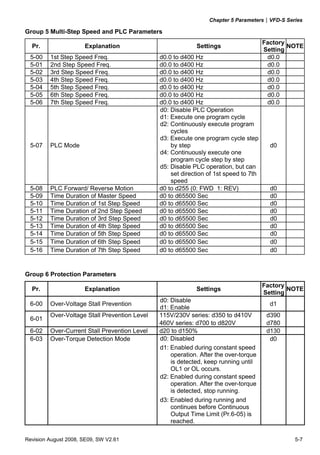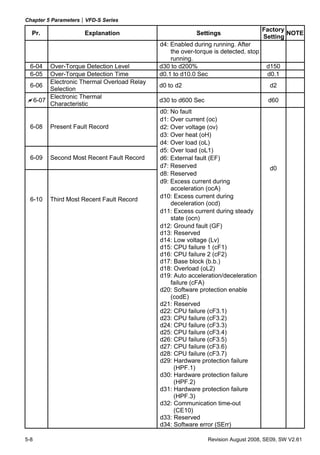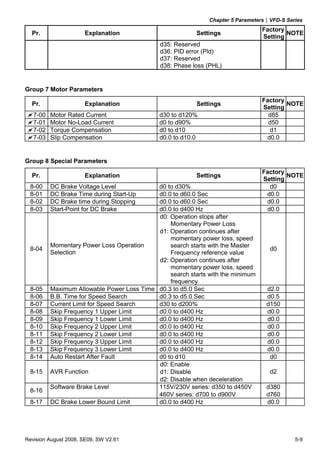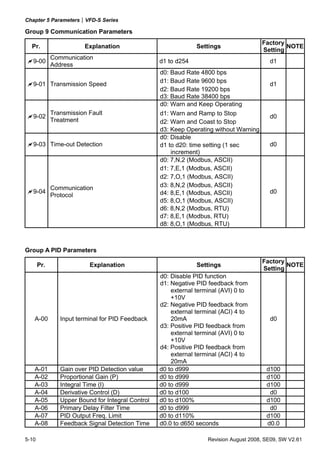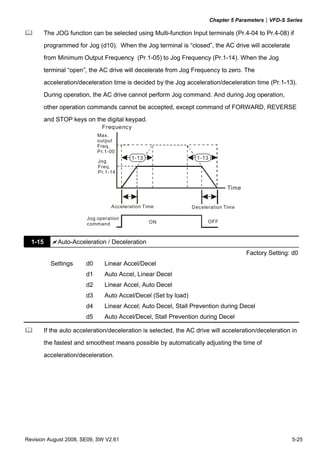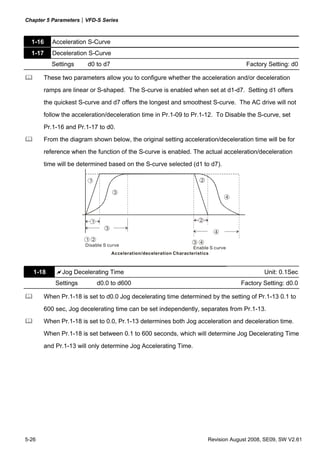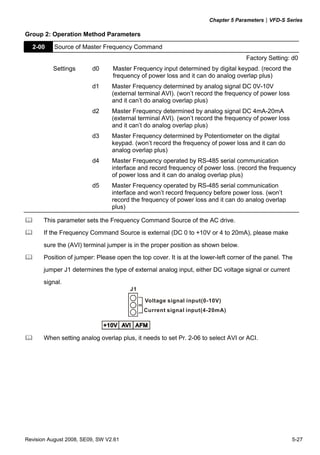
Preface


Thank you for choosing DELTA’s high-performance VFD-S Series. The VFD-S Series is
manufactured with high-quality components and materials and incorporate the latest microprocessor
technology available.


This manual is to be used for the installation, parameter setting, troubleshooting, and daily
maintenance of the AC motor drive. To guarantee safe operation of the equipment, read the following
safety guidelines before connecting power to the AC motor drive. Keep this operating manual at
hand and distribute to all users for reference.


To ensure the safety of operators and equipment, only qualified personnel familiar with AC motor
drive are to do installation, start-up and maintenance. Always read this manual thoroughly before
using VFD-S series AC Motor Drive, especially the WARNING, DANGER and CAUTION notes.
Failure to comply may result in personal injury and equipment damage. If you have any questions,
please contact your dealer.


PLEASE READ PRIOR TO INSTALLATION FOR SAFETY.


        DANGER!

1.   AC input power must be disconnected before any wiring to the AC motor drive is made.
2.   A charge may still remain in the DC-link capacitors with hazardous voltages, even if the power
     has been turned off. To prevent personal injury, please ensure that power has been turned off
     before opening the AC motor drive and wait ten minutes for the capacitors to discharge to safe
     voltage levels.
3.   Never reassemble internal components or wiring.
4.   The AC motor drive may be destroyed beyond repair if incorrect cables are connected to the
     input/output terminals. Never connect the AC motor drive output terminals U/T1, V/T2, and W/T3
     directly to the AC mains circuit power supply.
5.   Ground the VFD-S using the ground terminal. The grounding method must comply with the laws
     of the country where the AC motor drive is to be installed. Refer to the Basic Wiring Diagram.
6.   VFD-S series is used only to control variable speed of 3-phase induction motors, NOT for 1-
     phase motors or other purpose.
7.   VFD-S series shall NOT be used for life support equipment or any life safety situation.
WARNING!

1.   DO NOT use Hi-pot test for internal components. The semi-conductor used in the AC motor
     drive is easily damaged by high-pressure.
2.   There are highly sensitive MOS components on the printed circuit boards. These components
     are especially sensitive to static electricity. To prevent damage to these components, do not
     touch these components or the circuit boards with metal objects or your bare hands.
3.   Only qualified personnel are allowed to install, wire and maintain AC motor drive.


       CAUTION!

1.   Some parameter settings will cause the motor to run immediately after applying power.
2.   DO NOT install the AC motor drive in a place subjected to high temperature, direct sunlight,
     high humidity, excessive vibration, corrosive gases or liquids, or airborne dust or metallic
     particles.
3.   Only use AC motor drives within specification. Failure to comply may result in fire, explosion or
     electric shock.
4.   To prevent personal injury, please keep children and unqualified people away from the
     equipment.
5.   When the motor cable between the AC motor drive and motor is too long, the layer insulation of
     the motor may be damaged. Please use a frequency inverter duty motor or add an AC output
     reactor to prevent damage to the motor. Refer to appendix B Reactor for details.
6.   The rated voltage for the AC motor drive must be ≤ 240V for 230V models (≤ 120V for 115V
     models, ≤ 480V for 460V models) and the mains supply current capacity must be ≤ 5000A RMS
     (≤10000A RMS for the ≥ 40hp (30kW) models).
Table of Contents


Preface ..............................................................................................................i
Table of Contents ...........................................................................................iii
Chapter 1 Introduction .................................................................................1-1
    1.1 Receiving and Inspection.................................................................... 1-1
         1.1.1 Nameplate Information................................................................ 1-1
         1.1.2 Model Explanation ...................................................................... 1-1
         1.1.3 Series Number Explanation ........................................................ 1-2
         1.1.4 Drive Frames .............................................................................. 1-2
    1.2 Appearances....................................................................................... 1-2
    1.3 Installation Steps ................................................................................ 1-3
    1.4 Storage ............................................................................................... 1-4
Chapter 2 Installation and Wiring ...............................................................2-1
    2.1 Ambient Conditions............................................................................. 2-1
    2.2 Installation........................................................................................... 2-1
    2.3 Dimensions ......................................................................................... 2-3
    2.4 Wiring ............................................................................................... 2-16
         2.4.1 Basic Wiring .............................................................................. 2-17
         2.4.2 External Wiring.......................................................................... 2-22
         2.4.3 Main Terminals Connections .................................................... 2-23
         2.4.4 Control Terminals...................................................................... 2-25
         2.4.5 Main Circuit Terminals .............................................................. 2-28
Chapter 3 Start Up ........................................................................................3-1
3.1 Preparations before Start-up............................................................... 3-1
   3.2 Operation Method ............................................................................... 3-2
   3.3 Trial Run ............................................................................................. 3-2
Chapter 4 Digital Keypad Operation ...........................................................4-1
   4.1 Description of the Digital Keypad........................................................ 4-1
   4.2 Explanation of LED Indicators............................................................. 4-1
   4.3 Explanations of Display Messages ..................................................... 4-1
   4.4 How to Operate the Digital Keypad..................................................... 4-3
Chapter 5 Parameters ..................................................................................5-1
   5.1 Summary of Parameter Settings......................................................... 5-2
        Group 0 User Parameters.................................................................... 5-2
        Group 1 Basic Parameters................................................................... 5-2
        Group 2 Operation Method Parameters............................................... 5-3
        Group 3 Output Function Parameters .................................................. 5-5
        Group 4 Input Function Parameters..................................................... 5-5
        Group 5 Multi-Step Speed and PLC Parameters ................................. 5-7
        Group 6 Protection Parameters ........................................................... 5-7
        Group 7 Motor Parameters .................................................................. 5-9
        Group 8 Special Parameters................................................................ 5-9
        Group 9 Communication Parameters................................................. 5-10
        Group A PID Parameters ................................................................... 5-10
   5.2 Parameter Settings for Applications.................................................. 5-12
   5.3 Description of Parameter Settings .................................................... 5-17
        Group 0: User Parameters................................................................. 5-17
        Group 1: Basic Parameters................................................................ 5-22
        Group 2: Operation Method Parameters............................................ 5-27
Group 3: Output Function Parameters ............................................... 5-31
       Group 4: Input Function Parameters................................................. 5-35
       Group 5: Multi-step Speeds and PLC Parameters............................. 5-47
       Group 6: Protection Parameters ....................................................... 5-52
       Group 7: Motor Parameters .............................................................. 5-57
       Group 8: Special Parameters............................................................. 5-58
       Group 9: Communication Parameters............................................... 5-62
       Group A: PID Control ......................................................................... 5-75
Chapter 6 Fault Code Information...............................................................6-1
   6.1 Common Problems and Solutions ...................................................... 6-1
   6.2 Reset .................................................................................................. 6-4
Chapter 7 Troubleshooting..........................................................................7-1
   7.1 Over Current (OC) .............................................................................. 7-1
   7.2 Ground Fault....................................................................................... 7-2
   7.3 Over Voltage (OV) .............................................................................. 7-2
   7.4 Low Voltage (Lv)................................................................................. 7-3
   7.5 Over Heat (OH)................................................................................... 7-4
   7.6 Overload ............................................................................................. 7-4
   7.7 Keypad Display is Abnormal ............................................................... 7-5
   7.8 Phase Loss (PHL)............................................................................... 7-5
   7.9 Motor cannot Run ............................................................................... 7-6
   7.10 Motor Speed cannot be Changed ..................................................... 7-7
   7.11 Motor Stalls during Acceleration ....................................................... 7-8
   7.12 The Motor does not Run as Expected .............................................. 7-8
   7.13 Electromagnetic/Induction Noise ...................................................... 7-9
   7.14 Environmental Condition................................................................... 7-9
7.15 Affecting Other Machines ............................................................... 7-10
Chapter 8 Maintenance and Inspections ....................................................8-1
Appendix A Specifications ......................................................................... A-1
Appendix B Accessories ............................................................................ B-1
   B.1 All Brake Resistors & Brake Units Used in AC Motor Drives .............. B-1
       B.1.1 Dimensions and Weights for Brake resistors .............................. B-3
   B.2 EMI Filters .......................................................................................... B-4
       B.2.1 Dimensions................................................................................. B-7
   B.3 AC Reactor....................................................................................... B-11
       B.3.1 AC Input Reactor Recommended Value................................... B-11
       B.3.2 AC Output Reactor Recommended Value................................ B-11
       B.3.3 Applications for AC Reactor ..................................................... B-12
   B.4 DC Choke Recommended Values.................................................... B-14
   B.5 Zero Phase Reactor (RF220X00A) .................................................. B-15
   B.6 Din Rail-DR01 .................................................................................. B-16
   B.7 Remote Controller RC-01 ................................................................. B-17
   B.8 Conduit Bracket (BK-S) .................................................................... B-18
   B.9 Non-fuse Circuit Breaker Chart ........................................................ B-19
Appendix C How to Select the Right AC Motor Drive............................... C-1
   C.1 Capacity Formulas .............................................................................C-2
   C.2 General Precautions ..........................................................................C-4
   C.3 How to Choose a Suitable Motor........................................................C-5
Chapter 1 Introduction


1.1 Receiving and Inspection

This VFD-S AC motor drive has gone through rigorous quality control tests at the factory before
shipment. After receiving the AC motor drive, please check for the following:
            Check to make sure that the package includes an AC motor drive, the User
            Manual/Quick Start and CD, dust covers and rubber bushings.
            Inspect the unit to assure it was not damaged during shipment.
            Make sure that the part number indicated on the nameplate corresponds with the part
            number of your order.

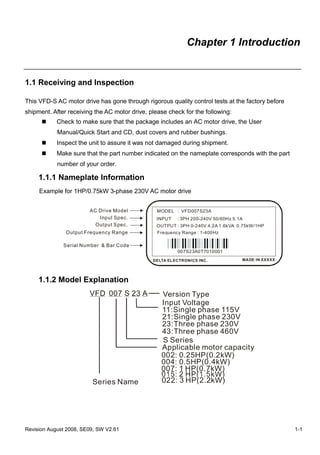
     1.1.1 Nameplate Information
     Example for 1HP/0.75kW 3-phase 230V AC motor drive


                        AC Drive Model           MODEL : VFD007S23A
                           Input Spec.           INPUT   : 3PH 200-240V 50/60Hz 5.1A
                          Output Spec.           OUTPUT : 3PH 0-240V 4.2A 1.6kVA 0.75kW/1HP
               Output Frequency Range            Frequency Range : 1-400Hz

              Serial Number & Bar Code
                                                         007S23A0T7010001
                                               DELTA ELECTRONICS INC.              MADE IN XXXXX


     1.1.2 Model Explanation
                        VFD 007 S 23 A            Version Type
                                                  Input Voltage
                                                  11:Single phase 115V
                                                  21:Single phase 230V
                                                  23:Three phase 230V
                                                  43:Three phase 460V
                                                  S Series
                                                  Applicable motor capacity
                                                  002: 0.25HP(0.2kW)
                                                  004: 0.5HP(0.4kW)
                                                  007: 1 HP(0.7kW)
                         Series Name               022: 3 HP(2.2kW)


Revision August 2008, SE09, SW V2.61                                                               1-1
Chapter 1 Introduction|VFD-S Series

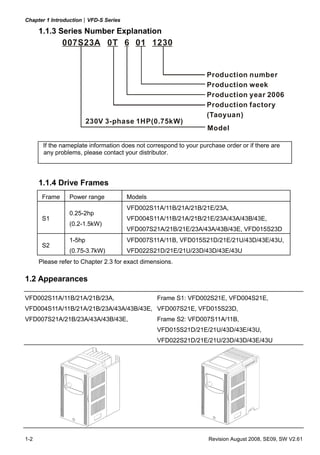
      1.1.3 Series Number Explanation
               007S23A 0T 6 01


                                                                   Production number
                                                                   Production week
                                                                   Production year 2006
                                                                   Production factory
                                                                   (Taoyuan)
                         230V 3-phase 1HP(0.75kW)
                                                                   Model

       If the nameplate information does not correspond to your purchase order or if there are
       any problems, please contact your distributor.


      1.1.4 Drive Frames
       Frame     Power range          Models
                                      VFD002S11A/11B/21A/21B/21E/23A,
                 0.25-2hp
       S1                             VFD004S11A/11B/21A/21B/21E/23A/43A/43B/43E,
                 (0.2-1.5kW)
                                      VFD007S21A/21B/21E/23A/43A/43B/43E, VFD015S23D
                 1-5hp                VFD007S11A/11B, VFD015S21D/21E/21U/43D/43E/43U,
       S2
                 (0.75-3.7kW)         VFD022S21D/21E/21U/23D/43D/43E/43U
      Please refer to Chapter 2.3 for exact dimensions.

1.2 Appearances

VFD002S11A/11B/21A/21B/23A,                      Frame S1: VFD002S21E, VFD004S21E,
VFD004S11A/11B/21A/21B/23A/43A/43B/43E, VFD007S21E, VFD015S23D,
VFD007S21A/21B/23A/43A/43B/43E,                  Frame S2: VFD007S11A/11B,
                                                 VFD015S21D/21E/21U/43D/43E/43U,
                                                 VFD022S21D/21E/21U/23D/43D/43E/43U


1-2                                                                Revision August 2008, SE09, SW V2.61
Chapter 1 Introduction|VFD-S Series


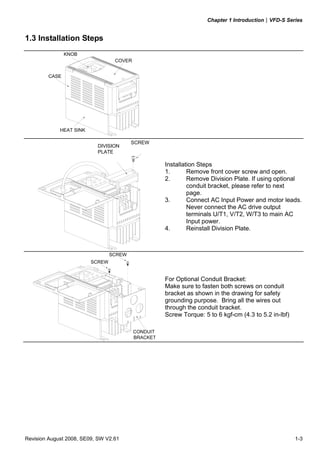
1.3 Installation Steps
               KNOB
                                  COVER


        CASE


             HEAT SINK

                                         SCREW
                           DIVISION
                           PLATE

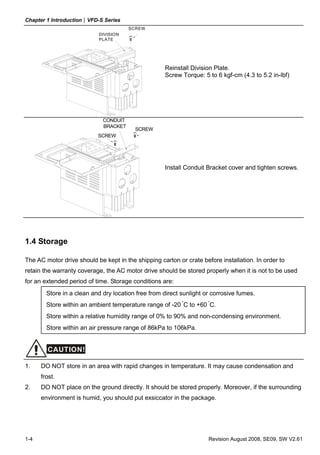
                                                    Installation Steps
                                                    1.       Remove front cover screw and open.
                                                    2.       Remove Division Plate. If using optional
                                                             conduit bracket, please refer to next
                                                             page.
                                                    3.       Connect AC Input Power and motor leads.
                                                             Never connect the AC drive output
                                                             terminals U/T1, V/T2, W/T3 to main AC
                                                             Input power.
                                                    4.       Reinstall Division Plate.


                                 SCREW
                         SCREW


                                                    For Optional Conduit Bracket:
                                                    Make sure to fasten both screws on conduit
                                                    bracket as shown in the drawing for safety
                                                    grounding purpose. Bring all the wires out
                                                    through the conduit bracket.
                                                    Screw Torque: 5 to 6 kgf-cm (4.3 to 5.2 in-lbf)

                                          CONDUIT
                                          BRACKET


Revision August 2008, SE09, SW V2.61                                                                  1-3
Chapter 1 Introduction|VFD-S Series
                                       SCREW
                           DIVISION
                           PLATE


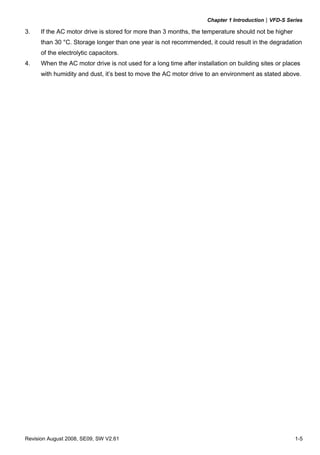
                                                    Reinstall Division Plate.
                                                    Screw Torque: 5 to 6 kgf-cm (4.3 to 5.2 in-lbf)


                             CONDUIT
                             BRACKET
                                         SCREW
                           SCREW


                                                    Install Conduit Bracket cover and tighten screws.


1.4 Storage

The AC motor drive should be kept in the shipping carton or crate before installation. In order to
retain the warranty coverage, the AC motor drive should be stored properly when it is not to be used
for an extended period of time. Storage conditions are:
        Store in a clean and dry location free from direct sunlight or corrosive fumes.
        Store within an ambient temperature range of -20 °C to +60 °C.
        Store within a relative humidity range of 0% to 90% and non-condensing environment.
        Store within an air pressure range of 86kPa to 106kPa.


        CAUTION!

1.    DO NOT store in an area with rapid changes in temperature. It may cause condensation and
      frost.
2.    DO NOT place on the ground directly. It should be stored properly. Moreover, if the surrounding
      environment is humid, you should put exsiccator in the package.


1-4                                                                  Revision August 2008, SE09, SW V2.61
Chapter 1 Introduction|VFD-S Series

3.    If the AC motor drive is stored for more than 3 months, the temperature should not be higher
      than 30 °C. Storage longer than one year is not recommended, it could result in the degradation
      of the electrolytic capacitors.
4.    When the AC motor drive is not used for a long time after installation on building sites or places
      with humidity and dust, it’s best to move the AC motor drive to an environment as stated above.


Revision August 2008, SE09, SW V2.61                                                                  1-5
Chapter 1 Introduction|VFD-S Series

                                  This page intentionally left blank.


1-6                                                                 Revision August 2008, SE09, SW V2.61
Chapter 2 Installation and Wiring


2.1 Ambient Conditions

Install the AC motor drive in an environment with the following conditions:

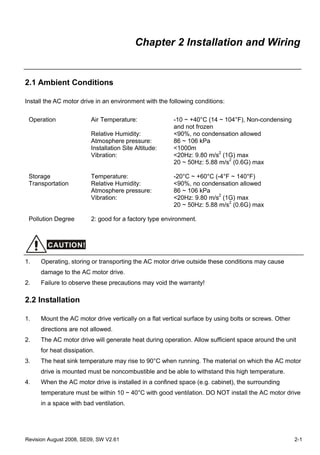
 Operation               Air Temperature:               -10 ~ +40°C (14 ~ 104°F), Non-condensing
                                                        and not frozen
                         Relative Humidity:             <90%, no condensation allowed
                         Atmosphere pressure:           86 ~ 106 kPa
                         Installation Site Altitude:    <1000m
                         Vibration:                     <20Hz: 9.80 m/s2 (1G) max
                                                        20 ~ 50Hz: 5.88 m/s2 (0.6G) max

 Storage                 Temperature:                   -20°C ~ +60°C (-4°F ~ 140°F)
 Transportation          Relative Humidity:             <90%, no condensation allowed
                         Atmosphere pressure:           86 ~ 106 kPa
                         Vibration:                     <20Hz: 9.80 m/s2 (1G) max
                                                        20 ~ 50Hz: 5.88 m/s2 (0.6G) max

 Pollution Degree        2: good for a factory type environment.


        CAUTION!

1.    Operating, storing or transporting the AC motor drive outside these conditions may cause
      damage to the AC motor drive.
2.    Failure to observe these precautions may void the warranty!

2.2 Installation

1.    Mount the AC motor drive vertically on a flat vertical surface by using bolts or screws. Other
      directions are not allowed.
2.    The AC motor drive will generate heat during operation. Allow sufficient space around the unit
      for heat dissipation.
3.    The heat sink temperature may rise to 90°C when running. The material on which the AC motor
      drive is mounted must be noncombustible and be able to withstand this high temperature.
4.    When the AC motor drive is installed in a confined space (e.g. cabinet), the surrounding
      temperature must be within 10 ~ 40°C with good ventilation. DO NOT install the AC motor drive
      in a space with bad ventilation.


Revision August 2008, SE09, SW V2.61                                                                   2-1
Chapter 2 Installation and Wiring|VFD-S Series

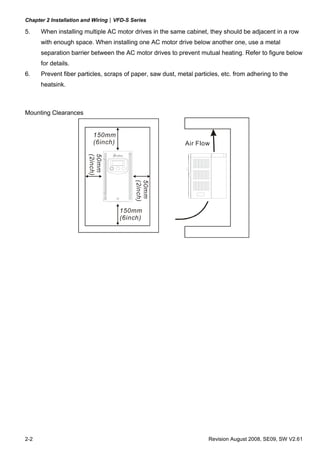
5.    When installing multiple AC motor drives in the same cabinet, they should be adjacent in a row
      with enough space. When installing one AC motor drive below another one, use a metal
      separation barrier between the AC motor drives to prevent mutual heating. Refer to figure below
      for details.
6.    Prevent fiber particles, scraps of paper, saw dust, metal particles, etc. from adhering to the
      heatsink.


Mounting Clearances


                          150mm
                          (6inch)                           Air Flow
                        (2inch)
                        50mm


                                         (2inch)
                                         50mm


                                    150mm
                                    (6inch)


2-2                                                                  Revision August 2008, SE09, SW V2.61
Chapter 2 Installation and Wiring|VFD-S Series


2.3 Dimensions

(Dimensions are in millimeter and [inch])
Frame S1: VFD002S11A, VFD002S21A, VFD002S23A


               85.0 [3.35]                   5.8 [0.23]                                            88.0 [3.47]
               74.0 [2.92]                                                                          13.0 [0.51]


                                            132.2 [5.21]
                                                           148.0 [5.83]
                                                                          3.0 [0.12]


                                                                                              5.0 [0.20]
                                                                                                                          8.1 [0.32]
                                                                                                    11.1 [0.44]


                                                       5.0 [0.20]


Revision August 2008, SE09, SW V2.61                                                                                                   2-3
Chapter 2 Installation and Wiring|VFD-S Series

Frame S1: VFD002S11B, VFD002S21B


             8 5 .0 [3 .3 5]     5 . 8 [0. 23 ]                                   88 .0 [3 .4 7 ]
             74 .0 [2 .9 2]                                                        1 3 .0 [0 .5 1]


                                                   14 8.0 [ 5.83]
                                   13 2.2 [5.21]


              73 .0 [2 .8 8 ]                                                    67 .8 [2 .6 7]               13 .0 [0 .5 1]
                                                   1 6.0 [ 0.63]


                                                                    3.0 [0.12]


                                                                                  5 . 0 [0. 20 ]
                                                                                                                8.1 [0.32]


                                                           5. 0 [0 . 20 ]
                                                                                          1 1.1 [ 0.44]


2-4                                                                                             Revision August 2008, SE09, SW V2.61
Chapter 2 Installation and Wiring|VFD-S Series

Frame S1: VFD004S11A, VFD004S21A, VFD004S23A


              8 5 .0 [3 .3 5]          5. 8 [0 . 23 ]                                         10 2 . 0 [ 4. 02 ]
              7 4 .0 [2 .9 2]                                                                          2 . 8 [0. 11 ]


                                                        1 48.0 [5.83]
                                        1 32.2 [5.21]


                                                                        3.0 [ 0.12]


                                                                                           5 . 0 [0. 2 0 ]

                                                                                                                        8 .1 [0.32]
                                                                                                  1 1.1 [0.44]


                                                           5. 0 [0. 20 ]


Revision August 2008, SE09, SW V2.61                                                                                                  2-5
Chapter 2 Installation and Wiring|VFD-S Series

Frame S1: VFD004S11B, VFD004S21B


            85 .0 [3 .3 5]      5. 8 [0. 23 ]                                            10 2. 0 [ 4. 02 ]
            74 .0 [2 .9 2]                                                                      2 . 8 [0. 11 ]


                                  1 32 .2 [5.21]
                                                    1 48 .0 [5.83]


              73 .0 [2 .8 8 ]                                                          67 .8 [2 .6 7]                                     27 .0 [1 .0 6]
                                                   1 6.0 [0 .63]


                                                                        3 .0 [0 .12]


                                                                                        5. 0 [0 . 2 0 ]                     8.1 [ 0.32]


                                                              5. 0 [0 . 2 0 ]
                                                                                                11 .1 [0 .44]


2-6                                                                                                             Revision August 2008, SE09, SW V2.61
Chapter 2 Installation and Wiring|VFD-S Series

Frame S1: VFD007S21A, VFD007S23A


             85 .0 [3 .3 5]        5. 8 [0. 23 ]                                                       12 4. 0 [ 4. 89]
             74 .0 [2 .9 2]                                                                                                2. 8 [0. 11 ]


                                       13 2.2 [ 5.21]
                                                        14 8.0 [ 5.83]


                                                                                 3.0 [0 .12]


                                                                                                    5. 0 [0. 20 ]
                                                                                                                                      8.1 [ 0.32]
                                                                                                           1 1.1 [ 0.44]


                                                                         5. 0 [0. 20 ]


Revision August 2008, SE09, SW V2.61                                                                                                                2-7
Chapter 2 Installation and Wiring|VFD-S Series

Frame S1: VFD007S21B


             85 .0 [3 .3 5]        5. 8 [0. 23 ]                                       12 4. 0 [ 4. 89]
             74 .0 [2 .9 2]                                                                       2. 8 [0. 11 ]


                                                   148.0 [5.83]
                                   1 32.2 [5.21]


               73 .0 [2 .8 8]                                                    67 .8 [2 .6 7]         50 .0 [1 .9 7]
                                                   16.0 [0.63]


                                                                   3. 0 [0.12]


                                                                                 5. 0 [0. 20 ]
                                                                                                               8.1 [0.32]
                                                                                       11 .1 [0.44]


                                                           5. 0 [0. 20 ]


2-8                                                                                           Revision August 2008, SE09, SW V2.61
Chapter 2 Installation and Wiring|VFD-S Series

Frame S1: VFD004S43A, VFD004S43E, VFD007S43A, VFD007S43E


             85 .0 [3 .3 5]        5. 8 [0. 23 ]                                                      12 6. 0 [ 4. 96]
             74 .0 [2 .9 2]                                                                                              3. 0 [0. 12 ]


                                       13 2.2 [ 5.21]
                                                        14 8.0 [ 5.83]


                                                                                 3.0 [0 .12]


                                                                                                  5. 0 [0. 20 ]
                                                                                                                                  8.1 [0.32]
                                                                                                         1 1.1 [ 0.44]


                                                                         5. 0 [0. 20 ]


Revision August 2008, SE09, SW V2.61                                                                                                           2-9
Chapter 2 Installation and Wiring|VFD-S Series

Frame S1: VFD004S43B, VFD007S43B


             85 .0 [3 .3 5]       5. 8 [0. 23 ]                                                  12 6. 0 [ 4. 96]
             74 .0 [2 .9 2]                                                                                 3 . 0 [0. 12 ]


                                                     1 4 8.0 [5.83]
                                   1 32 .2 [5.21 ]


               73 .0 [2 .8 8]                                                          67 .8 [2 .6 7]                   51 .0 [2 .0 1]
                                                     16 .0 [0.63]


                                                                      3 . 0 [0 .1 2]


                                                                                       5. 0 [0 . 20 ]
                                                                                                                             8 .1 [0 .32]
                                                                                              11 .1 [0 .44]


                                                        5 . 0 [0. 20 ]


2-10                                                                                                          Revision August 2008, SE09, SW V2.61
Chapter 2 Installation and Wiring|VFD-S Series

Frame S1: VFD002S21E, VFD004S21E, VFD007S21E, VFD015S23D


             85 .0 [3 .3 5]                         5. 8 [ 0. 23 ]                            12 7. 0 [ 5. 00]
             74 .0 [2 .9 2]                                                                                     8. 5 [ 0. 33 ]


                                   13 3.7 [ 5.27]
                                                     14 8.0 [ 5.83]


                                                                                                  8.3 [ 0.33]


                                                                      5. 0 [ 0. 20 ]


Revision August 2008, SE09, SW V2.61                                                                                             2-11
Chapter 2 Installation and Wiring|VFD-S Series

Frame S2: VFD007S11A


              10 0. 0 [ 3. 94]
               86 .5 [3 .4 1]           5. 4 [0. 21 ]                                             12 9. 0 [ 5. 08]


                                                        1 8 6.0 [7.33]
                                        1 73.0 [6.81]


                                                                                            5. 5 [0. 22 ]
                                                                                                                     6.5 [ 0.26]
                                                                             1 .0 [0 .04]


                                                                     5. 5 [0. 22 ]
                                                                                                      9 .5 [0 .38]


2-12                                                                                              Revision August 2008, SE09, SW V2.61
Chapter 2 Installation and Wiring|VFD-S Series

Frame S2: VFD007S11B


              10 0. 0 [ 3. 94]
               86 .5 [3 .4 1]           5. 4 [0. 21 ]                                              12 9. 0 [ 5. 08]


                                                       18 6.0 [7.33]
                                       173 .0 [6.82]


               73 .0 [2 .8 8]                                                                67 .8 [2 .6 7]           53 .5 [2 .11]
                                                       16 .0 [0 .63]


                                                                                             5. 5 [0. 22 ]
                                                                                                                           6.5 [0.26]
                                                                               1.0 [0 .04]


                                                                       5. 5 [0. 22 ]
                                                                                                        9.5 [0 .38]


Revision August 2008, SE09, SW V2.61                                                                                                    2-13
Chapter 2 Installation and Wiring|VFD-S Series

Frame S2: VFD015S21D, VFD015S21E, VFD015S43D, VFD015S43E, VFD022S21D,
           VFD022S21E, VFD022S23D, VFD022S43D, VFD022S43E


              10 0 . 0 [ 3. 94 ]                        5 . 4 [0. 2 1 ]                                12 9. 3 [ 5. 09]
              86 .5 [3 .4 1]                                                                                      8. 5 [0. 33 ]


                                     1 7 3 .0 [ 6.82]
                                                         1 8 6 .0 [ 7.33]


                                                                                             5. 5 [0. 22 ]
                                                                                1.0 [0.04]


                                                                                                                           6 .5 [0.26]
                                                                                               9 .5 [0 .37]


                                                                            5. 5 [0. 22 ]


2-14                                                                                                     Revision August 2008, SE09, SW V2.61
Chapter 2 Installation and Wiring|VFD-S Series

Frame S2: VFD015S21U, VFD015S43U, VFD022S21U, VFD022S43U


              100.0 [3.94]                    5.4 [0.21]                                   129.3 [5.09]
               86.5 [3.41]                                                                                 8.5 [0.33]


                                       173.0 [6.82]
                                                      186.0 [7.33]


               73.0 [2.88]                                                            67.8 [2.67]            53.9 [2.12]
                                                      16.0 [0.63]


                                                                                            5.5 [0.22]
                                                                         1.0 [0.04]


                                                                                                                        6.5 [0.26]
                                                                                              9.5 [0.37]


                                                                     5.5 [0.22]


Revision August 2008, SE09, SW V2.61                                                                                                 2-15
Chapter 2 Installation and Wiring|VFD-S Series


2.4 Wiring

After removing the front cover, check if the power and control terminals are clear of debris. Be sure
to observe the following precautions when wiring.


             General Wiring Information
       Applicable Codes
       All VFD-S series are Underwriters Laboratories, Inc. (UL) and Canadian Underwriters
       Laboratories (cUL) listed, and therefore comply with the requirements of the National Electrical
       Code (NEC) and the Canadian Electrical Code (CEC).


       Installation intended to meet the UL and cUL requirements must follow the instructions provided
       in “Wiring Notes” as a minimum standard. Follow all local codes that exceed UL and cUL
       requirements. Refer to the technical data label affixed to the AC motor drive and the motor
       nameplate for electrical data.


       The "Line Fuse Specification" in Appendix B, lists the recommended fuse part number for each
       S-Series part number. These fuses (or equivalent) must be used on all installations where
       compliance with U.L. standards is a required.


2-16                                                                  Revision August 2008, SE09, SW V2.61
Chapter 2 Installation and Wiring|VFD-S Series

     2.4.1 Basic Wiring
            Make sure that power is only applied to the R/L1, S/L2, T/L3 terminals. Failure to comply
            may result in damage to the equipment. The voltage and current should lie within the
            range as indicated on the nameplate.
            Check the following items after completing the wiring:
          1.    Are all connections correct?
          2.    No loose wires?
          3.    No short-circuits between terminals or to ground?


     A charge may still remain in the DC bus capacitors with hazardous voltages even if the power
     has been turned off. To prevent personal injury, please ensure that the power is turned off and
     wait ten minutes for the capacitors to discharge to safe voltage levels before opening the AC
     motor drive.


        DANGER!

1.    All the units must be grounded directly to a common ground terminal to prevent electric shock,
      fire and interference.
2.    Only qualified personnel familiar with AC motor drives are allowed to perform installation, wiring
      and commissioning.
3.    Make sure that the power is off before doing any wiring to prevent electric shocks.


Basic Wiring Diagrams


Users must connect wires according to the circuit diagrams on the following pages. Do not plug a
modem or telephone line to the RS-485 communication port or permanent damage may result. Pins
1 & 2 are the power supply for the optional copy keypad only and should not be used for RS-485
communication.


Revision August 2008, SE09, SW V2.61                                                                 2-17
Chapter 2 Installation and Wiring|VFD-S Series

For VFDXXXSXXA/B/D/U

                                                                      Brake Resistor (optional)
                                                      Jumper                  select 80Ω 120W, 200Ω 120W,
                                                                                     400Ω 120W
          Main Circuit Power
                                               E    +1        +2/B1         B2
           NFB                                                                            AC Motor
  R/L1                                         R/L1                       U/T1
  S/L2                                         S/L2
                                                                          V/T2
  T/L3                                         T/L3                17V
                                    SA                                   W/T3
       Recommended Circuit                     RB                                         Grounding resistance
        when power supply                MC                  CPU             E
       is turned OFF by a                      RC                                         less than 100
                                   ON
       fault output          OFF     MC                                                    Potentiometer (1KΩ)
                                                             2.4KΩ    47Ω AFM
                         Factory setting
                 Forward/Stop                                                                        Analog output
                                               M0                        47KΩ
                                                                                                     DC 0~10V
                                                               11V
                 Reverse/Stop
                                               M1
                                                                          GND       Factory setting: indicate
                 Reset                                                              output frequency
                                               M2
                                                                           RA    Multi-function indication
                 Multi-step 1                                                    output contacts below
                                               M3
                                                                           RB    120VAC/24VDC 5A
                 Multi-step 2                                                    240VAC less than 2.5A
                                               M4                          RC
                                                                                 Factory setting:
                 Multi-step 3                                                    indicates malfunction
                                               M5
                                                                          MO1
                 Common signal                                                   Multi-function Photocoupler
                                               GND
                                                                                 output below 48VDC 50mA
                                               +10V 10mA                        Factory setting: indicates
        Analog voltage
        0~10VDC                                (MAX)                      MCM during operation
        Potentiometer                            2   1                    RJ-11 RJ-11 communication port with
        3K~5KΩ                                 AVI                              RS-485 serial communication interface
        Analog current                                   3    250Ω              1: 17V
                                               47K
              4~20mA                                                            2: GND
                                                                          6->1 3: SG-
                                               GND
        Factory setting: output freq. (Pot.)                                    4: SG+
        determined by the Potentiometer                                         5: NC
        on the control panel.                                                   6: Communication

          Main circuit (power) terminals             Control circuit terminals      Shielded leads

                     NOTE: Do not plug in a modem or telephone line to the RS-485 communication
                           port, permanent damage may result. Pins 1&2 are the power
                           sources for the optional copy keypad and should not be used while

                     ﹡If it is single phase model, please select any of the two input power
                           using RS-485 communication.


                     terminals in main circuit power.


2-18                                                                                Revision August 2008, SE09, SW V2.61
Chapter 2 Installation and Wiring|VFD-S Series

For VFDXXXSXXE
NPN (sink mode)

                                                              Brake Resistor (optional)
                                                Jumper                 select 80Ω 120W, 200Ω 120W
                                                                              400Ω 120W
     Main Circuit Power                                             B2               AC Motor
                                          E    +1      +2/B1
       NFB                                                         U/T1
R/L1                                      R/L1                                         IM
                                                                  V/T2
S/L2                                      S/L2            +17V                         3~
T/L3                                      T/L3                    W/T3
                                                                                              Grounding resistance
  Recommended Circuit
                               SA                   CPU              E                        less than 100Ω
                                          RB
   when power supply                MC
  is turned OFF by a                      RC           2.4Ω      47ΩAFM              Potentiometer(1KΩ)
                               ON
  fault output          OFF         MC
                 Factory setting                                 47KΩ                  +        Analog output

             Forward/Stop
                                          17V           11V                            -        DC 0~10V
                                          M0
             Reverse/Stop                                          GND         Factory setting: indicate
                                          M1                                   output frequency
             Reset
                                          M2           NPN          RA     Multi-function indication
             Multi-step 1                              PNP                 output contacts below
                                          M3
             Multi-step 2                         J2                RB     120VAC/24VDC 5A
                                          M4
             Multi-step 3                                           RC     Factory setting:
                                          M5                               indicates malfunction
             Comm. signal (sink)
                                          GND                      MO1
                                          E                            Multi-function Photocoupler
   Analog voltage 3                       +10V 10mA                    output below 48VDC 50mA
       0~10VDC                            (MAX)                        Factory setting: Indicates
   Potentiometer Pot. 2                     2 1                    MCM during operation
        3K~5KΩ                            AVI 3                    RJ-11
   Analog current 1                               47KΩ                     RJ-11 communication port with
                                           250Ω                            RS-485 serial communication interface
                                          GND                              1:17V
                                                                    6←1    2:GND
   Factory setting: output freq. (Pot.)
   determined by the Potentiometer                                         3:SG-
                                                                           4:SG+
   on the control panel.

       Main circuit (power) terminals       Control circuit terminals            Shielded leads
                 NOTE: Do not plug in a Modem or telephone line to the RS-485 communication
                            port, permanent damage may result. Pins 1 & 2 are the power
                            sources for the optional copy keypad and should not be used while
                            using RS-485 communication.
                 * If it is single phase model, please select any of the two input power
                   terminals in main circuit power.


Revision August 2008, SE09, SW V2.61                                                                            2-19
Chapter 2 Installation and Wiring|VFD-S Series

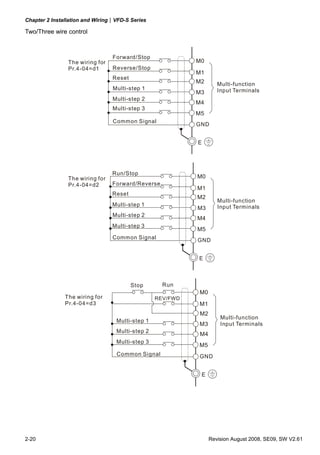
Two/Three wire control


                                 Forward/Stop
                The wiring for                             M0
                Pr.4-04=d1       Reverse/Stop
                                                           M1
                                 Reset
                                                           M2         Multi-function
                                 Multi-step 1                         Input Terminals
                                                           M3
                                 Multi-step 2
                                                           M4
                                 Multi-step 3
                                                           M5
                                 Common Signal
                                                           GND


                                                           E


                                 Run/Stop
                The wiring for                             M0
                Pr.4-04=d2       Forward/Reverse
                                                           M1
                                 Reset
                                                           M2
                                                                      Multi-function
                                 Multi-step 1                         Input Terminals
                                                           M3
                                 Multi-step 2
                                                           M4
                                 Multi-step 3
                                                           M5
                                 Comm on Signal            GND


                                                           E


                                         Stop      Run
                                                           M0
               The wiring for                    REV/FWD
               Pr.4-04=d3                                  M1
                                                           M2
                                                                       Multi-function
                                  Multi-step 1
                                                           M3          Input Terminals
                                  Multi-step 2
                                                           M4
                                  Multi-step 3
                                                           M5
                                  Common Signal            GND


                                                               E


2-20                                                               Revision August 2008, SE09, SW V2.61
Chapter 2 Installation and Wiring|VFD-S Series

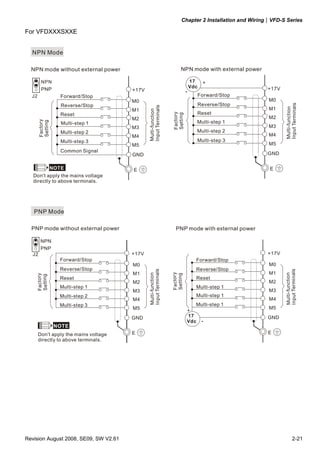
For VFDXXXSXXE


  NPN Mode

  NPN mode without external power                                     NPN mode with external power

         NPN                                                                   17    +
                                                                               Vdc                    +17V
         PNP                           +17V                                -
  J2                 Forward/Stop                                                Forward/Stop
                                       M0                                                              M0
                     Reverse/Stop                                                Reverse/Stop


                                                                                                             Input Terminals
                                              Input Terminals
                                                                                                       M1


                                                                                                             Multi-function
                                       M1


                                              Multi-function
                     Reset                                                       Reset


                                                                Fac tory
                                                                Setti ng
                                       M2                                                              M2
       Fac tory


                                                                                 Multi-step 1
       Setti ng


                     Multi-step 1
                                       M3                                                              M3
                     Multi-step 2                                                Multi-step 2
                                       M4                                                              M4
                     Multi-step 3                                                Multi-step 3
                                       M5                                                              M5
                     Common Signal
                                       GND                                                            GND

                  NOTE                 E                                                               E
   Don't apply the mains voltage
   directly to above terminals.


   PNP Mode

  PNP mode without external power                                 PNP mode with external power

        NPN
        PNP
  J2                                   +17V                                                           +17V
                    Forward/Stop                                                 Forward/Stop
                                       M0                                                              M0
                    Reverse/Stop                                                 Reverse/Stop
                                              Input Terminals


                                                                                                             Input Terminals
                                       M1                                                              M1
                                                                Fac tory
                                              Multi-function


                                                                                                             Multi-functio n
                                                                Set ting
    Fac tory
    Sett ing


                    Reset                                                        Reset
                                       M2                                                              M2
                    Multi-step 1                                                 Multi-step 1
                                       M3                                                              M3
                    Multi-step 2                                                 Multi-step 1
                                       M4                                                              M4
                    Multi-step 3                                              Multi-step 1
                                       M5                                                              M5
                                                                           +
                                       GND                                 17                         GND
                                                                           Vdc -
                   NOTE
       Don't apply the mains voltage   E                                                              E
       directly to above terminals.


Revision August 2008, SE09, SW V2.61                                                                                  2-21
Chapter 2 Installation and Wiring|VFD-S Series

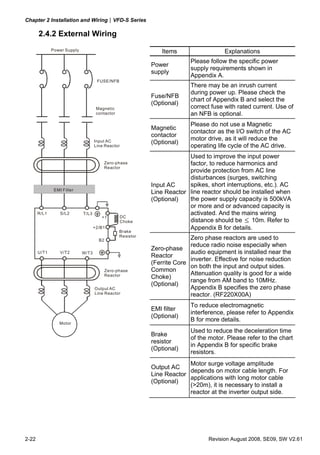
       2.4.2 External Wiring
              Power Supply                                      Items                  Explanations
                                                                          Please follow the specific power
                                                            Power
                                                                          supply requirements shown in
                                                            supply
                                                                          Appendix A.
                                     FUSE/NFB
                                                                          There may be an inrush current
                                                                          during power up. Please check the
                                                            Fuse/NFB
                                                                          chart of Appendix B and select the
                                                            (Optional)
                                     Magnetic                             correct fuse with rated current. Use of
                                     contactor                            an NFB is optional.
                                                                          Please do not use a Magnetic
                                                            Magnetic
                                                                          contactor as the I/O switch of the AC
                                                            contactor
                                                                          motor drive, as it will reduce the
                                    Input AC                (Optional)
                                    Line Reactor                          operating life cycle of the AC drive.
                                                                         Used to improve the input power
                                        Zero-phase                       factor, to reduce harmonics and
                                        Reactor
                                                                         provide protection from AC line
                                                                         disturbances (surges, switching
                                                            Input AC     spikes, short interruptions, etc.). AC
               EMI Filter
                                                            Line Reactor line reactor should be installed when
                                                            (Optional)   the power supply capacity is 500kVA
                                                                         or more and or advanced capacity is
       R/L1       S/L2       T/L3                                        activated. And the mains wiring
                                       +1        DC
                                                 Choke                   distance should be ≤ 10m. Refer to
                                    +2/B1                                Appendix B for details.
                                                 Brake
                                                 Resistor
                                      B2                                  Zero phase reactors are used to
                                                                          reduce radio noise especially when
                                                            Zero-phase
       U/T1       V/T2       W/T3                                         audio equipment is installed near the
                                                            Reactor
                                                                          inverter. Effective for noise reduction
                                                            (Ferrite Core
                                                                          on both the input and output sides.
                                           Zero-phase       Common
                                           Reactor                        Attenuation quality is good for a wide
                                                            Choke)
                                                                          range from AM band to 10MHz.
                                                            (Optional)
                                    Output AC                             Appendix B specifies the zero phase
                                    Line Reactor                          reactor. (RF220X00A)
                                                                          To reduce electromagnetic
                                                            EMI filter
                                                                          interference, please refer to Appendix
                                                            (Optional)
                                                                          B for more details.
                 Motor
                                                                          Used to reduce the deceleration time
                                                            Brake
                                                                          of the motor. Please refer to the chart
                                                            resistor
                                                                          in Appendix B for specific brake
                                                            (Optional)
                                                                          resistors.
                                                                         Motor surge voltage amplitude
                                                            Output AC
                                                                         depends on motor cable length. For
                                                            Line Reactor
                                                                         applications with long motor cable
                                                            (Optional)
                                                                         (>20m), it is necessary to install a
                                                                         reactor at the inverter output side.


2-22                                                                             Revision August 2008, SE09, SW V2.61
Chapter 2 Installation and Wiring|VFD-S Series

     2.4.3 Main Terminals Connections
          Terminal Symbol                            Explanation of Terminal Function
           R/L1, S/L2, T/L3            AC line input terminals (3-phase)
              L/L1, N/L2               AC line input terminals (1-phase)
                                       AC drive output terminals for connecting 3-phase induction
          U/T1, V/T2, W/T3
                                       motor
                                       Connections for DC choke. Please remove the jumper prior to
              +1, +2/B1
                                       installation.
              +2/B1, B2                Connections for brake resistor (optional)

                                       Earth connection, please comply with local regulations.


      Mains power terminals (R/L1, S/L2, T/L3 and L/L1, N/L2)
            Connect these terminals via a non-fuse breaker or earth leakage breaker to 3-phase AC
            power (some models to 1-phase AC power) for circuit protection. It is unnecessary to
            consider phase-sequence.
            It is recommended to add a magnetic contactor (MC) in the power input wiring to cut off
            power quickly and reduce malfunction when activating the protection function of AC
            motor drives. Both ends of the MC should have an R-C surge absorber.
            Do NOT run/stop AC motor drives by turning the power ON/OFF. Run/stop AC motor
            drives by RUN/STOP command via control terminals or keypad. If you still need to
            run/stop AC drives by turning power ON/OFF, it is recommended to do so only ONCE
            per hour.
            Do NOT connect 3-phase models to a 1-phase power source, or else phase loss may
            occur.


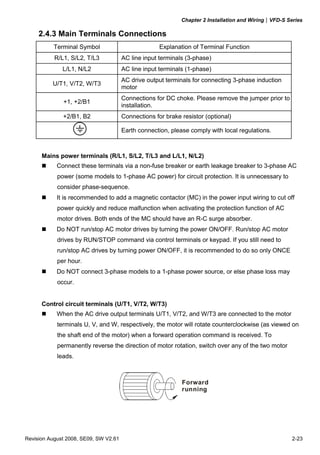
      Control circuit terminals (U/T1, V/T2, W/T3)
            When the AC drive output terminals U/T1, V/T2, and W/T3 are connected to the motor
            terminals U, V, and W, respectively, the motor will rotate counterclockwise (as viewed on
            the shaft end of the motor) when a forward operation command is received. To
            permanently reverse the direction of motor rotation, switch over any of the two motor
            leads.


                                                             Forward
                                                             running


Revision August 2008, SE09, SW V2.61                                                                   2-23
Chapter 2 Installation and Wiring|VFD-S Series

            DO NOT connect phase-compensation capacitors or surge absorbers at the output
            terminals of AC motor drives.
            With long motor cables, high capacitive switching current peaks can cause over-current,
            high leakage current or lower current readout accuracy. To prevent this, the motor cable
            should be less than 20m for 3.7kW models and below. And the cable should be less than
            50m for 5.5kW models and above. For longer motor cables use an AC output reactor.
            Use a well-insulated motor, suitable for inverter operation.


       Terminals [+2/B1, +1] for connecting DC reactor
            This is the connector for the DC reactor to improve the power factor. Please remove the
            short jumper when connecting DC reactor.


       Terminals [+2/B1, B2] for connecting brake resistor

                                             Bra ke resistor(o ptiona l)
                                             Ref er to A ppend ix B fo r the use of
                                             s pecial brake resistor.
                                        BR


                             +2 /B1               B2
            Connect a brake resistor in applications with frequent deceleration ramps, short
            deceleration time, too low brake torque or requiring increased brake torque.


         WARNING!

Short-circuiting [+2/B1, B2] can damage the AC motor drive.


       Grounding terminals (     )
            Make sure that the leads are connected correctly and the AC drive is properly grounded.
            (Ground resistance should not exceed 0.1Ω.)
            Use ground leads that comply with local regulations and keep them as short as possible.
            Multiple VFD-S units can be installed in one location. All the units should be grounded
            directly to a common ground terminal, as shown in the figure below. Ensure there are
            no ground loops.


                                     excellent         good        not allowed


2-24                                                                       Revision August 2008, SE09, SW V2.61
Chapter 2 Installation and Wiring|VFD-S Series

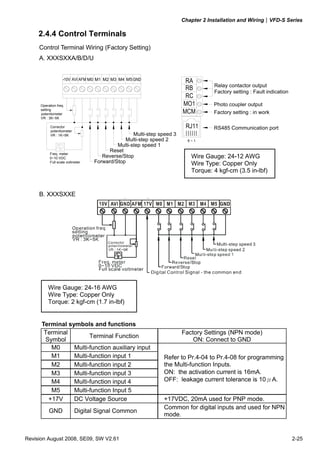
     2.4.4 Control Terminals
     Control Terminal Wiring (Factory Setting)
     A. XXXSXXA/B/D/U


                   +10V   AVI AFM M0 M1 M2 M3 M4 M5 GND                  RA
                                                                                    Relay contactor output
                                                                         RB
                                                                                    Factory setting : Fault indication
                                                                         RC
     Operation freq.                                                    MO1         Photo coupler output
     setting
     potentiometer                                                      MCM         Factory setting : in work
     VR : 3K~5K

           Corrector                                                     RJ11       RS485 Communication port
           potentiometer
           VR : 1K~5K                              Multi-step speed 3
                                               Multi-step speed 2         6~1
                                            Multi-step speed 1
                                         Reset
          Freq. meter
          0~10 VDC                    Reverse/Stop                         Wire Gauge: 24-12 AWG
          Full scale voltmeter     Forward/Stop                            Wire Type: Copper Only
                                                                           Torque: 4 kgf-cm (3.5 in-lbf)

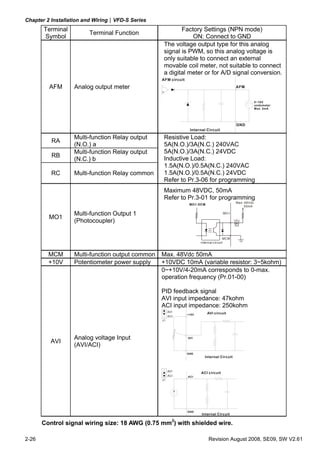
     B. XXXSXXE
                                               *          *


                                                                                     Multi-step speed 3


         Wire Gauge: 24-16 AWG
         Wire Type: Copper Only
         Torque: 2 kgf-cm (1.7 in-lbf)


      Terminal symbols and functions
       Terminal                                                         Factory Settings (NPN mode)
                       Terminal Function
       Symbol                                                               ON: Connect to GND
         M0      Multi-function auxiliary input
         M1      Multi-function input 1                        Refer to Pr.4-04 to Pr.4-08 for programming
         M2      Multi-function input 2                        the Multi-function Inputs.
         M3      Multi-function input 3                        ON: the activation current is 16mA.
         M4      Multi-function input 4                        OFF: leakage current tolerance is 10μA.
         M5      Multi-function Input 5
        +17V     DC Voltage Source                             +17VDC, 20mA used for PNP mode.
                                                               Common for digital inputs and used for NPN
          GND              Digital Signal Common
                                                               mode.


Revision August 2008, SE09, SW V2.61                                                                                     2-25
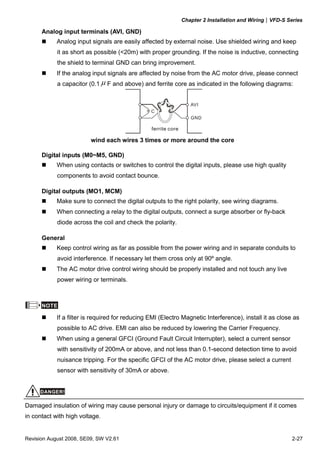
Chapter 2 Installation and Wiring|VFD-S Series
       Terminal                                          Factory Settings (NPN mode)
                        Terminal Function
       Symbol                                                ON: Connect to GND
                                                  The voltage output type for this analog
                                                  signal is PWM, so this analog voltage is
                                                  only suitable to connect an external
                                                  movable coil meter, not suitable to connect
                                                  a digital meter or for A/D signal conversion.
                                                 AFM circuit

         AFM      Analog output meter                                                         AFM


                                                                                                           0~10V
                                                                                                           ondometer
                                                                                                           Max. 2mA


                                                                                              GND
                                                                Internal Circuit

                  Multi-function Relay output     Resistive Load:
          RA
                  (N.O.) a                        5A(N.O.)/3A(N.C.) 240VAC
                  Multi-function Relay output     5A(N.O.)/3A(N.C.) 24VDC
          RB
                  (N.C.) b                        Inductive Load:
                                                  1.5A(N.O.)/0.5A(N.C.) 240VAC
          RC      Multi-function Relay common     1.5A(N.O.)/0.5A(N.C.) 24VDC
                                                  Refer to Pr.3-06 for programming
                                                  Maximum 48VDC, 50mA
                                                  Refer to Pr.3-01 for programming
                                                                                              Max: 48Vdc
                                                                MO1-DCM
                                                                                                   50mA

                  Multi-function Output 1                                             MO 1
         MO1
                  (Photocoupler)

                                                                                       MC M
                                                                      internal cir cuit


         MCM      Multi-function output common   Max. 48Vdc 50mA
         +10V     Potentiometer power supply     +10VDC 10mA (variable resistor: 3~5kohm)
                                                 0~+10V/4-20mA corresponds to 0-max.
                                                 operation frequency (Pr.01-00)

                                                 PID feedback signal
                                                 AVI input impedance: 47kohm
                                                 ACI input impedance: 250kohm
                                                      AVI
                                                               +10V       AVI circuit
                                                      ACI
                                                 J1


                  Analog voltage Input                         AVI
          AVI
                  (AVI/ACI)
                                                               GND
                                                                         Internal Circuit


                                                      AVI
                                                                      ACI circuit
                                                      ACI      ACI
                                                 J1


                                                               GND
                                                                      Internal Circuit

       Control signal wiring size: 18 AWG (0.75 mm2) with shielded wire.

2-26                                                                       Revision August 2008, SE09, SW V2.61
Chapter 2 Installation and Wiring|VFD-S Series

      Analog input terminals (AVI, GND)
            Analog input signals are easily affected by external noise. Use shielded wiring and keep
            it as short as possible (<20m) with proper grounding. If the noise is inductive, connecting
            the shield to terminal GND can bring improvement.
            If the analog input signals are affected by noise from the AC motor drive, please connect
            a capacitor (0.1 μ F and above) and ferrite core as indicated in the following diagrams:


                                                                   AVI
                                                 C
                                                                   GND

                                                 ferrite core

                         wind each wires 3 times or more around the core

      Digital inputs (M0~M5, GND)
            When using contacts or switches to control the digital inputs, please use high quality
            components to avoid contact bounce.

      Digital outputs (MO1, MCM)
            Make sure to connect the digital outputs to the right polarity, see wiring diagrams.
            When connecting a relay to the digital outputs, connect a surge absorber or fly-back
            diode across the coil and check the polarity.

      General
            Keep control wiring as far as possible from the power wiring and in separate conduits to
            avoid interference. If necessary let them cross only at 90º angle.
            The AC motor drive control wiring should be properly installed and not touch any live
            power wiring or terminals.


      NOTE

            If a filter is required for reducing EMI (Electro Magnetic Interference), install it as close as
            possible to AC drive. EMI can also be reduced by lowering the Carrier Frequency.
            When using a general GFCI (Ground Fault Circuit Interrupter), select a current sensor
            with sensitivity of 200mA or above, and not less than 0.1-second detection time to avoid
            nuisance tripping. For the specific GFCI of the AC motor drive, please select a current
            sensor with sensitivity of 30mA or above.


     DANGER!

Damaged insulation of wiring may cause personal injury or damage to circuits/equipment if it comes
in contact with high voltage.


Revision August 2008, SE09, SW V2.61                                                                      2-27
Chapter 2 Installation and Wiring|VFD-S Series

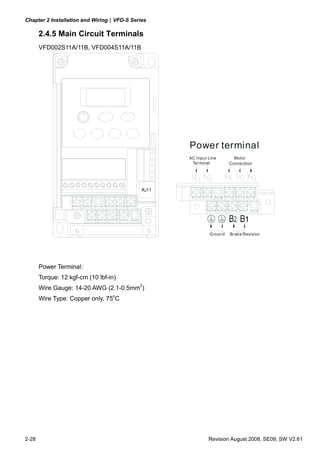
       2.4.5 Main Circuit Terminals
       VFD002S11A/11B, VFD004S11A/11B


                                                 Power terminal
                                                 AC Input Line        Motor
                                                  Ter minal         Conne ction


                                                          Groun d   Br ak e Res is tor


       Power Terminal:
       Torque: 12 kgf-cm (10 lbf-in)
       Wire Gauge: 14-20 AWG (2.1-0.5mm2)
       Wire Type: Copper only, 75oC


2-28                                                      Revision August 2008, SE09, SW V2.61
Chapter 2 Installation and Wiring|VFD-S Series

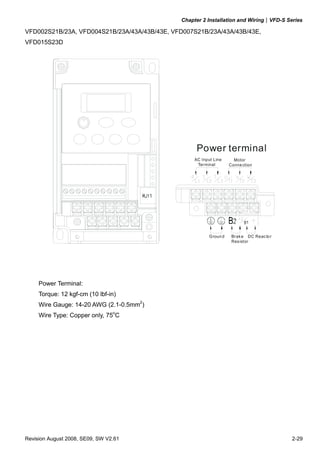
VFD002S21B/23A, VFD004S21B/23A/43A/43B/43E, VFD007S21B/23A/43A/43B/43E,
VFD015S23D


                                                     Power terminal
                                                    AC Input Line       Motor
                                                     Ter minal        Conne ction


                                                           G roun d    Br ak e DC Reac to r
                                                                       Res istor


     Power Terminal:
     Torque: 12 kgf-cm (10 lbf-in)
     Wire Gauge: 14-20 AWG (2.1-0.5mm2)
     Wire Type: Copper only, 75oC


Revision August 2008, SE09, SW V2.61                                                          2-29
Chapter 2 Installation and Wiring|VFD-S Series

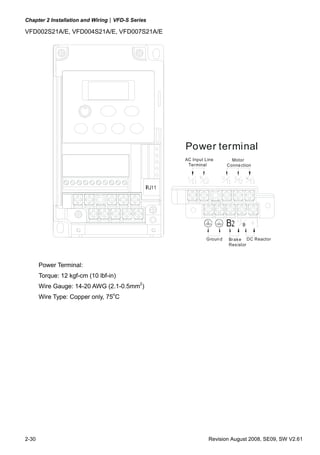
VFD002S21A/E, VFD004S21A/E, VFD007S21A/E


                                                 Power terminal
                                                 AC Input Line        Motor
                                                  Terminal          Conne ction


                                                          Groun d   Brak e DC Reactor
                                                                    Res istor


       Power Terminal:
       Torque: 12 kgf-cm (10 lbf-in)
       Wire Gauge: 14-20 AWG (2.1-0.5mm2)
       Wire Type: Copper only, 75oC


2-30                                                       Revision August 2008, SE09, SW V2.61
Chapter 2 Installation and Wiring|VFD-S Series

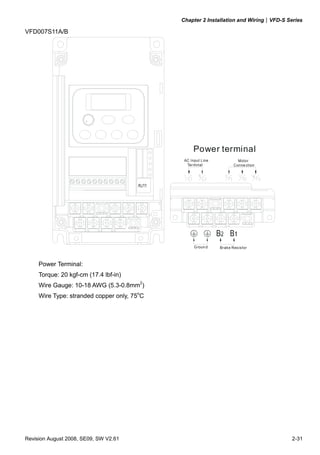
VFD007S11A/B


                                                   Power terminal
                                              AC Input Line             Motor
                                               Terminal               Conne ction


                                                   G roun d   Brak e Res is tor


     Power Terminal:
     Torque: 20 kgf-cm (17.4 lbf-in)
     Wire Gauge: 10-18 AWG (5.3-0.8mm2)
     Wire Type: stranded copper only, 75oC


Revision August 2008, SE09, SW V2.61                                                   2-31
Chapter 2 Installation and Wiring|VFD-S Series

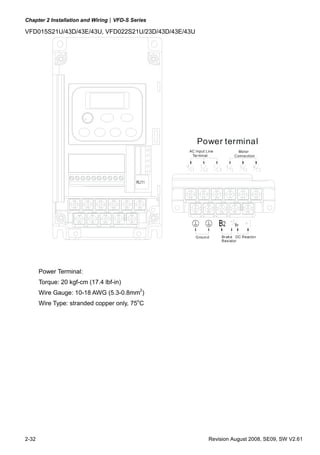
VFD015S21U/43D/43E/43U, VFD022S21U/23D/43D/43E/43U


                                                     Power terminal
                                                 AC Input Line            Motor
                                                  Terminal              Conne ction


                                                     Groun d     Br ak e DC Reacto r
                                                                 Res istor


       Power Terminal:
       Torque: 20 kgf-cm (17.4 lbf-in)
       Wire Gauge: 10-18 AWG (5.3-0.8mm2)
       Wire Type: stranded copper only, 75oC


2-32                                                       Revision August 2008, SE09, SW V2.61
Chapter 2 Installation and Wiring|VFD-S Series

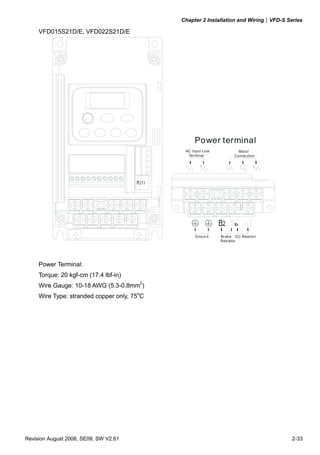
     VFD015S21D/E, VFD022S21D/E


                                                   Power terminal
                                              AC Input Line            Motor
                                               Ter minal             Conne ction


                                                   Groun d    Br ak e DC Reacto r
                                                              Res istor


     Power Terminal:
     Torque: 20 kgf-cm (17.4 lbf-in)
     Wire Gauge: 10-18 AWG (5.3-0.8mm2)
     Wire Type: stranded copper only, 75oC


Revision August 2008, SE09, SW V2.61                                                   2-33
Chapter 2 Installation and Wiring|VFD-S Series

                                    This page intentionally left blank


2-34                                                                     Revision August 2008, SE09, SW V2.61
Chapter 3 Start Up


3.1 Preparations before Start-up

Carefully check the following items before proceeding.
            Make sure that the wiring is correct. In particular, check that the output terminals U/T1,
            V/T2, W/T3 are NOT connected to power and that the drive is well grounded.
            Verify that there are no short-circuits between terminals and from terminals to ground or
            mains power.
            Check for loose terminals, connectors or screws.
            Verify that no other equipment is connected to the AC motor.
            Make sure that all switches are OFF before applying power to ensure that the AC motor
            drive doesn’t start running and there is no abnormal operation after applying power.
            Make sure that the front cover is correctly installed before applying power.
            Do NOT operate the AC motor drive with humid hands.
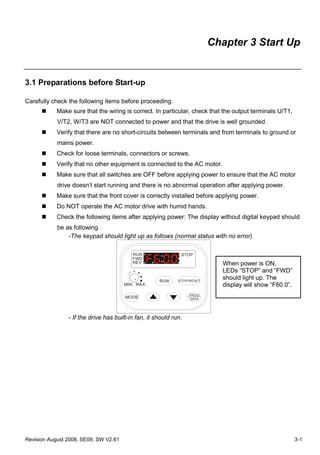
            Check the following items after applying power: The display without digital keypad should
            be as following.
                -The keypad should light up as follows (normal status with no error)

                                          RUN                 STOP
                                          FWD
                                          REV                               When power is ON,
                                                                            LEDs “STOP” and “FWD”
                                                     RUN     STOP/RESET
                                                                            should light up. The
                                       MIN. MAX.                            display will show “F60.0”.
                                                                  PROG
                                       MODE                       DATA


                - If the drive has built-in fan, it should run.


Revision August 2008, SE09, SW V2.61                                                                     3-1
Chapter 3 Start Up| VFD-S Series


3.2 Operation Method

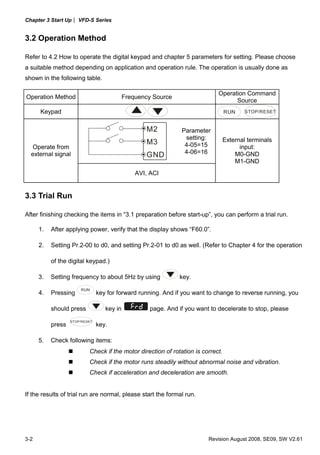
Refer to 4.2 How to operate the digital keypad and chapter 5 parameters for setting. Please choose
a suitable method depending on application and operation rule. The operation is usually done as
shown in the following table.

                                                                              Operation Command
Operation Method                            Frequency Source
                                                                                    Source
      Keypad                                                                      RUN     STOP/RESET


                                                   M2           Parameter
                                                                 setting:         External terminals
                                                   M3            4-05=15
   Operate from                                                                         input:
                                                                 4-06=16
  external signal                                  GND                                M0-GND
                                                                                      M1-GND
                                                AVI, ACI


3.3 Trial Run

After finishing checking the items in “3.1 preparation before start-up”, you can perform a trial run.

      1.   After applying power, verify that the display shows “F60.0”.

      2.   Setting Pr.2-00 to d0, and setting Pr.2-01 to d0 as well. (Refer to Chapter 4 for the operation

           of the digital keypad.)

      3.   Setting frequency to about 5Hz by using             key.
                       RUN
      4.   Pressing             key for forward running. And if you want to change to reverse running, you

           should press            key in            page. And if you want to decelerate to stop, please
                   STOP/RESET
           press                key.

      5.   Check following items:
                           Check if the motor direction of rotation is correct.
                           Check if the motor runs steadily without abnormal noise and vibration.
                           Check if acceleration and deceleration are smooth.


If the results of trial run are normal, please start the formal run.


3-2                                                                       Revision August 2008, SE09, SW V2.61
Chapter 3 Start Up| VFD-S Series


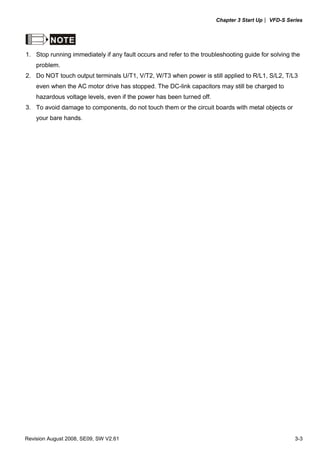
         NOTE
1. Stop running immediately if any fault occurs and refer to the troubleshooting guide for solving the
    problem.
2. Do NOT touch output terminals U/T1, V/T2, W/T3 when power is still applied to R/L1, S/L2, T/L3
    even when the AC motor drive has stopped. The DC-link capacitors may still be charged to
    hazardous voltage levels, even if the power has been turned off.
3. To avoid damage to components, do not touch them or the circuit boards with metal objects or
    your bare hands.


Revision August 2008, SE09, SW V2.61                                                                3-3
Chapter 3 Start Up| VFD-S Series

                                   This page intentionally left blank


3-4                                                                     Revision August 2008, SE09, SW V2.61
Chapter 4 Digital Keypad Operation


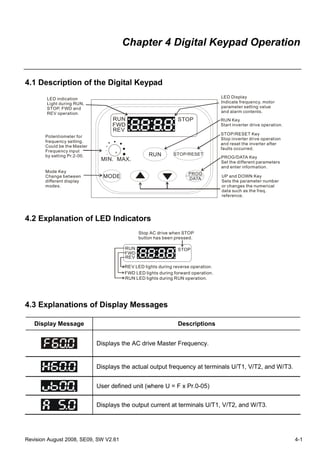
4.1 Description of the Digital Keypad
        LED indication                                                            LED Display
        Light during RUN,                                                         Indicate frequency, motor
        STOP, FWD and                                                             parameter setting value
        REV operation.                                                            and alarm contents.
                                  RUN                         STOP                RUN Key
                                  FWD                                             Start inverter drive operation.
                                  REV
                                                                                  STOP/RESET Key
       Potentiometer for
                                                                                  Stop inverter drive operation
       frequency setting.
                                                                                  and reset the inverter after
       Could be the Master
                                                                                  faults occurred.
       Frequency input
       by setting Pr.2-00.                       RUN         STOP/RESET
                                                                                  PROG/DATA Key
                              MIN. MAX.                                           Set the different parameters
                                                                                  and enter information.
       Mode Key
                                                                   PROG
       Change between          MODE                                DATA
                                                                                  UP and DOWN Key
       different display                                                          Sets the parameter number
       modes.                                                                     or changes the numerical
                                                                                  data such as the freq.
                                                                                  reference.


4.2 Explanation of LED Indicators
                                             Stop AC drive when STOP
                                             button has been pressed.

                                       RUN                    STOP
                                       FWD
                                       REV

                                       REV LED lights during reverse operation.
                                       FWD LED lights during forward operation.
                                       RUN LED lights during RUN operation.


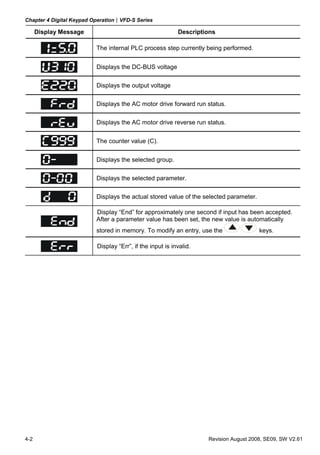
4.3 Explanations of Display Messages

   Display Message                                             Descriptions


                             Displays the AC drive Master Frequency.


                             Displays the actual output frequency at terminals U/T1, V/T2, and W/T3.


                             User defined unit (where U = F x Pr.0-05)


                             Displays the output current at terminals U/T1, V/T2, and W/T3.


Revision August 2008, SE09, SW V2.61                                                                                4-1
Chapter 4 Digital Keypad Operation|VFD-S Series

      Display Message                                      Descriptions

                          The internal PLC process step currently being performed.


                          Displays the DC-BUS voltage

                          Displays the output voltage

                          Displays the AC motor drive forward run status.

                          Displays the AC motor drive reverse run status.


                          The counter value (C).


                          Displays the selected group.

                          Displays the selected parameter.

                          Displays the actual stored value of the selected parameter.

                          Display “End” for approximately one second if input has been accepted.
                          After a parameter value has been set, the new value is automatically
                          stored in memory. To modify an entry, use the                 keys.

                          Display “Err”, if the input is invalid.


4-2                                                                 Revision August 2008, SE09, SW V2.61
Chapter 4 Digital Keypad Operation|VFD-S Series


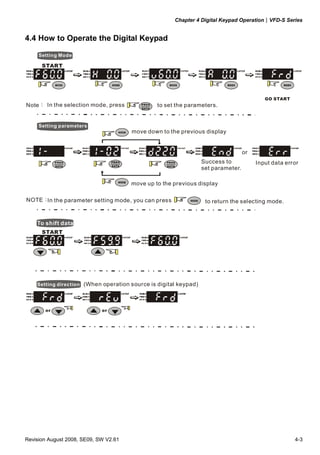
4.4 How to Operate the Digital Keypad

     Setting Mode

      START


                                                                                           GO START
Note: In the selection mode, press              to set the parameters.


     Setting parameters
                                       move down to the previous display


                                                                                   or
                                                                  Success to            Input data error
                                                                  set parameter.

                                       move up to the previous display

NOTE: the parameter setting mode, you can press
     In                                                            to return the selecting mode.


    To shift data
      START


    Setting direction (When operation source is digital keypad)


       or                    or


Revision August 2008, SE09, SW V2.61                                                                  4-3
Chapter 4 Digital Keypad Operation|VFD-S Series

                                  This page intentionally left blank


4-4                                                                    Revision August 2008, SE09, SW V2.61
Chapter 5 Parameters


The VFD-S parameters are divided into 11 groups by property for easy setting. In most applications,
the user can finish all parameter settings before start-up without the need for re-adjustment during
operation.


The 11 groups are as follows:


Group 0:     User Parameters
Group 1:     Basic Parameters
Group 2:     Operation Method Parameters
Group 3:     Output Function Parameters
Group 4:     Input Function Parameters
Group 5:     Multi-Step Speed and PLC Parameters
Group 6:     Protection Parameters
Group 7:     Motor Parameters
Group 8:     Special Parameters
Group 9:     Communication Parameters
Group A:     PID Parameters


Revision August 2008, SE09, SW V2.61                                                                   5-1
Chapter 5 Parameters|VFD-S Series


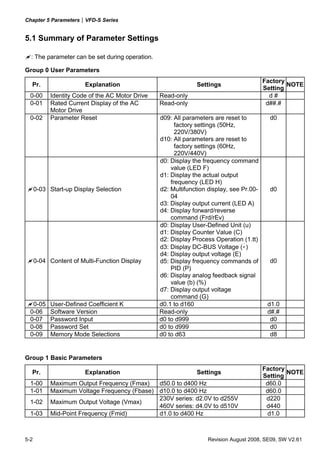
5.1 Summary of Parameter Settings

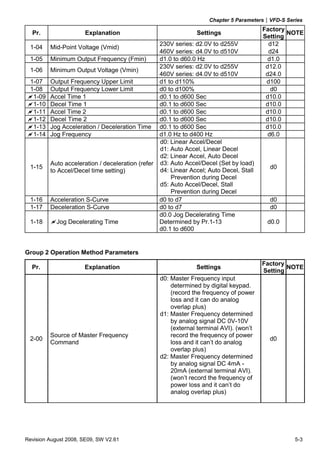
  : The parameter can be set during operation.

Group 0 User Parameters
                                                                                         Factory
  Pr.                   Explanation                           Settings                           NOTE
                                                                                         Setting
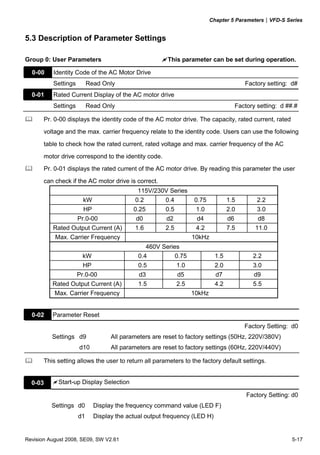
  0-00     Identity Code of the AC Motor Drive   Read-only                                 d#
  0-01     Rated Current Display of the AC       Read-only                                d##.#
           Motor Drive
  0-02     Parameter Reset                       d09: All parameters are reset to          d0
                                                       factory settings (50Hz,
                                                       220V/380V)
                                                 d10: All parameters are reset to
                                                       factory settings (60Hz,
                                                       220V/440V)
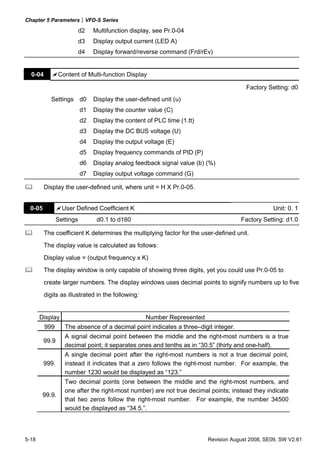
                                                 d0: Display the frequency command
                                                     value (LED F)
                                                 d1: Display the actual output
                                                     frequency (LED H)
      0-03 Start-up Display Selection            d2: Multifunction display, see Pr.00-     d0
                                                     04
                                                 d3: Display output current (LED A)
                                                 d4: Display forward/reverse
                                                     command (Frd/rEv)
                                                 d0: Display User-Defined Unit (u)
                                                 d1: Display Counter Value (C)
                                                 d2: Display Process Operation (1.tt)
                                                 d3: Display DC-BUS Voltage ( u )
                                                 d4: Display output voltage (E)
      0-04 Content of Multi-Function Display     d5: Display frequency commands of         d0
                                                     PID (P)
                                                 d6: Display analog feedback signal
                                                     value (b) (%)
                                                 d7: Display output voltage
                                                     command (G)
   0-05    User-Defined Coefficient K            d0.1 to d160                             d1.0
  0-06     Software Version                      Read-only                                d#.#
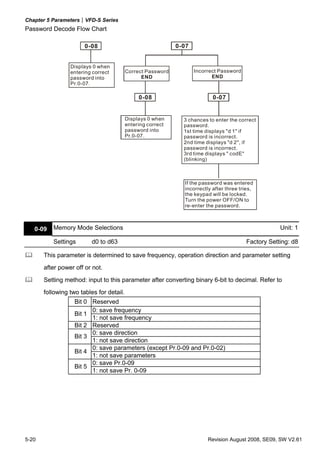
  0-07     Password Input                        d0 to d999                                d0
  0-08     Password Set                          d0 to d999                                d0
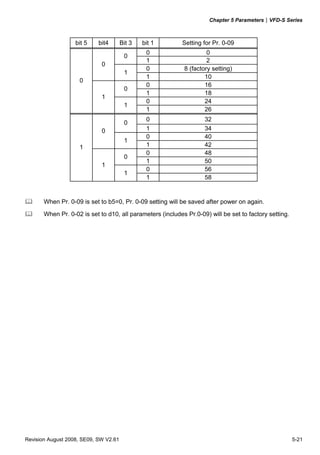
  0-09     Memory Mode Selections                d0 to d63                                 d8


Group 1 Basic Parameters
                                                                                         Factory
  Pr.                   Explanation                           Settings                           NOTE
                                                                                         Setting
  1-00     Maximum Output Frequency (Fmax)   d50.0 to d400 Hz                             d60.0
  1-01     Maximum Voltage Frequency (Fbase) d10.0 to d400 Hz                             d60.0
                                             230V series: d2.0V to d255V                  d220
  1-02     Maximum Output Voltage (Vmax)
                                             460V series: d4.0V to d510V                  d440
  1-03     Mid-Point Frequency (Fmid)        d1.0 to d400 Hz                               d1.0


5-2                                                                Revision August 2008, SE09, SW V2.61
Chapter 5 Parameters|VFD-S Series
                                                                                         Factory
  Pr.                 Explanation                               Settings                         NOTE
                                                                                         Setting
                                                   230V series: d2.0V to d255V             d12
 1-04    Mid-Point Voltage (Vmid)
                                                   460V series: d4.0V to d510V             d24
 1-05    Minimum Output Frequency (Fmin)           d1.0 to d60.0 Hz                        d1.0
                                                   230V series: d2.0V to d255V            d12.0
 1-06    Minimum Output Voltage (Vmin)
                                                   460V series: d4.0V to d510V            d24.0
 1-07    Output Frequency Upper Limit              d1 to d110%                            d100
 1-08    Output Frequency Lower Limit              d0 to d100%                              d0
  1-09   Accel Time 1                              d0.1 to d600 Sec                       d10.0
  1-10   Decel Time 1                              d0.1 to d600 Sec                       d10.0
  1-11   Accel Time 2                              d0.1 to d600 Sec                       d10.0
  1-12   Decel Time 2                              d0.1 to d600 Sec                       d10.0
  1-13   Jog Acceleration / Deceleration Time      d0.1 to d600 Sec                       d10.0
  1-14   Jog Frequency                             d1.0 Hz to d400 Hz                      d6.0
                                                   d0: Linear Accel/Decel
                                                   d1: Auto Accel, Linear Decel
                                                   d2: Linear Accel, Auto Decel
         Auto acceleration / deceleration (refer   d3: Auto Accel/Decel (Set by load)
 1-15                                                                                      d0
         to Accel/Decel time setting)              d4: Linear Accel; Auto Decel, Stall
                                                       Prevention during Decel
                                                   d5: Auto Accel/Decel, Stall
                                                       Prevention during Decel
 1-16    Acceleration S-Curve                      d0 to d7                                d0
 1-17    Deceleration S-Curve                      d0 to d7                                d0
                                                   d0.0 Jog Decelerating Time
 1-18       Jog Decelerating Time                  Determined by Pr.1-13                  d0.0
                                                   d0.1 to d600


Group 2 Operation Method Parameters
                                                                                         Factory
  Pr.                 Explanation                               Settings                         NOTE
                                                                                         Setting
                                                   d0: Master Frequency input
                                                       determined by digital keypad.
                                                       (record the frequency of power
                                                       loss and it can do analog
                                                       overlap plus)
                                                   d1: Master Frequency determined
                                                       by analog signal DC 0V-10V
                                                       (external terminal AVI). (won’t
         Source of Master Frequency                    record the frequency of power
 2-00                                                                                      d0
         Command                                       loss and it can’t do analog
                                                       overlap plus)
                                                   d2: Master Frequency determined
                                                       by analog signal DC 4mA -
                                                       20mA (external terminal AVI).
                                                       (won’t record the frequency of
                                                       power loss and it can’t do
                                                       analog overlap plus)


Revision August 2008, SE09, SW V2.61                                                               5-3
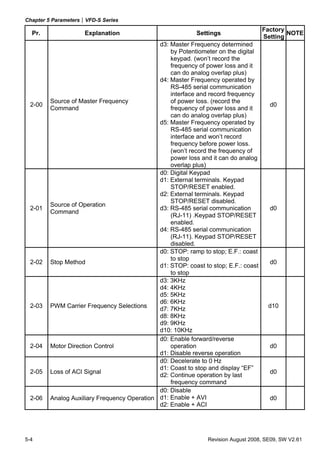
Chapter 5 Parameters|VFD-S Series
                                                                                     Factory
  Pr.                Explanation                            Settings                         NOTE
                                                                                     Setting
                                              d3: Master Frequency determined
                                                  by Potentiometer on the digital
                                                  keypad. (won’t record the
                                                  frequency of power loss and it
                                                  can do analog overlap plus)
                                              d4: Master Frequency operated by
                                                  RS-485 serial communication
                                                  interface and record frequency
         Source of Master Frequency               of power loss. (record the
  2-00                                                                                 d0
         Command                                  frequency of power loss and it
                                                  can do analog overlap plus)
                                              d5: Master Frequency operated by
                                                  RS-485 serial communication
                                                  interface and won’t record
                                                  frequency before power loss.
                                                  (won’t record the frequency of
                                                  power loss and it can do analog
                                                  overlap plus)
                                              d0: Digital Keypad
                                              d1: External terminals. Keypad
                                                  STOP/RESET enabled.
                                              d2: External terminals. Keypad
                                                  STOP/RESET disabled.
         Source of Operation
  2-01                                        d3: RS-485 serial communication          d0
         Command
                                                  (RJ-11) .Keypad STOP/RESET
                                                  enabled.
                                              d4: RS-485 serial communication
                                                  (RJ-11). Keypad STOP/RESET
                                                  disabled.
                                              d0: STOP: ramp to stop; E.F.: coast
                                                  to stop
  2-02   Stop Method                                                                   d0
                                              d1: STOP: coast to stop; E.F.: coast
                                                  to stop
                                              d3: 3KHz
                                              d4: 4KHz
                                              d5: 5KHz
                                              d6: 6KHz
  2-03   PWM Carrier Frequency Selections     d7: 7KHz                                 d10
                                              d8: 8KHz
                                              d9: 9KHz
                                              d10: 10KHz
                                              d0: Enable forward/reverse
  2-04   Motor Direction Control                  operation                            d0
                                              d1: Disable reverse operation
                                              d0: Decelerate to 0 Hz
                                              d1: Coast to stop and display “EF”
  2-05   Loss of ACI Signal                                                            d0
                                              d2: Continue operation by last
                                                  frequency command
                                              d0: Disable
  2-06   Analog Auxiliary Frequency Operation d1: Enable + AVI                         d0
                                              d2: Enable + ACI


5-4                                                             Revision August 2008, SE09, SW V2.61
Chapter 5 Parameters|VFD-S Series

Group 3 Output Function Parameters
                                                                                   Factory
  Pr.                 Explanation                           Settings                       NOTE
                                                                                   Setting
                                             d0: analog frequency meter
 3-00     Analog Output Signal               d1: analog current meter                 d0

  3-01 Analog Output Gain                    d1 to d200%                             d100
 3-02 Desired Frequency Attained             d1.0 to d400 Hz                         d1.0

 3-03     Terminal Count Value               d0 to d999                               d0
 3-04     Preliminary Count Value            d0 to d999                               d0
          Multi-Function Output Terminal 1
 3-05                                        d0: No Function                          d1
          (Photocoupler Output)
                                             d1: AC Drive Operational
                                             d2: Master Frequency Attained
                                             d3: Zero Speed
                                             d4: Over Torque Detection
                                             d5: Base-Block (B.B.) Indication
                                             d6: Low-Voltage Indication
                                             d7: Operation Mode Indication
                                             d8: Fault Indication
                                             d9: Desired Frequency Attained
          Multi-Function Output Terminal 2   d10: PLC Program Running
 3-06                                                                                 d8
          (Relay Output)                     d11: PLC Program Step Completed
                                             d12: PLC Program Completed
                                             d13: PLC Program Operation
                                                  Paused
                                             d14: Terminal Count Value Attained
                                             d15: Preliminary Count Value
                                                  Attained
                                             d16: AC Motor Drive Ready
                                             d17: FWD command Indication
                                             d18: REV command Indication


Group 4 Input Function Parameters
                                                                                   Factory
  Pr.                 Explanation                           Settings                       NOTE
                                                                                   Setting
   4-00 Potentiometer Bias Frequency         d 0.0 to d 100.0%                      d0.0
          Potentiometer Bias                 d0: Positive Bias
   4-01                                      d1: Negative Bias                        d0
          Polarity
          Potentiometer
   4-02                                      d1 to d200 %                            d100
          Frequency Gain
          Potentiometer Reverse              d0: Forward Motion Only
 4-03                                        d1: Reverse Motion enabled               d0
          Motion Enable


Revision August 2008, SE09, SW V2.61                                                           5-5
Chapter 5 Parameters|VFD-S Series
                                                                                          Factory
  Pr.                Explanation                              Settings                            NOTE
                                                                                          Setting
                                                d0: No Function
                                                d1: FWD/STOP, REV/STOP
                                                d2: FWD/REV, RUN/STOP
                                                d3: 3-wire Operation Control Mode
         Multi-Function Input Terminal 1 (M0,   d4: E.F. External Fault Input (N.O.)
  4-04                                                                                      d1
         M1)                                    d5: E.F. External Fault Input (N.C.)
                                                d6: Reset
                                                d7: Multi-Step Speed Command 1
                                                d8: Multi-Step Speed Command 2
                                                d9: Multi-Step Speed Command 3
                                                d10: Jog Operation
  4-05   Multi-Function Input Terminal 2 (M2)                                               d6
                                                d11: Accel/decel Inhibit
                                                d12: First or Second
                                                      Acceleration/deceleration Time
  4-06   Multi-Function Input Terminal 3 (M3)         Selection                             d7
                                                d13: External base block (N.O.)
                                                d14: External base block (N.C.)
                                                d15: Up: Increment master
                                                    frequency
  4-07   Multi-Function Input Terminal 4 (M4)   d16: Down: Decrement master                 d8
                                                    frequency
                                                d17: Run PLC Program
                                                d18: Pause PLC Program
                                                d19: Counter Trigger Signal
                                                d20: Counter Reset
                                                d21: Select ACI / Deselect AVI
                                                d22: PID Function Disabled
                                                d23: JOG FWD
                                                d24: JOG REV
                                                d25: The source of master
                                                    frequency is AVI.
  4-08   Multi-Function Input Terminal 5 (M5)                                               d9
                                                d26: The source of master
                                                    frequency is ACI.
                                                d27: Press UP/DOWN key to switch
                                                      forward/reverse (N.O.) motion
                                                d28: Press UP/DOWN key to switch
                                                      forward/reverse (N.C.) motion
                                                d29: M0: 0: RUN 1: STOP, M1: no
                                                      function, Direction is controlled
                                                      by keypad
                                                d0: Disable
  4-09   Line Start Lockout                                                                 d0
                                                d1: Enable
                                                d0: Based on accel/decel time
                                                d1: Up frequency according to
                                                    constant speed, down frequency
                                                    according to deceleration time
  4-10   Up/Down Mode                           d2: Up frequency according to               d3
                                                    acceleration time, down
                                                    frequenc according to constant
                                                    speed
                                                d3: Constant speed
         Accel/Decel Rate of Change of
  4-11   UP/DOWN Operation with Constant        0~1000, unit: 5 Hz/sec                      d1
         Speed

5-6                                                               Revision August 2008, SE09, SW V2.61
Chapter 5 Parameters|VFD-S Series

Group 5 Multi-Step Speed and PLC Parameters
                                                                                       Factory
  Pr.                 Explanation                           Settings                           NOTE
                                                                                       Setting
 5-00    1st Step Speed Freq.                  d0.0 to d400 Hz                          d0.0
 5-01    2nd Step Speed Freq.                  d0.0 to d400 Hz                          d0.0
 5-02    3rd Step Speed Freq.                  d0.0 to d400 Hz                          d0.0
 5-03    4th Step Speed Freq.                  d0.0 to d400 Hz                          d0.0
 5-04    5th Step Speed Freq.                  d0.0 to d400 Hz                          d0.0
 5-05    6th Step Speed Freq.                  d0.0 to d400 Hz                          d0.0
 5-06    7th Step Speed Freq.                  d0.0 to d400 Hz                          d0.0
                                               d0: Disable PLC Operation
                                               d1: Execute one program cycle
                                               d2: Continuously execute program
                                                   cycles
                                               d3: Execute one program cycle step
 5-07    PLC Mode                                  by step                               d0
                                               d4: Continuously execute one
                                                   program cycle step by step
                                               d5: Disable PLC operation, but can
                                                   set direction of 1st speed to 7th
                                                   speed
 5-08    PLC Forward/ Reverse Motion           d0 to d255 (0: FWD 1: REV)                d0
 5-09    Time Duration of Master Speed         d0 to d65500 Sec                          d0
 5-10    Time Duration of 1st Step Speed       d0 to d65500 Sec                          d0
 5-11    Time Duration of 2nd Step Speed       d0 to d65500 Sec                          d0
 5-12    Time Duration of 3rd Step Speed       d0 to d65500 Sec                          d0
 5-13    Time Duration of 4th Step Speed       d0 to d65500 Sec                          d0
 5-14    Time Duration of 5th Step Speed       d0 to d65500 Sec                          d0
 5-15    Time Duration of 6th Step Speed       d0 to d65500 Sec                          d0
 5-16    Time Duration of 7th Step Speed       d0 to d65500 Sec                          d0


Group 6 Protection Parameters
                                                                                       Factory
  Pr.                 Explanation                           Settings                           NOTE
                                                                                       Setting
                                               d0: Disable
 6-00    Over-Voltage Stall Prevention                                                   d1
                                               d1: Enable
         Over-Voltage Stall Prevention Level   115V/230V series: d350 to d410V          d390
 6-01
                                               460V series: d700 to d820V               d780
 6-02    Over-Current Stall Prevention Level   d20 to d150%                             d130
 6-03    Over-Torque Detection Mode            d0: Disabled                              d0
                                               d1: Enabled during constant speed
                                                   operation. After the over-torque
                                                   is detected, keep running until
                                                   OL1 or OL occurs.
                                               d2: Enabled during constant speed
                                                   operation. After the over-torque
                                                   is detected, stop running.
                                               d3: Enabled during running and
                                                   continues before Continuous
                                                   Output Time Limit (Pr.6-05) is
                                                   reached.

Revision August 2008, SE09, SW V2.61                                                            5-7
Chapter 5 Parameters|VFD-S Series
                                                                                    Factory
  Pr.                Explanation                         Settings                           NOTE
                                                                                    Setting
                                            d4: Enabled during running. After
                                                the over-torque is detected, stop
                                                running.
  6-04  Over-Torque Detection Level         d30 to d200%                             d150
  6-05  Over-Torque Detection Time          d0.1 to d10.0 Sec                        d0.1
        Electronic Thermal Overload Relay
  6-06                                      d0 to d2                                  d2
        Selection
        Electronic Thermal
   6-07                                     d30 to d600 Sec                          d60
        Characteristic
                                            d0: No fault
                                            d1: Over current (oc)
  6-08   Present Fault Record               d2: Over voltage (ov)
                                            d3: Over heat (oH)
                                            d4: Over load (oL)
                                            d5: Over load (oL1)
  6-09   Second Most Recent Fault Record    d6: External fault (EF)
                                            d7: Reserved                              d0
                                            d8: Reserved
                                            d9: Excess current during
                                                acceleration (ocA)
                                            d10: Excess current during
  6-10   Third Most Recent Fault Record
                                                deceleration (ocd)
                                            d11: Excess current during steady
                                                state (ocn)
                                            d12: Ground fault (GF)
                                            d13: Reserved
                                            d14: Low voltage (Lv)
                                            d15: CPU failure 1 (cF1)
                                            d16: CPU failure 2 (cF2)
                                            d17: Base block (b.b.)
                                            d18: Overload (oL2)
                                            d19: Auto acceleration/deceleration
                                                failure (cFA)
                                            d20: Software protection enable
                                                (codE)
                                            d21: Reserved
                                            d22: CPU failure (cF3.1)
                                            d23: CPU failure (cF3.2)
                                            d24: CPU failure (cF3.3)
                                            d25: CPU failure (cF3.4)
                                            d26: CPU failure (cF3.5)
                                            d27: CPU failure (cF3.6)
                                            d28: CPU failure (cF3.7)
                                            d29: Hardware protection failure
                                                 (HPF.1)
                                            d30: Hardware protection failure
                                                 (HPF.2)
                                            d31: Hardware protection failure
                                                 (HPF.3)
                                            d32: Communication time-out
                                                 (CE10)
                                            d33: Reserved
                                            d34: Software error (SErr)

5-8                                                           Revision August 2008, SE09, SW V2.61
Chapter 5 Parameters|VFD-S Series
                                                                                 Factory
  Pr.                 Explanation                         Settings                       NOTE
                                                                                 Setting
                                              d35: Reserved
                                              d36: PID error (Pld)
                                              d37: Reserved
                                              d38: Phase loss (PHL)


Group 7 Motor Parameters
                                                                                 Factory
  Pr.                 Explanation                         Settings                       NOTE
                                                                                 Setting
   7-00   Motor Rated Current                 d30 to d120%                         d85
   7-01   Motor No-Load Current               d0 to d90%                           d50
   7-02   Torque Compensation                 d0 to d10                             d1
   7-03   Slip Compensation                   d0.0 to d10.0                       d0.0


Group 8 Special Parameters
                                                                                 Factory
  Pr.                 Explanation                         Settings                       NOTE
                                                                                 Setting
 8-00     DC Brake Voltage Level            d0 to d30%                             d0
 8-01     DC Brake Time during Start-Up     d0.0 to d60.0 Sec                     d0.0
 8-02     DC Brake time during Stopping     d0.0 to d60.0 Sec                     d0.0
 8-03     Start-Point for DC Brake          d0.0 to d400 Hz                       d0.0
                                            d0: Operation stops after
                                                Momentary Power Loss
                                            d1: Operation continues after
                                                momentary power loss, speed
          Momentary Power Loss Operation        search starts with the Master
 8-04                                                                              d0
          Selection                             Frequency reference value
                                            d2: Operation continues after
                                                momentary power loss, speed
                                                search starts with the minimum
                                                frequency
 8-05     Maximum Allowable Power Loss Time d0.3 to d5.0 Sec                      d2.0
 8-06     B.B. Time for Speed Search        d0.3 to d5.0 Sec                      d0.5
 8-07     Current Limit for Speed Search    d30 to d200%                          d150
 8-08     Skip Frequency 1 Upper Limit      d0.0 to d400 Hz                       d0.0
 8-09     Skip Frequency 1 Lower Limit      d0.0 to d400 Hz                       d0.0
 8-10     Skip Frequency 2 Upper Limit      d0.0 to d400 Hz                       d0.0
 8-11     Skip Frequency 2 Lower Limit      d0.0 to d400 Hz                       d0.0
 8-12     Skip Frequency 3 Upper Limit      d0.0 to d400 Hz                       d0.0
 8-13     Skip Frequency 3 Lower Limit      d0.0 to d400 Hz                       d0.0
 8-14     Auto Restart After Fault          d0 to d10                              d0
                                            d0: Enable
 8-15     AVR Function                      d1: Disable                            d2
                                            d2: Disable when deceleration
          Software Brake Level              115V/230V series: d350 to d450V       d380
 8-16
                                            460V series: d700 to d900V            d760
 8-17     DC Brake Lower Bound Limit        d0.0 to d400 Hz                       d0.0


Revision August 2008, SE09, SW V2.61                                                        5-9
Chapter 5 Parameters|VFD-S Series

Group 9 Communication Parameters
                                                                                        Factory
  Pr.                   Explanation                             Settings                        NOTE
                                                                                        Setting
             Communication
   9-00                                            d1 to d254                              d1
             Address
                                                   d0: Baud Rate 4800 bps
                                                   d1: Baud Rate 9600 bps
   9-01 Transmission Speed                                                                 d1
                                                   d2: Baud Rate 19200 bps
                                                   d3: Baud Rate 38400 bps
                                                   d0: Warn and Keep Operating
             Transmission Fault                    d1: Warn and Ramp to Stop
   9-02                                                                                    d0
             Treatment                             d2: Warn and Coast to Stop
                                                   d3: Keep Operating without Warning
                                                   d0: Disable
   9-03 Time-out Detection                         d1 to d20: time setting (1 sec          d0
                                                       increment)
                                                   d0: 7,N,2 (Modbus, ASCII)
                                                   d1: 7,E,1 (Modbus, ASCII)
                                                   d2: 7,O,1 (Modbus, ASCII)
             Communication                         d3: 8,N,2 (Modbus, ASCII)
   9-04                                            d4: 8,E,1 (Modbus, ASCII)               d0
             Protocol
                                                   d5: 8,O,1 (Modbus, ASCII)
                                                   d6: 8,N,2 (Modbus, RTU)
                                                   d7: 8,E,1 (Modbus, RTU)
                                                   d8: 8,O,1 (Modbus, RTU)


Group A PID Parameters
                                                                                        Factory
       Pr.                Explanation                           Settings                        NOTE
                                                                                        Setting
                                                   d0: Disable PID function
                                                   d1: Negative PID feedback from
                                                       external terminal (AVI) 0 to
                                                       +10V
                                                   d2: Negative PID feedback from
                                                       external terminal (ACI) 4 to
   A-00         Input terminal for PID Feedback        20mA                                d0
                                                   d3: Positive PID feedback from
                                                       external terminal (AVI) 0 to
                                                       +10V
                                                   d4: Positive PID feedback from
                                                       external terminal (ACI) 4 to
                                                       20mA
   A-01         Gain over PID Detection value      d0 to d999                             d100
   A-02         Proportional Gain (P)              d0 to d999                             d100
   A-03         Integral Time (I)                  d0 to d999                             d100
   A-04         Derivative Control (D)             d0 to d100                              d0
   A-05         Upper Bound for Integral Control   d0 to d100%                            d100
   A-06         Primary Delay Filter Time          d0 to d999                              d0
   A-07         PID Output Freq. Limit             d0 to d110%                            d100
   A-08         Feedback Signal Detection Time     d0.0 to d650 seconds                   d0.0

5-10                                                                Revision August 2008, SE09, SW V2.61
Chapter 5 Parameters|VFD-S Series
                                                                            Factory
    Pr.                 Explanation                   Settings                      NOTE
                                                                            Setting
             Treatment of the Erroneous   d0: warn and RAMP to stop
   A-09                                                                        d0
             Feedback Signals             d1: warn and COAST to stop
   A-10      Sleep Frequency              d0.0 to d400Hz                      d0.0
   A-11      Wakeup Frequency             d0.0 to d400Hz                      d0.0
   A-12      Sleep Period                 d0.0 to d650 seconds                d0.0
   A-13      PID User Defined             d0.0 to d400                        d0.0


Revision August 2008, SE09, SW V2.61                                                   5-11
Chapter 5 Parameters|VFD-S Series


5.2 Parameter Settings for Applications

   Speed Search
                                                                                         Related
       Applications          Purpose                       Functions
                                                                                        Parameters
Windmill, winding       Restart free-        Before the free-running motor is               8-06
machine, fan and all    running motor        completely stopped, it can be restarted
                                                                                            8-07
inertia loads                                without detection of motor speed. The
                                             AC motor drive will auto search motor
                                             speed and will accelerate when its
                                             speed is the same as the motor speed.


   DC Brake before Running
                                                                                         Related
       Applications          Purpose                       Functions
                                                                                        Parameters
When e.g. windmills,   Keep the free-        If the running direction of the free-          8-00
fans and pumps rotate running motor at       running motor is not steady, please
                                                                                            8-01
freely by wind or flow standstill.           execute DC brake before start-up.
without applying power                                                                      8-17


   Multi-step Operation
                                                                                         Related
       Applications          Purpose                       Functions
                                                                                        Parameters
                        Cyclic operation by To control 7-step speeds and duration        4-04~4-08
Conveying machinery
                        multi-step speeds. by simple contact signals.                    5-00~5-06


   Switching acceleration and deceleration times
                                                                                         Related
       Applications          Purpose                       Functions
                                                                                        Parameters
                        Switching                                                        1-09~1-12
                                             When an AC motor drive drives two or
Auto turntable for      acceleration and
                                             more motors, it can reach high-speed        4-04~4-08
conveying machinery     deceleration times
                                             but still start and stop smoothly.
                        by external signal


   Operation Command
                                                                                         Related
       Applications          Purpose                       Functions
                                                                                        Parameters
                        Selecting the        Selection of AC motor drive control by         2-01
General application     source of control    external terminals, digital keypad or
                                                                                         4-04~4-08
                        signal               RS485.


5-12                                                               Revision August 2008, SE09, SW V2.61
Chapter 5 Parameters|VFD-S Series

   Two-wire/three-wire
                                                                                                      Related
     Applications              Purpose                          Functions
                                                                                                     Parameters
                                                  FWD/STOP
                                                                M0 "Open": Stop, "Close": FWD Run    4-04~4-08
                                                   REV/STOP
                                                                M1 "Open": Stop, "Close":REV Run

                                                                GND


                         To run, stop,                           M0 "Open": Stop, "Close": Run
                                                   RUN/STOP
                         forward and
General application                                              M1 "Open": FWD, "Close":REV
                         reverse by external          REV/FWD
                         terminals                               GND


                                                                   3-wire
                                               STOP     RUN
                                                                M0 Run command, Runs when "close"
                                                                M2 Stop command, stops when "Open"
                                                                M1 REV/FWD Run selection
                                                      REV/FWD "Open": FWD Run
                                                                "Close": REV Run
                                                                 GND


   Frequency Hold
                                                                                                      Related
     Applications              Purpose                          Functions
                                                                                                     Parameters
                         Acceleration/      Hold output frequency during                             4-04~4-08
General application
                         deceleration pause Acceleration/deceleration


   Auto Restart after Fault
                                                                                                      Related
     Applications              Purpose                          Functions
                                                                                                     Parameters
                         For continuous and                                                             8-14
                                            The AC motor drive can be
Air conditioners,        reliable operation
                                            restarted/reset automatically up to 10
remote pumps             without operator
                                            times after a fault occurs.
                         intervention


   Emergency Stop by DC Brake
                                                                                                      Related
     Applications              Purpose                          Functions
                                                                                                     Parameters
                                               AC motor drive can use DC brake for                      8-00
                         Emergency stop        emergency stop when quick stop is
                                                                                                        8-02
High-speed rotors        without brake         needed without brake resistor. When
                         resistor              used often, take motor cooling into                      8-03
                                               consideration.


Revision August 2008, SE09, SW V2.61                                                                           5-13
Chapter 5 Parameters|VFD-S Series

   Over-torque Setting
                                                                                          Related
       Applications           Purpose                       Functions
                                                                                         Parameters
                                              The over-torque detection level can be      6-03~6-05
                                              set. Once OC stall, OV stall and over-
                         To protect
                                              torque occurs, the output frequency
Pumps, fans and          machines and to
                                              will be adjusted automatically. It is
extruders                have continuous/
                                              suitable for machines like fans and
                         reliable operation
                                              pumps that require continuous
                                              operation.


   Upper/Lower Limit Frequency
                                                                                          Related
       Applications           Purpose                       Functions
                                                                                         Parameters
                                              When user cannot provide                       1-07
                       Control the motor
                                              upper/lower limit, gain or bias from
Pump and fan           speed within                                                          1-08
                                              external signal, it can be set
                       upper/lower limit
                                              individually in AC motor drive.


   Skip Frequency Setting
                                                                                          Related
       Applications           Purpose                       Functions
                                                                                         Parameters
                                              The AC motor drive cannot run at            8-08~8-13
                       To prevent             constant speed in the skip frequency
Pumps and fans
                       machine vibrations     range. Three skip frequency ranges
                                              can be set.


   Carrier Frequency Setting
                                                                                          Related
       Applications           Purpose                       Functions
                                                                                         Parameters
                                              The carrier frequency can be                   2-03
General application    Low noise              increased when required to reduce
                                              motor noise.


   Keep Running when Frequency Command is Lost
                                                                                          Related
       Applications           Purpose                       Functions
                                                                                         Parameters
                                              When the frequency command is lost             2-05
                       For continuous         by system malfunction, the AC motor
Air conditioners
                       operation              drive can still run. Suitable for
                                              intelligent air conditioners.


5-14                                                                Revision August 2008, SE09, SW V2.61
Chapter 5 Parameters|VFD-S Series

   Output Signal during Running
                                                                                          Related
    Applications               Purpose                      Functions
                                                                                         Parameters
                                              Signal available to stop braking (brake    3-05~3-06
                                              release) when the AC motor drive is
                         Provide a signal for
General application                           running. (This signal will disappear
                         running status
                                              when the AC motor drive is free-
                                              running.)


   Output Signal in Zero Speed
                                                                                          Related
    Applications               Purpose                      Functions
                                                                                         Parameters
                                              When the output frequency is lower         3-05~3-06
                         Provide a signal for than the min. output frequency, a
General application
                         running status       signal is given for external system or
                                              control wiring.


   Output Signal at Desired Frequency
                                                                                          Related
    Applications               Purpose                      Functions
                                                                                         Parameters
                                              When the output frequency is at the        3-05~3-06
                         Provide a signal for
General application                           desired frequency, a signal is given for
                         running status
                                              external system or control wiring.


   Over-torque Detection
                                                                                          Related
     Applications              Purpose                      Functions
                                                                                         Parameters
                         To protect           The over-torque detection level can be     3-05~3-06
Pumps, fans and          machines and to      set. Once over-torque occurs, a signal
                                                                                            6-04
extruders                have continuous/     will occur to prevent the AC motor
                         reliable operation   drive damage.                                 6-05


   Output Signal at Low-voltage
                                                                                          Related
    Applications               Purpose                      Functions
                                                                                         Parameters
                                              When the voltage between P-N is low        3-05~3-06
                         Provide a signal for
General application                           voltage, a signal is given for external
                         running status
                                              system or control wiring.


Revision August 2008, SE09, SW V2.61                                                             5-15
Chapter 5 Parameters|VFD-S Series

   Output Signal when Frequency Attained
                                                                                        Related
       Applications         Purpose                       Functions
                                                                                       Parameters
                                            When the output frequency is at the         3-05~3-06
                                            desired frequency (by frequency
                       Provide a signal for                                                3-04
General application                         command), a signal is given for
                       running status                                                      3-10
                                            external system or control wiring
                                            (frequency attained).


   Output Signal for Base Block
                                                                                        Related
       Applications         Purpose                       Functions
                                                                                       Parameters
                                            When executing Base Block, a signal         3-05~3-06
                       Provide a signal for
General application                         is given for external system or control
                       running status
                                            wiring.


   Overheat Warning for Heat Sink
                                                                                        Related
       Applications         Purpose                       Functions
                                                                                       Parameters
                                            When heat sink is overheated, it will       3-05~3-06
General application    For safety           send a signal for external system or
                                            control wiring.


   Multi-function Analog Output
                                                                                        Related
       Applications         Purpose                        Functions
                                                                                       Parameters
                                             The value of frequency, output                3-05
                       Display running       current/voltage can be read by
General application
                       status                connecting a frequency meter or
                                             voltage/current meter.


5-16                                                              Revision August 2008, SE09, SW V2.61
Chapter 5 Parameters|VFD-S Series


5.3 Description of Parameter Settings

Group 0: User Parameters                              This parameter can be set during operation.

  0-00    Identity Code of the AC Motor Drive
          Settings        Read Only                                                      Factory setting: d#
  0-01    Rated Current Display of the AC motor drive
          Settings        Read Only                                                   Factory setting: d ##.#

       Pr. 0-00 displays the identity code of the AC motor drive. The capacity, rated current, rated
       voltage and the max. carrier frequency relate to the identity code. Users can use the following

       table to check how the rated current, rated voltage and max. carrier frequency of the AC
       motor drive correspond to the identity code.
       Pr. 0-01 displays the rated current of the AC motor drive. By reading this parameter the user
       can check if the AC motor drive is correct.
                                            115V/230V Series
                       kW                  0.2      0.4           0.75           1.5          2.2
                       HP                 0.25        0.5          1.0           2.0          3.0
                     Pr.0-00               d0         d2           d4            d6           d8
          Rated Output Current (A)         1.6        2.5          4.2           7.5         11.0
          Max. Carrier Frequency                                  10kHz
                                               460V Series
                      kW                    0.4          0.75              1.5              2.2
                       HP                   0.5             1.0            2.0              3.0
                     Pr.0-00                d3              d5              d7               d9
          Rated Output Current (A)          1.5             2.5            4.2              5.5
          Max. Carrier Frequency                                  10kHz


  0-02    Parameter Reset
                                                                                         Factory Setting: d0
          Settings d9             All parameters are reset to factory settings (50Hz, 220V/380V)
                     d10          All parameters are reset to factory settings (60Hz, 220V/440V)

       This setting allows the user to return all parameters to the factory default settings.


  0-03      Start-up Display Selection

                                                                                          Factory Setting: d0
          Settings d0       Display the frequency command value (LED F)
                     d1     Display the actual output frequency (LED H)


Revision August 2008, SE09, SW V2.61                                                                       5-17
Chapter 5 Parameters|VFD-S Series

                          d2   Multifunction display, see Pr.0-04
                          d3   Display output current (LED A)
                          d4   Display forward/reverse command (Frd/rEv)


  0-04          Content of Multi-function Display

                                                                                      Factory Setting: d0
            Settings d0        Display the user-defined unit (u)
                          d1   Display the counter value (C)
                          d2   Display the content of PLC time (1.tt)
                          d3   Display the DC BUS voltage (U)
                          d4   Display the output voltage (E)
                          d5   Display frequency commands of PID (P)
                          d6   Display analog feedback signal value (b) (%)
                          d7   Display output voltage command (G)

         Display the user-defined unit, where unit = H X Pr.0-05.


 0-05            User Defined Coefficient K                                                     Unit: 0. 1
               Settings         d0.1 to d160                                        Factory Setting: d1.0

         The coefficient K determines the multiplying factor for the user-defined unit.
         The display value is calculated as follows:
         Display value = (output frequency x K)
         The display window is only capable of showing three digits, yet you could use Pr.0-05 to
         create larger numbers. The display windows uses decimal points to signify numbers up to five

         digits as illustrated in the following:


       Display                                     Number Represented
         999      The absence of a decimal point indicates a three–digit integer.
                  A signal decimal point between the middle and the right-most numbers is a true
        99.9
                  decimal point; it separates ones and tenths as in “30.5” (thirty and one-half).
                  A single decimal point after the right-most numbers is not a true decimal point,
        999.      instead it indicates that a zero follows the right-most number. For example, the
                  number 1230 would be displayed as “123.”
                  Two decimal points (one between the middle and the right-most numbers, and
                  one after the right-most number) are not true decimal points; instead they indicate
        99.9.
                  that two zeros follow the right-most number. For example, the number 34500
                  would be displayed as “34.5.”.


5-18                                                                    Revision August 2008, SE09, SW V2.61
Chapter 5 Parameters|VFD-S Series

  0-06       Software Version
             Settings        Read Only
             Display         d #.#


   0-07     Password Input                                                                          Unit: 1
            Settings         d0 to d999                                              Factory Setting: d0

         Pr.0-07 and Pr.0-08 work together to provide data security for the AC drive. When Pr.0-08 is

         set to a value other than 0, a password must be entered to alter the values of parameters.
         The password is the number set in Pr.0-08, which ranges from 1 to 999. Pr.0-07 is where the
         password is entered to allow parameter values to be altered.

         Display states:
         d0: no password / correct password has been input
         d1: parameters are locked


   0-08     Password Set                                                                            Unit: 1

            Settings         d0 to d999                                              Factory Setting: d0
            Display          0         No password set or successful input in Pr. 0-07
                             1         Password has been set

         To set a password to protect your parameter settings.
         If the display shows 0, no password is set or password has been correctly entered in Pr.0-07.

         All parameters can then be changed, including Pr.0-08.
         The first time you can set a password directly. After successful setting of password the
         display will show 1.

         Be sure to record the password for later use.
         To cancel the parameter lock, set the parameter to 0 after inputting correct password into Pr.
         0-07.
         The password consists of min. 1 digits and max. 3 digits.
         How to make the password valid again after decoding by Pr.0-07:
         Method 1: Re-input original password into Pr.0-08 (Or you can enter a new password if you
                           want to use a changed or new one).
         Method 2: After rebooting, password function will be recovered.


Revision August 2008, SE09, SW V2.61                                                                    5-19
Chapter 5 Parameters|VFD-S Series
Password Decode Flow Chart

                       0-08                                  0-07


                 Displays 0 when
                 entering correct         Correct Password          Incorrect Password
                 password into                  END                        END
                 Pr.0-07.

                                               0-08                        0-07


                                          Displays 0 when      3 chances to enter the correct
                                          entering correct     password.
                                          password into        1st time displays "d 1" if
                                          Pr.0-07.             password is incorrect.
                                                               2nd time displays "d 2", if
                                                               password is incorrect.
                                                               3rd time displays " codE"
                                                               (blinking)


                                                               If the password was entered
                                                               incorrectly after three tries,
                                                               the keypad will be locked.
                                                               Turn the power OFF/ON to
                                                               re-enter the password.


   0-09   Memory Mode Selections                                                                      Unit: 1

          Settings        d0 to d63                                                       Factory Setting: d8

       This parameter is determined to save frequency, operation direction and parameter setting
       after power off or not.
       Setting method: input to this parameter after converting binary 6-bit to decimal. Refer to
       following two tables for detail.
                   Bit 0 Reserved
                         0: save frequency
                   Bit 1
                         1: not save frequency
                   Bit 2 Reserved
                         0: save direction
                   Bit 3
                         1: not save direction
                         0: save parameters (except Pr.0-09 and Pr.0-02)
                   Bit 4
                         1: not save parameters
                         0: save Pr.0-09
                   Bit 5
                         1: not save Pr. 0-09


5-20                                                                     Revision August 2008, SE09, SW V2.61
Chapter 5 Parameters|VFD-S Series


                   bit 5    bit4       Bit 3   bit 1        Setting for Pr. 0-09
                                                0                    0
                                        0
                                                1                    2
                             0
                                                0           8 (factory setting)
                                        1
                                                1                   10
                    0
                                                0                   16
                                        0
                                                1                   18
                             1
                                                0                   24
                                        1
                                                1                   26
                                                0                   32
                                        0
                             0                  1                   34
                                                0                   40
                                        1
                    1                           1                   42
                                                0                   48
                                        0
                                                1                   50
                             1
                                                0                   56
                                        1
                                                1                   58


       When Pr. 0-09 is set to b5=0, Pr. 0-09 setting will be saved after power on again.

       When Pr. 0-02 is set to d10, all parameters (includes Pr.0-09) will be set to factory setting.


Revision August 2008, SE09, SW V2.61                                                                    5-21
Chapter 5 Parameters|VFD-S Series

Group 1: Basic Parameters

  1-00     Maximum Output Frequency (Fmax)                                                    Unit: 0.1
           Settings        d50.0 to d400 Hz                                     Factory Setting: d60.0

       This parameter determines the AC motor drive’s Maximum Output Frequency. All the AC
       motor drive frequency command sources (analog inputs 0 to +10V and 4 to 20mA) are scaled
       to correspond to the output frequency range.


  1-01     Maximum Voltage Frequency (Fbase)                                                  Unit: 0.1
           Settings           d10.0 to d400 Hz                                  Factory Setting: d60.0

       This value should be set according to the rated frequency of the motor as indicated on the

       motor nameplate. Maximum Voltage Frequency determines the v/f curve ratio. For example, if
       the drive is rated for 460 VAC output and the Maximum Voltage Frequency is set to 60Hz, the
       drive will maintain a constant ratio of 7.66 V/Hz (460V/60Hz=7.66V/Hz). This parameter value

       must be equal to or greater than the Mid-Point Frequency (Pr.1-03).


  1-02    Maximum Output Voltage (Vmax)                                                       Unit: 0.1
          Settings 115V/230V series d2.0 to d255V                               Factory Setting: 220.0
                      460V series       d4.0 to d510V                           Factory Setting: 440.0

       This parameter determines the Maximum Output Voltage of the AC motor drive. The
       Maximum Output Voltage setting must be smaller than or equal to the rated voltage of the
       motor as indicated on the motor nameplate. This parameter value must be equal to or greater
       than the Mid-Point Voltage (Pr.1-04).


  1-03    Mid-Point Frequency (Fmid)                                                          Unit: 0.1
          Settings d1.0 to d400Hz                                                Factory Setting: d1.0

       This parameter sets the Mid-Point Frequency of the V/f curve. With this setting, the V/f ratio
       between Minimum Frequency and Mid-Point frequency can be determined. This parameter
       must be equal to or greater than Minimum Output Frequency (Pr.1-05) and equal to or less
       than Maximum Voltage Frequency (Pr.1-01).


  1-04    Mid-Point Voltage (Vmid)                                                            Unit: 0.1
          Settings 115V/230V series d2.0 to d255V                               Factory Setting: d12.0
                      460V series        d4.0 to d510V                          Factory Setting: d24.0


5-22                                                                 Revision August 2008, SE09, SW V2.61
Chapter 5 Parameters|VFD-S Series

       This parameter sets the Mid-Point Voltage of any V/f curve. With this setting, the V/f ratio
       between Minimum Frequency and Mid-Point Frequency can be determined. This parameter
       must be equal to or greater than Minimum Output Voltage (Pr.1-06) and equal to or less than
       Maximum Output Voltage (Pr.1-02).


   1-05    Minimum Output Frequency (Fmin)                                                    Unit: 0.1
           Settings    d1.0 to d60.0Hz                                            Factory Setting: d1.0

       This parameter sets the Minimum Output Frequency of the AC drive. This parameter must be
       equal to or less than Mid-Point Frequency (Pr.1-03).


   1-06    Minimum Output Voltage (Vmin)                                                      Unit: 0.1
           Settings    115V/230V series d2.0 to d255V                           Factory Setting: d12.0
                       460V series         d4.0 to d510V                        Factory Setting: d24.0

       This parameter sets Minimum Output Voltage of the AC drive. This parameter must be equal
       to or less than Mid-Point Voltage (Pr.1-04).
                                 Voltage

                           Pr.1-02


                           Pr.1-04
                           Pr.1-06
                                                                        Freq.
                                  0
                                       Pr.1-03                    Pr.1-00
                                       Pr.1-05                    Pr.1-01
                                            Standard V/F Curve


   1-07    Output Frequency Upper Limit                                                         Unit: 1
           Settings    d1 to d110%                                               Factory Setting: d100

       This parameter must be equal to or greater than the Output Frequency Lower Limit (Pr.1-08).

       The Maximum Output Frequency (Pr.1-00) is regarded as 100%.
       Output Frequency Upper Limit value = (Pr.1-00 * Pr.1-07)/100.


  1-08    Output Frequency Lower Limit                                                          Unit: 1
          Settings       d0 to d100%                                                Factory Setting: d0

       The Upper/Lower Limit is to prevent operation error and machine damage.


Revision August 2008, SE09, SW V2.61                                                                  5-23
Chapter 5 Parameters|VFD-S Series

       If the Upper Limit of Output Frequency is 50Hz and the Maximum Output Frequency is 60Hz,
       the Maximum Output Frequency will be limited to 50Hz.
       If the Lower Limit of Output Frequency is 10Hz, and the Minimum Output Frequency (Pr.1-05)
       is set at 1.0Hz, then any Command Frequency between 1-10Hz will generate a 10Hz output
       from the drive.
       This parameter must be equal to or less than the Upper Limit of Output Frequency (Pr.1-07).


  1-09       Acceleration Time 1 (Taccel 1)                                                  Unit: 0.1
  1-10       Deceleration Time 1 (Tdecel 1)                                                  Unit: 0.1
  1-11       Acceleration Time 2 (Taccel 2)                                                  Unit: 0.1
  1-12       Deceleration Time 2 (Tdecel 2)                                                  Unit: 0.1
          Settings       d0.1 to d600Sec                                       Factory Setting: d10.0

       Pr.1-9- This parameter is used to determine the time required for the AC drive to ramp from 0
       Hz to its Maximum Output Frequency (Pr.1-00). The rate is linear unless S-Curve is

       “Enabled.”
       Pr.1-10. This parameter is used to determine the time required for the AC drive to decelerate
       from the Maximum Output Frequency (Pr.1-00) down to 0 Hz. The rate is linear unless S-
       Curve is “Enabled.”
       The acceleration/deceleration time 2 determines the time for the AC drive to
       acceleration/deceleration from 0Hz to Maximum Output Frequency (Pr.1-00)

       (acceleration/deceleration time 1 is the default). A Multi-Function Input terminal must be
       programmed to select acceleration/deceleration time 2 and the terminals must be closed to
       select acceleration/deceleration time 2. See Pr.4-04 to Pr.4-8-

       In the diagram shown below, the acceleration/deceleration time of the AC drive is the time
       between 0 Hz to Maximum Output Frequency (Pr.1-00). Suppose the Maximum Output
       Frequency is 60 Hz, start-up frequency (Pr.1-05) is 1.0 Hz, and acceleration/deceleration time

       is 10 seconds. The actual time for the AC drive to accelerate from start-up to 60 Hz is 9.83
       seconds and the deceleration time is also 9.83 seconds.


   1-13       Jog Acceleration/Deceleration Time                                         Unit: 0.1Sec
           Settings          d0.1 to d600Sec                                   Factory Setting: d10.0
   1-14       Jog Frequency                                                               Unit: 0.1Hz
           Settings          d1.0 to d400Hz                                     Factory Setting: d6.0


5-24                                                                Revision August 2008, SE09, SW V2.61
Chapter 5 Parameters|VFD-S Series

         The JOG function can be selected using Multi-function Input terminals (Pr.4-04 to Pr.4-08) if
         programmed for Jog (d10). When the Jog terminal is “closed”, the AC drive will accelerate
         from Minimum Output Frequency (Pr.1-05) to Jog Frequency (Pr.1-14). When the Jog
         terminal “open”, the AC drive will decelerate from Jog Frequency to zero. The
         acceleration/deceleration time is decided by the Jog acceleration/deceleration time (Pr.1-13).
         During operation, the AC drive cannot perform Jog command. And during Jog operation,
         other operation commands cannot be accepted, except command of FORWARD, REVERSE
         and STOP keys on the digital keypad.
                               Frequency
                              Max.
                              output
                              Freq.
                              Pr.1-00
                                           1-13                    1-13
                              Jog
                              Freq.
                              Pr.1-14


                                                                                Time


                                   Acceleration Time             Deceleration Time

                         Jog operation
                         command                  ON                   OFF


  1-15        Auto-Acceleration / Deceleration
                                                                                       Factory Setting: d0
           Settings      d0     Linear Accel/Decel
                         d1     Auto Accel, Linear Decel
                         d2     Linear Accel, Auto Decel
                         d3     Auto Accel/Decel (Set by load)
                         d4     Linear Accel; Auto Decel, Stall Prevention during Decel
                         d5     Auto Accel/Decel, Stall Prevention during Decel

         If the auto acceleration/deceleration is selected, the AC drive will acceleration/deceleration in
         the fastest and smoothest means possible by automatically adjusting the time of

         acceleration/deceleration.


Revision August 2008, SE09, SW V2.61                                                                    5-25
Chapter 5 Parameters|VFD-S Series


  1-16    Acceleration S-Curve
  1-17    Deceleration S-Curve
          Settings     d0 to d7                                                           Factory Setting: d0

       These two parameters allow you to configure whether the acceleration and/or deceleration
       ramps are linear or S-shaped. The S-curve is enabled when set at d1-d7. Setting d1 offers
       the quickest S-curve and d7 offers the longest and smoothest S-curve. The AC drive will not
       follow the acceleration/deceleration time in Pr.1-09 to Pr.1-12. To Disable the S-curve, set
       Pr.1-16 and Pr.1-17 to d0.
       From the diagram shown below, the original setting acceleration/deceleration time will be for

       reference when the function of the S-curve is enabled. The actual acceleration/deceleration
       time will be determined based on the S-curve selected (d1 to d7).

                        1                                               2

                                    3
                                                                                  4


                        1                                               2
                               3
                                                                              4
                      1 2
                                                                     3 4
                      Disable S curve
                                                                     Enable S curve
                                   Acceleration/deceleration Characteristics


   1-18      Jog Decelerating Time                                                               Unit: 0.1Sec
           Settings         d0.0 to d600                                                Factory Setting: d0.0

       When Pr.1-18 is set to d0.0 Jog decelerating time determined by the setting of Pr.1-13 0.1 to
       600 sec, Jog decelerating time can be set independently, separates from Pr.1-13.
       When Pr.1-18 is set to 0.0, Pr.1-13 determines both Jog acceleration and deceleration time.
       When Pr.1-18 is set between 0.1 to 600 seconds, which will determine Jog Decelerating Time

       and Pr.1-13 will only determine Jog Accelerating Time.


5-26                                                                        Revision August 2008, SE09, SW V2.61
Chapter 5 Parameters|VFD-S Series

Group 2: Operation Method Parameters

  2-00     Source of Master Frequency Command
                                                                                    Factory Setting: d0
          Settings       d0      Master Frequency input determined by digital keypad. (record the
                                 frequency of power loss and it can do analog overlap plus)
                         d1      Master Frequency determined by analog signal DC 0V-10V
                                 (external terminal AVI). (won’t record the frequency of power loss
                                 and it can’t do analog overlap plus)
                         d2      Master Frequency determined by analog signal DC 4mA-20mA
                                 (external terminal AVI). (won’t record the frequency of power loss
                                 and it can’t do analog overlap plus)
                         d3      Master Frequency determined by Potentiometer on the digital
                                 keypad. (won’t record the frequency of power loss and it can do
                                 analog overlap plus)
                         d4      Master Frequency operated by RS-485 serial communication
                                 interface and record frequency of power loss. (record the frequency
                                 of power loss and it can do analog overlap plus)
                         d5      Master Frequency operated by RS-485 serial communication
                                 interface and won’t record frequency before power loss. (won’t
                                 record the frequency of power loss and it can do analog overlap
                                 plus)

       This parameter sets the Frequency Command Source of the AC drive.
       If the Frequency Command Source is external (DC 0 to +10V or 4 to 20mA), please make

       sure the (AVI) terminal jumper is in the proper position as shown below.
       Position of jumper: Please open the top cover. It is at the lower-left corner of the panel. The
       jumper J1 determines the type of external analog input, either DC voltage signal or current
       signal.
                                       J1

                                             Voltage signal input(0-10V)
                                             Current signal input(4-20mA)


       When setting analog overlap plus, it needs to set Pr. 2-06 to select AVI or ACI.


Revision August 2008, SE09, SW V2.61                                                                  5-27
Chapter 5 Parameters|VFD-S Series


  2-01     Source of Operation Command
                                                                                     Factory Setting: d0
           Settings       d0     Controlled by the keypad
                          d1     External terminals. Keypad STOP/RESET enabled.
                          d2     External terminals. Keypad STOP/RESET disabled.
                          d3     RS-485 serial communication (RJ-11). Keypad STOP/RESET
                                 enabled.
                          d4     RS-485 serial communication (RJ-11). Keypad STOP/RESET
                                 disabled.

         When the AC drive is controlled by an external source, please refer to parameter group 4 for
       detailed explanations on related parameter settings.


  2-02      Stop Method
                                                                                     Factory Setting: d0
           Settings       d0     STOP: ramp to stop                      E.F.: coast to stop
                          d1     STOP: coast to stop                     E.F.: coast to stop

       The parameter determines how the motor is stopped when the AC motor drive receives a
       valid stop command or detects External Fault.

         Ramp: the AC motor drive decelerates to Minimum Output Frequency (Pr.1-05) according to
                 the deceleration time set in Pr.1-10 or Pr.1-12 and then stops.
         Coast: the AC motor drive stops the output instantly upon command, and the motor free

                 runs until it comes to a complete standstill.
         The motor stop method is usually determined by the characteristics of the motor load and
         how frequently it is stopped.
            (1) It is recommended to use “ramp to stop” for safety of personnel or to prevent material
                from being wasted in applications where the motor has to stop after the drive is
                stopped. The deceleration time has to be set accordingly.
            (2) If motor free running is allowed or the load inertia is large, it is recommended to select
                “coast to stop”. For example: blowers, punching machines, centrifuges and pumps.


5-28                                                                  Revision August 2008, SE09, SW V2.61
Chapter 5 Parameters|VFD-S Series
      Frequency                                               Frequency
output
                                                         output
frequency
                                                         frequency
    motor
                                                             motor
    speed
                                                             speed


                                                      Time                                                 Time
                                 stops according to                                  free run to stop
 operation                       decel eration time      operation
 command          RUN                 STOP               command          RUN                    STOP

                                           ramp to stop and free run to stop


   2-03       PWM Carrier Frequency Selections                                                          Unit: 1


                                          115V/230V/460V Series
                   Power                           0.25 to 3hp (0.2kW to 2.2kW)
               Setting Range                               d3 to d10 kHz
               Factory Setting                               d10 kHz


       This parameter determines the PWM carrier frequency of the AC motor drive.


       Carrier                             Electromagnetic             Heat         Current
                         Acoustic
       Frequency                           Noise or leakage          Dissipation     Wave
                          Noise
                                               current
                        Significant         Minimal                    Minimal              Minimal
           3kHz


          10kHz           Minimal           Significant              Significant          Significant
       From the table, we see that the PWM carrier frequency has a significant influence on the
       electromagnetic noise, AC motor drive heat dissipation, and motor acoustic noise.


  2-04       Motor Direction Control
                                                                                        Factory Setting: d0
           Settings       d0        Enable forward/reverse operation
                          d1        Disable reverse operation

         The parameter determines whether the AC drive can operate in the reverse direction.


Revision August 2008, SE09, SW V2.61                                                                        5-29
Chapter 5 Parameters|VFD-S Series

  2-05      Loss of ACI Signal (4-20mA)
                                                                                  Factory Setting: d0
           Settings       d0     Decelerate to 0 Hz
                          d1     Coast to stop and display “EF”
                          d2     Continue operation by last frequency command

         This parameter is only effective when the Source of Frequency is commanded by a 4 to
       20mA signal. The ACI input is considered lost when the ACI signal falls below 2mA.


  2-06      Analog Auxiliary Frequency Operation
                                                                                  Factory Setting: d0
            Settings      d0     Disable
                          d1     Enable + AVI (0~10V)
                          d2     Enable + ACI (4~20mA)

         This parameter is used to determinate that the analog signal to overlap is 0~10V (AVI) or
       4~20mA (ACI).
       To make sure the short PIN of J1 on the panel is correct position before setting this parameter.


5-30                                                                Revision August 2008, SE09, SW V2.61
Chapter 5 Parameters|VFD-S Series

Group 3: Output Function Parameters

  3-00     Analog Output Signal (AFM)
                                                                                        Factory Setting: d0
          Settings       d0             Analog Frequency Meter (0 to Maximum Output Frequency)
                         d1         Analog Current Meter (0 to 250% of rated AC motor drive current)

       This parameter sets the function of the AFM output 0~+10VDC (ACM is common).
       The voltage output type for this analog signal is PWM. It needs to read value by the movable

       coil meter and is not suitable for A/D signal conversion.


  3-01       Analog Output Gain                                                                     Unit: 1
          Settings       d1 to d200%                                                  Factory Setting: d100

       The parameter sets the voltage range of the analog output signal at terminals AFM, that
       corresponds with either the output frequency or the output current of the VFD.
                              AFM                  GND         AFM              GND


                                    +          -                     +      -


                          Analog Frequency Meter             Analog Current Meter

       The analog output voltage is directly proportional to the output frequency of the AC drive. With

       the factory setting of 100%, the Maximum Output Frequency (Pr.1-00) of the AC drive
       corresponds to +10VDC analog voltage output. (The actual voltage is about +10VDC, and
       can be adjusted by Pr.3-01).
       The analog output voltage is directly proportional to the output current of the AC drive. With
       the factory setting of 100%, the 2.5 times rated current of the AC drive corresponds to
       +10VDC analog voltage output. (The actual voltage is about +10VDC, and can be adjusted by

       Pr. 3-01)
       The voltage output type of the output signal at terinals AFM is PWM, so this analog voltage is
       only suitable to connect an external movable coil meter, not suitable to connect a digital meter

       or for A/D signal conversion.


         NOTE
Voltmeter specification: The sourcing capability of the output is limited to 0.21mA. Sourcing voltage:
                         10V. Output resistance: 47kΩ.
If the meter reads full scale at a voltage less than 10 volts, then Pr.3-01 should be set by the
following formula: Pr.3-01 = ((meter full scale voltage)/10) ×100%


Revision August 2008, SE09, SW V2.61                                                                    5-31
Chapter 5 Parameters|VFD-S Series

For example: When using the meter with full scale of 5 volts, adjust Pr.3-01 to 50%.


  3-02     Desired Frequency Attained                                                          Unit: 0.1
          Settings       d1.0 to d400 Hz                                           Factory Setting: d1.0

       If a multi-function output terminal is set to function as Desired Frequency Attained (Pr.3-05 or
       3-06=d9), then the output will be activated when the programmed frequency is attained.

                                    Freq.

                       Max. Output Detection range             Detection range
                       Freq.       +2Hz                         +4Hz
                                                                -
                                   -
                       Desired Freq.                                  Detection
                         Pr.3-02                                      range
                                                                      -2Hz
                       Preset Freq.                                    Time
                       Attained
                       indication        OFF        ON             OFF
                       Pr.3-05 to 3-06

                       Desired Freq.
                       Attained          OFF        ON
                       Indication
                                                                   OFF
                       Pr.3-05 to 3-06

                        Desired Freq. Attained & Preset Freq. Attained


  3-03    Terminal Count Value                                                                   Unit: 1
          Settings       d0 to d999                                                 Factory Setting: d0

       The parameter determines the upper limit value of the internal counter. The internal counter
       can be triggered by the external terminal (Pr.4-4 to Pr.4-8, d19). Upon completion of counting,
       the specified output terminal will be activated. (Pr.3-05, Pr.3-06, d14).


  3-04    Preliminary Count Value                                                                Unit: 1
          Settings       d0 to d999                                                 Factory Setting: d0

       When the counter value is counted up from “1” to the setting value of this parameter, the
       corresponding multi-function output terminal which set to d15 as Preliminary Counter Value
       Attained will be closed. The application can be that closing the multi-function output terminal

       makes the AC drive operate at low speed until stop before the counting value is going to be
       attained.
       The timing diagram is shown below:


5-32                                                                  Revision August 2008, SE09, SW V2.61
Chapter 5 Parameters|VFD-S Series


           Display
           (Pr.0-04=d1)
                                                                                                      2ms
                              TRG
         Counter Trigger Signal
         Multi-function Input Terminal

                                                                                                  2ms
         Preliminary Counter Value Attained Output
                                                                                    The width of trigger signal
         (Pr. 3-04=d3)
                                                                                    should not be less than
         (Pr. 3-05 to Pr. 3-06=d15)
                                                                                    2ms(<250 Hz)


         Terminal Count Value Attained Output
         (Pr.3-03=d5)
         (Pr.3-05 to Pr.3-06=d14)


  3-05      Multi-function Output Terminal 1 (Photocoupler output)

                                                                                                Factory Setting: d1
  3-06      Multi-function Output Terminal 2 (relay output)
                                                                                                Factory Setting: d8
            Settings d0 to d18


   Setting                Function                                           Description
      d0      No Function
      d1      AC Drive Operational                   the output terminal will be activated when the drive is
                                                     running.
              Master Frequency Attained              the output will be activated when the AC drive attains
      d2
                                                     Maximum Output Frequency.
      d3      Zero Speed                             the output will be activated when Command Frequency
                                                     is lower than the Minimum Output Frequency.
      d4      Over Torque Detection                  the output will be activated as long as the over-torque is
                                                     detected. Pr.6-04 determines the Over-Torque detection
                                                     level.
      d5      Base-Block (B.B.) Indication the output will be activated when the output of the AC
                                                     drive is shut off by external Baseblock.
      d6      Low-Voltage Indication                 the output will be activated when low voltage is detected.

      d7      Operation Mode Indication              the output will be activated when the operation of the AC
                                                     drive is controlled by External Control Terminals.
      d8      Fault Indication                       the output will be activated when faults occur (oc, ov,
                                                     oH, oL, oL1, EF, cF3, HPF, ocA, ocd, ocn, GF).
      d9      Desired Frequency Attained the output will be activated when the desired frequency
                                                     (Pr.3-02)is attained.


Revision August 2008, SE09, SW V2.61                                                                              5-33
Chapter 5 Parameters|VFD-S Series

   Setting              Function                                 Description
       d10   PLC Program Running         the output will be activated when the PLC program is
                                         running.
       d11   PLC Program Step            the output will be activated for 0.5 sec. when each multi-
             Completed                   step speed is attained.
       d12   PLC Program Completed       the output will be activated for 0.5 sec. when the PLC
                                         program cycle has completed.
       d13   PLC Operation Paused        the output will be activated when PLC operation is
                                         paused.
             Terminal Count Value        counter reaches Terminal Count Value.
       d14
             Attained
             Preliminary Counter Value   counter reaches Preliminary Count Value.
       d15
             Attained
       d16   AC Motor Drive Ready

       d17   FWD Command Indication      When AC drive receives the command of forward
                                         running, it will output immediately no matter AC drive is
                                         in the state of run or stop.
       d18   REV Command Indication      When AC drive receives the command of reverse
                                         running, it will output immediately no matter AC drive is
                                         in the state of run or stop.


5-34                                                                Revision August 2008, SE09, SW V2.61
Chapter 5 Parameters|VFD-S Series

Group 4: Input Function Parameters

  4-00        Potentiometer Bias Frequency                                                Unit: 0. 1
          Settings       d0.0 to d100.0%                                       Factory Setting: d0.0
  4-01        Potentiometer Bias Polarity
                                                                                 Factory Setting: d0
          Settings       d0      Positive Bias
                         d1      Negative Bias
  4-02        Potentiometer Frequency Gain                                                   Unit: 1
          Settings       d1 to d200%                                          Factory Setting: d100
  4-03     Potentiometer Reverse Motion Enable
                                                                                 Factory Setting: d0
          Settings       d0      Forward motion only
                         d1      Reverse motion enable (must be negative bias)

       Pr.4-00 to Pr.4-03 are used when the source of frequency command is the analog signal (0 to
       +10V DC or 4 to 20 mA DC). Refer to the following examples.

Example 1:
The following is the most common method. Set parameter 2-00 to d1 (0 to +10V signal) or d2 (4 to
20mA current signal).


Example 2:
In this example with the potentiometer set to 0V the Output Frequency is 10 Hz. The mid-point of
the potentiometer becomes 40 Hz. Once the Maximum Output Frequency is reached any further
increase of the potentiometer will not increase output frequency.


Revision August 2008, SE09, SW V2.61                                                               5-35
Chapter 5 Parameters|VFD-S Series


Example 3:
The example also shows the popular method. The whole scale of the potentiometer can be used as

desired. In addition to signals of 0 to 10V and4 to 20mA, the popular voltage signals also include
signals of 0 to 5V, 20 to 4mA or that under 10V. Regarding the setting, please refer to the following
examples.


Example 4:
This example shows a potentiometer range of 0 to 5 Volts.


Example 5:
In this example a 1 volt negative bias is used. In a noise environment, it is advantageous to use
negative bias to provide a noise margin (1V in this example).


5-36                                                                Revision August 2008, SE09, SW V2.61
Chapter 5 Parameters|VFD-S Series


Example 6:
In this example, a negative bias is used to provide a noise margin. Also a potentiometer frequency
gain is used to allow the Maximum Output Frequency to be reached.
           Max.
           Output Pr.1-00
           Freq.                             Gain adjustment                                            27
                  60Hz
                                                     Factory Settings
                                               Pr.1-00=60Hz--Max. output Freq.
                                               Pr.4-00=10%--Potentiometer bias freq.
                                               Pr.4-01=1 -- Bias polarity              It's 0Hz0
                                               Pr.4-02=111% -- Pot. freq. gain         within
                                               Pr.4-03=0 -- Forward motion only        this                    54
                                                                                       range.           Hz
                                                      Calculation of gain                                     10V
                                                                                                   0V
                      0Hz                           Pr.4-02=( 10V )X100%=111%
             Negative                                          9V
             bias 6Hz
                        0V 1V              10V                                         Potentiometer Scale


Example 7:
In this example, the potentiometer is programmed to run a motor is both forward and reverse
direction. A motor will be idle when the potentiometer position is at mid-point of its scale. Using
Pr.4-03 will disable the external FWD and REV controls.
              Max.
              Output Pr.1-00
              Freq.
                  60Hz                                                                             0
                        FWD
                                                                                   REV.                 FWD.
                  30Hz                       Factory Settings

                     0Hz              Pr.1-00=60Hz--Max. output Freq.
            0V
                                      Pr.4-00=30Hz--Potentiometer bias freq.
                           5V     10V Pr.4-01=1 -- bias polarity
                                      Pr.4-02=200% -- pot. freq. gain
                           30Hz
                                      Pr.4-03=1 -- pot. REV motion enable                                60
                 REV                                                                   60          Hz
                           60Hz                                                         0V              10V

                                                                                  Potentiometer Scale

Example 8:
In this example, the option of anti-slope is shown. Anti-slope is used in an application where control
of pressure, temperature, or flow is needed. Under a high pressure or flow situation, a sensor will
generate a large signal such as 20 mA or 10V. With anti-slope enable, the large signal will slow or
stop the AC drive.


Revision August 2008, SE09, SW V2.61                                                                                5-37
Chapter 5 Parameters|VFD-S Series
            Max.
            Output Pr.1-00
            Freq.
                                                                                        30
             60Hz
                                              Factory Settings
                         anti-slope
                                        Pr.1-00=60Hz--Max. output Freq.
                                        Pr.4-00=60Hz--Potentiometer bias freq.
                                        Pr.4-01=1 -- bias polarity
                                        Pr.4-02=100% -- pot. freq. gain
                                        Pr.4-03=1 -- pot. REV. motion enable       60           0
                                                                                   0V   Hz   10V
                                                                                  4mA        20mA
              0Hz
                  0V                  10V                                        Potentiometer Scale
                 4mA                  20mA


  4-04       Multi-function Input Terminal (M0, M1)
           Settings        d0 to d29 (Only M1 can be set to d0~d29)                          Factory Setting: d1
  4-05      Multi-function Input Terminal (M2)
                                                                                             Factory Setting: d6
  4-06      Multi-function Input Terminal (M3)
                                                                                             Factory Setting: d7
  4-07      Multi-function Input Terminal (M4)
                                                                                             Factory Setting: d8
  4-08      Multi-function Input Terminal (M5)
                                                                                             Factory Setting: d9

Parameters & Functions table:
 Value              Function                        Value                Function
  d0 No Function                                     d15 Up: Increment master frequency
  d1     M0: FWD / STOP, M1: REV / STOP              d16 Down: Decrement master frequency
  d2     M0: RUN / STOP, M1: FWD / REV               d17 Run PLC Program
         3-Wire Operation Control mode (M0,
  d3                                                 d18 Pause PLC Program
         M1, M2)
  d4     External Fault (Normally Open)              d19 Counter Trigger Signal
  d5     External Fault (Normally Closed)            d20 Counter Reset
                                                         Select ACI / Deselect AVI (the priority is
  d6     External Reset                              d21
                                                         higher than Pr. 2-00 and d26)
  d7     Multi-Step Speed Command1                   d22 PID function disable
  d8     Multi-Step Speed Command2                   d23 JOG FWD
  d9     Multi-Step Speed Command3                   d24 JOG REV
                                                         The source of master frequency is AVI. (The
 d10     Jog operation                               d25
                                                         priority is higher than Pr. 2-00 and d26)
         Acceleration/Deceleration Speed                 The source of master frequency is ACI. (The
 d11                                                 d26
         Inhibit                                         priority is higher than Pr. 2-00)
         First or Second Acceleration or                 Press UP/DOWN key to switch
 d12                                                 d27
         Deceleration Time Selection                     forward/reverse (N.O.) motion
         External Base Block (N.O.)                      Press UP/DOWN key to switch
 d13                                                 d28
         (Normally Open Contact Input)                   forward/reverse (N.C.) motion
         External Base Block (N.C.)                      M0: 0: RUN 1: STOP, M1: no function,
 d14                                                 d29
         (Normally Close Contact Input)                  Direction is controlled by keypad

5-38                                                                       Revision August 2008, SE09, SW V2.61
Chapter 5 Parameters|VFD-S Series
Explanations:
 d0 Parameter Disable:
 Enter value (d0) to disable any Multi-Function Input Terminal: M1 (Pr.4-04), M2 (Pr.4-05), M3 (Pr.4-
 06), M4 (Pr.4-07) or M5 (Pr.4-08).


          NOTE
 The purpose of this function is to provide isolation for unused Multi-Function Input Terminals. Any
 unused terminals should be programmed to d0 to insure they have no effect on drive operation.


 d1 Two wire operation: Restricted to Pr.4-04 and external terminals M0, M1.

                          FWD/STOP
                                            M0 "Open": Stop, "Close": FWD Run

                           REV/STOP
                                            M1 "Open": Stop, "Close":REV Run

                                            GND


 d2 Two wire operation: Restrict to Pr. 4-04 and external terminals M0, M1.

                                              M0 "Open": Stop, "Close": Run
                            RUN/STOP
                                             M1 "Open": FWD, "Close":REV
                             REV/FWD
                                             GND


          NOTE
 Multi-function Input Terminal M0 does not have its own parameter designation. M0 must be used in
 conjunction with M1 to operate two and three wire control.


 d3 Three Wire Control: Restricted to Pr.4-04 control terminals M0, M1, M2.
                   STOP         RUN
                                           M0 Run command, Runs when "close"
                                           M2 Stop command, stops when "Open"
                                            M1 REV/FWD Run selection
                             REV/FWD "Open": FWD Run
                                            "Close": REV Run
                                            GND


 Revision August 2008, SE09, SW V2.61                                                                  5-39
Chapter 5 Parameters|VFD-S Series
            NOTE
When value d3 is selected for Pr. 4-04, this will over ride any value entered in Pr.4-05, since Pr.4-05
must be used for three wire control as shown above.


d4, d5 External Faults:
Parameter values d4, d5 programs Multi-Function Input Terminals: M1 (Pr. 4-04), M2 (Pr. 4-05), M3
(Pr. 4-06), M4 (Pr. 4-07) or M5 (Pr. 4-08) to be External Fault (E.F.) inputs.
                            E.F.(N.O.)
                                             Mx "Close": Operation available.
                          setting by d4
                           E.F(N.C.)
                                            Mx "Open":Operation available.
                          setting by d5
                                            GND


            NOTE
When an External Fault input signal is received, the AC drive will stop all output and display “ E.F.”

on Digital Keypad, the motor will free run. Normal operation can resume after the External Fault is
cleared and the AC drive is reset.


d6 External Reset:
Parameter value d6 programs a Multi-Function Input Terminal: M1 (Pr.4-04), M2 (Pr.4-05), M3 (Pr.4-
06), M4 (Pr.4-07) or M5 (Pr.4-08) to be an External Reset.

                             RESET
                                            Mx "Close": Operation available
                          setting by d6

                                            GND


            NOTE
the External Reset has the same function as the Reset key on the Digital keypad. After external fault
such as O.H., O.C. and O.V. are clear, this input can be used to reset the drive.


d7, d8, d9 Multi-Step Speed Command:
Parameter values d7, d8, d9 programs any three of the following Multi-Function Input Terminals: M1
(Pr.4-04), M2 (Pr.4-05), M3 (Pr.4-06), M4 (Pr.4-07) or M5 (Pr.4-08) for multi-step speed command
function.


5-40                                                                 Revision August 2008, SE09, SW V2.61
Chapter 5 Parameters|VFD-S Series
                         D7 Multi-step 1
                                             Mx "Close": Operation available

                                             Mx "Close": Operation available
                         D8 Multi-step 2
                                             Mx "Close": Operation available
                         D9 Multi-step 3
                                             GND


These three inputs select the multi-step speeds defined by Pr.5-00 to Pr.5-06 as shown in the
following diagram. Pr.5-07 to Pr.5-16 can also control output speed by programming the AC drive’s
internal PLC function.
                            Freq. Pr.5-00                 Pr.5-04
                                  Step 1                   Step 5
                                         Pr.5-01                  Pr.5-05
                                         Step 2     Pr.5-03       Step 6
                                                    Step 4
                                              Pr.5-02                 Pr.5-06
                                               Step 3
                                                                       Step 7


                                                                                 Time
                Master Freq.
                                       ON      ON           ON       ON
                   Mx1-GND

                   Mx2-GND                  ON ON                ON ON

                   Mx3-GND                              ON ON ON ON
                   Operation
                   Command                           ON                         OFF

d10 Jog Operation Control:
Parameter value d10 programs Multi-Function Input Terminal: M1 (Pr.4-04), M2 (Pr.4-05), M3 (Pr.4-
06), M4 (Pr.4-07) or M5 (Pr.4-08) for Jog control.


                                             Mx "Close": Operation available
                     d10 jog operation
                     command
                                             GND


            NOTE
Jog operation programmed by d10 can only be initiated while the motor is stopped. (Refer to Pr.1-13,
Pr.1-14.)

d11 Acceleration/Deceleration Speed Inhibit:
Parameter value d11 programs Multi-Function Input Terminal: M1 (Pr.4-04), M2 (Pr.4-05), M3 (Pr.4-
06), M4 (Pr.4-07) or M5 (Pr.4-08) for Acceleration/deceleration Inhibit. When the command is
received, acceleration and deceleration is stopped and the AC drive maintains a constant speed.

Revision August 2008, SE09, SW V2.61                                                              5-41
Chapter 5 Parameters|VFD-S Series
                     Frequency             Master Frequency
                                          Acceleration                 Deceleration
                                          inhibit                      inhibit

                             Acceleration                                         Deceleration
                             inhibit                                              inhibit
                                        Actual operation frequency

                                                                                                 Time


                Mx-GND              ON            ON                    ON          ON
                Operation
                                                        ON                                      OFF
                command

d12 First or Second Acceleration/Deceleration Time Selection:
Parameter value d12 programs a Multi-Function Input Terminal: M1 (Pr.4-04), M2 (Pr.4-05), M3
(Pr.4-06), M4 (Pr.4-07) or M5 (Pr.4-08) to control selection of First or Second
Acceleration/deceleration time. (Refer to Pr.1-09 to Pr.1-12.)

                                                Mx "Close": 2nd Acceleration/Deceleraion
                                                   "Open": 1st Acceleration/Deceleration
                            Mx set d12

                                                GND


                       Frequency
                Master     Pr.             Pr.       Pr.         Pr.  Pr.                 Pr.
                Frequency 1-09            1-10      1-11        1-12 1-09                1-12


                                                                                           2nd
                                                                                           Deceleration
                                1st                    2nd                1st
                                Acceleration/          Acceleration/      Acceleration
                                Deceleration           Deceleration                             Time

                                                           ON                            ON
                  Mx-GND
                 operation        ON                   ON                    ON          OFF
                 command

d13, d14 External Base Block:
Parameter values d13, d14 program Multi-Function Input Terminals: M1 (Pr.4-04), M2 (Pr.4-05), M3

(Pr.4-06), M4 (Pr.4-07) or M5 (Pr.4-08) for external Base Block control. Value d13 is for normally
open (N.O.) input, and value d14 is for a normally closed (N.C.) input.


5-42                                                                         Revision August 2008, SE09, SW V2.61
Chapter 5 Parameters|VFD-S Series
                                B.B.(N.O.)
                                                Mx "Close": Operation available.
                             setting by d13
                               B.B.(N.C.)
                                                Mx "Open":Operation available.
                             setting by d14
                                                GND

         NOTE
When a Base-Block signal is received, the AC drive will stop all output and the motor will free run.
When base block control is deactivated, the AC drive will start its speed search function and
synchronize with the motor speed, and then accelerate to Master Frequency.
                External
                base-block
                signal
                                                                        Speed synchronization
                                        Pr.8-04=d1                      detection
                   Output              Speed search starts with the
                   frequency           reference value

                  Output
                  voltage                               Pr.8-06
                                        Min. base-block time


                                                                  Speed search operation


d15, d16 Increase/Decrease Master Frequency:
Parameter values d15, d16 program the Multi-Function Input Terminals: M1 (Pr.4-04), M2 (Pr.4-05),

M3 (Pr.4-06), M4 (Pr.4-07) or M5 (Pr.4-08) to incrementally increase/ decrease the Master
Frequency each time an input is received.
                                  UP
                                                Mx "Close": Freq. will increase
                             setting by d15                 by one unit.
                                DOWN
                                                Mx "Close":Freq. will decrease
                             setting by d16                by one unit.
                                               GND


d17, d18 PLC Function Control:
Parameter value d17 programs Multi-Function Input Terminal: M1 (Pr.4-04), M2 (Pr.4-05), M3 (Pr.4-
06), M4 (Pr.4-07) or M5 (Pr.4-08) to enable the AC drive internal PLC program. Parameter value
d18 programs an input terminal to pause the PLC program.


Revision August 2008, SE09, SW V2.61                                                                      5-43
Chapter 5 Parameters|VFD-S Series
                       PLC operation
                                           Mx "Close": Run PLC.
                       setting by d17

                                           Mx "Close":Pause PLC.
                        setting by d18
                                           GND


         NOTE
Pr.5-00 to Pr.5-16 define the PLC program.

d19 Counter Trigger:
Parameter value d19 programs Multi-Function Input Terminal: M1 (Pr.4-04), M2 (Pr.4-05), M3 (Pr.4-
06), M4 (Pr.4-07) or M5 (Pr.4-08) to increase the AC drive’s internal counter. When an input is
received, the counter is increased by 1.
                              Trigger
                                           Mx counter value increase by
                                           1 when closed.
                    D19 counter trigger
                    signal input.


                                           GND


         NOTE
The Counter Trigger input can be connected to an external Pulse Signal Generator to count a
processing step or unit of material. See the diagram below.


5-44                                                               Revision August 2008, SE09, SW V2.61
Chapter 5 Parameters|VFD-S Series
d20 Counter Reset:
Parameter value d20 programs Multi-Function Input Terminal: M1 (Pr.4-04), M2 (Pr. 4-05), M3 (Pr.4-
06), M4 (Pr.4-07) or M5 (Pr.4-08) to reset the counter.

                        Reset counter
                                            Mx "close": reset counter.
                   d20 reset the counter
                   value.

                                           GND


d21 Select ACI / Deselect AVI:
Parameter value d21 allows the user to select the input type ACI or AVI via an external switch. AVI is

selected when the contact is open and ACI is selected when the contact is closed. Please note: the
use of this feature will override Pr.2-00 programming and the jumper of the front of the drive must be
moved to the correct location either across the AVI or ACI pin head.

d22 PID function disable:
When input ON with this setting, PID function will be disabled.

d23 JOG FWD:
This function could be operated only when the AC motor drive is stop. The operation direction is
forward, which can’t be changed. And it can be stopped by the STOP key on the keypad. When the
contact is OFF, the AC motor drive will stop by the JOG decel time. Refer to the Pr.1-13 and Pr. 1-
14 for detail.

d24 JOG REV:
This function could be operated only when the AC motor drive is stop. The operation direction is
reverse, which can’t be changed. And it can be stopped by the STOP key on the keypad. When the
contact is OFF, the AC motor drive will stop by the JOG decel time. Refer to the Pr.1-13 and Pr. 1-
14 for detail.

d25 The source of master frequency is AVI. (The priority is higher than Pr. 2-00 and d26)

d26 The source of master frequency is ACI. (The priority is higher than Pr. 2-00)

d27 Press UP/DOWN key to switch forward/reverse (N.O.) motion:
When this function is enabled, press          key for forward motion and         key to REV (N.O.)
motion. The keys        and        will be disabled.

d28 Press UP/DOWN key to switch forward/reverse (N.C.) motion:
When this function is enabled, press          key for forward motion and         key to REV (N.C.)
motion. The keys        and        will be disabled.


Revision August 2008, SE09, SW V2.61                                                               5-45
Chapter 5 Parameters|VFD-S Series
d29 M0: 0: RUN 1: STOP, M1: no function, Direction is controlled by keypad
                                RUN/STOP
                                              M0 "Open": Stop, "Close": Run


                                              M1 No Function

                                              GND


  4-09    Line Start Lockout
                                                                                     Factory Setting: d0
          Settings       d0     Disable
                         d1     Enable

       When enabled, the AC drive will not start when powered up with run commands applied. To
       start in Line Start Lockout mode, the AC drive must see the run command go from stop to run
       after power up. When Line Start Lockout is disable (also known as Auto-Start), the drive will
       start when powered-up with run commands applied.


  4-10    Up/Down Mode
                                                                                     Factory Setting: d0
          Settings       d0     Based on accel/decel time
                         d1     up frequency according to constant speed, down frequency
                                according to deceleration time
                         d2     up frequency according to acceleration time, down frequency
                                according to constant speed
                         d3     Constant speed


          Accel/Decel Rate of Change of UP/DOWN Operation
  4-11                                                                                            Unit: 5
                      with Constant Speed
          Settings       d0 to d1000 Hz/sec                                          Factory Setting: d1

       This parameter is used to set the acceleration/deceleration speed mode when multi-function
       terminal is set to up/down frequency. (Pr. 4-04 ~ Pr.4-08, function d15, d16)


5-46                                                                   Revision August 2008, SE09, SW V2.61
Chapter 5 Parameters|VFD-S Series

Group 5: Multi-step Speeds and PLC (Process Logic Control) Parameters

  5-00       1st Step Speed Frequency                                                        Unit: 0.01
  5-01       2nd Step Speed Frequency                                                        Unit: 0.01
  5-02       3rd Step Speed Frequency                                                        Unit: 0.01
  5-03       4th Step Speed Frequency                                                        Unit: 0.01
  5-04       5th Step Speed Frequency                                                        Unit: 0.01
  5-05       6th Step Speed Frequency                                                        Unit: 0.01
  5-06       7th Step Speed Frequency                                                        Unit: 0.01
          Settings       d0.0 to d400 Hz                                          Factory Setting: 0.00

       The Multi-Function Input Terminals (refer to Pr.4-04 to 4-08) are used to select one of the AC

       drive Multi-Step speeds. The speeds (frequencies) are determined by Pr.5-00 to 5-06 shown
       above.


  5-07     PLC Mode
                                                                                    Factory Setting: d0
          Settings       d0      Disable PLC operation
                         d1      Execute one program cycle
                         d2      Continuously execute program cycles
                         d3      Execute one program cycle step by step
                         d4      Continuously execute program cycles step by step
                         d5      Disable PLC operation, but can set direction of 1st speed to 7th
                                 speed

       This parameter selects the mode of PLC operation for the AC drive. The PLC program can
       be used in lieu of any External Controls, Relays or Switches. The AC drive will change

       speeds and directions according to the user’s desired programming.
       When this parameter is set to d5 and it is running by external multi-speed, the high priority of
       the operation direction is Pr. 5-08.


Example 1 (Pr.5-07 = d1): Execute one cycle of the PLC program. Its relative parameter settings
                             are:
1.   Pr.5-00 to 5-06: 1st to 7th step speed (sets the frequency of each step speed).
2.   Pr.4-04 to 4-08: Multi-Function Input Terminals (set one multi-function terminal as d17- PLC
     auto-operation).
3.   Pr.3-05 to 3-06: Multi-Function Output Terminals (set a Multi-Function Terminal as d10-PLC
     operation indication, d11-one cycle in PLC auto mode or d12-PLC operation fulfillment
     attainment).
4.   Pr.5-07: PLC mode.
5.   Pr.5-08: Direction of operation for Master Frequency and1st to 7th step speed.
6.   Pr.5-09 to 5-16: operation time setting of Master Frequency and1st to 7th step speed.

Revision August 2008, SE09, SW V2.61                                                                 5-47
Chapter 5 Parameters|VFD-S Series
                                 Frequency
                                                                                                             Master freq.=5Hz
                                                                                   Pr.5-03                   5-00=10 Hz 4-07=d17     5-09=10 Sec
                                60Hz                                                                         5-01=20 Hz 3-05=d10     5-10=10 Sec
                                                                                                Pr.5-04      5-02=40 Hz 3-06=d11     5-11=12 Sec
                                50Hz                                                                         5-03=60 Hz 5-07=d1      5-12=15 Sec
                                                                                                             5-04=50 Hz 5-08=d0      5-13=15 Sec
                                                                   Pr.5-02                                   5-05=30 Hz              5-14=8 Sec
                                40Hz                                                                         5-06=15 Hz              5-15=17 Sec
                                                                                                                                     5-16=17 Sec
                                30Hz                                                                           Pr.5-05

                                                     Pr.5-01
                                20Hz
                                                                                                                           Pr.5-06
                                15Hz
                         Master 10Hz     Pr.5-00
                         Freq.                                                                                                          Time
                                  5Hz
                                                                                                                                        (Sec)
                                 0Hz
                                                     5-11          5-12          5-13          5-14       5-15           5-16
                                              5-10
                                       5-09
                 Program operation
                 command
                 Program operation
                 output indication

                 Program step
                 complete

                 Program operation
                 completed


         NOTE
The above diagram shows one complete PLC cycle. To restart the cycle, turn the PLC program off
and then back on.


Example 2 (Pr.5-07 = d2): Continuously executes program cycles
The diagram below shows the PLC program stepping through each speed and the automatically
starting again. To stop the PLC program, one must either pause the program or turn it off (Refer to
Pr.4-05 to 4-08 value d17 and d18).
                   Frequency

                                                                             5-03                             Master freq.=5Hz
                   60Hz                                                                                       5-00=10 Hz 4-07=d17          5-09=10 Sec
                                                                                                              5-01=20 Hz 3-05=d11          5-10=10 Sec
                                                                                         5-04                 5-02=40 Hz 3-06=d12          5-11=12 Sec
                   50Hz
                                                                                                              5-03=60 Hz 5-07=d2           5-12=15 Sec
                                                                                                              5-04=50 Hz 5-08=d0           5-13=15 Sec
                                                            5-02
                   40Hz                                                                                       5-05=30 Hz                   5-14=8 Sec
                                                                                                              5-06=15 Hz                   5-15=17 Sec
                   30Hz                                                                                   5-05                             5-16=17 Sec

                                              5-01                                                                                         5-00
                   20Hz
                                                                                                                         5-06
                   15Hz
                                5-00
                   10Hz
                    5Hz
                   0Hz                                                                                                                             Time
                                                                                                                                                   (Sec)
                                         5-11         5-12                5-13          5-14          5-15          5-16        5-09      5-10
                                5-10
                         5-09
          Program step
          complete

          Program operation
          completed


5-48                                                                                                               Revision August 2008, SE09, SW V2.61
Chapter 5 Parameters|VFD-S Series
Example 3 (Pr. 5-07 = d3) Execute one cycle step by step:
The example shows how the PLC can perform one cycle at a time, within a complete cycle. Each
step will use the acceleration/deceleration times in Pr.1-09 to Pr.1-12. It should be noticed that the
time each step spends at its intended frequency is diminished, due to the time spent during

acceleration/deceleration.
                      Frequency                                      Master freq.=5Hz
                                                                     5-00=10 Hz 4-07=d17            5-09=10 Sec
                                                     5-03            5-01=20 Hz 3-05=d11
                     60Hz                                                                           5-10=10 Sec
                                                                     5-02=40 Hz 3-06=d12            5-11=12 Sec
                                                                5-04 5-03=60 Hz 5-07=d3             5-12 =15 Sec
                     50Hz                                            5-04=50 Hz 5-08=d0             5-13=15 Sec
                                                                     5-05=30 Hz                     5-14=8 Sec
                                                                     5-06=15 Hz                     5-15=17 Sec
                     40Hz
                                                                                                    5-16=17 Sec
                     30Hz                                                    5-05


                     20Hz
                                                                                         5-06
                     15Hz
                     10Hz
                       5Hz
                      0Hz                                                                               Time
                                                            t          t            t           t       (Sec)
                                                    5-13                   5-15         5-16
                              5-09                              5-14
           Program step
           complete

          Program operation
          completed


Example 4 (Pr. 5-07 =d4) Continuously execute PLC cycles step by step:
In this explanation, the PLC program runs continuously step by step. Also shown are examples of

steps in the Reverse direction.
               Frequency
                                                                       Master freq.=5Hz
                                                                       5-00=10 Hz 4-07=d17      5-09=10 Sec
               60Hz                                                    5-01=20 Hz 3-05=d10      5-10=10 Sec
                                                                       5-02=40 Hz 3-06=d11      5-11=12 Sec
               50Hz                                                    5-03=60 Hz 5-07=d4       5-12 =15 Sec
                                                                       5-04=50 Hz 5-08=d68      5-13=15 Sec
                                                                       5-05=30 Hz               5-14=8 Sec
               40Hz                                                    5-06=15 Hz               5-15=17 Sec
                                                                                                5-16=17 Sec


          FWD
               15Hz
               10Hz

                                                                                                          Time
               0Hz                                                                                        (Sec)
                          5-09 t
           REV

               20Hz

               30Hz


Revision August 2008, SE09, SW V2.61                                                                               5-49
Chapter 5 Parameters|VFD-S Series
Example 5 (Pr. 5-07 = d1 Execute one cycle of the PLC program):
In this example, the PLC program runs continuously. It should be noted that the times of reserve
motion may be shorter than expected, due to the acceleration/deceleration times.
              Frequency
                                                                            Master freq.=5Hz
              60Hz                                                          5-00=10 Hz 4-07=d17        5-09=10 Sec
                                                                            5-01=20 Hz 3-05=d10        5-10=10 Sec
                                                                            5-02=40 Hz 3-06=d11        5-11=12 Sec
              50Hz                                                          5-03=60 Hz 5-07=d1         5-12 =15 Sec
                                                                            5-04=50 Hz 5-08=d68        5-13=15 Sec
              40Hz                                                          5-05=30 Hz                 5-14=8 Sec
                                                                            5-06=15 Hz                 5-15=17 Sec
                                                                                                       5-16=17 Sec

          FWD
              15Hz
              10Hz

              0Hz                                                                                            Time
                                                                                                             (Sec)
                         5-09
          REV

              20Hz

              30Hz


                     * The calculation of time for Pr.5-11, Pr.5-12, Pr.5-15 and Pr.5-16 should be carefully planned.


  5-08    PLC Forward/Reverse Motion                                                                                    Unit: 1
          Settings          d0 to d255                                                                Factory Setting: d0

       This parameter controls the direction of motion for the Multi-Step Speed Pr.5-00 to Pr.5-06
       and the Master Frequency. The original direction of Master Frequency will become invalid.


         NOTE
The equivalent 8-bit number is used to program the forward/reverse motion for each of the 8 speed
steps (including Master Frequency). The binary notation for the 8-bit number must be translated into
decimal notation and then be entered.
          Weights                                               0=Forward
                                                                1=Reverse
             Bit     7     6    5   4   3   2    1    0
                                                                       Director of Master Frequency during PLC

                                                                       Direction of 1st speed for Pr.5-00

                                                                       Direction of 2nd speed for Pr.5-01

                                                                       Direction of 3rd speed for Pr.5-02

                                                                       Direction of 4th speed for Pr.5-03

                                                                       Direction of 5th speed for Pr.5-04

                                                                       Direction of 6th speed for Pr.5-05
                                                                       Direction of 7 th speed for Pr.5-06


5-50                                                                               Revision August 2008, SE09, SW V2.61
Chapter 5 Parameters|VFD-S Series
           Weights                                            0=Forward
              Bit     7   6   5   4   3       2   1   0       1=Reverse
          Direction 0     1   1   0   0       1   0   0

                                                                                                               WD

                                                                   Direction of 1st speed for Pr.5-00 =FWD

                                                                   Direction of 2nd speed for Pr.5-01 =REV

                                                                   Direction of 3rd speed for Pr.5-02 = FWD

                                                                   Direction of 4th speed for Pr.5-03 = F WD

                                                                   Direction of 5 th speed for Pr.5-04 = FWD

                                                                   Direction of 6 th speed for Pr.5-05 = REV
                                                                   Direction of 7th speed for Pr.5-06 = FWD
The setting value = bit7 x 2 +bit6 x 2 +bit5 x 2 +bit4 x 2 +bit3 x 23+bit2 x 22+bit1 x 21+bit0 x 20
                              7           6               5        4

          = 0 x 27+1 x 26+0 x 25+0 x 24+0 x 23+1 x 22+0 x 21+0 x 20
          = 0+64+0+0+0+4+0+0
          = 68
Setting Pr.5-08 as d68.


  5-09     Time Duration of Master Speed                                                                            Unit: 1
  5-10     Time Duration of 1st Step Speed                                                                          Unit: 1
  5-11     Time Duration of 2nd Step Speed                                                                          Unit: 1
  5-12     Time Duration of 3rd Step Speed                                                                          Unit: 1
  5-13     Time Duration of 4th Step Speed                                                                          Unit: 1
  5-14     Time Duration of 5th Step Speed                                                                          Unit: 1
  5-15     Time Duration of 6th Step Speed                                                                          Unit: 1
  5-16     Time Duration of 7th Step Speed                                                                          Unit: 1
           Settings       d0 to d65500                                                              Factory Setting: d0

       Pr.5-10 to Pr.5-16 correspond to operation time of each multi-step speed defined by
       parameters 5-00 to 5-06. The maximum value of these parameters is 65500 sec., and it’s
       displayed as d65.5.


         NOTE
If a parameter is set to “d0” (0 Sec), the corresponding step will be skipped. This is commonly used

to reduce number of program steps.


Revision August 2008, SE09, SW V2.61                                                                                    5-51
Chapter 5 Parameters|VFD-S Series

Group 6: Protection Parameters

  6-00     Over-Voltage Stall Prevention
                                                                                      Factory Setting: d1
           Settings d0                   Disable
                    d1                   Enable

       During deceleration, the motor DC bus voltage may exceed its Maximum Allowable Value due
       to motor regeneration. When this function is enabled, the AC drive will stop decelerating.

       Maintaining a constant output frequency when it happens. The AC drive will only resume
       deceleration when the voltage drops below preset value.


           NOTE
With a moderate inertial load, the over-voltage during deceleration won’t happen, and the drive will
stop in programmed time. The AC drive will automatically extend the deceleration time with high
inertial loads. If deceleration time is critical for the application, then dynamic brake resistors should

be used.


  6-01     Over-Voltage Stall Prevention Level                                                      Unit: 1
           Settings 230V Series d350 to d410V                                        Factory Setting: 390
                     460V Series d700 to d820V                                       Factory Setting: 780

       During deceleration, the DC bus voltage may exceed its maximum allowable value due to
       motor regeneration. When this function is enabled, the AC drive will stop decelerating.

       Maintaining a constant output frequency when it happens. The AC drive will resume
       deceleration when the voltage drops below preset value.
       With a moderate inertial load, the over-voltage during deceleration won’t happen, and the

       drive will stop in programmed time. The AC drive will automatically extend the deceleration
       time with high inertial loads. If deceleration time is critical for the application, then dynamic
       brake resistors should be used.


5-52                                                                   Revision August 2008, SE09, SW V2.61
Chapter 5 Parameters|VFD-S Series
                         DC bus voltage
                   Over-voltage
                   detection                                             Band=20V
                   level Pr.6-01

                                                                     time
                          Output
                          Freq.


                                                                              time
                                       Over-voltage Stall Prevention


  6-02     Over-Current Stall Prevention Level                                                Unit: 1
          Settings       d20 to d150%                                           Factory Setting: d130

       A setting of 100% is equal to the Rated Output Current of the drive.
       During acceleration and steady-state operation, the AC drive output current may increase

       abruptly to exceed the value specified by Pr.6-02 due to rapid acceleration or excessive load
       on the motor. When this function is enabled, the AC drive will decrease. The AC drive will only
       resume acceleration when the current drops below the level specified by Pr. 6-02.


                            Output current

                     Over-current
                     detection                                   ON Band=5%
                     level                                       OFF
                     Pr.6-02

                                                                  time


                       Output
                       frequency


                                                                   time

                                  Over-current Stall Prevention Level


Revision August 2008, SE09, SW V2.61                                                               5-53
Chapter 5 Parameters|VFD-S Series


  6-03    Over-Torque Detection Mode (OL2)
                                                                                     Factory Setting: d0
          Settings       d0      Over-Torque detection disabled.
                         d1     Enabled during constant speed operation. After the over-torque is
                                detected, keep running until OL1 or OL occurs.
                         d2     Enabled during constant speed operation. After the over-torque is
                                detected, stop running.
                         d3     Over-Torque detection enabled during running, and continues to run
                                till OL1 or OL.
                         d4     Enabled during running. After the over-torque is detected, stop
                                running.


  6-04    Over-Torque Detection Level                                                            Unit: 1
          Settings       d30 to d200%                                            Factory Setting: d150

       This setting is proportional to the Rated Output Current of the drive.


  6-05    Over-Torque Detection Time                                                           Unit: 0.1
          Settings       d0.1 to d10.0 sec                                       Factory Setting: d0.1

       If a Multi-Function Output Terminal is set as Over-Torque Detection Indication and the output
       current exceeds the Over-Torque Detection Level (Pr.6-04, Factory Setting: 150%), the Over-
       Torque Detection Time (Pr.6-05, Factory setting: 0.1) and the setting of multi-function terminal
       is Over-Torque Detection Indication, the contact will be “close”.


  6-06    Electronic Thermal Overload Relay Selection
                                                                                     Factory Setting: d2
          Settings       0       Operate with a Standard Motor (self-cooled by fan)
                         1      Operate with a Special Motor (forced external cooling)
                         2      Operation disabled

       This function is used to protect the motor from overloading or overheating.


  6-07       Electronic Thermal Characteristic                                                   Unit: 1
          Settings       d30 to d600Sec                                           Factory Setting: d60

       The parameter determines the time required activating the I2t electronic thermal protection
       function. The graph below shows I2t curves for 150% output power for 1 minute.


5-54                                                                 Revision August 2008, SE09, SW V2.61
Chapter 5 Parameters|VFD-S Series
                   Operation
                   time(min)

                     5
                                                         60Hz or more
                     4
                                                         50Hz

                     3
                                                         10Hz

                     2                                   5Hz


                     1

                                                                             Load
                     0    20 40 60           80 100 120 140 160 180 200      factor (%)


  6-08     Present Fault Record
  6-09     Second Most Recent Fault Record
  6-10     Third Most Recent Fault Record
                                                                                     Factory Setting: d0
          Readings       d0       No fault
                         d1      Over-current (oc)
                         d2      Over-voltage (ov)
                         d3      Overheat (oH)
                         d4      Overload (oL)
                         d5      Overload1 (oL1)
                         d6      External fault (EF)
                         d7      Reserved
                         d8      Reserved
                         d9      Current exceeds 2 times rated current during accel. (ocA)
                         d10     Current exceeds 2 times rated current during decel.(ocd)
                         d11     Current exceeds 2 times rated current during steady state operation
                                 (ocn)
                         d12     Ground fault (GF)
                         d13     Reserved
                         d14     Low voltage (Lv)
                         d15     CPU failure 1 (cF1)
                         d16     CPU failure 2 (cF2)
                         d17     Base block (b.b.)
                         d18     Overload (oL2)
                         d19     Auto acceleration/deceleration failure (cFA)


Revision August 2008, SE09, SW V2.61                                                                 5-55
Chapter 5 Parameters|VFD-S Series

                         d20     Software protection enable (codE)
                         d21     Reserved
                         d22     CPU failure (cF3.1)
                         d23     CPU failure (cF3.2)
                         d24     CPU failure (cF3.3)
                         d25     CPU failure (cF3.4)
                         d26     CPU failure (cF3.5)
                         d27     CPU failure (cF3.6)
                         d28     CPU failure (cF3.7)
                         d29     Hardware protection failure (HPF.1)
                         d30     Hardware protection failure (HPF.2)
                         d31     Hardware protection failure (HPF.3)
                         d32     Communication time-out (CE10)
                         d33     Reserved
                         d34     Software error (SErr)
                         d35     Reserved
                         d36     PID error (Pld)
                         d37     Reserved
                         d38     Phase loss (PHL)

       Pr.6-08 to 6-10 store records of the three most recent faults that had occurred. Use the reset
       key to reset the drive when the fault no longer exits.


5-56                                                                 Revision August 2008, SE09, SW V2.61
Chapter 5 Parameters|VFD-S Series

Group 7: Motor Parameters

  7-00       Motor Rated Current                                                                  Unit: 1
          Settings        d30 to d120%                                              Factory Setting: d85

       This parameter will limit the AC drive output current in order to prevent the motor from

       overheating.


  7-01       Motor No-load Current                                                                Unit: 1
          Settings        d0 to d90%                                                Factory Setting: d50

       The rated current of the AC drive is regarded as 100%. Motor setting of no-load current will
       effect the slip compensation. The setting value must be less than motor rated current setting
       Pr.7-00


  7-02       Torque Compensation                                                                Unit: 0.1
          Settings        d0 to d10                                                  Factory Setting: d1

       This parameter may be set so that the AC drive will increase its voltage output during start-up

       to obtain a higher initial starting torque.


  7-03       Slip Compensation                                                                 Unit: 0.01
          Settings        d0.0 to d10.0                                             Factory Setting: d0.0

       While driving an asynchronous motor, load on the AC drive will increase, causing an increase
       in slip. This parameter may be used to compensate the nominal slip within a range of 0 to 10.
       When the output current of the AC drive is greater than the motor no-load current (Pr.7-01),
       the AC drive will adjust its output frequency according to this parameter.


Revision August 2008, SE09, SW V2.61                                                                  5-57
Chapter 5 Parameters|VFD-S Series

Group 8: Special Parameters

  8-00    DC Brake Current Level                                                                  Unit: 1
          Settings       d0 to d30%                                                 Factory Setting: d0

       This parameter determines the level of DC Brake Voltage Level output to the motor during

       start-up and stopping. When setting DC Brake Voltage, the Maximum Output Voltage (Pr.1-
       02) is regarded as 100%. It is recommended to start with a low DC Brake Voltage Level and
       then increase until proper holding torque has been attained.


  8-01    DC Brake Time during Start-up                                                         Unit: 0.1
          Settings       d0.0 to d60.0 sec                                        Factory Setting: d0.0

       This parameter determines the duration of time that the DC Brake Current will be applied to

       the motor during the AC drive start-up.


  8-02    DC Brake Time during Stopping                                                         Unit: 0.1
          Settings       d0.0 to d60.0 sec                                        Factory Setting: d0.0

       This parameter determines the duration of time that the DC brake voltage will be applied to
       the motor during stopping. If stopping with DC Brake is desired, then Pr.2-02 must be set to

       RAMP stop (d0).


  8-03    Start-Point for DC Brake                                                              Unit: 0.1
          Settings       d0.0 to d400Hz                                           Factory Setting: d0.0

       This parameter determines the frequency when DC Brake will begin during deceleration.


                            Output Frequency


                                                        Start-Point for
                                                        DC Brake
                                                        Time during
           01-05
           Minimum Output                               Stopping
           Frequency                                                 08-03
                                                                                         Time

                Operation              08-01
                Command                                               OFF
                                                                              08-02
                                                   ON


                                        DC Brake Voltage %


5-58                                                                  Revision August 2008, SE09, SW V2.61
Chapter 5 Parameters|VFD-S Series

       DC Brake during Start-up is used for loads that may move before AC drive starts, such as
       fans and pumps. These loads may also be moving in the wrong direction. Under such
       circumstances, DC Brake can be executed to hold the load in position before applying a
       forward motion.
       DC Brake during stopping is used to decrease stopping time and also to hold a stopped load
       in position. For high inertial loads, a dynamic brake resistor may be needed for quick

       decelerations.


  8-04     Momentary Power Loss Operation Selection
                                                                                   Factory Setting: d0
           Settings      d0      Operation stops after momentary power loss
                         d1      Operation continues after momentary power loss, speed search
                                 starts with the Master Frequency reference value
                         d2      Operation continues after momentary power loss, speed search
                                 starts with the minimum frequency


  8-05     Maximum Allowable Power Loss Time                                                 Unit: 0.1
           Settings      d0.3 to d5.0Sec                                         Factory Setting: d2.0

       During a power loss, if the power loss time is less than the time defined by this parameter, the
       AC drive will resume operation. If the Maximum Allowable Power Loss Time is exceeded, the
       AC drive output is then turned off.


  8-06     Base Block Speed Search                                                           Unit: 0.1
           Settings      d0.3 to d5.0Sec                                         Factory Setting: d0.5

       When a momentary power loss is detected, the AC drive turns off for a specified time interval
       determined by Pr.8-06 before resuming operation. This time interval is called Base-Block.

       This parameter should be set to a value where the residual output voltage is nearly zero,
       before the drive resumes operation.
       This parameter also determines the searching time when performing external Base-Block and
       fault reset.

  8-07     Current Limit for Speed Search                                                       Unit: 1
           Settings      d30 to d200%                                           Factory Setting: d150


Revision August 2008, SE09, SW V2.61                                                                5-59
Chapter 5 Parameters|VFD-S Series

       Following a power failure, the AC drive will start its speed search operation, only if the output
       current is greater than the value determined by Pr.8-07. When the output current is less than
       that of Pr.8-07, the AC drive output frequency is at a “speed synchronization point”. The drive
       will start to accelerate or decelerate back to the operating frequency at which it was running
       prior to the power failure.

                              Maximum Allowable                               Maximum
         Power                Power Loss Time                                 Allowable Power
                   08-05                                            08-05
         Input                                    Speed
                                                  Synchronization
                   08-04=d1
                                   Speed Search   Detection         08-04=d2
       Output      Speed search starts
                   with the Master                                   Speed search starts with
       Frequency   Frequency                                         Min. Output Frequency


       Output                  08-06                                            08-06
       Voltage             Baseblock Time                                   Baseblock Time


  8-08     Skip Frequency 1 Upper Limit                                                                Unit: 0.1
  8-09     Skip Frequency 1 Lower Limit                                                                Unit: 0.1
  8-10     Skip Frequency 2 Upper Limit                                                                Unit: 0.1
  8-11     Skip Frequency 2 Lower Limit                                                                Unit: 0.1
  8-12     Skip Frequency 3 Upper Limit                                                                Unit: 0.1
  8-13     Skip Frequency 3 Lower Limit                                                                Unit: 0.1
           Settings           d0.0 to d400Hz                                           Factory Setting: d0.0

       These parameters determine Skip frequency. It will cause the AC drive to skip operation at
       these frequency ranges with continuous frequency output.

       Pr.8-9, Pr.8-11, Pr.8-13 are for Lower Bound setting, and the settings should follow as Pr.8-9
       ≧Pr.8-11≧Pr.8-13.


  8-14     Auto Restart After Fault                                                                      Unit: 1
           Settings           d0 to d10                                                      Factory Setting: d0

       After fault occurs (allowable faults: over-current OC, over-voltage OV), the AC drive can be
       reset/restarted automatically up to 10 times. Setting this parameter to 0 will disable the
       reset/restart operation after any fault has occurred. When enabled, the AC drive will restart
       with speed search, which starts at the Master Frequency.


5-60                                                                   Revision August 2008, SE09, SW V2.61
Chapter 5 Parameters|VFD-S Series


  8-15      Automatic Voltage Regulation (AVR)
                                                                                  Factory Setting: d0
           Settings       d0     AVR function enabled
                          d1     AVR function disabled
                          d2     AVR function disabled when deceleration

       AVR function automatically regulates the AC drive output voltage to the Maximum Output
       Voltage (Pr.1-02). For instance, if Pr.1-02 is set at 200 VAC and the input voltage is at 200V
       to 264VAC, then the Maximum Output Voltage will automatically be reduced to a maximum of
       200 VAC.
       Without AVR function, the Maximum Output Voltage may vary between 180V to 264VAC, due
       to the input voltage varying between 180V to 264 VAC.

       Selecting program value d2 enables the AVR function and also disables the AVR function
       during deceleration. This offers a quicker deceleration.


  8-16      Software Brake Level                                                               Unit: 1
           Settings       230V series: d350 to d450V                            Factory Setting: d380
                          460V series: d700to d900V                             Factory Setting: d760

       During deceleration, the DC-bus voltage will increase due to motor regeneration. When DC
       bus voltage level exceeds the Software Brake Level, the DC brake output pins (B1, B2) will be
       activated.


  8-17      Lower Bound of DC Brake Start-up Frequency                                       Unit: 0.1
           Settings       d0.0 to d400 Hz                                        Factory Setting: d0.0

         The setting frequency is lower than Pr.8-17, the DC Brake will not be activated when stops.


Revision August 2008, SE09, SW V2.61                                                                5-61
Chapter 5 Parameters|VFD-S Series

Group 9: Communication Parameters

  9-00       Communication Address
          Settings      d1 to d254                                                 Factory Setting: d1

       If the AC drive is controlled by RS-485 serial communication, the communication address
       must be set via this parameter.

                                    RS485


                     Computer

                                      d1              d2              d3


                                         S1           S1              S1


  9-01       Transmission Speed
                                                                                   Factory Setting: d1
          Settings      d0      Baud rate 4800 bps (bits / second)
                        d1      Baud rate 9600 bps
                        d2      Baud rate 19200 bps
                        d3      Baud rate 38400 bps

       Users can set parameters and control the operation of the AC drive via the RS-485 serial
       interface of a personal computer. This parameter is used to set the transmission speed

       between the computer and AC drive.


  9-02       Transmission Fault Treatment
                                                                                   Factory Setting: d0
          Settings      d0      Warn and keep operating
                        d1      Warn and RAMP to stop
                        d2      Warn and COAST to stop
                        d3      No warning and keep operating


5-62                                                                 Revision August 2008, SE09, SW V2.61
Chapter 5 Parameters|VFD-S Series


  9-03       Time-out Detection
                                                                                      Factory Setting: d0
          Settings       d0            Disable
                         d1~d20        1~20 sec

       If this function is enabled, the timer will start counting once the first valid Modbus
       communication signal is received after power-up or reset. The timer will reset to 0 after each
       valid Modbus communication message is received. If the watchdog timer reaches the value
       set in Pr. 9-03, the drive will stop its output and display the message "CE10" on the digital
       keypad. This fault can reset by an external terminal, keypad or a Modbus communication
       reset command.


  9-04       Communication Protocol
                                                                                      Factory Setting: d0
          Settings       d0       Modbus ASCII mode, protocol <7,N,2>
                         d1      Modbus ASCII mode, protocol <7,E,1>
                         d2      Modbus ASCII mode, protocol <7,O,1>
                         d3      Modbus ASCII mode, protocol <8,N,2>
                         d4      Modbus ASCII mode, protocol <8,E,1>
                         d5      Modbus ASCII mode, protocol <8,O,1>
                         d6      Modbus RTU mode, protocol <8,N,2>
                         d7      Modbus RTU mode, protocol <8,E,1>
                         d8      Modbus RTU mode, protocol <8,O,1>

       1. Computer Control
                                                         1: +EV
                                                         2: GND
                                                         3: SG-
                                                         4: SG+
                                                 6   1
            There is a built-in RS-485 serial interface, marked (RJ-11 Jack) on the control terminal
            block, for VFD-S Series. The pins are defined above. Each VFD-S AC drive has a pre-
            assigned communication address specified by Pr. 9-00. The computer then controls each
            AC drive according to its communication address.
            VFD-S can be setup to communicate on Modbus networks using one of the following
            modes: ASCII (American Standard Code for Information Interchange) or RTU (Remote
            Terminal Unit). Users can select the desired mode along with the serial port
            communication protocol in Pr. 9-04.


Revision August 2008, SE09, SW V2.61                                                                   5-63
Chapter 5 Parameters|VFD-S Series

           Code Description:
           ASCII mode:
           Each 8-bit data is the combination of two ASCII characters. For example, a 1-byte data:
           64 Hex, shown as ‘64’ in ASCII, consists of ‘6’ (36Hex) and ‘4’ (34Hex).
                  Character       ‘0’       ‘1’       ‘2’       ‘3’   ‘4’        ‘5’          ‘6’   ‘7’
               ASCII code         30H      31H        32H       33H   34H       35H       36H       37H


                  Character       ‘8’       ‘9’       ‘A’       ‘B’   ‘C’        ‘D’          ‘E’   ‘F’
               ASCII code         38H      39H        41H       42H   43H       44H       45H       46H

           RTU mode:
           Each 8-bit data is the combination of two 4-bit hexadecimal characters. For example, 64

           Hex.
       2. Data Format
           2.1 10-bit character frame (For 7-bit character):

                   ( 7.N.2)
                   Start                                                     Stop Stop
                              0    1       2      3         4     5   6
                    bit                                                      bit  bit
                                           7-bit character
                                        10-bit character frame
                   ( 7.E.1)
                   Start                                                     Even Stop
                              0    1       2      3         4     5   6
                    bit                                                      parity bit
                                          7-bit character
                                        10-bit character frame
                   ( 7.O.1)
                    Start                                                    Odd       Stop
                              0     1       2     3         4     5   6
                     bit                                                     parity bit
                                           7-bit character
                                        10-bit character frame


5-64                                                                      Revision August 2008, SE09, SW V2.61
Chapter 5 Parameters|VFD-S Series

             2.2 11-bit character frame (For 8-bit character):
                 ( 8.N.2 )
                 Start                                                        Stop Stop
                             0      1      2     3        4   5     6     7
                  bit                                                         bit  bit
                                           8-bit character
                                        11-bit character frame
                 ( 8.E.1 )
                 Start                                                        Even Stop
                             0      1      2     3        4   5     6     7   parity bit
                  bit
                                           8-bit character
                                        11-bit character frame
                 ( 8.O.1 )
                 Start                                                        Odd    Stop
                             0      1      2     3        4   5     6     7   parity bit
                  bit
                                           8-bit character
                                        11-bit character frame

       3. Communication Protocol
            3.1 Communication Data Frame:
            ASCII mode:
                STX              Start character ‘:’ (3AH)
               ADR 1             Communication address:
               ADR 0             8-bit address consists of 2 ASCII codes
               CMD1              Command code:
               CMD0              8-bit command consists of 2 ASCII codes
             DATA (n-1)          Contents of data:
               …….               n x 8-bit data consist of 2n ASCII codes.
              DATA 0             n <= 25,maximum of 50 ASCII codes
             LRC CHK 1           LRC check sum:
             LRC CHK 0           8-bit check sum consists of 2 ASCII codes
               END1              End characters:
               END0              END1= CR (0DH), END0= LF (0AH)


            RTU mode:
              START              A silent interval of more than 10 ms
                 ADR             Communication address: 8-bit address
                 CMD             Command code: 8-bit command
              DATA (n-1)
                                 Contents of data:
                 …….
                                 n x 8-bit data, n<= 25
               DATA 0
              CRC CHK
                Low              CRC check sum:
              CRC CHK            16-bit check sum consists of 2 8-bit characters
                High
                 END             A silent interval of more than 10 ms


Revision August 2008, SE09, SW V2.61                                                                 5-65
Chapter 5 Parameters|VFD-S Series

           3.2 ADR (Communication Address)
           Valid communication addresses are in the range of 0 to 254. A communication address
           equal to 0, means broadcast to all AC drives (AMD). In this case, the AMD will not reply
           any message to the master device.
           00H: broadcast to all AC drives
           01H: AC drive of address 01
           0FH: AC drive of address 15
           10H: AC drive of address 16
             :
           FEH: AC drive of address 254
           For example, communication to AMD with address 16 decimal (10H):
           ASCII mode: Address=’1’,’0’ => ‘1’=31H, ‘0’=30H
           RTU mode: Address=10H
           3.3 CMD (Command code) and DATA (data characters)
           The format of data characters depends on the command code. The available command
           codes are described as followed: Command code: 03H, read N words. The maximum
           value of N is 12. For example, reading continuous 2 words from starting address 2102H
           of AMD with address 01H.
           ASCII mode:
            Command message:                             Response message:
                 STX                   ‘:’                      STX                ‘:’
                ADR 1                 ‘0’                      ADR 1              ‘0’
                ADR 0                 ‘1’                      ADR 0              ‘1’
                CMD 1                 ‘0’                     CMD 1               ‘0’
                CMD 0                 ‘3’                     CMD 0               ‘3’
                                      ‘2’                  Number of data         ‘0’
                  Starting data       ‘1’                  (Count by byte)        ‘4’
                    address           ‘0’                                         ‘1’
                                                          Content of starting
                                      ‘2’                                         ‘7’
                                                              address
                                      ‘0’                                         ‘7’
                                                               2102H
                 Number of data       ‘0’                                         ‘0’
                 (count by word)      ‘0’                                         ‘0’
                                      ‘2’                 Content of address      ‘0’
                  LRC CHK 1           ‘D’                      2103H              ‘0’
                  LRC CHK 0           ‘7’                                         ‘0’
                    END 1             CR                     LRC CHK 1            ‘7’
                    END 0             LF                     LRC CHK 0            ‘1’
                                                               END 1              CR
                                                               END 0              LF


5-66                                                              Revision August 2008, SE09, SW V2.61
Chapter 5 Parameters|VFD-S Series

            RTU mode:
             Command message:                                Response message:
                     ADR               01H                          ADR                01H
                     CMD               03H                          CMD                03H
                 Starting data         21H                     Number of data
                                                                                       04H
                   address             02H                     (count by byte)
               Number of data          00H                    Content of address      17H
               (count by word)         02H                         2102H              70H
               CRC CHK Low             6FH                    Content of address      00H
               CRC CHK High            F7H                         2103H              00H
                                                               CRC CHK Low            FEH
                                                               CRC CHK High           5CH


            (2) 06H: single write, write single data to register.
            Example: writing data 6000(1770H) to register 0100H. AMD address is 01H.
            ASCII mode:
                  Command message:                                   Response message:
                    STX           ‘:’                                   STX           ‘:’
                   ADR 1         ‘0’                                   ADR 1         ‘0’
                   ADR 0         ‘1’                                   ADR 0         ‘1’
                   CMD 1         ‘0’                                   CMD 1         ‘0’
                   CMD 0         ‘6’                                   CMD 0         ‘6’
                                 ‘0’                                                 ‘0’
                                 ‘1’                                                 ‘1’
               Data address                                         Data address
                                 ‘0’                                                 ‘0’
                                 ‘0’                                                 ‘0’
                                 ‘1’                                                 ‘1’
                                 ‘7’                                                 ‘7’
                Data content                                        Data content
                                 ‘7’                                                 ‘7’
                                 ‘0’                                                 ‘0’
                 LRC CHK 1       ‘7’                                 LRC CHK 1       ‘7’
                 LRC CHK 0       ‘1’                                 LRC CHK 0       ‘1’
                   END 1         CR                                    END 1         CR
                   END 0         LF                                    END 0         LF


            RTU mode:
             Command message:                                Response message:
                  ADR                  01H                             ADR             01H
                  CMD                  06H                             CMD             06H
                                       01H                                             01H
                 Data address                                       Data address
                                       00H                                             00H
                                       17H                                             17H
                 Data content                                       Data content
                                       70H                                             70H
                CRC CHK Low            86H                      CRC CHK Low            86H
                CRC CHK High           22H                      CRC CHK High           22H


Revision August 2008, SE09, SW V2.61                                                                  5-67
Chapter 5 Parameters|VFD-S Series

           (3) Command code: 10H, write n word, n<=12
           For example, writing 6000(1770H) to Pr 5-00 (address 0500H) and1000(03E8H) to Pr 5-
           01 (address 0501H) with slave address 01H.
           ASCII Mode:
           Command message:                             Response message:
                     STX             ‘:’                      STX              ‘:’
                    ADR 1           ‘0’                      ADR 1            ‘0’
                    ADR 0           ‘1’                      ADR 0            ‘1’
                    CMD1            ‘1’                      CMD1             ‘1’
                    CMD0            ‘0’                      CMD0             ‘0’
            Starting Data address   ‘0’                   Starting Data       ‘0’
                                    ‘5’                     address           ‘5’
                                    ‘0’                                       ‘0’
                                    ‘0’                                       ‘0’
               Number of data       ‘0’                  Number of data       ‘0’
               (count by word)      ‘0’                  (count by word)      ‘0’
                                    ‘0’                                       ‘0’
                                    ‘2’                                       ‘2’
               Number of data       ‘0’                   LRC CHK 1           ‘E’
               (count by byte)      ‘4’                   LRC CHK 0           ‘8’
               Data content of      ‘1’                     END1              CR
               address 0500H        ‘7’                     END0              LF
                                    ‘7’
                                    ‘0’
               Data content of      ‘0’
               address 0501H        ‘3’
                                    ‘E’
                                    ‘8’
                 LRC CHK 1           ‘7
                 LRC CHK 0           ‘2
                   END1             CR
                   END0             LF


           RTU mode:
           Command message:                             Response message:
                     ADR            01H                       ADR             01H
                     CMD            10H                       CMD             10H
            Starting Data address   05H                   Starting Data       05H
                                    00H                     address           00H
               Number of data       00H                  Number of data       00H
               (count by word)      02H                  (count by word)      02H
               Number of data       04H                  CRC CHK Low          41H
               (count by Byte)                           CRC CHK High         04H
               Data content of      17H
               address 0500H        70H
               Data content of      03H
               address 0501H        E8H
               CRC CHK Low          C8H
               CRC CHK High         2EH


5-68                                                           Revision August 2008, SE09, SW V2.61
Chapter 5 Parameters|VFD-S Series

     3.4 Check sum
     ASCII mode:
     LRC (Longitudinal Redundancy Check) is calculated by summing up, module 256, the values of
     the bytes from ADR1 to last data character then calculating the hexadecimal representation of
     the 2’s-complement negation of the sum.
     For example, reading 1 word from address 0401H of the AC drive with address 01H


                               STX                    ‘:’
                              ADR 1                  ‘0’
                              ADR 0                  ‘1’
                              CMD1                   ‘0’
                              CMD0                   ‘3’
                      Starting data address          ‘0’
                                                     ‘4’
                                                     ‘0’
                                                     ‘1’
                         Number of data              ‘0’
                                                     ‘0’
                                                     ‘0’
                                                     ‘1’
                           LRC CHK 1                 ‘F’
                           LRC CHK 0                 ‘6’
                             END1                    CR
                             END0                    LF
     01H+03H+04H+01H+00H+01H=0AH, the 2’s-complement negation of 0AH is F6H.


     RTU mode:
                        ADR                   01H
                        CMD                   03H
                   Starting address           21H
                                              02H
                   Number of data             00H
                   (count by word)            02H
                   CRC CHK Low                6FH
                   CRC CHK High               F7H


     CRC (Cyclical Redundancy Check) is calculated by the following steps:
     Step 1: Load a 16-bit register (called CRC register) with FFFFH.
     Step 2: Exclusive OR the first 8-bit byte of the command message with the low order byte of the
             16-bit CRC register, putting the result in the CRC register.
     Step 3: Examine the LSB of CRC register.
     Step 4: If the LSB of CRC register is 0, shift the CRC register one bit to the right with MSB zero
             filling, then repeat step 3. If the LSB of CRC register is 1, shift the CRC register one bit
             to the right with MSB zero filling, Exclusive OR the CRC register with the polynomial
             value A001H, then repeat step 3.

Revision August 2008, SE09, SW V2.61                                                                   5-69
Chapter 5 Parameters|VFD-S Series

       Step 5: Repeat step 3 and 4 until eight shifts have been performed. When this is done, a
                          complete 8-bit byte will have been processed.
       Step 6: Repeat step 2 to 5 for the next 8-bit byte of the command message. Continue doing this
                          until all bytes have been processed. The final contents of the CRC register are the
                          CRC value. When transmitting the CRC value in the message, the upper and lower
                          bytes of the CRC value must be swapped, i.e. the lower order byte will be transmitted
                          first.


       The following is an example of CRC generation using C language. The function takes two
       arguments:
       Unsigned char* data               a pointer to the message buffer
       Unsigned char length               the quantity of bytes in the message buffer
       The function returns the CRC value as a type of unsigned integer.
       Unsigned int crc_chk(unsigned char* data, unsigned char length){
           int j;
           unsigned int reg_crc=0xFFFF;
           while(length--){
               reg_crc ^= *data++;
               for(j=0;j<8;j++){
                   if(reg_crc & 0x01){ /* LSB(b0)=1 */
                       reg_crc=(reg_crc>>1) ^ 0xA001;
                   }else{
                       reg_crc=reg_crc >>1;
                   }
               }
           }
       return reg_crc;
       }


       3.5 Address list
       The contents of available addresses are shown as below:


   Content                         Address                                 Functions
   AC drive                         ggnnH        gg means parameter group, nn means parameter number, for
  Parameters                                     example, the address of Pr 4-01 is 0401H. Refer to chapter 5 for
                                                 the function of each parameter. When reading parameter by
                                                 command code 03H, only one parameter can be read at one
                                                 time.


5-70                                                                            Revision August 2008, SE09, SW V2.61
Chapter 5 Parameters|VFD-S Series
   Content           Address                                       Functions
   Command            2000H            Bit 0-1       00: No function
                                                     01: Stop
                                                     10: Run
                                                     11: Jog + Run
                                       Bit 2-3       Not used
                                                     00: No function
                                                     01: FWD
                                       Bit 4-5
                                                     10: REV
                                                     11: Change direction
                                       Bit 6-15      Not used
                       2001H           Freq. command
                       2002H           Bit 0         1: EF (external fault) on
                                       Bit 1         1: Reset
                                       Bit 2-15      Not used
    Status             2100H           Error code:
    monitor                             0: No errors occurred
   Read only                            1: Over-current (oc)
                                        2: Over-voltage (ov)
                                        3: Overheat (oH)
                                        5: Overload1 (oL1)
                                        6: External fault (EF)
                                        7: Not used
                                        8: Not used
                                        9: Current exceeds 2 times rated current during acceleration
                                            (ocA)
                                       10: Current exceeds 2 times rated current during deceleration
                                            (ocd)
                                       11: Current exceeds 2 times rated current during steady state
                                            operation (ocn)
                                       12: Ground Fault (GF)
                                       13: Reserved
                                       14: Low voltage (Lv)
                                       15: CPU failure 1 (cF1)
                                       16: CPU failure 2 (cF2)
                                       17: Base block
                                       18: Overload (oL2)
                                       19: Auto acceleration/deceleration failure (cFA)
                                       20: Software protection enable (codE)
                                       21: Reserved
                                       22: CPU failure (cF3.1)
                                       23: CPU failure (cF3.2)
                                       24: CPU failure (cF3.3)
                                       25: CPU failure (cF3.4)
                                       26: CPU failure (cF3.5)
                                       27: CPU failure (cF3.6)
                                       28: CPU failure (cF3.7)
                                       29: Hardware protection failure (HPF.1)
                                       30: Hardware protection failure (HPF.2)
                                       31: Hardware protection failure (HPF.3)
                                       32: CE 10
                                       33: Reserved
                                       34: Software error (SErr)


Revision August 2008, SE09, SW V2.61                                                               5-71
Chapter 5 Parameters|VFD-S Series
   Content             Address                                    Functions
                                      35: Reserved
                                      36: PID error (Pld)
                                      37: Reserved
                                      38: Phase loss (PHL)
                        2101H        Status of AC Drive
                                                   00: RUN LED light off, STOP LED light up
                                                   01: RUN LED blink, STOP LED light up
                                        Bit 0-1
                                                   10: RUN LED light up, STOP LED blink
                                                   11: RUN LED light up, STOP LED light off
                                         Bit 2     01: Jog active
                                                   00: REV LED light off, FWD LED light up
                                                   01: REV LED blink, FWD LED light up
                                        Bit 3-4
                                                   10: REV LED light up, FWD LED blink
                                                   11: REV LED light up, FRD LED light off
                                        Bit 5-7    Not used
                                         Bit 8     1: Main freq. Controlled by communication
                                         Bit 9     1: Main freq. Controlled by external terminal
                                        Bit 10     1: Operation command controlled by communication
                                        Bit 11    1: Parameters have been locked
                                      Bit 12-15 Not Used
                        2102H         Frequency command F (XXX.XX)
                        2103H         Output Frequency H (XXX.XX)
                        2104H         Output Current A (XXX.XX)
                        2105H         DC-BUS Voltage U (XXX.XX)
                        2106H         Output Voltage E (XXX.XX)
                        2107H         Step number of Multi-Step Speed Operation
                        2108H         Step number of PLC operation
                        2109H         Time of PLC Operation
                        210AH         Counter Value


       3.6 Exception response:
       The AC motor drive is expected to return a normal response after receiving command
       messages from the master device. The following depicts the conditions when no normal
       response is replied to the master device.
       The AC motor drive does not receive the messages due to a communication error; thus, the AC
       motor drive has no response. The master device will eventually process a timeout condition.
       The AC motor drive receives the messages without a communication error, but cannot handle
       them. An exception response will be returned to the master device and an error message
       “CExx” will be displayed on the keypad of AC motor drive. The xx of “CExx” is a decimal code
       equal to the exception code that is described below.
       In the exception response, the most significant bit of the original command code is set to 1, and
       an exception code which explains the condition that caused the exception is returned.


5-72                                                                  Revision August 2008, SE09, SW V2.61
Chapter 5 Parameters|VFD-S Series

     Example of an exception response of command code 06H and exception code 02H:

              ASCII mode:                                RTU mode:
              STX               ‘:’                   ADR                01H
             ADR 1             ‘0’                    CMD                86H
             ADR 0             ‘1’                Exception code         02H
             CMD1              ‘8’                CRC CHK Low            C3H
             CMD0              ‘6’                CRC CHK High           A1H
                               ‘0’
        Exception code
                               ‘2’
          LRC CHK 1            ‘7’
          LRC CHK 0            ‘7’
            END1               CR
            END0               LF


     The explanation of exception codes:
      Exception                                     Meaning
         code
                   Illegal command code: The command code received in the command
           1
                   message is not available for the AC drive.
                   Illegal data address: The data address received in the command
           2
                   message is not available for the AC drive.
                   Illegal data value: The data value received in the command message
           3
                   is not available for the AC drive.
                   Slave device failure: The AC drive is unable to perform the requested
           4
                   action.
     The AC drive receives the messages, but detects a communication error, thus, no response is
     returned, but there will be error message “CExx” displayed on the keypad of AC drive. The
     master device will eventually process a timeout condition. The xx of “CExx” is a decimal code,
     the meaning of the error message is below:
        Error
                                                    Meaning
      message
          5       Reserved
                  AC drive busy:
                  The time interval between commands is too short. Please keep an
          6
                  interval of 10ms at least after the return of a command. If no command
                  returned, please keep a 10ms interval at least for the same reason.
          7       Reserved
          8       Reserved
          9       Check Sum Error: Check if the Check Sum is correct.
                  Watchdog Timer: The timer will reset to 0 after each valid Modbus
          10
                  communication message is received.
          11      Frame Error: Check if the Baud rate complies with the data format.
          12      The command message is too short.
          13      Command message length is out of range.
                  The command messages include the data that does not belong to ‘0’ to
          14      ‘9’, ‘A’ to ‘F except starting and end character (only for Modbus ASCII
                  mode).


Revision August 2008, SE09, SW V2.61                                                              5-73
Chapter 5 Parameters|VFD-S Series

       3.7 Communication program of PC:
       The following is a simple example of how to write a communication program for Modbus ASCII
       mode on a PC in C language.
       #include<stdio.h>
       #include<dos.h>
       #include<conio.h>
       #include<process.h>
       #define PORT 0x03F8 /* the address of COM1 */
       /* the address offset value relative to COM1 */
       #define THR 0x0000
       #define RDR 0x0000
       #define BRDL 0x0000
       #define IER 0x0001
       #define BRDH 0x0001
       #define LCR 0x0003
       #define MCR 0x0004
       #define LSR 0x0005
       #define MSR 0x0006
       unsigned char rdat[60];
       /* read 2 data from address 2102H of AC drive with address 1 */
       unsigned char tdat[60]={':','0','1','0','3','2','1','0',’2', '0','0','0','2','D','7','r','n'};
       void main(){int i;
       outportb(PORT+MCR,0x08);                       /* interrupt enable */
       outportb(PORT+IER,0x01);                     /* interrupt as data in */
       outportb(PORT+LCR,(inportb(PORT+LCR) | 0x80));
       /* the BRDL/BRDH can be access as LCR.b7==1 */
       outportb(PORT+BRDL,12);                       /* set baudrate=9600, 12=115200/9600*/
       outportb(PORT+BRDH,0x00);
       outportb(PORT+LCR,0x06);                      /* set protocol, <7,N,2>=06H, <7,E,1>=1AH, <7,O,1>=0AH,
                    <8,N,2>=07H, <8,E,1>=1BH, <8,O,1>=0BH */
       for(i=0;i<=16;i++){
       while(!(inportb(PORT+LSR) & 0x20)); /* wait until THR empty */
       outportb(PORT+THR,tdat[i]);                /* send data to THR */          }
       i=0;
       while(!kbhit()){
       if(inportb(PORT+LSR) & 0x01){ /* b0==1, read data ready */
       rdat[i++]=inportb(PORT+RDR); /* read data form RDR */
       }   }    }

5-74                                                                                    Revision August 2008, SE09, SW V2.61
Chapter 5 Parameters|VFD-S Series

Group A: PID Control

  A-00      Input Terminal for PID Feedback
                                                                                      Factory Setting: d0

            Settings      d0        Disable
                          d1      Negative PID feedback from external terminal (AVI) 0 to +10V
                          d2      Negative PID feedback from external terminal (ACI) 4 to 20mA
                          d3      Positive PID feedback from external terminal (AVI) 0 to +10V
                          d4      Positive PID feedback from external terminal (ACI) 4 to 20mA

       Select an input terminal to serve as the PID feedback location. Please verify the feedback
       location is different from the Frequency Set Point location and J1 for selecting ACI or AVI

       must be in the correct position. (Refer to Pr. 2-00 for detail)
       Negative feedback = Positive target value – detection value.
       Positive feedback = Negative target value + detection value.


  A-01      Gain over PID Detection value
            Settings      d0 to d999 (d100 means gain value is 1)                  Factory Setting: d100

         To adjust feedback detective gain value. It is used to adjust target value error.


  A-02      Proportional Gain (P)                                                                 Unit: 1
            Settings      d0 to d999% (d0: disable) (d100 means                    Factory Setting: d100
                          gain value is 1)

       This parameter is used to determinate error gain. If I = 0 and D = 0, doing proportional gain

       operation.


  A-03      Integral Time (I)                                                                     Unit: 1
            Settings      d0 to d999                                               Factory Setting: d100
                          d0        Disable

       When this parameter is defined to gain is 1 and error value is fixed, integral value is equal to

       error value as the setting of integral time is attained.


  A-04      Derivative Control (D)                                                                Unit: 1
            Settings      d0 to d100                                                  Factory Setting: d0
                          d0        Disable


Revision August 2008, SE09, SW V2.61                                                                   5-75
Chapter 5 Parameters|VFD-S Series

       When this parameter is set to gain =1, PID output is Derivative time. At this time, error value –
       error value of the preceding item= additional respond speed and it is easy to have over
       compensation situation.


  A-05      Upper Bound for Integral Control                                                    Unit: 1
            Settings       d0 to d100%                                           Factory Setting: d100

       This parameter determines the Upper Bound for Integral Control while operating in the PID

       feedback loop. (Limit = 1-00×A-05 %). During a fast Integration response, it is possible for
       the frequency to spike beyond a reasonable point. This parameter will limit this frequency
       spike.


  A-06      Primary Delay Filter Time                                                     Unit: 2 msec
            Settings       d0 to d999                                              Factory Setting: d0

       Primary Delay Filter Time will slow down oscillation of the system.

         A setting of d0 disables this function.


  A-07      PID Output Frequency Limit                                                          Unit: 1
            Settings       d0 to d110%                                           Factory Setting: d100

       This parameter determines the limit of the PID output frequency. If this parameter is set to
       110%, then the maximum output frequency while in the PID operation will be (110% x Pr.01-
       00) 66Hz.


  A-08      Feedback Signal Detection Time                                                    Unit: 0.1
            Settings       d0.0 to d650 seconds                                  Factory Setting: d0.0

       This parameter defines the detection time for the loss of a feedback analog signal. The drive
       will follow the operating procedure programmed in Pr.A-09 if the feedback signal is lost for
       more than the time set in Pr. A-08.

       A setting of 0.0 disables this function.


  A-09      Treatment of the Erroneous Feedback Signals
                                                                                   Factory Setting: d0
            Settings       d0      Warning and RAMP to stop
                           d1     Warning and COAST to stop


5-76                                                                 Revision August 2008, SE09, SW V2.61
Chapter 5 Parameters|VFD-S Series

       This parameter selects the operation of the drive upon a loss of PID feedback signal.


  A-10      Sleep Frequency                                                                     Unit: 0.1
            Settings       d0.0 to d400Hz                                          Factory Setting: d0.0


  A-11      Wakeup Frequency                                                                    Unit: 0.1
            Settings       d0.0 to d400Hz                                          Factory Setting: d0.0


  A-12      Sleep Period                                                                        Unit: 0.1
            Settings       d0.0 to d650 seconds                                    Factory Setting: d0.0

         These parameters determine sleep functions of the AC drive. If the command frequency falls
       below the sleep frequency, for the specified time in Pr. A-12, then the drive will shut off the
       output and wait until the command frequency rises above Pr. A-11. Please see the below
       diagram.

                                                      Actual running
                   Frequency Command                  output frequency


         A-11
   Wakeup Frequency


          A-10
  Sleep Frequency


                                       Sleep Period                          0Hz
                                          A-12

                                              Sleep Function


  A-13      PID User Defined                                                                    Unit: 0.1
            Settings       d0.0 to d400                                            Factory Setting: d0.0

         When parameter A-13 is set to 0, what F and H display is the actual value of setting
       frequency and output frequency. When this parameter is not set to 0, the display value of F
       and H = actual value     A-13/1-00. To set frequency with panel, communication, VR, AVI or
       ACI need to set according to the display value. For example, when 1-00=60.0Hz, if A-13 is set

       to 30.0 Hz, it means when the actual value of frequency is 30.00 Hz, the display value will be
       15.0 Hz . If you want to let drive run at 10.0Hz, the frequency command must be 5.0 Hz. But


Revision August 2008, SE09, SW V2.61                                                                     5-77
Chapter 5 Parameters|VFD-S Series

        the setting frequency of parameters, such as Max. operation frequency, 1st speed and etc.,
        they are still needed to set with actual value.


                                                                            PID Frequency
              +                                Integration's
                                                               +       +                           One-Time
   Target
   Value                   P
                          A-02
                                        I      Upper
                                               Bound
                                                                            Output
                                                                            Command
                                                                            Limit
                                                                                                   Delay
                                                                                                     A-06
                                     A-03
                                               Frequency           +              A-07
                                                   A-05

                                       D                                                          Frequency
                                                                                                  Command
                                      A-04


                                   Detection               Output Value
                                   Value
                                                               A-00
                                   Gain
                                     A-01


If the input range of sensor is 0~SI_max, output range is SO_min~SO_max and then
         Input                   SI_max
       Per output       is SO_max-SO_min , set drive input to sensor output
Set input range of drive is D_range= 10V(0~10V) or 16mA (4~20mA) that correspond to 0~1-00Hz
               Output                   1-00
and then      Per input      will be D_range


                                                                                           Display value of F, H
 According to the display value of F and H = actual value A-13/1-00, and then         Actual value
=A-13/1-00. If you want the result to be display value = sensor output and actual value = drive output,
                         SI_max      A-01
                                   X
                A-13 SO_max-SO_min   100                                   SI_max      A-01
                     =                                    A-13 =                     X      X D_range
                1-00        1-00                                       SO_max-SO_min   100
       and then           D_range


Example:
Sensor: 0~6 psi input corresponds to 0~5V output drive AVI: 0~10V input corresponds to 0~60Hz, A-
01=100
           100
A-13 = 6 X     X 10 = 12
      5-0 100


5-78                                                                        Revision August 2008, SE09, SW V2.61
Chapter 6 Fault Code Information


The AC motor drive has a comprehensive fault diagnostic system that includes several different
alarms and fault messages. Once a fault is detected, the corresponding protective functions will be
activated. The following faults are displayed as shown on the AC motor drive digital keypad display.
The three most recent faults can be read from the digital keypad or communication.


         NOTE
Wait 5 seconds after a fault has been cleared before performing reset via keypad of input terminal.


6.1 Common Problems and Solutions

 Fault
                 Fault Descriptions                            Corrective Actions
 Name

                                              1.    Check if motor power corresponds with the
                                                    AC motor drive output power.
                                              2.    Check the wiring connections to U/T1, V/T2,
                                                    W/T3 for possible short circuits.
                                              3.    Check the wiring connections between the AC
                                                    motor drive and motor for possible short
                                                    circuits, also to ground.
                                              4.    Check for loose contacts between AC motor
           Over current
                                                    drive and motor.
           Abnormal increase in current.
                                              5.    Increase the Acceleration Time.
                                              6.    Check for possible excessive loading
                                                    conditions at the motor.
                                              7.    If there are still any abnormal conditions when
                                                    operating the AC motor drive after a short-
                                                    circuit is removed and the other points above
                                                    are checked, it should be sent back to
                                                    manufacturer.

                                              1.    Check if the input voltage falls within the
                                                    rated AC motor drive input voltage range.
           Over voltage                       2.    Check for possible voltage transients.
           The DC bus voltage has             3.    DC-bus over-voltage may also be caused by
           exceeded its maximum                     motor regeneration. Either increase the
           allowable value.                         Decel. Time or add an optional brake resistor.
                                              4.    Check whether the required brake power is
                                                    within the specified limits.


Revision August 2008, SE09, SW V2.61                                                                   6-1
Chapter 6 Fault Code Information|VFD-S Series
 Fault
                 Fault Descriptions                              Corrective Actions
 Name
                                                1. Ensure that the ambient temperature falls within
                                                   the specified temperature range.
                                                2. Make sure that the ventilation holes are not
                                                   obstructed.
           Overheating
                                                3. Remove any foreign objects from the heatsinks
           Heat sink temperature too high
                                                   and check for possible dirty heat sink fins.
                                                4. Check the fan and clean it.
                                                5. Provide enough spacing for adequate
                                                   ventilation. (See chapter 2)
           Low voltage                          1. Check whether the input voltage falls within the
           The AC motor drive detects              AC motor drive rated input voltage range.
           that the DC bus voltage has          2. Check for abnormal load in motor.
           fallen below its minimum             3. Check for correct wiring of input power to R-S-T
           value.                                  (for 3-phase models) without phase loss.
           Overload
           The AC motor drive detects
                                                1.   Check whether the motor is overloaded.
           excessive drive output current.
                                                2.   Reduce torque compensation setting in Pr.7-02
           NOTE: The AC motor drive
                                                3.   Use the next higher power AC motor drive
           can withstand up to 150% of
                                                     model.
           the rated current for a
           maximum of 60 seconds.
                                                1. Check for possible motor overload.
                                                2. Check electronic thermal overload setting.
           Overload 1                           3. Use a higher power motor.
           Internal electronic overload trip    4. Reduce the current level so that the drive
                                                   output current does not exceed the value set
                                                   by the Motor Rated Current Pr.7-00.
                                                1. Reduce the motor load.
           Overload 2
                                                2. Adjust the over-torque detection setting to an
           Motor overload.
                                                   appropriate setting (Pr.6-03 to Pr.6-05).
           GFF hardware error
           CC (current clamp)                   Return to the factory.
           OC hardware error
                                                1.   Short-circuit at motor output: Check for
                                                     possible poor insulation at the output lines.
                                                2.   Torque boost too high: Decrease the torque
                                                     compensation setting in Pr.7-02
           Over-current during
                                                3.   Acceleration Time too short: Increase the
           acceleration
                                                     Acceleration Time.
                                                4.   AC motor drive output power is too small:
                                                     Replace the AC motor drive with the next
                                                     higher power model.
                                                1.   Short-circuit at motor output: Check for
                                                     possible poor insulation at the output line.
                                                2.   Deceleration Time too short: Increase the
           Over-current during
                                                     Deceleration Time.
           deceleration
                                                3.   AC motor drive output power is too small:
                                                     Replace the AC motor drive with the next
                                                     higher power model.


6-2                                                                      Revision August 2008, SE09, SW V2.61
Chapter 6 Fault Code Information|VFD-S Series
 Fault
                 Fault Descriptions                     Corrective Actions
 Name

                                        1.   Short-circuit at motor output: Check for
                                             possible poor insulation at the output line.
                                        2.   Sudden increase in motor loading: Check for
           Over-current during
                                             possible motor stall.
           constant speed operation
                                        3.   AC motor drive output power is too small:
                                             Replace the AC motor drive with the next
                                             higher power model.

                                        1.   When multi-function input terminals (M1-M5)
                                             are set to external fault, the AC motor drive
           External Fault                    stops output U, V and W.
                                        2.   Give RESET command after fault has been
                                             cleared.
           Internal EEPROM can not be
                                        Return to the factory.
           programmed.
           Internal EEPROM can not be
                                        Return to the factory.
           programmed.
           OH error
           OV error
           LV error
                                        Return to the factory.
           Drive’s internal circuitry
           abnormal.

                                         When (one of) the output terminal(s) is grounded,
                                         short circuit current is more than 50% of AC motor
                                         drive rated current, the AC motor drive power
                                         module may be damaged.
                                         NOTE: The short circuit protection is provided
           Ground fault                  for AC motor drive protection, not for
                                         protection of the user.
                                        1. Check whether the IGBT power module is
                                             damaged.
                                        2. Check for possible poor insulation at the
                                             output line.
                                        1.    When the external input terminal (B.B) is
                                              active, the AC motor drive output will be
           External Base Block.
                                              turned off.
           (Refer to Pr. 8-06)
                                        2.    Deactivate the external input terminal (B.B) to
                                              operate the AC motor drive again.
                                        1. Check if the motor is suitable for operation by
                                             AC motor drive.
           Auto accel/decel failure
                                        2. Check if the regenerative energy is too large.
                                        3. Load may have changed suddenly.
                                        1. Check the RS485 connection between the AC
                                              motor drive and RS485 master for loose wires
                                              and wiring to correct pins.
                                        2. Check if the communication protocol, address,
           Communication Error
                                              transmission speed, etc. are properly set.
                                        3. Use the correct checksum calculation.
                                        4. Please refer to group 9 in the chapter 5 for
                                              detail information.

Revision August 2008, SE09, SW V2.61                                                            6-3
Chapter 6 Fault Code Information|VFD-S Series
 Fault
                  Fault Descriptions                              Corrective Actions
 Name
           Software protection failure             Return to the factory.
                                                  Keypad will be locked. Turn the power ON after
           Password is locked.                    power OFF to re-enter the correct password. See
                                                  Pr.0-07 and 0-08.
                                                  1. Check parameter setting (Pr.A-00) and
                                                      AVI/ACI wiring
           Analog feedback error or
                                                  2. Check for possible fault between system
           ACI open circuit
                                                      response time and the feedback signal
                                                      detection time (Pr.A-08).
           Phase Loss                             Check input phase wiring for loose contacts.
                                                  1.    Check PID feedback wiring.
           PID feedback error
                                                  2.    Check if the parameter setting is properly set.

6.2 Reset

There are three methods to reset the AC motor drive after solving the fault:
                    STOP/RESET
      1.    Press                key on keypad.
      2.    Set external terminal to “RESET” (set one of Pr.4-04~Pr.4-08 to 06) and then set to be
            ON.
      3.    Send “RESET” command by communication.


           NOTE
Make sure that RUN command or signal is OFF before executing RESET to prevent damage or
personal injury due to immediate operation.


6-4                                                                    Revision August 2008, SE09, SW V2.61
Chapter 7 Troubleshooting


7.1 Over Current (OC)

                                  ocA                    ocd                          OC
                                  Over-current           Over-current                 Over current
                                  during acceleration    during deceleration


     Remove short circuit     Yes                  Check if there is any short circuits and
     or ground fault                               grounding between the U, V, W and motor
                                                  No                 No                       No

             Reduce the load or          Yes
             increase the power                                Check if load is too large
             of AC motor drive
                                                 No                       No                  No


         No Reduce torque           No Suitable torque
            compensation               compensation

                     Yes                         Yes


             Reduce torque
             compensation
                                          Check if             Check if
                                    No    acceleration time No deceleration time
                                          is too short by      is too short by
                                          load inertia.        load inertia.
                                                 Yes                       Yes
             Maybe AC motor drive
             has malfunction or error
             due to noise. Please
             contact with DELTA.                                                  No Has load changed
                                                                                     suddenly?
                                                                                              Yes

                            Yes     Can acceleration     Yes Can deceleration
                                    time be made longer?     time be made longer?

                                                 No                        No
          Increase accel/decel                                                     Reduce load or increase
                 time                                                              the power of AC motor
                                                                                   drive

                                    Reduce load or increase        Check brake
                                    the power of AC motor          method. Please
                                    drive                          contact DELTA


Revision August 2008, SE09, SW V2.61                                                                         7-1
Chapter 7 Troubleshooting |VFD-S Series


7.2 Ground Fault

                                 Is output circuit(cable or              Maybe AC motor drive has
      GFF                                                       No       malfunction or misoperation
                                 motor) of AC motor drive
       Ground fault              grounded?                               due to noise. Please
                                                                         contact DELTA.
                                                Yes

                                      Remove ground fault


7.3 Over Voltage (OV)

                                                Over voltage


            Reduce voltage to         No    Is voltage within
            be within spec.                 specification
                                                      Yes

                                                                            Yes
                                Has over-voltage occurred without load

      Maybe AC motor drive                            No
      has malfunction or
      misoperation due to       No    When OV occurs, check if the
      noise. Please contact           voltage of DC BUS is greater
      with DELTA.                     than protection value
                                            Yes                  Yes


                          No Dose OV occur when             Increase         Yes
                             sudden acceleration            deceleration
                             stops                          time
                                            Yes                  No

                                      Increase        Yes
                                      acceleration                     Increase setting time
                                      time
                                           No
                                                                                   Need to consider using
             Reduce moment       No
                                       Reduce moment of load inertia               brake unit or DC brake
             of inertia
                                                      No

                                                                              No
                                      Use brake unit or DC brake
                                                      Yes

                       Need to check control method. Please contact DELTA.


7-2                                                                      Revision August 2008, SE09, SW V2.61
Chapter 7 Troubleshooting |VFD-S Series


7.4 Low Voltage (Lv)

                       Low voltage


           Is input power correct? Or power cut, Yes
           including momentary power loss                     Restart after reset

                              No


        Check if there is any malfunction Yes           Change defective component
        component or disconnection in                   and check connection
        power supply circuit
                              No


                                                         Make necessary corrections,
                   Check if voltage is           No
                                                         such as change power supply
                   within specification
                                                         system for requirement
                              Yes


                Check if there is heavy load      Yes   Using the different power
                with high start current in the          supply for this drive and
                same power system                       heavy load system
                              No

                                                                                     No
                 Check if Lv occurs when     Yes              Suitable power
                 breaker and magnetic                         transformer capacity
                 contactor is ON
                              No                                         Yes

             Check if voltage between +1/+2
             and - is greater than          No             Maybe AC motor drive has malfunction.
             200VDC (for 115V/230V models)                 Please contact DELTA.
             400VDC (for 460V models)

                              Yes

            Control circuit has malfunction or
            misoperation due to noise. Please
            contact DELTA.


Revision August 2008, SE09, SW V2.61                                                                7-3
Chapter 7 Troubleshooting |VFD-S Series


7.5 Over Heat (OH)

             AC motor drive overheats


                Heat sink overheats


        Check if temperature of heat sink         No          Temperature detection malfunctions.
                          O
        is greater than 90 C                                  Please contact DELTA.
                           Yes

                                      Yes
                 Is load too large                     Reduce load
                           No

                                              No
         If cooling fan functions normally                 Change cooling fan
                           Yes

                                              Yes
          Check if cooling fan is jammed                   Remove obstruction

                           No

          Check if surrounding temperature          No         Maybe AC motor drive has malfunction or
          is within specification                              misoperation due to noise. Please contact
                                                               DELTA.
                           Yes

          Adjust surrounding temperature
          to specification


7.6 Overload

        OL                           OL1/ OL2


                       Check for correct settings at                 No
                                                                              Modify setting
                       Pr. 06-06 and 06-07
                                            Yes

                                                         No        Maybe AC motor drive has malfunction
                                 Is load too large
                                                                   or misoperation due to noise.
                                            Yes

                 Reduce load or increase the power of AC motor drive


7-4                                                                         Revision August 2008, SE09, SW V2.61
Chapter 7 Troubleshooting |VFD-S Series


7.7 Keypad Display is Abnormal

         Abnormal display or no display
                          Yes


         Cycle power to AC motor drive                  Fix connector and eliminate noise


                                                                         No

                Display normal?          No             Check if all connectors are connect
                                                        correctly and no noise is present

                          Yes                                            Yes


          AC motor drive works normally
                                                             AC motor drive has malfunction.
                                                             Please contact DELTA.


7.8 Phase Loss (PHL)

                             Phase loss


                                                                 No
                 Check wiring at R, S and T terminals                   Correct wiring

                                   Yes

                                                               No     Tighten all screws
           Check if the screws of terminals are tightened

                                   Yes
                                                               Yes      Please check the wiring
       Check if the input voltage of R, S, T is unbalanced
                                                                        and power system for
                                                                        abnormal power
                                   No

          Maybe AC motor drive has malfunction or misoperation
          due to noise. Please contact DELTA.


Revision August 2008, SE09, SW V2.61                                                               7-5
Chapter 7 Troubleshooting |VFD-S Series


7.9 Motor cannot Run

                                              Check PU01                Check if non-fuse    No
                                                               No
               Motor cannot run                for normal               breaker and magnetic               Set them to ON
                                                display                 contactor are ON
                                                       Yes
                                                                                 Yes
          Reset after clearing        Yes Check if there is any                                      Check if any faults
          fault and then RUN              fault code displayed          Check if input        No     occur, such as
                                                                        voltage is normal            Lv, PHL or
                                                                                                     disconnection
                                                      No                         Yes

         It can run when                                            If jumper or DC
         no faults occur                   Input "RUN"       No                          No           Use jumper
                                            command                 reactor is connected
                                                                                                      or DC reactor
                                            by keypad               between +1 and +2/B1

                                                                                 Yes
                                                 Yes
        Press RUN key to
        check if it can run                            Maybe AC motor drive has malfunction or misoperation
                                                       due to noise. Please contact DELTA.
         Press UP key to
         set frequency
                                No Check if input FWD No               Check if the wiring     Yes
                   Yes                                                 of M0-GND and
                                   or REV command                                                    Change switch or relay
        Press UP to                                                    M1-GND is correct
        check if motor                           Yes
        can run
                                                                                No
                                No                           No
                  No                 Set frequency or not
                                                                       Correct connection
          Modify frequency                       Yes
          setting                                                               No
                                      if upper bound freq.
                                      and setting freq. is              Check if the parameter
                                      lower than the min.               setting and wiring of        Yes     Change defective
                                      output freq.                      analog signal and                    potentiometer and
                                                                        multi-step speed                     relay
                                                 No                     are correct

      Motor has malfunction           Check if there is any
                                      output voltage from   No          Maybe AC motor drive has malfunction.
                                      terminals U, V and W              Please contact DELTA.
                   No
         If load is too large                    Yes
                                     Yes
                    Yes                     Check if motor        No
                                             connection                 Connect correctly
        Check if the setting                  is correct
            of torque        Yes
          compensation
            is correct
                                           Motor is locked due to large load, please reduce load.
                    No                     For example, if there is a brake, check if it is released.

         Increase the setting of
         torque compensation


7-6                                                                                          Revision August 2008, SE09, SW V2.61
Chapter 7 Troubleshooting |VFD-S Series


7.10 Motor Speed cannot be Changed

                                           Motor can run but
                                           cannot change speed


                                   Yes     Check if the setting of the
            Modify the setting             max. frequency is too low
                       Yes
                                                   No
         If the setting of
         Pr.5-09 to Pr.5-16              Check to see if frequency is
                                                                      Yes
     Yes is too high                     out of range (upper/lower)             Modify the setting
                                         boundaries
                        No
                                                   No
                                                                                 Press UP/DOWN key
      Yes     If finished with                                                                       Yes
                                                                No               to see if speed has
              executing                    Is it in PLC mode                     any change
              Pr.5-07              Yes
                        No
                                                                                 If there is any change
      Yes     If the setting of                                                  of the signal that sets Yes
              Pr.5-00 to Pr.5-06                                                 frequency (0-10V and
              are the same                                                       4-20mA)

                        No          Check if the wiring between                             No
                                    M0~M5 to DCM is correct           No
                                                                           No Check if the wiring of
                                                                              external terminal is correct
                                                   Yes
                                                                      Correct               Yes
                                                                       wiring
                                     Check if frequency for
                                     each step is different                        Change defective
                                                                 No                potentiometer
                                                   Yes
                                                                 Change frequency setting
                                 No Check if accel./decel.
                                    time is set correctly

                                                   Yes


                                     Please set suitable
                                     accel./decel. time by
                                     load inertia


                                    Maybe AC motor drive has malfunction or misoperation
                                    due to noise. Please contact DELTA.


Revision August 2008, SE09, SW V2.61                                                                           7-7
Chapter 7 Troubleshooting |VFD-S Series


7.11 Motor Stalls during Acceleration

         Motor stalls during              Check if acceleration Yes           Increase setting time
         acceleration                     time is too short
                                                       No
                                                                                        Yes
                                        Check if the inertia  Yes
                                        of the motor and load                 Use special motor?
                                        is too high
                                                                                         No
                                                    No

       Thicken or shorten the                                                 Reduce load or
                                    Yes      Check for low voltage
       wiring between the                                                     increase the capacity
                                             at input
       motor or AC motor drive                                                of AC motor drive
                                                       No
       Reduce load or             Yes     Check if the load torque
       increase the capacity
                                          is too high
       of AC motor drive
                                                       No
                                                                               Maybe AC motor drive has
                                        Check if the torque      Yes           malfunction or misoperation
                                        compensation is suitable               due to noise. Please contact
                                                                               DELTA
                                                       No

                                    Increase torque compensation


7.12 The Motor does not Run as Expected

      Motor does not run       Check Pr. 01-01 thru Pr. 01-06        No
                               and torque compensation                     Adjust Pr.01-01 to Pr.01-06
      as expected                                                          and lower torque compensation
                               settings
                                                  Yes

                                                             Yes
                           Run in low speed continuously                  Please use specific motor

                                                  No

                                                            Yes       Reduce load or increase the
                                        Is load too large
                                                                      capacity of AC motor drive
                                                  No


                               Check if output voltage of U, V, W Yes           Motor has malfunction
                               is balanced
                                                  No


                    Maybe AC motor drive has malfunction or misoperation
                    due to noise. Please contact DELTA.


7-8                                                                          Revision August 2008, SE09, SW V2.61
Chapter 7 Troubleshooting |VFD-S Series


7.13 Electromagnetic/Induction Noise

Many sources of noise surround AC motor drives and penetrate it by radiation or conduction. It may
cause malfunctioning of the control circuits and even damage the AC motor drive. Of course, there
are solutions to increase the noise tolerance of an AC motor drive. But this has its limits. Therefore,
solving it from the outside as follows will be the best.
      1.    Add surge suppressor on the relays and contacts to suppress switching surges.
      2.    Shorten the wiring length of the control circuit or serial communication and keep them
            separated from the power circuit wiring.
      3.    Comply with the wiring regulations by using shielded wires and isolation amplifiers for
            long wire length.
      4.    The grounding terminal should comply with the local regulations and be grounded
            independently, i.e. not to have common ground with electric welding machines and other
            power equipment.
      5.    Connect a noise filter at the mains input terminal of the AC motor drive to filter noise from
            the power circuit. VFD-S can have a built-in filter as option.


In short, solutions for electromagnetic noise exist of “no product”(disconnect disturbing equipment),
“no spread”(limit emission for disturbing equipment) and “no receive”(enhance immunity).

7.14 Environmental Condition

Since the AC motor drive is an electronic device, you should comply with the environmental
conditions as stated in the Chapter 2.1. The following step should also be.
      1.    To prevent vibration, the use of anti-vibration dampers is the last choice. Vibrations must
            be within the specification. Vibration causes mechanical stress and it should not occur
            frequently, continuously or repeatedly to prevent damaging to the AC motor drive.
      2.    Store the AC motor drive in a clean and dry location, free from corrosive fumes/dust to
            prevent corroded contacts. It also may cause short by low insulation in a humid location.
            The solution is to use both paint and dust-proof. For particular occasion, use the
            enclosure with whole-seal structure.
      3.    The ambient temperature should be within the specification. Too high or too low
            temperature will affect the lifetime and reliability. For semiconductor components, damage
            will occur once any specification is out of range. Therefore, it is necessary to periodically
            check air quality and the cooling fan and provide extra cooling of necessary. In addition,
            the microcomputer may not work in extremely low temperatures, making cabinet heating
            necessary.


Revision August 2008, SE09, SW V2.61                                                                      7-9
Chapter 7 Troubleshooting |VFD-S Series

       4.    Store within a relative humidity range of 0% to 90% and non-condensing environment.
             Use an air conditioner and/or exsiccator.

7.15 Affecting Other Machines

An AC motor drive may affect the operation of other machines due to many reasons. Some solutions
are:


             High Harmonics at Power Side
       High harmonics at power side during running can be improved by:
       1.    Separate the power system: use a transformer for AC motor drive.
       2.    Use a reactor or rectifier at the power input terminal of the AC motor drive or decrease

             high harmonic by multiple circuit.
       3.    If phase lead capacitors are used (never on the AC motor drive output!!), use serial
             reactors to prevent capacitors damage from high harmonics.


                                                     serial reactor


                                                          phase lead capacitor


             Motor Temperature Rises
       When the motor is a standard induction motor with fan, the cooling will be bad at low speeds,
       causing the motor to overheat. Besides, high harmonics at the output increases copper and
       core losses. The following measures should be used depending on load and operation range.
       1.    Use a motor with independent ventilation (forced external cooling) or increase the motor
             rated power.
       2.    Use a special inverter duty motor.

       3.    Do NOT run in the low speed range.


7-10                                                                  Revision August 2008, SE09, SW V2.61
Chapter 8 Maintenance and Inspections


Modern AC motor drives are based on solid-state electronics technology. Preventive maintenance is
required to keep the AC motor drive in its optimal condition, and to ensure a long life. It is
recommended to have a qualified technician perform a check-up of the AC motor drive regularly.


Daily Inspection:

Basic check-up items to detect if there were any abnormalities during operation are:


      1.    Whether the motors are operating as expected.
      2.    Whether the installation environment is abnormal.
      3.    Whether the cooling system is operating as expected.
      4.    Whether any irregular vibration or sound occurred during operation.
      5.    Whether the motors are overheating during operation.
      6.    Always check the input voltage of the AC drive with a Voltmeter.


Periodic Inspection:

Before the check-up, always turn off the AC input power and remove the cover. Wait at least 10
minutes after all display lamps have gone out, and then confirm that the capacitors have fully
discharged by measuring the voltage between          ~    . It should be less than 25VDC.


           DANGER!

1. Disconnect AC power before processing!
2. Only qualified personnel shall install, wire and maintain AC motor drives. Please take off any metal
   objects, such as watches and rings, before operation. And only insulated tools are allowed.
3. Never reassemble internal components or wiring.
4. Prevent electric shocks.


Revision August 2008, SE09, SW V2.61                                                                8-1
Chapter 8 Maintenance and Inspections|VFD-S Series

Periodical Maintenance

      Ambient environment
                                                                                       Maintenance
                                                                                         Period
                 Check Items                       Methods and Criterion
                                                                                             Half One
                                                                                     Daily
                                                                                             Year Year
        Check the ambient temperature,
                                             Visual inspection and measurement
        humidity, vibration and see if
                                             with equipment with standard
        there is any dust, gas, oil or
                                             specification
        water drops
        Check for any dangerous
                                             Visual inspection
        objects near drive and motor


      Voltage
                                                                                       Maintenance
                                                                                         Period
                  Check Items                      Methods and Criterion
                                                                                             Half One
                                                                                     Daily
                                                                                             Year Year

        Check if the voltage of main
                                             Measure with multimeter with standard
        circuit and control circuit is
                                             specification
        correct


      Keypad
                                                                                       Maintenance
                                                                                         Period
                  Check Items                      Methods and Criterion
                                                                                             Half One
                                                                                     Daily
                                                                                             Year Year

         Is the display clear for reading?   Visual inspection

         Any missing characters?             Visual inspection


      Mechanical parts
                                                                                       Maintenance
                                                                                         Period
                  Check Items                      Methods and Criterion
                                                                                             Half One
                                                                                     Daily
                                                                                             Year Year
         If there is any abnormal sound
                                             Visual and aural inspection
         or vibration

        If there are any loose screws        Tighten the screws


8-2                                                                  Revision August 2008, SE09, SW V2.61
Chapter 8 Maintenance and Inspections|VFD-S Series

                                                                                    Maintenance
                                                                                      Period
                Check Items                      Methods and Criterion
                                                                                          Half One
                                                                                  Daily
                                                                                          Year Year

       Check partsfor deformity or
                                           Visual inspection
       damaged

       If there is any color change
                                           Visual inspection
       caused by overheating

       Check for dust and dirt             Visual inspection


   Main circuit
                                                                                    Maintenance
                                                                                      Period
                Check Items                      Methods and Criterion
                                                                                          Half One
                                                                                  Daily
                                                                                          Year Year

       If there are any loose or missing
                                           Tighten or replace the screw
       screws
       If machine or insulator is
                                           Visual inspection
       deformed, cracked, damaged or
                                           NOTE: Please ignore the color
       with changed color change due
                                           change of copper plate
       to overheating or ageing

       Check for dust and dirt             Visual inspection


   Terminals and wiring of main circuit
                                                                                    Maintenance
                                                                                      Period
                Check Items                      Methods and Criterion
                                                                                          Half One
                                                                                  Daily
                                                                                          Year Year
       If the wiring shows change of
       color change or deformation due     Visual inspection
       to overheat
       If the insulation of wiring is
       damaged or the color has            Visual inspection
       changed
       If there is any damage              Visual inspection


Revision August 2008, SE09, SW V2.61                                                              8-3
Chapter 8 Maintenance and Inspections|VFD-S Series

      DC capacity of main circuit
                                                                                           Maintenance
                                                                                             Period
                  Check Items                       Methods and Criterion
                                                                                                 Half One
                                                                                         Daily
                                                                                                 Year Year
         If there is any leakage of liquid,
         change of color, cracks or           Visual inspection
         deformation

         Measure static capacity when
         required
                                              Static capacity   ≥ initial value X 0.85


      Resistor of main circuit
                                                                                           Maintenance
                                                                                             Period
                  Check Items                       Methods and Criterion
                                                                                                 Half One
                                                                                         Daily
                                                                                                 Year Year
         If there is any peculiar smell or
         insulator cracks due to              Visual inspection, smell
         overheating
                                              Visual inspection or measure with
                                              multimeter after removing wiring
         If there is any disconnection        between +1/+2 ~ -
                                              Resistor value should be within ± 10%


      Transformer and reactor of main circuit
                                                                                           Maintenance
                                                                                             Period
                  Check Items                       Methods and Criterion
                                                                                                 Half One
                                                                                         Daily
                                                                                                 Year Year

         If there is any abnormal vibration
                                              Visual, aural inspection and smell
         or peculiar smell


      Magnetic contactor and relay of main circuit
                                                                                           Maintenance
                                                                                             Period
                  Check Items                       Methods and Criterion
                                                                                                 Half One
                                                                                         Daily
                                                                                                 Year Year
                                              Visual and aural inspection. Tighten
         If there are any loose screws
                                              screw if necessary.
         Check to see if contacts work
                                              Visual inspection
         correctly


8-4                                                                      Revision August 2008, SE09, SW V2.61
Chapter 8 Maintenance and Inspections|VFD-S Series

   Printed circuit board and connector of main circuit
                                                                                        Maintenance
                                                                                          Period
                 Check Items                      Methods and Criterion
                                                                                              Half One
                                                                                      Daily
                                                                                              Year Year

      If there are any loose screws and      Tighten the screws and press the
      connectors                             connectors firmly in place.

      If there is any peculiar smell and
                                             Visual inspection and smell
      color change

      If there is any crack, damage,
                                             Visual inspection
      deformation or corrosion

      If there is any leaked liquid or
                                             Visual inspection
      deformation in capacitors


   Cooling fan of cooling system
                                                                                        Maintenance
                                                                                          Period
                 Check Items                      Methods and Criterion
                                                                                              Half One
                                                                                      Daily
                                                                                              Year Year

                                             Visual, aural inspection and turn the
       If there is any abnormal sound or     fan with hand (turn off the power
       vibration                             before operation) to see if it rotates
                                             smoothly

       If there is any loose screw           Tighten the screw

       If there is any change of color due
                                             Change fan
       to overheating


   Ventilation channel of cooling system
                                                                                        Maintenance
                                                                                          Period
                 Check Items                      Methods and Criterion
                                                                                              Half One
                                                                                      Daily
                                                                                              Year Year

       If there is any obstruction in the
                                             Visual inspection
       heat sink, air intake or air outlet


Revision August 2008, SE09, SW V2.61                                                                  8-5
Chapter 8 Maintenance and Inspections|VFD-S Series

                                  This page intentionally left blank


8-6                                                                    Revision August 2008, SE09, SW V2.61
Appendix A Specifications


                       Voltage Class                                           115V Class
Model Number VFD-_ _ _S                                   002                     004                     007
Max. Applicable Motor Output (kW)                         0.2                     0.4                     0.75
Max. Applicable Motor Output (HP)                         0.25                    0.5                     1.0
                Rated Output Capacity (KVA)               0.6                     1.0                     1.6
Output Rating


                Rated Output Current (A)                  1.6                     2.5                     4.2
                Maximum Output Voltage (V)                  3-phase Proportional to Twice the Input Voltage
                Output Frequency (Hz)                                          1.0~400 Hz
                Carrier Frequency (kHz)                                           3-10
                                                                              Single phase
                Rated Input Current (A)
Input Rating


                                                            6                      9                      18
                Rated Voltage/Frequency                           Single phase 100-120 V, 50/60Hz
                Voltage Tolerance                                            +-10%(90-132V)
                Freqency Tolerance                                           +-5%(47~63Hz)
                      Cooling Method                                            Natural
                        Weight (kg)                       1.3                     1.5                     2.0


                       Voltage Class                                           230V Class
Model Number VFD-_ _ _S                            002             004            007            015             022
Max. Applicable Motor Output (kW)                  0.2              0.4           0.75           1.5             2.2
Max. Applicable Motor Output (HP)                  0.25             0.5           1.0            2.0             3.0
                Rated Output Capacity (KVA)        0.6              1.0           1.6            2.9          4.4/4.2
Output Rating


                Rated Output Current (A)           1.6              2.5           4.2            7.5             11.0
                Maximum Output Voltage (V)                       3-phase Proportional to Input Voltage
                Output Frequency (Hz)                                          1.0~400 Hz
                Carrier Frequency (kHz)                                           3-10
                                                                             Single/3-phase
                Rated Input Current (A)
                                                  4.9/1.9         6.5/2.7        9.7/5.1       15.7/9.0         24/15
Input Rating


                Input Current for 1-phase model
                drive to be used as 3-phase        1.6              3.0           5.1            8.4              -
                model drive (A)
                Rated Voltage/Frequency                          Single/3-phase 200-240 V, 50/60Hz
                Voltage Tolerance                                           +-10%(180~264 V)
                Freqency Tolerance                                           +-5%(4~63 Hz)
                      Cooling Method                              Natural                           Fan Cooled
                        Weight (kg)                1.3              1.5           1.5            2.2             2.5


Revision August 2008, SE09, SW V2.61                                                                                    A-1
Appendix A Specifications|VFD-S Series
            Voltage Class                                                                           460V Class
  Model Number VFD-_ _ _S                                                     004                  007                015                  022
  Max. Applicable Motor Output (kW)                                           0.4                  0.75               1.5                  2.2
  Max. Applicable Motor Output (HP)                                           0.5                  1.0                2.0                  3.0
     Rated Output Capacity (KVA)                                              1.2                   2.0               3.3                  4.4
 Input Rating Output Rating


     Rated Output Current (A)                                                 1.5                   2.5               4.2                  5.5
     Maximum Output Voltage (V)                                                         3-phase Proportional to Input Voltage
     Output Frequency (Hz)                                                                           1.0~400 Hz
     Carrier Frequency (kHz)                                                                             3-10
                                                                                                       3-phase
                                     Rated Input Current (A)
                                                                              1.7                   2.9               5.1                  6.9
                                     Rated Voltage/Frequency                               3-phase 380 to 480 V, 50/60Hz
                                     Voltage Tolerance                                          +-10%(342~528 V)
                                     Freqency Tolerance                                          +-5%(47~63 Hz)
                                           Cooling Method                   Natural                               Fan Cooled
                                             Weight (kg)                     1.5                    1.5               2.0                  2.2


                                                                            General Specifications
                                      Control System                SPWM (Sinusoidal Pulse Width Modulation, carrier frequency 3k-10kHz)
                                      Output Frequency Resolution   0.1Hz
Characteristics


                                                                    Including the auto-torque, auto-slip compensation; starting torque can be
                                      Torque Characteristics
   Control


                                                                    150% at 5Hz
                                      Overload Endurance            150% of rated current for 1 minute
                                      Accel/Decel Time              0.1to 600 second (2 Independent settings for Accel/Decel Time)
                                      V/f Pattern                   V/f pattern adjustable
                                      Stall Prevention Level        20 to 150%, Setting of Rated Current
                                                       Keypad       Setting by                 or Potentiometer
                                      Frequency
                                                                    Potentiometer-5KΩ/0.5W, DC 0 to +10V or 0 to +5V (Input impedance
                                      Setting          External
         Operating Characteristics


                                                                    47KΩ), RS-485 interface, 4 to 20mA (Input impedance 250Ω); Multi-Function
                                                       Signal
                                                                    Inputs 1 to 5 (7 steps, Jog, up/down)
                                                       Keypad       Setting by RUN, STOP
                                      Operation
                                      Setting Signal   External     M0 to M5 can be combined to offer various modes of operation, RS-485
                                                       Signal       serial interface (MODBUS).
                                                                    Multi-step selection 0 to7, Jog, accel/decel inhibit, first/second accel/decel
                                      Multi-Function Input Signal   switch, counter, 8-step PLC operation, external Base Block (NC, NO),
                                                                    increase/decrease Master Frequency
                                      Multi-Function Output         AC Drive Operating, Frequency Attained, Non-zero, Base Block, Fault
                                      Indication                    Indication, Local/Remote indication, PLC Operation indication.
                                      Analog Output Signal          Analog frequency/current signal output.
                                                                    AVR, S-Curve, Over-Voltage/Over-Current Stall Prevention, Fault Records,
                                                                    Adjustable Carrier Frequency, DC Brake, Start Frequency for DC Brake,
  Other Function
                                                                    Momentary Power Loss restart, Frequency Limits, Parameter Lock/Reset,
                                                                    PID Feedback Control, Reverse Inhibition, etc.
                                                                    VFD002S21E, VFD004S21E, VFD004S43E, VFD007S21E, VFD015S21E,
  Built-in EMI Filter
                                                                    VFD022S21E
                                                                    Self-testing, Over Voltage, Over Current, Under Voltage, Overload,
  Protection
                                                                    Overheating, External Fault, Electronic thermal, Ground Fault.
                                                                    Forced air-cooling (ONLY FOR 022S2XA/B; XXXS43A/B/E 1HP~3HP;
  Cooling
                                                                    XXXSXXD; XXXS21E 400W~3HP). Others are Natural air-cooling.
                                       Installation Location        Altitude 1,000 m or below, keep from corrosive gasses, liquid and dust
                                       Pollution Degree             2
             Enviroment


                                       Ambient Temperature          -10°C to 40°C (Non-Condensing and not frozen)
                                       Storage Temperature          -20°C to 60°C
                                       Ambient Humidity             Below 90% RH (non-condensing)
                                       Vibration                    9.80665m/s2 (1G) less than 20Hz, 5.88m/s2 (0.6G) at 20 to 50Hz


A-2                                                                                                         Revision August 2008, SE09, SW V2.61
Appendix B Accessories


B.1 All Brake Resistors & Brake Units Used in AC Motor Drives

Note: Please only use DELTA resistors and recommended values. Other resistors and values will
void Delta’s warranty. Please contact your nearest Delta representative for use of special resistors.
The brake unit should be at least 10 cm away from AC motor drive to avoid possible interference.
Refer to the “Brake unit Module User Manual” for further details.


              Applicable   Full Load   Resistor          Brake Resistors Brake  Min. Equivalent
    Voltage


                Motor                 value spec
                            Torque                       Model and No. Torque  Resistor Value for
                                     for each AC
              hp    kW        Nm                          of Units Used 10%ED each AC Motor Drive
                                     Motor Drive
              1/4   0.2      0.110      80W 200Ω         BR080W200 1         400             120Ω
  115V/230V


              1/2   0.4      0.216      80W 200Ω         BR080W200 1         220             120Ω
    Series


              1     0.75     0.427      80W 200Ω         BR080W200 1         125             80Ω
              2     1.5      0.849     300W 100Ω         BR300W100 1         125             55Ω
              3     2.2      1.262      300W 70Ω         BR300W70 1          125             35Ω
              1/2   0.4      0.216      80W 750Ω         BR080W750 1         230             470Ω
                                        80W 750Ω                                             260Ω
  Series


              1     0.75     0.427                       BR080W750 1         125
  460V


              2     1.5      0.849     300W 400Ω         BR300W400 1         125             190Ω
              3     2.2      1.262     300W 250Ω         BR300W250 1         125             145Ω


              NOTE
         1.    Please select the brake unit and/or brake resistor according to the table. “-“ means no
               Delta product. Please use the brake unit according to the Equivalent Resistor Value.
         2.    If damage to the drive or other equipment is due to the fact that the brake resistors and
               the brake modules in use are not provided by Delta, the warranty will be void.
         3.    Take into consideration the safety of the environment when installing the brake resistors.
         4.    If the minimum resistance value is to be utilized, consult local dealers for the calculation of
               the power in Watt.
         5.    Please select thermal relay trip contact to prevent resistor over load. Use the contact to
               switch power off to the AC motor drive!
         6.    When using more than 2 brake units, equivalent resistor value of parallel brake unit can’t
               be less than the value in the column “Minimum Equivalent Resistor Value for Each AC
               Drive” (the right-most column in the table).

Revision August 2008, SE09, SW V2.61                                                                      B-1
Appendix B Accessories|VFD-S Series

      7.    Please read the wiring information in the user manual of the brake unit thoroughly prior to
            installation and operation.
      8.    In applications with brake resistor or brake unit, Pr.6-00 (Over-voltage stall prevention)
            must be disabled. And Pr.8-15 (AVR function) shall not be used.
      9.    Definition for Brake Usage ED%
            Explanation: The definition of the barke usage ED(%) is for assurance of enough time for
            the brake unit and brake resistor to dissipate away heat generated by braking. When the
            brake resistor heats up, the resistance would increase with temperature, and brake torque
            would decrease accordingly. Suggest cycle time is one minute

                         100%


                                                   T1             ED% = T1/T0x100(%)
                                      Brake Time
                                                          T0
                                           Cycle Time


      10.   For safety reasons, install a thermal overload relay between brake unit and brake resistor.
            Together with the magnetic contactor (MC) in the mains supply circuit to the drive it offers
            protection in case of any malfunctioning. The purpose of installing the thermal overload
            relay is to protect the brake resistor against damage due to frequent braking or in case
            the brake unit is continuously on due to unusual high input voltage. Under these
            circumstances the thermal overload relay switches off the power to the drive. Never let
            the thermal overload relay switch off only the brake resistor as this will cause serious
            damage to the AC Motor Drive.

                                NFB
                                           MC
                  R/L1                             R/L1     U/T1
                  S/L2                             S/L2     V/T2               IM
                  T/L3                             T/L3    W/T3             MOTOR
                                                                        Thermal Overload
                         O.L.                       VFD Series          Relay
                                      MC                         B1
                    Thermal                                             O.L.
                    Overload          SA                                       Brake
                    Relay or          Surge                                BR Resistor
                    temperature       Absorber
                    switch                                       B2            Temperature
                                                                               Switch


B-2                                                                     Revision August 2008, SE09, SW V2.61
Appendix B Accessories|VFD-S Series

     B.1.1 Dimensions and Weights for Brake resistors
     (Dimensions are in millimeter)


      Order P/N: BR080W200, BR080W750, BR300W70, BR300W100, BR300W250, BR300W400,
                  BR400W150, BR400W040


      Model no.           L1           L2    H    D            W      Max. Weight (g)
     BR080W200
                         140           125   20   5.3          60           160
     BR080W750
     BR300W70
     BR300W100
                         215           200   30   5.3          60           750
     BR300W250
     BR300W400
     BR400W150
                         265           250   30   5.3          60           930
     BR400W040


Revision August 2008, SE09, SW V2.61                                                    B-3
Appendix B Accessories|VFD-S Series


B.2 EMI Filters

The DELTA VFD-S Series 0.25-3HP, 115V, 230V, 460V AC drive uses DELTA EMI Filter. Use the
table below to find the appropriate filter for your DELTA VFD-S drive.


                           Model of AC Motor Drive                        EMI Filter

             VFD002S21A/B, VFD004S21A/B, VFD007S21A/B                  RF007S21AA
             VFD015S21D/U, VFD022S21D/U                                RF022S21BA
             VFD004S43A/B, VFD007S43A/B                                RF007S43AA
             VFD002S11A/B, VFD004S11A/B                                 12DKT1W3S
             VFD002S23A, VFD004S23A, VFD007S23A                         08TDT1W4S
             VFD007S11A/B                                               22DRT1W3S


Installation
All electrical equipment, including AC motor drives, will generate high-frequency/low-frequency noise
and will interfere with peripheral equipment by radiation or conduction when in operation. By using
an EMI filter with correct installation, much interference can be eliminated. It is recommended to use
DELTA EMI filter to have the best interference elimination performance.


We assure that it can comply with following rules when AC motor drive and EMI filter are installed
and wired according to user manual:
      EN61000-6-4
      EN61800-3: 1996 + A11: 2000
      EN55011 (1991) Class A Group 1 (1st Environment, restricted distribution)


General precaution
        1.   EMI filter and AC motor drive should be installed on the same metal plate.
        2.   Please install AC motor drive on footprint EMI filter or install EMI filter as close as possible
             to the AC motor drive.
        3.   Please wire as short as possible.
        4.   Metal plate should be grounded.
        5.   The cover of EMI filter and AC motor drive or grounding should be fixed on the metal plate
             and the contact area should be as large as possible.


Choose suitable motor cable and precautions
Improper installation and choice of motor cable will affect the performance of EMI filter. Be sure to
observe the following precautions when selecting motor cable.

B-4                                                                     Revision August 2008, SE09, SW V2.61
Appendix B Accessories|VFD-S Series


      1.    Use the cable with shielding (double shielding is the best).
      2.    The shielding on both ends of the motor cable should be grounded with the minimum
            length and maximum contact area.
      3.    Remove any paint on metal saddle for good ground contact with the plate and shielding.

                    Remove any paint on metal saddle for good ground contact with
                    the plate and shielding.


                              saddle                     the plate with grounding


                                         Saddle on both ends


                                          Saddle on one end


Revision August 2008, SE09, SW V2.61                                                              B-5
Appendix B Accessories|VFD-S Series

The length of motor cable
When motor is driven by an AC motor drive of PWM type, the motor terminals will experience surge
voltages easily due to components conversion of AC motor drive and cable capacitance. When the
motor cable is very long (especially for the 460V series), surge voltages may reduce insulation
quality. To prevent this situation, please follow the rules below:
              Use a motor with enhanced insulation.
              Connect an output reactor (optional) to the output terminals of the AC motor drive
              The length of the cable between AC motor drive and motor should be as short as
              possible (10 to 20 m or less)
              For models 7.5hp/5.5kW and above:

              Insulation level of motor         1000V           1300V             1600V

                460VAC input voltage          66 ft (20m)    328 ft (100m)    1312 ft (400m)

                230VAC input voltage       1312 ft (400m)   1312 ft (400m)    1312 ft (400m)

              For models 5hp/3.7kW and less:

               Insulation level of motor        1000V           1300V             1600V

                460VAC input voltage          66 ft (20m)    165 ft (50m)      165 ft (50m)

                230VAC input voltage       328 ft (100m)     328 ft (100m)     328 ft (100m)


         NOTE
When a thermal O/L relay protected by motor is used between AC motor drive and motor, it may
malfunction (especially for 460V series), even if the length of motor cable is only 165 ft (50m) or less.
To prevent it, please use AC reactor and/or lower the carrier frequency (Pr. 02-03 PWM carrier
frequency).


         NOTE
Never connect phase lead capacitors or surge absorbers to the output terminals of the AC motor
drive.


B-6                                                                   Revision August 2008, SE09, SW V2.61
Appendix B Accessories|VFD-S Series

            If the length is too long, the stray capacitance between cables will increase and may
            cause leakage current. It will activate the protection of over current, increase leakage
            current or not insure the correction of current display. The worst case is that AC motor
            drive may damage.
            If more than one motor is connected to the AC motor drive, the total wiring length is the
            sum of the wiring length from AC motor drive to each motor.


     B.2.1 Dimensions
     Dimensions are in millimeter and (inch)
      Order P/N: RF007S21AA/ RF007S43AA


                               50                               85
                             (1.97)                           (3.35)
                            27                                  60
                          (1.06)                              (2.36)


                                           200                                  200 213
                                          (7.87)                               (7.87)(8.39)


                   15                   24                                    4.5
                 (0.52)               (0.94)                                (0.18)


Revision August 2008, SE09, SW V2.61                                                                    B-7
Appendix B Accessories|VFD-S Series

      Order P/N: RF022S21BA


                         50                 100
                       (1.97)              (3.94)
                      27                     74
                    (1.06)                 (2.91)


                                   228                         228 241
                                  (8.98)                      (8.98) (9.49)


             15                   24                         5.5
           (0.59)               (0.94)                     (0.22)


B-8                                                 Revision August 2008, SE09, SW V2.61
Appendix B Accessories|VFD-S Series

      Order P/N: 12DKT1W3S


                                       POWER-IN


      Order P/N: 08TDT1W4S


Revision August 2008, SE09, SW V2.61                                              B-9
Appendix B Accessories|VFD-S Series

       Order P/N: 22DRT1W3S


                                             POWER-IN


       Order P/N: 35DRT1W3C
                                  POWER-IN


B-10                                                    Revision August 2008, SE09, SW V2.61
Appendix B Accessories|VFD-S Series


B.3 AC Reactor

     B.3.1 AC Input Reactor Recommended Value
     230V, 50/60Hz, 1-Phase
                                    Fundamental         Max. continuous         Inductance (mH)
          kW            HP
                                       Amps                  Amps               3~5% impedance
         0.2            1/4             4                       6                      6.5
         0.4            1/2             5                      7.5                      3
         0.75            1              8                      12                      1.5
         1.5             2              12                     18                     1.25
         2.2             3              18                     27                      0.8


     460V, 50/60Hz, 3-Phase
                          Fundamental        Max. continuous              Inductance (mH)
         kW       HP
                             Amps                 Amps           3% impedance       5% impedance
        0.4       1/2           2                  3                  20                  32
        0.75       1            4                  6                   9                  12
        1.5        2            4                  6                  6.5                  9
        2.2        3            8                  12                  5                  7.5


     B.3.2 AC Output Reactor Recommended Value
     115V/230V, 50/60Hz, 3-Phase
                          Fundamental        Max. continuous              Inductance (mH)
        kW       HP
                             Amps                 Amps           3% impedance       5% impedance
        0.2      1/4           4                    4                  9                  12
        0.4      1/2           6                    6                 6.5                  9
       0.75       1            8                   12                  3                   5
        1.5       2            8                   12                 1.5                  3
        2.2       3           12                   18                1.25                 2.5


     460V, 50/60Hz, 3-Phase
                          Fundamental        Max. continuous              Inductance (mH)
        kW       HP
                             Amps                 Amps           3% impedance       5% impedance
        0.4      1/2           2                   3                  20                  32
       0.75       1            4                   6                   9                  12
        1.5       2            4                   6                  6.5                  9
        2.2       3            8                   12                   5                 7.5


Revision August 2008, SE09, SW V2.61                                                                B-11
Appendix B Accessories|VFD-S Series

       B.3.3 Applications for AC Reactor
       Connected in input circuit


                           Application 1                                       Question
          When more than one AC motor drive is       When applying power to one of the AC motor
          connected to the same mains power, and one drive, the charge current of the capacitors
          of them is ON during operation.            may cause voltage dip. The AC motor drive
                                                     may be damaged when over current occurs
                                                     during operation.


       Correct wiring
                                     M1       reactor
                                                             AC motor drive               motor

                                     M2
                                                             AC motor drive               motor


                                     Mn
                                                             AC motor drive               motor


                             Application 2                                     Question
          Silicon rectifier and AC motor drive are        Switching spikes will be generated when the
          connected to the same power.                    silicon rectifier switches on/off. These spikes
                                                          may damage the mains circuit.


       Correct wiring
                                                           silicon rectifier

                   power                       reactor
                                                                                     DC


                                                            AC motor drive

                                                reactor
                                                                                    motor


B-12                                                                 Revision August 2008, SE09, SW V2.61
Appendix B Accessories|VFD-S Series


                          Application 3                                       Question
        Used to improve the input power factor, to        When the mains power capacity is too large,
        reduce harmonics and provide protection           line impedance will be small and the charge
        from AC line disturbances (surges, switching      current will be too high. This may damage AC
        spikes, short interruptions, etc.). The AC line   motor drive due to higher rectifier
        reactor should be installed when the power        temperature.
        supply capacity is 500kVA or more and
        exceeds 6 times the inverter capacity, or the
        mains wiring distance ≤ 10m.


     Correct wiring
                large-capacity                            small-capacity
                   power                  reactor         AC motor drive

                                                                                 motor


Revision August 2008, SE09, SW V2.61                                                              B-13
Appendix B Accessories|VFD-S Series


B.4 DC Choke Recommended Values

230V DC Choke

   Input voltage     kW          HP      DC Amps   Inductance (mh)    MTE CAT. NO
                     0.2         1/4           2        20.00            2RB003

       230Vac        0.4         1/2           4        15.00            4RB003

       50/60Hz       0.75           1          9        7.50             9RB003
       3-Phase       1.5            2      12           4.00            12RB003
                     2.2            3      18           2.75            18RB003
                     0.2         1/4           4        50.00                --
       230Vac        0.4         1/2           9        25.00                --
       50/60Hz       0.75           1          9        12.00                --
       1-Phase       1.5            2      12           8.00                 --
                     2.2            3      18           6.00                 --


460V DC Choke

   Input voltage     kW        HP       DC Amps    Inductance (mh)    MTE CAT. NO
                     0.4       1/2         2           50.00             2RB004
       460Vac
                    0.75        1          4           25.00             4RB004
       50/60Hz
                     1.5        2          9           11.50             9RB004
       3-Phase
                     2.2        3          9           11.50             9RB004


B-14                                                       Revision August 2008, SE09, SW V2.61
Appendix B Accessories|VFD-S Series


B.5 Zero Phase Reactor (RF220X00A)

Dimensions are in millimeter and (inch)


                                             Motor                        Recommended Wire Size
                                                                  Qty.           (mm2)
                                     HP              kW
                                     1/4             0.2
                                     1/2             0.4
                115V/230V


                                                                                0.5 - 5.5
                                         1           0.75          1
                Series


                                         2           1.5
                                      3              2.2                        3.5 - 5.5
                                     1/4             0.2
                  460V Series


                                     1/2             0.4
                                         1           0.75          1            0.5 - 5.5
                                         2           1.5
                                         3           2.2


Wiring Method
Please wind each wire 4 times around the core. The reactor must be put at inverter output as close
as possible.

                                                               Zero Phase Reactor

                                                 R/L1   U/T1
                                Power
                                Supply
                                                 S/L2   V/T2                     MOTOR
                                                 T/L3   W/T3


Revision August 2008, SE09, SW V2.61                                                                     B-15
Appendix B Accessories|VFD-S Series


B.6 Din Rail-DR01

(Dimensions are in millimeter)


          Models        Screw Size
       VFD002S11A/B        M4*22
       VFD002S21A/B/E      M4*22
       VFD002S23A/B        M4*22      To install the Din Rail Adapter use the specified
       VFD004S11A/B        M4*12      screws for different models. Refer to the above
       VFD004S21A/B/E      M4*12      chart.
       VFD004S23A/B        M4*12      To mount the drive on a Din Rail, place the drive
       VFD004S43A/B/E      M4*12      on the rail and push the lever toward the rail.
       VFD007S21A/B/E      M4*12
       VFD007S23A/B        M4*12
       VFD007S43A/B/E      M4*12
       VFD015S23D          M4*12


B-16                                                     Revision August 2008, SE09, SW V2.61
Appendix B Accessories|VFD-S Series


B.7 Remote Controller RC-01

(Dimensions are in millimeter)


                                                               RC-01
                           8     6     5   4 16 15 14 13 11    Terminal
                                                               block
                                                             (Wiring
                                                              connections)
                                                                VFD-S
                          AFM GND AVI +10V GND M2 M0   M1 M3      I/O
                                                                Block


VFD-S Programming
Pr. 2-00 set to d01
Pr. 2-01 set to d01
Pr. 4-04 set to d02 (M0, M1 set at RUN/STOP and FWD/REV)
Pr. 4-05 set to d06 (M2 set for reset)
Pr. 4-06 set to d10 (M3 set for jog operation)


Revision August 2008, SE09, SW V2.61                                                         B-17
Appendix B Accessories|VFD-S Series


B.8 Conduit Bracket (BK-S)

(Dimensions are in millimeter)


                                                      29.7(1.17)
                                         25.2(1.0)


                                                                                            15.5(0.61)
                         73.0(2.87)


           22.0(0
                 .87)
         28
          .0(


                                         67.8(2.67)
              1.1


                        22.
                            0(0
                 )


                                  .87
                                     )


B-18                                                               Revision August 2008, SE09, SW V2.61
Appendix B Accessories|VFD-S Series


B.9 Non-fuse Circuit Breaker Chart

The fuse should comply with UL248 and the breaker should comply with UL489.
The current rating of the breaker shall be within 2~4 times maximum input current rating.
(Refer to Appendix A for rated input/output current)
 1-phase                                      3-phase
                     Recommended                                   Recommended
Model                                         Model
                     non-fuse breaker (A)                          non-fuse breaker (A)
VFD002S11A/B                   15             VFD002S23A                     5
VFD002S21A/B/E                 10             VFD004S23A                     5
VFD004S11A/B                   20             VFD004S43A/B/E                 5
VFD004S21A/B/E                 15             VFD007S23A                    10
VFD007S11A/B                   30             VFD007S43A/B/E                5
VFD007S21A/B/E                 20             VFD015S23D                    20
VFD015S21D/E                   30             VFD015S43D/E/U                10
VFD022S21D/E/U                 50             VFD022S23D                    30
                                              VFD022S43D/E/U                15


Fuse Specification Chart
Smaller fuses than those shown in the table are permitted.
                                                                        Line Fuse
        Model              I (input)(A)     I (output)(A)
                                                                I (A)            Bussmann P/N
   VFD002S11A/B                 6               1.6              15                 JJN-15
  VFD002S21A/B/E               4,9              1.6              10                 JJN-10
   VFD002S23A                  2.4              1.6              5                   JJN-6
   VFD004S11A/B                 9               2.5              20                 JJN-20
  VFD004S21A/B/E               6.5              2.5              15                 JJN-15
    VFD004S23A                 3.0              2.5               5                 JJN-6
  VFD004S43A/B/E               1.9              1.5               5                 JJN-5
   VFD007S11A/B                18               4.2              30                 JJN-30
  VFD007S21A/B/E               9.7              4.2              20                 JJN-20
    VFD007S23A                 5.1              4.2              10                 JJN-10
  VFD007S43A/B/E               3.2              2.5               5                 JJN-5
   VFD015S21D/E               15.7              7.5              30                 JJN-30
    VFD015S23D                 9.0              7.5              20                 JJN-20
  VFD015S43D/E/U               4.3              4.2              10                 JJN-10
  VFD022S21D/E/U               24               11.0             50                 JJN-50
    VFD022S23D                 15               11.0             30                 JJN-30
  VFD022S43D/E/U               7.1              5.5              15                 JJN-15


Revision August 2008, SE09, SW V2.61                                                            B-19
Appendix B Accessories|VFD-S Series

                                This page intentionally left blank


B-20                                                                 Revision August 2008, SE09, SW V2.61
Appendix C How to Select the Right AC Motor Drive


The choice of the right AC motor drive for the application is very important and has great influence
on its lifetime and the performance. If the capacity of AC motor drive is too large, it cannot offer
complete protection to the motor and it may be damaged. If the capacity of AC motor drive is too
small, it cannot offer the required performance and the AC motor drive may be damaged due to
overloading.


But by simply selecting the AC motor drive of the same capacity as the motor, user application
requirements cannot always be fully met. Therefore, a designer should consider all the conditions,
including load type, load speed, load characteristic, operation method, rated output, rated speed,
power and the change of load capacity. The following table lists the factors you need to consider,
depending on your requirements.


                                                                   Related Specification

                       Item                          Speed and
                                                                       Time      Overload       Starting
                                                       torque
                                                                      ratings    capacity       torque
                                                    characteristics
                 Friction load and weight load
                 Liquid (viscous) load
 Load type                                                 ●                                      ●
                 Inertia load
                 Load with power transmission
                 Constant torque
 Load speed
                 Constant output
 and torque                                                ●            ●
                 Decreasing torque
 characteristics
                 Decreasing output
                 Constant load
                 Shock load
 Load
                 Repetitive load                           ●            ●            ●            ●
 characteristics
                 High starting torque
                 Low starting torque
 Continuous operation, Short-time operation
                                                                        ●            ●
 Long-time operation at medium/low speeds
 Maximum output current (instantaneous)
                                                           ●                         ●
 Constant output current (continuous)
 Maximum frequency, Base frequency                         ●
 Power supply transformer capacity or
 percentage impedance
 Voltage fluctuations and unbalance                                                  ●            ●
 Number of phases, single phase protection
 Frequency
 Mechanical friction, losses in wiring                                               ●            ●
 Duty cycle modification                                                ●


Revision August 2008, SE09, SW V2.61                                                                   C-1
Chapter 8Appendix C How to Select the Right AC Motor Drive


|VFD-S Series


C.1 Capacity Formulas

      1. When one AC motor drive operates one motor
      The starting capacity should be less than 1.5x rated capacity of AC motor drive
      The starting capacity is
          k×N         ⎛      GD 2 N ⎞
                      ⎜ TL +     × ⎟ ≤ 1.5 × the _ capacity _ of _ AC _ motor _ drive ( kVA)
      973 × η × cos ϕ ⎜
                      ⎝      375 t A ⎟
                                     ⎠
      2. When one AC motor drive operates more than one motor
         2.1 The starting capacity should be less than the rated capacity of the AC motor drive
                            Acceleration time ≦60 seconds

                 The starting capacity is

                 k×N                                      ⎡       ns          ⎤
                            [n   T   + ns (ks − 1)] = PC1⎢1 +
                                                         ⎢           (ks − 1)⎥⎥ ≤ 1.5 × the _ capacity _ of _ AC _ motor _ drive(kVA)
                η × cos ϕ                                 ⎢
                                                          ⎣       nT          ⎥
                                                                              ⎦

                            Acceleration time ≧60 seconds

                   The starting capacity is


                   k×N                                        ⎡      ns          ⎤
                                 [n   T   + ns (ks − 1)] = PC1⎢1 +
                                                              ⎢         (ks − 1)⎥⎥ ≤ the _ capacity _ of _ AC _ motor _ drive(kVA)
                 η × cosϕ                                     ⎢
                                                              ⎣      nT          ⎥
                                                                                 ⎦


            2.2 The current should be less than the rated current of the AC motor drive(A)

                            Acceleration time ≦60 seconds

                             ⎢
                                 nS ⎛
                     nT + IM ⎡1+ nT ⎜ kS −1⎟ ⎤ ≤ 1.5 × the _ rated _ current _ of _ AC _ motor _ drive( A)
                                           ⎞⎥
                             ⎣      ⎝      ⎠⎦


                            Acceleration time ≧60 seconds

                          ⎢
                              nS ⎛
                  nT + IM ⎡1+ nT ⎜ kS −1⎟ ⎤ ≤ the _ rated _ current _ of _ AC _ motor _ drive( A)
                                        ⎞⎥
                          ⎣      ⎝      ⎠⎦


C-2                                                                                          Revision August 2008, SE09, SW V2.61
Chapter 8Appendix C How to Select the Right AC Motor Drive


                                                                                          |VFD-S Series


          2.3 When it is running continuously

                        The requirement of load capacity should be less than the capacity of the AC
                        motor drive(kVA)
                        The requirement of load capacity is

                          k × PM
                                   ≤ the _ capacity _ of _ AC _ motor _ drive(kVA)
                        η × cosϕ
                        The motor capacity should be less than the capacity of AC motor drive

                      k × 3 × VM × IM × 10−3 ≤ the _ capacity _ of _ AC _ motor _ drive(kVA)

                        The current should be less than the rated current of AC motor drive(A)

                   k × IM ≤ the _ rated _ current _ of _ AC _ motor _ drive( A)

Symbol explanation
 PM         : Motor shaft output for load (kW)
η           : Motor efficiency (normally, approx. 0.85)
 cos ϕ      : Motor power factor (normally, approx. 0.75)
 VM         : Motor rated voltage (V)
 IM         : Motor rated current (A), for commercial power
 k          : Correction factor calculated from current distortion factor (1.05-1.1, depending on
              PWM method)
 PC1        : Continuous motor capacity (kVA)
 kS         : Starting current/rated current of motor
 nT         : Number of motors in parallel
 nS         : Number of simultaneously started motors
 GD 2       : Total inertia (GD2) calculated back to motor shaft (kg m2)
 TL         : Load torque
 tA         : Motor acceleration time
N           : Motor speed


Revision August 2008, SE09, SW V2.61                                                                C-3
Chapter 8Appendix C How to Select the Right AC Motor Drive


|VFD-S Series


C.2 General Precautions

      Selection Note
      A.   When the AC Motor Drive is connected directly to a large-capacity power transformer
           (600kVA or above) or when phase lead capacitors are switched, excess peak currents
           may occur in the power input circuit and the rectifier section might be damaged. To avoid
           this, use an AC input reactor (optional) before AC Motor Drive mains input to reduce the
           current and improve the input power efficiency.
      B.   When a special motor is used or more than one motor is driven in parallel with a single
           AC Motor Drive, select the AC Motor Drive current ≥1.25x(Sum of the motor rated
           currents).
      C.   The starting and accel./decel. characteristics of a motor are limited by the rated current
           and the overload protection of the AC Motor Drive. Compared to running the motor D.O.L.
           (Direct On-Line), a lower starting torque output with AC Motor Drive can be expected. If
           higher starting torque is required (such as for elevators, mixers, tooling machines, etc.)
           use an AC Motor Drive of higher capacity or increase the capacities for both the motor
           and the AC Motor Drive.
      D.   When an error occurs on the drive, a protective circuit will be activated and the AC Motor
           Drive output is turned off and the motor will coast to stop. For an emergency stop, an
           external mechanical brake is needed to quickly stop the motor.


      Parameter Settings Note
      A.   The AC Motor Drive can be driven at an output frequency up to 400Hz (less for some
           models). Setting errors may create a dangerous situation. For safety, the use of the
           upper limit frequency function is strongly recommended.
      B.   High DC brake operating voltages and long operation time (at low frequencies) may
           cause overheating of the motor. In that case, forced external motor cooling is
           recommended.
      C.   Motor accel./decel. time is determined by motor rated torque, load torque, and load
           inertia.


C-4                                                                 Revision August 2008, SE09, SW V2.61
Chapter 8Appendix C How to Select the Right AC Motor Drive


                                                                                             |VFD-S Series

      D.    If the stall prevention function is activated, the accel./decel. time is automatically
            extended to a length that the AC Motor Drive can handle. If the motor needs to
            decelerate within a certain time with high load inertia that can’t be handled by the AC
            Motor Drive in the required time, either use an external brake resistor and/or brake unit,
            depending on the model, (to shorten deceleration time only) or increase the capacity for
            both the motor and the AC Motor Drive.

C.3 How to Choose a Suitable Motor

     Standard motor
     When using the AC Motor Drive to control a standard 3-phase induction motor, take the
     following precautions:
      A.    The motor losses are greater than for an inverter duty motor.
      B.    Avoid running the motor at low speed for a long time. Under this condition, the motor
            temperature may rise above the motor rating due to limited airflow produced by the
            motor’s fan. Consider external forced motor cooling.
      C.    When the standard motor operates at low speed for long time, the output load must be
            decreased.
      D.    The load tolerance of a standard motor is as follows:

                                                    Load duty-cycle
                                       25%
                                             40% 60%
                                      100
                                      82
                                      70
                          torque(%)


                                      60
                                      50                 continuous


                                        0    3 6   20                        60
                                                    Frequency (Hz)

      E.    If 100% continuous torque is required at low speed, it may be necessary to use a special
            inverter duty motor.


Revision August 2008, SE09, SW V2.61                                                                   C-5
Chapter 8Appendix C How to Select the Right AC Motor Drive


|VFD-S Series

      F.   Motor dynamic balance and rotor endurance should be considered if the operating speed
           exceeds the rated speed (60Hz) of a standard motor.
      G.   Motor torque characteristics vary when an AC Motor Drive instead of commercial power
           supply drives the motor. Check the load torque characteristics of the machine to be
           connected.
      H.   Because of the high carrier frequency PWM control of the VFD series, pay attention to
           the following motor vibration problems:
                        Resonant mechanical vibration: anti-vibration (damping) rubbers should be
                        used to mount equipment that runs at varying speed.
                        Motor imbalance: special care is required for operation at 50 or 60 Hz and
                        higher frequency.
                        To avoid resonances, use the Skip frequencies.

      I.   The motor fan will be very noisy when the motor speed exceeds 50 or 60Hz.


      Special motors:
      A.   Pole-changing (Dahlander) motor:
           The rated current is different from that of a standard motor. Please check before
           operation and select the capacity of the AC motor drive carefully. When changing the
           pole number the motor needs to be stopped first. If over current occurs during operation
           or regenerative voltage is too high, please let the motor free run to stop (coast).
      B.   Submersible motor:
           The rated current is higher than that of a standard motor. Please check before operation
           and choose the capacity of the AC motor drive carefully. With long motor cable between
           AC motor drive and motor, available motor torque is reduced.
      C.   Explosion-proof (Ex) motor:
           Needs to be installed in a safe place and the wiring should comply with the (Ex)
           requirements. Delta AC Motor Drives are not suitable for (Ex) areas with special
           precautions.


C-6                                                                  Revision August 2008, SE09, SW V2.61
Chapter 8Appendix C How to Select the Right AC Motor Drive


                                                                                         |VFD-S Series

      D.    Gear reduction motor:
            The lubricating method of reduction gearbox and speed range for continuous operation
            will be different and depending on brand. The lubricating function for operating long time
            at low speed and for high-speed operation needs to be considered carefully.


      E.    Synchronous motor:
            The rated current and starting current are higher than for standard motors. Please check
            before operation and choose the capacity of the AC motor drive carefully. When the AC
            motor drive operates more than one motor, please pay attention to starting and changing
            the motor.


     Power Transmission Mechanism
     Pay attention to reduced lubrication when operating gear reduction motors, gearboxes, belts
     and chains, etc. over longer periods at low speeds. At high speeds of 50/60Hz and above,
     lifetime reducing noises and vibrations may occur.


     Motor torque
     The torque characteristics of a motor operated by an AC motor drive and commercial mains
     power are different.
     Below you’ll find the torque-speed characteristics of a standard motor (4-pole, 15kW):


Revision August 2008, SE09, SW V2.61                                                                C-7
Chapter 8Appendix C How to Select the Right AC Motor Drive


|VFD-S Series


                              AC motor drive                                           Motor
                   180                                                      180
                   155            60 seconds                                155                60 seconds
                   140
      torque (%)


                                                               torque (%)
                   100                                                      100
                    80
                    55                                                       55
                    38                                                       38

                     03 20      60     120                                    0 3 20   60      120
                           Frequency (Hz)                                           Frequency (Hz)
                          Base freq.: 60Hz                                         Base freq.: 60Hz
                         V/F for 220V/60Hz                                        V/F for 220V/60Hz


                                                                            180
                   140              60 seconds                              150                 60 seconds
                   130
      torque (%)


                   100
                                                             torque (%)


                    85                                                      100
                    68                                                       80
                    45                                                       45
                    35                                                       35

                     03 20     50      120                                    0 3 20 50       120
                          Frequency (Hz)                                          Frequency (Hz)
                          Base freq.: 50Hz                                        Base freq.: 50Hz
                         V/F for 220V/50Hz                                       V/F for 220V/50Hz


C-8                                                                               Revision August 2008, SE09, SW V2.61

Vfd s manual-en

  • 4.
    Preface Thank you forchoosing DELTA’s high-performance VFD-S Series. The VFD-S Series is manufactured with high-quality components and materials and incorporate the latest microprocessor technology available. This manual is to be used for the installation, parameter setting, troubleshooting, and daily maintenance of the AC motor drive. To guarantee safe operation of the equipment, read the following safety guidelines before connecting power to the AC motor drive. Keep this operating manual at hand and distribute to all users for reference. To ensure the safety of operators and equipment, only qualified personnel familiar with AC motor drive are to do installation, start-up and maintenance. Always read this manual thoroughly before using VFD-S series AC Motor Drive, especially the WARNING, DANGER and CAUTION notes. Failure to comply may result in personal injury and equipment damage. If you have any questions, please contact your dealer. PLEASE READ PRIOR TO INSTALLATION FOR SAFETY. DANGER! 1. AC input power must be disconnected before any wiring to the AC motor drive is made. 2. A charge may still remain in the DC-link capacitors with hazardous voltages, even if the power has been turned off. To prevent personal injury, please ensure that power has been turned off before opening the AC motor drive and wait ten minutes for the capacitors to discharge to safe voltage levels. 3. Never reassemble internal components or wiring. 4. The AC motor drive may be destroyed beyond repair if incorrect cables are connected to the input/output terminals. Never connect the AC motor drive output terminals U/T1, V/T2, and W/T3 directly to the AC mains circuit power supply. 5. Ground the VFD-S using the ground terminal. The grounding method must comply with the laws of the country where the AC motor drive is to be installed. Refer to the Basic Wiring Diagram. 6. VFD-S series is used only to control variable speed of 3-phase induction motors, NOT for 1- phase motors or other purpose. 7. VFD-S series shall NOT be used for life support equipment or any life safety situation.
  • 5.
    WARNING! 1. DO NOT use Hi-pot test for internal components. The semi-conductor used in the AC motor drive is easily damaged by high-pressure. 2. There are highly sensitive MOS components on the printed circuit boards. These components are especially sensitive to static electricity. To prevent damage to these components, do not touch these components or the circuit boards with metal objects or your bare hands. 3. Only qualified personnel are allowed to install, wire and maintain AC motor drive. CAUTION! 1. Some parameter settings will cause the motor to run immediately after applying power. 2. DO NOT install the AC motor drive in a place subjected to high temperature, direct sunlight, high humidity, excessive vibration, corrosive gases or liquids, or airborne dust or metallic particles. 3. Only use AC motor drives within specification. Failure to comply may result in fire, explosion or electric shock. 4. To prevent personal injury, please keep children and unqualified people away from the equipment. 5. When the motor cable between the AC motor drive and motor is too long, the layer insulation of the motor may be damaged. Please use a frequency inverter duty motor or add an AC output reactor to prevent damage to the motor. Refer to appendix B Reactor for details. 6. The rated voltage for the AC motor drive must be ≤ 240V for 230V models (≤ 120V for 115V models, ≤ 480V for 460V models) and the mains supply current capacity must be ≤ 5000A RMS (≤10000A RMS for the ≥ 40hp (30kW) models).
  • 6.
    Table of Contents Preface..............................................................................................................i Table of Contents ...........................................................................................iii Chapter 1 Introduction .................................................................................1-1 1.1 Receiving and Inspection.................................................................... 1-1 1.1.1 Nameplate Information................................................................ 1-1 1.1.2 Model Explanation ...................................................................... 1-1 1.1.3 Series Number Explanation ........................................................ 1-2 1.1.4 Drive Frames .............................................................................. 1-2 1.2 Appearances....................................................................................... 1-2 1.3 Installation Steps ................................................................................ 1-3 1.4 Storage ............................................................................................... 1-4 Chapter 2 Installation and Wiring ...............................................................2-1 2.1 Ambient Conditions............................................................................. 2-1 2.2 Installation........................................................................................... 2-1 2.3 Dimensions ......................................................................................... 2-3 2.4 Wiring ............................................................................................... 2-16 2.4.1 Basic Wiring .............................................................................. 2-17 2.4.2 External Wiring.......................................................................... 2-22 2.4.3 Main Terminals Connections .................................................... 2-23 2.4.4 Control Terminals...................................................................... 2-25 2.4.5 Main Circuit Terminals .............................................................. 2-28 Chapter 3 Start Up ........................................................................................3-1
  • 7.
    3.1 Preparations beforeStart-up............................................................... 3-1 3.2 Operation Method ............................................................................... 3-2 3.3 Trial Run ............................................................................................. 3-2 Chapter 4 Digital Keypad Operation ...........................................................4-1 4.1 Description of the Digital Keypad........................................................ 4-1 4.2 Explanation of LED Indicators............................................................. 4-1 4.3 Explanations of Display Messages ..................................................... 4-1 4.4 How to Operate the Digital Keypad..................................................... 4-3 Chapter 5 Parameters ..................................................................................5-1 5.1 Summary of Parameter Settings......................................................... 5-2 Group 0 User Parameters.................................................................... 5-2 Group 1 Basic Parameters................................................................... 5-2 Group 2 Operation Method Parameters............................................... 5-3 Group 3 Output Function Parameters .................................................. 5-5 Group 4 Input Function Parameters..................................................... 5-5 Group 5 Multi-Step Speed and PLC Parameters ................................. 5-7 Group 6 Protection Parameters ........................................................... 5-7 Group 7 Motor Parameters .................................................................. 5-9 Group 8 Special Parameters................................................................ 5-9 Group 9 Communication Parameters................................................. 5-10 Group A PID Parameters ................................................................... 5-10 5.2 Parameter Settings for Applications.................................................. 5-12 5.3 Description of Parameter Settings .................................................... 5-17 Group 0: User Parameters................................................................. 5-17 Group 1: Basic Parameters................................................................ 5-22 Group 2: Operation Method Parameters............................................ 5-27
  • 8.
    Group 3: OutputFunction Parameters ............................................... 5-31 Group 4: Input Function Parameters................................................. 5-35 Group 5: Multi-step Speeds and PLC Parameters............................. 5-47 Group 6: Protection Parameters ....................................................... 5-52 Group 7: Motor Parameters .............................................................. 5-57 Group 8: Special Parameters............................................................. 5-58 Group 9: Communication Parameters............................................... 5-62 Group A: PID Control ......................................................................... 5-75 Chapter 6 Fault Code Information...............................................................6-1 6.1 Common Problems and Solutions ...................................................... 6-1 6.2 Reset .................................................................................................. 6-4 Chapter 7 Troubleshooting..........................................................................7-1 7.1 Over Current (OC) .............................................................................. 7-1 7.2 Ground Fault....................................................................................... 7-2 7.3 Over Voltage (OV) .............................................................................. 7-2 7.4 Low Voltage (Lv)................................................................................. 7-3 7.5 Over Heat (OH)................................................................................... 7-4 7.6 Overload ............................................................................................. 7-4 7.7 Keypad Display is Abnormal ............................................................... 7-5 7.8 Phase Loss (PHL)............................................................................... 7-5 7.9 Motor cannot Run ............................................................................... 7-6 7.10 Motor Speed cannot be Changed ..................................................... 7-7 7.11 Motor Stalls during Acceleration ....................................................... 7-8 7.12 The Motor does not Run as Expected .............................................. 7-8 7.13 Electromagnetic/Induction Noise ...................................................... 7-9 7.14 Environmental Condition................................................................... 7-9
  • 9.
    7.15 Affecting OtherMachines ............................................................... 7-10 Chapter 8 Maintenance and Inspections ....................................................8-1 Appendix A Specifications ......................................................................... A-1 Appendix B Accessories ............................................................................ B-1 B.1 All Brake Resistors & Brake Units Used in AC Motor Drives .............. B-1 B.1.1 Dimensions and Weights for Brake resistors .............................. B-3 B.2 EMI Filters .......................................................................................... B-4 B.2.1 Dimensions................................................................................. B-7 B.3 AC Reactor....................................................................................... B-11 B.3.1 AC Input Reactor Recommended Value................................... B-11 B.3.2 AC Output Reactor Recommended Value................................ B-11 B.3.3 Applications for AC Reactor ..................................................... B-12 B.4 DC Choke Recommended Values.................................................... B-14 B.5 Zero Phase Reactor (RF220X00A) .................................................. B-15 B.6 Din Rail-DR01 .................................................................................. B-16 B.7 Remote Controller RC-01 ................................................................. B-17 B.8 Conduit Bracket (BK-S) .................................................................... B-18 B.9 Non-fuse Circuit Breaker Chart ........................................................ B-19 Appendix C How to Select the Right AC Motor Drive............................... C-1 C.1 Capacity Formulas .............................................................................C-2 C.2 General Precautions ..........................................................................C-4 C.3 How to Choose a Suitable Motor........................................................C-5
  • 10.
    Chapter 1 Introduction 1.1Receiving and Inspection This VFD-S AC motor drive has gone through rigorous quality control tests at the factory before shipment. After receiving the AC motor drive, please check for the following: Check to make sure that the package includes an AC motor drive, the User Manual/Quick Start and CD, dust covers and rubber bushings. Inspect the unit to assure it was not damaged during shipment. Make sure that the part number indicated on the nameplate corresponds with the part number of your order. 1.1.1 Nameplate Information Example for 1HP/0.75kW 3-phase 230V AC motor drive AC Drive Model MODEL : VFD007S23A Input Spec. INPUT : 3PH 200-240V 50/60Hz 5.1A Output Spec. OUTPUT : 3PH 0-240V 4.2A 1.6kVA 0.75kW/1HP Output Frequency Range Frequency Range : 1-400Hz Serial Number & Bar Code 007S23A0T7010001 DELTA ELECTRONICS INC. MADE IN XXXXX 1.1.2 Model Explanation VFD 007 S 23 A Version Type Input Voltage 11:Single phase 115V 21:Single phase 230V 23:Three phase 230V 43:Three phase 460V S Series Applicable motor capacity 002: 0.25HP(0.2kW) 004: 0.5HP(0.4kW) 007: 1 HP(0.7kW) Series Name 022: 3 HP(2.2kW) Revision August 2008, SE09, SW V2.61 1-1
  • 11.
    Chapter 1 Introduction|VFD-SSeries 1.1.3 Series Number Explanation 007S23A 0T 6 01 Production number Production week Production year 2006 Production factory (Taoyuan) 230V 3-phase 1HP(0.75kW) Model If the nameplate information does not correspond to your purchase order or if there are any problems, please contact your distributor. 1.1.4 Drive Frames Frame Power range Models VFD002S11A/11B/21A/21B/21E/23A, 0.25-2hp S1 VFD004S11A/11B/21A/21B/21E/23A/43A/43B/43E, (0.2-1.5kW) VFD007S21A/21B/21E/23A/43A/43B/43E, VFD015S23D 1-5hp VFD007S11A/11B, VFD015S21D/21E/21U/43D/43E/43U, S2 (0.75-3.7kW) VFD022S21D/21E/21U/23D/43D/43E/43U Please refer to Chapter 2.3 for exact dimensions. 1.2 Appearances VFD002S11A/11B/21A/21B/23A, Frame S1: VFD002S21E, VFD004S21E, VFD004S11A/11B/21A/21B/23A/43A/43B/43E, VFD007S21E, VFD015S23D, VFD007S21A/21B/23A/43A/43B/43E, Frame S2: VFD007S11A/11B, VFD015S21D/21E/21U/43D/43E/43U, VFD022S21D/21E/21U/23D/43D/43E/43U 1-2 Revision August 2008, SE09, SW V2.61
  • 12.
    Chapter 1 Introduction|VFD-SSeries 1.3 Installation Steps KNOB COVER CASE HEAT SINK SCREW DIVISION PLATE Installation Steps 1. Remove front cover screw and open. 2. Remove Division Plate. If using optional conduit bracket, please refer to next page. 3. Connect AC Input Power and motor leads. Never connect the AC drive output terminals U/T1, V/T2, W/T3 to main AC Input power. 4. Reinstall Division Plate. SCREW SCREW For Optional Conduit Bracket: Make sure to fasten both screws on conduit bracket as shown in the drawing for safety grounding purpose. Bring all the wires out through the conduit bracket. Screw Torque: 5 to 6 kgf-cm (4.3 to 5.2 in-lbf) CONDUIT BRACKET Revision August 2008, SE09, SW V2.61 1-3
  • 13.
    Chapter 1 Introduction|VFD-SSeries SCREW DIVISION PLATE Reinstall Division Plate. Screw Torque: 5 to 6 kgf-cm (4.3 to 5.2 in-lbf) CONDUIT BRACKET SCREW SCREW Install Conduit Bracket cover and tighten screws. 1.4 Storage The AC motor drive should be kept in the shipping carton or crate before installation. In order to retain the warranty coverage, the AC motor drive should be stored properly when it is not to be used for an extended period of time. Storage conditions are: Store in a clean and dry location free from direct sunlight or corrosive fumes. Store within an ambient temperature range of -20 °C to +60 °C. Store within a relative humidity range of 0% to 90% and non-condensing environment. Store within an air pressure range of 86kPa to 106kPa. CAUTION! 1. DO NOT store in an area with rapid changes in temperature. It may cause condensation and frost. 2. DO NOT place on the ground directly. It should be stored properly. Moreover, if the surrounding environment is humid, you should put exsiccator in the package. 1-4 Revision August 2008, SE09, SW V2.61
  • 14.
    Chapter 1 Introduction|VFD-SSeries 3. If the AC motor drive is stored for more than 3 months, the temperature should not be higher than 30 °C. Storage longer than one year is not recommended, it could result in the degradation of the electrolytic capacitors. 4. When the AC motor drive is not used for a long time after installation on building sites or places with humidity and dust, it’s best to move the AC motor drive to an environment as stated above. Revision August 2008, SE09, SW V2.61 1-5
  • 15.
    Chapter 1 Introduction|VFD-SSeries This page intentionally left blank. 1-6 Revision August 2008, SE09, SW V2.61
  • 16.
    Chapter 2 Installationand Wiring 2.1 Ambient Conditions Install the AC motor drive in an environment with the following conditions: Operation Air Temperature: -10 ~ +40°C (14 ~ 104°F), Non-condensing and not frozen Relative Humidity: <90%, no condensation allowed Atmosphere pressure: 86 ~ 106 kPa Installation Site Altitude: <1000m Vibration: <20Hz: 9.80 m/s2 (1G) max 20 ~ 50Hz: 5.88 m/s2 (0.6G) max Storage Temperature: -20°C ~ +60°C (-4°F ~ 140°F) Transportation Relative Humidity: <90%, no condensation allowed Atmosphere pressure: 86 ~ 106 kPa Vibration: <20Hz: 9.80 m/s2 (1G) max 20 ~ 50Hz: 5.88 m/s2 (0.6G) max Pollution Degree 2: good for a factory type environment. CAUTION! 1. Operating, storing or transporting the AC motor drive outside these conditions may cause damage to the AC motor drive. 2. Failure to observe these precautions may void the warranty! 2.2 Installation 1. Mount the AC motor drive vertically on a flat vertical surface by using bolts or screws. Other directions are not allowed. 2. The AC motor drive will generate heat during operation. Allow sufficient space around the unit for heat dissipation. 3. The heat sink temperature may rise to 90°C when running. The material on which the AC motor drive is mounted must be noncombustible and be able to withstand this high temperature. 4. When the AC motor drive is installed in a confined space (e.g. cabinet), the surrounding temperature must be within 10 ~ 40°C with good ventilation. DO NOT install the AC motor drive in a space with bad ventilation. Revision August 2008, SE09, SW V2.61 2-1
  • 17.
    Chapter 2 Installationand Wiring|VFD-S Series 5. When installing multiple AC motor drives in the same cabinet, they should be adjacent in a row with enough space. When installing one AC motor drive below another one, use a metal separation barrier between the AC motor drives to prevent mutual heating. Refer to figure below for details. 6. Prevent fiber particles, scraps of paper, saw dust, metal particles, etc. from adhering to the heatsink. Mounting Clearances 150mm (6inch) Air Flow (2inch) 50mm (2inch) 50mm 150mm (6inch) 2-2 Revision August 2008, SE09, SW V2.61
  • 18.
    Chapter 2 Installationand Wiring|VFD-S Series 2.3 Dimensions (Dimensions are in millimeter and [inch]) Frame S1: VFD002S11A, VFD002S21A, VFD002S23A 85.0 [3.35] 5.8 [0.23] 88.0 [3.47] 74.0 [2.92] 13.0 [0.51] 132.2 [5.21] 148.0 [5.83] 3.0 [0.12] 5.0 [0.20] 8.1 [0.32] 11.1 [0.44] 5.0 [0.20] Revision August 2008, SE09, SW V2.61 2-3
  • 19.
    Chapter 2 Installationand Wiring|VFD-S Series Frame S1: VFD002S11B, VFD002S21B 8 5 .0 [3 .3 5] 5 . 8 [0. 23 ] 88 .0 [3 .4 7 ] 74 .0 [2 .9 2] 1 3 .0 [0 .5 1] 14 8.0 [ 5.83] 13 2.2 [5.21] 73 .0 [2 .8 8 ] 67 .8 [2 .6 7] 13 .0 [0 .5 1] 1 6.0 [ 0.63] 3.0 [0.12] 5 . 0 [0. 20 ] 8.1 [0.32] 5. 0 [0 . 20 ] 1 1.1 [ 0.44] 2-4 Revision August 2008, SE09, SW V2.61
  • 20.
    Chapter 2 Installationand Wiring|VFD-S Series Frame S1: VFD004S11A, VFD004S21A, VFD004S23A 8 5 .0 [3 .3 5] 5. 8 [0 . 23 ] 10 2 . 0 [ 4. 02 ] 7 4 .0 [2 .9 2] 2 . 8 [0. 11 ] 1 48.0 [5.83] 1 32.2 [5.21] 3.0 [ 0.12] 5 . 0 [0. 2 0 ] 8 .1 [0.32] 1 1.1 [0.44] 5. 0 [0. 20 ] Revision August 2008, SE09, SW V2.61 2-5
  • 21.
    Chapter 2 Installationand Wiring|VFD-S Series Frame S1: VFD004S11B, VFD004S21B 85 .0 [3 .3 5] 5. 8 [0. 23 ] 10 2. 0 [ 4. 02 ] 74 .0 [2 .9 2] 2 . 8 [0. 11 ] 1 32 .2 [5.21] 1 48 .0 [5.83] 73 .0 [2 .8 8 ] 67 .8 [2 .6 7] 27 .0 [1 .0 6] 1 6.0 [0 .63] 3 .0 [0 .12] 5. 0 [0 . 2 0 ] 8.1 [ 0.32] 5. 0 [0 . 2 0 ] 11 .1 [0 .44] 2-6 Revision August 2008, SE09, SW V2.61
  • 22.
    Chapter 2 Installationand Wiring|VFD-S Series Frame S1: VFD007S21A, VFD007S23A 85 .0 [3 .3 5] 5. 8 [0. 23 ] 12 4. 0 [ 4. 89] 74 .0 [2 .9 2] 2. 8 [0. 11 ] 13 2.2 [ 5.21] 14 8.0 [ 5.83] 3.0 [0 .12] 5. 0 [0. 20 ] 8.1 [ 0.32] 1 1.1 [ 0.44] 5. 0 [0. 20 ] Revision August 2008, SE09, SW V2.61 2-7
  • 23.
    Chapter 2 Installationand Wiring|VFD-S Series Frame S1: VFD007S21B 85 .0 [3 .3 5] 5. 8 [0. 23 ] 12 4. 0 [ 4. 89] 74 .0 [2 .9 2] 2. 8 [0. 11 ] 148.0 [5.83] 1 32.2 [5.21] 73 .0 [2 .8 8] 67 .8 [2 .6 7] 50 .0 [1 .9 7] 16.0 [0.63] 3. 0 [0.12] 5. 0 [0. 20 ] 8.1 [0.32] 11 .1 [0.44] 5. 0 [0. 20 ] 2-8 Revision August 2008, SE09, SW V2.61
  • 24.
    Chapter 2 Installationand Wiring|VFD-S Series Frame S1: VFD004S43A, VFD004S43E, VFD007S43A, VFD007S43E 85 .0 [3 .3 5] 5. 8 [0. 23 ] 12 6. 0 [ 4. 96] 74 .0 [2 .9 2] 3. 0 [0. 12 ] 13 2.2 [ 5.21] 14 8.0 [ 5.83] 3.0 [0 .12] 5. 0 [0. 20 ] 8.1 [0.32] 1 1.1 [ 0.44] 5. 0 [0. 20 ] Revision August 2008, SE09, SW V2.61 2-9
  • 25.
    Chapter 2 Installationand Wiring|VFD-S Series Frame S1: VFD004S43B, VFD007S43B 85 .0 [3 .3 5] 5. 8 [0. 23 ] 12 6. 0 [ 4. 96] 74 .0 [2 .9 2] 3 . 0 [0. 12 ] 1 4 8.0 [5.83] 1 32 .2 [5.21 ] 73 .0 [2 .8 8] 67 .8 [2 .6 7] 51 .0 [2 .0 1] 16 .0 [0.63] 3 . 0 [0 .1 2] 5. 0 [0 . 20 ] 8 .1 [0 .32] 11 .1 [0 .44] 5 . 0 [0. 20 ] 2-10 Revision August 2008, SE09, SW V2.61
  • 26.
    Chapter 2 Installationand Wiring|VFD-S Series Frame S1: VFD002S21E, VFD004S21E, VFD007S21E, VFD015S23D 85 .0 [3 .3 5] 5. 8 [ 0. 23 ] 12 7. 0 [ 5. 00] 74 .0 [2 .9 2] 8. 5 [ 0. 33 ] 13 3.7 [ 5.27] 14 8.0 [ 5.83] 8.3 [ 0.33] 5. 0 [ 0. 20 ] Revision August 2008, SE09, SW V2.61 2-11
  • 27.
    Chapter 2 Installationand Wiring|VFD-S Series Frame S2: VFD007S11A 10 0. 0 [ 3. 94] 86 .5 [3 .4 1] 5. 4 [0. 21 ] 12 9. 0 [ 5. 08] 1 8 6.0 [7.33] 1 73.0 [6.81] 5. 5 [0. 22 ] 6.5 [ 0.26] 1 .0 [0 .04] 5. 5 [0. 22 ] 9 .5 [0 .38] 2-12 Revision August 2008, SE09, SW V2.61
  • 28.
    Chapter 2 Installationand Wiring|VFD-S Series Frame S2: VFD007S11B 10 0. 0 [ 3. 94] 86 .5 [3 .4 1] 5. 4 [0. 21 ] 12 9. 0 [ 5. 08] 18 6.0 [7.33] 173 .0 [6.82] 73 .0 [2 .8 8] 67 .8 [2 .6 7] 53 .5 [2 .11] 16 .0 [0 .63] 5. 5 [0. 22 ] 6.5 [0.26] 1.0 [0 .04] 5. 5 [0. 22 ] 9.5 [0 .38] Revision August 2008, SE09, SW V2.61 2-13
  • 29.
    Chapter 2 Installationand Wiring|VFD-S Series Frame S2: VFD015S21D, VFD015S21E, VFD015S43D, VFD015S43E, VFD022S21D, VFD022S21E, VFD022S23D, VFD022S43D, VFD022S43E 10 0 . 0 [ 3. 94 ] 5 . 4 [0. 2 1 ] 12 9. 3 [ 5. 09] 86 .5 [3 .4 1] 8. 5 [0. 33 ] 1 7 3 .0 [ 6.82] 1 8 6 .0 [ 7.33] 5. 5 [0. 22 ] 1.0 [0.04] 6 .5 [0.26] 9 .5 [0 .37] 5. 5 [0. 22 ] 2-14 Revision August 2008, SE09, SW V2.61
  • 30.
    Chapter 2 Installationand Wiring|VFD-S Series Frame S2: VFD015S21U, VFD015S43U, VFD022S21U, VFD022S43U 100.0 [3.94] 5.4 [0.21] 129.3 [5.09] 86.5 [3.41] 8.5 [0.33] 173.0 [6.82] 186.0 [7.33] 73.0 [2.88] 67.8 [2.67] 53.9 [2.12] 16.0 [0.63] 5.5 [0.22] 1.0 [0.04] 6.5 [0.26] 9.5 [0.37] 5.5 [0.22] Revision August 2008, SE09, SW V2.61 2-15
  • 31.
    Chapter 2 Installationand Wiring|VFD-S Series 2.4 Wiring After removing the front cover, check if the power and control terminals are clear of debris. Be sure to observe the following precautions when wiring. General Wiring Information Applicable Codes All VFD-S series are Underwriters Laboratories, Inc. (UL) and Canadian Underwriters Laboratories (cUL) listed, and therefore comply with the requirements of the National Electrical Code (NEC) and the Canadian Electrical Code (CEC). Installation intended to meet the UL and cUL requirements must follow the instructions provided in “Wiring Notes” as a minimum standard. Follow all local codes that exceed UL and cUL requirements. Refer to the technical data label affixed to the AC motor drive and the motor nameplate for electrical data. The "Line Fuse Specification" in Appendix B, lists the recommended fuse part number for each S-Series part number. These fuses (or equivalent) must be used on all installations where compliance with U.L. standards is a required. 2-16 Revision August 2008, SE09, SW V2.61
  • 32.
    Chapter 2 Installationand Wiring|VFD-S Series 2.4.1 Basic Wiring Make sure that power is only applied to the R/L1, S/L2, T/L3 terminals. Failure to comply may result in damage to the equipment. The voltage and current should lie within the range as indicated on the nameplate. Check the following items after completing the wiring: 1. Are all connections correct? 2. No loose wires? 3. No short-circuits between terminals or to ground? A charge may still remain in the DC bus capacitors with hazardous voltages even if the power has been turned off. To prevent personal injury, please ensure that the power is turned off and wait ten minutes for the capacitors to discharge to safe voltage levels before opening the AC motor drive. DANGER! 1. All the units must be grounded directly to a common ground terminal to prevent electric shock, fire and interference. 2. Only qualified personnel familiar with AC motor drives are allowed to perform installation, wiring and commissioning. 3. Make sure that the power is off before doing any wiring to prevent electric shocks. Basic Wiring Diagrams Users must connect wires according to the circuit diagrams on the following pages. Do not plug a modem or telephone line to the RS-485 communication port or permanent damage may result. Pins 1 & 2 are the power supply for the optional copy keypad only and should not be used for RS-485 communication. Revision August 2008, SE09, SW V2.61 2-17
  • 33.
    Chapter 2 Installationand Wiring|VFD-S Series For VFDXXXSXXA/B/D/U Brake Resistor (optional) Jumper select 80Ω 120W, 200Ω 120W, 400Ω 120W Main Circuit Power E +1 +2/B1 B2 NFB AC Motor R/L1 R/L1 U/T1 S/L2 S/L2 V/T2 T/L3 T/L3 17V SA W/T3 Recommended Circuit RB Grounding resistance when power supply MC CPU E is turned OFF by a RC less than 100 ON fault output OFF MC Potentiometer (1KΩ) 2.4KΩ 47Ω AFM Factory setting Forward/Stop Analog output M0 47KΩ DC 0~10V 11V Reverse/Stop M1 GND Factory setting: indicate Reset output frequency M2 RA Multi-function indication Multi-step 1 output contacts below M3 RB 120VAC/24VDC 5A Multi-step 2 240VAC less than 2.5A M4 RC Factory setting: Multi-step 3 indicates malfunction M5 MO1 Common signal Multi-function Photocoupler GND output below 48VDC 50mA +10V 10mA Factory setting: indicates Analog voltage 0~10VDC (MAX) MCM during operation Potentiometer 2 1 RJ-11 RJ-11 communication port with 3K~5KΩ AVI RS-485 serial communication interface Analog current 3 250Ω 1: 17V 47K 4~20mA 2: GND 6->1 3: SG- GND Factory setting: output freq. (Pot.) 4: SG+ determined by the Potentiometer 5: NC on the control panel. 6: Communication Main circuit (power) terminals Control circuit terminals Shielded leads NOTE: Do not plug in a modem or telephone line to the RS-485 communication port, permanent damage may result. Pins 1&2 are the power sources for the optional copy keypad and should not be used while ﹡If it is single phase model, please select any of the two input power using RS-485 communication. terminals in main circuit power. 2-18 Revision August 2008, SE09, SW V2.61
  • 34.
    Chapter 2 Installationand Wiring|VFD-S Series For VFDXXXSXXE NPN (sink mode) Brake Resistor (optional) Jumper select 80Ω 120W, 200Ω 120W 400Ω 120W Main Circuit Power B2 AC Motor E +1 +2/B1 NFB U/T1 R/L1 R/L1 IM V/T2 S/L2 S/L2 +17V 3~ T/L3 T/L3 W/T3 Grounding resistance Recommended Circuit SA CPU E less than 100Ω RB when power supply MC is turned OFF by a RC 2.4Ω 47ΩAFM Potentiometer(1KΩ) ON fault output OFF MC Factory setting 47KΩ + Analog output Forward/Stop 17V 11V - DC 0~10V M0 Reverse/Stop GND Factory setting: indicate M1 output frequency Reset M2 NPN RA Multi-function indication Multi-step 1 PNP output contacts below M3 Multi-step 2 J2 RB 120VAC/24VDC 5A M4 Multi-step 3 RC Factory setting: M5 indicates malfunction Comm. signal (sink) GND MO1 E Multi-function Photocoupler Analog voltage 3 +10V 10mA output below 48VDC 50mA 0~10VDC (MAX) Factory setting: Indicates Potentiometer Pot. 2 2 1 MCM during operation 3K~5KΩ AVI 3 RJ-11 Analog current 1 47KΩ RJ-11 communication port with 250Ω RS-485 serial communication interface GND 1:17V 6←1 2:GND Factory setting: output freq. (Pot.) determined by the Potentiometer 3:SG- 4:SG+ on the control panel. Main circuit (power) terminals Control circuit terminals Shielded leads NOTE: Do not plug in a Modem or telephone line to the RS-485 communication port, permanent damage may result. Pins 1 & 2 are the power sources for the optional copy keypad and should not be used while using RS-485 communication. * If it is single phase model, please select any of the two input power terminals in main circuit power. Revision August 2008, SE09, SW V2.61 2-19
  • 35.
    Chapter 2 Installationand Wiring|VFD-S Series Two/Three wire control Forward/Stop The wiring for M0 Pr.4-04=d1 Reverse/Stop M1 Reset M2 Multi-function Multi-step 1 Input Terminals M3 Multi-step 2 M4 Multi-step 3 M5 Common Signal GND E Run/Stop The wiring for M0 Pr.4-04=d2 Forward/Reverse M1 Reset M2 Multi-function Multi-step 1 Input Terminals M3 Multi-step 2 M4 Multi-step 3 M5 Comm on Signal GND E Stop Run M0 The wiring for REV/FWD Pr.4-04=d3 M1 M2 Multi-function Multi-step 1 M3 Input Terminals Multi-step 2 M4 Multi-step 3 M5 Common Signal GND E 2-20 Revision August 2008, SE09, SW V2.61
  • 36.
    Chapter 2 Installationand Wiring|VFD-S Series For VFDXXXSXXE NPN Mode NPN mode without external power NPN mode with external power NPN 17 + Vdc +17V PNP +17V - J2 Forward/Stop Forward/Stop M0 M0 Reverse/Stop Reverse/Stop Input Terminals Input Terminals M1 Multi-function M1 Multi-function Reset Reset Fac tory Setti ng M2 M2 Fac tory Multi-step 1 Setti ng Multi-step 1 M3 M3 Multi-step 2 Multi-step 2 M4 M4 Multi-step 3 Multi-step 3 M5 M5 Common Signal GND GND NOTE E E Don't apply the mains voltage directly to above terminals. PNP Mode PNP mode without external power PNP mode with external power NPN PNP J2 +17V +17V Forward/Stop Forward/Stop M0 M0 Reverse/Stop Reverse/Stop Input Terminals Input Terminals M1 M1 Fac tory Multi-function Multi-functio n Set ting Fac tory Sett ing Reset Reset M2 M2 Multi-step 1 Multi-step 1 M3 M3 Multi-step 2 Multi-step 1 M4 M4 Multi-step 3 Multi-step 1 M5 M5 + GND 17 GND Vdc - NOTE Don't apply the mains voltage E E directly to above terminals. Revision August 2008, SE09, SW V2.61 2-21
  • 37.
    Chapter 2 Installationand Wiring|VFD-S Series 2.4.2 External Wiring Power Supply Items Explanations Please follow the specific power Power supply requirements shown in supply Appendix A. FUSE/NFB There may be an inrush current during power up. Please check the Fuse/NFB chart of Appendix B and select the (Optional) Magnetic correct fuse with rated current. Use of contactor an NFB is optional. Please do not use a Magnetic Magnetic contactor as the I/O switch of the AC contactor motor drive, as it will reduce the Input AC (Optional) Line Reactor operating life cycle of the AC drive. Used to improve the input power Zero-phase factor, to reduce harmonics and Reactor provide protection from AC line disturbances (surges, switching Input AC spikes, short interruptions, etc.). AC EMI Filter Line Reactor line reactor should be installed when (Optional) the power supply capacity is 500kVA or more and or advanced capacity is R/L1 S/L2 T/L3 activated. And the mains wiring +1 DC Choke distance should be ≤ 10m. Refer to +2/B1 Appendix B for details. Brake Resistor B2 Zero phase reactors are used to reduce radio noise especially when Zero-phase U/T1 V/T2 W/T3 audio equipment is installed near the Reactor inverter. Effective for noise reduction (Ferrite Core on both the input and output sides. Zero-phase Common Reactor Attenuation quality is good for a wide Choke) range from AM band to 10MHz. (Optional) Output AC Appendix B specifies the zero phase Line Reactor reactor. (RF220X00A) To reduce electromagnetic EMI filter interference, please refer to Appendix (Optional) B for more details. Motor Used to reduce the deceleration time Brake of the motor. Please refer to the chart resistor in Appendix B for specific brake (Optional) resistors. Motor surge voltage amplitude Output AC depends on motor cable length. For Line Reactor applications with long motor cable (Optional) (>20m), it is necessary to install a reactor at the inverter output side. 2-22 Revision August 2008, SE09, SW V2.61
  • 38.
    Chapter 2 Installationand Wiring|VFD-S Series 2.4.3 Main Terminals Connections Terminal Symbol Explanation of Terminal Function R/L1, S/L2, T/L3 AC line input terminals (3-phase) L/L1, N/L2 AC line input terminals (1-phase) AC drive output terminals for connecting 3-phase induction U/T1, V/T2, W/T3 motor Connections for DC choke. Please remove the jumper prior to +1, +2/B1 installation. +2/B1, B2 Connections for brake resistor (optional) Earth connection, please comply with local regulations. Mains power terminals (R/L1, S/L2, T/L3 and L/L1, N/L2) Connect these terminals via a non-fuse breaker or earth leakage breaker to 3-phase AC power (some models to 1-phase AC power) for circuit protection. It is unnecessary to consider phase-sequence. It is recommended to add a magnetic contactor (MC) in the power input wiring to cut off power quickly and reduce malfunction when activating the protection function of AC motor drives. Both ends of the MC should have an R-C surge absorber. Do NOT run/stop AC motor drives by turning the power ON/OFF. Run/stop AC motor drives by RUN/STOP command via control terminals or keypad. If you still need to run/stop AC drives by turning power ON/OFF, it is recommended to do so only ONCE per hour. Do NOT connect 3-phase models to a 1-phase power source, or else phase loss may occur. Control circuit terminals (U/T1, V/T2, W/T3) When the AC drive output terminals U/T1, V/T2, and W/T3 are connected to the motor terminals U, V, and W, respectively, the motor will rotate counterclockwise (as viewed on the shaft end of the motor) when a forward operation command is received. To permanently reverse the direction of motor rotation, switch over any of the two motor leads. Forward running Revision August 2008, SE09, SW V2.61 2-23
  • 39.
    Chapter 2 Installationand Wiring|VFD-S Series DO NOT connect phase-compensation capacitors or surge absorbers at the output terminals of AC motor drives. With long motor cables, high capacitive switching current peaks can cause over-current, high leakage current or lower current readout accuracy. To prevent this, the motor cable should be less than 20m for 3.7kW models and below. And the cable should be less than 50m for 5.5kW models and above. For longer motor cables use an AC output reactor. Use a well-insulated motor, suitable for inverter operation. Terminals [+2/B1, +1] for connecting DC reactor This is the connector for the DC reactor to improve the power factor. Please remove the short jumper when connecting DC reactor. Terminals [+2/B1, B2] for connecting brake resistor Bra ke resistor(o ptiona l) Ref er to A ppend ix B fo r the use of s pecial brake resistor. BR +2 /B1 B2 Connect a brake resistor in applications with frequent deceleration ramps, short deceleration time, too low brake torque or requiring increased brake torque. WARNING! Short-circuiting [+2/B1, B2] can damage the AC motor drive. Grounding terminals ( ) Make sure that the leads are connected correctly and the AC drive is properly grounded. (Ground resistance should not exceed 0.1Ω.) Use ground leads that comply with local regulations and keep them as short as possible. Multiple VFD-S units can be installed in one location. All the units should be grounded directly to a common ground terminal, as shown in the figure below. Ensure there are no ground loops. excellent good not allowed 2-24 Revision August 2008, SE09, SW V2.61
  • 40.
    Chapter 2 Installationand Wiring|VFD-S Series 2.4.4 Control Terminals Control Terminal Wiring (Factory Setting) A. XXXSXXA/B/D/U +10V AVI AFM M0 M1 M2 M3 M4 M5 GND RA Relay contactor output RB Factory setting : Fault indication RC Operation freq. MO1 Photo coupler output setting potentiometer MCM Factory setting : in work VR : 3K~5K Corrector RJ11 RS485 Communication port potentiometer VR : 1K~5K Multi-step speed 3 Multi-step speed 2 6~1 Multi-step speed 1 Reset Freq. meter 0~10 VDC Reverse/Stop Wire Gauge: 24-12 AWG Full scale voltmeter Forward/Stop Wire Type: Copper Only Torque: 4 kgf-cm (3.5 in-lbf) B. XXXSXXE * * Multi-step speed 3 Wire Gauge: 24-16 AWG Wire Type: Copper Only Torque: 2 kgf-cm (1.7 in-lbf) Terminal symbols and functions Terminal Factory Settings (NPN mode) Terminal Function Symbol ON: Connect to GND M0 Multi-function auxiliary input M1 Multi-function input 1 Refer to Pr.4-04 to Pr.4-08 for programming M2 Multi-function input 2 the Multi-function Inputs. M3 Multi-function input 3 ON: the activation current is 16mA. M4 Multi-function input 4 OFF: leakage current tolerance is 10μA. M5 Multi-function Input 5 +17V DC Voltage Source +17VDC, 20mA used for PNP mode. Common for digital inputs and used for NPN GND Digital Signal Common mode. Revision August 2008, SE09, SW V2.61 2-25
  • 41.
    Chapter 2 Installationand Wiring|VFD-S Series Terminal Factory Settings (NPN mode) Terminal Function Symbol ON: Connect to GND The voltage output type for this analog signal is PWM, so this analog voltage is only suitable to connect an external movable coil meter, not suitable to connect a digital meter or for A/D signal conversion. AFM circuit AFM Analog output meter AFM 0~10V ondometer Max. 2mA GND Internal Circuit Multi-function Relay output Resistive Load: RA (N.O.) a 5A(N.O.)/3A(N.C.) 240VAC Multi-function Relay output 5A(N.O.)/3A(N.C.) 24VDC RB (N.C.) b Inductive Load: 1.5A(N.O.)/0.5A(N.C.) 240VAC RC Multi-function Relay common 1.5A(N.O.)/0.5A(N.C.) 24VDC Refer to Pr.3-06 for programming Maximum 48VDC, 50mA Refer to Pr.3-01 for programming Max: 48Vdc MO1-DCM 50mA Multi-function Output 1 MO 1 MO1 (Photocoupler) MC M internal cir cuit MCM Multi-function output common Max. 48Vdc 50mA +10V Potentiometer power supply +10VDC 10mA (variable resistor: 3~5kohm) 0~+10V/4-20mA corresponds to 0-max. operation frequency (Pr.01-00) PID feedback signal AVI input impedance: 47kohm ACI input impedance: 250kohm AVI +10V AVI circuit ACI J1 Analog voltage Input AVI AVI (AVI/ACI) GND Internal Circuit AVI ACI circuit ACI ACI J1 GND Internal Circuit Control signal wiring size: 18 AWG (0.75 mm2) with shielded wire. 2-26 Revision August 2008, SE09, SW V2.61
  • 42.
    Chapter 2 Installationand Wiring|VFD-S Series Analog input terminals (AVI, GND) Analog input signals are easily affected by external noise. Use shielded wiring and keep it as short as possible (<20m) with proper grounding. If the noise is inductive, connecting the shield to terminal GND can bring improvement. If the analog input signals are affected by noise from the AC motor drive, please connect a capacitor (0.1 μ F and above) and ferrite core as indicated in the following diagrams: AVI C GND ferrite core wind each wires 3 times or more around the core Digital inputs (M0~M5, GND) When using contacts or switches to control the digital inputs, please use high quality components to avoid contact bounce. Digital outputs (MO1, MCM) Make sure to connect the digital outputs to the right polarity, see wiring diagrams. When connecting a relay to the digital outputs, connect a surge absorber or fly-back diode across the coil and check the polarity. General Keep control wiring as far as possible from the power wiring and in separate conduits to avoid interference. If necessary let them cross only at 90º angle. The AC motor drive control wiring should be properly installed and not touch any live power wiring or terminals. NOTE If a filter is required for reducing EMI (Electro Magnetic Interference), install it as close as possible to AC drive. EMI can also be reduced by lowering the Carrier Frequency. When using a general GFCI (Ground Fault Circuit Interrupter), select a current sensor with sensitivity of 200mA or above, and not less than 0.1-second detection time to avoid nuisance tripping. For the specific GFCI of the AC motor drive, please select a current sensor with sensitivity of 30mA or above. DANGER! Damaged insulation of wiring may cause personal injury or damage to circuits/equipment if it comes in contact with high voltage. Revision August 2008, SE09, SW V2.61 2-27
  • 43.
    Chapter 2 Installationand Wiring|VFD-S Series 2.4.5 Main Circuit Terminals VFD002S11A/11B, VFD004S11A/11B Power terminal AC Input Line Motor Ter minal Conne ction Groun d Br ak e Res is tor Power Terminal: Torque: 12 kgf-cm (10 lbf-in) Wire Gauge: 14-20 AWG (2.1-0.5mm2) Wire Type: Copper only, 75oC 2-28 Revision August 2008, SE09, SW V2.61
  • 44.
    Chapter 2 Installationand Wiring|VFD-S Series VFD002S21B/23A, VFD004S21B/23A/43A/43B/43E, VFD007S21B/23A/43A/43B/43E, VFD015S23D Power terminal AC Input Line Motor Ter minal Conne ction G roun d Br ak e DC Reac to r Res istor Power Terminal: Torque: 12 kgf-cm (10 lbf-in) Wire Gauge: 14-20 AWG (2.1-0.5mm2) Wire Type: Copper only, 75oC Revision August 2008, SE09, SW V2.61 2-29
  • 45.
    Chapter 2 Installationand Wiring|VFD-S Series VFD002S21A/E, VFD004S21A/E, VFD007S21A/E Power terminal AC Input Line Motor Terminal Conne ction Groun d Brak e DC Reactor Res istor Power Terminal: Torque: 12 kgf-cm (10 lbf-in) Wire Gauge: 14-20 AWG (2.1-0.5mm2) Wire Type: Copper only, 75oC 2-30 Revision August 2008, SE09, SW V2.61
  • 46.
    Chapter 2 Installationand Wiring|VFD-S Series VFD007S11A/B Power terminal AC Input Line Motor Terminal Conne ction G roun d Brak e Res is tor Power Terminal: Torque: 20 kgf-cm (17.4 lbf-in) Wire Gauge: 10-18 AWG (5.3-0.8mm2) Wire Type: stranded copper only, 75oC Revision August 2008, SE09, SW V2.61 2-31
  • 47.
    Chapter 2 Installationand Wiring|VFD-S Series VFD015S21U/43D/43E/43U, VFD022S21U/23D/43D/43E/43U Power terminal AC Input Line Motor Terminal Conne ction Groun d Br ak e DC Reacto r Res istor Power Terminal: Torque: 20 kgf-cm (17.4 lbf-in) Wire Gauge: 10-18 AWG (5.3-0.8mm2) Wire Type: stranded copper only, 75oC 2-32 Revision August 2008, SE09, SW V2.61
  • 48.
    Chapter 2 Installationand Wiring|VFD-S Series VFD015S21D/E, VFD022S21D/E Power terminal AC Input Line Motor Ter minal Conne ction Groun d Br ak e DC Reacto r Res istor Power Terminal: Torque: 20 kgf-cm (17.4 lbf-in) Wire Gauge: 10-18 AWG (5.3-0.8mm2) Wire Type: stranded copper only, 75oC Revision August 2008, SE09, SW V2.61 2-33
  • 49.
    Chapter 2 Installationand Wiring|VFD-S Series This page intentionally left blank 2-34 Revision August 2008, SE09, SW V2.61
  • 50.
    Chapter 3 StartUp 3.1 Preparations before Start-up Carefully check the following items before proceeding. Make sure that the wiring is correct. In particular, check that the output terminals U/T1, V/T2, W/T3 are NOT connected to power and that the drive is well grounded. Verify that there are no short-circuits between terminals and from terminals to ground or mains power. Check for loose terminals, connectors or screws. Verify that no other equipment is connected to the AC motor. Make sure that all switches are OFF before applying power to ensure that the AC motor drive doesn’t start running and there is no abnormal operation after applying power. Make sure that the front cover is correctly installed before applying power. Do NOT operate the AC motor drive with humid hands. Check the following items after applying power: The display without digital keypad should be as following. -The keypad should light up as follows (normal status with no error) RUN STOP FWD REV When power is ON, LEDs “STOP” and “FWD” RUN STOP/RESET should light up. The MIN. MAX. display will show “F60.0”. PROG MODE DATA - If the drive has built-in fan, it should run. Revision August 2008, SE09, SW V2.61 3-1
  • 51.
    Chapter 3 StartUp| VFD-S Series 3.2 Operation Method Refer to 4.2 How to operate the digital keypad and chapter 5 parameters for setting. Please choose a suitable method depending on application and operation rule. The operation is usually done as shown in the following table. Operation Command Operation Method Frequency Source Source Keypad RUN STOP/RESET M2 Parameter setting: External terminals M3 4-05=15 Operate from input: 4-06=16 external signal GND M0-GND M1-GND AVI, ACI 3.3 Trial Run After finishing checking the items in “3.1 preparation before start-up”, you can perform a trial run. 1. After applying power, verify that the display shows “F60.0”. 2. Setting Pr.2-00 to d0, and setting Pr.2-01 to d0 as well. (Refer to Chapter 4 for the operation of the digital keypad.) 3. Setting frequency to about 5Hz by using key. RUN 4. Pressing key for forward running. And if you want to change to reverse running, you should press key in page. And if you want to decelerate to stop, please STOP/RESET press key. 5. Check following items: Check if the motor direction of rotation is correct. Check if the motor runs steadily without abnormal noise and vibration. Check if acceleration and deceleration are smooth. If the results of trial run are normal, please start the formal run. 3-2 Revision August 2008, SE09, SW V2.61
  • 52.
    Chapter 3 StartUp| VFD-S Series NOTE 1. Stop running immediately if any fault occurs and refer to the troubleshooting guide for solving the problem. 2. Do NOT touch output terminals U/T1, V/T2, W/T3 when power is still applied to R/L1, S/L2, T/L3 even when the AC motor drive has stopped. The DC-link capacitors may still be charged to hazardous voltage levels, even if the power has been turned off. 3. To avoid damage to components, do not touch them or the circuit boards with metal objects or your bare hands. Revision August 2008, SE09, SW V2.61 3-3
  • 53.
    Chapter 3 StartUp| VFD-S Series This page intentionally left blank 3-4 Revision August 2008, SE09, SW V2.61
  • 54.
    Chapter 4 DigitalKeypad Operation 4.1 Description of the Digital Keypad LED indication LED Display Light during RUN, Indicate frequency, motor STOP, FWD and parameter setting value REV operation. and alarm contents. RUN STOP RUN Key FWD Start inverter drive operation. REV STOP/RESET Key Potentiometer for Stop inverter drive operation frequency setting. and reset the inverter after Could be the Master faults occurred. Frequency input by setting Pr.2-00. RUN STOP/RESET PROG/DATA Key MIN. MAX. Set the different parameters and enter information. Mode Key PROG Change between MODE DATA UP and DOWN Key different display Sets the parameter number modes. or changes the numerical data such as the freq. reference. 4.2 Explanation of LED Indicators Stop AC drive when STOP button has been pressed. RUN STOP FWD REV REV LED lights during reverse operation. FWD LED lights during forward operation. RUN LED lights during RUN operation. 4.3 Explanations of Display Messages Display Message Descriptions Displays the AC drive Master Frequency. Displays the actual output frequency at terminals U/T1, V/T2, and W/T3. User defined unit (where U = F x Pr.0-05) Displays the output current at terminals U/T1, V/T2, and W/T3. Revision August 2008, SE09, SW V2.61 4-1
  • 55.
    Chapter 4 DigitalKeypad Operation|VFD-S Series Display Message Descriptions The internal PLC process step currently being performed. Displays the DC-BUS voltage Displays the output voltage Displays the AC motor drive forward run status. Displays the AC motor drive reverse run status. The counter value (C). Displays the selected group. Displays the selected parameter. Displays the actual stored value of the selected parameter. Display “End” for approximately one second if input has been accepted. After a parameter value has been set, the new value is automatically stored in memory. To modify an entry, use the keys. Display “Err”, if the input is invalid. 4-2 Revision August 2008, SE09, SW V2.61
  • 56.
    Chapter 4 DigitalKeypad Operation|VFD-S Series 4.4 How to Operate the Digital Keypad Setting Mode START GO START Note: In the selection mode, press to set the parameters. Setting parameters move down to the previous display or Success to Input data error set parameter. move up to the previous display NOTE: the parameter setting mode, you can press In to return the selecting mode. To shift data START Setting direction (When operation source is digital keypad) or or Revision August 2008, SE09, SW V2.61 4-3
  • 57.
    Chapter 4 DigitalKeypad Operation|VFD-S Series This page intentionally left blank 4-4 Revision August 2008, SE09, SW V2.61
  • 58.
    Chapter 5 Parameters TheVFD-S parameters are divided into 11 groups by property for easy setting. In most applications, the user can finish all parameter settings before start-up without the need for re-adjustment during operation. The 11 groups are as follows: Group 0: User Parameters Group 1: Basic Parameters Group 2: Operation Method Parameters Group 3: Output Function Parameters Group 4: Input Function Parameters Group 5: Multi-Step Speed and PLC Parameters Group 6: Protection Parameters Group 7: Motor Parameters Group 8: Special Parameters Group 9: Communication Parameters Group A: PID Parameters Revision August 2008, SE09, SW V2.61 5-1
  • 59.
    Chapter 5 Parameters|VFD-SSeries 5.1 Summary of Parameter Settings : The parameter can be set during operation. Group 0 User Parameters Factory Pr. Explanation Settings NOTE Setting 0-00 Identity Code of the AC Motor Drive Read-only d# 0-01 Rated Current Display of the AC Read-only d##.# Motor Drive 0-02 Parameter Reset d09: All parameters are reset to d0 factory settings (50Hz, 220V/380V) d10: All parameters are reset to factory settings (60Hz, 220V/440V) d0: Display the frequency command value (LED F) d1: Display the actual output frequency (LED H) 0-03 Start-up Display Selection d2: Multifunction display, see Pr.00- d0 04 d3: Display output current (LED A) d4: Display forward/reverse command (Frd/rEv) d0: Display User-Defined Unit (u) d1: Display Counter Value (C) d2: Display Process Operation (1.tt) d3: Display DC-BUS Voltage ( u ) d4: Display output voltage (E) 0-04 Content of Multi-Function Display d5: Display frequency commands of d0 PID (P) d6: Display analog feedback signal value (b) (%) d7: Display output voltage command (G) 0-05 User-Defined Coefficient K d0.1 to d160 d1.0 0-06 Software Version Read-only d#.# 0-07 Password Input d0 to d999 d0 0-08 Password Set d0 to d999 d0 0-09 Memory Mode Selections d0 to d63 d8 Group 1 Basic Parameters Factory Pr. Explanation Settings NOTE Setting 1-00 Maximum Output Frequency (Fmax) d50.0 to d400 Hz d60.0 1-01 Maximum Voltage Frequency (Fbase) d10.0 to d400 Hz d60.0 230V series: d2.0V to d255V d220 1-02 Maximum Output Voltage (Vmax) 460V series: d4.0V to d510V d440 1-03 Mid-Point Frequency (Fmid) d1.0 to d400 Hz d1.0 5-2 Revision August 2008, SE09, SW V2.61
  • 60.
    Chapter 5 Parameters|VFD-SSeries Factory Pr. Explanation Settings NOTE Setting 230V series: d2.0V to d255V d12 1-04 Mid-Point Voltage (Vmid) 460V series: d4.0V to d510V d24 1-05 Minimum Output Frequency (Fmin) d1.0 to d60.0 Hz d1.0 230V series: d2.0V to d255V d12.0 1-06 Minimum Output Voltage (Vmin) 460V series: d4.0V to d510V d24.0 1-07 Output Frequency Upper Limit d1 to d110% d100 1-08 Output Frequency Lower Limit d0 to d100% d0 1-09 Accel Time 1 d0.1 to d600 Sec d10.0 1-10 Decel Time 1 d0.1 to d600 Sec d10.0 1-11 Accel Time 2 d0.1 to d600 Sec d10.0 1-12 Decel Time 2 d0.1 to d600 Sec d10.0 1-13 Jog Acceleration / Deceleration Time d0.1 to d600 Sec d10.0 1-14 Jog Frequency d1.0 Hz to d400 Hz d6.0 d0: Linear Accel/Decel d1: Auto Accel, Linear Decel d2: Linear Accel, Auto Decel Auto acceleration / deceleration (refer d3: Auto Accel/Decel (Set by load) 1-15 d0 to Accel/Decel time setting) d4: Linear Accel; Auto Decel, Stall Prevention during Decel d5: Auto Accel/Decel, Stall Prevention during Decel 1-16 Acceleration S-Curve d0 to d7 d0 1-17 Deceleration S-Curve d0 to d7 d0 d0.0 Jog Decelerating Time 1-18 Jog Decelerating Time Determined by Pr.1-13 d0.0 d0.1 to d600 Group 2 Operation Method Parameters Factory Pr. Explanation Settings NOTE Setting d0: Master Frequency input determined by digital keypad. (record the frequency of power loss and it can do analog overlap plus) d1: Master Frequency determined by analog signal DC 0V-10V (external terminal AVI). (won’t Source of Master Frequency record the frequency of power 2-00 d0 Command loss and it can’t do analog overlap plus) d2: Master Frequency determined by analog signal DC 4mA - 20mA (external terminal AVI). (won’t record the frequency of power loss and it can’t do analog overlap plus) Revision August 2008, SE09, SW V2.61 5-3
  • 61.
    Chapter 5 Parameters|VFD-SSeries Factory Pr. Explanation Settings NOTE Setting d3: Master Frequency determined by Potentiometer on the digital keypad. (won’t record the frequency of power loss and it can do analog overlap plus) d4: Master Frequency operated by RS-485 serial communication interface and record frequency Source of Master Frequency of power loss. (record the 2-00 d0 Command frequency of power loss and it can do analog overlap plus) d5: Master Frequency operated by RS-485 serial communication interface and won’t record frequency before power loss. (won’t record the frequency of power loss and it can do analog overlap plus) d0: Digital Keypad d1: External terminals. Keypad STOP/RESET enabled. d2: External terminals. Keypad STOP/RESET disabled. Source of Operation 2-01 d3: RS-485 serial communication d0 Command (RJ-11) .Keypad STOP/RESET enabled. d4: RS-485 serial communication (RJ-11). Keypad STOP/RESET disabled. d0: STOP: ramp to stop; E.F.: coast to stop 2-02 Stop Method d0 d1: STOP: coast to stop; E.F.: coast to stop d3: 3KHz d4: 4KHz d5: 5KHz d6: 6KHz 2-03 PWM Carrier Frequency Selections d7: 7KHz d10 d8: 8KHz d9: 9KHz d10: 10KHz d0: Enable forward/reverse 2-04 Motor Direction Control operation d0 d1: Disable reverse operation d0: Decelerate to 0 Hz d1: Coast to stop and display “EF” 2-05 Loss of ACI Signal d0 d2: Continue operation by last frequency command d0: Disable 2-06 Analog Auxiliary Frequency Operation d1: Enable + AVI d0 d2: Enable + ACI 5-4 Revision August 2008, SE09, SW V2.61
  • 62.
    Chapter 5 Parameters|VFD-SSeries Group 3 Output Function Parameters Factory Pr. Explanation Settings NOTE Setting d0: analog frequency meter 3-00 Analog Output Signal d1: analog current meter d0 3-01 Analog Output Gain d1 to d200% d100 3-02 Desired Frequency Attained d1.0 to d400 Hz d1.0 3-03 Terminal Count Value d0 to d999 d0 3-04 Preliminary Count Value d0 to d999 d0 Multi-Function Output Terminal 1 3-05 d0: No Function d1 (Photocoupler Output) d1: AC Drive Operational d2: Master Frequency Attained d3: Zero Speed d4: Over Torque Detection d5: Base-Block (B.B.) Indication d6: Low-Voltage Indication d7: Operation Mode Indication d8: Fault Indication d9: Desired Frequency Attained Multi-Function Output Terminal 2 d10: PLC Program Running 3-06 d8 (Relay Output) d11: PLC Program Step Completed d12: PLC Program Completed d13: PLC Program Operation Paused d14: Terminal Count Value Attained d15: Preliminary Count Value Attained d16: AC Motor Drive Ready d17: FWD command Indication d18: REV command Indication Group 4 Input Function Parameters Factory Pr. Explanation Settings NOTE Setting 4-00 Potentiometer Bias Frequency d 0.0 to d 100.0% d0.0 Potentiometer Bias d0: Positive Bias 4-01 d1: Negative Bias d0 Polarity Potentiometer 4-02 d1 to d200 % d100 Frequency Gain Potentiometer Reverse d0: Forward Motion Only 4-03 d1: Reverse Motion enabled d0 Motion Enable Revision August 2008, SE09, SW V2.61 5-5
  • 63.
    Chapter 5 Parameters|VFD-SSeries Factory Pr. Explanation Settings NOTE Setting d0: No Function d1: FWD/STOP, REV/STOP d2: FWD/REV, RUN/STOP d3: 3-wire Operation Control Mode Multi-Function Input Terminal 1 (M0, d4: E.F. External Fault Input (N.O.) 4-04 d1 M1) d5: E.F. External Fault Input (N.C.) d6: Reset d7: Multi-Step Speed Command 1 d8: Multi-Step Speed Command 2 d9: Multi-Step Speed Command 3 d10: Jog Operation 4-05 Multi-Function Input Terminal 2 (M2) d6 d11: Accel/decel Inhibit d12: First or Second Acceleration/deceleration Time 4-06 Multi-Function Input Terminal 3 (M3) Selection d7 d13: External base block (N.O.) d14: External base block (N.C.) d15: Up: Increment master frequency 4-07 Multi-Function Input Terminal 4 (M4) d16: Down: Decrement master d8 frequency d17: Run PLC Program d18: Pause PLC Program d19: Counter Trigger Signal d20: Counter Reset d21: Select ACI / Deselect AVI d22: PID Function Disabled d23: JOG FWD d24: JOG REV d25: The source of master frequency is AVI. 4-08 Multi-Function Input Terminal 5 (M5) d9 d26: The source of master frequency is ACI. d27: Press UP/DOWN key to switch forward/reverse (N.O.) motion d28: Press UP/DOWN key to switch forward/reverse (N.C.) motion d29: M0: 0: RUN 1: STOP, M1: no function, Direction is controlled by keypad d0: Disable 4-09 Line Start Lockout d0 d1: Enable d0: Based on accel/decel time d1: Up frequency according to constant speed, down frequency according to deceleration time 4-10 Up/Down Mode d2: Up frequency according to d3 acceleration time, down frequenc according to constant speed d3: Constant speed Accel/Decel Rate of Change of 4-11 UP/DOWN Operation with Constant 0~1000, unit: 5 Hz/sec d1 Speed 5-6 Revision August 2008, SE09, SW V2.61
  • 64.
    Chapter 5 Parameters|VFD-SSeries Group 5 Multi-Step Speed and PLC Parameters Factory Pr. Explanation Settings NOTE Setting 5-00 1st Step Speed Freq. d0.0 to d400 Hz d0.0 5-01 2nd Step Speed Freq. d0.0 to d400 Hz d0.0 5-02 3rd Step Speed Freq. d0.0 to d400 Hz d0.0 5-03 4th Step Speed Freq. d0.0 to d400 Hz d0.0 5-04 5th Step Speed Freq. d0.0 to d400 Hz d0.0 5-05 6th Step Speed Freq. d0.0 to d400 Hz d0.0 5-06 7th Step Speed Freq. d0.0 to d400 Hz d0.0 d0: Disable PLC Operation d1: Execute one program cycle d2: Continuously execute program cycles d3: Execute one program cycle step 5-07 PLC Mode by step d0 d4: Continuously execute one program cycle step by step d5: Disable PLC operation, but can set direction of 1st speed to 7th speed 5-08 PLC Forward/ Reverse Motion d0 to d255 (0: FWD 1: REV) d0 5-09 Time Duration of Master Speed d0 to d65500 Sec d0 5-10 Time Duration of 1st Step Speed d0 to d65500 Sec d0 5-11 Time Duration of 2nd Step Speed d0 to d65500 Sec d0 5-12 Time Duration of 3rd Step Speed d0 to d65500 Sec d0 5-13 Time Duration of 4th Step Speed d0 to d65500 Sec d0 5-14 Time Duration of 5th Step Speed d0 to d65500 Sec d0 5-15 Time Duration of 6th Step Speed d0 to d65500 Sec d0 5-16 Time Duration of 7th Step Speed d0 to d65500 Sec d0 Group 6 Protection Parameters Factory Pr. Explanation Settings NOTE Setting d0: Disable 6-00 Over-Voltage Stall Prevention d1 d1: Enable Over-Voltage Stall Prevention Level 115V/230V series: d350 to d410V d390 6-01 460V series: d700 to d820V d780 6-02 Over-Current Stall Prevention Level d20 to d150% d130 6-03 Over-Torque Detection Mode d0: Disabled d0 d1: Enabled during constant speed operation. After the over-torque is detected, keep running until OL1 or OL occurs. d2: Enabled during constant speed operation. After the over-torque is detected, stop running. d3: Enabled during running and continues before Continuous Output Time Limit (Pr.6-05) is reached. Revision August 2008, SE09, SW V2.61 5-7
  • 65.
    Chapter 5 Parameters|VFD-SSeries Factory Pr. Explanation Settings NOTE Setting d4: Enabled during running. After the over-torque is detected, stop running. 6-04 Over-Torque Detection Level d30 to d200% d150 6-05 Over-Torque Detection Time d0.1 to d10.0 Sec d0.1 Electronic Thermal Overload Relay 6-06 d0 to d2 d2 Selection Electronic Thermal 6-07 d30 to d600 Sec d60 Characteristic d0: No fault d1: Over current (oc) 6-08 Present Fault Record d2: Over voltage (ov) d3: Over heat (oH) d4: Over load (oL) d5: Over load (oL1) 6-09 Second Most Recent Fault Record d6: External fault (EF) d7: Reserved d0 d8: Reserved d9: Excess current during acceleration (ocA) d10: Excess current during 6-10 Third Most Recent Fault Record deceleration (ocd) d11: Excess current during steady state (ocn) d12: Ground fault (GF) d13: Reserved d14: Low voltage (Lv) d15: CPU failure 1 (cF1) d16: CPU failure 2 (cF2) d17: Base block (b.b.) d18: Overload (oL2) d19: Auto acceleration/deceleration failure (cFA) d20: Software protection enable (codE) d21: Reserved d22: CPU failure (cF3.1) d23: CPU failure (cF3.2) d24: CPU failure (cF3.3) d25: CPU failure (cF3.4) d26: CPU failure (cF3.5) d27: CPU failure (cF3.6) d28: CPU failure (cF3.7) d29: Hardware protection failure (HPF.1) d30: Hardware protection failure (HPF.2) d31: Hardware protection failure (HPF.3) d32: Communication time-out (CE10) d33: Reserved d34: Software error (SErr) 5-8 Revision August 2008, SE09, SW V2.61
  • 66.
    Chapter 5 Parameters|VFD-SSeries Factory Pr. Explanation Settings NOTE Setting d35: Reserved d36: PID error (Pld) d37: Reserved d38: Phase loss (PHL) Group 7 Motor Parameters Factory Pr. Explanation Settings NOTE Setting 7-00 Motor Rated Current d30 to d120% d85 7-01 Motor No-Load Current d0 to d90% d50 7-02 Torque Compensation d0 to d10 d1 7-03 Slip Compensation d0.0 to d10.0 d0.0 Group 8 Special Parameters Factory Pr. Explanation Settings NOTE Setting 8-00 DC Brake Voltage Level d0 to d30% d0 8-01 DC Brake Time during Start-Up d0.0 to d60.0 Sec d0.0 8-02 DC Brake time during Stopping d0.0 to d60.0 Sec d0.0 8-03 Start-Point for DC Brake d0.0 to d400 Hz d0.0 d0: Operation stops after Momentary Power Loss d1: Operation continues after momentary power loss, speed Momentary Power Loss Operation search starts with the Master 8-04 d0 Selection Frequency reference value d2: Operation continues after momentary power loss, speed search starts with the minimum frequency 8-05 Maximum Allowable Power Loss Time d0.3 to d5.0 Sec d2.0 8-06 B.B. Time for Speed Search d0.3 to d5.0 Sec d0.5 8-07 Current Limit for Speed Search d30 to d200% d150 8-08 Skip Frequency 1 Upper Limit d0.0 to d400 Hz d0.0 8-09 Skip Frequency 1 Lower Limit d0.0 to d400 Hz d0.0 8-10 Skip Frequency 2 Upper Limit d0.0 to d400 Hz d0.0 8-11 Skip Frequency 2 Lower Limit d0.0 to d400 Hz d0.0 8-12 Skip Frequency 3 Upper Limit d0.0 to d400 Hz d0.0 8-13 Skip Frequency 3 Lower Limit d0.0 to d400 Hz d0.0 8-14 Auto Restart After Fault d0 to d10 d0 d0: Enable 8-15 AVR Function d1: Disable d2 d2: Disable when deceleration Software Brake Level 115V/230V series: d350 to d450V d380 8-16 460V series: d700 to d900V d760 8-17 DC Brake Lower Bound Limit d0.0 to d400 Hz d0.0 Revision August 2008, SE09, SW V2.61 5-9
  • 67.
    Chapter 5 Parameters|VFD-SSeries Group 9 Communication Parameters Factory Pr. Explanation Settings NOTE Setting Communication 9-00 d1 to d254 d1 Address d0: Baud Rate 4800 bps d1: Baud Rate 9600 bps 9-01 Transmission Speed d1 d2: Baud Rate 19200 bps d3: Baud Rate 38400 bps d0: Warn and Keep Operating Transmission Fault d1: Warn and Ramp to Stop 9-02 d0 Treatment d2: Warn and Coast to Stop d3: Keep Operating without Warning d0: Disable 9-03 Time-out Detection d1 to d20: time setting (1 sec d0 increment) d0: 7,N,2 (Modbus, ASCII) d1: 7,E,1 (Modbus, ASCII) d2: 7,O,1 (Modbus, ASCII) Communication d3: 8,N,2 (Modbus, ASCII) 9-04 d4: 8,E,1 (Modbus, ASCII) d0 Protocol d5: 8,O,1 (Modbus, ASCII) d6: 8,N,2 (Modbus, RTU) d7: 8,E,1 (Modbus, RTU) d8: 8,O,1 (Modbus, RTU) Group A PID Parameters Factory Pr. Explanation Settings NOTE Setting d0: Disable PID function d1: Negative PID feedback from external terminal (AVI) 0 to +10V d2: Negative PID feedback from external terminal (ACI) 4 to A-00 Input terminal for PID Feedback 20mA d0 d3: Positive PID feedback from external terminal (AVI) 0 to +10V d4: Positive PID feedback from external terminal (ACI) 4 to 20mA A-01 Gain over PID Detection value d0 to d999 d100 A-02 Proportional Gain (P) d0 to d999 d100 A-03 Integral Time (I) d0 to d999 d100 A-04 Derivative Control (D) d0 to d100 d0 A-05 Upper Bound for Integral Control d0 to d100% d100 A-06 Primary Delay Filter Time d0 to d999 d0 A-07 PID Output Freq. Limit d0 to d110% d100 A-08 Feedback Signal Detection Time d0.0 to d650 seconds d0.0 5-10 Revision August 2008, SE09, SW V2.61
  • 68.
    Chapter 5 Parameters|VFD-SSeries Factory Pr. Explanation Settings NOTE Setting Treatment of the Erroneous d0: warn and RAMP to stop A-09 d0 Feedback Signals d1: warn and COAST to stop A-10 Sleep Frequency d0.0 to d400Hz d0.0 A-11 Wakeup Frequency d0.0 to d400Hz d0.0 A-12 Sleep Period d0.0 to d650 seconds d0.0 A-13 PID User Defined d0.0 to d400 d0.0 Revision August 2008, SE09, SW V2.61 5-11
  • 69.
    Chapter 5 Parameters|VFD-SSeries 5.2 Parameter Settings for Applications Speed Search Related Applications Purpose Functions Parameters Windmill, winding Restart free- Before the free-running motor is 8-06 machine, fan and all running motor completely stopped, it can be restarted 8-07 inertia loads without detection of motor speed. The AC motor drive will auto search motor speed and will accelerate when its speed is the same as the motor speed. DC Brake before Running Related Applications Purpose Functions Parameters When e.g. windmills, Keep the free- If the running direction of the free- 8-00 fans and pumps rotate running motor at running motor is not steady, please 8-01 freely by wind or flow standstill. execute DC brake before start-up. without applying power 8-17 Multi-step Operation Related Applications Purpose Functions Parameters Cyclic operation by To control 7-step speeds and duration 4-04~4-08 Conveying machinery multi-step speeds. by simple contact signals. 5-00~5-06 Switching acceleration and deceleration times Related Applications Purpose Functions Parameters Switching 1-09~1-12 When an AC motor drive drives two or Auto turntable for acceleration and more motors, it can reach high-speed 4-04~4-08 conveying machinery deceleration times but still start and stop smoothly. by external signal Operation Command Related Applications Purpose Functions Parameters Selecting the Selection of AC motor drive control by 2-01 General application source of control external terminals, digital keypad or 4-04~4-08 signal RS485. 5-12 Revision August 2008, SE09, SW V2.61
  • 70.
    Chapter 5 Parameters|VFD-SSeries Two-wire/three-wire Related Applications Purpose Functions Parameters FWD/STOP M0 "Open": Stop, "Close": FWD Run 4-04~4-08 REV/STOP M1 "Open": Stop, "Close":REV Run GND To run, stop, M0 "Open": Stop, "Close": Run RUN/STOP forward and General application M1 "Open": FWD, "Close":REV reverse by external REV/FWD terminals GND 3-wire STOP RUN M0 Run command, Runs when "close" M2 Stop command, stops when "Open" M1 REV/FWD Run selection REV/FWD "Open": FWD Run "Close": REV Run GND Frequency Hold Related Applications Purpose Functions Parameters Acceleration/ Hold output frequency during 4-04~4-08 General application deceleration pause Acceleration/deceleration Auto Restart after Fault Related Applications Purpose Functions Parameters For continuous and 8-14 The AC motor drive can be Air conditioners, reliable operation restarted/reset automatically up to 10 remote pumps without operator times after a fault occurs. intervention Emergency Stop by DC Brake Related Applications Purpose Functions Parameters AC motor drive can use DC brake for 8-00 Emergency stop emergency stop when quick stop is 8-02 High-speed rotors without brake needed without brake resistor. When resistor used often, take motor cooling into 8-03 consideration. Revision August 2008, SE09, SW V2.61 5-13
  • 71.
    Chapter 5 Parameters|VFD-SSeries Over-torque Setting Related Applications Purpose Functions Parameters The over-torque detection level can be 6-03~6-05 set. Once OC stall, OV stall and over- To protect torque occurs, the output frequency Pumps, fans and machines and to will be adjusted automatically. It is extruders have continuous/ suitable for machines like fans and reliable operation pumps that require continuous operation. Upper/Lower Limit Frequency Related Applications Purpose Functions Parameters When user cannot provide 1-07 Control the motor upper/lower limit, gain or bias from Pump and fan speed within 1-08 external signal, it can be set upper/lower limit individually in AC motor drive. Skip Frequency Setting Related Applications Purpose Functions Parameters The AC motor drive cannot run at 8-08~8-13 To prevent constant speed in the skip frequency Pumps and fans machine vibrations range. Three skip frequency ranges can be set. Carrier Frequency Setting Related Applications Purpose Functions Parameters The carrier frequency can be 2-03 General application Low noise increased when required to reduce motor noise. Keep Running when Frequency Command is Lost Related Applications Purpose Functions Parameters When the frequency command is lost 2-05 For continuous by system malfunction, the AC motor Air conditioners operation drive can still run. Suitable for intelligent air conditioners. 5-14 Revision August 2008, SE09, SW V2.61
  • 72.
    Chapter 5 Parameters|VFD-SSeries Output Signal during Running Related Applications Purpose Functions Parameters Signal available to stop braking (brake 3-05~3-06 release) when the AC motor drive is Provide a signal for General application running. (This signal will disappear running status when the AC motor drive is free- running.) Output Signal in Zero Speed Related Applications Purpose Functions Parameters When the output frequency is lower 3-05~3-06 Provide a signal for than the min. output frequency, a General application running status signal is given for external system or control wiring. Output Signal at Desired Frequency Related Applications Purpose Functions Parameters When the output frequency is at the 3-05~3-06 Provide a signal for General application desired frequency, a signal is given for running status external system or control wiring. Over-torque Detection Related Applications Purpose Functions Parameters To protect The over-torque detection level can be 3-05~3-06 Pumps, fans and machines and to set. Once over-torque occurs, a signal 6-04 extruders have continuous/ will occur to prevent the AC motor reliable operation drive damage. 6-05 Output Signal at Low-voltage Related Applications Purpose Functions Parameters When the voltage between P-N is low 3-05~3-06 Provide a signal for General application voltage, a signal is given for external running status system or control wiring. Revision August 2008, SE09, SW V2.61 5-15
  • 73.
    Chapter 5 Parameters|VFD-SSeries Output Signal when Frequency Attained Related Applications Purpose Functions Parameters When the output frequency is at the 3-05~3-06 desired frequency (by frequency Provide a signal for 3-04 General application command), a signal is given for running status 3-10 external system or control wiring (frequency attained). Output Signal for Base Block Related Applications Purpose Functions Parameters When executing Base Block, a signal 3-05~3-06 Provide a signal for General application is given for external system or control running status wiring. Overheat Warning for Heat Sink Related Applications Purpose Functions Parameters When heat sink is overheated, it will 3-05~3-06 General application For safety send a signal for external system or control wiring. Multi-function Analog Output Related Applications Purpose Functions Parameters The value of frequency, output 3-05 Display running current/voltage can be read by General application status connecting a frequency meter or voltage/current meter. 5-16 Revision August 2008, SE09, SW V2.61
  • 74.
    Chapter 5 Parameters|VFD-SSeries 5.3 Description of Parameter Settings Group 0: User Parameters This parameter can be set during operation. 0-00 Identity Code of the AC Motor Drive Settings Read Only Factory setting: d# 0-01 Rated Current Display of the AC motor drive Settings Read Only Factory setting: d ##.# Pr. 0-00 displays the identity code of the AC motor drive. The capacity, rated current, rated voltage and the max. carrier frequency relate to the identity code. Users can use the following table to check how the rated current, rated voltage and max. carrier frequency of the AC motor drive correspond to the identity code. Pr. 0-01 displays the rated current of the AC motor drive. By reading this parameter the user can check if the AC motor drive is correct. 115V/230V Series kW 0.2 0.4 0.75 1.5 2.2 HP 0.25 0.5 1.0 2.0 3.0 Pr.0-00 d0 d2 d4 d6 d8 Rated Output Current (A) 1.6 2.5 4.2 7.5 11.0 Max. Carrier Frequency 10kHz 460V Series kW 0.4 0.75 1.5 2.2 HP 0.5 1.0 2.0 3.0 Pr.0-00 d3 d5 d7 d9 Rated Output Current (A) 1.5 2.5 4.2 5.5 Max. Carrier Frequency 10kHz 0-02 Parameter Reset Factory Setting: d0 Settings d9 All parameters are reset to factory settings (50Hz, 220V/380V) d10 All parameters are reset to factory settings (60Hz, 220V/440V) This setting allows the user to return all parameters to the factory default settings. 0-03 Start-up Display Selection Factory Setting: d0 Settings d0 Display the frequency command value (LED F) d1 Display the actual output frequency (LED H) Revision August 2008, SE09, SW V2.61 5-17
  • 75.
    Chapter 5 Parameters|VFD-SSeries d2 Multifunction display, see Pr.0-04 d3 Display output current (LED A) d4 Display forward/reverse command (Frd/rEv) 0-04 Content of Multi-function Display Factory Setting: d0 Settings d0 Display the user-defined unit (u) d1 Display the counter value (C) d2 Display the content of PLC time (1.tt) d3 Display the DC BUS voltage (U) d4 Display the output voltage (E) d5 Display frequency commands of PID (P) d6 Display analog feedback signal value (b) (%) d7 Display output voltage command (G) Display the user-defined unit, where unit = H X Pr.0-05. 0-05 User Defined Coefficient K Unit: 0. 1 Settings d0.1 to d160 Factory Setting: d1.0 The coefficient K determines the multiplying factor for the user-defined unit. The display value is calculated as follows: Display value = (output frequency x K) The display window is only capable of showing three digits, yet you could use Pr.0-05 to create larger numbers. The display windows uses decimal points to signify numbers up to five digits as illustrated in the following: Display Number Represented 999 The absence of a decimal point indicates a three–digit integer. A signal decimal point between the middle and the right-most numbers is a true 99.9 decimal point; it separates ones and tenths as in “30.5” (thirty and one-half). A single decimal point after the right-most numbers is not a true decimal point, 999. instead it indicates that a zero follows the right-most number. For example, the number 1230 would be displayed as “123.” Two decimal points (one between the middle and the right-most numbers, and one after the right-most number) are not true decimal points; instead they indicate 99.9. that two zeros follow the right-most number. For example, the number 34500 would be displayed as “34.5.”. 5-18 Revision August 2008, SE09, SW V2.61
  • 76.
    Chapter 5 Parameters|VFD-SSeries 0-06 Software Version Settings Read Only Display d #.# 0-07 Password Input Unit: 1 Settings d0 to d999 Factory Setting: d0 Pr.0-07 and Pr.0-08 work together to provide data security for the AC drive. When Pr.0-08 is set to a value other than 0, a password must be entered to alter the values of parameters. The password is the number set in Pr.0-08, which ranges from 1 to 999. Pr.0-07 is where the password is entered to allow parameter values to be altered. Display states: d0: no password / correct password has been input d1: parameters are locked 0-08 Password Set Unit: 1 Settings d0 to d999 Factory Setting: d0 Display 0 No password set or successful input in Pr. 0-07 1 Password has been set To set a password to protect your parameter settings. If the display shows 0, no password is set or password has been correctly entered in Pr.0-07. All parameters can then be changed, including Pr.0-08. The first time you can set a password directly. After successful setting of password the display will show 1. Be sure to record the password for later use. To cancel the parameter lock, set the parameter to 0 after inputting correct password into Pr. 0-07. The password consists of min. 1 digits and max. 3 digits. How to make the password valid again after decoding by Pr.0-07: Method 1: Re-input original password into Pr.0-08 (Or you can enter a new password if you want to use a changed or new one). Method 2: After rebooting, password function will be recovered. Revision August 2008, SE09, SW V2.61 5-19
  • 77.
    Chapter 5 Parameters|VFD-SSeries Password Decode Flow Chart 0-08 0-07 Displays 0 when entering correct Correct Password Incorrect Password password into END END Pr.0-07. 0-08 0-07 Displays 0 when 3 chances to enter the correct entering correct password. password into 1st time displays "d 1" if Pr.0-07. password is incorrect. 2nd time displays "d 2", if password is incorrect. 3rd time displays " codE" (blinking) If the password was entered incorrectly after three tries, the keypad will be locked. Turn the power OFF/ON to re-enter the password. 0-09 Memory Mode Selections Unit: 1 Settings d0 to d63 Factory Setting: d8 This parameter is determined to save frequency, operation direction and parameter setting after power off or not. Setting method: input to this parameter after converting binary 6-bit to decimal. Refer to following two tables for detail. Bit 0 Reserved 0: save frequency Bit 1 1: not save frequency Bit 2 Reserved 0: save direction Bit 3 1: not save direction 0: save parameters (except Pr.0-09 and Pr.0-02) Bit 4 1: not save parameters 0: save Pr.0-09 Bit 5 1: not save Pr. 0-09 5-20 Revision August 2008, SE09, SW V2.61
  • 78.
    Chapter 5 Parameters|VFD-SSeries bit 5 bit4 Bit 3 bit 1 Setting for Pr. 0-09 0 0 0 1 2 0 0 8 (factory setting) 1 1 10 0 0 16 0 1 18 1 0 24 1 1 26 0 32 0 0 1 34 0 40 1 1 1 42 0 48 0 1 50 1 0 56 1 1 58 When Pr. 0-09 is set to b5=0, Pr. 0-09 setting will be saved after power on again. When Pr. 0-02 is set to d10, all parameters (includes Pr.0-09) will be set to factory setting. Revision August 2008, SE09, SW V2.61 5-21
  • 79.
    Chapter 5 Parameters|VFD-SSeries Group 1: Basic Parameters 1-00 Maximum Output Frequency (Fmax) Unit: 0.1 Settings d50.0 to d400 Hz Factory Setting: d60.0 This parameter determines the AC motor drive’s Maximum Output Frequency. All the AC motor drive frequency command sources (analog inputs 0 to +10V and 4 to 20mA) are scaled to correspond to the output frequency range. 1-01 Maximum Voltage Frequency (Fbase) Unit: 0.1 Settings d10.0 to d400 Hz Factory Setting: d60.0 This value should be set according to the rated frequency of the motor as indicated on the motor nameplate. Maximum Voltage Frequency determines the v/f curve ratio. For example, if the drive is rated for 460 VAC output and the Maximum Voltage Frequency is set to 60Hz, the drive will maintain a constant ratio of 7.66 V/Hz (460V/60Hz=7.66V/Hz). This parameter value must be equal to or greater than the Mid-Point Frequency (Pr.1-03). 1-02 Maximum Output Voltage (Vmax) Unit: 0.1 Settings 115V/230V series d2.0 to d255V Factory Setting: 220.0 460V series d4.0 to d510V Factory Setting: 440.0 This parameter determines the Maximum Output Voltage of the AC motor drive. The Maximum Output Voltage setting must be smaller than or equal to the rated voltage of the motor as indicated on the motor nameplate. This parameter value must be equal to or greater than the Mid-Point Voltage (Pr.1-04). 1-03 Mid-Point Frequency (Fmid) Unit: 0.1 Settings d1.0 to d400Hz Factory Setting: d1.0 This parameter sets the Mid-Point Frequency of the V/f curve. With this setting, the V/f ratio between Minimum Frequency and Mid-Point frequency can be determined. This parameter must be equal to or greater than Minimum Output Frequency (Pr.1-05) and equal to or less than Maximum Voltage Frequency (Pr.1-01). 1-04 Mid-Point Voltage (Vmid) Unit: 0.1 Settings 115V/230V series d2.0 to d255V Factory Setting: d12.0 460V series d4.0 to d510V Factory Setting: d24.0 5-22 Revision August 2008, SE09, SW V2.61
  • 80.
    Chapter 5 Parameters|VFD-SSeries This parameter sets the Mid-Point Voltage of any V/f curve. With this setting, the V/f ratio between Minimum Frequency and Mid-Point Frequency can be determined. This parameter must be equal to or greater than Minimum Output Voltage (Pr.1-06) and equal to or less than Maximum Output Voltage (Pr.1-02). 1-05 Minimum Output Frequency (Fmin) Unit: 0.1 Settings d1.0 to d60.0Hz Factory Setting: d1.0 This parameter sets the Minimum Output Frequency of the AC drive. This parameter must be equal to or less than Mid-Point Frequency (Pr.1-03). 1-06 Minimum Output Voltage (Vmin) Unit: 0.1 Settings 115V/230V series d2.0 to d255V Factory Setting: d12.0 460V series d4.0 to d510V Factory Setting: d24.0 This parameter sets Minimum Output Voltage of the AC drive. This parameter must be equal to or less than Mid-Point Voltage (Pr.1-04). Voltage Pr.1-02 Pr.1-04 Pr.1-06 Freq. 0 Pr.1-03 Pr.1-00 Pr.1-05 Pr.1-01 Standard V/F Curve 1-07 Output Frequency Upper Limit Unit: 1 Settings d1 to d110% Factory Setting: d100 This parameter must be equal to or greater than the Output Frequency Lower Limit (Pr.1-08). The Maximum Output Frequency (Pr.1-00) is regarded as 100%. Output Frequency Upper Limit value = (Pr.1-00 * Pr.1-07)/100. 1-08 Output Frequency Lower Limit Unit: 1 Settings d0 to d100% Factory Setting: d0 The Upper/Lower Limit is to prevent operation error and machine damage. Revision August 2008, SE09, SW V2.61 5-23
  • 81.
    Chapter 5 Parameters|VFD-SSeries If the Upper Limit of Output Frequency is 50Hz and the Maximum Output Frequency is 60Hz, the Maximum Output Frequency will be limited to 50Hz. If the Lower Limit of Output Frequency is 10Hz, and the Minimum Output Frequency (Pr.1-05) is set at 1.0Hz, then any Command Frequency between 1-10Hz will generate a 10Hz output from the drive. This parameter must be equal to or less than the Upper Limit of Output Frequency (Pr.1-07). 1-09 Acceleration Time 1 (Taccel 1) Unit: 0.1 1-10 Deceleration Time 1 (Tdecel 1) Unit: 0.1 1-11 Acceleration Time 2 (Taccel 2) Unit: 0.1 1-12 Deceleration Time 2 (Tdecel 2) Unit: 0.1 Settings d0.1 to d600Sec Factory Setting: d10.0 Pr.1-9- This parameter is used to determine the time required for the AC drive to ramp from 0 Hz to its Maximum Output Frequency (Pr.1-00). The rate is linear unless S-Curve is “Enabled.” Pr.1-10. This parameter is used to determine the time required for the AC drive to decelerate from the Maximum Output Frequency (Pr.1-00) down to 0 Hz. The rate is linear unless S- Curve is “Enabled.” The acceleration/deceleration time 2 determines the time for the AC drive to acceleration/deceleration from 0Hz to Maximum Output Frequency (Pr.1-00) (acceleration/deceleration time 1 is the default). A Multi-Function Input terminal must be programmed to select acceleration/deceleration time 2 and the terminals must be closed to select acceleration/deceleration time 2. See Pr.4-04 to Pr.4-8- In the diagram shown below, the acceleration/deceleration time of the AC drive is the time between 0 Hz to Maximum Output Frequency (Pr.1-00). Suppose the Maximum Output Frequency is 60 Hz, start-up frequency (Pr.1-05) is 1.0 Hz, and acceleration/deceleration time is 10 seconds. The actual time for the AC drive to accelerate from start-up to 60 Hz is 9.83 seconds and the deceleration time is also 9.83 seconds. 1-13 Jog Acceleration/Deceleration Time Unit: 0.1Sec Settings d0.1 to d600Sec Factory Setting: d10.0 1-14 Jog Frequency Unit: 0.1Hz Settings d1.0 to d400Hz Factory Setting: d6.0 5-24 Revision August 2008, SE09, SW V2.61
  • 82.
    Chapter 5 Parameters|VFD-SSeries The JOG function can be selected using Multi-function Input terminals (Pr.4-04 to Pr.4-08) if programmed for Jog (d10). When the Jog terminal is “closed”, the AC drive will accelerate from Minimum Output Frequency (Pr.1-05) to Jog Frequency (Pr.1-14). When the Jog terminal “open”, the AC drive will decelerate from Jog Frequency to zero. The acceleration/deceleration time is decided by the Jog acceleration/deceleration time (Pr.1-13). During operation, the AC drive cannot perform Jog command. And during Jog operation, other operation commands cannot be accepted, except command of FORWARD, REVERSE and STOP keys on the digital keypad. Frequency Max. output Freq. Pr.1-00 1-13 1-13 Jog Freq. Pr.1-14 Time Acceleration Time Deceleration Time Jog operation command ON OFF 1-15 Auto-Acceleration / Deceleration Factory Setting: d0 Settings d0 Linear Accel/Decel d1 Auto Accel, Linear Decel d2 Linear Accel, Auto Decel d3 Auto Accel/Decel (Set by load) d4 Linear Accel; Auto Decel, Stall Prevention during Decel d5 Auto Accel/Decel, Stall Prevention during Decel If the auto acceleration/deceleration is selected, the AC drive will acceleration/deceleration in the fastest and smoothest means possible by automatically adjusting the time of acceleration/deceleration. Revision August 2008, SE09, SW V2.61 5-25
  • 83.
    Chapter 5 Parameters|VFD-SSeries 1-16 Acceleration S-Curve 1-17 Deceleration S-Curve Settings d0 to d7 Factory Setting: d0 These two parameters allow you to configure whether the acceleration and/or deceleration ramps are linear or S-shaped. The S-curve is enabled when set at d1-d7. Setting d1 offers the quickest S-curve and d7 offers the longest and smoothest S-curve. The AC drive will not follow the acceleration/deceleration time in Pr.1-09 to Pr.1-12. To Disable the S-curve, set Pr.1-16 and Pr.1-17 to d0. From the diagram shown below, the original setting acceleration/deceleration time will be for reference when the function of the S-curve is enabled. The actual acceleration/deceleration time will be determined based on the S-curve selected (d1 to d7). 1 2 3 4 1 2 3 4 1 2 3 4 Disable S curve Enable S curve Acceleration/deceleration Characteristics 1-18 Jog Decelerating Time Unit: 0.1Sec Settings d0.0 to d600 Factory Setting: d0.0 When Pr.1-18 is set to d0.0 Jog decelerating time determined by the setting of Pr.1-13 0.1 to 600 sec, Jog decelerating time can be set independently, separates from Pr.1-13. When Pr.1-18 is set to 0.0, Pr.1-13 determines both Jog acceleration and deceleration time. When Pr.1-18 is set between 0.1 to 600 seconds, which will determine Jog Decelerating Time and Pr.1-13 will only determine Jog Accelerating Time. 5-26 Revision August 2008, SE09, SW V2.61
  • 84.
    Chapter 5 Parameters|VFD-SSeries Group 2: Operation Method Parameters 2-00 Source of Master Frequency Command Factory Setting: d0 Settings d0 Master Frequency input determined by digital keypad. (record the frequency of power loss and it can do analog overlap plus) d1 Master Frequency determined by analog signal DC 0V-10V (external terminal AVI). (won’t record the frequency of power loss and it can’t do analog overlap plus) d2 Master Frequency determined by analog signal DC 4mA-20mA (external terminal AVI). (won’t record the frequency of power loss and it can’t do analog overlap plus) d3 Master Frequency determined by Potentiometer on the digital keypad. (won’t record the frequency of power loss and it can do analog overlap plus) d4 Master Frequency operated by RS-485 serial communication interface and record frequency of power loss. (record the frequency of power loss and it can do analog overlap plus) d5 Master Frequency operated by RS-485 serial communication interface and won’t record frequency before power loss. (won’t record the frequency of power loss and it can do analog overlap plus) This parameter sets the Frequency Command Source of the AC drive. If the Frequency Command Source is external (DC 0 to +10V or 4 to 20mA), please make sure the (AVI) terminal jumper is in the proper position as shown below. Position of jumper: Please open the top cover. It is at the lower-left corner of the panel. The jumper J1 determines the type of external analog input, either DC voltage signal or current signal. J1 Voltage signal input(0-10V) Current signal input(4-20mA) When setting analog overlap plus, it needs to set Pr. 2-06 to select AVI or ACI. Revision August 2008, SE09, SW V2.61 5-27
  • 85.
    Chapter 5 Parameters|VFD-SSeries 2-01 Source of Operation Command Factory Setting: d0 Settings d0 Controlled by the keypad d1 External terminals. Keypad STOP/RESET enabled. d2 External terminals. Keypad STOP/RESET disabled. d3 RS-485 serial communication (RJ-11). Keypad STOP/RESET enabled. d4 RS-485 serial communication (RJ-11). Keypad STOP/RESET disabled. When the AC drive is controlled by an external source, please refer to parameter group 4 for detailed explanations on related parameter settings. 2-02 Stop Method Factory Setting: d0 Settings d0 STOP: ramp to stop E.F.: coast to stop d1 STOP: coast to stop E.F.: coast to stop The parameter determines how the motor is stopped when the AC motor drive receives a valid stop command or detects External Fault. Ramp: the AC motor drive decelerates to Minimum Output Frequency (Pr.1-05) according to the deceleration time set in Pr.1-10 or Pr.1-12 and then stops. Coast: the AC motor drive stops the output instantly upon command, and the motor free runs until it comes to a complete standstill. The motor stop method is usually determined by the characteristics of the motor load and how frequently it is stopped. (1) It is recommended to use “ramp to stop” for safety of personnel or to prevent material from being wasted in applications where the motor has to stop after the drive is stopped. The deceleration time has to be set accordingly. (2) If motor free running is allowed or the load inertia is large, it is recommended to select “coast to stop”. For example: blowers, punching machines, centrifuges and pumps. 5-28 Revision August 2008, SE09, SW V2.61
  • 86.
    Chapter 5 Parameters|VFD-SSeries Frequency Frequency output output frequency frequency motor motor speed speed Time Time stops according to free run to stop operation decel eration time operation command RUN STOP command RUN STOP ramp to stop and free run to stop 2-03 PWM Carrier Frequency Selections Unit: 1 115V/230V/460V Series Power 0.25 to 3hp (0.2kW to 2.2kW) Setting Range d3 to d10 kHz Factory Setting d10 kHz This parameter determines the PWM carrier frequency of the AC motor drive. Carrier Electromagnetic Heat Current Acoustic Frequency Noise or leakage Dissipation Wave Noise current Significant Minimal Minimal Minimal 3kHz 10kHz Minimal Significant Significant Significant From the table, we see that the PWM carrier frequency has a significant influence on the electromagnetic noise, AC motor drive heat dissipation, and motor acoustic noise. 2-04 Motor Direction Control Factory Setting: d0 Settings d0 Enable forward/reverse operation d1 Disable reverse operation The parameter determines whether the AC drive can operate in the reverse direction. Revision August 2008, SE09, SW V2.61 5-29
  • 87.
    Chapter 5 Parameters|VFD-SSeries 2-05 Loss of ACI Signal (4-20mA) Factory Setting: d0 Settings d0 Decelerate to 0 Hz d1 Coast to stop and display “EF” d2 Continue operation by last frequency command This parameter is only effective when the Source of Frequency is commanded by a 4 to 20mA signal. The ACI input is considered lost when the ACI signal falls below 2mA. 2-06 Analog Auxiliary Frequency Operation Factory Setting: d0 Settings d0 Disable d1 Enable + AVI (0~10V) d2 Enable + ACI (4~20mA) This parameter is used to determinate that the analog signal to overlap is 0~10V (AVI) or 4~20mA (ACI). To make sure the short PIN of J1 on the panel is correct position before setting this parameter. 5-30 Revision August 2008, SE09, SW V2.61
  • 88.
    Chapter 5 Parameters|VFD-SSeries Group 3: Output Function Parameters 3-00 Analog Output Signal (AFM) Factory Setting: d0 Settings d0 Analog Frequency Meter (0 to Maximum Output Frequency) d1 Analog Current Meter (0 to 250% of rated AC motor drive current) This parameter sets the function of the AFM output 0~+10VDC (ACM is common). The voltage output type for this analog signal is PWM. It needs to read value by the movable coil meter and is not suitable for A/D signal conversion. 3-01 Analog Output Gain Unit: 1 Settings d1 to d200% Factory Setting: d100 The parameter sets the voltage range of the analog output signal at terminals AFM, that corresponds with either the output frequency or the output current of the VFD. AFM GND AFM GND + - + - Analog Frequency Meter Analog Current Meter The analog output voltage is directly proportional to the output frequency of the AC drive. With the factory setting of 100%, the Maximum Output Frequency (Pr.1-00) of the AC drive corresponds to +10VDC analog voltage output. (The actual voltage is about +10VDC, and can be adjusted by Pr.3-01). The analog output voltage is directly proportional to the output current of the AC drive. With the factory setting of 100%, the 2.5 times rated current of the AC drive corresponds to +10VDC analog voltage output. (The actual voltage is about +10VDC, and can be adjusted by Pr. 3-01) The voltage output type of the output signal at terinals AFM is PWM, so this analog voltage is only suitable to connect an external movable coil meter, not suitable to connect a digital meter or for A/D signal conversion. NOTE Voltmeter specification: The sourcing capability of the output is limited to 0.21mA. Sourcing voltage: 10V. Output resistance: 47kΩ. If the meter reads full scale at a voltage less than 10 volts, then Pr.3-01 should be set by the following formula: Pr.3-01 = ((meter full scale voltage)/10) ×100% Revision August 2008, SE09, SW V2.61 5-31
  • 89.
    Chapter 5 Parameters|VFD-SSeries For example: When using the meter with full scale of 5 volts, adjust Pr.3-01 to 50%. 3-02 Desired Frequency Attained Unit: 0.1 Settings d1.0 to d400 Hz Factory Setting: d1.0 If a multi-function output terminal is set to function as Desired Frequency Attained (Pr.3-05 or 3-06=d9), then the output will be activated when the programmed frequency is attained. Freq. Max. Output Detection range Detection range Freq. +2Hz +4Hz - - Desired Freq. Detection Pr.3-02 range -2Hz Preset Freq. Time Attained indication OFF ON OFF Pr.3-05 to 3-06 Desired Freq. Attained OFF ON Indication OFF Pr.3-05 to 3-06 Desired Freq. Attained & Preset Freq. Attained 3-03 Terminal Count Value Unit: 1 Settings d0 to d999 Factory Setting: d0 The parameter determines the upper limit value of the internal counter. The internal counter can be triggered by the external terminal (Pr.4-4 to Pr.4-8, d19). Upon completion of counting, the specified output terminal will be activated. (Pr.3-05, Pr.3-06, d14). 3-04 Preliminary Count Value Unit: 1 Settings d0 to d999 Factory Setting: d0 When the counter value is counted up from “1” to the setting value of this parameter, the corresponding multi-function output terminal which set to d15 as Preliminary Counter Value Attained will be closed. The application can be that closing the multi-function output terminal makes the AC drive operate at low speed until stop before the counting value is going to be attained. The timing diagram is shown below: 5-32 Revision August 2008, SE09, SW V2.61
  • 90.
    Chapter 5 Parameters|VFD-SSeries Display (Pr.0-04=d1) 2ms TRG Counter Trigger Signal Multi-function Input Terminal 2ms Preliminary Counter Value Attained Output The width of trigger signal (Pr. 3-04=d3) should not be less than (Pr. 3-05 to Pr. 3-06=d15) 2ms(<250 Hz) Terminal Count Value Attained Output (Pr.3-03=d5) (Pr.3-05 to Pr.3-06=d14) 3-05 Multi-function Output Terminal 1 (Photocoupler output) Factory Setting: d1 3-06 Multi-function Output Terminal 2 (relay output) Factory Setting: d8 Settings d0 to d18 Setting Function Description d0 No Function d1 AC Drive Operational the output terminal will be activated when the drive is running. Master Frequency Attained the output will be activated when the AC drive attains d2 Maximum Output Frequency. d3 Zero Speed the output will be activated when Command Frequency is lower than the Minimum Output Frequency. d4 Over Torque Detection the output will be activated as long as the over-torque is detected. Pr.6-04 determines the Over-Torque detection level. d5 Base-Block (B.B.) Indication the output will be activated when the output of the AC drive is shut off by external Baseblock. d6 Low-Voltage Indication the output will be activated when low voltage is detected. d7 Operation Mode Indication the output will be activated when the operation of the AC drive is controlled by External Control Terminals. d8 Fault Indication the output will be activated when faults occur (oc, ov, oH, oL, oL1, EF, cF3, HPF, ocA, ocd, ocn, GF). d9 Desired Frequency Attained the output will be activated when the desired frequency (Pr.3-02)is attained. Revision August 2008, SE09, SW V2.61 5-33
  • 91.
    Chapter 5 Parameters|VFD-SSeries Setting Function Description d10 PLC Program Running the output will be activated when the PLC program is running. d11 PLC Program Step the output will be activated for 0.5 sec. when each multi- Completed step speed is attained. d12 PLC Program Completed the output will be activated for 0.5 sec. when the PLC program cycle has completed. d13 PLC Operation Paused the output will be activated when PLC operation is paused. Terminal Count Value counter reaches Terminal Count Value. d14 Attained Preliminary Counter Value counter reaches Preliminary Count Value. d15 Attained d16 AC Motor Drive Ready d17 FWD Command Indication When AC drive receives the command of forward running, it will output immediately no matter AC drive is in the state of run or stop. d18 REV Command Indication When AC drive receives the command of reverse running, it will output immediately no matter AC drive is in the state of run or stop. 5-34 Revision August 2008, SE09, SW V2.61
  • 92.
    Chapter 5 Parameters|VFD-SSeries Group 4: Input Function Parameters 4-00 Potentiometer Bias Frequency Unit: 0. 1 Settings d0.0 to d100.0% Factory Setting: d0.0 4-01 Potentiometer Bias Polarity Factory Setting: d0 Settings d0 Positive Bias d1 Negative Bias 4-02 Potentiometer Frequency Gain Unit: 1 Settings d1 to d200% Factory Setting: d100 4-03 Potentiometer Reverse Motion Enable Factory Setting: d0 Settings d0 Forward motion only d1 Reverse motion enable (must be negative bias) Pr.4-00 to Pr.4-03 are used when the source of frequency command is the analog signal (0 to +10V DC or 4 to 20 mA DC). Refer to the following examples. Example 1: The following is the most common method. Set parameter 2-00 to d1 (0 to +10V signal) or d2 (4 to 20mA current signal). Example 2: In this example with the potentiometer set to 0V the Output Frequency is 10 Hz. The mid-point of the potentiometer becomes 40 Hz. Once the Maximum Output Frequency is reached any further increase of the potentiometer will not increase output frequency. Revision August 2008, SE09, SW V2.61 5-35
  • 93.
    Chapter 5 Parameters|VFD-SSeries Example 3: The example also shows the popular method. The whole scale of the potentiometer can be used as desired. In addition to signals of 0 to 10V and4 to 20mA, the popular voltage signals also include signals of 0 to 5V, 20 to 4mA or that under 10V. Regarding the setting, please refer to the following examples. Example 4: This example shows a potentiometer range of 0 to 5 Volts. Example 5: In this example a 1 volt negative bias is used. In a noise environment, it is advantageous to use negative bias to provide a noise margin (1V in this example). 5-36 Revision August 2008, SE09, SW V2.61
  • 94.
    Chapter 5 Parameters|VFD-SSeries Example 6: In this example, a negative bias is used to provide a noise margin. Also a potentiometer frequency gain is used to allow the Maximum Output Frequency to be reached. Max. Output Pr.1-00 Freq. Gain adjustment 27 60Hz Factory Settings Pr.1-00=60Hz--Max. output Freq. Pr.4-00=10%--Potentiometer bias freq. Pr.4-01=1 -- Bias polarity It's 0Hz0 Pr.4-02=111% -- Pot. freq. gain within Pr.4-03=0 -- Forward motion only this 54 range. Hz Calculation of gain 10V 0V 0Hz Pr.4-02=( 10V )X100%=111% Negative 9V bias 6Hz 0V 1V 10V Potentiometer Scale Example 7: In this example, the potentiometer is programmed to run a motor is both forward and reverse direction. A motor will be idle when the potentiometer position is at mid-point of its scale. Using Pr.4-03 will disable the external FWD and REV controls. Max. Output Pr.1-00 Freq. 60Hz 0 FWD REV. FWD. 30Hz Factory Settings 0Hz Pr.1-00=60Hz--Max. output Freq. 0V Pr.4-00=30Hz--Potentiometer bias freq. 5V 10V Pr.4-01=1 -- bias polarity Pr.4-02=200% -- pot. freq. gain 30Hz Pr.4-03=1 -- pot. REV motion enable 60 REV 60 Hz 60Hz 0V 10V Potentiometer Scale Example 8: In this example, the option of anti-slope is shown. Anti-slope is used in an application where control of pressure, temperature, or flow is needed. Under a high pressure or flow situation, a sensor will generate a large signal such as 20 mA or 10V. With anti-slope enable, the large signal will slow or stop the AC drive. Revision August 2008, SE09, SW V2.61 5-37
  • 95.
    Chapter 5 Parameters|VFD-SSeries Max. Output Pr.1-00 Freq. 30 60Hz Factory Settings anti-slope Pr.1-00=60Hz--Max. output Freq. Pr.4-00=60Hz--Potentiometer bias freq. Pr.4-01=1 -- bias polarity Pr.4-02=100% -- pot. freq. gain Pr.4-03=1 -- pot. REV. motion enable 60 0 0V Hz 10V 4mA 20mA 0Hz 0V 10V Potentiometer Scale 4mA 20mA 4-04 Multi-function Input Terminal (M0, M1) Settings d0 to d29 (Only M1 can be set to d0~d29) Factory Setting: d1 4-05 Multi-function Input Terminal (M2) Factory Setting: d6 4-06 Multi-function Input Terminal (M3) Factory Setting: d7 4-07 Multi-function Input Terminal (M4) Factory Setting: d8 4-08 Multi-function Input Terminal (M5) Factory Setting: d9 Parameters & Functions table: Value Function Value Function d0 No Function d15 Up: Increment master frequency d1 M0: FWD / STOP, M1: REV / STOP d16 Down: Decrement master frequency d2 M0: RUN / STOP, M1: FWD / REV d17 Run PLC Program 3-Wire Operation Control mode (M0, d3 d18 Pause PLC Program M1, M2) d4 External Fault (Normally Open) d19 Counter Trigger Signal d5 External Fault (Normally Closed) d20 Counter Reset Select ACI / Deselect AVI (the priority is d6 External Reset d21 higher than Pr. 2-00 and d26) d7 Multi-Step Speed Command1 d22 PID function disable d8 Multi-Step Speed Command2 d23 JOG FWD d9 Multi-Step Speed Command3 d24 JOG REV The source of master frequency is AVI. (The d10 Jog operation d25 priority is higher than Pr. 2-00 and d26) Acceleration/Deceleration Speed The source of master frequency is ACI. (The d11 d26 Inhibit priority is higher than Pr. 2-00) First or Second Acceleration or Press UP/DOWN key to switch d12 d27 Deceleration Time Selection forward/reverse (N.O.) motion External Base Block (N.O.) Press UP/DOWN key to switch d13 d28 (Normally Open Contact Input) forward/reverse (N.C.) motion External Base Block (N.C.) M0: 0: RUN 1: STOP, M1: no function, d14 d29 (Normally Close Contact Input) Direction is controlled by keypad 5-38 Revision August 2008, SE09, SW V2.61
  • 96.
    Chapter 5 Parameters|VFD-SSeries Explanations: d0 Parameter Disable: Enter value (d0) to disable any Multi-Function Input Terminal: M1 (Pr.4-04), M2 (Pr.4-05), M3 (Pr.4- 06), M4 (Pr.4-07) or M5 (Pr.4-08). NOTE The purpose of this function is to provide isolation for unused Multi-Function Input Terminals. Any unused terminals should be programmed to d0 to insure they have no effect on drive operation. d1 Two wire operation: Restricted to Pr.4-04 and external terminals M0, M1. FWD/STOP M0 "Open": Stop, "Close": FWD Run REV/STOP M1 "Open": Stop, "Close":REV Run GND d2 Two wire operation: Restrict to Pr. 4-04 and external terminals M0, M1. M0 "Open": Stop, "Close": Run RUN/STOP M1 "Open": FWD, "Close":REV REV/FWD GND NOTE Multi-function Input Terminal M0 does not have its own parameter designation. M0 must be used in conjunction with M1 to operate two and three wire control. d3 Three Wire Control: Restricted to Pr.4-04 control terminals M0, M1, M2. STOP RUN M0 Run command, Runs when "close" M2 Stop command, stops when "Open" M1 REV/FWD Run selection REV/FWD "Open": FWD Run "Close": REV Run GND Revision August 2008, SE09, SW V2.61 5-39
  • 97.
    Chapter 5 Parameters|VFD-SSeries NOTE When value d3 is selected for Pr. 4-04, this will over ride any value entered in Pr.4-05, since Pr.4-05 must be used for three wire control as shown above. d4, d5 External Faults: Parameter values d4, d5 programs Multi-Function Input Terminals: M1 (Pr. 4-04), M2 (Pr. 4-05), M3 (Pr. 4-06), M4 (Pr. 4-07) or M5 (Pr. 4-08) to be External Fault (E.F.) inputs. E.F.(N.O.) Mx "Close": Operation available. setting by d4 E.F(N.C.) Mx "Open":Operation available. setting by d5 GND NOTE When an External Fault input signal is received, the AC drive will stop all output and display “ E.F.” on Digital Keypad, the motor will free run. Normal operation can resume after the External Fault is cleared and the AC drive is reset. d6 External Reset: Parameter value d6 programs a Multi-Function Input Terminal: M1 (Pr.4-04), M2 (Pr.4-05), M3 (Pr.4- 06), M4 (Pr.4-07) or M5 (Pr.4-08) to be an External Reset. RESET Mx "Close": Operation available setting by d6 GND NOTE the External Reset has the same function as the Reset key on the Digital keypad. After external fault such as O.H., O.C. and O.V. are clear, this input can be used to reset the drive. d7, d8, d9 Multi-Step Speed Command: Parameter values d7, d8, d9 programs any three of the following Multi-Function Input Terminals: M1 (Pr.4-04), M2 (Pr.4-05), M3 (Pr.4-06), M4 (Pr.4-07) or M5 (Pr.4-08) for multi-step speed command function. 5-40 Revision August 2008, SE09, SW V2.61
  • 98.
    Chapter 5 Parameters|VFD-SSeries D7 Multi-step 1 Mx "Close": Operation available Mx "Close": Operation available D8 Multi-step 2 Mx "Close": Operation available D9 Multi-step 3 GND These three inputs select the multi-step speeds defined by Pr.5-00 to Pr.5-06 as shown in the following diagram. Pr.5-07 to Pr.5-16 can also control output speed by programming the AC drive’s internal PLC function. Freq. Pr.5-00 Pr.5-04 Step 1 Step 5 Pr.5-01 Pr.5-05 Step 2 Pr.5-03 Step 6 Step 4 Pr.5-02 Pr.5-06 Step 3 Step 7 Time Master Freq. ON ON ON ON Mx1-GND Mx2-GND ON ON ON ON Mx3-GND ON ON ON ON Operation Command ON OFF d10 Jog Operation Control: Parameter value d10 programs Multi-Function Input Terminal: M1 (Pr.4-04), M2 (Pr.4-05), M3 (Pr.4- 06), M4 (Pr.4-07) or M5 (Pr.4-08) for Jog control. Mx "Close": Operation available d10 jog operation command GND NOTE Jog operation programmed by d10 can only be initiated while the motor is stopped. (Refer to Pr.1-13, Pr.1-14.) d11 Acceleration/Deceleration Speed Inhibit: Parameter value d11 programs Multi-Function Input Terminal: M1 (Pr.4-04), M2 (Pr.4-05), M3 (Pr.4- 06), M4 (Pr.4-07) or M5 (Pr.4-08) for Acceleration/deceleration Inhibit. When the command is received, acceleration and deceleration is stopped and the AC drive maintains a constant speed. Revision August 2008, SE09, SW V2.61 5-41
  • 99.
    Chapter 5 Parameters|VFD-SSeries Frequency Master Frequency Acceleration Deceleration inhibit inhibit Acceleration Deceleration inhibit inhibit Actual operation frequency Time Mx-GND ON ON ON ON Operation ON OFF command d12 First or Second Acceleration/Deceleration Time Selection: Parameter value d12 programs a Multi-Function Input Terminal: M1 (Pr.4-04), M2 (Pr.4-05), M3 (Pr.4-06), M4 (Pr.4-07) or M5 (Pr.4-08) to control selection of First or Second Acceleration/deceleration time. (Refer to Pr.1-09 to Pr.1-12.) Mx "Close": 2nd Acceleration/Deceleraion "Open": 1st Acceleration/Deceleration Mx set d12 GND Frequency Master Pr. Pr. Pr. Pr. Pr. Pr. Frequency 1-09 1-10 1-11 1-12 1-09 1-12 2nd Deceleration 1st 2nd 1st Acceleration/ Acceleration/ Acceleration Deceleration Deceleration Time ON ON Mx-GND operation ON ON ON OFF command d13, d14 External Base Block: Parameter values d13, d14 program Multi-Function Input Terminals: M1 (Pr.4-04), M2 (Pr.4-05), M3 (Pr.4-06), M4 (Pr.4-07) or M5 (Pr.4-08) for external Base Block control. Value d13 is for normally open (N.O.) input, and value d14 is for a normally closed (N.C.) input. 5-42 Revision August 2008, SE09, SW V2.61
  • 100.
    Chapter 5 Parameters|VFD-SSeries B.B.(N.O.) Mx "Close": Operation available. setting by d13 B.B.(N.C.) Mx "Open":Operation available. setting by d14 GND NOTE When a Base-Block signal is received, the AC drive will stop all output and the motor will free run. When base block control is deactivated, the AC drive will start its speed search function and synchronize with the motor speed, and then accelerate to Master Frequency. External base-block signal Speed synchronization Pr.8-04=d1 detection Output Speed search starts with the frequency reference value Output voltage Pr.8-06 Min. base-block time Speed search operation d15, d16 Increase/Decrease Master Frequency: Parameter values d15, d16 program the Multi-Function Input Terminals: M1 (Pr.4-04), M2 (Pr.4-05), M3 (Pr.4-06), M4 (Pr.4-07) or M5 (Pr.4-08) to incrementally increase/ decrease the Master Frequency each time an input is received. UP Mx "Close": Freq. will increase setting by d15 by one unit. DOWN Mx "Close":Freq. will decrease setting by d16 by one unit. GND d17, d18 PLC Function Control: Parameter value d17 programs Multi-Function Input Terminal: M1 (Pr.4-04), M2 (Pr.4-05), M3 (Pr.4- 06), M4 (Pr.4-07) or M5 (Pr.4-08) to enable the AC drive internal PLC program. Parameter value d18 programs an input terminal to pause the PLC program. Revision August 2008, SE09, SW V2.61 5-43
  • 101.
    Chapter 5 Parameters|VFD-SSeries PLC operation Mx "Close": Run PLC. setting by d17 Mx "Close":Pause PLC. setting by d18 GND NOTE Pr.5-00 to Pr.5-16 define the PLC program. d19 Counter Trigger: Parameter value d19 programs Multi-Function Input Terminal: M1 (Pr.4-04), M2 (Pr.4-05), M3 (Pr.4- 06), M4 (Pr.4-07) or M5 (Pr.4-08) to increase the AC drive’s internal counter. When an input is received, the counter is increased by 1. Trigger Mx counter value increase by 1 when closed. D19 counter trigger signal input. GND NOTE The Counter Trigger input can be connected to an external Pulse Signal Generator to count a processing step or unit of material. See the diagram below. 5-44 Revision August 2008, SE09, SW V2.61
  • 102.
    Chapter 5 Parameters|VFD-SSeries d20 Counter Reset: Parameter value d20 programs Multi-Function Input Terminal: M1 (Pr.4-04), M2 (Pr. 4-05), M3 (Pr.4- 06), M4 (Pr.4-07) or M5 (Pr.4-08) to reset the counter. Reset counter Mx "close": reset counter. d20 reset the counter value. GND d21 Select ACI / Deselect AVI: Parameter value d21 allows the user to select the input type ACI or AVI via an external switch. AVI is selected when the contact is open and ACI is selected when the contact is closed. Please note: the use of this feature will override Pr.2-00 programming and the jumper of the front of the drive must be moved to the correct location either across the AVI or ACI pin head. d22 PID function disable: When input ON with this setting, PID function will be disabled. d23 JOG FWD: This function could be operated only when the AC motor drive is stop. The operation direction is forward, which can’t be changed. And it can be stopped by the STOP key on the keypad. When the contact is OFF, the AC motor drive will stop by the JOG decel time. Refer to the Pr.1-13 and Pr. 1- 14 for detail. d24 JOG REV: This function could be operated only when the AC motor drive is stop. The operation direction is reverse, which can’t be changed. And it can be stopped by the STOP key on the keypad. When the contact is OFF, the AC motor drive will stop by the JOG decel time. Refer to the Pr.1-13 and Pr. 1- 14 for detail. d25 The source of master frequency is AVI. (The priority is higher than Pr. 2-00 and d26) d26 The source of master frequency is ACI. (The priority is higher than Pr. 2-00) d27 Press UP/DOWN key to switch forward/reverse (N.O.) motion: When this function is enabled, press key for forward motion and key to REV (N.O.) motion. The keys and will be disabled. d28 Press UP/DOWN key to switch forward/reverse (N.C.) motion: When this function is enabled, press key for forward motion and key to REV (N.C.) motion. The keys and will be disabled. Revision August 2008, SE09, SW V2.61 5-45
  • 103.
    Chapter 5 Parameters|VFD-SSeries d29 M0: 0: RUN 1: STOP, M1: no function, Direction is controlled by keypad RUN/STOP M0 "Open": Stop, "Close": Run M1 No Function GND 4-09 Line Start Lockout Factory Setting: d0 Settings d0 Disable d1 Enable When enabled, the AC drive will not start when powered up with run commands applied. To start in Line Start Lockout mode, the AC drive must see the run command go from stop to run after power up. When Line Start Lockout is disable (also known as Auto-Start), the drive will start when powered-up with run commands applied. 4-10 Up/Down Mode Factory Setting: d0 Settings d0 Based on accel/decel time d1 up frequency according to constant speed, down frequency according to deceleration time d2 up frequency according to acceleration time, down frequency according to constant speed d3 Constant speed Accel/Decel Rate of Change of UP/DOWN Operation 4-11 Unit: 5 with Constant Speed Settings d0 to d1000 Hz/sec Factory Setting: d1 This parameter is used to set the acceleration/deceleration speed mode when multi-function terminal is set to up/down frequency. (Pr. 4-04 ~ Pr.4-08, function d15, d16) 5-46 Revision August 2008, SE09, SW V2.61
  • 104.
    Chapter 5 Parameters|VFD-SSeries Group 5: Multi-step Speeds and PLC (Process Logic Control) Parameters 5-00 1st Step Speed Frequency Unit: 0.01 5-01 2nd Step Speed Frequency Unit: 0.01 5-02 3rd Step Speed Frequency Unit: 0.01 5-03 4th Step Speed Frequency Unit: 0.01 5-04 5th Step Speed Frequency Unit: 0.01 5-05 6th Step Speed Frequency Unit: 0.01 5-06 7th Step Speed Frequency Unit: 0.01 Settings d0.0 to d400 Hz Factory Setting: 0.00 The Multi-Function Input Terminals (refer to Pr.4-04 to 4-08) are used to select one of the AC drive Multi-Step speeds. The speeds (frequencies) are determined by Pr.5-00 to 5-06 shown above. 5-07 PLC Mode Factory Setting: d0 Settings d0 Disable PLC operation d1 Execute one program cycle d2 Continuously execute program cycles d3 Execute one program cycle step by step d4 Continuously execute program cycles step by step d5 Disable PLC operation, but can set direction of 1st speed to 7th speed This parameter selects the mode of PLC operation for the AC drive. The PLC program can be used in lieu of any External Controls, Relays or Switches. The AC drive will change speeds and directions according to the user’s desired programming. When this parameter is set to d5 and it is running by external multi-speed, the high priority of the operation direction is Pr. 5-08. Example 1 (Pr.5-07 = d1): Execute one cycle of the PLC program. Its relative parameter settings are: 1. Pr.5-00 to 5-06: 1st to 7th step speed (sets the frequency of each step speed). 2. Pr.4-04 to 4-08: Multi-Function Input Terminals (set one multi-function terminal as d17- PLC auto-operation). 3. Pr.3-05 to 3-06: Multi-Function Output Terminals (set a Multi-Function Terminal as d10-PLC operation indication, d11-one cycle in PLC auto mode or d12-PLC operation fulfillment attainment). 4. Pr.5-07: PLC mode. 5. Pr.5-08: Direction of operation for Master Frequency and1st to 7th step speed. 6. Pr.5-09 to 5-16: operation time setting of Master Frequency and1st to 7th step speed. Revision August 2008, SE09, SW V2.61 5-47
  • 105.
    Chapter 5 Parameters|VFD-SSeries Frequency Master freq.=5Hz Pr.5-03 5-00=10 Hz 4-07=d17 5-09=10 Sec 60Hz 5-01=20 Hz 3-05=d10 5-10=10 Sec Pr.5-04 5-02=40 Hz 3-06=d11 5-11=12 Sec 50Hz 5-03=60 Hz 5-07=d1 5-12=15 Sec 5-04=50 Hz 5-08=d0 5-13=15 Sec Pr.5-02 5-05=30 Hz 5-14=8 Sec 40Hz 5-06=15 Hz 5-15=17 Sec 5-16=17 Sec 30Hz Pr.5-05 Pr.5-01 20Hz Pr.5-06 15Hz Master 10Hz Pr.5-00 Freq. Time 5Hz (Sec) 0Hz 5-11 5-12 5-13 5-14 5-15 5-16 5-10 5-09 Program operation command Program operation output indication Program step complete Program operation completed NOTE The above diagram shows one complete PLC cycle. To restart the cycle, turn the PLC program off and then back on. Example 2 (Pr.5-07 = d2): Continuously executes program cycles The diagram below shows the PLC program stepping through each speed and the automatically starting again. To stop the PLC program, one must either pause the program or turn it off (Refer to Pr.4-05 to 4-08 value d17 and d18). Frequency 5-03 Master freq.=5Hz 60Hz 5-00=10 Hz 4-07=d17 5-09=10 Sec 5-01=20 Hz 3-05=d11 5-10=10 Sec 5-04 5-02=40 Hz 3-06=d12 5-11=12 Sec 50Hz 5-03=60 Hz 5-07=d2 5-12=15 Sec 5-04=50 Hz 5-08=d0 5-13=15 Sec 5-02 40Hz 5-05=30 Hz 5-14=8 Sec 5-06=15 Hz 5-15=17 Sec 30Hz 5-05 5-16=17 Sec 5-01 5-00 20Hz 5-06 15Hz 5-00 10Hz 5Hz 0Hz Time (Sec) 5-11 5-12 5-13 5-14 5-15 5-16 5-09 5-10 5-10 5-09 Program step complete Program operation completed 5-48 Revision August 2008, SE09, SW V2.61
  • 106.
    Chapter 5 Parameters|VFD-SSeries Example 3 (Pr. 5-07 = d3) Execute one cycle step by step: The example shows how the PLC can perform one cycle at a time, within a complete cycle. Each step will use the acceleration/deceleration times in Pr.1-09 to Pr.1-12. It should be noticed that the time each step spends at its intended frequency is diminished, due to the time spent during acceleration/deceleration. Frequency Master freq.=5Hz 5-00=10 Hz 4-07=d17 5-09=10 Sec 5-03 5-01=20 Hz 3-05=d11 60Hz 5-10=10 Sec 5-02=40 Hz 3-06=d12 5-11=12 Sec 5-04 5-03=60 Hz 5-07=d3 5-12 =15 Sec 50Hz 5-04=50 Hz 5-08=d0 5-13=15 Sec 5-05=30 Hz 5-14=8 Sec 5-06=15 Hz 5-15=17 Sec 40Hz 5-16=17 Sec 30Hz 5-05 20Hz 5-06 15Hz 10Hz 5Hz 0Hz Time t t t t (Sec) 5-13 5-15 5-16 5-09 5-14 Program step complete Program operation completed Example 4 (Pr. 5-07 =d4) Continuously execute PLC cycles step by step: In this explanation, the PLC program runs continuously step by step. Also shown are examples of steps in the Reverse direction. Frequency Master freq.=5Hz 5-00=10 Hz 4-07=d17 5-09=10 Sec 60Hz 5-01=20 Hz 3-05=d10 5-10=10 Sec 5-02=40 Hz 3-06=d11 5-11=12 Sec 50Hz 5-03=60 Hz 5-07=d4 5-12 =15 Sec 5-04=50 Hz 5-08=d68 5-13=15 Sec 5-05=30 Hz 5-14=8 Sec 40Hz 5-06=15 Hz 5-15=17 Sec 5-16=17 Sec FWD 15Hz 10Hz Time 0Hz (Sec) 5-09 t REV 20Hz 30Hz Revision August 2008, SE09, SW V2.61 5-49
  • 107.
    Chapter 5 Parameters|VFD-SSeries Example 5 (Pr. 5-07 = d1 Execute one cycle of the PLC program): In this example, the PLC program runs continuously. It should be noted that the times of reserve motion may be shorter than expected, due to the acceleration/deceleration times. Frequency Master freq.=5Hz 60Hz 5-00=10 Hz 4-07=d17 5-09=10 Sec 5-01=20 Hz 3-05=d10 5-10=10 Sec 5-02=40 Hz 3-06=d11 5-11=12 Sec 50Hz 5-03=60 Hz 5-07=d1 5-12 =15 Sec 5-04=50 Hz 5-08=d68 5-13=15 Sec 40Hz 5-05=30 Hz 5-14=8 Sec 5-06=15 Hz 5-15=17 Sec 5-16=17 Sec FWD 15Hz 10Hz 0Hz Time (Sec) 5-09 REV 20Hz 30Hz * The calculation of time for Pr.5-11, Pr.5-12, Pr.5-15 and Pr.5-16 should be carefully planned. 5-08 PLC Forward/Reverse Motion Unit: 1 Settings d0 to d255 Factory Setting: d0 This parameter controls the direction of motion for the Multi-Step Speed Pr.5-00 to Pr.5-06 and the Master Frequency. The original direction of Master Frequency will become invalid. NOTE The equivalent 8-bit number is used to program the forward/reverse motion for each of the 8 speed steps (including Master Frequency). The binary notation for the 8-bit number must be translated into decimal notation and then be entered. Weights 0=Forward 1=Reverse Bit 7 6 5 4 3 2 1 0 Director of Master Frequency during PLC Direction of 1st speed for Pr.5-00 Direction of 2nd speed for Pr.5-01 Direction of 3rd speed for Pr.5-02 Direction of 4th speed for Pr.5-03 Direction of 5th speed for Pr.5-04 Direction of 6th speed for Pr.5-05 Direction of 7 th speed for Pr.5-06 5-50 Revision August 2008, SE09, SW V2.61
  • 108.
    Chapter 5 Parameters|VFD-SSeries Weights 0=Forward Bit 7 6 5 4 3 2 1 0 1=Reverse Direction 0 1 1 0 0 1 0 0 WD Direction of 1st speed for Pr.5-00 =FWD Direction of 2nd speed for Pr.5-01 =REV Direction of 3rd speed for Pr.5-02 = FWD Direction of 4th speed for Pr.5-03 = F WD Direction of 5 th speed for Pr.5-04 = FWD Direction of 6 th speed for Pr.5-05 = REV Direction of 7th speed for Pr.5-06 = FWD The setting value = bit7 x 2 +bit6 x 2 +bit5 x 2 +bit4 x 2 +bit3 x 23+bit2 x 22+bit1 x 21+bit0 x 20 7 6 5 4 = 0 x 27+1 x 26+0 x 25+0 x 24+0 x 23+1 x 22+0 x 21+0 x 20 = 0+64+0+0+0+4+0+0 = 68 Setting Pr.5-08 as d68. 5-09 Time Duration of Master Speed Unit: 1 5-10 Time Duration of 1st Step Speed Unit: 1 5-11 Time Duration of 2nd Step Speed Unit: 1 5-12 Time Duration of 3rd Step Speed Unit: 1 5-13 Time Duration of 4th Step Speed Unit: 1 5-14 Time Duration of 5th Step Speed Unit: 1 5-15 Time Duration of 6th Step Speed Unit: 1 5-16 Time Duration of 7th Step Speed Unit: 1 Settings d0 to d65500 Factory Setting: d0 Pr.5-10 to Pr.5-16 correspond to operation time of each multi-step speed defined by parameters 5-00 to 5-06. The maximum value of these parameters is 65500 sec., and it’s displayed as d65.5. NOTE If a parameter is set to “d0” (0 Sec), the corresponding step will be skipped. This is commonly used to reduce number of program steps. Revision August 2008, SE09, SW V2.61 5-51
  • 109.
    Chapter 5 Parameters|VFD-SSeries Group 6: Protection Parameters 6-00 Over-Voltage Stall Prevention Factory Setting: d1 Settings d0 Disable d1 Enable During deceleration, the motor DC bus voltage may exceed its Maximum Allowable Value due to motor regeneration. When this function is enabled, the AC drive will stop decelerating. Maintaining a constant output frequency when it happens. The AC drive will only resume deceleration when the voltage drops below preset value. NOTE With a moderate inertial load, the over-voltage during deceleration won’t happen, and the drive will stop in programmed time. The AC drive will automatically extend the deceleration time with high inertial loads. If deceleration time is critical for the application, then dynamic brake resistors should be used. 6-01 Over-Voltage Stall Prevention Level Unit: 1 Settings 230V Series d350 to d410V Factory Setting: 390 460V Series d700 to d820V Factory Setting: 780 During deceleration, the DC bus voltage may exceed its maximum allowable value due to motor regeneration. When this function is enabled, the AC drive will stop decelerating. Maintaining a constant output frequency when it happens. The AC drive will resume deceleration when the voltage drops below preset value. With a moderate inertial load, the over-voltage during deceleration won’t happen, and the drive will stop in programmed time. The AC drive will automatically extend the deceleration time with high inertial loads. If deceleration time is critical for the application, then dynamic brake resistors should be used. 5-52 Revision August 2008, SE09, SW V2.61
  • 110.
    Chapter 5 Parameters|VFD-SSeries DC bus voltage Over-voltage detection Band=20V level Pr.6-01 time Output Freq. time Over-voltage Stall Prevention 6-02 Over-Current Stall Prevention Level Unit: 1 Settings d20 to d150% Factory Setting: d130 A setting of 100% is equal to the Rated Output Current of the drive. During acceleration and steady-state operation, the AC drive output current may increase abruptly to exceed the value specified by Pr.6-02 due to rapid acceleration or excessive load on the motor. When this function is enabled, the AC drive will decrease. The AC drive will only resume acceleration when the current drops below the level specified by Pr. 6-02. Output current Over-current detection ON Band=5% level OFF Pr.6-02 time Output frequency time Over-current Stall Prevention Level Revision August 2008, SE09, SW V2.61 5-53
  • 111.
    Chapter 5 Parameters|VFD-SSeries 6-03 Over-Torque Detection Mode (OL2) Factory Setting: d0 Settings d0 Over-Torque detection disabled. d1 Enabled during constant speed operation. After the over-torque is detected, keep running until OL1 or OL occurs. d2 Enabled during constant speed operation. After the over-torque is detected, stop running. d3 Over-Torque detection enabled during running, and continues to run till OL1 or OL. d4 Enabled during running. After the over-torque is detected, stop running. 6-04 Over-Torque Detection Level Unit: 1 Settings d30 to d200% Factory Setting: d150 This setting is proportional to the Rated Output Current of the drive. 6-05 Over-Torque Detection Time Unit: 0.1 Settings d0.1 to d10.0 sec Factory Setting: d0.1 If a Multi-Function Output Terminal is set as Over-Torque Detection Indication and the output current exceeds the Over-Torque Detection Level (Pr.6-04, Factory Setting: 150%), the Over- Torque Detection Time (Pr.6-05, Factory setting: 0.1) and the setting of multi-function terminal is Over-Torque Detection Indication, the contact will be “close”. 6-06 Electronic Thermal Overload Relay Selection Factory Setting: d2 Settings 0 Operate with a Standard Motor (self-cooled by fan) 1 Operate with a Special Motor (forced external cooling) 2 Operation disabled This function is used to protect the motor from overloading or overheating. 6-07 Electronic Thermal Characteristic Unit: 1 Settings d30 to d600Sec Factory Setting: d60 The parameter determines the time required activating the I2t electronic thermal protection function. The graph below shows I2t curves for 150% output power for 1 minute. 5-54 Revision August 2008, SE09, SW V2.61
  • 112.
    Chapter 5 Parameters|VFD-SSeries Operation time(min) 5 60Hz or more 4 50Hz 3 10Hz 2 5Hz 1 Load 0 20 40 60 80 100 120 140 160 180 200 factor (%) 6-08 Present Fault Record 6-09 Second Most Recent Fault Record 6-10 Third Most Recent Fault Record Factory Setting: d0 Readings d0 No fault d1 Over-current (oc) d2 Over-voltage (ov) d3 Overheat (oH) d4 Overload (oL) d5 Overload1 (oL1) d6 External fault (EF) d7 Reserved d8 Reserved d9 Current exceeds 2 times rated current during accel. (ocA) d10 Current exceeds 2 times rated current during decel.(ocd) d11 Current exceeds 2 times rated current during steady state operation (ocn) d12 Ground fault (GF) d13 Reserved d14 Low voltage (Lv) d15 CPU failure 1 (cF1) d16 CPU failure 2 (cF2) d17 Base block (b.b.) d18 Overload (oL2) d19 Auto acceleration/deceleration failure (cFA) Revision August 2008, SE09, SW V2.61 5-55
  • 113.
    Chapter 5 Parameters|VFD-SSeries d20 Software protection enable (codE) d21 Reserved d22 CPU failure (cF3.1) d23 CPU failure (cF3.2) d24 CPU failure (cF3.3) d25 CPU failure (cF3.4) d26 CPU failure (cF3.5) d27 CPU failure (cF3.6) d28 CPU failure (cF3.7) d29 Hardware protection failure (HPF.1) d30 Hardware protection failure (HPF.2) d31 Hardware protection failure (HPF.3) d32 Communication time-out (CE10) d33 Reserved d34 Software error (SErr) d35 Reserved d36 PID error (Pld) d37 Reserved d38 Phase loss (PHL) Pr.6-08 to 6-10 store records of the three most recent faults that had occurred. Use the reset key to reset the drive when the fault no longer exits. 5-56 Revision August 2008, SE09, SW V2.61
  • 114.
    Chapter 5 Parameters|VFD-SSeries Group 7: Motor Parameters 7-00 Motor Rated Current Unit: 1 Settings d30 to d120% Factory Setting: d85 This parameter will limit the AC drive output current in order to prevent the motor from overheating. 7-01 Motor No-load Current Unit: 1 Settings d0 to d90% Factory Setting: d50 The rated current of the AC drive is regarded as 100%. Motor setting of no-load current will effect the slip compensation. The setting value must be less than motor rated current setting Pr.7-00 7-02 Torque Compensation Unit: 0.1 Settings d0 to d10 Factory Setting: d1 This parameter may be set so that the AC drive will increase its voltage output during start-up to obtain a higher initial starting torque. 7-03 Slip Compensation Unit: 0.01 Settings d0.0 to d10.0 Factory Setting: d0.0 While driving an asynchronous motor, load on the AC drive will increase, causing an increase in slip. This parameter may be used to compensate the nominal slip within a range of 0 to 10. When the output current of the AC drive is greater than the motor no-load current (Pr.7-01), the AC drive will adjust its output frequency according to this parameter. Revision August 2008, SE09, SW V2.61 5-57
  • 115.
    Chapter 5 Parameters|VFD-SSeries Group 8: Special Parameters 8-00 DC Brake Current Level Unit: 1 Settings d0 to d30% Factory Setting: d0 This parameter determines the level of DC Brake Voltage Level output to the motor during start-up and stopping. When setting DC Brake Voltage, the Maximum Output Voltage (Pr.1- 02) is regarded as 100%. It is recommended to start with a low DC Brake Voltage Level and then increase until proper holding torque has been attained. 8-01 DC Brake Time during Start-up Unit: 0.1 Settings d0.0 to d60.0 sec Factory Setting: d0.0 This parameter determines the duration of time that the DC Brake Current will be applied to the motor during the AC drive start-up. 8-02 DC Brake Time during Stopping Unit: 0.1 Settings d0.0 to d60.0 sec Factory Setting: d0.0 This parameter determines the duration of time that the DC brake voltage will be applied to the motor during stopping. If stopping with DC Brake is desired, then Pr.2-02 must be set to RAMP stop (d0). 8-03 Start-Point for DC Brake Unit: 0.1 Settings d0.0 to d400Hz Factory Setting: d0.0 This parameter determines the frequency when DC Brake will begin during deceleration. Output Frequency Start-Point for DC Brake Time during 01-05 Minimum Output Stopping Frequency 08-03 Time Operation 08-01 Command OFF 08-02 ON DC Brake Voltage % 5-58 Revision August 2008, SE09, SW V2.61
  • 116.
    Chapter 5 Parameters|VFD-SSeries DC Brake during Start-up is used for loads that may move before AC drive starts, such as fans and pumps. These loads may also be moving in the wrong direction. Under such circumstances, DC Brake can be executed to hold the load in position before applying a forward motion. DC Brake during stopping is used to decrease stopping time and also to hold a stopped load in position. For high inertial loads, a dynamic brake resistor may be needed for quick decelerations. 8-04 Momentary Power Loss Operation Selection Factory Setting: d0 Settings d0 Operation stops after momentary power loss d1 Operation continues after momentary power loss, speed search starts with the Master Frequency reference value d2 Operation continues after momentary power loss, speed search starts with the minimum frequency 8-05 Maximum Allowable Power Loss Time Unit: 0.1 Settings d0.3 to d5.0Sec Factory Setting: d2.0 During a power loss, if the power loss time is less than the time defined by this parameter, the AC drive will resume operation. If the Maximum Allowable Power Loss Time is exceeded, the AC drive output is then turned off. 8-06 Base Block Speed Search Unit: 0.1 Settings d0.3 to d5.0Sec Factory Setting: d0.5 When a momentary power loss is detected, the AC drive turns off for a specified time interval determined by Pr.8-06 before resuming operation. This time interval is called Base-Block. This parameter should be set to a value where the residual output voltage is nearly zero, before the drive resumes operation. This parameter also determines the searching time when performing external Base-Block and fault reset. 8-07 Current Limit for Speed Search Unit: 1 Settings d30 to d200% Factory Setting: d150 Revision August 2008, SE09, SW V2.61 5-59
  • 117.
    Chapter 5 Parameters|VFD-SSeries Following a power failure, the AC drive will start its speed search operation, only if the output current is greater than the value determined by Pr.8-07. When the output current is less than that of Pr.8-07, the AC drive output frequency is at a “speed synchronization point”. The drive will start to accelerate or decelerate back to the operating frequency at which it was running prior to the power failure. Maximum Allowable Maximum Power Power Loss Time Allowable Power 08-05 08-05 Input Speed Synchronization 08-04=d1 Speed Search Detection 08-04=d2 Output Speed search starts with the Master Speed search starts with Frequency Frequency Min. Output Frequency Output 08-06 08-06 Voltage Baseblock Time Baseblock Time 8-08 Skip Frequency 1 Upper Limit Unit: 0.1 8-09 Skip Frequency 1 Lower Limit Unit: 0.1 8-10 Skip Frequency 2 Upper Limit Unit: 0.1 8-11 Skip Frequency 2 Lower Limit Unit: 0.1 8-12 Skip Frequency 3 Upper Limit Unit: 0.1 8-13 Skip Frequency 3 Lower Limit Unit: 0.1 Settings d0.0 to d400Hz Factory Setting: d0.0 These parameters determine Skip frequency. It will cause the AC drive to skip operation at these frequency ranges with continuous frequency output. Pr.8-9, Pr.8-11, Pr.8-13 are for Lower Bound setting, and the settings should follow as Pr.8-9 ≧Pr.8-11≧Pr.8-13. 8-14 Auto Restart After Fault Unit: 1 Settings d0 to d10 Factory Setting: d0 After fault occurs (allowable faults: over-current OC, over-voltage OV), the AC drive can be reset/restarted automatically up to 10 times. Setting this parameter to 0 will disable the reset/restart operation after any fault has occurred. When enabled, the AC drive will restart with speed search, which starts at the Master Frequency. 5-60 Revision August 2008, SE09, SW V2.61
  • 118.
    Chapter 5 Parameters|VFD-SSeries 8-15 Automatic Voltage Regulation (AVR) Factory Setting: d0 Settings d0 AVR function enabled d1 AVR function disabled d2 AVR function disabled when deceleration AVR function automatically regulates the AC drive output voltage to the Maximum Output Voltage (Pr.1-02). For instance, if Pr.1-02 is set at 200 VAC and the input voltage is at 200V to 264VAC, then the Maximum Output Voltage will automatically be reduced to a maximum of 200 VAC. Without AVR function, the Maximum Output Voltage may vary between 180V to 264VAC, due to the input voltage varying between 180V to 264 VAC. Selecting program value d2 enables the AVR function and also disables the AVR function during deceleration. This offers a quicker deceleration. 8-16 Software Brake Level Unit: 1 Settings 230V series: d350 to d450V Factory Setting: d380 460V series: d700to d900V Factory Setting: d760 During deceleration, the DC-bus voltage will increase due to motor regeneration. When DC bus voltage level exceeds the Software Brake Level, the DC brake output pins (B1, B2) will be activated. 8-17 Lower Bound of DC Brake Start-up Frequency Unit: 0.1 Settings d0.0 to d400 Hz Factory Setting: d0.0 The setting frequency is lower than Pr.8-17, the DC Brake will not be activated when stops. Revision August 2008, SE09, SW V2.61 5-61
  • 119.
    Chapter 5 Parameters|VFD-SSeries Group 9: Communication Parameters 9-00 Communication Address Settings d1 to d254 Factory Setting: d1 If the AC drive is controlled by RS-485 serial communication, the communication address must be set via this parameter. RS485 Computer d1 d2 d3 S1 S1 S1 9-01 Transmission Speed Factory Setting: d1 Settings d0 Baud rate 4800 bps (bits / second) d1 Baud rate 9600 bps d2 Baud rate 19200 bps d3 Baud rate 38400 bps Users can set parameters and control the operation of the AC drive via the RS-485 serial interface of a personal computer. This parameter is used to set the transmission speed between the computer and AC drive. 9-02 Transmission Fault Treatment Factory Setting: d0 Settings d0 Warn and keep operating d1 Warn and RAMP to stop d2 Warn and COAST to stop d3 No warning and keep operating 5-62 Revision August 2008, SE09, SW V2.61
  • 120.
    Chapter 5 Parameters|VFD-SSeries 9-03 Time-out Detection Factory Setting: d0 Settings d0 Disable d1~d20 1~20 sec If this function is enabled, the timer will start counting once the first valid Modbus communication signal is received after power-up or reset. The timer will reset to 0 after each valid Modbus communication message is received. If the watchdog timer reaches the value set in Pr. 9-03, the drive will stop its output and display the message "CE10" on the digital keypad. This fault can reset by an external terminal, keypad or a Modbus communication reset command. 9-04 Communication Protocol Factory Setting: d0 Settings d0 Modbus ASCII mode, protocol <7,N,2> d1 Modbus ASCII mode, protocol <7,E,1> d2 Modbus ASCII mode, protocol <7,O,1> d3 Modbus ASCII mode, protocol <8,N,2> d4 Modbus ASCII mode, protocol <8,E,1> d5 Modbus ASCII mode, protocol <8,O,1> d6 Modbus RTU mode, protocol <8,N,2> d7 Modbus RTU mode, protocol <8,E,1> d8 Modbus RTU mode, protocol <8,O,1> 1. Computer Control 1: +EV 2: GND 3: SG- 4: SG+ 6 1 There is a built-in RS-485 serial interface, marked (RJ-11 Jack) on the control terminal block, for VFD-S Series. The pins are defined above. Each VFD-S AC drive has a pre- assigned communication address specified by Pr. 9-00. The computer then controls each AC drive according to its communication address. VFD-S can be setup to communicate on Modbus networks using one of the following modes: ASCII (American Standard Code for Information Interchange) or RTU (Remote Terminal Unit). Users can select the desired mode along with the serial port communication protocol in Pr. 9-04. Revision August 2008, SE09, SW V2.61 5-63
  • 121.
    Chapter 5 Parameters|VFD-SSeries Code Description: ASCII mode: Each 8-bit data is the combination of two ASCII characters. For example, a 1-byte data: 64 Hex, shown as ‘64’ in ASCII, consists of ‘6’ (36Hex) and ‘4’ (34Hex). Character ‘0’ ‘1’ ‘2’ ‘3’ ‘4’ ‘5’ ‘6’ ‘7’ ASCII code 30H 31H 32H 33H 34H 35H 36H 37H Character ‘8’ ‘9’ ‘A’ ‘B’ ‘C’ ‘D’ ‘E’ ‘F’ ASCII code 38H 39H 41H 42H 43H 44H 45H 46H RTU mode: Each 8-bit data is the combination of two 4-bit hexadecimal characters. For example, 64 Hex. 2. Data Format 2.1 10-bit character frame (For 7-bit character): ( 7.N.2) Start Stop Stop 0 1 2 3 4 5 6 bit bit bit 7-bit character 10-bit character frame ( 7.E.1) Start Even Stop 0 1 2 3 4 5 6 bit parity bit 7-bit character 10-bit character frame ( 7.O.1) Start Odd Stop 0 1 2 3 4 5 6 bit parity bit 7-bit character 10-bit character frame 5-64 Revision August 2008, SE09, SW V2.61
  • 122.
    Chapter 5 Parameters|VFD-SSeries 2.2 11-bit character frame (For 8-bit character): ( 8.N.2 ) Start Stop Stop 0 1 2 3 4 5 6 7 bit bit bit 8-bit character 11-bit character frame ( 8.E.1 ) Start Even Stop 0 1 2 3 4 5 6 7 parity bit bit 8-bit character 11-bit character frame ( 8.O.1 ) Start Odd Stop 0 1 2 3 4 5 6 7 parity bit bit 8-bit character 11-bit character frame 3. Communication Protocol 3.1 Communication Data Frame: ASCII mode: STX Start character ‘:’ (3AH) ADR 1 Communication address: ADR 0 8-bit address consists of 2 ASCII codes CMD1 Command code: CMD0 8-bit command consists of 2 ASCII codes DATA (n-1) Contents of data: ……. n x 8-bit data consist of 2n ASCII codes. DATA 0 n <= 25,maximum of 50 ASCII codes LRC CHK 1 LRC check sum: LRC CHK 0 8-bit check sum consists of 2 ASCII codes END1 End characters: END0 END1= CR (0DH), END0= LF (0AH) RTU mode: START A silent interval of more than 10 ms ADR Communication address: 8-bit address CMD Command code: 8-bit command DATA (n-1) Contents of data: ……. n x 8-bit data, n<= 25 DATA 0 CRC CHK Low CRC check sum: CRC CHK 16-bit check sum consists of 2 8-bit characters High END A silent interval of more than 10 ms Revision August 2008, SE09, SW V2.61 5-65
  • 123.
    Chapter 5 Parameters|VFD-SSeries 3.2 ADR (Communication Address) Valid communication addresses are in the range of 0 to 254. A communication address equal to 0, means broadcast to all AC drives (AMD). In this case, the AMD will not reply any message to the master device. 00H: broadcast to all AC drives 01H: AC drive of address 01 0FH: AC drive of address 15 10H: AC drive of address 16 : FEH: AC drive of address 254 For example, communication to AMD with address 16 decimal (10H): ASCII mode: Address=’1’,’0’ => ‘1’=31H, ‘0’=30H RTU mode: Address=10H 3.3 CMD (Command code) and DATA (data characters) The format of data characters depends on the command code. The available command codes are described as followed: Command code: 03H, read N words. The maximum value of N is 12. For example, reading continuous 2 words from starting address 2102H of AMD with address 01H. ASCII mode: Command message: Response message: STX ‘:’ STX ‘:’ ADR 1 ‘0’ ADR 1 ‘0’ ADR 0 ‘1’ ADR 0 ‘1’ CMD 1 ‘0’ CMD 1 ‘0’ CMD 0 ‘3’ CMD 0 ‘3’ ‘2’ Number of data ‘0’ Starting data ‘1’ (Count by byte) ‘4’ address ‘0’ ‘1’ Content of starting ‘2’ ‘7’ address ‘0’ ‘7’ 2102H Number of data ‘0’ ‘0’ (count by word) ‘0’ ‘0’ ‘2’ Content of address ‘0’ LRC CHK 1 ‘D’ 2103H ‘0’ LRC CHK 0 ‘7’ ‘0’ END 1 CR LRC CHK 1 ‘7’ END 0 LF LRC CHK 0 ‘1’ END 1 CR END 0 LF 5-66 Revision August 2008, SE09, SW V2.61
  • 124.
    Chapter 5 Parameters|VFD-SSeries RTU mode: Command message: Response message: ADR 01H ADR 01H CMD 03H CMD 03H Starting data 21H Number of data 04H address 02H (count by byte) Number of data 00H Content of address 17H (count by word) 02H 2102H 70H CRC CHK Low 6FH Content of address 00H CRC CHK High F7H 2103H 00H CRC CHK Low FEH CRC CHK High 5CH (2) 06H: single write, write single data to register. Example: writing data 6000(1770H) to register 0100H. AMD address is 01H. ASCII mode: Command message: Response message: STX ‘:’ STX ‘:’ ADR 1 ‘0’ ADR 1 ‘0’ ADR 0 ‘1’ ADR 0 ‘1’ CMD 1 ‘0’ CMD 1 ‘0’ CMD 0 ‘6’ CMD 0 ‘6’ ‘0’ ‘0’ ‘1’ ‘1’ Data address Data address ‘0’ ‘0’ ‘0’ ‘0’ ‘1’ ‘1’ ‘7’ ‘7’ Data content Data content ‘7’ ‘7’ ‘0’ ‘0’ LRC CHK 1 ‘7’ LRC CHK 1 ‘7’ LRC CHK 0 ‘1’ LRC CHK 0 ‘1’ END 1 CR END 1 CR END 0 LF END 0 LF RTU mode: Command message: Response message: ADR 01H ADR 01H CMD 06H CMD 06H 01H 01H Data address Data address 00H 00H 17H 17H Data content Data content 70H 70H CRC CHK Low 86H CRC CHK Low 86H CRC CHK High 22H CRC CHK High 22H Revision August 2008, SE09, SW V2.61 5-67
  • 125.
    Chapter 5 Parameters|VFD-SSeries (3) Command code: 10H, write n word, n<=12 For example, writing 6000(1770H) to Pr 5-00 (address 0500H) and1000(03E8H) to Pr 5- 01 (address 0501H) with slave address 01H. ASCII Mode: Command message: Response message: STX ‘:’ STX ‘:’ ADR 1 ‘0’ ADR 1 ‘0’ ADR 0 ‘1’ ADR 0 ‘1’ CMD1 ‘1’ CMD1 ‘1’ CMD0 ‘0’ CMD0 ‘0’ Starting Data address ‘0’ Starting Data ‘0’ ‘5’ address ‘5’ ‘0’ ‘0’ ‘0’ ‘0’ Number of data ‘0’ Number of data ‘0’ (count by word) ‘0’ (count by word) ‘0’ ‘0’ ‘0’ ‘2’ ‘2’ Number of data ‘0’ LRC CHK 1 ‘E’ (count by byte) ‘4’ LRC CHK 0 ‘8’ Data content of ‘1’ END1 CR address 0500H ‘7’ END0 LF ‘7’ ‘0’ Data content of ‘0’ address 0501H ‘3’ ‘E’ ‘8’ LRC CHK 1 ‘7 LRC CHK 0 ‘2 END1 CR END0 LF RTU mode: Command message: Response message: ADR 01H ADR 01H CMD 10H CMD 10H Starting Data address 05H Starting Data 05H 00H address 00H Number of data 00H Number of data 00H (count by word) 02H (count by word) 02H Number of data 04H CRC CHK Low 41H (count by Byte) CRC CHK High 04H Data content of 17H address 0500H 70H Data content of 03H address 0501H E8H CRC CHK Low C8H CRC CHK High 2EH 5-68 Revision August 2008, SE09, SW V2.61
  • 126.
    Chapter 5 Parameters|VFD-SSeries 3.4 Check sum ASCII mode: LRC (Longitudinal Redundancy Check) is calculated by summing up, module 256, the values of the bytes from ADR1 to last data character then calculating the hexadecimal representation of the 2’s-complement negation of the sum. For example, reading 1 word from address 0401H of the AC drive with address 01H STX ‘:’ ADR 1 ‘0’ ADR 0 ‘1’ CMD1 ‘0’ CMD0 ‘3’ Starting data address ‘0’ ‘4’ ‘0’ ‘1’ Number of data ‘0’ ‘0’ ‘0’ ‘1’ LRC CHK 1 ‘F’ LRC CHK 0 ‘6’ END1 CR END0 LF 01H+03H+04H+01H+00H+01H=0AH, the 2’s-complement negation of 0AH is F6H. RTU mode: ADR 01H CMD 03H Starting address 21H 02H Number of data 00H (count by word) 02H CRC CHK Low 6FH CRC CHK High F7H CRC (Cyclical Redundancy Check) is calculated by the following steps: Step 1: Load a 16-bit register (called CRC register) with FFFFH. Step 2: Exclusive OR the first 8-bit byte of the command message with the low order byte of the 16-bit CRC register, putting the result in the CRC register. Step 3: Examine the LSB of CRC register. Step 4: If the LSB of CRC register is 0, shift the CRC register one bit to the right with MSB zero filling, then repeat step 3. If the LSB of CRC register is 1, shift the CRC register one bit to the right with MSB zero filling, Exclusive OR the CRC register with the polynomial value A001H, then repeat step 3. Revision August 2008, SE09, SW V2.61 5-69
  • 127.
    Chapter 5 Parameters|VFD-SSeries Step 5: Repeat step 3 and 4 until eight shifts have been performed. When this is done, a complete 8-bit byte will have been processed. Step 6: Repeat step 2 to 5 for the next 8-bit byte of the command message. Continue doing this until all bytes have been processed. The final contents of the CRC register are the CRC value. When transmitting the CRC value in the message, the upper and lower bytes of the CRC value must be swapped, i.e. the lower order byte will be transmitted first. The following is an example of CRC generation using C language. The function takes two arguments: Unsigned char* data a pointer to the message buffer Unsigned char length the quantity of bytes in the message buffer The function returns the CRC value as a type of unsigned integer. Unsigned int crc_chk(unsigned char* data, unsigned char length){ int j; unsigned int reg_crc=0xFFFF; while(length--){ reg_crc ^= *data++; for(j=0;j<8;j++){ if(reg_crc & 0x01){ /* LSB(b0)=1 */ reg_crc=(reg_crc>>1) ^ 0xA001; }else{ reg_crc=reg_crc >>1; } } } return reg_crc; } 3.5 Address list The contents of available addresses are shown as below: Content Address Functions AC drive ggnnH gg means parameter group, nn means parameter number, for Parameters example, the address of Pr 4-01 is 0401H. Refer to chapter 5 for the function of each parameter. When reading parameter by command code 03H, only one parameter can be read at one time. 5-70 Revision August 2008, SE09, SW V2.61
  • 128.
    Chapter 5 Parameters|VFD-SSeries Content Address Functions Command 2000H Bit 0-1 00: No function 01: Stop 10: Run 11: Jog + Run Bit 2-3 Not used 00: No function 01: FWD Bit 4-5 10: REV 11: Change direction Bit 6-15 Not used 2001H Freq. command 2002H Bit 0 1: EF (external fault) on Bit 1 1: Reset Bit 2-15 Not used Status 2100H Error code: monitor 0: No errors occurred Read only 1: Over-current (oc) 2: Over-voltage (ov) 3: Overheat (oH) 5: Overload1 (oL1) 6: External fault (EF) 7: Not used 8: Not used 9: Current exceeds 2 times rated current during acceleration (ocA) 10: Current exceeds 2 times rated current during deceleration (ocd) 11: Current exceeds 2 times rated current during steady state operation (ocn) 12: Ground Fault (GF) 13: Reserved 14: Low voltage (Lv) 15: CPU failure 1 (cF1) 16: CPU failure 2 (cF2) 17: Base block 18: Overload (oL2) 19: Auto acceleration/deceleration failure (cFA) 20: Software protection enable (codE) 21: Reserved 22: CPU failure (cF3.1) 23: CPU failure (cF3.2) 24: CPU failure (cF3.3) 25: CPU failure (cF3.4) 26: CPU failure (cF3.5) 27: CPU failure (cF3.6) 28: CPU failure (cF3.7) 29: Hardware protection failure (HPF.1) 30: Hardware protection failure (HPF.2) 31: Hardware protection failure (HPF.3) 32: CE 10 33: Reserved 34: Software error (SErr) Revision August 2008, SE09, SW V2.61 5-71
  • 129.
    Chapter 5 Parameters|VFD-SSeries Content Address Functions 35: Reserved 36: PID error (Pld) 37: Reserved 38: Phase loss (PHL) 2101H Status of AC Drive 00: RUN LED light off, STOP LED light up 01: RUN LED blink, STOP LED light up Bit 0-1 10: RUN LED light up, STOP LED blink 11: RUN LED light up, STOP LED light off Bit 2 01: Jog active 00: REV LED light off, FWD LED light up 01: REV LED blink, FWD LED light up Bit 3-4 10: REV LED light up, FWD LED blink 11: REV LED light up, FRD LED light off Bit 5-7 Not used Bit 8 1: Main freq. Controlled by communication Bit 9 1: Main freq. Controlled by external terminal Bit 10 1: Operation command controlled by communication Bit 11 1: Parameters have been locked Bit 12-15 Not Used 2102H Frequency command F (XXX.XX) 2103H Output Frequency H (XXX.XX) 2104H Output Current A (XXX.XX) 2105H DC-BUS Voltage U (XXX.XX) 2106H Output Voltage E (XXX.XX) 2107H Step number of Multi-Step Speed Operation 2108H Step number of PLC operation 2109H Time of PLC Operation 210AH Counter Value 3.6 Exception response: The AC motor drive is expected to return a normal response after receiving command messages from the master device. The following depicts the conditions when no normal response is replied to the master device. The AC motor drive does not receive the messages due to a communication error; thus, the AC motor drive has no response. The master device will eventually process a timeout condition. The AC motor drive receives the messages without a communication error, but cannot handle them. An exception response will be returned to the master device and an error message “CExx” will be displayed on the keypad of AC motor drive. The xx of “CExx” is a decimal code equal to the exception code that is described below. In the exception response, the most significant bit of the original command code is set to 1, and an exception code which explains the condition that caused the exception is returned. 5-72 Revision August 2008, SE09, SW V2.61
  • 130.
    Chapter 5 Parameters|VFD-SSeries Example of an exception response of command code 06H and exception code 02H: ASCII mode: RTU mode: STX ‘:’ ADR 01H ADR 1 ‘0’ CMD 86H ADR 0 ‘1’ Exception code 02H CMD1 ‘8’ CRC CHK Low C3H CMD0 ‘6’ CRC CHK High A1H ‘0’ Exception code ‘2’ LRC CHK 1 ‘7’ LRC CHK 0 ‘7’ END1 CR END0 LF The explanation of exception codes: Exception Meaning code Illegal command code: The command code received in the command 1 message is not available for the AC drive. Illegal data address: The data address received in the command 2 message is not available for the AC drive. Illegal data value: The data value received in the command message 3 is not available for the AC drive. Slave device failure: The AC drive is unable to perform the requested 4 action. The AC drive receives the messages, but detects a communication error, thus, no response is returned, but there will be error message “CExx” displayed on the keypad of AC drive. The master device will eventually process a timeout condition. The xx of “CExx” is a decimal code, the meaning of the error message is below: Error Meaning message 5 Reserved AC drive busy: The time interval between commands is too short. Please keep an 6 interval of 10ms at least after the return of a command. If no command returned, please keep a 10ms interval at least for the same reason. 7 Reserved 8 Reserved 9 Check Sum Error: Check if the Check Sum is correct. Watchdog Timer: The timer will reset to 0 after each valid Modbus 10 communication message is received. 11 Frame Error: Check if the Baud rate complies with the data format. 12 The command message is too short. 13 Command message length is out of range. The command messages include the data that does not belong to ‘0’ to 14 ‘9’, ‘A’ to ‘F except starting and end character (only for Modbus ASCII mode). Revision August 2008, SE09, SW V2.61 5-73
  • 131.
    Chapter 5 Parameters|VFD-SSeries 3.7 Communication program of PC: The following is a simple example of how to write a communication program for Modbus ASCII mode on a PC in C language. #include<stdio.h> #include<dos.h> #include<conio.h> #include<process.h> #define PORT 0x03F8 /* the address of COM1 */ /* the address offset value relative to COM1 */ #define THR 0x0000 #define RDR 0x0000 #define BRDL 0x0000 #define IER 0x0001 #define BRDH 0x0001 #define LCR 0x0003 #define MCR 0x0004 #define LSR 0x0005 #define MSR 0x0006 unsigned char rdat[60]; /* read 2 data from address 2102H of AC drive with address 1 */ unsigned char tdat[60]={':','0','1','0','3','2','1','0',’2', '0','0','0','2','D','7','r','n'}; void main(){int i; outportb(PORT+MCR,0x08); /* interrupt enable */ outportb(PORT+IER,0x01); /* interrupt as data in */ outportb(PORT+LCR,(inportb(PORT+LCR) | 0x80)); /* the BRDL/BRDH can be access as LCR.b7==1 */ outportb(PORT+BRDL,12); /* set baudrate=9600, 12=115200/9600*/ outportb(PORT+BRDH,0x00); outportb(PORT+LCR,0x06); /* set protocol, <7,N,2>=06H, <7,E,1>=1AH, <7,O,1>=0AH, <8,N,2>=07H, <8,E,1>=1BH, <8,O,1>=0BH */ for(i=0;i<=16;i++){ while(!(inportb(PORT+LSR) & 0x20)); /* wait until THR empty */ outportb(PORT+THR,tdat[i]); /* send data to THR */ } i=0; while(!kbhit()){ if(inportb(PORT+LSR) & 0x01){ /* b0==1, read data ready */ rdat[i++]=inportb(PORT+RDR); /* read data form RDR */ } } } 5-74 Revision August 2008, SE09, SW V2.61
  • 132.
    Chapter 5 Parameters|VFD-SSeries Group A: PID Control A-00 Input Terminal for PID Feedback Factory Setting: d0 Settings d0 Disable d1 Negative PID feedback from external terminal (AVI) 0 to +10V d2 Negative PID feedback from external terminal (ACI) 4 to 20mA d3 Positive PID feedback from external terminal (AVI) 0 to +10V d4 Positive PID feedback from external terminal (ACI) 4 to 20mA Select an input terminal to serve as the PID feedback location. Please verify the feedback location is different from the Frequency Set Point location and J1 for selecting ACI or AVI must be in the correct position. (Refer to Pr. 2-00 for detail) Negative feedback = Positive target value – detection value. Positive feedback = Negative target value + detection value. A-01 Gain over PID Detection value Settings d0 to d999 (d100 means gain value is 1) Factory Setting: d100 To adjust feedback detective gain value. It is used to adjust target value error. A-02 Proportional Gain (P) Unit: 1 Settings d0 to d999% (d0: disable) (d100 means Factory Setting: d100 gain value is 1) This parameter is used to determinate error gain. If I = 0 and D = 0, doing proportional gain operation. A-03 Integral Time (I) Unit: 1 Settings d0 to d999 Factory Setting: d100 d0 Disable When this parameter is defined to gain is 1 and error value is fixed, integral value is equal to error value as the setting of integral time is attained. A-04 Derivative Control (D) Unit: 1 Settings d0 to d100 Factory Setting: d0 d0 Disable Revision August 2008, SE09, SW V2.61 5-75
  • 133.
    Chapter 5 Parameters|VFD-SSeries When this parameter is set to gain =1, PID output is Derivative time. At this time, error value – error value of the preceding item= additional respond speed and it is easy to have over compensation situation. A-05 Upper Bound for Integral Control Unit: 1 Settings d0 to d100% Factory Setting: d100 This parameter determines the Upper Bound for Integral Control while operating in the PID feedback loop. (Limit = 1-00×A-05 %). During a fast Integration response, it is possible for the frequency to spike beyond a reasonable point. This parameter will limit this frequency spike. A-06 Primary Delay Filter Time Unit: 2 msec Settings d0 to d999 Factory Setting: d0 Primary Delay Filter Time will slow down oscillation of the system. A setting of d0 disables this function. A-07 PID Output Frequency Limit Unit: 1 Settings d0 to d110% Factory Setting: d100 This parameter determines the limit of the PID output frequency. If this parameter is set to 110%, then the maximum output frequency while in the PID operation will be (110% x Pr.01- 00) 66Hz. A-08 Feedback Signal Detection Time Unit: 0.1 Settings d0.0 to d650 seconds Factory Setting: d0.0 This parameter defines the detection time for the loss of a feedback analog signal. The drive will follow the operating procedure programmed in Pr.A-09 if the feedback signal is lost for more than the time set in Pr. A-08. A setting of 0.0 disables this function. A-09 Treatment of the Erroneous Feedback Signals Factory Setting: d0 Settings d0 Warning and RAMP to stop d1 Warning and COAST to stop 5-76 Revision August 2008, SE09, SW V2.61
  • 134.
    Chapter 5 Parameters|VFD-SSeries This parameter selects the operation of the drive upon a loss of PID feedback signal. A-10 Sleep Frequency Unit: 0.1 Settings d0.0 to d400Hz Factory Setting: d0.0 A-11 Wakeup Frequency Unit: 0.1 Settings d0.0 to d400Hz Factory Setting: d0.0 A-12 Sleep Period Unit: 0.1 Settings d0.0 to d650 seconds Factory Setting: d0.0 These parameters determine sleep functions of the AC drive. If the command frequency falls below the sleep frequency, for the specified time in Pr. A-12, then the drive will shut off the output and wait until the command frequency rises above Pr. A-11. Please see the below diagram. Actual running Frequency Command output frequency A-11 Wakeup Frequency A-10 Sleep Frequency Sleep Period 0Hz A-12 Sleep Function A-13 PID User Defined Unit: 0.1 Settings d0.0 to d400 Factory Setting: d0.0 When parameter A-13 is set to 0, what F and H display is the actual value of setting frequency and output frequency. When this parameter is not set to 0, the display value of F and H = actual value A-13/1-00. To set frequency with panel, communication, VR, AVI or ACI need to set according to the display value. For example, when 1-00=60.0Hz, if A-13 is set to 30.0 Hz, it means when the actual value of frequency is 30.00 Hz, the display value will be 15.0 Hz . If you want to let drive run at 10.0Hz, the frequency command must be 5.0 Hz. But Revision August 2008, SE09, SW V2.61 5-77
  • 135.
    Chapter 5 Parameters|VFD-SSeries the setting frequency of parameters, such as Max. operation frequency, 1st speed and etc., they are still needed to set with actual value. PID Frequency + Integration's + + One-Time Target Value P A-02 I Upper Bound Output Command Limit Delay A-06 A-03 Frequency + A-07 A-05 D Frequency Command A-04 Detection Output Value Value A-00 Gain A-01 If the input range of sensor is 0~SI_max, output range is SO_min~SO_max and then Input SI_max Per output is SO_max-SO_min , set drive input to sensor output Set input range of drive is D_range= 10V(0~10V) or 16mA (4~20mA) that correspond to 0~1-00Hz Output 1-00 and then Per input will be D_range Display value of F, H According to the display value of F and H = actual value A-13/1-00, and then Actual value =A-13/1-00. If you want the result to be display value = sensor output and actual value = drive output, SI_max A-01 X A-13 SO_max-SO_min 100 SI_max A-01 = A-13 = X X D_range 1-00 1-00 SO_max-SO_min 100 and then D_range Example: Sensor: 0~6 psi input corresponds to 0~5V output drive AVI: 0~10V input corresponds to 0~60Hz, A- 01=100 100 A-13 = 6 X X 10 = 12 5-0 100 5-78 Revision August 2008, SE09, SW V2.61
  • 136.
    Chapter 6 FaultCode Information The AC motor drive has a comprehensive fault diagnostic system that includes several different alarms and fault messages. Once a fault is detected, the corresponding protective functions will be activated. The following faults are displayed as shown on the AC motor drive digital keypad display. The three most recent faults can be read from the digital keypad or communication. NOTE Wait 5 seconds after a fault has been cleared before performing reset via keypad of input terminal. 6.1 Common Problems and Solutions Fault Fault Descriptions Corrective Actions Name 1. Check if motor power corresponds with the AC motor drive output power. 2. Check the wiring connections to U/T1, V/T2, W/T3 for possible short circuits. 3. Check the wiring connections between the AC motor drive and motor for possible short circuits, also to ground. 4. Check for loose contacts between AC motor Over current drive and motor. Abnormal increase in current. 5. Increase the Acceleration Time. 6. Check for possible excessive loading conditions at the motor. 7. If there are still any abnormal conditions when operating the AC motor drive after a short- circuit is removed and the other points above are checked, it should be sent back to manufacturer. 1. Check if the input voltage falls within the rated AC motor drive input voltage range. Over voltage 2. Check for possible voltage transients. The DC bus voltage has 3. DC-bus over-voltage may also be caused by exceeded its maximum motor regeneration. Either increase the allowable value. Decel. Time or add an optional brake resistor. 4. Check whether the required brake power is within the specified limits. Revision August 2008, SE09, SW V2.61 6-1
  • 137.
    Chapter 6 FaultCode Information|VFD-S Series Fault Fault Descriptions Corrective Actions Name 1. Ensure that the ambient temperature falls within the specified temperature range. 2. Make sure that the ventilation holes are not obstructed. Overheating 3. Remove any foreign objects from the heatsinks Heat sink temperature too high and check for possible dirty heat sink fins. 4. Check the fan and clean it. 5. Provide enough spacing for adequate ventilation. (See chapter 2) Low voltage 1. Check whether the input voltage falls within the The AC motor drive detects AC motor drive rated input voltage range. that the DC bus voltage has 2. Check for abnormal load in motor. fallen below its minimum 3. Check for correct wiring of input power to R-S-T value. (for 3-phase models) without phase loss. Overload The AC motor drive detects 1. Check whether the motor is overloaded. excessive drive output current. 2. Reduce torque compensation setting in Pr.7-02 NOTE: The AC motor drive 3. Use the next higher power AC motor drive can withstand up to 150% of model. the rated current for a maximum of 60 seconds. 1. Check for possible motor overload. 2. Check electronic thermal overload setting. Overload 1 3. Use a higher power motor. Internal electronic overload trip 4. Reduce the current level so that the drive output current does not exceed the value set by the Motor Rated Current Pr.7-00. 1. Reduce the motor load. Overload 2 2. Adjust the over-torque detection setting to an Motor overload. appropriate setting (Pr.6-03 to Pr.6-05). GFF hardware error CC (current clamp) Return to the factory. OC hardware error 1. Short-circuit at motor output: Check for possible poor insulation at the output lines. 2. Torque boost too high: Decrease the torque compensation setting in Pr.7-02 Over-current during 3. Acceleration Time too short: Increase the acceleration Acceleration Time. 4. AC motor drive output power is too small: Replace the AC motor drive with the next higher power model. 1. Short-circuit at motor output: Check for possible poor insulation at the output line. 2. Deceleration Time too short: Increase the Over-current during Deceleration Time. deceleration 3. AC motor drive output power is too small: Replace the AC motor drive with the next higher power model. 6-2 Revision August 2008, SE09, SW V2.61
  • 138.
    Chapter 6 FaultCode Information|VFD-S Series Fault Fault Descriptions Corrective Actions Name 1. Short-circuit at motor output: Check for possible poor insulation at the output line. 2. Sudden increase in motor loading: Check for Over-current during possible motor stall. constant speed operation 3. AC motor drive output power is too small: Replace the AC motor drive with the next higher power model. 1. When multi-function input terminals (M1-M5) are set to external fault, the AC motor drive External Fault stops output U, V and W. 2. Give RESET command after fault has been cleared. Internal EEPROM can not be Return to the factory. programmed. Internal EEPROM can not be Return to the factory. programmed. OH error OV error LV error Return to the factory. Drive’s internal circuitry abnormal. When (one of) the output terminal(s) is grounded, short circuit current is more than 50% of AC motor drive rated current, the AC motor drive power module may be damaged. NOTE: The short circuit protection is provided Ground fault for AC motor drive protection, not for protection of the user. 1. Check whether the IGBT power module is damaged. 2. Check for possible poor insulation at the output line. 1. When the external input terminal (B.B) is active, the AC motor drive output will be External Base Block. turned off. (Refer to Pr. 8-06) 2. Deactivate the external input terminal (B.B) to operate the AC motor drive again. 1. Check if the motor is suitable for operation by AC motor drive. Auto accel/decel failure 2. Check if the regenerative energy is too large. 3. Load may have changed suddenly. 1. Check the RS485 connection between the AC motor drive and RS485 master for loose wires and wiring to correct pins. 2. Check if the communication protocol, address, Communication Error transmission speed, etc. are properly set. 3. Use the correct checksum calculation. 4. Please refer to group 9 in the chapter 5 for detail information. Revision August 2008, SE09, SW V2.61 6-3
  • 139.
    Chapter 6 FaultCode Information|VFD-S Series Fault Fault Descriptions Corrective Actions Name Software protection failure Return to the factory. Keypad will be locked. Turn the power ON after Password is locked. power OFF to re-enter the correct password. See Pr.0-07 and 0-08. 1. Check parameter setting (Pr.A-00) and AVI/ACI wiring Analog feedback error or 2. Check for possible fault between system ACI open circuit response time and the feedback signal detection time (Pr.A-08). Phase Loss Check input phase wiring for loose contacts. 1. Check PID feedback wiring. PID feedback error 2. Check if the parameter setting is properly set. 6.2 Reset There are three methods to reset the AC motor drive after solving the fault: STOP/RESET 1. Press key on keypad. 2. Set external terminal to “RESET” (set one of Pr.4-04~Pr.4-08 to 06) and then set to be ON. 3. Send “RESET” command by communication. NOTE Make sure that RUN command or signal is OFF before executing RESET to prevent damage or personal injury due to immediate operation. 6-4 Revision August 2008, SE09, SW V2.61
  • 140.
    Chapter 7 Troubleshooting 7.1Over Current (OC) ocA ocd OC Over-current Over-current Over current during acceleration during deceleration Remove short circuit Yes Check if there is any short circuits and or ground fault grounding between the U, V, W and motor No No No Reduce the load or Yes increase the power Check if load is too large of AC motor drive No No No No Reduce torque No Suitable torque compensation compensation Yes Yes Reduce torque compensation Check if Check if No acceleration time No deceleration time is too short by is too short by load inertia. load inertia. Yes Yes Maybe AC motor drive has malfunction or error due to noise. Please contact with DELTA. No Has load changed suddenly? Yes Yes Can acceleration Yes Can deceleration time be made longer? time be made longer? No No Increase accel/decel Reduce load or increase time the power of AC motor drive Reduce load or increase Check brake the power of AC motor method. Please drive contact DELTA Revision August 2008, SE09, SW V2.61 7-1
  • 141.
    Chapter 7 Troubleshooting|VFD-S Series 7.2 Ground Fault Is output circuit(cable or Maybe AC motor drive has GFF No malfunction or misoperation motor) of AC motor drive Ground fault grounded? due to noise. Please contact DELTA. Yes Remove ground fault 7.3 Over Voltage (OV) Over voltage Reduce voltage to No Is voltage within be within spec. specification Yes Yes Has over-voltage occurred without load Maybe AC motor drive No has malfunction or misoperation due to No When OV occurs, check if the noise. Please contact voltage of DC BUS is greater with DELTA. than protection value Yes Yes No Dose OV occur when Increase Yes sudden acceleration deceleration stops time Yes No Increase Yes acceleration Increase setting time time No Need to consider using Reduce moment No Reduce moment of load inertia brake unit or DC brake of inertia No No Use brake unit or DC brake Yes Need to check control method. Please contact DELTA. 7-2 Revision August 2008, SE09, SW V2.61
  • 142.
    Chapter 7 Troubleshooting|VFD-S Series 7.4 Low Voltage (Lv) Low voltage Is input power correct? Or power cut, Yes including momentary power loss Restart after reset No Check if there is any malfunction Yes Change defective component component or disconnection in and check connection power supply circuit No Make necessary corrections, Check if voltage is No such as change power supply within specification system for requirement Yes Check if there is heavy load Yes Using the different power with high start current in the supply for this drive and same power system heavy load system No No Check if Lv occurs when Yes Suitable power breaker and magnetic transformer capacity contactor is ON No Yes Check if voltage between +1/+2 and - is greater than No Maybe AC motor drive has malfunction. 200VDC (for 115V/230V models) Please contact DELTA. 400VDC (for 460V models) Yes Control circuit has malfunction or misoperation due to noise. Please contact DELTA. Revision August 2008, SE09, SW V2.61 7-3
  • 143.
    Chapter 7 Troubleshooting|VFD-S Series 7.5 Over Heat (OH) AC motor drive overheats Heat sink overheats Check if temperature of heat sink No Temperature detection malfunctions. O is greater than 90 C Please contact DELTA. Yes Yes Is load too large Reduce load No No If cooling fan functions normally Change cooling fan Yes Yes Check if cooling fan is jammed Remove obstruction No Check if surrounding temperature No Maybe AC motor drive has malfunction or is within specification misoperation due to noise. Please contact DELTA. Yes Adjust surrounding temperature to specification 7.6 Overload OL OL1/ OL2 Check for correct settings at No Modify setting Pr. 06-06 and 06-07 Yes No Maybe AC motor drive has malfunction Is load too large or misoperation due to noise. Yes Reduce load or increase the power of AC motor drive 7-4 Revision August 2008, SE09, SW V2.61
  • 144.
    Chapter 7 Troubleshooting|VFD-S Series 7.7 Keypad Display is Abnormal Abnormal display or no display Yes Cycle power to AC motor drive Fix connector and eliminate noise No Display normal? No Check if all connectors are connect correctly and no noise is present Yes Yes AC motor drive works normally AC motor drive has malfunction. Please contact DELTA. 7.8 Phase Loss (PHL) Phase loss No Check wiring at R, S and T terminals Correct wiring Yes No Tighten all screws Check if the screws of terminals are tightened Yes Yes Please check the wiring Check if the input voltage of R, S, T is unbalanced and power system for abnormal power No Maybe AC motor drive has malfunction or misoperation due to noise. Please contact DELTA. Revision August 2008, SE09, SW V2.61 7-5
  • 145.
    Chapter 7 Troubleshooting|VFD-S Series 7.9 Motor cannot Run Check PU01 Check if non-fuse No No Motor cannot run for normal breaker and magnetic Set them to ON display contactor are ON Yes Yes Reset after clearing Yes Check if there is any Check if any faults fault and then RUN fault code displayed Check if input No occur, such as voltage is normal Lv, PHL or disconnection No Yes It can run when If jumper or DC no faults occur Input "RUN" No No Use jumper command reactor is connected or DC reactor by keypad between +1 and +2/B1 Yes Yes Press RUN key to check if it can run Maybe AC motor drive has malfunction or misoperation due to noise. Please contact DELTA. Press UP key to set frequency No Check if input FWD No Check if the wiring Yes Yes of M0-GND and or REV command Change switch or relay Press UP to M1-GND is correct check if motor Yes can run No No No No Set frequency or not Correct connection Modify frequency Yes setting No if upper bound freq. and setting freq. is Check if the parameter lower than the min. setting and wiring of Yes Change defective output freq. analog signal and potentiometer and multi-step speed relay No are correct Motor has malfunction Check if there is any output voltage from No Maybe AC motor drive has malfunction. terminals U, V and W Please contact DELTA. No If load is too large Yes Yes Yes Check if motor No connection Connect correctly Check if the setting is correct of torque Yes compensation is correct Motor is locked due to large load, please reduce load. No For example, if there is a brake, check if it is released. Increase the setting of torque compensation 7-6 Revision August 2008, SE09, SW V2.61
  • 146.
    Chapter 7 Troubleshooting|VFD-S Series 7.10 Motor Speed cannot be Changed Motor can run but cannot change speed Yes Check if the setting of the Modify the setting max. frequency is too low Yes No If the setting of Pr.5-09 to Pr.5-16 Check to see if frequency is Yes Yes is too high out of range (upper/lower) Modify the setting boundaries No No Press UP/DOWN key Yes If finished with Yes No to see if speed has executing Is it in PLC mode any change Pr.5-07 Yes No If there is any change Yes If the setting of of the signal that sets Yes Pr.5-00 to Pr.5-06 frequency (0-10V and are the same 4-20mA) No Check if the wiring between No M0~M5 to DCM is correct No No Check if the wiring of external terminal is correct Yes Correct Yes wiring Check if frequency for each step is different Change defective No potentiometer Yes Change frequency setting No Check if accel./decel. time is set correctly Yes Please set suitable accel./decel. time by load inertia Maybe AC motor drive has malfunction or misoperation due to noise. Please contact DELTA. Revision August 2008, SE09, SW V2.61 7-7
  • 147.
    Chapter 7 Troubleshooting|VFD-S Series 7.11 Motor Stalls during Acceleration Motor stalls during Check if acceleration Yes Increase setting time acceleration time is too short No Yes Check if the inertia Yes of the motor and load Use special motor? is too high No No Thicken or shorten the Reduce load or Yes Check for low voltage wiring between the increase the capacity at input motor or AC motor drive of AC motor drive No Reduce load or Yes Check if the load torque increase the capacity is too high of AC motor drive No Maybe AC motor drive has Check if the torque Yes malfunction or misoperation compensation is suitable due to noise. Please contact DELTA No Increase torque compensation 7.12 The Motor does not Run as Expected Motor does not run Check Pr. 01-01 thru Pr. 01-06 No and torque compensation Adjust Pr.01-01 to Pr.01-06 as expected and lower torque compensation settings Yes Yes Run in low speed continuously Please use specific motor No Yes Reduce load or increase the Is load too large capacity of AC motor drive No Check if output voltage of U, V, W Yes Motor has malfunction is balanced No Maybe AC motor drive has malfunction or misoperation due to noise. Please contact DELTA. 7-8 Revision August 2008, SE09, SW V2.61
  • 148.
    Chapter 7 Troubleshooting|VFD-S Series 7.13 Electromagnetic/Induction Noise Many sources of noise surround AC motor drives and penetrate it by radiation or conduction. It may cause malfunctioning of the control circuits and even damage the AC motor drive. Of course, there are solutions to increase the noise tolerance of an AC motor drive. But this has its limits. Therefore, solving it from the outside as follows will be the best. 1. Add surge suppressor on the relays and contacts to suppress switching surges. 2. Shorten the wiring length of the control circuit or serial communication and keep them separated from the power circuit wiring. 3. Comply with the wiring regulations by using shielded wires and isolation amplifiers for long wire length. 4. The grounding terminal should comply with the local regulations and be grounded independently, i.e. not to have common ground with electric welding machines and other power equipment. 5. Connect a noise filter at the mains input terminal of the AC motor drive to filter noise from the power circuit. VFD-S can have a built-in filter as option. In short, solutions for electromagnetic noise exist of “no product”(disconnect disturbing equipment), “no spread”(limit emission for disturbing equipment) and “no receive”(enhance immunity). 7.14 Environmental Condition Since the AC motor drive is an electronic device, you should comply with the environmental conditions as stated in the Chapter 2.1. The following step should also be. 1. To prevent vibration, the use of anti-vibration dampers is the last choice. Vibrations must be within the specification. Vibration causes mechanical stress and it should not occur frequently, continuously or repeatedly to prevent damaging to the AC motor drive. 2. Store the AC motor drive in a clean and dry location, free from corrosive fumes/dust to prevent corroded contacts. It also may cause short by low insulation in a humid location. The solution is to use both paint and dust-proof. For particular occasion, use the enclosure with whole-seal structure. 3. The ambient temperature should be within the specification. Too high or too low temperature will affect the lifetime and reliability. For semiconductor components, damage will occur once any specification is out of range. Therefore, it is necessary to periodically check air quality and the cooling fan and provide extra cooling of necessary. In addition, the microcomputer may not work in extremely low temperatures, making cabinet heating necessary. Revision August 2008, SE09, SW V2.61 7-9
  • 149.
    Chapter 7 Troubleshooting|VFD-S Series 4. Store within a relative humidity range of 0% to 90% and non-condensing environment. Use an air conditioner and/or exsiccator. 7.15 Affecting Other Machines An AC motor drive may affect the operation of other machines due to many reasons. Some solutions are: High Harmonics at Power Side High harmonics at power side during running can be improved by: 1. Separate the power system: use a transformer for AC motor drive. 2. Use a reactor or rectifier at the power input terminal of the AC motor drive or decrease high harmonic by multiple circuit. 3. If phase lead capacitors are used (never on the AC motor drive output!!), use serial reactors to prevent capacitors damage from high harmonics. serial reactor phase lead capacitor Motor Temperature Rises When the motor is a standard induction motor with fan, the cooling will be bad at low speeds, causing the motor to overheat. Besides, high harmonics at the output increases copper and core losses. The following measures should be used depending on load and operation range. 1. Use a motor with independent ventilation (forced external cooling) or increase the motor rated power. 2. Use a special inverter duty motor. 3. Do NOT run in the low speed range. 7-10 Revision August 2008, SE09, SW V2.61
  • 150.
    Chapter 8 Maintenanceand Inspections Modern AC motor drives are based on solid-state electronics technology. Preventive maintenance is required to keep the AC motor drive in its optimal condition, and to ensure a long life. It is recommended to have a qualified technician perform a check-up of the AC motor drive regularly. Daily Inspection: Basic check-up items to detect if there were any abnormalities during operation are: 1. Whether the motors are operating as expected. 2. Whether the installation environment is abnormal. 3. Whether the cooling system is operating as expected. 4. Whether any irregular vibration or sound occurred during operation. 5. Whether the motors are overheating during operation. 6. Always check the input voltage of the AC drive with a Voltmeter. Periodic Inspection: Before the check-up, always turn off the AC input power and remove the cover. Wait at least 10 minutes after all display lamps have gone out, and then confirm that the capacitors have fully discharged by measuring the voltage between ~ . It should be less than 25VDC. DANGER! 1. Disconnect AC power before processing! 2. Only qualified personnel shall install, wire and maintain AC motor drives. Please take off any metal objects, such as watches and rings, before operation. And only insulated tools are allowed. 3. Never reassemble internal components or wiring. 4. Prevent electric shocks. Revision August 2008, SE09, SW V2.61 8-1
  • 151.
    Chapter 8 Maintenanceand Inspections|VFD-S Series Periodical Maintenance Ambient environment Maintenance Period Check Items Methods and Criterion Half One Daily Year Year Check the ambient temperature, Visual inspection and measurement humidity, vibration and see if with equipment with standard there is any dust, gas, oil or specification water drops Check for any dangerous Visual inspection objects near drive and motor Voltage Maintenance Period Check Items Methods and Criterion Half One Daily Year Year Check if the voltage of main Measure with multimeter with standard circuit and control circuit is specification correct Keypad Maintenance Period Check Items Methods and Criterion Half One Daily Year Year Is the display clear for reading? Visual inspection Any missing characters? Visual inspection Mechanical parts Maintenance Period Check Items Methods and Criterion Half One Daily Year Year If there is any abnormal sound Visual and aural inspection or vibration If there are any loose screws Tighten the screws 8-2 Revision August 2008, SE09, SW V2.61
  • 152.
    Chapter 8 Maintenanceand Inspections|VFD-S Series Maintenance Period Check Items Methods and Criterion Half One Daily Year Year Check partsfor deformity or Visual inspection damaged If there is any color change Visual inspection caused by overheating Check for dust and dirt Visual inspection Main circuit Maintenance Period Check Items Methods and Criterion Half One Daily Year Year If there are any loose or missing Tighten or replace the screw screws If machine or insulator is Visual inspection deformed, cracked, damaged or NOTE: Please ignore the color with changed color change due change of copper plate to overheating or ageing Check for dust and dirt Visual inspection Terminals and wiring of main circuit Maintenance Period Check Items Methods and Criterion Half One Daily Year Year If the wiring shows change of color change or deformation due Visual inspection to overheat If the insulation of wiring is damaged or the color has Visual inspection changed If there is any damage Visual inspection Revision August 2008, SE09, SW V2.61 8-3
  • 153.
    Chapter 8 Maintenanceand Inspections|VFD-S Series DC capacity of main circuit Maintenance Period Check Items Methods and Criterion Half One Daily Year Year If there is any leakage of liquid, change of color, cracks or Visual inspection deformation Measure static capacity when required Static capacity ≥ initial value X 0.85 Resistor of main circuit Maintenance Period Check Items Methods and Criterion Half One Daily Year Year If there is any peculiar smell or insulator cracks due to Visual inspection, smell overheating Visual inspection or measure with multimeter after removing wiring If there is any disconnection between +1/+2 ~ - Resistor value should be within ± 10% Transformer and reactor of main circuit Maintenance Period Check Items Methods and Criterion Half One Daily Year Year If there is any abnormal vibration Visual, aural inspection and smell or peculiar smell Magnetic contactor and relay of main circuit Maintenance Period Check Items Methods and Criterion Half One Daily Year Year Visual and aural inspection. Tighten If there are any loose screws screw if necessary. Check to see if contacts work Visual inspection correctly 8-4 Revision August 2008, SE09, SW V2.61
  • 154.
    Chapter 8 Maintenanceand Inspections|VFD-S Series Printed circuit board and connector of main circuit Maintenance Period Check Items Methods and Criterion Half One Daily Year Year If there are any loose screws and Tighten the screws and press the connectors connectors firmly in place. If there is any peculiar smell and Visual inspection and smell color change If there is any crack, damage, Visual inspection deformation or corrosion If there is any leaked liquid or Visual inspection deformation in capacitors Cooling fan of cooling system Maintenance Period Check Items Methods and Criterion Half One Daily Year Year Visual, aural inspection and turn the If there is any abnormal sound or fan with hand (turn off the power vibration before operation) to see if it rotates smoothly If there is any loose screw Tighten the screw If there is any change of color due Change fan to overheating Ventilation channel of cooling system Maintenance Period Check Items Methods and Criterion Half One Daily Year Year If there is any obstruction in the Visual inspection heat sink, air intake or air outlet Revision August 2008, SE09, SW V2.61 8-5
  • 155.
    Chapter 8 Maintenanceand Inspections|VFD-S Series This page intentionally left blank 8-6 Revision August 2008, SE09, SW V2.61
  • 156.
    Appendix A Specifications Voltage Class 115V Class Model Number VFD-_ _ _S 002 004 007 Max. Applicable Motor Output (kW) 0.2 0.4 0.75 Max. Applicable Motor Output (HP) 0.25 0.5 1.0 Rated Output Capacity (KVA) 0.6 1.0 1.6 Output Rating Rated Output Current (A) 1.6 2.5 4.2 Maximum Output Voltage (V) 3-phase Proportional to Twice the Input Voltage Output Frequency (Hz) 1.0~400 Hz Carrier Frequency (kHz) 3-10 Single phase Rated Input Current (A) Input Rating 6 9 18 Rated Voltage/Frequency Single phase 100-120 V, 50/60Hz Voltage Tolerance +-10%(90-132V) Freqency Tolerance +-5%(47~63Hz) Cooling Method Natural Weight (kg) 1.3 1.5 2.0 Voltage Class 230V Class Model Number VFD-_ _ _S 002 004 007 015 022 Max. Applicable Motor Output (kW) 0.2 0.4 0.75 1.5 2.2 Max. Applicable Motor Output (HP) 0.25 0.5 1.0 2.0 3.0 Rated Output Capacity (KVA) 0.6 1.0 1.6 2.9 4.4/4.2 Output Rating Rated Output Current (A) 1.6 2.5 4.2 7.5 11.0 Maximum Output Voltage (V) 3-phase Proportional to Input Voltage Output Frequency (Hz) 1.0~400 Hz Carrier Frequency (kHz) 3-10 Single/3-phase Rated Input Current (A) 4.9/1.9 6.5/2.7 9.7/5.1 15.7/9.0 24/15 Input Rating Input Current for 1-phase model drive to be used as 3-phase 1.6 3.0 5.1 8.4 - model drive (A) Rated Voltage/Frequency Single/3-phase 200-240 V, 50/60Hz Voltage Tolerance +-10%(180~264 V) Freqency Tolerance +-5%(4~63 Hz) Cooling Method Natural Fan Cooled Weight (kg) 1.3 1.5 1.5 2.2 2.5 Revision August 2008, SE09, SW V2.61 A-1
  • 157.
    Appendix A Specifications|VFD-SSeries Voltage Class 460V Class Model Number VFD-_ _ _S 004 007 015 022 Max. Applicable Motor Output (kW) 0.4 0.75 1.5 2.2 Max. Applicable Motor Output (HP) 0.5 1.0 2.0 3.0 Rated Output Capacity (KVA) 1.2 2.0 3.3 4.4 Input Rating Output Rating Rated Output Current (A) 1.5 2.5 4.2 5.5 Maximum Output Voltage (V) 3-phase Proportional to Input Voltage Output Frequency (Hz) 1.0~400 Hz Carrier Frequency (kHz) 3-10 3-phase Rated Input Current (A) 1.7 2.9 5.1 6.9 Rated Voltage/Frequency 3-phase 380 to 480 V, 50/60Hz Voltage Tolerance +-10%(342~528 V) Freqency Tolerance +-5%(47~63 Hz) Cooling Method Natural Fan Cooled Weight (kg) 1.5 1.5 2.0 2.2 General Specifications Control System SPWM (Sinusoidal Pulse Width Modulation, carrier frequency 3k-10kHz) Output Frequency Resolution 0.1Hz Characteristics Including the auto-torque, auto-slip compensation; starting torque can be Torque Characteristics Control 150% at 5Hz Overload Endurance 150% of rated current for 1 minute Accel/Decel Time 0.1to 600 second (2 Independent settings for Accel/Decel Time) V/f Pattern V/f pattern adjustable Stall Prevention Level 20 to 150%, Setting of Rated Current Keypad Setting by or Potentiometer Frequency Potentiometer-5KΩ/0.5W, DC 0 to +10V or 0 to +5V (Input impedance Setting External Operating Characteristics 47KΩ), RS-485 interface, 4 to 20mA (Input impedance 250Ω); Multi-Function Signal Inputs 1 to 5 (7 steps, Jog, up/down) Keypad Setting by RUN, STOP Operation Setting Signal External M0 to M5 can be combined to offer various modes of operation, RS-485 Signal serial interface (MODBUS). Multi-step selection 0 to7, Jog, accel/decel inhibit, first/second accel/decel Multi-Function Input Signal switch, counter, 8-step PLC operation, external Base Block (NC, NO), increase/decrease Master Frequency Multi-Function Output AC Drive Operating, Frequency Attained, Non-zero, Base Block, Fault Indication Indication, Local/Remote indication, PLC Operation indication. Analog Output Signal Analog frequency/current signal output. AVR, S-Curve, Over-Voltage/Over-Current Stall Prevention, Fault Records, Adjustable Carrier Frequency, DC Brake, Start Frequency for DC Brake, Other Function Momentary Power Loss restart, Frequency Limits, Parameter Lock/Reset, PID Feedback Control, Reverse Inhibition, etc. VFD002S21E, VFD004S21E, VFD004S43E, VFD007S21E, VFD015S21E, Built-in EMI Filter VFD022S21E Self-testing, Over Voltage, Over Current, Under Voltage, Overload, Protection Overheating, External Fault, Electronic thermal, Ground Fault. Forced air-cooling (ONLY FOR 022S2XA/B; XXXS43A/B/E 1HP~3HP; Cooling XXXSXXD; XXXS21E 400W~3HP). Others are Natural air-cooling. Installation Location Altitude 1,000 m or below, keep from corrosive gasses, liquid and dust Pollution Degree 2 Enviroment Ambient Temperature -10°C to 40°C (Non-Condensing and not frozen) Storage Temperature -20°C to 60°C Ambient Humidity Below 90% RH (non-condensing) Vibration 9.80665m/s2 (1G) less than 20Hz, 5.88m/s2 (0.6G) at 20 to 50Hz A-2 Revision August 2008, SE09, SW V2.61
  • 158.
    Appendix B Accessories B.1All Brake Resistors & Brake Units Used in AC Motor Drives Note: Please only use DELTA resistors and recommended values. Other resistors and values will void Delta’s warranty. Please contact your nearest Delta representative for use of special resistors. The brake unit should be at least 10 cm away from AC motor drive to avoid possible interference. Refer to the “Brake unit Module User Manual” for further details. Applicable Full Load Resistor Brake Resistors Brake Min. Equivalent Voltage Motor value spec Torque Model and No. Torque Resistor Value for for each AC hp kW Nm of Units Used 10%ED each AC Motor Drive Motor Drive 1/4 0.2 0.110 80W 200Ω BR080W200 1 400 120Ω 115V/230V 1/2 0.4 0.216 80W 200Ω BR080W200 1 220 120Ω Series 1 0.75 0.427 80W 200Ω BR080W200 1 125 80Ω 2 1.5 0.849 300W 100Ω BR300W100 1 125 55Ω 3 2.2 1.262 300W 70Ω BR300W70 1 125 35Ω 1/2 0.4 0.216 80W 750Ω BR080W750 1 230 470Ω 80W 750Ω 260Ω Series 1 0.75 0.427 BR080W750 1 125 460V 2 1.5 0.849 300W 400Ω BR300W400 1 125 190Ω 3 2.2 1.262 300W 250Ω BR300W250 1 125 145Ω NOTE 1. Please select the brake unit and/or brake resistor according to the table. “-“ means no Delta product. Please use the brake unit according to the Equivalent Resistor Value. 2. If damage to the drive or other equipment is due to the fact that the brake resistors and the brake modules in use are not provided by Delta, the warranty will be void. 3. Take into consideration the safety of the environment when installing the brake resistors. 4. If the minimum resistance value is to be utilized, consult local dealers for the calculation of the power in Watt. 5. Please select thermal relay trip contact to prevent resistor over load. Use the contact to switch power off to the AC motor drive! 6. When using more than 2 brake units, equivalent resistor value of parallel brake unit can’t be less than the value in the column “Minimum Equivalent Resistor Value for Each AC Drive” (the right-most column in the table). Revision August 2008, SE09, SW V2.61 B-1
  • 159.
    Appendix B Accessories|VFD-SSeries 7. Please read the wiring information in the user manual of the brake unit thoroughly prior to installation and operation. 8. In applications with brake resistor or brake unit, Pr.6-00 (Over-voltage stall prevention) must be disabled. And Pr.8-15 (AVR function) shall not be used. 9. Definition for Brake Usage ED% Explanation: The definition of the barke usage ED(%) is for assurance of enough time for the brake unit and brake resistor to dissipate away heat generated by braking. When the brake resistor heats up, the resistance would increase with temperature, and brake torque would decrease accordingly. Suggest cycle time is one minute 100% T1 ED% = T1/T0x100(%) Brake Time T0 Cycle Time 10. For safety reasons, install a thermal overload relay between brake unit and brake resistor. Together with the magnetic contactor (MC) in the mains supply circuit to the drive it offers protection in case of any malfunctioning. The purpose of installing the thermal overload relay is to protect the brake resistor against damage due to frequent braking or in case the brake unit is continuously on due to unusual high input voltage. Under these circumstances the thermal overload relay switches off the power to the drive. Never let the thermal overload relay switch off only the brake resistor as this will cause serious damage to the AC Motor Drive. NFB MC R/L1 R/L1 U/T1 S/L2 S/L2 V/T2 IM T/L3 T/L3 W/T3 MOTOR Thermal Overload O.L. VFD Series Relay MC B1 Thermal O.L. Overload SA Brake Relay or Surge BR Resistor temperature Absorber switch B2 Temperature Switch B-2 Revision August 2008, SE09, SW V2.61
  • 160.
    Appendix B Accessories|VFD-SSeries B.1.1 Dimensions and Weights for Brake resistors (Dimensions are in millimeter) Order P/N: BR080W200, BR080W750, BR300W70, BR300W100, BR300W250, BR300W400, BR400W150, BR400W040 Model no. L1 L2 H D W Max. Weight (g) BR080W200 140 125 20 5.3 60 160 BR080W750 BR300W70 BR300W100 215 200 30 5.3 60 750 BR300W250 BR300W400 BR400W150 265 250 30 5.3 60 930 BR400W040 Revision August 2008, SE09, SW V2.61 B-3
  • 161.
    Appendix B Accessories|VFD-SSeries B.2 EMI Filters The DELTA VFD-S Series 0.25-3HP, 115V, 230V, 460V AC drive uses DELTA EMI Filter. Use the table below to find the appropriate filter for your DELTA VFD-S drive. Model of AC Motor Drive EMI Filter VFD002S21A/B, VFD004S21A/B, VFD007S21A/B RF007S21AA VFD015S21D/U, VFD022S21D/U RF022S21BA VFD004S43A/B, VFD007S43A/B RF007S43AA VFD002S11A/B, VFD004S11A/B 12DKT1W3S VFD002S23A, VFD004S23A, VFD007S23A 08TDT1W4S VFD007S11A/B 22DRT1W3S Installation All electrical equipment, including AC motor drives, will generate high-frequency/low-frequency noise and will interfere with peripheral equipment by radiation or conduction when in operation. By using an EMI filter with correct installation, much interference can be eliminated. It is recommended to use DELTA EMI filter to have the best interference elimination performance. We assure that it can comply with following rules when AC motor drive and EMI filter are installed and wired according to user manual: EN61000-6-4 EN61800-3: 1996 + A11: 2000 EN55011 (1991) Class A Group 1 (1st Environment, restricted distribution) General precaution 1. EMI filter and AC motor drive should be installed on the same metal plate. 2. Please install AC motor drive on footprint EMI filter or install EMI filter as close as possible to the AC motor drive. 3. Please wire as short as possible. 4. Metal plate should be grounded. 5. The cover of EMI filter and AC motor drive or grounding should be fixed on the metal plate and the contact area should be as large as possible. Choose suitable motor cable and precautions Improper installation and choice of motor cable will affect the performance of EMI filter. Be sure to observe the following precautions when selecting motor cable. B-4 Revision August 2008, SE09, SW V2.61
  • 162.
    Appendix B Accessories|VFD-SSeries 1. Use the cable with shielding (double shielding is the best). 2. The shielding on both ends of the motor cable should be grounded with the minimum length and maximum contact area. 3. Remove any paint on metal saddle for good ground contact with the plate and shielding. Remove any paint on metal saddle for good ground contact with the plate and shielding. saddle the plate with grounding Saddle on both ends Saddle on one end Revision August 2008, SE09, SW V2.61 B-5
  • 163.
    Appendix B Accessories|VFD-SSeries The length of motor cable When motor is driven by an AC motor drive of PWM type, the motor terminals will experience surge voltages easily due to components conversion of AC motor drive and cable capacitance. When the motor cable is very long (especially for the 460V series), surge voltages may reduce insulation quality. To prevent this situation, please follow the rules below: Use a motor with enhanced insulation. Connect an output reactor (optional) to the output terminals of the AC motor drive The length of the cable between AC motor drive and motor should be as short as possible (10 to 20 m or less) For models 7.5hp/5.5kW and above: Insulation level of motor 1000V 1300V 1600V 460VAC input voltage 66 ft (20m) 328 ft (100m) 1312 ft (400m) 230VAC input voltage 1312 ft (400m) 1312 ft (400m) 1312 ft (400m) For models 5hp/3.7kW and less: Insulation level of motor 1000V 1300V 1600V 460VAC input voltage 66 ft (20m) 165 ft (50m) 165 ft (50m) 230VAC input voltage 328 ft (100m) 328 ft (100m) 328 ft (100m) NOTE When a thermal O/L relay protected by motor is used between AC motor drive and motor, it may malfunction (especially for 460V series), even if the length of motor cable is only 165 ft (50m) or less. To prevent it, please use AC reactor and/or lower the carrier frequency (Pr. 02-03 PWM carrier frequency). NOTE Never connect phase lead capacitors or surge absorbers to the output terminals of the AC motor drive. B-6 Revision August 2008, SE09, SW V2.61
  • 164.
    Appendix B Accessories|VFD-SSeries If the length is too long, the stray capacitance between cables will increase and may cause leakage current. It will activate the protection of over current, increase leakage current or not insure the correction of current display. The worst case is that AC motor drive may damage. If more than one motor is connected to the AC motor drive, the total wiring length is the sum of the wiring length from AC motor drive to each motor. B.2.1 Dimensions Dimensions are in millimeter and (inch) Order P/N: RF007S21AA/ RF007S43AA 50 85 (1.97) (3.35) 27 60 (1.06) (2.36) 200 200 213 (7.87) (7.87)(8.39) 15 24 4.5 (0.52) (0.94) (0.18) Revision August 2008, SE09, SW V2.61 B-7
  • 165.
    Appendix B Accessories|VFD-SSeries Order P/N: RF022S21BA 50 100 (1.97) (3.94) 27 74 (1.06) (2.91) 228 228 241 (8.98) (8.98) (9.49) 15 24 5.5 (0.59) (0.94) (0.22) B-8 Revision August 2008, SE09, SW V2.61
  • 166.
    Appendix B Accessories|VFD-SSeries Order P/N: 12DKT1W3S POWER-IN Order P/N: 08TDT1W4S Revision August 2008, SE09, SW V2.61 B-9
  • 167.
    Appendix B Accessories|VFD-SSeries Order P/N: 22DRT1W3S POWER-IN Order P/N: 35DRT1W3C POWER-IN B-10 Revision August 2008, SE09, SW V2.61
  • 168.
    Appendix B Accessories|VFD-SSeries B.3 AC Reactor B.3.1 AC Input Reactor Recommended Value 230V, 50/60Hz, 1-Phase Fundamental Max. continuous Inductance (mH) kW HP Amps Amps 3~5% impedance 0.2 1/4 4 6 6.5 0.4 1/2 5 7.5 3 0.75 1 8 12 1.5 1.5 2 12 18 1.25 2.2 3 18 27 0.8 460V, 50/60Hz, 3-Phase Fundamental Max. continuous Inductance (mH) kW HP Amps Amps 3% impedance 5% impedance 0.4 1/2 2 3 20 32 0.75 1 4 6 9 12 1.5 2 4 6 6.5 9 2.2 3 8 12 5 7.5 B.3.2 AC Output Reactor Recommended Value 115V/230V, 50/60Hz, 3-Phase Fundamental Max. continuous Inductance (mH) kW HP Amps Amps 3% impedance 5% impedance 0.2 1/4 4 4 9 12 0.4 1/2 6 6 6.5 9 0.75 1 8 12 3 5 1.5 2 8 12 1.5 3 2.2 3 12 18 1.25 2.5 460V, 50/60Hz, 3-Phase Fundamental Max. continuous Inductance (mH) kW HP Amps Amps 3% impedance 5% impedance 0.4 1/2 2 3 20 32 0.75 1 4 6 9 12 1.5 2 4 6 6.5 9 2.2 3 8 12 5 7.5 Revision August 2008, SE09, SW V2.61 B-11
  • 169.
    Appendix B Accessories|VFD-SSeries B.3.3 Applications for AC Reactor Connected in input circuit Application 1 Question When more than one AC motor drive is When applying power to one of the AC motor connected to the same mains power, and one drive, the charge current of the capacitors of them is ON during operation. may cause voltage dip. The AC motor drive may be damaged when over current occurs during operation. Correct wiring M1 reactor AC motor drive motor M2 AC motor drive motor Mn AC motor drive motor Application 2 Question Silicon rectifier and AC motor drive are Switching spikes will be generated when the connected to the same power. silicon rectifier switches on/off. These spikes may damage the mains circuit. Correct wiring silicon rectifier power reactor DC AC motor drive reactor motor B-12 Revision August 2008, SE09, SW V2.61
  • 170.
    Appendix B Accessories|VFD-SSeries Application 3 Question Used to improve the input power factor, to When the mains power capacity is too large, reduce harmonics and provide protection line impedance will be small and the charge from AC line disturbances (surges, switching current will be too high. This may damage AC spikes, short interruptions, etc.). The AC line motor drive due to higher rectifier reactor should be installed when the power temperature. supply capacity is 500kVA or more and exceeds 6 times the inverter capacity, or the mains wiring distance ≤ 10m. Correct wiring large-capacity small-capacity power reactor AC motor drive motor Revision August 2008, SE09, SW V2.61 B-13
  • 171.
    Appendix B Accessories|VFD-SSeries B.4 DC Choke Recommended Values 230V DC Choke Input voltage kW HP DC Amps Inductance (mh) MTE CAT. NO 0.2 1/4 2 20.00 2RB003 230Vac 0.4 1/2 4 15.00 4RB003 50/60Hz 0.75 1 9 7.50 9RB003 3-Phase 1.5 2 12 4.00 12RB003 2.2 3 18 2.75 18RB003 0.2 1/4 4 50.00 -- 230Vac 0.4 1/2 9 25.00 -- 50/60Hz 0.75 1 9 12.00 -- 1-Phase 1.5 2 12 8.00 -- 2.2 3 18 6.00 -- 460V DC Choke Input voltage kW HP DC Amps Inductance (mh) MTE CAT. NO 0.4 1/2 2 50.00 2RB004 460Vac 0.75 1 4 25.00 4RB004 50/60Hz 1.5 2 9 11.50 9RB004 3-Phase 2.2 3 9 11.50 9RB004 B-14 Revision August 2008, SE09, SW V2.61
  • 172.
    Appendix B Accessories|VFD-SSeries B.5 Zero Phase Reactor (RF220X00A) Dimensions are in millimeter and (inch) Motor Recommended Wire Size Qty. (mm2) HP kW 1/4 0.2 1/2 0.4 115V/230V 0.5 - 5.5 1 0.75 1 Series 2 1.5 3 2.2 3.5 - 5.5 1/4 0.2 460V Series 1/2 0.4 1 0.75 1 0.5 - 5.5 2 1.5 3 2.2 Wiring Method Please wind each wire 4 times around the core. The reactor must be put at inverter output as close as possible. Zero Phase Reactor R/L1 U/T1 Power Supply S/L2 V/T2 MOTOR T/L3 W/T3 Revision August 2008, SE09, SW V2.61 B-15
  • 173.
    Appendix B Accessories|VFD-SSeries B.6 Din Rail-DR01 (Dimensions are in millimeter) Models Screw Size VFD002S11A/B M4*22 VFD002S21A/B/E M4*22 VFD002S23A/B M4*22 To install the Din Rail Adapter use the specified VFD004S11A/B M4*12 screws for different models. Refer to the above VFD004S21A/B/E M4*12 chart. VFD004S23A/B M4*12 To mount the drive on a Din Rail, place the drive VFD004S43A/B/E M4*12 on the rail and push the lever toward the rail. VFD007S21A/B/E M4*12 VFD007S23A/B M4*12 VFD007S43A/B/E M4*12 VFD015S23D M4*12 B-16 Revision August 2008, SE09, SW V2.61
  • 174.
    Appendix B Accessories|VFD-SSeries B.7 Remote Controller RC-01 (Dimensions are in millimeter) RC-01 8 6 5 4 16 15 14 13 11 Terminal block (Wiring connections) VFD-S AFM GND AVI +10V GND M2 M0 M1 M3 I/O Block VFD-S Programming Pr. 2-00 set to d01 Pr. 2-01 set to d01 Pr. 4-04 set to d02 (M0, M1 set at RUN/STOP and FWD/REV) Pr. 4-05 set to d06 (M2 set for reset) Pr. 4-06 set to d10 (M3 set for jog operation) Revision August 2008, SE09, SW V2.61 B-17
  • 175.
    Appendix B Accessories|VFD-SSeries B.8 Conduit Bracket (BK-S) (Dimensions are in millimeter) 29.7(1.17) 25.2(1.0) 15.5(0.61) 73.0(2.87) 22.0(0 .87) 28 .0( 67.8(2.67) 1.1 22. 0(0 ) .87 ) B-18 Revision August 2008, SE09, SW V2.61
  • 176.
    Appendix B Accessories|VFD-SSeries B.9 Non-fuse Circuit Breaker Chart The fuse should comply with UL248 and the breaker should comply with UL489. The current rating of the breaker shall be within 2~4 times maximum input current rating. (Refer to Appendix A for rated input/output current) 1-phase 3-phase Recommended Recommended Model Model non-fuse breaker (A) non-fuse breaker (A) VFD002S11A/B 15 VFD002S23A 5 VFD002S21A/B/E 10 VFD004S23A 5 VFD004S11A/B 20 VFD004S43A/B/E 5 VFD004S21A/B/E 15 VFD007S23A 10 VFD007S11A/B 30 VFD007S43A/B/E 5 VFD007S21A/B/E 20 VFD015S23D 20 VFD015S21D/E 30 VFD015S43D/E/U 10 VFD022S21D/E/U 50 VFD022S23D 30 VFD022S43D/E/U 15 Fuse Specification Chart Smaller fuses than those shown in the table are permitted. Line Fuse Model I (input)(A) I (output)(A) I (A) Bussmann P/N VFD002S11A/B 6 1.6 15 JJN-15 VFD002S21A/B/E 4,9 1.6 10 JJN-10 VFD002S23A 2.4 1.6 5 JJN-6 VFD004S11A/B 9 2.5 20 JJN-20 VFD004S21A/B/E 6.5 2.5 15 JJN-15 VFD004S23A 3.0 2.5 5 JJN-6 VFD004S43A/B/E 1.9 1.5 5 JJN-5 VFD007S11A/B 18 4.2 30 JJN-30 VFD007S21A/B/E 9.7 4.2 20 JJN-20 VFD007S23A 5.1 4.2 10 JJN-10 VFD007S43A/B/E 3.2 2.5 5 JJN-5 VFD015S21D/E 15.7 7.5 30 JJN-30 VFD015S23D 9.0 7.5 20 JJN-20 VFD015S43D/E/U 4.3 4.2 10 JJN-10 VFD022S21D/E/U 24 11.0 50 JJN-50 VFD022S23D 15 11.0 30 JJN-30 VFD022S43D/E/U 7.1 5.5 15 JJN-15 Revision August 2008, SE09, SW V2.61 B-19
  • 177.
    Appendix B Accessories|VFD-SSeries This page intentionally left blank B-20 Revision August 2008, SE09, SW V2.61
  • 178.
    Appendix C Howto Select the Right AC Motor Drive The choice of the right AC motor drive for the application is very important and has great influence on its lifetime and the performance. If the capacity of AC motor drive is too large, it cannot offer complete protection to the motor and it may be damaged. If the capacity of AC motor drive is too small, it cannot offer the required performance and the AC motor drive may be damaged due to overloading. But by simply selecting the AC motor drive of the same capacity as the motor, user application requirements cannot always be fully met. Therefore, a designer should consider all the conditions, including load type, load speed, load characteristic, operation method, rated output, rated speed, power and the change of load capacity. The following table lists the factors you need to consider, depending on your requirements. Related Specification Item Speed and Time Overload Starting torque ratings capacity torque characteristics Friction load and weight load Liquid (viscous) load Load type ● ● Inertia load Load with power transmission Constant torque Load speed Constant output and torque ● ● Decreasing torque characteristics Decreasing output Constant load Shock load Load Repetitive load ● ● ● ● characteristics High starting torque Low starting torque Continuous operation, Short-time operation ● ● Long-time operation at medium/low speeds Maximum output current (instantaneous) ● ● Constant output current (continuous) Maximum frequency, Base frequency ● Power supply transformer capacity or percentage impedance Voltage fluctuations and unbalance ● ● Number of phases, single phase protection Frequency Mechanical friction, losses in wiring ● ● Duty cycle modification ● Revision August 2008, SE09, SW V2.61 C-1
  • 179.
    Chapter 8Appendix CHow to Select the Right AC Motor Drive |VFD-S Series C.1 Capacity Formulas 1. When one AC motor drive operates one motor The starting capacity should be less than 1.5x rated capacity of AC motor drive The starting capacity is k×N ⎛ GD 2 N ⎞ ⎜ TL + × ⎟ ≤ 1.5 × the _ capacity _ of _ AC _ motor _ drive ( kVA) 973 × η × cos ϕ ⎜ ⎝ 375 t A ⎟ ⎠ 2. When one AC motor drive operates more than one motor 2.1 The starting capacity should be less than the rated capacity of the AC motor drive Acceleration time ≦60 seconds The starting capacity is k×N ⎡ ns ⎤ [n T + ns (ks − 1)] = PC1⎢1 + ⎢ (ks − 1)⎥⎥ ≤ 1.5 × the _ capacity _ of _ AC _ motor _ drive(kVA) η × cos ϕ ⎢ ⎣ nT ⎥ ⎦ Acceleration time ≧60 seconds The starting capacity is k×N ⎡ ns ⎤ [n T + ns (ks − 1)] = PC1⎢1 + ⎢ (ks − 1)⎥⎥ ≤ the _ capacity _ of _ AC _ motor _ drive(kVA) η × cosϕ ⎢ ⎣ nT ⎥ ⎦ 2.2 The current should be less than the rated current of the AC motor drive(A) Acceleration time ≦60 seconds ⎢ nS ⎛ nT + IM ⎡1+ nT ⎜ kS −1⎟ ⎤ ≤ 1.5 × the _ rated _ current _ of _ AC _ motor _ drive( A) ⎞⎥ ⎣ ⎝ ⎠⎦ Acceleration time ≧60 seconds ⎢ nS ⎛ nT + IM ⎡1+ nT ⎜ kS −1⎟ ⎤ ≤ the _ rated _ current _ of _ AC _ motor _ drive( A) ⎞⎥ ⎣ ⎝ ⎠⎦ C-2 Revision August 2008, SE09, SW V2.61
  • 180.
    Chapter 8Appendix CHow to Select the Right AC Motor Drive |VFD-S Series 2.3 When it is running continuously The requirement of load capacity should be less than the capacity of the AC motor drive(kVA) The requirement of load capacity is k × PM ≤ the _ capacity _ of _ AC _ motor _ drive(kVA) η × cosϕ The motor capacity should be less than the capacity of AC motor drive k × 3 × VM × IM × 10−3 ≤ the _ capacity _ of _ AC _ motor _ drive(kVA) The current should be less than the rated current of AC motor drive(A) k × IM ≤ the _ rated _ current _ of _ AC _ motor _ drive( A) Symbol explanation PM : Motor shaft output for load (kW) η : Motor efficiency (normally, approx. 0.85) cos ϕ : Motor power factor (normally, approx. 0.75) VM : Motor rated voltage (V) IM : Motor rated current (A), for commercial power k : Correction factor calculated from current distortion factor (1.05-1.1, depending on PWM method) PC1 : Continuous motor capacity (kVA) kS : Starting current/rated current of motor nT : Number of motors in parallel nS : Number of simultaneously started motors GD 2 : Total inertia (GD2) calculated back to motor shaft (kg m2) TL : Load torque tA : Motor acceleration time N : Motor speed Revision August 2008, SE09, SW V2.61 C-3
  • 181.
    Chapter 8Appendix CHow to Select the Right AC Motor Drive |VFD-S Series C.2 General Precautions Selection Note A. When the AC Motor Drive is connected directly to a large-capacity power transformer (600kVA or above) or when phase lead capacitors are switched, excess peak currents may occur in the power input circuit and the rectifier section might be damaged. To avoid this, use an AC input reactor (optional) before AC Motor Drive mains input to reduce the current and improve the input power efficiency. B. When a special motor is used or more than one motor is driven in parallel with a single AC Motor Drive, select the AC Motor Drive current ≥1.25x(Sum of the motor rated currents). C. The starting and accel./decel. characteristics of a motor are limited by the rated current and the overload protection of the AC Motor Drive. Compared to running the motor D.O.L. (Direct On-Line), a lower starting torque output with AC Motor Drive can be expected. If higher starting torque is required (such as for elevators, mixers, tooling machines, etc.) use an AC Motor Drive of higher capacity or increase the capacities for both the motor and the AC Motor Drive. D. When an error occurs on the drive, a protective circuit will be activated and the AC Motor Drive output is turned off and the motor will coast to stop. For an emergency stop, an external mechanical brake is needed to quickly stop the motor. Parameter Settings Note A. The AC Motor Drive can be driven at an output frequency up to 400Hz (less for some models). Setting errors may create a dangerous situation. For safety, the use of the upper limit frequency function is strongly recommended. B. High DC brake operating voltages and long operation time (at low frequencies) may cause overheating of the motor. In that case, forced external motor cooling is recommended. C. Motor accel./decel. time is determined by motor rated torque, load torque, and load inertia. C-4 Revision August 2008, SE09, SW V2.61
  • 182.
    Chapter 8Appendix CHow to Select the Right AC Motor Drive |VFD-S Series D. If the stall prevention function is activated, the accel./decel. time is automatically extended to a length that the AC Motor Drive can handle. If the motor needs to decelerate within a certain time with high load inertia that can’t be handled by the AC Motor Drive in the required time, either use an external brake resistor and/or brake unit, depending on the model, (to shorten deceleration time only) or increase the capacity for both the motor and the AC Motor Drive. C.3 How to Choose a Suitable Motor Standard motor When using the AC Motor Drive to control a standard 3-phase induction motor, take the following precautions: A. The motor losses are greater than for an inverter duty motor. B. Avoid running the motor at low speed for a long time. Under this condition, the motor temperature may rise above the motor rating due to limited airflow produced by the motor’s fan. Consider external forced motor cooling. C. When the standard motor operates at low speed for long time, the output load must be decreased. D. The load tolerance of a standard motor is as follows: Load duty-cycle 25% 40% 60% 100 82 70 torque(%) 60 50 continuous 0 3 6 20 60 Frequency (Hz) E. If 100% continuous torque is required at low speed, it may be necessary to use a special inverter duty motor. Revision August 2008, SE09, SW V2.61 C-5
  • 183.
    Chapter 8Appendix CHow to Select the Right AC Motor Drive |VFD-S Series F. Motor dynamic balance and rotor endurance should be considered if the operating speed exceeds the rated speed (60Hz) of a standard motor. G. Motor torque characteristics vary when an AC Motor Drive instead of commercial power supply drives the motor. Check the load torque characteristics of the machine to be connected. H. Because of the high carrier frequency PWM control of the VFD series, pay attention to the following motor vibration problems: Resonant mechanical vibration: anti-vibration (damping) rubbers should be used to mount equipment that runs at varying speed. Motor imbalance: special care is required for operation at 50 or 60 Hz and higher frequency. To avoid resonances, use the Skip frequencies. I. The motor fan will be very noisy when the motor speed exceeds 50 or 60Hz. Special motors: A. Pole-changing (Dahlander) motor: The rated current is different from that of a standard motor. Please check before operation and select the capacity of the AC motor drive carefully. When changing the pole number the motor needs to be stopped first. If over current occurs during operation or regenerative voltage is too high, please let the motor free run to stop (coast). B. Submersible motor: The rated current is higher than that of a standard motor. Please check before operation and choose the capacity of the AC motor drive carefully. With long motor cable between AC motor drive and motor, available motor torque is reduced. C. Explosion-proof (Ex) motor: Needs to be installed in a safe place and the wiring should comply with the (Ex) requirements. Delta AC Motor Drives are not suitable for (Ex) areas with special precautions. C-6 Revision August 2008, SE09, SW V2.61
  • 184.
    Chapter 8Appendix CHow to Select the Right AC Motor Drive |VFD-S Series D. Gear reduction motor: The lubricating method of reduction gearbox and speed range for continuous operation will be different and depending on brand. The lubricating function for operating long time at low speed and for high-speed operation needs to be considered carefully. E. Synchronous motor: The rated current and starting current are higher than for standard motors. Please check before operation and choose the capacity of the AC motor drive carefully. When the AC motor drive operates more than one motor, please pay attention to starting and changing the motor. Power Transmission Mechanism Pay attention to reduced lubrication when operating gear reduction motors, gearboxes, belts and chains, etc. over longer periods at low speeds. At high speeds of 50/60Hz and above, lifetime reducing noises and vibrations may occur. Motor torque The torque characteristics of a motor operated by an AC motor drive and commercial mains power are different. Below you’ll find the torque-speed characteristics of a standard motor (4-pole, 15kW): Revision August 2008, SE09, SW V2.61 C-7
  • 185.
    Chapter 8Appendix CHow to Select the Right AC Motor Drive |VFD-S Series AC motor drive Motor 180 180 155 60 seconds 155 60 seconds 140 torque (%) torque (%) 100 100 80 55 55 38 38 03 20 60 120 0 3 20 60 120 Frequency (Hz) Frequency (Hz) Base freq.: 60Hz Base freq.: 60Hz V/F for 220V/60Hz V/F for 220V/60Hz 180 140 60 seconds 150 60 seconds 130 torque (%) 100 torque (%) 85 100 68 80 45 45 35 35 03 20 50 120 0 3 20 50 120 Frequency (Hz) Frequency (Hz) Base freq.: 50Hz Base freq.: 50Hz V/F for 220V/50Hz V/F for 220V/50Hz C-8 Revision August 2008, SE09, SW V2.61