USB
(Universal Serial Bus)
G.Krishna Koushik
Birth of USB
 A group of seven companies began the development of
USB in 1994.
Compaq,DEC,IBM,Intel,Microsoft,NEC and Nortel
It was developed to make easy to connect external
devices to PC.
Ajay V. Bhatt is an Indo-American computer architect
who helped define and develop USB
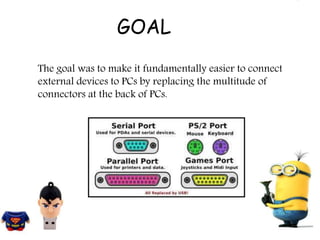
The goal was to make it fundamentally easier to connect
external devices to PCs by replacing the multitude of
connectors at the back of PCs.
GOAL
Various
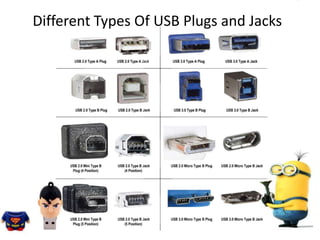
Different Types Of USB Plugs and Jacks
USB System Design
The design architecture of USB is asymmetrical in its
topology, consisting of a host, a multitude of downstream
USB ports, and multiple peripheral devices connected in a
tiered-star topology.
USB device communication is based on pipes ( A pipe is
a connection from the host controller to a logical entity,
found on a device)
Host Controller
Only one host in any USB system
Typically implemented in PC chipset (root hub)
Host responsibilities
• Detect attachments and removals
• Manage control and data flow between host
and devices
• Monitor status and activity
• Provide power to attached devices
Four types of Data Transfers
Control (all devices must support)
Interrupt (keyboards, mice, joysticks)
Bulk (printers, scanners, storage devices)
 Isochronous (web-cams, speakers)
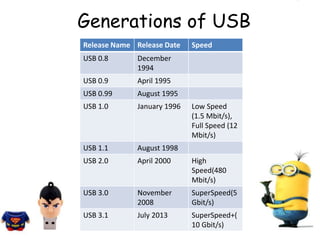
Release Name Release Date Speed
USB 0.8 December
1994
USB 0.9 April 1995
USB 0.99 August 1995
USB 1.0 January 1996 Low Speed
(1.5 Mbit/s),
Full Speed (12
Mbit/s)
USB 1.1 August 1998
USB 2.0 April 2000 High
Speed(480
Mbit/s)
USB 3.0 November
2008
SuperSpeed(5
Gbit/s)
USB 3.1 July 2013 SuperSpeed+(
10 Gbit/s)
Generations of USB
Generations of USB
USB 1.0 specified data rates of 1.5 Mbit/s
(Low Speed) and 12 Mbit/s (Full Speed).
It did not allow for extension cables or pass-
through monitors, due to timing and power
limitations.
USB 1.1 was the earliest revision that was
widely adopted and led to Legacy-free PCS
USB 1.0
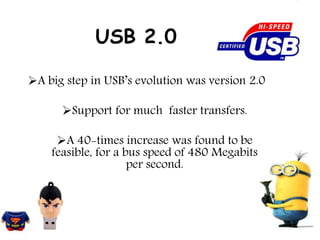
USB 2.0
A big step in USB’s evolution was version 2.0
Support for much faster transfers.
A 40-times increase was found to be
feasible, for a bus speed of 480 Megabits
per second.
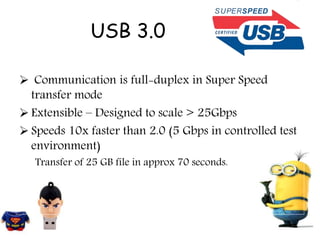
USB 3.0
 Communication is full-duplex in Super Speed
transfer mode
 Extensible – Designed to scale > 25Gbps
 Speeds 10x faster than 2.0 (5 Gbps in controlled test
environment)
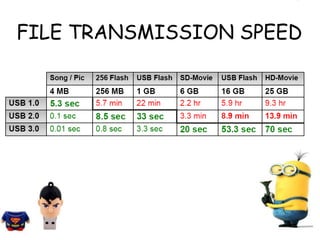
Transfer of 25 GB file in approx 70 seconds.
FILE TRANSMISSION SPEED
USB 3.1
A faster transfer mode called "SuperSpeed+ USB
10 Gbit/s“.
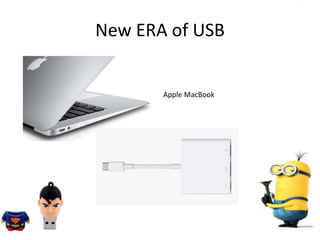
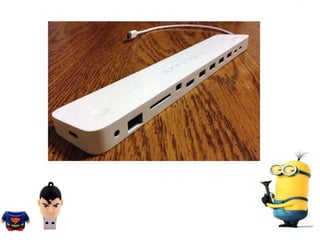
New ERA of USB
Apple MacBook
USB On-the-Go (USB OTG)
 Connect two ‘peripherals’ together
 PC is not required (but still supported)
 Allow two devices to exchange the host role
 New OTG devices can tap into the existing 900
million USB devices
Advantages of a Universal
Serial Bus:
Portable/convenient
A large amount of information can be stored
Resistant to scratches
Fits almost all devices that have a USB port
High speed
BENEFITS OF USB
Ease of Use
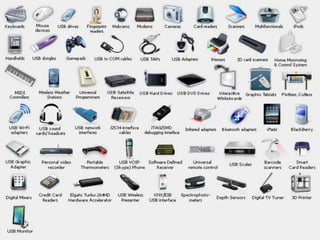
One interface for many devices.
Automatic configuration.
Hot pluggable
No power supply required
Any Questions
USB Universal Serial Bus

USB Universal Serial Bus

  • 1.
  • 2.
    Birth of USB A group of seven companies began the development of USB in 1994. Compaq,DEC,IBM,Intel,Microsoft,NEC and Nortel It was developed to make easy to connect external devices to PC. Ajay V. Bhatt is an Indo-American computer architect who helped define and develop USB
  • 3.
    The goal wasto make it fundamentally easier to connect external devices to PCs by replacing the multitude of connectors at the back of PCs. GOAL
  • 4.
  • 5.
    Different Types OfUSB Plugs and Jacks
  • 6.
    USB System Design Thedesign architecture of USB is asymmetrical in its topology, consisting of a host, a multitude of downstream USB ports, and multiple peripheral devices connected in a tiered-star topology. USB device communication is based on pipes ( A pipe is a connection from the host controller to a logical entity, found on a device)
  • 7.
    Host Controller Only onehost in any USB system Typically implemented in PC chipset (root hub) Host responsibilities • Detect attachments and removals • Manage control and data flow between host and devices • Monitor status and activity • Provide power to attached devices
  • 8.
    Four types ofData Transfers Control (all devices must support) Interrupt (keyboards, mice, joysticks) Bulk (printers, scanners, storage devices)  Isochronous (web-cams, speakers)
  • 9.
    Release Name ReleaseDate Speed USB 0.8 December 1994 USB 0.9 April 1995 USB 0.99 August 1995 USB 1.0 January 1996 Low Speed (1.5 Mbit/s), Full Speed (12 Mbit/s) USB 1.1 August 1998 USB 2.0 April 2000 High Speed(480 Mbit/s) USB 3.0 November 2008 SuperSpeed(5 Gbit/s) USB 3.1 July 2013 SuperSpeed+( 10 Gbit/s) Generations of USB
  • 10.
    Generations of USB USB1.0 specified data rates of 1.5 Mbit/s (Low Speed) and 12 Mbit/s (Full Speed). It did not allow for extension cables or pass- through monitors, due to timing and power limitations. USB 1.1 was the earliest revision that was widely adopted and led to Legacy-free PCS USB 1.0
  • 11.
    USB 2.0 A bigstep in USB’s evolution was version 2.0 Support for much faster transfers. A 40-times increase was found to be feasible, for a bus speed of 480 Megabits per second.
  • 12.
    USB 3.0  Communicationis full-duplex in Super Speed transfer mode  Extensible – Designed to scale > 25Gbps  Speeds 10x faster than 2.0 (5 Gbps in controlled test environment) Transfer of 25 GB file in approx 70 seconds.
  • 13.
  • 14.
    USB 3.1 A fastertransfer mode called "SuperSpeed+ USB 10 Gbit/s“.
  • 15.
    New ERA ofUSB Apple MacBook
  • 17.
    USB On-the-Go (USBOTG)  Connect two ‘peripherals’ together  PC is not required (but still supported)  Allow two devices to exchange the host role  New OTG devices can tap into the existing 900 million USB devices
  • 18.
    Advantages of aUniversal Serial Bus: Portable/convenient A large amount of information can be stored Resistant to scratches Fits almost all devices that have a USB port High speed
  • 19.
    BENEFITS OF USB Easeof Use One interface for many devices. Automatic configuration. Hot pluggable No power supply required
  • 20.