PCIe Basic
PRESENTED BY SAIF
December 27th, 2016
Agenda
• About PCI
• A Brief History
• PCI Subsystem
• PCI – Express
• PCI Config Space
• PCI Enumeration
• Installing A New Device
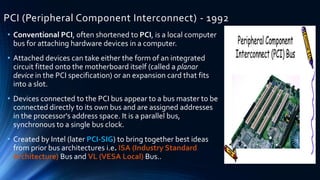
PCI (Peripheral Component Interconnect) - 1992
• Conventional PCI, often shortened to PCI, is a local computer
bus for attaching hardware devices in a computer.
• Attached devices can take either the form of an integrated
circuit fitted onto the motherboard itself (called a planar
device in the PCI specification) or an expansion card that fits
into a slot.
• Devices connected to the PCI bus appear to a bus master to be
connected directly to its own bus and are assigned addresses
in the processor's address space. It is a parallel bus,
synchronous to a single bus clock.
• Created by Intel (later PCI-SIG) to bring together best ideas
from prior bus architectures i.e. ISA (Industry Standard
Architecture) Bus and VL (VESA Local) Bus..
A Brief History
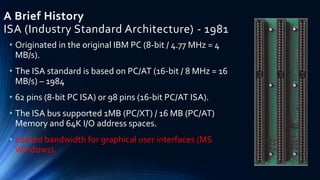
ISA (Industry Standard Architecture) - 1981
• Originated in the original IBM PC (8-bit / 4.77 MHz = 4
MB/s).
• The ISA standard is based on PC/AT (16-bit / 8 MHz = 16
MB/s) – 1984
• 62 pins (8-bit PC ISA) or 98 pins (16-bit PC/AT ISA).
• The ISA bus supported 1MB (PC/XT) / 16 MB (PC/AT)
Memory and 64K I/O address spaces.
• Lacked bandwidth for graphical user interfaces (MS
Windows).
A Brief History
MCA (Micro Channel Architecture) – 1987
• Created by IBM to address deficiencies of the ISA bus (CPU-
dependence and lack of performance).
• Used by IBM PS/2 computers.
• 16/32 bits, 10 MHz, 20/40 MB/s
• Software-based configuration (i.e. no IRQ, DMA jumpers).
• Was not an open standard so never caught on with PC
manufacturers.
• Not backwards compatible with existing ISA expansion
cards.
A Brief History
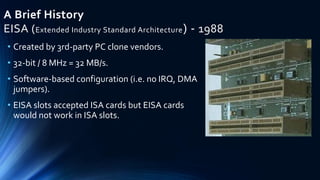
EISA (Extended Industry Standard Architecture) - 1988
• Created by 3rd-party PC clone vendors.
• 32-bit / 8 MHz = 32 MB/s.
• Software-based configuration (i.e. no IRQ, DMA
jumpers).
• EISA slots accepted ISA cards but EISA cards
would not work in ISA slots.
A Brief History
VLB (VESA Local Bus ) – 1992
• 32-bit, 33 MHz = 133 MB/s.
• Created byVideo Electronics Standards Association (VESA) for attaching high-
performance graphics cards to ISA, and later PCI, motherboards.
• Directly tied to the 486/33 memory bus – Doomed for other CPUs due to
different CPU memory bus protocol.
• The CPU memory bus only allowed one or twoVLB card loads (due to loading
and SI issues).
• Difficult implementation, especially for 40/50 MHz 486 versions (instability
common).
• 486DX2-66 and -100 used a 33 MHz front-side bus (x2/x3 internal clock) so
compatible withVLB.
A Brief History
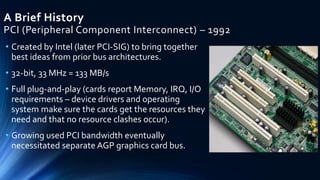
PCI (Peripheral Component Interconnect) – 1992
• Created by Intel (later PCI-SIG) to bring together
best ideas from prior bus architectures.
• 32-bit, 33 MHz = 133 MB/s
• Full plug-and-play (cards report Memory, IRQ, I/O
requirements – device drivers and operating
system make sure the cards get the resources they
need and that no resource clashes occur).
• Growing used PCI bandwidth eventually
necessitated separate AGP graphics card bus.
A Brief History
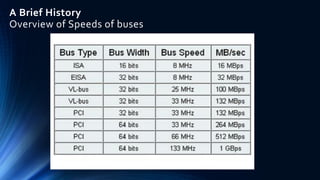
Overview of Speeds of buses
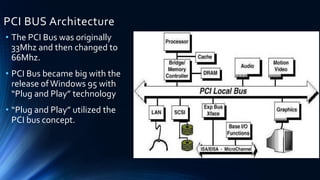
PCI BUS Architecture
• The PCI Bus was originally
33Mhz and then changed to
66Mhz.
• PCI Bus became big with the
release ofWindows 95 with
“Plug and Play” technology
• “Plug and Play” utilized the
PCI bus concept.
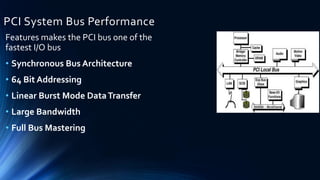
PCI System Bus Performance
Features makes the PCI bus one of the
fastest I/O bus
• Synchronous Bus Architecture
• 64 Bit Addressing
• Linear Burst Mode DataTransfer
• Large Bandwidth
• Full Bus Mastering
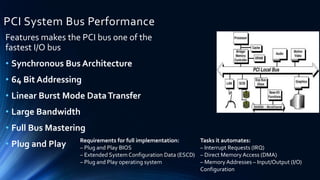
PCI System Bus Performance
Features makes the PCI bus one of the
fastest I/O bus
• Synchronous Bus Architecture
• 64 Bit Addressing
• Linear Burst Mode DataTransfer
• Large Bandwidth
• Full Bus Mastering
• Plug and Play Requirements for full implementation:
– Plug and Play BIOS
– Extended System Configuration Data (ESCD)
– Plug and Play operating system
Tasks it automates:
– Interrupt Requests (IRQ)
– Direct Memory Access (DMA)
– Memory Addresses – Input/Output (I/O)
Configuration
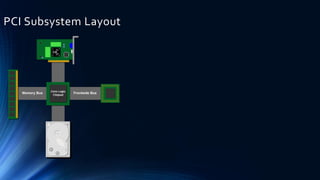
PCI Subsystem Layout
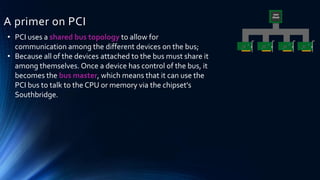
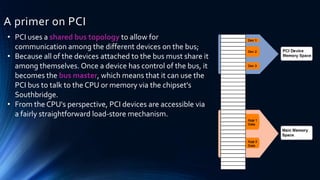
A primer on PCI
• PCI uses a shared bus topology to allow for
communication among the different devices on the bus;
• Because all of the devices attached to the bus must share it
among themselves. Once a device has control of the bus, it
becomes the bus master, which means that it can use the
PCI bus to talk to the CPU or memory via the chipset's
Southbridge.
A primer on PCI
• PCI uses a shared bus topology to allow for
communication among the different devices on the bus;
• Because all of the devices attached to the bus must share it
among themselves. Once a device has control of the bus, it
becomes the bus master, which means that it can use the
PCI bus to talk to the CPU or memory via the chipset's
Southbridge.
• From the CPU's perspective, PCI devices are accessible via
a fairly straightforward load-store mechanism.
A primer on PCI
• PCI uses a shared bus topology to allow for
communication among the different devices on the bus;
• Because all of the devices attached to the bus must share it
among themselves. Once a device has control of the bus, it
becomes the bus master, which means that it can use the
PCI bus to talk to the CPU or memory via the chipset's
Southbridge.
• From the CPU's perspective, PCI devices are accessible via
a fairly straightforward load-store mechanism.
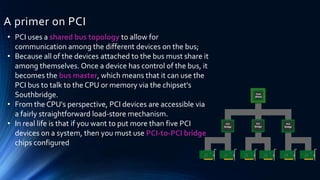
• In real life is that if you want to put more than five PCI
devices on a system, then you must use PCI-to-PCI bridge
chips configured
PCI-X (PCI - Extended) - 1998
• 32/64-bit, 66/133/266/533 MHz (up to 4,266
MB/s).
• PCI-SIG (IBM, Compaq, HP). Note: Intel
wanted a better option.
• Improved protocol over PCI (Split-
ResponseTransactions, MSI signals
interrupts via memory writes in host PCI
bridge rather than dedicated INTx interrupt
lines).
Overcoming the Limitations of PCI:
Thus there are three PCI limitations or issues that
need to be resolved:
• Advance the bandwidth of PCI at equal or lower
cost than 32-bit versions of PCI on PC’s (although
some question whether more bandwidth is
required for PCs)
• Find a mechanism that scales bandwidth beyond
PCI-X’s 8Gb/s (greater b/w for servers)
• Find a mechanism that advances server I/O
capabilities in respect to I/O sharing and
relationship hierarchies (overcome the one slot
per PCI-X limit and allow many-to many relations)
PCI Express – 2004
PCIe Characteristics
• Specification defined by PCI-SIG
• Packet based protocol over serial links
• Software compatible with PCI and PCI-X
• Reliable in-order packet transfer
• High performance and scalable from consumer to
enterprise
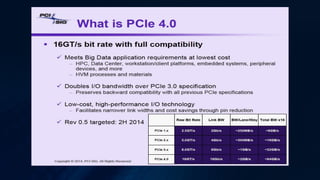
• Scalable link speed (2.5 GT/s, 5.0 GT/s, 8.0 GT/s)
• Scalable link width (x1, x2, x4, …. x32)
• Primary application is as an I/O interconnect
• Some multi-host applications (NTB)
• Some outside the box applications (PCIe cable)
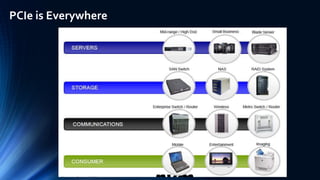
PCIe is Everywhere
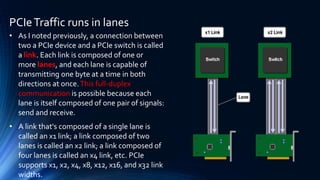
PCIeTraffic runs in lanes
• As I noted previously, a connection between
two a PCIe device and a PCIe switch is called
a link. Each link is composed of one or
more lanes, and each lane is capable of
transmitting one byte at a time in both
directions at once.This full-duplex
communication is possible because each
lane is itself composed of one pair of signals:
send and receive.
• A link that's composed of a single lane is
called an x1 link; a link composed of two
lanes is called an x2 link; a link composed of
four lanes is called an x4 link, etc. PCIe
supports x1, x2, x4, x8, x12, x16, and x32 link
widths.
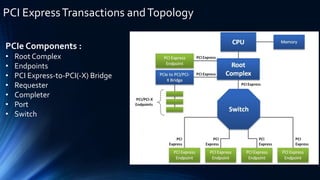
PCI ExpressTransactions andTopology
PCIe Components :
• Root Complex
• Endpoints
• PCI Express-to-PCI(-X) Bridge
• Requester
• Completer
• Port
• Switch
PCI ExpressTransactions andTopology
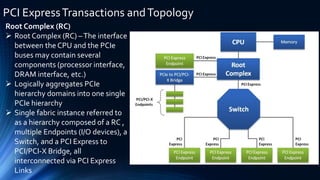
Root Complex (RC)
 Root Complex (RC) –The interface
between the CPU and the PCIe
buses may contain several
components (processor interface,
DRAM interface, etc.)
 Logically aggregates PCIe
hierarchy domains into one single
PCIe hierarchy
 Single fabric instance referred to
as a hierarchy composed of a RC ,
multiple Endpoints (I/O devices), a
Switch, and a PCI Express to
PCI/PCI-X Bridge, all
interconnected via PCI Express
Links
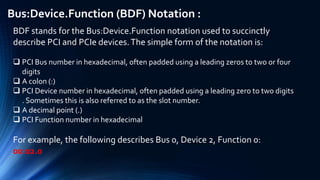
Bus:Device.Function (BDF) Notation :
BDF stands for the Bus:Device.Function notation used to succinctly
describe PCI and PCIe devices.The simple form of the notation is:
 PCI Bus number in hexadecimal, often padded using a leading zeros to two or four
digits
 A colon (:)
 PCI Device number in hexadecimal, often padded using a leading zero to two digits
. Sometimes this is also referred to as the slot number.
 A decimal point (.)
 PCI Function number in hexadecimal
For example, the following describes Bus 0, Device 2, Function 0:
00:02.0
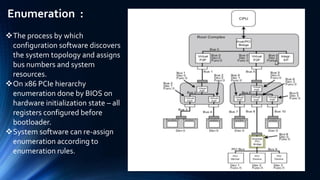
Enumeration :
The process by which
configuration software discovers
the system topology and assigns
bus numbers and system
resources.
On x86 PCIe hierarchy
enumeration done by BIOS on
hardware initialization state – all
registers configured before
bootloader.
System software can re-assign
enumeration according to
enumeration rules.
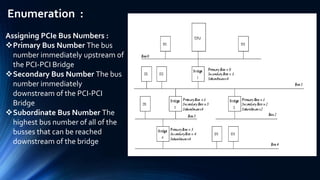
Enumeration :
Assigning PCIe Bus Numbers :
Primary Bus Number The bus
number immediately upstream of
the PCI-PCI Bridge
Secondary Bus Number The bus
number immediately
downstream of the PCI-PCI
Bridge
Subordinate Bus Number The
highest bus number of all of the
busses that can be reached
downstream of the bridge
PCIe Address Space
A PCI target can implement up to three different
types of address spaces
• Configuration space
• Stores basic information about the device
• Allows the central resource or O/S to program
a device with operational settings
• I/O space
• Used mainly with PC peripherals(DMA) and not
much else
• Memory space
• Used for just about everything else
PCI Configuration Address Space
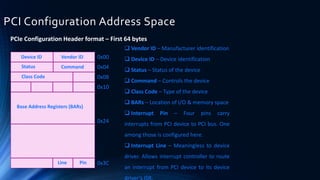
PCIe Configuration Header format – First 64 bytes
Device ID Vendor ID
CommandStatus
Class Code
Base Address Registers (BARs)
Line Pin
0x00
0x04
0x08
0x10
0x24
0x3C
 Vendor ID – Manufacturer identification
 Device ID – Device identification
 Status – Status of the device
 Command – Controls the device
 Class Code – Type of the device
 BARs – Location of I/O & memory space
 Interrupt Pin – Four pins carry
interrupts from PCI device to PCI bus. One
among those is configured here.
 Interrupt Line – Meaningless to device
driver. Allows interrupt controller to route
an interrupt from PCI device to its device
driver’s ISR.
Base Address Register (BAR)
 Base Address Registers point to the location in the system address space
where the PCI device will be Mapped.The BAR essentially defines how much
memory space your device needs.
• The device RAM, etc. (anything really, per the vendor)
 BARs are R/W and the BIOS programs them to set up the Memory Map
 PCI Configuration Registers provides space for up to 6 BARs (bytes 10h thru
27h)
• BAR[0-5]
 Each BAR is 32-bits wide to support 32-bit address space locations
 Concatenating two 32-bit BARs provides 64-bit addressing capability
 At boot time, the root complex probes the entire PCIE tree. It eventually
reaches our device, and attempts to Map all the BARs into its Device Memory
Map.
There are three interrupt types in PCI Express.They are
as follows:
1. Legacy Interrupts (INTx Emulation)
2. MSI Interrupts
3. MSI-X Interrupts
InterruptTypes in PCI Express
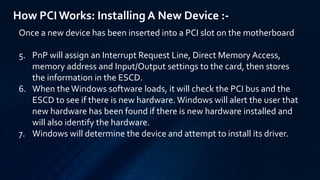
How PCIWorks: Installing A New Device :-
Once a new device has been inserted into a PCI slot on the motherboard
1. Operating System Basic Input/Output System (BIOS) initiates Plug and
Play (PnP) BIOS.
2. PnP BIOS scans the PCI bus for any new hardware connected to the
bus. If new hardware is found, it will ask for identification.
3. The device will respond with its identification and send its device ID to
the BIOS through the bus.
4. PnP checks the Extended System Configuration Data (ESCD) to make
sure the configuration data already exists for the card. (If the card is
new, then there will be no data for it.)
How PCIWorks: Installing A New Device :-
Once a new device has been inserted into a PCI slot on the motherboard
5. PnP will assign an Interrupt Request Line, Direct Memory Access,
memory address and Input/Output settings to the card, then stores
the information in the ESCD.
6. When theWindows software loads, it will check the PCI bus and the
ESCD to see if there is new hardware. Windows will alert the user that
new hardware has been found if there is new hardware installed and
will also identify the hardware.
7. Windows will determine the device and attempt to install its driver.
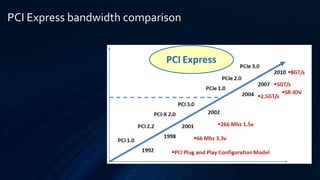
PCI Express bandwidth comparison
Pcie basic
Pcie basic

Pcie basic

  • 1.
    PCIe Basic PRESENTED BYSAIF December 27th, 2016
  • 2.
    Agenda • About PCI •A Brief History • PCI Subsystem • PCI – Express • PCI Config Space • PCI Enumeration • Installing A New Device
  • 3.
    PCI (Peripheral ComponentInterconnect) - 1992 • Conventional PCI, often shortened to PCI, is a local computer bus for attaching hardware devices in a computer. • Attached devices can take either the form of an integrated circuit fitted onto the motherboard itself (called a planar device in the PCI specification) or an expansion card that fits into a slot. • Devices connected to the PCI bus appear to a bus master to be connected directly to its own bus and are assigned addresses in the processor's address space. It is a parallel bus, synchronous to a single bus clock. • Created by Intel (later PCI-SIG) to bring together best ideas from prior bus architectures i.e. ISA (Industry Standard Architecture) Bus and VL (VESA Local) Bus..
  • 4.
    A Brief History ISA(Industry Standard Architecture) - 1981 • Originated in the original IBM PC (8-bit / 4.77 MHz = 4 MB/s). • The ISA standard is based on PC/AT (16-bit / 8 MHz = 16 MB/s) – 1984 • 62 pins (8-bit PC ISA) or 98 pins (16-bit PC/AT ISA). • The ISA bus supported 1MB (PC/XT) / 16 MB (PC/AT) Memory and 64K I/O address spaces. • Lacked bandwidth for graphical user interfaces (MS Windows).
  • 5.
    A Brief History MCA(Micro Channel Architecture) – 1987 • Created by IBM to address deficiencies of the ISA bus (CPU- dependence and lack of performance). • Used by IBM PS/2 computers. • 16/32 bits, 10 MHz, 20/40 MB/s • Software-based configuration (i.e. no IRQ, DMA jumpers). • Was not an open standard so never caught on with PC manufacturers. • Not backwards compatible with existing ISA expansion cards.
  • 6.
    A Brief History EISA(Extended Industry Standard Architecture) - 1988 • Created by 3rd-party PC clone vendors. • 32-bit / 8 MHz = 32 MB/s. • Software-based configuration (i.e. no IRQ, DMA jumpers). • EISA slots accepted ISA cards but EISA cards would not work in ISA slots.
  • 7.
    A Brief History VLB(VESA Local Bus ) – 1992 • 32-bit, 33 MHz = 133 MB/s. • Created byVideo Electronics Standards Association (VESA) for attaching high- performance graphics cards to ISA, and later PCI, motherboards. • Directly tied to the 486/33 memory bus – Doomed for other CPUs due to different CPU memory bus protocol. • The CPU memory bus only allowed one or twoVLB card loads (due to loading and SI issues). • Difficult implementation, especially for 40/50 MHz 486 versions (instability common). • 486DX2-66 and -100 used a 33 MHz front-side bus (x2/x3 internal clock) so compatible withVLB.
  • 8.
    A Brief History PCI(Peripheral Component Interconnect) – 1992 • Created by Intel (later PCI-SIG) to bring together best ideas from prior bus architectures. • 32-bit, 33 MHz = 133 MB/s • Full plug-and-play (cards report Memory, IRQ, I/O requirements – device drivers and operating system make sure the cards get the resources they need and that no resource clashes occur). • Growing used PCI bandwidth eventually necessitated separate AGP graphics card bus.
  • 9.
    A Brief History Overviewof Speeds of buses
  • 10.
    PCI BUS Architecture •The PCI Bus was originally 33Mhz and then changed to 66Mhz. • PCI Bus became big with the release ofWindows 95 with “Plug and Play” technology • “Plug and Play” utilized the PCI bus concept.
  • 11.
    PCI System BusPerformance Features makes the PCI bus one of the fastest I/O bus • Synchronous Bus Architecture • 64 Bit Addressing • Linear Burst Mode DataTransfer • Large Bandwidth • Full Bus Mastering
  • 12.
    PCI System BusPerformance Features makes the PCI bus one of the fastest I/O bus • Synchronous Bus Architecture • 64 Bit Addressing • Linear Burst Mode DataTransfer • Large Bandwidth • Full Bus Mastering • Plug and Play Requirements for full implementation: – Plug and Play BIOS – Extended System Configuration Data (ESCD) – Plug and Play operating system Tasks it automates: – Interrupt Requests (IRQ) – Direct Memory Access (DMA) – Memory Addresses – Input/Output (I/O) Configuration
  • 13.
  • 14.
  • 15.
    A primer onPCI • PCI uses a shared bus topology to allow for communication among the different devices on the bus; • Because all of the devices attached to the bus must share it among themselves. Once a device has control of the bus, it becomes the bus master, which means that it can use the PCI bus to talk to the CPU or memory via the chipset's Southbridge.
  • 16.
    A primer onPCI • PCI uses a shared bus topology to allow for communication among the different devices on the bus; • Because all of the devices attached to the bus must share it among themselves. Once a device has control of the bus, it becomes the bus master, which means that it can use the PCI bus to talk to the CPU or memory via the chipset's Southbridge. • From the CPU's perspective, PCI devices are accessible via a fairly straightforward load-store mechanism.
  • 17.
    A primer onPCI • PCI uses a shared bus topology to allow for communication among the different devices on the bus; • Because all of the devices attached to the bus must share it among themselves. Once a device has control of the bus, it becomes the bus master, which means that it can use the PCI bus to talk to the CPU or memory via the chipset's Southbridge. • From the CPU's perspective, PCI devices are accessible via a fairly straightforward load-store mechanism. • In real life is that if you want to put more than five PCI devices on a system, then you must use PCI-to-PCI bridge chips configured
  • 18.
    PCI-X (PCI -Extended) - 1998 • 32/64-bit, 66/133/266/533 MHz (up to 4,266 MB/s). • PCI-SIG (IBM, Compaq, HP). Note: Intel wanted a better option. • Improved protocol over PCI (Split- ResponseTransactions, MSI signals interrupts via memory writes in host PCI bridge rather than dedicated INTx interrupt lines).
  • 19.
    Overcoming the Limitationsof PCI: Thus there are three PCI limitations or issues that need to be resolved: • Advance the bandwidth of PCI at equal or lower cost than 32-bit versions of PCI on PC’s (although some question whether more bandwidth is required for PCs) • Find a mechanism that scales bandwidth beyond PCI-X’s 8Gb/s (greater b/w for servers) • Find a mechanism that advances server I/O capabilities in respect to I/O sharing and relationship hierarchies (overcome the one slot per PCI-X limit and allow many-to many relations)
  • 20.
    PCI Express –2004 PCIe Characteristics • Specification defined by PCI-SIG • Packet based protocol over serial links • Software compatible with PCI and PCI-X • Reliable in-order packet transfer • High performance and scalable from consumer to enterprise • Scalable link speed (2.5 GT/s, 5.0 GT/s, 8.0 GT/s) • Scalable link width (x1, x2, x4, …. x32) • Primary application is as an I/O interconnect • Some multi-host applications (NTB) • Some outside the box applications (PCIe cable)
  • 21.
  • 22.
    PCIeTraffic runs inlanes • As I noted previously, a connection between two a PCIe device and a PCIe switch is called a link. Each link is composed of one or more lanes, and each lane is capable of transmitting one byte at a time in both directions at once.This full-duplex communication is possible because each lane is itself composed of one pair of signals: send and receive. • A link that's composed of a single lane is called an x1 link; a link composed of two lanes is called an x2 link; a link composed of four lanes is called an x4 link, etc. PCIe supports x1, x2, x4, x8, x12, x16, and x32 link widths.
  • 23.
    PCI ExpressTransactions andTopology PCIeComponents : • Root Complex • Endpoints • PCI Express-to-PCI(-X) Bridge • Requester • Completer • Port • Switch
  • 24.
    PCI ExpressTransactions andTopology RootComplex (RC)  Root Complex (RC) –The interface between the CPU and the PCIe buses may contain several components (processor interface, DRAM interface, etc.)  Logically aggregates PCIe hierarchy domains into one single PCIe hierarchy  Single fabric instance referred to as a hierarchy composed of a RC , multiple Endpoints (I/O devices), a Switch, and a PCI Express to PCI/PCI-X Bridge, all interconnected via PCI Express Links
  • 25.
    Bus:Device.Function (BDF) Notation: BDF stands for the Bus:Device.Function notation used to succinctly describe PCI and PCIe devices.The simple form of the notation is:  PCI Bus number in hexadecimal, often padded using a leading zeros to two or four digits  A colon (:)  PCI Device number in hexadecimal, often padded using a leading zero to two digits . Sometimes this is also referred to as the slot number.  A decimal point (.)  PCI Function number in hexadecimal For example, the following describes Bus 0, Device 2, Function 0: 00:02.0
  • 26.
    Enumeration : The processby which configuration software discovers the system topology and assigns bus numbers and system resources. On x86 PCIe hierarchy enumeration done by BIOS on hardware initialization state – all registers configured before bootloader. System software can re-assign enumeration according to enumeration rules.
  • 27.
    Enumeration : Assigning PCIeBus Numbers : Primary Bus Number The bus number immediately upstream of the PCI-PCI Bridge Secondary Bus Number The bus number immediately downstream of the PCI-PCI Bridge Subordinate Bus Number The highest bus number of all of the busses that can be reached downstream of the bridge
  • 28.
    PCIe Address Space APCI target can implement up to three different types of address spaces • Configuration space • Stores basic information about the device • Allows the central resource or O/S to program a device with operational settings • I/O space • Used mainly with PC peripherals(DMA) and not much else • Memory space • Used for just about everything else
  • 29.
    PCI Configuration AddressSpace PCIe Configuration Header format – First 64 bytes Device ID Vendor ID CommandStatus Class Code Base Address Registers (BARs) Line Pin 0x00 0x04 0x08 0x10 0x24 0x3C  Vendor ID – Manufacturer identification  Device ID – Device identification  Status – Status of the device  Command – Controls the device  Class Code – Type of the device  BARs – Location of I/O & memory space  Interrupt Pin – Four pins carry interrupts from PCI device to PCI bus. One among those is configured here.  Interrupt Line – Meaningless to device driver. Allows interrupt controller to route an interrupt from PCI device to its device driver’s ISR.
  • 30.
    Base Address Register(BAR)  Base Address Registers point to the location in the system address space where the PCI device will be Mapped.The BAR essentially defines how much memory space your device needs. • The device RAM, etc. (anything really, per the vendor)  BARs are R/W and the BIOS programs them to set up the Memory Map  PCI Configuration Registers provides space for up to 6 BARs (bytes 10h thru 27h) • BAR[0-5]  Each BAR is 32-bits wide to support 32-bit address space locations  Concatenating two 32-bit BARs provides 64-bit addressing capability  At boot time, the root complex probes the entire PCIE tree. It eventually reaches our device, and attempts to Map all the BARs into its Device Memory Map.
  • 31.
    There are threeinterrupt types in PCI Express.They are as follows: 1. Legacy Interrupts (INTx Emulation) 2. MSI Interrupts 3. MSI-X Interrupts InterruptTypes in PCI Express
  • 32.
    How PCIWorks: InstallingA New Device :- Once a new device has been inserted into a PCI slot on the motherboard 1. Operating System Basic Input/Output System (BIOS) initiates Plug and Play (PnP) BIOS. 2. PnP BIOS scans the PCI bus for any new hardware connected to the bus. If new hardware is found, it will ask for identification. 3. The device will respond with its identification and send its device ID to the BIOS through the bus. 4. PnP checks the Extended System Configuration Data (ESCD) to make sure the configuration data already exists for the card. (If the card is new, then there will be no data for it.)
  • 33.
    How PCIWorks: InstallingA New Device :- Once a new device has been inserted into a PCI slot on the motherboard 5. PnP will assign an Interrupt Request Line, Direct Memory Access, memory address and Input/Output settings to the card, then stores the information in the ESCD. 6. When theWindows software loads, it will check the PCI bus and the ESCD to see if there is new hardware. Windows will alert the user that new hardware has been found if there is new hardware installed and will also identify the hardware. 7. Windows will determine the device and attempt to install its driver.
  • 34.