Introduction to USB Protocol
 USB (Universal Serial Bus) is a widely-adopted protocol that has
revolutionized the way we connect and power a vast array of devices, from
computers and smartphones to peripherals and embedded systems. This
presentation will delve into the fundamentals of the USB protocol, exploring its
layers, system architecture, communication models, and the various types of data
transfers it supports. Furthermore, we will examine how USB protocol has
become an integral part of modern embedded systems, providing a standardized
interface for seamless integration and functionality.
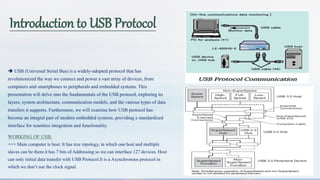
WORKING OF USB:
==> Main computer is host. It has tree topology, in which one host and multiple
slaves can be there.it has 7 bits of Addressing so we can interface 127 devices. Host
can only initial data transfer with USB Protocol.It is a Asynchronous protocol in
which we don’t use the clock signal.
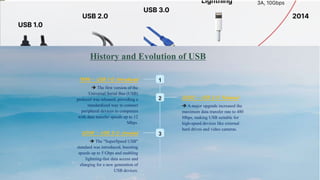
History and Evolution of USB
1
1996 - USB 1.0 Introduced
 The first version of the
Universal Serial Bus (USB)
protocol was released, providing a
standardized way to connect
peripheral devices to computers
with data transfer speeds up to 12
Mbps.
2 2000 - USB 2.0 Released
 A major upgrade increased the
maximum data transfer rate to 480
Mbps, making USB suitable for
high-speed devices like external
hard drives and video cameras.
3
2008 - USB 3.0 Unveiled
 The "SuperSpeed USB"
standard was introduced, boosting
speeds up to 5 Gbps and enabling
lightning-fast data access and
charging for a new generation of
USB devices.
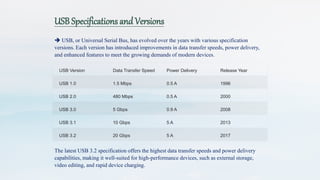
USB Specifications and Versions
 USB, or Universal Serial Bus, has evolved over the years with various specification
versions. Each version has introduced improvements in data transfer speeds, power delivery,
and enhanced features to meet the growing demands of modern devices.
USB Version Data Transfer Speed Power Delivery Release Year
USB 1.0 1.5 Mbps 0.5 A 1996
USB 2.0 480 Mbps 0.5 A 2000
USB 3.0 5 Gbps 0.9 A 2008
USB 3.1 10 Gbps 5 A 2013
USB 3.2 20 Gbps 5 A 2017
The latest USB 3.2 specification offers the highest data transfer speeds and power delivery
capabilities, making it well-suited for high-performance devices, such as external storage,
video editing, and rapid device charging.
USB Connector Types and Pinouts
 USB connectors come in various types, including Type-A, Type-B,
Micro-USB, and USB-C. Each connector has its own unique pinout
configuration, designed to provide power, data, and control signals
between the host and the device.
 The most common USB connector, Type-A, has a rectangular shape
with four pins, while the Type-B connector has a more square shape.
Micro-USB connectors are smaller and often used with mobile devices,
while the newer USB-C connector offers reversible insertion and
increased power delivery capabilities.
USB System Architecture
1) Host Controller (HC):-
 The Host Controller is the central component of the
USB system, responsible for managing the communication
on the USB bus. It coordinates the transfer of data and
power between the host and connected devices, acting as
the master in the client-server communication model.
2) Hub
 The Hub is an optional component that allows
multiple devices to be connected to a single host
port. Hubs act as intermediaries, routing data and
power between the host and connected devices, and
enabling the expansion of the USB system topology.
3) Device
 The Device is the peripheral that connects to the host
or a hub, utilizing the USB protocol to communicate and
receive power. Devices can range from simple
input/output peripherals to complex embedded systems,
each with its own unique capabilities and requirements.
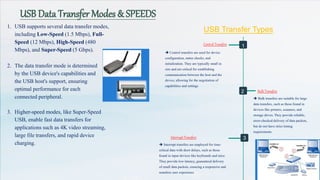
USB Data Transfer Modes & SPEEDS
1. USB supports several data transfer modes,
including Low-Speed (1.5 Mbps), Full-
Speed (12 Mbps), High-Speed (480
Mbps), and Super-Speed (5 Gbps).
2. The data transfer mode is determined
by the USB device's capabilities and
the USB host's support, ensuring
optimal performance for each
connected peripheral.
3. Higher-speed modes, like Super-Speed
USB, enable fast data transfers for
applications such as 4K video streaming,
large file transfers, and rapid device
charging.
USB Transfer Types
 Control transfers are used for device
configuration, status checks, and
initialization. They are typically small in
size and are critical for establishing
communication between the host and the
device, allowing for the negotiation of
capabilities and settings.
Control Transfers
Bulk Transfers
 Bulk transfers are suitable for large
data transfers, such as those found in
devices like printers, scanners, and
storage drives. They provide reliable,
error-checked delivery of data packets,
but do not have strict timing
requirements.
Interrupt Transfers
 Interrupt transfers are employed for time-
critical data with short delays, such as those
found in input devices like keyboards and mice.
They provide low-latency, guaranteed delivery
of small data packets, ensuring a responsive and
seamless user experience.
1
2
3
USB SPEEDS , Power Delivery and Charging
 USB Power Delivery (USB-PD) is an advanced
charging specification that enables devices to
negotiate higher power levels up to 100W. It allows
intelligent power management, enabling devices to
request and receive the optimal amount of power.
 USB-PD supports a variety of charging profiles,
from low-power 5V/3A to high-power 20V/5A, and
can even power devices like laptops and monitors.
This flexibility ensures efficient and safe charging for
a wide range of USB-enabled gadgets.
 The USB protocol has evolved over the years,
with each new version introducing higher data
transfer rates. USB 1.0 offered low-speed (1.5
Mbps) and full-speed (12 Mbps) options, while USB
2.0 introduced high-speed (480 Mbps) transfers.
USB 3.0 and later versions have further increased
the speeds, culminating in the latest USB4 with a
maximum speed of 40 Gbps.
Significance in Embedded Systems
 The advancements in USB speeds and power delivery have
made it an increasingly attractive choice for embedded systems,
enabling seamless integration of a wide range of devices and
reducing the need for separate power supplies. This versatility
and standardization have contributed to the widespread adoption
of USB in modern embedded applications.
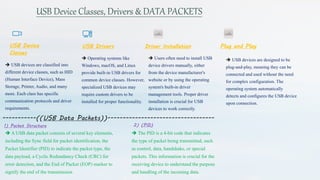
USB Device Classes, Drivers & DATA PACKETS
USB Device
Classes
 USB devices are classified into
different device classes, such as HID
(Human Interface Device), Mass
Storage, Printer, Audio, and many
more. Each class has specific
communication protocols and driver
requirements.
USB Drivers
 Operating systems like
Windows, macOS, and Linux
provide built-in USB drivers for
common device classes. However,
specialized USB devices may
require custom drivers to be
installed for proper functionality.
Driver Installation
 Users often need to install USB
device drivers manually, either
from the device manufacturer's
website or by using the operating
system's built-in driver
management tools. Proper driver
installation is crucial for USB
devices to work correctly.
Plug and Play
 USB devices are designed to be
plug-and-play, meaning they can be
connected and used without the need
for complex configuration. The
operating system automatically
detects and configures the USB device
upon connection.
1) Packet Structure
 A USB data packet consists of several key elements,
including the Sync field for packet identification, the
Packet Identifier (PID) to indicate the packet type, the
data payload, a Cyclic Redundancy Check (CRC) for
error detection, and the End of Packet (EOP) marker to
signify the end of the transmission.
2) (PID)
 The PID is a 4-bit code that indicates
the type of packet being transmitted, such
as control, data, handshake, or special
packets. This information is crucial for the
receiving device to understand the purpose
and handling of the incoming data.
-----------((USB Data Packets))-----------------------------------
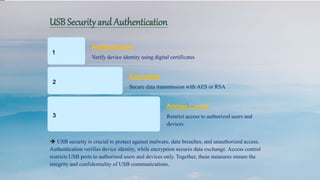
USB Security and Authentication
1
Authentication
Verify device identity using digital certificates
2
Encryption
Secure data transmission with AES or RSA
3
Access Control
Restrict access to authorized users and
devices
 USB security is crucial to protect against malware, data breaches, and unauthorized access.
Authentication verifies device identity, while encryption secures data exchange. Access control
restricts USB ports to authorized users and devices only. Together, these measures ensure the
integrity and confidentiality of USB communications.
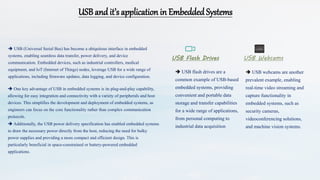
USB and it’s application in Embedded Systems
 USB (Universal Serial Bus) has become a ubiquitous interface in embedded
systems, enabling seamless data transfer, power delivery, and device
communication. Embedded devices, such as industrial controllers, medical
equipment, and IoT (Internet of Things) nodes, leverage USB for a wide range of
applications, including firmware updates, data logging, and device configuration.
 One key advantage of USB in embedded systems is its plug-and-play capability,
allowing for easy integration and connectivity with a variety of peripherals and host
devices. This simplifies the development and deployment of embedded systems, as
engineers can focus on the core functionality rather than complex communication
protocols.
 Additionally, the USB power delivery specification has enabled embedded systems
to draw the necessary power directly from the host, reducing the need for bulky
power supplies and providing a more compact and efficient design. This is
particularly beneficial in space-constrained or battery-powered embedded
applications.
USB Flash Drives
 USB flash drives are a
common example of USB-based
embedded systems, providing
convenient and portable data
storage and transfer capabilities
for a wide range of applications,
from personal computing to
industrial data acquisition.
USB Webcams
 USB webcams are another
prevalent example, enabling
real-time video streaming and
capture functionality in
embedded systems, such as
security cameras,
videoconferencing solutions,
and machine vision systems.
Conclusion and Future Trends
Bright Future for USB
 The USB protocol continues to evolve,
offering faster data transfer speeds, increased
power delivery, and enhanced security features
to meet the growing demands of modern devices
and applications.
Towards Universal Connectivity
 As USB becomes more ubiquitous, it is
poised to serve as a universal connectivity
standard, simplifying device integration and
enabling seamless data exchange across a wide
range of products and ecosystems.
Innovations in USB-C
 The versatile USB-C connector is expected
to see further advancements, with increased
power capabilities, support for high-resolution
video, and the potential for additional features
like wireless charging.
Expanded USB Adoption
 USB's growing presence in embedded
systems, industrial applications, and emerging
technologies like virtual reality and the Internet
of Things will drive its continued adoption and
widespread integration across diverse industries.
NAME:SAUGAT DEO
ROLL NO:121EI0389

usb protocol and its various application

  • 1.
    Introduction to USBProtocol  USB (Universal Serial Bus) is a widely-adopted protocol that has revolutionized the way we connect and power a vast array of devices, from computers and smartphones to peripherals and embedded systems. This presentation will delve into the fundamentals of the USB protocol, exploring its layers, system architecture, communication models, and the various types of data transfers it supports. Furthermore, we will examine how USB protocol has become an integral part of modern embedded systems, providing a standardized interface for seamless integration and functionality. WORKING OF USB: ==> Main computer is host. It has tree topology, in which one host and multiple slaves can be there.it has 7 bits of Addressing so we can interface 127 devices. Host can only initial data transfer with USB Protocol.It is a Asynchronous protocol in which we don’t use the clock signal.
  • 2.
    History and Evolutionof USB 1 1996 - USB 1.0 Introduced  The first version of the Universal Serial Bus (USB) protocol was released, providing a standardized way to connect peripheral devices to computers with data transfer speeds up to 12 Mbps. 2 2000 - USB 2.0 Released  A major upgrade increased the maximum data transfer rate to 480 Mbps, making USB suitable for high-speed devices like external hard drives and video cameras. 3 2008 - USB 3.0 Unveiled  The "SuperSpeed USB" standard was introduced, boosting speeds up to 5 Gbps and enabling lightning-fast data access and charging for a new generation of USB devices.
  • 3.
    USB Specifications andVersions  USB, or Universal Serial Bus, has evolved over the years with various specification versions. Each version has introduced improvements in data transfer speeds, power delivery, and enhanced features to meet the growing demands of modern devices. USB Version Data Transfer Speed Power Delivery Release Year USB 1.0 1.5 Mbps 0.5 A 1996 USB 2.0 480 Mbps 0.5 A 2000 USB 3.0 5 Gbps 0.9 A 2008 USB 3.1 10 Gbps 5 A 2013 USB 3.2 20 Gbps 5 A 2017 The latest USB 3.2 specification offers the highest data transfer speeds and power delivery capabilities, making it well-suited for high-performance devices, such as external storage, video editing, and rapid device charging.
  • 4.
    USB Connector Typesand Pinouts  USB connectors come in various types, including Type-A, Type-B, Micro-USB, and USB-C. Each connector has its own unique pinout configuration, designed to provide power, data, and control signals between the host and the device.  The most common USB connector, Type-A, has a rectangular shape with four pins, while the Type-B connector has a more square shape. Micro-USB connectors are smaller and often used with mobile devices, while the newer USB-C connector offers reversible insertion and increased power delivery capabilities. USB System Architecture 1) Host Controller (HC):-  The Host Controller is the central component of the USB system, responsible for managing the communication on the USB bus. It coordinates the transfer of data and power between the host and connected devices, acting as the master in the client-server communication model. 2) Hub  The Hub is an optional component that allows multiple devices to be connected to a single host port. Hubs act as intermediaries, routing data and power between the host and connected devices, and enabling the expansion of the USB system topology. 3) Device  The Device is the peripheral that connects to the host or a hub, utilizing the USB protocol to communicate and receive power. Devices can range from simple input/output peripherals to complex embedded systems, each with its own unique capabilities and requirements.
  • 5.
    USB Data TransferModes & SPEEDS 1. USB supports several data transfer modes, including Low-Speed (1.5 Mbps), Full- Speed (12 Mbps), High-Speed (480 Mbps), and Super-Speed (5 Gbps). 2. The data transfer mode is determined by the USB device's capabilities and the USB host's support, ensuring optimal performance for each connected peripheral. 3. Higher-speed modes, like Super-Speed USB, enable fast data transfers for applications such as 4K video streaming, large file transfers, and rapid device charging. USB Transfer Types  Control transfers are used for device configuration, status checks, and initialization. They are typically small in size and are critical for establishing communication between the host and the device, allowing for the negotiation of capabilities and settings. Control Transfers Bulk Transfers  Bulk transfers are suitable for large data transfers, such as those found in devices like printers, scanners, and storage drives. They provide reliable, error-checked delivery of data packets, but do not have strict timing requirements. Interrupt Transfers  Interrupt transfers are employed for time- critical data with short delays, such as those found in input devices like keyboards and mice. They provide low-latency, guaranteed delivery of small data packets, ensuring a responsive and seamless user experience. 1 2 3
  • 6.
    USB SPEEDS ,Power Delivery and Charging  USB Power Delivery (USB-PD) is an advanced charging specification that enables devices to negotiate higher power levels up to 100W. It allows intelligent power management, enabling devices to request and receive the optimal amount of power.  USB-PD supports a variety of charging profiles, from low-power 5V/3A to high-power 20V/5A, and can even power devices like laptops and monitors. This flexibility ensures efficient and safe charging for a wide range of USB-enabled gadgets.  The USB protocol has evolved over the years, with each new version introducing higher data transfer rates. USB 1.0 offered low-speed (1.5 Mbps) and full-speed (12 Mbps) options, while USB 2.0 introduced high-speed (480 Mbps) transfers. USB 3.0 and later versions have further increased the speeds, culminating in the latest USB4 with a maximum speed of 40 Gbps. Significance in Embedded Systems  The advancements in USB speeds and power delivery have made it an increasingly attractive choice for embedded systems, enabling seamless integration of a wide range of devices and reducing the need for separate power supplies. This versatility and standardization have contributed to the widespread adoption of USB in modern embedded applications.
  • 7.
    USB Device Classes,Drivers & DATA PACKETS USB Device Classes  USB devices are classified into different device classes, such as HID (Human Interface Device), Mass Storage, Printer, Audio, and many more. Each class has specific communication protocols and driver requirements. USB Drivers  Operating systems like Windows, macOS, and Linux provide built-in USB drivers for common device classes. However, specialized USB devices may require custom drivers to be installed for proper functionality. Driver Installation  Users often need to install USB device drivers manually, either from the device manufacturer's website or by using the operating system's built-in driver management tools. Proper driver installation is crucial for USB devices to work correctly. Plug and Play  USB devices are designed to be plug-and-play, meaning they can be connected and used without the need for complex configuration. The operating system automatically detects and configures the USB device upon connection. 1) Packet Structure  A USB data packet consists of several key elements, including the Sync field for packet identification, the Packet Identifier (PID) to indicate the packet type, the data payload, a Cyclic Redundancy Check (CRC) for error detection, and the End of Packet (EOP) marker to signify the end of the transmission. 2) (PID)  The PID is a 4-bit code that indicates the type of packet being transmitted, such as control, data, handshake, or special packets. This information is crucial for the receiving device to understand the purpose and handling of the incoming data. -----------((USB Data Packets))-----------------------------------
  • 8.
    USB Security andAuthentication 1 Authentication Verify device identity using digital certificates 2 Encryption Secure data transmission with AES or RSA 3 Access Control Restrict access to authorized users and devices  USB security is crucial to protect against malware, data breaches, and unauthorized access. Authentication verifies device identity, while encryption secures data exchange. Access control restricts USB ports to authorized users and devices only. Together, these measures ensure the integrity and confidentiality of USB communications.
  • 9.
    USB and it’sapplication in Embedded Systems  USB (Universal Serial Bus) has become a ubiquitous interface in embedded systems, enabling seamless data transfer, power delivery, and device communication. Embedded devices, such as industrial controllers, medical equipment, and IoT (Internet of Things) nodes, leverage USB for a wide range of applications, including firmware updates, data logging, and device configuration.  One key advantage of USB in embedded systems is its plug-and-play capability, allowing for easy integration and connectivity with a variety of peripherals and host devices. This simplifies the development and deployment of embedded systems, as engineers can focus on the core functionality rather than complex communication protocols.  Additionally, the USB power delivery specification has enabled embedded systems to draw the necessary power directly from the host, reducing the need for bulky power supplies and providing a more compact and efficient design. This is particularly beneficial in space-constrained or battery-powered embedded applications. USB Flash Drives  USB flash drives are a common example of USB-based embedded systems, providing convenient and portable data storage and transfer capabilities for a wide range of applications, from personal computing to industrial data acquisition. USB Webcams  USB webcams are another prevalent example, enabling real-time video streaming and capture functionality in embedded systems, such as security cameras, videoconferencing solutions, and machine vision systems.
  • 10.
    Conclusion and FutureTrends Bright Future for USB  The USB protocol continues to evolve, offering faster data transfer speeds, increased power delivery, and enhanced security features to meet the growing demands of modern devices and applications. Towards Universal Connectivity  As USB becomes more ubiquitous, it is poised to serve as a universal connectivity standard, simplifying device integration and enabling seamless data exchange across a wide range of products and ecosystems. Innovations in USB-C  The versatile USB-C connector is expected to see further advancements, with increased power capabilities, support for high-resolution video, and the potential for additional features like wireless charging. Expanded USB Adoption  USB's growing presence in embedded systems, industrial applications, and emerging technologies like virtual reality and the Internet of Things will drive its continued adoption and widespread integration across diverse industries.
  • 11.