USING USABILITY TESTING
SOFTWARE TO EVALUATE WEBSITES,
DATABASES, & SOCIAL MEDIA TOOLS
Kelsey Hall, Utah State University
PRESENTATION OVERVIEW
ü Define	
  usability	
  
ü Explain	
  why	
  usability	
  design	
  is	
  important	
  for	
  
computer	
  &	
  mobile	
  applica;on	
  
ü Compare	
  &	
  contrast	
  usability	
  tes;ng	
  so=ware	
  
ü Share	
  example	
  of	
  usability	
  tes;ng	
  with	
  Morae,	
  
Camtasia	
  Studio,	
  &	
  Jing	
  
ü Discuss	
  equipment	
  needed	
  for	
  tes;ng	
  on	
  
computers,	
  laptops,	
  iPads,	
  &	
  mobile	
  devices	
  	
  
WHY CARE ABOUT USABILITY?
ü Have	
  you	
  ever…	
  
–  GoHen	
  lost	
  in	
  a	
  website?	
  
–  Le=	
  a	
  site	
  without	
  finding	
  the	
  informa;on	
  you	
  
wanted?	
  
–  Been	
  confused	
  by	
  the	
  naviga;on	
  of	
  a	
  mobile	
  app?	
  
–  Seen	
  too	
  much	
  text	
  on	
  a	
  mobile	
  screen?	


ü “You	
  never	
  get	
  a	
  second	
  chance	
  to	
  make	
  a	
  
first	
  impression.”	
  
DEFINE
USABILITY
ü Usability	
  is	
  a	
  quality	
  a)ribute	
  that	
  assesses	
  how	
  easy	
  
user	
  interfaces	
  are	
  to	
  use.	
  
–  Jakob	
  Nielson,	
  2012	
  
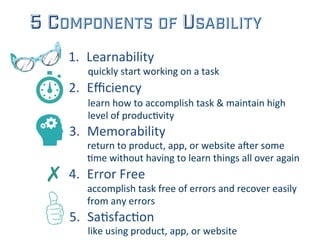
5 COMPONENTS OF USABILITY
1.  Learnability	
  
2.  Efficiency	
  
3.  Memorability	
  
4.  Error	
  Free	
  ✗	
  
5.  Sa;sfac;on	
  
return	
  to	
  product,	
  app,	
  or	
  website	
  a=er	
  some	
  
;me	
  without	
  having	
  to	
  learn	
  things	
  all	
  over	
  again	
  
learn	
  how	
  to	
  accomplish	
  task	
  &	
  maintain	
  high	
  
level	
  of	
  produc;vity	
  
accomplish	
  task	
  free	
  of	
  errors	
  and	
  recover	
  easily	
  
from	
  any	
  errors	
  
quickly	
  start	
  working	
  on	
  a	
  task	
  
like	
  using	
  product,	
  app,	
  or	
  website	
  
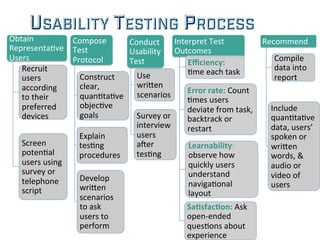
USABILITY TESTING PROCESS
Obtain	
  
Representa;ve	
  
Users	
  
Recruit	
  
users	
  
according	
  
to	
  their	
  
preferred	
  
devices	
  
Screen	
  
poten;al	
  
users	
  using	
  
survey	
  or	
  
telephone	
  
script	
  
Compose	
  
Test	
  
Protocol	
  
Construct	
  
clear,	
  
quan;ta;ve	
  
objec;ve	
  
goals	
  
Explain	
  
tes;ng	
  
procedures	
  
Develop	
  
wriHen	
  
scenarios	
  
to	
  ask	
  
users	
  to	
  
perform	
  
Conduct	
  
Usability	
  
Test	
  
Use	
  
wriHen	
  
scenarios	
  
Survey	
  or	
  
interview	
  
users	
  
a=er	
  
tes;ng	
  
Interpret	
  Test	
  
Outcomes	
  
Efficiency:	
  
;me	
  each	
  task	
  
Error	
  rate:	
  Count	
  
;mes	
  users	
  
deviate	
  from	
  task,	
  
backtrack	
  or	
  
restart	
  
Learnability:	
  
observe	
  how	
  
quickly	
  users	
  
understand	
  
naviga;onal	
  
layout	
  
Sa5sfac5on:	
  Ask	
  
open-­‐ended	
  
ques;ons	
  about	
  
experience	
  
Recommend	
  
Compile	
  
data	
  into	
  
report	
  
Include	
  
quan;ta;ve	
  
data,	
  users’	
  
spoken	
  or	
  
wriHen	
  
words,	
  &	
  
audio	
  or	
  
video	
  of	
  
users	
  
USABILITY TESTING TOOLS
ü Morae by Tech Smith
ü Usability testing tool
ü Camtasia Studio by Tech Smith
ü Screen & video capture tool
ü Jing by Tech Smith
ü Screen & video capture tool by Tech Smith
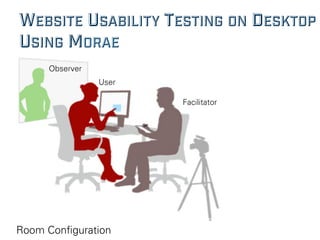
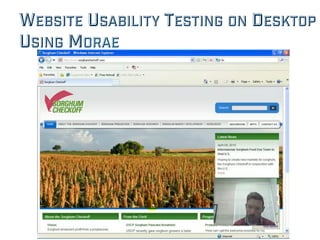
WEBSITE USABILITY TESTING ON DESKTOP
USING MORAE
Room Configuration
Observer
User
Facilitator
WEBSITE USABILITY TESTING ON DESKTOP
USING MORAE
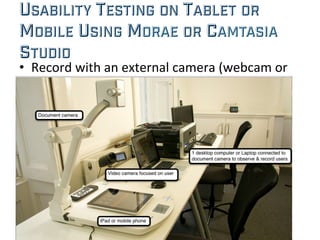
USABILITY TESTING ON TABLET OR
MOBILE USING MORAE OR CAMTASIA
STUDIO	
  
•  Record	
  with	
  an	
  external	
  camera	
  (webcam	
  or	
  
document	
  camera)	
  
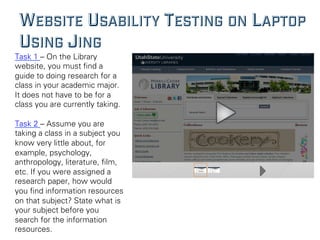
WEBSITE USABILITY TESTING ON LAPTOP
USING JING
Task 1 – On the Library
website, you must find a
guide to doing research for a
class in your academic major.
It does not have to be for a
class you are currently taking.
Task 2 – Assume you are
taking a class in a subject you
know very little about, for
example, psychology,
anthropology, literature, film,
etc. If you were assigned a
research paper, how would
you find information resources
on that subject? State what is
your subject before you
search for the information
resources.
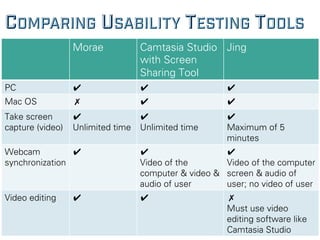
COMPARING USABILITY TESTING TOOLS
Morae Camtasia Studio
with Screen
Sharing Tool
Jing
PC ✔ ✔ ✔
Mac OS ✗ ✔ ✔
Take screen
capture (video)
✔
Unlimited time
✔
Unlimited time
✔
Maximum of 5
minutes
Webcam
synchronization
✔ ✔
Video of the
computer & video &
audio of user
✔
Video of the computer
screen & audio of
user; no video of user
Video editing ✔ ✔ ✗
Must use video
editing software like
Camtasia Studio
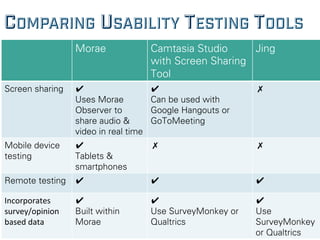
COMPARING USABILITY TESTING TOOLS
Morae Camtasia Studio
with Screen Sharing
Tool
Jing
Screen sharing ✔
Uses Morae
Observer to
share audio &
video in real time
✔
Can be used with
Google Hangouts or
GoToMeeting
✗
Mobile device
testing
✔
Tablets &
smartphones
✗ ✗
Remote testing ✔ ✔ ✔
Incorporates	
  
survey/opinion	
  
based	
  data	
  
✔
Built within
Morae
✔
Use SurveyMonkey or
Qualtrics
✔
Use
SurveyMonkey
or Qualtrics
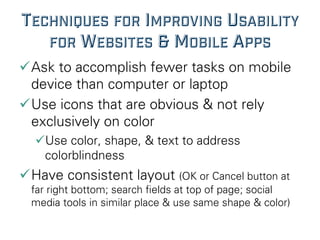
TECHNIQUES FOR IMPROVING USABILITY
FOR WEBSITES & MOBILE APPS
ü Ask to accomplish fewer tasks on mobile
device than computer or laptop
ü Use icons that are obvious & not rely
exclusively on color
ü Use color, shape, & text to address
colorblindness
ü Have consistent layout (OK or Cancel button at
far right bottom; search fields at top of page; social
media tools in similar place & use same shape & color)
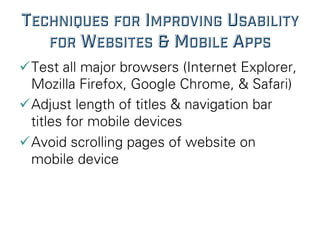
TECHNIQUES FOR IMPROVING USABILITY
FOR WEBSITES & MOBILE APPS
ü Test all major browsers (Internet Explorer,
Mozilla Firefox, Google Chrome, & Safari)
ü Adjust length of titles & navigation bar
titles for mobile devices
ü Avoid scrolling pages of website on
mobile device
Thank You
Questions?
CONTACT DR. HALL AT KELSEY.HALL@USU.EDU

Using Usability Testing Software to Evaluate Websites, Databases, & Social Media Tools

  • 1.
    USING USABILITY TESTING SOFTWARETO EVALUATE WEBSITES, DATABASES, & SOCIAL MEDIA TOOLS Kelsey Hall, Utah State University
  • 2.
    PRESENTATION OVERVIEW ü Define  usability   ü Explain  why  usability  design  is  important  for   computer  &  mobile  applica;on   ü Compare  &  contrast  usability  tes;ng  so=ware   ü Share  example  of  usability  tes;ng  with  Morae,   Camtasia  Studio,  &  Jing   ü Discuss  equipment  needed  for  tes;ng  on   computers,  laptops,  iPads,  &  mobile  devices    
  • 3.
    WHY CARE ABOUTUSABILITY? ü Have  you  ever…   –  GoHen  lost  in  a  website?   –  Le=  a  site  without  finding  the  informa;on  you   wanted?   –  Been  confused  by  the  naviga;on  of  a  mobile  app?   –  Seen  too  much  text  on  a  mobile  screen?     ü “You  never  get  a  second  chance  to  make  a   first  impression.”  
  • 4.
    DEFINE USABILITY ü Usability  is  a  quality  a)ribute  that  assesses  how  easy   user  interfaces  are  to  use.   –  Jakob  Nielson,  2012  
  • 5.
    5 COMPONENTS OFUSABILITY 1.  Learnability   2.  Efficiency   3.  Memorability   4.  Error  Free  ✗   5.  Sa;sfac;on   return  to  product,  app,  or  website  a=er  some   ;me  without  having  to  learn  things  all  over  again   learn  how  to  accomplish  task  &  maintain  high   level  of  produc;vity   accomplish  task  free  of  errors  and  recover  easily   from  any  errors   quickly  start  working  on  a  task   like  using  product,  app,  or  website  
  • 6.
    USABILITY TESTING PROCESS Obtain   Representa;ve   Users   Recruit   users   according   to  their   preferred   devices   Screen   poten;al   users  using   survey  or   telephone   script   Compose   Test   Protocol   Construct   clear,   quan;ta;ve   objec;ve   goals   Explain   tes;ng   procedures   Develop   wriHen   scenarios   to  ask   users  to   perform   Conduct   Usability   Test   Use   wriHen   scenarios   Survey  or   interview   users   a=er   tes;ng   Interpret  Test   Outcomes   Efficiency:   ;me  each  task   Error  rate:  Count   ;mes  users   deviate  from  task,   backtrack  or   restart   Learnability:   observe  how   quickly  users   understand   naviga;onal   layout   Sa5sfac5on:  Ask   open-­‐ended   ques;ons  about   experience   Recommend   Compile   data  into   report   Include   quan;ta;ve   data,  users’   spoken  or   wriHen   words,  &   audio  or   video  of   users  
  • 7.
    USABILITY TESTING TOOLS ü Moraeby Tech Smith ü Usability testing tool ü Camtasia Studio by Tech Smith ü Screen & video capture tool ü Jing by Tech Smith ü Screen & video capture tool by Tech Smith
  • 8.
    WEBSITE USABILITY TESTINGON DESKTOP USING MORAE Room Configuration Observer User Facilitator
  • 9.
    WEBSITE USABILITY TESTINGON DESKTOP USING MORAE
  • 10.
    USABILITY TESTING ONTABLET OR MOBILE USING MORAE OR CAMTASIA STUDIO   •  Record  with  an  external  camera  (webcam  or   document  camera)  
  • 11.
    WEBSITE USABILITY TESTINGON LAPTOP USING JING Task 1 – On the Library website, you must find a guide to doing research for a class in your academic major. It does not have to be for a class you are currently taking. Task 2 – Assume you are taking a class in a subject you know very little about, for example, psychology, anthropology, literature, film, etc. If you were assigned a research paper, how would you find information resources on that subject? State what is your subject before you search for the information resources.
  • 12.
    COMPARING USABILITY TESTINGTOOLS Morae Camtasia Studio with Screen Sharing Tool Jing PC ✔ ✔ ✔ Mac OS ✗ ✔ ✔ Take screen capture (video) ✔ Unlimited time ✔ Unlimited time ✔ Maximum of 5 minutes Webcam synchronization ✔ ✔ Video of the computer & video & audio of user ✔ Video of the computer screen & audio of user; no video of user Video editing ✔ ✔ ✗ Must use video editing software like Camtasia Studio
  • 13.
    COMPARING USABILITY TESTINGTOOLS Morae Camtasia Studio with Screen Sharing Tool Jing Screen sharing ✔ Uses Morae Observer to share audio & video in real time ✔ Can be used with Google Hangouts or GoToMeeting ✗ Mobile device testing ✔ Tablets & smartphones ✗ ✗ Remote testing ✔ ✔ ✔ Incorporates   survey/opinion   based  data   ✔ Built within Morae ✔ Use SurveyMonkey or Qualtrics ✔ Use SurveyMonkey or Qualtrics
  • 14.
    TECHNIQUES FOR IMPROVINGUSABILITY FOR WEBSITES & MOBILE APPS ü Ask to accomplish fewer tasks on mobile device than computer or laptop ü Use icons that are obvious & not rely exclusively on color ü Use color, shape, & text to address colorblindness ü Have consistent layout (OK or Cancel button at far right bottom; search fields at top of page; social media tools in similar place & use same shape & color)
  • 15.
    TECHNIQUES FOR IMPROVINGUSABILITY FOR WEBSITES & MOBILE APPS ü Test all major browsers (Internet Explorer, Mozilla Firefox, Google Chrome, & Safari) ü Adjust length of titles & navigation bar titles for mobile devices ü Avoid scrolling pages of website on mobile device
  • 16.
    Thank You Questions? CONTACT DR.HALL AT KELSEY.HALL@USU.EDU