Remote Usability Testing December 5, 2009 Elizabeth Snowdon Usability Analyst, Sage Software [email_address]
About me Senior Usability Analyst at Sage Software Previously worked in usability at high-tech company Conducting usability studies since 2003
Principles of Scientific Management
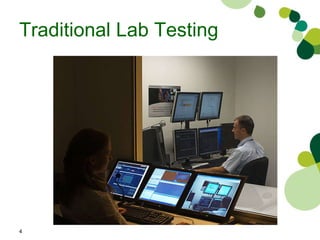
Traditional Lab Testing
Remote usability Advantages / Disadvantages Case study Tools What I will talk about today
What is Remote Testing? Testing sessions in which you and participant are not physically in the same place but are communicating via electronic technology
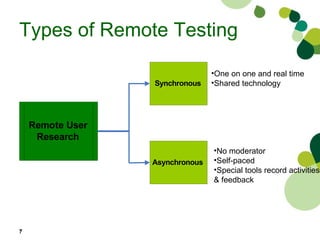
Types of Remote Testing   One on one and real time Shared technology No moderator Self-paced  Special tools record activities  & feedback
Current Usability Testing Trends Movement away from lab testing Increased interest in testing in users’ environments Agile development methods
Advantages Lab not required University of Leeds Human Perception and Performance: Usability Laboratory
Advantages Expands sampling population Ease of recruitment Users in their own natural browsing environment Share their desktop with you
Advantages Save money Travel Equipment Recruiting costs Compensation
Disadvantages Difficult to see participant’s screen Cannot see participants Problems downloading or installing desktop sharing Task scenarios disseminated in advance Participants interrupted or distracted
When not to use When security is important When reliable high speed internet connection is unavailable For eye tracking studies When it is important to attend to user’s physical movement
When to use Recruiting valuable individuals Minimal set-up For lone wolf consultants Rapid iterative development (Agile)
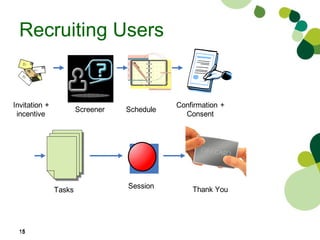
Recruiting Users
Case Study Baseline study for Accpac Three personas  clerks, controllers, operations 24 participants  20 remote  US, South Africa, Australia, UK, Canada One moderator, one note taker, observers
Results Accpac study completed in 4 weeks Cost savings Travel Lab set-up Time savings Recruiting  Scheduling  Less overtime Bottom line - $50,000 saved
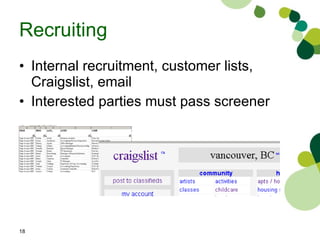
Recruiting Internal recruitment, customer lists, Craigslist, email Interested parties must pass screener
Other issues to sort out Obtaining informed consent and confidentiality agreement  What computing and communications equipment do candidates have? Are they willing and able to download and run collaboration software?
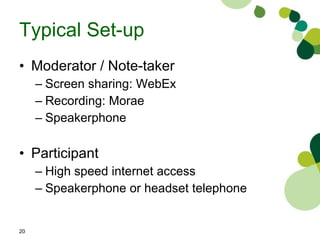
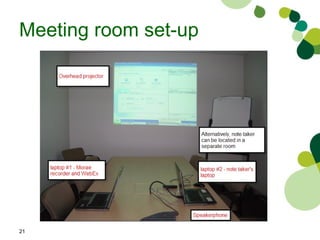
Typical Set-up Moderator / Note-taker  Screen sharing: WebEx Recording: Morae  Speakerphone Participant High speed internet access Speakerphone or headset telephone
Meeting room set-up
What can go wrong? User forgets Send reminder one day in advance No shows Provide your cell # and get participant’s cell and work #  User cannot download plug in Send participant WebEx compatibility test check email in advance
What can go wrong? User takes a long time to log onto WebEx Add extra 10 minutes for WebEx set-up Log onto session 15 minutes in advance Get participant to log onto WebEx 10 minutes in advance User brings along his co-worker Explain 1to1 test Reschedule secondary participant
What can go wrong? Can’t see what the user is doing Ask user to point with mouse Conversations Mute your line
WebEx Limitations Test! Test! Test! – Dry run Delays Explain that there is a slight delay between what they are seeing and what you see  Cannot view hover overs Verbally tell users what they are hovering over
Pre-test / Test checklist Email scenarios  Set-up system or web site  Open up required documents Dial into conference bridge or participant Sign onto WebEx Facilitator script Start recording Hand WebEx control to participant
Incentives Challenging for international users Email local Amazon gift certificates
Resources IBM - Experience remote usability testing www.ibm.com/developerworks/library/wa-rmusts1/ Remote Usability  remoteusability.com/ User Experience magazine  ww.usabilityprofessionals.org/upa_publications/user_experience/past_issues/2008-3.html Moderating Usability Tests: Principles and Practices for Interacting  by Loring and Dumas Usability Engineering  by Jakob Neilsen
Remote tools Liz Bacon listing  http://remoteusability.com/remote-testing-tools-round-up-by-liz-bacon/ Bolt Peters  http://remoteusability.com/tools/
Questions Feel free to connect with me at  [email_address]  or elizabethsnowdon.wordpress.com/

Remote Usability Testing

  • 1.
    Remote Usability TestingDecember 5, 2009 Elizabeth Snowdon Usability Analyst, Sage Software [email_address]
  • 2.
    About me SeniorUsability Analyst at Sage Software Previously worked in usability at high-tech company Conducting usability studies since 2003
  • 3.
  • 4.
  • 5.
    Remote usability Advantages/ Disadvantages Case study Tools What I will talk about today
  • 6.
    What is RemoteTesting? Testing sessions in which you and participant are not physically in the same place but are communicating via electronic technology
  • 7.
    Types of RemoteTesting One on one and real time Shared technology No moderator Self-paced Special tools record activities & feedback
  • 8.
    Current Usability TestingTrends Movement away from lab testing Increased interest in testing in users’ environments Agile development methods
  • 9.
    Advantages Lab notrequired University of Leeds Human Perception and Performance: Usability Laboratory
  • 10.
    Advantages Expands samplingpopulation Ease of recruitment Users in their own natural browsing environment Share their desktop with you
  • 11.
    Advantages Save moneyTravel Equipment Recruiting costs Compensation
  • 12.
    Disadvantages Difficult tosee participant’s screen Cannot see participants Problems downloading or installing desktop sharing Task scenarios disseminated in advance Participants interrupted or distracted
  • 13.
    When not touse When security is important When reliable high speed internet connection is unavailable For eye tracking studies When it is important to attend to user’s physical movement
  • 14.
    When to useRecruiting valuable individuals Minimal set-up For lone wolf consultants Rapid iterative development (Agile)
  • 15.
  • 16.
    Case Study Baselinestudy for Accpac Three personas clerks, controllers, operations 24 participants 20 remote US, South Africa, Australia, UK, Canada One moderator, one note taker, observers
  • 17.
    Results Accpac studycompleted in 4 weeks Cost savings Travel Lab set-up Time savings Recruiting Scheduling Less overtime Bottom line - $50,000 saved
  • 18.
    Recruiting Internal recruitment,customer lists, Craigslist, email Interested parties must pass screener
  • 19.
    Other issues tosort out Obtaining informed consent and confidentiality agreement What computing and communications equipment do candidates have? Are they willing and able to download and run collaboration software?
  • 20.
    Typical Set-up Moderator/ Note-taker Screen sharing: WebEx Recording: Morae Speakerphone Participant High speed internet access Speakerphone or headset telephone
  • 21.
  • 22.
    What can gowrong? User forgets Send reminder one day in advance No shows Provide your cell # and get participant’s cell and work # User cannot download plug in Send participant WebEx compatibility test check email in advance
  • 23.
    What can gowrong? User takes a long time to log onto WebEx Add extra 10 minutes for WebEx set-up Log onto session 15 minutes in advance Get participant to log onto WebEx 10 minutes in advance User brings along his co-worker Explain 1to1 test Reschedule secondary participant
  • 24.
    What can gowrong? Can’t see what the user is doing Ask user to point with mouse Conversations Mute your line
  • 25.
    WebEx Limitations Test!Test! Test! – Dry run Delays Explain that there is a slight delay between what they are seeing and what you see Cannot view hover overs Verbally tell users what they are hovering over
  • 26.
    Pre-test / Testchecklist Email scenarios Set-up system or web site Open up required documents Dial into conference bridge or participant Sign onto WebEx Facilitator script Start recording Hand WebEx control to participant
  • 27.
    Incentives Challenging forinternational users Email local Amazon gift certificates
  • 28.
    Resources IBM -Experience remote usability testing www.ibm.com/developerworks/library/wa-rmusts1/ Remote Usability remoteusability.com/ User Experience magazine ww.usabilityprofessionals.org/upa_publications/user_experience/past_issues/2008-3.html Moderating Usability Tests: Principles and Practices for Interacting by Loring and Dumas Usability Engineering by Jakob Neilsen
  • 29.
    Remote tools LizBacon listing http://remoteusability.com/remote-testing-tools-round-up-by-liz-bacon/ Bolt Peters http://remoteusability.com/tools/
  • 30.
    Questions Feel freeto connect with me at [email_address] or elizabethsnowdon.wordpress.com/

Editor's Notes

  • #3 Here are the top 5 things you all told me and my team to focus on last year when we first met at Insights: Starting with #5…you told us to get more aggressive in the market ….you felt we needed better lead generation, more competitive pricing, and better brand awareness for Accpac in the US 4 th , you told us to make it easier to do business with Sage…and in particular, repatriate our old operating model for CRM so that you could purchase it from just ONE part of the Sage organization. The 3 rd thing you told me was that despite the tremendous capabilities of Accpac, we had become overcomplicated …our Pricing was too complicated, we were nickling and diming, we were spending a lot of time on things that were of low value, and not enough time on things that really mattered to you The 2 nd priority you gave us was to synchronize our releases . We had been on a 24 month release cycle for our core product but many of our options and E2E products were not available until several months after the core ERP..causing you and your clients to delay in upgrading. And, FIRST on your list was…we want a VOICE…is anyone actively listening to what we are saying and prioritizing our ideas for future development cycles. I remember one of my very first conversations at last year’s Insights was with Pat Wade and her team…and they very clearly told me that while our technology vision was great, that we needed to spend an equal amount of time fixing known pain points for existing customers. So let’s talk now about how we have responded to all of this with our latest release!
  • #8 Synchronous One on one and real time Shared technology Asynchronous No moderator Self-paced Special tools record activities & feedback
  • #11 Same number of issues as face-to-face testing.