Unraveling Docker Security: Lessons From a Production Cloud
Salman Baset1, Stefan Berger2,
Dimitrios Pendarakis3
1Research Staff Member, 2STSM,
3Manager and Research Staff Member
IBM Research
@salman_baset
flickr.com/68397968@N07
Philip Estes
STSM, IBM Cloud
@estesp
Outline
•  What is Docker?
•  Deployment models for Docker
•  Threat model
•  Protection against threats
•  Docker registry and engine configuration
•  Possible attacks
•  Putting it all together
Acknowledgements:
IBM Containers on Bluemix &
Docker, OpenStack, and Linux
community
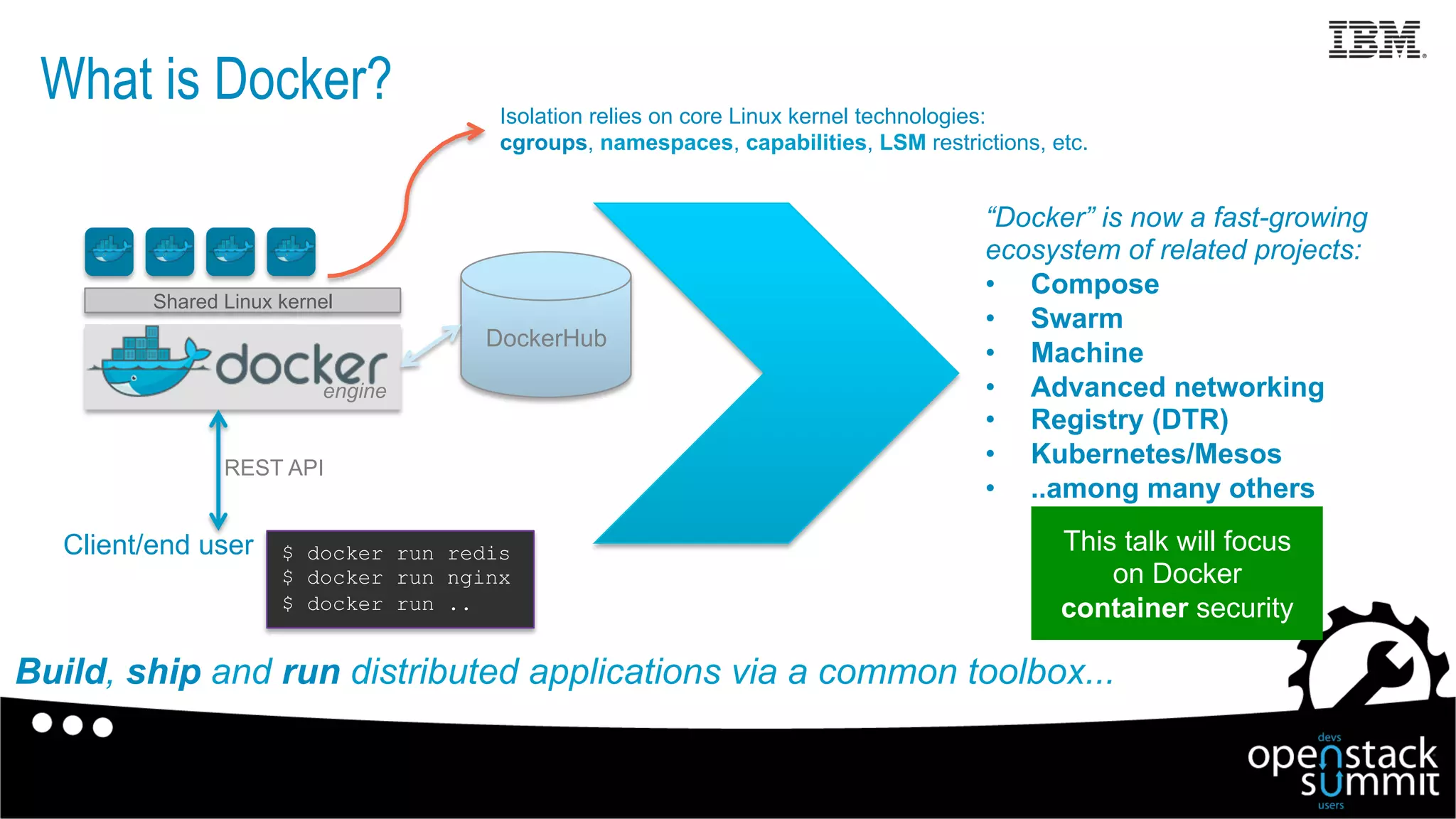
engine
What is Docker?
This talk will focus
on Docker
container security
REST API
Shared Linux kernel
Client/end user
DockerHub
Isolation relies on core Linux kernel technologies:
cgroups, namespaces, capabilities, LSM restrictions, etc.
Build, ship and run distributed applications via a common toolbox...
“Docker” is now a fast-growing
ecosystem of related projects:
•  Compose
•  Swarm
•  Machine
•  Advanced networking
•  Registry (DTR)
•  Kubernetes/Mesos
•  ..among many others
$ docker run redis
$ docker run nginx
$ docker run ..
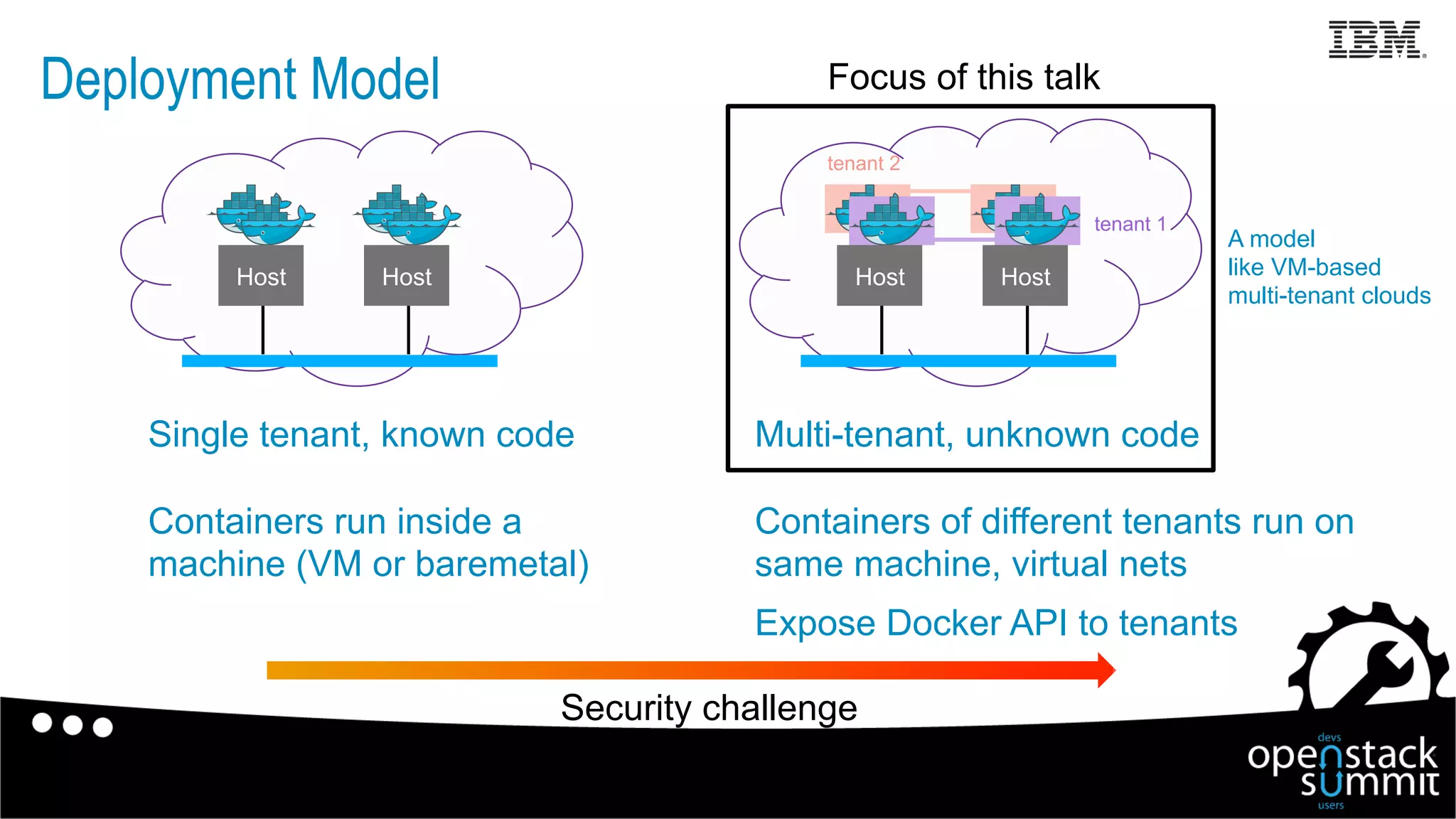
Deployment Model
HostHost
Single tenant, known code
Containers run inside a
machine (VM or baremetal)
A model
like VM-based
multi-tenant clouds
Security challenge
Focus of this talk
HostHost
Multi-tenant, unknown code
Containers of different tenants run on
same machine, virtual nets
Expose Docker API to tenants
tenant 1
tenant 2
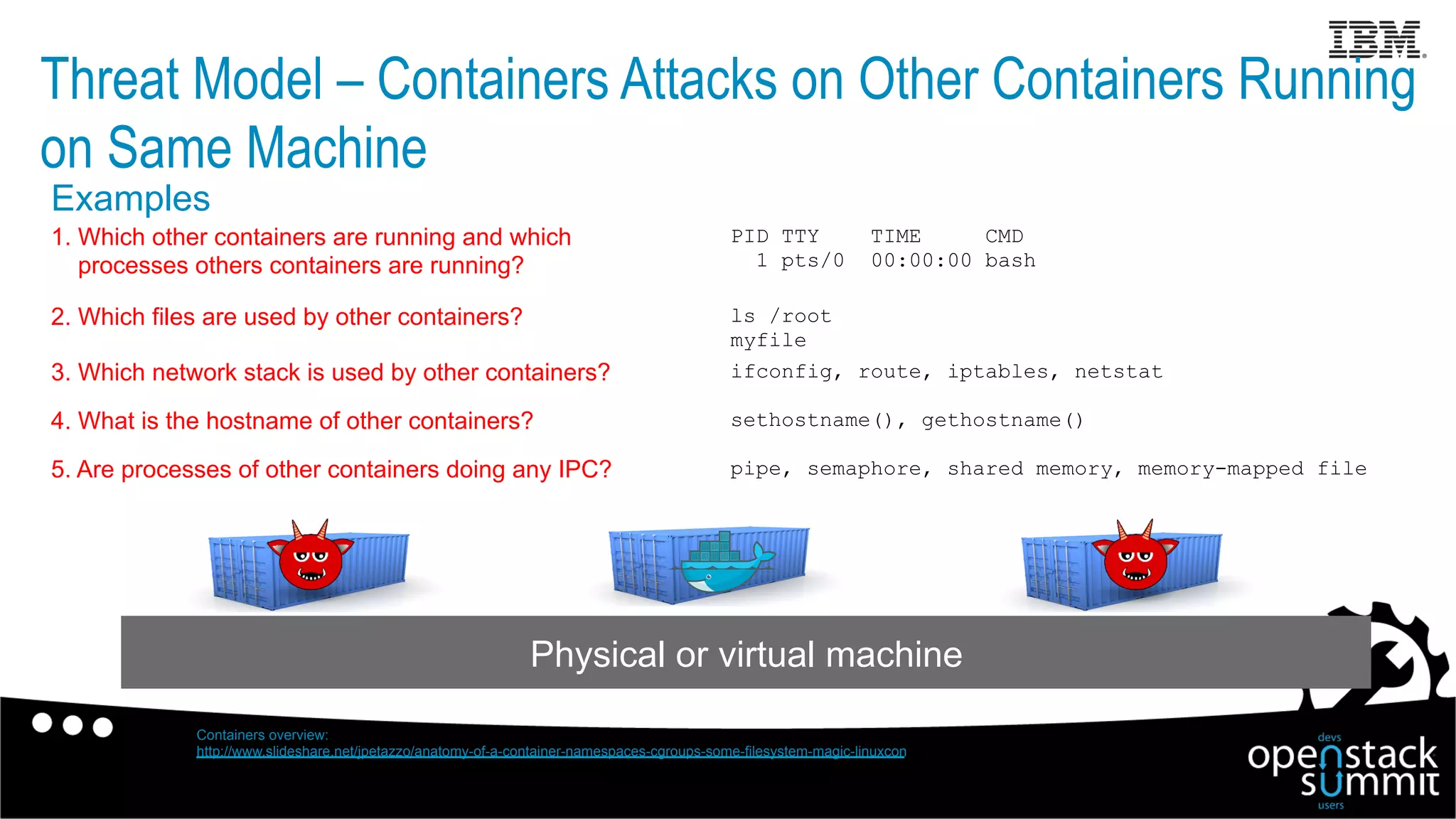
Threat Model – Containers Attacks on Other Containers Running
on Same Machine
Physical or virtual machine
ls /root
myfile
PID TTY TIME CMD
1 pts/0 00:00:00 bash
1. Which other containers are running and which
processes others containers are running?
2. Which files are used by other containers?
ifconfig, route, iptables, netstat3. Which network stack is used by other containers?
sethostname(), gethostname()4. What is the hostname of other containers?
Containers overview:
http://www.slideshare.net/jpetazzo/anatomy-of-a-container-namespaces-cgroups-some-filesystem-magic-linuxcon
pipe, semaphore, shared memory, memory-mapped file5. Are processes of other containers doing any IPC?
Examples
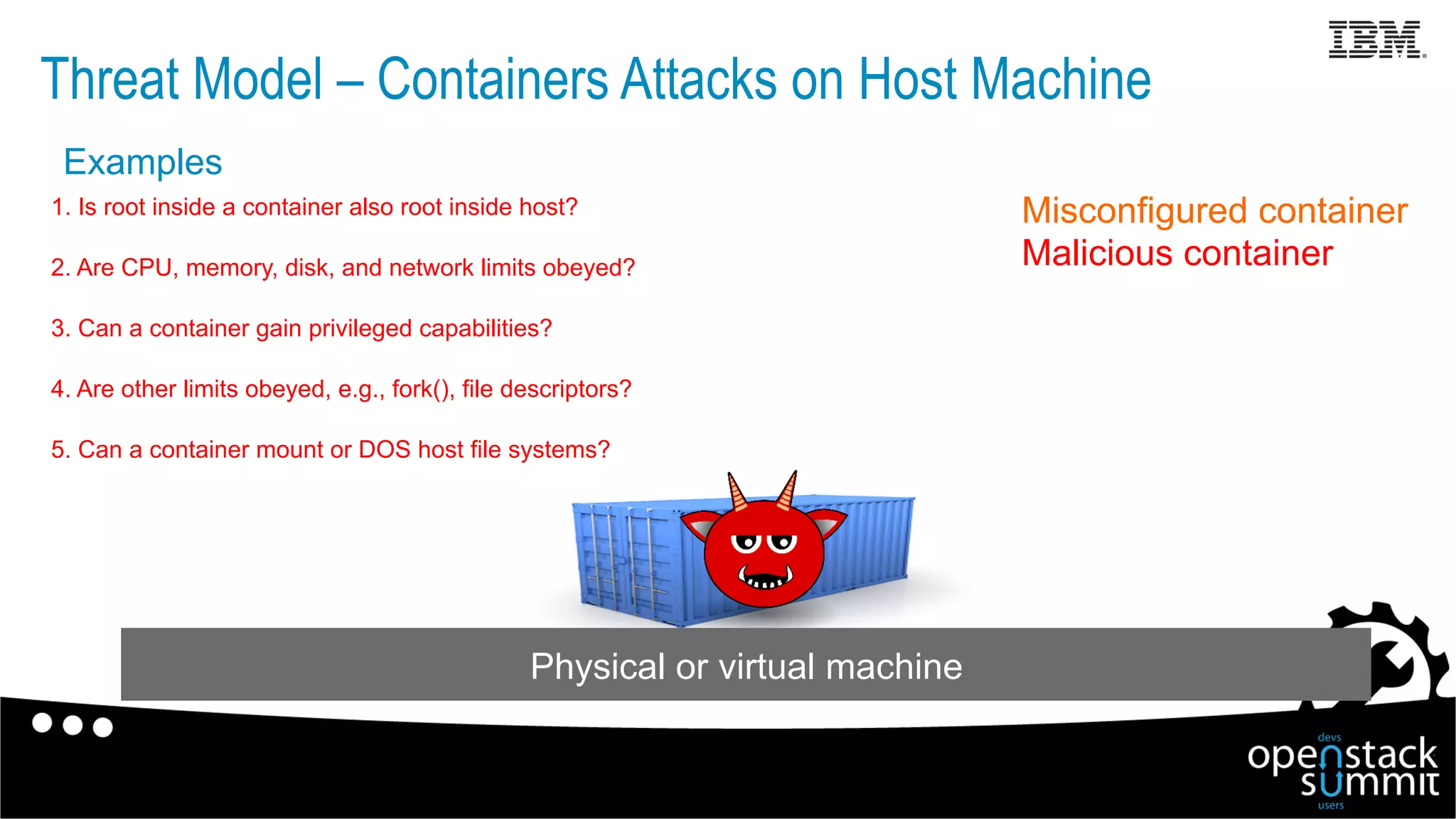
Threat Model – Containers Attacks on Host Machine
Misconfigured container
Malicious container
Physical or virtual machine
1. Is root inside a container also root inside host?
2. Are CPU, memory, disk, and network limits obeyed?
3. Can a container gain privileged capabilities?
4. Are other limits obeyed, e.g., fork(), file descriptors?
5. Can a container mount or DOS host file systems?
Examples
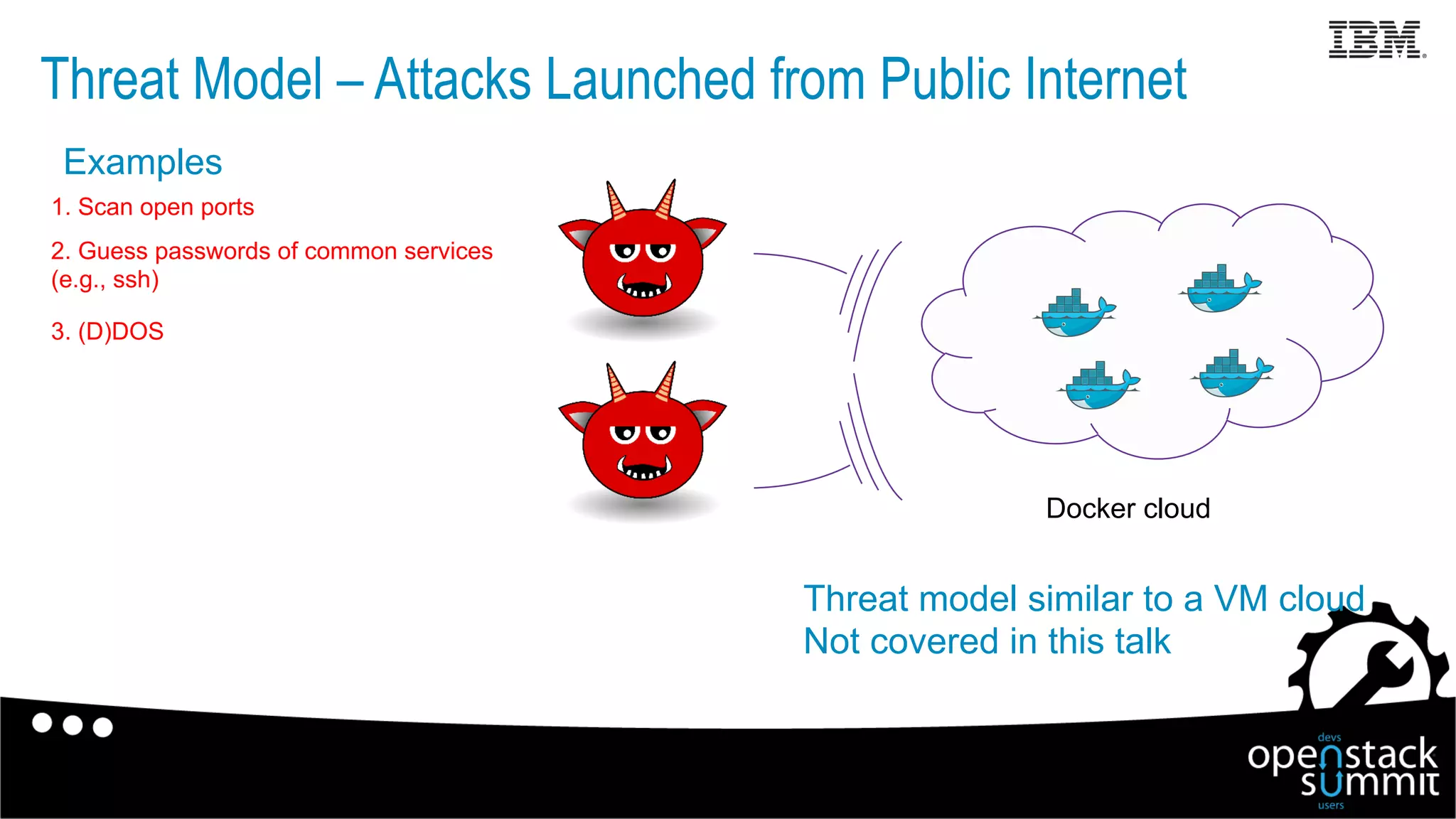
Threat Model – Attacks Launched from Public Internet
Threat model similar to a VM cloud
Not covered in this talk
Docker cloud
1. Scan open ports
2. Guess passwords of common services
(e.g., ssh)
3. (D)DOS
Examples
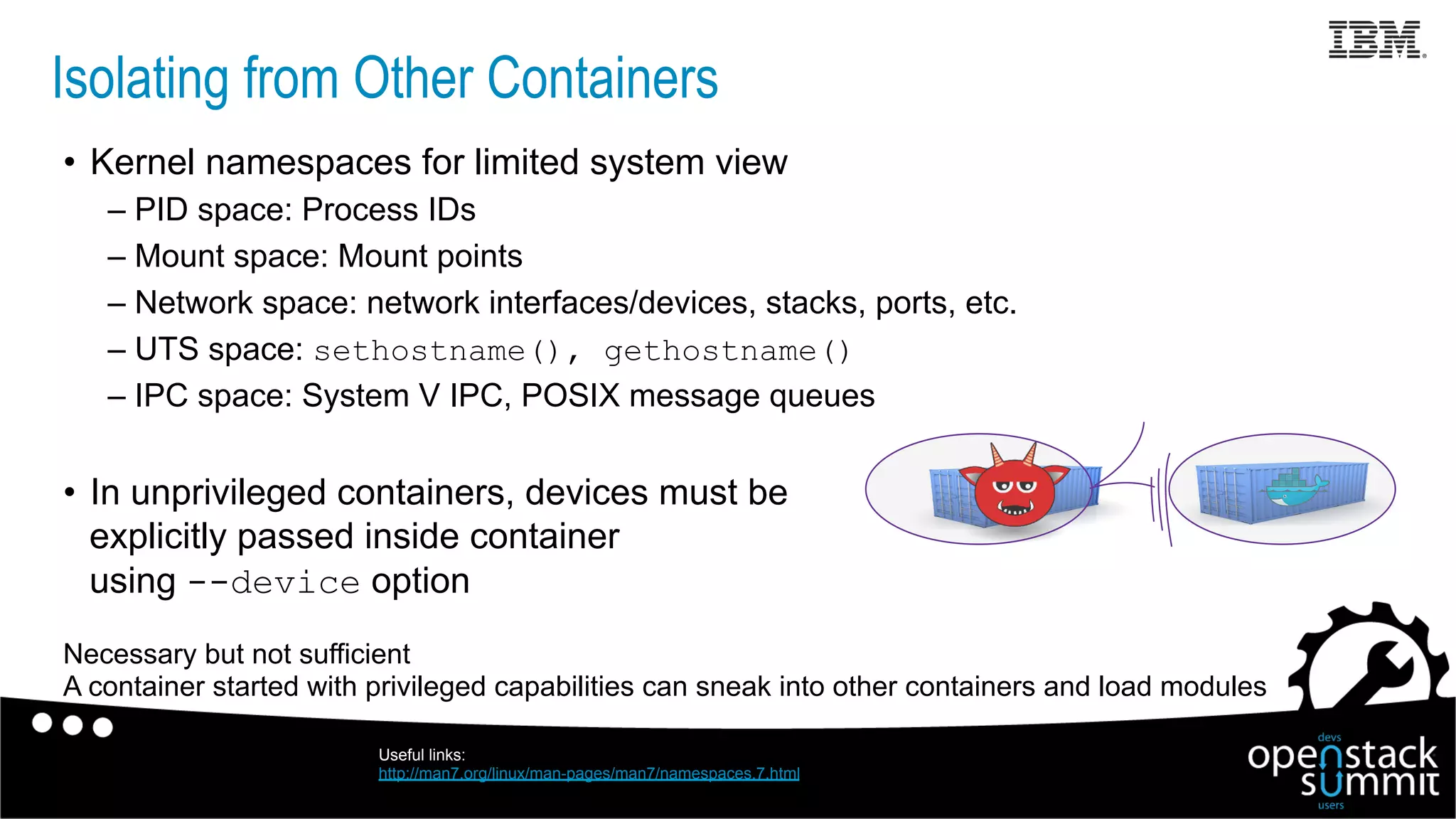
Isolating from Other Containers
•  Kernel namespaces for limited system view
– PID space: Process IDs
– Mount space: Mount points
– Network space: network interfaces/devices, stacks, ports, etc.
– UTS space: sethostname(), gethostname()
– IPC space: System V IPC, POSIX message queues
•  In unprivileged containers, devices must be
explicitly passed inside container
using --device option
Necessary but not sufficient
A container started with privileged capabilities can sneak into other containers and load modules
Useful links:
http://man7.org/linux/man-pages/man7/namespaces.7.html
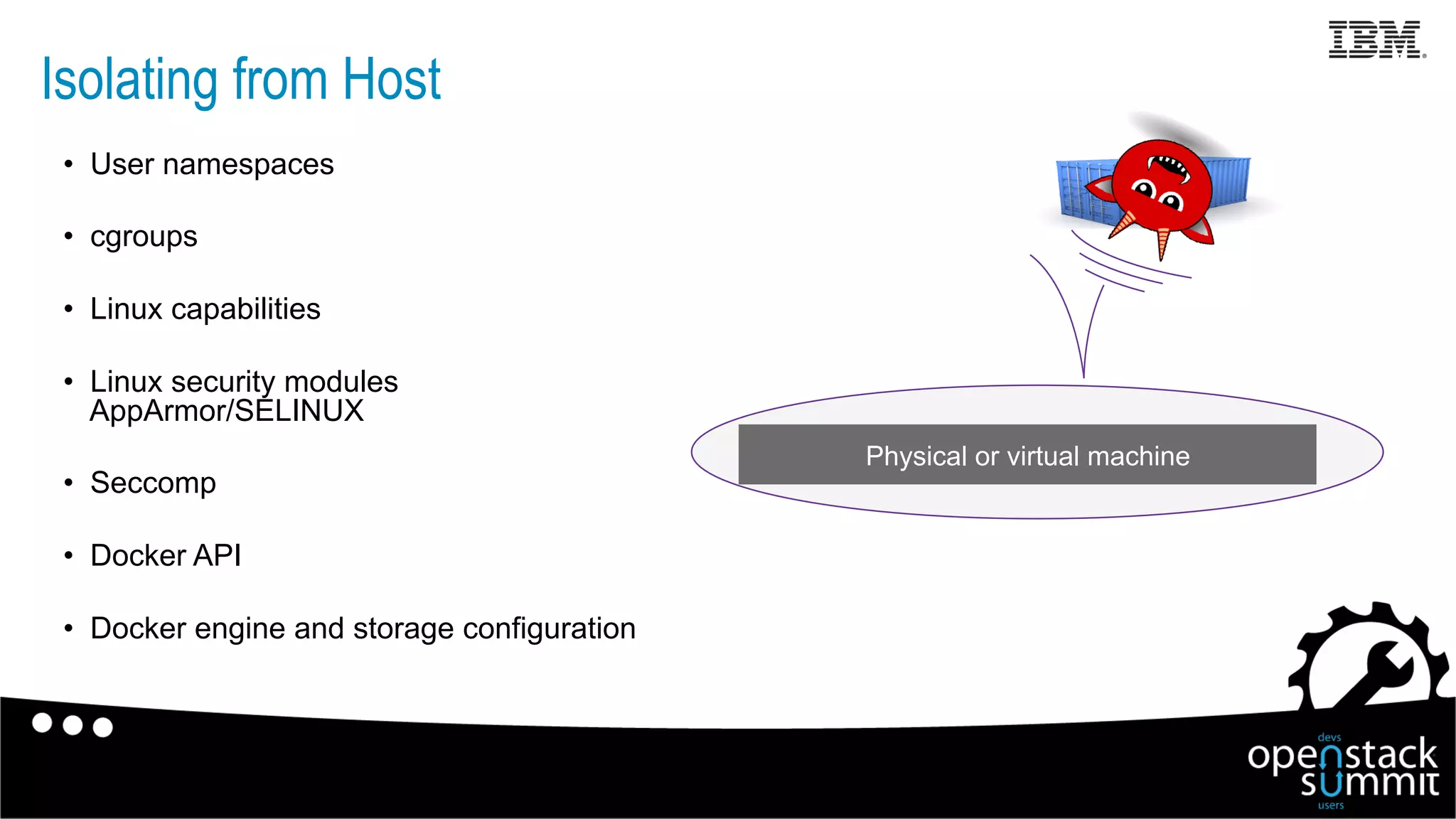
Isolating from Host
•  User namespaces
•  cgroups
•  Linux capabilities
•  Linux security modules
AppArmor/SELINUX
•  Seccomp
•  Docker API
•  Docker engine and storage configuration
Physical or virtual machine
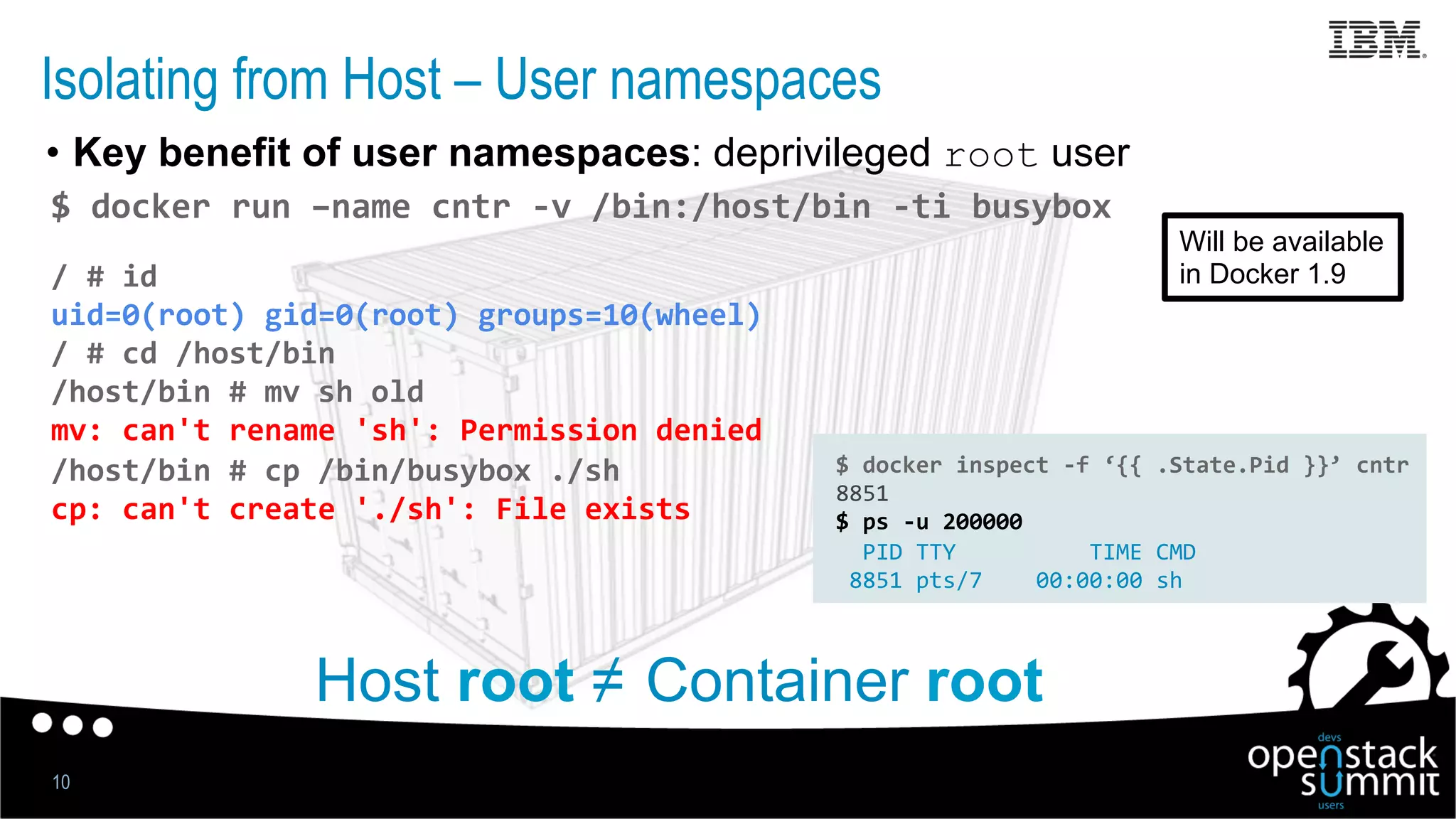
Isolating from Host – User namespaces
•  Key benefit of user namespaces: deprivileged root user
10
$	
  docker	
  run	
  –name	
  cntr	
  -­‐v	
  /bin:/host/bin	
  -­‐ti	
  busybox	
  
/	
  #	
  id	
  
uid=0(root)	
  gid=0(root)	
  groups=10(wheel)	
  
/	
  #	
  cd	
  /host/bin	
  
/host/bin	
  #	
  mv	
  sh	
  old	
  
mv:	
  can't	
  rename	
  'sh':	
  Permission	
  denied	
  
/host/bin	
  #	
  cp	
  /bin/busybox	
  ./sh	
  
cp:	
  can't	
  create	
  './sh':	
  File	
  exists	


Host root ≠ Container root
$	
  docker	
  inspect	
  -­‐f	
  ‘{{	
  .State.Pid	
  }}’	
  cntr	
  
8851	
  
$	
  ps	
  -­‐u	
  200000	


  PID	
  TTY	


  TIME	
  CMD	
  
	
  8851	
  pts/7	


  00:00:00	
  sh	
  
Will be available
in Docker 1.9
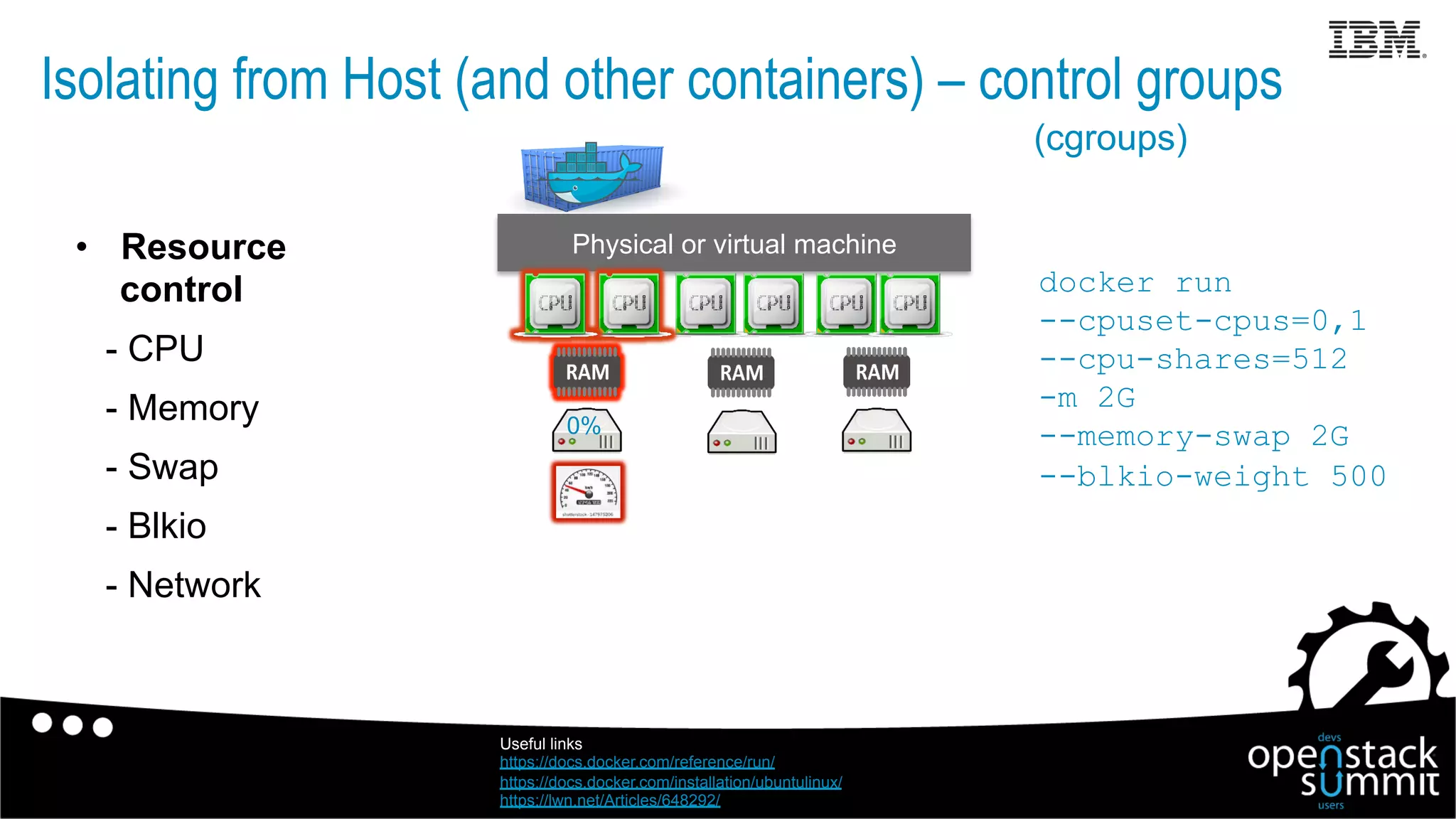
•  Resource
control
- CPU
- Memory
- Swap
- Blkio
- Network
Physical or virtual machine
0%
Isolating from Host (and other containers) – control groups
Useful links
https://docs.docker.com/reference/run/
https://docs.docker.com/installation/ubuntulinux/
https://lwn.net/Articles/648292/
(cgroups)
docker run
--cpuset-cpus=0,1
--cpu-shares=512
-m 2G
--memory-swap 2G
--blkio-weight 500
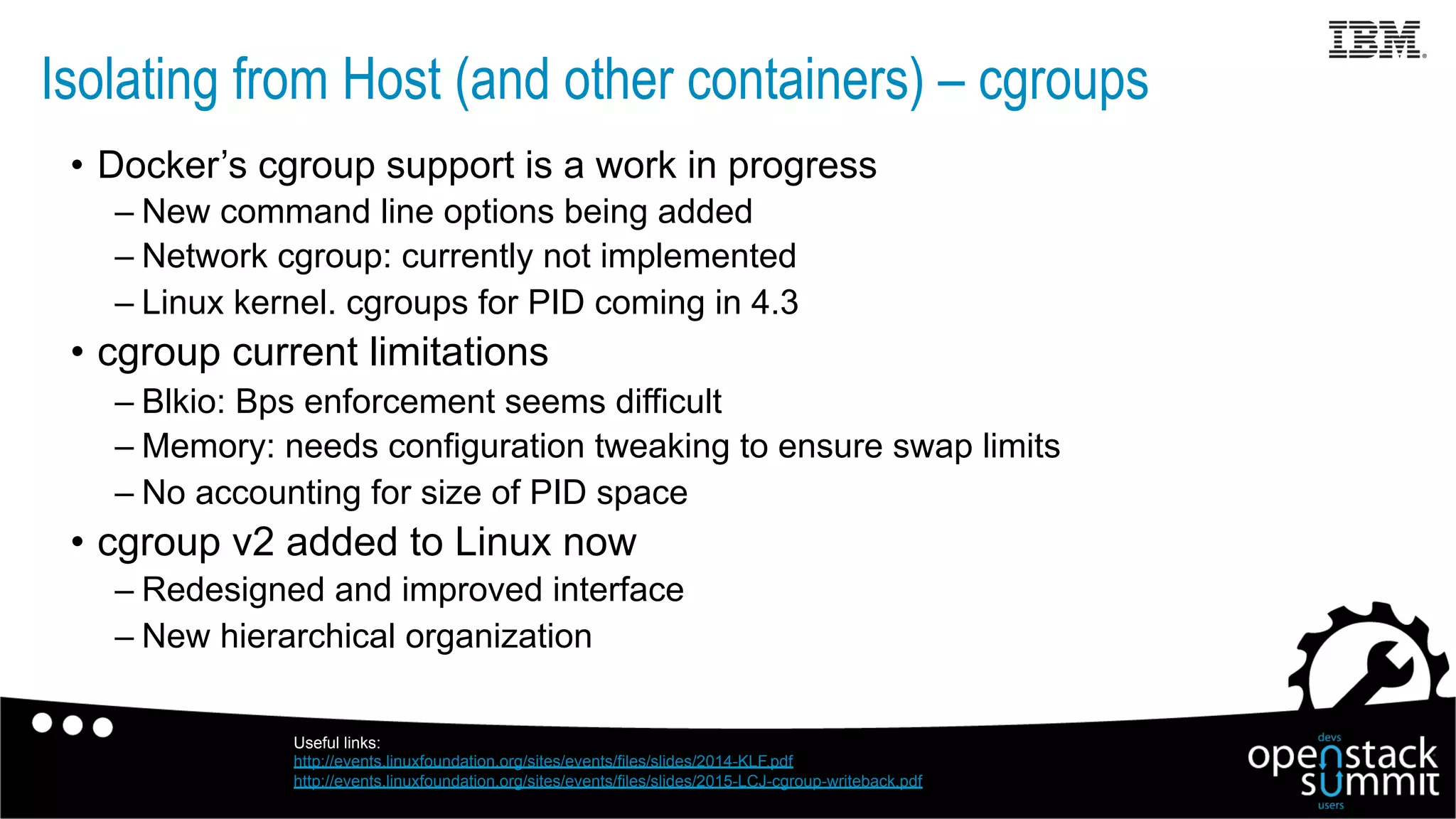
•  Docker’s cgroup support is a work in progress
– New command line options being added
– Network cgroup: currently not implemented
– Linux kernel. cgroups for PID coming in 4.3
•  cgroup current limitations
– Blkio: Bps enforcement seems difficult
– Memory: needs configuration tweaking to ensure swap limits
– No accounting for size of PID space
•  cgroup v2 added to Linux now
– Redesigned and improved interface
– New hierarchical organization
Isolating from Host (and other containers) – cgroups
Useful links:
http://events.linuxfoundation.org/sites/events/files/slides/2014-KLF.pdf
http://events.linuxfoundation.org/sites/events/files/slides/2015-LCJ-cgroup-writeback.pdf
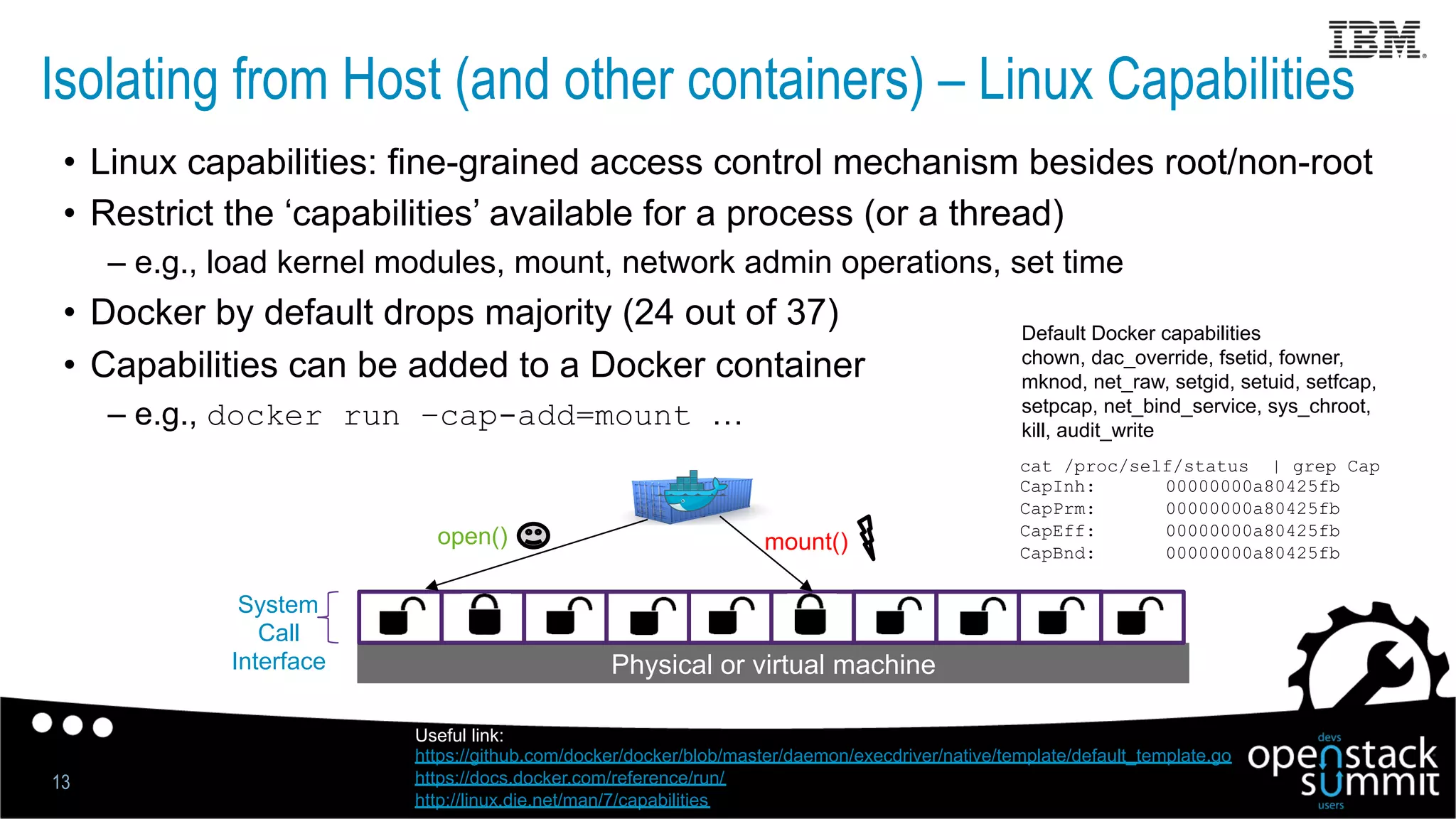
Isolating from Host (and other containers) – Linux Capabilities
13
•  Linux capabilities: fine-grained access control mechanism besides root/non-root
•  Restrict the ‘capabilities’ available for a process (or a thread)
– e.g., load kernel modules, mount, network admin operations, set time
•  Docker by default drops majority (24 out of 37)
•  Capabilities can be added to a Docker container
– e.g., docker run –cap-add=mount …
Physical or virtual machine
System
Call
Interface
open() mount()
Useful link:
https://github.com/docker/docker/blob/master/daemon/execdriver/native/template/default_template.go
https://docs.docker.com/reference/run/
http://linux.die.net/man/7/capabilities
cat /proc/self/status | grep Cap
CapInh: 00000000a80425fb
CapPrm: 00000000a80425fb
CapEff: 00000000a80425fb
CapBnd: 00000000a80425fb
Default Docker capabilities
chown, dac_override, fsetid, fowner,
mknod, net_raw, setgid, setuid, setfcap,
setpcap, net_bind_service, sys_chroot,
kill, audit_write
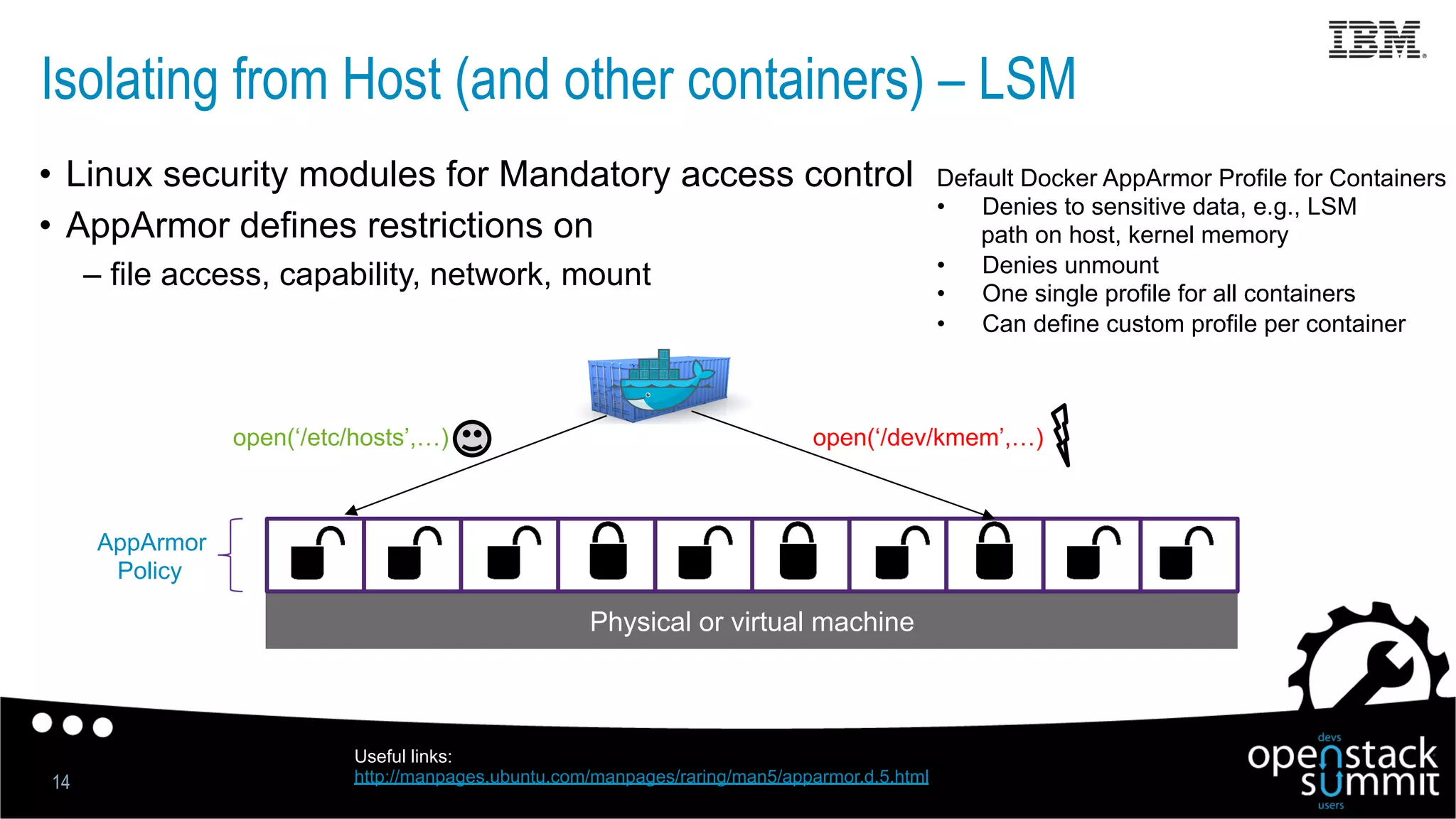
Isolating from Host (and other containers) – LSM
14
Physical or virtual machine
•  Linux security modules for Mandatory access control
•  AppArmor defines restrictions on
– file access, capability, network, mount
AppArmor
Policy
open(‘/etc/hosts’,…) open(‘/dev/kmem’,…)
Default Docker AppArmor Profile for Containers
•  Denies to sensitive data, e.g., LSM
path on host, kernel memory
•  Denies unmount
•  One single profile for all containers
•  Can define custom profile per container
Useful links:
http://manpages.ubuntu.com/manpages/raring/man5/apparmor.d.5.html
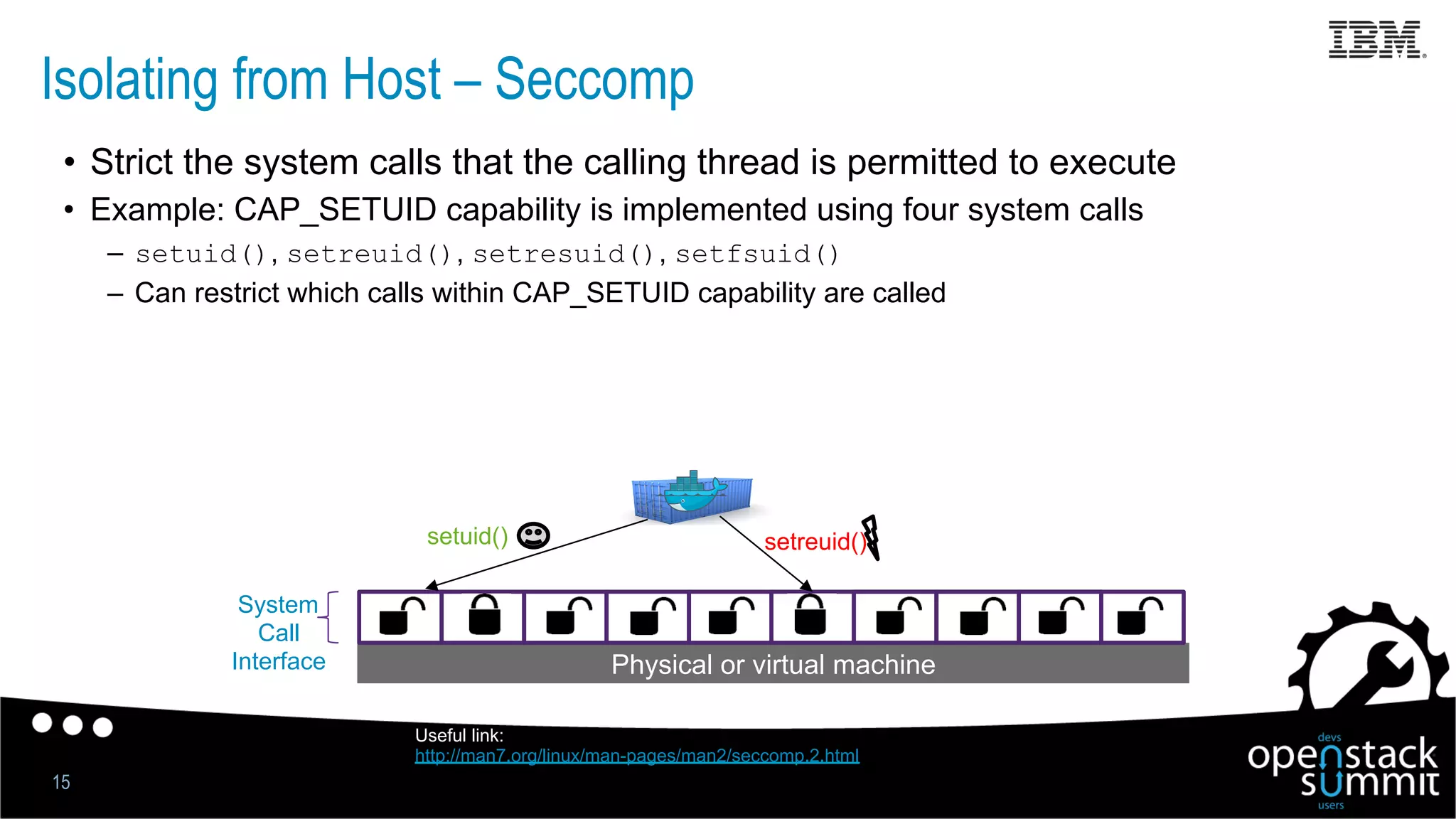
Isolating from Host – Seccomp
15
•  Strict the system calls that the calling thread is permitted to execute
•  Example: CAP_SETUID capability is implemented using four system calls
–  setuid(), setreuid(), setresuid(), setfsuid()
–  Can restrict which calls within CAP_SETUID capability are called
Physical or virtual machine
System
Call
Interface
setuid() setreuid()
Useful link:
http://man7.org/linux/man-pages/man2/seccomp.2.html
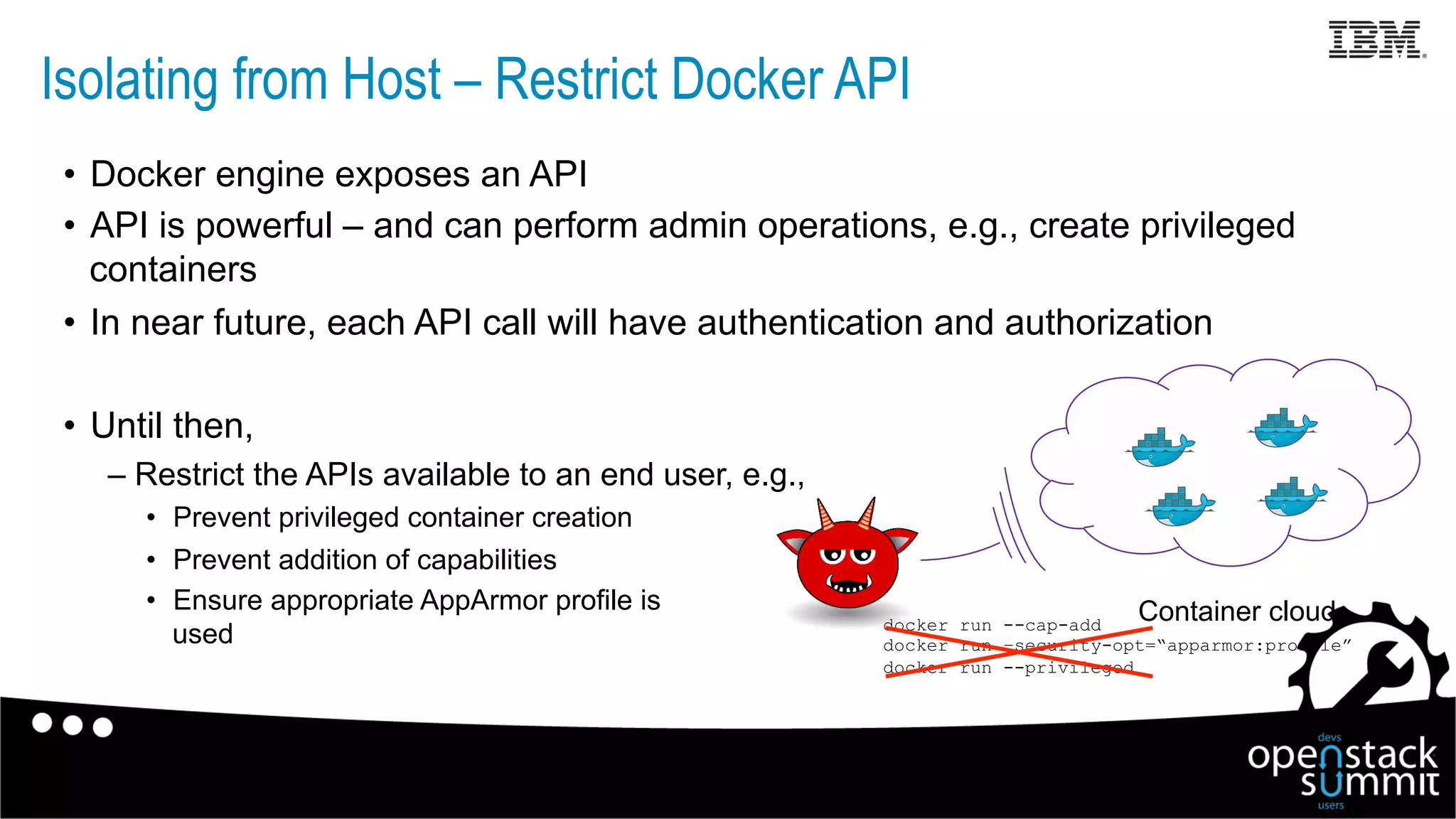
Isolating from Host – Restrict Docker API
•  Docker engine exposes an API
•  API is powerful – and can perform admin operations, e.g., create privileged
containers
•  In near future, each API call will have authentication and authorization
•  Until then,
– Restrict the APIs available to an end user, e.g.,
•  Prevent privileged container creation
•  Prevent addition of capabilities
•  Ensure appropriate AppArmor profile is
used
Container clouddocker run --cap-add
docker run –security-opt=“apparmor:profile”
docker run --privileged
Isolating from Host – Docker Engine and Storage Configuration
Docker Engine
•  Configure TLS for Docker Engine
•  Set appropriate limits, e.g., nproc, file descriptors
•  Docker Security Checklist and Docker Bench
– https://benchmarks.cisecurity.org/tools2/docker/
CIS_Docker_1.6_Benchmark_v1.0.0.pdf
https://github.com/docker/docker-bench-security
Docker Storage
•  Consider using devicemapper as storage
•  Consider setting the default filesystem of containers as read only
•  Bind mounted files in Docker have no quota. Consider making them read only.
Docker Registry Security
•  Python-based Docker registry V1 weaknesses:
– Image IDs are secrets (effectively)
– No content verification; audit/validation difficult
– Layer IDs randomly assigned, linked via “parent” entries (poor performance)
•  Docker Registry V2 API and implementation in Docker 1.6
– All content is addressable via strong cryptographic hash
– Content and naming separated
– Safe distribution over untrusted channels, data is verifiable
– Signing and verification now enabled via Docker Content Trust
– Digests and manifests together uniquely define content+relationships
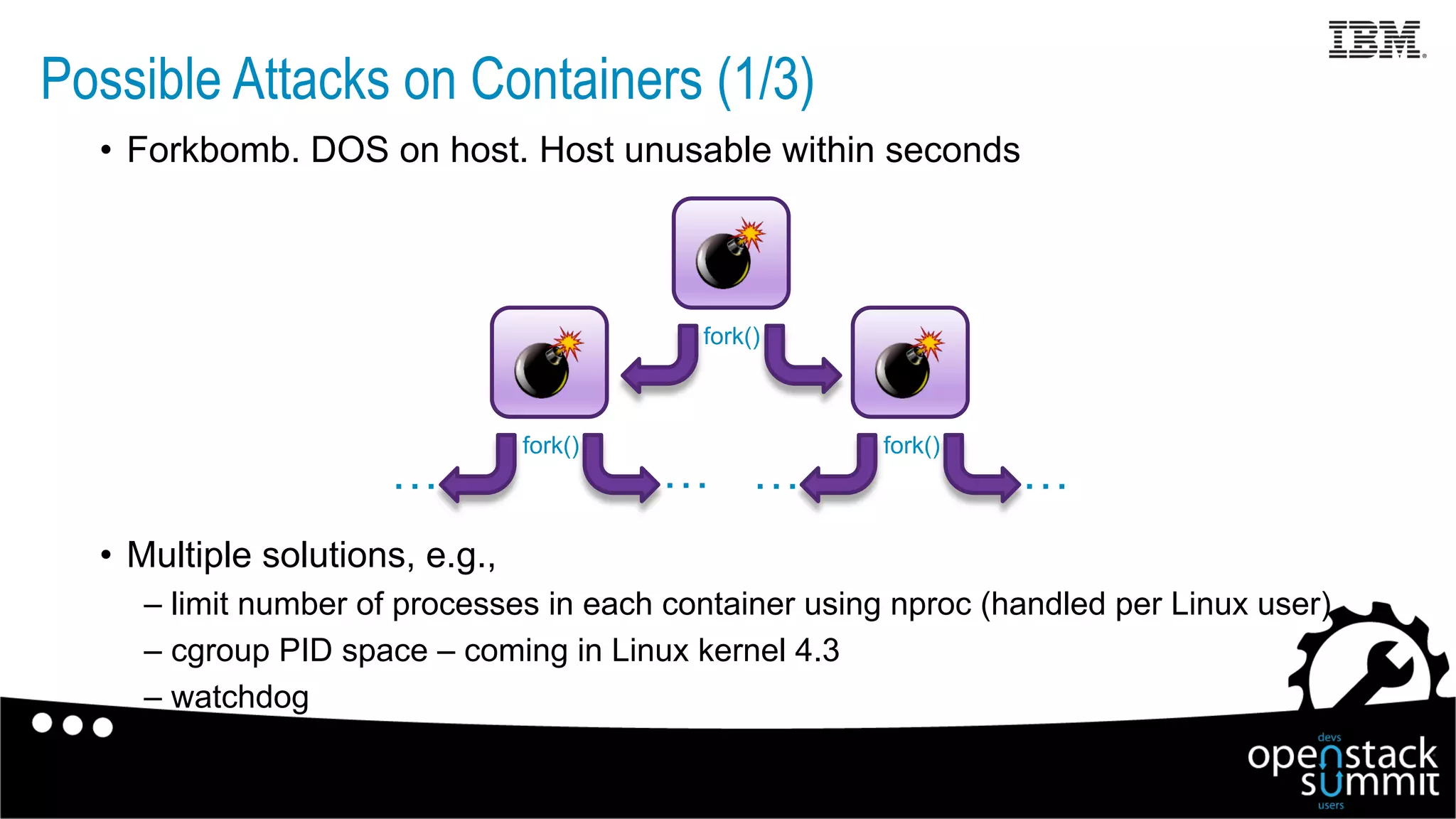
•  Forkbomb. DOS on host. Host unusable within seconds
•  Multiple solutions, e.g.,
– limit number of processes in each container using nproc (handled per Linux user)
– cgroup PID space – coming in Linux kernel 4.3
– watchdog
fork()
fork()fork()
…………
Possible Attacks on Containers (1/3)
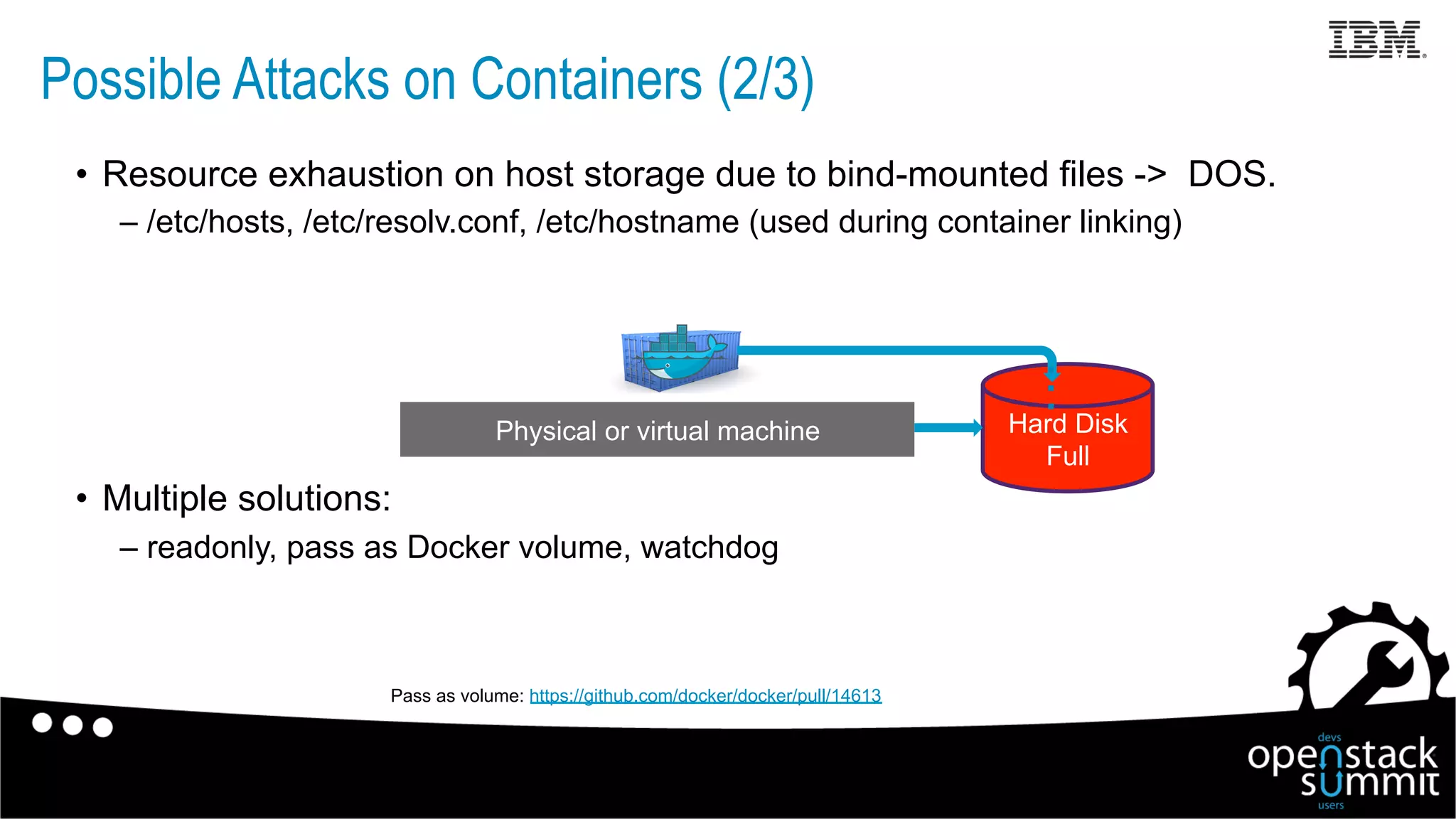
•  Resource exhaustion on host storage due to bind-mounted files -> DOS.
– /etc/hosts, /etc/resolv.conf, /etc/hostname (used during container linking)
•  Multiple solutions:
– readonly, pass as Docker volume, watchdog
Physical or virtual machine Hard Disk
Full
…
Pass as volume: https://github.com/docker/docker/pull/14613
Possible Attacks on Containers (2/3)
•  Application level vulnerabilities (e.g., weak credentials)
– Not a Docker issue
•  Security bad practice: specify passwords in a Dockerfile
– Passwords are then baked into a Docker image
– Recommended best practice to not include passwords in a Dockerfile
•  If applications with vulnerabilities or weak passwords deployed in
Docker containers are exposed to the Internet
– Potential for getting hacked
•  Follow security best practices for application as well
Possible Attacks on Containers (3/3)
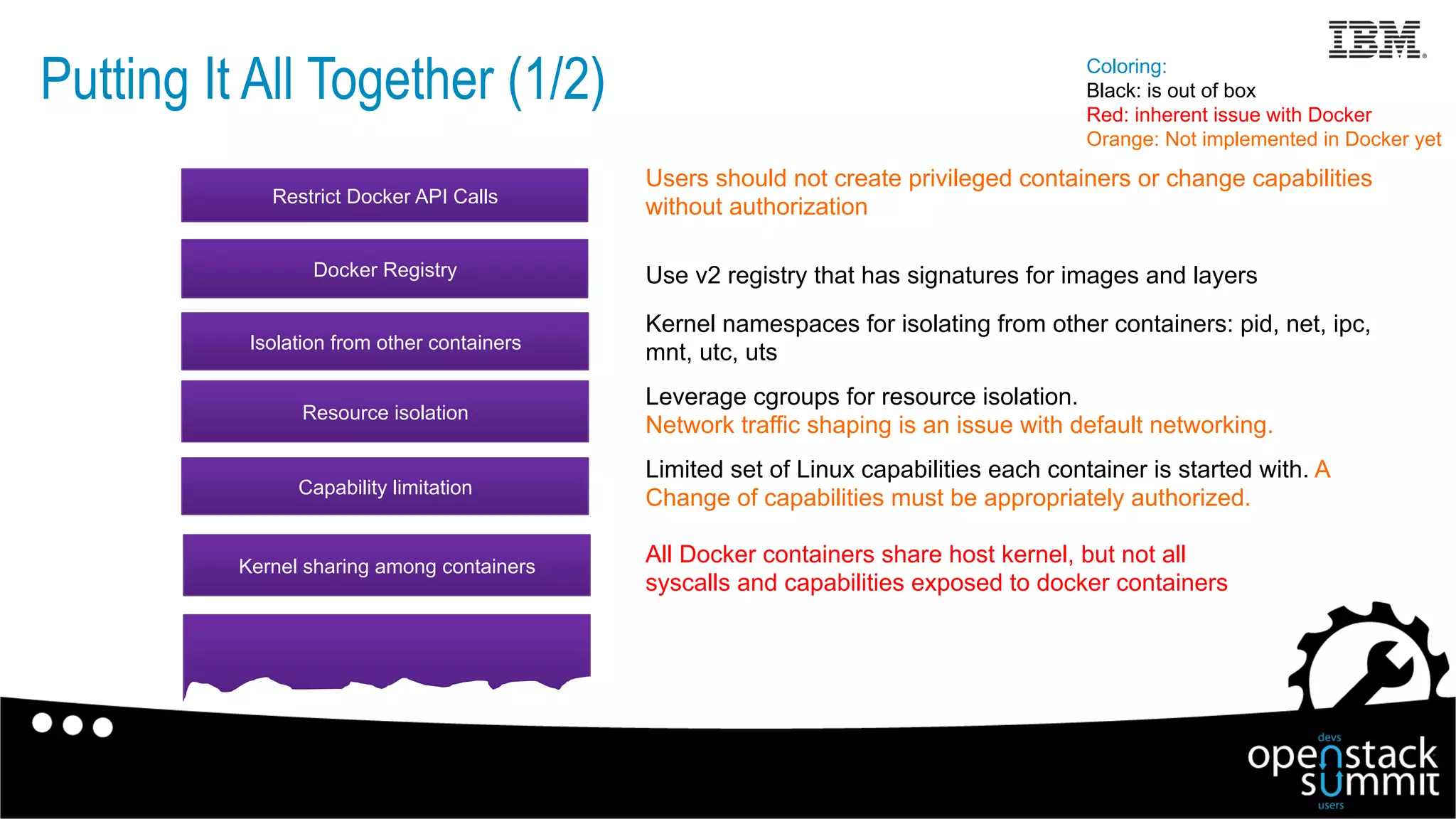
Limited set of Linux capabilities each container is started with. A
Change of capabilities must be appropriately authorized.Capability limitation
Isolation from other containers
Kernel sharing among containers
Resource isolation
Kernel namespaces for isolating from other containers: pid, net, ipc,
mnt, utc, uts
Leverage cgroups for resource isolation.
Network traffic shaping is an issue with default networking.
All Docker containers share host kernel, but not all
syscalls and capabilities exposed to docker containers
Coloring:
Black: is out of box
Red: inherent issue with Docker
Orange: Not implemented in Docker yet
Restrict Docker API Calls
Users should not create privileged containers or change capabilities
without authorization
Docker Registry Use v2 registry that has signatures for images and layers
Putting It All Together (1/2)
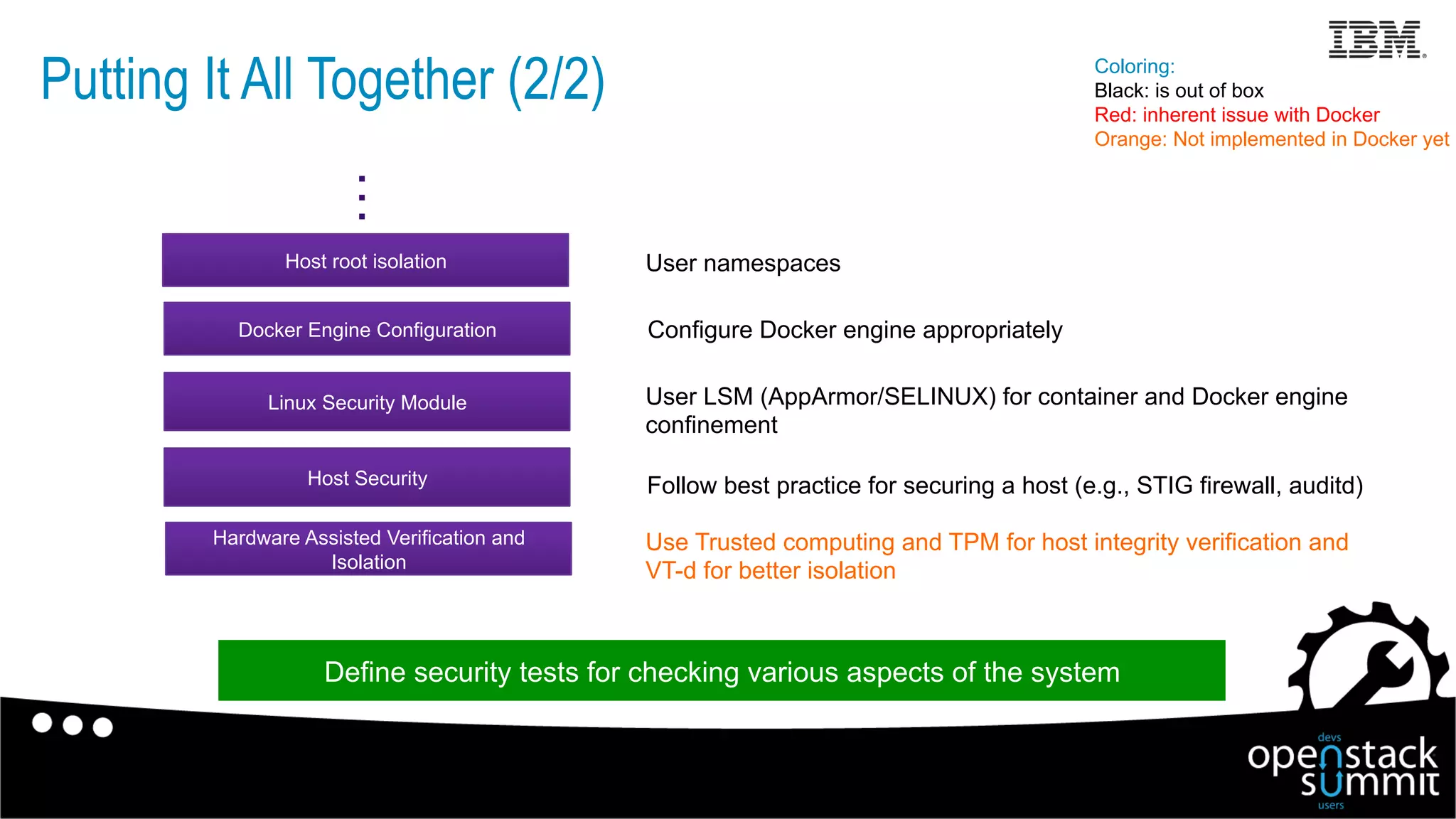
Follow best practice for securing a host (e.g., STIG firewall, auditd)
Linux Security Module
Host root isolation
Hardware Assisted Verification and
Isolation
Use Trusted computing and TPM for host integrity verification and
VT-d for better isolation
…
User namespaces
Docker Engine Configuration Configure Docker engine appropriately
Host Security
User LSM (AppArmor/SELINUX) for container and Docker engine
confinement
Coloring:
Black: is out of box
Red: inherent issue with Docker
Orange: Not implemented in Docker yet
Putting It All Together (2/2)
Define security tests for checking various aspects of the system
Useful Links (1/2)
Docker configuration
•  https://docs.docker.com/reference/run/
•  https://docs.docker.com/installation/ubuntulinux/
•  https://github.com/docker/docker/blob/master/daemon/execdriver/
native/template/default_template.go
Docker security checklist
•  https://benchmarks.cisecurity.org/tools2/docker/
CIS_Docker_1.6_Benchmark_v1.0.0.pdf
•  https://github.com/docker/docker-bench-security
cgroups
•  https://lwn.net/Articles/648292/
•  https://www.kernel.org/doc/Documentation/cgroups/blkio-controller.txt
•  https://github.com/torvalds/linux/blob/master/kernel/cgroup_pids.c
Docker cpu constraints
•  http://docs.docker.com/engine/reference/run/#cpu-share-constraint
•  http://docs.docker.com/engine/reference/run/#cpu-period-constraint
•  http://docs.docker.com/engine/reference/run/#cpu-quota-constraint
•  http://docs.docker.com/engine/reference/run/#cpuset-constraint
24
Useful Links (2/2)
25
AppArmor
•  http://manpages.ubuntu.com/manpages/raring/man5/apparmor.d.5.html
Linux capabilities
•  http://linux.die.net/man/7/capabilities
Linux user namespaces
•  http://man7.org/linux/man-pages/man7/user_namespaces.7.html
Linux Completely Fair Scheduler
•  http://www.ibm.com/developerworks/library/l-completely-fair-scheduler/
Seccomp
•  http://man7.org/linux/man-pages/man2/seccomp.2.html
Red Hat Security Technical Implementation Guide
•  https://www.stigviewer.com/stig/red_hat_enterprise_linux_6
Side channel attacks against multi-core processors
•  https://securityintelligence.com/side-channel-attacks-against-multicore-processors-in-
cross-vm-scenarios-part-i/
•  https://securityintelligence.com/side-channel-attacks-against-multicore-processors-in-
cross-vm-scenarios-part-ii/
•  https://securityintelligence.com/side-channel-attacks-against-multicore-processors-in-
cross-vm-scenarios-part-iii/

Unraveling Docker Security: Lessons From a Production Cloud

  • 1.
    Unraveling Docker Security:Lessons From a Production Cloud Salman Baset1, Stefan Berger2, Dimitrios Pendarakis3 1Research Staff Member, 2STSM, 3Manager and Research Staff Member IBM Research @salman_baset flickr.com/68397968@N07 Philip Estes STSM, IBM Cloud @estesp
  • 2.
    Outline •  What isDocker? •  Deployment models for Docker •  Threat model •  Protection against threats •  Docker registry and engine configuration •  Possible attacks •  Putting it all together Acknowledgements: IBM Containers on Bluemix & Docker, OpenStack, and Linux community
  • 3.
    engine What is Docker? Thistalk will focus on Docker container security REST API Shared Linux kernel Client/end user DockerHub Isolation relies on core Linux kernel technologies: cgroups, namespaces, capabilities, LSM restrictions, etc. Build, ship and run distributed applications via a common toolbox... “Docker” is now a fast-growing ecosystem of related projects: •  Compose •  Swarm •  Machine •  Advanced networking •  Registry (DTR) •  Kubernetes/Mesos •  ..among many others $ docker run redis $ docker run nginx $ docker run ..
  • 4.
    Deployment Model HostHost Single tenant,known code Containers run inside a machine (VM or baremetal) A model like VM-based multi-tenant clouds Security challenge Focus of this talk HostHost Multi-tenant, unknown code Containers of different tenants run on same machine, virtual nets Expose Docker API to tenants tenant 1 tenant 2
  • 5.
    Threat Model –Containers Attacks on Other Containers Running on Same Machine Physical or virtual machine ls /root myfile PID TTY TIME CMD 1 pts/0 00:00:00 bash 1. Which other containers are running and which processes others containers are running? 2. Which files are used by other containers? ifconfig, route, iptables, netstat3. Which network stack is used by other containers? sethostname(), gethostname()4. What is the hostname of other containers? Containers overview: http://www.slideshare.net/jpetazzo/anatomy-of-a-container-namespaces-cgroups-some-filesystem-magic-linuxcon pipe, semaphore, shared memory, memory-mapped file5. Are processes of other containers doing any IPC? Examples
  • 6.
    Threat Model –Containers Attacks on Host Machine Misconfigured container Malicious container Physical or virtual machine 1. Is root inside a container also root inside host? 2. Are CPU, memory, disk, and network limits obeyed? 3. Can a container gain privileged capabilities? 4. Are other limits obeyed, e.g., fork(), file descriptors? 5. Can a container mount or DOS host file systems? Examples
  • 7.
    Threat Model –Attacks Launched from Public Internet Threat model similar to a VM cloud Not covered in this talk Docker cloud 1. Scan open ports 2. Guess passwords of common services (e.g., ssh) 3. (D)DOS Examples
  • 8.
    Isolating from OtherContainers •  Kernel namespaces for limited system view – PID space: Process IDs – Mount space: Mount points – Network space: network interfaces/devices, stacks, ports, etc. – UTS space: sethostname(), gethostname() – IPC space: System V IPC, POSIX message queues •  In unprivileged containers, devices must be explicitly passed inside container using --device option Necessary but not sufficient A container started with privileged capabilities can sneak into other containers and load modules Useful links: http://man7.org/linux/man-pages/man7/namespaces.7.html
  • 9.
    Isolating from Host • User namespaces •  cgroups •  Linux capabilities •  Linux security modules AppArmor/SELINUX •  Seccomp •  Docker API •  Docker engine and storage configuration Physical or virtual machine
  • 10.
    Isolating from Host– User namespaces •  Key benefit of user namespaces: deprivileged root user 10 $  docker  run  –name  cntr  -­‐v  /bin:/host/bin  -­‐ti  busybox   /  #  id   uid=0(root)  gid=0(root)  groups=10(wheel)   /  #  cd  /host/bin   /host/bin  #  mv  sh  old   mv:  can't  rename  'sh':  Permission  denied   /host/bin  #  cp  /bin/busybox  ./sh   cp:  can't  create  './sh':  File  exists       Host root ≠ Container root $  docker  inspect  -­‐f  ‘{{  .State.Pid  }}’  cntr   8851   $  ps  -­‐u  200000      PID  TTY                    TIME  CMD    8851  pts/7        00:00:00  sh   Will be available in Docker 1.9
  • 11.
    •  Resource control - CPU -Memory - Swap - Blkio - Network Physical or virtual machine 0% Isolating from Host (and other containers) – control groups Useful links https://docs.docker.com/reference/run/ https://docs.docker.com/installation/ubuntulinux/ https://lwn.net/Articles/648292/ (cgroups) docker run --cpuset-cpus=0,1 --cpu-shares=512 -m 2G --memory-swap 2G --blkio-weight 500
  • 12.
    •  Docker’s cgroupsupport is a work in progress – New command line options being added – Network cgroup: currently not implemented – Linux kernel. cgroups for PID coming in 4.3 •  cgroup current limitations – Blkio: Bps enforcement seems difficult – Memory: needs configuration tweaking to ensure swap limits – No accounting for size of PID space •  cgroup v2 added to Linux now – Redesigned and improved interface – New hierarchical organization Isolating from Host (and other containers) – cgroups Useful links: http://events.linuxfoundation.org/sites/events/files/slides/2014-KLF.pdf http://events.linuxfoundation.org/sites/events/files/slides/2015-LCJ-cgroup-writeback.pdf
  • 13.
    Isolating from Host(and other containers) – Linux Capabilities 13 •  Linux capabilities: fine-grained access control mechanism besides root/non-root •  Restrict the ‘capabilities’ available for a process (or a thread) – e.g., load kernel modules, mount, network admin operations, set time •  Docker by default drops majority (24 out of 37) •  Capabilities can be added to a Docker container – e.g., docker run –cap-add=mount … Physical or virtual machine System Call Interface open() mount() Useful link: https://github.com/docker/docker/blob/master/daemon/execdriver/native/template/default_template.go https://docs.docker.com/reference/run/ http://linux.die.net/man/7/capabilities cat /proc/self/status | grep Cap CapInh: 00000000a80425fb CapPrm: 00000000a80425fb CapEff: 00000000a80425fb CapBnd: 00000000a80425fb Default Docker capabilities chown, dac_override, fsetid, fowner, mknod, net_raw, setgid, setuid, setfcap, setpcap, net_bind_service, sys_chroot, kill, audit_write
  • 14.
    Isolating from Host(and other containers) – LSM 14 Physical or virtual machine •  Linux security modules for Mandatory access control •  AppArmor defines restrictions on – file access, capability, network, mount AppArmor Policy open(‘/etc/hosts’,…) open(‘/dev/kmem’,…) Default Docker AppArmor Profile for Containers •  Denies to sensitive data, e.g., LSM path on host, kernel memory •  Denies unmount •  One single profile for all containers •  Can define custom profile per container Useful links: http://manpages.ubuntu.com/manpages/raring/man5/apparmor.d.5.html
  • 15.
    Isolating from Host– Seccomp 15 •  Strict the system calls that the calling thread is permitted to execute •  Example: CAP_SETUID capability is implemented using four system calls –  setuid(), setreuid(), setresuid(), setfsuid() –  Can restrict which calls within CAP_SETUID capability are called Physical or virtual machine System Call Interface setuid() setreuid() Useful link: http://man7.org/linux/man-pages/man2/seccomp.2.html
  • 16.
    Isolating from Host– Restrict Docker API •  Docker engine exposes an API •  API is powerful – and can perform admin operations, e.g., create privileged containers •  In near future, each API call will have authentication and authorization •  Until then, – Restrict the APIs available to an end user, e.g., •  Prevent privileged container creation •  Prevent addition of capabilities •  Ensure appropriate AppArmor profile is used Container clouddocker run --cap-add docker run –security-opt=“apparmor:profile” docker run --privileged
  • 17.
    Isolating from Host– Docker Engine and Storage Configuration Docker Engine •  Configure TLS for Docker Engine •  Set appropriate limits, e.g., nproc, file descriptors •  Docker Security Checklist and Docker Bench – https://benchmarks.cisecurity.org/tools2/docker/ CIS_Docker_1.6_Benchmark_v1.0.0.pdf https://github.com/docker/docker-bench-security Docker Storage •  Consider using devicemapper as storage •  Consider setting the default filesystem of containers as read only •  Bind mounted files in Docker have no quota. Consider making them read only.
  • 18.
    Docker Registry Security • Python-based Docker registry V1 weaknesses: – Image IDs are secrets (effectively) – No content verification; audit/validation difficult – Layer IDs randomly assigned, linked via “parent” entries (poor performance) •  Docker Registry V2 API and implementation in Docker 1.6 – All content is addressable via strong cryptographic hash – Content and naming separated – Safe distribution over untrusted channels, data is verifiable – Signing and verification now enabled via Docker Content Trust – Digests and manifests together uniquely define content+relationships
  • 19.
    •  Forkbomb. DOSon host. Host unusable within seconds •  Multiple solutions, e.g., – limit number of processes in each container using nproc (handled per Linux user) – cgroup PID space – coming in Linux kernel 4.3 – watchdog fork() fork()fork() ………… Possible Attacks on Containers (1/3)
  • 20.
    •  Resource exhaustionon host storage due to bind-mounted files -> DOS. – /etc/hosts, /etc/resolv.conf, /etc/hostname (used during container linking) •  Multiple solutions: – readonly, pass as Docker volume, watchdog Physical or virtual machine Hard Disk Full … Pass as volume: https://github.com/docker/docker/pull/14613 Possible Attacks on Containers (2/3)
  • 21.
    •  Application levelvulnerabilities (e.g., weak credentials) – Not a Docker issue •  Security bad practice: specify passwords in a Dockerfile – Passwords are then baked into a Docker image – Recommended best practice to not include passwords in a Dockerfile •  If applications with vulnerabilities or weak passwords deployed in Docker containers are exposed to the Internet – Potential for getting hacked •  Follow security best practices for application as well Possible Attacks on Containers (3/3)
  • 22.
    Limited set ofLinux capabilities each container is started with. A Change of capabilities must be appropriately authorized.Capability limitation Isolation from other containers Kernel sharing among containers Resource isolation Kernel namespaces for isolating from other containers: pid, net, ipc, mnt, utc, uts Leverage cgroups for resource isolation. Network traffic shaping is an issue with default networking. All Docker containers share host kernel, but not all syscalls and capabilities exposed to docker containers Coloring: Black: is out of box Red: inherent issue with Docker Orange: Not implemented in Docker yet Restrict Docker API Calls Users should not create privileged containers or change capabilities without authorization Docker Registry Use v2 registry that has signatures for images and layers Putting It All Together (1/2)
  • 23.
    Follow best practicefor securing a host (e.g., STIG firewall, auditd) Linux Security Module Host root isolation Hardware Assisted Verification and Isolation Use Trusted computing and TPM for host integrity verification and VT-d for better isolation … User namespaces Docker Engine Configuration Configure Docker engine appropriately Host Security User LSM (AppArmor/SELINUX) for container and Docker engine confinement Coloring: Black: is out of box Red: inherent issue with Docker Orange: Not implemented in Docker yet Putting It All Together (2/2) Define security tests for checking various aspects of the system
  • 24.
    Useful Links (1/2) Dockerconfiguration •  https://docs.docker.com/reference/run/ •  https://docs.docker.com/installation/ubuntulinux/ •  https://github.com/docker/docker/blob/master/daemon/execdriver/ native/template/default_template.go Docker security checklist •  https://benchmarks.cisecurity.org/tools2/docker/ CIS_Docker_1.6_Benchmark_v1.0.0.pdf •  https://github.com/docker/docker-bench-security cgroups •  https://lwn.net/Articles/648292/ •  https://www.kernel.org/doc/Documentation/cgroups/blkio-controller.txt •  https://github.com/torvalds/linux/blob/master/kernel/cgroup_pids.c Docker cpu constraints •  http://docs.docker.com/engine/reference/run/#cpu-share-constraint •  http://docs.docker.com/engine/reference/run/#cpu-period-constraint •  http://docs.docker.com/engine/reference/run/#cpu-quota-constraint •  http://docs.docker.com/engine/reference/run/#cpuset-constraint 24
  • 25.
    Useful Links (2/2) 25 AppArmor • http://manpages.ubuntu.com/manpages/raring/man5/apparmor.d.5.html Linux capabilities •  http://linux.die.net/man/7/capabilities Linux user namespaces •  http://man7.org/linux/man-pages/man7/user_namespaces.7.html Linux Completely Fair Scheduler •  http://www.ibm.com/developerworks/library/l-completely-fair-scheduler/ Seccomp •  http://man7.org/linux/man-pages/man2/seccomp.2.html Red Hat Security Technical Implementation Guide •  https://www.stigviewer.com/stig/red_hat_enterprise_linux_6 Side channel attacks against multi-core processors •  https://securityintelligence.com/side-channel-attacks-against-multicore-processors-in- cross-vm-scenarios-part-i/ •  https://securityintelligence.com/side-channel-attacks-against-multicore-processors-in- cross-vm-scenarios-part-ii/ •  https://securityintelligence.com/side-channel-attacks-against-multicore-processors-in- cross-vm-scenarios-part-iii/