@OpenShift
RHOpenShift
Security on a
Container Platform
Presenter: Veer Muchandi
Title: Principal Architect - Container Solutions
Social Handle: @VeerMuchandi
Blogs: https://blog.openshift.com/author/veermuchandi/
Agenda
Containers - A quick look
Container Security from the Host Operating System
Container Security at Build time
Container Security at Runtime
Container Platform (K8S Cluster) - Additional Security Features
Application Security
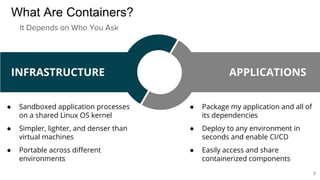
What Are Containers?
● Sandboxed application processes
on a shared Linux OS kernel
● Simpler, lighter, and denser than
virtual machines
● Portable across different
environments
● Package my application and all of
its dependencies
● Deploy to any environment in
seconds and enable CI/CD
● Easily access and share
containerized components
INFRASTRUCTURE APPLICATIONS
It Depends on Who You Ask
3
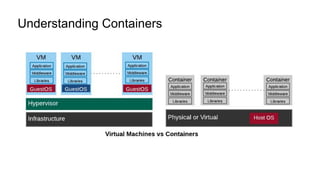
Understanding Containers
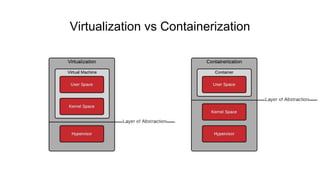
Virtualization vs Containerization
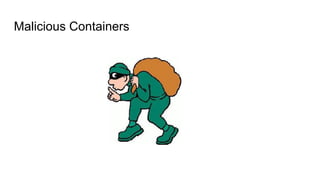
Malicious Containers
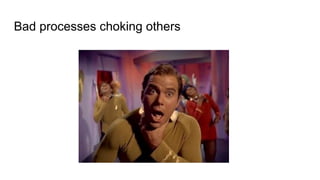
Bad processes choking others
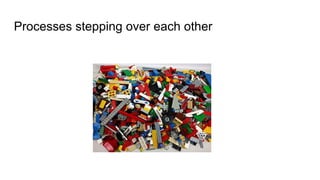
Processes stepping over each other
Container separation
● Containers all share the same kernel
● Containers security is about controlling the access to the kernel
● Limit the ability of the container to negatively impact
○ the infrastructure
○ other containers
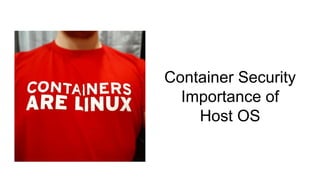
Container Security
Importance of
Host OS
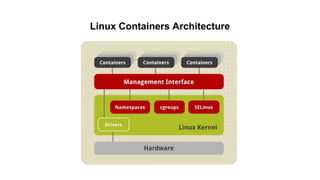
Linux Containers Architecture
Isolation with Linux Namespaces
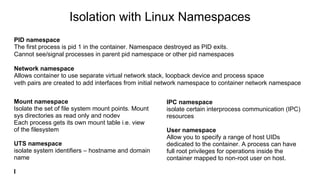
PID namespace
The first process is pid 1 in the container. Namespace destroyed as PID exits.
Cannot see/signal processes in parent pid namespace or other pid namespaces
Network namespace
Allows container to use separate virtual network stack, loopback device and process space
veth pairs are created to add interfaces from initial network namespace to container network namespace
Mount namespace
Isolate the set of file system mount points. Mount
sys directories as read only and nodev
Each process gets its own mount table i.e. view
of the filesystem
UTS namespace
isolate system identifiers – hostname and domain
name
I
IPC namespace
isolate certain interprocess communication (IPC)
resources
User namespace
Allow you to specify a range of host UIDs
dedicated to the container. A process can have
full root privileges for operations inside the
container mapped to non-root user on host.
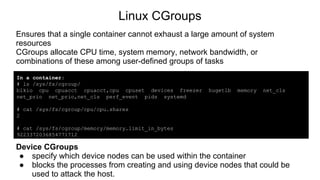
Linux CGroups
Ensures that a single container cannot exhaust a large amount of system
resources
CGroups allocate CPU time, system memory, network bandwidth, or
combinations of these among user-defined groups of tasks
In a container:
# ls /sys/fs/cgroup/
blkio cpu cpuacct cpuacct,cpu cpuset devices freezer hugetlb memory net_cls
net_prio net_prio,net_cls perf_event pids systemd
# cat /sys/fs/cgroup/cpu/cpu.shares
2
# cat /sys/fs/cgroup/memory/memory.limit_in_bytes
9223372036854771712
Device CGroups
● specify which device nodes can be used within the container
● blocks the processes from creating and using device nodes that could be
used to attack the host.
14
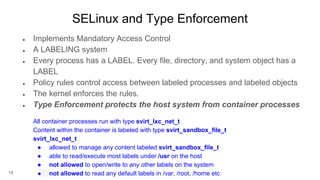
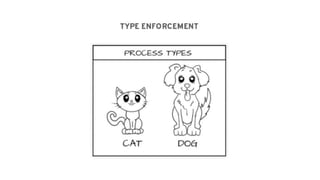
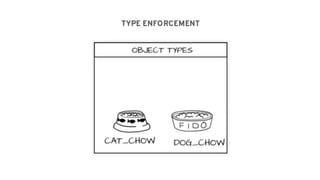
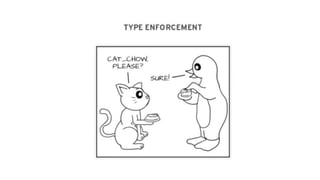
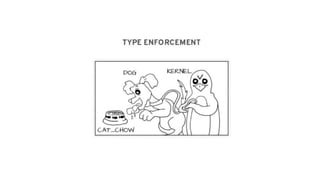
SELinux and Type Enforcement
● Implements Mandatory Access Control
● A LABELING system
● Every process has a LABEL. Every file, directory, and system object has a
LABEL
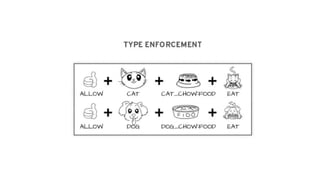
● Policy rules control access between labeled processes and labeled objects
● The kernel enforces the rules.
● Type Enforcement protects the host system from container processes
All container processes run with type svirt_lxc_net_t
Content within the container is labeled with type svirt_sandbox_file_t
svirt_lxc_net_t
● allowed to manage any content labeled svirt_sandbox_file_t
● able to read/execute most labels under /usr on the host
● not allowed to open/write to any other labels on the system
● not allowed to read any default labels in /var, /root, /home etc
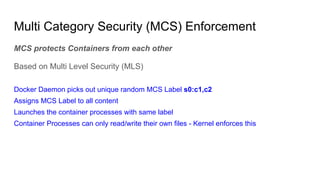
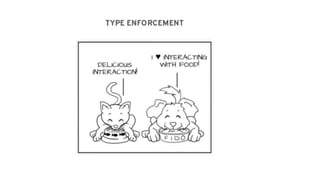
MCS protects Containers from each other
Based on Multi Level Security (MLS)
Docker Daemon picks out unique random MCS Label s0:c1,c2
Assigns MCS Label to all content
Launches the container processes with same label
Container Processes can only read/write their own files - Kernel enforces this
Multi Category Security (MCS) Enforcement
https://people.redhat.com/duffy/selinux/seli
nux-coloring-book_A4-Stapled.pdf
17
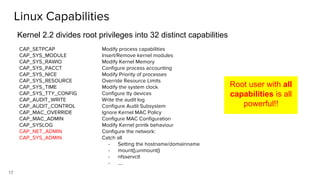
CAP_SETPCAP
CAP_SYS_MODULE
CAP_SYS_RAWIO
CAP_SYS_PACCT
CAP_SYS_NICE
CAP_SYS_RESOURCE
CAP_SYS_TIME
CAP_SYS_TTY_CONFIG
CAP_AUDIT_WRITE
CAP_AUDIT_CONTROL
CAP_MAC_OVERRIDE
CAP_MAC_ADMIN
CAP_SYSLOG
CAP_NET_ADMIN
CAP_SYS_ADMIN
Modify process capabilities
Insert/Remove kernel modules
Modify Kernel Memory
Configure process accounting
Modify Priority of processes
Override Resource Limits
Modify the system clock
Configure tty devices
Write the audit log
Configure Audit Subsystem
Ignore Kernel MAC Policy
Configure MAC Configuration
Modify Kernel printk behaviour
Configure the network:
Catch all
- Setting the hostname/domainname
- mount(),unmount()
- nfsservctl
- ….
Linux Capabilities
Kernel 2.2 divides root privileges into 32 distinct capabilities
Root user with all
capabilities is all
powerful!!
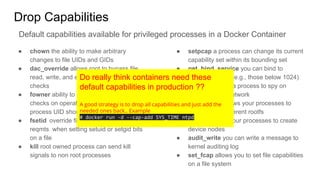
Drop Capabilities
● chown the ability to make arbitrary
changes to file UIDs and GIDs
● dac_override allows root to bypass file
read, write, and execute permission
checks
● fowner ability to bypass permission
checks on operations where the filesystem
process UID should match file UID
● fsetid override file owner and group
reqmts when setting setuid or setgid bits
on a file
● kill root owned process can send kill
signals to non root processes
● setpcap a process can change its current
capability set within its bounding set
● net_bind_service you can bind to
privileged ports (e.g., those below 1024)
● net_raw allows a process to spy on
packets on its network
● sys_chroot allows your processes to
chroot into a different rootfs
● mknod allows your processes to create
device nodes
● audit_write you can write a message to
kernel auditing log
● set_fcap allows you to set file capabilities
on a file system
Default capabilities available for privileged processes in a Docker Container
Do really think containers need these
default capabilities in production ??
A good strategy is to drop all capabilities and just add the
needed ones back.. Example
# docker run -d --cap-add SYS_TIME ntpd
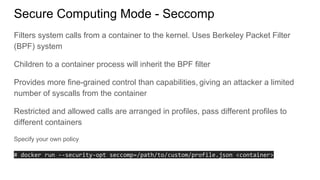
Secure Computing Mode - Seccomp
Filters system calls from a container to the kernel. Uses Berkeley Packet Filter
(BPF) system
Children to a container process will inherit the BPF filter
Provides more fine-grained control than capabilities, giving an attacker a limited
number of syscalls from the container
Restricted and allowed calls are arranged in profiles, pass different profiles to
different containers
Specify your own policy
# docker run --security-opt seccomp=/path/to/custom/profile.json <container>
20
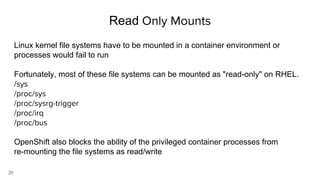
Read Only Mounts
Linux kernel file systems have to be mounted in a container environment or
processes would fail to run
Fortunately, most of these file systems can be mounted as "read-only" on RHEL.
/sys
/proc/sys
/proc/sysrg-trigger
/proc/irq
/proc/bus
OpenShift also blocks the ability of the privileged container processes from
re-mounting the file systems as read/write
Linux Namespaces
Linux CGroups
SELinux and MCS
Capabilities
Seccomp
Readonly mounts
Summary : Security from HostOS
Container Build Time Security
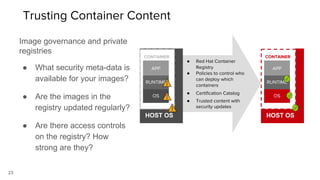
● Red Hat Container
Registry
● Policies to control who
can deploy which
containers
● Certification Catalog
● Trusted content with
security updates
HOST OS
CONTAINER
OS
RUNTIME
APP
HOST OS
CONTAINER
OS
RUNTIME
APP
23
Image governance and private
registries
● What security meta-data is
available for your images?
● Are the images in the
registry updated regularly?
● Are there access controls
on the registry? How
strong are they?
Trusting Container Content
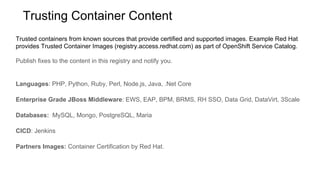
Trusted containers from known sources that provide certified and supported images. Example Red Hat
provides Trusted Container Images (registry.access.redhat.com) as part of OpenShift Service Catalog.
Publish fixes to the content in this registry and notify you.
Languages: PHP, Python, Ruby, Perl, Node.js, Java, .Net Core
Enterprise Grade JBoss Middleware: EWS, EAP, BPM, BRMS, RH SSO, Data Grid, DataVirt, 3Scale
Databases: MySQL, Mongo, PostgreSQL, Maria
CICD: Jenkins
Partners Images: Container Certification by Red Hat.
Trusting Container Content
25
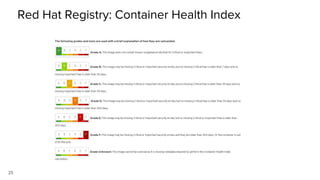
Red Hat Registry: Container Health Index
https://access.redhat.com/articles/2803031
Container Image Provenance
● Did the image come from a trusted source?
● Are you verifying image signatures?
● Are you signing container images?
● Does your Container Platform allow you to sign images?
$ oc adm policy add-cluster-role-to-user system:image-signer <user_name>
$ atomic push [--sign-by <gpg_key_id>] --type atomic <image>
Example: Image signing on OpenShift Container Platform
Example: Image verification on OpenShift Container Platform
$ oc adm policy add-cluster-role-to-user system:image-auditor <user_name>
$ oc adm verify-image-signature 
sha256:2bba968aedb7dd2aafe5fa8c7453f5ac36a0b9639f1bf5b03f95de325238b288 
--expected-identity 172.30.1.1:5000/openshift/nodejs:latest 
--public-key /etc/pki/rpm-gpg/RPM-GPG-KEY-redhat-release 
--save
Private Registries
Enterprise security policies may not allow your Container Images to be pushed to
a registry outside.
Or what if public registry (like DockerHub) is down?
Caching images in Private Registry
- Red Hat’s Quay
- JFrog Artifactory
- Docker Trusted Registry
28
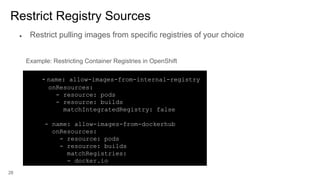
Restrict Registry Sources
- name: allow-images-from-internal-registry
onResources:
- resource: pods
- resource: builds
matchIntegratedRegistry: false
- name: allow-images-from-dockerhub
onResources:
- resource: pods
- resource: builds
matchRegistries:
- docker.io
Example: Restricting Container Registries in OpenShift
● Restrict pulling images from specific registries of your choice
Container Image Management Responsibilities
Operations/ Infrastructure admin
- Maintain Trusted OS Base Images (RHEL, RHEL-Atomic)
- Ensure these are good with Linux Kernel
Middleware Engineers/Architects
- Maintain Middleware Images
- Control build process - S2I, CICD
- Reference Architectures with Trusted middleware
Development teams
- Write code that layers on approved images
- Ensure code is clean, open source software vulnerabilities are handled
Summary: Container Security at Build Time
Trusted and Certified Containers from a known source
Container Image Provenance
Private Registries
Restricting Registry Sources
Responsibilities - Container Image Management
Container Runtime Security
Container Scanning
Frequency
Scan containers as soon as they are created
Scan containers that get into enterprise registry
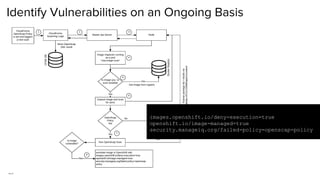
Ongoing basis- Identify any new vulnerabilities
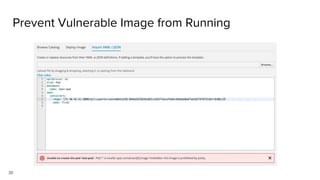
“Deny execution of containers that are vulnerable”
33
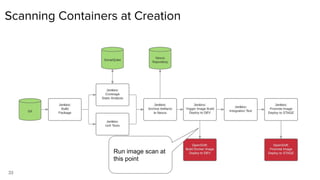
Scanning Containers at Creation
https://www.youtube.com/watch?v=65BnTLcDAJI
Run image scan at
this point
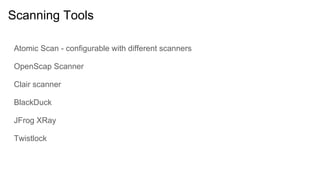
Scanning Tools
Atomic Scan - configurable with different scanners
OpenScap Scanner
Clair scanner
BlackDuck
JFrog XRay
Twistlock
35
Identify Vulnerabilities on an Ongoing Basis
images.openshift.io/deny-execution=true
openshift.io/image-managed=true
security.manageiq.org/failed-policy=openscap-policy
36
Prevent Vulnerable Image from Running
37
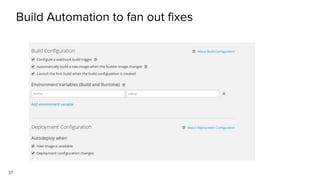
Build Automation to fan out fixes
Container Image Scanning and Scanning tools
Preventing vulnerable images from running
Build Automation to fan out security fixes
Summary: Container Security at Runtime
Additional Container Platform Security
Features
•
–
–
•
–
–
–
•
•
…​
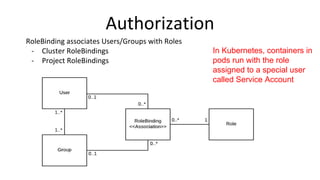
In Kubernetes, containers in
pods run with the role
assigned to a special user
called Service Account
43
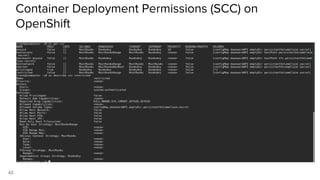
Container Deployment Permissions (SCC) on
OpenShift
44
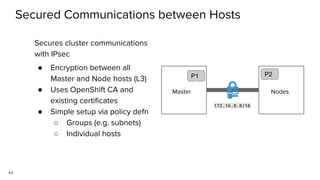
Secured Communications between Hosts
Secures cluster communications
with IPsec
● Encryption between all
Master and Node hosts (L3)
● Uses OpenShift CA and
existing certificates
● Simple setup via policy defn
○ Groups (e.g. subnets)
○ Individual hosts
Master
P1
Nodes
P2
172.16.0.0/16
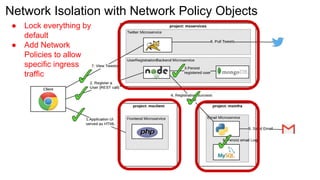
Network Isolation with Network Policy Objects
● Lock everything by
default
● Add Network
Policies to allow
specific ingress
traffic
46
Secure storage by using
● SELinux access controls
● Secure mounts
● Supplemental group IDs for shared storage
Securing Storage attached to Containers
47
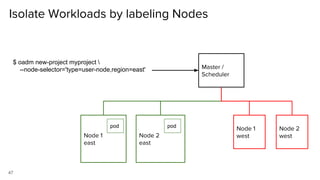
Isolate Workloads by labeling Nodes
Node 1
east
Node 2
east
Node 1
west
Node 2
west
Master /
Scheduler
$ oadm new-project myproject 
--node-selector='type=user-node,region=east'
pod pod
Authentication
Authorization
Security between Hosts
Network Security for your applications
Storage Security
Isolate workloads to specific nodes
Summary: Additional Platform Capabilities
Securing Applications
(running as containers)
50
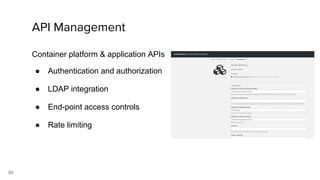
Container platform & application APIs
● Authentication and authorization
● LDAP integration
● End-point access controls
● Rate limiting
API Management
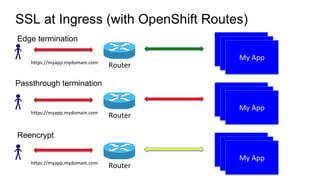
SSL at Ingress (with OpenShift Routes)
Edge termination
Passthrough termination
Reencrypt
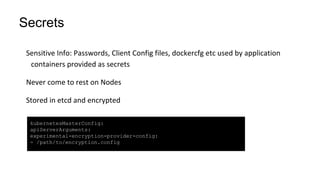
Secrets
kubernetesMasterConfig:
apiServerArguments:
experimental-encryption-provider-config:
- /path/to/encryption.config
53
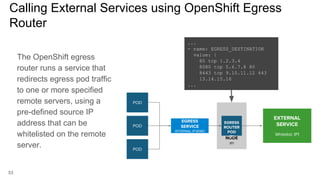
Calling External Services using OpenShift Egress
Router
The OpenShift egress
router runs a service that
redirects egress pod traffic
to one or more specified
remote servers, using a
pre-defined source IP
address that can be
whitelisted on the remote
server.
NODE
IP1
EGRESS
ROUTER
POD
IP1
EGRESS
SERVICE
INTERNAL-IP:8080
EXTERNAL
SERVICE
Whitelist: IP1
POD
POD
POD
...
- name: EGRESS_DESTINATION
value: |
80 tcp 1.2.3.4
8080 tcp 5.6.7.8 80
8443 tcp 9.10.11.12 443
13.14.15.16
...
API Management
SSL
Secrets
Connecting to external services
Summary: Application Security
Istio
Identity management, Certification distribution, Certs refresh with Citadel
Network Security, routing rules, traffic management, auditing and many more
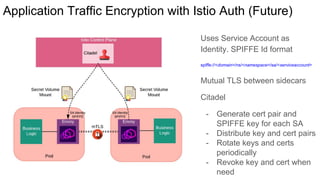
Application Traffic Encryption with Istio Auth (Future)
Uses Service Account as
Identity. SPIFFE Id format
spiffe://<domain>/ns/<namespace>/sa/<serviceaccount>
Mutual TLS between sidecars
Citadel
- Generate cert pair and
SPIFFE key for each SA
- Distribute key and cert pairs
- Rotate keys and certs
periodically
- Revoke key and cert when
need
Questions
@OpenShift
RHOpenShift
Thank you!!
Learn more at Atlanta Kubernetes OpenShift Meetup
https://www.meetup.com/OpenShift-Kubernetes-Atlanta
65
SELINUX - MAC - MCS - Process
system_u:system_r:container_runtime_t:s0
SElinux Policy module for the container
The OOTB SElinux policy container.te defines
what you can execute and access with the label
container_runtime_t
[root@osemaster ~]# ps -efZ | grep docker-containerd-shim-current
system_u:system_r:container_runtime_t:s0 root 3035 1479 0 Feb15 ? 00:00:01
/usr/bin/docker-containerd-shim-current
4d254785cbc6ee7aae8facc48555251e2385f65d89553b319b6324b1501e4b16
/var/run/docker/libcontainerd/4d254785cbc6ee7aae8facc48555251e2385f65d89553b319b6324b1501e4b16
/usr/libexec/docker/docker-runc-current
66
SELINUX - MAC - MCS - Files
container_var_lib_t / svirt_sandbox_file_t
SElinux Policy module for the container
[root@osemaster ~]# ls -lZ
/var/lib/docker/containers/97de4217a04b6532e312cfb3e4638529aeb7dfa281a2cc067e092fcee82e6737
/
-rw-r-----. root root system_u:object_r:container_var_lib_t:s0
97de4217a04b6532e312cfb3e4638529aeb7dfa281a2cc067e092fcee82e6737-json.log
-rw-rw-rw-. root root system_u:object_r:container_var_lib_t:s0 config.v2.json
-rw-rw-rw-. root root system_u:object_r:container_var_lib_t:s0 hostconfig.json
-rw-r--r--. root root system_u:object_r:svirt_sandbox_file_t:s0 hostname
-rw-r--r--. root root system_u:object_r:svirt_sandbox_file_t:s0:c0,c1 hosts
-rw-r--r--. root root system_u:object_r:svirt_sandbox_file_t:s0 resolv.conf
-rw-r--r--. root root system_u:object_r:container_var_lib_t:s0 resolv.conf.hash
drwxr-xr-x. root root system_u:object_r:svirt_sandbox_file_t:s0:c0,c1 secrets
drwx------. root root system_u:object_r:container_var_lib_t:s0 shm

Security on a Container Platform

  • 1.
    @OpenShift RHOpenShift Security on a ContainerPlatform Presenter: Veer Muchandi Title: Principal Architect - Container Solutions Social Handle: @VeerMuchandi Blogs: https://blog.openshift.com/author/veermuchandi/
  • 2.
    Agenda Containers - Aquick look Container Security from the Host Operating System Container Security at Build time Container Security at Runtime Container Platform (K8S Cluster) - Additional Security Features Application Security
  • 3.
    What Are Containers? ●Sandboxed application processes on a shared Linux OS kernel ● Simpler, lighter, and denser than virtual machines ● Portable across different environments ● Package my application and all of its dependencies ● Deploy to any environment in seconds and enable CI/CD ● Easily access and share containerized components INFRASTRUCTURE APPLICATIONS It Depends on Who You Ask 3
  • 4.
  • 5.
  • 6.
  • 7.
  • 8.
  • 9.
    Container separation ● Containersall share the same kernel ● Containers security is about controlling the access to the kernel ● Limit the ability of the container to negatively impact ○ the infrastructure ○ other containers
  • 10.
  • 11.
  • 12.
    Isolation with LinuxNamespaces PID namespace The first process is pid 1 in the container. Namespace destroyed as PID exits. Cannot see/signal processes in parent pid namespace or other pid namespaces Network namespace Allows container to use separate virtual network stack, loopback device and process space veth pairs are created to add interfaces from initial network namespace to container network namespace Mount namespace Isolate the set of file system mount points. Mount sys directories as read only and nodev Each process gets its own mount table i.e. view of the filesystem UTS namespace isolate system identifiers – hostname and domain name I IPC namespace isolate certain interprocess communication (IPC) resources User namespace Allow you to specify a range of host UIDs dedicated to the container. A process can have full root privileges for operations inside the container mapped to non-root user on host.
  • 13.
    Linux CGroups Ensures thata single container cannot exhaust a large amount of system resources CGroups allocate CPU time, system memory, network bandwidth, or combinations of these among user-defined groups of tasks In a container: # ls /sys/fs/cgroup/ blkio cpu cpuacct cpuacct,cpu cpuset devices freezer hugetlb memory net_cls net_prio net_prio,net_cls perf_event pids systemd # cat /sys/fs/cgroup/cpu/cpu.shares 2 # cat /sys/fs/cgroup/memory/memory.limit_in_bytes 9223372036854771712 Device CGroups ● specify which device nodes can be used within the container ● blocks the processes from creating and using device nodes that could be used to attack the host.
  • 14.
    14 SELinux and TypeEnforcement ● Implements Mandatory Access Control ● A LABELING system ● Every process has a LABEL. Every file, directory, and system object has a LABEL ● Policy rules control access between labeled processes and labeled objects ● The kernel enforces the rules. ● Type Enforcement protects the host system from container processes All container processes run with type svirt_lxc_net_t Content within the container is labeled with type svirt_sandbox_file_t svirt_lxc_net_t ● allowed to manage any content labeled svirt_sandbox_file_t ● able to read/execute most labels under /usr on the host ● not allowed to open/write to any other labels on the system ● not allowed to read any default labels in /var, /root, /home etc
  • 15.
    MCS protects Containersfrom each other Based on Multi Level Security (MLS) Docker Daemon picks out unique random MCS Label s0:c1,c2 Assigns MCS Label to all content Launches the container processes with same label Container Processes can only read/write their own files - Kernel enforces this Multi Category Security (MCS) Enforcement
  • 16.
  • 17.
    17 CAP_SETPCAP CAP_SYS_MODULE CAP_SYS_RAWIO CAP_SYS_PACCT CAP_SYS_NICE CAP_SYS_RESOURCE CAP_SYS_TIME CAP_SYS_TTY_CONFIG CAP_AUDIT_WRITE CAP_AUDIT_CONTROL CAP_MAC_OVERRIDE CAP_MAC_ADMIN CAP_SYSLOG CAP_NET_ADMIN CAP_SYS_ADMIN Modify process capabilities Insert/Removekernel modules Modify Kernel Memory Configure process accounting Modify Priority of processes Override Resource Limits Modify the system clock Configure tty devices Write the audit log Configure Audit Subsystem Ignore Kernel MAC Policy Configure MAC Configuration Modify Kernel printk behaviour Configure the network: Catch all - Setting the hostname/domainname - mount(),unmount() - nfsservctl - …. Linux Capabilities Kernel 2.2 divides root privileges into 32 distinct capabilities Root user with all capabilities is all powerful!!
  • 18.
    Drop Capabilities ● chownthe ability to make arbitrary changes to file UIDs and GIDs ● dac_override allows root to bypass file read, write, and execute permission checks ● fowner ability to bypass permission checks on operations where the filesystem process UID should match file UID ● fsetid override file owner and group reqmts when setting setuid or setgid bits on a file ● kill root owned process can send kill signals to non root processes ● setpcap a process can change its current capability set within its bounding set ● net_bind_service you can bind to privileged ports (e.g., those below 1024) ● net_raw allows a process to spy on packets on its network ● sys_chroot allows your processes to chroot into a different rootfs ● mknod allows your processes to create device nodes ● audit_write you can write a message to kernel auditing log ● set_fcap allows you to set file capabilities on a file system Default capabilities available for privileged processes in a Docker Container Do really think containers need these default capabilities in production ?? A good strategy is to drop all capabilities and just add the needed ones back.. Example # docker run -d --cap-add SYS_TIME ntpd
  • 19.
    Secure Computing Mode- Seccomp Filters system calls from a container to the kernel. Uses Berkeley Packet Filter (BPF) system Children to a container process will inherit the BPF filter Provides more fine-grained control than capabilities, giving an attacker a limited number of syscalls from the container Restricted and allowed calls are arranged in profiles, pass different profiles to different containers Specify your own policy # docker run --security-opt seccomp=/path/to/custom/profile.json <container>
  • 20.
    20 Read Only Mounts Linuxkernel file systems have to be mounted in a container environment or processes would fail to run Fortunately, most of these file systems can be mounted as "read-only" on RHEL. /sys /proc/sys /proc/sysrg-trigger /proc/irq /proc/bus OpenShift also blocks the ability of the privileged container processes from re-mounting the file systems as read/write
  • 21.
    Linux Namespaces Linux CGroups SELinuxand MCS Capabilities Seccomp Readonly mounts Summary : Security from HostOS
  • 22.
  • 23.
    ● Red HatContainer Registry ● Policies to control who can deploy which containers ● Certification Catalog ● Trusted content with security updates HOST OS CONTAINER OS RUNTIME APP HOST OS CONTAINER OS RUNTIME APP 23 Image governance and private registries ● What security meta-data is available for your images? ● Are the images in the registry updated regularly? ● Are there access controls on the registry? How strong are they? Trusting Container Content
  • 24.
    Trusted containers fromknown sources that provide certified and supported images. Example Red Hat provides Trusted Container Images (registry.access.redhat.com) as part of OpenShift Service Catalog. Publish fixes to the content in this registry and notify you. Languages: PHP, Python, Ruby, Perl, Node.js, Java, .Net Core Enterprise Grade JBoss Middleware: EWS, EAP, BPM, BRMS, RH SSO, Data Grid, DataVirt, 3Scale Databases: MySQL, Mongo, PostgreSQL, Maria CICD: Jenkins Partners Images: Container Certification by Red Hat. Trusting Container Content
  • 25.
    25 Red Hat Registry:Container Health Index https://access.redhat.com/articles/2803031
  • 26.
    Container Image Provenance ●Did the image come from a trusted source? ● Are you verifying image signatures? ● Are you signing container images? ● Does your Container Platform allow you to sign images? $ oc adm policy add-cluster-role-to-user system:image-signer <user_name> $ atomic push [--sign-by <gpg_key_id>] --type atomic <image> Example: Image signing on OpenShift Container Platform Example: Image verification on OpenShift Container Platform $ oc adm policy add-cluster-role-to-user system:image-auditor <user_name> $ oc adm verify-image-signature sha256:2bba968aedb7dd2aafe5fa8c7453f5ac36a0b9639f1bf5b03f95de325238b288 --expected-identity 172.30.1.1:5000/openshift/nodejs:latest --public-key /etc/pki/rpm-gpg/RPM-GPG-KEY-redhat-release --save
  • 27.
    Private Registries Enterprise securitypolicies may not allow your Container Images to be pushed to a registry outside. Or what if public registry (like DockerHub) is down? Caching images in Private Registry - Red Hat’s Quay - JFrog Artifactory - Docker Trusted Registry
  • 28.
    28 Restrict Registry Sources -name: allow-images-from-internal-registry onResources: - resource: pods - resource: builds matchIntegratedRegistry: false - name: allow-images-from-dockerhub onResources: - resource: pods - resource: builds matchRegistries: - docker.io Example: Restricting Container Registries in OpenShift ● Restrict pulling images from specific registries of your choice
  • 29.
    Container Image ManagementResponsibilities Operations/ Infrastructure admin - Maintain Trusted OS Base Images (RHEL, RHEL-Atomic) - Ensure these are good with Linux Kernel Middleware Engineers/Architects - Maintain Middleware Images - Control build process - S2I, CICD - Reference Architectures with Trusted middleware Development teams - Write code that layers on approved images - Ensure code is clean, open source software vulnerabilities are handled
  • 30.
    Summary: Container Securityat Build Time Trusted and Certified Containers from a known source Container Image Provenance Private Registries Restricting Registry Sources Responsibilities - Container Image Management
  • 31.
  • 32.
    Container Scanning Frequency Scan containersas soon as they are created Scan containers that get into enterprise registry Ongoing basis- Identify any new vulnerabilities “Deny execution of containers that are vulnerable”
  • 33.
    33 Scanning Containers atCreation https://www.youtube.com/watch?v=65BnTLcDAJI Run image scan at this point
  • 34.
    Scanning Tools Atomic Scan- configurable with different scanners OpenScap Scanner Clair scanner BlackDuck JFrog XRay Twistlock
  • 35.
    35 Identify Vulnerabilities onan Ongoing Basis images.openshift.io/deny-execution=true openshift.io/image-managed=true security.manageiq.org/failed-policy=openscap-policy
  • 36.
  • 37.
  • 38.
    Container Image Scanningand Scanning tools Preventing vulnerable images from running Build Automation to fan out security fixes Summary: Container Security at Runtime
  • 39.
  • 40.
  • 42.
    In Kubernetes, containersin pods run with the role assigned to a special user called Service Account
  • 43.
  • 44.
    44 Secured Communications betweenHosts Secures cluster communications with IPsec ● Encryption between all Master and Node hosts (L3) ● Uses OpenShift CA and existing certificates ● Simple setup via policy defn ○ Groups (e.g. subnets) ○ Individual hosts Master P1 Nodes P2 172.16.0.0/16
  • 45.
    Network Isolation withNetwork Policy Objects ● Lock everything by default ● Add Network Policies to allow specific ingress traffic
  • 46.
    46 Secure storage byusing ● SELinux access controls ● Secure mounts ● Supplemental group IDs for shared storage Securing Storage attached to Containers
  • 47.
    47 Isolate Workloads bylabeling Nodes Node 1 east Node 2 east Node 1 west Node 2 west Master / Scheduler $ oadm new-project myproject --node-selector='type=user-node,region=east' pod pod
  • 48.
    Authentication Authorization Security between Hosts NetworkSecurity for your applications Storage Security Isolate workloads to specific nodes Summary: Additional Platform Capabilities
  • 49.
  • 50.
    50 Container platform &application APIs ● Authentication and authorization ● LDAP integration ● End-point access controls ● Rate limiting API Management
  • 51.
    SSL at Ingress(with OpenShift Routes) Edge termination Passthrough termination Reencrypt
  • 52.
  • 53.
    53 Calling External Servicesusing OpenShift Egress Router The OpenShift egress router runs a service that redirects egress pod traffic to one or more specified remote servers, using a pre-defined source IP address that can be whitelisted on the remote server. NODE IP1 EGRESS ROUTER POD IP1 EGRESS SERVICE INTERNAL-IP:8080 EXTERNAL SERVICE Whitelist: IP1 POD POD POD ... - name: EGRESS_DESTINATION value: | 80 tcp 1.2.3.4 8080 tcp 5.6.7.8 80 8443 tcp 9.10.11.12 443 13.14.15.16 ...
  • 54.
    API Management SSL Secrets Connecting toexternal services Summary: Application Security
  • 55.
    Istio Identity management, Certificationdistribution, Certs refresh with Citadel Network Security, routing rules, traffic management, auditing and many more
  • 56.
    Application Traffic Encryptionwith Istio Auth (Future) Uses Service Account as Identity. SPIFFE Id format spiffe://<domain>/ns/<namespace>/sa/<serviceaccount> Mutual TLS between sidecars Citadel - Generate cert pair and SPIFFE key for each SA - Distribute key and cert pairs - Rotate keys and certs periodically - Revoke key and cert when need
  • 57.
  • 58.
    @OpenShift RHOpenShift Thank you!! Learn moreat Atlanta Kubernetes OpenShift Meetup https://www.meetup.com/OpenShift-Kubernetes-Atlanta
  • 65.
    65 SELINUX - MAC- MCS - Process system_u:system_r:container_runtime_t:s0 SElinux Policy module for the container The OOTB SElinux policy container.te defines what you can execute and access with the label container_runtime_t [root@osemaster ~]# ps -efZ | grep docker-containerd-shim-current system_u:system_r:container_runtime_t:s0 root 3035 1479 0 Feb15 ? 00:00:01 /usr/bin/docker-containerd-shim-current 4d254785cbc6ee7aae8facc48555251e2385f65d89553b319b6324b1501e4b16 /var/run/docker/libcontainerd/4d254785cbc6ee7aae8facc48555251e2385f65d89553b319b6324b1501e4b16 /usr/libexec/docker/docker-runc-current
  • 66.
    66 SELINUX - MAC- MCS - Files container_var_lib_t / svirt_sandbox_file_t SElinux Policy module for the container [root@osemaster ~]# ls -lZ /var/lib/docker/containers/97de4217a04b6532e312cfb3e4638529aeb7dfa281a2cc067e092fcee82e6737 / -rw-r-----. root root system_u:object_r:container_var_lib_t:s0 97de4217a04b6532e312cfb3e4638529aeb7dfa281a2cc067e092fcee82e6737-json.log -rw-rw-rw-. root root system_u:object_r:container_var_lib_t:s0 config.v2.json -rw-rw-rw-. root root system_u:object_r:container_var_lib_t:s0 hostconfig.json -rw-r--r--. root root system_u:object_r:svirt_sandbox_file_t:s0 hostname -rw-r--r--. root root system_u:object_r:svirt_sandbox_file_t:s0:c0,c1 hosts -rw-r--r--. root root system_u:object_r:svirt_sandbox_file_t:s0 resolv.conf -rw-r--r--. root root system_u:object_r:container_var_lib_t:s0 resolv.conf.hash drwxr-xr-x. root root system_u:object_r:svirt_sandbox_file_t:s0:c0,c1 secrets drwx------. root root system_u:object_r:container_var_lib_t:s0 shm