DATA CENTER
Introduction
1
WHAT IS A DATA CENTER
Data centers provide a range on information
technology services
 These services include:
 Email
 Data storage and management
 Web hosting
 Application Hosting
2
WHAT IS A DATA CENTER
 Data centers are designed to
house information systems and
related components such as:
 Servers
 Routers
 Storage
 Uninterruptable power
supplies (UPS)
 Cooling Units
 Power Distribution Unit (PDU)
 Data centers have unique and
typically large power
requirements
 They are often raised floor
designs to accommodate the
large amount of cables
required.
3
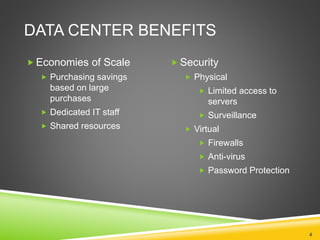
DATA CENTER BENEFITS
4
 Economies of Scale
 Purchasing savings
based on large
purchases
 Dedicated IT staff
 Shared resources
 Security
 Physical
 Limited access to
servers
 Surveillance
 Virtual
 Firewalls
 Anti-virus
 Password Protection
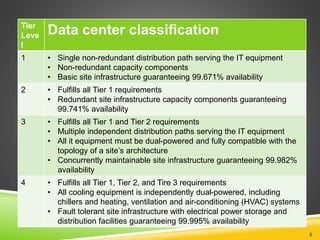
Tier
Leve
l
Data center classification
1 • Single non-redundant distribution path serving the IT equipment
• Non-redundant capacity components
• Basic site infrastructure guaranteeing 99.671% availability
2 • Fulfills all Tier 1 requirements
• Redundant site infrastructure capacity components guaranteeing
99.741% availability
3 • Fulfills all Tier 1 and Tier 2 requirements
• Multiple independent distribution paths serving the IT equipment
• All it equipment must be dual-powered and fully compatible with the
topology of a site’s architecture
• Concurrently maintainable site infrastructure guaranteeing 99.982%
availability
4 • Fulfills all Tier 1, Tier 2, and Tire 3 requirements
• All cooling equipment is independently dual-powered, including
chillers and heating, ventilation and air-conditioning (HVAC) systems
• Fault tolerant site infrastructure with electrical power storage and
distribution facilities guaranteeing 99.995% availability
5
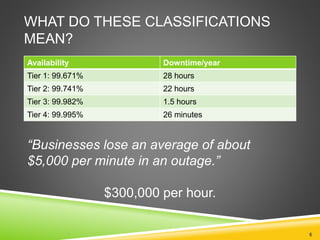
WHAT DO THESE CLASSIFICATIONS
MEAN?
Availability Downtime/year
Tier 1: 99.671% 28 hours
Tier 2: 99.741% 22 hours
Tier 3: 99.982% 1.5 hours
Tier 4: 99.995% 26 minutes
6
“Businesses lose an average of about
$5,000 per minute in an outage.”
$300,000 per hour.
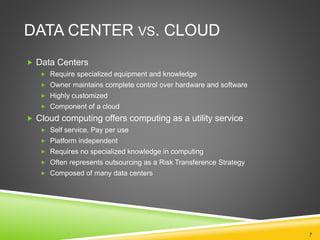
DATA CENTER VS. CLOUD
 Data Centers
 Require specialized equipment and knowledge
 Owner maintains complete control over hardware and software
 Highly customized
 Component of a cloud
 Cloud computing offers computing as a utility service
 Self service, Pay per use
 Platform independent
 Requires no specialized knowledge in computing
 Often represents outsourcing as a Risk Transference Strategy
 Composed of many data centers
7
DATA CENTER VS. CLOUD
In simple terms:
 “Think of it as taking a taxi vs. buying a car to make a
trip between San Francisco and Palo Alto. If you only
make the trip once a quarter, it is cheaper to take a
taxi. If you make the trip every day, then you are better
off buying a car. The difference is the duty cycle. If you
are running infrastructure with a duty cycle of 100%, it
may make sense to run in-house.”
8
CLOUD SERVICES
Types of service offered
 Infrastructure as a service (IaaS) ex. Servers, Networking, etc.
 Platform as a service (PaaS) ex. Windows, Red Hat, etc.
 Application or Software as a service (SaaS) ex. Email, Oracle,
MSWord etc.
9
DATA CENTER COMPONENTS:
LOCATION
Important considerations
 Frequency of conditions likely to result in disaster situations
 Distance from energy source
 Reliability of energy source
 Climate
 Choosing a location with a cool, mild climate, provides the possibility of a
data center that does not require air conditioning units.
10
DATA CENTERS
 Microsoft Tour
 http://www.globalfoundationservices.com/infrastructure/videos.html
 Purdue Data Centers
 Research Computing Cluster Steele http://www.rcac.purdue.edu/userinfo/resources/steele/userguide.cfm
 Currently housed in a HP Pod container http://www.flickr.com/photos/vax-o-matic/sets/72157624103673857/
 ITAP Data Centers Service Catalog http://www.itap.purdue.edu/service/catalog/alpha/
 Cisco Richardson Interactive data center tour
 http://www.cisco.com/web/about/ciscoitatwork/data_center/flash/dc_experienc
e/rdc_tour.html
11
DATA CENTER COMPONENTS:
BUILDING
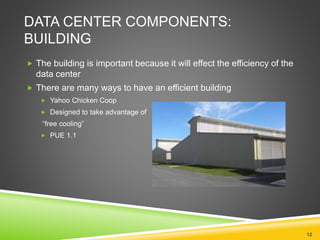
 The building is important because it will effect the efficiency of the
data center
 There are many ways to have an efficient building
 Yahoo Chicken Coop
 Designed to take advantage of
“free cooling”
 PUE 1.1
12
DATA CENTER COMPONENTS:
BUILDING (CONTINUED)
 Mare Nostrum “Divine Data Cruncher”
 Data Center in a Barcelona Cathedral
 PUE 1.3
13
DATA CENTER COMPONENTS:
BUILDING (CONTINUED)
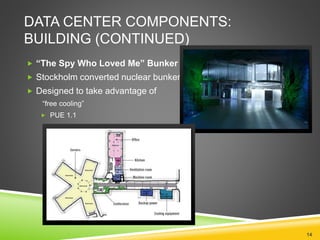
 “The Spy Who Loved Me” Bunker
 Stockholm converted nuclear bunker
 Designed to take advantage of
“free cooling”
 PUE 1.1
14
DATA CENTER COMPONENTS:
BUILDING (CONTINUED)
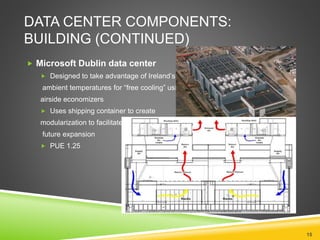
 Microsoft Dublin data center
 Designed to take advantage of Ireland’s low
ambient temperatures for “free cooling” using
airside economizers
 Uses shipping container to create
modularization to facilitate
future expansion
 PUE 1.25
15
DATA CENTER COMPONENTS:
COOLING
 Servers create heat
 Historically servers have been susceptible to heat damage
 According to James Hamilton of Amazon the average exhaust from servers is
115 degrees Fahrenheit
 Approximately half of the power consumed in the data center is
used in cooling
 Cooling Options
 Computer Room Air Conditioning (CRAC)
 Liquid Cooling
 Air Side Economizers
16
DATA CENTER COMPONENTS: UPS
 Uninterruptable Power Supply (UPS)
 Conditions power
 Provides power to avoid outages during power failure lasting seconds or
minutes
 Provides time to shutdown, failover, or initiate backup power for longer
outages
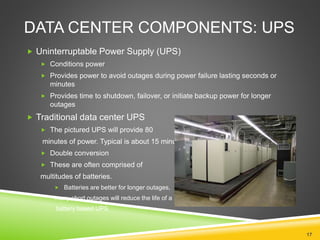
 Traditional data center UPS
 The pictured UPS will provide 80
minutes of power. Typical is about 15 minutes.
 Double conversion
 These are often comprised of
multitudes of batteries.
 Batteries are better for longer outages,
many short outages will reduce the life of a
battery based UPS
17
DATA CENTER COMPONENTS:
UPS (CONTINUED)
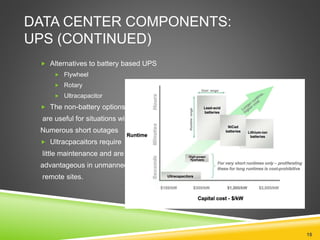
 Alternatives to battery based UPS
 Flywheel
 Rotary
 Ultracapacitor
 The non-battery options
are useful for situations with
Numerous short outages
 Ultracpacaitors require
little maintenance and are
advantageous in unmanned,
remote sites.
18
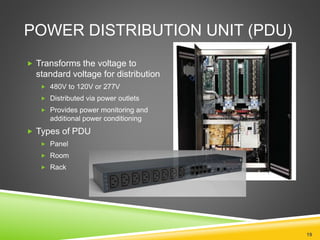
POWER DISTRIBUTION UNIT (PDU)
 Transforms the voltage to
standard voltage for distribution
 480V to 120V or 277V
 Distributed via power outlets
 Provides power monitoring and
additional power conditioning
 Types of PDU
 Panel
 Room
 Rack
19
DATA CENTER COMPONENTS:
BACKUP POWER
 Grid-based additional power service provider
 Batteries
 Diesel generators
Backup power has traditionally been a requirement for maintaining
uptime for tiered facilities. Some larger organizations are able to
compensate for outages by rerouting traffic to working nodes.
20

DATA CENTER

  • 1.
  • 2.
    WHAT IS ADATA CENTER Data centers provide a range on information technology services  These services include:  Email  Data storage and management  Web hosting  Application Hosting 2
  • 3.
    WHAT IS ADATA CENTER  Data centers are designed to house information systems and related components such as:  Servers  Routers  Storage  Uninterruptable power supplies (UPS)  Cooling Units  Power Distribution Unit (PDU)  Data centers have unique and typically large power requirements  They are often raised floor designs to accommodate the large amount of cables required. 3
  • 4.
    DATA CENTER BENEFITS 4 Economies of Scale  Purchasing savings based on large purchases  Dedicated IT staff  Shared resources  Security  Physical  Limited access to servers  Surveillance  Virtual  Firewalls  Anti-virus  Password Protection
  • 5.
    Tier Leve l Data center classification 1• Single non-redundant distribution path serving the IT equipment • Non-redundant capacity components • Basic site infrastructure guaranteeing 99.671% availability 2 • Fulfills all Tier 1 requirements • Redundant site infrastructure capacity components guaranteeing 99.741% availability 3 • Fulfills all Tier 1 and Tier 2 requirements • Multiple independent distribution paths serving the IT equipment • All it equipment must be dual-powered and fully compatible with the topology of a site’s architecture • Concurrently maintainable site infrastructure guaranteeing 99.982% availability 4 • Fulfills all Tier 1, Tier 2, and Tire 3 requirements • All cooling equipment is independently dual-powered, including chillers and heating, ventilation and air-conditioning (HVAC) systems • Fault tolerant site infrastructure with electrical power storage and distribution facilities guaranteeing 99.995% availability 5
  • 6.
    WHAT DO THESECLASSIFICATIONS MEAN? Availability Downtime/year Tier 1: 99.671% 28 hours Tier 2: 99.741% 22 hours Tier 3: 99.982% 1.5 hours Tier 4: 99.995% 26 minutes 6 “Businesses lose an average of about $5,000 per minute in an outage.” $300,000 per hour.
  • 7.
    DATA CENTER VS.CLOUD  Data Centers  Require specialized equipment and knowledge  Owner maintains complete control over hardware and software  Highly customized  Component of a cloud  Cloud computing offers computing as a utility service  Self service, Pay per use  Platform independent  Requires no specialized knowledge in computing  Often represents outsourcing as a Risk Transference Strategy  Composed of many data centers 7
  • 8.
    DATA CENTER VS.CLOUD In simple terms:  “Think of it as taking a taxi vs. buying a car to make a trip between San Francisco and Palo Alto. If you only make the trip once a quarter, it is cheaper to take a taxi. If you make the trip every day, then you are better off buying a car. The difference is the duty cycle. If you are running infrastructure with a duty cycle of 100%, it may make sense to run in-house.” 8
  • 9.
    CLOUD SERVICES Types ofservice offered  Infrastructure as a service (IaaS) ex. Servers, Networking, etc.  Platform as a service (PaaS) ex. Windows, Red Hat, etc.  Application or Software as a service (SaaS) ex. Email, Oracle, MSWord etc. 9
  • 10.
    DATA CENTER COMPONENTS: LOCATION Importantconsiderations  Frequency of conditions likely to result in disaster situations  Distance from energy source  Reliability of energy source  Climate  Choosing a location with a cool, mild climate, provides the possibility of a data center that does not require air conditioning units. 10
  • 11.
    DATA CENTERS  MicrosoftTour  http://www.globalfoundationservices.com/infrastructure/videos.html  Purdue Data Centers  Research Computing Cluster Steele http://www.rcac.purdue.edu/userinfo/resources/steele/userguide.cfm  Currently housed in a HP Pod container http://www.flickr.com/photos/vax-o-matic/sets/72157624103673857/  ITAP Data Centers Service Catalog http://www.itap.purdue.edu/service/catalog/alpha/  Cisco Richardson Interactive data center tour  http://www.cisco.com/web/about/ciscoitatwork/data_center/flash/dc_experienc e/rdc_tour.html 11
  • 12.
    DATA CENTER COMPONENTS: BUILDING The building is important because it will effect the efficiency of the data center  There are many ways to have an efficient building  Yahoo Chicken Coop  Designed to take advantage of “free cooling”  PUE 1.1 12
  • 13.
    DATA CENTER COMPONENTS: BUILDING(CONTINUED)  Mare Nostrum “Divine Data Cruncher”  Data Center in a Barcelona Cathedral  PUE 1.3 13
  • 14.
    DATA CENTER COMPONENTS: BUILDING(CONTINUED)  “The Spy Who Loved Me” Bunker  Stockholm converted nuclear bunker  Designed to take advantage of “free cooling”  PUE 1.1 14
  • 15.
    DATA CENTER COMPONENTS: BUILDING(CONTINUED)  Microsoft Dublin data center  Designed to take advantage of Ireland’s low ambient temperatures for “free cooling” using airside economizers  Uses shipping container to create modularization to facilitate future expansion  PUE 1.25 15
  • 16.
    DATA CENTER COMPONENTS: COOLING Servers create heat  Historically servers have been susceptible to heat damage  According to James Hamilton of Amazon the average exhaust from servers is 115 degrees Fahrenheit  Approximately half of the power consumed in the data center is used in cooling  Cooling Options  Computer Room Air Conditioning (CRAC)  Liquid Cooling  Air Side Economizers 16
  • 17.
    DATA CENTER COMPONENTS:UPS  Uninterruptable Power Supply (UPS)  Conditions power  Provides power to avoid outages during power failure lasting seconds or minutes  Provides time to shutdown, failover, or initiate backup power for longer outages  Traditional data center UPS  The pictured UPS will provide 80 minutes of power. Typical is about 15 minutes.  Double conversion  These are often comprised of multitudes of batteries.  Batteries are better for longer outages, many short outages will reduce the life of a battery based UPS 17
  • 18.
    DATA CENTER COMPONENTS: UPS(CONTINUED)  Alternatives to battery based UPS  Flywheel  Rotary  Ultracapacitor  The non-battery options are useful for situations with Numerous short outages  Ultracpacaitors require little maintenance and are advantageous in unmanned, remote sites. 18
  • 19.
    POWER DISTRIBUTION UNIT(PDU)  Transforms the voltage to standard voltage for distribution  480V to 120V or 277V  Distributed via power outlets  Provides power monitoring and additional power conditioning  Types of PDU  Panel  Room  Rack 19
  • 20.
    DATA CENTER COMPONENTS: BACKUPPOWER  Grid-based additional power service provider  Batteries  Diesel generators Backup power has traditionally been a requirement for maintaining uptime for tiered facilities. Some larger organizations are able to compensate for outages by rerouting traffic to working nodes. 20

Editor's Notes

  • #4 Recommended reading before this class: http://en.wikipedia.org/wiki/Data_center
  • #6 Source: http://en.wikipedia.org/wiki/Data_center
  • #7 Table data source:labs.vmware.com/download/90/ Quote: http://www.eweek.com/c/a/IT-Infrastructure/Unplanned-IT-Downtime-Can-Cost-5K-Per-Minute-Report-549007/
  • #8 Source: http://en.wikipedia.org/wiki/Cloud_computing
  • #9 Source: http://www.datacenterknowledge.com/archives/2010/08/23/comparing-the-cost-of-cloud-vs-colocation/
  • #12 Microsoft tour is 10 minutes 17 seconds -Provides a nice introduction to Cloud -Evolution of datacenters -Efficiency concepts -Security Highly recommend taking students on a tour of Purdue data center as we have a wide variety available. ITAP Jon Miller jmmiller@purdue.edu gives a good tour of Freehafer Datacenter.(Legacy in transition to virtualized systems) May also wish to contact RCAC john-campbell@purdue.edu On the Steele site click on over view.There is also a picture of Steele at the top of the page. What does Steele do? How is it configured? There is a staggering amount of information here. Link after ITaP Data Center Follow the link -Click on “ Explore the Richardson Data Center” This is interactive example of a modern Tier 4 data center. It will allow you to view various elements of a data center in depth or at an overview level.
  • #13 Source: http://www.datacenterknowledge.com/archives/2009/06/30/yahoos-fresh-air-computing-coop/ Photo: http://gigaom.com/cleantech/now-online-yahoos-chicken-coop-inspired-green-data-center/
  • #14 Sources: http://www.datacenterknowledge.com/archives/2010/07/29/ten-unique-data-center-designs/ http://royal.pingdom.com/2008/11/14/the-worlds-most-super-designed-data-center-fit-for-a-james-bond-villain/ MareNostrum Photo: http://blogs.oracle.com/simons/date/20070811 PUE from http://www.google.com/url?sa=t&source=web&cd=1&ved=0CB0QFjAA&url=http%3A%2F%2Fwww.aulesempresa.upc.edu%2Faulesempresa%2F2011%2Fprogrames%2FBSC%2FLlista-documents%2F02%2Fdocument%2FFIB-BSC-20114-Life-Sciences.pdf&rct=j&q=FIB-BSC-20114Life&ei=KumeTtHiOOnr0gHT18iDCQ&usg=AFQjCNFW_hjI_Wx9YZm92Ab3t0btx4Bndg&sig2=dx2DgSi4J99Ch8k-if3bmg&cad=rja
  • #15 Sources: http://www.datacenterknowledge.com/archives/2010/07/29/ten-unique-data-center-designs/ http://royal.pingdom.com/2008/11/14/the-worlds-most-super-designed-data-center-fit-for-a-james-bond-villain/ MareNostrum Photo: http://blogs.oracle.com/simons/date/20070811 PUE from www.hea.ie/files/files/.../JordiTorres%20October2010%20NEW.pdf
  • #16 http://www.microsoft.com/presspass/emea/presscentre/pressreleases/DublinDataCentrePR_240909.mspx http://download.microsoft.com/download/6/8/F/68F6C057-7ED4-440C-81A9-E289AACFB3DA/DublinDataCentreCasestudy_FINAL.pdf
  • #18 Photo source: http://www.eqsl.cc/Graphics/PowerRoom.jpg Really good example of a “traditional data center” http://www.eqsl.cc/qslcard/DataCenter.cfm
  • #19 Graphic: http://www.google.com/url?sa=t&source=web&cd=1&ved=0CC0QFjAA&url=http%3A%2F%2Fwww.apcmedia.com%2Fsalestools%2FDBOY-77FNCT_R2_EN.pdf&rct=j&q=comparing%20data%20cemter%20batteries%2C%20flywheels&ei=-D2fTqr9HYr20gH21vDACQ&usg=AFQjCNGvV4P9B3Jq9ee4fcqKPIOR6Ylxog&sig2=xXxNQkwL7ZcxN1s0_dobuA&cad=rja
  • #20 Cabinet PDU photo: http://www.42u.com/power/pdu/eaton-pdu.htm Votlages: http://blog.softlayer.com/2011/building-a-data-center-part-1-follow-the-flow/