Performance Characteristics of
Traditional VMs vs Docker Containers
dockercon14
June 9-10, 2014
San Francisco, CA
Boden Russell (brussell@us.ibm.com)
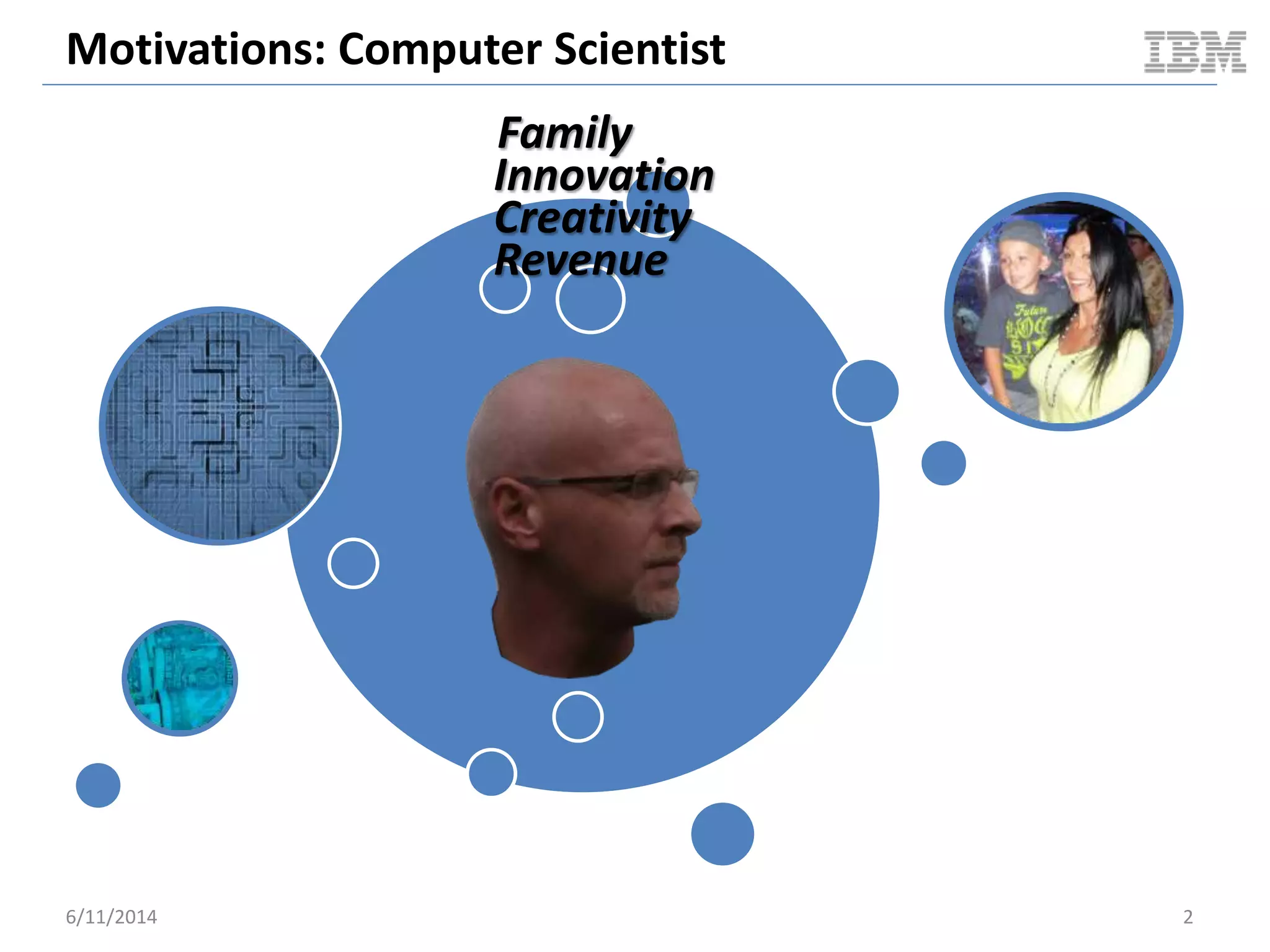
Motivations: Computer Scientist
6/11/2014 2
Family
Innovation
Creativity
Revenue
Motivations: Enterprise
6/11/2014 3
Revenue
Revenue
Revenue
Revenue
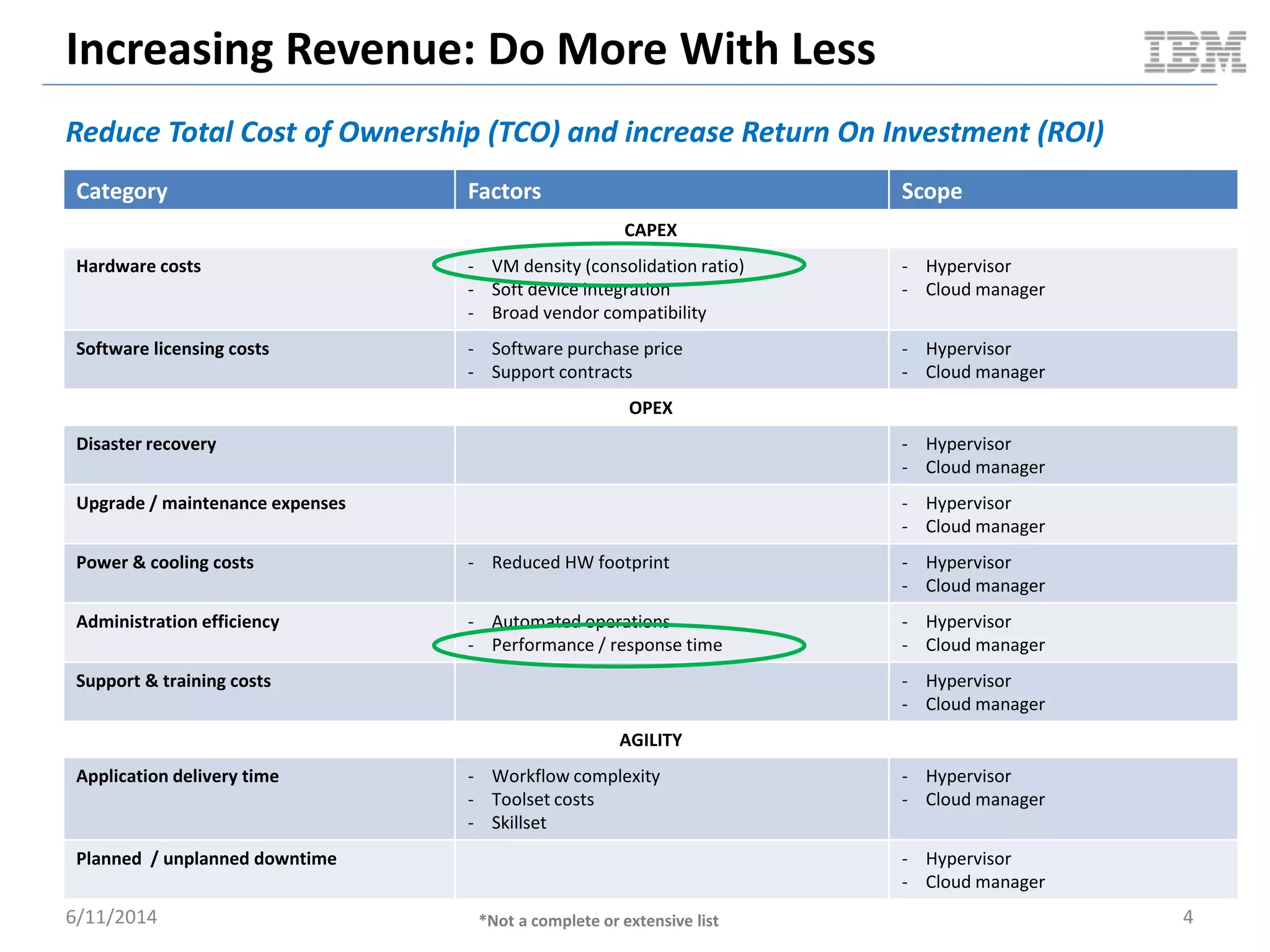
Increasing Revenue: Do More With Less
Reduce Total Cost of Ownership (TCO) and increase Return On Investment (ROI)
6/11/2014 4
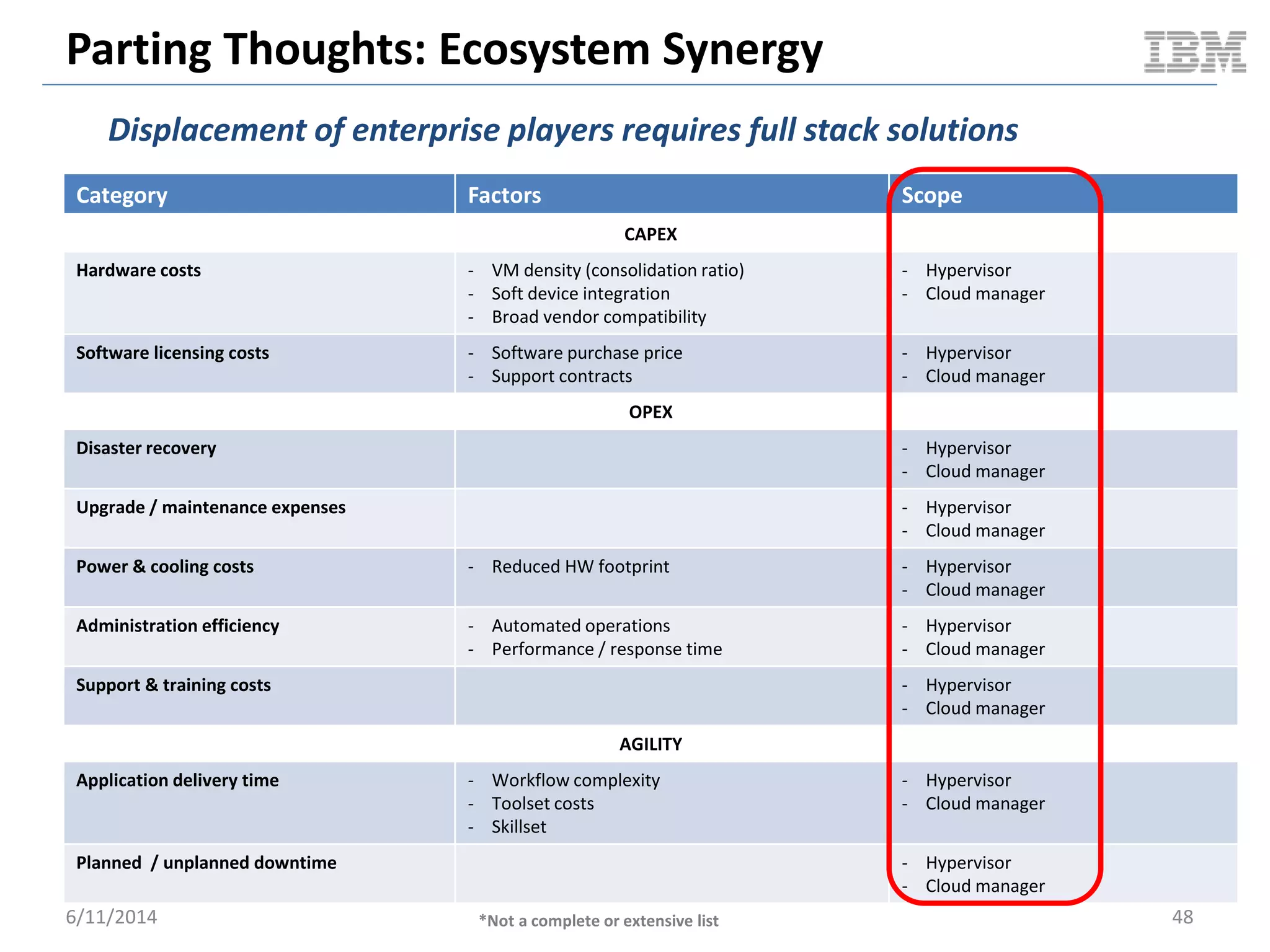
Category Factors Scope
CAPEX
Hardware costs - VM density (consolidation ratio)
- Soft device integration
- Broad vendor compatibility
- Hypervisor
- Cloud manager
Software licensing costs - Software purchase price
- Support contracts
- Hypervisor
- Cloud manager
OPEX
Disaster recovery - Hypervisor
- Cloud manager
Upgrade / maintenance expenses - Hypervisor
- Cloud manager
Power & cooling costs - Reduced HW footprint - Hypervisor
- Cloud manager
Administration efficiency - Automated operations
- Performance / response time
- Hypervisor
- Cloud manager
Support & training costs - Hypervisor
- Cloud manager
AGILITY
Application delivery time - Workflow complexity
- Toolset costs
- Skillset
- Hypervisor
- Cloud manager
Planned / unplanned downtime - Hypervisor
- Cloud manager
*Not a complete or extensive list
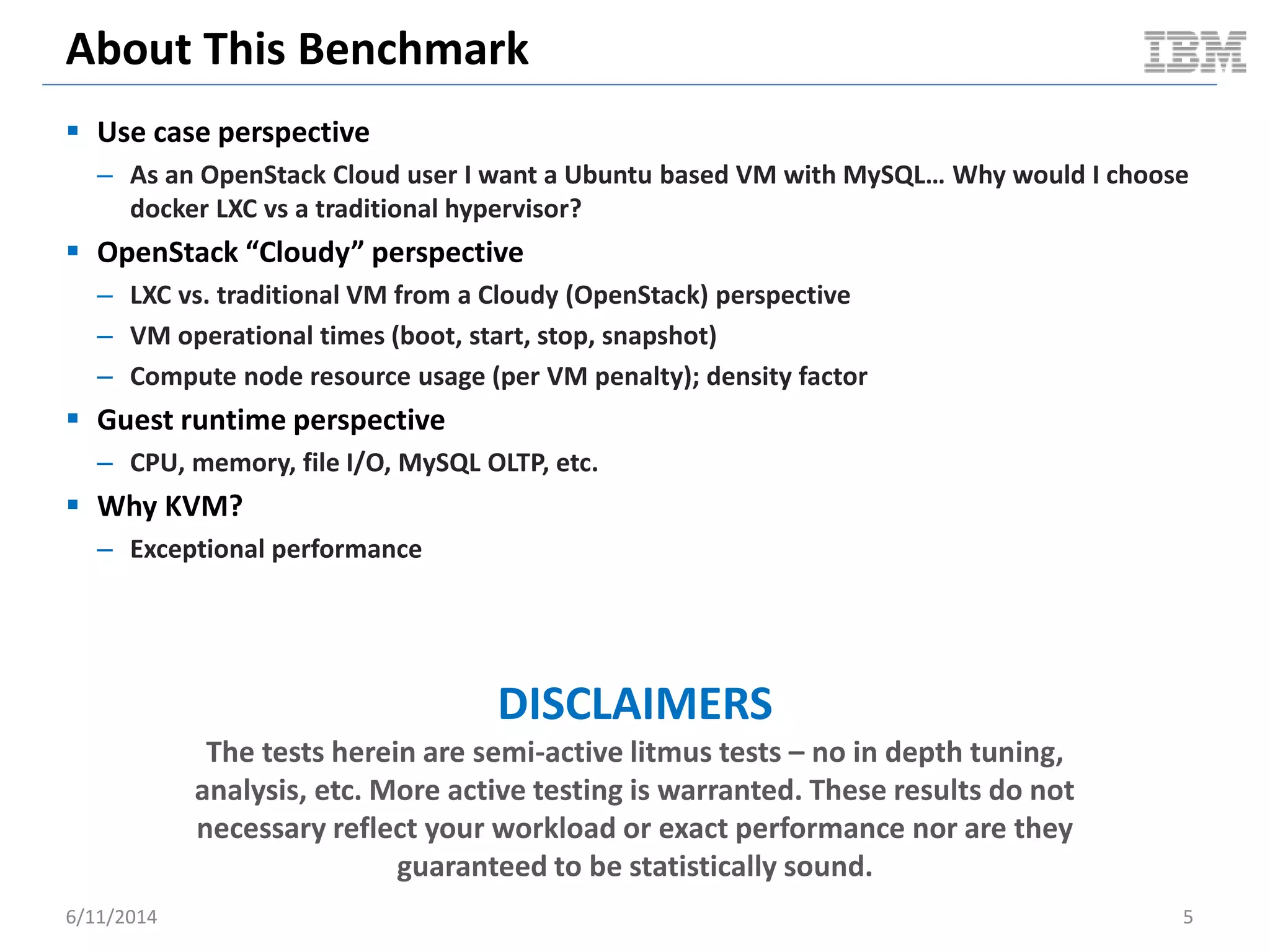
About This Benchmark
 Use case perspective
– As an OpenStack Cloud user I want a Ubuntu based VM with MySQL… Why would I choose
docker LXC vs a traditional hypervisor?
 OpenStack “Cloudy” perspective
– LXC vs. traditional VM from a Cloudy (OpenStack) perspective
– VM operational times (boot, start, stop, snapshot)
– Compute node resource usage (per VM penalty); density factor
 Guest runtime perspective
– CPU, memory, file I/O, MySQL OLTP, etc.
 Why KVM?
– Exceptional performance
DISCLAIMERS
The tests herein are semi-active litmus tests – no in depth tuning,
analysis, etc. More active testing is warranted. These results do not
necessary reflect your workload or exact performance nor are they
guaranteed to be statistically sound.
6/11/2014 5
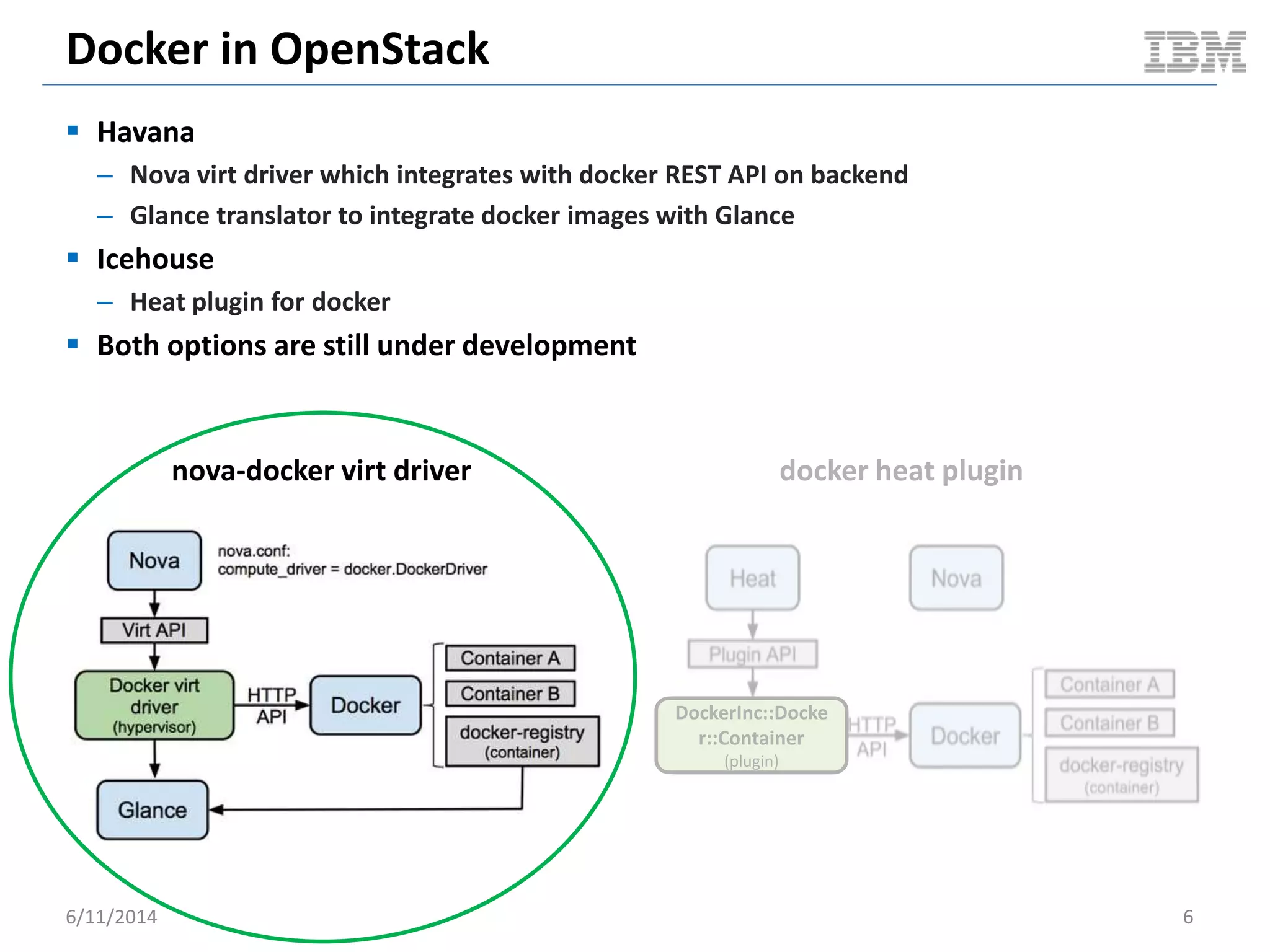
Docker in OpenStack
 Havana
– Nova virt driver which integrates with docker REST API on backend
– Glance translator to integrate docker images with Glance
 Icehouse
– Heat plugin for docker
 Both options are still under development
6/11/2014 6
nova-docker virt driver docker heat plugin
DockerInc::Docke
r::Container
(plugin)
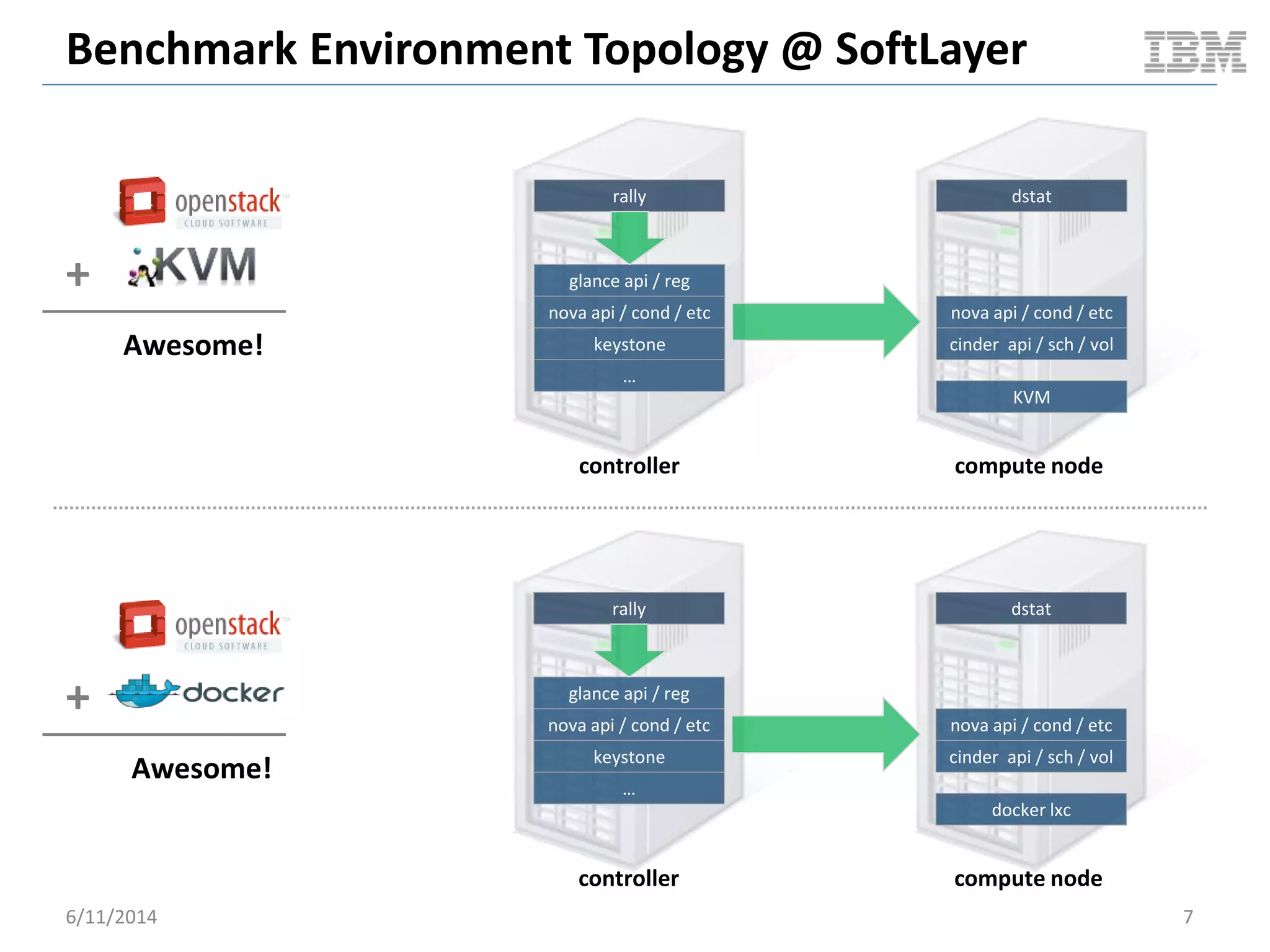
Benchmark Environment Topology @ SoftLayer
6/11/2014 7
glance api / reg
nova api / cond / etc
keystone
…
rally
nova api / cond / etc
cinder api / sch / vol
docker lxc
dstat
controller compute node
glance api / reg
nova api / cond / etc
keystone
…
rally
nova api / cond / etc
cinder api / sch / vol
KVM
dstat
controller compute node
+
Awesome!
+
Awesome!
Benchmark Specs
6/11/2014 8
Spec Controller Node (4CPU x 8G RAM) Compute Node (16CPU x 96G RAM)
Environment Bare Metal @ SoftLayer Bare Metal @ SoftLayer
Mother Board SuperMicro X8SIE-F Intel Xeon QuadCore SingleProc SATA
[1Proc]
SuperMicro X8DTU-F_R2 Intel Xeon HexCore DualProc [2Proc]
CPU Intel Xeon-Lynnfield 3470-Quadcore [2.93GHz] (Intel Xeon-Westmere 5620-Quadcore [2.4GHz]) x 2
Memory (Kingston 4GB DDR3 2Rx8 4GB DDR3 2Rx8 [4GB]) x2 (Kingston 16GB DDR3 2Rx4 16GB DDR3 2Rx4 [16GB]) x 6
HDD (LOCAL) Digital WD Caviar RE3 WD5002ABYS [500GB]; SATAII Western Digital WD Caviar RE4 WD5003ABYX [500GB]; SATAII
NIC eth0/eth1 @ 100 Mbps eth0/eth1 @100 Mbps
Operating System Ubuntu 12.04 LTS 64bit Ubuntu 12.04 LTS 64bit
Kernel 3.5.0-48-generic 3.8.0-38-generic
IO Scheduler deadline deadline
Hypervisor tested NA - KVM 1.0 + virtio + KSM (memory deduplication)
- docker 0.10.0 + go1.2.1 + commit dc9c28f + AUFS
OpenStack Trunk master via devstack Trunk master via devstack. Libvirt KVM nova driver / nova-docker
virt driver
OpenStack Benchmark
Client
OpenStack project rally NA
Metrics Collection NA dstat
Guest Benchmark Driver NA - Sysbench 0.4.12
- mbw 1.1.1.-2
- iibench (py)
- netperf 2.5.0-1
- Blogbench 1.1
- cpu_bench.py
VM Image NA - Scenario 1 (KVM): official ubuntu 12.04 image + mysql
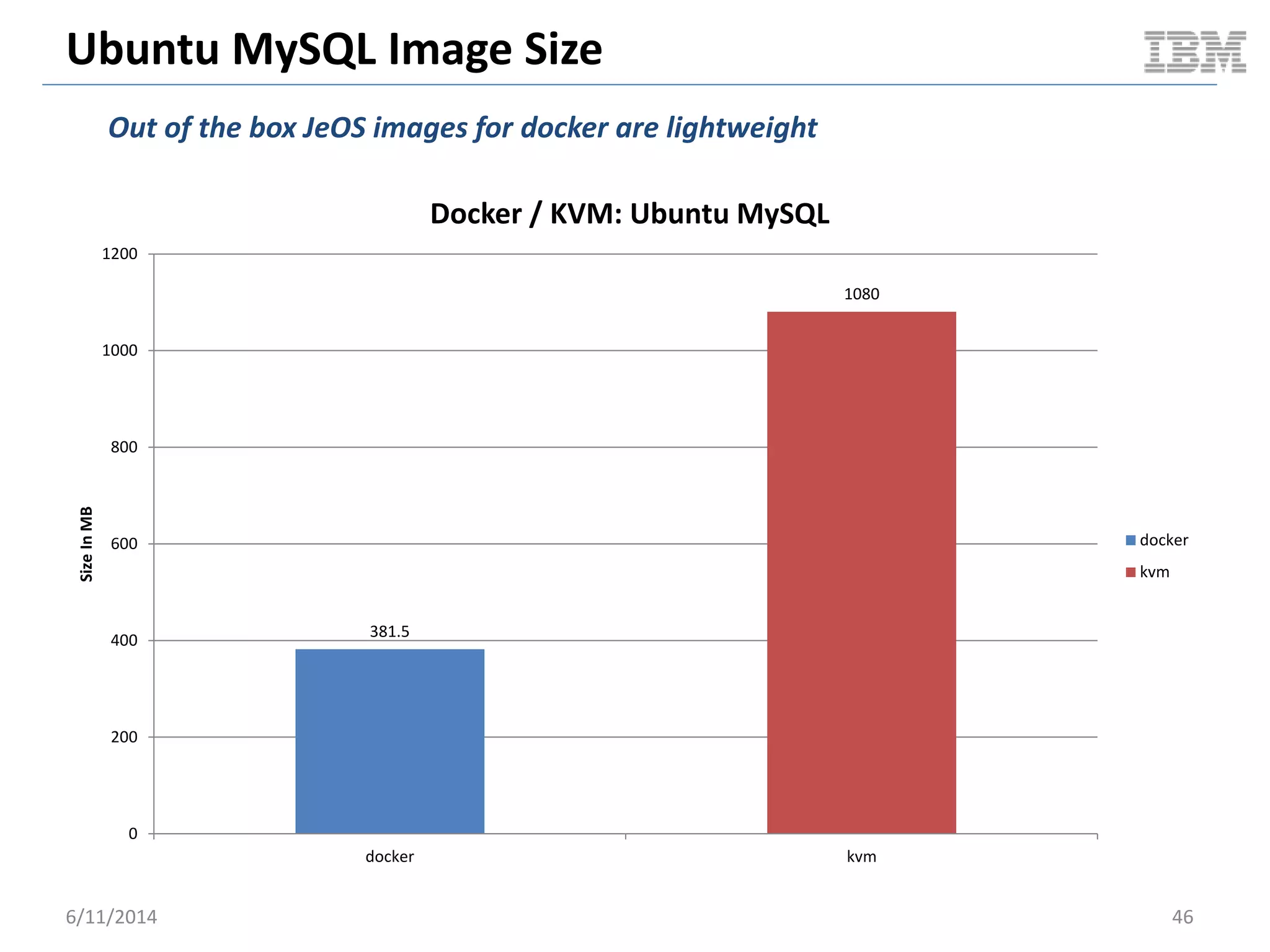
snapshotted and exported to qcow2 – 1080 MB
- Scenario 2 (docker): guillermo/mysql -- 381.5 MB
Hosted @
STEADY STATE VM PACKING
OpenStack Cloudy Benchmark
6/11/2014 9
Cloudy Performance: Steady State Packing
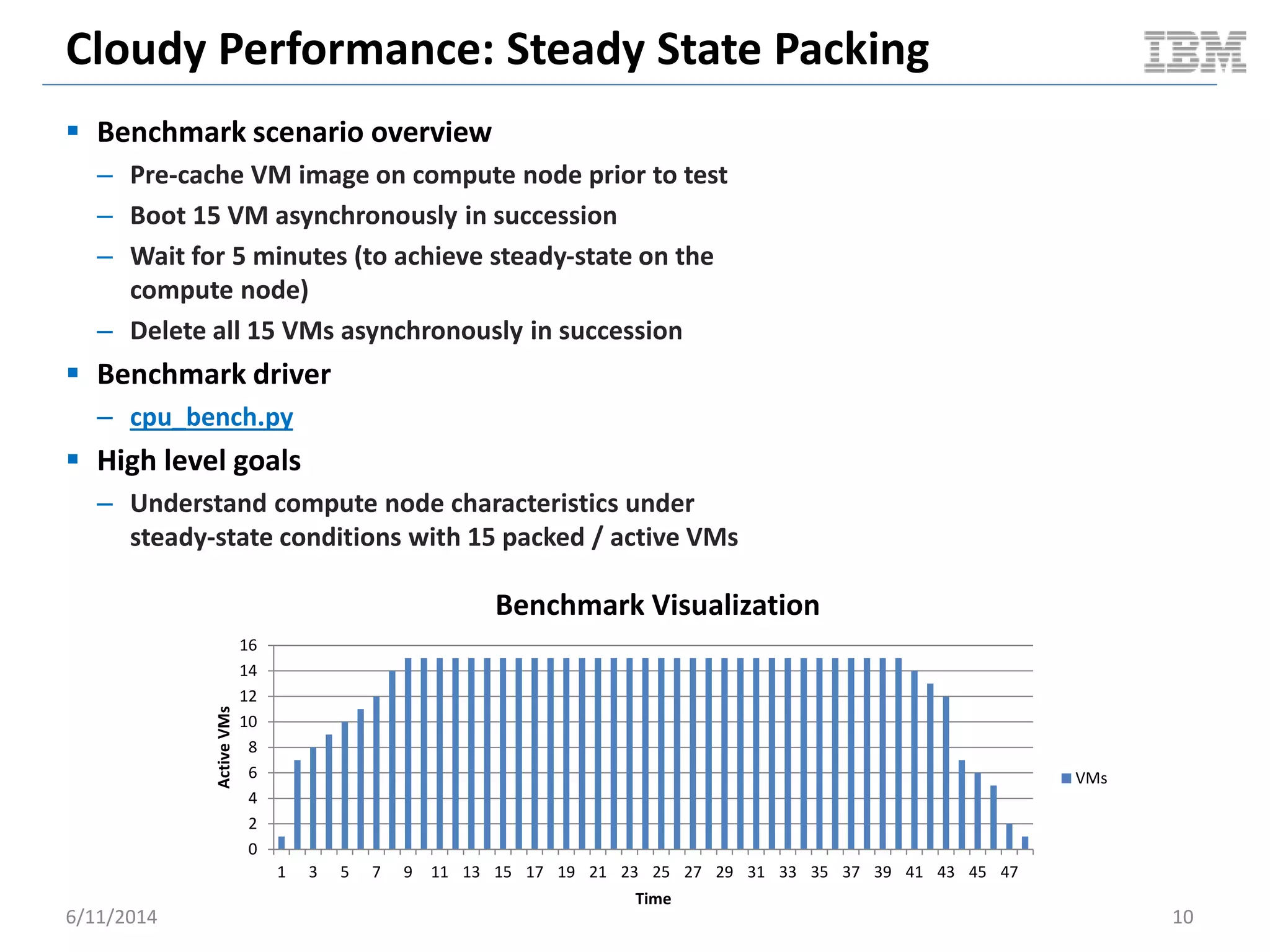
 Benchmark scenario overview
– Pre-cache VM image on compute node prior to test
– Boot 15 VM asynchronously in succession
– Wait for 5 minutes (to achieve steady-state on the
compute node)
– Delete all 15 VMs asynchronously in succession
 Benchmark driver
– cpu_bench.py
 High level goals
– Understand compute node characteristics under
steady-state conditions with 15 packed / active VMs
6/11/2014 10
0
2
4
6
8
10
12
14
16
1 3 5 7 9 11 13 15 17 19 21 23 25 27 29 31 33 35 37 39 41 43 45 47
ActiveVMs
Time
Benchmark Visualization
VMs
Cloudy Performance: Steady State Packing
6/11/2014 11
0
10
20
30
40
50
60
70
80
1
9
17
25
33
41
49
57
65
73
81
89
97
105
113
121
129
137
145
153
161
169
177
185
193
201
209
217
225
233
241
249
257
265
273
281
289
297
305
313
321
CPUUsageInPercent
Time
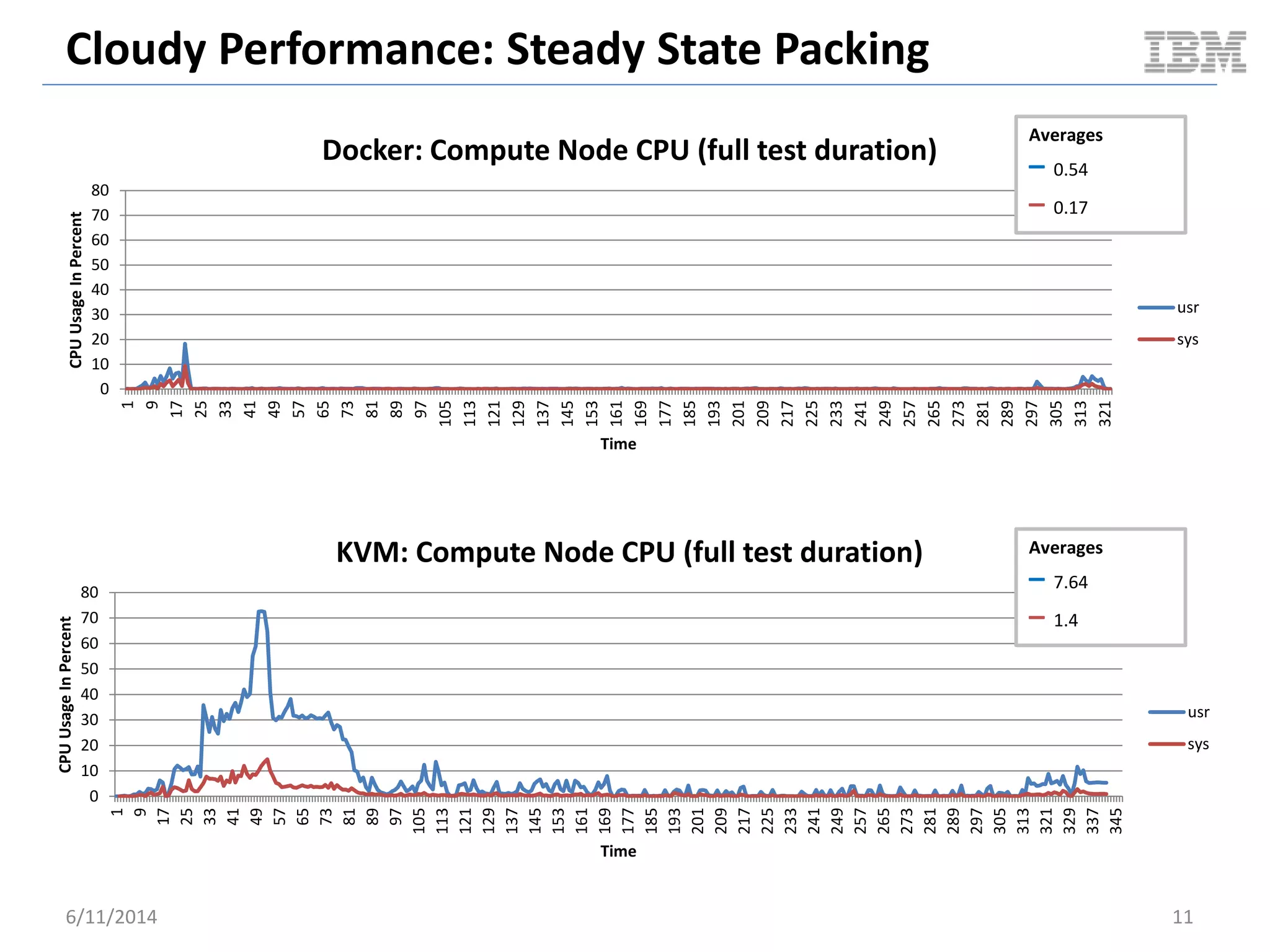
Docker: Compute Node CPU (full test duration)
usr
sys
Averages
– 0.54
– 0.17
0
10
20
30
40
50
60
70
80
1
9
17
25
33
41
49
57
65
73
81
89
97
105
113
121
129
137
145
153
161
169
177
185
193
201
209
217
225
233
241
249
257
265
273
281
289
297
305
313
321
329
337
345
CPUUsageInPercent
Time
KVM: Compute Node CPU (full test duration)
usr
sys
Averages
– 7.64
– 1.4
Cloudy Performance: Steady State Packing
6/11/2014 12
0
2
4
6
8
10
12
14
1
6
11
16
21
26
31
36
41
46
51
56
61
66
71
76
81
86
91
96
101
106
111
116
121
126
131
136
141
146
151
156
161
166
171
176
181
186
191
196
201
206
211
CPUUsageInPercent
Time (31s – 243s)
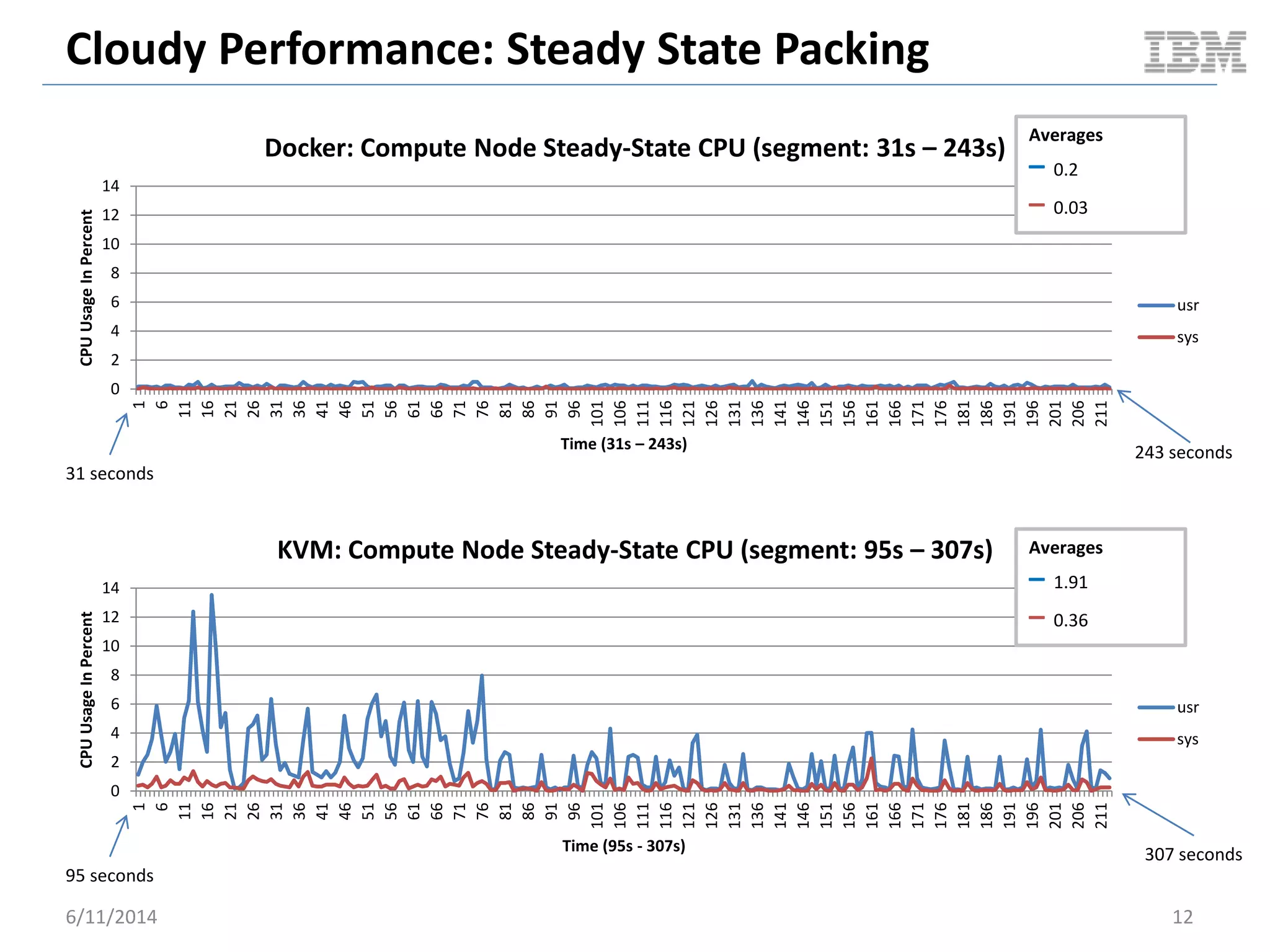
Docker: Compute Node Steady-State CPU (segment: 31s – 243s)
usr
sys
0
2
4
6
8
10
12
14
1
6
11
16
21
26
31
36
41
46
51
56
61
66
71
76
81
86
91
96
101
106
111
116
121
126
131
136
141
146
151
156
161
166
171
176
181
186
191
196
201
206
211
CPUUsageInPercent
Time (95s - 307s)
KVM: Compute Node Steady-State CPU (segment: 95s – 307s)
usr
sys
Averages
– 0.2
– 0.03
Averages
– 1.91
– 0.36
31 seconds
243 seconds
95 seconds
307 seconds
Cloudy Performance: Steady State Packing
6/11/2014 13
0
2
4
6
8
10
12
14
1
7
13
19
25
31
37
43
49
55
61
67
73
79
85
91
97
103
109
115
121
127
133
139
145
151
157
163
169
175
181
187
193
199
205
211
CPUUsageInPercent
Time: KVM(95s - 307s) Docker(31s – 243s)
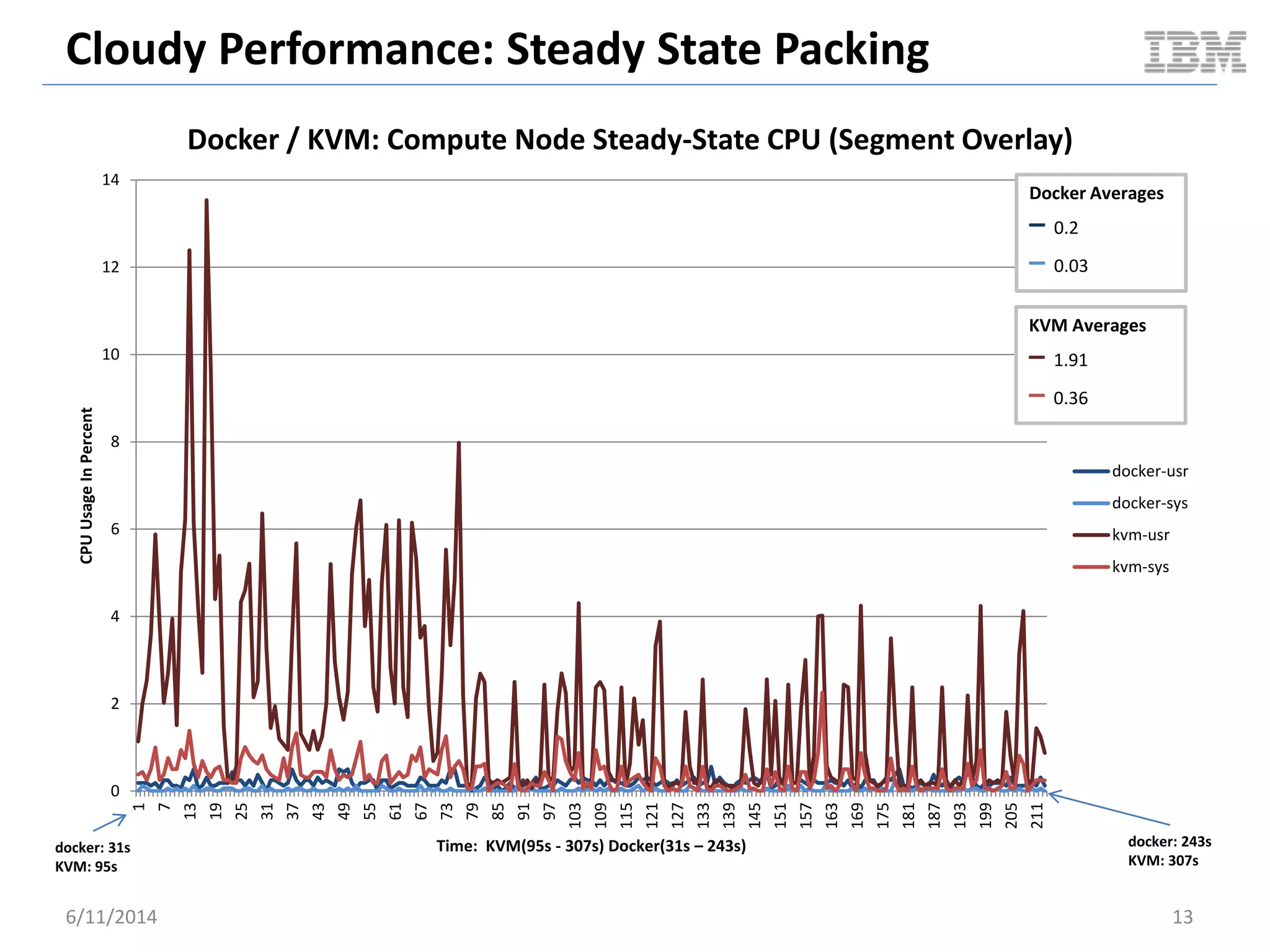
Docker / KVM: Compute Node Steady-State CPU (Segment Overlay)
docker-usr
docker-sys
kvm-usr
kvm-sys
docker: 31s
KVM: 95s
docker: 243s
KVM: 307s
Docker Averages
– 0.2
– 0.03
KVM Averages
– 1.91
– 0.36
Cloudy Performance: Steady State Packing
6/11/2014 14
0.00E+00
1.00E+09
2.00E+09
3.00E+09
4.00E+09
5.00E+09
6.00E+09
7.00E+09 1
10
19
28
37
46
55
64
73
82
91
100
109
118
127
136
145
154
163
172
181
190
199
208
217
226
235
244
253
262
271
280
289
298
307
316
325
334
MemoryUsed
Axis Title
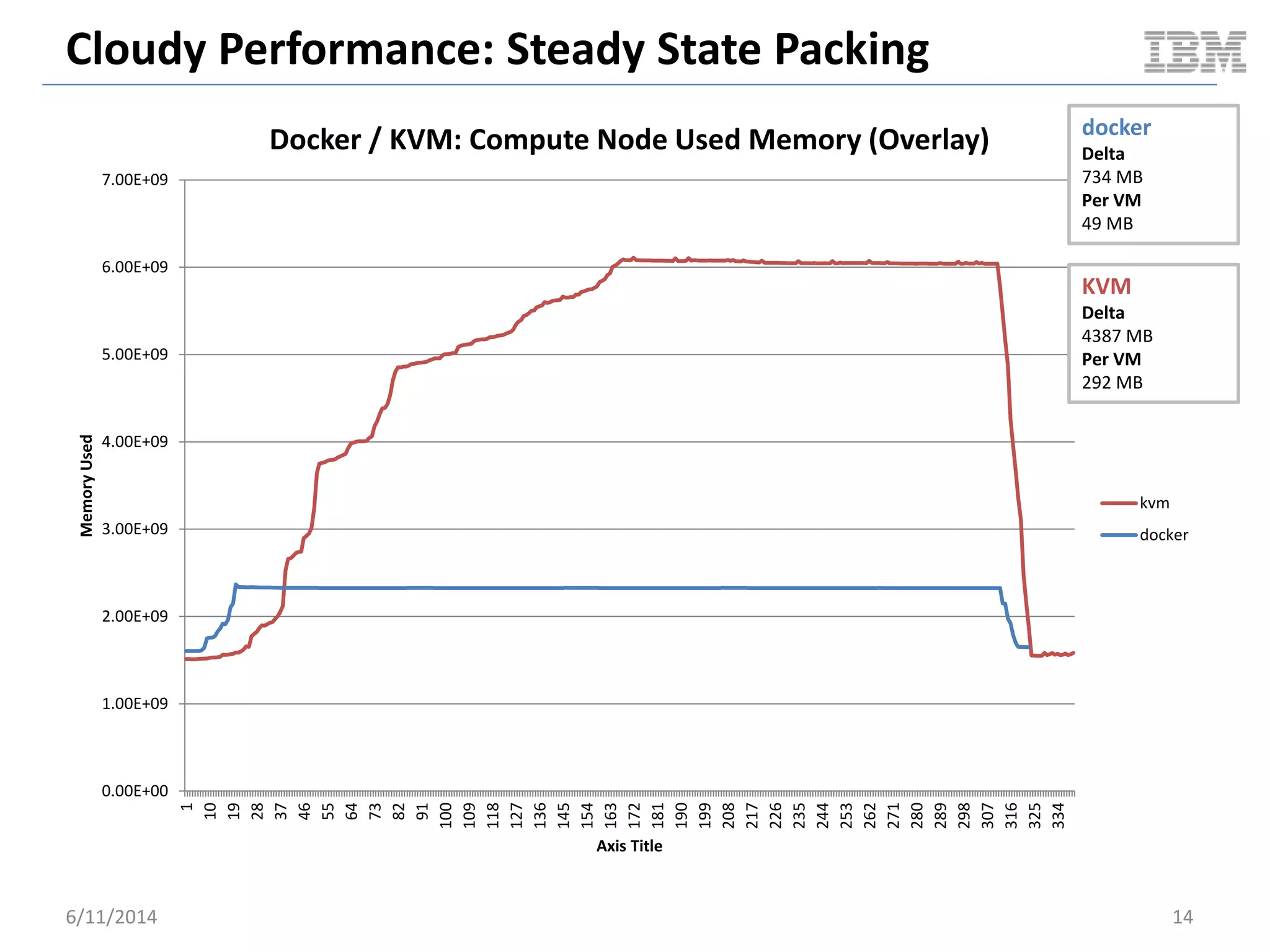
Docker / KVM: Compute Node Used Memory (Overlay)
kvm
docker
docker
Delta
734 MB
Per VM
49 MB
KVM
Delta
4387 MB
Per VM
292 MB
Cloudy Performance: Steady State Packing
6/11/2014 15
0
10
20
30
40
50
60
70
80
90
100
1
9
17
25
33
41
49
57
65
73
81
89
97
105
113
121
129
137
145
153
161
169
177
185
193
201
209
217
225
233
241
249
257
265
273
281
289
297
305
313
321
1MinuteLoadAverage
Time
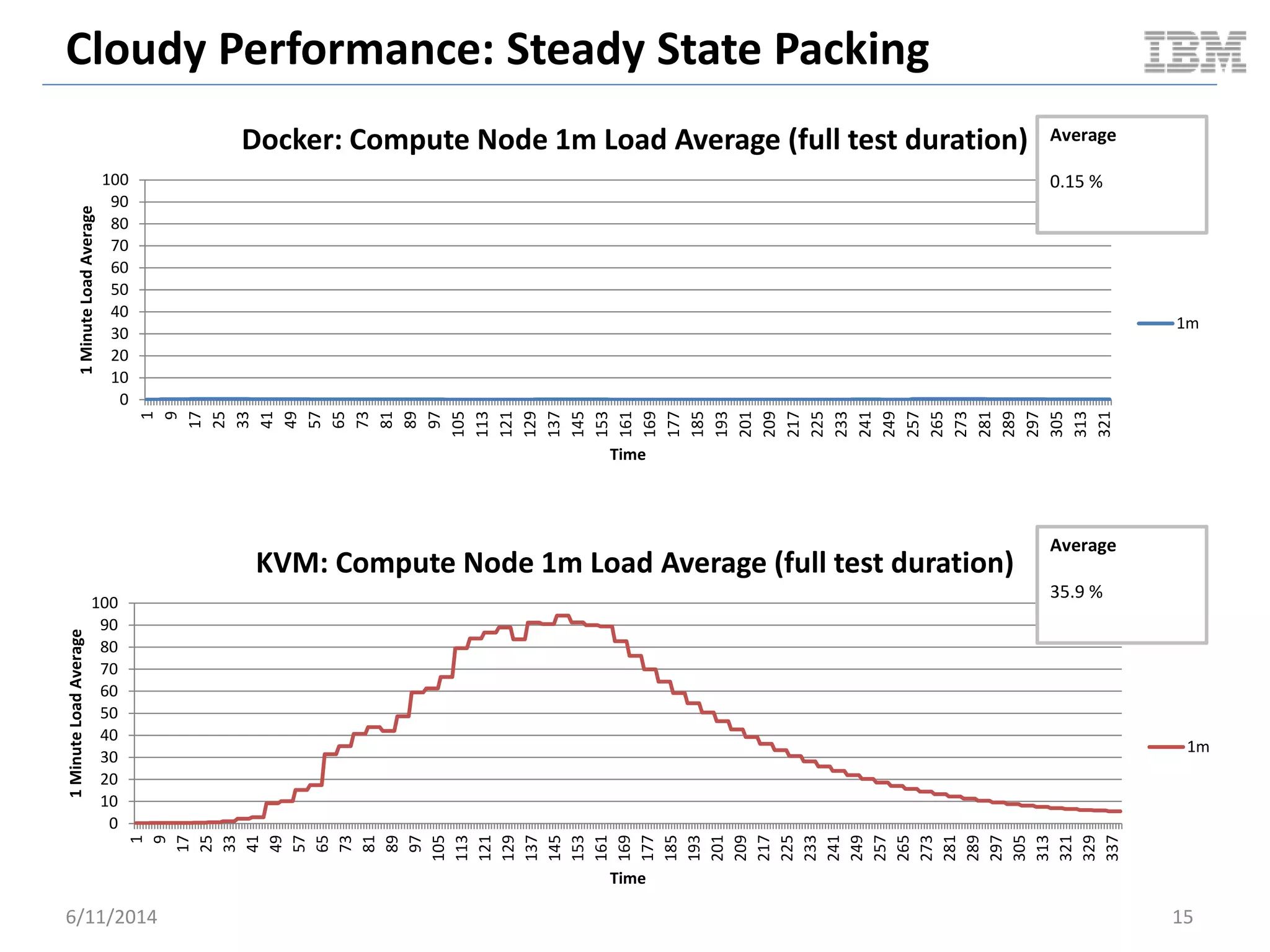
Docker: Compute Node 1m Load Average (full test duration)
1m
Average
0.15 %
0
10
20
30
40
50
60
70
80
90
100
1
9
17
25
33
41
49
57
65
73
81
89
97
105
113
121
129
137
145
153
161
169
177
185
193
201
209
217
225
233
241
249
257
265
273
281
289
297
305
313
321
329
337
1MinuteLoadAverage
Time
KVM: Compute Node 1m Load Average (full test duration)
1m
Average
35.9 %
SERIALLY BOOT 15 VMS
OpenStack Cloudy Benchmark
6/11/2014 16
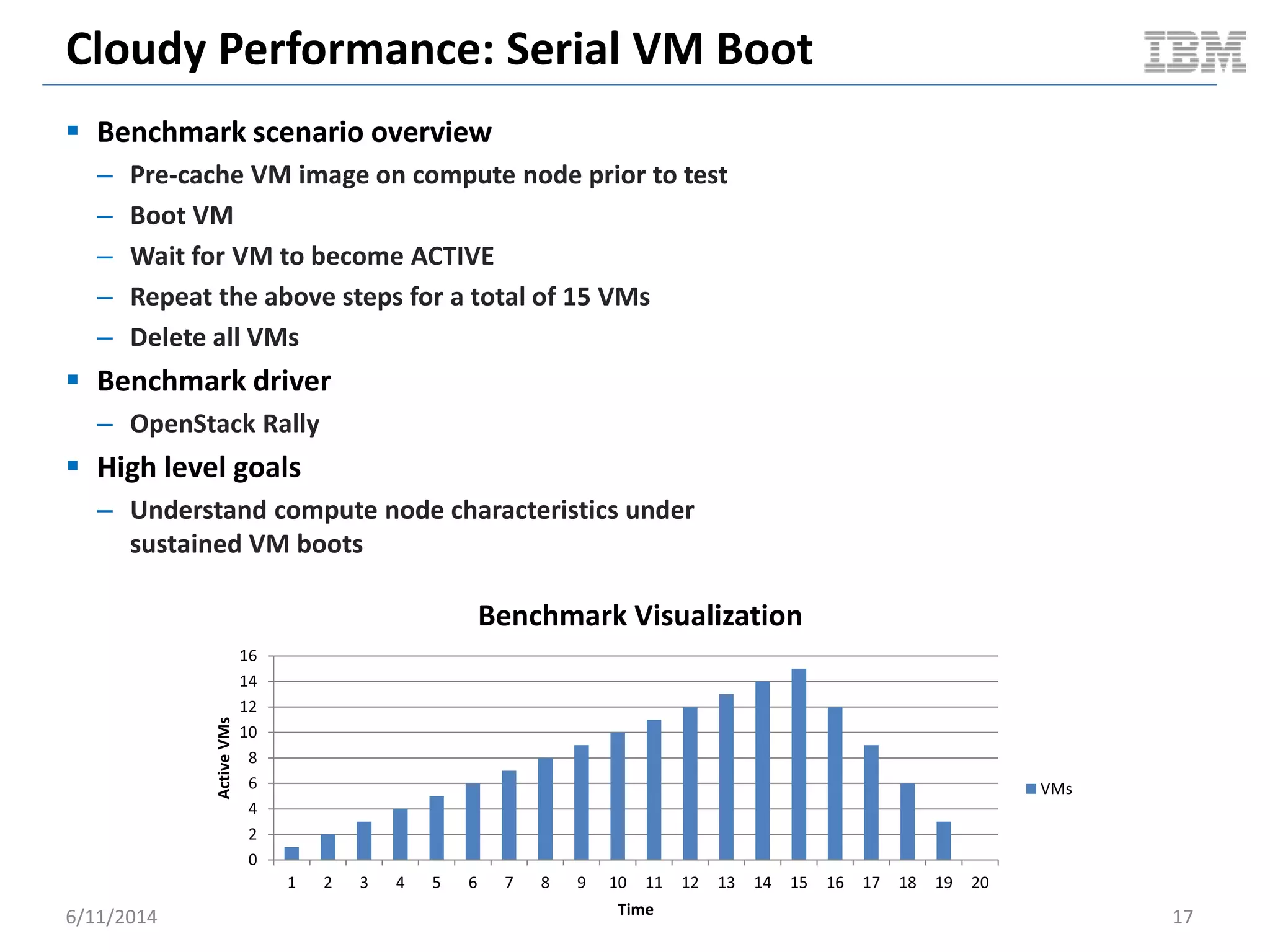
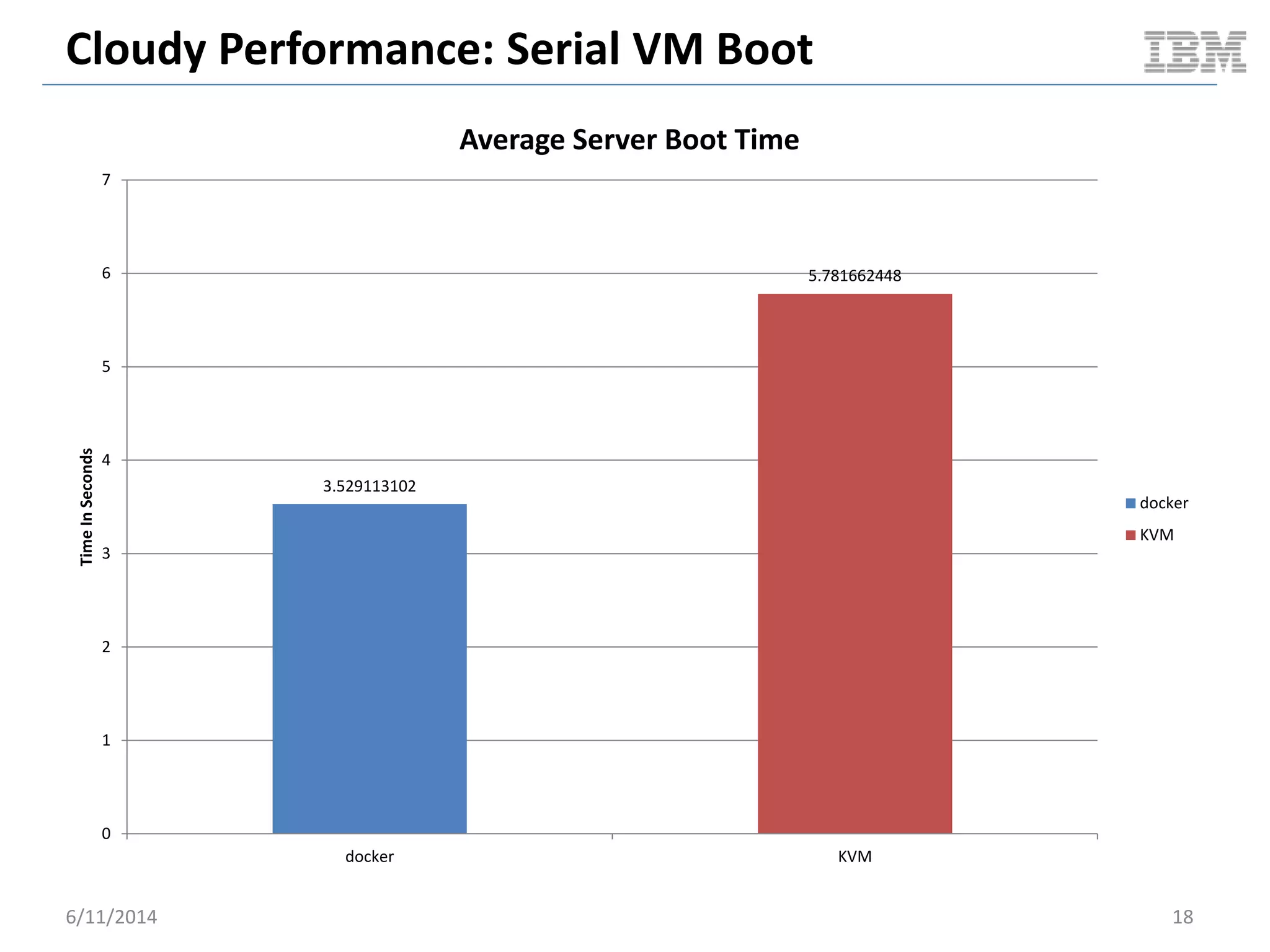
Cloudy Performance: Serial VM Boot
 Benchmark scenario overview
– Pre-cache VM image on compute node prior to test
– Boot VM
– Wait for VM to become ACTIVE
– Repeat the above steps for a total of 15 VMs
– Delete all VMs
 Benchmark driver
– OpenStack Rally
 High level goals
– Understand compute node characteristics under
sustained VM boots
6/11/2014 17
0
2
4
6
8
10
12
14
16
1 2 3 4 5 6 7 8 9 10 11 12 13 14 15 16 17 18 19 20
ActiveVMs
Time
Benchmark Visualization
VMs
Cloudy Performance: Serial VM Boot
6/11/2014 18
3.529113102
5.781662448
0
1
2
3
4
5
6
7
docker KVM
TimeInSeconds
Average Server Boot Time
docker
KVM
Cloudy Performance: Serial VM Boot
6/11/2014 19
0
5
10
15
20
25
30
35
1 3 5 7 9 11 13 15 17 19 21 23 25 27 29 31 33 35 37 39 41 43 45 47 49 51 53 55 57 59 61 63 65 67 69 71 73 75 77 79
CPUUsageInPercent
Time
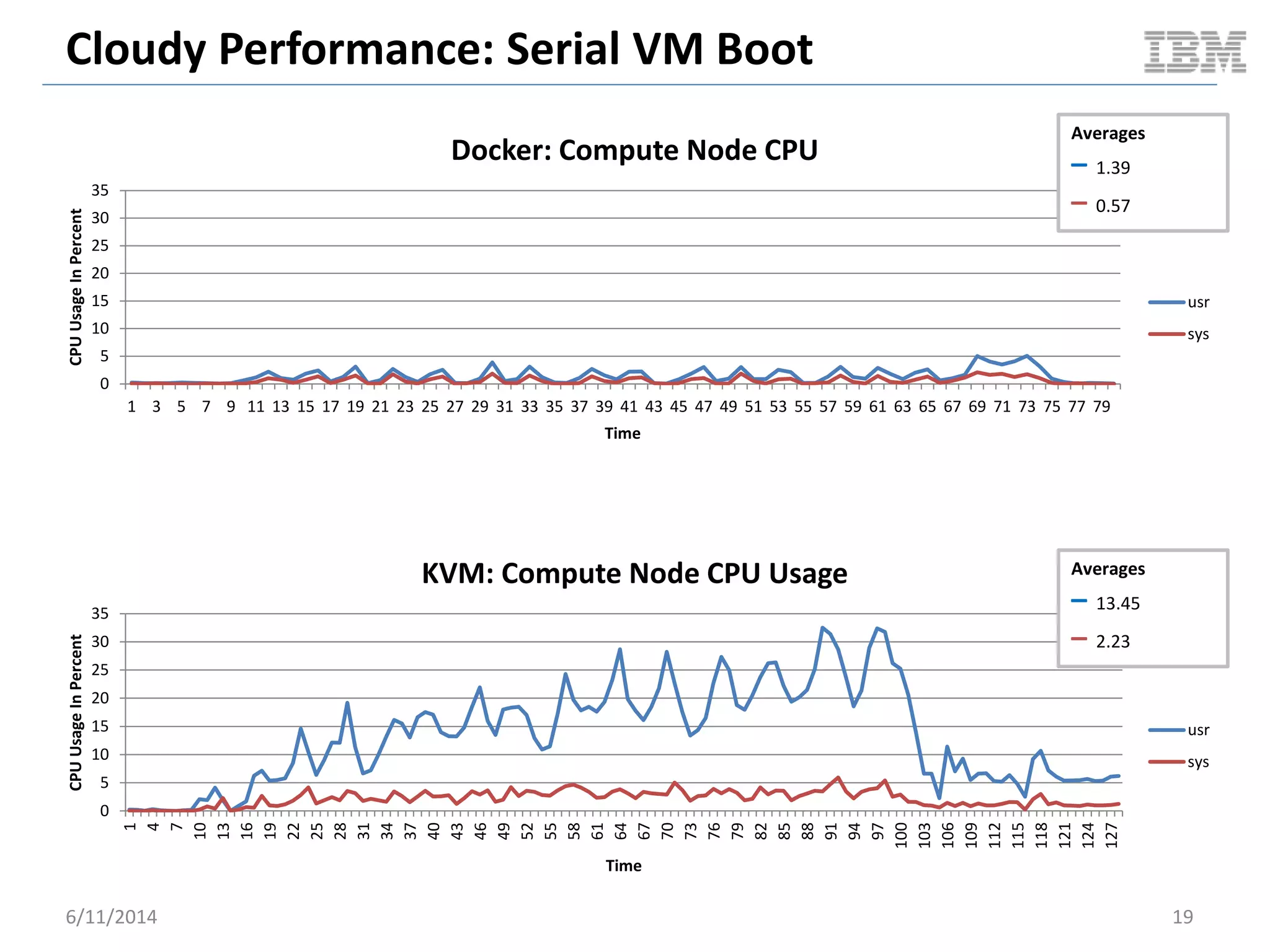
Docker: Compute Node CPU
usr
sys
Averages
– 1.39
– 0.57
0
5
10
15
20
25
30
35
1
4
7
10
13
16
19
22
25
28
31
34
37
40
43
46
49
52
55
58
61
64
67
70
73
76
79
82
85
88
91
94
97
100
103
106
109
112
115
118
121
124
127
CPUUsageInPercent
Time
KVM: Compute Node CPU Usage
usr
sys
Averages
– 13.45
– 2.23
Cloudy Performance: Serial VM Boot
6/11/2014 20
0
5
10
15
20
25
30
35
1 5 9 13 17 21 25 29 33 37 41 45 49 53 57 61 65 69 73 77 81 85 89 93 97 101105109113117121125
CPUUsageInPercent
Time
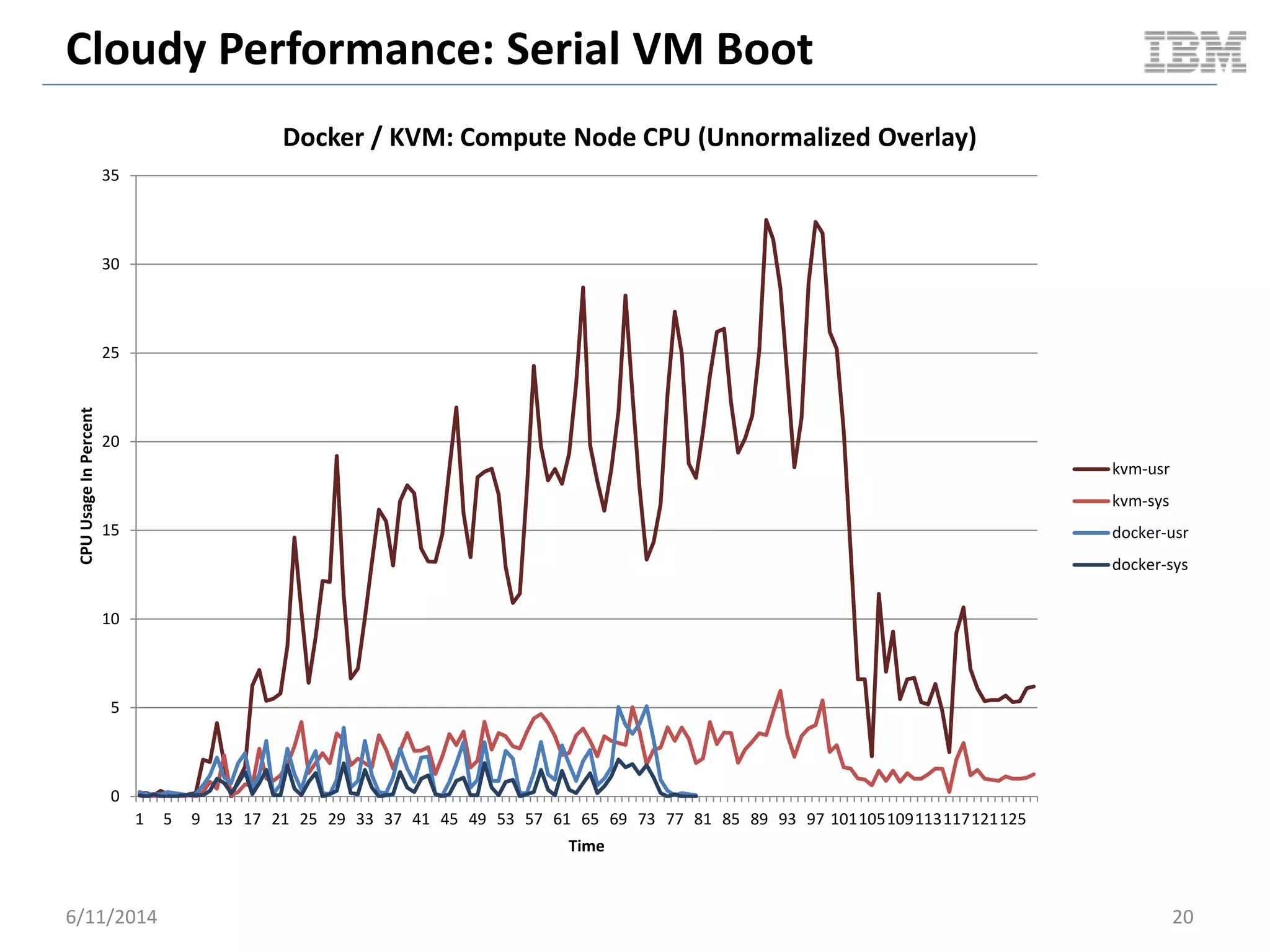
Docker / KVM: Compute Node CPU (Unnormalized Overlay)
kvm-usr
kvm-sys
docker-usr
docker-sys
Cloudy Performance: Serial VM Boot
6/11/2014 21
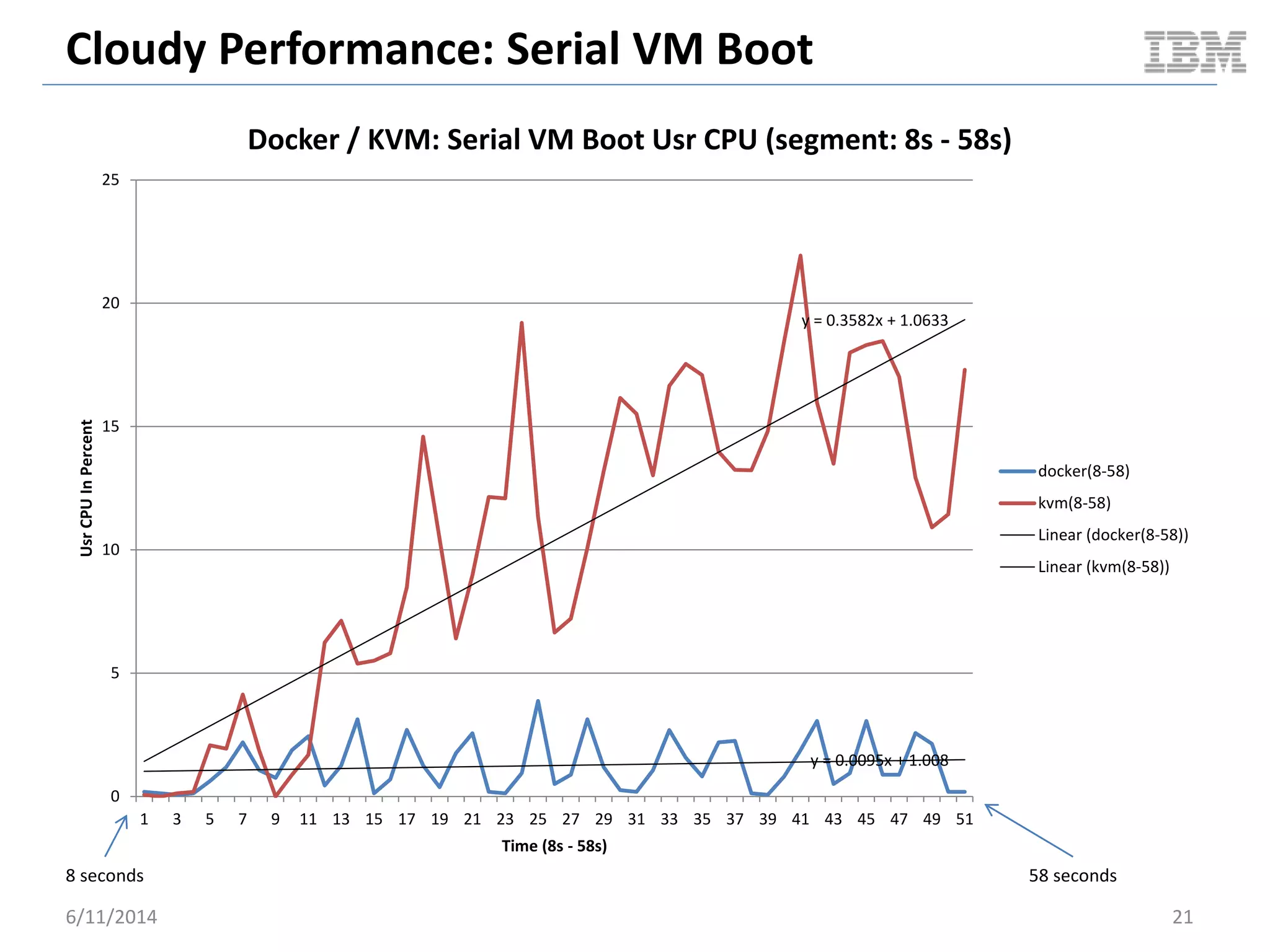
y = 0.0095x + 1.008
y = 0.3582x + 1.0633
0
5
10
15
20
25
1 3 5 7 9 11 13 15 17 19 21 23 25 27 29 31 33 35 37 39 41 43 45 47 49 51
UsrCPUInPercent
Time (8s - 58s)
Docker / KVM: Serial VM Boot Usr CPU (segment: 8s - 58s)
docker(8-58)
kvm(8-58)
Linear (docker(8-58))
Linear (kvm(8-58))
8 seconds 58 seconds
Cloudy Performance: Serial VM Boot
6/11/2014 22
0.00E+00
5.00E+08
1.00E+09
1.50E+09
2.00E+09
2.50E+09
3.00E+09
3.50E+09
4.00E+09
4.50E+09
5.00E+09
1 5 9 13 17 21 25 29 33 37 41 45 49 53 57 61 65 69 73 77 81 85 89 93 97 101105109113117121125
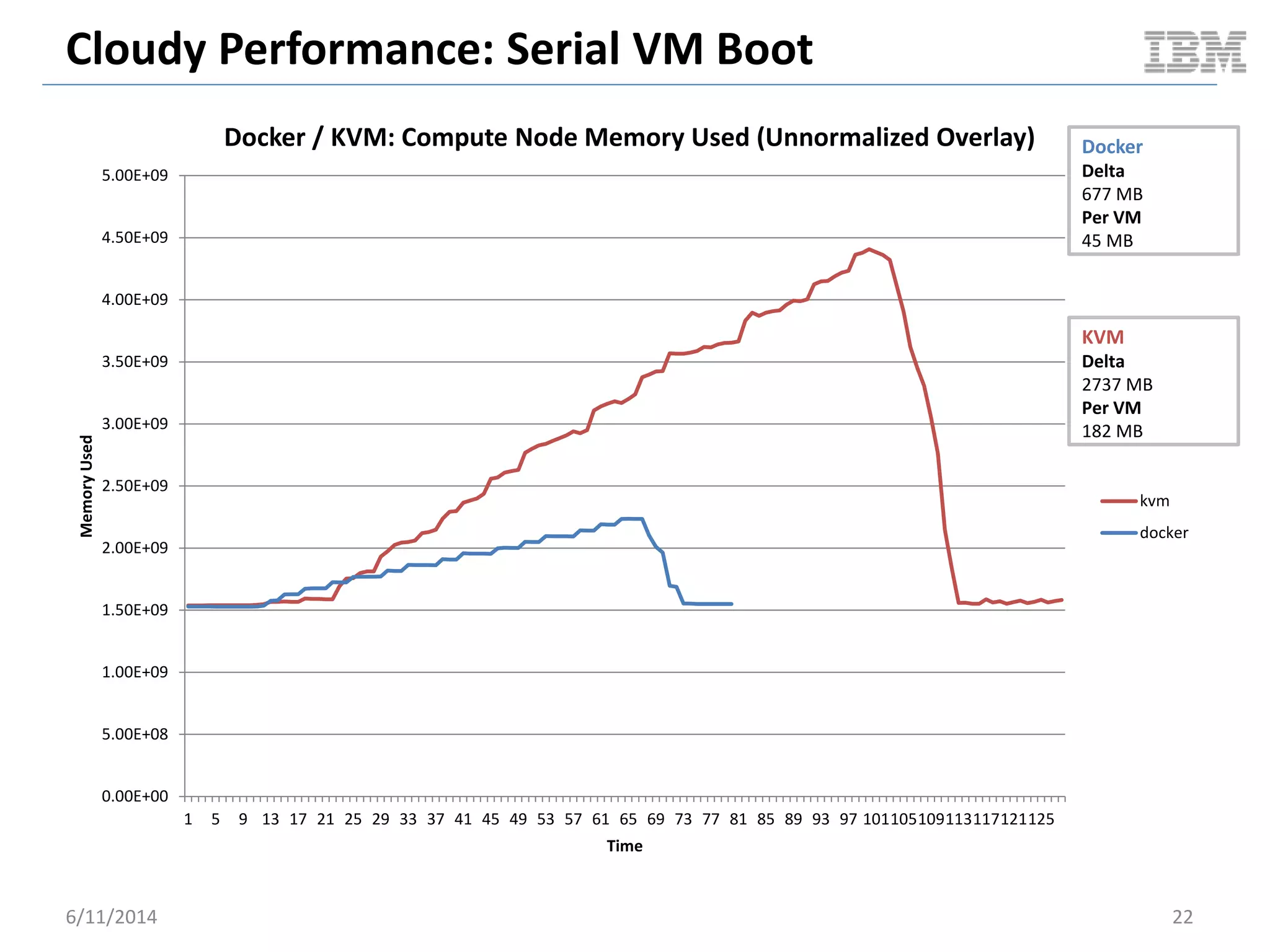
MemoryUsed
Time
Docker / KVM: Compute Node Memory Used (Unnormalized Overlay)
kvm
docker
Docker
Delta
677 MB
Per VM
45 MB
KVM
Delta
2737 MB
Per VM
182 MB
Cloudy Performance: Serial VM Boot
6/11/2014 23
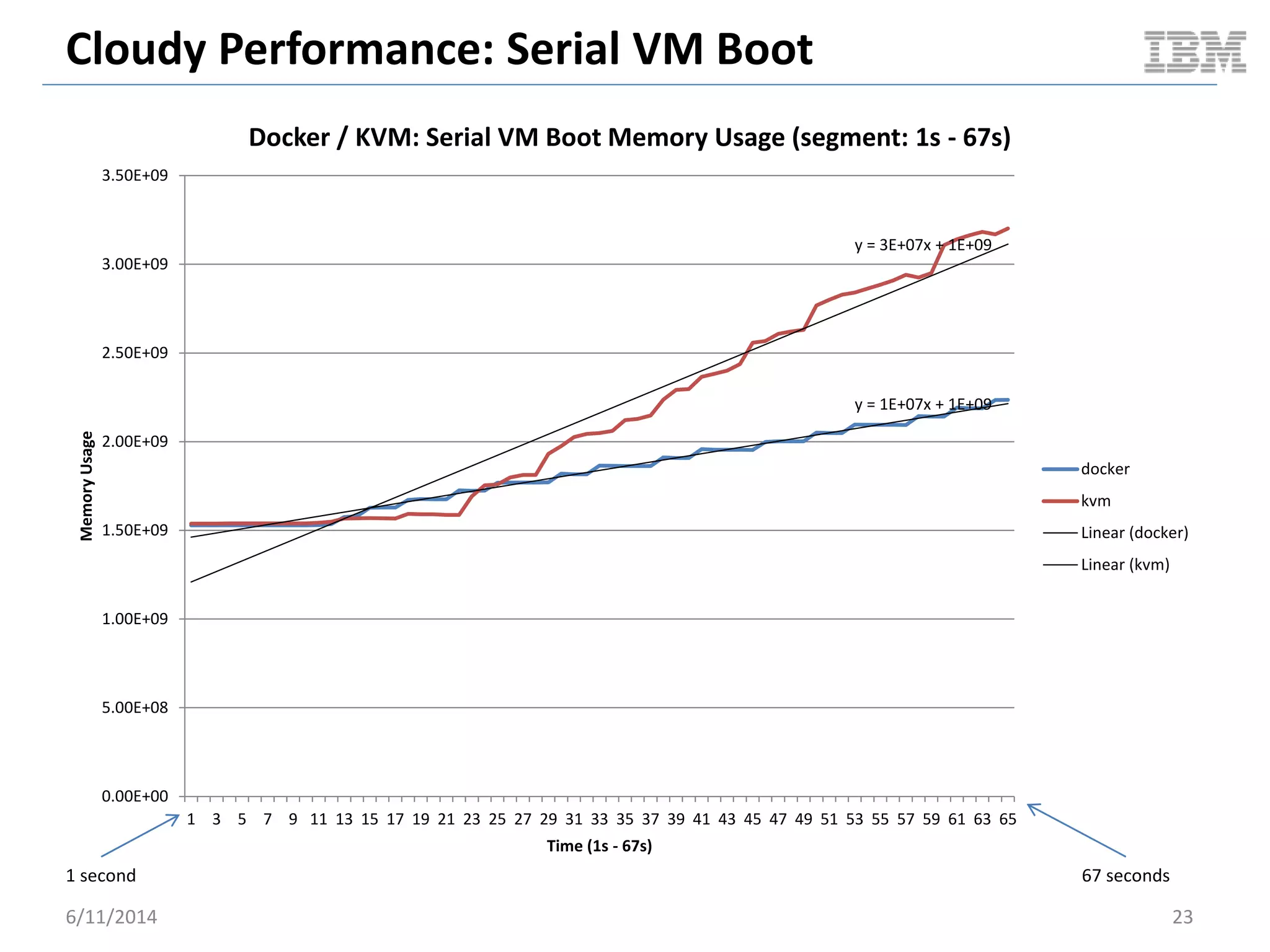
y = 1E+07x + 1E+09
y = 3E+07x + 1E+09
0.00E+00
5.00E+08
1.00E+09
1.50E+09
2.00E+09
2.50E+09
3.00E+09
3.50E+09
1 3 5 7 9 11 13 15 17 19 21 23 25 27 29 31 33 35 37 39 41 43 45 47 49 51 53 55 57 59 61 63 65
MemoryUsage
Time (1s - 67s)
Docker / KVM: Serial VM Boot Memory Usage (segment: 1s - 67s)
docker
kvm
Linear (docker)
Linear (kvm)
1 second 67 seconds
Cloudy Performance: Serial VM Boot
6/11/2014 24
0
5
10
15
20
25
30
35
1 3 5 7 9 11 13 15 17 19 21 23 25 27 29 31 33 35 37 39 41 43 45 47 49 51 53 55 57 59 61 63 65 67 69 71 73 75 77 79
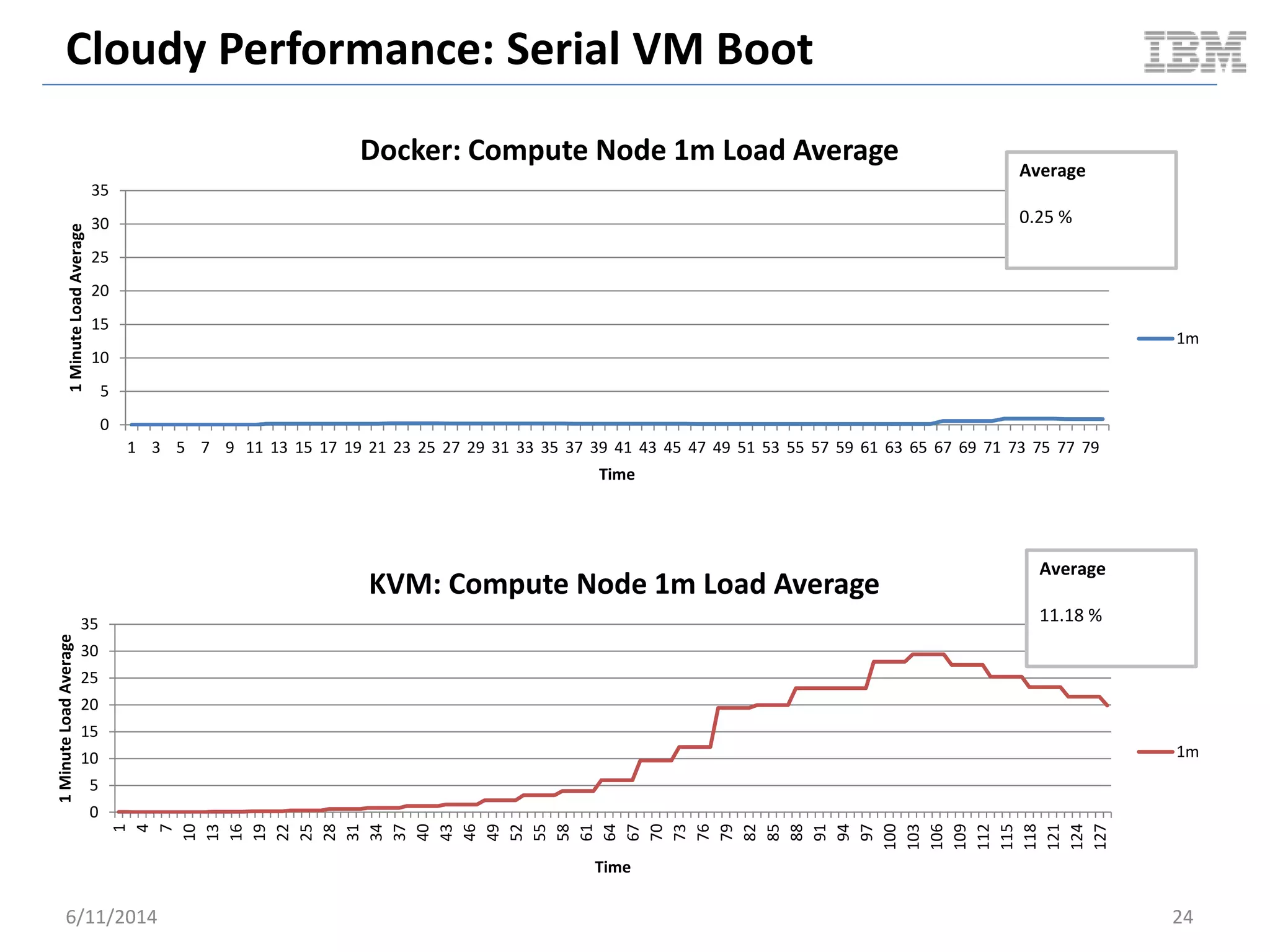
1MinuteLoadAverage
Time
Docker: Compute Node 1m Load Average
1m
Average
0.25 %
0
5
10
15
20
25
30
35
1
4
7
10
13
16
19
22
25
28
31
34
37
40
43
46
49
52
55
58
61
64
67
70
73
76
79
82
85
88
91
94
97
100
103
106
109
112
115
118
121
124
127
1MinuteLoadAverage
Time
KVM: Compute Node 1m Load Average
1m
Average
11.18 %
SERIAL VM SOFT REBOOT
OpenStack Cloudy Benchmark
6/11/2014 25
Cloudy Performance: Serial VM Reboot
 Benchmark scenario overview
– Pre-cache VM image on compute node prior to test
– Boot a VM & wait for it to become ACTIVE
– Soft reboot the VM and wait for it to become ACTIVE
• Repeat reboot a total of 5 times
– Delete VM
– Repeat the above for a total of 5 VMs
 Benchmark driver
– OpenStack Rally
 High level goals
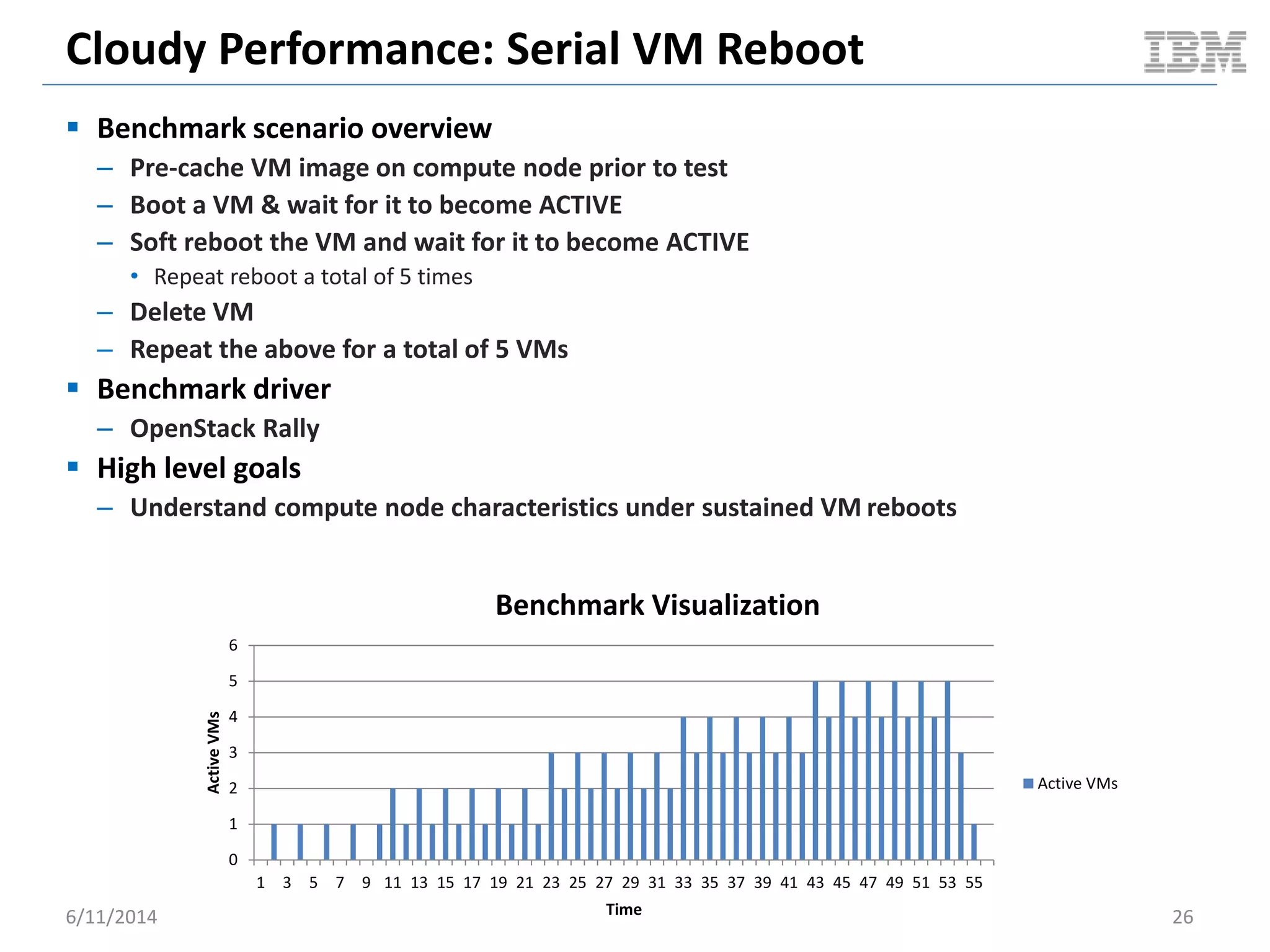
– Understand compute node characteristics under sustained VM reboots
6/11/2014 26
0
1
2
3
4
5
6
1 3 5 7 9 11 13 15 17 19 21 23 25 27 29 31 33 35 37 39 41 43 45 47 49 51 53 55
ActiveVMs
Time
Benchmark Visualization
Active VMs
Cloudy Performance: Serial VM Reboot
6/11/2014 27
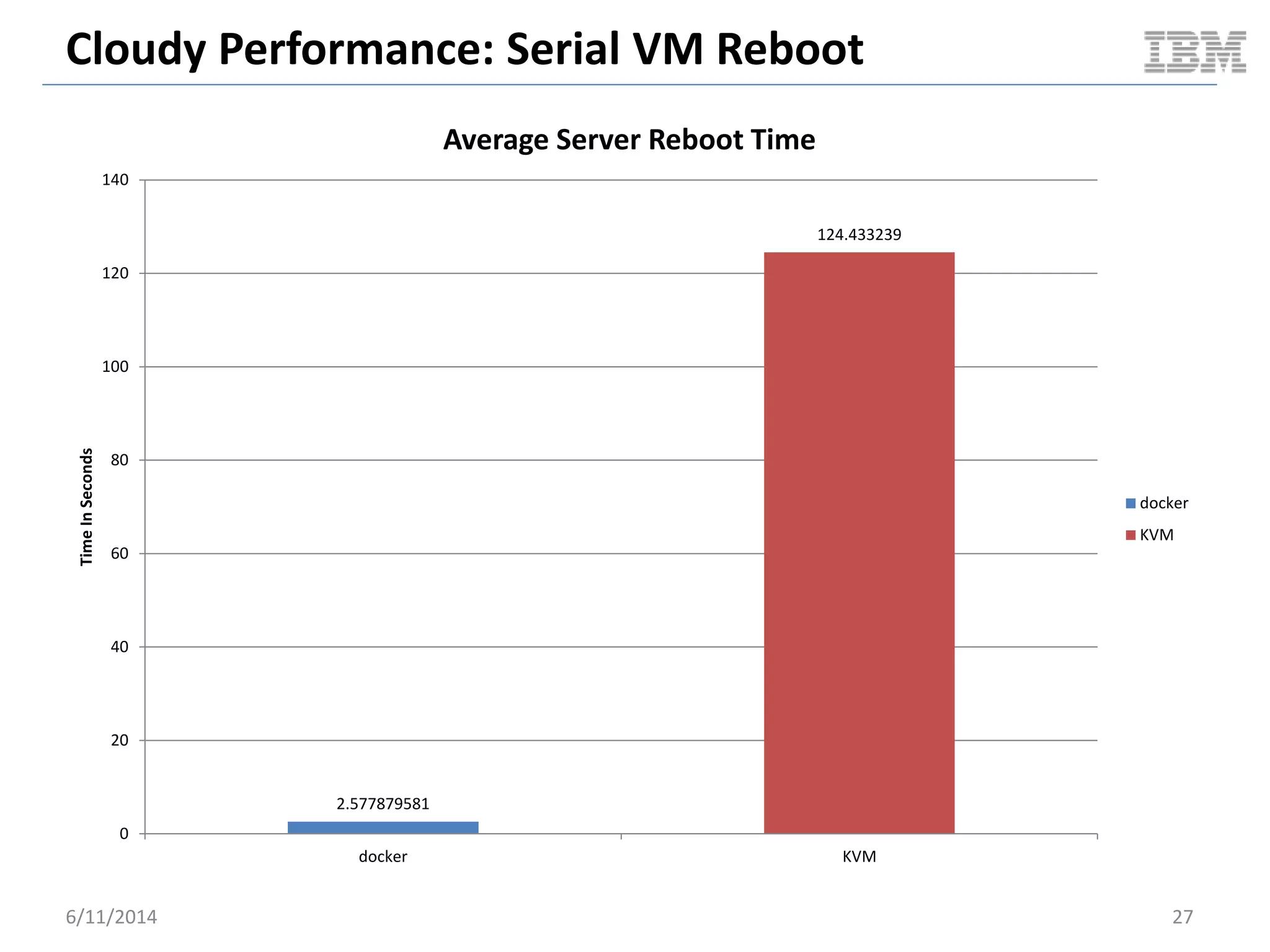
2.577879581
124.433239
0
20
40
60
80
100
120
140
docker KVM
TimeInSeconds
Average Server Reboot Time
docker
KVM
Cloudy Performance: Serial VM Reboot
6/11/2014 28
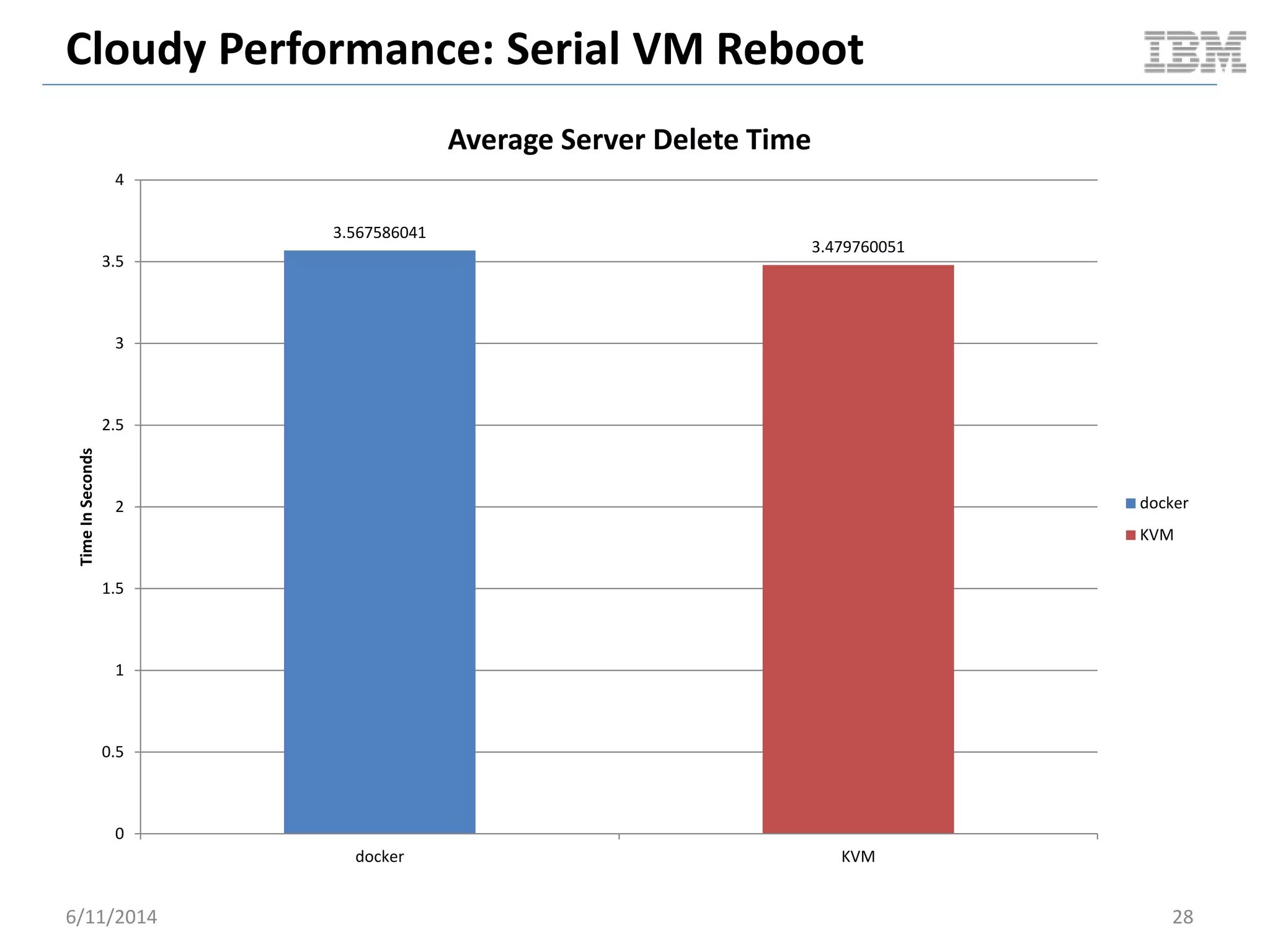
3.567586041
3.479760051
0
0.5
1
1.5
2
2.5
3
3.5
4
docker KVM
TimeInSeconds
Average Server Delete Time
docker
KVM
Cloudy Performance: Serial VM Reboot
6/11/2014 29
0
1
2
3
4
5
6
7
8
9
10
1
4
7
10
13
16
19
22
25
28
31
34
37
40
43
46
49
52
55
58
61
64
67
70
73
76
79
82
85
88
91
94
97
100
103
106
109
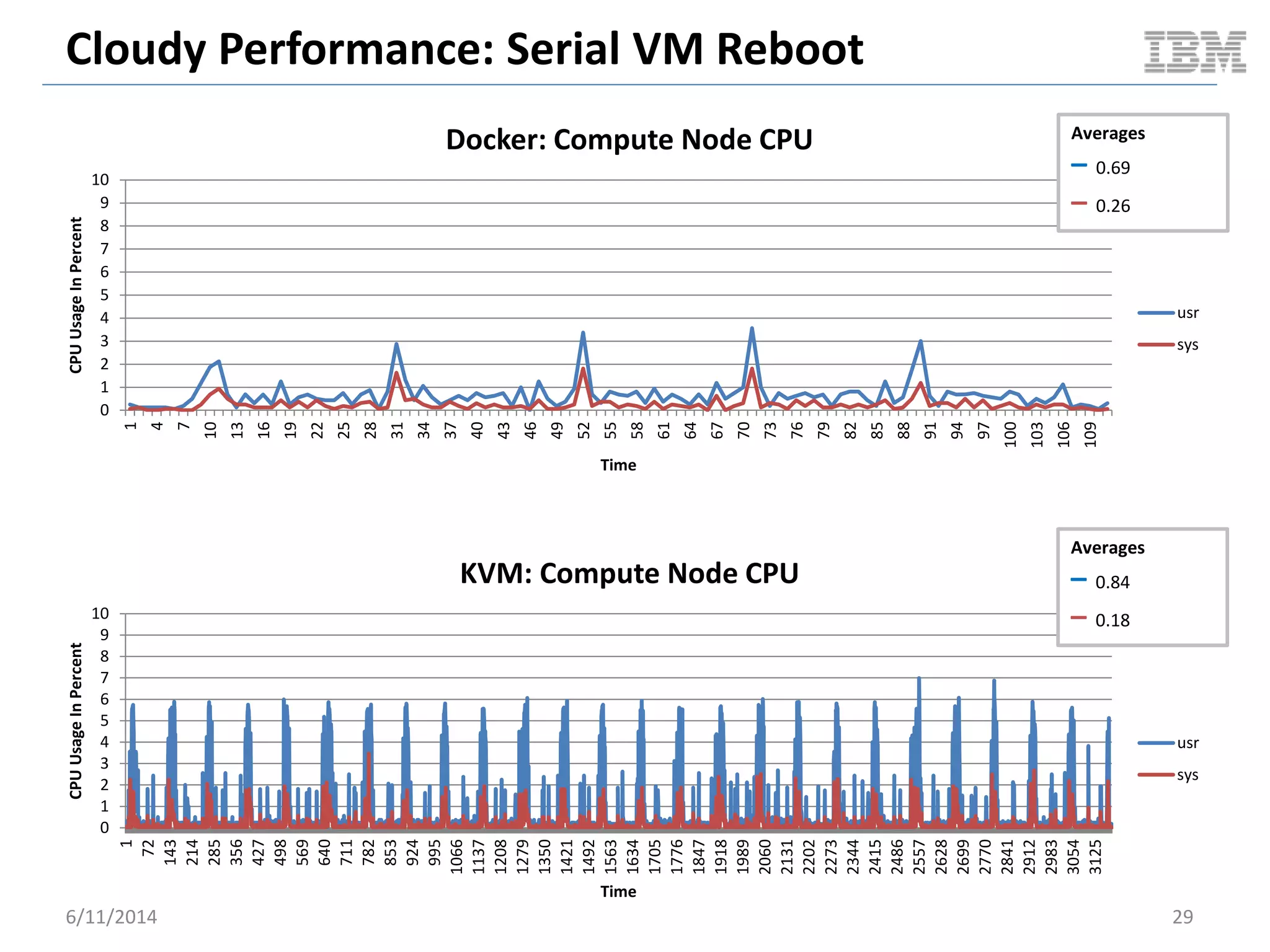
CPUUsageInPercent
Time
Docker: Compute Node CPU
usr
sys
0
1
2
3
4
5
6
7
8
9
10
1
72
143
214
285
356
427
498
569
640
711
782
853
924
995
1066
1137
1208
1279
1350
1421
1492
1563
1634
1705
1776
1847
1918
1989
2060
2131
2202
2273
2344
2415
2486
2557
2628
2699
2770
2841
2912
2983
3054
3125
CPUUsageInPercent
Time
KVM: Compute Node CPU
usr
sys
Averages
– 0.69
– 0.26
Averages
– 0.84
– 0.18
Cloudy Performance: Serial VM Reboot
6/11/2014 30
0.00E+00
5.00E+08
1.00E+09
1.50E+09
2.00E+09
2.50E+09
1
4
7
10
13
16
19
22
25
28
31
34
37
40
43
46
49
52
55
58
61
64
67
70
73
76
79
82
85
88
91
94
97
100
103
106
109
MemoryUsed
Time
Docker: Compute Node Used Memory
Memory
Delta
48 MB
0.00E+00
5.00E+08
1.00E+09
1.50E+09
2.00E+09
2.50E+09
1
81
161
241
321
401
481
561
641
721
801
881
961
1041
1121
1201
1281
1361
1441
1521
1601
1681
1761
1841
1921
2001
2081
2161
2241
2321
2401
2481
2561
2641
2721
2801
2881
2961
3041
3121
MemoryUsed
Time
KVM: Compute Node Used Memory
Memory
Delta
486 MB
Cloudy Performance: Serial VM Reboot
6/11/2014 31
0
0.5
1
1.5
2
2.5
3
1
4
7
10
13
16
19
22
25
28
31
34
37
40
43
46
49
52
55
58
61
64
67
70
73
76
79
82
85
88
91
94
97
100
103
106
109
1MinuteLoadAverage
Time
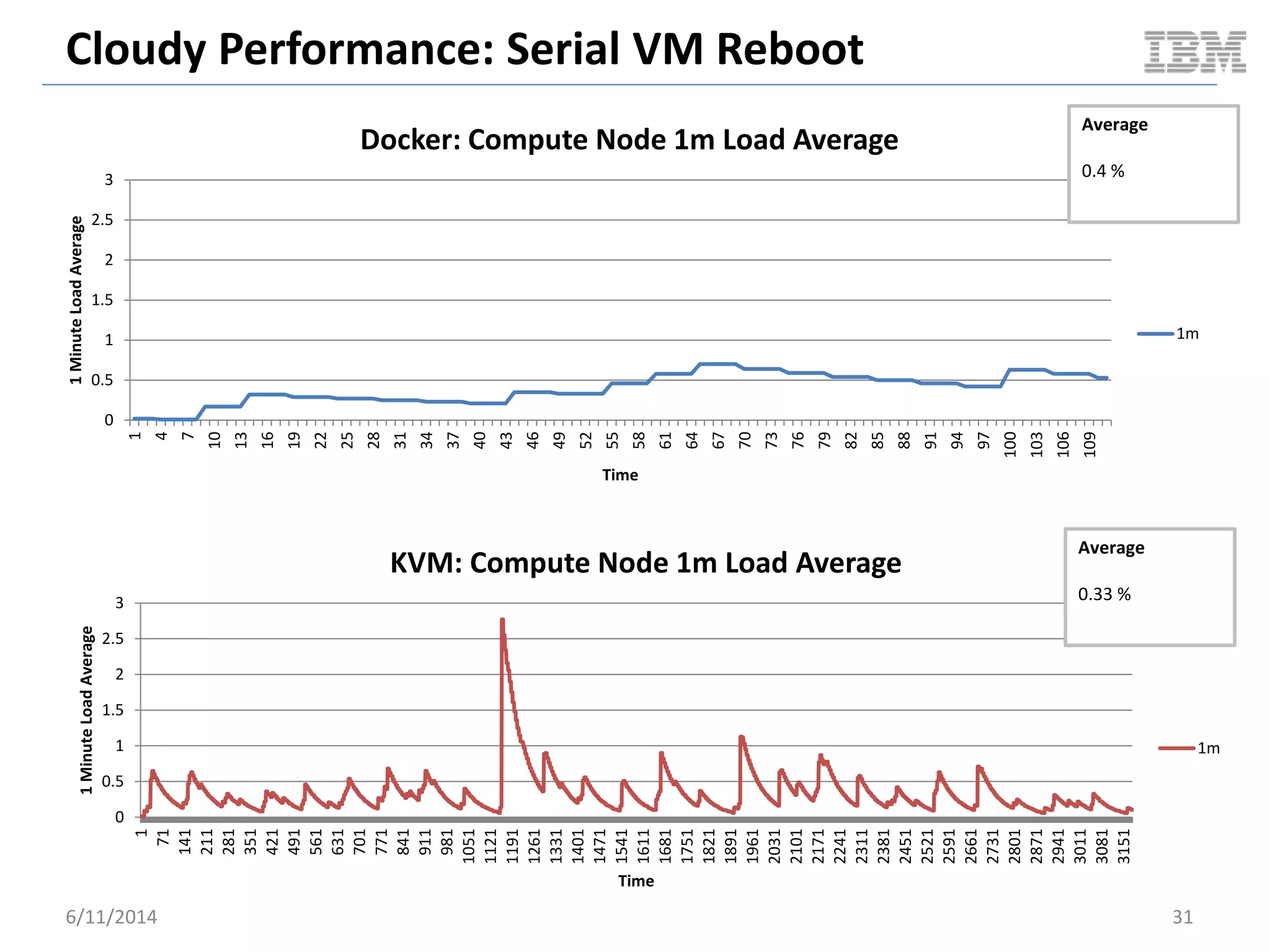
Docker: Compute Node 1m Load Average
1m
Average
0.4 %
0
0.5
1
1.5
2
2.5
3
1
71
141
211
281
351
421
491
561
631
701
771
841
911
981
1051
1121
1191
1261
1331
1401
1471
1541
1611
1681
1751
1821
1891
1961
2031
2101
2171
2241
2311
2381
2451
2521
2591
2661
2731
2801
2871
2941
3011
3081
3151
1MinuteLoadAverage
Time
KVM: Compute Node 1m Load Average
1m
Average
0.33 %
SNAPSHOT VM TO IMAGE
OpenStack Cloudy Benchmark
6/11/2014 32
Cloudy Performance: Snapshot VM To Image
 Benchmark scenario overview
– Pre-cache VM image on compute node prior to test
– Boot a VM
– Wait for it to become ACTIVE
– Snapshot the VM
– Wait for image to become ACTIVE
– Delete VM
 Benchmark driver
– OpenStack Rally
 High level goals
– Understand cloudy ops times from a user perspective
6/11/2014 33
Cloudy Performance: Snapshot VM To Image
6/11/2014 34
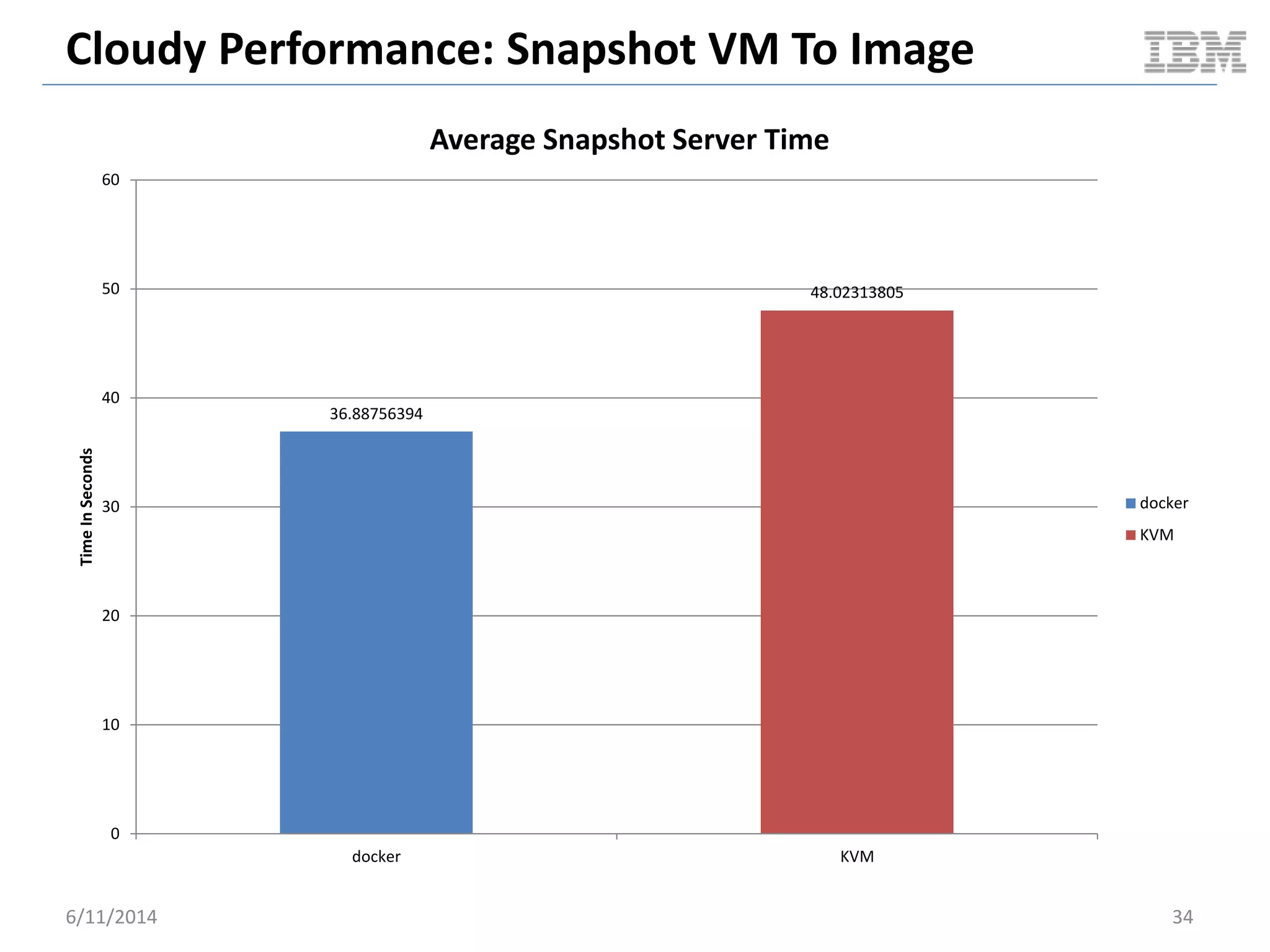
36.88756394
48.02313805
0
10
20
30
40
50
60
docker KVM
TimeInSeconds
Average Snapshot Server Time
docker
KVM
Cloudy Performance: Snapshot VM To Image
6/11/2014 35
0
1
2
3
4
5
6
7
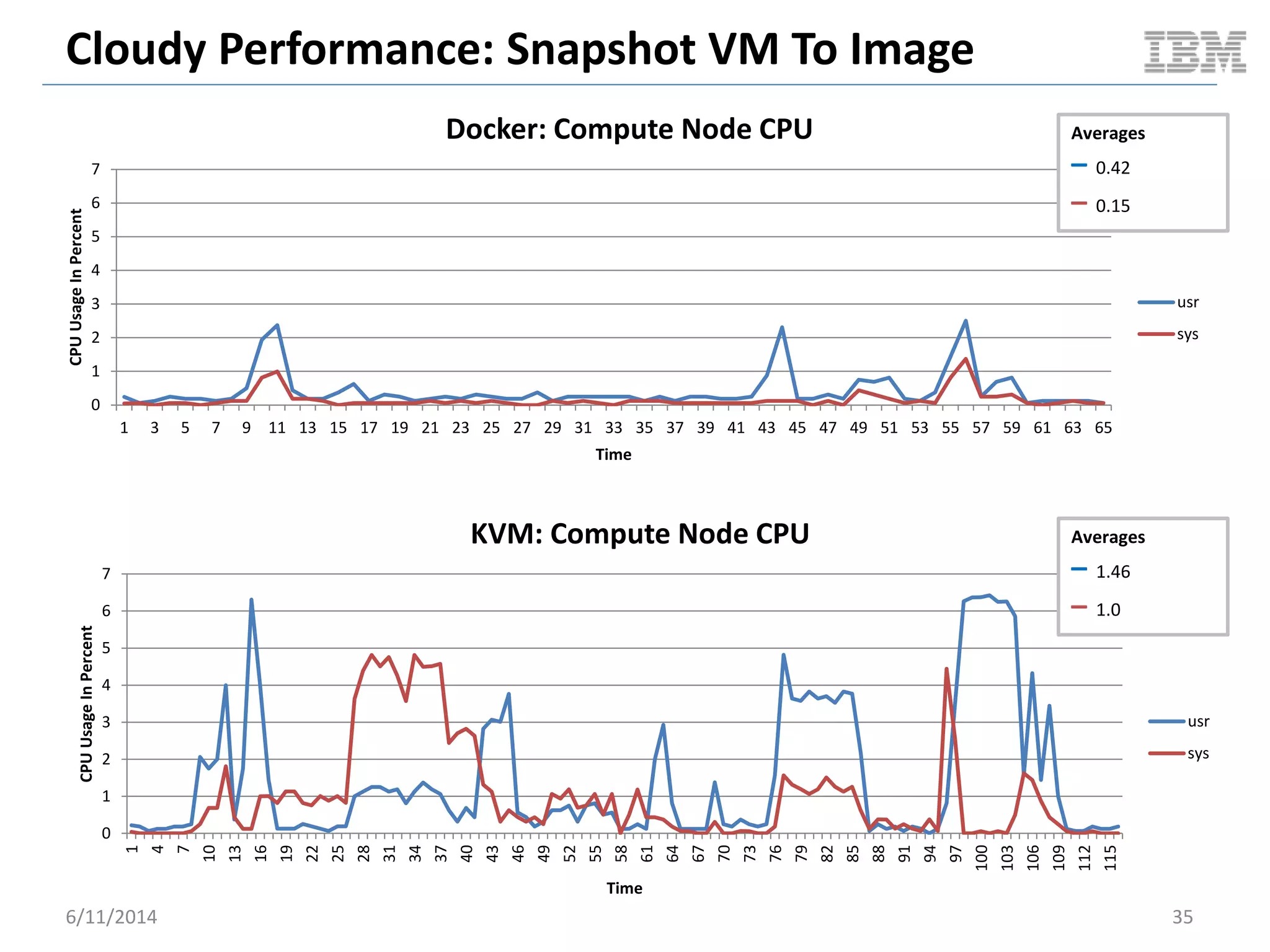
1 3 5 7 9 11 13 15 17 19 21 23 25 27 29 31 33 35 37 39 41 43 45 47 49 51 53 55 57 59 61 63 65
CPUUsageInPercent
Time
Docker: Compute Node CPU
usr
sys
Averages
– 0.42
– 0.15
0
1
2
3
4
5
6
7
1
4
7
10
13
16
19
22
25
28
31
34
37
40
43
46
49
52
55
58
61
64
67
70
73
76
79
82
85
88
91
94
97
100
103
106
109
112
115
CPUUsageInPercent
Time
KVM: Compute Node CPU
usr
sys
Averages
– 1.46
– 1.0
Cloudy Performance: Snapshot VM To Image
6/11/2014 36
1.48E+09
1.5E+09
1.52E+09
1.54E+09
1.56E+09
1.58E+09
1.6E+09
1.62E+09
1.64E+09
1.66E+09
1.68E+09
1
4
7
10
13
16
19
22
25
28
31
34
37
40
43
46
49
52
55
58
61
64
67
70
73
76
79
82
85
88
91
94
97
100
103
106
109
112
115
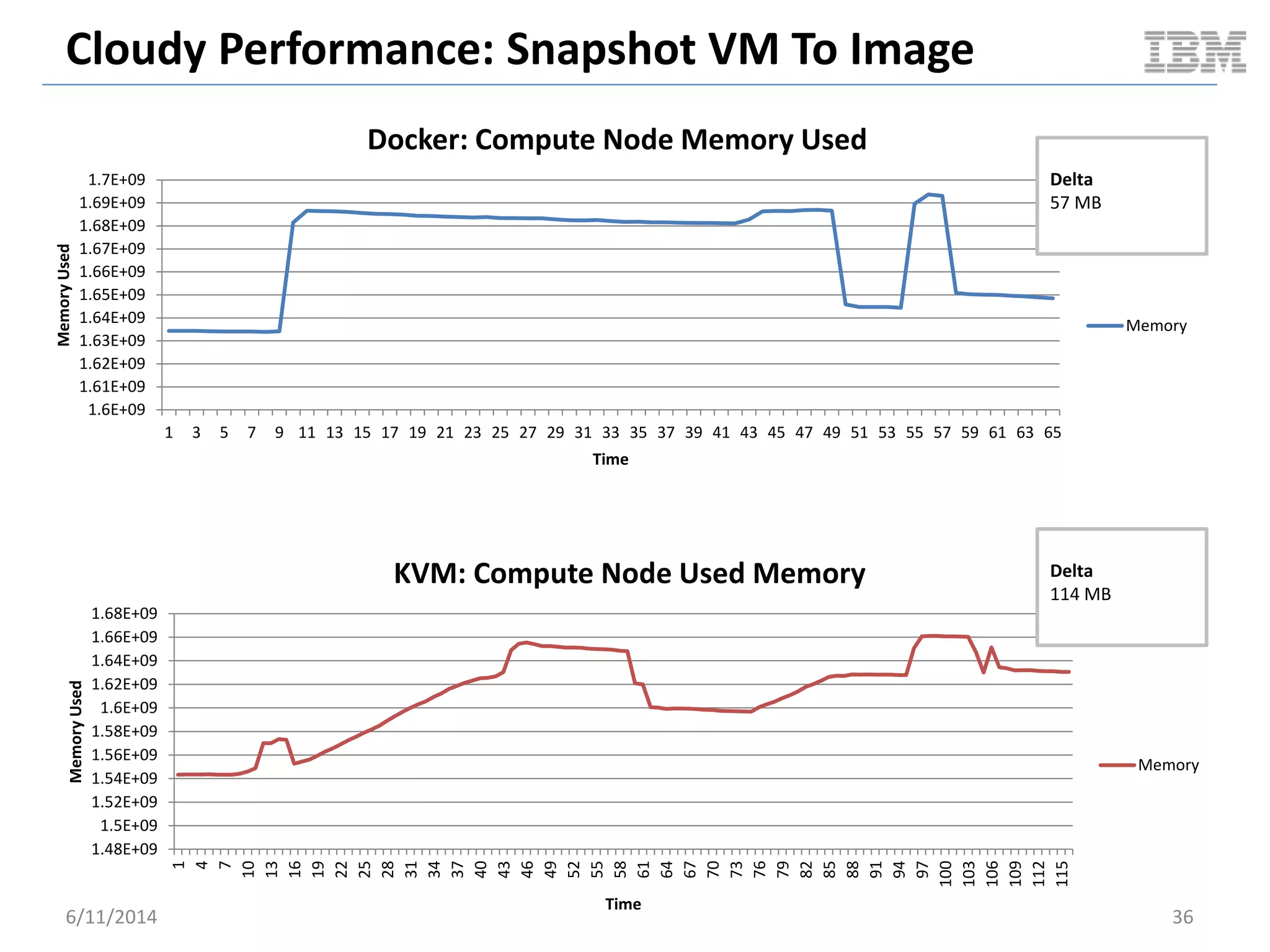
MemoryUsed
Time
KVM: Compute Node Used Memory
Memory
Delta
114 MB
1.6E+09
1.61E+09
1.62E+09
1.63E+09
1.64E+09
1.65E+09
1.66E+09
1.67E+09
1.68E+09
1.69E+09
1.7E+09
1 3 5 7 9 11 13 15 17 19 21 23 25 27 29 31 33 35 37 39 41 43 45 47 49 51 53 55 57 59 61 63 65
MemoryUsed
Time
Docker: Compute Node Memory Used
Memory
Delta
57 MB
Cloudy Performance: Snapshot VM To Image
6/11/2014 37
0
0.02
0.04
0.06
0.08
0.1
0.12
0.14
1 3 5 7 9 11 13 15 17 19 21 23 25 27 29 31 33 35 37 39 41 43 45 47 49 51 53 55 57 59 61 63 65
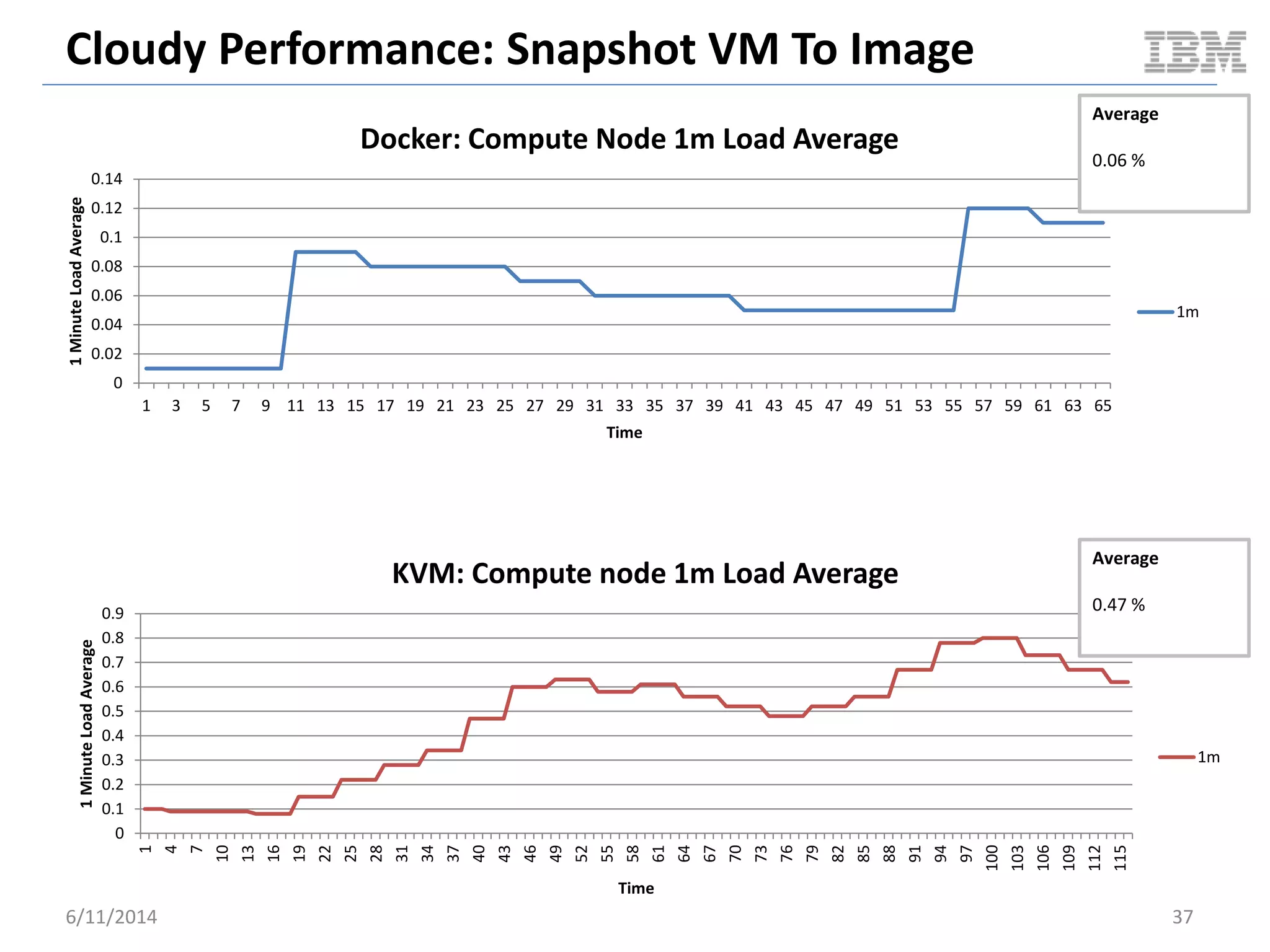
1MinuteLoadAverage
Time
Docker: Compute Node 1m Load Average
1m
Average
0.06 %
0
0.1
0.2
0.3
0.4
0.5
0.6
0.7
0.8
0.9
1
4
7
10
13
16
19
22
25
28
31
34
37
40
43
46
49
52
55
58
61
64
67
70
73
76
79
82
85
88
91
94
97
100
103
106
109
112
115
1MinuteLoadAverage
Time
KVM: Compute node 1m Load Average
1m
Average
0.47 %
GUEST PERFORMANCE
BENCHMARKS
Guest VM Benchmark
6/11/2014 38
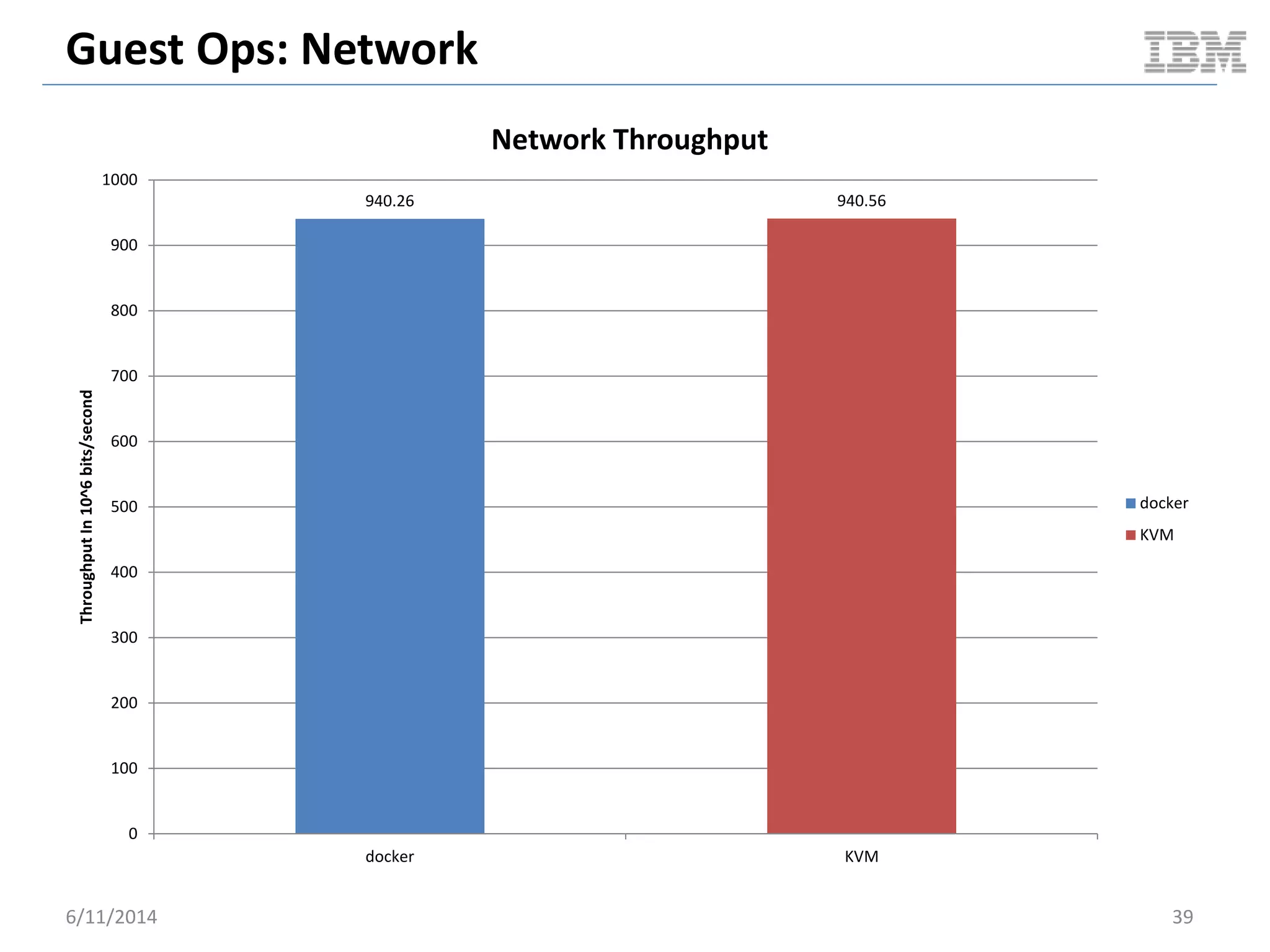
Guest Ops: Network
940.26 940.56
0
100
200
300
400
500
600
700
800
900
1000
docker KVM
ThroughputIn10^6bits/second
Network Throughput
docker
KVM
6/11/2014 39
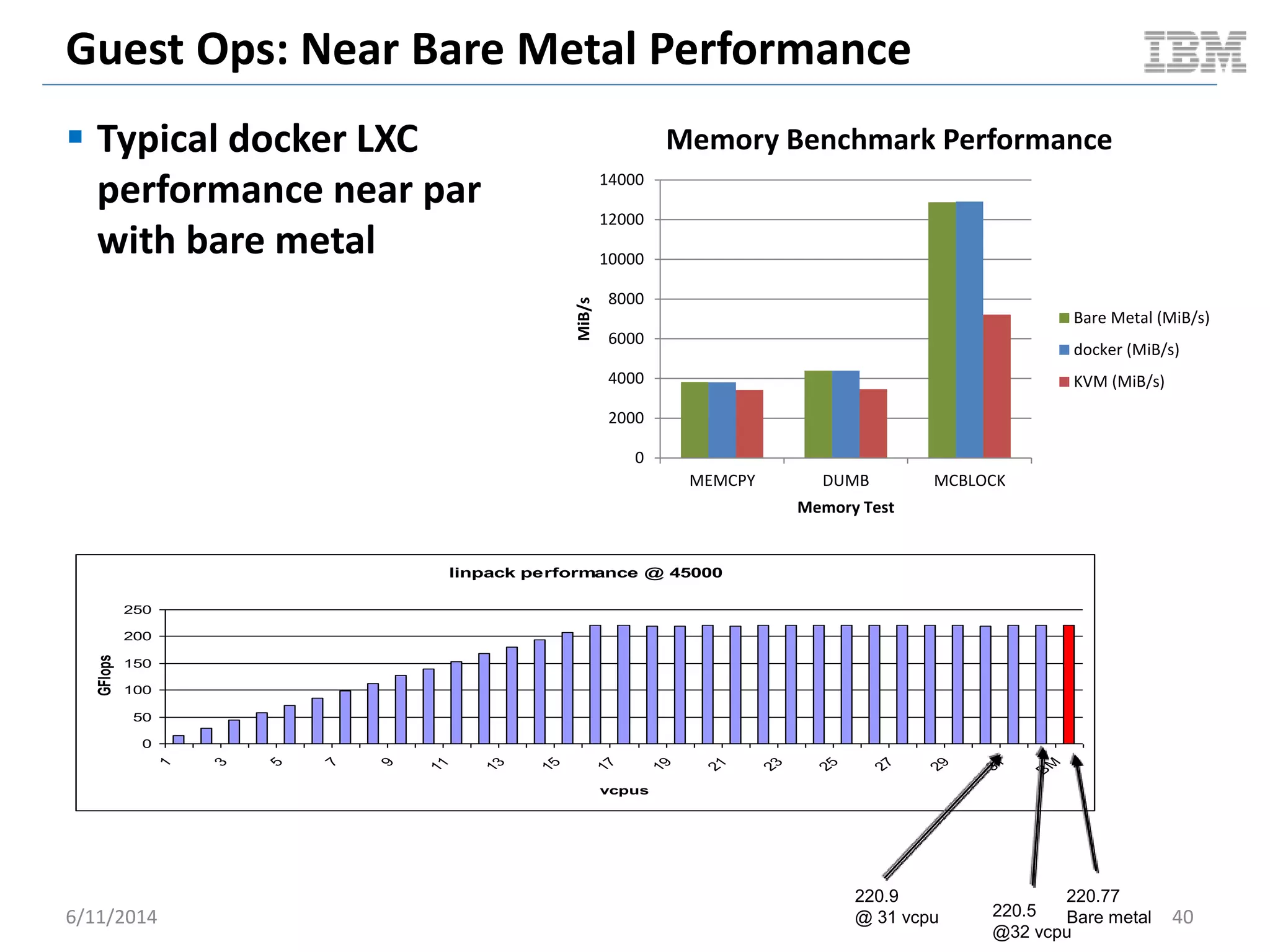
Guest Ops: Near Bare Metal Performance
 Typical docker LXC
performance near par
with bare metal
6/11/2014 40
linpack performance @ 45000
0
50
100
150
200
250
1 3 5 7 9 11 13 15 17 19 21 23 25 27 29 31
BM
vcpus
GFlops
220.77
Bare metal220.5
@32 vcpu
220.9
@ 31 vcpu
0
2000
4000
6000
8000
10000
12000
14000
MEMCPY DUMB MCBLOCK
MiB/s
Memory Test
Memory Benchmark Performance
Bare Metal (MiB/s)
docker (MiB/s)
KVM (MiB/s)
Guest Ops: Block I/O
 Tested with [standard] AUFS
6/11/2014 41
845 822
0
100
200
300
400
500
600
700
800
900
Bare Metal docker
MB/s
Async I/O
dd if=/dev/zero of=/tmp/d4g bs=4G count=1
Bare Metal
docker
90.1 87.2
0
10
20
30
40
50
60
70
80
90
100
Bare Metal docker
MB/s
Sync Data Write
dd if=/dev/zero of=/tmp/d4g bs=4G count=1 oflag=dsync
Bare Metal
docker
89.2 89
0
10
20
30
40
50
60
70
80
90
100
Bare Metal docker
MB/s
Sync Data / Metadata Write
dd if=/dev/zero of=/tmp/d4g bs=4G count=1 oflag=sync
Bare Metal
docker
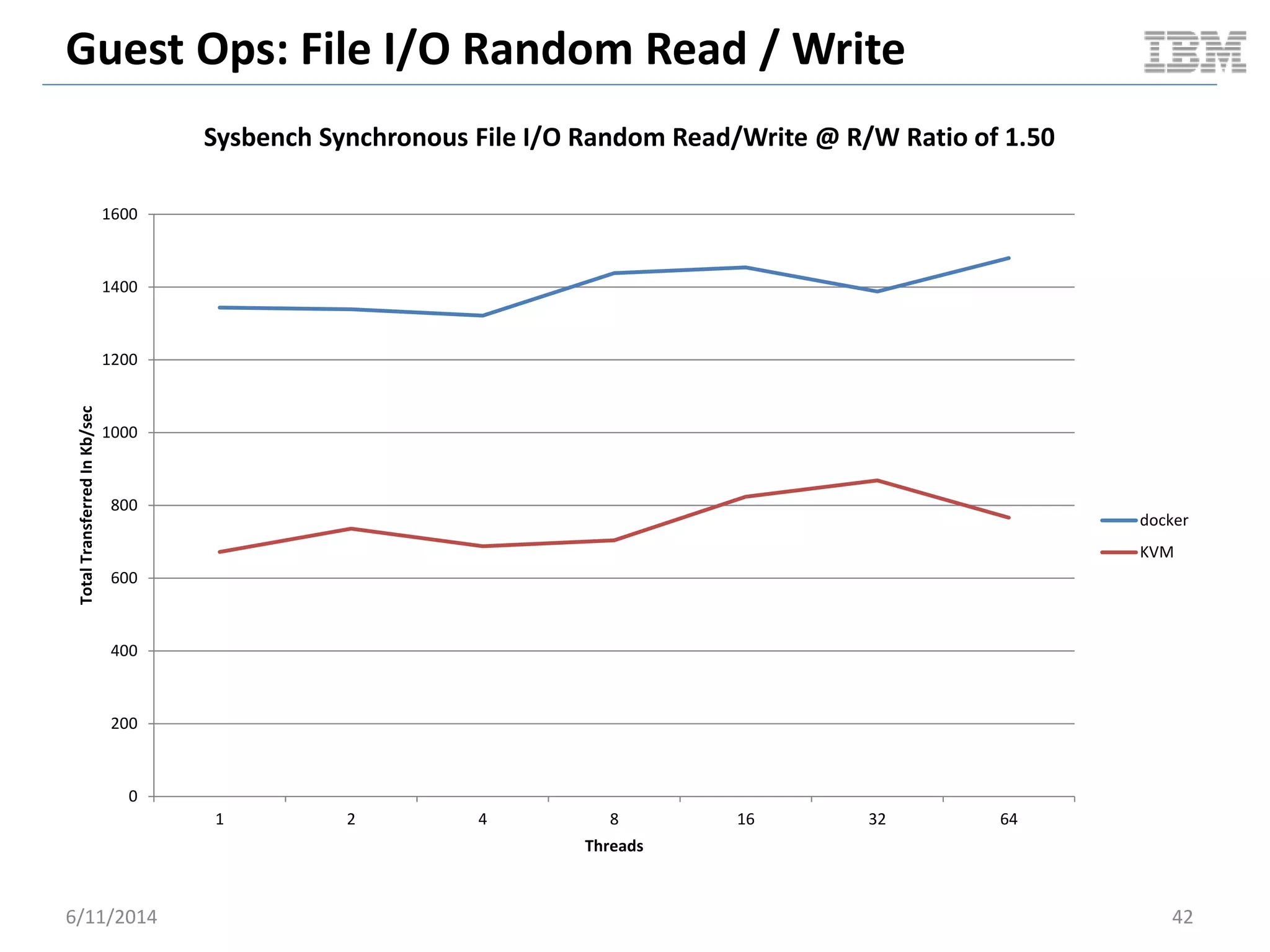
Guest Ops: File I/O Random Read / Write
0
200
400
600
800
1000
1200
1400
1600
1 2 4 8 16 32 64
TotalTransferredInKb/sec
Threads
Sysbench Synchronous File I/O Random Read/Write @ R/W Ratio of 1.50
docker
KVM
6/11/2014 42
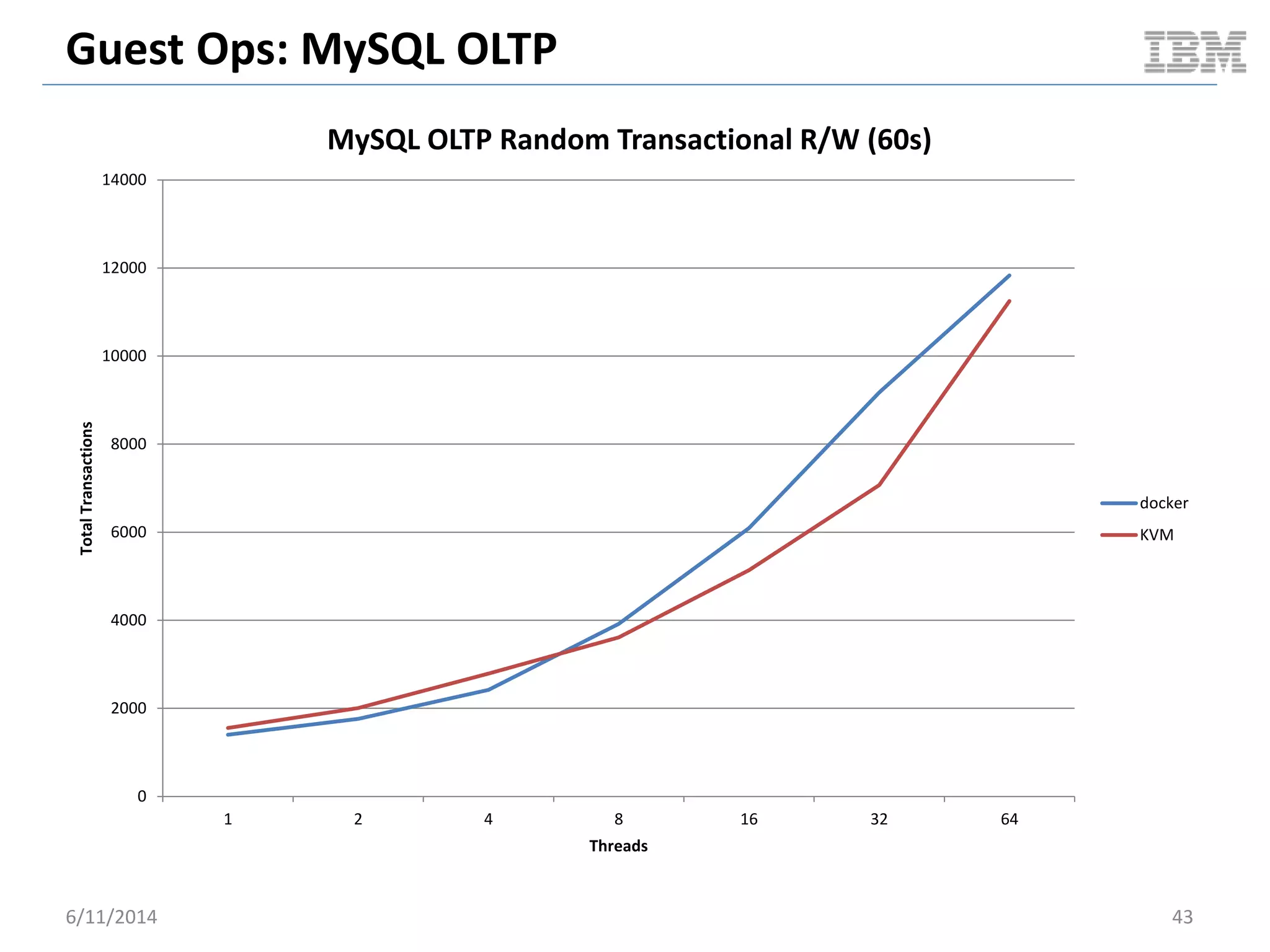
Guest Ops: MySQL OLTP
0
2000
4000
6000
8000
10000
12000
14000
1 2 4 8 16 32 64
TotalTransactions
Threads
MySQL OLTP Random Transactional R/W (60s)
docker
KVM
6/11/2014 43
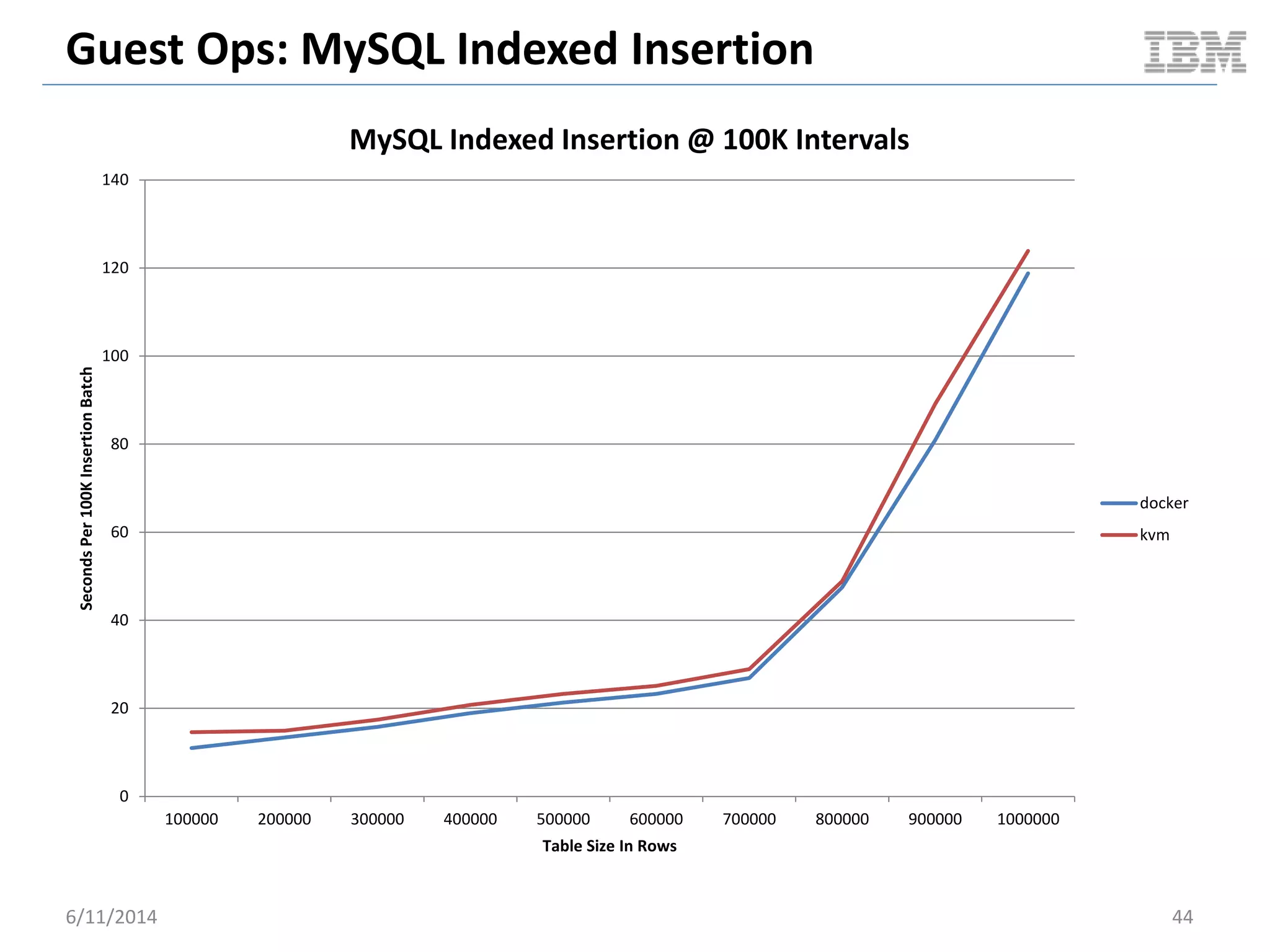
Guest Ops: MySQL Indexed Insertion
0
20
40
60
80
100
120
140
100000 200000 300000 400000 500000 600000 700000 800000 900000 1000000
SecondsPer100KInsertionBatch
Table Size In Rows
MySQL Indexed Insertion @ 100K Intervals
docker
kvm
6/11/2014 44
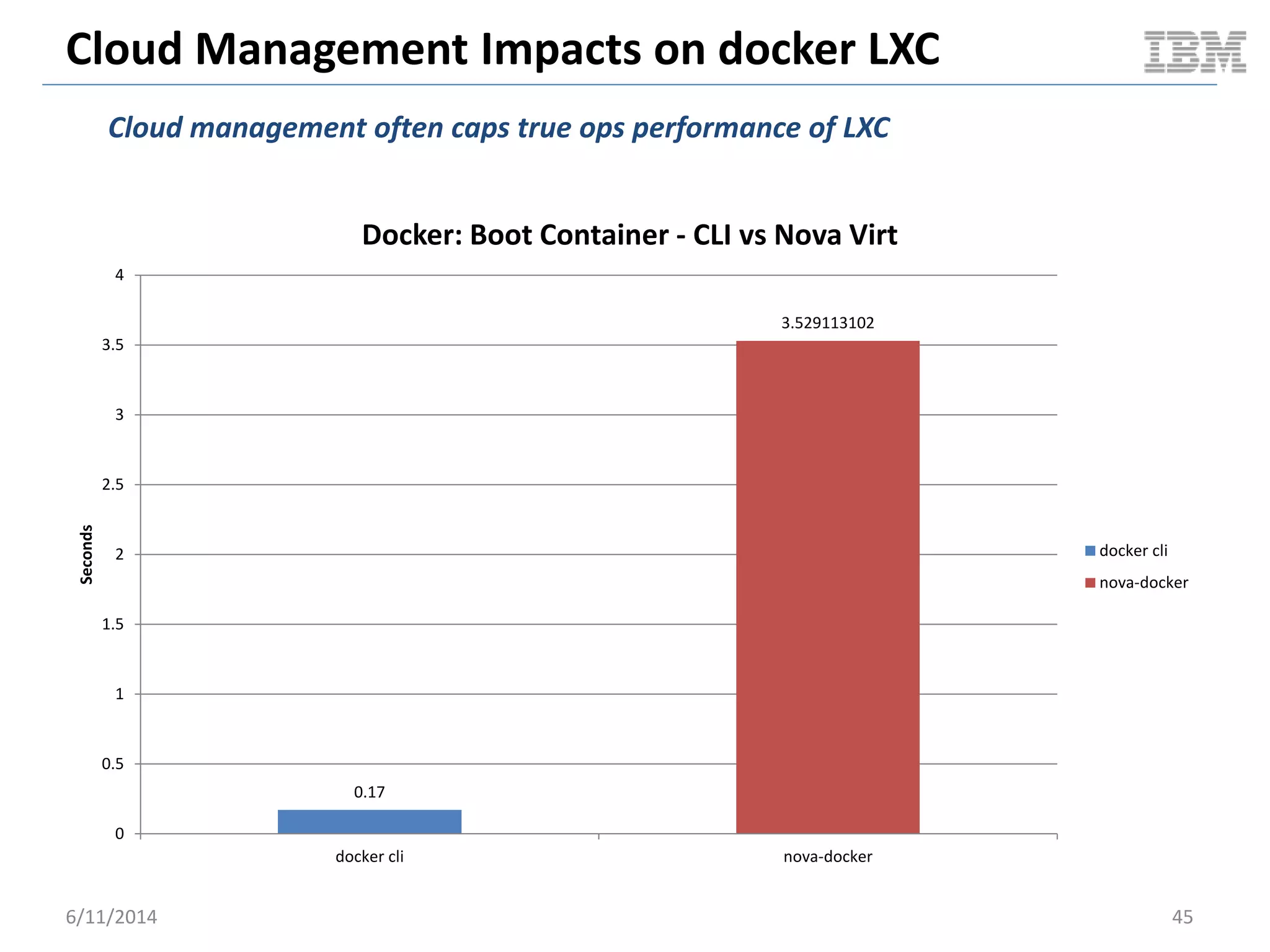
Cloud Management Impacts on docker LXC
0.17
3.529113102
0
0.5
1
1.5
2
2.5
3
3.5
4
docker cli nova-docker
Seconds
Docker: Boot Container - CLI vs Nova Virt
docker cli
nova-docker
6/11/2014 45
Cloud management often caps true ops performance of LXC
Ubuntu MySQL Image Size
381.5
1080
0
200
400
600
800
1000
1200
docker kvm
SizeInMB
Docker / KVM: Ubuntu MySQL
docker
kvm
6/11/2014 46
Out of the box JeOS images for docker are lightweight
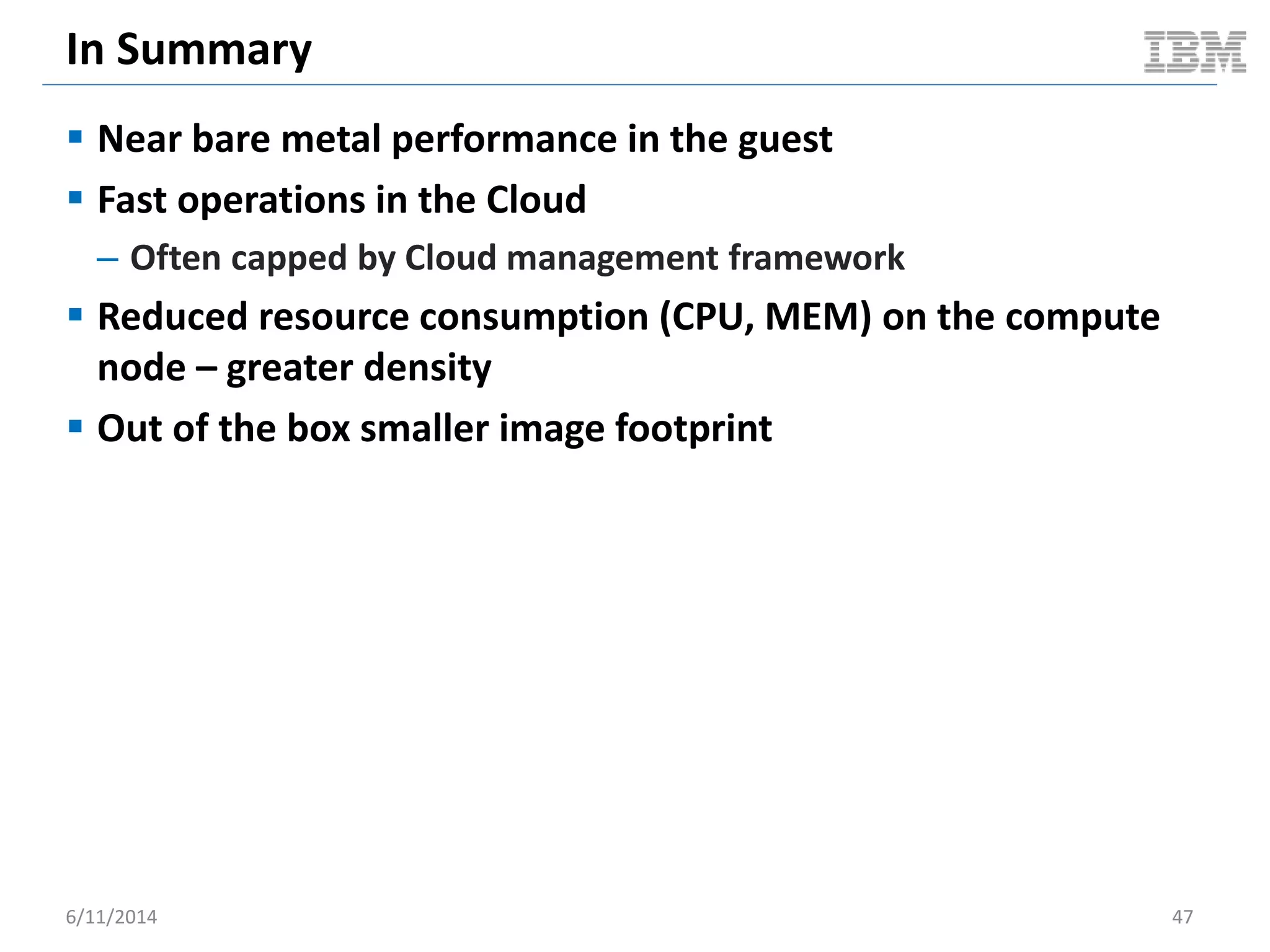
In Summary
 Near bare metal performance in the guest
 Fast operations in the Cloud
– Often capped by Cloud management framework
 Reduced resource consumption (CPU, MEM) on the compute
node – greater density
 Out of the box smaller image footprint
6/11/2014 47
Parting Thoughts: Ecosystem Synergy
6/11/2014 48
Category Factors Scope
CAPEX
Hardware costs - VM density (consolidation ratio)
- Soft device integration
- Broad vendor compatibility
- Hypervisor
- Cloud manager
Software licensing costs - Software purchase price
- Support contracts
- Hypervisor
- Cloud manager
OPEX
Disaster recovery - Hypervisor
- Cloud manager
Upgrade / maintenance expenses - Hypervisor
- Cloud manager
Power & cooling costs - Reduced HW footprint - Hypervisor
- Cloud manager
Administration efficiency - Automated operations
- Performance / response time
- Hypervisor
- Cloud manager
Support & training costs - Hypervisor
- Cloud manager
AGILITY
Application delivery time - Workflow complexity
- Toolset costs
- Skillset
- Hypervisor
- Cloud manager
Planned / unplanned downtime - Hypervisor
- Cloud manager
Displacement of enterprise players requires full stack solutions
*Not a complete or extensive list
References & Related Links
 http://www.slideshare.net/BodenRussell/realizing-linux-containerslxc
 http://bodenr.blogspot.com/2014/05/kvm-and-docker-lxc-benchmarking-with.html
 https://www.docker.io/
 http://sysbench.sourceforge.net/
 http://dag.wiee.rs/home-made/dstat/
 http://www.openstack.org/
 https://wiki.openstack.org/wiki/Rally
 https://wiki.openstack.org/wiki/Docker
 http://devstack.org/
 http://www.linux-kvm.org/page/Main_Page
 https://github.com/stackforge/nova-docker
 https://github.com/dotcloud/docker-registry
 http://www.netperf.org/netperf/
 http://www.tokutek.com/products/iibench/
 http://www.brendangregg.com/activebenchmarking.html
 http://wiki.openvz.org/Performance
 http://www.slideshare.net/jpetazzo/linux-containers-lxc-docker-and-security
 (images)
– http://www.publicdomainpictures.net/view-image.php?image=11972&picture=dollars
– http://www.publicdomainpictures.net/view-image.php?image=1888&picture=zoom
– http://www.publicdomainpictures.net/view-image.php?image=6059&picture=ge-building
6/11/2014 49
Thank You… Questions?
6/11/2014 50

Performance characteristics of traditional v ms vs docker containers (dockercon14)

  • 1.
    Performance Characteristics of TraditionalVMs vs Docker Containers dockercon14 June 9-10, 2014 San Francisco, CA Boden Russell (brussell@us.ibm.com)
  • 2.
    Motivations: Computer Scientist 6/11/20142 Family Innovation Creativity Revenue
  • 3.
  • 4.
    Increasing Revenue: DoMore With Less Reduce Total Cost of Ownership (TCO) and increase Return On Investment (ROI) 6/11/2014 4 Category Factors Scope CAPEX Hardware costs - VM density (consolidation ratio) - Soft device integration - Broad vendor compatibility - Hypervisor - Cloud manager Software licensing costs - Software purchase price - Support contracts - Hypervisor - Cloud manager OPEX Disaster recovery - Hypervisor - Cloud manager Upgrade / maintenance expenses - Hypervisor - Cloud manager Power & cooling costs - Reduced HW footprint - Hypervisor - Cloud manager Administration efficiency - Automated operations - Performance / response time - Hypervisor - Cloud manager Support & training costs - Hypervisor - Cloud manager AGILITY Application delivery time - Workflow complexity - Toolset costs - Skillset - Hypervisor - Cloud manager Planned / unplanned downtime - Hypervisor - Cloud manager *Not a complete or extensive list
  • 5.
    About This Benchmark Use case perspective – As an OpenStack Cloud user I want a Ubuntu based VM with MySQL… Why would I choose docker LXC vs a traditional hypervisor?  OpenStack “Cloudy” perspective – LXC vs. traditional VM from a Cloudy (OpenStack) perspective – VM operational times (boot, start, stop, snapshot) – Compute node resource usage (per VM penalty); density factor  Guest runtime perspective – CPU, memory, file I/O, MySQL OLTP, etc.  Why KVM? – Exceptional performance DISCLAIMERS The tests herein are semi-active litmus tests – no in depth tuning, analysis, etc. More active testing is warranted. These results do not necessary reflect your workload or exact performance nor are they guaranteed to be statistically sound. 6/11/2014 5
  • 6.
    Docker in OpenStack Havana – Nova virt driver which integrates with docker REST API on backend – Glance translator to integrate docker images with Glance  Icehouse – Heat plugin for docker  Both options are still under development 6/11/2014 6 nova-docker virt driver docker heat plugin DockerInc::Docke r::Container (plugin)
  • 7.
    Benchmark Environment Topology@ SoftLayer 6/11/2014 7 glance api / reg nova api / cond / etc keystone … rally nova api / cond / etc cinder api / sch / vol docker lxc dstat controller compute node glance api / reg nova api / cond / etc keystone … rally nova api / cond / etc cinder api / sch / vol KVM dstat controller compute node + Awesome! + Awesome!
  • 8.
    Benchmark Specs 6/11/2014 8 SpecController Node (4CPU x 8G RAM) Compute Node (16CPU x 96G RAM) Environment Bare Metal @ SoftLayer Bare Metal @ SoftLayer Mother Board SuperMicro X8SIE-F Intel Xeon QuadCore SingleProc SATA [1Proc] SuperMicro X8DTU-F_R2 Intel Xeon HexCore DualProc [2Proc] CPU Intel Xeon-Lynnfield 3470-Quadcore [2.93GHz] (Intel Xeon-Westmere 5620-Quadcore [2.4GHz]) x 2 Memory (Kingston 4GB DDR3 2Rx8 4GB DDR3 2Rx8 [4GB]) x2 (Kingston 16GB DDR3 2Rx4 16GB DDR3 2Rx4 [16GB]) x 6 HDD (LOCAL) Digital WD Caviar RE3 WD5002ABYS [500GB]; SATAII Western Digital WD Caviar RE4 WD5003ABYX [500GB]; SATAII NIC eth0/eth1 @ 100 Mbps eth0/eth1 @100 Mbps Operating System Ubuntu 12.04 LTS 64bit Ubuntu 12.04 LTS 64bit Kernel 3.5.0-48-generic 3.8.0-38-generic IO Scheduler deadline deadline Hypervisor tested NA - KVM 1.0 + virtio + KSM (memory deduplication) - docker 0.10.0 + go1.2.1 + commit dc9c28f + AUFS OpenStack Trunk master via devstack Trunk master via devstack. Libvirt KVM nova driver / nova-docker virt driver OpenStack Benchmark Client OpenStack project rally NA Metrics Collection NA dstat Guest Benchmark Driver NA - Sysbench 0.4.12 - mbw 1.1.1.-2 - iibench (py) - netperf 2.5.0-1 - Blogbench 1.1 - cpu_bench.py VM Image NA - Scenario 1 (KVM): official ubuntu 12.04 image + mysql snapshotted and exported to qcow2 – 1080 MB - Scenario 2 (docker): guillermo/mysql -- 381.5 MB Hosted @
  • 9.
    STEADY STATE VMPACKING OpenStack Cloudy Benchmark 6/11/2014 9
  • 10.
    Cloudy Performance: SteadyState Packing  Benchmark scenario overview – Pre-cache VM image on compute node prior to test – Boot 15 VM asynchronously in succession – Wait for 5 minutes (to achieve steady-state on the compute node) – Delete all 15 VMs asynchronously in succession  Benchmark driver – cpu_bench.py  High level goals – Understand compute node characteristics under steady-state conditions with 15 packed / active VMs 6/11/2014 10 0 2 4 6 8 10 12 14 16 1 3 5 7 9 11 13 15 17 19 21 23 25 27 29 31 33 35 37 39 41 43 45 47 ActiveVMs Time Benchmark Visualization VMs
  • 11.
    Cloudy Performance: SteadyState Packing 6/11/2014 11 0 10 20 30 40 50 60 70 80 1 9 17 25 33 41 49 57 65 73 81 89 97 105 113 121 129 137 145 153 161 169 177 185 193 201 209 217 225 233 241 249 257 265 273 281 289 297 305 313 321 CPUUsageInPercent Time Docker: Compute Node CPU (full test duration) usr sys Averages – 0.54 – 0.17 0 10 20 30 40 50 60 70 80 1 9 17 25 33 41 49 57 65 73 81 89 97 105 113 121 129 137 145 153 161 169 177 185 193 201 209 217 225 233 241 249 257 265 273 281 289 297 305 313 321 329 337 345 CPUUsageInPercent Time KVM: Compute Node CPU (full test duration) usr sys Averages – 7.64 – 1.4
  • 12.
    Cloudy Performance: SteadyState Packing 6/11/2014 12 0 2 4 6 8 10 12 14 1 6 11 16 21 26 31 36 41 46 51 56 61 66 71 76 81 86 91 96 101 106 111 116 121 126 131 136 141 146 151 156 161 166 171 176 181 186 191 196 201 206 211 CPUUsageInPercent Time (31s – 243s) Docker: Compute Node Steady-State CPU (segment: 31s – 243s) usr sys 0 2 4 6 8 10 12 14 1 6 11 16 21 26 31 36 41 46 51 56 61 66 71 76 81 86 91 96 101 106 111 116 121 126 131 136 141 146 151 156 161 166 171 176 181 186 191 196 201 206 211 CPUUsageInPercent Time (95s - 307s) KVM: Compute Node Steady-State CPU (segment: 95s – 307s) usr sys Averages – 0.2 – 0.03 Averages – 1.91 – 0.36 31 seconds 243 seconds 95 seconds 307 seconds
  • 13.
    Cloudy Performance: SteadyState Packing 6/11/2014 13 0 2 4 6 8 10 12 14 1 7 13 19 25 31 37 43 49 55 61 67 73 79 85 91 97 103 109 115 121 127 133 139 145 151 157 163 169 175 181 187 193 199 205 211 CPUUsageInPercent Time: KVM(95s - 307s) Docker(31s – 243s) Docker / KVM: Compute Node Steady-State CPU (Segment Overlay) docker-usr docker-sys kvm-usr kvm-sys docker: 31s KVM: 95s docker: 243s KVM: 307s Docker Averages – 0.2 – 0.03 KVM Averages – 1.91 – 0.36
  • 14.
    Cloudy Performance: SteadyState Packing 6/11/2014 14 0.00E+00 1.00E+09 2.00E+09 3.00E+09 4.00E+09 5.00E+09 6.00E+09 7.00E+09 1 10 19 28 37 46 55 64 73 82 91 100 109 118 127 136 145 154 163 172 181 190 199 208 217 226 235 244 253 262 271 280 289 298 307 316 325 334 MemoryUsed Axis Title Docker / KVM: Compute Node Used Memory (Overlay) kvm docker docker Delta 734 MB Per VM 49 MB KVM Delta 4387 MB Per VM 292 MB
  • 15.
    Cloudy Performance: SteadyState Packing 6/11/2014 15 0 10 20 30 40 50 60 70 80 90 100 1 9 17 25 33 41 49 57 65 73 81 89 97 105 113 121 129 137 145 153 161 169 177 185 193 201 209 217 225 233 241 249 257 265 273 281 289 297 305 313 321 1MinuteLoadAverage Time Docker: Compute Node 1m Load Average (full test duration) 1m Average 0.15 % 0 10 20 30 40 50 60 70 80 90 100 1 9 17 25 33 41 49 57 65 73 81 89 97 105 113 121 129 137 145 153 161 169 177 185 193 201 209 217 225 233 241 249 257 265 273 281 289 297 305 313 321 329 337 1MinuteLoadAverage Time KVM: Compute Node 1m Load Average (full test duration) 1m Average 35.9 %
  • 16.
    SERIALLY BOOT 15VMS OpenStack Cloudy Benchmark 6/11/2014 16
  • 17.
    Cloudy Performance: SerialVM Boot  Benchmark scenario overview – Pre-cache VM image on compute node prior to test – Boot VM – Wait for VM to become ACTIVE – Repeat the above steps for a total of 15 VMs – Delete all VMs  Benchmark driver – OpenStack Rally  High level goals – Understand compute node characteristics under sustained VM boots 6/11/2014 17 0 2 4 6 8 10 12 14 16 1 2 3 4 5 6 7 8 9 10 11 12 13 14 15 16 17 18 19 20 ActiveVMs Time Benchmark Visualization VMs
  • 18.
    Cloudy Performance: SerialVM Boot 6/11/2014 18 3.529113102 5.781662448 0 1 2 3 4 5 6 7 docker KVM TimeInSeconds Average Server Boot Time docker KVM
  • 19.
    Cloudy Performance: SerialVM Boot 6/11/2014 19 0 5 10 15 20 25 30 35 1 3 5 7 9 11 13 15 17 19 21 23 25 27 29 31 33 35 37 39 41 43 45 47 49 51 53 55 57 59 61 63 65 67 69 71 73 75 77 79 CPUUsageInPercent Time Docker: Compute Node CPU usr sys Averages – 1.39 – 0.57 0 5 10 15 20 25 30 35 1 4 7 10 13 16 19 22 25 28 31 34 37 40 43 46 49 52 55 58 61 64 67 70 73 76 79 82 85 88 91 94 97 100 103 106 109 112 115 118 121 124 127 CPUUsageInPercent Time KVM: Compute Node CPU Usage usr sys Averages – 13.45 – 2.23
  • 20.
    Cloudy Performance: SerialVM Boot 6/11/2014 20 0 5 10 15 20 25 30 35 1 5 9 13 17 21 25 29 33 37 41 45 49 53 57 61 65 69 73 77 81 85 89 93 97 101105109113117121125 CPUUsageInPercent Time Docker / KVM: Compute Node CPU (Unnormalized Overlay) kvm-usr kvm-sys docker-usr docker-sys
  • 21.
    Cloudy Performance: SerialVM Boot 6/11/2014 21 y = 0.0095x + 1.008 y = 0.3582x + 1.0633 0 5 10 15 20 25 1 3 5 7 9 11 13 15 17 19 21 23 25 27 29 31 33 35 37 39 41 43 45 47 49 51 UsrCPUInPercent Time (8s - 58s) Docker / KVM: Serial VM Boot Usr CPU (segment: 8s - 58s) docker(8-58) kvm(8-58) Linear (docker(8-58)) Linear (kvm(8-58)) 8 seconds 58 seconds
  • 22.
    Cloudy Performance: SerialVM Boot 6/11/2014 22 0.00E+00 5.00E+08 1.00E+09 1.50E+09 2.00E+09 2.50E+09 3.00E+09 3.50E+09 4.00E+09 4.50E+09 5.00E+09 1 5 9 13 17 21 25 29 33 37 41 45 49 53 57 61 65 69 73 77 81 85 89 93 97 101105109113117121125 MemoryUsed Time Docker / KVM: Compute Node Memory Used (Unnormalized Overlay) kvm docker Docker Delta 677 MB Per VM 45 MB KVM Delta 2737 MB Per VM 182 MB
  • 23.
    Cloudy Performance: SerialVM Boot 6/11/2014 23 y = 1E+07x + 1E+09 y = 3E+07x + 1E+09 0.00E+00 5.00E+08 1.00E+09 1.50E+09 2.00E+09 2.50E+09 3.00E+09 3.50E+09 1 3 5 7 9 11 13 15 17 19 21 23 25 27 29 31 33 35 37 39 41 43 45 47 49 51 53 55 57 59 61 63 65 MemoryUsage Time (1s - 67s) Docker / KVM: Serial VM Boot Memory Usage (segment: 1s - 67s) docker kvm Linear (docker) Linear (kvm) 1 second 67 seconds
  • 24.
    Cloudy Performance: SerialVM Boot 6/11/2014 24 0 5 10 15 20 25 30 35 1 3 5 7 9 11 13 15 17 19 21 23 25 27 29 31 33 35 37 39 41 43 45 47 49 51 53 55 57 59 61 63 65 67 69 71 73 75 77 79 1MinuteLoadAverage Time Docker: Compute Node 1m Load Average 1m Average 0.25 % 0 5 10 15 20 25 30 35 1 4 7 10 13 16 19 22 25 28 31 34 37 40 43 46 49 52 55 58 61 64 67 70 73 76 79 82 85 88 91 94 97 100 103 106 109 112 115 118 121 124 127 1MinuteLoadAverage Time KVM: Compute Node 1m Load Average 1m Average 11.18 %
  • 25.
    SERIAL VM SOFTREBOOT OpenStack Cloudy Benchmark 6/11/2014 25
  • 26.
    Cloudy Performance: SerialVM Reboot  Benchmark scenario overview – Pre-cache VM image on compute node prior to test – Boot a VM & wait for it to become ACTIVE – Soft reboot the VM and wait for it to become ACTIVE • Repeat reboot a total of 5 times – Delete VM – Repeat the above for a total of 5 VMs  Benchmark driver – OpenStack Rally  High level goals – Understand compute node characteristics under sustained VM reboots 6/11/2014 26 0 1 2 3 4 5 6 1 3 5 7 9 11 13 15 17 19 21 23 25 27 29 31 33 35 37 39 41 43 45 47 49 51 53 55 ActiveVMs Time Benchmark Visualization Active VMs
  • 27.
    Cloudy Performance: SerialVM Reboot 6/11/2014 27 2.577879581 124.433239 0 20 40 60 80 100 120 140 docker KVM TimeInSeconds Average Server Reboot Time docker KVM
  • 28.
    Cloudy Performance: SerialVM Reboot 6/11/2014 28 3.567586041 3.479760051 0 0.5 1 1.5 2 2.5 3 3.5 4 docker KVM TimeInSeconds Average Server Delete Time docker KVM
  • 29.
    Cloudy Performance: SerialVM Reboot 6/11/2014 29 0 1 2 3 4 5 6 7 8 9 10 1 4 7 10 13 16 19 22 25 28 31 34 37 40 43 46 49 52 55 58 61 64 67 70 73 76 79 82 85 88 91 94 97 100 103 106 109 CPUUsageInPercent Time Docker: Compute Node CPU usr sys 0 1 2 3 4 5 6 7 8 9 10 1 72 143 214 285 356 427 498 569 640 711 782 853 924 995 1066 1137 1208 1279 1350 1421 1492 1563 1634 1705 1776 1847 1918 1989 2060 2131 2202 2273 2344 2415 2486 2557 2628 2699 2770 2841 2912 2983 3054 3125 CPUUsageInPercent Time KVM: Compute Node CPU usr sys Averages – 0.69 – 0.26 Averages – 0.84 – 0.18
  • 30.
    Cloudy Performance: SerialVM Reboot 6/11/2014 30 0.00E+00 5.00E+08 1.00E+09 1.50E+09 2.00E+09 2.50E+09 1 4 7 10 13 16 19 22 25 28 31 34 37 40 43 46 49 52 55 58 61 64 67 70 73 76 79 82 85 88 91 94 97 100 103 106 109 MemoryUsed Time Docker: Compute Node Used Memory Memory Delta 48 MB 0.00E+00 5.00E+08 1.00E+09 1.50E+09 2.00E+09 2.50E+09 1 81 161 241 321 401 481 561 641 721 801 881 961 1041 1121 1201 1281 1361 1441 1521 1601 1681 1761 1841 1921 2001 2081 2161 2241 2321 2401 2481 2561 2641 2721 2801 2881 2961 3041 3121 MemoryUsed Time KVM: Compute Node Used Memory Memory Delta 486 MB
  • 31.
    Cloudy Performance: SerialVM Reboot 6/11/2014 31 0 0.5 1 1.5 2 2.5 3 1 4 7 10 13 16 19 22 25 28 31 34 37 40 43 46 49 52 55 58 61 64 67 70 73 76 79 82 85 88 91 94 97 100 103 106 109 1MinuteLoadAverage Time Docker: Compute Node 1m Load Average 1m Average 0.4 % 0 0.5 1 1.5 2 2.5 3 1 71 141 211 281 351 421 491 561 631 701 771 841 911 981 1051 1121 1191 1261 1331 1401 1471 1541 1611 1681 1751 1821 1891 1961 2031 2101 2171 2241 2311 2381 2451 2521 2591 2661 2731 2801 2871 2941 3011 3081 3151 1MinuteLoadAverage Time KVM: Compute Node 1m Load Average 1m Average 0.33 %
  • 32.
    SNAPSHOT VM TOIMAGE OpenStack Cloudy Benchmark 6/11/2014 32
  • 33.
    Cloudy Performance: SnapshotVM To Image  Benchmark scenario overview – Pre-cache VM image on compute node prior to test – Boot a VM – Wait for it to become ACTIVE – Snapshot the VM – Wait for image to become ACTIVE – Delete VM  Benchmark driver – OpenStack Rally  High level goals – Understand cloudy ops times from a user perspective 6/11/2014 33
  • 34.
    Cloudy Performance: SnapshotVM To Image 6/11/2014 34 36.88756394 48.02313805 0 10 20 30 40 50 60 docker KVM TimeInSeconds Average Snapshot Server Time docker KVM
  • 35.
    Cloudy Performance: SnapshotVM To Image 6/11/2014 35 0 1 2 3 4 5 6 7 1 3 5 7 9 11 13 15 17 19 21 23 25 27 29 31 33 35 37 39 41 43 45 47 49 51 53 55 57 59 61 63 65 CPUUsageInPercent Time Docker: Compute Node CPU usr sys Averages – 0.42 – 0.15 0 1 2 3 4 5 6 7 1 4 7 10 13 16 19 22 25 28 31 34 37 40 43 46 49 52 55 58 61 64 67 70 73 76 79 82 85 88 91 94 97 100 103 106 109 112 115 CPUUsageInPercent Time KVM: Compute Node CPU usr sys Averages – 1.46 – 1.0
  • 36.
    Cloudy Performance: SnapshotVM To Image 6/11/2014 36 1.48E+09 1.5E+09 1.52E+09 1.54E+09 1.56E+09 1.58E+09 1.6E+09 1.62E+09 1.64E+09 1.66E+09 1.68E+09 1 4 7 10 13 16 19 22 25 28 31 34 37 40 43 46 49 52 55 58 61 64 67 70 73 76 79 82 85 88 91 94 97 100 103 106 109 112 115 MemoryUsed Time KVM: Compute Node Used Memory Memory Delta 114 MB 1.6E+09 1.61E+09 1.62E+09 1.63E+09 1.64E+09 1.65E+09 1.66E+09 1.67E+09 1.68E+09 1.69E+09 1.7E+09 1 3 5 7 9 11 13 15 17 19 21 23 25 27 29 31 33 35 37 39 41 43 45 47 49 51 53 55 57 59 61 63 65 MemoryUsed Time Docker: Compute Node Memory Used Memory Delta 57 MB
  • 37.
    Cloudy Performance: SnapshotVM To Image 6/11/2014 37 0 0.02 0.04 0.06 0.08 0.1 0.12 0.14 1 3 5 7 9 11 13 15 17 19 21 23 25 27 29 31 33 35 37 39 41 43 45 47 49 51 53 55 57 59 61 63 65 1MinuteLoadAverage Time Docker: Compute Node 1m Load Average 1m Average 0.06 % 0 0.1 0.2 0.3 0.4 0.5 0.6 0.7 0.8 0.9 1 4 7 10 13 16 19 22 25 28 31 34 37 40 43 46 49 52 55 58 61 64 67 70 73 76 79 82 85 88 91 94 97 100 103 106 109 112 115 1MinuteLoadAverage Time KVM: Compute node 1m Load Average 1m Average 0.47 %
  • 38.
  • 39.
    Guest Ops: Network 940.26940.56 0 100 200 300 400 500 600 700 800 900 1000 docker KVM ThroughputIn10^6bits/second Network Throughput docker KVM 6/11/2014 39
  • 40.
    Guest Ops: NearBare Metal Performance  Typical docker LXC performance near par with bare metal 6/11/2014 40 linpack performance @ 45000 0 50 100 150 200 250 1 3 5 7 9 11 13 15 17 19 21 23 25 27 29 31 BM vcpus GFlops 220.77 Bare metal220.5 @32 vcpu 220.9 @ 31 vcpu 0 2000 4000 6000 8000 10000 12000 14000 MEMCPY DUMB MCBLOCK MiB/s Memory Test Memory Benchmark Performance Bare Metal (MiB/s) docker (MiB/s) KVM (MiB/s)
  • 41.
    Guest Ops: BlockI/O  Tested with [standard] AUFS 6/11/2014 41 845 822 0 100 200 300 400 500 600 700 800 900 Bare Metal docker MB/s Async I/O dd if=/dev/zero of=/tmp/d4g bs=4G count=1 Bare Metal docker 90.1 87.2 0 10 20 30 40 50 60 70 80 90 100 Bare Metal docker MB/s Sync Data Write dd if=/dev/zero of=/tmp/d4g bs=4G count=1 oflag=dsync Bare Metal docker 89.2 89 0 10 20 30 40 50 60 70 80 90 100 Bare Metal docker MB/s Sync Data / Metadata Write dd if=/dev/zero of=/tmp/d4g bs=4G count=1 oflag=sync Bare Metal docker
  • 42.
    Guest Ops: FileI/O Random Read / Write 0 200 400 600 800 1000 1200 1400 1600 1 2 4 8 16 32 64 TotalTransferredInKb/sec Threads Sysbench Synchronous File I/O Random Read/Write @ R/W Ratio of 1.50 docker KVM 6/11/2014 42
  • 43.
    Guest Ops: MySQLOLTP 0 2000 4000 6000 8000 10000 12000 14000 1 2 4 8 16 32 64 TotalTransactions Threads MySQL OLTP Random Transactional R/W (60s) docker KVM 6/11/2014 43
  • 44.
    Guest Ops: MySQLIndexed Insertion 0 20 40 60 80 100 120 140 100000 200000 300000 400000 500000 600000 700000 800000 900000 1000000 SecondsPer100KInsertionBatch Table Size In Rows MySQL Indexed Insertion @ 100K Intervals docker kvm 6/11/2014 44
  • 45.
    Cloud Management Impactson docker LXC 0.17 3.529113102 0 0.5 1 1.5 2 2.5 3 3.5 4 docker cli nova-docker Seconds Docker: Boot Container - CLI vs Nova Virt docker cli nova-docker 6/11/2014 45 Cloud management often caps true ops performance of LXC
  • 46.
    Ubuntu MySQL ImageSize 381.5 1080 0 200 400 600 800 1000 1200 docker kvm SizeInMB Docker / KVM: Ubuntu MySQL docker kvm 6/11/2014 46 Out of the box JeOS images for docker are lightweight
  • 47.
    In Summary  Nearbare metal performance in the guest  Fast operations in the Cloud – Often capped by Cloud management framework  Reduced resource consumption (CPU, MEM) on the compute node – greater density  Out of the box smaller image footprint 6/11/2014 47
  • 48.
    Parting Thoughts: EcosystemSynergy 6/11/2014 48 Category Factors Scope CAPEX Hardware costs - VM density (consolidation ratio) - Soft device integration - Broad vendor compatibility - Hypervisor - Cloud manager Software licensing costs - Software purchase price - Support contracts - Hypervisor - Cloud manager OPEX Disaster recovery - Hypervisor - Cloud manager Upgrade / maintenance expenses - Hypervisor - Cloud manager Power & cooling costs - Reduced HW footprint - Hypervisor - Cloud manager Administration efficiency - Automated operations - Performance / response time - Hypervisor - Cloud manager Support & training costs - Hypervisor - Cloud manager AGILITY Application delivery time - Workflow complexity - Toolset costs - Skillset - Hypervisor - Cloud manager Planned / unplanned downtime - Hypervisor - Cloud manager Displacement of enterprise players requires full stack solutions *Not a complete or extensive list
  • 49.
    References & RelatedLinks  http://www.slideshare.net/BodenRussell/realizing-linux-containerslxc  http://bodenr.blogspot.com/2014/05/kvm-and-docker-lxc-benchmarking-with.html  https://www.docker.io/  http://sysbench.sourceforge.net/  http://dag.wiee.rs/home-made/dstat/  http://www.openstack.org/  https://wiki.openstack.org/wiki/Rally  https://wiki.openstack.org/wiki/Docker  http://devstack.org/  http://www.linux-kvm.org/page/Main_Page  https://github.com/stackforge/nova-docker  https://github.com/dotcloud/docker-registry  http://www.netperf.org/netperf/  http://www.tokutek.com/products/iibench/  http://www.brendangregg.com/activebenchmarking.html  http://wiki.openvz.org/Performance  http://www.slideshare.net/jpetazzo/linux-containers-lxc-docker-and-security  (images) – http://www.publicdomainpictures.net/view-image.php?image=11972&picture=dollars – http://www.publicdomainpictures.net/view-image.php?image=1888&picture=zoom – http://www.publicdomainpictures.net/view-image.php?image=6059&picture=ge-building 6/11/2014 49
  • 50.

Editor's Notes

  • #2 Let me start off by saying– it’s very exciting to be here at the 1st dockercon and I hope this is the start of many more Welcome, before getting started a little about me and containers and in particular about docker Boden Russell , IBM GTS – advanced cloud solutions & innovation team SL engagenments including customre PoCs, managed and as a service realizations One of my favoritate parts of this job – nextgen technology evals and recommend to broader IBM community In about nov of last year we started evaluating LXC Tried vairous lxc user toolsets.. .kept coming back to docker Since then we’ve done some other research with LXC including SAP HANA for education purposes as well as other things Looking across the industry appeared to be a gap in docs talking about LXC from a Cloud perspective vs hypers I set out to do some semi-active testing using OpenStack with KVM and docker --- the results we’ll talk about today Before getting started on the technicals, lets take a mintue to step back and consider why these results are import
  • #3 What motivates me from a technology / industry perspective… Consider myself a technologist / scientist, as a result of this I strive to work on projects which have a certain degree of awesomness… obviously docker has a massive degress of awesomeness I strive for projects and technologies which allow me to use creativity and innovation Revenue is important to me in that I must support my family However, I’m willing to consider less revenue as long as I can support my familiy to work on something which is innovate / creative / exciting Why am I telling you this…. I believe there are a number of people in the community and even in this room who follow these values.. They prioritize working on things they are passionate about above revenue (to a degree). So what motivates larger companies say those who are making key tech decisions in the enterprise space??...
  • #4 What do you think movitvates technical decisions in industry? If you ask and transparent exec making key tech decisions in enterprise, they will tell you: revenue, revenue, revenue You might argue otherwise – our goal is provide the best use experience possible, or all the features our customers wants, etc.. I would argue All of these are directly related to revenue. So, how can we increase revenue in this space??
  • #5 In a nutshell – do more with less More specifically you will see the benefits of virt and cloud discussed within the context of reducing TCO and increasing the ROI There are various aspects which impact TCO and ROI and this chart briefly outlines some of the more common categories. Let’s just cover a few of these which I believe
  • #19 Docker is %64 faster
  • #28 Docker is 48x faster
  • #35 Docker is 30% faster