

CONTAINERS
&
SECURITY
Sri Rajan
Container Recap
Host OS
Hypervisor
App A
Binaries
Guest OS
(Windows)
App B
Binaries
Guest OS
(Linux)
Host OS
Container
Engine
App A
Binaries
OS Image
(Ubuntu)
App B
Binaries
OS image
(Red Hat)
The same Host Kernel
VM CONTAINER
Container Recap - Building Blocks
• Pid
• Mnt
• Net
• Memory
• Cpu
• Blkio
Docker
libcontainer
lxc libvirt
• Ipc
• Uts
• User
Namespaces (Think isolation)
Linux
Cgroups (Think Limits)
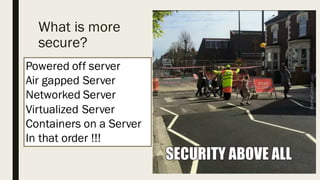
What is more
secure?
Powered off server
Air gapped Server
Networked Server
Virtualized Server
Containers on a Server
In that order !!!
Containers don’t really “contain”
- Daniel J Walsh (Red Hat)
From a security perspective
Why?
• The very thin layer of isolation that provides better
performance also reduces security
• Container daemon runs as root
Why?
• Not everything is namespaced
• /dev/sd*
• modules
• Containers have full access to
• /sys, /sys/fs
• /proc/*
Image trust
• Source of images
• A recent automated study of images available in
the public Docker showed that 30% of images
contained serious security vulnerabilities.
Source: http://www.banyanops.com/blog/analyzing-docker-hub/
The Human Element
• Developers like love containers because they can
package their application (Build...Ship…Run)
• Operations appreciate containers because they
get packaged applications to run
• Who actually owns the security?
What now?
Back to some basics
• Treat a container like you would treat running
Apache on a server
• User perms
• Run as non-root
• Treat root inside the container as root outside
• docker run --privileged=false centos
/bin/bash
Back to some basics
• Worry about your Kernel
• Who is providing patches?
• Grsec kernels
• https://grsecurity.net/
Back to some basics
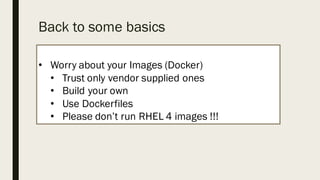
• Worry about your Images (Docker)
• Trust only vendor supplied ones
• Build your own
• Use Dockerfiles
• Please don’t run RHEL 4 images !!!
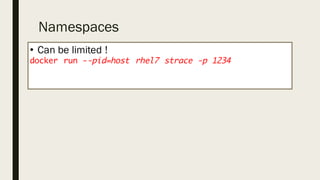
Namespaces
• Can be limited !
docker run --pid=host rhel7 strace -p 1234
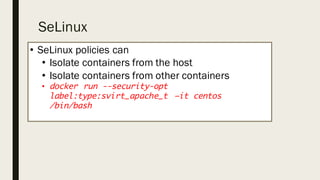
SeLinux
• SeLinux policies can
• Isolate containers from the host
• Isolate containers from other containers
• docker run --security-opt
label:type:svirt_apache_t –it centos
/bin/bash
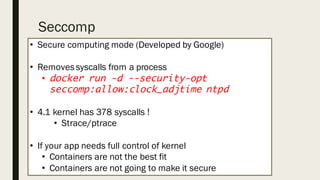
Seccomp
• Secure computing mode (Developed by Google)
• Removessyscalls from a process
• docker run -d --security-opt
seccomp:allow:clock_adjtime ntpd
• 4.1 kernel has 378 syscalls !
• Strace/ptrace
• If your app needs full control of kernel
• Containers are not the best fit
• Containers are not going to make it secure
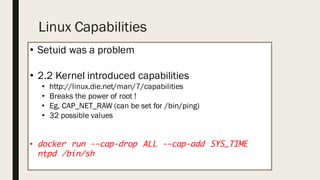
Linux Capabilities
• Setuid was a problem
• 2.2 Kernel introduced capabilities
• http://linux.die.net/man/7/capabilities
• Breaks the power of root !
• Eg. CAP_NET_RAW (can be set for /bin/ping)
• 32 possible values
• docker run --cap-drop ALL --cap-add SYS_TIME
ntpd /bin/sh
Some other techniques
• Super privileged containers
• --readonly containers
• Root file system is read only
THANK YOU
https://pollev.com/raxtech
References & Links
• ftp://www.kernel.org/pub/linux/libs/security/linux-­privs/kernel-­2.2/capfaq-­
0.2.txt
• http://opensource.com/business/15/3/docker-­security-­tuning
• https://grsecurity.net/
• http://www.cyberciti.biz/tips/selinux-­vs-­apparmor-­vs-­grsecurity.html
• http://developerblog.redhat.com/2014/11/06/introducing-­a-­super-­privileged-­
container-­concept/
• http://opensource.com/business/14/7/docker-­security-­selinux

Containers and security

  • 1.
  • 2.
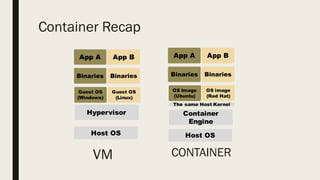
    Container Recap Host OS Hypervisor AppA Binaries Guest OS (Windows) App B Binaries Guest OS (Linux) Host OS Container Engine App A Binaries OS Image (Ubuntu) App B Binaries OS image (Red Hat) The same Host Kernel VM CONTAINER
  • 3.
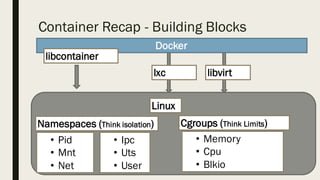
    Container Recap -Building Blocks • Pid • Mnt • Net • Memory • Cpu • Blkio Docker libcontainer lxc libvirt • Ipc • Uts • User Namespaces (Think isolation) Linux Cgroups (Think Limits)
  • 4.
    What is more secure? Poweredoff server Air gapped Server Networked Server Virtualized Server Containers on a Server In that order !!!
  • 5.
    Containers don’t really“contain” - Daniel J Walsh (Red Hat) From a security perspective
  • 6.
    Why? • The verythin layer of isolation that provides better performance also reduces security • Container daemon runs as root
  • 7.
    Why? • Not everythingis namespaced • /dev/sd* • modules • Containers have full access to • /sys, /sys/fs • /proc/*
  • 8.
    Image trust • Sourceof images • A recent automated study of images available in the public Docker showed that 30% of images contained serious security vulnerabilities. Source: http://www.banyanops.com/blog/analyzing-docker-hub/
  • 9.
    The Human Element •Developers like love containers because they can package their application (Build...Ship…Run) • Operations appreciate containers because they get packaged applications to run • Who actually owns the security?
  • 10.
  • 11.
    Back to somebasics • Treat a container like you would treat running Apache on a server • User perms • Run as non-root • Treat root inside the container as root outside • docker run --privileged=false centos /bin/bash
  • 12.
    Back to somebasics • Worry about your Kernel • Who is providing patches? • Grsec kernels • https://grsecurity.net/
  • 13.
    Back to somebasics • Worry about your Images (Docker) • Trust only vendor supplied ones • Build your own • Use Dockerfiles • Please don’t run RHEL 4 images !!!
  • 14.
    Namespaces • Can belimited ! docker run --pid=host rhel7 strace -p 1234
  • 15.
    SeLinux • SeLinux policiescan • Isolate containers from the host • Isolate containers from other containers • docker run --security-opt label:type:svirt_apache_t –it centos /bin/bash
  • 16.
    Seccomp • Secure computingmode (Developed by Google) • Removessyscalls from a process • docker run -d --security-opt seccomp:allow:clock_adjtime ntpd • 4.1 kernel has 378 syscalls ! • Strace/ptrace • If your app needs full control of kernel • Containers are not the best fit • Containers are not going to make it secure
  • 17.
    Linux Capabilities • Setuidwas a problem • 2.2 Kernel introduced capabilities • http://linux.die.net/man/7/capabilities • Breaks the power of root ! • Eg. CAP_NET_RAW (can be set for /bin/ping) • 32 possible values • docker run --cap-drop ALL --cap-add SYS_TIME ntpd /bin/sh
  • 18.
    Some other techniques •Super privileged containers • --readonly containers • Root file system is read only
  • 19.
  • 20.
    References & Links •ftp://www.kernel.org/pub/linux/libs/security/linux-­privs/kernel-­2.2/capfaq-­ 0.2.txt • http://opensource.com/business/15/3/docker-­security-­tuning • https://grsecurity.net/ • http://www.cyberciti.biz/tips/selinux-­vs-­apparmor-­vs-­grsecurity.html • http://developerblog.redhat.com/2014/11/06/introducing-­a-­super-­privileged-­ container-­concept/ • http://opensource.com/business/14/7/docker-­security-­selinux