
PRESENTED BY-
SUBHRADEEP MITRA
M.C.A & B.SC(COMPUTER SC HONOURS)
FROM CALCUTTA UNIVERSITY
INTRODUCTION
HISTORY OF INTERNET
DIFFERENT PROTOCOL OF INTERNET
CLIENT-SERVER ARCHITECTURE
WEBSITE & HTML
IP ADDRESSING
REFERENCES
DOMAIN NAME SYSTEM(DNS)
UNIFORM RESOURCE LOCATOR(URL)
WEB BROWSER & SEARCH ENGINE
USE OF INTERNET
INTRODUCTION
• The Internet or “Net” (network of
networks) is the largest computer
network in the world that connects
billions of computer users.
• The word internet comes from
combination between “interconnection”
and “Network”.
• Network is a collection of computers
and devices connected via communication
channel.
HISTORY OF INTERNET
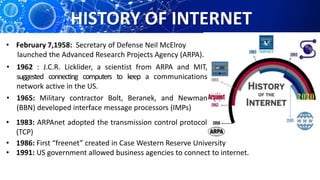
• 1962 : J.C.R. Licklider, a scientist from ARPA and MIT,
suggested connecting computers to keep a communications
network active in the US.
• February 7,1958: Secretary of Defense Neil McElroy
launched the Advanced Research Projects Agency (ARPA).
• 1965: Military contractor Bolt, Beranek, and Newman
(BBN) developed interface message processors (IMPs)
• 1983: ARPAnet adopted the transmission control protocol
(TCP)
• 1986: First “freenet” created in Case Western Reserve University
• 1991: US government allowed business agencies to connect to internet.
FATHER OF INTERNET
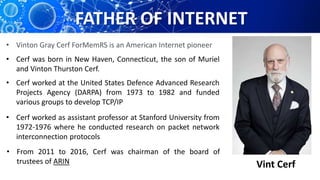
Vint Cerf
• Vinton Gray Cerf ForMemRS is an American Internet pioneer
• Cerf was born in New Haven, Connecticut, the son of Muriel
and Vinton Thurston Cerf.
• Cerf worked at the United States Defence Advanced Research
Projects Agency (DARPA) from 1973 to 1982 and funded
various groups to develop TCP/IP
• Cerf worked as assistant professor at Stanford University from
1972-1976 where he conducted research on packet network
interconnection protocols
• From 2011 to 2016, Cerf was chairman of the board of
trustees of ARIN
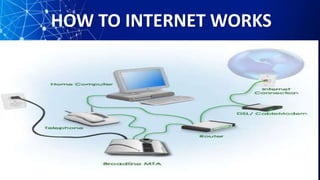
HOW TO INTERNET WORKS
PROTOCOL OF INTERNET
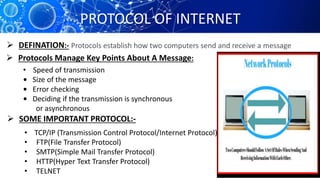
Protocols establish how two computers send and receive a message DEFINATION:-
 Protocols Manage Key Points About A Message:
• Speed of transmission
• Size of the message
• Error checking
• Deciding if the transmission is synchronous
or asynchronous
 SOME IMPORTANT PROTOCOL:-
• TCP/IP (Transmission Control Protocol/Internet Protocol)
• FTP(File Transfer Protocol)
• SMTP(Simple Mail Transfer Protocol)
• HTTP(Hyper Text Transfer Protocol)
• TELNET
TCP/IP PROTOCOL
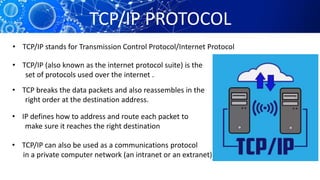
• TCP/IP stands for Transmission Control Protocol/Internet Protocol
• TCP/IP (also known as the internet protocol suite) is the
set of protocols used over the internet .
• TCP breaks the data packets and also reassembles in the
right order at the destination address.
• IP defines how to address and route each packet to
make sure it reaches the right destination
• TCP/IP can also be used as a communications protocol
in a private computer network (an intranet or an extranet).
FTP PROTOCOL
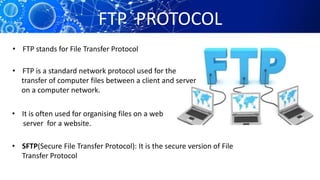
• FTP stands for File Transfer Protocol
• FTP is a standard network protocol used for the
transfer of computer files between a client and server
on a computer network.
• It is often used for organising files on a web
server for a website.
• SFTP(Secure File Transfer Protocol): It is the secure version of File
Transfer Protocol
SMTP PROTOCOL
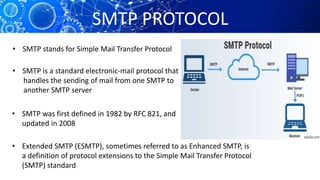
• SMTP stands for Simple Mail Transfer Protocol
• SMTP is a standard electronic-mail protocol that
handles the sending of mail from one SMTP to
another SMTP server
• SMTP was first defined in 1982 by RFC 821, and
updated in 2008
• Extended SMTP (ESMTP), sometimes referred to as Enhanced SMTP, is
a definition of protocol extensions to the Simple Mail Transfer Protocol
(SMTP) standard
HTTP PROTOCOL
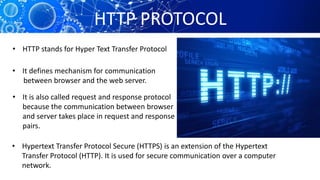
• HTTP stands for Hyper Text Transfer Protocol
• It defines mechanism for communication
between browser and the web server.
• It is also called request and response protocol
because the communication between browser
and server takes place in request and response
pairs.
• Hypertext Transfer Protocol Secure (HTTPS) is an extension of the Hypertext
Transfer Protocol (HTTP). It is used for secure communication over a computer
network.
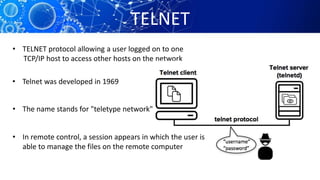
TELNET
• TELNET protocol allowing a user logged on to one
TCP/IP host to access other hosts on the network
• Telnet was developed in 1969
• The name stands for "teletype network"
• In remote control, a session appears in which the user is
able to manage the files on the remote computer
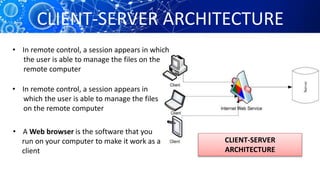
CLIENT-SERVER ARCHITECTURE
• In remote control, a session appears in which
the user is able to manage the files on the
remote computer
• In remote control, a session appears in
which the user is able to manage the files
on the remote computer
• A Web browser is the software that you
run on your computer to make it work as a web
client
CLIENT-SERVER
ARCHITECTURE
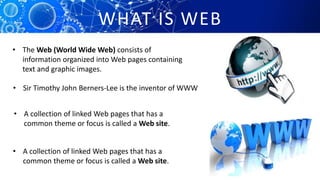
WHAT IS WEB
• The Web (World Wide Web) consists of
information organized into Web pages containing
text and graphic images.
• A collection of linked Web pages that has a
common theme or focus is called a Web site.
• A collection of linked Web pages that has a
common theme or focus is called a Web site.
• Sir Timothy John Berners-Lee is the inventor of WWW
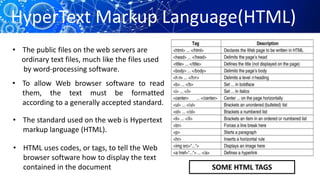
• The public files on the web servers are
ordinary text files, much like the files used
by word-processing software.
• To allow Web browser software to read
them, the text must be formatted
according to a generally accepted standard.
• The standard used on the web is Hypertext
markup language (HTML).
• HTML uses codes, or tags, to tell the Web
browser software how to display the text
contained in the document SOME HTML TAGS
HyperText Markup Language(HTML)
IP Addressing
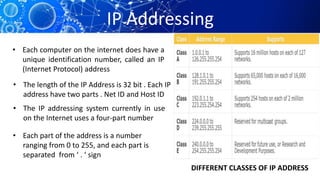
• Each computer on the internet does have a
unique identification number, called an IP
(Internet Protocol) address
• The IP addressing system currently in use
on the Internet uses a four-part number
• Each part of the address is a number
ranging from 0 to 255, and each part is
separated from ‘ . ‘ sign
• The length of the IP Address is 32 bit . Each IP
address have two parts . Net ID and Host ID
DIFFERENT CLASSES OF IP ADDRESS
Domain Name System(DNS)
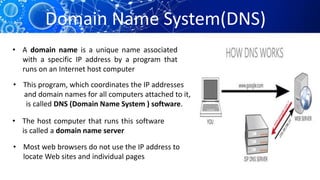
• A domain name is a unique name associated
with a specific IP address by a program that
runs on an Internet host computer
• The host computer that runs this software
is called a domain name server
• Most web browsers do not use the IP address to
locate Web sites and individual pages
• This program, which coordinates the IP addresses
and domain names for all computers attached to it,
is called DNS (Domain Name System ) software.
Uniform Resource Locators(URL)
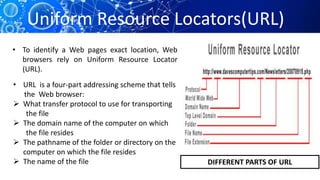
• To identify a Web pages exact location, Web
browsers rely on Uniform Resource Locator
(URL).
• URL is a four-part addressing scheme that tells
the Web browser:
 What transfer protocol to use for transporting
the file
 The domain name of the computer on which
the file resides
 The pathname of the folder or directory on the
computer on which the file resides
 The name of the file DIFFERENT PARTS OF URL
WEB BROWSER
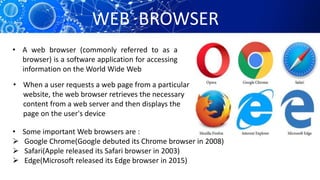
• A web browser (commonly referred to as a
browser) is a software application for accessing
information on the World Wide Web
• When a user requests a web page from a particular
website, the web browser retrieves the necessary
content from a web server and then displays the
page on the user's device
• Some important Web browsers are :
 Google Chrome(Google debuted its Chrome browser in 2008)
 Safari(Apple released its Safari browser in 2003)
 Edge(Microsoft released its Edge browser in 2015)
SEARCH ENGINE
• A web search engine or Internet search engine
is a software system that is designed to carry
out web search
• The search results are generally presented in a line
of results, often referred to as search engine results
pages
• The information may be a mix of links to web pages,
images, videos,info,graphics,articles, research papers,
and other types of files
USES OF INTERNET
 Send e-mail messages
 Send (upload) or receive (down load) files between
computers
 Participate in discussion groups, such as mailing lists
and newsgroups.
 Surfing the web
 Playing Online games and chat in social media
 Book Railway tickets, Flight tickets, Movie tickets etc.
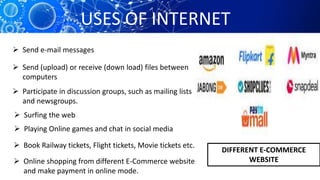
 Online shopping from different E-Commerce website
and make payment in online mode.
DIFFERENT E-COMMERCE
WEBSITE
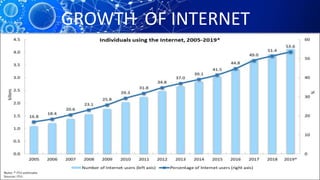
GROWTH OF INTERNET
REFERENCES
1. Modern Computer Application- Sanmoy Kundu
2. Data Communications & Networking - Behrouz A Forouzan
3. https://www.wikipedia.org
4. https://www.internetworldstats.com
5. https://www.cloudflare.com
6. https://www.internetsociety.org
INTERNET  TECHNOLOGY

INTERNET TECHNOLOGY

  • 1.
    PRESENTED BY- SUBHRADEEP MITRA M.C.A& B.SC(COMPUTER SC HONOURS) FROM CALCUTTA UNIVERSITY
  • 2.
    INTRODUCTION HISTORY OF INTERNET DIFFERENTPROTOCOL OF INTERNET CLIENT-SERVER ARCHITECTURE WEBSITE & HTML IP ADDRESSING REFERENCES DOMAIN NAME SYSTEM(DNS) UNIFORM RESOURCE LOCATOR(URL) WEB BROWSER & SEARCH ENGINE USE OF INTERNET
  • 3.
    INTRODUCTION • The Internetor “Net” (network of networks) is the largest computer network in the world that connects billions of computer users. • The word internet comes from combination between “interconnection” and “Network”. • Network is a collection of computers and devices connected via communication channel.
  • 4.
    HISTORY OF INTERNET •1962 : J.C.R. Licklider, a scientist from ARPA and MIT, suggested connecting computers to keep a communications network active in the US. • February 7,1958: Secretary of Defense Neil McElroy launched the Advanced Research Projects Agency (ARPA). • 1965: Military contractor Bolt, Beranek, and Newman (BBN) developed interface message processors (IMPs) • 1983: ARPAnet adopted the transmission control protocol (TCP) • 1986: First “freenet” created in Case Western Reserve University • 1991: US government allowed business agencies to connect to internet.
  • 5.
    FATHER OF INTERNET VintCerf • Vinton Gray Cerf ForMemRS is an American Internet pioneer • Cerf was born in New Haven, Connecticut, the son of Muriel and Vinton Thurston Cerf. • Cerf worked at the United States Defence Advanced Research Projects Agency (DARPA) from 1973 to 1982 and funded various groups to develop TCP/IP • Cerf worked as assistant professor at Stanford University from 1972-1976 where he conducted research on packet network interconnection protocols • From 2011 to 2016, Cerf was chairman of the board of trustees of ARIN
  • 6.
  • 7.
    PROTOCOL OF INTERNET Protocolsestablish how two computers send and receive a message DEFINATION:-  Protocols Manage Key Points About A Message: • Speed of transmission • Size of the message • Error checking • Deciding if the transmission is synchronous or asynchronous  SOME IMPORTANT PROTOCOL:- • TCP/IP (Transmission Control Protocol/Internet Protocol) • FTP(File Transfer Protocol) • SMTP(Simple Mail Transfer Protocol) • HTTP(Hyper Text Transfer Protocol) • TELNET
  • 8.
    TCP/IP PROTOCOL • TCP/IPstands for Transmission Control Protocol/Internet Protocol • TCP/IP (also known as the internet protocol suite) is the set of protocols used over the internet . • TCP breaks the data packets and also reassembles in the right order at the destination address. • IP defines how to address and route each packet to make sure it reaches the right destination • TCP/IP can also be used as a communications protocol in a private computer network (an intranet or an extranet).
  • 9.
    FTP PROTOCOL • FTPstands for File Transfer Protocol • FTP is a standard network protocol used for the transfer of computer files between a client and server on a computer network. • It is often used for organising files on a web server for a website. • SFTP(Secure File Transfer Protocol): It is the secure version of File Transfer Protocol
  • 10.
    SMTP PROTOCOL • SMTPstands for Simple Mail Transfer Protocol • SMTP is a standard electronic-mail protocol that handles the sending of mail from one SMTP to another SMTP server • SMTP was first defined in 1982 by RFC 821, and updated in 2008 • Extended SMTP (ESMTP), sometimes referred to as Enhanced SMTP, is a definition of protocol extensions to the Simple Mail Transfer Protocol (SMTP) standard
  • 11.
    HTTP PROTOCOL • HTTPstands for Hyper Text Transfer Protocol • It defines mechanism for communication between browser and the web server. • It is also called request and response protocol because the communication between browser and server takes place in request and response pairs. • Hypertext Transfer Protocol Secure (HTTPS) is an extension of the Hypertext Transfer Protocol (HTTP). It is used for secure communication over a computer network.
  • 12.
    TELNET • TELNET protocolallowing a user logged on to one TCP/IP host to access other hosts on the network • Telnet was developed in 1969 • The name stands for "teletype network" • In remote control, a session appears in which the user is able to manage the files on the remote computer
  • 13.
    CLIENT-SERVER ARCHITECTURE • Inremote control, a session appears in which the user is able to manage the files on the remote computer • In remote control, a session appears in which the user is able to manage the files on the remote computer • A Web browser is the software that you run on your computer to make it work as a web client CLIENT-SERVER ARCHITECTURE
  • 14.
    WHAT IS WEB •The Web (World Wide Web) consists of information organized into Web pages containing text and graphic images. • A collection of linked Web pages that has a common theme or focus is called a Web site. • A collection of linked Web pages that has a common theme or focus is called a Web site. • Sir Timothy John Berners-Lee is the inventor of WWW
  • 15.
    • The publicfiles on the web servers are ordinary text files, much like the files used by word-processing software. • To allow Web browser software to read them, the text must be formatted according to a generally accepted standard. • The standard used on the web is Hypertext markup language (HTML). • HTML uses codes, or tags, to tell the Web browser software how to display the text contained in the document SOME HTML TAGS HyperText Markup Language(HTML)
  • 16.
    IP Addressing • Eachcomputer on the internet does have a unique identification number, called an IP (Internet Protocol) address • The IP addressing system currently in use on the Internet uses a four-part number • Each part of the address is a number ranging from 0 to 255, and each part is separated from ‘ . ‘ sign • The length of the IP Address is 32 bit . Each IP address have two parts . Net ID and Host ID DIFFERENT CLASSES OF IP ADDRESS
  • 17.
    Domain Name System(DNS) •A domain name is a unique name associated with a specific IP address by a program that runs on an Internet host computer • The host computer that runs this software is called a domain name server • Most web browsers do not use the IP address to locate Web sites and individual pages • This program, which coordinates the IP addresses and domain names for all computers attached to it, is called DNS (Domain Name System ) software.
  • 18.
    Uniform Resource Locators(URL) •To identify a Web pages exact location, Web browsers rely on Uniform Resource Locator (URL). • URL is a four-part addressing scheme that tells the Web browser:  What transfer protocol to use for transporting the file  The domain name of the computer on which the file resides  The pathname of the folder or directory on the computer on which the file resides  The name of the file DIFFERENT PARTS OF URL
  • 19.
    WEB BROWSER • Aweb browser (commonly referred to as a browser) is a software application for accessing information on the World Wide Web • When a user requests a web page from a particular website, the web browser retrieves the necessary content from a web server and then displays the page on the user's device • Some important Web browsers are :  Google Chrome(Google debuted its Chrome browser in 2008)  Safari(Apple released its Safari browser in 2003)  Edge(Microsoft released its Edge browser in 2015)
  • 20.
    SEARCH ENGINE • Aweb search engine or Internet search engine is a software system that is designed to carry out web search • The search results are generally presented in a line of results, often referred to as search engine results pages • The information may be a mix of links to web pages, images, videos,info,graphics,articles, research papers, and other types of files
  • 21.
    USES OF INTERNET Send e-mail messages  Send (upload) or receive (down load) files between computers  Participate in discussion groups, such as mailing lists and newsgroups.  Surfing the web  Playing Online games and chat in social media  Book Railway tickets, Flight tickets, Movie tickets etc.  Online shopping from different E-Commerce website and make payment in online mode. DIFFERENT E-COMMERCE WEBSITE
  • 22.
  • 23.
    REFERENCES 1. Modern ComputerApplication- Sanmoy Kundu 2. Data Communications & Networking - Behrouz A Forouzan 3. https://www.wikipedia.org 4. https://www.internetworldstats.com 5. https://www.cloudflare.com 6. https://www.internetsociety.org