Lesson 1 Video and Digital Video Basics Digital Video BASICS Schaefermeyer
Objectives Explain persistence of vision Explain scanning Describe a cathode ray tube Describe the difference between interlaced and progressive scanning Explain the use of fields and frames Schaefermeyer Digital Video BASICS
Objectives (continued) Explain time code and how it is used Explain the analog video signal Describe digital video sampling Understand the concept of video formats Explain the differences between DV and other digital formats Understand the concepts of compression and color sampling Schaefermeyer Digital Video BASICS
Vocabulary Analog Bandwidth Capture card Cathode ray tube (CRT) Chrominance Codec Color sampling Compressed Field FireWire Frame Frame accurate editing Frequency High definition (HD) Schaefermeyer Digital Video BASICS
Vocabulary (continued) Hue Interlaced video Linear Luminance National Television System Committee (NTSC) Noise Nonlinear Persistence of vision Pixels Progressive scanning Red, green, blue (RGB) Resolution Sampling Schaefermeyer Digital Video BASICS
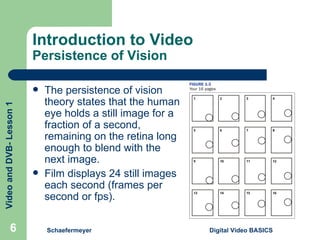
Introduction to Video Persistence of Vision The persistence of vision theory states that the human eye holds a still image for a fraction of a second, remaining on the retina long enough to blend with the next image. Film displays 24 still images each second (frames per second or fps). Schaefermeyer Digital Video BASICS
Introduction to Video Scanning A cathode ray technology (CRT) has two basic parts—an electron gun in back and a screen in front. The inside of the screen is covered with thousands of tiny phosphorus dots called pixels. The back of a color CRT holds three electron guns: red, green, and blue (RGB). The electron gun receives the input signal and shoots an electron beam at the screen, lighting up the pixels. Schaefermeyer Digital Video BASICS
Scanning (continued) National Television System Committee (NTSC) video is made up of 525 lines of pixels across the screen, called scan lines. The electron beam scans odd scan lines first, to display half a frame called a field. Then the beam scans even lines. Using two fields to create a complete image is called interlaced video.  NTSC video runs at 30 frames per second. Schaefermeyer Digital Video BASICS
Scanning (continued) The delivery methods for video signals have limited bandwidth (size of the “pipe” that information travels through). Progressive scanning creates each frame by scanning the scan lines in order. High definition (HD) uses more scan lines. Schaefermeyer Digital Video BASICS
Introduction to Video Time Code Each video frame has a unique identifying number called a time code. In the time code 14:54:32:12, 14 represents hours, 54 means minutes, 32 means seconds, and 12 is the frame number. The type of editing made possible by time code is called frame accurate editing. Schaefermeyer Digital Video BASICS
Introduction to Video Aspect Ratio and Resolution The width of a visible picture is determined by the aspect ratio. The aspect ratio for standard definition television is 4:3, meaning for every four pixels across, there are three pixels up. HD uses a 16:9 aspect ratio and digital video uses a 3:2 aspect ratio.  Schaefermeyer Digital Video BASICS
Aspect Ratio and Resolution (continued)
Introduction to Video Analog Versus Digital Signals Audio and video signals that replicate sound or light waves are called analog. Drawbacks to an analog signal: Little glitches called noise, which get worse with each copy (“generational loss”) Linear nature...you can’t jump back and forth Bandwidth issues because it is hard to make smaller Schaefermeyer Digital Video BASICS
Analog Versus Digital Signals (continued) Digital video solves the problems with analog: Uses a process called sampling so it does not pick up noise in the signal Nonlinear editing system means you do not have to go through the middle to get to the end Can be compressed to get better video quality using the same bandwidth Schaefermeyer Digital Video BASICS
Introduction to Digital Video DV Format Each digital format has its own language called a codec (short for compression/ decompression”) One way digital video formats compress video is through color sampling—the amount of information used to describe the color in the video image. Schaefermeyer Digital Video BASICS
DV Format (continued) Light=luminance Hue=specific color such as red, blue, or green Chrominance=amount of saturation Digital video stores all the luminance information and keeps only part of the color information. Schaefermeyer Digital Video BASICS
Introduction to Digital Video FireWire A capture card converts video into digital information for the computer. DV uses a FireWire capture card, allowing users to capture video through a standard port. A great advantage of DV is that the video comes in as a digital signal and stays that way. Schaefermeyer Digital Video BASICS
Summary A television contains a cathode ray rube (CRT) with two basic parts. The electron gun in back shoots a beam that lights up pixels, which are organized in scan lines, on the screen in front.  One interlaced video frame consists of two fields—the first created by scanning odd numbered lines; the second created by scanning even numbered lines. Video is displayed at 30 fps, or 60 fields per second. A progressive scanned frame of video is scanned in a single pass, with each line scanned in order. Progressive scanned video can be displayed at 24, 30, or 60 fps. Schaefermeyer Digital Video BASICS
Summary (continued) Analog video copies light waves. Digital video captures points along those waves; the number of points is determined by the sampling frequency. Analog video is linear and cannot be compressed, or made smaller. Digital video is nonlinear and can be compressed. DV captures the video at 3.6 Mb, uses 4:1:1 color space, and is displayed in a 3:2 aspect ratio with a display resolution of 720 x 480. The DV format includes miniDV, DVCPRO, and DVCAM. DV connects to editing stations through FireWire, eliminating the need for expensive capture hardware. Schaefermeyer Digital Video BASICS

Unit 1 Lesson 01

  • 1.
    Lesson 1 Videoand Digital Video Basics Digital Video BASICS Schaefermeyer
  • 2.
    Objectives Explain persistenceof vision Explain scanning Describe a cathode ray tube Describe the difference between interlaced and progressive scanning Explain the use of fields and frames Schaefermeyer Digital Video BASICS
  • 3.
    Objectives (continued) Explaintime code and how it is used Explain the analog video signal Describe digital video sampling Understand the concept of video formats Explain the differences between DV and other digital formats Understand the concepts of compression and color sampling Schaefermeyer Digital Video BASICS
  • 4.
    Vocabulary Analog BandwidthCapture card Cathode ray tube (CRT) Chrominance Codec Color sampling Compressed Field FireWire Frame Frame accurate editing Frequency High definition (HD) Schaefermeyer Digital Video BASICS
  • 5.
    Vocabulary (continued) HueInterlaced video Linear Luminance National Television System Committee (NTSC) Noise Nonlinear Persistence of vision Pixels Progressive scanning Red, green, blue (RGB) Resolution Sampling Schaefermeyer Digital Video BASICS
  • 6.
    Introduction to VideoPersistence of Vision The persistence of vision theory states that the human eye holds a still image for a fraction of a second, remaining on the retina long enough to blend with the next image. Film displays 24 still images each second (frames per second or fps). Schaefermeyer Digital Video BASICS
  • 7.
    Introduction to VideoScanning A cathode ray technology (CRT) has two basic parts—an electron gun in back and a screen in front. The inside of the screen is covered with thousands of tiny phosphorus dots called pixels. The back of a color CRT holds three electron guns: red, green, and blue (RGB). The electron gun receives the input signal and shoots an electron beam at the screen, lighting up the pixels. Schaefermeyer Digital Video BASICS
  • 8.
    Scanning (continued) NationalTelevision System Committee (NTSC) video is made up of 525 lines of pixels across the screen, called scan lines. The electron beam scans odd scan lines first, to display half a frame called a field. Then the beam scans even lines. Using two fields to create a complete image is called interlaced video. NTSC video runs at 30 frames per second. Schaefermeyer Digital Video BASICS
  • 9.
    Scanning (continued) Thedelivery methods for video signals have limited bandwidth (size of the “pipe” that information travels through). Progressive scanning creates each frame by scanning the scan lines in order. High definition (HD) uses more scan lines. Schaefermeyer Digital Video BASICS
  • 10.
    Introduction to VideoTime Code Each video frame has a unique identifying number called a time code. In the time code 14:54:32:12, 14 represents hours, 54 means minutes, 32 means seconds, and 12 is the frame number. The type of editing made possible by time code is called frame accurate editing. Schaefermeyer Digital Video BASICS
  • 11.
    Introduction to VideoAspect Ratio and Resolution The width of a visible picture is determined by the aspect ratio. The aspect ratio for standard definition television is 4:3, meaning for every four pixels across, there are three pixels up. HD uses a 16:9 aspect ratio and digital video uses a 3:2 aspect ratio. Schaefermeyer Digital Video BASICS
  • 12.
    Aspect Ratio andResolution (continued)
  • 13.
    Introduction to VideoAnalog Versus Digital Signals Audio and video signals that replicate sound or light waves are called analog. Drawbacks to an analog signal: Little glitches called noise, which get worse with each copy (“generational loss”) Linear nature...you can’t jump back and forth Bandwidth issues because it is hard to make smaller Schaefermeyer Digital Video BASICS
  • 14.
    Analog Versus DigitalSignals (continued) Digital video solves the problems with analog: Uses a process called sampling so it does not pick up noise in the signal Nonlinear editing system means you do not have to go through the middle to get to the end Can be compressed to get better video quality using the same bandwidth Schaefermeyer Digital Video BASICS
  • 15.
    Introduction to DigitalVideo DV Format Each digital format has its own language called a codec (short for compression/ decompression”) One way digital video formats compress video is through color sampling—the amount of information used to describe the color in the video image. Schaefermeyer Digital Video BASICS
  • 16.
    DV Format (continued)Light=luminance Hue=specific color such as red, blue, or green Chrominance=amount of saturation Digital video stores all the luminance information and keeps only part of the color information. Schaefermeyer Digital Video BASICS
  • 17.
    Introduction to DigitalVideo FireWire A capture card converts video into digital information for the computer. DV uses a FireWire capture card, allowing users to capture video through a standard port. A great advantage of DV is that the video comes in as a digital signal and stays that way. Schaefermeyer Digital Video BASICS
  • 18.
    Summary A televisioncontains a cathode ray rube (CRT) with two basic parts. The electron gun in back shoots a beam that lights up pixels, which are organized in scan lines, on the screen in front. One interlaced video frame consists of two fields—the first created by scanning odd numbered lines; the second created by scanning even numbered lines. Video is displayed at 30 fps, or 60 fields per second. A progressive scanned frame of video is scanned in a single pass, with each line scanned in order. Progressive scanned video can be displayed at 24, 30, or 60 fps. Schaefermeyer Digital Video BASICS
  • 19.
    Summary (continued) Analogvideo copies light waves. Digital video captures points along those waves; the number of points is determined by the sampling frequency. Analog video is linear and cannot be compressed, or made smaller. Digital video is nonlinear and can be compressed. DV captures the video at 3.6 Mb, uses 4:1:1 color space, and is displayed in a 3:2 aspect ratio with a display resolution of 720 x 480. The DV format includes miniDV, DVCPRO, and DVCAM. DV connects to editing stations through FireWire, eliminating the need for expensive capture hardware. Schaefermeyer Digital Video BASICS