Audio Compression
Prepared by : Darshansinh Joddha
Outline
1.Introduction
2.Audio compression
3.Types of compression
4.Audio Compression Methods
5.Psychoacoustics
6.Algorithm
7.MPEG layers
8.Effectiveness of MPEG audio
Introduction
➢ What is audio?
● Sound is a sequence of naturally analog signals that are converted
to digital signals by the audio card, using a microchip called an
analog-to-digital converter (ADC).
● An audio file is a record of captured sound that can be played
back.
● When sound is played, the digital signals are sent to the speakers
where they are converted back to analog signals that generate
varied sound.
Introduction
➢ What do compression mean?
● Compression is the reduction in size of data in order to save space or
transmission time.
● Compression can be used to:
✔ Reduce file size
✔ Save disk space
✔ Reduce transmission time
● Compression is performed by a program that user an algorithm to
determine how to compress or decompress data.
Audio Compression
➢ What is audio compression?
● Audio compression is form of data compression designed to reduce the
size of audio file.
● There is a conditions on this definition:
✔ The audio file must still be playable after compression, without
decompressing it to original size when you want to play it (for
example with WinRAR).
✔ If the file is compressed 'too much' there will be loss of quality.
✔ The compression is done with a thing called a codec. This is an
aggregation of the words: compressor and decompressor.
✔ This codec is a special algorithm to reduce the size.
Type of Compression
➢ Lossy compression
● A compression technique that does not decompress data back to 100%
of the original.
● Lossy methods provide high degrees of compression and result in
smaller compressed files, but there is a certain amount of visual loss
when restored.
➢ Losless compression
● A compression technique that decompresses data back to its original
form without any loss.
● The decompressed file and the original are identical. For example, the
ZIP archiving technology (WinZip...) is the most widely used lossless
method.
Audio Compression Methods
➢ The following are some of the Lossy methods applied to audio
compression:
● Silence Compression - detect the "silence", similar to run-length
coding.
● Adaptive Differential Pulse Code Modulation (ADPCM)
a) Encodes the difference between two consecutive signals,
b) Adapts at quantization so fewer bits are used when the value is
smaller.
● Linear Predictive Coding (LPC) fits signal to speech model and then
transmits parameters of model. Sounds like a computer talking, 2.4
kbits/sec.
● Code Excited Linear Predictor (CELP) does LPC, but also transmits
error term - audio conferencing quality at 4.8 kbits/sec.
Psychoacoustics
➢ These methods are related to how humans actually hear sounds:
● Human hearing and voice
➢ Range is about 20 Hz to 20 kHz, most sensitive at 2 to 4 KHz.
➢ Dynamic range (quietest to loudest) is about 96 dB.
➢ Normal voice range is about 500 Hz to 2 kHz.
● Low frequencies are vowels and bass
● High frequencies are consonants
Psychoacoustics
● Frequency Masking
➢ A frequency component can be partly or fully masked by
another component that is close to it in frequency.
➢ A lower tone can effectively mask higher tone
● Temporal masking
➢ A quieter sound can be masked by a louder sound if they
are temporally close sounds that occur both(shortly) before
and after volume increase can be masked.
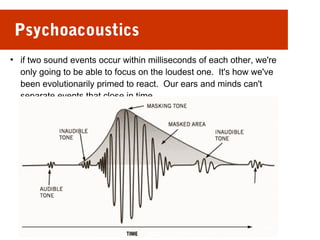
Psychoacoustics
●
if two sound events occur within milliseconds of each other, we're
only going to be able to focus on the loudest one. It's how we've
been evolutionarily primed to react. Our ears and minds can't
separate events that close in time.
Algorithm
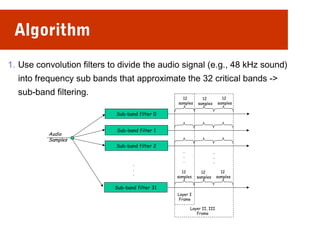
1. Use convolution filters to divide the audio signal (e.g., 48 kHz sound)
into frequency sub bands that approximate the 32 critical bands ->
sub-band filtering.
Audio
Samples
Sub-band filter 0
Sub-band filter 1
Sub-band filter 2
Sub-band filter 31
.
.
.
12
samples
12
samples
12
samples
12
samples
12
samples
12
samples
Layer I
Frame
Layer II, III
Frame
.
.
.
.
.
.
Algorithm
2. Determine amount of masking for each band caused by nearby band
using the results shown above (this is called the psychoacoustic
model).
4. If the power in a band is below the masking threshold, don't encode it.
3. Otherwise, determine number of bits needed to represent the
coefficient such that noise introduced by quantization is below the
masking effect.
4. Format bitstream.
Algorithm
Filter into
Critical Bands
(Sub-band filtering
Compute
Masking
(Psychoacoustic
Model)
Allocate bits
(Quantization)
Format
BitStream
Input Output
MPEG layers
➢ MPEG defines 3 layers for audio. Basic model is same, but codec
complexity increases with each layer.
➢ MPEG layer I
● Filter is applied one frame (12x32 = 384 samples) at a time. At 48
kHz, each frame carries 8ms of sound.
● Psychoacoustics model only uses frequency masking.
● Highest quality is achieved with a bit rate of 384Kbps.
● Typical applications : Digital recording on taps, hard disks, or
magneto-optical disks, which can tolerate the high bit rate.
MPEG layers
➢ MPEG layer II
● Use three frames in filter (before, current, next, a total of 1152
samples). At 48 kHz, each frame carries 24 ms of sound.
● Models a little bit of the temporal masking.
● Highest quality is achieved with a bit rate of 256k bps.
● Typical applications: Audio Broadcasting, Television, Consumer
and Professional Recording, and Multimedia.
MPEG layers
➢ MPEG layer III
● Better critical band filter is used
● Uses non-equal frequency bands
● Psychoacoustic model includes temporal masking effects, takes
into account stereo redundancy, and uses Huffman coder.
● MP3 stands for MPEG Layer III
Effectiveness of MPEG audio
Layer Target bit-
rate
Ratio Quality* at
64 kbps
Quality at
128 kbps
Layer I 192 kbps 4:1 -- --
Layer II 128 kbps 6:1 2.1 to 2.6 4+
Layer III 64 kbps 12:1 3.6 to 3.8 4+
*Quality factor:
– 5 – perfect
– 4 - just noticeable
– 3 - slightly annoying
– 2 – annoying
– 1 - very annoying
Thank You

Audio compression

  • 1.
    Audio Compression Prepared by: Darshansinh Joddha
  • 2.
    Outline 1.Introduction 2.Audio compression 3.Types ofcompression 4.Audio Compression Methods 5.Psychoacoustics 6.Algorithm 7.MPEG layers 8.Effectiveness of MPEG audio
  • 3.
    Introduction ➢ What isaudio? ● Sound is a sequence of naturally analog signals that are converted to digital signals by the audio card, using a microchip called an analog-to-digital converter (ADC). ● An audio file is a record of captured sound that can be played back. ● When sound is played, the digital signals are sent to the speakers where they are converted back to analog signals that generate varied sound.
  • 4.
    Introduction ➢ What docompression mean? ● Compression is the reduction in size of data in order to save space or transmission time. ● Compression can be used to: ✔ Reduce file size ✔ Save disk space ✔ Reduce transmission time ● Compression is performed by a program that user an algorithm to determine how to compress or decompress data.
  • 5.
    Audio Compression ➢ Whatis audio compression? ● Audio compression is form of data compression designed to reduce the size of audio file. ● There is a conditions on this definition: ✔ The audio file must still be playable after compression, without decompressing it to original size when you want to play it (for example with WinRAR). ✔ If the file is compressed 'too much' there will be loss of quality. ✔ The compression is done with a thing called a codec. This is an aggregation of the words: compressor and decompressor. ✔ This codec is a special algorithm to reduce the size.
  • 6.
    Type of Compression ➢Lossy compression ● A compression technique that does not decompress data back to 100% of the original. ● Lossy methods provide high degrees of compression and result in smaller compressed files, but there is a certain amount of visual loss when restored. ➢ Losless compression ● A compression technique that decompresses data back to its original form without any loss. ● The decompressed file and the original are identical. For example, the ZIP archiving technology (WinZip...) is the most widely used lossless method.
  • 7.
    Audio Compression Methods ➢The following are some of the Lossy methods applied to audio compression: ● Silence Compression - detect the "silence", similar to run-length coding. ● Adaptive Differential Pulse Code Modulation (ADPCM) a) Encodes the difference between two consecutive signals, b) Adapts at quantization so fewer bits are used when the value is smaller. ● Linear Predictive Coding (LPC) fits signal to speech model and then transmits parameters of model. Sounds like a computer talking, 2.4 kbits/sec. ● Code Excited Linear Predictor (CELP) does LPC, but also transmits error term - audio conferencing quality at 4.8 kbits/sec.
  • 8.
    Psychoacoustics ➢ These methodsare related to how humans actually hear sounds: ● Human hearing and voice ➢ Range is about 20 Hz to 20 kHz, most sensitive at 2 to 4 KHz. ➢ Dynamic range (quietest to loudest) is about 96 dB. ➢ Normal voice range is about 500 Hz to 2 kHz. ● Low frequencies are vowels and bass ● High frequencies are consonants
  • 9.
    Psychoacoustics ● Frequency Masking ➢A frequency component can be partly or fully masked by another component that is close to it in frequency. ➢ A lower tone can effectively mask higher tone ● Temporal masking ➢ A quieter sound can be masked by a louder sound if they are temporally close sounds that occur both(shortly) before and after volume increase can be masked.
  • 10.
    Psychoacoustics ● if two soundevents occur within milliseconds of each other, we're only going to be able to focus on the loudest one. It's how we've been evolutionarily primed to react. Our ears and minds can't separate events that close in time.
  • 11.
    Algorithm 1. Use convolutionfilters to divide the audio signal (e.g., 48 kHz sound) into frequency sub bands that approximate the 32 critical bands -> sub-band filtering. Audio Samples Sub-band filter 0 Sub-band filter 1 Sub-band filter 2 Sub-band filter 31 . . . 12 samples 12 samples 12 samples 12 samples 12 samples 12 samples Layer I Frame Layer II, III Frame . . . . . .
  • 12.
    Algorithm 2. Determine amountof masking for each band caused by nearby band using the results shown above (this is called the psychoacoustic model). 4. If the power in a band is below the masking threshold, don't encode it. 3. Otherwise, determine number of bits needed to represent the coefficient such that noise introduced by quantization is below the masking effect. 4. Format bitstream.
  • 13.
    Algorithm Filter into Critical Bands (Sub-bandfiltering Compute Masking (Psychoacoustic Model) Allocate bits (Quantization) Format BitStream Input Output
  • 14.
    MPEG layers ➢ MPEGdefines 3 layers for audio. Basic model is same, but codec complexity increases with each layer. ➢ MPEG layer I ● Filter is applied one frame (12x32 = 384 samples) at a time. At 48 kHz, each frame carries 8ms of sound. ● Psychoacoustics model only uses frequency masking. ● Highest quality is achieved with a bit rate of 384Kbps. ● Typical applications : Digital recording on taps, hard disks, or magneto-optical disks, which can tolerate the high bit rate.
  • 15.
    MPEG layers ➢ MPEGlayer II ● Use three frames in filter (before, current, next, a total of 1152 samples). At 48 kHz, each frame carries 24 ms of sound. ● Models a little bit of the temporal masking. ● Highest quality is achieved with a bit rate of 256k bps. ● Typical applications: Audio Broadcasting, Television, Consumer and Professional Recording, and Multimedia.
  • 16.
    MPEG layers ➢ MPEGlayer III ● Better critical band filter is used ● Uses non-equal frequency bands ● Psychoacoustic model includes temporal masking effects, takes into account stereo redundancy, and uses Huffman coder. ● MP3 stands for MPEG Layer III
  • 17.
    Effectiveness of MPEGaudio Layer Target bit- rate Ratio Quality* at 64 kbps Quality at 128 kbps Layer I 192 kbps 4:1 -- -- Layer II 128 kbps 6:1 2.1 to 2.6 4+ Layer III 64 kbps 12:1 3.6 to 3.8 4+ *Quality factor: – 5 – perfect – 4 - just noticeable – 3 - slightly annoying – 2 – annoying – 1 - very annoying
  • 18.