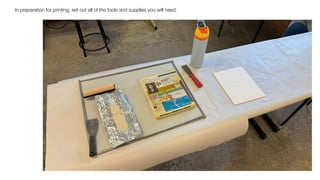
In preparation for printing, set out all of the tools and supplies you will need.
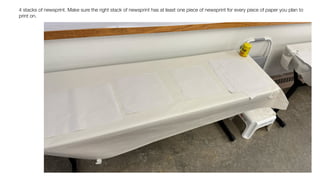
4 stacks of newsprint. Make sure the right stack of newsprint has at least one piece of newsprint for every piece of paper you plan to
print on.
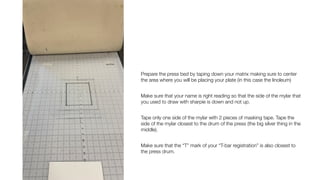
Prepare the press bed by taping down your matrix making sure to center
the area where you will be placing your plate (in this case the linoleum)
Make sure that your name is right reading so that the side of the mylar that
you used to draw with sharpie is down and not up.
Tape only one side of the mylar with 2 pieces of masking tape. Tape the
side of the mylar closest to the drum of the press (the big silver thing in the
middle).
Make sure that the “T” mark of your “T-bar registration” is also closest to
the press drum.
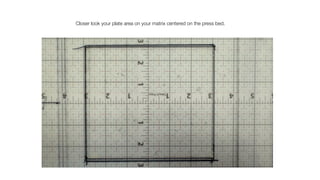
Closer look your plate area on your matrix centered on the press bed.
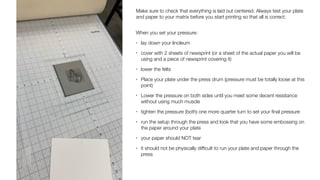
Make sure to check that everything is laid out centered. Always test your plate
and paper to your matrix before you start printing so that all is correct.
When you set your pressure:
• lay down your linoleum
• cover with 2 sheets of newsprint (or a sheet of the actual paper you will be
using and a piece of newsprint covering it)
• lower the felts
• Place your plate under the press drum (pressure must be totally loose at this
point)
• Lower the pressure on both sides until you meet some decent resistance
without using much muscle
• tighten the pressure (both) one more quarter turn to set your
fi
nal pressure
• run the setup through the press and look that you have some embossing on
the paper around your plate
• your paper should NOT tear
• it should not be physically dif
fi
cult to run your plate and paper through the
press
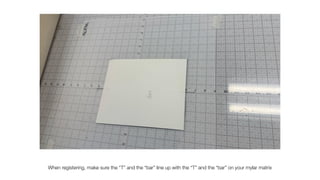
When registering, make sure the “T” and the “bar” line up with the “T” and the “bar” on your mylar matrix
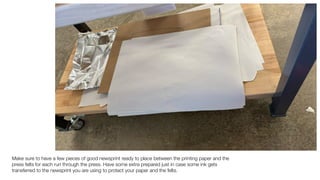
Make sure to have a few pieces of good newsprint ready to place between the printing paper and the
press felts for each run through the press. Have some extra prepared just in case some ink gets
transferred to the newsprint you are using to protect your paper and the felts.
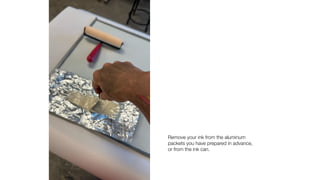
Remove your ink from the aluminum
packets you have prepared in advance,
or from the ink can.
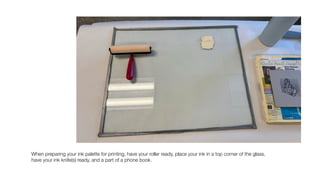
When preparing your ink palette for printing, have your roller ready, place your ink in a top corner of the glass,
have your ink knife(s) ready, and a part of a phone book.
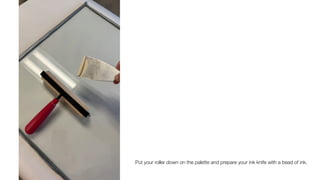
Put your roller down on the palette and prepare your ink knife with a bead of ink.
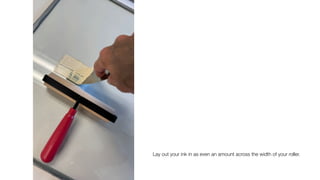
Lay out your ink in as even an amount across the width of your roller.
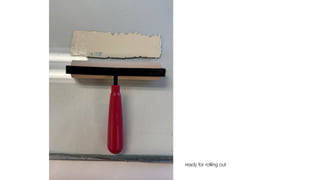
ready for rolling out
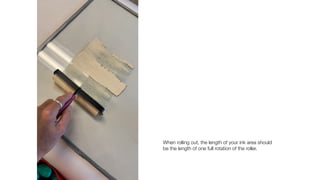
When rolling out, the length of your ink area should
be the length of one full rotation of the roller.
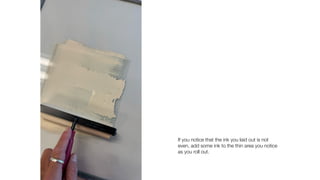
If you notice that the ink you laid out is not
even, add some ink to the thin area you notice
as you roll out.
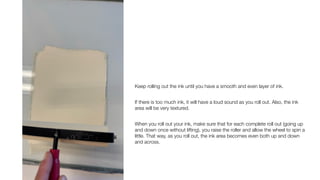
Keep rolling out the ink until you have a smooth and even layer of ink.
If there is too much ink, it will have a loud sound as you roll out. Also, the ink
area will be very textured.
When you roll out your ink, make sure that for each complete roll out (going up
and down once without lifting), you raise the roller and allow the wheel to spin a
little. That way, as you roll out, the ink area becomes even both up and down
and across.
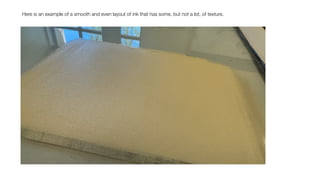
Here is an example of a smooth and even layout of ink that has some, but not a lot, of texture.
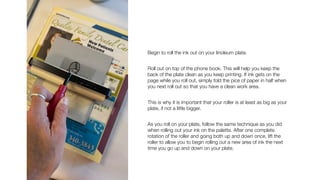
Begin to roll the ink out on your linoleum plate.
Roll out on top of the phone book. This will help you keep the
back of the plate clean as you keep printing. If ink gets on the
page while you roll out, simply fold the pice of paper in half when
you next roll out so that you have a clean work area.
This is why it is important that your roller is at least as big as your
plate, if not a little bigger.
As you roll on your plate, follow the same technique as you did
when rolling out your ink on the palette. After one complete
rotation of the roller and going both up and down once, lift the
roller to allow you to begin rolling out a new area of ink the next
time you go up and down on your plate.
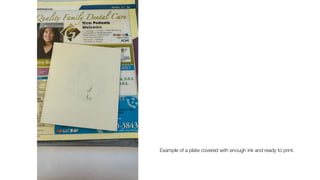
Example of a plate covered with enough ink and ready to print.
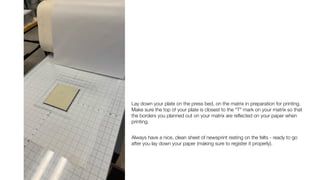
Lay down your plate on the press bed, on the matrix in preparation for printing.
Make sure the top of your plate is closest to the “T” mark on your matrix so that
the borders you planned out on your matrix are re
fl
ected on your paper when
printing.
Always have a nice, clean sheet of newsprint resting on the felts - ready to go
after you lay down your paper (making sure to register it properly).
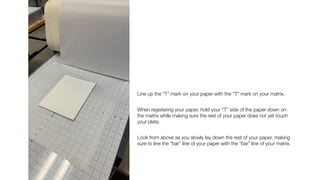
Line up the “T” mark on your paper with the “T” mark on your matrix.
When registering your paper, hold your “T” side of the paper down on
the matrix while making sure the rest of your paper does not yet touch
your plate.
Look from above as you slowly lay down the rest of your paper, making
sure to line the “bar” line of your paper with the “bar” line of your matrix.
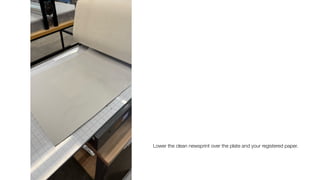
Lower the clean newsprint over the plate and your registered paper.
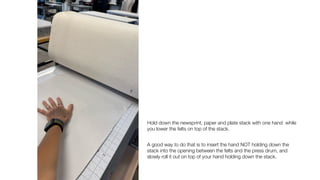
Hold down the newsprint, paper and plate stack with one hand while
you lower the felts on top of the stack.
A good way to do that is to insert the hand NOT holding down the
stack into the opening between the felts and the press drum, and
slowly roll it out on top of your hand holding down the stack.
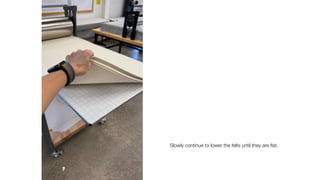
Slowly continue to lower the felts until they are
fl
at.
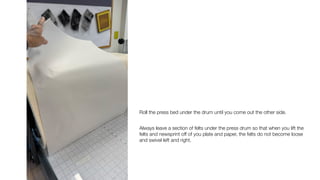
Roll the press bed under the drum until you come out the other side.
Always leave a section of felts under the press drum so that when you lift the
felts and newsprint off of you plate and paper, the felts do not become loose
and swivel left and right.
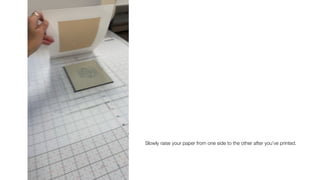
Slowly raise your paper from one side to the other after you’ve printed.
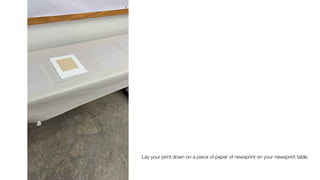
Lay your print down on a piece of paper of newsprint on your newsprint table.
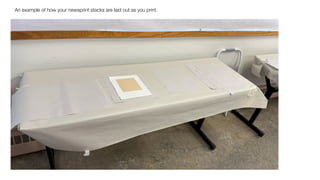
An example of how your newsprint stacks are laid out as you print.
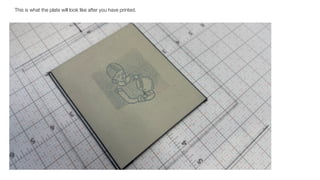
This is what the plate will look like after you have printed.
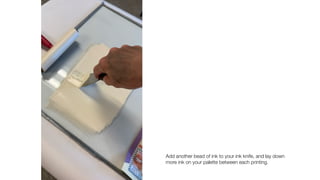
Add another bead of ink to your ink knife, and lay down
more ink on your palette between each printing.
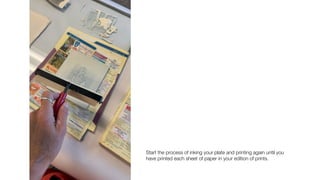
Start the process of inking your plate and printing again until you
have printed each sheet of paper in your edition of prints.
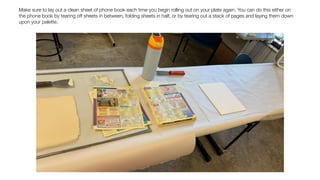
Make sure to lay out a clean sheet of phone book each time you begin rolling out on your plate again. You can do this either on
the phone book by tearing off sheets in between, folding sheets in half, or by tearing out a stack of pages and laying them down
upon your palette.
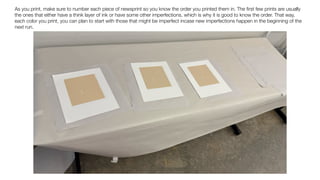
As you print, make sure to number each piece of newsprint so you know the order you printed them in. The
fi
rst few prints are usually
the ones that either have a think layer of ink or have some other imperfections, which is why it is good to know the order. That way,
each color you print, you can plan to start with those that might be imperfect incase new imperfections happen in the beginning of the
next run.
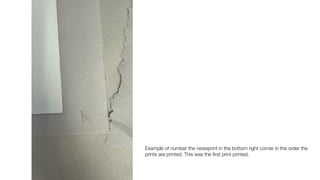
Example of number the newsprint in the bottom right corner in the order the
prints are printed. This was the
fi
rst print printed.
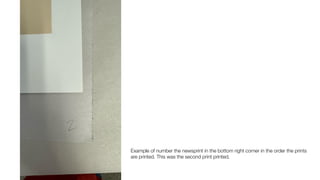
Example of number the newsprint in the bottom right corner in the order the prints
are printed. This was the second print printed.
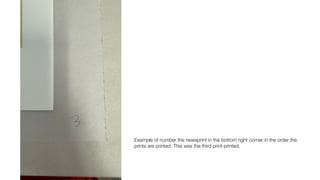
Example of number the newsprint in the bottom right corner in the order the
prints are printed. This was the third print printed.
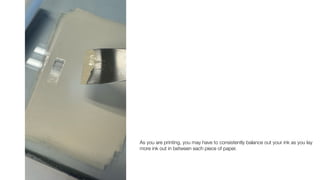
As you are printing, you may have to consistently balance out your ink as you lay
more ink out in between each piece of paper.
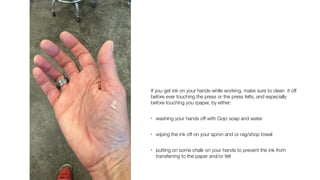
If you get ink on your hands while working, make sure to clean it off
before ever touching the press or the press felts, and especially
before touching you rpaper, by either:
• washing your hands off with Gojo soap and water
• wiping the ink off on your apron and or rag/shop towel
• putting on some chalk on your hands to prevent the ink from
transferring to the paper and/or felt
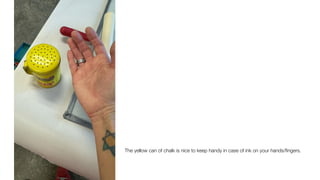
The yellow can of chalk is nice to keep handy in case of ink on your hands/
fi
ngers.
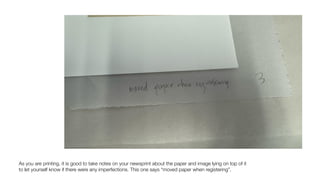
As you are printing, it is good to take notes on your newsprint about the paper and image lying on top of it
to let yourself know if there were any imperfections. This one says “moved paper when registering”.
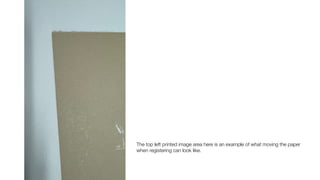
The top left printed image area here is an example of what moving the paper
when registering can look like.
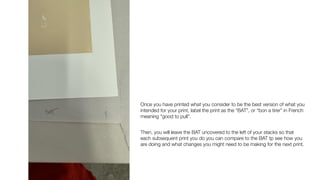
Once you have printed what you consider to be the best version of what you
intended for your print, label the print as the “BAT”, or “bon a tirer” in French
meaning “good to pull”.
Then, you will leave the BAT uncovered to the left of your stacks so that
each subsequent print you do you can compare to the BAT tp see how you
are doing and what changes you might need to be making for the next print.
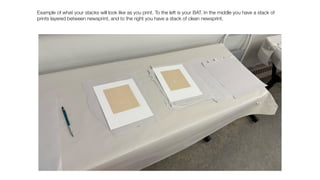
Example of what your stacks will look like as you print. To the left is your BAT. In the middle you have a stack of
prints layered between newsprint, and to the right you have a stack of clean newsprint.
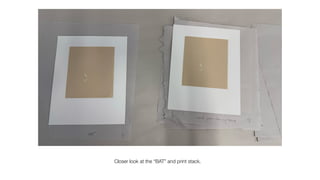
Closer look at the “BAT” and print stack.
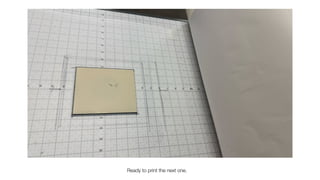
Ready to print the next one.
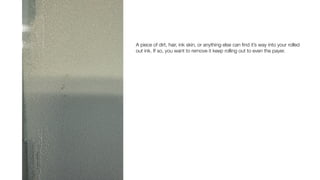
A piece of dirt, hair, ink skin, or anything else can
fi
nd it’s way into your rolled
out ink. If so, you want to remove it keep rolling out to even the payer.
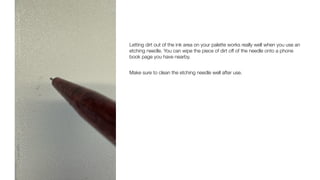
Letting dirt out of the ink area on your palette works really well when you use an
etching needle. You can wipe the piece of dirt off of the needle onto a phone
book page you have nearby.
Make sure to clean the etching needle well after use.
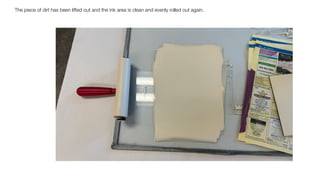
The piece of dirt has been lifted out and the ink area is clean and evenly rolled out again.
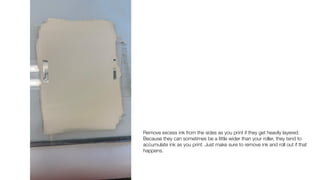
Remove excess ink from the sides as you print if they get heavily layered.
Because they can sometimes be a little wider than your roller, they tend to
accumulate ink as you print. Just make sure to remove ink and roll out if that
happens.
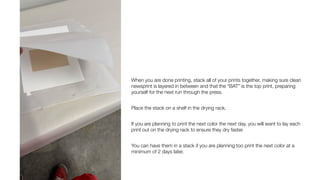
When you are done printing, stack all of your prints together, making sure clean
newsprint is layered in between and that the “BAT” is the top print, preparing
yourself for the next run through the press.
Place the stack on a shelf in the drying rack.
If you are planning to print the next color the next day, you will want to lay each
print out on the drying rack to ensure they dry faster.
You can have them in a stack if you are planning too print the next color at a
minimum of 2 days later.
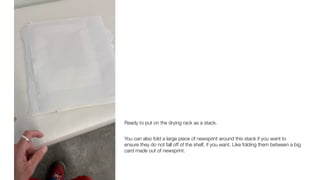
Ready to put on the drying rack as a stack.
You can also fold a large piece of newsprint around this stack if you want to
ensure they do not fall off of the shelf, if you want. Like folding them between a big
card made out of newsprint.
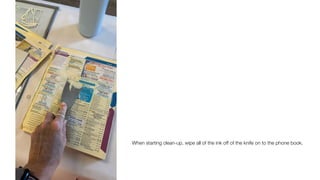
When starting clean-up, wipe all of the ink off of the knife on to the phone book.
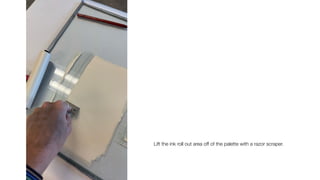
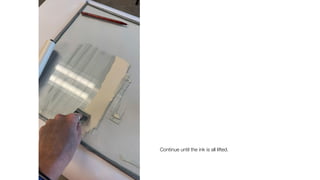
Lift the ink roll out area off of the palette with a razor scraper.
Continue until the ink is all lifted.
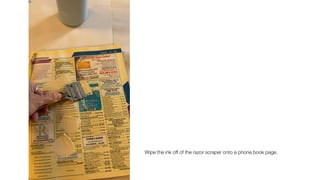
Wipe the ink off of the razor scraper onto a phone book page.
Roll out the roller and lift the ink off the palette with the razor scraper as many
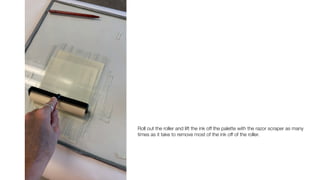
times as it take to remove most of the ink off of the roller.
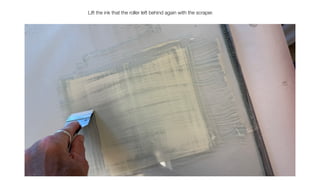
Lift the ink that the roller left behind again with the scraper.
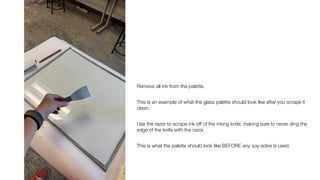
Remove all ink from the palette.
This is an example of what the glass palette should look like after you scrape it
clean.
Use the razor to scrape ink off of the inking knife, making sure to never ding the
edge of the knife with the razor.
This is what the palette should look like BEFORE any soy-solve is used.
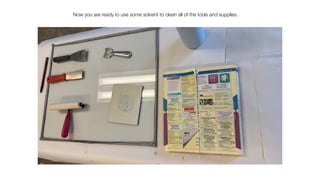
Now you are ready to use some solvent to clean all of the tools and supplies.
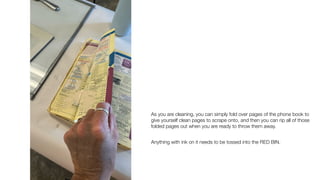
As you are cleaning, you can simply fold over pages of the phone book to
give yourself clean pages to scrape onto, and then you can rip all of those
folded pages out when you are ready to throw them away.
Anything with ink on it needs to be tossed into the RED BIN.
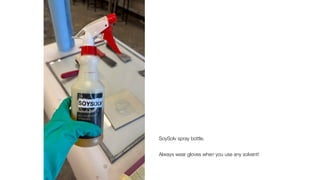
SoySolv spray bottle.
Always wear gloves when you use any solvent!
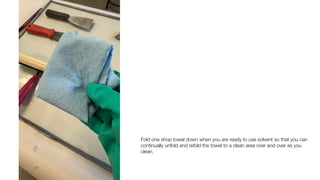
Fold one shop towel down when you are ready to use solvent so that you can
continually unfold and refold the towel to a clean area over and over as you
clean.
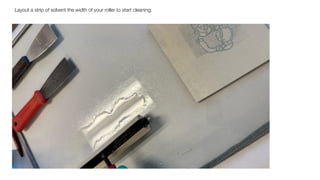
Layout a strip of solvent the width of your roller to start cleaning.
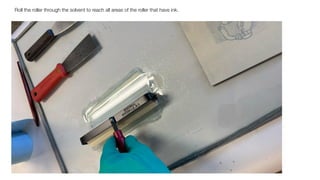
Roll the roller through the solvent to reach all areas of the roller that have ink.
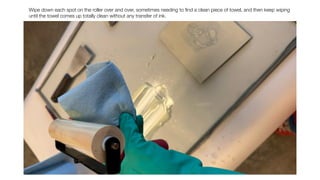
Wipe down each spot on the roller over and over, sometimes needing to
fi
nd a clean piece of towel, and then keep wiping
until the towel comes up totally clean without any transfer of ink.
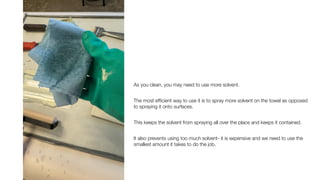
As you clean, you may need to use more solvent.
The most ef
fi
cient way to use it is to spray more solvent on the towel as opposed
to spraying it onto surfaces.
This keeps the solvent from spraying all over the place and keeps it contained.
It also prevents using too much solvent- it is expensive and we need to use the
smallest amount it takes to do the job.
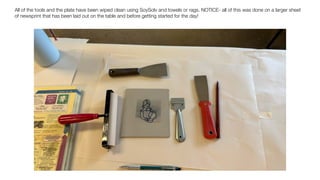
All of the tools and the plate have been wiped clean using SoySolv and towels or rags. NOTICE- all of this was done on a larger sheet
of newsprint that has been laid out on the table and before getting started for the day!
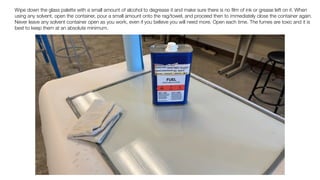
Wipe down the glass palette with a small amount of alcohol to degrease it and make sure there is no
fi
lm of ink or grease left on it. When
using any solvent, open the container, pour a small amount onto the rag/towel, and proceed then to immediately close the container again.
Never leave any solvent container open as you work, even if you believe you will need more. Open each time. The fumes are toxic and it is
best to keep them at an absolute minimum.
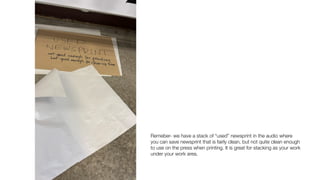
Remeber- we have a stack of “used” newsprint in the audio where
you can save newsprint that is fairly clean, but not quite clean enough
to use on the press when printing. It is great for stacking as your work
under your work area.
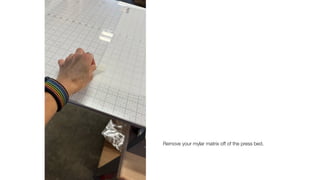
Remove your mylar matrix off of the press bed.
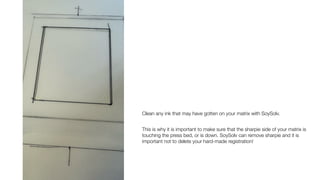
Clean any ink that may have gotten on your matrix with SoySolv.
This is why it is important to make sure that the sharpie side of your matrix is
touching the press bed, or is down. SoySolv can remove sharpie and it is
important not to delete your hard-made registration!
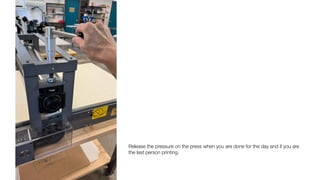
Release the pressure on the press when you are done for the day and if you are
the last person printing.
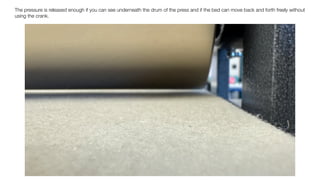
The pressure is released enough if you can see underneath the drum of the press and if the bed can move back and forth freely without
using the crank.

Linoleum Printing - Setup, Printing, Clean-up

  • 1.
    In preparation forprinting, set out all of the tools and supplies you will need.
  • 2.
    4 stacks ofnewsprint. Make sure the right stack of newsprint has at least one piece of newsprint for every piece of paper you plan to print on.
  • 3.
    Prepare the pressbed by taping down your matrix making sure to center the area where you will be placing your plate (in this case the linoleum) Make sure that your name is right reading so that the side of the mylar that you used to draw with sharpie is down and not up. Tape only one side of the mylar with 2 pieces of masking tape. Tape the side of the mylar closest to the drum of the press (the big silver thing in the middle). Make sure that the “T” mark of your “T-bar registration” is also closest to the press drum.
  • 4.
    Closer look yourplate area on your matrix centered on the press bed.
  • 5.
    Make sure tocheck that everything is laid out centered. Always test your plate and paper to your matrix before you start printing so that all is correct. When you set your pressure: • lay down your linoleum • cover with 2 sheets of newsprint (or a sheet of the actual paper you will be using and a piece of newsprint covering it) • lower the felts • Place your plate under the press drum (pressure must be totally loose at this point) • Lower the pressure on both sides until you meet some decent resistance without using much muscle • tighten the pressure (both) one more quarter turn to set your fi nal pressure • run the setup through the press and look that you have some embossing on the paper around your plate • your paper should NOT tear • it should not be physically dif fi cult to run your plate and paper through the press
  • 6.
    When registering, makesure the “T” and the “bar” line up with the “T” and the “bar” on your mylar matrix
  • 7.
    Make sure tohave a few pieces of good newsprint ready to place between the printing paper and the press felts for each run through the press. Have some extra prepared just in case some ink gets transferred to the newsprint you are using to protect your paper and the felts.
  • 8.
    Remove your inkfrom the aluminum packets you have prepared in advance, or from the ink can.
  • 9.
    When preparing yourink palette for printing, have your roller ready, place your ink in a top corner of the glass, have your ink knife(s) ready, and a part of a phone book.
  • 10.
    Put your rollerdown on the palette and prepare your ink knife with a bead of ink.
  • 11.
    Lay out yourink in as even an amount across the width of your roller.
  • 12.
  • 13.
    When rolling out,the length of your ink area should be the length of one full rotation of the roller.
  • 14.
    If you noticethat the ink you laid out is not even, add some ink to the thin area you notice as you roll out.
  • 15.
    Keep rolling outthe ink until you have a smooth and even layer of ink. If there is too much ink, it will have a loud sound as you roll out. Also, the ink area will be very textured. When you roll out your ink, make sure that for each complete roll out (going up and down once without lifting), you raise the roller and allow the wheel to spin a little. That way, as you roll out, the ink area becomes even both up and down and across.
  • 16.
    Here is anexample of a smooth and even layout of ink that has some, but not a lot, of texture.
  • 17.
    Begin to rollthe ink out on your linoleum plate. Roll out on top of the phone book. This will help you keep the back of the plate clean as you keep printing. If ink gets on the page while you roll out, simply fold the pice of paper in half when you next roll out so that you have a clean work area. This is why it is important that your roller is at least as big as your plate, if not a little bigger. As you roll on your plate, follow the same technique as you did when rolling out your ink on the palette. After one complete rotation of the roller and going both up and down once, lift the roller to allow you to begin rolling out a new area of ink the next time you go up and down on your plate.
  • 18.
    Example of aplate covered with enough ink and ready to print.
  • 19.
    Lay down yourplate on the press bed, on the matrix in preparation for printing. Make sure the top of your plate is closest to the “T” mark on your matrix so that the borders you planned out on your matrix are re fl ected on your paper when printing. Always have a nice, clean sheet of newsprint resting on the felts - ready to go after you lay down your paper (making sure to register it properly).
  • 20.
    Line up the“T” mark on your paper with the “T” mark on your matrix. When registering your paper, hold your “T” side of the paper down on the matrix while making sure the rest of your paper does not yet touch your plate. Look from above as you slowly lay down the rest of your paper, making sure to line the “bar” line of your paper with the “bar” line of your matrix.
  • 21.
    Lower the cleannewsprint over the plate and your registered paper.
  • 22.
    Hold down thenewsprint, paper and plate stack with one hand while you lower the felts on top of the stack. A good way to do that is to insert the hand NOT holding down the stack into the opening between the felts and the press drum, and slowly roll it out on top of your hand holding down the stack.
  • 23.
    Slowly continue tolower the felts until they are fl at.
  • 24.
    Roll the pressbed under the drum until you come out the other side. Always leave a section of felts under the press drum so that when you lift the felts and newsprint off of you plate and paper, the felts do not become loose and swivel left and right.
  • 25.
    Slowly raise yourpaper from one side to the other after you’ve printed.
  • 26.
    Lay your printdown on a piece of paper of newsprint on your newsprint table.
  • 27.
    An example ofhow your newsprint stacks are laid out as you print.
  • 28.
    This is whatthe plate will look like after you have printed.
  • 29.
    Add another beadof ink to your ink knife, and lay down more ink on your palette between each printing.
  • 30.
    Start the processof inking your plate and printing again until you have printed each sheet of paper in your edition of prints.
  • 31.
    Make sure tolay out a clean sheet of phone book each time you begin rolling out on your plate again. You can do this either on the phone book by tearing off sheets in between, folding sheets in half, or by tearing out a stack of pages and laying them down upon your palette.
  • 32.
    As you print,make sure to number each piece of newsprint so you know the order you printed them in. The fi rst few prints are usually the ones that either have a think layer of ink or have some other imperfections, which is why it is good to know the order. That way, each color you print, you can plan to start with those that might be imperfect incase new imperfections happen in the beginning of the next run.
  • 33.
    Example of numberthe newsprint in the bottom right corner in the order the prints are printed. This was the fi rst print printed.
  • 34.
    Example of numberthe newsprint in the bottom right corner in the order the prints are printed. This was the second print printed.
  • 35.
    Example of numberthe newsprint in the bottom right corner in the order the prints are printed. This was the third print printed.
  • 36.
    As you areprinting, you may have to consistently balance out your ink as you lay more ink out in between each piece of paper.
  • 37.
    If you getink on your hands while working, make sure to clean it off before ever touching the press or the press felts, and especially before touching you rpaper, by either: • washing your hands off with Gojo soap and water • wiping the ink off on your apron and or rag/shop towel • putting on some chalk on your hands to prevent the ink from transferring to the paper and/or felt
  • 38.
    The yellow canof chalk is nice to keep handy in case of ink on your hands/ fi ngers.
  • 39.
    As you areprinting, it is good to take notes on your newsprint about the paper and image lying on top of it to let yourself know if there were any imperfections. This one says “moved paper when registering”.
  • 40.
    The top leftprinted image area here is an example of what moving the paper when registering can look like.
  • 41.
    Once you haveprinted what you consider to be the best version of what you intended for your print, label the print as the “BAT”, or “bon a tirer” in French meaning “good to pull”. Then, you will leave the BAT uncovered to the left of your stacks so that each subsequent print you do you can compare to the BAT tp see how you are doing and what changes you might need to be making for the next print.
  • 42.
    Example of whatyour stacks will look like as you print. To the left is your BAT. In the middle you have a stack of prints layered between newsprint, and to the right you have a stack of clean newsprint.
  • 43.
    Closer look atthe “BAT” and print stack.
  • 44.
    Ready to printthe next one.
  • 45.
    A piece ofdirt, hair, ink skin, or anything else can fi nd it’s way into your rolled out ink. If so, you want to remove it keep rolling out to even the payer.
  • 46.
    Letting dirt outof the ink area on your palette works really well when you use an etching needle. You can wipe the piece of dirt off of the needle onto a phone book page you have nearby. Make sure to clean the etching needle well after use.
  • 47.
    The piece ofdirt has been lifted out and the ink area is clean and evenly rolled out again.
  • 48.
    Remove excess inkfrom the sides as you print if they get heavily layered. Because they can sometimes be a little wider than your roller, they tend to accumulate ink as you print. Just make sure to remove ink and roll out if that happens.
  • 49.
    When you aredone printing, stack all of your prints together, making sure clean newsprint is layered in between and that the “BAT” is the top print, preparing yourself for the next run through the press. Place the stack on a shelf in the drying rack. If you are planning to print the next color the next day, you will want to lay each print out on the drying rack to ensure they dry faster. You can have them in a stack if you are planning too print the next color at a minimum of 2 days later.
  • 50.
    Ready to puton the drying rack as a stack. You can also fold a large piece of newsprint around this stack if you want to ensure they do not fall off of the shelf, if you want. Like folding them between a big card made out of newsprint.
  • 51.
    When starting clean-up,wipe all of the ink off of the knife on to the phone book.
  • 52.
    Lift the inkroll out area off of the palette with a razor scraper.
  • 53.
    Continue until theink is all lifted.
  • 54.
    Wipe the inkoff of the razor scraper onto a phone book page.
  • 55.
    Roll out theroller and lift the ink off the palette with the razor scraper as many times as it take to remove most of the ink off of the roller.
  • 56.
    Lift the inkthat the roller left behind again with the scraper.
  • 57.
    Remove all inkfrom the palette. This is an example of what the glass palette should look like after you scrape it clean. Use the razor to scrape ink off of the inking knife, making sure to never ding the edge of the knife with the razor. This is what the palette should look like BEFORE any soy-solve is used.
  • 58.
    Now you areready to use some solvent to clean all of the tools and supplies.
  • 59.
    As you arecleaning, you can simply fold over pages of the phone book to give yourself clean pages to scrape onto, and then you can rip all of those folded pages out when you are ready to throw them away. Anything with ink on it needs to be tossed into the RED BIN.
  • 60.
    SoySolv spray bottle. Alwayswear gloves when you use any solvent!
  • 61.
    Fold one shoptowel down when you are ready to use solvent so that you can continually unfold and refold the towel to a clean area over and over as you clean.
  • 62.
    Layout a stripof solvent the width of your roller to start cleaning.
  • 63.
    Roll the rollerthrough the solvent to reach all areas of the roller that have ink.
  • 64.
    Wipe down eachspot on the roller over and over, sometimes needing to fi nd a clean piece of towel, and then keep wiping until the towel comes up totally clean without any transfer of ink.
  • 65.
    As you clean,you may need to use more solvent. The most ef fi cient way to use it is to spray more solvent on the towel as opposed to spraying it onto surfaces. This keeps the solvent from spraying all over the place and keeps it contained. It also prevents using too much solvent- it is expensive and we need to use the smallest amount it takes to do the job.
  • 66.
    All of thetools and the plate have been wiped clean using SoySolv and towels or rags. NOTICE- all of this was done on a larger sheet of newsprint that has been laid out on the table and before getting started for the day!
  • 67.
    Wipe down theglass palette with a small amount of alcohol to degrease it and make sure there is no fi lm of ink or grease left on it. When using any solvent, open the container, pour a small amount onto the rag/towel, and proceed then to immediately close the container again. Never leave any solvent container open as you work, even if you believe you will need more. Open each time. The fumes are toxic and it is best to keep them at an absolute minimum.
  • 68.
    Remeber- we havea stack of “used” newsprint in the audio where you can save newsprint that is fairly clean, but not quite clean enough to use on the press when printing. It is great for stacking as your work under your work area.
  • 69.
    Remove your mylarmatrix off of the press bed.
  • 70.
    Clean any inkthat may have gotten on your matrix with SoySolv. This is why it is important to make sure that the sharpie side of your matrix is touching the press bed, or is down. SoySolv can remove sharpie and it is important not to delete your hard-made registration!
  • 71.
    Release the pressureon the press when you are done for the day and if you are the last person printing.
  • 72.
    The pressure isreleased enough if you can see underneath the drum of the press and if the bed can move back and forth freely without using the crank.