To understand video ...
• the image on the retina of the eye is
retained for some milliseconds before
decaying
• if a sequence of images is drawn line by
line, at 50 images/sec, the eye does not
know it is looking at discrete images
• all video (television) systems exploit this
principle to produce moving pictures
Video chain
• Video cameras are used to convert light from a
scene to an electrical signal.
• The television or monitor is used to convert an
electrical signal into a light signal, so
reproducing an image of a scene.
TV systems
• Broadcast television standards take into account
historical developments and the need to produce
material from films.
• Scanning parameters vary country to country …
• Commonly used standards in Europe use 625 lines per
picture and 50 fields per second.
• With 625 lines the line structure is visible on most
displays but the image is of good entertainment quality.
• NTSC: N and S America, and Japan use
525 lines, 483 displayed, 4:3 aspect and
30 frames/sec. (power 60Hz)
• PAL/SECAM: Europe has 625, 576
displayed, 4:3 and 25 frames/sec. (power
50Hz)
Interlacing
• 25 f/s captures smooth motion, but older people
may perceive flicker
• Interlacing displays the odd lines, then the even
ones, calling a half frame to be a field. 50
fields/sec does not cause flicker
• Non-interlaced tv or video is called progressive
(Movies run at 24 frames/sec, image shown for
full period)
Colour
• In a colour display, there is a need to display 3 coloured
images simultaneously.
• The principle of operation is that a red, green, and blue
image will additively together fool the eye into believing
a wide range of colours is actually present.
• For single channel transmission, the 3 colour signals
are combined into a single composite signal, the YUV
Model
Colour TV
A political requirement was that ‘new’
programs transmitted in colour, had to be
receivable on existing B/W TVs
– this led to the YUV model
NTSC - National Television Standards
Committee (Never Twice Same Colour!)
Later (hence better noise immunity and
colours) came:
SECAM (SEquential Couleur Avec
Memoire), France/E. Europe
PAL (Phase Alternating Line) UK, rest of
Europe
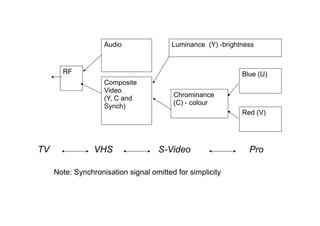
Video Signal Components
Colour TV grew out of B&W:
• Black and white signal (luminance)
• Colour signal (chrominance)
• Synchronisation information
• Sound signal
http://en.wikipedia.org/wiki/Video_signal
Composite
Video
(Y, C and
Synch)
Audio
Chrominance
(C) - colour
Luminance (Y) -brightness
Blue (U)
Red (V)
RF
Note: Synchronisation signal omitted for simplicity
VHS S-Video ProTV
Basic Television Signals
• RF (TV aerial) transmits the signals
• Composite
• YC
• YUV (component)
• RGB
Composite video and audio information combined
together (on 2 slightly separated frequencies)
• luminance (Y) + chrominance (C) and sync = 1 signal,
• audio = 1 signal
S-Video (also known as Y/C) is a baseband analog video
format divides the signal into two channels - luminance
and chrominance.
• YC = luminance (Y) and chrominance (C) processed
separately
Component YUV
YUV (component) = chrominance in 2 parts (colour
difference signals)
luminance (Y)
chrominance = (U) (V)
U = B-Y (i.e. blue colour minus luminance value)
V = R-Y (i.e. red colour minus luminance value)
Green is calculated electronically Y-B-R = G
Digital tv
● The human eye is more sensitive to variations in
brightness than colour.
● TV systems are optimised by devoting more bandwidth
bits to the luminance or Y channel which carries most of
the image detail, than to the colour difference B & R
components.
● Component digital video signals are sometimes
referred to as 4:2:2 (8-bits).
● 4 bits are dedicated to the Y component and 2 bits are
each dedicated to the B & R components.
http://en.wikipedia.org/wiki/Chroma_subsampling
Aspect ratio
• The aspect ratio of the image is the ratio of the horizontal dimension to
the vertical dimension.
• An aspect ratio of 4 x 3 is used for standard broadcast television
(widescreen uses 16 x 9).
• If there are 625 lines vertically then for a similar resolution horizontally
the number of resolvable points or picture elements along each line
should be 625 x 4/3 or 833.
• With equal resolution in each direction the total number of picture
elements or pixels in the image is 520,833.
See also:
http://en.wikipedia.org/wiki/Overscan
Computers and TV
• TV signal composed of 625 horizontal lines
• Active picture equates to 576 horizontal lines
• Image has 4:3 aspect ratio – therefore comprises
576 * (4 / 3) = 768 pixels
So for a square pixel 1:1 aspect ratio
768 x 576 pixels are needed for a full image
http://en.wikipedia.org/wiki/Display_resolution#Current_standards
1:1
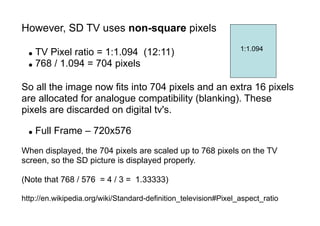
However, SD TV uses non-square pixels
● TV Pixel ratio = 1:1.094 (12:11)
● 768 / 1.094 = 704 pixels
So all the image now fits into 704 pixels and an extra 16 pixels
are allocated for analogue compatibility (blanking). These
pixels are discarded on digital tv's.
● Full Frame – 720x576
When displayed, the 704 pixels are scaled up to 768 pixels on the TV
screen, so the SD picture is displayed properly.
(Note that 768 / 576 = 4 / 3 = 1.33333)
http://en.wikipedia.org/wiki/Standard-definition_television#Pixel_aspect_ratio
1:1.094
Widescreen Principles
The actual image (be it 4:3 or 16:9) is always contained in the center
704 horizontal pixels of the digital frame.
● SD 16:9 image non-square pixels
● Anamorphic squeeze to 16:9 (720x576)
● TV Pixel ratio = 16:11
● Full Frame – 720 x 576
704 * (16 / 11) = 1024 pixels
So when horizontally scaled for display on the TV or monitor the picture
will be 1024 x 576 pixels.
(Note that 1024 / 576 = 16 / 9 = 1.7777)
HDTV (High Definition TV)
● These produce sharper images by increasing the number of scan lines
● US/Europe/Japan HDTV are all different and mutually incompatible!
● All have 16:9 aspect ratio
http://en.wikipedia.org/wiki/High-definition_television
Note that SD broadcast TV images have to be 'pixel mapped' onto HDTV
displays, eg. 1080P, which can cause scaling artifacts.
http://pixelmapping.wikispaces.com/Pixel+mapping+explained
http://en.wikipedia.org/wiki/1:1_pixel_mapping
720p progressive HD TV signal format
● uses square pixels
● 720 horizontal lines
● aspect ratio of 16:9 (1.78:1).
720 x (16 / 9) = 1280
so HDTV has picture resolution of 1280 x 720 pixels
All major HDTV broadcasting standards include a 720p
format which has a resolution of 1280x720
http://en.wikipedia.org/wiki/High-definition_television#Display_resolutions
http://en.wikipedia.org/wiki/Telecine
Codec
Codec is an abbreviation / acronym of "coder/decoder" or
"compressor/decompressor".
A codec is a device or program algorithm that compresses
data when you are recording and producing a movie, and
then decompresses the data when the movie is being
viewed.
The codec you use when recording and producing your
movie will affect both the quality and the size of the movie
when it is completed and viewed.
Over the years many different codecs have been
developed. Each codec has its strengths and weaknesses.
Codecs can be divided into two categories: lossless and
lossy.
Lossless codecs maintain perfect quality when the data is
compressed, while lossy codecs sacrifice quality for
compression.
http://en.wikipedia.org/wiki/Data_compression
Using a lossy video codec, each time you transform the
video using a different codec the quality will degrade.
This is the same as making a copy of videotape and then
copying from that copy.
The video quality of the second generation copy is
severely degraded, and subsequent copies degrade
further.
Popular video file formats and codecs
The codec is not to be confused with the file format used
to store the a/v information encoded by the codec.
AVI (.avi)
• XviD
• DivX
• Windows Media
MPEG-1 and MPEG-2, MP4 (MPEG4) (.mpg)
File formats like ".ogg", ".mpg", ".avi", ".mov", etc. are used to store
information encoded by a codec.
http://en.wikipedia.org/wiki/Comparison_of_container_formats
Commonly used video codecs
http://en.wikipedia.org/wiki/Video_codec#Commonly_used_video_codecs
http://en.wikipedia.org/wiki/Open_source_codecs_and_containers
http://en.wikipedia.org/wiki/Comparison_of_video_codecs
H.261
H.263
H.263v2
H.264
MPEG-1 Video
MPEG-2 Video
MPEG-4 Video
MJPEG
MPEG
● Acronym for Moving Picture Experts Group
● A group charged with the development of video and
audio encoding standards.
● Since its first meeting in 1988, MPEG has grown to
include members from various industries and
universities.
http://en.wikipedia.org/wiki/Moving_Picture_Experts_Group
MPEG has standardized the following
compression formats:
MPEG-1
• Includes the popular Layer 3 (MP3) audio compression format.
MPEG-2
• Video and audio standards for broadcast-quality television. Used on
most DVD movies.
MPEG-3
• Originally designed for HDTV, but abandoned in favour of MPEG-2.
MPEG-4
• Expands MPEG-1 to support video/audio "objects", 3D content, low
bitrate encoding and support for Digital Rights Management.
MPEG-7
• A formal system for describing multimedia content.
MPEG-21
• Future standard as a Multimedia Framework.
MPEG video compression
● The basic idea behind MPEG video compression is to remove spatial
redundancy within a video frame and temporal redundancy between
video frames.
● The images in a video stream usually do not change much within small
time intervals.
● The idea of motion-compensation is to encode a video frame based on
other video frames temporally close to it.
Frames can be encoded in three types: intra-frames (I-frames), forward predicted
frames (P-frames), and bi-directional predicted frames (B-frames).
• An I-frame is encoded as a single image, with no reference to any past or
future frames. The encoding scheme used is similar to JPEG compression.
• A P-frame is encoded relative to the past reference frame. A reference frame
is a P- or I-frame. The past reference frame is the closest preceding reference
frame.
• A B-frame is encoded relative to the past reference frame, the future
reference frame, or both frames. The future reference frame is the closest
following reference frame (I or P). The encoding for B-frames is similar to P-
frames, except that motion vectors may refer to areas in the future reference
frames.
MPEG-1 VIDEO
• MPEG-1 was optimized for CD-ROM or
applications at about 1.5 Mbit/sec, which was
strictly non-interlaced.
• MPEG-1 video is used by the Video CD format.
MPEG-2 - Video Standard
● MPEG-2 specifies encoding for high-quality digital video.
● MPEG-2 Video builds on the completed MPEG-1 Video Standard
and works with I, P and B fields.
● MPEG-2 supports both interlaced and progressive scan video
streams. In progressive scan streams, the basic unit of
encoding is a frame, while in interlaced streams, the basic unit
is a field.
● MPEG-2 is typically used to encode audio and video for
broadcast TV signals, including digital satellite and Cable.
● MPEG-2, with some modifications, is also the coding format used
by standard commercial DVD movies.
MPEG-4
● MPEG-4 (1998) is the designation for a group of audio and video
coding standards agreed upon by MPEG
● MPEG-4 is primarily designed to handle low bit-rate content, from 4800
bit/s to approximately 4 Mbit/s.
● The primary uses for the MPEG-4 standard are web (streaming media)
and CD distribution, conversational (videophone) uses, and broadcast
television.
● MPEG-4 absorbs many of the features of MPEG-1 and MPEG-2,
adding new features such as (extended) VRML support for 3D
rendering, object-oriented composite files (including audio, video and
VRML objects), support for Digital Rights Management and various
types of interactivity.
MJPEG
● Motion JPEG (MJPEG) is a video codec where each
frame is separately compressed into a JPEG image.
● The resulting stream quality is independent from the
motion in the image, different from MPEG video, where
quality often decreases when small images move
rapidly.
● Typical data rate (29 Mbit/s) quality is very high, files
are very large.
MPEG-1/2 AUDIO – aka MP3 audio
● To compress audio, MPEG removes the redundant parts of the sound signal that we
do not hear (lossy).
● To do this MPEG Audio uses psyco- acoustic principles.
● Unlike video there is no perceivable quality loss. MPEG Layer 3 is an excellent audio
codec. It produces small files sizes and maintains good audio quality.
● Many listeners accept the MP3 bitrate of 128 kilobits per second (kbit/s) as near CD
quality at a compression ratio of approximately 11:1.
● Different mp3 codecs produce different results at the same bitstream rates. (Black art).
● MPEG-2 - MP3 supports bit rates between 32 Kbit/s and 384 Kbit/s. 384 Kbit/s is
common for DVD movies.
http://en.wikipedia.org/wiki/MP3
http://en.wikipedia.org/wiki/MP3#Licensing_and_patent_issues
http://mp3licensing.com/help/index.html#4

To Understand Video

  • 1.
  • 2.
    • the imageon the retina of the eye is retained for some milliseconds before decaying • if a sequence of images is drawn line by line, at 50 images/sec, the eye does not know it is looking at discrete images • all video (television) systems exploit this principle to produce moving pictures
  • 3.
    Video chain • Videocameras are used to convert light from a scene to an electrical signal. • The television or monitor is used to convert an electrical signal into a light signal, so reproducing an image of a scene.
  • 5.
    TV systems • Broadcasttelevision standards take into account historical developments and the need to produce material from films. • Scanning parameters vary country to country … • Commonly used standards in Europe use 625 lines per picture and 50 fields per second. • With 625 lines the line structure is visible on most displays but the image is of good entertainment quality.
  • 6.
    • NTSC: Nand S America, and Japan use 525 lines, 483 displayed, 4:3 aspect and 30 frames/sec. (power 60Hz) • PAL/SECAM: Europe has 625, 576 displayed, 4:3 and 25 frames/sec. (power 50Hz)
  • 8.
    Interlacing • 25 f/scaptures smooth motion, but older people may perceive flicker • Interlacing displays the odd lines, then the even ones, calling a half frame to be a field. 50 fields/sec does not cause flicker • Non-interlaced tv or video is called progressive (Movies run at 24 frames/sec, image shown for full period)
  • 10.
    Colour • In acolour display, there is a need to display 3 coloured images simultaneously. • The principle of operation is that a red, green, and blue image will additively together fool the eye into believing a wide range of colours is actually present. • For single channel transmission, the 3 colour signals are combined into a single composite signal, the YUV Model
  • 11.
    Colour TV A politicalrequirement was that ‘new’ programs transmitted in colour, had to be receivable on existing B/W TVs – this led to the YUV model
  • 12.
    NTSC - NationalTelevision Standards Committee (Never Twice Same Colour!) Later (hence better noise immunity and colours) came: SECAM (SEquential Couleur Avec Memoire), France/E. Europe PAL (Phase Alternating Line) UK, rest of Europe
  • 13.
    Video Signal Components ColourTV grew out of B&W: • Black and white signal (luminance) • Colour signal (chrominance) • Synchronisation information • Sound signal http://en.wikipedia.org/wiki/Video_signal
  • 14.
    Composite Video (Y, C and Synch) Audio Chrominance (C)- colour Luminance (Y) -brightness Blue (U) Red (V) RF Note: Synchronisation signal omitted for simplicity VHS S-Video ProTV
  • 15.
    Basic Television Signals •RF (TV aerial) transmits the signals • Composite • YC • YUV (component) • RGB
  • 16.
    Composite video andaudio information combined together (on 2 slightly separated frequencies) • luminance (Y) + chrominance (C) and sync = 1 signal, • audio = 1 signal S-Video (also known as Y/C) is a baseband analog video format divides the signal into two channels - luminance and chrominance. • YC = luminance (Y) and chrominance (C) processed separately
  • 17.
    Component YUV YUV (component)= chrominance in 2 parts (colour difference signals) luminance (Y) chrominance = (U) (V) U = B-Y (i.e. blue colour minus luminance value) V = R-Y (i.e. red colour minus luminance value) Green is calculated electronically Y-B-R = G
  • 18.
    Digital tv ● Thehuman eye is more sensitive to variations in brightness than colour. ● TV systems are optimised by devoting more bandwidth bits to the luminance or Y channel which carries most of the image detail, than to the colour difference B & R components. ● Component digital video signals are sometimes referred to as 4:2:2 (8-bits). ● 4 bits are dedicated to the Y component and 2 bits are each dedicated to the B & R components. http://en.wikipedia.org/wiki/Chroma_subsampling
  • 19.
    Aspect ratio • Theaspect ratio of the image is the ratio of the horizontal dimension to the vertical dimension. • An aspect ratio of 4 x 3 is used for standard broadcast television (widescreen uses 16 x 9). • If there are 625 lines vertically then for a similar resolution horizontally the number of resolvable points or picture elements along each line should be 625 x 4/3 or 833. • With equal resolution in each direction the total number of picture elements or pixels in the image is 520,833. See also: http://en.wikipedia.org/wiki/Overscan
  • 20.
    Computers and TV •TV signal composed of 625 horizontal lines • Active picture equates to 576 horizontal lines • Image has 4:3 aspect ratio – therefore comprises 576 * (4 / 3) = 768 pixels So for a square pixel 1:1 aspect ratio 768 x 576 pixels are needed for a full image http://en.wikipedia.org/wiki/Display_resolution#Current_standards 1:1
  • 21.
    However, SD TVuses non-square pixels ● TV Pixel ratio = 1:1.094 (12:11) ● 768 / 1.094 = 704 pixels So all the image now fits into 704 pixels and an extra 16 pixels are allocated for analogue compatibility (blanking). These pixels are discarded on digital tv's. ● Full Frame – 720x576 When displayed, the 704 pixels are scaled up to 768 pixels on the TV screen, so the SD picture is displayed properly. (Note that 768 / 576 = 4 / 3 = 1.33333) http://en.wikipedia.org/wiki/Standard-definition_television#Pixel_aspect_ratio 1:1.094
  • 22.
    Widescreen Principles The actualimage (be it 4:3 or 16:9) is always contained in the center 704 horizontal pixels of the digital frame. ● SD 16:9 image non-square pixels ● Anamorphic squeeze to 16:9 (720x576) ● TV Pixel ratio = 16:11 ● Full Frame – 720 x 576 704 * (16 / 11) = 1024 pixels So when horizontally scaled for display on the TV or monitor the picture will be 1024 x 576 pixels. (Note that 1024 / 576 = 16 / 9 = 1.7777)
  • 23.
    HDTV (High DefinitionTV) ● These produce sharper images by increasing the number of scan lines ● US/Europe/Japan HDTV are all different and mutually incompatible! ● All have 16:9 aspect ratio http://en.wikipedia.org/wiki/High-definition_television Note that SD broadcast TV images have to be 'pixel mapped' onto HDTV displays, eg. 1080P, which can cause scaling artifacts. http://pixelmapping.wikispaces.com/Pixel+mapping+explained http://en.wikipedia.org/wiki/1:1_pixel_mapping
  • 24.
    720p progressive HDTV signal format ● uses square pixels ● 720 horizontal lines ● aspect ratio of 16:9 (1.78:1). 720 x (16 / 9) = 1280 so HDTV has picture resolution of 1280 x 720 pixels All major HDTV broadcasting standards include a 720p format which has a resolution of 1280x720 http://en.wikipedia.org/wiki/High-definition_television#Display_resolutions http://en.wikipedia.org/wiki/Telecine
  • 26.
    Codec Codec is anabbreviation / acronym of "coder/decoder" or "compressor/decompressor". A codec is a device or program algorithm that compresses data when you are recording and producing a movie, and then decompresses the data when the movie is being viewed. The codec you use when recording and producing your movie will affect both the quality and the size of the movie when it is completed and viewed.
  • 27.
    Over the yearsmany different codecs have been developed. Each codec has its strengths and weaknesses. Codecs can be divided into two categories: lossless and lossy. Lossless codecs maintain perfect quality when the data is compressed, while lossy codecs sacrifice quality for compression. http://en.wikipedia.org/wiki/Data_compression
  • 28.
    Using a lossyvideo codec, each time you transform the video using a different codec the quality will degrade. This is the same as making a copy of videotape and then copying from that copy. The video quality of the second generation copy is severely degraded, and subsequent copies degrade further.
  • 29.
    Popular video fileformats and codecs The codec is not to be confused with the file format used to store the a/v information encoded by the codec. AVI (.avi) • XviD • DivX • Windows Media MPEG-1 and MPEG-2, MP4 (MPEG4) (.mpg) File formats like ".ogg", ".mpg", ".avi", ".mov", etc. are used to store information encoded by a codec. http://en.wikipedia.org/wiki/Comparison_of_container_formats
  • 30.
    Commonly used videocodecs http://en.wikipedia.org/wiki/Video_codec#Commonly_used_video_codecs http://en.wikipedia.org/wiki/Open_source_codecs_and_containers http://en.wikipedia.org/wiki/Comparison_of_video_codecs H.261 H.263 H.263v2 H.264 MPEG-1 Video MPEG-2 Video MPEG-4 Video MJPEG
  • 31.
    MPEG ● Acronym forMoving Picture Experts Group ● A group charged with the development of video and audio encoding standards. ● Since its first meeting in 1988, MPEG has grown to include members from various industries and universities. http://en.wikipedia.org/wiki/Moving_Picture_Experts_Group
  • 32.
    MPEG has standardizedthe following compression formats: MPEG-1 • Includes the popular Layer 3 (MP3) audio compression format. MPEG-2 • Video and audio standards for broadcast-quality television. Used on most DVD movies. MPEG-3 • Originally designed for HDTV, but abandoned in favour of MPEG-2. MPEG-4 • Expands MPEG-1 to support video/audio "objects", 3D content, low bitrate encoding and support for Digital Rights Management. MPEG-7 • A formal system for describing multimedia content. MPEG-21 • Future standard as a Multimedia Framework.
  • 33.
    MPEG video compression ●The basic idea behind MPEG video compression is to remove spatial redundancy within a video frame and temporal redundancy between video frames. ● The images in a video stream usually do not change much within small time intervals. ● The idea of motion-compensation is to encode a video frame based on other video frames temporally close to it.
  • 34.
    Frames can beencoded in three types: intra-frames (I-frames), forward predicted frames (P-frames), and bi-directional predicted frames (B-frames). • An I-frame is encoded as a single image, with no reference to any past or future frames. The encoding scheme used is similar to JPEG compression. • A P-frame is encoded relative to the past reference frame. A reference frame is a P- or I-frame. The past reference frame is the closest preceding reference frame. • A B-frame is encoded relative to the past reference frame, the future reference frame, or both frames. The future reference frame is the closest following reference frame (I or P). The encoding for B-frames is similar to P- frames, except that motion vectors may refer to areas in the future reference frames.
  • 35.
    MPEG-1 VIDEO • MPEG-1was optimized for CD-ROM or applications at about 1.5 Mbit/sec, which was strictly non-interlaced. • MPEG-1 video is used by the Video CD format.
  • 36.
    MPEG-2 - VideoStandard ● MPEG-2 specifies encoding for high-quality digital video. ● MPEG-2 Video builds on the completed MPEG-1 Video Standard and works with I, P and B fields. ● MPEG-2 supports both interlaced and progressive scan video streams. In progressive scan streams, the basic unit of encoding is a frame, while in interlaced streams, the basic unit is a field. ● MPEG-2 is typically used to encode audio and video for broadcast TV signals, including digital satellite and Cable. ● MPEG-2, with some modifications, is also the coding format used by standard commercial DVD movies.
  • 37.
    MPEG-4 ● MPEG-4 (1998)is the designation for a group of audio and video coding standards agreed upon by MPEG ● MPEG-4 is primarily designed to handle low bit-rate content, from 4800 bit/s to approximately 4 Mbit/s. ● The primary uses for the MPEG-4 standard are web (streaming media) and CD distribution, conversational (videophone) uses, and broadcast television. ● MPEG-4 absorbs many of the features of MPEG-1 and MPEG-2, adding new features such as (extended) VRML support for 3D rendering, object-oriented composite files (including audio, video and VRML objects), support for Digital Rights Management and various types of interactivity.
  • 38.
    MJPEG ● Motion JPEG(MJPEG) is a video codec where each frame is separately compressed into a JPEG image. ● The resulting stream quality is independent from the motion in the image, different from MPEG video, where quality often decreases when small images move rapidly. ● Typical data rate (29 Mbit/s) quality is very high, files are very large.
  • 39.
    MPEG-1/2 AUDIO –aka MP3 audio ● To compress audio, MPEG removes the redundant parts of the sound signal that we do not hear (lossy). ● To do this MPEG Audio uses psyco- acoustic principles. ● Unlike video there is no perceivable quality loss. MPEG Layer 3 is an excellent audio codec. It produces small files sizes and maintains good audio quality. ● Many listeners accept the MP3 bitrate of 128 kilobits per second (kbit/s) as near CD quality at a compression ratio of approximately 11:1. ● Different mp3 codecs produce different results at the same bitstream rates. (Black art). ● MPEG-2 - MP3 supports bit rates between 32 Kbit/s and 384 Kbit/s. 384 Kbit/s is common for DVD movies. http://en.wikipedia.org/wiki/MP3 http://en.wikipedia.org/wiki/MP3#Licensing_and_patent_issues http://mp3licensing.com/help/index.html#4