Think for a minute about theThink for a minute about the
computer system you use. Itcomputer system you use. It
probably has a monitor, aprobably has a monitor, a
mouse, and a case thatmouse, and a case that
contains electroniccontains electronic
components such as a hardcomponents such as a hard
disk and the CPU (thedisk and the CPU (the
computercomputer’’ss ““brainbrain””).).
These physical components
are called hardware. They are
the parts of the computer
system that we can actually
see and touch.
You may wonder how thisYou may wonder how this
computer hardware knowscomputer hardware knows
what it is supposed to do.what it is supposed to do.
The answer is that we give itThe answer is that we give it
instructions.instructions.
These instructions are calledThese instructions are called
software or programs.software or programs.
All software can be dividedAll software can be divided
into two main categories:into two main categories:
• Operating systems• Operating systems
• Application software• Application software
Operating SystemsOperating Systems
Each time you start yourEach time you start your
computer, the computer loadscomputer, the computer loads
the operating system (OS)the operating system (OS)
into the computerinto the computer’’s memorys memory
so that it can be used. Thisso that it can be used. This
process is sometimes calledprocess is sometimes called
booting the system.booting the system.
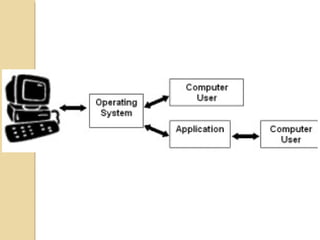
The operating system acts asThe operating system acts as
an interface, or link, betweenan interface, or link, between
the user and the computerthe user and the computer
hardware.hardware.
There are four main jobs anThere are four main jobs an
operating system isoperating system is
responsible for:responsible for:
1.1. It provides a userIt provides a user
interface. The userinterface. The user
interface lets you giveinterface lets you give
commands to the OS.commands to the OS.
2. It gives instructions to the2. It gives instructions to the
computer hardware, such ascomputer hardware, such as
the printer and monitor.the printer and monitor.
3. It manages the way in3. It manages the way in
which the computer storeswhich the computer stores
data and applications.data and applications.
4. It keeps track of different4. It keeps track of different
jobs. For example, if you arejobs. For example, if you are
using both a spreadsheet andusing both a spreadsheet and
a word processing applicationa word processing application
at the same time, the OS willat the same time, the OS will
run both of theserun both of these
applications and let youapplications and let you
switch back and forthswitch back and forth
between them.between them.
There are only few OperatingThere are only few Operating
Systems that are commonlySystems that are commonly
used in microcomputers:used in microcomputers:
Microsoft Windows, AppleMicrosoft Windows, Apple
Macintosh, Linux and UnixMacintosh, Linux and Unix
ApplicationsApplications
Applications are softwareApplications are software
programs that performprograms that perform
specific tasks for us. You havespecific tasks for us. You have
probably used many differentprobably used many different
types of applications.types of applications.
Activity managementActivity management
programs likeprograms like
calendars and address bookscalendars and address books
•• Word processingWord processing
applications forapplications for
creating documents that arecreating documents that are
attractivelyattractively
formattedformatted
•• Spreadsheet applications forSpreadsheet applications for
creatingcreating
documents to manage anddocuments to manage and
organizeorganize
numerical datanumerical data
•• Presentation applicationsPresentation applications
for making slide showsfor making slide shows
•• Graphics applications forGraphics applications for
editingediting
picturespictures
•• Database applications forDatabase applications for
developing databases that candeveloping databases that can
organize and retrieve largeorganize and retrieve large
amounts of informationamounts of information
•• Communications programsCommunications programs
like e mail and faxinglike e mail and faxing
software for sending andsoftware for sending and
receiving messagesreceiving messages
•• Multimedia applications forMultimedia applications for
creating video and musiccreating video and music
•• Utilities for performing aUtilities for performing a
variety of tasks that maintainvariety of tasks that maintain
or enhance the computeror enhance the computer ’’ss
operating systemoperating system
UtilitiesUtilities
Utility programs areUtility programs are
generally fairly small. Eachgenerally fairly small. Each
type has a specific job to do.type has a specific job to do.
Below are some descriptionsBelow are some descriptions
of utilities.of utilities.
•• Anti-virus applicationsAnti-virus applications
protect your computer fromprotect your computer from
the damage that can bethe damage that can be
caused by viruses and similarcaused by viruses and similar
programs.programs.
•• Compression utilities makeCompression utilities make
files smaller for storage (orfiles smaller for storage (or
sending over the Internet)sending over the Internet)
and then return them toand then return them to
normal size.normal size.
•• Data recovery utilitiesData recovery utilities
attempt toattempt to
restore data and files thatrestore data and files that
have been damaged orhave been damaged or
accidentally deleted.accidentally deleted.
•• Disk defragmentersDisk defragmenters
reorganize thereorganize the
data stored on disks so that itdata stored on disks so that it
is more efficiently arranged.is more efficiently arranged.
•• Firewalls prevent outsidersFirewalls prevent outsiders
from accessing yourfrom accessing your
computer over a networkcomputer over a network
such as the Internet.such as the Internet.
Both operating systemBoth operating system
software and applicationssoftware and applications
have specific jobs tohave specific jobs to
perform. It is important toperform. It is important to
realize that the OS you arerealize that the OS you are
using must be compatibleusing must be compatible
with your hardware.with your hardware.

Types of software

  • 2.
    Think for aminute about theThink for a minute about the computer system you use. Itcomputer system you use. It probably has a monitor, aprobably has a monitor, a mouse, and a case thatmouse, and a case that contains electroniccontains electronic components such as a hardcomponents such as a hard disk and the CPU (thedisk and the CPU (the computercomputer’’ss ““brainbrain””).).
  • 3.
    These physical components arecalled hardware. They are the parts of the computer system that we can actually see and touch.
  • 4.
    You may wonderhow thisYou may wonder how this computer hardware knowscomputer hardware knows what it is supposed to do.what it is supposed to do.
  • 5.
    The answer isthat we give itThe answer is that we give it instructions.instructions. These instructions are calledThese instructions are called software or programs.software or programs.
  • 6.
    All software canbe dividedAll software can be divided into two main categories:into two main categories: • Operating systems• Operating systems • Application software• Application software
  • 7.
    Operating SystemsOperating Systems Eachtime you start yourEach time you start your computer, the computer loadscomputer, the computer loads the operating system (OS)the operating system (OS) into the computerinto the computer’’s memorys memory so that it can be used. Thisso that it can be used. This process is sometimes calledprocess is sometimes called booting the system.booting the system.
  • 8.
    The operating systemacts asThe operating system acts as an interface, or link, betweenan interface, or link, between the user and the computerthe user and the computer hardware.hardware.
  • 10.
    There are fourmain jobs anThere are four main jobs an operating system isoperating system is responsible for:responsible for:
  • 11.
    1.1. It providesa userIt provides a user interface. The userinterface. The user interface lets you giveinterface lets you give commands to the OS.commands to the OS.
  • 12.
    2. It givesinstructions to the2. It gives instructions to the computer hardware, such ascomputer hardware, such as the printer and monitor.the printer and monitor.
  • 13.
    3. It managesthe way in3. It manages the way in which the computer storeswhich the computer stores data and applications.data and applications.
  • 14.
    4. It keepstrack of different4. It keeps track of different jobs. For example, if you arejobs. For example, if you are using both a spreadsheet andusing both a spreadsheet and a word processing applicationa word processing application at the same time, the OS willat the same time, the OS will run both of theserun both of these applications and let youapplications and let you switch back and forthswitch back and forth between them.between them.
  • 15.
    There are onlyfew OperatingThere are only few Operating Systems that are commonlySystems that are commonly used in microcomputers:used in microcomputers:
  • 16.
    Microsoft Windows, AppleMicrosoftWindows, Apple Macintosh, Linux and UnixMacintosh, Linux and Unix
  • 17.
  • 18.
    Applications are softwareApplicationsare software programs that performprograms that perform specific tasks for us. You havespecific tasks for us. You have probably used many differentprobably used many different types of applications.types of applications.
  • 19.
    Activity managementActivity management programslikeprograms like calendars and address bookscalendars and address books
  • 20.
    •• Word processingWordprocessing applications forapplications for creating documents that arecreating documents that are attractivelyattractively formattedformatted
  • 21.
    •• Spreadsheet applicationsforSpreadsheet applications for creatingcreating documents to manage anddocuments to manage and organizeorganize numerical datanumerical data
  • 22.
    •• Presentation applicationsPresentationapplications for making slide showsfor making slide shows
  • 23.
    •• Graphics applicationsforGraphics applications for editingediting picturespictures
  • 24.
    •• Database applicationsforDatabase applications for developing databases that candeveloping databases that can organize and retrieve largeorganize and retrieve large amounts of informationamounts of information
  • 25.
    •• Communications programsCommunicationsprograms like e mail and faxinglike e mail and faxing software for sending andsoftware for sending and receiving messagesreceiving messages
  • 26.
    •• Multimedia applicationsforMultimedia applications for creating video and musiccreating video and music
  • 27.
    •• Utilities forperforming aUtilities for performing a variety of tasks that maintainvariety of tasks that maintain or enhance the computeror enhance the computer ’’ss operating systemoperating system
  • 28.
    UtilitiesUtilities Utility programs areUtilityprograms are generally fairly small. Eachgenerally fairly small. Each type has a specific job to do.type has a specific job to do. Below are some descriptionsBelow are some descriptions of utilities.of utilities.
  • 29.
    •• Anti-virus applicationsAnti-virusapplications protect your computer fromprotect your computer from the damage that can bethe damage that can be caused by viruses and similarcaused by viruses and similar programs.programs.
  • 30.
    •• Compression utilitiesmakeCompression utilities make files smaller for storage (orfiles smaller for storage (or sending over the Internet)sending over the Internet) and then return them toand then return them to normal size.normal size.
  • 31.
    •• Data recoveryutilitiesData recovery utilities attempt toattempt to restore data and files thatrestore data and files that have been damaged orhave been damaged or accidentally deleted.accidentally deleted.
  • 32.
    •• Disk defragmentersDiskdefragmenters reorganize thereorganize the data stored on disks so that itdata stored on disks so that it is more efficiently arranged.is more efficiently arranged.
  • 33.
    •• Firewalls preventoutsidersFirewalls prevent outsiders from accessing yourfrom accessing your computer over a networkcomputer over a network such as the Internet.such as the Internet.
  • 34.
    Both operating systemBothoperating system software and applicationssoftware and applications have specific jobs tohave specific jobs to perform. It is important toperform. It is important to realize that the OS you arerealize that the OS you are using must be compatibleusing must be compatible with your hardware.with your hardware.