TAGORE GOVERNMENT COLLEGE
EDUCATION
POWERPOINT PRESENTATION
TOPIC: SOFTWARE AND OPERATING SYSTEM
PRESENTED BY
RENU YADAV (B.Ed first yr)
SOFTWARE
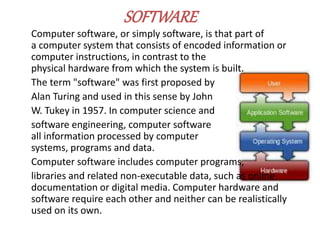
Computer software, or simply software, is that part of
a computer system that consists of encoded information or
computer instructions, in contrast to the
physical hardware from which the system is built.
The term "software" was first proposed by
Alan Turing and used in this sense by John
W. Tukey in 1957. In computer science and
software engineering, computer software
all information processed by computer
systems, programs and data.
Computer software includes computer programs,
libraries and related non-executable data, such as online
documentation or digital media. Computer hardware and
software require each other and neither can be realistically
used on its own.
SOFTWARE CLASSIFICATION
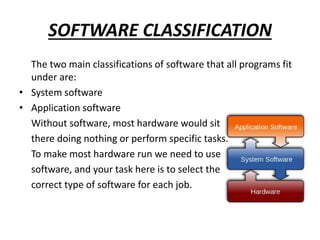
The two main classifications of software that all programs fit
under are:
• System software
• Application software
Without software, most hardware would sit
there doing nothing or perform specific tasks.
To make most hardware run we need to use
software, and your task here is to select the
correct type of software for each job.
SYSTEM SOFTWARE
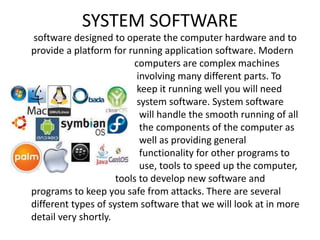
software designed to operate the computer hardware and to
provide a platform for running application software. Modern
computers are complex machines
involving many different parts. To
keep it running well you will need
system software. System software
will handle the smooth running of all
the components of the computer as
well as providing general
functionality for other programs to
use, tools to speed up the computer,
tools to develop new software and
programs to keep you safe from attacks. There are several
different types of system software that we will look at in more
detail very shortly.
APPLICATION SOFTWARES
Application software is designed for people like me and you to
perform tasks that we consider useful. This might be the
ability of a scientist to work out statistical information using a
set of results, or someone who wants to play the latest
computer game. There are several categories of Application
software that we'll look into shortly:
OPERATINGSYSTEM
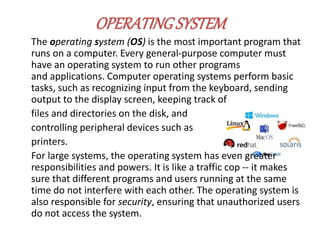
The operating system (OS) is the most important program that
runs on a computer. Every general-purpose computer must
have an operating system to run other programs
and applications. Computer operating systems perform basic
tasks, such as recognizing input from the keyboard, sending
output to the display screen, keeping track of
files and directories on the disk, and
controlling peripheral devices such as
printers.
For large systems, the operating system has even greater
responsibilities and powers. It is like a traffic cop -- it makes
sure that different programs and users running at the same
time do not interfere with each other. The operating system is
also responsible for security, ensuring that unauthorized users
do not access the system.
BASIC FUNCTIONS OF OS
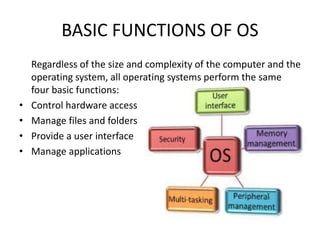
Regardless of the size and complexity of the computer and the
operating system, all operating systems perform the same
four basic functions:
• Control hardware access
• Manage files and folders
• Provide a user interface
• Manage applications
CLASSIFICATION OF OS
An operating system is regarded as system software, a type of
software whose primary function is to operate and control
hardware. By managing the operations of the hardware, users
are shielded from the complexity of how the computer
performs its functions. Once an operating system is in place,
all other applications can be installed and used appropriately.
Users can then accomplish powerful tasks with ease.
The main operating system classifications include real-time
operating systems, single-user single task systems, single-user
multitasking systems and multi-user operating systems.
Single-user operating systems are designed to let the user
perform one task at a time, while single-user multitasking
systems allow users to perform multiple tasks simultaneously.
Multi-user operating systems allow multiple users to carry out
multiple operations at the same time
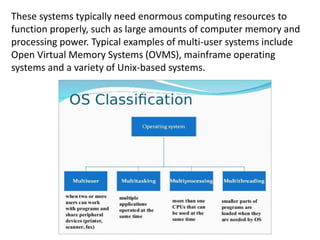
These systems typically need enormous computing resources to
function properly, such as large amounts of computer memory and
processing power. Typical examples of multi-user systems include
Open Virtual Memory Systems (OVMS), mainframe operating
systems and a variety of Unix-based systems.

Software

  • 1.
    TAGORE GOVERNMENT COLLEGE EDUCATION POWERPOINTPRESENTATION TOPIC: SOFTWARE AND OPERATING SYSTEM PRESENTED BY RENU YADAV (B.Ed first yr)
  • 2.
    SOFTWARE Computer software, orsimply software, is that part of a computer system that consists of encoded information or computer instructions, in contrast to the physical hardware from which the system is built. The term "software" was first proposed by Alan Turing and used in this sense by John W. Tukey in 1957. In computer science and software engineering, computer software all information processed by computer systems, programs and data. Computer software includes computer programs, libraries and related non-executable data, such as online documentation or digital media. Computer hardware and software require each other and neither can be realistically used on its own.
  • 3.
    SOFTWARE CLASSIFICATION The twomain classifications of software that all programs fit under are: • System software • Application software Without software, most hardware would sit there doing nothing or perform specific tasks. To make most hardware run we need to use software, and your task here is to select the correct type of software for each job.
  • 4.
    SYSTEM SOFTWARE software designedto operate the computer hardware and to provide a platform for running application software. Modern computers are complex machines involving many different parts. To keep it running well you will need system software. System software will handle the smooth running of all the components of the computer as well as providing general functionality for other programs to use, tools to speed up the computer, tools to develop new software and programs to keep you safe from attacks. There are several different types of system software that we will look at in more detail very shortly.
  • 5.
    APPLICATION SOFTWARES Application softwareis designed for people like me and you to perform tasks that we consider useful. This might be the ability of a scientist to work out statistical information using a set of results, or someone who wants to play the latest computer game. There are several categories of Application software that we'll look into shortly:
  • 6.
    OPERATINGSYSTEM The operating system(OS) is the most important program that runs on a computer. Every general-purpose computer must have an operating system to run other programs and applications. Computer operating systems perform basic tasks, such as recognizing input from the keyboard, sending output to the display screen, keeping track of files and directories on the disk, and controlling peripheral devices such as printers. For large systems, the operating system has even greater responsibilities and powers. It is like a traffic cop -- it makes sure that different programs and users running at the same time do not interfere with each other. The operating system is also responsible for security, ensuring that unauthorized users do not access the system.
  • 7.
    BASIC FUNCTIONS OFOS Regardless of the size and complexity of the computer and the operating system, all operating systems perform the same four basic functions: • Control hardware access • Manage files and folders • Provide a user interface • Manage applications
  • 8.
    CLASSIFICATION OF OS Anoperating system is regarded as system software, a type of software whose primary function is to operate and control hardware. By managing the operations of the hardware, users are shielded from the complexity of how the computer performs its functions. Once an operating system is in place, all other applications can be installed and used appropriately. Users can then accomplish powerful tasks with ease. The main operating system classifications include real-time operating systems, single-user single task systems, single-user multitasking systems and multi-user operating systems. Single-user operating systems are designed to let the user perform one task at a time, while single-user multitasking systems allow users to perform multiple tasks simultaneously. Multi-user operating systems allow multiple users to carry out multiple operations at the same time
  • 9.
    These systems typicallyneed enormous computing resources to function properly, such as large amounts of computer memory and processing power. Typical examples of multi-user systems include Open Virtual Memory Systems (OVMS), mainframe operating systems and a variety of Unix-based systems.