INFORMATION
AND
TECHNOLOGY
ASSIGNMENT
SUBMITTED
TO:
MISS SAMMAR
University of
Sargodha
Group members:
• Kainat Saleem (Roll no:32)
• Hajra Shehzad(Roll no :38)
• Romana Ehsan(Roll no :31)
• Afshan kosar(Roll no:29)
• Munazza Rehman (Roll no :28)
• Iqra Ehsan(Roll no:27)
BS-BOTANY SS-1 3rd Semester
System Software
What is system software?
• Set of instructions that control and
maintain computer programs and
devices is called system software.
What are two types of system
software?
1. Operating system
2. Utility programs
• Set of programs that contains instructions that coordinate all
the activities among computer hardware resources.
• Sometimes also known as platform .
Where does OS exist?
• It may be installed and resides on
Computer hard disk.
• In handled computers and mobile
• Devices, OS resides on ROM chip
Limitations of Operating system:
• Each computer has its own operating
system.
• Application software is specific for a specific
operating system of device /computer.
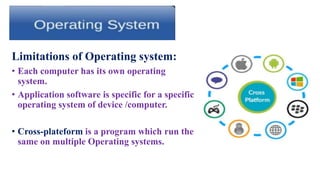
• Cross-plateform is a program which run the
same on multiple Operating systems.
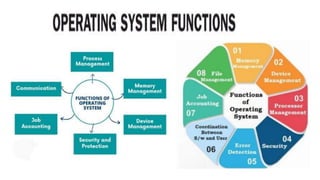
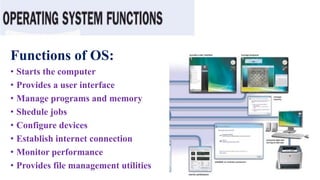
Functions of OS:
• Starts the computer
• Provides a user interface
• Manage programs and memory
• Shedule jobs
• Configure devices
• Establish internet connection
• Monitor performance
• Provides file management utilities
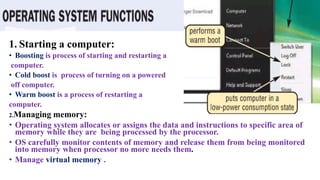
1. Starting a computer:
• Boosting is process of starting and restarting a
computer.
• Cold boost is process of turning on a powered
off computer.
• Warm boost is a process of restarting a
computer.
2.Managing memory:
• Operating system allocates or assigns the data and instructions to specific area of
memory while they are being processed by the processor.
• OS carefully monitor contents of memory and release them from being monitored
into memory when processor no more needs them.
• Manage virtual memory .
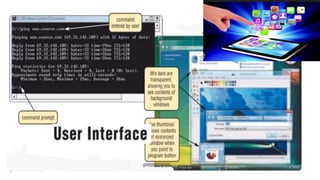
3.Providing a user interface :
• User interface controls how data and instructions are entered in the
computer and how information is displayed on the computer.
Types of user interface:
• COMMAND –LINE-INTERFACE
In this ,user types command or press ss special keys on keyboard to
enter data and instructions.
• GRAPHICAL USER INTERFACE:
In this,use with menus and visual images Such as buttons and other
graphical objects to give commands to computer.
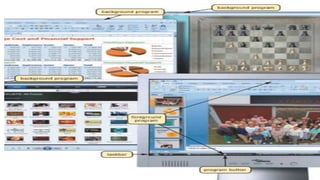
4.Manage programs:
• Some operating systems allow ning programs are called user and run
one program at a time. PDAs ,smart phones have mostly such type of
OS.
• Others allow multiple users to run multiple programms at a time on the
computer screen.Windows have mostly such types of OS.
• Runing programs one the front of all other running programs is called
foreground program.
• All others (mostly partially hiddened) ,on the back of foreground
program are called background programs.
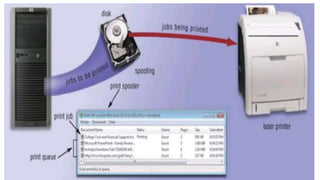
5.Managing jobs:
• Operating system shedules operations(jobs) of computer in a specific
sequence.
• Some OS shedule jobs on the basis of first come-first served.
• Others give priority to most important jobs first.
For example:
• When multiple commands are given to a printer,it keeps these instructions
in buffer(memory ) in a queue and give out prints at its own speed in a
proper sequence,process is called Spooling.
6.Configuring devices:
• Driver is a program which tells operating system how to communicate
with a specific device.For using any device ,its own driver is necessary
to install on operating system.
• In modern devices,many operating systems support Plug and play,
means OS automatically configure devices.
7.Establishing internet connection:
• Operting system helps in establishing internet connection by guiding a
user through the process of making connection between computer and
internet service provider.
• Some OS also include web browser and e-mail program.
8.Monitoring performance:
• Operating system monitors computer performance by using performance
monitor.
• Performance monitor is a program that assess and report information about
various computer resources and devices.
9.Controlling network:
• A network operating system is a set of programs separate from operating
system which organizes and coordinates how multiple users access and share
resources on a network.
• Network administrator uses network OS to add and remove users, computers
and devices to and from the network.
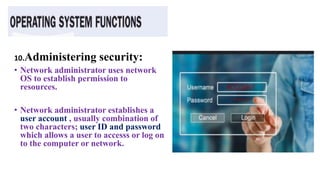
10.Administering security:
• Network administrator uses network
OS to establish permission to
resources.
• Network administrator establishes a
user account , usually combination of
two characters; user ID and password
which allows a user to accesss or log on
to the computer or network.
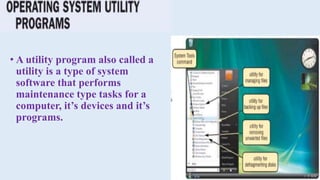
• A utility program also called a
utility is a type of system
software that performs
maintenance type tasks for a
computer, it’s devices and it’s
programs.
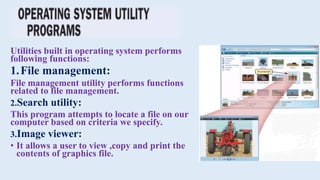
Utilities built in operating system performs
following functions:
1.File management:
File management utility performs functions
related to file management.
2.Search utility:
This program attempts to locate a file on our
computer based on criteria we specify.
3.Image viewer:
• It allows a user to view ,copy and print the
contents of graphics file.
4.Personal Firewall:
• It detects and protects the personal
computer from unauthorized intrusions.
5.Uninstaller:
• It deletes or remove a program as well as
other associated entries in the system files.
6.Disk scanner:
• It searches for and deletes unnecessary files.
7.Disk Defragment:
• It reorganizes the files and unused
computer’s hard disk so that the OS access
data more quickly and programs run faster.
8. Diagnostic utility:
• It compiles technical information about our computer’s hardware and
certain system softw external hard disk, programs and prepared a list of
identified problems.
9. Backup utility:
• It allows user to copy or backup selected files or entire hard disk to
another storage medium such as CD/DVD, external hard disk, tape or
USB flash drive.
10. Screensaver utility:
• This utility program causes display device ‘s screen to show a moving
image or a blank screen if keyboard or mouse activity doesn’t occur for a
specified time.
• Screen savers are usually
developed to prevent a
Problem Known as ghosting.
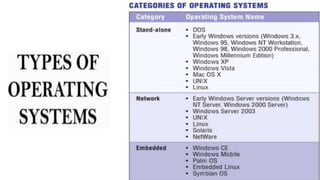
Stand –Alone operating system:
• It is a complete operating system that can work on desktop
computer, notebook computer and mobile computing devices.
• Also known as client operating system.
Examples:
1. Windows XP
2. Windows Vista
3. Mac OS X
4. UNIX
5. Linux
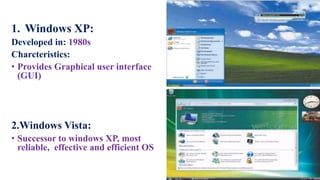
1. Windows XP:
Developed in: 1980s
Charcteristics:
• Provides Graphical user interface
(GUI)
2.Windows Vista:
• Successor to windows XP, most
reliable, effective and efficient OS
Mac OS X:
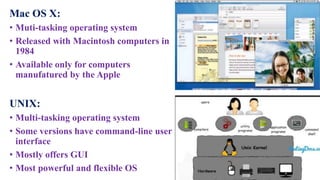
• Muti-tasking operating system
• Released with Macintosh computers in
1984
• Available only for computers
manufatured by the Apple
UNIX:
• Multi-tasking operating system
• Some versions have command-line user
interface
• Mostly offers GUI
• Most powerful and flexible OS
5. Linux:
• Linux includes many free
programming languages and
utility programmes
• It is open source software
• Some versions are command –
line-interface,others are GUI.
• Some users download it free from
web
• Others Purchase it from vendors
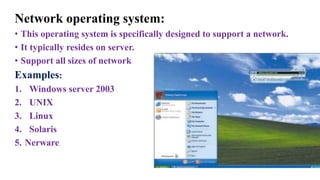
Network operating system:
• This operating system is specifically designed to support a network.
• It typically resides on server.
• Support all sizes of network
Examples:
1. Windows server 2003
2. UNIX
3. Linux
4. Solaris
5. Nerware
Embedded operating system:
• It is an operating system designed to perform a dedicated function Or for
use with the specific embedded application software.
• Resides on ROM chip
Examples:
1. Windows CE
2. Windows mobile
3. BlackBerry
4. Palm Linux
5. Symbian OS
Stand-Alone utility programmes:
These are utility programmes which are not built in
the operating system and exist separately.
Anti-virus program:
• An anti-virus program protects a computer from viruses by identifying
and removing any computer viruses (computer demanding programs).
• Most famous anti-virus programs:
Spyware removers:
It is a program that detects and deletes spayware, adware and similar
programs.
File Compression:
• A file Compression utility shrinks the size of files.
• Compressed files are sometimes called zipped .
File Conversion:
File Conversion utility program converts contents and data of a file from
one format to other.
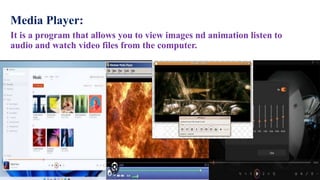
Media Player:
It is a program that allows you to view images nd animation listen to
audio and watch video files from the computer.
CD/DVD Burning:
CD/DVD burning software that writes text, graphics, audio and video
files on a recordable and rewriteable CD or DVD including Blu-ray and
HD DVD.

ICT Presentation operating system and types.pptx

  • 1.
  • 2.
    Group members: • KainatSaleem (Roll no:32) • Hajra Shehzad(Roll no :38) • Romana Ehsan(Roll no :31) • Afshan kosar(Roll no:29) • Munazza Rehman (Roll no :28) • Iqra Ehsan(Roll no:27) BS-BOTANY SS-1 3rd Semester
  • 4.
    System Software What issystem software? • Set of instructions that control and maintain computer programs and devices is called system software. What are two types of system software? 1. Operating system 2. Utility programs
  • 5.
    • Set ofprograms that contains instructions that coordinate all the activities among computer hardware resources. • Sometimes also known as platform . Where does OS exist? • It may be installed and resides on Computer hard disk. • In handled computers and mobile • Devices, OS resides on ROM chip
  • 6.
    Limitations of Operatingsystem: • Each computer has its own operating system. • Application software is specific for a specific operating system of device /computer. • Cross-plateform is a program which run the same on multiple Operating systems.
  • 8.
    Functions of OS: •Starts the computer • Provides a user interface • Manage programs and memory • Shedule jobs • Configure devices • Establish internet connection • Monitor performance • Provides file management utilities
  • 9.
    1. Starting acomputer: • Boosting is process of starting and restarting a computer. • Cold boost is process of turning on a powered off computer. • Warm boost is a process of restarting a computer. 2.Managing memory: • Operating system allocates or assigns the data and instructions to specific area of memory while they are being processed by the processor. • OS carefully monitor contents of memory and release them from being monitored into memory when processor no more needs them. • Manage virtual memory .
  • 10.
    3.Providing a userinterface : • User interface controls how data and instructions are entered in the computer and how information is displayed on the computer. Types of user interface: • COMMAND –LINE-INTERFACE In this ,user types command or press ss special keys on keyboard to enter data and instructions. • GRAPHICAL USER INTERFACE: In this,use with menus and visual images Such as buttons and other graphical objects to give commands to computer.
  • 12.
    4.Manage programs: • Someoperating systems allow ning programs are called user and run one program at a time. PDAs ,smart phones have mostly such type of OS. • Others allow multiple users to run multiple programms at a time on the computer screen.Windows have mostly such types of OS. • Runing programs one the front of all other running programs is called foreground program. • All others (mostly partially hiddened) ,on the back of foreground program are called background programs.
  • 14.
    5.Managing jobs: • Operatingsystem shedules operations(jobs) of computer in a specific sequence. • Some OS shedule jobs on the basis of first come-first served. • Others give priority to most important jobs first. For example: • When multiple commands are given to a printer,it keeps these instructions in buffer(memory ) in a queue and give out prints at its own speed in a proper sequence,process is called Spooling.
  • 16.
    6.Configuring devices: • Driveris a program which tells operating system how to communicate with a specific device.For using any device ,its own driver is necessary to install on operating system. • In modern devices,many operating systems support Plug and play, means OS automatically configure devices. 7.Establishing internet connection: • Operting system helps in establishing internet connection by guiding a user through the process of making connection between computer and internet service provider. • Some OS also include web browser and e-mail program.
  • 17.
    8.Monitoring performance: • Operatingsystem monitors computer performance by using performance monitor. • Performance monitor is a program that assess and report information about various computer resources and devices. 9.Controlling network: • A network operating system is a set of programs separate from operating system which organizes and coordinates how multiple users access and share resources on a network. • Network administrator uses network OS to add and remove users, computers and devices to and from the network.
  • 18.
    10.Administering security: • Networkadministrator uses network OS to establish permission to resources. • Network administrator establishes a user account , usually combination of two characters; user ID and password which allows a user to accesss or log on to the computer or network.
  • 20.
    • A utilityprogram also called a utility is a type of system software that performs maintenance type tasks for a computer, it’s devices and it’s programs.
  • 21.
    Utilities built inoperating system performs following functions: 1.File management: File management utility performs functions related to file management. 2.Search utility: This program attempts to locate a file on our computer based on criteria we specify. 3.Image viewer: • It allows a user to view ,copy and print the contents of graphics file.
  • 22.
    4.Personal Firewall: • Itdetects and protects the personal computer from unauthorized intrusions. 5.Uninstaller: • It deletes or remove a program as well as other associated entries in the system files. 6.Disk scanner: • It searches for and deletes unnecessary files. 7.Disk Defragment: • It reorganizes the files and unused computer’s hard disk so that the OS access data more quickly and programs run faster.
  • 23.
    8. Diagnostic utility: •It compiles technical information about our computer’s hardware and certain system softw external hard disk, programs and prepared a list of identified problems. 9. Backup utility: • It allows user to copy or backup selected files or entire hard disk to another storage medium such as CD/DVD, external hard disk, tape or USB flash drive.
  • 24.
    10. Screensaver utility: •This utility program causes display device ‘s screen to show a moving image or a blank screen if keyboard or mouse activity doesn’t occur for a specified time. • Screen savers are usually developed to prevent a Problem Known as ghosting.
  • 26.
    Stand –Alone operatingsystem: • It is a complete operating system that can work on desktop computer, notebook computer and mobile computing devices. • Also known as client operating system. Examples: 1. Windows XP 2. Windows Vista 3. Mac OS X 4. UNIX 5. Linux
  • 27.
    1. Windows XP: Developedin: 1980s Charcteristics: • Provides Graphical user interface (GUI) 2.Windows Vista: • Successor to windows XP, most reliable, effective and efficient OS
  • 28.
    Mac OS X: •Muti-tasking operating system • Released with Macintosh computers in 1984 • Available only for computers manufatured by the Apple UNIX: • Multi-tasking operating system • Some versions have command-line user interface • Mostly offers GUI • Most powerful and flexible OS
  • 29.
    5. Linux: • Linuxincludes many free programming languages and utility programmes • It is open source software • Some versions are command – line-interface,others are GUI. • Some users download it free from web • Others Purchase it from vendors
  • 30.
    Network operating system: •This operating system is specifically designed to support a network. • It typically resides on server. • Support all sizes of network Examples: 1. Windows server 2003 2. UNIX 3. Linux 4. Solaris 5. Nerware
  • 31.
    Embedded operating system: •It is an operating system designed to perform a dedicated function Or for use with the specific embedded application software. • Resides on ROM chip Examples: 1. Windows CE 2. Windows mobile 3. BlackBerry 4. Palm Linux 5. Symbian OS
  • 32.
    Stand-Alone utility programmes: Theseare utility programmes which are not built in the operating system and exist separately.
  • 33.
    Anti-virus program: • Ananti-virus program protects a computer from viruses by identifying and removing any computer viruses (computer demanding programs). • Most famous anti-virus programs:
  • 34.
    Spyware removers: It isa program that detects and deletes spayware, adware and similar programs.
  • 35.
    File Compression: • Afile Compression utility shrinks the size of files. • Compressed files are sometimes called zipped .
  • 36.
    File Conversion: File Conversionutility program converts contents and data of a file from one format to other.
  • 37.
    Media Player: It isa program that allows you to view images nd animation listen to audio and watch video files from the computer.
  • 38.
    CD/DVD Burning: CD/DVD burningsoftware that writes text, graphics, audio and video files on a recordable and rewriteable CD or DVD including Blu-ray and HD DVD.