

C.K. PITHAWALLA COLLEGE OF ENGG. & TECHNOLOGY
OUTLINE :..
• INTRODUCTION
• SOFTWARE
• SOFTWARE HIERARACHY
• SYSTEM PROGRAMMING
• MACHINE STRUCTURE
• INTERFACES
• ADDRESS SPACE
• COMPUTER LANGUAGE
• TOOLS
INTRODUCTION :..
• Two major subsystems of a computer:
• Hardware
• Deals with physically connected components.
• Software
• Facilitates the interaction amongst the components of the computer.
SOFTWARE :..
• Software is a general term for the various kinds of
programs used to operate computers and related devices.
• Software is often divided into :
• Application Software
• Mechanism used to solve a task using a computer.
• E.g. MS Excel, PowerPoint, etc..
• System Software
• Collection of system programs that perform operations such as editing,
linking, translating, resource management, etc in the system.
• E.g. Windows, Linux, etc
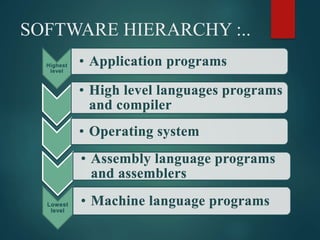
SOFTWARE HIERARCHY :..
Highest
level
• Application programs
• High level languages programs
and compiler
• Operating system
• Assembly language programs
and assemblers
Lowest
level
• Machine language programs
SYSTEM PROGRAMMING :..
• Is a programming technique for design and
implementation of system programs or system
software.
• System program helps in executing users program
on a computer system.
Some kinds of System Software :..
• Assembler :
• Translates the assembly language program into machine code.
• Loader :
• A program that places programs into primary memory and prepares them
for execution.
• Also transfers the starting address of the program from primary memory to
computer hardware for execution.
• Linker :
• A program that links the user’s program with other programs or libraries
and forms a single module.
• Complier :
• Translates source program to target program.
• In other words, it translates high level language instructions to
assembly language or some intermediate code.
• Operating system :
• Computer operating systems perform basic tasks, such as recognizing
input from the keyboard, sending output to the display screen, keeping
track of files and directories on the disk, and controlling peripheral
devices such as printers.
• Editor :
• System program used to edit a program or a data file.
• Interpreter :
• Run time compiler that executes a source program line by line.
• Emulator :
• System software that allows one computer to perform the functions of or
executes programs designed for other computers.
• Simulator :
• System software that is used as a tool to study computers and their
programming instructions.
• Communication Software :
• Set of programs that runs on computers and allows the computer to
communicate with other computers via. Modem, phone lines/cables.
Machine Structure :..
• John von Neumann was the first to propose a general structure for
machines.
• Basic principles proposed by him are as follows:
• A Computer is a collection of interconnected units such as CPU, memory,
I/O processor, etc in which each CPU has a set of interconnected
components such as :
• Instruction interpreter(II)
• Location Counter(LC) , Program Counter (PC) , Instruction Counter(IC)
• Instruction Register (IR)
• Working Registers (WR)
• General Purpose Registers (GPR)
Standard features of a Machine :..
• Memory:
• Its basic units and sizes.
• Registers:
• No. Of registers and notations, their size, functions and
interrelationships.
• Data:
• Storage mechanism for different kinds of data.
• Instruction formats:
• Different kinds of instruction formats are used by the machine and the
storage mechanism in the memory.
• Addressing modes:
• Different addressing modes are used by the machine.
• Instruction sets:
• Varieties of instructions are used.
• I/O:
• Processes used for I/O and how they transform data for I/O
operations.
• Special features:
• Interrupt structure
• Protection mechanism for user
Interface :..
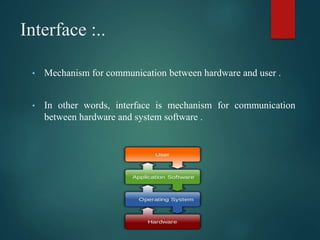
• Mechanism for communication between hardware and user .
• In other words, interface is mechanism for communication
between hardware and system software .
User Interface :..
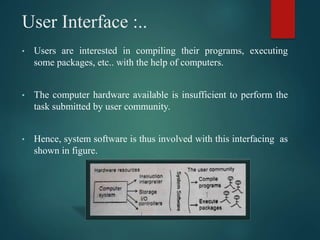
• Users are interested in compiling their programs, executing
some packages, etc.. with the help of computers.
• The computer hardware available is insufficient to perform the
task submitted by user community.
• Hence, system software is thus involved with this interfacing as
shown in figure.
System Interface :
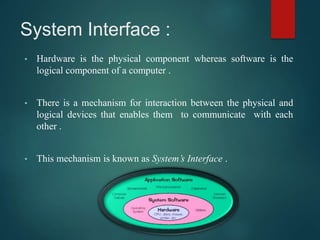
• Hardware is the physical component whereas software is the
logical component of a computer .
• There is a mechanism for interaction between the physical and
logical devices that enables them to communicate with each
other .
• This mechanism is known as System’s Interface .
Address Space :..
• Each byte of physical memory has an address . These addresses are
expressed as integer values bounded between two integer values
depending on the memory available in the system .
• This is termed as address space .
• When related to physical memory , it is known as the physical
address space .
• Address space used by programmers in their programs is termed as
logical address space .
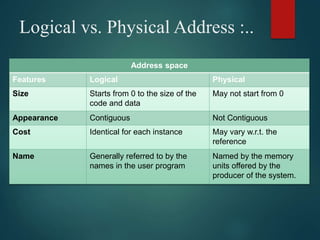
Logical vs. Physical Address :..
Address space
Features Logical Physical
Size Starts from 0 to the size of the
code and data
May not start from 0
Appearance Contiguous Not Contiguous
Cost Identical for each instance May vary w.r.t. the
reference
Name Generally referred to by the
names in the user program
Named by the memory
units offered by the
producer of the system.
Addressing Scheme :..
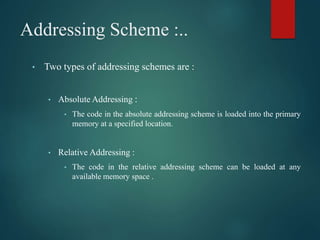
• Two types of addressing schemes are :
• Absolute Addressing :
• The code in the absolute addressing scheme is loaded into the primary
memory at a specified location.
• Relative Addressing :
• The code in the relative addressing scheme can be loaded at any
available memory space .
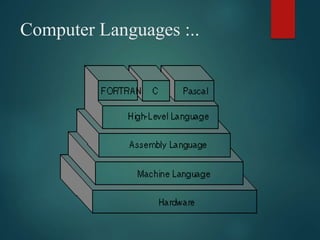
Computer Languages :..
Machine Level Language :..
• Most fundamental level of communication between the
programmer and the computer .
• Here , the programmer needs to think in terms of the
machine functions and each instruction of a program is
written in a binary machine language code .
Mnemonic Level Language :..
• The only difference is that the 0-1 sequence in machine
language is represented by a mnemonic code .
• This helps the programmer in coding machine level
programs.
• The process of translating programs for mnemonic language
to machine language is rather simple .
Assembly Level Language :..
• An improved version of mnemonic (machine) language .
• Physical allocation of memory and the control of statements are
not done by the programmer .
• The physical allocation of the memory is done by the assembler of
the machine when assembling it.
• Depends on machine structure .
High Level Language :..
• Machine independent language .
• The programmer does not have to remember the structure of the
machine while coding .
• An executable code version of a program is obtained by the
compiler for the target machine .
Tools :..
• Text Editor :
• Is a program that allows the user to write/modify the user’s text .
• E.g.. : vi editor , gedit , etc.
• Debugging Aids :
• Debugging aids make every step of processing open for interaction
with the user .
Bibliography :..
• Srimanta Pal
SYSTEM SOFTWARE

SYSTEM SOFTWARE

  • 1.
    C.K. PITHAWALLA COLLEGEOF ENGG. & TECHNOLOGY
  • 2.
    OUTLINE :.. • INTRODUCTION •SOFTWARE • SOFTWARE HIERARACHY • SYSTEM PROGRAMMING • MACHINE STRUCTURE • INTERFACES • ADDRESS SPACE • COMPUTER LANGUAGE • TOOLS
  • 3.
    INTRODUCTION :.. • Twomajor subsystems of a computer: • Hardware • Deals with physically connected components. • Software • Facilitates the interaction amongst the components of the computer.
  • 4.
    SOFTWARE :.. • Softwareis a general term for the various kinds of programs used to operate computers and related devices. • Software is often divided into : • Application Software • Mechanism used to solve a task using a computer. • E.g. MS Excel, PowerPoint, etc.. • System Software • Collection of system programs that perform operations such as editing, linking, translating, resource management, etc in the system. • E.g. Windows, Linux, etc
  • 5.
    SOFTWARE HIERARCHY :.. Highest level •Application programs • High level languages programs and compiler • Operating system • Assembly language programs and assemblers Lowest level • Machine language programs
  • 6.
    SYSTEM PROGRAMMING :.. •Is a programming technique for design and implementation of system programs or system software. • System program helps in executing users program on a computer system.
  • 7.
    Some kinds ofSystem Software :.. • Assembler : • Translates the assembly language program into machine code. • Loader : • A program that places programs into primary memory and prepares them for execution. • Also transfers the starting address of the program from primary memory to computer hardware for execution. • Linker : • A program that links the user’s program with other programs or libraries and forms a single module.
  • 8.
    • Complier : •Translates source program to target program. • In other words, it translates high level language instructions to assembly language or some intermediate code. • Operating system : • Computer operating systems perform basic tasks, such as recognizing input from the keyboard, sending output to the display screen, keeping track of files and directories on the disk, and controlling peripheral devices such as printers. • Editor : • System program used to edit a program or a data file.
  • 9.
    • Interpreter : •Run time compiler that executes a source program line by line. • Emulator : • System software that allows one computer to perform the functions of or executes programs designed for other computers. • Simulator : • System software that is used as a tool to study computers and their programming instructions. • Communication Software : • Set of programs that runs on computers and allows the computer to communicate with other computers via. Modem, phone lines/cables.
  • 10.
    Machine Structure :.. •John von Neumann was the first to propose a general structure for machines. • Basic principles proposed by him are as follows: • A Computer is a collection of interconnected units such as CPU, memory, I/O processor, etc in which each CPU has a set of interconnected components such as : • Instruction interpreter(II) • Location Counter(LC) , Program Counter (PC) , Instruction Counter(IC) • Instruction Register (IR) • Working Registers (WR) • General Purpose Registers (GPR)
  • 11.
    Standard features ofa Machine :.. • Memory: • Its basic units and sizes. • Registers: • No. Of registers and notations, their size, functions and interrelationships. • Data: • Storage mechanism for different kinds of data.
  • 12.
    • Instruction formats: •Different kinds of instruction formats are used by the machine and the storage mechanism in the memory. • Addressing modes: • Different addressing modes are used by the machine. • Instruction sets: • Varieties of instructions are used.
  • 13.
    • I/O: • Processesused for I/O and how they transform data for I/O operations. • Special features: • Interrupt structure • Protection mechanism for user
  • 14.
    Interface :.. • Mechanismfor communication between hardware and user . • In other words, interface is mechanism for communication between hardware and system software .
  • 15.
    User Interface :.. •Users are interested in compiling their programs, executing some packages, etc.. with the help of computers. • The computer hardware available is insufficient to perform the task submitted by user community. • Hence, system software is thus involved with this interfacing as shown in figure.
  • 16.
    System Interface : •Hardware is the physical component whereas software is the logical component of a computer . • There is a mechanism for interaction between the physical and logical devices that enables them to communicate with each other . • This mechanism is known as System’s Interface .
  • 17.
    Address Space :.. •Each byte of physical memory has an address . These addresses are expressed as integer values bounded between two integer values depending on the memory available in the system . • This is termed as address space . • When related to physical memory , it is known as the physical address space . • Address space used by programmers in their programs is termed as logical address space .
  • 18.
    Logical vs. PhysicalAddress :.. Address space Features Logical Physical Size Starts from 0 to the size of the code and data May not start from 0 Appearance Contiguous Not Contiguous Cost Identical for each instance May vary w.r.t. the reference Name Generally referred to by the names in the user program Named by the memory units offered by the producer of the system.
  • 19.
    Addressing Scheme :.. •Two types of addressing schemes are : • Absolute Addressing : • The code in the absolute addressing scheme is loaded into the primary memory at a specified location. • Relative Addressing : • The code in the relative addressing scheme can be loaded at any available memory space .
  • 20.
  • 21.
    Machine Level Language:.. • Most fundamental level of communication between the programmer and the computer . • Here , the programmer needs to think in terms of the machine functions and each instruction of a program is written in a binary machine language code .
  • 22.
    Mnemonic Level Language:.. • The only difference is that the 0-1 sequence in machine language is represented by a mnemonic code . • This helps the programmer in coding machine level programs. • The process of translating programs for mnemonic language to machine language is rather simple .
  • 23.
    Assembly Level Language:.. • An improved version of mnemonic (machine) language . • Physical allocation of memory and the control of statements are not done by the programmer . • The physical allocation of the memory is done by the assembler of the machine when assembling it. • Depends on machine structure .
  • 24.
    High Level Language:.. • Machine independent language . • The programmer does not have to remember the structure of the machine while coding . • An executable code version of a program is obtained by the compiler for the target machine .
  • 25.
    Tools :.. • TextEditor : • Is a program that allows the user to write/modify the user’s text . • E.g.. : vi editor , gedit , etc. • Debugging Aids : • Debugging aids make every step of processing open for interaction with the user .
  • 26.