Computer System
Mr. Cyrele C. Quinio
Computer System
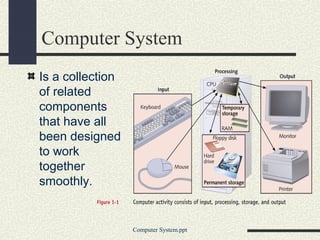
Is a collection
of related
components
that have all
been designed
to work
together
smoothly.
Computer System.ppt
What am I calling it?
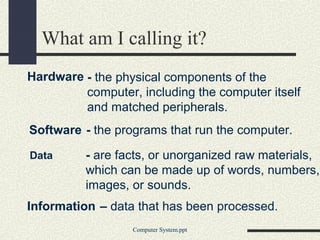
Hardware
Computer System.ppt
Information
- the physical components of the
computer, including the computer itself
and matched peripherals.
Software - the programs that run the computer.
Data - are facts, or unorganized raw materials,
which can be made up of words, numbers,
images, or sounds.
– data that has been processed.
Watchamacallit?!
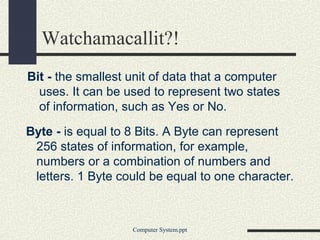
Bit - the smallest unit of data that a computer
uses. It can be used to represent two states
of information, such as Yes or No.
Computer System.ppt
Byte - is equal to 8 Bits. A Byte can represent
256 states of information, for example,
numbers or a combination of numbers and
letters. 1 Byte could be equal to one character.
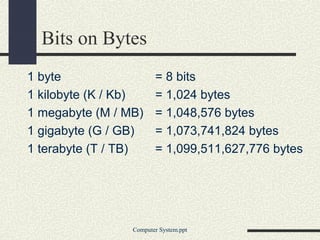
Bits on Bytes
1 byte = 8 bits
1 kilobyte (K / Kb) = 1,024 bytes
1 megabyte (M / MB) = 1,048,576 bytes
1 gigabyte (G / GB) = 1,073,741,824 bytes
1 terabyte (T / TB) = 1,099,511,627,776 bytes
Computer System.ppt
How big is BIG??
Fact 1: Kilobyte
1 Kilobyte would be
equal to this paragraph
you are reading, whereas
100 Kilobytes would equal
an entire page.
Computer System.ppt
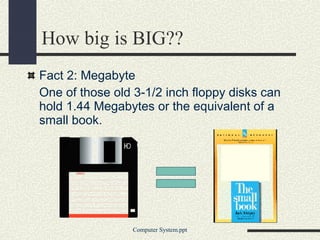
Fact 2: Megabyte
One of those old 3-1/2 inch floppy disks can
hold 1.44 Megabytes or the equivalent of a
small book.
How big is BIG??
Computer System.ppt
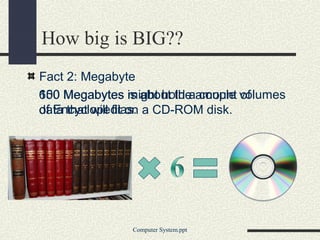
Fact 2: Megabyte
100 Megabytes might hold a couple volumes
of Encyclopedias.
Computer System.ppt
650 Megabytes is about the amount of
data that will fit on a CD-ROM disk.
How big is BIG??
Fact 3: Gigabyte
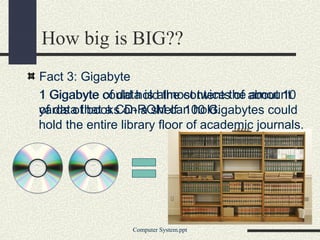
1 Gigabyte of data is almost twice the amount
of data that a CD-ROM can hold.
How big is BIG??
Computer System.ppt
1 Gigabyte could hold the contents of about 10
yards of books on a shelf. 100 Gigabytes could
hold the entire library floor of academic journals.
Fact 4: Terabyte
To put it in some perspective, a Terabyte
could hold about 3.6 million 300 Kilobyte
images or maybe about 300 hours of good
quality video. A Terabyte could hold 1,000
copies of the Encyclopedia Britannica. Ten
Terabytes could hold the printed collection of
the Library of Congress.
How big is BIG??
Computer System.ppt
HARDWARE
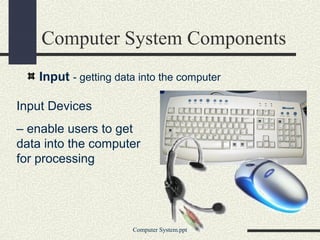
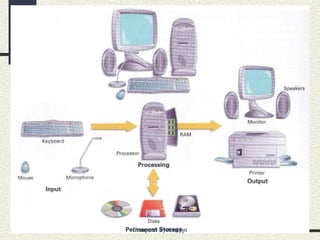
Input Devices
– enable users to get
data into the computer
for processing
Computer System Components
Input - getting data into the computer
Computer System.ppt
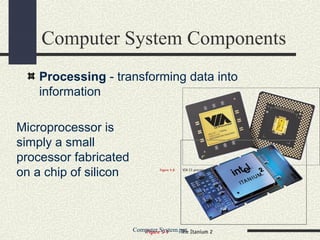
Microprocessor is
simply a small
processor fabricated
on a chip of silicon
Computer System Components
Processing - transforming data into
information
Computer System.ppt
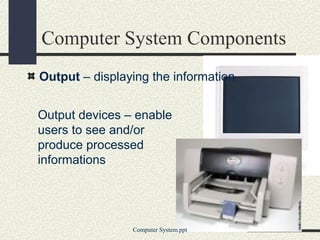
Output devices – enable
users to see and/or
produce processed
informations
Computer System.ppt
Computer System Components
Output – displaying the information
Computer System.ppt
SOFTWARE
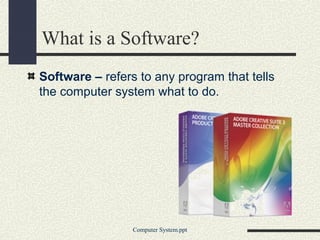
What is a Software?
Software – refers to any program that tells
the computer system what to do.
Computer System.ppt
Categories of Software
System Software – programs that take
control of the PC on start-up, and then play a
central role in everything that happens within
a computer system by managing,
maintaining, and controlling computer
resources.
Application Software – designed and
created to perform specific personal,
business, scientific processing tasks.
Computer System.ppt
System Software
Operating System (OS)
Monitors and controls all input / output and
processing activities within a computer
system. It is a program that controls the PC
hardware and the operation of all other
programs
Computer System.ppt
Platform is defined by a processor and an
operating system.
PC Platforms
Computer System.ppt
Software created to run a specific platform
won’t run on other platforms.
Most personal computer users choose the
Wintel platform, which combines one of the
Microsoft Windows operating system with an
Intel-compatible processor.
PC Platforms
Modern Wintel platforms, such as Windows
ME and Windows 2000, are backward
compatible, allowing programs written for
earlier Microsoft platforms to be run on
modern systems.
Computer System.ppt
PC Platforms
Before choosing a platform, consider the
following:
Availability of appropriate commercial
applications software for the platforms.
Compatibility of platform with existing
hardware, software, and expertise
Computer System.ppt
Application Software
Word Processing
– a text editing program, which allows the
user to type, compose and correct
manuscripts without the need to re-type,
when errors changed.
Computer System.ppt
Application Software
Types of Word Processors
WordStar
Word perfect
Microsoft Word
Computer System.ppt
Application Software
Electronic Spreadsheet
– is a program replacing the traditional financial
modeling tools that offer modern improvements
in ease of creating, editing, and using of
financial models and graphical representations.
Computer System.ppt
Application Software
Kinds of Electronic Spreadsheet
Lotus 1-2-3
MS EXCEL
QUATTRO
FRAMEWORK
Computer System.ppt
end

Computer system

  • 1.
  • 2.
    Computer System Is acollection of related components that have all been designed to work together smoothly. Computer System.ppt
  • 3.
    What am Icalling it? Hardware Computer System.ppt Information - the physical components of the computer, including the computer itself and matched peripherals. Software - the programs that run the computer. Data - are facts, or unorganized raw materials, which can be made up of words, numbers, images, or sounds. – data that has been processed.
  • 4.
    Watchamacallit?! Bit - thesmallest unit of data that a computer uses. It can be used to represent two states of information, such as Yes or No. Computer System.ppt Byte - is equal to 8 Bits. A Byte can represent 256 states of information, for example, numbers or a combination of numbers and letters. 1 Byte could be equal to one character.
  • 5.
    Bits on Bytes 1byte = 8 bits 1 kilobyte (K / Kb) = 1,024 bytes 1 megabyte (M / MB) = 1,048,576 bytes 1 gigabyte (G / GB) = 1,073,741,824 bytes 1 terabyte (T / TB) = 1,099,511,627,776 bytes Computer System.ppt
  • 6.
    How big isBIG?? Fact 1: Kilobyte 1 Kilobyte would be equal to this paragraph you are reading, whereas 100 Kilobytes would equal an entire page. Computer System.ppt
  • 7.
    Fact 2: Megabyte Oneof those old 3-1/2 inch floppy disks can hold 1.44 Megabytes or the equivalent of a small book. How big is BIG?? Computer System.ppt
  • 8.
    Fact 2: Megabyte 100Megabytes might hold a couple volumes of Encyclopedias. Computer System.ppt 650 Megabytes is about the amount of data that will fit on a CD-ROM disk. How big is BIG??
  • 9.
    Fact 3: Gigabyte 1Gigabyte of data is almost twice the amount of data that a CD-ROM can hold. How big is BIG?? Computer System.ppt 1 Gigabyte could hold the contents of about 10 yards of books on a shelf. 100 Gigabytes could hold the entire library floor of academic journals.
  • 10.
    Fact 4: Terabyte Toput it in some perspective, a Terabyte could hold about 3.6 million 300 Kilobyte images or maybe about 300 hours of good quality video. A Terabyte could hold 1,000 copies of the Encyclopedia Britannica. Ten Terabytes could hold the printed collection of the Library of Congress. How big is BIG?? Computer System.ppt
  • 11.
  • 12.
    Input Devices – enableusers to get data into the computer for processing Computer System Components Input - getting data into the computer Computer System.ppt
  • 13.
    Microprocessor is simply asmall processor fabricated on a chip of silicon Computer System Components Processing - transforming data into information Computer System.ppt
  • 14.
    Output devices –enable users to see and/or produce processed informations Computer System.ppt Computer System Components Output – displaying the information
  • 15.
  • 16.
  • 17.
    What is aSoftware? Software – refers to any program that tells the computer system what to do. Computer System.ppt
  • 18.
    Categories of Software SystemSoftware – programs that take control of the PC on start-up, and then play a central role in everything that happens within a computer system by managing, maintaining, and controlling computer resources. Application Software – designed and created to perform specific personal, business, scientific processing tasks. Computer System.ppt
  • 19.
    System Software Operating System(OS) Monitors and controls all input / output and processing activities within a computer system. It is a program that controls the PC hardware and the operation of all other programs Computer System.ppt
  • 20.
    Platform is definedby a processor and an operating system. PC Platforms Computer System.ppt Software created to run a specific platform won’t run on other platforms. Most personal computer users choose the Wintel platform, which combines one of the Microsoft Windows operating system with an Intel-compatible processor.
  • 21.
    PC Platforms Modern Wintelplatforms, such as Windows ME and Windows 2000, are backward compatible, allowing programs written for earlier Microsoft platforms to be run on modern systems. Computer System.ppt
  • 22.
    PC Platforms Before choosinga platform, consider the following: Availability of appropriate commercial applications software for the platforms. Compatibility of platform with existing hardware, software, and expertise Computer System.ppt
  • 23.
    Application Software Word Processing –a text editing program, which allows the user to type, compose and correct manuscripts without the need to re-type, when errors changed. Computer System.ppt
  • 24.
    Application Software Types ofWord Processors WordStar Word perfect Microsoft Word Computer System.ppt
  • 25.
    Application Software Electronic Spreadsheet –is a program replacing the traditional financial modeling tools that offer modern improvements in ease of creating, editing, and using of financial models and graphical representations. Computer System.ppt
  • 26.
    Application Software Kinds ofElectronic Spreadsheet Lotus 1-2-3 MS EXCEL QUATTRO FRAMEWORK Computer System.ppt
  • 27.