Twitter 101
for the Construction Industry
Presenters:
Patty Swisher,                  Ron Kubitz,
Director of Marketing & PR      Recruiting Manager
IKM Incorporated Architects     Brayman Construction
@pmswish @ikminc                @ronbray @braymanjobs


                  Special Thanks to
                   Karlye Rowles,
         Marketing Manager of Schneider Downs
         @Karlye Rowles @Schneider_Downs


                                                @MBAofWPA
Agenda

1.   What is Twitter

2.   How to use Twitter

3.   Resources


                          3
What is Twitter?


                   @MBAofWPA
What is Twitter?
   Twitter is a social networking and
    microblogging service that enables users to
    broadcast and read short (140
    character), text-based messages called
    tweets.

   These updates can be submitted by a
    variety of means including text
    messages, instant messaging or a third-
    party application.

                                                  5
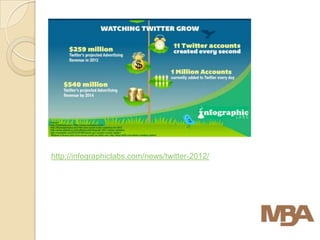
http://infographiclabs.com/news/twitter-2012/
Twitter is Everywhere
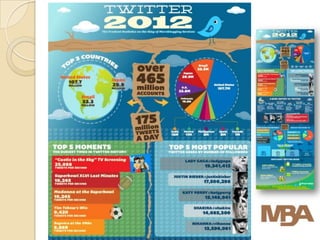
 Twitter has more than 465 million accounts
  generating more than 175 million
  tweets/day.
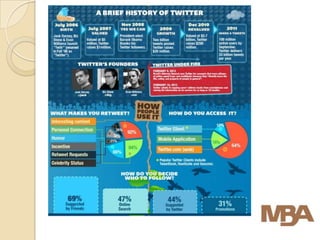
 Widely adopted by celebrities and
  companies.
    ◦ Ashton Kutcher was first Twitter user to have
      1 million followers (2009)
    ◦ Examples: http://socialfresh.com/top-10-twitter-
      brands-2011-winners-announced/


                                                         9
B2B marketers can use Twitter
effectively in 3 key ways:
 By listening to what is being said
  about the company
 By engaging with clients and the
  public
 By contributing and sharing their
  expertise and thought leadership.


    Read more at: http://www.optify.net/guides/twitter-for-business-the-
    ultimate-b2b-guide?_opt_r=TWITTER&_opt_rdid=6058
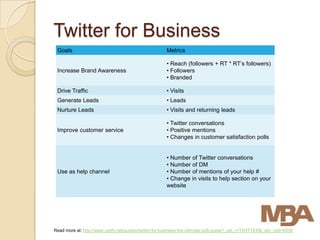
Twitter for Business
 Goals                                                Metrics

                                                      • Reach (followers + RT * RT’s followers)
 Increase Brand Awareness                             • Followers
                                                      • Branded

 Drive Traffic                                        • Visits
 Generate Leads                                       • Leads
 Nurture Leads                                        • Visits and returning leads

                                                      • Twitter conversations
 Improve customer service                             • Positive mentions
                                                      • Changes in customer satisfaction polls


                                                      • Number of Twitter conversations
                                                      • Number of DM
 Use as help channel                                  • Number of mentions of your help #
                                                      • Change in visits to help section on your
                                                      website


Read more at: http://www.optify.net/guides/twitter-for-business-the-ultimate-b2b-guide?_opt_r=TWITTER&_opt_rdid=6058
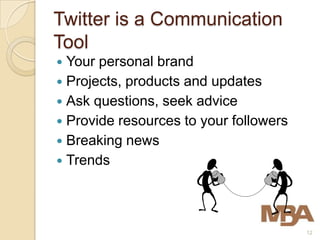
Twitter is a Communication
Tool
 Your personal brand
 Projects, products and updates
 Ask questions, seek advice
 Provide resources to your followers
 Breaking news
 Trends


                                        12
Should You Be on Twitter?
 Opportunity to share insightful ideas
  with like-minded professionals
 Creating a “space” for your knowledge
 Ability to research ideas and topics
  that are relevant to you
 Breaking news
 Relationship management


                                      13
How to Use Twitter?


                      @MBAofWPA
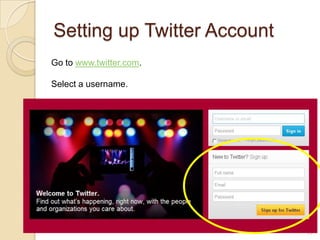
Setting up Twitter Account
Go to www.twitter.com.

Select a username.


                             15
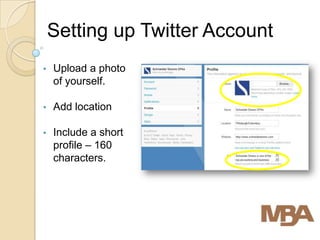
Setting up Twitter Account
•   Upload a photo
    of yourself.

•   Add location

•   Include a short
    profile – 160
    characters.
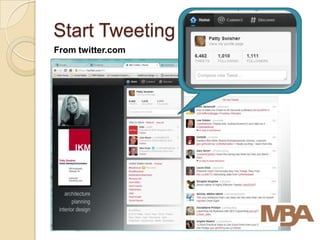
Start Tweeting
From twitter.com
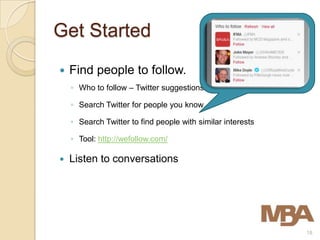
Get Started
   Find people to follow.
    ◦ Who to follow – Twitter suggestions

    ◦ Search Twitter for people you know

    ◦ Search Twitter to find people with similar interests

    ◦ Tool: http://wefollow.com/

   Listen to conversations


                                                             18
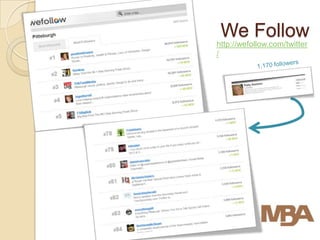
We Follow
http://wefollow.com/twitter
/
What should I tweet?
 RTs things you find of interest
 Articles from Trade Journals
 Ask questions
 Current events/news items
 Links to blog posts
 Photos
Tweets and Messages
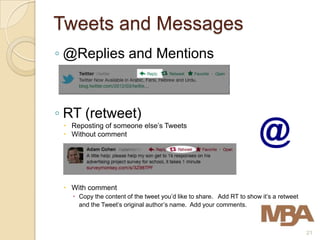
◦ @Replies and Mentions


◦ RT (retweet)
  Reposting of someone else’s Tweets
  Without comment


  With comment
    Copy the content of the tweet you’d like to share. Add RT to show it’s a retweet
     and the Tweet’s original author’s name. Add your comments.


                                                                                        21
Tweets and Messages
   Send a private message to a follower
    ◦ DM (Direct Message)
    ◦ Limited to 140 characters
    ◦ Something you don’t want to share or spread.
    ◦ Send to followers.
    ◦ Can’t send to people who do not follow you.
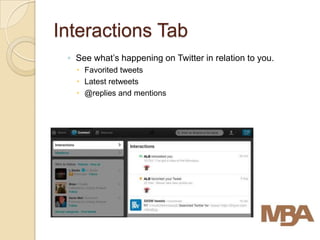
Interactions Tab
 ◦ See what’s happening on Twitter in relation to you.
    Favorited tweets
    Latest retweets
    @replies and mentions
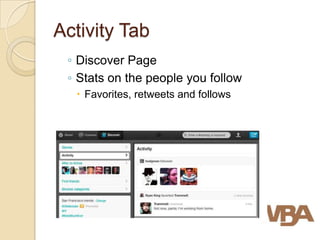
Activity Tab
 ◦ Discover Page
 ◦ Stats on the people you follow
   Favorites, retweets and follows
Hashtag
   The # symbol, called a hashtag, is used to mark
    keywords or topics in a Tweet.

   It was created organically by Twitter users as a way to
    categorize messages.

   Create a hashtag by prefixing a word with the hash
    symbol: #mbaofwpa or #AIA or #SMPS

   Click on a hash-tagged word in any message show you
    all other tweets in that category
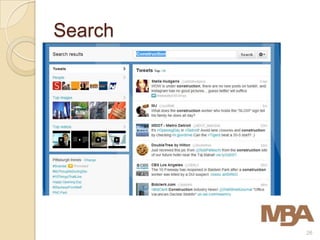
Search


         26
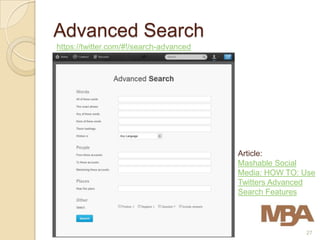
Advanced Search
https://twitter.com/#!/search-advanced


                                         Article:
                                         Mashable Social
                                         Media: HOW TO: Use
                                         Twitters Advanced
                                         Search Features


                                                        27
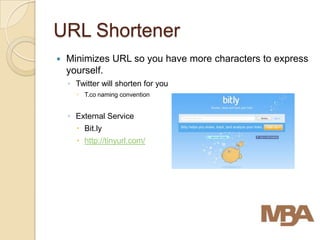
URL Shortener
   Minimizes URL so you have more characters to express
    yourself.
    ◦ Twitter will shorten for you
       T.co naming convention


    ◦ External Service
       Bit.ly
       http://tinyurl.com/
Twitter Rules of Thumb
1.   Don’t spam.
2.   Update consistently.
3.   Find the latest buzz and contribute or create the latest buzz.
4.   Set up searches.
     ◦   Search for yourself so you can reply to people who @ you.
     ◦   Search for your interests – Surfing, Pittsburgh, Sports
5.   Take it slow.
     ◦   Don’t worry if you have 2 followers and follow 100 people.
     ◦   You will gain followers as you get involved in the conversation and post
         interesting content.
6.   You cannot edit a tweet after you post it. You can only delete
     it.
7.   Some things are better left unsaid.
     ◦   Use discretion.
     ◦   Tweets are archived digitally by the Library of Congress

                                                                                    29
Twitter Etiquette
 Be Authentic
 Followers
    ◦ Don’t be obliged to follow everyone
   Share
    ◦ RT with comments or without
   Reciprocate
    ◦ Say Thank You for RTs and mentions
   Take it Offline
Twitter Resources


                    @MBAofWPA
Twitter Resources
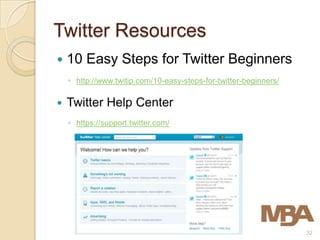
   10 Easy Steps for Twitter Beginners
    ◦ http://www.twitip.com/10-easy-steps-for-twitter-beginners/

   Twitter Help Center
    ◦ https://support.twitter.com/


                                                                   32
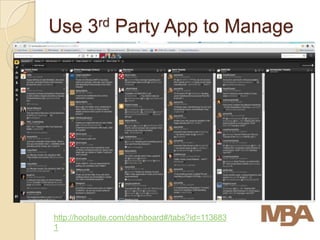
Use 3rd Party App to Manage


http://hootsuite.com/dashboard#/tabs?id=113683
1
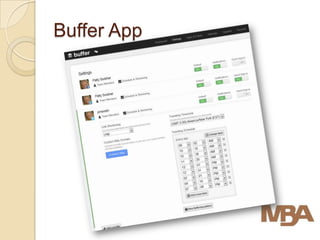
Buffer App
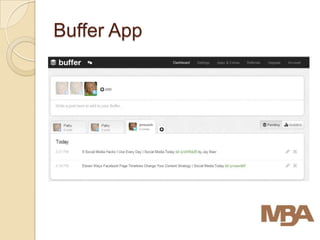
Buffer App
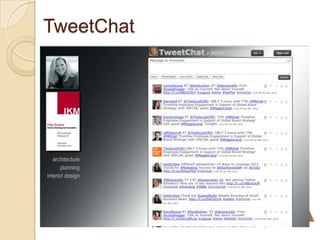
TweetChat
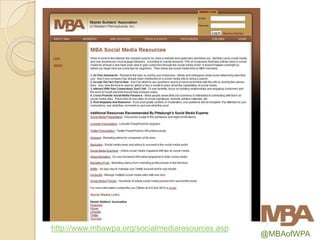
http://www.mbawpa.org/socialmediaresources.asp
                                                 @MBAofWPA
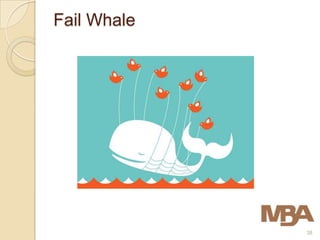
Fail Whale


             38
Thank You!


             @MBAofWPA

Twitter 101 5 23-2012

  • 1.
    Twitter 101 for theConstruction Industry
  • 2.
    Presenters: Patty Swisher, Ron Kubitz, Director of Marketing & PR Recruiting Manager IKM Incorporated Architects Brayman Construction @pmswish @ikminc @ronbray @braymanjobs Special Thanks to Karlye Rowles, Marketing Manager of Schneider Downs @Karlye Rowles @Schneider_Downs @MBAofWPA
  • 3.
    Agenda 1. What is Twitter 2. How to use Twitter 3. Resources 3
  • 4.
  • 5.
    What is Twitter?  Twitter is a social networking and microblogging service that enables users to broadcast and read short (140 character), text-based messages called tweets.  These updates can be submitted by a variety of means including text messages, instant messaging or a third- party application. 5
  • 8.
  • 9.
    Twitter is Everywhere Twitter has more than 465 million accounts generating more than 175 million tweets/day.  Widely adopted by celebrities and companies. ◦ Ashton Kutcher was first Twitter user to have 1 million followers (2009) ◦ Examples: http://socialfresh.com/top-10-twitter- brands-2011-winners-announced/ 9
  • 10.
    B2B marketers canuse Twitter effectively in 3 key ways:  By listening to what is being said about the company  By engaging with clients and the public  By contributing and sharing their expertise and thought leadership. Read more at: http://www.optify.net/guides/twitter-for-business-the- ultimate-b2b-guide?_opt_r=TWITTER&_opt_rdid=6058
  • 11.
    Twitter for Business Goals Metrics • Reach (followers + RT * RT’s followers) Increase Brand Awareness • Followers • Branded Drive Traffic • Visits Generate Leads • Leads Nurture Leads • Visits and returning leads • Twitter conversations Improve customer service • Positive mentions • Changes in customer satisfaction polls • Number of Twitter conversations • Number of DM Use as help channel • Number of mentions of your help # • Change in visits to help section on your website Read more at: http://www.optify.net/guides/twitter-for-business-the-ultimate-b2b-guide?_opt_r=TWITTER&_opt_rdid=6058
  • 12.
    Twitter is aCommunication Tool  Your personal brand  Projects, products and updates  Ask questions, seek advice  Provide resources to your followers  Breaking news  Trends 12
  • 13.
    Should You Beon Twitter?  Opportunity to share insightful ideas with like-minded professionals  Creating a “space” for your knowledge  Ability to research ideas and topics that are relevant to you  Breaking news  Relationship management 13
  • 14.
    How to UseTwitter? @MBAofWPA
  • 15.
    Setting up TwitterAccount Go to www.twitter.com. Select a username. 15
  • 16.
    Setting up TwitterAccount • Upload a photo of yourself. • Add location • Include a short profile – 160 characters.
  • 17.
  • 18.
    Get Started  Find people to follow. ◦ Who to follow – Twitter suggestions ◦ Search Twitter for people you know ◦ Search Twitter to find people with similar interests ◦ Tool: http://wefollow.com/  Listen to conversations 18
  • 19.
  • 20.
    What should Itweet?  RTs things you find of interest  Articles from Trade Journals  Ask questions  Current events/news items  Links to blog posts  Photos
  • 21.
    Tweets and Messages ◦@Replies and Mentions ◦ RT (retweet)  Reposting of someone else’s Tweets  Without comment  With comment  Copy the content of the tweet you’d like to share. Add RT to show it’s a retweet and the Tweet’s original author’s name. Add your comments. 21
  • 22.
    Tweets and Messages  Send a private message to a follower ◦ DM (Direct Message) ◦ Limited to 140 characters ◦ Something you don’t want to share or spread. ◦ Send to followers. ◦ Can’t send to people who do not follow you.
  • 23.
    Interactions Tab ◦See what’s happening on Twitter in relation to you.  Favorited tweets  Latest retweets  @replies and mentions
  • 24.
    Activity Tab ◦Discover Page ◦ Stats on the people you follow  Favorites, retweets and follows
  • 25.
    Hashtag  The # symbol, called a hashtag, is used to mark keywords or topics in a Tweet.  It was created organically by Twitter users as a way to categorize messages.  Create a hashtag by prefixing a word with the hash symbol: #mbaofwpa or #AIA or #SMPS  Click on a hash-tagged word in any message show you all other tweets in that category
  • 26.
  • 27.
    Advanced Search https://twitter.com/#!/search-advanced Article: Mashable Social Media: HOW TO: Use Twitters Advanced Search Features 27
  • 28.
    URL Shortener  Minimizes URL so you have more characters to express yourself. ◦ Twitter will shorten for you  T.co naming convention ◦ External Service  Bit.ly  http://tinyurl.com/
  • 29.
    Twitter Rules ofThumb 1. Don’t spam. 2. Update consistently. 3. Find the latest buzz and contribute or create the latest buzz. 4. Set up searches. ◦ Search for yourself so you can reply to people who @ you. ◦ Search for your interests – Surfing, Pittsburgh, Sports 5. Take it slow. ◦ Don’t worry if you have 2 followers and follow 100 people. ◦ You will gain followers as you get involved in the conversation and post interesting content. 6. You cannot edit a tweet after you post it. You can only delete it. 7. Some things are better left unsaid. ◦ Use discretion. ◦ Tweets are archived digitally by the Library of Congress 29
  • 30.
    Twitter Etiquette  BeAuthentic  Followers ◦ Don’t be obliged to follow everyone  Share ◦ RT with comments or without  Reciprocate ◦ Say Thank You for RTs and mentions  Take it Offline
  • 31.
  • 32.
    Twitter Resources  10 Easy Steps for Twitter Beginners ◦ http://www.twitip.com/10-easy-steps-for-twitter-beginners/  Twitter Help Center ◦ https://support.twitter.com/ 32
  • 33.
    Use 3rd PartyApp to Manage http://hootsuite.com/dashboard#/tabs?id=113683 1
  • 34.
  • 35.
  • 36.
  • 37.
  • 38.
  • 39.
    Thank You! @MBAofWPA

Editor's Notes

  • #39 Don’t worry if you see this. Sometimes twitter needs a break too.