Tutorial 6:
Managing Multiple Worksheets
      and Workbooks

  Microsoft Excel 2010
            ®      ®
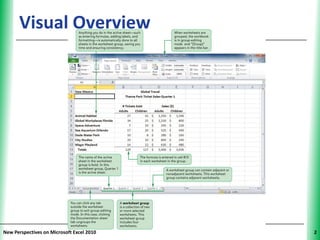
Visual Overview                      XP


New Perspectives on Microsoft Excel 2010        2
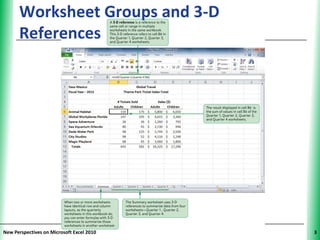
Worksheet Groups and 3-D             XP
      References


New Perspectives on Microsoft Excel 2010        3
Grouping Worksheets                              XP


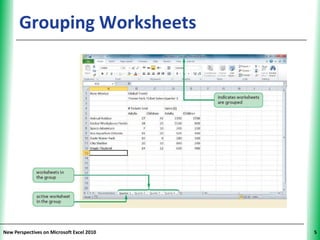
      • Using multiple worksheets makes it easier to
        group and summarize data
      • Worksheet groups save time and improve
        consistency among worksheets
         – An action performed once affects multiple
           worksheets
      • A worksheet group can contain adjacent or
        nonadjacent worksheets


New Perspectives on Microsoft Excel 2010                    4
Grouping Worksheets                  XP


New Perspectives on Microsoft Excel 2010        5
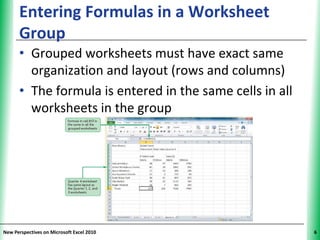
Entering Formulas in a Worksheet                XP
      Group
      • Grouped worksheets must have exact same
        organization and layout (rows and columns)
      • The formula is entered in the same cells in all
        worksheets in the group


New Perspectives on Microsoft Excel 2010                   6
Grouping Worksheets                           XP


      • Any formatting changes made to the active
        sheet are applied to all sheets in the group
      • When worksheets are ungrouped, each one
        functions independently again
         – If you forget to ungroup worksheets, any
           changes you make in one will be applied to
           all worksheets in the group


New Perspectives on Microsoft Excel 2010                 7
Working with Multiple Worksheets                XP


      • Copying worksheets
         – Use an existing worksheet as a starting
           point for creating another one
         – Duplicates all values, formulas, and formats
           into new worksheet, leaving original
           worksheet intact
         – Edit, reformat, and enter new content as
           needed


New Perspectives on Microsoft Excel 2010                   8
Working with Multiple Worksheets               XP


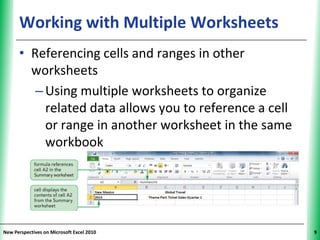
      • Referencing cells and ranges in other
        worksheets
         – Using multiple worksheets to organize
           related data allows you to reference a cell
           or range in another worksheet in the same
           workbook


New Perspectives on Microsoft Excel 2010                  9
Using 3-D References to Add Values                XP
      Across Worksheets
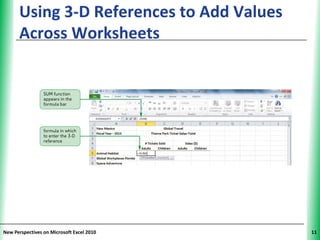
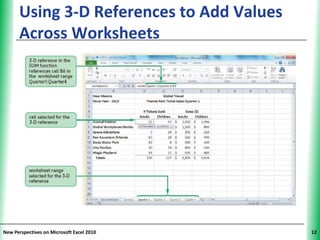
      • When worksheets have identical row and
        column layouts, enter formulas with 3-D
        references to summarize the worksheets in
        another worksheet
      • 3-D reference specifies not only the range of
        rows and columns, but also the range of
        worksheet names in which the cells appear
      • General syntax of a 3-D cell reference:


New Perspectives on Microsoft Excel 2010                     10
Using 3-D References to Add Values   XP
      Across Worksheets


New Perspectives on Microsoft Excel 2010        11
Using 3-D References to Add Values   XP
      Across Worksheets


New Perspectives on Microsoft Excel 2010        12
Using 3-D References to Add Values            XP
      Across Worksheets
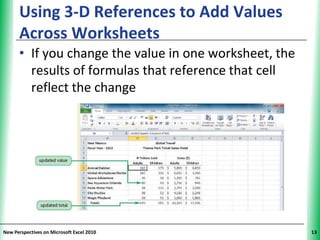
      • If you change the value in one worksheet, the
        results of formulas that reference that cell
        reflect the change


New Perspectives on Microsoft Excel 2010                 13
Printing a Worksheet Group                        XP


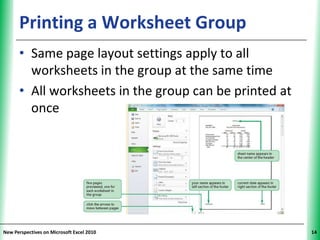
      • Same page layout settings apply to all
        worksheets in the group at the same time
      • All worksheets in the group can be printed at
        once


New Perspectives on Microsoft Excel 2010                     14
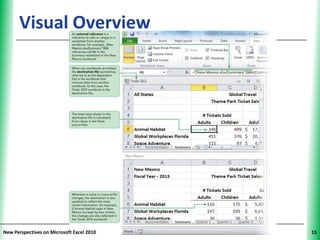
Visual Overview                      XP


New Perspectives on Microsoft Excel 2010        15
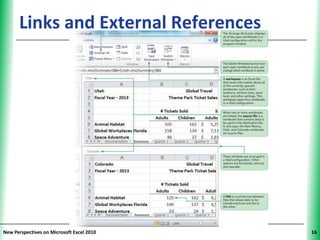
Links and External References        XP


New Perspectives on Microsoft Excel 2010        16
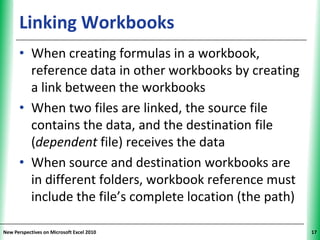
Linking Workbooks                              XP


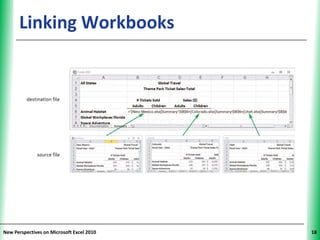
      • When creating formulas in a workbook,
        reference data in other workbooks by creating
        a link between the workbooks
      • When two files are linked, the source file
        contains the data, and the destination file
        (dependent file) receives the data
      • When source and destination workbooks are
        in different folders, workbook reference must
        include the file’s complete location (the path)

New Perspectives on Microsoft Excel 2010                  17
Linking Workbooks                    XP


New Perspectives on Microsoft Excel 2010        18
Link Workbooks When…                        XP


      • Separate workbooks have the same purpose
        and structure
      • A large workbook is too unwieldy to use
      • Information from different workbooks can be
        summarized
      • Source workbooks received from another
        person or group are continually updated


New Perspectives on Microsoft Excel 2010               19
Navigating Multiple Workbooks                     XP


      • To change which workbook is active:
         – Use Switch Windows button
                              - or -
         – Click Excel program button on the taskbar,
           then click the thumbnail of the workbook


New Perspectives on Microsoft Excel 2010                     20
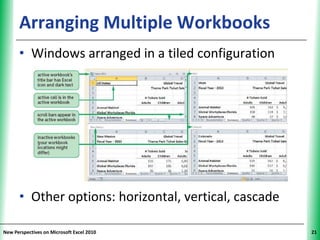
Arranging Multiple Workbooks                     XP


      • Windows arranged in a tiled configuration


      • Other options: horizontal, vertical, cascade

New Perspectives on Microsoft Excel 2010                    21
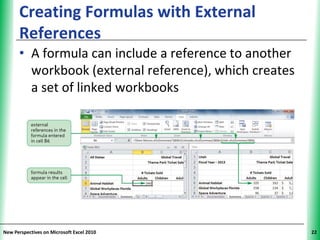
Creating Formulas with External              XP
      References
      • A formula can include a reference to another
        workbook (external reference), which creates
        a set of linked workbooks


New Perspectives on Microsoft Excel 2010                22
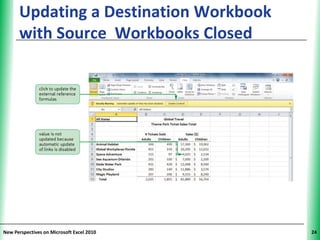
Updating Linked Workbooks                              XP

      • When data in a source file changes, the destination
        file should reflect those changes
      • If source and destination files are open when a
        change is made:
         – Destination file is updated automatically
      • If destination file is closed when source file is
        changed:
         – Choose whether to update the link to display
            current values, or continue to display older values
            when you open the destination file

New Perspectives on Microsoft Excel 2010                          23
Updating a Destination Workbook      XP
      with Source Workbooks Closed


New Perspectives on Microsoft Excel 2010        24
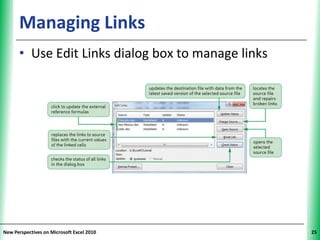
Managing Links                                XP


      • Use Edit Links dialog box to manage links


New Perspectives on Microsoft Excel 2010                 25
Creating an Excel Workspace                  XP


      • Saves information about all currently opened
        workbooks (e.g., locations, window sizes)
      • Has the file extension .xlw
      • Does not contain workbooks themselves—
        only information about them


New Perspectives on Microsoft Excel 2010                26
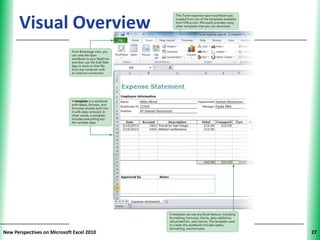
Visual Overview                      XP


New Perspectives on Microsoft Excel 2010        27
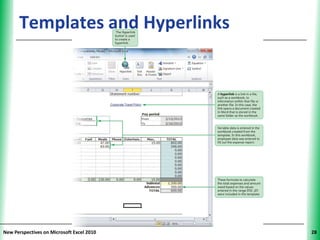
Templates and Hyperlinks             XP


New Perspectives on Microsoft Excel 2010        28
Creating a Hyperlink                               XP


      • A link in a file to information within that file or
        another file
      • Can be used to:
         – Quickly jump to a specific cell or range
           within the active worksheet, another
           worksheet, or another workbook
         – Jump to other files


New Perspectives on Microsoft Excel 2010                      29
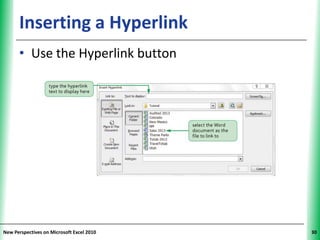
Inserting a Hyperlink                XP


      • Use the Hyperlink button


New Perspectives on Microsoft Excel 2010        30
Editing a Hyperlink                        XP


      • Change its target file or Web page
                       - or -
      • Modify the text that is displayed
                       - or -
      • Change the ScreenTip for the hyperlink


New Perspectives on Microsoft Excel 2010              31
Creating Templates                               XP


      • A template workbook
        – Includes all text (row and column labels),
           formatting, and formulas, but no data
        – Is a model from which you create new
           workbooks
      • Any changes or additions made to the new
        workbook do not affect the template file


New Perspectives on Microsoft Excel 2010                    32
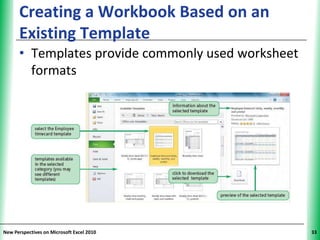
Creating a Workbook Based on an           XP
      Existing Template
      • Templates provide commonly used worksheet
        formats


New Perspectives on Microsoft Excel 2010             33
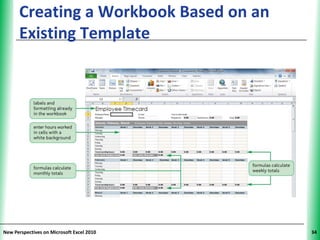
Creating a Workbook Based on an      XP
      Existing Template


New Perspectives on Microsoft Excel 2010        34
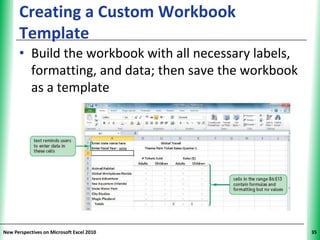
Creating a Custom Workbook                    XP
      Template
      • Build the workbook with all necessary labels,
        formatting, and data; then save the workbook
        as a template


New Perspectives on Microsoft Excel 2010                 35
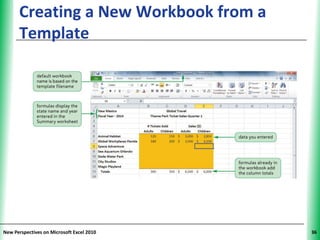
Creating a New Workbook from a       XP
      Template


New Perspectives on Microsoft Excel 2010        36
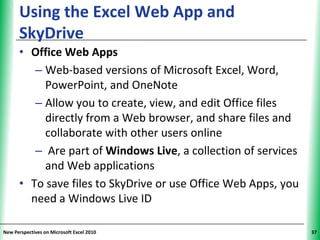
Using the Excel Web App and                          XP
      SkyDrive
      • Office Web Apps
         – Web-based versions of Microsoft Excel, Word,
           PowerPoint, and OneNote
         – Allow you to create, view, and edit Office files
           directly from a Web browser, and share files and
           collaborate with other users online
         – Are part of Windows Live, a collection of services
           and Web applications
      • To save files to SkyDrive or use Office Web Apps, you
        need a Windows Live ID

New Perspectives on Microsoft Excel 2010                        37
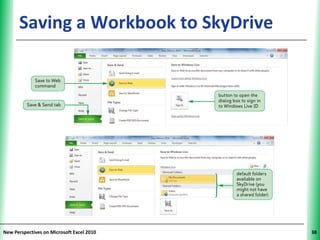
Saving a Workbook to SkyDrive        XP


New Perspectives on Microsoft Excel 2010        38
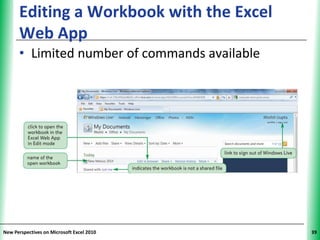
Editing a Workbook with the Excel        XP
      Web App
      • Limited number of commands available


New Perspectives on Microsoft Excel 2010            39
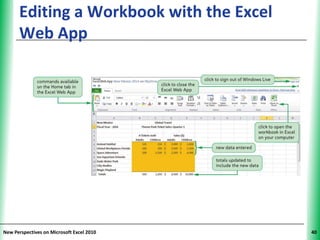
Editing a Workbook with the Excel    XP
      Web App


New Perspectives on Microsoft Excel 2010        40

Tutorial 6: Multiple Worksheets and Workbooks

  • 1.
    Tutorial 6: Managing MultipleWorksheets and Workbooks Microsoft Excel 2010 ® ®
  • 2.
    Visual Overview XP New Perspectives on Microsoft Excel 2010 2
  • 3.
    Worksheet Groups and3-D XP References New Perspectives on Microsoft Excel 2010 3
  • 4.
    Grouping Worksheets XP • Using multiple worksheets makes it easier to group and summarize data • Worksheet groups save time and improve consistency among worksheets – An action performed once affects multiple worksheets • A worksheet group can contain adjacent or nonadjacent worksheets New Perspectives on Microsoft Excel 2010 4
  • 5.
    Grouping Worksheets XP New Perspectives on Microsoft Excel 2010 5
  • 6.
    Entering Formulas ina Worksheet XP Group • Grouped worksheets must have exact same organization and layout (rows and columns) • The formula is entered in the same cells in all worksheets in the group New Perspectives on Microsoft Excel 2010 6
  • 7.
    Grouping Worksheets XP • Any formatting changes made to the active sheet are applied to all sheets in the group • When worksheets are ungrouped, each one functions independently again – If you forget to ungroup worksheets, any changes you make in one will be applied to all worksheets in the group New Perspectives on Microsoft Excel 2010 7
  • 8.
    Working with MultipleWorksheets XP • Copying worksheets – Use an existing worksheet as a starting point for creating another one – Duplicates all values, formulas, and formats into new worksheet, leaving original worksheet intact – Edit, reformat, and enter new content as needed New Perspectives on Microsoft Excel 2010 8
  • 9.
    Working with MultipleWorksheets XP • Referencing cells and ranges in other worksheets – Using multiple worksheets to organize related data allows you to reference a cell or range in another worksheet in the same workbook New Perspectives on Microsoft Excel 2010 9
  • 10.
    Using 3-D Referencesto Add Values XP Across Worksheets • When worksheets have identical row and column layouts, enter formulas with 3-D references to summarize the worksheets in another worksheet • 3-D reference specifies not only the range of rows and columns, but also the range of worksheet names in which the cells appear • General syntax of a 3-D cell reference: New Perspectives on Microsoft Excel 2010 10
  • 11.
    Using 3-D Referencesto Add Values XP Across Worksheets New Perspectives on Microsoft Excel 2010 11
  • 12.
    Using 3-D Referencesto Add Values XP Across Worksheets New Perspectives on Microsoft Excel 2010 12
  • 13.
    Using 3-D Referencesto Add Values XP Across Worksheets • If you change the value in one worksheet, the results of formulas that reference that cell reflect the change New Perspectives on Microsoft Excel 2010 13
  • 14.
    Printing a WorksheetGroup XP • Same page layout settings apply to all worksheets in the group at the same time • All worksheets in the group can be printed at once New Perspectives on Microsoft Excel 2010 14
  • 15.
    Visual Overview XP New Perspectives on Microsoft Excel 2010 15
  • 16.
    Links and ExternalReferences XP New Perspectives on Microsoft Excel 2010 16
  • 17.
    Linking Workbooks XP • When creating formulas in a workbook, reference data in other workbooks by creating a link between the workbooks • When two files are linked, the source file contains the data, and the destination file (dependent file) receives the data • When source and destination workbooks are in different folders, workbook reference must include the file’s complete location (the path) New Perspectives on Microsoft Excel 2010 17
  • 18.
    Linking Workbooks XP New Perspectives on Microsoft Excel 2010 18
  • 19.
    Link Workbooks When… XP • Separate workbooks have the same purpose and structure • A large workbook is too unwieldy to use • Information from different workbooks can be summarized • Source workbooks received from another person or group are continually updated New Perspectives on Microsoft Excel 2010 19
  • 20.
    Navigating Multiple Workbooks XP • To change which workbook is active: – Use Switch Windows button - or - – Click Excel program button on the taskbar, then click the thumbnail of the workbook New Perspectives on Microsoft Excel 2010 20
  • 21.
    Arranging Multiple Workbooks XP • Windows arranged in a tiled configuration • Other options: horizontal, vertical, cascade New Perspectives on Microsoft Excel 2010 21
  • 22.
    Creating Formulas withExternal XP References • A formula can include a reference to another workbook (external reference), which creates a set of linked workbooks New Perspectives on Microsoft Excel 2010 22
  • 23.
    Updating Linked Workbooks XP • When data in a source file changes, the destination file should reflect those changes • If source and destination files are open when a change is made: – Destination file is updated automatically • If destination file is closed when source file is changed: – Choose whether to update the link to display current values, or continue to display older values when you open the destination file New Perspectives on Microsoft Excel 2010 23
  • 24.
    Updating a DestinationWorkbook XP with Source Workbooks Closed New Perspectives on Microsoft Excel 2010 24
  • 25.
    Managing Links XP • Use Edit Links dialog box to manage links New Perspectives on Microsoft Excel 2010 25
  • 26.
    Creating an ExcelWorkspace XP • Saves information about all currently opened workbooks (e.g., locations, window sizes) • Has the file extension .xlw • Does not contain workbooks themselves— only information about them New Perspectives on Microsoft Excel 2010 26
  • 27.
    Visual Overview XP New Perspectives on Microsoft Excel 2010 27
  • 28.
    Templates and Hyperlinks XP New Perspectives on Microsoft Excel 2010 28
  • 29.
    Creating a Hyperlink XP • A link in a file to information within that file or another file • Can be used to: – Quickly jump to a specific cell or range within the active worksheet, another worksheet, or another workbook – Jump to other files New Perspectives on Microsoft Excel 2010 29
  • 30.
    Inserting a Hyperlink XP • Use the Hyperlink button New Perspectives on Microsoft Excel 2010 30
  • 31.
    Editing a Hyperlink XP • Change its target file or Web page - or - • Modify the text that is displayed - or - • Change the ScreenTip for the hyperlink New Perspectives on Microsoft Excel 2010 31
  • 32.
    Creating Templates XP • A template workbook – Includes all text (row and column labels), formatting, and formulas, but no data – Is a model from which you create new workbooks • Any changes or additions made to the new workbook do not affect the template file New Perspectives on Microsoft Excel 2010 32
  • 33.
    Creating a WorkbookBased on an XP Existing Template • Templates provide commonly used worksheet formats New Perspectives on Microsoft Excel 2010 33
  • 34.
    Creating a WorkbookBased on an XP Existing Template New Perspectives on Microsoft Excel 2010 34
  • 35.
    Creating a CustomWorkbook XP Template • Build the workbook with all necessary labels, formatting, and data; then save the workbook as a template New Perspectives on Microsoft Excel 2010 35
  • 36.
    Creating a NewWorkbook from a XP Template New Perspectives on Microsoft Excel 2010 36
  • 37.
    Using the ExcelWeb App and XP SkyDrive • Office Web Apps – Web-based versions of Microsoft Excel, Word, PowerPoint, and OneNote – Allow you to create, view, and edit Office files directly from a Web browser, and share files and collaborate with other users online – Are part of Windows Live, a collection of services and Web applications • To save files to SkyDrive or use Office Web Apps, you need a Windows Live ID New Perspectives on Microsoft Excel 2010 37
  • 38.
    Saving a Workbookto SkyDrive XP New Perspectives on Microsoft Excel 2010 38
  • 39.
    Editing a Workbookwith the Excel XP Web App • Limited number of commands available New Perspectives on Microsoft Excel 2010 39
  • 40.
    Editing a Workbookwith the Excel XP Web App New Perspectives on Microsoft Excel 2010 40