®
Microsoft Office 2010
Excel Tutorial 3:
Working with Formulas
and Functions
XPXPXPObjectives
• Copy formulas
• Build formulas containing relative, absolute,
and mixed references
• Review function syntax
• Insert a function with the Insert Function
dialog box
• Search for a function
• Type a function directly in a cell
New Perspectives on Microsoft Office Excel 2010 2
XPXPXPObjectives
• Use AutoFill to fill in a formula and complete a
series
• Enter the IF logical function
• Insert the date with the TODAY function
• Use the PMT financial function to calculate
monthly mortgage payments
New Perspectives on Microsoft Office Excel 2010 3
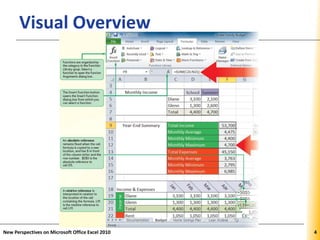
XPXPXPVisual Overview
New Perspectives on Microsoft Office Excel 2010 4
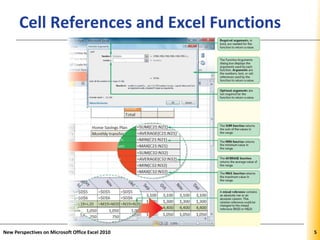
XPXPXPCell References and Excel Functions
New Perspectives on Microsoft Office Excel 2010 5
XPXPXPUnderstanding Cell References
• To record and analyze data
–Enter data in cells in a worksheet
–Reference the cells with data in formulas
that perform calculations on that data
• Types of cell references
–Relative
–Absolute
–Mixed
New Perspectives on Microsoft Office Excel 2010 6
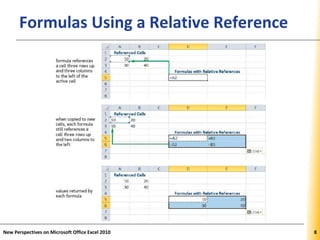
XPXPXPUsing Relative References
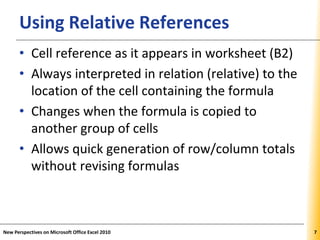
• Cell reference as it appears in worksheet (B2)
• Always interpreted in relation (relative) to the
location of the cell containing the formula
• Changes when the formula is copied to
another group of cells
• Allows quick generation of row/column totals
without revising formulas
New Perspectives on Microsoft Office Excel 2010 7
XPXPXPFormulas Using a Relative Reference
New Perspectives on Microsoft Office Excel 2010 8
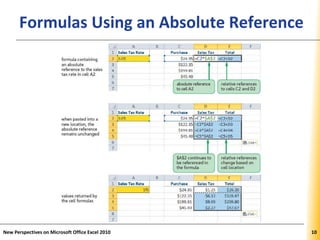
XPXPXPUsing Absolute References
• Cell reference that remains fixed when the
formula is copied to a new location
• Have a $ before each column and row
designation ($B$2)
• Enter values in their own cells; reference the
appropriate cells in formulas in the worksheet
–Reduces amount of data entry
–When a data valued is changed, all formulas
based on that cell are updated to reflect the
new value
New Perspectives on Microsoft Office Excel 2010 9
XPXPXPFormulas Using an Absolute Reference
New Perspectives on Microsoft Office Excel 2010 10
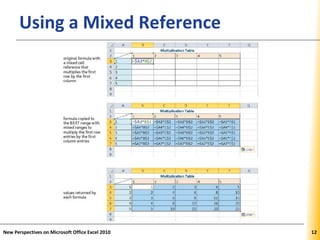
XPXPXPUsing Mixed References
• Contain both relative and absolute references
• “Lock” one part of the cell reference while the
other part can change
• Have a $ before either the row or column
reference ($B2 or B$2)
New Perspectives on Microsoft Office Excel 2010 11
XPXPXPUsing a Mixed Reference
New Perspectives on Microsoft Office Excel 2010 12
XPXPXP
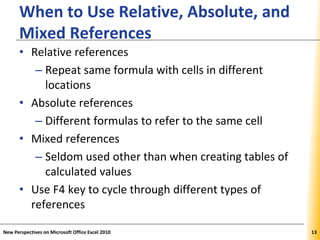
When to Use Relative, Absolute, and
Mixed References
• Relative references
– Repeat same formula with cells in different
locations
• Absolute references
– Different formulas to refer to the same cell
• Mixed references
– Seldom used other than when creating tables of
calculated values
• Use F4 key to cycle through different types of
references
New Perspectives on Microsoft Office Excel 2010 13
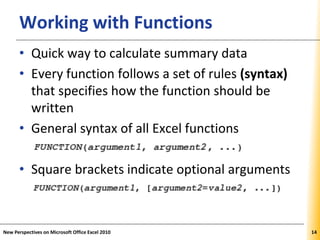
XPXPXPWorking with Functions
• Quick way to calculate summary data
• Every function follows a set of rules (syntax)
that specifies how the function should be
written
• General syntax of all Excel functions
• Square brackets indicate optional arguments
New Perspectives on Microsoft Office Excel 2010 14
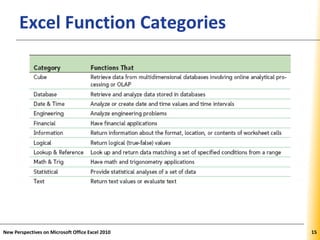
XPXPXPExcel Function Categories
New Perspectives on Microsoft Office Excel 2010 15
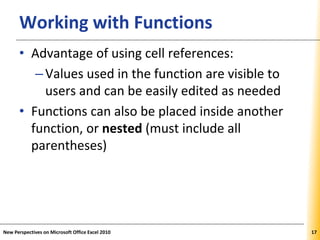
XPXPXPExcel Functions
New Perspectives on Microsoft Office Excel 2010 16
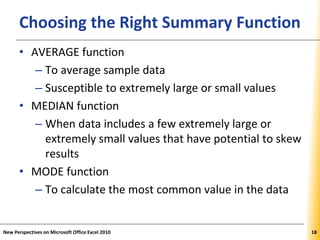
XPXPXPWorking with Functions
• Advantage of using cell references:
–Values used in the function are visible to
users and can be easily edited as needed
• Functions can also be placed inside another
function, or nested (must include all
parentheses)
New Perspectives on Microsoft Office Excel 2010 17
XPXPXPChoosing the Right Summary Function
• AVERAGE function
– To average sample data
– Susceptible to extremely large or small values
• MEDIAN function
– When data includes a few extremely large or
extremely small values that have potential to skew
results
• MODE function
– To calculate the most common value in the data
New Perspectives on Microsoft Office Excel 2010 18
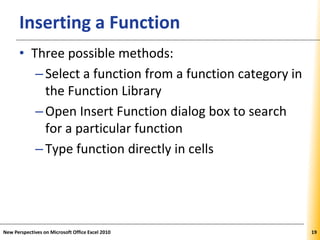
XPXPXPInserting a Function
• Three possible methods:
–Select a function from a function category in
the Function Library
–Open Insert Function dialog box to search
for a particular function
–Type function directly in cells
New Perspectives on Microsoft Office Excel 2010 19
XPXPXP
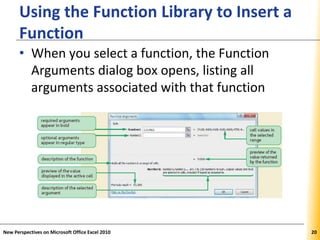
Using the Function Library to Insert a
Function
• When you select a function, the Function
Arguments dialog box opens, listing all
arguments associated with that function
New Perspectives on Microsoft Office Excel 2010 20
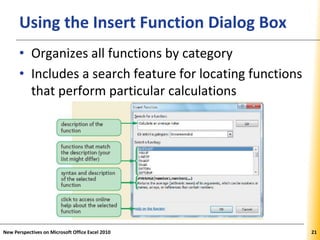
XPXPXPUsing the Insert Function Dialog Box
• Organizes all functions by category
• Includes a search feature for locating functions
that perform particular calculations
New Perspectives on Microsoft Office Excel 2010 21
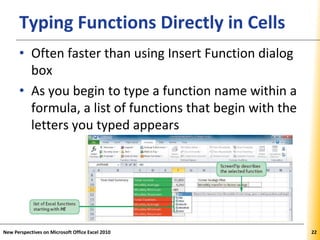
XPXPXPTyping Functions Directly in Cells
• Often faster than using Insert Function dialog
box
• As you begin to type a function name within a
formula, a list of functions that begin with the
letters you typed appears
New Perspectives on Microsoft Office Excel 2010 22
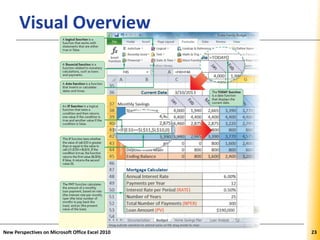
XPXPXPVisual Overview
New Perspectives on Microsoft Office Excel 2010 23
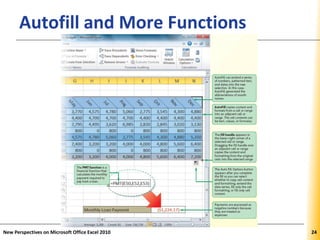
XPXPXPAutofill and More Functions
New Perspectives on Microsoft Office Excel 2010 2424
XPXPXP
Entering Data and Formulas with
AutoFill
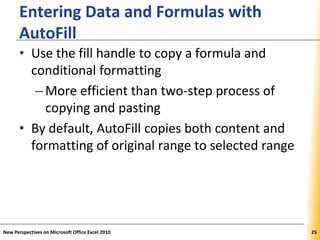
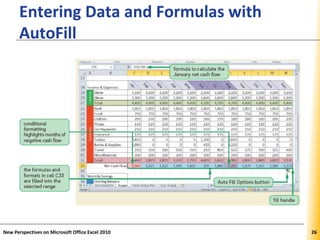
• Use the fill handle to copy a formula and
conditional formatting
–More efficient than two-step process of
copying and pasting
• By default, AutoFill copies both content and
formatting of original range to selected range
New Perspectives on Microsoft Office Excel 2010 25
XPXPXP
Entering Data and Formulas with
AutoFill
New Perspectives on Microsoft Office Excel 2010 26
XPXPXP
Entering Data and Formulas with
AutoFill
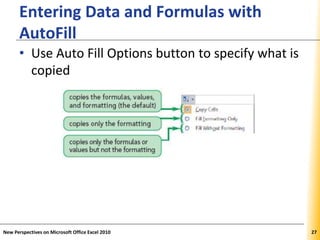
• Use Auto Fill Options button to specify what is
copied
New Perspectives on Microsoft Office Excel 2010 27
XPXPXP
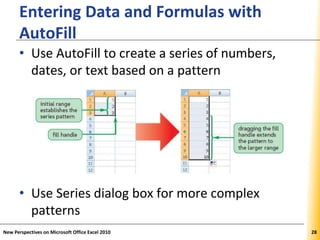
Entering Data and Formulas with
AutoFill
• Use AutoFill to create a series of numbers,
dates, or text based on a pattern
• Use Series dialog box for more complex
patterns
New Perspectives on Microsoft Office Excel 2010 28
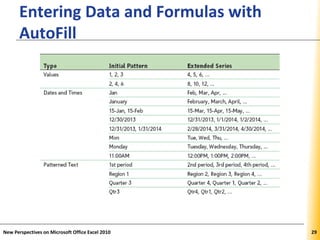
XPXPXP
Entering Data and Formulas with
AutoFill
New Perspectives on Microsoft Office Excel 2010 29
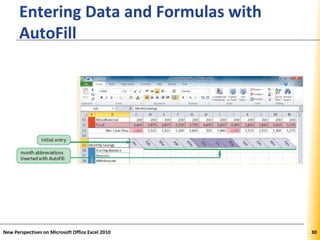
XPXPXP
Entering Data and Formulas with
AutoFill
New Perspectives on Microsoft Office Excel 2010 30
XPXPXPWorking with Logical Functions
• Logical functions
–Build decision-making capability into a
formula
–Work with statements that are either true
or false
• Excel supports many different logical
functions, including the IF function
New Perspectives on Microsoft Office Excel 2010 31
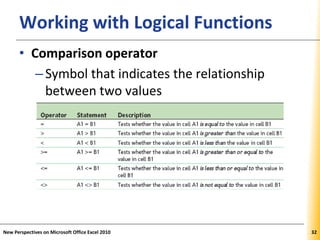
XPXPXPWorking with Logical Functions
• Comparison operator
–Symbol that indicates the relationship
between two values
New Perspectives on Microsoft Office Excel 2010 32
XPXPXPUsing the IF Function
New Perspectives on Microsoft Office Excel 2010 33
• Returns one value if a statement is true and
returns a different value if that statement is
false
• IF (logical_test, [value_if_true,] [value_if_false])
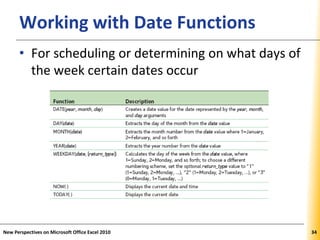
XPXPXPWorking with Date Functions
• For scheduling or determining on what days of
the week certain dates occur
New Perspectives on Microsoft Office Excel 2010 34
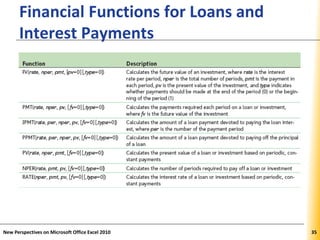
XPXPXP
Financial Functions for Loans and
Interest Payments
New Perspectives on Microsoft Office Excel 2010 35
XPXPXPWorking with Financial Functions
• Cost of a loan to the borrower is largely based
on three factors:
–Principal: amount of money being loaned
–Interest: amount added to the principal by
the lender
• Calculated as simple interest or as
compound interest
–Time required to pay back the loan
New Perspectives on Microsoft Office Excel 2010 36
XPXPXP
Using Functions to Manage Personal
Finances
New Perspectives on Microsoft Office Excel 2010 37
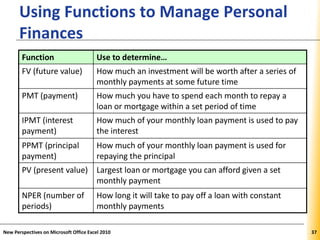
Function Use to determine…
FV (future value) How much an investment will be worth after a series of
monthly payments at some future time
PMT (payment) How much you have to spend each month to repay a
loan or mortgage within a set period of time
IPMT (interest
payment)
How much of your monthly loan payment is used to pay
the interest
PPMT (principal
payment)
How much of your monthly loan payment is used for
repaying the principal
PV (present value) Largest loan or mortgage you can afford given a set
monthly payment
NPER (number of
periods)
How long it will take to pay off a loan with constant
monthly payments
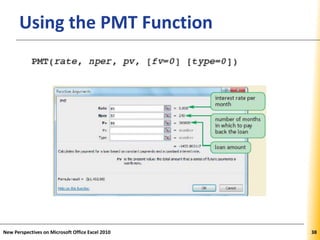
XPXPXPUsing the PMT Function
New Perspectives on Microsoft Office Excel 2010 38
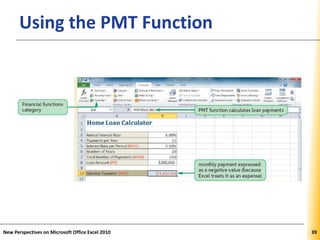
XPXPXPUsing the PMT Function
New Perspectives on Microsoft Office Excel 2010 39
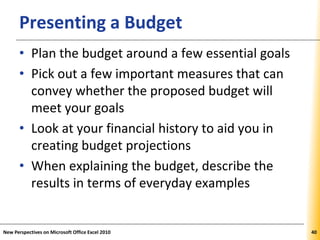
XPXPXPPresenting a Budget
• Plan the budget around a few essential goals
• Pick out a few important measures that can
convey whether the proposed budget will
meet your goals
• Look at your financial history to aid you in
creating budget projections
• When explaining the budget, describe the
results in terms of everyday examples
New Perspectives on Microsoft Office Excel 2010 40

Excel.t03

  • 1.
    ® Microsoft Office 2010 ExcelTutorial 3: Working with Formulas and Functions
  • 2.
    XPXPXPObjectives • Copy formulas •Build formulas containing relative, absolute, and mixed references • Review function syntax • Insert a function with the Insert Function dialog box • Search for a function • Type a function directly in a cell New Perspectives on Microsoft Office Excel 2010 2
  • 3.
    XPXPXPObjectives • Use AutoFillto fill in a formula and complete a series • Enter the IF logical function • Insert the date with the TODAY function • Use the PMT financial function to calculate monthly mortgage payments New Perspectives on Microsoft Office Excel 2010 3
  • 4.
    XPXPXPVisual Overview New Perspectiveson Microsoft Office Excel 2010 4
  • 5.
    XPXPXPCell References andExcel Functions New Perspectives on Microsoft Office Excel 2010 5
  • 6.
    XPXPXPUnderstanding Cell References •To record and analyze data –Enter data in cells in a worksheet –Reference the cells with data in formulas that perform calculations on that data • Types of cell references –Relative –Absolute –Mixed New Perspectives on Microsoft Office Excel 2010 6
  • 7.
    XPXPXPUsing Relative References •Cell reference as it appears in worksheet (B2) • Always interpreted in relation (relative) to the location of the cell containing the formula • Changes when the formula is copied to another group of cells • Allows quick generation of row/column totals without revising formulas New Perspectives on Microsoft Office Excel 2010 7
  • 8.
    XPXPXPFormulas Using aRelative Reference New Perspectives on Microsoft Office Excel 2010 8
  • 9.
    XPXPXPUsing Absolute References •Cell reference that remains fixed when the formula is copied to a new location • Have a $ before each column and row designation ($B$2) • Enter values in their own cells; reference the appropriate cells in formulas in the worksheet –Reduces amount of data entry –When a data valued is changed, all formulas based on that cell are updated to reflect the new value New Perspectives on Microsoft Office Excel 2010 9
  • 10.
    XPXPXPFormulas Using anAbsolute Reference New Perspectives on Microsoft Office Excel 2010 10
  • 11.
    XPXPXPUsing Mixed References •Contain both relative and absolute references • “Lock” one part of the cell reference while the other part can change • Have a $ before either the row or column reference ($B2 or B$2) New Perspectives on Microsoft Office Excel 2010 11
  • 12.
    XPXPXPUsing a MixedReference New Perspectives on Microsoft Office Excel 2010 12
  • 13.
    XPXPXP When to UseRelative, Absolute, and Mixed References • Relative references – Repeat same formula with cells in different locations • Absolute references – Different formulas to refer to the same cell • Mixed references – Seldom used other than when creating tables of calculated values • Use F4 key to cycle through different types of references New Perspectives on Microsoft Office Excel 2010 13
  • 14.
    XPXPXPWorking with Functions •Quick way to calculate summary data • Every function follows a set of rules (syntax) that specifies how the function should be written • General syntax of all Excel functions • Square brackets indicate optional arguments New Perspectives on Microsoft Office Excel 2010 14
  • 15.
    XPXPXPExcel Function Categories NewPerspectives on Microsoft Office Excel 2010 15
  • 16.
    XPXPXPExcel Functions New Perspectiveson Microsoft Office Excel 2010 16
  • 17.
    XPXPXPWorking with Functions •Advantage of using cell references: –Values used in the function are visible to users and can be easily edited as needed • Functions can also be placed inside another function, or nested (must include all parentheses) New Perspectives on Microsoft Office Excel 2010 17
  • 18.
    XPXPXPChoosing the RightSummary Function • AVERAGE function – To average sample data – Susceptible to extremely large or small values • MEDIAN function – When data includes a few extremely large or extremely small values that have potential to skew results • MODE function – To calculate the most common value in the data New Perspectives on Microsoft Office Excel 2010 18
  • 19.
    XPXPXPInserting a Function •Three possible methods: –Select a function from a function category in the Function Library –Open Insert Function dialog box to search for a particular function –Type function directly in cells New Perspectives on Microsoft Office Excel 2010 19
  • 20.
    XPXPXP Using the FunctionLibrary to Insert a Function • When you select a function, the Function Arguments dialog box opens, listing all arguments associated with that function New Perspectives on Microsoft Office Excel 2010 20
  • 21.
    XPXPXPUsing the InsertFunction Dialog Box • Organizes all functions by category • Includes a search feature for locating functions that perform particular calculations New Perspectives on Microsoft Office Excel 2010 21
  • 22.
    XPXPXPTyping Functions Directlyin Cells • Often faster than using Insert Function dialog box • As you begin to type a function name within a formula, a list of functions that begin with the letters you typed appears New Perspectives on Microsoft Office Excel 2010 22
  • 23.
    XPXPXPVisual Overview New Perspectiveson Microsoft Office Excel 2010 23
  • 24.
    XPXPXPAutofill and MoreFunctions New Perspectives on Microsoft Office Excel 2010 2424
  • 25.
    XPXPXP Entering Data andFormulas with AutoFill • Use the fill handle to copy a formula and conditional formatting –More efficient than two-step process of copying and pasting • By default, AutoFill copies both content and formatting of original range to selected range New Perspectives on Microsoft Office Excel 2010 25
  • 26.
    XPXPXP Entering Data andFormulas with AutoFill New Perspectives on Microsoft Office Excel 2010 26
  • 27.
    XPXPXP Entering Data andFormulas with AutoFill • Use Auto Fill Options button to specify what is copied New Perspectives on Microsoft Office Excel 2010 27
  • 28.
    XPXPXP Entering Data andFormulas with AutoFill • Use AutoFill to create a series of numbers, dates, or text based on a pattern • Use Series dialog box for more complex patterns New Perspectives on Microsoft Office Excel 2010 28
  • 29.
    XPXPXP Entering Data andFormulas with AutoFill New Perspectives on Microsoft Office Excel 2010 29
  • 30.
    XPXPXP Entering Data andFormulas with AutoFill New Perspectives on Microsoft Office Excel 2010 30
  • 31.
    XPXPXPWorking with LogicalFunctions • Logical functions –Build decision-making capability into a formula –Work with statements that are either true or false • Excel supports many different logical functions, including the IF function New Perspectives on Microsoft Office Excel 2010 31
  • 32.
    XPXPXPWorking with LogicalFunctions • Comparison operator –Symbol that indicates the relationship between two values New Perspectives on Microsoft Office Excel 2010 32
  • 33.
    XPXPXPUsing the IFFunction New Perspectives on Microsoft Office Excel 2010 33 • Returns one value if a statement is true and returns a different value if that statement is false • IF (logical_test, [value_if_true,] [value_if_false])
  • 34.
    XPXPXPWorking with DateFunctions • For scheduling or determining on what days of the week certain dates occur New Perspectives on Microsoft Office Excel 2010 34
  • 35.
    XPXPXP Financial Functions forLoans and Interest Payments New Perspectives on Microsoft Office Excel 2010 35
  • 36.
    XPXPXPWorking with FinancialFunctions • Cost of a loan to the borrower is largely based on three factors: –Principal: amount of money being loaned –Interest: amount added to the principal by the lender • Calculated as simple interest or as compound interest –Time required to pay back the loan New Perspectives on Microsoft Office Excel 2010 36
  • 37.
    XPXPXP Using Functions toManage Personal Finances New Perspectives on Microsoft Office Excel 2010 37 Function Use to determine… FV (future value) How much an investment will be worth after a series of monthly payments at some future time PMT (payment) How much you have to spend each month to repay a loan or mortgage within a set period of time IPMT (interest payment) How much of your monthly loan payment is used to pay the interest PPMT (principal payment) How much of your monthly loan payment is used for repaying the principal PV (present value) Largest loan or mortgage you can afford given a set monthly payment NPER (number of periods) How long it will take to pay off a loan with constant monthly payments
  • 38.
    XPXPXPUsing the PMTFunction New Perspectives on Microsoft Office Excel 2010 38
  • 39.
    XPXPXPUsing the PMTFunction New Perspectives on Microsoft Office Excel 2010 39
  • 40.
    XPXPXPPresenting a Budget •Plan the budget around a few essential goals • Pick out a few important measures that can convey whether the proposed budget will meet your goals • Look at your financial history to aid you in creating budget projections • When explaining the budget, describe the results in terms of everyday examples New Perspectives on Microsoft Office Excel 2010 40